#📲┃ui-ux
1 messages · Page 50 of 1
 mortal robin
yeah yeah
 daring dragon
allright set it ot my text i want selected then set it up for the other text as well ill do that real quick
using event trigger, the select method runs when it is first selected, correct?
daring dragon
seems like that worked so yay
just all the guides i was trying to read didnt explain how any of it worked and the unity page didnt do it well either
mortal robin
yeah i never found a guide that explained it well
daring dragon
I like doing that type of thing once im good at something, so once i get really familiar over time with this stuff ill do that
wow the navigation tab on selectable is infuriatingly bad to use.
mortal robin
yep
 dull bobcat
 autumn iris
Sorry for the stream of noob questions
But, I am on 2020.2 and I have URP 10.2.2 and latest Core RP
But my cameras have no Render Type option. Trying to setup camera stacking
 jagged monolith
If you search for 'radial menu' you can find tutorials on this @dull bobcat https://www.youtube.com/watch?v=uofEt2NhpgY
 tender drum
Why updating TextMeshPro messed my whole UI ? 😢
everything changed font sizes, positions.... such a mess
 low marlin
Is there any easy way to do the following with inbuilt unity ui components? I want to create a tooltip that can have multiple sections, each section has dynamic content and should be the minimal scale possible, then scale up to the max, before overflowing on to a new line. I've got this in and working, but I'd also like to have all the sections scale to the largest section horizontally.
So in the first image, have it expand to the size like in the second
At the moment without writing a new component to handle it, I can only get it to either be individual subsection sizes or the max possible size regardless of subsection content size
 torpid sapphire
how can i make 2d particles as part of UI particles?
 oblique stratus
why would my instantiated button not be showing on the screen
oblique stratus
shows in the inspector not in game mode
 rapid ferry
hey guys, so i have a circle in scene that is perfect
like it looks like a normal circle
but when i playtest
at uniitiy remote
it looks like that
i alreaedy gave it a aspeect ratio fitter but that didnt changee anything
 near trench
I have already make a game menu in on of my old project, and i was wandering if there is a simple way to copy it to a new project?
 worthy jacinth
 tacit marsh
Hey, could somebody help me with this issue? I'm kinda stuck on this 😦
Nvm, just figured it out
 lament venture
anyone used Doozy UI at all? any better or worse than just managing UI yourself with a tweening library?
rapid ferry
Anyone know if its possible to render static imgui code in a graphview?
I want to make it so like 1/4 of my windows regular imgui code the rest is a graph view but can't figure out how
 dry goblet
I have created cavnas, with the quad for the material with notepad for mission, how i can add task frrom misison to the ui ? i tried toggle in ui but this is bad any more options ?
rapid ferry
how do I scale text
when ever I scale the text it doesn't get bigger then about 30 I think
I don't know why I have checked through all the options like min and max
can anyone help me I am so confused
Wait so it doesn't get bigger then 29 and on 30 it disappears
I had over flow on
I thought that meant I don't have to change the size of the box
I now know why
I will just leave it there incase any noobies like me don't know what is happening
 bright dagger
if I use the built in On End Edit function of an InputField to call a function on a different script as shown here, is there any way I can use the content of the InputField's own Text component as the argument for running said function?
jagged monolith
@bright dagger if you have a public function set up that takes a single string as a parameter, and choose that from the list under dynamic string, not static parameters, it will pass the value directly
bright dagger
Omg thanks I'll try that out
jagged monolith
It's one of those things I've never learned from a tutorial, but just made sense of based on code in other assets etc haha. It was a mystery for a long time
 crisp kestrel
Anyone have any thoughts on how to get a buttons normalized position in a content scrollrect collection? It's quite a ways down in the hierarchy
 verbal mauve
hey yall
my anchor positions are greyed out
they're being driven by the vertical layout group
i don't know why this is being done
i want access to the width properties
the X anchors
i see no reason for the vertical layout group to occupy the object widths :l
i'd like to be able to use the X anchors normally
is there a way to do tthis
 hexed pumice
Didn't think I was going to struggle with this thing but how can I get custom crosshair in the source image thing bc it won't show the png file I imported into the assets folder?
mortal robin
hexed pumice
Didn't think I was going to struggle with this thing but how can I get custom cr...
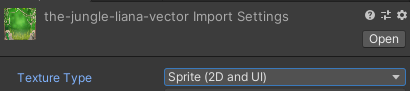
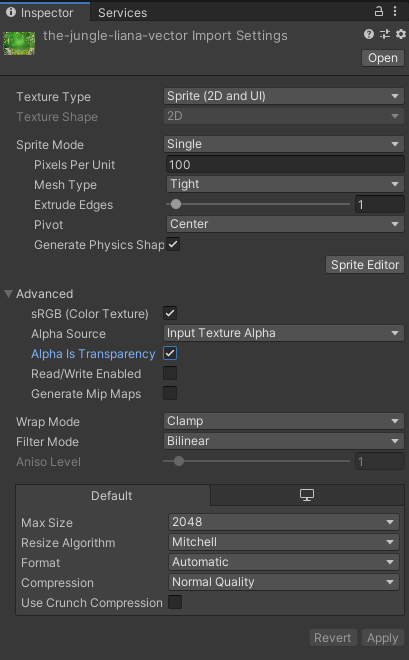
Go click on your png file and make sure you have imported it as a Sprite (UI and 2D)
By default it is not a Sprite
(import settings on the asset)
 glossy void
I'm having weird issues with ui. My app has two areas - panel with button at the bottom, and content ares, filling all other space. Panel is set to snap to the bottom with width = with of screen and height = 320, and the content is set to fill all space, with indent from bottom = 320. It's impossible to break this thing with different resolution - even in free aspect mode it works well, and content part snaps perfectly to panel. But on some iPhone and Samsung phones it messes up, and leaves gap between content and pane. They are both under a single canvas. Here are the screenshots of components at the inspector.
 remote prairie
Hellp! Quick question... Why do my images even though they are set to be in the UI layer and set up as texture type as Sprite (2D and UI) they still being blocked by anything in front of them?
i am using the Build in render pipeline
like i would like to show the icon images infront of everything rather than being blocked by objects in the world
remote prairie
i got my answer thanks anyways
 grave junco
remote prairie
i got my answer thanks anyways
grave junco
remote prairie
i got my answer thanks anyways
Can you explain what was the problem?
I'm interested
 tawdry glen
Im having a bit of difficulty with a UI I'm working on
I have a scroll bar with buttons on it, and that did work
I added another button to hide/show the scroll bar (inventory) and now the scroll bar/buttons can't be touched anymore

Does anyone know why those buttons on the right won't respond to touch anymore? The log shows me that it recognises my cursor location when I touch the button spot on my phone, but the button/scrollbar won't respond to it at all
tawdry glen
Update: something on the canvas was breaking it and I couldn't work out what it was. Deleted the entire canvas and rebuilt, now its fine
 tired briar
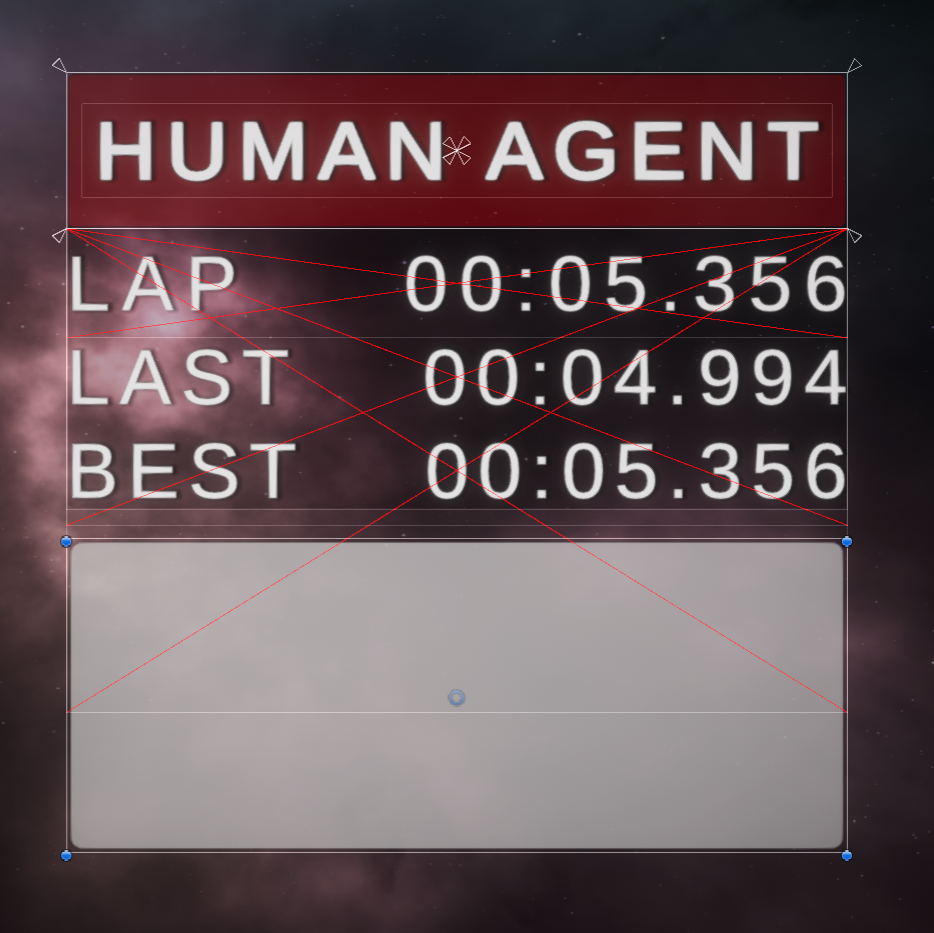
What are those red lines and how do I get rid of them?
https://i.imgur.com/mAkO1OJ.png
 mortal robin
tired briar
What are those red lines and how do I get rid of them?
https://i.imgur.com/mAkO1...
mortal robin
tired briar
What are those red lines and how do I get rid of them?
https://i.imgur.com/mAkO1...
Usually they are RectTransforms with invalid settings
like negative size/scale
They look strange because they're overlapping - but what you're seeing is 3 red "X"s of different heights
So looks like 3 RectTransforms with messed up settings
tired briar
mortal robin
So looks like 3 RectTransforms with messed up settings
thanks, watching UI tutorials since I am doing something wrong then. Tbh the old UI system is confusing and feels outdated.
Is it worth learning the old system for a very simple and minimalistic UI or should I dive right into the new UI system?
mortal robin
Uh what are you referring to as old and new systems here?
There are 3 UI systems in Unity (unfortunately)
tired briar
I though this XML based system was the new UI system? Like what Windows had too after win forms
3 UI systems? Oh dear god
tired briar
so IMGUI is what I am using, rect transorms, Canvas etc?
mortal robin
no
you're using the second one
UGUI
that's kinda the "standard" one
UIElements in the newest one
that uses xml etc
I've never used UIElements
tired briar
oh ok, Ive used OnGUI() for debug text, where you define the _style etc right?
mortal robin
The documentation for UIELements is awful
mortal robin
tired briar
oh ok, Ive used OnGUI() for debug text, where you define the _style etc right?
yep exactly
SO yeah UIElements is the newest one but I've never tried it so I don't know much about it
tired briar
gotcha, so I guess for my first game AND using a very simple UI I better stich to UGUI then?
mortal robin
UGUI is what you're using, with RectTransforms
In my opinion it's the most "complete" and well documented, well-tutorialed system
so I would recommend it
It can still be confusing
tired briar
thanks! Will watch video tuts then 👍
mortal robin
😄
tired briar
the grid layout is very confusing from what I've gathered
mortal robin
Working with any of the layout groups - GridLayoutGroup, HorizontalLayoutGroup, VerticalLayoutGroup can be confusing
in my opinion the settings on those groups are poorly named and poorly documented
things like "force child scale" and "use child size" or whatever they're called
sometimes they seem to mean the opposite of what their name implies, at least to me
tired briar
yea, thanks god people have made good tuts about them
 rain stone
any ideas what could be casing the ui to randomly change size when i load up a project?
like i save the project turn off the comp, go to bed, come back load up in the morning and its like the camera shrunk and other things just randomly slid in different directions.
mortal robin
rain stone
like i save the project turn off the comp, go to bed, come back load up in the m...
Pixel perfect
And/or canvas scaler
But usually only by a little nit
Bit*
rain stone
Ah thanks! I've been wrassling all morning with all my prefabs changing sizes and everything
 floral crow
how do I access the method that text mesh pro uses to apply the gradient to text?
The one built in to it doesn't fit my needs and I want to recalculate it
Where should I look? In the tmpro c# files or in the shader?
 wet patrol
Having an issue with pivots, if any is able to help it would be greatly appreciated:
The child's anchors do not want to move to the parents corners (what I want).
This is in a layout group
2nd image is the child to the 1st image
 fathom pecan
Q: Does the hierarchy, a canvas has too many children with Canvas component, cause the issue of blurred UI?
Behavior: UI, especially TMP, blurred after enabling a parallel nested canvas.
Hierarchy: All panels, such as inventory panel, equipped item UIs, item info prompt panel, record scrollview, alert prompt, hint prompt, have their own canvas component, enabling by scripts, nesting within a main overlay canvas always enabled.
Setup: UGUI with TMP in 2020.2.
fathom pecan
wet patrol
Having an issue with pivots, if any is able to help it would be greatly apprecia...
Seems you added layout group, if you share more info about the component, I might be able to help you.
wet patrol
fathom pecan
Seems you added layout group, if you share more info about the component, I migh...
I somewhat fixed it by manually setting pivots far off, then moving them closer inside to where the parents position 'should be'.
It was a pain, and probably not the proper way to do it.
Not sure why the problem existed.
But anyways:
Everything is under a horizontal layout group.
Each child in this horizontal layout group is a vertical layout group.
(Creating grid-like elements).
From the vertical layout groups, there are children. Inside those children is where I'm having the issue.
-It's my first time with layout groups-
fathom pecan
If I recall correctly, layout element should be the component of child, while Its parent have (girl/vertical/horizon) layout group component. I always set child as prefab, generating on demand.
wet patrol
So the object with a horizontal layout should also have vertical? Rather than its child.
I was thinking it made sense having the child with vertical layout group, since they are related vertically (and unrelated to the other vertical layout groups, the objects are just packed near eachother)
fathom pecan
Group is like a kindergarten, elements are its kids.
wet patrol
bleh. Is there a way to make the grid sort objects vertically first, rather than horizontally?
[I assume if I change it, I'll have to re-organize everything]
fathom pecan
https://youtu.be/HwdweCX5aMI?t=403 This video may help you.

Learn ways to improve your understanding of how to design UI in Unity!
URP Examples: https://github.com/Unity-Technologies/UniversalRenderingExamples
Understanding Color: https://www.youtube.com/watch?v=Qj1FK8n7WgY
Designing A Loading Screen: https://www.youtube.com/watch?v=iXWFTgFNRdM
Dynamic Depth of Field: https://www.youtube.com/watch?v=7...
If you wanna vertical layout only, just add vertical layout group in your char1 skills. If you also want vertical first then horizon, then use gird.
If you want to override the size of a duplicate child, layout element component need to be added to the child. [Just learnt that haha]
 obtuse oyster
Hey guys
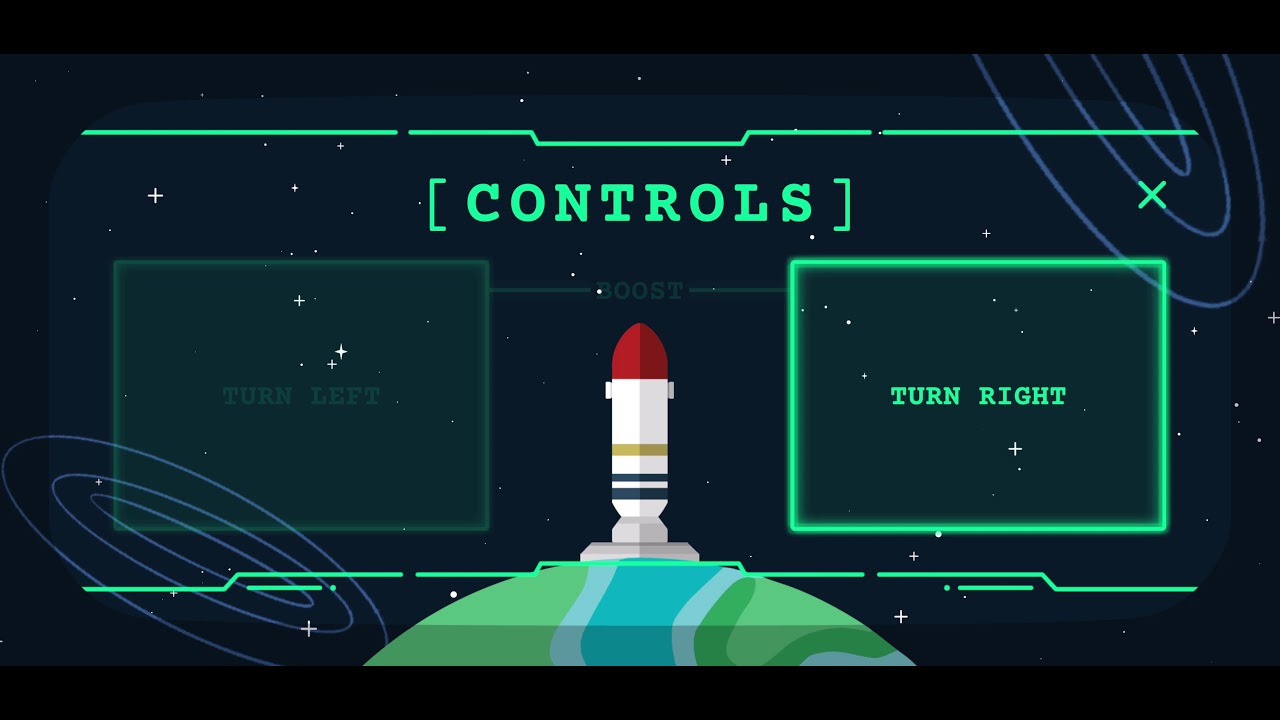
was wondering if the community could give me their thoughts on which controls screen they think is a more clear
It's a mobile game I've been working on and I know my current controls implementation left a lot to be desired so I was leaning in either of these two directions
Any thoughts in general would be helpful btw! Thanks in advance!
mortal robin
second one is much more clear
I can't actually tell waht the top one is trying to say
it looks like you're labelling some dots
are you supposed to tap those dots? Or slide them along the line maybe?
And in the second one, I imagine I tap the large squares to turn right and left, but I 'm unclear on how I shuld booost
obtuse oyster
thanks so much for the feedback!
The boost is the hardest bit to convey
Would you say this one is any more clear on the controls @mortal robin ?
jagged monolith
Nice, well part of the issue with the boost for me is that it doesn't read as a 'zone' like the other ones do. I would consider using circles for left and right and then a capsule for boost? Just an idea
obtuse oyster
Ooo nice idea
I also tried this and i'm thinking it's a little more effective at conveying the meaning
A bit more visual precedence but maybe i'm wrong lol
obtuse oyster
jagged monolith
Nice, well part of the issue with the boost for me is that it doesn't read as a ...
Also can you elaborate on the capsule idea 🙂
jagged monolith
Like this
tired briar
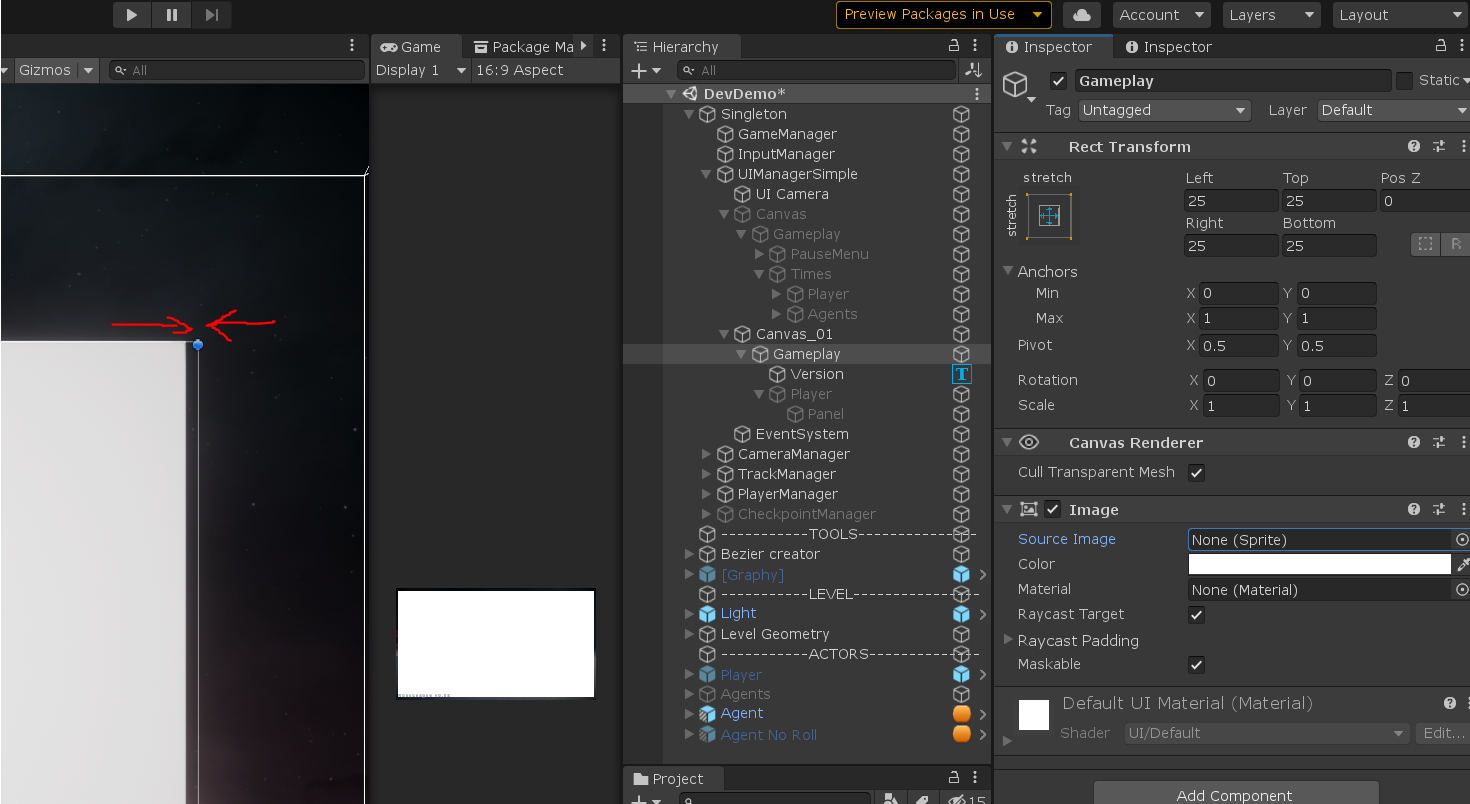
Need help with this weird offset issue, it drives me nuts https://i.imgur.com/9UPxrJZ.png
setting "pixel perfect" only made it worse https://i.imgur.com/HIiA9JT.png
 obtuse oyster
I think i'm going to end up rolling with this one guys. Thanks for the feedback!
I think it still has a lot left to be desired but, trying to focus on improvement over perfection 🙂
 oblique sparrow
Anyone have any tips for developing a complex menu system?
 remote dove
if I want to make a script to provide a function to each of these buttons
how would I go about doing that?
would I have to add a script to each button?
oblique sparrow
remote dove
would I have to add a script to each button?
I think it kinda depends on what the buttons do and if the functionality is similar or not.
remote dove
oblique sparrow
I think it kinda depends on what the buttons do and if the functionality is simi...
I just want to turn off an GameObject.active for each one
but the objects load at runtime
oblique sparrow
Hmmmm
You can add a script to the button which invokes the GameObject.SetActive function when it's pressed
You can even add the script to whatever prefab you are instantiating at runtime for the buttons.
remote dove
public class InitialiseDisplayedRing : MonoBehaviour
{
    static private int ringCount = 11;
    public GameObject[] selectedRing = new GameObject[ringCount];
    void Start()
    {
        Instantiate(selectedRing[1], new Vector3(0, 0, 20), Quaternion.identity);
        selectedRing[1].SetActive(false);
        /*for (int i = 0; i < ringCount; i++)
        {

            selectedRing[i].SetActive(false);
        }
        selectedRing[1].SetActive(true);*/
    }

    // Update is called once per frame
    void Update()
    {
        selectedRing[1].SetActive(true);
    }
}
so this is my script at the moment for loading in the objects, but how do I get a different script get the right id?
oblique sparrow
So inside the script you can create a field that stores the id. Then after you create your game object via Instantiate, you can get that script from the game object you just created by using GetComponent.
Then you can do objectThatYouCreated.GetComponent<YourType>().field = "your id"
remote dove
should I create a struct?
oblique sparrow
You shouldnt need to do that
remote dove
oh right, sorry i'm having a hard time trying to wrap my head around this
but If I have 11 GameObjects, won't I need 11 fields aswell?
waiit a second
objectThatYouCreated.GetComponent<YourType>().field = "your id"
where should this go?
oblique sparrow
In can go inside your button script.
Here imma add you on discord and try to write something up for ya and explain
 wicked cosmos
Hi, I'm going crazy. I'm trying to make a custom mask in my canvas UI suing an image.
-> Mask (With image and mask compontents)
--> Image to mask
But it's not working. Mask is doing anything. If I replace Mask and image with a "Rect Mask 2d" component, it's working fine.
what am I doing wrong?
 native echo
Hey guys. I am struggling to add in a GUI background sprite with faded edges. I created a black.gif with fade to transparancy around the edges. Looks grea tin my GFX app but when I create the sprite it creates hard edges on the black and transparancy after the hard edge. I Assume it s a setting I am missing?
image:
Unity:
 rare coral
What are the import settings set as?
native echo
That would help wouldnt it 🙂
native echo
Sorry misunderstood Aluminum. When I went to export settings I used PNG instead of gif and messed with transparancy. All better now. Thanks
 untold basin
How can I automatically adjust the panel to fit the text without the extra space?
ignore descbox
oblique sparrow
I think you can grab the width and height of the text and then resize the panel according to those dimensions
untold basin
via script or is there a easier way?
mortal robin
untold basin
How can I automatically adjust the panel to fit the text without the extra space...
There's a content size fitter component
Give that a try?
untold basin
mortal robin
There's a content size fitter component
I already tried doing so, but the outcome was weird, or I may just not understand what it does exactly
or how I'd set it up
it's even documented on Unity but my results were weird lol
oblique sparrow
untold basin
via script or is there a easier way?
Yeah via script.
floral crow
is a "unit" different in the ui canvas?
because when I set 32 pixels per unit, my pixel art gets scaled exetremely huge
my canvas scalar is set to scale with screen size and a 640 by 320 reference resolution
mortal robin
one unit is 1 pixel in your reference resolution I believe
floral crow
alright that's a very confusing convention but it works
 rain tinsel
Hello, I’m looking into a framework/asset/library that allows me to draw the typical shapes you see in any presentation app like:
- rounded angle rectangles
- oval and circle shapes
- borders (with adjustable thickness or border types)
Is there something like this?
jagged monolith

Use the Shapes tool for your next project. Find this and more particle & effect tools on the Unity Asset Store.
rain tinsel
That is perfect
And a bit expensive 😂
Anyone uses it for UI? Any feedback? (Don’t know if this is the right place)
Hmm it seems UI is supported as a workaround
jagged monolith
Yeah it's awesome. I haven't used it properly in a project yet, but my testing so far has been with world space UI for which it works very well
I can't speak for how it works with UI but there might be some questions about it on the forum page
rain tinsel
Thanks I asked a question there
fathom pecan
import Textmesh pro extra & examples. the 18th scene with scroll rect is a good start point. I am novice but that sample scene helped me a lot.
I am not sure about the UI Toolkit. demo video also looks great, but it doesn't support some features.
Btw, does anyone know how to make the a horizontal scroll rect, like a song name with unknown length, auto scrolling if text length is longer than the rect mask 2d.
The element/text should fill middle center first, but anchor to the left after text length fill the mask.
Do I have to add custom script?
untold basin
I'll make sure to take a look at it, thanks!
 mild pilot
Hi im having a weird bug
InputField.text, if i put a bunch of text with newline, the text in the text object only shows the last line
I tried all the horizontal/vertical overflow settings
Is this... normal?
 storm veldt
Looking for resources on controlling a scroll menu with up/down arrows instead of click-dragging? I'm building a VR game and realized it'd be much easier for the user to click buttons rather than try to drag the scroll view. I'm a novice coder btw...
mortal robin
storm veldt
Looking for resources on controlling a scroll menu with up/down arrows instead o...
Which input system are you using?
the normal one, or Input System (the shiny new fancy one)
Actually - it doesn't matter
just make code for the button
that sets the normalizedPosition of the ScrollRect
storm veldt
okay, thanks. I'll look into it
 untold junco
okay so ive been working on some concept menus for my FPS game that i am making (the background isnt my game, it is MW) , I made these concepts in Adobe illustrator and want some feedback on them.
 sonic hollow
Im looking to made a node-graph style UI for level ups and abilities
Any hot tips on where to find resource on how to go about such a thing?
Mostly just the UI part, I have scriptable objects and whatnot ready to go
(think final fantasy 10 or path of exiles)
fathom pecan
I am learning multi atlas for Dynamic TMP assets. But what is strange is that TMP asset only show one atlas even though I overflow the atlas with too many characters. The characters are correctly rendered though. Am I wrong or just a bug for TMP 3.0.3 in Editor 2020.2.3?
I was following this video. https://youtu.be/NY1xKqCIj3c?t=900

This video was created to help a few users and show the improved workflow made possible by the introduction of the Dynamic System with Multi Atlas texture support now available in version 1.5.x of the TMP package for Unity 2018.4.
NVM, it looks like Unity put the material + atlas in Hierarchy window instead of Project window.
The project window does update multi atlas later. I assume this is a little bug
 cyan sluice
Hey, is there a way to prevent scrollBar.value from dynamically changing? Id like it to have constant value all the time
 earnest prism
What do you mean
fathom pecan
I am trying to detect if textmesh get masked by rect mask 2d. Is it feasible by doing so?
TextMeshProUGUI tmp; RectMask2D mask;
if (tmp not get masked)
{
  return;
}
 hot schooner
any know what this error is
 azure flame
hot schooner
any know what this error is
azure flame
hot schooner
any know what this error is
the error point to the line in the script, search for unassigned reference on that line
hot schooner
Ah ok
rapid ferry
Can someone share a sample UI Toolkit project?
I've been having a really hard time finding any resources for anything above basic Editor UI ☹☹
 nimble chasm
Does anyone know how to make buttons not Selectable? I want to have some buttons that the user toggles "on"/Selected, but other buttons that don't change the Selected state
I've tried setting the Navigation to None on the Button component, but it still deselects other buttons
sonic hollow
^
I need the same for making a node based UI where to select the next node you have to have the previous node
 eager moth
I have a question that's tangentially UI-related, so I figured I could ask it here. I have an Azure database which contains a variety of questions and answers, as well as a table of users. I would like to create a UI that is able to interact with this database in order to allow someone to take a quiz (questions will be taken from the database, and displayed to the user, then the user's answers will be stored in the database for a specific user account). My problem is that I haven't been able to establish a connection between the project and the Azure database. Is anyone able to provide me with some insight?
obtuse oyster
I think i'm going to end up settling on this for the controls
I'm curious what you guys think 🙂
It would just loop so long as the player is on the screen
 broken flame
what do you think of my hp bar (both the bar and hp text are gradients but i dont know how to make a gif)
 earnest topaz
how do I make animations that constantly moves on the background of my menu screen?
tired briar
When I run the game the material of the TMP gets automatically changed to the default, even-though I have assigned my own copy of the material. What is going on? https://i.imgur.com/xCzCMb7.png
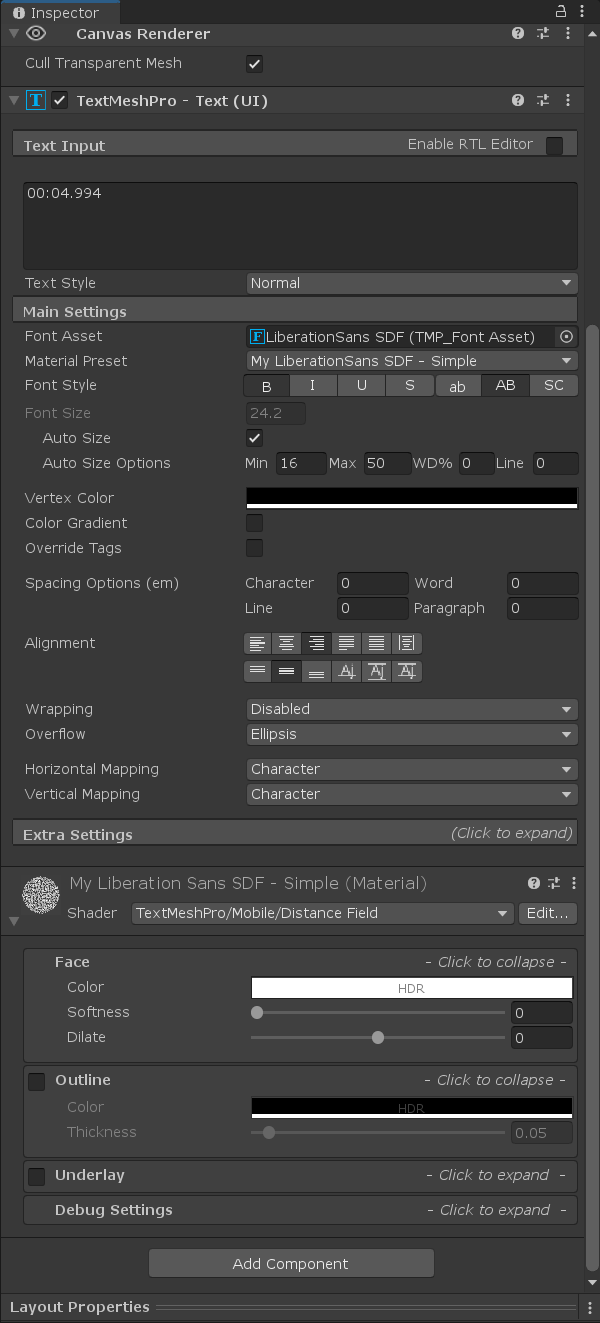
my custom material is "My LiberationSans SDF - Simple", it gets replaced with the default TMP one
without assigning my materials all my text has the same property (underline etc)
rain tinsel
Hello, I'm looking into doing a color palette that I can pick colors to add to various UI objects and then if I change one of the colors in the palette I want to apply it to all objects
How do I approach this problem? Any tips?
 lusty oxide
rain tinsel
Hello, I'm looking into doing a color palette that I can pick colors to add to v...
lusty oxide
rain tinsel
Hello, I'm looking into doing a color palette that I can pick colors to add to v...
This video series might help you out https://www.youtube.com/watch?v=HkUSmI7F304

Watch this video in context on the official Unity learn pages: https://unity3d.com/learn/tutorials/topics/user-interface-ui/introduction?playlist=17111
In this session Online Evangelist Matt Gambell will take us through how to build a system that allows for flexible and customisable way to work with UI in a project by taking advantadge of the p...
rain tinsel
🙏
 hollow timber
Hey ya
how would you guys layout this in unity?
I currently have this hierarchy
should I have an Horizontal Layout Group component on the Name Panel object?
mortal robin
Not necessarily
only if you want the label and the input field to dynamically reposition themselves based on line a percentage of the parent's size
hollow timber
that would be the best solution right?
mortal robin
If you just anchor them both to the left side of the parent, you should get a nice result where they stick a particular number of pixels away from the left side
that's simpler
hollow timber
tbh I just want this to be responsive to any screen size, that's it really
mortal robin
just use anchors
horizontal layout would be weird
I would want this stuff to just stick to the left side of the screen (with fixed offsets)
it would be weird if the space between the label and the field was dynamic
hollow timber
I need to have a look into the anchors cause I don't understand them very well
mortal robin
let me clarify - I owuld want the label and the input field to stick to be anchored to the left side of the Name Panel
The name panel's position inside whatever contains it is obviously a different story
yeah you should learn about anchors
and pivots etc..
otherwise laying out UI is going to be a nightmare for you
hollow timber
alright, I'll watch some video about it, and then try your solution
thank you for the help!
 long charm
hi guys, does anyone have some tips to make the HUD a bit more visible? I've tried outlining. I notice games have super obvious interfaces
 ebon mesa
@long charm give the text a shadow?
long charm
I’ll give that a go, thank you
rapid ferry
Word of warning for debug UI. Do not be me, have descriptive error messages if something goes VERY wrong.
 timber minnow
hey question for y'all. do folks here have a go-to pattern for building UI that depends on data (e.g. showing a card for each weapon in the game)? do instantiate prefabs at runtime, or create it ahead of time in the editor?
mortal robin
If there's a dynamic number of cards i Instantiate prefab
If there's a set number, i create them in the editor (but still use a prefab )
timber minnow
for the latter, do you create them manually? or use a script to create them?
mortal robin
Manually, but I'm imagining like a small number less than 10
If it's More than that I would Instantiate them at runtime no matter what
timber minnow
interesting
my use case is basically hats
i have dozens of hats in the game. i know what they are at editor time, but i often add new hats to the game.
i could lay them out dynamically at runtime, but that seems.. slightly wasteful of resources?
it also means I can't preview what it looks like in the editor scene view until i run
mortal robin
Deffo do it at runtime
Wasteful of resources how?
You can preview by just hitting ctrl D a bunch of times in the editor if you want
Or just hit play
Anyway you will want your UI to adjust dynamically since you will be adding hats
timber minnow
@mortal robin yes definitely want the UI to adjust dynamically
i guess maybe my concern is unfounded. there's probably no big deal with instantiating 100 UI prefabs
mortal robin
Instantiating them is no different from creating them in the editor
As far as game resources go
timber minnow
hmm i guess that's true, the scene itself gets instantiated anyway
mortal robin
In fact it's cheaper because it uses less disk space
timber minnow
heh fair enough
do you use actual prefabs for this? or have a "template" object that's embedded in the scene?
i find it sort of annoying that i can't tell which prefab will be used for the UI just by looking at the hierarchy/scene view
(let alone what it'll look like until I run it)
mortal robin
I usually use a template object when I first create it, and then turn the template into a prefab and delete it from the scene entirety once it's working right
timber minnow
gotcha, okay yeah that's usually what i end up doing
it always felt a bit weird to me but i guess that's just how it goes
mortal robin
Some people leave the template in the scene and delete it
In Awake
I guess you could Instantiate from a template object in - scene but that gets dodgy if the list can be empty
timber minnow
yeah i've tried variations of that and i end up needing to use DestroyImmediate which i have shot myself in the foot with as is to be expected
i think i'll just accept the fact that i won't really be able to preview what my UI looks like fully until i run the game
in principle, the UI layout shouldn't change nearly as much as the data it's representing, so that feels like the right direction to optimize for
 quartz drift
Anyone else run into an issue where anchors aren't showing in the Scene in editor?
Red box is a child of white box, but no anchors are visible in the scene.
azure flame
quartz drift
Anyone else run into an issue where anchors aren't showing in the Scene in edito...
Make sure gizmos are not deactivated and select rectangular transform tool top left
quartz drift
Ah, there we go. Thanks!
 thick fossil
I have been putting together UI mockups for Battle Arts. It's not polished, and I'm not too concerned with the details yet, but I would love to get your feedback based on the following things:
- placement, scale, and shape of the different elements
- the information being conveyed
https://cdn.discordapp.com/attachments/760759277492895765/807907362282536990/PolygonPros_BattleArts_UI_Mockup_020721_01a.jpg

For context, this is a turn-based fighting game, where players choose cards representing fighting moves, which then execute on a timeline based on their startup and recovery frames.
 spare charm
aaaa
rain tinsel
thick fossil
I have been putting together UI mockups for *Battle Arts*. It's not polished, an...
I would add a preview of what is going to happen in terms of values for health (light highlighting how much damage you are making and how much health the opponent would have left)
The rock paper scissors thing is out of place (you should however highlight the selected card for easier readibility).
On the right not sure what the numbers represent
but, I must say I love this game concept 👌
 pine kraken
Hi !
Hey guys i was following this video https://www.youtube.com/watch?v=lvJzVIpqNrc&ab_channel=CocoCode and somehow i didnt followed it well, there is this script that "resizes" the game, and i dont know why i hit the play button and it didnt worked, the thing is, i tried to fix it by creating a new canvas and associate everything to it and use the script and i kinda ruined everything

🎁 Support me and DOWNLOAD Unity project: https://www.patreon.com/posts/47117076?s=yt
This tutorial/guide will show you how to install new package from Unity: Device simulator. Using that, you can preview you game on multiple devices and check it's safe are to make sure your UI won't be behind any notches or camera cut-outs! This package is avai...
It looks like that
now
im driving mad :')
All i want is help to resize everything to any screen size, or at least the usual screen sizes
Im using the device simulator
If you need more context just ask about it and ill answer, i dont know what kind of context i can give so just say what you need to help me
torpid sapphire
pine kraken
Hey guys i was following this video https://www.youtube.com/watch?v=lvJzVIpqNrc&...
i didnt see that tutorial but maybe if <ou want thhe ui to scale with screen size then just go on the canvas and on the component canvas scaler and the set it from constant pixel size to scalw oth screen size and the just adjust it
pine kraken
Thanks
untold basin
Mask isn't working, it's placed on the panel, the ItemEntryClones are all my item game objects that are being created dynamically. Please help, thanks
thick fossil
rain tinsel
I would add a preview of what is going to happen in terms of values for health (...
Thank you for your feedback!
In the right bottom corner is the Timeline, with the numbers and symbols keeping track of the order in which different actions/events will occur.
In this screen mockup, it is currently the player on the left's turn. The card (battle art) that the player is considering for selection has a startup time of 8, so that attack would execute 8 frames from now, as indicated by the number 8 above the card's symbol and the 8 white frames before it on the Timeline. The card has a recovery time of 7, so 7 frames after it executes (15 frames from now) it would be the player's turn again to select a new card.
Meanwhile, on the bottom row of the Timeline is the opponent, who is currently stunned (the 4 red frames) and in recovery (the blue frames), and will get to have their turn 11 frames from now.
 coral cape
I don't understand why content size fitter would make all of the content below reduce to 0? The content below have horizontal layout group and vertical layout group, which have objects in it to keep it spaceous. But using content size fitter squash all to 0 width and height???
sonic hollow
Can anyone point me to a good place to learn User Interface Coding patterns
I have a complex node/path user interface, and id to approach it modularly, scalably, and easy to understand
So some good code pattern learning would be great
 drowsy pebble
Hey folks, I'm having some issues with the UI toolkit at runtime. Every time I update a text label in the UI, the hover state on any button that the mouse is over will flicker off. I've got an fps counter in the corner that's basically killing all animation/hover states whenever it's updated. What am I missing?
 muted kiln
is there a way to push a hole inside a ui panel or put the camera content inside a ui element ?
im trying to put my character inside a UI element like this
floral crow
mask
 tawny pike
how do you particals on a ui?
tawny pike
yeah but the UI overlaps the particals
floral crow
not if you set the canvas to render over the camera
tawny pike
oh yeah
jagged monolith
You can do this bu it's a bit of work https://www.youtube.com/watch?v=Y5WVxdhEiIg
(•̀ᴗ•́) و ̑̑ Hello everyone Welcome to my channel!
In this video, We will make one simple click game. And I want to introduce one of the most classical Win Effect in Unity. The most difficult point on this episode is How to make the particle effects visualize on the top of the UI Canvas.
(En este video, haremos un juego de un simple clic. Y qu...
tawny pike
iv already been though that its really out dated
@jagged monolith
the camera setting ant the same anymore
@jagged monolith @floral crow iv been though formulas of people just arguing over this stuff and videos that are like 4 to 5 years out dated on this topic
jagged monolith
you on URP?
jagged monolith
Search for tutorials specifically for URP
tawny pike
jagged monolith
Search for tutorials specifically for URP
yeah im still getting the same results
sonic hollow
Is there a 3D canvas (ie with a Depth level)?
jagged monolith
Yes, both camera space and world space canvases have depth
oblique stratus
how do i make these cords be seperate 2 lines instead of following one after the other?
 sonic hollow
jagged monolith
Yes, both camera space and world space canvases have depth
sonic hollow
jagged monolith
Yes, both camera space and world space canvases have depth
I suppose I could make world space UIs, and on a button select "walk" to the next depth
Thanks for the idea
 sharp sapphire
hello, first time doing UI in unity, making a 2d game, is there a way to resize the ui canvas element?
mortal robin
sharp sapphire
hello, first time doing UI in unity, making a 2d game, is there a way to resize ...
The canvas is always the size of the screen or whatever target camera viewport it's using
sharp sapphire
thanks mate 🙂
verbal mauve
hey everyone
so usually if you have a UI object inside another UI object
the one that's inside is given the higher stacking context
is there a way to override that so that the object's parent appears on top of it ?
earnest prism
Yes
If you click on the canvas there’s is something for that
Don’t remember what it was called
It’s like layers
 cloud lintel
In URP 8.2.0, my text mesh pro UI's on a world space camera are visible through objects in game view, but not in scene view. Is there a way to fix this so they aren't seen through objects in game view?
 sly latch
Friends in UI, I have a question which I can't seem to find anything but the most overcomplicated answers for.
Is it possible to reduce the UI Buttons interaction size?
I've changed the default image to one of my own.
these for example (will probably come out very small here
And I was wondering if there was a way to make the interaction zone conform to the shape of these buttons
 severe moss
Im doing an option menu with a scrolling interface but as you can see i cant go down and the scale is restricted so i cant see what are the other options
sonic hollow
severe moss
Im doing an option menu with a scrolling interface but as you can see i cant go ...
Make the "Content" object in the hierarchy taller
severe moss
wtf thank you, i thought i had already did this
can i make this automatic ?
 slate heart
Does anyone know how I can make a light2D light interact with and effect a UI element? I'm guessing it needs to not be on screen space overlay? I want to have a UI element with a child light2D object to simulate a computer screen. Any ideas how to accomplish this?
sonic hollow
I dont beleive UI elements are exposed to physics or world lighting 🤔
Well, "Screen Space Overlay" does not support world lighting
I think "Screen Space Camera" does
Or a "World Space"
Its been a while since I tooled with lighting a UI
rapid ferry
Is it possible to make custom behavior for InputField via inherited class?
Using KeyPressed() method
sonic hollow
Im not sure I understand the question
But you can use the keyword "override" in the child class to overwrite a method of the parent class
tired briar
Is it worth learning UI elements and making UI with it or should I stick with IMGUI?
tired briar
sonic hollow
What is IMGUI?
IMGUI is the GUI system for Unity, the one before this new XML based. Obviously it does the job done, the question is if the new UI system is worth it, otherwise they would not make it 🙂
sonic hollow
I dont know the old one and the current one suits me well :)
tired briar
I'd like to hear from people who used UIElements and whether the switch is worth it
tired briar
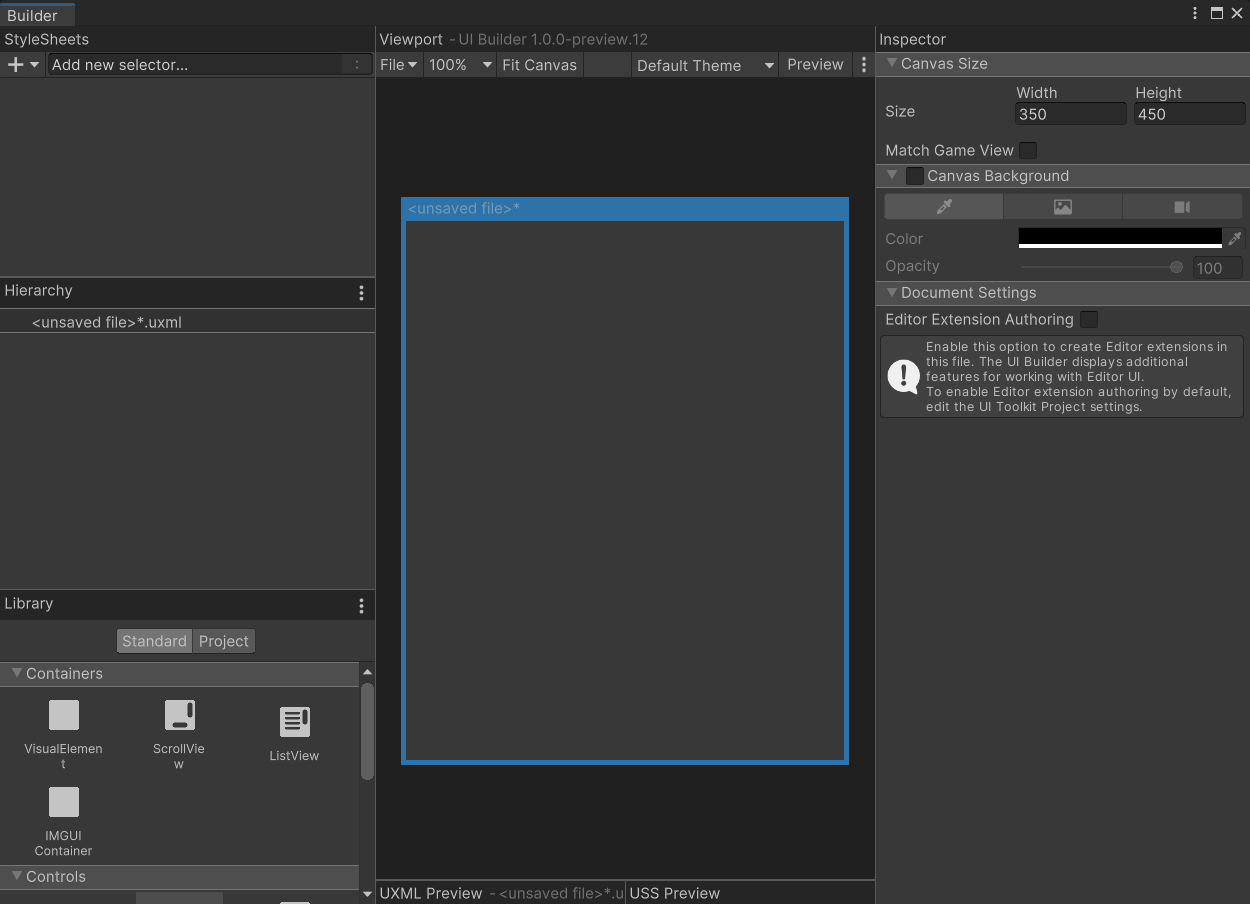
I guess UEElements are still unusable ? Nothing works on Unity 2020.2
I have literally empty layout https://i.imgur.com/aDl322s.png
 willow copper
I have an image I'm dynamically adjusting width for, I have it anchor'd to the left, but when I change the width, it's shrinking both sides and not sticking to the left. Is there any way around having to adjust the position to get this to stay aligned?
 soft crow
Hi! i have a really weird problem with Unity's UI, i talked with some people and no one knows what the problem is.
here's a link for the fourm post:

Unity Forum
I encountered the weirdest bug yet (for me). For some unknown reason after I play an animation of a UI object and I make it inactive (or I don't...
tired briar
anyone has UIElemts working on 2020.2.3?
willow copper
tired briar
anyone has UIElemts working on 2020.2.3?
It works for me but it's extremely buggy
 little ocean
Hey there 🙂 I'd like to have have a rectangular shape in a 2D game which I rescale during the game. It shall show a symbol on it, though, which should remain it's original size and shape.
Is there a better way than my workaround to have an empty game object which inherits the rectangle and the symbol object?
Is there a more elegant way? Can I achieve this without the emtpy parent? 🙂
 severe frost
Hi everyone, I'm working on some buttons that I will make available for free, do you have any ideas of what I could add? Here is the Play button
tired briar
severe frost
Hi everyone, I'm working on some buttons that I will make available for free, do...
I'd say the text should be editable by the user in Unity
mortal robin
Agreed - would be good to share just the button sprite with no text
 somber rock
Heya, has anyone used a horizontal layout group for objects as opposed to images? I want to animate the health hearts rather than just a static image.
Do I need to update the HLG's images to equal the sprte renderer's image?
mortal robin
not sure I understand the question. You would have a HLG containing objects that have sprite renderers. What do you mean by "the HLG's images"?
(btw are you talking about world-space sprites, or UI elements?)
soft crow
severe frost
Hi everyone, I'm working on some buttons that I will make available for free, do...
It's looking kinda bland
maybe add some more detail or change the shape a bit
Anyways i have a really weird bug with unity; for some reason after i play an animation for a UI object it sticks out of the sides doesn't matter if i disable it or destroy it. Im using unity 2020.1.2f1, and here's the full post: https://forum.unity.com/threads/the-ui-sticks-from-the-sides.1056686/
Unity Forum
I encountered the weirdest bug yet (for me). For some unknown reason after I play an animation of a UI object and I make it inactive (or I don't...
 tender horizon
is there a way i can make a image button?
 vague thicket
Hi folks! I am trying to resolve an issue with my Scroll View setup not working correctly - I believe I followed the usual setup from the docs correctly, but somewhere something is affecting it which means the scrollable area is always the size of the Content object's height, rather than constrained to the size of this Fitter object (the blue transform helpers), and then expanding to the max size of the Content object, if needed?
mortal robin
tender horizon
is there a way i can make a image button?
The default button object already is an image
just replace the default image with your own
 hexed spear
does anyone know how to peice together a good looking ui, what are the elements and how can you execute them
rapid ferry
is there any good UI template designs available anywhere? i need one for a quest window 🤔
@ me pls if u reply ❤️
 frosty pewter
rapid ferry
is there any good UI template designs available anywhere? i need one for a quest...
frosty pewter
rapid ferry
is there any good UI template designs available anywhere? i need one for a quest...
Not templates to be used, but examples you can draw inspiration from
rapid ferry
frosty pewter
Not templates to be used, but examples you can draw inspiration from
i found one, i downloaded it to assets folder, do u know why i cant insert it into "source image" under the panel inspector?
frosty pewter
because you haven't marked it as a sprite
rapid ferry
frosty pewter
because you haven't marked it as a sprite
how do i do that?
frosty pewter
rapid ferry
frosty pewter
<https://docs.unity3d.com/Manual/Sprites.html>
https://i.imgur.com/siSk3h0.png is that ok
 frosty pewter
give it a shot
rapid ferry
frosty pewter
give it a shot
it's way too see through, how do i change that?
frosty pewter
change the alpha of the color on the image component
rapid ferry
frosty pewter
change the alpha of the color on the image component
is this where u mean
rapid ferry
frosty pewter
components are on gameobjects
https://i.imgur.com/AiwM9CU.png
sorry never done this sort of thing before
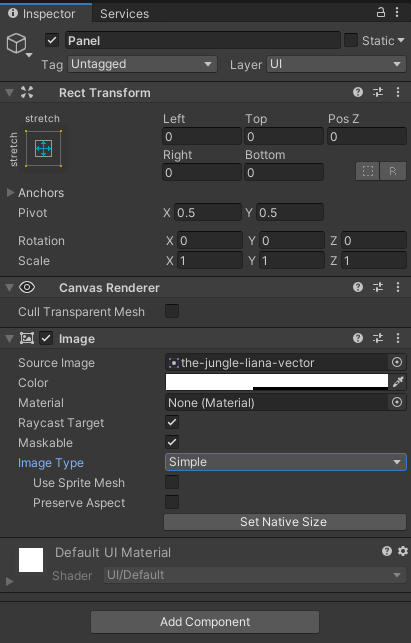
idk where else i'd look
frosty pewter
rapid ferry
it works =]
tender horizon
mortal robin
The default button object already _is_ an image
o
 sage prairie
So I have a problem for a shooter that I am doing
basically I have a raw image and I have a custom gun model but for some reason whenever I play the game, the gun model doesnt show up on the raw image
 weary crow
Is there a section to post that I'm looking for artists?
Or is this mainly for advice?
jagged monolith
team building is done on the forum @weary crow. There's a new section for it
weary crow
oh nice! thank you
vague thicket
A wee repost after a couple of days, hoping someone might know how to help with this 🙂 #📲┃ui-ux message
tender horizon
(first time) is this alright??
vague thicket
vague thicket
A wee repost after a couple of days, hoping someone might know how to help with ...
Many thanks to @restive haven, he helped me sort the above issue!
thick fossil
thick fossil
I have been putting together UI mockups for *Battle Arts*. It's not polished, an...
Another iteration of the UI for my game, changed some things up.
https://cdn.discordapp.com/attachments/760759277492895765/809187889207443456/PolygonPros_BattleArts_UI_Mockup_020721_01b.jpg

 wanton pike
Hi, right now in my game the enemies really far away, are annoying, because they are so far and small on screen
there are orange triangles above them to indicate them, but is there anything else i could do with the UI to help?
wanton pike
thick fossil
Another iteration of the UI for my game, changed some things up.
https://cdn.di...
nice!!
tired briar
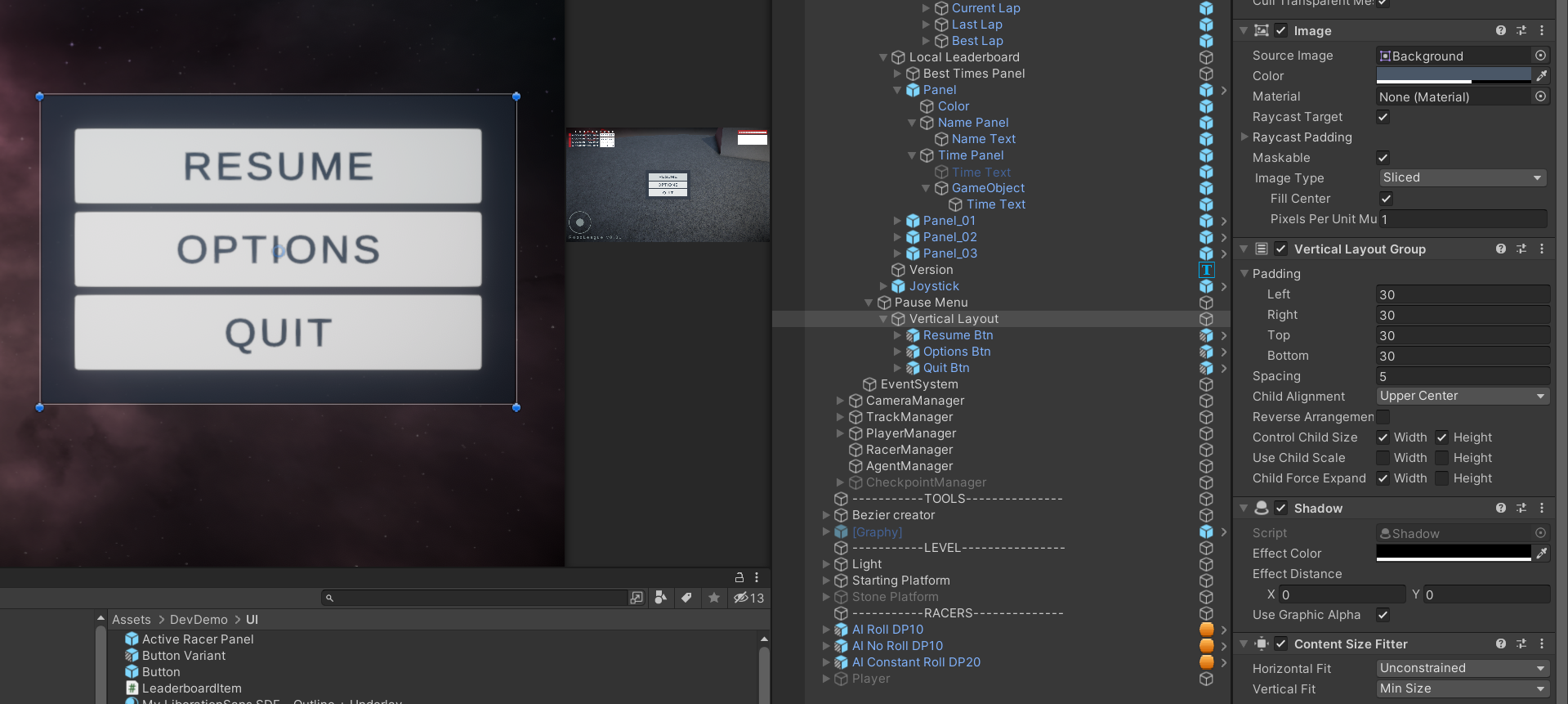
The "PauseMenu" GameObject (GO) has a Vertical Layout and an Image component, it holds the buttons as childs. But the buttons control their own height with a layout element. So now the background of the PauseMenu GO does not auto scale with the size of all the buttons. How can I achieve this? I want the grey background image to scale with the size of the underlying buttons

Of course one could do it programmatically with code, but there should be an easier, more elegant way
jagged monolith
did you try content size fitter @tired briar?
tired briar
jagged monolith
did you try content size fitter <@!206641667871211520>?
didnt even know it existed, let me try
tired briar
jagged monolith
did you try content size fitter <@!206641667871211520>?
this is magic, thank you very much! 👍
the solution for anyone else having this problem -> https://i.imgur.com/vqEL2nd.png
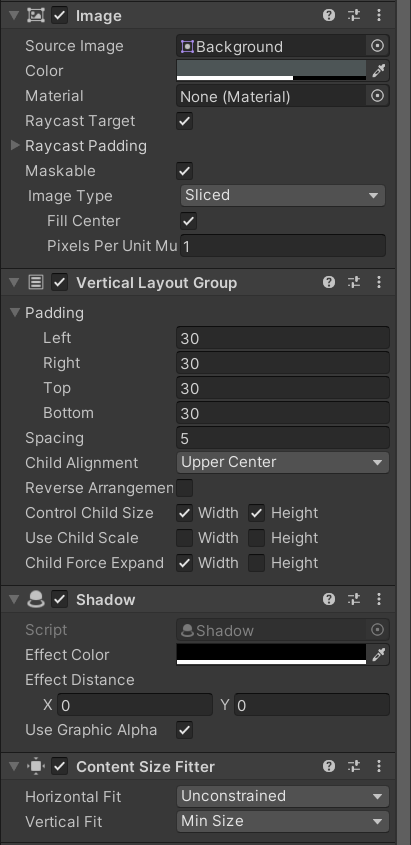 jagged monolith
Grrrreat
tired briar
Another one, this panel for some reason paints the white image background OVER its children: https://i.imgur.com/YiP2LaO.png
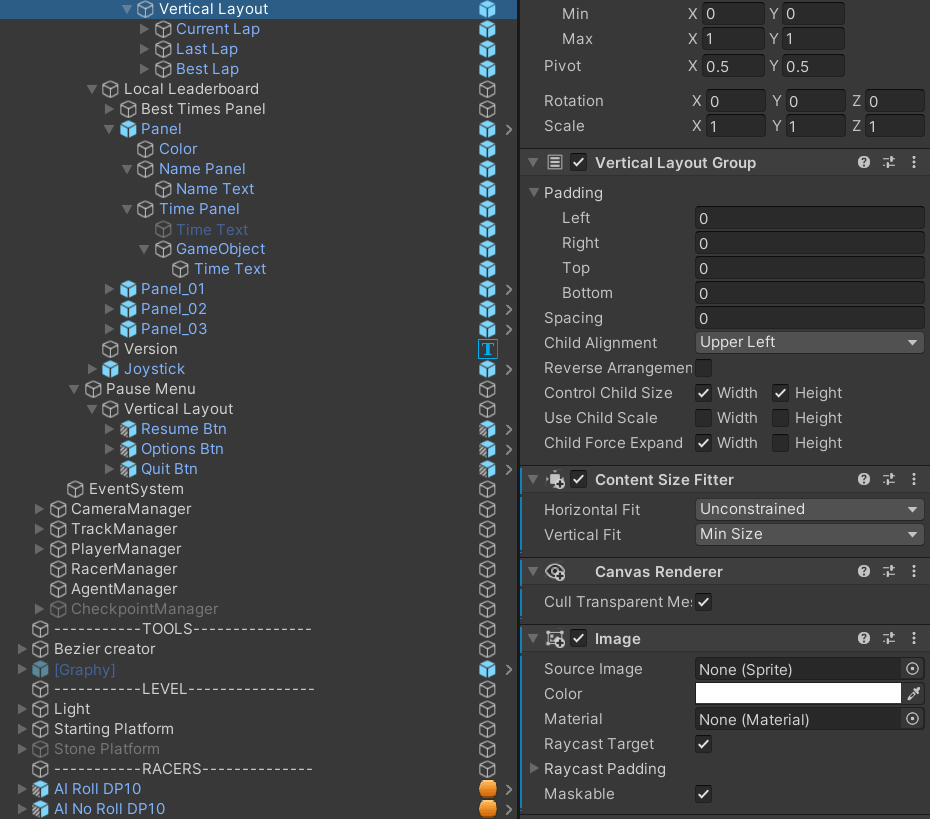
but on another menu with the same hierarchy it paints the blue background UNDER its children https://i.imgur.com/vA2OJKJ.png
something is wrong, no matter the position, the image is painted above - https://streamable.com/hpfdho
 jagged monolith
Haha
You sure this isn't because your text and colour are both white @tired briar?
tired briar
jagged monolith
You sure this isn't because your text and colour are both white <@!2066416678712...
ok thats a facepalm on my part 🙂 I thought the image is painted above
Thanks again 👍 This UI thing is making me stupid
if I want to change the text color of the button on mouse over, do I have to use animations for that?
tired briar
jagged monolith
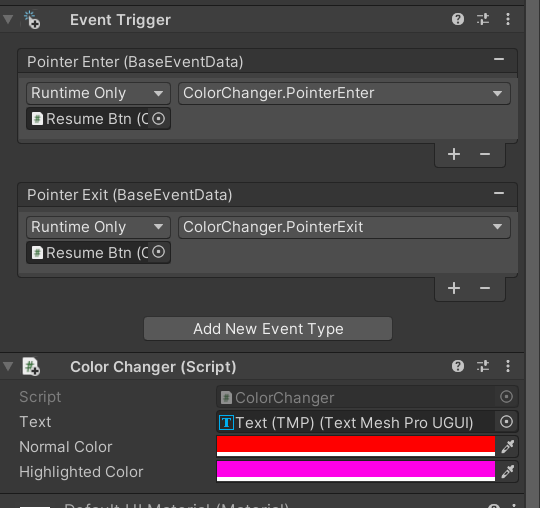
No you can use an event trigger component
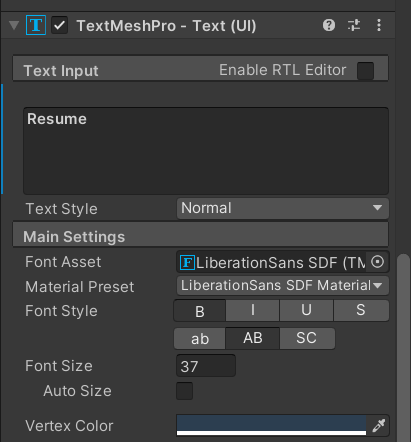
hmm, cant find the Vertex Color on the TMP
I can change the material, but the Vertex Color should be accessible too
its exposed in the inspector, at the bottom https://i.imgur.com/bAqwLx3.png
 jagged monolith
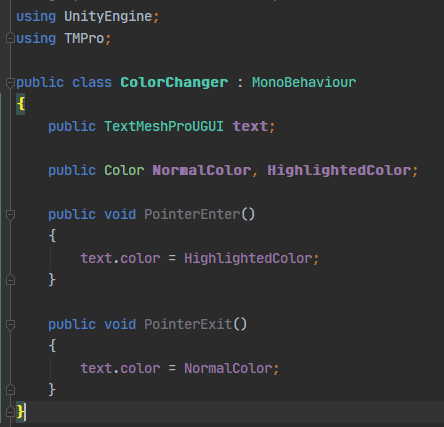
Huh you might need a tiny script for it then
tired briar
jagged monolith
Huh you might need a tiny script for it then
thanks, it works!
Solution: https://i.imgur.com/dM5Hl6m.png
https://i.imgur.com/AANLqN1.png
 jagged monolith
Awesome
tired briar
Weird, the OnClick() event triggers twice, in the console I see 2x the debug log message from the GameManager
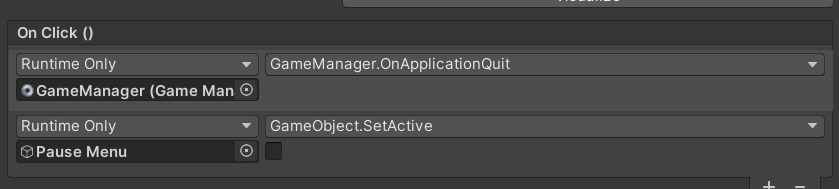
is it supposed to trigger the OnClick() event twice on the button?
jagged monolith
No
tired briar
jagged monolith
No
anyway I can debug to find the problem? It prints twice to the console for some reason
jagged monolith
Try disabling the text under it and see if it still happens
 red quail
Hello guys,
I working on a pico- Quest project where we have 3d scene which contains a very large transparent/opacity layered UI
The UI is "draw call-ivore" with 100-120 batch/ draw call :/ (and around 13 fps just for this).
There are a lot of layered tiles with atlased pictures, live refresh content... I'm looking for a way to reduce the numbers of draw calls. I'm thinking to play/tweak the UI default material ?? Is there a way to do this ? Or to play with the render queue of the UI.
What do you think about ?
 old cape
Frame debugger might tell why the batches are broken. Combining materials, reducing use of built in effects, reducing masking etc. are some of the common optimizations
red quail
Ok. We are already working on (frame debugging) I ve seen this :
"An advance technique you can try is to draw part of your UI in opaque mode, just before the geometry render queue. If you write to the z-buffer, then all pixels behind it won’t be rendered. Of course, that won’t look good for all types of UI controls.
old cape
@regal relic We don't have collab/job posting on this server.
frosty pewter
@regal relic There are pins in #💻┃unity-talk that link to the unity forums job section
 regal relic
@old cape Sorry, wasn't aware of that!
 umbral orchid
how can i move the slider with the mouse?
rapid ferry
I have given the highlighted and pressed different alpha values but it doesn't work :c any clue how to fix?
cloud lintel
What's the best way to check if a button was NOT pressed when the mouse is clicked?
mortal robin
cloud lintel
What's the best way to check if a button was NOT pressed when the mouse is click...
bool mouseWasPressedAndButtonNotPressed = !Input.GetButton(...) && Input.GetMouseButtonDown(0)
cloud lintel
Sorry I meant UI button
mortal robin
uhhh
I'm confused then
You want to know.. if the player clicked anywhere except on your button?
mortal robin
make a button behind your button that fills the entire screen?
cloud lintel
I guess that could work lol
mortal robin
what's the point of this exactly?
cloud lintel
I need the dropdown to go away when the user clicks anywhere other than dropdown
mortal robin
Then use an event trigger on the dropdown
and do something on the OnDeselected event
cloud lintel
It's not unity's dropdown, it's a custom one I made
I turn it on via canvas group when a separate button is pressed
mortal robin
is it Selectable?
Give it a Selectable component, select it when it gets shown with EventSystem.current.SetSelectedGameObject(theDropDown), and give it an Event Trigger component and add an OnDeselected listener
mortal robin
hmmm
cloud lintel
with a scroll view
mortal robin
You could always just give it an Update method that checks if the mouse clicks outside its rect
cloud lintel
Yeah that's what I'm thinking too, thanks for the ideas
 cursive vessel
hi everyone i have a quesion the UNITY UI NAVIGATION for controller and keyboard navigation is there a way to navigate continuously like turbo or as acoding reference (getkey) instead of the default navigation (getkeyDown) but without code only in parameter ??
rapid ferry
i want to switch scenes after a video finishes playing. how do i do that?
jagged monolith
rapid ferry
i want to switch scenes after a video finishes playing. how do i do that?
rapid ferry
ty <3
rapid ferry
jagged monolith
<https://docs.unity3d.com/ScriptReference/Video.VideoPlayer-loopPointReached.htm...
i've been trying but i can't seem to use it. can you help me please
jagged monolith
What's your code?
You can it in the top example here https://docs.unity3d.com/ScriptReference/Video.VideoPlayer.html
rapid ferry
i don't know C# too well, and i deleted the code, all i want to do is know if the video is ended. if yes, use scene manager to switch scenes
jagged monolith
// assigned in inspector
public VideoPlayer videoPlayer;
void Start()
    {
        // Each time we reach the end, we slow down the playback by a factor of 10.
        videoPlayer.loopPointReached += EndReached;
    }

    void EndReached(VideoPlayer vp)
    {
        // Load scene
    }
 jagged monolith
using UnityEngine.Video
 white furnace
Hello everybody 👋
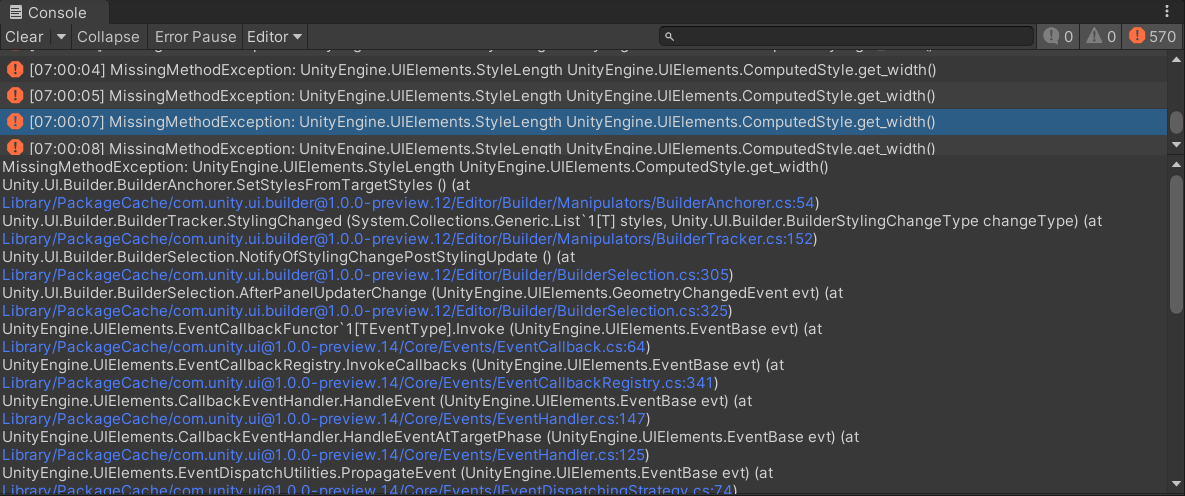
Did anyone know this errors? I get it when i use the UI-Builder (at selecting the elemnts). The Inspector-Section is empty.
Thanks!
 white furnace
After delete the ui builder in the packagecache it works... Thanks for the help 😄
 mortal robin
numbers in the top right are kinda cut off
And why are there multiple things at the top that say SHOP
am I in the SHOP, or can I press that button (is that a button) to enter the SHOP?
The text in the box on the lower left is poorly centered, and the various elements at the bottom of the screen seem disparate. Some of them look like textures and some look like game screenshots. Are they all the same type of thing? @wanton pike
rapid ferry
for whatever reason i can't find the OnClick() for any of my buttons :c It was there yesterday
 mortal robin
rapid ferry
for whatever reason i can't find the OnClick() for any of my buttons :c It was t...
mortal robin
rapid ferry
for whatever reason i can't find the OnClick() for any of my buttons :c It was t...
Click the little sideways triangle on the Button component to unfold it
 spark yoke
iam having some trouble making an event button work on top of ui canvas panel
Anyone can help?
 uneven canyon
hi guys i am new to the group,I need help when i am dragging my bird back it respawns immediately to its starting position can you guys help me fix this problem?
spark yoke
uh yeah go ahead
 copper shore
i have a canvas prefab that contains a pausemenu with some sliders
the sliders work in one scene, but in another they dont move, any idea why?
azure flame
It needs active EventSystem.
copper shore
i forgot about that, thanks 😄
 ebon matrix
where do you guys source icons from? My scriptableobjects are clearly programmer art 😦

just some open source repo taking valuable space on github, budget of 0
I feel like I'm using windows 95 over here
 pseudo apex
ebon matrix
where do you guys source icons from? My scriptableobjects are clearly programmer...
pseudo apex
ebon matrix
where do you guys source icons from? My scriptableobjects are clearly programmer...
Now and then Humble bundle has some game dev art bundles that are extremely valuable. It's like 15 bucks for over 5gb of just random "cheap" to use art.
 real ice
is there a way to stop a dropdown from hiding when an option is selected?
I want to change its options when one of them is clicked (for a sub-list)
dropdown.Show() does not override the hiding and temporarily changing the fade speed causes a flicker
oh, this seems to work:

 mental wind
Hello everyone! What is difference Slider with Scrollbar?
ebon matrix
pseudo apex
Now and then Humble bundle has some game dev art bundles that are extremely valu...
Would I be able to release those icons for free in my repo though?
pseudo apex
ebon matrix
Would I be able to release those icons for free in my repo though?
You can release a free/paid game with them, yes, but you can't release it for free for other to download and use for their own projects.
ebon matrix
ah yeah, I'm not releasing a game, it's a tool for unity development on github so I'm not sure I'll be able to put paid assets in
 jade cliff
I'm making a game that is meant to look like a snes game (resolution and all) and the ui doesn't scale according with the games window size. I'm using the pixel perfect camera and both it and the canvas use the same reference resolution

is there a setting that I'm missing?
pseudo apex
ebon matrix
ah yeah, I'm not releasing a game, it's a tool for unity development on github s...
You could always use googles free icons for example.
There are plenty free icon packs out there
 thorn star
 mortal robin
thorn star
mortal robin
thorn star
Render a camera to a RenderTexture
put a RawImage component in your UI and use the RenderTexture as the texture for the RawImage
thorn star
ty
 tranquil pasture
Heyo, trying to make ui/etc with my project but stuff in the editor isn't showing up, however it is when i run it in gameview?

left being the editor, right being my game
 topaz coral
I've got a rather interesting problem. My buttons start to click infinitely whenever I click on them. Even the ones put into the scene by default. Any idea why this is happening?
 young lotus


 real ice
any way to make content size fitter not flicker when its contents are changed?
there is one frame where the size is wrong
even if the contents are deleted and spawned back in on the same frame
mortal robin
@real ice possibly by calling https://docs.unity3d.com/ScriptReference/Canvas.ForceUpdateCanvases.html after making the changes?
real ice
unfortunately that doesn't solve it.. :/
its a weird interaction between content size fitter and vertical layout group
I need the content of a scrollview to automatically fit to the size of its children, which are themselves driven by content size fitters
I have:
Scrollview
-Viewport
--Content
---SomeCategory (multiple)
----SomeButton (multiple)
 orchid sage
hi
i want to change canvas reference scale resoulution but without affecting the elements size
how i can do that ?
this is the canvas

i want to change it from 1920 * 1080 to 720 *1280
when i tried to make another canvas and drop all elements in new canvas the scale of elelmtns changing

liek this
 mighty oar
I'm struggling a little bit here with layering because of the canvas I'm using as I don't completely understand it

this is what's currently happening with that text box I've sorta made up!
whereas it's typically like this
 thorn star
I'm instantiating a toggle prefab, how can I script to set what is executed onValueChange? without manually doing in the editor
mortal robin
thorn star
I'm instantiating a toggle prefab, how can I script to set what is executed onVa...
You can add a listener to this: https://docs.unity3d.com/2017.3/Documentation/ScriptReference/UI.Toggle-onValueChanged.html
There's an example in that link
thorn star
prefect thank you
thorn star

 marble hollow
I could just be a little dumb, is there a way to have a horizontal canvas UI for mobile devices that looks entirely different from the vertical phone UI. I have tried a few different suggestions like using canvas scaler, but I can't seem to get around the objects in the canvas resizing when changing orientation (Ex. built UI in Vertical mode, buttons stretch out in horizontal mode. Want to build in Vertical mode and have a completely different looking horizontal UI.)
Additionally, does anyone know of a good sample scene I could look at to try to get a better understanding of different looking rotatable UI for mobile.
 bronze marlin
I'm making a custom graphic class that generates a line mesh for ugui. I'm trying to pack some extra info into every channel of the UVs so I can access distance, normalized distance, width etc in a shader. However it looks like channels after u and v and always 0 even though I'm setting them to non zero values.
Is there something I need to do differently? The VertexHelp.AddVert function takes a Vector4 for the uv so I'm confused why it would only use a Vector2
Here's how I'm adding the vert. I have verified that the w and t channels are being set correctly
vh.AddVert
(
  position: worldVert.ToLocal(this),
  color: color,
  uv0: new Vector4(1f, normalizedDistance, halfWidth, currentDistance)
);
I tried storing the additional info in uv1
uv1: new Vector4(width, currentDistance, 0f, 0f),
width is constant but when I visualize it with a shader it's different for each vertex?! Unity seems to be overriding or transforming the uv

 icy hazel
@orchid sage u can use 3d text bettet
 hoary flume
is there a way of using a psb file with layers as a UI image?
mortal robin
hoary flume
is there a way of using a psb file with layers as a UI image?
Export it as a PNG
willow copper
I'm having a strange scaling issue with my UI. This is what it looks like. The game server row in the hierarchy isn't in the scene, I'm instantiating it and have a vertical layout group and scroll area to let it flow vertically.


The issue is, when I instantiate the game server row, it looks like this... What might I have set wrong?
I'm instantiating it and setting it's parent like this
                var gameServerRow = Instantiate(gameServerRowPrefab);

                gameServerRow.transform.parent = gameServerRowContainer.transform;
Code looks fine - it's a problem with your UI setup
copy the row into the rowcontainer a bunch of times in the editor and see what it looks like
willow copper
Seems fine in the editor
 mortal robin
could just be a screen resolution thing?
Looks like the elemnts are getting cut off on the left and right?
because you can kinda see part of the player count
may need to adjust your anchors
willow copper
Looks like it was due to the way I was setting the parent.
I changed this:
gameServerRow.transform.parent = gameServerRowContainer.transform;
To:
var gameServerRow = Instantiate(gameServerRowPrefab, gameServerRowContainer.transform, false);
The last argument is what fixed it (worldPositionStays)
 steep dragon
I'm having a problem where if my player or scene view looks a certain direction the sprites and text disapear

The text at the top was doing the same thing I don't understand what's going on

the only notable thing is that it's a world canvas with pixel size 512x512 at a scale of 0.001.
Does anyone know what's going on with the ui canvas?
It appears it doesn't disapear but appear behind the shader graph shader object

is there something I can use to make my shader never draw over the ui canvas?
it appears transparent objects behind ui world canvases draw over ui by blocking it (invisibly)
AHAHAHAH

this render queue feature, ui must render at 3000, which is why the two overlap
setting renderqueue on the transparent object to slightly less than 3000 makes it not disapear!!!
frosty pewter
transparent objects in the same queue are sorted via their centers
so the canvas will sort in that manner wither others in the same queue (/ layer)
The best fix if you can do it (Canvas must be transparent) is to use opaque or cutout materials - as they don't have transparency and therefore sort correctly
steep dragon
yeah pr you could set the 3000 value to 2999 to create Transparent-1
frosty pewter
yeah, manually sorting like that also works 😄
steep dragon

 arctic anchor
does anyone know how to add lights to ui objects?
steep dragon
ui objects are 2d sprites, if you put them in world space, you can move them to be same scale with a 3d object and act like that 3d object is lit
otherwise you can use an aditional camera, set to only see certain objects, pointed at that object, with a render texture applied to a raw image on the canvas. otherwise, i'm unsure you can add lights to ui, you could always fake it with quads, slim cubes or something else if you're trying to get shadows to fall
long charm
any ideas why I can't see this stuff in the scene view? Visibility is on and object is enabled

can see it in play though

all layers are visible too, it was okay yesterday
sorry if this isn't the right place, wasn't too sure where to put it
 silk horizon
I think its because your MainMenu canvas/panel is higher up in the hierachy, so your SettingsMenu overrides it in the scene view, if you swapped them around it would be opposite
long charm
silk horizon
I think its because your MainMenu canvas/panel is higher up in the hierachy, so ...
unfortunately not 😦 thanks for answering though

can't even see them if the rest are disabled, but game mode is fine, genuinely baffled
 silk horizon
You're not disabling it in a script or anything?
long charm
nah, my method for hiding/showing menu screens is through scaling to 1 or 0, and that's all done at run time
silk horizon
What happens when you disable the background? Do they appear then
long charm
nein

this is a screenshot from yesterday, low res cos it's from a twitch vod i'm using as a dev log

but that's what I'm expecting to see, I just disable visibility to work on different menu objects
 runic igloo
Is it outside of your camera's clipping range? I don't know if that matters for canvas and UI elements like it does for regular stuff but you might try pulling your camera back on the z-axis to see if it helps.
long charm
runic igloo
Is it outside of your camera's clipping range? I don't know if that matters for...
would that matter in scene view? it's totally fine when I play, I just can't edit anything
thanks for the help btw guys
runic igloo
Oh, I see. You can't see it in scene view. Never heard of that. Keep in mind that the UI is typically gigantic compared to game objects. Because of this it can seem like it isn't visible. What happens if you double-click on one of the UI items in the hierarchy?
long charm
super zoomed in
 rapid ferry
ok so how do i make a ui were like i die and then it pops up "Press anything to restart"
long charm
rapid ferry
ok so how do i make a ui were like i die and then it pops up "Press anything to ...
that's a pretty broad question
rapid ferry
well beginner here
long charm
what steps have you gone through already?
rapid ferry
scripting and making 2d games but with UI's i'm new
long charm
emit an event when you die and use that to display the UI I guess
rapid ferry
oh ok
 wicked condor
Please if someone knows how to make a parent UI element fit it's text mesh pro child i'd be great help: https://forum.unity.com/threads/expand-textmeshpro-container-automatically.1064093/

Unity Forum
So i know you can set a Text Mesh Pro to auto-size the font to fit it's parent container BUT what i want is the opposite, to keep a font size and...
 shrewd socket
Hey, does anyone know why a UI element with an EventTrigger script on it isn't triggering OnPointerEnter event in one place but is in another?
It seems to work if I remove a graphics-raycast (remove, not disable) component on the UI element, then also remove the canvas element from the same element (again remove, not disable, dissable doesn't fix it) then the onPointerEnter starts working.
Is it some weird issue with parenting and canvases? Or the event system?
long charm
Any idea why this shows up when I create a new text object?

can't move it, can't resize it
 stiff reef
@long charm thats a Rect Anchor
long charm
yep you're right
not sure what it means though, and why my damn ui isn't appearing in scene view
stiff reef
anchors can do that
that particular arrangement of anchors tells me your Left Right Top Bottom stuff is set to "Center"
long charm
so the only stuff that's working as expected is if I make things a child of the canvas
 stiff reef
ah
long charm
if it's a child of the children of canvas, they don't show
that test text also has anchors set to center
long charm
if you'd be willing, I don't want to take up too much of your time
stiff reef
all good i have ~5min
long charm
sure, I'll add you andd give you a call
hoary flume
mortal robin
Export it as a PNG
i need it as a psb lol
 iron escarp
It seems my HorizontalLayoutGroup forces my Anchor Presets to be aligned top left

Is it possible to change it?
(once I enter play mode it will be changed back)
iron escarp
seems not possible
earnest topaz
I need help on this

the play button is behind a UI object
and I don't know how to bring it to the front
 naive mural
try using an image component instead of a sprite renderer for the chunk lower right?
ui in the same canvas is sorted based on their order in the hierarchy, and having a sprite renderer there might make it behave strangely
naive mural
ay nice!
mortal robin
iron escarp
Is it possible to change it?
Yes, in the horizontal layout group
iron escarp
thx
slate heart
Hey guys, I have a small problem with my UI. I am instantiating a bunch of buttons at runtime, and they are parented to a content object for a scroll rect. Mostly everything works fine, except that they initially load in above the area of the scroll rect and then lerp into proper position.
Any idea what this is about?
 viral pasture
slate heart
Hey guys, I have a small problem with my UI. I am instantiating a bunch of butto...
viral pasture
slate heart
Hey guys, I have a small problem with my UI. I am instantiating a bunch of butto...
Hmm, what kind of anchoring are you using?
Is there a way to pin ui elements to other ones? I've got a series of player icons representing the members of a player's party, and when you mouse over one of them it expands to the right to reveal that player's username. What would be the best way to move every icon to the right of the expanded one then move them back once it contracts back? Currently going at it via code, but I feel like there's gotta be a better way to go about this.
viral pasture
It depends on the situation. Center alignment works, but it won't scale to screen size. Not sure if it's even what's causing the issue. A video and the code you're using to instantiate would help.
slate heart
I'll see what I can do but I will have to post it later tonight
viral pasture
All good
muted kiln
is there a way to make grid layout children respect their content size ? seems to work for vertical and horizontal layout but not for grid
 acoustic bison
hey, i started using the ui builder today and I have a frustrating problem. the UI I built in the editor does not match the one in the game when I start it. I have enabled the "match game view" function on the uxml though


can someone help maybe ?
 jade fern
I have an "action point" System that looks like this in my game

What's a good way to handle removing/adding to this action point bar?
Like right now I just have to where, if you lose a notch in it, it makes the spot gray, so it updates with a visual script like that, but each of these individuals sprite I'm just referencing in my visual script.
 mortal robin
Use an array and for loops.. You loop over all the sprites and if currentActionPoints > indexOfThisSprite then you make it white, otherwise you make it grey
 civic notch
I dont understand the scrollview
if i set elastic it wont allow me to scroll without it snapping back
and if i take unrestricted i get infinate scroll
how can i allow it to scroll content and stop and top/bottom
 dense dune
ehi all! Where do you place the 'keyboard control' panel, that shows the keyboard commands? Inside the Settings? After a button in the main menu?
jade fern
mortal robin
Use an array and for loops.. You loop over all the sprites and if `currentAction...
Cool thank you!
 slow adder
Having a issue this this UI
This is a scroll inventory and it is working just fine, but for some reason i can not prevent it from overlapping the bottom of the inv

 summer oasis
Hey Guys 😄 I am prototyping a game with Laser and Mirrors and I am seeking information on how to achieve a UI that would show the selected mirror on which we click. Once selection we will be able to Move and Rotate the mirror. How can I make this UI appear around my object? I am working in 2D. I am assuming I need to work in WorldSpace for this.
Here is how it looks. the blue thing is obviously the mirror
 cursive vessel
hey guys i was watching a tutorial lately about how to create a dynamic radical menu selection till i discovered in the end that it only support mouse position, is there any way to implement joystick/keyboard support? here is the tutorial btw https://www.youtube.com/watch?v=WzQdc2rAdZc

Learn to make a dynamic radial menu using Unity's UI tools.
Beginner/Intermediate: Knowledge of basic scene setup and the Instantiate function recommended.
Part 2: https://youtu.be/HOOGIZu4nxo
Project sprites: https://drive.google.com/file/d/0B1AJ74NkKHw-X1dlUHRPdjBwZTg/view?usp=sharing
Free game icons: http://game-icons.net
 dark cipher
Hello.

I have a backdrop here, and I have a canvas with override camera over 3d object's camera. As you see "Platform" prefab is rendered by 3D camera
I want to fix my camera position for every resulation of devices.
How can I do that?
 frigid vapor
I'm trying to create a scroll view that has two VerticalLayoutGroups inside that expand to fit their contents.
I'm having some trouble getting the layout system to handle this though
It seems it doesn't register and update everything properly if those contents change (atm, dragging/dropping items into those two lists handled by the vertical layout group components)
Anyone have experience with this?
 median iris
I did some UI stuff with nested LayoutGroups inside of ScrollViews etc and I experienced the same problem, they wouldn't expand/update properly..
Idk if I just structured my UI in the wrong way..
at the end I made it work by manually rebuilding the Canvas/Layouts after an element got added/removed, probably not the best solution xD
@frigid vapor
viral pasture
Seems a lot of us are struggling with layout groups, lol. I've got a horizontal layout group that works for what I need, except now I'm trying to set it up to be able to scale with different screen sizes and resolutions. From what I can tell, I should have the HLG control child size height possibly with a Content Size Fitter?
I've been trying every which combination of settings, and whenever I click control child height or control child width it shrinks the size of the children to a seemingly random value. In 4k, the parent has a height of 100, the children have a height and width of 100, but when I control child size height it forces all the children to have a height of 16. When I turn on width, the width also goes from 100 to 16. Both on makes them all 16 by 16. I don't understand where it's getting the 16 value or why. Preferred size on the content size fitter results in the same, and minimum size puts it at a height or width of 0. Can anyone shed some light on this?
frigid vapor
@median iris I actually discovered the layout groups "Controls child size" option needs to be used, and then you need to utilize Layout Elements on everything to control the size of the individual items. Then it updates perfectly.
This includes me drag/dropping items in.
And after starting to use that it handled it flawlessly.
So I use the controls child size for vertical on any vertical layout groups in the scroll view and it worked.
median iris
Nice!
 azure horizon
Hi, I can't make the scroll work

I have the scroll Rect and the content with the items
I made sure the content is larger than the scroll
I watched 5 tutorials that showed me the same thing
Nothing makes it work
median iris
Can u show the structure of your ScrollView GameObject?
If you create new ScrollView, there's a Content child to it, you'd give that Content child a Content Size Fitter as well as a LayoutGroup, it should work
azure horizon
I did not use a ScrollView
median iris
Mhmm
I'd give you the advice to check out the default ScrollView, understand how and why it works, and then apply the concepts to your custom scroll thingy 😀
Won't be able to tell you why it doesn't work if you don't show us the complete setup 🙂
 median iris
I am not sure, but do you maybe need a scrollbar to make the ScrollRect work? I always used the default ScrollView and adjusted it to my needs
azure horizon
I'm not sure either, I followed 5 tutorials that showed me the same thing and they all worked
except for mine
median iris
Is there a specific reason why the default ScrollView is not a valid option for your situation? You could adjust all the textures etc to your liking
azure horizon
not really, I just don't want to have to adjust because of my limitation every time something doesn't work instead of understanding why it doesn't work
ok, I just did that and added all of the items to the content game object and it still doesn't scroll
median iris
Try adding a Scrollbar as child of the scroll Rect
median iris
But there's no Scrollbar assigned in your ScrollRect
 median iris
Ah, I looked at previous image and there wasn't any 🙂
And it still won't work?
Even when dragging the scrollbar?
azure horizon
because I made that one from the tutorials, this one is the one that unity gives you by default if you select UI >> Scroll View
it doesn't wrok
work*
I click the scrollbar, I use my mouse
nothing
median iris
Sorry, I have no clues anymore
azure horizon
great, thanks
median iris
I'd suggest you just give the default ScrollView a try, sorry
Maybe someone else will take a look into this channel and is able to help u better
azure horizon
median iris
I'd suggest you just give the default ScrollView a try, sorry
bro, I don't think you understand me very well and I don't know how to explain it to you so you can get it better. I just used the default scrollview like you told me that has a scroll bar by defaut, that I did not change at all, everything is still default, and it doesn't work
 untold scarab
Is there any way to remove this annoying twitching whenever I instantiate a prefab inside a Scroll View?
 junior zodiac
For designing icons, I'm trying to decide the right pixel width/height for icons on a standard 1080p desktop screen. Any advice?
This will be for things like slotted weapons, inventory items, etc.
 cinder silo
Simple issue. The background is one sprite, with some transparency. Why does the transparent coloring over the texts above it?
 viral pasture
cinder silo
Simple issue. The background is one sprite, with some transparency. Why does the...
viral pasture
cinder silo
Simple issue. The background is one sprite, with some transparency. Why does the...
How are they situated in the hierarchy? The background needs to be higher in the hierarchy than everything else.
cinder silo
I ended up finding out about render queues and just altered that value 'till it worked
Then applied the same material to other sprites in the scene so they render beneath the pause background
ezpz
viral pasture
cinder silo
I ended up finding out about render queues and just altered that value 'till it ...
It's good to know about render queues, but understanding that the render order is also dictated by the order in the hierarchy might have fixed your problem with the drag of the mouse.
cinder silo
I have the pause element parented the way I need it to be in the canvas, and in the hierarchy as a whole
probably wouldnt have been so simple
viral pasture
Are the buttons not parented to the pause menu?
viral pasture
junior zodiac
For designing icons, I'm trying to decide the right pixel width/height for icons...
Don't worry about pixel size and make them look right on your UI, then anchor them in place. That way they'll scale with resolution. Then make the art with whatever aspect ratio the elements have.
cinder silo
viral pasture
Are the buttons not parented to the pause menu?
They are, as is the PAUSED text
the pause menu is an EGO, with all the elements parented into separate children
Im having another issue though. The pause menu overlays ontop of everything correctly except this water texture here. I changed its render queue to be lower than the pause menu material, but when I did that this undesirable pattern appeared
 viral pasture
cinder silo
Im having another issue though. The pause menu overlays ontop of everything corr...
viral pasture
cinder silo
Im having another issue though. The pause menu overlays ontop of everything corr...
Are you using a world space canvas? A screen or camera space canvas should overlay your UI over everything else.
cinder silo
screenspace
viral pasture
Weird
cinder silo
Pretty sure I just fucked the renderqueues of all my materials a bit too much. I just ended up doing tedious repetitive renderqueue changes on most materials until i got satisfying results
I'll just have to stay on top of that stuff when i make more sprites and textures
viral pasture
frigid vapor
<@!610365119142166548> I actually discovered the layout groups "Controls child s...
I don't suppose you could tell me the exact settings you have enabled for each of the components? I am floundering over here, lol. I just want the elements to match the height of their parent for a horizontal group, but it keeps shrinking their height to something smaller than the parent.
frigid vapor
Content size fitter on the game object with vertical layout group
Sec
It's recompiling, going to double check
Preferred size for the vertical fit on those
I had child force expand on height
Control child size true on height
(for vertical layout group containers inside the scroll list)
In my case the items that go into those have LayoutElement components
Min height set for that
(to whatever is needed)
Content game object which is the main container for these nested vertical layout group also has a vertical layout group on it, and a content size fitter with the same settings as mentioned above.
I'll check that I don't have any old canvas recalc code in there
Nope should be good.
I commented out all my LayoutRebuilder calls when I figured this out.
@viral pasture
 remote garnet
hey there, can anyone help me, i'm stuck
we're using the unity automatic UI navigation for all menus because we populate the menus by code. i can't manually link stuff because it's not even there yet in editor mode.
usually this has worked so far, but when i manuall deactivate gameobjects containing selectables (hierarchies of them) to switch menu branches on/off, the system sometimes gets bugged
for example one and only one button becomes unselectable for no apparent reason
this seems to be a unity bug but i can't find anything by googling the issue apart from one 5 year old thread with 0 replies https://forum.unity.com/threads/forcing-refresh-of-auto-navigation.325093/
Unity Forum
Hi,
We populate large parts of the UI via code, and it seems as if the Auto Navigation for new elements is not being reset properly when UI parts are...
I need a way to force a complete UI and/or navigation refresh
iron escarp
does someone know the difference between dynamic and static populating for TMP?
When to use dynamic over static? what are the advantages?
remote garnet
so, this has to be a unity bug, right?

this is what happens to my automatic navigation flow after i toggle the root gameobject holding those buttons off and on again.
before it looks like this:

the system for some reason thinks there is "something" between the credits and exit game button after the toggle.
it wants to flow/navigate there and i cant get rid of this "ghost" object. but i also can't navigate there at all, it just doesn't do anything when i try to navigate to it.
 vast fern
Guys i bought a ui from unity store but idk how to get the psd can someone get it for me if i give u the file. PLS DM ME. I don't have unity nor do ik how to use it but i need the ui PSD file
--- i will pay if u need^
bronze marlin
is there a zoom-like layout group component floating around anywhere on the internet? I don't think the builtin Grid Layout has the functionality to do this and I would love to not have to write it myself haha

 tender musk
kinda problem here. My button on another canvas is misplaced and can't seem to find a way to fix this. Anyone experienced it?
 meager pilot
How do I make my panel's animation be relative to it's starting position?
I tried parenting it but it did not work.
 acoustic olive
I run into an issue periodically when a particular UI element such as a button or a Slide becomes unresponsive, i.e it does not register a click or any other interaction
This especially when copying and pasting UI elements into a scene. And the EventSystem gameobject is present. Has anybody else here run into similar issues? Thank you
jade fern
I have my UI on a Canvas my question is; is Screen Space Overlay or Camera preferable? If I have it on camera, it works better initially because that's how I originally structured it, but things such as 3D objects begin to render over my UI.
If I have Screen Space set to Overlay though, then my UI messes up slightly on some scaling, (I have a sprite that fits into a rectangle using a Mask). Also it becomes harder to work on because of how the scaling looks visually in the Scene editor.
jade fern
Nevermind, figured out Sorting group actually effects the renderer sortinglayer it seems.
 wise mountain
sorry for a complete beginner question but im really interested in designing interactive menu screens that can be navigated online. would unity be a good match for creating these. the closest i could find is a start screen main menu tutorial but lots of the features are the same. id be looking to have designers make visuals in photoshop etc and then use unity to make it interactive and publish it online for people to explore. any help would be massively appreciated. thank you!
and if any of you can point me towards any professionals who specialise in this field that would be very appreciated also!
mortal robin
I have a canvas that is not reacting to mouse events at all. No Highlighting, no selection, no onClick, etc... is happening to any UI element on the canvas. A different canvas in the same scene works fine. Both canvases are Screen Space Camera - but are attached to different cameras. Things I have checked already:
- I have an EventSystem in the scene, which is activated and enabled.
- I have a Graphic Raycaster on the Canvas (each canvas has its own raycaster)
- I am using an Input System UI Input Module (new input system)
- Everything works fine on a different canvas which renders to a different camera.
- The event system preview window seems pretty useless right now for some reason. It's not showing me what I'm hovering over or anything, just the currently selected GameObject
What other debugging steps should I take?
mortal robin
I hacked this together: cs var es = EventSystem.current; List<RaycastResult> results = new List<RaycastResult>(); PointerEventData ed = new PointerEventData(es); ed.position = Mouse.current.position.ReadValue(); es.RaycastAll(ed, results); Debug.Log($"raycast results are {string.Join(", ", results.Select(r => r.gameObject.name))}"); and it seems like the EventSystem can see my objects just fine.. so why isn't it sending events to them?
azure flame
mortal robin
I have a canvas that is not reacting to mouse events at all. No Highlighting, no...
The event system preview window seems pretty useless right now for some reason
It shouldn't be. Compare what it displays when you are over working canvas and disabled one. Blocking object would be the problem.
mortal robin
azure flame
> The event system preview window seems pretty useless right now for some reason...
Well that's just the thing - it only seems to be showing the currently selected object and nothing else. Even when interacting with the working canvas. In the past it used to show hovered objects etc...
It shows this for the working canvas

When mousing over the non-working canvas, nothing there ever changes. Even if nothing is selected when starting to mouse over it
it stays empty

Is this just because of the INputSystem UI Input Module?
I'm going to try switching to the old input module for a minute...
azure flame
there's mode that supports both
mortal robin
Ok yeah when I switch to the Standalone Input Module it works
I can interact with stuff
_>
so this is maybe a new Input System issue?
(also the event system preview window shows useful info again)
mortal robin
Ok well.. I found my problem.
Turns out PEBKAC
I have code that was disabling the InputActions asset that is driving my input module 🤦♂️ false alarm
 open oak
nvm, got help on #💻┃unity-talk
vast fern
**Guys i bought a ui from unity store but can't find the .psd file. If u can find it and gimme it i'd be willing to pay and ofc i'll send u the file. **
 wooden trellis
vast fern
**Guys i bought a ui from unity store but can't find the .psd file. If u can fin...
wooden trellis
vast fern
**Guys i bought a ui from unity store but can't find the .psd file. If u can fin...
What?
jagged monolith
Don't think I've ever got a psd file from an asset store asset
 silk ibex
all of my text is going blurry. how can i fix this

that is supposed to say test but its to blurry to even read
azure flame
Use TextMeshPro text instead.
Also you shouldn't be scaling UI elements. Set size instead.
silk ibex
i hadnt scaled it
azure flame
Parent object then
rapid ferry
hello everyone, how can i lock game screen when my ui buttons show up?
torpid sapphire
rapid ferry
hello everyone, how can i lock game screen when my ui buttons show up?
with time.timescale = 0 it freezes and time.timesale = 1 it should resume i think
torpid sapphire
rapid ferry
anyone online
yeah helo?
rapid ferry
torpid sapphire
yeah helo?
so i used a rect mask 2d on my button and only the text is getting masked
torpid sapphire
ok so you put it on your button oject is it parented to the text?
torpid sapphire
rapid ferry
yes
which version are you using?
rapid ferry
torpid sapphire
which version are you using?
2019.21f1
torpid sapphire
ok ill try it my own
rapid ferry
here a screenshot
 torpid sapphire
thats looking weird
rapid ferry
yea
torpid sapphire
can you show me the inspector of the button?


 torpid sapphire
ok and where did you put the sprite mask onto?
torpid sapphire
rapid ferry
?
rapid ferry
torpid sapphire
ok and where did you put the sprite mask onto?
i put the sprite mask onto a game object called the ScrollRect and i made a game object inside the scroll rect called Levels and inside the levels game object is all the buttons
torpid sapphire
so but this is still a UI object where you have it onto like a ui image with image disabled?
just for the problem you want to do something like visible inside or outside mask?
rapid ferry
 torpid sapphire
ohhh this doesnt even work
rapid ferry
torpid sapphire
so but this is still a UI object where you have it onto like a ui image with ima...
the button is completely visible with the text 1, 2, 3, 4, 5
torpid sapphire
with an ui
rapid ferry
?
torpid sapphire
ok sorry idk iam not good at these things i just tried to help u sorry
torpid sapphire
no sorry google it or watch the tutorial of blackthornprod to masks?
rapid ferry
torpid sapphire
no sorry google it or watch the tutorial of blackthornprod to masks?
i followed a brackeys tutorial 100% exact and still no luck
torpid sapphire
try other tutorial or search on google for these issues
i think you have to make something special because its UI
rapid ferry
ok i just removed the scroll feature entirely and just made the buttons small i never needed the scroll feature just thought it would add some effect to it
rapid ferry
torpid sapphire
with time.timescale = 0 it freezes and time.timesale = 1 it should resume i thin...
thank you so much
 quiet monolith
im having an issue where my buttons are unable to detect mouse enter and on click events, i also notice that when clicking on the button in scene window, the outline isnt highlighted as it usually does. how can i fix this?


heres the inspector info
azure flame
You need graphic raycaster on the canvas/subcanvas and an active EventSystem on the scene. Use event system to see what objects blocks UI raycast.
quiet monolith
azure flame
You need graphic raycaster on the canvas/subcanvas and an active EventSystem on ...
i think i see how to solve it, thank you
quiet monolith
nvm ive encountered another issue
it seems the canvas ui elements are not blocking raycasts at all

even system info when hovering mouse in canvas

inspector info of canvas in question
the canvas does have a graphic raycaster, and there is an active event system in the scene
azure flame
canvas doesn't block anything by itself, it needs parented UI element
azure flame
are you testing with default UI elements?