#📲┃ui-ux
1 messages · Page 23 of 1
 orchid vale
 tawdry ferry
orchid vale
and would this make it also possible for me to make everything reposition/resize...
tawdry ferry
orchid vale
and would this make it also possible for me to make everything reposition/resize...
Yes, it would
 south magnet
//Detect if a click occurs
public void OnPointerClick(PointerEventData pointerEventData)
{
    //Use this to tell when the user right-clicks on the Button
    if (pointerEventData.button == PointerEventData.InputButton.Right)
    {
        //Output to console the clicked GameObject's name and the following message. You can replace this with your own actions for when clicking the GameObject.
        Debug.Log(name + " Game Object Right Clicked!");
    }

    //Use this to tell when the user left-clicks on the Button
    if (pointerEventData.button == PointerEventData.InputButton.Left)
    {
        Debug.Log(name + " Game Object Left Clicked!");
    }
}
Im using the documentation example for OnPointerClick as I couldnt get my inventory system itself to drop an item on right click, but even thats not working. I have the event system gameobject in my scene, and I dont think thats an issue as the functions OnBeginDrag, OnDrag, and OnEndDrag work as intended
 nimble orbit

How would you guys fix a UX issue like this?
Players shouldn't be able to break those tabs such that they're multi-line like that, but I also don't wanna just remove the newlines because the tabs would be EXTRE<ELY wide
tawdry ferry
nimble orbit
Players shouldn't be able to break those tabs such that they're multi-line like ...
So you don't want your messages to be multiline, but also don't want them to be too long? Well, you may
- Limit the amount of characters a player can insert
- Add a horizontal scrollbar to scroll to the end of the question
- Prevent users from inserting a new line, which should be inserted just when the message is too long
tawdry ferry
south magnet
```cs
//Detect if a click occurs
public void OnPointerClick(PointerEventData poi...
The code is fine. You said you have an Event System, which is great. You should also make sure the GameObject, which the script is assigned to, has the raycastTarget enabled
 celest garden
well, error really happens only when changing values trough editor
but still
how do i fix this thing? Its not even affected by animation or smth
And error comes out of nowhere
tawdry ferry
celest garden
well, error really happens only when changing values trough editor
I have previously asked you whether the error is coming from your script
celest garden
tawdry ferry
I have previously asked you whether the error is coming from your script
TMP thing
tawdry ferry
Well, the TMP's caret is indeed laggy, as I have already experienced working with it
celest garden
TMP_SelectionCaret
tawdry ferry
Got it
tawdry ferry
celest garden
well, error really happens only when changing values trough editor
Could you show how those InputFields are set up?

 sullen scaffold
ive got a ui image in screenspace that is blocking ray casts to a button in world space Ui ive tried everything and nothing works
 worn kelp
sullen scaffold
ive got a ui image in screenspace that is blocking ray casts to a button in worl...
worn kelp
sullen scaffold
ive got a ui image in screenspace that is blocking ray casts to a button in worl...
have you changed the image layer so the ray doesn't see it?
or deactivate raycast target?
sullen scaffold
worn kelp
or deactivate raycast target?
ive done that
sullen scaffold
worn kelp
have you changed the image layer so the ray doesn't see it?
wdym by that sorry
like changing z axis
 sullen scaffold
no that didnt work
sullen scaffold
what script im just using yk the graphic raycaster on the canvas
worn kelp
oh
worn kelp
sullen scaffold
what script im just using yk the graphic raycaster on the canvas

then also uncheck the IgnoreRaycast
in blocking mask
and set the image layer to ignore raycast too

 worn kelp
sullen scaffold
this is the canvas the world space button is on
worn kelp
sullen scaffold
this is the canvas the world space button is on
there is blocking mask
sullen scaffold
worn kelp
there is blocking mask
yeah thats the canvas i need it to block right for the button
worn kelp
sullen scaffold
yeah thats the canvas i need it to block right for the button
can you show your images inspector that blocking the button
sullen scaffold
 worn kelp
sullen scaffold
worn kelp
sullen scaffold
are you sure this is the image that is blocking that?
sullen scaffold
yep definitly
worn kelp
the image canvas doesn't even have reycaster
and the image is not raycast target
looks like impossible x impossible
sullen scaffold
worn kelp
and the image is not raycast target
yeah cause otherwise it would block the raycasts?
sullen scaffold
worn kelp
the image canvas doesn't even have reycaster
why do both canvas's need to have one surely only the interactable one i need one for
all i know is if that image is disabled the button works
sullen scaffold
oh right
worn kelp
sullen scaffold
oh right
so when you you disable the image, the button works?
sullen scaffold
yep
worn kelp
sullen scaffold
yep
okay let me get this right last time
you have 1 screen space and 1 word space canvas
the screen space has a image and no raycaster
and the word space has button and raycaster
but the image is blocking the button
sullen scaffold
wait now my button isnt working with the image disabled
thats weird
it was when i logged off last night
worn kelp
so it's not about the image
sullen scaffold
it was but now its being weird
worn kelp
is your raycaster like this?

 worn kelp
and your button is set to interactable?
 worn kelp
sullen scaffold
worn kelp
sullen scaffold
and what do you use the canvas group for
sullen scaffold
cause it said on a unity forum that that would fix it
worn kelp
sullen scaffold
and you sure you set the right camera as event camera?
no secondary camera
sullen scaffold
yeah when i go to where the UI it disables the main camera and activates the 2nd one which is used as the event camera
tawdry ferry
celest garden
well, error really happens only when changing values trough editor
The text's size should probably be set to 0 by default. Instead consider moving its viewport
worn kelp
sullen scaffold
yeah when i go to where the UI it disables the main camera and activates the 2nd...
can you try disable your buttons for now and just add a new one ?
to find out where is the problem
tawdry ferry
worn kelp
have you changed the image layer so the ray doesn't see it?
This is redundant. The Raycast doesn't see an Image which has Raycast target disabled
sullen scaffold
worn kelp
can you try disable your buttons for now and just add a new one ?
i disabled it and added a new one to the same canvas
it doesnt get pressed
just like the other
worn kelp
its personal now
worn kelp
sullen scaffold
it doesnt get pressed
try removing the event camera from canvas?
and disable canvas group
and do you lock the cursor?
sullen scaffold
ok i added a new canvas with a new button and that works
worn kelp
thats weird
sullen scaffold
worn kelp
thats weird
when i activate the screenspace image it doesnt work again
so now its definitly the image
sullen scaffold
worn kelp
thats weird
ok i figured it out
its not the image
its because the camera is using a target texture
and that somehow is blocking the raycast
so i need to figure out why thats blocking the raycast
 tepid cosmos
How is it possible to achieve this if I have text mesh pro with center alignment? That formatting, how it is done?
 nimble orbit
tawdry ferry
So you don't want your messages to be multiline, but also don't want them to be ...
nimble orbit
tawdry ferry
So you don't want your messages to be multiline, but also don't want them to be ...
These aren't messages
These are tabs
tawdry ferry
Alright
 mortal robin
tepid cosmos
How is it possible to achieve this if I have text mesh pro with center alignment...
mortal robin
tepid cosmos
How is it possible to achieve this if I have text mesh pro with center alignment...
multiple text elements laid out appropriately
tepid cosmos
mortal robin
multiple text elements laid out appropriately
What?
So that is not just one text mesh pro
mortal robin
Definitely not
I mean in this case you're not looking at Unity anyway
so there aren't any TextMeshPros at all
 stark swallow
hello i just started doing a game and i downloaded an asset but it isnt loading, like its pink, any solution? i literally just started

 mortal robin
isn't this a website or something?
mortal robin
stark swallow
hello i just started doing a game and i downloaded an asset but it isnt loading,...
This is not a UI question
stark swallow
mortal robin
This is not a UI question
this is the only active channel :c
sorry for bothering
mortal robin
Definitely not, but regardless, ask in the correct channel
stark swallow
so which is?
mortal robin
mortal robin
tepid cosmos
But how to mimic it?
 turbid ferry
i have a canvas set up as the main menu and another as the player profile page, but for some reason its unenabling the main menu canvas but not enabling the profile canvas and i have no idea why.

 mortal robin
What is "it"?
worn kelp
turbid ferry
i have a canvas set up as the main menu and another as the player profile page, ...
can you show the script
turbid ferry
worn kelp
can you show the script
using System.Collections;
using System.Collections.Generic;
using UnityEngine;
public class Profile : MonoBehaviour
{
public GameObject canvasToHide;
public GameObject canvasToShow;
public void SwitchCanvas()
{
    canvasToHide.SetActive(false);
    canvasToShow.SetActive(true);
}
}
worn kelp
turbid ferry
using System.Collections;
using System.Collections.Generic;
using UnityEngine;
...
And no error on the console?
is there any other script effecting that canvas maybe?
turbid ferry
no errors, and thats the only script i have attached to that button but there are other buttons on the main menu.
turbid ferry
worn kelp
And no error on the console?
i have one that starts the game by moving you to a different scene which works fine, another one just like this that is supposed to move to the settings though i havent set the canvas for that one up yet, and one that exits the game.
worn kelp
turbid ferry
i have one that starts the game by moving you to a different scene which works f...
when you are on the play mode, can you disable and enable the canvases manualy?
turbid ferry
worn kelp
when you are on the play mode, can you disable and enable the canvases manualy?
thats weird. some of them yes, but the main menu specifically isnt going away.
worn kelp
turbid ferry
thats weird. some of them yes, but the main menu specifically isnt going away.
then there is something else that keeping that
turbid ferry
well fuck. i have no idea what that could be.
 solemn pivot
What are possible reasons why these bars are not spaced out equidistantly? How can I make them spaced out equidistantly?

adjusting it manually I guess what it needs is 5 bars, the top and bottom ones being invis maybe 🤔

Hrm or not, that didnt work either. It wouldn't space them directly at the top or bottom

upper center with the 4th one invisible seemed to do it
counterintuitive but works
tawdry ferry
solemn pivot
What are possible reasons why these bars are not spaced out equidistantly? How c...
What do you mean they aren't spaced equidistantly?
Are you talking about the horizontal distance?
 tawdry ferry
Well, you're using the Vertical Layout Group.
solemn pivot
four with one invisible got the spacing I wanted
 tawdry ferry
solemn pivot
tawdry ferry
solemn pivot
Oh, so those green lines are the items?
solemn pivot
tawdry ferry
Well, you're using the `Vertical Layout Group`.
Not sure what you mean by this
Oh, yes
not the tanks themselves
tawdry ferry
solemn pivot
Not sure what you mean by this
I thought you were referring to those capsules not being placed correctly horizontaly
tawdry ferry
solemn pivot
Well, the green lines are spaced correctly
It just appears that you either have an offset at the top or the items centered
solemn pivot
tawdry ferry
It just appears that you either have an offset at the top or the items centered

these are the parameters in that image
no offset specified
the images themselves are dead centered
tawdry ferry
solemn pivot
the images themselves are dead centered
Yes, that's why the top and bottom distances aren't the same as the distance between the images
Do you expect it all to be the same?
In this case you'll have to adjust the capsule's size manually
Oh, no, I haven't mentioned the spacing not specified
Then I don't think it's possible without the spaces being calculated manually
 white solar
Anyone know how to make a rendertexture have a alpha background? I'm using it for character selection and it has a black background

 full wigeon
Hello guys, im currently working on a game, but im pretty ass at designing good UI, does anyone have a website for UI design ideas or some blogs or yt videos on how to make UI really appealing for the user?
I mean i found some, but they werent good imo
 dire drift
I have an orthographic camera that looks at my minimap, a world space canvas group. And the camera feeds its frames to a render texture which is then fed into a raw image in my screen space canvas group. And just 5 seconds ago, it was working. But as you can see, it just stopped updating the texture. What could be the reason for this? Because in my code, nowhere does it make the camera stop feeding its frames. I don't even know if that's possible****
south magnet
tawdry ferry
The code is fine. You said you have an `Event System`, which is great. You shoul...
ty, my dumbass forgot to add the pointerclick beside the monobehavior for the class lol
 tender marsh
In my 2D game, I have a UI Panel that I set to completely white (#FFFFFF), it actually shows up slightly gray. Any idea why this is? The gray in the images is the panel, compared to white


(also please ping me or reply to the message when you respond, so I see your message)
 mild kernel
tender marsh
In my 2D game, I have a UI Panel that I set to completely white (#FFFFFF), it ac...
mild kernel
tender marsh
In my 2D game, I have a UI Panel that I set to completely white (#FFFFFF), it ac...
The sprite you're using is grey, then. The colour property of an image is multiplied against the base colour that is the sprite itself.
mild kernel
The default is grey, yeah. And no you can't edit it.
You can also just remove the sprite from the source image and it'll give you a white box
tender marsh
Yea I know, I like the rounded corners though haha
the files aren't on my computer somewhere so I can make a copy?
mild kernel
Right, then you'll have to make one/find one online
 mortal wharf
I have a canvas set to "Constant Physical Size", yet everything under it is changing sizes with resolution, not staying a constant physical size..!?

First image is at 16:9 aspect, second is 4K UHD


I'm talking about the cursor. It's a UI element because I'm making an animated cursor
 light jolt
I am experiencing a very strange bug on some android devices that is happening randomly.
I have some imported text converted then in TextMeshPro. I am using it in a scene where I have an Overlay camera like shown in the first Image. In the editor the text is always present and with behaving as expected. Same for most of the android devices I have tested on.
We can use as example the text on the dialog on the right.
In some android devices (some times) the text is not shown or more weird there is some strange behaviour in the rendering order like in the last image.
Do anyone have any idea what it could be and how to address the problem?


 jagged monolith
light jolt
I am experiencing a very strange bug on some android devices that is happening r...
jagged monolith
light jolt
I am experiencing a very strange bug on some android devices that is happening r...
Are you using the same font asset in world space text and in overlay UI? Because if you do it can mess up the rendering order like what you're seeing
light jolt
jagged monolith
Are you using the same font asset in world space text and in overlay UI? Because...
Not in this specific scene. But in other scenes I have canvas with the worlds pace configuration. Could it be it ?
jagged monolith
Yes it could be, since it has to do with how the shader is built. I would try and see if a new font asset solves the problem
light jolt
Thanks!
 oblique sonnet
How do I resolve this blockiness on my text using TMPro?

 low pike
oblique sonnet
How do I resolve this blockiness on my text using TMPro?
low pike
oblique sonnet
How do I resolve this blockiness on my text using TMPro?
This is either:
- the scale is less than 1,1,1
- the font size is less than 1
- the margin/ buffer (i forget the exact term used) in the SDF isn't large enough, remake it. This is probably the problem
 lofty skiff
why does the text on my button look like this whenever i apply a font?
 mortal robin
How did you "apply a font"?
lofty skiff
mortal robin
How did you "apply a font"?
nevermind its all good, must've just been a glitch because when i test played the font began to work as normal again
 honest hollow
In our game, our artist has placed a 2D circle on the ground in a prefab, and when we press play in the editor, it disappears. I bet we're doing something wrong


Here's the properties for the CanvasWorld
 worn kelp
honest hollow
In our game, our artist has placed a 2D circle on the ground in a prefab, and wh...
worn kelp
honest hollow
In our game, our artist has placed a 2D circle on the ground in a prefab, and wh...
are you using canvas for that circle?
honest hollow
worn kelp
are you using canvas for that circle?
Thanks for replying. All I know is he's using CanvasWorld
worn kelp
is there any reason you're using canvas instead of decal projector?
honest hollow
that node I screenshotted th edetails
mortal robin
Yeah why's he using UI
honest hollow
worn kelp
is there any reason you're using canvas instead of decal projector?
Lack of knowledge on his part XD
worn kelp
honest hollow
Lack of knowledge on his part XD
then you better search and look for decal in urp
you can cast any texture like a projector in any surface
 woven rose
honest hollow
In our game, our artist has placed a 2D circle on the ground in a prefab, and wh...
woven rose
honest hollow
In our game, our artist has placed a 2D circle on the ground in a prefab, and wh...
It's probably under something else or is meant to be controlled through code in which case I'd look for any scripts attached to that object
honest hollow
worn kelp
then you better search and look for decal in urp
Regarding URP, when choosing a starting template we figured "3D Mobile" was the best choice since we're making a mobile game, is this URP?
honest hollow
woven rose
It's probably under something else or is meant to be controlled through code in...
I'm the coder from the beginning of the project and I can tell you I'm not doing anything with that circle
woven rose
In that case I'd have to assume the circle is hidden behind something , another layer like the floor may be above it or below it hierarchy wise
worn kelp
honest hollow
Regarding URP, when choosing a starting template we figured "3D Mobile" was the ...
no, it's built-in renderer
honest hollow
woven rose
In that case I'd have to assume the circle is hidden behind something , another ...
It's not, it just disappears when we press play, it's still there, and it's still at the right height
woven rose
UI elements use their position in the hierarchy for sorting aswell as one of the transform positions
honest hollow
worn kelp
no, it's built-in renderer
Everyone always talks about URP, but then there's a template called "3D Mobile", it suggests we should choose that one if we're making mobile, is the general consensus not to ?
woven rose
URP just stands for universal render pipeline which most if not all unity templates include
You are already using urp most likely
worn kelp
woven rose
You are already using urp most likely
the mobile 3d is built in renderer
woven rose
worn kelp
the mobile 3d is built in renderer
Which is URP correct or am I wrong?
honest hollow
I know Built in is not URP
woven rose
Ah I didn't know it was different
worn kelp
woven rose
Which is URP correct or am I wrong?
no, built-in is different
honest hollow
Had a bad feeling about it
worn kelp
built-in, urp, hdrp
woven rose
Can't you just switch to URP ?
honest hollow
So what's the recommendation
worn kelp
you can switch to urp
honest hollow
Is the general consensus to just use URP for mobile?
woven rose
That is what I'd have done just to get lighting working
worn kelp
there is a bit work but not much swithing to urp
you can back up you project and try swithing
honest hollow
I reckon we could just open a new project with URP template and drag in all our assets
woven rose
I think you have to switch each material aswell
worn kelp
honest hollow
I reckon we could just open a new project with URP template and drag in all our ...
you better watch a short tutorial on upgrading to urp
honest hollow
We started some weeks ago and had our chance to start URP from the beginning, it annoys me that we still got it wrong (had the same issue last project)
worn kelp
you just import the universal renderer package and upgrage your materials
woven rose
Not so much upgrade the materials but they will need the shader switched to the correct pipeline I believe
honest hollow
Oh good, we don't have too many materials
We'll get that sorted and then look into Decals
woven rose
Yeah its not like you gotta redraw them or anything
worn kelp
it's just a few clicks. select all materials and convert
honest hollow
Thanks guys
I read somewhere it was "a lot of work", maybe they were just talking about materials
It uses like one "toon shader" material for every object
(we have flat colours mapped to single pixels, I think it's one texture for the whole game)
worn kelp
you have any custom shaders?
honest hollow
I have a feeling he got this Toon shader from an asset pack, but I assume a URP version exists or we will just find something else
I didn';t write any if that's what you mean
worn kelp
honest hollow
I have a feeling he got this Toon shader from an asset pack, but I assume a URP ...
yes I've seen that for urp in asset store
honest hollow
Thanks so much guys
worn kelp
honest hollow
I have a feeling he got this Toon shader from an asset pack, but I assume a URP ...

Add depth to your next project with (URP)Simple Toon Shader from Indie Game Helper. Find this & more VFX Shaders on the Unity Asset Store.
honest hollow
worn kelp
https://assetstore.unity.com/packages/vfx/shaders/urp-simple-toon-shader-243515
Thank you for that suggestion, I'll send it to him
 celest zodiac
what's the best setting to import a font with?
as in closest to the original font
the one I am using is very pixel based, but it gets blurry really eaily


 high tartan
how do I make this bar look correct when resizing, I created a border but the centerpiece is still stretching

 proud sandal
celest zodiac
the one I am using is very pixel based, but it gets blurry really eaily
proud sandal
celest zodiac
the one I am using is very pixel based, but it gets blurry really eaily
Pixel fonts need to be imported and rendered at their 1:1 pixel resolution. There is no fractional scaling of them that looks good. For best results the glyphs need to be mapped manually. To get started, during import select ‚Raster Hinted‘ and the exact pixel size of the font. Then when rendering use a fixed pixel size canvas and use multiples of that font size in all text.
oblique sonnet
high tartan
how do I make this bar look correct when resizing, I created a border but the ce...
9-splice the Image by clicking on the Image then Sprite Editor
 misty lagoon
There is this approach to autosizing speech bubbles/text fields using the Content Size Fitter and a Layout Group. My text inside the bubble should also be scaled in regards to the bubbles scale. Short text -> big typo, long text -> smaller typo. Is there a way to tell Unity to consider both constraints (autosizing of TMP and the Content Size Fitter)?
high tartan
oblique sonnet
9-splice the Image by clicking on the Image then Sprite Editor
i did, thats what I mean when I say I created a border
sullen scaffold
im using a shader with URP with screen space camera canvas and sometimes when i move my ui image positions they just randomly dissapear and i dont know why
 magic walrus
im using onpointerenter to set the gameobject to the last position in the heirarchy so it renders on top. if i move the mouse from right to left there's no problems with overlapping, but if you see on the bottom row if i mouse left to right, the one in focus is covering some of the gameobjects, so id have to mouse off and mouse on to the one i want to see. id like to modify this so it feels better to scroll through them, any suggestions?

 soft sail
magic walrus
im using onpointerenter to set the gameobject to the last position in the heirar...
soft sail
magic walrus
im using onpointerenter to set the gameobject to the last position in the heirar...
Been doing some card stuff myself, but if you wanna take some inspiration from previous games like Slay the Spire, the most selected card will push cards nearby to give a better focus on the selected card, and enough room to select the neighboring cards
Something like that (mouse capturing a little off here)
https://imgur.com/9V6P0TP
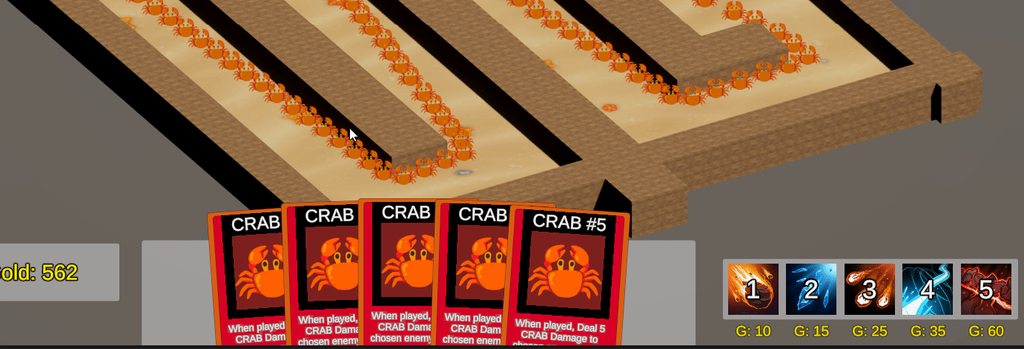
 knotty shore
Hi, I'm doing a degree in Games Design and one of the current modules is UI/UX. I have made a prototype in figma to show what it will look like in unity. Could a few of you give it a look over and fill in a very short q&a? I'm sure you have a lot more experience than me and any pointers would be gratefully accepted.https://www.figma.com/proto/uFfioZfolN1BhKzQS4Lvbj/Card-Game-Diagram?node-id=21-13&starting-point-node-id=20%3A5&mode=design&t=GaIlMk0e2dEFX7v9-1


Google Docs
Thanks in advance 🙂
 idle sigil
when I set the resolution to 4k, the ui all shrinks waaay too much
is there a way to keep this from happening? @mortal robin
 mortal robin
idle sigil
when I set the resolution to 4k, the ui all shrinks waaay too much
is there a wa...
mortal robin
idle sigil
when I set the resolution to 4k, the ui all shrinks waaay too much
is there a wa...
Yes of course
just basic UI anchoring/scaling
Read this
especially the section on anchors/pivots
And the canvas scaler https://docs.unity3d.com/Packages/com.unity.ugui@2.0/manual/script-CanvasScaler.html
idle sigil
ohhh I know what the problem is
why what I usually do wasn't working
its because all the inventory elements are a child of the main, background element, and are hence anchored based off it
wait nope nvm that wasn't it
huh
well ill readthedocs
its weird constant pixel size doesnt seem very... constant
oh I figured out part of the problem 💀
the scale wasn't set to 1x
or maybe it isn't supposed to be??
agh
 golden epoch
I'm trying to make an old looking computer terminal. Think War Games. It seems like one way to effectively make something look like old/retro tech is to add these horizontal lines between pixels like in this game: https://www.youtube.com/watch?v=AfaqL1oQlck. But theres also this sort of bloom effect that seems to bleed into the horizontal lines. How would you go about accomplishing this look? Or what other tips would you have for simulating a retro looking terminal?
ANIMAL WELL is coming to Nintendo Switch on May 9th: https://www.nintendo.com/us/store/products/animal-well-switch/
Hatch from your flower and spelunk through the beautiful and sometimes haunting world of ANIMAL WELL, a pixelated action-exploration game rendered in intricate audio and visual detail. Encounter lively creatures small and large, h...
idle sigil
ah crt
classic
uh
idk
but its such an often used effect im sure theres tons of tutorials
i'd recco some kind of shader
okay got it working I htink
tawdry ferry
idle sigil
ah crt
classic
uh
idk
but its such an often used effect im sure theres tons of t...
I have never seen someone spamming like this in a single message
idle sigil
well it looks better than
"ah crt classic uh idk but its such an often used effect im sure theres tons of tutorials id recco some kind of shader"
tawdry ferry
idle sigil
well it looks better than
"ah crt classic uh idk but its such an often used eff...
It looks much better like this though:
"Uh, but it's such an often used effect, I'm sure there're tons of tutorials... I'd recommend some kind of shader. Okay, got it working, I think."
idle sigil
well thats a different sentence
also, the Okay got it working message was unrelated
 still geyser
Hi, I have multiple UI canvas images rotating and scaling constantly. I am having Z-fighting issues. There isn't a sorting layer option I can find and googling for 5 minutes hasn't gotten me anything. Does anyone know how to fix this? Thanks

Nevermind, it is the border of the images I somehow missed when I gave the images a transparent background.
low pike
still geyser
Hi, I have multiple UI canvas images rotating and scaling constantly. I am havin...
Just FYI - you don't get Z fighting with UI. UI is drawn in hierarchy order, from top (first) to bottom (last), which is why you can't find a sorting layer
 burnt mica
How can I increase the margins of my text so that it fills the box?
 low pike
drag the recttransform bigger
anchor it so it stretches to the corners of the box
burnt mica
At some point in my 2D game, I want the character to be able to choose a weapon. I've got a drawing I've made where they can choose the weapon from. How can I go from the game to a menu?
Should I move the camera?
The weapon menu is all UI. It's sprites. Should it be in world space or screen space?
mortal robin
burnt mica
At some point in my 2D game, I want the character to be able to choose a weapon....
Just show some UI stuff
mortal robin
burnt mica
The weapon menu is all UI. It's sprites. Should it be in world space or screen s...
That's up to you. Typically UI is in screen space, although all UI in VR is generally world space
burnt mica
My game is the red arrow. The menu I want to be able to go to is the blue arrow. The black arrow is my canvas for the menu
 burnt mica
mortal robin
That's up to you. Typically UI is in screen space, although all UI in VR is gene...
burnt mica
mortal robin
That's up to you. Typically UI is in screen space, although all UI in VR is gene...
Hmmmmmmmmmmmmm could I keep it in screen space and keep it above everything and when the player activates the menu, I make it appear?
mortal robin
burnt mica
My game is the red arrow. The menu I want to be able to go to is the blue arrow....
You're making the mistake of looking at your UI in scene view
Look at it in game view (side by side with scene view) to see how it will appear in game
burnt mica
But my camera is focused on my player using Cinemachine. Would it be a good idea to detach it from the player and move it to the menu??
when it's activated
mortal robin
burnt mica
But my camera is focused on my player using Cinemachine. Would it be a good idea...
This is irrelevant to UI
If UI is in screen space it doesn't matter where your game or player or camera is
That only would matter for a world space UI
burnt mica
Should I use screen space overlay or camera?
mortal robin
Overlay is the simplest but I can't answer for certain without understanding your requirements
Basic UI is typically overlay
burnt mica
I don't want the menu to be visible while the player is playing the game. Only when they activate the menu, I want it to take over the entire screen
mortal robin
burnt mica
I don't want the menu to be visible while the player is playing the game. Only w...
This part has nothing to do with anything else. Just activate and deactivate it at the appropriate times
burnt mica
Okay, I think I get ya. Thank you!
burnt mica
Does anyone know what this error means? If I double click it, it takes me to the window on the right. Not sure what it is
 mortal robin
burnt mica
Does anyone know what this error means? If I double click it, it takes me to the...
mortal robin
burnt mica
Does anyone know what this error means? If I double click it, it takes me to the...
it's an internal Unity editor GUI bug
mortal robin
 teal bronze
i cant drag my textmeshpro UI into a referece
teal bronze
i cant drag my textmeshpro UI into a referece
Your reference is probably the wrong type
It should be TMP_Text
teal bronze
I tried it and it didnt work (im new to unity so sorry about this)
mortal robin
teal bronze
I tried it and it didnt work (im new to unity so sorry about this)
you have to show what you're trying to do
and what's going wrong
otherwise we can't help
mortal robin
teal bronze
i cant drag my textmeshpro UI into a referece
this is too vague.
Show the code. Show what you're trying to drag from where and where you're trying to drag it.
 mortal robin
teal bronze
mortal robin
teal bronze
Ok so it's exactly what I said
you're using the wrong variable type for your variable
and the code you showed is not related at all
Score.cs is the script
The answer is here: #📲┃ui-ux message
Also notice you have errors in your console. These are likely compile errors which you will need to fix before doing anything else.

Do not ignore errors in the console.
teal bronze
its saying the TMP_Text is unnecessary should i leave it or no ?
teal bronze
unity itself, when the code gets underline red and the pop up tells me what’s wrong
mortal robin
You would have to show the exact message and the actual code
teal bronze
 mortal robin
Vague descriptions are not enough
mortal robin
teal bronze
this doesn't make any sense
why did you do this
I said to change the type of your variable
your variable declarations are on lines 7 and 8
the change would be there (not sure which one because your error message is blocking it)
Also that's not Unity that's Visual Studio
teal bronze
OHHHHH i get it now
okay thank you it’s working now
and sorry about all the dumb questions and mistakes
🙏
solemn pivot
Do you see any obvious reason why the top method returns zero raycast hits on anything in the UI, whereas the GraphicRaycaster version does work?

I've been debugging this for a while and everything I can look at is perfectly correct, except for no hits.
Cursor position is right, UI element is checked ON as a raycast target, element is on the UI layer
hm net is saying I should use graphics raycaster
but I am concerned that will not solve my actual problem, which has to do with mutiple cursors and device IDs 'n such
Ill continue forward with graphics I guess
mortal robin
solemn pivot
Do you see any obvious reason why the top method returns zero raycast hits on an...
because Physics raycasting is for physics objects (specifically for Colliders)
they don't interact with UI elements at all
only Colliders
solemn pivot
That makes sense 
I think the part that confused me is the checkbox for raycast target on the ui Image
I was like 'its a target, checks out'
but wrong kind of target
mortal robin
yes that's for graphics raycasting
 dense rampart
how do i make a ui component snap to a corner of a canvas?
 sage torrent
You can make its local position be relative to the corner by setting the anchor

if you are using anchors, you then want to modify anchoredPosition of rectTransform in code
dense rampart
sage torrent
You can make its local position be relative to the corner by setting the anchor
ok perfect ty
dense rampart
sage torrent
and that will adapt to any aspect ratio?
 brave iris
Hi there! i'm having an issue with a worldspace canvas. It visibly is behind my other UI (that are in screen space camera mode, projecting onto another camera especially for the UI; this camera being in orthographic mode.), the order in layer is inferior to but the raycasts are blocked by the worldspace UI anyway, which is weird. Then, i thought that if the plan distance was too far away, maybe it was messing with some things too bc the worldspace UI was technically in front of it in terms of coordinates, so i changed that in play mode but still nothing. any ideas?
mortal robin
brave iris
Hi there! i'm having an issue with a worldspace canvas. It visibly is behind my ...
Do you need the world space canvas to detect events at all?
brave iris
Yup. :)
for now i kept toggling the raycast blocking when needed, but it's really getting out of hand.
mortal robin
brave iris
Hi there! i'm having an issue with a worldspace canvas. It visibly is behind my ...
projecting onto another camera especially for the UI;
What do you mean by this exactly?
brave iris
mortal robin
> projecting onto another camera especially for the UI;
What do you mean by this...
This is what i mean ! Simple, really
 mortal robin
Yeah but you have this render camera - and you said that was rendering for the UI - is this lbeing used with a RenderTexture or something?
brave iris
mortal robin
Yeah but you have this render camera - and you said that was rendering for the U...
sorry, i was missing this too, in my camera script. So we have a main camera "stacking" the UI camera. And this is for our overlay UI. But our Worldspace canvas is rendered on the main camera.
 mortal robin
brave iris
sorry, i was missing this too, in my camera script. So we have a main camera "st...
mortal robin
brave iris
sorry, i was missing this too, in my camera script. So we have a main camera "st...
Can you show the inspectors for the two canvases?
brave iris
Here! respectively one of the UI canvas we have and the world one

 brave iris
mortal robin
Can you show the inspectors for the two canvases?
brave iris
mortal robin
Can you show the inspectors for the two canvases?
I would add that it is not anything else blocking the raycast from the click. We easily saw this by looking at the preview of the event system in playmode (and also, of course, observing our scroll view in the world canvas (that was behind) was still working.)
I would add that i am also perplexed that no one is talking about this, which makes me think it's an error on our end still.
mortal robin
Yeah I've not really seen an issue with this so I do think it's something with your setup but I'm not really seeing anything obvious unless the world space canvas is simply closer to the camera
Is order in layer reversed though?
brave iris
mortal robin
Yeah I've not really seen an issue with this so I do think it's something with y...
As i stated in my first message, that was one of my guesses too and i tried to change the order in terms of coordinates, yet still nothing.
brave iris
mortal robin
Is order in layer reversed though?
I don't think so?
The greater the order in layer, the later it is going to be drawn, right?
So greater order in layer means it gets drawn on top
brave iris
Oh Lord.
It's the priority variable on the camera.
After further testing and creating a new blank project on the same version, we managed to see that:
When your camera is on base mode (as opposed to "Overlay mode", used in our UI cameras here), we can set the "priority" variable. But not on Overlay Mode. See screenshot.
Surely, it is because it is not used in Overlay Mode, then... Right?
No.
If the priority on the overlay camera is lower than the one on the UI camera, or well, was lower when it was on base mode, it stays that way and it does matter when trying to interact with the canvas, independently of the sorting layer or the plane distance or basically anything. It has the, well, priority on everything else. But, when the priority is the same, it acts normally, sorting layer working again and all.
So long story short, if an archeolog or something has this problem in 5 years, just check your priority variable in your cameras. I do not think toolkit is safe from this issue.
Also, i have a blank project, i could make a unitypackage to show the issue if anyone is interested.
 sage torrent
dense rampart
and that will adapt to any aspect ratio?
sage torrent
dense rampart
and that will adapt to any aspect ratio?
You might have to do some extra stuff to get it exactly right for any resolution, like add a canvas scaler and maybe fiddle with some numbers in code based on reference/target resolution. But just using anchors should get you most of the way there
 bold glen
is there a way to set a max height/width for a layout element?
 maiden tinsel
how do i set up the image so it fills from the center to the both sides?

 cinder sentinel
does Cell Size propery in Grid Layout Group dependent on the screen size, eg mobile devices? in other word it is not fixed value of pixel but depend on the max length and width of screen?
mortal robin
cinder sentinel
does Cell Size propery in Grid Layout Group dependent on the screen size, eg mob...
The unit it uses depends on your canvas and canvas scaler settings.
It's basically in "canvas space"
 tiny condor
Having some difficulty setting up a scroll list. I have this prefab which is just a slot in the list, with a container which I wanted to use to control the horizontal layout of the stuff inside, then it's just the text and number as two different parts.
I've got a scroll view set up just through what unity provides in the create new menu, It's hard to see but the text just sticks to the left wall. I'm really not sure how I can make it so that the slot stretches to fill the container and have the stuff in it change too


 mortal robin
tiny condor
Having some difficulty setting up a scroll list. I have this prefab which is jus...
mortal robin
tiny condor
Having some difficulty setting up a scroll list. I have this prefab which is jus...
wouldn't you want a vertical layout group?
tiny condor
The horizontal group is just used for the text in the actual slot itself, the content object has a vertical one


with some finangling it's now doing the opposite ...

Well I think I may have managed to amend that much, but now any time I instantiate an element at runtime it doesn't conform to how the prefab should look at all
mortal robin
tiny condor
Well I think I may have managed to amend that much, but now any time I instantia...
How are you doing the instantiation? The best way is to use the Instantiate(prefab, parent) form
tiny condor

in this case that's a script attached to the prefab, but I didn't think that made a difference
mortal robin
tiny condor
you should just do this Instantiate(itemPrefab, contentPanel);
get rid of the second line
tiny condor
oh my, well that seems to have done the trick. Will test out different screen sizes, but I guess that makes sense
hard to see here too, but which group option would be best if I wanted both of these texts to appear, resize dynamically but also give enough space for the number on the right to have room?
 mortal robin
tiny condor
hard to see here too, but which group option would be best if I wanted both of t...
mortal robin
tiny condor
hard to see here too, but which group option would be best if I wanted both of t...
Horizontal layout group but you need to use layout elements and such on the children
tiny condor
ah, haven't used a layout element before
 paper sphinx
can someone help me implement a score system with some costum numbers? (I put them in a sprite atlas)
cinder sentinel
thanks, ill look at the canvas settings
 crimson owl
Is it true that using Animator/Animation for your UI animations is more costly than using Code to animate your UI?
I've heard that claim but I've never been pointed to any proof.
soft sail
unless you're doing some skinmesh animating I doubt there's much of a difference
 tulip niche
i have this bit of code:
[CustomEditor(typeof(GraphManager))]
public class GraphManagerEditor : Editor
{
    [SerializeField]
    VisualTreeAsset _graphManagerUI;

    [SerializeField]
    int _test;
}
why does the VisualTreeAsset show in the inspector for this script but test does not? do editor inspectors only support showing the visual asset tree?

i was certain it used to let me show other types in the inspector before 🤔
 dreamy river
whats the best method to open a panel with an animation, using animator, using default lerp function or using tools like leantween or dotween
 sick blaze
How can I bind a panel to an object? Like, I want to have my panel only be over a specific gameobject, and not follow the camera around
low pike
dreamy river
whats the best method to open a panel with an animation, using animator, using d...
Depends on skillset.
I use DOTween, because it's easiest for me. An artist would probably be better using an animator
 honest saffron
dreamy river
whats the best method to open a panel with an animation, using animator, using d...
honest saffron
dreamy river
whats the best method to open a panel with an animation, using animator, using d...
i've heard using an animator is worse for performance than doing it through code
and yeah dotween is really good
nimble orbit
is it at all possible to have a clickable button inside a TextMeshPro input field's child hierarchy?
Because I have one in it, and it isn't responding to click events
Basically I'm creating a completion list for a text field. Like you'd see in your web browser's address bar. It looks like this.

When you focus the text field, that red panel comes up with a list of selectable options. You can either click them or you can type to narrow down the items available
When you deselect the input field, the menu disappears
Problem is none of the buttons are clickable when the menu is a child of the input field.
but.....if the menu isn't a child of the input field, then the buttons do become clickable....but they steal focus from the input field causing the menu to get disabled before the button has a chance to fire its click event
 silver glacier
Trying to get this project to Work but the controls don’t work at all, and has no textures, maybe something to do with the compiler error on the bottom?


It says that a GUI layer in camera is gone.
 brazen cradle
hey, i wanted to know, is it possible to set the alpha of an UI image to a gradient? i.e. left side should be solid color, fading out towards the right to absolute transparency
low pike
brazen cradle
hey, i wanted to know, is it possible to set the alpha of an UI image to a gradi...
Not built in, no.
dreamy river
why is everything streched in my world space canvas?

nvm my parent object was streched
cinder sentinel
hello , when i add my sprite insite TMP text, it is not aligned with the rest of the text. How to I adjust it, and if possible without reimporting again (such as reslicing sprite map)? in other word is there quick fix?

Here the gem is lower than text; it is same height so i need to raise the gem up a bit?
tawdry ferry
cinder sentinel
hello , when i add my sprite insite TMP text, it is not aligned with the rest of...
This is a sprite, not a character or emoji, so you won't be able to paste it inside of the TMP_Text. If you want to align it, you'll have to have this TMP_Text and an Image of this sprite as the children of the same parent. This parent should also, not necessarily, have some kind of a Layout Group, a Horizontal Layout Group in your case, which makes both the text and the image easily alignable within the same parent.
cinder sentinel
thank, i guess. i look into that
 pearl briar
what's the consensus on ui toolkit -- better/worse/different than ugui? or is it really more just if you're familiar with webdev, it's easier?
 tiny spade
when i instantiate a prefab with a ui object on it, and i set the anchor preset of the parent to stretch, it fixed the issue of the size not changing with screen size AFTER instantiating, but it still has a completely different size depending on the screen size at the moment of instantiating it, anyone know how to fix?
pearl briar
tiny spade
when i instantiate a prefab with a ui object on it, and i set the anchor preset ...
i think youre gonna need to share code/inspector. i'm not that great w ugui but there are a lot of parameters you can put on these objects. for example, you can put stretch anchors but it'll also have these other values such as size/scale/whatever that it will apply in addition to your anchors. worse, unity modifies these parameters based on your anchor selection so that the object appears to have the same/position size in your editor. thus you have to basically zero these values out to start from scratch.
paper sphinx
what would be the easiest way to add a startup screen for my flappy bird game where there s just the background, ground and bird moving and this sprite? Like adding a new scene or make everything on the same scene with a simple canvas?
 paper sphinx
I see
 dim moss
Btw i have a UI image for a bar, it act weird, i set native size, then the box does not match with my sprite like this:
Whats wrong?
 paper sphinx
Why is my inputfield not working on mobile?
 analog urchin
Hi guys, got trouble here with Unity's scrollview-
I've got this inventory system where the slots are all spawned into a scrollview, but well, problem is that they block the scrollview making them unable to be scrolled.
Basically can say that the issue is that I want the scrollview to react to scrolling while you can still drag&drop items...
analog urchin
Whelp, I solved it, for those who wanna know how I solved it though-
I basically made a new script that registers if mouse is over that element, and sets the scrollview's velocity manually via that script
Since hover event does cascade to parent gameobjects it's no problem
Also, set the scrollview itself's sensitivity to 0
To avoid duplicate scrolling in case the user does scroll via a gap/border between the covering uis
using UnityEngine;
using UnityEngine.UI;
using UnityEngine.EventSystems;

public class ScrollViewFixer : MonoBehaviour, IPointerEnterHandler, IPointerExitHandler
{
    public ScrollRect scrollView;
    public float scrollSensitivity;

    private bool mouseOver;

    void Awake()
    {
        scrollView.scrollSensitivity = 0;
    }

    void Update()
    {
        if (mouseOver)
        {
            scrollView.velocity -= Input.mouseScrollDelta * scrollSensitivity;
        }
    }

    public void OnPointerEnter(PointerEventData pointerEventData)
    {
        mouseOver = true;
    }

    public void OnPointerExit(PointerEventData pointerEventData)
    {
        mouseOver = false;
    }
}
Also a benefit of controlling via a separate script- Much easier to implement customizeable scroll sensitivity
analog urchin
Thoughts?
 analog urchin
Scrap that way of using scrollView velocity of above, it doesn't work properly. Didn't expect that their velocity'd work so weirdly.
 severe sandal
Is anyone here familiar with UI and scaling in Unity?
-I had to change aspect ratio reference in the Unity canvas scaler to make the UI look good,
The problem is that aspect ratio reference is some "random" number like 1230 x 2010 or something.
How do aspect ratio references affect individual UI elements?
Is there something to be concerned about when using non real references.
-The scale factor, this is the math for expand screen match mode, I am trying to find docs. on how is this used for individual elements:
scaleFactor = Mathf.Min(screenSize.x / m_ReferenceResolution.x, screenSize.y / m_ReferenceResolution.y);
Image
The question is essentially, is there anything I should be concerned about when adjusting resolution,
performance and visual quality wise?
 mortal robin
severe sandal
Is anyone here familiar with UI and scaling in Unity?
-I had to change aspect r...
mortal robin
severe sandal
Is anyone here familiar with UI and scaling in Unity?
-I had to change aspect r...
The reference resolution determines what the numbers in your RectTransforms mean
if your reference resolution is 1280 then a UI element of width 1280 will cover the whole canvas
To really work on UI in the editor you need to make sure your game view window is set to a realistic resolution and not set to Free Aspect
You can then change the game window resolution as desired to see what it will look like at different resolutions/aspect ratios
severe sandal
I am using the simulator to check how this looks like.
severe sandal
Sure, It looks good, now: should I be concerned about fictional references?
How is the scale factor used to calculate rect transform, do you have an example ?
 little hazel
Hm, I'm having an issue where I'm not getting IPointer* events on a particular TextMeshPro_UGUI component. It has raycast target checked, and there is a graphic raycaster on the canvas (a sibling button works fine). Is there anything else to check?
Ahhhh, its height is 0 hahahah
 analog urchin
Any thoughts on the ui? And the inventory icon?

 autumn rapids
analog urchin
Any thoughts on the ui? And the inventory icon?
autumn rapids
analog urchin
Any thoughts on the ui? And the inventory icon?
The contrast of the dark part is too low. Maybe add a bit more contrast (lighter text) so it's more visible.
You gotta think about the colorblind players
analog urchin
autumn rapids
The contrast of the dark part is too low. Maybe add a bit more contrast (lighter...
Not quite sure what that means?
I mean, I know what contrast means, but what is the dark part about?
autumn rapids
analog urchin
I mean, I know what contrast means, but what is the dark part about?
The text is prob not so visible for colorblind people.
 analog urchin
Oh...
Basically just more contrast for things that you're supposed to view/read?
Okay
Is the inventory icon okay tho?
Personally I'm not really content buuut idk what to add to it '^^
autumn rapids
analog urchin
Basically just more contrast for things that you're supposed to view/read?
yeah
analog urchin
Also I just drawed a spell icon
 autumn rapids
analog urchin
Is the inventory icon okay tho?
autumn rapids
analog urchin
Is the inventory icon okay tho?
maybe the same as the backpack text. If you make it a little lighter in color, then it's perfect
analog urchin
But the brightness of the spells really overpower that of the backpack xD
autumn rapids
analog urchin
But the brightness of the spells really overpower that of the backpack xD
true. You could also just like draw everything in a certain high contrast color
like lightblue or smt. gives of a neon vibe
analog urchin
I don't think that neon vibe would be an ideal look for this but I believe that icons better stand out a bit
But the tabs not currently selected will become darker
To stand out less
Though that of the spells might really be overkill brightness
autumn rapids
analog urchin
I don't think that neon vibe would be an ideal look for this but I believe that ...
hmm, it's your choice. if it doesn't fit, then it doesn't fit with the game.
You could also make the currently selected inventory lighter than the rest of the icons
analog urchin
 analog urchin
autumn rapids
ah it's a dark game
analog urchin
autumn rapids
ah it's a dark game
No it's both day and night
That one is dawn actually
autumn rapids
oh
autumn rapids
analog urchin
No it's both day and night
well, then like I said above. Make the icon which is currently selected, colorfull/more contrast than the other ones.
Like for me, it looks like spell inventory is selected.
analog urchin
autumn rapids
Like for me, it looks like spell inventory is selected.
Same
Okay, ig that it's no critics on the spriting but just the contrast...
I'll work on adjusting that then, cya Jinzo, thank you ^^
autumn rapids
analog urchin
I'll work on adjusting that then, cya Jinzo, thank you ^^
np 
 fringe roost
Unity 2022.3.25f1 here...
I have this canvas which is parented to a gameObject, but the canvas is in front of the camera, and indeed all the controls are working, the problem is that the input field won't work at all 😦
Also I'm using a VirtualCamera from cinemachine, but as I said all the button and the slider are working as expected.
I've also placed a Legacy InputField but still won't work.

Ok it's because of this

Ahh.. I've disabled Block Raycast 😅
teal bronze
um anyone know why i cant drag my credit and menu scenes into my build settings?
mortal robin
teal bronze
um anyone know why i cant drag my credit and menu scenes into my build settings?
what happens when you try?
mortal robin
teal bronze
it just doesn't drop into at all
uthat doesn't look like a scene file
mortal robin
teal bronze
This is the icon that scenes have

you seem to be trying to drag a prefab in.
teal bronze
how do i make them into icons so it can work ?
mortal robin
What? What do you mean "make them into icons"?
It's not about the icons. You're just not dragging the right kind of thing at all
You need to drag a scene
teal bronze
ohhh so i need to make them into scenes and then drag it
is there some way i can do it or will i have to make remake it?
mortal robin
I... honestly don't know how to answer your question.
teal bronze
hm its okay thank you
so i messed up
i needed to save everything else as scene aka as my level one
and needed to make the menu and credits as a new scene
but now i think i just deleted all that progress and might have to restart
mortal robin
Well at least now you understand what scenes are I guess?
 rustic moat
I'm just asking how to achieve this kind of feature where dragging the magnifying glass will show a larger picture of objects? I'm thinking about masking, but I can't figure out how to implement it. This is using the UI "Image" component, not a spriteRenderer
 mortal robin
rustic moat
I'm just asking how to achieve this kind of feature where dragging the magnifyin...
mortal robin
rustic moat
I'm just asking how to achieve this kind of feature where dragging the magnifyin...
A render texture shown at 2x scale?
 narrow seal
Sorry to pester with a trivial question, but I'm trying to drag and drop a png into a project and I can drop it on one project but not another these are the versions. I've closed the projects and reopened them. I'm just not sure why its working on one project but not the other.
 mortal robin
narrow seal
Sorry to pester with a trivial question, but I'm trying to drag and drop a png i...
mortal robin
narrow seal
Sorry to pester with a trivial question, but I'm trying to drag and drop a png i...
What happens when you try?
narrow seal
It dosen't do anything actually. I was able to get the image in using Assests>Import New Asset though. 🤷♂️
mortal robin
Maybe you have auto import assets disabled
narrow seal
I see parallel import options.. not seeing auto import yet
 keen bison
I'm using both UI Elements and Canvas. How to detect if mouse is over UI element?
EventSystem.current.IsPointerOverGameObject() always returns true if UI Document is enabled
For canvas it works as expected
Ok, figured it out. For the root visual element, the picking mode attribute value should be "Ignored".
 lucid onyx
On a high level, is there any scenario where for a mid-scope PC indie game that I should design the UI to support anything but 16:9?
 storm cypress
Something probably in my scene is not working properly. The first image is how it's showing in scene view, and the second one is from the game view. I have a Mask component added to the panel, which gives it those rounded edges. But somehow in the game view, the masking is not working. Adding the same panel to another scene and it works without any issues. Anyone have any idea what might cause this behaviour?


 idle terrace
is there a way to make a text box automatically be as big/small as possible? Like I guess instead of overflowing it just makes the box wider?
storm cypress
idle terrace
is there a way to make a text box automatically be as big/small as possible? Lik...
Content size fitter might be the one you're looking for
idle terrace
oo noice
 elder raptor
Which style for my level creator's header/actions bar looks better?


Here are the same setups at the minimum scale


 patent oracle
Hello everyone,
I am having trouble with my Scroll Level View. This view is used to display all the levels that are saved in the game. I am unable to successfully move to the next page with an animation that goes to the correct position. However, I have been able to move to the correct position without the animation and I have also been able to do the opposite. Does anyone know how to fix my issue?
Thank you in advance for your help.
// The position is good !!!

    // void MovePage()
    // {
    //     Vector2 newPosition = new Vector2(targetPosition.x, levelPagesRect.anchoredPosition.y);
    //     levelPagesRect.anchoredPosition = newPosition;
    //     UpdateBar();
    //     UpdateArrowButton();

    // }

// The animation is good !!

    // void MovePage()
    // {
    //     Debug.Log("ici"+targetPosition);
    //     levelPagesRect.LeanMoveLocal(targetPosition, tweenTime).setEase(tweenType);
    //     UpdateBar();
    //     UpdateArrowButton();
    // }
I like both. Maybe the second.
That looks interesting
What is this game/app about?
 minor juniper
hello. I have a button that seems to not work - no debug, no test presses, nothing. I spent the last few hours going through what people reccomended to check on the inter webs and can't figure it out. I have an event system. It is last in the canvas heirarchy. My text has raycast target off. I alos tried moving the RestartBttn() onto another object in its own script, but nothing. Also tried disabling every item in the screen but nada. Any ideas?


 mortal robin
minor juniper
hello. I have a button that seems to not work - no debug, no test presses, nothi...
mortal robin
minor juniper
hello. I have a button that seems to not work - no debug, no test presses, nothi...
Does your canvas have a graphic raycaster?
minor juniper
mortal robin
Does your canvas have a graphic raycaster?
Yes, here is the canvas:

 dense crystal
Is there a round carousel component? I have to think not after going over some of the available options
Or a "3d" carousel? A selection menu where the selected item is in the foreground and circles around clockwise?
Ah here, something like this https://assetstore.unity.com/packages/tools/gui/3d-carousel-picker-49822
 paper hill
Does anyone have any suggestions on how to make ui in unity look more modern and better?
i feel like whenever i make games I end up just kinda doing the same thing everytime and I want to figure out how to modernize it
proud sandal
paper hill
Does anyone have any suggestions on how to make ui in unity look more modern and...
Learn about graphic and interface design. Unity isn’t limiting you there.
 thorny cipher
Hello, I am having an issue with using gradients with the Vector Graphics package.
SVGs without gradients work as expected, however, for any SVGs with gradients the gradient appears incorrectly or not at all.
In the first image, from left to right:
- I have dragged out the SVGImage into the scene (in ui) - Shows as black with gradient offset to the wrong location.
- Set the SVG Image directly (like I have for the other "non gradient" svgs. - Displays black / not correctly.
- Use a TexturedSprite (Rasterizes the image) - This works, but then I have to predefine a resolution and doesn't support "infinite scaling".
I have also noticed, that when the SVG has a gradient, an "atlas" is created along with the sprite/svg.
I am using the latest version of Vector Graphs (2.0.0-preview.24). This was tested in Unity 2021.3 and Unity 6 Preview.


 thorny cipher
Hello, I am having an issue with using gradients with the **Vector Graphics** pa...
thorny cipher
thorny cipher
Hello, I am having an issue with using gradients with the **Vector Graphics** pa...
I hate that almost every time I ask for help, I figure it out.
If ANYONE gets stuck in the same boat as me:
I am using UI SVGImage, then drag the whole package to your hierarchy (image 1 above)
The Trick: On the canvas, under Additional Shader Channels** be sure TexCoord2` is selected.
 hushed fossil
Anyone know why my UI is not showing up?
    public void ShowText()
    {
      interactTextMeshProUGUI.enabled = true;
      Debug.Log("Test2");
    }
    public void HideText()
    {
        interactTextMeshProUGUI.enabled = false;
    }
    public void Interact(Transform interactorTransform)
    {
        ToggleContainerUI();

        if (playerInteractUI != null)
        {
            playerInteractUI.HideText();
        }
    }

    void ToggleContainerUI()
    {
        isActive = !isActive;

        if (isActive)
        {
            Cursor.lockState = CursorLockMode.None;
            containerUI.SetActive(true);
            if (thirdPersonController != null)
            {
                thirdPersonController.enabled = false;
            }
        }
        else
        {
            Cursor.lockState = CursorLockMode.Locked;
            containerUI.SetActive(false);
            if (thirdPersonController != null)
            {
                thirdPersonController.enabled = true;
            }

            if (playerInteractUI != null)
            {
                playerInteractUI.ShowText();
                Debug.Log("Test");
            }
        }
    }
In my Console both debug logs show. But the text is not Enabling again
mortal robin
hushed fossil
Anyone know why my UI is not showing up?
```cs
public void ShowText()
{
...
You'd have to share more detials like which objects are which in the hierarchy and what you're trying to enable etc.
containerUI.SetActive(false); I see this, perhaps this contains the UI you are trying to show but you're deactivating it?
you would also want to add more logs
for example around where HideText is called
hushed fossil
    {
        ToggleContainerUI();

        if (playerInteractUI != null)
        {
            playerInteractUI.HideText();
        }
HideText is called here
hushed fossil
I have a TMP text that is enable at start. But im trying to disable it when i open a object and then reenable it when closing the object. It disables when i open the object but just doesnt reenable
https://gyazo.com/021786467f9903b76b3e4c7b569f87d5
So it just doesnt reenable this part, It disables it fine but for some reason wont reenable
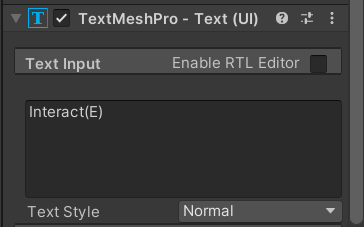
 mortal robin
hushed fossil
I have a TMP text that is enable at start. But im trying to disable it when i op...
mortal robin
hushed fossil
I have a TMP text that is enable at start. But im trying to disable it when i op...
you'd have to show your code
hushed fossil
Pastebin
Pastebin.com is the number one paste tool since 2002. Pastebin is a website where you can store text online for a set period of time.
mortal robin
hushed fossil
https://pastebin.com/iLNFZCWQ
Where's the code that shows the text?
Wheere's the code that calls GetInteractText()?
Presumably you have a script on the player that interacts with the IInteract scripts via raycast or something
That's the code we need to look at.
hushed fossil
using System.Collections;
using System.Collections.Generic;
using JetBrains.Annotations;
using UnityEngine;

public class PlayerInteract : MonoBehaviour
{
    private void Update()
    {
    if (Input.GetKeyDown(KeyCode.E)){
        IInteract interactable = GetInteractableObject();
        if (interactable != null) {
            interactable.Interact(transform);
        }
    }
    }

    public IInteract GetInteractableObject()
    {
        List<IInteract> interactableList = new List<IInteract>();
        float interactRange = 2f;
        Collider[] colliderArray = Physics.OverlapSphere(transform.position, interactRange);
        foreach (Collider collider in colliderArray){
           if (collider.TryGetComponent(out IInteract interactable)) {
                    interactableList.Add(interactable);
                }
            }
            IInteract closestInteractable = null;
            foreach (IInteract interactable in interactableList)
            {
                if(closestInteractable == null)
                {
                    closestInteractable = interactable;
                }
                else
                {
                    if (Vector3.Distance(transform.position, interactable.GetTransform().position) <
                    Vector3.Distance(transform.position, closestInteractable.GetTransform().position))
                    {
                        closestInteractable = interactable;
                    }
                }
            }


            return closestInteractable;
    }

}
SOmething is missing here
where are you doing like textElement.text = interactable.GetInteractText();?
That's obviously happening somewhere but it's not in any of the code you shared
Is it in the PlayerInteractUI script? Can you show that?
hushed fossil
using System.Collections;
using System.Collections.Generic;
using UnityEngine;
using TMPro;

public class PlayerInteractUI : MonoBehaviour
{
    [SerializeField] private GameObject containerGameObject;
    [SerializeField] private PlayerInteract playerInteract;
    [SerializeField] private TextMeshProUGUI interactTextMeshProUGUI;

    private void Update()
    {
        if (playerInteract.GetInteractableObject() != null)
        {
            Show(playerInteract.GetInteractableObject());
        }
        else
        {
            Hide();
        }
    }

    private void Show(IInteract interactable)
    {
        containerGameObject.SetActive(true);
        interactTextMeshProUGUI.text = interactable.GetInteractText();
    }

    private void Hide()
    {
        containerGameObject.SetActive(false);
    }

    public void ShowText()
    {
        interactTextMeshProUGUI.enabled = true;
        Debug.Log("Test2");
    }
    public void HideText()
    {
        interactTextMeshProUGUI.enabled = false;
    }

}
I would expect that when you do closestInteractable = interactable; here you would show and update the text at that point
mortal robin
hushed fossil
```cs
using System.Collections;
using System.Collections.Generic;
using UnityEng...
    private void Show(IInteract interactable)
    {
        containerGameObject.SetActive(true);
        interactTextMeshProUGUI.text = interactable.GetInteractText();
        interactTextMeshProUGUI.enabled = true;
}``` do this no?I guess I don't understand why Show and Hide and ShowText and HideText are different
shouldn't all that happen at once?
hushed fossil
No doing that just keeps the text enable at all times, In the game the text is only enabled when im near a object with a Interactable Script
mortal robin
that doesn't make sense
this Show function literally takes an interactable as a parameter
clearly there's an interactable there
it's kind of insane that the thing you're interacting with is the thing controlling that the text is shown
hushed fossil
thats why i added the ShowText and HideText cause i only need it to disable when i open the clipboard script \
mortal robin
That's not true though
don't you want to show the "Open Door" text?
when looking at the door?
And whatever else when you look at whatever else?
hushed fossil
its not a raycast, It shows the text when im near it.
mortal robin
the raycast isn't the important bit
hushed fossil
Collider[] colliderArray = Physics.OverlapSphere(transform.position, interactRange);
        foreach (Collider collider in colliderArray){
           if (collider.TryGetComponent(out IInteract interactable)) {
                    interactableList.Add(interactable);
yes
so like
whenever you're near an interactable
you should be showing the text
I don't understand why theh clipboard would be responsible for showing UI
Raycast, OverlapSphere, whatever
the point is when this thing detects interactable thigns, it should show the text
and when the interactable thing is no longer detected, it should hide the text
this script is responsible for that
the interactable thing should only be telling us the string to display, which you have through the interface
hushed fossil
Yes and it work. When im near the Clipboard and i click E it opens a Clipboard UI to do stuff with etc. but it still showed the "Intertact With Clipboard" text so im trying to disable it when im in the GUI
mortal robin
you will need to have the PlayerInteractUI have something like ```cs
bool suppressText;
public void SuppressText(bool suppress) {
suppressText = suppress;
if (suppressText) {
// disable the text
}
else if (playerInteract.GetInteractableObject() != null) {
// show the text
}
}```
And always check this bool as well when otherwise showing to make sure it's not being suppressed right now
this is like, a layer on top of the normal logic
hushed fossil
Got it,
    public void ShowText(IInteract interactable)
    {
        interactTextMeshProUGUI.enabled = true;
    }
    public void HideText(IInteract interactable)
    {
        interactTextMeshProUGUI.enabled = false;
    }
    public void Interact(Transform interactorTransform)
    {
    ToggleContainerUI();

    if (isActive && playerInteractUI != null)
    {
        playerInteractUI.HideText(this);
    }
    else if (!isActive && playerInteractUI != null)
    {
        playerInteractUI.ShowText(this);
    }
    }
 hollow ruin
Does anyone know a quick fix to have Canvas Group transparent as a whole unit, not each element, like one image?
When I change canvas group's Alpha, my progress bar segments that are behind progress bar borders start to appear "above" the border, and it look kinda ugly


 rapid ferry
anyone have a clue as to why the "Highlighted" and "Pressed" colors don't work?

I believe I have them set up correctly but it still doesnt do anything on hover or click
nevermind, mouse look script was interfering with it :D
mortal robin
hollow ruin
Does anyone know a quick fix to have Canvas Group transparent as a whole unit, n...
No good quick fix really. The two options are basically:
- render that subsection of the UI in a render texture
- custom shader
hollow ruin
mortal robin
No good quick fix really. The two options are basically:
- render that subsectio...
Ah, got it. Sadly that no quick fix, I thought there's a simple solution in the editor that I just didn't know about yet
Huge thanks for these tips, gonna try to implement them
Seems like the render texture approach is the easiest for me
 torn marlin
I'm planning to use an Animator component (and Animancer) to animate my UI, but I've read that Animators are poor for performance on UI in older versions. Should I be worried about that, and take steps to mitigate it? (I'm developing the game to run on PC)
mortal robin
torn marlin
I'm planning to use an Animator component (and Animancer) to animate my UI, but ...
Don't prematurely optimize
torn marlin
mortal robin
Don't prematurely optimize
Can do. I only asked because it seemed like one of those situations where you could rapidly rack up performance costs (assuming you have a lot of animated UI elements)
 iron mason
Cant figure out why some parts of the image is bleeding through the mask, there are no extra white pixels in the mask that would cause it and i have looked at several tutorials and dont seem to be doing anything i can tell wrong

 mortal robin
iron mason
Cant figure out why some parts of the image is bleeding through the mask, there ...
mortal robin
iron mason
Cant figure out why some parts of the image is bleeding through the mask, there ...
Look at it head on, e.g. 2D mode?
 celest lodge
probably a broad question but how can i make transitions between UI panels? right now i just have it as panel1.setactive(false) panel2.setactive(true) lmao
 meager stream
hi have a problem with my button he just dont want work... please help me my jam finish in 3h and this is the last thing i need to patch
iron mason
mortal robin
Look at it head on, e.g. 2D mode?
still has the issue in 2d, but even if it didnt, the bleed through shows up in game which i cant have happen. it is a 3d location based game, not 2d
meager stream
meager stream
please i really need help
hushed fossil
Did you add a on click event?
hushed fossil

Any idea on why my text is not in the right spot? i change the position in the prefab, the animation was made under the actual money but its still not in right spot
mortal robin
hushed fossil
Any idea on why my text is not in the right spot? i change the position in the p...
What would "the right spot" be?
And which property are you animating?
hushed fossil
i got it sorta
Still kinda not in right spot but its good enough rn
figured out how to do it now
meager stream
hushed fossil
Did you add a on click event?
I patch it before but ty i dont add the event ui thing (never needed that before i think its only for 2d)
rapid ferry
how does it look?

 autumn rapids
rapid ferry
how does it look?
autumn rapids
rapid ferry
how does it look?
Kinda too glowy. I once worked a lot with that effect. It gave me the feeling that there was water in my eyes or smt
rapid ferry
autumn rapids
Kinda too glowy. I once worked a lot with that effect. It gave me the feeling th...
its not as bad in game
autumn rapids
rapid ferry
its not as bad in game
If you're happy with it, then sure why not.
 arctic swan
haha no worries.
 sour finch
yeah iwas about to say something
arctic swan
But yeah, the anchors all look right as it wouldn't show up at the right location in editor if it wasn't
sour finch
al good though mistakes happen
 sour finch
yeah anchoring is important I can show exmaple of what I been doing
arctic swan
Of course. This is why I am stumped.
sour finch
I still don't see a problem though looks fine to me nothing seems wrong even
arctic swan
I know right? xD

I'm wondering if it's the version of Unity that I am using that is the culpit at this time.
When I attempt to change the resolution of the build, it won't update unless I do a build in full screen first.
sour finch
it's fine job done move on lol good enough it can;'t be perfect even if you code it yourself the algorithm does what it does.
arctic swan
Well, I can't really move on at this point if all my UI elements appear at their wrong location.


 sour finch
because it is like its what I am trying to tell you its fine it's working good enough move on. I't can't be perfect no matter what if it looks close enough at 800x600 and at 1600x1200 its fine man it will never be in the exact same spot on every resolution.
 sour finch
at what resolution does that happen
arctic swan
Any. Even in full screen
mortal robin
arctic swan
your thing is anchored to the center of the screen
you should anchor it to the top left
sour finch
oh just drag the position Y down
 mortal robin
Is your script ever touching the position?
arctic swan
This is why i'm stumped, I've been using unity for 7 years. Have made plenty of UI. I've never encountered an issue like this.
No
sour finch
eah more you paying to much atetntio to the canvas don't even look at it. adjust in game preview mode
mortal robin
arctic swan
In build
What resolution is the build running in?
arctic swan
Nothing is modifying the UI through script
mortal robin
Maybe it's zoomed or something
arctic swan
That's what it looks like to me as well.
sour finch
thats true too lol I have done that
arctic swan
I've tried full screen, windowed 720p and windowed 1080p
All came out looking the same.
sour finch
UI stuff is hard to do over discord really tough so many things could be wrong
mortal robin
arctic swan
which object in the heirarchy is selected here btw?
sour finch
Canvas I think right
arctic swan
The panel childed to the Canvas object
mortal robin
which is called?
arctic swan
 mortal robin
And UIManager is the Canvas?
sour finch
wait have you got a canvas inside a canvas
sour finch
ok that is right then
mortal robin
arctic swan
because in this image it looks like ConnectionPanel is anchored to the center. So you changed it between those screenshots?
arctic swan
That was the game view
mortal robin
or wait I guess I'm looking at the Pivot, the anchors are collapsed
sour finch
yea no problem i am waiting for help on my own problem lol
arctic swan
xD
sour finch
and eating lunch
arctic swan
If it's coding related, I may be able to help xD
In any case, I'm at the point of just changing editor versions. Seeing some kind of bug with the build settings (resolution changes not being applied when changing them in windowed mode for one.) I'm assuming something is off here. You've both confirmed that everything looks right.
sour finch
Might be a bug I hope I don't have it when I build lol using unity 5 or 6
arctic swan
This is Unity 2022.3.3f1
sour finch
Yeah my problem is code for sure lol but we solve this I want a break from my problem lol
yeah we on same version ****
arctic swan
xD
mortal robin
arctic swan
In any case, I'm at the point of just changing editor versions. Seeing some kind...
one last thing to try - play with the canvas scaler's "width or height" matching slider?
but i'm pretty sure height should be fine here
arctic swan
I've set it to height. I'll try width. Worth a shot
mortal robin
but yes otherwise it all looks fine to me so I'm not sure
arctic swan
Rip
 sour finch
yeah it is what I said earlier maybe try 0.25 go with width more maybe might solve it
arctic swan
Sadly, to no avail.
I'll try to open a new project with the same version. See if I have the same issue.
sour finch
Yeah I wish i could play around physically with it would be easier
code maybe is the issue
sour finch
never seen this before even it' always works fine
arctic swan
I even put an object in 3d world at the top of the screen to see if maybe it was zoomed in or something like that and the 3d world looks fine.
Loading up a fresh project to test.
sour finch
Did you try changing the the Y position down more and see if it moves
mortal robin
arctic swan
No code changes these values though. :\
Also have you tried Fullscreen mode?
sour finch
maybe something in the code is interfering with the setting in the inspector
mortal robin
I wonder if it has something to do with windowed mode
sour finch
yeah he did try that
mortal robin
ah ok
arctic swan
Oh this is very interesting
Fresh project with this editor and I'm getting this

It's completely borked
arctic swan
Looks like the editor is the culpit.
 arctic swan
Looking
sour finch
raw edit mode on
sour finch
damn
arctic swan
Oh sorry xD
sour finch
dm it
sour finch
I don't know actually does not make sense
because I ma on the same version works fine for me have not tried build yet I have to solve my issue first before build. Pointless to build if it blows up
arctic swan
For sure. Hopefully you don't have the same issue.
sour finch
I have builds go bad who now why project get wierd corruption I have literally just dragged and dropped everything into a fresh project everything works fine it's the version is kind of buggy
arctic swan
Very possible. I'm installing 2022.3.28f1 atm
If a fresh project doesn't have this issue, I'll just migrate over.
sour finch
yeah hopefully that works
arctic swan
Unity 2022.3.3f1 was indeed the issue. Used latest LTS and it builds at the proper location. Success!
 mortal robin
arctic swan
Unity 2022.3.3f1 was indeed the issue. Used latest LTS and it builds at the prop...
mortal robin
arctic swan
Unity 2022.3.3f1 was indeed the issue. Used latest LTS and it builds at the prop...
Twas maybe this or similar https://issuetracker.unity3d.com/issues/windows-canvas-layout-displaced-when-resizing-players-window
How to reproduce: 1. Open the attached project “My project (2).zip” 2. Build And Run 3. Resize the Player’s window Expected result: ...
arctic swan
Nice. In any case, I'm happy it's back in working order. I wasn't able to focus on anything else while this was a problem. We back babay!
 unborn kettle
hey guys, anyone haev a good comprehensive guide to layout with UGUI? I mean things like Layout Group, Layout Element, Content Size Fitter, etc. ... I feel like I've already spent so much time and still can't figure out how to do most simple things that fit content and auto-resize
mortal robin
unborn kettle
hey guys, anyone haev a good comprehensive guide to layout with UGUI? I mean thi...
Have you checked the unity UGUI manual?
 crimson raptor
heyho guys, I wanna ask is it possible to add ui components for each element of a json array?
and how?
 pure moss
Hello friends, I have one parent scroll view inside that I have multiple scroll views as a child. The issue is that I can not scroll the parent scroll view if I am dragging horizontally on one of the child scroll views (see video).
unborn kettle
mortal robin
Have you checked the unity UGUI manual?
yeah, tho tbh I’d really like a video for this that would demo all the important layout problems and solutions and how to approach things
mortal robin
The article I linked does that
unborn kettle
feels for layout especially it’s quite useful to see it happen, since ugui isnt declarative and often checking a box and unchecking does different things
oh
wait but its images, not video  ive seen this part of the docs
like, part of my issue with ugui is that unlike CSS i cant just refresh the page and get it to do what is defined
things can adjust properties in a persistent way and the order of doing things matters
mortal robin
unborn kettle
wait but its images, not video <:multiarmedsweat:804695907164618763> ive seen th...
There's animations
mortal robin
unborn kettle
like, part of my issue with ugui is that unlike CSS i cant just refresh the page...
If you want something like CSS use UI Toolkit
unborn kettle
UI Toolkit doesnt do world space unfortunately
I would use it otherwise
but the world space workarounds for it aren’t enough for my use case
i dont even need complex things, 99% of my issues are around making nested layouts resize to text content
e.g. text inside horizontal inside vertical
i’ll re-read the docs I guess
I dont really have any issues with it other than making things responsive to text, the rest is easy
https://docs.unity3d.com/Packages/com.unity.ugui@1.0/manual/HOWTO-UIFitContentSize.html this is the only page on how that works
crimson raptor
Yo does any1 know why this happened?
v

 mortal robin
crimson raptor
Yo does any1 know why this happened?
v
mortal robin
crimson raptor
Yo does any1 know why this happened?
v
what's it supposed to look like?
What objects are in the group?
crimson raptor
mortal robin
What objects are in the group?
like this,
 mortal robin
crimson raptor
like this,
mortal robin
crimson raptor
like this,
Looks like a different thing entirely no?
crimson raptor
mortal robin
Looks like a different thing entirely no?
yeah
mortal robin
Are we talking about the "MULA" thing or the white things behind it
crimson raptor
I want to add a single button at the end tho
mortal robin
i can't tell what you're asking about
crimson raptor
wait
mortal robin
crimson raptor
I want to add a single button at the end tho
put it in the layout group
crimson raptor
so I want to add a single button at the end of the scroll tab
crimson raptor
mortal robin
put it in the layout group
Grid layout?
mortal robin
Maybe show a picture of what you're trying to accomplish
crimson raptor
wait
hmm looks like grid layout is causing some issue here
after a bit of re-checking
sorry for bothering you
 unkempt pasture
Hello 😁
I have a question.
How can I make a UI disappear and reappear ?
mortal robin
either deactivate the GameObjects or use a Canvas Group and set the alpha to 0
 tribal turtle
Is there a way to scale a UI element's size to the window with scale instead of directly changing it's width and height? Because when scaling it to the window normally all of the text and stuff gets really messed up.
mortal robin
tribal turtle
Is there a way to scale a UI element's size to the window with scale instead of ...
You should be using the RectTransform settings rather than scale generally
What do you mean by "it gets messed up"
tribal turtle
This is what happens when I use the rect transform

 mortal robin
You need to use LayoutElement within your layout groups
And set appropriate minimum sizes etc
tribal turtle
Like add the layout component to each of the bits of text?
Or ar you saying all of the text needs to be in like a grid layout group?
woven rose
Anyone here used to using TMP dropdowns?
Im struggling with understanding how dropdowns function.
Im almost there however the items in the drop down only show the color they represent for a brief moment and im not sure what is causing this
 kindred stag
Anybody know why rotating a Canvas object 180 on the Y axis causes its children to lose their ability to snap to the parent's edges?
 cunning storm
Any idea why there may be lines on my raw images? they are transparent background .png files from photoshop.
 mortal robin
cunning storm
Any idea why there may be lines on my raw images? they are transparent backgroun...
mortal robin
cunning storm
Any idea why there may be lines on my raw images? they are transparent backgroun...
what is it supposed to look like?
(not sure which lines you're referring to)
cunning storm
mortal robin
(not sure which lines you're referring to)
On the edge of the raw image there is a line visible. There is a horizontal line above the red bar where the raw image ends. It does not exist anywhere else idk why it appears.
mortal robin
the yellow liine?
cunning storm
Is it yellow? Idk the only horizontal line on there. Its on the 2nd 3rd and 4th buttons.
 mortal robin
Oh I was thinking the yellow one at the top
cunning storm
mortal robin
Oh I was thinking the yellow one at the top
lmk if you have any idea. I think maybe it has to do with me reducing the scale on the raw image?
mortal robin
cunning storm
lmk if you have any idea. I think maybe it has to do with me reducing the scale ...
maybe show the setup you have? What Texture is it rendering?
cunning storm
Its a raw image ui object. The image is a transparent image I photoshopped. Its a .png
cunning storm
mortal robin
maybe show the setup you have? What Texture is it rendering?
Its a transparent.png file photoshopped by me. That line doesnt exist in the image. Its thrown on a ui raw image object and scaled down.
mortal robin
cunning storm
Its a transparent.png file photoshopped by me. That line doesnt exist in the ima...
Why RawImage and not regular Image, out of curiosity?
but if it's transparent, couldn't the line be behind it?
cunning storm
mortal robin
Why RawImage and not regular Image, out of curiosity?
No clue. Image doesnt let me put a .png of it. Rawimage does. The line isnt there until I put the raw image there.
low pike
cunning storm
No clue. Image doesnt let me put a .png of it. Rawimage does. The line isnt ther...
This sounds like you haven't set the import settings for the png correctly
mortal robin
cunning storm
No clue. Image doesnt let me put a .png of it. Rawimage does. The line isnt ther...
Yeah you forgot to switch the image type to Sprite
cunning storm
Ill look into that, thank you 🙂
 safe glade
Hi im fairly new to using unity and UI is not my forte anyway im trying to set up a group of buttons on a panel in a 2d project. the only issue is when i maximize the window these buttons scale incorrectly. ive solved this issue before by playing with the preset anchor points but none of those seem to work here. I also briefly played with a content size filter and a layout group but both of those seemed to break my buttons. any help or suggestions would be appreciated.

 low pike
safe glade
Hi im fairly new to using unity and UI is not my forte anyway im trying to set u...
low pike
safe glade
Hi im fairly new to using unity and UI is not my forte anyway im trying to set u...
What's selected here?
Is the 'Troop Types' part of this RectTransform?
 safe glade
i have a troop types panel, as a parent and then a text mesh pro and 8 buttons as children of that panel, in the picture i think i happened to have the panel selected
low pike
and no vertical layout group ?
safe glade
no i tried adding one later to sort this out but iirc it just squished all my buttons
low pike
You need to use a vertical layout group, and then make some changes so it doesn't squish them
safe glade
👍
ill play around with it some more then
are layout groups just in general best practive for stuff like this? i have a similar setup running horizontal at the bottom but it is not having this issue even without a layout group
low pike
Yes, this is best done with layoutgroups
except for the grid layout, that thing is useless
safe glade
ty ty
tribal turtle
Hey does anyone know why a TMPro input field would be visible in the preview build but not an actual build?

Oh nvm I didn't anchor it correctly I can be dumb sometimes
 thick mulch
Does anyone know how to make ui element hitboxes match the size of the object and not care about the shape of the image? Like here, I have to specifically mouse over the text to select the button, how could I make it to where I could mouse over any part of the box surrounding each element?
 low pike
Graphics raycast will only hit the graphics, so for text that's the words.
Add an image as a child, stretch the anchors out to each corner, and change the alpha of the image to 0
thick mulch
low pike
Graphics raycast will only hit the graphics, so for text that's the words.
Add ...
I've tried this and I still get the same behavior. Just tried again, not working but this is how I have it set up in case you can spot anything I'm doing wrong.
 low pike
on the TMP component, expand the Extra Settings (IIRC) and disable raycast target
also, there's no need to have a sprite assigned to that image
thick mulch
I'm assuming you mean the image component on the parent. Did, same behavior as before. I removed the sprite from the child.
 low pike
No, I did not mean the image component on the parent
Actually, sorry.. yes it would be that
 rough halo
Someone knows why if i move my anchors to fit every game object everything works correctly when i change screen size except for 1 game object?
low pike
I thought you were using TextMeshPro.. not images for the text
thick mulch
Yeah...
low pike
ok, so in that case.. I suppose you can just use the raycast padding
thick mulch
Yep, that's working. Thank you for the help. ❤️
cunning storm
mortal robin
Yeah you forgot to switch the image type to Sprite
This fixed it instantly! Thank you very very much 🙂
 livid furnace
I'm a little befuddled on this one as I've only dabbled in Unity 2D UI so never truly done 3D mixed work.
I have added a TML button to my scene in hopes to display and hide a Information box. However the button refuses to be interacted with.

 low pike
livid furnace
I'm a little befuddled on this one as I've only dabbled in Unity 2D UI so never ...
low pike
livid furnace
I'm a little befuddled on this one as I've only dabbled in Unity 2D UI so never ...
What the hell's a TML button?
There is no 3D UI..
You don't have an 'Event System' in the scene
It's also extremely odd to have the scroll view as a child of a button .. that's probably not going to play well
livid furnace
low pike
What the hell's a TML button?
There is no 3D UI..
You don't have an 'Event Syst...
TMP, typo. Obv no 3D UI... I meant I only have made 2D games in the past and not 3D. Wasn't sure it was setup different.
livid furnace
low pike
It's also extremely odd to have the scroll view as a child of a button .. that's...
Wasn't intended to be. The object keeps moving back under it after I resolve it
low pike
UI is UI, there's no difference between a 2D or 3D game
livid furnace
good to know
low pike
livid furnace
Wasn't intended to be. The object keeps moving back under it after I resolve it
This will only happen automatically if you remove it from there at runtime.. changes arent saved
Make sure you're not in playmode when you sort that out
and add an event system, then the button should work
livid furnace
Roger
low pike
also, always keep the scale of UI elements to 1,1,1 - change the size with width/ height
you'll get wierd behaviour when things need to change scale if it's not at 1,1,1
livid furnace
Also is a transform somehow different than a rect tranform? I have code that is meant to move my MoreInfoUI to a Vector3 position but in runtime its going way out to -2279.32x and -1644y.
public class UIController : MonoBehaviour
{
    [SerializeField] private GameObject MoreInfoUI;

    Vector2 hiddenPosition = new Vector3(129f, -360f);
    Vector2 displayedPosition = new Vector3(-198f, -360f);
    bool isMoreInfoVisible = false;

    public void ShowOrHideMoreInfo()
    {
        Debug.Log("ChangingMoreInfoPosition");
        if (isMoreInfoVisible)
        {
            isMoreInfoVisible = false;
            MoreInfoUI.transform.position = hiddenPosition;
        }
        else
        {
            isMoreInfoVisible = true;
            MoreInfoUI.transform.position = displayedPosition;
        }
    }
}
RectTransform inherits Transform. You do not want to use transform.position to move UI around
get a reference to the RectTransform and use .anchoredPosition to set the pos
transform.position is using world space, and .anchoredPosition is using screen space (the same values that you enter in the inspector fields) - which is why you currently have to use MASSIVE values, which won't be correct with a resolution change
 low pike
another general UI hint - don't have your game view in 'Free Aspect' while you're working with UI .. it's a lot less likely to look right on an actual resolution/ aspect ratio
 quasi basin
Hello everyone. Does anyone know what can be a reason for such thing: when I enter Playmode the panel with material on it dissapears in the game window...

It appears for half a second if I move it further from canvas (decreasing z coordinate fast enough)
And changing Canvas to ScreenSpace-Camera it appears as well. But I really want to stay with ScreenSpace-Overlay...
mortal robin
quasi basin
Hello everyone. Does anyone know what can be a reason for such thing: when I ent...
- why are you changing the z position of a UI element?
- What shader are you using? Is it a UI shader?
livid furnace
Always forget, what is the use of the text box provided for my Onclick events. My onclick event in question has an argument slot, but the value I put in the text box is never being registered

 mortal robin
livid furnace
Always forget, what is the use of the text box provided for my Onclick events. M...
mortal robin
livid furnace
Always forget, what is the use of the text box provided for my Onclick events. M...
It's the parameter that will be passed into the listener
livid furnace
So there isn't a way to provide it an argument to my cam variable I take it?
mortal robin
That's exactly what it does
livid furnace
You are right! thx
 hasty dirge
Those buttons are in a Horizontal Layout Group. How can I stretch them, that both have a half and fill there half. The normal Stretching with anchor doesn't work, it looks just weird.
 mortal robin
hasty dirge
Those buttons are in a Horizontal Layout Group. How can I stretch them, that bot...
mortal robin
hasty dirge
Those buttons are in a Horizontal Layout Group. How can I stretch them, that bot...
checkboxes on the layout group
expand children or whatever
hasty dirge
Oh yes control child size
thx
Why does a element, that is in the hierarchy above overlaps with the UI. How can I set the UI to be rendered after the object
 mortal robin
hasty dirge
Why does a element, that is in the hierarchy above overlaps with the UI. How can...
mortal robin
hasty dirge
Why does a element, that is in the hierarchy above overlaps with the UI. How can...
depends on your canvas settings
If it's a screen space - overlay canvas it will be drawn on top of everything
if it's screen space - camera or world space, it just depends on the actual position of the canvas
hasty dirge
 mortal robin
hasty dirge
mortal robin
hasty dirge
just make sure the plane distance is closer than the game world object
hasty dirge
Oh ok
hasty dirge
But why is the overlay so big. How can I overlap it with the camera view to see at which position of the screen a elemt is placed
 rapid ferry
2024 and still no solution... https://www.reddit.com/r/Unity3D/comments/1boe1bf/overlapping_transparency/
 mortal robin
hasty dirge
But why is the overlay so big. How can I overlap it with the camera view to see...
mortal robin
hasty dirge
But why is the overlay so big. How can I overlap it with the camera view to see...
It's not big
it's the size of your game window
open the scene view and game view side by side
double click the canvas object or press F on it
to see the full extent of it in the scene
hasty dirge
But there is no way to adjust the size to the camera view to see changes directly in the scene?
mortal robin
yes do as I mentioned
mortal robin
mortal robin
double click the canvas object or press F on it
this
 verbal field
For some reason when I use a specific font it doesnt show on the screen. Or some sprites are in front of my UI, how can I fix?

 low pike
What render mode is your canvas in ?
verbal field
for this specific one its screen space camera
although I have tried a diferent one with screen space overlay and still same issue
low pike
verbal field
for this specific one its screen space camera
Double check it's not behind the game
verbal field
low pike
Double check it's not behind the game
It was in fact too far down...
Problem fixed 👍
 slate anvil
Someone can help me? Since last week I'm trying to make a scrollable screen for a mobile app, but I can't find a tutorial in my language, and I don't understand his. I need to make a screen, that I can scroll in vertical to see more. Can someone explain this to me?
I'm a layman in this subject, but I need to make this
low pike
create a scroll view..
change the settings to only scroll vertical
use a vertical layout group to order the items in the scroll view
slate anvil
I make this, but I have a problem. In the movement type, if is unrestricted, I can scroll infinitlely, and if is clamped, I can't scroll. Have a way to make this scroll view be limited?

 celest lodge
Does anyone know why the options button stays highlighted after it returns to the original panel
mortal robin
celest lodge
Does anyone know why the options button stays highlighted after it returns to th...
depends on how you configured it and how that transition works
celest lodge
mortal robin
depends on how you configured it and how that transition works
im using this library i found for UI transitions

second half
 mortal robin
celest lodge
im using this library i found for UI transitions
mortal robin
celest lodge
im using this library i found for UI transitions
oh dear
maybe it's a bug with this library then? Presumably the button is not being deselected or something along those lines
which leaves it in its selected state
But hard to say really without getting my hands dirty in your project.
celest lodge
mortal robin
maybe it's a bug with this library then? Presumably the button is not being dese...
it was working fine with the library before i decided to use transitions
and wouldnt deselecting it just be switching the current selected gameobject to null?
also is there no way to reset a button to its original state
low pike
slate anvil
I make this, but I have a problem. In the movement type, if is unrestricted, I c...
The gameobject named ‘Content’ needs to be big enough to fit the children in
pure moss
I have a scroll view inside a scroll view one horizontal(parent) and one verticle(child), can not scroll horizontally when I drag inside the child scroll view.(see video)
 exotic nebula
Greetings! Has anyone faced a problem when canvas has gaps with the screen at certain resolutions, is there any way to fix it?
low pike
pure moss
I have a scroll view inside a scroll view one horizontal(parent) and one verticl...
This isn't possible with the built in UI. You'll have to either code yourself a way to do it or purchase an asset
low pike
exotic nebula
Greetings! Has anyone faced a problem when canvas has gaps with the screen at ce...
show some examples of the issue(s) you're seeing
pure moss
pure moss
I have a scroll view inside a scroll view one horizontal(parent) and one verticl...
I have found a solution for this! https://gist.github.com/Josef212/8d296acdd4f457e39e0c13fbc9ec007e#file-nestescrollrect-cs

Gist
A nested ScrollRect for unity. GitHub Gist: instantly share code, notes, and snippets.
exotic nebula
low pike
show some examples of the issue(s) you're seeing
Sorry for late response, it look likes following, and I guess it due how canvas scaler manages size of canvas, it isn't stretched to full at all screen sizes

 gleaming tapir
does anyone know why the video is not showing here? The audio is working but the video is not showing, here's what the console said:
Unexpected timestamp values detected. This can occur in H.264 videos not encoded with the baseline profile. Timestamps will be skewed to correct the playback for C:/Users/Jason De Lara/DOS2/Assets/intro.mp4
 low pike
exotic nebula
Sorry for late response, it look likes following, and I guess it due how canvas ...
low pike
exotic nebula
Sorry for late response, it look likes following, and I guess it due how canvas ...
Can you show the entire Unity window - still showing the issue
exotic nebula
low pike
Can you show the entire Unity window - still showing the issue
Do you see gap between the end of canvas and end of viewport, this is what I mention above
low pike
Yes, of course I did..
 junior pollen
how do you make like a nice sprite to put in an inventroy system of your 3d objects you made in blender?
 eternal ibex
Hi, I need some help with scaling on different mobile resolution
I've fully developed in 1080x1920, with the following configurations in the picture provided, but I'm having issues with different resolutions. Does anyone have any suggestions or links I could reference to achieve the expected results? Thank you!
This game does not require the camera to follow the character, and all gameobjects are guaranteed to be inside the camera screen size
more details:
canvas ui: contains buttons, and stuff shown to the user
world space gameobjects: contains moving enemies, background, player

 glacial canopy


Do you guys think this UI is too crammed?
I drew a mockup of what I wanted, though the actual thing will be a lot less cramped
Though, it still takes up a considerable amount of screen space
I'm wondering if, for something like a birds eye view, it's too big
 wicked mural
Is there a way to reverse the order of lines via inspector?
 mortal robin
wicked mural
Is there a way to reverse the order of lines via inspector?
mortal robin
wicked mural
Is there a way to reverse the order of lines via inspector?
Why is it backwards in the first place?
wicked mural
mortal robin
Why is it backwards in the first place?
It's not.
I mean, I have the alignment options set to bottom right, but I was talking about having the text:
line 1
line 2
line 3
and be displayed as
line 3
line 2
line 1
mortal robin
wicked mural
It's not.
I mean, I have the alignment options set to bottom right, but I was t...
No there's no way to do that
You could use multiple text objects instead and have a vertical layout group with reverse order
wicked mural
Yep. Thought there was an easier way.
 deft crypt
I just noticed if I set my Windows 11 window scaling to 125%, Unity Editor forces a 1.3x scale on the game window, that you can't lower back to 1x. Does this imply that Unity scales the UI in builds if Window scaling is > 100%?

 deft crypt
unticking Low Res Aspect Ratios lets me drop the scale back to 1x.
Hopefully that isn't a setting that gets into builds.
 low pike
no, this scale is exclusively for the game view
 old roost
I have a Dilemma, I cannot figure out a way to make this one background, at the moment im using 4 cameras, 1 per car to get the view of each car the same and then im using videoplayers on each to get that background on each of them as well as the main camera that is used for the rest of the menus. if its possible to not be using the 4 cameras or something id be thrilled (imagine what im trying to do is like mario kart)
if you have a good idea or know the right way to make this kind of lobby ui, any help would be greatly appreciated
 torpid garden
Hello so i am attaching ui to objects in my scene, the objects can be rotated but i don't want the ui to rotate when the parent is being rotated how do i do this?
low pike
torpid garden
Hello so i am attaching ui to objects in my scene, the objects can be rotated bu...
don't rotate the parent, only rotate the object that needs it
- Parent
-- object (rotate this)
-- UI
 earnest plover
@chrome kettle what do i call it then TMP doesn't work
 earnest plover
 chrome kettle
<https://forum.unity.com/threads/access-textmeshpro-text-through-script.527992/>
chrome kettle
<https://forum.unity.com/threads/access-textmeshpro-text-through-script.527992/>
thank you
exotic nebula
low pike
Yes, of course I did..
If anyone interested how to solve this issue, you can follow this instructions, so what I did is two cameras, one of which renders UI with "Screen Space - Camera" option.
Don't know if it's optimal solution, but at least it doesn't have gaps
 heavy cosmos
After 2 days trying to make InputFields work on mobile, I've started to wonder, how do you guys implement input fields?
It's so bad I cannot believe mobile devs use this.
Any advice would be awesome: asset store/github links etc.
If everything is perfect for you, would love to know what Unity version, TMP version, Input System version you use.
mortal robin
They should pretty much just work out of the box
heavy cosmos
mortal robin
They should pretty much just work out of the box
I agree, they should 😄
On my device though, I have many issues like
- OnSubmit/OnEditEnd not being triggered when clicking "Done" on soft keyboard.
- OnSelected not being triggered, when I leave keyboard after clicking "Done" and then click on the input field again (so it's selected as it was under the hood, but without keyboard).
- Inability to erase selection with backspace on soft keyboard. Only by typing something else.
That's what I remember off the top of my head, had too many problems honestly.
heavy cosmos
Okay, most of the bugs are fixed on LTS 2022 (I use 2023.2.20f).
I did stupid sh*t when I decided to work with a version that is not LTS.. I guess now I need to think how to downgrade.
heavy cosmos
mortal robin
See if Unity 6 works too
yeah, thanks for the advice.
Checked, unfortunately this hasn't been fixed there yet 😦
 daring sonnet
@mild kernel my resolution scale is like this but now can i make for the other people's phones can get the right resolution
