#📲┃ui-ux
1 messages · Page 19 of 1
 median iris
If you're using Visual Studio, it's as easy as pressing "CTRL" + "." and then extract it into it's own file.
If your project grows over time, you probably don't want C# classes to be cluttered around in other ones, makes it hard to find them at some point
median iris
Feel free to DM me if you need some further help/advice, just arrived home and will boot up my notebook now so I may be able to give you some simple examples, this isn't purely related to UI anymore so we probably shouldn't clutter this channel too much. Optionally, we could take this towards code-beginner or code-general
 gritty cloak
median iris
Feel free to DM me if you need some further help/advice, just arrived home and w...
gritty cloak
median iris
Feel free to DM me if you need some further help/advice, just arrived home and w...
i think id be better if we made a thread
Save and Load
median iris
That's a good one as well!!
 quasi parcel
im running into problem where Im having to set my fonts to really small numbers because im working on a small world space canvas. The dynamic ppu option doesnt seem to help even though it looks like thats what its for? (using TMPRO)
quasi parcel
i sort of fixed it by changing the scale of my fonts
 tropic umbra
does anyone have a solution for animated vector UI that can curve and stuff? coherant labs ui tools arent available for indies
I really hate working with unity's canvas UI and UI toolkit is too grid-based for curvy, wavy p5 UI
 soft sail
I'd just do a world UI with that, or render another location with a secondary camera and use the animator
tropic umbra
Yeah I want to do world space UI, I just want to know how to make vector UI elements and how to animate them
soft sail
if you slow it down it's honestly just a bunch of image and texture manipulation lerped through each menu
there is some layering work, but other than that I don't see any fancy shader stuff
ah, actually some elements do look like they have depth
so not totally just images
import the svgs and animate them in unity imo
 warm moth
Question regarding UI in scenes.
I have a scene with a bunch of UI. This UI can and should be accessable throughout the entire game, however I was thinking about how to manage the scene. If I push a button I want to hide the canvas and possibly unload the scene in the current level , upon pushing a button again, load the scene in and show the canvas again . Is this advisable or should I just keep the scene loaded and just activate and deactivate the canvas ?
 tawny venture
a little question, im trying to make a "total war" like units view but i need to make the units panel go over each other if it cant fit the group

its this
if forced to add units i would like it to look like this

this one is mannualy adjsuting the spacing
 honest saffron
warm moth
*Question regarding UI in scenes.*
I have a scene with a bunch of UI. This UI ca...
honest saffron
warm moth
*Question regarding UI in scenes.*
I have a scene with a bunch of UI. This UI ca...
idk the answer but loading and unloading the scene lots of times sounds like a bad idea. did you profile it?
sounds like performance will be worse and garbage collection happening as well?
i'd definitely use setactive
warm moth
Thanks for the reply. I was not sure what would be better though so I though I would just ask here. Much appreciated
 tribal turtle
Can anyone help me make it so that the slider is tiled so that there's only one row of these and there's one square for each whole number?

 mortal robin
tribal turtle
Can anyone help me make it so that the slider is tiled so that there's only one ...
mortal robin
tribal turtle
Can anyone help me make it so that the slider is tiled so that there's only one ...
import the image as a single square (with transparent borders
then set the tiling / texture scale to cs new Vector2(1f / numberOfSquares, y);
tribal turtle
Do I set the slider fill's texture to that or the square's texture?
mortal robin
you shouldn't be using a slider
You should just be using an Image component with Mode: Filled
tribal turtle
Oh
mortal robin
Slider is like, the ancient inefficient way to do it
tribal turtle
Ok I'll try that
I'm sorry I've been trying to figure this out but I can't find a good tutorial, how do you set the tiling of an image? The option isn't appearing in the image's component.
tribal turtle
If anyone can help then please do, I have no idea how to do what Praetor suggested 
nvm I finally figured it out
 sinful pilot
every time i restart unity, my buttons move slightly. is there an easy fix for this? or is there a better way of detecting input in certain positions than buttons (i hope this is the right channel for this)
 mortal robin
sinful pilot
every time i restart unity, my buttons move slightly. is there an easy fix for t...
mortal robin
sinful pilot
every time i restart unity, my buttons move slightly. is there an easy fix for t...
Have you properly anchored your UI and set it up for different aspect ratios?
sinful pilot
i have not
this is literally my first time i've ever used anything canvas related 😭
is anchoring something i can do in the inspector?
quasi parcel
how do you store the position of a ui image with rect transform in a struct? so i can get the right spot at start?
mortal robin
quasi parcel
how do you store the position of a ui image with rect transform in a struct? so ...
Store the anchoredPosition and sizeDelta
quasi parcel
would that work with tweening? im trying to move my ui back to the original position after it gets displaced. can you convert from those to vector3 which the tween needs?
mortal robin
quasi parcel
would that work with tweening? im trying to move my ui back to the original posi...
Tweening has absolutely nothing to do with storing things in a struct
Completely separate concern
You also don't need Vector3 for a tween
quasi parcel
well it depends on the method. DoMove needs a vector3 destination. I need to move my UI back to its default position which is set by another function. So the default position information needs to be compatable with DOmove.
mortal robin
quasi parcel
well it depends on the method. DoMove needs a vector3 destination. I need to mov...
DOTween can tween ANYTHING
not just the ones that it has canned functions for
 low pike
quasi parcel
well it depends on the method. DoMove needs a vector3 destination. I need to mov...
low pike
quasi parcel
well it depends on the method. DoMove needs a vector3 destination. I need to mov...
You should also be using the UI tweens to move UI around. Don't use DOMove.

 unborn summit
How can i implement a blur texture? I tried so many things out now but none seems to work.
I am using URP and in I do not have a main camera. I just have a canvas with different elements and i want to add a popup window that blurs the rest of the things behind
mortal robin
unborn summit
How can i implement a blur texture? I tried so many things out now but none seem...
You'll want to switch your canvas to Screen Space - Camera and render it on a camera. Then you can apply postprocessing to that camera (e.g. Depth of Field), which will blur the UI
The popup would have to be a separate canvas either on a separate camera or in Screen Space Overlay, so that it's not also blurred
mortal robin
Postprocessing effects are essentially fullscreen shaders
so yes, the depth of field effect is a working blur shader
unborn summit
But how do i define what to blur?
mortal robin
mortal robin
You'll want to switch your canvas to Screen Space - Camera and render it on a c...
Explained here
the postprocessing will apply to the whole camera
so everything rendered by that camera will be blurred
unborn summit
that is not working for me, the things i need to blur are a Screen Space Overlay Canvas
that has no camera set
mortal robin
unborn summit
that is not working for me, the things i need to blur are a Screen Space Overlay...
I told you you cannot
What I said was you would have to switch to Screen Space Camera
That's the first thing I wrote - please reread #📲┃ui-ux message
unborn summit
Okay i see, is there any simpler alternative?
mortal robin
If I had a simpler alternative in mind I would have started with that.
unborn summit
Still thx for your help, thats too complicated in my current project, will wait until there is a simpler solution 😄
median iris
unborn summit
Still thx for your help, thats too complicated in my current project, will wait ...
There won't be a "simpler solution" just walking around the corner because somebody is waiting for it 😅
Some people created paid Assets for that if that may be "simpler" for you, but it's questionable if they are really necessary.
After all, the approach that PraetorBlue told you about is totally valid and simple, you could just create another Renderer that's only rendering the UI you want to be blurred and apply the DoF Effect in a VolumeProfile, you can even use the Weight property to blur in/out. But without that, at it's core, you don't even need to write Code to do it.
honest saffron
low pike
You should also be using the UI tweens to move UI around. Don't use DOMove.
what is the advantage of using these over DOMove for ui elements?
low pike
Is that not obvious? They're made to be used with UI.
Moving UI around with DOMove will require you to figure out the world position, which UI doesn't use. Using DOAnchorPos uses canvas space values, so you can just cache the current .anchoredPosition tween to a new anchored position and back to the cached one ... without having to figure out the world values.
mortal robin
Oh hey look at that there are even canned methods for the UI stuff so you don't need to use Dotween.Do after all
 subtle flume
Hi guys, really new dude trying to learn Unity UGUI.
I have a question, is there a way you can have template for let's say buttons or other objects in 2D?, one example could be having a button template that uses a main sprite we did for all the buttons, but it's 123x123 pixels, white color background, X font and black text color.
mortal robin
subtle flume
Hi guys, really new dude trying to learn Unity UGUI.
I have a question, is there...
Of course, use prefabs.
subtle flume
Thank you very much sir. Brb, looking on youtube what are those and how to use it. 🤣
mortal robin
subtle flume
Thank you very much sir. Brb, looking on youtube what are those and how to use i...
subtle flume
thank you sir
 jade horizon
One question, I have a circle in a UI image and using as Filled as you can see here

How can I make this looks rounded?

 kindred solstice
Hello all. I know this is pretty easy, but I'm making a 2D game solely based off input from keys with no mouse cursor. I'm trying to make a menu option where there is a pointer arrow follows options. It looks something like this:
--> Option 1
Option 2
Option 3
The only problem is that I looked everywhere for an answer and either the user only uses buttons or they use highlight text option. My idea is to make text game objects have an option value and for the transform of the arrow pointer sprite to be a few spaces left of the option. But, I'm having trouble on how to do that.
kindred solstice
Here's a reference to what I mean
 soft sail
kindred solstice
Here's a reference to what I mean
soft sail
kindred solstice
Here's a reference to what I mean
If you don't need a scroll rect then you can probably just write it all out yourself. From that image I would have an inventory gameobject with 8 child gameobjects that act as the slots. Your inventory should contain references to each slot in an order and a pointer variable for the currently selected object. Add controller logic on the inventory script such that your buttons can iterate to the next neighboring slot. You'll also need additional logic for the first and last slot to increment the inventory page and update it with new values from your inventory if available.
kindred solstice
soft sail
If you don't need a scroll rect then you can probably just write it all out your...
Thanks. I got ya. But what about using just 2 options? Or maybe multiple windows? Do I do the same logic, but for them? Or maybe I should create duplicate pointers for that specific instance? Or I can reset the values depending on the opened window
soft sail
if it's just two options then you can actually just stick to buttons as I think the event system does a lot of input for you assuming you've got the buttons as siblings on the canvas (I think you still need to add a way to make one of the buttons the active element)
probably need some extra logic via script if you want to add some arrow sprites for the currently highlighted
kindred solstice
Yeah, using buttons would make things 1,000 times easier. But I'm trying to use buttons as little as possible
Actually, not at all
soft sail
In that case you can just use images and child a text component
kindred solstice
Damn Mao, you are one talented mouse 😂
Now that I think of it, since I want this pointer to work on virtually anything, I thought of this idea instead:
If it's not a list (inventory), then the pointer with find whatever object I want to point at. Then find it's coordinates. Then, find the left most side of it and move the pointer [insert number] many spaces to the left of it
soft sail
Sure, sounds like an idea. Perhaps an interface that implements ISelectionArrow or something if you've got different types of menu slots
single slot script should be fine though
or do it the manager way like above and let the MenuManager script implement it since it has all the references to the slots
if you had touch or mouse controls I'd do individual slot/element implementation, but here I'd probably just centralize it all onto the manager.
kindred solstice
soft sail
or do it the manager way like above and let the MenuManager script implement it ...
I was thinking of this exactly. Other than lists, I'm going to try to find the Object's transform, get the left most part of it and have my arrow place itself in a space between the two object. As far as the increments goes, I'll try to figure it out (or bother you guys again) so I'll be sure to get back to you if I have more questions. Thanks for all the help!
low pike
jade horizon
How can I make this looks rounded?
You can't with this component and field.. you'd have to find an asset that does it
jade horizon
low pike
You can't with this component and field.. you'd have to find an asset that does ...
oh okay :(
thanks
kindred solstice
Hey guys, does anyone no how to find the leftmost position of a gameObject? For example, I have this cube here. And I want to find out what the left most position is (where the arrow is) and have the arrow move a few spaces to the left of it. The problem I am currently having is how to get that position
 soft sail
If you're using ~~scroll ~~ rect transform then get the position, and subtract by half the width
kindred solstice
soft sail
If you're using ~~scroll ~~ rect transform then get the position, and subtract b...
Okay, could you show me an example of it in code? Sorry, I'm just really stupid and I want to ensure the way I do it is the most optimal way
soft sail

top left of the rect is the pivot
right, thought it was the middle for some reason. So really you want half the height
that would be the most left center of the rect transform
so rectTransform.position - (rectTransform.height / 2)
kindred solstice
soft sail
https://docs.unity3d.com/ScriptReference/Rect.html
Cool, thanks a bunch! I'll reward you with bulbalove

kindred solstice
soft sail
so rectTransform.position - (rectTransform.height / 2)
And also if I'm doing anything that's not UI, I guess I'll just do regular transform.position

soft sail
ye rect transform is more specific to the UI
kindred solstice

soft sail
kindred solstice
<:yobaman:958026848795775029>
Ah, actually I've linked rect and not recttransform. They are similar but rect transform you want to do the anchored position
rect is more specific to screen space coordinates, but rect transform still implements it so you can access the height from it as well
actually could try the position itself it may be fine
the problem though is if your other UI elements have specific anchors, then doing it by screen space coordinates wouldnt always work as you want
soooooo it could be a little complicated to do it like this
kindred solstice
Interesting. My thought was to just make game object variables and it would be reselected depending on the options. And then just take the rect transform of the gameObject, half it and set the arrow there
soft sail
for the most part it would work if you keep the anchors such that they resize by the screen space
something I'd have to play around with to get a better idea, but if I were to attempt this, i'd have a placeholder slot on the left of your UI gameobject
kindred solstice
Yeah, I'd say the main problem is the anchors
soft sail
for every slot this arrow can occupy, this would help such that if you resize the menu it would also resize those elements
kindred solstice
yeah
I'll show you my code so far
my script
Right now, I'm just testing if the arrow will actually move to the position of the rect

 kindred solstice
soft sail
https://i.imgur.com/9eTh7KZ.png
kindred solstice
soft sail
https://i.imgur.com/9eTh7KZ.png
Yeah, that's also my idea 
soft sail
this way you have a direct reference to the game object postition so you dont need to offset in code
kindred solstice
yeah so, basically reference the gameObject and in the script, I figure out it's transform and set it, right?
soft sail
can do like two vertical (or is it horizontal?) layouts side by side
yeah, all you'd have to do is flip the image on and off
kindred solstice
Indeed
Oh
I also realized something
Almost forgot about this

for the arrow
soft sail
you wouldnt need to move anything if you just do it all on the unity UI
which honestly is easier to do especially if anchors are involved
kindred solstice
soft sail
you wouldnt need to move anything if you just do it all on the unity UI
Also for things that aren't in the UI
But... now that I think about it, I should just make everything in the UI
There never really is a time I'd need something out of the UI unless it's enemies
soft sail
if you just did everything by screen space it would be fine to do it with coordinates
kindred solstice
Originally my idea was to have my game like this with the pointer, but instead, I could just have a option box that is a list of every enemy
 soft sail
but the more you use the UI, the more you realize that some anchors are more required on different ratios
kindred solstice
Like this
 kindred solstice
soft sail
but the more you use the UI, the more you realize that some anchors are more req...
kindred solstice
soft sail
but the more you use the UI, the more you realize that some anchors are more req...
yeah
I just remembered
kindred solstice
soft sail
https://i.imgur.com/9eTh7KZ.png
This actually works, but then I would have to make a coroutine or some kind of loop to instantiate an invisible GameObject for each option there is
soft sail
You don't need to do anything at runtime. You can create image UI objects and just not render them
kindred solstice
I want the mouse to not depend on a predetermined amount of objects to expect
soft sail
You can prefab and instantiate UI configurations
soft sail
kindred solstice
Here's a reference to what I mean
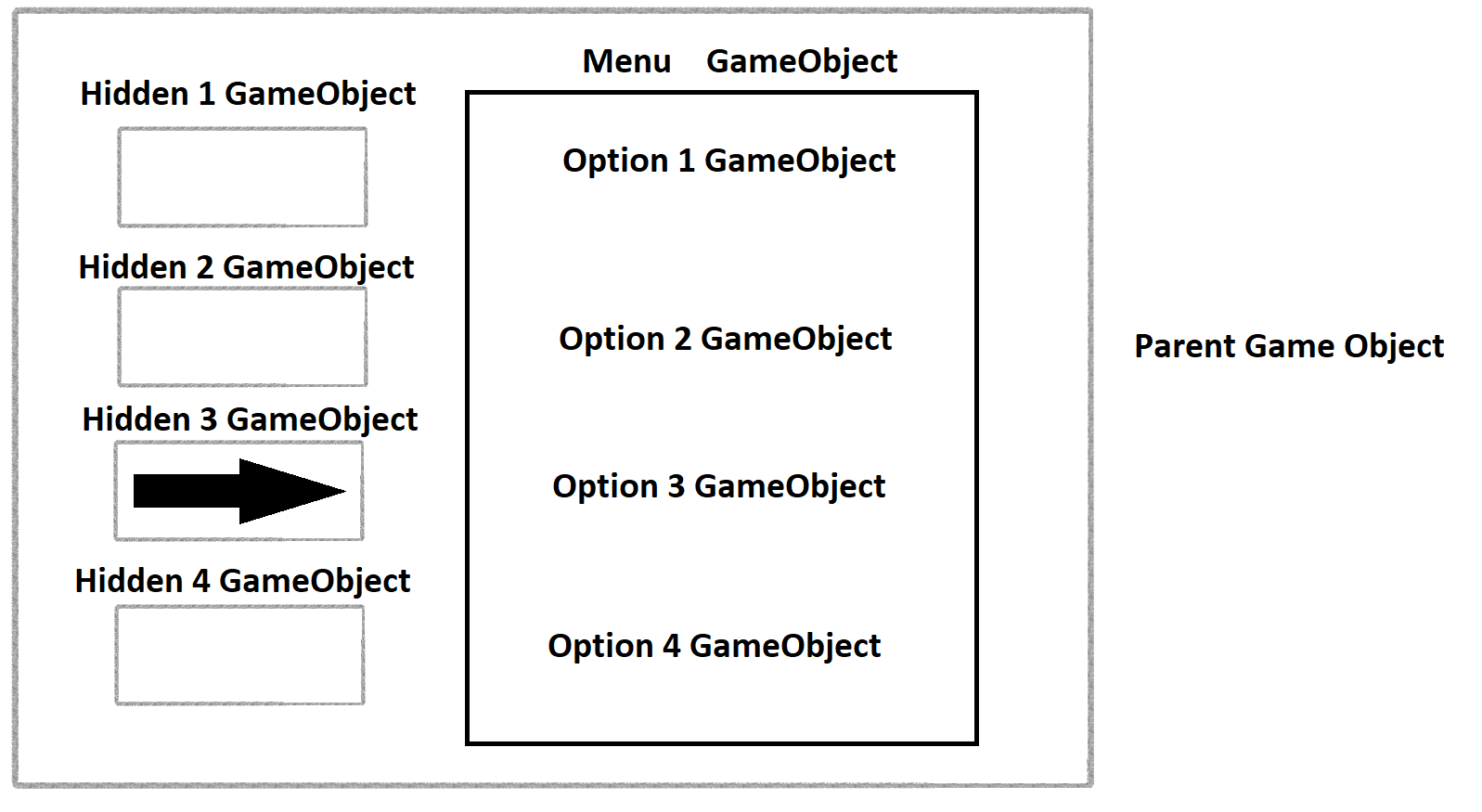
but by using this image, I'd say just always have the 8 slots and 8 hidden arrow gameobjects and choose not to render them if it's not available
otherwise if you want to go from 2 slots to 3, then you'd prefab a slot configuration
and instantiate everytime a slot is needed
easier to just hide elements honestly
kindred solstice
soft sail
but by using this image, I'd say just always have the 8 slots and 8 hidden arrow...
OH! So what you're saying is to have 8 predetermines slots, and if I need more, the game will check and then instantiate another slot gameobject?
soft sail
the pokemon always has 8 even if those slots arent always filled
but if you have an extending/bounding UI (which is where the anchors come in play) then you can instantiate the slots and your UI should stretch along with the new object
kindred solstice
Yeah
kindred solstice
soft sail
but if you have an extending/bounding UI (which is where the anchors come in pla...
Okay, sounds like a plan, but with this option, I worry about performance since you could theoretically instantiate infinite amounts of slots (given that you don't make a max slot value)
soft sail
ideally you'd have a cap
kindred solstice
That works too. So I think I'll do that for menu options. But for things like battle scenes and character selections, think it would be better to find the transform of the object an have the arrow go to it
So far, this is what I got

And it works
now all I need to do is find the YMin and Xmiddle of the object and move a few spaces above it
For this
 soft sail
game space positions should be fine
kindred solstice
(My game)
kindred solstice
soft sail
game space positions should be fine
wdym
soft sail
the thing with the UI is that if elements aren't contained with respect to anchors, and then you're offseting other objects not pertaining to those anchors, then those offsets and size values will not always be accurate
it's just more work basically
 soft sail
oh, the characters are on the UI too?
kindred solstice
Yeah
Because it's only character selection
After you select a character, the scene will change to the actual game
So far, this works, but my problem is that I need the arrow to then move upwards of that position. I thought about using ymax, but idk how to do that exactly
 soft sail
rotation is not position
kindred solstice
soft sail
rotation is not position
rotation?
soft sail
read your code again
anyway, keep the canvas to scale with screen and if you do want to do it by exact positions it should be fine for the most part. I do suggest just creating the whole layout and pivots before runtime that you need without relying on runtime values.
kindred solstice
soft sail
anyway, keep the canvas to scale with screen and if you do want to do it by exac...
Yea
Wait new Vector2() doesn't add on to the position, it puts it in the new position
soft sail
position + new position
kindred solstice
So arrow.tranform.position = arrow.tranform.position([x], [y] + [random number])
soft sail
kindred solstice
So arrow.tranform.position = arrow.tranform.position([x], [y] + [random number])
yeah, you've got the position you're setting so offsetting with the newer values is what you'll need to do next
kindred solstice
Okay I was just wondering since sometimes unity likes to give me an error when I write it like that
(Probably a me issue because I can be dumb at times)
kindred solstice
This is annoying

oh it
The pointer itself is a rect
I'm dumb
I just needed a float lol
kindred solstice
nvm this is actually stupidly hard
kindred solstice
Aight this is the best I got so far

 meager quartz
Hey guys.
How do you get chinese text characters in your game?
I've spent all night trying to sort out every single character that can appear in the game to create a TMP file with it, but its inaccurate and theres still a lot of boxes. I'm kind of losing my mind.
Is there a better way to do this?
I spent a couple hours looking, and couldnt find any tmp file that just had all the characters in there already... does one not exist? or is this a shit way to do it?
... thanks.
 cinder sentinel
Is this a good way of organizing ui elements? Like one canvas that has multiple panels, each panel having a set of images/buttons/text?
 quasi parcel
Im unable to get more than one button at a time to register clicks. These are the same duplicated object.
im worried that I have some object covering the buttons that I dont know about but I don't know what can actually block the button
I assume whats happening is the most recent button is covering up the other buttons hitboxes
I confirmed thats whats happening, if I disable the other buttons the one left works. I don't see anything covering up the other buttons though
kindred solstice
meager quartz
Hey guys.
How do you get chinese text characters in your game?
I've spent all ni...
You could try to find a font that uses them?
Maybe copy paste from a translator
meager quartz
thats not how it works

 oblique pewter
For someone with a YouTube channel how did you misread rotation as position
 proven thunder
can someone help me i made a menu but the buttons dont work and i haev no clue why
tropic umbra
any tutorials for creating tweening for QTEs ?
I have an outer circle tweened to the scale of an inner circle and it just doesn't look right scale-wise, plus I dont wanna hardcode anything
the outer is thinner than the other, but this means they don't properly overlap when they need to (including when both circles are the exact same image)
Pastebin
Pastebin.com is the number one paste tool since 2002. Pastebin is a website where you can store text online for a set period of time.
also, I want to know if there are any good alternatives to Unity's UI systems for creating dynamic and animated vector GUI (my game being very persona5-inspired I want everything crisp but highly stylised and animated/dynamic)
found this which was interesting https://forum.unity.com/threads/akyuiunity-xd-generate-unity-prefab-from-adobe-xd.1058111/
but i want to know every path i can go down

Unity Forum
[IMG]
[IMG]
WATCH "HOW TO USE" MOVIE!!
The official subtitles are only available in Japanese, but you can use the automatic English translation....
 tiny condor
the strange part about this @crystal swift is that even by changing the height of the slot it doesn't change it when generated in game
but changing the text size will properly change the text, so it's not an incorrect reference
 crystal swift
the problem is about how you're mannaging your rect transforms
to be clean, show me everything again, including the hierarchy
please
tiny condor
coming right up
So roamcanvas is the entire ui canvas, inventoryScreen the panel, granted the the purpose of the other parts are beyond me but here's the rest.


 crystal swift
so you want the inventory slots fill the width of Inventory screen panel right?
tiny condor
I'd like it to fit the width, but have the height set by me
crystal swift
ok where are they in the hierarchy?
tiny condor
strangely if I go crazy and remove all the margins it still appears diddly like that

at runtime they slot in there
 crystal swift
oh ok so they are instantiated?
tiny condor
and their values are as such

which are the old x widths and heights I had before changing the ui layout
tiny condor
crystal swift
oh ok so they are instantiated?
yeah, these items are part of a dynamic inventory so they would be instantiated
crystal swift
ok lets work from there, put the prefab inside the content gameObject to work with that
tiny condor
slotting it directly in has it's values matching the ones above from the looks of it
 crystal swift
oh I think I see the problem, GridLayoutGroup, lemme do some testing to help you
crystal swift
can you make your canvas a prefab and upload it here?
tiny condor
I won't lie, I completely forgot I had that component there, make a guess what the values there are...
 tiny condor
just messing with some numbers real quick
crystal swift
ok, try to make it as clean as possible
tiny condor
crystal swift
did it work?
yup, there we go X/
completely forgot to think about how the grid might have affected it
 crystal swift
well I still see a blank space to the right but if it works for u it's ok :)
tiny condor
yeah the blank space is actually meant to be a scroll bar once it gets long enough
so that's intentional
either way, I learned something new!
while i'm here, do you happen to know what all these different gizmos on the ui editing screen mean?

you've got a grey outline, yellow one, white boxes and the hollow circle in the centre
crystal swift
is it a text mesh pro?
crystal swift
grey outline is the size of the ui component
yellow outline is the text area
white boxes are there just for you to drag the text area
the hollow circle is the pivot of the element, it determines its position and the element rotates around it
everything but the yellow outline exists for every ui element
tiny condor
gotcha. So in a way it's a bit like having a parent panel and a child text area?
crystal swift
tiny condor
gotcha. So in a way it's a bit like having a parent panel and a child text area?
exactly
tiny condor
neato
well thanks for the help, even if it was me being stupid
but then again a lot of my issues are down to that
 lyric moss
does anyone have idea what i should change in ui to make it less boring?
 kindred solstice
oblique pewter
For someone with a YouTube channel how did you misread `rotation` as `position`
kindred solstice
oblique pewter
For someone with a YouTube channel how did you misread `rotation` as `position`
I have no clue what me having a yt channel has to do with this but I'm very stupid
 viscid wharf
how to get rid of soft edge around text?

 still sail
viscid wharf
how to get rid of soft edge around text?
still sail
viscid wharf
how to get rid of soft edge around text?
Use text mesh pro https://docs.unity3d.com/Manual/com.unity.textmeshpro.html
 rich karma
How can I programmatically show Game Objects inside a UI element?
In the screen shot, the White Boxes are UI Images, which work as expected. If I add enough White Boxes, the container will begin to scroll
However, the Red Circles are 2D Game Objects. They do not affect the UI Container at all. If I keep adding Red Circles, the UI Container will not scroll. I want to programmatically create Game Objects of cards and display them in container on the right, similar to Yugioh Master Duel's UI

 mortal robin
rich karma
How can I programmatically show Game Objects inside a UI element?
In the screen...
mortal robin
rich karma
How can I programmatically show Game Objects inside a UI element?
In the screen...
Don't make your card game out of UI
classic blunder
The math to automatically lay the cards out at fixed intervals is not difficult
rich karma
But Unity's built in UI system allows it to be responsive
If I made all of the UI out of game objects I'm not sure if it would be responsive
mortal robin
rich karma
If I made all of the UI out of game objects I'm not sure if it would be responsi...
Then why are you asking how to put GameObjects in?
rich karma
Because I don't fully understand what I'm doing
I don't really understand the difference between UI and GameObjects
To me, it looks like the deck builder should be done using Unity's UI system, but then I need to display my cards which are game objects
mortal robin
UI is made of GameObjects
it's not the difference of UI and GameObjects
it's the difference between UI objects and world space objects
oblique pewter
kindred solstice
I have no clue what me having a yt channel has to do with this but I'm very stup...
Just assumes the channel would be like tutorials and stuff lol
kindred solstice
You over estimate my abilities
oblique pewter
lyric moss
does anyone have idea what i should change in ui to make it less boring?
Oo nice clock
oblique pewter
kindred solstice
You over estimate my abilities
😅
kindred solstice
oblique pewter
- pat
rich karma
If you wouldn’t make Master Duel’s deck builder UI using Unity’s UI system, then why would you ever use the UI system? When would you use one over the other
oblique pewter
o.o
oblique pewter
does Unity GUI use texture caching to avoid redrawing if a component has not been "invalidated" ?
for example, when scrolling, the entire child list would need only redraw the cached textures at new positions, and not need to actually fully redraw the children at their new positions
 toxic gull
I have an element which fills the full screen with the rect transform
It has a webcam texture, which stretched because of the filling
How to scale the texture properly to fill the full screen, while still looking good?
I want it to stay looking good when changing the aspect ratio of the game view, this is where my current code breaks
// Adjust the aspect ratio of the RawImage to match the camera feed
float videoRatio = (float)webcamTexture.width / webcamTexture.height;
if (webcamTexture.width > webcamTexture.height)
{
    // Landscape video
    cameraImage.rectTransform.sizeDelta = new Vector2(Screen.width * videoRatio,
                                                   Screen.height);
}
else
{
    // Portrait video
    cameraImage.rectTransform.sizeDelta = new Vector2(Screen.width,
                                                   Screen.height / videoRatio);
}

Debug.Log(videoRatio);
cameraImage.transform.rotation = Quaternion.AngleAxis(webcamTexture.videoRotationAngle, Vector3.up);```imo making that in non ui would be crazy. ui has all the layouts and scroll view and stuff, making it in non ui would be harder and i personally cant think of any reason to do it.
honest saffron
rich karma
How can I programmatically show Game Objects inside a UI element?
In the screen...
ur saying ur gameobject doesnt go in the right place? make sure it has the "Image" component (its the component used by all ui images) and you are setting its parent to the scroll view's content or whatever
rich karma
It’s a world space game object
honest saffron
rich karma
It’s a world space game object
why?
rich karma
I decided to have 2 versions of my card prefab. One in world space and one using ui components. This is the best solution I’ve come across so far
honest saffron
rich karma
I decided to have 2 versions of my card prefab. One in world space and one using...
yeah that works, so you can use the ui one for the deck editor and the non-ui one for when you're playing
subtle flume
Hi, noob guy here. Quick question
Why this asset that I just uploaded has this weird negative space at the bottom if the origina PNG is not? That's a button btw
how do I make it fit?

 mortal robin
subtle flume
Hi, noob guy here. Quick question
Why this asset that I just uploaded has this w...
mortal robin
subtle flume
Hi, noob guy here. Quick question
Why this asset that I just uploaded has this w...
Try the Use Sprite Mesh and Preserve Aspect checkboxes
subtle flume
Hi, it wasn't Unity but figma doing a mess on a shadow that was not contained within the frame
I have it fixed
 random pond
I have a overlapping HUD element that prevents the element behind it to be clicked. What do I have to add/configure in order to let click events bubble through all HUD elements?
soft sail
Raycast Target
 supple basalt
I am designing an objective indicator. Here's the current hierarchy.
The "Content Area" is the gray rectangle on the bottom half. I would like for this area's width to match the size of the "Row" element, which is the dark gray area with the triangle on the end.


I don't want the content area to be able to grow the Objective Display at all (beyond a minimum width that it requires)
but I do want it to grow as much as possible so that it takes up all of the space it has available.
- Objective Display <- VerticalLayoutGroup
- Row <- HorizontalLayoutGroup
- Content Area <- VerticalLayoutGroup
I'm not sure how to accomplish this. If I give the Content Area a flexible width, the Objective Display's vertical layout group will see that and stretch the entire ui element really wide
If I give the Content Area a layout group that ignores layout, I can parent it to Row and then set its Right value appropriately
but then I can't lay out multiple Objective Displays correctly

they're ignored, so the top-level VerticalLayoutGroup that these two displays are parented to doesn't know about the extra height
random pond
soft sail
Raycast Target
What exactly do you mean by that. I can't find any component called Raycast Target
soft sail
UI components usually have some flags, one of which is on an Image component called Raycast Target which means it can receive raycasts if true
There's also "Block Raycasts" on canvas groups I think? But contrary to what some might think, it being true allows the element to receive the raycasts.
For your case, they all should be false so the blocking element cannot take in and stop the raycast
supple basalt
"block raycasts" meaning that it can be hit by them
like how physics raycasts only hit solid objects
(and stop when they hit something)
random pond
So I set this to Nothing eh? So the Canvas won't block raycast and the stuff behind it can receive a raycast (like pointer click)
 supple basalt
That controls what the graphic raycaster is blocked by
supple basalt
supple basalt
So, to summarize this: I have this:
- Holder
- Foo
- Bar
I want Bar to be as wide as Foo, but no wider. I also want Holder to understand that it needs enough vertical room for Foo and Bar.
I bet I can just write a script to do this, but a built-in solution would be preferred!
soft sail
I forget the layout stuff unless I'm working on it then immediately forget afterwards cause it's such a pain but I think the idea is Holder presents the max constraints which Foo is allowed to resize to, while Bar can only resize to the current constraints set by Foo
I usually just keep throwing layout groups at it until it works usually
The problem is you want the children to resize, but only one child should have that privilege, so Foo and Bar being siblings could be a problem.
soft sail
random pond
So I set this to `Nothing` eh? So the Canvas won't block raycast and the stuff b...
I think that would apply to the whole canvas? So could be fine assuming you've multiple canvas in your scene.
random pond
I removed teh Graphcis Raycaster component - now it works as intended
since I have no need of interaction with taht partical HUD canvas element
random pond
soft sail
I think that would apply to the whole canvas? So could be fine assuming you've m...
Yes I had - one was the enemy healthbar/namelabel HUD/Canvas element taht prevent some HUD menu buttons to work if they where overlaying
quasi parcel
I think ive fixed this before but now ive lost it. Why does the text box move when typing too much in it.
subtle flume
Hi, is there a way to do gradients while building UIs? Something like this

What about background blur?
I'm trying to achieve this effect, I saw something about post processing but for UI I think could be too much, or not?
 low pike
Gradients can be done, I can never get them to be exactly the same as they'd show up in PS though
I say "can be done" .. not out of the box
tropic umbra
https://youtu.be/_4hM509OjDQ?si=SlM6yTuaLFFZOR6f
When will something like this be officially supported? It looks extremely useful but I wouldn't want to switch to it and then have it obsoleted by an official solution
I'd like to introduce how to animate Visual Elements in the UI Toolkit using the Unity Timeline. I came across an interesting post on the Unity forum a couple of months ago. It said you can animate visual elements using Unity Timeline. It was exactly what I had been waiting for. The workflow was intuitive and the level of integration with the Ti...
Idk why you can't already animate in UI toolkit, it's nice and easy to use but the lack of animation really is a huge downside
low pike
gritty cloak
tropic umbra
https://youtu.be/_4hM509OjDQ?si=SlM6yTuaLFFZOR6f
When will something like this b...
June 7th 2026
 austere cedar
i use canvas with world space mode and i added button. but i cant click it.what i miss?


 gloomy zephyr
Currently working on a UI and im trying to add a Footer. I am wanting it to stay at the bottom at all times.
How can I acheive this? When I add more AdminSit_Member_1, it just goes over it

 rich karma
You need to set the anchor. Currently, your anchor is at the top left. You need to anchor the y to the bottom
There are shortcuts for common anchor positions by clicking in that square that says "top" and "left"
You can also manually set them in the anchors section
 low pike
austere cedar
i use canvas with world space mode and i added button. but i cant click it.what ...
low pike
austere cedar
i use canvas with world space mode and i added button. but i cant click it.what ...
Because that's the back of it, rotate the canvas by 180 on Y
austere cedar
low pike
Because that's the back of it, rotate the canvas by 180 on Y
not working
i need code for camera or something?
low pike
nope
austere cedar
like mouse
low pike
What should the button be doing when you click it?
 low pike
sigh.. ok AT THE MOMENT what do you expect the button to be doing when you click it?
austere cedar
i set up all button now but they cant click
low pike
austere cedar
i use canvas with world space mode and i added button. but i cant click it.what ...
atm.. going from this screenshot.. all it will do is change colour slightly -> change the colours to be VERY different so it's obvious when the button changes colour
low pike
austere cedar
i need code for camera or something?
After watching the vid, I see I answered this incorrectly. You will need code, you'll need to do a raycast (I think) from the camera for it to interact with world space UI


 tall shale
how do I make a reorderable vertical scroll view in unity so that user can reoder the items easily and which works with android to ?
 azure edge
tall shale
how do I make a reorderable vertical scroll view in unity so that user can reode...
azure edge
tall shale
how do I make a reorderable vertical scroll view in unity so that user can reode...
I think you'll need to handle the drag and drop stuff yourself, but the main answer to your question is: reorder the objects in the heirarchy(https://docs.unity3d.com/ScriptReference/Transform.SetSiblingIndex.html). the VerticalLayoutComponent, assuming your using one, will put the list eleent in the correct place, using THAT order.
tall shale
azure edge
I think you'll need to handle the drag and drop stuff yourself, but the main ans...
thanks
azure edge
Can I (and if so how) create groups of controls such that selecting a control from one group, will not affect what control is selected in another group? (my use case: a list of files, and a separate (but related) set of file-action buttons)
 paper hill
Any suggestions on how to handle longer usernames?


Do you think I should make the player display box bigger?
just @ me
 fervent yarrow
So I'm trying to get my image to appear in the correct order however changing the layer and the order in the hierarchy doesn't seem to be working.. any thoughts?

 mortal robin
fervent yarrow
So I'm trying to get my image to appear in the correct order however changing th...
mortal robin
fervent yarrow
So I'm trying to get my image to appear in the correct order however changing th...
Only hierarchy order is used for UI
fervent yarrow
mortal robin
Only hierarchy order is used for UI
That info helps, thank you
What's the best way to go about making my image holder transparent?

I created a system that enables the user to "pull up" the image pressing F1 and upon release disappearing but the imageholder is white and if I make it transparent the image it changes to will of course be transparent.
For context:
void Update()
{
    // Detect if the ` key is pressed
    if (Input.GetKeyDown(KeyCode.F1))
    {
        Debug.Log("F1 key pressed");
        isBackQuotePressed = true;
        changeImage1();
    }

    if (Input.GetKeyUp(KeyCode.F1))
    {
        Debug.Log("F1 key released");
        isBackQuotePressed = false;
        revertImage();
    }
}

public void changeImage1()
{
    oldImage.sprite = hiraganaChart;
}

public void revertImage()
{
    oldImage.sprite = blank;
}
Sounds like to me you just want to show an image when you press F1
You could just enable and disable the object with gameObject.SetActive(/*bool*/); instead of changing the sprite
If you want a background, all you have to do is create another image, then make your chart a child of that image
 solemn pivot
What are likely reasons why a canvas UI Panel element is significantly darker in scene than what the color picker says the assigned color is/should be?
 solemn pivot
found the problem, the problem is the default panel sprite isnt actually white
so it multiplied darker each time
honest saffron
paper hill
Any suggestions on how to handle longer usernames?
you can tick a box on the textmeshpro text that automatically makes the text smaller if it doesnt fit
its called Auto Size
 pliant crescent
public void Init(TextContainerBehaviour parent, TextMeshProUGUI tmp)
    {
        TextContainerScript = parent;
        Text = tmp;
        Text.onLinkSelection.AddListener(OnLinkClicked);
        Debug.Log("TextWordClick initialized");
    }
the IDE can't find onLinkSelection - is it from a specific version of unity? I'm on 2022.3.0f1
I can see references to it in google as far back as 2014 though. yet there's nothing about links in its class, and nothing about link selection in its parent class
Text is just TextMeshProUGUI Text;
mortal robin
pliant crescent
```cs
public void Init(TextContainerBehaviour parent, TextMeshProUGUI tmp)
{...
https://docs.unity3d.com/Packages/com.unity.textmeshpro@1.1/api/TMPro.TMP_Text.html
onLinkSelection isn't a thing on TMP_Text
pliant crescent
yeah
mortal robin
Are you confusing legacy Text with TextMeshPro?
 mortal robin
If it's not in the docs it doesn't exist
pliant crescent
how do you get a click on a specific word in textmeshpro?
mortal robin
If you only saw it in the docs for legacy Text it won't necessarily be on TMP
pliant crescent
I found this, it looks like textmeshpro but it's not an official unity archive: https://repo.ijs.si/eHeritage/3DInstitute/blob/de872ebaf11a92688f6a5128fbbb331ccf9b1671/Assets/TextMesh Pro/Examples/Scripts/TMP_TextEventHandler.cs

GitLab
GitLab Community Edition
mortal robin
pliant crescent
how do you get a click on a specific word in textmeshpro?
Unity Forum
Hello!
I'm trying to make something like this:
Click this to be happy.
The docs explain literally nothing.
This just doesn't work:
Click...
pliant crescent
that looks like what I originally had, which I couldn't get to work
    public void OnPointerDown(PointerEventData eventData)
    {
        Debug.Log("Pointer down");
        int linkIndex = GetLinkIndex();
        if (linkIndex != -1) // Was pointer intersecting a link?
        {
            Debug.Log(linkIndex);
        }
    }

    private int GetLinkIndex()
    {
        return TMP_TextUtilities.FindIntersectingLink(Text, Input.mousePosition, null);
}```I think it's because it's not getting the OnPointerDown event
but it should be

I might have another input thing intercepting the click. I find the input stack confusing
off to #🖱️┃input-system
meager quartz
Making interactable objects in the game world... is it weird to show a popup image of the thing you're interacting with?
Maybe i should have stick to having the character speaking idk
 spark sage
Hello, i'm trying to figure out how to add an outline gradient to a TMPro ui text, but it seems like i can only add gradient to the text itself
Does anyone know how i can achieve that effect? Do i need to use shaders?
 spark sage
Hello, i'm trying to figure out how to add an outline gradient to a TMPro ui tex...
spark sage
spark sage
Hello, i'm trying to figure out how to add an outline gradient to a TMPro ui tex...
for anyone interested, you can make a gradient image and put it in Texture in the Outline tab
lyric moss
hey i need help idk why my coursor cant interact with ui now, before it was working fine i could use open inventory button i could drag items on slots and now it doesent works idk i need help
 sterile wedge
lyric moss
hey i need help idk why my coursor cant interact with ui now, before it was work...
lyric moss
sterile wedge
https://unity.huh.how/ui/ugui/input-issues
sterile wedge
lyric moss
hey i need help idk why my coursor cant interact with ui now, before it was work...
lyric moss
sterile wedge
https://unity.huh.how/ui/ugui/input-issues
omg ty so much
sterile wedge
lyric moss
omg ty so much
this is pinned in this channel, for future reference
 worn raven
Heyo, i've got a bit of an issue with scroll rects and masks in my scene, i am not entirely sure why it isnt working.
the left side should be masked so it doesnt clip over the grey image area, and it should be scrollable, but it doesnt scroll i am not sure why. it worked in an earlier version of this scene but i cant eliminate the change that broke it, even removing everything but the playercards object does not change anything...


 worn raven
i went back in my versioning until it worked and copied the game object into the current version, it now scrolls but...
uh it yeets itself off the gameworld
 olive imp
Hello there! Does anyone know how to prevent the camera view from shrinking? I have been working in free aspect, but when I exported the game it was turned into 16:9, is there a way to keep it in free aspect or for the game to scale up or down depending on the window size?

 mortal robin
Is it just me or do those images not load?
Anyway without seeing the image I'm going to guess you simply have not anchored your UI elements properly.
https://docs.unity3d.com/Packages/com.unity.ugui@1.0/manual/UIBasicLayout.html#anchors
You also want to look at the Canvas Scaler settings
olive imp
mortal robin
Anyway without seeing the image I'm going to guess you simply have not anchored ...
Alright ty i will check it out
honest saffron
olive imp
Hello there! Does anyone know how to prevent the camera view from shrinking? I h...
are u making a platformer game in the ui or does your ui just look like a platformer game
olive imp
honest saffron
are u making a platformer game in the ui or does your ui just look like a platfo...
a platformer game
honest saffron
olive imp
a platformer game
😱 you shouldnt use the ui for a platformer game
olive imp
im not using UI for the game lol
honest saffron
olive imp
im not using UI for the game lol
oh i thought everything in the image was ui
olive imp
the problem is with the window
when its in free aspect the game is fine, but when its set to something else it shrinks and not show the entire game
olive imp
honest saffron
oh i thought everything in the image was ui
oh nah why would someone do that 😭
 radiant turtle
Anyone have any idea what the UI turns into squares on only when another camera splits the screen?

 mortal robin
radiant turtle
Anyone have any idea what the UI turns into squares on only when another camera ...
mortal robin
radiant turtle
Anyone have any idea what the UI turns into squares on only when another camera ...
not seeing any squares?
 dry abyss
Can I link these together?
If I anchor them to top right wont they overlap each other.
 radiant turtle
mortal robin
not seeing any squares?
radiant turtle
mortal robin
not seeing any squares?
At the bottom right. One pictures has a '0', but the one one just turns to a solid color
mortal robin
dry abyss
Can I link these together?
If I anchor them to top right wont they overlap each...
Just set the offsets appropriately and it'll be fine
mortal robin
radiant turtle
At the bottom right. One pictures has a '0', but the one one just turns to a sol...
Oh i was looking at the green bars. Maybe it's just too small? What component(s) are you using for the text?
dry abyss
ehhhh what are offsets xD
radiant turtle
mortal robin
Oh i was looking at the green bars. Maybe it's just too small? What component(s)...
TextMeshPro
mortal robin
radiant turtle
TextMeshPro
TextMeshPro or TextMeshProUGUI?
radiant turtle
This one. Sorry dont know the difference
 mortal robin
If you make it larger does it change anything?
soft sail
dry abyss
Can I link these together?
If I anchor them to top right wont they overlap each...
You can contain them in another gameobject with a layout group, then you can leave the anchoring to that specific gameobject
mortal robin
dry abyss
ehhhh what are offsets xD
just the "right/left/top/bottom" things in the rect transform
dry abyss
I cant move them cause I made Canvas into prefab at some point
mortal robin
I don't see how prefab is relevant
dry abyss
well its not letting me
mortal robin
What ar eyou trying to do
dry abyss
telling you cant reoder inside prefab
mortal robin
Why are you trying to reorder the children?
dry abyss
What other guy told to make empty objects with layot
mortal robin
Well you would do that inside the prefab. But you don't need a layout for this
you should absolutely be doing everything in the prefab itself though
dry abyss
I didnt really need to do much inside prefabs
 dry abyss
yeah I found that
mortal robin
or double click the prefab

 kindred stag
How does one tie their Property Drawer into Unity's existing Editor GUI? I add fields based on how the class is being set up in the inspector, but the class is a part of a list. The first image is how it looks before the designer selects a Buff Type. The second image is after they've selected a Buff Type. However, as you can see, Unity's Array/List box doesn't expand automatically to acommodate my new field. How do I make it do that?


 nova mural
hey guys i am trying to make a inv systen but the drag and drop is not working i also have a hover bool to check if that is working and that isint working i have turned of raycast target on the drag/drop img does some1 know what is hapening(copied the code from the vid sorce bc i tought it was that but it aitnt)
mortal robin
kindred stag
How does one tie their Property Drawer into Unity's existing Editor GUI? I add f...
make sure your PropertyDrawer is overriding and implementing https://docs.unity3d.com/ScriptReference/PropertyDrawer.GetPropertyHeight.html appropriately
If you don't do that, Unity will assume you only want one line
 floral quail
I've got a question, for some reason, the changes I implement on the children of UI elements are not being updated on their parents and vise versa. Is there a setting I need to check somewhere for this to happen?
 wise dune
Hello there. Is it just me or the TextMeshPro Font Asset Creator tool is broken in the latest 2023.2.4f1 ?
mortal robin
floral quail
I've got a question, for some reason, the changes I implement on the children of...
What changes would you expect to be updated on the parent?
floral quail
Rect transform positions
mortal robin
Why would changing the child change the parent?
floral quail
If the child is parented to the parent, and I update the child on the parent, why wouldn't it be updated?
I could be misunderstanding something here.
mortal robin
The position in the world would update but nothing in the inspector would change
Maybe show screenshots of what you mean?
median iris
Hey, small question.
Let's say I want to create a Node Editor UI for Runtime (used by the Player), the Node Editor would obviously need functionality like Zooming/Panning, moving Nodes around (and an "infinite" area in which the Nodes can be arranged).
What would be the "easiest" solution to create such UI?
When using the actual UI System, I'd probably need to do some Matrix manipulations (and I have no idea how to do those, but we have Google) and i'm also worried about "performance" for large Graphs, afaik a change to a single Object would trigger a Rebuild for the whole Canvas.
I could do it with actual 2D Sprites and an orthographic Camera, that would make stuff like Zooming and Panning extremely easy because i just would have to move the Camera and increase/decrease it's Size, but comes with it's own set of problems because i would have to recreate all those basic controls like InputFields, Dropdowns and whatever, as well as features like automatically resizing InputFields to fit their Content.
A mix of 2D Sprites and UI would be another possibility, but I assume that having XYZ amount of Nodes where each Node would have it's own Canvas (or even multiple ones) attached is even worse.
Thankful for any ideas 🙂
(I'm fine with the logic side of things, it's really all about the approach towards such UI)
median iris
ok, seems like i'm stupid and massively overthinking stuff, i can just use UGUI and scale the RectTransform....
are there any downsides/issues in interactabiity when a RectTransform scale is different from Vector3.one? 🧐 🤦♂️
 gentle plover
Hey all, ive been building a HUD in its own scene, and it works great. And then my FPS scene works great. However when I drag and drop my HUD scene into my FPS scene, it changes from FPS to 2d. How do I overaly my HUD over the FPS scene without changing the view?
 honest hollow
I have a VerticalLayoutGroup component which I've sucessfully added a button prefab to, and they resize correctly at runtime. But when I try to add one that I instantiated via script, it appears at the bottom like it should, but it's way bigger than the others and doesn't fit in the view
Never mind, chatGPT to the rescue... 🙂
I added the instances, set their parent as the VerticalLayoutGroup object (assignListNode), and then call
LayoutRebuilder.ForceRebuildLayoutImmediate(assignListNode.GetComponent<RectTransform>());
mortal robin
Shouldn't need that
supple basalt
perhaps the scale of that child object is way off
radiant turtle
Feedback on this? It will take the players to the game discord when you click it.
mortal robin
A bit extra innit
radiant turtle
mortal robin
A bit extra innit
Yeah. I see that, but I think its fun. Def need to tone it down.
gritty cloak
my image is supposed to stretch and center on the whole canvas when i press this button while holding alt and shift right?

cuz i have an image that darkens the background and i want it to be stretched across the whole screen but this doesnt work for some reason
mortal robin
gritty cloak
cuz i have an image that darkens the background and i want it to be stretched ac...
show the rect transform inspector for the object after you do that
 mortal robin
gritty cloak
cuz i have an image that darkens the background and i want it to be stretched ac...
mortal robin
gritty cloak
cuz i have an image that darkens the background and i want it to be stretched ac...
Ok so yeah looks like it should stretch completely
not necessarily over the whole screen
but at least over its entire parent
does it have a parent other than the canvas itself?
gritty cloak
oh wait it does stretch over its parent
ok i did the same thing for the parent and it worked
thank you
mortal robin
I'd probably also set those Left and Right values to 0, for OCD reasons
right now they're apparently very small nonzero numbers
 hot crow
why the hell the first photo turns into the second photo when i enter play mode? the player instances seem smaller and weirder


 fleet vine
Hey guys. Is there any way to change a fonts numeral style to lining numbers instead of old style? (TMP)
 celest jolt
hey so for some reason my buttons arent working properly they work like i can press them but when i hover over them or press them the color never changes
 mortal robin
celest jolt
hey so for some reason my buttons arent working properly they work like i can pr...
mortal robin
celest jolt
hey so for some reason my buttons arent working properly they work like i can pr...
your image color is black
the selectable transition colors are multiplicative
but black is 0
multiplying by 0 always gives you 0
make your image color WHITE, then the color will be completely controlled by the button transitions
celest jolt
ok thanks very much didnt know that
 neat grove
Hi, why doesn't my button work? I have 3 canvases (Start1, Start2, Start3), Start1 has a Canvas Group 1 and the others have Canvas Group 0. On the Start1, I put a button and put an event On Click: "CanvasGroup.alpha, Start1, 0" and "CanvasGroup.alpha, Start2, 1". And when I press the button, nothing happens
 short wyvern
My project was working fine and I was using TMPro. I updated TMPro and now I am getting this error.
 mortal robin
neat grove
Hi, why doesn't my button work? I have 3 canvases (Start1, Start2, Start3), Star...
mortal robin
neat grove
Hi, why doesn't my button work? I have 3 canvases (Start1, Start2, Start3), Star...
Is the button reacting to mouseover etc?
mortal robin
short wyvern
My project was working fine and I was using TMPro. I updated TMPro and now I am ...
update all your packages and delete the library folder
radiant turtle
is it possible to have a ui image function as a 'Pointer' I'm using the IPointer interfaces and would like those to activate when the image goes over it
mortal robin
radiant turtle
is it possible to have a ui image function as a 'Pointer' I'm using the IPointer...
yes, using the new input system: https://docs.unity3d.com/Packages/com.unity.inputsystem@1.7/api/UnityEngine.InputSystem.UI.VirtualMouseInput.html
low pike
they're the navigation order
 twilit flicker
Is there a shortcut to find the canvas that a button is on?
 hollow hearth
Ok, anyone knows any good advice/documents about image blur in unity UI, I dont understand what I am doing wrong. I made some icons in Affinity Designer, I first tried exporting as SVG and using unity vector graphics package, but whenever I scaled the icon down it turned into a bunch of pixels and it became distorted. I tried scaling it down in Affinity Designer and then exporting (same thing happened) so I just ended up using a PNG it is better but the blur on the PNG only disappears at 4K and it comes back at FullHD or less
radiant turtle
Some one have an idea why im getting phantom ui selections when the cursor isnt over the button?
low pike
twilit flicker
Is there a shortcut to find the canvas that a button is on?
Just this way https://docs.unity3d.com/Manual/Searching.html
twilit flicker
i mean more in a code way
 ionic beacon
GetComponentInParent<Canvas>()
gritty cloak
how can i put text that doesnt move with the canvas and sits below a gameobject for example
low pike
This is TMP without a canvas, so you can have it in world space
 gritty cloak
im making a 2d game
so 2d object then?
i basically need to put some text that explains what things to do the player as the game goes on
and i was wondering if there was a specific feature for that
low pike
Yes, the thing I just told you will allow you to have text not on a canvas.
"2d game" just means it's flat, you're still in a 3d engine, placing things in a 3d scene... the only difference is the 2d toggle on the scene view
 muted dragon
is there any way to make an exception on control child size in a vertical layout group, I have a layout with a text and a button under it and when the size of the text adjust the button shrinks, if this makes sense
 supple basalt
oh, you did post over here!
low pike
muted dragon
is there any way to make an exception on control child size in a vertical layout...
put a layout element on the button with a preferred size set
supple basalt
that would also work, although it wouldn't make the button fit the size of its text
low pike
Doesn't need it to be dynamic, by the sounds of it.
 cold plaza
I am trying to create a new palette for my tilemap so I can drag my spliced tileset into. I watched two videos on people doing it, and they just created a new tilemap by clicking create a new palette, creating a folder and done. However when I create a new folder or select an existing one, it doesn't nothing and doesn't create a new palette, any ideas on how to fix this?
 paper hill
anyone able to help me fix my scroll view?
the "friend button" components will populate for every friend the user has, everyone, will automicatically get put under the previous
i want the scroll to just keep increasing for as far as all the components get added on


 lusty plaza
paper hill
lusty plaza
paper hill
You need to have the layout continue all the way down.
- Attach a vertical layout group to Friends Section with the same settings as the other ones.
- Add LayoutElements to the objects that don't have layout groups (My Party Selection, Joinable Party Selection and Friend Button), to have them keep their sizes after the next step.
- Remove Content Size Fitter from Friends List (as this will not be handled by the parent layout group)
- Enable Control Child Size Height on all of the layout groups.
Note that this is pretty awful performance wise because of the nested layout groups. If it becomes a concern, you can flatten the hierarchy or write your own logic for setting the size of the content. Also follow general UI optimization tips like splitting up your UI into multiple canvases and disabling Raycast Target where it isn't needed.
paper hill
lusty plaza
You need to have the layout continue all the way down.
- Attach a vertical layo...
when you say layout groups in the second step do you mean vertical layout groups?
lusty plaza
Yeah
paper hill
okay perf
lusty plaza
You only need to add it to the game objects right below a layout group though
So for example not on the "My Party" text
paper hill
if its easier than text we can call rq and i can screenshare
lusty plaza
I don't think it's going to be easier
paper hill
so the issue im facing now is if i add control child size to the friends section for instance, it stretches the label
 lusty plaza
Did you add a layout element to the label?
paper hill
ohhh add a layout element to the labels but groups to the sections?
lusty plaza
Yeah kind of
I dont think the two other sections need layout groups if they're static
then they can just have a layout element with a fixed preferred height
paper hill
omg i cant get this to work
it just shifts everything around and then when i control z nothing goes back to where it was
@lusty plaza so now friends arent increasing past the mask
and i cant get the join code input field and the join button to sit next to each other
 lusty plaza
Did you add a verticaly layout group to the parent?
paper hill
 lusty plaza
to my party section
paper hill
yeah
it has child force expand to width and height and control child size set to height
lusty plaza
remove that and add a layout element instead
paper hill
from the party section gameobject?
lusty plaza
since it doesnt need any layout
paper hill
kk
lusty plaza
on the layout element you can set its preferred height
since otherwise it will get smooshed by control child size in a parent layout group
paper hill
okay perf
so do all the gameobjects inside of my part section need to have a layout element component or only the parent "my party section" gameobject?
 lusty plaza
Only the "my party section" gameobject. The layout elements are needed here to keep the heights of the sections when affected by a layout group. But since my party section doesn't have one the children are not affected
paper hill
okay so perfect thats what i have
lusty plaza
does it work?
paper hill
okay i think so
i still though want overflow to create scrollable area
right now when i add another friend panel, it just squishes itself into the already existing content


 paper hill
okay so just height?
lusty plaza
yes
paper hill
thank you for your help @lusty plaza ill do some testing and let you know if i have any more questions
the scroll stuff is so confusing to me i dont know why
i guess its just cause i never properly learned it
lusty plaza
its completely understandable
paper hill
i wish the ui system was a little bit more straight forward
paper hill
im freightened because i kinda hate css but at least its much more adjustable
lusty plaza
if you don't need special materials, word space rendering and have a layout heavy ui i recommend checking it out
paper hill
yeah ill look into it
the bulk of my ui is just in the main menu
for my game specifically
everything else isnt too complicated
paper hill
ooo actually i have one more question if thats okay.
currerntly, when you scroll, the scrolling works but your mouse has to be over one of the 3 labels. if its over any of the buttons or input field, it doesnt scroll
paper hill
lusty plaza
maybe for another project then
it seems like its worth learning
lusty plaza
paper hill
im freightened because i kinda hate css but at least its much more adjustable
on this note css is a bit scary, but with ui toolkit you do have a visual editor in ui builder
you also get global styling with ugui lacks severerly
paper hill
lusty plaza
on this note css is a bit scary, but with ui toolkit you do have a visual editor...
css is scary i think because of how much you can do with it. when you fine tune your research to what you specifically need to do, i end up figuring it out
lusty plaza
paper hill
ooo actually i have one more question if thats okay.
currerntly, when you scrol...
did you remove the image from the viewport?
or set it to not recieve raycasts?
paper hill
no both are still there
(im not super clear on what the raycast stuff means)
are they not supposed to be there?
lusty plaza
It basically means it can be interacted with the mouse pointer
and also blocks it
but best practice is to turn it off when it's not necessary for perfomance
if it's true I don't know why the scroll isn't working
oh wait maybe the event trigger eats up the scroll callback
paper hill
oooo on my buttons?
im not 100% sure how to fix that
i use the pointer enter to play a hover sound
lusty plaza
if you go down here on the buttons does it say OnScroll?

 lusty plaza
It's listening for all of the events
You'll have to make your own component to play those hover sound effects
public class HoverSound : MonoBehaviour, IPointerEnterHandler {
  public void OnPointerEnter(PointerEventData data) {
    // play sound
  }
}
```should be as easy as this thoughyes
paper hill
okay sweet that worked
ill mess around with the hover sound thing
should i really end up using this component i make for all buttons in my ui rather than the way i was doing it with the trigger events?
lusty plaza
you dont have to
paper hill
are there any benefits like performance or anything?
lusty plaza
no
paper hill
okay sweet
lusty plaza
but it can cause problems like with the scroll
paper hill
okay perf. i just ended up doing this:
public class HoverOverUI : MonoBehaviour, IPointerEnterHandler
{
    public void OnPointerEnter(PointerEventData eventData) {
        FindObjectOfType<AudioManager>().PlayMenuSound(MenuSounds.HoverOverButton);
    }
}
this is actually nice cause if i end up using this in the future, its more consistant
than having different scripts do the same thing
 main spade
is it possible to make a UI health bar similar to this one? I cannot seem to find any tutorials and I am not very well versed in UI code

please ping me if you respond to me :))
 mild kernel
What specifically? Is tat just a lot of artifacting?
Or are you asking how to make a bar shrink?
If so, you can use the Image component in UI and set the type to Fill
paper hill
How do I make it so that as the text size increases, it pushed the textbox to big bigger?
i have the icon anchored to the left side of the text box and i want it to move over as the size of the text increases
soft sail
paper hill
soft sail
https://docs.unity3d.com/Packages/com.unity.ugui@1.0/manual/script-ContentSizeFi...
yeah when i used this and set it to prefered witdth, it just made the width of the text box 0
ill keep playing around with it though
 karmic harness
hello little question, what does this icon means to you ? (context : the game is about giving inputs to the character so he can make a series of actions)

 rapid ferry
how to do the repeating image in UI, like doing the offset shift in renderer(unity class) materiasls, so i only need to change one image to make it slide indefinitely

oh nvm, found out this is what the raw image is for
low pike
@rapid ferry #💻┃unity-talk message
UI is drawn in hierarchy order, from top (first) to bottom (last)
rapid ferry
low pike
<@456226577798135808> https://discord.com/channels/489222168727519232/4978724242...
Hey, yeah i've got my modal last and the screen in the back first
 low pike
is it world space UI?

 low pike
It's the wrong shader
 rapid ferry
😮
low pike

Game Development Stack Exchange
I have a 2-d game that I am making, using 3-d assets, including TextMeshes for text. I have decided that in some instances, I would like to have the TextMesh appear behind objects in the foreground...
What you've got selected isn't the default shader
 low pike
I found that by googling -> tmp drawing on top of other ui
 steady badge
Hello, im having trouble with the inputs, i'm using unity starter assets for my character controller, walking around and pressing left click works fine but when i try to use UI i can't click anything, if i understand correctly it has something to do with the old and new input managers but idk what should i do
The event system doesn't track the mouse position but does react to just clicks
I've tried creating just new canvas in an empty project and everything worked fine there, importing starter assets broke it again
I've tried:
Replacing Standalone input module with InputSystemUIInputModule
Changing active input handling
Deleting and creating a new Event System

 mortal robin
steady badge
Hello, im having trouble with the inputs, i'm using unity starter assets for my ...
mortal robin
steady badge
Hello, im having trouble with the inputs, i'm using unity starter assets for my ...
Which starter assets?
First Person? Third Person?
Isn't the cursor locked for both of those?
Event System interactions generally don't work in the new input system while cursor is locked.
steady badge
The first person one
mortal robin
Replacing Standalone input module with InputSystemUIInputModule
You definitely should do this
And make sure cursor is not locked
soft sail
oh huh what's the benefit of locking the cursor
mortal robin
and that the graphic raycaster exists
steady badge
mortal robin
And make sure cursor is not locked
That i will have to search in the scripts i guess
mortal robin
steady badge
That i will have to search in the scripts i guess
It should be pretty obvious
if the cursor is hidden it is likely locked
soft sail
ah, I guess it makes sense if you were using window mode for the game
steady badge
It will be kinda bad as im making an fps shooter game, does that mean ill just have to look for some other character controller?
mortal robin
steady badge
It will be kinda bad as im making an fps shooter game, does that mean ill just h...
what kind of interactions are you trying to achieve here?
Is this for a pause menu?
Or something else?
soft sail
can just unlock it for inventory stuff probably
steady badge
For a game end menu but yes, for menus in general
mortal robin
If it's for an in game UI menu, generally you just unlock the cursor when showing those things
I don't even see how you could think about using the UI while the cursor is locked
steady badge
the cursor appears when i just hit ESC button
mortal robin
steady badge
the cursor appears when i just hit ESC button
that's just so you can use the Unity Editor
that won't be a thing in the actual built game
And it doesn't actually unlock the cursor
you will need to actually unlock the cursor i.e. Cursor.lockState = CursorLockMode.None;
steady badge
oh ok now i get how it works, its just that in the course i was following the person just hit esc button and it worked
but i guess they were using the old input or something
mortal robin
in the old input system you can interact with UI by default while the cursor is locked which is sort of a weird little loophole thing.
steady badge
Ok then thanks a whole lot, impossible to get through these under the hood things by yourself sometimes
 tall gulch
I want to use a vector image (svg) as a button. I have already importet com.unity.vectorgraphics and now can put the image into the TextMeshPro button. The problem is it is transparant for some reason, does anyone know why?

found the problem
 mortal robin
tall gulch
I want to use a vector image (svg) as a button. I have already importet com.unit...
mortal robin
tall gulch
I want to use a vector image (svg) as a button. I have already importet com.unit...
The vector graphics package rasterizes the vector image to a texture to import it as a sprite
tall gulch
so what can I do
mortal robin
what do you want to do
 mortal robin
tall gulch
like this
mortal robin
tall gulch
like this
use a higher target resolution with the importer
mortal robin
tall gulch
also make sure oyu're not looking at your game view zoomed in
and enable anti aliasing
 hardy creek
Hi. What is the name of that UI thingy that is like a dropdown, but instead of being a dropdown there are two arrows to change the options (a next arrow and a previous arrow)?
Those

Found it, selectable
mortal robin
hardy creek
Hi. What is the name of that UI thingy that is like a dropdown, but instead of b...
sounds like.. a carousel?
 sweet shard
This is a tough problem to word but
If a dropdown (minValueDropdown) is on its default value (random), I am trying to make it so that a different dropdown (maxValueDropdown) becomes inactive. To do this, I wrote some really simple code:
{
    public Dropdown maxLvlDropdown;

    void Start()
    {
        maxLvlDropdown.interactable = false;
    }

    public void HandleInputData(int val)
    {
        if(val == 0)
        {
            Debug.Log("0");
            maxLvlDropdown.interactable = false;
        }
        else
        {
            Debug.Log("Other");
            maxLvlDropdown.interactable = true;
        }
    }
}```The issue is that when I try to put the maxLevelDropdown gameObject into the public declaration space in Unity, it just won't let me. What am I doing wrong?
 mystic leaf
Why am I not able to use this UI


Unity Discussions
Okay, so i got my Dashboard working but i need to import a custom font (All of us know the cool font on digital alarm clocks, watches and/or old displays). How to import this font and actually print updating text? You know, a Tachometer like km/h or mph

Learn how to convert a standard TTF Font into a Text Mesh Pro Font Asset to be used for Text Mesh in Unity and apply effects.
🎁 Get OVER 200+ Scripts, Projects and premium content on my PATREON HERE:
➡️http://bit.ly/SpeedTutorPatreon
·························································································
🔥Topcashback: h...
this is the way I solved it
took me a while to figure it out
mystic leaf
mystic leaf
https://discussions.unity.com/t/importing-custom-fonts-into-unity/19437
this was very helpful
tall gulch
How do I activate antialiasing in an image that is used as a button?
not this

It should look like this but this is through the sprite renderer and not a button

 sharp furnace
hey so I have this, and I know its ugly as sin and horrid to use, but I am out of ideas for how to make this nicer. So i thought I would come here and ask people who have more experience with this, what should I do or how should I organize these so its not such a mess to look at and use for others?
 sharp furnace
hey so I have this, and I know its ugly as sin and horrid to use, but I am out o...
sharp furnace
sharp furnace
hey so I have this, and I know its ugly as sin and horrid to use, but I am out o...
not really looking for code or such with this, more just trying to ask people who have experience how I can learn how to make this not awful
soft sail
sharp furnace
not really looking for code or such with this, more just trying to ask people wh...
Property drawer script or editor attributes like NaughtyAttributes (or similar #1194282415917629603 message)
Discord
Discord is the easiest way to communicate over voice, video, and text. Chat, hang out, and stay close with your friends and communities.
You can nest classes inside of your scripts so they appear as folded elements to help lessen the amount of space taken at all times
Like this:
https://i.imgur.com/28tD4Ez.png
 sharp furnace
ok thanks!
Any advice on a decent way the fields should be oragnized?
soft sail
Whatever makes the most sense lol
 vernal basin
@sharp furnace If it was me I would think about how people are going to use all those fields and then organise them roughly in most used at the top to least used at the bottom. Then add [Header]s to make it easy to skip the list by feature.
That way you're optimising the interactions for the most common cases but also allowing people to quickly scan down to find the category of settings they need to use if it's less common
The grouping also helps to tell the user which settings are related to the same function, right now you'll either have to know what they are already, or guess.
sharp furnace
true
thing is things like IOR affect both specular and glass
vernal basin
I guess if they both use the same IOR value and if they can be used at the same time, then you'll maybe just need to tell the user that. Maybe in a tooltip or something, not sure.
But there's no harm in iterating. You can start with a reorder and a rough grouping and then see how that feels and continue to adjust over time as you play with it.
 haughty drift
How can i make the layout grid more resposive on different screen sizes its a bit streched
 low pike
What's stretched?
sharp furnace
vernal basin
But there's no harm in iterating. You can start with a reorder and a rough group...
yeeee but ive had this UI for about 2-3 years, and I have yet to come up with something nice for it unfortunately
low pike
sharp furnace
yeeee but ive had this UI for about 2-3 years, and I have yet to come up with so...
Break it up, group elements under headers, add borders, etc
Look at other inspectors for inspiration,
 crystal sinew
how do I move canvas
 low pike
crystal sinew
how do I move canvas
low pike
crystal sinew
how do I move canvas
In the hierarchy? Same way you move anything, click and drag 🤔
crystal sinew
low pike
In the hierarchy? Same way you move anything, click and drag 🤔
no no no, in scene
low pike
so why give a screenshot of the hierachy 😄
crystal sinew
my scene is very ugly
low pike
You can only move a canvas, in the scene, if it is set to 'world space'
low pike
2d isn't relevant
crystal sinew
oh, I am still new so idk much terms
low pike
crystal sinew
so not in 2d?
This shouldn't be a follow up question anyway. My message gave you all the info you need.
Now, why do you want to move the canvas?
crystal sinew
low pike
Now, _why_ do you want to move the canvas?
uh sorry for late reply
I just wanted it to align it to my original camera position
(is it a bad idea?)
low pike
It doesn't make sense.
honest saffron
crystal sinew
uh sorry for late reply
I just wanted it to align it to my original camera posit...
canvas is already in front of ur camera at all times though. whats ur exact problem?
crystal sinew
honest saffron
canvas is already in front of ur camera at all times though. whats ur exact prob...
I didn't know that but basically the text doesn't stick to the place I want it to be when I run the game
 rocky cradle
uhh, can someone explain why this happens?
the photo on the left is the PSB File I imported to unity which has none of the unsupported PS properties of the 2DImporter so It should Import the exact same way the image is, but no. it instead imported a brighter.. more exposed and fluffy version of the original (the original is on the right (its a .png)) why is that?..
(btw the Image in photoshop looks exactly the same as the right one. do PSB files import in different color matrices? I highly suspect that its something to do with alpha channels (although All Layers Opacities are at a 100% layers do have half transparent pixels... (which are the pixels I noticed the importer ignored their transparency)))
I am Sure its not Compression or Resolution as they both have the SAME resolution and compression... infact they both have the exact same import settings... so thats definitely out of the list, and as i said it has no blend modes nor layer effects... even Opacities I made sure all were at 100%.. and yet no hope.
I've been on this for a few days now tweaking and adjusting values and blend modes... I even tried Blend mode shaders I found On github but they dont seem to work properly.
I would Really Appreciate any help...

 dire drift
Hey I'm having some trouble implementing raycasting and UI into my game
I've given my "Canvas" parent which holds all my UI elements a 2D collider.
And I've added code to my objects script that shoots a cannonball every time the player clicks, and made it check, with raycasting, the target the player hits (with their mouse when they click) is in the layer TargetLayer.
Now with all my target objects in a parent which has a collider engulfing all the objects and in the layer TargetLayer, clicking anywhere shoots a cannonball
The thing is though, I did all of that to be able to implement a UI into my game, like tabs you can open etc, and I want to make it so when the player opens a tab, or clicks anything in the UI, the game doesn't shoot a cannonball.
I've been wrestling with this for an hour and even resorted to ChatGPT lol
In the video you can see that in the UI, I have a small window open. I want it so when the player clicks on that window, a cannonball isn't shot
honest saffron
dire drift
Hey I'm having some trouble implementing raycasting and UI into my game
I've giv...
2d collider on ur canvas? you should not have colliders on your ui at all.
so, you want to know how to click on your ui without shooting a cannonball? in the update method check for mouse button input, and if its clicked then raycast on the ui and check if you're hovering on any ui object. and if not, then shoot cannon
here's how you do an ui raycast https://docs.unity3d.com/2019.1/Documentation/ScriptReference/UI.GraphicRaycaster.Raycast.html
also ui should not have colliders. i forgot to put the word "not" in there. i edited it now
raycast checks if ur clicking on an Image component, not colliders
so if you're clicking on that window, the cannonball won't be shot
dire drift
Ohhhhhhh
Thank you so much
honest saffron
dire drift
Ohhhhhhh
Thank you so much
also if clicking your text at the top of the screen blocks cannonball shots and you dont want it to, then (if it's a text mesh pro text) in its inspector is a dropdown which opens "Extra Settings" and untick "Raycast target". and also if there's some ui with an Image on it that you dont want to block it either just untick raycast target on that as well.
dire drift
It works!!!
I love you ❤️
tropic umbra
I want to recreate some QTE's and rhythm minigames from hifi rush. I can currently fire a function on beat, get a beat's length, get the exact time the next beat will happen and how long until it happens etc.
One in particular I want to recreate is one where there is a circle, at random beat points in the circle are hit zones, and the player has to hit a button when a rotating selector overlaps with one of those zones. Sort of like a rhythm-based version of the "skill checks" in dead by daylight.
How can I do this, ideally with UI toolkit but with any other UI framework is fine
radiant turtle
I'm trying to match the red ui image to the position of the object in front of the player but it just shakes around instead of sticking there. Anyone know why? The canvas in Screen Space - Camera.
 soft sail
radiant turtle
I'm trying to match the red ui image to the position of the object in front of t...
soft sail
radiant turtle
I'm trying to match the red ui image to the position of the object in front of t...
log the positioning
radiant turtle
soft sail
log the positioning
I'm doing that now. Still don't know
soft sail
well, compare the offset positions with what values you are getting
I'd just make sure that WorldToScreenPoint is correct first then if it's not that then we'd know it's the rectangle method
radiant turtle
soft sail
I'd just make sure that WorldToScreenPoint is correct first then if it's not tha...
It is not right. If i move the ui to the vector it gives its wrong. I'm so confused
soft sail
radiant turtle
It is not right. If i move the ui to the vector it gives its wrong. I'm so confu...
Vector3 offset = new Vector3(0.5f, 0.5f, cam.nearClipPlane); //
Try that because I'm not sure where this gameobject exists
this would be center of your screen in x/y coords
if this is not what you're trying to do then maybe consider raycasting from your character
oh wait you're doing world to screenpoint
Well, method is pretty straight forward, just give a point in space and it'll map it to screenspace.
radiant turtle
soft sail
Well, method is pretty straight forward, just give a point in space and it'll ma...
Okay so i was being stupid. The first problem was that my reference resolution was backwards. I have (1080,1920) instead of (1920,1080). This is what ended up working for me. Thank you for the help
 soft sail
Ah, that's interesting to know now
radiant turtle
soft sail
Ah, that's interesting to know now
Ya it probably doesn't help that the whole parent child relationship in the player character is a little jank.
 restive gale
Is this a fitting channel for GUILayout questions?
restive gale
I'm trying to use GUILayout.FlexibleSpace() to make something centered horizontally, but it always center stuff vertically.
this is the whole code

changing the order make the whole thing go back to the corner

 wheat thunder
Hello! Anyone available to help me with TMPro fonts?
ionic beacon
Ask the question and if someone knows they'll answer
wheat thunder
Sure,
I am currently trying to make my texture atlas for japanese/chinese characters but some characters aren't included in the font I am using
I want to use the font merger where it can fallback to another font when not finding a specific character but I don't quite understand the process + all my fonts are blurry now
 peak steppe
the ui elements are nto viisible in the player mode
they are viisble in the preview mode tho
mortal robin
peak steppe
they are viisble in the preview mode tho
You mean Scene View and Game View
You didn't place them correctly in the canvas
When you place them correctly they will be visible
peak steppe
yeah they are visible in the game view
how can i make that it is FULL HD instead of free aspect in player mode?
mortal robin
peak steppe
how can i make that it is FULL HD instead of free aspect in player mode?
click on the dropdown in game view
and set it to whatever resolution you want
mortal robin
You mean in an actual build?
mortal robin
You want to force a resolution in the build?
peak steppe
yes
peak steppe
ok ty
 deft crypt
I'm having a hell of a time getting a button to dynamically resize to its child text box (with dynamic text), while also including it in a horz layout group. Is there a trick to doing this?
soft sail
perseverance
usually the layout groups have options allowing the child to resize the containers, or by using layout elements (+ content size fitters)
deft crypt
Do you need to have 2 layout groups (one nested) to trigger the dynamic resizing of the button to match its content?
tropic umbra
I want to create rhythm QTE/minigames in my Unity game. I think I will probably switch to using Noesis for GUI, but right now I'm using toolkit and canvas.
I have one simple QTE right now, but I want to create more based on ones from hi-fi rush: for instance, a QTE with a "track" with randomly generated inputs that slide past into a zone where you have to hit them, or one that acts like a "skill check" from dead by daylight but rhythm based.
I currently have a way to check when a beat happens, when the next one will happen, the time until then, how long a beat will last, and I have the ability to wait for the next beat or schedule a function for X beats' time.
looking for advice on creating these music based minigames!
here is my temporarily public GH: https://github.com/btarg/FModGame
EDIT: currently using DOTween for this: https://github.com/btarg/FModGame/blob/main/Assets/Scripts/BeatDetection/QTE/SimpleQTE.cs
it's not very accurate and I want some less simple ones that are much more fun (this is just an example so I could figure out all the systems required, such as FMod/EasyRhythm)
also, what's everyone's thoughts on using Rive For Unity vs Noesis+Rive if I wanna go down the Rive path? seems like a really great way to have animated UI with data bindings
 barren latch
somehow the UI option is missing when i right click in hierarchy windows and i cant find it anywhere else. pls help aaaaaa

 steel temple
Maybe it’s something in package manager @barren latch
barren latch
 steel temple
Oh nvm then idk
 azure flame
There's nothing like that implemented by default. You need to code that.
When UI element at certain coordinate you would select it. You can send UI events for selection
You access their components, sample data and execute code based on it. With scroll component you can use its scroll percentage position to figure out which element is in the center as well and select it
Try tutorials !learn
 onyx flowerBOT
:teacher: Unity Learn ↗
Over 750 hours of free live and on-demand learning content for all levels of experience!
 ripe pelican
Hey, guys! How to make my canvas larger to contain all my ui elements inside?
For one reason, I have to drag them and put them outside of the canvas limits to place them where I want
Also, how to set resolution to default when I build and enter the game ?
I mean when the player enters the game to set the resolution to his default screen resolution
mortal robin
ripe pelican
Hey, guys! How to make my canvas larger to contain all my ui elements inside?
The canvas is always the size of your screen, and cannot be resized, assuming you're using a Screen Space canvas
mortal robin
ripe pelican
For one reason, I have to drag them and put them outside of the canvas limits to...
Sounds like you're doing something wrong, but without seeing screenshots it's unclear exactly what you're doing wrong
ripe pelican
mortal robin
The canvas is always the size of your screen, and cannot be resized, assuming yo...
So, what can I do for that?
mortal robin
ripe pelican
Check that


What is happening?
If I want to drag it like a little bit higher it's getting out of the limits
It is fine to have it outside of my canvas limits I mean the ui elements?
@mortal robin
Like I think that's why we have canvas to have all of our ui elements inside it
mortal robin
ripe pelican
don't show it so zoomed in
Double click on the canvas to show the whole thing, and also show exactly what components are on that text object
 mortal robin
ripe pelican
mortal robin
ripe pelican
this is the canvas inspector, I wanted to see the text object inspector
and I wanted to see scene view with the canvas double clicked to show the whole canvas.
ripe pelican

You didn't respond to my question. Is it fine to have my UI elements outside of the canvas limits?
mortal robin
no
it's not
but I don't think they're outside the canvas limits
that's why I'm trying to get you to show a screenshot of the canvas limits
Hence this question: #📲┃ui-ux message
 ripe pelican
ripe pelican
ripe pelican
Here is the other one you wanted
ripe pelican
Text object of my main menu title wasn't it?
mortal robin
no
ripe pelican
XD
mortal robin
I want you to double click on the canvas
and show the scene view
with the canvas selected/focused/double clicked
to show the extents of the canvas

 mortal robin

try dragging that all the way to "Height"
Another thing that will help you is to go set your game view to the same resolution as your canvas reference resolution and design with that setup.
because right now your reference resolution is 800x600 but your game view appears to have something like a 2:1 aspect ratio or higher
Third thing that will help you is to anchor your UI elements to top/bottom instead of to the center
@ripe pelican
ripe pelican
Thanks, I will try what you said and I will see if they help!
 tropic aurora
I’m new to unity ugui and want to learn how to create things like a scrollable item inventory. Anyone can recommend great youtube channels?
 tulip niche
i hate doing ui design i suck so bad at it
 halcyon grove
everything on youtube about unity ui is outdated and i don't know how to make a simple score counter for my game. I have a public variable for the score already coded and set up, just no idea how to integrate it
 frosty pewter
halcyon grove
everything on youtube about unity ui is outdated and i don't know how to make a ...
frosty pewter
halcyon grove
everything on youtube about unity ui is outdated and i don't know how to make a ...
UGUI's not changed in forever, I doubt it's outdated
halcyon grove
i looked at a couple tutorials like brackeys and other youtubers and i can't figure out how to fix blurry text on the latest version of unity
frosty pewter
If you don't use the legacy Text component and use Text Mesh Pro UGUI (TextMeshProUGUI in code) then it'll not be blurry
halcyon grove
yeah but legacy is a lot simpler than text mesh pro
and the game refuses to compile after importing the assets
wait i fixed it
 autumn ocean
Hello! TextMeshPros for UI render lighter in scene compared to prefab mode
Why?
The correct color is the one in prefab mode, but the one in scene is wrong:

Scene

Prefab mode
as you can see the differene is huge
and this happens in different projects
Help would be greatly appreciated
I removed all of the Renderer features & the post process and the problem is still here :/ @frosty pewter
This is in version 2022.3.12f1
And it happens in a 2022.3.10f1 project too
oblique pewter
halcyon grove
everything on youtube about unity ui is outdated and i don't know how to make a ...
qwq
low pike
@shadow wagon #💻┃code-beginner message
Those yellow arrows are not to do with anchoring, they are for navigation (move to this button from that button)
 shadow wagon
low pike
<@516343651375513607> https://discord.com/channels/489222168727519232/4978740044...
shadow wagon
low pike
<@516343651375513607> https://discord.com/channels/489222168727519232/4978740044...
Thank you! So is there a concept in Unity (I am new!) of anchoring views together (like a constraint layout in Android) or is everything done via hard-coded offsets?
low pike
I'm not clear on what you're calling "views", that's not a Unity term.
Anchoring, and layout groups (horizontal, vertical, grid) are used to make the UI dynamic
If you're working on mobile, change the game view to simulator
 shadow wagon
low pike
If you're working on mobile, change the game view to simulator
shadow wagon
low pike
If you're working on mobile, change the game view to simulator
I meant views as in any UI component. Buttons etc.
I think I get it thanks. It sounds like there is nothing comparable to Android's ConstraintLayout, instead it is closer to LinearLayouts.
I couldn't find anything online to suggest otherwise so wanted to check here before giving up on the idea 🙂 Thanks for the help.
autumn ocean
autumn ocean
I removed all of the Renderer features & the post process and the problem is sti...
Just fixed it, I had to deactivate this in the canvas:

 plucky mountain
thought I would ask here.
How to handle cases where I need to target for 1080p and 1440p
do I need to have 2sets of graphics for each?
I am looking for a solution that maintains aspect ratio as I want to avoid stretching out the graphics.
But then making artist draw same thing twice in 2 aspect ratios sounds like a lot of extra work ? 
How is this actually handled properly ?
for reference graphic stretches across entire canvas so anchors are set to span across each corner:
and it is using screen width


 ripe pelican
Hey, guys! I am making a Flappy Bird game and I have a small problem. When I click resume button and then I am pausing again I see that check it out.

It has to disappear
For one reason, it stays there
 plucky mountain
ripe pelican
plucky mountain
ripe pelican
seems to me like its stuck on selected state
you pause it with timescale = 0 as well right ?
ripe pelican
Yes I do!
{
    if (currentState == GameState.Playing)
    {
        currentState = GameState.Paused;
        pauseMenuScreen.SetActive(true);
        audioManager.mainGameMusicAudioSource.Pause();
        audioManager.PressButtonSound();
        Time.timeScale = 0f;
        Debug.Log("Pause menu screen is enabled after delay!");
    }
}

public void ResumeGame()
{
    if (currentState == GameState.Paused)
    {
        currentState = GameState.Playing;
        pauseMenuScreen.SetActive(false);
        audioManager.mainGameMusicAudioSource.UnPause();
        audioManager.PressButtonSound();
        Time.timeScale = 1f;
        Debug.Log("Pause menu screen is disabled after delay!");
    }
}```you can always do something like
ripe pelican
Like what?
plucky mountain
lemme check button property real quick haha
ripe pelican
Ok
plucky mountain
ripe pelican
Ok
Button button;
button.interactable = false;
I think this should apply deselect but test it
ripe pelican
So, inside my resume game method to add that?
So, I can do that for any button right?
plucky mountain
ripe pelican
So, inside my resume game method to add that?
ye where ever u want to apply logic
ye target that specific button
ripe pelican
@plucky mountain Hey! Inside the inspector panel on my button I see the interactable option which is a toggle I think it has to do with that you said like to turn it on and off
like true and false right?
so, I am refering to that option with that code you said
@plucky mountain That you said didn't help!
I put your code inside the resume method functionality, where I have it attached on my button and nothing
I think I know what it is
plucky mountain
ripe pelican
<@142353481234251787> That you said didn't help!
send bits of your code I can debug it real quick
you sure u dont assign coloru anywhere ?
ripe pelican
The code you said is right but the problem is that I have enumerator and maybe it's interrupting the functionality.
I mean I have a delay of 0.05
and it cannot catch up with the delay I have. I will try to increase delay
Ignore everything I was saying it is not that
{
    yield return new WaitForSecondsRealtime(loadDelay);

    if (gameManager.currentState == GameManager.GameState.Paused)
    {
        gameManager.currentState = GameManager.GameState.Playing;
        gameManager.pauseMenuScreen.SetActive(false);
        audioManager.mainGameMusicAudioSource.UnPause();
        continueButton.interactable = false;
        Debug.Log("Continue button is pressed and pause menu screen gone!");
} ```Here is the resume method for my button
I have two ways to resume with escape button which is another code and that one
This one is related with my resume button
Here I am using your code
Also, I don't want you to fix my problem just give me information to help me in order to solve it myself otherwise I don't learn I am just copy and paste that's why I am saying that.
 meager path
I have colors set, but my UI builder viewport will only show transparency
 ripe pelican
@plucky mountain Hey! I have an idea, in order to make that work I can easily load the scene when I am clicking resume button rather than enabling and disabling the game object itself.
plucky mountain
ripe pelican
<@142353481234251787> Hey! I have an idea, in order to make that work I can easi...
what are you exactly trying to accomplish from start to finish 😄
ripe pelican
plucky mountain
what are you exactly trying to accomplish from start to finish 😄
Yeah, fixed!
That was a nice idea btw XD
Now the question is that is there a way to enable and disable game object and make that work rather than load the scene?
I just want to know both ways
ripe pelican
plucky mountain
what are you exactly trying to accomplish from start to finish 😄
Bro that wasn't what I want when you resume you actually don't start the game from the beginning but from where you left it so that was not a nice idea the problem is not fixed yet
@plucky mountain Do you have time to make a thread?
ripe pelican
Alright! I have to leave now in 10 minutes so lets try to make that
fervent yarrow
Any clue why I can't navigate with tab now that I have explicit navigation and select on up and down set?

 drifting matrix
i have this png i have set as Sprite(2D and UI), but for some reason i still can't drag it into a UI image?


it won't let me use it as the source image

ah I had to change it to single
 swift yoke
I have a problem with low android version users, android keyboard not working properly, so i decided to implement my own keyboard for them, but now i have one more challenge, when overriding input field on disleect i am trying to detect what was clicked, if keyboard i dont want to call diselect, but this code doesnot work,
 if (eventData.selectedObject != null &&
    eventData.selectedObject.transform.IsChildOf(HelperCanvas.Instance.keyboardManager.transform))
{
    base.OnSelect(eventData);
}
else
{
    HelperCanvas.Instance.keyboardManager.SetKeyboardActive(false);
    base.OnDeselect(eventData);
}
eventData.selectedObject is still input field not keyboard, can somehone help me find solutin, i am not preficent with ui events
 drowsy summit
Is there a way to quick change sprite renderers to images? I have a bunch of animations set up for 2D arms and they don’t work in overlay as they’re sprites
mild kernel
No, you'll have to reset it up as an Image component.
Unless you write some editor script to create the component and auto assign things. But even the animations will need to be retargeted to point to the Image component.
 keen bison
I want to make a map that consists of blocks. Each block can be modified (scale, position and rotation).
Screen captures 14x28 blocks. Map is moving to the left direction.
Q1. Should I use Tilemap for building maps? What type of tiles should I use: GameObject or default.?
Q2. How to make so maps are smoothly connected and have no spacing in between them even while moving?

And the game has dozens of colors, but i don't want to make sprites for each color.
keen bison
The game is very simple. It has shop, actual game and settings.
Q3. Should i do this in one scene, or split it.
 fresh saddle
If I wanted the "inventory" panel to strech to the bottom of the panel, how could I do that? I know the vertical layout group with the correct settings will expand both the "item details" panel, and the "inventory" panel, but I don't want them to be the same size.

The blue is just to show that they are both part of the same panel *
nvm I just discovered layout elements


