#📲┃ui-ux
1 messages · Page 18 of 1
 tawdry ferry
 boreal remnant
Top is Figma, bottom is Unity + TextMeshPro. The kerning is wrong in the Unity text. What the heck. Any idea how to fix this?
 tawdry ferry
Does anybody know how to make a kind of "Mask" to make other objects invisible under by Slider's full rectangle

so the Move Interval text shouldn't be visible at all
 warm moth
Hey so I am using the new input system and I can't get the controller to work correctly.
The issue I have is , the first Selected button is in this perma selected state and if I scroll down all the butons just seem to go in this selected state but the mouse works fine

is there a differerence between highlight and selected? It seems the mouse highlights but the controller selects
 soft sail
If you have multiple controller types going on, maybe disable the other when it's not actively being used
warm moth
Ya I can do that but that does not solve the issue I have.
Can the controller do the highlight state or is that just a mouse thing ?
soft sail
It's probably the eventsystem taking input from both devices is what I'm guessing
And yeah, you can scroll through UI elements usually with the event system for general control types without any setup
warm moth
Alright and there is no state difference between highlight and selected?
 sand cosmos
Where can i get fonts to use in my games that are free?
warm moth
Google fonts
warm moth
sand cosmos
Where can i get fonts to use in my games that are free?

Google Fonts
Making the web more beautiful, fast, and open through great typography
warm moth
sand cosmos
Where can i get fonts to use in my games that are free?
Archive of freely downloadable fonts. Browse by alphabetical listing, by style, by author or by popularity.
warm moth
I don't see a single buy button on the google fonts page
I just click and it downloads
same with Dafonts
I am using fonts from Google currenlty
 sand cosmos
warm moth
I don't see a single buy button on the google fonts page
sand cosmos
warm moth
I don't see a single buy button on the google fonts page
Alright but on dafont sometimes i do see a license file
warm moth
then skip those 🤣
sand cosmos
lol
sand cosmos
warm moth
then skip those 🤣
🧠
warm moth
BIG BRAIN!!!
 low pike
boreal remnant
Top is Figma, bottom is Unity + TextMeshPro. The kerning is wrong in the Unity t...
low pike
boreal remnant
Top is Figma, bottom is Unity + TextMeshPro. The kerning is wrong in the Unity t...
TMP has fields on the component to change the letter/ word kerning
boreal remnant
low pike
TMP has fields on the component to change the letter/ word kerning
Yes, but those are global settings. The problem is that the way it applies kernin is wrong. With the word "Text", the "e" should tuck under the "T", but TMP doesn't do that. It looks at the bouding box of the "T" as the kerning size, which is just wrong
low pike
Yes, but those are global settings.
No they're not.
 jagged monolith
Don't think I've ever seen a font in Unity with that level of attention to detail
low pike
jagged monolith
Isn't Te and fi etc. glyphs of their own in some fonts? That might work
boreal remnant
low pike
> Yes, but those are global settings.
No they're not.
Which settings are you referring to?
boreal remnant
jagged monolith
Isn't Te and fi etc. glyphs of their own in some fonts? That might work
That's interesting, I didn't know that. So maybe this is a font specific problem?
It happens with other fonts too
 boreal remnant
low pike
boreal remnant
low pike
This doesn't fix the problem, the "e" is too far from the "T", regardless of the letter spacing
low pike
boreal remnant
This doesn't fix the problem, the "e" is too far from the "T", regardless of the...
 elder tangle
Hey there guys! i have an issue with setting up a tooltip ui element to show and hide when the mouse is hovering over buttons
basically i have a script that animates and shows the tooltipUI for buttons on mouseHover enter and exit and my issue is that when i hover over the buttons the tooltip appears and keeps flickering uncontrollably, idk what i'm doing wrong i tried changing the script around but i really can't seem to find where the issue is, anyone can help me with this? :((((
here's the script for the buttons, all buttons have this script with a onPointerEnter/Exit and all they do is if the mouse is hovering over the button it sets the toolTip.SetActive to true or false

 soft sail
elder tangle
Hey there guys! i have an issue with setting up a tooltip ui element to show and...
soft sail
elder tangle
Hey there guys! i have an issue with setting up a tooltip ui element to show and...
My guess is maybe the raycast is hitting the tooltip partially which is also accepting raycasts
otherwise the scale method is somehow interfering
elder tangle
Yeah i was guessing that the scale is doing something like maybe the button size increases to the point it touches the tooltip and interacts with it somehow but i don't know how :(((
Also i got a fix for it (not really a fix) but when i remove the HideToolTip() function from the OnPointerExit the tooltip does not go away anymore but the flicker stops
So maybe it's something that keeps making the button show and hide the tooltipUI constantly but idk what is causing it :(((
soft sail
elder tangle
Yeah i was guessing that the scale is doing something like maybe the button size...
Have you made sure you disabled raycasts on the tooltip object?
elder tangle
Not really, how can i do that?
Do all ui elements have raycasts on them by default?
soft sail
There's a raycast target boolean on the UI objects usually
and canvas groups have a blocks raycasts boolean which mean it accepts raycasts if true
elder tangle
Oh i think i know which one, you mean the raycast toggle on the inspector on certain ui objects right?
So just toggle it off?
soft sail
Yeah, try that
elder tangle
I will try that thanks for the advice bud! Maybe it's just the tooltip raycast hitting the buttons like you said or the buttons hitting the tooltip when scaling!
soft sail
Best to try debugging the event system and checking each frame what the mouse pointer is over if the problem persists.
elder tangle
soft sail
Best to try debugging the event system and checking each frame what the mouse po...
@soft sail hey bud, your advice was correct i actually forgot to toggle the raycast target of the tooltip ui off so it was registering in the onPointerEnter/Exit :DDD
thanks for the help :)))
sand cosmos
Where do people get hired as a game UI designer? Cause I'm trying to freelance UI
 mild kernel
Join various freelance sites like Upwork. Otherwise, just search job postings online or on studio websites directly. Finding a job in game development is not easy.
 trail trail
Hey folks, trying to figure out the best way to handle user interface. Currently the problem is minor in that it's inconvenient to modify UI/work on it.
The problem is that some UI elements need to be hidden, or alpha set to 0 to fade in, etc. I'm not really sure of a good way to go about it to make developing easier? If that makes sense?
trail trail
I guess what I'm trying to ask is like.
What is a good way to move forward in terms of UI organization? Should I Instate UI elements/sub menu? Should I do something else? Im not really sure?
 earnest nymph
im new to this server, and just wanted to get some feedback!
 mild kernel
trail trail
I guess what I'm trying to ask is like.
What is a good way to move forward in t...
mild kernel
trail trail
I guess what I'm trying to ask is like.
What is a good way to move forward in t...
If editing and working on UI is the issue, it's easier to have it in scene and just toggle the canvas on/off as needed.
You can even write a small custom script to create a hotkey that toggles the canvas of whatever object you have selected. Drastically makes it easier than clicking the enable box.
trail trail
mild kernel
If editing and working on UI is the issue, it's easier to have it in scene and j...
The main problem I'm running into is we have Canvas's that are Alpha'd 0 and or Disabled Gameobjects. (Or Alpha 1 / Enabled) I always tend to forget to revert them. Its just kinda clunky/messy is all and I'm unsure of a good way to handle default values.
mild kernel
Decide how you want to handle UI that isn't visible and go through the pain of making your game uniform with that rule.
For example, we only turn off the canvas or if it's a canvas group, turn off the alpha. In the case of a group we have a custom Canvas group component that we call SetAsEnabled() on.
This allows us to do things like turn off the interactive property of the group. So you don't have to worry about doing that from whatever is telling the group to hide itself.
sand cosmos
mild kernel
Join various freelance sites like Upwork. Otherwise, just search job postings on...
Alright thanks
earnest nymph

 prime coyote
Hello, I found that someone had a question exactly the same as mine, but I couldn't find an answer in the community. Any ideas? Since I need several types of sizes, I have to do things like what you see in image two. I don't know if there is a way to use tiles and thus create my UI boards in the sizes I want


I mean, instead of having to create each of the images. There is no way to use Tiles but on Canvas? Or would it be inefficient?
 stoic orchid
Hi, I'm making my very first UI component and am a lot more experienced on the coding side of things. is my canvas and panel supposed to be this size and shape by default? I was following a tutorial and it resembled the shape and size of a monitor by default. I'm not sure how to adjust this.

 prime coyote
stoic orchid
Hi, I'm making my very first UI component and am a lot more experienced on the c...
prime coyote
stoic orchid
Hi, I'm making my very first UI component and am a lot more experienced on the c...
It's not the size of your PC, it's the actual size of your game view.
 stoic orchid
got it, thank you
prime coyote
So that you don't have decimals or the numbers change all the time, I recommend setting an aspect ratio as I already had.

 humble heath
Hey, idk is it good channel, but I have a question regarding canvas. I want to place background image in Canvas(so it doesn't move) but is there a way to move it behind all the other sprites?

 mortal robin
humble heath
Hey, idk is it good channel, but I have a question regarding canvas. I want to p...
mortal robin
humble heath
Hey, idk is it good channel, but I have a question regarding canvas. I want to p...
you need to be specific about what you mean by "sprite". A sprite in Unity is an image asset. They can be displayed in the game either via a SpriteRenderer which is a world space object or via UI Image which is a UI element.
humble heath
mortal robin
you need to be specific about what you mean by "sprite". A sprite in Unity is an...
I want sprites with SpriteRenderer to be drawn at forefront
and the image that is in Canvas to be behind them
mortal robin
humble heath
I want sprites with SpriteRenderer to be drawn at forefront
You will need to set your canvas to Screen Space - Camera mode or World Space mode
In screen space - camera, just make sure the Plane Distance of the canvas is further from the camera than the SpriteRenderer
humble heath
mortal robin
In screen space - camera, just make sure the Plane Distance of the canvas is fur...
Thanks
humble heath
mortal robin
You will need to set your canvas to Screen Space - Camera mode or World Space mo...
Hey but if I try to do it with World Space, then it is not visible, independently of Order in Layer being 100 or -100
mortal robin
humble heath
Hey but if I try to do it with World Space, then it is not visible, independentl...
Don't use world space
If you want world space you might as well just make it a SpriteRenderer
 devout mist
Hello, is it possible to have child of Vertical Layout Group be in different height?
I tried to add Content Size Fitter to the child but, unity complain that it should be the vertical layout group that control the size. But I can't find any setting that can set individual height in the Vertical Layout Group.
I think I misunderstand what Content Size Fitter supposed to do.
low pike
Content Size Fitter will resize the rect to be the size of the content on this game object (eg an image)
Put a Layout Element on the object you want to be bigger and set its size
devout mist
low pike
Put a `Layout Element` on the object you want to be bigger and set its size
yes yes perfect!! thank you very much.
 upbeat moon
potentially an options menu or icon to allow players to change settings
upbeat moon
earnest nymph
im new to this server, and just wanted to get some feedback!
really clean i love it!
the only suggestion i could give you is that the leaderboard text looks like a unique button that the user could press
i would make it more of a 'title' then a button representation
apart from that looks great
trail trail
If I wanted to display a cost of something, along with how much of the currency you have.
What would be a good way to display that information?
Cost (Currency)
Cost/Currency
Currency/Cost
etc?
earnest nymph
upbeat moon
really clean i love it!
the only suggestion i could give you is that the leaderb...
Thank you! I never thought that the banner could look like a button, I'll take that into consideration
upbeat moon
earnest nymph
Thank you! I never thought that the banner could look like a button, I'll take t...
honestly for most they probably wont see it that way
just popped to mind, only minor feedback tho
great job<3
earnest nymph
Thank you again!
 frigid bone
I've got a dialogue box that I want to work in both landscape and portrait mode, but I'm not sure how to do that, any tips?


 royal reef
hello
anyone knows why am i not able to interact with UI Buttons, im using cinemachine free look camera, i think that might be the reason, but dont know how to fix it
royal reef
low pike
show video of what's happening
u want me to screen share? idk where would i upload a video
 honest saffron
royal reef
u want me to screen share? idk where would i upload a video
honest saffron
royal reef
u want me to screen share? idk where would i upload a video
you can upload a video to discord
royal reef
honest saffron
you can upload a video to discord
its only like 25mb limit
low pike
The video is gonna be like 10 seconds long, if it's 25MB you've done something wrong
Use shareX to record, and if it IS too large.. then use handbrake.fr to convert and compress
honest saffron
also one of the reasons ui buttons dont work is because of no graphics raycaster, do u have that on ur canvas?
low pike
Are you using the new input system ?
low pike
I haven't used the new input system yet, I know it needs a different setup than the old one though.
You could set to using "both" in Project Settings -> Player.. but that's a quick / dirty fix and you're prob better off finding a tutorial that shows how to set this up correctly
royal reef
it was already set on both
low pike
d'oh
royal reef
somebody said to run game click event system and check in bottom of inspector what my click is hitting
but for me it seems its not hitting anything
low pike
I'm 99% sure it's because of the new input system and you've not set something up correctly/ at all
royal reef
i made new clean first person project
doesnt work again
and it doesnt even use new input, and it doesnt ask me to install it
but now in event system it atleast shows something
mortal robin
and... What happens?
Is your code running? Any exceptions being thrown?
How do you know the code is running?
Update not running means your scrip[t isn't attached to anything or the object is deactivated or the script disabled
or you didn't put Update in the right place, or spelled it wrong
mild kernel
The order of your methods doesn't affect how the code runs
 mental yoke
I might be missing something simple here but why is the orange sprite visible through the green one even if its behind it?
 mortal robin
mental yoke
I might be missing something simple here but why is the orange sprite visible th...
mortal robin
mental yoke
I might be missing something simple here but why is the orange sprite visible th...
UI render order is based on the hierarchy order
 boreal moat
I have a scroll view populated by Buttons. It works fine, you can press the buttons but also drag to scroll up/down. The problem is these Buttons also have another component on them that implement the OnDrag events. This makes it so that you can drag on the buttons to scroll. Is there any way to disable the OnDrag events without disabling the component?
mental yoke
mortal robin
UI render order is based on the hierarchy order
Ok I could change that but the card has a flipping mechanic and if it flips it should show the orange one and if it flips back only the green one again
low pike
You'll have to either:
- change the sort order when flipping
- do it with a shader
- not do this in UI, instead use sprite renderers
Or some other way I haven't thought of
 honest belfry
I have an inputfield (TMP) that calls two functions whenever the value is changed Filter() and CheckLength() to ensure input is the proper format. When I change the value of the the input field via script it causes a stackoverflow. I feel I am missing something, how cna i avoid the stackoverflow?
mortal robin
honest belfry
I have an inputfield (TMP) that calls two functions whenever the value is change...
Sounds likely that you are changing the value in one of these functions, and also one of them is assigned as the OnValueChanged callback or whatever
so you change the value - it calls the function which changes the value, which calls the function again, until you get a StackOverflow
honest belfry
mortal robin
so you change the value - it calls the function which changes the value, which c...
yeah that seems right... but why isnt there any error when manually typing into the input field... shouldnt the same error occur?
mortal robin
honest belfry
yeah that seems right... but why isnt there any error when manually typing into ...
The typical workaround is to set the text like so:
https://docs.unity3d.com/Packages/com.unity.textmeshpro@4.0/api/TMPro.TMP_InputField.html#TMPro_TMP_InputField_SetTextWithoutNotify_System_String_
mortal robin
honest belfry
yeah that seems right... but why isnt there any error when manually typing into ...
not sure without seeing your code
and the callbacks that are set up
honest belfry
mortal robin
The typical workaround is to set the text like so:
https://docs.unity3d.com/Pack...
yeah i think this should work
i will try, thanks!
honest belfry
it did in fact work :)
 terse mist
Hey, Im trying to find out why my inventory ui isnt being registered by the events system is there something im missing?

Its got the graphics raycaster and all the drag and drop event interface scripts in it but for some reason it wont even register my clics
stoic orchid
Is there a way to import a video as a UI element? I've created a short 2D keyframe animation that has transparency in blender and want to use the clip during scene transitions.
mortal robin
stoic orchid
Is there a way to import a video as a UI element? I've created a short 2D keyfra...
 terse mist
https://gyazo.com/29654ba875753628e17cd05d2e2424af
terse mist
terse mist
https://gyazo.com/29654ba875753628e17cd05d2e2424af
fixed this it was the canvas group
i needed to turn on "blocks raycastss"
i needed to TURN ON BLOCKS RAYCAST for my MOUSE RAYCAST TO REACH THE ITEM
HOW DOES THAT MAKE SENSE

jagged monolith
Because if your image doesn't block raycasts, it just lets them through
soft sail
terse mist
fixed this it was the canvas group
Hahaha yeah I thought the same thing. It's not that intuitive but it makes sense.
royal reef
hey
royal reef
so i have NPCconversation UI (opens up when i press E to talk while nearby an npc)
I have inventory UI (opens up when i press "i" anywhere on the map ofc)
- So if i press "ESC" mouse cursor will show, both on NPCconversation UI and inventory UI, but
with inventory UI i wont be able to interact, but with NPCconversation UI i will be able to interact.
NPCconversation UI doesnt work at basic NPC interaction, it will only work if:
Info 1.
and Info 2.
are active
Then, IF NPCconversation UI is completely disabled from scene, i will have normal function of inventory UI (pressing "i" and inventory opens as well as mouse cursor and i can interact),
- IF im talking to NPC (NPCconversation UI is open), and at the same time i open up inventory UI, i will be able to interact with both UI with no flaws.
1 more thing if i put NPCconversation UI sort order from max to 0 (under inventory UI sort order)
only thing that changes is that inventory UI mouse cursor wont show on opening inventory.
.
so i guess whats going on here is, inventory UI wont work if NPCconversation UI is not open, and <<<<
NPCconversation UI wont work if inventory UI is not open
 meager quartz
i really dont know how to handle this pause menu

most of it is functional now but i feel like there's like way to many different types of buttons
soft sail
looks fine to me
 zealous dove
How do you stop Unity importing a sprite at at ludicrously low resolution? It's taking a 980x181 png banner and smashing it to 64x16. Google has been no help. All stuff like turning it to RGBA 32 bit is polish the 64x16 turd. I've not had this problem before and I can't see why unity hates this image so much

 sterile wedge
zealous dove
sterile wedge
zealous dove
try setting the Texture Type to Sprite. RIght now it's Default
zealous dove
sterile wedge
try setting the Texture Type to Sprite. RIght now it's Default
Tried that. Does nothing. It imports at 64x12 and stays there
All the usual "make sprites gud" hints on youtube or google assume that the image hasn't been stomped into the dirt
Like Pixels Per Unit do nothing if there is only 768 of them
Here's what it looks like on disk

That's what in the asset folder. For some reason Unity wipes its arse with it before showing it in edior/engine.
mortal robin
zealous dove
How do you stop Unity importing a sprite at at ludicrously low resolution? It's ...
Import as sprite
Texture filtering to Point
Compression to None
zealous dove
How do you import as a sprite? I've just dumped images into the asset folders and converted them to sprites and never had this issue.
Import just imports the image
mortal robin
zealous dove
How do you import as a sprite? I've just dumped images into the asset folders an...
You set the texture type to Sprite in the inspector
BTW make sure you're actually using a UI Image and not a SpriteRenderer or something else
zealous dove
 mortal robin
Show the inspector of that object in the scene
 zealous dove

 zealous dove
yeah and it's lying
mortal robin
zealous dove
This is a different filename, no?
zealous dove

Unity takes that image and shoves it up its arse
I've made diffent versions. It does the same thing
sterile wedge
what's the actual size of the image? can you show? @zealous dove
mortal robin
Set ppu to 1?
 zealous dove
It's not just this image. Unity is kicking the crap out of any image I put in it
mortal robin
zealous dove
It's not just this image. Unity is kicking the crap out of any image I put in it
Oh wait

That info message looks quite suspicious
zealous dove
 mortal robin
mortal robin
mortal robin
Check the build settings window
zealous dove
for what?
mortal robin
Max texture size
mortal robin
Weird, does it fix things?
zealous dove
WTF changed that? I
mortal robin
Maybe by accident? Little brother? Cat?
 potent mesa
Guys. I have a series of custom Selectable objects I'm instancing by code, and I have a single button elswhere in my scene. How to prevent the button click from deselecting my Selectable instances?
 dusky stream
Trying to make a simple text based scrollable menu (selectable text and events)
I found this tutorial but is this overkill?
https://www.youtube.com/watch?v=l2_rHUffkJw

This tutorial covers how to create a Unity UI SrollView that will auto scroll to the selected item within the list to keep the selection within the viewable mask of the ScrollView.

Example from a game, it has to loop around etc.
Same as tutorial but is tutorial too much?
dusky stream

AudioManagerScript: https://paste.mod.gg/cgwrljgljjtv/0
A tool for sharing your source code with the world!
GameManagerScript: https://paste.mod.gg/bytvlzgqjwit/0
A tool for sharing your source code with the world!


Thank you
 upper raft
Hello. I cant detect clicks on my empty gameobjects.
I tried with tags, and == name. Its a 2d game so i made sure Z value is 0. I gave it a high value for "order in layer" I tried with a custom sorting layer. I tried to give it a higher value layer in the top of the inspector under layer. I tried with and without is trigger. I tried giving it a rigidbody for no reason. I tried separating the scripts, and make one for the triggers only with tags, and tried another one with == name. However this is not advised for my script. I checked Layer collision matrix. All is checkmarked.
I have written this functionality in so many different ways. This time i coded everything inside the same onmousedown function, however only the VA and BA onmousedown are registered and im utterly confused.
Setup: All my main objects VA/BA have the script on with the correct public variables dragged into the inspector. I tried giving the script to the empty gameobjects as well for no reason.
Please help. This is for my exam

A tool for sharing your source code with the world!

 meager stream
hi i have maybe a dumb question but can i take every single composent of this picture with unity if yes how?
 mortal robin
meager stream
hi i have maybe a dumb question but can i take every single composent of this pi...
mortal robin
meager stream
hi i have maybe a dumb question but can i take every single composent of this pi...
Can you "take" it? Wdym?
meager stream
mortal robin
Can you "take" it? Wdym?
i want take any composant as a individual sprite it is possible?
without using photoshop
mortal robin
meager stream
i want take any composant as a individual sprite it is possible?
Unity is a game engine not image manipulation software
Are you trying to rip off an asset or something
meager stream
mortal robin
Are you trying to rip off an asset or something
nah i just found that free asset on google and i cant use it
 weak niche
Is there someone proficient here that could help me out? I've gotten pretty good at UI layout but I'm getting stuck on this issue. Below is a diagram of what I'm trying to do with the basic hierarchy. Essentially I'd like the HUD elements to remain close to the middle since I'm developing a racing game and can't have it too far from center view, but I also don't want it to be the minimum of a 1:1 ratio (only if necessary). So I'm looking for a min width that can expand up to a certain max and then not surpass. I've tried a layout element, content fitter, aspect fitter, and other method to no avail. Any help is appreciated.
 mortal robin
meager stream
nah i just found that free asset on google and i cant use it
mortal robin
meager stream
nah i just found that free asset on google and i cant use it
If it's free why can't you use it
 rapid ferry
Hi I am not sure if this is the right place to ask. I am testing or about to test the HDRP when I discovered the Render pipeline menus missing in my menu.
meager stream
mortal robin
If it's free why can't you use it
I dont know so
upper raft
upper raft
Hello. I cant detect clicks on my empty gameobjects.
I tried with tags, and ==...
bump
mortal robin
weak niche
Is there someone proficient here that could help me out? I've gotten pretty good...
Horizontal layout group with layout elements
 winter viper
Can I ask questions about TMP here?
I have an issue where the text is showing up if I have it in a hierarchy but not when im instantiating an object with it, the only issue is that the text isnt visible as its outline is visible in Scene view while the instantiated object is selected
mortal robin
winter viper
I have an issue where the text is showing up if I have it in a hierarchy but not...
- Which flavor of TMP are you using? UI or non UI?
- If it's the UI flavor are you instantiating it inside a canvas?
winter viper
not sure how to check my current setup since I tried copying it to an earlier TMP object that did show something, but I was using non UI TMP before. I'll try adding a canvas before as a parent
mortal robin
If you're using the UI form, it needs to be in a Canvas
winter viper
and if not?
low pike
then it doesn't
winter viper
because the problem persists if I put it in a canvas

I dont know TMP well so I'm trying to find everything that a newb could miss
I set the Z pos of the object to be -0.14 since that was the Z pos of the one on top which works
I put it on the layer that every other active part is (the grid in the background isnt part of that)
I set the Sorting layer to that of the player aswell, I just want to know why its not showing anything
low pike
You have to instantiate the correct TMP to the correct place.
So if it's UI TMP, then you need to use that TMP UI component and instantiate it as a child of a canvas.
If it's not UI, then instante the non-UI TMP not on a canvas.
Also, have you imported the TMP essentials ? You get a popup the first time you have TMP in a scene
winter viper
I've used TMP before so I'm sure I have the essentials, I was just moving the TMP object to the canvas so that might be it
low pike
winter viper
I set the Z pos of the object to be -0.14 since that was the Z pos of the one on...
If it's not a UI TMP - > this will probably put it behind your game
winter viper
I mean it worked on the non instantiated prefab (which also has no canvas, which is why im so confused)
low pike
We're poking around in the dark here, show a video
low pike
That's a non-UI TMP on a canvas and set to Z pos -0.14.. it's behind the game background
See how it has a MeshRenderer component
low pike
No
winter viper
how does this render though?

 low pike
And the Z pos matters
low pike
winter viper
how does this render though?
Can't tell you from the information provided
winter viper
first is negative Z, second is positive Z, not on a canvas and wont render
low pike
The X/Y pos of the one not showing is also probably off screen too
winter viper
you can see from scene view that its directly over the other text, theres enough space there to show it
atleast I think what its showing is related to its deviance from the parents position
low pike
Canvas space != scene space
low pike
this means its position is at -956x and -539y from the center of the canvas, which could easily put it off screen
 winter viper
which object is that?
low pike
low pike
The X/Y pos of the one not showing is also _probably_ off screen too
I'm building atm which , for some reason, is slowing input in Discord.. this msg was typed/ sent just seconds after the last vidso I hadn't seen it
winter viper
ohh ok
low pike
Do a test, instantiate the TMP that can't be seen .. then hide the grass background
If we can see it, then it's behind the grass
If we can't, then it's a rendering problem on the TMP
winter viper
then its a rendering problem on the TMP (I know this doesnt say much, but I instantiated a second indicator and disabled the Grid object)
 low pike
Is a material assigned?
 winter viper
yea, it has the same name as the Font
 low pike
at this point, I'd just remake a new one
low pike
right mouse click -> 3d -> tmp
winter viper
I disabled everything except for player(with camera) and Dummy(which holds the TMPs) and its not showing

 low pike
If you put it in the scene at edit time .. does it show
winter viper
edit time?
oh it doesnt for once
2d game isnt an issue for 3d tmp?
since unity is basically 3d animway?
low pike
winter viper
2d game isnt an issue for 3d tmp?
nope
winter viper
yeah ok
winter viper
winter viper
oh it doesnt for once
does this change anything?
winter viper
that it doesnt, but it did before with the previous version of the prefab
low pike
when did you last relaunch Unity?
winter viper
like an hour ago?
low pike
was this an issue before that?
winter viper
yeah
I had to restart my PC because it was lagging and basically my GPU crashed on unity (I need to clean my system sometime)
low pike
go in an empty scene and create a new mesh TMP
winter viper
the mesh TMP shows text in the new 2d Scene
though I'm pretty far on the scene im working in, so restarting should be a last resort
low pike
It's just a test, not heading to a suggestion of restarting
open both scenes (just drag your scene into the hierarchy now) -> if this new TMP still works -> drag it into your scene
winter viper
it works when I drag the prefab into the scene, but not if I instantiate it via script
low pike
have you googled "unity TMP doesn't show when instantiated?"
winter viper
there arent alot of solutions, and most of them seem to tackle different issues.
For example someone on reddit writes that the Textmesh logo appears but not the text, in my project we have the outlines atleast
someone on the forum seems to have had issues with the z axis, which I've tested for both positive and negative
someone on stackoverflow said that they had just not configured the prefab correctly, but my values are all the same
low pike
For example someone on reddit writes that the Textmesh logo appears but not the text, in my project we have the outlines atleast
This probably just means they didn't try selecting it and/ or didn't mention this info
winter viper
I really dont have the time to look into fixing this so I'll leave it for now, but just so I have something to maybe hold onto - Can you somehow fix TMP in a scene? like tell it to repair it, or add TMP anew? I think thats missing since now every TMP that I add, even in edit, doesnt show text
 wispy osprey
I have an in-game computer screen in my scene - am I best using TMP(UI) on a Canvas for the text on that screen? Or TMP with a Mesh Renderer? Or something else please?
mortal robin
wispy osprey
I have an in-game computer screen in my scene - am I best using TMP(UI) on a Can...
World space canvas with UI elements
Or a screen space camera canvas and a render texture on a quad mesh
wispy osprey
Thanks @mortal robin, I currently have it set up as World space canvas with UI elements. I'm trying to change the text to another Material Preset, but no other materials are showing up in the drop-down other than the font's default material. Any idea why that might be, please?
mortal robin
wispy osprey
Thanks <@179367739574583296>, I currently have it set up as World space canvas w...
Did you create any others?
wispy osprey
Yeah a few just to be sure. Duplicated from the font's default.
mortal robin
You can always drag and drop from the project window. The Dropdown is not the best
wispy osprey
Won't let me do that either, I must be going wrong somewhere, but can't figure it out.
mortal robin
wispy osprey
Won't let me do that either, I must be going wrong somewhere, but can't figure i...
What exactly are you trying to drag and where are you trying to drag it?
wispy osprey
The Atlas Material from inside my font asset
I'm trying to select it (or drag it in to) the TMP object's Preset Material drop-down
mortal robin
wispy osprey
I'm trying to select it (or drag it in to) the TMP object's Preset Material drop...
I'm not actually that familiar with Material Presets. Have you gone through this? https://learn.unity.com/tutorial/textmesh-pro-working-with-material-presets#
wispy osprey
Yeah I was following that when I ran in to the problem actually! 😄
 azure sorrel
Hey, does anyone use any UI libraries? Has anyone contacted coherent and knows how much their gameface costs?
Having the UI in HTML seems quite amazing haha
 slender grail
If I have a bunch of UGUI TMP text and sprite logos in a horizontal line, is there any way in the editor to multi-select them all then centre them (so the whole group is effectively centred as one line of text/logos, not so each item is centred)
Best I've got is to multi-select then drag the box over all of them until its pivot icon is over the centre of the screen.
But that assumes that the right-most bounds of the right-most text element exactly matches the end of the text (which it probably won't with different length words)
wispy osprey
Thanks for your help earlier @mortal robin. It turns out the issue was naming conventions. The font material has to start with the name of the font, otherwise it won't recognise it for the drop down. Silly really 🙂
 tribal raft
I have a text box full of replies based on what is said. I have it auto size with the horizontal layout group and such. However it expands from the center as the reply text grows and if big enough goes off screen because it is so close to the right of the screen. How would I go about locking growth to the right but still expanding to the left as the response text grows?
mortal robin
tribal raft
I have a text box full of replies based on what is said. I have it auto size wit...
Make sure the anchor is on the left
 toxic gull
I want to have a UI where the Y size of the rect scales with the amount of items in them. So if a screen is wide screen, more text will fit, so less lines are written.
This also should be scrollable.|
No matter how I combine scrollables with the vertical layout groups the worse it gets. Can someone point me into the right direction?\
honest belfry
I have a text mesh pro element that holds a large chunk of text. formatted as follows
<u>Header</u>
Body text (10k+ characters, no underlines)
when the body text is <~10k characters (9,390 in one case) there is no issure
but when the body text is >16k characters (maybe like 30k?) I get index out of range pointing to DrawUnderlineMesh... if i remove the underline from the header, it can handle all 30k characters with no error
IndexOutOfRangeException: Index was outside the bounds of the array.
TMPro.TMP_Text.DrawUnderlineMesh
in this thread it says i need to make a change to TMPro_UGUI_Private.cs but i dont know where to find this script
tribal raft
mortal robin
Make sure the anchor is on the left
Thanks. I had not looked for that... It is a lot simpler than what Chat GBT was telling me to do lol.
tribal raft
Okay, another question. I have some text that I have an animation to scale it up and down for being selected. However, I see that the longer the text, the more it grows which would eventually end up going out of my dialogue background with enough text. How could I have it only grow to a max size even with increased text?
 dense crystal
Hey all, I'm just wondering how we're supposed to generally work around uneven UI panels when creating borders for sliced UI objects?

I can't quite make it so that this thing doesn't skew somewhere when set to slice.
(Same problem applies to these oddly shaped buttons with their faint zig-zag pattern)

 frosty pewter
dense crystal
Hey all, I'm just wondering how we're supposed to generally work around uneven U...
frosty pewter
dense crystal
Hey all, I'm just wondering how we're supposed to generally work around uneven U...
You can't, I don't think 9-slicing is relevant to such shapes, especially with backgrounds like those
dense crystal
frosty pewter
You can't, I don't think 9-slicing is relevant to such shapes, especially with b...
Okay! So the best course of action is probably to make them to-size?
frosty pewter
Yeah, or you'd have to do something complicated and make the meshes yourself, which isn't for the faint-hearted
azure sorrel
Oh wow coherent charges 5500 per game per seat for using their UI library
Thats so much more than I would have thought haha
Are there any other ways which are not to fiddly to use html/js?
how come they charge that much? Do they have to provide a huge support to make it work so it only makes sense for them to make it for huge game studios?
toxic gull
How to batch together UI elements that are in a different hierarchy level?
They are atlased already
 gritty cloak
I have these two elements on my canvas and everytime i open my project it moves them just slightly out of screen. This has been happening for 2 months now consistently so its not just a one time thing. How can i fix it?
 low pike
dense crystal
Okay! So the best course of action is probably to make them to-size?
low pike
dense crystal
Okay! So the best course of action is probably to make them to-size?
Wouldn't it be enough to just tick the "preserve aspect" on the image component?
dense crystal
low pike
Wouldn't it be enough to just tick the "preserve aspect" on the image component?
This would make it so that the border lines for example will become thicker or thinner as we resize, unless I'm misunderstanding what you mean.
I figured I'd just have to make them the exact size I need them on-screen in order to have all the elements be consistent at this point
low pike
dense crystal
This would make it so that the border lines for example will become thicker or t...
Test it, I don't believe that will happen. It just stops the image from being stretched in any direction
elder tangle
Hey there! can anybdoy help me out? i can't seem to find the proper size for the default icons for my project
i have tried all sizes that are recommended (152x152, putting it at original res and letting unity format it...etc) but all the time it ends up resulting in a blurry icon when i build the project, what size do i need to make my icons for it not to be blurry?

 agile grove
Hi, I have a sidescrolling platformer where a missile is launched in the air above the screen and I want a UI warning Icon to have the same X as the missile, so it's UI on screen but if the missile is off past the bounds of the camera boundaries keep the warning icon on the side still on screen, not sure how to do that, I tried WorldToScreenPoint, but my main camera moves, screwing that up
 fringe oasis
Does anyone know why my Text UI is blurry? This only happens in the Game window and not in the Editor window

I have a Pixel perfect camera with the NES resolution, but I don't think that should be affecting it since the pixels are supposed to be one color
This is how it looks like in the Editor Window
 fringe oasis
Does anyone know why my Text UI is blurry? This only happens in the Game window ...
fringe oasis
fringe oasis
Does anyone know why my Text UI is blurry? This only happens in the Game window ...
Ok I found out how, if you have the same problem : Use Legacy text, make Font import Character as Unicode, create an Editable copy and change filter mode to Point
 storm wharf
Hey, I am trying to fix this issue with UI not resizing properly.
Everything is set to "stretch" except those 4 boxes which are set to top-left, top-right, bottom-left, bottom-right.
Is there a better way? Is this normal that if I decide to resize the whole box that I have to resize everything else inside manually each time?
Do I need to use a layout group to fix this issue?
https://gyazo.com/af0921fae37f5c3a3a89dd3c8faa5db7

Issue with grid layout is that I need to specify the size, I want those boxes to always take ~25% of the area when resized.
gritty cloak
gritty cloak
I have these two elements on my canvas and everytime i open my project it moves...
Can someone help me with this problem please?
 rocky cradle
uhh, so yk how theres an "i" and an "ı" in turkish ? well when i set the text to upper by code it seems to confuse them in some way so that in upper case i get a "I" instead of a "İ" what even is going on
basically i just couldnt manage to get a "İ" in any way
any ideas on whats/what could be going on ?
rocky cradle
nvm i got it
 fading cloak
guys my resolution on game its bad what can i do?
 mortal robin
fading cloak
guys my resolution on game its bad what can i do?
mortal robin
fading cloak
guys my resolution on game its bad what can i do?
Unzoom the game window

 fading cloak
rapid ferry
fading cloak
rapid ferry
Where can i change that?
rapid ferry
@fading cloak click your pixel texture in 'Project' and it will show in 'Inspector'
 simple drift
Is there possible to align items horizontally in the scroll view and not vertically when I instantiate them?
mortal robin
simple drift
Is there possible to align items horizontally in the scroll view and not vertica...
Use a HorizontalLayoutGroup in it instead of vertical
simple drift
mortal robin
Use a HorizontalLayoutGroup in it instead of vertical
Where can I find that?
UI -> Scroll View all i got
mortal robin
Wdym? It's a component just like VerticalLayoutGroup is
mortal robin
simple drift
UI -> Scroll View all i got
Yes I'm saying replace the vertical layout group that comes as part of that with HorizontalLayoutGroup
 uncut niche
So how do I anchor a gameObject? I just created an empty gameobject and I don't have the option

My goal is to anchor a gameobject with a canvas in overlay mode
storm wharf
storm wharf
Hey, I am trying to fix this issue with UI not resizing properly.
Everything is ...
Anyone can help with that?
mortal robin
uncut niche
So how do I anchor a gameObject? I just created an empty gameobject and I don't ...
Only UI objects with Recttransform have anchors
Create the canvas then create your empty object as a child of the canvas
agile grove
Hi, not sure how to word this, but I have a level where you walk back and forth and a camera is following the player. At the end of the level a missile is fired into the air for the player to stop as it falls, the missile has a random X value when it comes back down. ]I want a UI warning icon to be the same X value as the missile object. If the missile is offscreen I want the warning icon to be at the edge of the screen to indicate the player has to move in that direction to find where the missile is falling, but when the missile X is on camera the icon to be the same X as the missile. I tried making the icon X be the missile's world to screen point, but it's not working because the camera moves, not sure what to do
sterile wedge
agile grove
Hi, not sure how to word this, but I have a level where you walk back and forth ...
World to screen point sounds correct. Which part are you struggling with? Is it the edge of the screen part when the missile is offscreen?
agile grove
The world to screen point doesnt work because my camera moves, it follows the player, the x position wont work right
sterile wedge
Wouldn't you just need to keep updating the world to screen point?
Can you show some code? Particularly on where you call this world to screen point
agile grove
    {
        if (nuke == null)
        {
            nuke = FindObjectOfType<Nuke>();
        }
        else
        {
            nukePos = new Vector2(nuke.gameObject.transform.position.x, nuke.gameObject.transform.position.y);

            if (nukePos.y > 5.6f)
            {
                if (image.enabled == false)
                {
                    image.enabled = true;
                }

                nukeViewPos = cam.WorldToViewportPoint(nukePos);

                //nukeScreenPos = cam.ViewportToScreenPoint(nukeViewPos);

                iconX = nukeViewPos.x;

                //iconX = Mathf.Clamp(nukeScreenPos.x, 0, cam.pixelWidth);

                rt.anchoredPosition = new Vector2(iconX, iconY);
}```I was trying different things
this Update method is in the UI object
WorldToScreenPoint didn't work anyway so I tried this
 cinder pier
hey I just implemented retro computer font but it is being shaded like this?

 azure flame
cinder pier
hey I just implemented retro computer font but it is being shaded like this?
azure flame
cinder pier
hey I just implemented retro computer font but it is being shaded like this?
Atlas resolution is too low and/or too tightly packed so they are bleeding into each other.
 quasi parcel
am i misunderstanding something about masking?
quasi parcel
is that needed for ui? I will try in a bit. On ther docs it just says hides everything outside the display area i dont see any mention of a mask component

but I will try that in a bit
quasi parcel
thanks
 unkempt moat
Is there something I'm missing with the Vertical Layout Group component that makes child elements not evenly sized (specifically using Text and Buttons.)
 mortal robin
unkempt moat
Is there something I'm missing with the Vertical Layout Group component that mak...
mortal robin
unkempt moat
Is there something I'm missing with the Vertical Layout Group component that mak...
There are tons of reasons for this, e.g.
- the use of layout elements on the children
- disabling "control child size" and/or "force child expand" on the layout group
 thorny crater
Im having an issue with my UI and pixelation. So as you can see in the pictures, the one that isv ery pixelated is what it looks like in the game view and also in the actual game. The one that looks good is it in my scene view (It looks a little different color wise because its being rendered with my post processing camera but if I try to render it with that same camera in the game view, it still looks pixelated.) Any idea why its being so pixelated in the game view?

 dense crystal
Any fast way to make these 3 buttons on the side have a 'fanned out' formation, like you're holding a hand of cards for example? Red lines are the appropriate orientation
I know i can just manually do it, and I probably will, but just wondering if anyone knows of a cool component that helps with this. Didn't really want to get into splines just for this though.
I'm using a vertical layout group now so thought maybe there's something similar that fits things on a curve for you.

 fringe forge
Beginner to Unity here. How can I use anchors to ensure that UI objects work on all resolutions and screen sizes?
mortal robin
fringe forge
Beginner to Unity here. How can I use anchors to ensure that UI objects work on ...
Start by reading this article!
https://docs.unity3d.com/Packages/com.unity.ugui@1.0/manual/UIBasicLayout.html
fringe forge
mortal robin
Start by reading this article!
https://docs.unity3d.com/Packages/com.unity.ugui@...
Thanks! I was actually in the middle of reading that - just finished it now. An issue that I'm having is when I create a layout, let's say on the Samsung Fold device preset which has a comparitively large screen/resolution, and when I switch to a smaller device, there is simply not enough space to hold all the UI objects, without overlapping.
Is there a way to say - if the screen is too short to contain all these objects, start by reducing the height of the input field first, then when that reaches a minimum height of 200, move to the button, and start decreasing that height etc.
mortal robin
fringe forge
Is there a way to say - `if the screen is too short to contain all these objects...
yes you'd have to use auto layout - i.e. LayoutElement components and LayoutGroup components
fringe forge
This isn't making much sense to me and I feel like there isn't really an answer to my exact question in there. I'm happy to do it with code as well
mortal robin
LayoutElement has stuff like Preferred and Minimum sizes
fringe forge
Ok, that's useful to know, thank you. Quick question - the Unity height and width values. Do these scale with screen size? I'm guessing that's why the Canvas object has to be set to Scale with screen size
@mortal robin Also am I correct in thinking that I have to add the LayoutElement component to every UI element in the Canvas? Just checking 🙂
Please ping me on reply 🙂
mortal robin
fringe forge
<@179367739574583296> Also am I correct in thinking that I have to add the Layou...
You need to add the layout element to every element that you want these fine grained layout controls for, yes
fringe forge
mortal robin
You need to add the layout element to every element that you want these fine gra...
Ok, thank you.
 uncut hull
hello!
im making a simple styled username input field but im having trouble with the scaling.
i made an image with a white boarder in aseprite but it doesnt scale like the deafult button/input background

i believe i have to set the image type to sliced but it doesnt look i can specify a border anywhere
mortal robin
uncut hull
hello!
im making a simple styled username input field but im having trouble wit...
You need to 9 slice it https://docs.unity3d.com/Manual/9SliceSprites.html
mortal robin
uncut hull
hello!
im making a simple styled username input field but im having trouble wit...
also based on this screenshot it looks like you just dragged the sprite into the scene. That won't make a UI element
that's going to make a SpriteRenderer, which is NOT for UI
make a UI Image component if you want this to be a UI border thing
uncut hull
mortal robin
also based on this screenshot it looks like you just dragged the sprite into the...
its a part of a text input, not jus dragged into the scene
sorry for the confusion
thank you
mortal robin
uncut hull
its a part of a text input, not jus dragged into the scene
show screenshots of those objects inspectors. Based on your hierarchy it doesn't look like it's part of the canvas at all
uncut hull
 mortal robin
uncut hull
mortal robin
uncut hull
alright well, follow the 9 slicing instructions linked above to get it a border
uncut hull
i also found out i have to install the 2d sprite manager package
because thats something i didnt have previously :p
uncut hull
mortal robin
alright well, follow the 9 slicing instructions linked above to get it a border
thank you!

also another thing is
how do i make world text be affected by light? like anything else does

right now it jus shines like a lamp due to bloom
i want it to be a dark and barely visible until the user hovers over it to see what it is
i have code to handle the hovering thing i jus want it to look dark
mortal robin
Are you trying to use a SpriteRenderer in UI?
You need to use a UI Image for UI. SpriteRenderer is for game world objects
 round turret
mortal robin
You need to use a UI Image for UI. SpriteRenderer is for game world objects
round turret
mortal robin
You need to use a UI Image for UI. SpriteRenderer is for game world objects
background is still not showing 😦
mortal robin
Hierarchy order determines render order for UI
round turret
how can I choose the hierarchy order please
mortal robin
By dragging the objects around in the hierarchy?
round turret
but the bg is in the back 😦 Thanks for your help! don't what I did but it is now working
mortal robin
Why'd you delete your messages lol
round turret
mortal robin
Why'd you delete your messages lol
I sent my teams logo in the pic haha
 plucky gulch
hey
In the animator in my current animation i seems like i can only change the posX but its called "position"

 tepid cosmos
Damn, I am already suffering for 5 days straight. How to create outline for UI buttons (those are just squares or rectangles). Unity default outline is bad because my buttons have alpha 0.7.
fringe forge
Hi. I'm sort of struggling to understand prefabs. It seems that they are a sort of template? However, when I drag one (imported from the Unity Store) into the Scene view, it's just an empty box. I've got UI prefabs (buttons, icons, etc.) but I'm not sure how to use them. Could someone direct me to a link other than Unity's own? I'm not understanding the Unity docs in terms of the more basic elements. TIA!
mortal robin
fringe forge
Hi. I'm sort of struggling to understand prefabs. It seems that they are a sort ...
wdym "empty box"?
Double click a prefab in the project folder to open the prefab view
from there you can see its whole hierarchy and click on any of the GmaeObjects in side to see what components they have
When you drag a prefab into the scene, the whole thing will be copied into the scene, with all of its hierarchy, components, etc.
If it's a UI prefab, it needs to be put inside a canvas
maybe that's where you're going wrong?
fringe forge
mortal robin
Double click a prefab in the project folder to open the prefab view
Yes the prefab I double-clicked has only one GameObject, but dragging it into the canvas does nothing
mortal robin
fringe forge
Yes the prefab I double-clicked has only one GameObject, but dragging it into th...
show screenshots

 fringe forge
fringe forge
fringe forge
This is what I see when I drag the prefab into the Canvas. Are there any other screenshots you need?
fringe forge
mortal robin
When you drag a prefab into the scene, the whole thing will be copied into the s...
Yeah, I just dragged it in, like I would with any other objects.
mortal robin
fringe forge
This is what I see when I drag the prefab into the Canvas. Are there any other s...
yes the hierarchy and inspectors
fringe forge
Of both the prefab and scene view?
mortal robin
of everything yes

 mortal robin
ok now show it when it's in the scene
fringe forge
fringe forge
That's this
mortal robin
with inspector and hierarchy and all

 mortal robin
fringe forge
mortal robin
fringe forge
it's not inside the canvas
fringe forge
 fringe forge
mortal robin
it's not inside the canvas
fringe forge
mortal robin
it's not inside the canvas
That white box is the canvas
mortal robin
fringe forge
That white box is the canvas
it's not a child of the canvas

 sharp gale
hey im having an issue with my restart button, for some reason the button isnt letting the user click it... any ideas?
mortal robin
sharp gale
hey im having an issue with my restart button, for some reason the button isnt l...
Can't click on buttons when the cursor is locked
 proper ravine
Hi i need help with navigation. I want to press a left and right button and then when i press it,
icons on the top to change its state and move to the left and right side.
Can anyone assist me with this? Thanks
agile grove
Hey, I'm still trying to figure out this icon thing, I'll have to draw it out @sterile wedge or anyone else that can help

I want this warning icon to track the missile's x position
so you can move and find where it's falling
 cyan jay
what do you guys think?
 uncut hull
also another thing is
how do i make world text be affected by light? like anythi...
uncut hull
uncut hull
also another thing is
how do i make world text be affected by light? like anythi...
^bump
uncut hull
cyan jay
what do you guys think?
ooh that looks cool
 tiny spade
hey, does anyone know if it's possible to scale the content/children of a scroll view with the screen size?
 vocal crypt
Set the anchor to scale with screen size of a raw image but the size of the image isn't scaling to my screen size?
 mortal robin
vocal crypt
Set the anchor to scale with screen size of a raw image but the size of the imag...
mortal robin
vocal crypt
Set the anchor to scale with screen size of a raw image but the size of the imag...
You have to set all the left right top bottom values to 0 if you want it to fill
rapid ferry
how to make a UI object appear above cursor? 
 soft sail
What type is that of the cursor
rapid ferry
what "what type"?
vocal crypt
mortal robin
You have to set all the left right top bottom values to 0 if you want it to fill
Understood
soft sail
rapid ferry
what "what type"?
Is the cursor also a UI object
rapid ferry
cant find any cursor setting anywhere than these
 soft sail
Ah, you use the player setting cursor
rapid ferry
just the default mouse cursor ye
soft sail
I'm not too sure of that since there's really no optional settings for it there
I'd assume there's a way to access it from a script and change sorting, but may still be hard to sort depending on how your UI is set up.
if you can't figure it out then making the cursor via canvas would be the next best option which then can be easily sorted
 ember wharf
can someone help with this? it seems my side menu does not scale with the device's resolution. placing a content size fitter on the parent that my side menu is in would ruin the other elements that is include within the parent.

pardon if some of my grammar didnt made any sense lol
mortal robin
ember wharf
can someone help with this? it seems my side menu does not scale with the device...
You need to anchor your UI elements properly
ember wharf
i see
ember wharf
thanks for the help
i finally found out the source of the problem
one of my canvases has the wrong anchor preset lol
low pike
Show your setup for the 9slicing
 low pike
I'd have the lines a bit closer to the blackbits, but that looks about right
You should be using a consistent size throughout your UI designs
So it could be that your res for this is too big yeah
 celest jolt
so i asked a question in unity talk got told to come here and basically my question was how i can have a image on my canvas repeat so its clouds and i want them to be constantly moving and i want it to just repeat them is this possible i found how to have it so you can extend it but no way to have it so when you move it
i found how to do this

but thats not really what i want
i want it to basically loop but just constantly be moving
 glossy pulsar
low pike
So it could be that your res for this is too big yeah
glossy pulsar
low pike
So it could be that your res for this is too big yeah
I checked and my scaling of that is the same as my background. My background is set to fit the height of the canvas, so thats shrinking to fit.
soft sail
celest jolt
i found how to do this
Well, depends how you want to do it. You can probably instantiate and move them through update, or perhaps make it into a large texture which you scroll the UVs of a quad to simulate the clouds moving
celest jolt
theres no way to have it so when you move it it just goes to the other side to restart kind of
soft sail
you can do that too, but if there's clouds in the scene rendering then those would have to snap out of place
low pike
glossy pulsar
I checked and my scaling of that is the same as my background. My background is ...
Unless you set a reference resolution on the canvas scalar, your canvas is just the resolution of the screen.
glossy pulsar
glossy pulsar
I checked and my scaling of that is the same as my background. My background is ...
If I scale it down ~25% it looks correct, but then the stretch to fit container doesn't apply and I have to manually set my left/top/right/bottom
 low pike
scale should be kept at 1,1,1 for all UI , otherwise you can end up with weird things happening
soft sail
soft sail
Well, depends how you want to do it. You can probably instantiate and move them ...
probably other unity tools to scroll it for you, but it'll probably do that under the hood of it all
low pike
glossy pulsar
If I scale it down ~25% it looks correct, but then the stretch to fit container ...
Export the image again from photoshop at the correct size
glossy pulsar
I do have a canvas scaler, but it was set much smaller than the resolution we designed the menu at. I think increasing that will fix it
low pike
Great!
glossy pulsar
Yeah that did it! Thanks!
 floral heart
@low sluice this is my event system rn

and my hierarchy

top layer contains all the buttons that are pressable
its order in the layer is 0, everything else is below that
 low sluice
i didn't mean ping me in this channel. post the details about your issue including your issue so that someone who knows about ui stuff can help you
celest jolt
soft sail
you can do that too, but if there's clouds in the scene rendering then those wou...
how would i do that then
floral heart
floral heart
and my hierarchy
i have some buttons in the canvas editor that are on the highest layer but when i run the game i still can't press them
if anyone knows how to fix this please tell me
soft sail
celest jolt
how would i do that then
which one
You seem to already have an idea with what you have. Move the gameobject overtime then reset the positioning when it's at the end of the scene.
celest jolt
so basically what it should do is when it moves past a area it goes back to the start but only the bit that went past it
so for example ———> when the > goes past the area then it would be >—- and then ->— etc
its a really bad explanation
soft sail
Sounds fine. Just compare positions each frame so you know when to reset.
celest jolt
and that will move the part that is outside the area to the other side
 vague oriole
First time working with UI as I've never really needed to outside of GUILayout. This setup seems to work fine but is it possible to scale the container so it can hold everything inside of it?

Scrolling works fine but it wont scroll all the way down because container doesn't reach all the way down to button 4
Adding a content size fitter seems to work but it gives a warning about grid layout group
soft sail
I dislike grid layoutgroups but I usually do a mix of horizontal and vert groups using content size fitters and layout element components
low pike
The Grid layout group is crap
celest jolt
soft sail
Sounds fine. Just compare positions each frame so you know when to reset.
wouldnt that reset the whole image though
a better example of what i want would be this the first image is normal then when it starts going off the edge the part thats over the edge would go over to the left side and start appearing there

 soft sail
Like I said, if you want to do it the correct way you'd scroll the texture and let it wrap around the background.
otherwise you're doing positional comparison logic
celest jolt
yeah so how would i do the first one
soft sail
celest jolt
yeah so how would i do the first one
https://www.youtube.com/watch?v=xblN8J-9VuI
I'd go with a shader and that looks pretty promising
In this video I will show you how you can create scrolling texture in Unity using shader graph.
🥰 SUBSCRIBE: https://bit.ly/2Zj7D9y
Link Google Play Store
👉 https://play.google.com/store/apps/details?id=com.codeplan
► SOCIAL MEDIAS
🐦 Twitter: https://twitter.com/codeplanstudio
📷 Instagram: https://www.instagram.com/codeplanstudio
👉 Website h...
celest jolt
soft sail
https://www.youtube.com/watch?v=xblN8J-9VuI
I'd go with a shader and that looks ...
doesnt seem to work
i followed the tutorial and its just black
soft sail
Video looks fine but looks like they're using built-in so make sure you're targeting URP in the graph settings (assuming you are using URP)
celest jolt
so i found another way to do it my only problem now is the image is behind my other ones how do i have it go above other images
soft sail
sorting layers
celest jolt
k thanks
 languid cradle

So I have this UI for a resource
I want it to be segmented like that and the current sprite work looks like this

Because the max number os resources we can have can be upgraded, I was planning to make it so that when it is upgraded another segment is added
But Im not sure how to handle the edges
I have it repeat the sprite atm but that causes an overlap of borders when the sprite repeats itself
Do u guys have any recommendations?
honest saffron
languid cradle
I have it repeat the sprite atm but that causes an overlap of borders when the s...
9-slicing
honest saffron
languid cradle
and u can change the sprite to be thinner. if you 9-slice it then it will look the same no matter how long you make the image in your scene
 snow junco
I have some button prefabs, on a menu panel, when I setup the button to use colortinting everything works as expected, but when I try to generate the default animations for it, and record some scale / offset and underlying image changes in the generated normal/selected animations the buttons don't animate change in anyway. If I highlight one of the buttons in the hierarhy and open the animator window I can see the animation parameters alternate normal/selected when I cycle through my options but the animations don't play.
Are there any common knowledge things I can verify? I have a another project where I have this setup and it works, and I can't pinpoint what I'm doing wrong this time. I already deleted the animator and set up / generated the animations from scratch and I'm in the same spot.
snow junco
(compared to my other project, I had default transitions, while the other project had all set to fixed transition time: 0. I'm also confused, about how to use the animations. Say if a selected button is supposed to light up an raise/offset a little. Should this be animated in the "Selected" animation? Or should the button animations just be single frames and the animation should happen in the transition? (that's what people seem to be doing in tutorials but this doesn't work for me)
snow junco
oh, it's my pause menu, is it possible that if I pause my game using timeScale = 0 it will affect the ui button animations?
snow junco
yeah, that was it. So how do I animate my pause menu buttons?
soft sail
snow junco
yeah, that was it. So how do I animate my pause menu buttons?
Can probably look into unity's animator and make some clips w/ keyframes that play when you click
snow junco
soft sail
Can probably look into unity's animator and make some clips w/ keyframes that pl...
oh, close, on the animator there was a setting to use unscaled time!
 proven thunder
im confused on how to start making a GUI for my inventory can someone help me?
mild kernel
What part of it is confusing? And entire visually represented Inventory system is a large amount of work.
 waxen breach
Can anyone tell me how to change the color of the top part? The unsafe area
 agile grove
I want this warning icon to track the missile's x position so you can move and find where it's falling, I've tried WorldToScreenPoint but it's all messed up because the camera moves, not sure what to do
 fringe forge
I've got this basic side menu of the Unity Store. How can I change the handle object (the little rectangle on the right-hand-side, it's a separate GameObject) to be an image instead of the rectangle it is now? For example I want to change it to a Hamburger-menu icon.

That is the prefab above. Please ping if you reply!
sterile wedge
fringe forge
I've got this basic side menu of the Unity Store. How can I change the handle ob...
you could just add a child Image object to the handle object. I'm assuming the handle is a button
honest saffron
fringe forge
I've got this basic side menu of the Unity Store. How can I change the handle ob...
does it not have an image component? just change the image
(it should have an image component because you can see it)
fringe forge
honest saffron
(it should have an image component because you can see it)
It appears to be just a prefab, I'm new to unity so still struggling to fully grasp this stuff.
fringe forge
sterile wedge
you could just add a child Image object to the handle object. I'm assuming the h...
Yes I was going to do that but I was wondering if the button itself could have an image so as to not have to render/overlay stuff (not that it'd matter, just trying to get into good habits)
honest saffron
fringe forge
It appears to be just a prefab, I'm new to unity so still struggling to fully gr...
open the prefab then
yeah a good habit would be to change the button's image instead of overlaying another image on top of the button
also this may not even be a button
but it definitely has an image component you can change
languid cradle
How do I make ti so that the UI placement will be fixed no matetr the screen size
I am trying to use scale with screen size on the canvas scaler
But its messing up a lot of calculations for some moving UI elements
mortal robin
languid cradle
How do I make ti so that the UI placement will be fixed no matetr the screen siz...
Properly anchor your UI elements
fringe forge
honest saffron
but it definitely has an image component you can change
Within the prefab view, how can I edit the image of the handle object? Is it the Material component?
 pastel torrent
Wanted to share this new UI tool with Unity support https://rive.app/game-ui

Use our familiar design and animation tools with our ground-breaking State Machine to create interactive motion graphics for your products, apps, sites, and games.
honest saffron
fringe forge
Within the prefab view, how can I edit the image of the handle object? Is it the...
"Image" component
i dont think there even is such a thing called material component
low pike
Probably means Material field on the Image component
fringe forge
honest saffron
"Image" component
Yeah sorry I was thinking from memory - thanks both!
 tropic gull
I want an image to show up when the cursor is on top of a button. How do I do this?
rapid ferry
Why is it so hard to setup an autoresizing inputfield?
 old bane
tropic gull
I want an image to show up when the cursor is on top of a button. How do I do th...
old bane
tropic gull
I want an image to show up when the cursor is on top of a button. How do I do th...
You can add a script to the button that uses the IPointerEnterHandler and IPointerExitHander interface.
https://docs.unity3d.com/2019.1/Documentation/ScriptReference/UI.Selectable.OnPointerEnter.html
https://docs.unity3d.com/2018.3/Documentation/ScriptReference/UI.Selectable.OnPointerExit.html
Inside the code block, you can set the visibility of the image.
example
using UnityEngine;
using System.Collections;
using UnityEngine.UI;
using UnityEngine.EventSystems;// Required when using Event data.

public class ExampleClass : MonoBehaviour, IPointerExitHandler// required interface when using the OnPointerExit method.
{
    public image _Image;
    public void OnPointerExit(PointerEventData eventData)
    {
        _Image.SetActive(false); // For the enter implementation you can set it to true.
    }
}
Have you checked out this thread?
https://forum.unity.com/threads/how-to-auto-resize-inputfield-according-to-text-inside.297812/
Look at bkachmar's comment, I used this set it up for myself a while back.

Unity Forum
I'm using new UI, able to resize InputField via coding already. Now I'm searching for method to make InputField clamp or resize like Paint/Photoshop...
rapid ferry
old bane
Have you checked out this thread?
https://forum.unity.com/threads/how-to-auto-...
that's what I did yes
old bane
What happens when you type into the field?
rapid ferry
it does work as I want (just without a caret)
old bane
Ohh, I see. When you're typing, if in the editor you check if the caret is still present. Is it there.
rapid ferry
try to do the setup, youll immediately see the problems
for some reason, inputfields are not friendly with fitters and layoutgroups
old bane
Do you have an example image of the issue you're having? So i can better understand what you mean.
tropic gull
old bane
You can add a script to the button that uses the IPointerEnterHandler and IPoint...
Alright thanks 
 livid zephyr
hey guys, im trying to make a shader graph for my ui in unity hdrp.it looks like this in game view but normal in scene view, why is this? can i fix it?


i made the material opaque with alpha clipping, now it doesn't have that giant rend thing rendering but there is this weird artifact that.... you have to see for yourself
 autumn kraken
livid zephyr
hey guys, im trying to make a shader graph for my ui in unity hdrp.it looks like...
autumn kraken
livid zephyr
hey guys, im trying to make a shader graph for my ui in unity hdrp.it looks like...
Shadergraph doesn't really support UI (unless you use the new UI graph type in 2023.2). I have some workaround info here which could also be useful, but aimed more at URP - https://www.cyanilux.com/faq/#sg-ui
 silver valley
is there a way to add EXTERNAL outline to text mesh pro text?
 twin ibex
Hi, I've been trying to achieve a solid workflow for working on a pixel perfect game in Unity using the 2D Pixel Perfect package. Recently I've been trying to make UI snap to the pixel grid, like it does with sprites. Except it seems like it scales the UI canvas up, making the snapping be sub pixel.
Here are the camera settings

Here's the Canvas settings

And while integral numbers do match up to the pixel grid, UI elements can be snapped to sub-pixel positions while the position isn't using integral numbers.
Normal behaviour:

Unwanted steps between pixel :

What seems to happen is that the Current Pixel Ratio value in the Pixel Perfect Camera component indicates how many steps are possible between two integral positions. I'd like for the UI to snap to the pixel grid regardless of this pixel ratio, but I've been unable to find a solution.
Yes I could make a script that snaps the position before the end of frame but this seems like a bandaid solution, and would make movement inconsistent during animation.
tl;dr: When using the Pixel Perfect Camera component with Pixel Snapping unabled, UI can still snap in-between pixels if the Current Pixel Ratio isn't 1:1.
Does anyone have ideas on how to make it work properly?
silver valley
silver valley
is there a way to add EXTERNAL outline to text mesh pro text?
bump
 fleet vine
Hey guys, im currently working on localization for my project and I need some help with it. I linked my translation table from google, the table is finished already and everything is working fine when I change stuff through code. The problem are my buttons and texts (tmp). I know i can start tracking them but that would create a new key and as I said the table is already finished and it would be a pain to redo everything. Is there a way other then custom coding to link a key to the text input?
 long nest
quick question noob question- what is the best /recommended way to have animations play Onhover for the buttons on a main menu?
Specifically IN the button- so it will be a still image until onHover then it will animate - either a GIF or video file
 fringe forge
How do I stop my TMP_Dropdown from being squished like this?

Increasing the size of the Dropdown's child object Template doesn't work for me.
Also please ping me if you reply, thanks!
twin ibex
fleet vine
Hey guys, im currently working on localization for my project and I need some he...
Other than coding? Not if you're not using a 3rd party localization asset. Thankfully there are good tools out there to do that.
twin ibex
long nest
quick question noob question- what is the best /recommended way to have animatio...
Turn your gif into an animation, and enable the animator on hover, disable it on exit. Be careful about using animators in UI though, as they will constantly recalculate your canvas every frame. Usually we have a sub-canvas or a whole other canvas dedicated to elements that will refresh regularly, to avoid the rest of the elements to be recalculated when they don't need to be.
twin ibex
fringe forge
Increasing the size of the Dropdown's child object `Template` doesn't work for m...
How does the hierarchy of the dropdown look?
fringe forge
twin ibex
How does the hierarchy of the dropdown look?
Thanks for replying.
 long nest
twin ibex
Turn your gif into an animation, and enable the animator on hover, disable it on...
long nest
twin ibex
Turn your gif into an animation, and enable the animator on hover, disable it on...
Thank you ! I will give that a go.
twin ibex
long nest
Thank you ! I will give that a go.
No worries
 sturdy stag
Is there a way to turn off Anti-Aliasing for text only? Since I have it turned on on my camera, so everything looks better, but the text just looks worse/blurry
silver valley
how to add to the text mesh pro component EXTERNAL outline?
jagged monolith
silver valley
how to add to the text mesh pro component EXTERNAL outline?
Does underlay not do what you want?
 tiny spade
can i use a scroll view with vertical layout group bottom to top or is that not possible
 weak tiger
does ayone know how could i scale on runtime an image only by the top edge?
something like this

from the one in the left to the one in the right
sharp gale
hey, how can i fix this?
i have encountred an issue like this before but that was because the mouse was locked, which isnt the issue here
 compact radish
How do I draw a black rect with white text with 50% opacity? I can only do white. Texture2D.blackTexture gives me 100% opacity.
 rough wind
hey everyone! what's the best way for making a slider that decreased from both directions, kinda like a timer thing?
sterile wedge
rough wind
hey everyone! what's the best way for making a slider that decreased from both d...
Image set to Filled type. Make 2 of them, put them end to end with opposite directions set
low pike
sharp gale
i have encountred an issue like this before but that was because the mouse was l...
I assume "this" means that the gun still fires when you're dead. This isn't a UI issue, this is a logic issue .. you shouldn't be taking player input for the game when they're dead.
compact radish
I have a top bar with resources that increment or decrement constantly. What is the recommended way to constantly write and render these values without allocating GC? Is UI toolkit better for this or should I still stick with canvas?
mortal robin
compact radish
I have a top bar with resources that increment or decrement constantly. What is ...
what is a "top bar"?
Are you talking about text?
TextMeshPro offers this function for updating text: https://docs.unity3d.com/Packages/com.unity.textmeshpro@3.0/api/TMPro.TMP_Text.html#TMPro_TMP_Text_SetText_System_Char___
As long as you keep reusing the same char[] you can contually update the text without any GC allocation
compact radish

 mortal robin
ok I mean... your question is about text really
doens't matter on the screen where it is
compact radish
So it does not need to redraw the bg etc. on text update?
mortal robin
idk what you mean by "redraw the bg etc"
Are you asking about drawing performance, or allocation for strings for example?
compact radish
Everything that is not the text itself, background, borders
mortal robin
that's a totally separate question
generally if you're worried about that, that has to do with how you arrange your canvases
generally I believe any UI change redraws the whole canvas, but don't quote me on that.
Meaning separating things into smaller individual canvases may be desireable
compact radish
Yeah I know you shoudn't update your entire canvas to update it, but I wonder if that behaviour has changed in ui toolkit
mortal robin
But your original question was about text updating and GC, which I answered above
not sure, #🧰┃ui-toolkit has its own channel
 swift basin
Ey, quick doubt here; can I like, hide a part of an image in the UI and only show a part of it? I am specifically talking about a World Space canvas
Like do a mask on the engine itself instead of adding 20 edited copies of the same image as an asset
soft sail
You can add masks or you can force ordering, yes
swift basin
What I found is an addon that allows for masking, but I was wondering if I can do basic cutoff without that; since I just want to do very basic stuff
soft sail
Well, depends how technical this needs to be, but if you did want to do shader work you can assign different alpha values to be cut
probably easier just to do different images of different alpha values
I think masking would be your best bet though
 little hazel
Does anyone know how to make layout groups render correctly?
This is what I'm trying currently:
      LayoutRebuilder.ForceRebuildLayoutImmediate((RectTransform) transform);
      LayoutRebuilder.ForceRebuildLayoutImmediate((RectTransform) transform);
      gameObject.SetActive(false);
      gameObject.SetActive(true);
In the past I've had decent luck with this
But I recall there might be a better way to do it
I can't even make sense of what this one is doing...

But there must be a way to make it actually do the layout
It works in edit mode after all
Ahh, I see what's going on here lol... God I hate Unity so much
frosty pewter
Ah the reasons I switched to UI Toolkit early and decided to endure that pain instead
UGUI layout is a curse I wouldn't wish on anyone
little hazel
Ugh, yeah... this is so insanely stupid
Basically what's going on is the container is being reduce to zero height
So it's now reinterpreting the anchors + offsets so that all the children are pushed out the bottom on the container
You can't actually use UI Toolkit yet though can you?
I thought only in editor
frosty pewter
You have been able to use it at runtime for a while; it just doesn't support worldspace and you can't use custom shaders amongst another few things
little hazel
frosty pewter
You have been able to use it at runtime for a while; it just doesn't support wor...
can you get worldspace by rendering it to a render texture though?
Same thing, right?
frosty pewter
Same thing except you have an intermediary texture, you would have to route events if you needed them, and due to the intermediate texture it's rendering at a fixed resolution
UITK has mesh-based curved edges and stuff and uses TextCore, when they actually implement worldspace properly you'll be able to zoom right in and it'll scale infinitely
little hazel
Yeah niice
I mean, obviously a better concept, I was just worried I'd hit limitations I couldn't work around
I guess I should try it... lack of shader support is a bit scary
frosty pewter
Yeah, it's definitely a concern; shaders would bottleneck me on many projects
worldspace is something I barely care about 😄
little hazel
Yeah, I mean... i don't until the artists want to put a UI on a diegetic screen or something
frosty pewter
At least you can combine UGUI and UITK
little hazel
Yeah?
frosty pewter
so if you really need something you can just fall back to the shit way
not literally combine, just in the same project have two systems
frosty pewter
They are completely different systems 😄
little hazel
Sure... but that doesnt' mean that you can't do it
frosty pewter
You could certainly use UITK layout to drive UGUI, but I'd rather suffer UGUI than try to make that a nice workflow haha
little hazel
oh well, guess I'll look into changing when I redo the UI
there goes two weeks of UI work though
It is insane to me that I'm losing child positioning because a parent is resizing though
I hope the person who made UGUI can't sleep at night
frosty pewter
nested layout groups are a curse
nothing calculates in the right order with UGUI, I really never understood how complex layout was ever meant to work without dumb hacks
little hazel
It's not nested layout groups
it's just an object beneath a layout group


this is in a layout group
this is in the scene


The values are simply changing
for no reason
frosty pewter
Show the layout group?
little hazel
The inspectors on the right are a level below the layout group

this is the layout group (in blue)

it's laying out correctly in play mode too, it's just that the relatively positioned children of the description are getting displaced

Description object itself:

Really just specifies a height
Since the rest is ignored
OH FFS
it was overridden in the scene
even though it was disabled
frosty pewter
Yeaaaah that was my next suspect
I love how UGUI layout can create its own overrides just by dirtying itself
you don't even have to do anything to just have an override bust your stuff 😄
little hazel
frosty pewter
I love how UGUI layout can create its own overrides just by dirtying itself
Yeah, I have all the objects disabled in the scene
But because I had removed a vertical layout group some changes were made
I must have left it enabled at some point
I guess they never tried this software before releasing it
frosty pewter
well, they certainly never went back and fixed it
for whatever reason UGUI just stagnated and was never iterated on
little hazel
Very aware. I'm acutally surprised a solution didn't pop up on the asset store in that time.
frosty pewter
There are some alternatives, none of them caught on
 supple basalt
I want to make a slider with two handles. It will let the user input a range. The left handle should never be allowed to go past the right handle, and vice-versa.
My idea is to just use two overlapping sliders (one with its background hidden), and to set the each slider's value in response to a change event if it's bout to go out of bounds.
although, on second thought, I'm not sure how I would do controller input on such a double-headed slider...
maybe I should just display two separate sliders and then do the clamping
 eternal wolf
Hey folks, do you have an idea how to cut out several parts of a UI image.
so far I have created a mask and added an image child object.
The image component was rewritten so that the mask cuts out part of the child object. I can't get any further at this point. Thanks for your help.
mortal robin
eternal wolf
Hey folks, do you have an idea how to cut out several parts of a UI image.
so fa...
you'd have to be less vague and perhaps provide a picture example of what you are trying to do
eternal wolf
oh, I hope this makes it clearer what I'm trying to achieve. I would like to write a method to cut rectangles from my panel. I just don't know how to achieve this... via a mask, shader or something else..

 stoic lynx
i have an problem in unity ui, in my sprite i use i have an transparent surrounding, but instead of still "rendering" those pixels it just discards them and scales the image as a whole, in 2d sprites this doesnt happen


should be like this
- i cant offset the position
 random pond
When I Patch/Run on my Google Pixel 6a the whole UI is distorted (Screenshot #1) but in the editor Game view it looks fine (Screenshot #2).
Any idea why that is?


This is my parent UI GameObject's Canvas settings

And this the settings of the actual UI (which fails to show up properly on my Google Pixel)
 random pond
Ok the problem was me using Screen Space - Overlay instead of Camera
 royal solar
Trying my damndest to create a proper scrollview, but i'mm getting this behaviour instead
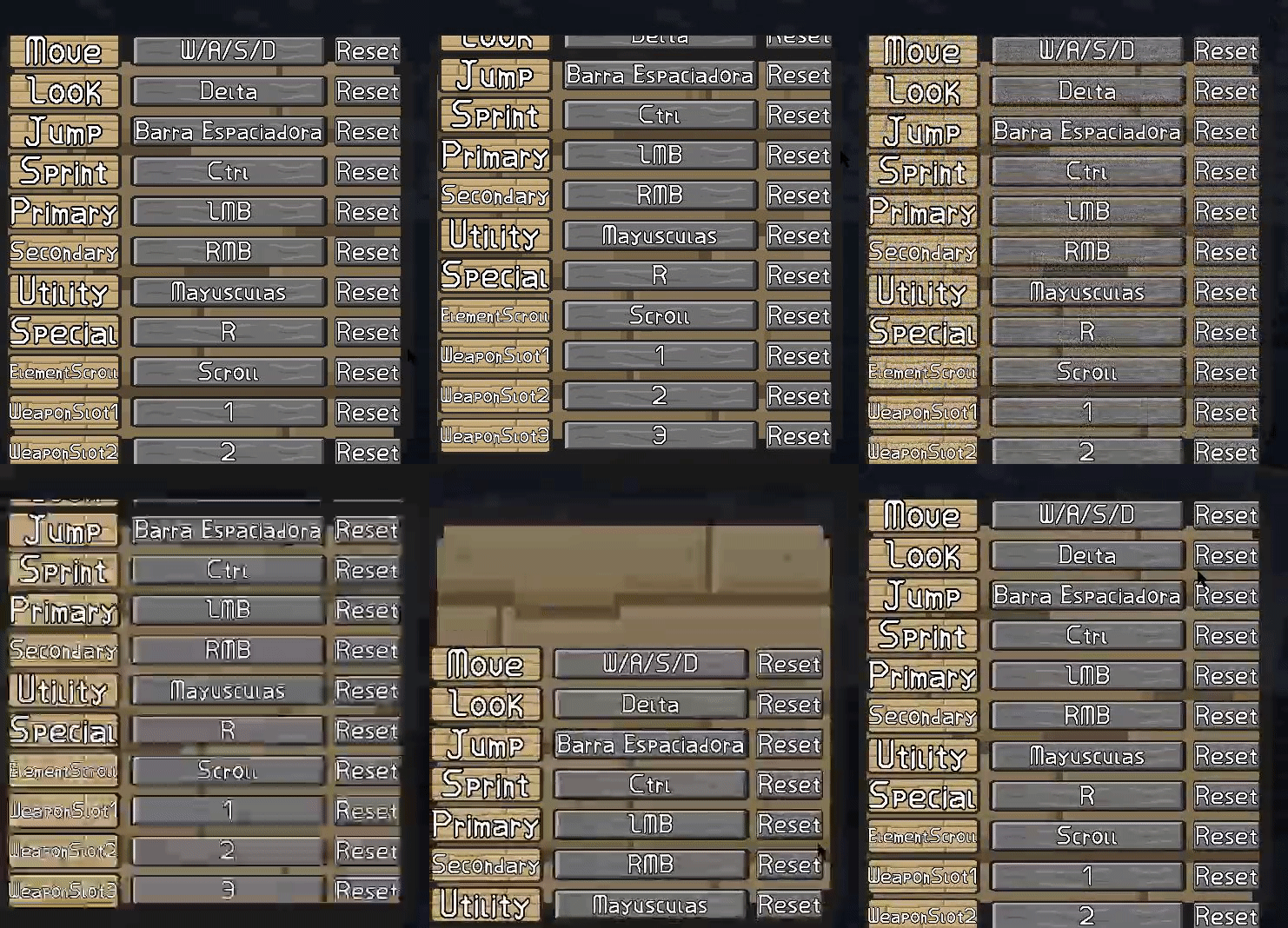

any clues on what could cause this?
rocky cradle
royal solar
any clues on what could cause this?
i think its the elasticity of the view, also maybe disable horizontal scrolling
i have a question tho..
so, i have this character :

and i wanna add this ring around it (in 3d space) but this is a 2D game..

so it ends up being like this...
i tried converting the Characters UI to 3D as spheres but in the game view, the char. totally disappears

any ideas ???
it looks fine in 3D space.. ? whats the matter ?
 low pike
royal solar
any clues on what could cause this?
low pike
royal solar
any clues on what could cause this?
Your container recttransform is smaller than its contents
rocky cradle
anyone ? 
royal solar
low pike
Your container recttransform is smaller than its contents
Noted, I thought that didn't matter
Is there a way to programatically fix that?
The input reminders are created at runtime via iterating thru the input action map so I don't want to resize the container if I add a new input
 winged crest
How to resize a UI rect to match two worldspace corners(bottom left and topright)? Canvas is screenspace
low pike
royal solar
Is there a way to programatically fix that?
Use the content size fitter component
mortal robin
rocky cradle
so, i have this character :
These pictures would be way more helpful if you explained what kind of components these things are rendered with
 serene sparrow
By default, an Image with no sprite is anti-aliased. If I make an Image with width 8, length 100, and rotate it 45 degrees in Z, I end up with a smooth line.
But is there a way to remove the anti-aliasing? I'm making a retro sprite game, and having it look jagged when rotated and scaled would be ideal.
What I'm trying to achieve is making runtime lines and polygons in the UI for a mini-game, and need to control the shapes and dimensions in script, so I can't draw the sprites beforehand.
I have the scripts that will generate the lines connecting any two points, and a script for managing groups of lines to make connected polygons, but the anti-aliased look doesn't fit the rest of the game.
 rocky cradle
mortal robin
These pictures would be way more helpful if you explained what kind of component...
rocky cradle
mortal robin
These pictures would be way more helpful if you explained what kind of component...
wdym... ? well the 2d ones are images and the 3D is a sphere i threw a material on... the ring is also an image
but the spheres wouldnt render for somereason, they are there in the editor view but not the gameview
the character is mainly only consisted of 2 (for now) circles big and small
 lyric moss
hey i did some list of craftable items with scrolball but idk why i cant move it, when i try its just goes back to old place anyone can help me?
lyric moss
low pike
Use the content size fitter component
ok ty
mortal robin
rocky cradle
but the spheres wouldnt render for somereason, they are there in the editor view...
Yeah because you're mixing up UI and game world objects which live in entirely different coordinate spaces. What I meant was Meshrenderer, SpriteRenderer, UI Image etc
 velvet dome
hey guys, been a while since i asked someting, and i wanted to release V1.0.0 so i made a build, but i ran straight into this problem on startup. apparently Sprites do not scale with the canvas resolution, only UI. is there a way to fix this? i looked up on the internet but i could not find anything. Left img = 1080p and right img = 1440p

 mortal robin
velvet dome
hey guys, been a while since i asked someting, and i wanted to release V1.0.0 so...
mortal robin
velvet dome
hey guys, been a while since i asked someting, and i wanted to release V1.0.0 so...
That's right, you're supposed to make UI out of UI elements
SpriteRenderers have a fixed size in the game world like any game world object
 acoustic oasis
Hiya, I have a small UI/coding question. How would I implement a UI element with several (size N) buttons, where the press of the button will set a certain value, and then implement a button that uses said value to perform an action? Considering that the N buttons are instantiated in-game.

 timber dragon
Guys, doesn't anyone know why a text mesh is not rendered on the player's camera? I filled in all the blanks like the font material, etc but it still doesn't work and doesn't render, I'm open to questions 🙂
mortal robin
timber dragon
Guys, doesn't anyone know why a text mesh is not rendered on the player's camera...
it might not be positioned properly
Are you talking about TextMesh? The legacy 3D text object?
mortal robin
acoustic oasis
Hiya, I have a small UI/coding question. How would I implement a UI element with...
add click listeners for the buttons from the code that spawns them (and be careful not to fall into the lambda variable capture pitfall)
timber dragon
mortal robin
it might not be positioned properly
yes,i think
acoustic oasis
mortal robin
add click listeners for the buttons from the code that spawns them (and be caref...
thx 🙂 Someone in the coding chat was able to help me out with this 🙂
rocky cradle
mortal robin
Yeah because you're mixing up UI and game world objects which live in entirely d...
UI images.. and for the mesh its a mesh renderrer
 worthy wyvern
idk if i should post it here or where else, but im having a problem with masking and animations, so i have a animation and its inside of a mask but when there is just a small bit inside the mask you can see the whole animation even tho the rest of the animation is outside the mask, im sorry but im bad at explaining stuff
first image is good, second its outside of the mask, 1 small scroll difference


 fair hull
acoustic oasis
Hiya, I have a small UI/coding question. How would I implement a UI element with...
fair hull
acoustic oasis
Hiya, I have a small UI/coding question. How would I implement a UI element with...
you can create a script with a public variable that stores the value and you can set its value by adding the variable setter as a listener of the button OnClick unityevent
Example:
ButtonValueManager.cs:
using UnityEngine;

public class ButtonValueManager : MonoBehaviour
{
  public string storedValue { get; private set; }
  public void UpdateStoredValue(string val)
  {
    storedValue = val;
  }
}
MySubmitButton.cs:
using UnityEngine;

public class MySubmitButton : MonoBehaviour
{
  public ButtonValueManager manager;

  public void HandleValue()
  {
    // Handle the value
  }
}
this mesh text is rendered but not in the camera of the player,its in the world as a gameobject the hud
mortal robin
timber dragon
this mesh text is rendered but not in the camera of the player,its in the world ...
you didn't answer the question
what component is this
timber dragon
mortal robin
what component is this
TextMesh (not TMP)
mortal robin
timber dragon
TextMesh (not TMP)
Right so that's a 3D world space text element
it's not a UI element
if you're trying to use it in UI, you're using the wrong thing
timber dragon
Ohh oka
eternal wolf
eternal wolf
oh, I hope this makes it clearer what I'm trying to achieve. I would like to wri...
Hey folks, does anyone know how I can achieve this ?
velvet dome
mortal robin
That's right, you're supposed to make UI out of UI elements
i understand but i need the word "Destiny" to mask with sprite masks, thats not possible with UI is it?
mortal robin
UI has its own mask
snow junco
I'm using the new input system and use ui canvas/panels/buttons. The actions are mostly "automatic" for me, I just add buttons and they work. but I'd like to close my submenus using those event system's cancel event. (I have a player controller with a player input where I process input, but I'm disabling that when the player is dead) where can I process a OnCancel in my menus?
snow junco
eternal wolf
Hey folks, does anyone know how I can achieve this ?
In your image, do you want the 3 squares to be "see through"? If you don't need them to move the simplest way (for me) would be to just make a png with 3 transparent squares.
velvet dome
mortal robin
UI has its own mask
iknow, only filling is possible but i need this to fill it and thats not possible with UI is it

only as sprite mask
snow junco
snow junco
I'm using the new input system and use ui canvas/panels/buttons. The actions are...
this forum post https://forum.unity.com/threads/how-to-get-oncancel-or-other-ui-callbacks-called.893581/#post-5896931 suggests I need a monobehaviour implementing ICancelHandler . Do I need this monobehaviour on the event system or any ui object?
snow junco
snow junco
this forum post https://forum.unity.com/threads/how-to-get-oncancel-or-other-ui-...
I tried both (a monobehaviour on the event system game object) and adding this to my menus which are the canvas object children) and must be doing something wrong because the Debug.Log I have in the OnCancel handler is never shown.
snow junco
I ended up with a solution similar to a post down that thread, but instead of instantiating the InputSystenUIInputModule I get it from the EventSystem.current.GetComponent<...>()
eternal wolf
snow junco
In your image, do you want the 3 squares to be "see through"? If you don't need ...
hey huba.buba. Additional parts should be cut out. The order and position should vary
snow junco
eternal wolf
hey huba.buba. Additional parts should be cut out. The order and position shou...
I think you'll need a shader for this. When I asked chat gpt it gave me a simple example so that might be a starting point for you. But I don't know what you actually want, meaning is this somehow part of your ui (what's visible through the holes, other ui? or the game background? Do you want those "holes" to be absolute or do you want other ui elements to possibly cover the holes?
eternal wolf
snow junco
I think you'll need a shader for this. When I asked chat gpt it gave me a simple...
I would like to have a panel that shows an image. Above this there should be a full-surface black panel in which a rectangular area always becomes transparent via positioning data (for example via a mouse click at a certain point).
other UI elements should remain visible. The transparency should only apply to the black panel
 snow junco
eternal wolf
I would like to have a panel that shows an image. Above this there should be a f...
snow junco
eternal wolf
I would like to have a panel that shows an image. Above this there should be a f...
I'm struggling to understand what you actually want to achieve. If this will be potentially covered with other UI elements how will you click ? Is this UI or the actual game? If you click and a rectangle reveals maybe have a grid of black rectangles and disable them on click? Just brainstorming. If you really need a "reverse mask" to reveal what's beneath, go with the shader approach as I don't think there's anything in unity standard UI elements to accomplish that.
timber dragon
Guys, is there a way to change this so that a digit is not equal to a line? I want everything to be on the same line, and I would also like the hud to focus more for each digit (that is, it adjusts depending on its digits).

eg: ammo:----100000-- ❌
ammo: ---100000---✅
 abstract vale
can anyone help me with this? my camera isnt showing my canvas text even though it is at the top of the sorting layer
 worthy wyvern
hello, i got a problem, my image is just overlapping the mask
here is a vid
don't mind the vid in the corner, i was listening to music
also don't mind the errors those are alr fixed
this is my mask settings/ scroll rect settings

this is the size

idk if this is relevant but here is the settings of the object i keep my upgrades at

 fiery lance
worthy wyvern
this is my mask settings/ scroll rect settings
fiery lance
worthy wyvern
this is my mask settings/ scroll rect settings
The vid isn't loading for me for some reason but to use masks, doesn't the Image component need to be active and the colour's alpha bigger than 0?
worthy wyvern
image was active, i disabled it for testing, forgot to activate again
fiery lance
And it still doesn't work?
worthy wyvern
colour alpha is cause its a background
nope
here settings of the animation

maby that could help
fiery lance
I can't watch the video so I dunno of any context
Is the image a child of the scroll menu?
worthy wyvern
weird, well the thing is, when i scroll it works but when 1 pixel of the animation appears it overlaps the mask like it isn't there
yes
fiery lance
Ohh it's related to anims okkay
fiery lance
What if you try completely removing the animator component then
And undo if it doesn't change anything
Also are other objects like default Image primitives masked or is it just this one object?
worthy wyvern
nope still bugged
other objects work as normal
the image under the animation is not overlapping while its i the same gameobject
fiery lance
And the 2 scripts attached..? Have you tried disabling those
worthy wyvern
not yet
fiery lance
They may be setting some properties in it maybe
worthy wyvern
i can't disable them and they are nessesairy otherwise its usseless
fiery lance
But then again to nail the possible causes down even further you should do that
Why can't they be disabled? Has some other script flagged them as Required or something
worthy wyvern
i created a copy and without script and still bugged
fiery lance
And now you have an object without the scripts, remove the animator from it
worthy wyvern
well 1 makes rewards and detect when the animation ends but other one i decided to move and hopefully it doesn't break
fiery lance
If it still doesn't work, compare it to a default Image primitive and see for any diff
worthy wyvern
doesn't work, alr
fiery lance
Damn, any difference between the working Image and this obj?
worthy wyvern
omg thank you so much
fiery lance
Got it working?
worthy wyvern
it was cause i used a material 💀
worthy wyvern
yep
worthy wyvern
thx for your time, i apriciate it or however you spell that word
fiery lance
Yeah np sir
worthy wyvern
ah alr, il take that with me for the future
eternal wolf
snow junco
I'm struggling to understand what you actually want to achieve. If this will be ...
hey huba.buba, thanks for your answer. It is a part of the game in which the background should become visible as the game progresses. In the end, only positioning data for the rectangle has to be transferred (not necessarily via a click). An inverted mask was also my first idea, but I couldn't implement it. I'll try to implement it like you said with a shader instead. Thanks for the help
snow junco
My game is controller only, using new input system. I SOMETIMES run into an issue where looks like my ui even system looses track of the selected element, I show a panel with 3 buttons and sometimes I can navigate through them and sometimes I hit down on the controller and the last button looses focus as if there's some other invisible button getting selected. Anyone ever ran into this? Is there a common cause I can check, any recommended way to debug this?
snow junco
snow junco
My game is controller only, using new input system. I SOMETIMES run into an issu...
I don't know if that's a but, but I think it happens when I start my game with a menu prefab open. If I just have the scene open it works fine, but an open prefab will confuse the ui event system / navigation somehow.
 deft laurel
im back, and i simply want to extend the bounds of my image to the screen, making it swim in darkness. if not possible, just tell me how i can make an reversed mask.
unity 2017.2
 drowsy citrus
Hi I posted earlier in Unity talk but I got no responses and I realized this question is probably beter suited here anyway, Im tring to make a battle menu for my game, and I cannot get the buttons to appear in the game view (the button is big bc I wanted to make extra certain I saw it if it was there) I have used text mesh buttons before but I genuinely must be forgetting something very simple


any advice?
drowsy citrus
I can provide more details or screenshots if need be, I genuinely just don’t know how to troubleshoot this
timber dragon
guys,this is my bullet hud and its wrong,anyone knows how to solve it?

 nimble girder
how to make this part not clickable?

i just need a button with text under it, but only the button should be clickable
mortal robin
nimble girder
i just need a button with text under it, but only the button should be clickable
Just disable "Raycast target" on it
nimble girder
mortal robin
Just disable "Raycast target" on it
thanks!
 tough sundial
Hello, im very new to unity and i have a problem on my canvas
the outline appears on the actual game for some reason

does anyone have an idea? maybe this is a layer problem
 viscid bronze
i need a bit of help with some UI
my "lobby" is spawning 1500 pos z when the prefab is at pos z 0
tough sundial
https://www.youtube.com/watch?v=XtQMytORBmM&t=1118s i was following this tutorial and im at aroud 29:00

GMTK is powered by Patreon - https://www.patreon.com/GameMakersToolkit
Unity is an amazingly powerful game engine - but it can be hard to learn. Especially if you find tutorials hard to follow and prefer to learn by doing. If that sounds like you then this tutorial will get you acquainted with the basics - and then give you some goals to learn ...
viscid bronze

this is the "lobby" spawning at 1500 pos z

and the content is at pos z 0 aswell
 tough sundial
the outline appears on the actual game for some reason
tough sundial
tough sundial
the outline appears on the actual game for some reason
here's a video footage if it would help, thank you
mortal robin
tough sundial
the outline appears on the actual game for some reason
I don't see anything unusual here.
You have gizmos enabled is that what's confusing you?
tough sundial
mortal robin
You have gizmos enabled is that what's confusing you?
What's gizmos?
tough sundial
mortal robin
I don't see anything unusual here.
The canvases outline is showing on the actual game
You can see it in the middle, top and right
Its like a thin line
Should i point it out
mortal robin
tough sundial
Its like a thin line
Yes that's the canvas gizmo, expected to be visible when gizmos are enabled
tough sundial
mortal robin
Yes that's the canvas gizmo, expected to be visible when gizmos are enabled
Oh I see
Thank you
weak tiger
https://youtu.be/F85YVqd0TIM?si=6JFEYCCKWbtVd1Bo&t=475
does anyone know how could i do this in unity with the images? what type of file should they be?
Devlog video about "Homegrown", a casual farming game I'm creating using my own engine.
Play my previous game "Equilinox":
https://store.steampowered.com/app/853550/Equilinox/
Support the channel on Patreon and get access to the game & code for Homegrown, the city-builder, and Equilinox:
https://www.patreon.com/thinmatrix
UI database website:...
soft sail
splice the images up through the sprite editor
it'll make them into an atlas
as for changing individual colors, you can just change the vertex coloring through the UI color
otherwise make your own vertex/fragment shader but if you've only one color for your elements then unity's UI shader should be fine
supple basalt
I have very small 8px by 8px "pips" in my settings menu. I noticed that they don't align with the pixel grid of my monitor, resulting in varying pip sizes

in this case, the second pip is too wide
Perhaps I should round each pip's position to the nearest whole number? They're being arranged by a HorizonalLayoutGroup right now
mortal robin
supple basalt
I have very small 8px by 8px "pips" in my settings menu. I noticed that they don...
I believe this is what Pixel Perfect is for on the Canvas
I don't know by what sorcery it aims to accomplish its goals
gritty cloak
i have this options menu in my start menu of the game but i also have an options button in my pause menu IN the game itself. how can i transfer the values from this options menu to the one in game

or maybe the transfer the whole menu object with DontDestroyOnLoad to the game
 tropic umbra
whats the recommended way to make something like this?
https://www.youtube.com/watch?v=3dAgZPTsfuA
the OP says they used the vector image support module and imported the SVGs that way, does this mean I could make animated svgs in another app (e.g. adobe animate) and import them in to make persona5 UI?

A little experiment I made, I want to see if I can make one of the stylized menus of Persona 5 in unity, Sophia shop from Striker looks the easiest to try to imitate so I choose that one.
I'm too lazy to find and animate a character model, So I just put a cube there instead
I want UI that can curve and stuff whilst still being dynamic
mortal robin
tropic umbra
whats the recommended way to make something like this?
https://www.youtube.com/w...
No, the vector graphics package doesn't support animations. Or at least it didn't last time I checked a few years ago
 median iris
gritty cloak
or maybe the transfer the whole menu object with DontDestroyOnLoad to the game
median iris
gritty cloak
or maybe the transfer the whole menu object with DontDestroyOnLoad to the game
Basically, you wouldn't store the Options inside the UI itself, but instead they would be their own Object that any Options UI can read/write from.
Your actual Options could be a static class that you initialize/load when your game is booting and save when it's quitting, that way you can access your Options from any Scene without the need of Singletons or Inspector References
gritty cloak
median iris
Basically, you wouldn't store the Options inside the UI itself, but instead they...
so if i for example turn off my music, the next time i open my game the music would be turned off?
or the options transfer between just scenes and not different times i open the game
median iris
Very very bare pseudo code
static class Options
{
  public static float m_Volume;

  public static void Load()
  {
    // load values from some file or apply default values if no file exists
  }

  public static void Save()
  {
    // save values to file
  }
}
class OptionsUI : MonoBehaviour
{
  private void Awake()
  {
    Options.Load();
    // apply the Volume value to some slider
    // if the value of that slider changes, write it to the Volume value
  }
}
Loading the Options should ofc not be done within the UI, and Volume shouldn't be public either but instead use functions to read/modify and raise events, but I think the basic idea is clear. Decoupling.
median iris
gritty cloak
so if i for example turn off my music, the next time i open my game the music wo...
Yes, you would store the Option values in the FileSystem of your device (PC, Mobile, whatever) so they would persist between play sessions
gritty cloak
median iris
Very very bare pseudo code
```
static class Options
{
public static float m_...
im kinda familiar with writing classes in c# but not in unity, can i put the class in the same script as the Options script?
also ive no idea how to operate with files on the computer
median iris
Which class are you talking about precisely?
Files are fun, and easy!!
Use the System.IO namespace and the File.Read/File.Write APIs 🙂
(There's WriteLines, WriteBytes etc).
Also, JsonUtility is a nice one, many people say it's bad but they're just using it wrong 😂
gritty cloak
median iris
Which class are you talking about precisely?
Files are fun, and easy!!
Use the...
the Options class
median iris
gritty cloak
the Options class
Most of the times, each class should go into it's own file. That's especially true for MonoBehaviours and ScriptableObjects.
For a simple Options system, you should have
- OptionsUI -> MonoBehaviour.
- Options -> Static Class
- OptionsData -> Class or Struct with the System.Serializable attribute.
OptionsData would be the thing that holds the actual values and gets saved to disk, if it's Serializable you can easily save and load it by using JSON.
Options would be a wrapper around that OptionsData, responsible for reading/writing from/to that OptionsData as well as saving/loading it.
(Saving/Loading could also be done by a standalone System, probably preferred, but the Options class could abstract that responsibility away so you as developer wouldn't need to mess with different systems to save a single thing)
And the UI class would just talk with the Options class to receive and modify the OptionsData values
Optionally, you can use PlayerPrefs
gritty cloak
median iris
Optionally, you can use PlayerPrefs
whats that
median iris
An API that Unity provides to save simple Data like Integers, Floats, Strings or Booleans, check it out in the Documentation, it's pretty easy to use but also kinda limited
May be "good enough" to get started with persistence though
gritty cloak
median iris
May be "good enough" to get started with persistence though
well im making this for a school project so i think i'd be more impressive if i were to make a custom save & load system
should this be in a different script than my Options script?
