#📲┃ui-ux
1 messages · Page 8 of 1
 cyan sentinel
 cosmic herald
i'll try and do it with the eventsystem i think onclick isn't an option because that's already going to make you do something related to the button
cyan sentinel
cosmic herald
i'll try and do it with the eventsystem i think onclick isn't an option because ...
if you select it, you click on it, dont you? but if you just want to use the hovering of abutton , thats another event, correct
cosmic herald
yeah but it's for console navigation too
if i am correct that's a bit different because you first move with your arrows or joystick to the button you want to select
that's what i mostly want to try and do the one that's currently ready to be selected when pressing enter or a button on a gamepad
I got something
But not sure how well this is in terms of peformance
if (_eventSystem.currentSelectedGameObject == this.gameObject)
{
  _textBackground.SetActive(true);
}
else
{
  _textBackground.SetActive(false);
}
like comparing gameobjects
 jagged monolith
Have you tried using an EventTrigger component and its Selected and Deselected events?
cosmic herald
I was thinking about that but wanted to get it working first
i had an error because i was trying to get the eventsystem in code but now did it manually just to see if it works
 unborn crown
So I'm trying to create playing cards that exist in a 3d space as objects. I made them using sprite renderers for the background and images, and a world space canvas for the text. I want them to block each other if one is closer to the camera like a regular object, however when I do this they overlap weirdly. I've messed with sorting layers, I enabled blocking within a graphic raycaster on the canvas, but it still behaves weirdly. Any help would be greatly appreciated as I am not super familiar when it comes to working with canvases. Here is an image of the issue:
 jagged monolith
I would definitely recommend an event based solution rather than each button running that code in update
cosmic herald
yeah
cyan sentinel
cosmic herald
that's what i mostly want to try and do the one that's currently ready to be sel...
ah got it, so you want to select it and on click actually click it. So do you get the select part right already?
 jagged monolith
unborn crown
So I'm trying to create playing cards that exist in a 3d space as objects. I mad...
jagged monolith
unborn crown
So I'm trying to create playing cards that exist in a 3d space as objects. I mad...
Don't mix sprite renderers and canvases. Just do the whole thing with a worldspace canvas *and the sprites as UI Images
cyan sentinel
unborn crown
So I'm trying to create playing cards that exist in a 3d space as objects. I mad...
Do they share one Canvas for both elements and you just move it inside the one canvas in z position?
cosmic herald
cyan sentinel
ah got it, so you want to select it and on click actually click it. So do you ge...
yeah like for example you navigate with arrow keys to a specific button and that button then has some extra text displaying for example and it goes away again when you navigate to another button
cyan sentinel
cosmic herald
yeah like for example you navigate with arrow keys to a specific button and that...
Ah, so I guess its not selected but the currently focused object
cosmic herald
ah yeah i didn't know how to properly name it
unborn crown
cyan sentinel
Do they share one Canvas for both elements and you just move it inside the one c...
No, currently they work with individual world space canvases
cosmic herald
I see the event trigger component, i need to put it on my EventSystem object right?
jagged monolith
No on the button
cosmic herald
oh, ill try and see what happens
cyan sentinel
unborn crown
No, currently they work with individual world space canvases
so first, try to remove the sprites from canvases and only use the UI system to show images inside your canvas.
unborn crown
cyan sentinel
so first, try to remove the sprites from canvases and only use the UI system to ...
workin on that now, but how do I change the render order of an image? Putting the background as an image just covers up the rest of the card elements with no visible option to change the layer order. Moving it back on the z axis doesnt help either
cyan sentinel
unborn crown
workin on that now, but how do I change the render order of an image? Putting th...
in Unity canvas space, things are rendered based on the hierarchy. Worldcanvas should be rendered based on its position.
So if you have two world canvases, they should already work. Inside those if you have two images in a worldcanvas, here the hierarchy order kicks in
jagged monolith
cosmic herald
oh, ill try and see what happens
Just tested and seems to work fine
cosmic herald
jagged monolith
Just tested and seems to work fine
Did you fetch the event trigger or inherit from it?
Was trying based on the unity documentation but i am not sure how to properly write it
jagged monolith
I just used the unity events
 cosmic herald
ah you just did it like that oh
unborn crown
cyan sentinel
So if you have two world canvases, they should already work. Inside those if you...
Moved everything to a canvas, but it is still broken. The "border" image is overwriting all of the other background images, and the text is still rendering on top of each other.
 cosmic herald
ah yeah i remember it again
unborn crown
actually wait I realize I got the hierarchy order backwards which wasn't helping, still kind of wonky though
cyan sentinel
unborn crown
Moved everything to a canvas, but it is still broken. The "border" image is over...
can you show your hierarchy of the scene?
unborn crown
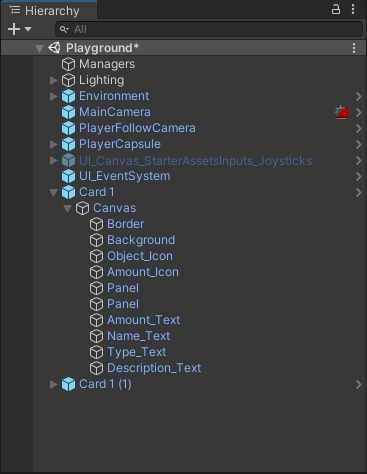 cyan sentinel
and that screen above shows how its rendered now?
 cyan sentinel
unborn crown
I fixed the order so now it looks like this
cyan sentinel
unborn crown
I fixed the order so now it looks like this
well, the ordering is right.
I just guess, your anchors and positions iof your canvas elements are messed up.
If its the same prefab, why is one showing description but not the other?
jagged monolith
cosmic herald
Did you fetch the event trigger or inherit from it?
Was trying based on the unit...
This would be the way to inherit those events in a custom script instead
 unborn crown
cyan sentinel
If its the same prefab, why is one showing description but not the other?
unborn crown
cyan sentinel
If its the same prefab, why is one showing description but not the other?
I have 0 clue tbh. They are genuinely identical, but I'll try deleting them and putting them back in see if that helps
cyan sentinel
unborn crown
I have 0 clue tbh. They are genuinely identical, but I'll try deleting them and ...
I guess you messed around with it in the scene and now its having some local overrides. Just place your raw prefab again and do not change anything in scene and see how it looks when you move the position
unborn crown
yup that must have been it I guess, everything but the X in the top left is working correctly now
cosmic herald
jagged monolith
This would be the way to inherit those events in a custom script instead
ah yeah thanks, i was trying based on the manual but didn't seem like the right way.
Do you maybe have an idea if i can access the color of a TMPro text element with the events in the inspector?
I am trying to find it but it doesn't seem to be an option unless it is a material
cyan sentinel
unborn crown
yup that must have been it I guess, everything but the X in the top left is work...
If that was a sprite too, you might just have some offset or wrong hierarchy order or 0 width/height
unborn crown
Nope that is a Text
cyan sentinel
cosmic herald
ah yeah thanks, i was trying based on the manual but didn't seem like the right ...
just make a color function and access that from the events list
unborn crown
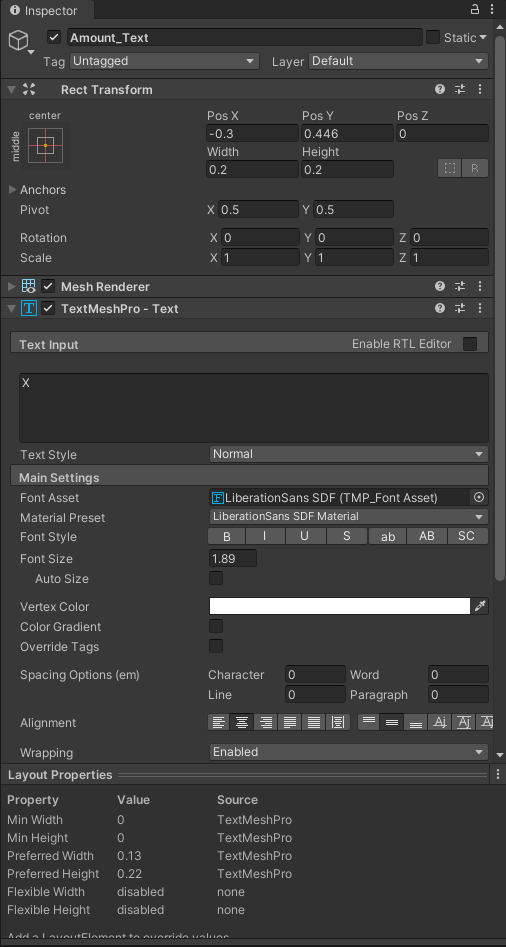 cyan sentinel
unborn crown
Nope that is a Text
cyan sentinel
unborn crown
Nope that is a Text
is the text to big for its holding recttransform?
cyan sentinel
unborn crown
https://i.imgur.com/amUm1dE.png
for testing, check the Auto Size checkbox and see if it gets visible
jagged monolith
cosmic herald
ah yeah thanks, i was trying based on the manual but didn't seem like the right ...
You need a reference to the TMP_Text component somehow, then you can use reference its color property
unborn crown
cyan sentinel
for testing, check the Auto Size checkbox and see if it gets visible
it becomes visible but only because it comes out the back, its still overlapped by the card itself
 cyan sentinel
unborn crown
it becomes visible but only because it comes out the back, its still overlapped ...
cyan sentinel
unborn crown
it becomes visible but only because it comes out the back, its still overlapped ...
well, I guess you can see the issue here 😉
Ohh wait
unborn crown
But its already at the front of the hierarchy
cyan sentinel
you used it as textmeshpro before. thats the 3D equivalent. you need to use TMPro for UGUI component
just add UI => Textmesh
unborn crown
Oh. Excellent point.
cosmic herald
jagged monolith
You need a reference to the TMP_Text component somehow, then you can use referen...
yeah doing that but i think i need to check something cause i don't think the assembly reference or something from TMPro is recognised
cyan sentinel
cosmic herald
yeah doing that but i think i need to check something cause i don't think the as...
are you using TMPro; ?
cosmic herald
I want to but it can't find/recognise it
unborn crown
@cyan sentinel thank you for you help dude I really appreciate it.
cosmic herald
it just says it doesn't exist but googling some solutions now for this
cyan sentinel
cosmic herald
it just says it doesn't exist but googling some solutions now for this
can you show your code?
cosmic herald
here you can see

it doesn't recognise the namespace
it's installed and all though
This is the code for changing colors so far but i can't do much if TMPro is not recognised
using System.Collections;
using System.Collections.Generic;
using UnityEngine;
using TMPro;

public class TextColorChanger : MonoBehaviour
{
    [SerializeField] private Color _colorOne = Color.white;
    [SerializeField] private Color _colorTwo = Color.black;

    public void ColorOne()
    {

    }

    public void ColorTwo()
    {

    }
}
Oh that is weird, you sure it is installed correctly as package?
cosmic herald
It's automatically installed when creating a project as far as i know but maybe i should try and remove and reinstall?
cyan sentinel
cosmic herald
It's automatically installed when creating a project as far as i know but maybe ...
your package manager is listing it?
 cyan sentinel
well, try to remove and readd it then. Seems like something is not write with assemblies
 ornate rampart
Anyone know of a way to skin a textmesh pro to a character ?
cosmic herald
reinstalling doesn't seem to do it.
I don't know what's in the library folder but would regenerating it work?
that sometimes solved certain problems if i remember
cyan sentinel
cosmic herald
reinstalling doesn't seem to do it.
I don't know what's in the library folder bu...
just try it Id say. you can also check your assemblies, maybe that is missing your textmeshpro
cosmic herald
yeah, will do that soon
oh i think i know what is wrong
There is nothing wrong with TMPro or anything i need to add it to my assembly definition
I forgot i had made one for my GUI elements so i need to add it to that and then it should work again
now it's fixed i can continue with the color changing stuff
 surreal oasis
Is there a way to completely avoid certain buttons from being selected even when they are pressed? I'm trying to make a Gameboy-type UI demo where you have a screen space with a game and UI, and I have a button space where I have up/down/left/right and start/select buttons, I have set the buttons navigation option to none. In code, I have an image in UI with the selectable component attached and I can tell the UI via code to select that object, but the minute I press a button that object is deselected.
How can I get past this?
To add some context, I am using the New Input system, and when I use a controller all works as intended, but not with the buttons
 low pike
disable raycast target
and/ or disable interactable on the button component
^ That's probably a better option, so if you add/ change any image components you won't have to remember to disable the raycast target on them
surreal oasis
Just to clarify, I need to be able to press the up/down/left/right and start/select buttons, but they shouldn't deselect the object in my "game space" that is currently selected.
This is my problem, the button in green is marked as selected in code. but when I press A or any other button then it gets deselected.
This is using my PS4 controller. I can use the Dpad or left stick to select a button and press X to trigger that button
It feels a bit "hacky" but I could write a custom selection handler and set the button/element I want as a saved variable and whenever a button is pressed that it sets it back to what it was.
jagged monolith
That or building your own event system for the "in-game" UI
Cause the way it is now you essentially have two event contexts but unity only supports one
surreal oasis
Yeah, see the middle section is a whole different scene. the buttons are the first scene that loads and then I load different scenes additively. These scenes takes up the middle section of the screen, these all have their own UI, but they still use the event system from the first scene.
I need to build a completely new event system that is not tied to the built-in event system. All of my game and UI logic can use the built-in one, but my primary buttons need a separate event system.
I should hopefully be able to extract the code from the built-in one to write a custom one. I'm also using the OnScreenButton for triggering the Input events and which uses the IPointerDown and IPointerUp Handlers, and I think there is where stuff is happening that changes the selected element.
unborn crown
Does anybody know some material to figure out how to create an "orbital" menu? I'm making a card based game and I want it so that when the player opens their deck their cards appear as a circular orbit around them that they can scroll through. I've looked at several things online but nothing seemed to be what I'm looking for, or just seemed overly complicated for what I'm making.
surreal oasis
jagged monolith
That or building your own event system for the "in-game" UI
You are right. I thought of trying to build a separate event system for my actual buttons but thought about it wrong. I've got some ideas now and I'll give that a go when we have power again.
surreal oasis
unborn crown
Does anybody know some material to figure out how to create an "orbital" menu? I...
So you basically want to have buttons that are in a specific shape that is not square or round? Not sure if this is the same, but I ran into a problem making buttons with images that is oddly shaped. Unity would still register a button push even if you're not touching the image. There's a way you can tell unity to ignore the transparent areas. I'll see if I can find something online, otherwise I'll share what I have later when we have power.
unborn crown
surreal oasis
So you basically want to have buttons that are in a specific shape that is not s...
No not quite, the shape of the buttons don't matter I just need to be able to have them move around an object based on player input. Here's a gif of what I'm trying to create. I made the gif by having the cards be child objects of a center object that I rotate with the editor.
 surreal oasis
unborn crown
No not quite, the shape of the buttons don't matter I just need to be able to ha...
surreal oasis
unborn crown
No not quite, the shape of the buttons don't matter I just need to be able to ha...
Ahh I see. Sorry can't help there 😢
unborn crown
Thanks for trying though
 supple vale
hey, how can I make width of text mesh pro is the same as the height of text?

so if I will have:
Some Text
lIke
this
This was the height

something like autosize, but I do not want text to increase in size, I need RectTransform to fit on it
I have tried content size fitter, but the parent has Layout group component
supple vale
and has some problems. it is glitching
surreal oasis
I think I found a solution to my problem above without having to write a ton of code. On the EventSystem under the InputSystem there's a checkbox DeselectOnBackground which is ticked by default. This means the selected button gets deselected if I tap anywhere on my phone. By unchecking this, removing the button component from the buttons, and using the On-Screen Button instead to invoke the input events, I can now press buttons without removing the selected button. This still breaks if I have a button component on. I now just need to write a script for animating my buttons.
low pike
supple vale
hey, how can I make width of text mesh pro is the same as the height of text?
The yellow box you've changed there, is the padding for TMP. It's not what you want to change.
Press T and use the actual UI tools
and set the padding back to 0
 terse lotus
My team that is working on a game via a repo on github has been having a reoccurring UI issue for nearly a year now.
The issue is: when positioning elements on the canvas or positioning the camera, the elements will be in different spots depending on which PC pulls the changes from github and tests them. This same issue also happens when building the game and in this case, when bulding, the elements on the canvase are seemingly randomly distributed across the screen, I have seen no correlation other than that their scale and relative proportion to each other is fine, they just do not fit in the screen.
What I have tried:
Adding canvas anchors which seemed to cause no changes.
Manually moving the camera per level to fit (this caused it to look fine only when building and playtesting on my own computer, for everyone else it was broken.)
Locking the game aspect ratio to a known-good which was 16:9, this also did not work for anything.
Some examples of the problem are shown here:
In this example the numbers (the dark portion of text since there are multiple overlapping) should be in the bottom center, a team member positioned it there on their computer and pushed the changes

This is a camera related issue here where on my team member's computer this was positioned to have the playable area fill the screen, this is not the case on other PCs when pulling their changes

 mortal robin
terse lotus
In this example the numbers (the dark portion of text since there are multiple o...
mortal robin
terse lotus
In this example the numbers (the dark portion of text since there are multiple o...
what are these screenshots suppposed to show
I don't see any text
or numbers
or UI elements at all
terse lotus
as of right now i have zero clue, i dont even know what the issue is
mortal robin
So you're showing us screenshots that don't show anything
terse lotus
i'm just trying to provide as much info as i can to hopefully allow a more informed person to see the issue
what do you want me to show
mortal robin
A screenshot of the issue
terse lotus
the issue is the misplaced canvas elements
mortal robin
What canvas elements
 finite hatch
mortal robin
what are these screenshots suppposed to show
finite hatch
mortal robin
what are these screenshots suppposed to show
They’re meant to show that the elements aren’t in the right place despite looking like they are on some computers
mortal robin
there are no canvas elements in the screenshots
mortal robin
terse lotus
In this example the numbers (the dark portion of text since there are multiple o...
this first screenshot is showing an empty canvas
as far as I can tell
terse lotus
terse lotus
In this example the numbers (the dark portion of text since there are multiple o...
the dark text middle left of the canvas bounding box
mortal robin
except for whatevet this smudge is
 finite hatch
mortal robin
this first screenshot is showing an empty canvas
finite hatch
mortal robin
this first screenshot is showing an empty canvas
There’s 4 canvas elements on it, a 1 a 2 a 3 and 4 text label
mortal robin
finite hatch
There’s 4 canvas elements on it, a 1 a 2 a 3 and 4 text label
where?
they're certainly not laid out on the canvas as shown
terse lotus
terse lotus
In this example the numbers (the dark portion of text since there are multiple o...
i explain why it is a dark smudge in this

there, i removed the other numbers and highlighted it to clearly show the item that is not in the correct spot
mortal robin

this is how you position UI elements in the bottom center of the canvas
if you're not doing this, you're doing it wrong
mortal robin
terse lotus
this is clearly not anchored correctly
finite hatch
How do you anchor correctly then
mortal robin
I linked it a while back
terse lotus
that's literally the issue, on my team member's computer it IS positioned correctly
mortal robin
mortal robin
terse lotus
that's literally the issue, on my team member's computer it IS positioned correc...
but not anchored
your team member just placed it at the coordinates on the screen that happen to be bottom middle on their computer
but didn't anchor it to the bottom center
so on your different screen resolution, it's just at those same pixel coordinates
which are NOT bottom center for YOUR screen
That's why you use RectTransform anchors.
See how I'm using this bottom center anchor preset?
 terse lotus
I will try this and get back to you, what about the camera issue
terse lotus
we attempted to do this via this option (shown in screenshot, bottom right, this is in the path File > Build Settings > Player Settings > Player > Resolution and Presentation)

this did not fix the issue
and additionally the camera was still broken on a 16:9 display
mortal robin
terse lotus
we attempted to do this via this option (shown in screenshot, bottom right, this...
these aspect ratio settings don't do anything
and are being removed soon
terse lotus
oh haha
mortal robin
terse lotus
oh haha

Unity Forum
I mean, it's pretty obvious: if someone plays the game at some weird aspect ratio, things are going to appear wrong. Either they'll see things they...
terse lotus
mortal robin
See how I'm using this bottom center anchor preset?
As of right now this is working, thank you very much.
I do have a follow-up question, why did this not work when anchoring to the top left for all of the UI elements and then positioning them accordingly? Could have been just a mistake on my end that I did not notice though.
mortal robin
terse lotus
As of right now this is working, thank you very much.
I do have a follow-up ques...
anchoring to the top left won't accurately give you the bottom of the screen for example
it will give you a fixed distance from the top left only
terse lotus
so does that mean that anchoring to the bottom middle will make it so the UI elements are spaced proportionally the same away from said anchor spot on different screens? sorry I am really slow at grasping this
mortal robin
Seriously recommend just reading this article from top to bottom. it's not that long
https://docs.unity3d.com/Packages/com.unity.ugui@1.0/manual/UIBasicLayout.html
It explains everything about how RectTransforms and anchors work
terse lotus
will do, been struggling with this for too long
 exotic spade
Hi Guys! I have a UI prefab. I would like to lower the draw calls it needs by "baking" most of it together into one png. The problematic thing is, that it has semi transparent parts. What do you think would be the easiest way for me to do it? Cheers!
exotic spade
If anybody would be interrested, this helped me in the end 🙂
https://stackoverflow.com/questions/25080597/how-do-i-capture-a-screenshot-in-unity3d-with-a-transparent-background

Stack Overflow
I'm trying to capture a screenshot of a gameobject in Unity3D Pro so that it has a transparent background. This script was suggested to me and it works, when connected to the main Camera, as long a...
 fresh saddle
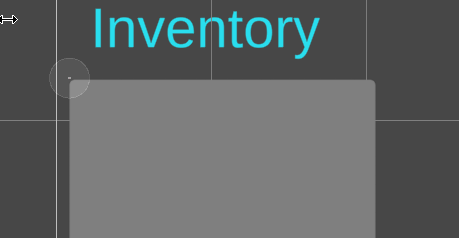
So I am definitely not a UX-UI guy at all 😂. But what would be a way I could get some visual separation between the inventory half of this menu, and the equipped clothing side of the menu? Thematically, this game takes place in a school, so I'm trying to lean into that aesthetic whenever possible. Also, I'll take any other suggestions I possibly can as UI is 100% my weak area.

Also for the sake of not crowding my UI Builder hierarchy, I haven't added text yet, so thata why there is mainly blank space.
low pike
- Put a bigger gap between the inventory and the equipped
- Put a drawn line on the paper as a separator
 verbal jackal
thoughts? (on the background/title text, play button is just there to be able to test the flow with the next ui)

 warm steppe
when setting up ui.. is there a better way to do it? this is pretty mild tbh. when things get nested into one or two more game objects you gotta getChild(x).getChild(x).getChild(x).getComponent etc. and gets really messy real fast. Most of this stuff is on a prefab that is instantiated then setting the information based on information provided from the current loop iteration

i try to make things serialized variables when i can but when instantiating objects like this it's not as easy
 soft sail
If it works, it works. Otherwise you could probably just assign it in the inspector if it's a prefab to some central script, then assign it to some party member when instantiated.
warm steppe
i guess i could make a script for it and assign each transform to a variable if i want it to be cleaner
mortal robin
warm steppe
when setting up ui.. is there a better way to do it? this is pretty mild tbh. wh...
Drag & Drop assignment in the inspector is much better than this and more resilient. This will break as soon as you rearrange the hierarchy even slightly.
Since it's a prefab, I would put a script on the root of the prefab. Give that script drag & drop references to everything it needs. Then make a public function that does all this work for you:
[SerializeField] Image classImage;
[SerializeField] Image bustImage;
// etc..

public void Init(PartyMember member) {
  classImage.sprite = member.classSprite;
  bustImage.sprite = member.bustImage;
  // etc...
}```Then when instantiating you just do this:
PartyMemberUI pmUiPrefab;

void SpawnPartyMember(PartyMember partyMember) {
  PartyMemberUI instance = Instantiate(pmUiPrefab);
  instance.Init(partyMember);
}```👍 thanks i'll give it a shot
 mighty fox
Not sure if this is the right channel, but I'm having a problem with TextMeshPro.
I'm trying to generate an atlas, but the output only contains alphas, no letters or symbols. They are clearly present in the TTF itself, and the TMP console output also says they have been included, but they do not show up in the output atlas texture.
terse lotus
I have a canvas with a button that on some level is not able to be pressed
it is in a prefab though and works on some levels
is this common? i'm not sure what info i can provide to assist more in understanding the problem
nevermind, i got it.
The issue was that the prefab did not contain the event system object and the levels that it did work on had a different canvas with an event system
low pike
show the inspector for the TMP
and the canvas
there's nothing obvious jumping out
what's the hierarchy setup like?
is this at run time ?
or doesn't it matter?
ok, play the game.. look at the inspector for the TMP
Which version of Unity?
 whole willow
hi. i'm using a rendertexture for the camera in my game, which makes the game appear at a lower res.
is there a way to make this affect UI elements in my game?
haven't dabbled much in UI so i'm a bit clueless
 limpid pasture
what is godot grid container equivalent in unity ?
mortal robin
limpid pasture
what is godot grid container equivalent in unity ?
GridLayoutGroup perhaps?
Not familiar with Godot
limpid pasture
mortal robin
GridLayoutGroup perhaps?
does GridLayoutGroup got a columns property ?
mortal robin
Idk why don't you check the documentation
limpid pasture
ok thanks
low pike
very odd, MSAA isn't required 🤔
 sharp fiber
hi, i'm new to unity and tried to put some text on a wall but when i hit render it vanishes
i'm not really sure what's going on, I think it might have something to do with canvases or something
mortal robin
sharp fiber
hi, i'm new to unity and tried to put some text on a wall but when i hit render ...
wdym by "hit render"?
what did you try for putting text on a wall?
sharp fiber
like, i just spawned an empty game object, clicked ui- text and then dragged the text around until it was where i wanted in the scene
i meant hit play
mortal robin
sharp fiber
like, i just spawned an empty game object, clicked ui- text and then dragged the...
that's not really how UI works
it doesn't go in the scene
at least not by default
it goes on the screen
If you double click the canvas, in scene view, you can see the extents of the screen
then you place your UI element within that rectangle to place it there on the screen
If you want text on a wall in the game world then you would either use:
- TextMeshPro (the 3D text version, not the UI version)
- a world space canvas.
sharp fiber
I see, where would I find the textmeshpro 3D text version? Digging through the menus I only seem to be able to find text via the UI submenu
mortal robin
sharp fiber
I see, where would I find the textmeshpro 3D text version? Digging through the m...
GameObject -> 3D -> TextMeshPro
sharp fiber
Okay, I'll give that a shot before I ask anymore. Thanks!
I found a jank solution to getting the text on the wall anyway, I just need to figure out how to do it the right way 🙂
 meager quartz
Im pretty sure ui text is always displayed on the camera, rather than an object in the world(?)
Probably have to use a different type of text or something
low pike
The canvas is still in the scene, it's huge, and has world space positions/ rotations. The render mode changes how it's displayed
 lucid ether
Hello guys, I would like to do a game menu, I got a Canvas with a Black Background button (Alpha 80%) and a Start button, this button should have the background color to Alpha 0% and a white outline, when hover the start text should become black and the background color from alpha 0% to white 100%
Is there a way to do it with a script?
low pike
yes
 remote ether
lucid ether
Hello guys, I would like to do a game menu, I got a Canvas with a Black Backgrou...
remote ether
lucid ether
Hello guys, I would like to do a game menu, I got a Canvas with a Black Backgrou...
using UnityEngine;
using UnityEngine.EventSystems;
using UnityEngine.UI;
public class StartButton : MonoBehaviour, IPointerEnterHandler, IPointerExitHandler
{
public Image background;
public Text startText;
private Color originalBackgroundColor;
private Color originalTextColor;

void Start()
{
    originalBackgroundColor = background.color;
    originalTextColor = startText.color;
}

public void OnPointerEnter(PointerEventData eventData)
{
    startText.color = Color.black;
    background.color = Color.white;
}

public void OnPointerExit(PointerEventData eventData)
{
    startText.color = originalTextColor;
    background.color = originalBackgroundColor;
}
}
Attach it to your Start button game object.
Assign the Image component of your button to the background variable in the script.
Assign the Text component of your button to the startText variable in the script.
 dusty grove
I'm so confused. How do I get this black bar from left to right to stretch vertically and actually stretch? I thought these settings would do that, but it's not stretching vertically at all.


The canvas is set to match width, so I don't need to stretch it horizontally because the canvas settings already do that by default
I need it to stretch and match vertically, so I set the anchor presets to "stretch / center" but it doesn't stretch or do anything at all
Solution: Requires parent rect hieght to be the desired stretch height.
 sleek cipher
question, if I update the sprite sheet that the sprite asset atlas is using will it also update the atlas or will i have to create a brand new sprite asset in order to include the new sprites for my text?
 restive wing
Guys i just wanna understand why whenever I instantiate an object it's scale and position get screwed?
 covert basin
I am in need of help for my project. I have a month to work on it and I am overwhelmed with just the menu.
I want an animation to play when the mouse is hovering over a raw image. I am pretty new to coding so I don't want advice where I have to code or else it will be a disaster (slight coding is ok) . I already have all the animations made how do I make the animation play?
(reposted from #🖼️┃2d-tools)
 floral crow
@covert basin you would have to make a class that inherits the button class and then override the on mouseover method from the selectable class in order to trigger the animation https://docs.unity3d.com/Packages/com.unity.ugui@1.0/api/UnityEngine.UI.Selectable.html
covert basin
I will look into that thank you!
 eternal summit
hii does anyone know why scrollbar horizontal is disabled but vertical isnt? it wont let me check the checkbox in the inspector for scrollbar horizontal

 lavish sluice
I don’t know who here will be able to answer but I’ll ask. I’ve been thinking about adjusting some of my UI related scripts to make it easier to find, but I can’t decide whether to stick to keeping scripts on parent gameObjects that are related to what they they are doing, or have multiple serializable scripts that is referenced in one script using a serialializefield then assign the references and values to the serializable script fields using the gameObject that has that one script
warm steppe
good question tbh. i'd be interested in knowing the answer. I kinda just spam FindObjectOfType a lot and I imagine that's probably bad practice.
lavish sluice
warm steppe
good question tbh. i'd be interested in knowing the answer. I kinda just spam Fi...
Yea findobjectoftype is bad practice and can affect your performance especially when you have a lot of objects in your scene
warm steppe
I was thinking of making a static class or something that housed getters for all my most frequently used object/classes. but I havent dabbled much with static stuff yet so been putting it off
lavish sluice
warm steppe
I was thinking of making a static class or something that housed getters for all...
Like a singleton?
Some people like it, some people hate it
warm steppe
cant win lol
in older games and engines i used a lot of singletons and have tried moving away from them this time. it's hard not being able to just reference what you want anytime anywhere xD i was spoiled
lavish sluice
Surprisingly even Genshin uses singletons
 boreal tendon
I'm confused. I don't know what is placed where anymore. When I change the size of the game window the whole thing falls apart. How do I stop it from falling apart? Ideally I want it to look nice on mobile and desktop


 dusty grove
@boreal tendon setting the proper ui anchors and pivots
and using the heirarchy to control what ui elements inherit certain qualities
 steep patio
For some reason even though I have an event system in the scene, and I have set a button to be selected when I start the scene, but I can't move the selected button with my keyboard. I have even set up explicit ui navigation but I still can move it with my keyboard.
 digital vortex
For some reason unity's text mesh pro text doesn't support (ascii art) while the legacy text does! anyone knows how to fix this ?
 plain rivet
Currently the resolution is 1080x1920 , I wish that the shop thing scales according to resolution , like say it's a tablet instead of phone and its 1080x1350 so it scales accordingly , how can i do so , Thanks ^^
 mortal robin
plain rivet
Currently the resolution is 1080x1920 , I wish that the shop thing scales accord...
mortal robin
plain rivet
Currently the resolution is 1080x1920 , I wish that the shop thing scales accord...
https://docs.unity3d.com/Packages/com.unity.ugui@1.0/manual/UIBasicLayout.html set up your anchors/pivots correctly that's all
plain rivet
mortal robin
https://docs.unity3d.com/Packages/com.unity.ugui@1.0/manual/UIBasicLayout.html s...
I tried but I am having trouble , can u pinpoint me a bit more specifically what i need to do , sorry
plain rivet
mortal robin
https://docs.unity3d.com/Packages/com.unity.ugui@1.0/manual/UIBasicLayout.html s...
got it now , thanks
 azure edge
Not sure if this channel is appropriate- please tell me if not. I need UI ideas:
Player can click on a tile that contains an enemy unit to Queue an ATTACK commands on the enemy unit (which MAY move before the attack actually takes place).
Issue: tiles can have up to multiple units on them.(but no mix of friendly/enemy units.)
How do I allow the user to queue attack commands, for a different unit on the tile?
I WAS going to have a SECOND click on the tile select the second unit, but that inhibits the ability to Queue multiple attacks on a single unit. (This is how I select Friendly Units on a tile, and it works fine for that)
Perhaps "right-click"a tile to bring a different unit to the "top", then "Left click" to queue an attack on the "top" unit? (Only problem with this is I currently use "right-click + drag" for camera control.)
Or I could show a list if they click a tile that has more than one enemy unit on it- but that feels kinda clunky.
What do you guys think?
 rapid ferry
How to allow scroll rect to work on buttons without block it's onclick? Adding the image kinds of make it uninteractable for me
azure edge
rapid ferry
How to allow scroll rect to work on buttons without block it's onclick? Adding t...
ensure the image that you dont want to catch the clicks has "Raycast target" set OFF
(or that it is "above" your buttons in the heirarchy)
rapid ferry
azure edge
ensure the image that you dont want to catch the clicks has "Raycast target" set...
I guess it was my setup, wait


the buttons are on the "Active" gameobject
azure edge
 rapid ferry
I know how that thing works, unticking that will make the entire content unscrollable though
 echo jolt
maybe just add an event trigger component?
 main meteor
Anybody know my my image on a world space canvas is emitting light?


 mortal robin
main meteor
Anybody know my my image on a world space canvas is emitting light?
mortal robin
main meteor
Anybody know my my image on a world space canvas is emitting light?
What makes you think it's emitting light?
mortal robin
main meteor
This doesn't look like emission it looks like Bloom
If you want the image to be subject to world lighting and not be super bright use a quad with a lit material, not a UI canvas/image
main meteor
mortal robin
This doesn't look like emission it looks like Bloom
Yeah there is bloom but even after turning it off it's still bright, so I'll try that quad solution when I get back
 mellow vigil
So I'm making my first game, and likely doing plenty wrong but I'm going insane with the layer sorting, although from the documentation it should be rather simple
My units and some sprites are appearing above my UI, though I've added a sorting group for each and 'UiElements' should be on top of 'Units'
This is the 4th or 5th iteration of trying so there may some red herrings in there.. Any ideas though?


 mellow vigil
I’m getting the idea/feeling that UI items are some how locked into the ‘default’ sorting group. That true?
 honest belfry
I have a parent ui object with a horizontal layout group for 2 children which I want to be placed side by side. As the parent width is increased I want the width of the children to increase as well, however, I only want 1 child to increase in width until it reaches a "maximum width" and then as the parent continues to increase in size only the other child should increase with it... as far as i can tell there is no way to set a maximum size, only a 'preferred size' which the child will not ever reach the minimum size if I have it set to preferred... any help on this?
 thin harbor
hey just a question what kind of ui toolkit you are using and why?
low pike
mellow vigil
I’m getting the idea/feeling that UI items are some how locked into the ‘default...
show the inspector for your canvas
low pike
honest belfry
I have a parent ui object with a horizontal layout group for 2 children which I ...
Have a look at the layout element, I think putting this on them (or at least the one with a max width) so do what you want
 peak sable
i have a sprite with animation which actually is the background with animation so i wanted to know how can i add it in the canvas
cuz image does not support animation(or ig i dont know how do that)
jagged monolith
sprites don't work with canvases. You can animate a UI image the same way as a sprite
peak sable
jagged monolith
sprites don't work with canvases. You can animate a UI image the same way as a s...
yes actually just found out that i was animating the sprite renderer even tho was using image thats y it didnt work before thank u
 crimson lance
Hey! I'm wondering if it's possible to remove the orange outline that always shows up when selecting a particle emitter and how to do it?
 low pike
This chan is for the in game UI you make.. not the editor UI. However, yes you can remove it... click the gizmo button -> untick highlight outline
mortal robin
crimson lance
Hey! I'm wondering if it's possible to remove the orange outline that always sho...
In scene view there's a dropdown somewhere where you can disable selection outlines
crimson lance
low pike
This chan is for the in game UI you make.. not the editor UI. However, yes you c...
Oh, my mistake. And thanks for the help!
honest belfry
There is a pretty clear and easy way to have tooltips which are dynamically resized to fit their content. However, is there a way to dynamically resize the content or tooltip scale based on screen size to ensure the tooltip will always fit/fill the screen?
 wary ore
I am having an issue with my image, I am manually setting color of Image component through code using a dropdown menu. But the color being shown in game view and scene view on runtime is different while if you look at inspector properties of image, it has correct color applied. Any idea whats going on?
that crosshair is supposed to be green because its color in inspector is green

 mortal robin
wary ore
I am having an issue with my image, I am manually setting color of Image compone...
mortal robin
wary ore
I am having an issue with my image, I am manually setting color of Image compone...
What is the image this color is being applied to? Unless the image is pure white, the result will not be the same as the inspector color
that color is multiplied by the color of the image
If the image is black, it will always be black
since zero multiplied by anything is zero
wary ore
mortal robin
What is the image this color is being applied to? Unless the image is pure white...
there is no image since I wanted it to be purely color. I know how color multiplication works. Also its working correctly in my personal project but not in client's project.
mortal robin
wary ore
there is no image since I wanted it to be purely color. I know how color multipl...
WDYM there is no image
How are you getting the crosshair shape then
wary ore
mortal robin
WDYM there is no image
the are separate bars
basically 4 image components without a sprite attached if you exclude the dot
mortal robin
wary ore
the are separate bars
ok and
what is the setup of the scene
and the canvas
which object is this image component attached to?
etc.
wary ore


it either goes to a random color or just black

one more weird thing
let me record
mortal robin
wary ore
it either goes to a random color or just black
Works fine here so you have some weird setup in your scene
 wary ore
mortal robin
Works fine here so you have some weird setup in your scene
wary ore
mortal robin
Works fine here so you have some weird setup in your scene
i know works fine on my project too but not on my client's project. trying to figure out. any idea where should i be looking at?
mortal robin
mortal robin
what is the setup of the scene
This stuff @wary ore
perhaps there's a CanvasGroup
or something
or postprocessing
or some kind of mask over the UI
wary ore
no mask or post processing because if you add a new image next to those of crosshair, it has color being applied to it correctly
Look whats happening with the images lol
also another weird thing, i am using a sprite for center dot but its preview in inspector seems to be red like being shown in game/scene view even though image color is purple

and original sprite is white
 mortal robin
wary ore
Look whats happening with the images lol
mortal robin
wary ore
Look whats happening with the images lol
this looks STRONGLY to me like only the red channel of the color is being used (green and blue are ignored)
I cannot tell you why that is
Could be from a script perhaps
wary ore
mortal robin
this looks STRONGLY to me like only the red channel of the color is being used (...
no script is working as intended. it randomly goes to green and other colors but stays buggy
mortal robin
I didn't say anything was working as intended
here do you see it ever going green?
It only seems to show shades of red
It must be some script or something in that scene
pull your crosshair into a fresh scene
it will work there
wary ore
mortal robin
it will work there
it does yeah
mortal robin
so there you go it's something in the scene
wary ore
it worked properly for once and then again buggy. not sure why seems to be unity being unity. now its stuck on purple
 mortal robin
I would start bisecting the scene
disable objects/scripts etc until it starts working
to find the culprit
wary ore
on it
i had same issue when i added this in another project but there if you disable images and and enable again, color got applied correctly
 brisk sandal
What's the point of TMP links? I'm trying to figure out what they accomplish and how to use them. You make a link tag with a specific ID, but then what? What does the documentation mean by "retrieve its ID and link text content when the user interacts with your text"? Does it run a function? How do you assign a function to an ID? I checked the TMP_LinkInfo class and there doesn't seem to be any variable there for a function. Do you assign IDs just by changing TMP_TextInfo.linkInfo?
peak sable
i have a background image and in my device it gets streached to fix it i enabled preserve aspect ratio but now it does not fit in my screen completely its fine if some of the image is not visible but i want it to fill the screen in match width or height it makes the image streached if i remove preserve aspect ratio is there a way i can still fit it with prefect aspect ratio in the canvas?

 stone flint
Hey 🙂 Does anyone know why the function cannot be found in the editor?
I was trying to get a code similar to this tutorial: https://www.youtube.com/watch?v=bNOPiPIp_W8
Any ideas what could make it work? 🙂 Thanks in advance ❤️


This tutorial will show you a basic example of creating a UI dropdown and controlling the actions through code, so when we choose a option it will run some code that we have written. All written in C# and suitable for TextMeshPro or the default Unity UI.
➡️Post Processing Tutorial: https://www.youtube.com/watch?v=JF4t9pNaZxg&
➡️Patreon Files - ...
jagged monolith
stone flint
Hey 🙂 Does anyone know why the function cannot be found in the editor?
I was t...
It seems your object reference is wrong. In the event, you need to drag in the object with the script on it from the scene, not the script itself from the project window
meager quartz
is this like, an acceptable text quality
or should i have different settings to reduce/remove the blur when zoomed in?
stone flint
jagged monolith
It seems your object reference is wrong. In the event, you need to drag in the o...
forget jesus christ you are my savior now been staring at this for hours and now it works. Thank you so much !!!! ❤️
jagged monolith
meager quartz
is this like, an acceptable text quality
or should i have different settings to ...
You should do a test with the mesh renderer version of texmesh pro instead of regular text mesh
 lean solstice
Hey all! I'm having issues with the amazing layout groups... Is this the right place to post?
Here's the page I'm modifying. What I need is the two stacked boxes on the right to take as much height as possible within the heigh of the scale bar on your left.
The way it's setup right now: My main parent "Detail Panel" contains The vertical layout group (Stretched to the scale height of the scale).
As long as control child size heihgt and witdh is on, it works as expected.
However, one of my children is a box containing text. I need the text box to scale with the text height of course. But I want to have the "house box" to take as much space as it can and stretch down as the text box increases.
And this part doesn't work and creates this strange bug where the main parent thinks the text box is much bigger than it actually is and leaves tons of empty space for no reason:

 iron relic
ive set my game resolution in build settings but when running in webGL and pressing fullscreen the aspect ratio can be bypassed (on ultrawide for example). Is there a way to force 16:9 ?
mortal robin
iron relic
ive set my game resolution in build settings but when running in webGL and press...
Unity Forum
I mean, it's pretty obvious: if someone plays the game at some weird aspect ratio, things are going to appear wrong. Either they'll see things they...
honest belfry
I am working with some UI elements which have a combination of layout groups and layout elements controlling their position/sizes and some scripts which edit their content (and in turn their respective sizes) , some of this occurs programatically before they are ever enabled and despite calling LayoutRebuilder.ForceRebuildLayoutImmediate the object is not the correct size until being disabled and activated a second time, anyone know how to make sure objects are properly formatted upon being activated for the first time?
 fleet flicker
Hi everyone
cyan sentinel
honest belfry
I am working with some UI elements which have a combination of layout groups and...
You could use this to get the preferred size with its content
LayoutUtility.GetPreferredSize(rect, 1)
 spiral echo
Hey guys, how can I achieve this functionality?

I want the height of the input field to determine the height of element b
But I cant get it to work without it expanding horizontally first
So how do I enforce the 50/50 split between the header and the input field and still expanding depending on the input field height
 onyx nacelle
spiral echo
onyx nacelle
spiral echo
You have to use lots of horizontal and vertical layout groups with Content Size Fitters
and Control Child Size should help you with the 50/50 splits between text and input field

 austere burrow
Is this what you want?
 rapid ferry
spiral echo
Hey guys, how can I achieve this functionality?
rapid ferry
spiral echo
Hey guys, how can I achieve this functionality?
https://discord.com/channels/489222168727519232/1077709424208138352 This thread, try this
austere burrow
@spiral echo Here is an example prefab showing how what I have above is set up (easier as a package instead of writing out all the parts and their values lol). Just drag the prefab into a scene and poke it to see what does what.
rapid ferry
austere burrow
<@155469268610318336> Here is an example prefab showing how what I have above is...
that is a beep lot easier to manage someone else's ui lol
austere burrow

onyx nacelle
How can i have 70/30 split in vertical layout group?

 austere burrow
Element 1
- Layout Element
  - Flexible Height checked: 0.7

Element 3
- Layout Element
  - Flexible Height checked: 0.3


 onyx nacelle
Thank you
 low pike
It's not on a canvas
cyan sentinel
low pike
It's not on a canvas
It is from hierarchy 😉
cyan sentinel
 wraith wigeon
Is the text too big for your surrounding rect size?
wraith wigeon
cyan sentinel
Is the text too big for your surrounding rect size?
It just shows a loading blue circle symbol
But how do I make it ddol and in the canvas at the same time
You cant make children ddol can you
cyan sentinel
wraith wigeon
It just shows a loading blue circle symbol
That is not a loading circle, thats a 2D gizmo in edit mode 😉
no, you can only make root objects ddol, makes sense cause they sit inside their parents
wraith wigeon
Well I have some variable in ddol in the score manager and want the text to take over that variable
And someone told me that was only possible if the text was ddol too
low pike
show the inspector for what is on this DDOL object
wraith wigeon
Wait which object
wraith wigeon
low pike
show the inspector for what is on this DDOL object
Its now working since my text and the scoremanager arent in the same scene (one is ddol one is mainmenu) but idk how to fix this
cyan sentinel
wraith wigeon
And someone told me that was only possible if the text was ddol too
That is a false thing to say. You can always have a global kind of manager that holds values and your text can just hold a GrabGlobalValue script that loads the content OnEnable from your global manager.
wraith wigeon
And how do I do that xD
cyan sentinel
wraith wigeon
And how do I do that xD
Unity Learn platform has a lot of tutorials to get the know Unity and how to code some basic mechanics/systems.
Also just google for unity singleton pattern manager or static variables
wraith wigeon
Yeah ive fixed it already thanks man
 thorn zinc
How do I get a scrollbar to work properly with buttons? It seems to stall on anything with an event trigger on it.
 cloud cradle
I'm working on a FPS rouge-like game. I can code really good, but I suck so bad when it comes to art. My current level up UI is complete trash. I would appreciate any help to improve this, please give me any ideas/feedback.
 soft sail
cloud cradle
I'm working on a FPS rouge-like game. I can code really good, but I suck so bad ...
soft sail
cloud cradle
I'm working on a FPS rouge-like game. I can code really good, but I suck so bad ...
I suggest adding a box for the text, such that you can read the text a little easier for starters. textmeshpro includes some nice sliders for its shaders to also give some pop to your text such as drop shadows. As for the ability art, perhaps looking around for icon ability assets for public use, or try the asset store.
Could also play a clip of the ability instead of using a static image perhaps.
cloud cradle
soft sail
Could also play a clip of the ability instead of using a static image perhaps.
will try that for sure, thanks!
thorn zinc
The immediate thing I notice is those cards aren't aligned right at all. The gap between missile-ice and ice-laser is noticeably different.
Another one is the blue of the text that matches none of your other elements.
The images themselves don't do a lot to explain what they do. The text doesn't help. "Fires X in an area according to the sum of the element types muliplied by magic level" is incredibly wordy and doesn't help me understand what that does for me as the player.
In general the player doesn't need to know the exact numbers. You can just say "Rate of Fire Up" "Damage Up" "Stamina Up" and as long as that's a noticeable increase they won't care about the math.
peak sable
What does navigation do in buttons and sliders?
meager quartz
why are these completely different colour

they are the exact same colour texture
Xd?

 gilded marten
Can someone please explain to me why the image inverts inwards on itself even though the value set for it is 7?
 low pike
Never change the scale of UI (except for sexy animations). To size UI correctly, leave the scale at 1,1,1 and change the width/ height
low pike
gilded marten
Can someone please explain to me why the image inverts inwards on itself even th...
Unsure if that ^ would cause your issue though 🤔
gilded marten
yeah, the image is 1, 1, 1. It says 1.7 up there because I had something else selected. Ill give some more detail and maybe that would help.
So, this image is basically just a red box that I am stretching based on a slider that I have. I have connected the two so when ever I move the slider, the health image can move with it. For a reason I am stuck on, the image goes to "-" when the slider value is set to arouind 20 and less.
low pike
don't stretch, use the filled option
gilded marten
ok sure, thanks
peak sable
When i set my canvas to scale with screen size it has some default res should I use it as ref or it works fine?
meager quartz
How do I make it so the text behind the popup isn't shown?
I thought putting it in front would work but it shows the text through the plane for some reason
cloud cradle
In general the player doesn't need to know the exact numbers. You can just say "Rate of Fire Up" "Damage Up" "Stamina Up" and as long as that's a noticeable increase they won't care about the math.
@thorn zinc thanks for the feedback, will simplify the description and change the image of each spell into a video showcasing how it works
jagged monolith
meager quartz
How do I make it so the text behind the popup isn't shown?
I thought putting it ...
Regular textmesh (left) doesn't have a lot of features. TextMeshPro (right) allows you to use shaders that get culled by geometry

 meager quartz
ah. thanks. shit i guess i used the wrong text the whole time
meager quartz
i swapped all the texts out and fixed some alignment issues.
I have a script on my camera that lets me move it around with the mouse and zoom in/out with scroll
anyone know how would I make popups that aren't bound to the UI layer work with this?
theyre too big and offset too much when zoomed in, and and too small and unreadable when zoomed out
is there like, a way to always have them stay the same size? or should they just be in UI for that
honest belfry
Anyone have a quick way to change the pivot point on a rect transform programmatically without actually moving it at all, the same way this happens in the editor when you try to change the pivot? currently if i change the pivot via code, the rect transform shifts.
 novel kraken
Hi there, I got a UI Image with a few corner pieces. The problem is that the BG Image sticks out in all corners, is there a way to mask out specific corners?
meager quartz
are you using sprite renderer
thorn zinc
so this is bad, yeah?
 novel kraken
The arrow buttons don't really need the background either, it's a bit much
novel kraken
meager quartz
are you using sprite renderer
No, I'm using an image
 remote nexus
well everytime i make a button in my canvas it doesnt seem to get detected and i have no idea why
it doesnt even get clicked
if anybody has faced the same issue and know a fix pls help me out
and yes i do have an event system
novel kraken
Any images that might be blocking it?
thorn zinc
I'm worried that with a flat color background it goes past minimalist and back into low-effort.

...lower contrast pattern maybe?

 dusky mortar
hello, I'm not sure where the best place to post this is, but I've got this issue for a while now where when using textmeshpro (and I'm not sure if this is an issue specific to this font) when zoomed out, the text starts being filled in like in the first picture, but zoomed in it looks perfectly fine (picture 2), so is there any way I could fix this without changing the scale of the text on the screen?

 novel kraken
thorn zinc
...lower contrast pattern maybe?
novel kraken
thorn zinc
...lower contrast pattern maybe?
I like the blue outline, adds some flavor and style to it. I don't like the gray backgrounds for the player deck, opponent deck and button tho
It feels out of place, try for the button only a black thicker outline
And the buttons are way better without that gray background 👌
novel kraken
dusky mortar
hello, I'm not sure where the best place to post this is, but I've got this issu...
Have you tried a different font? To see if it's font specific
dusky mortar
I'll try rq
it isn't
it seems to even happen to the default tmpro font, just more to the pixelated fonts
novel kraken
Can you share your canvas settings
dusky mortar
I'm not home rn but I remember I set it to a camera canvas and scale to screen size 1920x1080 with a height to width ratio 0.5
I might have got some of the settings names wrong but hope you get the point
But the same thing happens with a world space canvas with all default settings, and it happens in the scene tab too
 errant egret
I can't get one of my objects that implements IPointerClickHandler to fire the event. Could someone help me? 😄
mortal robin
errant egret
I can't get one of my objects that implements `IPointerClickHandler` to fire th...
- Do you have an event system in the scene with the appropriate Input Module?
- Do you have the appropriate Raycaster for your object?
- Does your object have the appropriate raycast target component (A Graphic or Collider)?
- Are there any other objects blocking that object?
errant egret
mortal robin
- Do you have an event system in the scene with the appropriate Input Module?
- ...
- Yes
- It has an Image component attached to it with Raycast toggled on
- It has a Box 2D Collider
- Yes! There are things in front but I still need to register a click on the whole area. What's the workaround for that?
mortal robin
errant egret
- Yes
- It has an Image component attached to it with Raycast toggled on
- It ha...
It should not have a collider and an Image
one of those is UI and one of those is a game world physics thing
There are things in front but I still need to register a click on the whole area. What's the workaround for that?
If there are things in front that you don't want to register a click for - disable raycast target on them
if this is a UI element, you should remove the collider from it
errant egret
So, here's the thing
The object is a "Player area". There are cards on top of it which need to be draggable / hoverable and they trigger these events fine
But I'm working on the target system and I need to register a click on the whole player area.
Should I artificially put a new game object on top of everything when targeting happens?
mortal robin
errant egret
So, here's the thing
The object is a "Player area". There are cards on top of i...
It sounds like you need to decide if this thing is UI or part of the game world
because it seems confused right now
You might have made the common mistake of trying to build your card game entirely out of UI elements?
errant egret
My Cards have Box Collider 2D, RigidBody2D and an image component for the frame. Is that bad practice? What's the alternative?
mortal robin
Should I artificially put a new game object on top of everything when targeting happens?
Not a bad idea - if you need a target area for this type of targetting that ignores the specific cards or whatever
mortal robin
errant egret
My Cards have Box Collider 2D, RigidBody2D and an image component for the frame....
yes you are mixing UI and game world stuff
If they have physics components they are part of the game world and should be using SpriteRenderer for rendering
The way you have it now is going to very quickly break down when your game resolution changes
errant egret
So my PlayerArea's background should also come from a SpriteRenderer component?
I replaced the Image component with a SpriteRenderer and the sprite is so tiny tiny tiny, I want it to fill up my component
mortal robin
errant egret
I replaced the Image component with a SpriteRenderer and the sprite is so tiny t...
yes because you are now confusing screen space and world space
look at game view
what matters is how things appear in your camera
errant egret
Oh it's also tiny there lol
mortal robin
your camera is too zoomed out/far away then
errant egret
Is it an issue of the sprite size?
mortal robin
it's an issue of the sprite size in relation to your camera's area of vision
you need to think about how big you want your arena to be
how big the cards should be
and how all of that fits into camera view
errant egret
Maybe all the tutorials on youtube fucked me up, but I was doing my game based on 1920 x 1080 and my cards 177x120
So my game object has exactly that width (177 x 120) and everything was appearing fine in game, but that was with an Image ofc
I don't know my sprite size
Also, the card also needs UI elements for me to put the Name, description, etc on top of the image, no?
mortal robin
errant egret
I don't know my sprite size
why not?
mortal robin
errant egret
Also, the card also needs UI elements for me to put the Name, description, etc o...
this can be done with world space canvases or TextMeshPro
errant egret
mortal robin
why not?
Is that the size of the image I imported in the first place? And that's fixed?
errant egret
mortal robin
this can be done with world space canvases or TextMeshPro
It's what I've been using (child game objects that have TextMeshPro components)
mortal robin
errant egret
Is that the size of the image I imported in the first place? And that's fixed?
It's the imge resolution / the PPU in your import settings
errant egret
this import settings?
Glad to do it over a quick call if you re available, thanks for helping!
 errant egret
Got it, now that makes sense
I changed the PPU to 1 to match my Canvas and the card is correctly sized
But the sprite is on top of the text (coming from the children)
How to circumvent that?
mortal robin
it depends on the nature of your objects at this point
if everything is a SpriteRenderer then you use 2D sorting rules (sorting layers, order in layer)
If you're using 3D text and SpriteRenderers then it's distance to camera
if you're mixing UI and Sprites - it depends further on the canvas render mode
I only recommend using world space canvases if you're going to use canvases
otherwise - TextMeshPro (the 3d version not UI version) would be the way to go
errant egret
mortal robin
otherwise - TextMeshPro (the 3d version not UI version) would be the way to go
Let me try that
What should I use for the card image within the frame? I was using Image as well
errant egret
Ok, let me eliminate Image from my project and I'll come back to ask how to make the events work 😅 deal?
mortal robin
I probably won't be here though
errant egret
Thank you so much!
mortal robin
Busy later
errant egret
All the tutorials told me to use Image to build my cards, areas, etc
Didn't know it was bad practice
Even TextMeshPro they told me to use UI
mortal robin
I mean it's one option I guess but building your game out of UI has serious limitations
it will become very hard to do any kind of cool card effects etc
errant egret
One last question
I'm fiddling with the TextMeshPro and look at those two boxes. The yellow one I can resize but it's not the game object's width and height

What am I changing? 😱
nvm nvm I found it under dropdowns
mortal robin
errant egret
I'm fiddling with the TextMeshPro and look at those two boxes. The yellow one I ...
it's the margins I believe right?
errant egret
yeah
Idk why it's changing margins and not the game object when I resize with the engine's GUI
But, by the way, are sprites redimensioned automatically according to the screen resolution?
novel kraken
dusky mortar
But the same thing happens with a world space canvas with all default settings, ...
Isn't it normal for text in the distance to get blurry?
dusky mortar
it's bothering me a lot, I hope there's a way to get rid of it
thorn zinc
Is this better? Putting a white button on a white background goes against most of what I've learned about how buttons should stand out.
 novel kraken
It looks clean
You could give the buttons or text for the buttons some drop shadow to make it stand out
 inland lava
hi guys, how does one force a UI element to always appear on top? i know it needs to be the lowest in the canvas order but.. these tooltips stretch over multiple ui objects if that makes sense...

 novel kraken
What if you make one tooltip that changes dynamically depending in the item you're hovering?
onyx nacelle
I want A to determine width of the box, and B to scale to that width.
How can i establish this?

i think i got it (kinda)

 iron raft
Anyone have a clue why my prefabs are showing up stupidly tiny in my scrollview? I have a content filter size and a layout group attached to my content on my scrollview. Even though when I add a prefab from the game to the scroll view it becomes tiny. I expect after messing with it for some hours it has something to do with the fact i'm using pixel graphics and trying to blow them up for the UI. Still it doesn't even try to blow them up they just stay tiny.
https://i.imgur.com/jqWsGD7.png
https://i.imgur.com/m5qS9G3.png
https://i.imgur.com/bDVy7EK.png
 dusky mortar
hello, I'm not sure where the best place to post this is, but I've got this issu...
dusky mortar
dusky mortar
hello, I'm not sure where the best place to post this is, but I've got this issu...
After hours of googling, I figured out that changing the padding when generating the font to a higher value fixed it, the font now looks nice and crisp without losing it's color or becoming blurry. Maybe this can help others too

 frosty pewter
The sampling point size and padding should be a 1:10 ratio https://unity.huh.how/ui/textmesh-pro/padding-to-size
dusky mortar
yeah I found that
 paper hill
@azure flame where can I find that offset option? sorry to @ you just carrying the conversation to here
 azure flame
Dynamic anchors use offsets. You can find documentation pinned here
paper hill
so if both of these image's anchor points are set to the center of the image in the middle, they will just stick to the edges naturally?

when i say the two images its the top grey one and the bottom grey one
thorn zinc
How do I prevent event triggers in a scroll view from interrupting scrolling?
 chilly sorrel
Hey, does anyone know why the UI for my app is working in the editor on PC, but not on my phone?
I'm trying to find possible causes for this problem, but I even after trying quite a number of things I still don't get it to work on the phone
cyan sentinel
chilly sorrel
Hey, does anyone know why the UI for my app is working in the editor on PC, but ...
I guess you have a fixed canvas size and therefore its. out of view on your phone?
Did you set the gameview to a specific phone resolution?
meager quartz
is there a shortcut to centre the transform arrows on a gameobject
the one for desolate crossroads is especially bad
low pike
You shouldn't be using those for UI. Press T and use the UI gizmos
The blue circle is the pivot, which you change it's location of on the RectTransform
meager quartz
what are the main downsides of using gameobjects for UI?
i was thinking i'd have the actual static UI buttons in canvas layer, but have the map be made of regular gameobjects so i can have depth
low pike
Everything in the scene uses game objects, even UI
if you don't want to use UI, you can use the event system to make non-UI buttons
https://docs.unity3d.com/2018.3/Documentation/Manual/SupportedEvents.html
 muted lily
Hi Im new to UI and got a Problem
In Unity My UI works fine but when I build the Game and start it everything is extremly small. How can I fix that?

 cyan sentinel
Woops, wrong channel to check 😄
if its too small, your UI canvas scaler is probably set to fit height instead of have a constant size
muted lily
oh yeah thanks
novel kraken
Hi, hoping someone could help me with masking specific area's

Let's say for simplicity that the background is the black part and the yellow squares are the parts that need to be invisible.
cyan sentinel
novel kraken
you could just make a mask from a sliced sprite. Make the edges invisible, slice it in 6 slices so it does not scale the edges and thake that as mask graphics
novel kraken
I indeed found out about slicing
chilly sorrel
cyan sentinel
I guess you have a fixed canvas size and therefore its. out of view on your phon...
It's the same resolution / canvas size than what I would have on my phone (720p)
It worked before. After installing URP and Vuforia, it stopped working. The thing is, I've done this plenty of times, but the UI never did that before
cyan sentinel
chilly sorrel
It's the same resolution / canvas size than what I would have on my phone (720p)...
does the gameview look the same as your phone then?
chilly sorrel
cyan sentinel
does the gameview look the same as your phone then?
Everything looks the same, aside from the UI missing
Sec, I'll get a couple of screenshots
cyan sentinel
chilly sorrel
Everything looks the same, aside from the UI missing
oh wait, you installed URP and vuforia? Is vuforia maybe on top of your UI or something?
chilly sorrel
Each canvas is in render mode "Screen Space - Camera" and has the ARCamera as render camera.

It's set up the same way as I have it in other project files where I used Vuforia and URP, but the other ones dont have issues
The only difference is that this is using Unity 2021.3.4f1, and the other project files were earlier than Unity 2020
chilly sorrel
cyan sentinel
oh wait, you installed URP and vuforia? Is vuforia maybe on top of your UI or so...
I've previously also gone ahead and re-created all of the camera, canvas, etc. elements to make sure that none of them are corrupt or anything alike
low pike
what aspect ratio is your game view set to ?
chilly sorrel
1280x720 landscape
low pike
chilly sorrel
Each canvas is in render mode "Screen Space - Camera" and has the ARCamera as re...
this isn't enough information, it doesn't show anything for the settings of the things that would affect it
chilly sorrel
So, 16:9 is the ratio I think
Canvas Settings

Camera settings (+2 Vuforia components at the bottom)
 low pike
Have you anchored everything to the center? or edges as well?
Do you have anything that could be disabling the UI?
chilly sorrel
low pike
Have you anchored everything to the center? or edges as well?
Do you have anythi...
Nothing is there that would disable the UI.
Right now it looks like this
 low pike
change the canvas scalar to 'scale with screen size' -> change the reference resolution to 1280x720

Use the width/ height slider to set it how to scale properly for different sizes
As you're working with mobile, use the device simulator to actually get the screensize of a device
 chilly sorrel
Now it goes out of that frame here, should I make it smaller to get it all into the frame or doesn't that matter?
 low pike
I said to use 1280x720 because that's what you said your game view as set to.. if that's smaller .. then the resolution is wrong, you can just up the reference resolution to whatever is correct
chilly sorrel
Ah, yea, I didnt see that it had to be edited below that, now it looks normal in the frame
chilly sorrel
It still doesnt work though, same results as before
 worthy steppe
Hi! I need some help with my high score UI. So as you can see in the picture below is a very basic game where you need to avoid some hexagons. There you can see that score UI that works (also that I have 1 point) but once I die and the dead screen comes the high score isn't updating... Also the code


 mortal robin
worthy steppe
Hi! I need some help with my high score UI. So as you can see in the picture bel...
mortal robin
worthy steppe
Hi! I need some help with my high score UI. So as you can see in the picture bel...
Are you reloading the scene when the player dies? You're not doing anything to transfer information between scenes.
worthy steppe
Between which scenes?
low pike
looks like it's an overlay that appears on top of the gameplay
worthy steppe
low pike
looks like it's an overlay that appears on top of the gameplay
Yes
low pike
My first thought is that the TMP on the dead overlay isn't actually linked to anything
 meager quartz
how do i get the popup UI to appear in the same position and at the same size regardless of screen size?
I want it to be bound to the mouse cursor but I guess something I did with rect transform anchoring is messing it up?
how do i fix it
tldr: How do i make the rect transform anchor not apply
low pike
worthy steppe
This doesn't prove it to me, because I don't know your setup.. though it does look like it could be
HOWEVER don't use Text and TMP .. why would you use two different text implementations? Just use TMP
 worthy steppe
low pike
_HOWEVER_ don't use `Text` _and_ `TMP` .. why would you use two different text i...
worthy steppe
low pike
_HOWEVER_ don't use `Text` _and_ `TMP` .. why would you use two different text i...
Uh 😅 ... So I tried all the combinations, both TMP, both Text and now I some how remained with a Text and a TMP
low pike
meager quartz
how do i get the popup UI to appear in the same position and at the same size re...
first - when recording a video, get what you're recording setup first.. you wasted 5 seconds of this video just pressing play and waiting.
1- Don't change the scale of UI, keep it at 1,1,1 and use the height/ width to resize RectTransforms.
2- What is your canvas scalar (on the Canvas GameObject) settings?
meager quartz
the canvas scaler was half of the issue
i did change it
does still have the issue with the placement varying on screen size
In update, the popup object is getting the input.mouseposition and adding offsets of X and Y to its position
not sure if thats what would be interacting weirdly with screen size or not
low pike
This is bad
 low pike
meager quartz
In update, the popup object is getting the input.mouseposition and adding offset...
low pike
meager quartz
In update, the popup object is getting the input.mouseposition and adding offset...
if you cache the screensize then you'll need to update it when the screensize changes
low pike
low pike
This is bad
I also find it odd how Z pos isn't 0
meager quartz
yeah when I make empty gameobjects its creating them really far away and i dont know why
i have to manually change it each time
low pike
If you create it as a child of the canvas, it should be put at 0,0,0 for the pos
If you create it as a non-canvas child, then it'll be at some pos in front of the camera
meager quartz
I see
i've been using create empty to act as folders
and its been using weird Z offsets
just gone through and fixed them all
low pike
that's not gonna be a source for your problem, but it's good to keep things tidy
meager quartz
Textmeshpro doesnt allow you to make certain parts of text bold/colored does it
meager quartz
awesome
 mental monolith
hello there, how do I set Z-axis coordinates between 2 UI canvases?
like, if I want a canvas to render in front of another one, how would I do that?
 sly wind
how do I set the TextField size to a number, and it's label to fit?
editor TextFields
 sly wind
I wish for the day where doing UI isnt a painful experience
thorn zinc
How does this look as a basic layout?
 thorn zinc
instead of top right?

 pallid goblet
I just got my first 4K monitor the other day (always used 1080P TV's lol). But anyways i'm having UI issues. So I change Canvas Scaler to Scale with Screen Size, put the size I want. So I then create a Image UI and set it in the middle of the Canvas. But only the lower left quadrant is showing. Think of an X crosshair, only the bottom left of the X shows lol. (game view only), sceneview it looks fine)
The full X is in Sceneview, the one with texture is game view

 cyan sentinel
pallid goblet
I just got my first 4K monitor the other day (always used 1080P TV's lol). But a...
cyan sentinel
pallid goblet
I just got my first 4K monitor the other day (always used 1080P TV's lol). But a...
Is your image child of a parent rectrtansform with fixed height/width?
pallid goblet
I created an empty game object and then created a UI Image as a child of that, hope that answers ur questionm?
cyan sentinel
pallid goblet
I created an empty game object and then created a UI Image as a child of that, h...
can you show your hierarchy and the select the canvas?
pallid goblet
 cyan sentinel
can you select playerhud? I assume thats some default 100 width and ehight?
 cyan sentinel
pallid goblet
cyan sentinel
pallid goblet
you see, that your parent is 100 x 100, what is the size of your recttransform on the iamge ?
pallid goblet
the same
100,100, 0.5,0.5
(0.5s are the pivots) not sure if that needed, so mentioned it lol
what is funny is if I move it to bottom left quadrant of canvas it shows fine
it just don't render anything over the middle or to the right of middle
cyan sentinel
you really should go to learn.unity.com and checkout the UI tutorials 🙂 So you know what is doing what in UI terms.
pallid goblet
ive used UI a billion times, just never on a 4K monitor
If something to the right or above the mid point of canvas dont render and that's intentional that's pretty stupid
cyan sentinel
pallid goblet
If something to the right or above the mid point of canvas dont render and that'...
there is actually NO difference in UI rendering on different resolutions besides either the size or the responsive dimensions.
But if your image is cropped, you set up something wrong here
pallid goblet
Its only cropped if I go past middle point
lol
Could be a bug, becaue if I cahnge to 1080P its fine
this is 1080P

works fine
One thing im noticing though, when I go from 1080 to 4K the 4K appears more zoomed in than the 1080P
like in general
maybe fov changes?
But this is 4K again, I just moved down to bottom left a bit and it works. It's like the Top Left, Top Right and Bottom right don't exist on the Canvas
 pallid goblet
I did that so you could see it lol
cyan sentinel
Ahh okay 😄
pallid goblet
yeah haha
cyan sentinel
So, can you just make the image and its parent scale to full width and height with the pivot settings? just to see if it stillg ets cropped?
pallid goblet
Like scale to the size of the Canvas?
cyan sentinel
pallid goblet
Like scale to the size of the Canvas?
yeah, not fixed width and height but pivots all the way to the parent borders
pallid goblet
It's totally a bug, works in 2021.3.21
decided to do a test real quick lol

Submitting bug report now
Thank you for the help though
cyan sentinel
pallid goblet
It's totally a bug, works in 2021.3.21
Weird bugs happen 😄 Glad you found out
 valid lance
mouse click event is not working ?
because im using a render texture in my camara
is there any other way to mouse click event inn render texture?
actually there is a 2 camera for one camera i added a render texture display on panel in this is my task is if i click a gameobject it should display the text so this is what i have to do
the problem is it can't detect the mouse input
Here i have to click
 mortal robin
valid lance
mouse click event is not working ?
because im using a render texture in my cama...
mortal robin
valid lance
mouse click event is not working ?
because im using a render texture in my cama...
You can make a custom Raycaster that Raycasts from your RT camera
cosmic herald
Can i somehow use the Input System UI Input Module to subscribe to some of the events? like the cancel event for example?
I would like to activate a pause menu and thought if there already is a system that does some stuff for the UI can't i use it too?
cyan sentinel
cosmic herald
Can i somehow use the Input System UI Input Module to subscribe to some of the e...
you can always hook functions to your actions of the input system like performed, cancelled and so on
cosmic herald
cyan sentinel
you can always hook functions to your actions of the input system like performed...
yeah, i'll do that. i will look at the documentation for the input system.
thorn zinc
how much of an issue is it that that prize pile overflows? (aesthetically)
 meager quartz
Are you allowed to make a pokemon card game
mortal robin
meager quartz
Are you allowed to make a pokemon card game
You can make whatever you want but if you try to distribute or publish a pokemon card game, Nintendo's lawyers are going to probably own your grandchildren
meager quartz
Yeah this dont seem like a good idea lol
thorn zinc
There are so many pokemon fan projects out there. If I get a c&d I probably did something right. It does mean I can't sell it but this is a side project to see if I could.
pallid goblet
@cyan sentinelI found that UI issue with the image from yesterday. It was Dynamic Resolution. I created a new scene and it was fine I was like okay, so lets trace the steps involved - started with post process - was fine. Then I was like you know what let me prefab my character and drop it in - broke it. I go to camera and toggle the most obvious thing that I know deals with the camera - I toggle off dynamic resolution and bam it worked lol
pallid goblet
Also another thing - I can leave dynamic resolution on and turn off "Use display in HDR mode" and it works as well
discoverd that by accident just now lol
rapid ferry
I'm having issues with my UI — A button isn't being clicked. I tried doing Debug.Log on the click event, but whenever I click it nothing happens

 jagged monolith
rapid ferry
I'm having issues with my UI — A button isn't being clicked. I tried doing `Debu...
jagged monolith
rapid ferry
I'm having issues with my UI — A button isn't being clicked. I tried doing `Debu...
Do you have an EventSystem in your scene?
 ember sedge
I have a UI Image that I want to change to another one. When I put the first sprite to "Source Image" it looks good, but when I put the second one, then the scaling is off. First one is a part of a .png that has a size of 32x32 and has the PPU set to 32. The second one is a .png with a size of 16x16 and has the PPU set to 16. What could cause the difference?
Image shows the first sprite

this is the second sprite
 ember sedge
Nevermind, fixed it by merging those 2 .png's together and using only one .png
low pike
ember sedge
Nevermind, fixed it by merging those 2 .png's together and using only one .png
don't change the scale of UI, keep it at 1,1,1 ... to change the size edit the values for height/ width
rapid ferry
Can someone help, please? I'm trying to make my canvas invisible, but the children are still visible.
 low pike
show the inspector for the other object(s)
rapid ferry
low pike
show the inspector for the other object(s)
Here 🙂

 low pike
sprite renderers aren't for UI
 onyx flowerBOT
🧑🏫 Unity Learn can offer you over 750 hours of free live and on-demand learning content for all levels of experience! Make sure to check it out at https://learn.unity.com/
rapid ferry
Ahh I see, i'll use ui images instead then. I see that works. The only issue now is the sorting order, how can I change it for each ui element or do I just do it for the canvas?
low pike
some tips from what I can see you've done so far..
- Sprite renderers aren't for UI, don't use them here
- Never scale the RectTransform, keep it's scale at 1,1,1 and use height/ width to resize things
- Keep the Z pos at 0
- Set the 'game view' to a specific size, do not edit UI with the game view set to 'free aspect'
UI is drawn from top (first) to bottom (last)
rapid ferry
Hmm, the sorting order is still an issue, i'm not sure how to push an image a layer back
Nvm I added a canvas component to the image to override the sorting order
low pike
Just move it up/ down in the hierarchy
rapid ferry
ty 🙂
 gilded quest
Encountering something very weird here. I have a series of Canvas for different huds and effects. I'm looking to add a Slider which I can use as a visual representation of a timer/countdown.
If the slider is a child of its own canvas ("CanvasTimer"), it's impossible to click on the object and slide it during Play mode. However, if I put the slider into one of my other Canvas objects, it's possible to move the slider during Play mode.
The kicker is, if I take that second Canvas, duplicate it, remove the other objects and make the Slider a parent of the duplicate Canvas... the slider becomes impossible to interact with.
Does this ring a bell for anyone? Can anybody tell me how to get this working in its own Canvas?
mortal robin
gilded quest
Encountering something very weird here. I have a series of Canvas for different ...
Are you wanting it to be interactible or not?
low pike
either something is blocking it, or the 2nd canvas doesn't have a graphics raycaster on it
gilded quest
@mortal robin , Interactable, but ideally something I could make switch between interactive and inactive. @low pike The weird thing is that I can put the non-interactive Slider into one of the Canvas objects that works, then move that from the front to the back of the Canvas objects in the Hierarchy and the Slider will stay interactive. All the Canvas objects have a Graphic Raycaster, btw.
mortal robin
gilded quest
<@179367739574583296> , Interactable, but ideally something I could make switch ...
Well the slider itself has an interactable property and you can also use a CanvasGroup
low pike
The weird thing is that I can put the non-interactive Slider into one of the Canvas objects that works, then move that from the front to the back of the Canvas objects in the Hierarchy and the Slider will stay interactive. All the Canvas objects have a Graphic Raycaster, btw.
so something is blocking it
gilded quest
Sure. But at this point, I'm curious as to what the different values the Canvas objects have that won't allow it to work. Thank you for that info, though. =)
gilded quest
low pike
> The weird thing is that I can put the non-interactive Slider into one of the C...
Yeah, but I can't figure out what. I can move the default Canvas object around in the hierarchy and it won't work, but if I switch it to another Canvas object, it does. Very odd.
low pike
gilded quest
Yeah, but I can't figure out what. I can move the default Canvas object around i...
When it can't be interacted with.. if you disable the other canvas.. does it become interactable ?
gilded quest
low pike
You can use the event system to see what the cursor is interacting with
I'd forgotten this was available. Where is that function, again? Do I need to code a debug for that?
 haughty drift
Im using UI Button Sprite swap and i have to click on the screen before i can hover to show highlighted sprite. Any way i can do that with out clicking in a empty space first?
gilded quest
Btw, Carwash, turning off the objects has given me a lead, thanks...!
low pike
gilded quest
I'd forgotten this was available. Where is that function, again? Do I need to co...
it's the event system game object in the scene
bottom of the inspector
gilded quest
Yeah, I was looking at that. The 'selected' output doesn't seem to have changed as I interact with the UI. I'll get back to you on this...
 gleaming galleon
Hey all, not sure if anyone can help me with this but I'm going kinda crazy
for the life of me I can't figure out how to animate a UI image
I've created UI > Image, I select the sprite sheet
Added an animator and attached the controller
Hit play, no animation
I check the controller and can see it's looping through the animation in the animator
But on screen it stays on the first frame of the animation. I feel like i'm missing the most obvious of steps

 covert basin
How can I add smooth corners to a 2D UI?
cyan sentinel
covert basin
How can I add smooth corners to a 2D UI?
Make a sliced sprite that you create with smooth corners, if you mean that? Or do you mean smooth != rounded?
 ionic wharf
I'm trying to reproduce this font border like the image in the photoshop
Is an External Border
But in the Unity the Border is only internal
Have some way to get only a external border to get the same appearance?

 cyan sentinel
ionic wharf
I'm trying to reproduce this font border like the image in the photoshop
Is an E...
cyan sentinel
ionic wharf
I'm trying to reproduce this font border like the image in the photoshop
Is an E...
are you using TMPro ?

 ionic wharf
cyan sentinel
Try the underlay property
ionic wharf
cyan sentinel
Try the underlay property
There's no way to get a ticker border?
Dilate in the max is thin
cyan sentinel
I guess not with the default options, as they rely on the font data
ionic wharf
Like this effect in the text below
 cyan sentinel
I think you can have custom effects on TMPro, lets check
You can play around with dilate on the face and outline too, but getting more than those values might need a custom script/package
ionic wharf
I tried with outline, but this option only create the border inside the text :/
cyan sentinel
But using the dilate for both Face and Outline can give you different results
ionic wharf
Not working very well :/
 cyan sentinel
Then I guess you need a custom shader
Unity Forum
I'm working on a mobile in which we want outlines. Specifically, we want the outlines to be "external" to make the text pop. In addition, we don't want...
Did you try this one?
ionic wharf
Not yet
I'll read and try it
cyan sentinel
Ah dang, its outdated
ionic wharf
I'm trying the Shader that I found in your example
But are generating me an error :/
cyan sentinel
Yeah its outdated and not working with the implementatino of tmpro now
ionic wharf
Yeah, the Shader not works unfortunatelly :/

To view the solution implementation check Unity forum: https://forum.unity.com/threads/tmpro-draw-external-outline-before-faces.503999/#post-7619947
 tropic umbra
I want to recreate the slowly shrinking circle QTE from Hi-Fi RUSH, how would I go about doing this?
 low pike
lerp/ tween its scale over time
have scale 1,1,1 be the correct size (same as the green), have the tween start at a scale bigger than 1
tropic umbra
I did think tweening was the answer, but for this specific effect idk how to go about it
it needs to to be the right size and speed to represent the timer (milliseconds)
ionic wharf
ionic wharf
I'm trying to reproduce this font border like the image in the photoshop
Is an E...
Someone knows how to solve it? Please :/
tropic umbra
ionic wharf
Someone knows how to solve it? Please :/
you might have to create it in photoshop and export it into unity
ionic wharf
tropic umbra
you might have to create it in photoshop and export it into unity
But photoshop is as image
So if I import the image in the Unity I cannot change the text and values
Unity Outline system is horrible :/
low pike
tropic umbra
it needs to to be the right size and speed to represent the timer (milliseconds)
You have enough info from my answer. Tween from Large -> scale 1 over x time
Use DOTween, it makes it super easy
tropic umbra
low pike
Use DOTween, it makes it super easy
i already installed it, i've been looking at tutorials for it
there isn't anything that would help me line things up in this super precise way that i can find
i'll try using dotween for this
first I need to fix the issue with rhythm based inputs i posted in #🔊┃audio , i can't seem to get those to sync up (however, my timed "quicktime event"s work)
low pike
http://dotween.demigiant.com/documentation.php -> search the page for dosizedelta
DOTween is the evolution of HOTween, a Unity Tween Engine
 tawny venture
my function on my button dont work as expected

my code for it is simple
public void nextRecipe() {
    recipeCounter++;
    updateList();

}
 low pike
disable all these, and see if the button works
 tawny venture
low pike
disable all these, and see if the button works
tawny venture
low pike
disable all these, and see if the button works
yeah i disabled all the grid items

still dont trigger the debug
 low pike
But you left two things enabled..
tawny venture
ooh

 cyan sentinel
whats the issue, you dont get your button working?
low pike
use the event system to see what the cursor is hitting
this section shows you useful info

and put a log in the code to make sure
public void nextRecipe()
{
  recipeCounter++;
  updateList();
  Debug.Log($"Next receipe button clicked");
}
i put a log inside teh function but i will do that
aah i found it withthe event log
the prefab i used for hte button had another button component inside
it was clicking taht
thx for the help
 deep ridge
Hi everyone. I'm trying to use a vertical scroll box so the player can view all items they have, but the scroll bar never seems to expand beyond being completely full. What should I look at to fix this?
 novel kraken
On the holder of the items place a content size fitter and set the vertical to preffered
Probably something like content, there should also be a vertical layout group on it @deep ridge
low pike
deep ridge
Hi everyone. I'm trying to use a vertical scroll box so the player can view all ...
content size fitter, so it expands with the children
 vague glade
How the hell do I use the scrollbar so I can actually scroll instead of it snapping back to top all the time?
deep ridge
low pike
content size fitter, so it expands with the children
I did eventually figure this out. Thank you nonetheless.
vague glade
Workspace is my scrollrect. I assume I'm supposed to put things inside Content Object
 deep ridge
vague glade
How the hell do I use the scrollbar so I can actually scroll instead of it snapp...
deep ridge
vague glade
How the hell do I use the scrollbar so I can actually scroll instead of it snapp...
This was the exact issue I faced.
On the content holder you want content size fitter.
And anything on that list yes, that goes inside the Content Object
vague glade
I have one
Still doesnt scroll
I want to scroll even though I don't have objects in there yet (other than that Node). I added a Panel with a height of 3000 to be my rough size I need but still unable to scroll
deep ridge
Pretty sure you need to have objects in there for you to do that.
vague glade
Idk I just added some invisible objects to the top and bottom of the area I want and it still wont let me scroll

 weary stirrup
Hello,
I am using a scroll rect to make a list. This list will be changeable in size so a player can configure what they want to display in the list. I am attempting to make it so you can use the mouse and scroll wheel when over any part of the rect area and are having trouble with this. Does anyone know a solution?
 mortal robin
rapid ferry
Anyone know why my button is transparent and not clickable?
mortal robin
rapid ferry
Anyone know why my button is transparent and not clickable?
presumably due to the settings on the button - or possibly due to a CanvasGroup
rapid ferry
mortal robin
presumably due to the settings on the button - or possibly due to a CanvasGroup
yea it's canvas causing issues
idk which setting it is tho
nvm fixed 🙂
weary stirrup
weary stirrup
Hello,
I am using a scroll rect to make a list. This list will be changeable in...
.-. help please 🙏
I've been pulling my hair out for an hr on this thing
cyan sentinel
weary stirrup
Is it only scrolling when you are over a button?
weary stirrup
cyan sentinel
Is it only scrolling when you are over a button?
it's only scrolling when not over a button
 idle lichen
is there a way to reference the actual created dropdown object?
because dropdown.options[i] only gives access to string and sprite
when i want to access another variable added to that dropdown item
if that makes sense
idle lichen
nvm found a solution by referencing the "Dropdown List" object that is created whenever the dropdown is opened
 rotund ledge
weary stirrup
rotund ledge
weary stirrup
You need to somehow to disable holding down buttons
 gaunt lake

 rancid raft
Hey guys, I'm trying to replicate culling of a UI element. Does anyone know how I could achieve something like this? Notice the UI stat panel is culled / phased in.
low pike
a mask that expands in size
rancid raft
Yeah I couldn't find any "mask" solutions for the UI / canvas items. I think I found something close just now though, working on manipulating the script the way I need.
low pike
there's a mask component 🤔
rancid raft
Yeah, I experimented with it and went through tuts. Couldn't get it to work properly for an entire parented UI tree.
Also tried RectMask2D but things were required to be parented which messed up my whole anchor setup.
covert basin
Hey guys I am having an issue with my UI. So how can I make the camera just focus on the canvas?
I tried doing it by hand but after building and running the camera went back to its place
low pike
covert basin
Hey guys I am having an issue with my UI. So how can I make the camera just focu...
your question doesn't make sense.. show screenshots

 covert basin
low pike
your question doesn't make sense.. show screenshots
covert basin
low pike
your question doesn't make sense.. show screenshots
It's my first project and I am relatively new to unity
low pike
possibly your anchors/ stretching/ etc aren't setup correctly
covert basin
How do I set those up
covert basin
low pike
possibly your anchors/ stretching/ etc aren't setup correctly
I know how to do that but it doesn't show the options for it?
low pike
You have to provide screenshots with statements like that.. I cannot see your screen 😄
covert basin
low pike
You have to provide screenshots with statements like that.. I _cannot see your s...
Sorry about that

This is for the background
covert basin
The source image is a Spirte
low pike
so?
covert basin
How can I change it then?
low pike
UI components don't have sorting layers
covert basin
 low pike
UI is drawn using the hierarchy order. Top first, bottom last
covert basin
Oh ok
low pike
!learn
onyx flowerBOT
🧑🏫 Unity Learn can offer you over 750 hours of free live and on-demand learning content for all levels of experience! Make sure to check it out at https://learn.unity.com/
low pike
there are UI tutorials on there, hopefully they teach these basics
covert basin
I will use those after I finish my project. I have a month to finish it and I am just overwhelmed right now. Thanks for your help!
 keen sandal
I have this absolute mess of a code, whenever I use this, the object I'm toggling is, well toggling, but its not going to the mouse.
using UnityEngine.EventSystems;

public class HoverOver : MonoBehaviour, IPointerEnterHandler, IPointerExitHandler
{
    public GameObject objectToFollow;
    public GameObject objectToToggle;
    public Vector2 offset = Vector2.zero;

    private Camera mainCamera;
    private bool isFollowing = false;

    void Awake()
    {
        mainCamera = Camera.main;
    }

    public void OnPointerEnter(PointerEventData eventData)
    {
        if (!isFollowing)
        {
            objectToFollow.SetActive(true);
        }
    }

    public void OnPointerExit(PointerEventData eventData)
    {
        objectToFollow.SetActive(false);
    }

    void Update()
    {
        if (isFollowing)
        {
            Vector3 mousePosition = Input.mousePosition;
            mousePosition.z = mainCamera.transform.position.z;
            Vector3 worldPosition = mainCamera.ScreenToWorldPoint(mousePosition);
            worldPosition += (Vector3)offset;
            objectToFollow.transform.position = worldPosition;
        }
    }

    public void StartFollowing()
    {
        isFollowing = true;
        objectToToggle.SetActive(true);
    }

    public void StopFollowing()
    {
        isFollowing = false;
        objectToToggle.SetActive(false);
    }
}
also, stuff is assigned correctly in the inspector too
mortal robin
keen sandal
I have this absolute mess of a code, whenever I use this, the object I'm togglin...
Which object exactly are you expecting to move
objectToToggle or objectToFollow
low pike
Surely you want to be using RectTransform and setting that anchored pos.
Setting the transform.postition for something on UI isn't gonna put it in the correct position on the canvas..?
Only thing I'm not sure on is if ScreenToWorldPoint is going to give a valid position for UI
rotund ledge
does anyone know how what tools are the best for UI design in unity? it feels like a lot of stuff is a hassle to do lol idk if there is any good videos that teach you the basics of UI design and how you can make Unity's UI system nicer
rotund ledge
also completely unrelated problem, why did my text suddenly get very pixelated?

yeah i think so
thats what i am using
you said built in UI system
not the legacy text system
no
rotund ledge
@icy mauve

this is what im using thoo
oh
it was cuz i was fiddling around with AA
 dusky seal
How to use svg or https://icons8.com/line-awesome icons?
Replace Font Awesome with modern line icons with a single line of code.
 rocky marten
public void clearButtons()
{
    for (int i = 0; i < ActionButtons.Count; i++)
        Destroy(ActionButtons[i]);
    ActionButtons.Clear();
}
public void InstantiateButtons(List<String> listFromCDH)
{
    clearButtons();
    for (int i = 0; i < listFromCDH.Count; i++)
    {
        ActionButtons.Add(Instantiate(ButtonPrefab));//Just Instanting
        //Setting Transforms
        ActionButtons[i].transform.SetParent(ButtonHolder.transform, false);
        ActionButtons[i].transform.localPosition = new Vector3(ActionButtons[i].transform.localPosition.x, -50 * i);
        //getting TMP to assign Text
        TMPro.TextMeshProUGUI TMPthis;
        TMPthis = ActionButtons[i].transform.GetChild(0).GetComponent<TMPro.TextMeshProUGUI>();
        // getting cache for captured variables
        //int captured = i;//no Longer needed
        string listCDHTEXT = listFromCDH[i];//This is the cache now
        // using variables to set text
        TMPthis.text = listCDHTEXT;
        ActionButtons[i].name = listCDHTEXT + " Button";

        //Assigning On Click Functions
        Button thisButton = ActionButtons[i].GetComponent<Button>();
        thisButton.onClick.RemoveAllListeners();
        thisButton.onClick.AddListener(delegate
        {
            //moveDictionaryManager.doAction(listCDHTEXT);
            Debug.Log("Button clicked: " + listCDHTEXT);
        });
    }
}
so i have this code but it stops working after recompiling
 thorn mantle
how can i fix this stretching problem in sliders with small values?

the sprite is stretched outside of the background bounds
its pretty obvious
 knotty turret
Not really, you have some context in this thread, in the other you posted a photo without context asking us to fix it
thorn mantle
i meant that the stretching is bothering me
knotty turret
I'm still not clear what exactly you are expecting. Do you want it flat? Do you want it to not appear? Show the transform bounds and inspector info. You say it is stretched outside of the background bounds, is the green a background or the black?
I'd like to help but I don't know what you want it to do
thorn mantle
the black is the background and i want to cut off the green or something like that
in order to make it look like the green is inside the black
rapid ferry
 thorn mantle
sort of like a mask
rapid ferry
@astral current
thorn mantle
but i have three of these black backgrounds that make up thirds of the slider and im having a hard time applying three masks to one image
 astral current
rapid ferry
<@1091781324441915512>
astral current
rapid ferry
<@1091781324441915512>
show me the 2d view of the actual ui please 🙂
rapid ferry
 knotty turret
thorn mantle
sort of like a mask
knotty turret
thorn mantle
sort of like a mask
Ah OK - I see. I think last time I either set a foreground mask or used 9 slicing. I'll check in an editor in about an hour if you are still stuck
rapid ferry
astral current
show me the 2d view of the actual ui please 🙂
here]
thorn mantle
knotty turret
Ah OK - I see. I think last time I either set a foreground mask or used 9 slici...
i'll probably go back to normal with just one background and one mask, it's not that big of a deal and i dont need to waste more time than it deserves lol
knotty turret
I have a different custom UI prefab for sliders, as their default settings are not great
Yeah the defaults aren't set to stretch nicely from what I remember, and I usually need to mess with it to get it pretty on different resolutions and thicknesses. It isn't a fun one
thorn mantle
and also this annoying thing where there's still some slider when the value is 0

just moved it over and it works lol
astral current
rapid ferry
I need to see your entire window with the inspector
not enough information here
rapid ferry
astral current
not enough information here
ok that's it i fixed it ty for tryna help me
 swift tiger
Hello all, I want to make a dynamic background for my text. I tried doing it through VerticalLayoutGroup and ContentSizeFilter, but it's a bit off because I can't limit the length and width of the text. How can I make length and width limits?
 low pike
You'll probably need a 'layout element' component .. possibly on the text
 left saffron
Hello, can someone help a beginner out? What could be the reason that my menu looks good in the scene view, but when I enter game view then the item positions change and everything gets on top of each other?
What I have there is:
- a container with vertical layout group
- buttons with content size fitter and vertical layout group
- text inside buttons with content size fitter
all layout groups with use child scale, and content size fitters with preferred size

 low pike
show a screenshot of your gameview
left saffron
if the play button is not pressed, it shows nicely, but if i press the play button or actually build and run the game, then it is all on top of each other. what should i show on the screenshot?


 left saffron
vertical layout group
low pike
disable it, and test
left saffron
still the same problem
also the buttons that contain text are prefabs, maybe that changes something
 low pike
left saffron
still the same problem
low pike
left saffron
still the same problem
did you disable it at run time, or before entering playmode?
left saffron
before
if i change basically anything during playmode, then it fixes itself
and is correct again
doesnt matter what i change
any layout setting
low pike
oh, it's forcing a layout redraw
so that sounds like you're setup is fine
save the scene, relaunch Unity
left saffron
i have relanched a lot already by now, tried again now, didnt help
i've had this problem for days now lol
what i know is that if i remove content size fitter from the buttons, then they wont change position
hm ok their default size is 0 if is remove content size fitter, which is how it shows them in playmode
low pike
BtnNewGame is size 0?
left saffron
yes
i am expecting content size fitter to set its size
if i remove content size fitter its size is 0
and i guess that is why they are all on top of eachother because size 0
low pike
Untick Use Child Scale
left saffron
that doesnt seem to change anything
low pike
put a layout element on the parent of text, set it's fixed height to be what you require it to be
left saffron
that doesnt change anything either, i assume the content size fitter overrides that height
low pike
content size fitter uses the size of the children to set the size of this rect, so having them fixed shouldn't get them changed
left saffron
i think i just give up and set the height manually for each button in rect transform, then it works
thanks for the help. probably would take even longer to actually figure it out
would have been interesting to know what the issue was though
astral current
What should I start looking into so that my currently selected UI objects stop reverting back to their unselected sprites when I press another UI object or click something in the game world?
 ruby fractal
I have a simple card UI Arrangement which I'm using for raycasting pointer enter and exit events but for some reason the events keep triggering in loop repeatedly.
There do not seem to be any other UI element that might interfere with raycasting so I have no idea why this is happening.

 mortal wharf
am I dumb? Why can't I change the placeholder text color.

I actually can't change any color of any text
 mortal wharf
I think my project is just screwed up. I made a new one and it works fine.
 lavish tapir
Any tips on how i can move this canvas to the same size as my camera? would make it alot easier to allign my objects
 low pike
Screen Space - Overlay is the default, this UI is supposed to be HUGE like that
If you show us what you're trying to align we can probably tell you the best way to do it
 low pike
on your canvas game object, make sure to set the 'Canvas Scalar' to 'Scale With Screensize'
Set the reference resolution of that to whatever matches your designs
learn about anchoring, and setup your UI with the Game and Scene views visible
lavish tapir
am i right in thinking that anchors are just references between objects (also called transformations )
low pike
no
lavish tapir
low pike
learn about anchoring, and setup your UI with the Game and Scene views visible
I already had this
 low pike
excellent
lavish tapir
working with this excellent tutorial but kinda doing my own thing instead
https://www.youtube.com/watch?v=XtQMytORBmM
 steady kraken
I'm trying to make a slider for a stamina bar and I want it that the minimum value is in the middle and maximum touches both left and right side of the slider. How can I do that
steady kraken
yeah did that
low pike
no, you wouldn't do it with 2 sliders
1 image, that you change the width of, with the pivot in the center
 lunar pecan


 low pike
You haven't change the image import settings to be for UI