#⛰️┃terrain-3d
1 messages · Page 14 of 1
 vapid saddle
 merry elm
dont use that leaf
group them together in a texture to make a whole branch
and use that as leaf
 desert sun
@rose sentinel better dont use that Tree gemerators. Generated trees dont have good optimization
 torpid oasis
is there a tool to place prefabs on a terrain ? polybrush can only do that on meshes and doesn't work on terrains
 rigid aurora
trying to make an alien planet, what kinda stuff should i add
torpid oasis

Fresh from The Explorer: 3D Game Kit - find the ground, vegetation and rock assets as seen on the mysterious alien planet. Download this environment pack to use in your project or in the 3D Game Kit Lite, available to download HERE!
@rigid aurora
rigid aurora
Oooh
 raw wasp
Is it more performant to spawn trees as part of the terrain as opposed to static game objects?
 scarlet valley
If you create the trees manually and put LOD on them, it shouldn't be a problem for them to be performant
raw wasp
I tried this and get 76 FPS with 10K terrain trees, but 64 FPS with 10K game object trees.
 flint pagoda
Terrain tree have Billboarding/impostor
raw wasp
Billboarding is not a property of the terrain, it's a property of the tree. Just look at the prefab
raw wasp
How do you fix horizontal lines on the top of grass? I tried different settings and it's still there
 warm radish
what's the texture wrap mode on the texture assest?
 ivory flume
^^ if it's set to Repeat you'll get ghost pixels :) use Clamp
The explanation is that if it's set to repeat, Unity is blending the bottom pixels of the next "tile" of grass with the bottom pixels of the "tile" that's actually UV unwrapped onto. For repeating textures that's awesome! For anything else it can be a source of some confusing bugs
raw wasp
Yes, clamp didn't fix the problem.
I tried every setting on every texture. The best I can do is if I add more textures it moves which grass has the horizontal line
I changed shaders and it fixed the problem. Unity's default shader is bugged
flint pagoda
try to add another grass texture, i always found this issue with grass when using only one type of grass texture
"Billboarding is not a property of the terrain, it's a property of the tree. Just look at the prefab"```
if it from speedtree they will have a prebuilt billboard, if it custom tree. Terrain System will generate billboard for that treeHow can I turn off the grid while painting?
 final wadi
@warm radish PaintContext.ApplyDelayedActions worked perfectly by the way. Not sure how I missed that. Thanks again
 rose sentinel
Hi, Im new to terrain, id like it sombody could show me how to create some terrain.
warm radish
@final wadi glad to hear that! We call it internally so I'm not sure why invoking that manually worked and EndPaint did not
@raw wasp in the drop-down menu in the top-left of the sceneview window, select "shaded" instead of "shaded wireframe"
Oh nvm your image shows Shaded
Is there anything in the gizmos drop-down menu that could be drawing the wireframe?
raw wasp
@warm radish not that I know of
warm radish
What about components on the terrain
 unborn egret
@raw wasp Try this solution
 carmine crater
Can someone help me with my UV mapping on my custom generated terrain?
Atm i got it to work so it would get the color of the first pixel of the texture (sortoff)
I use a sprite for the textures, nothing fancy just simple colors with pattern in photoshop.
Bottom is supposed to be sand, top is supposed to be grass
the line in the middle looks for some reason like this
This is the code i use for the uv map
 urban granite
hey maybe somebody can help me out i trying to creat a nav mash on a very rough sketched map i set everything to static but when i press on bake nothing gets indicated i watched some tutorials but no additional information is given
is it possible that the navmesh is created but not visualized ?
warm radish
@urban granite do you see a progress bar for the baking progress at all? the debug view for the navmesh, iirc, shows up if you have the navigation editor window open
urban granite
it seems like its working as the player is avoiding the walls but i cannot visualize the navmesh if the functionality is given for any other reason then the nav mesh please let me know
scarlet valley
Hey everyone,
Can anyone recommend me a good Terrain Generation Tool, that has the option to change the global seed / randomize the terrain for different variation?
I'll be thankful for any answer 🙏
I've seen World Creator 2, but the pricing seems too big for my budget
scarlet valley
Okay, it seems I'm going to use Gaia as it has the most reasonable pricing and compatibility
carmine crater
there are youtube video's outthere that have a full terrain thingy, not sure if it meets your requirements but eh its free 😛
 lyric flower
How can I create caves with the Terrain system?
desert sun
@lyric flower in Unity 2019.3 you can do holes in terrain
scarlet valley
@desert sun I haven't checked out the new terrain - is it done just with the terrain component?
desert sun
its should be in segment where are you select paint texture,raise lower terrain etc
called Terrain mask holes or something like that
i saw that in Unity 2019.3 proejct with HDRP
scarlet valley
ok thanks, will check out the update
 fringe bear
Is there any news on terrain for post-2019?
fringe bear
Haven't seen any myself, but figured I might as well ask. 🙂
 craggy granite
@fringe bear well, there's this thing..
here's also terrain talk from last Unite that mentions that: https://www.youtube.com/watch?v=zr2B6aNyy_A

Creating landscapes for interactive experiences can be difficult, but Unity's new Terrain Tools are designed to streamline that process. This video covers Te...
fringe bear
Cool.
And it's more "I was too tired to remember them." 🙂
Points at name
Also I need to re-watch that last one if I forgot it that much.
 spark herald
@urban granite a bit late but you need to turn on gizmos in the editor view to see the navmesh
urban granite
Thank you that resolved it 😁
 maiden lichen
Hi. Im a environment artist, and im having trouble with hdrp and unity wind in general. I recently made a quick test terrain in world machine so i can try making a work around for grass in unity terrain. I managed to just use a plan with a custom grass texture i made from a 3d render i made then edited in photoshop. Everything is fine and i got it runing with the tree brush. But wind is completly not working. Now i thought it might need a shader. So i used one that comes from nature manufacture and that didnt work. Also tried using the unity nature shader and that didnt work either. nothing was working with the wind. now i did make a quick work around that which was a custome shader that "fakes" wind. basically doesnt react to windzone but give a slight twirl to resemble wind but this is nothing i can have in a game environment. Its not up to standards. If any one has a idea of how wind can be achieved with hdrp or in general with custom grass,etc.... please let me know. And if any one needs more info to try to help me debug this, then im more than happy to give some of that info.
Thanks

PS: The map is no where near finished but i need to figure out my assets before proceeding
scarlet valley
That's weird, the wind should work by default
maiden lichen
thats what i thought too.
scarlet valley
especially if you're using assets from Nature Manifacture
does it happen even if you don't use a terrain?
or is it caused by the terrain object?
maiden lichen
no the assets are mine
but my team bought nature manufacture before and i tried the same shader they used
if you want we can get in a call and get a bit more in detail and try to debug this?
desert sun
@maiden lichen you not able to place grass via details?
maiden lichen
no because its hdrp
hdrp still doesnt support image based grass with details
So i made a custome grass texture. then used it as a material on a 3d plane. and used that 3d plane in the tree painter. it works. but it isnt affected by wind
desert sun
desert sun
ah yea, in HDRP you able to place grass only via trees. Im hope in future we will get something like Wind. You can achieve wind only via custom shaders in shader graph
thanks 🙂
maiden lichen
i made a custome shader but it isnt as good in my opinion.
its more of just turbulence.
not directional
 hollow igloo
Hi guys, questions/suggestions/advice about Deformable Terrains. 1) Unity's native Terrain generation from height map, and deforming that at real time with certain colliding objects and using separate Meshes for Tunnels/Caves. 2) Generating Custom Terrain (square grid/hex grid) and deforming and extending the same mesh to make tunnels/caves like the inside of a torus and similar or 3) using Marching cubes terrain altogether. (but my idea is mostly(90%) surface based and does not really involved mining or carving the world. Just need to terraform the surface and make tunnels/ditches. Which technique has what pros/cons according to experience. Please direct message me! thank all!
tl:dr pros and cons of different approches to making a deformable/terraformable terrain which might have a few tunnels/caves/ditches but the game is not all about mining. its mostly surface.
warm radish
@desert sun did you make that?
warm radish
👨 👌 "magnifique"
desert sun
thanks
 lyric halo
Hi! Is there a way to use HDRP Terrain with any form of displacement and tessellation textures?
desert sun
Im think that for now HDRO Terrain material not support tessellation. Only height blending @lyric halo
maiden lichen
hdrp doesnt support tesselation
and tesselation in unity in general isnt great
@desert sun btw. i remember you sending me a great terrain made in hdrp. im trying to set up some assets for the environment im making and hdrp has many limits a the momment and you seem to have found ways around most of them. first im intrested in knowing how you aproached grass and how you aproached lighting. any chance we can have a discusion about it later today?

this one
desert sun
sure @maiden lichen . Maybe i will available for discord call too
maiden lichen
that would be great. il add you as a friend and ask you later when im done with some stuff im working on. sounds good?
desert sun
kk
lyric halo
@maiden lichen Do you mean specifically the HDRP terrain doesn't support tessellation?
maiden lichen
@lyric halo no unity terrain supports it
there are some assets from the asset store that support it for standard unity 3d i think. but not for hdrp
unreal has terrain tesselation though if your just looking to make a scene not a game
lyric halo
Alright. It sounded like you meant there's no tessellation in the HDRP pipe whatsoever.
maiden lichen
well there is. it isnt that great though.
its fairly outdated way of tesselation and doesnt give a great result in my opinion. but again. unity is updating fast. maybe in 2020 we will see better tesselation
desert sun
Maybe in future they will add it
maiden lichen
yea hopefully.
lyric halo
Ah okay, I don't have a lot of experience with any other tessellation than Unity's. I've gotten good results with the lit shader tessellation in the past, but specifically the terrain didn't have it, which seems strange.
maiden lichen
well unity terrain has been moving very slowly. before the last update we had for the terrain in 2018.3 i think. we hadent had a proper terrain update since unity 5 i think
i do agree that lit tesselation in hdrp is currently better than the tesselation we had before in standard unity or even with the quixel plug in for tesselation which i think also sucked. but again. they are updating so we just need to be patient.
lyric halo
Yup, hoping to see some good terrain soon. For my issue earlier today, I ended up exporting the unity-sculpted terrain to Maya and back as an fbx, then applying a normal LitLayeredTessellation. Looks good, but you lose the good distance geometry optimization that the original terrain mesh has
maiden lichen
well you could just not use tesselation on that terrain for now if your making a game.
thats what im doing. ive got my materials done in substance designer. now i just have them flat until tesselation is a thing
lyric halo
We're making a cinematic thing, so it should be alright for this
maiden lichen
oh some sort of movie?
lyric halo
A tv show thing
Can't really say, I think, but we're rendering frames with the recorder
 sour glade
Is there a 'proper' workflow for importing multiple terrain tile heightmaps and then stitching them as neighbors?
maiden lichen
not as far as i know
 thorny swift
@maiden lichen you can use default LayeredLitTessellation shader to have tesselation on terrain, only problem I found on 7.1.2 is that I cannot set the heightMap higher other than manually tweaking texture range values but even that has limits
One thing you could do is to use parallax mapping and depth offset as I did to make realistic effect
maiden lichen
im on unity 2.7f2 i think im on hdrp 7.1.2 but not sure. cause i dont see layered lit tesselation shader. only lit, layered lit, and tesselation lit
@desert sun
desert sun
ha? @maiden lichen
desert sun
with shader? terrain lit?
maiden lichen
oh wait it was kristian. never mind
maiden lichen
@thorny swift for some reason i cant find the layered lit tesselation
vilaskis you can help too if you want
desert sun
thorny swift
it should be there as Vilaskis shown, then just set it up and assing splatmap and it should work
maiden lichen
i do have a splat map. but there are many textures as you know so would that be any difference. or the layer mask doesnt really matter as long as its the correct splatmap
thorny swift
you use terrain splatmap and put it into layerMask slot
its limitations is that it only supports 3 textures or 4 maybe if you play with settings
desert sun
4 textures max
maiden lichen
@thorny swift im already using just 3 for now. But question. How would i implement it to the terrain. Is it in the layer profile or where should i place it.
thorny swift
when you select terrain and go into settings tab you can see slot for material, place the material in there and there you go
and also disable Draw Instanced caus it might not work
maiden lichen
Ight man ty
 tough jacinth
hey can someone step by step show me how to use grass?
thorny swift
if you are at any 2018 you can use your own shader and it should work, might even need older HDRP, then if you use new version than just make an grass model and place it by hand or some placer just dont use terrain trees as it does not give that good performance than placed outside for some reason
 proven bane
If I try to export a terrain into a package with 2019.2.8f1 it gives me errors from all the trees on import that were attached to that terrain.
"A tree couldn't be loaded because the prefab is missing."
Am I doing something wrong or is this a bug?
All the trees seem to be attached correctly and everything works, but is there a way to get rid of the errors so I can submit it to the asset store?
maiden lichen
@thorny swift i tried the shader. didnt really teselate the terrain at all.
thorny swift
Hmm thats weird, did you set how much should it tesselate? or whats not rly going on?
thorny swift
can you show me the settings?
maiden lichen
sure. in a call or screenshots?
thorny swift
just screenshots
thorny swift
ou yeah, dont use normal UVs, use planar or triplanar
maiden lichen
oh ight. il try that. one sec
ima use triplanar for now. but what do you recomend
yea not working
my grass texture lost everything. just a plain color now
thorny swift
yea set tiling to 1
maiden lichen
genius
thorny swift
works now?
maiden lichen
yea. but not too atractive. might need to tweek around unless you got some nice settings to try out
thorny swift
not rly, like I dont like that you cant set height amplitude for some reason so thats not rly great if it should be higher
maiden lichen
agree just noticed that
yea its a cool feature but it sucks in unity atm. i think i should wait before introducing it
thorny swift
yeah, maybe just make custom shader with parallax, works rly good, using depth ofsset with it just makes it look like real displacement
if you wanna check out what It can look like here is my demo https://mega.nz/#!4ddBHQ7Z!k6gfnBfuYmiZVnExZWRkkEHDA6n6QZYCHqyye3-MVcc

MEGA provides free cloud storage with convenient and powerful always-on privacy. Claim your free 50GB now
maiden lichen
thanks man. il check it out some time
maiden lichen
Any tips on aproaching trees. I was thinking speedtree but its not so optimized. But. At the same time. If i use blender it wont be as optimized eithed as far as ive noticed. Any tips
(Realistic not stylized)
 viscid shoal
Blender itself is not really the issue
Blender is perfectly capable of creating good models, It mostly comes back to your meshes and verticies, though it can be something completely different. What is the performance issues you are finding?
For example, if you start up the profiler, is it rendering that is hogging all your power? And is the lag in editor only or also in a fully built game?
maiden lichen
@viscid shoal oh no im aware of that. But i never really modeled trees before that are ment for games. Ive made many for scenes. But in this game i need them too be low on polies but realistic. So i was hoping some one has any tips cause my pipeline is a bit different
Speedtree can do it too but in unity it isnt really that effecient
And my fps is great atm. No problem. Runing perefect 50 to 90 fps on average depending how heavily foliaged a area is but thats just on testing. Its not final. After i bake everything and optimize some od the foliage i made a bit more. Should run a smooth 120
viscid shoal
Low poly but realistic, those normally do not go very well hand in hand. Though you could always improve that also with rendering distances, having different details the further away it is.
So you have modeled trees before, have you tried looking at already existing models from free assets and articles around the subject, just to see how they differentiate?
Trees in speedtree from what i see has around 6-7k polycount for close LOD, which is a bit high but not TOO high
Was there any references in which you see that speedtree is not efficient? As i can only find references to the opposite
maiden lichen
@viscid shoal dont take me litulary. When i say lowpoly i mean as low as i can get it
Il probably bake detail or something to optimize a bit
viscid shoal
There is always lots of small nitpicking bits, like having little to no very small triangles in your model
maiden lichen
@viscid shoal speed tree with hdrp isnt too ready atm
viscid shoal
ah fair enough, yeah that would be true i believe
I still think LOD will help out a lot with performance over all
maiden lichen
Thats why im asking. Im setting up assets for hdrp. So the pipeline i made before for assets doesnt really work the same
I woll definstly use lod thats not even a argument. Other whise im just stupid
But im talking more workflow. In trying to see if some one has a better workflow than mine
viscid shoal
Ah then sorry I would not be able to point it out, as i rather not like to give tips on things i dont know 100%, if someone else knows feel free to take over 🙂
maiden lichen
Its fine man. Thanks
viscid shoal
@maiden lichen did you happen to watch this years Unite Copenhagen?
another friend of mine wanted to point towards this as well: https://www.youtube.com/watch?v=-GzGpDGfeTA
Enjoy the videos and music you love, upload original content, and share it all with friends, family, and the world on YouTube.
It also talks about support, which is a bit unknown atm on terrain
Also from what i could gather, the modelling workflow itself is not really changed. It's all about the texture and materials
maiden lichen
Yea j watched it
maiden lichen
@viscid shoal il check it out thank you
rose sentinel
Anyone figured out how to get the terrain layers in a custom shader for HDRP?
thorny swift
I would like to know that too, only texture I can get is the terrain holes texture tbh
 sweet sparrow
Hey guys, any tips for the case when a Terrain is not showing on LWRP + VR on mobile? Fwiw the issue occurred after I've generated the terrain with Gaia, ie not reproducing with a regular terrain
maiden lichen
@sweet sparrow probably using a version of Gaia that doesnt support lwrp
sweet sparrow
Pretty sure it does though, I've selected the terrain shader to use lwrp in its manager @maiden lichen
maiden lichen
can i have a screenshot please?
sweet sparrow
Yep, but ~6 hours later if you don't mind (at work now)
maiden lichen
its fine man. me too xD
sweet sparrow
Thanks)
sweet sparrow
@maiden lichen
maiden lichen
wierd
rose sentinel
Anyone got a problem with the new terrain tools that flags Failed to create Object Undo, cause weird painting issues on the terrain
Does anyone know why I cant paint details on my terrain? Has anyone faced this problem before? I googled the heck out of this and cant find a solution
Im using regular unity 3D, not HDRP
sweet sparrow
Yeah, maybe lwrp terrain shader doesn't support single pass stereo? Or GPU Instancing?
rose sentinel
I nailed it down
it seems to be that any material that isnt under the shader namespace NATURE wont work with unitys terrain detail stuff
would be great if the devs actually saved time and wrote that in the manual
🙄
unity drives me mad but i love c#
craggy granite

What's new with Terrain Tools? In Unity 2019.3 we've added the ability to create holes in your terrain. We'll show how to do this and show how you can combin...
 languid yarrow
Hello guys,
I would like to know if it's possible to generate a completely new random terrain with Gaia every time I open the game / every time I load my scene in Unity. If so, any ideas how to do it?
warm radish
@languid yarrow you might be able to use this: https://docs.unity3d.com/ScriptReference/SceneManagement.SceneManager-sceneLoaded.html?_ga=2.33645537.1785894752.1571249358-343999220.1529430796

@rose sentinel what is the resolution of your terrain's control texture and heightmap? normally the Undo error shows up when you have a higher texture resolution for one of those. That's just an issue with all of Unity where the Undo memory cap is quite low for today's machines. Terrain also deals with the raw texture data which doesn't help and we have no caching system for Terrain modifications
languid yarrow
@warm radish Thank you. This is where the Gaia actions would take place. But how can I "extract" the editor buttons in Gaia (like: spawners, add stamps, add water...) and put them in my code? When the scene is loaded I need to call some of these Gaia actions from script.
rose sentinel
@warm radish These are my settings for the terrain, nothing too extravagant
 misty fog
Is it possible to change the terrain height value without changing the terrain itself? Need to stitch 2 terrains, but they have different height. Terrains are fully filled with gameobjects
 somber haven
hey guys im brand new to unity so its probably something stupid, whenever i try to raise the terrain it ends up making a hole. heres a video https://www.reddit.com/r/Unity3D/comments/djf7an/whenever_i_try_to_raise_the_terrain_this_happens/

reddit
Posted in r/Unity3D by u/Squid146 • 1 point and 2 comments
warm radish
@rose sentinel ya i think the issue (assuming you were painting material when this happend) is the control texture size. that is the size of your splatmap
that's just too much data for our undo system to handle unfortunately. it needs a revamp or needs its memory cap to be increased
@languid yarrow i am not sure. i'd have to look at the code to see how they are handling their UI and stamping code. you can check to see if that code is public and you might be able to call those same functions
 tepid mason
Hi all, I am looking for a way to cut holes in my terrain using a texture mask. Ultimately I would like to be able to throw down a plane object with Black/White texture that cuts the terrain below it. Is there anyway to achieve this? I can currently cut holes using one global texture applied to the terrain but that involves constantly drawing on that texture whenever I need to put another hole.
warm radish
@tepid mason if you are using unity 2019.3 you can do this with the builttin terrain painting toolls
@somber haven you created that with an imported heightmap?
it looks like it is 8 bit instead of 16 bit precision so thats whhy it wraps back to 0 when you paint too high
rose sentinel
Hey guys, i'm having this problem in my game where when i use Deferred rendering, these white things start to come up where my textures are blending on my terrain, do anybody here know a fix for that? gladly ask me if you need more info regarding it
it might be a little hard to see, but it's mostly because it's a night map and you shouldn't be able to see those white spots at all
warm radish
@rose sentinel can you share what it looks like with some lighting?
rose sentinel
@warm radish https://gyazo.com/e3d1569e23cf8080fd6cec5d887c6c95 here i've turned my directional lightning source back down (x = 81) and given it intensity 1 (previously it was at 0 intensity with x being -90) and they're still visible
i've marked them where you can still see them even though lightning is being cast now
 rose sentinel
a little addition to this^^
Switching back to Forward rendering which i originally used fixes the issue, but i'm not too happy about using that, that's why i switched to Deferred instead but the problem arises there
 dusty canyon
try your terrain texture render distance
at a certain point, to reduce memory unity smushes the textures together
so try to increase that number @rose sentinel
rose sentinel
@dusty canyon that did the trick!
while it seems a little hacky to me i guess it works out for now :P
anyways thanks!
dusty canyon
Np, but dont set it too high as it uses more memory
rose sentinel
yeye 😛
rose sentinel
is anyone interested in a high performance terrain tree chopping implementation?
maiden lichen
been there. done that
not sure if its too high preformant but its effecient enough
scarlet valley
@rose sentinel I'm interested
 rapid wave
Is there a known problem that causes the terrain tool to crash randomly
rapid wave
using URP don't know if this matters
maiden lichen
Any one has some good ideas on how i can advance my splatter map so its more accurate and realistic?
would love some tips
 true dirge
I'm working on procedurally generated terrain using Mesh (not terrain subsystem), and it works pretty good. It's quite small terrain, like an island, not something infinite open world. Now I need to place some trees and stones and such on it. That's quickly gets out of control, because good looking forest easily gets to 50K prefab clones. Even editor gets sluggish. What are my options here?
It looks something like this for now. I'd make even more dense forest in some areas, but that would kill the performance of the editor. In play mode it is more or less okay.
maiden lichen
@true dirge lower polies. occlusion culling. baking. using a tiled map and ocluding the parts which arent near you
,etc.......
true dirge
It's all low poly, yes
I wonder if there is some kind of tutorial or blog post… Searched a lot, but mostly found "see what I've did" videos, not tuts on this topic
 worldly nexus
probably would be pretty easy to make an option for your code to generate Unity terrain instead. would be good to know the performance difference between them.
merry elm
@true dirge did you try instancing? tick the box on the trees material
also, look into this: https://youtu.be/G0ILW1cwuTc

1-Click Impostor Creator! Learn more here: https://tinyurl.com/yxhygdv3 Optimize your projects with ease by using next-generation Billboard Impostors. What a...
or just make an even lower poly model and use LODs
there are many options really
true dirge
@merry elm yeah, see my post in #archived-hdrp, I had to turn off SRP Batching
true dirge
Baking is like making a single mesh from all the vegetation?
maiden lichen
but make sure to save everything before cause you never know if it might crash when baking
no. baking would basically take the lighting and make it to a "texture" in world space
maiden lichen
so it doesnt have to render shadows or lights really so they are already baked
true dirge
I think it does so more or less automatically with HDRP?
maiden lichen
oh ok. never mind then. go in to the games tab and enable stats
should see how much fps you got
true dirge
I did, got weird data, see #archived-hdrp
Basically instancing does not work with srp batching
maiden lichen
hmmm...
I have some speculations
like are your models actually lowpoly by theory or just by looks. are your settings correct. are you using some sort of heavy script
,etc........
@true dirge
or did you already fix it?
true dirge
My models are really low poly (trees from kenny.nl nature pack), and terrain too. I'm not sure if settings are correct, just learning all these SRP stuff. No heavy script, at least most time is spent in RP code according to profiler.
With disabling SRP Batching it got better, instancing does work and FPS is about 60 (I'm on the quite old macBook Pro, so that's probably fine). Will research further…
maiden lichen
well..... the instance i red macbook. that got me scared xD. macbook doesnt usually have the computing power for 3d graphics ,at least not the older ones.
could be a major reason why. but 60fps is fine man. and dont get to worried about it. im using hdrp and its all detailed cause im going for a more realistic look. its a pain cause of the terrain splatters and options that unity lacks. but it runs a smooth 70 -90
fps
true dirge
Well, yes, but HDRP works with metal and shaders, so why not? 🙂
true dirge
I mean GPU is quite ok despite being 2013 model
maiden lichen
is it a nvedia?
true dirge
750M
maiden lichen
should be ok. but as i said. still in preview, dont stress about it. they probably got some fixes soon that will make it even faster
true dirge
No problem, just learning how to use it
Was thinking if I need to actually use Terrain and TerrainData, may be it's better
 remote tendon
all my objects have missing materials after I clicked 'extract materials' in the models import settings. What do I do?
just wanted to have the materials extracted to do some changes on them, now they're all disconnected
 formal zephyr
For some reason, when I mass load a lot of separate terrain squares (Like 50 to 100, this needs to be this way)/ or there is a time lag in loading, Unity auto-rounds or messes up the values of the heighmap on the outside edges of the piece of terrain. So, if two pieces of terrain should fit smoothly next to each other, this bug in Unity causes the normally smooth border between them to become jagged, or have a terrain seam between them.
Does anyone understand why this happens? Or how to force prevent it from happening?
(Depending on the race condition of how long my terrains take to load, it sometimes happens, and sometimes doesn't. I think it is some sort of processing Unity auto does on the terrains?)
formal zephyr
Is this potentially the reason why this issue is happening? My terrains are not neighbored, but their heightmaps are designed so that the look seemless, yet some processing is messing them up at runtime when I load them in
 shadow lantern
Hello, new to the discord, having issues with Terrain, specifically, it's not in my build... the collider is there, but it's invisible :/ using 2020.1
all I can find online regarding it is to disable "Draw instanced" but did not resolve it.
using HDRP template, with DX11, no build errors or errors in editor.
any help really appreciated.
in editor
build (volumetric fog showing terrain shadow)
shadow lantern
ok, created a fresh 2020 HDRP project, using the sample scene, added terrain, same issue, no terrain in build... wtf.
shadow lantern
2019 doesn't have this issue.
maiden lichen
@shadow lantern 2020 isnt released yet. its still in preview
cause for god sake every one keeps on saying that you shouldnt use preview versions for proffesional work. or any sort of work. only for trying out upcoming features. so i seriously discourage you to use any preview for any sort of work your thinking of doing for a good amount of time or actually aiming at showcasing it later. chances of it breaking are huge.
craggy granite
@shadow lantern I'm going to go and assume you didn't use HDRP 8.x on 2020?
there's no released packages for 8.x but it's what you should use with 2020.1
only way to get it now is through github
I have no idea if that helps on the terrain issue but most 2020.1 HDRP complaints have come so far from people who use 7.x for it (which isn't the proper version for 2020.1)
formal zephyr
Does anyone know why Unity is altering the edge heights of terrain I load in at runtime? Say I have two terrain squares right next to each other, and I know 100% that their heighmaps perfectly align to have a smooth seamless transition between them. When I create and load in these terrain pieces at runtime, their edges are altered slightly, creating an ugly seam between them.
Is it something to do with Normals of terrain? Sometime to do with how Unity processes terrain it creates at runtime? How do I prevent this?
maiden lichen
@formal zephyr thats not a edge. thats lighting. if you bake the terrains it should fix the issue
formal zephyr
@maiden lichen It may be affecting lighting (I have another fix for lighting which I think fixed that issue), but it is also definitely altering actual vertex height values on the edges too:
Here is the same spot in my controlled scene(Where there is no issue), and my in-game scene (Where the issue appears)(The In-game scene has lots more loading, and other game systems inducing startup lag).
Controlled environment (No issue):
In-Game Environment (Issue is present):
I can't understand why it is altering actual heighmap values in my live environment when I create and load it in at runtime: Do you know why this is happening, and how to prevent it @maiden lichen ? Or does anyone else have any ideas?
maiden lichen
well you never showed us the runtime script
formal zephyr
(Both images are loaded from the exact same data, the only difference is startup lage and how many terrains being loaded)
maiden lichen
maybe if you show us the script
formal zephyr
@maiden lichen you mean the script I am loading the terrains in? The script is very big; The terrain is stored as compressed byte data; When I load it in at runtime, the script decompressed the data and turns it into terrain.
The only difference between the two situations is startup lag and how many terrians being loaded in, I do not think the script is the issue since it loads terrains correctly when it is only a few of them; Does Unity process terrains at runtime in some odd way that may be causing this?
maiden lichen
its fine. send us the github link for the file or something idk
gota see it or cant really know
formal zephyr
Here, one sec, I'll prepare the crucial part of it!
@maiden lichen is it okay if I DM you about this?
maiden lichen
well im kinda busy atm. maybe later. but id really apreciate the entire script if you need help
even screenshots would do
formal zephyr
Okay, here, one sec I'll get some pictures of it!
formal zephyr
@maiden lichen I'll send the code in private messages, I have it ready now!
formal zephyr
So, I was talking with @maiden lichen and I did some more testing, and I found out something critical about my issue. Here are a few photo's of the terrain seam, all in the same scene and taken one right after another:
So, what I realized is that the issue is not actually due to the vertices on the edge of the terrain having their height altered. When I zoom in the scene camera closer to them, the seam goes away, and just has lighting issues.
TLDR: The heightmap is fine, but for some reason the render distance has some settings I need to tweak. When the camera is far away from the edge it shows it with a seam, but when it gets closer the heights of verticies connects properly; The issue is that at a farther render distance the terrain is not properly displaying vertex heights as it should.
So, how do I force newly created/loaded terrain at runtime to properly display vertex heights even at a farther render distance?
formal zephyr
I was able to fix my issues completely! Not quite sure as to the cause, but I found that if I forced the game's camera to wait to be instantiated until after the terrains were all loaded in, I had a seemingly 100% chance of preventing the glitch from happening!
maiden lichen
@formal zephyr so i was right
 delicate pivot
hey guys, I wanted to know if the results of generating a prefab of a terrain are stable. Anyone tried? Looking for an easy way of exporting maps. Thanks
 night scroll
The terrain tools have recently gone through so many iterations of updates that I seem to be having a hard time finding a tutorial or even current documentation. So could someone through this poor bloke a bone and point him in the right direction for a tutorial on terrain painting with 2019.2,11f1?
craggy granite
@night scroll I'd start by checking the pinned message on this channel
no sarcasm, those are probably still the most updated resources
night scroll
@craggy granite Thanks, actually I had found and reviewed a couple of those links before and they are what lead to my confusion. I think I'll leave the front edge to the ubers and roll back to 2018.4.12f1 for now and wait for the dust to settle. 🙂
 shy mortar
Any tip how to vertex paint? Downloaded some plugins but they don't work... Not only on terrain but also on any mesh.
rose sentinel
Hey guys, Anyone know why Unity locks right after I try to paint the terrain with some textures? This was not an issue before. But right as I try to paint the terrain, unity locks, I think i might have changed something im not aware of.
rose sentinel
there is like 400 people in here, no one has a clue what it might be?
 spiral garden
@rose sentinel what do you mean by "locks"?
rose sentinel
When i tried painting the terrain, with textures via tool "Paint Texture" it would lock / crash unity, but i fixed it. Just had to remove all the textures and re-import.
spiral garden
Oh, I see.
rose sentinel
thank you tho
warm radish
@shy mortar take a look at the polybrush package. that will enable you to paint on meshes
@rose sentinel is this with the terrain tools package?
 indigo moth
Does anyone have a good source for terrain textures? looking for some stylized grass with 3-4 variations, so it doesnt look so uniform
same for ground/rock rly
rose sentinel
does anyone know to create Terrain'?????????
anyone
does anyone know to create Terrain'?????????
anyone
@sick coral sorry to ping you but can you help me
indigo moth
@rose sentinel https://www.youtube.com/watch?v=MWQv2Bagwgk

Let's have a look at the new Terrain System in Unity! ● Learn more: https://ole.unity.com/TerrainTools ● Terrain Samples: https://bit.ly/2Y25AEX ············...
rose sentinel
Thanks but I was watching this
indigo moth
nobody is gonna explain it better
indigo moth
pretty much the same... u just create a terrain object and start painting
indigo moth
why r u trying to follow his instructions when you just said u dont have that version?
 true hawk
@rose sentinel
Go back to the video that max linked for you and skip to 2:00 problem solved
rose sentinel
how much time it take after download unity 2019 from unity hub to get install????
rose sentinel
@rose sentinel Hey I just fixed the terrain texture freezing up thing. Go to project settings / quality and turn textures to "Full Res". If that doesnt work then turn up the entire quality preset to Fantastic. I read It while researching the issue and it worked for me.
How do I turn it into fantastic?
 warm willow
I've decided to put it here. Hello! In order to learn unity before I attempt to create a commercially viable product I have decided to create a passion project in the form of one of those civilization sandboxes like galimulator or worldbox, but with the features I find most important. Now on to the question at hand.
The game is 2D and I want to be able to modify the terrain's geographic as I wish, based around tile types.
Simple enough so far, But I want the player to be able to zoom out to a solar system level.
Thus: I have decided to use a circle spritemask overlayed over a square sprite array (so it looks like a planet roughly)
I am looking for criticism to this approach as I am as knowledgeable as a random person on the street and would love if there were a better way to do this
Note I could have countless objects like this with who knows how many tiles to make up a solar system or even a small galaxy. So I'm extremely concerned with both performance and saving this mess to a file
 noble pagoda
Hey, I want to do some experiments with car and flight controls and physics on different terrains. And now I'm looking for a terrain generator tool that can procedurally generate different random terrains for me where I can try the vehicles for demos. There are so many terrain tools in the asset store and I have no idea which one to pick. I don't want to spend much time in editing terrains manually. For cars it would be nice to have some kind of roads (or at least some flat "valleys"), for flight it would be nice to have slightly larger terrains with rivers. Some simple one button auto terrain generation mode would be nice. Price (up to $200) wouldn't matter. Every suggestion is welcome. 😃
 vocal stirrup
Really you should just make one yourself, there are so many tutorials out there
noble pagoda
There are so many terrain generator tools? Why should I write my own one when I have a focus on other things? I could write a random height map generator but that wouldn't be sufficient to look nice.
noble pagoda
I guess the World Creator is what I'm looking for
scarlet valley
Yeah, World Creator 2 is really good @noble pagoda, because there is a "Global Seed" available thanks to which you can create many different variations of the terrain in short time.
Also, there are solutions like World Machine, which is node based, or other solutions, which are even free (for example GAEA)
Or if you want to go the easiest way, you can create a very basic landscape in 3D Programs like Blender
noble pagoda
ThePCJakub: Yes, that sounds good. TerraLand 3 sounds also interesting. But on WC2 the yearly license sounds a bit odd. Are there any other Unity solutions that you know with some kind of auto generation / global seed with a good quality? That already contain useful textures for the generation.
Does Gaia have an auto-generator? Gaia looks more like tool to support manual design?
I feel a bit lost in so many options 😅
maiden lichen
world machine. fight me
 valid silo
Hmm, the new terrain brushes from Terrain Tools Sample Asset Pack do not work properly when trying to stamp mountains on two terrains at the same time? I was looking for something that would allow me to make mountains GAIA-stamp-style, but with tiled terrains (as GAIA supports working on only 1 terrain).
It's like they sometimes influence both terrains and sometimes they influence only one.
maiden lichen
might be a lighting issue
rose sentinel
Hey there . I guess this is related to terrains somehow ? Don't know where to ask this , anyway : Trees that have been placed as gameobjects don't react to their LOD component in my game but if I place them with the terrain brush it works properly . Since I want to be able to interact with these trees I have to place them as gameobjects (right ? xD) so I can't use the terrain :/
 thick kelp
Hi, I want to Import a heightmap and get the following error
TerrainToolbox: Imported heightmap resolution is not power of two.
UnityEngine.GUIUtility:ProcessEvent(Int32, IntPtr) (at C:/buildslave/unity/build/Modules/IMGUI/GUIUtility.cs:179)
can someone help me? The resolution of the heightmap is good as I understand
Resolution of Heightmap is 1024x1024
and as Tile Height Resolution I chose 1025
 warped tusk
 upper pasture
that's your camera's near plane. Create a cube, double click on it..
maiden lichen
@Whitspeak#7820 select the terrain. Click f.
Shouldnt work all the time. Other whise do what jason did. Works most of the time. Choose something in the terrain or make a cube on the terrain then click f
 crystal wasp
hey guys
I'm having a problem trying to place details
It seems to work at first, but when I start placing more and more, it reaches its limit and starts deleting details I placed earlier to create new ones. I already have detail density set to max (which is 1)
I'm not even placing that much, it's just a bit of grass
crystal wasp
Fixed it by decreasing the Details per patch in the terrain settings in case anyone's got the same problem
 night stream
is there a fix for this, while painting terrain i get this stretching
scarlet valley
are you using any kind of terrain shader other than the built-in one? @night stream
night stream
just the built in one
scarlet valley
What you're looking for is a shader that uses Triplanar Mapping.
I am not sure if it has been already implemented in Unity with the updated Terrain System, however there are plenty of assets in the Asset Store that do this for you.
I bet you can find a triplanar terrain shader for free somewhere on the internet
 fiery trench
or you could hide it with rocks 🙂
night stream
just hid with rocks 🙂
 solar fox
I get this a lot with the new tools. any ideas?
"Failed to create Object Undo, because the action is too large. Clearing undo buffer
UnityEngine.GUIUtility:ProcessEvent(Int32, IntPtr)"
rose sentinel
Hey there .
I have got some problems painting the terrain height . I'm using Unity 2018.4 , Grouping ID OK and auto connect is checked . I can only paint height over multiple terrains from north to south to speak so if you have any ideas please post them ._.
rose sentinel
btw solved it by setting the grouping ID back to 0 🤔
 quiet slate
Hey, I've got a question about the grass on a terrain. So I added a grass mash to paint details, but the grass isn't showing up when I'm painting, or it appears just like square mash. Any suggestions on how to fix it? Didn't work with 3d projects before:)
warm radish
@solar fox what is the size of your hieghtmap / control texture for your terrain?
solar fox
@warm radish Heightmap 2K and Control 4K. I am on a RTX 2070 with 8GB memory and lots of RAM.
warm radish
ok. it's probably the 4k control texture that is giving you those errors. unfortunately the size of unity's undo stack is fairly limited when it comes to making terrain modifications
 slim sleet
hello terrain people. Question : I use a shader that has grayscale textures and color tints to achieve a customizable color palette. Only issue is that I'm not sure how to get that working with the terrain.
I have a grayscale grass texture and I want to be able to multiply it with a color to have variable colors. Is that possible at all?
maiden lichen
@slim sleet look into splatmaps
greyscale doesnt work with it but i think thats what you are looking for
slim sleet
thanks will do
 marble granite
looking for artist to add details and polish existing maps for VR military themed First Person Shooter game, DM me if interested.
slim sleet
any idea why grass looks fine in editor but in the standalone build it's missing its texture?
 halcyon field
Anyone know the solution to grass not working properly between connected terrains?
 fickle forge
does any one know why the navmesh is incorrect on terrain trees(lodgroup trees)
halcyon field
To anyone who ever has the same issue with grass tint across terrains, the trick was to edit the TerrainEngine.cginc and remove the wave tint and just return the RGB*2 + A.
Wave tint is broken.
 robust dock
How to use paints on the terrain can somone help
rose sentinel
@fickle forge Looks like the system thinks the leaves are obstacles ?
Speaking of paints ....
(2018.4.12f) Painting the height over multiple terrains doesn't work properly .
I can only paint the height over other terrains from east to west or however you want to see it . The terrains share the same Grouping ID and I already tried reconnecting etc. Didn't help :/
Any ideas ? 😬
Edit : Could solve it by changing the grouping ID to a higher value .... ok xD
fickle forge
@rose sentinel
it’s sort of strange that it works propperly if i add the tree as a single tree not in an lod group! so the workaround is paint all trees as single, bake the nav mesh then replace the trees with the target trees (lod group)
rose sentinel
Perhaps something is wrong with a cross Lod ? Otherwise I'm not sure ...
Sorry kind of busy right now :/
fickle forge
cant tell really either.. but the customer is happy with the workaround.. and btw, on the web such thing occured not only to him
 serene forum
you need to select the terrain you made and press on the paintbrush on the right (if you have the panel on the right). Then you need an image of a texture to add it. Press Add Texture and select the image
this button
or others that you have (anything involved with adding a brush)
 sharp laurel
?
 lusty jay
That's part of it. Once you click that, go to Edit Terrain. Click that, and a menu will pop up to choose the terrain you want
 rocky marten
Why are terrain holes disappearing in the built game (left) with HDRP? Using 2019.3.0f3 and HDRP 7.1.6 and it shows fine in scene and editor game view.
warm radish
hmm. the shaders keywords might not be set? could you file a bug report @rocky marten
rocky marten
Okay, I submitted a bug report with the example project from the screenshot
 tall owl
Can someone suggest me a good video to learn level design? Thanks
 inner tartan
@tall owl Just play and study Dark Souls. that shit's genius. 😂
tall owl
@inner tartan actually i managed to make one just by looking at a hand drwaing lol
inner tartan
I mean, what kinda level design are you talking about? Just placing out blocks or the concept of level design and making brilliant decisions?
tall owl
Making the open world game type level
halcyon field
I personally really like the Metroidvania style for open world games.
Have areas that are locked by abilities
Zelda: Ocarina Of Time is a good example for a 3D application of this concept
inner tartan
@halcyon field This is what I'm talking about! I love the open world concept and mmo's, but my 2D platforming mmo will have the zones locked behind certain movement abilities, like air dashing and wall jumping to create a type of metroidvania type of feeling. :D
The reason I also mention Dark Souls is because of it's genius open world design with the shortcuts and difficulty based on skill. It's just a really good game IMO from a design perspective.
halcyon field
MMOs are generally worst than Metroidvania. They claim to be fully open world but you can't set foot in certain zones unless you are at least n level or have x gear.
inner tartan
Well, true, but skyrim is pretty much like that too, the further away from spawn you go the harder enemies get. Way milder than mmo's does it, but the concept is still there
halcyon field
Already better than Oblivion, where every mob just leveled up with you, making any progression feel moot and unimpactful lol
tall owl
Hi, can someone help me?
I have an HDRP project but it seems that im getting errors with the terrains
It turns purple
 obsidian wing
purple usually means a missing texture of some sort
maiden lichen
@tall owl shader issues
rose sentinel
Anyone know when i do "Paint Trees" in Terrain . The trees show in Scene window but not in game window
Anyone?
obsidian wing
Why did you DM me asking me this?
halcyon field
He's DMing people asking his question. I had to block him. <@&502884371011731486> please do something about @rose sentinel
Lol in one of the mods' status message
rose sentinel
dudes just relax, its just a simple question i had.
obsidian wing
No, you shouldn't be DMing people about it. Not only is it annoying but it breaks the channel rules. You don't get to demand an answer from anyone
maiden lichen
if any one knew the answer or had a idea of what it could be then they would have replied. no need to DM
 fleet vortex
Does the "Detail Resolution" and "Detail Resolution Per Patch" actually do anything or have any effect if you're not using Unity trees/grass on that terrain?
halcyon field
It only has an effect on the built-in grass system, the trees are per-terrain
halcyon field
I think I've reached the limit of the Unity built-in tree rendering system.
Does anyone have a suggestion on how to improve performance with 100k+ trees?
I've done the obvious optimizations, which reduced CPU main from 60ms to 45ms, but render thread is pretty consistently taking half of my frame budget
spiral garden
@halcyon field couldn't you do it for free by enabling gpu instancing in the tree material?
halcyon field
It doesn't work, I've tried already.
The problem is Unity doesn't order the things before instancing, it just checks if two things in a row use the same mesh and material. If they do, Unity batches until it encounters something that's different.
Shadows break this, so if you have a thing outside of shadow range and then a thing inside, it breaks batching.
This asset has a special way of handling shadows that bypasses this issue
And it also allows the use of any shader for terrain grass, which is a nice plus.
I could do all of this myself, but for $75 I just saved several weeks of work.
It's weird that my first screenshot only has 154 batches though, because I was getting around 3k batches constantly, maybe I changed my scene between noticing the problem and taking that screenshot.
But you can clearly see that even with 154 batches, CPU main is horrible, so letting GPU Instancing handle all of this is really cool.
- it works on real time objects as well, not just in the editor.
sweet sparrow
Hey guys! 👋 what is the most lightweight way to have a terrain on mobile + URP?
desert sun
@sweet sparrow try to play with pixel error on terrain.
keep terrain height map 2x or 4x smaller.
Like 1 pixel from terrain its 2x2 or 4x4 meters square
so 1024x1024 units size map will use 512 pixels resolution or 256 pixels resolution heightmap
sweet sparrow
Thank you @desert sun ! will try that :)
 light tundra
also asked this in general code but maybe this is a better place:
does anyone have a good example project / tutorial on how to generate a procedural mesh with UNIQUE vertices (so you can color the triangles individually)?
halcyon field
https://www.youtube.com/watch?v=4RpVBYW1r5M
It's not exactly what you're saying but he explains it well so you should not have too much trouble making the modification you need.
@light tundra
light tundra
@halcyon field thank you for the link but the making modifications part is exactly what i don't get. i got it working by hardcoding 1 square of unique vertices but i dont get how i can change that to loop over all vertices to get a terrain. because if i am not mistaken if you disgard the outer vertices all others should have 5(so in total 6 per vertice) copies of them for all neighboring triangles
halcyon field
Follow the tutorial, he explains all of this.
@light tundra
Really you need to stop thinking in vertices and just start thinking in triangles
For each vertex, you will have 8 triangles touching, with 3 vertices each.
He even does the coloring per-triangle
light tundra
@halcyon field you are right, i am not thinking in the correct way. thanks for your help!
 trim fog
Hi, I am having a issue when I import my height map. My terrain floats +600 on the y axis and only lets me lower terrain.

 uncut quest
I got a question about making maps in the editor. When I am walking into one of the mountains that is created, part of the character goes through it so i am looking into it. Is there a way to make the terrain more solid. in other words make it so the character does go partly through the wall?
trim fog
What character controller are you using?
halcyon field
@trim fog Set the transform Y position to the lowest height you want to have, then set your terrain settings max height to the highest peak you need, relative to your lowest point.
@uncut quest Sounds like it's a code problem with your character
trim fog
@halcyon field My transform position is 0, 0 ,0 and my terrain height is at 600. If I make my terrain height lower I lose the image of the height map
halcyon field
You could make your terrain height higher @trim fog
trim fog
@halcyon field Terrain height under mesh resolution?
halcyon field
@trim fog In the terrain settings, you have a maximum height setting
 trim fog
When i change that it moves the whole terrain up
halcyon field
Yeah it will
Because the data is stored in the 0-1 range and multiplied by this at render time
So change this and re-author your terrain with the new max height
 halcyon field
Is your heightmap that you import completely white?
Black is bottom of terrain, white is max height
@trim fog
trim fog
My heightmap is black and grey. Im just trying to get a outline of my islands i drew
halcyon field
Your heightmap format is probably wrong then
Unity needs a specific format, I don't remember which, you can find in the manual
trim fog
I dont have photo shop so thats probably why
halcyon field
You can make a script to import your heightmap if you know how
I have an old script, idk if it will work with new version
@trim fog Add this to your terrain and use this to import your heightmap instead of the built-in unity
It's crude so I will not provide support.
Just drop your image in Height Map and check the GenerateHeightMap checkbox. Smooth Passes will smooth the terrain, it's necessary when your height is very high.
The other tools are there to auto place textures/details, and is the part that I won't provide support for.
trim fog
Thank you 🙂 can it be a png or still needs to be a raw?
trim fog
@halcyon field Says my heightmap is not readable. Im justing using a png from paint :p Thanks for the help. Im going to try and find someone with photo shop and hopefully that will fix my problem. Thanks again for your time and help 🙂
halcyon field
Good luck
 willow reef
Is this a proper channel for procedural terrain gen techniques?
obsidian wing
yep, anything terrain related
halcyon field
@willow reef What is it then?
willow reef
@halcyon field sorry, have an algorithm in mind, need to find time to actually implement it; next couple days probably. In short, vector noise
halcyon field
Simplex noise?
willow reef
No, though the technique would be compatible with simplex or anything else. More later
willow reef

Perlin noise is an algorithm very common in computer science- it is an algorithm designed to create maps of graduated floats that range between 0.0 and 1.0, maps that can be referenced by coordinate...
Alright, here we go
Ironically, I have no current game designs to fit this type of terrain generation.
 tardy walrus
any height information in that gen? Some weird shapes, but it's not bad, what are those dark blue parts, deep ocean or something?
tardy walrus
looks like it's been melted in spots, like heat convoluted
willow reef
That's an affectation of the method I used
Nothing has been shifted in place though, it's generated as-is
Because math
That article I posted is one I wrote, describing the method in broad terms
tardy walrus
ah nice
 tardy walrus
how quick is it to gen?
willow reef
Not appreciably slower than Perlin noise.
It just takes two Perlin functions and does some vector tricks to get a new result
The main reason is to allow the generated map to have cliffs
And by allowing that, we can have continents with mountains to one side.
tardy walrus
yeah, that's cool, tectonics and stuff 🙂
willow reef
Hehe, that's the idea, though this doesn't actually use any tectonic forces. It just creates a result that's aesthetically similar.
tardy walrus
my attempt a while ago, for making islands, pretty stop sign shaped though
willow reef
I actually tried to make a generator that used tectonic forces but I couldn't control entropy
tardy walrus
I imagine that math can get expensive too, that is if you want to gen in real time
willow reef
Those are nice maps.
Yeah, that's why I'm satisfied with this method, since it's just one-and-done
tardy walrus
yeah, I got a decent organic feel, I controlled the fresh water output (those more blueish pools rather than the more greenish blue seas), sand on the outside with the beaches, etc
it is fun to do procedural stuff like this, I didn't get too far into gameplay implications of the type of geography that was generated, so I imagine more limitations would present themselves
do you have any 3d representation of one of your creations, wonder what it looks like in that way
 wind mirage
Here's download link for the terrain I posted in #archived-works-in-progress
2 LQ/HQ Mesh + 18 Textures (Base/Lightmap/Mask) + 2 3dsMax Scenes
https://gofile.io/?c=QfTXdN

Gofile is a free and anonymous file-sharing platform. You can store and share data of all types (files, images, music, videos etc...). There is no limit, you download at the maximum speed of your connection and everything is free.
Textures :
 rain shoal
Anyone know how I could easily add some noise to my triplanar cliffs shader to make the grass look rougher along the edges? Scribbled some lines to show what I mean.
maiden lichen
use a texture instead of one color
or blend it with a texture on low opacity
maybe overlay
trim fog
Could anyone help me convert my png file to the correct heightmap file for Unity. I have tried everything and cant seem to get it to work.
 barren urchin
I guess that you need to convert this file to .raw file

http://xenosmashgames.com/generating-terrain-heightmaps-unity3d/
In this Unity 3d tutorial we'll go over how to create terrain very quickly using a heightmap of a canyon image. We'll be using Photoshop to create the RAW image we need for this heightmap then import it into Uni...
tardy walrus
yeah, make sure it's 8 bit greyscale, then export as a raw
trim fog
i dont have photoshop. I tried gimp and did that but it doesnt work
trim fog
yeah
tardy walrus
don't know, I'd just suggest checking your file, are you saying when you say import heightmap you don't see your .raw file?
or does it give an error
trim fog
It puts the whole terrain up +600 on Y and only lets me build up on the terrain like 5 feet. But will let me build down infinitely. Iv done everything right.
Everything i have read says you need to use photo shop
tardy walrus
so what does your heighmap look like?
black = 0 height and pure white would be that terrain height value
trim fog
Yeah my background is all black with a grey filled in area that is my island. Im just trying to get a rough outline of the shape i want
tardy walrus
so what happens if you just lower that terrain height? and the 'grey' are you sure it's not really close to white?
trim fog
The whole terrain sits really high
tardy walrus
the terrain height is the max value for any painting even, so in your heightmap you want to not be that close to white
trim fog
no its a dark grey
tardy walrus
can you show the hieghtmap and show the terrain settings and an image of the terrain with the grid?
tardy walrus
what is your terrain height btw
trim fog
- If i make it higher it just moves everything up and if i move it down it removes the little detail it has and just becomes a flat terrain
tardy walrus
so if you do 100, without painting any terrain, what is the topmost height of the terrain straight from the heightmap?
trim fog
its just flat if i go to 100
tardy walrus
change that value until you are happy
then try painting and see how high you can go, you should be able to go as high as that terrain height value
trim fog
I doesnt work. If i i go up it moves the whole Square of the terrain up
no matter how low or high i go i can only build up almost nothing
but it lets me build down. Ive been trying to fix it for a month. Using different programs to convert to raw. Nothing works. Hoping someone with photoshop can help me out
tardy walrus
so you are saying where the heightmap is black its not at 0 y?
trim fog
exactly the 0 is at 600
tardy walrus
so this is what I get with yours at 200
trim fog
get the fuck out of here..
tardy walrus
?
trim fog
Howww lol
tardy walrus
all I can think is your file is not the right format, so it's gettting goofy
trim fog
did you edit the file i sent?
trim fog
can you send me it?
tardy walrus
I hope this is ok
trim fog
I absolutely love you!
tardy walrus
well you should figure out how to process these, I am sure gimp can do it
but cool
https://www.youtube.com/watch?v=ygJ42bvfI-E this person does it in unity itself 🙂
This tutorial is to show, how we use .png files instead of .raw for using as height maps for making terrains in unity.
If you liked the video don't forget to Share an...
trim fog
Thank you again, I just saw this. Ill have to try it later! Im trying to make my terrain 3k x 3k. But when i try to form smaller details in the map it doesnt work as well if the terrain is 500 x 500. Is there a way to fix that or is it just how unity is?
tardy walrus
depends on the density of the mesh really, 500x500 across a wide range will be chunky as hell
trim fog
500x500 terrain https://gyazo.com/67242f63a175983bac1c787f80490827

3,000 x 3,000 https://gyazo.com/27ac4403c39b3fe292a4bcc440d1acd0

Same brush settings
tardy walrus
weird
trim fog
Only things i changed was terrain width and length
tardy walrus
so it's just that with 3000x3000 the paint brush works better it seems, or do you want to be 500x500?
trim fog
the bigger i make the terrain the worse it gets. I want my terrain to be 3k x 3k
tardy walrus
ah, 3k x 3k looks worse? is it just more subtle of height?
I am just imagining since there are more edges and verts you are seeing the brush falloff more
desert sun
@tardy walrus terrain size 2048x2048 with 1024x1024 height map texture = quality 2 meters quare per 1 pixels
si 4096x4096 terrain for hing quality terrain must use 4k heightmap texture
tardy walrus
yeah, I am confused for sure
trim fog
even without a height map it does it. I cant make anything smooth it will only let me build up a couple feet from each other.


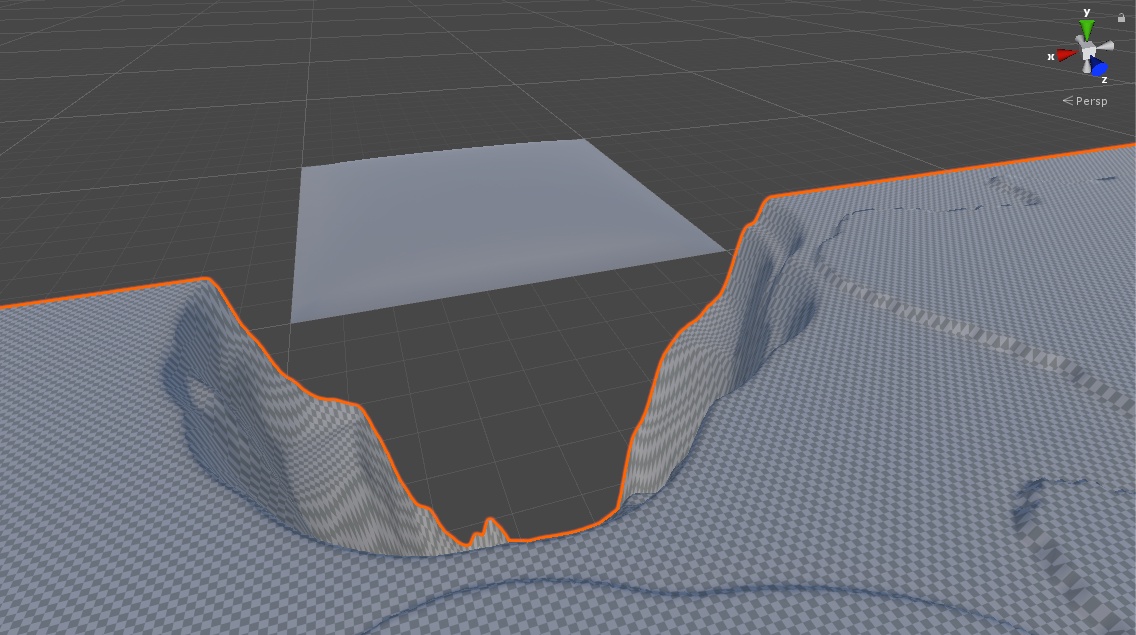 tardy walrus
let me load a terrain up
trim fog
Thank you for the help i really appreciate it. Im just starting out and im trying to learn as much as possible 🙂
tardy walrus
with that image, what is the scale, can you make a 2 meter capsule down there?
trim fog
my characters are just about the height of a 1, 1, 1 capsule
tardy walrus
this is what I see with mine
trim fog
thats on 3k x 3k?
trim fog
yeah
tardy walrus
terrain size?
trim fog
x 3000 and z3000
tardy walrus
yeah, I guess the size is relevant to the res of the actual terrain, if you want more detail go lower and add more chunks of terrain
yeah, so I get what you see
trim fog
so just keep patching together with neighbor terrains?
tardy walrus
I imagine that's the flow
like you'd split up your height map into 9 chunks and do a 3 x 3 of 1000 sized or loer
trim fog
Thats what im going to do 🙂 Thank you again for your help. It is very much appreciated
 steel aurora
Hey! Just getting started with Unity. I'm trying to create a terrain with a solid colour and I can't work out how... I'd love some advice if possible.
 ebon hemlock
Does anyone know why my terrain details brush fills everything with grass instantly when I set it to opacity 0.01?
same for rest of the terrain brushes
tardy walrus
I think target strength defines how dense the grass should be
or is that what you are talking about
ebon hemlock
na
there's opacity and target strength
but no matter what
if i set opacity to 0.01 nothing should happen
i also can set opacity to 0.1 and opacity to 0.1 and it's full instantly
feels bugged
tardy walrus
yeah, looks like it's only really effected by strength
tardy walrus
try like .001 in opacity
ebon hemlock
that works
tardy walrus
the threshold on opacity is wack
ebon hemlock
but it's still silly
i can't use the slider
how can they ship the tools like that??
how many versions is that in there?
 maiden venture
How to batch terrain?
ebon hemlock
entering 0.05 in target strength
auto changes to 0.0625 🤦♂️
I mean both the sliders literally have no use
have to use my numpad everytime i want to do a change
ebon hemlock
ok target strength is debatable. but opacity is just too sensitive
not sure if I can make an editor tool for terrain tools
maybe i'm too harsh though with my judgement. they're basically going with texture painting there
tardy walrus
it's not great the way it's set up honestly ,those thresholds are weird
ebon hemlock
also my grass doesn't match with the height i set it to
that at the top is a object at 0.5
maybe the distribution is gaussian and that's why no grass gets there?
doesn't seem like it after playing with the values
tardy walrus
is it a ratio of the total height of the terrain?
tardy walrus
max height .5 might be exactly half of the total terrain height
not sure
not an absolute height
ebon hemlock
uhm
i doubt it - it's not near half of the total terrain height
this one feels like a bug - if you can talk of a bug when it comes to the look of something 😛
if you set min and max height the same the height is exactly the value in units
but the further they are apart the more it differs again
and noise spread is also influencing the height, but that's for a noise to make the height differ
so always measure your grass 🤔
tardy walrus
sounds illegal
ebon hemlock
lol
 gusty gull
How do I add my grass
I got it from a asset from the asset store
tardy walrus
is it a sprite or something? a texture?
 sour totem
https://docs.unity3d.com/Manual/terrain-Grass.html what went wrong?
tardy walrus
Paint Details?
tardy walrus
Paint Trees
and what vertx pasted, the manual probably has a sister page for terrain-Trees
rose sentinel
Hey my plan is to create a low poly world by creating prefabricated chunks of terrain in Blender, then assembling them together in Unity to make the world look procedurally generated. Is it a good practice/approach to create these chunks in Blender, then import into Unity and then assemble them (and fix seams)? Should I use meshes for this, or is the Unity's Terrain editor better?
 sage stag
Probably should use Unity's Terrain @rose sentinel
How would you go about making craters that stay in the world? Like, when you use TNT im Minecraft, the effect on the environment is felt and stays.
tardy walrus
@rose sentinel how is your world being procedurally done or generated?
@rose sentinel like what are the expectations
rose sentinel
@tardy walrus Originally my plan was to use noise to generate the terrain, but Unity's Terrain editor does not have a standard flat shading out of the box so this didn't work. I also noticed that it doesn't support things such as overhangs and caves, since it is purely constructed out of a 2D heightmap. So I just decided to create these chunks of terrain in blender, put objects on them and assemble them in a way that makes it seem random every time.
tardy walrus
@rose sentinel cool, how would you lay these out so they they would fit together on the edges and not have gaps in height?
@ebon hemlock what are we looking at there, just a really low rez or blocky brush?
rose sentinel
@tardy walrus Excellent point, since mesh exposes its vertices, you can adjust the vertices at the border. Alternatively you can create a mesh for inbetween to create a more even transition. I think this should be able to work, but I'm not sure since I'm a Unity beginner.
tardy walrus
@rose sentinel it can be a tricky one, adjusting the verts on the mesh is cool but can be an fps sink if there are a lot of verts and you have to update the collision and even the vert normals (and I think bitangents if you use normal maps).
@rose sentinel if you have a more low poly aesthetic or like you said flat shading, having terrain chunks that expand 'past' their own grid a bit will help them just clip through eachother to avoid gaps
rose sentinel
@tardy walrus Are you sure it's a good idea to have them clip through each other? Wouldn't this result in faces clipping through each other? Vert normals/collision is indeed going to be an issue. Alternatively, I could probably make sure that each chunk is capable of precisely connecting with another chunk (e.g. the y value of all vertices are exactly the same).. This would probably put a constraint on which terrain chunk can connect with another.
tardy walrus
@rose sentinel the clipping thing would be if it works with the aesthetic only as it would make a hard edge, but you mentioned flat shading so I thought that meant facets
ebon hemlock
@tardy walrus is a "details brush" - used for grass, but it's not the default one, but someone used it in a vid
and I wonder which asset that's part of, cause it seems better. perhaps someone recognizes it
showing strength of the brush
tardy walrus
yeah, you'd probably have to make it yourself based on what you see in that video
tardy walrus
ebon hemlock
uhm
tardy walrus
added this weird glass break texture as a brush 🙂
tardy walrus
is that one you saw in there?
tardy walrus
yeah, you'll have to try and replicate it
or find out what package they were using 😮
ebon hemlock
I thought it was indicating the strength. but you explained it might just be a normal brush so nvm 😛
rose sentinel
so, im making a game in unity and i have two terrain generating scripts, one generates a bunch on tiles underneath a parent, and the other determines how many parents to place in the world. I want to generate caves, but if i put it in the parent class, the caves might get cut off since those parents are just one chunk of the whole, and if i put it in the parent-placing class, it would be harder to access/destroy the cubes that make up the parent classes in order to generate caves. With you guys having a coder's mindset, i was wondering if i could help get some insight on where to add my terrain generation process.
please @ me if you can give me some input, thanks!
 stiff basalt
Hey guys I'm pretty rusty on unity and I'm trying to get a good grasp on the terrain system in particular
My end goal is to make a scene with a tornardo that sweeps through but right now I'll settle for a grassy knoll just as proof of concept
No matter what i do the terrain appears white though
I can sometimes paint grass but I have to be incredibly zoomed in to see it and I don't think it works all over the terrain mesh
 harsh jungle
I followed a Brackeys tutorial to make a Grass shader, now I have 1 functioning "bundle of grass"
for cover the entire level should I just duplicate it (a lot) or what else?
rose sentinel
Hey there !
Could you help me with this ?
This script converts terrain trees into gameobjects . But it only works properly if the terrains transform Position is 0,0,0 . My terrains height is 100 so i added that value but it still doesn't react to hills .
What am I doing wrong ? 😬
Code
 public Terrain terrain;
 public  GameObject[] trees = new GameObject[4];

 public float TerrainPositionX;
 public float TerrainPositionZ;

     void Start()
    {
        Convert();
    }
    public void Convert()
    {
        TerrainData data = terrain.terrainData;
        float width = (float)data.heightmapWidth;
        float height = (float)data.heightmapHeight;
        foreach (TreeInstance tree in data.treeInstances)
        {
            Vector3 position = new Vector3(TerrainPositionX + tree.position.x * width,tree.position.y+ 100, TerrainPositionZ + tree.position.z *
            height);


            Instantiate(trees[tree.prototypeIndex], position, Quaternion.identity);

        }
    }


    // Delete tree instances somehow
 alpine vector
I can see my grid through my terrain does anyone know how i can fix that?
rose sentinel
Gizmos > Show Grid and uncheck
rose sentinel
anyone around that can help
im in 2019.2.17 with hdrp
i loaded a scene but can't see nthn 😦
warm radish
@rose sentinel which material is assigned to the terrain? you can check in the terrain settings tab of the terrain inspector
upper pasture
Free Voucher for MicroSplat Terrain Collection:
ASV-97XX-G4P9-L6CU-XCV7-NL3J
Enjoy!
 chilly pecan
Where is terrain layers tab to paint textures? Did I loose it?
warm radish
@chilly pecan which version of terrain tools is that?
 rotund barn
not sure if this correct place to ask
if i want to do a fly through video of a city and some landscape, what would be best solution for the trees?
I need to some to do some sort of dense forest, but the billboard graphic for tree is not suitable if the camera are in the sky.
I tried to use a simple low poly tree for testing
but it seem that it being culled out when the distance is too far away.
any tips / help appreciated
*picture for reference, i know this was made in other 3d software, but i just want to see if we could achieve something similar in unity
 drifting crown
You'll probably want at least some sort of basic "impostor" system similar to this.
1-Click Impostor Creator!
Learn more here: https://tinyurl.com/yxhygdv3
Optimize your projects with ease by using next-generation Billboard Impostors.
What are Impostors?
Impostors are camera facing quads, or simple polygonal shapes, that replace complex geometry by renderin...
 fresh valve
does anybody know a noise algorithm that works for generating islands, but each island is its own biome? simplex noise is only for heightmaps (or at best temperature, which isn't what i want), and cellular noise can give me cellular values for biomes, but i have no way to shape and fade in islands naturally with it
 vague cave
Hey guys, I'm generating random terrain at runtime using perlin noise. The terrain works so far.
Now I created 2 terrain layers (dirt and rock), and I want to apply them depending on
the height at a certain point.
So at lower heights, dirt is applied. At greater heights, rock is applied.
It does apply both layers, but it seems to be random and not really related to the terrain height.
This is the code that creates the alpha map:
    float[,,] map = new float[terrainData.alphamapWidth, terrainData.alphamapHeight, 2];

        for (int y = 0; y < terrainData.alphamapHeight; y++)
        {
            for (int x = 0; x < terrainData.alphamapWidth; x++)
            {
                float height = terrainData.GetHeight(x, y);

                map[x, y, 0] = 1f - (height / heightScale); // GROUND
                map[x, y, 1] = (height / heightScale); // CLIFF
            }
        }
        processedTerrainData.SetAlphamaps(0, 0, map);
This is the result (grey areas are 'rock'):
Any ideas or hints? ^^
I think it's a problem with the coordinates
warm radish
@fresh valve do you have a visual example of what you are trying to achieve? do you want a single pass algorithm or are you running the noise per island?
fresh valve
@warm radish i'm using this cellular noise now
i can have a color per cell and i have smooth transitions
not very pretty yet
i think i might juse use simplex noise with a sea level and a temperature map for biomes
i wont have a biome per island but at least it looks waaay more interesting
warm radish
ok. so i would first do the voronoi diagram (possibly with color to determine the biome if you are only having one biome per island)
you can then distort that with another noise function ( ie perlin ) to reshape the islands
use the voronoi diagram as a mask for terrain heights. voronoi pretty much gives you an sdf so you can pretty easily determine where highest and lowest points on the island will be
you'd have to do a few passes of noise to get what you want
here's some info on warping / distorting your noise domain: https://www.iquilezles.org/www/articles/warp/warp.htm
Tutorials and articles of Inigo Quilez on computer graphics, fractals, demoscene, shaders and more.
basically feed the noise through a noise-derived offset each fractal you have
assuming you are using fractal like Fbm noise
fresh valve
this is my original terrain noise. i thought i could use cellular noise to determine which is above and below sea level
not sure if i can get results of the same quality if i mess around with cellular noise
just looks way more natural without cells
warm radish
is that using simplex?
here's a talk from Sean Murray about noise and No Man's Sky: https://www.reddit.com/r/proceduralgeneration/comments/64ns8f/building_worlds_with_noise_generation_sean_murray/
reddit
Posted in r/proceduralgeneration by u/toastyGhoaster • 62 points and 26 comments
fresh valve
i'm using supersimplex noise, octaving and domain warping
rose sentinel
warm radish
i'd say this is a decent question for #⛰️┃terrain-3d
 vital kite
Hi, I wanted to cut a hole in my terrain in the unity editor without having to make a mesh in blender and import it. There is a paid asset called digger on the asset store that does what i want but is there a free way to get around it? Like a tool in unity that i'm overlooking or something?
This is the effect i'm looking for https://www.youtube.com/watch?v=HN329dRKYSU

DIGGER is the ideal solution to quickly dig true holes and caves in your terrain. You can also add some overhangs, create an arch, or whatever you want. Support: https://discord.gg/C2X6C6s
Download Digger from the Asset Store: https://assetstore.unity.com/packages/tools/terra...
 buoyant briar
Is there a way to force the terrain to stay in the highest LOD setting?
Regardless of camera distance
desert sun
@buoyant briar make pixel error 1 in terrain settings
buoyant briar
Still seems to scale the terrain despite being at 1 😅
https://gyazo.com/88a62c7a738d39613c1460a2ddc7c466
Just wanna turn it off completely
Or if the terrain collider could stay the same without being affected by the mesh
that would be the preferred way 😅
rose sentinel
Hey guys!
how the fuck do I fix this
Looks like evil has returned
tag me with a response.
 crystal latch
Hi All, I am curious about learning level design. I would like to learn how to make maps like in 7 days to die so players can dig in the ground and find minerals like minecraft. I am not sure what this would be called to I am wanting the visual effects to be higher resolution then 7 days. I know this will not be an easy task but if anyone can help point me in the right direction I would be very grateful Thanks,
harsh jungle
Can somebody hep me with terrain generator?
rose sentinel
what's up
trim fog
Does anyone know how I can see trees i painted from further away in the scene view? I have to zoom in pretty close to see them
rotund barn
If your tree doesnt have LOD, it is in settings under terrain component
IIRC it called "Billboard distance"
 covert shale
What are the advantages of placing trees with Unity’s terrain tool as opposed to placing prefabs with a game object painting tool?
rotund barn
at least to me, terrain designed for very big area
polybrush is ok for small mesh at least.
beside, polybrush add tons of gameobject as a child of specific mesh / gameobject
covert shale
But if I have one ten trees placed with the terrain system, is that I’m any way faster than having ten trees placed as prefabs, assuming both options use instancing? In terms of placement I prefer a prefab brush because I get much more control than the super basic terrain system. But if there is an impact on memory or speed, it would affect my choice.
 dusk citrus
We upgraded our project from 2018.4 to 2019.2, and are now having a strange problem with terrain tree billboard mipmaps -- only on Mac platform with Intel integrated graphics: they are usually corrupted, with multicolor noise instead of the billboard image. I've reproduced this on a simple project, so I can submit that in a bug report, but hoping someone here knows about this with a faster solution?
If I disable/reenable the terrain object, the billboards are regenerated -- occcasionally correct, but usually with some other noise pattern.
 robust surge
Anyone having issues with invisible terrain in builds, 2019.3.0b4 HDRP?
desert sun
@robust surge 2019.3.0b4 while you able to use 2019.3.0f5 ???
robust surge
@desert sun is it fixed in .0f5?
desert sun
@robust surge at least 0f5 or 0f3 more stable that your beta4
and with material use your terrain?
HDRP Terrain lit ?
robust surge
Thanks. I will try new version, always scary to update, I will make a backup. Yes, I use HDRP Terrain Lit
robust surge
@desert sun Thanks bud, updating Unity solved the terrain issues 🙂
desert sun
great
rose sentinel
Hello
rocky marten
How do I make the tree meshes scale with the terrain tree height multiplicator? So far it seems to only affect the billboard replacements. This is with URP 7.1.7. This also happens if I use an Unity primitive shape.
 willow holly
im trying to paint with my textures. But terrain layer only allows me to add normal map and diffuse
which looks bad in comparison with material.
How can i add roguness and ao if i have textures for that?
as u can see it looks completly differenrt
desert sun
@willow holly you have to use mask textures in terrain layer too
willow holly
i cant paint on my terrain with textures anymore. Might this error be the reason ?
i went in into that material. But there is no option for disabling tangent for it. Where i can find it ?
anyone has an idea how to solve this ? 😄
 woven minnow
Yo, so Im working with terrain and installed the terrain toolbox, yet when I click on window, theres no option for the toolbox
Anyone know how to solve this error?
warm radish
@woven minnow it might be under window > terrain > terrain toolbox
woven minnow
i fixed it, no worries
i had a compiler error, preventing the toolbox to actually finish
warm radish
ok cool
 terse haven
How can i make my player slide down this ramp i have a slippy material on the ramp already
 atomic shale
I have a problem, I'm trying to make a automatic grass placement in the editor. But my script don't place any grass and don't shown anything in the console. Can someone help me ?
public void PlaceGrass()
    {
        int[,] test = new int[1024, 1024];
        for (int x = 0; x < 1024; x++)
        {
            for (int y = 0; y < 1024; y++)
            {
                //get the terrain height and calculate the position to the real world size
                float posy = terrain.SampleHeight(new Vector3(x / 1024 * 2000, 0, y / 1024 * 2000));
                if (posy < waterLevel)
                {
                    test[x, y] = 8;
                    //here nothing is getting writed in the console
                    print(x / 1024 * 2000 + ";" + y / 1024 * 2000);
                }
                else
                    test[x, y] = 0;
            }
        }
//Sets all the layer to an random prototype
        terrainData.SetDetailLayer(0, 0, Random.Range(0, terrainData.detailPrototypes.Length), test);
    }
How do I open the Brush Size toggle with the Terrain Tools? I click the little arrow and it won't toggle open. need bigger than 500 size lol.
 hearty linden
Why cant I use my brush tool anymore? When I try to use it nothing happens
 lunar ether
How to texture terrain like this but without WM? I have basic version which can't do such detailed textures. https://blogs.unity3d.com/2019/05/28/speed-up-your-work-with-the-new-terrain-tools-package/

Unity Technologies Blog
We’re excited to introduce the Terrain Tools package (preview) for Unity 2019.1. This package contains over 15 new sculpting tools, as well as a utility to...
 onyx pagoda
@willow holly - did you ever figure out your terrain/terrain material issues? If you're in LWRP (now URP) I don't think terrain materials support anything but the diffuse and normal maps - the Mask Map is for HDRP only. I'm like, 95% sure...
@lunar ether - which renderpipeline are you using?
lunar ether
HDRP
 sinful flower
Hi. Anyone knows if there exists an API for Polybrush?
I would like to make a terrain and make alterations to it in play mode.
covert shale
I’ve got a 8192x8192 terrain i need to slice up (using Terrain Tools?). What size should I make my slices?
 shell heron
Hi guys
Can someone please tell me why my texture is flickering?
I also set aniso to 16
and anti aliasing is on max
thorny swift
Do you have mip maps on, also filtering other than Point?
@craggy granite just went to look if I can add support for lightmap specular occlusion in terrain shader and this caught my attention wow 😮 😄
even more interesting :O, need to do it more often
covert shale
@thorny swift if you want triplanar and all that right now I highly recommend microsplat.
rose sentinel
I have an odd problem. In the red circle I've drawn, there's a small space where collision doesn't seem to work. Rest of the terrain works as normal, but I have no idea what to the terrain to make just this spot not work, and I keep falling through.
rose sentinel
I am having a weird issue with terrains as well. On the edge this weird effect is happening where things looked terraced.
maiden lichen
@rose sentinel are you using raw16?
craggy granite
new terrain tools package
## [3.0.0-preview] - 2020-01-30
- Added Common Brush Controls and Brush Mask Filters to Paint Holes tool
- Added Terrain Visualization tool support for Universal Render Pipeline
- Added world space height support for Set Height tool
- Fixed bugs for foldout UI
- Toolbox Split Terrain tool bug fixing and added support for terrain holes
- Added terrain holes support to Toolbox Heightmap resolution change``` prime mason
how do I put a texture on my terrain
rose sentinel
@maiden lichen - naw I'm using the built in terrain to sculpt I didn't import a raw texture, so shouldn't it already be 16 bit? But it only does it on (some) borders (edge of terrain) where no other terrain meets it.
Is there any insight on when Terrain for HDRP will have grass working? I found a shader online that should have made it work - but it just comes up as a white quad.
maiden lichen
@rose sentinel hmm. I waited for a very long time on hdrp to import stuff. Never did. So i switched. Grass is possible with 3d. But no wind.
And btw. Check your terrain resolution in this cass
 indigo geode
anyone have any tips or tricks for texturing a mesh based terrain?
indigo geode
lol fair enough
 viscid crow
just discovered terrain stuff and am learning about it, and its awesome.
im just wondering if there are particular pros/cons of using a mesh that you create for your terrain vs using the unity terrain tool. like other than the process of actually creating it with code vs by hand, and randomly generating it vs making a specific custom level.
Is there like limitations I should be aware of for using each? Maybe its really hard to place trees and stuff on a mesh that I generate? Or maybe it's more taxing on the engine to generate it myself or something? Idk. just general things I should know when going into each is appreciated.
Thanks!
warm radish
@real coyote use some higher dimension noise. 3d or 4d
@viscid crow you generally benefit from the quadtree that terrain uses when rendered and instancing that the terrain system provides. there's also gpu-driven tooling which makes it faster than some mesh manipulation tools but with mesh manipulation you most likely have finer control over the shape of the mesh. heightmap based terrain also doesnt give you overhangs or tunnels. you'd have to make a mesh for that somehow anyway. some platforms, ie mobile, might handle meshes better than our terrain system, especially on devices that dont support instancing or texture fetches from vertex programs
@prime mason if you are not writing your own material tools for terrain, you have to add terrain layers to your terrain using the paint texture tool. then you start painting. the first terrain layer you add will automatically fill the terrain with that terrain layer.
https://docs.unity3d.com/Manual/terrain-PaintTexture.html
@rose sentinel that looks like an issue from the smooth height tool that we have yet to fix
viscid crow
thanks @warm radish
is there a commonly used way people handle caves / overhangs with terrain systems. say they make a terrain, how do they handle adding in caves after that?
if desired
covert shale
@indigo geode my tip for texturing a mesh terrain is get Microsplat from the asset store as well as its Mesh Terrain addon. And if you get the Procedural texturing addon, the texturing can be laid down for you based on slope, cavity, etc.
warm radish
@viscid crow we recently added a tool for clipping portions of the terrain so that they dont render. this also handles navmesh and collider generation. you can make a hole in your terrain using that tool and then make a mesh for your tunnel or overhang. the seams probably wont look nice so you might need to cover it up with more meshes. stuff like rocks, grass, and other debris
i think we just put out a blog post about it. i will find it

Unity Technologies Blog
Unity 2019.3 continues to bring more exciting updates to Unity’s Terrain system, including – by popular demand – the ability to create holes in your Terrai...
if you dont want to use polybrush, you could use some other software like blender, maya, etc.
polybrush makes it a little easier since it is in-engine and you can match the mesh up with your terrain a little better
otherwise you have to do all that export / import business
viscid crow
Awesome! Thank you : ]
I'll check this out after the current tutorial im looking at / working on
warm radish
sounds good. let me know if you have any other questions
viscid crow
👍
indigo geode
@covert shale thanks I'll look into it, was kind of hoping to try and write my own stuff, but maybe I'll get some inspiration from that
hearty linden
Why is it that my player just walks through my terrain?
prime mason
anyone just know how to apply materials onto terrain
xXudon set ur terrain as ground
as a layer
 worn oriole
Am I correct in assuming multiple terrain assets 'tiled' together is generally more efficient and optimized than a single, high resolution terrain?
craggy granite
I'd expect the opposite as there will be more things to manage and terrains still have their lod system to handle things at different distances
it's not something you'd take as design decision usually though
terrain amount is usually dictated by what you need to do with it, or if you need to stream in terrain chunks at runtime
if you really want to know the perf impact on, make test levels with terrains typical to your gameplay and see how different approaches work
in general if you have some concerns like that, it's better to just test them early on so you'll know better once you actually start building things with it
worn oriole
👌
 upper charm
hello, does anyone have suggestions on how to deal with updating large terrain areas and updating the LOD of terrains optimally? I'm working on a realtime heightmap update system and the biggest bottleneck atm is the amount of verts/tris rendered from the terrain which ends up in 1-4mil range. https://www.youtube.com/watch?v=sH1b9wZ9xsk

GPU and CPU data state synchronized. SphereCasts/Raycasts can now interact with the heightmap.
Remaining to implement: reduction to the amount of tris/verts rendered. Most likely custom terrain LOD will be required. Unity's terrain methods are too slow.
 oak bronze
iwant paint in twolayer at once(1-2-3-4 texture layersoil-clay-sand-stone) 5-6-7-8effect layer wet-snow-burn-... but terrain editor erase info in first splat map when i paint in second splat map may be anyone have some fix for it?
 viral grove
anyone know a good tutorial for importing a bitmap for terrain height?
 torpid wraith
my terraincollider and my playercolider(capsule) don't work smooth together (the capsule doesn't move smooth on it) anyone know how to fix?
nvm fixed it
it was just the low frame update
warm radish
@upper charm that is awesome! How many terrains do you have in the video?
upper charm
4x4 terrain grid 257x257 heightmap resolution which is about as much as it can handle right now due to LOD.
desert sun
@warm radish that feature would be cool for Unity.
Auto-placing grass,rock and small details based on terrain texture/layer
From Unigine website
 desert bridge
I am using Polybrush / Probuilder for terrain due to needing to use a mesh as a constraint, and I the Texture Blend and Vertex Color shaders are each useful in their own right, but is it possible to make a shader that has both features?
 glass mortar
texture blend like splatmaps generally uses vertex colors to do it
or I suppose a special texture could be used
desert bridge
oh right of course
hmm, thouhg I'm not sure poly brush would be able to handle that
harsh jungle
can i ask here help regarding polybrush?
glass mortar
cant hurt