#⛰️┃terrain-3d
1 messages · Page 1 of 1 (latest)
 radiant token
 tall marsh
ok
 rapid crow
Does unity have as many tools for modeling as blender? if so, where do I find them
 thin ibex
No, because Unity is not modeling software but Blender is
rapid crow
i couldve sworn i saw people modeling on unity
 undone lark
rapid crow
i couldve sworn i saw people modeling on unity
undone lark
rapid crow
i couldve sworn i saw people modeling on unity
There's Probuilder which is a block out tool with basic modeling capabilities. There are paid assets in the store which are more elaborate.
But none will compete with an actual modeling program.
rapid crow
so i have to import models from blender
 shell jolt
yes
if you just need a blocky looking models in your game, ProBuilder can do that... but just that.... it was meant for prototyping
trust me, you'll hate using that
 jovial dragon
Is there a way to "map" a 3d area with a 3d camera and import that area into a unity scene? Like a tutorial for that
 clear heath
Im having a problem with occlusion not working can anyone help?
its not working on trees to be specific
 loud bramble
jovial dragon
Is there a way to "map" a 3d area with a 3d camera and import that area into a u...
loud bramble
jovial dragon
Is there a way to "map" a 3d area with a 3d camera and import that area into a u...
I've seen a lot of megascans in UE5 recently. Seems to be a unity integration too: https://help.quixel.com/hc/en-us/articles/360002558138-User-Guide-Megascans-Plugin-for-Unity

Quixel
Overview
The Megascans plugin for Unity 3d allows you to connect Quixel Bridge and Unity, giving you a one-click solution for importing your Megascans, Mixer and custom assets straight into Unity w...
 plush hamlet
hello,
sometimes my player fall under the terrain (or a simple plan shape that I'm using as a floor).
what is the best way to deal with this ?
wider collider ?
wider floor mesh ?
 winter minnow
plush hamlet
hello,
sometimes my player fall under the terrain (*or a simple plan shape tha...
winter minnow
plush hamlet
hello,
sometimes my player fall under the terrain (*or a simple plan shape tha...
Usually you would use a collision detection method that's more accurate than discrete
but I don't know anything about your use case
 plain jetty
How do I stop terrain grass/trees from colliding with other objects within the scene?
Do i have to manually paint it or is there an easier way to just mass delete any grass/tree that is colliding with another object?
 royal raptor
Anyone using Bakery GPU light mapper ?
 proven crystal
The result of combining TerraLand & @worldcreator3d, based on Geo coordinates


 quick zinc
you are welcome!
 tiny sparrow
I'm having trouble getting the terrain paint brush to work. I'm not allowed to add any material to the current "settings" under terrain. Is there something I'm doing wrong?

 regal rose
tiny sparrow
I'm having trouble getting the terrain paint brush to work. I'm not allowed to a...
regal rose
tiny sparrow
I'm having trouble getting the terrain paint brush to work. I'm not allowed to a...
Cool terrain.
Looks like from Snowpiercer cinema
tiny sparrow
regal rose
Looks like from Snowpiercer cinema
I appreciate it! But this is just the stock terrain texture. I'm trying to paint grass and rock onto it.
It started as a ball game but then somehow my mind went to trains and now it's a train game
Not sure why I can't paint textures though
regal rose
Looks realistically
tiny sparrow
Still can't seem to figure out how to paint the terrain
regal rose
Ye. The same problem. It is so hard to paint a good terrain. I thought it is easier
 viral brook
Anyone has some ideas onto why the tutorial (up image) Sand Albedo from Standard Assets is way brighter than the same texture from my project?

 fading knot
Hey how can I get a single grass mesh for terrain detail mesh without importing big packages
I tried to create one but failed
regal rose
I imported grass from MegaScan
 queen idol
A useful asset for populating terrain with terrain details, with avoidiance
https://assetstore.unity.com/packages/slug/223907

Get the Placer - Procedural&Manual Level Designer package from Alek Games and speed up your game development process. Find this & other Level Design options on the Unity Asset Store.
 manic fog
hey i have an issue where in the scene the trees that arent loaded show up as white in the distance in the built application
is there a way to fix that?
hello?
manic fog
nevermind i figured it out
 foggy igloo
Why is my terrain dithered?
And how can I remove it?

 fervent hatch
I want to use rocks and bushes with LOD in the terrain system, but LOD Group components are not supported by normal details. Is there any problem in performance if I add it as a tree instead?
 rose sentinel
Why is my terrain looking shiny with URP TerainLit material?

 delicate ravine
hello
i have bunch of trees prefabs with scripts on them, means i have to place them one buy one, is there is easier way by using terrain tools?
 signal dust
rose sentinel
Why is my terrain looking shiny with URP TerainLit material?
signal dust
rose sentinel
Why is my terrain looking shiny with URP TerainLit material?
I finally found a solution to that. Go to the layer settings and set the mask texture to the same as the diffuse one, and then set the smoothness to 0
rose sentinel
Use brush
 verbal nest
Hey, currently I've imported a height map texture of a real island and put that in Unity's terrain, and it works perfectly. The only thing is, the ocean is flat... and I don't feel like modelling 25kmx25km ocean myself, so does anyone know how I can import the ocean heightmap as well? I've used websites to get the terrain heightmaps and all, but it didn't work with oceans afaik. Any help is appreciated 🙂
Ive looked everywhere and still can't find any high quality (or at least any quality) ocean height map data
verbal nest
I found one, though couldn't make it work properly with the existing terrain
verbal nest
Hi again, whenever I try painting a texture, the texture gets painted above the spot where Im trying to paint it, as seen in the image. Can anyone help me fix this because I dont know what's going wrong here

 remote wave
Hey what tool can i use to build my world in Unity? (With a cartoonish style like Mario Odysee or Yokaa Leely)
delicate ravine
Hello , im using terrain paint details to paint grass
my issue if the player place a structure on top of the grass , the grass will stick out from the floor
is it possible to make it not render if there is a structure near it?
or the only fix for this is to make the structure floor high / grass smaller
thank you
 brisk flare
Are there publicly available tools for sculpting more dynamic maps like those of risk of rain 2 or slime rancher? I've been looking for ways to build environments and I've tried the unity terrain system but it doesn't exactly fit what I'm looking for.


things like this

 delicate ravine
 errant bluff
how do i get the grass to have space between them
errant bluff
how do i get the grass to have space between them
change the brush opacity

the lower the more space between them
errant bluff
Okay thanks
delicate ravine
how can i make caves in unity with terrain? what brush can i use?
 vale sentinel
delicate ravine
how can i make caves in unity with terrain? what brush can i use?
vale sentinel
delicate ravine
how can i make caves in unity with terrain? what brush can i use?
if you hold f8 and use whatever brush i think that will create holes (at least on my version of unity, you can check shortcut manager to see). i think this is what you want
delicate ravine
vale sentinel
if you hold f8 and use whatever brush i think that will create holes (at least o...
yeah it creates holes but what i want is something similar to raise/lower terrain but not vertically, horizontally
vale sentinel
oh does it not work horizontally too
shell jolt
You cant do things like overhangs with unity terrain.. or an actual cave with a hole that we can literally explore the inside of a cave
Make your overhangs/caves in blender... Sometimes i do wonder why they cant do this ootb 🍴
 frozen hearth
is there a way to change render distance of trees i painted onto terrain? after i paint my trees on, i have to more my camera closer just to se what has been painted
 whole kayak
Heya, I've made a material with a comp shader to render grass. Then I went to paint it on a terrain and realised you can only paint textures, not materials >.< any idea of how I can go about getting my grass in?
fading knot
I was adding the grass mesh but it says renderer component is missing, it already has mesh renderer and mesh filter what should I do?

 weak imp
anybody know how to unlock flythrough mode?
 pulsar mortar
Hey all, I'm using HDRP on 2021.3 and my "Edit Grass Texture" option is greyed out. I can't find any settings or anything on google about this. Anyone have any ideas?
 harsh briar
fading knot
I was adding the grass mesh but it says renderer component is missing, it alread...
harsh briar
fading knot
I was adding the grass mesh but it says renderer component is missing, it alread...
Is it a mesh though? Shouldn’t it be a sprite renderer since it is a billboard?
fading knot
harsh briar
Is it a mesh though? Shouldn’t it be a sprite renderer since it is a billboard?
It can be a sprite but there is a mesh layer as well to add
harsh briar
Can you send a screenshot of the grass prefab.
fading knot
harsh briar
Can you send a screenshot of the grass prefab.
there
 harsh briar
Ok, I didn’t realise you were trying to add a mesh.
fading knot
???
harsh briar
Doesn’t matter, why don’t you create a 2D grass texture and use the paint grass option rather than a detail mesh. That would probably also give you better performance.
Maybe you need to use the child of the grass parent. Because that’s what the mesh renderer is attached to.
fading knot
harsh briar
Doesn’t matter, why don’t you create a 2D grass texture and use the paint grass ...
yeah that helped thanks
harsh briar
Ok nice.
weak imp
not sure if this the right chat for this but anybody know how to make objects cast shadows but not visible to the camera?
rose sentinel
foggy igloo
Why is my terrain dithered?
And how can I remove it?
bruh that looks cool
 fervent crown
how do i fix this?

 wide mulch
Hello guys, I was watching some videos about Unity and I got a question. How do you make such custom maps/levels "out of grid" like in the screens? Do you draw them on photoshop and import them as gameObjects ? (but must be consequent size of pngs)

 peak hare
Is it possible to use the tree brush tool if I'm importing the terrain from blender? If not is there a tool that's equivalent?
shell jolt
There are tools for that yeah, such us Polybrush... but it sucks...
Better off making your own tool for scattering, it's not that hard
 sand sentinel
Hello guys
I have a problem with making holes in the terrain
I create a terrain and draw a west hole and then build android and everything is correct
I install the "Shadergraph" package and get the Android build again without changes, but the hole is no longer created, did you have such a problem? My unity is 2022
sand sentinel
My problem is only with the hole in the terrain, which is no longer created


In Editor everything is ok but after Android Build this problem occurs in mobile
If I remove the ShaderGraph, everything will be fine again, can someone take this thread to see if the problem is only for me or for everyone?
 rose sentinel
 jagged bridge
That’s a 3d model from the looks of it
You combine terrain and models to make this stuff
sand sentinel
sand sentinel
Please help me 🙏
 unreal lark
I'm having a similar problem as @sand sentinel with Unity 2022.1 URP. Haven't tried building anything yet but I can paint holes in the editor and they show fine but as soon as I go into game mode the holes disappear. Anyone know why that would happen?
I am not doing anything with Shadergraph however.
 ancient holly
is there any way to have a terrain brush that draws in cubes? as in, it would look like a minecraft world, but it wouldn't be procedural
should i set it up like it's procedural but feed it the same perlin noise every time?
 potent crest
Hi, I was wondering if it was possible to add more vertices to my plane since this is not even close to enough for the texture painting I need

 formal mountain
Does anyone know what type of terrain a iOS game like rise of kingdoms has
 cloud garnet
Is it possible to replace a terrain layer by an existing layer? I can only seem to replace it by one not on the terrain yet, or remove it - but it only gets replaced by the first layer.
 ancient flume
Does anyone know how to detect if a player is standing on terrain grass vs regular terrain?
 winged solstice
How would i go about making a low poly terrain ? Is there dome specific software or sum?
 icy parcel
Is there any way to create terrain with heightmap using c# ?
winter minnow
icy parcel
Is there any way to create terrain with heightmap using c# ?
Yes, look into "procedural terrain generation"
icy parcel
winter minnow
Yes, look into "procedural terrain generation"
Yes i saw many tutorials about mesh generation etc, but I'm more looking for something using unity's terrain tool, with terrain datas etc...
 wet oriole
Is there any way to blend models and terrain together to make it smooth? Just putting the model there leaves a nasty crease

Left is the model, right is the terrain
I would also like to make the textures look the same but that seems less likely
They're already the same texture, though I'm not 100% sure why it looks so much better on the model
 grave basalt
wet oriole
grave basalt
wet oriole
different texture scaling and the normal difference on the location where mesh and terrain meet each other
might be possible with some shader wizzardry
i remember this
https://www.youtube.com/watch?v=cOBApMeeJEc
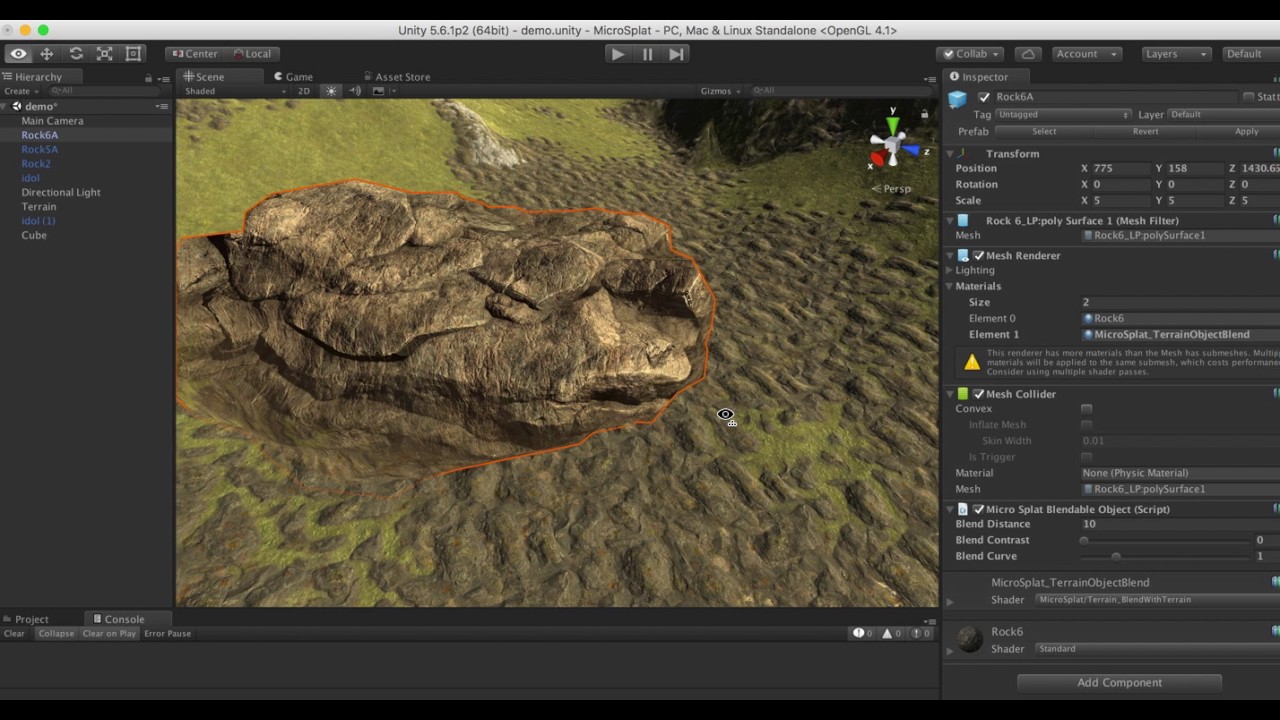
MicroSplat Demo showing of the Terrain Blending module, that allows you to easily blend meshes with the terrain.
wet oriole
Oh! That seems useful
unreal lark
Anyone know what causes these squares in the terrain and how to fix them when using an orthographic camera?

Happens when zoomed in or out and from any angle.
Squares aren't there in perspective view.
Happens in all scenes with various different terrains.
 barren oak
icy parcel
Yes i saw many tutorials about mesh generation etc, but I'm more looking for som...
barren oak
icy parcel
Yes i saw many tutorials about mesh generation etc, but I'm more looking for som...
Yep using the API here https://docs.unity3d.com/ScriptReference/TerrainData.html
icy parcel
barren oak
Yep using the API here https://docs.unity3d.com/ScriptReference/TerrainData.html
Thx, I'll check that 👍
 severe elbow
hi im here again, with another dumb problem,
i tried to sculpt a terrain but my textures are keep getting distorted/being low quality, i cant find the solution


 shy urchin

Unity Forum
Hey I was looking at your game you made (the massive open world one)
And was curious, how did you make it where it's literally massive without...
severe elbow
severe elbow
hi im here again, with another dumb problem,
i tried to sculpt a terrain but my ...
even with the sample textures, "rocks" turns green

what's going on here
i really dont know
severe elbow
ok i got rid of roblox texture resolution, but its still tinted green
severe elbow
its not a problem with material
 quaint wyvern
severe elbow
ok i got rid of roblox texture resolution, but its still tinted green
quaint wyvern
severe elbow
ok i got rid of roblox texture resolution, but its still tinted green
"roblox texture resolution"
lmfao
i might use this from now on
 balmy bear
guys this happens in build mode, the 6 slot of the texture paint of the terrain turn black
,any texture

any ideas?
 runic wing
has anyone ever had an issue where any details you painted onto a terrain (like flowers) no longer could be edited and seemed to disappear from the terrain details list?
the details still are present on the terrains, but it becomes impossible to add or remove those details
ah nevermind, it wasn't the details that I used 🤦♂️
 distant vine
Hey Im creaking a chunking system where each chunk composes of the default unity plane mesh (collider and renderer)
I am passing the mesh data from each chunk into a compute shader that will adjust the y component of each vertex according to a heightmap that I provide my script
The problem that I discorvered is that by modifying the mesh data for one of my chunks affects the mesh data for all.
I looked into it and realized that each imported mesh in unity gets shared across all gameobjects that use it (to save space I assume) but what if I want to have each chunk have its unique mesh data that I can modify?
Would I need to generate a new mesh for each chunk instead?
I am also interested in instancing the chunks but that seems like an easier problem to solve because I can just pass in one plane mesh along with the heightmap data for isnstancing
 rare tulip
Hello! I had a pretty basic level doubt regarding the Unity Terrain System.
I am trying to add multiple "Detail Objects (Grasses)" in my terrain
The problem I'm facing however is that, in Unity, there seems to be a global Detail Density slider.. which affects ALL detail objects..
Is there no way to choose local density settings for any given grass / detail
fervent hatch
Sorry if it's a stupid question, but does RaycastHit.textureCoord in a terrain give the same uv in the splatmap? My goal is to detect the strongest layer for step sounds and particles
barren oak
fervent hatch
Sorry if it's a stupid question, but does RaycastHit.textureCoord in a terrain g...
I'm pretty sure RaycastHit.textureCoord always returns Vector2.zero unless the collider is a MeshCollider
As per the documentation: https://docs.unity3d.com/ScriptReference/RaycastHit-textureCoord.html
A Vector2 zero is returned if no mesh collider is present in the GameObject.
fervent hatch
thanks
I am also having a bit of trouble adding a 5th texture to my terrain. It creates a second splatmap, but I can't add the texture (it paints black instead)
do I need to do something in order to allow more than 1 splatmap?
fervent hatch
Nevermind,, closing and reopening the program did the trick
 hoary ore
Hi im creating my terrain and have to paint in trees shrubs ect. However it states i cant paint because i dont have a mesh renderer i have inported my models from blender and need help any reasons?
 gloomy zinc
hoary ore
Hi im creating my terrain and have to paint in trees shrubs ect. However it sta...
gloomy zinc
hoary ore
Hi im creating my terrain and have to paint in trees shrubs ect. However it sta...
Try to make prefab of that tree and add render component idk really
hoary ore
gloomy zinc
Try to make prefab of that tree and add render component idk really
I tried that already
radiant token
I created a custom terrain mesh but its mesh collider doesn't work unless I made it convex but that creates a new problem that the mesh has too little triangles so you float above it. Any solutions for more triangles or not needing the mesh set to convex?

Oh I know my problem, the custom mesh is only one sided which means it cannot create a non convex mesh collider, the solution would probably be to either use a real terrain collider or double the amount of vertices with the others slightly lower to make cubes instead of one sided triangles
 still tendon
Hello I started to have this error

at line 1853

I tried re-installing my editors and creating new project, the problems seems to be in URP.
 rigid junco
Hey guys, what's the way to add grass on Terrain in Unity HDRP? I'm confused why is it not still natively supported
rigid junco
Should I use some hacky shader or a custom renderer with DrawMesh/DrawMeshInstanced?
 remote sluice
I'm using HRDP with detail meshes but for some reason they wont show up when I paint them on the terrain. I have no idea where to even begin troubleshooting this one
It doesn't even register anything happened, it doesn't ask me to save the scene
my settings for the prefab and the prefab respectively


also I get this error when dealing with this

 safe stag
you can select all the assets in the file explorer and drag and drop them into Unity
I was
Just image files, pngs afaik
Because each channel has it's purpose. This one's for terrain
Create a terrain object and apply the heightmap
You've exported it as over a thousand individual heightmaps?
What type of game is this?
Ok, you'll need to do a bit of digging as I'm unfamiliar with large multisection terrains, but you'll want something along the lines of a quadtree
It's not really written anywhere but we can only help those who are willing and able to help themselves. I'm not going to do it for you and I've pointed you in a decent direction. Good luck
You hadn't even heard of a quad tree prior to my bringing it up. You've learnt a new term, go google it
undone lark
No one is forcing you to be here. 👋
remote sluice
Can I get detail meshes to adhere to the slopes of terrain? Like, its normals
hoary ore
Hi ive inported my terrain and i wan to paint trees across my land however it says i do not have a mesh render on my prefab so i added it and it still says i dont have a mesh renderer

 winter minnow
hoary ore
Hi ive inported my terrain and i wan to paint trees across my land however it sa...
winter minnow
hoary ore
Hi ive inported my terrain and i wan to paint trees across my land however it sa...
It has no valid mesh renderer
Mesh renderer also needs a mesh filter, otherwise it's not referencing any mesh
rigid junco
How do I use terrain detail in HDRP? Do I need a custom solution?
 quartz echo
Can I produce something like this using the built-in unity terrain tools? If I can, how would I reproduce the flatshaded style. Im trying to make a beach terrain
 quartz echo
Or do I have to make the terrain in a 3d program then placed the miscs manually?
 cyan copper
hello, seeking some advice;
i find it a bit hard to sculpt from top-down "God view" my terrain of tropical islands to be realistic but also sanely navigable, i.e. not too steep / not too shallow etc., just the right rate of incline / hill / valley / level clearing etc.
it would be useful if i could do something like 1) quickly "alt-tab" in & out of First Person controller to test the eye-level view of the terrain, adjust > switch & test > adjust > switch & test etc., maybe even sculpt FROM the first person controller view 2) or if there was some way to snap from top-down view to a preset eye-level view, if Editor had some way to setup viewing positions to quickly switch between?
 sleek yoke
cyan copper
hello, seeking some advice;
i find it a bit hard to sculpt from top-down "God v...
sleek yoke
cyan copper
hello, seeking some advice;
i find it a bit hard to sculpt from top-down "God v...
just have a number of cameras setup that you click and type Ctrl+Shift+F to make your scene view the same as that camera view
hoary ore
Hi i have a terrain set up and now i want to paint my details onto it but it isnt placing when i hold down left click

is it because theres no texture on the terrain
 turbid linden
Hey everyone, I wanted to know how I could paint on only one of those terrains?
 turbid linden
hoary ore
Hi i have a terrain set up and now i want to paint my details onto it but it isn...
turbid linden
hoary ore
Hi i have a terrain set up and now i want to paint my details onto it but it isn...
You might be too far to see them
cyan copper
are there more precise terrain sculpting tools around? i find myself struggling with the brushes given, even with the terrain sample assets package installed, i need more fine grain control maybe even on specific edges/vertices adjustments... anything like that available (ideally free) ?
for example trying to sculpt a beach, FPS player can enter & exit the water, it's important for a good precise curve of a transition from ground to underwater, cant be to steep, cant be too shallow, needs to be at the right scale relative to player scale, just can't seem to nail it precisely with the provided brushes...
hoary ore
turbid linden
You might be too far to see them
nope
 hoary ore
in fact i want to paint a texture onto the terrain but i dont see an option any help
 gleaming jetty
cyan copper
for example trying to sculpt a beach, FPS player can enter & exit the water, it'...
gleaming jetty
cyan copper
for example trying to sculpt a beach, FPS player can enter & exit the water, it'...
If i remember correctly there may be an Asset called something like extended terrain tools or something, not sure tho
Here goes a question: I created a terrain, textured it and put some trees down on it. I want my game to take place at night aswell. Once i crank down the skybox lighting multiplier to something like 0.25 or 0.5, everything goes dark except the painted trees which just remain as they were at "daytime".
Is there some way to get the trees to adapt to lighting other than placing them manually?
Thanks!
hoary ore
im painting my trees and there extremely tiny and have no textures

 cyan roost
hoary ore
im painting my trees and there extremely tiny and have no textures
cyan roost
hoary ore
im painting my trees and there extremely tiny and have no textures
You'll likely have to make the model larger, unity terrain isn't very helpful in terms of size
Does anyone know how to join multiple terrain objects into one with terrain tools?
shell jolt
hoary ore
im painting my trees and there extremely tiny and have no textures
When you export your tree models out of 3d software such as Blender, make sure to Apply the transform... and when Imported to Unity, make sure the default scaling is 1
shell jolt
cyan roost
Does anyone know how to join multiple terrain objects into one with terrain tool...
If you mean of stitching terrains made by Unity's terrain editor then the feature already there, in the terrain editor...
cyan roost
shell jolt
If you mean of stitching terrains made by Unity's terrain editor then the featur...
I have no idea where that is, I cannot find that
 steep schooner
Hello 🙂
I used in the past a program that could create a normal map, height and occlusion map (if i remember correctly) from an image
can't seem to find it again
(it was a small program, maybe github, not photoshop)
steep schooner
nvm, i found "AwesomeBump" it does the work
 keen rune
does anyone here have a like a tutorial asset which has a like a floor and platforms ramps and walls just to test player movement in and like wall running and grappling
winter minnow
keen rune
does anyone here have a like a tutorial asset which has a like a floor and platf...
Try the Starter Assets package
hoary ore
shell jolt
When you export your tree models out of 3d software such as Blender, make sure ...
ok
what does this setting mean please help me
 hoary ore
That being nature occlusion
keen rune
winter minnow
Try the Starter Assets package
how do i get that
winter minnow
keen rune
how do i get that
Try google
quartz echo
cyan copper
are there more precise terrain sculpting tools around? i find myself struggling ...
Have you tried using another program for modeling terrain?
I made the models in Blender(You can get the program in steam)


How I made my terrain is by using the sculpt tool on a subdivided plane
I hope it helps @cyan copper
cyan copper
@quartz echo thanks, is it possible then to convert an imported mesh as a Unity Terrain?
quartz echo
cyan copper
<@523431835364229141> thanks, is it possible then to convert an imported mesh as...
Sadly, no.
I was recreating our landscape
They used the unity terrain tools and it looked bad
cyan copper
ye... i guess i'm not the only one....
cyan copper
quartz echo
I made the models in Blender(You can get the program in steam)
very nice BTW 🤩
quartz echo
cyan copper
ye... i guess i'm not the only one....
I can show you what our before landscapes and after


 sacred island
quartz echo
sacred island
quartz echo
Wowwwwww
 polar wadi
I made my own tileset today for rule tiles but I can't figure out how to get water to appear here instead of grass via rule tile.

I suppose I can't
 hollow mango
why is the height map resolution not in 2x, but slightly off?

my goal is to try and make the terrain grid fit within the world grid

right now its off
 gaunt anchor
I'm using built in Tilemapper on unity anyone know why my stuff is clipping into each other and how to space em apart? https://gyazo.com/99853f20d38be374e8732706f9d38e24

 agile fiber
cyan copper
<@523431835364229141> thanks, is it possible then to convert an imported mesh as...
agile fiber
cyan copper
<@523431835364229141> thanks, is it possible then to convert an imported mesh as...
It is possible to convert a blender landscape to a raw file that can then be imported as heightmap in a unity terrain.
This tutorial worked for me https://www.youtube.com/watch?v=53KAZO0cimw, but it helps to be somewhat familiar with blender already.
However, I found it looked better in my game to import it as a mesh (directly from blender) than to import it as a terrain.
cyan copper
@agile fiber i'm not against doing the terrain in blender, just gotta learn how... am already to some extent familiar with terrain shaping & painting in Unity, am hoping it would not be too hard to port that knowledge into blender...
shell jolt
agile fiber
It is possible to convert a blender landscape to a raw file that can then be imp...
exactly what you want https://www.youtube.com/watch?v=6WD3G6A_4jo

A quick demo of using Blender sculpted terrains as height maps in game engines.
Asset Stores
CGTrader: https://tinyurl.com/yz76na6m
Gumroad: https://tinyurl.com/yhqbj6dx
Socials
Discord: https://discord.gg/8JB9qD56Eq
Twitch: https://tinyurl.com/yhlmo6ao
Art Station: https://tinyurl.com/2s3rye3
Blender Addons
Kit Ops 2 Pro: https://tinyurl.c...
in the later version of Blender, exporting heightmaps way way much easier
shell jolt
hollow mango
why is the height map resolution not in 2x, but slightly off?
Terrain heightmaps must be power of two + 1 due to how quads need to be consist of two triangles and the height will be based on the amount of vertices of those triangles
due to my limited english, that may just confuse you even more... either way, you can do your own research on this, plenty of explanations on forums etc regarding this matter
 cosmic flare
just wondering for a 2d pixel game, if my characters are all 32 pixels does the tile set for the map need to be 32 ?
cyan roost
cosmic flare
just wondering for a 2d pixel game, if my characters are all 32 pixels does the ...
this isn't really the right channel for that, but your tileset for your map doesn't have to be the same ppu as your player
it might just look a bit off, thats all
cosmic flare
cyan roost
this isn't really the right channel for that, but your tileset for your map does...
sorry didn't know, but what do you recommend for a 32 pixel character
also what is the right channel
cyan roost
cosmic flare
sorry didn't know, but what do you recommend for a 32 pixel character
i would recommend doing 32x32 for the map if possible
and #🔀┃art-asset-workflow might be a better channel, this ones for unity's 3d terrain tools
cosmic flare
cyan roost
i would recommend doing 32x32 for the map if possible
i see, thank you
cosmic flare
cyan roost
and <#497873833043296277> might be a better channel, this ones for unity's 3d t...
oh alright
 solemn fog
how do i access the pipeline?
 short idol
Quick question, which terrain setting controls the detail of the terrain? Im trying to get my terrain to look really blocky/low poly but ive gone through almost every setting and cannot find it
shell jolt
lower both height and terrain resolutions, there's a limit still how blocky it would look, and the brushes settings affect that too
 junior gull
i created a ground in blender but when i import to unity it is missing terrain data
how can i use it as a terrain for NavMeshAgent movement
 shell jolt
What you want to do is to export the heightmap to Unity. This is totally optional btw
without it, you just do the usual with Navmesh, set the layer mask for walkables, jumpables etc then bake it
 tiny wyvern
Does unity still have problems with more than 4 textures on a terrain?
 wise aspen
I didn't know that Unity was working on a road system for the terrain
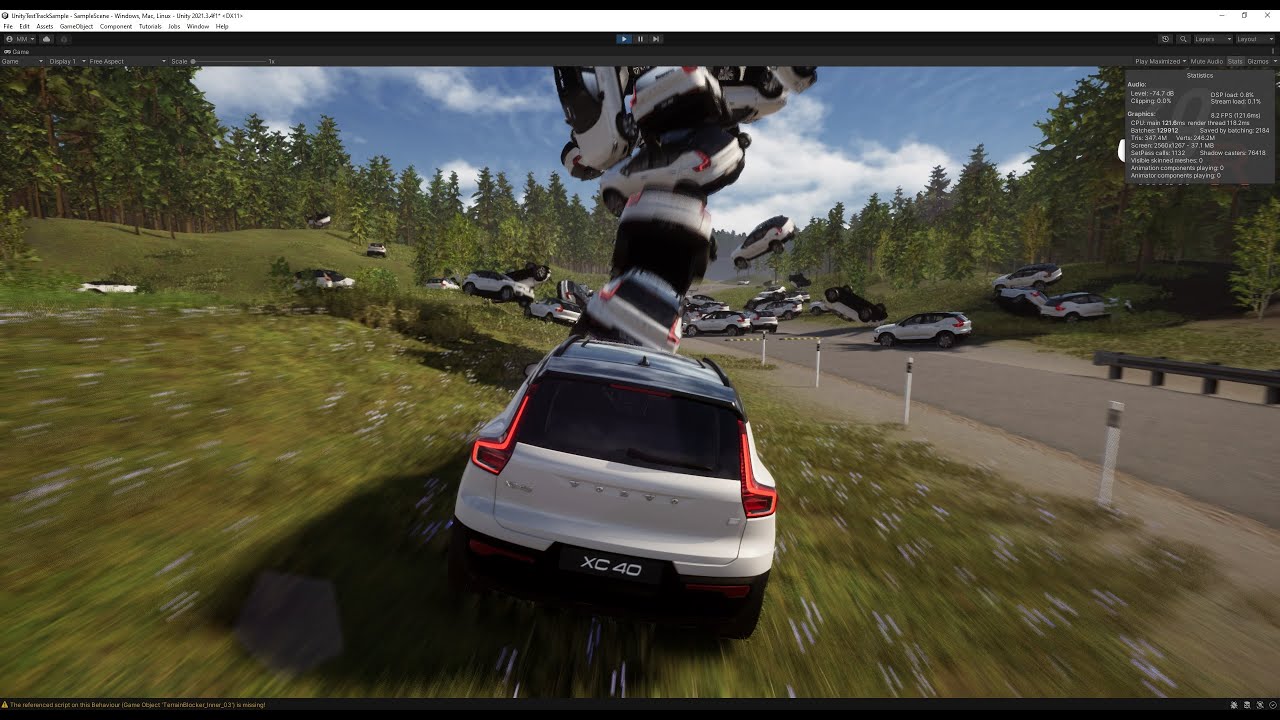
can be imported from Hub/Templates, for 2021.3 and later
https://docs.unity3d.com/Packages/com.unity.template.test-track@1.0/manual/TableOfContents.html
 fading mountain
Is it possible to put ambient occlusion maps into the terrain tool textures? similar to how you can for normal maps
 hearty marlin
How do i stop it from going blocky like that whilst trying to paint a path?
 shell jolt
Play around with the blur radius
you may as well use SmoothHeight brush to make them look smoother
rigid junco
fading mountain
Is it possible to put ambient occlusion maps into the terrain tool textures? sim...
You can assign a MaskMap texture to the terrain layer. The green channel is ambient occlusion. (Red = metallic, blue = detail mask, alpha = smoothness)
If I understood correctly what you mean
fading mountain
tysm
 weak hinge
Does anyone know if the 2021.2+ tree/detail rendering in Unity uses GPU instancing indirect or not? (i.e via compute buffers). Trying to tell if something like GPUI asset is necessary anymore
shell jolt
weak hinge
Does anyone know if the 2021.2+ tree/detail rendering in Unity uses GPU instanci...
No, thats up to the user and quite a broad topic, meaning what kind of shader you're using or whether it supports instancing or not and what keywords used if it's custom shader etc... At this point, you can find lotta resources about this matter on the internet really
Keep in mind that the SRP batcher is always priority in Unity, even when you ticked the gpu-instancing if the shader SRP Batch compatible and SRP enabled in the renderer, it will be SRP Batched, not instanced...
Still mind boggling me to this date why they don't bother to make this toggle-able at least 😵💫
or at least to let user to be able to custom set the priority for the srp vs instancing
weak hinge
Even for terrain details they would use the SRP batcher? Surely GPU instancing is way faster with that number of items..
shell jolt
I personally don't use terrain detail, due to it won't allow me to make my own LOD, the default billboarding of terrain-detail pretty much sucks ass tbh... everything on my terrain are scattered with the tree tool with preserved layer-mask on instantiated tree so I can still have much control over it
Give it at try and profile it, it's quite easy to see if they're being instanced or srp-batched in the frame-debugger
 polar relic
hello!, not sure if this belongs here but..
I've made a randomly generating map made out of tiles, now the draw calls is too high
do i use dynamic batching or static batching? the tiles are placed and never changed from that point
delicate ravine
getting this lines when painting terrain, is the issue from the texture itself?

 quasi pecan
how do i lower the minimum brush size cause for me it wont go lower than 134
fervent hatch
how can I use a mesh collider into a tree using the terrain system? My goal is to identify the wall with a raycast so I can change it's material to a translucent material while player is occluded.
It works perfectly when the tree is a prefab, but once I use the terrain to add the tree, the mesh collider stops working
mesh collider is like this

there is no other collider since I use Navigation.AI to avoid collisions instead of physics.
rose sentinel
im prtty dumb if it is a easy fix to this but when making grass how could i extend the distance of seing it cause for me its rlly low ive maxed out detail distance and detail density but its not helping alot
shell jolt
rose sentinel
im prtty dumb if it is a easy fix to this but when making grass how could i exte...
Make your grass with tree tool instead and make your own LOD group then set the cull distance mode to whatever you want, yeah you can't use terrain detail with this method and totally fine bcos the bilboarding in terrain detail is suck anyway
rose sentinel
shell jolt
Make your grass with tree tool instead and make your own LOD group then set the ...
ty
shell jolt
also note, using terrain detail is still the recommended way 😉
 hybrid jungle
 thorny swift
is there any way to see how Unity is calculating PerPixelLighting on terrain, my custom function leaves this broken lighting at the edge of terrain, cant use multiple terrains because of it
 fervent hatch
thorny swift
is there any way to see how Unity is calculating PerPixelLighting on terrain, my...
fervent hatch
thorny swift
is there any way to see how Unity is calculating PerPixelLighting on terrain, my...
it uses the function UniversalFragmentPBR, which you can find in Lighting.hlsl
thorny swift
I get the lighting, but I cannot get the normal map from terrain the correct way
fervent hatch
inputData.normalWS = inputData.normalWS * alpha;
that's the normal passed to the function
thorny swift
they say they calculate it from Heightmap, but u cannot get it from TerrainData, only in material on actual terrain
 fervent hatch
you can see the entire fragment function in TerrainLitPasses.hlsl
it's Splatmap.Fragment
About heightmap, the code says this: // disable Height Based blend when there are more than 4 layers (multi-pass breaks the normalization)
thorny swift
Yes, I am in there, and what he is doing is getting the _TerrainNormalmapTexture, which is somehow created and passed into a shader, but where and how it is calculated is never mentioned
rose sentinel
Anyone know why my sand is so.... wet?
 rigid junco
rose sentinel
Anyone know why my sand is so.... wet?
rigid junco
rose sentinel
Anyone know why my sand is so.... wet?
have you marked your normal map as a normal map, in the import settings?
or change specular to black, not sure I can't check in HDRP
or you have Screen space reflections cranked up... hard to tell
proven crystal
Combination of TerraLand and Easy Road...
 rose sentinel
rigid junco
have you marked your normal map as a normal map, in the import settings?
rose sentinel
rigid junco
have you marked your normal map as a normal map, in the import settings?
Its marked up to be a normal map,
Specular to black doesn’t do anything
How do I check screen space reflections?
thorny swift
rose sentinel
Its marked up to be a normal map,
Specular to black doesn’t do anything
How do ...
Try assinging black Mask Map texture, if its not assigned it used alpha channel of Diffuse texture for optimization purposes.
 rigid junco
thorny swift
Try assinging black Mask Map texture, if its not assigned it used alpha channel ...
rigid junco
thorny swift
Try assinging black Mask Map texture, if its not assigned it used alpha channel ...
Guess it depends on version, my HDRP terrain layer looks a bit different, and it's using the Smoothness slider correctly when no mask map is assigned:
 rigid junco
rose sentinel
Its marked up to be a normal map,
Specular to black doesn’t do anything
How do ...
rigid junco
rose sentinel
Its marked up to be a normal map,
Specular to black doesn’t do anything
How do ...
Screen space reflections are a Post processing effect
but yeah, try with a black Maskmap texture first, like Kristian said
rose sentinel
rigid junco
but yeah, try with a black Maskmap texture first, like Kristian said
Do you have an example?
rigid junco
rose sentinel
Do you have an example?
Under Diffuse, Normal Map, etc, there is Mask Map texture slot. Try putting a black texture there
rose sentinel
any good free terrain asset ?
 quiet basin
rose sentinel
Anyone know why my sand is so.... wet?
quiet basin
rose sentinel
Anyone know why my sand is so.... wet?
wet sand💀
shell jolt
rigid junco
Under Diffuse, Normal Map, etc, there is Mask Map texture slot. Try putting a bl...
wait, this is a bad idea...
make your own mask map accordingly
and adjust the property from there\
rose sentinel
I’m loving this community
You guys are all so responsive 
thorny swift
shell jolt
wait, this is a bad idea...
we were not providing solution, mainly trying to debug why the surface looked all wet
 thorny crater
hi! was wondering if Its possible to transfer the terrain I made in another project?
rigid junco
shell jolt
wait, this is a bad idea...
yeah that was for debugging..
rose sentinel
rigid junco
yeah that was for debugging..
doesnt work
rigid junco
rose sentinel
doesnt work
are you using the default terrain shader or custom?
and wdym doesn't work, nothing changed when you put a black maskmap?
rose sentinel
rigid junco
and wdym doesn't work, nothing changed when you put a black maskmap?
nothing changed, and yes i am using the default terrain shader
rigid junco
rose sentinel
nothing changed, and yes i am using the default terrain shader
hmm, try turning off post processing in your sceneview, to see if some effect like Sreenspace reflections is causing it
 rose sentinel
rigid junco
hmm, try turning off post processing in your sceneview, to see if some effect li...
rose sentinel
rigid junco
hmm, try turning off post processing in your sceneview, to see if some effect li...
I dont have it on.

literally everything i have in my scene lol
rigid junco
well, post processing could be in your Camera gameobject for example... but if you say so I believe u
If you can take a video where the camera angle changes, it's easier to pinpoint what causes that. Otherwise im out of ideas
(you tried adjusting the smoothness slider right)
rigid junco
I mean turning the camera a bit
but it does indeed look like your smoothness is just cranked to 1 somehow..
rose sentinel
rigid junco
but it does indeed look like your smoothness is just cranked to 1 somehow..
its weird
rigid junco
yea I would test if you can produce this result with a new terrain and new terrain layer
rose sentinel
rigid junco
yea I would test if you can produce this result with a new terrain and new terra...
remade it
doesnt change
 undone ferry
Not sure if this is the place to ask but I'll give it a go. Tryin to make something BIG, and I've got multiple terrains on the max setting of size. I want to edit them each individually, however no matter what I do it just keeps editing them all. Is their a way to make this possible?
rigid junco
undone ferry
Not sure if this is the place to ask but I'll give it a go. Tryin to make someth...
It sounds like all your Terrains are using the same TerrainData asset?
you need a separate one for each
undone ferry
rigid junco
It sounds like all your Terrains are using the same TerrainData asset?
I will give her a shot when I can, thank you for the response!
 regal atlas
proven crystal
Combination of TerraLand and Easy Road...
regal atlas
proven crystal
Combination of TerraLand and Easy Road...
wow i suck at making terrian
 olive musk
what is the difference between tree and details on terrain? any performance boost on details?
what are trees? are bushes tree? are rocks trees or details? can detail have colliders?
proven crystal
regal atlas
wow i suck at making terrian
😊✌️
undone ferry
@rigid junco Any chance I can send you a DM? I tried what you said with the TerrainData asset thing and it worked ish?
rigid junco
undone ferry
<@136926228341850112> Any chance I can send you a DM? I tried what you said with...
aight sure
or just make it a thread
preferably
undone ferry
I'm actually not sure how to do that but I can keep it here
I have 20 terrain panels, yesterday when I edited 1 they were all edited. I did the thing you said changing the TerrainData ASsets and it worked to the point where when I edit 1, it edits the 10 on the top half and then if I edit one of the bottom it does the bottom half
rigid junco
undone ferry
I have 20 terrain panels, yesterday when I edited 1 they were all edited. I did ...
just sounds like they arent actually referencing individual TerrainDatas?
but still sharing some
undone ferry
I think? I'm not sure I'm still new to all of this. But in the "Terrain Data" section in the "Terrain Collider" they all have different "New Terrain" 1-20
rigid junco
undone ferry
I think? I'm not sure I'm still new to all of this. But in the "Terrain Data" se...
oh no you need to also set it in the Terrain component too
undone ferry
Would that just be in the Terrain Settings?
rigid junco
undone ferry
Would that just be in the Terrain Settings?
I don't see it in my settings, looking atm... not sure where it is
undone ferry
I appreciate the help
I tried googling around but I felt like I was just smacking my head against the wall lol
rigid junco
this is a bit confusing, i can't seem to be able to do that either
ill look around
i need to do it soon too anyway
undone ferry
I appreciate it, if you can't get it no worries. I think I'm biting off a little more than what I can actually chew ya knwo
rigid junco
undone ferry
I appreciate it, if you can't get it no worries. I think I'm biting off a little...
Wait. Did you ever try to delete those extra terrains and just creating ones with GameObject > 3D Object > Terrain in the top menu?
that creates a new terrain with its own terraindata
undone ferry
So I did that, but then deleted the terrain it made (since I had my grid all set up) and the asset stayed so I individually changed it down in the collider
rigid junco
oh okay
undone ferry
Maybe I just have to do a new one each time and then just go from there?
Instead of duplicating for ease
rigid junco
they are in your collider only, not in Terrain
if you drag a TerrainData in the TerrainCollider i mean
rigid junco
undone ferry
Maybe I just have to do a new one each time and then just go from there?
yeah
I don't think duplicating a Terrain gameobject is that healthy it seems
the TerrainData gets shared or otherwise messed up
so I'd delete all but 1, then create each new one with the menu i said above
you can use the same Terrain Layers (the "Textures" or "ground materials") across different Terrains so it shouldnt be a problem
undone ferry
Thank you so much for the help, a lot of this is very overwhelming
rigid junco
I understand
rigid junco
rigid junco
so I'd delete all but 1, then create each new one with the menu i said above
just start with this i say
GameObject > 3D Object > Terrain
good luck
undone ferry
thank you again :D<3
 cloud bone
Hello, do any of you guys know why in URP (dont know if in built-in) the Draw Instanced Terrain makes the terrain not read the Ground color from the skybox ( (Lighting -> Environment -> Environment Lighting (Gradient) -> Ground Color))?
shell jolt
cloud bone
Hello, do any of you guys know why in URP (dont know if in built-in) the Draw In...
that's known issue for years and nothing we can do about it without using custom terrain shader... see this issue https://issuetracker.unity3d.com/issues/terrain-is-not-affected-by-environmental-lighting-when-draw-instanced-is-turned-on
Reproduction steps: 1. Open the user’s attached project 2. Open “Assets/Scenes/SampleScene” 3. Select the “Terrain” GameObject and g...
still under cosideration like.. why? 😵💫
long story short, it will break the terrain instancing you can try this yourself with your own custom terrain shader if you wanted to
the instancing for the terrain is unlike any other method, it splits the mesh into chunks
cloud bone
thanks a lot slim!
 mental orchid
hi guys im new to unity
why cant i edit the properties of the cube?
 shell jolt
you can't edit the template/default materials.. make a new material and assign it to the object
mental orchid
ty
 blazing solstice
I'm trying to find the shortcut for erasing texture paint (brush) on the terrain-tools but there is no information about that in the manual.
Is there a way to erase paint brush strokes while painting on terrain?
rigid junco
blazing solstice
I'm trying to find the shortcut for erasing texture paint (brush) on the terrain...
You would have to just paint over it with another TerrainLayer
shell jolt
would changing splatmap resolution on an already sculpted terrain change the look of the terrain itself?
 jagged ferry
Hey guys! does anyone know a way to fill in under a terrain?
Basically a way to make it so that there are no gaps between my concrete cube and the terrain
https://gyazo.com/637994f03f58174c9ed6c928ec494fea

Make it look like this:

 maiden idol
im getting a really weird issue in my vr game
i made a room in blender (no rotation at all and manual moving specific vertices)
put the room into unity, again with no rotation at all
but when i raycast down
it shows as if the floor is tilted
any clue on what it could be?
 winter minnow
 native basin
I don't have the option to add roads
native basin
I don't have the option to add roads
There is no built-in functionality for roads
Roads are most commonly some type of procedural mesh
 winter minnow
native basin
winter minnow
native basin
ER seems to stand for "EasyRoads", a custom asset
native basin
winter minnow
Roads are most commonly some type of procedural mesh
well what about if I want to make a road object a tile so that when I stretch it it creates multiple and doesent stretch
native basin
winter minnow
ER seems to stand for "EasyRoads", a custom asset
I have it
winter minnow
native basin
I have it
The documentation of that asset might give you more detailed advice how to use it
still tendon
Hello, can i add lods to terrain detail prefab?
shell jolt
still tendon
Hello, can i add lods to terrain detail prefab?
You cant currently, due to the bilboarding system it has
You can use tree tool to do it tho
still tendon
shell jolt
You cant currently, due to the bilboarding system it has
does it apply billboard to the mesh automatically?
still tendon
shell jolt
You can use tree tool to do it tho
can u recommend me the tool ?
shell jolt
still tendon
does it apply billboard to the mesh automatically?
It should as long as your shader compatible with it.. such ad soft occlusion shader for the terrain
shell jolt
still tendon
can u recommend me the tool ?
Wdym.. its there already..part of terrain tool
still tendon
ah sorry misunderstood, i thought i needed to use another tool to configure the detail mesh
still tendon
shell jolt
You can use tree tool to do it tho
Do you think the tree tool is less performant?
still tendon
I think i should do some research before asking someone questions 😄
shell jolt
goodluck
shell jolt
opened a thread begging for a new feature, terrain-tool in Unity is lacking some love tbh... https://forum.unity.com/threads/feature-to-make-terrain-walls-from-custom-meshes.1340786/

Unity Forum
Pls make a feature to add custom terrain walls. A wall with an angled-slope(like an arch/U shape like walls) is not possible currently with the terrain...
feel free to chip in, and hope the devs actually take a peek of it... proly not.. well, at least I tried 🙂
still tendon
shell jolt
goodluck
thanks
native basin
is there a way to just stretch this so that it copies this tile over and over instead of setting the tiles one by one?
Image

 muted hinge
Dunno if this is the right place to ask, but does anyone know if version control would be able to merge two people working on the same terrain or would there be conflicts?
I'm guessing there probably would be conflicts considering it works off a singular terrain data file of which isn't very conflict resolvable
shell jolt
native basin
is there a way to just stretch this so that it copies this tile over and over in...
YOu can just stretch it, the resize tool is there in the editor already... Also that means you'll stretch the texture as well, and not what you're looking for
you'd need something like a triplanar-like shader or something along those lines to be able to stretch the object without messing the texture
native basin
shell jolt
you'd need something like a triplanar-like shader or something along those lines...
I found a way, I just stretched it and then set the tiling higher. But thanks regardless
 bold dust
Im trying to make an intractable city in my game where should i start Im trying to figure out how i should make the buildings and roads ect

 dusk shale
is it the urp
 steady pasture
look at your terrain texture and see if it is blue
steady pasture
dusk shale
help i put a texture in my terrain but now it is blue
wait, could it be that you used the normal texture instead of the diffuse/albedo/main one?
dusk shale
steady pasture
wait, could it be that you used the normal texture instead of the diffuse/albedo...
the texture type is

i dont want a smurf game 😭💀
that never happened to me
 cinder spindle
I'm getting weird light spots on my terrain on IOS, does anyone know what causes this?
This problem is on IOS only, looks fine in editor, and on Android


The project uses URP
cyan copper
hello, i have a prefab composed of 3 objects i.e. 3 meshes. how can i use it as a detail mesh to paint onto terrain? currently when i try using it as detail mesh it separates them apart... how to make them stick together like a normal game object?
is there maybe a tool to combine 3 distinct meshes into 1 as an asset / mesh / prefab?
 minor forge
my tools are glitching... i can not access all the settings and tools, because somehow the unity layout is not working properly with the terrain tools. sometimes restart helps, but i dont want to restart 3 times per hour... any fixes or solutions?
 minor forge
is the terrain collider paper thin? i mean that if i hit it with small projectiles are they likely going to fly though it without colliding at all? i originally made my game with just simple cube shapes and they can have deep colliders. i am now changing to use the terrain tools, but i am thinking that should i leave the cube shapes under the terrain collider so there is less projectiles leaking through the "floor"?

 rotund drum
Any tips for optimising terrain for WebGL builds? maybe some good assets or example projects are known for you??
shell jolt
rotund drum
Any tips for optimising terrain for WebGL builds? maybe some good assets or exam...
instancing as much as possible, do note that the browsers must support at least webgl 2.0 and above
rotund drum
shell jolt
instancing as much as possible, do note that the browsers must support at least ...
And what is best way to control shaders? I wrote custom shader scripting code for everything else, but it seems it fails to strip terrain shaders, and in webgl it uses woping amounts of memory (thanks to addressables problems.)
shell jolt
Not quite sure what tou mean by that tbh, sorry 😫
rotund drum
shell jolt
Not quite sure what tou mean by that tbh, sorry 😫
If you use Addressables, the webgl build includes all possible shaders variants into your memory. Normaly you can select shaders you want with shaders collection and strip everything else on build. But it seems terrain does not work the same way, so I thought maybe anyone knows some tips about that.
shell jolt
Proly #archived-shaders is the best place to go for this...
rotund drum
shell jolt
Proly <#497874081329184799> is the best place to go for this...
Is there anyways to reduce terrain Splat maps sizes? or make terrains load into memory dynamicly that it woulnt load those huge textures into memory?
shell jolt
Yes, its called instaced terrain, which already there, you just need to toggle it on, in the terrain settings
rotund drum
This one?
 shell jolt
Also note, that it has its own limitation in terms of making it works with pp or even custom render feature
Yes
You'll noticed that your terrain drawcalls now reduced like by a heck lot
shell jolt
shell jolt
Also note, that it has its own limitation in terms of making it works with pp or...
They already working on this, and its in their roadmap for 2022 I think
rotund drum
shell jolt
They already working on this, and its in their roadmap for 2022 I think
With instancing yes I noticed it as well. it looks way better than usual 😄 by the way, why I cannot see shaders group in graphics section by default?
winter minnow
minor forge
is the terrain collider paper thin? i mean that if i hit it with small projectil...
Fast moving rigidbodies should use some type of continuous collision detection which calculates their path in motion to see if they hit anything regardless of speed
shell jolt
replacing tree instances with MeshIndirectInstanced 😃
 ionic ice
G'day guys, so I basically have no artistic flare in me and need some help with a terrain 😅 basically im making a "synthwave endless runner". I need my terrain to basically just have that purplish neon box look - but I have no idea where to start lol
shell jolt
Look up for volumes if you're using URP
and learn what the overrides there would do to the game
 marble sentinel
I am currently on Unity 2021.2.5 URP
marble sentinel
is there a way to force Unity to not draw on the terrain I currently pressing my mouse on but only on the selected one? (I have overlapping Terrain and it messes things up when unity thinks I now want to draw on the other one while I don't actually want to
My current workaround is to entirely disable the other terrain which doesn't seem like is should be necessary
winter minnow
marble sentinel
is there a way to force Unity to not draw on the terrain I currently pressing my...
I'm curious why overlapping terrains? It sounds like a workflow they didn't expect when designing the system
marble sentinel
winter minnow
I'm curious why overlapping terrains? It sounds like a workflow they didn't expe...
Caves
I use one overworld terrain and another one for an underground cave
Underground Terrain:

Terrain Ontop

Transition without Props:

The problem I have is that when I draw ontop of the cave on the standard world terrain it sometimes bleeds through and also alters the cave terrain. Which was really annoying since I had ro reshape the whole cave^^'
Till that point I was just assuming that different Grouping ID's would be enough to not cause any bleeding. turns out Grouping ID doesn't care about that
winter minnow
Ah, that does make sense
Still, probably not something they anticipated
marble sentinel
Yeah, I wasn't assuming that there was an easy fix for that but hey, why not give it a try
I appreciate that you took your time to listen to my problem Spazi 🙂
shell jolt
marble sentinel
is there a way to force Unity to not draw on the terrain I currently pressing my...
toggle off the AUTOCONNECT and make sure the two terrains does not have the same group id

BACKUP 1st!
note, most common operations such as raising, setHeight etc would still affect it... this proly a bug on their end
shell jolt
marble sentinel
The problem I have is that when I draw ontop of the cave on the standard world t...
We use bunch of terrains in our project, the way we do it is to model the terrain separately in edit mode THEN COPY the TerrainData, and on runtime just reconstruct 1 or 2 terrain over and over
including the treeInstances
marble sentinel
shell jolt
note, most common operations such as raising, setHeight etc would still affect i...
Yes setHeight and raise are the ones I use most which is why Grouping ID is sadly pointless here.
Different Grouping ID only let's me place a neighbor tile on the same place(which is also necessary but already done)
shell jolt
GroupingID only for when you want to AutoConnect the terrains in the same group
also, they don't lock the placing of the terrain now, unlike in the old days, so you can freely move them, as long as they're not connected to each other
 young wadi
I imported my map from blender in FBX
and there is no terrain


this green terrain
pls help
young wadi
 sour totem
https://help.vertx.xyz/graphics/models/inverted-normals
sour totem
https://help.vertx.xyz/graphics/models/inverted-normals
I LOVE YOU
i mean
thanks
 jagged cloak
hello guys im trying to make a tunnel in blender with multiple cube and when this is used in unity editor the framrate dropped a lot , is there anyway to fix it, did i do it wrong?
 shell jolt
I doubt that is the case, but just in case, turn on the statistic info in Blender and see how many vertices the object has
also how many objects just for that one tunnel?
and how many materials used?
well, you used tons of objects there just for one tunnel 😆 .. afraid not..
you can merge those into single object, then apply the transform, and then unwrap the UV
if you want each faces has different color for example, you can just detach the faces by pressing Y in edit mode, and apply the transform again then unwrap the UV
...even so, your lag should not caused from just one tunnel 🙂 ... but who knows, perhaps it has millions of vertices 🤣
jagged cloak
yeah merge all the object did the trick ! Thanks a lot
i just started to use blender for like 2 hours
 naive storm
why is my terrain doing this?
 naive storm
?
marble sentinel
naive storm
why is my terrain doing this?
I can not tell you why it does that but my guess is that its some sort of rounding error shenanigan that happens at the border pixels between terrains. So I can not give you an explanation, just a solution:
Fix it by hand. The best way I found is to use the Smooth Height tool and set "Smooth Controls - Verticality" to 1 (Maybe this is a Feature added through Unity's "Terrain Tool" Package not sure, it is NOT the standard terrain it is an extra package that you need to download to Improve the standard Terrain, but it is 1000% worth downloading since it's free and adds really powerful tools for when you work with terrain)
Setting the Verticality to 1 means that the Smooth Brush will from now on only elevate your Terrain which is perfect for your situation
naive storm
i fixed it in the end, i did some stupid terrain raising stuff to fix it but i later realised that it can be fixed with the smooth height tool
thx anyway
marble sentinel
Do you have the Terrain Tools installed?
naive storm
yeah
marble sentinel
Perfect 🙂
For such situation Smooth is really handy since its less destructive than add or set height so its my fav solution^^
naive storm
yee
 strong swan
can someone please help me with importing bob omb battlefield into unity? when I put the model into unity it's just gray
cyan copper
is it possible and are there scripts/assets to the effect of procedurally painting terrain texture based on Y height? ex. i want dirt/rocks beneath water level, i want wet beach sand right at water level, dry beach sand for 1-3 units upward of wet sand, then pretty much grass texture higher than that. can that be scripted / automated so it doesnt need to be painted manually?
rotund drum
I have question as well. So I build scene on webgl with Terrain. Stripped not nessasary shaders. And what I got quite interesting.
- PC -> no problems
- Android 8 -> no problems
- Android 12 , iPhone Xr-> Terrain shader is invisible. Bushes are visible, but not terrain it self. Culprit option -> Draw Instanced Without it terrain is beeing rendered.
Unity 2022.1.16
Anyone had seen similar problem or have any tips.
shell jolt
rotund drum
I have question as well. So I build scene on webgl with Terrain. Stripped not ne...
It is a common knowledge that instancing requires hardware support...
and why the heck you want to strip terrain shader 😃
webgl features different from one browser to another.. especially ios, it's very restrictive there in terms of what can be done and whatnot
 tender lily
how do i increase render distance?

ihave plenty of trees, but they arent visable and the shadow map aint showing unless im close to the ground
rotund drum
shell jolt
and why the heck you want to strip terrain shader 😃
Striping is nessary to reduce memory usage. I am striping it completely, but only parts it does not use. Example of URP. If you use addressables with it, it will add all shader variants to memory and build,. and that is 180-300 mb of RAM. While stripping only shaders variants that are needed can reduce it to 3Mb in memory. As for webGL project it is quite big isnt it? Also I was able to make it work with instancing on mobile devices, but price is quite heavy:

I dont really see why terrain shader should be 18mb + 12 +9 in memory
rotund drum
tender lily
how do i increase render distance?
in scene editor

you might want to remove dinamic cliping
rotund drum
Maybe material problem?

 polar olive
Hi 🙂 Have someone link (or a tip) me to a tutorial on how to render very large terrains performantly (LOD...GPU/VRAM)..? It is about size of at least 10x10 km - Visibility must be >= 5 km
rotund drum
polar olive
Hi 🙂 Have someone link (or a tip) me to a tutorial on how to render very lar...
Oclussion culling is one of the things you will want to check. Other is To split terrains into multiple terrains and handle group what load unload. Also draw instanced is also big improvement. Well this is basic but still
shell jolt
polar olive
Hi 🙂 Have someone link (or a tip) me to a tutorial on how to render very lar...
Common way to do it is to split them into chunks..
A recommended way to do it is to have just 1 main terrain, split that huge terrain into chuncks, dump their TerrainData, then just reconstruct the terrain with the terrainDatas over and over. This way you can have multiple artists working on multiple terrains at once and at the same time on their rig and just copy over the TerrainData
tho it's not beginner friendly so to speak
polar olive
@rotund drum OC - that anyway 😉
@shell jolt Hm..how can i split an ready mesh generated by DEM data? Or have i to use smaller DEMs and put them together?
Splitted in chunks i can add LOD.. of course
shell jolt
LOD is least of your concern here, Unity terrain system has instanced terrain so it would not be a problem, as for the trees it's up to you... seriously, make the game first then lod all the things later
minor forge
is this automatically writing over the terrain data even on hard disk and not only runtime memory???

i had a nice pre made map, but it seems i destroyed it with trying to change it on code
minor forge
this is my new procedural terrain (on the right), and it somehow over writed the old hand made one...

 desert galleon
what should i start to texture for cartoony 2d game terrain, ex stone grass?
shell jolt
desert galleon
what should i start to texture for cartoony 2d game terrain, ex stone grass?
Without custom shader or toon ramp the best you can do is to turn on height blend feature and ramp up the alphamap resolution, note, this just to get a sharp blend color NOT the toon lighting
that said,custom terrain shader is the way to go..
shell jolt
also note, instancedTerrain won't work with custom passes
hope they fix that in the near future 🥲
shell jolt
you can set the distance if you're using terrain-detail OR if you want to have more control over it, say your own lod and whatnot, just use the tree tool to scatter the grass and add lodGroup to the grass prefab
the terrain-detail uses bilboarding and the default sorta looks ugly, just saying.. you'll notice this immediately
shell jolt
Opened a discussion on forum, pouring my thoughts regarding unity terrain, specifically for terrain maganement. Feel free to jump in and share your thoughts https://forum.unity.com/threads/terrain-management.1345586/
Unity Forum
After using the terrain for building couple of games, I've noticed that so many important things missing, mainly for organizing stuffs such as:
1....
it's a nice tool in Unity, but lacks some devs love 💔
rotund drum
What shader variants terrain uses differently on WebGL IphoneXr and android 12 ? As same shaders does work on windows and android 8, but not on other models. And editor shaders collection does not add them automaticly and they are invisible on phones.................
ANy secret key words?
Cant include all shader variants, as that is just too much memory
shell jolt
as said, webgl capabilities are not the same across browsers... it is a common knowledge that it's more restrictive on ios... check their requirements
rotund drum
shell jolt
as said, webgl capabilities are not the same across browsers... it is a common k...
if I add all shaders then it is visible. so it is not exactly about compability. it is just uses different shader variants
 night dirge
How to assign trees to the terrain?? I defined tree and bend factor, but I can't delete the default mesh renderer that is invalid. How to do so?
shell jolt
add lodgroup to the tree, thats the requirement for the tree, or use soft occlusion shader so it can be bilboarded... that said, it is recommended to make lod for your tree model... lookup what is LOD / level of detail on google
shell jolt
Set the cull distance of those trees, you can find it in the terrain settings
 trail perch
how do i get rid of the jagged edges of the texture on the terrain? I found that decreasing terrain size fixes it but that also makes the whole terrain too small for my project so i can't do that..
 shell jolt
raise the heightmap resolution and the texture resolution in the terrain settings
changing the heightmap resolution may change your already made terrain, so backup 1st and just incase shit happens
 tepid turret
I get this error when I try to use terrain tools any pointers?
 rose sentinel
Tiling's way too obvious
And I want a quick fix that only requires changes on the textures or terrain layers
That isn't scaling up the textures because it just makes them look weird or even more obvious
shell jolt
it depends on how your texture was made, and the environment lighting can help hide the tiling pattern that can be seen from a far enough range..
Other than that, look up for stochastic material
 lusty cove
Hello, I have a terrain file that is combined with a total of 20 pieces composed of multiple raw files.
Can anyone suggest a way to get this properly combined with the other parts equally?
It's really, really hard to set the coordinates manually.
When I do it manually, there are gaps between them and an ugly image is formed in the game.
https://gyazo.com/b639708c15666bc3dde86c408d4c7ac0
winter minnow
lusty cove
Hello, I have a terrain file that is combined with a total of 20 pieces composed...
Usually the best option is to use "neighbor terrains" instead of multiple separate ones
lusty cove
winter minnow
Usually the best option is to use "neighbor terrains" instead of multiple separa...
Thnks but how ?
winter minnow
lusty cove
Thnks but how ?
lusty cove
omg thanks..
rose sentinel
shell jolt
it depends on how your texture was made, and the environment lighting can help h...
I'm using unity's terrain samples
 frigid parrot
Is it possible to create a blockout in unity for scale then export those cubes to blender to then model off of?
winter minnow
frigid parrot
Is it possible to create a blockout in unity for scale then export those cubes t...
The FBX exporter package is worth a look
shell jolt
fbx exporter used to work (never tried it on recent projects), it took a lot of time to finish, like super long, and if you have humongous terrain with high resolution heightmap, expect it to be stuck
just be careful
lusty cove
hi
I have more than one neighboring land, but I want to merge it into a single land, how can I do it?

It is very difficult to organize this way.
shell jolt
it might be, but you can completely cull those chunks and gain performance... which is quite a common move for multiple terrains setup
 fickle nebula
is there any easy way to grab a mesh from a terrain?
fickle nebula
fickle nebula
is there any easy way to grab a mesh from a terrain?
hmm it seems it is easy to grab a mesh from a terrain in the editor, but doing it realtime appears a challenge
 weary jacinth
hey everyone, im getting this strange issue with the terrain grass where it seems to lose its transparency and has a black background when in the build version, but looks fine in the editor playmode. im using a terrain data cloning script to clone my terrain data so that changes to the terrain made at runtime do not affect the original terrain data: https://gist.github.com/Eldoir/d5a438dfedee55552915b55097dda1d4

 iron aurora
is there a way to turn regular terrain into blocky terrain? I am not interested in procedural generation or anything, just looking for a quick method to create voxel terrain.
would be great if it'd be unity terrain so I can paint meshes onto it
winter minnow
iron aurora
is there a way to turn regular terrain into blocky terrain? I am not interested ...
No
Your easiest way to get voxel terrain would be to use Blender's voxel remesh, but forget using Terrain for it
shell jolt
Not the shader that supposed to be doing that... you want to make your own painting tool and get the direction of the normal of the terrain mesh your brush is painting
not hard to make, you can proly find tons of this on github
but I do agree that it supposed to be part of the feature
shell jolt
@silk needle just checked in 2022, terrain v5...

only for detail mesh...
which still very much appreciated, really
which also means there's a new apis added for this, which very useful for custom terrain tools ♥️
fickle nebula
fickle nebula
is there any easy way to grab a mesh from a terrain?
necrobump, sorry....
winter minnow
fickle nebula
necrobump, sorry....
Grab?
fickle nebula
winter minnow
Grab?
?
fickle nebula
winter minnow
Grab?
oh, what i mean is like, how do i get access to the mesh
winter minnow
fickle nebula
oh, what i mean is like, how do i get access to the mesh
Terrain mesh or a detail mesh or something else? Helps to be specific
fickle nebula
winter minnow
Terrain mesh or a detail mesh or something else? Helps to be specific
sorry lol, i want a trimesh of the terrain
 brisk merlin
Not sure if I should post here or in one of the code ones, but I have a perplexing problem.
I'm making this ingame terrain editor. It can adjust the elevation of the terrain with a brush. How do I convert the world space to a terrainData.setHeights compatible array? The values of the setheights array seem to be close to 1/2 the value in world space but not exactly. If I basically make the world space position / 2 equal to the terrain height array value I want to change, it's never exact. It's close enough towards the 0,0 corner but the further away from that corner I get, the more incorrect my values are. What are ways to calculate the correct terrain height array location from a given world space vector3?
ah nevermind. It looks like terrainData.heightmapScale gives you the value that you need to divide the world space coordinates by in order to get exactly the correct heightmap coordinate. On this particular terrain, that value was 1.95 which explains why dividing it by 2 almost worked
minor forge
brisk merlin
Not sure if I should post here or in one of the code ones, but I have a perplexi...
i had to use pen and paper to figure it out. i was making procedural terrain generation and there was just too many things that i could not fit in my head at the same time. fun part is that terrain array's 0,0 was not in the same place as the scene's unity 0,0,0 coordinates. of course the scale is different. and the terrain x,y vs unity x,y,z do not match each others and while in north z gets higher but in terrain data y gets lower... and when i finally got it kind of working i think i still had to rotate the terrain map 90 degrees
 lime oyster
someone that knows a nice asset to like help me to generate a lower scaled map of europe?
money doesn't matter
fickle nebula
lime oyster
someone that knows a nice asset to like help me to generate a lower scaled map o...
i remember blender having a plugin to do this, although i dont remember the specifics
fickle nebula
lime oyster
someone that knows a nice asset to like help me to generate a lower scaled map o...
this might help, although i haven't personally tried it https://www.youtube.com/watch?v=Mj7Z1P2hUWk

Learn How to Create 3D Terrain Maps Free using Google Maps in this Blender Tutorial!
The first 500 people who click the link in the description will get 2 free months of Skillshare Premium: https://skl.sh/cggeek15
BlenderGIS: https://github.com/domlysz/BlenderGIS
HDRI: https://hdrihaven.com/
Dirt Texture: https://www.textures.com/download/3...
lime oyster
fickle nebula
this might help, although i haven't personally tried it https://www.youtube.com/...
I have seen that video but want something that makes the trees, textures and basically all the things like the asset terraworld pro
cant use terrapro becouse it doesent support that big things and I cant down scale it in terra world
fickle nebula
hmm, fascinating, i dont know of anything personally, i wish you luck though in finding something that does that though!
lime oyster
thx ❤️
 jaunty hollow
I cant change the texture of my terrain, can somebody help?
 rigid junco
jaunty hollow
I cant change the texture of my terrain, can somebody help?
rigid junco
jaunty hollow
I cant change the texture of my terrain, can somebody help?
click the gear icon in your Terrain inspector, and change Material to something that works
enter "terrain" in the material search
jaunty hollow
ok i found it thanks, I must have missed it when looking through the terrain settings
 ornate dirge
Does anyone have experience with using terrain editors for Unity, such as Atlas Terrain Editor, or Gaia, but at runtime? (For instance, for creating a procedurally generated terrain at runtime)
Atlas: https://www.atlasterrain.com/#section2
Gena Pro - Gaia's road editing: https://www.youtube.com/watch?v=NArOSyFpAUE&list=PLckEMv5tz0E7I2xSUKsoslOZ3CIm2GQT4&index=14

This video introduces the Road system in GeNa Pro.
Please note that some of the advanced blending / noise features shown on roads near the end of the video are only available in the HDRP version of the roads shader. The first part of the video shows the built in version of the road shader.
Contents:
00:00 Timelapse
00:19 Intro
00:36 Quick Sta...
Atlas Terrain tool for unity engine Brings non destructive stamp workflow to your unity terrains. Create huge and beautiful terrains quickly and easily.
 short talon
Idk if i should ask here but nwm, how į cen scale game perfectly and is there a size that should be my game map or its no difference if its0.1 or 10 scale
hoary ore
hi im placing trees in my game but for some reason the trees arnt being placed on the terrain and being placed below the terrain heres a ss of the issue

 echo sage
does anyone know how i can fix my grass from overlapping so much?

i want it to look like this
 shell jolt
hoary ore
hi im placing trees in my game but for some reason the trees arnt being placed o...
shell jolt
hoary ore
hi im placing trees in my game but for some reason the trees arnt being placed o...
its a common mistake.. change the world origin of the tree in Blender or any 3d software and save it back, Unity will soon update the position
make sure the origin sets right at the root level of the tree
shell jolt
echo sage
does anyone know how i can fix my grass from overlapping so much?
in Unity 2022 (Terrain package v5.0.1) there's a new and much improved algorithm(toggled OFF by default for backward compatibility) for scattering which fixed most of the overlapping issues, you need to toggle it on in terrain settings.
Backup 1st!
hoary ore
shell jolt
its a common mistake.. change the world origin of the tree in Blender or any 3d ...
How do I do that?
shell jolt
google up, tons of it there :).. you're on your own from here, goodluck..
Also, Didn't I already tell you how to do it, did I? 🙂
 fathom reef
Why can't I duplicate an modify copies of terrain regardless of what process I use to do it?
Why can't I rotate terrain?
winter minnow
fathom reef
Why can't I duplicate an modify copies of terrain regardless of what process I ...
Terrain's data is not contained in the gameobject with the terrain component, it's in the referred terrain data asset
Because the terrain mesh is entirely procedural and the specific kind of optimizations it uses internally, it must always remain axis-locked
The terrain will rotate if you rotate the data such as the height map, though practically only in 90 degree increments
If you google the question you might find scripts to do that with
fathom reef
winter minnow
Terrain's data is not contained in the gameobject with the terrain component, it...
I've tried rotating in 90 degree increments and failed. 🤔 I'm aware of the terrain data asset importance but when you copy and rename it, I cannot get a copied terrain to accept the new data, it always asks me to revert. I've google the question and I've only found 10 years of questions without proper answer. (the first question).
winter minnow
fathom reef
I've tried rotating in 90 degree increments and failed. 🤔 I'm aware of the ter...
To clarify, the height map raw image (as well as splatmaps and other data) must be rotated on pixel level, so that the terrain itself doesn't rotate
fathom reef
winter minnow
To clarify, the height map raw image (as well as splatmaps and other data) must ...
I'm not sure what that means are you saying like copy, rotate, paste type thing?
winter minnow
fathom reef
I'm not sure what that means are you saying like copy, rotate, paste type thing?
The terrain component will not rotate, ever
But it can read a height map image that's rotated
fathom reef
is there a reasonable way to rotate a height map?
winter minnow
fathom reef
is there a reasonable way to rotate a height map?
Export raw image, rotate in a program that can do that and export and import with exact same raw export settings (gimp or photoshop)
Or try one of the scripts people have made to do it automatically
fathom reef
winter minnow
Export raw image, rotate in a program that can do that and export and import wit...
Hmm, I think I understand, thanks very much
rose sentinel
How do I add a material
 winter minnow
rose sentinel
How do I add a material
winter minnow
rose sentinel
How do I add a material
Look up in the documentation how to add terrain texture layers
 dense wigeon
Hey guys I have a problem. I want to use the Terrain "Paint Details" tool to paint some small rocks on my terrain but I cant add a Detail Mesh because my rocks have LODs and I get the error "LOD Group component is not supported. I also tried to paint them with the "Paint Trees" tool but there I get the error " The tree couldnt be instanced because one of its LODs contains renderer of type other than meshRenderer and BillboardRenderer". So is there a ways to simply just paint my rocks with LODs on my terrain?
 late snow
guys please help, this has been a problem for a while now. I can't draw flowers or grass or even trees on my terrain, how do i fix it???
shell jolt
unity's terrain is pretty vocal regarding errors and warnings... see what it says in the console tab..
if it's nothing there, fat chance your trees were painted BUT spawned somewhere else due to the incorrect origin
 wheat fox
I need help, my terrain looks like this now. Yesterday when I closed Unity, it was normal but now it looks like that. (Those are textures)

If I try to paint textures, the indicator is like that now

 south canyon
Is there a fix for this bugged out/dancing Tree Painting palette issue?
 shell jolt
yes thats a bug in certain terrain v4.x... it keeps refreshing the terrain inspector when scrolled,, they fixed it in v5
hoary ore
hi ive been having an issue with just this specific tree that im trying to place on my unity terrain but the trees is always placed slightly below my actual terrain can anoyone help with the issue? heres a visual of what it looks like

 hidden carbon
Hi can anyone tell how to download textures to Unity to add to my terrain?
shell jolt
hoary ore
hi ive been having an issue with just this specific tree that im trying to place...
I answered this already like literally a week ago or so 😐
hoary ore
shell jolt
I answered this already like literally a week ago or so 😐
If I remember correctly I was told no one has the answer to this
hoary ore
shell jolt
😐 https://discord.com/channels/489222168727519232/497875195718271004/1031524702...
Oh I’m sorry someone else told me that no one was going to help me because they would have responded if they knew how thank you
 grand aurora
How to make a spherical landscape with gravity ? I want to make a planet where it has trees water land etc
winter minnow
grand aurora
How to make a spherical landscape with gravity ? I want to make a planet where i...
The terrain system itself doesn't support spherical shapes, but you can use meshes
Gravity is just a physical force towards a direction, or in this case, a point
 polar verge

 mental bear
How do you paint a texture on your terrain, I've made a brush but it just doesn t do anything
 blazing pecan
I'm not sure if this is late but there's probably something wrong with your material and lod. Unity does support subshaders on different lods so if your trees have special materials make sure to check that.
 tiny tide
any idea how i would take a Terrain and put a high-detail golf-size cup/hole in it?
It seems the smallest hole i can make in one isn't small enough or anything close to the resolution i need
rose sentinel
Help
Im trying to paint textures only on elevated terrain is there an easy way to only paint the mountains and not get the surroundings
south canyon
shell jolt
yes thats a bug in certain terrain v4.x... it keeps refreshing the terrain inspe...
Is that v4 of Terrain Tools? I'm using URP with 2021.3...how would I go about updating to v5?
EDIT: Nevermind...I see that v5 is only for 2022.2 and above 😐
tiny tide
Anyone know how I could detect the current terrain layer or color below a player so I can handle physics differently?
shell jolt
tiny tide
Anyone know how I could detect the current terrain layer or color below a player...
Unity Forum
I have a terrain with two textures painted on it. One is a grass texture and another is sand.
I want to detect which one of these textures my...
 drifting crown
@magic thicket Please delete the original when you moving the post and don't cross-post.
verbal nest
Can someone please tell my why this stupid game engine terrain won't work?
I try adding the other terrain data to the terrain, then it says some stuff and does absolutely nothing
Well I got that fixed, but now it's just pink
 tiny tide
shell jolt
pretty easy, -> https://forum.unity.com/threads/detecting-terrain-texture-at-pos...
tiny tide
shell jolt
pretty easy, -> https://forum.unity.com/threads/detecting-terrain-texture-at-pos...
Thanks!

made a little physics-based golf sim yesterday and it's my first time using Terrain
verbal nest
tiny tide
https://streamable.com/gbk0gh
Nice!
tiny tide
since the game is physics based, i need to fake physics reactions based on which "ground material" the ball is on
now I have a system to do all that 👍
verbal nest
tiny tide
since the game is physics based, i need to fake physics reactions based on which...
I'm not sure what method you're using to make the ball go slower on certain ground types, but there's a thing called Physics Materials that would be perfect for this (I think), but I'm not sure if you're already using that or not.
tiny tide
verbal nest
I'm not sure what method you're using to make the ball go slower on certain grou...
can you paint physics materials on terrain though?
my issues is that my terrain is one single mesh (idk if that's all Terrain by default)
verbal nest
I'm not sure, but afaik not. I'll have a quick look
tiny tide
even if it's not possible, i think this solution is good for me
usually when i have a ball roll between 2 different meshes, there's always weird interactions
so one single mesh is ideal
verbal nest
Ah yeah
It's not possible
I'd just use one standard terrain for the grass, then make seperate meshes for the other patches
tiny tide
verbal nest
I'd just use one standard terrain for the grass, then make seperate meshes for t...
Oh idk if you saw but I went with this earlier and it's already working great #⛰️┃terrain-3d message
verbal nest
Ooh thanks for linking that. I need something like that too for audio lol
tiny tide

So the only way i was able to add a hole small enough with enough physics mesh resolution is by cutting a low-resolution hole in my terrain and patching it with another mesh

this is what my terrain looks like with the other mesh removed
It will work, but I really hate this solution

 bold iris
is there a program in creating mesh?
shell jolt
Wasn't really clear what you mean by that, Unity can do primitives and there's Probuilder to do some basic stuffs.. other than that use 3d software like most of us will ya 🙂
 rare cypress
what would be a simple and performance friendly way to implement grass into hdrp?
since it doesnt support it in the way urp does
winter minnow
That's probably explained in the link
tiny tide
how can i convert heightmap coordinates into a world position?
shell jolt
tiny tide
how can i convert heightmap coordinates into a world position?
simple..
        private Vector3 TerrainPosToWorld (Vector3 pos)
        {
            return Vector3.Scale(pos, terrain.terrainData.size) + terrain.transform.position;
        }
Doesn’t that completely ignore resolution though?
shell jolt
nope, give it a try..
tiny tide
shell jolt
nope, give it a try..
doesn't work as i said
because resolution is completely ignored
    {
        return Vector3.Scale(pos, terrain.terrainData.size / terrain.terrainData.heightmapResolution) + terrain.transform.position;
}```This code is the only code that gets me 99.9% accurate

You can see the blue line isn't intersection a terrain heightmap point though
tiny tide
@shell jolt I got it working. Heightmap resolution was absolutely needed in the calculation
A resolution of 1025x1025 is actually 1024 resolution
Unity had a major bug lol
Has*
The reason it was off is because I needed to subtract 1 from the resolution value
shell jolt
tiny tide
A resolution of 1025x1025 is actually 1024 resolution
it's not a bug, the formula is power of two + 1

glad you solved the issue
 cunning tendon
I made a model in blender that looked all fine but when I import it into unity it looks weird depending on how I look at it, please help me fix this

also I rendered it in blender and it was fine
also also the top (normal) part and the 2 not normal rings are joined so idk why they are different
shell jolt
you have flipped faces... go to Blended, turn on the Face orientation if they're red, yeah they're flipped
you can do :
Select the red faces -> select Mesh in the menu tab -> Normal - flip -> done 🙂
tiny tide
shell jolt
it's not a bug, the formula is power of two + 1
according to most people that work on terrain assets, it's an oversight/bug
it's outlined there sure, but the calculations done using the value by Unity don't account for the actual resolution
rigid junco
How do I access all the terrain's layers from a shader? I only figured out how to access the first 4 layers. How does Unity pack the rest? 🤔
Using HDRP
 warm radish
tiny tide
it's outlined there sure, but the calculations done using the value by Unity don...
warm radish
tiny tide
it's outlined there sure, but the calculations done using the value by Unity don...
Heya. Which value used by Unity doesn't account for the actual resolution?
The function that SlimStv provided would work if you were going from UV position to World XZ position (You shouldn't have to account for the -1 pixel offset with this). Your solution works if you're going from actual texels to World XZ, if I'm reading that correctly. Depends on what each of your incoming pos values are. To me, it looks like you both were using different spaces for the positions?
tiny tide
warm radish
Heya. Which value used by Unity doesn't account for the actual resolution?
The ...
yeah I'm speaking strictly on texels I guess since I'm working with direct heightmap coords. I don't work with the underlying Terrain system directly, so the Unity comment came from people working more closely I.E the new MicroVerse asset
Are there any sort of functions that exist already that I missed that would convert the texel position to World XZ?
warm radish
Not that I know of. If we did, it would pretty much be what you shared for converting texel pos. Most of the functions we do have for converting from different Terrain spaces exist in our shader headers
tiny tide
No worries. I have my solution and learned something new, so I'm good to go.
Now my struggle is onto tree colliders...
I need a way to have complex tree collision meshes without having to hand-place uniquely detailed primitives for each tree.... 😦
warm radish
Is the struggle getting any colliders to work at all, no matter how simple, or is it that tree collisions don't work with something like a mesh collider?
tiny tide
the latter
There's no perfect solution because mesh colliders will have weird geometry for the leaves
my hope was that there would be a tool out there that loosely converted a tree to a series of capsule colliders to approximate
warm radish
Ya. I think our tree database system also will only use the collider on the root GO for the prefab
tiny tide
What are potential solutions out there for having a complex tree collision mesh?
I'd have to imagine other games already needed this instead of a simple capsule
warm radish
How were the trees authored?
tiny tide
They aren't using a unity Tree component
warm radish
If you can isolate "segments" in the tree ie via the mesh edge loops, you could generate colliders for each of those
tiny tide
They are assets from NatureManufacture which I'd have to imagine are popular right now given the Humble Bundle sale
I'm working on a golf game, so I need trees to not be 100% random for a player to deal with
tiny tide
@warm radish could I loop through the tree instance data and use it to spawn mesh colliders in the exact same place at runtime?
Just thought that one up, but seems like it could work
warm radish
Ya. That sounds like a good approach. Either at runtime or you could bake it in-editor (would save you some load times in your game probably)
tiny tide
I’m assuming there’s a way I can hook a build event to do that as a pre-build step
I like that idea. I might need to add some sort of proximity logic so that a shitload of trees in the distance don’t come into play
I’ll explore, thanks!
mental bear
I just made a tree in blender, placed it, changed the scale, made a original prefab and now when I mass place it with terrain tools the trees are the size of a rice corn
 ivory cairn
Is LOD support ever planned to come to terrain system?
 tiny tide
ivory cairn
Is LOD support ever planned to come to terrain system?
tiny tide
ivory cairn
Is LOD support ever planned to come to terrain system?
What do you need LOD support on?
ivory cairn
tiny tide
What do you need LOD support on?
terrain details
the performance is horrible
tiny tide
I thought that’s all supported?
ivory cairn
tiny tide
I thought that’s all supported?
oh as part of the terrain system
detail mesh
 tiny tide
I know my Tree LODs work perfectly
ivory cairn
trees can have LOD's as far as im aware, the details cannot
someone I know made an instancer for details, but sadly its culling is buggy and its not his priority atm https://github.com/Milk-Drinker01/Milk_Instancer01

GitHub
Unity indirect GPU instancing & painting with occlusion culling, frustum culling, and LODs - GitHub - Milk-Drinker01/Milk_Instancer01: Unity indirect GPU instancing & painting with ...
theres also no level streaming so you need to do that yourself
tiny tide
I’ll be honest, I got into Unity Terrain about a week ago and bought Microverse a couple days ago
So I’m still new, but maybe it’s supported there?
ivory cairn
its just crazy how poor it performs without LOD's

 tiny tide
If Microverse stays independent of Unity I’ll be sad lol
Seems like a solution that’s so much better than their own that it just makes too much sense
@ivory cairn I don’t know if it solves any of your problems, but either way I definitely recommend checking it out
It’s a brand new asset
ivory cairn
tiny tide
It’s a brand new asset
I skimmed the video but didnt come across anything about details
if it uses default unity terrain details, LOD's wont be supported
tiny tide
ivory cairn
if it uses default unity terrain details, LOD's wont be supported
Yeah it does which is why I didn’t think it would fix anything
I just still recommend it
As it does literally everything better
ivory cairn
tiny tide
As it does literally everything better
honestly im not about to drop 160$ for a more streamlined terrain tool
terrain toolkit is good enough for now
the splines are cool tho
tiny tide
ivory cairn
honestly im not about to drop 160$ for a more streamlined terrain tool
I feel you on price but I think you’re underselling it haha
Unity Terrain might as well not exist after using it xD
tiny tide
@warm radish i don't mean to keep going directly to you for help, but any idea why my terrain with 5 trees on it has a Tree Instance array at runtime with 300+ length?
 tiny tide
also having the same problem as this thread you replied in
https://forum.unity.com/threads/paint-holes-creating-hole-but-still-showing-ground-texture.934125/

Unity Forum
Using HDRP unity 2019.4.3 or 2019.4.4 (edit also 2020) when I use terrain tools to paint a hole it cuts the hole (player/physics falls through it) but...
seems to be a problem with URP specifically?
I have "Terrain Holes" checked on my render pipeline asset.... I have multiple and they all have them checked
2/3 of the golf holes render fine
1 of them is glitched
in the Editor, everything renders fine
this problem only happens in the build
 thorn birch
Has anyone had any success implementing tri-planar shader into a URP terrain material?
shell jolt
ivory cairn
trees can have LOD's as far as im aware, the details cannot
True, which is weird, thus we used tree tool in our production to paint grass with our own lods.. tagging @warm radish 👀
And they don't give us with much freedom to tinker with the default billboarding system in there, which is an unfortunate
warm radish
Ya details with the Terrain system dont have LODs
shell jolt
warm radish
Ya details with the Terrain system dont have LODs
Which, again weird... If it's indirect rendering then it makes sense, but it's just regular instancing 👀
ivory cairn
warm radish
Ya details with the Terrain system dont have LODs
Is there any intention to make it?
winter minnow
 molten bluff
is there any method to apply tri planar texturing in built in terrain?
molten bluff
is there any method to apply tri planar texturing in built in terrain?
Modifying the terrain shader is of course possible, but tricky especially on URP
Your best bet is to find a shader like that someone has made
molten bluff
already has found
but doesnt get it work anymore
as its was 2012
lol
Tri Planar Terrain shader solves streching issues
shell jolt
You can remove the terrain stretching even without triplanar.. there's a mask filter for that
see how it's done here https://www.youtube.com/watch?v=p7T_GzQoGBk

In this Unity game development tutorial we're going to look at how we can make our lives easier when creating terrain, by using brush mask filters.
The project files are available to our patrons here:
► https://www.patreon.com/posts/66127091
Want to follow along? This project is a good starting point
► https://www.patreon.com/posts/65535482
H...
Note, the values for mask filters different from one setup to another, depends on your terrain heightmap resolution
so if you get unwanted results after following the video, try to adjust it
...
Another method is to use Slope Flatten and set the vertical value to 100%
but this more of a manual work, it's up to you
 untold tangle
Why might everything be black? Yes there are directional lights (The scene looks amazing in editor playmode but not in build)

 stray rivet
Ambient light?
winter minnow
untold tangle
Why might everything be black? Yes there are directional lights (The scene looks...
Generate lighting for each scene where issue occurs (baked global illumination does not have to be enabled, and should not be unless you intend to use it)
untold tangle
winter minnow
Generate lighting for each scene where issue occurs (baked global illumination d...
I disabled real-time GI and baked GI, it’s still black only in the build
 dusk citrus
One terrain in my scene has somehow gotten locked -- the Terrain component is inactive, and I can't find any way to make it active. Anybody got any idea what happened here and how to fix it?
 warm radish
Disabled Terrain Component UI
 short sphinx
Anybody knows how can I make terrain like the one in Octopath Traveler -
https://www.youtube.com/watch?v=dkKmKy0YIJ0

Octopath Traveler reviewed by Seth Macy on Nintendo Switch.
Octopath Traveler: The First 24 Minutes
https://www.youtube.com/watch?v=9AJvN4_43Ok
Subscribe to IGN for more!
http://www.youtube.com/user/IGNentertainment?sub_confirmation=1
----------------------------------
Follow IGN for more!
----------------------------------
YOUTUBE: https:...
shell jolt
turn down the smoothness, or even the metalic value, toy around with those two until it fixes your issue..
both the same file? if not, make sure the alpha channel of the texture exists
 upper sinew
Could someone help me out? I'm willing to pay if things work out correctly.
This may or may not be the right channel, I'm very new to this.
icy parcel
upper sinew
This may or may not be the right channel, I'm very new to this.
Teh ask your question
verbal nest
Is there a way to use Unity's Terrain tools (the package that gives all the extra tools) without the splatmap/terrain layer sytem? I hate the system because it only supports 8 layers per splatmap which sucks in my case. I do want to use the other things the package offers though
 lament wadi
verbal nest
Is there a way to use Unity's Terrain tools (the package that gives all the extr...
lament wadi
verbal nest
Is there a way to use Unity's Terrain tools (the package that gives all the extr...
I was about to ask something similar here but i happened to find this: https://forum.unity.com/threads/terrain-custom-shader-graph.1172447/#post-7510127
Perhaps this is also of use to you

Unity Forum
So I recently came across this video:
[MEDIA]
Is there a way to create custom shaders for terrain in HDRP currently? I wasn't able to get Lit...
verbal nest
lament wadi
I was about to ask something similar here but i happened to find this: https://f...
Thanks Ill have a look
shell jolt
Shadergraph doesn't have a support for the terrain system, not yet... and soon we can .. hopefully very soon

here's the link -> https://unity.com/roadmap/unity-platform/3d-world-building
shell jolt
happens to the best of us https://en.wikipedia.org/wiki/Rubber_duck_debugging

In software engineering, rubber duck debugging (or rubberducking) is a method of debugging code by articulating a problem in spoken or written natural language. The name is a reference to a story in the book The Pragmatic Programmer in which a programmer would carry around a rubber duck and debug their code by forcing themselves to explain it, l...
wdym, most materials need 2d textures
you can use your own custom material, but there are requirements to make it work with the terrain system
also, why you want to do that? Thats exactly what terrain layer do
you can make your own MaskMap for the terrain https://docs.unity3d.com/Packages/com.unity.render-pipelines.high-definition@7.1/manual/Mask-Map-and-Detail-Map.html
also, don't just put a black texture there in the mask map
generate it properly, so you'd have a proper output
MaskMap is very very easy to make
GitHub
:hammer: Utility to combine color channels from different textures into a single output. - GitHub - andydbc/unity-texture-packer: Utility to combine color channels from different textures into a si...
Just follow the steps to combine which channel is which in the maskmap link above
goodluck
 rich spade
Hi does anyone know of a way to dissolve the blue edges in my pro-builder model? Thanks in advance
 verbal nest
Hey, I have quite a huge terrain (imported from real world heightmap data) and I'm wondering what the best way is to use it in Unity. Currently I split the 841km² terrain into 64 smaller terrains, but the detail is still way too low even at the Terrain's highest settings. Should I split the terrain up even more? Resulting in either 256 smaller terrains or 144 terrains. Or should I not use Unity terrain? I tried using Blender a while back but that was disastrous. My gaming laptop can't handle 841km² high detail terrain meshes in blender.
 verbal nest
I split all the terrains. Now I have 256 but it still doesn't look smooth

Time to split them again. Let's hope my game doesn't break
Maybe my terrain scale is just off
 elfin laurel
hey! quick question on the tree painter
how do I make it so my trees have a collider
the prefab has a mesh collider
and when I simply manually drag the prefab in there is a collider
 past widget
Hello everyone! I have a question... How can i create circle form terrain?
elfin laurel
past widget
Hello everyone! I have a question... How can i create circle form terrain?
can you please give further informaiton on this?
elfin laurel
Okay, you would probably need to make a custom model for that in like blender or something because I am pretty sure that isnt possible
past widget
understood, ty )
verbal nest
past widget
Hello everyone! I have a question... How can i create circle form terrain?
Not possible
verbal nest
elfin laurel
how do I make it so my trees have a collider
I'm pretty sure you can't
Those trees aren't prefabs
elfin laurel
dang
elfin laurel
verbal nest
Those trees aren't prefabs
nahh I used mass place trees
they are my custom prefabs
verbal nest
You can't edit the trees whatsoever when they're on the terrain
verbal nest
Wait, I'm slightly wrong
Unity is the ultimate game development platform. Use Unity to build high-quality 3D and 2D games, deploy them across mobile, desktop, VR/AR, consoles or the Web, and connect with loyal and enthusiastic players and customers.
elfin laurel
okay thanks
elfin laurel
verbal nest
https://answers.unity.com/questions/305107/terrain-not-generating-tree-colliders...
this seemed to work thanks mate
verbal nest
elfin laurel
this seemed to work thanks mate
If you have a question always google it first 😉 It's the best and fastest way to do it. Only if you can't find a good answer, ask in a discord server
shell jolt
verbal nest
I'm pretty sure you can't
you definitely can have a collider on a tree
verbal nest
shell jolt
you definitely can have a collider on a tree
What did I say after that....
elfin laurel
verbal nest
If you have a question always google it first 😉 It's the best and fastest way t...
thats exactly what I did thanks I just couldnt find one answer that worked im sorry tho lol
but thanks for letting me know
 blissful marten
https://docs.unity3d.com/ScriptReference/Mathf.PerlinNoise.html
I'm looking through the docs right now to figure out how the perlin noise in unity works, and I'm seeing
"float xCoord = xOrg + x / noiseTex.width * scale;"
And I'm just- very... very confused-? Say I had a texture that's like 1000 pixels large in width, and it started at 0,0,0.
If the x coordinate is equal to the original x, which would be 0 of course- and I add x which after the first iteration would be 1...
I would divide 1 by... a thousand? and then multiply it by one? (for the scale) so the new x coordinate would be... a thousandth forward? what- I feel like I'm missing something.
blissful marten
Please ping on reply 😄
 patent hound
hey do you guys know what this weird grid on the tilemap is?

 swift iron
hey so i created 2 trees in blender for my game and im trying to use the terrain tree placer but wont work. any idea why
its just not showing the object
rose sentinel
I'm getting some weird artifacts when painting grass on terrain, screenshot here:
 shell jolt
make sure that it's fully opaque before you export the texture.
that definitely looks like left-overs after you deleted or when you edit the texture
delete it with image editor
winter minnow
rose sentinel
I'm getting some weird artifacts when painting grass on terrain, screenshot here...
Set the texture's Wrap Mode to Clamp in texture import settings
If the issue persists, there's likely a problem with the grass UVs
rose sentinel
shell jolt
make sure that it's fully opaque before you export the texture.
It is! I erased and erased
rose sentinel
winter minnow
Set the texture's Wrap Mode to Clamp in texture import settings
If the issue per...
Thank you - I will try that
 gentle prairie
Does anyone know why is this happening? I have disabled anti aliasing on camera, urp quality settings (all 3) and in my render texture (to get pixel look I am using a low res render texture)

I tried increasing base map distance in terrain settings but no luck
gentle prairie
ok I fixed the shadows but the terrain textures are still the same
rose sentinel
winter minnow
Set the texture's Wrap Mode to Clamp in texture import settings
If the issue per...
the issue persisted. The grass is just a 2d texture, so when you say "issue with the grass UVs," wht do you mean?
thorny swift
rose sentinel
the issue persisted. The grass is just a 2d texture, so when you say "issue with...
the texture is mapped exactly as it is but the grass UVs are wrapping on top to the bottom as the nature of uv texturing, setting clamp will repeat last pixel information instead of wrapping to the bottom or left,right.
thorny swift
rose sentinel
the issue persisted. The grass is just a 2d texture, so when you say "issue with...
If you are using Unity Terrain use Refresh button after changing the texture import settings, so the Unity caches the newly imported texture

Also if you have more grass types, unity makes an Atlas to use for all of them and copies the import settings from one of em. So set Clamp mode on all Grass textures you are using. If you are generating MipMaps setting BorderMipMap can help too if the above does not
thorny swift
gentle prairie
Does anyone know why is this happening? I have disabled anti aliasing on camera,...
Looks like your grass texture has mip mapping on. Try turning it off or setting the FilterMode to Point.
gentle prairie
oh it worked ty!
 meager shore
Hi all, im kinda new to unity, just a quick question, instead of going for extremely large landscapes would it be better to lower the scale of my landscape/terrain and also lower the size of my models or what is the best way to go about it?
Btw im trying to reduce the chance of FP errors that occurs from what I gather at around 100km squared + sized terrains
shell jolt
Split that into chunks...
meager shore
@shell jolt it is broken into tiles
but what im asking is, is it better to scale everything down or to maintain a scale and just make the terrain bigger to suit
im not very good at explaining things
shell jolt
scaling does nothing
shell jolt
it's Unity's terrain or your own?
meager shore
and try tto fix the FP error through the standard tactics
world machine to unity
through the terrain tools
shell jolt
ah yes, that's the thing... With Unity's terrain the instancing is by doing chunking, this is the default with the InstancedTerrain... if you're not using Unity's terrain you should do this on your own
also, I'm not familiar with world-machine, so..
meager shore
I made the heighmap exported it in tiles to unity
shell jolt
oh ok..
meager shore
using terrain tools
shell jolt
that's fine
meager shore
it is around 88 square km
shell jolt
there's an option for DrawInstanced
you can turn that on and see if there's improvement, and backup 1st
meager shore
no
my problem is
my character
is able to traverse this
in literally around 15 minutes
where as im aiming for a terrain where I can traverse it on foot in like an hour
or more
or like 1 and a half hours on horseback
shell jolt
oh.. I see 🤣 ... I misunderstood that completely
meager shore
but my problem is it is also going to be multiplayer in my mind at the later future so what im trying to achieve
so do I scale the terrain up to disgusting size
or do I scale all my objects down and reduce the character movement speed
to suit
which better suits the engine?
shell jolt
all I can say, I won't use Unity terrain for that, I'd use my own tileable terrain system
so you can spwan them in the direction your character is going and still be tiled seamlessly
meager shore
probably going to be some form of streamer in the future but I would like to get an idea of the scale of things for the moment
rose sentinel
thorny swift
If you are using Unity Terrain use Refresh button after changing the texture imp...
so I set the texture to clamp, clicked refresh, did all of it, but it's still showing the flickering line at the top.. I also opened the texture in GIMP and deleted anything I couldn't see at the top..
swift iron
hey i still cant figure out why my model wont work with the tree painter in the terrain tab, any ideas?
shell jolt
don't work can mean anything
it was added successfully as tree instance in the terrain? but when you painted you can't see the tree?
 honest moss
Can anyone recommend me a good procedural Maze Generation tutorial for Unity 3d 
 mystic thistle
Does anyone know where I can get a good forest floor model? I want to do the texturing, but I just need to find the correct type of floor
undone lark
The correct type will be the one you custom make or pay for. Otherwise, search the internet and the Asset store for something useable.
 scarlet parrot
I've no clue how to make an open world terrain any advice would be great.
icy parcel
You can use Unity's terrain tool to sculpt terrain as you want and then you'll need tilable textures, which you can paint on the ground using the tool,
Then you can place whatever you want on the terrain, like trees, houses etc
icy parcel
scarlet parrot
I've no clue how to make an open world terrain any advice would be great.
^
scarlet parrot
OK thanks
rose sentinel
Hello, how do I make my skybox change it's strength color so that it's more dark using code?
 shell jolt
rose sentinel
Hello, how do I make my skybox change it's strength color so that it's more dark...
shell jolt
shell jolt
rose sentinel
Hello, how do I make my skybox change it's strength color so that it's more dark...
shell jolt
Couple things you can do :
- LOD
- LOD + Instancing
- Indirect rendering (A bit tricky to get culling works)
- Indirect rendering + LOD
IndirectRendering is what most people do to render millions of grass on the field with compute shader
you can find tons of tutorial on the internet about this
verbal nest
Why won't my terrain smooth properly? I have the exact same terrain (and settings) in URP (the vid is in HDRP) and it does smooth nicely
I've been having this problem for quite a while but I haven't found a fix
verbal nest
Well, Unity's terrain is officially shit
It won't even let me paint any textures onto it wtf
I've restarted, researched, and did everything I could to fix it
but nope
just won't work
 ebon dawn
idk if this is in the correct area to ask but im having issue with polybrush if anyone can help
elfin laurel
why is this happening

when I place tress normally it will show a kinda cartoon outline when you are far enough back
but this is MASSIVE and black
not green like it should be
shell jolt
thats the default impostor as said in the terrain tool there in your screenshot
use LOD instead
elfin laurel
okay how do I do that Im sorry
 oak agate
hey guys,
I installed the terrain tool package + the sample pack and it said, do you want to install dependencies so I clicked yes.. but I think it installed the HDRP pipeline thing with it and now my build takes insanely long, stuck on Shader Graphs/Standard Vertex Color.. is that due to HDRP being installed? I'm using URP so I dont actually need HDRP
verbal nest
oak agate
hey guys,
I installed the terrain tool package + the sample pack and it said, d...
Its possible to download HDRP and URP in a single project. It happened to me once, and the project ran fine. Just because you have both pipelines installed doesn't mean you're using both. I'd recommend waiting until it takes like an hour too long. Then once it's done remove HDRP
verbal nest
I added all the diffusion profiles of all the assets I'm using
Using HDRP. What is going on here?
The weird screen effect stops when I disable the terrain
 dusty canyon
hey im trying to get the hang of unity terrain performance
if i were to dynamically load terrains from heightmaps ingame
whats the most performant way to do this?
should i have several smaller chunks, or larger chunks
warm radish
I added all the diffusion profiles of
 warm plinth
Does anyone know of a Mesh/Spline Asset that can handle junctions/intersections with meshes that are connected in this sorta fashion? Doesn't have to be road-specific, Cities Skylines is just a good example.
 verbal nest
warm plinth
Does anyone know of a Mesh/Spline Asset that can handle junctions/intersections ...
verbal nest
warm plinth
Does anyone know of a Mesh/Spline Asset that can handle junctions/intersections ...
Why would you want to intersect roads like that?
 hybrid tiger
does anyone know how to fix this isoemtric tilemap issue?

im drawing it and it looks like its being drawn over

 lilac bloom
There are many different terrain assets to choose between, like Gaia, TerraWorld/Land, World Composer, World Creator, maybe more. Does anyone have any tips for choosing between them?
verbal nest
lilac bloom
There are many different terrain assets to choose between, like Gaia, TerraWorld...
If youre new to unity just start with unity terrain
lilac bloom
verbal nest
If youre new to unity just start with unity terrain
I'm not new to unity, I'm just looking at what's out there. I'm currently handcrafting my terrain in 100x100m chunks in Blender, which works fine for what I'm working on now, but if I want to go bigger or change art style, having one of these assets could be of great assistance
verbal nest
Ahh alright
 oak goblet
Is there a way to get texture painting thats more in line with a stencil in that the pattern doesnt move while you move the brush?
rather than the pattern following the brush