#⚛️┃physics
1 messages · Page 23 of 1
 quick rock
 timid dove
Looks like you have some other script or code resetting velocity to zero
Most likely your movement script
quick rock
There is nothing setting it to 0. The only script manipulating velocity in any way is by addForce(direction*speed, forceMode.acceleration)
And the velocity is not 0 unless I'm standing still ever
And I'm printing this while moving around and I can see in the rigid body that velocity is rather high
timid dove
The logs seem to disagree.
quick rock
timid dove
The logs seem to disagree.
Well.
YOU WERE RIGHT :---)
Im sorry but i was hell bent on the thought of the physics handling itself messing up
well
great to know now
thank you so much for ur patience
 neon sedge
timid dove
neon sedge
neon sedge
timid dove
neon sedge
public Vector3 customGravity;

void FixedUpdate() {
  rb.AddForce(customGravity, ForceMode.Acceleration);
}```You can either let this be additive or turn off normal gravity to replace normal gravity entirely
timid dove
neon sedge
Actually this looks like your movement code is causing an issue
You are likely setting your character's vertical velocity to 0 in FixedUpdate. The fix is to stop doing that.
neon sedge
timid dove
You are likely setting your character's vertical velocity to 0 in FixedUpdate. T...
I added a force, not set the velocitu
timid dove
neon sedge
I added a force, not set the velocitu
Based on the way your character is moving it seems like you're doing something fishy
You don't have a parabolic motion curve going on
neon sedge
timid dove
You don't have a parabolic motion curve going on
I did use Impulse, not force
timid dove
Your gravity appears linear, which indicates an issue with your code
timid dove
neon sedge
I did use Impulse, not force
Why don't you just show the code?
The force mode wouldn't cause this
neon sedge
timid dove
Why don't you just show the code?
I am not on my computer, but I'll type if.
rb.AddForce(Vector3.up * jumpForce, forcemode);

//forcemode is set to Forcemode.Impulse in the editor.
Note that I modified rhe drag
timid dove
neon sedge
I am not on my computer, but I'll type if.
```
rb.AddForce(Vector3.up * jumpFor...
The drag is the problem
Set drag to 0 and the gravity will be fixed
neon sedge
timid dove
Set drag to 0 and the gravity will be fixed
How do I make the player's movement smoother?
Like, not slippery
timid dove
That's a really vague question
neon sedge
But also without addint too my friction
neon sedge
timid dove
That's a really vague question
I'll just tinker around eith 0 drag and see what I want done
timid dove
Use higher acceleration forces and enforce a maximum speed limit
That will make it snappier
 elder patio
Does anyone know how to fix this problem? When the ball hits the player, they get pushed back. I want it so that the player is static and the ball doesn't have influence over the player via force.
timid dove
elder patio
Does anyone know how to fix this problem? When the ball hits the player, they ge...
use a kinematic character controller instead of a dynamic Rigidbody
elder patio
timid dove
use a kinematic character controller instead of a dynamic Rigidbody
How do I do that?
Would that mean I have to reprogram all my movement?
 distant crater
https://pastebin.com/RKGn31wR got an issue with ice physics in my project, especially on slopes. sometimes i slip and sometimes it's inconsistent.
Pastebin
Pastebin.com is the number one paste tool since 2002. Pastebin is a website where you can store text online for a set period of time.

 loud ridge
How can I prevent this?I know I can make weapons trigger but I want them to collide.
 tender vapor
loud ridge
How can I prevent this?I know I can make weapons trigger but I want them to coll...
tender vapor
loud ridge
How can I prevent this?I know I can make weapons trigger but I want them to coll...
for colliders to collide within the physics system, at least one has to have a dynamic rigidbody
loud ridge
I meant that stutter effect
that happens when those weapons get between the hinge joints
 steel pulsar
Does anyone know how to fix this problem, I have given my chicken object a Pickupable layer and the chicken should directly transform to handtransform, why is the chicken not in the hand but in another position?
timid dove
steel pulsar
Does anyone know how to fix this problem, I have given my chicken object a Picku...
Code?
steel pulsar
timid dove
Code?
using UnityEngine;
public class ObjectPickupDrop : MonoBehaviour
{
public Transform handTransform;
private GameObject heldObject;
[SerializeField] private float pickupRange = 2f;
[SerializeField] private LayerMask pickupLayer;

void Update()
{
    if (Input.GetKeyDown(KeyCode.E))
    {
        if (heldObject == null)
        {
            TryPickupObject();
        }
        else
        {
            DropObject();
        }
    }
}

void TryPickupObject()
{

    Ray ray = new Ray(Camera.main.transform.position, Camera.main.transform.forward);
    if (Physics.Raycast(ray, out RaycastHit hit, pickupRange, pickupLayer))
    {
        if (hit.collider != null)
        {
            PickupObject(hit.collider.gameObject);
        }
    }
}

void PickupObject(GameObject obj)
{

    heldObject = obj;

    Rigidbody rb = heldObject.GetComponent<Rigidbody>();
    if (rb != null)
    {
        rb.isKinematic = true;
    }


    heldObject.transform.SetParent(handTransform);
    heldObject.transform.localPosition = Vector3.zero;
    heldObject.transform.localRotation = Quaternion.identity;
}

void DropObject()
{

    Rigidbody rb = heldObject.GetComponent<Rigidbody>();
    if (rb != null)
    {
        rb.isKinematic = false;
    }


    heldObject.transform.SetParent(null);
    heldObject = null;
}

void OnDrawGizmos()
{
    if (handTransform != null)
    {
        Gizmos.color = Color.green;
        Gizmos.DrawSphere(handTransform.position, 0.1f);
    }
}
}
 coral urchin
Hey there, has anyone made a rigidbody character controller for very large entities and can share some best practices? I am wondering whether I should use rigidbodies at all, or use them with the kinematic option.
 honest river
Looking into options to simulate 3D in 2D in a kinda-top-down ~45° camera angle.
The characters can move on the ground but then also jump:
Right now I have gravity set to 0, 0 in project settings for 2D.
I see a few ways to do it.
First:
- Set the gravity vector to 0,-9.81 in project settings.
- Normally, all the characters and moving objects have gravity scale of 0.
- When the jump starts, set gravity scale to 1, launch character up, remember the position when the character jumps, then on each update in the jumping state check if character's position is the same or lower than the starting position. If it is lower, then switch back to the moving state and set the gravity scale to 0.
Second:
- Set the gravity vector to 0,-9.81 in project settings.
- Add colliders under each character that always follow them and only interact with that specific character. This probably means a lot of collision layers.
Third:
Switch to 3D physics.
I wonder if I should go 3D physics with 2D graphics here
 timid dove
steel pulsar
using UnityEngine;
public class ObjectPickupDrop : MonoBehaviour
{
public T...
timid dove
steel pulsar
using UnityEngine;
public class ObjectPickupDrop : MonoBehaviour
{
public T...
!code
 flint portalBOT

Posting code
📃 Large Code Blocks
Use links to services like:
https://paste.mod.gg/, https://hastebin.skyra.pw/ , https://paste.ofcode.org/ , https://paste.myst.rs/
📃 Inline Code
Surround code with three backquotes. Not quotation marks.
To format as C#, add cs to the first line:
```cs
// Your code here
```
Add a comment with a line number if there is an error message.
timid dove
It's likely a scaling issue
 dawn gazelle
distant crater
https://streamable.com/gjexgy?src=player-page-share
dawn gazelle
distant crater
https://streamable.com/gjexgy?src=player-page-share
KITTY GAME
 dapper spruce
I've seen how varying time steps for Physics.Simulate() can cause some weird break down in the simulation (e.g. objects at rest suddenly bouncing around), but it got me curious- why is that?
 novel light
dapper spruce
I've seen how varying time steps for Physics.Simulate() can cause some weird bre...
novel light
dapper spruce
I've seen how varying time steps for Physics.Simulate() can cause some weird bre...
Having a fixed time step is just simply better for physics stability
Having continually varying delta time will give you inconsistent calculations.
It's easy to show that. 30 physics tickrate vs 60 physics tickrate will give you a different feel for the same vehicle controller, for instance. The calculations are simply not going to be the same, due to numerical errors, etc.
So, by having a non-fixed tickrate, you take this inconsistency into a whole different level.
 round solstice
I'm experimenting this weird issue (each plank has a collider and a rigidbody and the planks on the middle has fixed joints to hold them meanwhile a force it's not applied
timid dove
round solstice
I'm experimenting this weird issue (each plank has a collider and a rigidbody an...
Sorry it's not clear exactly what your issue is
I will say that the Rigidbody should probably be on the root object of that Pallet prefab, not a child.
round solstice
timid dove
I will say that the Rigidbody should probably be on the root object of that Pall...
but each plank should be independent
timid dove
round solstice
but each plank should be independent
What is a "plank"? I only see "Pallet"s here
round solstice
timid dove
I will say that the Rigidbody should probably be on the root object of that Pall...
the planks are vibrating
round solstice
timid dove
What is a "plank"? I only see "Pallet"s here
parts of the pallet
timid dove
round solstice
parts of the pallet
you need a root rigidbody \
and to have the children be rigidbodies connected to the root with joints
but it's not really clear why you need this complicated setup
What are you trying to achieve with this?
round solstice
this is a video that I recorded a few time ago, but now with the new (and bigger) terrain I get this issue
as you can see each part of the pallet is independent when it "breaks"
timid dove
round solstice
this is a video that I recorded a few time ago, but now with the new (and bigge...
I would just have a single Rigidbody and a single collider here, until it breaks. When it breaks, you swap in the separate pieces.
It will behave (and perform) much better
round solstice
I moved the pallets to 0,0,0 and now there is no vibration, I think that the issue is caused by the coordinates, does the physics system have issues with big numbers in coordinates?
timid dove
round solstice
I moved the pallets to 0,0,0 and now there is no vibration, I think that the iss...
pretty much every system has problems when you get too far away from the origin
Best practice is to stay within ~1-2k units from the origin.
round solstice
well, then probably that was the cause, I was on 5k, ?, 3k...
 sharp tulip
Is it ok if I use transform.rotate for a kinematic rigidbody? Said rb is a sphere collider and I'm wondering if there are any repurcussions to doing this
 bleak umbra
@humble plaza you probably need to clamp the movement of your character to the hit distance such that your character will still move that last bit and not simply stop when there is any hit within max raycast distance
 unique cave
sharp tulip
Is it ok if I use transform.rotate for a kinematic rigidbody? Said rb is a spher...
unique cave
sharp tulip
Is it ok if I use transform.rotate for a kinematic rigidbody? Said rb is a spher...
Essentially the same as rb.rotation. I'd rather use the rb one but that doesn't do great job respecting physics either. For kinematic bodies though there exists rb.MoveRotation which modifies the .angularVelocity making interactions with other dynamic bodies much more accurate. The .Move... methods + kinematic body are usually preferred for moving and rotating obstacles that don't need to be dynamic
 gray sentinel
How much of an issue is collision mesh complexity with performance?
Maybe that question is pretty worthless without context...
timid dove
gray sentinel
How much of an issue is collision mesh complexity with performance?
depends on so, so many things
gray sentinel
Yeah... I hate to go down the route of prototyping it and it not work, but perhaps that's my only option.
 bitter haven
So, I have a Rigidbody-based character controller that @thin dew is doing almost everything to develop.
But I'm running into a problem.
When I jump the player into a wall, the player sticks to the wall until the player is no longer holding in that direction.
bitter haven
Is anybody here?
 spare parcel
can anyone help me, I'm trying to recreate ridge racer 4 in Unity, I have a ground with box collider and rigidbody, but for some reason the car is falling through the map. I don't know what should I do? The root CAR object has a rigidbody and a car controller script, the gameobject child BODY has a mesh collider with mesh renderer and then there are wheels with wheel collider.
am I missing a lore here on this simple car controller?
timid dove
spare parcel
can anyone help me, I'm trying to recreate ridge racer 4 in Unity, I have a grou...
Ridge racer definitely doesn't use a traditional physics engine so I would say you're probably on the wrong track entirely.
The way the cars hug the track it's almost definitely spline-based with custom physics.
spare parcel
No, I meant to say, how should I stop the car model falling through the mesh instead of standing on the mesh.
timid dove
spare parcel
No, I meant to say, how should I stop the car model falling through the mesh ins...
Isn't "standing on the mesh" and "stop falling through the mesh" the same thing?
spare parcel
I'm so sorry, I meant, how can I make the car to stop falling through the mesh. Forget the first part "standing on the mesh"
timid dove
spare parcel
I'm so sorry, I meant, how can I make the car to stop falling through the mesh. ...
It will not fall through if there's an appropriate Collider
spare parcel
i Have a box collider on both the car and the ground!
 silver moss
spare parcel
can anyone help me, I'm trying to recreate ridge racer 4 in Unity, I have a grou...
silver moss
spare parcel
can anyone help me, I'm trying to recreate ridge racer 4 in Unity, I have a grou...
gameobject child BODY has a mesh collider
Is the mesh collider marked as convex or no?
 royal willow
spare parcel
i Have a box collider on both the car and the ground!
royal willow
spare parcel
i Have a box collider on both the car and the ground!
show the inspector for the ground and the car
spare parcel
royal willow
show the inspector for the ground and the car
I'll show in few hours because its snowing outside and I want to eat snow XDXDXD
 hollow basin
How to set up the collider for a mesh that deforms?
bleak umbra
hollow basin
How to set up the collider for a mesh that deforms?
While technically possible to emulate such a thing at great cost (soft body physics). Unity only supports rigidbody physics.
silver moss
It's possible to fake soft body physics by using physics joints on the bones of a skinned mesh
 queen falcon
I want to create Shield System like this, then how to impl this? (2d physics)
 spare parcel
This is the inspector of root object Ground

This is the inspector of the root object SportsCar

and for some reason, when I hit BeginPlay, the car just warps through the ground, I don't know what's wrong?
nevermind, the tickbox in the ground's box collider "is trigger" was on. that's why the car was going through it.
 viral ginkgo
queen falcon
I want to create Shield System like this, then how to impl this? (2d physics)
viral ginkgo
queen falcon
I want to create Shield System like this, then how to impl this? (2d physics)
you can do multiple raycasts
simplest way
honest river
How to make a rigid body on child object use parent game object position as a base?
So let's say we start with 2 game objects: parent and child. Child's local position is (0, 0, 0), then I start moving the parent game object, the child follows and keeps the local position of (0, 0, 0). Then let's say I do ChildRigidbody2D.linearVelocity = Vector2.Up * 10 and now the child rigid body moves up.
But then as I move the parent game object, I'd like child rigid body move with it, too, but also move in its' local space.
I tried joints: relative joint, but it hardcodes the relative position and I can't launch the child body with addForce or linearVelocity.
honest river
Basically this behavior:
Simulate physics to carry rigidbodies on moving objects. Very fast and optimal.
But without the additional structure of objects. I guess, I'll have to manually translate the child's position based on parent velocity on this update in the late update

 potent valley
Hello, I am making a simulation game, in 2D, top-down, where each tile in the tilemap is 1x1 meters.
Now I wonder, the velocity of Rigidbody2D, is it in m/s? Or other units?
unique cave
potent valley
Hello, I am making a simulation game, in 2D, top-down, where each tile in the ti...
unity uses m/s for velocities, m for units, mostly s for time, m/s^2 for acceleration, N for forces etc.
SI in other words
potent valley
Thank you :)
 spare valve
hi! not a unity specific problem, but i want to find out the acceleration produced by an engine of a given power.
I tried using both the power force and power kinetic energy and i am getting different results :( and i have no idea which one is correct :(
timid dove
spare valve
hi! not a unity specific problem, but i want to find out the acceleration produc...
F = ma is the basic equation
You'll need force in terms of newtons and mass in terms of kilograms
spare valve
I mean that i have power in terms watts, and want to get the force generated
I know P = F v is a thing but its kinda weird
royal willow
spare valve
hi! not a unity specific problem, but i want to find out the acceleration produc...
Do you want to calculate how much acceleration will come from how much RPM an engine produces?
spare valve
I guess... although how do i find the rpm? Lol
This whole area is really infamiliar to me
royal willow
spare valve
I guess... although how do i find the rpm? Lol
Actually if you already know your speed, you can calculate acceleration off of that and calculate RPM off of that as well so basing it off of RPM is pointless.
If you go from 0 to 60 MPH in 3 seconds, you can do
(60 - 0) / 3 = 20 MPH per second or 1/180 mile every second (if you want a fraction)
sorry I wasn't responding quicker, I just did a ton of formulas just to now remember you could do this 😅
spare valve
Wait but im trying to calculate the acceleration to apply it to the object?
I only have access to the currect speed generally
royal willow
ah
spare valve
I feel like i am missing something crucial haha
royal willow
spare valve
I feel like i am missing something crucial haha
you could convert RPM to RCF (relative centrifugal force) which is a measurement of acceleration which you could use as acceleration
RCF = (RPM)^2 * 1.118 * 10^-5 * R(Radius of Wheel)
you could multiply or divide RCF to get a lower value of acceleration if needed
sample problem if you had an RPM of 2500 and a wheel radius of 11
RCF = (2500)^2 * 1.118 * 10^-5 * 11

RCF = 768.625

//Optional
Finalforce = 768.625 * 0.1

Finalforce = 76.8625
Hmmm? Wait i thought acceleration would depend on torque not rpm?
Its all so confusing
royal willow
spare valve
Hmmm? Wait i thought acceleration would depend on torque not rpm?
Its all so co...
you can use RPM to calculate Relative centrifugal force which is a type of acceleration
That calculation above should be all you need if you know RPM
timid dove
The problem is that "power" doesn't directly convert to force (which is what you need to actually know to calculate acceleration), as there are lots of other factors involved, at least in the real world
We don't even know what kind of motor this is
Is it a rocket? Electric motor? Internal combustion engine?
What's the full context here?
royal willow
I'm going off of it is a Piston engine of some sort
but converting RPM to RCF should be okay
timid dove
Doesn't this depend on a lot of factors like the mass of the wheel, its radius, its moment of intertia, etc?
royal willow
From what I'm looking at all you need to know is the wheel radius and RPMs
timid dove
Doesn't the engine displacement matter too?
royal willow
RCF = (RPM)^2 × 1.118 × 10^-5 × r this is the formula I found 🤷♂️
spare valve
But thats for centrifugal force tho
Isnt that just the force which makes the body rotate around a center point?
timid dove
yeah that makes sense
royal willow
spare valve
Isnt that just the force which makes the body rotate around a center point?
sure, but it is still the acceleration of the wheel, which you can use for newtons 2nd law to get a Force I would presume.
you could probably convert it to newtons if you want
royal willow
Also I would think you need this rotational force because you are trying to apply this acceleration to the object, so the object's velocity is 0 so you cannot do really any acceleration calculations with 0 velocity
due to how division and multiplication works
 wary vessel
Okay, so in my game, the zombies im using are currently turned into a ragdoll on death, but does anyone know if there is a way to destroy the limbs, (example: if i shoot the body enough, the body is deleted, and the limbs are remaining, no longer restrained by the ragdoll skeleton)? - i cant really find anything online doing this exactly...
royal willow
royal willow
Also I would think you need this rotational force because you are trying to appl...
Wait I think I just found the perfect formula which gives you a linear speed that could be converted to newtons
RPM = 2000 or 33.3 Hz (Need to know this)
Radius = 30cm wheel (convert to meters which is 30/100 which outputs 0.30)
F = Hz or Frequency
W = Angular Velocity
V = Linear Velocity

W = 2pi * F

W = 209.23 Rad/s

V = W * R
V = 209.23 * 0.30 = 62.769 m/s

Then

F = M * A
F = 40kg * 62.769 = 2510.76 newtons
Visually you would need the limbs to be rendered by a separate MeshRenderer and destroy, disable, or detach them.
If you're using a SkinnedMeshRenderer, it's not straightforward.
royal willow
spare valve
Why is V become a, im confused...
you turn Angular velocity into Linear Velocity, by multiplying W with the Radius in meters. then just do F = MA.
but that would be the entire calculation to get what you want
62.769 is the Acceleration and I just converted it into newtons for use in unity
 stuck bay
I'm planning to make voxel game (block game that look like minecraft). How is unity engine performance at handling tens of millions of static (unchanging) box collider? Should i write my own physics or use unity physics? And if i write my own physics, then how do i make my custom physics work together with unity physics?
My first concern with that much box collider is memory consumption
timid dove
stuck bay
I'm planning to make voxel game (block game that look like minecraft). How is un...
Using tens of millions of box colliders will not work at all
how do i make my custom physics work together with unity physics?
You wouldn't, generally.
You would pick one or the other
I believe most people who do minecraft-style games in Unity build dynamic meshes for chunks and use a single MeshCollider for a whole chunk
stuck bay
timid dove
I believe most people who do minecraft-style games in Unity build dynamic meshes...
Ehh? Isn't mesh collider very laggy?
timid dove
That's a meaningless overgeneralized statement. No.
stuck bay
Hmm there is 1 million block per minecraft chunk (256 height limit), are you sure it is not laggy?
timid dove
Minecraft does not use individual colliders for each block
nor does it really use any off the shelf physics engine
But yeah pretty sure, I've seen lots of people make "minecraft in unity"
and they've all used MeshCollider in my experience
timid dove
stuck bay
Hmm there is 1 million block per minecraft chunk (256 height limit), are you sur...
note that the collider should be simplified to the greatest degree. For example a completely solid chunk would only have a collider with 8 vertices
(i.e. a single large cube)
stuck bay
Hmm interesting
Looks like i need to find tutorial to make minecraft physics on unity
Thanks
stuck bay
Yeah
timid dove
but yeah - procedural mesh generation is the name of the game
stuck bay
timid dove
note that the collider should be simplified to the greatest degree. For example ...
The worst case scenario would be the case where every block is not touching each other, which would easily cause hundreds of thousand of box collider
timid dove
well it's still one mesh collider, but yes probably, something like that.
stuck bay
And how do i handle that worst case scenario
timid dove
Don't worry about it until it's actually a problem
See if it actually causes issues.
I suspect it won't.
stuck bay
It is a problem tho, in minecraft multiplayer there is troller who modify chunk to make it laggy for other player, so i need to make sure in that worst case scenario the game won't be laggy
timid dove
Yes, you should make sure it's not
but don't jump to the conclusion that it's a problem before you try it.
wary vessel
timid dove
Visually you would need the limbs to be rendered by a separate MeshRenderer and ...
As you can see, the zombie model has details inside, I'm guessing its made for this reason, and each of the limbs use skinned mesh renderer, which i can disable with a simple limb health script, but the thing is that if i remove this mid section as in the screenshot, the whole body still sticks together.
 wary vessel
Is the only way to get the result im looking for, removing the mesh renderer, deleting the joint, and making each part their own root parent?…
 upbeat jackal
Why?..
timid dove
upbeat jackal
Why?..
Why what? What are you wanting or expecting to happen here?
upbeat jackal
timid dove
Why what? What are you wanting or expecting to happen here?
I have marked isTrigger, but it still leads to collisions.
Here collision of my main object:
 timid dove
upbeat jackal
I have marked isTrigger, but it still leads to collisions.
Here collision of my...
timid dove
upbeat jackal
I have marked isTrigger, but it still leads to collisions.
Here collision of my...
My guess is your movement script uses raycasts or capsule casts or something to detect obstacles
setting the collider as a trigger has no effect on that.
My question is if you don't want to collide with these cubes why do they have Colliders and Rigidbodies at all?
upbeat jackal
timid dove
My question is if you don't want to collide with these cubes why do they have Co...
isTrigger implies that the object will simply have a collider, which you enter and something happens, but there will be no collision. Isn't that right?
timid dove
upbeat jackal
isTrigger implies that the object will simply have a collider, which you enter a...
Yes but that's talking about interactions with dynamic rigidbodies that are moving via normal means like velocity and forces
I don't think that's how your movement code works.
upbeat jackal
timid dove
I don't think that's how your movement code works.
I can send my code
timid dove
Go ahead
I'm already 90% sure about what I will see
I would love an answer to this question though:
My question is if you don't want to collide with these cubes why do they have Colliders and Rigidbodies at all?
timid dove
upbeat jackal
I can send my code
an explanation of what components are on the player would also be helpful.
upbeat jackal
timid dove
I would love an answer to this question though:
> My question is if you don't wa...
Objects or Hero?
timid dove
on the cubes
upbeat jackal
timid dove
on the cubes
some objects are needed, others are not...
I'm get component to set the "isTrigger" and that interaction with the object takes place.
timid dove
upbeat jackal
some objects are needed, others are not...
I'm get component to set the "isTrig...
Is there a language barrier here?
I don't understand what this sentence means
upbeat jackal
One second please...
timid dove
Anyway it seems pretty obvious that this is your problem:
#⚛️┃physics message
upbeat jackal
timid dove
Is there a language barrier here?
I'm setting up a collider in Unity and enabling the isTrigger option. As for the Rigidbody, I want it to interact with other objects but not with the player character. I've even written some code for that
Understand?
upbeat jackal
timid dove
My guess is your movement script uses raycasts or capsule casts or something to ...
How to resolve this problem?
timid dove
upbeat jackal
Understand?
Yes I understand.
The thing you should be doing is:
- Instead of disabling gravity, just remove the Rigidbodies or make them kinematic.
- Change your movement script to use a layer mask for its raycasts or capsulecasts that ignores the blocks
upbeat jackal
I have some suspicions about the layers because I have Post Processing set up
on capsule collider
upbeat jackal
timid dove
Yes I understand.
The thing you should be doing is:
- Instead of disabling grav...
Can I send my code of movement?
timid dove
I've been waiting for it
upbeat jackal
timid dove
I've been waiting for it
Hastebin is a free web-based pastebin service for storing and sharing text and code snippets with anyone. Get started now.
timid dove
upbeat jackal
https://hastebin.com/share/icupekocoj.csharp
yep like I said it's just manually handling collisions in this script with Physics.OverlapSphereNonAlloc
upbeat jackal
So, what should I do about it? 😄
timid dove
Anyway you already have a way to exclude objects from it:
    // Collision will not happen with these layers
    // One of them has to be this controller's own layer
    [SerializeField]
private LayerMask _excludedLayers = default;```why don't you just use that
upbeat jackal
One second please...
upbeat jackal
timid dove
why don't you just use that
Do you mean assigning a specific layer to a certain object?
timid dove
upbeat jackal
Do you mean assigning a specific layer to a certain object?
I mean excluding the layer the blocks are on from your movement script with that field.
upbeat jackal
timid dove
I mean excluding the layer the blocks are on from your movement script with that...
It worked! You are a very attentive person...
Now it remains to set up the interaction, but I'll probably do it tomorrow.
Thank you for your help!
One problem... When I am in the collider - the button does not appear
it checks by tag
If I set layer - button does not appear
If I set default layer - button apper
 open zealot
is it possible for layer A to affect layer B but not the other way around?
in 2D physics
timid dove
open zealot
is it possible for layer A to affect layer B but not the other way around?
Not really
they either affect each other or not
I actually made an asset for this for 3D but 2D doesn't have the appropriate APIs available to achieve something similar in the same way: https://assetstore.unity.com/packages/tools/physics/betterphysics-selective-kinematics-244370
You could make the objects in layer A kinematic, that would get you the effect you want, but it wouldn't allow e.g. layer C to affect layer A objects as though they are dynamic.
Could you describe the exact gameplay mechanic you are trying to achieve perhaps?
open zealot
timid dove
Could you describe the exact gameplay mechanic you are trying to achieve perhaps...
https://gyazo.com/d5d392513f0ef0c58b36d1e84dd1de72 I'm picking up a bunch of water particles out of a bigger mass and I temporarily changer the layer of the grabbed particles so that the other particles off the mass don't block them from getting picked up smoothly. However I would love for the other water particles to still detect the collision of the grabbed ones so that the water doesn't drop instantly when you grab some or that you can smash the grabbed ones into the mass.

I guess making them kinematic would work but it's a lot of work for the desired effect so not sure if I'll go for it
spare valve
wheel colliders are very weird
silver moss
Pretty sure this is #🏃┃animation question, i don't see anything physics related
Unless it's an active ragdoll or something
 thorn geode
ill post it in there might be smited for crosspost
silver moss
If you delete it from here it won't be considered crosspost
silver moss
upbeat jackal
It can't see my object
It can't collide*
Tags dont matter in collisions. Layers might matter.
Show the code you use to move the character and also the components of the character and the cube
 primal wren
Hey, very beginner here
I'm trying to add very basic gravity to my game.
Problem is, when I add basic Rigidbody gravity to a sphere (1), it goes flying off in the air (2)
I thought it was due to clipping but I can confirm it is not

 timid dove
primal wren
Hey, very beginner here
I'm trying to add very basic gravity to my game.
Problem...
timid dove
primal wren
Hey, very beginner here
I'm trying to add very basic gravity to my game.
Problem...
The sphere is likely colliding with something, thus causing it to fly off
you say you can confirm it's not due to clipping
how are you confirming that?
You should add a script to the ball with OnCollisionEnter in it. It will tell you exactly which object(s) the ball is colliding with.
primal wren
I checked every side of. The ball floats over every surface.
Could it be bouncing to hard ?
primal wren
timid dove
You should add a script to the ball with OnCollisionEnter in it. It will tell yo...
I'll try that thanks
Ok so it does collide when it falls. Show do I prevent it from bouncing so strongly?
Ah turns out I had messed the collision of the ground, so the ball was ejected to the top of it. Thanks !
 elder sedge
Can somebody help with this issue? (I don't want my player to fly off of the slope and instead stick to it)
 hallow plover
elder sedge
Can somebody help with this issue? (I don't want my player to fly off of the slo...
hallow plover
elder sedge
Can somebody help with this issue? (I don't want my player to fly off of the slo...
what scripts do you have for player movement
elder sedge
hallow plover
what scripts do you have for player movement
What do you mean? You want me to show you the movement code?
hallow plover
elder sedge
What do you mean? You want me to show you the movement code?
without code nobody can suggest you anything.
elder sedge
 okay hold on
 river flare
|| ||
||
elder sedge
hallow plover
without code nobody can suggest you anything.
here's the important bits (the left is what i use to move the player and the right is how i get the slope vector)

 hallow plover
elder sedge
here's the important bits (the left is what i use to move the player and the rig...
hallow plover
elder sedge
here's the important bits (the left is what i use to move the player and the rig...
what are you getting if you put rigidbody. AddForce(Vector3.down * downWardForce); in place of targetDir.y something like this.
elder sedge
I'll give it a go and let you know
elder sedge
hallow plover
what are you getting if you put rigidbody. AddForce(Vector3.down * downWardForc...
Tried it and you can't set a float value to a vector3 value
hallow plover
elder sedge
Tried it and you can't set a float value to a vector3 value
edited it. remove targetDir.y = and add force like rb.AddForce(Vector3.down * downWardForce);
i mean the entire line and replace it.
elder sedge
Yeah I know I'm currently tryin it
hallow plover
rb.AddForce(Vector3.down * downWardForce * rb.mass,ForceMode.Force); you can try even this also.
elder sedge
hallow plover
rb.AddForce(Vector3.down * downWardForce * rb.mass,ForceMode.Force); you can try...
this doesn't work because: Too little of a downward force doesn't fix the issue on harsher slopes and too big of a force causes the player to slide down the slope automatically.
 surreal dawn
Are there any good ways to learn about vectors in unity?? I’ve been trying to make an enemy AI and like when I see tutorials they’re doing normalized vectors or adding/subtracting vectors and I understand none of it. I really want to be able to understand it enough to work with it confidently
hallow plover
elder sedge
this doesn't work because: Too little of a downward force doesn't fix the issue ...
there are many other talented people here but they might require more details like how are you calculating slopeHit and where are you modifying exitingSlope etc.
 hollow echo
surreal dawn
Are there any good ways to learn about vectors in unity?? I’ve been trying to ma...
hollow echo
surreal dawn
Are there any good ways to learn about vectors in unity?? I’ve been trying to ma...
There's an overview in the docs https://docs.unity3d.com/6000.0/Documentation/Manual/scripting-vectors.html
 spare valve
anyone know why the wheel collider wobbles like that?
the ground is pretty uneven, but i assume there is a way to make the wheels handle it?
silver moss
spare valve
the ground is pretty uneven, but i assume there is a way to make the wheels hand...
Pehaps the wheel mesh is not correctly aligned to its axis?
unique cave
I dont even think you can rotate a wheel collider even if you wanted (it will stay aligned with global y axis) so definitely seems more like issue on the mesh axis or the way you rotate it
stuck bay
surreal dawn
Are there any good ways to learn about vectors in unity?? I’ve been trying to ma...
i'm pretty sure vector is teached in high school? You can find high school text book that contain lesson about vector
surreal dawn
I don’t remember the lesson i had 5 years ago 😭
And i def didn’t learn what “normalized” is
stuck bay
surreal dawn
I don’t remember the lesson i had 5 years ago 😭
cm'on it is just high school lesson it won't be hard. You can just find free online learning website that teaches vector
My autocorrect arr
stuck bay
surreal dawn
And i def didn’t learn what “normalized” is
if you dont know what subtracting vector means, then you lack the basics to learn what normalized vector mean.
surreal dawn
It’s a little different for programming, I know how to add or subtract a vector but I don’t know what use it has. I just read the document and learned it it wasn’t that hard
stuck bay
Vector in unity is just code implementation of vector in math
surreal dawn
Awesum
timid dove
surreal dawn
It’s a little different for programming, I know how to add or subtract a vector ...

 spare valve
silver moss
Pehaps the wheel mesh is not correctly aligned to its axis?
spare valve
silver moss
Pehaps the wheel mesh is not correctly aligned to its axis?
Ah yeah it was an issue with the mesh in the end, model wasnt mine
Either way is there a way to make it more "stable"? As in driving better on uneven terrain
There are a lot of settings in the wheel collider and i dont know which does what
elder sedge
elder sedge
Can somebody help with this issue? (I don't want my player to fly off of the slo...
so does anyone have a fix for this....?
silver moss
spare valve
There are a lot of settings in the wheel collider and i dont know which does wha...
If you are going to write a custom car controller, which is pretty complex, you should know how to look at documentation
https://docs.unity3d.com/6000.0/Documentation/ScriptReference/WheelCollider.html
You probably need to also add forces/torques to the rigidbody, or use a joint, to stabilize it
spare valve
well yeah but it is a bit difficult understanding how exactly each attribute affects the end result
i guess trial and error plays into it too
 mystic moat
Have y 'all run into a bug where Unity sets the physics SDK to "none" randomly? It's happened to me twice now
 sterile ore
somebody can tell me why when i turn off kinematic the characters just spins and fly like crazy?
timid dove
sterile ore
somebody can tell me why when i turn off kinematic the characters just spins and...
you mean when you turn it off?
Because when you turn off kinematic the object actually starts getting physically simulated
timid dove
It looks like there's some internal interactions going on
sterile ore
the comment no?
timid dove
is this a ragdoll?
sterile ore
yes
timid dove
Probably all the pieces of the ragdoll are intersecting each other
and colliding
causing craziness
sterile ore
oh
that explains everything
actually i find a smart solution
unparent the player from the ragdoll when he dies
 uncut anvil
How would you guys go about being able to use physics to open this (or any) hatch with a top down player?
 timid dove
uncut anvil
How would you guys go about being able to use physics to open this (or any) hatc...
timid dove
uncut anvil
How would you guys go about being able to use physics to open this (or any) hatc...
Do you really need it to use Physics?
uncut anvil
Not necessarily
timid dove
I would recommend writing a simple script to animate it opening and closing
and just calling that
uncut anvil
Well, ok, so yeah I guess it does need to be physics 😄
timid dove
Use a hinge joint
uncut anvil
I need the player to physically grab onto it and then be able to drag it open by moving their body
We use a configurable joint to hinge it open, so that's all good. What I need is a decent solution for being able to attach the player's hand to the handle and have his movement be able to open it. Similar to like Human fall flat grabbing things and moving them
I tried a fixed joint on the body, but I use the mouse to determine look rotation, so it ended up flinging the player around
timid dove
Using the mouse to determine look rotation seems unrelated to your problem
What you might have trouble with is how you are applying forces or moving objects with the mouse
uncut anvil
Well the mouse is a problem when it's rotating my player's body, and that is what the fixed joint is on. Then it rotates to the right and wants to drag the hatch door to the right :/
uncut anvil
timid dove
What you might have trouble with is how you are applying forces or moving object...
Yeah maybe this, I'm kind of unsure..
timid dove
uncut anvil
Well the mouse is a problem when it's rotating my player's body, and that is wha...
yeah that's a problem if you're just moving the player's Transform directly
The typical way to do something like that is:
- When you click, spawn an invisible kinematic Rigidbody at the clicked position
- Each fixedupdate, move the invisble rigidbody with e.g. MovePosition, according to where the mouse is
that way it's all within the physics engine and behaves better
uncut anvil
That's a good idea! I'm kind of doing the same thing now, except, there is no rigidbody, it's just a point between the hands (to put it simply). I will try that, thanks for the idea!
Wait, follow up question though. How would you attach the hatch's handle to that invisible point though?
uncut anvil
Ok, that's what I thought, thanks 🙂
 visual gale
I am working on some golf ball physics. Since I have wind, loads of sphere spin, etc, unity physics doesn't feel like the right move. Does anyone disagree? ANyone got a link to a golf physsics paper or implementation I can read up on?
 pulsar canopy
How can I rotate my rigidbody such that it respects collision? Torque doesn't do anything for me
silver moss
pulsar canopy
How can I rotate my rigidbody such that it respects collision? Torque doesn't do...
Torque should work. Show your rigidbody settings and the code you tried
pulsar canopy
silver moss
Torque should work. Show your rigidbody settings and the code you tried
I am using playmaker so I don't know if you can read that.
I really should just rewrite the char controller in c#
I know there is also rb rotation and moverotation
pulsar canopy
silver moss
Torque should work. Show your rigidbody settings and the code you tried
in case this helps you,

but it doesn't rotate
silver moss
pulsar canopy
in case this helps you,
Not really familiar with playmaker. Are XYZ supposed to be set to None?
I did look at this doc but it doesn't tell much https://hutonggames.fogbugz.com/default.asp?W317
And what does your rigidbody look like?
pulsar canopy
yes, you either map individual planes or all of them in the ''vector''
rb is kinematic if that's what you mean

you can see the vector live with the numbers below ''vector'' and ''mouse direction'' which means it works
silver moss
Kinematic bodies don't react to forces or torque
pulsar canopy
so what should I use instead?
rigibody rotate or move rotate
I assume one of those at least works with kinematic
silver moss
pulsar canopy
rigibody rotate or move rotate
I don't know what those are but in C#, .rotation "teleports" the rotation and skips interpolation, while MoveRotation rotates and respects interpolation
Why is your rigidbody kinematic though? Are you doing custom collision checks?
pulsar canopy
excellent, so I need this?
https://docs.unity3d.com/6000.0/Documentation/ScriptReference/Rigidbody.MoveRotation.html#:~:text=Use Rigidbody.,in any intermediate frames rendered.
pulsar canopy
silver moss
Why is your rigidbody kinematic though? Are you doing custom collision checks?
the reason I'm using a rigidboy at all is because I had to switch away from character controller and scrap it
it's a diving game where my character is elongated, i.e. its collider capsule is supposed to face in the Z direction
but stupid character controller capsule can't do that
wait, I am stupid
I should uncheck kinematic
and just uncheck use gravity
d'oh
stupido
now torque works ofc
silver moss
Most likely. You didn't give any good reason to keep it kinematic
Kinematic is for when you want to explicitly control the body without having forces and torques affect it
pulsar canopy
yeah yeah, I remembered
I just forgot
been a while since I worked with rigidbodies with my previous game
all good
thanks
 signal wyvern
Anyone got any experience with velocity matching a player to an object, In a multiplayer setting where player is controlled by client & Object is controlled by server?
 timid surge
so if I want to make a slippery stair that interacts with a collider and not the player should I have a setup like this?


 timid surge
timid surge
timid surge
This is the player collider
timid surge
timid surge
the stair colliders
timid dove
What does "interacts with the collider and not the player" mean?
timid surge
timid dove
What does "interacts with the collider and not the player" mean?
it makes a collider move which is set to the player
so if I run into it, it moves me around like on ice
timid dove
timid surge
it makes a collider move which is set to the player
That sounds like an interaction with the player
So I don't understand the original statement
signal wyvern
Is it possible to have a one sided fixed joint? Where object As movement influences object Bs movement But object B has no influence over object Bs movement?
 supple steeple
how do you guys get more accurate rb physics, my player controller slides and falls very slowly, just 2 examples but I've noticed a lot of other strange behavior
timid dove
supple steeple
how do you guys get more accurate rb physics, my player controller slides and fa...
This is likely due to your code
supple steeple
im just adding an addforce method on the rb based on the 2d wasd vector, i dont see how it can be my code unless im not writing enough code
timid dove
Then it should behave normally
 smoky wigeon
Have I really hit the limits of the convex mesh colliders? When I turn on convex, for an already convex object (blender: Convex hull option) , it decimates it to a useless shape. Will I just have to make it not convex and take the performance hit?

 carmine basin
having some issues relating to hinge joints - I'm giving them a target angle to move to via Joint Springs, but the joints snap the target position to 180 when they're above 180 or below 0
 bronze blade
anyone know of a way to tell if a configurable joint has reached its angular limit?
silver moss
smoky wigeon
Have I really hit the limits of the convex mesh colliders? When I turn on convex...
Why are you using blender's convex hull?
Unity/PhysX already creates a convex mesh if you enable "convex" in the mesh collider
Or is it that the blender's convex hull mesh is alright but the "convex" option in mesh collider messes it up?
Do you mind sharing this 3D file so I can take a look?
 pallid gale
How can I get or set the top speed of a rigidbody? I know that once LinearVelocity.magnitude can show the top speed once the object is at its speed limit, but I dont know how I'd calculate that ahead of time
silver moss
The simplest way is to clamp the velocity with Vector3.ClampMagnitude
Idk what you mean with the "get" part though
You should be the one to determine the top speed
pallid gale
I just mean get as in "taking all the properties of the rigidbody, how can I calculate what the top speed would be"
silver moss
I don't think there are any properties that would determine a top speed
Nothing stops you from setting the velocity to (99999, 0, 0)
(Except of course being kinematic or otherwise constrained)
You could probably calculate a resulting velocity from some forces or acceleration though
pallid gale
well, with Mass = 1, Linear Damp = 0.2, Angular Damp = 0.2 the magnitude reaches 5
then Mass = 0.5, Linear Damp = 0.2, Angular Damp = 0.2 the magnitude reaches 10
It's clear there is a relationship between the mass and the top speed
What I'm trying to do is determine the % the current speed is, to what the highest speed could be, so that I can do something like apply some artificial boost but only when the speed is between some range
timid dove
pallid gale
well, with `Mass = 1, Linear Damp = 0.2, Angular Damp = 0.2` the magnitude reach...
It's clear there is a relationship between the mass and the top speed
No that's not how newtonian physics works
there is no limit to the max speed in newtonian physics other than those imposed by the limits of the software such as floating point representation precision.
The damping is definitely relevant but since there is no maximum force you can add, there's no maximum velocity.
If you imposed some constraint like "the maximum force is X per physics step", there's certainly a maximum speed you could reach with that limited maximum force per fixedupdate.
Basically:
Force adds to the velocity (how much it adds depends on the mass)
Linear Damping removes a certain percentage of the velocity each physics frame
And you reach your maximum speed when those two things become equal.
That requires you to know the formula behind how the damping is applied though. If it's the default Unity damping then you can look that up.
 velvet oracle
hi everyone, I'm turning to people who know unity well because at the moment I'm trying to learn this software
I just don't really understand the 2d collision system (I'm talking about wall-floor-ceiling collisions, not coin collisions) if I understood correctly there is:
rigibody2D which basically allows unity to take care of everything in terms of physics (you just have to type 3 lines of code) it uses collider2D
raycasts: one line to make it really simple
OnCollisionEnter2D:
and finally there are overlaps
here's everything I know (that I understood)
but so which one should be used for wall-floor collisions (apart from rigibody I don't think we have much control)
or there are other techniques that I don't know
thanks
timid dove
velvet oracle
hi everyone, I'm turning to people who know unity well because at the moment I'm...
but so which one should be used for wall-floor collisions
This is a really vague question
wdym by "used for collisions"?
what are you trying to do?
velvet oracle
actually I wonder if that's all there is to do this type of collision with gravity, rebounds...
because I have the impression that with the rigibody we don't have total control over the variables of physics
i don't know if it's very clear
timid dove
velvet oracle
actually I wonder if that's all there is to do this type of collision with gravi...
actually I wonder if that's all there is to do this type of collision with gravity, rebounds...
The physics engine gives you gravity, collisions, bouncing etc out of the box
you don't have to do anything
unless you want to customize it somehow
That's why I ask - "what are you trying to achieve"?
velvet oracle
just practice seeing all the ways to do collisions in 2D to get an overview
visual gale
Just got "Triggers on concave MeshColliders are not supported" ... is there a general way to fix my colliders? This is terrain for a golf course
timid dove
visual gale
Just got "Triggers on concave MeshColliders are not supported" ... is there a ge...
Why would the terrain be a trigger?
make it not a trigger
visual gale
Idea was to do manual physics during ball flight until it interacts with something, then switch to unity physics.
unique cave
visual gale
Idea was to do manual physics during ball flight until it interacts with somethi...
That doesn't do very good job explaining why the terrain would be a trigger though does it? I also don't see a reason not to just use unity's physics during flight and adding your own forces on top if you need features like curving path based on spin or more sophisticated air drag model (or do you do that already, I'm confused). It sounds like you are making the environment triggers because you don't want the ball to interact with it until the ball hits something, but that makes little sense since the ball won't interact with things it doesn't hit anyways. Triggers also sound terrible solution for capturing hits for a high speed ball since triggers don't respect the collision detection mode (continuous collisions) in any way so there's a chance the ball tunnels through geometry without any notice and even when you get a trigger hit, it won't give an accurate representation of where the ball should have naturally hit something (because the ball might already be way below the surface of the object)
timid dove
visual gale
Idea was to do manual physics during ball flight until it interacts with somethi...
I don't see what that has to do with the terrain being a trigger
carmine basin
why are there only like
three threads on the internet about wheels?
Im finding it hard tuning a vehicle's friction. If I move it any slower than crawling pace, it spins 720 degrees and then regains grip
unless the trick is to only drive on perfectly flat ground
yeah i can't seem to get the car to go faster than a few mph without spinning out with the stock wheel settings
smoky wigeon
silver moss
Or is it that the blender's convex hull mesh is alright but the "convex" option ...
Yes, the convex mesh from blender is just what I want but when I turn it to convex in unity we get the lower poly mesh that is too basic for collision. Unitys "convexing" is really poor and I can't find any parameters to adjust it
silver moss
smoky wigeon
Yes, the convex mesh from blender is just what I want but when I turn it to conv...
I tested with a similiar shape and the convex mesh looks fine

Your mesh might have some degenerate triangles
silver moss
smoky wigeon
Have I really hit the limits of the convex mesh colliders? When I turn on convex...
Okay I replicated your problem:

This happens when the mesh is very small. I did this by scaling it to 0.001 in blender and then to 1000 in unity
At 0.01 -> 100 it seems to be somewhere in between

This is probably due to some floating point precision limits. Could also be an optimization that PhysX/Unity does to small meshes
 short bolt
Is interpolating physics broken for you too? Every rigid object that I set to interpolation, interpolate, is acting weird. If the object does not interpolate it acts correct, but the FPS of the animation is bellow 50 I think
timid dove
short bolt
Is interpolating physics broken for you too? Every rigid object that I set to in...
Works for me
short bolt
Which version are you using?
timid dove
6000.0.32f1
timid dove
My guess is it's something in your scene or code
short bolt
Like what?
If the code is exactlyt he same, but the only difference is the setting for interpolation?
For instance, when not interpolating, if you drop an object in a certain way, it will almost always drop the same way. While with interpolating, it will randomly bounce around more
It's less consistent and stable
I do not seek consistensy, but it's an example of how more chaotic it is
I will try 32f1 though
Oh wait, I am actually using it now heh
timid dove
short bolt
For instance, when not interpolating, if you drop an object in a certain way, it...
If that's true it's a bug you should report
interpolation is only supposed to be visual
it's not supposed to affect the physics
short bolt
That's what I thought. I really don't think that's how it works.
The physics have had a lot of issues in version 6, thought hey fixed some of the previous issues.
I will wait a little to see if anyone else has this issue.
I mean, early versions of 6 had a lot more issues in physics
smoky wigeon
silver moss
This is probably due to some floating point precision limits. Could also be an o...
Ah, outstanding. I think I was playing with obj files that add in a 100x scale, if I recall, which would explain why it is failing for me. Not a great system to fail like that but at least I know some work with scale can solve it. Much appreciated!
 high slate
Hey guys, hoping to get some help regarding ragdoll and fixed joints.
I've currently got a simple character controller and animations and I've created another character with ragdoll physics attached by a fixed joint to the palm of my player's hand. The Physics for this is incredibly janky and I'd love to be able to reduce that somehow.
Things I've done:
- Set all rigidbodies to Interpolate
- Set all rigidbodies collision detection to Continuous
- Set all character joints to Enable Preprocessing
- Given every rigidbody a physics material with dynamic friction and static friction reduced to 0.2
- Increased the Default Solver Iterations in the project settings. (I have tried a range of values, including the max of 255. The video shows a value of 16)
What can I possibly do here to make this less jank?
 warm oar
Hey, i'm new about this thing but i've created a building for VRC world. Everything was fine until i was created glass wall. Then beign troubles. I used for it Mesh Collider but that makes me stuck into it. I was searching about any solve but not found. Know someone, how to fix, please? Have some thick walls which are good but the thin stuckin me.
 short bolt
high slate
Hey guys, hoping to get some help regarding ragdoll and fixed joints.
I've curr...
short bolt
high slate
Hey guys, hoping to get some help regarding ragdoll and fixed joints.
I've curr...
Is it possible that your colliders are intersecting? That could cause issues. If they are inside each other
high slate
short bolt
Is it possible that your colliders are intersecting? That could cause issues. If...
Well, I suppose that's possible. The ragdoll will malfunction like that if the colliders overlap I assume. I understand I could use the ignore physics collisions on layers, however I do want this layer to collide with itself unfortunately, so would the solution be to simply reduce the size of all my rigid body colliders? (Even though by default they aren't overlapping, but still decrease the size to create a gap?)
short bolt
high slate
Well, I suppose that's possible. The ragdoll will malfunction like that if the c...
Yea, it does not need to ignore it's own collider. I am saying if the colliders are too "fat", it will explode like that, because they cannot reach resting position, ebcause they will always pressue each other.
Give it at least a little space between each collider
high slate
Got it, thanks for the advice
unique cave
Enable Collision might be of importance. Disabling preprocessing for the joints may help the stability of the simulation too
 timid moth
what is your opinion to the best Method to create a dash ability
 forest beacon
Hi there
I am a beginner. I am trying to implement a plate balancing game
I have encountered something weird, which is although the ball do falls on my plate, but when I tilt the plate with my scripts written, the ball didn't roll, but remain in the air
using UnityEngine;

public class PlatformController : MonoBehaviour
{
    public float tiltSpeed = 10f;

    void Update()
    {
        float horizontalInput = Input.GetAxis("Horizontal");
        float verticalInput = Input.GetAxis("Vertical");

        Vector3 tilt = new Vector3(verticalInput, 0, -horizontalInput);
        transform.Rotate(tilt * tiltSpeed * Time.deltaTime);
    }
}
my scripts
what happened

or probably something goes with the collision setting?
my settings for the plate

my settings for the ball
 silver moss
forest beacon
```
using UnityEngine;
public class PlatformController : MonoBehaviour
{
pu...
silver moss
forest beacon
```
using UnityEngine;
public class PlatformController : MonoBehaviour
{
pu...
Likely because you are using transform to rotate the plate, it will bypass physics pretty much
You should either:
A. Add a non-kinematic rigidbody to the plate and use torque or a joint to rotate it. The mesh collider should be marked convex. You can lock the rigidbody position in the constraints tab
B. Add a kinematic rigidbody to the plate and control its rotation with MoveRotation (collisions might be unreliable)
forest beacon
got it, let me update my codes
 old haven
Hi, trying unity after godot.
Having pretty simple question. Why CharacterController.Move should be called in Update instead of FixedUpdate (Is it correct to call it PhysicsUpdate?)? My concern is wouldn't it cause to many physics engine calls if call it every frame?
timid dove
old haven
Hi, trying unity after godot.
Having pretty simple question. Why CharacterContro...
No
It's designed to run in Update so that the movement is not jittery
unique cave
Yeah, I don't think CC supports interpolation so it would not look smooth on high framerates (if it was moved on fixed update)
timid dove
Exactly
novel light
unique cave
Yeah, I don't think CC supports interpolation so it would not look smooth on hig...
you can implement interpolation yourself, it's extremally simple
unique cave
novel light
you can implement interpolation yourself, it's extremally simple
You can but I'm not sure that's very beneficial for character controllers (over just moving in update)
novel light
unique cave
You can but I'm not sure that's very beneficial for character controllers (over ...
for a single player game yea, not very important, but i still would do it so that the logic runs perfectly the same regardless of fps
unique cave
The difference is likely not noticeable but I get the point, that would be totally reasonable although I likely wouldn't care enough to do that myself in any of my casual projects
 slim sierra
can someone please help me? i wanna make a rope physic with spring joint but this is keep happening
 round forum
Im not sure if this is the correct thread but it is related to physics so Im giving it a shot.
The bedside table has a mesh collider that is equal to its size, so when I drag and drop prefabs ontop of it gets in the right position, however I have a second child box collider that extrudes above the table, this is to prevent the player from jumping ontop of objects, this boxcollider only affects the player and nothing else in the physics tab, however it also block the placements of prefabs ontop of the table, so I cant drop and drag prefabs manually over the table anymore, instead they slide along the invisible box collider, is there any solution for this?
 silver moss
round forum
Im not sure if this is the correct thread but it is related to physics so Im giv...
silver moss
round forum
Im not sure if this is the correct thread but it is related to physics so Im giv...
If the box is on a different layer, just hide that layer here in the top right of unity:

 torpid hollow
Hi, so i have this configurable joint sphere that is supposed to track the cameras local position using target position but there is a weird offset that i do not remember setting? I also send my code and more of the config joint


 round forum
silver moss
If the box is on a different layer, just hide that layer here in the top right o...
round forum
silver moss
If the box is on a different layer, just hide that layer here in the top right o...
Oh yes perfect!! thanks 😄
pallid gale
In my train vehicle, I have it so you can freely drive it around via the users input, and I've added a new feature that allows the input direction to be locked (shown as the red line). As if the wheels have been attached to some rails, only moving in the rail direction and not to the side.
What I cant figure out is how I can constrain the position of the locked section, so it is unable to move to the side even when it has external forces pulling it in that direction. Right now I can enable the lock, but the train is still able to be pulled perpendicular to its locked heading
timid dove
pallid gale
In my train vehicle, I have it so you can freely drive it around via the users i...
Better to use a spline library and handle physics manually than trying to use Rigidbody
pallid gale
eh, having the position effectively just be interpolated along a spline doesnt really sound that great
timid dove
Why not?
You can easily simulate basic physics with that
F = ma
And have a velocity
pallid gale
one problem is the entire vehicle consists of multiple different bodies that are connected together
if I was to switch the wheel section from a rigidbody, over to the non-rb locked version, I'm not sure how I'd handle the other parts connecting to it and allow them to still apply forces to the locked portion
only other thing is if I worked with splines, I could implement a custom prismatic joint, because a joint like that would achieve the desired behaviour
 timid dove
pallid gale
if I was to switch the wheel section from a rigidbody, over to the non-rb locked...
timid dove
pallid gale
if I was to switch the wheel section from a rigidbody, over to the non-rb locked...
Is that needed? What kind of game is this?
pallid gale
timid dove
Is that needed? What kind of game is this?
it would be, yeah. Its basically an action roguelike where you drive a train around to defeat enemies
I plan on having tracks that you can drive either end of the train onto, locking it on the track as there will be different mechanics that become available in that mode
or with both ends on 2 tracks, youd get multi-track drifting
 pallid gale
off the tracks its like that video, full freedom of movement
but the side thats on the track gets fixed and effectively the other side would orbit around it
pallid gale
if it was possible to do something like the constraints here, but Freeze Relative Position X I could see that being ideal

I assume Unity does more stuff underneath with the constraint, rather than it essentially just being the same as body.linearVelocityX = 0;
silver moss
pallid gale
if it was possible to do something like the constraints here, but `Freeze Relati...
Relative to what, though?
You'd effectively do that with a joint
pallid gale
relative to transform.right or maybe .up
freezing the X axis would use the worlds X direction like the black arrow. But the relative X direction should be the red arrow

heres a more accurate video showing what I'm after
then just imagine the same idea but if the rail was to curve rather than only be vertical
timid dove
You could try Articulation bodies (which would mean 3D physics) but I really think you're looking at something spline based and custom
pallid gale
I'm not familiar with articulation bodies, but if they'd be able to achieve the sort of thing youd expect with rails like these objects, then they could be worth it


but if not, I suppose I'll have to implement a completely custom type of joint
conceptually, its not that complicated of a feature. But I'm sure implementing it is another story
pallid gale
for any sort of curve, its easy enough to find the location A on the curve thats closest to B


I wonder if it could be done by just giving an object at A that uses the typical spline/path following like most people do with train tracks, then attach B to it via something like a distance joint
 fading thistle
this is my code for my player why the jump buffer dont work some help ??
https://paste.ofcode.org/XgwgmgkZeE9GG6RGWg94CH
timid dove
fading thistle
this is my code for my player why the jump buffer dont work some help ??
https:/...
What does "the jump buffer don't work" mean?
What are you expecting the code to do?
What is it doing instead?
What debugging steps have you taken to investigate?
 proper dome
Hey!
Maybe the wrong channel, but;
I'm trying to find an alternative to detecting environment interactions (Unity 2D). The use case is when players or enemies touch grass sprites they will trigger a tween animation. Right now the POC simply uses circle colliders and it is obviously not very performative, especially since our game is a horde-shooter with lots of enemies.
We really don't want to start implementing DOTS now.
Anyone got any idea how to work around this issue (outside not having any environment interactions)? Was thinking this might be common. Maybe some sort of shader, masking or camera layering.
timid dove
proper dome
Hey!
Maybe the wrong channel, but;
I'm trying to find an alternative to detec...
Are you using tilemaps?
proper dome
No, we use some wacky self-made solution
I'm actually not even the artist or the programmer on that, but i decided i wanted to start figuring out a solution
timid dove
proper dome
I'm actually not even the artist or the programmer on that, but i decided i want...
Tilemaps are almost certainly more performant than a solution that involves many individual SpriteRenderers, if that's what your solution does. And if you use a TIlemap you can just check nearby tiles to see if they are the interactable ones
proper dome
We might make a sprite based collision technique to what you're alluding to, as in just subdividing our playable area into a grid.
As you can tell, we are really into making things more complicated for ourselves!
supple steeple
So I have a weird issue. I'm applying a impulse force up to make the player jump, but if the player is in motion horizontally the jump height is reduced.
I'm just doing(pseudo code)
Rb.addForce(vec3, impulse);
}```Could be anything from:
- Other code modifying the vertical velocity
- vertical momentum gained in other ways such as running horizontally up a hill
SHowing us a video and the full movement script would help
As well as the inspector configuration of the player and which components it has
supple steeple
Alright I'll do it later sense I'm at work, ty tho
timid dove
supple steeple
Alright I'll do it later sense I'm at work, ty tho
one other thing might be if you have linear drag
supple steeple
No drag, really it only wasd apples using addForce and rot with mouse vector, and a stair climbing that doesn't add a force but teleports based off of the stair height, but I'll prov8de the script later
silver moss
My guess is you are clamping the whole velocity vector
timid dove
supple steeple
No drag, really it only wasd apples using addForce and rot with mouse vector, an...
Yeah if you're doing some kind of clamping/speed limit thing that'll do it. That falls under "some other code modifying the velocity"
supple steeple
Could it be because I'm setting a max velocity
timid dove
supple steeple
Could it be because I'm setting a max velocity
yes absolutely
Sounds like your code is working as expected
supple steeple
I guess so, but how to I limit the players speed
timid dove
Change your code that limits the velocity to only care about horizontal (x axis) velocity
supple steeple
I'm guessing I do that with if vel.x > Val, vel.x = val
timid dove
supple steeple
I'm guessing I do that with if vel.x > Val, vel.x = val
Probably just
myRb2d.linearVelocityX = Mathf.Clamp(myRb2d.linearVelocityX, -maxSpeed, maxSpeed);```this was fixed coz i forgot to add a a rigidbody to the component that time lol
i've done it before so many times that i forgot this time
pallid gale
proper dome
Hey!
Maybe the wrong channel, but;
I'm trying to find an alternative to detec...
circle based collision is just a matter of checking if the distance from A to B is less than the radius

once the distance from the enemy to the player, is less than the radius, you know the enemy has "collided" with the player
 autumn ridge
guys why is it when I add a Mesh Collider to my custom built Mesh polygon, it generates a square collider?
 autumn ridge
figured it out after 5 hours
Look at this sexy Mesh Collider. Basically, if you feed the Mesh Collider Vertices all on the same Z Pos. I think it returns a quad. BUT if you feed it a 3D array of Vertices, you get this beautiful artwork.
 pallid gale
I've got my kinematic body attached via a hingejoint to a counterweight body. What I need is to be able to control the direction my kinematic body moves in, so it feels like its actually being influenced by the movement of the weight. The video shows what it's like without any influence
void SolveUnbalance()
{
  Vector2 armDirection = (_counterweight.transform.position - _rb.transform.position).normalized;
  // get the direction from the center to the counterweight

  Vector2 perpendicular = Vector2.Perpendicular(transform.up);
  // find the direction that is perpendicular to the direction the triangle faces

  _unbalanceDirection = Vector2.Dot(armDirection, perpendicular) * perpendicular;
  // aim from the triangle towards the side that the counterweight is

  _unbalanceDirection = Vector2.Lerp(transform.up, _unbalanceDirection, Mathf.Abs(_unbalanceDirection.magnitude));
  // not a great approach, but this will steer the direction towards the counterweight
  // that way the more to the left or right the weight is, the more influence pulls it that way
}```This has been my attempt for it, and it only sort of worksKinematic bodies aren't affected by forces
If you want that kinda thing make it not kinematic
pallid gale
timid dove
Kinematic bodies aren't affected by forces
I know, which is why I'm trying to solve it
https://en.wikipedia.org/wiki/Pendulum_(mechanics)#/media/File:Oscillating_pendulum.gif I figure its sort of similar to how pendulums behave
A pendulum is a body suspended from a fixed support such that it freely swings back and forth under the influence of gravity. When a pendulum is displaced sideways from its resting, equilibrium position, it is subject to a restoring force due to gravity that will accelerate it back towards the equilibrium position. When released, the restoring f...
huh, it embedded the wiki page not the gif itself
timid dove
pallid gale
https://en.wikipedia.org/wiki/Pendulum_%28mechanics%29#/media/File:Oscillating_p...
The clever way to do this I would say is to check the velocity of the counterweight each FixedUpdate and work backwards to figure out what force the joint must have applied to it to change its velocity from the previous frames velocity to the current.
Then apply Newton's second law:
Every force has an equal and opposite reaction force.
That opposite force is what needs to be applied to the main body
You could also just make it not kinematic and get that for free
pallid gale
I've been using a dynamic rigidbody, it's nice that this effect does come for free, but it's pretty tough to fine tune the bulk of my movement code
it's greatly improved now im using a kinematic, its just this pendulum type effect thats been the first hurdle. End of the day it is just some additional math to be solved to get what I need
What I'm having trouble visualising is what direction the counterweight would push the triangle. Would it be the angle perpendicular to the joint (green line), ie the same way the box would be rotating towards (red arrow)

Or would it actually be the acceleration direction like what the gif shows?
pallid gale
timid dove
The clever way to do this I would say is to check the velocity of the counterwei...
One a problem with finding the velocity of the counterweight is I have to subtract the triangles velocity, otherwise the counterweight might not be rotating, but it inherits the velocity of the triangle.
Vector2 currentCounterVelocity = _counterweight.linearVelocity - _rb.linearVelocity;
That becomes a problem the moment I apply the reaction force, because the next time it updates some value begins to accumulate and the forces "explode"
timid dove
pallid gale
One a problem with finding the velocity of the counterweight is I have to subtra...
No no
this isn't what I meant.
Something like this:
Rigidbody2D counterweight;
Vector2 previousCounterweightVel;

void Start() {
  previousCounterweightVel = counterweight.linearVelocity;
}

void FixedUpdate() {
  Vector2 currentVel = counterweight.linearVelocity;
  Vector2 differenceFromLastFrame = currentVel - previousCounterweightVel;

  // Work backwards to calculate what force must have been applied to the counterweight
  // How much did it accelerate?
  Vector2 acceleration = differenceFromLastFrame / Time.fixedDeltaTime;

  // To accelerate the counterweight that much we need to have applied a force proportional to its mass
  Vector2 forceApplied = acceleration * counterweight.mass;
  Vector2 equalAndOppositeForce = -forceApplied;

  // Now apply equalAndOpppositeForce to your "main" body.
  // The details of this are unclear to me since it's kinematic.
  // But if it was a dynamic body it would be mainBody.AddForce(equalAndOppositeForce);

  // store the velocity for next frame.
  previousCounterweightVel = currentVel;
}```I havent applied the force yet, but the yellow line is what equalAndOppositeForce gets calculated as. Does that seem right?
timid dove
pallid gale
I havent applied the force yet, but the yellow line is what `equalAndOppositeFor...
more or less, yes
pallid gale
_desiredForce = _facingDirection.normalized;
_desiredForce *= speed;
_rb.linearVelocity = _desiredForce;```The actual velocity for the triangle is pretty simple, though the [documentation](<https://docs.unity3d.com/6000.0/Documentation/ScriptReference/RigidbodyType2D.Kinematic.html>) has me wondering why you'd choose to deal with manually setting a position rather than setting the velocity to alter it

`This type of Rigidbody2D can be moved by setting its Rigidbody2D.velocity or Rigidbody2D.angularVelocity or by being repositioned explicitly.`Sometimes you may wish to teleport it
pallid gale
ah, true
timid dove
But yeah the ability to set velocity on kinematics in 2D is nice. 3D doesn't have that
pallid gale
timid dove
But yeah the ability to set velocity on kinematics in 2D is nice. 3D doesn't hav...
3D uses PhysX doesnt it?
timid dove
yes
pallid gale
I cant seem to apply the counterweights force, the moment I try and use it it quickly "explodes"
pallid gale
_desiredForce = _facingDirection.normalized;
_desiredForce -= _unbalanceDirection;
_desiredForce *= speed;


_rb.linearVelocity = _desiredForce;```
more or less like thatWhat happened to the force we calculated before?
pallid gale
which would point the blue vector towards the yellow to give it the white direction
 timid dove
and why is velocity being set directly to a force?
pallid gale
timid dove
What happened to the force we calculated before?
its named _unbalanceDirection
timid dove
Force and velocity are not the same
pallid gale
timid dove
and why is velocity being set directly to a force?
poor naming choice on my part
timid dove
pallid gale
its named `_unbalanceDirection`
it would be like:
_rb.linearVelocity += (_unbalanceDirection * Time.fixedDeltaTime / _rb.mass);```not sure why the facing direction or speed should come into play
unless we're mixing up your existing movement code with this new stuff here
(also assuming this is in FixedUpdate)
pallid gale
private void FixedUpdate()
{
  SolveDesiredRotation(MaxRotateRadian); // all this does is rotate the triangle to face the joystick/WASD input

  _desiredDirection = _facingDirection.normalized; // forces can only be applied in the direction the body is facing

   CalculateMomentum(); // handles the accel/deccel to build speed over time
   _desiredDirection *= Momentum; //Momentum is multiplied against fixedDeltaTime

  _desiredDirection *= 1f; // scale the speed

  SolveUnbalance(); // the counterweight calculation to find _unbalanceDirection

  _rb.linearVelocity = _desiredDirection;
}```Thats a more broad overview of the whole processThe way I'm thinking of it, there's the direction the triangle is moving towards that the player controls, but as the counterweight has it's own unbalanced force, I need to adjust the triangles velocity, so it combines both the players input and the velocity from the counterweight
 whole tusk
is it more efficient to use overlapSphere or a bunch of raycasts
novel light
whole tusk
is it more efficient to use overlapSphere or a bunch of raycasts
How many raycasts?
If it's like 10 raycasts, then I would expect OverlapSphere to be faster
silver moss
Not really something we can answer
It would also depend on the size of the overlap/length of the raycasts - which affects how many objects the physics engine needs to check
silver moss
whole tusk
is it more efficient to use overlapSphere or a bunch of raycasts
What's the use case?
 slow sluice
I have one big rigidbody cube, and above it, one small rigidbody cube, each with 0 rotation. I start the game, the small cube drops onto the big cube, but as it lands it rotates a little before settling. In theory, surely there should be no rotation, since they're both box colliders with no rotation, right?
slow sluice
slow sluice
I have one big rigidbody cube, and above it, one small rigidbody cube, each with...
If I set angular damping to 0, the box fully flips over on collision. How can this happen when a perfectly flat cube falls on another perfectly flat cube?
silver moss
slow sluice
If I set angular damping to 0, the box fully flips over on collision. How can th...
Is one of the boxes a child or another box? Or are they children of anything else?
That definitely sounds odd
Does it happen in an empty scene where you just add two cubes?
slow sluice
I just tested it in an empty scene and now I'm getting the behaviour I expected
So clearly something else in the scene in messing with it, even though the cubes are far away from everything else. Reenabling objects one by one to figure out the problem
whole tusk
silver moss
What's the use case?
well, not my project. i just saw this and thought it looked like a performance hazard
#💻┃code-beginner message
 warm patrol
Hey, do anyone know why do my objects fall through a mesh collider? If an object touches the floor with a single face it just falls through. This doesn't work with other colliders. What should I do?
silver moss
warm patrol
Hey, do anyone know why do my objects fall through a mesh collider? If an object...
Mesh colliders are not supported for rigidbodies unless you mark it convex. You should have warnings/errors saying that in the console
 fair iron
i need a formula/calculation for calculating force of each thruster depending on center of mass
 timid dove
fair iron
i need a formula/calculation for calculating force of each thruster depending on...
timid dove
fair iron
i need a formula/calculation for calculating force of each thruster depending on...
To achieve what?
fair iron
timid dove
To achieve what?
non fliping
timid dove
So you mean you want net zero torque
fair iron
mostly, yes
warm patrol
silver moss
Mesh colliders are not supported for rigidbodies unless you mark it convex. You ...
oh, thanks
pallid gale
for a kinematic rigidbody2d, Im not quite sure the right way I should move it around. I could either calculate the velocity needed to be set as linearVelocity or I could calculate a position with the velocity and move the transform.position according to that
I also don't know if I need to calculate acceleration or not in order to find the correct velocity
timid dove
pallid gale
for a kinematic rigidbody2d, Im not quite sure the right way I should move it ar...
If you want it to interact properly with other objects you will not use the Transform
You would use the Rigidbody2D
pallid gale
Once I set the linearVelocity and the angularVelocity of a body, like this:
rb.linearVelocity = rb.transform.up.normalized; // velocity always aims in the direction the body faces
rb.angularVelocity = GetInputDirection(); // the body will turn towards the joysticks direction```How would I find the "real" velocity (I'm not sure what to call it), as in what direction will the rigidbody move towards when you consider both the linear and angular velocitySay in this, the point would travel along the dotted path over time
 silver moss
pallid gale
Once I set the linearVelocity and the angularVelocity of a body, like this:
```c...
silver moss
pallid gale
Once I set the linearVelocity and the angularVelocity of a body, like this:
```c...
Hmm, it could be as simple ascs var rotatedVelocity = Quaternion.Euler(rb.angularVelocity * Mathf.Rad2Deg) * rb.linearVelocity;
Untested
Might need to account for angularDamping too
pallid gale
float newAngle = _inner.angularVelocity;
Quaternion rotatedVelocity = Quaternion.Euler(0f, 0f, newAngle);
Vector3 dir = rotatedVelocity * _inner.linearVelocity;
Debug.DrawLine(_inner.transform.position, _inner.transform.position + dir, Color.yellow);```The yellow line is aiming in the same direction that the joystick is, but I dont think it's actually showing the right direction.
In the image, even though the yellow line aims to the right, the next step of the simulation would actually have the red line match the white line as it only ever turns a small amount each step
I omitted * Mathf.Rad2Deg because I already use it when I set the value ofangularVelocity
silver moss
pallid gale
```cs
float newAngle = _inner.angularVelocity;
Quaternion rotatedVelocity = Quat...
I forgot to account for time in my example. How far ahead are you trying to predict? One fixedupdate?
pallid gale
float newAngle = _inner.angularVelocity * Time.fixedDeltaTime; seems like that was the missing part!
 silver moss
pallid gale
I omitted `* Mathf.Rad2Deg` because I already use it when I set the value of`ang...
silver moss
pallid gale
I omitted `* Mathf.Rad2Deg` because I already use it when I set the value of`ang...
🤔 If you read from angularVelocity (radians) and use it in Quaternion.Euler (degrees), you need to convert
silver moss
pallid gale
`float newAngle = _inner.angularVelocity * Time.fixedDeltaTime;` seems like that...
Yeah
Is _inner not a rigidbody?
pallid gale
it is
 quartz wyvern
is there a way to create physics colliders in scene using unity's physics stuff without fully using dots? i want to create a static scene of colliders for boids to raycast in, don't really like using the gameobjects approach
timid dove
quartz wyvern
is there a way to create physics colliders in scene using unity's physics stuff ...
It's not clear what your definition of "fully using dots" is, but you have to use DOTS to use Unity Physics
you can freely use GameObjects and Components for the rest of the game even when using DOTS for the Physics part
you'll just have to write a SystemBase system or two to glue things together
quartz wyvern
timid dove
It's not clear what your definition of "fully using dots" is, but you have to us...
basically i have an array of meshes and im rendering them like this https://pastebin.com/Uai7UbPQ
because they are proc-generated i there for dont use gameobjects for it. but i still want to do raycasts so i wanted to also add an array of colliders but you have to instantiate gameobjects with regular colliders so i wondered if i can use unity's physics api and query an array of those colliders without using Systems and all that jazz
in simpler terms i just wanted to use a more pure math representation that i can query with a ray cast without all the bloat of using dots or gameobjects
timid dove
I think you would need to pretty much import a separate physics library and directly use its API (or write your own) to avoid that overhead completely.
It's probably not worth the hassle
The DOTS stuff is pretty lightweight.
 wind meadow
is it normal for layermasks to allow physics cast (line or circle for example) to still get other colliders whose layers aren't in the mask?
nevermind
has to do with argument ordering for the optional parameters causing my layer mask to be fed into the distance optional parameter
quartz wyvern
oh my bad wrong channel
 silver salmon
Hi, guys. What is the best way do set colliders for the ground? I made ground in blender and it is just a curved plane. I add mesh collider and have problems with dropping objects on it. They just go through the ground sometimes as collision detection for planes is not good. What can i do? Do not want to duplicate box colliders under it as it would be a lot of work(
unique cave
silver salmon
Hi, guys. What is the best way do set colliders for the ground? I made ground in...
"collision detection for planes is not good" is something that I'm not aware of at least. Usually tunneling happens when fast moving objects without Continuous Collision Detection hit thin objects. Make sure that is enabled for you rigidbody, otherwise you will get tunneling effects no matter which collider type you use
So Collision Detection -> Continuous
The only problem with planes that I know of is just that they are infinitely thin so if the object gets over half way through within one physics frame, the physics system will force the object to the other side and not back to where it came from. When continuous collision detection is used, the physics system calculates continuous path for the object and stops it before it gets to tunnel through obstacles
If I didn't make myself clear on that, the Collision Detection mode should be set for the moving object, not for the ground (which doesn't likely need rigidbody at all)
silver salmon
unique cave
"collision detection for planes is not good" is something that I'm not aware of ...
yes, i tried continuous detection, still bad
unique cave
silver salmon
yes, i tried continuous detection, still bad
Could you record a short video clip of the effect happening as well as the setup you have?
It's really hard to get the full picture of what's happening and what might be causing it from textual description alone
silver salmon
unique cave
Could you record a short video clip of the effect happening as well as the setup...
i dropped it 10 times before, was completley fine
unique cave
silver salmon
What type of collider does the sword have?
silver salmon
mesh, convex. Bedore it was box but same effect
unique cave
and it has continuous rigidbody right?
silver salmon
as you can see it hits the ground with the handle, but then goes below
silver salmon
unique cave
and it has continuous rigidbody right?
i played a little bit with settings, now it discretre, but with other types its the same
i will test one more time
with continious
yep, same
its fine with box colliders or mesh convex, but i cant make the whole ground convex as it adds wrong collision surfaces
silver moss
You shouldn't have to make it (the ground) convex anyway
silver salmon
and this is multiplayer, using photon. But it happens localy..
unique cave
I have seen similar effect happening when small/thin colliders collide with large mesh colliders, I'm currently trying if I can replicate that
silver salmon
i thought maybe i was missing something obvious but looks like there is no common solution
unique cave
The only difference is it only happened for me with very extreme values. I have not seen it happen in scene like this where the speeds are low and objects of reasonable size
Have you tried using the Physics Debug window to see if it reveals something of interest?
silver salmon
unique cave
Have you tried using the `Physics Debug` window to see if it reveals something o...
never tried..
when i make collider convex its fine, as it becomes to have thickness
unique cave
It would also be good if you could place the objects on the scene in edit mode in a pose where the tunneling happens every time so it would be easier to see what is happening there frame by frame (in the physics debugger for example)
silver salmon
in the scene view i move the sword under ground and it falls. But if there is some thikness, it pushes the sword back on surface as i release mouse button
looks like thats how the physics worls, nut you said you have this isue only with big values
silver moss
silver salmon
when i make collider convex its fine, as it becomes to have thickness
Which collider are you talking about?
unique cave
That does not sound normal though. I'm unable to recreate the effect in unity 6 with reasonably sized objects
silver moss
Yeah, something's off
@silver salmon Are you sure that the sword has no scripts or other components (like animator) that could be modifying its transform?
And it's not parented to another rigidbody or anything silly like that?
+What is the scale of the sword object in unity?
silver salmon
silver moss
Which collider are you talking about?
ground collider
silver salmon
silver moss
+What is the scale of the sword object in unity?
after instantiating it is being attached to an empty parent SpawnedItems with coordinates 0,0,0. Scale is set to 0.8 right after instantiating
silver salmon
silver moss
<@370593352761999370> Are you sure that the sword has no scripts or other compon...
and there is no animator
unique cave
@silver salmon Did you use the regular Continuous collision detection mode for the sword or something else. The only mode (other than discrete) where anything remotely similar happens is Continuous Speculative but even then it required really thin objects to occur
silver salmon
unique cave
<@370593352761999370> Did you use the regular `Continuous` collision detection m...
i tried all of it, and yes, the ground is a plane, so it is thin
unique cave
no, not the ground, the falling object must be thin for it to happen for me
With Continuous I need to set the scale of the object on one axis to around 0.00002 in one axis for it to go through but at that scale range even floating point issues start to arise
silver salmon
unique cave
no, not the ground, the falling object must be thin for it to happen for me
not thin

maybe there is something else..
unique cave
If some of the faces on the ground are inverted, this could also happen I assume, but you would have likely noticed that by now due to other issues wouldn't you?
The handle still colliding doesn't seem to suggest that either (would need to be very specific triangle that's flipped but in theory possible)
silver salmon
dont know, i think it will fall under ground every time but it happens only 1 of 10..
unique cave
You could try to set up a test scene where this would happen automatically every time you press play so it would be easier to debug (wouldn't be 1 of 10)
silver salmon
yes, ok, will continue to investigate, thank you!
 snow surge
Just making sure -- The spring in this case will push the cart along the blue vector, not the red one, right? (ignoring the torque applied from the offset force)
 timid dove
snow surge
Just making sure -- The spring in this case will push the cart along the blue ve...
timid dove
snow surge
Just making sure -- The spring in this case will push the cart along the blue ve...
The red vector force comes from the inclined plane not the spring.
 steady thunder
Does anyone know why my player jerks so much when I move around?
private void Update()
{
    moveDirection = transform.right * horizontalInput;
}

private void FixedUpdate()
{
  // Apply horizontal movement
  _rigidbody.AddForce(moveDirection * horizontalMovementSpeed, ForceMode.Force);
}
Try enabling interpolation on the rigidbody
snow surge
So the cart would be pushed along the red vector? I thought the spring pushing would coerce an equal and opposite force from the ground regardless of the normal of the contact point?
unique cave
the wheel would
unique cave
snow surge
So the cart would be pushed along the red vector? I thought the spring pushing w...
It will, but the wheel is pushing against the slope and therefore the slope pushes the wheel along the normal with equal force. They are two different forces. If the other force didn't exist, even if you made the slope 89 degrees steep, the cart would not slow down at all and only be pushed upwards which if you think about it, wouldn't make much sense
snow surge
unique cave
It will, but the wheel is pushing against the slope and therefore the slope push...
Ah I suppose if I think of it like a bouncy ball it makes more sense that way. good point. Thank you!
unique cave
In reality you would get something like this happening of course but I assume you are not simulating the spring in that dimension
 snow surge
No not quite. It's a kind of simple suspension system
Assuing the wheel is on some kind of piston that limits its movement to vertical
unique cave
That's what I thought. Still you would get the red component pushing the wheel towards the normal, some of which will result to the spring contracting and some will change the velocity of the cart itself
If you ran into 89 degree wall, the spring would only minimally contract and the cart would most certainly stop or do a front flip over the obstacle
snow surge
Oh, to be clear this example has all objects still at the initial stage
just a compressed spring
unique cave
With any reasonable scenario with a car having a bumper in front, I'm not even sure you would need to account for that outside the spring contraction (the maximum angle between the car body and the slope would be minimal) but in theory it should happen that way
@snow surge With a monster truck for example, I could see a scenario where the spring force wouldn't be sufficient to resolve the collision (with some trucks even a straight wall could be hit wheels first). By the spring force logic alone the truck would be sent flying upwards while in reality that wouldn't be at all what would happen (it would just face plant the wall)
 stuck bay
Hi, I am trying to create these awesome animation thingies using a Ragdoll (trust me this is more of a physics/transforms based question)
The main concept was for the ragdoll to have configurable joints with spring force (I think it is called Angular YZ drive etc), that would make it so that the character does not fall. Another mixamo:hip bone hierarchy at the same time would play it's own animation, and the configurable joints target rotation would be changed to that another mixamo:hip. This would enable for a more "physics based" motion.
I tried achieving this, using this tutorial: https://www.youtube.com/watch?v=iNLQCwCHEBM
However, Unity freaks out and does not accurately rotate the limb in the desired direction. I have no idea if I am missing something from the tutorial or just doing something really dumb. If you need more details, screenshots, etc. head over to my dms id really be grateful for the help!
Not sure if it really matters, but both of these do not face the same direction when all rotation axes are 0
 uncut dawn
So I'm trying to make a Sonic style game, but I'm having trouble getting loops to work.
Movement Script: https://pastebin.com/pHEWCfp0
Player Stat Script (Included because it has the gravity calculations): https://pastebin.com/BTsKfrGK

Pastebin
Pastebin.com is the number one paste tool since 2002. Pastebin is a website where you can store text online for a set period of time.
Pastebin
Pastebin.com is the number one paste tool since 2002. Pastebin is a website where you can store text online for a set period of time.
timid dove
uncut dawn
So I'm trying to make a Sonic style game, but I'm having trouble getting loops t...
There are a lot of things wrong with the code. I don't have a specific thing to call out as "the reason" it's not working, but there's much to fix:
- both of your raycasts are hardcoding
Vector3.downas the direction to cast, rather than casting in whatever direction the player's feet are. transform.rotation = Quaternion.Euler(Vector2.up);makes very little sense. You are confusing direction vectors with euler angles here seemingly. This will set the player's rotation expressed in euler angles to (0, 1, 0). That's 1 degree of rotation on the y axis, and 0 on the other axes. If you just want to make the player upright that would be eithertransform.rotation = Quaternion.identityorQuaternion.Euler(0, 0, 0)transform.rotation = Quaternion.FromToRotation(Vector3.up, LoopHit.normal);also doesn't make sense, as thius is setting hte player's rotation to the _rotation that would go from the suyrface normal to the player's current rotation... it's kind of a misfire. What you want is actually the rotation where the surface normal is "up". That would be something like this:
Vector3 forward = transform.forward;
Vector3 projectedForward = Vector3.ProjectOnPlane(forward, LoopHit.normal);
Quaternion newRotation = Quaternion.LookRotation(projectedForward, LoopHit.normal);
transform.rotation = newRotation;```
4. your basic movement code: `RB.velocity = new Vector2(MoveVelocity.x, RB.velocity.y);` makes an assumption that your player is always standing upright, which obviously is not true when going through a loop.Thanks for the response! I'll try to fix the stuff you pointed out, but I have a question about the code you gave me.
Isn't Vector3.ProjectOnPlane supposed to take 2 arguments and not just one?
timid dove
uncut dawn
Thanks for the response! I'll try to fix the stuff you pointed out, but I have a...
yes that was an omission on my part, I fixed it.
uncut dawn
Thank you
stuck bay
stuck bay
Hi, I am trying to create these awesome animation thingies using a Ragdoll (trus...
Anyone?
silver moss
stuck bay
Hi, I am trying to create these awesome animation thingies using a Ragdoll (trus...
Do you still have your ragdoll bones parented to each other? They should not be
Make them "siblings"
Either with no parent or a parent that never moves
Also, make sure that no animation is affecting the ragdoll bones directly
Btw that tutorial is questionable. In the final result, the legs rotations are inverted. 🤦♂️

Active ragdolls are more complex than "joint.rotation = targetBone.rotation"
For me, this extension has been helpful for setting the target rotation correctly:
https://gist.github.com/mstevenson/7b85893e8caf5ca034e6
Make sure to read the comments
stuck bay
silver moss
For me, this extension has been helpful for setting the target rotation _correct...
Okay let me look into it and lyk asap
Thanks!
pallid gale
I've been setting angularVelocity in a rigidbody2d to allow it to rotate how I like, but I've figured its probably better to start using AddTorque() and now that I am doing that, I cant seem to get any of my existing rotation code to produce the correct torque value.
The documentation says that in order to get a specific change in degrees that I should do (angularChangeInDegrees * Mathf.Deg2Rad) * body.inertia; . Which makes me think that is all it should take to use the code I have which already is producing the angular change I want in degrees
timid dove
pallid gale
I've been setting `angularVelocity` in a rigidbody2d to allow it to rotate how I...
torque is analagous to force
angularVelocity is analagous to linear velocity
there is no such thing as an equivalence between the two, because they are apples and oranges
there is no such thing as a torque that results in a particluar angular change in degrees
torques produce velocity
and the velocity determines how quickly the orientation of the object changes
So all torques will eventually result in some number of degrees of change, but there's an additional variable in there - time
The sentence:
However, if you require a specific change in degrees, then you must first convert the torque value into radians by multiplying with Mathf.Deg2Rad then multiplying by the inertia.
Is poorly worded. What they meant is "degrees-per-second"
not degrees
And there's little reason to use AddTorque there instead of just setting the angular Velocity directly if your goal is to just reach a desired angular velocity
pallid gale
For my use all I care about is for it to do something akin to "rotate from the current angle to a target angle over a period of time"
I'd assumed AddTorque was a better way to do that as it might do a few extra things underneath that would make the angular velocity be set correctly rather than the value I'd find if I was to set it directly
it says it scales by inertia which I've never been doing, so I might have been accidentally setting the final value wrong
it seems like I've messed up the turning circle somehow 😅
 timid dove
pallid gale
For my use all I care about is for it to do something akin to "rotate from the c...
timid dove
pallid gale
For my use all I care about is for it to do something akin to "rotate from the c...
"rotate from the current angle to a target angle over a period of time"
Definitely just set the angular velocity manually
You will go throlugh that whole torque calculation thing and your end result will just be the same exact thing as if you just set the angular velocity manually
The only effect that AddTorque has on the body is to change the angular velocity
pallid gale
What would the intended use be for the method?
timid dove
pallid gale
What would the intended use be for the method?
if you don't have an intended target angular velocity and you just want to apply a certain amount of torque.
For example a game where you fly a spaceship and you can hold Q to fire your attitude control rockets
you would AddTorque in FixedUpdate while Q is held
pallid gale
ah, that makes sense
 lone atlas
Hey, folks. I'm quite new to unity, so appopolgies if I come across a bit green. I've modelled a banana peel , and would like the peeled pieces to have almost ragdoll physics, but I can't seem to find any tools for ragdoll'ing that aren't specifically for humanoid characters. Any ideas? :)
I've had a search online, but everything seems to be for characters, rather than props.
 copper sentinel
lone atlas
Hey, folks. I'm quite new to unity, so appopolgies if I come across a bit green....
copper sentinel
lone atlas
Hey, folks. I'm quite new to unity, so appopolgies if I come across a bit green....
The tool you are referring to is only to simplify the process of adding rigidbodies, colliders and joints to the bones of humanoid character. You can add and configure these components yourself to pretty much anything. Check documentation to find the best components for your use case. If you want, you can also create some kind of humanoid character ragdoll in order to check how all the joints are configured there.
lone atlas
Thank you! Figured it out in the end, is just a case of playing around with the values now :)
stuck bay
silver moss
Active ragdolls are more complex than "joint.rotation = targetBone.rotation"
When I do set a target rotation, do I do it only for the bones that the ragdoll wizard setup with rigidbodies or do I start adding the script to every single bone
silver moss
stuck bay
When I do set a target rotation, do I do it only for the bones that the ragdoll ...
You set target rotation for each joint that you want to move
stuck bay
silver moss
You set target rotation for each joint that you want to move
Got it.
 graceful harbor
I got this 2D homing fireball but when I apply the follow script it follows the player but the rotation is all wrong it's like the trail has a weight.


The trail is being dragged downwards
timid dove
graceful harbor
I got this 2D homing fireball but when I apply the follow script it follows the ...
transform.right = direction; is all you need, not anything with the Cross products
graceful harbor
So I only change linearVelocity and transform.Right and not angularVelocity?
timid dove
Is there a good reason you would need the rotation to be physically simulated? Isn't it just a visual thing?
graceful harbor

Not really, it is just a visual thing but that was the solution I found online since I'm not too good with physics calculations
Is this updated code the proposed solution?
timid dove
Yes
Though it might break interpolation now that I think about it. Two solutions to that would be:
- use Atan2 on the direction vector to convert it to an angle and apply that to rb.rotation
- put the sprite on a child object and rotate the child only as here
graceful harbor
I solved it by making the main sprite a circle and by seperating the trail to its own animation so it doesnt get affected. Thanks anyway :)
 lilac patrol
anyone have any idea how to implement tank movement (without actually simulating each part of the track with hinges)? I've tried using wheel colliders but I had some issues with that, now I'm just calculating the angular velocity of each track (left/right) but I'm having trouble applying that as a force to the tank. either there's too little friction and it slides once it starts moving, or it can't move at all.
 silver moss
Show your current code too
lilac patrol
this is what I'm currently using to apply forces to the tank (had to use really big numbers to even get it to move)
        float velocity = (treadLeft.treadSpeed + treadRight.treadSpeed) / 2f * 100000f;
        float angularVelocity = (treadRight.treadSpeed - treadLeft.treadSpeed) / 0.5f * 100000f;

        rigidbody.AddForce(transform.forward * velocity, ForceMode.Force);

        rigidbody.AddTorque(Vector3.up * angularVelocity, ForceMode.Force);
should be transform.up *
silver moss
Probably not a fix to your problem, but instead of torque you might want to try AddForceAtPosition for each side of the track
So turning right would be achieved by adding forward force on the left track and backwards force on the right track
That's sort of how tanks work right?
lilac patrol
that's another one of the things I tried haha
didn't work too well either
I think it's mainly a problem with friction
since the tracks are just static colliders
silver moss
Btw the reason you have to use large numbers like 100000f is probably because your tank has a large mass
And ForceMode.Force divides the force by mass
lilac patrol
true
lilac patrol
silver moss
https://www.reddit.com/media?url=https%3A%2F%2Fpreview.redd.it%2F6y8myu3ruxo71.p...
I had that open haha
silver moss
Acceleration might be easier to work with here
Also, what do your colliders look like, specifically on the bottom that is in contact with the ground?
And the physics materials?
silver moss
Might want to use low friction on the physics mat so you get better control over the velocity with forces
lilac patrol
I've tried a bunch of combinations of static/dynamic but can't seem to get it right
silver moss
Making your vehicle a "hover craft" is pretty common too: Don't have colliders for the wheels, just use physics queries (RayCast, SphereCast) to check the distance to ground and add force to hover above it
lilac patrol
if the friction is too low, it'll slide when the tracks stop turning
silver moss
silver moss
Making your vehicle a "hover craft" is pretty common too: Don't have colliders f...
This way the collisions don't interfere with your velocities
lilac patrol
silver moss
Making your vehicle a "hover craft" is pretty common too: Don't have colliders f...
hmm, I could try this
thanks
silver moss
lilac patrol
hmm, I could try this
Oh one more thing, try messing with rigidbody.centerOfMass
Maybe expose it as a variable for debug/dev purposes
lilac patrol
hmm ok
what would be a good way to stop it from bouncing too much up and down with the "hovercraft" approach?
I guess I just have to write a full suspension system at this point
guess that would be fun too
silver moss
lilac patrol
what would be a good way to stop it from bouncing too much up and down with the ...
Damping/not adding too much force when not necessary
lilac patrol
yeah I'm trying to implement damping now
 vale dragon
Seemingly simple question - how do you detect trigger-type collisions on fast projectiles?
I looked this up for a while and the solution often cited is to use Rigidbody2D.Cast. But when I tried that, I eventually discovered that only works on NON-TRIGGER types of colliders. That seems to defeat the whole point of that solution, as for non-trigger/solid colliders you can just use Continuous collision detection.
I know I can just set the projectile's collider type to non-trigger and set its layer overrides to exclude "Everything", but this feels like a weird solution and my gut is I'm doing something wrong here.
any advice?
lilac patrol
vale dragon
*Seemingly* simple question - how do you detect trigger-type collisions on fast ...
how do you detect trigger-type collisions on fast projectiles?
can you clarify what you mean by this? what is the situation you're describing?
vale dragon
Suppose you have a bullet and you want it to deflect off another collider at an exact angle. Solid (non trigger) collider won't work for that, so better would be using the bullet's collider as a trigger, and when the bullet's OnTriggerEnter code fires, activate a change in the bullet's velocity to the angle you want.
That way it doesn't bounce off the other collider with any weirdness, because you can precisely control what it does.
lilac patrol
I'd use a raycast and calculate the new angle from the hit normal
vale dragon
Huh, good to know. I'm surprised I kept seeing suggestions to use cast
I'll keep that in mind. Thanks!
Actually, what if it's not something small enough for a single hit point? Like what if it's a big sprite moving fast, like a ball or a car or something?
Or even a really cartoony, wide bullet?
silver moss
vale dragon
Actually, what if it's not something small enough for a single hit point? Like ...
SphereCast etc.
vale dragon
silver moss
SphereCast etc.
What if it's a complex shape like a vehicle?
silver moss
Rigidbody.SweepTest
vale dragon
For 2D?
vale dragon
Exactly, Rigidbody2D.Cast is what I was trying to use before. But I found it only works with solid/non-trigger colliders. I'm trying to figure out how to use that for trigger-type colliders
Assuming it's a situation where you don't want it to be solid/non-trigger. Suppose a fast moving lightning beam or something
silver moss
What is the purpose of the colliders at this point?
vale dragon
Calculating if the object hit something, taking into account the object's exact shape
silver moss
vale dragon
Exactly, Rigidbody2D.Cast is what I was trying to use before. But I found it on...
You might be able to use Rigidbody2D.Cast/Collider2D.Cast and set the colliders to non-trigger temporarily, but that sounds like a hack
vale dragon
silver moss
You might be able to use Rigidbody2D.Cast/Collider2D.Cast and set the colliders ...
Yes, exactly. I found I can slightly less hack it by setting exlusions to Everything in the collider.
But still, a hack. Anyway around hacking this?
It seems like it should be straightforward
silver moss
I was going to suggest using solid colliders but with collisions disabled via their layer, but seems like Rigidbody2D.Cast/Collider2D.Cast can't take a custom layermask parameter so i guess it wouldn't hit anything then
Can't think of a non-hacky solution right now. I'll let you know if something comes to mind
For now, I would probably just cast with solid colliders that are disabled normally and enabled only for the cast
vale dragon
I feel a lot better knowing I haven't overlooked something obvious then 🙂
vale dragon
silver moss
For now, I would probably just cast with solid colliders that are disabled norma...
Ok, I'll give that a try
Thanks
vale dragon
@silver moss So I did a full test and it mostly works? The cast works terrific for detecting the other sprite, and the red sprite never even vaguely clips through.
However, it looks a bit odd visually for the opposite reason. In a simple test here, I'm trying to make high-speed bouncing work, but WITHOUT actual bouncing, instead using code to reverse Y velocity when a hit from the cast is detected. I have the red sprite's collider set to solid (non trigger) and am keeping it that way for simplicity's sake now. There are no physics materials attached to either red nor green sprite.
But it doesn't look like it goes all the way down. How far down it goes even varies from bounce to bounce.
It looks like the framerate's been capped to 30, but the inconsistency looks even more pronounced on my 60ish hz display:
I coded the moving sprite's casting according to how I've seen recommended online mostly. The direction of the casting is determined by the normalized velocity, and the distance it casts is determined by the speed of the sprite * Time.fixedDeltaTime:
private void FixedUpdate()
{
    float distance = rb.linearVelocity.magnitude * Time.fixedDeltaTime;
    int numberOfCollisions;

    numberOfCollisions = rb.Cast(rb.linearVelocity.normalized, hits, distance);
    Debug.Log("number of collisions is " + numberOfCollisions);

    if(numberOfCollisions > 0)
    {
        FastTriggerEnter();
    }
}

private void FastTriggerEnter()
{
    rb.linearVelocity = new Vector2(rb.linearVelocity.x, -rb.linearVelocity.y);
}
But it doesn't look like it goes all the way down.
This makes sense because you are casting from current pos to next pos, instead of previous pos to current pos
It never gets a chance to reach the collision point
Because you invert its velocity when it's "about to collide"
To me it would make more sense to cast from previous to current position. If hit, set position to the closest hit position and revert the velocity or whatever you want to do
What's the usecase here though?
vale dragon
silver moss
What's the usecase here though?
Use case was I was trying to make a bubble that a circular player object could jump on, and when you jump on it it would perfectly invert your Y velocity so you could chain jumps together. At the same time, when the player bounced on the ground, it needed to set the player's exact bounce up speed, IF the Y velocity was too much. This is because you could let gravity drop the player, or press a key to slam down fast, and I wanted a controlled bounce if you were going down super fast.
I also remember having issues with bouncing on bubbles not being consistent 100% with the velocity of the bounce. Usually it was perfect, sometimes it was like a dead stop. I think I was trying to find a more consistent solution
 vale field
Hi, might anyone know why my script isn't working as expected? I've made a trajectory predictor, by following the implementation in this forum:
https://gamedev.stackexchange.com/questions/71392/how-do-i-determine-a-good-path-for-2d-artillery-projectiles
As of now, the path that my object travels is slightly lower than the one indicated by the line renderer, so I believe that I've either miswrote the equations or there is some aspect of the physics system that I haven't taken into account. Here is my script:
https://scriptbin.xyz/norokoniba.cs

Game Development Stack Exchange
I'm building a little "tank wars" game (like this one).
I understand the math, and I am able to define a parabola from the launcher to the objective I want to reach. The parabola depends on the
Use Scriptbin to share your code with others quickly and easily.
I know very little about unity's physics system, so I'd love an explanation as to what went wrong here
vale dragon
silver moss
To me it would make more sense to cast from previous to current position. If hit...
That's a great idea. Thanks!
silver moss
Make sure to move it according to hit.distance, not hit.point
vale dragon
What would go wrong with hit.point?
silver moss
If you move the object to hit.point, it will now partially clip into the collided object
You should just add cast direction * hit.distance to the position instead
This way you move it "until it hits"
So that the collider's edge ends up on the hit point
 worn mantle
hello! Have a quick question here, i made my player characters collider bigger then the player, so it actually floats ABOVE the ground

i have a raycast checking if theres ground within 10m below my character
timid dove
ray.GetPoint(distance) is ideal
worn mantle
but here, my character is UNDER the ground

ground is set at 0, and the pivot point of my transform is where the move component is
timid dove
Make sure your tool handle position is set to Pivot not Center
 timid dove
The player should never be below the ground in the first place.
worn mantle
yeah, and its only underground in this specific area
timid dove
worn mantle
If this y is negative then your ground is not at 0
Or it's not a flat plane or something
worn mantle
 timid dove
That's a map magic terrain
worn mantle
it is just a couple of Unity terrains behind the scene
timid dove
Which is a heightmap basically


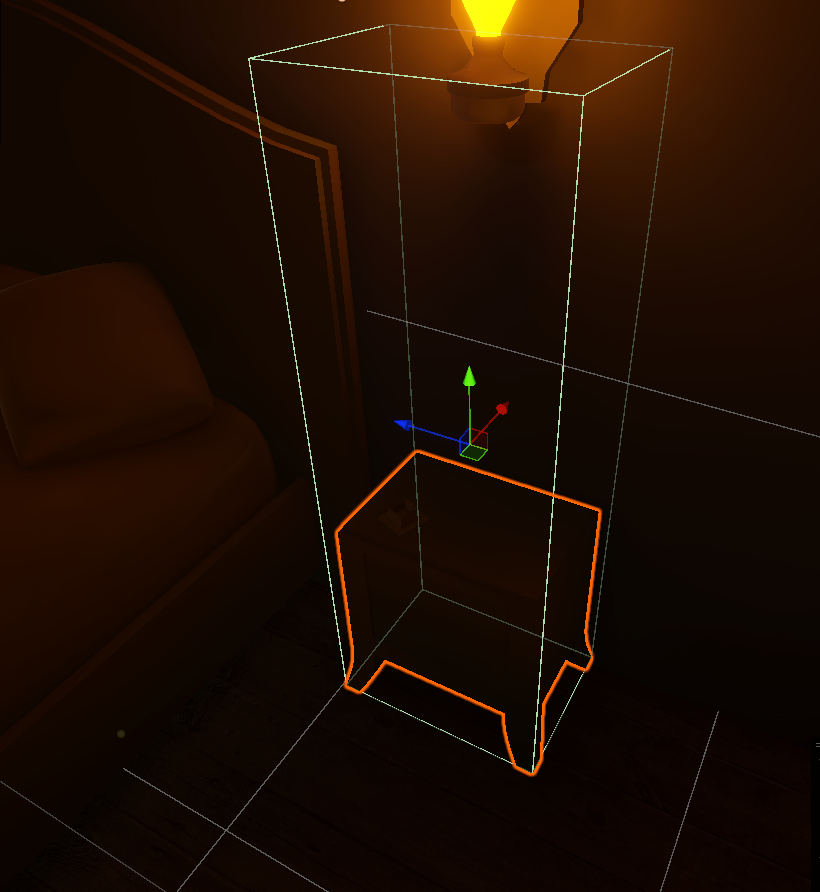

 worn mantle
timid dove
Which is a heightmap basically
worn mantle
timid dove
Which is a heightmap basically
so just for clarification, its not to do with collider of player , but something to do with MagicMap, a 3rd party asset? If so i will figure things out myself
silver moss
timid dove
ray.GetPoint(distance) is ideal
True that, I always forget it exists
 waxen kindle
Why doesnt the scale effect the raycast this is very weird
This is really realy weird
Btw i alsi tried collisions but only raycast is broken
timid dove
waxen kindle
Why doesnt the scale effect the raycast this is very weird
what do you mean by that
can you explain what we're looking at?
What raycast is involved here?
timid dove
worn mantle
so just for clarification, its not to do with collider of player , but something...
not mapmagic necessarily just the height of the terrain
vale field
vale field
Hi, might anyone know why my script isn't working as expected? I've made a traje...
Would anyone mind helping me out😅?
 light cradle
i want to create rotation for my spaceships with add torque (physics are important, yes) and it's in space so there is no drag.
problem is idk how to make it not overshoot the rotation -> so it always adds the exact torque/deceleration counterforce to smoothly stop exactly at the target rotation (i am trying to do this for so long now i am losing my sanity again)
waxen kindle
timid dove
What raycast is involved here?
İ do a raycast to the layer of those 3 toruses however even if i change the scale of these objects it raycasts like the scale is 1
timid dove
waxen kindle
İ do a raycast to the layer of those 3 toruses however even if i change the scal...
I'm not sure what you mean by it Raycasting like the scale is 1.
What are the details of the Raycast?
What results are you expecting from the Raycast?
What results are you seeing instead?
waxen kindle
Nvrmind i fixed the issue
 sick marsh
i'm doing some collision checks for a custom character controller using com.unity.physics, and i'm trying to use cast my character's capsule into the collision world to determine a maximum position that i can move to without penetrating other objects
the problem i'm running into is that ColliderCastHit.Fraction returns a fraction such that if i move by that fraction, the next CapsuleCast will consider the cast to hit at Fraction=0, leaving me stuck
i've checked the source and this seems to be a trivial consequence of how Unity.Physics.ColliderCastQueries.ConvexConvex is implemented, as it advances in discrete steps and outputs the first fraction where a collision is already happening
i can work around this by modifying the source to add a ColliderCastHit.LastFraction property which simply stores the last fraction at which a hit wasn't yet detected (a hit being detected by distance < 1e-3)
is there a better way to get a pre-penetrating fraction for collider casts? i'd prefer not to have to modify the package source if i can avoid it
 errant meadow
Hey all, I am trying my hand at a 2d platformer and I'm trying to stop the player from being spiderman...
The player is a rigidbody2d set to dynamic, I figured out how to stop it from sticking to ceilings with a 'grounded' check, but what about walls? The solutions I see online are to use a frictionless material, but that results in sliding!
Just wondering if there are any common solutions to this problem, thanks!
errant meadow
ok I fixed it with a second box collider that goes around the main one but has no friction, still wondering if theres a neater method though
 zenith parcel
when I walk against a wall or anything that collides with the player, it starts to spin. How do I make it tight and not spin?
timid dove
zenith parcel
when I walk against a wall or anything that collides with the player, it starts ...
constrain the Rigidbody's rotation
 dull shuttle
how to make an object with HingeJoint to swing infinitely?
if this component can't do it then tell me please which speed rotates the object when the component is added and how to get/set it
 turbid ember
anyone experienced with articulation bodies I have a question
do child articulation bodies of the parent articulation body ignore collision within itself?
turbid ember
in addition also, is it possible when a collider (with a rigidbody) imparts a force on another rigidbody, can one check for this collison and nullify the imparting force?
timid dove
turbid ember
in addition also, is it possible when a collider (with a rigidbody) imparts a fo...
 rotund sentinel
Hey everyone,
I'm trying to get my first-person character controller to move smoothly on a moving and rotating platform (like a ship) without making the player a child of the platform.
Right now, I’m using a raycast to detect if the player is standing on the platform (by checking a specific layer), and then I apply the platform’s movement and rotation delta to the player in LateUpdate().
What I’m Doing
-
Raycast Down from the player's feet to see if they are on a platform (using a tag or layer).
-
If they’re on a platform:
Store the platform’s position and rotation from the last frame.
In LateUpdate(), calculate how much the platform has moved and rotated.
Move the player by the same position delta and rotate their Y axis to match the platform.
- If the player jumps or steps off, the raycast no longer detects the platform, so they stop moving with it.
The Problem
It kinda works, but the player slides when the platform moves, especially when it turns only. Since I’m using a CharacterController, I’m applying movement using Move() instead of setting transform.position, but it still doesn’t feel right.
 frigid pier
@rotund sentinel Don't do weird spacing pushing away other messages. It's also highly unreadable as a whole.
turbid ember
timid dove
Yes with this free asset: https://assetstore.unity.com/packages/tools/physics/be...
nice I'll look into this, are you able to answer my other question? #⚛️┃physics message
if not thats fine
timid dove
I don't know anything about articulation bodies
turbid ember
noted, thanks for the assist anyhow
rotund sentinel
frigid pier
<@306926518951608323> Don't do weird spacing pushing away other messages. It's a...
Spacing?? Can you explain what you mean by that?
turbid ember
rotund sentinel
Spacing?? Can you explain what you mean by that?
lots of spaces inbetween your text

 random moat
Does anybody know if it's possible to fully set the state of a rigidbody to a recorded state, including it's contacts? Obviously you can set it's position/rotation/velocity/angular velocity, but this leaves out any contacts it may have had which means it's state is not identical to the recorded state.
The only idea I've had so far that might accomplish this would be to actually record it's state 1 physics update prior to the desired state, set it's position/rotation/velocity/angular velocity to this state and then run PhysicsScene.Simulate() once. I believe this would cause it to then generate contacts, but I don't know if they'd be identical to what would've been generated originally. If anyone has any thoughts on solving this kind of problem I'd love to hear them.
timid dove
random moat
Does anybody know if it's possible to fully set the state of a rigidbody to a re...
I'm not sure I would agree about contacts being part of the state? What's the end goal here?
random moat
timid dove
I'm not sure I would agree about contacts being part of the state? What's the en...
I want to be able to modify the impulses of the contacts generated for a particular rigidbody via Physics.ContactModifyEvent. However, for the particular modifications I want to make, I need to know what the impulse is going to be for each contact. From what I can tell, ContactModifyEvent occurs before the impulses are calculated as there isn't any way to get the impulse of each contact in ModifiableContactPair.
So, what I'm hoping is that if I were have a duplicate rigidbody in a separate physics scene that I apply the state of the original rigidbody to and then simulate one frame for, I will be able to record all the contacts generated for the duplicate rigidbody including the impulses for them. Then, when the original physics scene is simulated and I receive the ContactModifyEvent, I would be able to match up these modifiable contacts to the ones I recorded for the duplicate rigidbody and know what their impulses will be. I am hoping that if the position/rotation/velocity/angular velocity of the duplicate rigidbody are identical to the original, then the same contacts would be generated.
However it seems that if you set a rigidbody's position/rotation, even via MovePosition or MoveRotation, this affects how the contacts are generated, even if you set them to the position/rotation the rigidbody is already at.
silver moss
dull shuttle
how to make an object with HingeJoint to swing infinitely?
if this component can...
You want angularVelocity if you want to set a rotational speed
 elder citrus
How fast can a physical bullet object go in Unity before it starts to phase through other objects? I am somewhat reluctant to use raycasting for bullets
silver moss
elder citrus
How fast can a physical bullet object go in Unity before it starts to phase thro...
If you don't use continuous collision detection, the bullet can phase through a wall if it moves a greater distance than the thickness of the wall (+the radius of the bullet) in one physics step
So you want CCD at least if you go with rigidbodies
elder citrus
Alright, thanks
silver moss
The effect is called "tunneling" FYI
elder citrus
CCD works at any speed or will it still break if speed still goes high enough? I copied the bullet speeds from muzzle velocities of real life guns and some of them fire their bullets at speeds just over a kilometer a second
elder citrus
silver moss
The effect is called "tunneling" FYI
Ah, thanks for letting me know
timid dove
elder citrus
CCD works at any speed or will it still break if speed still goes high enough? I...
For such velocities a SphereCast or CapsuleCast may give you better results.
silver moss
elder citrus
CCD works at any speed or will it still break if speed still goes high enough? I...
I do prefer casts for bullets that travel at realistic speeds
Raycast works for most cases, you only need spherecast/capsulecast if the bullet needs to have some volume
If you potentially have a lot of bullets active you can look into RaycastCommand. Way cheaper than having hundreds of CCD rigidbodies flying around
elder citrus
Thanks for the advice!
rotund sentinel
What is the best solution for making a character move on a moving & rotating platform without making it a child?
I've experienced issues with CharacterController not inheriting platform rotation properly, causing drift. Is there a way to fix this, or is Rigidbody the better option? Which one is the best approach for smooth movement and performance?
How would the logic work for handling this correctly?
silver moss
rotund sentinel
What is the best solution for making a character move on a moving & rotating pla...
With a rigidbody, when calculating the character's velocity each frame, you can add the platform's velocity to the character's final velocity before applying it
timid dove
rotund sentinel
What is the best solution for making a character move on a moving & rotating pla...
Have you looked into off the shelf solutions like https://assetstore.unity.com/packages/tools/physics/kinematic-character-controller-99131 ?
KCC has this problem solved pretty well
dull shuttle
silver moss
You want angularVelocity if you want to set a rotational speed
thanks (bruh i forgot to send)
pallid gale
I'm not sure how to describe the problem, but I'm having trouble figuring out how to get the movement to feel "tight". See how in the video after it completes a 90 degree turn, instead of moving in the new direction all the existing velocity pushes it sideways
timid dove
pallid gale
I'm not sure how to describe the problem, but I'm having trouble figuring out ho...
Your object has momentum
that seems to be the entirety of your problem?
If you don't want momentum, you should be manually overwriting the velocity instead of adding forces.
alternatively - you need to apply much higher forces if you want to get faster acceleration.
pallid gale
I'm wary about changing the code to go from adding force to overwriting velocity, mostly as I'm not sure if that would be a significant change to the code I've already got
I think if I could increase the "friction" of it, that could help straighten it out once it makes the turn
timid dove
yes another option is:
- applying higher forces overall
- applying forces that counteract your current sideways momentum
- limiting top speed either with another drag calculation or rb drag or straight up clamping
Basically some combination fo all this
but you just need to think of it in basic physics terms
to counteract any kind of velocity you don't want, you need a force
dull shuttle
i made some swinging object and i don't understand how to get it's angle
i used transform.rotation.eulerAngles and for some reason it swings between 290 and ANOTHER 290 angle, why?
i mean it goes to from 290 to 270 than again increases to 290
timid dove
dull shuttle
i made some swinging object and i don't understand how to get it's angle
i used ...
what do you plan to do with the angle
basically using euler angles to do logic is always a bad idea
especially reading them back from a Transform
euler angles are pretty much cancer
dull shuttle
how to get an angle that i can see in Transform component?
timid dove
You can't get that one
it's visual only
and it's a bad idea
what is the END GOAL here?
There are better ways to do whatever it is
pallid gale
timid dove
but you just need to think of it in basic physics terms
would it be the same principle as a helicopter rudder?
 timid dove
pallid gale
would it be the same principle as a helicopter rudder?
timid dove
pallid gale
would it be the same principle as a helicopter rudder?
All newtonian physics works the same
f = ma
what you have here is torque which is for rotation which is really not that relevant here
because we're not concerned with angular velocity
dull shuttle
to make the object swing infinitely by applying force when it reaches equilibrium point (i mean the point where it ends up when stops)
dull shuttle
timid dove
what is the END GOAL here?
that was the answer to this question
timid dove
dull shuttle
to make the object swing infinitely by applying force when it reaches equilibriu...
You mean down
so it depends on the orientation of the thing but
presumably the rest point is at "0" rotation?
dull shuttle
no
timid dove
Can you show the object in scene view with its gizmos so we can see its orientation?
(with gizmo rotation in local mode)
dull shuttle
timid dove
Can you show the object in scene view with its gizmos so we can see its orientat...
 timid dove
ok so it's weirdly rotrated but if i'm reading this correctly you want to know when its forward direction (blue arrow with the move tool enabled) is facing down it seems?
So you can do something like:
float differenceFromDown = Vector3.Angle(transform.forward, Vector3.down);```*it will face up in that position
timid dove
it's hard for me to tell with the rotation tool selected
dull shuttle
timid dove
it's hard for me to tell with the rotation tool selected
that's why i told you it
timid dove
Then it'd be:
float differenceFromDown = Vector3.Angle(transform.forward, Vector3.up);```And if you need a signed angle you can use Vector3.SignedAngle
rotund sentinel
timid dove
Have you looked into off the shelf solutions like https://assetstore.unity.com/p...
Hmm, never consideret it, but it seems im forced to use it now. I may try to make my own one firstly
Thanks for the tip
dull shuttle
timid dove
Then it'd be:
```cs
float differenceFromDown = Vector3.Angle(transform.forward, ...
i wrote this before
if (transform.rotation.eulerAngles.x < -90 && !speedsaved)
{
   angVel = rb.angularVelocity;
   speedsaved = true;
}```
how to use what you wrote here?