#⚛️┃physics
1 messages · Page 7 of 1
 drifting sleet
 hollow apex
drifting sleet
so i'm trying to say that you're not necessarily doing anything wrong, you can p...
hollow apex
drifting sleet
so i'm trying to say that you're not necessarily doing anything wrong, you can p...
i took the car out of asset from the asset browser of unity, i would assume the geometry should be game ready
drifting sleet
hollow apex
i took the car out of asset from the asset browser of unity, i would assume the ...
oh well
hollow apex
okay so everytime i use that model for the car body with no collisions it does that, its bugged ill try something else
i fixed it i think
 dapper wigeon
I'm not that familiar with IK, but isn't it in itself kind of a physics cheat? I mean IK moves parts directly without the use of force?
 hushed salmon
this is oddly satisfying
 unique cave
hushed salmon
this is oddly satisfying
unique cave
hushed salmon
this is oddly satisfying
Have you constrained the movement on X axis?
hushed salmon
unique cave
Have you constrained the movement on X axis?
nope
its litteraly just a because its a perfect angle
dapper wigeon
hushed salmon
its litteraly just a because its a perfect angle
Hell no xD
hushed salmon
Hell yess...
unique cave
hushed salmon
its litteraly just a because its a perfect angle
Then its really satisfying indeed
dapper wigeon
High friction? O_o
 shell geyser
hello i don't know where to ask this question but how can i build a cube with probuilder ? the black menu wasn't here before there was a build button

like this

 craggy siren
Hi, my chains always stretch. How can I fix it? (I use obi rope package).

 frigid pier
@vague sentinel Don't cross-post, don't tag random people not in conversation with you.
 vague sentinel
frigid pier
<@511077024614318080> Don't cross-post, don't tag random people not in conversat...
vague sentinel
frigid pier
<@511077024614318080> Don't cross-post, don't tag random people not in conversat...
sorry
 modern seal
hello, i have been struggling with this for ages and have found no solution online. I have a script that detects collisions and performs a function on this pink rubber bouncy physic material 2d. the player has continuous collision detection on, yet the collision is never detected when the rubber has bounciness. when i put the bounciness to zero, the collision is always detected. please help!

 errant gazelle
dapper wigeon
I'm not that familiar with IK, but isn't it in itself kind of a physics cheat? I...
errant gazelle
dapper wigeon
I'm not that familiar with IK, but isn't it in itself kind of a physics cheat? I...
Probably he has 2 replicas of the mech thing, one that does the IK and the other that is physics based, and with some configurable joints he adds forces to try to replicate the IK version current bones rotation
modern seal
modern seal
hello, i have been struggling with this for ages and have found no solution onli...
does anyone know a solution for this
 rigid grotto
a'ight peeps
I need a genius to help me please. I've been stuck on this mf problem forever
https://gyazo.com/c3dbc5017cbccc772415716880d3e406

been stuck on it for 12 days and nobody responds when I type it out so here's a gif
needs a solution
I've posted this in every relevant channel and nobody responds so i'm aboutta start getting medieval
 timid dove
rigid grotto
I've posted this in every relevant channel and nobody responds so i'm aboutta st...
timid dove
rigid grotto
I've posted this in every relevant channel and nobody responds so i'm aboutta st...
You should explain the problem otherwise nobody knows what you're asking for help with
rigid grotto
it's pretty obvious just by watching the gif
but explaining hasn't yielded any results
days later still no replies to the explanations
but essentially the IK targets for the arms are children of the gun
you move the IK targets directly, the arms move
you move the gun
the arms don't move
timid dove
It's obvious only if you're intimately familiar with your project
I just see someone moving an object up and down
Anyway this isn't a physics issue it's #🏃┃animation
rigid grotto
timid dove
Anyway this isn't a physics issue it's <#502171313201479681>
and i've asked in several servers
timid dove
rigid grotto
not a single soul can give me an answer
that doesnt change the rules
rigid grotto
i'll post where i have to get a solution 😂 tbh i'm getting tired of no one being able to help
if I get kicked from the server it's not like i'm getting help here anyway
maybe posting it in different channels, someone with the experience required will be able to help
it's partially related to physics because it handles IK which is in part physics and mathematics, as well as animation since IK is used for animating optimally, as well as programming because there are programmatical solutions too that I don't know
so I posted it in all three places
modern seal
modern seal
hello, i have been struggling with this for ages and have found no solution onli...
i think this is a physics problem but cant find any solution
 wind meadow
so for my 2D game, I want it to have an object be launched at an arc and have it land at a spot. I thought initially to have the two rigid bodies (with green being parented to red) launch at different forces with the green object being launched upwards only while the red object will have a force launched towards the spot.
But I realize that once the two rigid bodies are active, they do their own thing. What's a good way to execute this idea?
 errant gazelle
Hi guys! I am making a car game (the car physics is inspired by this video: https://www.youtube.com/watch?v=LG1CtlFRmpU), and to move the car I apply a force with a forward direction to the car (which has a rigidbody with mass 1000) with Rigidbody.AddForce(force);.
Now the problem is the acceleration.. Because it's way too high, it goes from 0 to 100km/h in less than a second and it's not what I want in my game, but if I lower the amount of force, it also reduces drastically the max speed it can reach.. so how do I reduce the acceleration of the car without reducing its max speed?

A rundown of the general principles used for arcade-style vehicle physics using Unreal Engine 4 for the upcoming party combat racer Space Dust Racing. Dev blog: http://blog.spaceduststudios.com
And it also slows down way too fast (and I'm not applying any brake)
The deceleration is probably due to the drag.. but if I lower the drag, the car also starts to fluctuate much more
 uneven pine
wind meadow
so for my 2D game, I want it to have an object be launched at an arc and have it...
uneven pine
wind meadow
so for my 2D game, I want it to have an object be launched at an arc and have it...
both objects need to land at the same place?
wind meadow
so kinda
so basically an object will be moving
and the child will move concurrently with it
once the object stops moving i want the other object to "land" on the end of the arc
actually yeah it's exactly that
uneven pine
errant gazelle
Hi guys! I am making a car game (the car physics is inspired by this video: http...
with cars you have air drag and friction which makes the car not accelerate to infinity
read the paper from marco monster on wheel and car physics
uneven pine
wind meadow
and the child will move concurrently with it
why do they need to be parented?
wind meadow
it's more so they already were parented since other functions will need it.
uneven pine
uneven pine
with cars you have air drag and friction which makes the car not accelerate to i...
(just the most basic forces in play)
wind meadow
so far for what i got @uneven pine when i did a jump function which did what i described. I had a transform position change per frame for movement on the parent but the child object can go up and down via rigidbody
 blazing cape
ok, so I've been at this for a few hours and Im completely confused,.
I'm doing simple car movement and the wheels keep disconnecting from where they're supposed to be.
I've followed different tutorials on how wheelcolliders should work and scripted but I still have this reoccurring issue.
What would be the best fix for this? thank you

 uneven pine
blazing cape
ok, so I've been at this for a few hours and Im completely confused,.
I'm doing ...
uneven pine
blazing cape
ok, so I've been at this for a few hours and Im completely confused,.
I'm doing ...
it might be because the wheel collider is inside the box collider but not sure
blazing cape
uneven pine
it might be because the wheel collider is inside the box collider but not sure
thats what I thought too, but it seems to have enough space for the wheel collider not to cause that to happen
 uneven pine
wind meadow
so far for what i got <@806100611979804733> when i did a jump function which did...
uneven pine
wind meadow
so far for what i got <@806100611979804733> when i did a jump function which did...
I do not know why or what you really want tbh. its very weird. But you want one object to go on a straight line and one not so the one that is not you can just do with add force and the child which should go in a straight line you can just subtract its y positions or set the constraint that it can't move up and down
on the rb
wind meadow
uneven pine
I do not know why or what you really want tbh. its very weird. But you want one ...
yeah that might be what i'll have to do.
it's strange i know but it's because i'm trying to mimick a character being blown away
since when a person is launched it would be an arc and they'll eventually land till the friction slows down their sliding
 steep charm
Does anybody know how to, not necessarily fix, but refine this phenomenon using the CharacterController? In game it make it looks strange. Would it come down to just blending the playermodel and hitbox to make it less noticeable?
Any help is appreciated
 uneven pine
steep charm
Does anybody know how to, not necessarily fix, but refine this phenomenon using ...
uneven pine
steep charm
Does anybody know how to, not necessarily fix, but refine this phenomenon using ...
no idea what the problem is
steep charm
uneven pine
no idea what the problem is
Oh no worries! I actually got the problem solved in another chatroom
 grim marten
Hi! I'm pretty new to unity, and I'm trying to learn rigidbody/colliders.
I'm trying to get an imported 3rd party model to not fall through a floor, but it only seems to collide with a cube which has the same properties. Thanks in advance if anyone sees this!
timid dove
grim marten
Hi! I'm pretty new to unity, and I'm trying to learn rigidbody/colliders.
I'm ...
your collider is very thin
it will tunnel very easily
first off - try setting collision detection to continuous
grim marten
timid dove
first off - try setting collision detection to continuous
It worked- thank you so much! What's the difference between continuous and discrete Collision detection?
timid dove
grim marten
It worked- thank you so much! What's the difference between continuous and discr...
This will explain everything:
https://gamedev.stackexchange.com/a/192403

Game Development Stack Exchange
I have recently had an issue where sometimes a collision would not be detected. Someone told me that maybe I had an tunneling issue.
In the context of game development using physics, what is tunnel...
grim marten
timid dove
This will explain everything:
https://gamedev.stackexchange.com/a/192403
Thanks so much! ❤️
 iron lava
Can someone please help me with the unity wheel collider?
I swear, it's working against me
No matter what I do, it either jitters, or shakes, or something!!

 lofty tree
Heya Physics readers!
Does anyone know of a Physics based editor placement tool similar to this that is free ? https://youtu.be/DQhxHJeCF4w

Asset Store:
https://prf.hn/l/K3qVenY
Object Placement Tool - it's a powerful Unity editor extention that allows you to populate your scenes in minutes using simple mouse click instead of regular drag & drop of prefabs and setting all rotation and scale variation by hand. The core feature of this tool is "Physics Placement Mode". In this mode y...
 stuck bay
when adding an upwards force to an object with a rigidbody, instead of propelling it upwards properly, it pretty much just teleports it up, and then falls very very slowly
any idea why this might be?
this is the setup\btw I had to set the jump force that high so I could get the height I was looking for

 forest lance
stuck bay
when adding an upwards force to an object with a rigidbody, instead of propellin...
forest lance
stuck bay
when adding an upwards force to an object with a rigidbody, instead of propellin...
Maybe because your jump strength is 1000000
stuck bay
forest lance
Maybe because your jump strength is 1000000
It happens with all values
It's just set to that so I can see it easily
uneven pine
stuck bay
this is the setup\btw I had to set the jump force that high so I could get the h...
does it with the move script deactivated the problem still ocour?
if not show us the code for the move script
timid dove
stuck bay
this is the setup\btw I had to set the jump force that high so I could get the h...
Sounds like your movement code is improperly setting the y velocity to 0 each frame
stuck bay
timid dove
Sounds like your movement code is improperly setting the y velocity to 0 each fr...
Also thought about it.. I'll check it out, thanks
stuck bay
I actually set the y velocity to 0
I changed it to just be the y velocity of the rigidbody but
(it's just 1 btw)
I think it has to do with this line cs UnityEngine.Vector3 move = new UnityEngine.Vector3(inputVector.x, rb.velocity.y, inputVector.y);
and this line cs rb.AddForce(move * Time.deltaTime * MoveSpeed * 10000); (specifically the multiplication part)
I made it multiply everything by 10000 so values like 1 would make a big difference
stuck bay
stuck bay
this is what happens after the jump btw

I'm tweaking things but no luck
if anyone knows what this is pls let me know
timid dove
stuck bay
I changed it to just be the y velocity of the rigidbody but
You'd have to show your code and also your inspector
stuck bay
timid dove
You'd have to show your code and also your inspector
This is the entire code and the inspector
public class Move : MonoBehaviour
{
[SerializeField] private GameObject Visual;
private Animator animator;
private Rigidbody rb;
[SerializeField] private float MoveSpeed;
[SerializeField] private float jumpStrength;


 void Start()
 {
   rb = GetComponent<Rigidbody>();
   animator = Visual.GetComponent<Animator>();
 }


 void Update()
{
    UnityEngine.Vector2 inputVector = new UnityEngine.Vector2(0, 0);

    if(Input.GetKey(KeyCode.W))
     {
       inputVector.y = +1;
       animator.SetBool("Walk", true);
     }

    if(Input.GetKey(KeyCode.A))
    {
      inputVector.x = -1;
      animator.SetBool("Walk", true);
    }

    if(Input.GetKey(KeyCode.S))
    {
      inputVector.y = -1;
      animator.SetBool("Walk", true);

    }

    if(Input.GetKey(KeyCode.D))
    {
      inputVector.x = +1;
      animator.SetBool("Walk", true);
    }


   if(true)
   {
     if(Input.GetKeyDown(KeyCode.Space))
    {
      rb.AddForce(UnityEngine.Vector3.up * jumpStrength, ForceMode.Impulse);
    }
   }


    if(rb.velocity == new UnityEngine.Vector3(0, 0, 0))
    {
      animator.SetBool("Walk", false);
    }


    inputVector = inputVector.normalized;
    UnityEngine.Vector3 move = new UnityEngine.Vector3(inputVector.x, rb.velocity.y, inputVector.y);

    float rotateSpeed = 10f;
    rb.AddForce(move * Time.deltaTime * MoveSpeed * 5000);
    gameObject.transform.forward = UnityEngine.Vector3.Slerp(transform.forward, move, Time.deltaTime * rotateSpeed);
    rb.velocity = new UnityEngine.Vector3(0, 0, 0);

 }
}

the model is parented as just a visual so it shouldn't affect the logic
since it has no collision or anything
timid dove
stuck bay
This is the entire code and the inspector
```cs
public class Move : MonoBehavio...
Look at the last line of your code
timid dove
timid dove
Sounds like your movement code is improperly setting the y velocity to 0 each fr...
^
stuck bay
yeah I noticed
I guess the flying off to infinity must've been the script setting the velocity while clearing it at the same time somehow\
this is probably why I did that
I'll try clearing everything but y
still flies off
and flips over
also are these speeds normal

it only goes crazy on the y axis so it has to have something to do with that
timid dove
stuck bay
this is probably why I did that
this looks fine now
the tipping over you can fix by constraining the rotation
timid dove
UnityEngine.Vector3 move = new UnityEngine.Vector3(inputVector.x, rb.velocity.y, inputVector.y);
gameObject.transform.forward = UnityEngine.Vector3.Slerp(transform.forward, move, Time.deltaTime * rotateSpeed);
this is why it's tipping over
you're making it face the direction it's moving
including the vertical velocity
you should do:
if (inputVector != 0) {
  gameObject.transform.forward = UnityEngine.Vector3.Slerp(transform.forward, inputVector, Time.deltaTime * rotateSpeed);
}``` insteadalso this:
rb.AddForce(move * Time.deltaTime * MoveSpeed * 5000); is wrong for two reasons:
- AddForce should never go in Update, it should go in FixedUpdate
- You should never multiply deltaTime into the AddForce call
stuck bay
timid dove
you should do:
```cs
if (inputVector != 0) {
gameObject.transform.forward = Un...
Btw you can't do != With a vector and a number
timid dove
stuck bay
Btw you can't do != With a vector and a number
sorry:
if (inputVector.sqrMagnitude > 0) {
  gameObject.transform.forward = UnityEngine.Vector3.Slerp(transform.forward, inputVector, Time.deltaTime * rotateSpeed);
}```i didn't get much sleep last night
stuck bay
timid dove
sorry:
```cs
if (inputVector.sqrMagnitude > 0) {
gameObject.transform.forward ...
Dw
Uh it says fixed update isn't called
timid dove
what says that
timid dove
show your code
stuck bay
   if(true)
   {
     if(Input.GetKeyDown(KeyCode.Space))
    {
      rb.AddForce(UnityEngine.Vector3.up * jumpStrength, ForceMode.Impulse);
    }
   }


    if(rb.velocity == new UnityEngine.Vector3(0, 0, 0))
    {
      animator.SetBool("Walk", false);
    }


    inputVector = inputVector.normalized;
    UnityEngine.Vector3 move = new UnityEngine.Vector3(inputVector.x, rb.velocity.y, inputVector.y);

    float rotateSpeed = 10f;
    if(inputVector != new UnityEngine.Vector2(0, 0))
     {
       gameObject.transform.forward = UnityEngine.Vector3.Slerp(transform.forward, inputVector, Time.deltaTime * rotateSpeed);
     }

    rb.velocity = new Vector3(0, rb.velocity.y, 0);

  void FixedUpdate()
  {
    rb.AddForce(move * moveSpeed * 5000);
  }

 }
}```you put FixedUpdate inside Update
don't do that
timid dove
also your AddForce should not be including the current y velocity of the object in the force you're adding...
stuck bay
wait
timid dove
also you'll need to make that variable into a member variable if you want to read it across different methods
stuck bay
oh I just missed the entire point of move
I forgot it adds 0 and doesn't set it to 0
Ok the jump works but I can't move and I still flip over
and fixed update seems to just not run
flipping over and everything is fixed
I just can't move now
ok clearly fixed update isn't running for some reason
but why
had to put it in regular update
but thanks anyways
errant gazelle
How does rigidbody.AddForce(force, ForceMode.Force) work under the hood? What's the formula used by the ForceMode.Force? Because I am trying to recreate it in unity ECS and I have seen on the Unity docs that the formula is mass*distance/time^2 but what is distance and where is the force vector?
I think that with distance they mean force, but I am not sure
timid dove
errant gazelle
How does `rigidbody.AddForce(force, ForceMode.Force)` work under the hood? What'...
"distance" is not involved at all
the formula is:
Vector3 velocityChange = (force * Time.fixedDeltaTime) / rb.mass;```not sure what distance would mean in this context, doesn't make sense
errant gazelle
Ok, in fact that formula seemed really weird (even the division by the square of time)
Thanks 😄
timid dove
errant gazelle
Ok, in fact that formula seemed really weird (even the division by the square of...
I think you're looking at a gravitational force formula or something?
errant gazelle
I am making a car game and I am trying to add an acceleration to the car when the player presses W
But it should take in account the mass of the car
so yeah, that's the formula
Mmh.. and if I want to replicate AddForceAtPosition?
Because I think I should add a torque and lower the amount of velocity change to replicate that function, but I don't know the exact formula
timid dove
errant gazelle
Because I think I should add a torque and lower the amount of velocity change to...
From the implementations I've seen the velocity change is the same but the torque is also added
I'm not sure how physically correct that is
but I think that's how it works normally
errant gazelle
Ah ok thanks.. now I just need to find out how the torque is applied
errant gazelle
mmh.. it's the first time I hear about inertia tensor, hope it's easy to retrieve 😆
 fiery ruin
Hi everyone
I want to add a force through parent prospective
// This script attach to child object
If(tr)
rb.addforce(vector3.forward)
This move through child transform protective.
How can I add force in child object through parent transform?
Anyone please
timid dove
fiery ruin
Hi everyone
I want to add a force through parent prospective
// This script a...
Rigidbody AddForce always adds forces in world space.
Convert any force vector you have to world space, then apply the force
fiery ruin
timid dove
Rigidbody AddForce always adds forces in world space.
Convert any force vector ...
How?
Can you explain me please
timid dove
Use Transform.TransformDirection to convert vectors from local space to world space if needed
uneven pine
timid dove
Use Transform.TransformDirection to convert vectors from local space to world sp...
transform.TransformVector
timid dove
uneven pine
transform.TransformVector
That one's affected by scale which is probably not desired
uneven pine
timid dove
That one's affected by scale which is probably not desired
I know which makes it desired
 gaunt walrus
So my character controller just randomly moves up and down small amounts when colliding with other stuff, is there a way to lock movement along the y axis

 bleak umbra
gaunt walrus
So my character controller just randomly moves up and down small amounts when co...
bleak umbra
gaunt walrus
So my character controller just randomly moves up and down small amounts when co...
FixedUpdate() => rigidbody.velocity = new Vector3(rigidbody.velocity.x, lockMe, rigidbody.velocity.z);
I would not use unitys default character controller because it only really works properly under perfect condisions
timid dove
well in general if your objects are moving too fast and your colliders are too thin, you may encounter tunneling.
Another thing that might be biting you is if you are moving some objects in Update, the collider positions won't actually update until the next physics update (which happens right after FixedUpdate)
I don't know the specifics of what you're doing enough to say what your issue is but it might involve one or both of these issues.
timid dove
FixedUpdate will do that
FixedUpdate is guaranteed to run between every physics simulation frame
as long as your ray is at least as long as your object will move in one physics frame (velocity.magnitude * Time.fixedDeltaTime) then you won't miss anything
timid dove
i'm not sure I understand what's happening here. So this is like, you just move your mouse and if you touch an obstacle you lose? It looks like you're only doing a raycast from your screen to where the mouse is
I'd expect that you'd want to do a raycast from the previous mouse world position to the new mouse world position
and if you detect a hit there, then you've hit an obstacle
that would prevent the player from simply moving the mouse very quickly across obstaces
 glossy barn
Hello, does anyone know how to fix this please ? I can't find any tutorial for this (I'm new to Unity)
Player goes through the wall and then slowly goes on top of it
glossy barn
glossy barn
Hello, does anyone know how to fix this please ? I can't find any tutorial for t...
I haven't used any code for it, I only used Colliders
timid dove
glossy barn
I haven't used any code for it, I only used Colliders
I mean
the fact your character is moving means you wrote code
or at least
copied it
anyway it looks like your character is not moving in a physics-friendly way
you'll need to change that
glossy barn
I meant for the gravity, I used InputSystem for the player and a bit of script
timid dove
move either with a Rigidbody or a CharacterController to get collisions etc. to work properly
glossy barn
timid dove
move either with a Rigidbody or a CharacterController to get collisions etc. to ...
ok I'll try this out, thanks
 autumn jetty
Trying to setup to make a joystick. When dealing with configurable joint, it seems to not rotate around anchor point? What am I missing here?
I freezed the rigidbody position instead of only the joint 🙃

 deft orbit
I have a large GameObject with 20-something mesh colliders attached, and it eats performance for breakfast (4 of these objects result in roughly 75 fps of lag) and it also produces the weirdest bug I've ever seen.
What can I do to resolve this? Will it help if I put the colliders on child objects?
timid dove
deft orbit
I have a large GameObject with 20-something mesh colliders attached, and it eats...
simplify your collider(s) situation
lower detail meshes and/or replace the mesh colliders with primitives
deft orbit
Is there nothing else I can do? The mesh I'm trying to create colliders for can't really be simplified, and unless I've been severely misinformed there's no other way to do this since it's a concave mesh
timid dove
deft orbit
Is there nothing else I can do? The mesh I'm trying to create colliders for can'...
concave mesh colliders can be replaced by multiple primitives
for example a concave mesh collider for a room would be 6 box colliders representing hte floor, ceiling, and 4 walls
deft orbit
I'm well aware of that, but I can't simplify any further
My object is a 1:1-scale Star Destroyer, which has both non-trivial surface details and shapes that can't really be replicated with primitives
uneven pine
deft orbit
I have a large GameObject with 20-something mesh colliders attached, and it eats...
you can also split up the model into multiple peaces so you can use primitive colliders instead
uneven pine
deft orbit
I'm well aware of that, but I can't simplify any further
My object is a 1:1-scal...
maybe you could also make it that not all colliders are active but only the once near the player
but there is no magical button that will fix all your problems
deft orbit
uneven pine
maybe you could also make it that not all colliders are active but only the once...
No, I can't unfortunately. The shapes that comprise a Star Destroyer make approximation on the desired scale practically impossible.
For example, just take the basic wedge shape. You can't reach a good approximation on the scale I'm looking for without using mesh colliders.
Interestingly, it seems the problem isn't actually the colliders. After some trial and error I disabled all the colliders, and my performance barely recovered and the bug is still there. Which means I get to go on a bughunt again.
 upbeat dirge
hi guys, is there any guide to setup mass in your project?
Example I have a crate I have to set mass to 300, so it feel like a crate.
If its mass is 1, when character just touch it a little it fly away, feel no heavy at all.
But then, when it mass is at 300, I have to apply 3000 force on an attack to really push it.
That's all fine until I have my auto setup ragdoll, which all rigidbodies all has mass range from 1-3.
And you guess that, when the ragdoll hit with 3000 force, it flies like a rocket 😂
the limbs can't have too much mass like 100, when I set it like that they will behave weird.
So my final decision is to have limbs have a component with float forceMult to make the 3000 force become 3.
Is there more elegant way to overcome this dilemma?
 timid dove
upbeat dirge
hi guys, is there any guide to setup mass in your project?
Example I have a crat...
timid dove
upbeat dirge
hi guys, is there any guide to setup mass in your project?
Example I have a crat...
If you want realism, apply realistics masses and forces
a crate of that size might weight somewhere between 3-50 kg depending on what's inside it
as for the forces, make sure you're using the correct ForceMode
If you are doing an attack that force should generally be an Impulse force
if you're applying 3000 force you are likely using the wrong ForceMode
upbeat dirge
timid dove
If you want realism, apply realistics masses and forces
hi bro thanks for rep
I don't want realism, just want it feel right.
And when my character just move against the crate and it move too much then it surely not right.
and I just checked the force, is Impulse.
wait let me record when it is mass 1
it fly like cardboard box
what mass should I apply?
upbeat dirge
Decided to make crates mass at 100
force 200 (which sends human ragdoll flying at good speed)
crates has component receivedForceMult = 4
so crates will receive that force at 800 to move reasonably.
timid dove
Depends how fast and small the things interacting with it will be
upbeat dirge
dont go with such low width, 0.5 is ok, if it stick out too much you use offset to move it back, but dont go low width, objects will fly through at high speed
 wooden plaza
why is my player phasing through the elevator like that when it falls? You can see in the first clip how it glitches and phases through and in the second clip the elevator falling down normally. I would like to have it so the player enters the elevator and it falls with the player still in the elevator... how can I make this happen?
timid dove
wooden plaza
why is my player phasing through the elevator like that when it falls? You can s...
WHy does your character have both CharacterController and Rigidbody?
those are two competing movement strategies
they are not going to play nicely together
and it will not interact nicely with the environment (as you are seeing)
 inner birch
Hi all, do you know other system to simulate submerged ship like: https://assetstore.unity.com/packages/tools/physics/dynamic-water-physics-2-147990
I don't know of other systems to manage the interaction of the vessel with various water systems and the related physics. I am wrong? Especially with regards to submarines.

Get the Dynamic Water Physics 2 package from NWH Coding and speed up your game development process. Find this & other Physics options on the Unity Asset Store.
wooden plaza
timid dove
WHy does your character have both CharacterController and Rigidbody?
Thanks for the response, I will change this and report back.
 crude trellis
noob question. how do i create my 3d models solid in unity? (if i play in fps, the player wont go through the mesh).
tried adding component rigid body but it does nothing
also checked the kinematic
autumn jetty
    private void RotateToTarget(Vector3 targetForward)
    {
        var targetRotation = Quaternion.LookRotation(targetForward, Vector3.up);
        var rotationDelta = targetRotation * Quaternion.Inverse(transform.rotation);
        rotationDelta.ToAngleAxis(out var angleDelta, out var axis);

        var angularSpeed = (Mathf.Deg2Rad * angleDelta) / Time.fixedDeltaTime;
        rigidbody.angularVelocity = angularSpeed * axis;
    }
Why does this code not result in an instant turn to the target rotation, but does it over multiple frames?
timid dove
autumn jetty
```cs
private void RotateToTarget(Vector3 targetForward)
{
var t...
You converted it to radians
angular velocity uses degrees
autumn jetty
timid dove
angular velocity uses degrees
timid dove
Anyway why not just use MoveRotation?
timid dove
autumn jetty
Says radians? <https://docs.unity3d.com/ScriptReference/Rigidbody-angularVelocit...
Hmmm so it does 🤔
timid dove
autumn jetty
```cs
private void RotateToTarget(Vector3 targetForward)
{
var t...
How many frames are we talking
Could it just be interpolation in action?
autumn jetty
Like a second
autumn jetty
timid dove
Anyway why not just use MoveRotation?
This does the job, but now I'm more intrigued of why the other doesn't.
wooden plaza
@timid dove Removed the rigidbody component from my player and still getting this...
timid dove
wooden plaza
<@179367739574583296> Removed the rigidbody component from my player and still g...
What is supposed to be happening
a normal smooth elevator?
timid dove
Or are you trying to do some kind of crashing elevator thing
wooden plaza
the elevator is meant to fall
wooden plaza
timid dove
Or are you trying to do some kind of crashing elevator thing
yes
timid dove
well it looks like you're kinda... teleporting the elevator
wooden plaza
nope
timid dove
inthe first frame of the failure
timid dove
the thing is CharacterController is not amazing when it comes to physics realism
it only moves when you call Move
so if your elevator starts falling it's easy for it to get janky
Probably better off with a Rigidbody character
wooden plaza
the player is obviously meant to be in the elevator when it falls and they should stay in it not phase out of it
what if i disable the character controller when i enter the elevator and enable rigidbody?
@timid dove
wooden plaza
fixed 
 hardy moth
Hello everyone !
I have a question about colliders, is it the correct channel ?
uneven pine
hardy moth
Hello everyone !
I have a question about colliders, is it the correct channel ?
sure
hardy moth
I ended up asking in #archived-code-general but do not have an answer yet
(it's the last message there, it's pretty quiet right now)
autumn jetty
timid dove
Could it just be interpolation in action?
In case you're interested, I looked at it today again. And there's a rigidbody.maxAngularVelocity which limited how fast it could rotate.
timid dove
autumn jetty
In case you're interested, I looked at it today again. And there's a rigidbody.m...
ah yes, forgot about this
 light hound
Not sure if this goes here, or in #🏃┃animation . But, I took this model into blender, and added bones all along the cable and the phone receiver. How can I make it to where if I pick up the phone reciever, and drop it, that gravity pulls the cord tight?

 calm raft
so.. the docs say
Notes: SphereCast will not detect colliders for which the sphere overlaps the collider
yet, my tests all say it will detect colliders it overlaps (from the starting point of the ray) - what's going on here? Is the manual wrong?
 versed lodge
Anyone know why this jittery movement along a spline might be happening, in this clip? maybe gravity and a model with poor import scaling?
 rich totem
hi, first time doing a first person shooter. Got stuck in this bug. When itry to jump on something my character will start to move away without touching anything
 woeful pulsar
People who have spent time developing physic based ropes compatible with unity's physics, what approach yielded the best results?
 bold python
Hi, my Rigidbody Player is sliding slowly down slopes, the terrain already has a physics material with high friction and the rigidbody has some drag too but the player is still sliding. Is there a way to have the player be completely still?
timid dove
woeful pulsar
People who have spent time developing physic based ropes compatible with unity's...
Buying Obi Rope
woeful pulsar
@timid dove Thanks -- yeah it's a strong solution. I was hoping for a workaround because I'm a bit annoyed about the obi aspect of having to put their custom components on most of the stuff that'll interract with obi
 silent mural
rich totem
hi, first time doing a first person shooter. Got stuck in this bug. When itry to...
silent mural
rich totem
hi, first time doing a first person shooter. Got stuck in this bug. When itry to...
looks like it might not have any friction so it slides forever, like on ice?
silent mural
versed lodge
Anyone know why this jittery movement along a spline might be happening, in this...
are you teleporting it in Update() maybe?
 whole mesa
There are some Problems with the Raycast, it is flickering rapidly sometimes, or a little. Anyone knows a fix for the Raycast? It is sometimes changing to Ground, even the player is looking at the item
    {
        if (Physics.Raycast(transform.position, transform.forward, out var hit, Mathf.Infinity, mask))
        {
            obj = hit.collider.gameObject;

            if(obj.tag == "Item")
            {
                tsf.localScale = new Vector3((float)1.7917, (float)1.017622, (float)0.002059521);
                tsf.localPosition = obg.localPosition + new Vector3(0, (float)0.5, 0);

                tablet.transform.rotation = Quaternion.LookRotation(Camera.main.transform.forward, Camera.main.transform.up);

            }
            else if(obj.tag != "Item")
            {
                tsf.localScale = new Vector3(0,0,0);
            }
        }
}```The flickering is not always happening. The FixedUpdate made it less but not gone
timid dove
whole mesa
There are some Problems with the Raycast, it is flickering rapidly sometimes, or...
What object is this script attached to
whole mesa
timid dove
What object is this script attached to
Main Camera
timid dove
And the player moves how? Rigidbody?
Your player may simply be moving very slowly and therefore the Raycast position is changing constantly
If you're near the edge of an object this could mean hitting/missing it
Likewise you seem to have some kind of idle/breathing animation on the player too? That could also be shifting the camera slightly
whole mesa
timid dove
And the player moves how? Rigidbody?
This is the Simple Movement script:
        move_Direction = transform.TransformDirection(move_Direction);
        move_Direction *= speed * Time.deltaTime;

        character_Controller.Move(move_Direction);```
The player has an attached Rigidbody, but the rotations are freezed, so it doesn't fall down.you should absolutely not be using CharacterController and Rigidbody at the same time.
whole mesa
timid dove
Your player may simply be moving very slowly and therefore the Raycast position ...
I tried out to play in the Build version, there it only flicks when the player is moving that is true
timid dove
that could definitely lead to weirdness like you're seeing
whole mesa
timid dove
Likewise you seem to have some kind of idle/breathing animation on the player to...
That is on a different camera and object the animation
whole mesa
timid dove
that could definitely lead to weirdness like you're seeing
ngl, but that is the case
now it doesn't flick at all
thanks for the solution
frigid pier
@wispy zinc #854851968446365696 how to ask questions.
 shut coral
I'm creating a Breakout game. I have a ball with a Rigidbody 2D with a "Bouncy" Physics Material 2D (Friction 0, Bounciness 1). My paddle has a Rigidbody2D with no physics material. Input applies a force on the paddle rigidbody. The paddle's position is frozen in the Y axis and the rotation frozen in the Z axis. For some reason, my ball loses velocity on contact with the paddle. I have tried applying the Bouncy material to the paddle with no effect. Any idea why?
shut coral
This hacky bit fixed it:
private void FixedUpdate()
{
    rigidbody.velocity = rigidbody.velocity.normalized * speed;
}
 supple hill
Hi guys, having a problem getting my car after turn to return to its original facing direction. Im making a game where you are on a highway and only turning left and right. What i want to achieve is when i stop pressing left or right, vehicle would return to facing forward. Any ideas how to do that? im using wheel colliders to turn, not rotation.
 storm shuttle
{

    public Quaternion leftRotation = Quaternion.LookRotation(0,-45,0);
    public Quaternion forwardRotation = Quaternion.LookRotation(0,0,0);
    public Quaternion rightRotation = Quaternion.LookRotation(0,45,0);

    private void Update()
    {
        switch(transform.rotation)
        {
            case forwardRotation:
                if(Input.GetKey(KeyCode.L))
                {
                    transform.rotation = leftRotation;
                }
                if(Input.GetKey(KeyCode.R))
                {
                    transform.rotation = rightRotation;
                }

                break;
            case leftRotation:
                if(Input.GetKey(KeyCode.F))
                {
                    transform.rotation = forwardRotation;
                }

                break;
            case CarStates.RIGHT:

                if(Input.GetKey(KeyCode.F))
                {
                    transform.rotation = forwardRotation;

;
                }
                break;

        }
    }
}``` Try using FSMs?i got around my problem by using addForce which works pretty well
but thank you, ill try your version as well
 rapid trellis
For some reason I'm having weird collisions happen between my player and the ground where it will randomly have a collision detection facing the left normal and will quickly go away if i press left for a bit and then right to advance past it
 clear wraith
Hi! im having a weird glitch with my rigidBody 2d and edge collider
does anyone know why?
(sorry for the noise)
jesus that noise is way louder than i thought sorry haha
 tropic trench
What are you recording with?
timid dove
clear wraith
Hi! im having a weird glitch with my rigidBody 2d and edge collider
does anyone...
Use PolygonCollider2D not edge collider for that
clear wraith
timid dove
Use PolygonCollider2D not edge collider for that
gotcha thanks!
clear wraith
tropic trench
What are you recording with?
nvdia shadow play
tropic trench
clear wraith
nvdia shadow play
Maybe try obs or find a setting in shadowplay to disable sound
bold python
is there a way to affect a rigidbody with forces but not affect a child of that rigidbody with its own rigidbody with those forces?
timid dove
bold python
is there a way to affect a rigidbody with forces but not affect a child of that ...
Dynamic Rigidbodies that are children of other objects generally don't respect the Transform hierarchy
they'll just move according to physics
but - it's kind of discouraged to have parent/child relationships between dynamic bodies in general
bold python
Alright, thanks for the answer, I think I can find another way to make my game work
 carmine fjord
Hi, I'm making a simple golf game in Unity 3D and my ball does not bounce off walls correctly. My walls are made from prefabs (I'm using the gameobject brush with a tileset) with box colliders. Half the time I have my ball go towards a wall it doesn't bounce correctly, half the time it bounces back at where it came (while shooting it at a 45deg angle and a top wall) the other half it bounces correctly. Btw I'm using a physics material to get the ball to bounce. Any help?
unique cave
carmine fjord
Hi, I'm making a simple golf game in Unity 3D and my ball does not bounce off wa...
Most likely the ball is hitting the box collider at the edge and hitting the side of the block thats in reality inside the wall. Using mesh collider would be better idea than multiple box colliders. This is well know bug thats pretty hard to solve
carmine fjord
Thank you for responding, but since I’m placing each prefab with a tile map how can I turn it all into one mesh?
uneven pine
carmine fjord
Thank you for responding, but since I’m placing each prefab with a tile map how ...
this should help
unique cave
uneven pine
this should help
eh... I'm not that sure it will, if you don't remove the faces inside the walls, it may not help at all
uneven pine
unique cave
eh... I'm not that sure it will, if you don't remove the faces inside the walls,...
oh yeah right...
fiery ruin
Hi everybody
How can I use rigid body forces with animation?
when I am use Addforce and in next line I am true the animation..
The problem is the when animation start they skip the force
timid dove
fiery ruin
Hi everybody
How can I use rigid body forces with animation?
when I am use Add...
Follow the cardinal rule of animator:
- don't animate the root object position
- animate child object positions
In short
- put the character model/sprite/etc on a child object and animate that
- The root object should have the Rigidbody and move
fiery ruin
timid dove
Follow the cardinal rule of animator:
- don't animate the root object position
-...
Thankx
 solid spoke
Hello! I'm not sure if this is the correct thread to ask this in but I am struggling to figure out what constraints I should use on my rig (Inverse Kinematics)
So, what I have now is an armature with the root bone in the middle, and spreading out to 8 other bones which contain the simple humanoid structure. What I want is, based on the rotation of the root bone, I want the humanoids height to change [ex. Crouch down when the root bone is titled towards them etc.. ]. I was able to achieve this in blender using basic IK but I can't seem to achieve this is Unity.
So, what would be the best way to approach this problem? Using multiple rig components with multiple constraints? Joints?
Any help would be appreciated, and sorry if I have posted this in the wrong thread! Thank you.
This is ideally what I want to achieve in Unity: https://www.youtube.com/watch?v=mFVb64OS9jE&ab_channel=Earthpix

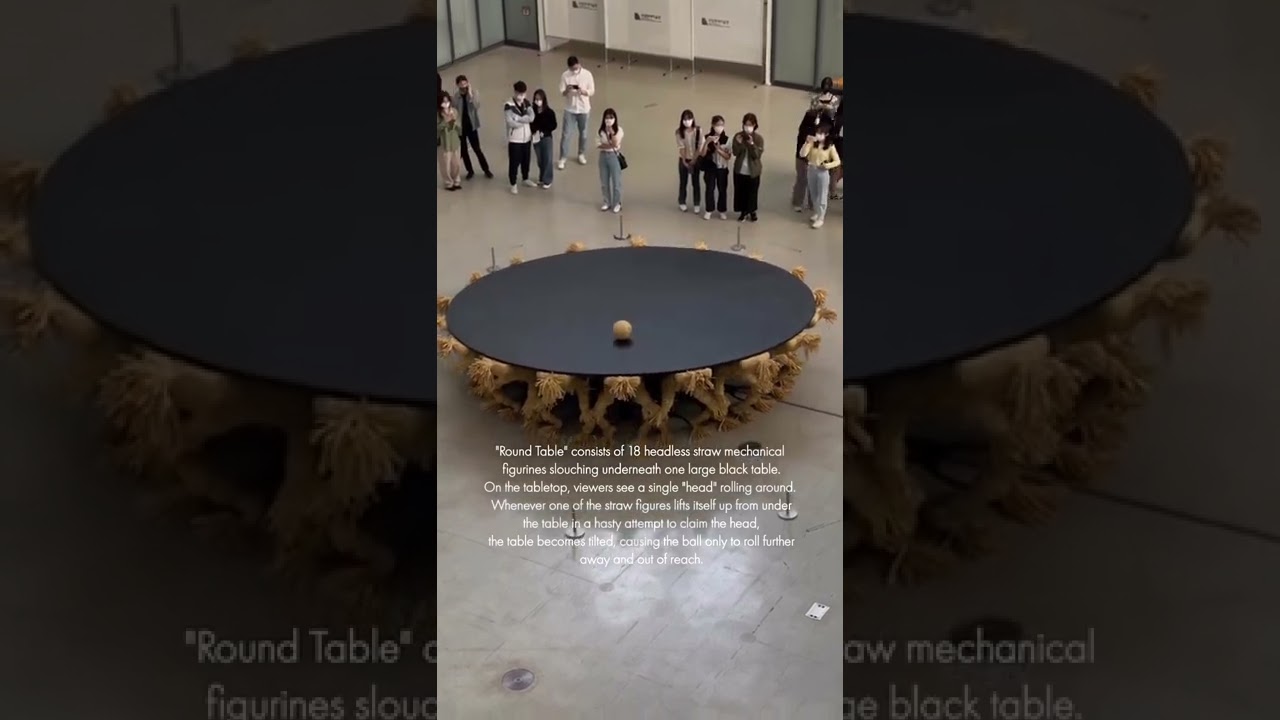
“Round Table” by artist Choe U-Ram on view now at the National Museum of Modern and Contemporary Art, Seoul, Korea. “Round Table is supported by 18 headless figures made from straw, and a round head placed on top of the table rolls around intermittently. The figures partake in a fierce competition to occupy the single head, offering no escape fr...
timid dove
solid spoke
Hello! I'm not sure if this is the correct thread to ask this in but I am strugg...
I would have each humanoid rooted at the ground and the point they are touching on the disc would be the IK target/effector or whatnot
then you just move/rotate the disc as you please and the humanoids will follow
This is kind of an #🏃┃animation thing not physics thou
solid spoke
timid dove
I would have each humanoid rooted at the ground and the point they are touching ...
what IK would I use?
carmine fjord
unique cave
eh... I'm not that sure it will, if you don't remove the faces inside the walls,...
Any luck figuring something out?
 barren charm
Is this a good place to ask a difficult game dev Math question?
 tiny fog
worth a shot
barren charm
So its kinda complicated, but bare with me. I'm making a VR game were the player can move this object by moving their hand. Target objects will accelerate towards the velocity of the players hand.
Example: With a object starting at 0mph and the player's hand moving at 5mph the object will accelerate from 0mph to 5mph at a rate of 1mph^2
Simple enough right? But I have a problem. I want the acceleration to be faster the closer the two speeds are.
So for Example: With a object starting at 0mph and the player's hand moving at 2.5mph the object will accelerate from 0mph to 2.5mph at a rate of 2mph^2 instead of 1mph^2, since the velocities are closer.
My problem is anyway I can Think of doing this would make the acceleration be effected by frame rate. A higher frame rate would cause acceleration would accelerate faster. Like calculating 10% interest yearly vs 5% interest biannually. Does anyone know a way I can do this without locking the calculation to the frame rate?
tiny fog
I'd probably start with graphing the kind of curve I wanted and scaling the acceleration by t where t is the normalized linear interpolated distance between start and end position
and if you want a curve with a difference shape, you just make it parametric in t and scale by that
barren charm
I have get what your saying. But I'm not sure how to use it to solve my problem 😭
This is the type of sudo code/equation I was thinking
HandV = Hand Velocity
ObjV = The velocity of the object being accelerated
T = Time
A = acceleration
AScale = Constant representing the scale of the acceleration
NewV = The new Velocity of the accelerating object
//the bigger the difference in handV and ObjV the less the acceleration
A = AScale /Clamp(abs(HandV-ObjV), 1, 10)
NewV = T*A + ObjV
But if for 8 seconds, at a scale of 4, while you move you hand at 10 velocity, and the object starts at rest. You get a new velocity of 3.2
But the problem is if you double the frame rate, so you do the equation twice with 4 seconds each you get a new Velocity of 1.6 then a new velocity of 3.5. Since 1.6 is closer to 10, so it accelerates more the second time.
barren charm
I'm kind of tempted to just force it to update in consistent .01 second intervals
timid dove
barren charm
So its kinda complicated, but bare with me. I'm making a VR game were the player...
This is exactly what FixedUpdate is for
This is the problem FixedUpdate solves
timid dove
barren charm
I'm kind of tempted to just force it to update in consistent .01 second interval...
Yes, by putting it in FixedUpdate 😜
barren charm
Oh I thought fixed update just happened more often, didn't know it had a set tickrate
timid dove
It's called fixed for a reason
By default it actually happens less often than a typical framerate
Fixed time default is 50 times per second and typical framerate targets are 60+ fps
barren charm
Yeah now that you say that it makes a lot of since 😅
 karmic magnet
Quick question about creating a new scene for a physics simulation - objects in a simulation scene don't interact with objects in the 'real' scene do they?
also - if I set the active scene to my physics scene, then instantiate an object but parent it to an object in my 'live' scene, does that pull that instantiation back into my live scene?
timid dove
karmic magnet
Quick question about creating a new scene for a physics simulation - objects in ...
- Separate physics scenes are separate. Objects in one physics scene cannot interact with objects in another
- Instantiate always creates an object in the Active scene, however setting an object as a child of an object moves the child into the scene of the new parent.
karmic magnet
Word. Was having an issue where I was spawing my objects (dice) into the new scene but getting non-deterministic results. Eventually I figured out the dice were being spawned into the same point and bumping into each other, changing their results.
 tired dagger
Hello
i dont know if this is the correct place to ask but i will ask it anyways
i am having a weird glitch where the player is moving very slow towards the ground
i have gravity set to 1 which should work normally but he moves very slow
my other projects work fine with 1 gravity just not this one
timid dove
tired dagger
Hello
i dont know if this is the correct place to ask but i will ask it anyways...
it's because of your movement script(s)
tired dagger
i have a simple movement script with rigid body velocity
so what i do is i check keycode and set vector2 direction and then in a fixedupdate i set the player velocity
and multiply is by a fixed movespeed
Pastebin
Pastebin.com is the number one paste tool since 2002. Pastebin is a website where you can store text online for a set period of time.
timid dove
tired dagger
so what i do is i check keycode and set vector2 direction and then in a fixedupd...
yes exactly
this is why you fall so slowly
You are setting y velocity to 0 each fixedupdate
timid dove
tired dagger
what can i do then
preserve the y velocity
tired dagger
okay i see let me try it out
okay i have a small fix for it
I made the else vector2.down but thats not a permanent fix so can you tell me where i can start so i can do it on my own
it feels weird
or should i just use AddForce ?
timid dove
tired dagger
okay i have a small fix for it
I made the else vector2.down but thats not a per...
you're overcomplicating it
moveDirection = new Vector2(1, Player.velocity.y);``` for examplethis sets the x velocity to 1 while preserving the existing y velocity
tired dagger
oh
i see now
so i can just change the xvalue of it because that is i need mostly
thanks that makes more sense now
barren charm
If I have a Rigidbody on a object and a collider on its child object, can it be hit by raycasts?
unique cave
barren charm
If I have a Rigidbody on a object and a collider on its child object, can it be ...
Raycast detects colliders, nothing to do with rigidbodies, so yes
barren charm
Augh I can't for the life of me figure out why my raycast can hit everything expect the thing I want it to hit
I've got this pause menu that pop's up. The resume button's box has a collider. and this is my raycast code
`RaycastHit hit;
Ray ray = new Ray(transform.position, transform.forward);
if (Physics.Raycast(ray.origin, ray.direction, out hit, 100))
{
        Scr_UIButton newHit = hit.transform.gameObject.GetComponent<Scr_UIButton>();

        targetUIButton = null;

        if (newHit != null)
        {
            //DEBUGGING
            Debug.Log("Pause Raycast Hit!!!");

            targetUIButton = newHit;
            targetUIButton.Highlight();
        }
        else
        {
            //DEBUGGING
            Debug.Log("Hit But not a button: " + hit.transform.gameObject);
        }

    }
    else
    {
        targetUIButton = null;
    }`
I can get every thing in this since to get hit by the raycast, in the debug log, expect the resume button 😭
 barren charm
nvm it might be working?
Okay weight the problem is weirder than I thought. When I pause the timescale is set to 0, and the menu is activated and moved in front of the player.
The problem is the collider seems to be in the last place the pause menu was and not in the current place the pause menu is?
I solved it out I had to call Physics.SyncTransforms() once after pausing the game
 foggy condor
what y'all think the realistic gravity value is in physics gravity
the default is -9.81
barren charm
foggy condor
the default is -9.81
-9.81 realistic if you have your assets set so 1 unity unit is equal to 1 meter
foggy condor
barren charm
-9.81 realistic if you have your assets set so 1 unity unit is equal to 1 meter
how do I do that?
 keen harness
set the gravity to that number
barren charm
Its kind a something you have to manually do by eye. The way I do that is I put a default cube in my seen. Default cubes are 1 unity by 1 unity. I drag it next to things and see if they are the right size.
For example: If I have a person in my scene, and wanted to make sure they were the right size I would, Make cube. Then would give the cube 1.77 scaling so the cube should be 1.77 meters tall.(the average adult is 1.77 meters tall) I would then move next the person in my scene to see if they are about the same height
TLDR: if your person is the size of Godzilla its gonna look like they are falling very slowly because cause their so big -9.81 doesn't seem like much.
foggy condor
so if an object is falling slowly it should be smaller?
barren charm
yeah, if you want to keep gravity realistic
Maybe a simpler way of putting it is. You're gonna want to make a meter that's 1 unit tall, then start measuring things to make sure they're a realistic size
at least for important things like player characters
 barren charm
It depends on the model. When the default cubes 1 unit tall so at a scale of 1 they are 1 meter tall. But other model might be taller or shorter.
foggy condor
what unit is the capsule default size
it's probably 2 isn't it?
so for realistic gravity fall I need 1 unit character size?
barren charm
yeah i think so
its somewhere between 1 and 2. Like an adult would be 1.7, a child might be 1, and tall adult could be 2
foggy condor
barren charm
Its kind a something you have to manually do by eye. The way I do that is I put ...
or as you said 1.77
ok
yeah it's the same thing
even if I made it smaller
probably the best way to do this is just increase the gravity it self in the settings
keen harness
So i'm trying to do blended ragdolls, but for some reason they always fall straight down no matter what
Pastebin
Pastebin.com is the number one paste tool since 2002. Pastebin is a website where you can store text online for a set period of time.
basically blended ragdolls are when the animation ends it becomes a ragdoll
anyone know how to make it so the ragdoll continues the direction it was launched during the animation?
 boreal stirrup
Hey guys, i might just be really stupid, but fixed joints bend for no reason
tried a few common solutions i found online like adding multiple joints to the same connection, but even with 30-50 joints it still bends, even tried enabling self collision so the colliders will prevent the blending, but it still bends
Is there a way to fix this, or is this just how fixed joints work?

 viral ginkgo
boreal stirrup
Hey guys, i might just be really stupid, but fixed joints bend for no reason
tri...
viral ginkgo
boreal stirrup
Hey guys, i might just be really stupid, but fixed joints bend for no reason
tri...
what do you want to do with this?
there isn't a good solution to prevent this bend if you use any sort of joints
and if you don't want it to bend, maybe you don't want to use joints
boreal stirrup
viral ginkgo
and if you don't want it to bend, maybe you don't want to use joints
yeah, i just found out from a friend that objects parented under an object with a rigidbody also count into the physics (idk how i never found this out myself before), didn't implement it yet but it should all be sorted
thanks for trying to help out
viral ginkgo
boreal stirrup
yeah, i just found out from a friend that objects parented under an object with ...
I see, I was going to suggest that if you said you didn't like it bendy
viral ginkgo
keen harness
anyone know how to make it so the ragdoll continues the direction it was launche...
You probably have a Vector3 for the direction you want ragdoll to go
That could maybe be the impact force of the projectile that killed the player
Or the players last movement direction or its velocity
You can just apply something like an explosion force to the ragdoll limbs using that
Or set all the limbs velocities to that
After disabling the animator and putting your character into ragdoll mode however you're doing it
 chrome cradle
Hey,
Why does this code not make a ballistic curve?
private Vector3 Plot(Vector3 lastPosition, float delta)
{
  velocity.x -= exitVelocity * drag * delta;
  velocity.y += -gravity * delta;
  velocity.z -= exitVelocity * drag * delta;

  velocity.x = Mathf.Clamp(velocity.x, 0, exitVelocity);
  velocity.y = Mathf.Clamp(velocity.y, -54, exitVelocity);
  velocity.z = Mathf.Clamp(velocity.z, 0, exitVelocity);

  Vector3 newPosition = lastPosition + velocity;
  return newPosition;
}

private List<Vector3> Simulate(float seconds)
{
  // Simulates a ballistic curve in a given time
  List<Vector3> plotPoints = new List<Vector3>();
  float t = 0;

  Vector3 newPosition = origin;
  plotPoints.Add(newPosition);

  while (t < seconds)
  {
    newPosition = Plot(newPosition, 1);
    plotPoints.Add(newPosition);
    t += 1;
  }

  return plotPoints;
}

private void Draw()
{
  velocity = Vector3.one * exitVelocity;
  direction = transform.forward;
  origin = transform.position;

  List<Vector3> plotPoints = Simulate(100);
  Drawing.Singleton.Plot(origin, plotPoints)
}
velocity = 345, 345, 345
drag = 0.05
silent mural
chrome cradle
Hey,
Why does this code not make a ballistic curve?
```cs
private Vector3 Plot...
are you aware that you have sideeffects changing the Vector3 velocity in the Plot() Method? is that indended?
dont do it incrementally with sideeffects. make a parameterized curve:
a formula for x, for y and for z that depend on t.
then calculate the point for t.
s_x(t) = startPos.x + exitVel.x * t  //linear velocity
s_y(t) = startPos.y + gravity * t*t * 0.5 //acceleartion downwards
s_z(t) = startPos.z + exitVel.z * t //linear vel

you can also do it with vectors:
Vector pos_t = startPos + exitVel * t + 0.5*gravity * t*t
where gravity = (0,-9.81,0)
if you want drag to reduce the velocity, you can calculate exitVel for t too
 deep parrot
Hello!
so ive got a problem with a rigidbody and how it is continuously bumping and skipping across the surface (video attached)
i feel like the problem has to do with the track mesh being an array of cubes onto a curve (you might be able to see on the video) because every time the player trips, its on one of the edges but i would prefer to keep that if possible because i dont want to end having a large mesh just for the track
i have also tested with a capsule collider and same thing happens
rigidbody and collider settings at the end as well
thanks for any help!
 misty wyvern
Hey, I'm working on a game with big physics simulations, and I just found out about Physics scenes, and I was wondering: are they multithreaded or they all being run on the main thread?
I haven't found anything mentioning that in docs
 raven leaf
whats wrong with wheel colliders

every month i give up because of this problem
Am i doing stuff wrong
bleak umbra
raven leaf
Am i doing stuff wrong
Your scale on the wheel is 100, set it to 1, fix the other values on the collider accordingly
 errant moss
Can someone help me understand what AddForce does?
In the case of force mode, how is the duration the force is applied over determined? I don't see an AddForce overload with a time parameter
In the case of impulse mode, what does applying a force instantly mean? If I have a 1kg object and I apply 1 (unit of?) force instantly, what will be the resulting speed of the object?


 hollow timber
errant moss
Can someone help me understand what AddForce does?
In the case of force mode, h...
hollow timber
errant moss
Can someone help me understand what AddForce does?
In the case of force mode, h...
so im not that good with physics but the the main difference between Force and Impulse is that:
Force moves the object like it wants to move by itself (like a human walking. We have mass so we cant instantly start walking so it takes some time and force to speed up. This means that some of the force will be used over time to accelerate the object and how much depends on mass)
Impulse moves the object like it got hit by a hammer (like a tennis ball being hit by a racket. You cant really have the ball slowly accelerate because then it will clip into the racket so it "inherits" the velocity)
But again this is kind of head cannon to me so take it with a huge grain of salt
errant moss
hollow timber
so im not that good with physics but the the main difference between Force and I...
hey thanks for the reply, but I did end up figuring it out
the documentation for rigidbody (not rigidbody2d) explains the different modes correctly
for force mode, the engine accelerates the object as if applying the force over a time equal to fixedDeltaTime
and for impulse it accelerates it as if applying the force over 1 sec
stuck bay
How to do smoke physics? Basically a collider that spread like smoke, then when it hit something damage it?
 neat hinge
Why wont my generated mesh collider show up unless I check Convex?
uneven pine
neat hinge
Why wont my generated mesh collider show up unless I check Convex?
because it just doesn't
thats not a bug
gaunt walrus
gaunt walrus
So my character controller just randomly moves up and down small amounts when co...
Kinda late but figured it out, apparently not having the rigidbody at (0,0,0) does this
unique cave
neat hinge
Why wont my generated mesh collider show up unless I check Convex?
Does it matter? It not showing in inspector does not mean its not working
unique cave
stuck bay
How to do smoke physics? Basically a collider that spread like smoke, then when ...
Theres no such feature on unity/physx. You could make sphere collider or use Physics.CheckSphere and expand the radius every frame
neat hinge
uneven pine
because it just doesn't
I figured that out eventually. The issue is with rigidbodied
How can I simulate a ball over a complex mesh then?
unique cave
neat hinge
How can I simulate a ball over a complex mesh then?
What you mean by that?
neat hinge
unique cave
What you mean by that?
I have a model I made using blender
It’s a ball tilt game
So the model represents the level, it has pits, walls and such
I thought I could just set the mesh to collide
But apparently not
And of course a convex mesh would make any pit not work
unique cave
neat hinge
But apparently not
As I said, even though non convex mesh colliders are not visible in the inspector, they work just fine so what is the problem?
neat hinge
The ball just falls through it 😂
unique cave
neat hinge
The ball just falls through it 😂
Is the object having the mesh collider set to non kinematic?
neat hinge
The rigidbody? Yes, the is kinematic is unchecked
neat hinge
unique cave
Is the object having the mesh collider set to non kinematic?
Should this be checked? Even when the convex works (kinda) when it isn’t?
unique cave
neat hinge
Should this be checked? Even when the convex works (kinda) when it isn’t?
In case you want the object to be dynamic, non convex mesh colliders will not work. You should use compound collider instead
neat hinge
unique cave
In case you want the object to be dynamic, non convex mesh colliders will not wo...
The level is non dynamic
unique cave
neat hinge
The level is non dynamic
Why it has rigidbody then?
neat hinge
So that the ball collides with it?
unique cave
neat hinge
So that the ball collides with it?
Collider does that, rigidbody is useless for static objects
 safe flare
How would I be able to get collider to be affected by rigid bodies but also have a hole in it? Apparently I'm not supposed to use multiple of the same type of collider on a single game object, so I can't just add 4 mesh colliders that are convex around the hole.
unique cave
safe flare
How would I be able to get collider to be affected by rigid bodies but also have...
You can add those colliders to the child objects of the rogodbody
safe flare
so i need to create 3 child objects just to hold the colliders?
will that still call OnCollisionEnter in the parent?
unique cave
safe flare
will that still call OnCollisionEnter in the parent?
@safe flare yes and yes
uneven pine
unique cave
Collider does that, rigidbody is useless for static objects
If you want to use a non convex mesh collider you need a rigidbody for it
unique cave
uneven pine
If you want to use a non convex mesh collider you need a rigidbody for it
you absolutely don't
unique cave
uneven pine
pretty sure you do
I'm 100% sure you don't. even the default unity plane has mesh collider (which is non convex) and no rigidbody, still other objects can collider with it without any problems (just tested to make sure)
uneven pine
I'll test it
 topaz dock
I don't know what I did that now my character goes through all the objects that he finds and falls to infinity, and before he did collide


 digital flax
Hey guys i got this weird bug no idea how it works I'm pressing the same button's every time i just change speed from 60 to 400 and it suddenly works
timid dove
digital flax
Hey guys i got this weird bug no idea how it works I'm pressing the same button'...
are we supposed to know what's going on in this video?
digital flax
sorry i could have asked better i was moving left and right anyway i fixed it
 fierce depot
Hello, Just a quick question, Is it possible to Add Box Colliders To a cloth component, because i can only see Capsule and Sphere
Thanks ^^
 timid dove
fierce depot
Hello, Just a quick question, Is it possible to Add Box Colliders To a cloth com...
timid dove
fierce depot
Hello, Just a quick question, Is it possible to Add Box Colliders To a cloth com...
https://docs.unity3d.com/Manual/class-Cloth.html
Additionally, you can only use three types of colliders with cloth: a sphere, a capsule, and conical capsule colliders, constructed using two sphere colliders. These restrictions all exist to help boost performance.
fierce depot
ok ok thanks
 civic tiger
Is there a way to get a child Prefab to stay in the same position of a parent bone in an armature?
civic tiger
For example, I've created a boss enemy that has a prefab called 'Pinchers' on his body bone
 timid dove
civic tiger
Is there a way to get a child Prefab to stay in the same position of a parent bo...
timid dove
civic tiger
Is there a way to get a child Prefab to stay in the same position of a parent bo...
child objects always follow parent objects
 calm badger
Hello there.
I have a movement system for my player, some collisions and rigid bodies as well. The problem is seen in the video. Sometimes, the player just doesn't collide with the border (FitToThis game object). Any posible solution?
rb of the player

fit to this (border) components


 timid dove
calm badger
Hello there.
I have a movement system for my player, some collisions and rigid b...
timid dove
calm badger
Hello there.
I have a movement system for my player, some collisions and rigid b...
How are you actually moving the player
 willow fog
Can we have two colliders of same type on single dynamic rigidbody Object?
Example: 2D character has two capsule colliders of different height 1) Stand 2) Crouch
timid dove
willow fog
Can we have two colliders of same type on single dynamic rigidbody Object?
Exam...
sure why not
might be simpler to just change the height/position of a single collider though
willow fog
timid dove
sure why not
Centre remains same, that's the issue to move the size=1 slider I need to also change the y offset along with
 timid dove
willow fog
Centre remains same, that's the issue to move the size=1 slider I need to also c...
timid dove
willow fog
Centre remains same, that's the issue to move the size=1 slider I need to also c...
you can change both things
they are both propertes on the capsule collider
willow fog
yea right, is there any possibility, that while suddenly moving offset it can pass through or stuck in ground collider??
timid dove
willow fog
yea right, is there any possibility, that while suddenly moving offset it can pa...
yes, you need to make sure you don't move the collider inside of things
when shrinking it (crouching), it should be fine as long as the new smaller one is completely inside where the bigger one was
for uncrouching, it's common to do a CapsuleCast to make sure you have enough clearance to "stand up" again
willow fog
timid dove
when shrinking it (crouching), it should be fine as long as the new smaller one ...
If the offset is completely inside the limits of bigger one, can there be any chance of accidently moving it inside any other collider?
timid dove
willow fog
If the offset is completely inside the limits of bigger one, can there be any ch...
Of course not
assuming the bigger one is not already overlapping anything
willow fog
timid dove
Of course not
Yea thanks, still I don't wanna take risk
I think first turn on crouch collider and then turn off standing one and vice versa\
timid dove
willow fog
Yea thanks, still I don't wanna take risk
I think first turn on crouch collider...
how does that change anything
you still have the same risks
willow fog
I read on many places that don't use same type of multiple colliders on one game object, that;s why I was curious why so
timid dove
unless you do capsulecasting for standing up
willow fog
timid dove
unless you do capsulecasting for standing up
Yea agree, that's I am already doing, I was more concerned on crouching part
willow fog
timid dove
might be simpler to just change the height/position of a single collider though
In Unity, colliders are immutable behind the scene, so whichever approach you follow in both case colliders are recreated
calm badger
timid dove
How are you actually moving the player
with a swipe movement system I found online. I don't think thats the problem actually
timid dove
calm badger
with a swipe movement system I found online. I don't think thats the problem act...
Not really what I'm asking
More like
Are you moving in a physics aware way
Or just teleporting via the transform
And it's almost definitely related
 night flame
my trajectory works with a circlecast sent over a linerenderer, but, as you can see from the video, the trajectory stops where it shouldnt, since when you throw the ball, the ball goes through. I know this depends on the radius of the circlecast, and i've been tweaking numbers for hours trying to get to a point where it's perfect, but in some places it's too small and in some places it's too big. Is it because i'm using a circlecast? should i use another type of cast? I thought that since the object i'm shooting is a ball, a circlecast would fit more properly. please help im going crazy
frigid pier
Are you using continuous collision detection?
Or you handling collision detection manually?
Then you need to account for frames that go through the geometry yourself
In any case you need to describe in detail your setup to get an idea about what's going on.
night flame
frigid pier
Are you using continuous collision detection?
in the ball? or in the trajectory?
this is the code for the trajectory,
 void EnableLaser()
    {
        // Create the layer mask
        LayerMask mask = (1 << wallLayer) | (1 << groundLayer);
        var mousePos = (Vector2)cam.ScreenToWorldPoint(Input.mousePosition);
        Vector2 sparaPosition = transform.position;
        Laser.enabled = true;
        Vector2 _velocity = -transform.up * power;
        Vector2[] trajectory = Plot(palla, FirePoint.position, _velocity, 200);
        Laser.positionCount = trajectory.Length;
        Vector2 spherecenter;
        Vector3[] positions = new Vector3[trajectory.Length];
        RaycastHit2D hit;
        Laser.transform.position = trajectory[0];
        StartVFX.SetActive(true);
        StartVFX.transform.position = (Vector2)FirePoint.position;
        StartVFX.transform.rotation = FirePoint.rotation;
        positions[0] = trajectory[0];
        EndVFX.SetActive(false);

        if (Laser.positionCount >= 198)
        {
            EndPointer.transform.position = trajectory[trajectory.Length - 1];
            EndPointer.transform.up = -(trajectory[trajectory.Length - 1] - trajectory[trajectory.Length - 2]);
            EndPointer.SetActive(true);
        }
        for (int i = 0; i < trajectory.Length - 1; i++)
        {
            Vector2 posA = trajectory[i]; // Current point
            Vector2 posB = trajectory[i + 1]; // Next point
            spherecenter = posA;
            hit = Physics2D.CircleCast((Vector2)posA, circlesize, (posB - posA).normalized, 0.01f, mask); ;
            positions[i + 1] = trajectory[i + 1];

            if (hit.collider != null)
            {

                EndPointer.SetActive(false);
                Laser.positionCount = i + 1;
                EndVFX.transform.position = posB;
                EndVFX.SetActive(true);

                break;
            }
        }
        Laser.SetPositions(positions);

    }
If it's just about testing collision corridor before launch, use gizmos to visualize the problem at every step.
night flame
frigid pier
If it's just about testing collision corridor before launch, use gizmos to visua...
do you think circlecast is suitable for this? or should i use a boxcast?
frigid pier
You are bending your trajectory, are you probing every position correctly when it's bent?
Visualize and check
night flame
frigid pier
You are bending your trajectory, are you probing every position correctly when i...
i tried using gizmos but i can't figure out how
like
i have a lot of function private vars and idk how to bring them to the ongizmodraw
frigid pier
You need this one, https://docs.unity3d.com/ScriptReference/Gizmos.DrawWireSphere.html there's usage example
Draw gizmo for every position you probe. Will become obvious where you don't check
night flame
night flame
i have a lot of function private vars and idk how to bring them to the ongizmodr...
how do i feed posA and circlesize to drawWireSphere?
frigid pier
You can make helper methods as well to pass the data
or use class variables for it
Have an array of items to display. Every time you do a cast add a gizmo to display
night flame
okay i wrote the code with no errors but nothing is happening
i simply added this to the code
void OnDrawGizmosSelected()
    {
        // Display the explosion radius when selected
        Gizmos.color = Color.white;
        Gizmos.DrawWireSphere(posA, circlesize);
    }
Are you using just one circle cast on the end of the line?
night flame
frigid pier
Are you using just one circle cast on the end of the line?
in the enableLaser function yea, i'm using only a circlecast that gets repeated * linepoint
having a way to visualize it wouldn't be bad ngl
frigid pier
Well your single circle cast is crawling unconnected to the trajectory, you can navigate it inside even probably
You need to cast on entire length of your line
night flame
hm?
night flame
i feel like this is written by chatgpt
night flame
frigid pier
Well your single circle cast is crawling unconnected to the trajectory, you can ...
i mean, it works for 99% of the times, but when it gets to the fine details it's a little bit off, but i think it is only because the size of the circlecast is not the same as the size of the ball
frigid pier
@stuck bay Please read #📖┃code-of-conduct about giving ChatGPT answers
@night flame Left is what you have I think, on the right is what you need

Cast every step, every length of a radius should be fine
• Ask or answer questions using unverified AI-generated responses.
If you verified it, then you should understand the answer digest it and write it yourself.
night flame
frigid pier
<@315614284065538048> Left is what you have I think, on the right is what you ne...
i have a circlecast for each point in trajectory.length, so i have like 200 circlecasts in that line
frigid pier
I'm not digging through AI gibberish
frigid pier
night flame
i have a circlecast for each point in trajectory.length, so i have like 200 circ...
Then add each of them to an array and visualize in the gizmo
You'll see what's happening
night flame
night flame
i have a circlecast for each point in trajectory.length, so i have like 200 circ...
Anyways, i found a fix for it! it was indeed just a problem of measures, and i didn't think about the simplest solution of all of them. I visualized a gizmo of circleSize and put my ball prefab next to it and changed circleSize till the sizes were equals and it works
flawlessly
frigid pier
Not discussing this. If you want to give an unswer - look it up, understand it and write it yourself don't dump AI answers in the server.
@stuck bay If you continue spamming on this topic I;m going to just mute you.
!mute 992439362560196700 Ignoring warnings.
 flint portalBOT
 Evan.#5196 was muted
 wide nebula
He has spamming down to a timed science, apparently.
night flame
frigid pier
Then add each of them to an array and visualize in the gizmo
can you help me with this?
i'd like to check a few things
and visualizing would help
frigid pier
night flame
can you help me with this?
Already explained how though.
Add every cast data into a collection. Modify OnGizmos to loop every frame that collection and display each of the casts as gizmo
night flame
frigid pier
Already explained how though.
Add every cast data into a collection. Modify OnGi...
mhh
i have some problems on the how to do that
xd
frigid pier
You want https://docs.unity3d.com/ScriptReference/MonoBehaviour.OnDrawGizmos.html instead as well
So it will run constantly
night flame
i tried passing posA as a public variable and it's just 0 all the time
frigid pier
Did you manage to draw even one?
create a class list field
private List<(Vector3, float)> myGizmos = new();
Every time you cast circles myGizmos .Clear(); clear the list and refill it with circle data
frigid pier
Then OnDrawGizmos() loop the collection.
night flame
this is w only one
night flame
frigid pier
Every time you cast circles `myGizmos .Clear();` clear the list and refill it wi...
how do i fill it with circle data?
frigid pier
OnDrawGizmos() {
  if(myGizmos.Count == 0) return;
  Foreach (var tupleWithData in myGizmos){
  ///use data from tuple to draw all gizmos
  }
}
i'm sorry im being so needy btw, i'm kinda lost rn
frigid pier
You drawing the last one, put all of them into a collection and draw all of them
night flame
frigid pier
```cs
OnDrawGizmos() {
if(myGizmos.Count == 0) return;
Foreach (var tupleWit...
okay, but how can i add each circle data in mygizmos?
void EnableLaser()
    {
        int wallLayer = LayerMask.NameToLayer("Wall");
        int groundLayer = LayerMask.NameToLayer("ground");

        // Create the layer mask
        LayerMask mask = (1 << wallLayer) | (1 << groundLayer);
        var mousePos = (Vector2)cam.ScreenToWorldPoint(Input.mousePosition);
        Vector2 sparaPosition = transform.position;
        Laser.enabled = true;
        Vector2 _velocity = -transform.up * power;
        Vector2[] trajectory = Plot(palla, FirePoint.position, _velocity, 200);
        Laser.positionCount = trajectory.Length;
        Vector2 spherecenter;
        Vector3[] positions = new Vector3[trajectory.Length];
        RaycastHit2D hit;
        Laser.transform.position = trajectory[0];
        StartVFX.SetActive(true);
        StartVFX.transform.position = (Vector2)FirePoint.position;
        StartVFX.transform.rotation = FirePoint.rotation;
        positions[0] = trajectory[0];
        EndVFX.SetActive(false);

        if (Laser.positionCount >= 198)
        {
            EndPointer.transform.position = trajectory[trajectory.Length - 1];
            EndPointer.transform.up = -(trajectory[trajectory.Length - 1] - trajectory[trajectory.Length - 2]);
            EndPointer.SetActive(true);
        }
**        for (int i = 0; i < trajectory.Length - 1; i++)
        {
            posA = trajectory[i]; // Current point
            Vector2 posB = trajectory[i + 1]; // Next point
            spherecenter = posA;
            hit = Physics2D.CircleCast((Vector2)posA, circlesize, (posB - posA).normalized, 0.01f, mask);
            myGizmos.Add(hit);
            positions[i + 1] = trajectory[i + 1];
```**
im guessing somewhere here in the last for loop?Clear the list in the beginning, then every time you cast add cast data to element
This is how you add data to tuple element of List<(Vector3, float)> myGizmos = new();
myGizmos.Add((new Vector3(0,0,0), 0f));
night flame
frigid pier
This is how you add data to tuple element of List<(Vector3, float)> myGizmos = n...
and from where do i extract this data?
i'm not following you, i'm sorry
frigid pier
then
OnDrawGizmos() {
  if(myGizmos.Count == 0) return;
   foreach (var myTuple in myGizmos) {
    Gizmos.DrawWireSphere(myTuple.Item1, myTuple.Item2);
  }
}```It's a Unity method that if exist it will run it constantly
night flame
no yea i got it, i just don't get what i should put instead of myGizmos.Add((new Vector3(0,0,0), 0f));
frigid pier
Your hit position and radius of sphere
not hit, cast position
The data you use here
Physics2D.CircleCast((Vector2)posA, circlesize, (posB - posA).normalized, 0.01f, mask);
item1 is origin point of the cast
night flame
oh okay
i'm getting something!
but this doesn't look wrong, i think?
i still don't get why im getting wrong collisions then
frigid pier
Oh wait, that's a cast version as well. I was thinking of overlap circle.
So your actual cast looks like a 2d capsule
You might want to add start and end point
night flame
wdym?
frigid pier
CircleCast projects circle forward. Area hit looks like a capsule projected from start to end point
Harder to display, but you need both points to see where it goes
night flame
so this is not accurate?
frigid pier
Looks like it yes. If you added just beginning point of the cast you display only those
night flame
so it is accurate
frigid pier
last cast on the end point might project much further when it's not hitting anything
Your sampling is too dense though for your purpose. You can get away with a lot fewer.
night flame
frigid pier
last cast on the end point might project much further when it's not hitting anyt...
so i got what my problem is
but i don't know why is that
the gizmos overlaps with the dots but it doesn't change the trajectory
frigid pier
You might want to use draw line to display reflected trajectory you trying to achieve
 frigid pier
It looks like you might not be actually checking when any of them hitting, maybe chacking only if the last one hitting.
Check logic
Pretty much this happening <#⚛️┃physics message>
you just discarding collisions from earlier ones
night flame
frigid pier
Check logic
well the logic seems fine to me
        Vector2[] trajectory = Plot(palla, FirePoint.position, _velocity, 200);
        Laser.positionCount = trajectory.Length;
        Vector2 spherecenter;
        Vector3[] positions = new Vector3[trajectory.Length];
        RaycastHit2D hit;
        Laser.transform.position = trajectory[0];
        StartVFX.SetActive(true);
        StartVFX.transform.position = (Vector2)FirePoint.position;
        StartVFX.transform.rotation = FirePoint.rotation;
        positions[0] = trajectory[0];
        EndVFX.SetActive(false);
        for (int i = 0; i < trajectory.Length - 1; i++)
        {
            posA = trajectory[i]; // Current point
            Vector2 posB = trajectory[i + 1]; // Next point
            spherecenter = posA;
            hit = Physics2D.CircleCast((Vector2)posA, circlesize, (posB - posA).normalized, 0.01f, mask);
            myGizmos.Add((posA, circlesize));
            positions[i + 1] = trajectory[i + 1];

            if (hit.collider != null)
            {

                EndPointer.SetActive(false);
                Laser.positionCount = i + 1;
                EndVFX.transform.position = posB;
                EndVFX.SetActive(true);

                break;
            }
        }
        Laser.SetPositions(positions);

    }
It's probably in your breaking logic. You need to make sure that everything was reset
night flame
frigid pier
It's probably in your breaking logic. You need to make sure that everything was ...
you mean when i deactivate the trajectory?
frigid pier
When you hit something and it's not the last element you are not breaking and resetting properly
night flame
can you help me? i got some help with this code and i can't navigate through it much
night flame
frigid pier
When you hit something and it's not the last element you are not breaking and re...
got it, so what should i do?
frigid pier
Use debug messages to output when collision happens and it's not the last element
Are you clearing gizmos list?
night flame
frigid pier
Are you clearing gizmos list?
at the start of enablelaser, yea
i'll send you the whole script for clearance
frigid pier
!code
flint portalBOT

Posting code
📃 Large Code Blocks
Large code blocks should be posted as links to services like:
https://gdl.space/, https://paste.ofcode.org/, https://hatebin.com/
https://paste.myst.rs/, https://hastebin.com/
📃 Inline Code
Surround code with three backquotes. Not quotation marks.
To get C# formatting the first line should only contain cs or csharp.
Add a comment with a line number if there is an error message.
```cs
// Your code here
```
Do not share screenshots of code unless requested.
frigid pier
Simplify to 3 casts to not flood debug log, put debug messages on each collision and output their order and pos. If you see that another cast being made after previous hit look up why it's not stopping.
night flame
frigid pier
Simplify to 3 casts to not flood debug log, put debug messages on each collision...
how do i reduce the casts without reducing the line points?
frigid pier
By reducing the line points
night flame
frigid pier
By reducing the line points
but then the line gets really short
frigid pier
So you have steps there, reduce steps
you'll get fewer samples
each circle cast should cast toward the next point
not just random small length
So they will form chain
night flame
changing the steps here: cs Vector2[] trajectory = Plot(palla, FirePoint.position, _velocity, 10);
doesn't just give fewer samples, but it will make the line shorter
cause steps size makes the trajectory[] size smaller and from there derives the whole line
frigid pier
That's not a great implementation. You should look into how to plot a trajectory that you can sample any point on it. But fine. Leave as is and make sure to debug this:
put debug messages on each collision and output their order and pos. If you see that another cast being made after previous hit look up why it's not stopping.
night flame
frigid pier
That's not a great implementation. You should look into how to plot a trajectory...
yea i should probably make all of this better, it gave me such an headache when i did it
i'm so down that i still have problems w it
i thought i was done
night flame
frigid pier
That's not a great implementation. You should look into how to plot a trajectory...
the collider seems like it's working fine..it's just not that accurate, i dont know why. it overlaps a bit before working
and that kinda breaks it for me
frigid pier
You were not registering collisions at all when they were overlapping
frigid pier
Are you sure it's not just incorrect radius on your objects?
Look at their colliders, it looks it's just smaller than the image
night flame
you mean the placed ones?
thatd be hilarious ngl
but if that was the point, it wouldnt be a problem for the ball i throw
frigid pier
not if ball collider larger
night flame
okay the objects collider were indeed wrong, the placed ones
the ball's one is not, tho
frigid pier
2d physics has larger default contact offset. Especially noticeable with smaller objects
night flame
frigid pier
2d physics has larger default contact offset. Especially noticeable with smaller...
huh?
frigid pier
If you see during collision space between colliders, reduce contact distance in physics 2d settings
night flame
frigid pier
If you see during collision space between colliders, reduce contact distance in ...
you mean the default contact offset?
that is set at 0.01?
frigid pier
yes
night flame
frigid pier
yes
still, maybe even worse, could it be the ball at this point? not being in the right pos?
@frigid pier i think the major problem is that it's not accurate
the trajectory, itself, it's not accurate
i tried with a video editing tool to look closely
frame per frame
On the left there is the trajectory i used to shoot, on the left where the ball lands, it's clearly offset
 frigid pier
Display colliders when testing on the scene and look closer
select object to see their collider gizmos
night flame
frigid pier
Display colliders when testing on the scene and look closer
i'll inspect better again with premiere and this
stuck bay
I want to ad a collider to a tree, but mesh collider isn't helping...
 frigid pier
you don't need a convex collider on non dynamic physics objects
can get away with just a capsule as well
night flame
@frigid pier i got a better overview, i'm sending the video
stuck bay
I want the player to be able to climb them though...
not sure how I would go about this
night flame
stuck bay
I want the player to be able to climb them though...
how big is this tree gonna be?
frigid pier
If you have a lot of them put a capsule on every branch
night flame
stuck bay
about 60 feet...
then i'd make every branch with different colliders
one won't ever do the trick
frigid pier
night flame
You have all the tools you need. Fix colliders, match raycast radius to the ball
night flame
frigid pier
You have all the tools you need. Fix colliders, match raycast radius to the ball
but everything is already done tho
i don't get it.
frigid pier
Capsule is more efficient than the box
you probably would want tree trunk to be round as well
night flame
frigid pier
You have all the tools you need. Fix colliders, match raycast radius to the ball
got any other idea? it's clearly not that
the raycast radius and the ball's one are the exact same
stuck bay
could this work?
 night flame
@frigid pier i got why i have the problem, can you help me fix it?
the ball goes out of the trajectory over time, i'm guessing there is some calculation problems xd
unique cave
stuck bay
can you add more than 1 to an object?
Yes, but you cannot orient them separately, therefore making child objects that has one collider each would be better idea (and use capsule, not box, as been mentioned they are faster and fits the tree shape better)
unique cave
stuck bay
could this work?
Why not, if the tree doesnt need to be moved by physics, non convex is fine 😅
 silver moss
Did he say it's dynamic though? If no, the concave mesh collider is fine
unique cave
silver moss
Did he say it's dynamic though? If no, the concave mesh collider is fine
@silver moss He didnt, I missunderstood what they said earlier, sorry for the confusion
unique cave
stuck bay
could this work?
So yeah... but is the tree now made of multiple meshes and colliders? Single mesh with mesh collider in it should work assuming its set to non convex
timid dove
Code is obviously needed
stuck bay
unique cave
So yeah... but is the tree now made of multiple meshes and colliders? Single mes...
yeah I got it to work. I'm so smart
 hexed violet
Hello
I have a math question, hope some one could help
I have this piece of code:
float targetThrust = 0;
    if (moveForward)
        targetThrust = maxThrust;
    currentThrust = Mathf.Lerp(currentThrust, targetThrust, currentThrust * 0.00035f + 0.0005f);
    rb.AddRelativeForce(new Vector3(0, 0, currentThrust), ForceMode.Acceleration);
What am doing here is to decrease acceleration over time
What I want to do are these 2 things:
- Control how quick or slow the ship accelerates
- Since maxThrust defines the max speed the ship will reach, I want to some how make it that by accelerating, the ship will reach it's max speed in the same time no matter if the max thrust is 50 or 1000
Can some on help with this please
night flame
@frigid pier hey man, i'm sorry if this bothers you, but u were the person with the most knowledge on the physics system of unity i've talked to in the past days. I'd be happy if you could look at my setup of the trajectory system we were thinkering the other day, since i swapped from a math solution to a whole physics simulation and i'm still kind of far from the accuracy i'd want, probably for inexperience
frigid pier
night flame
<@306009802096771072> hey man, i'm sorry if this bothers you, but u were the per...
You have everything you need. Examine colliders, adjust your cast to match the radius.
night flame
frigid pier
You have everything you need. Examine colliders, adjust your cast to match the r...
hey
as i said, i am not using that math anymore
i'm trying to achieve a better result with a physics simulation
it's just weirdly..off
frigid pier
And don't ping me. Post your question, if someone can answer they will.
night flame
yea, i figured it would bother you, i'm sorry, i just wanted your answer in particular
i've been asking the whole day, and a lot of people answered actually, but no one could've helped me in this
night flame
frigid pier
And don't ping me. Post your question, if someone can answer they will.
well anyways, if you feel like and whenever ur free, i posted a complete picture of my problem on stackoverflow, i'd be happy if you checked it out https://stackoverflow.com/questions/75632675/problems-calculating-velocity-of-physics-simulation-in-unity

Stack Overflow
I'm working on a 2D game where trajectory prediction is really, really important. So i opted for the most accurate solution i could've, physics simulation. My trajectory and where the ball will act...
flint portalBOT
You can format your multiline code block with C# highlighting! Just add cs to the start of it. Highlighting example below!
class Fluffs : FluffyCat
{
    public void PetCat ()
    {
        Debug.Log ("Petting Cat.")
    }
}
Posting code
📃 Large Code Blocks
Large code blocks should be posted as links to services like:
https://gdl.space/, https://paste.ofcode.org/, https://hatebin.com/
https://paste.myst.rs/, https://hastebin.com/
📃 Inline Code
Surround code with three backquotes. Not quotation marks.
To get C# formatting the first line should only contain cs or csharp.
Add a comment with a line number if there is an error message.
```cs
// Your code here
```
Do not share screenshots of code unless requested.
💡 IDE Configuration
If your IDE is not autocompleting code
or underlining errors, please configure it:
• Visual Studio (Installed via Unity Hub)
• Visual Studio (Installed manually)
• VS Code*
• JetBrains Rider
• Other/None
*VS Code's debugger plugin is unsupported.
We recommend using VS or Rider instead.
 dark ravine
How can I fix this rigidbody stacking issue?
fierce depot
Hello,
I currently want to freeze positions and rotations on a lot of rigidbody of my scene but, when i do it the game becomes extrelemy laggy (when i check the profiler it says that it is because of the physics so i suppose that freezing positions and rotation is not good for performances). Is there anyway to make it less laggy / optimise it ?

 oblique parrot
Hello!
I'm trying to make a game about fishing, so I'd like to have a fishing line you can reel out/in and move side to side. If anybody can recc some good resources/tutorials, or knows about any existing Unity components that'd make my life easier, I'd be very grateful. Thank you!
stuck bay
how can I remove a sphere collider from a sphere?
timid dove
stuck bay
how can I remove a sphere collider from a sphere?
Same way you remove any component. Just remove it in the inspector
stuck bay
timid dove
Same way you remove any component. Just remove it in the inspector
not sure how I can do that...
night flame
stuck bay
not sure how I can do that...
uhm
night flame
stuck bay
not sure how I can do that...
you click on the sphere collider and press Del on your keyboard or right click > remove component
stuck bay
night flame
you click on the sphere collider and press Del on your keyboard or right click >...
yeah I'm just dumb
thanks
night flame
I made a trajectory using Physics2D.simulate, everything works fine except id want the trajectory to stop after x collision and i can't manage to understand how
anyone got clues on how to achieve this?
public void SimulateTrajectory(Ball ballPrefab, Vector2 pos, Vector2 velocity)
    {
        var ghostObj = ghostObj2; //Ball instantiation

        ghostObj.GetComponent<BallCollision>().enabled = false;
        ghostObj.GetComponentInChildren<SpriteRenderer>().enabled = false; //taking away properties from the replicated obj
        ghostObj.AddComponent<prova>();
        SceneManager.MoveGameObjectToScene(ghostObj.gameObject, _simulationScene); //moving the replicated obj in another scene
        ghostObj.transform.position = pos; // resetting the replicated obj's position
        ghostObj.GetComponent<Rigidbody2D>().velocity = Vector2.zero; // resetting the replicated obj's velocity
        ghostObj.GetComponent<Rigidbody2D>().angularVelocity = 0;// resetting the replicated obj's angVelocity

        ghostObj.Init(velocity, true); //shooting the ghostObj
        _line.positionCount = maxLinePoints;

        for (var i = 0; i < maxLinePoints; i++)
        {
            if (prova.Instance.collisionNumber == 1)
            {
                _line.positionCount = i - 1 ; //here i tried to break the line on collision but it's really choppy
                break;
            }
            else _line.positionCount = maxLinePoints;

            if (!isPaused)
            {
                _physicsScene.Simulate(Time.fixedDeltaTime);
                _line.SetPosition(i, ghostObj.transform.position);


            }
            else {
                _line.enabled = false;
            }
        }
    }
 ashen vault
im working on 2d hobby project and im quite new to unity. i guess i have a problem with colliders. Sometimes my gameobjects stucks and i can't click on them. can someone help me?
unique cave
ashen vault
im working on 2d hobby project and im quite new to unity. i guess i have a prob...
Provide more information, screen recording would be helpful
ashen vault
@unique cave can i screen share with you?
unique cave
ashen vault
<@689758471003963472> can i screen share with you?
Just capture a screen recording and post it here so anyone can help
ashen vault
okay
as you can see i could move the object at first but later it jammed i don't know what to do?
 next rune
hello i have been trying to make a car without using the wheel colliders , but havet been able to get the correct drag/power ratio. if i set the drag and power and the power curve to get the top speed i want for te 1. gear the car cant accselerate in the 2. gear does anybody how a tutorial/guide for that (i am not using wheel colliders)
unique cave
ashen vault
as you can see i could move the object at first but later it jammed i don't know...
doesn't seem collider issue, it seems for me more like your code is just not working properly
ashen vault
unique cave
doesn't seem collider issue, it seems for me more like your code is just not wor...
there were no slots in the scene and dragging objects script was working
unique cave
ashen vault
there were no slots in the scene and dragging objects script was working
it's clearly not working anymore
ashen vault
unique cave
it's clearly not working anymore
since gameobject collides with the slot every time can it be the problem?
unique cave
ashen vault
since gameobject collides with the slot every time can it be the problem?
Well, I have no clue how everything is set up so cant be more of a help
ashen vault
thanks bro
 median frost
Is there a way to disable gravity in Unity Physics (DOTS)?
 desert salmon
how do i fix my bullet going really off course (green is the raycast representing the path its supposed to travel, yellow is the trial of the bullet representing its course)

this is the code
//set position and rotation
        transform.position = bulletHole.transform.position;
        transform.LookAt(predictor.transform.position, transform.up);


        //create raycast to player predictor
        RaycastHit hitInfo;

        if (Physics.Raycast(bulletHole.transform.position
            , transform.forward
            , out hitInfo
            , 999
            , enemyAIScript.playerLayerMask))
        {
            //raycast hit
            //make bullet face raycast hitpoint
            Debug.Log("racycast hit");
            transform.rotation = Quaternion.LookRotation(hitInfo.point - transform.position, Vector3.up);
        }
        else
        {
            Debug.Log("no hit");
        }

        Debug.DrawRay(bulletHole.transform.position, transform.forward * 55, Color.green, enemyAIScript.enemyBulletDuration);

        //apply velocity to bullet
        rb.AddForce(transform.forward * enemyAIScript.enemyBulletSpeed, ForceMode.VelocityChange);
        hasShot = true;
its under OnEnable in the bullet script
usually its fine but when i move far from the enemy and move around this occurs
 flat pewter
I'm making a VR game using FinalIK, and also own Puppetmaster. I'm trying to create a setup where I can play animations, but prevent the hands and feet from entering colliders.
On the surface, this seems like a simple enough problem. FinalIK even provides a Penetration Avoidance example. But this example code, while working well specifically for characters that are standing up and walking past walls, falls apart when I want to have a character fall over and writhe on the ground (no ragdoll here), lean over on a table, or sit and swing their legs (which should collide with the surface they're sitting on when they swing back).
The Penetration Avoidance example uses spherecasts from the hands and feet to the center of mass. This works well for standing, but when laying down as seen above, the feet will contact the ground and stop for a moment, but then continue through, because I believe it is casting the spheres from the animated position of the limbs and not from the last IK position that had remained above ground.
I'm thinking maybe I need to use a SphereCast to sweep the hand and feet sphere colliders through space from the last IK'd position to the animated position, though I'm not sure about how to go about doing that within the framework of the PenetrationAvoidance script.
Barring that, I may need to use Puppetmaster even if I don't want full physical simulation of ragdolls.
But full physical simulation isn't gonna move the feet back up out of the ground if they start in the ground because I slid the avatar down so that their hands are in contact with a lower table but I still want their feet planted on the floor. Nor will it automatically move a foot out of a rock if the sitting animation starts with the foot on the backswing. Though I suppose in that case if the collider's trying to actively move out of the rock, it will be successful.
Any ideas?

 vast mulch
hey, i have 2 rigidbodies in my scene, my player and a ship. the ship has a controller which uses rigidbody forces. the problem im running into is my player's collider can hit the ship, and send it flying. is there a way i can make certain objects not affect a rigidbody?
timid dove
vast mulch
hey, i have 2 rigidbodies in my scene, my player and a ship. the ship has a cont...
vast mulch
hi, the problem with this is that while this fixes the issue i pass through the object since there is no collision. i want a kinematic like interaction without making my rigidbody kinematic
errant moss
given two objects, is there a fast way to check if there's an ongoing collision between the two? as in, some way to tell if OnCollisionStay will be called for their collision on the physics update
timid dove
vast mulch
hi, the problem with this is that while this fixes the issue i pass through the ...
sounds like a problem for the asset store package I've been working on 😅

BetterPhysics is my up and coming Unity Asset Store asset which takes Unity's Physics system above and beyond.
In this video we're showcasing a feature of BetterPhysics which allows you to selectively treat certain Rigidbodies as colliding normally, having completely zero mass, or being an unstoppable kinematic force! This can be configured on ...
hexed violet
Hi there
I got a question
Is it possible to change the velocity of a rigid body, lets say the vector is (0, 0, 1) and it's magnitude is 10, which means it goes forward on z axis, but then I want to make a smooth transition simulating a portal, and lets say that the entry portal is oriented as (0, 0, 1), same as where the object is moving, but the exit portal is rotated 90º CW meaning that when the object exits the portal to make the illusion, I have to transform the velocity vector which will now be (1, 0, 0) with the same magnitude (10)
Am I right with this procedure, or I am completely wrong?
I want to keep the momentum of velocity, but I want to change the direction instantly
timid dove
hexed violet
Is it possible to change the velocity of a rigid body, lets say the vector is (0...
you basically can just do this:
Vector3 inDir = -inPortal.transform.forward;
Vector3 outDir = outPortal.transform.forward;

Quaternion rotDif = Quaternion.FromToRotation(inDir, outDir);
rb.velocity = rotDif * rb.velocity;```you might have to play slightly with how inDir and outDir are defined depending on how your portals are set up and oriented
hexed violet
Hey, I want to ask some advice
So let's say I am applying force (acceleration mode) to an object in a straight line along it's forward axis (z)
Then I apply torque to rotate the object left (y)
as I apply torque using add relative torque the object direction starts to change, but as the drag force is really small, it feels like the object slides a lot
So what can I do to change direction of movement faster?
It's really hard to explain
If I stop applying force, I want the velocity to change direction based on where the object is heading at a cost of loss of speed
Like a plane that goes really fast and uses the wings to change direction but losing it's speed
I think I have to research plane physics
errant moss
hexed violet
So what can I do to change direction of movement faster?
have you tried rotating its velocity towards its new forward vector after applying the torque?
hexed violet
En I am first applying force then torque in that order
hexed violet
timid dove
you basically can just do this:
```cs
Vector3 inDir = -inPortal.transform.forwar...
Like this @errant moss ?
errant moss
I think so
hexed violet
I am not really good at physics
errant moss
if I understand correctly what is happening is that you're rotating the object and want it to maintain some of its velocity before the rotation towards its new orientation
hexed violet
Quite the oppsite
I want to substract part of that velocity based on the new rotation
Lets say I accelerate the object in the air on a straight line, then I stop acceleration and the drag force will make the object lose velocity over time, now if I rotate the object aplying torque, this won't affect the velocity
This behaviour can be seen on a ball, if you throw it in the air, as it spins, it won't really chamge the velocity that much because of it's shape
Now, if a plane flies on a straight line and suddenly stops to throttle, it will start to decelerate, but it will keep going forward, until it pitches, rolls or yaws, which will result in velocity change, changing the heading direction and a notible decrease in speed
hexed violet
hexed violet
Now, if a plane flies on a straight line and suddenly stops to throttle, it will...
This is what I want to achieve
Some how change the velocity and the magnitude of that velocity by just rotating the obiect
errant moss
it does sound to me like rotating the object velocity towards its forward would get you halfway there
then you could scale it down by some amount based on how much the object rotated
hexed violet
Hmmm sound like it
And use a varible to contol how much influence the rotation has over the velocity
I've read that it's not the best practice to mess up with velocy directly
I have to play around with it a bit, thanks for the advice @errant moss
errant moss
hexed violet
I've read that it's not the best practice to mess up with velocy directly
it can cause problems if you have multiple things modifying it and overriding each other
multiple functions applying forces result in the sum of the forces, while multiple functions modifying velocity will just override each other and only the last one will have any effect
hexed violet
Yep
vast mulch
timid dove
sounds like a problem for the asset store package I've been working on 😅
Haha, no way what a coincidence, when is it coming out?
 stark pendant
Hey 👋
I'm trying to apply simple IK algorithms I implemented earlier on ur3 using articulation bodies.
But having troubles with angles constraints and giving ik links a single angle to rotate around ( to suit the xdrive of articulation Body)
Anyone could send me an article/tutorial that discusses the implementation?
 fresh patrol
Hi everyone. How can i display an edge collider on game screen?
unique cave
fresh patrol
Hi everyone. How can i display an edge collider on game screen?
Use line renderer
fresh patrol
unique cave
Use line renderer
oh sry i already solved this. I just had to turn on the gizmos on the game screen
unique cave
fresh patrol
oh sry i already solved this. I just had to turn on the gizmos on the game scree...
Be aware that gizmos will not be visible on builds
So if you want it to be visible in the final game, you have to use something other like line renderer
fresh patrol
unique cave
Be aware that gizmos will not be visible on builds
thx for the info. It works better for me if they don't render in the build
timid dove
vast mulch
Haha, no way what a coincidence, when is it coming out?
Once I sort out my custom inspector issues and put together some decent showcase videos 😅
vast mulch
lol, what about pricing?
timid dove
Undecided. What would you pay for such a thing?
vast mulch
depending on the functionality, between 15 to 30 bucks
but it completely is up to you, if you think its something thats worth a high price and the work you put into it makes it makes you feel the same. go for a higher price.
either way really cool seeing people adding to the original physics system and making it better
timid dove
The asset is going to have several features, the selective kinematics thing is just one of them. But I know that customers will probably only want the asset for one or two features, so I plan to price it as though it basically only has one feature.
15-30 is about the range I was thinking about so glad to hear I'm not totally off base there.
vast mulch
good to hear, can't wait. if you have one, can you send ur asset creator page?
timid dove
vast mulch
good to hear, can't wait. if you have one, can you send ur asset creator page?
I will as soon as it's up 😉
hexed violet
Dang it I ma struggling a bit here, need some help
I need help with a vector problem
So, I know the velocity vector from rigidbody.velocity and I also know the forward vector of my ship, so when I turn the ship left or right I want to apply some force to the rigid body multiplied by some influence value to align the velocity vector to the ship forward vector
and make the velocity vector decrease depending on the angle between both vectors
does it makes sense?
The ship that travels at x speed, I want it to change direction and lose speed by just turning left or right
vast mulch
hey, another pretty niche question, is there any way i can use getpointvelocity with a kinematic rigidbody. if not, is there an alternative for the same function? thanks :))
timid dove
vast mulch
hey, another pretty niche question, is there any way i can use getpointvelocity ...
Kinematic Rigidbodies don't move with velocity so no
You'd have to do the math yourself
errant moss
hexed violet
So, I know the velocity vector from rigidbody.velocity and I also know the forwa...
hey, did you figure this out?
 errant moss
do you want some help?
errant moss
sure
hexed violet
errant moss
hexed violet
ok, I was going to suggest you to multiply your forward vector by the velocity magnitude to get your new velocity
but that wouldn't work having strafe there
hexed violet
Yep
errant moss
I can't figure out what function you could use to set the rate of rotation of velocity there
maybe something with the cos of the angle between the velocity and the forward
have you tried anything like that?

using this function and pretty much the example there
you would rotate your velocity as current and your forward as target
and the singleStep would have to be something in function of the angle between the two, so that it is 0 when both are perpendicular and increasing as the directions of forward and velocity get closer
am I making sense?
vast mulch
timid dove
Kinematic Rigidbodies don't move with velocity so no
I see, thanks
 mighty bobcat
Hello, Is there anyway to improve the Hit box around a player when using a Character Controller or should i switch to a ridge body for this?
timid dove
mighty bobcat
Hello, Is there anyway to improve the Hit box around a player when using a Chara...
CC can only be a vertical capsule
mighty bobcat
timid dove
CC can only be a vertical capsule
is CC the correct thing to use or should i be using ridge body?
forest lance
mighty bobcat
is CC the correct thing to use or should i be using ridge body?
personally I think rigidbodies are better since they use physics
mighty bobcat
forest lance
personally I think rigidbodies are better since they use physics
Ill go read the docs ty sir
timid dove
mighty bobcat
is CC the correct thing to use or should i be using ridge body?
Every game is different
 wispy pewter
is the default physics engine deterministic now or not ? Conflicting information online
unique cave
wispy pewter
is the default physics engine deterministic now or not ? Conflicting information...
Not really
timid dove
wispy pewter
is the default physics engine deterministic now or not ? Conflicting information...
Deterministic on the same hardware
vast mulch
hey, i have a question, does anyone have a good rigidbody carrier system. by rigidbody carrier i mean a system where an object, for example a ship can carry a rigidbody or a player (in this case) that is inside said ship without parenting?
stuck bay
vast mulch
hey, i have a question, does anyone have a good rigidbody carrier system. by rig...
I've never done that, but I think you could make a script, for example:
if (player.inship == true)
{
//move the ship with player code
}
wind meadow
how does compound colliders work? Is it the parent and all the children of the parent with their colliders are treated as one big collider?
timid dove
wind meadow
how does compound colliders work? Is it the parent and all the children of the p...
not really treated as one big collider but all colliders are treated as the overall shape of the Rigidbody
wind meadow
oh ok so that influences the rigidbody
timid dove
Yes the colliders define the shape of the Rigidbody.
wind meadow
ok cause I'm trying to get Square gameobject to be able to call ontriggerenter2D using the boxcollider of Circle gameobject set to trigger

so was unsure if the player colliding with the circle gameobject would allow for the square ontriggerenter2D to activate
timid dove
wind meadow
ok cause I'm trying to get Square gameobject to be able to call ontriggerenter2...
If Square has a Rigidbody2D, and Circle has a COllider2D (set to trigger), and there are NO other Rigidbody2Ds in the hierarchy, then it can work.
wind meadow
ah the only other rigidbody between the two is LightSlime
timid dove
wind meadow
ah the only other rigidbody between the two is LightSlime
that's a problem
why do you have two RBs
anyway that will prevent the OnTriggerEnter2D message from bubbling up to the top
wind meadow
timid dove
why do you have two RBs
basically pseudo 3D for my 2D beat em up. I have a base rigid body responsible for the knockback (Square) to push back the entire enemy and then the rigidbody for the model itself (Lightslime) for when you launch the character
 slate verge
Hmm my character seems to be stuck in the jumping animation. i don't think the ground layers are colliding properly. any ideas?

 arctic marsh
slate verge
Hmm my character seems to be stuck in the jumping animation. i don't think the g...
arctic marsh
slate verge
Hmm my character seems to be stuck in the jumping animation. i don't think the g...
your character seem to be stuck in midair so they would never collide? Are you sure your collider is jumping with the character or just the animation is setting him up
 peak panther
If I have a Kinematic Rigidbody2D whose velocity I am setting, is there a way to accurately predict its position each frame? I want to make an indicator for the travel path for this object that perfectly shows its position each frame.
Is this possible or is there some natural inaccuracies with Rigidbodies even if they're kinematic?
Cause I can't seem to get it perfect.
But idk if that's just me goofing math or Unity physics stuff.
Probably me but you know... gotta make sure 😛
arctic marsh
peak panther
If I have a Kinematic Rigidbody2D whose velocity I am setting, is there a way to...
So you move your rigidbody yyourself with setting velocity, right? So you already know at what vector and speed your rigidbody is moving, dont you?
peak panther
arctic marsh
So you move your rigidbody yyourself with setting velocity, right? So you alread...
yep
I'm already doing a sorta "micro simulation" of the forces and velocities involved to try to predict the position.
It's just not matching the actual position perfetly.
arctic marsh
than it might be your math at some point. Cause if you set the velocity yourself, there is nothing unity could predict for you, as you already setting the rules
so, you could show your code here to talk about it. Also found this https://answers.unity.com/questions/898742/predict-next-rigidbody-position-based-on-velocity.html
Unity is the ultimate game development platform. Use Unity to build high-quality 3D and 2D games, deploy them across mobile, desktop, VR/AR, consoles or the Web, and connect with loyal and enthusiastic players and customers.
 fallen thicket
Hey, I have a problem with carrying a rigidbody object. When I make it follow a set point in front of the player, it jitters. Also, I want it to interact with walls, but at the moment when pushed slowly into a wall it goes through it.
I’ve tried three different ways of moving the object:
transform.position = holdArea.position
rb.MovePosition(holdArea.position)
rb.position = holdArea.position
where holdArea is the point in front of the player that is a child of the camera so moves with it.
I’ve also tried each of these in FixedUpdate, Update, and LateUpdate, and with all interpolation options on the rigidbody.
The best option for reducing jitter has been using transform.position in LateUpdate, but this makes the collisions even worse. All the other options have no noticeable differences between them.
Any thoughts on how I could fix this? Thanks
Script attached to object:
https://gist.github.com/TheCardyMan/4ed74bc00520eea01301c141469ab69d
 arctic marsh
fallen thicket
Hey, I have a problem with carrying a rigidbody object. When I make it follow a ...
arctic marsh
fallen thicket
Hey, I have a problem with carrying a rigidbody object. When I make it follow a ...
setting the position will ignore physics. Setting the object to be child of something will probably also move the object with some form of position and ignore physics. Especially if you add some position handling to the child too, that is causing your jitter
fallen thicket
the object isn’t a child of anything that’s moving. I think the problem is that the rigidbody is being moved every fixedupdate, but the holdArea is moving every Update. But I have to use FixedUpdate for the collisions to work properly
the jitter and collision problems happen even if I use MovePosition in FixedUpdate
arctic marsh
Ah okay, misread your child text then, its the holdArea that is part of the camera. So, you move your rigidbody towards the position of the holdarea, yes?
fallen thicket
yes
 torpid sinew
Hey, how can I make the Physics more realistic? My current jump feels like the Character is floating to me...
fallen thicket
no it wasn’t, but when I make it kinematic it stops moving all together because gravity and my Move() method can’t affect it. I’ve managed to improve it a little bit by making it use transform.position in Update when not colliding and MovePosition in FixedUpdate when colliding, but there’s still a bit of jitter. I’ve fixed the collision problem by changing OnCollisionEnter to OnCollisionStay.
arctic marsh
fallen thicket
no it wasn’t, but when I make it kinematic it stops moving all together because ...
if you use moveposition but also use gravity, I expect it to jitter at some point
fallen thicket
I turn gravity off when it gets picked up. I’ve reduced the jitter even more by changing Update to LateUpdate.
arctic marsh
that all sounds a bit hacky tbh. will you use the full physics system or just collision with walls and what not?
fallen thicket
what do you mean?
arctic marsh
I was just thinking if you could just use raycasting or spherecasting to simulate avoiding a wall with your object instead of trying to hack it into the physics system itself
fallen thicket
i’ll probably just keep it as it is. it seems to work fine
would there be any advantage to doing it like that?
arctic marsh
You could just use transform.position and have smoother and precise moving to a specific point but of course would have to simulate your physics needs yourself
imagine those weapons on modern games that avoid walls if you get close, thats not physics based but just checking distance to the wall most of the time
fallen thicket
🤔 you know i haven’t been able to find a tutorial that mentions my problem but it might be that weapon clipping is the same problem, and there’s a bunch of tutorials on that, so i’ll check it out. thanks 🙂
arctic marsh
fallen thicket
🤔 you know i haven’t been able to find a tutorial that mentions my problem but ...
the clipping is usually solved by rendering the weapon above the wall, you want to add avoid mesh or something to not run into camera tutorials 😉
fallen thicket
ah right thanks
torpid sinew
torpid sinew
Hey, how can I make the Physics more realistic? My current jump feels like the C...
I think this conversation is over now? Can someone help me with this?
(I just need a general Direction to go in :D)
arctic marsh
Maybe show how you let your character jump? Also think about using mass correctly to be more "realistic"
 nimble coral
anyone know how to program a mechanical belt system that transfers complete torque but doesnt break for reasons stated in image
 arctic marsh
nimble coral
anyone know how to program a mechanical belt system that transfers complete torq...
arctic marsh
nimble coral
anyone know how to program a mechanical belt system that transfers complete torq...
you can always try to use unitys mesh collider and see how fast physics can catch up but I guess, it might still break at some point if you dont give it some fallback calculation to not slip through other gears.
slate verge
arctic marsh
your character seem to be stuck in midair so they would never collide? Are you s...
fair lol, I'm not sure how to check if the collider is jumping too
arctic marsh
slate verge
fair lol, I'm not sure how to check if the collider is jumping too
Select your collider in scene view while jumping and see where it is
nimble coral
arctic marsh
you can always try to use unitys mesh collider and see how fast physics can catc...
its 2d animation game
arctic marsh
nimble coral
its 2d animation game
there are polygon2d colliders too, not sure how performant they are in this case
nimble coral
 slate verge
arctic marsh
Select your collider in scene view while jumping and see where it is
slate verge
arctic marsh
Select your collider in scene view while jumping and see where it is
weird. so I'm using the third person character controller from the starter assets and there isn't a collider rigged up to a character in the sample scene, and yet the character works fine in that scene?
nimble coral
arctic marsh
nimble coral
Oh now I got your chain belt thing! I thought its about a chain of gears, my bad
nimble coral
arctic marsh
Oh now I got your chain belt thing! I thought its about a chain of gears, my bad
is there a better channel to ask
like scripting
arctic marsh
Phew, good question. as long as you do not script it, no, but if you try to script it and have some code, you can go to coding for sure
nimble coral
the coding is what im trying to figure out
 wary ferry
I'm trying to make a rug that moves around when a player walks on top of it. The rug is covering up a hatch, and the player has to step on the rug so that it uncovers the hatch. Is this possible using physics, or is this something I should do with animation?
hexed violet
I have figured out some stuff, but I need some help here please
    private void CalculateThrustForce()
    {
        float thrust = Input.GetAxis("Thrust");

        thrustAcceleration += (Time.fixedDeltaTime * thrust);
        thrustAcceleration = Mathf.Clamp(thrustAcceleration, -1f, 1f);

        float thrustAmount = Mathf.Lerp(0, maxThrust, Mathf.Abs(thrustAcceleration) / thrustTime);
        rb.AddRelativeForce(new Vector3(0, 0, thrustAmount) * thrustMultiplier, ForceMode.Acceleration);
    }
I need "maxThrust" to be 0 when "thrust" is 0
timid dove
hexed violet
I have figured out some stuff, but I need some help here please
seems unlikely you would ever want to change maxThrust
hexed violet
Yeah, I think so
Can you give me an advice please
This line here is to reach max speed in the time I set, for example in 3 seconds in this case
timid dove
not without you explaining what you're trying to do and what's going wrong
hexed violet
float thrustAmount = Mathf.Lerp(0, maxThrust, Mathf.Abs(thrustAcceleration) / thrustTime);
Ok
let me explain to you
timid dove
hexed violet
let me explain to you
If I understand what you want I would do it this way:
float currentThrust;
float acceleration = 1f/3f;

private void CalculateThrustForce()
{
    float thrustInput = Input.GetAxisRaw("Thrust");
    float targetThrust = thrustInput * maxThrust;
    currentThrust = Mathf.MoveTowards(currentThrust, targetThrust, Time.deltaTime * acceleration);
    rb.AddRelativeForce(new Vector3(0, 0, currentThrust), ForceMode.Acceleration);
}```btw you should only do this AddForce in FixedUpdate
hexed violet
- I have a ship that sticks to a track, I want to accelerate and decelerate
- I want to simulate the acceleration in such way like you press a pedal so the ship acceleration will increase gradually
- As you stop pressing the pedal the ship acceleration will decrease gradually, but it will still accelerate a bit after that
- I want to use the same acceleration variable for break / reverse
hexed violet
timid dove
If I understand what you want I would do it this way:
```cs
float currentThrust;...
Let me try
timid dove
hexed violet
1) I have a ship that sticks to a track, I want to accelerate and decelerate
2) ...
- As you stop pressing the pedal the ship acceleration will decrease gradually, but it will still accelerate a bit after that
Are you sure you're not confusing the terms "velocity/speed" and "acceleration" here?
hexed violet
probably
timid dove
acceleration is how fast your speed is changing