#⚛️┃physics
1 messages · Page 5 of 1
 unique cave
 rare pike
Nah, just a nice float value now really.
unique cave
rare pike
Nah, just a nice float value now really.
I don't think you quite understand. the player movement will look jagged and not consistent with your slide amount on the screen depending on the framerate, that's just terrible game design. It would be so easy to just remove the deltaTime and crank up the speed. Even though the "float value" seems nice right now, it surely will not be on build let alone on different platforms where the framerate can be many times more or less than on the editor, the point of removing the deltaTime is that the game will feel the same no matter how fast the game runs
 brazen pier
I am running into the issue of when I am applying a rigidbody to my player, and having a wall that has a box collider, the player is just going right through it. Am I missing an option in the rigid body that should be stopping this?

Here is the collider for the wall
 unique cave
brazen pier
I am running into the issue of when I am applying a rigidbody to my player, and ...
unique cave
brazen pier
I am running into the issue of when I am applying a rigidbody to my player, and ...
IsKinematic being set to true means the rb will not simulate collisions etc.
brazen pier
unique cave
IsKinematic being set to true means the rb will not simulate collisions etc.
Yea I know, I tried it set to false as well and same thing happens
unique cave
brazen pier
Yea I know, I tried it set to false as well and same thing happens
How are you moving the player?
brazen pier
MovePosition
brazen pier
unique cave
How are you moving the player?
Ah wait, MovePosition ignores collisions doesn't it
unique cave
brazen pier
Ah wait, MovePosition ignores collisions doesn't it
It kinda does, yes
brazen pier
Should I use Player.velocity then?
unique cave
Yes
brazen pier
Alright thanks :)
unique cave
I think on 2d physics, MovePosition respects collisions better
brazen pier
Ah, that makes sense why the example worked better in 2D then
I am in a 3D environment
 full perch
Is physx 5 support going to be added?
unique cave
full perch
Is physx 5 support going to be added?
Knowing how unity works generally, probably during next 5 years 😁
 potent notch
full perch
Is physx 5 support going to be added?
potent notch
full perch
Is physx 5 support going to be added?
omniverse (which has physx 5) is apparently going to have a unity connector in beta by the end of this year, assuming unity and nvidia keep their promises
full perch
thanks
 stuck bay
anyone familiar with why my player's y velocity would slow down before touching the ground but also before actually contacting with it, doesn't seem like a problem the code itself, the velocity is about -8.8 units/second down at the end of my fixedupdate and with no changes between on the next fixedupdate the velocity is far lower at -2 units/second, and then it ends up being slightly above the ground when instead it should've already touched the ground if the velocity had kept going up till it fully contacted
my friction / drag and gravity is implemented in my own code since i wanted it to be different for the y velocity and xz velocity, so there shouldn't be anything decreasing velocity after fixedupdate normally, and there isn't but it seems to be different when getting close to objects
just wondering if this has to do with some setting i could change or make more precise for my player specifically, I guess I just assumed it would keep going fully until it actually contacted with the object?
 bleak umbra
stuck bay
anyone familiar with why my player's y velocity would slow down before touching ...
bleak umbra
stuck bay
anyone familiar with why my player's y velocity would slow down before touching ...
From what you‘ve described, it’s probably something in your code or specific setup. Nothing springs to mind as a common issue giving that result. If you want help, you probably have to share the relevant code.
 wintry sonnet
Hey I was trying to make a shoo script and I followed several tutorials but they all stopped working, when I added the raycast, it either hit the player collider or stopped for no reason after a certain distance, does anyone know why this is
I’m not home rn but I’ll post my code in like 10 min
It’s a short script so it’s easy to fix and modulate
stuck bay
bleak umbra
From what you‘ve described, it’s probably something in your code or specific set...
i can share the code w you if you want
idk how it'd be my setup but i guess it could be idk
the velocity at the end of my fixedupdate is -8.8 and then by the time it loops back around again its -2 so
its something happening after fixedupdate at least which i dont really have anything that would do that
 timid dove
stuck bay
its something happening after fixedupdate at least which i dont really have anyt...
timid dove
stuck bay
its something happening after fixedupdate at least which i dont really have anyt...
Between two FixedUpdates can either be:
- just the physics simulation
or - 1 or more entire game frames AND a physics simulation
so it could either be the physics simulation or... literally anything else, including Update etc..
stuck bay
dont have much besides the physics at this point but ill look fo sho
stuck bay
timid dove
Between two FixedUpdates can either be:
- just the physics simulation
or
- 1 or ...
what should i post?
codewise
actually ill setup a second component and put it in a base project and see if it bugs out in another project first ig
stuck bay
Pastebin
Pastebin.com is the number one paste tool since 2002. Pastebin is a website where you can store text online for a set period of time.
heres the component im using
just goes on a normal boi with a box collider

all of a sudden there's just 0 velocity the next time fixedupdate is called
but the object still hasnt actually collided with the ground apparently
and then it falls for a couple more ticks before actually settling
tried on an empty project and was still the case so idk if theres some setting i can change to make it not do this
 bold thunder
stuck bay
https://pastebin.com/620bMa3z
bold thunder
stuck bay
https://pastebin.com/620bMa3z
try using oncollisionenter instead of stay
stuck bay
bold thunder
try using oncollisionenter instead of stay
damn if its that im dumb LMAO
probably is
brain error
stuck bay
bold thunder
try using oncollisionenter instead of stay
thanks lol im dumb
bold thunder
np
stuck bay
sometimes brains do not work indeed
bold thunder
its k
almost never use oncollisionstay unless its like a scanner kind of concept of something?
stuck bay
probably still gonna put it but with the same checks i think
bold thunder
o
stuck bay
if i spawn my player on the ground without the stay it doesnt get grounded so
probably starts collidied so never enters? idek lmao
bold thunder
hm? is there a visual?
stuck bay
cant hurt either way i think
stuck bay
bold thunder
hm? is there a visual?
i just wasn't able to jump and friction wasnt applying as normal i was sliding on the ground so
idk lemme check again w/o it ig
yeah for whatever reason with just oncollisionenter if i spawn on an object i never get grounded so
bold thunder
is there a reason u need the ticks?
stuck bay
i assume if you're already in contact with something it'll never call oncollisionenter in fixedupdate
ah yeah that code is minimalistic but in my main thing friction & drag dont apply the first tick on the ground
er sorry just friction
brain fart
bold thunder
have u check the gameobject collider to see if its correct?
stuck bay
it works fine when i use oncollisionstay so
bold thunder
o right
stuck bay
i just assume its oncollisionenter not calling when the game starts is all
i just moved the calls to another function and called it in enter and stay works fine
stuck bay
bold thunder
i mean the forloop wont work in the oncollsionenter
worked fine
stuck bay
pretty sure the function is called for each collision
and the collisions each have seperate contacts so
works fine
stuck bay
bold thunder
ig u have to w8 for someone. ps cant help
nothings wrong anymore lel it works fine
 old tundra
Why is my suspension very bouncy? I'm pretty sure its something with my math.
for(int i = 0; i <= raysNumber; i++)
{
    Vector3 rayDirection = Quaternion.AngleAxis(i * (raysMaxAngle / raysNumber), transform.right) * transform.forward;

    if(Physics.Raycast(transform.position + WheelHubPos, rayDirection, out hit1, wheelRadius))
    {
        radiusOffset = Mathf.Max(radiusOffset, wheelRadius - hit1.distance);

        // Suspension ----------------
        lastLength = springLength;
        springLength = hit1.point.z / raysNumber;

        springLength = Mathf.Clamp(springLength, minLength, maxLength);
        springVelocity = (lastLength - springLength) / Time.fixedDeltaTime;
        springForce = springStiffness * (restLength - springLength);
        damperForce = damperStiffness * springVelocity;

        suspensionForce = (springForce + damperForce) * transform.up;
        rb.AddForceAtPosition(suspensionForce, hit1.point);
    }

    Debug.DrawRay(transform.position + WheelHubPos, rayDirection * orgRadius, Color.green);
}
Physics.Raycast hitting playerCollider when angled at anything above 25 on the x, can anyone help
 honest oasis

Use the Dynamic Bone tool from Will Hong on your next project. Find this & more animation tools on the Unity Asset Store.
Is there a way to share this to my friend who's working on the same project as me
I bought it but Idk how to share it to him
 slate sand
do i need to use a rigidbody on my objects in order to be able to apply colliders physics?
 long fossil
slate sand
do i need to use a rigidbody on my objects in order to be able to apply collider...
long fossil
slate sand
do i need to use a rigidbody on my objects in order to be able to apply collider...
From how I understand it, if two objects are colliding one needs to have a rigidbody for it to work
 coral mango
honest oasis
I bought it but Idk how to share it to him
coral mango
honest oasis
I bought it but Idk how to share it to him
Send him money and have him buy it?
 mighty falcon
how can i prevent another game object that is running into my player from pushing my player
mighty falcon
anyone?
bleak umbra
mighty falcon
how can i prevent another game object that is running into my player from pushin...
Make either one kinematic or put them on different layers and disable collisions between them
 light cradle
hey everything works fine, but after build, i have the problem that the enemys just won't move anymore and act like kinematic (they are not i checked) (i use rb.AddRelativeForce at them when attacking them) any ideas? in unity it works
timid dove
light cradle
hey everything works fine, but after build, i have the problem that the enemys j...
differences between builds and the editor often come down to one of these:
- framerate-dependent code
- execution-order dependent code (this is where I would look first for your issue)
- platform capability differences
- game resolution-dependent code
You can and should debug your build as normal - by printing logs and/or attaching the debugger
(make a development build for this)
 noble zodiac
I am getting very desperate here. I have been trying to figure out for so long how to use angular velocity to match rotation with another rotation. I have no idea what to do rn cuz i've tried everything. Closest i have gotten is Z and Y axis working but not X.
I'm starting to feel like its not even possible even though i know it is.
noble zodiac
Or alternatively should i try another apporach? The reason i want to use angularVelocity is because I want the movement to be affected by mass of the object being moved.
 haughty fractal
Hey all
Okay, let's say I'm launching a ball. I want this ball to go in a hoop or large funnel. This is 100% physics based.
I'm using addforce @ the target direction, but this doesn't accomodate obviously for any arch or anything, force is just making the ball sort of fly at the target rather than compensate for the distance and angle.
Is this trigonometry I'm looking for? And if so, what kind of equations? Not looking for code, just the right direction to research since math isn't my best skill (trying to improve)
timid dove
haughty fractal
Okay, let's say I'm launching a ball. I want this ball to go in a hoop or large ...
You're basically looking for a set of equations called parametric equations for projectile motion.
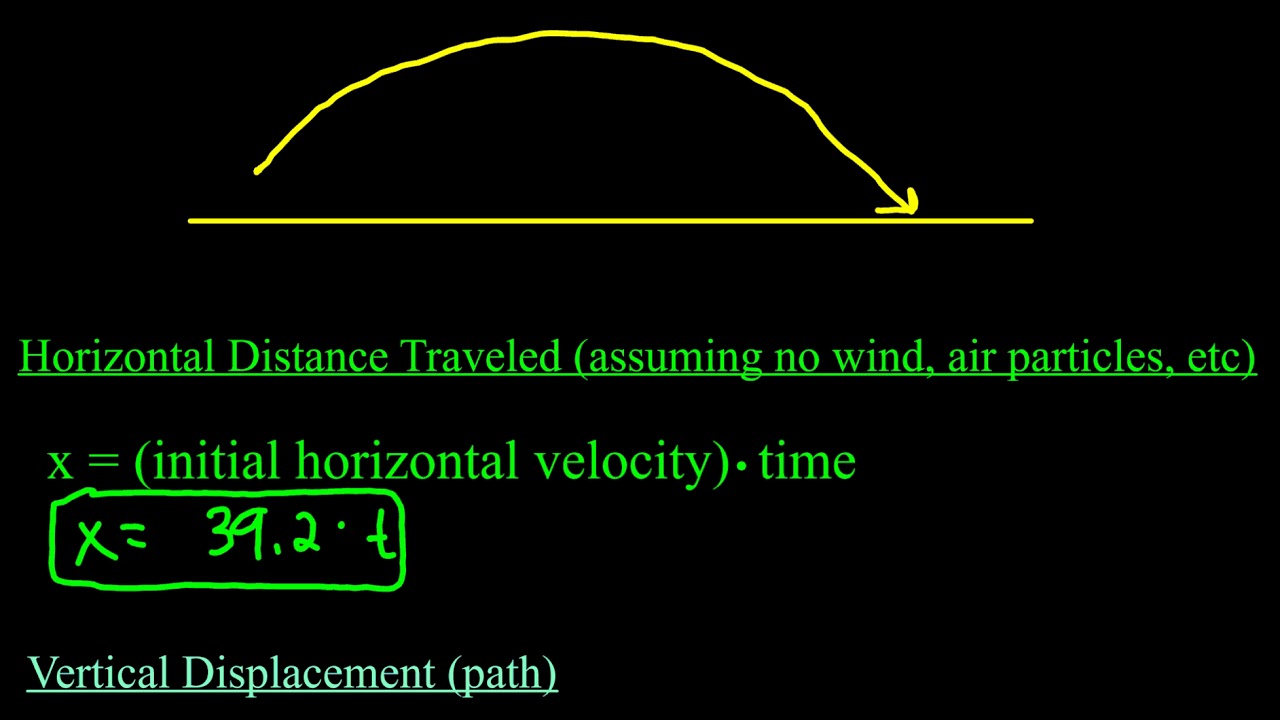
How to set up parametric equations with projectile motion situations.
 tawdry finch
How can I stop it from going up? I checked constraints on the Y axis, but it doesn't seem to work. (ignore the low quality and fps)
 haughty fractal
timid dove
You're basically looking for a set of equations called parametric equations for ...
haughty fractal
timid dove
You're basically looking for a set of equations called parametric equations for ...
Thank you very much
 normal leaf
Hey, I'm trying to make a realistic blob simulation in unity. I found a method by added a cloth component to a sphere, but it works alright. Is there any presets in the cloth component that would the sphere look like a blob or would generate a sphere using code and altering it vertices be better. Thanks.
normal leaf
tawdry finch
How can I stop it from going up? I checked constraints on the Y axis, but it doe...
Do you mean you want the player to fall?
If so, you have to uncheck freeze position on the y in the Rigidbody component.
tawdry finch
i want it to not move on the Y axis
tawdry finch
nope
normal leaf
Its part of the Character Controller, you could prob make the slope limit 0
tawdry finch
hmm i only have a rigid body and box collider on it
tawdry finch
tawdry finch
hmm i only have a rigid body and box collider on it
Actually, that was another one, but even with the slope 0 it still goes on top of the ramp if it's above the player
or if the object is small
or if that is not possible, then how can I make it move normally up and down on he ramp?
 pliant fern
I'm still stuck on how I'm meant to do this, I know I probably need to calculate something relative to the sphere's movement to figure out what rotation should be applied to the tube, but I have no idea how to figure out what that would be, I'm trying to make a water slide simulation where the tube moves accurately, and currently its rotation never changes because it's just following a sphere, but I want it to rotate according to the way the slide is as it would in real life
I've tried not using following the sphere but I haven't been able to get the physics right
I haven't been able to find anything helpful so far
this video is what it still looks like with the tube just following the sphere
 upbeat birch
Is it possible to access vertices of a mesh collider on a static mesh? I'm trying to estimate the slope of a surface without an array of raycasts in a grid pattern.
stuck bay
so i have a box collider and a player that is a box collider and when they impact on corners i get a collision normal of (0, 0.46, 0.89), is there any way to make it so i only get normals like (0,1,0) or (1,0,0), etc
not too sure about the inner workings of why that's a thing but i assume it has to do with resolving corner collisions where it could be multiple normals?
would appreciate some insight on it
upbeat birch
stuck bay
so i have a box collider and a player that is a box collider and when they impac...
Is this a normal of a hit point in the world space?
 quaint iris
Noob question: I have a ball with a rigidbody and a collider, a board with a rigidbody and collider at a slight incline, and two flippers with a script that makes them move in a certain direction. The idea is that when the flippers hit the ball, the ball gets launched back up the board. At the moment the result is that the ball is kind of stuck to the flipper while it moves and then continues when it doesn't. Changing the bounciness values on all three elements doesn't seem to work.
 stuck bay
upbeat birch
Is this a normal of a hit point in the world space?
stuck bay
upbeat birch
Is this a normal of a hit point in the world space?
not sure why but it fixed when i combined everything into one mesh collider so i guess that works
i have an issue now though where i get stuck against the sides of objects and fall slower even though i have physicsmaterials with 0 friction on everything
upbeat birch
stuck bay
i have an issue now though where i get stuck against the sides of objects and fa...
It's hard to imagine without the context.
 spice mirage
quaint iris
Noob question: I have a ball with a rigidbody and a collider, a board with a rig...
spice mirage
quaint iris
Noob question: I have a ball with a rigidbody and a collider, a board with a rig...
does the flipper script update the transform of the flippers, or accelerate them via the rigidbody?
in order for the flippers to accelerate the ball, the flippers need velocity
not just update their angle
so if you have a script that basically just turns their angle. as far as the rigidbody is concerned its as if they are always at 0 velocity, but is incrementially teleporting forward if that makes sense
you have to setup a hinge constraint on the flippers and give a rigidbody impulse when you wanna flip them
quaint iris
spice mirage
you have to setup a hinge constraint on the flippers and give a rigidbody impuls...
Thanks for the responses! I had a script that added torque to a rigidbody. But I had a parent gameobject with an rb and a child with an rb and a mesh collider so that it would be turned around a different axis than the center. But it turns out having 2 rigidbodies was creating problems
so I removed the rb on the child and now it's producing the correct behaviour
 reef sierra
Hey peeps, can't seem to figure this one out assuming its just me not understand correctly, code below
prints RWrist(Collider name) and 2222(Gameojbect name not collidername)
Any idea how I would get the actual collider name for otherCollider, cant find anything online related to this
 private void OnCollisionEnter2D(Collision2D col)
    {
        print(col.collider.name + " And " + col.otherCollider.name);

    }
components don't have their own names. They use the names of the GameObjects they're attached to
what are you actually wanting it to print?
reef sierra
I have 2 stickfigures hitting each other currently, so wanted to get what body part hit what body part to determine damages etc
timid dove
reef sierra
I have 2 stickfigures hitting each other currently, so wanted to get what body p...
and the body parts are modeled how?
I'd recommend the body parts be separate GameObjects if they're not
reef sierra
currently like this handsome person
 timid dove
reef sierra
currently like this handsome person
timid dove
reef sierra
currently like this handsome person
good
reef sierra
I think I see some of the issue, because the parent object has a rigidbody and that i renamed the the game objects names its returning that name
if that makes any sense lol
timid dove
not super following, no. col.collider and col.otherCollider should be the two specific colliders involved in the collision. The parent rigidbody would come from col.rigidbody but that shouldn't matter
 timid dove
reef sierra
this will prob explain it a little more
timid dove
reef sierra
this will prob explain it a little more
do you have colliders on the root objects?
reef sierra
yea which I think might be the issue, technically the root object is the body
reef sierra
@timid dove Thanks for your guidance, figured it out, was because the othercollider in this case reports itself which was the collider on the body, needed to move the script for collision detection to the bodypart I wanted the trigger on
 viral beacon
how do you set the project wide max angular velocity?
I cant find it in the physics project settings and "max rotation speed" doesnt work
no please dont tell me I have to do it per rigidbody
crinnnng
viral beacon
Is there a way to exclusively joint constrain a single axis of one rigidbody to another, like if I wanted to make a CV-joint type interaction. I currently have a u-joint like setup where the final body in the chain is joint constrained to the previous body, and this pattern is repeated until the body that has the actual force applied to it, but as angles are introduced the movement begins to get violent and inconsistent.
timid dove
viral beacon
I cant find it in the physics project settings and "max rotation speed" doesnt w...
it's in project settings under Physics
"Default Max Angular Speed"
viral beacon
ah, thanks
 quartz wyvern
for any given collider on a GO how do you check if it overlaps any other collider in the scene to know if you can place it down
overlap functions only seem to over primitve shapes not things like more complex mesh colliders
 simple hearth
When I uncheck "Trigger collider" option, the object throws itself with a huge power of rigidbody velocity
how do I prevent this, why does it do that
there is no other collider but a box collider inside the AI object which is the object I am talking about
**fixed
it seems like the Character Controller has a collider itself
and I forgot it there
that was the problem
timid dove
quartz wyvern
for any given collider on a GO how do you check if it overlaps any other collide...
Do you really need that level of accuracy for placement? You should be able to get a good estimate with one or a couple of those primitive overlap checks
timid dove
simple hearth
When I uncheck "Trigger collider" option, the object throws itself with a huge p...
- CC doesn't have a collider it IS a collider
- You shouldn't mix CC and dynamic Rigidbody
long fossil
I want to make it so that the blue ball is moving towards the left and when it hits the green player it pushes it towards the wall and when the player is being crushed inbetween the ball and the wall I want to kill the player,
how would you go about doing this?
I have tried like 4 different methods they work until the player gets pushed into the terrain one way or another
How do I deal with this

 brave latch
wtf
 onyx timber
my game randomly started removing my box colliders and rigidbodies any ideas why?
unique cave
onyx timber
my game randomly started removing my box colliders and rigidbodies any ideas why...
Its not because of randomness, that much I know
onyx timber
unique cave
Its not because of randomness, that much I know
well it worked yesterday. today all i did to the objects is added a coroutine into the script. and then i noticed my collision weren't working. so i put the script on a new cube and it works. check scene view when playing and the rigidbody and box colliders are there before pressing play. and dissapear when i press play. so i tried removing the coroutine. but didnt work 😦
oh i also copy and pasted a bunch of them. but i dont see why that would affect it
unique cave
onyx timber
oh i also copy and pasted a bunch of them. but i dont see why that would affect ...
Its really hard to help with this little information but im pretty convinced you did change something / dis something in your code that made it work like that, things doesnt happen randomly
 viral ginkgo
long fossil
I want to make it so that the blue ball is moving towards the left and when it h...
viral ginkgo
long fossil
I want to make it so that the blue ball is moving towards the left and when it h...
You can get collision points from OnCollisionStay callback
You could kill the player if there are two contacts from left and right at the same time I think
Hmm but might return you just the corners if everything is a cube
I guess best way to do this is to check with ray or boxcasts both sides during OnCollisionStay
long fossil
viral ginkgo
I guess best way to do this is to check with ray or boxcasts both sides during O...
thats what I have been doing
I'll mention you in the other channel where I sent the video
everything would work fine if only the player wont get pushed into the terrain
it somehow makes it past the terrain collider
every method I try thats the thing that ruins it
quartz wyvern
timid dove
Do you really need that level of accuracy for placement? You should be able to g...
well i want to be able to check that the object is inside the perimeter which could be a custom defined shape it can't protrude outside of it
 frail kelp
Can anyone help me get area effector 2d to apply drag? Game is 2D top down, I just want something that when anything moves over it it slows it down (drag) but it doesnt seem to be working

 timid dove
frail kelp
Can anyone help me get area effector 2d to apply drag? Game is 2D top down, I ju...
timid dove
frail kelp
Can anyone help me get area effector 2d to apply drag? Game is 2D top down, I ju...
how are you moving the object(s)?
frail kelp
timid dove
how are you moving the object(s)?
Adding velocity
frail kelp
its visual script
 timid dove
If you're setting the velocity directly in your code or something, especially every frame, then the damping isn't going to do anything really
timid dove
frail kelp
its visual script
yeah damping isn't going to affect you then
Honestly I wouldn't futz around with area effectors
frail kelp
Really? I tried applying drag to the rigid body itself and it slowed down the movement, so I thought damping would work as well
timid dove
depends if you're setting velocity every frame or what
frail kelp
Velocity is being set every frame. Why does adding linear drag here work, but adding it with damping doesnt?
 frail kelp
timid dove
Honestly I wouldn't futz around with area effectors
frail kelp
timid dove
Honestly I wouldn't futz around with area effectors
Whys that?
timid dove
frail kelp
Whys that?
would be simpler to just use a trigger collider and have it change the velocity in your code
frail kelp
timid dove
would be simpler to just use a trigger collider and have it change the velocity ...
Like change the velocity determination to factor in what its walking over? That sounds like it wouldnt work well if I have multiple things I want affected by the terrain
timid dove
frail kelp
Like change the velocity determination to factor in what its walking over? That ...
why wouldn't it work well with multiple things affected by the terrain?
frail kelp
timid dove
why wouldn't it work well with multiple things affected by the terrain?
Wouldnt you have to do something like... when you want something to move, you multiply by a speed factor to see how much it moves. So when youre colliding with the slow down effect, you modify that speed factor but also need to revert it when they exit. That seems like ti could get messy
Oh and im not sure if thats easily editable with NavMesh pathfinding speed
timid dove
frail kelp
Wouldnt you have to do something like... when you want something to move, you mu...
not really you could have something super simple like this:
float normalSpeed = 50;

void FixedUpdate() {
    if (myCollider.OverlapCollider(filter, results)) {
      currentSpeed = results[0].GetComponent<SpecialTerrain>().GetWalkingSpeed();
    }
    else {
      currentSpeed = normalSpeed;
    }
}```that's pretty simplified but... easy
then you have these colliders around with that SpecialTerrain component on them, which tells you what your speed should be when walking on it
could be a multiplier instead too
up to you
frail kelp
hm
 vague mango
I'm sorry if this is the wrong channel to post this in. I'm new to this discord. I am working on a team and we want to use Dynamic Bone on some of our assets. I've been playing around with it for some time and I can't seem to get the gravity to work on the object. I was wondering if anyone had experience using Dynamic Bone and wouldn't mind me asking you a few questions. Thank you in advance 😄
 iron lava
rb.AddForce(Vector3.up * (Phys_WaterHeight - transform.position.y) * rb.mass * 40, ForceMode.Force);
rb.AddTorque(((transform.right * -transform.rotation.x) + (transform.forward * -transform.rotation.z)) * rb.mass, ForceMode.Acceleration);
This is the code I made for bouyancy, and it works! but for some reason, if I apply this force in any direction other than 0:
rb.AddTorque(transform.right * -Vehicle_Input.y * 0.25f, ForceMode.Acceleration);
It starts to rotate faster and faster until it rotates to a point roughly north. My mass is 50 and nothing else happens. Any tips?
upbeat birch
Um, in what situation a RaycastHit.triangleIndex can be -1 for a MeshCollider hit?
bleak umbra
upbeat birch
Um, in what situation a RaycastHit.triangleIndex can be -1 for a MeshCollider hi...
when it didn't hit a mesh collider
since a RaycastHit is a struct, the index will always have a value (0 by default), which makes no sense if the struct represents a non-hit, hence -1 is used to denote an invalid hit or a situation where the concept of a hit triangle is undefined (all colliders that aren't mesh colliders)
upbeat birch
bleak umbra
when it didn't hit a mesh collider
But it hit the collider, identified it as a MeshCollider and returned a correct point on the surface. 👀

Seems it has something to do with Convex flag, but I don't know why. I assume that if the engine found a contact point on a MeshCollider and this MeshCollider has a positive triangles count, there is no reason not to have a triangleIndex value.
timid dove
upbeat birch
Seems it has something to do with Convex flag, but I don't know why. I assume th...
Convex colliders don't use the original mesh
They build a new convex mesh and use that
So the triangle mapping to the original mesh will be broken
upbeat birch
Huh. Thanks for the clarification! Is the usage Convex option more common compared to a usage of an original/separate mesh?
timid dove
you have to use convex if the collider is on a dynamic rigidbody
and convex colliders are somewhat more performant in general
I can't/won't make a judgement on how common one or the other is
they have different uses for different requirements
upbeat birch
timid dove
and convex colliders are somewhat more performant in general
You mean they are more performant comparing to an original mesh or because the engine constructs them in an optimal way?
timid dove
upbeat birch
You mean they are more performant comparing to an original mesh or because the e...
The general algorithm for detecting collisions with a convex mesh is much simpler and faster than for a concave mesh
upbeat birch
Oh, Unity does not provide acces to the convex hull that PhyX generates for the collider. Now it makes sense that I got -1 as a triangle index with Convex flag. 💡
 real flame
I'm new-ish to doing 3d collision, but am helping my kids with something.
Should rigidbody and collider components be added to the game object or the model under it?
 topaz flare
Doesn't matter (unless you use mesh collider), organisation preference, although if you set the collider on a mesh, you get the benefit of automatic resize according to the mesh dimensions
real flame
Yeah we're doing some less simple objects we imported from CAD, and are using convex mesh
topaz flare
in that case yeah, put it on the model
Unsure about the rigidbody though, I believe if you put it with the model under the gameobject, the model will move independently from the gameobject
stuck bay
can someone please help me fix this my 2d sprite is going trough my floor
timid dove
stuck bay
can someone please help me fix this my 2d sprite is going trough my floor
you'd have to explain your setup
stuck bay
pretty simpel really
 timid dove
stuck bay
pretty simpel really
timid dove
stuck bay
pretty simpel really
why do you have a script without a name
also what components does the platform have
and what does your code look like
stuck bay
I dont have any scripts?
unique cave
Aand why is there rigidbody but no collider?
stuck bay
I FORGOT ABOUT THAT
timid dove
stuck bay
I dont have any scripts?
there's a script under the Rigidbody2D
stuck bay
Thx ik kinda new
timid dove
and yeh no collider
 stuck bay
thx
it works now
but what does a rigidbody do i tought it did what a box colider does
timid dove
stuck bay
but what does a rigidbody do i tought it did what a box colider does
Rigidbodies are the basic unit of physically simulated objects. If you want something to move, be affected by gravity and forces and things knocking into it, it needs a Rigidbody.
Colliders define the physical shapes of physics objects, including Rigidbodies. A Rigidbody without a collider has no physical shape or structure.
timid dove
Doesn't feel like a perfect analogy to me, but if that makes it easier for you
 crimson jetty
Here's a strange question: is there a recommended way to have a character controller push other rigidbodies out of the way when colliding? Right now they're stopping the controller which is not what I want... I'm thinking of adding a second collider with a layer mask but not sure if that would help.. Thanks! I don't need the other rbs to stop the collider, they can just be flung out of the way
 tender gulch
crimson jetty
Here's a strange question: is there a recommended way to have a character contro...
tender gulch
crimson jetty
Here's a strange question: is there a recommended way to have a character contro...
I think CC has it's own on collision events in which you could apply force to the collided objects.
timid dove
crimson jetty
Here's a strange question: is there a recommended way to have a character contro...
also "other" rigidbodies doesn't make sense since the CC is not one
You may be better off using something like this:
https://assetstore.unity.com/packages/tools/physics/kinematic-character-controller-99131
 mighty bobcat
anyone any idea why this raycast wont his this object?
 timid dove
mighty bobcat
anyone any idea why this raycast wont his this object?
timid dove
mighty bobcat
anyone any idea why this raycast wont his this object?
"this raycast" being?
mighty bobcat
i fixed it by making a 3d collider on a 2d object
timid dove
mighty bobcat
i fixed it by making a 3d collider on a 2d object
Are you sure you didn't just want to do a 2D raycast?
Using a 3D collider means you're basically now dedicated to using the 3D physics engine for your whole game
You sure you want that?
mighty bobcat
Yes I realised i was shooting the Ray on the wrong axis 🤣
 upbeat elbow
hello my humanoid that I have downloaded from mixamo is shown out of its capsule and also just floating in the air... any suggestions?

no scripts or excessive settings were used
 nova tangle
Hoping someone can help me with spring joints.
I am making something that hangs and uses physics-interactions using a springjoint. My issue is just that even though i am setting the min and max distance, it doesn't help on the fact that the resting length of the springjoint is much larger than i wanted.
Is there no way to set the maximum distance from the connected body?
timid dove
upbeat elbow
hello my humanoid that I have downloaded from mixamo is shown out of its capsule...
First check where the object's pivot is
if the model is detached from the pivot, you need to fix it in 3D modelling software, or find a better download
Highly likely the collider is just offset though
"its capsule" < the capsule is not related to the model in any way
upbeat elbow
timid dove
First check where the object's pivot is
I assume the pivot should be on the model so its fine
although the model just floats even if there is no floor, walking animation is running on the same axis as the model is placed and the model itself doesnt fall or collide with boxes
also what I noticed is that when I try to record an animation the model returns to its "capsule" in sort of "falling" position (do you mind telling the name of it so I can google about it?)


 rotund lagoon
What's the best way to check if any part of one object is visible to another object? For example if the object is partially behind something then raycasting might hit the partially blockage
rotund lagoon
Currently the best way I can think to do it, is to cast a grid of rays; so for example cast 9 rays at the object. And if any hit the object then we can see it. For more accurate results increase the number of rays in the grid.
timid dove
upbeat elbow
I assume the pivot should be on the model so its fine
Why assume when you can check?
timid dove
upbeat elbow
Make sure your tool handle position is set to Pivot and not Center
timid dove
rotund lagoon
Currently the best way I can think to do it, is to cast a grid of rays; so for e...
Basically this, yeah. Though not really a grid. Make some empty child objects on the target object and do a LineCast to each one.
 honest granite
bending over allows players to look through a wall, any way to fix it? the whole upper part of the player with the gun glitches trough when the player bends over, looks down(using character controller)
timid dove
honest granite
bending over allows players to look through a wall, any way to fix it? the whole...
maybe make the CC radius correspondingly larger when bending?
 thin gale
How costly is colliders?
I know that some colliders are more expensive etc, but say a sphere/capsule
timid dove
Depends on the scene, your physics settings, what kinds of physics queries and interactions are happening, the collider shapes themselves, etc...
there's a lot of variables that go into it
your best bet is to profile the game on your target hardware and see how it performs
thin gale
okay, for my purpose its just so that my character dont walk through bushes etc
timid dove
Don't worry about it
thin gale
disabled colliders dont take power i guess?
i could maybe have a collider only on my LOD0
or disable them when not next to em
im on mobile btw, thats why im picky and thinking abt my performance
@timid dove appreciate the input
timid dove
Sure but we can't make some blanket statement like "colliders are costly". They are really not. In fact the physics engines are extremely optimized and unless you have thousands of colliders and hundreds of Rigidbodies physics are unlikely to be a performance bottleneck for you
Your best bet is profile your game, see which things are the costliest, and focus your efforts there.
thin gale
yeah! alright thx
 sour heath
Hey guys, how do I make it so that my object doesnt flop around when i move it? The floor is a non convex mesh collider, and the object is a convex mesh collider, with no kinematic because if it is kinematic, then it falls through the floor.
 dry island
Hello, how can I change the angular X and YZ drive of a configurable joint? When I try changing the position spring it says
Error    CS1612    Cannot modify the return value of
'ConfigurableJoint.angularXDrive' because it is not a variable
You have to set the whole struct at once
Same as how transform.position works
dry island
Like this?
JointDrive drive = new JointDrive();
drive.positionSpring = 20f;
drive.mode = JointDriveMode.Position;
joint.angularXDrive = drive;
joint.angularYZDrive = drive;
I'd just copy the existing one from the joint rather than creating a new one
dry island
How could I do that? (Sorry I'm a beginner)
sour heath
Hey so
when I hold down a key, lets say w to move forward, it doesnt fall, aka gravity does not work when i hold down a key to move my object in unity
how can i solve this?
 gleaming gorge
sour heath
when I hold down a key, lets say w to move forward, it doesnt fall, aka gravity ...
gleaming gorge
sour heath
when I hold down a key, lets say w to move forward, it doesnt fall, aka gravity ...
Depends on how you move it? If you are setting velocity, then it most likely won't fall since the gravity get overwritten by your velocity
timid dove
dry island
How could I do that? (Sorry I'm a beginner)
With the = operator.
viral beacon
is there a way to make a rigidbody with a mesh collider always slightly clip through the surface its touching so torque can be applied without interruption?
timid dove
viral beacon
is there a way to make a rigidbody with a mesh collider always slightly clip thr...
can you provide some context?
viral beacon
I want to make physically present wheels, and currently my only means of doing that is with a sphere collider. Because I would like to have more accurate collisions I wish to use some kind of cylinder mesh, but a common issue I run into is a dramatic amount of bouncing and skipping as a result of the flat faces, which makes acceleration inconsistent and causes a lot of physics-defying launches.
timid dove
Have you looked into WheelColliders at all?
They were designed for realistic wheel physics
viral beacon
they only handle collisions at a single point
and a stray gust of wind can send them clipping through the floor
 twin nebula
Does anyone know how you would connect a rigidbody to another rigidbody but have it sort of not change the rotation of the other one?
Its hard to explain let me give an example
So there's a cube with its rotation locked and a ball underneath it which is attached with a joint
How could I make the joint attach it with position only and not the rotation?
So if the ball spins it will actually spin and not try to rotate the cube with it because they're connected
That's still kind of bad
timid dove
twin nebula
So if the ball spins it will actually spin and not try to rotate the cube with i...
use a hingeJoint or other joint that allows for rotation
timid dove
Can you maybe draw a diagram of what you're trying to achieve?
twin nebula
timid dove
Can you maybe draw a diagram of what you're trying to achieve?
I'll try but I'm awful at drawing lol
I want them to move together but not rotate together if you get what I mean
@timid dove
timid dove
twin nebula
<@179367739574583296>
so wouldn't you just put a hinge joint on the ball - with the axis set to the ball's z axis, and connected to the box?
no spring
no motor
no limits
twin nebula
I'll give it a shot
twin nebula
timid dove
so wouldn't you just put a hinge joint on the ball - with the axis set to the ba...
Yep that worked. I'm an absolute idiot. Thanks lol
viral beacon
is it possible to make a rigidbody send but not recieve forces from the environment?
viral beacon
nvm I figured it out
 vague smelt
if i lower solver frequency on cloth physics will it make it run faster?
are there any other ways of lowering performance cost for cloths
timid dove
vague smelt
if i lower solver frequency on cloth physics will it make it run faster?
not so much faster but less frequently...
 turbid geyser
Quick question:
If I have an immobile trigger that is being passed over by another object because its going too fast, how I can I prevent that?
If it were mobile I'd set its "Collision Detection" to "Continuous" (which my mobile object is set too)--but I'm unsure how to handle this when it is immobile.
turbid geyser
In case it matters, this is 2D
timid dove
turbid geyser
Quick question:
If I have an immobile trigger that is being passed over by anoth...
collision detection mode is:
- not going to exist for a static collider anyway (it's part of Rigidbody)
- not really relevant for the object that is not moving
- not really taken into account for triggers.
You can do manual ray/sphere/box/capsulecasting (Or RB.SweepTest) with the moving object to see if you'll intersect it during the next physics update.
 night pecan
guys
I am doing a hit test and once I hit something I delete the object and continue hit test but I am keep hitting the same object I just deleted
my code is like
AllColliders = HitTestAtPointAndReturnAllColliders(523,23,1);
Delete(AllColliders);
AllColliders = HitTestAtPointAndReturnAllColliders(523,23,1);
//AllColliders is the same as previous colliders that I just deleted
timid dove
night pecan
I am doing a hit test and once I hit something I delete the object and continue ...
Well that code is not really decipherable... but I imagine your problem has to do with:
- Unity's Destroy doesn't actually happen until the end of the frame
- The physics scene does't actually get updated until the physics simulation step, or a manual call to
Physics.SyncTransforms
though you didn't actually explain what the heck HitTest is or how Delete is implemented
night pecan
I believe you are right
as I SLOWOOOOOOLY call each individual detect-delete, it doesn't experience the problem I described
I fixed my issue by making sure "end of frame" is reached at least once AND "a physics sim step" is finished between each hittest-and-delete calls
timid dove
night pecan
I fixed my issue by making sure "end of frame" is reached at least once AND "a p...
you can also just immediately disable the colliders
and.or deactivate the objects
then you won't have to wait for the frame to end
night pecan
I have failed in doing so
How do I immediately disable the collider AND remove a gameObject from Unity's scope
Making the gameobject that has the colliding collider inactive doesn't seem to get applied immediately even with usage of Physics.SyncTransforms
wait
wait maybe I can fix this wait
wait wait wait!
YES IT DOES WORK
YESSSS
the problem was the human error:
The editor of the code believed that he/she/it wrote Physics.SyncTransforms but
the human being did not write Physics.SyncTransforms at certain sections
 hollow echo
what do you mean? Also, 'they' is a fine singular pronoun
stuck bay
Hello! I believe I talked about physics in the unity general channel which may have been the wrong place to do so, I will post a screenshot here, if someone can look at my issue i'd be glad, I believe it to be a... huge problem honestly

 half creek
hello! I'm having an issue with inaccurate collisions and it seems like a good place to ask for help. Bullet objects (with a box collider 2d set as triggers) often end up half way in walls while my intention is to make them stop during the very first impact. Collision detection is set to "continuous" and I changed Fixed Timestep stat in project "Time" settings to 0.01. I also use OnTriggerEnter2D as the method to set projectile's speed to 0. Do you maybe know what might be causing this or have some tips to improve the collision quality with relatively low performance impact?

 prime flower
half creek
hello! I'm having an issue with inaccurate collisions and it seems like a good p...
prime flower
half creek
hello! I'm having an issue with inaccurate collisions and it seems like a good p...
whats your physics timestep set at?
timid dove
half creek
hello! I'm having an issue with inaccurate collisions and it seems like a good p...
This is how triggers work. They don't do the kind of interframe collision checking as non triggers. They just check for overlap each frame
You could do BoxCasting in FixedUpdate if you want to improve it.
Or - when you get the OnTriggerEnter2D, maybe check the previous frame's position, do a boxcast from there, and reposition yourself right outside the wall?
half creek
prime flower
whats your physics timestep set at?
isn't it Fixed Timestep (at least that is what google told me)? If yes then it's set to 0.01
half creek
timid dove
This is how triggers work. They don't do the kind of interframe collision checki...
alright, thanks for explaining! I will try out your ideas and see how it goes
prime flower
half creek
isn't it Fixed Timestep (at least that is what google told me)? If yes then it's...
That’s kinda low imo
half creek
yeah, I changed it for testing purposes, probably will change it back to 0.02 (default value) or even higher if it won't affect the gameplay too much
prime flower
half creek
yeah, I changed it for testing purposes, probably will change it back to 0.02 (d...
sorry i misread and thought you had it set to 0.1
I usually go with something that 60hz fits into
30/60/120hz physics
noble zodiac
How good of an idea would mesh colliders on ragdolls be? Assuming its possible.
timid dove
noble zodiac
How good of an idea would mesh colliders on ragdolls be? Assuming its possible.
It's not a good idea nor really possible
You'd have to update the mesh every frame to match the pose, which is prohibitively expensive
It'd also be a concave mesh which has lots of physics limitations
noble zodiac
I was looking at games like blade and sorcery and boneworks having no idea how the colliders on all the bodies work. I mean, it cant just be a normal ragdoll since you can stab any part of the mesh having 0 gaps
noble zodiac
I recon I'll be fine with updating the mesh. I could have it use basic colliders like capsules and boxes while precise colliders are not needed. Also I should probably have a lower poly version of the body in same pose as the high poly to use for precise colliders. Dunno I'll test some stuff.
 deep rain
@noble zodiac they are basically just tons of hitboxes consisting of spheres and capsules, and sometimes boxes
the gaps you have in traditional ragdolls are really veeery small and if for some reason you would need more accurate ones then having a set of non-selfcolliding spheres for joints would probably work
timid dove
not only would that work but it'd make it a lot easier to do things like detect when a particular joint was hit and detach limbs etc..
Using a MeshCollider good luck determining what part of the body has been hit by anything. You'd have to do something like take the textureCoord of the hit and have some kind of UV mapping to body parts somewhere.
 rancid tiger

Hey guys
trying to figure out why this collider i put on the face isn't moving with the face
just kinda stays there
or like what I need to do to get a collider that moves with the model lol
it is for a VRM model
timid dove
rancid tiger
trying to figure out why this collider i put on the face isn't moving with the f...
you need to attach colliders to the bone transforms in the hierarchy.
rancid tiger
so perhaps I should just make an object within the bone structure, I'll try to do that
and then apply that VRM sping bone collider group script to it
oh i think I can add that script directly to the bone
beautiful, thanks, that worked
 ocean palm
hey guys i downloaded this asset pack (https://www.kenney.nl/assets/marble-kit), import into my project, grab one of the corner track pieces, add mesh collider + make concave, add rigidbody, but then when i add my ball, even though it collides with the piece, the piece just acts like a big block? like the ball doesn't roll down the track in the middle, just seems to coast on top of it instead? (also not sure where else to post this question, sorry please let me know if not appropriate for this area)
timid dove
ocean palm
hey guys i downloaded this asset pack (https://www.kenney.nl/assets/marble-kit),...
sounds like you marked the collider as convex
which is the opposite of concave
ocean palm
timid dove
which is the opposite of concave
right but if i don't do that, it just doesn't collide at all? the ball passes straight through?
timid dove
ocean palm
right but if i don't do that, it just doesn't collide at all? the ball passes s...
remove the Rigidbody from the track piece. Make sure it has a MeshCollider not marked convex.
make sure the ball has Rigidbody that is not kinematic, and a SphereCollider. For good measure use continuous collision detection on the ball's RB
ocean palm
timid dove
make sure the ball has Rigidbody that is _not_ kinematic, and a SphereCollider. ...
omg thank you that works lol! i thought you needed a rigidbody to have any kind of collision at all for some reason but now i think i get what's going on - the collider is the actual collider (duh), and the rigidbody just grants physics properties
timid dove
ocean palm
omg thank you that works lol! i thought you needed a rigidbody to have any kind ...
Colliders provide collision - Rigidbody provides velocity/forces/mass/torque etc. Yeah you got it
 zenith fox
why does unity think the small collider under the player is touching the planet

i have a variable that tracks the amount of collisions and in this moment (i paused the game) it is at 1
also it only considers objects tagged as "Ground"
timid dove
zenith fox
i have a variable that tracks the amount of collisions and in this moment (i pau...
You should print the name of the object it's touching, just to make extra sure it's the ground
timid dove
zenith fox
why does unity think the small collider under the player is touching the planet
how zoomed in are we here? What's the approximate distance in units between the player's feet and the planet
also what kind of collider is the planet made of
zenith fox
timid dove
also what kind of collider is the planet made of
circle collider
 paper basalt
Why is the bullet spawner pivoting around and not just moving with the parent?
timid dove
paper basalt
Why is the bullet spawner pivoting around and not just moving with the parent?
it is moving with the parent
you jsut have tool rotation set to global
no?
nvm it's on local
it'd be due to your script then
paper basalt
ah ok thanks
rancid tiger
paper basalt
ah ok thanks
nice name : )
paper basalt
Thanks
 nocturne schooner
hi i hope this is the right channel!
i'm having an issue with springbones, they don't move with the rest of the object when in play mode, and i'm getting these error messages (not sure what they mean as i'm not unity-literate)


 torpid basin
Hey guys, I'm working on implementing my own simple physics engine.
I'm currently using casts (ray, box, sphere etc) to determine collisions.
This works when a moving object colliders with a stationary object. However when two moving objects attempt to occupy the same empty space, they end up inside each other, since their respective cast told them the space was empty.
My question is: How do physics engines normally handle this? And would anyone have any ideas on how I could attempt to handle it?
timid dove
torpid basin
Hey guys, I'm working on implementing my own simple physics engine.
I'm currentl...
They rely on depenetrating objects that ended up inside one another
In fact when you use Unity's built in physics, if you use Discrete collision detection, it doesn't do any pre-emptive raycasting at all
it's all just depenetration
torpid basin
Very interesting. Does anything penetrate for 1 frame before being depend in the following frame?
Or is it all calculated in a single frame such that no pen ever visibly occurs?
timid dove
If you're using the physics engine properly then you should never see penetration visibly
If you do something like moving objects outside of the physics engine (e.g. moving Transforms directly), you will see them penetrate until the physics engine gets around to simulating, at which time they'll depenetrate
torpid basin
Fantastic, thank you very much for this
I will attempt to implement a similar system(:
timid dove
torpid basin
I will attempt to implement a similar system(:
note that PhysX is also open source so if you dig around you can find the source code for how it does this stuff too
My point is a similar function may be useful for you to create 😛
torpid basin
I see; an excellent resource! Thank you:D
stuck bay
hmmm, currently if my ragdolls fall from a big height they go all jellified for a few moments before settling when they hit the ground, anyone know how to counter that? is it the velocity doing it and I should clamp it?
 gusty cave
does anyone know why my raycast's do not register a hit with a non-convex mesh collider
 warm basin
can anyone help me with my wall and player bounce off each other and not standing still while moving horizontally across the wall
torpid basin
@warm basin Maybe, I've had similar problems. Care to elaborate?
Hey guys.
Currently getting enormous results for direction and distance outs when using Physics.ComputePenetration
Anyone have any thoughts on this?
bleak umbra
torpid basin
Hey guys.
Currently getting enormous results for direction and distance outs whe...
Are they negative? Are your objects large? Are you viewing them in scientific notation?
torpid basin
sometimes, no and no.
Thank you for the response! But I think I discovered the problem was that sometimes the objects weren't actually overlapping
@timid dove Thank you for the information about Depenetration! I've just successfully implemented it into my physics system(:
noble zodiac
Is there a way to have Rigidbody use collider from child? Or at all a way to specify a collider that Rigidbody should use?
bleak umbra
noble zodiac
Is there a way to have Rigidbody use collider from child? Or at all a way to spe...
it will use all of them unless you exclude their interaction via layers & the physics matrix
noble zodiac
It appears so. I just had some other stuffed messed up so thats why it didnt work
 drowsy copper
how do i make a rigidbody 2d work with a tilemap collider?
timid dove
drowsy copper
how do i make a rigidbody 2d work with a tilemap collider?
"work with" in what way?
If you want the player to collide with other colliders you give it a collider of its own
drowsy copper
my tilemap has a tilemap collider 2d and my player has a rigid body 2d
theres also a composite collider 2d in the tilemap
my player just falls through the ground
timid dove
drowsy copper
my player just falls through the ground
As I said
the player needs a collider if you want it to collide with stuff
drowsy copper
what kind of collider
timid dove
any 2d collider you want
drowsy copper
i tried a box collider but it didnt work
timid dove
did you try a BoxCollider2D?
drowsy copper
yeah
timid dove
you did something wrong
try it again
Also show the inspectors of both objects you expect to collide
 urban geyser
I have a quick question, let say I have a cube collider with another object, a terrain, but half of the cube is touching the terrain, how can I know how much of it is colliding?
timid dove
and make sure you're not moving your character in a non-physics friendly way
timid dove
urban geyser
I have a quick question, let say I have a cube collider with another object, a t...
there's no built in way

 urban geyser
timid dove
there's no built in way
urban geyser
timid dove
there's no built in way
Okay well thanks anyway
timid dove
drowsy copper
this is the player
looks fine although it's odd that your player has a Tilemap
timid dove
turn on gizmos and make sure the colliders are actually in the right places
urban geyser
Okay well I got an idea I will put 2 colliders on my track and if both are colliding its maximum grip if not its half
warm basin
torpid basin
<@395412809459957760> Maybe, I've had similar problems. Care to elaborate?
@torpid basin I think I figured it out you have to use velocity instead of simple horazontal, and vertical
urban geyser
I have my collider attached to an object that has a rigidbody parent but the collider doesnt detect collisions
timid dove
urban geyser
I have my collider attached to an object that has a rigidbody parent but the col...
what exact behavior are you looking for when you say "detect collisions"?
 vagrant pecan
Hey so I'm using a Point Effector 2D to attract my player to a specific rigidbody, but for some reason, it only brings the player to the same vertical height as the point it's supposed to be attracted towards, and barely moves it at all horizontally. I was wondering if anybody knows why it does this, or how to fix it.
 timid dove
vagrant pecan
Hey so I'm using a Point Effector 2D to attract my player to a specific rigidbod...
timid dove
vagrant pecan
Hey so I'm using a Point Effector 2D to attract my player to a specific rigidbod...
does your player have code setting its velocity every frame or something
 white portal
is there a way to stop my character from getting caught on the vertices of polygonal colliders?
 timid dove
white portal
is there a way to stop my character from getting caught on the vertices of polyg...
timid dove
white portal
is there a way to stop my character from getting caught on the vertices of polyg...
use composite collider
or wait are you asking about the.. cloudy part?
What do you want to happen there?
white portal
on the character or the cloudy bit
timid dove
on the environment
white portal
so the cloud has an ovular collider
and my character gets caught when walking over

i want him to be able to smoothly walk over it
 valid warren
I used a 2d PolyGram collider to draw around the edge of a GO but I wanted it to block the character from going outside the GO rather than the inside
timid dove
valid warren
I used a 2d PolyGram collider to draw around the edge of a GO but I wanted it to...
use an EdgeCollider2D instead
valid warren
Thank you!
 graceful cove
white portal
i want him to be able to smoothly walk over it
graceful cove
white portal
i want him to be able to smoothly walk over it
Do you want him to walk without touching it? If so, you need to look over the project settings and disable the collision

 terse chasm
Hey, so I've more or less exhausted the obvious routes to take when looking up tutorials/docs on how I can exactly accomplish this, but I've been trying to figure out how to do something like this https://streamable.com/anpn0

(Sorry if its the wrong channel for this btw)
What I want is something just like this, where a Z axis is simulated convincingly enough in a 3/4 top down view. If anyone has any pointers to where I could learn more or what I could research that would steer me in the right direction that would be greatly appreciated.
What's important is the jumping and wall collisions btw, I've already gotten the gist of walking on a 2d space like this.
timid dove
terse chasm
Hey, so I've more or less exhausted the obvious routes to take when looking up t...
One way is to simply use 3D physics and 2D art
white portal
graceful cove
Do you want him to walk without touching it? If so, you need to look over the pr...
I want him to walk on the curved collider without getting stuck
About 10% of the time he'll get stuck on the vertices of a triangle. It looks like the collider is made of triangles
graceful cove
white portal
I want him to walk on the curved collider without getting stuck
You can use a capsule collider instead of a box collider.
That's what most people do usually.
white portal
On my character?
graceful cove
Yep
Or you can draw a collider with polygon collider that looks like that :

The most important part is the bottom.
white portal
okie dokie. i'll give the capsule a shot firstand see what happens. thanks!
terse chasm
terse chasm
What I want is something just like this, where a Z axis is simulated convincingl...
I think a solution Ive found from looking at threads of other people having this problem, I think simulation a Z axis in an integer attached to the player that dictates whether certain walls are colidable and what floors can be stood on
 strong hedge

 light cradle
hey i am working on a 2D top down game and i want to do Rigidbody2D.AddForce but my player then flies infinitely, how do i solve this (gravity in a top down game?)
timid dove
light cradle
hey i am working on a 2D top down game and i want to do Rigidbody2D.AddForce but...
it will keep accelerating as long as you keep adding force
light cradle
timid dove
it will keep accelerating as long as you keep adding force
i only add force once but there is no gravity to stop it? i think that's the problem idk
timid dove
light cradle
i only add force once but there is no gravity to stop it? i think that's the pro...
Do you know basic physics
light cradle
timid dove
Do you know basic physics
yes. and this sentence doesnt help anyone
timid dove
Well if you know basic physics it's not a mystery why applying a force to something makes it move forever, barring other outside forces.
light cradle
timid dove
Well if you know basic physics it's not a mystery why applying a force to someth...
ik? thats what i mean
rancid tiger
hey guys!
how would you go about fixing this issue, I'm stumped, my brain is fried trying to think of a solution
I don't want her arms to pop out of the red drape there
unique cave
rancid tiger
It seems those "sticks" (green ones) are not connected together in any apparent way. You could add some joints there (blue ones)
 rancid tiger
Of seriously? I can add joints like that?
can they stretch though?
I'll give it a try I suppose, I can do this in blender?
rancid tiger
unique cave
It seems those "sticks" (green ones) are not connected together in any apparent ...
thank you for the idea, i kept thinking of doing something sideways like that but, I didn't think it would be possible, if you're saying it is I'll take a 2nd look at it... I wonder how I could make "joints".
I'm going to bed but if you've got any other hints for me please let me know, going to be working on this all day tomorrow probably
 peak cloak

 light gust
How do i stop a caracter from beeing able to push an enemy in 2d uniy? @ me if u can help please
unique cave
rancid tiger
I'll give it a try I suppose, I can do this in blender?
No you cant. How did you make the cloth? Is that unitys default cloth component? I thought you did use joints already to make the cloth
rancid tiger
unique cave
No you cant. How did you make the cloth? Is that unitys default cloth component?...
It's VRM Spring Bones, not cloth component.
how can I make joints in Unity? I suppose I'll google that
 trail iris
Hey everyone, does anyone know why physicsene.simulate on a 2D physics scene will not simulate 2d physics in that scene but instead will simulate 3D physics in all other scenes?
timid dove
trail iris
Hey everyone, does anyone know why physicsene.simulate on a 2D physics scene wil...

There's a 2D version
trail iris
Yeah thats what i did, I made a physics scene of type 2D and i ran simulate on that
trail iris
timid dove
It should only simulate the one you call simulate on
Scene newScene = SceneManager.CreateScene("physicsScene", new CreateSceneParameters(LocalPhysicsMode.Physics2D));
PhysicsScene physicsScene = newScene.GetPhysicsScene();
//add some stuff to it
physicsScene.Simulate(1f);
and i simulate the physics scene in a corutine of yield real time
what it does now is it simulate all the 3d stuff in my main scene, and does nothing to whatever I add to it
timid dove
trail iris
Scene newScene = SceneManager.CreateScene("physicsScene", new CreateSceneParamet...
You need to get the 2D physics scene
Right now you're getting the "global" 3D pysics scene because that scene doesn't have its own 3D physics scene and you're asking for its 3D physics scene
Should've been a big tipoff that you have a PhysicsScene not a PhysicsScene2D
trail iris
Oh yikes that might be the reason
Let me try it out
Was mindbogged by the behavior
But i did a scene validation of type 2d and it says its valid
Weird
timid dove
trail iris
But i did a scene validation of type 2d and it says its valid
wdym
yeah the scene is valid
ofc it is
you just made it
trail iris
omg it's moving, finally
trail iris
timid dove
You need to get the 2D physics scene
thanks man! Was stuck on it for forever
noble zodiac
Would mesh collider be better in terms of performance in this situation or would primitives still win? Lets imagine that we have mesh collider with n amount of faces and something else with the same n amount of box colliders. The position for each face will update every frame and the position of each box will update every frame. Both have rigidbody on them, so mesh collider will be set to also convex. This is probably a very weird question.
 slim olive
I'm using a character controller and it won't collide with other object when calling charactercontroller.move
but I want to recieve oncolliderenter() callbacks
what's the alternate solution?
nvm I was supposed to use oncontrollercolliderhit()
valid warren
Can anyone explain why the boatObj behaves in this way? as it nears 180 in either direction it slows until it stops at 180
timid dove
valid warren
Can anyone explain why the boatObj behaves in this way? as it nears 180 in eithe...
Presumably due to your code
valid warren
            if (drivingBoat)
            {
                playerObj.GetComponent<wasdMovemnt>().enabled = false;
                Vector3 pos = boatObj.GetComponent<Transform>().position;
                playerLock.enabled = true;
                if (Input.GetKey(KeyCode.W))
                {
                    pos.y += movementSpeed;
                }
                if (Input.GetKey(KeyCode.S))
                {
                    pos.y -= movementSpeed;
                }
                if (Input.GetKey(KeyCode.A))
                {
                    rotation.z += rotationSpeed;
                }
                if (Input.GetKey(KeyCode.D))
                {
                    rotation.z -= rotationSpeed;
                }
                boatObj.GetComponent<Transform>().position = pos;
                boatObj.GetComponent<Transform>().rotation = rotation;
            }
this is the code controlling the boat
 rustic parrot
Hello, is there a way for a GameObject with a collider and without a rigidbody to get blocked by another GameObject who this one have a collider and a rigidbody ?
I'm instantiating a lot of gameobject with only a collider so i would like to dodge the rigidbody component since it's heavy on performance, thanks
bleak umbra
rustic parrot
Hello, is there a way for a GameObject with a collider and without a rigidbody t...
you can only simulate collision responses (forces caused by a collision) if you add a rigidbody to the objects you wish to be so affected. You can ofc detect the collision and do the handling of any response to it in custom code, without a rigidbody, which could make sense if your custom handling is significantly less complex or substantially different from the default handling.
rustic parrot
bleak umbra
you can only simulate collision responses (forces caused by a collision) if you ...
I see Aniki thanks for the information, guess i should code it then because when i put rigidbody on the hundred of prefabs i'm instanciating it goes from 60fps to 30fps
bleak umbra
it will go down even more if you custom-code it unless you have a good reason to believe why your custom solution will be faster
the best strategy to improve physics performance is to avoid unnecessary collisions (by setting up physics layers)
rustic parrot
Well i don't know what to do a ctually
rustic parrot
bleak umbra
the best strategy to improve physics performance is to avoid unnecessary collisi...
seems like something i can do
If you want to visualize : https://www.youtube.com/watch?v=qZk7fAq8TuA

i just want for the enemy sprite to detect walls when the 3D environment and props will be there, for the moment they just have a sphere collider
 raw lance
Added a skinned mesh renderer model to my player character, and a mesh collider to the parent object, but now the player object falls through the world. Am I missing a component?
unique cave
raw lance
Added a skinned mesh renderer model to my player character, and a mesh collider ...
Do you get errors? You cant use non convex mesh colliders with dynamic rigidbody. Dynamically changing the shape of a mesh collider is not gonna work, using compound colliders is the industry standard for character colliders
timid dove
raw lance
Added a skinned mesh renderer model to my player character, and a mesh collider ...
yeah the collider would need to be conve which probably defeats the purpose. What AleksiH said is the way
besides even if a concave MeshCollider worked at all you still wouldn't be able to deform it with the animations of the character
raw lance
Ah so use multiple different shaped colliders
timid dove
Most of the time you build an animated character's collider out of primitives. Capsules, spheres, boxes.
Convex mesh colliders are allowed too but are not as performant.
terse chasm
Am I massively overthinking things. As part of a character animation, a child element of the parent Player does an animation and I want that child rigidbody to transform up by a certain measured amount. Everywhere I look it seems you have to work with a Vector2 and do some multiplications. Is there a way to just say something like "position.y += 20" in simpler terms
 wide nebula
terse chasm
Am I massively overthinking things. As part of a character animation, a child el...
wide nebula
terse chasm
Am I massively overthinking things. As part of a character animation, a child el...
No, you cannot modify a single axis of the transform of an object.
terse chasm
wide nebula
No, you cannot modify a single axis of the transform of an object.
https://www.youtube.com/watch?v=GtX1p4cwYOc knowing that, and after watching this, I think I get a better idea of how things work. Say I wanted to make a sliding block that the player can push. Instead of having the block slide X amount, it would transform towards a sibling point object. Does that sound right?

Learn how to move platforms in any direction and how to move the player with them.
See how to upgrade your platform here:
👉 https://youtu.be/pWh5G17US5U
✅ Get my Courses with discount:
👉Udemy: https://www.udemy.com/course/unity2dmaster/?couponCode=UNITY-LEARN-FASTER
👉Skillshare: https://www.skillshare.com/r/profile/Mario-Korov/902436215?gr_tch_...
wide nebula
I'm not going to watch that. If you want to push something without using physics, you can just move it in the direction the player is moving.
terse chasm
I wasn't begging you to watch it but thanks otherwise
 cedar jay
are colliders a part of the physics? I suppose 😅 so here's a question:
is it okay if I setup a custom collider this way? (better to say multiply colliders, because there are 20 convex parts)
should I also somehow disable the usage of the colliders for lod1-4?
 timid dove
cedar jay
are colliders a part of the physics? I suppose 😅 so here's a question:
is it ok...
timid dove
cedar jay
are colliders a part of the physics? I suppose 😅 so here's a question:
is it ok...
What are we looking at exactly? Which objects have collider(s) on them?
I would say for an LODGroup, that physics should not generally be part of that, just Renderers. The colliders should be on a separate object which doesn't change. It kinda seems like you've done that here but hard to tell
cedar jay
timid dove
What are we looking at exactly? Which objects have collider(s) on them?
This is a rock prefab with 4 lods and a mesh collider, which consists of 20 convex parts
I just didn't know how to parent (?) the imported colliders to the main rock prefab 🤔 couldn't find much info on internet either and figured out this way, but wasn't sure
timid dove
cedar jay
are colliders a part of the physics? I suppose 😅 so here's a question:
is it ok...
right click the BIG_desert_rock_08_colliders thing here and go to Prefab -> Unpack Completely
Then you can freely move its child objects around as you wish
does that help?
cedar jay
Wait wait wait, I think I didn't ask the question in a right way
The prefab (rock + its lods) was created/packed in unity.
I imported the colliders as a separate mesh.
I added the colliders prefab to the rock prefab.
Applied mesh collider to the imported collider meshes.
Is this way of setting up a custom collision correct?
Since I cannot apply a mesh collider to the rock mesh itself due to its complex shape with multiple concavities
cedar jay
timid dove
sorry wasn't sure what you were asking
My bad 😅 should have written step by step at the first time
Thank you for your help!
 umbral galleon
Pls i need a vehicle drifting controller for my car model in unity
wide nebula
This isn't the place to ask for free handouts. Do some research, make an effort, and ask questions here.
 narrow sigil
how to make seesaw like platform?
timid dove
narrow sigil
how to make seesaw like platform?
hinge joint
narrow sigil
timid dove
hinge joint
i tried, but not updating collision position
narrow sigil
timid dove
hinge joint
got somthing working, ty
prime flower
any physics experts here?
I'm wondering if there's a way to stop a ball from bouncing as it rolls over the segment where 2 physics meshes join
I have a Unity Terrain Collider that I'm trying to "stitch" a separate physics mesh to
I know it's a common problem
Oh wow it was just the Default Contact Offset...
 verbal aurora
Hi guys.
I'm trying to create a VR drums simulation game in Unity.
I set up rigidbody and colliders on both hands (stick models) and drum parts, I managed to get a sound upon hitting, although there is no "physical" collision between those two, it behaves like sticks would have no physical models, just like a ghost it just goes through the drum.
I'd love to enhance it with the physical "touch" and some vibrations upon hitting, is there any solution to this? I would be really thankful for help, because I'm struggling to get this work for a few days, I watched a lot of tutorials, did everything step by step but I just can't make it work.
I experimented with a lot of setups - changed colliders, rigidbodies, gravity or kinetic. What could I be doing wrong?
 loud drift
please, help! any idea if it is possible to combine multiple PhysicsScene into a single one?
 rich totem
how can i do a simple ragdoll for this creatue

i guess it has something to do with character joints
i cant do a humanoid ragdoll , cuz there are legs missing pelvis...
timid dove
Look into Articulation Bodies / articulations instead IMO:
https://docs.unity3d.com/Manual/physics-articulations.html
 lofty coral
I have an Ai thats patrolling around a surface. I want it to be able to see things with an RayCast but the raycast is wider than just a dot in the middle. I want the ray to be like a horizontal line so that the Ai can see further to the sides than just the middle. any ideas how i could make this happen?
timid dove
lofty coral
I have an Ai thats patrolling around a surface. I want it to be able to see thin...
use a BoxCast
or SphereCast
Or CapsuleCast 😉
 pure mist
Is this room only for Legacy physics or do you guys deal with DOTS physics as well?
narrow sigil
for the config Joints, how do i slow the return position so i can continue to run up the ramp quickly? so it returns slowly so i got time https://gyazo.com/6685f68d5d7f266f4a18801f8c3ce70b
 unique cave
narrow sigil
for the config Joints, how do i slow the return position so i can continue to ru...
unique cave
narrow sigil
for the config Joints, how do i slow the return position so i can continue to ru...
Increasing the mass should do the trick
narrow sigil
unique cave
Increasing the mass should do the trick
If I increase mass, the platform won't rotate all the way
unique cave
narrow sigil
If I increase mass, the platform won't rotate all the way
Make the spring weaker then
You can also use the motor via c# script to have more control over it but id not if controlling the spring and mass (of the player/platform) is enough
 lean hamlet
I am studying a little bit of constrains.
I have an object B paired to object A
If object A moves position, object B moves with it, however i don’t want to rotate object B if object A rotates.
How do I set up this?
 jolly vigil
This is really basic shit, I'm new. But, I'm trying to make a basic 3d game. I have the terrain, got the camera movement, character movement. All works fine, but if my character hits the ground too fast it will simply just fall through the floor. How do I fix this?
unique cave
jolly vigil
This is really basic shit, I'm new. But, I'm trying to make a basic 3d game. I h...
How are you moving the character? If using rigidbody, change the collision detection mode to continuous
 gritty isle
i want an object to bounce of walls only if is impacting at high speed, i have tried like this and by checking the speed on the collision but on both ways the velocity go to zero before bouncing of the wall so it doesnt works, how can i capture the speed before the impact without doing it resource heavy? i have some ideas but i think they might be to heavy
 narrow sigil
unique cave
Make the spring weaker then
narrow sigil
unique cave
Make the spring weaker then
i see so many spring options, which ones? they wont go negative?
timid dove
gritty isle
i want an object to bounce of walls only if is impacting at high speed, i have t...
OnCollisionEnter gives you a Collision struct which has a relativeVelocity property which tells you how fast the two objects were going relative to each other. You can use that.
https://docs.unity3d.com/ScriptReference/Collision-relativeVelocity.html
unique cave
narrow sigil
i see so many spring options, which ones? they wont go negative?
the Spring under the spring category. actually Id probably increase the damper and not touch the mass. so Spring, Damper and rb.mass are the options you can play with, maybe also rb.angularDrag
 dire ingot
how to make rigibody2D move at a speed without physical randomization?
timid dove
dire ingot
how to make rigibody2D move at a speed without physical randomization?
wdym by "physical randomization"?
dire ingot
I need to calculate the distance of client movement on the server so I need it to be accurate
timid dove
If you want it to move at some specific velocity, just set its velocity to the velocity you want
timid dove
dire ingot
I need to calculate the distance of client movement on the server so I need it t...
again wdym by "physical randomization"?
 wet fulcrum
Hello, I have an issue that I've been trying to solve for 20+ hours in my android 2d game, is a small jitter every 2-3 seconds, if the camera is static the player jitters and if the camera is moving then the jitter is evident on the background. I'm using physics 2d and cinemachine. Rigidbody interpolation is on. And I've tried a simple script that adds force to an object in one direction and it's movement is not smooth also
Is it a setting I just have to turn off? I even asked a tarotist and she said it was bad luck and to give up
Should I?
timid dove
wet fulcrum
Hello, I have an issue that I've been trying to solve for 20+ hours in my androi...
Show:
- your player movement code
- your camera follow script and/or cinemachine brain settings
 timid dove
wet fulcrum
Is not letting me upload text files
timid dove
wet fulcrum
Is not letting me upload text files
#854851968446365696 for how to share code here (check the bottom)
wet fulcrum
So I'm going to delete things but that's the whole thing if you need it
oh ok
https://gdl.space/halayufafa.cs Class it inherits from
actual class

Main class short https://gdl.space/opanuyugup.cs
timid dove
wet fulcrum
Main class short https://gdl.space/opanuyugup.cs
And... the camera code?
wet fulcrum
cinemachine brain pic
timid dove
oh right
what happens if you set update method to "Late Update"?
(and you did say your Rigidbody2D has interpolation enabled right?)
wet fulcrum
yes
I already tried that but I can do it again
I'm not that new, I have a few months
same issue with late update
btw issue on;y in my phone
phones
poco x3 nft and pixel 6
and maybe others
But I've only tested it on those
not on pc build
https://gdl.space/ulopuhawig.cs CharacterController class
Where you get the input change SimpleInput to Input and JumpButton.button.value to Input.getKeyDown any key
then delete the JumpButton.button.value = false just down those if statements
If you don't have any issues its fine, to test it on mobile you'll have to add a mobile input I use Simple Input.
Btw I doubt it has to do with the movement script or Cinemachine, a simple project with 2d shape adding it force had the same issue
dire ingot
how to keep speed on collision with collision2d. I don't want the speed to be reduced by friction with the wall
slim olive
use a kinematic rigidbody
timid dove
dire ingot
how to keep speed on collision with collision2d. I don't want the speed to be r...
If you want to remove friction, use custom physics materials
 dire oasis
hello, i am trying to make a gameobject that spawns into the scene but a certain distance above the ground so it looks like its floating, the current way is to make a box collider that goes past the object's bottom visual boundary so it is colliding with the floor making it appear to be floating. but i do not want the object to collide with the rest of the scene and be moved by other gameobjects such as the player. is there any way of doing a non colliding floating object?
unique cave
dire oasis
hello, i am trying to make a gameobject that spawns into the scene but a certain...
What? Why are you using physics if you dont want any collisions?
timid dove
dire oasis
hello, i am trying to make a gameobject that spawns into the scene but a certain...
Does it need to be physically simulated at all?
 austere coyote
can somebody explain how i would make a simple ragdoll for my character?
i would use the ragdoll wizard but i need a full body for that
my character comes in two parts
i swear no tutorials online explain this process, only showing how to use the wizard
timid dove
austere coyote
can somebody explain how i would make a simple ragdoll for my character?
i would...
Ragdolls are just:
Attach colliders and Rigidbodies to each bone in a skinned mesh, and attach the bones to each other with joints
This is of course quite tedious to do manually
Hence the wizard
austere coyote
alright
austere coyote
timid dove
Hence the wizard
i wish i could use it lol
austere coyote
timid dove
Ragdolls are just:
Attach colliders and Rigidbodies to each bone in a skinned me...
how do the joints work?
austere coyote
well, just how do i connect them ig
austere coyote
timid dove
Kind of a big question lol
https://docs.unity3d.com/Manual/Joints.html
ah yeah forgot there's unity docs on everything
so i want configurable joints?
austere coyote
austere coyote
well, just how do i connect them ig
oh i found how
or not

the bodies don't connect
dire oasis
unique cave
What? Why are you using physics if you dont want any collisions?
because the ground height may vary, and i want to spawn in the game object and it falls down but still looks like its floating
i need it to be a certain length above ground
unique cave
dire oasis
i need it to be a certain length above ground
Use raycast
dire oasis
ok, will try
austere coyote
i don't think my joints connected properly

all look like they are though when i look at them in the inspector window
 night current
austere coyote
night current
austere coyote
It just looks like one of the rotations is wrong
austere coyote
managed to fix it
the anchor for the knee rotation was off up in the hip for some reason
works fine-ish now

 pastel belfry
Hey! Is there still a way to set skin width on a mesh collider in Unity 2020 and up?
timid dove
pastel belfry
Hey! Is there still a way to set skin width on a mesh collider in Unity 2020 and...
MeshCollider doesn't have skin width, no.
pastel belfry
they used to 😦
timid dove
pastel belfry
they used to 😦
Not afaik. Are you thinking of CharacterController?
pastel belfry
No
look
it's deprecated
obsolete
kaput
they killed it 4 years ago
but why
terse chasm
wide nebula
No, you cannot modify a single axis of the transform of an object.
turns out you can


timid dove
you're writing the whole vector at once, which is the only way to do it.
 static cargo
I feel like I am missing some basic understanding about RigidBody's here. In this clip, all objects are Dynamic and all have their Gravity Scale set to 0.
The moving objects have their position frozen and are being moved by a transform.RotateAround() method, their Mass is auto defined.
The object that I move in the gif does not have its position frozen, and has no other components other than Circle Collider 2D and the RigidBody.
My expectation is that the object I move should "rebound" when it collides with one of the moving objects. But it remains static, the velocity of the moving object is not applied.
Any words of wisdom as to why this might be the case?
 bleak umbra
static cargo
I feel like I am missing some basic understanding about RigidBody's here. In thi...
bleak umbra
static cargo
I feel like I am missing some basic understanding about RigidBody's here. In thi...
check drag, relative mass and physics material settings
static cargo
bleak umbra
check drag, relative mass and physics material settings
No luck with those settings unfortunately. I suspect transform.RotateAround may be the culprit, I believe it ignores Unity's physics system. Now trying to find an alternative way to emulate this orbiting behaviour on the moving objects
static cargo
Confirmed that transform.RotateAround was the issue by replacing it with a method that uses AddForce().
        Vector2 originToObject = transform.position - Origin.position;
        Vector2 tangentVector = Vector2.Perpendicular(originToObject);
        _rigidBody.AddForce(tangentVector * Speed);
Whilst I now get the colliding behaviour I'm after, there's much less control with regards to the "orbiting" behaviour. Ideally orbiting objects can never have their path altered by a collision, but still impart the appropriate forces on objects that are in its path. I'm a little lost as to what approach I could take in that regard 😓
bleak umbra
static cargo
Confirmed that `transform.RotateAround` was the issue by replacing it with a met...
you can make the orbiting things kinematic and use rigidbody.MovePosition() / Rotation() which should make sure that collisions are correctly simulated and forces act correctly on other colliders. Alternatively you can use ForceMode.VelocityChange to retain control while using AddForce on active (non kinematic) rb.
static cargo
bleak umbra
you can make the orbiting things kinematic and use rigidbody.MovePosition() / Ro...
Excellent, thanks for these suggestions! I'll give the MovePosition a shot!
stuck bay
does unity's physics use rolling friction for spheres
unique cave
stuck bay
does unity's physics use rolling friction for spheres
Nope
prime flower
@static cargo if you move a physics object by calling transform you are ignoring physics
sorry i was out of date
 late sable
Hey yall, I'm working on a 2d project where a player should be able to move around and collide with objects on a spaceship that is experiencing linear and angular acceleration. Obviously I can't just parent the rigidbodies, and using a kinematic rigidbody for the player doesn't work since collisions won't register. Anyone have any advice? I've tried using GetPointVelocity to translate the player appropriately, but the player slides out of sync with the position of the ship at high speeds. Thanks!
timid dove
late sable
Hey yall, I'm working on a 2d project where a player should be able to move arou...
The canonical way to do this would be to use multi-scene physics
Wait unless you want the spaceship physics to actually affect the players?
If you want the spaceship motion to affect the players, then just giving everything colliders and dynamic Rigidbody2Ds will work fine
If you want the players to ignore the motion of the spaceship and remain "parented" to it while still having their own internal physics within the ship, then you do multiscene physics
 fringe laurel
anyeone know how to properly reset an ArticulationBody? I got the root to reset properly but all the children are just wack.
 fringe laurel
after a lot of testing in 2022.2f1 and 2020.3.36f1 i'm concluding there's a glitch with the Avatar Definition and reseting articulation body. I compared a working prefab to a new prefab and the new prefab fails to reset properly while the old prefab still works across both unity versions. the only way to get the new prefab to work was to change the new prefab's avartar definition to the old prefab's avatar definition.
 latent mist
is it possible to execute joint physics in editor mode?
late sable
timid dove
If you want the players to ignore the motion of the spaceship and remain "parent...
Interesting, thanks for the tip. My goal is to have a ship that can move around in space. If the ship is moving at 300 m/s, the player standing on it should move at the same speed, and likewise for rotational movement. The player should also be able to walk around locally on the ship.
With multi scene physics, I suppose I could have the ship exterior, which is moving in space, in the main scene, and the ship interior containing the player in a local scene. My only question is how do I make the ship interior move with the ship exterior? If I make the ship interior a child of the ship exterior, will the rigidbodies in the ship interior move relative to the ship exterior?
timid dove
late sable
Interesting, thanks for the tip. My goal is to have a ship that can move around ...
If you do multiscene the Rigidbodies will be in completely separate simulations and won't interact with each other at all.
the general idea is that you use proxy objects to draw the interior objects inside the ship.
while they are being physically simulated off camera in the second scene
let's say your ship is box shaped. Imagine a simple unity game happening inside a non-moving box
the player can jump around freely etc and it's all fine.
That's what happens in the "interior" scene.
late sable
I see what you mean, so I can simulate the interior somewhere else and I can just copy the positions to "proxy" objects that are parented to the ship where the player will see. I'll try that, thanks.
fringe laurel
fringe laurel
anyeone know how to properly reset an ArticulationBody? I got the root to reset ...

Unity Forum
I exported some fbx animations from Autodesk Maya to test out the marathon-envs machine learning project. after following the tutorial to setup a new...
it had nothing to do with physics :V
static cargo
Is anyone aware of a minimalist(ish) rigidbody2D controller on the asset store or elsewhere? Most of the rigidbody controllers I come across on the asset store are quite feature rich. Thinking more in terms of a controller a bit like the ones in the game ROUNDS, works well with other rigidbody interactions, basic movement like jump, crouch, slope handling etc.
bleak umbra
static cargo
Is anyone aware of a minimalist(ish) rigidbody2D controller on the asset store o...
a "rigidbody controller" is not a thing. do you mean a kinematic controller? if you need an actually simple one of either kind (force sim based or kinematic) you can easily DIY one or use the built-in one, if not (i.e you need actual control) there is really no shortcut and you need to deal with the complexity.
static cargo
bleak umbra
a "rigidbody controller" is not a thing. do you mean a kinematic controller? if ...
Thanks, I meant the force sim kind. The only shortcut I'm looking for is to not run into pain points later down the road with my own implementation, my needs are fairly straight forward, so I'm hoping to learn from an example in parallel to building out more of the other games systems. I managed to find this one in the meantime that looks like it'll scratch the itch for now https://assetstore.unity.com/packages/tools/physics/physics-based-character-controller-203438
pure mist
I am creating joints based on world position of objects. But it seems that just getting the local space from the world objects isn't enough because the joints have their own orientation on axis, from what I understand, Y is up, X is forward, and Z is right. What formula/utility can I use to convert the orientations properly between two world-space objects?
twin nebula
How can I make these rigidbodies affect the cube? They're following a target via changing the velocity and are connected to the body using these settings
 timid dove
twin nebula
How can I make these rigidbodies affect the cube? They're following a target via...
timid dove
twin nebula
How can I make these rigidbodies affect the cube? They're following a target via...
Looks like the RB they're connected to is "Body" and not the root Player object?
Can you at least show the Rigidbody settings on "Body"?
oh also you have all the "motion" things set to "Free"
which means they're not going to affect anything basically

 jovial depot
Hello! I'm working with wheel colliders and I'm trying to create a car inspired by an F1 car. So, using a mass of 700kg on my rigidbody, my car is shaking too much. But using like 2000kg, the car is ok. using 2000kg could solve my problem, but I want to use 700kg like the real life car. Any ideas? Thanks 🙂
twin nebula
timid dove
Looks like the RB they're connected to is "Body" and not the root Player object?
If I set the position and stuff to limited how would I let them freely extend and move but also affect the body at the same time then?
timid dove
twin nebula
If I set the position and stuff to limited how would I let them freely extend an...
you... wouldn't really? What are you trying to achieve here?
And why did you choose joints to achieve it
timid dove
jovial depot
Hello! I'm working with wheel colliders and I'm trying to create a car inspired ...
play with the suspension settings maybe? IDK, you'd have to identify the source of the shaking
jovial depot
timid dove
play with the suspension settings maybe? IDK, you'd have to identify the source ...
yeah, I guess that's the only solution xD
twin nebula
Okay so I'm trying to make physics based movement not to dissimilar to Gorilla Tag but sort of with a twist and.. actual physics instead of whatever Gorilla Tag does
Where you can sort of push off of the ground to move along
timid dove
Not familiar with that game unfortunately
twin nebula
Ah right that's fair
timid dove
Is it kinda like... Getting Over It?
twin nebula
In a way yeah
Basics are you have no legs so you push off of stuff to move along. It's in VR
timid dove
im gonna be real with you
if it's in VR
attaching an actual dynamic Rigidbody to the player camera rig or whatever it's called
is a recipe for vomit
Unless you can do it in a very limited/controlled way
though I guess I've played grapple games in vr that weren't that bad
I think basically the idea would be... as long as you're "holding" something, the RB should be kinematic and entirely controlled by the hands, and once you release you can go dynamic until you hit the ground or hold something again?
Or do you want something different from that
I imagine for example you want to be able to jump by pushing off the ground?
twin nebula
Yeah
I know it'd be sick but its mainly for me and a group of friends. Sorry I'm doing something while trying to speak at the same time lol. Do you get what I'm trying to achieve though? I can toss the old trailer here so you can see an example of the movement
unique cave
jovial depot
Hello! I'm working with wheel colliders and I'm trying to create a car inspired ...
Have you taken the spoilers into account? They add downforce to the car according to the speed so you could imagine as if it increases the mass as the speed increases. Could that be it?
stuck bay
so cloth component doesnt provide back force. any way to block colliders from passing through?
slim olive
if I have a ragdoll and I want the velocity to be spread evenly on all rigidbodies, do I have to use the code in here?
https://docs.unity3d.com/2021.3/Documentation/ScriptReference/Joint-massScale.html
if so where should I place the component on?
on the joints like, upper arms and upper legs?
i need to do this because I'm using a trajectory prediction system and all the connected rigidbodies are messing with the calculations
so the trajectory path doesn't match with the phsyics
or, would I be able to somehow get the velocities of all rigidbodies and do something to even them all out?
timid dove
slim olive
i need to do this because I'm using a trajectory prediction system and all the c...
I would just calculate the weighted average momentum of all the rigidbodies
that will give you the velocity of the thing as a whole
slim olive
so, just add up all the velocities and divide them by the amount of rigidbodies?
slim olive
is that a property
slim olive
ok thank you I'll try it out
slim olive
hm not getting good results
i mustve messed up
here's what I put
void GetRigidbodyAverageVelocity(Rigidbody[] rbs)
    {
        float TotalMass = 0;
        Vector3 WeightedVel = Vector3.zero;
        foreach (Rigidbody rigidbody in rbs)
        {
            TotalMass += rigidbody.mass;
            WeightedVel += rigidbody.mass * rigidbody.velocity;
        }
        Vector3 TotalVelocity = WeightedVel / TotalMass;
        print("total velocity is " + TotalVelocity);
        Vector3[] points = Trajectory.UpdateTraj(TotalVelocity, TotalMass/rbs.Length, transform.position);
        lr.positionCount = points.Length;
        print("points from trajectory is " + points.Length);
        print("start trajectory is " + points[0]);
        print("end trajectory is " + points[points.Length - 1]);
        lr.SetPositions(points);

    }
the trajectory predict script:
 public static Vector3[] UpdateTraj(Vector3 forcevector, float Mass, Vector3 StartPos)
    {
        List<Vector3> points = new List<Vector3>();
        Vector3 velocity = (forcevector / Mass) * Time.fixedDeltaTime;
        //float flightdur = (2 * velocity.y) / Physics.gravity.y;
        float flightdur = -10;
        float stepTime = flightdur / LineSegmentCount;

        for (int i = 0; i < LineSegmentCount; i++)
        {
            float steptimepassed = stepTime * i;
            Vector3 MoveVector = new Vector3(
                velocity.x * steptimepassed,
                velocity.y * steptimepassed - .5f * Physics.gravity.y * steptimepassed * steptimepassed,
                velocity.z * steptimepassed
                );
            points.Add(-MoveVector + StartPos);
        }
        //give line renderer array length
        //set line renderer positions

        return points.ToArray();
    }
how I add velocity to rigidbodies:
 foreach (Rigidbody ragdollBone in rigidbodies)
        {
            if(ragdollBone.CompareTag("Player"))
            {
                print("found a player tag, continuing");
                continue;
            }
            print("detatching rigidbody " + ragdollBone + " with " + Velocity + " velocity");
            ragdollBone.isKinematic = false;
            ragdollBone.AddForce(Velocity * FlyMultiplier, ForceMode.VelocityChange);
}```I'm adding force of about 10 to world left on all rigidbodies
and I get total velocity is (-9.33, 1.02, 0.00) which seems right but the ragdoll flies much farther than that
I think I'm going to have an invisible rigidbody that my ragdoll root is attatched to and have that be what has force added
 blissful flume
Hi, I'm trying to replicate the claw machine in unity, including the "wiggle" of the claw when it's moving, could anybody help me set that up?
 robust maple
- I'm straight away idiot in physics, so my question is going to extremely simple. I have 0 friction body sliding on another 0 friction body. How do i set the drag value so that the sliding body stops exactly after X seconds given that its velocity is exactly Y value? And also does this drag value take effect if i apply a force every new physics step?
timid dove
robust maple
- I'm straight away idiot in physics, so my question is going to extremely simpl...
Don't use drag. Add a force in FixedUpdate with ForceMode.Aceleration. if you want it to stop after X seconds, and starting velocity is Y, then the force amount should be:
f = Y / X;
robust maple
- I control my character with forces, and whenever i walk on a slope, my character launches itself into the stratosphere. I don't see any reason why it would. Bounciness on both colliders is 0, friction is 0 as well. What could be the cause? Is it because my force is pointed inside the slope?
 unique pewter
Hey, how can i make this vr component not move away from the white bar on top of it?

Currently it can move away from it like this

but I want it to not do that, like this:

 raven leaf
How to stop the player (a capsule) from walking on a sphere that has a rigidbody ?
timid dove
raven leaf
How to stop the player (a capsule) from walking on a sphere that has a rigidbody...
Can you elaborate? Stop them from walking how? What should happen if the player walks on/near it?
raven leaf
timid dove
Can you elaborate? Stop them from walking how? What should happen if the player ...
push it instead of walking over it
timid dove
raven leaf
push it instead of walking over it
Is your player using a Rigidbody or a CharacterController?
raven leaf
timid dove
Is your player using a Rigidbody or a CharacterController?
A rigidBody
 velvet tusk
hello, I am trying to make a "realistic" enough rope, where I can manipulate/drag around physics objects
I am doing this in VR, I tried doing the hinge joint rope, but when I attach the rope to the controller anchor the rope doesn't really gain any momentum, it for sure reacts but not in the way I would like it to
I've looked into other rope solutions but they seem to suffer from the same problem
I want to basically remake the blades of chaos from god of war
be able to swing them around in a convincing manner
timid dove
velvet tusk
I've looked into other rope solutions but they seem to suffer from the same prob...
Hinge joints work but your problem is you're not moving the anchor in a physics friendly way
You need to basically make a kinematic proxy Rigidbody which follows your anchor using MovePosition and MoveRotation
Make that the root of the chain
velvet tusk
so I basically unparent the rope from the controller
connect the rope base's rigidbody to the controller using a script that moves it using MovePosition and MoveRotation?
 shell night
velvet tusk
connect the rope base's rigidbody to the controller using a script that moves it...
shell night
velvet tusk
connect the rope base's rigidbody to the controller using a script that moves it...
or just attach it to the controller using a spring with high strength and dampening
velvet tusk
that could work
let me try PreatorBlue's suggestion first, then yours, and I'll report back shortly
PreatorBlue's idea work to an extent, the movement of the rope sections feel a bit slow, might be just a matter of adjusting weights
will try using a spring joint
the spring definitely improves the weighti-ness
just gonna combine the both
see what I come up with
it loves to freak out to infinity tho
it still loves freaking out
yeah it still doesn't work properly
 velvet turret
Good morning. So, this bit of code, if I understand it, says to cast a ray from a position downward and ignore whatever is on _layerMask, correct?
Physics.Raycast(_spawnPosition, Vector3.down, out _hit, Mathf.Infinity, _layerMask)
And this:
int _layerMask = 1 << 3;
says put whatever is on layer 3 into the _layerMask, correct? So that when it casts a ray, and the ray hits the terrain which is on layer 3, it should ignore that collision.
timid dove
velvet turret
Good morning. So, this bit of code, if I understand it, says to cast a ray from ...
The layers in the mask are the only layers the Raycast will hit
So it will ignore everything except layer 3
velvet turret
timid dove
The layers in the mask are the only layers the Raycast will hit
OK. Man, I'm struggling with this. Casting a ray either with the mask or without reports a hit, but I know there's nothing but terrain at that location.
timid dove
velvet turret
OK. Man, I'm struggling with this. Casting a ray either with the mask or without...
Why don't you just print out whatever it's hitting
Also yeah that would make sense
It's hitting the terrain as expected
Why wouldn't it?
velvet turret
timid dove
Why don't you just print out whatever it's hitting
And if I remove the _layerMask, it's going to report ANYTHING it hits, correct?
Debug...yep. Thanks, PraetorBlue. I'll work it.
timid dove
velvet turret
And if I remove the _layerMask, it's going to report ANYTHING it hits, correct?
Whatever layermask you use, it will hit only objects on those layers contained in the mask. The default mask (if you don't include one) includes all layers except the IgnoreRaycast layer
velvet turret
timid dove
Whatever layermask you use, it will hit only objects on those layers contained i...
Thanks for the help.
 restive wraith
I'm trying to make a platformer game where you can move around using a stick. The script kinda works but when you look around the stick tends to get stuck in things. Any idea how to fix it?

 timid dove
restive wraith
I'm trying to make a platformer game where you can move around using a stick. Th...
timid dove
restive wraith
I'm trying to make a platformer game where you can move around using a stick. Th...
You're teleporting the stick rotation via the Transform
you have to move physics objects via their Rigidbodies
or you get weirdness
restive wraith
timid dove
you have to move physics objects via their Rigidbodies
do you have any idea how to do it?
cuz im stuck basically
i want to rotate the stick towards the direction the camera is looking
timid dove
restive wraith
do you have any idea how to do it?
Yep, move the Rigidbody via its methods.
MoveRotation and/or AddTorque and/or setting angularVelocity
 wind nebula
am wanting to make and use a lot of scenes with unique physics. Is there any overhead to running dozens of these at the same time other than their physics simulations?
timid dove
Just the memory and simulation requirements of all the scenes
 high scarab
Guys who is proficient with Wheel collider and car physics here?
If someone can help me understand problems
timid dove

 gentle wedge
So im on the newer side of unity and was wondering how to make a vehicle move with mecanum wheels on, I found a video on how to make a basic vehicle move, should I try that and go from there?
wind nebula
Is it possible to have uniquely different gravities in subsequently loaded/created PhysicsScene2D scenes? I had presumed this would be possible, but can't find any way to set unique gravity properties in subsequent Scenes
 manic otter
can you tell me how can i stop jittering for 4 boxes they are connected each other via fixed joint
manic otter
any help?
manic otter
velvet tusk
what are you trying to achieve with said joints?
Rocket
 steady pawn
bendy rocket
 vernal owl
velvet tusk
why does a rocket need a joint?
vernal owl
velvet tusk
why does a rocket need a joint?
for the epic thrust vectoring animations of course
any rocket game without that effect would be kinda cringe
manic otter
can you help me?
this is rocket

can you tell me how can i stop jittering for 4 boxes they are connected each other via fixed joint
shell night
manic otter
can you tell me how can i stop jittering for 4 boxes they are connected each oth...
i dont see any boxes in that image
manic otter
stages
shell night
and why are they connecte with a joint?
manic otter
first stage second stage and connectors are boxes
shell night
manic otter
first stage second stage and connectors are boxes
but why would you use a joint to connect them? just because they're attached in the real world, doesn't mean you need to attach them with a joint
manic otter
okey and how can i attach each other?
shell night
make an empty object and parent all of the sections to that one. then put the rigid body on the empty object
 tulip sparrow
how would i make an object in unity3d have no sliding
 inner thistle
Make it kinematic and use MovePosition to move it
timid dove
tulip sparrow
how would i make an object in unity3d have no sliding
First figure out the source of your current sliding
Is it just due to physics? Is it due to the inherent acceleration on input.GetAxis?
 hardy herald
if anyone has experience which car physics asset is best for semi arcade style drifting game?
i found edy`s vehicle physics and NWH that stands out from the others but they are both paid so i thought id ask
 round scroll
Got a problem with Unity 2D physics, I got a bullet prefab sprite, and in it's code, it's set to ignore collision with object from bullet layer, yet they collide always
I tried ignoring layer, tag... Everything
I need collision for detecting collision with enemies
But I don't want bullets to collide
Any idea why they collide?
unique cave
round scroll
Got a problem with Unity 2D physics, I got a bullet prefab sprite, and in it's c...
How are you ignoring the layers in the code?
round scroll
Something down the line of Physicas ignore collision with Layer Bullet, wait I'll search the code
GameObject[] otherBullets = GameObject.FindGameObjectsWithTag("Bullet");
    // Ignore collision between this bullet and all other bullets
    foreach (GameObject otherBullet in otherBullets)
    {
        Physics2D.IgnoreCollision(collider, otherBullet.GetComponent<Collider2D>());
    }
}
This is somewhat of a fragment to ignore
First taking the layer
Using FindGaneObject
And then ignore it
Worked before
Just no on the damn bullets
unique cave
round scroll
GameObject[] otherBullets = GameObject.FindGameObjectsWithTag("Bullet");
...
Why are you not directly using the layer collision matrix?
unique cave
round scroll
GameObject[] otherBullets = GameObject.FindGameObjectsWithTag("Bullet");
...
In case you want to use this approach, you have to make sure this requirement is taken into account:
You can only apply the ignore collision to Colliders in active game objects. When deactivating the Collider the IgnoreCollision state will be lost and you have to call Physics2D.IgnoreCollision again
round scroll
But it's ignoring only collision with objects from the Bullet layer
I'm not deactivating the collider, I'm just ignoring collision with objects from the same layer, and at the end, that shouldn't be the problem since they still collide with each other
unique cave
But are the bullets already active at the time of that call?
unique cave
round scroll
But it's ignoring only collision with objects from the Bullet layer
But again, why not just use the layer collision matrix?
round scroll
How can I use it?
unique cave
Make sure to use the collision matrix from Physics2D and not Physics, thats meant for 3d physics
Physics2D.IgnoreLayerCollision should work too, I think that just changes the matrix under the hood
round scroll
Thanks
round scroll
using System.Collections;
using System.Collections.Generic;
using UnityEngine;

public class Bullet : MonoBehaviour
{
    public string tagToCheck = "Enemy";

    void Start()
    {
        // Ignore collisions between the sprite and objects in Layer 2
        Physics2D.IgnoreLayerCollision(gameObject.layer, LayerMask.NameToLayer("Layer 2"));
        // Ignore collisions between the sprite and objects in Layer 1
        Physics2D.IgnoreLayerCollision(gameObject.layer, LayerMask.NameToLayer("Layer 1"));

        // Get the colliders for the Player and Enemy GameObjects
        Collider2D BulletCollider = GameObject.FindWithTag("Bullet").GetComponent<Collider2D>();
        Collider2D GermanBulletCollider = GameObject.FindWithTag("Bullet German").GetComponent<Collider2D>();

        // Ignore collision between the Player and Enemy colliders
        Physics2D.IgnoreCollision(BulletCollider, GermanBulletCollider);


    }


    void OnCollisionEnter2D(Collision2D collision)
    {
        if (collision.gameObject.tag == tagToCheck)
        {
            Destroy(gameObject);
        }
    }
}
thats the code, I messed up something while sending the code and sended the wrong one
@unique cave
if you are occupied, then sorry for the ping
 lavish latch
Hi, Is possible to implement "Bullet physics engine " into unity? And if it is how would I go about it?
timid dove
lavish latch
Hi, Is possible to implement "Bullet physics engine " into unity? And if it is h...
Sure, there's an asset for it: https://assetstore.unity.com/packages/tools/physics/bullet-physics-for-unity-62991

Get the Bullet Physics For Unity package from Ian Deane and speed up your game development process. Find this & other Physics options on the Unity Asset Store.
lavish latch
Oh, thats actually convenient. Thank you
torpid basin
Heyo. I'm trying terrains for the first time.
My player keeps randomly, consistently falling through the terrain.
The players RigidBody moves exclusively using MovePosition and MoveRotation inside of fixed update.
I've tried it with the player having both a box and capsule collider.
Any thoughts? I imagine there's some simple solution I'm unaware of as it's my first time using terrain.
timid dove
torpid basin
Heyo. I'm trying terrains for the first time.
My player keeps randomly, consiste...
MovePosition doesn't respect collisions
Try using velocity
torpid basin
Oh wow, alright thanks, will do(:
 thorny tree
good morning everyone. i have a problem with some Doors in my simulation. Basically I set them based on these settings: The door is formed by Door plus Handle. The Door has a Collider (Box), a Rigidbody and a Hinge Joint. In turn the Handle has a Collider Box, a Rigidbody, the XR Grab Interactable and finally the Fixed Joint.
Some ports with these settings work correctly. Others, however, tend to move all the time, either from the start of the simulation or as I interact with them.
What do you think it could be? Thank u.
 vital thunder
Can anyone help me with active ragdolls or more specifically configurable joints?
https://www.reddit.com/r/Unity3D/comments/101jfgn/trying_to_create_active_ragdoll_controller_the/

 red oriole
how to make correctly particles collide "jump" on plane, but not when they are not on the plane anymore? i tried enabling collision on the particle system and selecting the plane, but the particles continue "jumping" even when they are not on the plane anymore
 velvet tusk
I asume this is a problem with the way the particle system is set up
check with #✨┃vfx-and-particles
thorny tree
thorny tree
good morning everyone. i have a problem with some Doors in my simulation. Basica...
Is there really no one who can help me? 😅
iron lava
if (!Physics.Raycast(transform.position, new Vector3(0, NPC_direction + (dir * 45)), dist))
This isn't working, and is instead raycasting UP wards, when it should raycast in front of the NPC (NPC_Direction is rotation.y, and dir is the direction your trying to rotate in)
Anyone know why this isn't working?
timid dove
iron lava
This isn't working, and is instead raycasting UP wards, when it should raycast i...
rotation.y ? What do you mean by that? An euler angle? PArt of a quaternion? Neither of those would be appropriate here
If you just want the NPC's forward direction, you should use npc.transform.forward
iron lava
Yeah, but I also want to rotate the raycast by 45, 90, or 135 degrees. This is for a pathfinding algorithm
iron lava
timid dove
`rotation.y` ? What do you mean by that? An euler angle? PArt of a quaternion? N...
And yes, euler angles
timid dove
iron lava
And yes, euler angles
yeah that's not appropriate at all here. This is a direction vector
timid dove
iron lava
Yeah, but I also want to rotate the raycast by 45, 90, or 135 degrees. This is f...
then rotate it. To rotate a vctor you can multiply by a quaternion.
e.g. rotated 45 degrees on the y axis:
Vector3 forward = transform.forward;
Vector3 rotated45 = Quaternion.Euler(0, 45, 0) * forward;```Oh my god, ugh...
I'm sleepy, and also it worked with other vectors as well...
Like when shooting
timid dove
doubt it
except by accident
or you did something different
if you add the vector (0, 45, 0) to a vector, you're adding a straight up vector to it
euler angle vectors and direction vectors have completely different meanings
iron lava
Right