#archived-shaders
1 messages · Page 119 of 1
 strange totem
 vocal narwhal
Nice 😃
 valid flax
Quick follow up question as I'm intrigued.
If transparent objects are sorted based on the distance from center of object to the camera.
How exactly are opaque object being sorted?
And why aren't transparent objects sorted based on per triangle? rather then per object?
 tardy hazel
Opaque objects are usually sorted front-to-back
valid flax
Is that a technical limitation of some sort? and if so, got anything for me to read up further on?
front to back , per triangle?
or probably more per pixel, no?
tardy hazel
Per-object - The reason for that is, opaque objects use the depth buffer so that every pixel/fragment can be checked to make sure they don't overdraw
So for opaque stuff it's actually more efficient to draw front-to-back, as you have fewer overdrawn fragments that way
Transparent objects are sorted per-object back-to-front, since they can't use the depth buffer for per-pixel sorting
You're correct that per-triangle sorting would look better (not perfect in all cases but generally much better), but
The performance cost for doing that is huge
Because you would have to render every single triangle as a new draw call
valid flax
wouldn't it also then be beneficial for , say Unity, to draw transparent object front to back (like Opaque) if the shader is forcing it to write to the depth buffer?
no?
tardy hazel
Depends on what you're going for
If you write to the depth buffer, future transparent objects drawn behind the first one (which should probably be visible) would disappear
So you'd still want to go back-to-front to catch as many as you could
valid flax
Actually. that was the behaviour I was precisely looking for in my problem (scroll up if you haven't) but I couldn't get that to working
tardy hazel
It might be just a matter of render queue
If you want to exclude stuff from a grab pass, try putting it just before the transparent queue
(not sure what the cutoff is for that)
If you draw your river first (which writes to depth), then draw your ocean after, the ocean should always be occluded by the river
If your river does not write to depth, you have to draw it after
 slender hedge
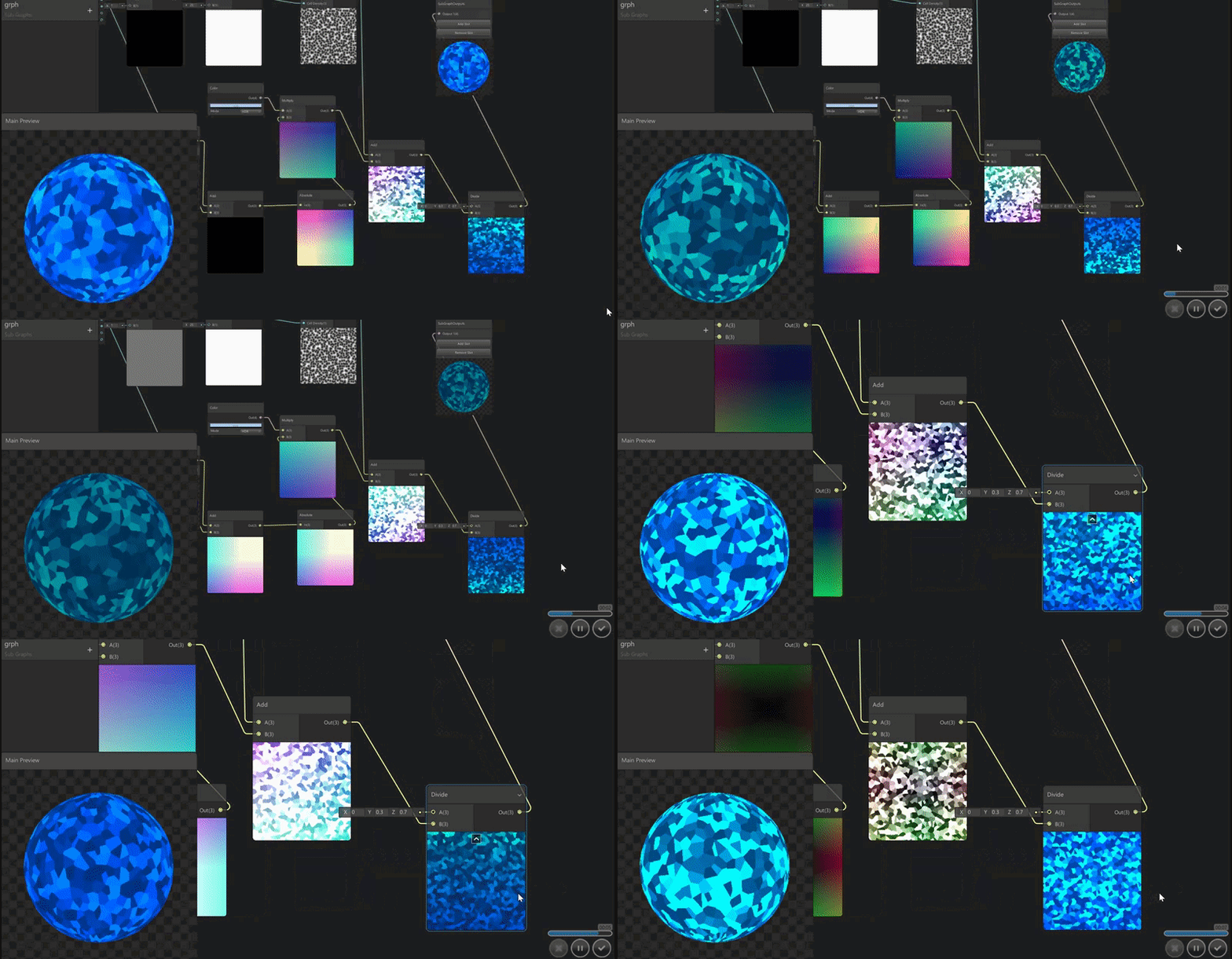
https://i.gyazo.com/8d2fe95f4e9bf4e9670bea85e09cae57.gif my very first shader in unity
 rotund tusk
sweet!
 swift fiber
Hi, im trying to for this teleporting effect in shader graph using vertex displacement and im not sure where to go from here...
this is what i have so far
 foggy falcon
you may want to look at clipping pixels based on displaced noise
rotund tusk
you'd probably want to do a space-oriented (object, world, or screen) pixel discard
in addition to vertex displacements
swift fiber
can that even be done in shader graph?
 fervent tinsel
you could get something similar, especially for toon shaded thing. some parts of the effect in the example are also just manually animated (those white extra effects), you'd also move the transform manually for each transition, it's a multilayered effect
swift fiber
yea right now all im trying to do is get the glitching effect to work
 timid tartan
Is it possible to have a preset array of floats/ints in a shader?
slender hedge
do you need lwrp/hdrp to use shader graph
timid tartan
Yes you do Brick
slender hedge
lwrp broke all my materials and color changing 😦
i updated them all to lwrp but now the materials don't work correctly
nevermind, i can work with this!
just need to update my code 😃
timid tartan
Is there anyway to use & 0xff or & in general in a shader? I can't seem to find anything on the internet
 plucky bone
Nope

Unity is the ultimate game development platform. Use Unity to build high-quality 3D and 2D games, deploy them across mobile, desktop, VR/AR, consoles or the Web, and connect with loyal and enthusiastic players and customers.
rotund tusk
@timid tartan yes you can
timid tartan
I get a no and a yes 😦
rotund tusk
what are you trying to do exactly?
timid tartan
I have this hightmap per tile in my world, i am trying to move my perlin noise function to a shader so i can use one material in the world
Instead of one per tile which is causing lag spikes
rotund tusk
ah. are you using bitwise for your hashing function?
or to index a permutation table
timid tartan
Idk, i didnt create it myself but i assume its a hashing function
Oh yea its for the perm table
Both actually
rotund tusk
gotcha. so the 0xff is anding the index value by 255
timid tartan
But tbh i am thinking of going back to the layered shader i had before, i am getting no where with the shader i am working on 😅
Yea indeed
rotund tusk
you need an unsiged integer if you want to continue along the bitwise AND and permutation table route
mind sharing the code?
timid tartan
And just simple & 2
eeh current code doesn't work though but sure

its broken atm from a to z since i could not transform the noise function itself
and after 5 hours i got kinda pissed and gave up 😛
I tried like 5 different noise things i found on the internet for shaders but none matched so i went and tried to convert it
rotund tusk
oh you were also asking about caves + mesh right? did you ever figure that out?
timid tartan
Yea the fading, i gave up on that for now since i got the textured themself fixed
So i went to tacle this problem where i don't need to make a new instance of a material per tile 😛
rotund tusk
gotcha. i was going to say that, since it's a heightmap, you can isolate the caves by checking if the vertex/fragment is below the heightmap that you get from your heightmap texture or your noise function. otherwise you might want separate meshes for caves
but if it's below the heightmap height, then you can do your special cave triplanar shading if you wanted
timid tartan
Yea if it wasn't a endless terrain i could us a hightmap texture
but for now i have a float array per vertex index
rotund tusk
this noise function (once it's working) will suffice
timid tartan
Yea I use the same one for the mesh
rotund tusk
which is probably your what you're thinking haha
timid tartan
I was hoping haha 😛
But do you have any clue how to fix it? Its only the & part that needs to work
rotund tusk
is there an error in the console associated with the &?
rotund tusk
in your code it is a signed int (default for C#) so try changing it to uint
does it give a line number for the warning?
timid tartan
Hmm it fixes the 0xff parts
rotund tusk
it's probably in the Grad function
timid tartan
h & 1; but now i have a issue on that line in the Grad function indeed
rotund tusk
try changing all the constant values (like 1, 0, 2) in that function to have a "u" at the end
tells the compiler to treat them as unsigned ints
oh wait
timid tartan
So like h & 1u?
rotund tusk
scratch that. h u and v are floats
timid tartan
Indeed, could that be it?
rotund tusk
ya that will be it
timid tartan
It will also help if i copy the correct grad function...
rotund tusk
well in the one you shared originally, you can just change the value type for h to uint
timid tartan
I believe it works, its just my pc that is shitting itself atm with generating terrain 
I think it somewhat works but that my unity is atm having issues
It is 23:00 and i have to get up at 4 tomorrow, I will try it tomorrow evening again
But thanks for all the help Wyatt i don't think i would have figured it out otherwise
rotund tusk
ya that's lookin like an octave of noise!
 analog remnant
@regal stag That whirlpool shader looks soo good
 regal stag
@analog remnant Thanks 🙂
slender hedge
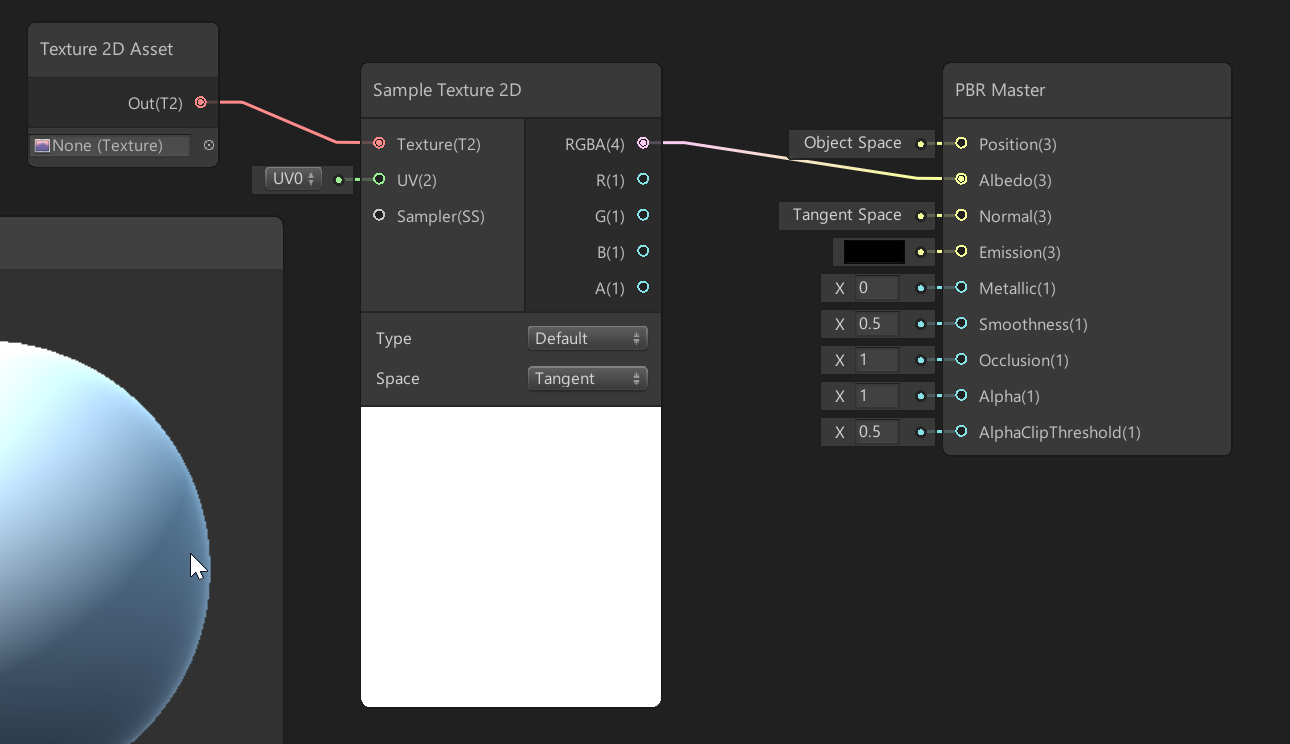
is it possible to let me choose the texture from within the editor like so? i'm using shader graph
 regal stag
@slender hedge Use a property. Right-click your Texture 2D Asset node and there should be a 'Convert to Property'
slender hedge
so i'm trying to manipulate my material's shader through code to set colors
but this won't work
    public void ChangeColor(Color Col)
    {
        if (Color == Col)
            return;

        foreach (Material Mat in GetComponent<Renderer>().materials)
        {
            Mat.SetColor("_Color", Col);
        }
        Color = Col;
}```i debugged and the foreach finds all the materials proper
i found out it's setting the color value, but it's not updating in the editor or ingame even though the value of _Color is changing
_Color exists before I set it as well
So i changed it to "BCol" and now it doesn't exist when i try to get it via code
so _Color was just a default thing that was being unused
 desert orbit
If you right click on the inspector tab you can set debug view and look at all the properties
It may be using "_BaseColor" instead
slender hedge
oh
it is using base color
thanks!!
nevermind it's not, i just got tricked by myself because i forgot to switch the shader on the other sides of the block
still stuck

still doesn't recognize _BCol or BCol
ok i found out i have to use the text on the left
thanks for showing me this, i found it out i believe
i'm very new to shaders
analog remnant
Does anyone else have a problem with lens flares in Unity 2019?
I can see them in scene view but not game view
Even though my camera has a flare layer
Probably not the right place for this actually haha
 prime slate
Hello everyone,
Is there any recommended shader learning resources?
 amber saffron
A collection of tutorials that cover how to write your own shaders in Unity.

YouTube
Welcome to Makin' Stuff Look Good in Video Games! This channel is all about techniques for getting the most out of your games. Particles, shaders, image effe...
Minions art does some nice ones too : https://www.patreon.com/posts/tutorial-list-10663597

Patreon
Official Post from Minions Art: Videos3 videos on the full character creation process (Concept, Model, Texture)Character Creation Process VideosModelling video of a sword from concept in Maya LTFantasy Sword Speed Model (YouTube Link) Modelling video of a shield from concept...
valid flax
is there any way to creat collapsable regions inside a unity Shader file?
amber saffron
Dont think so
 ember fractal
I have multiple object (with same mesh) in the scene, all have same material,
but it is desired that each have slightly different uv offset parameter.
I first implemented that with MaterialPropertyBlock, but my colleague said that will break batch.
IMO, in this case it is just simply inevitable to lose batch rendering for those objects, but I am not 100% certain.
Is there any way to set different material parameter for each object and keep the draw call from increasing?
 mental sentinel
hey there, I made a 2dglitch shader function with amplify (you can still use my example shader without amplify if you want to try it), grab it here for free: https://twitter.com/cayou66/status/1133715594501664768?s=20


I've created a new 2DGlitch node for @AmplifyCreates shader editor, that you can grab on github along with a lot of different cool nodes (more to come!) https://t.co/sky1bk5Pbj #unity3d #madewithunity #shaders #glitch https://t.co/xwyXGLuGqh
 Twitter
analog remnant
Twitter
analog remnant
@regal stag Just out of curiosity, how do you learn stuff on shader graph? Is there some archive of guides or do you just mess around with something until you get it working. Because currently I just kind of think of an idea, google it to see if someone has a solution, find pretty much nothing most of the time, and end up spending a couple days to tinker/google what specific nodes do and figure it out. Curious what your process is for such nice looking results.
Also sorry for such a long message😂
amber saffron
You must understand that shadergraph is not a magic tool that will make every stuff more simple than coding a shader.
The logic behind it is the same : You have inputs, texture, uvs and stuffs (position, normal ...), do operations on it, and send it to display.
The advantage of SG is that you don't have to check for synthax errors, and fancy stuffs like setting your render queue and blending ....
But the base is the same, think of what you want to do, and how you can achieve it using the inputs you got.
fervent tinsel
but.. we want magic tools 😦
vocal narwhal
Gotta have goals
fervent tinsel
some day (tm)
vocal narwhal
🤣
amber saffron
Find somebody to do the tool with a magic button "make the shader I have in mind"
fervent tinsel
even google have "I feel lucky" button as option
regal stag
@analog remnant There are resources for learning about shaders, Remy posted a few good ones a few posts above yours. It can also be hard to find stuff on shadergraph specifically because it's fairly new, but being able to adapt from code is useful, and for the most part it's the same maths.
vocal narwhal
Even looking at really basic stuff on ShaderToy can be really helpful
as long as you find one that's either really simple or has good comments
regal stag
@analog remnant I also have blog posts which break down some of the shaders I've made. And they usually step through in a similar thought process that I had when first creating it. https://cyangamedev.wordpress.com/ (if you haven't seen it already)
analog remnant
@amber saffron I understand that it’s not a magic tool haha. I was mainly talking about guides about nodes that is better than the Unity explanations. The Unity explanations, to me, can be hard to understand sometimes to someone who is not too knowledgeable of how the math works.
@regal stag Yeah I saw your blog, haven’t had a chance to dive into the specifics of each shader that you’ve posted about yet, just saw the gifs and was curious on your process. I plan on checking out each blog post individually though! Thanks for the reply.
 woeful crypt
Another good resource for learning shader concepts: https://halisavakis.com/category/blog-posts/my-take-on-shaders/
 lime viper
@ember fractal I'm assuming you want a randomized offset for each object, but the same offset for the whole of the object and you want it to not change based on view. I think what you can do is if you take the transform values of the object>world matrix you should be able to process them into an offset, this is how I'd approach it in the shader graph
ember fractal
@lime viper Thank you for the reply. I'll try similar approach (although in my case, the value comes from script not transform value of the object).
 lofty lagoon
Is thoughts and feedback about shadergraph usability useful? Is there a preferred place to send it through, like maybe the forum? Just thought I'd check as I don't want to spam with a whole bunch of stuff if it's not going to be useful. I'm sure work is being done on usability currently.
rotund tusk
forums might be better just because it's easier to find than if posted here. but don't let that stop you from starting a discussion about it through discord if that's what you prefer
 neat bridge
Forums definitely. There's a chance nobody from unity will see it here, and even if they do its better for them to share it with the right person if it's a forum link
rotund tusk
exactly
 spice plinth
Does anyone here have experience with writing custom shaders for PostProcessingStack? I've installed the latest post processing stack from the package manager, but I can't seem to inherit from the PostProcessEffectEditor that ships with the package manager. I can only access the one from the script assemblies,
It's an issue because, I can't use target, or serializedObject in my custom editor. They don't exist,
vocal narwhal
spice plinth
Yes, I've followed that. But the PostProcessingEffectEditor that my class uses (the one that ships with Unity 2019 for example), doesn't have the same variables that the postProcessingEffectEditor in the package manager has,
vocal narwhal
There's no mention of PostProcessingEffectEditor in that tutorial?
I assume you mean PostProcessEffectEditor sorry
spice plinth
yeah, sorry lol, been trying to figure this out for a long time,
vocal narwhal
What setting is missing ? Because it's not a traditional Editor
You don't get or need serializedObject or target
lime viper
@ember fractal If that doesn't get you what you want you may want to consider GPU instancing instead: https://docs.unity3d.com/Manual/GPUInstancing.html
spice plinth
So basically, I have buttons in my custom editor, which should set variables that control my effect (presets),
but it seems the only way that my variables are saved, is if I use the SerializedParameterOverride class, and not even the SerializedProperties are working,
 slate patrol
There are, it turns out, overrides for SetUVs methods for the mesh class, that take Vector3 and Vector4. Does that mean that we can have UVs that hold Z and W?
spice plinth
I mean, it's strange that there is a function to get serializedProperties in the PostProcessingEffectBaseEditor class,
namespace UnityEditor.Rendering.PostProcessing
{
    public class PostProcessEffectEditor<T> : PostProcessEffectBaseEditor where T : PostProcessEffectSettings
    {
        public PostProcessEffectEditor();

        protected SerializedParameterOverride FindParameterOverride<TValue>(Expression<Func<T, TValue>> expr);
        protected SerializedProperty FindProperty<TValue>(Expression<Func<T, TValue>> expr);
    }
}
But you can't update them without a serializedObject
vocal narwhal
You update the serializedProperty in SerializedParameterOverride.value
spice plinth
I don't want to post too much code here, but here is the exact same class from the Package Manager,
namespace UnityEditor.Rendering.PostProcessing
{
    /// <summary>
    /// The base class for all post-processing effect related editors. If you want to customize the
    /// look of a custom post-processing effect, inherit from <see cref="PostProcessEffectEditor{T}"/>
    /// instead.
    /// </summary>
    /// <seealso cref="PostProcessEffectEditor{T}"/>
    public class PostProcessEffectBaseEditor
    {
        internal PostProcessEffectSettings target { get; private set; }
        internal SerializedObject serializedObject { get; private set; }

        internal SerializedProperty baseProperty;
        internal SerializedProperty activeProperty;
        \\ . . .
and if you do you have to set SerializedParameterOverride.overrideState.boolValue to be true
spice plinth
*not exact same,
So using BoolParameters for example, I have tried to set them like that,
SerializedParameterOverride.value.boolValue
vocal narwhal
I don't think you should use .value as far as I know
you want to be setting the override
spice plinth
The override isn't a serialized property however, it doesn't have this,
it's used for volume blending basically. Not much else really,
SerializedParameterOverride has 2 serialized properties in it. One of the serialized proeprties is the little checkbox boolean you see to the left of all values in post-processing effects, and the other is the custom value,
vocal narwhal
Sorry, I mean, have you set the override checkbox to be true in addition to modifying the value serializedProperty?
spice plinth
Oh, I see. Yes, I set them all to true in OnEnable,
vocal narwhal
hrm, OnEnable might be a bit suss.
Do you then go value.serializedObject.ApplyModifiedProperties();?
spice plinth
Yes, I have used that. But it's strange. It seems like, it's not the same serializedObject. I can see that it saves the changes made in the editor (it's persistent), but it's not the correct serializedObject. which is frustrating,
Because using breakpoints in my custom Renderer and Editor, they show different values,
for instance, I have an integer called rBitDepth. And if this is set to 3 in the editor GUI, you would expect it to be 3 in the renderer. But using breakpoints, it stays at the default value,
of 8.
😫
vocal narwhal
give me a mo' to test
spice plinth
Would you like my code? It's pretty small,
vocal narwhal
nah I have some
spice plinth
Cool,
vocal narwhal
Just trying to set a property to something else in OnEnable, yeah?
spice plinth
The only thing I set in OnEnable is the overrideState.boolValue. Everything else, I would like to set in OnInspectorGUI,
in a button (to set some preset values in bulk)
vocal narwhal
This is all working fine for me
spice plinth
Interesting. What was your local test/
vocal narwhal
public override void OnEnable()
{
    m_Fade = FindParameterOverride(x => x.Fade);
    m_Fade.overrideState.boolValue = true;
    m_Fade.overrideState.serializedObject.ApplyModifiedProperties();
}```public override void OnInspectorGUI()
{
if (GUILayout.Button("Set Random"))
{
m_Fade.value.floatValue = Random.value;
}
}```Looks identical, except. I never called ApplyModifiedProperties on override state,
in OnEnable, let me give that a shot
Wow, yep. That actually was it. One line of code,
You are a legend,
vocal narwhal
it happens 😄
spice plinth
I don't understand why serializedObject was broken if you used it in OnInspectorGUI
vocal narwhal
it should have been fine, but they're already applying so there's no need
spice plinth
And it's strange that target and serializedObject aren't present. Seems like they would be useful in this Editor class,
vocal narwhal
I think they just wanted to ensure people used their helper methods
spice plinth
Ah, ok. I thought it was the other way around,
vocal narwhal
but it does mean that you have to manually apply changes in that weird way wherever they're not applying
which isn't apparent unless you look at the source
spice plinth
mhm,
As long as the weird way works, I am happy 😃
Also, a bit off topic. Can you set roles? I just joined this discord server 20 minutes ago. I make assets for the asset store,
vocal narwhal
Nup, sorry, just have to send a message to Unity Technologies as far as I can remember
takes as long as it takes for someone to be in the right timezone and check it out
spice plinth
I am not in a rush. Like I said, just joined this server. Thanks so much for you help though,
 wicked stream
Hi, does anyone know if you can tell shader graph which nodes to put in the vert function and which to put in the frag function?
i'm trying to recreate a shader I've written the traditional way in shader graph but i need a few of the nodes to be in the vert function but they seem to just be defaulting to the frag.
is there a way to specify it or at least a rule shader graph follows for what goes where?
 vast saddle
I am using this shader to mask out all objects behind it using a black and white texture. I was wonder if someone can help me make that circle have a soft edge?
{
Properties
{
_Mask ("Culling Mask", 2D) = "white" {}
}
SubShader
{
Tags {"Queue" = "Background"}
Blend SrcAlpha OneMinusSrcAlpha
Lighting Off
ZWrite On
ZTest Always
Alphatest LEqual 0.33
Pass
{
SetTexture [_Mask] {combine texture}
}
}
}``` green zephyr
I found out the Particles Standard Unlit shader does not write to the alpha channel. Why? I have had to solve it by copying the built-in shader and storing it in the project, that overrides the original one in the material system.
 civic helm
Hi. I am generating a Texture2DArray in code from existing atlas and have a problem with transparency.
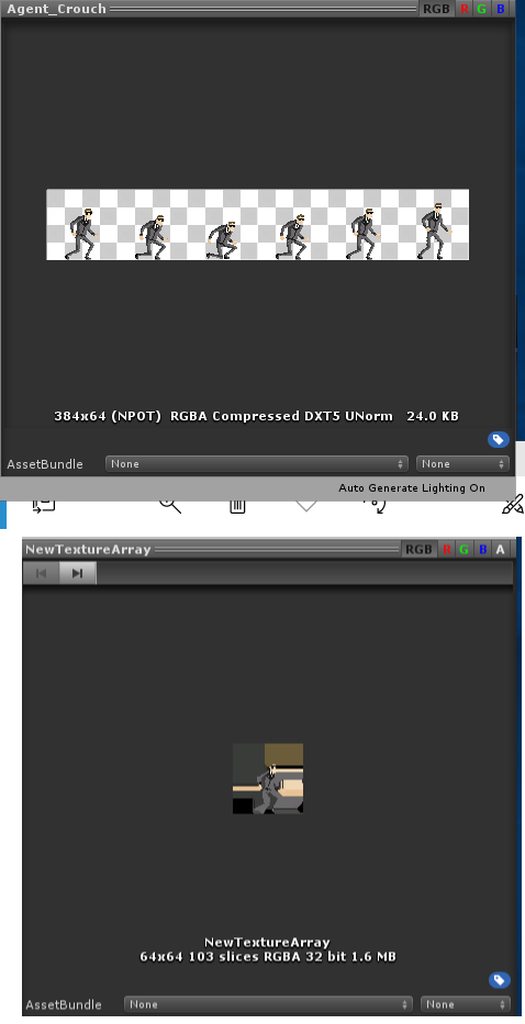
The above is the original and below is the result. When drawing it looks the same as the one below. I think this is pretty basic stuff but couldn't find the right words to google it :/
slate patrol
I am very much confused with a certain shader.
Just wrote this little thing. It's basically just a shadowcaster
The problem is that if #pragma multi_compile_instancing is defined (which is required for instancing) shadows are freaking out, get randomly culled and most of the time not rendered.
What's the deal with that? Seems like I'm missing something, but my friend google can't answer it so far.
Am I missing a special transformation function?
 uncut karma
@slate patrol i think you're missing the instancing macro's in your vertex to fragment struct
struct v2f { V2F_SHADOW_CASTER; UNITY_VERTEX_OUTPUT_STEREO };
and also in the vertex shader
v2f o; UNITY_SETUP_INSTANCE_ID(v); UNITY_INITIALIZE_VERTEX_OUTPUT_STEREO(o); TRANSFER_SHADOW_CASTER_NORMALOFFSET(o); return o;
slate patrol
Seems like it indeed. My instancing knowledge is rusty as it seems. Thank you.
uncut karma
@civic helm is the alpha channel (when clicking the A) fully white?
if it is then maybe when generating the texture array, check to see how you are copying the textures, make sure the texture being written into starts as 0,0,0,0 (Color.clear) and not Color.black (0,0,0,1)
 urban urchin
Question: Does defining enable_d3d11_debug_symbols have an impact on performance? (does it disable any optimisations?)
slender hedge
how do i get my transparent shader to lighten its shadow???
it's almost completely see through and the shadow isn't any lighter like it should be
i'm also getting the error Output value 'ShadowPassVertex' is not completely initialized
Compiling Vertex program with UNITY_PASS_SHADOWCASTER INSTANCING_ON
Platform defines: UNITY_ENABLE_REFLECTION_BUFFERS UNITY_USE_DITHER_MASK_FOR_ALPHABLENDED_SHADOWS UNITY_PBS_USE_BRDF1 UNITY_SPECCUBE_BOX_PROJECTION UNITY_SPECCUBE_BLENDING UNITY_ENABLE_DETAIL_NORMALMAP SHADER_API_DESKTOP UNITY_HARDWARE_TIER3 UNITY_COLORSPACE_GAMMA UNITY_LIGHT_PROBE_PROXY_VOLUME UNITY_LIGHTMAP_FULL_HDR
 grand jolt
Anyone knows why the colour of my sprite changes radically when i plop it into a graph shader?
vocal narwhal
Your type is set to Normal
grand jolt
Another graph shader question. This setup feeds a new number to the seed every frame, as the deltatime changes. Is there any way to have a similar effect, but less often. Like feeding a new random see to the random generator every second and stuff like that? I tried playing around with sine and condition but couldn't find anything that worked
vocal narwhal
floor the time value and then it'll change once a second
multiply it and then floor it, and it'll change on the multiple
grand jolt
Oh! Thanks! hadn't thought of that 😄
 pine lily
Is it possible to use a diffuse map, cavity map, normal map and AO map with the legacy shaders?
I've tried using the render pipeline but it looks hideous
pine lily
I've decided to bake everything onto the diffuse map
 golden glade
Why not using Standard Shader? Are you using an old version of Unity?
uncut karma
not sure if Standard supports cavity maps (for specular occlusion). AO is for diffuse occlusion, so multiply it with the albedo texture to generate a baked texture is fine for a non PBR workflow, that's how AO is applied, but it will be a bit wrong for physically based realtime shading
grand jolt
So i am working on grass and water shaders right now and i was wondering how could i achieve these shaders, all of the tutorials on youtube are either coding the shader or using LWRP or HDRP, i want to use shader graph but dont want to have to install lightweight or high-def. Can anyone help?
 full sierra
Shadergraph only works for LWRP or HDRP
so you need something else
or you need to write them by hand
pine lily
I'd love to use the pbr workflow, since I also use it in blender but the shadergraph isn't working well with unity 2018.
I'll wait for unity 2019 to get stable and hope I can use the shader graph at the end of 2019
 noble tree
2019 is plenty stable. just don't use a beta or alpha
pine lily
I've heared otherwise
 jolly adder
Hey guys,
I want to convert my surface shader which is in cg to glsl. I should first convert surface shader to vertext fragment shader then convert it to glsl ?
 meager pelican

Let's learn how to make realistic grass with Unity Shader Graph! This video is sponsored by Unity ● Download grass assets: https://ole.unity.com/grasssway ● ...
jolly adder
guys, any idea ?
amber saffron
Even if converting a surface shader to vertex / frag is possible, it's very complicated. So I don't recommand it.
And like Navi said, you don't write shaders in GLSL in unity, you use either CG or HLSL, and the compiler will compile them to GLSL if you target an open GL platform
 snow orbit
Could someone help me out with changing the offset of the LWRP unlit shader at runtime?
Apparently I need to use a "MaterialPropertyBlock" but all that contains is getters and setters for key value pairs that, presumably, the shader is made to understand
So I looked in the shader's code but it doesn't make any reference to an offset, so I can't find the key name for the offset
What am I missing?
lime viper
I believe that the property needs to be exposed on the shader for you to be able to access it
what are you trying to achieve with the offset?
 sharp nimbus
Can you access "unity_Projector" and "unity_ProjectorClip" through HLSL or ShaderGraph?
I have an HLSL file which performs "mul(unity_Projector, vertex)" but the result is all black, which seems like it would be from the matrix
Trying to update a projector shader to the HDRP's new decal system
grand jolt
how does unitycg handle uniforms and constant buffers for the different graphics apis? both work at least for d3d11. how are things actually translated?
im struggling to find very much at all about this online. probably should just assume its close to cg and look for resources on that
i do understand ogl has uniform blocks which can translate nicely. i guess it would make sense for uniforms to all be thrown into a single cbuffer when using d3d but how often is this cbuffer updated? also, how does speed compare when it comes to uniform block vs uniform when using opengl?
please correct me if im wrong on any of this
 crystal patrol
Hey does anyone know how I can select another submesh to preview in ShaderGraph ?
 sly stone
Guys is it possible to create a shader that only shows in the color of the material?
Like when I have a red cube and I shine on it with a blue light, I want it to see the cube in red, and not a mix of red and blue.
amber saffron
So, an unlit material ? Yes, it's possible.
sly stone
Not really unlit, like I still want it to be dark when no light is shining on it.
But when there is a light shining on it, I want the color to be whatever the color of the material is. So no color mixing or whatever
amber saffron
Sooo ... Like if it was lit by a pure white light ?
sly stone
yess exactly
amber saffron
You'll have to either do you own lit shader using vertex/fragment, or define a custom lighting function in a surface shader. But it's feasible.
sly stone
Okay what would your preferred option be? Are they any different?
slate patrol
Setting enable_d3d11_debug_symbols in shaders not only makes the compilation 20 times longer, but also crashes the editor due to running out of ram (16 gigs of ram, 6200 shader variants). Defining enable_d3d11_debug_symbols conditionally still results in it being included in all of the variants.
Is this the intended behaviour?
amber saffron
@sly stone I'd go for a lighting function. Will be more easy to integrate than a vertex/frag shader, and having to manually manage all the possible passes 😄
sly stone
Okay thank you so much :)
 sly stone
😂 exactly
 viscid pewter
Hey guys! I don't know if this is the best channel for this. I'm looking to create smoke that is NOT particles. I've seen in some games that they make smoke that looks like polygon strip with one continuous texture. Any ideas?
 bleak zinc
would you be able to find an example?
viscid pewter
I'm looking right now but I seem to have missed the one image that was clearly displaying what I want
give me a few
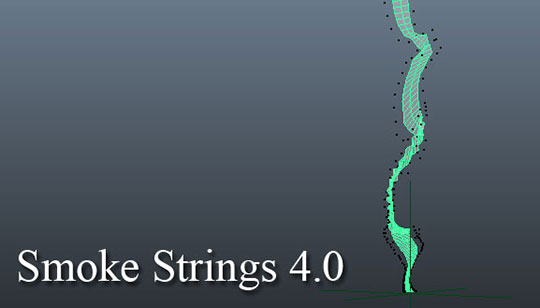
I got something similar

Imagine this, but textured with a long smoke, and it keeps flowing
Does not create a huge-a$$ strip of polygons though
bleak zinc
that looks neat af
viscid pewter
I just realised how simple it would be with Shadergraph - a moving smoke line texture with alpha, and some displacement
Obviously a vertically tiling texture
 real basin
you could use something like a "grass swaying in the wind" shader as an example, basically a bunch of vertex offsets by noise
viscid pewter
Yea I've already done something similar with my trees
I can't believe it could be that simple
.>
bleak zinc
i think the crisp edge of an actual mesh could look really good for a smoke string, depending on your game's aesthetic
but maybe you could us smoothstep antialiasing for thatif you're warping a gradient texture
it would be easier to create eddies with texture warping instead of a mesh, too
viscid pewter
I mean it worked pretty neatly
Just some ramps to avoid a) showing the top end of the strip, b) disallowing displacement on the bottom half
 unborn plover
Has anyone had trouble with the shadergraph included in the HDRP not compiling shaders?
I just tried to make a super basic HDRP unlit shader and apparently it couldn't be compiled (neither could an utterly blank unlit HDRP shader)
fervent tinsel
@unborn plover which version?
(Unity and HDRP)
there used to be issue with HDRP Unlit SG on some really old version, I think some earlier 4.x one but it's been long fixed
so unless you use some ancient version, it should work
unborn plover
@fervent tinsel It'll have to wait until i get to work tomorrow, but it should be the 5.16 version of HDRP in Unity 2019.0.1f4. I should also amend my earlier statement as the unlit shaders work fine until you set them to be unlit/transparent at which point they cease to compile properly.
fervent tinsel
ah, it could be a bug then
also make sure you don't have core or shader graph installed separately with different version number
sly stone
Is there any way to create a HDRP shader that handles colored light as if they were white, so no color mixing?
valid flax
is there a way to change the sampler state of the GrabPass' texture?
fervent tinsel
@sly stone I dunno about that specifically but you can have like duplicate light source with white color and put the object you want to get the uncolored light into different lightlayer with the other light source
sly stone
Ooh thats a nice trick! But with a normal shader I just used a custom lightning function that handles it. Is there no way to do this in HDRP?
Also I dont want to see the white light
fervent tinsel
I don't really understand the question then
thought you wanted to see uncolored light on some surfaces
sly stone
Well I want to disable the light mixing yes. So if a blue light shines on a red box, the box still lights up as red, and not purple.
sly stone
Well I'm making a game where there each team has a different color. Players have a point light pointing in the direction they are looking. The goal is to make everyone your color by shooting them., then they convert to your color.
Right now its hard to make out enemies because when you shine on them with your color (lets say red), and the enemy is yellow, its hard to see of what team that enemy really is in, because it looks like orange.
fervent tinsel
how does others see the color? you use volumetrics?
I still don't get why the lightlayer thing wouldn't work, just use that effect for local player
or your local team's players I guess
you can also toggle the volumetrics off per point light, so you don't have to have it enabled for the white color
 keen kernel
Hey got a weird problem trying to do a shader that create an alpha fade near a plane, and set alpha to 0 after the plane, but i have this weird behaviour, anyone already saw that ?
the red line is the plane position (that photoshop edit is pretty bad xD )
looks like persistent image
 halcyon siren
If I have a range variable in a shader, what does the range variable translate into in the unity inspector?
I'm guessing a float?
woeful crypt
Yes it's a float
 ocean spade
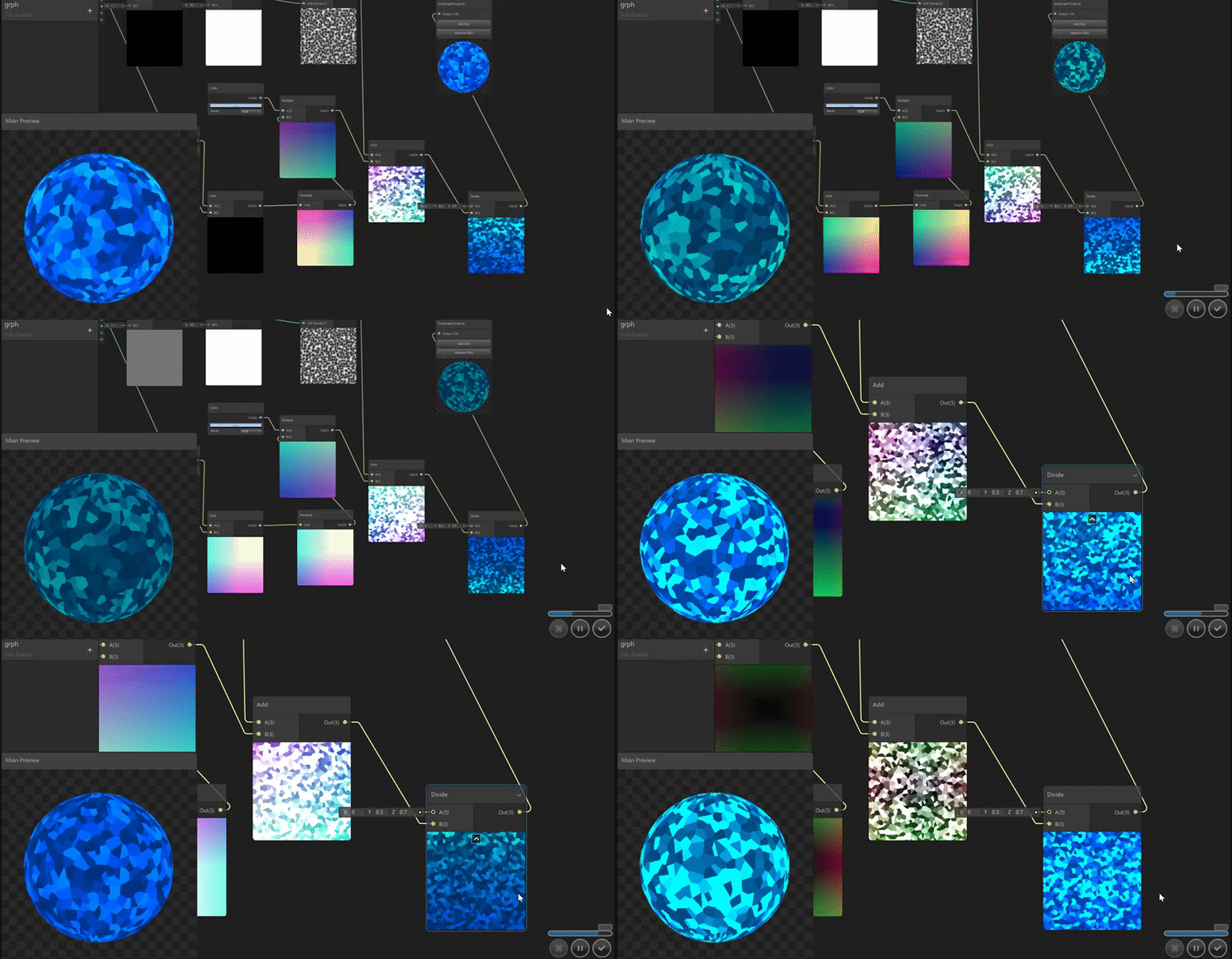
look at my shader https://twitter.com/keepeetron/status/1136241592602415104




 grand jolt
Can you add 2 normal maps to the same surface? something similar to DetailNormal that works in the standard shader, I would like to achieve that, I have tried with multiply, append, add, lerp, but nothing works: c
bleak zinc
i'm lookin at the unity standard shader code and it looks like it's just lerp(regularNormal, detailNormal, DetailMask)
grand jolt
in my case with the lerp I only get a normal map overlapping the other normal map and this is not what I'm looking for, I try to mix them, but thanks I'll keep looking for a solution, download the unity shaders to see if I can find something.
bleak zinc
what kind of mix do you mean?
 tame topaz
Do you mean take parts of one normal map and parts of another to essentially create a "mixed" version?
grand jolt
if something like that, I show you (unity is loading)
I am trying to mix the normals for a rock, this being the main one, I managed to alter the intensity of the normal so I could select which of them would be noticed more and less...
and this would be the normal secondary map tiled.
I could achieve this in PS but if I manage to mix them using a shader it would save me a lot of work xd
I could also alter the intensity of the normal maps in real time since in PS I would have to be doing a lot of tests until I get the result I want.
mmm I think I've already got it
yup, if the lerp worked I was just using it the wrong way, thanks @bleak zinc
sharp nimbus
With the HDRP/Decal master node in ShaderGraph, is there any way to get the normal vector of the vertex hit by the decal?
I want my decal to only apply on the top of surfaces, but the Normal Vector node has a constant value for all vertices hit.
lime viper
Has anyone done a vertex position subgraph for camera facing quad yet?
grand jolt
guys i wanna do a sketchy kind of graphi9cs with shaders is that possible?
lime viper
There are a number of a ways to achieve stylized rendering with shaders
rotund tusk
@lime viper what kind of vertex position stuff are you talking about?
lime viper
@rotund tusk pointing a quad toward the view position, e.g. a camera facing particle
grand jolt
Hello! I'm looking to achieve an x-ray effect in LWRP but not for typical 'x-ray' use.
I need to render pixels from a UV channel after every other pixel on a mesh. Is this possible?
Essentially looking to render part of the mesh through the rest of the mesh.
I've tried aimlessly playing around with math nodes and the UV coordinates to no avail. If anybody has any ideas I'm all ears.
i've done up a quick, crude illustration of the effect i'm trying to achieve if it helps
i thought about finding a way to grab the alpha>1 pixels from UV2 and finding those screen coordinates, and somehow projecting those coordinates to UV1, and subtracting the alpha from there, essentially providing a hole to see through the mesh at UV2, that follows the camera.
or another method may be to take the pixels of UV2 and remapping them to UV1, that will respect the camera's view, essentially projecting UV2 to UV1.
valid flax
any idea why rendering is going haywire sometimes?
green zephyr
is there a way to write into the deferred depth texture with commandbuffers? It seems to be readonly in all the hooks. It just ignores what the shader writes.
i mean BuiltinRenderTextureType.ResolvedDepth
The only way it writes to it is if done before the depth resolve, but then it is just overwritten by the zbuffer copy
this is with the builtin pipeline btw
@grand jolt that would easy with submeshes with different materials. UVs cannot be used that way that im aware
grand jolt
yeah the more i look up ideas, the less confident i was about it.
i think i may try to approach this problem differently.
fervent tinsel

GitHub
Purpose of this PR
Why is this PR needed, what hard problem is it solving/fixing?
This allows Shader Graph to properly and explicitly support camera relative world space position when using the HDR...
altho I'd rather see camera relative wording on HDPR instead of just "World"
besides can't you make camera relative node for LWRP?
could be just Camera Relative and Absolute World
 stone sandal
adding a new position coordinate space = smaller changes
changing an existing coordinate space exclusively for position where it needs to not change for every other instance of the coordspace = much , much harder 😃
 tidal nova
any ideas how to pass multiple transformation matrixes to use via Graphics.DrawMeshInstancedIndirect other than using material's ".SetBuffer"?
it fails when you have multiple objects all trying to use Graphics.DrawMeshInstancedIndirect
making copy of material and assigning buffers to each of them works, but sounds wasteful (edit: solved using MaterialPropertyBlocks)
tidal nova
and also, is it possible to discard an instance inside setup function of instanced shader?
just to add, first issue is fixed using MaterialPropertyBlocks - I still have no idea if it's possible to cull/discard instances inside setup function of instanced shader, through
that's my current shader
 still orbit
@fervent tinsel As much as it might seem like youd want camera relative to be explicit, you actually wont I promise. You want the graph to act the same regardless of the render pipelines active "world space" rather than having to manage that with branching manually every time. This way both "World" and absolute world are always consistent when performing space translations. 😃
tidal nova
I started doing discarding inside surf, but in this specific case discarding entire instance would obviously be best if possible
still orbit
I dont believe you can discard before frag in shader Warlander. But what you can do is move all the vertices into a single point, then the renderer will discard all the triangles for you 😃
tidal nova
hmm... and how should I approach it?
still orbit
well depends on why youre trying to discard 😛
tidal nova
I'm rendering grass, and want to discard instances of grass outside range
still orbit
ah ok probably easy then!
distance from camera to instance / max distance gives you distance within 0-1
then do something like max(0, sign(1 - x))
to get 0 if outside range, 1 if within
then mul the object matrix by that
tidal nova
hmm... sounds clever, thanks
still orbit
yw 😃
tidal nova
I assume it should be faster than discarding vertices per pixel inside surf function?
still orbit
yes, i believe you could run that once per instance
obviously its better to discard the instances directly in the renderer, preferably with everything indirect
but thats a whole thing
tidal nova
hmm... in case of grass it could mean lots of changes on every frame
I'm discarding any invalid positions for grass at CPU/initialization level, through
so only positions that contain valid grass are sent to GPU
still orbit
yea ideally youd do absolutely all of it on the GPU tho 😛
tidal nova
feed the beast, haha
still orbit
indirect batch rendering ftw
tidal nova
yep, I'm really satisfied with performance improvement it gave so far - went down from 8ms using drawMeshInstanced to insignificant time using drawMeshInstancedIndirect
still orbit
ah good to hear 😄
tidal nova
and tomorrow I will try your tip as well, it's 5:25 am for me right now so pretty good time for some sleep 😄
thanks again!
fervent tinsel
@still orbit so the idea is to make the world pos consistent with the master nodes position inputs difference between LW and HD?
(as you feed in camera relat pos in HDRP)
In which case adding absolute world pos node in such graph would still make it specific to one rp...
I mean, if you use that to drive the position
I dunno if I really get the idea here, having that type of naming just feels like certain way to confuse users
From users POV it would be easier if things just did one thing (so "world" -> "camera relative", "absolute world" -> same or just "world", pbr master nodes position input always in world space regardless the SRP (and do the final transform in code per RP), and then let SRP specific master nodes do what they want, like HD Lit to have pos input in camera relative (and change the name on input to make this clear)
I get that what I suggest wouldnt make most optimal code when using pbr graph on HDRP but it would make it consistant and troublefree to swap between pipelines + people would still have option to do hd specific more optimal graphs if they use hd
still orbit
no no, the idea is to make space translations consistent between render pipelines regardless of whether its camera relative or not.
So if you do a world space offset and feed into vertex position it behaves the same regardless of render pipeline and/or camera relative
Basically you should always use camera relative world unless youre doing something like triplanar texturing, in which case you should use absolute (which will also act the same regardless of pipeline and/or CR)
fervent tinsel
This is what I meant by position input on master node
But if you use absolute position node in that math, it is still not swappable
still orbit
the position input on the master is object space
fervent tinsel
Oh right
still orbit
if you do world space pos > add offset > object space > master node
itll work in all config
with either "world" or absolute world
itll always be exactly the same outcome
fervent tinsel
Ok I trust you :D
still orbit
haha, yea we put a lot of thought into this, trust me 😛
fervent tinsel
Core so that they can in the future be used by LW as well when LW brings in camera relative support
I didnt know LW was going camera relative too
Optional?
still orbit
Oh Alex put that in the PR? Cats out the bag then I guess 😛
Fwiw I dont think there is immediate plans to do it (although I dont know for sure). And yes I believe it will be optional.
It is optional in HDRP, sort of.
fervent tinsel
I know the two lines to change it, yes
still orbit
😉
still orbit
oh it does? I havent done it for a while.
It used to be optional on the asset if you remember that. long time ago now.
fervent tinsel
That I have never seen
Wondered why it was so tedious to change :p
There really isnt any reason to turn the camera relative off now tho
still orbit
Yea I think thats why it was removed. Added extra complication to have it and it serves no purpose.
fervent tinsel
I'm still more curious about the lwrp name change
(to Universal)
It just got released, seems like odd moment to swap the name right after
still orbit
idk how much i can go in to the reasons, but i can speak for the timing. If we rename after first LTS it becomes a lot more tricky to backport bugfixes as theyll all be full of name clashes
fervent tinsel
Ah that is true
I can totally understand the will to change the name, it just seemed odd to release it and immediately swap name after
still orbit
yea its regrettable, but thats software development ya know 😛
fervent tinsel
People often seem to think lw is for low fidelity and lightweight probably isnt all accurate when all planned feats are in
Plus it still runs on all platforms so universal sounds way more accurate
still orbit
yea its the right choice 😃
vocal narwhal
is the LWRP now the Universal Render Pipeline or something?
fervent tinsel
not yet
but there's clearly intent to swap it: https://github.com/Unity-Technologies/ScriptableRenderPipeline/pull/3781
GitHub
Purpose of this PR
Why is this PR needed, what hard problem is it solving/fixing?
Release Notes
Please add any useful notes about the feature/fix that might be helpful for others.
Testing status
...
com.unity.render-pipelines.universal
vocal narwhal
Seems fine, little odd to change it now, but I can see the rationale
fervent tinsel
I also don't quite agree with Hippo's comment on the default name
vocal narwhal
I wonder if the current default will become legacy any time soon
fervent tinsel
I mean, if there weren't built-in renderer on Unity in past or the new thing would fully replace it, default would have been fine
but as long as both exist the same time, it would just cause too much confusion on which is which
fervent tinsel
it's like same reason why Unity Physics is bad name for DOTS Physics 😄
still orbit
I always wanted LT instead of LW anyway 😛
fervent tinsel
lite?
still orbit
its just a better initialism imo 😛
vocal narwhal
it was referred to as LT occasionally back in the early docs before Kat got around to unifying them all
fervent tinsel
in hindsight, I do wish they would have just made one SRP for all use cases
still orbit
Then you get cool shit like VolumetricsLT 😎
fervent tinsel
like have mode for HDRP use
current LWRP has different renderers already
HD could have just been one
still orbit
Idk, HDRP has to be SO specificly optimised for hardware
vocal narwhal
we should move to #archived-hdrp if we wanna continue this chat
still orbit
We went over this a lot back in the day 😛
Btw @fervent tinsel seems like you havent noticed my latest feature branch yet? 😛
fervent tinsel
property refactor?
fervent tinsel
keywords
still orbit
lol cant slip anything past, or you just searched my commit history
fervent tinsel
I saw it but don't quite grasp what it's about
"Collect keywords from sub graphs "
and I nowadays just poll https://github.com/Unity-Technologies/ScriptableRenderPipeline/branches/active
GitHub
Scriptable Render Pipeline. Contribute to Unity-Technologies/ScriptableRenderPipeline development by creating an account on GitHub.
as it nicely lists which branches got recently updated
still orbit
it adds shader_feature/multi_compile etc to blackboard which create switch nodes and static branches in the code
fervent tinsel
oh, that's neat
I forgot SG didn't have it
it's pretty common thing on graph based shader editors
vocal narwhal
I wish I could just get in there and make that reorderable list look all pretty and cohesive 😛
fervent tinsel
what I'd love to have is way to expose those master node switches on the SG shaders
still orbit
we have a new reorderable list coming
fervent tinsel
there's been so many times I wanted to do that
but instead I have to make a new SG
still orbit
which switches?
vocal narwhal
I figured (about the RL)
fervent tinsel
like, toggling master nodes properties from unity material
still orbit
like render state?
fervent tinsel
now you can only switch those from master node
still orbit
they got exposed the other day on HD specific master nodes
i think its in master now
still orbit
yea, theyre exposed now on HD masters
theyll get added to PBR/Unlit too but we need upgraders so we dont break peoples data
fervent tinsel
like, I tried to make a general purpose particle shader in past and had to make variants as I didn't want to enable distortion on all effects
huh
I need to check this out
you remember the name of the branch it used to be at?
still orbit
ah ok, yea i dont know if the ones you want are exposed
i think atm its just render state: transparency, culling etc
fervent tinsel
well, I'd want all of the options to have some toggle / way to ref them so you can swap them in material 😄
like, you never know which you need
still orbit
potentially this keyword work paves the way for something like that
vocal narwhal
you're doing wonderful work 😄
fervent tinsel
gn 😃
the UI positioning is bit unfortunate here
those right side items don't need the space they get
and left side don't fit even if you scale that super wide
vocal narwhal
[CustomPropertyDrawer(typeof(bool))] 🙃
Maybe one day I'll reskin the new editor UI a bit 😛
fervent tinsel
and yeah, the switch thing could have some special node that swaps the master nodes property
like master switch which would have dropdown for feat and it's setting under it
or I dunno, that's actually overcomplicated, could just have some option on blackboard to ref the master node setting directly there
I dunno how that would hook into the graph tho
fervent tinsel
GitHub
Purpose of this PR
Extracts time as a graph input, such that HDRP Shader Graphs can calculate motion vectors for time-based vertex animation.
A vertex animated Shader Graph in HDRP with TAA and mot...
would also love to have some node that lets you spoof motion vectors directly (ue4 materials have this)
tidal nova
can I access unity_InstanceID inside a surface shader?
lime viper
is there an easy way to extract the model transform matrix's rotation in a shader graph?
still orbit
we never got round to adding it to the object node :/ you can hget it from the model matrix
transfomation matrix node > matrix split (columns) > then use column 2 (i think?)
fervent tinsel
hmmm, can I even do motion vector only pass with HDRP?
the issue I'm having is that the place where that shader renders draws scene view in that position
like, literally if I move the camera on sceneview, it moves the objects in gameview that fit inside that movec pass shader
still orbit
:/
fervent tinsel
I took empty movec pass from unlit shader and stripped most of the things out, but the issue I see is basically same I've seen all along, it acts the same with the unaltered PPv1 custom motion vector shader
it could be some issue with scene and game views sharing some data that should be dealt some other way
still orbit
yea HD so could be any of a million things 😛
fervent tinsel
I'd love to use what UE4 does for radial blur but I dunno if it's their proprietary tech or based on some paper
it's pretty fancy setup, they basically just rotate previous frames data with noise + blur around the wheel shape
it keeps the radial blur tightly in the mesh frame + isn't mesh specific
this custom motion vector thing bleeds a bit but it's still not disturbingly much
still orbit
yea its not perfect by any means, but it was made for builtin renderer, where you didnt really have any other options 😛
fervent tinsel
there's always the manually blurred textures option 😄
people still use that approach
it's just the least desired option
lime viper
hmm if I am using a tranform node object to world on an object space normal map I seem to get inconsistent results
is the transform node expecting a different order to the values?
still orbit
do you have it set to direction mode or whatever its called?
idk what version of SG you are in, but previously it didnt work for direction vectors
lime viper
yeah direction on the options
hmm it's like it's applying any rotational axis to all of the input values
lime viper
so passing in Geometry normals seems fine, but as soon as it's a map it seems to do something off
lime viper
ok so I think what was happening was the sRGB was checked on the texture and maybe treating the input map as a normal map did something extra to it outside of subtracting 0.5
so manually subtracting .5 and then sending it to world space then to tangent space seems to get the correct results.
ocean spade
there's a bit of code at the bottom of this page that creates an n sided shape similar to the 'procedural polygon' node in shader graph:
https://thndl.com/square-shaped-shaders.html
float a=atan(c.x,c.y)+.2;
float b=6.28319/float(N);
f=vec4(vec3(smoothstep(.5,.51, cos(floor(.5+a/b)*b-a)*length(c.xy))),1.);```

I'm trying to recreate this code in shader graph because i want the distance field that precedes the smoothstep, but my attempt ended up with a mushy mess and i'm not sure what's up with the conversion:i tried tweaking values and the deg/rad conversions but couldn't figure it out
 wispy thistle
Hey I'm having some problems with a depth mask shader. If I use it to hide objects behind it, it works great, until there's 2 objects with the shader overlapping. In the overlapping area it'll show behind it as if there isn't a depth mask there. Any ideas why it cancels out and how to fix it?
Shader "DepthMask" {
    SubShader {
        Tags {"Queue" = "Geometry-10" }
        Lighting Off
        ZTest Always
        ZWrite On
        ColorMask 0
        Pass {}
    }
}
@ocean spade It's cos((floor(.5+a/b) * b) - a), you are doing (b-a) first instead
regal stag
no problem 😃
ocean spade
i recognize you from twitter, you have some neat shaders
regal stag
Thanks, your stuff is really cool too!
fervent tinsel
you know you can also use the custom function node too if you just want to type the code for thing x 😃
regal stag
Yeah, I prefer using nodes personally but the custom function node is super useful, and required if you want to do loops
ocean spade
i've been avoiding 'real' shader code for a long time because i've always had difficulty with it, shader graph really opened the world of shaders up to me
should probably try it out again
grand jolt
some time ago I saw a shader that transformed a simble box into a volumetric cloud, it seemed to be a very complex shader that had alpha and depth, right now I can not find it but can do something like that in unity?
 abstract garnet
Hi Everyone! My first time posting in this channel. First off I love Shadergraph, 2nd, I cant seem to get a gradient to work in the emissive channel no matter what I do...
Shows up fine in the shader preview - but doesnt show up in the viewport /gameview..
any ideas?
Using 2019.2.0b5 - HDRP 6.7.1
I know emissive is working in the scene because I have a normal Lit shader with emmissve on a different mesh of the car
(headlights)
Here is the same mesh with a plain solid red emissive material -Must be something wrong with my graph????
noble tree
you may need to change the Base color a bit. not 100% sure though as i don't normally use PBR shaders
abstract garnet
Nope. Cant seem to get it to show up... hmmmm
tried with solid black, white and mid grey in the base color.
Maybe I should post this in the render-pipelines channel?
vocal narwhal
Do you have UVs at all?
'Caus you've shown no evidence that there's anything but a single UV coordinate across that entire part @abstract garnet
which could just be sampling the black that exists on that gradient
abstract garnet
ya mesh has proper UV's . when I pipe the same nodes into the color channel instead of emissive it shows the gradient fine
Same for Unlit Master Node.....
 heady horizon
On the plus side, the car looks super cool with all these shader variants.
vocal narwhal
@abstract garnet can you try just modifiying Base Color a bit, then saving? I think I had that problem when I tried to replicate your issue
but then I modified baseColor from the default and it fixed the issue
Oh ryan already suggested that, and you didn't have any improvements
weird. Well, I can have almost the exact same shader setup and it works, so perhaps you do just have to remake it :/
fervent tinsel
could be a bug
I'd try this on some default cube too
and just put gradient with multiplier only to the emissive
just to rule individual things out
@abstract garnet
 stray kiln
Hi anyone want to help me make some shader vfx for my space sim?
 silk flax
Hey there!
Who have some HDRP insight?
I have a simple Unlit texture shader with Fog { Mode Off } and it ignores usual fog but does not ignores HDRP's one.
Is it possible to ignore HDRP's Atmospheric Scattering (or any other volumetric fog) in the Shader?
silk flax
Ah silly me, "Queue" = "Transparent" fixed my problem ^^
 viral shadow
So I want to use VPOS which requires #pragma target 3.0
How well supported is that?
 wild edge
could someone point me in the right direction for accessing SV_VertexID like so https://docs.unity3d.com/Manual/SL-ShaderSemantics.html but from within a surface shader?
figured it out, looks like you just have to extend the appdata struct https://gist.github.com/sagarpatel/376ed0b42211a65db0ebdb71b91b7617

Gist
Using surface shader with compute buffers. GitHub Gist: instantly share code, notes, and snippets.
grand jolt
Is there a shaderlab API?
 vale mortar
Is there a way to preserve the SpriteRenderers functionality when using a non default sprite shader?
rotund tusk
@grand jolt there's documentation online about the syntax we use but the actual API would be for HLSL or Cg
abstract garnet
@vocal narwhal weird. ... I guess will just try rebuilding it from scratch on a sphere to see if I can get a gradient to work in the emissive channel via @fervent tinsel 's suggestion...
vale mortar
Im using this free shader form the store: https://pastebin.com/WzbsKeL7
Is there any way to make this respect the spriterenderers color and flipping properties?
(I have zero experience with shaders, but could probably do the grunt work if its possible)
vale mortar
Ok well i got the flipping to work
viral shadow
Have you looked at how the built in shaders do it?
vale mortar
ive looked at the default shader but it doesnt really give me any real information
all i really need is for the spriterenderer color property to still work. Im assuming it doesnt work because the shader overwrites the effect, but wouldnt really know
viral shadow
Have I don't really know what I'm talking about, but maybe _RendererColor is what you're looking for?

GitHub
Unity Built in Shaders. Contribute to TwoTailsGames/Unity-Built-in-Shaders development by creating an account on GitHub.
vale mortar
I dont even know how I would use that if it were what i want lol. again i have zero experience with shaders
im trying to parse whats going on
vale mortar
Ok i do understand enough to see where i think Id's be inserting it, but i need to know how to to reference the tint color within the shader
_RendererColor may be it in some way, but I cant figure out how to feetch the information
there is this: https://answers.unity.com/questions/707738/how-to-access-spriterenderer-color-from-a-shader.html
Unity is the ultimate game development platform. Use Unity to build high-quality 3D and 2D games, deploy them across mobile, desktop, VR/AR, consoles or the Web, and connect with loyal and enthusiastic players and customers.
but i dont have such a structure defined here
viral shadow
Wait wouldn't that actually be the vertex colour?
vale mortar
i did it
just got it working
which actually gave me a teeny bit of insight into how the shaders work. looking forward to messing with them sometime
For reference: The flipping didnt work due to backface culling which i disabled
and all i needed to do to get the vertex colour was add fixed4 color : COLOR; to the appdata and v2f structures, then multiple the end result in the fragment shader
(after passing the color around)
 muted skiff
Let's say i have a procedural generated mesh, and i want to draw all vertices/triangles beyond point x transparent. Is there an easy way to achieve something like this with a shader without loosing the shadow and lighting stuff from the standard shader?
vale mortar
So even though I got that shader to respect the spriterenderer properties, i realized it doesnt actually do what i want 😛 I think im going to have to write my own shader (or find one that does what i want).
I want to be able to just color in regions of a sprite. The regions will probably be defined as in the above shader using a mask (rgb of the mask defines the regions).
Any help (be it a link to a finished shader, or a general noob outline) is appreciated. Im just gonna start writing horrible shader code for now
vale mortar
Actually I think I found exactly what i want (and it doesnt require a mask): https://pastebin.com/D9HFEXXC
vocal narwhal
@hasty kettle If you're using ShaderGraph you can just create a shader that uses the ScreenPosition node as UVs for the textures
 hasty kettle
i'm using 2018...
vocal narwhal
Otherwise you can do the same for another graph editor, or in code
vocal narwhal
You'd need to be in a Render Pipeline to use Shadergraph
 opal compass
Hi guys, is there any way to make a DirectX 11 shader work on mac?
fervent tinsel
by making it non DX11 shader
you need metal or opengl on mac afaik, altho I dunno if ogl is still a thing there
noble tree
ogl is still a thing, but Metal is favored
but no. you can't just drop in a DX11 shader. so 0lento is correct
opal compass
How would I make it compatible with mac lol
Is there a way to convert it to an OpenGL shader?
amber saffron
If within Unity, writing a HLSL/CG shader should cross compile to DX or OpenGL
noble tree
you'd have to write it out yourself
opal compass
Damn
I was using a directx shader from the asset store and I couldn't get it to work on mac
viral shadow
What's the best way to set an "outside" colour for a texture?
eg. anything outside of the uv range 0 -> 1 should be set to this colour
amber saffron
Use the step command in the shader ?
step of max of abs of UV*2-1 by 1 => black & white mask with ov range 0->1 white
float m = step( max(v.x, v.y), 1);
return lerp( color, texture, m );```Should the lerp use m, not v?
amber saffron
true, corrected 😃
viral shadow
Oooh ok pretty clever.
It took me longer than it should have to figure it out but I think I see what's happening.
Thanks!
amber saffron
😉
fervent tinsel
@broken field there's no terrain graph for SG yet
 broken field
Oh that's really lame TBH
fervent tinsel
there is height blending on the stock HD Terrain shader though afaik
fervent tinsel
I think I saw it on the new layering setup
broken field
Oh is that available now?
fervent tinsel
but don't quote on me for that
it's been out for months
probably since last year already?
LW and HD terrain shaders have been out for a long time, it's the terrain grass shader on HDRP that people keep asking about
fervent tinsel
I think it supports up to 8 layers on the HD Terrain shader and it's single pass shader for that
and if that's not enough, I think you can just split your terrain into chunks and have each segment do their own layer setup
so you can practically be only limited by 8 layers per terrain chunk then
haven't tried that in practice
amber saffron
I'm pretty sure you can do heightmap texture blending with HDRP terrain.
You just need to make you own terrain material, not use the built-in one.
fervent tinsel
@amber saffron ah, I should have put a note here that we continued this on #⛰️┃terrain-3d
I did similar screenshot 😄
hippo should know better to not crosspost :p
 quick zephyr
Question: I'm working on a 2D pixel art project and I want to flash specific sprites white for and specific amount of time. I know that you can use shaders for that and I found a custom shader on the internet doing that - worked like a charm. I now switched to the Lightweight Render Pipeline and the shader does not work anymore. I don't know much about shader coding, so it's hard to modify the lwrp default-sprite-lit shader for me. Does anyone have an idea how to flash a sprite white/a custom shader to solve my problem?
quick zephyr
Okay - I'll then dive into that.
strange totem
anyone know what shader model you need to support on to get ddx()/ddy()?
docs are a little spotty
seems to be GL3.0
still orbit
MS HLSL docs are great i nthis regard:
https://docs.microsoft.com/en-us/windows/desktop/direct3dhlsl/dx-graphics-hlsl-ddx
(its SM3)

Returns the partial derivative of the specified value with respect to the screen-space x-coordinate.
strange totem
awesome - thanks Kink!
still orbit
yw 😃
lime viper
anyone know the fastest way to derive a third term of a normalized vector from two terms?
 random meadow
hey folsk! any ideas why why setting any alpha value on ui elements causes them to mask out everything behind them cutting through the ui and show the game? I'm just using the default ui shader
 dapper pollen
is it possible to do an hdr color node with shader graph? not seeing the option(trying to implement an emissive color property)
a user settable hdr color property that is, I do see you can set a non blackboard color node to hdr
fervent tinsel
@dapper pollen you tried with emissive node?
fervent tinsel
I dunno if that helps you but would be my first try
dapper pollen
yeah definitely does! thanks
fervent tinsel
np
 grim abyss
Does anybody know why my shaders work perfectly fine in editor
but in game view it shows up fully black
grim abyss
its an unlit shader btw
desert orbit
you probably need a light source to see it, or an ambient light
slate patrol
I think I might've either found a bug or misinformation in the docs regarding the lights.
There is a function for any light type, layerShadowCullDistances, that, based on the currently used camera to render the scene, will cull objects of certain layers when rendering shadowmaps.
However, it seems that it only works on directional lights.
I could easily set distances on a directional light and make objects pop in and out when rendering shadowmaps, but not for spotlights and pointlights.
Those just were not affected by the setting.
Think I'll submit a bug report
 plush sorrel
Hey, I'm scratching my head on how to do something; it's possible to have a shader render normally, but not in mirrors using IgnoreProjector, but is there any way to achieve the reverse? Meaning, to get a shader to render only in mirrors? (and if this can be done without creating a new shader that would be awesome but surprising)
real basin
depends on how your mirror works, if it's using a second camera you could use culling masks and put the object you want rendered in the mirror on its own layer
 void sable
Hey guys, I've been stuck with a good refraction solution for LWRP for a while now. Does anyone know a good way to create a glass material (LWRP+ShaderGraph) without Opaque Texture (it looks really bad)? Let me know, please. Mention or PM me if you have an answer.
plush sorrel
@real basin thanks, that's a very good idea, however to use culling masks, I'd need to apply the layer mask on the whole GameObject right? I need to do this per material, is this achievable?
(or worst case filtering in the shader itself, if it's unavoidable)
real basin
I guess you could use the stencil buffer and use a plane in front of the mirror to make the material only appear from one direction
plush sorrel
Ouch, I was hoping for a simpler solution... I'll continue researching, thanks for your help! I'll reach out here again if I'm still stuck, I'll explore these options.
 bleak pendant
Hey guys, I just want to know, if there’s any way to turn off/on a single pass of a shader from script? The method Material.SetShaderPassEnabled() seems to not work like that. (It just turns on and off a ‘LightMode’ not a shader pass, to my knowledge)
To be more specific, I have a traditional outline shader (draws inverted mesh planes with front cull first, then draw the mesh itself), and want to en/disable the first pass (to disable the outline) from script by game logic. Thanks 😃
valid flax
So I'm having a really weird bug related to shaders. I've got a couple different PC's set up here with different GPUs (1060,1070,970,...)
On all PCs a particular shader shows inside the editor and when playing inside the editor the shader shows without a problem, however, when making a standalone build. On some pc's this shader works and is visible and on other pc's the shader is just not showing at all.
I've updated all Graphics drivers to the newest one possible and the problem pertains. and I'm dumbfounded.
Do any of you have ANY idea what might be causing this or have any idea where further to look? @ me if you have any clue, Thanks!
 rugged kernel
Hi, do you know is there anyway to use Main light node (I need light direction, attenuation and color) in new shadergraph? I tried to use custom nodes from web but it doesn't work very well.
fervent tinsel
2019.3.0a5 and latest HDRP master keeps spamming this error sometimes when I open the editor:
ArgumentException: Can not deserialize (UnityEngine.Rendering.LWRP.LightWeightUnlitSubShader), type is invalid
UnityEditor.Graphing.SerializationHelper.Deserialize[T] (UnityEditor.Graphing.SerializationHelper+JSONSerializedElement item, System.Collections.Generic.Dictionary`2[TKey,TValue] remapper, System.Object[] constructorArgs) (at C:/Unity/ScriptableRenderPipeline/com.unity.shadergraph/Editor/Data/Util/SerializationHelper.cs:103)
UnityEditor.Graphing.SerializationHelper.Deserialize[T] (System.Collections.Generic.IEnumerable`1[T] list, System.Collections.Generic.Dictionary`2[TKey,TValue] remapper, System.Object[] constructorArgs) (at C:/Unity/ScriptableRenderPipeline/com.unity.shadergraph/Editor/Data/Util/SerializationHelper.cs:153)
UnityEditor.Experimental.AssetImporters.ScriptedImporter:GenerateAssetData(AssetImportContext)```I don't have LWRP package setup here, so it's quite obvious why it can't find it
but why does it even look for it?
 somber bolt
Trying to do something which should be fairly simple. I have a Texture2D element being rendered in a RawImage component. I need to somehow make this RawImage +Texture2D act as a mask to elements below it.
So I assume I need some type of custom material - shader applied to the RawImage to make it work this way.
Can anyone get me started? Are there any ShaderGraph examples that use a Texture2D element for masking?
stone sandal
@fervent tinsel known issue, being fixed with next release version c:
valid flax
@stone sandal Any idea what my bug might be caused by? Scroll up once and you should be able to read it here in #archived-shaders
stone sandal
nope, that's not something I can answer with that much information, the best thing you can do is file a bug report from one of the failing PCs with all of the hardware spec and software versions so that our QA team can take a look at it
valid flax
@stone sandal Thank you, will do!
dapper pollen
besides editing the shader graph file by text editor, is there a way to change the default path for shaders to appear as MyFolder/x instead of Shader Graphs/x
stone sandal
@dapper pollen double click the smaller text field at the top of the blackboard to change the shader path (also works for subgraphs to change the category path in the create node menu)
blackboard
dapper pollen
ahh fantastic, thank you
muted skiff
Heyo, I'm moving all vertices with a vert shader above z=7 to z=0, however Unity won't render things that would be visible then, I guess it has something to do with ZWrite?
 devout quarry
I got a question, how would you achieve shading similar to this?
With the details of the object accentuated with black lines
when looking at outline shaders, it's just the countour of the model, not the little details
hmm I found this tutorial
seems like it does the same thing, outlining edges more than the silhouette
so this is based on normals
to detect 'sharp edges'
 clever garnet
you should look into the borderlands 3 shader, there was a talk on it
but I doubt you'll find implementation details hmm
it was more a talk on borderlands 3 art direction
devout quarry

Gearbox's Randy Pitchford shows off the studio's work so far on the newest Borderlands. This Borderlands Make-Up Is Way Easier Than It Looks https://www.yout...
yeah this video, will look into it, thanks
clever garnet
yeah that's the one 😄
devout quarry
it seems like it's a combination of zdepth for the outline
and then normals for the little details
so drawing a line when there is a large normal difference
seems like this would work nicely
although in the example of the car above, there are lines showing the different 'parts' of the metal plating, even though the plates face the same direction so the shader would not pick up on that.. you'd need to make those 'separate' parts probably
 tardy spire
I'm pretty stumped! Any ideas why this decal shader is completely black in the scene?
fervent tinsel
@tardy spire make sure it's rotated the right way
also I've found it best to first test decals with some texturemap (as it's easier to figure out what's going on from patterns)
once you get it working, then try something else
tardy spire
I did something similar before starting and sent the uvs to the color output and it looked ok to me @fervent tinsel
And here's with a texture sample node plugged directly into color output
fervent tinsel
I'm testing that on my end
textures work, your distance setup doesn't
@tardy spire this works
tardy spire
Weird! Thanks for the solution. Any idea why plugging a Vector2 in is different than an inline Vector4?
fervent tinsel
I have no idea what those vector4 values are to begin with
I've just always used vector2 for this operation 😄
UV is 2D anyway
tardy spire
Yea I guess I'll do the same from now on. For the Vector4, I set the w component to 1 because the distance function returns all white when its zero for some reason. 🤷 This is a good slap on the wrist for doing something without knowing why it works
bleak zinc
So i want to have VR camera, and a camera that's visible on the computer monitor. The computer monitor doesn't need to run at 90fps or 60fps because it's just for observers who are not at risk of motion sickness, so to save a TON of render time, i disable the second camera and render it manually at 30fps.
unfortunately the result is that the camera not longers appears on the main display/monitor
i assumed this is because the VR camera keeps updating and overwriting the other one
but i tested it by having an empty scene with one disabled camera being manually rendered at 30fps
the result is a black screen "No Cameras Rendering"
but the camera doesn't have a render target texture.
so if it's not rendering to the screen
is it rendering nowhere?
how can i get the 30fps manual-render camera to show up on the main display, without having yet another camera just sees a quad showing the 30fps camera's most recent frame
i nice alternative would be directly setting the framerate of a camera.
viral shadow
If I'm using shader variantes, eg. #pragma multi_compile A B C
Can more than one be active at a time?
Eg. if I use mat.EnableKeyword("A"); mat.EnableKeyword("B");
Will both A and B be on, or only B?
 cobalt bolt
Is there an easy way to make particles fully cover 3d objects?
for example, I want to set a ball on fire with this https://assetstore.unity.com/packages/vfx/particles/fire-explosions/flames-of-the-phoenix-46176
Flames of the Phoenix - Asset Store
Time to turn up the heat and give your game a more unique look!
This is a massive Fire FX pack, containing over 150 particle effect prefabs, all easy to use and in a handpainted style.
The package contains 7 different color variations for all fires, making it super easy a...
but the problem is the ball clips with the particles
as in the ball appear to be inside the particle effect, and then it's not, and then it is
you feel me?
only way I found is to scale up the particles a lot or scale down the ball I want to be enveloped by this particle system
but I didn't like either of the solutions
is there any other way?

Time to turn up the heat and give your game a more unique look!
This is a massive Fire FX pack, containing over 150 particle effect prefabs, all easy to use and in a handpainted style.
The package contains 7 different color variations for all fires, making it super easy a...
it's like the 3d object is rendered in front of the particles
idk
 noble cradle
I have a canvas which is set to "Screen Space - Overlay," and it isn't getting effected by my post-processing shader. I think I understand why (the overlay gets applied before the shader does), but is there an easy way to achieve this?
If it matters, this is my shader: https://hastebin.com/awebewiwal.cs
And here is my script to apply it: https://hastebin.com/uzeluhomoy.cs
If I set the canvas to "Screen Space - Camera," then it's effected by the shader (which also makes sense). However, I'm getting weird scaling issues on mobile devices when using this setting.
 autumn yarrow
@bleak zinc You'll want to render your manual camera to a rendertexture and not disable the other camera at all. Just have your other camera render the rendertexture. It will be rendering at the faster framerate, but it takes almost no time to draw a rendertexture compared to rendering a scene.
bleak zinc
the issue was that the non-enabled camera wouldn't show up on the main display
the solution i ended up with was having a third camera whose layer mask is set to nothing, rendering nothing, but using Blit() in onrenderimage to display the most recent result of the 30fps camera
also i don't think that's true about it being faster to render to a rendertexture
the main screen display is itself a render texture, just a special one that is output to the monitor
it should take roughly the same amount of time to render to the main display as to a rendertexture, provided they are the same reoslution
render textures are sometimes used to render faster by using a render texture with lower bit depth, lower precision, or smaller resolution. In this case i need a full resolution render, i just don't need it render at an HMD framerate
autumn yarrow
That's like saying that a VM is the same thing as a computer. They're not the same.
but it's cool that you already solved it in the way that I said you should
bleak zinc
yknow i completely misunderstood the thing you said and thought you meant something else when your suggestion was, in fact, exactly the thing i did
also nah i dont mean thay a computer monitor is just a texture i mean that when you specify null as the render target there's still a render textuee target, it's just the one that the main diaplay draws
 chilly panther
Hello o/ I am new to shadergraph and it seems I have some problems with the Normal Vector node
Here is what I expect
But when I try to do as above, here's what I got
Same for everything I try with Normal Vector
The preview is black regardless of what I do
Expected :
What I have :
What could be wrong ?
green zephyr
in the new render pipelines, have they made soft particles work better with hdr emission values?
With built-in the fade is linear, but the effect with hdr is inversely exponential
if not using hdr screen
lime viper
@chilly panther Have you tried testing it in the scene? the preview sometimes requires custom shader code to display in a meaningful way
grand jolt
Anyone knows how to fix a shader with double vision in vr so that it works in vr and desktop?
bleak zinc
@grand jolt what do you mean by double vision?
grand jolt
You just see it correctly if you close one eye
 grizzled owl
Heya guys! 👋
Has anyone managed to successfully combine Fresnel with Normal Map?
Here's what I have:
The preview on the final node is the result I am aiming for
But in scene view is still looks like this:
I'm just outputting the result to Color. Object in the image is a heavily subdivided disk with vertex offset of the same input b/w map
I've tried every imaginable combination of different spaces, transforming those spaces, but still nothing.
 spring nacelle
I think you need everything in world space before you input it in the fresnel input
grizzled owl
@spring nacelle Thank you for your reply! But sadly still nothing... Main preview shows the intended result indeed, but it's just flat gradient in the Scene View all the same...
spring nacelle
I think something else is wrong. The shader gives the right results on objects in the scene on my end. What are you using as an input for the normal from height node?
does the normals work that come out of the normal from height node?
grizzled owl
Give me a sec, I'll try simplifying the scene and disabling everything else
slate patrol
So, I wanted to ask about shader variant collection...
Let's say that I am building a game. There are no materials featuring the shader and/or its variants, thus it is stripped from the build.
The question: will it be included in the build if I will have a reference to the shader variant collection that has that shader?
slate patrol
No one I guess
grizzled owl
OMG, @spring nacelle, thank you so much!
Turned out I was just working on a massive scale... And needed to have the normal map strength set to thousands to see the effect
I've never would have figured it out, without your prompts :)
Now I have a question about the "Normal from Height" node itself
It looks like it downsamples the input, and majorly pixelates the result (which is also seen in Shader Graph node preview)
What should have been smooth, is now all bumpy. Is there any workaround?
here are the nodes side by side
spring nacelle
the pixelation seen in the preview is just the low resolution of the preview.
it is hard to see in the screenshot, but I think the problem is the noise. What node are you using for the noise?
grizzled owl
Damn, I think you're right again. I'm using an image map for noise.
Strange, it gives smooth results otherwise. Seems like converting it to normal map and pushing the strength reveals artefacts
spring nacelle
It is always better to prerender the normal map in a program if it is possible
it could give you smoother results
and check the filter settings on the image. you should try a high settings
grizzled owl
I'll do. Thanks mate, you're a lifesaver ✊
spring nacelle
No Problem 😃
 pliant rock
Beginner question.
If I have two cubes - and want to apply the same texture shader to them but want one to have a different 'colouring' (same line as albedo) - is there a way to modify this without affecting the other cube?
spring nacelle
You can assign a different material with the same shader to each cube
you could also use vertex color
vocal narwhal
Or you can use MaterialPropertyBlocks on the renderer to change the colour
As long as your shader supports them (which the standard shaders will)
abstract garnet
This discord is like a FIREHOSE of messges ! Hard to keep up with it
I do want to read all the messages tho... Am I alone here?
Does anyone actually keep up with ALLLL of the channels?
Also - Does anyone know of an app or a way to have a channel Read to you (audio) /// or export a whole channel as a text document?
That seems like a good way for me to stay up with certain channels since I dont have time to read them all.
abstract garnet
I suppose I could just - ctrl+A to select all the text of current channel and the paste into a text document. Then convert to robot voice
@strange totem Ya I assume thats how most of the people are in here. I do wish I had a way to have discord channels read to me tho.
chilly panther
@lime viper Sorry for my late reply, I tried testing it in the scene and it seems to work. I dont know why but shadergraph for Unity 2019.1 doesn't work as well as shadergraph for Unity 2018.4. I mean, in the latest versions, there's a bunch of nodes displaying black preview (as mentioned above), when 2018.4 seems to work fine
I'm trying to make a waterfall shader like this one
Instead I have something like this
Am I the only one having trouble with Shadergraph for Unity 2019.1 ?
fervent tinsel
I dunno, works fine for me
also impossible to tell what's going wrong since you only pasted graph that actually works
chilly panther
@fervent tinsel Here's my graph ! This part seems to work fine, I get my triplanar moving noise like I wanted to (even though some of the nodes doesn't properly preview ??? Like the absolute or saturate)
This part is for the foam/emission. Even though half of them have black previews, it works fine on the material. It gets wrong when I try to apply the Normal Blend to the Normals input of my PBR Master
This part is for my albedo + alpha. Like I said, it doesn't preview like expected but it works fine on the final render
So my main issue seems to be when I put Normal Blend as my normals input
When I do the exact same graph in Unity 2018.4, everything works perfectly fine
 distant pawn
Is any one online who can help me make a gradient shader in shader graph
regal stag
@chilly panther Now that you point it out, I too am seeing this, at least in Unity 2019.1.4f1, using the LWRP package. It appears the Previews are no longer using the 3D version when they are connected to a Position/Normal Vector node like they did in 2018 versions. While this isn't a huge issue for the Position node, (and I actually kinda prefer the 2D preview for that), the Normal Vector node always previews as 0,0,-1. I guess because the 2D preview is a flat quad/plane, so makes sense to have those normals - but not very useful for visualising it. You can however plug the output into the Color input on the master node and use the Master Preview as a work-around if you need to preview it in 3D.
Does anyone know if this change was intentional though, or is it just the version we are using?
 peak pawn
I have a fire shader built with shadergraph that looks radically different when in play mode, any idea what could cause that to happen?
peak pawn
turns out it's a problem with the new orientation it's given on play
does anyone know how to make a colour + alpha texture display unaffected by lighting then?
fervent tinsel
use unlit?
meager pelican
Anyone have techniques to reduce vector register pressure with standard particle surface shaders? Using ``` #pragma surface surf Standard nolightmap noforwardadd interpolateview vertex:vert
...
#pragma instancing_options procedural:vertInstancingSetup
#pragma exclude_renderers gles
#pragma target 3.5
#pragma shader_feature _NORMALMAP
#pragma shader_feature_local _METALLICGLOSSMAP
#pragma shader_feature_local _FLIPBOOK_BLENDING
are you already working within the builtin shader source @meager pelican ?
meager pelican
I used standard shader source as a template in that I have the right include files and such, but it's modified as a custom shader, and since it's shaderlab it is generating a bunch of stuff for lighting/etc. It's not too much different from standard particle surface shader, but I ripped out camera fade and soft particle stuff, added other stuff (relatively simple). The standard source remains unchanged.
I was just curious as to what others do, if anything. Maybe some options/variants are super-reg heavy. I'm write bound, I think, so it's theoretically possible that ?adding another wave won't matter too much?, but IDK if there's anything I can do to find out unless I can reduce the v-reg usage to test it. AMD's tools indicate that I need to open up 7 more vector-regs, but the majority of the code is "standard shader lab" generated really.
I guess I'm being lazy rather than trying all the permutations myself, I thought I'd ask because "it never hurts to ask". I suppose I can also try to make a vert/frag version, but the surface ones are so dang handy for all the various devices and shader features. And by the time I'm done with all that I'll find I'm fill rate bound and it won't matter anyway. What's bugging me is that I have no good way that I know of to test out the options. But "that's just life" because you don't always get max-wave usage and I shouldn't expect to. ;)
P.S. I'm using a deliberate test case with tons of overdraw to bench sorted depth tested opaque lit particles with early-z testing enabled filling a large part of the screen.
 craggy ledge
guys
my model got ambient occlusion baked into vertex color (in maya)
how can i show these vertex color with shader graph ?
i know there is a vertex node but i dont know how to connect it
im using LWRP btw
amber saffron
connect vertex color node to occlusion ?
craggy ledge
thanks @amber saffron ill try it
amber saffron
bleak zinc
Does anyone know why all of my objects would be casting shadows even with their Mesh Renderers set to Cast & Receive Shadows = Off?
The only way I'm able to stop these shadowcaster passes is by completely removing the shadow caster pass, the Fallback "Diffuse", and adding noshadow and ForceNoShadowCasting=True
bleak zinc
pls
meager pelican
All opaque obs RECEIVE shadows in deferred. For casting, it's a pass that's defaulting in as you say. Removing your custom one allowed the fallback shadow pass to take over and it still had a shadow pass. Adding "noshadow" turns off receiving but IDK if that works in deferred, and "ForceNoShadowCasting" makes sense to turn off casting.
https://forum.unity.com/threads/how-to-turn-off-shadow-casting-in-a-surface-shader.451279/
Did you try using "ForceNoShadowCasting" with the fallback still there? Didn't work?
Unity Forum
noshadow turns off shadow receiving but still casts shadows.
bleak zinc
I'm using Single Pass Stereo Forward Rendering!
i will check on the forcenoshadowcastign *with* fallback
although using shader tags isn't ideal because i wanted to use the same material for both the shadowcasting and non shadowcasting LOD levels
that why i'd avoid an extra setpass, right?
yep, that did stop the shadows
although it doesn't quite solve the issue of ignoring the meshrenderer options
maybe there's something about Legacy/Diffuse that forces shadows to be on?
meager pelican
Yes, shadows are expensive.... (it's an entire pass that can basically double all the work) But the LOD module has a shadow cascade option that should help you and fix it by distance automatically. All these things should "just work" with settings if you're using surface shaders. If it's custom vert/frag....well....
bleak zinc
// Unity built-in shader source. Copyright (c) 2016 Unity Technologies. MIT license (see license.txt)

Shader "Legacy Shaders/Diffuse" {
Properties {
    _Color ("Main Color", Color) = (1,1,1,1)
    _MainTex ("Base (RGB)", 2D) = "white" {}
}
SubShader {
    Tags { "RenderType"="Opaque" }
    LOD 200

CGPROGRAM
#pragma surface surf Lambert

sampler2D _MainTex;
fixed4 _Color;

struct Input {
    float2 uv_MainTex;
};

void surf (Input IN, inout SurfaceOutput o) {
    fixed4 c = tex2D(_MainTex, IN.uv_MainTex) * _Color;
    o.Albedo = c.rgb;
    o.Alpha = c.a;
}
ENDCG
}

Fallback "Legacy Shaders/VertexLit"
}
don't see anything weird
i'm not using shadow cascades in order to reduce shadowcaster passes as well
it's definitely a custom surface shader
Legacy Shaders/VertexLit is the one that contains a shadowcaster pass
it's too big to paste here, but i don't see any LightMode=Always or anythign like that
meager pelican
There's a shadow distance setting too. (Just mentioning it) That should "just work" with surface shaders too.
Surface shaders GENERATE a bigger shader with a shader pass if you tell it to unless you tell it not to, and then it falls back to fallback (unless you tell it no shadows like you have done)
bleak zinc
doesn't shadow distance just not render shadows at a certain distance? it should still cast them because the Light doesn't know how far away the player is when it does its depthpass job
 prisma plover
Hi everyone, shader noob here. I'm trying to apply a shader to a raw image material. Unfortunately, whenever I assign an HDRP shader, the image is no longer on the UI itself but rather in the world. I'm not sure how to make a shader using the shader graph that can be applied in the UI itself.
bleak zinc
haha yeah i'm not so confident in all these "just works" surface shader features haha
yea, confirmed, the shadow distance setting doesn't cancel shadowpass on objects beyond the distance
meager pelican
Yes, I think that's right Swanijam. IDK what you're doing, you mentioned distance. But it doesn't matter since you turned it off, right? So you've figured out how to turn it off, and you still have your fallback, so I'm not sure what we need to solve next.
ADD...you don't want to cast....
bleak zinc
so i want my objects to begin casting shadows when they get close. They have 3 LODs, and i want only LOD 0 to shadow cast.
in order save myself some editing time and also to avoid an extra setPass, i want to keep all 3 LODs using the same material, and only control shadowcasting using the MeshRenderer option.
but the MeshRenderer option is now being ignored so i am a sad dev
i have an okay compromise, though, in just giving up on the 1-material and 1-shader idea
but it's an editing nightmare to need a different shader file for every combination of settings i would normally just set in the MeshRenderer
meager pelican
OK, so you NEED a shadow casting pass, and you should probably just use one or two cascades or the shadow distance. The cascades have quality options too.
Like we've already determined, you'll need a casting pass, IDK if that takes shadow distance into account or not, but probably since it knows the camera pos and the ob pos. The shadow pass is also used as a depth pass from what that link said, so maybe check your assumption on the pass-distance to be sure (not saying your wrong, I just don't know, you may be seeing a depth pass)
You're wrestling the engine pretty hard for your custom stuff, I guess without my messing with it, I don't want to lead you astray. You'll have to get more help from the experts here. I'll bow out. 😃 Wishing you to be a happy dev.
real basin
I have trees with LODs, they all share material with the same surface shader and turning off casting shadows for the lower LODs works. So I don't know where your problem is
bleak zinc
@meager pelican i see in that loink bgolus explained that the shadowcaster pass is also used in forward rendering to write stuff to the camera depth texture
so does that mean taking out ForceNoShadowCasting will stop depth sorting?
or does that mean if i try to use the depth texture in my shaders, it won't have fully complete information about the scene
meager pelican
I think the latter, but he talks about unity versions. Anyway, you NEED a shadow pass...because you want shadows close up!
passes as used for shadow caster rendering
(ShadowCaster pass type). So by extension, if a shader does not support shadow casting (i.e. there’s no shadow caster pass in the shader or any of the fallbacks), then objects using that shader will not show up in the depth texture.

   Make your shader fallback to some other shader that has a shadow casting pass, or
    If you’re using surface shaders
    , adding an addshadow directive will make them generate a shadow pass too.```
https://docs.unity3d.com/Manual/SL-CameraDepthTexture.htmlAHA
i was causing the camera to render a depth texture, and those draw calls look like shadow caster passes!
you're right
thank you very much @meager pelican
 viral chasm
With Shader Graph/LWRP what is the best way currently to create a custom post processing effect?
bleak zinc
by the way, it turns out i was wrong about shadow distance - at least according to the manual anyway
uncut karma
@meager pelican yea with VGPR reduction the only experience I have is going through the shader code and trying to cut down on stuff like cos sin, atan etc.. Maybe you could make use of fast math to help https://github.com/michaldrobot/ShaderFastLibs/blob/master/ShaderFastMathLib.h
i dont use shaderlab (the legacy unity cginc code is really messy and hard to follow compared to their more recent renderpipeline libraries), but this would basically mean looking at which # defines are active and seeing if you can remove some (or combine them into custom optimized stuff)
You can override any of the builtin unity cgincs by putting your version of the file in the Resources folder

GitHub
Contribute to michaldrobot/ShaderFastLibs development by creating an account on GitHub.
i cant think of any quick thing to do though.. aside from trying to undefine certain features, really the code needs to be fully explored so you can look at where there is wasteful calculations or things that can be re-used
uncut karma
there is a chance the directory structure should be the same (if not at least for sanity 😄 )
actually it isnt as easy as overriding the builtin shaders (those can just be dropped in resources)
grand jolt
How should I set a global shader texture to a camera's render? I'm working on a 2d water asset and need to make sure i render water after the rest of the main image and have that texture to use for effects. grab pass is slow (as ive read everywhere online) and OnRenderImage can also be slow if the camera doesnt already have a target render texture (read online). right now a good solution seems to be checking if the camera has a target render texture, if not create one myself and in OnPostRender blit it to the screen, if it does, just use the targetTexture to set the shader texture to. then in OnRenderImage is when i can call SetGlobalTexture. I don't really understand why if for any post processing effects to use the cameras render, it's best to render to a render texture rather than directly to back buffer, why doesn't unity do this by default? I feel like im missing something. I'm looking for the most optimal solution to rendering this water with several effects that will not conflict with other image effects
grizzled owl
Anyone managed to get Depth intersection working on HDRP? (This is the setup Brackeys was using with LWRP)
real basin
@grand jolt you might want to look into commandbuffer, it gives you more control over when things are rendered so you can avoid any conflicts with image effects
regal stag
@grizzled owl That should work, make sure you've set it to Transparent on the Master node, and you'll need a Camera in your scene with the Depth Texture option enabled. I'm not too sure about the -1 part though, you probably want to do One Minus what you are putting into the Color node instead.
grizzled owl
@regal stag Thanks for replying! I think the problem has to do with the Depth Texture. In the LWRP Settings Asset there's a checkbox for that, but I can't seem to find anything related to Depth Texture in HDRP...
regal stag
Oh derp, I read the question wrong, my bad
grizzled owl
There are a bunch of other people in the comments to that video having the same issue, but without a single answer
regal stag
@grizzled owl Just threw together that shader in the HDRP sample scene and it appears to be working fine, in 2019.1.4f1 at least. It's possible there isn't a setting for the depth texture like in LWRP. I'm not too familiar with HDRP but I had a look through the pipeline settings but couldn't see it either. Strange that it is working for me and not for you though. Are you sure you have set the shader to be Transparent on the Master node?