
#archived-shaders
1 messages · Page 64 of 1
 bitter lintel
Weirdly enough, i doesn't seem to work on anything other than the camera background color/skybox
I'm figuring that i probably need to make it run after rendering everything else but i have no idea how and where to do that
 regal stag
bitter lintel
Weirdly enough, i doesn't seem to work on anything other than the camera backgro...
regal stag
bitter lintel
Weirdly enough, i doesn't seem to work on anything other than the camera backgro...
That's because the Scene Color node samples the camera's "Opaque Texture" - screen capture after rendering opaques + skybox.
With this kind of method, if you want transparents to be included too, you'd need to handle your own screen capture (via a custom renderer feature, using a blit), sample that texture in shader instead, and draw any objects using it after (via RenderObjects feature)
It might also be possible to get an invert using just transparent blend modes... (Blend OneMinusDstColor OneMinusSrcColor & shader returns white?)
ShaderGraph complicates that a bit as it only has preset blend modes - so this method might be easier with code.
Could apply moss automatically by blending based on normal vector, but otherwise most of the "rock shader" would likely come down to textures being applied.
Posterizing those textures could also help with giving a stylised look - might be easier & cheaper to bake that kind of thing into the texture itself though.
 tranquil wolf
typically when I apply a gradient shader to a slime it looks like the one on the left but for some reason the right one is acting funky. any ideas?

if I apply the same exact shader it looks like this... might not be the shader then

 molten crown
Is there someone who knows who could tell me how I could write such a card background shader or has any tutorials / references? :)

 weary oyster
Very unfamiliar with shaders, currently trying to make a trail renderer be pixelated. I have this so far but I don't know what to do with the UV value at this point, as the tutorial I was watching used a sprite
 weary oyster
Also getting:
UnityEditor.Graphing.GraphObject:OnBeforeSerialize ()```4 times every time I enter play mode, so a fix for that would be nice civic lantern
weary oyster
Very unfamiliar with shaders, currently trying to make a trail renderer be pixel...
civic lantern
weary oyster
Very unfamiliar with shaders, currently trying to make a trail renderer be pixel...
Well, you can add a Sample Texture 2D node and plug that UV into it
I doubt that's the effect you are after though, you want it pixelated in screen space?
weary oyster
Yeah
weary oyster
civic lantern
Well, you can add a ``Sample Texture 2D`` node and plug that UV into it
I doubt ...
This is what the video had but it didn't look like it worked for this
civic lantern
Yeah this kind of screen-space pixelation is usually done in a post processing (full screen) shader or something like that
No idea how to pixelate a single object though, it's probably possible but a bit more advanced
weary oyster
Got started from here #archived-code-general message
Wasn't super sure what that actually meant
civic lantern
They probably didn't think you mean screen space
What kind of effect are you after? Any reference image?
I mean I think I get what you want, but just to be sure
weary oyster
I mean it's pretty simple, I just want the trail to be pixelated
Nothing else changed
civic lantern
It's kinda advanced, but you could search for assets that do that
 restive swallow
how would one approach having the ring and the glow be seperate colors, think darksabre with black blade white glow, or if i wanted a green circle with red glow
 weary oyster
civic lantern
Yeah this kind of screen-space pixelation is usually done in a post processing (...
weary oyster
civic lantern
Yeah this kind of screen-space pixelation is usually done in a post processing (...
Would there be a way to have it so that only that object is rendered with the pixel perfect camera and have everything else use the normal camera?
civic lantern
restive swallow
how would one approach having the ring and the glow be seperate colors, think da...
Make a texture where the inner ring uses one color channel and the glow uses another channel
Then sample those colors in your shader and use them to lerp between the actual colors you want
That's one way to do it, anyway
civic lantern
weary oyster
Would there be a way to have it so that only that object is rendered with the pi...
Hmm you could try using different culling masks on the cameras
Have the pixel perfect camera render only the layer that the object uses
And exclude that layer from the normal camera's culling mask
weary oyster
Ok, I'll try playing with that
civic lantern
I believe that the technique is called "camera stacking"
restive swallow
civic lantern
Make a texture where the inner ring uses one color channel and the glow uses ano...
Oh right now I'm just using bloom for the glow, would I have to have a texture with the glow itself like a gradient then
civic lantern
Yeah
restive swallow
Ill give it a shot
 quick scaffold
i created an urp project for the first time, my shader isn't rendering, do the urp have anything that impact it or i made something wrong?

 low lichen
quick scaffold
i created an urp project for the first time, my shader isn't rendering, do the u...
low lichen
quick scaffold
i created an urp project for the first time, my shader isn't rendering, do the u...
OnRenderImage is not supported in URP.
There's no direct replacement for it, but there are ways around it you can find on Google.
quick scaffold
low lichen
OnRenderImage is not supported in URP.
There's no direct replacement for it, but...
btw thank you for the information
civic lantern
quick scaffold
i created an urp project for the first time, my shader isn't rendering, do the u...
By the way your ExecuteInEditMode is in the wrong place, it should be above the class declaration
quick scaffold
civic lantern
By the way your ExecuteInEditMode is in the wrong place, it should be above the ...
I found the error something around 10 minutes ago, now it works
thank u
weary oyster
Still trying to figure out how make a pixelated trail, can anyone explain what this means? Or if it's even still something I can do

I have little to no shader experience
If that's even what this is lol
 kind juniper
weary oyster
If that's even what this is lol
kind juniper
weary oyster
If that's even what this is lol
Yes, but it doesn't really involve shaders.
weary oyster
Where should I ask about this?
civic lantern
weary oyster
Where should I ask about this?
Maybe #archived-urp or #archived-hdrp if you use either of those, or just #💻┃unity-talk
 snow forge
Mornin' all, quick question, in ShaderGraph what do I need to plug in to the SampleTexture2D nodes UV Input to be able to assign which UV to use in the inspector?
nm, I think I've found the solution using the Keyword Enum.
 shadow locust
snow forge
Mornin' all, quick question, in ShaderGraph what do I need to plug in to the Sam...
shadow locust
snow forge
Mornin' all, quick question, in ShaderGraph what do I need to plug in to the Sam...
afaik you would need one Sample node per UV channel and then a parameter to basically choose which one of the 4(e.g. with step functions / comparison nodes)
snow forge
Well for reference. This works. 🙂

 smoky widget
What's the difference of when Im doing float2 or Texcoord0?
struct v2f {
    float2 uv : TEXCOORD0;
    float4 vertex: SV_POSITION;
    float3 worldPos : TEXCOORD1;
    DITHER_COORDS(2)
    SHADOW_COORDS(3) // put shadows data into TEXCOORD2
    float2 worldUV : float2;
    float idHash : float;
    fixed4 diff : COLOR0; // diffuse lighting color
    fixed3 ambient : COLOR1;
};
The parts after : are called semantics - they're basically just strings that connect up the shader input/outputs and hinting to how the variable is used.
There is specific ones defined by cg/hlsl like TEXCOORDx, but afaik these days it supports any arbitary string. So while ": float" and ": float2" doesn't necessarily make sense, it might still work - provided you don't use the same semantic twice that is.
regal stag
smoky widget
I can literally write anything there?
Pretty much. Though it may be safer to stick to only TEXCOORDx (and SV_POSITION which is special)
smoky widget
Why is SV_POSITION special?
regal stag
The SV ("system value") means it's set or used by the graphics pipeline somewhere. SV_POSITION is used during the rasterization step to create the fragments - you have to set it so the fragment shader can run.
Might be more info here - https://learn.microsoft.com/en-us/windows/win32/direct3dhlsl/dx-graphics-hlsl-semantics
smoky widget
I see, thanks
also, could someone tell me whats wrong here?
[Header(If full object color mode)][Space(5)]
[Toggle(_FULL_OBJECT_COLOR)] _FULL_OBJECT_COLOR ("Pain the whole object", Float) = 0.0
_ColorMask ("Color Mask", Color) = (1,1,1,0)
_ColorStrenght( "Color Strenght", Float ) = 0.5
corresponds to ColorMask

for somereason , Color is not deteced, wathever i write, in this specific shader, if it's color it doesnt work
in others, it does XD
regal stag
smoky widget
also, could someone tell me whats wrong here?
```cs
[Header(If full object color...
Might be because you're using _FULL_OBJECT_COLOR as both the keyword and property name
regal stag
It toggles the keyword set under the multi_compile/shader_feature. The actual property can be anything, it's not really used so isn't important
smoky widget
But in any case, even If i change it to wathever else, the error still happens were i set color, even if i move it
This still gives error where the ASD is written
[Header(If full object color mode)][Space(5)]
[Toggle(_FULL_OBJECT_COLOR)] _aSDFASDF ("Paint the whole object", Float) = 0.0
_ColorStrenght( "Color Strenght", Float ) = 0.5
_ASD("ASD", Color) = (1,1,1,0)
Okay found the issue and is super wird
regal stag
Hmm, is it the extra spaces in the _ColorStrenght property?
smoky widget
This is broken

But this is fine

And also this

Notice the {] in main texture
basically, if there's no color, main texture can be without brackets, if there's a color field, main texture must have the brackets
Im not sure why lol
regal stag
Yeah the texture definition is meant to have the {}. Bit odd it doesn't error unless a Color is also used
smoky widget
quite odd indeed, thank god i found it quick because that's one of those errors that are impossible to find sometimes
regal stag
Yeah the unexpected TVAL_ID error isn't very specific 😅
bitter lintel
How can i get the camera output just after rendering transparents?
I'm using URP
and ShaderGraph. (Preferably in C# if its possible)
 hollow wolf
is thaere anyway to convert unreal shader node to unity? i mean i can do that but imagine there's dozen of shader that need to be remake and with high level of complexity it will take too much time, and using plugin such as "unreal to unity" will convert it to shadercode instead of shadergraph or ASE, and my brain prefer looking at colorfull node instead of looking at wall of text
low lichen
hollow wolf
is thaere anyway to convert unreal shader node to unity? i mean i can do that bu...
If you can't find any such tool on Google, then it most likely doesn't exist.
quick scaffold
Hi!
I'm new to shader programming, this is the first shader i kinda know what i'm doing

i want the material to be sensitive to the light intensity reaching it
now it reacts to light, but don't change if it is far away
any sugestions?
low lichen
quick scaffold
Hi!
I'm new to shader programming, this is the first shader i kinda know what i...
It's not always straight forward to get information about lights in a shader. It all depends on how the render pipeline you're using implements it. You appear to be using the built-in render pipeline, which has a less conventional way of implementing real-time lights. Instead of your shader being drawn once with all the lighting information, it's drawn multiple times. Once for the base pass, where you get access to the directional light, any baked lighting and vertex lights. _LightColor0 represents the color of the directional light.
Then for each additional pixel light near the object, another pass is drawn where only information about that single light is passed, and then the pass is blended on top of the base pass additively. This is fine for physically based lighting, since light is additive. But it's not great for toon shading, where you need to accumulate all the light in one pass to then apply stepping to it.
So options are a bit limited in the built-in render pipeline. You can mark all your lights as non-important, which will assign them as vertex lights. Then you'll be able to access the 4 nearest vertex lights in the base pass using unity_LightColor. Their positions are accessable through unity_4LightPosX0, unity_4LightPosY0, unity_4LightPosZ0. It's all documented here:
https://docs.unity3d.com/Manual/SL-UnityShaderVariables.html
quick scaffold
low lichen
It's not always straight forward to get information about lights in a shader. It...
ok that very good to know, thank you
u would sugest me to try another render pipeline?
low lichen
quick scaffold
u would sugest me to try another render pipeline?
URP has a better forward renderer, where all the light information is accessible in one pass. I would definitely recommend that if you have no other reasons to stick with built-in.
quick scaffold
i had some problems using urp and shaders the first time i tried them together
do u have any material on how to do that?
low lichen
quick scaffold
i had some problems using urp and shaders the first time i tried them together
URP doesn't support surface shaders, which is a simplified shader syntax for writing lit shaders that work in the built-in render pipeline. You can either use Shader Graph to make your shaders visually, or hand write them as vertex/fragment shaders. There are many resources for Shader Graph, including toon shading. Less so for hand written shaders, as that workflow is still being worked on by Unity, with Block Shaders eventually replacing surface shaders.
quick scaffold
thx
quick scaffold
low lichen
URP doesn't support surface shaders, which is a simplified shader syntax for wri...
is there any big difference between coding for the built-in and coding for URP?
low lichen
quick scaffold
is there any big difference between coding for the built-in and coding for URP?
Shader coding you mean?
quick scaffold
ya
low lichen
quick scaffold
ya
The main differences are related to how lighting information is retrieved. There are also different best practices and naming standards, but these are just guidelines and not required to get working shaders.
One big difference is that multi pass shaders do not work the same way. In built-in, if a shader has multiple passes beyond the recognized pass types, built-in will render each of them in order. URP only picks one main pass from your shader and renders that.
smoky widget
How can I sample the depth texture in unity, or get a z value of the position in a fragment shader to compare it with the depth?
I want to make an intersection shader with an opaque shader
 compact reef
is there any way to add support for real time spot/point light in vertex lit shader?
 unique moth
Hey guys can you help me animate emission property of unity material. I want it on and off randomly
 meager pelican
unique moth
Hey guys can you help me animate emission property of unity material. I want it ...
meager pelican
unique moth
Hey guys can you help me animate emission property of unity material. I want it ...
Well, if you're in SG you'll want to use a conditional node and either emit a color, or emit black. Pass the on/off as a bool (float) on the material properties and use that as a conditional. As in "if emission is off, set color variable to black, else to whatever" and plug that into the emission port. The animation would be controlled on the C# side then. That's easiest level of control. If you want to decide randomly in the shader, that's actually more work for less gain, but you can google random number generation techniques for shaders and set the bool according to that instead.
meager pelican
compact reef
is there any way to add support for real time spot/point light in vertex lit sha...
What rendering path are you using?
compact reef
meager pelican
What rendering path are you using?
Im using forward rendering
actually , my scene is already baked , can I add support for a single realtime point/spot light support(without shadow required) on the lightmapped objects using Mobile/Vertex lit shader?
meager pelican
Are you using https://docs.unity3d.com/Manual/RenderTech-VertexLit.html of BIRP?

@compact reef
(that is a forward rendering method too)
compact reef
yes
This is more performant
but for some reason i had to use forward though, but i can manage if i need to use legacy vertex rendering for having a realtime spot/point light on lightmapped vertex lit shader
meager pelican
Try setting the importance of the light that you want to be realtime to 1. But you'll have to support both baked and realtime lighting, and I'm not sure if that works in that shader. I think it will be a pixel light though.
Yes, you use forward method in that render path.
If you want to mess with it, you can copy the default mobile/vertex-lit shader and customize it.
Not really sure as I don't do much mobile. But others will chime in with better information. But to answer your basic question, it IS possible, it's just a matter of how "manually" you have to do it.
You could also check in #archived-lighting and see if what you want to do is supported by default in that setup.
P.S. the point light is going to be a faster calc than the spotlight IIRC.
The spotlight has to calc a cone, whereas the point light is just source-location, brightness/color and attenuation.
And if you customize a shader, don't forget the forward-add pass.
 swift yoke
I'm using a standard shader in unity. I am making the scale of an object equal to (-x, y, z). (in the shader, not via transform)
This messes up normals as expected, but then I am setting the normals to (-x, y, z), which I would expect to fix it.
Instead it just fucking dies.
If I map the normal to the albedo colour, when setting x to -x in the normal, the entire object becomes red (indicating the normal of every vert is (1, 0, 1) )
what the hell
compact reef
meager pelican
And if you customize a shader, don't forget the forward-add pass.
thanks a lot sir, I will dive deep into this, though i lack 95% knowledge about shader writing, I'll have to get a good manual for understanding well about it
regal stag
swift yoke
I'm using a standard shader in unity. I am making the scale of an object equal t...
(1,0,1) would technically be magenta - which might just be caused by an error. If it's actually red, that's (1,0,0)... but could maybe also include negative y/z values - might be best to remap values into a 0-1 range for visualising properly.
Make sure you are adjusting the normals themselves and not setting the normal using the position values. Should just be able to normalOS *= float3(-1, 1, 1);
swift yoke
regal stag
`(1,0,1)` would technically be magenta - which might just be caused by an error....
sorry yeah I did mean (1, 0, 0)
swift yoke
regal stag
`(1,0,1)` would technically be magenta - which might just be caused by an error....
idk man it's not working, I could not tell you why for the life of me
at this point I may just create another set of uvs and use those
 dire sedge
Does anybody know what "Invalid subscript 'VertexTangent'" means and how I can fix it?

It goes away when I remove either the alpha or the vertex position
regal stag
dire sedge
Does anybody know what "Invalid subscript 'VertexTangent'" means and how I can f...
Are you using any Custom Function nodes?
quick scaffold
Hi
I found this to be very helpful while i was studying, i will let here in case it anyone want to look
https://docs.unity3d.com/Manual/SL-BuiltinFunctions.html
https://docs.unity3d.com/Manual/SL-UnityShaderVariables.html
dire sedge
regal stag
Are you using any Custom Function nodes?
No, I figured it out tho. Something with the way shader graph imports shaders in older versions of unity. All I had to do was click reimport on the shader in my assets, every time I make a change
Though I have a problem that I don't know how to go about; I have a camera direction that I want to rotate as much as the object itself is rotated (I'm not sure how to explain that?) How would I go about getting the objects rotation and then rotating the value of the cameras direction?
 grand jolt
Why can't I adjust the surface inputs in the inspector?

 regal stag
dire sedge
Though I have a problem that I don't know how to go about; I have a camera direc...
regal stag
dire sedge
Though I have a problem that I don't know how to go about; I have a camera direc...
Bit unclear what you're doing, but you'd typically handle rotations with matrix multiplications. Can pass in the rotation matrix (or inverse) of the object from C#. If by object you mean the one with the shader, could use the model/inverse-model matrix already provided. Can transform between world and object space with the Transform node.
regal stag
grand jolt
Why can't I adjust the surface inputs in the inspector?
Shadergraph automatically creates a Material under the graph asset which is locked to using the "Default" values set under the properties (in Graph Inspector window while property is selected in Blackboard).
Or if you want different values than the defaults, can create your own Material asset using the shader. (Right-click graph asset, Create -> Material)
grand jolt
regal stag
Shadergraph automatically creates a Material under the graph asset which is lock...
Ahh I see. Created my own material now and now it works, ty a lot!
 little nimbus
how do i make a color filter so my unity project has a limited amount of colors
quick scaffold
little nimbus
how do i make a color filter so my unity project has a limited amount of colors
idk for the entire project, but you can use toon shader in the objects to limit their color palete
how do i make 2 passes in my scriptable shader?
Shader "Unlit/Toon"
{
    Properties
    {
        _Color("Color",Color) = (1,1,1,1)
        _Shades("Shades",Range(1,5)) = 3
        _OutlineThickness("OutlineThickness",Range(0,3)) = 1
        _OutlineColor("OutlineColor",Color) = (1,1,1,1)
    }
    SubShader
    {
        Tags { "RenderType"="Opaque" }
        LOD 100

        Pass
        {
            CGPROGRAM
            #pragma vertex vert
            #pragma fragment frag

            #include "UnityCG.cginc"

            struct appdata
            {
                float4 vertex : POSITION;
                float3 normal : NORMAL;

            };

            struct v2f
            {

                float4 vertex : SV_POSITION;
                float3 worldNormal : TEXCOORD0;

            };
            float4 _Color;
            int _Shades;


            v2f vert (appdata v)
            {
                v2f o;
                o.vertex = UnityObjectToClipPos(v.vertex);
                o.worldNormal = UnityObjectToWorldNormal(v.normal);
                return o;
            }

            fixed4 frag (v2f i) : SV_Target
            {
                float cosineAngle = dot(normalize(i.worldNormal),normalize(_WorldSpaceLightPos0.xyz));
                cosineAngle = max(cosineAngle,0);
                float4 factor = floor(cosineAngle * _Shades)/_Shades;
                return _Color * factor;
            }
            ENDCG
        }


    }
}
Thats my code until now
grand jolt
@quick scaffold
Shader "Unlit/Toon"
{
Properties
{
_Color("Color",Color) = (1,1,1,1)
_Shades("Shades",Range(1,5)) = 3
_OutlineThickness("OutlineThickness",Range(0,3)) = 1
_OutlineColor("OutlineColor",Color) = (1,1,1,1)
}
SubShader
{
Tags { "RenderType"="Opaque" }
LOD 100
    // First Pass: Toon Shading
    Pass
    {
        // ... [your existing code for the first pass] ...
    }

    // Second Pass: Outline
    Pass
    {
        CGPROGRAM
        #pragma vertex vertOutline
        #pragma fragment fragOutline

        #include "UnityCG.cginc"

        struct appdataOutline
        {
            float4 vertex : POSITION;
            float3 normal : NORMAL;
        };

        struct v2fOutline
        {
            float4 vertex : SV_POSITION;
        };

        float _OutlineThickness;
        float4 _OutlineColor;

        v2fOutline vertOutline(appdataOutline v)
        {
            v2fOutline o;
            o.vertex = UnityObjectToClipPos(v.vertex);

            // Expanding the vertex position along the normal for the outline effect
            float3 normalDirection = UnityObjectToWorldNormal(v.normal);
            o.vertex.xyz += normalDirection * _OutlineThickness;

            return o;
        }

        fixed4 fragOutline(v2fOutline i) : SV_Target
        {
            // Returning the outline color
            return _OutlineColor;
        }
        ENDCG
    }
}
}
quick scaffold
// Second Pass: Outline
Pass
{
CGPROGRAM
#pragma vertex vertOutline
#pragma fragment fragOutline
        #include "UnityCG.cginc"

        struct appdataOutline
        {
            float4 vertex : POSITION;
            float3 normal : NORMAL;

        };

        struct v2fOutline
        {

            float4 vertex : SV_POSITION;
            float3 worldNormal : TEXCOORD0;

        };

        float _OutlineThickness;
        float4 _OutlineColor;

        v2fOutline vertOutline(appdataOutline v)
        {
            v2fOutline o;
            o.vertex = UnityObjectToClipPos(v.vertex + v.normal * _OutlineThickness);
            return o;
        }

        fixed4 fragOutline(v2fOutline i) : SV_Target
        {
            // Returning the outline color
            return _OutlineColor;
        }
        ENDCG
    }
That's my outline pass, but it is hiding the toon effect, any sugestion?
wait i think i have a good idea
nah it didn't work
i tried using Cull Front to render just the vertices that aren't facing the camera
 grizzled bolt
@grand jolt @quick scaffold Use file upload or a paste site to share large scripts
Or at least code block formatting
quick scaffold
u right
 novel depot
dire sedge
novel depot
dire sedge
Is it possible to some how get the rotation of the object with the shader applied? Like if I have a gameobject that has been rotated 30 degrees, is it possible for me to get that value or calculate that value in shader graph?
 ebon basin
https://i.imgur.com/eGKv6Hn.png
Playing around with some screen position shader I've made quite a while ago, though I didn't really notice how the image wraps almost center of the screen. Is there some more specific logic I need to compare with the screen size? I could probably just offset the texture too, but is that the correct method at this point?
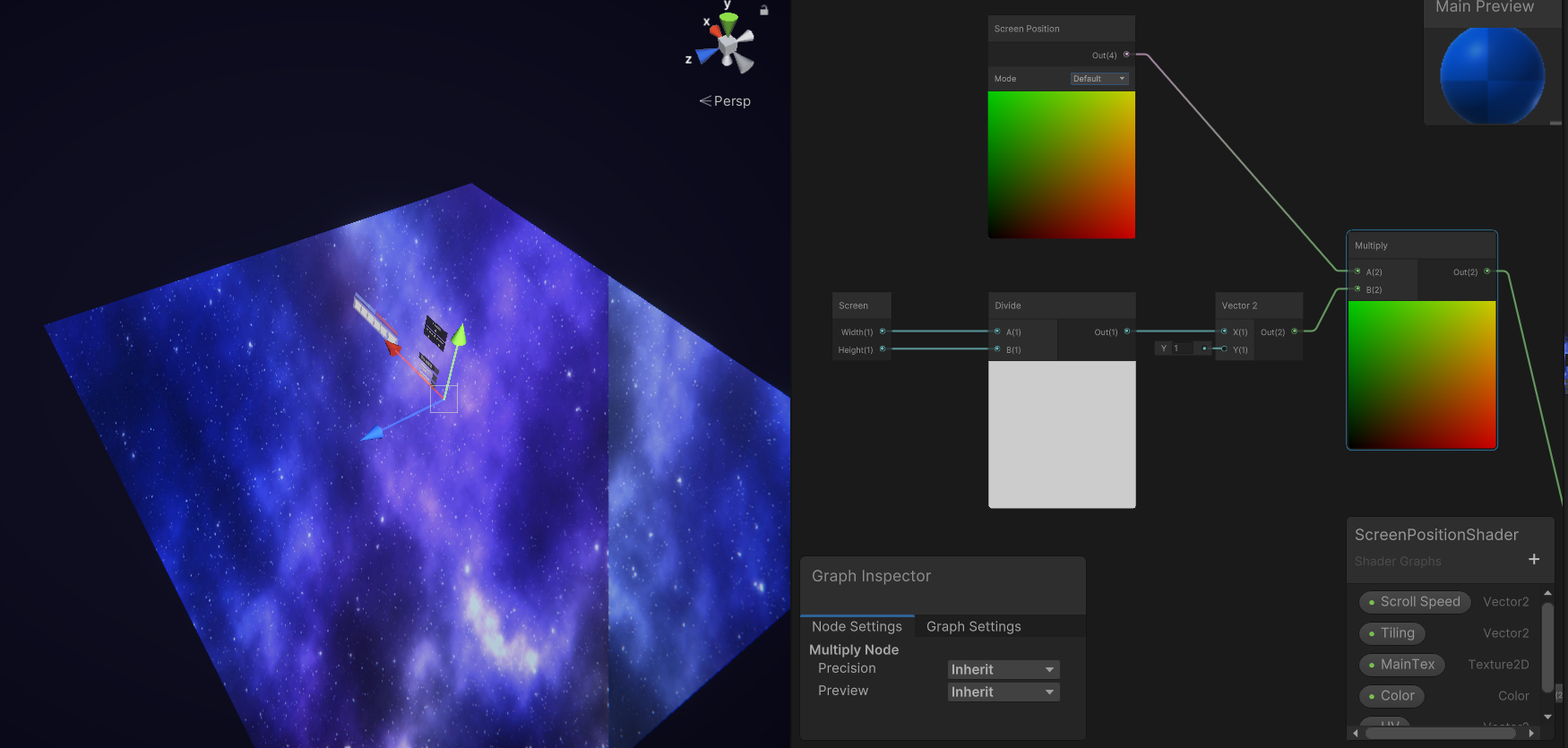
I'll probably figure it out tomorrow, but if anyone has made one of these before and has some input, I'd appreciate it ;)
regal stag
ebon basin
https://i.imgur.com/eGKv6Hn.png
Playing around with some screen position shader ...
If you use a seamless texture it might not matter that much where it repeats. But to make it more centered, can Subtract 0.5, do the Multiply, then Add 0.5.
Otherwise if you want the texture to fit the screen width, Height/Width in the Y axis might work better instead?
smoky widget
So if I have a texture2d, set it to a materia, and then change the texture in the cpu
Will the texture in the material update? or I need to set it again?
regal stag
smoky widget
So if I have a texture2d, set it to a materia, and then change the texture in th...
If you're adjusting pixels on the texture via C#, you need to call texture.Apply() to update the texture data on the gpu
https://docs.unity3d.com/ScriptReference/Texture2D.Apply.html
smoky widget
Okay thansk
ebon basin
regal stag
If you use a seamless texture it might not matter that much where it repeats. Bu...
Turns out I was doing more work than I needed. I thought by getting the screen position coordinates I would still need to map it out relative to the user's screen composition (or maybe I was actually trying to tile the texture here idk) but just plugging it directly into the UVs of the sample 2D seemed to work fine.
 crude river
Is there an easy way to transition a material procedurally from invisible to visible? For example an object has its materials applied, then with the extra shader/material, I can edit all of the existing materials/shaders to for example make it invisible
For example blur the underlying material or invert its colours
ebon basin
I'd assume you'd want to make a script and expose each alpha value individually and just dial them down
crude river
Is there an easy way to do it with shader graphs?
ebon basin
custom attributes
crude river
Ah I see, so, how would this be configured given a base shader and a seperate overlay shader?
ebon basin
I'd probably just iterate over all available shaders that you want to change the alpha on.
crude river
ebon basin
I'd probably just iterate over all available shaders that you want to change the...
But for using a shader as a transition effect/animation, would that still work?
ebon basin
Probably. I mostly do these type of effects with the VFX graph and I usually have some node that changes it over the lifetime of the particles
crude river
Alr ty
ebon basin
Shader transitional manager script sounds useful otherwise to handle these types of operations
smoky widget
Is there a method that I can use to do this?
float sum = weights[0]+weights[1]+weights[2]+weights[3];
weights /= sum;
weights is a float4
ebon basin
why don't you just make your own utlity method that takes in a float4
regal stag
If you mean a method built into hlsl, not that I'm aware of
low lichen
smoky widget
Is there a method that I can use to do this?
```cs
float sum = weights[0]+weight...
You can calculate the sum of a vector by doing a dot product with float4(1, 1, 1, 1), but I'm not sure if that's faster than doing it by hand. It's performing an extra multiply by one for each channel, but hardware acceleration might still make it faster than by hand.
ebon basin
So I've been ignoring this issue for a while, but I assume what's happening here is just how the UVs are mapped (unity sphere and other meshes that wrap around). What's the general idea with trying to minimize this?

Quads, planes, those are all fine.
 dusty creek
learned about procedural textures (guessing it's done in shaders?) and was wondering where to start learning this. I want to be able to create stylized procedural textures but I have no idea where to start. anyone got any info?
regal stag
ebon basin
So I've been ignoring this issue for a while, but I assume what's happening here...
I assume this is some noise distorting the Scene Color? If you use a seamlessly repeating noise texture (and integer tiling value) it shouldn't have a seam. But yes, depends on how the sphere is mapped to the UVs as well.
There is also alternatives like Triplanar mapping, but more expensive as you're sampling the texture 3 times
ebon basin
regal stag
I assume this is some noise distorting the Scene Color? If you use a seamlessly ...
Yeah, using scene color with the screen position node above with some noise
crude river
Is it possible to have 3d gradient noise that looks seamless on things like spheres?
ebon basin
I should probably look into triplanar mapping, been ignoring that for a while
regal stag
crude river
Is it possible to have 3d gradient noise that looks seamless on things like sphe...
If the noise is 3D you'd sample with vertex positions rather than UV coordinates so wouldn't have seams yes
crude river
ah k ty
regal stag
dusty creek
learned about procedural textures (guessing it's done in shaders?) and was wonde...
If you want fully procedural methods, you'll likely need to look into noise generation. Value noise, Perlin, fbm (fractal brownian motion), Worley/Voronoi, etc.
https://thebookofshaders.com/ has some pages about noise.
Shadertoy might also be good for examples (but is glsl)

 open badger
Hi, I'm very new to shaders and im facing a slightly confusing problem where the shader seems to work in the editor perfectly but becomes black in-game.
My goal is to have the eye's shading render as multiply blending mode.
Thanks for any help in advance <3
grizzled bolt
open badger
Hi, I'm very new to shaders and im facing a slightly confusing problem where the...
Shader Graph doesn't really support images, so you may need to do some hacky extra steps though I'm not sure which ones
https://forum.unity.com/threads/shader-graph-ui-image-shader.628111/ here are some potential solutions
Canvas type shader graph was added in URP 16 / Unity 2023.2.+
open badger
grizzled bolt
Shader Graph doesn't really support images, so you may need to do some hacky ext...
Ah alright, I'll try to look into it thank you!
Apparently changing the canvas' rendering mode from "screen space - overlay" to "screen space - camera" seems to have worked but it makes working with the ui in the scene editor almost impossible due to the size hehe
 dusty creek
regal stag
If you want fully procedural methods, you'll likely need to look into noise gene...
dusty creek
regal stag
If you want fully procedural methods, you'll likely need to look into noise gene...
for fully procedural textures, should I use shadergraph or hlsl code?
crude river
Why is my emission not working with this lerp node? when connected, it comes out blue/inverted colours. It's labelled HDR, but only takes 3 inputs where I'm using lerp on 2 HDR colours
 grizzled bolt
open badger
Ah alright, I'll try to look into it thank you!
Apparently changing the canvas' ...
grizzled bolt
open badger
Ah alright, I'll try to look into it thank you!
Apparently changing the canvas' ...
"plane distance" controls the size of the UI objects relative to other gameobjects
Though iirc it also determines the depth of the UI relative to gameobjects
regal stag
dusty creek
for fully procedural textures, should I use shadergraph or hlsl code?
Either would work. Generating noise typically requires loops, but could still be done in graphs via hlsl inside Custom Function node. There is also already some procedural noise options built in to Shader Graph. It has nodes for Voronoi, Gradient Noise (perlin.. or maybe simplex, can't remember) and Simple Noise (value + fbm iirc)
regal stag
crude river
Why is my emission not working with this lerp node? when connected, it comes out...
Inverted colours suggests you need to clamp negative values. Either via Saturate (clamps between 0 and 1), or Minimum with 0 (if you need to keep values over 1 for HDR reasons)
 fiery moth
I wrote a sobel filter shader for edge detection. However, I am using a plane with a ground texture to draw my ground, and when my objects are resting on the ground plane, the depth texture is drawn full white by the ground plane, and the edges aren't detected. If I delete the ground plane, the depth texture is mostly black but with my objects drawn in white, and my edges display on objects as desired. My desired outcome is to have my objects drawn with clean edges, and to ignore the ground. Is it possible to make the ground plane not draw to the depth texture? Or draw its depth as being further away than it really is? Thanks.
crude river
regal stag
Inverted colours suggests you need to clamp negative values. Either via Saturate...
Ahh I see, ty.
regal stag
fiery moth
I wrote a sobel filter shader for edge detection. However, I am using a plane wi...
If you're in URP removing the ground layer from the default opaque layer mask at the top of the Universal Renderer asset and rendering it with a RenderObjects feature might remove it from the depth texture. (Assuming URP is doing a depth-prepass)
ebon basin
https://i.imgur.com/2o2USfk.png
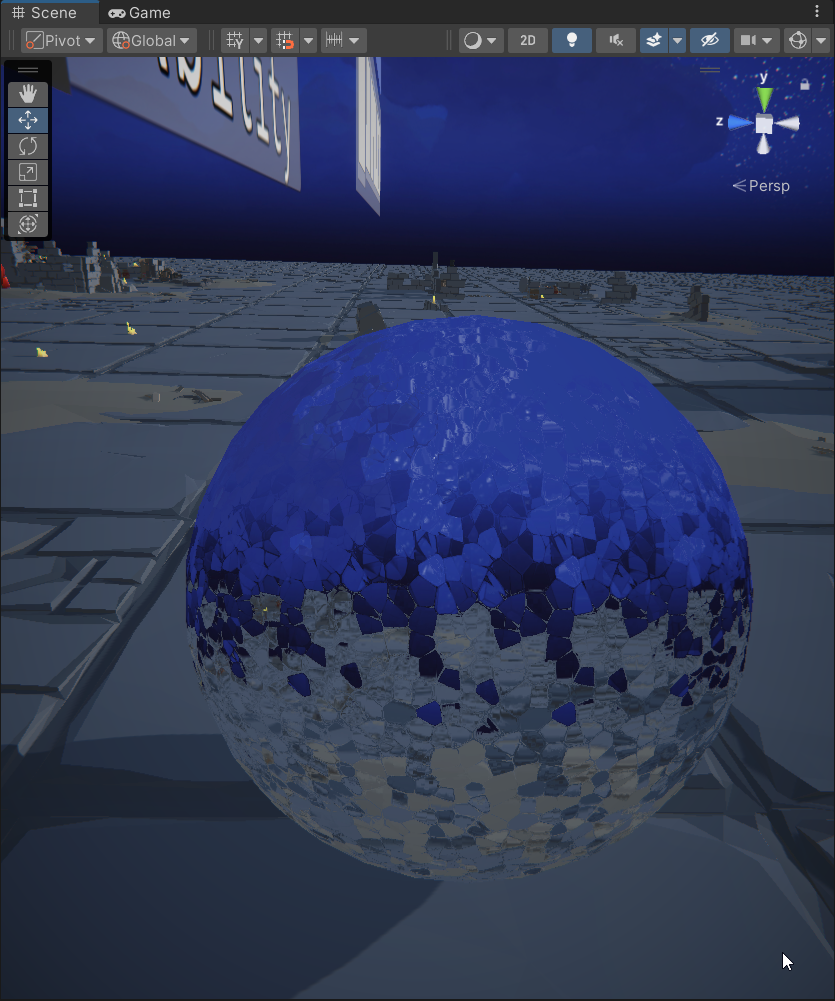
Triplanar node does seem to eliminate the hard seam with some adjustments, but how do I actually scroll the texture now if it's using world coordinates? Plugging time directly into the position (from the tiling node) creates undesired effects like flickering or stretched uvs. Looking more for a smooth scroll effect. The tiling between the tiling and offset node and the innate tiling of the triplanar node seems to be the problem.
 fiery moth
regal stag
If you're in URP removing the ground layer from the default opaque layer mask at...
fiery moth
regal stag
If you're in URP removing the ground layer from the default opaque layer mask at...
Is there a way of doing it in the built-in render pipeline? Migrating my project to URP is too much work right now.
fiery moth
fiery moth
I wrote a sobel filter shader for edge detection. However, I am using a plane wi...
I accidentally solved it. My plan was to write a custom unlit shader that passed through color, but wrote depth to depth_max. But for some reason just passing through the color and ignoring the depth was enough to fix the depth issue. I guess if it's not being written, it defaults to black in the depth texture. That's good enough for me, as this is not a serious project.
crude river
I currently have this linear gradient based on object UV. Is there a way to make it spherical from the center of an object, or a given world coordinate?
 ebon basin
Do people clamp / check bad values (dividing zero and zeroed direction) with the shader graph. How much of an impact would that really matter?
unity does seem to catch the errors as my shaders don't seem to be crashing lmao
In terms of user input that is for exposing custom variables
low lichen
ebon basin
unity does seem to catch the errors as my shaders don't seem to be crashing lmao
Dividing by zero in a shader will result in NaN in most cases. How bad that is depends on how it gets used. It's often an issue in post processing, where data from previous frames might be used and you get what's called NaN propagation. Post processing has an optional step to filter out NaNs as a last step, but it's best if you can avoid generating them in the first place.
 strange basalt
find it does not come up often, since its not often i end up exposing something that is divided
ebon basin
I thought shader graph had ways to create ranges or was I dreaming
making a giant master shader here for some distoration and about 80% of these variables would probably break the shader if they were 0, but negative and positive values are fine
strange basalt
yeah in code and shader graph you can create ranges that show up as sliders in the ui
strange basalt
you set the start and end of the range
ebon basin
Yeah, but the thing is I don't mind negatives or positives, but zero absolutely breaks a lot of it
strange basalt
do the same thing without the division
or decide how you want to handle zero then
ebon basin
true, i guess I'll just add a fallback node everywhere
it's not just dividing too, but 0 direction
strange basalt
really never hit run into it very often
and since its rare things its fine to just have it be a error
just give a sane default
civic lantern
crude river
I currently have this linear gradient based on object UV. Is there a way to make...
Yes, use Distance
crude river
civic lantern
Yes, use Distance
Do I use position and a blank vector 3 for the inputs?
For a sphere around 000
civic lantern
crude river
For a sphere around 000
Would not really work with a sphere since every point on the sphere is the same distance from its origin
Maybe you want Fresnel?
civic lantern
crude river
Do I use position and a blank vector 3 for the inputs?
Actually yes I think I misread, this will work if you use zero and a custom position
crude river
Ty!
smoky widget
If i set a buffer to a material that doesn't have a reference to the buffer, what happens?
 tulip carbon
Hi. Does anyone know a way to use shadergraph to make custom decals (for the decal projector)? Like, how do I get the "fade angle"? It is to like make it so if the angle is greater than a value, make that part different colour basically
 desert ember
Chidori Shader in Shadergraph in XR on Quest3 🙂
https://www.youtube.com/shorts/UUMJWFfA3_4
 crude river
Is there a way to combine shaders? For example I have one that applies a procedural effect to turn an object invisible, but it needs to show the underlying material
grizzled bolt
crude river
Is there a way to combine shaders? For example I have one that applies a procedu...
Fundamentally not
For that you may need to render the mesh twice with different shaders for the duration of the effect, which you could do with URP's Render Objects feature for example
smoky widget
What's the common practice regarding shadows and LODs?
Is it usually use the same lod as the main object, or use always the lowest lod to save performance?
crude river
grizzled bolt
Fundamentally not
For that you may need to render the mesh twice with different ...
Ah k ty
grizzled bolt
smoky widget
Is it usually use the same lod as the main object, or use always the lowest lod ...
Depends on how important you consider high quality shadow casters and what the performance cost adds up to, so there is no any one answer
Each shadowmap needs to render the meshes in the caster's frustum again anyhow
Not a shader question
crude river
Using the position input, I want progress to be a value 0-1 that controls the gradient coverage of an object. Is there a way to get the bounds of the object in a way that 0 moves the gradient all the way down, and 1 goes all the way to the top? Different object sizes and scales seems to change the ratio needed although I don't know how to use the object node

 deep helm
What is wrong with the line:
fixed4 col = fixed4(0, 0, 0, _VisionMap[0]); ?
Error says that " incorrect number of arguments to numeric-type constructor", but I don't understand why. It is obvious that I use _VisionMap in some incorrect way, but I have no idea by what reason
 ebon basin
deep helm
What is wrong with the line:
fixed4 col = fixed4(0, 0, 0, _VisionMap[0]); ?
Erro...
ebon basin
deep helm
What is wrong with the line:
fixed4 col = fixed4(0, 0, 0, _VisionMap[0]); ?
Erro...
_VisionMap[0].w maybe? Not sure what value you want
fixed4 is four fixed values, but it seems like you're taking an index of your float4 array and giving it a float4. Oh, also it's a buffer, don't you need to use sizeof?
deep helm
Oh, my big apologies - I need StructuredBuffer<int> there. For uknown reason I couldn't see that mistake for 3 hours...
Sorry again
ebon basin
ah ;p
 wild delta
{
    Properties
    {
        _MainTex ("Texture", 2D) = "white" {}
        _Color("Color", Color) = (1, 1, 1, 1)
    }
    SubShader
    {
        Tags { "Queue" = "Geometry" "RenderType" = "Opaque" "LIGHTMODE" = "FORWARDBASE" }
        LOD 100
        ZWrite On
        Blend Off
        Fog { Mode Off }
        Pass
        {
            CGPROGRAM
            #pragma vertex vert
            #pragma fragment frag
            #pragma multi_compile_fog
            #include "UnityCG.cginc"

            struct appdata
            {
                half4 vertex : POSITION;
                half2 uv : TEXCOORD0;
            };

            struct v2f
            {
                half4 vertex : SV_POSITION;
                half2 uv : TEXCOORD0;
                UNITY_FOG_COORDS(1)
            };

            sampler2D _MainTex;
            half4 _MainTex_ST;
            half4 _Color;

            v2f vert(appdata v)
            {
                v2f o;
                o.vertex = UnityObjectToClipPos(v.vertex);
                o.uv = TRANSFORM_TEX(v.uv, _MainTex);
                UNITY_TRANSFER_FOG(o, o.vertex);
                return o;
            }

            half4 frag(v2f i) : SV_Target
            {
                half4 texColor = tex2D(_MainTex, i.uv);
                half4 finalColor = texColor * (_Color * UNITY_LIGHTMODEL_AMBIENT);
                UNITY_APPLY_FOG(i.fogCoord, finalColor);
                return finalColor;
            }
            ENDCG
        }
    }
    Fallback "Mobile/Diffuse"
}```New to shader writing and seeking performance optimization help! Looking for guidance on enhancing my shader's efficiency while ensuring essential elements like Textures, Color, Texture UVs, and Ambient Lighting remain intact. Open to suggestions and tips from the community. Thanks
deep helm
Doesn't this SubShader tag makes the shader use 4-th value to set the transparency in frag?

Or may be I need something more for that?
As at the moment it doesn't matter what albedo value I set - it is always fully opaque
 amber saffron
deep helm
Or may be I need something more for that?
As at the moment it doesn't matter wha...
amber saffron
deep helm
Or may be I need something more for that?
As at the moment it doesn't matter wha...
The "really" required thing to have transparency is to use blending : https://docs.unity3d.com/Manual/SL-Blend.html
The usual transparency is done with the following blend command : Blend SrcAlpha OneMinusSrcAlpha
The other very usefull thing is the rendering queue of the object (when is it rendered compared to others).
Usually, transparent objects are rendered after the opaque ones. This is done with the tag "Queue" = "Transparent https://docs.unity3d.com/Manual/SL-SubShaderTags.html
Finally, you probably want to disable ZWrite : https://docs.unity3d.com/Manual/SL-ZWrite.html
ZWrite Off
The rendertype is not really necessary.
wild delta
@amber saffron can you also give me some tips if you don't mind
amber saffron
wild delta
<@532477925250039820> can you also give me some tips if you don't mind
That shader is already pretty minimal, I do'nt see what you'd want to optimize here 🤔
wild delta
amber saffron
That shader is already pretty minimal, I do'nt see what you'd want to optimize h...
the data types?
amber saffron
You could remove the Transfer and Apply fog functions, as well as the Fog interpolators in the v2f struct, as you've explicitely disabled fog on the sub shader
wild delta
amber saffron
That shader is already pretty minimal, I do'nt see what you'd want to optimize h...
I would like if you give me some tips regarding performance.
amber saffron
wild delta
I would like if you give me some tips regarding performance.
Oh boy, that can be long and you'll probably find good resource on the web for that, that will also be more readable than discord XD
Your shader is already doing almost nothing, so I can't really git tips on this one.
But in general, if you want to optimise a shader, just think of how many math operations you're doing there. Less operations is faster. And some "cost" more than other ( add<mul<power<sine for example).
Loops and branches (ifs) can be tricky but are not necessarly to avoid.
On mobiles, avoid textures fetches indirections (use a texture information to deform an other texture) is possible, and when it make sense, offload some calculations from the fragment shader to the vertex shader.
And on top of that, the shader compiler also does it's own optimisations that is a bit of a black box to me 😅
wild delta
Thanks! i appreciate it.
deep helm
amber saffron
The "really" required thing to have transparency is to use blending : https://do...
Thanks a lot for your answer! Will try it out a little later today
 thin crater
Hi, is there a way to blend values between normal vectors?
I'm using them in a texture but the effect I'm having has a clear step between every face
amber saffron
thin crater
Hi, is there a way to blend values between normal vectors?
The easy and ugly way is : normalize( lerp(normal1, normal2, t) )
thin crater
How do I get normal 1 and 2? I'm using a normal vector and there's not a position input so I can't have more normals
amber saffron
🤔 What are you trying to do ?
thin crater
Creating a water shader that goes towards the shore. Using flowmap-like method to offset a voronoi noise, it works really well. As a normal map I'm using the mesh itself (water is a perfect copy of the terrain mesh but height position is fixed by a variable).
The problem is that faces are pretty big (terrain is huge), and you can see where the normal changes a bit and the offset with it

You can see it here

every line where the noise repeats is a face of the mesh where the normal changes a bit
if there was a way to blend between these normals...
Right now that's how I get my normal values
 amber saffron
Are you using the normals as input for that voronoi ?
 amber saffron
Ah, ok, so the normal is used as a "slope" right ?
does the base mesh have smooth normals ?
thin crater
amber saffron
Ah, ok, so the normal is used as a "slope" right ?
does the base mesh have smoot...
Yes
for the slope
sadly the mesh is built at runtime (it's a procedural world) and I found no way to set the mesh to have smooth normals via code 😦
amber saffron
Well, that's the issue here then : the mesh polygon don't share their vertices, and as such, don't have smooth normals between faces. You can't really do anything to fix this (other than some very complex offscreen rendering to "blur" the normals)
The best solution is to find a way to smooth the mesh.
Did you do the mesh generation yourself or is it a package ?
thin crater
I did it myself following one of the Sebastian Lauge videos
amber saffron
I'm a bit lazy to check all his videos again, but I'm pretty sure he showed something to smooth normals in the terrain generation serie
An "easy" fix would be to calculate the normal from the height function when generating the mesh. As all the vertices with the same position will have the same normal, it would end up smooth.
Oh, and if you call Mesh.RecalculateNormals , don't forget to remove it, else you'll loose those
thin crater
amber saffron
An "easy" fix would be to calculate the normal from the height function when gen...
Bingo!! I forgot that video
tysm, gonna look it now 😄
thin crater
amber saffron
Oh, and if you call Mesh.RecalculateNormals , don't forget to remove it, else yo...
It worked 😍 everything was already "smooth", I just forgot to remove the recalculate normals, wonderful!
 native frigate
Hello, is there any way to be able to edit the HDR color from the shader graph directly from the material inspector? Currently I can only do that from the graph inspector and it's a bit tedious and the material inspector one is greyed out
 amber saffron
native frigate
Hello, is there any way to be able to edit the HDR color from the shader graph d...
amber saffron
native frigate
Hello, is there any way to be able to edit the HDR color from the shader graph d...
You need to create a new material using this shader, you can not edit the default material that is generated with the shadergraph file
Either new material, or a material variant from the default material
native frigate
amber saffron
You need to create a new material using this shader, you can not edit the defaul...
ohhh ok, im a total beginner at these so yeah xdd thanks a lot
thin crater
thin crater
You can see it here
Hi, if I create a mesh at runtime and set it to my water object it doesn't store normals (even if it correctly reacts to light), but if I save the mesh of the same object to an fbx (using fbx exporter package) and then reimport it - the same mesh that had no normals- it works. Why? It seems like the mesh generated at runtime has broken normals.....
thin crater
thin crater
Hi, if I create a mesh at runtime and set it to my water object it doesn't store...
however normals seems to work for light (it doesn't wok with the Normal Vector node). For example if I use recalculateNormals before exporting to fbx, the exported mesh will have the normals recalculated. I'm really confused right now
 fast ravine
Can anybody recommend a specific Pixelshader?
compact reef
Hey Remy, Can you please tell me which is more performant in case of lightmapped scene with no realtime lights
"mobile/unlit(lightmapped)" or "mobile/vertex lit"?
compact reef
amber saffron
You need to create a new material using this shader, you can not edit the defaul...
bump
amber saffron
fast ravine
Can anybody recommend a specific Pixelshader?
To do what ?
amber saffron
compact reef
Hey Remy, Can you please tell me which is more performant in case of lightmapped...
You shouldn't ping me out of nowhere when other people may be able to answer you ...
The first one is for light map only, the second for dynamic lights.
So the first is probably a better choice
compact reef
after baking lightmap on the scene, vertex lit shader based objects do not get affected by any realtime lights
they just use the baked lightmap on the object and nothings else,... so in case of that, which one wins? vertex lit? or unlit (lightmapped)?
compact reef
amber saffron
You shouldn't ping me out of nowhere when other people may be able to answer you...
im sorry
amber saffron
compact reef
they just use the baked lightmap on the object and nothings else,... so in case ...
Unlit .... That's what I said
compact reef
thank you
amber saffron
thin crater
however normals seems to work for light (it doesn't wok with the Normal Vector n...
That's very strange. If the mesh reacts properly to lights, it means that it has normals.
For the fbx version, maybe normal are generated at import or export
thin crater
Nevermind, I fixed that
fast ravine
amber saffron
To do what ?
Top Down 3D models in 2dspace. I want the models to blend a bit more into one artsyle if that makes sense
thin crater
Normals actually had no value, the exporter created them. I fixed my bake normals code and now everything works 😄
amber saffron
fast ravine
Top Down 3D models in 2dspace. I want the models to blend a bit more into one ar...
It does, but depending on the art style the choice can range from a regular my shader with hand made textured to a custom toon with cross hatch shadows 😅
There is no one solution fits all here
fast ravine
Well, I am trying to keep the models in the same artstyle currently they all look like, what counted as "realistic" 10 years ago. What is a "my shader"?
amber saffron
fast ravine
Well, I am trying to keep the models in the same artstyle currently they all loo...
That's things like bioshock infinite, ac black flag, GTA v , the last of us...
I'm not sure PBR was already a thing, so finely authored Phong materials with diffuse / normal / specular probably
compact reef


the first one uses legacy/reflective/vertex lit shader which uses a given cubemap texture, and define the reflective area by alpha channel of the base texture
the second one is the unlit shader which takes the environment baked reflection probe for lighting using unity_SpecCube0, unity_SpecCube0_HDR, Object2World, UNITY_MATRIX_MVP , it uses a normal map too , to detail up where to draw the reflections
now there is two question
-
which one will be more performant
-
why the reflection of first one looks so off, where both are reflected from a same skybox texture
amber saffron
compact reef
now there is two question
1. which one will be more performant
2. why the refl...
- Probably 1 if
- the reflection is computed in the vertex shader
compact reef
i have taken the second shader from here, the balloon cat
https://docs.unity3d.com/Manual/SL-VertexFragmentShaderExamples.html
 compact reef
amber saffron
1. Probably 1 if
2. the reflection is computed in the vertex shader
compact reef
amber saffron
1. Probably 1 if
2. the reflection is computed in the vertex shader
is that any issue with 'hdr' or something? actually i was using diffuse reflective cubemap too...but result are still same....dull looking reflection compared to the second picture...
amber saffron
Maybe the alpha used to mask the reflection dims it to much ?
compact reef
i will experiment it increasing the intensity of alpha channel
compact reef
amber saffron
Maybe the alpha used to mask the reflection dims it to much ?
still, doesnt look reflecting at all

i think it lacks HDR
or something?...as the shader uses texCube
how could i make the cubemap looks like this, do i have tlo input any macros or something?

is that something im missing ? , this is the frag of that shader which is showing accurate reflection
 compact reef
 smoky widget
Does LOD cross fading work with DrawMesh Instanced Indirect objects?
Because Im not sure If i have to add the parameters to the shader, or use my own implementation
thin crater
Is there a way to access position of a vertex before modifying it in the shader graph?
so you set it to a static height but you can still access its previous height
regal stag
thin crater
Is there a way to access position of a vertex before modifying it in the shader ...
Can pass the original position through a Custom Interpolator added to the Vertex stage outputs. See https://www.cyanilux.com/tutorials/intro-to-shader-graph/#custom-interpolators
thin crater
Ty
regal stag
smoky widget
Does LOD cross fading work with DrawMesh Instanced Indirect objects?
Maybe possible with regular GPU instancing of GameObjects, but function calls like DrawMeshInstancedIndirect only uses a single mesh parameter so I don't see how LODs would work, unless you use multiple function calls and dynamically change the instances that need to be rendered.
But for the cross fading itself, I think the shader just needs to have #pragma instancing_options lodfade to properly batch the same meshes with different fade factors.
smoky widget
Maybe possible with regular GPU
 echo flare
Why are normal map textures twice the size of regular textures when imported to unity?
If I turn compression off, it's like 40% larger still
kind juniper
echo flare
If I turn compression off, it's like 40% larger still
Probably using different color format.
 copper edge
Hey, i have a custom shader with motion vector pass. i was wondering if there is a way to generate textmeshpro font asset using a material from this custom shader.
compact reef
I was comparing between Mobile/Diffuse shader and Mobile/Unlit(Lightmapped)
I will show the comparison of their vertex and fragment parts
mobile diffuse vs unlit(lightmapped)----fragment

mobile diffuse vs unlit(lightmapped)-----vertex part

in the fragment calculation , diffuse seems faster based on gpu cycle
and in vertex calculation , unlit (lightmapped) seems faster
which one should i use for better performance?
low lichen
compact reef
and in vertex calculation , unlit (lightmapped) seems faster
It appears you're comparing the fragment shader of the unlit (lightmapped) shader again in the vertex comparision. It's the same numbers and it doesn't make sense for its vertex shader to have texture instructions.
If you're wondering whether a vertex lit shader is more or less expensive than a lightmapped shader, you can't just compare their instructions. A texture instruction is more expensive if it's sampling a higher resolution texture, so you have to consider how large your lightmaps need to be.
Whether you need to pay more attention to the vertex shader vs the fragment shader depends on the screen resolution you will be rendering at and the number of vertices in your scene.
compact reef
sorry ...i mistakenly sent the same image
compact reef
low lichen
Whether you need to pay more attention to the vertex shader vs the fragment shad...
my mistake...probably i have comapred with something else than unlit (lightmapped)

here is the exact one
definitely , unlit(lightmapped) is faster
low lichen
compact reef
definitely , unlit(lightmapped) is faster
The "Mobile/Unlit (Supports Lightmap)" has two passes: one that is not lightmapped, so it's just an unlit shader with a main texture, and a lightmapped pass that samples both the main texture and a lightmap texture. You appear to be analyzing the first pass.
compact reef
low lichen
If you're wondering whether a vertex lit shader is more or less expensive than a...
i understand the factors of resolution and vertex counts ...as in my scene , these are constant and unchanged , that's why i was comparing between shaders
compact reef
low lichen
The "Mobile/Unlit (Supports Lightmap)" has two passes: one that is not lightmapp...
yeah i know
i have a simple trick, i will first bake lightmap
and after baking i will just remove the first pass
which i do not need
and there only will be the pass that will hold the lightmap along with the main texture
low lichen
Okay, but the screenshot you just posted shows only one texture instruction, which means it's not the lightmapped pass.
compact reef
as my scene is completely baked , no realtime lights
low lichen
Removing the unused pass won't save any performance, it's unused.
compact reef
low lichen
Okay, but the screenshot you just posted shows only one texture instruction, whi...
I see probably im missing something here , let me have a quick test again
got it , actually there was another set of vertex and frag glsl in the compiled code which i missed
this time i will only keep the lightmap pass and test the gpu cycle
(note; if you are curious how to test these, im using "mali offline compiler")
low lichen
That's fine for getting a general idea of the complexity, but you shouldn't use it as the final judge of which shader is more expensive. That can only be determined by testing the shaders on the devices you intend to target, with the textures and scene you intend to use.
compact reef
arent unlit shaders better?
compact reef
low lichen
That's fine for getting a general idea of the complexity, but you shouldn't use ...
I had to know one more thing , How can I make the existing mobile/unlit(lightmapped) into an unlit cutout (lightmapped)...(i dont know much about writing shaders)
would you tell me how to just make it "cutout" keeping everything unchanged?
low lichen
compact reef
arent unlit shaders better?
Well, as you can see in the instruction count of the mobile diffuse shader, it only has 2 arithmetic instructions and one texture sample. You haven't shown the numbers for the lightmapped unlit fragment shader, but I suspect it's quite a bit more than that. That's because the vertex lit does most of it's work in the vertex shader.
If intend to use this shader in, for example, a mobile VR game, optimizing the fragment shader is critical, because you're rendering at very high resolutions. You can always make the models lower poly to reduce the number of vertices. You can also lower the render resolution to reduce the cost of the fragment shader, but that's a more immediately noticeable downgrade for the user.

 low lichen
compact reef
would you tell me how to just make it "cutout" keeping everything unchanged?
low lichen
compact reef
would you tell me how to just make it "cutout" keeping everything unchanged?
You sample the main texture and do discard; if it's alpha is less than some threshold, which you can expose as a property or have hardcoded.
An example of what that might look like:
half4 color = tex2D(_MainTex, uv);

if (color.a < 0.5)
{
    discard;
}
 long rune
why does baking a scene in unity increase the shader variants of the same shader...
long rune
why does baking a scene in unity increase the shader variants of the same shader...
Because light baking makes use of a different pass in each lit shader, called the Meta pass.
https://docs.unity3d.com/Manual/MetaPass.html
compact reef
low lichen
You sample the main texture and do `discard;` if it's alpha is less than some th...
is it something similar as "clip"?
low lichen
compact reef
is it something similar as "clip"?
Yes, clip is a function that uses discard internally. It's a quicker way to do if (x < 0) { discard; }
So if you wanted to use clip, you would have to subtract the alpha by the threshold, so alpha below the threshold becomes less than zero.
clip(color.a - 0.5);
I have added these 3 things in the Mobile/Unlit(Lightmapped) shader
compact reef
can someone just tell me how to add alpha to this shader? , not the cutout, just adding Blend src or something like thatg
https://github.com/TwoTailsGames/Unity-Built-in-Shaders/blob/master/DefaultResourcesExtra/Mobile/Mobile-Lightmap-Unlit.shader
amber saffron
compact reef
can someone just tell me how to add alpha to this shader? , not the cutout, jus...
low lichen
👆, also good to note that making these changes, mostly the render queue and ZWrite changes, will make the shader no longer suitable for opaque rendering, even if the alpha is set to 1.
It's possible to make a shader that can be configured for both opaque and transparent rendering, with a bit more work.
compact reef
low lichen
👆, also good to note that making these changes, mostly the render queue and ZWr...
is that for less overdraw?
i was going to use cliping , but i saw it has impact on performance somehow
that's why i choose the blend src or something like that to implement on the shader
low lichen
compact reef
is that for less overdraw?
Without z writing, objects will be drawn incorrectly unless drawn specifically in back to front order, which Unity only does for objects in the transparent render queue.
low lichen
compact reef
i was going to use cliping , but i saw it has impact on performance somehow
Materials that use alpha clipping should be rendered after opaque objects, but before transparent. There is a render queue range for this called AlphaTest, which you should set on any material that uses alpha clipping.
 random pond
Hi guys, I have a shader graph for my health bar, I need to add these nodes together like so (image)
but when i change color from RGB, the colors overwrite each other, any help?

 low lichen
random pond
Hi guys, I have a shader graph for my health bar, I need to add these nodes toge...
low lichen
random pond
Hi guys, I have a shader graph for my health bar, I need to add these nodes toge...
From looking at these previews, I don't see why the red stripe shouldn't appear in the final Add node, except if the black color is actually negative instead of zero.
random pond
low lichen
From looking at these previews, I don't see why the red stripe shouldn't appear ...
assuming it was negative, what could I do about it?
any nodes I can plug in and test?
low lichen
You could put a Saturate node in between the bottom Multiply and final Add node.
That will clamp the values between 0 and 1.
random pond
fantastic! thank you, works
random pond
low lichen
From looking at these previews, I don't see why the red stripe shouldn't appear ...
for my knowledge, what causes the black to be negative? (what does this mean)

here is essentially what I am doing
theres another bit that plugs in that forms the lines on the HP bar, maybe that could be the cause (edit: the problem is in the screenshot i think)
ohhh, a double subtraction?
low lichen
random pond
for my knowledge, what causes the black to be negative? (what does this mean)
I just mean that somewhere, a negative value is being inputted into that bottom Multiply node, and Shader Graph can't show that in the preview as anything other than black, which is the same as zero.
compact reef
amber saffron
https://discord.com/channels/489222168727519232/497874081329184799/1178962408077...
would just writing "blend src aplha" under the tag , do the job? it was an unlit(lightmapped) shader , i tried just putting on one those blend spell ...but the gameobject isnt affected by alpha
low lichen
compact reef
would just writing "blend src aplha" under the tag , do the job? it was an unlit...
The shader is also hardcoding the output alpha to 1, which you'll have to remove.
compact reef
how...actually whenevr i try to tweak any shader based on my own understanding , i almost always get to see pink sunrays on my face.,...please tell me where to make change in the code specifically
low lichen
compact reef
how...actually whenevr i try to tweak any shader based on my own understanding ,...
At a glance, just removing this line would be enough:
https://github.com/TwoTailsGames/Unity-Built-in-Shaders/blob/6a63f93bc1f20ce6cd47f981c7494e8328915621/DefaultResourcesExtra/Mobile/Mobile-Lightmap-Unlit.shader#L104
But actually then alpha would never be assigned. We want to assign it to the alpha of the texture. So you would replace this line with:
col.a = tex.a;
thanks a lot sir
 worthy pine
hey i wanted to make a cubemap sahder liek in boneworks or bonelab, my proplem is that the teh differnt faces of the cube or mesh have a other persektive, but i want to make it so there is only one

heres teh shader script for now
also sry for my bad grammar
low lichen
worthy pine
hey i wanted to make a cubemap sahder liek in boneworks or bonelab, my proplem i...
Instead of worldRefl, which is the view direction reflected off the normals of the mesh, you want just the view direction. That's accessed through the float3 viewDir variable in surface shaders.
worthy pine
thx alot
now how do i add a mask? for example a screen or grid mask? when i tried it the mask was like on the cube map
low lichen
worthy pine
now how do i add a mask? for example a screen or grid mask? when i tried it the ...
You can sample a grid texture the same way you would sample a regular texture that goes on the mesh, then you blend it on top of the cubemap somehow, such as by lerping using the alpha of the texture, or by multiplying it together.
 brittle bolt
Hey everyone, I am using the Triplanar Texture node to create some materials. I am finding that on very low poly surfaces, the triplanar material creates a ton of seams. I am importing them with smoothing groups, but the triplanar does not behave as expected. Creating lots of seams on different faces
 grizzled bolt
brittle bolt
Hey everyone, I am using the Triplanar Texture node to create some materials. I ...
grizzled bolt
brittle bolt
Hey everyone, I am using the Triplanar Texture node to create some materials. I ...
Triplanar usually uses the angle from mesh normals, so an edge with hard split normals won't have a smooth transition
brittle bolt
Strange, so in this case the entire mesh besides open edges would need to be a soft edge? I had not encountered that in unreal if im remembering correctly
compact reef

is it possible to achieve that world reflection on the alpha color channel of the base texture (instead of using any normal map) in "Legacy/Reflective/Vertex Lit " shader(https://github.com/TwoTailsGames/Unity-Built-in-Shaders/blob/master/DefaultResourcesExtra/Reflect-VertexLit.shader) instead of just using a sampler cubemap inside it as usual?

what is actually needed to change in that shader in quick to achieve like that?
smoky widget
How can i make a shader whre I can enable and disable culling with a toggle?
smoky widget
Im tyring this, but it doesnt work
Cull [1 - _CULL_BACK]
regal stag
smoky widget
How can i make a shader whre I can enable and disable culling with a toggle?
You can use a property in the Cull operation.
// in Properties :
[Enum(UnityEngine.Rendering.CullMode)] _Cull ("Cull", Float) = 2 // defaults to "Back"
...
// (in SubShader/Pass)
Cull [_Cull]
Aaaah, thank you+
regal stag
Similar things work for other ShaderLab operations. I've got a list here - https://www.cyanilux.com/faq/#shaderlab-operation-properties
compact reef
compact reef
what is actually needed to change in that shader in quick to achieve like that?
bump
brittle bolt
grizzled bolt
Triplanar usually uses the angle from mesh normals, so an edge with hard split n...
I am finding that I am getting seams even when adding more geo to relieve tension on hard angles, and with the mesh completely smoothed
left area is with extra bevel added to help the tension, and right is very steep angle with smoothed normals that creates sheering
 grizzled bolt
brittle bolt
left area is with extra bevel added to help the tension, and right is very steep...
grizzled bolt
brittle bolt
left area is with extra bevel added to help the tension, and right is very steep...
It doesn't look smoothed
Also the weird shadows make it look like you might have inverted normals
You could take another photo with default material to rule out the shader
compact reef
compact reef
is it possible to achieve that world reflection on the alpha color channel of th...
bump
compact reef
compact reef
what is actually needed to change in that shader in quick to achieve like that?
what is the procedure to do that
 slender ore
Hello there, I have created a sky-with-stars shader graph and applied it to a sphere that is 1000x1000x1000. Everything would be great if not for a flickering that is constant with camera movemnt. Also, flickering happens only when camera is far away from the edge of the sphere. I am assuming it is caused by the huge amount of dots rendered on a screen but have no idea how to fix it.
 grand jolt
How do I make only the candy cane that is flying glow red?
Here is my video which shows it
I can't use post processing, as it attaches bloom to everything
I can't add a box collider since the candy cane moves
 karmic hatch
slender ore
Hello there, I have created a sky-with-stars shader graph and applied it to a sp...
karmic hatch
slender ore
Hello there, I have created a sky-with-stars shader graph and applied it to a sp...
I think it's because of how small each dot is. If it's pixel-sized, then some of the time you land on the dot, other times you don't, and so it flickers. You can use screen-space derivatives to estimate how far you are from the dot centre in pixels and then make a star that doesn't flicker
slender ore
karmic hatch
I think it's because of how small each dot is. If it's pixel-sized, then some of...
Do you know any examples of this system that I can look up?
karmic hatch
slender ore
Do you know any examples of this system that I can look up?
It's basically anti-aliasing, there are lots for lines and you would just want to apply the ideas to a point instead
 cloud flint
I'm trying to make a moving shining effect like the image for texts. but when I make shader for text, the shader effects the whole font texture. I'm kinda stuck is there a way to make it so shader effects only what is written with the text
 compact reef
here is a simple unlit shader that has support for LOD Crossfade


Could I just get a quick suggestion to modify Unity's "Mobile/Unlit(supports lightmap)" to have this LOD crossfade feature?
https://github.com/TwoTailsGames/Unity-Built-in-Shaders/blob/master/DefaultResourcesExtra/Mobile/Mobile-Lightmap-Unlit.shader
please...someone
slender ore
karmic hatch
It's basically anti-aliasing, there are lots for lines and you would just want t...
I have tried making anti-aliasing but with no effects
karmic hatch
slender ore
I have tried making anti-aliasing but with no effects
You can probably do something like this:
float r         = Voronoi(uv);
float deriv     = ddxy(r);
float rInPixels = r/deriv;
return smoothstep(2,0,rInPixels);
(in shadergraph)
compact reef
cloud flint
I'm trying to make a moving shining effect like the image for texts. but when I ...
Unity has a default shader "Legacy Shader/ Decal" you can use it to have such shiny looking overlay texture on your main texture
compact reef
compact reef
Could I just get a quick suggestion to modify Unity's "Mobile/Unlit(supports lig...
someone please look into this issue ...
low lichen
compact reef
someone please look into this issue ...
Have you made an attempt to do it yourself? Look at the differences between your shader and the LOD crossfade shader. What's different? What appears to be crossfade LOD related?
compact reef
I tried adding these things to the shader

 compact reef
low lichen
Have you made an attempt to do it yourself? Look at the differences between your...
compact reef
low lichen
Have you made an attempt to do it yourself? Look at the differences between your...
and got this
 low lichen
compact reef
and got this
low lichen
compact reef
and got this
Do you notice anything different about how the LOD shader deals with SV_POSITION?
compact reef
I have pretty less knowledge about shader basic( im sorry , I didnt have any choice but to collect some quick info instead starting 3-4 years learning shader writing...
compact reef
low lichen
Do you notice anything different about how the LOD shader deals with SV_POSITION...
that crossfade shader has no lightmap pass...but this one have...now im thinking , how could I implemnet in this one by adding or removing some lines
low lichen
I'm not asking you to understand what the difference is, just whether you can spot any difference. As in, if you look at where SV_POSITION appears in your shader vs where it appears in the LOD shader. Do you notice a difference in where it appears?
Because the error you got tells you that SV_POSITION and VPOS are considered as duplicates.
compact reef
here it is
 low lichen
compact reef
here it is
low lichen
compact reef
here it is
And where is it in the LOD crossfade shader? Also in v2f?
compact reef
here it is
 low lichen
Do they appear to be in the same place in both or is there a difference?
compact reef
low lichen
Do they appear to be in the same place in both or is there a difference?
it seems different but , i dont have any idea about these out , float, outpos things 🥲
that's why i have sent the source of the mobile/unlit (lightmapped) shader
low lichen
compact reef
it seems different but , i dont have any idea about these out , float, outpos th...
If you have no interest in gaining an understanding of what it is you're trying to do, if you only want it done, then I would suggest you try using something like ChatGPT instead. This problem is simple enough that even the free version should be able to spot the difference and piece it together.
 ionic cobalt
Good morning - So I am getting an error when I compile my shader with Vulkan
glslang: 'gl_PointSize' : identifiers starting with "gl_" are reserved
ionic cobalt
D3D Works just fine, no issues - this only happens with Vulkan
brittle bolt
grizzled bolt
It doesn't look smoothed
Also the weird shadows make it look like you might have...
No inverted normals, checked in maya. The right side has a ledge that is smoothed, and it creates that shearing you see, the left has a hard edge on the ledge, which stops shearing but the triplanar projections dont line up how id expect
I ended up adding a bevel and smoothed those edges, it seems to do the trick
 tawdry thistle
Say, is there an easy macro to compile my hlsl shader code depending on it being displayed in play mode or edit mode? >_> Something like SHADERGRAPH_PREVIEW but for the editor windows during edit mode.
I've got a shader which only displays valid data during runtime and because of that it's pitch black during edit mode which is kinda annoying to work with 😄
 ripe egret
Hello, im developing a procédurale video game map and I have a problem with shaders. (I’m new on unity) . I made perlin’s Algorithm and due to the height of my map, I want to applicate a specific shader. (Water, sand, grass…) but, a mesh can only have a single shader. So what am I supposed to do if I want to applicate different shaders to my different height of my map. For now, I just applicate a color to my different height. Thank you for answer ! 🙂
 tacit parcel
cloud flint
I'm trying to make a moving shining effect like the image for texts. but when I ...
tacit parcel
cloud flint
I'm trying to make a moving shining effect like the image for texts. but when I ...
Try using screen position instead of UV coordinate
compact reef
can I have realtime lights support on an unlit shader by using autoLight.cginc?
grizzled bolt
brittle bolt
No inverted normals, checked in maya. The right side has a ledge that is smoothe...
The texture shearing is from bad UVs, not from smoothing or normals in general
Triplanar mapping doesn't rely on UVs so you should be fine just by smoothing the normals of whole mesh
Beveling will give you more normal vectors for more control, naturally
 rare wren
compact reef
can I have realtime lights support on an unlit shader by using autoLight.cginc?
rare wren
compact reef
can I have realtime lights support on an unlit shader by using autoLight.cginc?
Not sure about that one, but there is a git repo with custom toon lighting in shader graph which has custom URP nodes
amber saffron
ripe egret
Hello, im developing a procédurale video game map and I have a problem with shad...
If you want to apply different shaders to you mesh, you need to assign different materials to different polygon groups (sub-meshes).
Or, you need to make a shader that blends all the textures you want based (let say) on the Y coordinate of the mesh.
 craggy vine
Would anyone here be able to provide help? I am currently struggling with trying to create convey's game of life using .Compute shaders and im very close, but for some reason im struggling to comprehend, if the color given to living cells does not have its red maxed out, the simulation breaks and everything is all black.
As a forewarning i do not entirely understand how the current scripts work myself as I am a student and our teacher has been... rather unhelpful.
C# code: https://hatebin.com/qblgiyflqn
Compute shader:
#pragma kernel CSMain
#pragma kernel InitFullTexture

RWTexture2D<float4> OutputTexture;
Texture2D<float> InputTexture;
float4 LivingCellColor;

[numthreads(32, 32, 1)]
void CSMain(uint3 id : SV_DispatchThreadID)
{

    int x = int(id.x);
    int y = int(id.y);

    int count = 0;
    for (int i = -1; i <= 1; i++)
    {
        for (int j = -1; j <= 1; j++)
        {
            if (i == 0 && j == 0) continue;

            count += InputTexture.Load(int3(x + i, y + j, 0));
        }
    }

    bool currentCellState = InputTexture.Load(int3(x, y, 0)) > 0.5;
    bool nextState = false;

    if (currentCellState)
    {
        nextState = count == 2 || count == 3;
    }
    else
    {
        nextState = count == 3;
    }

    // Use LivingCellColor for living cells
    float4 finalColor = nextState ? LivingCellColor : float4(0.0f, 0.0f, 0.0f, 1.0f);

    // Write to the output texture directly using OutputTexture[id.xy]
    OutputTexture[id.xy] = finalColor;
}

[numthreads(8, 8, 1)]
void InitFullTexture(uint3 id : SV_DispatchThreadID)
{
    if (id.x % 7 == 0 || id.y % 3 == 0)
        OutputTexture[id.xy] = LivingCellColor;
    else
        OutputTexture[id.xy] = float4(0.0f, 0.0f, 0.0f, 1.0f);
}```I would greatly appeciate any help... Im starting to get desperate 🙇♂️
 agile storm
why doesn't my camera show the render texture like in this timestamp of a video?: https://youtu.be/W07TrTq3a4o?t=376 i attached the same script onto the Main Camera and added the necessary scripts. i have a different unity version
In this tutorial you will see step by step how to create cellular automata game of life.
music:
- Brandenburg Concerto No4-1 BWV1049 - Classical Whimsical by Kevin MacLeod is licensed under a Creative Commons Attribution 4.0 license. https://creativecommons.org/licenses/by/4.0/
Source: http://incompetech.com/music/royalty-free/index.html?isr...
 thin crater
Hi! I'm moving a custom shader from a project to another to test how it exports works. For some reason depth texture is not working even if it's enabled in the URP settings, and I'm almost 100% sure this setting file is the correct one (it's the only one activated in quality setting and it's the one selected in the "Graphics" setting, inside player's setting)
Also, camera has depth texture enabled
What am I forgetting?
version of both projects is 2022.3.9f1,
Ok - weirdly enough doesn't matter which setting I turn off on my main project, depth texture stays on o.O it's the opposite problem
low lichen
agile storm
why doesn't my camera show the render texture like in this timestamp of a video?...
Because OnRenderImage is a feature of the built-in render pipeline, not of URP.
 drifting flare
I have a custom unity shader, and I want to get environmental lighting from the skybox, but am pretty new to shaders. I have done a lot of research and testing already, but haven't gotten it to work. Would anyone here please be able to help?
Built-in render pipeline
low lichen
drifting flare
I have a custom unity shader, and I want to get environmental lighting from the ...
Unity exposes environmental lighting to shaders via spherical harmonics. This gets combined with any baked light probes near the object. To sample it in the built-in render pipeline, you can use the ShadeSH9 function in UnityCG.cginc.
drifting flare
I came across ShadeSH9 in my research a lot, but couldn't find documentation for it
low lichen
drifting flare
I came across ShadeSH9 in my research a lot, but couldn't find documentation for...
It's mentioned here
drifting flare
Cool thank you, I'll work more at it with this and come back if I run into roadblocks
craggy vine
Would anyone here be able to provide help? I am currently struggling with trying to create convey's game of life using .Compute shaders and im very close, but for some reason im struggling to comprehend, if the color given to living cells does not have its red maxed out, the simulation breaks and everything is all black.
As a forewarning i do not entirely understand how the current scripts work myself as I am a student and our teacher has been... rather unhelpful.
C# code: https://hatebin.com/qblgiyflqn
Compute shader:
#pragma kernel CSMain
#pragma kernel InitFullTexture

RWTexture2D<float4> OutputTexture;
Texture2D<float> InputTexture;
float4 LivingCellColor;

[numthreads(32, 32, 1)]
void CSMain(uint3 id : SV_DispatchThreadID)
{

    int x = int(id.x);
    int y = int(id.y);

    int count = 0;
    for (int i = -1; i <= 1; i++)
    {
        for (int j = -1; j <= 1; j++)
        {
            if (i == 0 && j == 0) continue;

            count += InputTexture.Load(int3(x + i, y + j, 0));
        }
    }

    bool currentCellState = InputTexture.Load(int3(x, y, 0)) > 0.5;
    bool nextState = false;

    if (currentCellState)
    {
        nextState = count == 2 || count == 3;
    }
    else
    {
        nextState = count == 3;
    }

    // Use LivingCellColor for living cells
    float4 finalColor = nextState ? LivingCellColor : float4(0.0f, 0.0f, 0.0f, 1.0f);

    // Write to the output texture directly using OutputTexture[id.xy]
    OutputTexture[id.xy] = finalColor;
}

[numthreads(8, 8, 1)]
void InitFullTexture(uint3 id : SV_DispatchThreadID)
{
    if (id.x % 7 == 0 || id.y % 3 == 0)
        OutputTexture[id.xy] = LivingCellColor;
    else
        OutputTexture[id.xy] = float4(0.0f, 0.0f, 0.0f, 1.0f);
}```Im confused about which one is more performant
- Unlit/Transparent?
https://github.com/TwoTailsGames/Unity-Built-in-Shaders/blob/master/DefaultResourcesExtra/Unlit/Unlit-Alpha.shader
or
regal stag
compact reef
Im confused about which one is more performant
1. Unlit/Transparent?
https://g...
I'd consider these to be equivalent tbh
compact reef
regal stag
I'd consider these to be equivalent tbh
actually the part that confused me was...one of these have just a little script and another one has a long one
if the performance is same...then i'd go for the first one, cz, i dont really know how to add gpu instancing support for the second one...but on the first one i can just add #pragma multi_compile_instancing and get it done
regal stag
compact reef
actually the part that confused me was...one of these have just a little script ...
The mobile one is a type of "fixed function shader" - https://docs.unity3d.com/2019.3/Documentation/Manual/ShaderTut1.html
It's somewhat simpler but doesn't allow for all that much customisation
compact reef
i was going to use for several tree billboards
as im working for mobile...will it be any problem if i use the first one instaed of the mobile/particle alpha blended?
regal stag
compact reef
as im working for mobile...will it be any problem if i use the first one instaed...
No, either should work
compact reef
thanks a lot^ ^
regal stag
Behind the scenes that mobile fixed function shader is likely compling into something very close to the other one anyway
regal stag
craggy vine
Would anyone here be able to provide help? I am currently struggling with trying...
The red values need to be maxed out because the compute shader is loading values from the texture around a given pixel (the double for loop under CSMain), storing in the variable count which is an int type. Any values below 1 will just cast/truncate to 0.
There's also the > 0.5 comparison for currentCellState which expects the InputTexture to have values below and above 0.5 for cell off/on states.
If you are trying to change the colour of all the cells, it would be better to keep the InputTexture and OutputTextures as float, and store values of 0 and 1 only. Instead you can tint the texture later in the vert/frag or surface shader that is used when displaying it - the one used by gameOfLifeMaterial.
drifting flare
This is how I'm combining my different sources for the final color, and this is how the final result looks. I'd like to increase shadow contrast while still retaining saturation from the skyColor, how could I do that?


I set diff += 0.1 in order to keep the texture information in the shadow. I get the desired brightness without that, but lose all texture in the shadow
Nvm got it working, I multiplied skyColor by col as well and removed the minimum from diff
 craggy vine
regal stag
The red values need to be maxed out because the compute shader is loading values...
craggy vine
regal stag
The red values need to be maxed out because the compute shader is loading values...
Cant mess with the actual material shader :[
Only allowed to change the compute shader and c# for the assignment
Would there be a way to hopefully easily just change it so the detection accounts for the colors and only counts those with full black as dead?
sorry im aware the answer is probably obvious but i am not good at this... I just want to pass so i didnt waste all the time for nothing since this class was optional
drifting flare
Is bloom possible as a custom shader effect in the built-in render pipeline?
Or at all
regal stag
craggy vine
Would there be a way to ~~hopefully easily~~ just change it so the detection acc...
Maybe by using any() function around both InputTexture.Load, and removing the > 0.5 🤷
https://learn.microsoft.com/en-us/windows/win32/direct3dhlsl/dx-graphics-hlsl-any
Should probably change the InputTexture declaration to float4 instead of just float as well
regal stag
drifting flare
Is bloom possible as a custom shader effect in the built-in render pipeline?
There's a Post Processing package that includes Bloom. Is under the Package Manager window.
craggy vine
regal stag
Maybe by using `any()` function around both `InputTexture.Load`, and removing th...
I will look into those tomorrow when i get on pc, thank you
compact reef
is there any significant performance difference between Additive blending and Traditional Alpha Blending?
(in case of particles)
regal stag
compact reef
is there any significant performance difference between Additive blending and Tr...
You could try both and profile. Though it probably varies depending on the gpu. Additive might be slightly cheaper on some, while equivalent on others. I doubt the difference will be that significant though, I'd focus more on stuff like reducing overdraw and batching draw calls.
compact reef
i see
 night pilot
I want to learn about shader graphs and have absolutely no knowledge of this domain
From where can I start or what tutriols can help me
I watch few youtube videos which are bit old
grand jolt
I'm currently creating a dissolve shader, but the material shall not always show both sides. Is there anyway to only show the front when not dissolved, but all sides when dissolving or sth similar?


 barren cedar
I'm currently working on a voxel thingy, but all of the pixels have gradients across them, because different screen pixels on the same voxel pixels will inevitably have different positions, resulting in them getting shaded differently due to slightly different reception of lights/shadows/etc

how can I make a shader that in the lighting calculation - right before it inputs the position into the bit that calculates shadows/lights/reflections/etc - snaps the position to the nearest 1/16th location in object/world space?
barren cedar
grand jolt
I'm currently creating a dissolve shader, but the material shall not always show...
when you say the front, do you mean all faces with normals that face toward the camera (as opposed to the back faces with normals currently facing away from the camera) or are you referring to a specific face as the 'front'?
grand jolt
Hi all
I was trying to make my shadow affect the lower grass tile map

Like the rectangular grass under the garden bed
I toggled the sorting layers
And editted the shape
And changed the intensity
But for some reason this issue occurs when i target sorting layers
I don't want the shadow to cast anywhere else, only from the garden bed to the grass below it
It only works when I toggle the sorting layers to be everything
When I set it to everything it looks like this:

When I set it to garden bed it looks like this:

These are my sorting layers
 grand jolt
Can anyone please help me? I'm still stuck...
 limpid harness
How to use and get shaders??
ebon basin
You got alpha clipping on so maybe that's part of the problem.
Actually, I'm curious what that does with transparent surface types since I'm usually using that with opaques for the cutout effects.
 chrome minnow
hello guys, if i need some help in custom rendering feature can i ask it here?
regal stag
chrome minnow
hello guys, if i need some help in custom rendering feature can i ask it here?
#archived-urp would fit better
chrome minnow
@regal stag actually i am using your Blit Script from your previous site to make a scanner effect
but its not working as expected

it should affect the whole scene but i don't know why its affecting the tab area
compact reef
will a fragment shader calculate unused features ?
Recently I have added LOD Crossfade feature on "Mobile/Unlit (Lightmap Support)" Shader which support crossfade transition between LODs
now, If I dont use the crossfade transition feature on LOD Group , will the shader still waste cpu to calculate this?
regal stag
compact reef
now, If I dont use the crossfade transition feature on LOD Group , will the shad...
Depends how it's written. Usually "optional" features like this are written with shader keywords in mind, and will have lines like #pragma multi_compile _ LOD_FADE_CROSSFADE (and #if LOD_FADE_CROSSFADE surrounding the code the feature uses)
This creates multiple variants of the shader and switches between them based on whether the keyword is enabled (in this case, I imagine LOD_FADE_CROSSFADE is one toggled automatically by Unity)
https://docs.unity3d.com/Manual/shader-variants.html
regal stag
chrome minnow
<@357936113983291393> actually i am using your Blit Script from your previous si...
The blit script is somewhat outdated, so it's possible it doesn't work as intended in newer versions. If you're using 2022.2+ it may be better to use the Fullscreen Graph and Fullscreen Pass Renderer Feature built into URP now.
 strange frigate
Hello fellow unity enjoyers! I was always wondering about how you make interior fog-of-war thingy like in classic isometric RPG. Like in Planescape Torment or more recent Pillars of eternity. I know some not so classy ways, but interested in other people's solutions
 chrome minnow
regal stag
The blit script is somewhat outdated, so it's possible it doesn't work as intend...
chrome minnow
regal stag
The blit script is somewhat outdated, so it's possible it doesn't work as intend...
Can you send me some sources where i can learn how to use them if you have
compact reef
regal stag
Depends how it's written. Usually "optional" features like this are written with...
then I guess, it creates two variants
- Unlit (lightmap) when dithercrossfading isnt used
2.Unlit (Lightmap+Crossfade)
isnt it?
regal stag
compact reef
then I guess, it creates two variants
1. Unlit (lightmap) when dithercrossfadin...
Kinda, yes. But would also depend if you have keywords on other multi_compile/shader_feature pragmas too. It creates every possible combination. It can increase build times, and in URP/HDRP prevent srp-batching if objects use different variants so you need to be somewhat careful.
compact reef
compact reef
then I guess, it creates two variants
1. Unlit (lightmap) when dithercrossfadin...
i was actually using two of these shaders but I thought one that support lod crpssfade , would be enough to cover the need of two , and may benefit in stripping out number of extra shader and save load time
regal stag
chrome minnow
Can you send me some sources where i can learn how to use them if you have
compact reef
and yeah i have written the code using #pragma multi_compile _ LOD_FADE_CROSSFADE and #ifdef LOD_FADE_CROSSFADE
UnityApplyDitherCrossFade(screenPos);
#endif...
chrome minnow
regal stag
This might provide an example -
https://docs.unity3d.com/Packages/com.unity.rend...
Thank's a lot
compact reef
I was just confused if there would be any extra calculation if i use that same shader on non LOD objects
echo flare
Is there an easy way to make a tileable uv twirl effect?
 echo flare
ebon basin
There's a twirl node I'm pretty sure of
echo flare
ebon basin
There's a twirl node I'm pretty sure of
yep, that's what i'm targeting
Well it works if i replace the uvs with world position which is kinda cool
 smoky widget
If I had a normal N, how can I make an object aligh the up vector with that normal inside a shader?
smoky widget
I need to create a rotation matrix, but im not sure how to do it
echo flare
smoky widget
If I had a normal N, how can I make an object aligh the up vector with that norm...
I don't understand, can you give a more high level description of what you're trying to accomplish? Are you trying to rotate a game object based on a sampled normal value?
smoky widget
So I have a shader that's rendering a tree. And the tree goes up. I want to align the tree with the ground normal
But there are no gameobjects, I want to do all on the shader
smoky widget
echo flare
I don't understand, can you give a more high level description of what you're tr...
answering
regal stag
smoky widget
If I had a normal N, how can I make an object aligh the up vector with that norm...
Just an up vector isn't really enough info for a rotation. If you can store or calculate an angle as well, could use something like - https://gist.github.com/keijiro/ee439d5e7388f3aafc5296005c8c3f33
smoky widget
why isn't it enough info?
i want to basically do this
Quaternion finalRot = Quaternion.FromToRotation(Vector3.up, newVector);
this.transform.rotation = finalRot;
but in the shader
regal stag
smoky widget
i want to basically do this
```cs
Quaternion finalRot = Quaternion.FromToRotatio...
The answer here https://gamedev.stackexchange.com/questions/202398/
seems to show the axis & angle represenation of what this is doing. So with those and the gist above it should be able to replicate it.
 steel pawn
Q: for graphics programmers. is it possible to alpha blend sprites together, then alpha clip after the blending without rendering to an off screen buffer?
Specifically I want to create a blob / metaball effect. So blit a bunch of circles with gradient falloff edges, then use alpha clip to create the new curved edge.
regal stag
steel pawn
Q: for graphics programmers. is it possible to alpha blend sprites together, the...
No, you'd need that additional buffer
 nimble dirge
is there any good pixel art shaders that i can apply on to objects and not the whole camera
 tardy needle
URP shadergraph question. I got a silly little crosshair I want to position on my screen in a fullscreen shader, but simply adding it as a texture results in said crosshair being stretched out. what's the best way to properly keep it centered at a reasonable scale?
and yes I know there are infinitely simpler ways to create a crosshair, this is just an experiment
regal stag
tardy needle
URP shadergraph question. I got a silly little crosshair I want to position on m...
The calculation would be something along these lines -
But yeah, wouldn't actually recommend doing this in a fullscreen pass
 tardy needle
yeah it's pretty silly, but it was something I was requested to try and do
thanks for the help
 quiet fractal
How can I aply a shader?
I got a free one from the asset store but idk how to work it
"Simple Toon"
who can I ping to help me 😭
quiet fractal
I think it just wont let me apply shaders
 tame topaz
Nobody is here to be pinged for on demand help.
You don't "apply" shaders, you select the shader you want to use on the material you have.
At the top of a material is a drop down from where you can select all the shaders in your project. It will be in there.
Alternatively, the asset will have example materials you can use and modify. You can select one and see the shader that is selected at the top of the inspector (where you also change the one to use)
compact reef
what would be the easy way to convert a surface shader into a fragment shader? is it doable in every kind of shaders? like I have a splatmask shader which draws 4 textures based on the 4 channels of a splatmap texture....How could i convert it into fragment shader...any easy trick?
basically the question is What would be the easiest way to convert surface shaders into fragment shader after clicking on the "show compile" thing?
 prime shale
compact reef
what would be the easy way to convert a surface shader into a fragment shader? i...
prime shale
compact reef
what would be the easy way to convert a surface shader into a fragment shader? i...
there isn't really a simple trick, its quite a process to convert such a thing into a fragment shader
surface shaders are designed so when it comes to alot of the lower level stuff i.e. handling reflections or different lighting setups is alot easier
compact reef
prime shale
there isn't really a simple trick, its quite a process to convert such a thing i...
still...what would be the traditional way to do that?...
prime shale
by hand?
unless if someone else here knows of a way, to my knowledge if you wanted to convert such a thing you'd have to do it manually
compact reef
what are these two things used for?

i comment them , and nothing happens on the shader ...is it good to remove them , if they are unused or something?
compact reef
what is UNITY_OPAQUE_ALPHA?
prime shale
compact reef
i comment them , and nothing happens on the shader ...is it good to remove them ...
UNITY_SETUP_INSTANCE_ID() calculates and sets the built-in unity_StereoEyeIndex and unity_InstanceID shader variables to the correct values based on which eye the GPU is currently rendering.
UNITY_INITIALIZE_VERTEX_OUTPUT_STEREO tells the GPU which eye in the texture array it should render to, based on the value of unity_StereoEyeIndex. This macro also transfers the value of unity_StereoEyeIndex from the vertex shader
so that it will be accessible in the fragment shader only if UNITY_SETUP_STEREO_EYE_INDEX_POST_VERTEX is called in the fragment shader frag method.
compact reef
is that for VR or something?
prime shale
yes
compact reef
so , i dont need that if im building for mobile, isnt it? will any cpu or gpu sweating be saved by removing it?
prime shale
even if they had a cost it'd be very minimal
but if you don't need it and have no plans at all for building for VR or such then sure you can remove them
although for UNITY_SETUP_INSTANCE_ID() this is used also for "GPU Instancing"
which you might want to keep
compact reef
isnt #pragma multi_compile_instancing enough for gpu instancing ?
prime shale
compact reef
isnt #pragma multi_compile_instancing enough for gpu instancing ?
This page contains information on how to add GPU instancing support to a custom Unity shader. It first explains the shader keywords, variables, and functions custom Unity shaders require to support GPU instancing. Then it includes examples of how to add per-instance data to both surface shaders and vertex/fragment shaders.
compact reef
i see
those are also the part of GPU instancing job
could you tell me what it does actually do?

UNITY_OPAQUE_ALPHA
prime shale
I'm not familiar with that keyword so I actually have no clue
but most likley that keyword is surface shader specific
looking into the UnityCG.cginc
its defined as
#define UNITY_OPAQUE_ALPHA(outputAlpha) outputAlpha = 1.0
which essentially means that you are taking your texcol, and making the .a channel = to 1
which if you are using alpha, that would effectively make it "opaque"
but if you arent
it won't do anything
if you have an alpha channel also that you are using from the texture sample that you are getting, your pretty much overriding it to the value 1
compact reef
i better just disable it
prime shale
or get rid of it, if you aren't messing with the alpha channel or using it for anything then there is no reason to have it
compact reef
i get my objective done even after i disable it, actually on the alpha channel i define the cubemap reflection
compact reef
prime shale
or get rid of it, if you aren't messing with the alpha channel or using it for a...
yeah
thank you , i had another question ....in that shader i have two pass , on the first pass reflection is calculated and the next pass does hold the lightmap feature ...i disabled fog on the second pass and just kept enable on the first , and the fog still works on the gameobject after baking lightmap
is that a good practice to disable fog where is not needed?
prime shale
ehh I lean towards yes, but it depends on what you mean by fog
you mean using the unity fog?
i.e. through the keywords that are there by default usually?
i.e. UNITY_TRANSFER_FOG(o) and UNITY_APPLY_FOG()?
compact reef
prime shale
you mean using the unity fog?
yes unity's default fog
#pragma multi_compile_fog
UNITY_FOG_COORDS(2)
UNITY_TRANSFER_FOG(o,o.pos); these stuffs
prime shale
and its not really "disabling fog" its more that your just not adding fog
when your working with fragment shaders things are in a sense more "Barebones"
you don't have alot of things that are just added on that you have to go in and disable
compact reef
prime shale
and its not really "disabling fog" its more that your just not adding fog
yes you are specific😅
not using this on two pass , i think it will save some calculation
prime shale
I would also caution against using multiple shader passes unless if its required
another shader pass means the object has to be drawn again
compact reef
im just afraid as im making things for mobile...that's why im watching out every steps for performance
compact reef
prime shale
another shader pass means the object has to be drawn again
the first pass just calculates world reflection into unity_SpecCube0 and writes on the alpha channel of base texture and the second pass just used to make the shader support lightmap

this is the final result
a wet road
prime shale
but your using two passes to do that
which yes, depending how you write can work
but you can also do that all in one pass
and it will be better
compact reef
should i combine these in one pass?
prime shale
yes
compact reef
is it doable?
prime shale
yes
avoid multiple passes like I mentioned, because it means the object that has the shader on it, has to be drawn again
compact reef
idk much about shaders as im a beginner
compact reef
prime shale
avoid multiple passes like I mentioned, because it means the object that has the...
i see
prime shale
compact reef
the first pass just calculates world reflection into unity_SpecCube0 and writes ...
to correct your terminology here, I don't mean to be pedantic here but it helps if your learning
you aren't calculating a reflection INTO unity_SpecCube0. you are getting a cubemap from a unity variable, that being unity_SpecCube0 and using that to calculate a reflection. You are also not writing into the alpha channel of your base texture, but you are using it to control the intensity of your calculated reflection. You are not writing INTO anything in the shader (unless if you are using blitting or blend operations)
As for the second pass I'm not to sure what you mean on how its used to make the shader support lightmaps, I'm geussing you probably just mean that your sampling a lightmap texture and using that as your "lighting"
someone of course can come in and feel free to be even more pedantic and correct me if I'm wrong 😛
compact reef
prime shale
to correct your terminology here, I don't mean to be pedantic here but it helps ...
the second pass here is what im using to have lightmap support
compact reef
prime shale
to correct your terminology here, I don't mean to be pedantic here but it helps ...
you are right , i was just trying to express my inner words in my own hlsl 🥲 language (I literally dont know much about shader writing)
prime shale
compact reef
you are right , i was just trying to express my inner words in my own hlsl 🥲 l...
don't sweat it
prime shale
compact reef
the second pass here is what im using to have lightmap support
https://github....
yep so I was right, its an additional pass which calculates lighting by using a lightmap, and blends it into the final result
but its another pass, which means the mesh gets drawn again
and you can do that all in one pass
compact reef
im just thinking now , how should i just combine them into one pass
prime shale
compact reef
im just thinking now , how should i just combine them into one pass
you can send your shader here and I can show you
Pastebin
Pastebin.com is the number one paste tool since 2002. Pastebin is a website where you can store text online for a set period of time.
compact reef
sure, thank you 🥲
Pastebin
Pastebin.com is the number one paste tool since 2002. Pastebin is a website where you can store text online for a set period of time.
prime shale
yeah this can be simplified
writing up the new version give me a moment @compact reef
compact reef
sure , im thankful)
prime shale
couple things to note I'll get into more when I share it but first thing I noticed is that you aren't disabling fog in the second pass like you claim
you are actually still calculating it
you still are using all of the macros and keywords
just because you changed it to where it applies fog to a float4 that is all zeros (basically black)
UNITY_APPLY_FOG_COLOR(i.fogCoord, c, fixed4(0,0,0,0));
doesn't mean your "disabling" fog, you still are technically calculating it, although it's not being added to the final color
compact reef
prime shale
just because you changed it to where it applies fog to a float4 that is all zero...
i see...that's why probably the gameobject was still getting affected by fog
prime shale
I'll send two versions
one that is mostly correct to match what you wanted to do
and the other is a more correct/optimized version
just so you can kind of see how you would combine "both" passes
compact reef
prime shale
just so you can kind of see how you would combine "both" passes
thanks a lot , but would you allow me these suggestions and the shaders modified by you to use in my commercial game project?
prime shale
sure your free to use them however you please
compact reef
Im so grateful, thank you a lot
prime shale
compact reef
Im so grateful, thank you a lot
Pastebin
Pastebin.com is the number one paste tool since 2002. Pastebin is a website where you can store text online for a set period of time.
let me know if that behaves/looks how you want
compact reef
just some seconds
prime shale
if everything is good then I'll go ahead and show you a more simplified/optimized version
compact reef
everything works just fine , but I was using Legacy Vertex Lit rendering path and the gameobject was invisible , when i switched the rendering path in Forward, then it appeared and working just fine
should i keep the Lightmode to VertexLM?
prime shale
ahh you were in vertex lit rendering not forward
compact reef
keeping it , works on legacy vertex lit rendering
compact reef
prime shale
ahh you were in vertex lit rendering not forward
😅 sorry , i should have mentioned it
prime shale
its ok, but everything works minus that one quirk?
compact reef
yes
everything works just fine
as my scene only used baked lightmap and no realtime light , that's why i choosed just keeping things very simple
prime shale
you might need to change the lightmode again but that is a more cleaned up and slightly more optimized version
oh wait a couple of typos
compact reef
okay)
prime shale
Pastebin
Pastebin.com is the number one paste tool since 2002. Pastebin is a website where you can store text online for a set period of time.
ok here
damn I missed the lightmode again but oh well
but virtually that shader does what your original does
but only in one pass, and its much more simplified
in there I went a little advanced and compacted both the texture UVs and the lightmap UVs into one variable
since both are defined as float2's, and only need 2 channels to define coordinates so they can fit into a single float4 rather than being 2 seperate float2's
little advanced, but shows you some things you can do in a shader to keep things nice and small
if there are any questions, shoot of course
compact reef
it works definitely what it was supposed to and now the code looks so much clean and compacted
prime shale
most important of all did it answer your original question on how you could combine both passes?
compact reef
i will look through the modifications you have made comparing to the very first one, it will be very useful for me to learn combining all in to a single pass as im using some shaders that uses lightmap , Thanks a lot , Now i've got a perfect tutorial to learn combining the passes into single
compact reef
prime shale
most important of all did it answer your original question on how you could comb...
yes ,definitely
I didnt imagine I'll get the shader this much optimized because i didnt really know the consequenses of several pass , thanks a lot again sir🫡
limpid harness
How to use shaders
smoky widget
That's still generic
limpid harness
Lol
smoky widget
XD
smoky widget
Ah, if that's so then easy man, it's only two clicks a way. Click on shader and then use
amber saffron
limpid harness
How to use shaders
In Unity :
- Assign shaders to materials
- Assign textures if needed and tweak parameters
- Assign materials to objects
profit
limpid harness
Okay understood it but where to get a good shader
amber saffron
amber saffron
limpid harness
But how to assign shaders to material
At that point, please read the doc : https://docs.unity3d.com/Manual/materials-introduction.html
kind juniper
To assign a shader to a material:
Go through the beginner courses of working with unity you lazy ass.
!learn
 echo moatBOT
:teacher: Unity Learn ↗
Over 750 hours of free live and on-demand learning content for all levels of experience!
limpid harness
Btw can anyone tell me what's the difference between high poly and aaa
kind juniper
These are not related to shaders.
limpid harness
kind juniper
To assign a shader to a material:
Go through the beginner courses of working wi...
U called me "ass" 😭😭
kind juniper
limpid harness
U called me "ass" 😭😭
Sorry
limpid harness
kind juniper
These are not related to shaders.
Yeah but fine
smoky widget
You should be able to find answers to these questions quite easily through Google.com
(and probably faster)
limpid harness
Okay
amber saffron
limpid harness
Btw can anyone tell me what's the difference between high poly and aaa
It it not related in reality. "high poly" is how defined the meshes in the game are, and "aaa" is more the scale of the game production
But like mentioned, looks like most of you questions could be answered by a simple google search, when this channel should be more dedicated to specific shader related questions.
limpid harness
Okay sire
smoky widget
This might be a super stupid question, but im trying to use this function on a shader
float3x3 AngleAxis3x3(float angle, float3 axis)
{
    float c, s;
    sincos(angle, s, c);

    float t = 1 - c;
    float x = axis.x;
    float y = axis.y;
    float z = axis.z;

    return float3x3(
        t * x * x + c,      t * x * y - s * z,  t * x * z + s * y,
        t * x * y + s * z,  t * y * y + c,      t * y * z - s * x,
        t * x * z - s * y,  t * y * z + s * x,  t * z * z + c
    );
}
And im using it like this
float3 upVector = normalize(PosNor.no); // Change this to your desired up vector
float3 axis = cross(float3(0,1,0), upVector);
float angleRadians = acos(dot(
    float3(0,1,0),
    upVector
));
localPosition.xyz = mul(AngleAxis3x3(angleRadians, axis), localPosition.xyz);
am I calculating the values right?
I want to apply a Quaternion.FromToRotation "like" method on a shader
smoky widget
regal stag
The answer here https://gamedev.stackexchange.com/questions/202398/
seems to sho...
Im gonna do a small ping to you since I talked about this with you before
 silk sky
If I want to remove the rim light from an object material, what should I change in the shadergraph?
 burnt sierra
Hi ahh I am still trying to understand Unity URP and how do I export a glass shader from substance so it work with Unity
grizzled bolt
silk sky
If I want to remove the rim light from an object material, what should I change ...
Where's the rim lighting added to it
grizzled bolt
burnt sierra
Hi ahh I am still trying to understand Unity URP and how do I export a glass sha...
Substance should have an export template to make a URP-compatible PBR material
burnt sierra
grizzled bolt
Substance should have an export template to make a URP-compatible PBR material
yes for me it works for normal stuff but I have never exported anything for glass
like I can export opacity maps
but how to implement it in unity
silk sky
grizzled bolt
Where's the rim lighting added to it
maybe is not proper rim light, im referring to that lighting on the edge of the mesh
smoky widget
smoky widget
Im gonna do a small ping to you since I talked about this with you before
Found the issue, cross wasnt returning a normalized vector
silk sky
silk sky
maybe is not proper rim light, im referring to that lighting on the edge of the ...
 smoky widget
Found the issue, cross wasnt returning a normalized vector
smoky widget
smoky widget
Found the issue, cross wasnt returning a normalized vector
ah no nvm its stil not fixed
grizzled bolt
burnt sierra
but how to implement it in unity
URP does not support PBR standard's transmission variable so to get glass you'd get a glass kind of material by setting the surface type to "transparent" and blending mode to "premultiply"
Beyond that I think the base map and smoothness should work as expected
grizzled bolt
silk sky
Rim lighting is built into the PBR lighting calculations so one does not simply "turn it off"
The rims aren't lighting up out of nowhere, they're glancing reflections from your environment reflections, so from the planet in the background
The real issue seems to be the difference between the sky brightness and the reflected brightness
It looks like you have dark glass in front of the sky, which is not reflected on the metal object
You might solve the problem by simply baking a reflection probe for the interior objects
Or remove the dimming from the window and darken the skybox proportionally instead
If you can have reflection probes it's pretty important to, however
Also prevents the sky from being reflected through the floor
silk sky
ok
 celest fiber
Why is it so hard to find a blur shader? I just want to blur the background while the menu is open. Every shader I find online just doesn't work.
grizzled bolt
celest fiber
Why is it so hard to find a blur shader? I just want to blur the background whil...
Blur is a bit of a complicated effect to do in realtime rendering
The most common cause for your experience is likely because scriptable render pipelines are now more common than the built-in render pipeline, which is what most of the blur shaders that you find were made for over the years
It's also uniquely difficult to make similar kind of blurs on the SRPs
 rancid meadow
can I move an object towards the main camera view shader graph shader?
prime shale
@compact reef I prefer if you ask in here rather than in DMs
compact reef
actually I dont use terrain in mobile, I just bake it into chunked meshes and use only one material on all of the chunks that writes 4 textures(on R,G,B,A channels) on them based a the exported splatmap of the real terrain, so basically it's just a splatmask shader having 4 slots of textures and one slot of splatmap texture which's required to paint them properly on the terrain mesh, switching from terrain to mesh has drastically boosted performance, it's actually a surface shader, as my scene is completely baked, I decided making that surface shader into a fragment shader which just supports lightmap , for example.... like this one
unity's "mobile/unlit(supports lightmap) " shader https://github.com/TwoTailsGames/Unity-Built-in-Shaders/blob/master/DefaultResourcesExtra/Mobile/Mobile-Lightmap-Unlit.shader

GitHub
Unity Built in Shaders. Contribute to TwoTailsGames/Unity-Built-in-Shaders development by creating an account on GitHub.
is it possible to turn that 5 textured shader into a fragment shader?
compact reef
prime shale
<@708227203657105529> I prefer if you ask in here rather than in DMs
im sorry
compact reef
I'd just need an example on fragmente shader about blending textures on rgba channels of a splatmap texture
prime shale
compact reef
I'd just need an example on fragmente shader about blending textures on rgba cha...
A Unity Shader tutorial about combining multiple textures. Part 3 of 20.
this doesn't hav an entire shader but it does have a section on splatmaps
compact reef
prime shale
this doesn't hav an entire shader but it does have a section on splatmaps
this is exactly what i was looking for...thanks a lot!!
I will study this thing, but probably i will get stuck on some points like enabling the lightmap support( as there are lots of textures)
compact reef
somehow the tiling of the textures isnt working at all, even if I change their values
so here is basically the fragment form of the splatmap shader that uses 4 textures blended by the color channels of a single splatmap texture, but there is a problem , the tilings of the 4 textures do not work except only that splatmap texture
compact reef
prime shale
https://catlikecoding.com/unity/tutorials/rendering/part-3/
is there something im missing here?
prime shale
yes
notice how mainTex is defined
sampler2D _MainTex;
float4 _MainTex_ST;
the sampler2D being the main texture, but there is also another similarly named variable that has an "_ST" and its a float4
these contain the tiling/offset parameters
so how do you use them?
sampler2D _Texture1;
sampler2D _Texture2;
sampler2D _Texture3;
sampler2D _Texture4;
define them first
sampler2D _Texture1;
float4 _Texture1_ST;
sampler2D _Texture2;
float4 _Texture2_ST;
sampler2D _Texture3;
float4 _Texture3_ST;
sampler2D _Texture4;
float4 _Texture4_ST;
and when you are sampling those textures in the fragment program just add the parameters
tex2D(_Texture1, i.uv)
becomes
tex2D(_Texture1, i.uv * _Texture1_ST.xy + _Texture1_ST.zw)
@compact reef
compact reef
prime shale
```
tex2D(_Texture1, i.uv)
```
becomes
```
tex2D(_Texture1, i.uv * _Texture1_ST....
on the same float named "splat"?
oh i've got it
Great!!! it now works correctly
the last part is adding lightmap support on it , I will try to follow the way you have shown on the reflective shader, first internee
 tight phoenix

when doing one of those fake water fill shaders
how do I still do something with the rest of the space?
because its alpha clipped out, the outline look fails
I dont want to also clip the outline, I want to make it look like something is still there
do I just stack more meshes? feels like that it will invite z-fighting

how do I get this, essentially? (photoshopped)
If I dont alpha clip it, you lose the backface that makes the effect even work 🤔

im thinking what I want is just impossible?

got it working 🤔 dunno if you can do it with only one predicate branch though
 compact reef
prime shale
yes
compact reef
prime shale
yes
a little disturbing you again 😅
if you dont mind , would you implement the lightmap support on the shader
and would there be anymore optimization trick applicable?
prime shale
compact reef
a little disturbing you again 😅
if you dont mind , would you implement the lig...
you cant figure it out?
I showed you how in the update code last night on another shader
compact reef
probably there is another texcoord missing on the splatmap one
in the vertex data
i was confused what should i use instead in the vertex to fragment box to mix up the lightmap
here i mean..
 prime shale
the .zw line is a float 2 that calculates lightmap UVs
texcoord2 is another thing defined
it pulls from the UV1 channel of the model, which often stores lightmap UVs (if generated)
instead of the UV0 channel, which is used for regular texture coordinates
compact reef
isnt the splatmap texture already using the uv1?
 prime shale
nope, this is something that can definetly confuse a begineer but there are 2 structs for a reason
in the original code I provided last night I renamed this to be more clear
compact reef
yeah i have noticed
prime shale

the top one, which in unity is typically refered to as "appdata" or something of that nature
but what that first struct really is for, is essentially pulling data from the model in a sense
so in the struct you have the vertex position, the normals of the model, the UV0 channel of the model, and UV1 of the model
vertexToFragment are variables that essentially get "exported" to the fragment shader
they get computed in the vertex program, and those values are stored in that struct which gets brought into the fragment shader
this is very common, and is also very useful for alot of things, most noteably is an optimization one where you can compute certain things "per vertex" in the vertex program, rather than in the fragment shader which runs "per pixel"
compact reef
how could i define specific one to the fragment shader that im using here the lightmap uv?
compact reef
prime shale
this is very common, and is also very useful for alot of things, most noteably i...
yeah, seems like two birds in one shot
it'd be easier for me, if you'd implement the lightmap and anymore simple optimization trick(if applicable)...thank you again for giving a great explanation on that
prime shale
I'll do it just this once, but next time I won't because you have to learn these things
prime shale
@compact reef
should be well explained in there
you have that, and the prior shader I sent you last night
should have all of the clues you need
compact reef
these will be more than enough + your explanations too
prime shale
Pastebin
Pastebin.com is the number one paste tool since 2002. Pastebin is a website where you can store text online for a set period of time.
sent again, made one minor typo, curse me
compact reef
prime shale
sent again, made one minor typo, curse me
thank you so much Sir
will it be benefical if I add these too?

i mean the lod and tags
compact reef
thanks a lot!
compact reef
prime shale
https://pastebin.com/TXJvExZr
it looks like the shader talks itself about it's own explanations of the keywords, im so much grateful !! thanks a lot ^ ^
compact reef
there is a bit difference between the surface shader and fragment shader of the splat map thing (not the lighting actually ) but i think , it is about the texture sampling


this is the fragment one below


is there any difference on the part where textures are mixed with splatmap?
the dark colors of the textures seems bit off , looks like everything is plain, do i have to make any change if I want to make it look like the surface one?
prime shale
in terms of sampling they actually look identical to me, the difference seems to be more in the lighting/shading
compact reef
I tried disabling every lighting features(except the "nolightmap") on the surface shader , the difference is still seen both in lightmapped and non lightmapped conditions
prime shale
the surface shader is still calculating some extra lighting
while the fragment is just using the lightmap for its lighting, but if there is no lightmap then it will appear flat
compact reef
prime shale
yep makes perfect sense to me
surface shader is still doing extra lighting calculations
compact reef
i see
compact reef
then, it's the problem with lighting , no problem , i though there was something with the mixing method
compact reef
prime shale
are you using a realtime directional light by chance?
no , i have disabled all of them
- i have also disabled any kind of lighting in the scene view
 prime shale
the lighting is probably coming from the skybox then
compact reef
compact reef
i think lambert still uses some kind of inside lighting without any light source?
compact reef
prime shale
if you disable it in the scene dropdown
this time i've removed skybox too
prime shale
I can't pin down exactly because I don't know what your doing but I know for certain that there is some extra lighting calculations that the surface shader is doing that the fragment is not, and thats why there is a slight difference
compact reef
got a point
as you can see... only the rocky texture is showing a bit difference which is assigned into the 4th terrain texture
the rest of all, zigs and zags on the terrain looks same when swapping between these two materials
probably here is the difference?

or maybe not?
compact reef
prime shale
I can't pin down exactly because I don't know what your doing but I know for cer...
yes it is
i did this and both looks now the same

it's not actually a problem with lighting , but , though i have figured out the problem , but i want the frag looks like the surface shader was before i just have modified as you can see
i did this change and got the same look as the surface shader had
 compact reef
prime shale
I can't pin down exactly because I don't know what your doing but I know for cer...
compact reef
prime shale
I can't pin down exactly because I don't know what your doing but I know for cer...
do you see any performance killing thing in this change? I was curious if i should use half or fixed instead of float or not as i've seen it's recomended for performance🥲
prime shale
do you not have any devices to test with?
compact reef
i have one but that may not show difference,, as i was also targetting for old devices😅
prime shale
honestly it's better if you focus on getting what you want first, and than focusing on optimization later when things are mostly set in place
compact reef
i hope lerp isnt any problem for performance) i just lack the confidence on the modifications of mine even if it be minor
compact reef
prime shale
honestly it's better if you focus on getting what you want first, and than focus...
yeah , you're right
 brisk prism
Hello, I'd like to ask, is it possible to get the fragment position of a 3d object with compute shader ?
compact reef
brisk prism
Hello, I'd like to ask, is it possible to get the fragment position of a 3d obje...
i think yes, using 4x4 matrix group
brisk prism
Wait i mean the screenspace position
 cursive spade
Hey everyone,
is it possible to incorporate a global array into a shader graph using a custom node?
Ah looks like @hearty obsidian already asked this question
smoky widget
compact reef
+ i have also disabled any kind of lighting in the scene view
Hi! I don't know what your issue is, but I really like how the terrain looks. Have you done anything special to paint it like that, or are you usig any special technique? (like height-blending or something)?
compact reef
i was trying to add gpu instancing support on Unity's "Mobile/Unlit(Supports Lightmap)" shader , I added every things that is required out of my knowledge , but still the instancing is not working i.e not a single savings on drawcalls at all...is there something im missing here ??
compact reef
smoky widget
Hi! I don't know what your issue is, but I really like how the terrain looks. Ha...
first of all, i have painted the terrain as usual , then I baked it into mesh (with 8x8 division , so that mesh chunks are created) by using this asset https://github.com/jinsek/MightyTerrainMesh
later i have just used a splatmap shader which blends 4 terrains textures in the 4 channels of exported splatmap texture , and i get the same terrain but on mesh
there is a limitation though , you can use 4 textures on a single splatmap as there are only 4 channels of a texture
but you can have another splatmap texture for 4 more slots of terrain texture
smoky widget
I see, thanks!
compact reef
smoky widget
I see, thanks!
https://github.com/UnityCommunity/UnityLibrary/blob/master/Assets/Shaders/3D/Terrain/Splatmask4Textures.shader here is the splatmap shader if you are looking for it
smoky widget
Im doing something similar on my own. I have a texture2dArray on a shader with all the necessry textures and multiple 4channel splat maps, I then sample through each of the splatmaps, get the 4 with the most weight, and sample those textures through a HeightMap Blending. However with that and slopeness and all of this im not getting super smooth transitions or nice blending.
But im doing all of this procedurally, I dont paint anything manually
So that's why I was wondering if similar to heightmap blending, there's anythign similar to get nicer smoothing
This is what I get with height blending

But maybe im using a really strong grass texture
compact reef
try decreasing the splatmap resolution
compact reef
smoky widget
So that's why I was wondering if similar to heightmap blending, there's anythign...
they seem to blend but sharp
compact reef
compact reef
i was trying to add gpu instancing support on Unity's "Mobile/Unlit(Supports Lig...
bump
smoky widget
compact reef
try decreasing the splatmap resolution
Which resolution are you using?
compact reef
smoky widget
Which resolution are you using?
as far i guess i was using 1024x1024
smoky widget
Mmmm, mine is 255x255
compact reef
but it may vary , i suggested to decrease the resolution because , sometimes the splatmap color channels are organized in too much sharp detail
compact reef
I have figured out something , when im baking lightmap , gpu instancing doesnt work
thin crater
Hi! I'm building an unity shader, I'd like to move the shader from the ShaderGraph/ menu in the shader selection menu, in the material settings. Is it possible to create a new submenu?
Moving it outside from there
 regal stag
thin crater
Hi! I'm building an unity shader, I'd like to move the shader from the ShaderGra...
regal stag
thin crater
Hi! I'm building an unity shader, I'd like to move the shader from the ShaderGra...
If it's still a graph, inside Shader Graph there is some grey text under the name in the Blackboard window (that'll say Shaders Graphs by default). It doesn't look editable, but is. Using / creates more submenus.
For shader code, it's the name at the top of the shader file.
thin crater
Thanks 😄
compact reef
I was trying to add GPU instancing support on unity's "Mobile/Unlit(Lightmap)" shader using #pragma multi_compile_instancing , somehow the GPU Instancing Checkbox appears but i took 60 cubemaps lightmapped , and they do not batch with gpu instancing at all....only they get batched when non-lightmapped
no errors and nothing , just the Gpu Instancing batching doesnt seem to work on this simple shader at all
regal stag
compact reef
I was trying to add GPU instancing support on unity's "Mobile/Unlit(Lightmap)" s...
Lightmapping would require the objects to be marked as static. https://docs.unity3d.com/Manual/StaticObjects.html
Under the static flags, there is Batching Static which combines the meshes to be drawn in a single draw call (per material). At a guess, that could be interfering with the GPU instancing. You can untick that flag specifically though to disable it (dropdown next to the static tickbox)
Not sure which batching method is best, you may want to try both and profile on the target platform.
compact reef
regal stag
Lightmapping would require the objects to be marked as static. https://docs.unit...
yes lightmapping needs to set "contribute GI" to be checked staic , not really it does require the batching static option to be checked
regal stag
Not sure what you mean. Afaik GI doesn't rely on static batching
But also of note, with either batching method it won't be able to batch objects if they're on different lightmaps, as the material and textures need to be the same
compact reef
yes , i know that
for real quick , can you show GPU Instancing support on this shader im trying?
https://github.com/TwoTailsGames/Unity-Built-in-Shaders/blob/master/DefaultResourcesExtra/Mobile/Mobile-Lightmap-Unlit.shader
regal stag
There are some docs pages showing how to set it up, https://docs.unity3d.com/Manual/gpu-instancing-shader.html
compact reef
regal stag
There are some docs pages showing how to set it up, https://docs.unity3d.com/Man...
i tried following the instructions still couldnt get this working
compact reef
can anyone figure out what i have done wrong here , the gpu instancing isnt still working
here is my modification
https://pastebin.com/1y5T8frQ
 wraith path
hi, i got a toon shader asset and it works perfectly in the editor, though if i build the project the shader is pink


 slow marlin
I have a shader that I want to manipulate keywords at runtime. In editor the visual effect updates as expected, but in the build however the shader only seems to render when the keyword values match their default state. https://docs.unity3d.com/ScriptReference/Camera.SetReplacementShader.html
curCam.RenderWithShader(Mat.shader, "RenderType");
curCam.enabled = true```
I have also tried instantiating the material with the current keyword settings, but the instantiated version only renders with all keywords enabled. Am I missing something, or should I pivot and have a pre made material for each desired keyword combination fair jackal
is there a way to only have a shader effect the game view and not scene view? I should specify I'm using shadergraph I suppose
regal stag
slow marlin
I have a shader that I want to manipulate keywords at runtime. In editor the vis...
If the keywords are using #pragma shader_feature, there is likely cases where the required shader variants are being stripped from the build. You'd usually use multi_compile for any keywords that should be toggled during runtime.
Or adding the shader to the "Always Included Shaders" (section in the Project Settings -> Graphics), might force them all to compile regardless of which pragma is used 
regal stag
fair jackal
is there a way to only have a shader effect the game view and not scene view? I ...
Can probably use a Boolean Keyword (created in Blackboard), set to Global under Node Settings. Drag it into graph to branch on some effect. Enable it in when entering play mode by using a C# script in scene with Shader.EnableKeyword in Start()
https://docs.unity3d.com/ScriptReference/Shader.EnableKeyword.html
Probably would also want an editor script to strip the editor-only variants as they'd be unused in builds. See https://docs.unity3d.com/ScriptReference/Build.IPreprocessShaders.OnProcessShader.html
slow marlin
regal stag
If the keywords are using `#pragma shader_feature`, there is likely cases where ...
im using shader graph, I believe that means that the keywords are booleans
regal stag
slow marlin
im using shader graph, I believe that means that the keywords are booleans
There are Boolean Keywords (different from regular boolean property) and Enum Keywords.
The same thing applies though, see the "Definition" field under the Node Settings while the keyword is selected. That will be Shader Feature or Multi Compile
fair jackal
regal stag
Can probably use a Boolean Keyword (created in Blackboard), set to Global under ...
alright thanks I'll take a look!
compact reef
compact reef
can anyone figure out what i have done wrong here , the gpu instancing isnt stil...
this is still grey , I know it's simple for most of you , but an unknown day eater for me even if I tried several times to figure out what's problem really is
slow marlin
regal stag
There are Boolean Keywords (different from regular boolean property) and Enum Ke...
thanks! setting the keywords to multi compile worked
tight phoenix
How do I mask out every other Fraction?

I want fraction instead of sine because fraction gives a strong leading edge
but I cant figure out how to get every other band the way sine has
cloud flint
tacit parcel
Try using screen position instead of UV coordinate
Thank you so much
tight phoenix
tight phoenix
How do I mask out every other Fraction?
figured it out

step away from shaders for a month and its like I never did any at all 
compact reef
someone please help me supporting GPU Instancing on Mobile/Unlit(Lightmap) shader , I read the documentation and tried all possible things for hours , still dont get it worked ,switching to some other shaders , works perfectly fine , but this one is the shader i must need in my project
On the last phase Im just stuck here
 nova needle
If I have some complicated model which has many parts, and ech of it has a skinned mesh renderer with a material X, and I want to change the material to material Y on all of the parts of the model, is there a simple way to do it?
tight phoenix
Im trying to do a Sprite Unlit Shadergraph sprite
for some reason the 'sprite' comes in as a blob with no detail

Something wtf is happening with the alpha, do you know why?
ive tried all kinds of parameters, it works fine when its additive but not when its multiply

I assume im missing something critical in here
even when I connect the alpha is pretty awful


anything wrong in here?
regal stag
tight phoenix
Im trying to do a **Sprite Unlit Shadergraph sprite**
for some reason the 'sprit...
Is this on a UI component?
regal stag
Hmm then should just need to connect A output to Alpha


 regal stag
Might be because Color is using 0 alpha?
iirc the Sprite graphs automatically tint using that colour
tight phoenix
no difference sadly

the color part is working automatically like you say, just not alpha
other people having the same problem it seems
hm their weird hack with lerp does nothing on my end
googling seeing people say that shadergraph just sucks and to do it the old fashion sprite way
regal stag
I guess if you're using Multiply blend mode the alpha might not be taken into account as iirc that's just SrcColor * DstColor.
You'd probably need to Multiply the RGBA by the A output before connecting to Base Color
Otherwise if you want alpha taken into account use regular Alpha blending