#archived-shaders
1 messages · Page 42 of 1
 wicked prawn
I have this scene in my unity

my character is a 3d model and ive set it to complete white
now I kind of want a environment which will have a texture on top of it like this

i want my camera to display first picture view, but the person will have this second picture thing masked on it as it walks like it will be present there but only visible on the person
can someone please help me with this?
Thanks in Advance!
 tacit parcel
wicked prawn
I have this scene in my unity
tacit parcel
wicked prawn
I have this scene in my unity
If the camera is fixed like that, you can use screenspace shader
See detail texture in screenspace
https://docs.unity3d.com/Manual/SL-SurfaceShaderExamples.html

If the camera is movable, maybe you need to setup a camera with render texture
 meager pelican
Set the sampler to point, in shader or in import settings.
Maybe try using tex2dlod to set the MIP level to 0 or something (might backfire).
Alpha cutoff is just that...a cutoff threshold. You're not going to get anti-aliasing or "non-rounding" from that, so you may need to edit the texture alpha to do what you want.
 regal stag
That's a Boolean Keyword https://docs.unity3d.com/Packages/com.unity.shadergraph@14.0/manual/Keywords.html#boolean-keywords
 regal nacelle
Could someone point me in the right direction, i'm trying to use UNITY_MATRIX_VP and other Unity shader variables like _ScreenParams in a compute shader but i'm not having much luck, there is no compile error but the values are all 0
I do have #include "UnityShaderVariables.cginc" in my compute shader but i'm wondering if there's something wrong with simply including it in a compute shader too?
 amber saffron
 misty kite
How do I make a gradient texture
misty kite
How do I make a gradient texture
Photoshop gradient tool ?
 lunar valley
misty kite
How do I make a gradient texture
lunar valley
misty kite
How do I make a gradient texture
or with shader graf, or with hlsl
regal nacelle
misty kite
How do I make a gradient texture
Photoshop / .NET paint / Gimp etc
If you however need a gradient with a very specific set of values, i'd simply create it in C# and save to asset or set as shader property as appropriate
misty kite
Its ok i dont need it anymore
 low lichen
regal nacelle
Could someone point me in the right direction, i'm trying to use UNITY_MATRIX_VP...
low lichen
regal nacelle
Could someone point me in the right direction, i'm trying to use UNITY_MATRIX_VP...
These values are not set for compute shaders because they are dependent on the current camera and render target settings, which compute shaders do not care about (unless you pass them in yourself)
regal nacelle
low lichen
These values are not set for compute shaders because they are dependent on the c...
To simplify a bit should #include "UnityCG.cginc" work just fine in a compute shader?
The choice of words around this particular difference between regular shader pipeline and compute shaders in unity is rather unnecessarily confusing imo so thanks for any help!
low lichen
regal nacelle
To simplify a bit should ```#include "UnityCG.cginc"``` work just fine in a comp...
You can include that file, but the variables will just be defined, not assigned. Unity only assigns those globals for the regular shading pipeline, you'll have to do it yourself to access them in a compute shader.
regal nacelle
low lichen
You can include that file, but the variables will just be defined, not assigned....
That seems like a rather odd choice to not assign them if they're defined, considering one of the most common usecases for compute shaders is usually manipulating complex shapes or making custom rendering setups (the latter for me)
regal nacelle
low lichen
You can include that file, but the variables will just be defined, not assigned....
But atleast i know now, thanks!
low lichen
regal nacelle
But atleast i know now, thanks!
Related thread with answer from Unity employee:
https://forum.unity.com/threads/global-shader-variables-in-compute-shaders.471211/

Unity Forum
Hi there,
I'm trying to access a global variable (set from C# with Shader.SetGlobal) from inside a Compute Shader.
Is there any reason this might not...
 cosmic prairie
regal nacelle
That seems like a rather odd choice to not assign them if they're defined, consi...
cosmic prairie
regal nacelle
That seems like a rather odd choice to not assign them if they're defined, consi...
I would rather not get any random property conflicts in compute shaders from unity trying to assign it's default stuff
amber saffron
regal nacelle
That seems like a rather odd choice to not assign them if they're defined, consi...
Like it was mentioned, those variables are set up by the engine at the moment of rendering.
For ex, UNITY_MATRIX_VP depends on the camera, and it will change during on frame for each rendered camera.
You might however be able to access them, depending how your are executing your compute shader : if you as using a generic dispatch, that is executed during the update loop, it will probably not work, but if you are dispatching the compute in one of the camera's command buffer, the values might still be there.
 nova needle
Hey, how can I evaluate the above texture at the below UV coorindates?
 amber saffron
nova needle
Hey, how can I evaluate the above texture at the below UV coorindates?
amber saffron
nova needle
Hey, how can I evaluate the above texture at the below UV coorindates?
Input the bellow UV to the above ?
nova needle
the above already has an input UV
I use it to animate it
so now I have the voronoi diagram moving "upwards". I however want the circles to come from the center in a sense
my first "hack" was that I just want to change the coorindate system
amber saffron
The voronoi node is not a texture, and juste generates data from the UV input. If you warp the UV input, you will also warp the "texture"
nova needle
if x is seen as the angle and y is seen as the radius that would nearly do it (modulo some inconsistencies)
amber saffron
nova needle
if x is seen as the angle and y is seen as the radius that would nearly do it (m...
Polar coordinates node (rectangular to polar) ?
But it won't juste "move" the circles, it will fully distord the result
nova needle
Hmm, nice node, good to know, but it doesn't do what I need
basically I want to have the output of the voronoi node, lets call it voronoi(x, y)
and then evaluate it at voronoi(arctan(x/y), sqrt(x^2 + y^2))
don't know if that makes sense
so I want to send x, y to their polar coordinates (phi, radius) and then evaluate the voronoi there
or is there maybe a much easier way to do what I want (have the balls all come from the center instead of from one side)
regal nacelle
amber saffron
Like it was mentioned, those variables are set up by the engine at the moment of...
I'm dispatching in URP / HDRP by adding them to the RenderPipelineManager.beginCameraRendering, i ended up just supplying the matrix myself since the camera is available in the context, atleast it'll reliably work in both scene and game view then
 gloomy gust
Ah that's annoying, cus I know nothing about making shaders I was just following a tutorial about how to make a segmented health bar but they didn't use UI elements
amber saffron
nova needle
or is there maybe a much easier way to do what I want (have the balls all come f...
Using polar coordinates and animating the radial value should be enough.
You can not re-evaluate a node with different UVs like you said, bur you can alter the original ones.
 teal breach
When using Fallback in a shader, should the fallback routine also use Unnamed passes?
nova needle
amber saffron
Using polar coordinates and animating the radial value should be enough.
You ca...
Hmm it is going to be quite complicated like that
I think I am going to try to code the shader instead
Thank you!
 naive shuttle
Does anyone know how I can make a shader graph that realistically resembles wet mud (see reference pics)? Im already familiar to how shader graphs work, and Im doing this in HDRP, though I need some help


Should I just use a seamless texture instead?
 rare wren
Textures is probably the easiest. Otherwise you'd need yo work with some kind of noise textures probably to generate it, but that's quite hard
naive shuttle
Alright
teal breach
teal breach
When using Fallback in a shader, should the fallback routine also use Unnamed pa...
Basically just trying to find a way to USEPASS a shader pass that is not named - for some reason, every pass in a shader graph is named except Universal2D
naive shuttle
Why does the texture on the object not change when I change tiling? The material changes but the object's texture remains the same. Does this have to do with uvs?


All the other settings on my shader do affect the object
amber saffron
naive shuttle
Why does the texture on the object not change when I change tiling? The material...
Is the tiling settings connected to something ?
 tiny edge
meager pelican
Set the sampler to point, in shader or in import settings.
Maybe try using tex2...
tiny edge
meager pelican
Set the sampler to point, in shader or in import settings.
Maybe try using tex2...
The whole project has an import preset I've made for point filter, so I know it's not that since the textures work just fine (same with the alpha) if I apply them to a mesh or other 3D object with a standard shader. It's the grass billboard shader used by the Terrain system in Unity that has some sort of anti-alias/bilinear filtering applied after the texture is brought in as a source.
amber saffron
tiny edge
The whole project has an import preset I've made for point filter, so I know it'...
The shader has point filtering for alpha (you can see that the "pixels" have round corners , they don't look squared), the issue is that it is using an opaque with alpha cutoff, and the linear filtering of the alpha gives this result.
It can be fixed by having a higher resolution texture, or lowering the cutout value
tiny edge
amber saffron
The shader has point filtering for alpha (you can see that the "pixels" have rou...
How would I lower the cutout value? I'm trying to keep a lowres aesthetic for the game so I'd like to avoid having to raise the resolution of textures unless it's absolutely necessary
amber saffron
I don't really see why the terrain grass / detail shader would overwrite the interpolation method set on the texture 🤔
What version of unity are you using ? Built in pipeline or URP / HDRP ?
 tight phoenix
is there any way to detect in a shader if a main light's ray has/would have passed through more than 2 faces?
it doesnt have to be very exact, a very rough approximation would be enough.
XY I am trying to mask out the area pictured where the body self shadows but the extended foot doesnt


I assume the answer is ray tracing, but that is nontrivial and costly(?)
amber saffron
tight phoenix
is there any way to detect in a shader if a main light's ray has/would have pass...
Either
- raymarch in the volume with a SDF representation of the object to count the intersections
- do an "overlap count" buffer from the light point of view (custom passes / renderer features will help for this)
tight phoenix
amber saffron
Either
- raymarch in the volume with a SDF representation of the object to count...
I have not heard of an overlap count before, how is that done? Would I be able to google resources for it?
amber saffron
It can be rendered in a single pass with a shader that draws back & front faces, with an additive blending : Output a constant 0.1 for example, and if the "ray" from one pixel goes through 4 faces, the rendered final value will be 0.4
tight phoenix
amber saffron
It can be rendered in a single pass with a shader that draws back & front faces...
Ooh okay, sort of like the depth buffer but its recording the depth between faces and not just from camera to first surface. That sounds do-able, thanks!
 shrewd crag
wicked prawn
i want my camera to display first picture view, but the person will have this se...
shrewd crag
wicked prawn
i want my camera to display first picture view, but the person will have this se...
that looks cool
wicked prawn
it should look like this
https://vimeo.com/manage/videos/816142031/privacy
when the person moves infront of screen
shrewd crag
there are lots of ways to achieve this. if you are in a modern unity, use shader graph, and instead of using uv coordinates from the object (the default), use uv coordinates that correspond to the screen
wicked prawn
i was doing shader earlier but that didnt work
shrewd crag
think about what the UV node is doing in shader graph
wicked prawn
but for shader graph i need to be in urp?
shrewd crag
it is saying "for the given pixel on screen, query the mesh for what coordinate in the texture should i sample"
yes.
URP or HDRP
if you haven't gotten very far
you should probably switch to URP now
wicked prawn
umm i havent done much with graphics
shrewd crag
it will be much easier in shader graph
tiny edge
amber saffron
What version of unity are you using ? Built in pipeline or URP / HDRP ?
2021.3.21f1 and built in piepline
amber saffron
tiny edge
2021.3.21f1 and built in piepline
Ok, well clearly I don't see why it wouldn't use the interpolation setup of the texture :/
shrewd crag
so the trick is the UV node. a pixel shader is about making decisions with what to draw pixel by pixel. so when it is deciding how to draw a pixel on your guy, it normally looks up a value on the mesh on that pixel (you can think of it as raycasting through the pixel onto the mesh)
but instead of using the value on the mesh
use some other uv coordinate. the uv coordinate is where on the texture to copy from
when it pastes onto the pixel it is trying to draw
you want the UV coordinate to be the same as the screen coordinate, instead of the coordinate from the mesh
@wicked prawn does that make sense?
tiny edge
amber saffron
Ok, well clearly I don't see why it wouldn't use the interpolation setup of the ...
Same, since every other material seems to just use the filtering method and interpolation of the original texture. Just this billboard grass shader seems to dislike point filter for some reason.
shrewd crag
because that's like having a big rectangle across the screen, fit perfectly
shrewd crag
okay well shader graph is fun
a lot of doing art in shaders is about UVs
it's very tricky
wicked prawn
my manager showed me this same effect in 3d max today, he simply created 2 cameras one was looking at character (white material) and black background, one was looking at that texture kind of thing, and it was only being projected on the character
shrewd crag
you can definitely achieve this with "compositing" and a lot of people do
compositing & masking
but doing unity stuff with multiple cameras
and messing around with the "z test" field in materials
it is buggy and gross
it isn't more esoteric than a UV, but you will have learned nothing lol
besides, making something in 3ds max... we call that "making a screenshot"
delivering a screenshot is easier than making it work in a game
wicked prawn
yeah he was confusing me
i knew it isnt achievable simply like that in unity
I'll go with UV
glad someone answered i have to get these done tonight
shrewd crag
okay here's what normally happens:
pixel shader(a screen position, mesh data) {
 i have a Texture
 i want to read the "right" pixel from the texture to draw on screen
 i ask mesh data
   mesh data.What position on the texture corresponds to the screen position on my mesh,
             given the way the camera is looking, what is in front of me, etc.)
 this is the uv coordinate sampled using the mesh
 query the texture at the uv coordinate. then return the color from the texture
}
and here is what you are trying to do:
 i have a Texture
 i want to read the "right" pixel from the texture to draw on screen
 i ask __SOMETHING ELSE__
   what position on the texture corresponds to the screen position i am drawing right now
   given the way that the camera is looking
   but also, i'm pretending that instead of a mesh, i'm using a big screen sized rectangle
   that is always pointing at the screen
 query the texture at the uv coordinate. then return the color from the texture
i guess what i would do is some arithmetic on the screen position directly
to get my uv coordinate
wicked prawn
hmmm
oh i also need to set opacity for my 3d gameobject
4 levels, 100percent, 80percent, 60percent, 40percent
oh and one more thing, when my character will stop it should stop too
nova needle
If I want my shaders to look a bit different (randomly, for example animation started at different offset), how do I go about that? Do I just make a field "offset" and sync that from the CPU?
Or is there a GPU-internal way to create random numbers like that
tight phoenix
amber saffron
It can be rendered in a single pass with a shader that draws back & front faces...
I am trying to impliment this pass now but I am not understanding how to do it, is this right?
 amber saffron
Seems so
tight phoenix
I cant find the option to render the pass to a texture, or make use of the pass
The pass must exist somewhere but I can't find any sort of output to make use of it
amber saffron
tight phoenix
I cant find the option to render the pass to a texture, or make use of the pass
None of the provided renderer feature will do this, you will have to code your own
tight phoenix
amber saffron
None of the provided renderer feature will do this, you will have to code your o...
How would I do that? Or find tutorials to explain how to do that?
amber saffron
(small detail : the shader doesn't render depth at all, only "overlap")
 prisma dagger
Hey! Im having trouble with my game which only happens after building it it just spews out alot of shader errors I went in unity debugger and found these two errors
https://paste.ofcode.org/pHJg7zhmjFUBtxeSAd3HQD
tight phoenix
amber saffron
(small detail : the shader doesn't render depth at all, only "overlap")
I assume this is just refering to my semantics of calling it depth and not anything to do with the function?
amber saffron
tight phoenix
I assume this is just refering to my semantics of calling it depth and not anyth...
Yes 😅
tight phoenix
amber saffron
https://docs.unity3d.com/Packages/com.unity.render-pipelines.universal@12.1/manu...
This page seems to have it all, I'll start implimenting this, thanks again
amber saffron
tight phoenix
This page seems to have it all, I'll start implimenting this, thanks again
It will be more tricky than what is on this page, as you need to use the light's point of view
naive shuttle
amber saffron
Is the tiling settings connected to something ?
Yes, otherwise the material wouldnt change (as seen in the bottom right of the pics)
Im pretty sure it has to do with the uvs
but idk what to do with them
amber saffron
naive shuttle
Im pretty sure it has to do with the uvs
Indeed.
If the mesh has now UVs, the shader can't "guess" how to apply the texture.
You have to create UVs for this object, in a 3D modeling tool, or even with the probuilder package
naive shuttle
welp that's gonna take a while
nova needle
Does anyone know why the atan2 output looks like this (and doesn't seem to work for negeative x)?

I pretty much implemented the function as described in the unity docs here https://docs.unity3d.com/Packages/com.unity.shadergraph@5.9/manual/Polar-Coordinates-Node.html
copy and paste and then plot the angle component
void Unity_PolarCoordinates_float(float2 UV, out float2 Out)
{
    const float2 Center = float2(0.5, 0.5);
    const float twoPi = 2 * PI;
    float2 delta = UV - Center;
    float radius = length(delta);
    float angle = atan2(delta.x, delta.y) * 1.0/twoPi;
    Out = float2(radius, angle);
}

void WigglySphere_float(
    float2 uv,
    float3 sourceColor,
    out float3 color)
{
    float2 centred = uv - 0.5f;
    float2 polar;
    Unity_PolarCoordinates_float(uv, polar);

    color = polar.y;
}
ah
regal stag
nova needle
Does anyone know why the `atan2` output looks like this (and doesn't seem to wor...
There are negative values, they just appear as black in previews. Unless you're clamping them with a saturate/max
nova needle
Yes, but atan2 should handle negative values as far as I know?
amber saffron
nova needle
Yes, but `atan2` should handle negative values as far as I know?
It does, but the preview can't
Think of it : how would you display something darker than black ?
nova needle
ah the angle is not normalized to 0-2pi but to -PI - +PI?
I get it
Thanks both of you!
yes makes sense thats how arctan is defined haha
prisma dagger
Hey! Im having trouble with my game which only happens after building it it just spews out alot of shader errors I went in unity debugger and found these two errors
https://paste.ofcode.org/pHJg7zhmjFUBtxeSAd3HQD
nova needle
And also a very noob question since I am new to shader programming: THere is no good way to get raw outputs etc for debugging right? I have to find some way to portray the result nicely as color so that I understand where the error is?
low lichen
nova needle
And also a very noob question since I am new to shader programming: THere is no ...
Yeah. The other option is to use a debugger like RenderDoc.
wicked prawn
shrewd crag
okay here's what normally happens:
```
pixel shader(a screen position, mesh data...
@hot yew, I made a shader graph and it seems to act in similar way
because im using a 3d gameobject?
shrewd crag
wicked prawn
because im using a 3d gameobject?
you have to actually figure it out lol
i mean you gotta try to grok what UVs are
wicked prawn
yeah
nova needle
Hello everyone, this is my first shader with a custom node (and in general), I wanted to make a small fireball for a 2D game. The custom nodes basically output a texture of float1 with 0s and 1s where of the yellow and orange shapes

I wanted to ask if anyone knows any obvious easier way to do this or if I made any mistakes in this setup
also, would this scale to 100s or 1000s of projectiles with this shader?
 lucid arch
Hello.
I'm trying to set up a simple shader graph that creates a grayscale gradient between two input values.
To remove banding I would like to use the Dither node.
I'm struggling to get this set up.
Has anyone done this or knows a place where I can look it up?
Thanks!
rare wren
lucid arch
Hello.
I'm trying to set up a simple shader graph that creates a grayscale gradi...
What part specifically are you getting stuck on? What did you try already?
 snow blaze
I am trying to turn off culling on a custom shader so that a player cape can be seen from both sides.
following the advice of this post (and the rest of the thread) https://forum.unity.com/threads/how-to-turn-off-back-face-culling.329744/#post-3182708,
i created a new custom shader by right-clicking in assets, and then added Cull Off to the subshader section, and to the pass section within the subshader section.
when i selected it as the shader for my material however, it did not change anything.
 halcyon panther
I'm hitting a road block here (First time messing around in HLSL too).
I'm trying to write a new shader for RW since none of the current ones do what I want. I need to implement the base stuff that those ones already do though as well.
I'm getting caught up on the vertex shader bit atm. I need the base of the texture with said applied shader to essentially not move at all and the top most part of the texture should move the most. Think of a plant in real life, where the wind blows it back and forth and up and down but the trunk, base, roots, etc don't move. Video showing what it looks like now and current vertex shader below. (using hardcoded values for testing purposes)
            // vertex shader function, input vertex format as an argument
            v2f vert (appdata v)
            {
                v2f o;
                o.vertex = UnityObjectToClipPos(v.vertex); // transformed vertex position

                // calculate height of current vertex
                float height = (v.vertex.y + 1) / 2;

                // calculate sway strength based on height
                float swayStrength = 1 - height;

                // calculate sway frequency and direction
                float swayFrequency = 2 * 0.25; // 2 * _SwayHead;
                float3 swayDirection = float3(0, 1, 0);
                if (height > 0.1)
                {
                    swayDirection.xy = cos((1 - height) * 3.14 / 2);
                }

                // calculate sway offset based on height and wind speed
                float3 worldPos = mul(unity_ObjectToWorld, v.vertex).xyz;
                float windStrength = pow(clamp(1.75, 0, 1), 2); // pow(clamp(_WindSpeed, 0, 1), 2)
                float3 swayOffset = float3(0, 0, 0);
                if (height > 0.1)
                {
                    swayOffset = sin(worldPos * swayFrequency + _Time.y) * swayDirection * windStrength * swayStrength;
                    swayOffset.xy *= height;
                }

                o.vertex.xy += swayOffset;

                o.uv = TRANSFORM_TEX(v.uv * _MainTex_ST.xy + _MainTex_ST.zw, _MainTex);
                return o;
            }
 ivory sun
Edit:not this channel
halcyon panther
Please don't cross-post.
meager pelican
halcyon panther
I'm hitting a road block here (First time messing around in HLSL too).
I'm tryin...
I'm guessing there that you really don't want to modify the vertex after it has been transformed to clip space, which is what you're doing.
What you want to do, I think, is transform it to world space, modify it according to wind direction, and then transform it world-space==>clip-space.
That macro that you used at the start is an expedient way to transform an object-space point directly to clip-space, hiding the intermediate stage of view/world-space.
ANOTHER way to do it is transform your wind direction to object space somehow, then you can "just" apply that to the model (if it is unscaled) and then use the UnityObjectToClipPos() macro.
Now to find the code to do that (the first way using world space)...
worldSpacePos=mul(unity_ObjectToWorld, objSpacePos)Takes an object space point and transforms it to world space. This includes translate, rotation, scale of the object. The info you see in the inspector of the game object, relative to world space.
Now that you've done that, your vert is in world space positioned correctly, "in the world". But the camera may be looking anywhere, and further, the camera's 3D space (if the object is even in it) has to be "flattened" into the 2D screen with perspective applied.
So we first rotate the world to correspond to the camera! Think of you standing still and the world rotating under you, until it is position like the camera's view. Yeah, it's backwards from what you'd think. So we transform the world space points to view space...that's the camera's view. Still in 3D.
viewSpacePos=mul(UNITY_MATRIX_V, worldSpacePos);
Now that we have view space, we can "splat" that onto the 2D screen, with perspective applied such that the things farther away are "squished" toward the center of the screen giving us the "cone" shaped view frustum. This is something we set up for the next shader stage but we don't really apply it yet....so we need a special space called "clip space" that is a LOGICAL representation of the screen that clips to the view-frustum (it ranges from -1 to +1 in all three axis directions AFTER the perspective divide is done during rasterization...called NDC space...anything outside of that gets "clipped" hence the name). The GPU actually does that math for us later during rasterization. It does the "perspective divide" and divides the xyz values of a clip-space position by the .w "depth" of the point in the view frustum to squish it and give us the proper 3D perspective, unless we have an orthogonal camera setup, but we'll ignore that for now and assume 3D perspective.
clipSpacePos=mul(UNITY_MATRIX_P, viewSpacePos);
The Vert shader ALWAYS outputs clip space, it's a requirement of the stage, basically.
halcyon panther
Well well well, this is a lot to take in. 😄
It'll probably take me a full weekend to really understand everything you've said and put it into practice. But I think I get the gist of it, for now.
I unfortunately do need to get some rest before I go climbing tomorrow so I'll have another stab at this after that tomorrow.
meager pelican
And there's cheater-combos of those matrix transforms. For example, there's UNITY_MATRIX_VP to apply both the View and the Projection matrix at the same time.
https://docs.unity3d.com/Manual/SL-UnityShaderVariables.html
But you get the idea, anyway. You have to decide where and when to apply your changes so that you get the object translation, rotation, and scale, apply the changes according to the scaled Y height in world space, and then complete the rest of the process to get to clip space that you have to output from the vert() stage.
Enjoy your climbing.
halcyon panther
Sounds good, thank you so much by the way!!
 queen pendant
Folks, question:
I have this shader, from a package called flatkit, that looks normal on the editor, but on a platform build (PS5), it doesn't show... I had this same behavior on PS4 but fixed it by setting
#pragma target 4.5
But this one isn't working... anyone has a clue on why this might be?


nvm fixed it 😄
 vernal grotto
do motion vectors just not work for single pass instanced xr? im sampling _CameraMotionVectorsTexture like i would any screen space texture but it seems like only the left eye slice has anything written into it
UNITY_DECLARE_SCREENSPACE_TEXTURE(_CameraMotionVectorsTexture);

fixed4 frag (v2f_img i) : SV_Target
{
    UNITY_SETUP_STEREO_EYE_INDEX_POST_VERTEX(i);
    return UNITY_SAMPLE_SCREENSPACE_TEXTURE(_CameraMotionVectorsTexture);
}
 wicked iris
Hi all, I'm new to shaders and trying to show a 2D image on a plane with some effects:
- First of all, I need the transparent parts of the image to stay transparent
- Second of all, I want a little cutout to where the player is
I achieved the first effect by just using the Unlit/Transparent Cutout shader. For the second effect I followed a cutout tutorial, and can now render a hole in the object based on the screenspace to show the player. However...
How do I combine these effects?
Logically I have two alpha channels, one from the image and one from the player cutout, so I need to combine them. I tried subtracting the player cutout from the original image's alpha, but that only works for the main image and not the transparent edges... Any help would be very much welcome!
Images for context:
First image looks good!
Second image doesn't...
Third is the current ShaderGraph


 amber saffron
wicked iris
Hi all, I'm new to shaders and trying to show a 2D image on a plane with some ef...
amber saffron
wicked iris
Hi all, I'm new to shaders and trying to show a 2D image on a plane with some ef...
To combine the alpha masks, use a multiply or minimum node
What are the "transaprent edges" you are talking about ?
wicked iris
amber saffron
What are the "transaprent edges" you are talking about ?
Normally, the edges of the image are transparent. However, when applying the subtraction node they turn white. I'll try the nodes you recommended, thanks
amber saffron
wicked iris
Normally, the edges of the image are transparent. However, when applying the sub...
Ah yes.
Well, when you used the subtraction node, it resulted in negative alpha values, doing unexpected blending.
You could as well add a saturate node after the sub node
wicked iris
amber saffron
Ah yes.
Well, when you used the subtraction node, it resulted in negative alpha ...
That worked perfectly! Thanks!
lucid arch
What part specifically are you getting
 meager tulip
anyone know why the time value of this shader graph is not showing in scene view? (It moves how I want it to in the graph editor but whenever I play the effect and yes it has been connected, it doesnt move with the motion in the graph)

btw im in hdrp
meager pelican
vernal grotto
do motion vectors just not work for single pass instanced xr? im sampling `_Came...
Well, I'm guessing here. But since you're using single-pass instancing, there's only one texture, and it is the one for the left eye.
So you'll have to compute the right eye's perspective 'manually' like you compute the right eye manually. (single pass outputs both eyes in one pass, right? Gives you two inputs, camera view data for each eye, writes MRT).
As to how to do that, IDK, I don't do xr.
amber saffron
meager tulip
anyone know why the time value of this shader graph is not showing in scene view...
Did you enable "animated materials" in the scene view settings (top) ?
meager tulip
ooooh thanks for telling me, it turns out i need to select "always refresh" as animated materials is not a setting in hdrp i think
all good now ty
 finite tree
can i make an exposed slider from shader graph?
cosmic prairie
finite tree
can i make an exposed slider from shader graph?
I think there's a checkbox for that when you select a property? maybe range?
finite tree
cosmic prairie
I think there's a checkbox for that when you select a property? maybe range?
oh yea, thanks!

 sacred stratus
How do you write shaders(with code) in the unity hdrp?
amber saffron
sacred stratus
How do you write shaders(with code) in the unity hdrp?
Use shadergraph and custom function nodes
sacred stratus
so it s not possible?
amber saffron
Not impossible, but very hard
It's way easier to user shadergraph as the "holder" of your code, managing all the complex boilerplate code, and encapsulate your code in one or multiple hlsl files, references in custom function nodes
 amber saffron
sacred stratus
what s wrong about this?
amber saffron
sacred stratus
what s wrong about this?
Hover the ! icon to show the issue
Bu basically, you didn't write the code as expected
Shadergraph will generate itself the function bloc, you need to only write the content
And it doesn't return anything, it's a void function, you need to set the output values
in your case OUTMAIN = 1-inputColor;
nova needle
Does anyone know any good page explaining what "Override Property Declaration" actually does? I can't find anything, neither in the official unity docs nor outside
Also, do I understand this right https://blog.unity.com/engine-platform/srp-batcher-speed-up-your-rendering
this right? I should not have the same material on many different objects where I change its properties (like color) for each of these objects?
 sacred stratus
alr that makes sense, so the function will create a struct, and inside the function I have to set the values to it, but I do not have to refference the struct
Is that correct?
amber saffron
sacred stratus
alr that makes sense, so the function will create a struct, and inside the funct...
No struct, it it as function with output parameters
nova needle
sacred stratus
alr that makes sense, so the function will create a struct, and inside the funct...
Here is a very nice barebones tutorial: https://www.vertexfragment.com/ramblings/unity-custom-shader-graph/
Overview Custom Shader Graph Node Function Setup Function Implementation Creating the Custom Node Using the Custom Node References Overview The Unity Shader Graph is a powerful tool that provides the ability to design custom shaders and effects without having to write any code. It comes with a well-rounded suite of existing nodes and util...
This helped me to get setup yesterday
amber saffron
Taking your example again, it would be something like :
void InverseColor (float4 inputColor, out float4 OUTMAIN){....}
sacred stratus
okay seems logical
amber saffron
nova needle
Also, do I understand this right https://blog.unity.com/engine-platform/srp-batc...
Yes : changing the color = changing the material
nova needle
amber saffron
Yes : changing the color = changing the material
but it is just an input to a shader? I always thought this should be cheap? All that would need to be updated is to send 3 or 4 floats to the GPU no?
the shader stays the same, all the "data intensive inputs" like meshes or textures stay the same, I only change the smallest input
amber saffron
I don't have deep knowledge in this, but afaik the input for a shader are send as a whole, you need to change "everything" when switching the setup, not only the color.
With the exception of the constant buffers, that allow to store all the data for a single batch containing multiple materials, and uses pointers instead.
nova needle
Oh ok, do you know the keywords that I should search for to understand these topics more deeply?
Like what of this is just GPUs, what is bad design of unity, and how is unity designed etc
amber saffron
Look for the different overrides names
rare wren
@nova needle@amber saffron
Using PropertyBlocks would be the best way to do this, right?
This way dynamic batching can still work on the objects
sacred stratus
amber saffron
Hover the `!` icon to show the issue
I actually still get the same error with the rewritten funciton

 nova needle
rare wren
<@421782932928331776><@532477925250039820>
Using PropertyBlocks would be the bes...
nova needle
rare wren
<@421782932928331776><@532477925250039820>
Using PropertyBlocks would be the bes...
I have no clue haha, this is the kind of stuff I want to understand
regal stag
sacred stratus
When using the string mode it just needs the body of the function, not the entire declaration. So just InvertedColor = Color; here.
More info in docs https://docs.unity3d.com/Packages/com.unity.shadergraph@14.0/manual/Custom-Function-Node.html
sacred stratus
bruh thanks
nova needle
If I have an x offset in tiling an offset of -0.5, and plug that into SimpleNoise, why isn't, what was before at the right border (with offset 0) now in the middle?
Or to ask differently, what are the dimensions of the simple noise?
regal stag
nova needle
Does anyone know any good page explaining what "Override Property Declaration" a...
Can kinda ignore it. You always want to use the Exposed tickbox instead to define if a property should be Per-Material (set via material inspector or material.SetX functions) or Global (set via Shader.SetGlobalX functions).
The only exception, is a Matrix4x4 property, as they are always defined Per-Material by default, but cannot be exposed on the material. If you need to set a global matrix, you'd need to use the Override Property Declaration to force it to Global, or it'll lead to glitchy/garbage values.
You can also use it to intentionally break the SRP Batcher compatibility for the shader, (e.g. define an exposed property as "global" - which really just moves it out of the PerMaterial cbuffer - or vice versa)
It can also be used to switch properties to Instanced for the DOTS Hybrid Renderer too, but I don't know anything about that.
regal stag
rare wren
<@421782932928331776><@532477925250039820>
Using PropertyBlocks would be the bes...
You'd want to avoid MaterialPropertyBlocks in URP/HDRP as it breaks SRP Batcher compatibility for those renderers. Using material instances is better.
(I also think MPBs will still break dynamic batching. Unless you're using GPU Instancing too)
nova needle
regal stag
Can kinda ignore it. You always want to use the **Exposed** tickbox instead to d...
Yeah, I am doing DOTS, thats why I care for that property unfortunately haha
the tutorials tell me to tick it
regal stag
nova needle
Yeah, I am doing DOTS, thats why I care for that property unfortunately haha
I assume DOTs probably isn't relying on the SRP batcher anyway, so using the override property declaration to switch the properties to Instanced is probably required. But idk
nova needle
Yeah, I would just really like to understand this rendering stuff, at least at a high level
regal stag
nova needle
If I have an `x` offset in tiling an offset of -0.5, and plug that into `SimpleN...
Maybe due to the Scale set in the noise node?
nova needle
But I don't know where to start
sacred stratus
regal stag
When using the string mode it just needs the body of the function, not the entir...
On the link there is syntax supplied how to define the funciton inside a file, but it gives me following error
#ifndef MYHLSLINCLUDE_INCLUDED
#define MYHLSLINCLUDE_INCLUDED

float InvertColor(float Color)
{
    return 1.0 - Color;
}
#endif //MYHLSLINCLUDE_INCLUDED
Maybe you know why
 regal stag
sacred stratus
On the link there is syntax supplied how to define the funciton inside a file, b...
regal stag
sacred stratus
On the link there is syntax supplied how to define the funciton inside a file, b...
You need to add the precision suffix, probably _float here. So the name of the function would be InvertColor_float in the file, and InvertColor in the name field on the node. The docs also explain this
Functions should also be void and have out parameters, as I think Remy already explained earlier
sacred stratus
yes sorry I forgot to update that but, how comes the function always needs to have _float as a suffix?
regal stag
sacred stratus
yes sorry I forgot to update that but, how comes the function always needs to ha...
It can be _half too, it depends on the Precision the node has been set to. Also see https://docs.unity3d.com/Packages/com.unity.shadergraph@14.0/manual/Precision-Modes.html
You can also have both, the node can be set to "inherit" the precision of it's inputs. Hence the suffix is required
sacred stratus
thanks for the great explanations, really makes sense
nova needle
regal stag
Maybe due to the Scale set in the noise node?
I do not think that is it, or does the editor behave differently in shader graph and real life? No offset (mark the black little thing in the lower left corner):

And now with -0.5 offset:

see how it moved exactly half, scale is at 8 though
but if I do a very similar experiment in game, this behaves differently
wait what are the UV coordinates of the default Plane mesh?
regal stag
Hmm weird, should be the same in scene/game too.
amber saffron
nova needle
wait what are the UV coordinates of the default Plane mesh?
iirc, the default plane mesh has regular 0 to 1 uvs
regal stag
nova needle
wait what are the UV coordinates of the default Plane mesh?
I think they're 0-1, same as the quad here
amber saffron
But what do you mean by "very similar experiment in game" ?
The offset value is not exposed as a property here
nova needle
Its not exposed because I deleted the exposure for the pictures
normally it is
Basically I have something like a parallax background, but at 0 distance, so it should just move exactly as quickly as the player (basically I have a static mesh that moves with the player and just want to change its offset so that it displays the right background)
If thats really dumb please tell me haha
And I am trying to get the background to move at the right speed, which in my thought should be
-PlayerPosition / SizeOfBackgroundInWorldCoordinates
yeah ok the uvs are indeed 1-10. I just thought that might be it because I was surprised that the plane itself has measurements 10x10, that cost me a few hours to notice today already haha
Ok but seems to work now lol, no idea what I changed
Ok, I think I found out how I should have been doing this
How do I manage to get the UVs in world coordinates?
So I want the UVs of my mesh to be their world coordinate position
amber saffron
nova needle
How do I manage to get the UVs in world coordinates?
Don't use UVs, use the world position
regal stag
nova needle
So I want the UVs of my mesh to be their world coordinate position
Would be the Position node (world space), may need to Swizzle depending on which axis the plane is aligned to. Then put into the UV port on the noise/tiling and offset
 dense bane
does sampler state work in webgl?
sacred stratus
how would you go about reading the world space normals inside a hdrp shadergraph so they can be read as a vector3?
 civic lantern
sacred stratus
how would you go about reading the world space normals inside a hdrp shadergraph...
civic lantern
sacred stratus
how would you go about reading the world space normals inside a hdrp shadergraph...

 lavish kernel
new to shaders, trying to make water shader but it doesnt apply, im using URP, created shader and then material out of it.

 warm pulsar
does it stay purple if you delete the link to Base Color?
so that it's just a constant color input
lavish kernel
all time purple
warm pulsar
scroll up in the graph inspector and look at the list of targets
I do see Universal in there
lavish kernel
 warm pulsar
if you create a new URP lit shader graph, is the preview also purple?
lavish kernel

i imported the package from the manager
do i need to do more to make it work?

changing "Shader" does nothing
regal stag
lavish kernel
new to shaders, trying to make water shader but it doesnt apply, im using URP, c...
The magenta error shader likely means you haven't configured your project to use URP correctly. Check the pipeline asset is assigned under Project Settings (see urp docs pinned in #archived-urp for more info)
 rain parrot
I'm having an issue with shaders not consistently working in my unity project. Here is an example of a shader that flickers on and off. The view is Scene view but the issue persists in game view. This issue is not solely occurring with screen edge but it is easier to show off the issue with screen edge. Is it possible my project isn't setup correctly?


The position variable is from an Object node's position
meager pelican
rain parrot
The position variable is from an Object node's position
Well, get rid of the "random range" stuff, and base a TEST solely off of the 2D position and see if it still flickers....
And make sure the position is world-space, not some other space.
 sour dust
I'm not sure if this is the right place to ask but I'm trying to make a model and export it using an addon named Vrm but it gives me this error and when I export it the model's material looks wrong

 grizzled bolt
sour dust
I'm not sure if this is the right place to ask but I'm trying to make a model an...
grizzled bolt
sour dust
I'm not sure if this is the right place to ask but I'm trying to make a model an...
VRM is an external system with its own workflows and quirks so it's unlikely anyone here knows
The warning implies that the material's shader is not what's expected by the system
sour dust
Oh, well thanks anyways!
finite tree
so i guess a fullscreen shader is always on top, then whats the best way to make a background, custom skybox or just a big quad behind/under everything facing the camera or something else? (just need something behind the board, the camera will not move or rotate and i want the background to feel 2D so if it was a quad it would face the camera)
 lunar valley
finite tree
so i guess a fullscreen shader is always on top, then whats the best way to make...
lunar valley
finite tree
so i guess a fullscreen shader is always on top, then whats the best way to make...
well yes when applying a post process effect its gonna be on top of the entire screen. But that doesn't mean that you can't make your effect appear behind objects. You could check for the depth and with that render your pattern behind everything. But of course you can also use the skybox or just simply place a quad behind everything
finite tree
lunar valley
well yes when applying a post process effect its gonna be on top of the entire s...
Thanks! For now i will stick to a quad, but gonna check and learn about postprocessing!
meager pelican
finite tree
Thanks! For now i will stick to a quad, but gonna check and learn about postproc...
Post processing usually uses a quad or an oversized triangle. Like @lunar valley said/implied skybox shader is like a post process, but it's a mid process....between opaque and transparent queues. Checks the depth buffer.
Their suggestion of a skybox shader is a good one, IMO. It's all part-and-parcel.
sacred stratus
is there a way unity lets you,
1.Allocate the MeshDataArray on the gpu
2. Get a native Ptr to that and then edit it in a computeshader?
rain parrot
meager pelican
Well, get rid of the "random range" stuff, and base a TEST solely off of the 2D ...
Removing Random.Range did not fix the flickering issue, and Object node does not have options for world space. I'm trying to randomly assign hue variance to my trees based off of each object's position. If you can think of a different node for object position let me know.
 grizzled bolt
rain parrot
Removing Random.Range did not fix the flickering issue, and Object node does not...
grizzled bolt
rain parrot
Removing Random.Range did not fix the flickering issue, and Object node does not...
What kind of objects are the trees? I'm thinking they might be batched in some way which can alter object position
regal stag
Yeah if they are sprites that's probably the case. Might be better to tint based on Vertex Color instead (or at least as the seed for the random number gen)
rain parrot
The trees are prefabs with a child object sprite renderer in which the shader is applied.
rain parrot
regal stag
Yeah if they are sprites that's probably the case. Might be better to tint based...
Can you explain how vertex color would be applied? I've never used it before and it seems to be more of a 3d thing.
sacred stratus
does someone know how you can make a mesh that runs completely on the gpu?
like I would like to
Reserve some storage on the Gpu,
then start a Compute Shader and write to it.
regal stag
rain parrot
Can you explain how vertex color would be applied? I've never used it before and...
I don't do much 2D but my understanding is that the Color field on the Sprite Renderer component is sent into the shader through vertex colours in the sprite mesh (though same colour for all vertices). Could get it in Shader Graph using the Vertex Color node.
Though I'm not sure if the sprite graph types are already applying that colour
 autumn sigil
Anyone know how to get baked lighting to work with Shader Graph shaders, which my projects is heavily dependent on?
 sturdy edge
Is there anyone who knows how to work in a outline shader for 2D post processing?
I’m trying different YT tutorials but most of them are for 3D, and I’m working with a 2D game.
I am in dire need of help to create a separate post processing camera, and blend that with the main camera so that I can have different layers for outline objects.
I did try a material shader, but since it requires two passes it can not be batched, so that’s why I started looking into a post process alternative.
I recently tried the YT tutorial called: “creating an outline effect as a post process in unity” and afaik this should work with the build in render pipeline which I use, but is aimed at 3D.
If anyone could help me adjust it for 2D it would be lovely!
 cosmic sphinx
sturdy edge
Is there anyone who knows how to work in a outline shader for 2D post processing...
cosmic sphinx
sturdy edge
Is there anyone who knows how to work in a outline shader for 2D post processing...
Here is an example made with HDRP:
https://github.com/alelievr/HDRP-Custom-Passes#outline-effect
Dunno about good implementations for other pipelines. The code is available in this repository, so you can check it out and tweak for your needs.
sturdy edge
cosmic sphinx
Here is an example made with HDRP:
https://github.com/alelievr/HDRP-Custom-Passe...
Ok, I’ll check it out 👍
 umbral trench
Hey guys, if I wanted to make a BIRP shader that turns everything into pixel art, where would I start? Is that possible in BIRP?
I've done a couple shaders so far but nothing really like this.
Well jeez there is an asset just for this haha "Pixelation"
 abstract yoke
umbral trench
Hey guys, if I wanted to make a BIRP shader that turns everything into pixel art...
abstract yoke
umbral trench
Hey guys, if I wanted to make a BIRP shader that turns everything into pixel art...
i have been at this for about 20 hours over the past few days, not just for pixelation but for any shader i'd make, i know you can do it with a custom render feature but as a beginner i really have no interest in trying to learn that alongside c#. i'm trying to see if theres a way to overlay it on your camera or something similar to that and man it is a pain
rain parrot
So, I've simplified the shader I was using (it works as intended), and now I've imported it into a brand new project to see if I can isolate the shader flickering issue. But, now my shader isn't working as intended. It defaults to a position of (0,0) for every object.
The objects with this material/shader are objects with a sprite renderer on them, and nothing else.
Any help identifying why the Object node is outputting a position of (0,0) (red) regardless of the objects position?

 umbral trench
abstract yoke
i have been at this for about 20 hours over the past few days, not just for pixe...
umbral trench
abstract yoke
i have been at this for about 20 hours over the past few days, not just for pixe...
Highly recommend the shader I mentioned, at least for this. Maybe you can look at it and get an idea of what it's doing, because it is just that -- a camera overlay.

Toon shading is from another shader.
abstract yoke
umbral trench
Highly recommend the shader I mentioned, at least for this. Maybe you can look a...
i checked it out and apparently i had it downloaded so i'll give it a look again tomorrow, thanks for the advice, good luck with your stuff
umbral trench
Thanks you as well
tacit parcel
sturdy edge
Is there anyone who knows how to work in a outline shader for 2D post processing...
why not just simply add outline to the images? using image editor
meager pelican
rain parrot
Removing Random.Range did not fix the flickering issue, and Object node does not...
That's why we test, so we eliminate things. So good, and what @grizzled bolt and @regal stag said about batching makes sense.
But to answer one of your other questions, you don't use the object node you use the position node:
https://docs.unity3d.com/Packages/com.unity.shadergraph@7.1/manual/Position-Node.html
Still, static batching will mess that up. As stated above. So you'd want instancing rather than batching, I assume. But URP batcher works differently than BiRP batching, so I'm not sure what you get (I think instancing)...and if you based it off world position with instancing happening, it might work. Or you could create, say, 50 material variants and assign them to object instances based on world pos in C#, then no shader magic is even required, and SRP would batch them up.
rain parrot
meager pelican
That's why we test, so we eliminate things. So good, and what <@166982635950702...
Position node makes the shader useless. I'm assuming its because each sprite renderer is a child of a prefab object and therefore in the same local location. Regardless, the result is that every object is the same color. The object node seems to provide a more accurate world-object position.
edit - Actually I have no idea what position node does, but it does break the shader. No matter what gradient I use the shader is unapplied to the trees, so i assume its breaking my shadergraph.
Having multiple materials is pointless as I'm trying to make a single prefab have variations. Unless, theres a way to have the materials randomly selected.
I know next to nothing about batching, so you lost me on that part.
I'll be honest, at this point i'm thinking of giving up on shadergraph. I've always tried to use them through lots of different tutorials for the simplest thing, but they've always broken in some way. It just seems like a broken feature in unity, and yet i see lots of people using them in their games.
regal stag
rain parrot
Position node makes the shader useless. I'm assuming its because each sprite ren...
I would try multiple materials, but have a C# script assign a random one out of a list at runtime. Should be able to ask in a scripting channel if you're unsure how to do that. But be careful, as different materials means those sprites no longer batch and increases draw calls. It may hurt performance if you use too many materials.
Afaik the "Color" field on the sprite renderer should also already apply a tint to the whole sprite? You could randomise that a little through the script too.
rain parrot
regal stag
I would try multiple materials, but have a C# script assign a random one out of ...
The color field doesn't quite do what I want as that will just apply a color on top. I was using shaders because of their "blend" node. That applies colors in a much more appealing way.
But, I appreciate the help.
 bright cave
Hey ya'll first post in this channel. I'm having an issue where my game objects using a shader are invisible. When I fidget with the settings in the inspector(see video) my game object will suddenly appear. The really weird thing is this will sometimes be a fix for an hour or so. I found this which could potentially be referencing the same issue but I can't follow the context. https://issuetracker.unity3d.com/issues/urp-gameobject-shader-is-invisible-in-scene-slash-game-view-until-shader-property-panel-window-is-expanded
Reproduction steps: 1. Create a new URP project 2. Import the provided custom package "UrpTree.unitypackage" 3. In the Project windo...
sturdy edge
tacit parcel
why not just simply add outline to the images? using image editor
Because there are 2D sprite sheet animations for X amount of characters and enemies and that would take too much time! ( plus i want to be able to change color of the outline during runtime )
 sweet burrow
In HLSL is there any way to access a texture as if it was a regular array of color/float4?
amber saffron
sweet burrow
In HLSL is there any way to access a texture as if it was a regular array of col...
textureObject.Load
nova needle
Before SRP times: When would I not want to use GPU instancing on a given property of a material?
Lets say I have a color property in my shader
If I do not add the property to UNITY_INSTANCING_BUFFER, then, if I understand correctly, if I change the color two blue for one of my objects and red for the other one, then unity would now upload two different materials to the GPU, one blue and one red (say they have id 0 and 1), and afterwards always say: Draw this object with this mesh and material 0, this object with same mesh but material 1
Whereas if I instance it, then the color would needed to be uploaded every frame, right? So I only want to instance properties that change frequently or where I have so many different values that I do not want to have a single material for all of them in the persistent GPU memory
Do I understand this right?
low lichen
nova needle
Do I understand this right?
The default batcher isn't smart enough to recognize when only instanced properties are different between materials and combines those into instanced draws. To change instanced properties, you have to use MaterialPropertyBlock through script. That way, the same material is used, but instanced properties are overridden on each renderer.
So there's no benefit in making your properties instanced unless you also use MaterialPropertyBlock to set them.
nova needle
@low lichen Ok, thank you! But my general understanding is right? So the non-instances properties of a material are just in persistent GPU memory all the time, so the reason not just instance everything (+ use MaterialPropertyBlock) is because you want the other variables to be fixed and not updated every frame?
low lichen
nova needle
<@153952447516114944> Ok, thank you! But my general understanding is right? So t...
In every case, the material properties are always reuploaded before the draw call, in the built-in renderer anyway. That's what SRP Batcher optimizes, by keeping the material data persistent on the GPU.
nova needle
Even the mesh?
low lichen
No, the mesh is not part of the material
nova needle
As in, does the default renderer even reupload the meshes every call?
Ok
So meshes have always been persistent, since obviously they are quite large
And now the SRP batcher came along and thought maybe we should also persist other stuff?
But somehow then the tutorials on GPU instancing say that the SRP renderer does not work with GPU instancing at all anymore
thanks by the way for answering all these noob questions! haha
low lichen
That's true, SRP Batcher is not compatible with GPU instancing.
nova needle
But couldn't they have done something in between? Like vs Original: Upload everything every frame and now: upload only once?
The straight way forward would have been to make the non-instanced properties persistent and then reupload the instanced ones?
It just seems like a huge step backwards to me like this haha
low lichen
I think they decided to prioritize optimizing the draw call performance of unchanging materials, since that's 99% of draw calls in most games.
And it makes it more user friendly, since you don't have to worry as much about the number of materials in your scene, or use workarounds like MaterialPropertyBlock.
Also, GPU instancing is more limited. It can only batch the same mesh. For cases where you still want to use GPU instancing, you can use it manually with Graphics.DrawMeshInstanced.
nova needle
So, the story is like this:
- Totally unoptimized: Upload every mesh, all material properties (transform, scale, color, custom properties) every frame, for every object
- Old Renderer: Make meshes persistent, but upload all material properties every frame (This is where the old renderer was) for every object
- Old Renderer + GPU Instancing: Make meshes persistent, but notice than many object will have mostly the same material properties, so only use one draw call for them (where you send the properties, and for the instanced properties you just send a list or something)
- SRP: Make meshes and Materials properties persistent, and basically just drawCall(MeshID, MaterialID,) - but some properties still have to be instanced here too (at least position etc) - Why don't they give us the allowance to add our own instanced properties
sturdy edge
is there any post processing shader expert that could help with a 2d outline effect that can be used with a camera for selected layers and output to a render texture and combined with the main camera? (NOTE, 2D only)
 tranquil wolf
trying to layer a texture img on top of a gradient I created, but for some reason it's whitening the texture img a lot- any ideas as to why?
 amber saffron
tranquil wolf
trying to layer a texture img on top of a gradient I created, but for some reaso...
amber saffron
tranquil wolf
trying to layer a texture img on top of a gradient I created, but for some reaso...
Dont use add to layer colors else you will just lighten them (add the numerical values).
To layer, use the lerp node with:
a: bottom
b: top (rgb of your texture)
t: top opacity (a of your texture)
tranquil wolf
amber saffron
Dont use add to layer colors else you will just lighten them (add the numerical ...
IT WORKS, THANK YOU
nova needle
Does anyone know why this might be happening?

These are all just quad meshes that render the texture in transparent mode. Their z coordinate is set to equal their y coordinate
so it should be clear for the camera which one has to go in front or not? Since the one with lower z coordinate are closer
 keen cloud
nova needle
These are all just quad meshes that render the texture in transparent mode. Thei...
keen cloud
nova needle
These are all just quad meshes that render the texture in transparent mode. Thei...
Camera doesn't check for the z position in 2D, but instead their sprite depths
change the sprite depth based on the y coord
nova needle
@keen cloud I don't think I am using a 2D Camera. I am using a normal 3D project (I am doing this hack since DOTS doesn't support 2D yet)
so these are really all just planes that render a small texture
keen cloud
interesting
how far away is the camera?
because it could be zdepth overlapping
if it's far away, the difference becomes too small
nova needle
keen cloud
how far away is the camera?
It is a orthographic camera (cinemachine), located at 0, 0, -20
what I did change is that the far clipping plane is at 1 000 000 or so
so that I can freely change the z values without worrying things go out of sight
keen cloud
yea that will most definetelly be the issue
change it to something sane like 100
and just map the z values to a max of 100
or even a 1000 is just fine
nova needle
keen cloud
yea that will most definetelly be the issue
Unforuntately not, the issue persists
hmm
keen cloud
they are planes? not sprites?

 nova needle
keen cloud
they are planes? not sprites?
nova needle
keen cloud
they are planes? not sprites?
Yeah this is how the prefab looks
 keen cloud
and you are sure that the Z changes?
keen cloud
nova needle
Yeah this is how the prefab looks
because you are using the Sprite Shader
sprite shader ignores zdepth
nova needle
I am using a standard unlit shader created by the shader graph @keen cloud

I just called it SpriteShader
But I think it should not ignore anything
regal stag
nova needle
Transparent surface mode would mean it doesn't write to the depth buffer by default. You likely want Opaque surface mode but enable Alpha Clipping instead.
nova needle
Aha!
@regal stag majestic save, thank you!
@keen cloud also thanks for all the help! 🙂
keen cloud
I'm trying to make a pixelization shader

does anyone know what the logic behind getting clean object edges would be?
I don't want it to look antialiased

like this for example
also by observing the UV, I noticed this happening

 sudden portal
sorry, missclick
keen cloud
ah, well first, yes, wrong place to ask, I feel like this is more a thing for #⛰️┃terrain-3d
secondly, yes you could use raymarching to blend these two meshes, idk how to implement it in the best way possible tho
sudden portal
oh okay, thanks I will move my message so.
meager pelican
keen cloud
I'm trying to make a pixelization shader
Maybe you have to activate Windows... 😉
keen cloud
funny
nova needle

Does anyone know why this animation is really laggy in the editor window?
I just want the ghost to move up and down slowly while moving
regal stag
nova needle
Does anyone know why this animation is really laggy in the editor window?
By default the Scene View does not constantly re-render the scene to help with editor performance. But there's a dropdown at the top right, enable "Always Refresh"
 nova needle
I guess it should not be that laggy?
 nova needle
regal stag
By default the Scene View does not constantly re-render the scene to help with e...
nova needle
regal stag
By default the Scene View does not constantly re-render the scene to help with e...
Thank you!
also, is there some sane way to get an object into the right kind of orientation when exporting from blender to unity?
regal stag
nova needle
also, is there some sane way to get an object into the right kind of orientation...
I usually use these settings

If that doesn't work, I imagine other channels can help further with that
 heavy stirrup
Hey guys ^^
Would there be an easy way to add a shader effect to all of your shaders? (not post processing). What I want to do is Tonemapping but during the forward pass and not as a postprocess
nova needle
regal stag
I usually use these settings
thanks again!
 tidal swan
is this the right place to ask about shadergraph?
regal stag
heavy stirrup
Hey guys ^^
Would there be an easy way to add a shader effect to all of your sh...
There's no easy way to add an effect to all shaders, would need to rewrite them manually. Would need to calculate the final shaded value, then apply the tonemapping to it.
Probably why post process is usually the method used for stuff like Tonemapping. (But if you're targeting mobile/VR I guess it makes sense to avoid fullscreen passes)
heavy stirrup
yuppp, VR
I'll just write a shaderinc and copy pasta it everywhere lol
most of my shaders are written in HLSL so thank god for that lol
regal stag
I'm also not sure if applying the tonemapping before will work exactly the same with transparent objects. Might blend differently
nova needle
One more question. Most of my animations will be really simple (like just a bit of hopping from left to right for "walking" while moving in the direction). I want to do all of this completly in-shader and either just have different shaders or one shader with flags for walking, idle etc.
Is this
- The preferred / best practice way to do it?
- for some reason a bad way to do it?
I am asking since the normally you could animate this on the CPU with the tools and then it would just animate the specific properties. But I don't know if this is done for convenience or because my idea is bad for some reason
regal stag
tidal swan
is this the right place to ask about shadergraph?
Yes, you can ask shadergraph related questions here
tidal swan
Am I doing something wrong? For some reason my preview isn't working. I'm on 2021.3.23f1
 heavy stirrup
I think most high quality Quest 2 games are doing some type of forward pass Tonemapping from what I've seen so I'll just have to live with it lol
 grand jolt
Hey im sorry for asking a really noobish question as its my first time learning about shaders. Unity uses HLSL for its shaders right? But i thought it was for Directx only not metal or vulkan so how does this shader language work on Linux,mac and Windows
regal stag
nova needle
One more question. Most of my animations will be really simple (like just a bit ...
Probably not the usual way to handle animations but should be okay? Be aware that changing vertices on the GPU means :
- does not automatically recalculate normals (so if you do any rotations, would need to calculate those too, if shading is important)
- does not update colliders, so physics system won't act to any changes in vertex positions
- does not update renderer bounds. If the camera goes outside the original bounds, the renderer will be culled. So try not to offset vertices too far.
If you're looking to avoid CPU animations to be able to animate lots of meshes, and want more complicated animations than a sine movement, you may want to look into "Vertex Animation Textures". The idea there is to bake the animation (vertex positions, normals, etc) to a texture, then read that in the vertex shader.
amber saffron
grand jolt
Hey im sorry for asking a really noobish question as its my first time learning ...
Unity pre-processes the hlsl shaders and will cross compile them to languages compatibles for all platforms
nova needle
regal stag
Probably not the usual way to handle animations but should be okay? Be aware tha...
Thanks, that helps a lot! Yeah I am talking about small graphics effects mostly
so the first few points are all fine
grand jolt
ahh i see remy thank u so much thats what i figured have a good day
we love unity cuz it does the hard work 
tidal swan
tidal swan
Am I doing something wrong? For some reason my preview isn't working. I'm on 202...
does anyone know what's wrong?
amber saffron
tidal swan
does anyone know what's wrong?
Only the preview, or is the shader also not working when applied to an object ?
tidal swan
ill try putting it on an object and see what happens
it works when I put it on an object
only the preview is not working
amber saffron
🤷♂️
 dim yoke
tidal swan
only the preview is not working
dim yoke
tidal swan
only the preview is not working
Id try to close and open the preview window, change the preview mesh and close and open the whole shader graph window, its most likely a bug and it might reset to normal by doing something like that
tidal swan
when I changed it from opaque to transparent it started working
regal stag
tidal swan
when I changed it from opaque to transparent it started working
Weird. But it should work in Opaque too. Just using transparent will lead to other problems (like sorting issues).
If it doesn't work with opaque for some reason, could just preview the material in Scene View / Game View instead.
tidal swan
I think it just needed something changed to recompile
nova needle
Hey so I just watched a really nice tutorial on how to create trees in blender, where they basically just make a path and then use a skin modifier.
Could one also do something like that on a GPU?
Or say on the CPU create the tree as a very simple tree (graph), just the as path
and then the GPU just makes this a mesh with something like a skin modifier etc? That would make procedual generation of these meshes really easy
sturdy edge
Is it ok to post a link to a YT tutorial I want to refer to?
I have a question regarding the tutorials implementation of a post process effect it does.
Alright, here goes nothing:
This YouTube video shows a tutorial on how to add a post process effect (outline) to your 3D project.
Now to the question:
I am wondering if this implementation would work for a 2D project?
Or can it be adapted to work on a 2D project, and if so, how?

Outlines can be tricky to do in a mesh shader. So, let's do it in post instead...
Want to support the channel?
▶️ Help fund new episodes by joining the Patreon - http://www.patreon.com/GameDevGuide
🛒Get GameDevGuide Merch! - http://www.gamedevguide.store
💡 Get O...
lunar valley
nova needle
Hey so I just watched a really nice tutorial on how to create trees in blender, ...
yes, you can create a tree inside of unity only using a shader. With a geometry shader for example you have the possiblity to add vertecies inside of a shader.
nova needle
But I thought geometry shaders are kind of outdated since so expensive?
So probably doing this is then quite expensive?
Does anyonw know what the simplest way is to make the noise function periodic in shader graph?
lunar valley
nova needle
So probably doing this is then quite expensive?
yes geomtry shaders can be quite expensive, but instead of that you can pretty much always substitude it with a compute shader, which is probably most performant
nova needle
does anyone know why it does not allow me to output the RGB of this combine to the vertex position?

(I know I should add the positions first, but it also doesn't work then - I guess there is some data type thats wrong, maybe the texture somehow has the wrong format?)
grizzled bolt
nova needle
does anyone know why it does not allow me to output the RGB of this combine to t...
Sample Texture 2D cannot be used in vertex stage, but Sample Texture 2DLOD can be
nova needle
Thanks!
tranquil wolf
so when I try to Lerp a texture with a sample gradient node it doesnt work
it does work with a makeshift gradient but...
lunar valley
tranquil wolf
so when I try to Lerp a texture with a sample gradient node it doesnt work
what are you trying to achieve?
abstract yoke
question, could you use urp's camera stacking and have a camera be looking at a quad that has a shader that gives a psx pixelate effect and have that overlay on the main camera with camera stacking, it works with dithering but i wonder if it's possible to do it with effects like i described. take this image for example, everything behind the glass appears fuzzy and distorted
 lunar valley
abstract yoke
question, could you use urp's camera stacking and have a camera be looking at a ...
lunar valley
abstract yoke
question, could you use urp's camera stacking and have a camera be looking at a ...
if I have understood your question correctly, then yeah, sure
abstract yoke
yea i'm not the best at wording stuff, but thanks, i'm hoping it's true cause this method is a lot easier than others i've seen
tranquil wolf
lunar valley
what are you trying to achieve?
add a texture on top of a gradient, like this:
 lunar valley
tranquil wolf
add a texture on top of a gradient, like this:
lunar valley
tranquil wolf
add a texture on top of a gradient, like this:
and what is the problem? cause it seams you managed to achieve what you wanted?
 latent flame
How would I achieve what they said in this video about culling the cards


In this 2021 GDC session, miHoYo CEO Haoyu Cai shares ideas behind the making of Genshin Impact, including the game’s anime style, character/stage design, pipeline, and more.
Register for GDC 2022, in-person in San Francisco, March 21-25, 2022: https://gdconf.com/passes-prices/?_mc=blog_x_gdcsfr_un_x_gdcsf_x_x-1
Join the GDC mailing list: http...
24:15
tranquil wolf
lunar valley
and what is the problem? cause it seams you managed to achieve what you wanted?
The problem is that adding whitens the textures; earlier I posted asking for help and someone said to use the Lerp, which does work for some things but not with the sample gradient node
lunar valley
tranquil wolf
The problem is that adding whitens the textures; earlier I posted asking for hel...
well my guess is that sample gradient gives you a color but lerp interpolates between two things using a scalar which ranges between 0 and 1. not a color(4 values)
tranquil wolf
So is there another node I should use or a way to convert sample gradient to be compatible?
Really my goal is to be able to dynamically make gradients I can slap textures on top of
lunar valley
tranquil wolf
So is there another node I should use or a way to convert sample gradient to be ...
maybe you can calculate the luminance of the color and plug that into the t value of the lerp
lunar valley
latent flame
How would I achieve what they said in this video about culling the cards
tbh. now that I think about it just calculating the luminance wouldn't work because the could be the same, instead you might need a second gradient ranging from black to white and use that for t instead
regal stag
tranquil wolf
The problem is that adding whitens the textures; earlier I posted asking for hel...
If the textures contain an alpha channel, you'd typically use the A output of the texture sample as the T of the Lerp.
A input would be the sample gradient result
B input as RGBA of texture (or another Vector4/colour)
lunar valley
ups pinged wrong guy
lunar valley
latent flame
How would I achieve what they said in this video about culling the cards
do the dot product between the card normal and the viewDirection if negative cull the vertex
latent flame
 latent flame
lunar valley
do the dot product between the card normal and the viewDirection if negative cul...
latent flame
lunar valley
do the dot product between the card normal and the viewDirection if negative cul...
like so correct?
lunar valley
latent flame
like so correct?
yeah
lunar valley
latent flame
but tbh. shadergraf should have an option for backface culling so you shouldn't need to do it yourself
 shell fable
lunar valley
but tbh. shadergraf should have an option for backface culling so you shouldn't ...
shell fable
lunar valley
but tbh. shadergraf should have an option for backface culling so you shouldn't ...
I could be missing something (maybe this doesn't work for you?), but shader graph does cull backfaces by default:
 latent flame
lunar valley
but tbh. shadergraf should have an option for backface culling so you shouldn't ...
latent flame
lunar valley
but tbh. shadergraf should have an option for backface culling so you shouldn't ...
Yeah but that'd just end up only rendering one side or behind. Just trying to smooth the face when the camera is facing the tree
lunar valley
shell fable
I could be missing something (maybe this doesn't work for you?), but shader grap...
- you pinged the wrong guy 2. I know
lunar valley
latent flame
Yeah but that'd just end up only rendering one side or behind. Just trying to sm...
I do not know what smooth the face is supposed to mean
latent flame
Like such in the video, any vertex normal facing the camera, it'll clip the normal resulting in a more smooth look
I got it though, thanks anyway
lunar valley
latent flame
I got it though, thanks anyway
ok i guess...
rain parrot

Anyone know why I'm getting this error: "Type mismatch between conditional values"?
The custom function is displayed in the bottom left
Out = (Bool) ? A : B
My best guess is that in 2020.3 's custom function doesn't support gradient, but I just want to be sure.
regal stag
rain parrot
Anyone know why I'm getting this error: "Type mismatch between conditional value...
Seems like the ternary operator doesn't work on struct types.
rain parrot
regal stag
Seems like the ternary operator doesn't work on struct types.

I used the same ternary operator but had it output floats instead
error: "unexpected token '}'"
regal stag
rain parrot
error: "unexpected token '}'"
I think that's because you're missing a ; at the end of the line
rain parrot
regal stag
I think that's because you're missing a `;` at the end of the line
That fixed it for the float comparison. The gradient one is still off. I'll look into another logic route then. Thanks for the help
regal stag
rain parrot
That fixed it for the float comparison. The gradient one is still off. I'll look...
It's uh, quite hacky, but this seems to work
if (Bool)
Out = A;
else
Out = B;
}
bool isfinite(Gradient g) {
   return true;
The isfinite part is another bug workaround. Seems it really doesn't like Gradients as params. :\
 quartz bronze
Is this the correct place to ask for help about compute shaders?
rain parrot
regal stag
It's uh, quite hacky, but this seems to work
```
if (Bool)
Out = A;
else
Out = B...
huh... Thats interesting. Any idea what the isFinite does?
regal stag
rain parrot
huh... Thats interesting. Any idea what the isFinite does?
Not really. I just know without it, Gradient params throw this error

I guess it's https://learn.microsoft.com/en-us/windows/win32/direct3dhlsl/dx-graphics-hlsl-isfinite
But why shader graph is trying to use it for struct param types, idk
regal stag
quartz bronze
Is this the correct place to ask for help about compute shaders?
Yes, you can ask compute shader related questions here
quartz bronze
thanks
regal stag
If it's a big question that's probably a good idea 😄
quartz bronze
lol yea
rain parrot
regal stag
Not really. I just know without it, Gradient params throw this error
Thanks for the help
quartz bronze
Creating a texture from one kernel, but then editing it from another
quartz bronze
If anyone starts answering in ^, try pinging me if I don't respond because I'm going to spend some more time banging my head against this wall
halcyon panther
meager pelican
I'm guessing there that you really don't want to modify the vertex after it has ...
Thank you for all the advice. I got it all working and I was able to figure out my additional shimmering effect.
First shader completed.  Now I just need to import it into RimWorld. lol
 finite tree
hello, could anyone explain what technique i would have to use for a shader like this
for an object to be rendered differently if behind a wall
camera casting rays? some screen/depth magic? ...
 lunar valley
finite tree
hello, could anyone explain what technique i would have to use for a shader like...
lunar valley
finite tree
hello, could anyone explain what technique i would have to use for a shader like...
no magic, what you want is a stencil shader
 last sable
finite tree
hello, could anyone explain what technique i would have to use for a shader like...
last sable
finite tree
hello, could anyone explain what technique i would have to use for a shader like...
If you're using URP, something like this?

Lets look at occluding objects behind walls, this is a great way to create a gameplay scenario where you can scan for loot, enemies or other things that maybe behind walls. This could help you create an outline or transparent materials. This could work in Unity URP or HDRP.
🎁 Get OVER 185+ Scripts, Projects and premium content on my PATREON HER...
finite tree
yep, thanks guys 
 cerulean agate
I'm trying to create a custom sprite material in Shader Graph. But the sprite mask seems to be ignored? I've created a "_MaskTex" parameter, such as it says here: https://docs.unity3d.com/Packages/com.unity.render-pipelines.universal@7.0/manual/ShaderGraph.html but this does not seem to be populated from the sprite mask

I want to be able to have it semi-transparent outside the mask and fully opaque inside the mask; but i can't seem to access the sprite mask texture inside shader graph
 acoustic agate
Hi everyone, I am just getting huge waitForGfx latency when I use the following line in my shader. Basicaly, I want a logo to appear on the sails like a decal. But it creates huge lag. Anyway to optimize this kind of operation? o.Albedo.rgb = tex2D(_SailTexture, uv_SailTexture).rgb * (1 - decal.a) + decal.rgb * decal.a;
lunar valley
acoustic agate
Hi everyone, I am just getting huge waitForGfx latency when I use the following ...
this line doesn't seam very performance intensive... Is your SailTexture very big?
 distant dirge
lunar valley
this line doesn't seam very performance intensive... Is your SailTexture very bi...
distant dirge
lunar valley
this line doesn't seam very performance intensive... Is your SailTexture very bi...
agreed
are you sure there arent other lines in your shader that are contributing @acoustic agate
acoustic agate
lunar valley
this line doesn't seam very performance intensive... Is your SailTexture very bi...
Yeah this might be an issue, the texture is 2048x2048. Might this be the reason?
acoustic agate
distant dirge
are you sure there arent other lines in your shader that are contributing <@7184...
I will try to share the part here: https://codeshare.io/1Yjz83 Without the specific line I have no lags or freezes. But if I use it, than I have huge lag.
distant dirge
even 2k should be perfectly fine, i have multiple 2k objects running in my scene very close to the player and its still 130 fps
distant dirge
acoustic agate
I will try to share the part here: https://codeshare.io/1Yjz83 Without the spe...
weird
acoustic agate
I have also tried step function but it also creates issues. tex2DNode85.rgb = step(tex2DNode85.a, 0.01f) * _LogoTint.rgb;
o.Albedo.rgb = tex2D(_SailTexture, uv_SailTexture).rgb * (1 - tex2DNode85.a) + tex2DNode85.rgb * tex2DNode85.a;
Is there a more easy way for me to print logos on the sails of my ships?
Or is it better to use custom different textures for each logo?
distant dirge
ngl that looks very gvery simple
it should just work
have you tried doing the same thing in shader graph?
acoustic agate
Ok, thanks
lunar valley
Is there a way I can output a color into a texture inside a shader. Or said differently can I change a texture inside of a unlit shader which sits on a regular gameObject. I know that there is graphics.blit for something like that but it needs to be inside of an unlit shader which sits on an object, because I am calculating its normals proccedually inside a shader but I want to save it in a texture, so I can then use it on another shader
regal stag
lunar valley
Is there a way I can output a color into a texture inside a shader. Or said diff...
There are other functions in the Graphics API that lets you draw meshes/renderers to the current render target (set by Graphics.SetRenderTarget). But you'd need the vertex shader to use UV coordinates rather than the usual vertex positions.
e.g. https://github.com/Cyanilux/BakeShader (specifically : https://github.com/Cyanilux/BakeShader/blob/d5cc76125efeb0bec575961f6a16e0143704d8b1/Editor/BakeShader.cs#L220)
(I set this up for editor use only, but may be able to copy the functions for runtime use as well - not too sure if it'll work the same though, as it delays the renderer bake call to rely on Unity loading the material variant)
lunar valley
regal stag
There are other functions in the Graphics API that lets you draw meshes/renderer...
that is interesting, but I can see that it bakes the output of the shader into a texture? in my case I am not ouptuting any normals, I am just using them for lighting calculations and then I need them for another shader
regal stag
lunar valley
that is interesting, but I can see that it bakes the output of the shader into a...
You'd likely need to create a new shader with the normal calculation and output those normals (probably in tangent space), then use the resulting normal map in both of your current shaders.
lunar valley
regal stag
You'd likely need to create a new shader with the normal calculation and output ...
but the normal calculation derive from the vertex positions of the gameObject the shader sits on
regal stag
Are you editing those vertex positions in the shader too?
lunar valley
regal stag
Are you editing those vertex positions in the shader too?
yes, but the change of the vertex position doesn't matter, if I were not to change the vertex positions inside the shader the normals would still be correct. Well it would look wrong for the player because there is no actual displacement, but changing the vertecies inside the shader doesn't affect the normal calculation
lunar valley
I have got another problem (damn), so I have made a decal shader and it works fine, until I set the far clipping planes of the camera higher. ( like 10x) Then I am for some reason getting some streaks in my projection. I have a feeling that this is a precision issue, but I am not sure. any ideas? ```cs
//unstretch screenspace uv and get uvs from function
float2 screenUv = i.screenPos.xy / i.screenPos.w;
            //read depthnormal
            float4 depthnormal = tex2D(_CameraDepthNormalsTexture, screenUv);

            //decode depthnormal
            float3 normal;
            float depth;
            DecodeDepthNormal(depthnormal, depth, normal);
            //get depth as distance from camera in units
            depth = depth * _ProjectionParams.z;
            normal = normal = mul((float3x3)VIEW_TO_WORLD, normal);

            // Get ProjectedObjectPos
            float3 uv = getProjectedObjectPos(i.ray, depth).xyz;

            //read the texture color at the uv coordinate
            fixed4 Top1col = tex2D(_MainTex, uv.xz * 10);
            return Top1col;```
            float3 getProjectedObjectPos(float3 worldRay, float depth) {
                //get a ray thats 1 long on the axis from the camera away (because thats how depth is defined)
                worldRay = normalize(worldRay);
                //the 3rd row of the view matrix has the camera forward vector encoded, so a dot product with that will give the inverse distance in that direction
                worldRay /= dot(worldRay, -UNITY_MATRIX_V[2].xyz);
                //with that reconstruct world and object space positions
                float3 worldPos = _WorldSpaceCameraPos + worldRay * depth;
                float3 objectPos = mul(unity_WorldToObject, float4(worldPos, 1)).xyz;
                //discard pixels where any component is beyond +-0.5
                clip(0.5 - abs(objectPos));
                //get -0.5|0.5 space to 0|1 for nice texture stuff if thats what we want
                objectPos += 0.5;
                return objectPos;
            }```

 hasty nacelle
hello i am new to unity how can i rotate a image texture?
lunar valley
hasty nacelle
hello i am new to unity how can i rotate a image texture?
in shader graf there is a rotate node
 clever vessel
hey guys one question
In shader graph I am not able to see the preview when my surface type is Opaque.
Any suggestions on how can I fix this ?
lunar valley
clever vessel
hey guys one question
In shader graph I am not able to see the preview when my ...
how does it look like?
clever vessel

 clever vessel
lunar valley
how does it look like?
clever vessel
lunar valley
how does it look like?
Like this, it's just blank.
 vocal narwhal
clever vessel
Like this, it's just blank.
vocal narwhal
clever vessel
Like this, it's just blank.
so what are you feeding into alpha, and the alpha clip threshold?
hasty nacelle
lunar valley
in shader graf there is a rotate node
huh i just rotated object but thanks i barely know anything
vocal narwhal
vocal narwhal
so what are you feeding into alpha, and the alpha clip threshold?
Though, it should work if you already had clipping in the other version... hrm. If it's just the preview, it's sadly unreliable and you'll just have to deal with it
lunar valley
clever vessel
probably the alpha clipping is just clipping the entire thing
clever vessel
vocal narwhal
so what are you feeding into alpha, and the alpha clip threshold?
They're some floats but I don't think that's an issue.
Because even when nothing is there
It's blank on opaque surface type

 lunar valley
clever vessel
They're some floats but I don't think that's an issue.
Because even when nothin...
lunar valley
clever vessel
They're some floats but I don't think that's an issue.
Because even when nothin...
i see clip threshold is .5 but what is alpha?
clever vessel
lunar valley
i see clip threshold is .5 but what is alpha?
Alpha is 1
Sorry these screenshots were not clear
clever vessel
clever vessel
Alpha is 1
Sorry these screenshots were not clear


btw. I found a thread on unity forum regarding this.
https://forum.unity.com/threads/main-preview-in-shader-graph-is-blank.1412793/
here only I got the workaround to set surface type as transparent to see the preview
Unity Forum
Greetings,
I hope this is the right forum.
My Main Preview in Shader Graph has been empty for a while now. I have tried clicking and dragging in the...
lunar valley
clever vessel
but in the screenshots you sent it isn't blank once it is just set to 2D and once to 3D preview
meager pelican
@lunar valleyLast question first, it's likely a precision issue as you say. I'm not sure what I'm looking at in that pic though, and am a bit confused as to what getProjectedObjectPos is doing internally....the right hand pic is the "jittering" that you're NOT expecting? Looks like precision to me. Guessing though.
As to your earlier question, if you want to modify a texture like you and Cyan were talking about, you'd have to either:
(1) output to the texture as a render target. If you're drawing the "other" object at the same time, you'd need to use MRT and output TWO values...one for the object, the other for the texture.
(2) Try and get RWTexture2D to work in a normal shader (pixel/vert). This maps the texture as a UAV rather than the usual SRV. It works for compute shaders, but IDK about pixel shaders.
 dark garden
can anyone help me with an issue i have with post processing?
clever vessel
lunar valley
but in the screenshots you sent it isn't blank once it is just set to 2D and onc...
but both are 3D preview
Sorry I am missing that.
Can you show me which option was it to switch between 2d or 3d preview
lunar valley
meager pelican
<@806100611979804733>Last question first, it's likely a precision issue as you s...
thank you for your respons <3 really appreciate that. My "pressicion issue" not sure tho, is more urgent so I would like to talk about that. It is a decal shader and what you can imagine is that essentially I am projecting a texture from a cube onto the geometry below. Like a decal shader would do. the getProjectedPos function is a function that calculates the projected uv coordinates nessesary to sample the texture. Internally it essentailly reverses everything back from screen space to object space which then at the end our objectPos ranges from 0-1. with that we can then sample the texture, but it seams that with high far clipping planes things start to break
I am wrapping a texture onto the surface below, from a transparent cube above
meager pelican
Are you in URP or what?
lunar valley
clever vessel
but both are 3D preview
Sorry I am missing that.
Can you show me which option w...
right click on the preview you should have options like that
lunar valley
meager pelican
Are you in URP or what?
no srp
lunar valley
ah sorry built in
meager pelican
OK 😉
lunar valley
bruh confused things
meager pelican
too many acronyms and abbreviations
lol
OK
OK, so the cube is the SOURCE of the decal?
Usually it's a destination area...
lunar valley
meager pelican
OK, so the cube is the SOURCE of the decal?
yeah the shader sits on the cube and the texture will be projected to everything which is inside the cube
meager pelican
OK, destination.
Like this?
https://www.ronja-tutorials.com/post/054-unlit-dynamic-decals/
Often when doing VFX you want stuff to stick to the floor. Even when that floor is uneven. Or decals to make existing geometry more interresting, or you want blob shadows on uneven floor, or some other use-cases in the same direction.
(note: I used the free “Nature Starter Kit 2” from the Unity Asset store throughout this tutorial)
Unity has t...
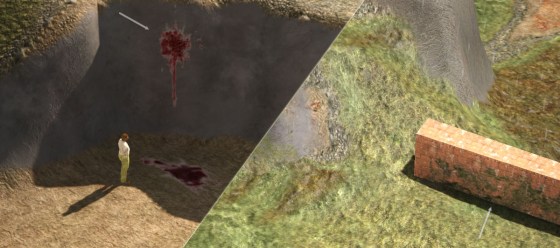
I knew I needed something to spruce up my monotonous terrain, so I recently implemented a decal system. This lets me paste moss, leaves, footprints, bullet holes and anything else “flat”…
lunar valley
meager pelican
OK, destination.
Like this?
https://www.ronja-tutorials.com/post/054-unlit-dynam...
yeah, pretty much
tbh. exactly like that
meager pelican
maybe that will give you a start. Precision, though, IDK what to tell you. I mean, there's no magic that I know of. How big is your far plane value?
There are techniques for "large worlds" where you remap the 0,0,0 point to some other area in world-space as you move.
lunar valley
meager pelican
maybe that will give you a start. Precision, though, IDK what to tell you. I m...
like 100k, but i need to see that far, i mean the camera is at the origin
meager pelican
Hmmm. Found this: https://forum.unity.com/threads/is-there-a-hard-maximum-far-near-clip-plane-ratio.1377387/
Counterintuitively it appears that if you can increase the value of the NEAR clipping plane, that will help you set a larger far plane. This is due to the ratio of the two, and how they encode the depth values IIUC.
Unity Forum
Hi,
My team and I are developing Cesium for Unity:
https://github.com/CesiumGS/cesium-unity
It makes it easy to render large-scale geospatial...
lunar valley
meager pelican
Hmmm. Found this: https://forum.unity.com/threads/is-there-a-hard-maximum-far-n...
interresting
lunar valley
dark garden
can anyone help me with an issue i have with post processing?
sure
dark garden
lunar valley
sure
yo im dming
lunar valley
dark garden
yo im dming
well you gotta tell me your problem so that I can help you
dark garden
lunar valley
well you gotta tell me your problem so that I can help you
can we dm
dark garden
lunar valley
well you gotta tell me your problem so that I can help you
this
 lunar valley
dark garden
can we dm
lunar valley
dark garden
can we dm
a private chat? no need for that
dark garden
oh alr
lunar valley
dark garden
this
i do not know what you did or what you want to do or what the problem is, I cannot read minds
dark garden
Version: 2021.3.14f1
Pipeline: none
post processing settings: bloom and vigentte
xr version: 1.5.3
Device, oculus quest 2
dark garden
lunar valley
i do not know what you did or what you want to do or what the problem is, I cann...
here
lunar valley
I am not familiar with vr, maybe someone else can help you
dark garden
gn
 desert orbit
@dark garden Stop cross-posting. Keep to one channel
 pliant star
I picked up the Unity Shaders Bible recently and am currently going through it, but I got an issue, is this a good place to ask about it?
lunar valley
pliant star
I picked up the Unity Shaders Bible recently and am currently going through it, ...
yeah sure just ask right away
pliant star
The part I'm at is going through functions in HLSL, and the examples it gives look like this
// create function
void FakeLight_float (in float3 Normal, out float3 Out)
{
  float[n] operation = Normal;
  Out = operation;
}
half4 frag (v2f i) : SV_Target
{
  // declare normals.
  float3 n = i.normal;
  // declare the output.
  float3 col = 0;
  // pass both values as arguments.
  FakeLight_float (n, col);
  return float4(col.rgb, 1);
}
I'm getting an error at the "float[n] line" inside FakeLight_float, so I thought I would change it to float3 instead to try to fix the error. But when I do that it gives me another error about an invalid subscript "normal" on the "float3 n = i.normal;" line inside frag. I'm not sure if it's meant to be like that
lunar valley
pliant star
The part I'm at is going through functions in HLSL, and the examples it gives lo...
I am not sure what float[n] is supposed to be, if you want to create an array you do it using c syntax so float something[2].
lunar valley
pliant star
And it's not really explaining that part at all
well you are assigning it to a float3, so its probably float3
pliant star
Yeah, tried that
lunar valley
and?
 lunar valley
how are you passing that over?
lunar valley
pliant star
Referring to this line
```
float3 n = i.normal;
```
inside frag
you need to pass it over from the vertex function i.normal doesn't exist automatically
pliant star
Right, makes sense
 deft frost
Hey, I'm trying to do UV displacement on a UI image, but when it displaces too far, it seems to hit the image border even though it's within the image boundaries. Does that make sense?

 finite tree
was animal crossing your inspiration for that bubble? 
lunar valley
meager pelican
Hmmm. Found this: https://forum.unity.com/threads/is-there-a-hard-maximum-far-n...
Ok I found the issue to my problem, I do not really understand why it's the way it is, but for some reason when I am sampling _CameraDepthNormal texture and retrieving the depth like that, the thing happens. But if I sample _CameraDepthTexture with SAMPLE_DEPTH_TEXTURE the problem dissapears and it work no matter of the far clipping plane. Could it be that SAMPLE_DEPTH_TEXTURE does something special in the background to sample the depth non linearly so the precision issue doesn't occur. Because I have found a formula on openGl website to sample the depth texture in a way that fixes precision issues and zfighting (which happens because of the precision issues). But I really do not exactly know whats going on here, what do you think?
 lofty orbit
hi (again yes lot of issues) happens that my my bubble shader are pretty and all but i cannot use the PBR ! it is not compatible for my projet and could only realised at the end so am trying with some listed shader that are mentionned compatible on the doccumentation but am not sure how to use them, ichoose the unlit and a warning on the main node tell me i need a render pipeline but i dont know how to get it
distant dirge
We need more info, what do you mean you cant use the PBR? What does 'using the PBR' mean? How is it not compatible? What listed shader are you talking about? Can you show what you mean by the main node warning?
@lofty orbit
lofty orbit
distant dirge
We need more info, what do you mean you cant use the PBR? What does 'using the P...
the PBR shader iz not compatible for VRM format / i meant to use it for shader ? (not sure what this question is about)/ the VRM doc precise that it doens't support PBR / here's the list : https://vrm.dev/en/univrm/shaders/index.html /i'll send the screen of the warning over the node
 amber saffron
lofty orbit
the PBR shader iz not compatible for VRM format / i meant to use it for shader ?...
amber saffron
lofty orbit
the PBR shader iz not compatible for VRM format / i meant to use it for shader ?...
This page says that you need to use the unlit shader, available by default in the built-in render pipeline, in the shader selection dropdown of the materials.
The "Unlit Master" of shadergraph is not this
Basically, you need to stick with the provided shaders, you can't do you own
lofty orbit
amber saffron
Basically, you need to stick with the provided shaders, you can't do you own
ho...so, no custom shader ?
amber saffron
Yes
lofty orbit
ha..well thats pretty annoying for what i needed, at least i know im wasting time with the shader graph, thanks
 floral arrow
I have a Sprite as a background and I want to make a shader that makes a watertrail like a boat whenever the mouse passes on the background.
Any suggestions on how to make that thing?
 cosmic sphinx
 hollow pond
why is'n't my material showing the same on other building
hollow pond
why is'n't my material showing the same on other building
Perhaps UV maps are not configured properly. UV maps define what region of texture is being used by each polygon.
hollow pond
cosmic sphinx
Perhaps UV maps are not configured properly. UV maps define what region of textu...
you mean UV unwrap isn't right?
cosmic sphinx
hollow pond
you mean UV unwrap isn't right?
Yep
hollow pond
cosmic sphinx
Yep
okay, so i just import it into blender and fix the unwrap?
 vivid marten
are there any updated tutorials about shader graph for unity 2022?
I'm just trying to make a simple shader that I can put on a 2d sprite
 regal stag
vivid marten
regal stag
vivid marten
Did you save the graph? (with Save Asset in top left)
 timid shell
Does anyone know if it's possible to have a pair of connected nodes, one that has a dynamic vector input and one that has a dynamic vector output, where the output of the second node is the input of the first node, but without any wires/edges connecting these nodes?
amber saffron
timid shell
Does anyone know if it's possible to have a pair of connected nodes, one that ha...
So, rerouting without wires ? No
timid shell
amber saffron
So, rerouting without wires ? No
Is it in any future plans?
amber saffron
AFAIK, yes, this will basically be variables store / load
cosmic sphinx
hollow pond
okay, so i just import it into blender and fix the unwrap?
It's worth a try.
regal stag
@timid shell I have an editor package that adds this
https://github.com/Cyanilux/ShaderGraphVariables
(It's two subgraphs and the script makes the connections invisible)
amber saffron
Haha, Cyan for the help, I was searching for this, thought it was one of needle's work ^^
hollow pond
cosmic sphinx
It's worth a try.
i just realised i don't know how to import this building to blender. Its .prefab file
cosmic sphinx
hollow pond
i just realised i don't know how to import this building to blender. Its .prefab...
Prefab files and models are separate files. You can easily find the model by clicking on the mesh reference in MeshRenderer component.
regal stag
The model would actually be in the MeshFilter component, but same idea.
 dapper pollen
if I make a build and it compiles all shader variants, I go and remove some features to reduce variants, does unity count this as a new shader, so it will rebuild all variants again or will the cached shaders stick around?
sweet burrow
Is there a way to declare arrays or something like that in Shadergraph?
I have a shader that will use GPU skinning (via BatchRendererGroup) and I really don't look forward having to name 64*3 Vector4.
amber saffron
sweet burrow
Is there a way to declare arrays or something like that in Shadergraph?
I have a...
Not with properties, but you can declare shade arrays in hlsl files that can be included with custom function nodes
 prime shale
dapper pollen
if I make a build and it compiles all shader variants, I go and remove some feat...
prime shale
dapper pollen
if I make a build and it compiles all shader variants, I go and remove some feat...
I believe it will rebuild all the variants again
deft frost
finite tree
was animal crossing your inspiration for that bubble? <:UnityChanThink:885169594...
Excellent question.
prime shale
caching I suppose would be nice but no way to really know what variants you previously compiled you would need so might as well rebuild the variants that you supposedly need again
sweet burrow
amber saffron
Not with properties, but you can declare shade arrays in hlsl files that can be ...
Thought about those, but it's per-instance data so it really feel ugly to not use BatchRendererGroup's per-instance data feed.
amber saffron
Can't you use BRG macros also in your hlsl file ?
sweet burrow
... what do you mean exactly by that? I just started experimenting with BRG - I got it to work with custom color/smooth/etc, but I'm still a beginner.
amber saffron
I haven't worked with BRG in particular myself, so I don't really know if it requires some definition macro like cbuffers do 😅
lunar valley
I have found another problem with my custom decal shader (hopfully the last one) and thats if I put my camera inside of the decal projector object, my projected texture dissapears. I have found that setting Cull front and Ztesting to Always "fixes" this issue, but that comes with its own set of problems as well. If anyone has an idea just ping me.
vivid marten
regal stag
Did you save the graph? (with Save Asset in top left)
I both saved and compiled it
this is all I've done so far. I have just guessed what to do lol
 regal stag
Maybe you need to right-click the property in Blackboard and "Set as main texture". Also make sure the material assigned to the SpriteRenderer is actually using the shader graph. If that's the case not sure why the warning is still there.
I don't tend to work with the Built-in target either, it might not really have support for sprites.
vivid marten
should I send a short video of me doing it so you can see what's going on? Cuz I've done that already
it says Clear main texture when I right click on it
so I've done it I think
regal stag
I don't need to see a video, If you say you've done it I believe you 😅
vivid marten
lol maybe I might be missing something tho
that's why I thought a video could solve it
regal stag
Did you check the material is using the graph as it's shader, rather than a different one?

 regal stag
The reference here is _Texture2D rather than _MainTex, that might be why. Though earlier you did also have that.
vivid marten
I thought I set it to _MainTex
YO! The name has to be _MainTex and not just the reference
that's weird
oh well ty for your time 🙂
regal stag
Well when you change the name it automatically changes the reference to match usually. But you should be able to override the reference itself too.
 civic onyx
Hi Guys, is there any way to merge two different materials in Unity using some custom shader?
i want to achieve this kind of effect but using custom materials or shader in Unity

So that my Texture quality doesnt get disturb.
 amber hollow
civic onyx
So that my Texture quality doesnt get disturb.
amber hollow
civic onyx
So that my Texture quality doesnt get disturb.
there's blend node in shader graph
its the same as mix in blender
civic onyx
does this blend node works in standard Unity or URP only?
amber hollow
it works with urp and hdrp
if you want to make custom shaders in node editor in standard render pipeline you need some 3rd party tool
civic onyx
Thanks alot, i am not developer, so do i have to get coding knowledge or it is built in feature?
civic onyx
amber hollow
if you want to make custom shaders in node editor in standard render pipeline yo...
lets say, i use 3rd party tool to design a custom shader, will it be able to be handled by Mobile devices? or it can work for PC only?
my major aim is to integrate custom shaders in mobile games so that the textures dont lose their quality.
amber hollow
civic onyx
lets say, i use 3rd party tool to design a custom shader, will it be able to be ...
yes it would work fine on all platforms, but i've checked and it seems like unity added shader graph for standard render pipeline a while ago
https://www.youtube.com/watch?v=E5qu-v5XkK4

I go over some of the updates that came from Unity 2021.2 In particular the ability to use Shader Graph in the Built in pipeline
(づ ̄ ³ ̄)づ ~(˘▾˘~)
TWITCH ( ͡° ͜ʖ ͡°)
https://www.twitch.tv/PabloMakes
TWITTER (ಥ﹏ಥ)
https://twitter.com/PabloMakes
₪ ₪ Time Stamps ₪ ₪
00:00 - Intro
00:53 - How To
03:47 - Shader Graph Categories
04:19 - O...
civic onyx
Thats Awesome, let me check this out, i will update my results here then.
deft frost
deft frost
Can someone help me with this? It’s driving me crazy
low lichen
deft frost
Hey, I'm trying to do UV displacement on a UI image, but when it displaces too f...
If that bubble is a sprite, you can try changing its Mesh Type to Full Rect. Otherwise, Unity will generate a tight mesh around the edge of the sprite, limiting the space your shader has to work with.
 leaden radish
hey was wondering if i add a shader to one sprite from a spritesheet does it effect all sprites in the spritesheet?
like example my sprite sheet

now i just want to add a shader to the leaf or something to have an effect after slicing the sprite sheet
deft frost
leaden radish
now i just want to add a shader to the leaf or something to have an effect after...
They're all used by separate Sprite Renderers, correct?
meager pelican
lunar valley
Ok I found the issue to my problem, I do not really understand why it's the way ...
Not sure, and I'm a bit short on time right now for research. But I do know that at some point Unity decided to encode the stored depth value in a non-linear way, and it has to be decoded properly. So that macro may very well do that.
 north bolt
Hello! I am very new to writing shaders and am having an issue when using StructuredBuffers. In c#, I have this code inside OnRenderImage
float[] testData = { 3 };
ComputeBuffer testbuffer = new ComputeBuffer(1, sizeof(float), ComputeBufferType.Default);
testbuffer.SetData(testData);
material.SetBuffer("test", testbuffer);
testbuffer.Dispose();
Graphics.Blit(null, dest, material);
In the shader, I have the buffer defined as
StructuredBuffer<float> test;
And inside frag, i have
float4 col;
if (test[0] != 0) col = float4(1, 1, 1, 1);
return col;
All of my code works if I use material.SetFloat(), but not with buffers
 storm cipher
Heya I am completely new to shaders and such if anyone could help that'd be fantastic. How would I go about making an edge detection or edge drawing shader effect, cause my goal is to have all the edges of my objects and my normal map edges to be a certain colour.
lunar valley
north bolt
Hello! I am very new to writing shaders and am having an issue when using Struct...
I would guess it is because of the dispose you have there, I would put it in OnDestroy or something
lunar valley
storm cipher
Heya I am completely new to shaders and such if anyone could help that'd be fant...
you can make a post processing edge detection for example. If you want all if the edges to have the same color
storm cipher
I can make that emissive yeah?
cause thats probably far simpler than i thought it'd be
lunar valley
storm cipher
I can make that emissive yeah?
I don't mean unitys post processing stack if you mean that? Post processing isn't just color correction it can be any effect applied on the screen
lunar valley
storm cipher
Heya I am completely new to shaders and such if anyone could help that'd be fant...
What I meant is that you can write your own post processing outline shader
storm cipher
ah, I see, do you know of any resources I could use to learn how to do that, cause I don't know where to look, I am 100% new to this, All I have done so far in unity is the very basic starter stuff and some basic texturing prior.
lunar valley
storm cipher
ah, I see, do you know of any resources I could use to learn how to do that, cau...
Idk. starting right with a edge detection shader for the first time might not be that smart, outlines can be far more complicated then you first expect them to be especialy one that works on all scenarios. If you want to make any effect which is applied to the screen you can use graphics.blit function. If I were to start with shaders with no prior experience, I would start by watching the shader videos from freya holmer, I find them pretty good. They are not about making a post processing shader or about outlines but they teach you about shaders.
storm cipher
lunar valley
Idk. starting right with a edge detection shader for the first time might not be...
I'll start there then, thanks so much
vivid marten
Does the fresnell effect only work for 3d objects?


the 2d sprites to the right are sprites without my shader and the sprites to the left are with my shader
the sphere with a red outline is a 3d object
lunar valley
vivid marten
Does the fresnell effect only work for 3d objects?
yes fresnel only works on 3D object because it works by taking the dot product between the geometrys normals and viewDirection
vivid marten
oh
I'm trying to make a glow effect for 2d sprites but I have no idea what I'm doing 😛
lunar valley
vivid marten
I'm trying to make a glow effect for 2d sprites but I have no idea what I'm doin...
glow effect like bloom?
vivid marten
like a static line that looks like laser
Imagine these white lines being lasers instead

I guess the first step is to make blurred edges
cosmic prairie
vivid marten
Does the fresnell effect only work for 3d objects?
you could try to manually paint a map which tells it "how much is this pixel on the edge?"
so like on a 0-1 scale
and apply a glow based on that texture in the shader
OR generate a map like that using some king of SDF generator
vivid marten
so the further it is to the edge, the more transparent it will be
vivid marten
idk how to do that, this is my first time trying out shaders lul
vivid marten
so I can't just go with the Square texture that's inbuilt in unity?
cosmic prairie
if you have photoshop your could probably do a quick job with like an outline and blur tool
cosmic prairie
vivid marten
so I can't just go with the Square texture that's inbuilt in unity?
which square texture?
Ah for the buttons or those milestones?
vivid marten
 cosmic prairie
vivid marten
Does the fresnell effect only work for 3d objects?
cosmic prairie
vivid marten
Does the fresnell effect only work for 3d objects?
first I thought you needed it on those
the robot thingy
vivid marten
oh wait, can I multiply two textures to make blurred edges?
cosmic prairie
not rly
vivid marten
hmm
vivid marten
ye
cosmic prairie
if actual blur
lunar valley
if you want to blur edges you can use box blur gaussian blur...
cosmic prairie
no
vivid marten
yes no yes no 😂
cosmic prairie
so, to fade your texture all you need is to multiply your alpha in your shader graph by the value of your fade map, or the 1-x of that
vivid marten
oh
lunar valley
damn were about to say that
vivid marten
and the fade map is another texture I guess?
cosmic prairie
it could be
how are the lines rendered? those are what you want to add lasers to right now?
cosmic prairie
you could then also use your UV I think to create a blurred line
vivid marten
Could I multiply the alpha with these colors so the white makes it more transparent?
 cosmic prairie
vivid marten
Could I multiply the alpha with these colors so the white makes it more transpar...
cosmic prairie
vivid marten
Could I multiply the alpha with these colors so the white makes it more transpar...
1-x of that, but that would work
vivid marten
wdym 1-x?
cosmic prairie
x is your color you get by sampling this texture
vivid marten
oh
cosmic prairie
vivid marten
Could I multiply the alpha with these colors so the white makes it more transpar...
or you could just invert this
cause white is 1, and your alpha should be 1 where it is opaque and 0 where fully transparent
vivid marten
oh right if I multiply my texture by 0 it will be completely transparent so it should be inverted
cosmic prairie
yea
this new texture map will need to go in the material itself, you wont be able to apply it in the sprite renderer
vivid marten
so it will be the MainTex texture?
cosmic prairie
or if you won't be using the sprite for anything, then I guess you could plug it in there too 🤔
tbh, if you don't need an actual texture for it, then it could be named anything
 lunar valley
vivid marten
uh this didn't work 🤔
lunar valley
vivid marten
uh this didn't work 🤔
do you have transparency on?
vivid marten
idk how do I check that
lunar valley
in the graf settings
vivid marten
 lunar valley
vivid marten
lunar valley
vivid marten
you don't change from opaque to transparent
vivid marten
it should be on transparent?
lunar valley
vivid marten
it should be on transparent?
yes, because we are fading out your line using alpha
lunar valley
ok
vivid marten
it doesn't agree with the preview

 lunar valley
I thought the shader was for a line?
 lunar valley
try putting you gradient texture into the color do you then see anything or will it still be white?
vivid marten
I thought I should try it without color first to keep it simple
lunar valley
we are debbuging right now put your texture into the color
vivid marten
and another thing I noticed is that my sprites that has my custom material draws behind everything else no matter the Order in layer
you mean like this?
 lunar valley
no your gradient texture
cosmic prairie
vivid marten
but with this it makes no difference
your texture is not plugged in the material

 mental bone
I just learned that godot has different shapes for their volumetric fog volumes. I can do this with sdf functions and volumetric materials in shadegraph but it would be nice to have something out of the box. Any plans for this or other aproaches?
vivid marten
cosmic prairie
click on your material in the assets
you mean this? It's still white
 cosmic prairie
vivid marten
you mean this? It's still white
cosmic prairie
vivid marten
you mean this? It's still white
the material
not your object
assets doldrr
foldrr
cosmic prairie
mental bone
I just learned that godot has different shapes for their volumetric fog volumes....
check https://unity.com/roadmap/unity-platform if you cant find it yet you can add a suggestion and if they approve they'll do it

Unity
Explore the timeline for the future of Unity’s platform and submit your feedback directly to the teams developing it.
vivid marten
cosmic prairie
the material
the material that is using my shader?
cosmic prairie
yes
cosmic prairie
mental bone
I just learned that godot has different shapes for their volumetric fog volumes....
also, if you get other people to click the "important" button you may see the feature added earlier
vivid marten
but I thought the MainTex is automatically referring to the material that spriterenderer is using
mental bone
cosmic prairie
also, if you get other people to click the "important" button you may see the fe...
Is it on the roadmap?
cosmic prairie
mental bone
Is it on the roadmap?
don't know, there are lots of things on the roadmap and I'm just a random person 😄
vivid marten
still no difference 🤔
 cosmic prairie
yey
vivid marten
why do I have to change it there and in the shader?
cosmic prairie
vivid marten
why do I have to change it there and in the shader?
its because it's an exposed property, what you set in the shader is just a default value, if the material is created before you changed something it won't be applied again
same goes for textures and everything
vivid marten
oh so if I make a new material it and attatch the shader to it I don't need to change it again
cosmic prairie
that should be correct, yes
cosmic prairie
no problem! 🙂
 cosmic prairie
vivid marten
but is it possible to do this without a map?
cosmic prairie
vivid marten
but is it possible to do this without a map?
yeah, but if you want to fine-tune it as you did it's more efficient with the map
vivid marten
ah, so maps are a common way to do it
cosmic prairie
if you were to avoid that you would use the UV directly and a gradient, but gradients are more expensive I think
vivid marten
expensive as in more processing power?
cosmic prairie
gpus should be really good with sampling textures
cosmic prairie
vivid marten
expensive as in more processing power?
ye
cosmic prairie
allright
vivid marten
it's looking a bit more funny now 😛
 vivid marten
🤔
 lunar valley
looks cool
 limpid rivet
 limpid rivet
limpid rivet
limpid rivet
I imported this through sketchfab to unity, looks like the material didn't apply correctly,
but the textures are still available,
how can I manually apply the textures to this one?
Do I create a new material?
or should I try to download this into Blender and then load it from blender into Unity?
I think I may have figured it out
lunar valley
limpid rivet
if its pink then it means that there are shader compile errors, whatever material/shader you are using is probably not compatible with you render pipeline
limpid rivet
ah
that makes sense
making new materials worked,
but then I went back instead and tried changing the shader to Universal Render Pipeline / Lit and it worked
thank you!
lunar valley
np
vivid marten
It looked better when OuterStrength was negative value but that doesn't make sense to the user interface 🤔

I'm trying to get the same effect but with a positive value and without getting the opposite color
mental bone
Anyone knows if a pre-build library of SDF sub graphs for shadergraph exists ? My google fu is failing me
vivid marten
yoo look at what I managed to do thanks to this discord 😄
(the video is frozen in the beginning)
now I just need to animate the background somehow
cosmic prairie
vivid marten
yoo look at what I managed to do thanks to this discord 😄
wooeee thats nice
vivid marten
🙂
cosmic prairie
mental bone
Anyone knows if a pre-build library of SDF sub graphs for shadergraph exists ? M...
Convert these to HLSL https://iquilezles.org/articles/distfunctions/
Articles on computer graphics, math and art
vivid marten
it was hard to make the texture seamless tho lul
cosmic prairie
What do you use to edit it?
vivid marten
Gimp
cosmic prairie
yea, but that adds like a mirrored effect
which you can already do in the texture's asset settings
vivid marten
oh
cosmic prairie
coincidentally I'm working on an image editor that can also do seamless textures for my Uni thesis, but it's not done yet lul
vivid marten
you making your own image editor? 👀
cosmic prairie
yea
vivid marten
pog
vivid marten
hehe
cosmic prairie
mental bone
Anyone knows if a pre-build library of SDF sub graphs for shadergraph exists ? M...
Btw godot's volumetric smokes only render SDFs into a froxel grid, and that gets "raymarched"
Probably not doable in shader graphs if you want something as performant
amber saffron
cosmic prairie
Probably not doable in shader graphs if you want something as performant
HDRP with volumetric materials would do the same out of the box
mental bone
cosmic prairie
Convert these to HLSL https://iquilezles.org/articles/distfunctions/
I know about these but you see I'm lazy so this is why I asked for a pre-build solution 🙂
I mean it's pretty damn easy to do with the volumetric materials

 grizzled bolt
 vestal trout
why cant i edit anything here?
vestal trout
why cant i edit anything here?
Sprites-Default is one of the editor's own read-only default materials
Create a new material with that shader
 regal stag
Maybe try editing the Material asset itself rather than this dropdown on the gameobject/renderer
vestal trout
well, i want to edit the property just for this object
not all of them
it seems that just isnt possible for textures?
regal stag
The textures are usually attached to the Sprite field of the SpriteRenderer. Unity automatically sends it to the material from there.
If you have multiple textures, can set them up as "secondary textures" on the sprite. e.g. https://docs.unity3d.com/Manual/SpriteEditor-SecondaryTextures.html
vestal trout
regal stag
The textures are usually attached to the Sprite field of the SpriteRenderer. Uni...
how can i access those secondary textures after?
for example in shader graph
regal stag
The texture property needs to use the same reference
vestal trout
regal stag
The texture property needs to use the same reference
i dont think i really understood what you meant here, sorry im pretty new to this side of unity
oh nvm
i got it
thx!
thats actually pretty usefull to know:)
 junior widget
Hi everyone, I'm trying to use a shader using the stencil buffer to create a effect of 3D collection card but after looking multiple video about it and trying them all, its look like I'm missing something because it should be simple.
I made 2 different shader (code in screenshot) one for the object I want to hide and the other for a quad that will act like the filter (view on the card that will see the 3D object) I created after 2 material for each of them and applied the correct one for each.
When I apply it, I should be able to see the tilling texture of the hiddenObject (the sphere) only throught the quad but it look like I can't see it and after trying to watch those video, I wasn't able to fix the issue. Each video use different method but still pretty similar :
https://www.youtube.com/watch?v=AATjjduNUAU&t
https://www.youtube.com/watch?v=9wv7-XY2tp8&t
https://www.youtube.com/watch?v=EzM8LGzMjmc&t
https://www.youtube.com/watch?v=-NB2TR8IjE8&t


 low lichen
junior widget
Hi everyone, I'm trying to use a shader using the stencil buffer to create a eff...
low lichen
junior widget
Hi everyone, I'm trying to use a shader using the stencil buffer to create a eff...
I see the render queue of the Hidden Object is 2001, but what is it for the mask?
regal stag
I think the Queue in the shader is reversed. You want the mask to render before the object, so you'd usually use "Geometry-1" in the mask shader.
Even if you're overriding it on materials (would want mask to 1999), still a good idea to change it.
Also is this URP?
regal stag
In the URP template I think it now has the "Depth Priming" enabled (or at least set to Auto) by default on the Universal Renderer asset. That means any shaders that don't have a "DepthOnly" pass will be invisible, which may be interfering.
Can either disable DepthPriming, or use a shader that is more suitable for URP, e.g. https://github.com/Cyanilux/URP_ShaderCodeTemplates/blob/main/URP_Unlit%2BTemplate.shader
Or could use the RenderObjects feature to apply stencil overrides to existing URP materials, or materials using shader graphs.

 spiral tendon
Did anyone use this video: https://www.youtube.com/watch?v=MqpyXhBIRSw

Thanks to NVIDIA for sponsoring!
Learn more about NVIDIA Studio► https://nvda.ws/38AaA8K
Razer Blade Studio laptops► https://www.razer.com/studio
In this video we create outline effect using 2D Shader Graph!
● Learn more about 2D Shader Graph: https://youtu.be/5dzGj9k8Qy8
● 2D Glow Tutorial: https://youtu.be/WiDVoj5VQ4c
● Get Gothicvania Ch...
I need an outline for my 2d sprites, but they need to be soft to cheat shadows
lunar valley
spiral tendon
I need an outline for my 2d sprites, but they need to be soft to cheat shadows
do you mean by soft that they fade out at the edges?
spiral tendon
yeah
spiral tendon
or completely soft
lunar valley
spiral tendon
or completely soft
I do not know what completelly soft is supposed to be, but ok, is it for a pixelated sprite or?
finite tree
is there a way of having an array stored somewhere, and use it from shader graph/custom function node?
like for example if i had an array of points (red on image) and would want to render a quad with different color by "distance" (black)
it would be just vector2s with values from 0,0 to 1,1 and be local to the quad
the array wouldnt be constant, its size and data inside would get changed by a c# script
well, can a custom function even access other variables than its input?
or is there a better approach for this kind of thing?
i guess i could just spawn smaller quads from that c# script on their location, with their own shader on top of the base one
but i would like to try to keep it to just one quad using that data, if possible
 regal stag
finite tree
is there a way of having an array stored somewhere, and use it from shader graph...
regal stag
finite tree
is there a way of having an array stored somewhere, and use it from shader graph...
Yes it's possible, see https://www.cyanilux.com/faq/#sg-arrays
 hearty obsidian
Any idea why reading from a global color yields a brighter color than a local color?
 lusty sundial
north bolt
Hello! I am very new to writing shaders and am having an issue when using Struct...
lusty sundial
north bolt
Hello! I am very new to writing shaders and am having an issue when using Struct...
Probably shouldn't dispose the buffer before doing the blit call
Would also avoid using != to compare floats
north bolt
lusty sundial
Probably shouldn't dispose the buffer before doing the blit call
Would also avoi...
Yeah I tried the BetterBuffer extension but it didn’t do it
north bolt
I’ve heard bad things about it…
lusty sundial
it does some bad things…
north bolt
@lusty sundial the better was buffering but then it worked before it bettered
regal stag
hearty obsidian
Any idea why reading from a global color yields a brighter color than a local co...
Global colours don't apply the gamma->linear conversion. When setting the global property, try using color.linear
lusty sundial
@north bolt I think you need to buffer before bettering, I haven’t better buffered in a bit so I’m not positive about that though
hearty obsidian
@regal stag You absolute unit, thanks
lusty sundial
north bolt
<@690327249127604245> the better was buffering but then it worked before it bett...
There is also a 12 amp buffer extension that you could use made by dewalt, maybe that could work better. you can also use it to polish some stuff if you needed that
finite tree
regal stag
Yes it's possible, see https://www.cyanilux.com/faq/#sg-arrays
thanks!
regal stag
north bolt
Hello! I am very new to writing shaders and am having an issue when using Struct...
Probably shouldn't dispose the buffer before doing the blit call
Would also avoid using != to compare floats
 minor remnant
Im trying out shader graph in URP in a new project and for some reason I get these weird lines with the normal vector?

disabling scene lighting in the viewport fixes it but lights shouldnt affect unlit shaders??
regal stag
minor remnant
Im trying out shader graph in URP in a new project and for some reason I get the...
It's due to Post Processing / Tonemapping
minor remnant
regal stag
It's due to Post Processing / Tonemapping
thanks, that's kinda annoying since it's on default settings
regal stag
minor remnant
thanks, that's kinda annoying since it's on default settings
It's because that tonemapping won't expect shaders to output negative values. You wouldn't typically output normals as colour, but if you clamp (e.g. saturate(n) or max(n,0)) before outputting it should prevent those lines.
If it's for debug purposes, you may also want to disable post processing temporarily so you can check colours accurately.
warm pulsar
i guess this is basically a texture
warm pulsar
finite tree
is there a way of having an array stored somewhere, and use it from shader graph...
oops, was scrolled back
ah, but you can just do arrays straight-up; nice!
 wraith bison
anyone know why voronoi and noise shader graph nodes aren't showing their previews? I'm on 2022.2.15

 normal cape
I don't know whether compute shader talk belongs in this chat, but is there a way to pass a dictionary into one? I am making a game like teardown and minecraft combined and I currently need a raycast function, but it was too slow on the cpu so i am trying to move it to the gpu.
basically what i need for the shader is a way to look up voxels by position without having to loop through the millions of voxels i have
spiral tendon
wraith bison
anyone know why voronoi and noise shader graph nodes aren't showing their previe...
maybe attach a preview to it?
wraith bison
spiral tendon
maybe attach a preview to it?
I tried outputting it to a preview node but nothing showed. Seems like none of the procedural nodes worked, they were all blank. The effect is definitely applied to the material though.
spiral tendon
then it might be a bug, have you tried using a lts version of unity?
regal stag
Probably a bug. Haven't seen that one before. Seems to be a few graph issues in 2022 versions. I also get errors when deleting nodes.
wraith bison
yeah.. just recreated the project with 2021.3.1 (lts), the nodes appear to work again.
 grizzled bolt
wraith bison
yeah.. just recreated the project with 2021.3.1 (lts), the nodes appear to work ...
grizzled bolt
wraith bison
yeah.. just recreated the project with 2021.3.1 (lts), the nodes appear to work ...
2021.3.1 would be an old version of the LTS
2021.3.23f1 is the latest
wraith bison
grizzled bolt
2021.3.1 would be an old version of the LTS
2021.3.23f1 is the latest
good catch, thanks. Just used the first one that popped up in the hub
 ripe dew
Hey so i was following a tutorial for a clipping plane shader so I can hide an object on the other side of a portal. But the tutorial was for Standard shaders. Is there any way to convert this for URP?
Shader "ankyusie/ClippingPlane" {
Properties {
_Color ("Tint", Color) = (0, 0, 0, 1)
_MainTex ("Texture", 2D) = "white" {}
_Smoothness ("Smoothness", Range(0, 1)) = 0
_Metallic ("Metalness", Range(0, 1)) = 0
[HDR] _Emission ("Emission", color) = (0,0,0)
}
SubShader {
Tags{ "RenderType"="Opaque" "Queue"="Geometry"}
    CGPROGRAM

    #pragma surface surf Standard fullforwardshadows
    #pragma target 3.0

    sampler2D _MainTex;
    fixed4 _Color;

    half _Smoothness;
    half _Metallic;
    half3 _Emission;

    struct Input {
        float2 uv_MainTex;
    };

    void surf (Input i, inout SurfaceOutputStandard o) {
        fixed4 col = tex2D(_MainTex, i.uv_MainTex);
        col *= _Color;
        o.Albedo = col.rgb;
        o.Metallic = _Metallic;
        o.Smoothness = _Smoothness;
        o.Emission = _Emission;
    }
    ENDCG
}
FallBack "Standard"
}
Or does URP not support stuff like this anymore?
regal stag
ripe dew
Shader "ankyusie/ClippingPlane" {
Properties {
_Color ("Tint", Color...
URP doesn't support surface shaders. Usually the easiest way to handle lit shaders is with a Lit Shader Graph.
 rugged relic
I have a material with a shader I made with shadergraph attatched to it, and it requires a texture as an input. I need to use this shader on most of my gameobjects in my scene, but if i change the texture input on the material, it changes all of the other gameobjects' material. Is there a way for me to apply this change to each gameobject individually?
ripe dew
regal stag
URP doesn't support surface shaders. Usually the easiest way to handle lit shade...
I got it working I just needed to fix up the script
ripe dew
rugged relic
I have a material with a shader I made with shadergraph attatched to it, and it ...
And you'll probably just have to make a copy material for each object
north bolt
regal stag
Probably shouldn't dispose the buffer before doing the blit call
That was the issue. Thanks!
 violet pebble
Hi, i'm trying to write a shader that will unwrap an object's uv map and draw it to a flat texture. I'm very new to shaders and materials, and don't know how to draw a shader to a texture, and then also how to view the texture like in the inspector or on a plane etc. Any help or tips or links would be greatly appreciated!
Here is my hlsl file: ```#include "Packages/com.unity.render-pipelines.universal/ShaderLibrary/Lighting.hlsl"
struct Attributes {
float3 positionOS : POSITION;
float2 uv : TEXCOORD0;
};
struct Interpolators {
// Although this is clip space, it will be populated by UV position, leading to texture map effect
float4 positionCS : SV_POSITION;
float3 positionWS : TEXCOORD0;
float2 uv : TEXCOORD1;
};
float4 _PaintColor;
TEXTURE2D(_MainTex); SAMPLER(sampler_MainTex);
float4 _MainTex_ST; // Auto set by unity to Tiling and Offset values. Used in TRANSFORM_TEX to apply uv tiling
Interpolators Vertex(Attributes input) {
Interpolators output;
VertexPositionInputs posnInputs = GetVertexPositionInputs(input.positionOS);

float2 uv = TRANSFORM_TEX(input.uv, _MainTex);
output.uv = uv;
output.positionWS = posnInputs.positionWS;

output.positionCS = float4(0, 0, 0, 1);
output.positionCS.xy = float2(1, _ProjectionParams.x) * (uv.xy * float2(2, 2) - float2(1, 1));

return output;
}
float4 Fragment(Interpolators input) : SV_TARGET{
float2 uv = input.uv;

float4 colorSample = SAMPLE_TEXTURE2D(_MainTex, sampler_MainTex, uv);

return colorSample;
}```
amber saffron
violet pebble
Hi, i'm trying to write a shader that will unwrap an object's uv map and draw it...
You can't draw a mesh to a texture only with shader.
But you can :
- Deform a mesh so the vertices XY coordinates will be the UV
- Use a camera to render this mesh to a render texture
violet pebble
oh sorry i should have been more clear. this is a first step in my attempt making a system for painting objects in a scene, similar to Splatoon. I want to have a c# script running that uses this shader to draw pixels onto a texture that matches the uvs of my mesh, and then I can put the texture into a shader to display the paint if that makes sense.
so the goal architecture i'm thinking of is:
Paint() gets called on object that is paintable
Paint calls the shader, giving it a position and radius for the paint splat,
Shader uses world position to calculate if fragment should be shaded, and then colors in the corresponding pixel(s) on a texture, in location that matches the uv map
Paint Texture is blended on top of normal texture in a shader graph material, so final output would be the object with paint on it in the spot i want
amber saffron
I think André will explain it better than me here 🙂 : https://www.youtube.com/watch?v=FR618z5xEiM

This project is a take on the Ink System from one of my favorite games: Splatoon! Let’s explore game dev techniques and try to achieve a similar effect!
Check out @TNTCProject 's complementary video: https://youtu.be/YUWfHX_ZNCw
PROJECT REPOSITORY
https://github.com/mixandjam/Splatoon-Ink
REFERENCES
-----...
violet pebble
😮 I was actually already watching and basing my architecture off that video! haha
I wanted to build my own version from the ground up though, which proves difficult since I don't know much about renderers, textures, and shaders. I have been following some basic shader tutorials recently though
I just have trouble understanding certain parts of Andre's code, mostly the command buffer stuff like:
        command.SetRenderTarget(mask);
command.DrawRenderer(rend, paintMaterial, 0);```All the painting on object part is done is the attached video here : https://www.youtube.com/watch?v=YUWfHX_ZNCw&t=0s

Painting in video games is a very common practice, more than one might think.
It's often used to paint or interact with the environment,
but also it is used to dirt the player and create consistency between him and the game world.
Today we'll recreate this effect on Unity.
@mixandjam video:
https://youtu.be/FR618z5xEiM
Our sound designer and...
violet pebble
I think i've watched this too but i'll give it another shot, thank you
 soft harness
is there a way to hijack the Standard lighting model to set the output to always be greyscale?
vivid marten
uhm why does my texture look so weird?

 soft harness
wym by "look so weird"
vivid marten
don't you see the difference?
the edges are weird on the first image
compared to the second
cosmic sphinx
vivid marten
uhm why does my texture look so weird?
The first one looks like a preview of .png with transparency before switching its type to Sprite. 🤔 Perhaps Unity is just terrible at displaying transparency in previews.
vivid marten
oh 🤔
lunar valley
soft harness
is there a way to hijack the Standard lighting model to set the output to always...
I do not know what you would mean by that, but if you want everything to be in greyscale you can just do a post processing shader
soft harness
lunar valley
I do not know what you would mean by that, but if you want everything to be in g...
not everything, jsut one material
lunar valley
soft harness
not everything, jsut one material
can be done with a custom shader.
lunar valley
soft harness
how i'd do it
to get greyscale values you do the dot product between the incoming color and this vector: float3(.3, .59, .11)
soft harness
i make the albedo greyscale but the light color tints the albedo and i'd like that to stop
vivid marten
any idea why the water looks a bit darker here?
