#💻┃code-beginner
1 messages · Page 830 of 1
 frosty hound
 neon sable
lmfao
 sour fulcrum
they wanted to know the difference between c header files and c# interfaces
which is a far bigger question than "how do interfaces work"
frosty hound
They're not comparable. Next question?
sour fulcrum
they didnt take that for an answer lol
frosty hound
It's the answer, next question?
 swift crag
the user is now spamming "stack overflow" at us over and over
 naive pawn
as if that's a bad thing, tbh...
frosty hound
No problem, next question?
naive pawn
it has its ups and downs but the downs are blown way out of proportion lmao
frosty hound
Yes, it's usually someone's go to when throwing a tantrum if they don't get what they think they want (usually misunderstanding something entirely).
Okay, so it seems there's no more questions. We can wrap this up.
neon sable
not at all, its more like you guys just arent explaining it well enough for someone to conceptualize
naive pawn
did you even read my explanation
sour fulcrum
its a big question
neon sable
but yes you can say its "throwing a tantrum"
but its well known this is a common thing when learning in the development field
naive pawn
i mean, calling answers "ego" is pretty close, i'd say 🤔
frosty hound
Okay, well I'm sure they're sorry they couldn't help. But we don't have to keep complaining about it.
neon sable
I said 3 times I'll wait for someone else to help who can explain it better
naive pawn
neon sable
but its well known this is a common thing when learning in the development field
actually no, most learners are open to having their assumptions corrected
naive pawn
neon sable
I said 3 times I'll wait for someone else to help who can explain it better
you're gonna get the same thing lmao. there's not many ways to explain an interface
frosty hound
Stop trying to justify yourself. They can wait and ask again later.
sour fulcrum
neon sable
I said 3 times I'll wait for someone else to help who can explain it better
"all four people are wrong 😠"
frosty hound
If they get the same answer, they get the same answer.
naive pawn
then say so instead of ignoring?
sour fulcrum
15 minutes to go from
 naive pawn
you've been saying that prior to explanations being sent
 neon sable
i mean i wasnt wrong in the 1st statement
frosty hound
Enough already fucking hell
neon sable
but that doesnt say ur wrong either
naive pawn
no, of course not, because that's an opinion
frosty hound
Make a thread, everyone stop yapping.
 undone orchid
neon sable
but that doesnt say ur wrong either
undone orchid
neon sable
but that doesnt say ur wrong either
brother if ur trying to learn from someone u listen 💀
neon sable
the mod already said to stop im posting a thread
undone orchid
or js politely say thank you and google it 😭
undone orchid
neon sable
the mod already said to stop im posting a thread
✅
neon sable
issue isnt listening, or reading btw, its more i dont understand the way its been layed out in front of me
especially when claude is telling me im correct

mixed signals
 burnt vapor
Just to be clear, bots barely do fact checking. Asking "Is x correct" often yields a positive response, especially with a lack of context, when it often isn't
It's not going to continue asking for more info to make sure it's correct
neon sable
the entire context is interfaces though
burnt vapor
So asking a bot if something is correct isn't really going to help a lot. Better you just ask about the topic in general
neon sable

 solar hill
Youre trying to prove to us youre correct because your personal yes man is saying so
neon sable
not really
solar hill
so whats the point of posting these screenshots here long after the mod told you to drop it and make a thread?
neon sable
? i was literally making a thread and you decided to react and others decided to chime in
you guys are instigating then wondering why im continuing to reply
lol
sour fulcrum
(dumb ai gaslighting is worth laughing at, sorry)
burnt vapor
So why aren't you making a thread then?
neon sable
im literally midway writing it, wdym?
naive pawn
could probably just create a thread first, so anyone that wants to chime in can chime in there, while you write the message
ah, you made a post
 polar acorn
neon sable
especially when claude is telling me im correct
polar acorn
neon sable
especially when claude is telling me im correct
The AI sycophant programmed to agree with whatever you say agrees with what you say, shocker
 pliant light
Why are all the assets I'm taking from the store missing shaders and animations and everything? I have seen and know how popular unitychan is but for me she doesn't work, just a pink outline but as soon as I put down kyle as a prefab he instantly works
swift crag
shaders, specifically, will depend on the render pipeline you're using
if an asset was designed for the built-in render pipeline, it will not work right in URP/HDRP
pliant light
how can I check what their compatible with? is it possible, or rather easily possible to make them compatible?
swift crag
the Asset Store package will tell you which pipelines the asset was designed for
In this case, you probably just need to switch the materials to use a different shader
polar acorn
pliant light
Why are all the assets I'm taking from the store missing shaders and animations ...
Pink means shader error. Shader error usually means incompatible render pipelines. Use a material compatible with your project's render pipeline
swift crag
for example, if you're using URP (which is the most likely scenario), you can switch the materials to use the URP/Lit shader
well, i think it's called Universal Render Pipeline/Lit
this is a substitute for the original Standard shader
This should be the only thing that you need to fix
I can't think of any core systems that have changed in such a breaking way
pliant light
it just makes it gray, here is an example of the other material and how they look

 naive pawn
this is a code channel btw
swift crag
you'd need to apply that "diffuse" texture to the "Base Map" property of the new material
this is some kind of custom toon shader
so it will not be an exact match
(and yeah, this would be more fitting in...where would it fit, actually?)
solar hill
 mint imp
Would there be a significant preformance issue when adding/removing components at runtime?
I noticed that "Add component" existed and had idea for it
sour fulcrum
depends on what your doing
 sour palm
im cooked
polar acorn
mint imp
Would there be a significant preformance issue when adding/removing components a...
It's fairly heavy, when possible you should have objects with the components already on it, but as long as you're not doing it every frame it should be okay
mint imp
sour fulcrum
depends on what your doing
of course im just asking in concept if anyone is aware of anything that would make that a bad idea
sour fulcrum
hard to answer in isolation
sour palm
Where would i go for like custom Manager help?
sour palm
emote manager for vrc 🙁
sour fulcrum
!vrchat
 radiant voidBOT
sour fulcrum
!vrchat
radiant voidBOT
sour fulcrum
!vrchat
Join the growing VRChat community as you explore, play, and create the future of social VR! https://discord.com/invite/vrchat
naive pawn
is it in vrc?
 naive pawn
you just said it was vrc lmao
sour fulcrum
no one knows anything about that
sour palm
lmao
naive pawn
yeah it's vrc
sour fulcrum
you'll have to go to that server
naive pawn
so ask in the vrc server
sour palm
fairs
mint imp
lmao
naive pawn
all the vrc devs are in the vrc server, not here lol
sour palm
aight
polar acorn
Don't ask VRChat questions in here unless you want Unity answers. Things like "don't use this component just write your own script that changes animations however you please"
 crisp oar
Hello, I really need help with my project. I've been using AI to develop the code, not that I haven't tried learning C# and C++ but I get soooooo overwhelmed and my expertise is more on the art side. All I want to do right now is to take away the limits of where the camera can pan because it only pans in the bottom left part

that's kinda where im at. It's supposed to be a fire emblem type game aka grid based strategy
sour fulcrum
(Not many people here are too keen to help fix ai generated code)
 desert summit
i’m kinda new at unity does anyone know how to make joystick movement for a vr game
crisp oar
sour fulcrum
(Not many people here are too keen to help fix ai generated code)
yeah, and im kinda ashamed that i used it. but learning code can be soo overwhelming. I wish I had someone to do it for me but I know that it's not that simple. Coding is something you'll have to do. It's unavoidable, and this was kinda just an experiment. I was only gonna use AI for the code and do all the art and animations by hand but it seems that it's not that simple
sour fulcrum
I'm not judging
crisp oar
I might just start over idk. I have a really good idea but I can't code. I might attempt to learn it again but I know that'll lead to quick burnout from getting overwhelmed. There's not alot of documentation but maybe AI could teach me some of the basics and I could go from there
sour fulcrum
there is a substantial amount of documentation
crisp oar
sour fulcrum
there is a substantial amount of documentation
i mean yes on the basics. Just not around the grid based tactics genre. If there is I just don't know where to look
naive pawn
there aren't docs for that because that's a game mechanic, not an engine/language feature
you'd be looking for guides or tutorials for that

but yeah that aside - that seems like quite the involved goal. if you start on this, you'll have to juggle learning many things at the same time
consider going through simpler guides and such to get the hang of individual systems first, then work on combining them as a separate task
gotta space yourself properly
there are beginner resources pinned in this channel, and consider checking out unity learn
!learn
radiant voidBOT
naive pawn
!learn
:teacher: Unity Learn ↗
Over 750 hours of free live and on-demand learning content for all levels of experience!
crisp oar
naive pawn
ill look at that thanks. Coding is just overwhelming because the things I want to include requires a deeper understanding of code that I don't have the mental capacity for at the time but I do want to have that mentality to master it.
naive pawn
then start from the shallow end
sour fulcrum
Feels like my question fits here more than #🤖┃ai-navigation,
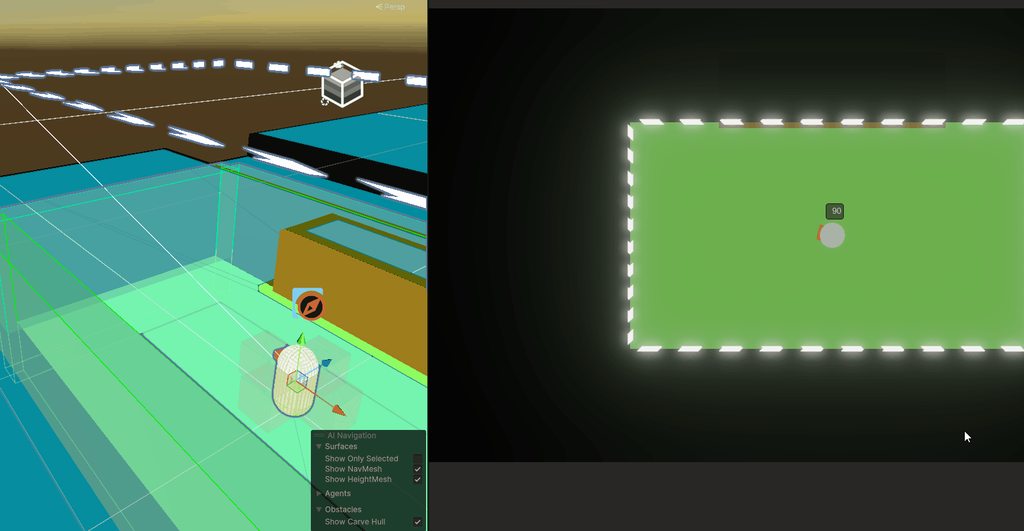
Anyone have any suggestions for a nice clean way to limit my player controller's movement to the NavMesh? Couple ways I can think of off the top of my head but curious if anyone has found success in any route
crisp oar
naive pawn
then start from the shallow end
I also struggle with patience but yes you are right. I need to create simpler stuff. Coding with AI does kinda give me an idea of how all the code is supposed to work with each other
 verbal dome
sour fulcrum
Feels like my question fits here more than <#763502536354168882>,
Anyone have an...
verbal dome
sour fulcrum
Feels like my question fits here more than <#763502536354168882>,
Anyone have an...
What kind of controller? Dynamic rb/kinematic rb? CC?
naive pawn
crisp oar
I also struggle with patience but yes you are right. I need to create simpler st...
you should ditch AI at this stage tbh. it's not going to give you a good time learning
sour fulcrum
verbal dome
What kind of controller? Dynamic rb/kinematic rb? CC?
dynamic rb
verbal dome
You could simply snap the final position with NavMesh.SamplePosition
Ok not sure how it'd work with a dynamic one
Can you like jump and stuff?
verbal dome
Forcing rb to a position is always a bit hacky if you are using dynamic rb
sour fulcrum
to be honest i don't recall why it's not kinematic, that could be a solvable problem
crisp oar
naive pawn
you should ditch AI at this stage tbh. it's not going to give you a good time le...
I don't disagree, I've just had this idea for years and honestly it's well thought out. I thought I could just make a game easily but then I ran into the problem of coding which I do want to learn. The idea is great but I have no way to execute it.
sour fulcrum
i try hard to avoid making player controllers
naive pawn
is the navmesh a complex shape? could you just put up invisible walls lol
sour fulcrum
not particually but it would be nice for level iteration
verbal dome
I was thinking of generating invisible walls (boxes) on the navmesh edges too, but they'd need to be offset from the edges by the radius of the agent, which gets tricky
verbal dome
sour fulcrum
i try hard to avoid making player controllers
Thats understandable but kinematic might be a better choice here
sour fulcrum
verbal dome
You could simply snap the final position with NavMesh.SamplePosition
somewhat on me for not just trying it but this shockingly works just really well
i expected some jank
verbal dome
Top down kinematic controller wouldnt be too complex I inagine
Actually you dont even need physics, you can just use navmesh raycasts and sampleposition 🤔
I did make a navmesh player controller like this once as an experiment
verbal dome
sour fulcrum
somewhat on me for not just trying it but this shockingly works just really well
But if this works well enough then good
sour fulcrum
https://i.imgur.com/hkFQ0UG.gif
looks stuttery in scene view but feels fine in game
 sour fulcrum
ctrl f
verbal dome
In unity
naive pawn
woah
 sour fulcrum
yeah thats old tech i got off a random brackeys video lmao
verbal dome
Well, thanks 😄
sour fulcrum
🤝
 shell sorrel
 tough lagoon
verbal dome
How have I never done it by accident bruh
tough lagoon
verbal dome
How have I never done it by accident bruh
me too and ive been using unity ft for like 14 years 😂
 thorn kiln
I'm following a tutorial from 2 years ago making an angry bird clone, the guy is using this code to make a list of the baddies in the scene
Baddie[] baddies = FindObjectsByType<Baddie>();
for (int i = 0; i < baddies.Length; i++)
{
_baddies.Add(baddies[i]);
}```
But I'm using 6.3, so it says FindObjectsOfType is obsolete. Is there a clean replacement? FindObjectsByType which is suggested gives an error chrome shell
Does anyone know how to prevent an enemy to spawn inside another object?
tough lagoon
thorn kiln
I'm following a tutorial from 2 years ago making an angry bird clone, the guy is...
Yeah it should be FindObjectsByType<CustomScript>(FindObjectsSortMode.None); or one of the variations.
https://docs.unity3d.com/6000.3/Documentation/ScriptReference/Object.FindObjectsByType.html
so I would probably use:
var baddies = FindObjectsByType<Baddie>(FindObjectsSortMode.None);
foreach (var b in baddies) {
  _baddies.Add(b);
}
 thorn kiln
Appreciated
 undone rampart
thorn kiln
Appreciated
undone rampart
thorn kiln
Appreciated
I would advise that you use the version of FindObjectByType without the sort mode parameter, since that is marked as obsolete in unity 6.4
 carmine pasture
hello
 tame juniper
does anyone know why the square sprite dosent show up on my 2d sprite?

nvm i found it
why is there an option to hide sprites??
 real thunder
Does anyone have an idea why does it it not look like a hex when the amount is 6 and angle is 60?
(dispersion is a float)
private void ShootOneSpurt()
    {
        wpn_go.damage_parsys_go.transform.position = fps_cam.transform.position;
        for (int i = 0; i < wpn_data.amount_of_hitbox_particles; i++)
        {
            float angle = wpn_data.angle_between_hitbox_particles * i;
            Vector3 dispvec = new Vector2(Mathf.Cos(angle), Mathf.Sin(angle)) * wpn_data.dispersion;
            Quaternion rot = Quaternion.LookRotation(Vector3.forward + dispvec);
            Vector3 shot_forward_vector = fps_cam.transform.rotation * rot * Vector3.forward;
            wpn_go.damage_parsys_go.transform.rotation = Quaternion.LookRotation(shot_forward_vector);
            wpn_go.damage_parsys.Emit(wpn_data.projectiles_per_shot);
        }
    }

...I prolly screwed up basic trigonometry
 wintry quarry
real thunder
Does anyone have an idea why does it it not look like a hex when the amount is 6...
wintry quarry
real thunder
Does anyone have an idea why does it it not look like a hex when the amount is 6...
You need to convert the angle into radians before feeding it to Sin/Cos
real thunder
oh thanks
swift crag
consider using Quaterion.AngleAxis to do the rotation! it lets you skip the trig
 oak marlin
why do I teleport through objects using UnityEngine;
public class playerController : MonoBehaviour
{
[Header("Player Stats")]
[SerializeField] private float walkSpeed = 20f;
private float speed;
[SerializeField] private float sprint = 30f;
private float verticalInput;
private float horizontalInput;


// Update is called once per frame
void Update()
{
    speed = Input.GetKey(KeyCode.LeftShift) ? sprint : walkSpeed;

    verticalInput = Input.GetAxis("Vertical");
    horizontalInput = Input.GetAxis("Horizontal");

    // moves forward and back
    transform.Translate(Vector3.forward * verticalInput * Time.deltaTime * speed);

    // moves left and right
    transform.Translate(Vector3.right * horizontalInput * Time.deltaTime * speed);
}
}
 rich adder
oak marlin
why do I teleport through objects using UnityEngine;
public class playerControl...
rich adder
oak marlin
why do I teleport through objects using UnityEngine;
public class playerControl...
!code 👇
radiant voidBOT
rich adder
!code 👇
Posting code
📃 Large Code Blocks
Use links to services like:
https://paste.mod.gg/, https://hastebin.skyra.pw/, https://paste.ofcode.org/, https://paste.myst.rs/
📃 Inline Code
Surround code with three backquotes. Not quotation marks.
To format as C#, add cs to the first line:
```cs
// Your code here
```
Add a comment with a line number if there is an error message.
rich adder
oak marlin
why do I teleport through objects using UnityEngine;
public class playerControl...
and because essentially you're teleporting by using Translation of transform
you have to read the part about 📃 Large Code Blocks
oak marlin
rich adder
and because essentially you're teleporting by using Translation of transform
I came here recently and they said that is what you should do
rich adder
oak marlin
I came here recently and they said that is what you should do
who said what?
translate never works with colliders, they are part of physics and you're skipping that by moving transform directly
oak marlin
Thats what I said! but these people said that this is a good way of movement
rich adder
maybe someone was trolling ? idk but you don't use translate if you don't want to phase through walls period.
the only way to hit colliders properly is using a physics based movement / controller like Rigidbody or Character controller
using their move methods
oak marlin
I can't stand these people man
 keen dew
Last time you were here everybody who replied said that moving a physics object via translate is not a good idea
swift crag
It's perfectly valid if you aren't using physics 😉
oak marlin
well I now decided to use the line rb.AddForce(horizontalInput * speed, 0, verticalInput * speed); but now there is latency in the movement and it gets stuck on things like a golf ball with the mass of 0.2
can someone give me an idea of why this is wrong and what I can do better?
rich adder
post code using links shown in the bot msg @oak marlin
and AddForce has acceleration thats why plus its accounting for the mass, there are different forcemodes you can use
or alternatively .linearVelocity can be used to get an instant move
oak marlin
I dont understand the bot bro
rich adder
oak marlin
I dont understand the bot bro
huh?
it says
📃 Large Code Blocks
and gives you the links.. click one of em put the code there , save it and send generated link
polar acorn
oak marlin
Thats what I said! but these people said that this is a good way of movement
Who is "these people"
polar acorn
oak marlin
just dont even man
Do they happen to rhyme with "maude" or "shatCBT"
 timber tide
translate can work but large steps will effectively causes misses
oak marlin
look, this is one of the messages [ZEQA],
AleksiH🏘️ 🏘️ 🏘️ — 4/1/26, 12:26 PM
If anything, moving via transform should be much less jittery than anything with physics. Unless you have a rigidbody on the same object fighting against the translate. If the object has a rigidbody, then moving via transform isn't great, don't know how any of that implies anything being outdated. to me sounds like he wants to be a smart alek and not help with the issue
timber tide
so you have to implement your own detection methods -> raycast the step beforehand
polar acorn
oak marlin
look, this is one of the messages [ZEQA],
AleksiH🏘️ 🏘️ 🏘️ — 4/1/26, 12:26 P...
So you took someone saying "well this issue shouldn't exist with teleportation and yet it still is, curious" to mean "use translate and refuse to accept anything else or I'll gut you like a fish"
oak marlin
polar acorn
So you took someone saying "well this issue shouldn't exist with teleportation a...
wha?
polar acorn
oak marlin
wha?
Accidentally a word, edited it back in
timber tide
If you're going to move something directly by transform then it's probably for some visual object that doesn't need collision info
oak marlin
polar acorn
Accidentally a word, edited it back in
buddy, I really don't wanna talk abt this as it is a HUGE waste of my time. I came here for help/assitance
timber tide
so your 3 options out of the box for a character controller is either Unity's character controller, Unity's rigidbody, or PhysX kinematic
keen dew
oak marlin
look, this is one of the messages [ZEQA],
AleksiH🏘️ 🏘️ 🏘️ — 4/1/26, 12:26 P...
Did you stop reading before getting to "moving via transform isn't great"?
timber tide
spoiler: unity's stuff is objectively worse than just making your own
oak marlin
keen dew
Did you stop reading before getting to "moving via transform isn't great"?
JS STOP
oak marlin
rich adder
or alternatively .linearVelocity can be used to get an instant move
linearVelocity seems to be great for jumping but for w a s d movement doesn't seem to be as good. how can I remove the delay and still move the player right?
rich adder
oak marlin
linearVelocity seems to be great for jumping but for w a s d movement doesn't se...
.velocity doesnt have movement delay, what you're experiencing is most likely from the inputs being smoothed out GetAxis, if you don't want that you use GetAxisRaw
new Vector3(horizontalInput * speed, 0, verticalInput * speed);
also if you want gravity / jump to work proper this should not be 0 but rigidbody.linearVelocity.y
naive pawn
tame juniper
why is there an option to hide sprites??
the eye icon toggles whether stuff in packages are shown, sometimes you just need the ones in your project
oak marlin
I literally am using this cs new Vector3(horizontalInput * speed, 0, verticalInput * speed); But it only moves on the x and y but not forwad back right left according to how the player is rotated. I am making first person
naive pawn
oak marlin
look, this is one of the messages [ZEQA],
AleksiH🏘️ 🏘️ 🏘️ — 4/1/26, 12:26 P...
they aren't saying to use transform
they're saying this
- if the object has something that controls the transform (eg rigidbody, CC, root motion animator) then use that.
- in the case of rigidbody, it work on the fixedtimestep, so it can be jittery, if interpolation is not set correctly.
- otherwise, using the transform should be done per-frame, so it wouldn't be jittery.
none of these solutions would be jittery if used correctly
naive pawn
oak marlin
I literally am using this ```cs new Vector3(horizontalInput * speed, 0, vertical...
rigidbody velocity is in world-space, so you would need to multiply in the direction the user is facing (transform.forward/right)
rich adder
oak marlin
I literally am using this ```cs new Vector3(horizontalInput * speed, 0, vertical...
you gotta account for that by multiplying it by transform
btw its 3 ` backticks, not '
 night raptor
oak marlin
look, this is one of the messages [ZEQA],
AleksiH🏘️ 🏘️ 🏘️ — 4/1/26, 12:26 P...
night raptor
oak marlin
look, this is one of the messages [ZEQA],
AleksiH🏘️ 🏘️ 🏘️ — 4/1/26, 12:26 P...
What exactly is the point you wanna be clever about?
 slender nymph
this is a code channel
#✨┃vfx-and-particles
 waxen adder
What do you guys think about this?
I have a Collectible class. It extends monobehaviour, so it represents the actual physical thing in the game world. It's responsible for figuring out if it's been collected.
The actual things that happen when it's collected is handled in a stored CollectibleData scriptable object, where effects get applied and such.
I'm leaning towards just having both responsibilities in one class. I'm having a hard time thinking of a good reason for the seperation versus yesterday when I made this system XD
 torpid sparrow
Ive got a nice chunk loader going that uses additive scenes and a scene config that loads scenes around the pllayer based on position, but implimenting origin shift with this method is a nightmare! is this a bad approach?
wintry quarry
waxen adder
What do you guys think about this?
I have a Collectible class. It extends monob...
Definitely having the two is superior
 grand snow
waxen adder
What do you guys think about this?
I have a Collectible class. It extends monob...
grand snow
waxen adder
What do you guys think about this?
I have a Collectible class. It extends monob...
How you store data about a "collectable" should remain separate!
wintry quarry
Because then you can have the Collectible reference the CollectibleData for what it is, and you could have an Inventory for example that also deals with CollectibleDatas
and inventory UI elements
etc
As well as putting it in a serializable save data
grand snow
Ive always stored all information like this externally and things are much better for it
waxen adder
wintry quarry
As well as putting it in a serializable save data
You can't do that with monobehaviors?
wintry quarry
waxen adder
You can't do that with monobehaviors?
serialize them? no
not easily/directly
waxen adder
Gotcha. Well, good thing I asked, because I went and switched to one class only. Would've been a big mistake from the sounds of it
wintry quarry
Deserialization with a monobehavior is essentially impossible
waxen adder
grand snow
a mono instance? utter shit
What about a basic object instance? (i.e. no extension of monobehavior)
grand snow
waxen adder
What about a basic object instance? (i.e. no extension of monobehavior)
That works if its not serialized inside the monobehaviour but therefore requires use of some unique id to map to said data that you load as you wish
waxen adder
Asking because I'm thinking about "state" type classes, that record the state of something
grand snow
Basically either use a scriptable object to define data for some thing OR an id that maps to data you load in your own way
Information about an object or concept should be defined once and re used
 simple stump
hey, im creating this remake of a game, but i have to deal with this issue:
player collision is a cube (edge collider 2d), these other tiles are then a box collider 2d. Player cannot pass to these 1 tile blank spots while i want them to. Previous tests with sphere or tinier box shows that it seems to be tied with player velocity since it can pass to a blank spot if the spot is at a certain level where velocity is lower. Sphere collider was promissing but issue still occur
was thinking of using Rays on the player collider in its corner to the direction but not really sure if thats only option and seems complicated, is there suggestion to let player pass this tile? the original game seems to reset the velocity if going to that direction but that would be a case of specifically how

 wintry quarry
simple stump
hey, im creating this remake of a game, but i have to deal with this issue:
pla...
wintry quarry
simple stump
hey, im creating this remake of a game, but i have to deal with this issue:
pla...
the obvious answer here seems to be to make the collider smaller
Why are you using an edge collider though instead of a box collider
simple stump
wintry quarry
the obvious answer here seems to be to make the collider smaller
not viable, changing scale from 0.24 to 0.18 still has this problem
 simple stump
wintry quarry
Why are you using an edge collider though instead of a box collider
simple stump
wintry quarry
Why are you using an edge collider though instead of a box collider
ghost collision is gone with edge collider
the original game acts like this, at end i showscase what appears to be the velocity being set to zero which i wonder how to properly do in unity and what checks to do
 wintry quarry
simple stump
not viable, changing scale from 0.24 to 0.18 still has this problem
wintry quarry
simple stump
not viable, changing scale from 0.24 to 0.18 still has this problem
which poroblem? The visual problem?
Just move the collider lower
simple stump
wintry quarry
which poroblem? The visual problem?
problem with player not passing through the 1 blank tile, changing scale to smaller and smaller does not solve in this case
wintry quarry
part of this is why capsules are normally used for characters
because sharp corner edges get caught on stuff
 ivory bobcat
Why? Does it not work if you leave some gap on the top of the sprite?
Having smooth corners would help as well
simple stump
ivory bobcat
Why? Does it not work if you leave some gap on the top of the sprite?
collider gap? it would need to be on top and below if player is falling, then sprite would be overlaping the block
 edgy tangle
Without knowing more about precisely why not, I agree that this likely could be solved by using a smaller, rounder collider. Have you tried using a BoxCollider2D with EdgeRadius? That will round the corners.
 cunning pond
guys when i switch my project to il2cpp it kicks me out of the game whenever i test it out but when i switch it back to mono it lets me play. anyone know the situation?
sour fulcrum
use mono 😛
 teal viper
cunning pond
guys when i switch my project to il2cpp it kicks me out of the game whenever i t...
teal viper
cunning pond
guys when i switch my project to il2cpp it kicks me out of the game whenever i t...
Check the player logs. Or attach the debugger to catch errors.
cunning pond
teal viper
Check the player logs. Or attach the debugger to catch errors.
ill try
simple stump
edgy tangle
Without knowing more about precisely why not, I agree that this likely could be ...
for the player? it bumps in the corner but falls, the blocks is a part of tilemap

 muted sand
private (float final_pitch, float final_yaw) CalculatePitchYaw() => (0f, 2f);
Do the parenthesis matter in CalculatePitchYaw()?
If they don't what practices should i follow?
ivory bobcat
muted sand
If they don't what practices should i follow?
The first parenthesis looks to be a tuple type. The second would be part of the method declaration whereas the last is the tuple returned in a single statement.
Basicallycs private Type CalculatePitchYaw() => Value;
muted sand
ivory bobcat
Basically```cs
private Type CalculatePitchYaw() => Value;```
Would the parenthesis for the parameters be optional?
Since its like a lambda
ivory bobcat
I'm not sure where you're seeing a lambda but this looks like a method.
For it to be an lambda, you have to be using an assignment operator if you're wanting to associate it with a variable name
ivory bobcat
ivory bobcat
muted sand
But the () in CalculatePitchYaw() are optional?
Why would you assume that?
A method requires the parenthesis
A property would not (if it's a property)
I'm assuming it's not a lambda.
A property would look like this:cs private Type CalculatePitchYaw => Value;
Reminder that this isn't a lambda function. We're using a single expression body statement. => doesn't make it a lambda function.
muted sand
Okay
naive pawn
muted sand
But the () in CalculatePitchYaw() are optional?
no.
removing them makes it a property, not a method
it's just the {} that has changed
normal methods require () even if they don't take params, don't they? 😉
muted sand
naive pawn
normal methods require () even if they don't take params, don't they? 😉
yeah i was just wondering because it didnt show up as a compiler error
thanks
 mossy cave
hello, im still a bit of newbie with scripting and unity overall. is this where i can ask a question, or where may i find that chat? :)
naive pawn
mossy cave
hello, im still a bit of newbie with scripting and unity overall. is this where ...
yes, ask away
also for future reference, https://dontasktoask.com - the sooner you ask, the sooner we can answer or redirect 😉
 mossy cave
Ive been having an issue with a moving platform and my character. Whenever i add this script to my platform, it works fine in terms of the character staying on the platform. However, he deforms/stretches. I know it's because the platform itself isnt scaled 1,1,1 like he is (he doesnt distort when i set the platform to 1,1,1) is there a way around this, and would it be in my script, or unity itself?


ive seen a forum or 2 about it but no solutions have fixed my issue. I may be doing something wrong though
naive pawn
mossy cave
Ive been having an issue with a moving platform and my character. Whenever i add...
have that platform be 1,1,1
if the graphics don't align, have them as a separate child with different scaling
but the root object of the platform would be 1,1,1
mossy cave
so i'd make my platform a child of an object/parent with a scale of 1,1,1?
naive pawn
you would have the logical "platform" be scaled 1,1,1
then you would have the graphics of the platform, eg the mesh, as a child that's scaled
so it's just the graphics that's getting scaled
components like this StickyPlatform would be on that unscaled parent
mossy cave
Like this? I deleted my previous message thinking I figured it out but it kinda did kinda didn’t lol (it works only when standing on the invisible box)
 naive pawn
please don't take photos of screens

Learn how to take screenshots on many major platforms.
that doesn't even show any relevant info lol
naive pawn
show the hierarchy properly with a screenshot, describe what objects are what, eg which one has graphics, which ones are scaled, etc
mossy cave
The moving platform is the main one to look at here. specifically Ground and Visual Ground. "Ground" is the logical invisible platform set to 1,1,1. "VisualGround" is the child object of Ground that you can see. The Stickyplatform script is set on "Ground"

it works in the sense that if i step on "Ground, I move with no distortion. But if i stand on "VisualGround" I no longer follow the platform when standing on it. It just doesnt look right, as im floating on a box lol. So i guess no technically issues, just visual issues. "Ground" is the invisible box outline, "VisualGround" is the green rectangle
 long fjord
Hi, I am making a platformer and run all the movement methods through fixed update. Obviously it isn't as responsive as update, hence why I read input there, and save it in a boolean, as seen in the example code. I am a bit obsessed with trying to be optimal, which is why Im wondering whether there are any better ways to combat this. Any answer would be helpful, thanks!
 wintry quarry
long fjord
Hi, I am making a platformer and run all the movement methods through fixed upda...
wintry quarry
long fjord
Hi, I am making a platformer and run all the movement methods through fixed upda...
This is pretty standard practice
looks good
As for "optimal" you'd have to explain what you mean by that.
Performance? Code architecture? Readability?
long fjord
thanks for the response, I know "optimal" depends on certain factors, but it just feels strange, I am not very experienced in unity and i figured they would have some simple method or something to read input accurately on fixed update.
wintry quarry
there's nothing strange about this
input handling goes in Update
physics goes in FixedUpdate
using variables to communicate information between the two is standard
read input accurately on fixed update.
It has nothing to do with "accuracy". FixedUpdate simply does not run every frame
so it is not a suitable place to read single-frame input like a button press
mossy cave
i solved my issue! it was a box collider thing, i made the box collider shape the same shape as my visualground. Thanks for the help!
naive pawn
long fjord
thanks for the response, I know "optimal" depends on certain factors, but it ju...
input is frame-bound, so yeah you would need your own specific thing to handle linking per-frame changes to fixedupdate
naive pawn
please do not spam
 bright hill
im trying to figure out with dynamic bullet spread (when player stands he shoots perfect, when player moves he shoots bad). bullet spread updates every frame and moves to zero every second. im bad at math and i dont know why it works like this
    {
        bool isMoving = controller.isMoving;


        if (isMoving == true)
        {
            gunData.bulletSpread = Mathf.Lerp(gunData.bulletSpread, gunData.bulletSpread * 2, 0);
        }
        else if (isMoving == false)
        {
            gunData.bulletSpread = Mathf.Lerp(gunData.bulletSpread, gunData.bulletSpread / 2, 1);
        }
}```Those 0 and 1 at the end of the lerps literally tell it to go instantly to 0 (start) or 1 (end)
Lerp is the wrong tool here anyway. Use Mathf.MoveTowards instead
bright hill
sounds like what i need
lemme try
it works, i added min spread and max spread, now it works like i thought
   private void Start()
    {
    gunData.bulletSpread = gunData.minSpread;

    }
    public virtual void Update()
    {
        bool isMoving = controller.isMoving;


        if (isMoving == true)
        {
            gunData.bulletSpread = Mathf.MoveTowards(gunData.bulletSpread, gunData.maxSpread, 0.5f * Time.deltaTime);
        }
        else if (isMoving == false)
        {
            gunData.bulletSpread = Mathf.MoveTowards(gunData.bulletSpread, gunData.minSpread, 0.5f * Time.deltaTime);
        }
    }
 spice burrow
Hi guys! I haven't gotten the code for this yet, so I can't show anything.
I have a question about rb2d velocity.
I'm trying to single out the transform.up velocity of an object (the vertical velocity of the gameobject, i.e. forwards/backwards. How do I do that?
I need to know whether the forwards/backwards velocity of my object is above a certain number in order to brake.
keen dew
Which is it, rigidbody or transform velocity?
naive pawn
the rigidbody velocity in the direction of transform.up, no?
spice burrow
yup
keen dew
A rigidbody has a .linearVelocity property
naive pawn
you could use transform.TransformDirection/Vector for that (or InverseTransform, i forget)
probably the non-inverse version
spice burrow
keen dew
A rigidbody has a .linearVelocity property
i know. i only need the velocity of transform.up tho
naive pawn
naive pawn
you could use transform.TransformDirection/Vector for that (or InverseTransform,...
@spice burrow this was intended for you
spice burrow
naive pawn
you could use transform.TransformDirection/Vector for that (or InverseTransform,...
i feel really stupid asking this, but could you provide an example?
naive pawn
on what exactly? have you checked the docs
it'd take me a bit to figure out which one is the right method since i don't have anything to test it on lol
keen dew
Vector3.Dot(rb.linearVelocity, transform.up) gets the velocity in that direction only
naive pawn
the overall concept is just transforming between local space and world space, and they take in a Vector3 and return the equivalent Vector3 for a different space
spice burrow
keen dew
`Vector3.Dot(rb.linearVelocity, transform.up)` gets the velocity in that directi...
THAT'S what it was
now I remember
thanks
spice burrow
naive pawn
the overall concept is just transforming between local space and world space, an...
thanks to you too'
naive pawn
ohhh that's nice
spice burrow
why does it KNOW so much 😭 is this normal??? has never happened on my school laptop

HAHHA i just realised it doesn't even make sense
its not very smart after all
spice burrow
that sucks
ew
if(Keyboard.current.wKey.isPressed)
{
    targetVelocityVert = baseTargetVelocityVert;
}
else
{
    targetVelocityVert = 0;
}

if (Keyboard.current.sKey.isPressed)
{
    targetVelocityVert = (-baseTargetVelocityVert);
}
else
{
    targetVelocityVert = 0;
}```

Would it make more sense to turn these into one if/elseif/else statement instead?I don't see any way it would fuck up the logic
naive pawn
spice burrow
```C#
if(Keyboard.current.wKey.isPressed)
{
targetVelocityVert = baseTargetV...
yes, this doesn't seem like it'd work at all lmao
if S isn't pressed, targetVelocityVert would be 0, that's the last thing checked
spice burrow
yeah it'd probably freak out if i pressed both w and s
right
true
ill change it
naive pawn
nah, the first if/else isn't used at all lol, now that i think about it
if you set up input actions properly you'll get automatic handling for this fwiw
spice burrow
if(Keyboard.current.wKey.isPressed)
 {
     targetVelocityVert = baseTargetVelocityVert;
 }
 else if (Keyboard.current.sKey.isPressed)
 {
     targetVelocityVert = (-baseTargetVelocityVert);
 }
 else
 {
     targetVelocityVert = 0;
 }```
fixed 😝this will prioritize W btw, so keep that in mind
if you want it to not do that you'll have to write it in a symmetric way
spice burrow
how could I do that, though?
naive pawn
quite a few ways
- take advantage of the inputsystem to do it for you
- use a "cumulative" direction, not sure how to call it exactly
targetVelocityVert = 0;
if(Keyboard.current.wKey.isPressed)
{
    targetVelocityVert += 1;
}
if (Keyboard.current.sKey.isPressed)
{
    targetVelocityVert -= 1;
}
targetVelocity *= baseTargetVelocityVert;
```something like this, for example
- add a separate case to handle when both are pressedHi, fyi: the jump is called in fixedupdate, and the input is read in update. The jump registers, but every single time it is the shorterjump(velocity/3), even when Im not actually releasing the button. I suspect it has soemthing to do with fixed update.

 spice burrow
how do i turn off thw ai bullshit suggestions in visual studio :/
 queen vale
spice burrow
how do i turn off thw ai bullshit suggestions in visual studio :/
queen vale
spice burrow
how do i turn off thw ai bullshit suggestions in visual studio :/
Is there something new in one of the updates or are you referring to Intellisense?
sour fulcrum
Probably intellicode
naive pawn
spice burrow
how do i turn off thw ai bullshit suggestions in visual studio :/
search for "intellicode" or "inline suggestions" in settings
naive pawn
queen vale
Is there something new in one of the updates or are you referring to Intellisens...
(intellisense is not AI)
naive pawn
long fjord
Hi, fyi: the jump is called in fixedupdate, and the input is read in update. Th...
you seem to only be checking jumpReleased on the frame you start jumping?
this is very little context to go off of
show more context and send code appropriately please
!code
radiant voidBOT
naive pawn
!code
Posting code
📃 Large Code Blocks
Use links to services like:
https://paste.mod.gg/, https://hastebin.skyra.pw/, https://paste.ofcode.org/, https://paste.myst.rs/
📃 Inline Code
Surround code with three backquotes. Not quotation marks.
To format as C#, add cs to the first line:
```cs
// Your code here
```
Add a comment with a line number if there is an error message.
queen vale
naive pawn
(intellisense is not AI)
I'm aware. I've never seen the AI stuff, hence me asking if this is relating to a new feature from a new update. - Or intellisense
spice burrow
naive pawn
(intellisense is not AI)
hm alright well I guess that isn't so bad
naive pawn
spice burrow
why does it KNOW so much 😭 is this normal??? has never happened on my school la...
i think they're referring to this, which is intellicode/inline suggestions
spice burrow
I think it's intellisense cuz any ai update would have 39 popups and shit each time it recommends a single thing
naive pawn
spice burrow
hm alright well I guess that isn't so bad
to be clear, intellisense is the suggestions box. intellicode/inline suggestions are the gray generated text, that part is AI
queen vale
I'm rocking VS 2019, can't say I've seen intellicode. Wondered by people were using that term lol
spice burrow
as long as im not an expert i dont want an ai helping me out
if you're bad and use ai to write code it stops being a tool and starts being a replacement
i dont want that
i got this sick concept
queen vale
If only microsoft took that advice for windows 11
spice burrow
so basically each time i apply force using addforce i get faster, but i dont want to go beyond my max speed. how? well, i just came up with an idea to fix it. i check how many percent of max speed have been reached and subtract 1 with it. i take the regular "push froce" and multiply it by that number. simple. smooth.
chat, is this diea goated or nah
long fjord
    {
        jumpBufferCounter += Time.deltaTime;
        ReadInput();
        JumpBuffer();

        moveDirection = moveAction.ReadValue<Vector2>().x;

        print(jumpAction.WasReleasedThisFrame());

    }

    void ReadInput()
    {

        if(jumpAction.WasReleasedThisFrame())
        {
            jumpReleased = true;
        }

    }
    void FixedUpdate()
    {

        ApplyMovement();
        HandleGravity();
        HandleDeceleration();
        Move();
        Jump();
    }


    void ApplyMovement()
    {
        rb.velocity = refVelocity;
    }


    void Jump()
    {
        //GroundCheck
        if(Physics2D.OverlapBox(groundCheckBox.position, groundCheckBox.localScale, 0, groundLayer))
        {
            isGrounded = true;
            gravity = baseGravity;
        }

        else
        {
            isGrounded = false;
        }


        //actually jumps
        if (jumpPressed)
        {
            jumpPressed = false;

            if(isGrounded)
            {
                canJumpBuffer = false;
                canJump = true;
            }
        }

        else if(canJumpBuffer)
        {
            canJumpBuffer = false;
            canJump = true;
        }

        if(canJump)
        {
            canJump = false;
            refVelocity.y = jumpHeight;
        }

        if(jumpReleased && refVelocity.y > 0f)
        {
            jumpReleased = false;
            refVelocity.y = refVelocity.y / 2;
        }

    }

    void JumpBuffer()
    {
        if(jumpPressed && !isGrounded)
        {
            jumpBufferCounter = 0f;
        }

        if (isGrounded && jumpBufferCounter < jumpBufferLimit)
        {
            canJumpBuffer = true;
        }

        else
        {
            canJumpBuffer = false;
        }
    }
that doesn't really guarantee you don't go above your max speed, does it
it does a little easing as it approaches the max speed
naive pawn
long fjord
``` void Update()
{
jumpBufferCounter += Time.deltaTime;
...
send it properly please. there's a section in that embed labelled "large code blocks"
long fjord


 queen vale
naive pawn
that doesn't really guarantee you don't go above your max speed, does it
it does...
queen vale
naive pawn
that doesn't really guarantee you don't go above your max speed, does it
it does...
I've not done a lot with rigidbody characters, is this a forcemode issue you think or..?
naive pawn
queen vale
I've not done a lot with rigidbody characters, is this a forcemode issue you thi...
no, it's just a disconnect between what it says it does and what it actually does. it's not related to physics
it's a negative feedback loop but only in one half
hmm i guess if you allow the fraction to go over 1 to add a slowing force, i guess that could work
long fjord
spice burrow
naive pawn
that doesn't really guarantee you don't go above your max speed, does it
it does...
ehhh, some tweaks and it'll probably be fine. it's hardcoded to not even apply force when you're above the max speed, too.
naive pawn
naive pawn
hmm i guess if you allow the fraction to go over 1 to add a slowing force, i gue...
could end up as a little spring though, so.. adding a normal clamp would probably be better
queen vale
Wonder if there's something you could do by using the inverse. 1/maxSpeed.
naive pawn
spice burrow
ehhh, some tweaks and it'll probably be fine. it's hardcoded to not even apply f...
ok, so you only have half the negative feedback loop then. you can still go above max speed, and you'll stay there
if you add another clamp to actually limit that it'd probably actually work as a limit
spice burrow
naive pawn
ok, so you only have half the negative feedback loop then. you can still go abov...
the idea was that it decreases the amount of force it adds as it nears the max speed.
how could I go about adding said clamp you're suggesting?
naive pawn
you could do ClampMagnitude on the horizontal velocity
or if you're in top-down 2d, you would just clamp the entire velocity
naive pawn
long fjord
https://paste.ofcode.org/mWGSHnfzbtY3U4wvyg8xi5
so what's the current issue?
long fjord
the jump always reverts to the shorter jump, even if I hold down the button.
spice burrow
            if(velocityVert < targetVelocityVert)
            {
                //the first variable is asuper weird way of writing "percent of target velocity reached (for vertical movement). vert always refers to transform.up velocities in this case.
                percentTargetVelReachedVert = (Mathf.Abs(velocityVert * 100)) / targetVelocityVert;

                forceToApplyVert = 1 - percentTargetVelReachedVert;

                //ill add the force using rb.addforce somwehere way below this function.
            }```
haven't added the magnitude clamp yet. would this work to add less force the closer the object gets to the target velocity?it's simple enough
long fjord
it works fine when I call the variable directly like this, and run jump in the update: cs f(jumpAction.WasReleasedThisFrame() && refVelocity.y > 0f) { jumpReleased = false; refVelocity.y = refVelocity.y / 2; }
method i mean
 fickle plume
@open crater Dont cross-post. Pick a channel and remove from the one you are not using.
 haughty girder
Does anyone knows a good documentation for Unity using the C# language?
One that's not awfully extensive?
slender nymph
!docs
radiant voidBOT
slender nymph
!docs
slender nymph
unless you mean a course that teaches it, in which case there are beginner c# courses pinned in this channel
spice burrow
How do I set the velocity of transform.up to 0?
I need to make my obejct do a full stop when it is below a certain vetical velocity
 else
 {
     if(velocityVert < 0.5) //velocityVert is just (Vector3.Dot(rb.linearVelocity, transform.up))
     {
         //remove transform.up velocity??
     }
}```congrats!
rich adder
spice burrow
```C#
else
{
if(velocityVert < 0.5) //velocityVert is just (Vector3.Dot(r...
transform.up is a direction, it doesn't make sense to set it to 0
spice burrow
alright
rich adder
you want do remove the velocity of the rb
rich adder
spice burrow
but just the velocity of that direction
should be able to just subtract them no ?
spice burrow
else
   {
       if(velocityVert < 0.5)
       {
           rb.AddForce(transform.up * -velocityVert);
       }
   }```
like this? rb.linearVelocity -= transform.up * velocityVert;
spice burrow
ohhhhhhh
yeahhhh
right
HAHAHA
i forgot you could just do that
thats stupid of me
alr
thanks dude
rich adder
it work how you wanted?
You could also 0 out the copy of velocity but this might be more sketch
spice burrow
oh wait. for some reason, one of them is a vector3 whilst the other is a vector2
I suppose it must be velocityVert since im using a rigidbody2d
rich adder
only when you do math operation they should be the same you can easily cast them if needed
eg
myVector2 - (Vector2)myVector3 (Vector3)myVector2 - myVector3
spice burrow
if(velocityVert < 0.5)
{
    rb.linearVelocity -= (Vector2)(transform.up * velocityVert);
}```
this worked. it is a marvel to me, since this line of code looks very cursed to me. what the fuckthanks a lot!
rich adder
spice burrow
```C#
if(velocityVert < 0.5)
{
rb.linearVelocity -= (Vector2)(transform.up *...
ya all is doing is ignoring the Z axis
 cosmic bolt
Hey guys, how do i go through this thing of not being able to remember variables or just code in general when i want to let's create a WASD movement input
rich adder
cosmic bolt
Hey guys, how do i go through this thing of not being able to remember variables...
you're not using it enough
cosmic bolt
rich adder
you're not using it enough
The variables you mean?
Or just programming in general
rich adder
both
swift crag
cosmic bolt
Hey guys, how do i go through this thing of not being able to remember variables...
refer to the documentation as needed. you should also review what you've written to understand why you wrote it
that way, you aren't just copying it or doing rote memorization
 tough forum
quick question, do i need a "quit" type of thing (like a button) for a webgl game?
swift crag
not really, since the game isn't a standalone application
it's like how mobile games don't have a quit button
you just leave the app
tough forum
thx 
wintry quarry
tough forum
quick question, do i need a "quit" type of thing (like a button) for a webgl gam...
that's up to you. What would "quit" do? Leave a game lobby? Return to the main menu? You might want something like that
swift crag
oh, sure, but i'm guessing this is a "quit game" button
everything else continues to make sense
relatedly: do not forget to put a quit button in your desktop game 😉
naive pawn
swift crag
relatedly: do not forget to put a quit button in your desktop game 😉
strictly speaking, is that necessary? couldn't you alt+f4/cmd+q out?
i do that for a majority of the apps i use
swift crag
oh yeah, you can
it's just awkward for users who aren't familiar with doing that
I think cmd+Q is a lot more commonly used on Mac than alt+F4 is on Windows
spice burrow
if(targetVelocityHoriz != 0) //horiz means horizontal btw
{
    if (velocityHoriz < targetVelocityHoriz)
    {

        percentTargetVelReachedHoriz = (Mathf.Abs(velocityHoriz * 100)) / targetVelocityHoriz; //1

        forceToApplyHorizMult = (1 - percentTargetVelReachedHoriz);
    }
    else
    {
        forceToApplyHorizMult = 0;
    }
    //apply force
}
else
{
    if (Mathf.Abs(velocityHoriz) < 0.5)
    {
        rb.linearVelocity -= (Vector2)(transform.right * velocityHoriz);
    }
    else
    {
        brakeForceHoriz = brakeStrengthHoriz * Mathf.Sign(velocityHoriz) * -1;
        //2
    }
//apply force
}```

Small problem. See, on the line I've marked with "1", I've made this really cool little thing that decreases the force added when the object in motion gets closer to the maximum speed (or, "target velocity"). In the place I marked with "2", I'd like to replicate it, now slowing the addition of force as the object nears 0.5 as its slowest speed (as you can see, below 0.5, it just stops). I know how to do it in theory, but I CANNOT for the life of me figure out how to do the math. I cant figure out the mathematic formula for this one. i know this is really stupid but someone please help me, I'm really bad at structuring formulas in my head.i refuse to use ai to do simple mathsfor me so I seek help from all you altruistic wonderful server members instead
swift crag
i like to think of these problems as two steps:
- figuring out how "close" you are to something
- making a decision based on that value
in this case, you want to figure out how close you are to stopping
my go-to for this is Mathf.SmoothStep
For example:
Mathf.SmoothStep(10, 5, x);
unity documentation my beloved
swift crag
this produces 0 if x is 10 or higher and 1 if x is 5 or lower
I use this all the time in shader code
this is similar to Mathf.InverseLerp, but has smoothing at the ends
so, in your case, you might do
Mathf.InverseLerp(0, 3, speed)
0% force at 0 speed, 100% force at 3 speed
if you need more than 0% at the low speed, just throw in a Mathf.Lerp afterwards
float fastness = Mathf.InverseLerp(0, 3, speed);
float brakingForce = Mathf.Lerp(0.5f, 1f, fastness);
(there is no Mathf.Remap, annoyingly)
verbal dome
spice burrow
```C#
if(targetVelocityHoriz != 0) //horiz means horizontal btw
{
if (veloci...
I often do something like xVel = Mathf.MoveTowards(xVel, xTargetVel, controlFactor * delta) where controlFactor controls the "snappiness" or acceleration/deceleration speed
And controlFactor would be calculated based on your current speed (with methods similiar to what Fen mentioned), target speed (for example, higher factor when stopping) and maybe other factors like a recent knockback effect
spice burrow
Your answers are cool, but i feel like actually just doing it raw. I'm calculating it roughly on a piece of paper right now. (the function of the whole thing) my brain is extremely friend right now,but im making progress.
naive pawn
these math functions aren't particularly complex, they just make it easier to read the intent
 wheat gorge
hey guys does anyone know why OnMove() isnt being called?
using Unity.VisualScripting.Dependencies.Sqlite;
using UnityEditor.Timeline.Actions;
using UnityEngine;
using UnityEngine.InputSystem;

public class PlayerInputManager : MonoBehaviour
{
    [SerializeField] private Rigidbody playerRigidbody;

    private Vector2 inputVector = Vector2.zero;

    void Start()
    {

    }

    public void OnMove(InputAction.CallbackContext context)
    {
        inputVector = context.ReadValue<Vector2>();
        Debug.Log(inputVector);

    }


    void Update()
    {
        if (playerRigidbody)
        {

            playerRigidbody.linearVelocity = new Vector3(inputVector.x, playerRigidbody.linearVelocity.y, inputVector.y);
        }
    }
}


 stuck parrot
Hey Guys, im a beginner and I am following tutorials to learn how to make games (weeks ago I didnt even knew how to make a player move) and I'm following this video right now https://www.youtube.com/watch?v=liba3xGI4gM&list=PLaaFfzxy_80HtVvBnpK_IjSC8_Y9AOhuP&index=8 that shows how to do UI systems. the code she is using ```using UnityEngine;
public class MenuController : MonoBehaviour
{
public GameObject mainMenu;
void Start()
{
mainMenu.SetActive(false);
}
// Update is called once per frame
void Update()
{
if (Input.GetKeyDown(KeyCode.Escape))
{
mainMenu.SetActive(!mainMenu.activeSelf);
}
}
}is not working for me because im using the new input system. SO i tried to make it work with the new one but I think I messed up. this is my versionusing UnityEngine;
using UnityEngine.InputSystem;
public class MenuController : MonoBehaviour
{
TopDownTemplate input; // "TopDownTemplate" is the name of the input action asset
public GameObject mainMenu; // Reference to the main menu GameObject

private void Awake()
{
    input = new TopDownTemplate(); // creates a new instance of the input action asset
}

void OnEnable()
{
    input.Player.Enable(); // enables the "Player" action map
    input.UI.Disable(); // disables the "UI" action map to prevent conflicts with the menu controls
}

void Start()
{
    mainMenu.SetActive(false);
}
// Update is called once per frame
void Update()
{
    if (input.Player.Pause.IsPressed())
    {
        mainMenu.SetActive(!mainMenu.activeSelf);
    }
}
}``` and the idea was to just create a variable that stores the pause input from the input system and use it in the if statement. sadly this created weird behaviour. pressing escape switches the menu on and off rapidly so sometimes it stays on the menu, sometimes it jumps back to the player mode. any tipps?
Let's add the UI in for our games menu system and add tab functionality! We'll be able to add as many tabs as we like to the top and switch between the corresponding pages. Then we'll be ready for our inventory and settings that we'll add in future videos - as well as any others you may want to add!
Sprite sheet: https://pixel-boy.itch.io/ninja...
slender nymph
wheat gorge
hey guys does anyone know why OnMove() isnt being called?
```cs
using Unity.Vis...
#🖱️┃input-system
but assuming you are entering Play Mode and neither of those components (or the containing gameobject) is getting disabled it should be called
wheat gorge
slender nymph
<#763502300781477948>
but assuming you are entering Play Mode and neither of th...
do you know any other reasons why it would be called?
slender nymph
stuck parrot
Hey Guys, im a beginner and I am following tutorials to learn how to make games ...
you want to check if the input was pressed this frame, IsPressed will be true for every single frame the button is down. check the docs for what method would be more appropriate
slender nymph
wheat gorge
do you know any other reasons why it would be called?
show the console during play mode to prove that it isn't being called
wheat gorge
slender nymph
show the console during play mode to prove that it isn't being called
would you like a keyboard cam
 slender nymph
if you're gonna be sarcastic i can just not help 🤷♂️
stuck parrot
slender nymph
you want to check if the input was pressed *this frame*, IsPressed will be true ...
the docs are absolute dog$h1t , they are made for devs by even crazyer devs, not beginners at all
slender nymph
i mean, you're just looking for a method to use. surely you can find that
wheat gorge
slender nymph
if you're gonna be sarcastic i can just not help 🤷♂️
idk man this is really frustrating
i have no idea what the issue is
everything seems correct
i had the same thing going on another project
the only difference is that i changed versions
naive pawn
wheat gorge
i have no idea what the issue is
perhaps check the input debugger to see if the inputsystem is receiving hardware input
stuck parrot
slender nymph
i mean, you're just looking for a method to use. surely you can find that
cant find a suiting one becasue I want to read the input at any time so only Update, FixedUpdate or LateUpdate comes to mind and they all will do the same thing
swift crag
stuck parrot
the docs are absolute dog$h1t , they are made for devs by even crazyer devs, not...
what doc page are you looking at?
slender nymph
if you're not looking at the page that also has that IsPressed method, then you're for sure looking at the wrong place
naive pawn
stuck parrot
cant find a suiting one becasue I want to read the input at any time so only Upd...
fixedupdate would not work for checking the frame it was pressed
also, those are messages. that's not what boxfriend was referring to, they're referring to replacing IsPressed
stuck parrot
swift crag
what doc page are you looking at?
slender nymph
i'll give a hint though, i said the name of the method in that message i sent about what you are doing wrong
slender nymph
stuck parrot
https://docs.unity3d.com/6000.3/Documentation/ScriptReference/MonoBehaviour.html...
this isn't even the right docs site, you need to be looking at the InputSystem docs
swift crag
this tells you how a MonoBehaviour works
it will not help you with anything other than that
you're going to want to look at the docs for the InputAction type
swift crag
stuck parrot
cant find a suiting one becasue I want to read the input at any time so only Upd...
you appear to be mixing up two important things here:
- where you put your code (e.g. in the Update method)
- what your code does (check if an action has been pressed this frame)
naive pawn
@stuck parrot there's also this page that lists analogues from the old input system
https://docs.unity3d.com/Packages/com.unity.inputsystem@1.19/manual/Migration.html
wheat gorge
naive pawn
perhaps check the input debugger to see if the inputsystem is receiving hardware...
wasd make stuff appear so seems fine
 stuck parrot
slender nymph
this isn't even the right docs site, you need to be looking at the InputSystem d...
stuck parrot
slender nymph
this isn't even the right docs site, you need to be looking at the InputSystem d...
like I said, the docs are ass, how am I as a new user going to find what I need? Also I am not getting your hint
naive pawn
the docs are pretty.. fine, you didn't find the right site
slender nymph
how am I as a new user going to find what I need
by using google and other basic research skills
naive pawn
there is a bit of a learning curve to it sure, but don't just throw in the towel because your first guess wasn't right lol
i guess not really a curve. ig maybe just gotta have it click after using docs for a bit
stuck parrot
naive pawn
i guess not really a curve. ig maybe just gotta have it click after using docs f...
that docs are the right ones because what I used is the same site but somehow still not the right thing?
slender nymph
the site you were looking at was for the core engine. as i pointed out, and was linked multiple times by others, you need to be looking at the input system documentation
stuck parrot
slender nymph
> how am I as a new user going to find what I need
by using google and other bas...
using google on any unity or c# related thing bringes up forums or solutions that are written so cryptic ot is not understandable
slender nymph
then i guess you have to give up because the documentation apparently sucks and google/research doesn't give anything useful
stuck parrot
slender nymph
then i guess you have to give up because the documentation apparently sucks and ...
Because the docs and google doesnt help I asked here but apparently you no help either
swift crag
in nuke's defense here, searching for unity docs can be kind of janky
notably: google search often gives you ancient UI docs
slender nymph
stuck parrot
Because the docs and google doesnt help I asked here but apparently you no help ...
you were linked two separate pages that have the answer on it, were you unable to find it?
swift crag
the package documentation pages are weighted much worse
If you need information about a specific package, you'll want to look at its doc page.
https://docs.unity3d.com/Packages/com.unity.inputsystem@1.19/manual/index.html
The "Manual" section is also, of course, very good to look at
stuck parrot
slender nymph
you were linked two separate pages that have the answer on it, were you unable t...
this one https://docs.unity3d.com/Packages/com.unity.inputsystem@1.19/manual/index.html was linked and it does NOT help, I cant even find anything "is pressed" related by searching
slender nymph
that's not even one of the ones that was linked to you until after i said that
stuck parrot
slender nymph
that's not even one of the ones that was linked to you until *after* i said that
so I got it out of thin air huh? This is exactly the one that was linked because before I ws looking at https://docs.unity3d.com/6000.3/Documentation/ScriptReference/MonoBehaviour.html
slender nymph
stuck parrot
stuck parrot
slender nymph
https://discord.com/channels/489222168727519232/497874004401586176/1490076817577...
this is the same thing, I dont get your point
slender nymph
it's literally not the same thing
stuck parrot
slender nymph
it's literally not the same thing
slender nymph
it's the same site as the one you linked, yes. but they are specific pages that actually answer your fucking question
swift crag
well, yes
websites can have many pages
i linked you to the documentation for the InputAction type, which is used to do things like read the current action value
or, in your case, to check if the action was pressed this frame
stuck parrot
slender nymph
it's the same *site* as the one you linked, yes. but they are specific pages tha...
but how the fuck should I FIND the right answer when I only have the starting page and not magically the exact link to the probmel
stuck parrot
wheat gorge
hey no sweating
@slender nymph started
slender nymph
stuck parrot
but how the fuck should I FIND the right answer when I only have the starting pa...
try reading the information provided to you
like the one Chris sent specifically points out what you need to do. the one Fen sent has a list of methods that you can look at and it will be obvious from context which you need
swift crag
The new Input System can be used in many ways, and this can make it a bit overwhelming at first
there is no one objectively correct way to work with it
If you're not sure how to use a package, the Manual is an important place to start
It talks about concepts
stuck parrot
slender nymph
like the one Chris sent *specifically points out* what you need to do. the one F...
yeah but to get here https://docs.unity3d.com/Packages/com.unity.inputsystem@1.19/api/UnityEngine.InputSystem.InputAction.html I somehow have to find it and since I dont have that specific link I have to start here https://docs.unity3d.com/Packages/com.unity.inputsystem@1.19/manual/index.html. but the search option is not searching
swift crag
for example, this page (in the "Introduction" section) explains exactly what you're doing
with the exception that it's just direcetly looking for actions by-name, rather than using the generated class
either way, you're finding an action, then getting a value from it
stuck parrot
swift crag
either way, you're finding an action, then getting a value from it
I do know how to set up those input systems and how to reffer to them in code for player movement but I did that in update because i want to read input every frame. for UI its something different but I dont seem to find whats right. i click trough the docs but it can take ages to find the right thing with all the info there
swift crag
stuck parrot
I do know how to set up those input systems and how to reffer to them in code fo...
you don't need to do anything yourself for UI input
slender nymph
slender nymph
you want to check if the input was pressed *this frame*, IsPressed will be true ...
swift crag
the Event System handles UI input for you
slender nymph
if the input was pressed this frame
public bool WasPressedThisFrame()
the world may never know what i was alluding to
stuck parrot
slender nymph
you are not helping, If I didnt know the answer 5 minutes ago, I dont magically know it now
slender nymph
then try reading 🌈
stuck parrot
swift crag
the Event System handles UI input for you
what docs are better for event system https://docs.unity3d.com/Packages/com.unity.ugui@1.0/manual/EventSystem.html or https://docs.unity3d.com/2018.2/Documentation/ScriptReference/EventSystems.EventSystem.html
slender nymph
your issue is not an event system issue. your issue is that you are not paying attention to what is being told to you now
stuck parrot
slender nymph
your issue is not an event system issue. your issue is that you are not paying a...
I asked @swift crag because he at least is trying to help and not getting on peoples nerves
slender nymph
i literally just gave you the answer
swift crag
stuck parrot
what docs are better for event system https://docs.unity3d.com/Packages/com.unit...
the first link is more modern (this is a case of the outdated UI docs i was talking about earlier)
i doubt this is relevant right now, though
but you mentioned UI input
stuck parrot
swift crag
but you mentioned UI input
yes but for a 2D pixel art game, I dont really build an UI since thats too muc hfor me. I fake it with just sprites
solar hill
that does not seem better or easier in the long term
swift crag
What are you actually doing?
stuck parrot
swift crag
What are you actually *doing?*
basicly following this tutorial https://www.youtube.com/watch?v=liba3xGI4gM&list=PLaaFfzxy_80HtVvBnpK_IjSC8_Y9AOhuP&index=8 but she uses the old input system and when I do that unity starts to cry
Let's add the UI in for our games menu system and add tab functionality! We'll be able to add as many tabs as we like to the top and switch between the corresponding pages. Then we'll be ready for our inventory and settings that we'll add in future videos - as well as any others you may want to add!
Sprite sheet: https://pixel-boy.itch.io/ninja...
swift crag
slender nymph
> if the input was pressed *this frame*
> public bool WasPressedThisFrame()
th...
then boxfriend has already told you the answer
stuck parrot
solar hill
that does not seem better or easier in the long term
in the long term yes but for now its good for me since Im overwhelmed by many things as they are
swift crag
the most precise replacement for Input.GetKeyDown(...) is to check if an action was pressed this frame
any other approach (e.g. subscribing to the performed event of an action) will not result in the same code structure
stuck parrot
swift crag
any other approach (e.g. subscribing to the `performed` event of an action) will...
where can I see what events are avaliable?
grand snow
doc page for InputAction
grand snow
Im glad unity woke up a few years ago and started using events
stuck parrot
thanks @grand snow and @swift crag
swift crag
getting mad at the engine and docs won't solve your problems; it just makes it harder to help you
keep that in mind.
naive pawn
what the hell happened here
stuck parrot
swift crag
getting mad at the engine and docs won't solve your problems; it just makes it h...
Dont get me wrong, I'm not mad, just frustrated because every time I seach for a specific problem I have and I think "let me quickly search for a snipped that fixes this" and I end up 2-3 hours without getting any further with my projects. I often just ask ChatGPT because he gives the code right away but I learned that this results in me asking the same questions because i dont memorize stuff and just copy and paste. even to I am now more capable to acutally read code than just seeing hieroglyphics
 bleak glacier
So like, what's so wrong withthis? Somehow, it does the same thing that my player death script does. It looks exactly like player set active false.
I've debugged and confirmed that that isn't what's going on. But like, whenever I enter my box it does the player set active false thing. I just don't know what's causing it, if that makes sense.
This is the code
    {
        if (collision.gameObject.CompareTag("Player"))
        {
            Destroy(collision.gameObject); // Destroy the object (which it does)
            inventoryManager.GetComponent<InventoryManager>().addItem();
        }
    }```

```    public void addItem()
    {
    Debug.Log("adding item");
    foreach (ScriptableObject so in item)
    {
        // Cast to ItemData
        ItemData data = so as ItemData;

        if (data != null) // make sure cast worked
        {
            if (data.stackSize < data.stackAmount)
            {
            data.stackAmount = data.stackAmount + 1;
            }
        }
    }

    }```

I'm properly baffledIt's almost like it's destroying the player.
I guess it is destroying the player
oh
Fixed it. I was destroying myself with my crap logic
stuck parrot
slender nymph
> if the input was pressed *this frame*
> public bool WasPressedThisFrame()
th...
I have to apologize, i didnt read the grey part you wrote there. So you did gave me the answer, sorry 😅
grand snow
bleak glacier
So like, what's so wrong withthis? Somehow, it does the same thing that my playe...
Id love to know why a collection called item uses ScriptableObject as the element type
also scriptable objects should NOT BE USED for runtime data like this
bleak glacier
grand snow
Id love to know why a collection called `item` uses ScriptableObject as the elem...
uh I'm doing some shenanigans.
bleak glacier
grand snow
99% chance you can do it better then
Well, the advice I've gotten for inventory systems is to just figure out. So that's sort of what I'm doing
grand snow
Then i can give better advice!
Scriptable objects can be used for defining item data and information. This data should not change at runtime
You should have a new class/structure for runtime inventory data
naive pawn
grand snow
Id love to know why a collection called `item` uses ScriptableObject as the elem...
-# it's ninja code smh
grand snow
anyway more can be said if you care to reply
bleak glacier
grand snow
anyway more can be said if you care to reply
Uh sorry I'm not exactly ignoring you. Just thinking
grand snow
thats fine i just want to avoid wasted effort
bleak glacier
grand snow
anyway more can be said if you care to reply
{
    public string itemName;
    public Sprite icon;
    public int stackSize;
    public int stackAmount;
    public bool useable;
}```

I've basically just been using them as containers. I'm feeding the objects into an array. The only value that's changed in runtime is stack amount.stack amount should be removed
and then elsewhere you use this:
public class Item
{
  public string itemName;
  public int amount;
}
the name is then used to look up the item data, perhaps via a dictionary: Dictionary<string, ItemData>
also means its very easy to serialize this data to re load later (e.g. via json)
bleak glacier
grand snow
also means its very easy to serialize this data to re load later (e.g. via json)
I figured it would be easy with Scriptable Objects too. I've done some data persistence stuff before
grand snow
its not because scriptable objects keep changes made to them during play mode in editor which is NOT THE CASE IN BUILDS
So re using scriptable object types for runtime variable data is just a bad idea
bleak glacier
grand snow
its not because scriptable objects keep changes made to them during play mode in...
OH! I see that now. I've run this again and picked up my item, and the original value is there
grand snow
basically. scriptable objects for read only config 👍
bleak glacier
Not good
bleak glacier
grand snow
basically. scriptable objects for read only config 👍
Yeah I see it now. Thanks!
grand snow
bleak glacier
grand snow
'Tis working beautifully now!
Now I just have to link everything up w/ my inventory grid
 open crater
Guys im trying to create doors with hinges on the extreme side. If u collide with these doors AND player's velocity is greater or equal to the speed required from the door to be opened, they will open by 90 degrees. The second condition is the most important. Just like doors in supermario bros in the sewers:

Im finding difficulties, pls help
polar acorn
OnCollisonEnter gives you a collision object that can get you the normal of the impact and the relative velocity of the impact.
 sick pollen
i need help with my script, trying to make it play audio but its not working
`using UnityEngine;
using System.Collections;
[RequireComponent(typeof(AudioSource))]
public class MathGameScript : MonoBehaviour
{
[Header("UI & Game Objects")]
public GameObject mathgame;
public GameObject UI;
[Header("Audio Clips")]
public AudioClip mathGameSound;
public AudioClip markusTutorial;

[Header("References")]
public PlayerScript player;
public AudioSource musicSource;
public GameObject markus;
public Animator markusAnimator;

private bool inMathGame = false;

public void MathGame()
{
    if (!inMathGame)
    {
        inMathGame = true;
        StartCoroutine(StartMathGame());
    }
}

public IEnumerator StartMathGame()
{
    // Enable math game UI
    mathgame.SetActive(true);
    UI.SetActive(false);

    // Start or continue playing background music
    if (!musicSource.isPlaying)
    {
        musicSource.clip = mathGameSound;
        musicSource.loop = true;
        musicSource.volume = 0.5f;
        musicSource.Play();
    }

    // Play Markus "Talk" animation
    markusAnimator.Play("Talk");

    // Play Markus tutorial voice (this allows overlapping voices safely)
    AudioSource.PlayClipAtPoint(markusTutorial, Camera.main.transform.position);

    // Wait for voice clip to finish
    yield return new WaitForSeconds(markusTutorial.length);

    // Return Markus to idle
    markusAnimator.Play("Idle");

    inMathGame = false;
}
}
`
muted sand
do y'all use GetComponent?
polar acorn
Not sure what alternatives you have
 rugged beacon
yes serialize drag drop
 frail hawk
sick pollen
i need help with my script, trying to make it play audio but its not working
`u...
frail hawk
sick pollen
i need help with my script, trying to make it play audio but its not working
`u...
i dont think you want to use PlayClipAtPoint since you are using main camera position anyways. look like some ai generated code. here is the standart way https://docs.unity3d.com/6000.3/Documentation/ScriptReference/AudioSource.PlayOneShot.html
sick pollen
frail hawk
i dont think you want to use PlayClipAtPoint since you are using main camera pos...
Alright
 raven wagon
i was trying to add somthing to my vr game but got this error and someone told me to install the all in one oculus xr plugin, so i did.

but now i get this error, does anyone know how to fix this

i think i need to delete a line of code in a script, but im not sure which one. if anyone knows please lmk
 hallow adder
What happened when you opened the package manager and uninstalled the OpenXR Plugin as the error message describes?
spice burrow
https://paste.myst.rs/8olgcfrp
Can someone please attempt to debug this?
a powerful website for storing and sharing text and code snippets. completely free and open source.
When I press W, the object accelerates downward for some reason. When I press S, it accelerates up. Super weird.
I somehow can't change directions. If it's decided its going p, it keeps going for a while. I don't know if it ever stops because it leaves the screen a tad too quickly.
yeah no it never stops
wtf
its super weird
I think I need to clamp the speed somehow. Haven't done that yet, but even if I did, the rest would still be very broken. I genuinely cannot figure out what's wrong with the code.
naive pawn
what's up with all those vars in Start lol
you should have those serialized so you can tweak them in the inspector
you don't seem to be resetting isGoingNegativeVertMult anywhere, it just compounds every fixedupdate
what's it even for?
naive pawn
you could just use Math.Sign() in the addforce directly
this doesn't need to be a state
spice burrow
true
keen dew
The code is way too complicated for its own good but I assume the force direction flipping happens here:
percentTargetVelReachedVert = (Mathf.Abs(velocityVert * 100)) / Mathf.Abs(targetVelocityVert);
forceToApplyVertMult = (1f - percentTargetVelReachedVert);
The first line calculates percentages (0-100) and the second line treats it as a fraction (0-1)
naive pawn
the logic in the percentage is also wonky
ah too slow
i don't think you really need to separate the negative/positive case at all
spice burrow
keen dew
The code is way too complicated for its own good but I assume the force directio...
noooo.. that's supposed to recude the amoutn of force applied as the object gets closer to the target velocity
keen dew
I know what it's supposed to do but it's not doing it right
naive pawn
only use percentages if you need to show to user
spice burrow
I legit didn't think about that at all
I had forgotten how to calculate a fraction so i went online and looked for the formula for getting them
but ofc the people who upload them show them as percent
and i jsut ripped that without thinking
naive pawn
this is in top-down 2d, right?
spice burrow
yup
naive pawn
you shouldn't be separating the 2 axes then
ok i realize this is going to sound like a lot to change, but this will simplify the logic and handling quite a bit
spice burrow
I did that since I wanted the vertical movement to be slower
naive pawn
that seems iffy for ux, but sure
spice burrow
naive pawn
ok i realize this is going to sound like a lot to change, but this will simplify...
Yeah no, go on, I suck at this stuff anyway so I don't mind changing a few things.
or, a lot of things
I actually expect to have to change a lot of things when i stitch stuff together like this
naive pawn
i'll give this as general advice rather than a suggestion for the specific case then
if you compose the input into a single Vector2, then you can use vector math to handle movement as a single thing rather than the 2 separate axes
it would also allow you to work with the overall magnitude of the vector, rather than the 2 separate axes
it'd make diagonals more uniform
naive pawn
but for this circumstance, yeah i don't think you need to separate the positive and negative case
naive pawn
spice burrow
could I get some relevant unity documentation pages?
uh, just Vector2, i guess? what i'm describing is just working with vectors in general, rather than their axes
naive pawn
fractionTargetVelReachedVert = velocityVert / targetVelocityVert;
forceToApplyVertMult = (1f - fractionTargetVelReachedVert);
rb.AddForce(transform.up * (pushForceVert * forceToApplyVertMult));
```just this could work, wouldn't it
the behavior is different though
in particular - this applies more force if you're going in the opposite direction, and opposite force if you go more than the target velocityreplacing 89-111
spice burrow
yknow what
I think it might be ebst if I just rewrite the entire thing
so instead of (for example)
velocityHoriz = (Vector3.Dot(rb.linearVelocity, transform.right));```

I just use rb.linearVelocity?ohhh yeah
naive pawn
spice burrow
so instead of (for example)
```C#
velocityHoriz = (Vector3.Dot(rb.linearVelocity...
you would still need something to convert to the local space and back
but for the bulk of the math you wouldn't separate the axes
(you could even use the Transform methods i mentioned last time to transform the entire vector)
spice burrow
i lowkey just started over again
i lowkey only know how to do it like i did though so i legit cant write the script differently 😭✌️
tough forum
what is a "local co-op"?
night raptor
tough forum
what is a "local co-op"?
Like multiplayer played on single computer in split screen or similar?
Like Fireboy & Watergirl perhaps?
stuck parrot
Hey, I am learning unity and right now I am following a tutorial on how to set up a save game system. this is the code I am provided with ```cs using Cinemachine;
using System.IO;
using UnityEngine;
public class SaveController : MonoBehaviour
{
private string saveLocation;
void Start()
{
    // Set the save location to a persistent data path
    saveLocation = Path.Combine(Application.persistentDataPath, "savefile.json");
    LoadGame(); // Load the game state when the game starts
}

public void SaveGame()
{
    SaveData saveData = new SaveData
    {
        playerPosition = GameObject.FindGameObjectWithTag("Player").transform.position,
        mapName  = FindFirstObjectByType<CinemachineConfiner2D>().m_BoundingShape2D.gameObject.name
    };

    File.WriteAllText(saveLocation, JsonUtility.ToJson(saveData));
}

public void LoadGame()
{
    if (File.Exists(saveLocation))
    {
        SaveData saveData = JsonUtility.FromJson<SaveData>(File.ReadAllText(saveLocation));
        GameObject.FindGameObjectWithTag("Player").transform.position = saveData.playerPosition;
        FindFirstObjectByType<CinemachineConfiner2D>().m_BoundingShape2D = GameObject.Find(saveData.mapName).GetComponent<PolygonCollider2D>();
    }
    else
    {
        SaveGame(); // Create a new save file if one doesn't exist
    }
}
}and I am super confused with the event system. How do I camm theSaveGame()``` method without putting it in update or stuff like that? how do I use the event system properly?
queen vale
night raptor
Like Fireboy & Watergirl perhaps?
Sharkboy and lavagirl?
(Probably not what youre referring to, but reminded me of the movie)
 vital barn
stuck parrot
Hey, I am learning unity and right now I am following a tutorial on how to set u...
vital barn
stuck parrot
Hey, I am learning unity and right now I am following a tutorial on how to set u...
Application.quitting maybe
 midnight tree
stuck parrot
Hey, I am learning unity and right now I am following a tutorial on how to set u...
midnight tree
stuck parrot
Hey, I am learning unity and right now I am following a tutorial on how to set u...
Use it in main events where it necessary is(to save game)? Or add a button that save your game process? Or you can make it static to call it in any script.
Actually, if I understood your question correctly, there are many solutions.
stuck parrot
midnight tree
Use it in main events where it necessary is(to save game)? Or add a button that ...
Yes but how do I do that? How do I ecexute the method via an event? do I have to create a seperate script?
midnight tree
stuck parrot
Yes but how do I do that? How do I ecexute the method via an event? do I have to...
What event do you mean? UnityEvent, animation event or or whatever it is?
stuck parrot
midnight tree
What event do you mean? UnityEvent, animation event or or whatever it is?
In the code I got theres a public void SaveGame() but it is not reffered anywhere so it is not executed. I want to know how to call it when for example a key is pressed
I know theres an event system but I dont know how it works and how to use it
and the docs dont explain it well
keen dew
Do you not have any keyboard input in the game already?
stuck parrot
keen dew
Do you not have any keyboard input in the game already?
only for player movement, not UI. in the UI I have just a bunch of sprites and need them to be clickable
keen dew
So which is it, do you want to call it when a key is pressed or when a sprite is clicked?
If you have keypresses in player movement it works the exact same way. Instead of jumping when pressing space, you call the method when pressing whatever key you want
stuck parrot
keen dew
So which is it, do you want to call it when a key is pressed or when a sprite is...
ah sorry, with "button is pressed" I meant the sprite that acts like a button
midnight tree
Add a button component on the sprite then?
stuck parrot
keen dew
If you have keypresses in player movement it works the exact same way. Instead o...
I dont know If we are on the same page. right now my player movement is all script ```cs using UnityEngine;
using UnityEngine.InputSystem;
public class PlayerController : MonoBehaviour
{
GameInputs control;
Rigidbody rb;
Vector2 moveInput;
bool jumpPressed;
public float speed = 15.0f;
public float jumpForce = 12.0f;


void Awake()
{
    control = new GameInputs();
    rb = GetComponent<Rigidbody>();
}


void Update()
{
    moveInput = control.Player.Move.ReadValue<Vector2>();

    if (control.Player.Jump.triggered)
    { jumpPressed = true; }
}


void FixedUpdate()
{
    Vector3 direction =  moveInput.y + moveInput.x;
    rb.MovePosition(rb.position + direction * speed * Time.fixedDeltaTime);
    bool isGrounded = Physics.Raycast(transform.position, Vector3.down, 1.1f);

    if (jumpPressed && isGrounded)
    {
        rb.AddForce(Vector3.up * jumpForce, ForceMode.Impulse);
    }
    jumpPressed = false;
}


void OnEnable()
{
    control.Enable();
}


void OnDisable()
{
    control.Disable();
}
}``` I dont used events there because it was too complicated to set up
so I still dont know how to use events but with UI I hit the wall of having to use it
keen dew
If you want the thing to happen when clicking on a UI button then that has nothing to do with it
Do the beginner tutorials here, they explain how buttons work: https://learn.unity.com/search?topics=User Interface
 pastel cave
in Godot, there is a concept of Node "readiness"- That is, it is unsafe to attempt to access children before that point, as they, or their children, may not exist yet.
Unity appears to also have this. I have a MonoBehaviour with a simple rb private that gets a RigidBody2d on Start. However, There is a different component on a seperate GameObject that on Start calls a method on this component, Launch, that does a great deal of irrelevant things except that it attempts to set rb.simulated.
This generates a NullReferenceException, somewhat understandably. How would one (a)wait until it is guaranteed that a component/game object is "Ready"?

I could check if rb is null and postpone if it is, but this does not sound idiomatic.
night raptor
pastel cave
in Godot, there is a concept of Node "readiness"- That is, it is unsafe to attem...
Usually one would set up references in Awake and access those references in Start. Awake is called before Start
pastel cave
I see! It didn't even cross my mind that there might be another timing- Thank you.
night raptor
The execution order of different scripts can also be modified but that is quite sketchy solution in most cases. I would use something else whenever possible
pastel cave
is Awake called during Object.Instantiate?
night raptor
It is
pastel cave
perfect.
timber tide
awake is where ya want to do the getcomponent bindings
rule of thumb is awake is for prefab dependencies, while start is where you do the cross-scene referencing if you don't have a proper load order / management systems
oh yeah if it's disabled these methods wont run
pastel cave
yeah, that all makes sense to me. I straight up didn't know it existed, lol. I find the documentation so poor that as a certain point I gave up looking there
timber tide
no wait maybe im mistaken. Gotta double check on the enabled behavior. I think it's DDOL that won't tag itself? Been a minute
Maybe it's start that doesnt run because it runs on first update
timber tide
Yeah, it's start that won't run. So gotta watch out for that if you do init prefabs disabled
stuck parrot
why does this one not working? public Vector3 defaultPosition = (0, 0, 0); isnt a Vector3 just 3 coordinates wrote (x, y, z)?
naive pawn
stuck parrot
why does this one not working? ```public Vector3 defaultPosition = (0, 0, 0);```...
no, that's math syntax, not code syntax
Vector3 isn't part of c# so there's no special syntax for it
you just construct it
stuck parrot
naive pawn
no, that's math syntax, not code syntax
both same to me, how do I fix it?
naive pawn
(or in this case, you can use Vector3.zero)
timber tide
if it's not a value type, you're probabling constructing it / newing. BUT vector3 is a value type (struct), yet c# still requires you to call new anyway when constructing them. C++ you don't need to new structs unless you want to allocate to the heap.
stuck parrot
timber tide
if it's not a value type, you're probabling constructing it / newing. BUT vector...
I dont know what constructing or newing means
pastel cave
new Vector3(0,0,0) (or new(0,0,0) if C# can infer you mean a Vector3)
stuck parrot
pastel cave
`new Vector3(0,0,0)` (or `new(0,0,0)` if C# can infer you mean a Vector3)
that helped, do I have to name reasonably or can I use new over and over again for different Vector3 variables?
timber tide
you can cache it to a variable and use it yeah. Note that there are static vectors3 like Vector3.zero as chris pointed out
pastel cave
stuck parrot
that helped, do I have to name reasonably or can I use new over and over again f...
I'm not sure what you mean, but if you're referring to "Should I use new Vector3() or new()", with Vector3s, it's usually perfectly acceptable to use the terser (shorter) syntax (afaik)
since most of the time you can tell you mean a Vector3
stuck parrot
timber tide
you can cache it to a variable and use it yeah. Note that there are static vecto...
I want to set reset points for different levels so they would not always be 0,0,0
midnight tree
stuck parrot
that helped, do I have to name reasonably or can I use new over and over again f...
Yes, it's necessary(for reading the code).
However, in methods, you can simply create a new Vector without declaring it. But this will be less convenient for reading the code and for subsequent modifications.
queen vale
Stat points stored as a vector3?
pastel cave
I don't think stats were ever brought up
queen vale
No they weren't but im kinda inferring based on 'resetting points'
pastel cave
I think they mean as in respawn locations
stuck parrot
pastel cave
I'm not sure what you mean, but if you're referring to "Should I use `new Vector...
I meant doing stuff like
Vector3 defaultPositionB = new(1, 0, 1);
Vector3 defaultPositionC = new(9, -2, 6);```my brain goes to player stats / points / etc
stuck parrot
pastel cave
I think they mean as in respawn locations
exactly that, each level should have a different "location" the player spawns in or starts
pastel cave
in that case I think you might want to consider having a public Transform
so that you can target a game object and move it around
and then your "reset point" is just wherever that transform is located
maybe there's a more elegant solution someone more familiar with Unity would like to chime in with right now though?
naive pawn
nah that one's pretty typical
pastel cave
oh alright
stuck parrot
pastel cave
in that case I think you might want to consider having a public Transform
public where? the players transform? Im new to coding so i dont get what you trying to tell me 😅
queen vale
Public referring to the variable, public Transform _spawnLocation;
pastel cave
queen vale
Public referring to the variable, public Transform _spawnLocation;
question
what is the significance of using _camelCase here?
queen vale
🤷♂️ everyone has their style
stuck parrot
queen vale
Public referring to the variable, public Transform _spawnLocation;
whats the difference if I use Vector3 spawnLocation and Transform spawnLocation? both are x y and z coordinates?
queen vale
Transform you can drag-drop a gameobject's transform to use as a reference for the spawn location. Vector3 you'll need to manually enter the coordinates. - I think..(?)
pastel cave
"Hmmm. It feels like Random.Range is just always returning the exact same value..."

I shoulda checked this sooner
queen vale
A range between 1 and 1, will always be 1 yea
midnight tree
Ragebait lol
stuck parrot
queen vale
Transform you can drag-drop a gameobject's transform to use as a reference for t...
I still dont get when am I able to drag and drop game objects in the inspector. for me sometimes it happens and on some stuff it doesnt. I tought i have to type GameObject Name; to be able to do that but apperently Transform Name; does too?
Is there a list of what is usable because C# has its own (bool, int, float, ...) and then Unity adds own types and I dont know where they coming from and how many they are
queen vale
When you make a variable public you can access it via the inspector.
If you just say
Transform thing;
It's considered private and only accessible within the script itself. So you'd have to assign it within the script itself.
stuck parrot
queen vale
When you make a variable public you can access it via the inspector.
If you just...
yes but making public int Number doesnt give me the option to drag a game object in it is it?
queen vale
No because a gameobject is it's own type. Like floats and ints are different. A gameobject is not the same as a float, int, transform, vector3, etc.
stuck parrot
queen vale
No because a gameobject is it's own type. Like floats and ints are different. A ...
thats exactly my question.where can I see what types unity have and how they are used? for me every tutorial just spawns a new type and I am always overwhelmed
pastel cave
well being able to see all of Unity's types won't help because there's a truckload
stuck parrot
pastel cave
well being able to see all of Unity's types won't help because there's a trucklo...
but I have to know some of them? I know rigidbody is one option, GameObject os one, now I learned Transform is an other. all the other ones I dont know about
pastel cave
Ok so first
As with all Object Oriented Programming, "types" are arranged into a tree of inheritance.
so both RigidBody and Transform are Components
and all Components are things that attach to GameObjects
stuck parrot
pastel cave
and all Components are things that attach to GameObjects
so basicly all things I can attatch to an game object I cana reffer to in the attatched script?
pastel cave
Yes, and scripts that can attach to gameobjects are also Components
you don't need to know
EVERY component
as long as you understand the IDEA of a component, it makes more sense than building what you know about every type from the ground up every time
similarly, you don't need to know EVERY type in Unity
you just need to understand the BASIC ones
queen vale
I wanna offer a metaphor but idk if it'd do more harm then good lol
pastel cave
Why does the "Water" layer... exist?
stuck parrot
pastel cave
as long as you understand the IDEA of a component, it makes more sense than buil...
I get what you mean but not knowing that the Rigidbody type exists would give me a hard time making a player move right? In fact that is the first thing I did before finding out that I can just add a rigidbody component
queen vale
Not inherently, there's also the CharacterController.
stuck parrot
queen vale
I wanna offer a metaphor but idk if it'd do more harm then good lol
how can you do more harm than there already is? 😄
queen vale
By causing further confusion lol
stuck parrot
queen vale
Not inherently, there's also the CharacterController.
the character controller wont work in 2D games tho
stuck parrot
queen vale
By causing further confusion lol
im already confused beyond imagination, theres nothing that can confuse me more right now
queen vale
foreshadowing me butchering this
This may be a bad example (i need some sleep, cope I know)
uwu let me know if this is a poorly said..
You could kinda look at a gameobject as a house or rather invisible container.
Houses have lights, tv, walls, etc. Which normally would be other gameobjects, set as children of the house. (If the house moves, so do the walls).
A house has a location within the world, it's Transform.
That transform can be represented as a Vector3.
A house has walls that block things, thus (box) colliders (a component of the cubes[gameobject] used as walls).
The lights within the house have switches that turn them on and off, thus scripts.
If I want to turn off a light, I will interact with the switch, the script, to disable/enable that component or an aspect of said component.
That switch will need to listen for when I interact with it (Update function, etc).
You want to know all of the types but like uwu said there are a lot.
You have a project in mind, just focus on whats relevant. The brain is a crazy organ, you'll forget what's not relevant.
queen vale
stuck parrot
the character controller wont work in 2D games tho
1 - Unity Docs
2 - Unity Huh?

Unity troubleshooting wiki
 fair shore
There should be a big square appear on my screen but somehow it is invinsible, why?
 queen vale
fair shore
There should be a big square appear on my screen but somehow it is invinsible, w...
queen vale
fair shore
There should be a big square appear on my screen but somehow it is invinsible, w...
You have the sprite selected within the Explorer whatnot, but is it actually placed within the scene?
keen dew
Open the scene tab, switch to 3d view and see where the squares are spawned and where the camera points at
fair shore
queen vale
You have the sprite selected within the Explorer whatnot, but is it actually pla...
It is but it's invinsible.
 scarlet skiff
any1 know this error?
 queen vale
scarlet skiff
any1 know this error?
queen vale
scarlet skiff
any1 know this error?
Your script can't find the object / component.
swift crag
scarlet skiff
any1 know this error?
this is an error from internal editor code
it should go away after restarting the editor
if it persists, resetting your layout (using the Layout dropdown in the top-right corner) should squash it
queen vale
fair shore
It is but it's invinsible.
Try what nitku recommended. Let us know if you still can't see it
fair shore
queen vale
Try what nitku recommended. Let us know if you still can't see it
and yup, it's still invinsible
slender nymph
select one in the scene, what is its position
fair shore
slender nymph
select one in the scene, what is its position
What do you mean here really? I did selected one on the scene and it detected the square was there
keen dew
I'm sure the square is there, but you were supposed to check if it's in front of the camera
slender nymph
fair shore
What do you mean here really? I did selected one on the scene and it detected th...
I will break it down for you:
select one in the scene
this means to click one of the ones in the scene, you can do so using your mouse and moving the cursor to one in the hierarchy and pressing the left button or "click" to mark the object under your mouse as selected
what is its position
this is a question asking what the position of that selected object is, you can find this by looking at the window in the unity editor labeled "Inspector", using your eyes to read the information you will see an X, Y, and Z value labeled position. Once you find that, use your keyboard to type what those numbers are into your discord chat and send the message so we can see those numbers too
fair shore
slender nymph
I will break it down for you:
> select one in the scene
this means to click one ...
So yup, i think this is more of a sprite renderer problem, and (0,0) is center coordination, if it is right, i should see a square in my top right corner
slender nymph
provide the full position
queen vale
Z is 0 as well?
fair shore
queen vale
Z is 0 as well?
yup, z is 0
slender nymph
and what is the position of the camera
keen dew
(0, 0) world position does not mean top right corner
fair shore
Thanks a lot, so i should change the coordination of the sprite then.
slender nymph
instead of jumping to conclusions, you should consider answering the questions posed to you
along with the camera's position we'll need the position of the "Squarespawner" (assuming the (0,0) and other similar objects are the squares)
queen vale
Do those tiles exist prior to runtime or are they created by the Squarespawner/Squaremanager?
slender nymph
presumably the "Squarespawner" is spawning the squares at runtime. but that's likely irrelevant
9 times out of 10 the cause of this issue is the objects being too close to or behind the camera
queen vale
slender nymph
presumably the "Squarespawner" is spawning the squares at runtime. but that's li...
That's fair, I guess what I'm wondering is if they're creating a gameobject whatnot with an empty sprite
There's no prefabs that I can see. And we don't know what they have referenced within the inspector
slender nymph
they have a Square prefab and the screenshot of the hierarchy is at runtime where prefab instances aren't marked as such
queen vale
slender nymph
they have a Square prefab and the screenshot of the hierarchy is at runtime wher...
rip, you're right, I thought that was just a texture
 silver fern
how do I figure out how to go about finding a solution to a problem I can't solve
wintry quarry
silver fern
how do I figure out how to go about finding a solution to a problem I can't solv...
Start by being less vague 😉
silver fern
wintry quarry
Start by being less vague 😉
I'm still trying to do character selection but I've been trying for a long time but every time I just keep confusing myself and getting stuck
I don't know which direction to go in
it's too complicated for my brain and idk what to do about it
timber tide
🔎 still not seeing the problem
rich adder
silver fern
it's too complicated for my brain and idk what to do about it
simplify the problem further
silver fern
I don't even know what to study to figure it out
I need to get character information across scenes in multiplayer
rich adder
Put it in a DDOL or SO
silver fern
and then what do I do with it?
rich adder
ideally you send that info to the server so it can process it further
"I selected this character, now spawn the model" or whatever else
if you are doing a game where you cannot select the same character as someone else you then need to process that w server during selection
timber tide
erase the idea of the multiplayer right now and figure out how to do it without multiplayer
silver fern
timber tide
erase the idea of the multiplayer right now and figure out how to do it without ...
that won't help because the process is completely different for multiplayer
timber tide
depends
rich adder
the idea is similiar, yea thats probably best for you right now
timber tide
but you dont even know how to do it without the concept of multiplayer so you're probably going to run into more problems
sour fulcrum
silver fern
that won't help because the process is completely different for multiplayer
not in terms of stuff being in different scenes
rich adder
the multiplayer select part is pretty inconsequential, its more relevant if you are doing what I mentioned above (two people can't select the same char)
timber tide
you've more options in multiplayer though as you can always request info back from the server and just dump it locally
silver fern
the problem is getting the info to the server and making it available to other people in a different scene
rich adder
silver fern
the problem is getting the info to the server and making it available to other p...
thats why i suggested you have a DDOL and should be able to send RPC
or use networkvars if you want
frankly its true, if you cannot do this without multiplayer, should you really be doing multiplayer rn
silver fern
rich adder
frankly its true, if you cannot do this without multiplayer, should you really b...
its easy without multiplayer
sour fulcrum
what makes you think multiplayer changes this
rich adder
silver fern
its easy without multiplayer
but communicating between objects not in the same scene through a common manager is not a multuplayer concept
silver fern
is there really a reason to do it that way if there's no multiplayer though
sour fulcrum
yes?
i'd wager just about any major unity released game at least at some point in the game communicates between two different scenes
silver fern
that's not the part I meant
sour fulcrum
what part did you mean
silver fern
I can pick characters in single player but doing it in multiplayer requires a completely different approach
sour fulcrum
why
silver fern
because I used an approach in single player that is not like this at all
rich adder
silver fern
I can pick characters in single player but doing it in multiplayer requires a co...
in what way
sour fulcrum
not like what
rich adder
You cant be vague on how its supposed to function and expect anything but surface level suggestions
silver fern
in single player for example I can just pick a character and start the next scene with that information, but in multiplayer the scene may already exist because there can be other players so this doesn't work
sour fulcrum
the scene may already exist is an assumption you need to control
silver fern
it depends on other players, so it may or may not already exist
sour fulcrum
this is a very different question to what you originally asked (not a bad thing, just acknowleding)
sour fulcrum
silver fern
it depends on other players, so it may or may not already exist
you need to elaborate on this
silver fern
sour fulcrum
you need to elaborate on this
if you're the first player joining the scene would start with you, but if you're joining a game in progress it does not
sour fulcrum
(having something in DDOL means it would be somewhere where every player has it loaded, regardless of what other scenes they have loaded)
rich adder
the server is going to setup the late joiners on which scene to go to and what info it should sync
ofc you'd useNetworkManager.SceneManager.LoadSceneinstead
Unity , and most networking platforms give you an easy way in by using networkvariables that keep things synced but you can also just manage this with RPC and at times its less expensive than netvars
start with netvariables to make it easy and optimize it later
silver fern
okay thanks
timber tide
"but in multiplayer the scene may already exist because there can be other players so this doesn't work"
What? Everyone has their own scene
Server doesn't even need to run a scene either technically.
rich adder
timber tide
Server doesn't even need to run a scene either technically.
That depends if the server is host aka also a client
silver fern
it does make sense but none of the documentations that I've seen mention stuff like this
rich adder
Yea the unity ones esp they kinda expect you to know all these work
silver fern
mirror docs always refer to stuff like "the active scene" as if its the same one for every player
 topaz gorge
timber tide
Server doesn't even need to run a scene either technically.
topaz gorge
timber tide
Server doesn't even need to run a scene either technically.
You can have the server run the scene if you want, even control player movements directly through server verification, but to run the scene through the server can be costy
pastel cave
Why are Scenes tied to a build index?
sour fulcrum
kinda long answer but in short from what i know is it's the first point unity uses to figure out what assets to include in the game
pastel cave
But how would that differ from the process of verifying whether a prefab should be included?
sour fulcrum
that process is done by seeing what prefabs are referenced in scenes or in assets in scenes 😛
pastel cave
exactly
am I missing something? Is there a state in which you WOULDN'T have at least ONE scene loaded?
at least on boot
sour fulcrum
there is not a state like that no
at all times you will always have at least 2(3?) scenes loaded
pastel cave
your entry point and DontDestroyOnLoad?
sour fulcrum
yeah DDOL will always be loaded + HideAndDontSave + i think at all times a project based scene has to be loaded?
the build index system is just a way they went to explicitly tell the project what scenes (and therefore content) to include in the build afaik
sour fulcrum
you can click the add open scene button or drag and drop iirc
pastel cave
oh, okay, being able to drag and drop makes it a little less egregious
 calm stirrup
hey uhh im completely new to C# how can i get on my feet and start learning it? for a game im making
slender nymph
there are beginner c# courses pinned in this channel
calm stirrup
chose unity cause it works for me way more.
 tight vine
slender nymph
there are beginner c# courses pinned in this channel
tight vine
slender nymph
there are beginner c# courses pinned in this channel
Can you uh maybe pin that here couldn't find it
Nvm found it
 coral drift
Man learning how to code can be complicated.
timber tide
it do be like that sometimes
coral drift
Like I dont even know where to rightly start, do I try and just learn the unity based coding language since its slightly different or learn the usual C# coding language by itself first which adds a bit more onto the pile.
 zealous cliff
what coding languages can I use on Unity?
coral drift
Its primarily C#, not sure on what else is used inside it.
timber tide
Stick to c# until you know your in and outs of OOP because unity does some funky stuff that'll confuse you otherwise
you should understand objects before learning about gameobjects
coral drift
The fuck is OOP?
Looked it up, got it.
So far, chatgpt has been my best friend in laying out some of these terms and making them simpler to write down so I can review and help remember them for later.
 valid crag
Hi all, I was hoping someone might be able to help me. I am trying to set the "a_reloadSpeed" float variable using the following code, but the a_reloadSpeed remains unchanged:
public void UpdateReloadSpeeds()
    {
        if (reloadAnimations.Length != gunTypes.Length || reloadAnimations.Length != weaponAnimators.Length)
        {
            Debug.LogError("AnimationManager: Array Mismatch");
            return;
        }
        for (int i = 0; i < reloadAnimations.Length; i++)
        {
            weaponAnimators[i].gameObject.SetActive(true);
            reloadSpeedModifier = reloadAnimations[i].length / gunTypes[i].reloadTime;
            Debug.Log("Setting reload modifier for " + weaponAnimators[i].name + " to " + reloadSpeedModifier);
            weaponAnimators[i].SetFloat("a_reloadSpeed", reloadSpeedModifier);
            weaponAnimators[i].gameObject.SetActive(false);
        }
        currentAnimator.gameObject.SetActive(true);
    }
I have already double checked and my Arrays are aligned properly, and the debug also shows the correct value.
hallow adder
double check the float parameter name in your animator
valid crag
I have also done that
 hallow adder
is it actually a float? are there any sneaky spaces at the end of the name? are you sure you're looking at the right animator? Debug.Log has a context parameter, pass the animator reference to it and make sure you're looking at the right animator instance
valid crag
Yes, cause I am using it to multiply the speed value of the animation
 hallow adder
in play mode, select the animator and look at that window again
valid crag
 hallow adder
that animator isn't running, so you have the wrong one selected
valid crag
Oh right, sorry
 hallow adder
add the context parameter to your debug log when setting animator properties in the code and make sure you're looking at the right instance. Maybe you are referencing prefabs instead of actual scene instances
valid crag
Found the issue: It turns out that the SetActive() function was reseting the a_reloadSpeed to it's initial value
 limpid wren
Should I avoid singleton objects that inherit from monobehavior?
How does Unity deal with this when it comes to moving between scenes and such?
naive pawn
limpid wren
Should I avoid singleton objects that inherit from monobehavior?
How does Unity...
Should I avoid singleton objects that inherit from monobehavior?
that's such a vague thing to avoid tbh. singletons that inherit from monobehavior are how singletons work in unity
as with any pattern, you should avoid shoving where it doesn't fit
How does Unity deal with this when it comes to moving between scenes and such?
it doesn't. you manage this
most typically they live in a separate scene, either your own persistent scene or the DDOL scene
limpid wren
So if I have, for convenience, a particle effects manager or something that is randomly accessed by lots of objects, it might be okay to singleton this
As long as I make sure I deal with the objects being transferred between scenes
naive pawn
might, sure. needs quite a bit more context than that to decide probably
sour fulcrum
limpid wren
As long as I make sure I deal with the objects being transferred between scenes
the whole idea of putting the singleton in DontDestroyOnLoad or a additive scene that never unloads is that it won't constantly be transfered between scenes
limpid wren
How do people usually deal with their higher level objects then like "level managers" or pools and such?
sour fulcrum
its usually singletons or singletons middlemanning communication for objects they know about
singletons to some extent are pretty bread and butter for most projects
 sage mirage
