#💻┃code-beginner
1 messages · Page 788 of 1


 slender nymph
you shouldn't be moving the entire line into the Start method, just assign the variable in Start
but also ideally you wouldn't be using FindXXX anyway because there are typically much better ways to reference an object, like by using a serialized field
 unique pagoda
I genuinely wish I knew how to code😭💔
slender nymph
there are beginner c# courses pinned in this channel that will help you learn
 wild cove
I'm just beginning, whats a serialized field?
Ik I was doing a mini project for myself to practice what I've learned
slender nymph
did you know that typically blue text means it is a link
slender nymph
reaction images are against the rules
#📖┃code-of-conduct
wild cove
slender nymph
you shouldn't be moving the *entire* line into the Start method, just assign the...
Thank you for the help, that fixed a big problem of mine and the code is now working! And I learned what serialized fields were.
 verbal swift
slender nymph
there are beginner c# courses pinned in this channel that will help you learn
verbal swift
slender nymph
there are beginner c# courses pinned in this channel that will help you learn
game dev beginner has alot of rlly informative tutorials but goddd r they long
idk if youve heard of him but his videos have saved me so many headaches already
https://www.youtube.com/watch?v=Zrt0iEBBkRM one hour of actually applied learning 😢

In this four-part series, you'll learn the basic techniques of writing C# code in Unity, even if you've never written a script before.
How to CODE in Unity is a complete C# scripting course for Unity developers. You'll learn the building blocks of writing code in Unity, you'll learn how scripting is used to create gameplay and solve problems a...
the chapters r rlly helpful tho
 crimson laurel
tryna get a random point within a 2d collider, but if one axis is longer than the other, it'll extend on that axis further outside of the bounds
// Script2
public static Vector2 GetRandomPointInsideCollider(Collider2D boxCollider)
    {
        Vector2 extents = boxCollider.transform.localScale / 2f;
        Vector2 point = new Vector2(
            UnityEngine.Random.Range( -extents.x, extents.x ),
            UnityEngine.Random.Range( -extents.y, extents.y )
        );

        return boxCollider.transform.TransformPoint(point);
    }

blue spheres being the points that I want to stay inside the box
 rich adder
crimson laurel
tryna get a random point within a 2d collider, but if one axis is longer than th...
rich adder
crimson laurel
tryna get a random point within a 2d collider, but if one axis is longer than th...
instead of scale why not just use bounds of collider ?
crimson laurel
rich adder
instead of scale why not just use bounds of collider ?
if it's a better method sure, what's the method for getting it?
rich adder
you could probably run some type of while loop with a max and use also ?https://docs.unity3d.com/6000.3/Documentation/ScriptReference/Collider.ClosestPoint.html
rich adder
crimson laurel
if it's a better method sure, what's the method for getting it?
this could also work too
Vector2 RandomPointInBox(BoxCollider2D box){
Vector2 local = new Vector2(
Random.Range(-0.5f, 0.5f) * box.size.x,
Random.Range(-0.5f, 0.5f) * box.size.y
);
return box.transform.TransformPoint(local + box.offset);
}``` wintry dew
anyone know how i can make sure the menu size stays reasonable for different aspect ratios? for some it just turns to a single line for others its gigantic
 rich adder
wintry dew
anyone know how i can make sure the menu size stays reasonable for different asp...
rich adder
wintry dew
anyone know how i can make sure the menu size stays reasonable for different asp...
this isn't a code question
wintry dew
oh yeah
crimson laurel
rich adder
this could also work too
```cs
Vector2 RandomPointInBox(BoxCollider2D box){
...
oh I should've said that it's just a collider2d and not a boxcollider
unfortunately this puts it super far away, but I did have to change boxCollider.size.x -> boxCollider.transform.localScale.y etc
dont think that'd impact it though
I shouldve changed the var name lol
rich adder
crimson laurel
oh I should've said that it's just a collider2d and not a boxcollider
unfortuna...
why not use the specific collider type instead tho? scale just seems idk.. you're getting the whole object not the collider itself
crimson laurel
I dunno man, I'm a beginner for a reason
not sure what the best method is, just using what I find
rich adder
crimson laurel
not sure what the best method is, just using what I find
"best" depends on many things, if you want the point within that collider and its gonna be a box anyway (from your screenshot it seems) the method I sent would be good

 frosty yarrow
void OnSneak(InputValue val)
{
if (val.isPressed)
{
speed = 5f;
Debug.Log("Sneaking: " + speed);
}
else
{
speed = 10f;
Debug.Log("Normal: " + speed);
}
} when i stop holding it is still sneaking
 twin pivot
when do you think that piece of code gets triggered?
rich adder
probably depends how did you put the action type / mode
frosty yarrow
twin pivot
when do you think that piece of code gets triggered?
when i press it
the interaction is holding
 twin pivot
frosty yarrow
when i press it
twin pivot
frosty yarrow
when i press it
so what do you think happens when you stop holding it
frosty yarrow
twin pivot
so what do you think happens when you stop holding it
speed return to normal but when i tetsed is not working
rich adder
"Hold" isn't doing what you think its doing, probably
frosty yarrow
rich adder
"Hold" isn't doing what you think its doing, probably
so like what to do
rich adder
frosty yarrow
so like what to do
You can remove the interactions you have now and just set Action Type to Value
that should give you the hold behavior cause it will trigger isPressed and isPressed = false on let go
frosty yarrow
rich adder
that should give you the hold behavior cause it will trigger isPressed and isPre...
it worked tysm but what is the difference
rich adder
frosty yarrow
it worked tysm but what is the difference
https://docs.unity3d.com/Packages/com.unity.inputsystem@1.0/api/UnityEngine.InputSystem.InputActionType.html#UnityEngine_InputSystem_InputActionType_Value
in this case is just easier but technically you can use button too with performed and canceled but I only know it this way because I don't use SendMessages mode
, gives you kind of like a 0 or 1 held
frosty yarrow
rich adder
https://docs.unity3d.com/Packages/com.unity.inputsystem@1.0/api/UnityEngine.Inpu...
alr thx
rich adder
 past yarrow
I really struggle to understand that part 😕 I just finished creating a tilemap so I don't use an external editor anymore but I don't know how to do the next part of linked the stuff to code 😬

 rare condor
rect.rect.Set(0, 0, settings.texWidth, settings.texHeight);
Debug.Log(settings.texWidth);
.. So strange, the log shows size 100x100 which is totally different than texWidth which i already debugged at same point being over 4000
RectTransform rect = previewImage.GetComponent<RectTransform>();
Basically it's not changing the image component size with code.
 ivory bobcat
rare condor
rect.rect.Set(0, 0, settings.texWidth, settings.texHeight);
Debug.Log(settings.t...
ivory bobcat
rare condor
rect.rect.Set(0, 0, settings.texWidth, settings.texHeight);
Debug.Log(settings.t...
What is a rect? Often, properties like these will have returned a copy and modifying the copy would not reflect on the actual property. Perhaps a warning should have been thrown as well about modifying a non variable.
rare condor
ivory bobcat
What is a rect? Often, properties like these will have returned a copy and modif...
I tried to set it directly without variable too
previewImage.GetComponent<RectTransform>().rect.Set(0, 0, settings.texWidth, settings.texHeight);
That doesn't do anything, compiles though.
ivory bobcat
rare condor
previewImage.GetComponent<RectTransform>().rect.Set(0, 0, settings.texWidth, set...
This isn't setting it directly...
Don't use the Set method
Like.. transform.position.Set(...) would also not do anything..
rare condor
It is a UI image, i just want to set its width and height
ivory bobcat
Instead copy the rect, modify the necessary data and assign it back to the text property. A read only property. Simply the calculated rect. You'll need to modify other properties to adjust the calculation.
rare condor
Well, this seems to be acceptable workaround:
previewImage.transform.localScale = new Vector3(settings.texWidth, settings.texHeight, 1f);
 naive pawn
past yarrow
I really struggle to understand that part 😕 I just finished creating a tilemap ...
naive pawn
past yarrow
I really struggle to understand that part 😕 I just finished creating a tilemap ...
are those tiles just plain tiles with the sprites? pretty sure you can make prefabs with tile components to store data
 median hatch
if (!playerController.isFightMode)
            {
                targetDir.y = 0;
            } else
            {
                float enemyHeight = playerController.playerEnemyList.enemyList[0].transform.position.y - bulletSpawn.transform.position.y;
                targetDir.y += verticalSpeed * enemyHeight * Time.deltaTime;
            }
could anyone help here? i got this isometric game, if im targeting an enemy that is above ground then i want the bullet.y to aim towards them
 keen dew
What is targetDir used for? It doesn't make sense to multiply a direction by deltatime
enemy position minus bullet position is a direction from the bullet to the enemy that includes the y difference
median hatch
Vector3 targetDir = (playerController.aimPoint - bulletSpawn.transform.position).normalized;
its a free aim isometric game
but im struggling with the y axis
because nothing seems to feel intuitive when shooting upwards
keen dew
(playerController.playerEnemyList.enemyList[0].transform.position - playerController.aimPoint).normalized.y is the Y axis for the direction
(or possibly - bulletSpawn.transform.position) I'm not sure what those are)
median hatch
well the idea is that the bullet.transform.forward will always be where the mouse is
my idea would be to set the bullet.y to the drone, but again even if its correct it feels off, since in some angles you put your mouse on top of the drone and the bullet still misses
i feel like its also a problem from the camera angle itself
past yarrow
naive pawn
are those tiles just plain tiles with the sprites? pretty sure you can make pref...
I don't know what you mean by "plain tiles with the sprites", but I just made a quick png image in Aseprite, then export it to Unity, then created a Tilemap and sliced the png image into multiple colored tiles like you can see in the image, then I painted my level like that 🤷♂️
 ivory bobcat
https://docs.unity3d.com/6000.4/Documentation/Manual/tilemaps/tiles-for-tilemaps/scriptable-tiles/create-scriptable-tile.html
The Paint with the scriptable tile section would explain how to use it in the Unity Editor
slender nymph
past yarrow
I don't know what you mean by "plain tiles with the sprites", but I just made a ...
so you remember how i said that you need to inherit from TileBase to create a tile that you can assign your data to? you can't skip that step and expect it to magically JustWork™
naive pawn
past yarrow
I don't know what you mean by "plain tiles with the sprites", but I just made a ...
that's exactly what i mean by "plain tiles from sprites"
you weren't supposed to do that
past yarrow
slender nymph
so you remember how i said that you need to inherit from TileBase to create a ti...
The issue is I don't know how to do that because it's too vague 😕
From what I understood the steps would be :
- Create a script (what name should I give it as I don't know what would the purpose be)
- Inherit from
TileBase - Give it properties like position (x and y), type (the enum I used before), what else ?
- What's next ?
slender nymph
how is "inherit from tilebase" too vague? do you know what inheritance is?
also you were provided with a link that gives an example of doing so
past yarrow
slender nymph
how is "inherit from tilebase" too vague? do you know what inheritance *is*?
No, the inheritence part isn't the "vague" part, the vague part is all the steps and what's the purpose of it because I'm really confused
past yarrow
naive pawn
you weren't supposed to do that
Then I'm really confused on what I'm supposed to do 🙁
slender nymph
inherit from tilebase. give that class the properties you want. create tiles using that class. that's literally it. there's no other mystery steps involved
then once you are looping through the tiles you have concrete information you can get directly from the tiles instead of trying to convert colors into that same information
past yarrow
slender nymph
inherit from tilebase. give that class the properties you want. create tiles usi...
"create tiles using that class", this part confuses me because I don't know how to tell unity to take the class that inherit from TileBase and use it in the TilePalette so I can paint with it
slender nymph
so have you just ignored the links that have been provided about how to create and use scriptable tiles? the most recent of which was linked to you half an hour ago?
past yarrow
slender nymph
so have you just ignored the links that have been provided about how to create a...
I quick read it and it confuses me even more
slender nymph
well good luck then. you've been at this for days and at this point i'm no longer interested in helping
past yarrow
I need to find a video explaining all that stuff
 undone wave
whenever i load a pretty intensive scene, there's a noticeable lag spike at or near the beginning

this (i presume) means that most of the lag comes from garbage collection
which isn't a problem on its own, but the problem is that for some reason, it keeps happening after the loading animation has completely finished
        transition.SetTrigger("Start");

        if (sceneLoadStarted != null) sceneLoadStarted();

        yield return new WaitForSecondsRealtime(transitionEnterTime / animationFramerate);

        // loading scene added for testing; basically an empty scene that contains nothing

        AsyncOperation asyncLoad = SceneManager.LoadSceneAsync("Loading");

        while (!asyncLoad.isDone)
        {
            yield return null;
        }

        // i tried adding GC.Collect() here; didn't improve anything


        asyncLoad = SceneManager.LoadSceneAsync(sceneName);

        while (!asyncLoad.isDone)
        {
            yield return null;
        }

        // i tried adding GC.Collect() here as well; didn't improve anything

        // added yield return new WaitForSecondsRealtime(1) to check if this was indeed a problem with the lag spike and not something to do with animators, etc.
        // turns out it was indeed the lag spike affecting the exit transition

        Time.timeScale = 1;
        AudioListener.pause = false;

        transition.SetTrigger("End");

        yield return new WaitForSecondsRealtime(transitionExitTime / animationFramerate);
if (sceneLoadFinished != null) sceneLoadFinished();```then why haven't you
you've just elected to pretend that the instructions don't exist?
undone wave
i think it would need a bunch of optimisation to fix the whole gc issue, but for now, is there a method to contain the lag within the loading screen (between the two SetTriggers)?
current behavior (note the fade out animation instantly snapping)
intended behavior (delay added manually)
 wicked cairn
undone wave
i think it would need a bunch of optimisation to fix the whole gc issue, but for...
wicked cairn
undone wave
i think it would need a bunch of optimisation to fix the whole gc issue, but for...
You could load the scene additively, meaning your main scene has the functionality & the secondary scene has the map. This way it loads in the background
Oh, I think in the video you already do that my bad
undone wave
wait no, could you elaborate a bit further?
slender nymph
they're saying to basically use LoadSceneMode.Additive, then you can also control when the old scene gets unloaded and can yield that operation as well, that way you can be sure that the spike you're seeing happens during the transition instead of right at the beginning of the new scene
undone wave
ohh, thank you
slender nymph
so order of operations would be
wait for additive scene load
wait for old scene unload
transition to new scene
past yarrow
naive pawn
then why haven't you
you've just elected to pretend that the instructions don't ...
I was trying to understand from the explaination I received on this discord first
I have this code for now but don't know what to do with it and if it's complete enough or not:
using UnityEngine;
using UnityEngine.Tilemaps;

public class TileMap : TileBase
{
    private Vector2Int position;
    private EN_TileType tileType;

    public override void RefreshTile(Vector3Int position, ITilemap tilemap)
    {
        base.RefreshTile(position, tilemap);
    }

    public override void GetTileData(Vector3Int position, ITilemap tilemap, ref TileData tileData)
    {
        base.GetTileData(position, tilemap, ref tileData);
    }
}
ok hmm
seems that didn't work
slender nymph
show what you tried
undone wave
wait no, upon closer inspection it does "work"
the code is pretty simple i think
        Scene currentScene = SceneManager.GetActiveScene();

        AsyncOperation asyncLoad = SceneManager.LoadSceneAsync(sceneName, LoadSceneMode.Additive);

        while (!asyncLoad.isDone)
        {
            yield return null;
        }

        asyncLoad = SceneManager.UnloadSceneAsync(currentScene);

        while (!asyncLoad.isDone)
        {
            yield return null;
}```but it does this now
slender nymph
is this transition part of the scene that is being unloaded? or is it in its own scene/DDOL scene?
undone wave
as far as i know, the entire transition part is in dontdestroyonload
they're all part of the screen manager object

(which in the video is in ddol)
slender nymph
then you need to show more context if you need more help with it.
naive pawn
past yarrow
I have this code for now but don't know what to do with it and if it's complete ...
you probably shouldn't name it TileMap, since each instance of this represents a single tile, not the tilemap
undone wave
slender nymph
then you need to show more context if you need more help with it.
can i ask which context exactly i should send?
undone wave
undone wave
```cs
transition.SetTrigger("Start");
if (sceneLoadStarted != n...
first off, this is the entire 'LoadScene(string sceneName)' coroutine, every other script that changes the scene in some way just invokes this through an event
past yarrow
naive pawn
you probably shouldn't name it TileMap, since each instance of this represents a...
so should I call it Tile?
undone wave
with that in mind, this is the code for the screen manager
    public static ScreenManager instance;

    public float transitionEnterTime;
    public float transitionExitTime;

    public float animationFramerate;

    public Animator transition;
    public void changeScene(string sceneName)
    {
        StartCoroutine(LoadScene(sceneName));
    }

    static public event Action sceneLoadStarted;
    static public event Action sceneLoadFinished;

    IEnumerator LoadScene(string sceneName)
    {
        ...
    }

    private void Awake()
    {
        if (instance == null)
        {
            instance = this;
        }
        else if (instance != this)
        {
            Destroy(this.gameObject);
        }
        DontDestroyOnLoad(this);


    }

    private void Start() // used only for when the game is first started
    {
        StartCoroutine(StartScene());
    }

    IEnumerator StartScene()
    {
        yield return new WaitForSecondsRealtime(transitionExitTime / animationFramerate);
        if (sceneLoadFinished != null) sceneLoadFinished();
}```the animator just looks like this
with 'Start' triggering Scene Transition End to -Start
and 'End' triggering the opposite, both of them are just a simple 0<->1 linear alpha transition

and that's literally all the code related to scene loading/screen transitions
any other instance of changing the scene through code just looks something like this
ScreenManager.instance.changeScene(sceneName);```there's a class already named that, so that could get confusing, consider a more specific name
past yarrow
naive pawn
there's a class already named that, so that could get confusing, consider a more...
like what ?
undone wave
nevermind, the problem was with the cameras
i just put the intermediate 'loading' scene back in between the two scenes, and then set the loading scene's camera priority to a value lower than the others, so it is never prioritized if there are other cameras on scene, stopping the flashing
naive pawn
past yarrow
like what ?
CluedoTile, SourceTile, MapTile, RoomTile, etc
 final sluice
Is there a function I can use to get a vector from an object current position to another point without having to subtract them ?
past yarrow
naive pawn
CluedoTile, SourceTile, MapTile, RoomTile, etc
Thanks
undone wave
undone wave
nevermind, the problem was with the cameras
i just put the intermediate 'loading...
...and a new problem just arose
undone wave
undone wave
current behavior (note the fade out animation instantly snapping)
the new code works perfectly fine in the editor, but for some reason, it reverts back to the linked video's behavior when i build it
naive pawn
final sluice
Is there a function I can use to get a vector from an object current position to...
subtraction is that function. it's literally a function
rich adder
final sluice
Is there a function I can use to get a vector from an object current position to...
probably not? why would you not want to subtract...thats literally is how direction vectors work
https://docs.unity3d.com/Manual/scripting-vectors.html#:~:text=Subtraction
 naive pawn
there are the Transform/InverseTransform functions, some take into account the local space including rotations and scaling
you could use those if you have a Transform
undone wave
undone wave
the new code works perfectly fine in the editor, but for some reason, it reverts...
update:
the new code works like this:
- step 1. load 'loading' scene (additive)
- step 2. unload current scene
- step 3. load 'new' scene (additive)
- step 4. unload 'loading' scene
i inserted
Resources.UnloadUnusedAssets();
GC.Collect();```
between step 3 and 4and now it kind of fixed the issue i replied to
the problem is that now the behavior is completely inconsistent
final sluice
naive pawn
subtraction is that function. it's literally a function
I feel stoopid, thank you
verbal swift
why are there so many collision functions and why cant i get any of them to work
Im trying to use OnCollisionStay for a grounded check
naive pawn
verbal swift
why are there so many collision functions and why cant i get any of them to work
because they are for different things, and likely because you're doing something wrong
verbal swift
but its just not returning anything
naive pawn
are you working in 2d or 3d?
 naive pawn
that's not how layers work
verbal swift
yes ive applied the groundmask to the ground objects
naive pawn
when debugging messages, make sure to debug outside of any conditionals
your conditional is wrong there
verbal swift
whats the correct way then
naive pawn
what's the type of WhatIsGround
naive pawn
verbal swift
it couldve went red for me
that's when you have errors, this is a bug
naive pawn
verbal swift
layermask
and what type is gameObject.layer
verbal swift
a layer
rich adder
layermask != layer
verbal swift
and ive set my layer to ground
slender nymph
🤔 Unity, Huh, How?
A bitmask is a representation of many states as a single value.
naive pawn
a layermask is a lot of layers, you can't compare the 2
verbal swift
i dont think i can assign a gameobject layer mask in the if statement
how do i make the if statement work then
rich adder
verbal swift
i dont think i can assign a gameobject layer mask in the if statement
there are functions you can use in the LayerMask struct or make your own
eg LayerMask.NameToLayer
naive pawn
verbal swift
i dont think i can assign a gameobject layer mask in the if statement
you don't need to assign anything
rich adder
iirc you can also do something like
if ((layerMask.value & (1 << gameObject.layer)) != 0)``` but won't work if you have multiple layers in layermask@verbal swift there is a section that explains how to use a layermask to check a layer in this article.
naive pawn
rich adder
iirc you can also do something like
```cs
if ((layerMask.value & (1 << gameObjec...
why wouldn't it work
that's the point of &
verbal swift
i only use layermask to assign my layer in unity
so i could change it if i wanted 2
i am NOT gonna try wrap my brain around multiple layers
rich adder
naive pawn
why wouldn't it work
ohh didn't know that, I just read this a while ago when i saw this on the unity discussions
naive pawn
0b101 & 0b100 -> 0b100 != 0
0b101 & 0b010 -> 0b000 == 0
0b101 & 0b001 -> 0b001 != 0
 vague kayak
hello chat, I'm having an issue where I have an InputActionReference field on a scriptable object and I'm trying to set it with my input actions. For some reason, it's not working at all. I'm able to click the button that shows you the possible assets in your project that you can set it to, and they show up there, but clicking them doesn't set it. Any ideas what could be wrong here? Or is this a bug with unity?
rich adder
vague kayak
hello chat, I'm having an issue where I have an InputActionReference field on a ...
probably a bug because its an asset so it should not be scene dependent or anything cross references
vague kayak
oh boy
looks like it works by making the field of type ScriptableObject and casting to InputActionReference in code... 😭
rich adder
vague kayak
looks like it works by making the field of type ScriptableObject and casting to ...
thats pretty weird..let me try that
rich adder
vague kayak
looks like it works by making the field of type ScriptableObject and casting to ...
ya no it works fine for me, must be a bug
 rich adder
are you using Unity LTS ?
vague kayak
yeah
rich adder
scuffed
naive pawn
have you tried a restart?
vague kayak
naive pawn
have you tried a restart?
several times
naive pawn
what about a library reset?
 grand snow
Does it matter if the inputs are set as the project global ones or not?
vague kayak
naive pawn
what about a library reset?
didn't work
vague kayak
grand snow
Does it matter if the inputs are set as the project global ones or not?
i dont know, how would you create an input action outside of the global ones?
grand snow
vague kayak
i dont know, how would you create an input action outside of the global ones?
Well you can but dont worry about it
 eager needle
Hey guys. Got some positionning issue 😄 on my 2d side scroller. The goal is to make an ennemi shoot a laser at a player. but since the enemi is patrolling, the forward direction of it is changing depending on the patrol side. I can't make it use the red vector in local space to generate linerenderer from the spawnpoint on the ennemy eye to the forward direction.

the turkey point left but the ray is shoot on the right.
slender nymph
i feel like you've already been instructed in this channel how to fix that but you chose to ignore that advice
eager needle
I haven't ignored it actually. I flipped the sprite to make it by default on the right as advised.
naive pawn
and how do you turn around?
that wasn't the only thing i advised
if you're flipping the sprite or using a different sprite to turn around, you will either need to mirror the laser origin programmatically or have 2 origins for either direction
if you're rotating or scaling the gameobject to turn around, you can use the direction vectors of that laser origin directly, because it will be turned around as well
eager needle
I changed the way I am patrolling. I now use transform.translate and doing a ground check to see when I need to change direction to go on the other side.so it's not just a flip anymore. the whole objet is changing direction. the laser origin is a child of the enemy so my understanding it's going to change direction as well. the thing here is to find the proper forward direction of the laserOrigin. to instantiante the index 1 of the line renderer on the proper side.
slender nymph
is the red arrow for the laserOrigin pointing in the direction of its "forward" direction? if so, then its transform.right is the forward direction
eager needle
oh nevermind. I just checked. the local direction is not changing when the enemy change side. so that is the issue.
naive pawn
eager needle
I changed the way I am patrolling. I now use transform.translate and doing a gro...
this doesn't really answer my question. what exactly are you using to "flip" the object
eager needle
gotcha. here is the flip
void Flip()
    {
        enemyRenderer.flipX = !enemyRenderer.flipX;

        Vector3 localPos = groundCheck.localPosition;
        localPos.x *= -1;
        groundCheck.localPosition = localPos;


        speed = -speed; // Inverse la direction
    }
so you aren't flipping the object, just a few specific things
the sprite and the ground check and the direction of travel, but notably, you have not flipped the laser position
if you actually flip the object, anything using local space will also be flipped
you can do so by rotating or scaling the transform, like i mentioned
naive pawn
eager needle
```
void Flip()
{
enemyRenderer.flipX = !enemyRenderer.flipX;
...
just a tip, with that kind of thing, you'd also probably want to store what direction you're facing and then check that when you actually use the speed or whatever, rather than having this hidden state
you already have a state, just make it explicit to make it easier to work with
but that probably won't be very necessary once you just flip the whole object
eager needle
Ok. thanks for the advice ( again). I will implement some rotation in there so I will be able to properly use the vector. sorry to have listen on the first time.
 zealous talon
hi, i wanna make a flash effect (like most rpg) when my enemy is taking damage in my rpg. the problem is that all tutorials that i find use sprite renderer, and i have a model took from sketchfab. does anyone have any idea on how to do that
of course the models are not mine, but i hope i explained the idea

 grand dome
!code
 radiant voidBOT
grand dome
!code
radiant voidBOT
grand dome
!code
Posting code
📃 Large Code Blocks
Use links to services like:
https://paste.mod.gg/, https://hastebin.skyra.pw/, https://paste.ofcode.org/, https://paste.myst.rs/
📃 Inline Code
Surround code with three backquotes. Not quotation marks.
To format as C#, add cs to the first line:
```cs
// Your code here
```
Add a comment with a line number if there is an error message.
rich adder
zealous talon
hi, i wanna make a flash effect (like most rpg) when my enemy is taking damage i...
a shader / material swap
 frail hawk
post processing is also a solution
 stone glacier
by the way, how to make an npc following you smooth? like transform.LookAt(Player); is moving too instant, and i want to add a small delay to it, and some noise?
and how to script that npc's chooses a path? like they not following you straight, and not walking to walls
i cant imagine the logics for these things
rich adder
stone glacier
i cant imagine the logics for these things
simple. navmesh
stone glacier
rich adder
simple. navmesh
this is so cool, thanks, i learned the basics

so basicly i make an empty object, give a navmesh surface script to it, generate the world in the empty with ground layer, give the enemies agent script, and then bake it when the game is ready?
because it will be a random generated sandbox game
rich adder
stone glacier
so basicly i make an empty object, give a navmesh surface script to it, generate...
you can bake at runtime or in editor. up to you
unity YT has a series of these https://youtu.be/SMWxCpLvrcc
https://youtu.be/UGh4VSeKPNA

The AI navigation system in Unity allows non-player characters (NPCs) to move intelligently through a game environment by calculating and following optimal paths and avoiding obstacles.
In this video, you’ll learn how to get started by setting up a NavMesh surface and how to set up the AI Navigation system package in Unity 6.
More resources:...

In this video we’ll look at spawning in layouts and dynamically creating NavMesh surfaces during runtime, how to check when an agent has reached its, setting area costs and adding AI randomness for multiple characters.
If you want to follow along with this video, make sure to download the AI Navigation Package 2.0 from the Package Manager tog...
 civic palm
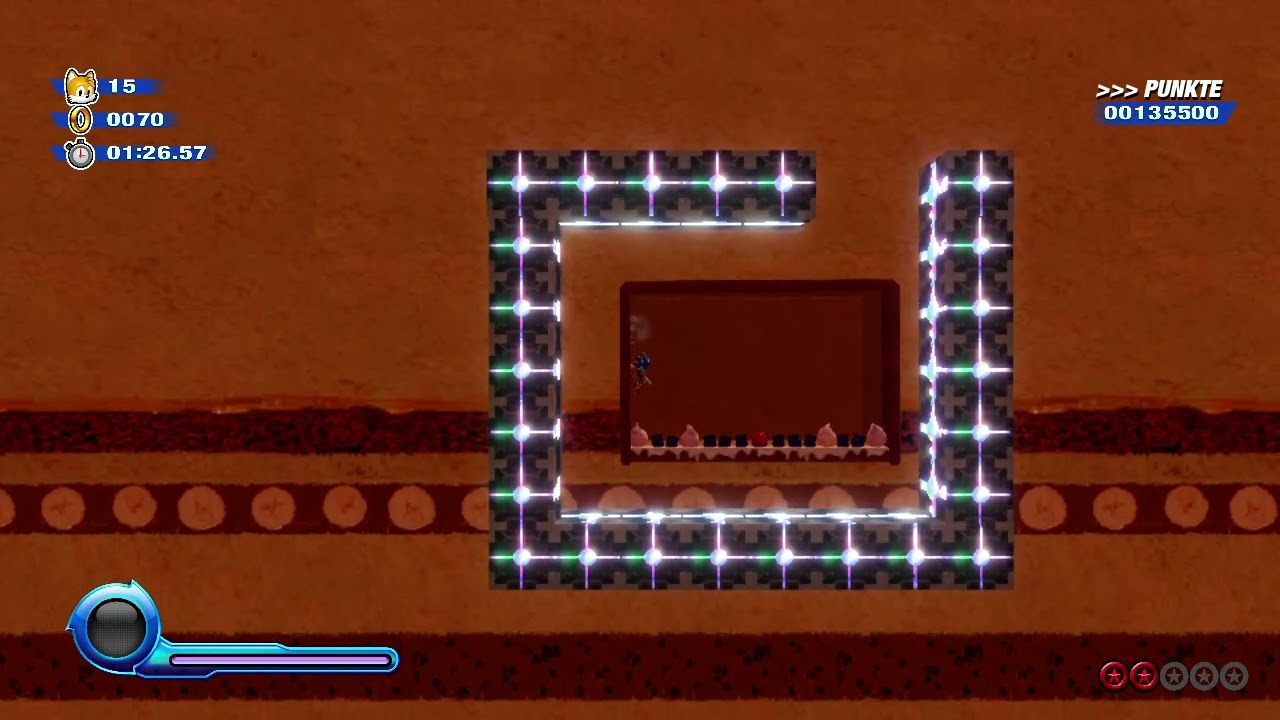
For my game, I’m relatively new to coding and I’m wondering how to go about coding a mechanic similar to the drill wisp in sonic colors. Basically I want to be able to dash into a wall, and then be able to pop out on the other side
Does anyone have any ideas? And how complicated would it be
 tired python
trying to make the box collider and sprite have the same area, can anyone see the problem here?


how the hell do i even begin to manage this from a script?
the constant required to make them the same size would be so peculiar
 thorn holly
tired python
trying to make the box collider and sprite have the same area, can anyone see th...
thorn holly
tired python
trying to make the box collider and sprite have the same area, can anyone see th...
You could leave the sprite scale as 1 and then adjust the collider radius instead of scale of the collider gameobject
If that makes sense
If you do it that way they all have scales of 1 1 1
tired python
and i only need to change the colliders scale in that case?
thorn holly
tired python
and i only need to change the colliders scale in that case?
Don’t change the scale through transform, change it in collider settings
I think the property is called radius
Under circle collider 2d component
tired python
oh ya sry
i already have a radius set...

and i changed all the scales to 1
doesn't rly work i guess
thorn holly
tired python
i already have a radius set...
Change all the scales to 1 and then…change the radius?
It’s not set in stone
You can set the radius
tired python
changing the radius doesn't change the circle sprite, i want the circle collider and the circle sprite to match in radius
thorn holly
tired python
changing the radius doesn't change the circle sprite, i want the circle collider...
Ah, in that case set all the scales to 1, set the circle collider radius to match the sprite, then scale up the colliders transform - because the sprite gameobject is a child of the collider, the sprite transform will scale with the collider transform
tired python
thorn holly
Ah, in that case set all the scales to 1, set the circle collider radius to matc...
thx, works. so i am assuming that if i wanna add upgrade features to the tower later on which can increase the range, ima have to increase the Scale in script?
thorn holly
tired python
thx, works. so i am assuming that if i wanna add upgrade features to the tower l...
Yes, increase the scale of the parent object and it’ll increase the scale of the child as well
So in this case the parent is the collider so increase the scale of the collider transform
tired python

tired python
I have been using
public class UnitRelocatorScript : MonoBehaviour, DragHandler,IPointerClickHandler but when i stop dragging the gameObject this script is attached to, the OnPointerClick gets called out too
I want it to be such that, if I am dragging the object, only the OnDrag method gets called, whereas if I only click on the object, only the OnPointerClick gets called
cus the way it is now, it recognises dragging as a click too
 cosmic dagger
tired python
cus the way it is now, it recognises dragging as a click too
cosmic dagger
tired python
cus the way it is now, it recognises dragging as a click too
Probably because when you release the drag and let go of the mouse, it also releases, which registers a click . . .
tired python
tired python
I want it to be such that, if I am dragging the object, only the `OnDrag` method...
i mean...i know that, i don't want it to be like this.
tired python
cosmic dagger
Probably because when you release the drag and let go of the mouse, it also rele...
i kinda guessed that was what was happening using logs
cosmic dagger
I thought you just said you don't want it to be like that . . .
 cosmic dagger
Does it recognize dragging as clicking, or does it only register a click when you release the mouse, regardless of the mouse being dragged beforehand?
tired python
latter
cosmic dagger
I would use a bool check. If you're dragging an object, set the variable, then check that variable in the pointer click method. If it's true, then you know it was a drag and not supposed to be a click . . .
tired python
hmm, i always have confusion as to when i should use flags cus i don't know about all the events there are and i worry that there might be an event out there which does exactly what i want and i might just be overcomplicating stuff
cosmic dagger
Just check the documentation. If you search for pointer events, you'll see all the different events under "Interfaces" of the "EventSystem . . ."
cosmic dagger
tired python
hmm, i always have confusion as to when i should use flags cus i don't know abou...
Basically, Unity registers both inputs because the mouse releases on the same object when the drag ends
Inside of OnPointerClick, you can check if the position of the object (being dragged) is the same. If it's the same, it was a click; if the position is different, it was a drag, and therefore, not meant to be a click . . .
Oh, even better, PointerEventData has an isDragging bool. Check that inside of OnPointerClick to determine if it was a drag or not . . .
tired python
cosmic dagger
Basically, Unity registers both inputs because the mouse releases on the same ob...
ehhhhh, this works, do i really have to do it the way you suggested?
cosmic dagger
tired python
ehhhhh, this works, do i really *have* to do it the way you suggested?
If it works for you, that's fine. I'd use the last method I suggested. That seems the easiest, but it's your game, your choice . . .
 brave patio
Hey guys does anyone know why OnCollisionStay2D and OnTriggerStay2D only detect if the player is on its borders? Both work as intended when the two rigidbodies are overlapping in borders, but once one is inside the other it seems to not function at all.
Works fine in the first image, but in the second image it doesnt detect any collision

 naive pawn
brave patio
Hey guys does anyone know why OnCollisionStay2D and OnTriggerStay2D only detect ...
naive pawn
brave patio
Hey guys does anyone know why OnCollisionStay2D and OnTriggerStay2D only detect ...
which one are you using? are they colliding or is one a trigger?
it's probably because the outer shape only has edge collision
you'd need to have it generate polygons (or a similar option)
ivory bobcat
brave patio
Hey guys does anyone know why OnCollisionStay2D and OnTriggerStay2D only detect ...
On collision stay should not allow the two objects to overlap
If they're inside one another (and no longer repelling each other) they could possibly be resting. Where...
Collision stay events are not sent for sleeping Rigidbodies.
https://docs.unity3d.com/ScriptReference/MonoBehaviour.OnCollisionStay2D.html
When Rigidbodies fall to rest - a box landing on the floor - they will start sleeping. Sleeping is an optimization which allows the Physics Engine to stop processing those rigidbodies.
https://docs.unity3d.com/410/Documentation/Components/RigidbodySleeping.html
brave patio
naive pawn
which one are you using? are they colliding or is one a trigger?
That ones a trigger
Switching it to Polygon rather then outline fixed it - Thank you so much!!


 modern meteor
how do I fix this?
 slender nymph
!input
also https://screenshot.help

Learn how to take screenshots on many major platforms.
radiant voidBOT
slender nymph
!input
also https://screenshot.help
<:error:1413114584763596884> Command not found
There's no command called
input also.
slender nymph
!input
radiant voidBOT
slender nymph
!input
How to Set Input
To set Active Input Handling, go to:
Project Settings > Player > Active Input Handling
• Input Manager (Old): Use the original Input settings.
• Input System Package (New): Uses the new input system package.
• Both: Use both systems.
modern meteor
what
slender nymph
modern meteor
what
modern meteor
Where do I find the setting
slender nymph
it's a mystery

 teal viper
modern meteor
idk where project setting is
teal viper
modern meteor
idk where project setting is
!learn
radiant voidBOT
teal viper
!learn
:teacher: Unity Learn ↗
Over 750 hours of free live and on-demand learning content for all levels of experience!
 safe root
modern meteor
idk where project setting is
safe root
modern meteor
idk where project setting is
Project setting is in the top left tab underneath "Edit", processed to follow the steps show before then when inside player. In the Other Settings, there will be the active Input Handling

https://paste.mod.gg/zkfwukpbmtmk/0
I need help with my code above. I have a GameObject List called allObject and when I proceed to clear it. The List stay without any effect to it. Even if I tried to remove the object directly it still sticks. Can someone help me find where it being added constantly at or jyust where I messed up?
A tool for sharing your source code with the world!
keen dew
Well you add more stuff to it on the next line after .Clear() ?
safe root
keen dew
Well you add more stuff to it on the next line after .Clear() ?
What do you mean? What other thing need to be added?
keen dew
I don't quite understand what the problem is
allObject.Clear();
allObject.AddRange(foundObjects);
After this allObject will contain foundObjects. Why do you expect it to be empty?
safe root
keen dew
```cs
allObject.Clear();
allObject.AddRange(foundObjects);
```
After this `allOb...
So the reason I have it like that is cause i'm trying to get rid of a object that is now a null but it doesn't work
The null is still there even after I tried to remove it twice
 sour fulcrum
AddRange doesn't do any null checking or anything
if your adding a range that includes a null that will include that null
keen dew
Where are you trying to remove it? Nothing else in that code modifies allObject
safe root
sour fulcrum
if your adding a range that includes a null that will include that null
But the foundObject should be changing everytime as the Object with the objectToFind String will be less as that object got destoryed
safe root
keen dew
Where are you trying to remove it? Nothing else in that code modifies `allObject...
In the OnCollisionEnter I have this line
allObject.Remove(collision.gameObject);
keen dew
That does nothing because you don't use the list after doing that. FindNearestObject clears the list so whatever you did to it earlier is also cleared
safe root
keen dew
That does nothing because you don't use the list after doing that. FindNearestOb...
I understand that, but that code, I had before I did the FindNearestObject clear and still. That object did not get removed from the list
sour fulcrum
semi offtopic but unless this code assumes more objects will spawn or be removed during the search you should really get the objects by tag before the while loop rather than at the start of it
keen dew
Either it wasn't in the list or you didn't check properly
safe root
sour fulcrum
semi offtopic but unless this code assumes more objects will spawn or be removed...
Object are activly spawning
sour fulcrum
find related functions are pretty bulky performance wise and having them in a loop like that is a bit of a red flag
safe root
keen dew
Either it wasn't in the list or you didn't check properly
It's in the list as when the Object get's Destroyed. The object becomes null
sour fulcrum
Ideally those objects should be telling the roomba (or something else) about their existence when they spawn and despawn
rather than you constantly checking for them
safe root
sour fulcrum
Ideally those objects should be telling the roomba (or something else) about the...
I wasn't to sure how to do that so I came with best thing I could
sour fulcrum
This is a very common beginner conclusion no stress
have you used singleton's before?
keen dew
It won't be destroyed until the end of frame. So what happens is you call Destroy -> FindGameObjectsWithTag finds the object -> end of frame it becomes null
safe root
sour fulcrum
have you used singleton's before?
I have not, taking a look at video right now
safe root
keen dew
It won't be destroyed until the end of frame. So what happens is you call Destro...
I see, but then why doesn't the clear not work still?
keen dew
Because you add all the stuff that FindGameObjectsWithTag found back into the list
And FindGameObjectsWithTag found the thing that you tried to remove
safe root
keen dew
Because you add all the stuff that FindGameObjectsWithTag found back into the li...
Oh, is it not resetting?
keen dew
What is not resetting?
safe root
The FindGameObjectWithTag. As I thought, once a object is deleted, that tag is not gone since the object activly not there no more to be read. SO when it comes back to the top to restart the cycle, FindGameObjectOfTag would redo it's list with everything but the object that got destoryed
keen dew
Yes but #💻┃code-beginner message <-- the object is not yet destroyed when you call FindGameObjectWithTag
sour fulcrum
safe root
I wasn't to sure how to do that so I came with best thing I could
Ok, it's worth knowing but basicially what it does is gives you a good way to find a specific object from anywhere, the reason i bring it up is to do the thing i suggested you would basicially be like
public class RoombaTargetOrSomethingRather : MonoBehaviour
{
  RoombaAI roomba;
  private void OnEnable()
  {
    roomba = //Find this via a Singleton or even by tag if you want but that's unideal longterm
    roomba.RegisterTarget(this) //This means the object/component runnning this code (itself)
  }

  private void OnDisable()
  {
    roomba.UnregisterTarget(this)
  }
}
public class RoombaAI : MonoBehaviour
{

  public void RegisterTarget(RoombaTarget target)
  {
    //Probably add to your list
  }

  public void UnregisterTarget(RoombaTarget target)
  {
    //Probably remove to your list
  }
}
If you flip the logic like this (the many telling the single thing when they exist and don't exist rather than the single thing looking for the many) it ends up working a lot more smoother conceptually and practically
It's like your friend is coming over and your waiting to hear the door bell ring rather than just lurking at the window
safe root
keen dew
Yes but https://discord.com/channels/489222168727519232/497874004401586176/14543...
I delayed the destoryed and still nothing happened
safe root
sour fulcrum
If you flip the logic like this (the many telling the single thing when they exi...
Oh, this seems a lot more useful. I'll have to do some studying
sour fulcrum
Yeah, once you do it once you will probably understand it nicely
Ideally you would use a Singleton for this but since that's a new concept for you feel free to just find it by a tag or something so your not learning two things at once
keen dew
safe root
I delayed the destoryed and still nothing happened
Well that would make it worse, wouldn't it? You need to delay the FindGameObjectWithTag call instead
sour fulcrum
(sorry for completely re-routing your help btw Nitku, just seems like shifting to that different approch will solve a lot of problems fundementally)
safe root
sour fulcrum
Ideally you *would* use a Singleton for this but since that's a new concept for ...
It's something to try update my code, once I get this version working first
keen dew
Yeah don't get me wrong, this is solving the original problem but not a good way to do it in general
safe root
keen dew
Well that would make it worse, wouldn't it? You need to delay the FindGameObject...
Gotcha, but I do have this one question. I just can't seemed to get, even after delaying the destory. The allObject.Remove(collision.gameObject); still doesn't function
keen dew
How do you know that?
safe root
keen dew
How do you know that?
Cause the object stays in the list, I can see the list in the inspector
ivory bobcat
safe root
Gotcha, but I do have this one question. I just can't seemed to get, even after ...
You need to delay the repopulation of the collection rather than destroy. Destroy doesn't happen immediately.
safe root
ivory bobcat
You need to delay the repopulation of the collection rather than destroy. Destro...
By a WaitForSecond?
keen dew
safe root
Cause the object stays in the list, I can see the list in the inspector
You can't use the inspector to check that because right after that you call Remove you start the FindNearestObject coroutine which modifies the list again. So you're seeing what FindNearestObject does, not what OnCollisionEnter does
yield return null is enough
sour fulcrum
keen dew
`yield return null` is enough
(this waits a frame)
safe root
I see, I really didn't think how fast that list was getting active cause of destory not happening as soon I thought it would. Thank you
safe root
sour fulcrum
Ideally you *would* use a Singleton for this but since that's a new concept for ...
This also just help me a but cause I just seen what {Get; Private Set:} is and that also gonna be nice to use
sour fulcrum
properties are cool yeah
if you want them to show up in inspector you need to do [field: SerializeField] on them btw
safe root
I know that, I've use that a bit now. Just never seen {Get; Private Set:} so that fun to learn
 pallid forum
Hey there, I'm trying to learn how to code tapping on an object (for mobile)
So uhh.. the problem is... I think the raycasting isn't finding anything. Not sure why, but possibly the position that given to it is incorrect. Can someone help me to fix this please?
here's what I check so far:
- I did not forgot to add collider
- Both Action ref is fine. (tapAction is Button type and TouchPosAction is Vector2 value)
here's the code
public class TapDetector : MonoBehaviour
{
    public Camera mainCamera;
    public InputActionReference tapAction;
    public InputActionReference touchPositionAction;

    private void OnEnable()
    {
        tapAction.action.performed += OnTap;
        tapAction.action.Enable();
        touchPositionAction.action.Enable();
    }

    private void OnDisable()
    {
        tapAction.action.performed -= OnTap;
    }

    private void OnTap(InputAction.CallbackContext context)
    {
        Debug.Log("Tap detected");

        Ray ray = mainCamera.ScreenPointToRay(touchPositionAction.action.ReadValue<Vector2>());
        RaycastHit hit;
        Debug.Log("Ray origin: " + ray.origin + ", direction: " + ray.direction);
        if (Physics.Raycast(ray, out hit))
        {
            Debug.Log("Hit object: " + hit.collider.gameObject.name);
        }
        else
        {
            Debug.Log("No object hit");
        }
    }
}```Dang, this is big wall of code.
keen dew
You have the logs there so you should know if it finds anything or not, does it print the "no object hit" log?
pallid forum
keen dew
You have the logs there so you should know if it finds anything or not, does it ...
Yes, It printed that.
keen dew
Do the objects have 3D colliders?
pallid forum
Oh dang, I didn't see that coming.
Yeah, it has 2D. So uhh, do I change it to 2D?
pallid forum
Alright, I'll check and make some changes. I'll let you know if it's fix.
pallid forum
keen dew
Possibly need to use ScreenToWorldPoint as well
I don't think I do know how to figure this out on my own.
Where do I use ScreenToWorldPoint?
frail hawk
can we clarify, are your objects normal gameObjects or ui elements
i see many beginners mix things and wonder why it won´t work
pallid forum
I think it's gameObject?
I create 2D sprite of those things that are in create section. The capsule, triangle, cirle and square.
keen dew
It should be something like this:
Vector2 worldPoint = mainCamera.ScreenToWorldPoint(touchPositionAction.action.ReadValue<Vector2>());
RaycastHit2D hit = Physics2D.Raycast(worldPoint, Vector2.zero);

if (hit.collider != null)
{
    ...
}
Sooo, yeah I think everything is fine except one thing.
It turned out that the TouchPos value always giving out this

no change of number. Only this number.
What could possibly be the cause?
Is my action map wrong?
frail hawk
are you displaying the worldPoint
pallid forum
not sure if I do?
what do you mean by that?
frail hawk
you now that message you have there, what is it
keen dew
It's not clear what you're logging. Show the code you have now
pallid forum
private void OnTap(InputAction.CallbackContext context)
    {
        Debug.Log("Tap detected");
        Ray ray = mainCamera.ScreenPointToRay(touchPositionAction.action.ReadValue<Vector2>());

        Vector2 worldPoint = mainCamera.ScreenToWorldPoint(touchPositionAction.action.ReadValue<Vector2>());
        RaycastHit2D hit = Physics2D.Raycast(worldPoint, Vector2.zero);
        Debug.Log("Ray origin: " + ray.origin + ", direction: " + ray.direction);
        if (hit.collider != null)
        {
            Debug.Log("Hit object: " + hit.collider.gameObject.name);
        }
        else
        {
            Debug.Log("No object hit");
        }
}```anyways, I didn't change any other part than this.
keen dew
The code doesn't use ray anymore so it doesn't matter what its value is. You can just delete it
 neat bay
I'm so confused - baked a flowmap using ray casts in a scene and a predetermined flow direction if the ray doesn't hit anything. Printing the color, the green value is 0.5 - in a color picker, the green value is 0.5 - VISUALLY, the green looks about 0.5 - but according to the shader green is nowhere near 0.5


Heres the code for baking a missed ray, but i don tthink this is the problem since the flow map baked correctly
Color undisturbedFlowDirectionColor = FlowDirectionToColor(undisturbedFlowDirection);
Debug.Log(undisturbedFlowDirectionColor);

private Color FlowDirectionToColor(Vector2 direction)
{
    Vector2 normalizedDirection = direction.normalized;
    Vector2 remappedDirection = new Vector2(normalizedDirection.x / 2.0f + 0.5f, normalizedDirection.y / 2.0f + 0.5f);

    return new Color(remappedDirection.x, remappedDirection.y, 0);
}
the orange is the "undisturbed flow" and are the pixels that should have a green value of 0.5
the undisturbed flow direction is set in the inspector as (1, 0)
 mighty plinth
guys can you recommend a channel for learning scripting as a begginer
naive pawn
mighty plinth
guys can you recommend a channel for learning scripting as a begginer
there are resources pinned in this channel
also please don't crosspost
mighty plinth
ok
 daring star
help what is this
 naive pawn
a visual bug
- try restarting
- are you on an older patch or an unstable release?
- are your drivers up to date? what os are you on?
daring star
naive pawn
- try restarting
- are you on an older patch or an unstable release?
- are your ...
restarting helps but it happens again
daring star
naive pawn
- try restarting
- are you on an older patch or an unstable release?
- are your ...
no, im on lts
naive pawn
that doesn't exactly fully answer that question, you could be on a buggy patch release of an LTS minor version
what version are you on?
daring star
6000.0.63f1
ivory bobcat
Are you receiving any errors in the console window?
ivory bobcat
Maybe try the latest LTS?
 naive pawn
daring star
6000.0.63f1
naive pawn
daring star
6000.0.63f1
there's a new patch, perhaps try that
naive pawn
ivory bobcat
Maybe try the latest LTS?
6.0 to 6.3 is a non-insignificant jump afaik?
especially considering minor versions seem to basically be treated as semver major currently
 runic lance
yeah it's a significant commitment to update minor version
from my experience 6.3 is still not very stable either
they could also try resetting the layout or checking if there's any custom editor scripts running
 mild furnace
Ugh vscode has gotten significantly slower yet again.
Its more efficient to close vscode if I want to compile and test in editor
Maybe its time to revert back to a version ~2022 and use the old vscode unity package
ivory bobcat
daring star
6000.0.63f1
I'm assuming that's a typo and that you're on the latest LTS. Are you using Odin?
naive pawn
why would you assume that's a typo...
thorn holly
ivory bobcat
I'm assuming that's a typo and that you're on the latest LTS. Are you using Odin...
Why would you assume that out of curiosity
ivory bobcat
An Odin known issue had been reported with the current LTS if you are https://issuetracker.unity3d.com/issues/the-inspector-breaks-when-serializing-custom-odininspector-component
thorn holly
I don’t know if this goes for everyone else but I usually don’t update to LTS once I start a project unless there’s some super useful feature added
So if they started their project before LTS came out they probably didn’t update
ivory bobcat
naive pawn
why would you assume that's a typo...
The version they had stated was
6000.0.63f1 where's the current LTS is
6000.6.3f1
naive pawn
the current LTS stream is 6000.3
6000.5 is in alpha, i don't think 6000.6 exists yet
i mean, either it's that and the copied the incorrect version (which, it's shown at the top of the editor, so i honestly kind of doubt)
or it's a different issue
i don't see why you'd assume the first one, it doesn't seem overly more likely to me
ivory bobcat
ivory bobcat
Maybe try the latest LTS?
Ah, you're right. It's a bit early here. Wasn't even able to properly read the image I had posted
mild furnace
naive pawn
compiling doesn't have anything to do with vscode
regardless, trying to compile or enter play mode while vscode is open takes an obscene amount of time 1-2 minutes.
when vscode is closed, it takes only a few seconds
ivory bobcat
Pretty sure that isn't the issue
mild furnace
It seems to be an issue with the package, all the other software I'm using runs fine
naive pawn
to make sure we're on the same page, you're saying there's an issue with the visual studio package in unity?
mild furnace
Thats what it seems like,
i've tried disabling most features in vscode extensions to no avail
mild furnace
Nah, I've also clean reinstalled unity and vscode, cleared caches etc.
Task manager shows vscode spiking heavily on cpu every time I click back into the unity editor or try to enter play mode
So I assume the unity package is doing something weird, maybe rescanning the entire project or trying to sync up with vscode
Been working on this project since late 2021 and had no issues, but vscode has been gradually auto updating with unwanted features
thorn holly
mild furnace
Nah, I've also clean reinstalled unity and vscode, cleared caches etc.
Task mana...
May I ask why you use vs code over vs community?
mild furnace
thorn holly
May I ask why you use vs code over vs community?
Because it used to be lightweight and user friendly
naive pawn
mild furnace
So I assume the unity package is doing something weird, maybe rescanning the ent...
have you tried disabling all extensions? (in vscode)
thorn holly
Fair nuff
 nimble apex
thorn holly
May I ask why you use vs code over vs community?
nimble apex
thorn holly
May I ask why you use vs code over vs community?
vsc is basically a text editor , ofc its better than notepad , but yeah , u should know text editor is lightweight right?
were just making it behaving like IDE by stuffing it with plugins
mild furnace
naive pawn
have you tried disabling all extensions? (in vscode)
Yeah, last I checked it was a process from the c# dev kit causing performance issues
With all disabled, no issues but I dont get intellisense or tools to navigate the project
nimble apex
but no matter what coding tools u use , if its configured and can detect unity API, its the good IDE , the rest is about ur own skill
mild furnace
The main reason I'm here is that this tool has suddenly become unusable after 3-4 years of constant use
naive pawn
what version of unity/visual studio extension?
mild furnace
Process explorer is pointing me to language server
Unity 2021.2.20f1, unity extension 1.2.0
Thinking I may just run the extension version way back after clean uninstall
naive pawn
if you have newer unity versions installed, have you tried with those? do those also show a significant different when linked to vscode
ivory bobcat
Just for clarity, what you're experiencing now.. is still related to what you've had issues with in the past? Is this occurring only if you had edited the script or simply from alt tabbing? An empty project? I'm pretty sure you're aware already but unless you've set up assembly definitions: when you make changes to code, it and all of it's dependencies (including imported assets) are recompiled unless someone had set them up (some third party assets have not)
mild furnace
ivory bobcat
Just for clarity, what you're experiencing now.. is still related to what you've...
Same issue yeah.
The cpu spikes still occur when alt tabbing after no edits but are much worse when I do make changes.
I havent tried an empty project. Just tested on a small unity 6 project, same issue. Its actually lagging my whole pc so discord push-to-talk sounds wont fire.
 steel warren
Are there people here who can write scripts well in unity in C#? I'm just wondering where you learned this and how, I really ask a knowledgeable person to answer. I know the basics of C#, but I'm very far from writing scripts and don't know where to learn it. YouTube is bullshit, so is gpt, and I'm not aware of any normal websites. Thus, depression arises due to a simple misunderstanding of where to study.🙏
 deep karma
naive pawn
this is the unity server
deep karma
naive pawn
this is the unity server
oh i frogot
 prime goblet
steel warren
Are there people here who can write scripts well in unity in C#? I'm just wonder...
prime goblet
steel warren
Are there people here who can write scripts well in unity in C#? I'm just wonder...
Microsoft has some good courses
Microsoft learn
naive pawn
steel warren
Are there people here who can write scripts well in unity in C#? I'm just wonder...
being good at programming involves both knowledge and experience
a lot of experience can substitute a small lack of knowledge and vice versa, experience can help you get more knowledge and vice versa
there are many good resources out there for programming - for c#, there are some pinned in this channel
but playing around to really understand code and be able to internalize that helps a lot
there are plenty of resources for that basic "understand logic" part, like ted-ed's think like a coder series
prime goblet
-# sorry for skull react discord mobile sucks
 rocky canyon
steel warren
Are there people here who can write scripts well in unity in C#? I'm just wonder...
rocky canyon
steel warren
Are there people here who can write scripts well in unity in C#? I'm just wonder...
🖐️ I code pretty decent.. I'm at the point i can basically do anything I want to build.. ⚠️ It may not be the best way, but i'll make it Happn Capn.. I can always go back and fix and refactor it later (that's a secret, it helps me learn new things to refactor bad things)...
but i'm self taught.. just practicing and building out little systems here and there..
https://www.youtube.com/playlist?list=PLFt_AvWsXl0fnA91TcmkRyhhixX9CO3Lw i used this playlist when i got started.. it really helped me get an idea of how the coding worked.. (basically you start with variables and methods and go from there) and then learning to assign things.. https://unity.huh.how/ this page has useful information like how to assign variables correctly...
beyond that jus check the pinned comments to find resources and you'll have the company men suggest using unity learn resources.. from their website
anyway best of luck.. happy coding 🍀
TLDR: learn everywhere and build any and everything... just jump in and start familiarizing yourself with the editor and jumping to code and back
and after that just start


Unity troubleshooting wiki
naive pawn
(in general) there's 3 major parts to programming:
- Language - The syntax, structure, and paradigm of each language
- Library - The interfaces and utilities that each environment or toolset provides
- Logic - The algorithms to do work at runtime
Logic is almost completely transferrable between each language and environment, you just have to learn the specific Language and Library that you're using
Language is also shared quite a bit between languagesof course, learning 1 part at a time is easier than learning everything at once, which is why tools like scratch or code.org are popular as coding courses for beginners, especially kids, because it only focuses on the Logic aspect
there's also that ^
steel warren
prime goblet
Microsoft has some good courses
Thank you, is there any specific course that you may have taken?
naive pawn
there are some pinned in this channel, including one from microsoft apparently not. i thought there was
radiant voidBOT
twin pivot
!learn
:teacher: Unity Learn ↗
Over 750 hours of free live and on-demand learning content for all levels of experience!
prime goblet
steel warren
Thank you, is there any specific course that you may have taken?
https://learn.microsoft.com/en-us/dotnet/csharp/ this is the one but I didn’t do all of it because with programming knowledge from other languages it was more for understanding the syntax and stuff like that
I don’t think it’s a very beginner guide if you don’t know coding but I don’t know your skill level
steel warren
prime goblet
https://learn.microsoft.com/en-us/dotnet/csharp/ this is the one but I didn’t do...
Got it, thanks a lot.
prime goblet
np
steel warren
rocky canyon
🖐️ I code pretty decent.. I'm at the point i can basically do anything I want t...
Thank you for your advice.
steel warren
Did you study C# first and only then unity, or at the same time?
rocky canyon
i only knew things like html, javascript, and a little php when i came across Unity..
I personally learned c# and Unity hand-in-hand.. not sure any of those past langauges really helped but I picked it up pretty quickly.. im a quick learner anyways.. it just takes a minute to really solidify what i've learned
naive pawn
i learned them alongside each other, but i already knew how to program in general beforehand in js and java
rocky canyon
been building and scripting in Unity for 4 years now.. and If I had to write a Command / Console type script today I couldn't do it.. I'd have to google it and learn how 😅
naive pawn
it always helps to know things before hand
the first language you learn is always the hardest lol
rocky canyon
thats because like he pointed out early theres different pieces of coding.. and once you figure out how scripting works in general the language you're writing in is just about learning the new syntax and stuff
html didn't do me any favors tho 🤣
except already knowing how to use rich-text
steel warren
rocky canyon
i only knew things like html, javascript, and a little php when i came across Un...
Well, it's just that you're smart and I'm not. My first language is C#, and at first I only watched videos on the YouTube channel +-110, but these are THE BASICS. And I've already searched on various websites and channels, but I still haven't figured out if they're normal or not, so I decided to write here.
steel warren
naive pawn
i learned them alongside each other, but i already knew how to program in genera...
Well, yes, if you know 1 language well, then everything is easier there.
rocky canyon
steel warren
Well, it's just that you're smart and I'm not. My first language is C#, and at f...
if you use unity learn it'll guide you through piecing together your first scripts..
it'll get easier with time..
you sorta have to wait for that "eureka" moment.. when it all decides to click in your head..
but keep experimenting up until then.. and even afterwards
instead of "give me all the basics" work through things until you get stuck. or until you come across something you don't quite understand.. and then come back here and ask that question.. or to explain..
thats the best use of this discord ☝️
steel warren
rocky canyon
been building and scripting in Unity for 4 years now.. and If I had to write a C...
Well, it happens, but the main thing is to know how and what to do, and everything else fades into the background and gets forgotten.
steel warren
rocky canyon
if you use unity learn it'll guide you through piecing together your first scrip...
I'm sorry if I'm distracting you. Could you please tell me which courses I need to take in unity learn? I would just say that there are a lot of them and it's not very clear where to start.
naive pawn
beginner scripting would be a good start, it's linked in the pinned message
though if you have some experience with code in general, there'll probably be some parts you can skip over or speed through
 nocturne kayak
steel warren
I'm sorry if I'm distracting you. Could you please tell me which courses I need ...
nocturne kayak
steel warren
I'm sorry if I'm distracting you. Could you please tell me which courses I need ...
Personnally i would just learn C# basics and try to create my own thing , so You learn how to search and find information on the internet.
naive pawn
well, you still need to learn how to interface with unity with messages and serialized fields for example
nocturne kayak
naive pawn
well, you still need to learn how to interface with unity with messages and seri...
yes ofc !
 remote spade
steel warren
Are there people here who can write scripts well in unity in C#? I'm just wonder...
remote spade
steel warren
Are there people here who can write scripts well in unity in C#? I'm just wonder...
Im not a knowledgeable person but i started with the microsoft c# tutorial ( https://learn.microsoft.com/it-it/shows/csharp-for-beginners/ ) and then i tried to do random projects with c# after that i got to unity where i started by watching a tutorial just to understand where to look and now i just use the documentation to understand what i dont

Unisciti a Scott Hanselman e al tecnico distinto di .NET David Fowler mentre ci insegnano C# da zero! Da Hello World a LINQ e altro ancora, Scott e David condividono lezioni C# a un ritmo profondo e piacevole. Alla fine si sarà pronti per esplorare la certificazione C# di base da FreeCodeCamp! Risorse consigliate Video per principianti di .NET...
steel warren
nocturne kayak
Personnally i would just learn C# basics and try to create my own thing , so You...
I know the basics of C# but I didn't know what to do next, and then someone gave me some advice.
nocturne kayak
remote spade
Im not a knowledgeable person but i started with the microsoft c# tutorial ( htt...
Same :)
remote spade
remote spade
Im not a knowledgeable person but i started with the microsoft c# tutorial ( htt...
Oh and if you dont know what to do for like a “project” ask ai for ideas
steel warren
remote spade
Im not a knowledgeable person but i started with the microsoft c# tutorial ( htt...
Thank you for your advice.
remote spade
steel warren
Thank you for your advice.
Np i like to help
 deft loom
hey folks im following a tutorial on getting a simple character controller up and working. I made the input map, write the requisite code in a player controller script, and now I just added a Player Input component to my player. I changed behavior to Invoke Unity Events, and then under Events > Gameplay > I added my player controller to the Move CallbackContext. Then in the tutorial the guy clicks the "No Function" dropdown and adds a callback function that we added in our player controller (which I verified does exist) - but for some reason I don't see any options. What could the issue be?
 slender nymph
deft loom
hey folks im following a tutorial on getting a simple character controller up an...
slender nymph
deft loom
hey folks im following a tutorial on getting a simple character controller up an...
🤔 Unity, Huh, How?
Events should have an appropriate Component instance assigned to their object field.
deft loom
slender nymph
https://unity.huh.how/unity-events/incorrect-assignment
Thanks! That got me a bit further, though now I don't see the "OnMove" function from the player controller. What am I missing now?
 slender nymph
is it public and is the parameter the correct type?
also why would you subscribe "OnMove" to the Device Lost Event?
deft loom
slender nymph
also why would you subscribe "OnMove" to the Device Lost Event?
oh whoops I meant to add it to the move under the gameplay dropdown, selected the wrong one without realizing it. Its there now, thank you!
 hexed swan
hello i'm trying to make a supposedly simple script to create an image from a camera but it gives me this error when i name it
 deft loom
There's so many moving parts its overwhelming. Idk how I would even begin going about learning this stuff without a step-by-step tutorial. It doesn't feel like simply learning a new programming language or web framework where the path to start making stuff is fairly linear
slender nymph
hexed swan
hello i'm trying to make a supposedly simple script to create an image from a ca...
you likely have compile errors
hexed swan
if gives me that message even if its a newly created script with nothing in it, if i name it
slender nymph
probably because you have compile errors
hexed swan
 slender nymph
have you considered that you might have compile errors
hexed swan
how can i have a compile error if there is nothing in it
slender nymph
i didn't say "a compile error in that specific file" i said "compile errors". any compile error prevents all of your code from being compiled
hexed swan
this?
 slender nymph
yes, that is a compile error. you have two methods with the exact same signature. and if you didn't see red underlines in your code when writing that bit, then you need to get your IDE configured 👇
!ide
radiant voidBOT
slender nymph
!ide
💡 IDE Configuration
If your IDE is not autocompleting code or underlining errors, please configure it.
Select one:
•  Visual Studio (Installed via Unity Hub)
• Visual Studio (Installed manually)
•  VS Code
•  JetBrains Rider
• :question: Other/None
 stone oar
heyo, question: how to detect when character controller is moving upwards? what's the best method?
slender nymph
your own code is what moves it upwards, yes? so when whatever code you have that moves it has a positive upward velocity then you know it is moving upwards
stone oar
currently im thinking about recording position a frame before and then comparing
stone oar
slender nymph
your own code is what moves it upwards, yes? so when whatever code you have that...
well the thing is - it doesnt do that
slender nymph
how
stone oar
sometimes velocity.y will be negative when moving too fast upwards
no idea why, movement in playmode works well
slender nymph
show your actual code then
stone oar
can't really tell you without pasting the entire code
slender nymph
!code
radiant voidBOT
slender nymph
!code
Posting code
📃 Large Code Blocks
Use links to services like:
https://paste.mod.gg/, https://hastebin.skyra.pw/, https://paste.ofcode.org/, https://paste.myst.rs/
📃 Inline Code
Surround code with three backquotes. Not quotation marks.
To format as C#, add cs to the first line:
```cs
// Your code here
```
Add a comment with a line number if there is an error message.
stone oar
A tool for sharing your source code with the world!
slender nymph
so right before you call player.Move on line 175 you can check if it is moving upwards because at that point your totalVelocity is what is being used to control whether it moves upward or not
stone oar
with Debug.Log(totalVelocity.y); and moving up and down, stopping sometimes and so on. can't really tell when it's good to check for upward movement when digits are going this crazy
 floral garden
what do you want to do ?
stone oar
floral garden
what do you want to do ?
well detect when player moves upwards, but i only really need it for slopes so i just reused the code for detecting when player is on the slope to determine if player is moving up the slope or not
 mortal jasper
stone oar
well detect when player moves upwards, but i only really need it for slopes so i...
mortal jasper
stone oar
well detect when player moves upwards, but i only really need it for slopes so i...
You should normalize
So you get 1 0 or -1
 midnight tree
stone oar
well detect when player moves upwards, but i only really need it for slopes so i...
midnight tree
stone oar
well detect when player moves upwards, but i only really need it for slopes so i...
Show the parameter of these changes in the inspector?
stone oar
stone oar
well detect when player moves upwards, but i only really need it for slopes so i...
i forgot to mention that i already fixed the problem here and that the solution i mentioned is the one that worked for me
still thanks ❤️
 crude mauve
hello guys iam new to unity any tips ? thanks.
radiant voidBOT
floral garden
!tuto
<:error:1413114584763596884> Command not found
There's no command called
tuto.
radiant voidBOT
floral garden
!learn
:teacher: Unity Learn ↗
Over 750 hours of free live and on-demand learning content for all levels of experience!
verbal swift
when you make code so good it entirely crashes your unity instead of returning an error
teal viper
That's the definition of bad, not good.
 rain solar
anyone have a resource for procedural grass? when i looked it up its only blender tutorials, which is clearly not procedural
 solar hill
rain solar
anyone have a resource for procedural grass? when i looked it up its only blend...
solar hill
rain solar
anyone have a resource for procedural grass? when i looked it up its only blend...
Which procedural grass video did you watch that wasnt procedural?
rain solar
every single video involving blender
solar hill
Im seeing multitude of procedural grass videos and pretty much 100% of the ones that claim to be procedural... are exactly that.
Plus it doesnt take much to recreate a blender node set up in the shadergraph, most nodes already share a lot of functionality
 surreal shore
what do i do i cant open any projects and i have tried redownloading it multiple times

 verbal dome
rain solar
anyone have a resource for procedural grass? when i looked it up its only blend...
verbal dome
rain solar
anyone have a resource for procedural grass? when i looked it up its only blend...
What does that mean exactly, do you want individual procedural grass blades? Or procedurally placed grass? Or what
verbal dome
Are you using unity terrain?
rain solar
no
 frozen junco
anyone help i cant use extract textures

 wintry quarry
frozen junco
anyone help i cant use extract textures
wintry quarry
frozen junco
anyone help i cant use extract textures
Which textures are you trying to extract? Do they actually exist in the asset?
 void dune
i need total help on how to work this unity
rich adder
void dune
i need total help on how to work this unity
!ask
radiant voidBOT
rich adder
!ask
:thinking: Asking Questions
:mag: Search the internet for your question!
:book: Use the API Scripting Reference and User Manual and this troubleshooting site for commonly posted issues.
:wrench: Attempt to debug your issue.
:thought_balloon: Find an appropriate channel by reading the name and description in #🔎┃find-a-channel
:grey_question: And don't ask to ask, ask a full question illustrating with screenshots if needed.
-# For more posting guidelines, go to #🌱┃start-here
rich adder
frozen junco
anyone help i cant use extract textures
Learn how to take screenshots on many major platforms.
void dune
!ask
radiant voidBOT
void dune
!ask
:thinking: Asking Questions
:mag: Search the internet for your question!
:book: Use the API Scripting Reference and User Manual and this troubleshooting site for commonly posted issues.
:wrench: Attempt to debug your issue.
:thought_balloon: Find an appropriate channel by reading the name and description in #🔎┃find-a-channel
:grey_question: And don't ask to ask, ask a full question illustrating with screenshots if needed.
-# For more posting guidelines, go to #🌱┃start-here
rich adder
void dune
!ask
you're meant to read it not spam it again..
void dune
i thought i type that
 sly shard
frozen junco
anyone help i cant use extract textures
sly shard
frozen junco
anyone help i cant use extract textures
r/screenshotsarehard
frozen junco
wintry quarry
Which textures are you trying to extract? Do they actually exist in the asset?
yes when i took it out of blender it had the textures and i checked too
solar hill
Theres a difference between textures and materials
Did you set the correct copy path in the blender export?
Are the materials present inside the asset when inside Unity
 obsidian grotto
is there any better documentation for onParticleTrigger?
or even examples, looked a bit online and it seems like all discussions related to it are like 5 years old at least lol
verbal dome
I don't think the particle system has changed in the past 5 years
verbal dome
obsidian grotto
is there any better documentation for onParticleTrigger?
What's the issue with your code or the unity documentation?
obsidian grotto
verbal dome
What's the issue with your code or the unity documentation?
I just can't really figure out anything the function does lol. Like pretty much all I know is that it's a callback function that is called when the trigger is triggered, but aside from that there's no information on getting what it collided with, what system the particle came from, etc.
looked around a bit more and not even sure if the triggers will really work tbh so may just try to do it with regular collisions
that said the reason I wanted to use triggers as opposed to regular colliders was so that it didn't have the physics associated with a collider..
any way to achieve that?
verbal dome
OnParticleCollision docs say this:
This message is sent to scripts attached to Particle Systems and to the Collider that was hit.
So maybe it's the same for OnParticleTrigger? The doc is a bit lacking, yes
obsidian grotto
I'll give that a shot!
verbal dome
Let me know if it's called on the object that has the trigger collider
If not, then idk how to check which one you hit
obsidian grotto
obsidian grotto
looked around a bit more and not even sure if the triggers will really work tbh ...
also the reason I said I don't think it'll work is that apparently you need to give it a list of things it can collide with but I'm doing this as a prefab so yeahh
verbal dome
What do you need to happen when a particle collides/hits a trigger?
obsidian grotto
I just want to deal some damage to a player/enemy
verbal dome
Should the particle disappear after that?
obsidian grotto
so pretty much grab the game object it collides with, check if it's the player, if it is then we also check what kind of particle we are and how much damage should be delt, then from the player grab a certain script and call the damage method
obsidian grotto
verbal dome
Should the particle disappear after that?
nope it should persist
verbal dome
Then yeah particle collisions (non trigger) probably won't do since it would stop/bounce off
Also depends what kinda colliders you want to use on the enemy
obsidian grotto
verbal dome
Also depends what kinda colliders you want to use on the enemy
it's just a regular box collider 2d
someone on stackoverflow shared this and I think it may work?
// Source - https://stackoverflow.com/a
// Posted by AlphaSheep
// Retrieved 2025-12-28, License - CC BY-SA 4.0

private void OnParticleTrigger()
    {

        //Get all particles that entered a box collider
        List<ParticleSystem.Particle> enteredParticles = new List<ParticleSystem.Particle>();
        int enterCount = waterPS.GetTriggerParticles(ParticleSystemTriggerEventType.Enter, enteredParticles);

        //Get all fires
        GameObject[] fires = GameObject.FindGameObjectsWithTag("Fire");

        foreach (ParticleSystem.Particle particle in enteredParticles)
        {
            for (int i = 0; i < fires.Length; i++)
            {
                Collider collider = fires[i].GetComponent<Collider>();
                if (collider.bounds.Contains(particle.position))
                {
                    fires[i].GetComponent<Fire>().Damage();
                }
            }
        }
    }
just seems kinda jank lmao
verbal dome
That's a super brute force way to do it
grand snow
good god if that does a find by tag each time a particle enters a trigger 😐
verbal dome
obsidian grotto
it's just a regular box collider 2d
I don't think this works with 2D physics
Are you making a bullet hell game or something?
obsidian grotto
nah it'll be a regular amount of particles sending off triggers
like 10 enemies attacking you at once at most
verbal dome
Using particle collisions for gameplay logic (like damage) feels yucky to me
I'd just do some raycasts or use rigidbodies
obsidian grotto
fair enough 😭 high key it's for a game jam and I wanna up my particle game lol
also my thought process was that I'd make a bunch of particle system prefabs and slap them into enemy prefabs and stuff would work like that
but ig now that I think about it some more the logic should be fairly straightforward to do smth similar for rigidbodies
verbal dome
You can always have particle systems on the object that has the rigidbody

 echo copper
may i ask a question?
teal viper
echo copper
may i ask a question?
No.
echo copper
😭
radiant voidBOT
teal viper
!ask
:thinking: Asking Questions
:mag: Search the internet for your question!
:book: Use the API Scripting Reference and User Manual and this troubleshooting site for commonly posted issues.
:wrench: Attempt to debug your issue.
:thought_balloon: Find an appropriate channel by reading the name and description in #🔎┃find-a-channel
:grey_question: And don't ask to ask, ask a full question illustrating with screenshots if needed.
-# For more posting guidelines, go to #🌱┃start-here
 iron cobalt
yo!
Im looking for resources regarding mouse drag and drop in 3d, but making it feel magnetic/springy. So not just following EXACT mouseposition or raycast.
No luck yet looking on google/youtube.
thanks! 🙂
 frosty hound
There's no off topic here, thanks.
cosmic dagger
iron cobalt
yo!
Im looking for resources regarding mouse drag and drop in 3d, but making it ...
look for pointer events tutorials, or google: pointer events for 3d objects unity . . .
grand snow
iron cobalt
yo!
Im looking for resources regarding mouse drag and drop in 3d, but making it ...
You can utilize Vector2 MoveTowards along with the event system point drag events (https://docs.unity3d.com/Packages/com.unity.ugui@1.0/api/UnityEngine.EventSystems.IDragHandler.html)
3D colliders + PhysicsRaycaster also required
 stark helm
What's wrong with my camera?Am I rotating the pivot the wrong way?

This is my script
using System.Collections;
using Unity.Cinemachine;
using Unity.VisualScripting;
using UnityEngine;
using UnityEngine.InputSystem;

//-----Script body-----\\
public class CameraFollow : MonoBehaviour
{
    //-----Public Variables-----\\
    public GameObject Pivot;


    [Range(0, 10)]
    public float TurnSpeed;

    //-----Private Variables-----\\
    private PlayerInputs PlayerInputs;

    private InputAction MouseDelta;

    private void Awake()
    {
        transform.position = Pivot.transform.position - new Vector3(0, 0, -10);
        transform.LookAt(Pivot.transform.position);

        PlayerInputs = new PlayerInputs { };

    }

    private void OnEnable()
    {
        MouseDelta = PlayerInputs.Default.MouseDelta;
        MouseDelta.Enable();

    }

    private void OnDisable()
    {
        MouseDelta.Disable();
    }

    void Update()
    {
        if (Pivot != null && Mouse.current.rightButton.isPressed)
        {
            CameraOrbit();
        }
    }

    private void CameraOrbit()
    {
        Vector2 Axis = MouseDelta.ReadValue<Vector2>();
        float xAxis = Axis.x * TurnSpeed;
        float yAxis = Axis.y * TurnSpeed;

        Pivot.transform.Rotate(xAxis,yAxis,0);
    }
}```I have problems at the CameraOrbit()
I think im rotating it wrong
Could someone tell me why my camera is drunk?
(note the pivot is supposed to move up when I move the mouse up, right when right,...)
I did search this
On google
But no one had a drunk rotation to their camera pivot
Its just mine
verbal dome
A more robust way of doing rotations like this is to keep track of the angles manually (float xAngle, yAngle). Modify those according to the input and then make a new rotation (with Quaternion.Euler(xAngle, yAngle, 0) for example) and assign that to the transform rotation/localRotation
verbal swift
How do I make the horizontal inputs stronger than vertical ones
grand snow
verbal swift
How do I make the horizontal inputs stronger than vertical ones
scale the read values to achieve the effect
e.g. * new Vector2(1.25f, 1f)
verbal swift
Its in 3d and orientation dependant but I wish I could use a vector2 😭
Im trying to make it so the A and D keys add more force than W and S while sliding
grand snow
verbal swift
Its in 3d and orientation dependant but I wish I could use a vector2 😭
Erm no the input you read is 2d so you adjust this
are you confused with something else or using some pre made movement?
rocky canyon
one approach is using a multiplier on the horizontal input value
just like scaling like rob said ^
that way ur vertical input would be like -1, 1 for example and the horizontal would max out at -1.25 and 1.25
rich adder
also if you're using new input system they have it as well
 grand snow
^ This would mean you need different actions active depending on the game state
Id personally just scale input where you process it and know the players state/movement type
rich adder
hmm I just found it useful when dealing with controller axis vs mouse, my mouse always tended to be more sensitive and had to scale it back 0.5f iirc
remote spade
in this case how do i get the sprite renderer in the player/sprite gameobject
 naive pawn
from the floor?
remote spade
player
naive pawn
use a serialized reference
remote spade
no i mean how can i get them trough script
GameObject playerobj = GameObject.Find("Player");
SpriteRenderer sr = playerobj.GetComponent<SpriteRenderer>();
slender nymph
use a serialized reference
then you don't need to use Find (also why would you be using Find("Player") from the player?
remote spade
slender nymph
then you don't *need* to use Find (also why would you be using Find("Player") *f...
its not from the player
slender nymph
when asked you said it was from the player
slender nymph
when Chris asked "from the floor?" that was in reference to where you are trying to do this from, not where the sprite is that you are trying to get
remote spade
im trying to do it from a object that is not Instantiate yet
slender nymph
🤔 Unity, Huh, How?
Assets can't directly refer to Objects in Scenes, but their instances can be configured with those references.
naive pawn
why do you need to access the sprite directly from another object anyways
naive pawn
naive pawn
why do you need to access the sprite directly from another object anyways
sounds very much like an x/y problem to me
in general you'd just tell the player that something happened and then the player would manage its own graphics or whatever
remote spade
a what?
slender nymph
-# hint: blue text means it is a clickable link
remote spade
naive pawn
sounds very much like an [x/y problem](https://xyproblem.info) to me
yh probably
rich adder
remote spade
yh probably
so instead, "What’s the best way to solve X?"
slender nymph
if even you think it is an xy problem after reading that page, then considering heeding the advice on that page and ask about your actual intention
remote spade
rich adder
so instead, "What’s the best way to solve X?"
i cant articulate that in english
naive pawn
articulate it in your native language as pass it through google translate then, perhaps
rich adder
remote spade
i cant articulate that in english
you seem to do fine so far, try.. what you actually want to achieve ?
remote spade
rich adder
you seem to do fine so far, try.. what you actually want to achieve ?
i want to make the player shoot a arrow, if the player looks at the left side the arrow should have negative speed for it to go to the left, but idk how to change the speed of the arrow depending on the direction the player is facing
slender nymph
how do you determine which direction the player faces
also your arrow doesn't need a reference to the sprite to determine that, your player should just instantiate it facing the right direction in the first place
remote spade
slender nymph
how do you determine which direction the player faces
i just flip the sprite if the horizontal input is negative
slender nymph
then it's just a matter of moving it forward in the direction the arrow is facing
slender nymph
remote spade
i just flip the sprite if the horizontal input is negative
you might want to consider rotating the entire player object 180 degrees instead of flipping the sprite, that way all parts of the player will always face the correct direction and you won't need to always check what direction the sprite is facing when attempting to do certain things that depend on the direction the player faces
remote spade
andd how do i rotate the whole thing
slender nymph
well that's easily googleable, but it's literally just transform.Rotate or assign to the transform.rotation property
remote spade
oke thanks
remote spade
slender nymph
well that's easily googleable, but it's literally just transform.Rotate or assig...
and sorry if i was annoying
naive pawn
you could also use scaling to flip (not saying that's better than rotation, just another option)
stark helm
verbal dome
A more robust way of doing rotations like this is to keep track of the angles ma...
I did try doing that, but now my camera is a little less drunk
Its like
Weird, I looked tutorials with cameras, but mine is still drunk
slender nymph
show your code
stark helm
slender nymph
show your code
Ok, tho I broke Unity twice now
I am getting those bugs

Here is the script
wait a moment
here
using System.Collections;
using Unity.Cinemachine;
using Unity.Mathematics;
using Unity.VisualScripting;
using UnityEngine;
using UnityEngine.InputSystem;

//-----Script body-----\\
public class CameraFollow : MonoBehaviour
{
    //-----Public Variables-----\\
    public GameObject Pivot;


    [Range(0, 10)]
    public float TurnSpeed;

    //-----Private Variables-----\\
    private PlayerInputs PlayerInputs;

    private InputAction MouseDelta;

    private float XAngle = 0;
    private float YAngle = 0;

    private void Awake()
    {
        transform.position = Pivot.transform.position - new Vector3(0, 0, -10);
        transform.LookAt(Pivot.transform.position);
        Pivot.transform.rotation = new Vector3(0,0,0);

        PlayerInputs = new PlayerInputs { };

    }

    private void OnEnable()
    {
        MouseDelta = PlayerInputs.Default.MouseDelta;
        MouseDelta.Enable();

    }

    private void OnDisable()
    {
        MouseDelta.Disable();
    }

    void Update()
    {
        if (Pivot != null && Mouse.current.rightButton.isPressed)
        {
            CameraOrbit();
        }
    }

    private void CameraOrbit()
    {
        Vector2 Axis = MouseDelta.ReadValue<Vector2>();
        XAngle = XAngle - Axis.x * TurnSpeed * Time.deltaTime;
        YAngle = YAngle + Axis.y * TurnSpeed * Time.deltaTime;

        XAngle = math.clamp(XAngle, -90, 90);

        Pivot.transform.rotation = new Vector3(XAngle, YAngle, 0);
    }
}```!code
radiant voidBOT
twin pivot
!code
Posting code
📃 Large Code Blocks
Use links to services like:
https://paste.mod.gg/, https://hastebin.skyra.pw/, https://paste.ofcode.org/, https://paste.myst.rs/
📃 Inline Code
Surround code with three backquotes. Not quotation marks.
To format as C#, add cs to the first line:
```cs
// Your code here
```
Add a comment with a line number if there is an error message.
stark helm
twin pivot
!code
is this large code...?
aa
ok
//-----Libraries-----\\
using System.Collections;
using Unity.Cinemachine;
using Unity.Mathematics;
using Unity.VisualScripting;
using UnityEngine;
using UnityEngine.InputSystem;

//-----Script body-----\\
public class CameraFollow : MonoBehaviour
{
    //-----Public Variables-----\\
    public GameObject Pivot;


    [Range(0, 10)]
    public float TurnSpeed;

    //-----Private Variables-----\\
    private PlayerInputs PlayerInputs;

    private InputAction MouseDelta;

    private float XAngle = 0;
    private float YAngle = 0;

    private void Awake()
    {
        transform.position = Pivot.transform.position - new Vector3(0, 0, -10);
        transform.LookAt(Pivot.transform.position);
        Pivot.transform.rotation = new Vector3(0,0,0);

        PlayerInputs = new PlayerInputs { };

    }

    private void OnEnable()
    {
        MouseDelta = PlayerInputs.Default.MouseDelta;
        MouseDelta.Enable();

    }

    private void OnDisable()
    {
        MouseDelta.Disable();
    }

    void Update()
    {
        if (Pivot != null && Mouse.current.rightButton.isPressed)
        {
            CameraOrbit();
        }
    }

    private void CameraOrbit()
    {
        Vector2 Axis = MouseDelta.ReadValue<Vector2>();
        XAngle = XAngle - Axis.x * TurnSpeed * Time.deltaTime;
        YAngle = YAngle + Axis.y * TurnSpeed * Time.deltaTime;

        XAngle = math.clamp(XAngle, -90, 90);

        Pivot.transform.rotation = new Vector3(XAngle, YAngle, 0);
    }
}```@stark helm that's not a bug. rotation is not a Vector3
stark helm
naive pawn
<@1190706652849131601> that's not a bug. `rotation` is not a Vector3
O so that's why I cant rotate
Do I use something else?
naive pawn
if you want to set euler angles, that would be setting eulerAngles, or creating a Quaternion using Quaternion.Euler
naive pawn
stark helm
```cs
//-----Libraries-----\\
using System.Collections;
using Unity.Cinemachine;...
btw, mousedelta is already per-frame. you should not use deltaTime for it
stark helm
naive pawn
btw, mousedelta is already per-frame. you should not use deltaTime for it
Ok thanks Chris
I will test now
Chris
I messed up
wait
I will switch the angles
Because its weird
YES
IT WORKS
but why are the y and x inversed...?
well it doesnt matter
Thanks Chris
You helped me complete this after 4 days of useless googling
You are a pro
 polar marsh
Learning C# for a week now learned all the basics and some advance stuff but parameters are getting hard on me
floral garden
you mean function parameter ?
polar marsh
floral garden
you mean function parameter ?
Yes
wintry quarry
polar marsh
Learning C# for a week now learned all the basics and some advance stuff but par...
parameters are part of the basics
floral garden
there is a lot to learn on it
polar marsh
wintry quarry
parameters are part of the basics
Hmm maybe I didn't understand them correctly or it's just my brain
naive pawn
is there a specific question you have or a detail you need help with?
 jaunty wing
private void Roll(InputAction.CallbackContext context)
{
if (context.performed)
{
action.Roll();
print("ROLL");
}
}
how would I go about stopping an action from preforming multiple times when i press the keybind?
grand snow
Check the phase too
Or you subscribe to the correct event for the action in the first place
naive pawn
grand snow
Check the phase too
that's what .performed is, no?
frosty hound
Performed is called twice. You need to check the phase to get a single call.
naive pawn
isn't performed, well, the phase
it's started -> performed -> canceled, right? and the timing diagram for button type with no interaction shows performed only occuring once
frosty hound
Right, I'm confusing myself I think
 balmy vortex
hi is there a list somewhere of common performance optimizations you can apply in most unity projects?
or does smth like that not exist yet
 plush palm
I took a long break from coding and came back to Unity not suggesting types "int, floats, GameObject" why?

 teal viper
plush palm
I took a long break from coding and came back to Unity not suggesting types "int...
teal viper
plush palm
I took a long break from coding and came back to Unity not suggesting types "int...
!ide
radiant voidBOT
teal viper
!ide
💡 IDE Configuration
If your IDE is not autocompleting code or underlining errors, please configure it.
Select one:
• Visual Studio (Installed via Unity Hub)
• Visual Studio (Installed manually)
• VS Code
• JetBrains Rider
• :question: Other/None
plush palm
teal viper
!ide
Nice, thanks so much ❤️
plush palm
Anyone know why this brace is auto completing on the same line, when everything else is underneath?


Doing my head in every time i do a for loop lol..
 fickle plume
 gilded cypress
i need help with smtg
gilded cypress
i need help with smtg
!ask
radiant voidBOT
fickle plume
!ask
:thinking: Asking Questions
:mag: Search the internet for your question!
:book: Use the API Scripting Reference and User Manual and this troubleshooting site for commonly posted issues.
:wrench: Attempt to debug your issue.
:thought_balloon: Find an appropriate channel by reading the name and description in #🔎┃find-a-channel
:grey_question: And don't ask to ask, ask a full question illustrating with screenshots if needed.
-# For more posting guidelines, go to #🌱┃start-here
gilded cypress
uhm i need help with an error
solar hill
Damn man dont spill it out all at once
 rich adder
gilded cypress
rich adder
gilded cypress
looks like you have two Start() methods in the same class
gilded cypress
uhh what do you mean
rich adder
gilded cypress
uhh what do you mean
gilded cypress
just tell me how to fix it wwith out videos
plush palm
He did tell you how
teal viper
gilded cypress
just tell me how to fix it wwith out videos
How much are you paying?
plush palm
You're calling Start() twice in the same script
rich adder
plush palm
You're calling Start() twice in the same script
not calling, defined
(you can call methods as many times as you please)
fickle plume
@gilded cypress This is a learning community, if you are not here to learn, you're in the wrong place.
solar hill
Does it involve apes of some kind
teal viper
So they have to wait
solar hill
I bet it does
gilded cypress
rude 🙁
fickle plume
@gilded cypress There's no off-topic here either. #📖┃code-of-conduct Focus on the learning.
solar hill
solar hill
Does it involve apes of some kind
Oh nvm they litterally have gorilla tag in their name
solar hill
plush palm
Anyone know why this brace is auto completing on the same line, when everything ...
Do you want the brace to be under the for loop?
You on vs?
plush palm
solar hill
Do you want the brace to be under the for loop?
Yeah I do, I've checked my settings. I'm not sure why it's auto completing to be the same line. I am on VS
solar hill
Did you restart the editor?
plush palm
Yeah I have 🙁
solar hill
You can try doing ctrl + k, i think that reformats a document in visual studio
Put your cursor down anywhere inside of the file first
plush palm
I think I just fixed it, but just turning off the auto complete braces

Yeah that fixed it, since I hit enter and it creates them on the line i like, thanks anyways Kuzmo 😛
fickle plume
I think they fall in place when you press enter, it might expect further input to format
or when closing bracket, then reformat triggers
solar hill
At least its not copilot magically enabling itself every time you launch vs code 
plush palm
fickle plume
or when closing bracket, then reformat triggers
Sadly it didn't reformat on closing bracket either
rich adder
solar hill
At least its not copilot magically enabling itself every time you launch vs code...
sad but true
 hearty marsh
Beginner dev here, how would I be best to go about creating a hero collector style game similar to Star Wars Galaxy of Heroes, Marvel Strike Force, Raid Shadow Legends? Images attached for the sort of game. Battle screen, squad select screen, and individual character screen


 rich adder
hearty marsh
Beginner dev here, how would I be best to go about creating a hero collector sty...
rich adder
hearty marsh
Beginner dev here, how would I be best to go about creating a hero collector sty...
in what sense?
you want someone to explain the entire game system?
hearty marsh
Just trying to figure out where I would start to make a game like that, as I really have no clue where to start
rich adder
!learn
radiant voidBOT
rich adder
!learn
:teacher: Unity Learn ↗
Over 750 hours of free live and on-demand learning content for all levels of experience!
frosty hound
You start by learning how to make simple games.
 scarlet raptor
frosty hound
You start by learning how to make simple games.
scarlet raptor
frosty hound
You start by learning how to make simple games.
2d or 3d
 summer wren
Hello 🙂
Creating an OS system inside a game hehe
Well, its a simulator.
OS/hacking simulator to be direct
With nice format supportive text editor and whole bunch of other features too. Drag and drop to desktop also, file explorer etc for apps, files, folders.
Glad its finally in a working state.
Worked hard
teal viper
scarlet raptor
2d or 3d
Whatever you like more or plan to work on in the future.
 drifting cosmos
Is giving an object a reference an expensive thing like when an object spawns calling a function on it to set a reference
I have like 40 objects that I could give a reference to but i don't need to if it will be to expensive on the server
frosty hound
If you have to give something a reference, then you have to do it.
You can't really avoid it if you're spawning something and then passing info along to it.
wintry dew
is there any way to get rid of this warning? i dont have access to like unity source code so i dont know how to make the pro builder stuff "serializable"
 sour fulcrum
i don't believe so
twin pivot
You ignore it like the rest of us
verbal dome
 crystal lake
what IDE do i choose?
crystal lake
what IDE do i choose?
From my experience Visual Studio Code is the lightest, Rider has way more features but has worse performance
Rider has a free license for non-commercial projects
What was the issue with Visual Studio?
(Note that VS and VS Code are different programs)
crystal lake
verbal dome
(Note that VS and VS Code are different programs)
forgot that, yeah i used VSC
crystal lake
verbal dome
What was the issue with Visual Studio?
projects hierarchy i think
basically starting a project was quite difficult
managing folders and stuff
verbal dome
Hmm, well I do project organization on the unity side, not in the IDE, so can't comment on that
Doesn't sound like an IDE-specific issue
crystal lake
you're right, it was the problem when i used to make a game on python
verbal dome
Ah, well that shouldn't be an issue with unity
You can create folders and scripts in the unity editor's Project window
And move them around
crystal lake
yeah yeah, thanks
verbal dome
I started with VS Code and later moved to Rider, it was handy because Rider lets you import VS Code keymappings so it felt familiar from the get go
crystal lake
okay i'll keep that in mind
naive pawn
plush palm
Anyone know why this brace is auto completing on the same line, when everything ...
this is intellicode, not intellisense/autoocmplete/snippets. it's AI, i don't think you can really control its output
naive pawn
solar hill
At least its not copilot magically enabling itself every time you launch vs code...
you can uninstall copilot
frail hawk
it can be turned off on the bottom it says snooze, press it a few times and it will shut up
i highly recommend to turn it off, especially for beginners, it is doing too much of the job
 latent sorrel
I am a biginner and i want to go wirh the camera in my game, but it dont works
verbal dome
latent sorrel
I am a biginner and i want to go wirh the camera in my game, but it dont works
Show your !code and tell us what doesn't work
!code
radiant voidBOT
verbal dome
!code
Posting code
📃 Large Code Blocks
Use links to services like:
https://paste.mod.gg/, https://hastebin.skyra.pw/, https://paste.ofcode.org/, https://paste.myst.rs/
📃 Inline Code
Surround code with three backquotes. Not quotation marks.
To format as C#, add cs to the first line:
```cs
// Your code here
```
Add a comment with a line number if there is an error message.
latent sorrel
it doesnt work
 verbal dome
latent sorrel
it doesnt work
verbal dome
latent sorrel
it doesnt work
Did you add this component to an object?
latent sorrel
i think so
verbal dome
If yes, check your console for input manager errors (or other errors)
latent sorrel
thanks it works now but i dont now how
frail hawk
important: your script and class name differ
verbal dome
latent sorrel
thanks it works now but i dont now how
Next time it happens, open the console in unity and look for errors
mortal jasper
frail hawk
important: your script and class name differ
What is the bad thing?
frail hawk
the bad thing is this should not work
verbal dome
I think that requirement was removed in newer unity versions
teal viper
Still, a good idea to keep them consistent.
verbal dome
Mhm
frail hawk
ok if they really removed that requirement, then it was a bad feature
latent sorrel
@verbal dome but now i fell throw the ground
verbal dome
Well the code you showed is not for physical movement anyway
If you want physics, use a rigidbody, make sure things have colliders and move the object with rigidbody methods, not transform
I suggest you check out !learn
!learn
radiant voidBOT
verbal dome
!learn
:teacher: Unity Learn ↗
Over 750 hours of free live and on-demand learning content for all levels of experience!
stark helm
Quick Question, how do I get the cursor's position on the screen using the new input system?
stark helm
verbal dome
!learn
Is this a good place to learn Unity?
verbal dome
So I have heard
 glass berry
How can I make when the player click e te door open with animation
 real thunder
How do you initialize a new struct with values in one string? Do I have to make a constructor? Not sure I use right terms, here are snippets
public struct TargetAndTeam
    {
        public Transform trans;
        public int team;
    }
//then somehwere else
  targets.Add(new TargetAndTeam(target, team));
what am looking for
verbal dome
You can do new TargetAndTeam { trans = target, team = team }
Without having to make a constructor
(you mean in one line, not one string)
real thunder
yeah thanks, I had a feeling I was doing that without a constructor but somehow googling didn't help
latent sorrel
Sorry that i need your help so often, but is playerController the same as CharacterController
verbal dome
No, playerController is not a built-in thing in unity
Probably a custom class from whatever tutorial you are watching/reading
CharacterController is a built-in component
latent sorrel
Unity says that the cameraTransform of the PlayerController has not been assinged, what should i do now?
naive pawn
assign it
latent sorrel
how
naive pawn
drag something into that slot in the inspector
naive pawn
have you gone through unity essentials in unity learn
frail hawk
glass berry
How can I make when the player click e te door open with animation
first you would determine wheter you are in the range to open door or not. this can be done in many ways for example with a raycast or a ontriggerenter. then you need the player input and finally you would trigger the animation.
stark helm
What method would I use to prevent the camera going through objects?
Does anyone have any ideas?
stark helm
latent sorrel
but i dont find PlayerControll in the inspector
What is a PlayerControll?
stark helm
verbal dome
CharacterController is a built-in component
What?Sorry to ping, what is CharacterController?
And what does it do?
real thunder
it's like RigidBody but easier to control yet kidna ignore most physic interactions
ivory bobcat
ivory bobcat
ivory bobcat
<https://docs.unity3d.com/6000.3/Documentation/ScriptReference/CharacterControll...
https://docs.unity3d.com/6000.3/Documentation/Manual/class-CharacterController.html
The Character Controller is mainly used for third-person or first-person player control that does not make use of Rigidbody physics.
frail hawk
stark helm
What method would I use to prevent the camera going through objects?
a collider on the camera
verbal dome
A collider alone wont do anything really
I bet cinemachine has something for camera collisions though?
frail hawk
cm is always the number one choice unless you want something really simple or prototype
 gilded badge
What VSCode extensions should I install for Unity 2D anc C#?
my tutorial has autocompletion on gameObject and I don't, is that because I am missing an extension?
teal viper
gilded badge
What VSCode extensions should I install for Unity 2D anc C#?
There's no such thing as unity 2d. You're probably thinking of the 2d template, which has nothing to do with code.
As for config, follow the guide:
!ide
radiant voidBOT
teal viper
!ide
💡 IDE Configuration
If your IDE is not autocompleting code or underlining errors, please configure it.
Select one:
• Visual Studio (Installed via Unity Hub)
• Visual Studio (Installed manually)
• VS Code
• JetBrains Rider
• :question: Other/None
gilded badge
thanks that wiorked
 ancient nimbus
how can i smooth that out?
    if (PlayerRigidBody.linearVelocity.y > 0)
    {
        PlayerRigidBody.rotation = FlapRotation;
    } else
        PlayerRigidBody.rotation = -FlapRotation;
Lerp maybe ?
ancient nimbus
nocturne kayak
Lerp maybe ?
i'll try that, thanks
nocturne kayak
ancient nimbus
i'll try that, thanks
No problem :)
frail hawk
and do it the right way, when it comes to lerping there are many ways on how you shouldnt do it
ancient nimbus
omg i'm so happy, i'm making a working script with no tutorial, FINALLYY
naive pawn
have some interpolation between them instead of snapping to the rotation, for example with lerp or movetowards or smoothdamp or any other interpolation function
wow my connection is terrible right now lmao
ancient nimbus
frail hawk
and do it the right way, when it comes to lerping there are many ways on how you...
i think i'm gonna make a public float called LerpSpeed and multiply it by time.delta time in the (a, b, t) T
naive pawn
that's called wrong lerp and you should not do that
🤔 Unity, Huh, How?
Applying lerp so that it produces smooth, imperfect movement towards a target value.
ancient nimbus
naive pawn
https://unity.huh.how/lerp/wrong-lerp
i read thru that but i don't get it
verbal dome
ancient nimbus
how can i smooth that out?
if (PlayerRigidBody.linearVelocity.y > 0)
...
@nocturne kayak FYI, Slerp is a better choice for rotations instead of Lerp

Especially when the angle difference is large
nocturne kayak
verbal dome
<@1100086393704820767> FYI, Slerp is a better choice for rotations instead of Le...
Oh okay, I didn't know that.
nocturne kayak
verbal dome
thank you
ancient nimbus
verbal dome
how can i use that?
nocturne kayak
So using the wrong LERP will result in fewer FPS than Lerp *
naive pawn
wronglerp (compared to any lerp, including slerp) means your output is framerate-dependant and asymptotic
ancient nimbus
verbal dome
Quaternion.Slerp
i'm not using quaternions i'm using floats tho
verbal dome
Oh its 2D
ancient nimbus
yup
verbal dome
Mathf.LerpAngle
ivory bobcat
Wrong lerp moves towards the target value at some fraction
(important:) but never really gets there
verbal dome
verbal dome
Mathf.LerpAngle
Wraps around 360 degrees correctly
nocturne kayak
ivory bobcat
Wrong lerp moves towards the target value at some fraction
(important:) but neve...
Oh okay i get it now thanks y'all
verbal dome
You probably want to use MoveRotation instead of rotatuon though, otherwise interpolation breaks
If you use that
At least thats how it works for 3D rigidbody... Think its the same in 2D
ancient nimbus
verbal dome
You probably want to use MoveRotation instead of rotatuon though, otherwise inte...
yup but the thing tho, is that it's not smooth
ancient nimbus
verbal dome
At least thats how it works for 3D rigidbody... Think its the same in 2D
yup
but is it possible to lerp the moverotation?
or tho slerp or whatever
verbal dome
Yes, use the current rotation as the input
Something like
rb.MoveRotation(Mathf.LerpAngle(rb.rotation, ...))
ancient nimbus
PlayerRigidBody.MoveRotation(Mathf.Lerp(PlayerRigidBody.rotation, FlapRotation, FlapRotationLerpSpeed * Time.deltaTime);
oh lerpangle right
alright lets test dis
ivory bobcat
verbal dome
Yes, use the current rotation as the input
Or use some animation curve for the third parameter to modify the rate
verbal dome
Oh true these are predefined values
I was thinking the classic lerp(current, end, t)
I mean both work but anim curve gives more control
ivory bobcat
I feel that wrong lerp is quite too fast and it never really getting there (to the target value) deters me from using it.
verbal dome
Can combine it with a MoveTowards with a tiny value to make sure it reaches the end
But yeah the "better" lerp isn't hard to implement anyway
naive pawn
ancient nimbus
``` PlayerRigidBody.MoveRotation(Mathf.Lerp(PlayerRigidBody.rotation,...
this is also wrong lerp
nocturne kayak
Do you have any idea why i have 30 fps when i'am using lerp to move a cube ? **{
public GameObject Cube ;
public Transform PointB;
public Vector3 startpos;
public float duree = 15f ;
public float elapsedTime = 0f;
private void Awake()
{
    startpos = Cube.transform.position;
}

void Update()
{
 if (elapsedTime < duree)
 {
    elapsedTime += Time.deltaTime;
        float t = elapsedTime / duree;
        transform.position = Vector3.Lerp(startpos, PointB.position, t);
    }
}
}
**
naive pawn
nocturne kayak
Do you have any idea why i have 30 fps when i'am using lerp to move a cube ? **{...
those 2 things are kinda unrelated
ancient nimbus
naive pawn
this is also wrong lerp
whatever it's not even that noticeable
nocturne kayak
naive pawn
those 2 things are kinda unrelated
oh ?
nocturne kayak
its only dropping when the cube is moving
naive pawn
ancient nimbus
whatever it's not even that noticeable
to be clear - wronglerp does not make it jittery or whatever. that's not something you're gonna notice
wronglerp means that the behavior is inconsistent because it's framerate-dependant, and that the value will asymptote.
ancient nimbus
naive pawn
to be clear - wronglerp does not make it jittery or whatever. that's not somethi...
that's weird because i put time.delta time
naive pawn
nocturne kayak
its only dropping when the cube is moving
there's so many things it could be
you haven't given any info as to what it might be
if it's an actual perf issue, use the profiler
but just moving a position isn't going to be outrageously expensive
naive pawn
ancient nimbus
that's weird because i put time.delta time
just including deltaTime doesn't make something automatically framerate-independant, you have to use it correctly. in the case of wrong lerp, it is not being used correctly