#💻┃code-beginner
1 messages · Page 714 of 1
 lofty canopy
lofty canopy
lofty canopy
are you rotating the parent gameObject?
 naive pawn
 balmy vortex
It doesn't actually rotate though?
balmy vortex
It doesn't actually rotate though?
which object is the camera attached to
balmy vortex
naive pawn
which object is the camera attached to
the "Head" game object
lofty canopy
Looks like a cinemachine camera nested in the player.
naive pawn
balmy vortex
the "Head" game object
then you would have the anchor as a child of Head
that's the one that's rotating, right?
you would have the anchor rotate with it
lofty canopy
Can I see your CinemachineCamera settings?
balmy vortex
is there any reason why making the spawn point a child of the camera itself is a bad idea
cuz like it works but it seems like the kind of thing I probably shouldn't be doing
lofty canopy
@balmy vortex can I see your movement script and cinemachinecamera inspector settings?
balmy vortex
lofty canopy
<@543474187759517698> can I see your movement script and cinemachinecamera inspe...
movement script https://paste.mod.gg/owdyfcqfbknc/0
A tool for sharing your source code with the world!
camera
lofty canopy
Which camera do you have set as the _camera variable?
balmy vortex
lofty canopy
Which camera do you have set as the _camera variable?
the main camera, why?
lofty canopy
That's not adviced since the CinemachineCamera gameobject controls the main camera. Think of it adding a brain to the main camera and it manipulates it.
You should rely on moving the Head gameObject since the CinemachineCamera is following it.
I'd also advise grouping the CinemachineCamera with the main camera both nested in a parent gameObject for organisation purposes.
Because the camera is just for capturing the scene in most cases. You would be better to child it to the Head like someone previously said.
void Start()
    {
        distToGround = GetComponent<Collider>().bounds.extents.y;

        move = InputSystem.actions.FindAction("move");
        jumpAction = InputSystem.actions.FindAction("jumpAction");

        move?.Enable();
        jumpAction?.Enable();

    }
btw, I changed your null checks and add the ? so it will try to enable it if it isn't null.
Reference for you: https://learn.microsoft.com/en-us/dotnet/csharp/language-reference/operators/member-access-operators

C# operators that you use to access type members or null-conditionally access type members. These operators include the dot operator - ., indexers - [, ], ^ and .., and invocation - (, ).
 sour fulcrum
though in 99% of cases you shouldn't use ?
lofty canopy
Really? I wasn't aware of that.
sour fulcrum
you shouldn't use them on anything deriving from unity's Object
lofty canopy
Ah ok, noted. Cheers.
sour fulcrum
they can't overload ? so in some cases (usually relating to object destruction) that check is not reliable
 grand snow
using it on an input action is fine but in the above example seems bad because the action will surely need to be used elsewhere
 wooden fiber
yo anybody got experience with Unet?
it displays black objects that i can phase through
 grand snow
wooden fiber
it displays black objects that i can phase through
grand snow
wooden fiber
it displays black objects that i can phase through
Unity 5 is 10+ years old, any reason why you are using it?
wooden fiber
grand snow
Unity 5 is 10+ years old, any reason why you are using it?
my pc sucks
sour fulcrum
godot time
wooden fiber
i prefer unity tho
sour fulcrum
i think once you spend abit more time using unity 5 + unet with no support you might change your mind 😛
grand snow
newer unity versions are probably better anyway as you can remove packages from projects and use more efficient renderers for low end hardware
balmy vortex
hey so like how do you delete excess projectiles like this without nuking their prefabs?
Here's my spawner and prefab code for context
spawner --> https://paste.mod.gg/edzuzqzszrit/0
prefab --> https://paste.mod.gg/ffjzxkiutsqb/0
 wintry quarry
balmy vortex
hey so like how do you delete excess projectiles like this without nuking their ...
wintry quarry
balmy vortex
hey so like how do you delete excess projectiles like this without nuking their ...
There's no reason to "nuke the prefab" and doing so wouldn't delete the projectile in the game anyway
To destroy objects in Unity you use the Destroy function
grand snow
This would be a good place to use object pooling however
after x amount of seconds, disable projectile and add back to pool
balmy vortex
wintry quarry
To destroy objects in Unity you use the Destroy function
yes but idk where to put it cuz if I put it on the prefab itself to carry over to the copies the prefab also gets deleted with them
wintry quarry
balmy vortex
yes but idk where to put it cuz if I put it on the prefab itself to carry over t...
Right now you're just calling Instantiate and ignoring the return value of it.
Instantiate actually returns a reference to the object it creates. You can store that reference, in a list for example, then you can do things with it later.
wintry quarry
balmy vortex
yes but idk where to put it cuz if I put it on the prefab itself to carry over t...
What do you mean
sour fulcrum
you destroy the instance not the asset
wintry quarry
"put it on the prefab" is vague
balmy vortex
wintry quarry
Right now you're just calling Instantiate and ignoring the return value of it.
...
oh well how do I do that then?
balmy vortex
wintry quarry
"put it on the prefab" is vague
the prefab script
balmy vortex
balmy vortex
Here's my spawner and prefab code for context
spawner --> https://paste.mod.gg/e...
shown here ^
wintry quarry
balmy vortex
the prefab script
The script on the prefab itself will not be running code like Start etc
So that would not destroy the prefab
Only instances
E.g. if you called Destroy(gameObject, 5); in Start it would work fine and only destroy the instances
Alternatively, you handle them from the spawner
balmy vortex
wintry quarry
E.g. if you called `Destroy(gameObject, 5);` in Start it would work fine and onl...
wdym
balmy vortex
wintry quarry
Alternatively, you handle them from the spawner
well how do I do that?
wintry quarry
balmy vortex
wdym
Show what code you put for that
wintry quarry
balmy vortex
wdym
Wait I see your problem
balmy vortex
wintry quarry
Show what code you put for that
A tool for sharing your source code with the world!
wintry quarry
Why do you have your "prefabs" in the scene?
That's not how prefabs works
You need to drag those from the scene into your asset folder then delete the copy in the scene
grand snow
Oh wow yea, some critical miss understanding happening right now 😐
wintry quarry
Then have your spawner reference the prefab from the asset folder
Then it will work fine
Because you'll actually be using a prefab
balmy vortex
wintry quarry
Then have your spawner reference the prefab from the asset folder
the copies have their references removed when spawned like this though
 grand snow
you need to init them post spawn then with these references
but why does it need the player and camera transform?
(using a prefab asset is the correct thing to do)
balmy vortex
grand snow
but why does it need the player and camera transform?
player body to get the players position to despawn itself after it goes a certain distance away from them
camera to know what direction to move in
the former is probably redundant now but ya
balmy vortex
grand snow
you need to init them post spawn then with these references
ok well how do I do that?
grand snow
Get the component and assign to the variables
Make them public to do that.
Or add some function to assign this data
grand snow
FireballScript? You tell me you made it
If get component confuses you then please read up on it it's very important
naive pawn
lofty canopy
```cs
void Start()
{
distToGround = GetComponent<Collider>().bounds....
i don't think the ? is good here, it will make it fail silently instead of failing fast
lofty canopy
grand snow
This would be a good place to use object pooling however
I did mention it earlier.
I posted a Unity learn link for it @balmy vortex
lofty canopy
naive pawn
i don't think the `?` is good here, it will make it fail silently instead of fai...
Someone corrected me earlier. Not sure what you mean by "fail silently" and "failing fast" or the repercussion of either. Could you please elaborate?
naive pawn
if one of the actions there exists but you mistyped it, ? will mean that you don't get errors, but you will get bugs instead due to the intended action not getting accessed
letting it fail fast and generating an error message instead of trying to continue would let you catch that mistake
 foggy yoke
Hey! I have some ScriptableObjects that I need to load on Awake. I tried using Resources, but that freezes the game, even with only three ScriptableObjects, so I’m looking for a better approach.
 keen dew
Why do they need to be loaded specially instead of just assigned to fields?
foggy yoke
Because I'll have many of these scriptable objects, and I don't want to manually assign every one of them
sour fulcrum
Have one scriptableobject hold references to the others 😄
Then you only need to assign one in scene
But you may still run into that freezing, loading data is still loading data
keen dew
Or make an array and drop all of them there. Takes less than 2 seconds.
foggy yoke
keen dew
Or make an array and drop all of them there. Takes less than 2 seconds.
Let me try this one, and see if it works for me
sour fulcrum
sour fulcrum
Have one scriptableobject hold references to the others 😄
I have a
public class ScriptableManifestManifest : ScriptableManifest<ScriptableManifest>
From doing this myself lol
foggy yoke
keen dew
Or make an array and drop all of them there. Takes less than 2 seconds.
Well it doesn't work because I have an interface that I reference, and all of my scriptable object inherit from this interface.
keen dew
Wouldn't that make it work better because they share an interface?
sour fulcrum
Can’t serialize interfaces
foggy yoke
Yep
sour fulcrum
Are you sure resources was causing that freeze?
foggy yoke
Yeah, I removed the loading part and it was working fine
sour fulcrum
Been abit since ive used it but it shouldn’t be causing a notable stall with that light of a load
Stuff like photon still rely on using it nowadays
foggy yoke
Wait actually no.... it doesn't cause a freeze now.
so something else is causing the freeze
sour fulcrum
i will accept my 10 morebillion dollars to my paypal 😄
foggy yoke
sour fulcrum
i will accept my 10 morebillion dollars to my paypal 😄
sure
 alpine fog
you can change it to be Addressables instead of Resources, if you're referencing prefabs inside the SOs and they're large then that's possibly what causes it to slow down. Change the prefab reference to be an AssetReference so the prefab isn't loaded when you load the SO and you only load it when you need it. With addressables you can also load locations or the SOs themselves async as well which might help and only load the data you actually need instead of everything right away
foggy yoke
I've tried to use Addressables, but the unity doc says that it is unsupported
alpine fog
what's unsupported?
foggy yoke
 alpine fog
what unity version are you using?
foggy yoke
6.1
alpine fog
no way addressables are unsupported on 6.1
alpine fog
the doc itself is just old and prefers you refer to 6.2 docs instead of 6.1
naive pawn
foggy yoke
I've tried to use Addressables, but the unity doc says that it is unsupported
it's saying the unity version is unsupported by unity
nothing to do with addressables
6.1 was removed from the "supported" group when 6.2 came out
foggy yoke
ohhh okay.
keen dew
foggy yoke
Well it doesn't work because I have an interface that I reference, and all of my...
You can also serialize them as ScriptableObjects and then cast to the interface
foggy yoke
I'll try the addressables approach and then come back if it didn't work.
grand snow
ask in #📦┃addressables if you need help and ill maybe answer 😆
foggy yoke
The addressable approach does work, but I have to rename the addressable name to perk by hand.. Isn't there a better way?
wintry quarry
foggy yoke
Hey! I have some ScriptableObjects that I need to load on Awake. I tried using R...
I question the assertion that Resources.Load freezes your game btw 🤔
do you mean there's a hiccup, or a full freeze, or what?
foggy yoke
wintry quarry
do you mean there's a hiccup, or a full freeze, or what?
The game doesn't respond for a second, but I figured out that it wasn't caused by resources.
wintry quarry
yeah I would say make sure you use the profiler
foggy yoke
The what?
wintry quarry
The profiler - it's a tool for measuring performance and will let you see what causes any particular slowdown
foggy yoke
wintry quarry
The profiler - it's a tool for measuring performance and will let you see what c...
ohhh. is it like a package or asset?
The cpu exceeded my target frame time...? that's what's causing the freeze, i just don't know how to fix it
wintry quarry
foggy yoke
ohhh. is it like a package or asset?
It's a built in tool in the editor
foggy yoke
wintry quarry
It's a built in tool in the editor
yeah i found it
lofty canopy
@foggy yoke make sure you enable "Deep Profile" and change it from Timeline to Hierarchy for easier viewing. 🙂
Resource: https://support.unity.com/hc/en-us/articles/210223933-How-can-I-profile-a-specific-part-of-my-code
Unity Support Help Center
Symptoms:
Not all user code is shown in the Profiler, and Deep Profiling slows down my application.
Cause:
The built-in Profiler is not profiling all method calls. Also, Deep Profiling caus...
foggy yoke
well unity crashed..
lofty canopy
How? did it just stop responding or actually closed and loaded an error window?
foggy yoke
lofty canopy
How? did it just stop responding or actually closed and loaded an error window?
yeah.
yaayy
lofty canopy
Which one? If it stopped responding the entire app would just go white.
foggy yoke
lofty canopy
Which one? If it stopped responding the entire app would just go white.
it did, and it showed the bug report window
lofty canopy
That could indicate a infinite loop or something close to it.
lofty canopy
foggy yoke
Well it doesn't work because I have an interface that I reference, and all of my...
You can add using System.Linq; and use List<ScriptableObjectScriptName> scriptableObjects = new List<ScriptableObjectScriptName>(); or you could [SerializeField] it.
They're easier to work with than arrays, imo.
 hot wadi
Do u guys know how to fix this bug? I think it's related to the VFX asset I imported
TransientArtifactProvider::GetArtifactID call is not allowed when transient artifacts are getting updated
lofty canopy
This is the best I could find. Hopefully someone else may have a better solution.

 slow blaze
I have a rectangle where my arena is, how do I make it so that the camera only captures the inside of the arena regardless of screen size?
Since resizing seems to make it zoom in or out
hot wadi
lofty canopy
This is the best I could find. Hopefully someone else may have a better solution...
Definitely an odd bug. I have not done anything, but it's gone
lofty canopy
slow blaze
I have a rectangle where my arena is, how do I make it so that the camera only c...
You could create two empty GameObjects called "Left" and "Right" and use Cinemachine and Cinemachine TargetGroupCamera for dynamic zoom.
 slow blaze
for a 3d it wouldn't be much different right? Maybe two objects on the corners
lofty canopy
You can add more than two targets for the group i.e. 4 and adjust their positions and the weight on the component.
So, you could create 4 gameobjects representing screen origin { 0,0 - 1,0 - 0,1 - 1,1 } or name it whatever makes sense.
 scarlet skiff
does the SO class have to have its own file or something?

 lofty canopy
It's a package you have to install through package manager. Maybe watch a Youtube vid on Cinemachine. It basically gives the main camera a "brain" so to speak.

Oh, new using for Cinemachine is using Unity.Cinemachine; I believe.
 slender nymph
scarlet skiff
does the SO class have to have its own file or something?
slender nymph
scarlet skiff
does the SO class have to have its own file or something?
Yes, it must be either the only object declared in the file or the one that shares a name with the cs file itself in order to work in the editor. the same is true of components like the NetworkBehaviour you've defined in that file which is why that works but the other does not
lofty canopy
Would you recommend he remove the serializefield and make the scriptableobject field public and move the class to another file of the same name as the class?
slender nymph
Would you recommend he remove the serializefield and make the scriptableobject field public
no
unless they need to access those variables outside of that class it should be private
lofty canopy
How would he access them from the public ItemPickup creating a public ItemData variable?
slender nymph
currently they are not accessing them from that object, just an instance of the SO. presumably they will be adding relevant methods or properties to the SO to access or modify its state
scarlet skiff
i think i made em as such out of habit, this inventory system differs from what ive made before so im just working and seeing how it goes and change stuff when i need, also thanks
 fallen cosmos
Does anybody here has experience working with additive game updates using assetbundles?
slender nymph
fallen cosmos
I dont want to just resend a link to a message thread of mine that was left unanswered
slender nymph
don't crosspost too. if you need help with addressables then keep the issue in the addressables channel.
fallen cosmos
And what do I do if it will stay unanswered for a while?
slow blaze
My friend got this mesh from the asset store and it lifts off the ground while the collider is at the ground.
any idea why this happens cuz we cant figure it out?
 lofty canopy
In fact, don't even breath. 😛
slender nymph
fallen cosmos
And what do I do if it will stay unanswered for a while?
then link to it again in that channel providing a quick overview of what you need help with
 rich adder
do what everyone else does, in meantime do your own debugging / fixing
fallen cosmos
I dont know what everyone else does for this, thats what I am asking in that thread
rich adder
slow blaze
My friend got this mesh from the asset store and it lifts off the ground while t...
slender nymph
slow blaze
My friend got this mesh from the asset store and it lifts off the ground while t...
not a code question. but the collider and mesh should be separate objects so that you can adjust everything to match the mesh's pivot of being at its feet
lofty canopy
fallen cosmos
I dont know what everyone else does for this, thats what I am asking in that thr...
They basically just told you to have patience, dude.
 worldly island
using UnityEngine;
public class CameraMovement : MonoBehaviour
{
public float sensX;
public float sensY;
public Transform orientation;

private float xRot;
private float yRot;

private void Start()
{
    Cursor.lockState = CursorLockMode.Locked;
    Cursor.visible = false;
}

private void Update()
{
    float mouseX = Input.GetAxisRaw("Mouse X") * Time.deltaTime * sensX;
    float mouseY = Input.GetAxisRaw("Mouse Y") * Time.deltaTime * sensY;

    yRot += mouseX;
    xRot -= mouseY;

    xRot = Mathf.Clamp(xRot, -90f, 90f);
    transform.rotation = Quaternion.Euler(xRot, yRot, 0f);
    orientation.rotation = Quaternion.Euler(0f, yRot, 0f);
}
} using UnityEngine;
public class CameraMovement : MonoBehaviour
{
public float sensX;
public float sensY;
public Transform orientation;

private float xRot;
private float yRot;

private void Start()
{
    Cursor.lockState = CursorLockMode.Locked;
    Cursor.visible = false;
}

private void Update()
{
    float mouseX = Input.GetAxisRaw("Mouse X") * Time.deltaTime * sensX;
    float mouseY = Input.GetAxisRaw("Mouse Y") * Time.deltaTime * sensY;

    yRot += mouseX;
    xRot -= mouseY;

    xRot = Mathf.Clamp(xRot, -90f, 90f);
    transform.rotation = Quaternion.Euler(xRot, yRot, 0f);
    orientation.rotation = Quaternion.Euler(0f, yRot, 0f);
}
}
Why my maincamera spaw 10 blocks behind player? I have done everything but still not working
slender nymph
!code
 eternal falconBOT

Posting code
📃 Large Code Blocks
Use links to services like:
https://paste.mod.gg/, https://hastebin.skyra.pw/, https://paste.ofcode.org/, https://paste.myst.rs/
📃 Inline Code
Surround code with three backquotes. Not quotation marks.
To format as C#, add cs to the first line:
```cs
// Your code here
```
Add a comment with a line number if there is an error message.
lofty canopy
It would be nice if you didn't post your code twice and if you could put it in a codeblock
```cs
<pastecodehere>
```
slender nymph
also unrelated to the question you asked but don't multiply mouse input by deltaTime https://unity.huh.how/mouse-input-and-deltatime
hot wadi
The code only controls the rotation, no?
worldly island
oh sorry
hot wadi
Are u using Cinemachine?
rich adder
worldly island
using UnityEngine;
public class CameraMovement : MonoBehaviour
{
public flo...
delete giant wall of text, use links in the bot message to send the code properly
rich adder
its fine lol just do it properly from now on
was gonna say.. code you sent has nothing to do with spawning a camera 10 behind
balmy vortex
hey so like I'm trying to set this --> [SerializeField] public Transform _camera; on my prefab but when the prefab copies itself it doesn't carry over the _camera reference, leading to an error.
is there any way to set it in the spawner itself or like how do I fix this?
spawner code --> https://paste.mod.gg/cvbbkhqkgvlw/0
prefab code --> https://paste.mod.gg/nnukwnndutio/0
hot wadi
balmy vortex
hey so like I'm trying to set this --> ``[SerializeField] public Transform _came...
GameObject.FindWithTag
rich adder
balmy vortex
hey so like I'm trying to set this --> ``[SerializeField] public Transform _came...
var myInstance = Instantiate(etc.. myInstance.SetCamera(myCam)
slender nymph
balmy vortex
hey so like I'm trying to set this --> ``[SerializeField] public Transform _came...
a few things to note here:
- prefabs cannot reference scene objects, so it's likely referring to a camera prefab which is not in the scene (or just nothing at all)
- you don't need both
publicand theSerializeFieldattribute, public variables are serialized by default - rather than relying on a reference to the camera just put a method on the
FireballScriptthat takes the desired direction and have the spawner pass that in immediately after instantiating it FireballScriptis a bad name, it's obviously a script you don't need to include that in the name
rich adder
yea no reason to pass an entire camera here, just pass what you need from camera directly
balmy vortex
slender nymph
a few things to note here:
1. prefabs cannot reference scene objects, so it's li...
rather than relying on a reference to the camera just put a method on the
FireballScriptthat takes the desired direction and have the spawner pass that in immediately after instantiating it
how do I actually do this though?
slender nymph
Instantiate returns a reference to the object, so store that in a local variable and call the method on that local variable
rich adder
var myInstance = Instantiate(etc.. myInstance.Init(dir);
lofty canopy
@balmy vortex did you watch some YouTube vids on Cinemachine? I think that would help you understand a bit more about what you're trying to achieve.
 primal trench
does anybody have any resources on SendMessage()?
rich adder
primal trench
does anybody have any resources on SendMessage()?
what send message are you talking about, there are multiple
slender nymph
primal trench
does anybody have any resources on SendMessage()?
the best resource of them all is this single sentence: "Don't use SendMessage"
hot wadi
Just go to Unity Scripting API
primal trench
slender nymph
the best resource of them all is this single sentence: "Don't use SendMessage"
hm? why?
rich adder
if its Input System its okay..just upgrade later
primal trench
rich adder
what send message are you talking about, there are multiple
like how do i use send message myself
slender nymph
because it relies on reflection and simply getting a reference to an object and calling the method you want directly is so much better
rich adder
primal trench
like how do i use send message myself
are you talking about the Input system one or MonoBehaviour?
primal trench
rich adder
are you talking about the Input system one or MonoBehaviour?
i want to do what the input system des in the terms of sending out a message to other coimponents but in my own script
rich adder
primal trench
i want to do what the input system des in the terms of sending out a message to ...
yeah don't do it that way.. its not good
primal trench
ah....
slender nymph
either get a reference and call the method directly or use an event
rich adder
for Input System its okay to learn, but you should do references for components
primal trench
well now that you mentioned it what's wrong with using it with input
slender nymph
pretty much every other way to receive input from the PlayerInput component is better than SendMessage
rich adder
similar issues but its imo acceptable to learn the basics, its quick way to get Input system going but you should learn Unity Event at least if not actual Action events
primal trench
why's the playerinput compoentn exist then
rich adder
to make it easier on you
slender nymph
SendMessage isn't the only option for the PlayerInput component. nobody said anything about not using it, even though not using it is also an option
primal trench
is 'broadcast messages' better>
rich adder
You don't have to use it though PlayerInput, you can perfectly just generate a C# script from input map and use those
slender nymph
primal trench
is 'broadcast messages' better>
that's basically the same thing but for multiple objects which probably means it's actually worse
rich adder
start with Invoke Unity Events it will be the most familiar to you
primal trench
ok
rich adder
if you ever used a UnityEvent or similiar like Button OnClick its like that, link a script/method and you get the CallbackContext
primal trench
rich adder
if you ever used a UnityEvent or similiar like Button OnClick its like that, lin...
if all this is the beginner method how am i supposed to be doing this

 primal trench
I'll go do that then!!! ^_^
rich adder
primal trench
just real quick- if i have this code
        {
            PlayerGrapple.StartGrapple();
        }```
how would i translate this to callbackjust as example
rich adder
primal trench
just real quick- if i have this code
``` void OnGrapple(InputValue Value)...
you see the InputAction section for example fireAction.performed += Fire;
balmy vortex
slender nymph
Instantiate returns a reference to the object, so store that in a local variable...
how do I actually pass the direction along to the copy though?
slender nymph
put a method on the FireballScript that takes the desired direction and have the spawner pass that in immediately after instantiating it
balmy vortex
yes how do I do that?
slender nymph
balmy vortex
yes how do I do that?
you do that by creating a method on the FireballScript that takes the desired direction. then you can have the spawner object pass that direction in by calling said method directly after instantiating it.
primal trench
rich adder
you see the `InputAction` section for example `fireAction.performed += Fire;`
So in void update I'd do like, GrappleAction.performed StartGrapple?
slender nymph
you would only subscribe to the event once, not every single frame
rich adder
primal trench
So in void update I'd do like, GrappleAction.performed StartGrapple?
did you click on the links I sent lol
primal trench
rich adder
did you click on the links I sent lol
I tried
rich adder
it explains everything in and out
balmy vortex
rich adder
`var myInstance = Instantiate(etc..
myInstance.Init(dir);`
what's (dir) supposed to be here?
slender nymph
that would be you passing the desired direction as an argument to the method. which is the entire fucking point here
rich adder
balmy vortex
what's (dir) supposed to be here?
the direction you want your prefab to use
so it can do transform.forward = dir
balmy vortex
kk
rich adder
primal trench
can I still do like, ctx.isPressed>
CallbackContext doesn't have isPressed
primal trench
rich adder
`CallbackContext` doesn't have `isPressed`
what does callbackcontext do then?
rich adder
primal trench
what does callbackcontext do then?
information callback about the action you triggered
from the docs here is example for a tap shot vs a charged shot
void FirePerformed(InputAction.CallbackContext context)
{
    // If SlowTap interaction was performed, perform a charged
    // firing. Otherwise, fire normally.
    if (context.interaction is SlowTapInteraction)
        FireChargedProjectile();
    else
        FireNormalProjectile();
}```this is what I was explaining yesterday about how you can switch this from Held shooting to Tap shooting
primal trench
alr, so it'd be like Context.interaction is Pressed?
rich adder
idk why you keep mentioning Is Pressed lol its not relevant here
isPressed comes from if you use InputValue
primal trench
so like if i have my input to trigger with bossed pressed and released how do i check in the code if that interaction was from a press or from a release
rich adder
like I mentioned before, you have the started and canceled performed states
canceled is usually when you "let go" of the key
 primal trench
so contect.interaction is started?
rich adder
balmy vortex
-
You realize these are like examples? you have to create these methods and not copy verbatim
rich adder
primal trench
so contect.interaction is started?
you either subscribe a method to specific action state or you check it within the method with CallbackContext
test it out first so you can get an idea of what its doing..
put the Unity event like I showed . You see whats called by default mode button with no Interactions mode set.
 public void OnFire(InputAction.CallbackContext context)
    {
        Debug.Log($"started {context.started} or canceled {context.canceled}");
    }```
you will see it gets called 3 timesStarted being True, then Started being False and Canceled for let go
or Performed will run when it has done the singlePress instead of the initial press
primal trench
then do i still need to have all the stuff in on enable and stuff that it shows in the unity docs example or do i just need the functions and the invoke unity events on the player input
rich adder
primal trench
then do i still need to have all the stuff in on enable and stuff that it shows ...
the .Enable stuff is if you deicide to instead using the ActionMapClass instead of PlayerInput component
InputAction too iirc but I haven't used that
primal trench
one last question- how do i get the vector2 of stuff like the mouse and movememnt inputs
the docs didnt talk about that (that i could see)
lofty canopy
Input.mousePosition?
grand snow
you can access the mouse devices OR make an input action that you can use
lofty canopy
Oh, sorry, you're using the new input system.
grand snow
the ideal way is to use an input action if you desire mouse and controller inputs to work
rich adder
primal trench
one last question- how do i get the vector2 of stuff like the mouse and movememn...
eg
public void OnMove(InputAction.CallbackContext context)
    {
        Debug.Log($"v2 {context.ReadValue<Vector2>()}");
    }```
if using UnityEvent mode for exampleoh it's the same! Okay! I think im ready
naive pawn
if you want to just test or bodge before getting the right actions, you can check controls from Mouse.current
but something like what nav suggested (for example) should be your final solution, as it'll be easier to work with
primal trench
rich adder
eg
```cs
public void OnMove(InputAction.CallbackContext context)
{
D...
I can't seem to find a callbackcontext type
rich adder
primal trench
I can't seem to find a callbackcontext type
make sure you have the using using UnityEngine.InputSystem;
primal trench
i do
naive pawn
do you have the InputAction.?
rich adder
its nested in the InputAction
naive pawn
CallbackContext isn't a free class, it's nested inside InputAction
so you need either that or a using static UnityEngine.InputSystem.InputAction.CallbackContext;
rich adder
yeah that works too
slender nymph
you're one level too deep for the using static there i think
rich adder
ah yeah just using static UnityEngine.InputSystem.InputAction;
naive pawn
whoops, was thinking of the using static X = Y; thing
primal trench
if (ctx.interaction is ctx.started)
isn't right- what's the right way? So sorry for all the questions
naive pawn
started is a boolean on the ctx itself
you might be thinking of phase, which is an enum
rich adder
interaction actually afaik is a Interface for Interaction type
naive pawn
(yeah i misread there at first, whoops)
rich adder
as per unity example here i posted #💻┃code-beginner message
rich adder
primal trench
```if (ctx.interaction is ctx.started)```
isn't right- what's the right way? So ...
might help if you explain what are you trying to implement this exact moment, instead of guessing it lol
primal trench
im trying to check if the interaction is astarted or canceled interaction
so i'd do if (ctx.started) ?
rich adder
primal trench
so i'd do if (ctx.started) ?
I showed you here
#💻┃code-beginner message
naive pawn
primal trench
im trying to check if the interaction is astarted or canceled interaction
those aren't interactions
started/performed/cancelled are phases
interactions are hold, tap, slow tap, multitap, release, etc
rich adder
also How and What button mode / interactions play a difference in phases
 primal trench
naive pawn
started/performed/cancelled are phases
interactions are hold, tap, slow tap, mul...
primal trench
naive pawn
started/performed/cancelled are phases
interactions are hold, tap, slow tap, mul...
then i need to check if the interaction that was performed is a press interaction or a release interaction
rich adder
canceled is released
primal trench
        {
            if (ctx.started)
            {
                PlayerMovePlayer.StartSlide();
            }
            else if (ctx.canceled)
            {
                PlayerMovePlayer.StopSlide();
            }
        }```
so this? public void OnFire(CallbackContext context)
{
Debug.Log($"started {context.started} performed {context.performed} canceled {context.canceled}");
}``` put Log in your method you can test it yourself what the phases are doing
and see how Interactions affect that behaviour
 neon forum
Is there a button.OnPointerHover event or is that only a function?
rich adder
neon forum
Is there a button.OnPointerHover event or is that only a function?
you mean this
https://docs.unity3d.com/2017.4/Documentation/ScriptReference/EventSystems.IPointerEnterHandler.html
 neon forum
ahh
rich adder
that goes directly on the element though
neon forum
how do I make it go directly on the elemtent?
primal trench
it worked :D tysm!!!
rich adder
neon forum
how do I make it go directly on the elemtent?
put the script shown in the docs on the actual button
neon forum
oh yeah that's already apart of the button. Are there any other steps I need to perform or will it auto function?
rich adder
neon forum
oh yeah that's already apart of the button. Are there any other steps I need to ...
it should already function if you have EventSystem in the scene
neon forum
I do
yeah it works, ty.
Quick question though, is it possible to have another script listen for when the OnPointerEnter occurs? Or is that not possible since it's not an event
rich adder
tbh I don't think so, but what I usually do is create a separate event for what I want, hover, click etc.
public event Action<Button> OnPointerEntered
neon forum
And unity/c# will know what I'm talking about?
rich adder
well if you subscribe to specific event from somewhere else it will
like myButtonScript.OnPointerEntered += ButtonWasHovered
or use intermediary objects
neon forum
don't I need to add an event listener?
lofty canopy
neon forum
don't I need to add an event listener?

🌍 FREE C# Beginner Complete Course! https://www.youtube.com/watch?v=pReR6Z9rK-o
🔴 Watch my Complete FREE Game Dev Course! 🌍 https://www.youtube.com/watch?v=AmGSEH7QcDg
📝 C# Basics to Advanced Playlist https://www.youtube.com/playlist?list=PLzDRvYVwl53t2GGC4rV_AmH7vSvSqjVmz
🌍 Get my Complete Courses! ✅ https://unitycodemonkey.com...
naive pawn
neon forum
don't I need to add an event listener?
you would have that other script listen
that's exactly what myButtonScript.OnPointerEntered += ButtonWasHovered does
rich adder
neon forum
don't I need to add an event listener?
+= subs a method as listener
neon forum
ahh
 acoustic belfry
Hi, what i did wrong? i was testing and my melee doesn't storage the enemies, i mean, it is constantly Hurting it nonstop, instead of just hurting it once until AlreadyHitDemons is cleared
   {
       Debug.Log("meele's call'd yeah");
       Vector3 meleeRange = new Vector3(attackRangeX, attackRangeY, attackRangeZ);
       int hitsCount = Physics.OverlapBoxNonAlloc(meleePos.position, meleeRange, hitDemons, Quaternion.identity, demons);

       for (int i = 0; i < hitsCount; i++)
       {
           Debug.Log("int is not zero, i guess");
           Debug.Log(hitDemons);
           if (hitDemons [i].TryGetComponent<EnemyBase>(out var enemy))
           {
               Debug.Log("THIS SHOULD WORK");
               enemy.TakeDamage(meleeDamage,0,2,2,transform);
               // Don't set HasHitValeria = true here if you want to hit all targets
           }
       }
}```that's not a lot of context to go off of
 red igloo
I have this issue where when I look around I can see my own player body any ideas why?
 naive pawn
acoustic belfry
Hi, what i did wrong? i was testing and my melee doesn't storage the enemies, i ...
naive pawn
acoustic belfry
Hi, what i did wrong? i was testing and my melee doesn't storage the enemies, i ...
where should it be "storing" the enemies?
i don't see any AlreadyHitDemons there
acoustic belfry
huh, looks like due the noalloc part made me forget abt it, yeah, makes sense
well, i will add it now, thanks
rich adder
red igloo
I have this issue where when I look around I can see my own player body any idea...
looks like some offset rotation issue
 rough granite
rich adder
looks like some offset rotation issue
rough granite
rich adder
looks like some offset rotation issue
was thinking more so the cameras position but yeah
primal trench
question somewhat related to what i said before, since messages are bad, can i do what the input actions does with the invokation stuff but with my own script and own behavior? like let's say i have an "interactable" component and i want the interactable to invoke "interacted" with a door component
primal trench
is there a way to lerp position, rotation, and scale all at the same time in code?
naive pawn
no, computers do one thing at a time
primal trench
naive pawn
no, computers do one thing at a time
could i do it with coruoutines?
naive pawn
you can do them in sequence within the same frame and it'll all render out at the same time
primal trench
or is that bad practice
primal trench
naive pawn
you can do them in sequence within the same frame and it'll all render out at th...
oh alr
thanks
naive pawn
primal trench
could i do it with coruoutines?
no im saying the operation you're asking about doesn't make sense
but a slightly different operation is a no-brainer
 west stag
primal trench
is there a way to lerp position, rotation, and scale all at the same time in cod...
west stag
primal trench
is there a way to lerp position, rotation, and scale all at the same time in cod...
youre being obtuse rn chris
west stag
naive pawn
you can do them in sequence within the same frame and it'll all render out at th...
@primal trench this answers your question
naive pawn
naive pawn
no, computers do one thing at a time
this is an important thing to note in terms of mindset
unless it's a math thing where you can compound operations, then no, you can't do anything at the same time
but computers are fast enough that doing them one thing at a time can look like they're at the same time to a human observer
primal trench
when i do them one after another vscode says "assigning position and rotation sequentially could be optimized"
west stag
show ur code
naive pawn
primal trench
when i do them one after another vscode says "assigning position and rotation se...
well, see what it suggests then
slender nymph
primal trench
when i do them one after another vscode says "assigning position and rotation se...
it's probably referring to using the SetPositionAndRotation method instead of assigning to the properties individually
it's more "optimized" to use that method if you need to set both because it only ends up being a single call into native code instead of two separate calls into native code
 sharp mirage
https://paste.mod.gg/jmoxufzjxwwn/0
rn when my player ledge jumps they have to be holding D, i also want the option for them to be holding A to jump left which means a negative velocity. is there any efficient way to do this without creating another if statement and coroutine?
A tool for sharing your source code with the world!
grand snow
have an arg be the direction as a vector?
I havent opened your code but i presume at some point you will apply force
sharp mirage
grand snow
I havent opened your code but i presume at some point you will apply force
nah im using velocity
grand snow
either way you can add a vector to the velocity or assign the new vector as velocity
Jump(new Vector2(-1f, 0f))
Jump(new Vector2(1f, 0f))
yay any 2d direction
sharp mirage
not sure how id implement that into my own code ngl
grand snow
okay ill check yours then
but it should be trivial to have some input direction for force
Ah its very funky
sharp mirage
grand snow
okay ill check yours then
tbf the only thing u really need to concern urself with is the ledgey function and booster coroutine
grand snow
It may be easy to do as you can invert some force by doing * -1
sharp mirage
grand snow
It may be easy to do as you can invert some force by doing ``* -1``
when A is pressed or?
grand snow
Perhaps you should instead read horizontal input instead of the D key, if its length is not 0 you can perform the jump (if its direction is away from the wall)
This input dir can also be used to produce the move velocity?
Is it possible to know if the ledge is on the left or right currently?
sharp mirage
nah cuz u can ledge jump if either ray is touching it if thats wym
grand snow
Basically the logic to jump off needs to be changed to be usable for both conditions and therefore should not be hard coded for one of the two.
Lets go back, is this currently set up to only let you jump right?
else if (Input.GetKeyDown(KeyCode.Space) && LedgeTime > 0 && Input.GetKey(KeyCode.D))
sharp mirage
grand snow
Lets go back, is this currently set up to only let you jump right?
``else if (In...
yeah thats how i can ledge jump
i could create another if statement for when A is pressed but there has to be an easier way is what i was thinking
also im not familiar with horizontal input reading
is that the input.getaxisraw stuff
grand snow
Then look at Input.GetAxis() first
We can use this to detect horizontal input AND know the direction of it (-1 x or 1 x)
sharp mirage
seems pretty simple
grand snow
And ideally this direction is also used to perform the ledge jump but you will need to verify that this jump is possible so they dont jump into the wall

 grand snow
Perhaps you should just configure on the ledge if its a left or right ledge
sharp mirage
wdym
grand snow
e.g. have a new script called "Ledge" and have an enum on it to specify which side the ledge is on
Or we figure it out another way based on how its placed or some other data
sharp mirage
i mean that type of object is always gonna have 2 ledges
grand snow
Then how do you think we can tell which direction the player can jump from a ledge?
 round mirage
Hello i am trying to make a dynamic inventory. Everything works perfectly but i have 1 issue 🥲 when i take an item in a slot i cant replace it in the exact same slot, I have to place it in an other slot and then place it again in the previous slot. but the weird thing is that i am using a function remove() called everytime i do this and i press Escape. it work perfectly for escape but not for the other thing. I've been looking for 3 days but i found nothing 😢 (parts i used for this feature are between "***")
invManager : get inventory slot and know if an item is already inside (he's the link between all slots)
slotScript : it is the script inside every slot
DragScript : it is the script who add drag & drop to every item
sorry it is a lot of code 🙂
grand snow
sharp mirage
i did not think abt that that makes things alot more complicated
There are a few ways to go about it but its useful information we need for a ledge to then ensure a ledge jump is done in the correct way.
A script for the ledge with this data may be easiest (e.g. public Vector2 jumpDir;)
sharp mirage
grand snow
There are a few ways to go about it but its useful information we need for a led...
What would I do with jumpdir
grand snow
we can use it to confirm if the input direction is correct AND can be used as the dir to push the character
e.g. AddForce(jumpDir * multiplier)
 shadow field
Hey I have to use a timer for my enemy behaviour, i have seen that C# itlsef has an TIMER class, can i use that or will that cause problems with my unity project
west stag
dont use that
slender nymph
pretty sure System.Timers.Timer invokes its events on a separate thread so you wouldn't really want to use it for unity stuff
shadow field
aight thanks!
west stag
use time.time and math in an update loop tbh
shadow field
yes that's how i have done it so far, it works but i notice how repetitive it is. espacially if you have to do it multiple times in one script
thinking about creating an helper class which I could use more often
sour fulcrum
I have a little base class that basicially wraps up a coroutine
 ivory bobcat
Depends on your needs and how you've implemented it.
shadow field
I think it wont be the last timer im gonna use for an unity project, should be worth it
shadow field
sour fulcrum
I have a little base class that basicially wraps up a coroutine
yee was thinking about something like that
that would work with a static class/method right?
sour fulcrum
i dont use statics for any of this no
shadow field
ahhh yeah fair because I would like to have an reference to the timer i just started
grand snow
A coroutine or async function is the way to go
 west sonnet
I have a ray pointing forward from the camera, and I want to be able to detect the type of object I'm looking at (eg, weapon, food, etc). How can I get information of the object using the Ray?
I'd want to get the layer or tag
sour fulcrum
Raycast with layermask for initial collision, then use TryGetComponent on the RaycastHit result object to see what it might be
if (Raycast)
if (hit.TryGetComponent(out Weapon weapon)
eg pseudocode
shadow field
or if your objects dont have individual components you could go by the tag of the gameobject:
if( hit.transform.gameobject.tag == "food")
{
dostuff
}
rich adder
shadow field
or if your objects dont have individual components you could go by the tag of th...
- tags are trash
- you should not use
==, CompareTag is better
shadow field
yea CompareTag didn't know the syntax out of my mind thanks, and I believe for protyping it gets the job done
rich adder
west sonnet
I have a ray pointing forward from the camera, and I want to be able to detect t...
sour fulcrum
shadow field
yea CompareTag didn't know the syntax out of my mind thanks, and I believe for p...
No shade here but once you get in the habit of it it doesn’t cost any additional time you’d save in prototyping. The idea here is that tags are hardcoded and a kinda arbitrary middleman. The conponent check doubles as a tag check if you treat components like tags
Many documents and tutorials use tags which is why people get that habit but it really just doesn’t bring anything to the table
shadow field
i mean it works lol 😅
grand snow
I never use tags and the only reason id think to use them is to perhaps speed up component retrievals
sour fulcrum
grand snow
I never use tags and the only reason id think to use them is to perhaps speed up...
At that point i’d even prefer the unholy strat of using physics materials as object references for identification 😛
west sonnet
Does anyone know why I can't see a Ray being projected? I know my ray is working because I have a "Debug.Log()" that says whenever an object is hit by the ray, but I can't actually see the ray in the scene view
 shadow field
ok lets get the plumb things out of the way first
is that one enabled?
 west sonnet
Nevermind, I forgot I turned off gizmos 
grand snow
west sonnet
Does anyone know why I can't see a Ray being projected? I know my ray is working...
That may only work in OnDrawGizmos functions. You can use the package Vertx to draw gizmos from update
https://github.com/vertxxyz/Vertx.Debugging
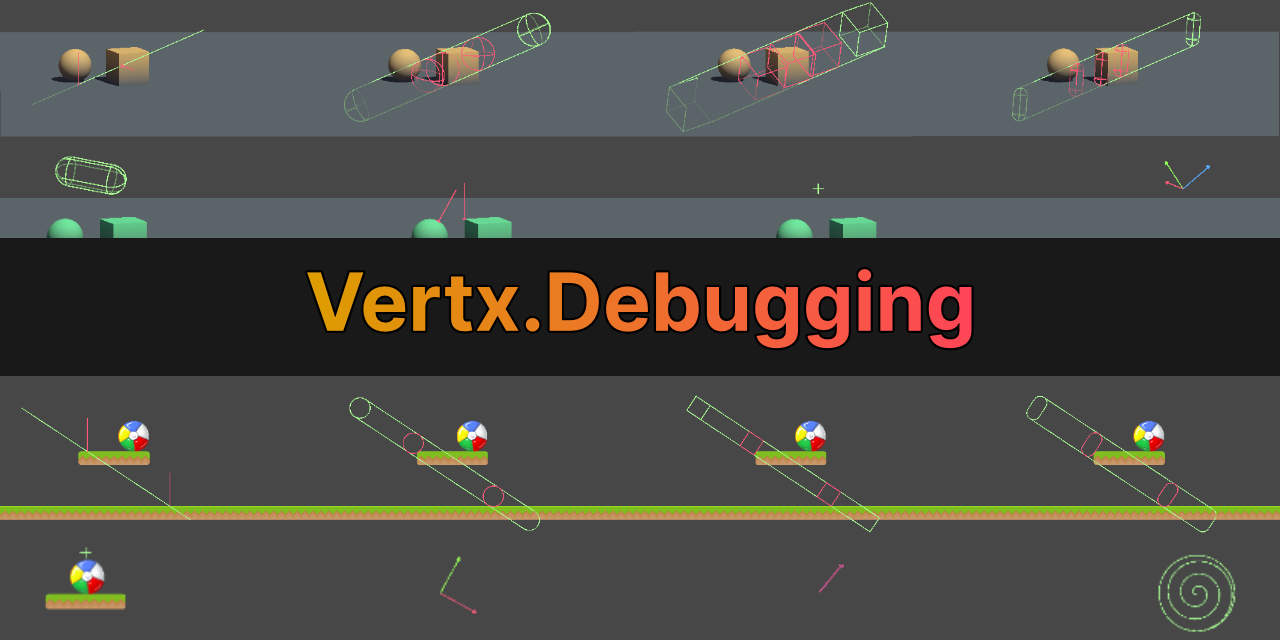
GitHub
Debugging utilities for Unity. Contribute to vertxxyz/Vertx.Debugging development by creating an account on GitHub.
 still ingot
Hi I'm trying to make a simple 3d platformer Obstical course project. I'm trying to make a jump button but every time I press the jump button my player continues to go up into the abyss. Is there a condition I'm missing?
        if (canJump)
        {
            if (Input.GetButtonDown("Jump"))
            {
                jumpForce = new Vector2(physics.linearVelocity.x,jumpSpeed);
                physics.AddForce(jumpForce,ForceMode.Impulse);

                canJump = false;
                isJumping = true;
            }
        }
        else
        {
            jumpForce = new Vector2(physics.linearVelocity.x, physics.linearVelocity.y);
        }
 rain grove
0.5% chance my code runs without errors. 99.5% chance I start debugging before I finish typing.
wintry quarry
still ingot
``` // Player Jump
if (canJump)
{
if (Input.G...
It's very weird that you're using your current x velocity in the jump force (but that should only lead to horizontal weirdness in and of itself. That else statement seems completely pointless too.
Aside from that, you should show your rigidbody's inspector. Your object is just behaving as if you disabled gravity on it (or in the world)
still ingot
It only seems to come back down when I move it around in the air but if I leave it then it continues to go up
 pine imp
srry wrong chat heh
still ingot
wintry quarry
still ingot
It only seems to come back down when I move it around in the air but if I leave ...
you should turn your inspector back to normal mode
it's on debug mode
which makes it hard to read
Also you should share the rest of your code
It's almost certainly due to your code
still ingot
    public bool OnGround()
    {
        Ray groundRay = new Ray(this.transform.position, -transform.up);

        isGrounded = Physics.Raycast(groundRay, out RaycastHit hit, groundDetectionRayLength, groundLayerMask);

        return isGrounded;
    }

    // Update is called once per frame
    void FixedUpdate()
    {
        //Set your Input variables you made to the Axis they are going to be used for. This will allow for you to get the exact axis the player will be moving on be sure to type the exact name of the axis
        InputHorizontal = Input.GetAxis("Horizontal");
        InputVertical = Input.GetAxis("Vertical");

        Vector3 move = new Vector3(InputHorizontal * speed, physics.linearVelocity.y, InputVertical * speed);

        physics.AddForce(move * speed_Multiplier, ForceMode.Force);

        // Speed limit;
        while ((physics.linearVelocity.magnitude > speed))
        {
            physics.linearVelocity = Vector3.ClampMagnitude(physics.linearVelocity, speed);

            break;
        }

        // ground detection
        OnGround();

        while (isGrounded)
        {
            canJump = true;
            isJumping = false;
            break;
        }

        // Player Jump
        if (canJump)
        {
            if (Input.GetButtonDown("Jump"))
            {
                jumpForce = new Vector2(physics.linearVelocity.x,jumpSpeed);
                physics.AddForce(jumpForce,ForceMode.Impulse);

                canJump = false;
                isJumping = true;
            }
        }
        else
        {
            jumpForce = new Vector2(physics.linearVelocity.x, -gravity * Time.deltaTime);
        }

    }

    private void OnDrawGizmos()
    {
        Gizmos.DrawLine(transform.position, new Vector2(transform.position.x, transform.position.y - groundDetectionRayLength));
    }
}
        // Speed limit;
        while ((physics.linearVelocity.magnitude > speed))
        {
            physics.linearVelocity = Vector3.ClampMagnitude(physics.linearVelocity, speed);

            break;
        }```
This should just be an `if` statement, not a `while`. In fact you don't need either. Clamp only does something if that magnitude is higher anyway.

`        while (isGrounded)`
this should also be an `if` statement, not a `while`

And finally here's your actual problem:
```cs
        Vector3 move = new Vector3(InputHorizontal * speed, physics.linearVelocity.y, InputVertical * speed);

        physics.AddForce(move * speed_Multiplier, ForceMode.Force);```
Why are you adding the current y velocity to the force here?you seem to be confusing "adding forces" with "setting the velocity"
I'm fairly certain everything in your script that is calling AddForce you actually meant to set the velocity, based on the way your code is written
You should also stay clear of while for now, you don't seem to understand how it works and it's just cluttering your code. It's also very easy to end up freezing your game using it when you don't understand it.
still ingot
Thank you!! It works now!
still ingot
wintry quarry
```cs
// Speed limit;
while ((physics.linearVelocity.magnitude >...
I just changed this to be Vector3 move = new Vector3(InputHorizontal * speed, 0f, InputVertical * speed);
wintry quarry
still ingot
I just changed this to be `Vector3 move = new Vector3(InputHorizontal * speed, 0...
you probably want to revisit how you're adding the horizontal velocity when jumping too
and think hard about whether you want to be adding forces or setting the velocity
 elder osprey
I need to make this action run the Grind method on the instance of the Grinder script that the player is looking at. This is how the grinded action is set up rn, but I don't know how I can use this with a raycast detected object because I would need to do some confusing subscription stuff.
 wintry quarry
elder osprey
I need to make this action run the `Grind` method on the instance of the `Grinde...
wintry quarry
elder osprey
I need to make this action run the `Grind` method on the instance of the `Grinde...
why can't you use it with a raycast detected object?
elder osprey
wintry quarry
why can't you use it with a raycast detected object?
wouldnt it need to reenable or something if the instance of grinder changes?
also what if the instance is null when the player isnt looking at it
wintry quarry
elder osprey
wouldnt it need to reenable or something if the instance of `grinder` changes?
You absolutely need to manage it correctly, yes. Subscribing exactly once, unsubscribing when the player looks away, etc.
But it can be done
it's a little tricky if you're not careful
elder osprey
Yeah, let me correct my question rq.
wintry quarry
Here's the pattern basically:
Grinder currentlyLookingAt = null;

void Update() {
  Grinder lookingAtThisFrame = null;
  // Note if we don't get a raycast hit, or if the thing we hit doesn't have a grinder, lookingAtThisFrame will be null which is expected
  if (Raycast(..., out RaycastHit hit, ...)) {
    lookingAtThisFrame = hit.gameObject.GetComponent<Grinder>();
  }

  // If we're looking at a different thing than last frame. Otherwise, we don't need to change anything
  if (lookingAtThisFrame != currentlyLookingAt) {
    // Unsub the previous grinder, if any
    if (currentlyLookingAt != null) grinded -= currentlyLookingAt.Grind;

    // reassign the variable
    currentlyLookingAt = lookingAtThisFrame;

    // Sub to the new one, if it exists
    if (currentlyLookingAt != null) grinded += currentlyLookingAt.Grind;
  }
}```
@elder ospreyOh, alright. I never totally understood the subscription stuff, so I thought I needed to do it in OnEnable and OnDisable
Thank you
still ingot
elder osprey
I need to make this action run the `Grind` method on the instance of the `Grinde...
Are you making rail grinding in a 3D project that sounds awesome??
elder osprey
still ingot
Are you making rail grinding in a 3D project that sounds awesome??
No, I might in the future tho, my current game is a lethal-like and to add to the quota you grind items in one of the grinders located around the map
still ingot
OOOOOhh okay still cool stuff
elder osprey
wintry quarry
Here's the pattern basically:
```cs
Grinder currentlyLookingAt = null;
void Upd...
I need to do this twice because this logic is happening in my inventory script, when the player presses e they can either Pickup, Grind, or Interact
still ingot
I have been working on a 2D rail grind system in unity. I plan to revisit after doing this 3D project I'm more familiar with 2D.
sour fulcrum
elder osprey
Oh, alright. I never totally understood the subscription stuff, so I thought I n...
OnEnable & OnDisable tends to be used for listening because usually monobehaviour activity is similar to clocking in and out of a job, if that makes sense
elder osprey
That makes sense
elder osprey
wintry quarry
Here's the pattern basically:
```cs
Grinder currentlyLookingAt = null;
void Upd...
Would this be able to work in the Interact InputAction method?
Like up here in the method?

Since I'm already doing the raycast in there
wintry quarry
If these things all use the same raycast distance, layers, etc you could probably unify all of it
elder osprey
unify?
wintry quarry
have one piece of code that handles all the cases
wintry quarry
elder osprey
Like up here in the method?
this code is only for when you press a button, so not it's not really the same. In this case it's more straightforward - you just check for the component on the object and run the method directly, no?
Otherwise - you fire the event in the input handling code
and you have the raycast stuff in Update
So it really depends if you're using an event or not
sour fulcrum
elder osprey
Like up here in the method?
unsafe reference in here!!
if (hit.collider.GetComponent<ItemPickup>().item != null) will throw if .collder does not have an ItemPickup component.
you should be doing something like
if ((hit.collider.TryGetComponent(out ItemPickup pickup) && pickup.item != null)
Does using an event for this case just complicate things? I wanted code to happen once in the Grinder script when something happens, and I think events are the easiest choice for that, no?
wintry quarry
elder osprey
Does using an event for this case just complicate things? I wanted code to happe...
yes I think so - it's not clear to me why you were using an event there
but - having the raycast code in Update does make sense often because it's typical to show the user some kind of UI and hide that UI when the action is available
elder osprey
wintry quarry
yes I think so - it's not clear to me why you were using an event there
I'm using an event because when the player presses e on a grinder, I need code to be ran on the grinder script.
wintry quarry
elder osprey
I'm using an event because when the player presses e on a grinder, I need code t...
but why does that need an event?
Couldn't you just have:
void Interact(CallbackContext context) {
  if (context.performed) {
    if (currentlyLookingAt != null) currentlyLookingAt.Grind();
  }
}```(based on the currentlyLookingAt variable in my code above)
If we just keep a reference around to the Grinder we're looking at currently, it's trivial to call the function without an event
I might be mixing up Grind and some other interaction thing here but you get the idea?
Are Grind and Interact two different buttons?
elder osprey
wintry quarry
but - having the raycast code in Update _does_ make sense often because it's typ...
With this method, I wouldnt need multiple sets of logic for the Grind and Interact events
elder osprey
wintry quarry
Are Grind and Interact two different buttons?
No, they're both e
wintry quarry
elder osprey
With this method, I wouldnt need multiple sets of logic for the `Grind` and `Int...
yeah exactly
wintry quarry
elder osprey
No, they're both e
then yeah I would just unify that all under a single interface like IInteractable and put it all in one code section
elder osprey
I might have it so interact is its own thing, and the grind logic is handled in the Interact script if the object is a grinder
elder osprey
wintry quarry
then yeah I would just unify that all under a single interface like IInteractabl...
lol, we said the same thing
 tawny mortar
My objects are moving at 1 meter increments for no reason did I press a shortcut or do smth else by accident
Nvm, I might be possible Not Smart
pine imp
happens to the best of us! 😅
still ingot
Hi 👋 would anyone be willing to review a project I have been working on. I'm trying to create a 2D rail grinding mechanic in unity. It's been a while since I last touched it but I plan on working on it again and updating it.
https://github.com/lsclarke/Unity-2D-Rail-Grind

GitHub
A prototype rail grinding mechanic I took the time to develop. The desire stems from playing sonic the hedgehog growing up and I think it would be a cool feature for other developers to learn. - ls...
 bleak glacier
I'm using data persistence for my saving and loading system. I have enums that I want to be able to add to directly using this data persistence system. How do I save all enumerated values?
grand snow
On disk it can be stored in it's string form or as it's numerical value (int by default)
bleak glacier
grand snow
On disk it can be stored in it's string form or as it's numerical value (int by ...
So I guess maybe I'm misunderstanding how data persistence works. I
rich adder
still ingot
Hi 👋 would anyone be willing to review a project I have been working on. I'm t...
pretty cool , i'm doing that but in 3D with spline.
do you have a specific concern on it?
bleak glacier
Can I not directly save and load to the actual code? I know data persistence saves values and stuff. Like the status of a bool, or the value of an int.
{
    None = 0,
    Ammunition = 1 << 0,
    Finesse = 1 << 1,
    Heavy = 1 << 2,
}
But if I want to add a new enumerator with the bit shift, can I do that with data persistence? It seems like there must be a way.
grand snow
By data persistence do you mean write to some file or do you mean something else?
An enums value IS it's numerical value
bleak glacier
grand snow
By data persistence do you mean write to some file or do you mean something else...
So I'm not fully in tune with how the code works. I save to a file, yes
grand snow
Save the int and that's it
rich adder
most people save it as int
bleak glacier
grand snow
Save the int and that's it
Ok so maybe I'm not explaing myself properly
grand snow
You aren't no...
bleak glacier
grand snow
You aren't no...
I want to, during runtime, be able to add a new enumerator to WeaponProperty.
rich adder
wdym a new enumerator ? that means something else , like new "Enumeration" ?
enums are just constants
grand snow
bleak glacier
I want to, during runtime, be able to add a new enumerator to WeaponProperty.
If you changed to using int instead of the enum type then there would be no restriction
bleak glacier
rich adder
wdym a new enumerator ? that means something else , like new "Enumeration" ?
A new "entry" to the enum. Maybe my source was bad, but that article called entries under an enum enumerators.
Like the Ammunition in my code.
bleak glacier
rich adder
enums are just constants
Yes
grand snow
Share some code so we can understand what you actually want or need
It's unclear so far
rich adder
the design of constant is not to change during runtime
bleak glacier
grand snow
Share some code so we can understand what you actually want or need
{
    None = 0,
    Ammunition = 1 << 0,
    Finesse = 1 << 1,
    Heavy = 1 << 2,
    Light = 1 << 3,
    Loading = 1 << 4,
    Range = 1 << 5,
    Reach = 1 << 6,
    Special = 1 << 7,
    Thrown = 1 << 8,
    TwoHanded = 1 << 9,
    Versatile = 1 << 10,
    Improvised = 1 << 11,
    Silvered = 1 << 12,
    ExampleToBeAdded = 1 << 13
}```whats the end goal?
explain what you want to do instead of focusing on a specific solution
sour fulcrum
These yearn for ScriptableObject’s
bleak glacier
rich adder
whats the end goal?
So weapons have weapon types, and only certain classes can use certain weapons. A weapon can have multiple weapon types.
I want the user of this program to be able to add additional weapon types to weapons.
rich adder
hmm yeah maybe SOs could fit that here
 cosmic dagger
I would use SO enums for this. Just have a list of the SO enums that belong to the weapon . . .
sour fulcrum
Be ideal for when you wanna add extra into to these too
bleak glacier
cosmic dagger
I would use SO enums for this. Just have a list of the SO enums that belong to t...
And you instantiate more SOs with custom names or?
bleak glacier
sour fulcrum
Same SO
But I'd need customizable SOs. I need the player to be able to create new types
cosmic dagger
bleak glacier
And you instantiate more SOs with custom names or?
Basically, create a SO_WeaponProperty ScriptableObject. Then, create assets in your project folder for all the names (just like you did for your enum) . . .
You can have a list of these SO_WeaponProperty SOs on the weapon if they have multiple types . . .
bleak glacier
cosmic dagger
Basically, create a `SO_WeaponProperty` ScriptableObject. Then, create assets i...
Cannew assets be created during runtime?
cosmic dagger
bleak glacier
Cannew assets be created during runtime?
Yes, you can instantiate or create a new instance of an SO, then name it, but why do you need to create a new WeaponType during runtime? There's no way you could do that using enums (your previous method).
rough granite
yeah you cant update / make a enum during runtime
wintry quarry
bleak glacier
But I'd need customizable SOs. I need the player to be able to create new types
Then an SO is not the solution for you.
Or at least not the complete solution.
What I do in these situations is make two separate types:
- The runtime type, which can be directly created by players
- The SO type, which can create the runtime type on demand but can be edited in the Unity editor
Then at runtime, you use the runtime type basically.
cosmic dagger
Do you mean, you want the player to create new types of weapons?
bleak glacier
rough granite
yeah you cant update / make a enum during runtime
Is there a way to edit the save file, and then add to the enum when the game is reloaded?
rough granite
bleak glacier
Is there a way to edit the save file, and then add to the enum when the game is ...
no the enums are built on build
bleak glacier
rough granite
no the enums are built on build
Aight.
wintry quarry
bleak glacier
Is there a way to edit the save file, and then add to the enum when the game is ...
You just need to save data in a custom type, it wouldn't be an enum
bleak glacier
wintry quarry
You just need to save data in a custom type, it wouldn't be an enum
What do you mean by custom type?
wintry quarry
bleak glacier
What do you mean by custom type?
A custom class or struct
bleak glacier
wintry quarry
A custom class or struct
So I can do this with structs, but not enums?
rough granite
bleak glacier
What do you mean by custom type?
c# is OOP make a class that does what you want
wintry quarry
bleak glacier
So I can do this with structs, but not enums?
Players cannot change code. They cannot add a type to your enum.
But what you can give them the ability to do is change data
so for example if you had:
public struct Weapon {
  public string Name;
  public int Damage;
}```
You can allow the player to create one of these through UI or whateverand save it to the save file and do whatever you want
but they can't add an enum value:
public enum WeaponType {
  Sword,
  Katana,
  Dagger,
  // users can't modify your code so they can't add stuff here
}```Well, they can change the data of strings and ints. I don't know of a way to add a new int though
wintry quarry
bleak glacier
Well, they can change the data of strings and ints. I don't know of a way to add...
you don't need to have them add a new int
Just save the data they give you
rough granite
this feels like one of those x y problems https://xyproblem.info/
wintry quarry
Ultimately the design here is really going to come down to how much customization you want to give the player
it can get very complicated or it could be very simple
On the simple end it's a few bits of data. A name. some damage. Maybe a reference to a sprite or something.
On the complex end you're basically giving them a scripting engine to write custom behavior
rich adder
I think they also want something along the lines of "tag" system and only certain classes can use weapons with those tags , but want people to add new tags
wintry quarry
And there's a million shades in between those things
In that case you can simply have a string tag or List<string> tags
elder osprey
wintry quarry
then yeah I would just unify that all under a single interface like IInteractabl...
IInteractable?
wintry quarry
elder osprey
IInteractable?
An example name for such an interface, yes.
elder osprey
what do you mean by interface?
wintry quarry
elder osprey
what do you mean by interface?
I mean a C# interface
An interface in C# contains definitions for a group of related functionalities that a non-abstract class or a struct must implement. It specifies the members and their signatures for a type that implements the interface.
elder osprey
wintry quarry
https://learn.microsoft.com/en-us/dotnet/csharp/fundamentals/types/interfaces
How would I use this in the current context?
wintry quarry
elder osprey
How would I use this in the current context?
you would make all of your scripts that are interactable in this way (looking at them, pressing e) implement the interface, and then you could just have one piece of code that handles all of them (via the interface), instead of a separate piece of code for Grinders, Interactables, and whatever the third things was you said. Items?
It would eliminate your code duplication problem
bleak glacier
rich adder
I think they also want something along the lines of "tag" system and only certai...
Yes. This is what I’ve explained. I used enums because you can add flags and then you basically have bools.
And then the classes will also be customizable, ie. the weapon types that their class can use is selected by them
So basically they just select the tags
wintry quarry
bleak glacier
So basically they just select the tags
You can recreate this in software pretty easily. It's essentially just Set operations.
bleak glacier
With the presets you’ve seen
wintry quarry
HashSet<string> allowedWeaponTags;

// Check if you can use the weapon
bool canEquip = allowedWeaponTags.IsSuperSetOf(weapon.tags);```I’ll look into it.
wintry quarry
You could of course also map each set to an integer value and do bitwise comparisons too. But this limits you to 32 tags for int and 64 for long. It is certainly a lot faster though.
bleak glacier
wintry quarry
You could of course also map each set to an integer value and do bitwise compari...
That was what I was doing in the enums
wintry quarry
right but it's pretty limiting
bleak glacier
wintry quarry
right but it's pretty limiting
Which was the problem
wintry quarry
especially with custom tags. And you'd need to keep track of the tag mappings to ints as well
bleak glacier
wintry quarry
You can recreate this in software pretty easily. It's essentially just Set opera...
Once again, I find myself greatly indebted to you. I think this is the solution.
 native flame
Is a kinematic rigidbody for character movement a bad idea if I want a map with lots of physics objects that they shouldn't be able to just walk through?
rich adder
native flame
Is a kinematic rigidbody for character movement a bad idea if I want a map with ...
kinematic will ignore everything else but not other way around
unless you code it not to hit anything with proper checks
wintry quarry
native flame
Is a kinematic rigidbody for character movement a bad idea if I want a map with ...
Kinematic CCs are definitely a valid option. Like every character control option they have their advantages and drawbacks.
The biggest weakness of it is that it will be very difficult to allow your player to be pushed around externally by other objects.
If you don't need that, it can be a solid foundation.
native flame
From what I've read kinematic will move physics objects around with essentially infinite torque
So if I've got e.g explosive barrels then the player could just walk into them and push them around
native flame
wintry quarry
If you don't need that, it can be a solid foundation.
Bet
Rn I'm using a dynamic rigidbody and I'm finding it an enormous PITA
wintry quarry
native flame
Rn I'm using a dynamic rigidbody and I'm finding it an enormous PITA
I highly recommend checking this out, it's really good out of the box: https://assetstore.unity.com/packages/tools/physics/kinematic-character-controller-99131?srsltid=AfmBOoqAFt2j_q_-5JkxdEQDYS7bHXrFxduZnjdElPuBsgUJ1oVRQdfO
rich adder
native flame
Rn I'm using a dynamic rigidbody and I'm finding it an enormous PITA
thats why most controllers are kinematic based
native flame
wintry quarry
I highly recommend checking this out, it's really good out of the box: https://a...
Thanks mate
rich adder
even CC is somewhat of a kinematic body
native flame
native flame
So if I've got e.g explosive barrels then the player could just walk into them a...
Is this accurate tho?
Because it's a behaviour I wouldn't want
wintry quarry
rich adder
even CC is somewhat of a kinematic body
Yep they even call it that in the documentation
wintry quarry
native flame
Is this accurate tho?
yes if you use a kinematic controller you would need to manually implement any "pushback" or "knockback" stuff
oftentimes this is highly situational and worth it
rich adder
having more control is def a positive
native flame
wintry quarry
yes if you use a kinematic controller you would need to manually implement any "...
"pushback" meaning "rigidbodies stop you from moving them around"?
wintry quarry
native flame
"pushback" meaning "rigidbodies stop you from moving them around"?
meaning they push you around
native flame
Knockback at least seems pretty easy to implement manually
wintry quarry
for example if an explosive barrel explodes and you want the player to fly back
or a giant hammer swings and knocks the player off a platform
native flame
Makes sense
wintry quarry
these won't happen naturally with a kinematic controller without you coding it
(although that asset has some of this stuff out of the box)
native flame
But what I'm specifically asking after is if you can stop a kinematic rigidbody from pushing other rigidbodies around?
wintry quarry
native flame
But what I'm specifically asking after is if you can stop a kinematic rigidbody ...
at that point you're just disabling collisions entirely
native flame
What I've read online is that they're a '1 way street' where they push rigidbodies around but can't be pushed themselves
wintry quarry
or if those other bodies are also kinematic
native flame
Hmmmmm okay
In that case would a non-rigidbody cc be more what I'm looking for?
Since the behaviour I'm looking for is that I've got rigidbodies in the scene that the character can't push around, except when performing certain actions e.g punching
rich adder
if the objects are only meant to rect at specific time why not make them kinematic / constraint locked until they are hit "properly"
rich adder
i often do that so when my char is on a physics object it doesn't wobble
native flame
Okay last question: what functional differences are there between a non-rigidbody cc (like Unity's built in cc) and a kinematic rigidbody cc?
native flame
rich adder
i often do that so when my char is on a physics object it doesn't wobble
Smort
elder osprey
wintry quarry
you would make all of your scripts that are interactable in this way (looking at...
Where do you define a interface?
in each script?
wintry quarry
elder osprey
Where do you define a interface?
you define it once, typically in its own file
rich adder
native flame
Okay last question: what functional differences are there between a non-rigidbod...
on top of my head / most obvious one, the Character Controller already detects colliders for you while kinematic rb you have to code that in with something like RB.SweepTest or other physics queries
 wind brook
Does anyone know how I could carry a set of gameobjects over in a scene transition? Ie, I have an object that has to be loaded from one scene to another ‘intact’
rich adder
DDOL?
native flame
rich adder
on top of my head / most obvious one, the Character Controller already detects c...
Bet
Thanks for the help gang
wintry quarry
wind brook
Does anyone know how I could carry a set of gameobjects over in a scene transiti...
You have 3 options:
- Make them DDOL
- Use additive scene loading. I.e. they live in scene A and you additively load scene B (and maybe unload scene C, leaving A intact)
- Let them get destroyed and recreate them from some saved data
elder osprey
wintry quarry
you define it once, typically in its own file
For some reason adding the IInteractable interface to the Grinder script gives this error
 sour fulcrum
That’s your hotreloading plugin’s problem
..Which I don’t think is actually discussable on this server, based on how those are made 🤔
rich adder
btw there is also this? but never used it myself.. I guess this is mainly for using additive workflow
SceneManager.MoveGameObjectsToScene
SceneManager.MoveGameObjectToScene
elder osprey
sour fulcrum
That’s your hotreloading plugin’s problem
oh
wintry quarry
rich adder
btw there is also this? but never used it myself.. I guess this is mainly for us...
yeah this would only work in the additive workflow. You need two scenes loaded at once for this.
wind brook
wintry quarry
You have 3 options:
1. Make them [DDOL](https://docs.unity3d.com/ScriptReference...
Is there a way I can selectively add DDOL to gameobjects that I select while in the first scene (I’m making a fire emblem-style TRPG)? Not the end of the world if I can’t, just feel like it’s cleaner
wintry quarry
wind brook
Is there a way I can selectively add DDOL to gameobjects that I select while in ...
of coruse
you can do whawtever you like in your code
It won't become DDOL until you call the function on it
So you can just only do that for the ones the player selected.
wind brook
wintry quarry
It won't become DDOL until you call the function on it
Okay that makes sense, but is there a way to then remove it from the ddol list as well?
wintry quarry
wind brook
Okay that makes sense, but is there a way to then remove it from the ddol list a...
sure - move it to any other scene with the functions nav mentioned above.
or destroy them manually
sour fulcrum
Also might be worth elaborating on the usecase here if you want more specific advice.
Eg. For turn based/“round” games in general, when dealing with units you might not want to reuse the same objects in and out of rounds and instead recreate them at the start of the round using saved data stored elsewhere
wintry quarry
Almost exactly what I typed out and deleted earlier^
 restive sentinel
what are interfaces useful for? I havent come across something yet where i would use it over an abstract class
sour fulcrum
Interfaces don’t need to actually do anything, it’s just a promise that it can do something. This allows two very different things to implement an interface that is exclusively what they have in common
rich adder
restive sentinel
what are interfaces useful for? I havent come across something yet where i would...
you cant use multiple abstract classes cause of inheretence limitation, but interfaces you can implement as many as you wish
wintry quarry
restive sentinel
what are interfaces useful for? I havent come across something yet where i would...
well for one classes can implement multiple interfaces, but derive from only one base class. For two - interfaces can be implemented by structs, which can't derive from anything - including abstract classes - at all.
restive sentinel
Thanks, maybe this advice can help with my movement system
sour fulcrum
Psycho example but if I myself am an elevator, I don’t need to know what is inside me, I just need to know how much it weighs. Because of that the only thing I need to know could be defined as
interface IWeightable
public int GetWeight();
then anything wanting to be on the elevator (a box, a person etc) just has to implement that interface and single piece of information without being directly related to eachother like
Human : MonoBehaviour, IWeightable
Box : MonoBehaviour, IWeightable
wintry quarry
^ the key point is here is that the elevator code doesn't have to know or care about boxes or humans, it can just deal with IWeightable and so you can write simple code for it that just takes each object's weight
restive sentinel
So if im understanding this correctly i could make like an IConsumeStamina and put it on a movement state to make it consume whatever it returns?
sour fulcrum
sour fulcrum
Psycho example but if I myself am an elevator, I don’t need to know **what** is ...
then you can use this alongside abstracts, where you might want something like
abstract class EntityBehaviour : MonoBehaviour, IWeightable
abstract int GetWeight();
class Human : EntityBehaviour
override int GetWeight() {}
class Animal : EntityBehaviour
override int GetWeight() {}
 naive plank
Interfaces : functions needs to be implemented explicitly in the implementing class, abstract classes : not obligatory
restive sentinel
Okay i think i understand. Thank you everybody!
naive plank
Memory rule I used when doing my courses, implements you could think of something that every one has to do, every one with legs are able to walk. Abstract somethins it can do but dont have to be able to do, there fore youre are not required to explicitly override it in the extending class
restive sentinel
Oh i think i see why this could be useful. Maybe for my situation i could make all objects of an interface decrease their stamina consumption by like 20% or something and they will return differently
for like an upgrade
and that would be required due to it having the interface so i dont need to worry about it being null or anything
 eternal needle
naive plank
Memory rule I used when doing my courses, implements you could think of somethin...
eternal needle
naive plank
Memory rule I used when doing my courses, implements you could think of somethin...
the wording here isn't really accurate. abstract methods dont provide an implementation and have to be overridden too
eternal needle
restive sentinel
and that would be required due to it having the interface so i dont need to worr...
something being null doesn't change here. though yes you could do all of what you described using an interface
restive sentinel
eternal needle
the wording here isn't really accurate. abstract methods dont provide an impleme...
Its only required to contain the functions or properties that are not virtual right
naive plank
eternal needle
the wording here isn't really accurate. abstract methods dont provide an impleme...
thats right my bad, but all abstract methods dont have to be overriden but interface methods have to if I dont remeber incorectly
an interface just specifies what methods have to be implemented
sour fulcrum
naive plank
thats right my bad, but all abstract methods dont have to be overriden but inter...
Your confusing abstract and virtual
virtual can be overridden
abstract must be overriden
naive plank
sour fulcrum
Your confusing abstract and virtual
Think it might be that im mixing it up with Java 🙃
eternal needle
restive sentinel
Its only required to contain the functions or properties that are not virtual ri...
im not really sure what you mean here tbh
naive plank
naive plank
Think it might be that im mixing it up with Java 🙃
Time to take C# course hahaha
eternal needle
naive plank
thats right my bad, but all abstract methods dont have to be overriden but inter...
i did specifically say "and have to be overridden" in the message u replied to btw. u eventually have to implement it otherwise you arent using the class
restive sentinel
eternal needle
im not really sure what you mean here tbh
I’m sorry let me reword this, I meant that functions or properties are not forced to be overridden if they are virtual?
eternal needle
naive plank
Memory rule I used when doing my courses, implements you could think of somethin...
and yea you are definitely thinking of java when you said implements that isnt a c# thing either
naive plank
eternal needle
and yea you are definitely thinking of java when you said `implements` that isnt...
I think I assumed the object orientation worked more of less the same, beg u pardon 🙂
eternal needle
restive sentinel
I’m sorry let me reword this, I meant that functions or properties are not force...
yes a virtual method provides an implementation, so u dont need to override it
still ingot
I'm not very familiar with Unity 3D projects but I worked all day on this project which is just a 3D platformer prototype I have been working on.
eternal needle
still ingot
I'm not very familiar with Unity 3D projects but I worked all day on this projec...
this isn't a channel to showcase your work, this is for questions. #1180170818983051344 or #🏆┃daily-win
 humble briar
I have a small quesiton, in tutorials when someone is typing into Visual Studio it gives auto complete suggestions but when I try it only suggests things i've already typed. How do I fix this?
naive pawn
humble briar
I have a small quesiton, in tutorials when someone is typing into Visual Studio ...
configure your !ide
eternal falconBOT
💡 IDE Configuration
If your IDE is not autocompleting code
or underlining errors, please configure it.
Select one:
•  Visual Studio (Installed via Unity Hub)
• Visual Studio (Installed manually)
•  VS Code
•  JetBrains Rider
• :question: Other/None
naive pawn
(note that visual studio and vscode are different things)
humble briar
Thank you so much (I thought i already did this but i guess not lol) 🙏
 graceful abyss
Would transform.LookAt() be appropriate to make my 3d game object face the camera?
or is there something better specific to navmesh agents?

 iron wind
 rancid lily
Quick question, how can I define a list of types that extend a certain class?
rancid lily
Quick question, how can I define a list of types that extend a certain class?
List<Action>
rancid lily
but I want a list of types
not a list of action objects
(Action is a class I've made here, not system.Action)
sour fulcrum
why do you want a list of types
rancid lily
Maybe it's a dictionary of types that I want? I want a dictionary that maps a type to an instance of that type
keen dew
This sounds like an XY problem
rancid lily
got it
 grand snow
Dictionary.TryGetValue() exists btw
rancid lily
grand snow
Dictionary.TryGetValue() exists btw
idk if there's a way to one line it using try get value?
grand snow
rancid lily
idk if there's a way to one line it using try get value?
kinda but stop caring about such silly things
 rugged beacon
why do the webrequest has allow scene activation
 keen dew
Presumably AsyncOpertion was originally used only for scene loading so it's a holdover from then
naive plank
Im using a cloth componenet on a low poly mesh and it becomes smooth shaded, how would I "undo" that shading and still use the flatshading as if there was no cloth componenet
shading should look like the picture to the left


 spark stirrup
Hello, I tried to code a game with AI. I don't know much about coding; I'm still learning. I encountered an error while writing the FPS view. Actually, it's not really an error, but something I don't want—the player moves while turning left and right. If anyone can help, I can send the code.
I hope I have been able to explain my problem.
 wary tartan
hi i am a newiebide , i wanr to ask that - is chat gpt a good teacher for learning unity , as they have introduced a new method called study method
spark stirrup
wary tartan
hi i am a newiebide , i wanr to ask that - is chat gpt a good teacher for learn...
Based on my experience, it's a very bad idea. Right now, I'm suffering because of it.
naive plank
wary tartan
hi i am a newiebide , i wanr to ask that - is chat gpt a good teacher for learn...
In my opinion it is a tool, if you're stuck it might help you progress and eventually find the problem
spark stirrup
naive plank
In my opinion it is a tool, if you're stuck it might help you progress and event...
I'm stuck right now. No artificial intelligence can solve it, or maybe I can't explain it.
grand snow
You want structured learning already made. Asking an AI to help without knowing correct terms wont do much good
naive plank
spark stirrup
I'm stuck right now. No artificial intelligence can solve it, or maybe I can't e...
Im at the same right now ;p
grand snow
!learn
eternal falconBOT
:teacher: Unity Learn ↗
Over 750 hours of free live and on-demand learning content for all levels of experience!
rough granite
Shocker group of 3 people came for help at the same time cause their oh holy ai failed them 😂
spark stirrup
Isn't that funny, HAHA?
rough granite
spark stirrup
Isn't that funny, HAHA?
If you want help send the !code and explain your problem https://dontasktoask.com/
eternal falconBOT
Posting code
📃 Large Code Blocks
Use links to services like:
https://paste.mod.gg/, https://hastebin.skyra.pw/, https://paste.ofcode.org/, https://paste.myst.rs/
📃 Inline Code
Surround code with three backquotes. Not quotation marks.
To format as C#, add cs to the first line:
```cs
// Your code here
```
Add a comment with a line number if there is an error message.
rough granite
or leave the server not like it affects me :/
naive plank
rough granite
Shocker group of 3 people came for help at the same time cause their oh holy ai ...
More like, no information on the particular issue on unity forums and the AI could explain it either 🙂
 vernal salmon
I was working on a project again and found that it seems to have stopped working. I have a door button that when you click on it the door opens, the button is a gameobject. It has a collider and it has a rigidbody. The script works when it isn't kinematic but it starts floating away. How can I stop it from floating away
rough granite
vernal salmon
I was working on a project again and found that it seems to have stopped working...
Is there a reason why the button is physics based?
wintry quarry
vernal salmon
I was working on a project again and found that it seems to have stopped working...
Attach it to something with a joint.
But yeah I would avoid a physically simulated button at almost any cost.
vernal salmon
rough granite
Is there a reason why the button is physics based?
No its not
rough granite
wintry quarry
Attach it to something with a joint.
But yeah I would avoid a physically simula...
Only time i would understand it is if it's a game like human fall flat and you push the button with the character
rough granite
vernal salmon
No its not
You have a rigidbody on it so it is
vernal salmon
And how would I make the button work without rigidbodies
cause it only worked when I gave it a rigidbody
rough granite
vernal salmon
And how would I make the button work without rigidbodies
Animation
wintry quarry
rough granite
Only time i would understand it is if it's a game like human fall flat and you p...
even then
 wintry quarry
vernal salmon
no the onmousedown function
wintry quarry
vernal salmon
no the onmousedown function
That works when you have a collider, not a Rigidbody
 wintry quarry
vernal salmon
trigger and non-trigger didn't work
wintry quarry
vernal salmon
trigger and non-trigger didn't work
you need to explain how your button works
we can't really help without understanding that
vernal salmon
you hover your mouse over it you click it triggers an event in another script
that's all
not sure what else I can explain
wintry quarry
There's no need for a Rigidbody for any of that
rough granite
Sharing the code would do wonders
wintry quarry
Also you can/should use IPointerDownHandler not OnMouseDown
vernal salmon
 wintry quarry
OnMouseDown won't work if you're using the new input system, for example
vernal salmon
wintry quarry
Also you can/should use IPointerDownHandler not OnMouseDown
is that with the old input system
I'm on old
wintry quarry
vernal salmon
I'm on old
it works for both
vernal salmon
and any idea why this isn't working
wintry quarry
not really other than some other object is probably blocking it
but OnMouseDown is really not debuggable
other than - it's working or not working
rough granite
vernal salmon
Honestly couldn't say i would've just gone the route of a raycast
wintry quarry
vernal salmon
and any idea why this isn't working
also is this a first person game?
wintry quarry
that'd do it
vernal salmon
thansk both of you
next thing I need the onmousedown for I'll use onpointer instead
or raycast
grand snow
Event System + IPointerClick is the best
does require a physics raycaster/physics 2d raycaster to work with colliders however
vernal salmon
lately I've been using IPointer but for this it's a tutorial I made a while back and adding some content to it so I don't want to change but I will mention the IPointerClick when making new stuff
wintry quarry
The main benefit of using it is that you get the "is blocked by UI" stuff for free. Basically it interacts properly with other mouse interactions in the game.
 coral copper
i have a very basic question 🙂
obviousely if you want to make a game you will encounter the problem of how to move gameobjects. often times i have been doing it with transform.position += transform.forward * speed * Time.deltaTime; but i know there are also other ways to do it. my question is; what is the best way to do it if you want to have the best performance.
wintry quarry
coral copper
i have a very basic question 🙂
obviousely if you want to make a game you will e...
it's really not a performance question
it's a question of how do you want the things to move?
DO you want them to collide with things?
Do you want physical realism?
Do you want them to move on a curve?
Do you want them to move blindly in a direction, or towards a certain waypoint
etc
coral copper
ok, well what is the best way of doing if i just want a gameobject moving in a straight line until he runs into a range which is defined by a trigger circle
hot wadi
Wait, is this function real? If not then why does it appear in the IDE? There is FindWithTag already

 wintry quarry
coral copper
ok, well what is the best way of doing if i just want a gameobject moving in a s...
wintry quarry
coral copper
ok, well what is the best way of doing if i just want a gameobject moving in a s...
Does your object have a Rigidbody?
wintry quarry
hot wadi
Wait, is this function real? If not then why does it appear in the IDE? There is...
As it says you need to provide the tag as a parameter
wintry quarry
coral copper
rigid and collition
Then you should move it via the Rigidbody
if the body is dynamic (not kinematic), just set its velocity
if the body is kinematic, use MovePosition in FixedUpdate
sour fulcrum
hot wadi
Wait, is this function real? If not then why does it appear in the IDE? There is...
are you on unity 6.2
hot wadi
wintry quarry
As it says you need to provide the tag as a parameter
Yes, I can provide a string and no error occurs
hot wadi
sour fulcrum
are you on unity 6.2
Yeah
wintry quarry
hot wadi
Yes, I can provide a string and no error occurs
Exactly
it's not saying it doesn't exist
it's saying you didn't provide the parameter
sour fulcrum
no no their asking no api result
wintry quarry
when you provide the required parameter, it's happy
wintry quarry
hot wadi
Wait, is this function real? If not then why does it appear in the IDE? There is...
https://docs.unity3d.com/ScriptReference/GameObject.FindWithTag.html It got renamed in 6.0
but the old one is still there. Docs only have the new name
hot wadi
So they have 2 copies of the same function now?
sour fulcrum
more specifically it seems they dont index the old one on the search
hot wadi
Eh, that's odd
sour fulcrum
the old page is still there
wintry quarry
they're going to deprecate the old one
naive pawn
docs do have the old one, it's just not indexed
coral copper
so
rb = GetComponent<Rigidbody2D>();
rb.velocity = Vector2.zero;
right?
sour fulcrum
which is kinda strange tbh
naive pawn
ah whoops
coral copper
wintry quarry
Then you should move it via the Rigidbody
thanks man 🙂
naive pawn
sour fulcrum
which is kinda strange tbh
not really, the search results isn't exactly enough space to mark deprecation well imo
sometimes i don't look at docs page and just do search or browse the class page to check spelling (for example)
sour fulcrum
i mean yeah but in this situation
search old one -> click page -> says deprecated
search old one -> no result -> gaslit confusion leading to questions here
naive pawn
naive pawn
sometimes i don't look at docs page and just do search or browse the class page ...
i'd be getting to use deprecated functions in this scenario
and doesn't the ide also report deprecated stuff (and put it low in intellisense) anyways
not recommending deprecated/obsolete things is a good thing, actually
coral copper
why do i get forced to use linearVelocity instead of velocity?
sour fulcrum
thats what its called now
 polar acorn
coral copper
why do i get forced to use linearVelocity instead of velocity?
polar acorn
coral copper
why do i get forced to use linearVelocity instead of velocity?
Because it was renamed
polar acorn
Yes
primal trench
how do i make a new transform out of a rotation, position, and scale?
wintry quarry
primal trench
how do i make a new transform out of a rotation, position, and scale?
You can't really make a new Transform without creating a whole GameObject. A Transform is a Component on a GameObject.
What are you actually trying to accomplish?
If you just want a place to store those things you can use Matrix4x4 or just Two Vector3s and a Quaternion.
Are you trying to just set the position, rotation, and scale of an object?
primal trench
    {
        StartPosition = transform.position;
        StartRotation = transform.rotation;
        StartScale = transform.localScale;
    }```
i did that, but how do i make it so the start position, ect, are only set once, because right now the transforms position and the variable are like, linked amd updated every frame for some reasonwdym by "the transforms position and the variable are like, linked amd updated every frame"
those three variables are only set one time in the lifetime of this object unless you have code elsewhere assigning to them
primal trench
slender nymph
wdym by "the transforms position and the variable are like, linked amd updated e...
I'm not. when the transform position changes thevariables change too
wintry quarry
primal trench
``` private void Start()
{
StartPosition = transform.position;
...
They will only be set once right now unless you are updating them in Update
slender nymph
prove it
wintry quarry
Start only runs one time.
ivory bobcat
primal trench
``` private void Start()
{
StartPosition = transform.position;
...
The three are value types (not reference types). The values will only be copied during Start
wintry quarry
primal trench
I'm not. when the transform position changes thevariables change too
Basically you need to show us the rest of your code and explain why you think it's being updated continuously.
primal trench
gimme momnt rq
oml im sorry for wasting yalls time i was setting it later in the code
 azure hemlock
hello, please help me im about to go bald.
OnCollisionEnter is never called: both gameobjects have colliders, both collders are NOT triggers, both have rigidbody kinematic. and one has that script to listen for OnCollisionEnter. both on the same layer too
i do not get why
naive pawn
both have rigidbody kinematic
there's your issue
slender nymph
azure hemlock
how can i then listen for collision without collidingg?
naive pawn
...think about that for a second
slender nymph
they can't collide if they cannot collide
azure hemlock
i was using trigger, but i need to get contact point, and trigger doesnt provide it
slender nymph
there is no contact point if there is no contact though
azure hemlock
if something goes thru a wall of the level
slender nymph
they are not physically colliding. therefore there is no collision.
azure hemlock
how do i get contacct points i need it
slender nymph
for what reason
azure hemlock
to show particle
slender nymph
and do these objects need to physically collide
azure hemlock
sometimes yes sometimes no
slender nymph
okay so at this point you should provide more actual details so a proper solution can be provided because i don't enjoy playing 20 questions just to get some basic info
azure hemlock
for instance, i have a sword, i need it to particle on point of collision
but i do not want any rigidbody physics on it
because its held by character
wintry quarry
azure hemlock
for instance, i have a sword, i need it to particle on point of collision
use a boxcast
or Rigidbody.SweepTest
azure hemlock
i tried Physics.ComputePenetration, and collider.ClosestPoint but both are rly bad
is that better?\
wintry quarry
yes
wintry quarry
there is no better
they do different things
look at what they do and decide what you want
azure hemlock
yes, in this case
both terrible tried em
problem is they cannot infere the correct direction
wintry quarry
yes they can
the normal is contained in the RaycastHit
it has all the info you need
 brave compass
azure hemlock
i tried Physics.ComputePenetration, and collider.ClosestPoint but both are rly b...
brave compass
azure hemlock
i tried Physics.ComputePenetration, and collider.ClosestPoint but both are rly b...
Physics.ComputePenetration does exactly what it says, I've used it many times with no problems.
But for sword swinging, I would use a sweeptest or raycast. A sword slice contains many points of contact, each with a different normal direction.
azure hemlock
yes im doing raycast currently. its not very stable though
especially with non linear shapes of swords
wintry quarry
raycast doesn't make much sense to me vs boxcast here
brave compass
You have to do multiple raycasts, along the sword, if you want an accurate result. Sweeptest or boxcast don't let you put in an angular velocity.
wintry quarry
you would/could do one baxcast each frame during the animation, tracing out the full path over time
which would account for the rotation part too
brave compass
There's GIFs in here that explain what I mean
https://mordhau.fandom.com/wiki/Tracers
brave compass
wintry quarry
which would account for the rotation part too
Between each frame, the box in the boxcast can't rotate though. It can only move in a straight line. If you don't have enough frames, you won't be able to capture the movement of the sword accurately, especially if it's a very long sword.
naive pawn
if you don't have enough frames then you wouldn't be able to render accurately even if you could detect accurately
wintry quarry
brave compass
Between each frame, the box in the boxcast can't rotate though. It can only move...
So what?
This is a simulation. A crude simulation.
The physics engine works in discrete timesteps too
it's not meant to be 100% accurate nor does it need to be 100% accurate
As for frame count you'd use FixedUpdate so the framerate of the game wouldn't affect things anyway.
none of the other mentioned approaches are 100% accurate either
brave compass
wintry quarry
So what?
Just to better illustrate what I mean

 wintry quarry
yes understood - although you can break that down into arbitrarily as many steps as you desire
nothing limits you to one boxcast per frame
brave compass
We don't know how fast their sword is going. With the default 50 FPS fixed tick rate, it doesn't have to go very fast to get these large gaps.
naive pawn
you can just rotate the box in frame 2
wintry quarry
you can pretty easily make that a configurable parameter
brave compass
wintry quarry
yes understood - although you can break that down into arbitrarily as many steps...
True, sub ticks is another solution to this. The raycast solution doesn't capture the sweep of the tip accurately.
naive pawn
like however the visuals are, rotate the box correspondingly
brave compass
naive pawn
like however the visuals are, rotate the box correspondingly
The two boxes represents one boxcast. You can only specify one rotation for a boxcast.
It might be better to pick the average rotation between the two frames, if you want to do one boxcast per frame.
wintry quarry
this breakdown is also possible (ignore the text, ChatGPT generated this image)

and yes those boxcasts are not accurately rendered - they'd be smaller squares bascially travelling along those paths
west sonnet
When creating a system for the player to be able to pick up and discard weapons, if there a typical way to making it? As in, should I instatiate a weapon at the players hand or keep the weapon always there but disabled, and enabled it when it's appropriate
ivory bobcat
Your choice.
 sharp junco
I'm trying to make my first game right now with the first person controller starter asset but there's a hidden code somewhere that's hard locked the far clipping to 500 and I can't find it in the scripts. I can see an override in the nested player unpack prefab but I can't even change the override. any ideas?
 tiny holly
some one please help me i m stuck with this
when i press a d or s for direction the movement glitches and everything is fast
naive pawn
tiny holly
you have both a rigidbody and a character controller that are fighting for control
you can't have both
naive pawn
decide which one you want to use and remove the other one
(if you choose character controller you'd also remove the collider, since that's for the rigidbody)
tiny holly
I see
and if i use rigidbody then i just have to remove the character controller right
naive pawn
and also change any code that might have been using that
sharp junco
any ideas for the issue I'm running into?
sharp junco
just above Ryushio's
sharp junco
sharp junco
I'm trying to make my first game right now with the first person controller star...
this one
naive pawn
sharp junco
I'm trying to make my first game right now with the first person controller star...
which far clipping are you referring to exactly? on a camera component?
sharp junco
yessir. end goal is 4000 far clip and I'll later utilize LOD for performance.
naive pawn
what do you mean by "locked" exactly?
sharp junco
locked as in I can change the value, but hitting enter reverts the number back to 500 in both the camera component and the override page under the nested player unpack
sharp junco
still reverts to 500, regardless of the value. I checked the scripts in the starter assets folder, nothing in there mentions far clipping either. I'm at a loss with it
naive pawn
what about 499?
sharp junco
same thing
naive pawn
sharp junco
still reverts to 500, regardless of the value. I checked the scripts in the star...
none of the scripts mention farClipPlane?
slender nymph
the starter assets use cinemachine, no? so it would be a setting on the vcam not the camera itself
tiny holly
@naive pawn Now my player is not jumping only the animation plays.
naive pawn
were you perhaps using charactercontroller to do that before
also no need to ping me again
just post your issue
naive pawn
well there's no jump method, no
you just apply an impulse to make it act as if it were jumping
rigidbodies don't know about jumping, you just tell it what to do in physics terms
you haven't really provided any info to go off of
perhaps show the !code that is meant to make you jump
eternal falconBOT
Posting code
📃 Large Code Blocks
Use links to services like:
https://paste.mod.gg/, https://hastebin.skyra.pw/, https://paste.ofcode.org/, https://paste.myst.rs/
📃 Inline Code
Surround code with three backquotes. Not quotation marks.
To format as C#, add cs to the first line:
```cs
// Your code here
```
Add a comment with a line number if there is an error message.
tiny holly
 naive pawn
eternal falcon
naive pawn
eternal falcon
nope, see above
west sonnet
Am I doing something wrong here with trying to detect the F key in a For loop? The gun is detected so the first For loops works, but nothing happens when I press F so the second loop doesn't work
 tiny holly
//  void HandleJump()
 {
     isGrounded = Physics.CheckSphere(groundCheck.position, groundCheckRadius, groundLayer);

     if (isGrounded && Input.GetKeyDown(KeyCode.Space))
     {
         rb.velocity = new Vector3(rb.velocity.x, 0f, rb.velocity.z); // reset y before jump
         rb.AddForce(Vector3.up * jumpForce, ForceMode.Impulse);
     }
 }

 void OnDrawGizmosSelected()
 {
     if (groundCheck != null)
     {
         Gizmos.color = Color.red;
         Gizmos.DrawWireSphere(groundCheck.position, groundCheckRadius);
     }
 }
see !code
eternal falconBOT
Posting code
📃 Large Code Blocks
Use links to services like:
https://paste.mod.gg/, https://hastebin.skyra.pw/, https://paste.ofcode.org/, https://paste.myst.rs/
📃 Inline Code
Surround code with three backquotes. Not quotation marks.
To format as C#, add cs to the first line:
```cs
// Your code here
```
Add a comment with a line number if there is an error message.
naive pawn
are you sure the method is even being called? debug at the very top of the method before any conditionals
might be your raycast not hitting anything
also what for loop
west sonnet
Sorry, I meant If loop
A tool for sharing your source code with the world!
This is the code ^
The racast is defo hitting it because the Debug.Log is working
sharp junco
slender nymph
the starter assets use cinemachine, no? so it would be a setting on the vcam not...
I checked:
CinemachineVirtualCamera.cs
CinemachineBrain.cs
UniversalAdditionalCameraData.cs
FirstPersonController.cs
CinemachineBrain.cs was the only one with code referencing NearClipPlane and FarClipPlane, but none of that code explicitly sets far clipping to 500 as far as I can see.
 if ((state.BlendHint & CameraState.BlendHintValue.NoLens) == 0)
 {
     Camera cam = OutputCamera;
     if (cam != null)
     {
         cam.nearClipPlane = state.Lens.NearClipPlane;
         cam.farClipPlane = state.Lens.FarClipPlane;
         cam.orthographicSize = state.Lens.OrthographicSize;
         cam.fieldOfView = state.Lens.FieldOfView;
         cam.lensShift = state.Lens.LensShift;
         if (state.Lens.ModeOverride != LensSettings.OverrideModes.None)
             cam.orthographic = state.Lens.Orthographic;
         bool isPhysical = state.Lens.ModeOverride == LensSettings.OverrideModes.None
             ? cam.usePhysicalProperties : state.Lens.IsPhysicalCamera;
         cam.usePhysicalProperties = isPhysical;
         if (isPhysical && state.Lens.IsPhysicalCamera)
         {
             cam.sensorSize = state.Lens.SensorSize;
             cam.gateFit = state.Lens.GateFit;
cam.focalLength = Camera.FieldOfViewToFocalLength(state.Lens.FieldOfView, state.Lens.SensorSize.y);```try debugging the values you're checking - isGrounded and the GetKeyDown call
slender nymph
sharp junco
I checked:
CinemachineVirtualCamera.cs
CinemachineBrain.cs
UniversalAdditionalC...
show what you are actually changing.
tiny holly
ok
naive pawn
sharp junco
I checked:
CinemachineVirtualCamera.cs
CinemachineBrain.cs
UniversalAdditionalC...
right, but it's setting the camera values to the cinemachine's own values
sharp junco
naive pawn
you would need to modify the cinemachine stuff instead of the camera's values
slender nymph
so you remember how i said you need to change it on the vcam not the actual camera?
sharp junco
yeah but the vcam doesn'
slender nymph
notice how at no point did i say you needed to look into cinemachine's code, just that you need to change the setting on the cinemachine virtual camera