#💻┃code-beginner
1 messages · Page 701 of 1
 silver fern
 grand snow
hehe
If you want to save some inventory state it should be something like:
{
  "items": [
    {
      "id": "gun",
      "amount": 1
    }
  ]
}
then when loading the save data you use the id to retrieve the "gun data" for example
you cant just try to serialize the unity scriptable object as json... its gonna produce junk
you can load scriptable objects at runtime for items and then use the id to find it for example
 dull grail
Thank you
silver fern
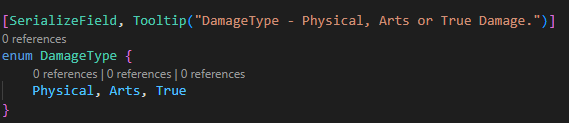
hm serialized enum doesnt show up in the editor
 naive pawn
...what?
enums aren't supposed to show up
fields of enum type are though
you sure you're looking at the right thing? perhaps show the declaration and stuff
 ember tangle
Does it make sense to have all the data in my gameobject as a struct so I can save it easier?
grand snow
makes no difference when its saved
dull grail
You may search for plugin which add serializable dictionary and do something like this
 silver fern
I'm probably doing this wrong https://i.imgur.com/EoZBz4O.png
 silver fern
ahh got it thx
Is there any best practice or whatever on where to put the enum declaration or can I just put it in front of the variable declaration?
grand snow
better to not have it inside a class as it makes using it elsewhere require Class.Enum
naive pawn
you'll be using it when you want to use the field of that type too
 fresh rampart
Can you tell me what this is about? there is nothing on the stage and there are still such errors, the unity version is 6.1 (6000.1.10f1)
 silver fern
I don't think I need to use this particular enum anywhere else tbh
 slender nymph
fresh rampart
Can you tell me what this is about? there is nothing on the stage and there are ...
slender nymph
fresh rampart
Can you tell me what this is about? there is nothing on the stage and there are ...
Those are warnings, not errors. And unless you're actually experiencing an issue you can probably ignore them
dull grail
fresh rampart
Can you tell me what this is about? there is nothing on the stage and there are ...
Try to restart editor first, i had same errors and they disappeared only after restarting even if i'll remove everything
naive pawn
silver fern
I don't think I need to use this particular enum anywhere else tbh
you will need to use them when you use the field later
silver fern
naive pawn
you will need to use them when you use the field later
wdym
naive pawn
i mean what i said
silver fern
well I don't understand what you said
dull grail
Just move enum to a different cs file
naive pawn
how were you checking the damage type before?
silver fern
naive pawn
how were you checking the damage type before?
It was a string that can take one of three different values, and I was looking to restrict it to those three values
so its just string comparison
naive pawn
you don't have strings anymore though
so you can't do string comparison
you would do comparison against enum members instead
silver fern
maybe enum is the wrong solution
grand snow
it is the right solution
enums are actually an int so that means faster comparison later
e.g. if(damageType == DamageType.Physical)
silver fern
ok, well this is in the variable declarations part at the start of the weapons controller, so where should I move it then?
make a new script and import it in the controller?
naive pawn
if it's relevant to all weapons, i would just put it in that file or that class
naive pawn
silver fern
make a new script and import it in the controller?
you don't need to import stuff in the same assembly
silver fern
naive pawn
if it's relevant to all weapons, i would just put it in that file or that class
it's relevant to all weapons, but each character has a different weapon controller script
dull grail
silver fern
maybe enum is the wrong solution
Try something like this
foreach (var entry in damageList) // damageList is dict with key presented as DamageTypes enum
        {
            // True damage bypass any calculations
            if (entry.Key == DamageTypes.True)
            {
                health -= entry.Value;
                continue;
            }

            if (dmgResists.ContainsKey(entry.Key))
            {
                reducedDamage += entry.Value * (1.0f - dmgResists[entry.Key]); // or whatever logic you need
            }
this is.. kinda unnecessary
also don't spoonfeed
silver fern
can I have this enum declaration in every weapon controller script or will that cause an issue
naive pawn
that will mean you have several enums that happen to have the same name
you probably just want 1 enum
do you have any centralized weapon-related script? if you do, i'd probably put it there
if not, its own file would be fine
dull grail
naive pawn
also don't spoonfeed
Alright, my bad, but what's unnecessary here?
silver fern
naive pawn
do you have any centralized weapon-related script? if you do, i'd probably put i...
no because every character has different abilities so the scripts have nothing in common except these basic variable names
naive pawn
dull grail
Alright, my bad, but what's unnecessary here?
if you're going to use all 3 types like that, may as well just have a struct with 3 floats/ints
it's making some assumptions and not making others, so it's trying to be flexible in a weird way
naive pawn
silver fern
no because every character has different abilities so the scripts have nothing i...
not even a shared interface/superclass?
silver fern
naive pawn
not even a shared interface/superclass?
for what?
naive pawn
the weapon controllers
naive pawn
being able to have core logic that's shared between classes
even simple things like having an owner
or making sure some functionality is included, specifying common method names
or being a common interface that you can assign to stuff without having to use MonoBehaviour
fresh rampart
slender nymph
Those are warnings, not errors. And unless you're actually experiencing an issue...
Because of this, there is a very strong fps drawdown and lags.
silver fern
the only thing they might have in common is reading the mouse position in Update() I suppose
naive pawn
imagine you add controller support, now you have to rewrite that logic in however many weapons you have instead of just one central base weapon
silver fern
I'm not sure the game would even be playable with anything but keyboard and mouse
naive pawn
it's a theoretical, i barely know anything about your game
silver fern
How would that work then? Should the weapon controller only have the mouse position update and then import the rest from another script?
dull grail
The point is you can make 1 base script which will be inherited by other scripts and you can just change base logic in 1 place instead on redoing it in every script separately
naive pawn
no, the other custom weapons would be extending the base weapon controller
silver fern
I can't find consistent information on how to do this
every site is saying something different
 polar acorn
That tends to happen when there's multiple ways to do something
silver fern
then how do I do it
grand snow
its a general object oriented programming concept using inheritance
polar acorn
silver fern
then how do I do it
I just got here I don't even know what "it" is at the moment
I was just pointing out that there are often many ways to achieve the same goal and which one is correct is highly dependent on the situation you're using it in
naive pawn
probably not, given that you wanted limited options
silver fern
you said I had to do it this way to use the enum in multiple controllers
naive pawn
no i didn't
i said you can't put the enum in multiple places
the above like, 30 messages, were just trying to find that central place
silver fern
and I told you there is none
naive pawn
naive pawn
if not, its own file would be fine
silver fern
ah I didn't see that
so I make another script containing just the enum, attach it to the gameobject in addition to the controllers, and then import the enum from there?
polar acorn
Honestly you should be defining enums in their own file pretty much always
polar acorn
silver fern
so I make another script containing just the enum, attach it to the gameobject i...
An enum is not a component. You don't attach it to an object
naive pawn
why are you so set on importing stuff lol
silver fern
polar acorn
An enum is not a component. You don't attach it to an object
but a script is and chris said to make a new script for the enum
naive pawn
script != component
polar acorn
silver fern
but a script is and chris said to make a new script for the enum
A script is not a component
silver fern
then where do I put the script
polar acorn
Wherever
naive pawn
a script is a file that contains code
a component is a class that extends UnityEngine.Component
classes live inside scripts
thus, components live inside scripts
polar acorn
Making a class that inherits from MonoBehaviour makes that class a component (because MonoBehaviour also inherits from Component)
A script is just a file containing code
silver fern
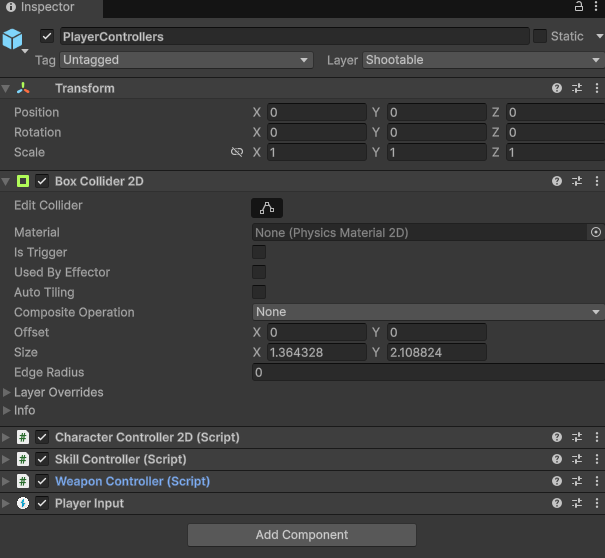
I mean these https://i.imgur.com/cYbDHtL.png
 polar acorn
If your code isn't a MonoBehaviour it isn't a component
silver fern
as you can see there are script components and other components
polar acorn
silver fern
I mean these https://i.imgur.com/cYbDHtL.png
Components
Enums are not components
Enums are types
like int and string and Vector3 and whatnot
naive pawn
silver fern
as you can see there are script components and other components
they are all components
the components are defined inside scripts
naive pawn
because those are from your scripts
polar acorn
silver fern
then why does it say script on only the ones at the bottom
Because those components are defined in scripts as opposed to being built in
naive pawn
the others are from packages or built-in, where it isn't really touchable as a file
polar acorn
silver fern
this is confusing
"Why are all of my squares saying they are rectangles when you're all trying to tell me rectangles are not squares"
Scripts can contain components, but they are not the same thing
public class Thing
{
  public int Num;
}
Slap this in a .cs file and you have yourself a bonafide script-that-doesn't-contain-a-component
silver fern
polar acorn
"Why are all of my squares saying they are rectangles when you're all trying to ...
the confusing thing is that some are explicitly labeled as rectangle while others are not and I'm supposed to infer they are both rectangles
polar acorn
silver fern
the confusing thing is that some are explicitly labeled as rectangle while other...
Because there are some components that are not defined in scripts. They're part of the engine. There is no Collider.cs file in your project
it's a Unity component
that is not a script
silver fern
chris just said they are all scripts
anyway, so I make a new script in the script folder with all the other scripts, and define only the enum in it yes?
polar acorn
naive pawn
the others are from packages or built-in, where it isn't really touchable as a f...
No actually they literally just said the opposite
polar acorn
silver fern
https://discord.com/channels/489222168727519232/497874004401586176/1399418838969...
You need to understand that saying "Scripts contain components" is not the same thing as saying "Scripts are components".
naive pawn
silver fern
https://discord.com/channels/489222168727519232/497874004401586176/1399418838969...
components live inside scripts
the components that are marked (Script) are those from your scripts
polar acorn
"Components live inside scripts" != "Components can only come from scripts"
This is programming. Statements mean exactly what they say and nothing more
naive pawn
polar acorn
"Components live inside scripts" != "Components _can only_ come from scripts"
(that is what i'm saying though, there are scripts for built-in or package components. they just aren't accessible as scripts, as in files of code, within the context of your project, so it's not useful to refer to them as scripts)
polar acorn
The following are axiomatically true and do not conflict:
- Components can be attached to GameObjects
- Components can be defined in scripts
- Components can be provided by Unity
- Scripts can contain components
- Scripts do not need to contain components
polar acorn
naive pawn
(that is what i'm saying though, there are scripts for built-in or package compo...
Some of them exist in DLLs which are compiled C++ code, they're not really "scripts" in that they're just a sort of amalgam of machine code rather than discrete script files within it
naive pawn
polar acorn
Some of them exist in DLLs which are compiled C++ code, they're not really "scri...
do they not all have c# interfaces?
ie unity's Collider.bindings.cs
polar acorn
I don't know if I'd count a file containing basically pure externs as "A C# script" but at this point we're just being pedantic and probably confusing the matter even more
naive pawn
true
polar acorn
Just a file with the enum in it
Not inside a class in the file
just file containing enum
silver fern
ok. normally, to reference another script, I'd use GetComponent(), but since this is not a component, how do I best use the enum in the controller script?
 rich adder
silver fern
ok. normally, to reference another script, I'd use GetComponent(), but since thi...
rich adder
silver fern
ok. normally, to reference another script, I'd use GetComponent(), but since thi...
when you make an enum its kinda its own type
enum CoolEnum {One, Two, Three}```
// any script
private CoolEnum myCoolenum;
void Foo(){
myCoolEnum = CoolEnum.One``` etc.
naive pawn
silver fern
ok. normally, to reference another script, I'd use GetComponent(), but since thi...
GetComponent doesn't reference another script, it gets an instance of a component
the instances of an enum type are its members
"referencing" is just.. using its name
silver fern
rich adder
```cs
enum CoolEnum {One, Two, Three}```
```
// any script
private CoolEnum myCo...
so it will just automatically know to use the enum definition in another file even if that file is not referenced anywhere?
rich adder
^ enum is not a reference type, a numerical type (its literally in the name)
naive pawn
silver fern
so it will just automatically know to use the enum definition in another file ev...
unless you're using your own asmdefs, your entire project is within the same assembly
have you been importing the files for your other components?
silver fern
well there was no need to since they're all self contained
but they have stuff like using UnityEngine;
naive pawn
0% interop 100% modularity is insane
silver fern
😟
naive pawn
but anyways yeah to finish out that thought - in c#/java, there is a concept of namespaces (packages for java), where everything in a given namespace can use everything else in the same namespace directly
rich adder
silver fern
but they have stuff like `using UnityEngine;`
enum can also be in a namespace if designed as such you'd need also its containing namespace
namespace AwesomeSpace {
enum CoolEnum { etc .}
}
//script
private CoolEnum coolEnum; // not found unless you do using AwesomeSpace
or
private AwesomeSpace.CoolEnum coolEnum```and "no namespace" is also its own namespace, the anonymous namespace
(unlike js/ts/py where it's just files)
naive pawn
(in c#/java)
rich adder
lets do most* ig lol
silver fern
I didn't think it would add the contents of that file to the codespace if I didn't explicitly tell it to
naive pawn
rich adder
lets do most* ig lol
really? it seems like half languages ive seen need to import stuff directly from files
rich adder
I'm just assuming tbh. I only knew a handful and mostly are C family anyway
except I guess for Header Files if you chose so in c++ ?
silver fern
most of the ones I know need explicit imports
rich adder
silver fern
most of the ones I know need explicit imports
they are files but whats inside the file anyway is more code lol
imports and namespaces are pretty similar
or maybe more of assemblies thing ig
naive pawn
implicit sharing, no mention of files, import gets all
c# & friends - namespaces
java & friends - packages
file names, import gets all
ruby, c/c++
file paths, import gets all
sh
file paths, import gets specified
js/ts, py
apparently it's not something very generalizable, the more i think about it
silver fern
alright, thanks a lot everyone
Is there a way to find a specific subcomponent of a game object from another component on a different branch of the game object tree?
naive pawn
a component of a child?
subcomponent would mean it's part a component, that's not a thing
silver fern
I'm in PlayerControllers and I want to get the position of ProjectileSpawner
 rich adder
silver fern
I'm in PlayerControllers and I want to get the position of ProjectileSpawner
rich adder
silver fern
I'm in PlayerControllers and I want to get the position of ProjectileSpawner
why not just make a Transform field for it and assign it
polar acorn
silver fern
I'm in PlayerControllers and I want to get the position of ProjectileSpawner
They're both part of the same prefab, so just make a serialized or public variable and drag it in
polar acorn
If you have the option to drag something in you should do that
 fair nymph
I don't see any bricks even though I moved the camera
polar acorn
fair nymph
I don't see any bricks even though I moved the camera
Do they appear in the hierarchy
silver fern
I'd probably add a bunch of print()s to make sure all the values are what they're supposed to be
 graceful abyss
Could someone please tell me what help file to read to make a timer to count from 0-60 over 1 minute?
rich adder
graceful abyss
Could someone please tell me what help file to read to make a timer to count fro...
just substract in update or coroutine, with Time.deltaTime
there is no "help file" for a timer, there's plenty of ways you can google how to do it
polar acorn
graceful abyss
Could someone please tell me what help file to read to make a timer to count fro...
Time.deltaTime is the time in seconds the last Update took to execute, so if you add that to a variable every Update, it'll be the time in seconds that has passed since you started counting
rich adder
float  currentTime ;
void Start() { currentTime = 60 }

void Update(){
currentTime -=  Time.deltaTime;
if(currentTime <= 0 ) //timer done```I meant like the scripting reference file to something that would have helped me do it but thanks guys
rich adder
graceful abyss
I meant like the scripting reference file to something that would have helped me...
well there is this as mentioned
https://docs.unity3d.com/ScriptReference/Time-deltaTime.html
but it has more uses than a Timer so you're asking a specific usecase that docs don't cover sometimes
 rough granite
graceful abyss
I meant like the scripting reference file to something that would have helped me...
rough granite
graceful abyss
I meant like the scripting reference file to something that would have helped me...
I doubt there is a specific one for counting from 0 to 60 (btw what nav gave is counting from 60 to 0)
graceful abyss
rough granite
I doubt there is a specific one for counting from 0 to 60 (btw what nav gave is ...
yeah I saw it, thankyou
 scarlet aspen
Hello sorry for the dumb question, I recently started doing c# scripting on unity but honestly I was following a series that explained but was quite confusing of Kodeco... Can anyone recommend me a good youtuber to follow some videos or anything else to start learning?
slender nymph
!learn
 eternal falconBOT
:teacher: Unity Learn ↗
Over 750 hours of free live and on-demand learning content for all levels of experience!
scarlet aspen
I think the learn beginner scripting is a little bit confusing too, am I wrong?
naive pawn
i mean.. if you don't have any prior experience, then it is, just, a whole new thing to learn
scarlet aspen
You're also right...
 fierce shuttle
scarlet aspen
I think the learn beginner scripting is a little bit confusing too, am I wrong?
fierce shuttle
scarlet aspen
I think the learn beginner scripting is a little bit confusing too, am I wrong?
If your finding the beginner scripting stuff challenging, you can try w3schools C# course or Microsoft Learn C# for Beginners, both will walk through pure C# outside an engine with terminals, topics and quizzes for you to practice the language on its own, when you feel familiar enough with the basics, going back to Unity Learn might be a bit easier
naive pawn
there are resources pinned in this channel as well
scarlet aspen
fierce shuttle
If your finding the beginner scripting stuff challenging, you can try w3schools ...
Which is complete between w3schools and microsoft learn?
polar acorn
scarlet aspen
Which is complete between w3schools and microsoft learn?
You don't have to pick one
Just do both
scarlet aspen
Yeah why not
fierce shuttle
scarlet aspen
Which is complete between w3schools and microsoft learn?
Both are "complete" in the sense that they cover all of the basics of the language, but yeah, try both out, or even some of the other resources pinned as well, any and all may be helpful to help you or explain the same thing in different ways for understanding the language
 chilly wolf
Hello again, i'm trying to set up mouse input to switch between 3rd person perspective camera and orthographic (isometric).
scroll up for third-person
scroll down for isometric
I’m using cinemachine and i made three scripts: CameraManager, CameraRegister, and PlayerCamera. The input works, and the transition between cameras plays nicely. Weird part is that when i scroll down to switch to the isometric camera, the projection stays in perspective instead of switching to orthographic. Any idea why that might be happening?
rich adder
chilly wolf
Hello again, i'm trying to set up mouse input to switch between 3rd person persp...
no idea whats happening without showing the code + setup
chilly wolf
I will show you, just a second
 hexed terrace
!code - use a paste site
eternal falconBOT

Posting code
📃 Large Code Blocks
Use links to services like:
https://paste.mod.gg/, https://hastebin.skyra.pw/, https://paste.ofcode.org/, https://paste.myst.rs/
📃 Inline Code
Surround code with three backquotes. Not quotation marks.
To format as C#, add cs to the first line:
```cs
// Your code here
```
Add a comment with a line number if there is an error message.
chilly wolf
Don’t know how this site works properly, but i think it’s possible to see the three scripts: https://paste.mod.gg/xbsmhpzmncbn
The camera setup in the spectator is pretty simple, tho. I have assigned the main camera with the CameraManager script and the two other cameras: "Cinemachine3rdPerson" and "CinemachineIsometric", each with the CameraRegister script. The 3rdPerson camera is in perspective, and the Isometric is in orthographic.
Edit: While looking to write this to explain to you, i found the problem (bruh). There’s an option for Mode Override in the Lens config. Anyway, I’ll show it to you anyway so you can see if it’s properly done.


A tool for sharing your source code with the world!
 errant umbra
 autumn compass
Ok, thanks
rich adder
<@&502884371011731486>
 north kiln
!mute 1117165952241516564 3d not sure what this spam is about but do it again and you're gone.
eternal falconBOT
 I couldn't find that user
north kiln
Bizarre
polar acorn
Is he gone? Or was he never here to begin with? [X-Files theme plays]
 rugged beacon
is there a way to change a graphic alpha like graphic.color.a = alpha
rather than create a new color
rich adder
rugged beacon
is there a way to change a graphic alpha like graphic.color.a = alpha
rather tha...
you're just getting a copy of that value type when you access the property
rugged beacon
yea, just an example, want to know if there a way to do it
polar acorn
color = new Color(color.r, color,g, color.b, alpha)
 wintry quarry
rugged beacon
yea, just an example, want to know if there a way to do it
wintry quarry
rugged beacon
yea, just an example, want to know if there a way to do it
with an extension method you could set it up like graphic.color = graphic.color.WithAlpha(.5f); for example.
rugged beacon
nvm goit it
 wintry quarry
But no there's no way to assign it without assigning the whole color
other than making a helper method
rich adder
rugged beacon
yea, just an example, want to know if there a way to do it
getting a copy means its not the same one
wintry quarry
rugged beacon
nvm goit it
this is a very different thing than just instantly setting the alpha btw
rugged beacon
perhaps but this will do for now fr
 acoustic belfry
how i can check if a 2dobject's rigidbody is still?
acoustic belfry
idk, i was thinking on
rb2d.linearvelocity == vector2.zero
but i dont know if that's not very optimized
 visual fable
zoned out and wrote an hour of spaghetti code
idk how it works so well but it sucks
 polar acorn
acoustic belfry
idk, i was thinking on
rb2d.linearvelocity == vector2.zero
but i dont know if t...
polar acorn
acoustic belfry
idk, i was thinking on
rb2d.linearvelocity == vector2.zero
but i dont know if t...
Profile it and see
If you're worried about performance, profile it and check
polar acorn
visual fable
Immediately I see that you should just use one overlapAll with a mask containing all of those layers and then check the layers of each thing you detect
rich adder
acoustic belfry
but in theory rb2d.linearvelocity == vector2.zero should do it, right?
debug.log the value and see if thats acceptable or better to create a min threshold
visual fable
polar acorn
Immediately I see that you should just use one overlapAll with a mask containing...
yeah probably a good idea to do, thanks for the feedback!
acoustic belfry
rich adder
debug.log the value and see if thats acceptable or better to create a min thresh...
min threshold?
 eager elm
visual fable
eager elm
visual fable
Have fun extending that code!
visual fable
update one this, changed one thing, dont know what it was, and now every single item is cheese
 timber tide
visual fable
timber tide
visual fable
Few ideas on minimizing, your overlap check can be singled into a single check with a filter that has all of those layers. You can then iterate over the return values to compare to what they might be.
rich adder
acoustic belfry
min threshold?
yea like get the sqrMag or something, then do if(val <= minValue && val >= 0) // its stopped
Debug.Log the velocity and see what values you're getting when you think its stopped then create a variable for that as min or its a max.. however you want to think of it ig
timber tide
timber tide
Few ideas on minimizing, your overlap check can be singled into a single check w...
https://docs.unity3d.com/ScriptReference/Physics2D.OverlapCircle.html
Would be the method with the contact filter. I'd consider this the default method you should be using anyway as you're presented with a lot more options
 eager elm
Is there a way to add interfaces to Unity classes? Like IHasColor to SpriteRenderer and Image.
rich adder
nah
 teal viper
eager elm
Is there a way to add interfaces to Unity classes? Like IHasColor to SpriteRende...
teal viper
eager elm
Is there a way to add interfaces to Unity classes? Like IHasColor to SpriteRende...
That would require modifying an already compiled code. Which is not really legal.
 eager spindle
eager elm
Is there a way to add interfaces to Unity classes? Like IHasColor to SpriteRende...
eager spindle
eager elm
Is there a way to add interfaces to Unity classes? Like IHasColor to SpriteRende...
why not inherit the class and add the interface?
public class SpriteRendererHasColor : SpriteRenderer, IHasColor {
  public bool HasColor(Color _color) => color == _color;
}
 brave shadow
What exactly does "Layer" do differently from "Sorting Layer"?
 rich adder
brave shadow
What exactly does "Layer" do differently from "Sorting Layer"?
rich adder
brave shadow
What exactly does "Layer" do differently from "Sorting Layer"?
sorting 2D elements vs general layers / physics
brave shadow
so if Sorting Layer affects wich elements are layered on top, does that mean that Sorting Layer doesn't affect, like, collision detection and non-Sorting Layer DOES affect which objects can collide and interact?
rich adder
brave shadow
so if Sorting Layer affects wich elements are layered on top, does that mean tha...
yeah for the most part Sorting Layers are for 2D visual items
brave shadow
thanks, that's useful information.
 ripe galleon
does someon eknow how i could fix this error?

 ivory bobcat
What's a pause menu?
ripe galleon
when you press pause
ivory bobcat
What is the object in the scene
ripe galleon
 wintry quarry
ripe galleon
does someon eknow how i could fix this error?
wintry quarry
ripe galleon
does someon eknow how i could fix this error?
Did you attach a PlayerInput component to the pause menu object or something?
Yeeep lol
There's no reason your pause menu should have a PlayerInput component
ripe galleon
it´s to switsch the input, so when i press pause the player can´t do any inputs anymore
wintry quarry
There should be exactly one PlayerInput component in the scene per human player of the game
ripe galleon
it´s UI
i also have a player input
wintry quarry
ripe galleon
it´s to switsch the input, so when i press pause the player can´t do any inputs ...
Disable the main PlayerInput or switch to a different action map.
wintry quarry
ripe galleon
it´s UI
i also have a player input
I know it's UI
PlayerInput doesn't belong on it
Remove it
ripe galleon
sorry for writing like that, i am a beginenr so i don´t know yet how to express myself well 🙏
i will see how i can do that 🫡
wintry quarry
ripe galleon
does someon eknow how i could fix this error?
Basically this error is because it's trying to find a set of devices to assign to the new player you added to the game
It's assuming you're doing local multiplayer
Because that's the only situation in which you would have more than one PlayerInput component
 nova kite
heyy! i'm learning state machines and im confused about something, why do we need this(1st picture) to define the functions that the state uses if we are defining them every time again in each of the actual states(2nd picture), seems redundant to me idk like why not just define them in the states only

 teal viper
nova kite
heyy! i'm learning state machines and im confused about something, why do we nee...
teal viper
nova kite
heyy! i'm learning state machines and im confused about something, why do we nee...
This is inheritance/polymorphism. It's important, because without this you would always need to deal with specific types. With inheritance, you can treat all the different states as their base class.
nova kite
but i need to treat all of them different at the base class anyway no? override them
so why declare them in the first place outside XD
north kiln
I'm not sure why this isn't an interface
but it's so you can pass around many objects of type State without having to know what specific sub-type they are
teal viper
nova kite
but i need to treat all of them different at the base class anyway no? override ...
Not in the system that processes many of these states. You don't want to write a separate state machine logic for each different state you have.
nova kite
but i am because i override them so technically it is specific to that state no?
nova kite
north kiln
but it's so you can pass around many objects of type State without having to kno...
hmm wait so the stateMachine script would only take Enter for example? or would it be PlayerIdleState.Enter
because then again it's the specific Enter for that script
teal viper
nova kite
but i am because i override them so technically it is specific to that state no?
Each of the inheriting types can implement different logic for the overriden methods. When state.Enter would be called, the overriden logic would be executed.
nova kite
ohhh i see! so only the base Method would be called but youd have to pass the correct state to override it?
like Enter(PlayerIdleState)
north kiln
the state machine holds onto instances of State, and it doesn't know what type of state that is because that's implementation-specific
void PerformLogic(State currentState) { ... use currentState ... }
When currentState.Enter() is called then whatever type the instance of currentState actually is will have its override called
nova kite
i see so you pass the state for it to execute it
ouuuu i see!
thank you both! much clearer now😄
 frigid sequoia
This is a silly thing, but is there like any difference from calling something from inside the class than from outside of it?
Like is this a thing I should do if I am to call this over and over?

Or doesn't matter at all?
wintry quarry
frigid sequoia
This is a silly thing, but is there like any difference from calling something f...
It certainly depends exactly what "the thing" is.
There's no performance difference in terms of "outside vs inside" but if you are repeatedly accessing a property or method or series of variables or a struct, you're potentially wasting cpu cycles calling a function or copying structs.
frigid sequoia
So you mean like stuff that would need to be calculated on each call or what?
What do you mean with accessing a property repeatedly can waste cpu cycles?
timber tide
Depends if the property returns a value or a reference
Usually more of a problem if you've some giant structs of data
which is why classes are superior ;)
frigid sequoia
So, if the property points like to another instance of a class, that is a reference and can be an issue?
north kiln
- a property is a method, calling methods incurs a cost if they haven't been inlined
- if the property has any logic in it, then you're incurring that cost every time it's invoked
But more generally code is easier to read when you're not calling Blah.Instance multiple times in one method?
frigid sequoia
north kiln
But more generally code is easier to read when you're not calling `Blah.Instance...
In some cases I do read it easier if I am reading the whole reference, cause, you know, it's pointing to a class I recognize immediately and is highlighted, not a variable I just made locally
north kiln
That just sounds like something you should get better naming conventions for if it's a problem for you
frigid sequoia
But, what properties would incur a logic to get access to? Like does it have to do with the type of the property?
north kiln
Sometimes singletons, especially those in Unity have all sorts of logic in their getters; surely I don't need to go through it
frigid sequoia
frigid sequoia
Like is this a thing I should do if I am to call this over and over?
So, I should be doing this for example in case I need to reference something from a singleton many times?
north kiln
If you feel like that will make a difference in your scenario, then yes
frigid sequoia
Mmm, not sure how I can tell when that would make a difference....
 humble bay
Hi, Im having a problem on the unity mouse lock state which is being ignored and runs further script execution
 grand snow
then lockState must equal locked?
have you used a debugger to verify?
humble bay
It doesnt correctly check the lock state in editor
grand snow
in editor you can unlock any time with esc so perhaps it acts weirdly.
Ideally you track this state yourself (e.g. is a menu open?)
naive pawn
humble bay
Hi, Im having a problem on the unity mouse lock state which is being ignored and...
don't use deltaTime on mouse input - it's already per-frame
 latent mortar
is this many notes necessary or overkill?
A tool for sharing your source code with the world!
(note for every line)
humble bay
grand snow
in editor you can unlock any time with esc so perhaps it acts weirdly.
Ideally y...
I can unlock ofcourse
 frosty hound
latent mortar
https://paste.mod.gg/
frosty hound
latent mortar
https://paste.mod.gg/
You didn't share your code, you just shared the website.
humble bay
I mean when the mouse is not locked in the game and I hover it rotates my camera
frosty hound
And no, adding a comment to every line is unnecessary.
humble bay
Rotation
latent mortar
frosty hound
You didn't share your code, you just shared the website.
oh
naive pawn
gotta hit save first
latent mortar
oops
rough granite
frosty hound
And no, adding a _comment_ to every line is unnecessary.
Cant talk much for adding note since I've not written one in the thousands of lines of code for my game but yeah one per line is just dumb
latent mortar
that doesnt look right
rough granite
yeah at this rate it takes double the time to write the comments than to code
writing more comments than the ai does
latent mortar
rough granite
yeah at this rate it takes double the time to write the comments than to code
yeah it did..
naive pawn
like this, this is just completely unnecessary
//sets the boolean thingy to false when function is called
i can get some of them explaining stuff, but this is pushing it
latent mortar
the thing with coding is that i understand alot of the functions and variables and loops etc but idk how to put them all together and make it work
latent mortar
naive pawn
like this, this is just completely unnecessary
> `//sets the boolean thingy to f...
yeah i lowkey started losing my mind
naive pawn
(also you're using both .transform and .gameObject on powerUpIndicator.
right now you have it as GameObject, so .gameObject is unnecessary.
)
naive pawn
latent mortar
the thing with coding is that i understand alot of the functions and variables a...
yeah, that's pretty much what programming actually is, solving problems, not just telling a computer what to do
latent mortar
naive pawn
yeah, that's pretty much what programming actually is, solving problems, not jus...
thats the hard part to know cuz no tutorials really teach you how to string things together
naive pawn
in general, comments are not what is being done, but why it's being done - the code should speak for itself in terms of what it's doing
naive pawn
latent mortar
thats the hard part to know cuz no tutorials really teach you how to string thin...
right, might be because this isn't something you can learn by reading or listening - this is something you have to practice
(i'd expect some to try though, damn...)
latent mortar
also uhh some of the comments are a lil weird jsut sayin
latent mortar
naive pawn
right, might be because this isn't something you can learn by reading or listeni...
yeah its usually where i get stuck
like sometimes idk if i use vector3 or transform.position etc
naive pawn
why would you even have this comment
//no explanation needed :////
those 2 things are.. not comparable
latent mortar
naive pawn
why would you even have this comment
> `//no explanation needed :////`
the first comment under IEnumerator is uhh
latent mortar
naive pawn
those 2 things are.. not comparable
its a work in progress
rough granite
naive pawn
right, might be because this isn't something you can learn by reading or listeni...
oi dont lump us all as non tryers, i spent a month (and about 5-8 hours each day) on 3 scripts that tied together
naive pawn
this is also just noise
//makes a variable that will be used in the function
naive pawn
rough granite
oi dont lump us all as non tryers, i spent a month (and about 5-8 hours each day...
i meant i'd expect some tutorials to try teaching the "problem solving" aspect of programming
rough granite
oh :/
til that class = variable (im sorry not trying to be rude just found it funny)
 naive pawn
latent mortar
like sometimes idk if i use vector3 or transform.position etc
naive pawn
latent mortar
like sometimes idk if i use vector3 or transform.position etc
sounds like you're thinking in code too much for now?
you gotta figure out how you want stuff to behave first, turn that into logic, and then turn that into code
btw
collision.gameObject.GetComponent<Rigidbody>()
this can just becollision.rigidbody
latent mortar
naive pawn
sounds like you're thinking in code too much for now?
you gotta figure out how y...
Oooo I like ur way of thinking
latent mortar
naive pawn
btw
> `collision.gameObject.GetComponent<Rigidbody>()`
this can just be `collisi...
Oh
Thats good to know
 rocky canyon
naive pawn
btw
> `collision.gameObject.GetComponent<Rigidbody>()`
this can just be `collisi...
rocky canyon
naive pawn
btw
> `collision.gameObject.GetComponent<Rigidbody>()`
this can just be `collisi...
TIL.. good tip
 foggy marten
Weird question, but how would you return an index of the object from a multidimensional array?
rough granite
could you give an example of what you're asking
slender nymph
nobody here is going to tell you anything different than what you were told in #💻┃unity-talk
use the courses on the unity !learn site like you've been instructed
eternal falconBOT
:teacher: Unity Learn ↗
Over 750 hours of free live and on-demand learning content for all levels of experience!
 sinful pollen
slender nymph
nobody here is going to tell you anything different than what you were told in <...
sinful pollen
slender nymph
nobody here is going to tell you anything different than what you were told in <...
alright
 lofty mirage
foggy marten
Weird question, but how would you return an index of the object from a multidime...
lofty mirage
foggy marten
Weird question, but how would you return an index of the object from a multidime...
If it's dimension 2, it's like arr[0][0] for 1st row, 1st col
lofty mirage
foggy marten
Weird question, but how would you return an index of the object from a multidime...
 naive pawn
lofty mirage
If it's dimension 2, it's like arr[0][0] for 1st row, 1st col
naive pawn
lofty mirage
If it's dimension 2, it's like arr[0][0] for 1st row, 1st col
that's an array of arrays, not a multidimentional array
also they're asking about the index, not the access
lofty mirage
Well multidimensional is n >= 2 no?
Here I explained for n=2
because it's the most common case
naive pawn
c# has different concepts for multidimensional arrays and nested arrays
multidimensional arrays would be like array[i, j]
nested arrays would be like array[i][j]
but that's still not what they asked about - they're asking about how to represent the indices
lofty mirage
naive pawn
multidimensional arrays would be like `array[i, j]`
nested arrays would be like ...
oh yes you're right, array[i, j] instead of array[i][j] yes
lofty mirage
foggy marten
Weird question, but how would you return an index of the object from a multidime...
What is the type of your multidimensional array? (and how many dimensions, 2?)
naive pawn
bro they're asking about indices...
rough granite
naive pawn
bro they're asking about indices...
i feel like the question would still be valid
naive pawn
doubt it tbh.. what else would it be other than a tuple or maybe a struct if the indices had meanings
foggy marten
lofty mirage
What is the type of your multidimensional array? (and how many dimensions, 2?)
Sorry for not responding for so long, but to answer your question - it's 2D
rough granite
cause if the size is small like a 2d array and it was a string so srting[,] and each value was different you could just loop through it till you have a match but if you have a huge array of ints you couldn't really cause the chances of 2 indices equaling the same number are there
naive pawn
i don't see how that factors in to the question at all
the part that would make a difference is this
each value was different
not the types
and honestly i don't think that part really makes a difference either
rough granite
foggy marten
Sorry for not responding for so long, but to answer your question - it's 2D
what's the use case?
 eternal needle
it doesnt make a difference what the type is. if they relied on these values being unique, their values would be unique.
naive pawn
naive pawn
doubt it tbh.. what else would it be other than a tuple or maybe a struct if the...
just (int, int) or maybe some struct of 2 ints
maybe Vector2Int if you want to treat the array as a space - to find if stuff is in a RectInt or get Distances or stuff lol
rough granite
sorry what's tuple mean?
foggy marten
rough granite
what's the use case?
For finding and returning the object's index in a for loop
naive pawn
rough granite
sorry what's tuple mean?
tuples are a type in c#, just a sequence of other values with optional names
foggy marten
foggy marten
For finding and returning the object's index in a for loop
I've managed to find a solution myself, but I also kinda hate it
naive pawn
please don't be out
rough granite
foggy marten
For finding and returning the object's index in a for loop
couldn't you use a dictionary then and find the key from the value?
naive pawn
rough granite
couldn't you use a dictionary then and find the key from the value?
not really what dicts are good at and that still doesn't solve their actual question
how do you represent the key, in that case
rough granite
vector2 and the value be gameobject but yeah fair
naive pawn
not Vector2 in this situation where they're all ints
eternal needle
foggy marten
I've managed to find a solution myself, but I also kinda hate it
you should share that solution then, because we don't know what you hate about it in the first place
naive pawn
naive pawn
just `(int, int)` or maybe some `struct` of 2 ints
maybe `Vector2Int` if you wan...
@foggy marten just boils down to what the array represents i guess
eternal needle
I would start with looping through and returning a Vector2Int, i assume you're using this for some grid like structure
wintry quarry
foggy marten
For finding and returning the object's index in a for loop
Once you find the item, return the index you're looking at
naive pawn
rough granite
vector2 and the value be gameobject but yeah fair
(why do you assume the value would be gameobject 🤨)
naive pawn
wintry quarry
Once you find the item, return the index you're looking at
context: they have a 2d array and they were originally asking about how to return the index
rough granite
naive pawn
(why do you assume the value would be gameobject 🤨)
they said objects
naive pawn
which is not the same as gameobject
foggy marten
eternal needle
you should share that solution then, because we don't know what you hate about i...
Basically, I use a script for maze generation, where it's layout is created in a for loop, and then it creates a path by going from one cell to another, knocking down walls along the way
rough granite
could you provide a code snippet?
naive pawn
that was satisfying as hell
eternal needle
foggy marten
I've managed to find a solution myself, but I also kinda hate it
i meant the share the solution you talked about here. I cant imagine this is going to be much different from 2 for loops and just returning when the arr[i,j] == something
naive pawn
naive pawn
<@902589182835306518> just boils down to what the array represents i guess
probably just Vector2Int then yeah
foggy marten
rough granite
could you provide a code snippet?
Can you remind me of websites where I can paste the code? I forgor, sry
rough granite
!code
eternal falconBOT
Posting code
📃 Large Code Blocks
Use links to services like:
https://paste.mod.gg/, https://hastebin.skyra.pw/, https://paste.ofcode.org/, https://paste.myst.rs/
📃 Inline Code
Surround code with three backquotes. Not quotation marks.
To format as C#, add cs to the first line:
```cs
// Your code here
```
Add a comment with a line number if there is an error message.
naive pawn
where's that Equals coming from
foggy marten
foggy marten
https://paste.ofcode.org/hMwjUx3W24BM7FDhi87ge5
My main problem with the original code, was that it only worked properly with one type of prefab and it could not be scaled if I had a different prefab of different size (bigger or smaller)
rough granite
naive pawn
where's that Equals coming from
Linq i would assume
though i know i shouldn't
rough granite
eternal needle
Object.Equals...
there's no Object.
if (Equals(cellX, mazeGrid[x, z].transform.position.x) && Equals(cellZ, mazeGrid[x, z].transform.position.z))
It's from the System library
naive pawn
rough granite
there's no Object.
if (Equals(cellX, mazeGrid[x, z].transform.p...
MonoBehaviour extends Object
slender nymph
rough granite
there's no Object.
if (Equals(cellX, mazeGrid[x, z].transform.p...
doesn't need it because it inherits from Object
naive pawn
rough granite
there's no Object.
if (Equals(cellX, mazeGrid[x, z].transform.p...
...honestly, i think you should just sit down at this point. you aren't helping
rough granite
naive pawn
...honestly, i think you should just sit down at this point. you aren't helping
nuh meanie
naive pawn
it will make our jobs easier
foggy marten
eternal needle
Object.Equals...
Didn't really wanna use '==' operator all the time
naive pawn
why? it's the same thing
foggy marten
dunno
naive pawn
if it's just stylistic preference just say that
foggy marten
prefrence ig? it looks neater
naive pawn
aight
you're doing float comparison, that might not be consistent
but also it seems like you want to do a reverse mapping, via the transform position, which is at a different scale
that's where your issue seems to be?
foggy marten
Kinda
naive pawn
instead of having to manage/translate the transform.position using the width and height into indices, just have MazeBlock remember what index it's from, so you have a proper reverse mapping
with that i don't think you'd need FindMazeBlock at all, you could just index into the array
eternal needle
one thing i notice is that you're doing is this
var cellX = (int)currentCell.transform.position.x;
which removes the decimal. then sending it to be compared by the original float value
mazeGrid[x, z].transform.position.x
naive pawn
by the way, [SerializeField] private int mazeWidth, mazeHeight = 3; only sets the default for mazeHeight.
foggy marten
eternal needle
one thing i notice is that you're doing is this
`var cellX = (int)currentCell.tr...
Yeah, forgot to delete that, as I was testing the for loop with the original 1 scaled prefab
foggy marten
naive pawn
instead of having to manage/translate the `transform.position` using the width a...
....Now I just feel dumb
eternal needle
The value is serialized so if you see 3 in inspector, its still 3. Your default value is just 0 for maze width
Default as in when you create a new component
naive pawn
nah, you'd need int a = 3, b = 3; for that
it's not actually a logical issue, just pointing out that it doesn't say what you probably think it says
foggy marten
naive pawn
instead of having to manage/translate the `transform.position` using the width a...
Would saving the index from a 2D array into a Vector2 variable be a good practice for this case?
naive pawn
no, because Vector2 uses floats
it could be a Vector2Int, or a tuple, or a struct, as mentioned before
there's not really a best practice, this is kind of a specific situation
foggy marten
naive pawn
it could be a Vector2Int, or a tuple, or a struct, as mentioned before
I like the sound of Vector2Int - I'll go with that for now
naive pawn
naive pawn
just `(int, int)` or maybe some `struct` of 2 ints
maybe `Vector2Int` if you wan...
(reasons to use a Vector2Int mentioned here - if they don't apply, then your choice doesn't matter too much)
oh also since this is just storing the index rather than having to return them as a single value, there is a 4th option of storing each dimension separately
just preference things though
 craggy depot
Hey yall, which Ai is best for unity instructions?
I’m going insane with ChatGPT trying to make a UI
silver fern
Is there a way to have my bullet be able to call a method in the CharacterController script of the target that was hit without specifying the namespace?
polar acorn
craggy depot
Hey yall, which Ai is best for unity instructions?
None. !learn
eternal falconBOT
:teacher: Unity Learn ↗
Over 750 hours of free live and on-demand learning content for all levels of experience!
polar acorn
silver fern
Is there a way to have my bullet be able to call a method in the CharacterContro...
I'm not sure what you mean by "without specifying the namespace"
craggy depot
polar acorn
None. !learn
I am using unity learn, but I have a project to submit, and my pace is not fast enough 😭
 edgy pier
craggy depot
I’m going insane with ChatGPT trying to make a UI
edgy pier
craggy depot
I’m going insane with ChatGPT trying to make a UI
AI is only good if you somewhat know what its doing.
craggy depot
edgy pier
AI is only good if you somewhat know what its doing.
I do have a basic idea of what it’s doing, but not complete
polar acorn
craggy depot
I am using unity learn, but I have a project to submit, and my pace is not fast ...
Then you should have started sooner
silver fern
polar acorn
I'm not sure what you mean by "without specifying the namespace"
I was planning on having a CharacterController script on each character that handles taking damage from the bullet, but if I have two different scripts with the same name on two different operators, it complains that the global namespace already has a definition for that script. But if I add a namespace for each one, then GetComponent() wants me to specify the namespace
craggy depot
polar acorn
Then you should have started sooner
Well I only got onto the project once it had already began
Is there really no way?
polar acorn
silver fern
I was planning on having a CharacterController script on each character that han...
but if I have two different scripts with the same name on two different operators
Probably don't
If the scripts do different things, call them different things
silver fern
polar acorn
> but if I have two different scripts with the same name on two different operat...
then how do I make the bullet call the method that deals damage if each character controller has a different name?
polar acorn
silver fern
then how do I make the bullet call the method that deals damage if each characte...
How would having two different scripts with the same name in any way solve this problem?
 rare stag
yo
silver fern
polar acorn
How would having two different scripts with the same name in any way solve this ...
I was doing hit.getComponent<CharacterController>.dealDamage(10);
in the bullet
craggy depot
Ok let me ask it here if it’s possible or will be difficult, so I want to make a side panel, with three different tabs, once I press on one, I want that panel to show in the same sidebar (basically switching tabs) that and when I click on something (there are tons of pieces) I want a small pop up to show what part that is
silver fern
hit being the hit object
polar acorn
silver fern
I was doing `hit.getComponent<CharacterController>.dealDamage(10);`
This would get the CharacterController component, which, if that's the Unity component, doesn't have a dealDamage function
https://docs.unity3d.com/ScriptReference/CharacterController.html
polar acorn
craggy depot
Ok let me ask it here if it’s possible or will be difficult, so I want to make a...
C# is Turing-Complete. The answer to any "is it possible to" question is always "yes"
silver fern
polar acorn
This would get the `CharacterController` component, which, if that's the Unity c...
oh, mine is actually called CharacterController2D, I wrote it myself
polar acorn
silver fern
oh, mine is actually called CharacterController2D, I wrote it myself
Then you would get that component
silver fern
and it does have that methond
silver fern
polar acorn
Then you would get _that_ component
well thats what I did
silver fern
polar acorn
Then you would get _that_ component
I am doing hit.getComponent<CharacterController2D>.dealDamage(10);
polar acorn
silver fern
well thats what I did
So if you want to ask a question about a line of code it's usually a good idea to share what the code actually is
craggy depot
polar acorn
C# is Turing-Complete. The answer to _any_ "is it possible to" question is alway...
But I mean how do I go about setting up the canvas and ui
Since for some reason, the button works once (shows the panel) but doesn’t hide it again when pressed again
silver fern
that is the code I just forgot to type the 2D here
polar acorn
silver fern
I am doing `hit.getComponent<CharacterController2D>.dealDamage(10);`
Okay, so this would call dealDamage(10) on the CharacterController2D component on the hit object
silver fern
polar acorn
Okay, so this would call `dealDamage(10)` on the CharacterController2D component...
yes
polar acorn
silver fern
that is the code I just forgot to type the 2D here
Which changed the code into something else. There is no "Close enough" when it comes to code
polar acorn
silver fern
yes
so what is the problem with it
polar acorn
craggy depot
But I mean how do I go about setting up the canvas and ui
Since for some reas...
What is supposed to be doing the hiding
silver fern
polar acorn
so what is the problem with it
the problem is if there are different characters each with their CharacterController2D then I have to specify a namespace
polar acorn
silver fern
the problem is if there are different characters each with their CharacterContro...
Don't make multiple scripts with the same name
silver fern
polar acorn
Don't make multiple scripts with the same name
but then I can't do getComponent<CharacerController2D> so what do I do instead?
polar acorn
silver fern
but then I can't do getComponent<CharacerController2D> so what do I do instead?
You wouldn't be able to do getComponent<CharacterController2D> if they did have the same name
You have to tell it which component you want
If you have multiple things with the same name you just have to specify which of those two things you want
silver fern
polar acorn
If you have multiple things with the same name you just have to specify which of...
I want it to be able to deal damage regardless of which character was hit, or do I have to write a long list of if and else to check every single possible character name?
polar acorn
silver fern
I want it to be able to deal damage regardless of which character was hit, or do...
You should probably either just have the same script on both objects, or a shared parent class that contains all their shared functionality
polar acorn
By making that a variable?
They're still separate instances of the component
It's just the same script
silver fern
but they cant have the same name so how do I find that component then
polar acorn
They're the same script
silver fern
wait no
polar acorn
public CharacterController2D : MonoBehaviour
{
  public int hp;

  ...
}
and then put that on two objects
it's the same script
on two objects
The variable belongs to the instance
They each have their own hp
You can put the same script on multiple objects. You don't need a new copy of the code for everything that uses it
silver fern
well theyre not the same script so I'm trying to figure out how to solve that but thanks I think I understand the issue
polar acorn
silver fern
well theyre not the same script so I'm trying to figure out how to solve that bu...
If they do the same thing, they should be the same script
If they don't do the same thing, they shouldn't be named the same
If they have some shared functionality they should have a shared parent class containing that shared functionality
rough granite
craggy depot
But I mean how do I go about setting up the canvas and ui
Since for some reas...
your problem is that the button can only set the GameObject active or inactive but doesn't switch yeah? ie how when this buttom is clicked it shows a panel called Difficulty and Hides a panel called Main. But if it was pressed again it wouldn't do the opposite right.
 silver fern
I'm trying to add a new script named TargetCharacterController and it's telling me this but class and file names all match, what gives?
 polar acorn
silver fern
I'm trying to add a new script named TargetCharacterController and it's telling ...
polar acorn
silver fern
I'm trying to add a new script named TargetCharacterController and it's telling ...
Make sure that there are no compile errors and that the file name and class name match
rough granite
silver fern
I'm trying to add a new script named TargetCharacterController and it's telling ...
are there any compile errors?
rough granite
polar acorn
Make sure that there are no compile errors and that the file name and class name...
oddly enough unity has never stopped me from changing the class name and not the file name
silver fern
ah there was one in a different script, thanks
polar acorn
rough granite
oddly enough unity has never stopped me from changing the class name and not the...
Unity 6 no longer needs them to match
rough granite
polar acorn
Unity 6 no longer needs them to match
oh makes sense then :/
polar acorn
In older versions it would work until you restarted the editor, at which point it would break
silver fern
ok I have a DamageController script with the dealDamage method that is the same across all characters, while the rest is separated out into each characters separately named controller script. But let's say each character has different death animation, so I will still need some kind of way to access character specific scripts from common shared scripts, right?
slender nymph
use an event
polar acorn
Or:
- The controllers can check their
DamageControllerto know when they run out of health DamageControllercould invoke an event that the other scripts subscribe toDamageControllercould be a parent class of the controller scripts that override the death function
craggy depot
rough granite
your problem is that the button can only set the GameObject active or inactive b...
YESS EXACTLY
silver fern
is listening for an event faster than checking the controller in Update() or does it do that anyway?
polar acorn
silver fern
is listening for an event faster than checking the controller in Update() or doe...
Subscribing to an event means the subscribing function will run only when that event is invoked
silver fern
yeah but I mean it still has to keep checking right
polar acorn
No
It doesn't query the event
when the event is invoked, all listeners of it will run
silver fern
I see, ok thanks
rough granite
craggy depot
YESS EXACTLY
now i know im not meant to give out the answer but well easy fix instead of using GameObject.SetActive in the button make a script like this and put it on the button and add inplace of the other stuff in OnClick and fill the GameObject with the object you are trying to change the active state of


miss spelt object 😭
@slender nymph shh, wasnt me
 covert hornet
Hey, people.
Got some weird bug or something
When I'm logged in unity learn I can't see list of tutorials on the left in this specific tutorial.
Didn't work in incognito. Tried Chrome and Opera. Google didn't give anything useful either.
Maybe somebody encountered this problem?
https://learn.unity.com/course/programming-interactions-with-c-scripting-in-unity


Unity Learn
Take your Unity development skills to the next level by learning how to create program interactions using C# scripting. This hands-on course delves into interactive gameplay mechanics, from setting up player controls and projectiles to integrating animations, ragdoll physics, and sound effects. Using Unity’s Input System, Cinemachine, and Meca...
slender nymph
this is a code channel
rough granite
rough granite
<@175082927862841344> shh, wasnt me
i swear i am just too busy to explain how one would do it without just giving the answer and it seemed like no one else wanted to
naive pawn
this is a code channel
 rich ice
naive pawn
rich ice
naive pawn
everything in unity is code under the hood. this reasoning doesn't hold
 kindred iron
 paper needle
guys how should i start learning unity c# should i read the unity official documentation for each command or just watch an insane amount of tutorials
frosty hound
paper needle
guys how should i start learning unity c# should i read the unity official docum...
!learn
eternal falconBOT
:teacher: Unity Learn ↗
Over 750 hours of free live and on-demand learning content for all levels of experience!
paper needle
thanks ❤️
naive pawn
there are also resources pinned here
rich adder
this is a code channel..
also depends how many things are on screen..genrally there is nothing worry about it to much
craggy depot
rough granite
now i know im not meant to give out the answer but well easy fix instead of usin...
Ok so I tried something like this, but I used UIToolkit this time
but when i run the game it doesnt show, can you tell me where am i going wrong

 polar acorn
craggy depot
but when i run the game it doesnt show, can you tell me where am i going wrong
polar acorn
craggy depot
but when i run the game it doesnt show, can you tell me where am i going wrong
I would presume it's related to the big red 🛑 on your first screenshot
craggy depot
ohh...😭 man unity is hella difficult (i feel so dumb)
rich adder
craggy depot
ohh...😭 man unity is hella difficult (i feel so dumb)
you're new but expecting to knowing something like UIToolkit isn't exactly a good place to start with
even veterans still ain't fully using an entirely new system like UITK
craggy depot
OMG IT FINALLY WORKED, IVE BEEN AT IT THIS FOR HOURS IT FINALLY WORKS 
rich adder
is there a reason to use UIToolkit instead in the first place?
craggy depot
polar acorn
I would presume it's related to the big red 🛑 on your first screenshot
thanks!
craggy depot
rich adder
is there a reason to use UIToolkit instead in the first place?
yeahh it wasnt working with the canvas ugui
and honestly it DID not look good either
rough granite
craggy depot
Ok so I tried something like this, but I used UIToolkit this time
Some how i feel like this happens every time i just give the answer :/ (no hate to you just find it funny) maybe this is why they say im not meant to "spoon feed"
craggy depot
rough granite
Some how i feel like this happens every time i just give the answer :/ (no hate ...
haha no your input kinda helped
i got the idea of the state list because of what you said
 supple idol
Guys I'm wondering what will be the difference between
rb.AddRelativeTorque(Vector3.forward * rotateStrength * Time.fixedDeltaTime);
and
transform.rotate(Vector3.forward * rotateStrength * Time.fixedDeltaTime);
Like I get the thing with local and global axes but codewise is there any additional difference
naive pawn
one goes through the rb and the other goes through the transform
rich adder
supple idol
Guys I'm wondering what will be the difference between
`rb.AddRelativeTorque(Ve...
you shouldn't have Time.fixedDeltaTime in the rb. function
naive pawn
if you use an rb, you shouldn't modify the transform, because the rb is expecting to control the transform itself
it may not sync properly
slender nymph
also adding torque is not the same thing as just rotating by a specific number of degrees
rough granite
rich adder
you shouldn't have Time.fixedDeltaTime in the rb. function
Honestly i think this is a chatgpt / ai thing cause i ngl did use ai for a short few months and this is something it would always recommend
rich adder
^ adding Torque is like addForce but for rotation, if you want specific rotation use MoveRotation
 candid pilot
hi
rich adder
rough granite
Honestly i think this is a chatgpt / ai thing cause i ngl did use ai for a short...
I guess. GPT has a lot of garbage stored as "relative information" so it could make sense but yeah its wrong cause rb is already moving with fixedDelta, adding it twice would not make much sense
supple idol
Like I'm following a tutorial and I've had previously for forward movement (a rocket and flappy bird mix) where for the thrust they've used AddrelativeForce and for the rotation they've used transform.rotate and I'm wondering why and is this the same etc.
rough granite
supple idol
Like I'm following a tutorial and I've had previously for forward movement (a ro...
Rigidbody has physics
rich adder
supple idol
Like I'm following a tutorial and I've had previously for forward movement (a ro...
AddrelativeForce respects forces like Damping and Friction
rough granite
rough granite
Rigidbody has physics
Transform doesn't
rich adder
Transform is forcing it to be a specific rotation regardless of physics
naive pawn
well it's thinking there aren't physics
rough granite
rich adder
Transform is forcing it to be a specific rotation regardless of physics
Well better way of saying what i did but yeah
naive pawn
the "correct" approach would be to tell the rb to rotate as well
 lusty bramble
I need help with programming animations, and getting the model out of Tpose
I have the animation files in fbx. and I added transitions. followed tutorials to try attempt to make it work but I got no luck.
using System.Collections;
using System.Collections.Generic;
public class Walking : MonoBehaviour
{
private Animator mAnimator;
private bool isCurrentlyWalking = false;
void Start()
{
mAnimator = GetComponent<Animator>();
}
void Update()
{
{
if (mAnimator != null)
{
bool moving = Input.GetKey(KeyCode.W) || Input.GetKey(KeyCode.A) || Input.GetKey(KeyCode.S) || Input.GetKey(KeyCode.D);
if (moving)
{
mAnimator.SetInteger("sn_walk_loop", 1); // Set to walk
}
else
{
mAnimator.SetInteger("sn_walk_loop", 0); // Set to idle
}
}
}
}
}``` rich adder
if you want a similar effect to Transform.Rotate us Rb.MoveRotation at least it respects physics and interpolation but should at least not deal with outside forces like friction
supple idol
okay I think I get it cheers 💪
naive pawn
lusty bramble
I need help with programming animations, and getting the model out of Tpose
I ...
if (mAnimator != null)
you would generally want this to fail-fast, to make sure the component actually exists - but since you aren't doing that, make sure the component exists, try adding some debug logs to make sure code is being reached
lusty bramble
naive pawn
> `if (mAnimator != null)`
you would generally want this to fail-fast, to make s...
I'm not sure what you mean
still a noob
naive pawn
which part
lusty bramble
the whole thing-
naive pawn
you don't know what "make sure the component exists" means?
lusty bramble
If it helps to understand better, the animations are separate the are not apart of the character,
lusty bramble
naive pawn
you don't know what "make sure the component exists" means?
nope
rough granite
lusty bramble
I need help with programming animations, and getting the model out of Tpose
I ...
You have an extra set of {} in the update function
lusty bramble
rough granite
You have an extra set of {} in the update function
I think its the way the code is formated on discord
naive pawn
rough granite
You have an extra set of {} in the update function
it technically doesn't matter (but yes it should not be there)
naive pawn
lusty bramble
I think its the way the code is formated on discord
it is not
rough granite
lusty bramble
I need help with programming animations, and getting the model out of Tpose
I ...
Shouldn't the animation loop to exit or no? (I also dont use them much but was told to in the past have things end there)
naive pawn
rough granite
Shouldn't the animation loop to exit or no? (I also dont use them much but was t...
not necessarily, no
naive pawn
lusty bramble
nope
do you know what components are
lusty bramble
I heard a lot of people say "exist" isn't needed
lusty bramble
naive pawn
do you know what components are
Ik its related to connection in code right?
I got all of the animations here, I'm not sure if that means anything in this context
 naive pawn
lusty bramble
I heard a lot of people say "exist" isn't needed
naive pawn
lusty bramble
I heard a lot of people say "exist" isn't needed
no clue what that's supposed to mean
naive pawn
lusty bramble
Ik its related to connection in code right?
each one of these is a component

if you didn't know what those were you should probably go do the unity essentials course on !learn
eternal falconBOT
:teacher: Unity Learn ↗
Over 750 hours of free live and on-demand learning content for all levels of experience!
lusty bramble
naive pawn
if you didn't know what those were you should probably go do the unity essential...
Would the same logic apply to imported models that didn't come from a unity friendly file?
All these files were originally havok fiels. .anim.hkx.anim
idrk how to explain
nova kite
i have a basic understanding of state machines now but im having trouble deciding what should be a state and what should be combined into one state, player movement for example. he can be idle walk run jump crouch fall attack. so should each of these have a state? should each call all other states?
this seems more messy and complicated than just putting everything in one script
naive pawn
lusty bramble
Would the same logic apply to imported models that didn't come from a unity frie...
what same logic
naive pawn
nova kite
i have a basic understanding of state machines now but im having trouble decidin...
consider if it can overlap with other actions
idle, walk, run, jump, fall, can overlap with each other, but maybe not crouch or attack (depends on what actions you allow the player to take)
nova kite
naive pawn
consider if it can overlap with other actions
idle, walk, run, jump, fall, can o...
so only overlaps should call the states they overlap with
but like should really each of these have their own state?
craggy depot
hey so ive setup my camera to orbit around my object, and i have put mesh colliders onto the body of my object and even added code, yet its not working, i dont even think the click is being registered. what do i do?
naive pawn
nova kite
so only overlaps should call the states they overlap with
no, i mean if they can overlap then they probably don't need to be separate states
naive pawn
craggy depot
hey so ive setup my camera to orbit around my object, and i have put mesh collid...
that's not much info to go off of. if you think the click isn't be registered, try debugging it to see if it is or not
nova kite
naive pawn
no, i mean if they can overlap then they probably don't need to be separate stat...
overlap in what way for example?
naive pawn
"running" and "jump" can coexist, thus they aren't separate states, that kind of thing
of course i don't know if they actually can in your game, just using that as an example
nova kite
i see so the states is not the actual movement but the logic behind it
but what if it's jumping and falling for example, because you always fall when you jump but you dont have to jump to fall
so is that coexistence or
eternal needle
nova kite
but what if it's jumping and falling for example, because you always fall when y...
would there be a difference between jumping and falling, other than the direction you are going?
nova kite
well falling should calculate if the player recives fall damage
but you dont have to jump for it
you can walk off an edge
naive pawn
those just.. exist separately
nova kite
so these are two different states
naive pawn
no, not necessarily
eternal needle
nova kite
well falling should calculate if the player recives fall damage
jumping could do the same, except the damage would always be 0 based on the calculations you do
naive pawn
it just means your jumping and falling are not coupled
nova kite
eternal needle
jumping could do the same, except the damage would always be 0 based on the calc...
but then if you jump off an edge the damage would be 0
naive pawn
they may be part of the same state, or they may be part of different states, maybe jump is bunched in with the rest of movement and fall is a separate state
eternal needle
if your calculation is flawed, sure
nova kite
naive pawn
they may be part of the same state, or they may be part of different states, may...
oh god XD
how should you decide then😭
naive pawn
my point is - just because they have separate logic doesn't mean they're separate states
naive pawn
nova kite
how should you decide then😭
can you "run" while falling?
nova kite
yes
naive pawn
then it's not a separate state
nova kite
then the script gets clutered and messy anyway i thought the whole point of a state machine is so it looks pretty and easy to manage
eternal needle
tbh i dont find theres good reasoning to separate your entire movement into states unless you need different actions to happen. Like swimming compared to walking is valid for a state
Walking, running, moving while in air are all the same thing
naive pawn
nova kite
then the script gets clutered and messy anyway i thought the whole point of a st...
not necessarily?
code management isn't magically solved by putting a state machine in there
you still have to put in work to make the logic of each state work and make it maintainable
nova kite
eternal needle
tbh i dont find theres good reasoning to separate your entire movement into stat...
i have it all in one script but it's 200 lines of code so i tried transferring the logic into states
eternal needle
whats wrong with 200 lines of code, you say "but" as if thats a bad thing
naive pawn
for example my player has, not really states, but more of actions
enum PlayerState {
    None,
    Dash,
    Attack,
    Turn,
    Stun,
    Defeat,
}
if there is a bug you gotta go through 200 lines then xd
but if it was a jump state and there is a bug with jumping maybe youd have to go only through the jump state script
rich adder
nova kite
if there is a bug you gotta go through 200 lines then xd
better than monoliths of 1000s
200 lines aint shit
nova kite
naive pawn
for example my player has, not really states, but more of actions
```cs
enum Pla...
ohh
how do you move then?
eternal needle
nova kite
if there is a bug you gotta go through 200 lines then xd
so? are you wasting time reading the using statements and lines with { or } on them? any sensible developer would try to isolate the bug to a specific section of code regardless
200 lines is nothing anyways lol
naive pawn
naive pawn
for example my player has, not really states, but more of actions
```cs
enum Pla...
each one of those actions means you can't do a different action while it's happening (other than Stun/Defeat that override the others)
but None can transition to the others - idle, run, jump, and fall are all within the None state
nova kite
OHH!!
so another state should exist if you can't do it while performing any of the other states
 valid violet
If your code base is good your won't reduce the count of lines
naive pawn
yes, that's what i'm trying to get at with the "overlap" thing, i mightve not explained it well
nova kite
you did i get it now it just didnt click haha
i see so as long as it can be performed simultaneouslyit should be in the same state
i have a rule to go by now😌
 vocal olive
eternal needle
so? are you wasting time reading the using statements and lines with { or } on ...
vocal olive
eternal needle
so? are you wasting time reading the using statements and lines with { or } on ...
wdym you dont put a print statement at each stage to see whats going wrong 😉
nova kite
naive pawn
yes, that's what i'm trying to get at with the "overlap" thing, i mightve not ex...
hold on, what about attack then in your script, you cant attack while moving?
naive pawn
only with one of the characters
nova kite
oh i see so it's intended
eternal needle
nova kite
i see so as long as it can be performed simultaneouslyit should be in the same s...
for basic movement, you really can get away with this all being defined in one "state". If you want to code a limitation where you cant attack while in the air, you simply check if the player is grounded, or check if its a certain enum value. You don't need to go full enterprise mode and separate this into individual classes where one state doesn't handle attacking
going back to the swimming vs running example, it would make more sense for a swimming state to exist because the logic would be entirely different
nova kite
but if you can attack while moving then that should be in the same script too?
naive pawn
case PlayerState.Attack:
    if (character == Character.Gawr) {
        goto case PlayerState.None;
    } else {
        rigidbody.velocity = Vector2.zero;
    }
    break;
this is all in the same script
my PlayerController is 400 lines long
this isn't really a state machine, i'm just using states to handle how stuff works
nova kite
eternal needle
for basic movement, you really can get away with this all being defined in one "...
ohh i see, so it should still have all those if statements
i guess i understood it all wrong then
i thought state machines should perform an action and then call a different action so you dont have to check if the player is doing everything he can do every frame
naive pawn
state machine is kind of a broad thing
hell you could probably shoehorn what i have into the definition of statemachine
 ruby python
Really stupid knucklehead question, but could someone tell me if I'm using this correctly please? It makes sense to me but my rockets ain't moving. lol.
Rigidbody is setup correctly etc. Just can't figure out what's going on. 😕
rocketRigidBody.MovePosition(transform.position + transform.forward * rocketSpeed * Time.deltaTime);
why not set a velocity once and just forget about it
eternal needle
nova kite
i thought state machines should perform an action and then call a different acti...
well ideally you wouldnt be checking everything every frame anyways. maybe part of that is just related to the input system you're using
 dry pewter
When using Application.targetFrameRate if I set the target frame rate once in a game's first scene do I not have to consistently set it to that value in scenes after that or do I?
naive pawn
naive pawn
why not set a velocity once and just forget about it
(literally fire and forget lol)
naive pawn
dry pewter
When using Application.targetFrameRate if I set the target frame rate once in a ...
it is a global value, the value you set will persist across scenes
dry pewter
Okay just wanted to make sure 👍
naive pawn
as indicated by it being a static prop on Application
rich adder
ruby python
Really stupid knucklehead question, but could someone tell me if I'm using this ...
Time.deltaTime not needed there
nova kite
eternal needle
well ideally you wouldnt be checking everything every frame anyways. maybe part ...
well for example Input Horizontal or Input spacebar for moving and jumping, itd check every frame if one or the other or both were clicked
ruby python
rich adder
Time.deltaTime not needed there
According to the Unity Docs it is 😕
naive pawn
rich adder
Time.deltaTime not needed there
why wouldn't it be
naive pawn
there's a speed that's presumably per-second, this is presumably being executed per frame/tick
ruby python
FixedUpdate.
rich adder
thought like AddForce / Torque it was already tick moved
naive pawn
nah, this takes a target position
rich adder
oh wait thats MovePosition
eternal needle
nova kite
well for example Input Horizontal or Input spacebar for moving and jumping, itd ...
you would be moving every frame in most cases, so its fine. even in air, most games allow you to move slightly. because of this you might end up having very few states that actually limit movement, like attacking could be one. This could really just be a bool like "canMove" which you check first before applying movement
it's simple enough still you dont need to separate into states
rich adder
I thought it was MoveRotation
naive pawn
wouldn't that be the same thing?
nova kite
eternal needle
you would be moving every frame in most cases, so its fine. even in air, most ga...
then why use a state machine at all and not check if the player is swimming for example to call a swimming function within the same script
rich adder
hmm yeah I think, I suppose with Torque/Force you don't . nvm then lol
nova kite
beause you are gonna check for it anyway with an if statement
ruby python
I've always used Translate before, but I know that it causes issues with collision physics.
rich adder
ruby python
I've always used Translate before, but I know that it causes issues with collisi...
nah you don't want to use Translate with physics
but just fyi MovePosition also ignores colliders
ruby python
rich adder
nah you don't want to use Translate with physics
Oh. lol.
timber tide
yeah movePosition* collision ignores walls
ruby python
Sorry, replied to the wrong message. lol.
timber tide
docs makes it sound like just a smooth alternative but tosses out the whole collision detection
ruby python
So, what should I be using instead to respect collisions? 😕
rich adder
so yea yeah typically you need to pair with Rb.SweepTest for example to consider walls
rich adder
ruby python
So, what should I be using instead to respect collisions? 😕
.Velocity or AddForce (it cant be kinematic ofc)
timber tide
if you want to use non-kinematic (ye) then add force 99% of the time
Velocity I usually use for stuff like quick dash that removes forces
rich adder
opposite, kinematic is meant to be moved with MovePosition not addForce (kinematic dont have velocity in 3D phyx at least)
eternal needle
nova kite
then why use a state machine at all and not check if the player is swimming for ...
because your swimming logic would entirely be different. gravity wouldnt apply, you might be able to move up and down, you play different animations/sounds. Maybe you cant attack at all, maybe you can attack while treading the water.
Your state here would be swimming vs regular movement. Basically swapping between two classes that processes your inputs
adding these in if statements to your regular logic would make it miles more complex. its no longer just one check of a bool
ruby python
Yeah I was just gonna say I thought kinematic removes all movement physics.
Right okay, will give addforce a go. I think I read somewhere that you shouldn't set the velocity directly.
rich adder
ruby python
Yeah I was just gonna say I thought kinematic removes all movement physics.
Kinematic just means never affected by outside forces but ITself can move / push physics Dynamics objects
timber tide
Velocity overrides all variables you'd get from forces otherwise if you constantly set it so it's not something you should primarily use
nova kite
eternal needle
because your swimming logic would entirely be different. gravity wouldnt apply, ...
ohhh! so you have to evaluate the amount of checks you have to perform and the amount of values that change, i see so in that case that's where you seperate the logic completely
but i guess walking to running the only changes are speed and animation
so a whole new script is redundant
rich adder
ya setting velocity directly gives a more "snappy" feel because you're essentially overriding all other forces like Friction / Damping etc.
although unity docs always discourages from doing so
ruby python
hmm, okay, well velocity might be the way to go then (this is for an ffar rocket, so needs to be kinda immediate)
rich adder
Force.Impulse exists for a similiar effect
but yeah usually just setting vel should be plenty
ruby python
Just as a clarification thing, forcemode.Impulse would be the one to use if I don't want continuously adding force right?
rich adder
ruby python
Just as a clarification thing, forcemode.Impulse would be the one to use if I do...
its an instant force ,doesnt mean you can't use it to apply it constant
 warm palm
Is this a help channel?
rich adder
but yeah typically its used as 1 time thing like explosions and all that
ruby python
Right I get you. Thanks.
timber tide
Usually you're constantly adding forces, but impulse is a one time jump kind of situation
rich adder
warm palm
Is this a help channel?
this is a Code help channel , most channels are help channels
#🔎┃find-a-channel.
ruby python
Hmm......okay, now I'm really baffled, tried setting the velocity directly, but the rockets still don't move. lol.
eternal needle
nova kite
ohhh! so you have to evaluate the amount of checks you have to perform and the a...
it really is a case by case thing where yea you should evaluate how complex the logic is. the number of values isn't as much the concern but I guess it does correlate with how complex your logic might be.
Think of a door, it can be opened or closed. When it is opened, you can only close it. When it is closed, you can only open it. Ask yourself if it would be simpler to use a statemachine (+2 states, open and close) or one class with a bool isOpen? In this case its quite obvious because at the end, all you're doing is calling a function based on isOpen.
ruby python
rocketRigidBody.linearVelocity = new Vector3(0, 0, rocketSpeed);
 warm palm
Perfect, I just installed Unity and used it for the first time and saw the roll a ball tutorial straight away when I opened the Unity hub, I got stuck in straight away and followed along with the web tutorial with videos but I'm getting some kind of error with the first script I've ever made "playercontroller.cs". The video says now press play and move the ball "It works!" Mine won't let me press the play button and says "Top-level statements must precede namespace and type declarations" and I have no idea what to do lol
Also I have never made a game or used any game engine in my life, or written any code for anything I'm simply a beginner level animator on Blender
nova kite
eternal needle
it really is a case by case thing where yea you should evaluate how complex the ...
ooo yea! because it's just one action really and then you can do things beased on if it's true or false so no need for a whole new state
i understand it much better now thank you both!
 short hazel
warm palm
Perfect, I just installed Unity and used it for the first time and saw the roll ...
short hazel
warm palm
Perfect, I just installed Unity and used it for the first time and saw the roll ...
Sounds like you have some code at the top of your code which the compiler mistakes for "top-level statements"
Post your code
warm palm
ok
polar acorn
warm palm
Perfect, I just installed Unity and used it for the first time and saw the roll ...
You have code outside your class
warm palm
 timber tide
ruby python
```cs
rocketRigidBody.linearVelocity = new Vector3(0, 0, rocketSpeed);
```
timber tide
ruby python
```cs
rocketRigidBody.linearVelocity = new Vector3(0, 0, rocketSpeed);
```
Is gravity even working here? Rather is the rigidbody even responding before velocity. Maybe make yourself a new scene with a sphere and a basic rb script to test it out
ruby python
timber tide
Is gravity even working here? Rather is the rigidbody even responding before vel...
I have gravity turned off.
 short hazel
Basically the } on line 22 ends the class PlayerContoller { of line 3
polar acorn
warm palm
I'm so embarrassed but what does that mean?
The class contains everything between its { }
Your code is outside of those
warm palm
So just put {} around the text
polar acorn
The { is on line 4.
The } is on line 22.
Your fixed update function starts on line 24
polar acorn
warm palm
So just put {} around the text
No, put it in the class
short hazel
Move the whole FixedUpdate function so it's inside the class's { } instead
Also you'll have to set up Visual Studio because there are a few more errors in this code, and they're not highlighted right now
!ide
eternal falconBOT
💡 IDE Configuration
If your IDE is not autocompleting code
or underlining errors, please configure it.
Select one:
•  Visual Studio (Installed via Unity Hub)
• Visual Studio (Installed manually)
•  VS Code
•  JetBrains Rider
• :question: Other/None
short hazel
Copy/paste it
naive pawn
select and drag should work
warm palm
okay
short hazel
Or select the whole function, then hold Alt and tap Up Arrow to move it up
ruby python
If you're following a tutorial, go back and look at his code very very carefully. You'll be able to see where you're going wrong.
 polar acorn
warm palm
Is that right
polar acorn
warm palm
Is that right

If you configured your !ide you'd get errors underlined in red so you'd be able to see right away
eternal falconBOT
💡 IDE Configuration
If your IDE is not autocompleting code
or underlining errors, please configure it.
Select one:
• Visual Studio (Installed via Unity Hub)
• Visual Studio (Installed manually)
• VS Code
• JetBrains Rider
• :question: Other/None
eternal falconBOT
💡 IDE Configuration
If your IDE is not autocompleting code
or underlining errors, please configure it.
Select one:
• Visual Studio (Installed via Unity Hub)
• Visual Studio (Installed manually)
• VS Code
• JetBrains Rider
• :question: Other/None
polar acorn
warm palm
What's !ide
A command that brings up the bot message you should read
polar acorn
the thing you write code in
 warm palm
polar acorn
the thing you write code in
warm palm
polar acorn
the thing you write code in
Visual Studio 2022 Preview?
short hazel
Make sure you have saved, the orange indicator to the left of the code shows that your changes are not
warm palm
what link?
short hazel
But yeah do the configuration, it'll show errors in the code directly, give suggestions as you type code, and auto-format your code
Read all the options and select the most appropriate one
polar acorn
warm palm
what link?
the bot message you've been directed to three times now
one time, even by yourself
warm palm
Well there's no need for the attitude
I'm new and I'm struggling here
If you get annoyed by helping people why are you responding
polar acorn
Most people are capable of reading instructions
warm palm
most people I've interacted with on help channels aren't cunts to people who are struggling to understand
rough granite
warm palm
I happen to think the problem is on line 24 of whatever script this is referring to
short hazel
Format is (line, column), so line 24, 2nd character
rough granite
short hazel
Format is `(line, column)`, so line 24, 2nd character
Yeah yeah realized after :/
And what is what i thought it was before but the fact he has a using whatever; on the 24th line seemed silly to me so i thought it could've been saying you we found an error here and here
polar acorn
There's no point trying to guess where the problem is when a configured IDE will literally highlight it
short hazel
Exactly
rough granite
I think you scared him away :/
short hazel
rough granite
And what is what i thought it was before but the fact he has a using whatever; o...
Yeah C# errors can't have multiple source locations, compared to some other languages with advanced analyzers
Like with Rust which tells you "hey, you can't do that here. That's because you did X on line Y. Here's what you can try instead: ..." (seriously look them up if you haven't seen them before)
rough granite
polar acorn
There's no point trying to guess where the problem is when a configured IDE will...
I can see why you didn't just point it out lol
polar acorn
rough granite
I can see why you didn't just point it out lol
I did.
Multiple times
That's the point
rough granite
I saw you talking about the lack of a configured ide which would give him the answer in half a second, which with the simple mistake he has i can agree with doing over just saying oh you are missing a space at that point
short hazel
Looking at it quickly there's at least 5 more errors in that file!
warm palm

I can't find "Windows > Package Manager" menu in the Unity Editor
If it's not too annoying for you, could you help me locate it
sinful pollen
is this where i ask my questions
warm palm
Found it, was confused because it says "Windows" on the website but just "Window" in the editor
warm palm
sinful pollen
is this where i ask my questions
You can, but be careful some of them get triggered if you ask too many questions
sinful pollen
need helping dealing damage to charectors when performing an input?can anyone tell me how to?
sinful pollen
warm palm
You can, but be careful some of them get triggered if you ask too many questions
oh shi im ded
warm palm
RIght so, I already have everything installed that you told me to install
rough granite
sinful pollen
oh shi im ded
Use colliders to detect it
warm palm
The IDE is already configured
rough granite
rough granite
Use colliders to detect it
Should be a OnTriggerEnter2D
polar acorn
warm palm
The IDE is already configured
Now do you see the error underlined in red
rough granite
rough granite
Should be a OnTriggerEnter2D
And make a collider the shape of your weapon and set it to trigger
sinful pollen
rough granite
Use colliders to detect it
did but i need damage on pressing an input
warm palm
polar acorn
Now do you see the error underlined in red
It was there before, did you not look at the screenshot?
sinful pollen
rough granite
And make a collider the shape of your weapon and set it to trigger
wait how do u set it to trigger?
warm palm
If you'd have just looked at my screenshot in the first place you would have known that
polar acorn
warm palm
It was there before, did you not look at the screenshot?
Please point to what is underlined in red in this screenshot
 rough granite
sinful pollen
did but i need damage on pressing an input
rough granite
sinful pollen
did but i need damage on pressing an input
? Then call a function whenever that input is pressed and in the function halv it deal damage, i have no clue what type of game you have
warm palm
@polar acorn Wrong screenshot
sinful pollen
rough granite
? Then call a function whenever that input is pressed and in the function halv ...
dms?
warm palm

short hazel
warm palm
If you'd have just looked at my screenshot in the first place you would have kno...
In the code directly. The erroneous parts will have a visible red underline. That's what the configuration does
polar acorn
warm palm
<@153950686088921088> Wrong screenshot
None of your IDE screenshots contain any underlined errors
sinful pollen
coz i think ur pretty smart and u can help me i think
 fickle plume
@warm palm Keep off-topic remarks off the channel. Please. If you were asked to clirify the question provide the information. No one needs to hear your bickering.
polar acorn
I've looked at all of them
rough granite
sinful pollen
dms?
Sorry at work and am too busy
sinful pollen
rough granite
Sorry at work and am too busy
aight im making a 2d fighting game
polar acorn
warm palm
<@153950686088921088> Wrong screenshot
No, I think you still don't know what an IDE is
warm palm
I think you need to stop writing in italics bruh, it's cringe af
You are not the main character
fickle plume
sinful pollen
aight im making a 2d fighting game
Again, right click on your message and create a thread. You are asking for a tutorial.
polar acorn
warm palm
I think you need to stop writing in italics bruh, it's cringe af
Considering how difficult is is for you to read anything at all I'm surprised you noticed
warm palm
This guy
sinful pollen
fickle plume
Again, right click on your message and create a thread. You are asking for a tut...
ah i see
naive pawn
warm palm
I think you need to stop writing in italics bruh, it's cringe af
are you gonna actually continue the discussion to try to fix your issue or are you going to keep arguing
fickle plume
!mute 314014424438538240 15m Don't spam the channel with off-topic. Don't make me repeat myself.
eternal falconBOT
 mrmaxta was muted.
 raw talon
Hi ! I try to make my first game, But I'm currently stuck. I'm practicing on a 2D top-down shooter, but the problem is that I can't get the character to move with the new Unity 6 inputs. When I follow a tutorial, it never works
How can i do with the new system ?
fickle plume
raw talon
How can i do with the new system ?
You can find tutorials pinned in #🖱️┃input-system . Follow them and if something doesn't work ask a specific question there.
raw talon
fickle plume
You can find tutorials pinned in <#763502300781477948> . Follow them and if some...
Thanks !
nova kite
when calling a parent do you have to write : base ?
is there a way where you could just write the parent's class's name or is that a c# thing
like:
class Parent
{
    public Parent(string something)
}

class Child : Parent
{
    public Child(string something) : base(something)
    {

    }
}
but instead do this:
public Child(string something) : Parent(something)
Actually, I'm referring to the fact that it's now an asset, but what I can't figure out is how to make it apply to an actor in the scene
 fickle plume
raw talon
Actually, I'm referring to the fact that it's now an asset, but what I can't fig...
fickle plume
raw talon
Actually, I'm referring to the fact that it's now an asset, but what I can't fig...
The manual and tutorials in the pins explain how to use it, including the asset
rich adder
nova kite
like:
```
class Parent
{
public Parent(string something)
}
class Child : P...
C# limitation
eternal needle
nova kite
like:
```
class Parent
{
public Parent(string something)
}
class Child : P...
is there a reason you would want to do this? even in other languages, they use super. base is already pretty clear
rich adder
You could use composition or factory pattern depending what you need to do
nova kite
i see, no it was only for coninience to instantly know who the parent is by name when reading through the code
but i will get used to : base haha
thank you!
rich adder
nova kite
i see, no it was only for coninience to instantly know who the parent is by name...
wdym does it no show up in :Parent
cause what you showed was constructor
or you mean the base class itself
nova kite
i meant like being able to write
: ParentName instead of : base
but it's just a small thing i gotta get used to
 half wave
Heyo! tiny question, what would be the best way to unzip a .zip file in unity?


 polar acorn
...no?
You need to tell it which class it's a child of
It's basically the same syntax, just without an access modifier in the parent declaration
nova kite
public class PlayerMoveState : State
{
    public PlayerMoveState(StateMachine stateMachine) : base(stateMachine) { }
well yea at the beginning
but then you write the : base
instead of : State again
polar acorn
nova kite
```
public class PlayerMoveState : State
{
public PlayerMoveState(StateMachi...
Yeah, that's a constructor.
rich adder
for the constructor
polar acorn
What you showed in C++ doesn't have a constructor so I'm not sure how it handles it
rich adder
C# isn't C++
nova kite
thats what im saying
rich adder
except for access modifier in declared class inherited, it looks exactly the same
you mentioning a constructor which is something else
polar acorn
Well, looks like the reason the syntax is different from C++'s is because apparently you literally cannot call a parent constructor from the derived class
At least according to some random forum post I found
nova kite
ohhh that'd explain it too
because the whole thing got me confused haha i guess i havnt done it before at all
when we studied inheritence
rich adder
a bit of time you'll get used to its quirks lol
timber tide
Only large difference between c++ constructor and c# constructor is you have to also specify the parent class parameters
grand snow
seems in cpp the base constructor is invoked without needing to explicitly do it like in c#
nova kite
OHH RIGHT!!
grand snow
tested it out because im bored https://godbolt.org/z/e886qEoMd

class A{
public:
A() {
i = 5;
};
int32_t i;
};
class B : public A{
public:
B() {
i += 5;
};
};
int main()
{
A a;
…
nova kite
right!😭 omg i can sleep at night now hahaha
it instantly calls it with the correct values passed
and you can have multiple constructors and it will call the one that matches the amount of values passed or a default one
grand snow
ah I see. I don't do cpp enough to remember how it works tbh
nova kite
i only learned it cuz it's what they teach in the college computer science program haha
i hate it
grand snow
try rust and you may love or hate it
Its cool but sometimes soo obtuse it makes you feel like a baby learning to talk
nova kite
i saw the sytax at one point and i did not like that haha
grand snow
functional langauges can be funny but I do like the security it offers and the fact it has a real package manager and build system
before i found vcpkg i hated adding a lib to a cpp project
nova kite
is NavMeshAgent hard to learn? my brain is fried from all the state machine stuff i learned and the next step is making the enemy and it says enemies in games mostly use that thing
ivory bobcat
This is the beginner coding channel
rich adder
nova kite
is NavMeshAgent hard to learn? my brain is fried from all the state machine stuf...
its not hard to learn for what it does, its pretty easy to use considering its doing complex RVO avoidance and A*
ivory bobcat
lusty bramble
I'm also a beginner following off of the main Unity tut
If you're not asking a question about code, you may want to try the other channels.
For general purposes, probably #💻┃unity-talk
For your specific animation question, probably #🏃┃animation
lusty bramble
okay
timber tide
Unfortunately Unity's avoidance is pretty bad
Otherwise dumb swarm logic it works fine
rich adder
some tricks you can use to mitigate some of the problems
timber tide
https://cdn.discordapp.com/attachments/288887968960086016/1343784806605131827/Unity_MUDtAzhKWk.mp4
Pretty much the extent of the avoidance
rich adder
never seen 2D isn't that third party?
rich adder
that twitchy movement is strange never seen that b4 lol
for a group of enemies I usually don't assign the same target, i try to give unique ones that are aprox near it
timber tide
their agent zone is rather large, but shows what happens when there's no gaps to really pass through they just spaz out
it works fine for a small number of units but it'll eventually start vibrating with enough agents crammed together
rich adder
yeah sometimes if they are on the same narrow path they do weird behavior but you also need to play around with the avoidancePriority number
timber tide
it's also quite expensive, rather exponential the more units that are close. A* project has a few better ways it handles it which is why I consider a must buy ;)
teal viper
nova kite
instead of : State again
That would definitely not be a valid syntax in C++ either.
: State(param){} would work.
 quiet hazel
Hey guys, quick question here, how do you do a save and load, continue progress thing? I don't know nothing about anything, any Youtube videos I watch don't really help me.
timber tide
JSON serialization and deserialization
quiet hazel
timber tide
JSON serialization and deserialization
I've tried that, it didn't work
rich adder
quiet hazel
I've tried that, it didn't work
show what you tried