#💻┃code-beginner
1 messages · Page 641 of 1
 livid arch
 polar acorn
livid arch
if raycast hits floor then true, if pressing jump key and raycast hits floor the...
polar acorn
livid arch
if raycast hits floor then true, if pressing jump key and raycast hits floor the...
So, you probably want to change the variable you already have, rather than creating a new one with the same name
livid arch
ideally yes, i want the variable with the same name to be the same one
polar acorn
livid arch
ideally yes, i want the variable with the same name to be the same one
So, don't create a new one
 verbal dome
livid arch
if raycast hits floor then true, if pressing jump key and raycast hits floor the...
verbal dome
livid arch
if raycast hits floor then true, if pressing jump key and raycast hits floor the...
bool jump = ... declares a new local variable
jump = ... modifies your existing jump variable
polar acorn
Just set the value of the one you already have
livid arch
verbal dome
``bool jump = ...`` declares a new local variable
``jump = ... `` modifies your...
ohh, it says it needs a refrence so i thought bool was that refrence to its type
 polar acorn
livid arch
ohh, it says it needs a refrence so i thought bool was that refrence to its type
polar acorn
livid arch
ohh, it says it needs a refrence so i thought bool was that refrence to its type
Is this inside a static function
 frail hawk
stop sending images of your code.
livid arch
polar acorn
Is this inside a static function
 public bool jump = false;
    private float yRot; /// flipped cause dumb unity

    private UnityEngine.Vector2 playerMouseInput;
    public UnityEngine.Vector3 playerMoveInput;

public class Raycast : MonoBehaviour
    {
        Ray playerSpring;
        private readonly float springMaxDistance = 10;

        void Start()
        {
            Ray playerSpring = new(transform.position, transform.forward);
            CheckForColliders();
        }

        void CheckForColliders()
        {
            if  (Physics.Raycast(playerSpring, out RaycastHit hit, springMaxDistance))
            {
                jump = true;
            }
        }
    }
IMO it's fine when there's an error included
In small doses
livid arch
frail hawk
stop sending images of your code.
i cant put errors in a text thing
polar acorn
livid arch
```
public bool jump = false;
private float yRot; /// flipped cause dumb un...
There's nothing named jump in this class
livid arch
theres a public bool at the top
 livid arch
    private float yRot; /// flipped cause dumb unity

    private UnityEngine.Vector2 playerMouseInput;
    public UnityEngine.Vector3 playerMoveInput;
    public class Raycast : MonoBehaviour
    {
        Ray playerSpring;
        private readonly float springMaxDistance = 10;

        void Start()
        {
            Ray playerSpring = new(transform.position, transform.forward);
            CheckForColliders();
        }

        void CheckForColliders()
        {
            if  (Physics.Raycast(playerSpring, out RaycastHit hit, springMaxDistance))
            {
                jump = true;
            }
        }
}```Why do you have a class inside of this class?
livid arch
livid arch
```public bool jump = false;
private float yRot; /// flipped cause dumb unit...
hmm, i wonder why its indented weirdly like that
livid arch
polar acorn
Why do you have a class inside of this class?
its what a tutorial did
polar acorn
livid arch
its what a tutorial did
What tutorial?
livid arch
polar acorn
What tutorial?
 polar acorn
livid arch
polar acorn
livid arch
Gimme the link
frail hawk
your declerations are outside of the class they have to be in the class scope
livid arch
polar acorn
Gimme the link

▸ Learn how to CODE in Unity: https://gamedevbeginner.com/how-to-code-in-unity/?utm_source=youtube&utm_medium=description&utm_campaign=raycasts&video=B34iq4O5ZYI
Learn how to use the Raycast function in Unity.
00:00 Intro
00:57 Creating a Ray
02:33 The Raycast Hit variable
03:11 The Raycast function
04:48 Layermasks
07:10 How to exclude Trig...
frail hawk
and i waould be carefull with the classname "Raycast"
polar acorn
livid arch
https://youtu.be/B34iq4O5ZYI?si=J6B1LDFUDdjDaM_6&t=165
Notice how this is not slammed haphazardly inside of another script
 livid arch
polar acorn
Notice how this is _not_ slammed haphazardly inside of another script
livid arch
polar acorn
Notice how this is _not_ slammed haphazardly inside of another script
): im sorry this is why im in code beginner
polar acorn
"I did it exactly like the tutorial so why does theirs work and mine doesn't" counter:
Number of times it wasn't exactly like the tutorial: 183
Number of times it was exactly like the tutorial: 5
Number of times the code literally did not exist: 1
2022-07-19 to 2025-04-08
This is an example, showing you how to use a raycast and do something when it hits
you aren't supposed to windmill slam this entire block of code into an existing class
livid arch
IM SORRY
frail hawk
don´t be sorry, just learn the c# basics before diving into unity development
livid arch
frail hawk
don´t be sorry, just learn the c# basics before diving into unity development
the courses i found were like 4 hours long so i was hoping i could just jump into it
polar acorn
4 hours is pretty short
 silent valley
I remember when i was sooo afraid of raycast. It looked scary but now it's the easiest thing ^^
 rich adder
you dont have to do 4 hours in 1 shot.
 queen adder
guys question i got bullet and it like collide with money on the ground how do i make it to be able to walk pass it and also when i walk into money i kinda stop for a sec before i collect it bc it collide i want it to detect when it collide but still like pass it
polar acorn
If you want to detect a collision but be physically stopped by it, use a trigger instead of a solid collider
queen adder
polar acorn
If you want to detect a collision but be physically stopped by it, use a trigger...
got tutorial for that maybe am new to unity?
polar acorn
queen adder
got tutorial for that maybe am new to unity?
You click a checkbox on the collider
queen adder
oh
polar acorn

And use OnTrigger___ functions instead of OnCollision___ functions to detect interactions:
https://docs.unity3d.com/6000.0/Documentation/ScriptReference/Collider.OnTriggerEnter.html
queen adder
thanks you it worked
 languid nova
Hey 🙂 What's the best way to have a particle system on top of UI? there seem to be a few ways
 honest haven
bump
 eager elm
honest haven
bump
eager elm
honest haven
bump
Maybe it is clearing everything, but also re-adding the first item. Basically detecting a controller input twice. Maybe add a Debug.Log() to the end of your CancelItem method to see if everything has been cleared.
Or select items in a different order (not the top left first) and see which item ends up in the first crafting slot after cancelling
 tawdry quest
livid arch
the courses i found were like 4 hours long so i was hoping i could just jump int...
tawdry quest
livid arch
the courses i found were like 4 hours long so i was hoping i could just jump int...
4 hours is not enough
that course will prolly only teach you the basics
 naive pawn
tawdry quest
that course will prolly only teach you the basics
naive pawn
tawdry quest
that course will prolly only teach you the basics
well yes we were talking about the basics there
livid arch
tawdry quest
yeah but thats not really enough to make a full game
Well c# tuorials are just core language and not unity stuff

 vague charm
Hello I am trying to make a map but when I try to place the tiles they overlap instead of being individually spaced and placed.
Is there a way to change this? I am still very new so sorry if it sounds silly
rich adder
livid arch
Well c# tuorials are just core language and not unity stuff
Unity's entire API is c# so yes the core language is 70% of your work
rich adder
vague charm
Hello I am trying to make a map but when I try to place the tiles they overlap i...
is this a code question ?
vague charm
vague charm
Hello I am trying to make a map but when I try to place the tiles they overlap i...
livid arch
tawdry quest
but you need to know it to write proper code for unity
I feel like im learning still but i will still watch the basics vid
vague charm
Should I ask this in another place? Sorry
rich adder
vague charm
your tiles are larger than your grid cell size
also #💻┃unity-talk or #🖼️┃2d-tools
probably check PPU and such
 west sonnet
I'm making a 2D top down character controller but my player keeps moving after I've let go of the key. How can I get it to stop when I release the key?
In this example, I'm just tapping the movement keys
 vague charm
Oh so if I change the grid size that would make them paste how I want? That just gave me like 3 more questions lol
I'll post in the other channel thank you 😭
 short hazel
west sonnet
I'm making a 2D top down character controller but my player keeps moving after I...
short hazel
west sonnet
I'm making a 2D top down character controller but my player keeps moving after I...
You accumulate the velocity with +=, so when you don't input anything you just add 0, which does not change the velocity, ie. it keeps its previous velocity
west sonnet
Ahhh I see
Can you give me an idea on how to fix it?
I was thinking I could code is to detect when a movement key is released, to set the velocity to 0?
short hazel
You could also increase linear drag on the Rigidbody so it slows down over time, if you need that
Requires no code changes
west sonnet
I'm using a Kinematic Rigidbody because it's a top down, so don't need gravity
Oh wait, I could just set gravity to zero 🤦🏻♂️
 wintry quarry
west sonnet
I'm using a Kinematic Rigidbody because it's a top down, so don't need gravity
wintry quarry
west sonnet
I'm using a Kinematic Rigidbody because it's a top down, so don't need gravity
gravity or no gravity is not what the kinematic setting is about
that's what gravity scale is for
west sonnet
Kinematic removes physics properties
wintry quarry
kinematic turns it into an unstoppable force unaffected by forces or collisions with other objects
 halcyon jacinth
hey guys, i was planning on making a simple code that checks if the character is airborne it wont allow it to jump again, the code works fine but my only issue is that when the character touches the ground it dosent uncheck the checkbox in unity
 wintry quarry
halcyon jacinth
hey guys, i was planning on making a simple code that checks if the character is...
wintry quarry
halcyon jacinth
hey guys, i was planning on making a simple code that checks if the character is...
your code does nothing
halcyon jacinth
dang
wintry quarry
Airborne.Equals(false) doesn't do anything
if you want to set it to fralse you would do Airborne = false;
halcyon jacinth
ooohh
west sonnet
wintry quarry
kinematic turns it into an unstoppable force unaffected by forces or collisions ...
What's the difference between a Kinematic Rigidbody and an object with a collider and no Rigidbody?
wintry quarry
your code also doesn't make a lot of sense.
halcyon jacinth
wintry quarry
if you want to set it to fralse you would do `Airborne = false;`
yeah that's obvious i should've tried it😭 thanks
wintry quarry
west sonnet
What's the difference between a Kinematic Rigidbody and an object with a collide...
An object with a collider has no mass, no momentum. no velocity
wintry quarry
halcyon jacinth
yeah that's obvious i should've tried it😭 thanks
Also setting airborne to false every time youi collide with any object seems logically wrong to me
what if you hit a wall or an enemy or something
halcyon jacinth
wintry quarry
Also setting airborne to false every time youi collide with any object seems log...
oh no i only made it so that it if it only touches the ground it dosen't jump
wintry quarry
halcyon jacinth
oh no i only made it so that it if it only touches the ground it dosen't jump
Sure but then you have this else block which will run anyway

so you are always doing it
 rocky canyon
am i high?
 wintry quarry
any time you collide with anything
west sonnet
wintry quarry
An object with a collider has no mass, no momentum. no velocity
But can you do anything with those properties if a kinematic rigidbody can't interact with any other forces?
wintry quarry
west sonnet
But can you do anything with those properties if a kinematic rigidbody can't int...
yes
you can set the velocity
also
the rigidbody will actually interact with other dynamic bodies properly
a naked collider will not
halcyon jacinth
rocky canyon
am i high?
my god it seems like im the high one here😂
west sonnet
wintry quarry
the rigidbody will actually interact with other dynamic bodies properly
Ahhh I see, thanks
rocky canyon
hehe.. you'll come out the other side a more sensible person 🙂
rocky canyon
halcyon jacinth
my god it seems like im the high one here😂
public class RigidbodyGroundCheck : MonoBehaviour
{
    public Transform groundCheckPoint;
    public float groundCheckRadius = 0.2f;
    public LayerMask groundLayer;

    Rigidbody rb;
    bool isGrounded;

    void Awake()
    {
        rb = GetComponent<Rigidbody>();
    }

    void FixedUpdate()
    {
        isGrounded = Physics.CheckSphere(groundCheckPoint.position, groundCheckRadius, groundLayer);

        if (isGrounded)
            Debug.Log($"Grounded at {groundCheckPoint.position}");
    }
}``` i'd use a different method.. theres OverlapSphere, CheckSpheres, Spherecasts, Raycasts, TriggerColliders, etcfor this example ^ it'd just be a simple gameobject u place near the feet of the character..
the checkRadius would be the width/size of the area.. and the groundLayer would be Layers you've assigned to be Ground/Floor etc
that way its not constantly checking everything u hit
halcyon jacinth
rocky canyon
```cs
public class RigidbodyGroundCheck : MonoBehaviour
{
public Transform g...
this wayyy too advanced for me i'm just a beginner but still thanks man😭
rocky canyon
void OnDrawGizmosSelected()
{
    Gizmos.color = Color.green;
    Gizmos.DrawWireSphere(groundCheckPoint.position, groundCheckRadius);
}``` use Gizmo's while u learn this stuffreally helps to visualize these things
rocky canyon
halcyon jacinth
this wayyy too advanced for me i'm just a beginner but still thanks man😭
if you feel that way i totally understand..
just trying to get you thinking about other proper ways to do this..
yes it'd be a bit more complicated.. but its something your probably gonna end up needing to learn anyway
interaction / detections is a big part of game-dev
https://scriptbin.xyz/nebeyagugo.cs heres the same script w/ comments on every single line describing whats happening..
halcyon jacinth
thanks for the help man, much appreciated
rocky canyon
halcyon jacinth
thanks for the help man, much appreciated
🍀
the more generic help i can give is don't neglect Debug.Log()
you can debug ur values, hints, tips, notes, etc.. all thru ur code.. they'll get displayed in the Console window
can really help understand the things ur workin on.. a big problem i see with beginners and even novice's alike is making assumptions... "i programmed it this way so i expect it to do this.." well.. it doesn't always do exactly what u expect.. lots of ppl get hung-up by assuming they know whats already going on
west sonnet
Can anyone help me figure out how to make the player rotate on the Z axis to follow the cursor?
This method is called in update
 rich adder
west sonnet
Can anyone help me figure out how to make the player rotate on the Z axis to fol...
rich adder
west sonnet
Can anyone help me figure out how to make the player rotate on the Z axis to fol...
transform.right = dir
short hazel
transform.right = dir; - assuming the "forward direction" points right locally
rocky canyon
u sure u want WorldToScreenPoint? or ScreenPoint to world?
short hazel
Works both sides, here everything is converted to screen space
west sonnet
rich adder
`transform.right = dir`
I wasn't sure because I thought transform.right was for Horizontal movement?
west sonnet
rocky canyon
u sure u want WorldToScreenPoint? or ScreenPoint to world?
Hmmmm not sure what the difference is
rich adder
west sonnet
I wasn't sure because I thought transform.right was for Horizontal movement?
transform.right is the local rotation
(which way is red arrow pointing)
west sonnet
Ah, I think I get it
rocky canyon
WorldToScreen point takes a world position and shows u the value that a Screen Object (like UI) would be placed
to be directly on top of it
the other is opposite..
u working in 2d or 3d?
i typically use raycasts and raycast from my camera thru the screen position of my mouse (this will hit a position in the world)
w/ that position cached i can just have my world character rotate to look at that world position
west sonnet
rich adder
transform.right is the local rotation
(which way is red arrow pointing)
Ahhh right, the way I've set up my game, the Z axis (Blue arrow) is what determines rotation, so I'm guessing I just have to rotate everything?
rich adder
west sonnet
Ahhh right, the way I've set up my game, the Z axis (Blue arrow) is what determi...
are you doing 2D ?
west sonnet
No, that didn't work
rocky canyon
heres an example of using a screen position to convert it into a world position
west sonnet
rich adder
are you doing 2D ?
Forgot to send pic
 rich adder
west sonnet
Forgot to send pic
rich adder
west sonnet
Forgot to send pic
this doesnt help much.. I guess 2d?
west sonnet
Oooooh that's cool! did you make that?
west sonnet
rich adder
this doesnt help much.. I guess 2d?
Yeah
rocky canyon
west sonnet
Oooooh that's cool! did you make that?
ya
rich adder
west sonnet
Yeah
is camera in orthographic mode?
west sonnet
Yup
rich adder
which way is rotating now
west sonnet
I'm just showing it in 3D in the screenshot to show that my rotation is on the Z axis
so transform.right won't work, I think?
rich adder
west sonnet
so transform.right won't work, I think?
rotate the object on the Z with the inspector and look what happens to the Red arrow
typically that is your "forward" in 2D
rocky canyon
west sonnet
Forgot to send pic
soo something like this?
rich adder
sometimes the Green UP
west sonnet
I've just realized that my world rotation and object rotation don't match. Is that normal?

The axis'
rocky canyon
using UnityEngine;

public class RotateTowardsMouse2D : MonoBehaviour
{
    void Update()
    {
        Vector3 mousePosition = Camera.main.ScreenToWorldPoint(Input.mousePosition);
        mousePosition.z = transform.position.z;
        Vector3 direction = mousePosition - transform.position;

        transform.up = direction.normalized;
    }
}
``` 🆓Yes, exactly
rich adder
west sonnet
I've just realized that my world rotation and object rotation don't match. Is th...
rotation axes are different
rocky canyon
just change out the transform.up for forward or right
or w/e u need
@rich adder he had 85% of it
i'll give the dog a bone lol
and also.. boom

Screen -> world. not the other way around lol
west sonnet
Transform.up worked, but why? Doesn't up affect the Y axis?
verbal dome
You can use either one, screentoworld on the mouse pos, or worldtoscreen on the transform position. As long as they are in the same space (and plane)
west sonnet
and I've just realized I've made a big mistake 
My player now moves in relation to the cursor and not world space. So if I press up, it goes towards the cursor rather than up the screen
rich adder
west sonnet
and I've just realized I've made a big mistake <:notlikethis:1068134558123442236...
thats where you use Vector2 rather than transform
eg
Vector2.up * moveY * speed instead of transform.up * moveY * speed
World coordinates vs Local (according to its rotation)
west sonnet
rich adder
thats where you use Vector2 rather than transform
Like this?
 rich adder
yes but you can comebine it to 1 call
also do you plan on keep increasing speed ?
otherwise you assign it = instead of increment +=
west sonnet
Just so I understand it correctly, as you said, you use Vector2 to move the object in world space, as opposed to local space, which transform would do
rich adder
transform gives its local rotation so if you use it in your calculation it points to whatever thats facing
west sonnet
rich adder
otherwise you assign it `=` instead of increment `+=`
Ah right yeah, that'll just keep increasing forever
rich adder
west sonnet
Just so I understand it correctly, as you said, you use Vector2 to move the obje...
You can test for example Debug.Log(transform.up) then rotate the object and watch it change.. Vector2.up is more of a constant true to the same direction (eg Its always "North" in a sense)
west sonnet
rich adder
otherwise you assign it `=` instead of increment `+=`
when I change it to = , I can no longer move left and right
rich adder
west sonnet
when I change it to ```=``` , I can no longer move left and right
did you combine it into 1 call?
otherwise you're overriding the previous action
west sonnet
Ah no, I'll try that
rich adder
Vector2.up * moveY * speed + Vector2.right * moveX * speed
west sonnet
I don't understand why transform.up worked to rotate my player, if my player is rotating on the Z axis?

Transform.up rotates on the Y Axis, right?
rich adder
west sonnet
I don't understand why transform.up worked to rotate my player, if my player is ...
transform.right / transform.up both rotate on Z
dir = (targetPos - transform.position)
transform.up = dir
transform.right = dir
Will do same thing
west sonnet
 rich adder
west sonnet
rich adder
west sonnet
yeah notice how it says When is rotated the Y also changes
polar acorn
When rotating, the axis of rotation is the one you're rotating about. Imagine a pole sticking through the object at that axis, and then gripping and spinning the pole
If you want an object to turn left and right, you'd jam a vertical pole through it and twirl that pole
west sonnet
So in my image above, wouldn't that be the Z axis? (Blue arrow)
 slender nymph
west sonnet
Transform.up rotates on the Y Axis, right?
slender nymph
west sonnet
Transform.up rotates on the Y Axis, right?
transform.up is just the direction that the object's own Y axis points, if you rotate around transform.up then you rotate around the Y axis, however if you assign transform.up which is what you seem to be doing for 2d objects then it would rotate around the Z axis because you are just changing the direction that transform.up points in
polar acorn
west sonnet
So in my image above, wouldn't that be the Z axis? (Blue arrow)
Enable the position gizmo, and make sure it's set to local
Ah, right, setting transform.up. I came into this late, I thought this was the usual "Why rotate about Y when I want the object's X to move?" question
rich adder
ya same.
but also OP is confused I think the colors change on rotation mode Z/blue is Left/Right rotation (view from 2D)
west sonnet
Oooh okay, I'm changing transform.up to dir
rich adder
west sonnet
Oooh okay, I'm changing transform.up to dir
so basically transform.up isn't what ur rotating around, you're simply Pointing it / assigning with a specific direction. Its still rotating around the Z axis (blue)
west sonnet
Right
RIGHT
Transform.up is where my player is facing, not what it's rotating around
Thank you everyone
 obtuse ether
trying to program a brick breaker thing and trying to make it destroy all the bricks from the previous game

I checked and the list of gameobjects is getting filled up
i just dont know how to make my code destroy each brick
nvm i got it working
rich adder
obtuse ether
trying to program a brick breaker thing and trying to make it destroy all the br...
basically i is the index of each item in the list
wintry quarry
obtuse ether
trying to program a brick breaker thing and trying to make it destroy all the br...
you could also just do foreach (var brick in Bricks) Destroy(brick);
polar acorn
Bad day to be Bricks[0]
wintry quarry
but yeah Bricks[0] is just the first one
polar acorn
Getting destroyed over and over again
 covert flower
I have a really frustrating issue where the grounded boolean isnt updating when it should could someone assist
 polar acorn
covert flower
I have a really frustrating issue where the grounded boolean isnt updating when ...
polar acorn
covert flower
I have a really frustrating issue where the grounded boolean isnt updating when ...
What is whatIsGround set to?
rich adder
covert flower
I have a really frustrating issue where the grounded boolean isnt updating when ...
also check Physics.Debugger for Casts and see where your cast is
wintry quarry
Also is playerHeight *.5 + 0.2 far enough to reach teh ground?
covert flower
polar acorn
What is `whatIsGround` set to?
its the layer of the floor
wintry quarry
also instead of doing body.transform.position you can just do rb.position directly
no need for an extra variable and all that stuff
covert flower
wintry quarry
Also is `playerHeight *.5 + 0.2` far enough to reach teh ground?
it manages to turn grounded on when it spawns but never disables it
wintry quarry
covert flower
it manages to turn grounded on when it spawns but never disables it
then your raycast is always hitting something
probably your layermask is wrong or the layers on your objects are wrong, or you referenced the wrong object as body
covert flower
wintry quarry
also instead of doing `body.transform.position` you can just do `rb.position` di...
yeah mb i changed it to try fix it and never changed it back lol
obtuse ether
wintry quarry
you could also just do `foreach (var brick in Bricks) Destroy(brick);`
oh ive never used foreach b4 lol
anyways it works by switching from just destroying the first one to Destroy(Bricks[i]);
rich adder
obtuse ether
oh ive never used foreach b4 lol

C# iteration statements (for, foreach, do, and while) repeatedly execute a block of code. You use those statements to create loops or iterate through a collection.
wintry quarry
obtuse ether
anyways it works by switching from just destroying the first one to `Destroy(Bri...
yep, basically the same thing
covert flower
wintry quarry
probably your layermask is wrong or the layers on your objects are wrong, or you...
omfg the player height was too small. sometimes its small mistakes that cause the most stress lmao
obtuse ether
now the list just has a bunch of missing gameobjects and the list keeps getting longer and idk if theres anything i can use to just remove them
 polar acorn
obtuse ether
now the list just has a bunch of missing gameobjects and the list keeps getting ...
polar acorn
obtuse ether
now the list just has a bunch of missing gameobjects and the list keeps getting ...
Well, you've destroyed the objects, that's why they're missing.
obtuse ether
polar acorn
Well, you've destroyed the objects, that's why they're missing.
yeah is there any way for me to just delete them from the list after destroying the objects
polar acorn
obtuse ether
yeah is there any way for me to just delete them from the list after destroying ...
Is it a list or an array
polar acorn
obtuse ether
yeah its an array
Then no. Arrays are a fixed size upon creation and will hold exactly that many elements at all times
obtuse ether
polar acorn
Then no. Arrays are a fixed size upon creation and will hold exactly that many e...
oh alright
is there anything bad abt me using an array for this or is it fine its just a little janky
polar acorn
You would use an array when the number of things in the collection does not change
You would use a list when it does
rocky canyon
^ .Add .Remove
obtuse ether
polar acorn
You would use a list when it does
alr im switching from an array to a list
and how do i add a bunch of gameobjects at a time
it doesnt exactly like me just using = GameObject.FindGameObjectsWithTag("Brick");
and .add only adds them one at a time iirc
rich adder
obtuse ether
it doesnt exactly like me just using = GameObject.FindGameObjectsWithTag("Brick...
.ToList
polar acorn
obtuse ether
it doesnt exactly like me just using = GameObject.FindGameObjectsWithTag("Brick...
AddRange or ToList
livid arch
polar acorn
Why do you have a class inside of this class?
so dont combine classes?
polar acorn
livid arch
so dont combine classes?
Not unless you have a very good reason to and know why you're doing so
honest haven
so if i have a script thats on the parent of a button and on that script i have a function that calls a coroutine. but that coroutine is inside a method that is called onclick of a button but i set that button active state as false at the begining would that stop the return of the coroutine from completing even if the parent object holds the script thats not being deactivated. Got a issue where my corouine doesnt come back
polar acorn
Holy run-on sentence batman! Give me a second to make sense of this sentence
honest haven
haha sorry
I have a script attached to the parent of a button. In this script, there's a function that calls a coroutine. This coroutine is invoked when the button is clicked (onClick). However, at the beginning of the process, I set the button’s active state to false.
My concern is whether deactivating the button will prevent the coroutine from completing, even though the parent object (which holds the script) remains active and not deactivated.
polar acorn
I think what you're asking is "Does disabling a component that's running a coroutine stop the coroutine" and I believe it's fine as long as the object running the coroutine is still active
slender nymph
if the button object is the one that started the coroutine then the coroutine will be stopped when that object is disabled. if this parent object is what actually started the coroutine then it won't be stopped when the button is disabled
honest haven
yh so i can a onclick called CancelItem and when i press that i hide that button that has that call it does all the logic untill the coroutine it stops after the yeild return
perfect thanks. so i have a issue when i click on this button with mouse no issues when i click on it with controller it registers over 8 times and courses lots of bugs. So i am adding a flag but struggling to reset it becuase im hiding the button https://paste.mod.gg/wzgmugxzomsz/0
A tool for sharing your source code with the world!
any ideas
yield return StartCoroutine(ResetCancelCooldown()); if i add this to a random function and just wait for that to return would that work
https://paste.mod.gg/pqfqdjmidnln/0 would this work as a good work around
A tool for sharing your source code with the world!
slender nymph
you cannot yield in a method that returns void so obviously the second would not work
honest haven
yh i just did it quickly
slender nymph
you also don't really need to yield that coroutine unless you are yielding the first
 slender nymph
that is effectively the same thing as just starting the coroutine without yielding it at the end of the first coroutine
honest haven
yh i was hoping that it would just still wait for the return as its not in the same function but yes you are 100% correc
coroutines get me every time
slender nymph
are you yielding the start of the first coroutine at all? if not, then it is pointless to yield at the end of the coroutine because it will just wait to do nothing
honest haven
i am not. I just need away to wait a few secs i guess i can just do it with out a coroutine. just not sure why a onclick would register more then once when a getbuttondown only registers once.
is there a better way to handle more then one click
i could set a flag at the very begining i guess
slender nymph
i'm not saying that ResetCancelCooldown doesn't need to be a coroutine, i'm just saying you don't need to yield the start of that coroutine
if the last line of a coroutine is a yield then the yield is likely pointless as it will yield to do nothing after yielding
honest haven
yh i see what you mean
naive pawn
this isn't a code issue, see #💻┃unity-talk (or if you think it's related to urp, then #archived-urp, i guess?)
 azure yarrow
naive pawn
this isn't a code issue, see <#497872424281440267> (or if you think it's related...
azure yarrow
naive pawn
this isn't a code issue, see <#497872424281440267> (or if you think it's related...
ok will do
queen adder
anyone know why when i run the code and test it the scale change like permenant even after i stop the game the circle size change


it changes to this after i stop test
 polar acorn
queen adder
anyone know why when i run the code and test it the scale change like permenant ...
polar acorn
queen adder
anyone know why when i run the code and test it the scale change like permenant ...
You appear to be changing the scale of the prefab asset
polar acorn
queen adder
how could i change it size after i spawn it
Instantiate returns a reference to the thing it spawned. Change the size of that
queen adder
polar acorn
Instantiate returns a reference to the thing it spawned. Change the size of that
will that work to?

and ijust change the g2 size
go = gameobkect
polar acorn
queen adder
will that work to?
That literally doesn't do anything
it just makes another variable that also references the prefab
go is the prefab. Setting something to go is setting it to the prefab.
queen adder
no but like i create new gameobject that gameobject = to the prefab and i hange the gameobject size that way i dont change the prefab
polar acorn
Instantiate creates a new object, which it returns as a value
and you can store that in a variable
polar acorn
queen adder
no but like i create new gameobject that gameobject = to the prefab and i hange ...
If you set go2 to the prefab, changing the scale of go2 will change the prefab because go2 is also the prefab
queen adder
yeah but if i spawn the bullet and save it then change the scale i pretty sure you will be able to see the bullet small for a frame or 2
polar acorn
queen adder
yeah but if i spawn the bullet and save it then change the scale i pretty sure y...
Are you going to wait a frame or 2 to change the scale?
Why not just do it right away
queen adder
so if i change it immidle it wont be able to show it for a frame ?
polar acorn
A frame is how long it takes for every object's Update to finish. Everything done inside of a single update loop, by definition occurs within the same frame
queen adder
yeah but how do i save the refrensce

i tried this
i figured it out tahnks for the help digiholic

 green jackal
I'm trying to make a basic spawner for randomly placing cubes around a scene, but with the game object for the spawner there's no field in the script to attach any prefabs to
using System.Collections;
using System.Collections.Generic;
using UnityEngine;

public class Spawner : MonoBehaviour
{

    public GameObject myCube;


    public void SpawnCube()
    {
        int spawnPointX = Random.Range(-10, 10);
        int spawnPointY = Random.Range(10, 20);
        int spawnPointZ = Random.Range(-10, 10);

        Vector3 spawnPosition = new Vector3(spawnPointX, spawnPointY, spawnPointZ);

        Instantiate(myCube, spawnPosition, Quaternion.identity);
    }

}
Do you have any compile errors
green jackal
No errors
polar acorn
green jackal
No errors
Can you show a screenshot of your console? Including the settings bar at the top?
green jackal
 polar acorn
green jackal
polar acorn
green jackal
Compilation might be stuck, try restarting unity
green jackal
polar acorn
Compilation might be stuck, try restarting unity
Restart didn't fix it, but I'm noticing in my assets field when I click on the script it doesn't show to have the code I put in, it just has the void start and update lines
polar acorn
green jackal
Restart didn't fix it, but I'm noticing in my assets field when I click on the s...
Then you're looking at a different file, or you haven't saved
green jackal
Sorry I'm not quite familiar with terminology yet, hopefully this is what you mean

 teal viper
green jackal
Sorry I'm not quite familiar with terminology yet, hopefully this is what you me...
teal viper
green jackal
Sorry I'm not quite familiar with terminology yet, hopefully this is what you me...
Yeah. It looks fine. Copy your code and restart the ide(visual studio)
green jackal
Another thing, I've been opening my script with the open C# project button, but when I double click on the script itself in unity it doesn't have the code, says solution1 instead of my project name, and is labeled as a miscellaneous file
polar acorn
green jackal
Another thing, I've been opening my script with the open C# project button, but ...
Lending credence to my "These are different files" theory
If opening a file in Unity doesn't show Assembly-CSharp as the solution, you need to configure your !ide
 eternal falconBOT

💡 IDE Configuration
If your IDE is not autocompleting code
or underlining errors, please configure it.
Select one:
•  Visual Studio (Installed via Unity Hub)
• Visual Studio (Installed manually)
•  VS Code
•  JetBrains Rider
• :question: Other/None
green jackal
Threw the code into the miscellaneous file version and it works fine
 sterile radish
how can i reference a singleton on an object that is inactive when i start my game?
wintry quarry
sterile radish
how can i reference a singleton on an object that is inactive when i start my ga...
The same way you always reference a singleton
Usually using its static reference variable
Unless you mean it's the singleton itself that is inactive?
Which would be quite unusual
 keen owl
green jackal
Sorry I'm not quite familiar with terminology yet, hopefully this is what you me...
keen owl
green jackal
Sorry I'm not quite familiar with terminology yet, hopefully this is what you me...
How are you calling SpawnCube(), just out of curiosity?
 sturdy wharf
hey i found this cool tileset online, does anyone know if its possible/if there is a good tutorials online where i can make procedural generation using a tilemap like this?
https://craftpix.net/freebies/free-undead-tileset-top-down-pixel-art/

CraftPix.net
Free Undead Tileset Top Down Pixel Art is a collection that will surprise you with its diversity. Moreover, it will help you prepare a unique
 tired summit
sturdy wharf
hey i found this cool tileset online, does anyone know if its possible/if there ...
tired summit
sturdy wharf
hey i found this cool tileset online, does anyone know if its possible/if there ...
you can use auto tile + state collapse function, cell state sim(like conway game of life), perlin noise or organic noise alike do to it
polar acorn
sturdy wharf
hey i found this cool tileset online, does anyone know if its possible/if there ...
High Lord Wolnir, is that you?
 oblique torrent
https://paste.mod.gg/dvhepogikwfi/2
when i move the mouse, the object used to indicate the position of the mouse is jittering. ive put the camera movement stuff in LateUpdate but im still getting the issue so im not sure why its happening
if anyone could point me in the right direction id appreciate it 🤞
naive pawn
oblique torrent
https://paste.mod.gg/dvhepogikwfi/2
when i move the mouse, the object used to i...
unrelated to the issue, but why do you have visual scripting and serialization in CameraMovement? 🤨
oblique torrent
naive pawn
unrelated to the issue, but why do you have visual scripting and serialization i...
ahaha mustve happened by accident
ill clean it all up later 😅
 keen dew
Might not fix it but multiplying rotateDelta by deltaTime is wrong
oblique torrent
keen dew
Might not fix it but multiplying rotateDelta by deltaTime is wrong
wait how come?
naive pawn
🤔 Unity, Huh, How?
Don't scale mouse input by Time.deltaTime. Learn why...
keen dew
Mouse movement is already distance per frame
oblique torrent
Anything that returns a fixed value when evaluated should be scaled by deltaTime. For example, joysticks, held key presses (like WSAD movement), and constants.
If the returned value is dependent on the length of a frame, or isn't constantly evaluated, then no scaling should be applied. For example, mouse delta, scroll-wheel delta, and button presses.
oooh
that makes sense
ill fix that thanks
it didnt fix the actual issue but thats good to know 🙏
keen dew
It would help to see a video of the jittering
oblique torrent
let me try get one
keen dew
You can also log what object the raycast hits in the inputmanager and the value of lastPos
keen dew
right so the marker lags one frame behind
oblique torrent
yehh
one frame behind the camera rotation 🤔
but the camera rotation is already in late update
sooo im a bit lost since thats the only fix i knew
keen dew
That's the wrong way around, the camera moves after setting the marker
put the camera movement in Update and marker placement in LateUpdate
oblique torrent
keen dew
put the camera movement in Update and marker placement in LateUpdate
alright ill give that a try 👌
it fixed the issue thank you
um do you know why it was jittering when they were both in Update
is that just something out of my control
keen dew
Updates run in arbitrary order, it just happened to be in the wrong order
oblique torrent
ah ok makes sense
 delicate portal
Hey! Upon changing scenes, I'm unsubscribing from events, but when I come back to the scene and resubscribing, they don't work.

 hexed terrace
does the gameobject with that component on persist through scene changes ?
delicate portal
Which component specifically? There is a MainMenu component which doesn't, but there is a GameManager which does
hexed terrace
The one in the screenshot..
delicate portal
Thats from the MainMenu's script
hexed terrace
Start() only runs once per instance
delicate portal
It does run on scene changes
 ivory bobcat
delicate portal
Hey! Upon changing scenes, I'm unsubscribing from events, but when I come back t...
ivory bobcat
delicate portal
Hey! Upon changing scenes, I'm unsubscribing from events, but when I come back t...
Place a log and see if start fires
 grand snow
delicate portal
It does run on scene changes
grand snow
delicate portal
It does run on scene changes
probably a new instance then
delicate portal
ivory bobcat
Place a log and see if start fires
It does
grand snow
it executes one time per instance
delicate portal
So where should I put the subscribes?
ivory bobcat
delicate portal
It does
The second time when it should subscribe but doesn't
grand snow
ivory bobcat
delicate portal
Hey! Upon changing scenes, I'm unsubscribing from events, but when I come back t...
How are you referencing these objects? If any of these objects persist between scenes, you'll be referring to different objects if they target those within their scene specifically (drag/drop method ect)
delicate portal
ivory bobcat
How are you referencing these objects? If any of these objects persist between s...
Singleton if you're asking that
ivory bobcat
delicate portal
Singleton if you're asking that
But you haven't answered the question yet
delicate portal
Referencing objects which contain the events the GameManager for instance subscribes to is found by a simple FindObjectOfType
ivory bobcat
Elsewise you'd have something likecs Manager.Instance.ArcadeMenu.SetActive(false);etc
delicate portal
Those gameObjects are referenced by drag/drop method yes
ivory bobcat
delicate portal
Those gameObjects are referenced by drag/drop method yes
Do any of those objects persist between scene?
delicate portal
No.
hexed terrace
Do a recording of the setup and the issue
ivory bobcat
If none of these objects persist between scenes, it likely isn't an issue with the subscription of events as every new load of the scene would do the same thing but rather what you're wanting to do.. (the communication between the Singleton and this/these objects)
Where your Singleton likely isn't targeting these objects that you you've subscribed to - whatever it is that isn't happening but should (have not been described yet)
delicate portal
This is the basic setup without me unsubscribing, just the plain issue.

You see the backbutton worked the first time, but after unloading and loaded that scene, it didnt
grand snow
delicate portal
This is the basic setup without me unsubscribing, just the plain issue.
attached a debugger to check what the button does?
can only presume you unsub at the wrong time
hexed terrace
by setup - wanted to see the objects in the hierarchy and the relevant inspectors
delicate portal
I'm not unsubbing now.
grand snow
👏 debugger now 👏
delicate portal
hexed terrace
by setup - wanted to see the objects in the hierarchy and the relevant inspector...
Nothing is I would say relevant in the inspector.
delicate portal
grand snow
👏 debugger now 👏
Well there is one in the video, where do you say more?
grand snow
you have not shown enough and a video is not enough.
Use a debugger to check what is really happening when the button is pressed but nothing happens visually
delicate portal
Yeah there is a debug in the console saying "Button pressed"
grand snow
e.g. where your button click invokes the other event
delicate portal
I see.
grand snow
a debugger lets you actually see what is happening with great detail, a random log stating the obvious doesnt help you
delicate portal
So basically it just doesn't register it the second time
But where should I try to insert the unsubscribe logic?
grand snow
but why? (is the event now null meaning you did unsub? is it calling the event but there is some logic error with the subscriber?) DEBUG IT
delicate portal
Sure, thats why I'm asking where would I unsub
To advance a bit further and I can debug the problems regarding that
grand snow
when the subscribing mono is destroyed probably
as remember when the mono is "destroyed" it remain subbed and will still try to do stuff
 cosmic dagger
delicate portal
cosmic dagger
delicate portal
It looks like the objects setup with the button are no longer referenced when the scene is reloaded. Check the references associated with the button to ensure they are still setup after the scene is reloaded . . .
delicate portal
cosmic dagger
It looks like the objects setup with the button are no longer referenced when th...
It looks to me they are
I unsub on the OnDestroy method and resub on the OnEnable method this way:

The same issue persists.
hexed terrace
what does the log in OnEnable print?
delicate portal
hexed terrace
what does the log in OnEnable print?
False, everytime
hexed terrace
so .OnBackButton is your own event in arcadeMenuUI - go check that next
 summer sluice
excuse me, i want to ask because i'm new to using unity. here i use a template from the unity fps game tutorial, what i'm confused about is where can i find the weapon script or how can the weapon give damage to the hoverbot enemy.. i want to know how the script is and apply the weapon script that can give damage to the enemy that i made myself.
hexed terrace
surely if you follow the tutorial it will explain this to you
summer sluice
i cannot find the right tutorial that explaining the method
hexed terrace
here i use a template from the unity fps game tutorial
err... this
summer sluice
In the tutorial I got it was only about how to add prefab asset objects (drag and drop), and publish the game.🥲
hexed terrace
You'll need to look through the scripts, they'll be named appropriately.
Open the demo scene, look at how things are setup there.
No one here will know any of that - "the unity fps game tutorial" doesn't really mean much on its own, and it's unlikely anyone is going to take the time to go through it to find out for you.
summer sluice
If I add a new weapon script, will there be any problems that occurs because of that?
or if i add a new script, it should add a new weapon too?
 hidden marten
!code
eternal falconBOT
Posting code
📃 Large Code Blocks
Use links to services like:
https://paste.mod.gg/, https://hastebin.skyra.pw/, https://paste.ofcode.org/, https://paste.myst.rs/, https://scriptbin.xyz/
📃 Inline Code
Surround code with three backquotes. Not quotation marks.
To format as C#, add cs to the first line:
```cs
// Your code here
```
Add a comment with a line number if there is an error message.
hidden marten
this is my walljump code, for some reason, the force is added before exiting wallrun is set to true.. how can i fix this issue?
https://scriptbin.xyz/nufilenuyu.rust

Use Scriptbin to share your code with others quickly and easily.
naive pawn
the force is added before exiting wallrun is set to true
that's simply not what's happening in this code
how are you coming to that conclusion?
hidden marten
naive pawn
> the force is added before exiting wallrun is set to true
that's simply not wha...
 hexed terrace
that doesn't prove anything as we don't know where the 'exited wallruntrue' is being called
also, as they're all at the same time.. it's difficult to see exactly when it's all happening. I don't use the default console, does it not show the frame when the log was printed?
 digital kayak
what do you use for that then
hexed terrace
I use 'Editor Console Pro'
digital kayak
hexed terrace
I use 'Editor Console Pro'
ok
is it like a package you have to install
hexed terrace
you have to purchase it from the asset store
digital kayak
hexed terrace
you have to purchase it from the asset store
how much does it cost
hexed terrace
dunno - go look
hidden marten
hexed terrace
that doesn't prove anything as we don't know where the 'exited wallruntrue' is ...
A tool for sharing your source code with the world!
hidden marten
hexed terrace
also, as they're all at the same time.. it's difficult to see exactly when it's ...
i dont think so 😔 but we can assume its printed in order of frames right?
hexed terrace
it is, but is it same frame
hidden marten
hexed terrace
it is, but is it same frame
oh
hidden marten
hidden marten
https://paste.mod.gg/rqxcswxmvvuw/0
can you check this out please?
naive pawn
hidden marten
ok... what's off about this?
hexed terrace
the force isn't added before the bool is set true, you just don't log it out until after everything.
Update logs out exited wallrun false
you set it to true
you do the jump
you log wall jumped
you now exit the wallrunning
you log out exited wallrun true in update on next frame
update won't interrupt anything to re-log something after it changes value
hidden marten
hexed terrace
the force isn't added before the bool is set true, you just don't log it out unt...
oohh i get it
then something else is going on... my main issue is that force isnt added in the normal when i walljump..
 outer haven
I've got a drag & drop script for my inventory right now. But when I attempt to drag the item slot of my item, it drags the entire scrollview instead.
I've disabled all raycast targets of UI stuff that shouldn't drag. And only the handle has a raycast target. Handle is 30 pixels wide only.
Anyone know what the issue could be?
This is the script:
using UnityEngine;
using UnityEngine.EventSystems;
using UnityEngine.UI;

public class ItemDragHandler : MonoBehaviour, IBeginDragHandler, IDragHandler, IEndDragHandler
{
    private Transform originalParent;
    private Canvas parentCanvas;
    private CanvasGroup canvasGroup;
    private ScrollRect scrollRect;

    private void Awake()
    {
        canvasGroup = GetComponent<CanvasGroup>();
        parentCanvas = GetComponentInParent<Canvas>();
    }
 public void OnBeginDrag(PointerEventData eventData)
    {
        scrollRect = GetComponentInParent<ScrollRect>();
        if (scrollRect != null)
        {
            scrollRect.enabled = false;
        }
        // Record the original parent so we can return to it if needed.
        originalParent = transform.parent;
        // Reparent to the Canvas so the dragged item remains visible over other UI.
        // Find your drag layer in the scene (cache it if possible)
        GameObject dragLayer = GameObject.Find("DragLayer");
        if (dragLayer != null)
            transform.SetParent(dragLayer.transform, true);
        else
            transform.SetParent(parentCanvas.transform, true);
        transform.SetAsLastSibling(); // Ensure it's on top
        // Disable raycast blocking so that drop targets can detect the drag.
        canvasGroup.blocksRaycasts = false;
    }

    public void OnDrag(PointerEventData eventData)
    {
        // Update the dragged object's position to follow the pointer.
        transform.position = eventData.position;
    }

    public void OnEndDrag(PointerEventData eventData)
    {
        // Re-enable raycasts.
        canvasGroup.blocksRaycasts = true;

        // Re-enable the ScrollRect if it was disabled.
        if (scrollRect != null)
        {
            scrollRect.enabled = true;
            scrollRect = null; // Clean up.
        }
        // If no valid drop target was found (i.e. parent is still the canvas), snap back.
        if (transform.parent == parentCanvas.transform)
        {
            transform.SetParent(originalParent, true);
            transform.localPosition = Vector3.zero;
        }
    }
}
https://youtu.be/0ZTtZXv3zfg (video for reference on how it works in the game)

 hexed nymph
Yooo I want to add a specific script to my prefab gameobject but when I do it it adds too many scripts
hexed terrace
does the class have [RequireComponent(typeof(T))]
that's not how you share !code 👇
eternal falconBOT
Posting code
📃 Large Code Blocks
Use links to services like:
https://paste.mod.gg/, https://hastebin.skyra.pw/, https://paste.ofcode.org/, https://paste.myst.rs/, https://scriptbin.xyz/
📃 Inline Code
Surround code with three backquotes. Not quotation marks.
To format as C#, add cs to the first line:
```cs
// Your code here
```
Add a comment with a line number if there is an error message.
 stiff mirage
whats some good creators to watch in your spare time to learn some unity stuff, basically just devlogs i guess
hexed nymph
hexed terrace
does the class have `[RequireComponent(typeof(T))]`
what you mean?? Im sorry, Im new at this 😭
hexed terrace
Please delete your two messages with code - you shared it incorrectly, there's too much of it, and it's not relevant to your issue.
I mean what I said. Perhaps try being specific about what you don't understand.
hexed nymph
hexed terrace
Please delete your two messages with code - you shared it incorrectly, there's t...
I want that, when you choose a specific character and then you click start, add a script to the prefab that comes with the character you choosed
    {
        if (TokenDETECT.hasSelected == true)
        {
            if (other.transform.CompareTag("TokenP1"))
            {
                p1char = true;
                PlayerStorage.P1Prefab = prefab;
                PlayerStorage.P1PauseArt = pauseArtPrefab;
                PlayerStorage.P1Pivot = artPivot;
                mustAddMove = true;
                AddMove();
            }

            if (other.transform.CompareTag("TokenP2"))
            {
                p2char = true;
                PlayerStorage.P2Prefab = prefab;
                PlayerStorage.P2PauseArt = pauseArtPrefab;
                PlayerStorage.P2Pivot = artPivot;
                mustAddMove = true;
                AddMove();
            }
        }
}``` {
if (mustAddMove == true)
{
if (p1char == true)
{
prefab.AddComponent<P1move>();
}
if (p2char == true)
{
prefab.AddComponent<P2move>();
}
}
StopThaShi();
}
void StopThaShi()
{
mustAddMove = false;
}```You shouldn't add components to prefabs
hexed nymph
I tried making a function called "StopThatShi" that stops that but it didn't work
polar acorn
That will change the actual prefab file permanently
hexed nymph
polar acorn
You shouldn't add components to prefabs
eish... So how can I add that?
polar acorn
Why add the component at all? Sounds like you should just have two prefabs that have the components you want already on them
Then you can choose which prefab to spawn for the player
hexed nymph
Its because I made a input setting that changes the input you want for a specific action, and when I tested it it didn't work, so I tried to create 2 scripts, one for player1 and the other for player2
but I'll try making 2 prefabs for the same characetr
 placid shard
This is more a question but im creating a ray for my interaction system which always points where the camera is looking. I've created some animations for the camera when reloading which rotates the camera. But once the camera is rotated the ray only points forward instead of where the camera is pointing. Does the animation affect the ray ability to find the camera rotation or is my script just possibly bad? (ignore the cool picture)

 cosmic quail
placid shard
This is more a question but im creating a ray for my interaction system which al...
cosmic quail
placid shard
This is more a question but im creating a ray for my interaction system which al...
can you show the part of the script where you shoot the ray?
 sharp bloom
Any ideas how can I match the position of my mouse and this projected sphere?
rich adder
sharp bloom
Any ideas how can I match the position of my mouse and this projected sphere?
no
sharp bloom
 mousePos =Mouse.current.position.ReadValue(); //read mouse position
        worldPos = cam.ScreenToWorldPoint(new Vector3(mousePos.x, mousePos.y, Vector3.Distance(GameObject.Find("TerrainGrid").transform.position, cam.transform.position))); //convert mouse position into world position
        projectedPos = Vector3.ProjectOnPlane(worldPos, new Vector3(0, 1, 0)); //account for camera rotation
I have this currently
rich adder
sharp bloom
```
mousePos =Mouse.current.position.ReadValue(); //read mouse position
...
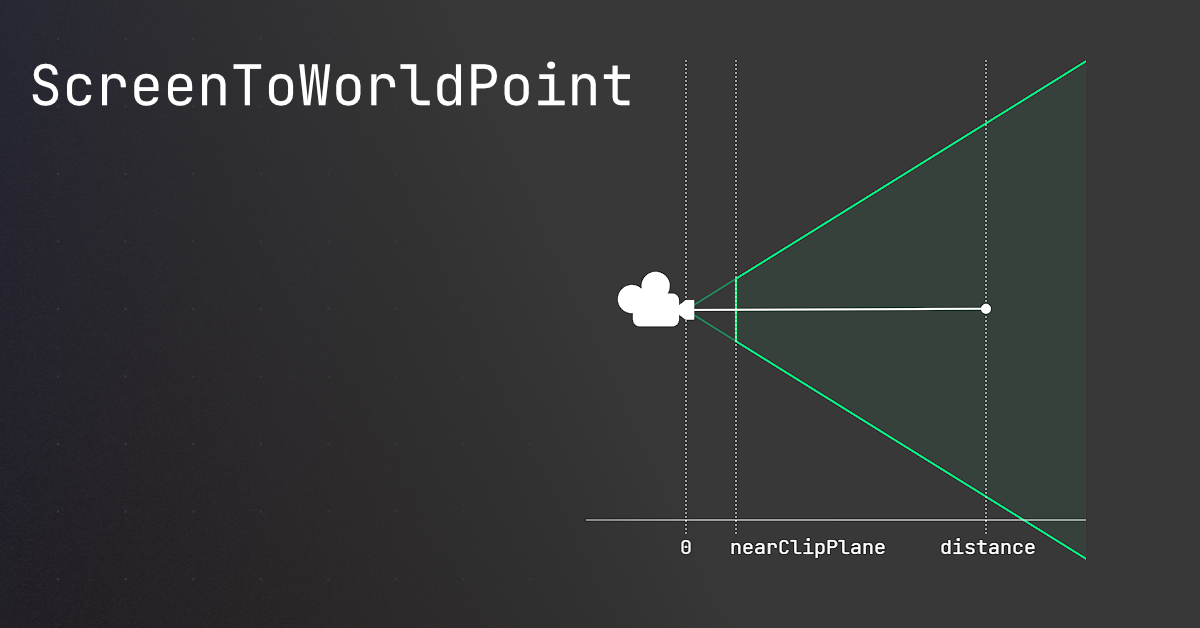
🤔 Unity, Huh, How?
Common ScreenToWorldPoint issues, and similar alternatives that may be better.
sharp bloom
I made this script when we had purely top down camera and it worked for that, but now we've rotated it
sharp bloom
rich adder
https://unity.huh.how/screentoworldpoint#alternate-methods
Hmm using a plane like that might work in this case
rich adder
Yeah I do that myself (similar game view) . Imo the best option
sharp bloom
Yeah that's a nice method thanks
livid arch
https://streamable.com/9qfnix i did something lol
 sharp bloom
Average ai code
livid arch
lol
rich adder
cannot help you with AI code
livid arch
all i did was do a raycast down to check for floor collision
its code was very similar to what i already wrote
    {
        Ray playerSpring = new(transform.position, UnityEngine.Vector3.down);
        Debug.DrawRay(transform.position, UnityEngine.Vector3.down, Color.green);

        isGrounded = Physics.Raycast(playerSpring, out RaycastHit hit, springMaxDistance, groundLayer);
        print(isGrounded);
}```ohhh i figured it out, it was my camera function i didnt fix.
 red igloo
Hey, Got some help to make a tilt/lean feature, and I have this issue where the camera violently spins around like in the video. How can I fix this issue?
 timber tide
zoom
Looks fine to me? Besides using eulers when you probably want to start sticking to AngleAxis if you're adding roll into the equation
 agile steppe
why i cant use the SetDestination() method?
 timber tide
I think what could be happening is you're not lerping to the smallest angle of rotation
agile steppe
agile steppe
why i cant use the SetDestination() method?
i dont understand why it doesnt work
red igloo
timber tide
zoom
It doesn't not look fine at all as I am making a lean/tilt feature not a "Roll"
red igloo
agile steppe
i dont understand why it doesnt work
hover over it and read what it says
agile steppe
red igloo
hover over it and read what it says
it says, it doesnt exist this method
naive pawn
agile steppe
it says, it doesnt exist this method
read the full thing
red igloo
timber tide
z is usually roll
no x is tilting and z is rolling
timber tide
targetRotation = Quaternion.Euler(0f, 0f, 15f);```wait what is Agent even from
agile steppe
but the method should exist. it is in the official documentation
 red igloo
@timber tide tilt is z x is roll
agile steppe
agile steppe
but the method should exist. it is in the official documentation
what should i do?
i used: using UnityEngine.AI;
naive pawn
ah wait i thought Agent was a class
agile steppe
Agent is a NavMeshAgent component
eternal falconBOT
Posting code
📃 Large Code Blocks
Use links to services like:
https://paste.mod.gg/, https://hastebin.skyra.pw/, https://paste.ofcode.org/, https://paste.myst.rs/, https://scriptbin.xyz/
📃 Inline Code
Surround code with three backquotes. Not quotation marks.
To format as C#, add cs to the first line:
```cs
// Your code here
```
Add a comment with a line number if there is an error message.
agile steppe
ok thanks
naive pawn
naive pawn
it's a BlackboardVariable
to get the value inside, i believe it'd be this
https://docs.unity3d.com/Packages/com.unity.behavior@1.0/api/Unity.Behavior.BlackboardVariable.html#Unity_Behavior_BlackboardVariable_ObjectValue
but with the vague typing, im not sure this is the intended method of use
red igloo
red igloo
Hey, Got some help to make a tilt/lean feature, and I have this issue where the ...
Do I have to clamp it?
timber tide
I would just use AngleAxis and Slerp, or if you want a constant speed then use RotateTowards
 mental rock
Hi, I'm wanting to start my 2D platformer project from scratch, and I want to make sure I do it right this time. I've tried looking up best practices for 2D platformers, and I can't find any clear answer on which type of raycast is better for standard player collision detection.
Simple raycasts, box casts or capsule casts?
frail hawk
mental rock
Hi, I'm wanting to start my 2D platformer project from scratch, and I want to ma...
not sure what you are asking for, the methods you mentioned are more to detect a collider
if you want proper collision detection you´d have to use a rigidbody2D
rich adder
mental rock
Hi, I'm wanting to start my 2D platformer project from scratch, and I want to ma...
use whatever fits the shape of your collider, raycast might be too thin
unless you had a L / R casts on each side of feet
also this assuming you're talking about Ground detection
colliders automatically hit each other without further methods
mental rock
frail hawk
not sure what you are asking for, the methods you mentioned are more to detect a...
my bad, I'm new to trying to make a proper platformer in Unity so its difficult to know what I should be asking and what I should be telling.
I'm wanting to make a 2D platformer that has an emphasis on tight, precise and fluid movement (not a cheap "it'll do" type of collision detection). I'd want the player to be able to detect walls for wall climbing, wall sliding, auto-stepping on smaller steps, etc
I have a gut feeling that something like a boxcast would be too restrictive and non-flexible, and something like a capsulecast would have unwanted interactions on ledges of platforms due to the rounded bottom
I previously attempted this with just simple raycasts but it proved rather buggy so I had to do a lot of unsavoury bandaid fixes that I'd rather avoid this time around
rich adder
mental rock
my bad, I'm new to trying to make a proper platformer in Unity so its difficult ...
Sounds like you want to use Kinematic and do your own ground/wall detections
mental rock
kinematic yeah, thats what I did and plan on using, its the specifics of the type of casts that I'm worried about
I don't know when or even if I should use things like boxcasts if I'm wanting a large degree of control over movement and collision detection
are they as restrictive as I think they are?
verbal dome
mental rock
kinematic yeah, thats what I did and plan on using, its the specifics of the typ...
Not sure how you are supposed to depenetrate in 2D though
3D has Physics.ComputePenetration
Someone said in a thread this would be handy https://docs.unity3d.com/ScriptReference/Physics2D.Distance.html
mental rock
i don't think ive ever seen anyone use that before
is it standard for 2d platformers?
ive only ever really seen simple raycasts, boxes and capsules
verbal dome
I guess it depends on what kind of collision handling you need
mental rock
verbal dome
I guess it depends on what kind of collision handling you need
can you elaborate?
im wanting to make a fluid and precise platformer like super meatboy for example. But the character wouldnt be a perfect square
verbal dome
Everything that's solid in super meat boy seems to be rectangular
Will your game be like that too?
mental rock
this very well drawn infographic might help explain what I mean. I'm wanting a relatively-humanoid player and most enemies will be too

which one is most appropriate
sorry if the last one is inaccurate, idk if thats what a rigidbody2d.cast would look like 😄
forgot to draw the sides on the first capsule onebut oh well
verbal dome
Rigidbody2D.Cast isn't that different from just casting all your colliders separately
mental rock
so rigidbody2d.cast is purposed for players that are built of, say, multiple box colliders(?)
-# like this?
 verbal dome
Sure, but that isn't really relevant here, you usually go with a single collider
mental rock
sorry if im well off base
verbal dome
It does detect colliders that it starts inside of, though
Not sure if other 2D casts do
verbal dome
mental rock
this very well drawn infographic might help explain what I mean. I'm wanting a r...
Anyway, you'd likely go with a single capsule or box
mental rock
how should I determine which one to use?
like does capsule have any pros/cons over boxcasts
my presumption is that the rounded top and bottom can lead to unwanted movement at edges.
actually do boxcasts work well with slopes at all?
verbal dome
mental rock
my presumption is that the rounded top and bottom can lead to unwanted movement ...
Yeah that can be an issue with capsule
verbal dome
mental rock
actually do boxcasts work well with slopes at all?
And that's one with box
mental rock
ah i see
verbal dome
verbal dome
Everything that's solid in super meat boy seems to be rectangular
You didn't answer this
mental rock
oh my bad
no they won't be rectangular to a fault. They'll be relatively humanoid like the drawing I put in
I could use a single boxcast as an approximation but I don't know if thats standard practice for a 2D platformer that's trying to emulate the precision of super meatboy (but without the square characters)
I'm unsure whether or not there'd be a huge disconnect between the visuals and the actual collision
verbal dome
Let me clarify, I'm asking about the levels/map, not the characters
mental rock
Oh
verbal dome
What kind of geometry do you expect to see
mental rock
Yeah the geometry would be mostly flat floors and walls, etc
verbal dome
In any case I would start by using a dynamic rigidbody instead of rolling your own collision detection completely
verbal dome
You can still completely control the velocity manually if you need to
But you get collision detection for free
mental rock
i'll consider it but I've been set on kinematic due to my need for complete control over the movement and such
there's probably some math you can do with the raycasts and platform normals i assume when using boxcasts on slopes
verbal dome
Yeah and that gets pretty complex if you want to have sliding etc.
Imagine a situation like this, where your character wants to move into a surface at an angle. You need to do multiple casts to get the correct final position

Which is what I meant with depenetration
 frozen crypt
yo whats good
rich adder
opposite of bad
frozen crypt
so just !bad
naive pawn
eh, could be ~bad or -bad or bad^-1 depending on your definition of opposite
anyways, https://nohello.net

please don't say just hello in chat
ugh that's not one of them
rich adder
no dash
frozen crypt
anyways can someone help me fix a bug i have
rich adder
frozen crypt
anyways can someone help me fix a bug i have
maybe ?
naive pawn
rich adder
no dash
there's so many variations 😔
rich adder
:!ask 👇
eternal falconBOT
:thinking: Asking Questions
:mag: Search the internet for your question!
:book: Use the API Scripting Reference and User Manual and this troubleshooting site for commonly posted issues.
:wrench: Attempt to debug your issue.
:thought_balloon: Find an appropriate channel by reading the name and description in #🔎┃find-a-channel
:grey_question: And don't ask to ask, ask a full question illustrating with screenshots if needed.
-# For more posting guidelines, go to #854851968446365696
frozen crypt
dont feel like doing allat
rich adder
so why are you here ?
frozen crypt
just need help with colliding
 frozen crypt
i saw it chill
rich adder
assuming they have ability to read
frozen crypt
im lazy
rich adder
not a good trait to be a gamedev
frozen crypt
anyways i tried detecting touch but doesnt wanna work
frozen crypt
rich adder
not a good trait to be a gamedev
dont really care tbh ive been doing game developing for a year just on another game engine with other coding language
no a year but around
close
naive pawn
....are you gonna ask your question
rich adder
sure but did it teach you how to read properly ? I think no
❔ And don't ask to ask, ask a full question illustrating with screenshots if needed.
naive pawn
we still don't know what you need help with
naive pawn
that's not a question
frozen crypt
i tried ai to it didnt work
polar acorn
Have you jimjammed the flammistan?
naive pawn
that's just a complaint lol
rich adder
how we supposed to guess what problem is without knwing the full setup
frozen crypt
not really complaint
naive pawn
you've given absolutely no info to help you with
we need more context to be able to actually help you
frozen crypt
wait lemme get the script
frozen crypt
wait
rich adder
is your MindReader5000 not working?
naive pawn
start with a description of the actual problem
"it doesn't work" doesn't tell us anything; if it did work you wouldn't be here lol
frozen crypt
using UnityEngine;

public class Finish : MonoBehaviour
{
    private void OnTriggerEnter2D(Collider2D other)
    {
        if (other.CompareTag("Player"))
        {
            Debug.Log("Player touched the object!");
        }
    }
}
i tried doing this
but idk why it doesnt work
rich adder
frozen crypt
but idk why it doesnt work
start by putting the log outside If statement
frozen crypt
and why?
rich adder
so you can test ?
naive pawn
you know now that the full thing doesn't work
maybe it's the if, maybe it's the method not getting called
narrow it down
rich adder
if there is no collision at all you know its not the code
frozen crypt
well i have isTrigger on so idk what else i gotta do
slender nymph
frozen crypt
```cs
using UnityEngine;
public class Finish : MonoBehaviour
{
private void...
frozen crypt
slender nymph
<https://unity.huh.how/physics-messages>
what that
oh
tutorial
thanks ig
slender nymph
not a tutorial. please learn to read. and finish a thought before sending your message. we don't need 4 message spammed in 10 seconds that cover only half of a thought
frozen crypt
oke
 placid linden
I'm making an landing gear and I'm intending to make some conditions to it
1 - check if the landing gear is touching ground, if so, it wont be able to retract/play animation
2 - when it retracts, i want it to disable its own box collider since it glitches with the spaceship and gets thrown away
any tips or help I could have?
rich adder
placid linden
I'm making an landing gear and I'm intending to make some conditions to it
1 - ...
use the collider OnCollisionEnter and OnCollisionExit
or use a script for physic query instead
for problem 2 you can also disable the collision between the two colliders or set the wheels to trigger until you touch ground
(this might be issue if you need OnCollision Enter so that might need a ray for checking ground)
placid linden
well, since it will only be able to retract off ground/airborn, I could use the same bool "isGrounded" for disabling the box collider?
rich adder
placid linden
well, since it will only be able to retract off ground/airborn, I could use the ...
if you use casts sure , disabling the entire collider will prevent collision message though
placid linden
casts?
rich adder
placid linden
casts?
mhm like Raycast, Boxcast, Spherecast etc.
I would use a sphere/boxcast here
raycast also sufficient if you're okay with only a thin line
placid linden
well, I think I could use that (even that I don't know what it is--)
I don't actually need a that big collider for the wheels
rich adder
placid linden
well, I think I could use that (even that I don't know what it is--)
its just a way to detect colliders
 topaz bridge
Question. I notice that a raycast fired from an object below terrain doesn't hit anything. I assume it's because terrain collision is one way only. Any workarounds for that?
rich adder
raycasts also not set to hit backfaces by default
 mental rock
Is it normal for it to be difficult to make even a simple collision detection system with kinematic rigidbodies
i feel like im doing something really wrong with my code
rich adder
coding your own collision isn't trivial so yeah could be normal
maybe use non-kinematic but with velocity so you can at least use the collisions built in then use casts for other specialities like climb and sliding etc
wintry quarry
mental rock
i feel like im doing something really wrong with my code
you'd have to show us what you're doing. "simple collision detection system" is really vague
mental rock
rich adder
maybe use non-kinematic but with velocity so you can at least use the collisions...
from what I know about dynamic vs kinematic, I don't think I can compromise on using kinematic. I need the full control over movement, I just need to get my head around how to do collision detections
wintry quarry
mental rock
from what I know about dynamic vs kinematic, I don't think I can compromise on u...
It really depends what you mean by "full control" your descriptions are quite vauge
mental rock
wintry quarry
you'd have to show us what you're doing. "simple collision detection system" is ...
That was all I wanted to ask at the moment. I've seen so many people code their own platformers with kinematic rigidbodies that I am just left scratching my head at how they've managed to do it
wintry quarry
We don't even know what kind of game this is
mental rock
wintry quarry
We don't even know what kind of game this is
It's a 2D platformer, I had spoken about it at length earlier, I just kinda forgot that it's been a while since I provided context 😄
upon rereading the differences and pros vs cons of dynamic rigidbodies, it might be worth trying that instead
wintry quarry
If you want to make a kinematic character controller you'd basically just use CapsuleCasts for collision detection
mental rock
I was doing that but with boxcasts
What do 2D platformers usually use for the playable character?
kinematic?
wintry quarry
there is no "usually"
every game is different
it depends on your specific requirements
mental rock
To put it shortly, I'm wanting to try make a 2D platformer akin to Super Meatboy in how it controls
i dont know whether dynamic rigidbodies are designed for that use case
rich adder
You can make either one work 🤷♂️
mental rock
arent there a lot of restrictions with dynamic?
rich adder
I could think already a few ways because did something similiar with a dynamic
wintry quarry
mental rock
i dont know whether dynamic rigidbodies are designed for that use case
Rigidbodies give you a lot of the physics stuff for free
rich adder
just had to play with physics material / drag
wintry quarry
mental rock
arent there a lot of restrictions with dynamic?
what kind of restrictions
mental rock
I read that dynamic rigidbodies lock you into using the same set of physics in all circumstances, etc
wintry quarry
Not at all
mental rock
aspects like that
wintry quarry
You can write code to make it do whatever you'd like
mental rock
hmm, i'll probably try to give dynamic rigidbodies a go to see if I can achieve what I'm wanting without hitting any roadblocks related to them
thank you for the help
wintry quarry
There are a lot of "limitations" people think of that are actually limitations of "I wrote a very simple script and it doesn't handle XYZ" and not a limitation of Rigidbodies themselves
People in general underestimate how complex character controller scripts are.
mental rock
I could've sworn that kinematics was the go-to for 2D platformers due to the lack of preset physics involved
still, i hope to understand it one day because I feel defeated 😭
wintry quarry
Every 2D platformer is different though. Mario is very different from N+ or Meatboy and Celeste is different from all of those
The important thing is to just actually understand how the various components work
when you do that, you can do anything you want.
 night mural
mental rock
I could've sworn that kinematics was the go-to for 2D platformers due to the lac...
night mural
mental rock
I could've sworn that kinematics was the go-to for 2D platformers due to the lac...
yeah -- if you are stressing about the answer to this particular question, the answer is don't. They aren't that different and you don't know what you need yet, so pick either one and start using it, and that process will teach you what you actually need to know, at which point this question will have a very obvious answer for you
mental rock
i was very much under the general impression that dynamic rigidbodies were for when you wanted to have more realistic physics interactions and kinematic was for when you wanted everything to be scripted to your specification
wintry quarry
Those two things aren't mutually exclusive
And with the right code you can encroach on each of those things from either entry point.
mental rock
I see. I've probably also just internalised some stigma about dynamic rigidbodies as well, like they're a cheaper easier version that you wouldn't use professionally, yknow
but thats just me and the stuff ive probably read very wrong
night mural
mental rock
I see. I've probably also just internalised some stigma about dynamic rigidbodie...
I would not read too much into any information you have about game dev that isn't from your own experience
it's probably either not useful anyway, or you lack the context for it to be useful to you, and you should just spend a day or two playing with it and it'll all make sense
people put a lot of effort into trying to make 'the right' decision but most of the time there is not one, or you don't know enough to make it yet because it's too early
rich adder
you don't know until you know
mental rock
in case my attempt with dynamic rigidbodies fails or i do somehow come across restrictions, how would I go about learning the ins and outs of kinematic rigidbodies (specifically geared toward 2d platformers if possible)
wintry quarry
find/follow some tutorials to start with I guess. Basically - try them out, try to make something, fail, learn stuff.
night mural
mental rock
in case my attempt with dynamic rigidbodies fails or i do somehow come across re...
Ultimately, you have a thing and you are modifying its velocity over time, either through forces or custom math. It's mostly figuring out the piecs of that that's hard, not applying them to the thing.
placid linden
been testing out and reading about raycast on the unity docs and I'm testing their code but it does not detect ground in any way


or even draw any line as it says
slender nymph
you have gizmos off so you won't see the drawn gizmos
polar acorn
placid linden
been testing out and reading about raycast on the unity docs and I'm testing the...
You have six hidden errors. Maybe look at what those are

And yes, gizmos are not drawn in game view by default. Enable them or check in Scene view
 polar acorn
placid linden
polar acorn
placid linden
Yep, you can't do GetMask outside of a function
That would mean your layer mask is empty
slender nymph
just serialize the variable and assign it in the inspector
placid linden
polar acorn
Yep, you can't do `GetMask` outside of a function
fixed it inserting it inside update(), or would it be better to add it into Start()?
polar acorn
placid linden
fixed it inserting it inside update(), or would it be better to add it into Star...
Best bet would be to serialize the variable and assign it in the inspector
rich adder
[SerializeField] private LayerMask ground
placid linden
ohhh thanks!
sorry I'm still pretty stupid to C#
is there a way to make 2 raycasts into the same code? like, create a variable for checking ground and another one for checking whats above the GameObject?
rich adder
ofc
wintry quarry
placid linden
is there a way to make 2 raycasts into the same code? like, create a variable fo...
You write more code that does the other raycast
you can write literally whatever you want.
placid linden
I know but I mean, how to create an variable to the raycast itself?
wintry quarry
What does "create an variable to the raycast itself" mean?
rich adder
it returns a bool if you want to use that
wintry quarry
If you want two different layermasks, you make two different variables
rich adder
like you could do isGrounded = Physics.Raycast(etc.
and then make another for whatever
placid linden
rich adder
like you could do` isGrounded = Physics.Raycast(etc.`
oh it is a bool?
wintry quarry
placid linden
oh it is a bool?
Raycast returns a bool, yes. It says so right in the docs and when you mouse over it in your configured IDE.
rich adder
always check the !docs
eternal falconBOT
 placid linden
well, that was my question itself, so it would be like
private bool isGrounded = Physics.Raycast(down) private bool isAircraftColl = Physics.Raycast(up)
rich adder
and yes do make sure IDE is configured it tells you return types
wintry quarry
placid linden
well, that was my question itself, so it would be like
`private bool isGrounded...
no you wouldn't use private here
private is only for fields
not for local variables
rich adder
placid linden
well, that was my question itself, so it would be like
`private bool isGrounded...
and methods doesnt get called in field initializer
wintry quarry
a local variable is a variable you declare inside a method/function
placid linden
I'm pretty confused
rich adder
placid linden
been testing out and reading about raycast on the unity docs and I'm testing the...
also, notice how here it says if(Raycast) so yes Raycast is a bool inside if statement
rich adder
placid linden
I'm pretty confused
You lack fundamentals to c# thats why
where to declare fields, local variables, functions etc
placid linden
well, I have programming basics since I've been in touch with other programming languages, I'm just confused about raycasts themselves
rich adder
what about them ?
polar acorn
placid linden
well, I have programming basics since I've been in touch with other programming ...
A raycast is simply a function that checks if there's something in a line.
It returns a bool, true if it hits, false if it doesn't
wintry quarry
placid linden
well, I have programming basics since I've been in touch with other programming ...
There's nothing special about the raycast in terms of programming. All of your questions have seemed to indicate confusion about C# itself.
it's just a function that returns a bool
there's nothing magical or special that steps outside of normal C# rules about it
placid linden
got into this
void Update()
    {
        LayerMask ground = LayerMask.GetMask("Ground");
        RaycastHit hit;

        bool isGrounded = Physics.Raycast(transform.position, transform.TransformDirection(Vector3.up), out hit, 3, ground);
        bool isAircraftCol = Physics.Raycast(transform.position, transform.TransformDirection(Vector3.down), out hit, 1, ground);

        if (isGrounded || isAircraftCol)
        {
            Debug.Log("Ground touching");
            Debug.DrawRay(transform.position, transform.TransformDirection(Vector3.up) * hit.distance, Color.red);
        }
        else{
            {
                Debug.Log("Nothing in touch");
                Debug.DrawRay(transform.position, transform.TransformDirection(Vector3.up) * hit.distance, Color.red);
            }
        }
    }
}```don't know if its the best way to do it but
rich adder
placid linden
don't know if its the best way to do it but
are those seperate up and down rays but they're both "ground touching"?
rich adder
placid linden
you took me in there
btw why didnt you change this into a field
LayerMask ground = LayerMask.GetMask("Ground");
placid linden
fixed it too, sowy
just noticed the best way to debug these would be two if's insted of only one
rich adder
if they serve different purpose probably.
but yeah you get the point, if you need another, rinse and repeat
rich adder
placid linden
also, is there a way to do multiple ones?
In what sense multiple , isn't that what you're doing now ?
placid linden
like this
 rich adder
yes use loops
placid linden
oooh sure
rich adder
and a bit of math
placid linden
rich adder
and a bit of math
and ++ certain degrees once it runs into the loop right?
rich adder
placid linden
and ++ certain degrees once it runs into the loop right?
I'm bad at this stuff iirc was something like float angle = i * Mathf.PI * 2 / segments;
im sure if you google rq raycast in circle / segements unity you will find plenty
that outer circle might just be a visual gizmo no clue how that one was done
placid linden
rich adder
I'm bad at this stuff iirc was something like `float angle = i * Mathf.PI * 2 / ...
ohh no don't worry, it's just for knowledge, but you all helped me a lot already, thank you for your patience! ❤️
mental rock
is the only solution to scale up the project? I'm working with sprites as small as 12x32
rich adder
@mental rock btw you're in a code channel
mental rock
oh whoops
placid linden
me again lol, is there a way to keep the raycasts straight down? like, if I rotate the GameObject, it will not rotate too and will maintain the object center but will keep straight down


so they don't tilt with the object too
 eternal needle
placid linden
so they don't tilt with the object too
eternal needle
placid linden
so they don't tilt with the object too
you're probably using the transform to get the vector. you just use Vector3.down https://docs.unity3d.com/6000.0/Documentation/ScriptReference/Vector3-down.html
or in other cases could manually define the vector
wintry quarry
placid linden
me again lol, is there a way to keep the raycasts straight down? like, if I rota...
the raycast goes wherever your code tells it to go
Tell it to go straight down instead of whatever you're doing now.
placid linden
eternal needle
you're probably using the transform to get the vector. you just use Vector3.down...
that worked, thank you so much
teal viper
Possibly due to the limitation of the underlying API. Or they estimated that it becomes not cost effective after that.
Instancing is not free after all. It just shifts the overhead to the GPU.
 wraith condor
Hmm but batches would be slower then just raising the cap
teal viper
wraith condor
Hmm but batches would be slower then just raising the cap
On the CPU side perhaps.
Though it's not as much about batches as about setpass calls
teal viper
It's something that sets up the GPU state. Several draw calls can you the same pass. I can't say more than that, as unity is not open source.
wraith condor
Oh ok
teal viper
wraith condor
Oh ok
Anyways, where did you see about the 1000 limit?
wraith condor
A YouTube video
I was looking at Godot multimeshinstance for voxels and I looked up how to do GPU instancing in unity
They said it had a limitation of 1000
I was thinking about using GPU instancing to draw faces instead of cubes for voxels
teal viper
Hmm... The only reliable thing I can find is about using the API directly in the code:
https://discussions.unity.com/t/gpu-instancing-count-limit/723510/2
And I'm not sure that applies to GPU instancing that unity does automatically when checked on the material.
wraith condor
Also one more thing
Is it possible to draw textures onto another one to create a texture batch?
Last time I tried to I couldn't find a way to draw it to another texture
teal viper
wraith condor
Is it possible to draw textures onto another one to create a texture batch?
Sound like a texture Atlas? In 2d there is a sprite atlas feature, but in 3d you'll have to come up with something yourself, or use an external program, like blender and gimp, or look up some asset on the asset store.
wraith condor
I wanted to generate the atlas at runtime from a bunch of smaller textures
Kinda like how Minecraft does it now
teal viper
wraith condor
I wanted to generate the atlas at runtime from a bunch of smaller textures
Then you'll need to implement it.
 jolly moat
For a top down 2D game, if I want the player to have a collider for his attack point, should I create 4 collider objects, one for each direction? How is this usually handled?
rich adder
jolly moat
For a top down 2D game, if I want the player to have a collider for his attack p...
if you rotate player just use 1 infront ?
 past pecan
ts give me brain aneurysm 💔
I double checked all of my states
I don't know why it's making him walk all funky when I press down
I think it's something to do with the superiority of the statements, but I don't know what to do to fix it
I commented my code 
livid arch
Is using ai for coding okay?
slender nymph
that depends, do you enjoy having shitty code that you don't understand and is a nightmare to extend with further functionality? if so, then yes ai is just fine. if you prefer code that you do fully understand and isn't necessarily bad, then don't use AI
if you want to discuss the pros and cons of ai further then take it to the containment thread https://discord.com/channels/489222168727519232/1352599815770341479
livid arch
Thanks
rich adder
 pure pike
how would i set a text mesh pro object to 0.00
pure pike
how would i set a text mesh pro object to 0.00
make a reference then use SetText method
 hidden fossil
whats wrong with this code? i click on a plot and then i place no towers and i click on another plot but if i click that original plot again, it doesnt show the tower menu?
pure pike
rich adder
make a reference then use SetText method
can you give me a quick example
rich adder
hidden fossil
whats wrong with this code? i click on a plot and then i place no towers and i c...
start debugging and see what the values are
rich adder
pure pike
can you give me a quick example
did you click the link under it? has code example
hidden fossil
rich adder
start debugging and see what the values are
values? isnt this like a ui bug or smth?
pure pike
rich adder
did you click the link under it? has code example
i didnt see one, all i saw was clock stuff
rich adder
hidden fossil
values? isnt this like a ui bug or smth?
you have a few bools and variables, with some methods running. Check if they do what you expect them to do.. Narrow downt he issue
rich adder
pure pike
i didnt see one, all i saw was clock stuff
clock stuff?
 pure pike
yeah?
rich adder
soo take the example of how to set TMP text to some value?
the "clock" is irrelevant
replace the value to whatever you need it to be.
pure pike
how would i use the "public oject timerStop;" in the ontriggerenter
rich adder
use the reference in the method just like you would use it in any other method
also might want to take the programmer pathway in !learn 👇 and the C# pinned in the channel
eternal falconBOT
:teacher: Unity Learn ↗
Over 750 hours of free live and on-demand learning content for all levels of experience!
rich adder
doesnt look like you declared the proper type
in an example you change the variable also to fit the name that makes sense for your object
pure pike
the object is for stopping the timer tho?
i dont code very much
im sry
im too busy to actaully take classes
so i just learn by my friend or just try to make something on my own
pure pike
rich adder
doesnt look like you declared the proper type
i changed it to game object, and how do i reference it?
rich adder
pure pike
im too busy to actaully take classes
if you're too busy to learn whats required , how do you plan on making this game ?
pure pike
idk
pure pike
can you just help me, i need this script for someone
pure pike
rich adder
this isnt something you learn overnight lol
ik
rich adder
pure pike
can you just help me, i need this script for someone
help you how, the page I linked shows exactly how to assign values to TMP, if i tell you words like references How can that help you if you dont know what it is
pure pike
rich adder
help you how, the page I linked shows exactly how to assign values to TMP, if i ...
no like using the game object ill assign to the field i made, how would i../
nvm
hold on
rich adder
the type here is TMP_Text, why in your mind that should get changed to Gameobject ?
 rich adder
this literally goes in the OnTriggerEnter script..
replace the name and the value to whatever you need it for

 rich adder
put the script on the gameobject with trigger on it
idk wat you mean the gameobject to be the collider, gameobjects can't be colliders..they contain a component collider
pure pike
rich adder
idk wat you mean the gameobject to be the collider, gameobjects can't be collide...
well how do i use that component as te collider
rich adder
pure pike
well how do i use that component as te collider
AddComponent -> Collider
pure pike
i have a box collider on it
rich adder
the the prefabs for missing script
rich adder
pure pike
i have a box collider on it
ok so is it trigger?
OnTriggerEnter needs the script to be on one of the triggers to get called
pure pike
rich adder
ok so is it trigger?
i want a different object than the one the script is on to trigger it
rich adder
pure pike
i want a different object than the one the script is on to trigger it
so put it on that
pure pike
put it on what
rich adder
look through them and findi it
rich adder
pure pike
put it on what
on the object that triggers it?
pure pike
i cant
rich adder
that only works if has a rigidbody
rich adder
ok solve it by going through the prefabs and finding the one with the missing script

you made lords mobile?
wut?
 sour fulcrum
Is this some modding type stuff maybe?
rich adder
sour fulcrum
Is this some modding type stuff maybe?
||we gettin to it..||
sounds like they are tyring to decompile or something
you "got it" ?
if you got it then did they explain what the missing script is?
so they give you the project with missing scrips?
possible, meta files shouldnt be touched manually and should be committed to any repo
can't help with decompiled projects #📖┃code-of-conduct
pure pike
when i start back the timer, i want it to start from zero, not from where i left off, how would i do that?
 charred spoke
Show the code. You are obviously not resetting the actual timer variable
 glacial coyote
Hello friends, I have an issue here. So I'm trying to make my character move on a horizontal axis, however, it's just screaming at me and I dont know what i'm doin'


Shall I also send the code so it's easier to look at?
pure pike
charred spoke
Show the code. You are obviously not resetting the actual timer variable
thats what im asking, how would i?
 tired summit
glacial coyote
Hello friends, I have an issue here. So I'm trying to make my character move on ...
tired summit
glacial coyote
Hello friends, I have an issue here. So I'm trying to make my character move on ...
classic error, your gameobject doesnt have rigidbody2d component or you dont reference it when it run
change rigidLink.GetComponent to gameObject.GetComponent and it should be fixed
placid linden
I'm following a tutorial for simple plane physics, almost everything works right except for the thrust. It just goes up instead of forward and I can't see what I'm doing wrong, can someone help me?
using Unity.VisualScripting;
using UnityEngine;

public class PlaneController : MonoBehaviour {

    [Header("Plane stats")]
    [Tooltip("Throttle speed increment")]
    public float throttleIncrement = 0.1f;
    [Tooltip("Maximum engine thrust at 100% throttle")]
    public float maxThrust = 200f;
    [Tooltip("How resposive the plane is when rolling, pitching and yawing")]
    public float responsiveness = 10f;


    private float throttle;
    private float roll;
    private float pitch;
    private float yaw;

    private float responseModifier{
        get {
            return (rb.mass / 10f) * responsiveness;
        }
    }

    Rigidbody rb;

    private void Awake(){
        rb = GetComponent<Rigidbody>();
    }


    private void HandleInputs(){
        roll = Input.GetAxis("Roll");
        pitch = Input.GetAxis("Pitch");
        yaw = Input.GetAxis("Yaw");

        if (Input.GetKey(KeyCode.F3)) throttle += throttleIncrement;
        else if (Input.GetKey(KeyCode.F2)) throttle -= throttleIncrement;

        throttle = Mathf.Clamp(throttle, 0f, 100f);
    }

    private void Update(){
        HandleInputs();
    }

    private void FixedUpdate(){
        rb.AddForce(transform.forward * maxThrust * throttle);
        rb.AddTorque(transform.forward * yaw * responseModifier);
        rb.AddTorque(transform.up * pitch * responseModifier);
        rb.AddTorque(transform.right * roll * responseModifier);
    }
}```Thank you! But now it's telling me it can't take parameters
 charred spoke
pure pike
thats what im asking, how would i?
charred spoke
pure pike
thats what im asking, how would i?
Set currentTime to 0 when you stop the timer
tired summit
glacial coyote
i bet you have something like this
void Update(T _t){}
just remove the thingy in ()
Update() is unity special method you usually dont modify that
with out actual code it's impossible to tell
glacial coyote
Click the error and send the code so the kind people can help
tired summit
idk your seem like a complete project
i dont really wanna read the whole project :l
pure pike
charred spoke
Set currentTime to 0 when you stop the timer
how do i make the game object that i put in this field the collider for the ontriggerenter?

 charred spoke
These two pictures tell me nothing
tired summit
put in ontriggerenter()
timeReset = other.gameObject;
or something like that
charred spoke
pure pike
how do i make the game object that i put in this field the collider for the ontr...
You need to look up how to reference members from other scripts https://unity.huh.how/references
🤔 Unity, Huh, How?
Choose the best way to reference other variables.
pure pike
charred spoke
You need to look up how to reference members from other scripts https://unity.hu...
what do i do with this?
tired summit
read it
tired summit
pure pike
what do i do with this?
tbh i think it'll be more fast if someone just fix it for you
by the look of it, it quite simple
pure pike
well can you do it?
tired summit
pure pike
well can you do it?
dm me
 gleaming karma
I am following a video for being able to shoot pixels and for some reason when I shoot the pixel/bullet just stays in place and doesn't move.
first slide is for the shooting code and second is for the bullet

 night mural
- If your version is behaving different, look at the video and figure out where yours is different. It's foolproof.
- You probably want
velocity, notangularVelocity
gleaming karma
ok thankyou, its also giving me an error saying no Rigidbody attached to the Bullet(Clone)
night mural
I expect that would be because you don't have a Rigidbody attached to the Bullet(Clone)
gleaming karma
ye I will look into that lol
I forgot to put Rigidbody2D and had Rigidbody instead
 rare basin

 sour fulcrum
you can't get help for what you want here
 coral charm
Hello,
I'd like to know if it's possible to permanently display an isometric grid in Unity, so I can place my elements according to it rather than the default 2D grid.
Thank you for your help! 🙂
 raw smelt
If I want to create an object consisting of parts, e.g., a ship, where the object itself should be rigid, but each part can be damaged separately, how should I stiffen this object? Should I use FixedJoin2d, connected to the parent component, to its neighbor, or perhaps in some other way
timber tide
raw smelt
If I want to create an object consisting of parts, e.g., a ship, where the objec...
I don't mess around with joints too much, but my idea would be just treat the ship undamaged as a single composite collider, then when objects get damaged do you turn on the physics for those parts and allow them to disjoint
timber tide
Is there a reason you specified joints? You can just use a single rigidbody otherwise and calculate where the objects have hit via collision point otherwise
composite collider works too if you prefer to use multiple gamesobjects
 modern lagoon
Hi guys i'm writing a little card game by my own, and i'm about to organize code for card informations, events and effects.
I would like to have the max flexibility out of this system, so i can add new cards without creating a class or a method for each of them individually.
So the question is, do you think writing a simple interpreter is a good idea? so i can write "card code" like this:
IF CONDITION
DAMAGE ENEMY 10
END
HEAL PLAYER 2
also i was wondering how games like hearstone handle this thing
wintry quarry
modern lagoon
Hi guys i'm writing a little card game by my own, and i'm about to organize code...
Yes, potentially, but it can quickly get out of hand. You'll spend a lot of time updating the scripting framework itself whenever a novel card mechanic comes in, often sort of "duplicating your work" as you'll need to script the card as well as script the card scripting engine, if you know what I mean.
So the payoff of such a system depends on a few factors like:
- How heavily will card mechanics be reused? The more reuse, the more this pays off.
- How many unique/novel effects are there? The fewer the effects, or the more the effects can be derived from simpler effects, the better.
- Are there other less technical people working on the game for whom this system would simplify things?
I'm working on a similar game right now and sort of decided that just doing the scripting in C# directly is going to work better for my particular game.
 mystic sonnet
Is there any c# formatter for VSCode? Like black for python?
modern lagoon
wintry quarry
Yes, potentially, but it can quickly get out of hand. You'll spend a lot of time...
Great answer thanks!
I am curious about your system, do you have a class for each card effect? Also where do you store this informations? i was thinking about scriptable objects
hexed terrace
mystic sonnet
Is there any c# formatter for VSCode? Like black for python?
!vscode
eternal falconBOT
Visual Studio Code guide
If your IDE is not underlining errors in red or autocompleting code,
please configure it using the link below:
mystic sonnet
modern lagoon
Hi guys i'm writing a little card game by my own, and i'm about to organize code...
I don't know exactly what you want, but look into ScriptableObjects if you haven't already. Also i'm pretty sure there is hearthstone-like tutorial series on youtube
sour fulcrum
modern lagoon
Hi guys i'm writing a little card game by my own, and i'm about to organize code...
Honestly at that point, maybe just write it in code explicitly
wintry quarry
modern lagoon
Great answer thanks!
I am curious about your system, do you have a class for eac...
This particular game is not a card game, it's more like FTL with "modules" on the ships. It's not exactly one class per effect it's more like a class per "module" which can be attached to the ship (although some modules share code if they are very similar). It's also early days so it might evolve more. I previously made a card game where I built what you're talking about out of ScriptableObjects with enums everywhere, lists of Effects, etc. I wouldn't necessarily recommend that, it got pretty convoluted. But that one involved one class per "effect type" and sort of a composable "chain" of effects that the card could have.