#💻┃code-beginner
1 messages · Page 636 of 1
 errant shore
i have no clue what causes this. I have no code which loads the level scene
man
why is it link
 polar acorn
MKVs do not embed
errant shore
oh
polar acorn
Convert it to MP4 as Spawn said
errant shore
oops sorry
 errant shore
polar acorn
Convert it to MP4 as Spawn said
errant shore
polar acorn
Convert it to MP4 as Spawn said
why does it load the level sceneeeeee
wait maybe i dont know how the build settin gworks
polar acorn
errant shore
why does it load the level sceneeeeee
Didn't you say this was a build
I already said, in Editor, you can load whatever scene you want
And the scene is inside MainMenu, so loading MainMenu is going to also load Level
errant shore
polar acorn
And the scene is _inside_ `MainMenu`, so loading `MainMenu` is going to also loa...
the level scene is in the main menu scene?
polar acorn
errant shore
the level scene is in the main menu scene?
Yes, you've loaded it additively
You dragged the whole scene into another scene
So they're both loaded
errant shore
how can I cut them
polar acorn
Right click -> Remove
 stone ledge
Yeeeesirrr


 alpine spruce
It is normal that when creating a shader it comes by default with 20 or 19 errors ?
 rocky canyon
depends on what your level of "normal" is i suppose lol
shaders are different depending on the renderpipeline ur using..
best way to get up and going with shaders is in ShaderGraph, imho..
 queen adder
hey
im new to unity i recently switched from godot to unity
and one question
float mouseX = Input.GetAxis("Mouse X");
float mouseY = Input.GetAxis("Mouse Y");
Hips.GetComponent<ConfigurableJoint>().targetRotation = Quaternion.Euler(0, -mouseX, 0);
and could someone tell me why is the characters target rotation going back to 0
 short hazel
Mouse movement is expressed as a delta, which is the amount the mouse moved since the last time Update was executed
If you do not move the mouse, the variables will go back to 0
queen adder
short hazel
If you do not move the mouse, the variables will go back to 0
oh
could u tell me how to repair it
wait would it work if i would make another float
nvm
short hazel
Use a variable in which you add the value of mouseX, then use that variable into your rotation
queen adder
okay thx
 raw smelt
How can i Make singleton before Start
Soemetime i get null excepion
I use Awake() to create Singleton Instance
And for my "weapon" in Start i try to get the Singleton
but sometimes i get null ):
 zinc charm
raw smelt
How can i Make singleton before Start
Soemetime i get null excepion
I use Awak...
zinc charm
raw smelt
How can i Make singleton before Start
Soemetime i get null excepion
I use Awak...
you can use enumeration and yield return , chek until it is not null
rocky canyon
every scripts Awake runs before every scripts Start
raw smelt
    private void Start()
    {
        enemyInRange = EnamyInRange.Instance;
    }
    void Awake()
    {
        Instance = this;
    }
still sometimes i get null
zinc charm
use a task maybe
queen adder
short hazel
Use a variable in which you add the value of `mouseX`, then use that variable in...
still does not work it moves shlightly and then it goes back to the 0 rotation
short hazel
Show your updated code
raw smelt
zinc charm
use a task maybe
What is that ? XD
 slender nymph
raw smelt
```cs
private void Start()
{
enemyInRange = EnamyInRange.Instanc...
slender nymph
raw smelt
```cs
private void Start()
{
enemyInRange = EnamyInRange.Instanc...
if it is null then either the object had been destroyed or you are trying to access it before it's even been created
you do not need a Task for this, that suggestion is wildly incorrect
raw smelt
slender nymph
if it is null then either the object had been destroyed or you are trying to acc...
i know but i create it at Awake So WTF
queen adder
short hazel
Show your updated code
float mouseX = Input.GetAxis("Mouse X");
float mouseY = Input.GetAxis("Mouse Y");
float X = 0;
float Y = 0;
X += mouseX;
Y += mouseY;
Hips.GetComponent<ConfigurableJoint>().targetRotation = Quaternion.Euler(0, -X, 0);
BTW ITS IN THE FIXED UPDATE FUNCTION
rocky canyon
the only thing that would cause that is if u somehow went and manually changed scripts execution orders in the project settings
slender nymph
raw smelt
i know but i create it at Awake So WTF
are you sure that the object is actually in the scene
rocky canyon
unless theres an error ur missing
raw smelt
slender nymph
if it is null then either the object had been destroyed or you are trying to acc...
I have 2 scripts
1 Weapon
and
2 EnamyInRange
and somethimes Weapon can't find EnamyInRange instance at START()
short hazel
queen adder
float mouseX = Input.GetAxis("Mouse X");
float mouseY = Input.GetAxis("Mouse Y")...
Pull both X and Y outside of FixedUpdate so their values are retained when FixedUpdate is executed again
queen adder
short hazel
Pull both `X` and `Y` outside of FixedUpdate so their values are retained when F...
ohhh i forgot
short hazel
Right now you reset them to 0 each time FixedUpdate is executed
slender nymph
raw smelt
I have 2 scripts
1 Weapon
and
2 EnamyInRange
and somethimes Weapon can't fi...
show the actual scene setup and both of the full classes
polar acorn
raw smelt
```cs
private void Start()
{
enemyInRange = EnamyInRange.Instanc...
Ensure you have an instance of the Singleton in that scene and it is active when the scene starts
raw smelt
polar acorn
Ensure you have an instance of the Singleton in that scene and it is active when...
it is
slender nymph
prove it
zinc charm
raw smelt
What is that ? XD
 private void Start()
    {
        StartCoroutine(InitializeAfterEnemyInRange());
    }

    private IEnumerator InitializeAfterEnemyInRange()
    {
        while (EnamyInRange.Instance == null)
        {
            yield return null; // Wait one frame
        }

        enemyInRange = EnamyInRange.Instance;

        // Proceed with other initialization logic here
    }```
I mean Coroutine. smth like thisThen you wouldn't be getting this error
polar acorn
zinc charm
```csharp
private void Start()
{
StartCoroutine(InitializeAfterEnem...
What? No.
raw smelt
MiniGun have WeaponScript
GameManager have EnamyInRange
 rocky canyon
thats an xy solution.. the problem is its not initialized when he asks for it
slender nymph
zinc charm
```csharp
private void Start()
{
StartCoroutine(InitializeAfterEnem...
a coroutine is unnecessary for this too and wouldn't fix the issue if they are trying to access the singleton in Update or something
zinc charm
Lol why @polar acorn
slender nymph
raw smelt
MiniGun have WeaponScript
GameManager have EnamyInRange
show it
rocky canyon
its a convoluted solution to a problem with a simpler fix
polar acorn
zinc charm
Lol why <@153950686088921088>
Because that's not the issue, this code wouldn't solve it, and it's ludicrously slower than just fixing the actual problem

 slender nymph
can you stop taking these mail slot screenshots and actually show the full context here
polar acorn
raw smelt
MiniGun have WeaponScript
GameManager have EnamyInRange
Show the inspectors for MiniGun and GameManager
rocky canyon
ATTAK! 👽
raw smelt
i did send that insperor
slender nymph
and you've still not shown the code as i requested several minutes ago
 cold sonnet
is anyone free to give me some help with code, scenes and json files
raw smelt
slender nymph
and you've still not shown the code as i requested several minutes ago
Hpw cam o share big part of code ?
slender nymph
!code
 eternal falconBOT

Posting code
📃 Large Code Blocks
Use links to services like:
https://paste.mod.gg/, https://hastebin.skyra.pw/, https://paste.ofcode.org/, https://paste.myst.rs/, https://scriptbin.xyz/
📃 Inline Code
Surround code with three backquotes. Not quotation marks.
To format as C#, add cs to the first line:
```cs
// Your code here
```
Add a comment with a line number if there is an error message.
polar acorn
raw smelt
I still don't actually know which script is which, should probably wait until we get the code before attempting to answer further
rocky canyon
@polar acorn i think i crushed it.. my first property 🐴
 polar acorn
rocky canyon
<@153950686088921088> i think i crushed it.. my first property 🐴
polar acorn
rocky canyon
<@153950686088921088> i think i crushed it.. my first property 🐴
Yep, there you go
raw smelt
A tool for sharing your source code with the world!
queen adder
short hazel
Right now you reset them to 0 each time FixedUpdate is executed
thx but it seems that it cant fully rotate like its rotating 90 degress and then its going back
slender nymph
rocky canyon
<@153950686088921088> i think i crushed it.. my first property 🐴
now you just need to invoke an event in that if statement and it will be top tier
rocky canyon
slender nymph
now you just need to invoke an event in that if statement and it will be top tie...
much love guys! i feel rejuvenated
slender nymph
raw smelt
https://paste.mod.gg/qfcmklmgluqp/1
now point to the line that the actual NullReferenceException is happening on
polar acorn
raw smelt
https://paste.mod.gg/qfcmklmgluqp/1
Looks like the bot ate your second link, try sending it again now
zinc charm
aren't awake() and start() asynchronous in Unity? if the awake takes longer it can cause the problem
polar acorn
zinc charm
aren't awake() and start() asynchronous in Unity? if the awake takes longer it c...
No
rocky canyon
 polar acorn
All unity code is single threaded
 cobalt atlas
im having a issue where when I look around and move at the same time everything looks jittery. this is the code for looking around.
        float mouseX = Input.GetAxis("Mouse X");
        float mouseY = Input.GetAxis("Mouse Y");

        transform.Rotate(Vector3.up * mouseX * lookSpeedX);

        rotationX -= mouseY * lookSpeedY;
        rotationX = Mathf.Clamp(rotationX, -upperLimit, lowerLimit);
        playerCamera.transform.localRotation = Quaternion.Euler(rotationX, 0, 0);
line nr 39
cobalt atlas
this is the movement code
        isGrounded = Physics.Raycast(transform.position, Vector3.down, groundCheckDistance);

        float horizontal = Input.GetAxis("Horizontal");
        float vertical = Input.GetAxis("Vertical");

        Vector3 movement = transform.right * horizontal + transform.forward * vertical;
        rb.velocity = new Vector3(movement.x * speed, rb.velocity.y, movement.z * speed);


        if (Input.GetKeyDown(KeyCode.Space) && isGrounded)
        {
            rb.AddForce(Vector3.up * jumpForce, ForceMode.Impulse);
        }
- if you are using a rigidbody then you are breaking interpolation by rotating it via the transform
- update the camera in LateUpdate so it updates correctly after the player object has moved(also obligatory: Use Cinemachine instead)
slender nymph
raw smelt
line nr 39
of which file
cobalt atlas
slender nymph
1. if you are using a rigidbody then you are breaking interpolation by rotating ...
ill try that
raw smelt
slender nymph
of which file
WEapon ofc
slender nymph
screenshot the entire error
raw smelt
There is Problem with EnamyInRange Instance
rocky canyon
zinc charm
makes sense
some good context
 polar acorn
raw smelt
There is Problem with EnamyInRange Instance
polar acorn
raw smelt
There is Problem with EnamyInRange Instance
Can you show a screenshot of your entire unity window, while the game is running, with the error in the console visible and GameManager object selected and visible in the inspector?
raw smelt
 rocky canyon
GameManager object selected
raw smelt
 queen adder
float mouseX = Input.GetAxis("Mouse X");
float mouseY = Input.GetAxis("Mouse Y");
X += mouseX;
Y += mouseY;
Hips.GetComponent<ConfigurableJoint>().targetRotation = Quaternion.Euler(0, -X, 0);
Can someone help me the player is not fully rotating
polar acorn
raw smelt
Okay, cool. We have now confirmed that the object does exist, and it's Awake is running. Since your issue is in findTarget, that means that findTarget is getting called before start on that object
So, what calls findTarget
raw smelt
Update ()
polar acorn
raw smelt
Update ()
Anywhere else?
rocky canyon
i must be stoned or something..
polar acorn
What does the stacktrace of the error say?
raw smelt
polar acorn
Anywhere else?
Nope
NullReferenceException: Object reference not set to an instance of an object
WeaponScript.findTarget () (at Assets/Scripts/WeaponScript.cs:39)
WeaponScript.Update () (at Assets/Scripts/WeaponScript.cs:23)
slender nymph
raw smelt
NullReferenceException: Object reference not set to an instance of an object
Wea...
put these two lines before line 39 in WeaponScript:
Debug.Log($"{name} ({GetInstanceID()} has EnamyInRange assigned: {enemyInRange != null}");
Debug.Log($"But is the list assigned? {enemyInRange.getCloseEnamy().Count > 0}");
then obviously show what they print
polar acorn
slender nymph
put these two lines before line 39 in WeaponScript:
`Debug.Log($"{name} ({GetIns...
Oh. Right. The instance is completely fine
it's the list that's null
raw smelt
Ok i know what is wrong
Singleton is OK
but the list don't exists XD
at first update
rocky canyon
no kidden.. we' just debugged the entire thing with u.. we also know whats wrong 😈
lol
future reference.. u run into a similar issue like this #💻┃code-beginner message 👈 throw debugs like crazy... you'll find what parts missing
 verbal dome
queen adder
float mouseX = Input.GetAxis("Mouse X");
float mouseY = Input.GetAxis("Mouse Y")...
verbal dome
queen adder
float mouseX = Input.GetAxis("Mouse X");
float mouseY = Input.GetAxis("Mouse Y")...
So what is happening instead?
queen adder
verbal dome
So what is happening instead?
hes rotating 90 degrees or smth
verbal dome
Limited to 90 degrees? Or always at 90 degrees?
queen adder
verbal dome
Limited to 90 degrees? Or always at 90 degrees?
limited
verbal dome
This is too vague. You need to also show your joint settings
rocky canyon
i think its a setup issue ^
queen adder
im trying to send a video
of it
here it is
idk it doesnt want to uplode on discord
queen adder
queen adder
idk it doesnt want to uplode on discord
upload not uplode
also the play has animations but i dont think its changing anything
 noble cedar
!code
eternal falconBOT
Posting code
📃 Large Code Blocks
Use links to services like:
https://paste.mod.gg/, https://hastebin.skyra.pw/, https://paste.ofcode.org/, https://paste.myst.rs/, https://scriptbin.xyz/
📃 Inline Code
Surround code with three backquotes. Not quotation marks.
To format as C#, add cs to the first line:
```cs
// Your code here
```
Add a comment with a line number if there is an error message.
rocky canyon
show the joint..#💻┃code-beginner message
and you mean the object also has animation? if yes double check that its not changing the transform in any way
noble cedar
https://paste.mod.gg/zaqbrsvcqbxc/0
can someone please tell me how tf is player able to stick to walls I might have made somewhere mistake also please help me fix it
A tool for sharing your source code with the world!
queen adder
rocky canyon
show the joint..https://discord.com/channels/489222168727519232/4978740044015861...
the animation is not changing the trasform atleast from that what i see and all of the joints have the same settings
rocky canyon
use frictionless physics2d material
queen adder
queen adder
the animation is not changing the trasform atleast from that what i see and all ...
and i showed the hips
so yea
idk
noble cedar
rocky canyon
use frictionless physics2d material
? is that on me?
 hollow dawn
I'm making a fps game and my player has a rigidbody the camera isn't a child of the player when I move/look around there is a very small stutter. I have interpolate on am I doing something wrong? https://paste.ofcode.org/utJ9dDstDK8G6YECkxA8hE
rocky canyon
yup
noble cedar
rocky canyon
yup
you confused me even more how am I able to make 2d in 3d game
noble cedar
rocky canyon
then use 3d material
how to make it frictionless? never did that
also should I put that onto player?
 tacit nacelle
You make a new physics material
rocky canyon
throw it on the player
tacit nacelle
then set dyanmic and static friction to 0
rocky canyon
the harder way is to detect if ur velocity has stopped..
hollow dawn
hollow dawn
I'm making a fps game and my player has a rigidbody the camera isn't a child of ...
Its that that bad but the stutter is there
rocky canyon
and then use extra gravity to force it down..
but then ud need to check if u were against the wall.. and not grounded.. and etc etc.
physics material is tried and true
tacit nacelle
I'm pretty new to Unity, but I am really enjoying how user friendly it is
cold sonnet
I'm working on a Unity player selection system where players can create a new profile with a name and age, and their level is assigned based on the age. The data is stored in a JSON file and loaded when the game starts. At the end of each level, if the player has accumulated enough points their level should be updated, the level updates in the JSON folder but when the user goes back to the main menu 2 things happen.
a) All of the players from the players list are gone
b) Once restarting the game the players do appear but whilst in the JSON file their level has updated, inside the game their level has increased to 4 for some reason.
See video and code below.
Pastebin
Pastebin.com is the number one paste tool since 2002. Pastebin is a website where you can store text online for a set period of time.
Pastebin
Pastebin.com is the number one paste tool since 2002. Pastebin is a website where you can store text online for a set period of time.
rocky canyon
hollow dawn
Its that that bad but the stutter is there
mmmm... wheres ur cam code?
should be in lateupdate
so it runs after the physics
i think
 rich adder
yea
rocky canyon
tacit nacelle
I'm pretty new to Unity, but I am really enjoying how user friendly it is
we're all pretty chill around here..
if u put in a little effort so do we 🧡
noble cedar
rocky canyon
and then use extra gravity to force it down..
oh hell nah I am not doing that
rocky canyon
its the ones that come for hand-outs that get angry and think we're all toxic
tacit nacelle
I saw this in a tutorial vid and I wanna know the hotkey for it, he instantly placed the camera where he was looking from in the scene
that seems so useful
rocky canyon
noble cedar
oh hell nah I am not doing that
ya, its annoying lol
rich adder
tacit nacelle
I saw this in a tutorial vid and I wanna know the hotkey for it, he instantly pl...
Align With View
rocky canyon
tacit nacelle
I saw this in a tutorial vid and I wanna know the hotkey for it, he instantly pl...
align to selected
rich adder
forgot the shortuct
noble cedar
rocky canyon
ya, its annoying lol
I am still sticking to the walll
rocky canyon
or view ^
tacit nacelle
I have no idea what that is 💀
rocky canyon
did u put it on the rigidbody?
rich adder
tacit nacelle
I have no idea what that is 💀
normally you google it
the shortcut shows , it under the GameObject menu
freebie for you
rocky canyon
 noble cedar
rocky canyon
did u put it on the rigidbody?
noble cedar
rocky canyon
did u put it on the rigidbody?
oh for some reason it cant be applied
rocky canyon
nu uh..
tacit nacelle
this seems like user error
noble cedar
and somehow it broke my wallbuy
rocky canyon
noble cedar
but still I am sticky 😄
is it cuz ur using too much force?
noble cedar
rocky canyon
wallbuy?
script
rocky canyon
ohh.. weird.. remove it then.. u may be into some extra work 😈
noble cedar
rocky canyon
whats a wallbuy? lol
script to buy weapons off wall and somehow adding the new physics material it broke :/
rocky canyon
ya i gotcha
hollow dawn
rocky canyon
my cameras just work perfectly from the get-go
how 😫
noble cedar
hollow dawn
how 😫
you can basicly steal my code
noble cedar
noble cedar
https://paste.mod.gg/zaqbrsvcqbxc/0
can someone please tell me how tf is player ...
here it is
SpawnCamp by any chance do you have script that would make me not sticky?
rich adder
float mouseX = Input.GetAxis("Mouse X") * mouseSensitivityX * Time.deltaTime;
@noble cedar never multiply mouse input by Time.deltaTime
noble cedar
rocky canyon
nope.. i use Character Controllers sorry
ohhh my bad
rocky canyon
i started out with CCs b/c of how much easier it was to use camera's with them
noble cedar
rich adder
`float mouseX = Input.GetAxis("Mouse X") * mouseSensitivityX * Time.deltaTime;
`...
0FPS = spinning the shit out of the player 😄
rocky canyon
and i kinda only ever use rigidbodies to play around with... they never get perfect
rich adder
noble cedar
0FPS = spinning the shit out of the player 😄
thats not how that works.
Mouse Input is already the delta between frames
noble cedar
rich adder
thats not how that works.
Mouse Input is already the delta between frames
idk I took that script from out teacher
rocky canyon
noble cedar
ohhh my bad
what sort of collider are u using?
rich adder
noble cedar
idk I took that script from out teacher
your "teacher" has no idea what they are doing
the mouseSensititvity is probably cranked up more than it needs to be
rocky canyon
1000
noble cedar
rich adder
the mouseSensititvity is probably cranked up more than it needs to be
actually with 1800DPI its really good
rocky canyon
sooo... this is annoying
 noble cedar
rocky canyon
what sort of collider are u using?
noble cedar
rocky canyon
what sort of collider are u using?
sphere collider?
rich adder
uhh ook lol keep your mouse as is, watch what happens later
rocky canyon
noble cedar
sphere collider?
hmm... so the collider with the smallest surface area.. contacting the wall
noble cedar
rich adder
uhh ook lol keep your mouse as is, watch what happens later
you mean those random jumps of camera were because of that?
rich adder
noble cedar
you mean those random jumps of camera were because of that?
quite possible, there are many things it messes with because again MouseInput is already returning the moved amount between frames, so its already framerate independent
noble cedar
rich adder
quite possible, there are many things it messes with because again MouseInput is...
so I should only remove the time delta and I would be ok?
noble cedar
rocky canyon
thats imprsesive
not impressive annoying
rocky canyon
u can multiply it w/ a sensitivity variable.. but i'd start at 1
yea u dont need time
rich adder
noble cedar
so I should only remove the time delta and I would be ok?
from all the mouse inputs yes, this will be more noticeable later
noble cedar
rich adder
from all the mouse inputs yes, this will be more noticeable later
float mouseX = Input.GetAxis("Mouse X") * mouseSensitivityX;
float mouseY = Input.GetAxis("Mouse Y") * mouseSensitivityY;
rocky canyon
i do this
 rich adder
yea raw is good too esp if you don't want smoothing
noble cedar
rocky canyon
i do this
wut is that
rocky canyon
its just sensitivity and smoothing.. w/o the broken time.deltaTime stuff
 eager spindle
noble cedar
wut is that
eager spindle
noble cedar
wut is that
The first line puts the input values into a Vector2
The second line multiplies the Vector2 created earlier by the sensitivity and smoothing
rocky canyon
there ya go ^
noble cedar
eager spindle
The first line puts the input values into a Vector2
The second line multiplies ...
yea I know but how ventor2 works in 3d?
shouldnt it be vector3?
rocky canyon
no..
polar acorn
noble cedar
shouldnt it be vector3?
Does your mouse move in three dimensions
eager spindle
Later we'll use the created Vector2 to rotate the camera by the y axis and right axis
noble cedar
polar acorn
Does your mouse move in three dimensions
DEF
eager spindle
It's not in the screenshot though
rocky canyon
they've tried those mice..
they suck apparently
like a big terminator arm contraption
eager spindle
3d mice... There's a point where you just work entirely with AR glasses and hand tracking
verbal dome
rocky canyon
i do this
The bottom does the same as cs inputValues *= lookSensitivity * smoothing;
rocky canyon
so i dont need the scale?
verbal dome
Using Vector2.Scale is a bit extra because you use the same value for x and y there anyway
rocky canyon
ahh okay.. thanks for the heads up
i was just googling why i had used it in the first place
eager spindle
Vector3.Scale(float, Vector3) multiplies the Vector3 by the float
noble cedar
guys what does vector4 do?
rocky canyon
used for shaders and stuff i think
eager spindle
noble cedar
guys what does vector4 do?
It's just 4 nunbers
noble cedar
eager spindle
It's just 4 nunbers
4 DIMENSIONS
rocky canyon
like Quaternions
eager spindle
A Vector2 is 2 numbers, Vector3 is 3 numbers and Vector4 is 4 numbers
We love quaternions
rocky canyon
🫠
noble cedar
I removed the time delta from the camera
even with sensitivity 1 its unplayable
:/
rocky canyon
you'll need to readjust ur values
obviously..
u tuned it to be good with broken code
now tune it to be good with correct code
eager spindle
Yep that's fine, you don't need Delta time when using Input.GetAxis("Mouse X") because the value is already based on the mouse movement that frame
rocky canyon
🫡 Brackeys
noble cedar
rocky canyon
u tuned it to be good with broken code
I mean if it works it works dont touch it
eager spindle
does it work
rocky canyon
what about someone trying to play on a computer that isnt urs
noble cedar
eager spindle
does it work
my worked
rocky canyon
will it work then?
noble cedar
rocky canyon
will it work then?
yea
 naive pawn
noble cedar
4 DIMENSIONS
naive pawn
noble cedar
4 DIMENSIONS
it's just 4 numbers. it might be 4 dimensions if you choose to interpret the 4 numbers as such
eager spindle
How about this, anywhere in your code add Application.targetFrameRate = 15
rocky canyon
its simple to see how bad it is to use time.deltatime in ur mouse inputs
just build to standalone and then build to webGL and compare
one of em will be uncontrollable
noble cedar
rocky canyon
just build to standalone and then build to webGL and compare
WEBGL will be uncontrollable
:/
noble cedar
rocky canyon
you'll move ur mouse and ur player will spin 10 times
I HAVE SENSITIVITY ON 0.001 and I spin 20times
 cosmic quail
you can make your code so it has a different speed when on webgl
eager spindle
rocky canyon
how?
#define
rocky canyon
ohh okay
eager spindle
seems a little overkill though
rocky canyon
same as editoronly stuff
noble cedar
can someone help me tune the mouse input please?
I am dumb
eager spindle
your code should be able to scale for any platform
verbal dome
noble cedar
I HAVE SENSITIVITY ON 0.001 and I spin 20times
Are you dividing by the sensitivity or something?
Show your code
rich adder
maybe your DPI is probably too high
noble cedar
verbal dome
Are you _dividing_ by the sensitivity or something?
A tool for sharing your source code with the world!
noble cedar
rich adder
maybe your DPI is probably too high
idk he told me to remove time.delta it worked perfectly with it xD
verbal dome
No it didn't
rocky canyon
b/c its wrong..
rich adder
yes you don't use Time.delta on mouse input
verbal dome
You just happened to have a stable frame rate so it's not noticeable
noble cedar
verbal dome
You just happened to have a stable frame rate so it's not noticeable
my framerate is around 1000 :/
noble cedar
rocky canyon
u can paint a house by taking a gulp of paint and spitting on it.
then could you please show me the correct way of doing it?
😄
verbal dome
noble cedar
I HAVE SENSITIVITY ON 0.001 and I spin 20times
Are you talking about Y rotation (left-right) or X rotation (up-down)
noble cedar
because I have no idea how to make it without time.delta since that is the only thing that teacher teached us
naive pawn
@noble cedar consider these 2 scenarios; assuming same monitor, same window size, etc
mouse moves horizontally, uniformly, 50 screen units over 1 second
scenario 1: 20 fps, so deltaTime is 0.05; 50 screen units per second -> 2.5 units per frame; mouse input * deltaTime = 0.125 per frame, for 20 frames, so 2.5 angular units total
scenario 2: 100 fps, so deltaTime is 0.01; 50 screen units per second -> 0.5 units per frame; mouse input * deltaTime = 0.05 per frame, for 100 frames, so 5 angular units total
when deltaTime is involved with something that already considers time, you get inconsistent results
rocky canyon
noble cedar
then could you please show me the correct way of doing it?
sure, i'll show u my entire look script.. im using values like 1.5 https://scriptbin.xyz/efoyeravac.cs
Use Scriptbin to share your code with others quickly and easily.
 wintry quarry
noble cedar
I HAVE SENSITIVITY ON 0.001 and I spin 20times
wintry quarry
noble cedar
I HAVE SENSITIVITY ON 0.001 and I spin 20times
where? In the inspector? Or in the code?
Because I see 100
rocky canyon
lol..
noble cedar
wintry quarry
where? In the inspector? Or in the code?
in the code in unity
havent updated the web one yet
wintry quarry
noble cedar
in the code in unity
web? wdym web?
You need to change the sensitivity in the inspector
since it's a serialized value
verbal dome
You don't write code in unity. Did you change the value in unity's inspector?
noble cedar
verbal dome
You don't write code in unity. Did you change the value in unity's inspector?
uhmmmmm no I forgot you have to change also there :/
naive pawn
you don't have to change it in multiple places
rocky canyon
if u expose it there u do
naive pawn
you can just... write it properly
rocky canyon
if u right click on the menu bar and go to Reset it'll use the values u had changed in teh script
verbal dome
naive pawn
you don't have to change it in multiple places
You do have to adjust it in the inspector if the default value was already serialized once
rocky canyon
but it'll lose values u've added in manually
noble cedar
ok sensitivity 1 feels like I am playing valorant again :/
naive pawn
verbal dome
You do have to adjust it in the inspector if the default value was already seria...
and if you treat the default value as just the default, you can change only the inspector value
rocky canyon
thats an improvement tho..
NOW u wont have to worry about other people having different sensitivities
verbal dome
Sure, but probably don't wanna keep 100 as the default right now lol
rocky canyon
what u have.. other ppl will have
noble cedar
rocky canyon
what u have.. other ppl will have
I want to make somehow that players can make their own sensitivity somewhere in settigns to ill read more unity docs to know how to make menu :/
rocky canyon
yup, thats a whole different can of worms
noble cedar
rocky canyon
yup, thats a whole different can of worms
uhmmmm I smell another 2 months alone just making menu xD
rocky canyon
for that i use a settings gameobject with all the values i need.. when the game starts it'll change things like my mouselook script
 elfin locust
Can anybody help me with this?
rocky canyon
we can surely try. momentum controllers are fun
noble cedar
since my project took me around 3months I feel like menu will be just 1 month alone
rocky canyon
making the menu would take u no time.. wiring it up takes the time
noble cedar
rocky canyon
making the menu would take u no time.. wiring it up takes the time
also can I share another code here
I just wonder why when I switch guns the gun that was reloading never stops reloading
A tool for sharing your source code with the world!
please dont kill me for my code I am dumb
 fossil river
 zinc charm
is this a unity bug? tree branch tips are randomly pointy
    public void DrawTree()
    {
        DestroyPreviousTree();

        GameObject lineObj = Instantiate(lineRendererPrefab, transform);
        LineRenderer lineRenderer = lineObj.GetComponent<LineRenderer>();
        lineRenderer.positionCount = linePoints.Count;

        for (int i = 0; i < linePoints.Count; i++)
        {
            lineRenderer.SetPosition(i, linePoints[i]);
        }
    }

the mesh looks screwed too, maybe something to do with linerenderer setup but couldn't figure it
short hazel
Yeah it's because there are shallow angles so it adjusts the vertices. You can edit the "end cap" options of the renderer
zinc charm
short hazel
Yeah it's because there are shallow angles so it adjusts the vertices. You can e...
I see I think at the end branch (leaf) it tries to render a line backwards which causes the problem
noble cedar
noble cedar
also can I share another code here
I just wonder why when I switch guns the gun...
Please help I am stuck
zinc charm
noble cedar
Please help I am stuck
can you try to debug it by putting a breakpoint where the isReloading is set and trace back from the callstack
rocky canyon
noble cedar
Please help I am stuck
Hi stuck! Im spawn.. its probably b/c Reload coroutine is still running even after switching weapons.. and possibly also seperating it from the thing that needs to stop it..
ez solution would be to stop the reload before switching weapons
maybe track how much time elapsed b4 it got stopped also.. so if u swap back itll not have to do the entire thing again
but thats #archived-game-design up to u
stone ledge
What type do i use for prefabs? gameobjects?
rich adder
stone ledge
What type do i use for prefabs? gameobjects?
what else would you use lol
prefabs are templates to gameobjects
stone ledge
If i wanna reference to a prefab to switch it after an action
rich adder
stone ledge
If i wanna reference to a prefab to switch it after an action
what kind of prefab ? switch it from what to what
if you have components on it you generally refer to that component directly
stone ledge
Lets say blue window, then I interact and switch it to green window
rich adder
stone ledge
Lets say blue window, then I interact and switch it to green window
yeah so just swap the gameobjects, not sure where prefab comes in
are you instantiating it?
rocky canyon
they either both exist at the same time and u disable-enable them
or u spawn them in and destroy them.. u can do this with some other script referencing either the gameobject or the prefab.. (also as a gameobject i guess)
stone ledge
rocky canyon
they either both exist at the same time and u disable-enable them
or u spawn the...
Oh thanks
stone ledge
I know but since there's going to be a fair amount of them I'll just do prefabs cause its easy to manage right now
rocky canyon
might want to learn about pooling if theres too many of them
rocky canyon
so not windows? haha
stone ledge
Nah it was just an example xd
So when I chop the tree down I want the stub or whatever its called to be left
 willow moth
hi i am trying to make a lawnmower in my game and add a push mechanic to it but when i press e and start pushing my lawn mower freaks out. i am using physics joints because i want the lawnmower to feel heavy and wiggly. does anyone know how i can make the push mechanic i want? the lawn mower is the thing in the top right of the picture it just orbits around me.
 rich adder
willow moth
hi i am trying to make a lawnmower in my game and add a push mechanic to it but ...
rich adder
willow moth
hi i am trying to make a lawnmower in my game and add a push mechanic to it but ...
👇 code
eternal falconBOT
Posting code
📃 Large Code Blocks
Use links to services like:
https://paste.mod.gg/, https://hastebin.skyra.pw/, https://paste.ofcode.org/, https://paste.myst.rs/, https://scriptbin.xyz/
📃 Inline Code
Surround code with three backquotes. Not quotation marks.
To format as C#, add cs to the first line:
```cs
// Your code here
```
Add a comment with a line number if there is an error message.
queen adder
Hips.GetComponent<ConfigurableJoint>().targetRotation = Quaternion.Euler(MoveDir); can someone help me with this?
polar acorn
queen adder
Hips.GetComponent<ConfigurableJoint>().targetRotation = Quaternion.Euler(MoveDir...
You have to actually say what the problem is
rocky canyon
stone ledge
So when I chop the tree down I want the stub or whatever its called to be left
Stump just incase u want accurate naming 😉
stone ledge
Yeah I realized
rocky canyon
anyone else have this problem when u tab in and out of vs studio?
rocky canyon
same.. but its happening like non-stop now
slender nymph
pretty sure that's a windows issue as i've had that happen with numerous programs, not exclusive to Visual Studio studio
rocky canyon
Alt+Tab is broken
queen adder
queen adder
Hips.GetComponent<ConfigurableJoint>().targetRotation = Quaternion.Euler(MoveDir...
its not rotating
slender nymph
queen adder
its not rotating
you should check #854851968446365696 to see what you should include when asking for help
 kindred zodiac
To be in more detail, any way thats lets me ditch the capsule and use purely the characters real mesh for collision
polar acorn
kindred zodiac
To be in more detail, any way thats lets me ditch the capsule and use purely the...
There is a reason almost every game uses a capsule for character hitboxes
rich adder
kindred zodiac
To be in more detail, any way thats lets me ditch the capsule and use purely the...
thats not clearing up why you would do such a thing.
polar acorn
And the ones that don't use a capsule, it's usually because they can get away with a cube
kindred zodiac
polar acorn
There is a reason almost every game uses a capsule for character hitboxes
less math = better performance
ik
kindred zodiac
rich adder
thats not clearing up why you would do such a thing.
Precise collision for each body part for example
rich adder
thats what capsules are for
kindred zodiac
Im aware its performance harsh and less uncommon
kindred zodiac
rich adder
thats what capsules are for
they are an approximation
I want like perfect accuracy
rich adder
all games do that
kindred zodiac
Yes I know
rich adder
I can understand if it was like a human body part selector for a like a medical app where you ray onto mesh colliders, but a character controller?
in Unity you can only use Convex MesheCollider for Rigidbody / Physics movement.
kindred zodiac
I may have got the terminology wrong
kindred zodiac
rich adder
in Unity you can only use Convex MesheCollider for Rigidbody / Physics movement...
Right, so if i want to make a character with complex collision, i need to make its movement based on either rigidbodys or purely phyiscs?
Is that correct?
rich adder
only if you don't want to calculate your own collisions
kindred zodiac
rich adder
only if you don't want to calculate your own collisions
That sounds like a lot of math 😂
rich adder
exactly
thats the purpose usually using an engine for, someone else did the heavy math for you
polar acorn
kindred zodiac
That sounds like a lot of math 😂
It is, that's why everyone uses capsules
kindred zodiac
rich adder
thats the purpose usually using an engine for, someone else did the heavy math f...
Ok, now back to the original question kinda, do you have any resources on either a rigidbody or physics based character?
rich adder
there's plenty
tacit nacelle
Google gots u covered on stuff about basic physics
rich adder
do you want to create your own controller or use a premade good one
what are you trying to accomplish
iteration speed , etc.
kindred zodiac
rich adder
do you want to create your own controller or use a premade good one
If using a premade one lets me use the precise collision i wanted yeah
Creating an own controller would be like manually setting up movement etc?
rich adder
kindred zodiac
Wdym?
are you trying to just have something that just works or do you want to code everything of a character like friction, airspeed etc.
kindred zodiac
rich adder
are you trying to just have something that just works or do you want to code eve...
Lets go for just works for now
kindred zodiac
I dont want to code everything from scratch
rich adder
also unity has starter assets too for CC
kindred zodiac
rich adder
look into for example KCC ?
(Kinematic character controller)
I did look at that, but i felt like an idiot cuz i could not get the example working!
It just wouldnt move for me
slender nymph
even KCC just uses a capsule collider
kindred zodiac
I even checked its yt video
rich adder
kindred zodiac
I did look at that, but i felt like an idiot cuz i could not get the example wor...
strange, its a bit of a learning curve but it has so many features
kindred zodiac
slender nymph
even KCC just uses a capsule collider
That was the other thing i noticed
I wasnt sure how i would change that
rich adder
in most cases you wouldn't
kindred zodiac
rich adder
also unity has starter assets too for CC
I have the basic third prson one but its capsule based too
 eternal needle
kindred zodiac
If using a premade one lets me use the precise collision i wanted yeah
eternal needle
kindred zodiac
If using a premade one lets me use the precise collision i wanted yeah
Have you determined that anything isnt actually precise yet? Because most games dont even have "precise" collisions like this in the first place. Only games with active ragdolls, and in which case the movement is usually very goofy and not realistic at all
rich adder
your players are not going to notice
slender nymph
why would you even need anything other than a capsule for the movement?
kindred zodiac
eternal needle
Have you determined that anything isnt actually precise yet? Because most games ...
Yeah every game has clipping
Even ultrarealistic ones like bodycam
cobalt atlas
I know you can use a paintbrush to paint on prefabs using a terrain but is there any way to do this using a plane instead? Im wanting to just place various trees changing the orientation and size around on a plane but not really seeing any easy way of doing this unless I use a terrain instead
kindred zodiac
its simply not worht the math to be so precise
Ok thank you for the help guys, i reckon i will just go down the active ragdoll route
tacit nacelle
Is there a way to make a border around objects? Like without making a new object?
rich adder
cobalt atlas
I know you can use a paintbrush to paint on prefabs using a terrain but is there...
i think polybrush can do it but not sure
also not a code question
kindred zodiac
sorry if i looked dumb 😅
tacit nacelle
I want the left side (game view) to look more like the right side
 eternal needle
kindred zodiac
Ok thank you for the help guys, i reckon i will just go down the active ragdoll ...
eternal needle
kindred zodiac
Ok thank you for the help guys, i reckon i will just go down the active ragdoll ...
My suggestion of that isnt even telling you to use an active ragdoll. You really shouldnt unless that's the literal design of your game
This really just sounds like "I think my characters will clip into walls" when it really wont.
And you'll have a hell of a time when you realize how shit active ragdolls are
kindred zodiac
eternal needle
My suggestion of that isnt even telling you to use an active ragdoll. You really...
Im just trying ot learn things, i havent got anything to change
I know most games use capsules but i have speicifc use cases for that precision
tacit nacelle
these are objects created by a script, so I'm not sure how to implement a shader on it, is it just like mesh.AddComponent<Shader>(); or smthn like that?
slender nymph
kindred zodiac
I know most games use capsules but i have speicifc use cases for that precision
what specific use cases would those be
tacit nacelle
thats how I added the renderer and filter
rich adder
kindred zodiac
sorry if i looked dumb 😅
my enemies have 1 capsule to move but their body parts have a bunch of primitives to approximate humanoid like euphoria type
For precision hits like rays
 slender nymph
i don't know what that is, but the actual control (ie movement) does not need to use the same collider(s) as the actual hit detection
kindred zodiac
rich adder
my enemies have 1 capsule to move but their body parts have a bunch of primitive...
so each limb is like its own capsule?
rich adder
kindred zodiac
so each limb is like its own capsule?
yea or sphere
its closest to mesh I can get and gives good results for hits
eternal needle
kindred zodiac
TABS like fighting
It doesn't really sound like you're even sure of the design. Afaik, tabs does use active ragdolls which gives it the goofy look. That isnt a requirement of an object being able to move
You should have separate colliders for hitboxes and an overall capsule for movement if you dont specifically want a ragdoll at all times
 low warren
hi
can someone help me with this?
i have a problem with my sliding mechanic
also i added some logs to see if the slide is working or no
here is what is happening: when I press the button for slide in the unity's editor console it will say "slide initiated" but the player doesn't do anything and stays where it was(it can still go left or right or even jump and wall jump)
i noticed that my player's movement script is overwriting rb.linearVelocity that I'm trying to change in my player's slide script.
i tried to disable the player's movement script when the player slides but it didn't help me
i also asked chatgpt for a solution but even chatgpt couldn't solve it
can someone help me please?
here is the player's movement code ->https://paste.myst.rs/p4jjz1uo
and here is the player's slide code -> https://paste.myst.rs/buouexbt
please someone help me i don't get it
a powerful website for storing and sharing text and code snippets. completely free and open source.
a powerful website for storing and sharing text and code snippets. completely free and open source.
kindred zodiac
But what if you needed like precise hand or foot collision? you cant do that really with a capsule
slender nymph
did you not just read what i said
kindred zodiac
slender nymph
did you not just read what i said
Sorry it scrolled out of view
rich adder
kindred zodiac
But what if you needed like precise hand or foot collision? you cant do that rea...
and if you mean climbing holding ledges or walking stairs, most of the time its just visuals aka IK
kindred zodiac
slender nymph
i don't know what that is, but the actual control (ie movement) does not need to...
Ah
So i can use capsule for ground collision and movement
And then mesh collsiion for hits?
like bullets
or i can go the active ragdoll route
Ok
i get it now
I had assumed other collisions just got overriden by the capusules one because my character kept falling for the ground
But alr
ty guys
tacit nacelle
I wish there were VCs where people could get help with a screen share active, that would make it so much easier for the people helping and the people learning
rich adder
kindred zodiac
I had assumed other collisions just got overriden by the capusules one because m...
just make sure the layers ignore each other
 layer based collision unity
low warren
low warren
hi
can someone help me with this?
i have a problem with my sliding mechanic
also...
can someone help me with this?
 keen dew
low warren
can someone help me with this?
keen dew
low warren
can someone help me with this?
You were already given an answer the last time you asked: #💻┃code-beginner message
You can't have the slide code in a separate component, all movement has to be handled in the same place
tacit nacelle
I still need un poco help on this,
essential context: these are gameobjects that I create through a script in an 8x8 pattern to create a chessboard, I was wondering if there was a way to add borders to each piece so they were distinctive eg. the game view on the left looks more like the scene view on the right

!code
eternal falconBOT
Posting code
📃 Large Code Blocks
Use links to services like:
https://paste.mod.gg/, https://hastebin.skyra.pw/, https://paste.ofcode.org/, https://paste.myst.rs/, https://scriptbin.xyz/
📃 Inline Code
Surround code with three backquotes. Not quotation marks.
To format as C#, add cs to the first line:
```cs
// Your code here
```
Add a comment with a line number if there is an error message.
polar acorn
tacit nacelle
I still need un poco help on this,
essential context: these are gameobjects that...
If they're all distinct objects, you could just change the sprite/texture to one with a thin gray border
tacit nacelle
GameObject tileObject = new GameObject(string.Format("X:{0}, Y:{1}", x, y));
        tileObject.transform.parent = transform;
        Mesh mesh = new Mesh();
        tileObject.AddComponent<MeshFilter>().mesh = mesh;
        tileObject.AddComponent<MeshRenderer>().material = tileMaterial;
        tileRenderer = tileObject.GetComponent<MeshRenderer>();
        Vector3[] vertices = new Vector3[4];
        vertices[0] = new Vector3(x*tileSize, 0, y*tileSize);
        vertices[1] = new Vector3(x*tileSize, 0, (y+1)*tileSize);
        vertices[2] = new Vector3((x+1)*tileSize, 0, y*tileSize);
        vertices[3] = new Vector3((x+1)*tileSize, 0, (y+1)*tileSize);

        int[] tris = new int[] {0, 1, 2, 1, 3, 2};
        mesh.vertices = vertices;
        mesh.triangles = tris;
        tileObject.layer = LayerMask.NameToLayer("Tile");
        tileObject.AddComponent<BoxCollider>();
        mesh.RecalculateNormals();
So like in the material menu my tile material where would the option to make it have a border be? All of the surface inputs stuff changes everything about the material
 wintry quarry
tacit nacelle
So like in the material menu my tile material where would the option to make it ...
wintry quarry
tacit nacelle
So like in the material menu my tile material where would the option to make it ...
it would be in the texture you assign to the material.

this isn't a code question btw
tacit nacelle
Sorry
 white lagoon
got this little snippet, problem is it doesn't completely stop rotation of the object, how would i fix this?
 polar acorn
white lagoon
got this little snippet, problem is it doesn't completely stop rotation of the o...
polar acorn
white lagoon
got this little snippet, problem is it doesn't completely stop rotation of the o...
That sets the object's current rotation to 0. If it's currently rotating it probably has angular velocity
If you want it to stop rotating where it currently is, that's what you'd want to set to 0
white lagoon
polar acorn
If you want it to _stop_ rotating where it currently is, that's what you'd want ...
i want it to not be able to rotate at all tbf
slender nymph
or if you just want to prevent all physics rotation, constrain the z axis rotation on the rigidbody2d component
wintry quarry
white lagoon
i want it to not be able to rotate at all tbf
constrain the rotation in the inspector
polar acorn
white lagoon
i want it to not be able to rotate at all tbf
Then freeze the rotation in the inspector
white lagoon
oh that's a tab i have not seen before, thank you
i will start opening more of the menus probably
rich adder
 quiet crown
How do i do this?
quiet crown
How do i do this?
make a reference from one script to another, access the field and assign value
same as you did with text component
quiet crown
Yeah i got it all done, i doubted myself hahaha
 tame tusk
any reasons why netcode isnt showing up when i try to add a component
wintry quarry
tame tusk
any reasons why netcode isnt showing up when i try to add a component
wdym by "netcode showing up"? What are you expecting to see exactly?
rich adder
tame tusk
any reasons why netcode isnt showing up when i try to add a component
netcode isn't a component?
tame tusk
rich adder
netcode isn't a component?
i mean network manager 😅
slender nymph
you've installed the netcode for gameobjects package, right?
rich adder
tame tusk
i mean network manager 😅
is the netcode package installed?
tame tusk
slender nymph
you've installed the netcode for gameobjects package, right?
yup
and for entities
rich adder
why entities?
tame tusk
will be adding later
rich adder
are they supposed to mix? I never used both together
maybe check Console tab for compile error or something
tame tusk
rich adder
are they supposed to mix? I never used both together
oh i don't know for sure just assumed that entities like npcs come under that catagory but maybe i am wrong, 😅 first time creating a multiplayer game
slender nymph
that's not what entities is
rich adder
tame tusk
oh i don't know for sure just assumed that entities like npcs come under that ca...
ECS is completely unrelated to npcs
tame tusk
ah right
rich adder
sorry but if you don't know difference between gameobjects and entities, should you be doing multiplayer? 😅
stone ledge
Look at the list, is this a decent inventory setup?
tame tusk
rich adder
sorry but if you don't know difference between gameobjects and entities, should ...
i mean first time making a game at all in unity previously done server side anticheats for other games so thought it could give a decent starting point however i am wrong! 😭
thanks though works now ❤️
stone ledge
tame tusk
i mean first time making a game at all in unity previously done server side anti...
Nice, what games?
rich adder
tame tusk
i mean first time making a game at all in unity previously done server side anti...
oh okay, is just a lot of nuances to unity api
tame tusk
stone ledge
Nice, what games?
unturned ark and minecrat 😅
tame tusk
rich adder
oh okay, is just a lot of nuances to unity api
yea 😦
stone ledge
tame tusk
unturned ark and minecrat 😅
You work for BE?
tame tusk
stone ledge
You work for BE?
no no no haha i mean as in server side mods and plugins as anticheats
not the actual game anticheats, they dont seem to do much these days....
stone ledge
BE works great other than client side cheats and bandwidth abusing
which is the biggest problem though
tame tusk
Yea so i make stuff which analyzes headshot percentages, angle of hit relative to players etc stuff like that that isnt in battleye since they cant make it specific to every game that uses be
stone ledge
oh i see
tame tusk
rich adder
oh okay, is just a lot of nuances to unity api
is there any possible way to default the code editor to vscode instead of visual studio code? when opening scripts?
rich adder
tame tusk
is there any possible way to default the code editor to vscode instead of visual...
"vscode instead of visual studio code" ?
tame tusk
 rich adder
anway check !ide
eternal falconBOT
💡 IDE Configuration
If your IDE is not autocompleting code
or underlining errors, please configure it.
Select one:
•  Visual Studio (Installed via Unity Hub)
• Visual Studio (Installed manually)
•  VS Code
•  JetBrains Rider
• :question: Other/None
tame tusk
visual studio vs vscode*
tame tusk
rich adder
anway check !ide
ty
 cerulean bear
why doesn't this work for legacy text input field
using UnityEngine;
using UnityEngine.EventSystems;
using UnityEngine.UI;

public class LobbyInputClick : MonoBehaviour, IPointerDownHandler
{
    private InputField inputField;
    private TouchScreenKeyboard keyboard;

    private void Awake()
    {
        inputField = GetComponent<InputField>();
    }

    public void OnPointerDown(PointerEventData eventData)
    {
        inputField.Select();

        // Force the keyboard on mobile
        if (Application.isMobilePlatform)
        {
            keyboard = TouchScreenKeyboard.Open("", TouchScreenKeyboardType.Default);
        }
    }

    private void Update()
    {
        if (inputField.isFocused && Input.touchCount > 0 && Input.GetTouch(0).phase == TouchPhase.Began)
        {
            Vector2 touchPosition = Input.GetTouch(0).position;
            if (!RectTransformUtility.RectangleContainsScreenPoint(inputField.GetComponent<RectTransform>(), touchPosition))
            {
                DeselectInput();
            }
        }
    }

    private void DeselectInput()
    {
        inputField.DeactivateInputField();
        EventSystem.current.SetSelectedGameObject(null);

        // Close the mobile keyboard
        if (keyboard != null)
        {
            keyboard.active = false;
            keyboard = null;
        }
    }
}
 ivory bobcat
You may want to describe what doesn't work
cerulean bear
ivory bobcat
You may want to describe what doesn't work
I can't select it in simulator or game mode
ivory bobcat
Try adding logs.
When you select it, do the functions fire any logs?
cerulean bear
ivory bobcat
Try adding logs.
When you select it, do the functions fire any logs?
oh it works in multiplayer play mode all good ty
elfin locust
https://paste.ofcode.org/c3GPa3hUjt8Ugh3J7anHBE
Can anybody help me implement something. This is my movement script and Im using it to do many things but im currently experiencing 3 problems.
-
When I was first testing I had the issue where when ever i jumped forward over a low wall, my velocity would still build up while against the wall causing the player to launch forward. To fix this, I added a collision flags check and used an if statement to stop movement until the character was above the obstacle.
-
Now I face the problem where I cant slide against a wall when jumping against it at an angle. I tried to fix this but I just cant figure out how to get both to work at the same time.
-
I also wanted to implement a crouch system similar to minecraft so I couldnt walk off edges when crouched. To do this I used 4 directional raycasts for edge detection, but theyre not reliable. Sometimes they work sometimes they dont.
 raven raptor
 polar acorn
Internal unity bug with graph windows, you can ignore it, it won't affect any builds
 blissful vessel
https://i.gyazo.com/17be082b84760c40361e30996fe1789e.png
https://i.gyazo.com/ae8eb10de946ac3c8ee4e8996e645c2c.png
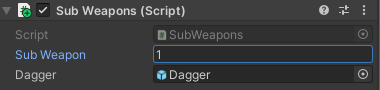
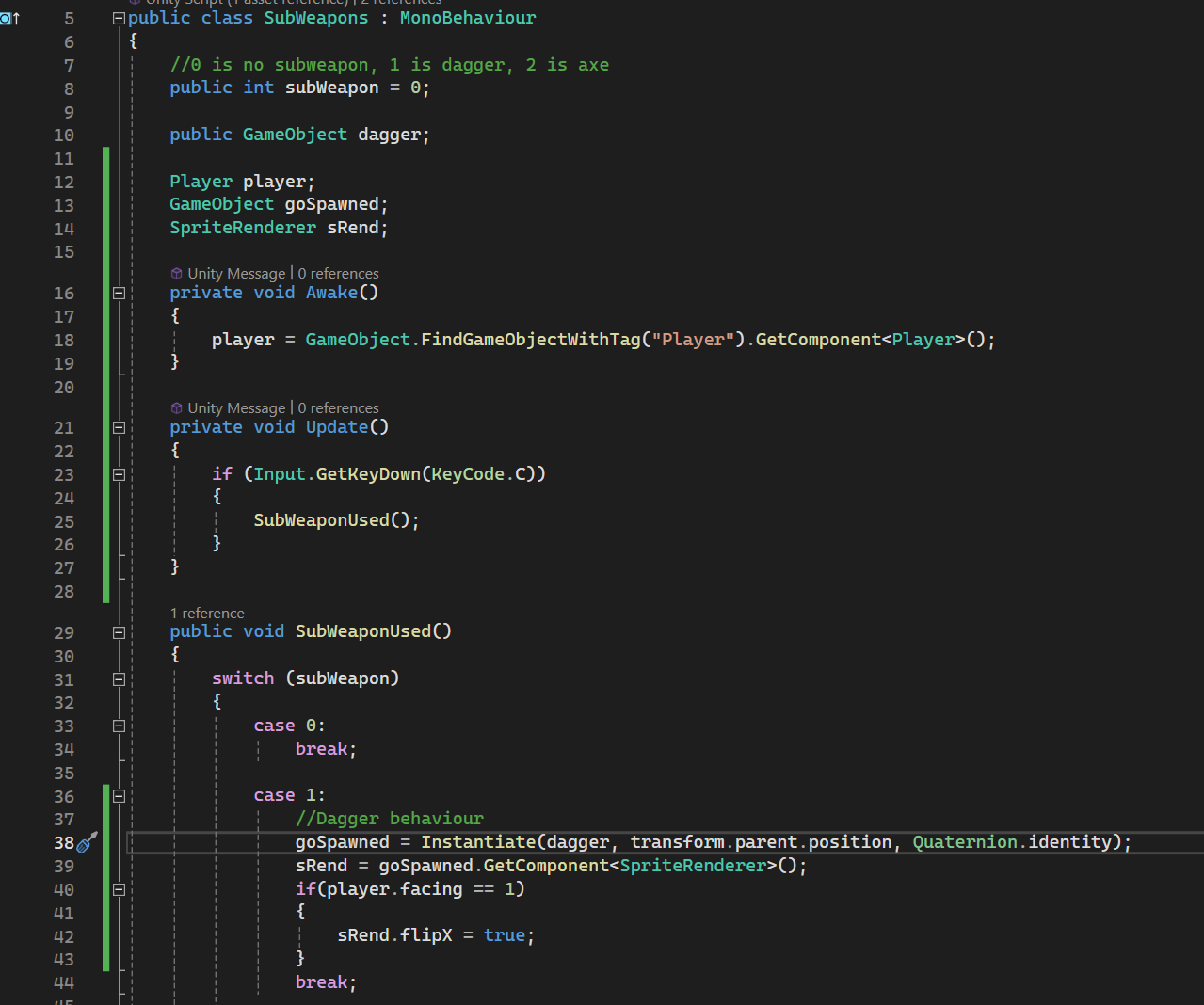
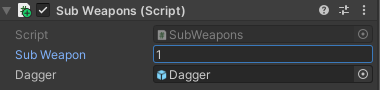
Can somebody help me figure out why I'm getting a null reference on line 38 when instantiating the dagger?

 polar acorn
blissful vessel
https://i.gyazo.com/17be082b84760c40361e30996fe1789e.png
https://i.gyazo.com/ae8...
polar acorn
blissful vessel
https://i.gyazo.com/17be082b84760c40361e30996fe1789e.png
https://i.gyazo.com/ae8...
Line 38 can't throw an NRE. Are you sure it's this script that's throwing the error? And that it's been saved and recompiled in case the line number changes?
Oh, wait, it can actually
transform.parent could be null
Does every object with a SubWeapons script on it have a parent?
blissful vessel
omg, I was so convinced it was something weird w/ the dagger I didn't even consider that being the issue. Solved, ty lmao
polar acorn
I missed it at first too, didn't notice the .parent in there
 teal viper
blissful vessel
omg, I was so convinced it was something weird w/ the dagger I didn't even consi...
teal viper
blissful vessel
omg, I was so convinced it was something weird w/ the dagger I didn't even consi...
Null reference errors only happen when you try to access a member(field/property/method) on a null reference. The only place where that happens on line 38 is transform.parent.position.
 jolly moat
I have a SpawnManager game object w/ a SpawnManager script and some empty game objects to represent spawn points for both player and enemies. The player and enemies are prefabs that I spawn on Awake() of the SpawnManager script. It seems like my enemy is walking towards position.x of 0. My EnemyMovement script uses the player's position to drive its direction. Everything appears to be connected properly in the Unity editor. Here's a video of what I'm seeing. I can provide code snippets if that helps. Any ideas?

// EnemyMovement script
private void Update()
{
    if(!player)
    {
        Debug.Log("Cannot flip(), Player not found...");
        return;
    }

    if(player.transform.position.x > transform.position.x && facingDirection == -1 ||
        player.transform.position.x < transform.position.x && facingDirection == 1)
    {
        Flip();
    }
}

private void FixedUpdate()
{
    if(!player)
    {
        Debug.Log("Cannot move to player, Player not found...");
        return;
    }

    if(!isEnemyDead && !isEnemyHurt)
    {
        float distanceToPlayer = player.transform.position.x - transform.position.x;

        // Only move if beyond threshold
        if(Mathf.Abs(distanceToPlayer) >= 0.01f)
        {
            Debug.Log("moving enemy...");
            Vector2 direction = (player.transform.position - transform.position).normalized;
            rb.linearVelocity = direction * moveSpeed;
            anim.SetBool("isChasing", true);
        }
        else
        {
            Debug.Log("enemy too close to player, stopping movement...");
            // Stop moving when close enough
            rb.linearVelocity = Vector2.zero;
            anim.SetBool("isChasing", false);
        }
    }
}

private void Flip()
{
    if(isEnemyDead)
    {
        return;
    }

    facingDirection *= -1;
    transform.localScale = new Vector3(transform.localScale.x * -1, transform.localScale.y, transform.localScale.z);
}
since your enemy is a prefab it's almost certainly just referencing the player prefab or something
jolly moat
you can see here the editor has the player prefab assigned
 wintry quarry
yeah
exactly
the player prefab
And if you look at the player prefab guess what its position is?
jolly moat
how should I handle spawning a player and enemies?
wintry quarry
it's 0
wintry quarry
jolly moat
how should I handle spawning a player and enemies?
you need to give the enemy a reference to the actual player instance in the scene. Your spawning script can do this
jolly moat
Thank you, I suspected this was an issue
wintry quarry
jolly moat
Thank you, I suspected this was an issue
e.g.
public Enemy enemyPrefab;
public Player playerPrefab;

private Player playerInstance;

void SpawnPlayer() {
  playerInstance = Instantiate(playerPrefab);
}

void SpawnEnemy() {
  var enemyInstance = Instantiate(enemyPrefab);
  enemyInstance.SetTarget(playerInstance);
}```
The structure you want is something like thisthe spawner spawns the player and can hold onto a reference to it.
It can then pass that reference to the enemies when it spawns them
jolly moat
wintry quarry
e.g.
```cs
public Enemy enemyPrefab;
public Player playerPrefab;
private Player...
I'm using this code, but I'm getting this error in the console for the Enemy and the Player: The type or namespace name 'Enemy' could not be found (are you missing a using directive or an assembly reference?) Why does it not like the datatypes Player and Enemy?
The offending lines in VSCode:
public Enemy enemyPrefab;
public Player playerPrefab;

private Player playerInstance;
I mean... my code was an example
you naturally have to use the classes and script names that actually exist in your project.
jolly moat
Could I use GameObject instead and drag the in scene Player and the prefab Enemy?
wintry quarry
jolly moat
Could I use GameObject instead and drag the in scene Player and the prefab Enemy...
you could use GameObject but why would you want to make life harder on yourself like that
Use your actual script
so you don't have to mess around with GetComponent and stuff
in your case Enemy -> EnemyMovement
for the player you could just use Transform I suppose
jolly moat
I'm new to game dev programming. Ahh, ok I'll try that
wintry quarry
Using GameObject variables is often the wrong choice and just makes your code more verbose and more complicated than it needs to be.
Directly referring to the components your code is interested in is the better choice
jolly moat
So in my case, line public Enemy enemyPrefab; would become public EnemyMovement enemyPrefab; ?
 jolly moat
I think I misunderstood previously. So this would go in my EnemyMovement.cs not SpawnManager.cs? I'm still trying to understand how a spawn manager should properly behave
wintry quarry
jolly moat
I think I misunderstood previously. So this would go in my EnemyMovement.cs not ...
I very explicitly said this was code for the SpawnManager
Look at what the codce is doing
it's spawning players and enemies
the enemy would not be doing that
 glad gust
how do i refer to a list from another game object
wintry quarry
glad gust
how do i refer to a list from another game object
like any other variable
but - I would recommend letting the owner of the list manage the list
depending on what you need from the list exactly - there is probably a better way than directly passing around the list itself
glad gust
ok
jolly moat
I updated the datatypes to EnemyMovement and PlayerMovement, but it's still complaining EnemyMovement doesn't have a func called SetTarget(). I assumed it was a static method it inherited from somewhere. I see this is a real thing https://docs.unity3d.com/6000.0/Documentation/ScriptReference/Animator.SetTarget.html. Why is this an issue?
EnemyMovement' does not contain a definition for 'SetTarget' and no accessible extension method 'SetTarget' accepting a first argument of type 'EnemyMovement' could be found (are you missing a using directive or an assembly reference?)
wintry quarry
jolly moat
I updated the datatypes to EnemyMovement and PlayerMovement, but it's still comp...
again my code snippet was an example
there is no documentation for your EnemyMovement class
because you wrote it
I was implying "you should make something like this"
jolly moat
I get that, I thought you were referencing some static class I hadn't heard of. Thanks for clarifying
wintry quarry
It's a method, not a class
 green copper
how am I supposed to handle multiple audio sources on one gameobject? Setting an audio source in a script takes the whole gameobject as an audio source
wintry quarry
green copper
how am I supposed to handle multiple audio sources on one gameobject? Setting an...
What's the use case? Why do you want multiple sources on one object?
green copper
Attempting this, but it's not assigning anything to the array, where SoundManager is a gameobject with three AudioSource components
 wintry quarry
green copper
how am I supposed to handle multiple audio sources on one gameobject? Setting an...
wintry quarry
green copper
how am I supposed to handle multiple audio sources on one gameobject? Setting an...
you can drag individual components
green copper
Use case is I have a telegraph, it needs to hold keyDown, keyUp, and Tone
wintry quarry
green copper
Attempting this, but it's not assigning anything to the array, where SoundManage...
this will work fine but it assumes all the sources are on the same GameObject as the script
green copper
I figured I'd make one gameobject that was the sound manager and give it three components but it's giving me pain
green copper
if I try to assign an audioSource in the inspector, it takes the whole gameObject instead of any single audioSource
wintry quarry
green copper
if I try to assign an audioSource in the inspector, it takes the whole gameObjec...
you can drag individual components
right click the object with the script and select "Properties"
this will open a separate inspector locked to that object
then you can find and drag the individual audio components from wherever you want into it
green copper
That did the trick, thank you!
eternal falconBOT
Posting code
📃 Large Code Blocks
Use links to services like:
https://paste.mod.gg/, https://hastebin.skyra.pw/, https://paste.ofcode.org/, https://paste.myst.rs/, https://scriptbin.xyz/
📃 Inline Code
Surround code with three backquotes. Not quotation marks.
To format as C#, add cs to the first line:
```cs
// Your code here
```
Add a comment with a line number if there is an error message.
 hidden fossil
laser turret script https://paste.mod.gg/rxytlrgxovhx/0
A tool for sharing your source code with the world!
like the damage and everything works but the beam isnt appaering
eternal needle
hidden fossil
laser turret script https://paste.mod.gg/rxytlrgxovhx/0
do some debugging and see if any of those conditions are preventing your code from running. theres a lot of logic we cant see, and you should at least start by debugging to see if theres any line in specific thats wrong
another thing could just be checking the line renderer itself and seeing if you can even see it at all in the scene view, if enabled manually

 wintry quarry
hidden fossil
wintry quarry
hidden fossil
I don't see anything in this code that actually calls FireLaster()
Also the code you shared has no Debug.Log so it's not clear where these are from
eternal needle
the link doesnt update, it shouldve generated a new link for you. id also double check if its even visible in scene view if you're sure the object is getting enabled
hidden fossil
i think i should check the line renderer
cuz verything is working
its just the laser isnt appearing
did i assign the line renderer correctly?

 eternal needle
you should be able to see that, if its actually visible in the scene
hidden fossil
nope not visible in the scene
eternal needle
that width of 0 is probably the cause, been some time since ive used a line renderer
hidden fossil
the width is 0.1
oh wait
i forgot to set the material length
oops
found the problem
forgot to set a value for the positions of the line renderer
 timber tide
https://i.imgur.com/e6Ys330.png
I don't use unity events too much besides stuff for buttons and other UI components where everything is present on the scene, but let's say I want to add unity events to this PageSO such that I want to call a manager when it ends. I'm trying to make sense of how this being on an SO can actually call any type of manager because it doesn't live on the scene.
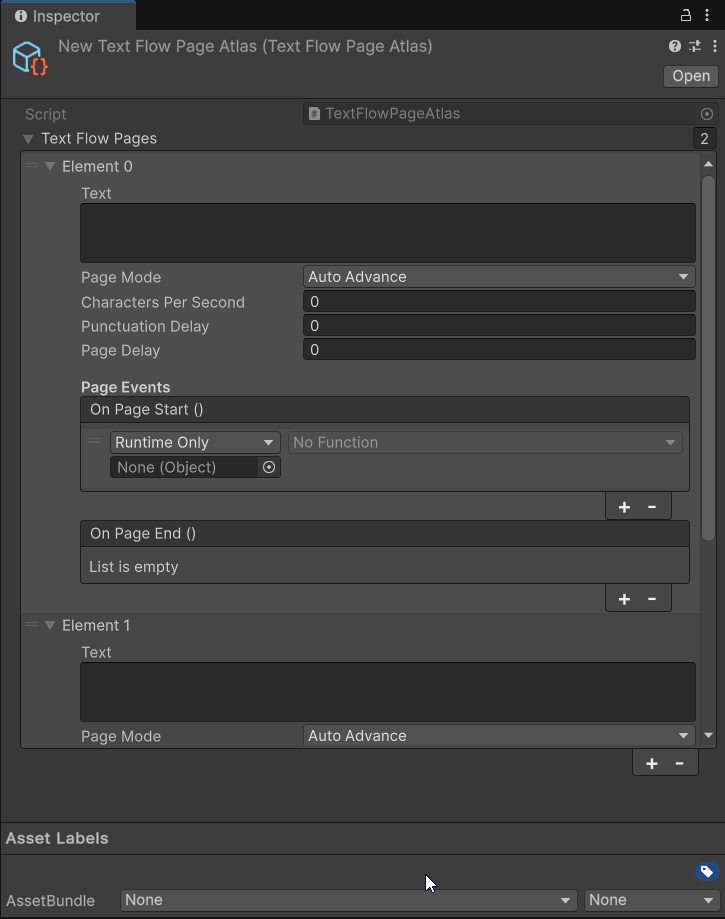

Usually I just do some singleton call, but I was wondering if I can do anything similar without hardcoding too much
Like, you can target prefab instances, but you can't really do much with that right
wintry quarry
timber tide
https://i.imgur.com/e6Ys330.png
I don't use unity events too much besides stuff ...
you could call a function on another SO (or itself) or a prefab yeah
if you architect your game a certain way you could do quite a lot with that.
timber tide
Wouldnt make too much sense though eh? I'm trying to make it somewhat accessible without having another dev have to implement their own singleton calls
wintry quarry
It depends. You could make another SO that already has those singleton calls and then assign that SO's methods here
ultimately calling the singleton
 sour fulcrum
It relies on the assumption the singleton will exist at the time of use
eternal needle
it doesnt have to necessarily be a singleton since this is an SO. the manager could just directly reference the SO and subscribe too.
I dont think there is a way to do what you want without adding logic to your manager game object though
wintry quarry
if you use something like the Atoms arechitecture or use SO assets as singletons, then you get a direct line here
sour fulcrum
Which is an assumption which is bad but in the context of it being a relevant singleton based manager is a reasonable assumption to enforce
timber tide
Like I can just instead use Serializable pages instead of SOs which would give scene presence, but it removes the ability to add pages dynamically (to my typewriter script/component)
sour fulcrum
eternal needle
it doesnt have to necessarily be a singleton since this is an SO. the manager co...
Not that it's an unsolvable problem by any means but this does mean going the route of "saving runtime data on so"s in the form of the event's listeners right?
eternal needle
sour fulcrum
Not that it's an unsolvable problem by any means but this does mean going the ro...
i dont really know what you mean by that route
sour fulcrum
nevermind read that wrong, apologies
sour fulcrum
timber tide
https://i.imgur.com/e6Ys330.png
I don't use unity events too much besides stuff ...
What kind of practical usecases of this event did you have in mind out of curiousity
timber tide
sour fulcrum
What kind of practical usecases of this event did you have in mind out of curiou...
Up to the dev I guess. Say like some event to continue the game
in that case I'd probably want to communicate with the GameManager, but I assume an SO can bridge that right
sour fulcrum
This is just a thought that may or may not influence the way you wanna go about this but you might not want to leave the game continuing or not as such an open ended question a page SO has to answer
timber tide
Yeah I probably wouldn't either, so maybe a better event would be to call an audio manager to play some SFX
sour fulcrum
Maybe something like this has the ability to do things in the event this page finishes and maybe it has control over in what way it ends but at least how i see this it feels a little scary to just pray the page makes the game go again
timber tide
That's how I always feel when playing with any sequencing
sour fulcrum
eg. maybe you have a more free form "on page finished" event and then some more controlled, select-able setting to determine how the page wants the game to continue (because it's gonna continue regardless)
eternal needle
timber tide
in that case I'd probably want to communicate with the GameManager, but I assume...
assuming its supposed to communicate with any manager, no matter what you'll need some logic that has this instance of the manager stored. If you use another SO, its still the same problem. The manager would either have to reference the SO and subscribe, or the SO would need to be passed a reference to the manager
One thing you could do is define an enum mapped to the actual type of manager assuming they're all singletons and access it that way... editor friendly but questionable code wise
sour fulcrum
I believe in some approaches to a setup like this though the page itself would only have the ability to do stuff when it ends (eg. do reactionary stuff like sfx and whatnot) and then how it got to that page and what happens after it's done to that page is handled by something managing the pages (eg. some visual graph based thing or something). Not saying you should do this but just that it might not be ideal to give the isolated page that much control
timber tide
I think having another SO which has those singleton calls is probably the call. Ideally I wouldn't want anyone editing the actual tool code and would prefer that they make their own SO with those bindings
Which would mean I'd have to suggest that type of workflow to get the events to work
eternal needle
is there a reason you cant just add logic to the manager class, to subscribe on awake or something?
timber tide
This would require the dev to write code for the tool to function, but I guess what I'm looking for is that it should be code-agnostic and work as is
If they set up an SO bindings for the managers, that doesn't necessarily imply that it's made just for the tool
Maybe I'll just ditch the idea and keep events local to the component. I thought having some per page would be a neat idea but seems like a pain
eternal needle
If the editor setup is really beneficial it doesnt seem like that bad of an idea honestly. It does kinda force every manager to be a singleton and having to keep this list of singletons up to date though
Im not so big on unity events in SO, it always does seem like a pain
timber tide
I've always heard of people using them as event buses and seems like a neat idea, but it's not something I think is too common enough to expect people to make
eternal needle
I've seen that stuff in some tutorials and I dont think it's useful. Ofc it was always presented as "decoupling code" as if that was true, and being able to send events throughout scenes
It very clearly would run into issues once you need to setup a lot of them. I couldnt imagine trying to find why a method is getting called, then suddenly I gotta find whats invoking a method on an asset, which is subscribed to an asset, which a GO is notified about
sour fulcrum
It's kinda a half measure compared to something like unity's recent-ish visual graph tools (in concept anyway)
I won't elaborate on anything specific but the mod API I made for a game allows people to make custom levels and such in editor without the requirement of any custom code whatsoever and the more inventive people have ungodly amounts of components on certain objects feeding events into events into filters into events into etc. and it gets messy fast. it's just a poor mans visual scripting solution
For implementation on that specifically I had code based events for various gameplay related events (entering an interior, a player dying, a player equipping an item, the hour changing etc. etc.) in the API and then had a separate mod/tool that acted as like a serialized wrapping around all of those which had components that middle-man unityevents into those actual ones
This kind of lets you have three different layers of implementation and usage that consist of
-the backend where all the actual code is running, in where you could/should/may implement code exposed events for when gameplay mechanics happen and accessible functions to manipulate the game
-the kinda middleend where you create behaviours/so's/classes etc. that convert code that can listen to gameplay events and invoke gameplay invents into serialised designer friendly puzzle pieces
-the frontend where you can mix and match those pieces in the editor
example of one of those middle pieces
namespace LethalToolbox
{
    public class PlayerEnterDungeonEvent : NetworkBehaviour
    {
        public UnityEvent<PlayerControllerB> onPlayerEnterDungeonEvent;
        List<EntranceTeleport> whitelistedEntranceTeleports = new List<EntranceTeleport>();

        public void Awake()
        {
            LevelManager.GlobalLevelEvents.onPlayerEnterDungeon.AddListener(OnPlayerEnterDungeon);
        }

        public void OnPlayerEnterDungeon((EntranceTeleport, PlayerControllerB) teleporterAndPlayer)
        {
            if (whitelistedEntranceTeleports.Contains(teleporterAndPlayer.Item1))
            onPlayerEnterDungeonEvent.Invoke(teleporterAndPlayer.Item2);
        }
    }
}
could someone please help me with fixing that player is sticking to walls? I can provide code if needed
!code
eternal falconBOT
Posting code
📃 Large Code Blocks
Use links to services like:
https://paste.mod.gg/, https://hastebin.skyra.pw/, https://paste.ofcode.org/, https://paste.myst.rs/, https://scriptbin.xyz/
📃 Inline Code
Surround code with three backquotes. Not quotation marks.
To format as C#, add cs to the first line:
```cs
// Your code here
```
Add a comment with a line number if there is an error message.
noble cedar
noble cedar
could someone please help me with fixing that player is sticking to walls? I can...
A tool for sharing your source code with the world!
also somehow when you are sticking to wall when you press A or D you wont move, camera rotates there
 hidden marten
mouseInput = new Vector2(Input.GetAxis("Mouse X"), Input.GetAxis("Mouse Y"));
transform.Rotate(0f, mouseInput.x * sensitivity, 0f);
I have these lines of codes for my y axis rotation. but for some reason it jitters while i move the mouse. anyone has any idea why? Thanks
noble cedar
hidden marten
mouseInput = new Vector2(Input.GetAxis("Mouse X"), Input.GetAxis("Mouse Y"));
tr...
I am little bit inexpirienced but if I am correct you should use transform ONLY when you want something to teleport
hidden marten
noble cedar
I am little bit inexpirienced but if I am correct you should use transform ONLY ...
ohhh. do you have any ideas on how i can rewrite the code? will transform.rotation = Quaternion.Euler(0, mouseInput.x *sensitivity, 0) work? (i suck with quaternions btw)
noble cedar
hidden marten
ohhh. do you have any ideas on how i can rewrite the code? will transform.rotati...
private void Rotation()
{
float mouseX = Input.GetAxis("Mouse X") * mouseSensitivityX;
float mouseY = Input.GetAxis("Mouse Y") * mouseSensitivityY;
    transform.Rotate(Vector3.up * mouseX);

    float xRotation = cameraHolder.localRotation.eulerAngles.x - mouseY;
    if (xRotation > 180) xRotation -= 360;
    xRotation = Mathf.Clamp(xRotation, -80, 90);

    cameraHolder.localRotation = Quaternion.Euler(xRotation, 0, 0);
}
this is my code for camera rotation
tho lets be real most people would kill me for that 😄
noble cedar
noble cedar
tho lets be real most people would kill me for that 😄
yesterday I has few people help me remake my camera script so I think this one is the correct one now
hidden marten
transform.Rotate(Vector3.up * mouseX);
this is the exact same line i use for my y rotation, but it still jitters
noble cedar
hidden marten
transform.Rotate(Vector3.up * mouseX);
this is the exact same line i use for my ...
yea I have no idea why since for me it works flawlessly
hidden marten
noble cedar
yea I have no idea why since for me it works flawlessly
can you show me your hierarchy setup? i think its because i have the main player as the child of my player object
noble cedar
hidden marten
can you show me your hierarchy setup? i think its because i have the main player...
as of now I am in school so I can not sent it ill try to find it in screenshots I was sending to teacher because I had few problems also but dont get your hopes up
hidden marten
noble cedar
as of now I am in school so I can not sent it ill try to find it in screenshots ...
oh alright. thanks though!
 keen cargo
hidden marten
mouseInput = new Vector2(Input.GetAxis("Mouse X"), Input.GetAxis("Mouse Y"));
tr...
keen cargo
hidden marten
mouseInput = new Vector2(Input.GetAxis("Mouse X"), Input.GetAxis("Mouse Y"));
tr...
What's this rotation for? Camera?
hidden marten
keen cargo
What's this rotation for? Camera?
yeah, a first person camera
keen cargo
What do you have it under, Update()?
hidden marten
yes
keen cargo
Try FixedUpdate() instead
FixedUpdate basically forces the camera to operate under 60fps conditions
Update() is too fast for camera controls so you'll get jitters
eternal needle
keen cargo
FixedUpdate basically forces the camera to operate under 60fps conditions
Updat...
??? That's not how any of this works
keen cargo
That's what i understood 
Feel free to correct, but you do definitely want it to be fixedupdate
eternal needle
hidden marten
yeah, a first person camera
Use cinemachine. It's a premade camera that's better than what most people will write
keen cargo
Let the boy walk before running first
hidden marten
keen cargo
Let the boy walk before running first
ikr 😭
keen cargo
If you understand the basic camera stuff then you can do cinemachine
hidden marten
eternal needle
Use cinemachine. It's a premade camera that's better than what most people will ...
is it easy to learn?
keen cargo
Cinemachine takes a bit of time
eternal needle
keen cargo
If you understand the basic camera stuff then you can do cinemachine
Please just stop offering advice when you arent even familiar with the basics either.
keen cargo
Can you at least correct me then please
Like say anything other than "you're not being helpful"
Tell me WHY I'm not correct
eternal needle
hidden marten
is it easy to learn?
It is incredibly easy. There are tons of tutorials, its just a matter of choosing the correct cinemachine camera and then you can play around with the settings.
hidden marten
yooo the fixedupdate thing worked... its still not that smooth but wayy better than before
hidden marten
should i put my input function in the lateupdate as well?
eternal needle
keen cargo
Like say anything other than "you're not being helpful"
Fixed update is used for physics, update doesnt "run too fast causing jitters". Theres nothing I can say to correct about that, it just simply isnt true.
The only reason youd use fixed update is if the player object moves via rigidbody AND doesnt interpolate which a player rigidbody should.
Cinemachine handles literally all of this you just need to select which update mode to use too
hidden marten
eternal needle
Fixed update is used for physics, update doesnt "run too fast causing jitters". ...
how did putting my rotation function in fixedupdate help though
eternal needle
keen cargo
You could've just said "it's used for physics"
If you really are gonna read the first 6 words and ignore everything else which is pretty useful information, I see no purpose in explaining anything further to you
keen cargo
What is your problem? Why are you assuming that I haven't read the rest?
 polar dust
hidden marten
should i put my input function in the lateupdate as well?
polar dust
hidden marten
should i put my input function in the lateupdate as well?
You want to do all your input and game object movement in update, then update the camera in late update
eternal needle
hidden marten
how did putting my rotation function in fixedupdate help though
I havent seen how you move the object, refer to my message above about why you could use fixed update but ultimately shouldnt. The player being a rigidbody should use interpolate, or it might look choppy for people with high end pcs.
noble cedar
this isnt beginner code stuff this is advanced shit xD
keen cargo
It kindaa is beginner, i have interpolation in my movement too
It's not that advanced, just some couple extra steps
eternal needle
noble cedar
this isnt beginner code stuff this is advanced shit xD
It is about as beginner as it gets when we're literally talking about how objects move.
noble cedar
eternal needle
It is about as beginner as it gets when we're literally talking about how object...
yea but how cinemashine is beginner stuff
polar dust
cinemachine isn't some advanced thing, it probably can be if you get really deep into it
eternal needle
Because it's a plug and play solution. No beginner should write their own camera if you are intending to use it in your game. Sure you can learn using it but, it's simply not going to end well
Cinemachine requires no custom code, you literally just choose a camera. How much easier could that get?
hidden marten
okay so lateupdate didnt work. fixedupdate is the only thing that helped. i heard someone say its not good to put the main camera under a rigidbody, is that the issue?
keen cargo
It's completely fine to write your own camera, it helps you learn how everything works behind the curtains
Plus you'll get more used to coding your own components
noble cedar
eternal needle
Cinemachine requires no custom code, you literally just choose a camera. How muc...
tbh I am just going thru docs and cinemachine is somewhere I havent gotten to yet
😄
keen cargo
hidden marten
okay so lateupdate didnt work. fixedupdate is the only thing that helped. i hear...
You may want to have your movement interpolated, I don't have the code on me right now, but it's basically adding one extra line
hidden marten
hidden marten
okay so lateupdate didnt work. fixedupdate is the only thing that helped. i hear...
 hidden marten
keen cargo
You may want to have your movement interpolated, I don't have the code on me ri...
hidden marten
keen cargo
You may want to have your movement interpolated, I don't have the code on me ri...
ohhh. if you dont mind explaining can you tell me what is does basically? i like to learn my stuff before using them hahaha
keen cargo
Because if you fixedupdate on a non-interpolated player, then high end pcs do get jittery
eternal needle
hidden marten
okay so lateupdate didnt work. fixedupdate is the only thing that helped. i hear...
Can you screenshot the rigidbody?
Truthfully I wouldnt have it underneath anyways but remember rigidbody moves within the physics loop (like fixed update). If you have interpolate on, it will smooth the movement and move every frame. The camera would also do the same as a child object
hidden marten
eternal needle
Can you screenshot the rigidbody?
Truthfully I wouldnt have it underneath anyway...
 keen cargo
hidden marten
ohhh. if you dont mind explaining can you tell me what is does basically? i like...
keen cargo
hidden marten
ohhh. if you dont mind explaining can you tell me what is does basically? i like...
Interpolation is basically the computer calculating extra frames between an object's position
noble cedar
noble cedar
https://paste.mod.gg/uqctflrmfkdy/0
also while we are here could someone help me with this please?
hidden marten
keen cargo
Interpolation is basically the computer calculating extra frames between an obje...
ooooohhh
keen cargo
If you've seen those "60fps anime fight" videos, that's where you can see interpolation
(they look horrible btw lol)
But for stuff like physics it's really good
Because it reduces the jitteriness of physics simulations
hidden marten
ohhh i see
keen cargo
And it's literally just one line to your movement code
Not even that, just a statement i believe
I think it's like an extra parameter to your rigidbody
hidden marten
yeahh it is turned on
hidden marten
hidden marten
see? i put my interpolate to interpolate
keen cargo
Hmm i need to check mine later, I know i enabled interpolation within code
hidden marten
noble cedar
could someone please help me with fixing that player is sticking to walls? I can...
try setting the friction of the wall to 0
keen cargo
Within the inspector it "could" be different, but i could not explain why it would be if it was
noble cedar
hidden marten
try setting the friction of the wall to 0
the wall has only collider
you cant set friction there
hidden marten
keen cargo
Oh try making a physic material
yeah
noble cedar
keen cargo
Oh try making a physic material
I tried that didnt help also somehow it broke my other script
keen cargo
very peculiar, it shouldn't affect other scripts
eternal needle
noble cedar
also while we are here could someone help me with this please?
With networking there could be a ton more reasons than what we see here.
#archived-networking or the unity multiplayer server pinned in there is where youd want to post this. though truthfully if you're a beginner you shouldnt even be touching multiplayer
noble cedar
eternal needle
With networking there could be a ton more reasons than what we see here.
<#49787...
my multiplayer works correctly as of now
I have been working with unity for 9months now
I just ran into this problem for the first time
or maybe even earlier just hadnt notice it
hidden marten
so do i leave my rotation script in fixedupdate or do i switch to cinemachine?
eternal needle
noble cedar
my multiplayer works correctly as of now
I have been working with unity for 9mon...
That doesnt change anything about my response, if it uses netcode at all then it's more appropriate in the other channels. If you're doing multiplayer you should be familiar with how to debug though.
I STRONGLY suggest you reconsider multiplayer. This is the advice many others would give as well
 formal valley
Hi what's the function of touching colliders? like ontriggerEnter2d(){}.
keen cargo
hidden marten
so do i leave my rotation script in fixedupdate or do i switch to cinemachine?
In the end you're better off with cinemachine but i do recommend you figure this out with the manually coded camera, you'll learn a lot
keen cargo
formal valley
Hi what's the function of touching colliders? like ontriggerEnter2d(){}.
Oncollision?
formal valley
yeah
eternal needle
hidden marten
so do i leave my rotation script in fixedupdate or do i switch to cinemachine?
#💻┃code-beginner message
Up to you. I dont think you'll learn enough from it at this point because making your own isnt completely trivial
keen cargo
Yea oncollision is the touching of colliders lol
formal valley
💀
noble cedar
eternal needle
That doesnt change anything about my response, if it uses netcode at all then it...
but why would I remake my game now when basicly this is the last thing that needs fixing? also should I really switch to Networking even tho its mostly just normal code with few changes?
hidden marten
keen cargo
In the end you're better off with cinemachine but i do recommend you figure this...
true, i want to use manually coded camera as well, but i've been stuck with the movement for 3 days and i dont want to spend more time
keen cargo
hidden marten
true, i want to use manually coded camera as well, but i've been stuck with the ...
I'll get home soon and send you what I have, if it helps then great, if not then it's up to you
hidden marten
alright. i want to try and use quaternions instead of transform.rotate, can someone help me with that?
or does it overcomplicte things?
hidden marten
ohh.. i still want to give it a try though
keen cargo
Oh yes you definitely do want to know how they work
They're very useful
From what i saw that you posted earlier, why not give it a try?
The snippet you sent
eternal needle
noble cedar
but why would I remake my game now when basicly this is the last thing that need...
This isnt even close to the first time I've seen this exact ideology of "I just need to fix this one thing!"
Also yes it's more appropriate because if anyone helping you in here isnt familiar with how network transforms (or even ownership) work then they could entirely miss what the real problem is. I didn't fully look line by line to see what your issue was (because on mobile the website keeps going blank) but you should really add debugs and see why things dont align with what you think.
hidden marten
keen cargo
The snippet you sent
alright! transform.rotation = Quaternion.Euler(0, mouseInput.x *sensitivity, 0), this you mean right?
keen cargo
Yea give it a try
It's better if you try it, and then ask why it doesn't work - than to ask if it would work beforehand
noble cedar
eternal needle
This isnt even close to the first time I've seen this exact ideology of "I just ...
might be just my idiocy what about checking every time if player is grounded which I already have for when he jumps and if he is in the air for more then idk 0.5s it will forcefully add velocity down?
let me go try that brb
hidden marten
keen cargo
It's better if you try it, and then ask why it doesn't work - than to ask if it ...
nope it does work. it doesnt even let me move along the y axis this time, it just snaps back. i was able to move it with jitters the last time around
eternal needle
noble cedar
might be just my idiocy what about checking every time if player is grounded whi...
With what you describe, the issue really just sounds like you are using the default physics material. You should assign one that has 0 frictions to the player
keen cargo
hidden marten
nope it does work. it doesnt even let me move along the y axis this time, it jus...
Oh i just noticed, you might want to try either *= or +=
Quaternions are a little silly like that
noble cedar
eternal needle
With what you describe, the issue really just sounds like you are using the defa...
yea but how come when I add new physics material to it my script which checks collider (its shop) suddenly breaks
eternal needle
noble cedar
yea but how come when I add new physics material to it my script which checks co...
🤷♂️ it's not like your monitor is physically breaking when this happens. "It breaks" is not an actual error
Surely something more specific is happening
hidden marten
keen cargo
Oh i just noticed, you might want to try either *= or +=
i can move it this time, but with more jitters hahahaha
if i were to not put my main cam under the rigidbody, what should i do?
keen cargo
Don't take it off the player
Unless you're using cinemachine there's no reason to really take it off the player
You'd have to make the camera follow the player's position in code, which would just make it more jittery
noble cedar
eternal needle
🤷♂️ it's not like your monitor is physically breaking when this happens. "It b...
let me try debug the problem first before I go whinning about it in chat
😄
 lone tundra
I'm using unity Netcode For Gameobjects and following the tutorial https://docs-multiplayer.unity3d.com/netcode/1.11.0/tutorials/get-started-ngo/. I am up to the HelloWorldManager.cs script part and have pasted the script. However, error message Assets\HelloWorldManager.cs(34,43): error CS0120: An object reference is required for the non-static field, method, or property 'HelloWorldManager.m_NetworkManager' shows up even though I copy-pasted the code from the tutorial. How do I fix this?
Use this guide to learn how to create your first client-server Netcode for GameObjects project. It walks you through creating a simple Hello World project that implements the basic features of Netcode for GameObjects.
low warren
keen dew
You can't have the slide code in a separate component, all movement has to be ha...
so you mean i should move my slide code into my player's movement code?
noble cedar
lone tundra
I'm using unity Netcode For Gameobjects and following the tutorial https://docs-...
lone tundra
oh mb
keen cargo
lone tundra
I'm using unity Netcode For Gameobjects and following the tutorial https://docs-...
- that documentation is outdated, the page says it
- #archived-networking is a better place to ask
noble cedar
yea idk I created new physics material but I am still sticky to walls
 eternal needle
Change that friction combine to whatever the minimum option is called
I think the default is 0.6 (been forever since I've created one, could be wrong). So an average in that case would be 0.3
noble cedar
eternal needle
Change that friction combine to whatever the minimum option is called
you are the best thanks
also my problem was that I have been stupid I forgot to add in inspector in my shop Prefab to show what gun you are getting 😛
lone tundra
keen cargo
1) that documentation is outdated, the page says it
2) <#497874116246896640> is ...
I'm using unity 2022.3.54f1 and I can only download netcode for gameobjects 1.11.0
noble cedar
lone tundra
I'm using unity 2022.3.54f1 and I can only download netcode for gameobjects 1.11...
I would recommend using the unity 6000.1 version they remade whole networking there
lone tundra
noble cedar
I would recommend using the unity 6000.1 version they remade whole networking th...
How do I upgrade unity to that version?
noble cedar
lone tundra
How do I upgrade unity to that version?
you download it in unity hub
 grand snow
Then you backup your project if you aren't using source control before you begin.
noble cedar
grand snow
Then you backup your project if you aren't using source control before you begin...
source control?
grand snow
noble cedar
source control?
Git, unity scm, SVN, perforce.
easy start is using git with github
noble cedar
grand snow
Git, unity scm, SVN, perforce.
easy start is using git with github
oh so basicly somewhere to put your code?
grand snow
noble cedar
oh so basicly somewhere to put your code?
Yes, source control systems are used to track all changes made in a project so you can go back in time, have multiple branches and collaborate with others easily
keen cargo
oh yeah you definitely want to use github
starting out at least
even as a solo dev it's super nice
if you messed something up you can just go back to the last commit you made (like rob mentioned)
grand snow
lets remember that Github is a online host for a GIT repository. Others exist such as gitlab.
though i recommend github desktop for managing the repo for beginners
noble cedar
grand snow
Yes, source control systems are used to track all changes made in a project so y...
my dumb ass just made copy of the whole project xD
keen cargo
also @hidden marten I'm home, so can you send the script for the player movement and the camera look?
grand snow
noble cedar
my dumb ass just made copy of the whole project xD
Hey when i started out I did too but we learn!
keen cargo
noble cedar
my dumb ass just made copy of the whole project xD
narr 💀 hahaha
yea don't do that, you're also wasting a lot of space on your pc (since the unity libraries take up a surprising amount of space)
noble cedar
grand snow
Hey when i started out I did too but we learn!
because I had single player game but for our 1y project to pass the school year it wasnt enough so I had to remake it into multiplayer :/
noble cedar
keen cargo
narr 💀 hahaha
yea don't do that, you're also wasting a lot of space on your p...
surpisingly it takes up 10gb the copy :/
keen cargo
when you set up your source control, there's a thing called ".gitignore", make sure you have it set up for unity
on github desktop its really simple, it's literally just a dropdown tab
that will prevent "too large file size" commit errors, just because of those libraries
grand snow
you mean the Library/ folder.
Some plugins such as firebase have actual lib files that are too big (which require something called git lfs to commit properly)
keen cargo
yep
this will only help up to a certain point though, if you have some crazy large assets (or just a large amount of them in general) then you'll have to set up git lfs or switch to something else like Perforce
for a student project don't worry about it too much though
 hexed terrace
keen cargo
that will prevent "too large file size" commit errors, just because of those lib...
hexed terrace
keen cargo
that will prevent "too large file size" commit errors, just because of those lib...
that's gitlfs, not gitignore.
Use the gitignore to not upload the things you don't need to backup (ie: library folder), and gitlfs to commit large files correctly
keen cargo
don't they "kind of" go hand in hand though? since the library folder is quite large, and you'd need git lfs to commit it (if you didn't have gitignore for it)
hexed terrace
no, they don't
keen cargo
makes sense
hexed terrace
gitlfs is for single files, and the library folder is ignored
keen cargo
because I remember doing my first project, and encountering the same error
I did the gitignore, and the error was solved
well it's not an "error", more so that it's just git asking if you want to set up LFS
grand snow
yea you are meant to not include anything in Library/ but a file being too big is another problem
keen cargo
ahh i see
hexed terrace
you only need to backup these three folders of a project
 hexed terrace
delete this and shar !code correctly 👇
eternal falconBOT
Posting code
📃 Large Code Blocks
Use links to services like:
https://paste.mod.gg/, https://hastebin.skyra.pw/, https://paste.ofcode.org/, https://paste.myst.rs/, https://scriptbin.xyz/
📃 Inline Code
Surround code with three backquotes. Not quotation marks.
To format as C#, add cs to the first line:
```cs
// Your code here
```
Add a comment with a line number if there is an error message.
keen cargo
@hexed terrace @grand snow thanks guys, understand git a lot better
hidden marten
keen cargo
also <@890050668654657576> I'm home, so can you send the script for the player ...
A tool for sharing your source code with the world!
sorry for the delay i was eating lol
keen cargo
no worries lol
ok so one thing that i see right away is try putting the moveplayer and the movemouse under fixedupdate
since i assume the movemouse was your camera controls
because you're moving your player with physics, so fixedupdate works perfectly for that purpose
hidden marten
keen cargo
because you're moving your player with physics, so fixedupdate works perfectly f...
true. but moving mouse doesnt really use physics. like i said earlier, it kinda works when i put move mouse in fixed update. should i leave it there and move on?
keen cargo
you could also have the movement in fixed, and mouse in late
also side note, but yep having interpolate set up in inspector or code is the exact same, so you did fine there
hidden marten
keen cargo
you could also have the movement in fixed, and mouse in late
nope doesnt work
keen cargo
Show the code
hidden marten
keen cargo
Show the code
 hidden marten
hidden marten
hidden marten
skip a bit to the end lol it takes a long time to run
(also i didnt clamp the x rotation yet)
keen cargo
i had to watch the whole thing because for some reason discord didn't embed it correctly lol
keen cargo
hidden marten
so in your code i'm seeing that you're multiplying your mouse movement multiple times by the sensitivity
so first you do it in myinput, and then you do it again in movemouse
that could be why there's some weird behavior
oh you actually do it for the third time in movemouse when you do the transform.rotation
you only need the sensitivity from the input
hidden marten
keen cargo
you only need the sensitivity from the input
i removed everything, it still jitters
keen cargo
send code
hidden marten
keen cargo
send code
A tool for sharing your source code with the world!
keen cargo
hmm ok i'll boot up a project and run it there, maybe i can spot something better that way
keen cargo
hidden marten
https://paste.mod.gg/vxdamxigirww/0
so i'm thinking there's two possible issues,
one is that you might want to multiply time.deltatime for the mouse movement
the other is that instead of using linearvelocity, you use addforce
addforce is probably a lot better than linearvelocity
keen cargo
addforce?
hidden marten
yeah...
keen cargo
oh its quite simple actually, let me see
hidden marten
and the only issue i have is with the mouse movement, not with the player movements, the movement is pretty smooth
keen cargo
well the player movement is tied to your mouse movement, which is what might cause issues
hidden marten
keen cargo
well the player movement is tied to your mouse movement, which is what might cau...
even if this was true, why is putting it under fixedupdate working
keen cargo
putting the mouse movement under fixedupdate?
hidden marten
keen cargo
putting the mouse movement under fixedupdate?
yeah
keen cargo
hmm trying it from my end, it makes the camera a bit more jittery
also i really recommend to separate the keyboard inputs into two:
horizontalInput
verticalInput
(you'll also have to do this for the mouse)
keen cargo
in your myinput, the mouseinput section
hidden marten
like this?
 keen cargo

hidden marten
its still jittery 😔
 fossil drum
Why wouldn't it be?
FixedUpdate most of the time only runs once every few normal Update loops.
hidden marten
keen cargo
ok, just solved it
it worked for you?
keen cargo
yeah it seems to work completely fine for me
hidden marten
can i get your script?
keen cargo
using UnityEngine;

public class PlayerMovement : MonoBehaviour
{
    public Rigidbody rb;
    public Camera cam;

    public float speed;
    public float jumpForce;
    public float sensitivity;

    private Vector3 keyboardInput;
    private Vector2 mouseInput;
    private float xRot;


    void Start()
    {
        Cursor.lockState = CursorLockMode.Locked;
        Cursor.visible = false;

        rb = GetComponent<Rigidbody>();
    }


    void Update()
    {
        MyInput();

    }

    void FixedUpdate()
    {
        MovePlayer();
    }

    void LateUpdate()
    {
        MoveMouse();
    }

    void MyInput()
    {
        keyboardInput = new Vector3(Input.GetAxis("Horizontal"), 0f, Input.GetAxis("Vertical"));
        mouseInput = new Vector2(Input.GetAxis("Mouse X") * sensitivity * Time.timeScale, Input.GetAxis("Mouse Y") * sensitivity * Time.timeScale);


        if (Input.GetKeyDown(KeyCode.Space))
        {
            Jump();
        }
    }

    void MovePlayer()
    {
        Vector3 moveVector = transform.TransformDirection(keyboardInput) * speed;
        rb.linearVelocity = new Vector3(moveVector.x, rb.linearVelocity.y, moveVector.z);
    }

    void MoveMouse()
    {
        xRot -= mouseInput.y;

        transform.rotation *= Quaternion.Euler(0, mouseInput.x, 0);
        cam.transform.localRotation = Quaternion.Euler(xRot, 0f, 0f);

    }

    void Jump()
    {
        rb.AddForce(Vector3.up * jumpForce, ForceMode.Impulse);
    }
}
it's basically the same
i tried to not adjust your script too much in order to see if it was just the timescale
hidden marten
keen cargo
it's basically the same
im using your script and im seeing the jitter still 😔
keen cargo
at this point i can't really tell tbh, it could just be an editor thing - try building the game and see if it comes up there
fossil drum
Are you guys sure your values of the component are the same in the editor?
keen cargo
I'll take a look
fossil drum
Other then that, your FPS in the editor might be the same as the FixedUpdate speed for example, and you might not notice the delay.
keen cargo
I changed my values to be the same as his, I don't see any issues
hidden marten
keen cargo
at this point i can't really tell tbh, it could just be an editor thing - try bu...
can i just put it in fixedupdate and forge about it lol
i mean if it aint broke you dont gotta fix it
 grand badger
no. Camera rotation/movement HAS to happen in LateUpdate
keen cargo
didn't it stutter in fixedupdate too though?
hidden marten
keen cargo
didn't it stutter in fixedupdate too though?
no it works perfectly
hidden marten
grand badger
no. Camera rotation/movement HAS to happen in LateUpdate
i spent 4 days on just the movement 😭 ion wanna make it 5
keen cargo
also i would actually try having the camera be separate from the player, so not as a child to player
i know i said it wasn't necessary but honestly it would probably work better
grand badger
no worries you'll solve this within minutes
keen cargo
and then updating the camera position to player in update
grand badger
the issue if you put it in FixedUpdate is that the updates aren't smooth
that's because Physics (like RigidBody movement) DO interpolate
but the camera movement doesn't -- because there's no built-in functionality for that (it's outside physics)
the stutter you're encountering is likely because of edge-case synchronization issues, so just gotta ALSO update sometimes in FixedUpdate lol
and a potential issue is this:
        if (Input.GetKeyDown(KeyCode.Space))
        {
            Jump();
        }
    void Jump()
    {
        rb.AddForce(Vector3.up * jumpForce, ForceMode.Impulse);
    }
here you're just adding force IN UPDATE
which isn't necessarily wrong, but not ideal. there's a recommended pattern for that
    void Update()
    {
        keyboardInput = new Vector3(Input.GetAxis("Horizontal"), 0f, Input.GetAxis("Vertical"));
        mouseInput = new Vector2(Input.GetAxis("Mouse X") * sensitivity, Input.GetAxis("Mouse Y") * sensitivity);
        wantsToJump = Input.GetKeyDown(KeyCode.Space);
    }

    void FixedUpdate()
    {
        Vector3 moveVector = transform.TransformDirection(keyboardInput) * speed;
        rb.linearVelocity = new Vector3(moveVector.x, rb.linearVelocity.y, moveVector.z);
        if (wantsToJump) { rb.AddForce(Vector3.up * jumpForce, ForceMode.Impulse); }
        wantsToJump = false;
    }
but primary issue is that you're moving rotation like this:
transform.rotation *= Quaternion.Euler(0, mouseInput.x, 0);
but in physics, you should be using rb.rotation IN FIXED UPDATE