#💻┃code-beginner
1 messages · Page 596 of 1
 trail heart
 hot laurel
sounds like the zombie chase is in wrong axis
 void dawn
hot laurel
sounds like the zombie chase is in wrong axis
void dawn
hot laurel
sounds like the zombie chase is in wrong axis
how do i fix that ?
 visual linden
void dawn
visual linden
void dawn
ok
 eternal falconBOT

Posting code
📃 Large Code Blocks
Use links to services like:
https://paste.mod.gg/, https://hastebin.skyra.pw/, https://paste.ofcode.org/, https://paste.myst.rs/, https://scriptbin.xyz/
📃 Inline Code
Surround code with three backquotes. Not quotation marks.
To format as C#, add cs to the first line:
```cs
// Your code here
```
Add a comment with a line number if there is an error message.
 bitter apex
    if (Input.GetAxis("Mouse ScrollWheel") < 0f ) // forward
        {
            Camera.main.orthographicSize++;
        }
        else if (Input.GetAxis("Mouse ScrollWheel") > 0f ) // backwards
        {
            Camera.main.orthographicSize--;
        }
Currently I have this as my code, but it seems to be really.. temperamental? I'm trying to "zoom out" of my 2d game, but I have to scroll down on my mouse anywhere between 5 - 50 times just for it to scroll out
I'm not sure why, either, could anyone please give me some advice
 wintry quarry
bitter apex
```cs
if (Input.GetAxis("Mouse ScrollWheel") < 0f ) // forward
{
...
wintry quarry
bitter apex
```cs
if (Input.GetAxis("Mouse ScrollWheel") < 0f ) // forward
{
...
I would start by switching to GetAxisRaw
void dawn
https://paste.mod.gg/mxkvcoejlvtq/0
here is the code for the zombie
A tool for sharing your source code with the world!
bitter apex
thank you, It turns out all I had to do was change it from being in FixedUpdate() to Update(), i guess fixedupdate works differently to how i expected it to 🗿
wintry quarry
bitter apex
thank you, It turns out all I had to do was change it from being in FixedUpdate(...
Oh you didn't mention that. yeah input needs to be handled in Update, not FixedUpdate
 grand snow
bitter apex
```cs
if (Input.GetAxis("Mouse ScrollWheel") < 0f ) // forward
{
...
grand snow
bitter apex
```cs
if (Input.GetAxis("Mouse ScrollWheel") < 0f ) // forward
{
...
ortho size is a float so you can do:
camera.orthographicSize + (Input.GetAxis("Mouse ScrollWheel") * multiplier);
bitter apex
oh lovely. thank you
bitter apex
wintry quarry
Oh you didn't mention that. yeah input needs to be handled in Update, not FixedU...
Yeah thanks, I'll keep that in mind for the future.
grand snow
@bitter apex and to make it go backwards do (1f - Input.GetAxis("Mouse ScrollWheel")) * multiplier
no wait it should be axis * -1 mb i forgot its from -1 to 1
wintry quarry
that's not right - you'd just multiply by -1
 polar acorn
Did you take the NavMesh surface off of the zombie like we said yesterday
void dawn
polar acorn
Did you take the NavMesh surface off of the zombie like we said yesterday
yes
polar acorn
void dawn
yes
And your zombie no longer had a rigid body?
void dawn
polar acorn
And your zombie no longer had a rigid body?
yes he no longer has that
polar acorn
void dawn
yes he no longer has that
And is the animator on a child object, rather than the one the NavMesh Agent is on?
void dawn
polar acorn
And is the animator on a child object, rather than the one the NavMesh Agent is ...
now it is
polar acorn
Okay and did that solve the problem
void dawn
let me try
a warning and an error
Failed to create agent because there is no valid NavMesh this is the warning
this is the error
MissingComponentException: There is no 'Animator' attached to the "ZOMBIE" game object, but a script is trying to access it.
You probably need to add a Animator to the game object "ZOMBIE". Or your script needs to check if the component is attached before using it.
UnityEngine.Animator.SetBool (System.String name, System.Boolean value) (at <9b89611000504a9585efec19be4faf3b>:0)
ZombieAI.Update () (at Assets/scripts/Zombie AI.cs:60)
well i did create an empty child to put the animator in
polar acorn
void dawn
a warning and an error
Failed to create agent because there is no valid NavMes...
First error: We already covered this. You need a NavMesh Surface for a NavMesh Agent to be on.
Second error: You need to drag in the animator that you moved to a different object and remove the get component calls to it
void dawn
you know what , i think before i go on with this project i should do a unity basics course and a c# basics too
eternal falconBOT
:teacher: Unity Learn ↗
Over 750 hours of free live and on-demand learning content for all levels of experience!
 inland kettle
why is it that even though I set previousItemX as inactive, it still is active when I play? I wanna be able to only have one object from each category active
polar acorn
inland kettle
https://codeshare.io/g8koNY
why is it that even though I set previousItemX as i...
First off, if you ever find yourself numbering variables, you should be using an array instead.
Second, show the inspector for GameManager
inland kettle

 rich adder
lord..
inland kettle
☠️
polar acorn
inland kettle
So, those first 9 things - are those prefabs or objects in the scene
when you click on them, what highlights
inland kettle
polar acorn
So, those first 9 things - are those prefabs or objects in the scene
Prefabs
inland kettle
No I’m disabling the Actual (item) s
Those prefabs are destroyed in update
Those work
polar acorn
inland kettle
No I’m disabling the Actual (item) s
So are the objects in the inspector prefabs or objects in the scene
inland kettle
inland kettle
Top 1 to hair 3 are prefabs, actual top 1- actual hair 3 are game objects
polar acorn
Ah, wait, I see, you've got separate variables for the prefabs and the instances.
inland kettle
Yes
polar acorn
This is part of the reason you should be using collections, easier to read
inland kettle
Will take note for future projects, still quite new to this
polar acorn
They're re-activated by the wearClothes method, which is being called from somewhere else, for now, just put return; as the first line of it so the rest of the function is skipped. Do they all start up deactivated then?
inland kettle
I thought you can’t put return in void functions?
rich adder
inland kettle
I thought you can’t put return in void functions?
ofc you can
inland kettle
Whaaaat
rich adder
it just returns early without any value
inland kettle
Ohh
inland kettle
polar acorn
They're re-activated by the `wearClothes` method, which is being called from som...
Do I do the same to wear clothes 2 and 3?
inland kettle
I’ve learnt arrays, just didn’t think of using them lols
 scarlet skiff
i dont get it are these not the exact same return type? whats the issue


 rich adder
yeah once you're adding numeration to your variables, its def time for an array
inland kettle
polar acorn
Do that
It says unreachable code detected
polar acorn
inland kettle
It says unreachable code detected
Yes ignore that
rich adder
scarlet skiff
i dont get it are these not the exact same return type? whats the issue
the tuple?
polar acorn
scarlet skiff
i dont get it are these not the exact same return type? whats the issue
Make a class or struct for this, don't use a tuple as a list parameter
inland kettle
polar acorn
Yes ignore that
Oh but won’t nothing happen then
polar acorn
inland kettle
Oh but won’t nothing happen then
Yes, that's the point
We want to disable these functions and see if Start is actually deactivating things
 swift crag
scarlet skiff
i dont get it are these not the exact same return type? whats the issue
swift crag
scarlet skiff
i dont get it are these not the exact same return type? whats the issue
why are you using State in the definition of the interface?
polar acorn
so we're removing the code that reactivates them
inland kettle
Ohhh
swift crag
Is that a completely different State?
scarlet skiff
swift crag
Is that a completely different `State`?
state is a class that inherits fro mthe interface istate
inland kettle
inland kettle
Ohhh
When I click the objects nothing is activated
polar acorn
inland kettle
When I click the objects nothing is activated
Well, yes, that's what is to be expected with the functions disabled. But everything's now properly starting disabled, right?
inland kettle
Yes
swift crag
scarlet skiff
state is a class that inherits fro mthe interface istate
so any IState must expand into a list of State?
rather than into a list of IState?
polar acorn
inland kettle
Yes
So, it seems one of those WearClothes functions is being called on startup, which is why there are some that are active on start
 humble hound
eternal falcon
## :teacher: [Unity Learn ↗](<https://learn.unity.com/>)
Over 750 hours of free ...
humble hound
eternal falcon
## :teacher: [Unity Learn ↗](<https://learn.unity.com/>)
Over 750 hours of free ...
is this a me thing only orr
 rich adder
humble hound
is this a me thing only orr
rich adder
humble hound
is this a me thing only orr
click Explor out LEarning pahways
swift crag
humble hound
is this a me thing only orr
what's the URL you're at right now?
polar acorn
humble hound
is this a me thing only orr
Seems like it
 humble hound
is this a me thing only orr
humble hound
humble hound
is this a me thing only orr
this is the junior pathway
cant start it
getting 404
swift crag
paste the exact URL you're trying to access
rich adder
clear your browser cache
scarlet skiff
swift crag
so any `IState` must expand into a list of `State`?
ye it would be helpful if i can do it this way
humble hound
its working now rebooted router
rich adder
a nice flush of DNS works too
unity has changed some links around and caused massive headaches
inland kettle
polar acorn
So, it seems one of those `WearClothes` functions is being called on startup, wh...
None of them are active on start, the functions are only called when I click on something during playtime, just that when I click multiple items it doesn’t destroy the item I clicked before
swift crag
scarlet skiff
ye it would be helpful if i can do it this way
This compiles just fine.

Make sure that you have the correct State
polar acorn
inland kettle
None of them are active on start, the functions are only called when I click on ...
Okay, your initial problem said they were active when you hit play, so that was the problem I was trying to solve
inland kettle
Ohh sorry I should’ve worded it better
swift crag
swift crag
Make sure that you have the correct `State`
I don't see one in UnityEngine.UIElements or System.Collections.Generic, but maybe you have another State defined in the root namespace
polar acorn
swift crag
Make sure that you have the correct `State`
Which is why I suggested using a struct instead of a tuple, the compiler wouldn't let you create one with the wrong type of State and it'd be easier to see the root of the problem.
rich adder
tuple is just a lazymans struct anyway
polar acorn
inland kettle
Ohh sorry I should’ve worded it better
So, what, specifically, is the problem? It's not disabling the old ones when you're trying to change?
inland kettle
So when I click an item it activates it in the scene, and it stores the previous activated item in previousItemX, which I then deactivate. Problem is that’s not working
polar acorn
inland kettle
So when I click an item it activates it in the scene, and it stores the previou...
Try logging the item before you deactivate it and see if it's the one you expect
inland kettle
Sorry, what’s logging?
rich adder
inland kettle
Sorry, what’s logging?
printing a log.
Like Debug.Log
inland kettle
Oh debug
inland kettle
Okay
 heady pagoda
im working on this game where theres this like little companion that follows me around and it pretty much works but when i actually start the game the character follows me but also flys in my direction. When i add a rigidbody it somewhat fixes it but the character just starts glitching out and "thrusts" into me. how do i fix this?
rich adder
heady pagoda
im working on this game where theres this like little companion that follows me ...
how can we know if you don't show the code
also send !code as link
eternal falconBOT
Posting code
📃 Large Code Blocks
Use links to services like:
https://paste.mod.gg/, https://hastebin.skyra.pw/, https://paste.ofcode.org/, https://paste.myst.rs/, https://scriptbin.xyz/
📃 Inline Code
Surround code with three backquotes. Not quotation marks.
To format as C#, add cs to the first line:
```cs
// Your code here
```
Add a comment with a line number if there is an error message.
heady pagoda
rich adder
how can we know if you don't show the code
oops also heres the tutorial i used https://youtu.be/zssU0MZcIx8?si=xJGffJDdmK8bH82B
using UnityEngine;

public class AiFollow : MonoBehaviour
{
   public GameObject ThePlayer;
   public float TargetDistance;
   public float AllowedDistance = 5;
   public GameObject TheNPC;
   public float FollowSpeed;
   public RaycastHit Shot;
    // Update is called once per frame
    void Update()
    {


        transform.LookAt(ThePlayer.transform);
        if(Physics.Raycast(transform.position,transform.TransformDirection(Vector3.forward), out Shot))
        {
            TargetDistance = Shot.distance;
            if(TargetDistance >= AllowedDistance)
            {
                FollowSpeed = 0.005f;
                TheNPC.GetComponent<Animation>().Play("Jogging");
                transform.position = Vector3.MoveTowards(transform.position, ThePlayer.transform.position, FollowSpeed);           }

                else
                {
                    FollowSpeed = 0;
                    TheNPC.GetComponent<Animation>().Play("Breathing");
                }
        }
    }
}

#JIMMYVEGAS In this Mini Unity Tutorial we show you how to create a script which will make an NPC follow you like a companion.
✦ Subscribe: https://goo.gl/gidCM5
✦ Patreon: http://patreon.com/jimmyvegas/
✦ FREE Assets: http://jvunity.com/
✦ Facebook: https://www.facebook.com/jimmyvegas3d/
✦ Twitter: https://twitter.com/jimmyvegas17/
----------...
 wispy wraith
!code
eternal falconBOT
Posting code
📃 Large Code Blocks
Use links to services like:
https://paste.mod.gg/, https://hastebin.skyra.pw/, https://paste.ofcode.org/, https://paste.myst.rs/, https://scriptbin.xyz/
📃 Inline Code
Surround code with three backquotes. Not quotation marks.
To format as C#, add cs to the first line:
```cs
// Your code here
```
Add a comment with a line number if there is an error message.
rich adder
heady pagoda
oops also heres the tutorial i used https://youtu.be/zssU0MZcIx8?si=xJGffJDdmK8b...
as links mate
anyway moveTowards is probably not a good way to implement this. either way, seems your Y axis aren't level
if player origin is at 0, 5, 0 and the companion is at 0, 2, 0 it will float to 0,5,0
you probably want to use a Navmesh agent though,
if you ever encounter a wall between you and your companion it will just phase through the wall
 slow knot
uh how many lines on average should an AI be
rich adder
slow knot
uh how many lines on average should an AI be
there is no number
whatever amount required
slow knot
alright was just asking where the line goes between rididucilously long script and normal script
im making an AI for my game (my first game that is)
its currently like 200 lines
202 actually
but aight thanks
rich adder
the line count only matters for your readability it makes 0 difference in the end code
heady pagoda
heady pagoda
oops also heres the tutorial i used https://youtu.be/zssU0MZcIx8?si=xJGffJDdmK8b...
also should i change it into FixedUpdate? because i set it as 0.02F but sometimes its faster and other times its slower without me changing anything
slow knot
to make my code more readable, do i place all variables of one sort, for example public ranges and the privates next to each other
Becasue right now my code is a complete mess with functions everywhere
rich adder
heady pagoda
also should i change it into FixedUpdate? because i set it as 0.02F but sometime...
thats because you're missing time.deltaTime, look at the docs for moveTowards .
tbh this whole thing is a mess, just use a navmesh agent
you will have a better companion follower that can actually avoid obstacles
rich adder
slow knot
to make my code more readable, do i place all variables of one sort, for example...
organize it however is most legible to you
I typically do
public class Example {
  public field
  private field;
I rarely have public field just an example, put my public at top like events
heady pagoda
rich adder
tbh this whole thing is a mess, just use a navmesh agent
i tried something like that with another model and it didnt work but that was prob cause the model wasnt rigged or something
i can give it another try
rich adder
heady pagoda
i tried something like that with another model and it didnt work but that was pr...
model and rigging has 0 to do with how a navmesh agent functions
those are just visuals
you can literally slap anything on navmesh agent and it will move it
navmesh agent is just controlling the transform moving it on flat mesh baked areas
heady pagoda
i only have this vid from the nav mesh version and the companion just went flying
i gave up on it and did the thing i have currently but i can try again
heady pagoda
heady pagoda
i only have this vid from the nav mesh version and the companion just went flyin...
i didnt show the script or nothin though
rich adder
heady pagoda
i only have this vid from the nav mesh version and the companion just went flyin...
already see something wrong
why does navmesh agent have surface on it?
navmesh surfaces are powerful but you dont put them on moving agents..
heady pagoda
the tutorial i watched was super old and it had a nav mesh agent and those things used to have the bake thing but then they removed it from the agent no?
so i just added the surface to bake it
rich adder
things have changed yes
you add navmesh component then you bake it yes, you keep it on a static ground usually unelss you know what you're doing with moving objects.
rich adder
heady pagoda
so i just added the surface to bake it
I suggest you go through this
https://youtu.be/SMWxCpLvrcc

The AI navigation system in Unity allows non-player characters (NPCs) to move intelligently through a game environment by calculating and following optimal paths and avoiding obstacles.
In this video, you’ll learn how to get started by setting up a NavMesh surface and how to set up the AI Navigation system package in Unity 6.
More resources:
...
heady pagoda
rich adder
I suggest you go through this
https://youtu.be/SMWxCpLvrcc
thx
rich adder
this is from unity so you know its good
 wanton epoch
Does anybody by any chance know of a tutorial to add a character with animations to a first person game with the ability to see your hands and feet? I am currently using just a capsule with my own player movement script. But I cant seem to figure out how to switch the capsule to a character model while also allowing it to move with my player script.
rich adder
wanton epoch
Does anybody by any chance know of a tutorial to add a character with animations...
your movement code what does that have to do with visuals
one shouldn't impede the other
so idk what this means
how to switch the capsule to a character model while also allowing it to move with my player script.
unless you have animator set to drive root move transforms the animations are just visuals they don't touch movement
apply some mixamo animations or something to a child object that has the humanoid rig
just make sure your animator states match your script actions.. if your script is moving your controller with speed then start moving animation etc.
 frigid sequoia
If I want to pass a enum parameter to a method from another class, where do I have to declare the enum?
rich adder
frigid sequoia
If I want to pass a enum parameter to a method from another class, where do I ha...
wdym declare it in any file
frigid sequoia
In the class calling the method, in the class that has the method or in both?
 ripe shard
frigid sequoia
If I want to pass a enum parameter to a method from another class, where do I ha...
ripe shard
frigid sequoia
If I want to pass a enum parameter to a method from another class, where do I ha...
Anywhere accessible from both places
rich adder
if you nest the enum definition in the class then you need to preceede it with that class if you access it from else where
 echo ruin
If you have an enum you should be able to just put it in the parameter
frigid sequoia
Mmmm, I see
I basically want to make like a script that is basically a status effect that other classes can generate upon different targets, and I wanted to have like a enum to identify the stacking method
So I guess I should have the enum in the class that generates the status, and reference that on the status itself
rich adder
i always put enums in their own files
 timber tide
So, if you make the enum inside of the class then you need to append the class type onto that enum
echo ruin
You can just make an empty script and just have the enum there. Then any class can call it
timber tide
if you have a namespace, you can toss it onto that and use it everywhere in that scope without having to append the class type onto it
well, you can also do without a namespace inside of a 'global' scope, but I suggest always including a namespace anyway
rich adder
basically if its defined in another class you are doing
public class Foo{
    public enum MyEnum { x, y, z }
    public void MethodWithEnum(MyEnum val){
    }
}
public class Bar{
    private Foo foo = new();
    void Method(){
        foo.MethodWithEnum(Foo.MyEnum.x);
    }
}```Should only be using nested enums within the class itself anyway. If it's being used elsewhere then stick it on a more outer scope
 rich adder
frigid sequoia
Or should I have a more general access?
rich adder
frigid sequoia
Or should I have a more general access?
wdym "enum ref"
timber tide
What's the enum called and what does it correspond to
frigid sequoia
They need to know what the enum means
The enum is called in the initialization of a status effect, to check what it should do in relation to other status effects
In like, if they are the same, do they just happen togheter? Does the more recent one overrides the other? Does it reset the duration of all status of the same name?
timber tide
namespace ProjectName
{
//UtilityScript.cs
public enum StatusEffect
{
Blind,
Freeze,
}
}
namespace ProjectName
{
public class Skills
{
public StatusEffect StatusEffect;
}
}```
Simplified idea fleet venture
why can i not get a gameobject from a scrollview?
timber tide
Ideally you do split the namespaces up a bit more, but that can be a little confusing unless you've the idea how to group everything.
Like I would have a Entity namespace, Stats namespace, ect
rich adder
fleet venture
why can i not get a gameobject from a scrollview?
why not
frigid sequoia
So I make those enum in like separated scrip on the namespace of the whole project?
 rich adder
fleet venture
its not a thing
rich adder
fleet venture
its not a thing
scrollview is just a component, the gameobjects are on the child
 rocky canyon
u got a class named Props?
fleet venture
oh
fleet venture
rocky canyon
u got a class named Props?
uh no
timber tide
frigid sequoia
So I make those enum in like separated scrip on the namespace of the whole proje...
Not a requirement, but usually not the greatest practice to let stuff hanging out in global space. Buttt if you're the only one working on the project it matters less.
frigid sequoia
timber tide
Not a requirement, but usually not the greatest practice to let stuff hanging ou...
I mean, that seems like something I would want to have access from anywhere on the project
timber tide
Yeah, until you install a plugin and they have the same class names as you. WHICH they will have their own namespace unless they want to piss people off
rich adder
fleet venture
do i make it a GameObject type?
just just make a field for it
fleet venture
ok
rich adder
put your item in the slot and you're done
frigid sequoia
timber tide
Yeah, until you install a plugin and they have the same class names as you. WHIC...
Am I even using classes there?
timber tide
your classes become wrapped in the namespace
 frigid sequoia
timber tide
```cs
namespace ProjectName
{
//UtilityScript.cs
public enum StatusEffect
...
frigid sequoia
timber tide
```cs
namespace ProjectName
{
//UtilityScript.cs
public enum StatusEffect
...
But this would not include any class right? I would just state at the begining like using ProjectName and I would have access to the enum, isn't it?
timber tide
frigid sequoia
But this would not include any class right? I would just state at the begining l...
Without the namespace, if you made a Enum then you can access it anywhere without any extra syntax*. I'm just saying that it's good practice to use namespace because imagine if you wanted to make a class called Image, but then you run into a problem that Unity also has a class called Image... how do you identify which one is yours?
frigid sequoia
Doens't it warn you when you do that?
timber tide
It does, but if Unity didn't wrap it in Unity.UI namespace then you couldn't make a class called Image yourself in that global space.
fleet venture
oh eew
 rich adder
fleet venture
oh eew
rich adder
fleet venture
oh eew
welcome to .net 4
rich adder
when core CLR drops we will have modern .net & c#🤞
fleet venture
nice when will that be
rich adder
hopefully unity 7
frigid sequoia
So.... something like this would be fine to use?
 timber tide
Well, the namespace would include all classes that want access to those enums
Like as an example above if I had a Skill namespace then I'd include all scripts that deal with my abilities and need to share those enums among each other
frigid sequoia
So... in any class that I use the using ProjectGeneralEnums, it would become wrapped by the namespace then?
timber tide
Any class that wants to use those enums you'd wrap into the namespace, otherwise you have to #Include 'Using' it on that file or explicitly state where those enums comes from
wintry quarry
I think of namespaces this way:
A namespace is just part of the type name. Your full type name is ProjectGeneralEnum.StackingMode But if you put using ProjectGeneralEnum you can just write the short version StackingMode
So when you want to use that enum you either write the full name ProjectGeneralEnum.StackingMode or you do using ProjectGeneralEnum so you can just write the short version StackingMode
timber tide
And if it's all in the same namespace then you don't even need to use 'using'
timber tide
Wrapping enums into its own namespace is something I've seen too, but I like to group classes who use those enums together.
frigid sequoia
So I basically just created a thing I can call from anywhere like any other method implemented in base unity right?
timber tide
As what you provided, if you don't wrap anything else in that namespace then at the top of the scripts that need to use those enums you'd have
using ProjectGeneralEnum```
As stated by PraetorBlueThere's nothing special about it being in a namespace. It's just part of the name. Any class can be referred to from anywhere with or without a namespace
The only barrier to that would be if they're in different assemblies, which is a whole nother topic
timber tide
I just stink at naming stuff and I will run into reusing enum names, so without namespaces it wouldn't be possible
 chrome apex
so I have the same error as yesterday, see screenshots with error and code:

I don't understand why. I referenced the class and the object in the inspector
wintry quarry
chrome apex
so I have the same error as yesterday, see screenshots with error and code:
there's nothing on GameObject called play
chrome apex
but there is
wintry quarry
so it's clear you would get an error writing Play.play here
polar acorn
chrome apex
so I have the same error as yesterday, see screenshots with error and code:
GameObjects do not have a function called play
wintry quarry
no there isn't
chrome apex
ok I will show you the script for that one
wintry quarry
chrome apex
but there is
https://docs.unity3d.com/6000.0/Documentation/ScriptReference/GameObject.html
Nothing here called play\
wintry quarry
chrome apex
ok I will show you the script for that one
the script is irrelevant
your variable is a GameObject
not whatever script you're about to show us
chrome apex
omg I'm an idiot
wintry quarry
if you want to reference a script, you need to use that script's class name, not GameObject
chrome apex
I was referencing the object, not the class
that's why
sorry, I'm just a little bit mentally impaired
 frosty hound
Didn't this happen yesterday?
chrome apex
yes it did lmao
yesterday it "fixed itself", maybe that's what happened
that's what happens when you name them the same thing
void dawn
so i tried making a gun that the player can pick from the ground and use it , the problem ? the player just walks into the gun like it dosent exist
i will show you the code soon
this is a script for the gun be picked up
https://paste.ofcode.org/MMtB8zviCHLXqvDx9XNK6k
this is the weapon management
 slender nymph
void dawn
this is a script for the gun be picked up
https://paste.ofcode.org/MMtB8zviCHLX...
polar acorn
void dawn
this is a script for the gun be picked up
https://paste.ofcode.org/MMtB8zviCHLX...
slender nymph
void dawn
this is a script for the gun be picked up
https://paste.ofcode.org/MMtB8zviCHLX...
polar acorn
void dawn
this is a script for the gun be picked up
https://paste.ofcode.org/MMtB8zviCHLX...
Show the inspector of this object


 polar acorn
Put a log in the top of OnTriggerEnter and log other.gameObject.tag and see what logs
void dawn
sorry if this sounds stupid but you want me to do this on the console right ?
polar acorn
That is where logs tend to go
 dreamy rose
guys i have a question how do i add custom meshe to my player
polar acorn
dreamy rose
guys i have a question how do i add custom meshe to my player
Add a MeshFilter if there isn't one, set the mesh to the one you want, and add a MeshRenderer if there isn't one
swift crag
dreamy rose
guys i have a question how do i add custom meshe to my player
this is pretty vague
dreamy rose
polar acorn
Add a `MeshFilter` if there isn't one, set the mesh to the one you want, and add...
do we need t o have a mesh or can i import a fbx file from blender and use it as a player
polar acorn
dreamy rose
do we need t o have a mesh or can i import a fbx file from blender and use it as...
That is a mesh
dreamy rose
polar acorn
That _is_ a mesh
when i use that mesh the camera doesnt align with it looks odd
its like i put the camera where it is and its like MILES OFF
polar acorn
dreamy rose
when i use that mesh the camera doesnt align with it looks odd
This is an entirely different question
polar acorn
Does your mesh contain a camera
dreamy rose
no
polar acorn
If so, remove it
polar acorn
dreamy rose
no
Then adding a mesh would have no effect on the camera whatsoever
dreamy rose
polar acorn
Then adding a mesh would have no effect on the camera whatsoever
is it possible for you to join vc with me so i acn show you its really hard to explain
polar acorn
no
swift crag
you're asking a series of questions that make no sense
 lone thorn
swift crag
you're asking a series of questions that make no sense
lone thorn
swift crag
you're asking a series of questions that make no sense
okay listen let me rephrase
dreamy rose
swift crag
you're asking a series of questions that make no sense
its hard to explain
swift crag
Are you trying to import a rigged model into Unity to use as a player model?
lone thorn
an fbx rigged and everything
dreamy rose
swift crag
Are you trying to import a rigged model into Unity to use as a player model?
yes
lone thorn
what we’re having trouble with is adding a custom mesh
and when we just use the base fbx
swift crag
i don't know what "custom mesh" and "base fbx" means here
lone thorn
the camera doesn’t allign with its position
lone thorn
swift crag
i don't know what "custom mesh" and "base fbx" means here
you know how you can add a mesh renderer
polar acorn
lone thorn
the camera doesn’t allign with its position
And what are you doing to attempt to align it
swift crag
Why do you need to add extra mesh renderers?
Are you trying to, say, put a hat on the player?
lone thorn
polar acorn
And what are you doing to attempt to align it
we tried aligning it manually
it didn’t work out
swift crag
Explain your actual problem, not your attempted solution
lone thorn
it turned out so weird
polar acorn
Cameras don't do anything on their own. If you want it to align with something, you have to actually do something with it
lone thorn
polar acorn
Cameras don't _do_ anything on their own. If you want it to align with something...
we have that code already
but it seems detached from the player
its really hard to explain
polar acorn
Maybe show a screenshot or something
dreamy rose
swift crag
Explain your actual problem, not your attempted solution
IS IT possible for us to vc so we can show you because i cant really explain this well
polar acorn
dreamy rose
IS IT possible for us to vc so we can show you because i cant really explain thi...
no
swift crag
you need to coherently explain what you're trying to accomplish and what is happening
So far you've just said "custom mesh", but I have no clue what that actually entails
are you trying to completely replace the player model?
polar acorn
There are no voice channels in this server
lone thorn
swift crag
you need to coherently explain what you're trying to accomplish and what is happ...
it’s actually so fucking hard to explain trust me 😭
swift crag
are you trying to attach an object to the player?
Then you haven't tried to explain.
Tell me what you want to make your game do.
Do not include anything technical whatsoever.
Simply describe what the end-goal is.
lone thorn
we want the camera to be attached to the player in a first person perspective
dreamy rose
swift crag
you need to coherently explain what you're trying to accomplish and what is happ...
basically i followed a tutorial for a player camera for a fps game and he(YOUTTUBE GUY) used a capsule for the player model and i mwondering why when i imported my palyer model from blender and replaced the capsule the camera is disconnected from the body
does that make more sense
swift crag
dreamy rose
basically i followed a tutorial for a player camera for a fps game and he(YOUTTU...
Okay, so you used to have this:
- Player
- Capsule
And now you have this
- Player
- Some Model
lone thorn
swift crag
Okay, so you used to have this:
- Player
- Capsule
And now you have this
- ...
yes
and the capsule
the camera works perfectly
but the model that we use
the we made
the camera is misaligned
polar acorn
Is your model actually in the right place
dreamy rose
polar acorn
Is your model actually in the right place
yes
lone thorn
polar acorn
Is your model actually in the right place
elaborate
swift crag
ensure that its local position is zero, yes
dreamy rose
dreamy rose
yes
or maybe not i think it is
polar acorn
lone thorn
elaborate
If your camera is pointing at a position, is that position where you'd expect it to be on the mesh
lone thorn
polar acorn
If your camera is pointing at a position, is that position where you'd expect it...
nope
polar acorn
like, if you want it to point at the center of the object
is the center of the object where the camera is set to follow
lone thorn
okay so if i move the camera to the player’s head it’s not even attached to him
we see it from a third person pov
dreamy rose
yeah
polar acorn
lone thorn
nope
then move the object so that it's where the camera is following
dreamy rose
how? it says the camera is on the model
swift crag
Did you parent the camera to the model prefab directly?
slender nymph
obligatory "use cinemachine"
lone thorn
yes
polar acorn
Then move the camera
swift crag
That's going to make the camera sit in a fixed location relative to the model prefab object
lone thorn
ohh wait
swift crag
It's not going to care about anything that the model is doing
lone thorn
the camera
swift crag
put the camera in the correct place instead of the wrong place
dreamy rose
yes\
polar acorn
lone thorn
is in a parent object called camera holder
This is why screenshots would be helpful
So we don't need to ask a bunch of questions about what objects are where

 polar acorn
dreamy rose
polar acorn
dreamy rose
Okay, so, playerCam is not a parent or child of the mesh at all
dreamy rose
yeah according to the video it makes it less buggy? if it would help i could send you the video i followed
polar acorn
So, it seems like you just want to move either it or the mesh so they're where you want them to be
swift crag
note that CameraPos is pointing backwards
lone thorn
polar acorn
So, it seems like you just want to move either it or the mesh so they're where y...
when we do that it moved so weirdly
swift crag
the blue arrow is the forwards direction for that object
lone thorn
we move the camera slightly frontwards it goes a million miles front
 polar acorn
I don't even know what cameraPos is doing
It has no scripts
and no one's posted any code
so I have no information as to what that object does
dreamy rose
polar acorn
so I have no information as to what that object does
camera pos is where its supposed to be
polar acorn
dreamy rose
camera pos is where its supposed to be
Okay, so then you should move that object to where you want the camera to be
dreamy rose
polar acorn
Okay, so then you should move _that_ object to where you want the camera to be
i did
 polar acorn
dreamy rose
polar acorn
dreamy rose
Okay, so you want the camera pointed out of the back of this guy's head
polar acorn
How about show the !code of what moves the camera
eternal falconBOT
Posting code
📃 Large Code Blocks
Use links to services like:
https://paste.mod.gg/, https://hastebin.skyra.pw/, https://paste.ofcode.org/, https://paste.myst.rs/, https://scriptbin.xyz/
📃 Inline Code
Surround code with three backquotes. Not quotation marks.
To format as C#, add cs to the first line:
```cs
// Your code here
```
Add a comment with a line number if there is an error message.
dreamy rose
polar acorn
How about show the !code of what moves the camera
alright
using System.Collections;
using System.Collections.Generic;
using UnityEngine;
public class PlayerCam : MonoBehaviour
{
public float sensX;
public float sensY;
public Transform orientation;

private float xRotation;
private float yRotation;

// Start is called before the first frame update
private void Start()
{
    Cursor.lockState = CursorLockMode.Locked;
    Cursor.visible = false;
}

// Update is called once per frame
private void Update()
{
    float mouseY = Input.GetAxisRaw("Mouse Y") * Time.deltaTime * sensY;
    float mouseX = Input.GetAxisRaw("Mouse X") * Time.deltaTime * sensX;

    yRotation += mouseX;

    xRotation -= mouseY;
    xRotation = Mathf.Clamp(xRotation, -90f, 90f);

    transform.rotation = Quaternion.Euler(xRotation, yRotation, 0);
    orientation.rotation = Quaternion.Euler(0,yRotation, 0);
}
!code
eternal falconBOT
Posting code
📃 Large Code Blocks
Use links to services like:
https://paste.mod.gg/, https://hastebin.skyra.pw/, https://paste.ofcode.org/, https://paste.myst.rs/, https://scriptbin.xyz/
📃 Inline Code
Surround code with three backquotes. Not quotation marks.
To format as C#, add cs to the first line:
```cs
// Your code here
```
Add a comment with a line number if there is an error message.
dreamy rose
huh?
polar acorn
The bot tells you how to post code
dreamy rose
alright
 north kiln
🤔 Unity, Huh, How?
Don't scale mouse input by Time.deltaTime. Learn why...
 tulip stag
I wanna write code that parses this into a Json and parses Json into this. I know that SO can't be parsed into Jsons— should I turn it into a Monobehaviour, or should I add a "dummy" Monobehaviour to parse this into and then parse it into a json and vice versa?
 polar acorn
tulip stag
I wanna write code that parses this into a Json and parses Json into this. I kno...
polar acorn
tulip stag
I wanna write code that parses this into a Json and parses Json into this. I kno...
ToJson should work on any Unity Object
https://docs.unity3d.com/6000.0/Documentation/ScriptReference/JsonUtility.ToJson.html
 dreamy rose
polar acorn
The bot tells you how to post code
dreamy rose
polar acorn
The bot tells you how to post code
https://paste.mod.gg/kqqqqawpvbyc/0 like this?
A tool for sharing your source code with the world!
polar acorn
dreamy rose
https://paste.mod.gg/kqqqqawpvbyc/0 like this?
Yes.
wintry quarry
tulip stag
I wanna write code that parses this into a Json and parses Json into this. I kno...
POCO is fine - no need to make a MB or SO
MB or SO will make it more complicated
tulip stag
What's POCO, sorry?
dreamy rose
polar acorn
Yes.
A tool for sharing your source code with the world!
polar acorn
dreamy rose
https://paste.mod.gg/kqqqqawpvbyc/0 like this?
Okay, nothing in this has anything to do with the player. This code just rotates the object it's on (and an orientation object) based on the mouse
tulip stag
wintry quarry
you have an SO right now
Yes!
wintry quarry
put all that dataq in a regular serializable class
polar acorn
dreamy rose
https://paste.mod.gg/gqeyrkxutuvd/0
Ah, this one moves it
wintry quarry
and just make that as a field on the SO
dreamy rose
polar acorn
Ah, _this_ one moves it
honestly wish i knew what your talkinga bout the video does explain it slightly but i only have a rough idea on how it works
polar acorn
dreamy rose
So, every frame, you teleport the camera to this object's position, and you rotate the camera based on the mouse
swift crag
polar acorn
`ToJson` should work on any Unity Object
https://docs.unity3d.com/6000.0/Documen...
wouldn't that just spit out an instance ID
dreamy rose
polar acorn
So, every frame, you teleport the camera to this object's position, and you rota...
oh i see
i still dont see why its not worki ng?
polar acorn
Meaning the end result is, you should have a camera that is fixed inside of this mesh's head and spinning around as you move the mouse
swift crag
Aha
polar acorn
dreamy rose
i still dont see why its not worki ng?
Where does the camera actually end up
slender nymph
swift crag
wouldn't that just spit out an instance ID
nah, only references to other UnityEngine.Objects are serialized as their instance ID
swift crag
A capsule is radially symmetric, so it was not possible to tell that the capsule wasn't rotating
dreamy rose
dreamy rose
the first image\ shows how the camera looks like
swift crag
slender nymph
nah, only references to other UnityEngine.Objects are serialized as their instan...
Ah, right.
The object itself can still be serialized meaningfully.
polar acorn
dreamy rose
the first image\ shows how the camera looks like
Can you show the cameraPos object from more than one angle
dreamy rose
polar acorn
Can you show the `cameraPos` object from more than one angle
ill try my unity is all jumbled up rn
tulip stag
wintry quarry
and just make that as a field on the SO
Ok ok bet
dreamy rose
polar acorn
Can you show the `cameraPos` object from more than one angle


im not sure if this is what you meant but here
polar acorn
Okay, so, if there is no other code involved in movng the camera, with what you've shown, there is no way that this code could result in the camera angle you showed
Which object has PlayerCam and MoveCam
dreamy rose
polar acorn
Okay, so, if there is no other code involved in movng the camera, with what you'...
well uh those are the only 2 pieces of code i wrote

 polar acorn
dreamy rose
polar acorn
dreamy rose
Your camera is offset from the MoveCam object
It will always be this many units away from the camera position in the player:

Which is to the left and in front, and slightly above
dreamy rose
wait so i just need to change the position of that?
polar acorn
dreamy rose
Much like this camera angle
dreamy rose
sorry i dont really understand
polar acorn
dreamy rose
wait so i just need to change the position of that?
Yes
polar acorn
Since you are moving the parent object to the cameraPos object, this object's position will be the offset from that the camera is in
this had nothing to do with the model
polar acorn
The position you see in the inspector is how far away the object is from its parent
dreamy rose
polar acorn
It will always be this many units away from the camera position in the player:
but this seems aligned with the model?
im sorry if im a bit slow
polar acorn
dreamy rose
but this seems aligned with the model?
What is?

 dreamy rose
so i should make allt he positions 0?
polar acorn
X is left/right
Y is up/down
Z is forward/backward.
So, the camera is 2.82 units to the left of the guy's head, 1.47 units above the guy's head, and 2.87 units in front of the guy's head
polar acorn
dreamy rose
so i should make allt he positions 0?
Assuming you want it to be at exactly that position, yes
dreamy rose
polar acorn
Assuming you want it to be at _exactly_ that position, yes
ohhhhh
wow
okay
yeayh it worked
polar acorn
If this object's position were 0,0,0 then it would be at 0 units to the left, 0 units above, and 0 units in front
which would mean it's at that object's position
void dawn
how do i make a weapon switching system , you know like most fps games
swift crag
that depends quite a bit on what a "weapon" even is in your game!
polar acorn
Change out the model you're rendering, and what kind of prefab your gun shoots
frigid sequoia
Okay, I know this is like a pretty rough ask, but since this feels like extremely hard to test out for all cases. I would love if some of you guys could check this to see if I made like some kinda of superobvious msitake https://pastecode.io/s/zz6o2woj
swift crag
oh man, status effect stacking
i remember doing this extremely wrongly about eight years ago
void dawn
swift crag
that depends quite a bit on what a "weapon" even is in your game!
i want something like quake or doom
swift crag
does your game have any weapons at all right now?
at its most basic level: get rid of the current weapon, then create a new weapon
timber tide
Status effect stuff is hard
You'd think coroutines be fine but sometimes you want to remove specifics and that's such a pain
swift crag
It's the stacking of a mixture of different effects that gets really annoying
when they have different rules (possibly multiple rules on different instances of the same effect)
timber tide
Well, having a good GDD fixes a lot of problems too ;p
knowing me I don't know what the heck I want most of the time
void dawn
swift crag
does your game have any weapons at all right now?
yes a pistol and im trying to add an assault rifle , but i as of now i cant make the player pick up the assault rifle and switch it with the pistol
frigid sequoia
timber tide
knowing me I don't know what the heck I want most of the time
I do know what I want, I don't know how to code it properly half of the time lol
swift crag
perhaps you can start by just completely throwing out the pistol
timber tide
frigid sequoia
I do know what I want, I don't know how to code it properly half of the time lol
I'd wouldn't make it too complex and just get basic stacking with refreshing on application if anything then append to it later
polar acorn
void dawn
yes a pistol and im trying to add an assault rifle , but i as of now i cant mak...
What defines a pistol
what scripts, assets, etc. make up the whole of "Pistol"
void dawn
polar acorn
What defines a pistol
well i made a universal script for all weapons , and a model for the pistol and another one for the rifle
polar acorn
So, it sounds like you just wanna disable the pistol model and enable the rifle model. Then do whatever your script does to be a different weapon
void dawn
yes and be able to swap for other guns the player find in the game
void dawn
polar acorn
So, it sounds like you just wanna disable the pistol model and enable the rifle ...
im having some trouble with that
 pure drift
!code
eternal falconBOT
Posting code
📃 Large Code Blocks
Use links to services like:
https://paste.mod.gg/, https://hastebin.skyra.pw/, https://paste.ofcode.org/, https://paste.myst.rs/, https://scriptbin.xyz/
📃 Inline Code
Surround code with three backquotes. Not quotation marks.
To format as C#, add cs to the first line:
```cs
// Your code here
```
Add a comment with a line number if there is an error message.
pure drift
https://paste.ofcode.org/LnndkLLepUC9N7k6Jd5aKg https://paste.ofcode.org/DrY3Qf4VQeaq5zdZWKKnFq does anybody know how i could make the main controller the singleton and make the functions available like this: MainController.Instance.SoundManager.<any public functions>; idk what im doing wrong
polar acorn
pure drift
https://paste.ofcode.org/LnndkLLepUC9N7k6Jd5aKg https://paste.ofcode.org/DrY3Qf...

Learn the pros & cons of using singletons in Unity, and decide for yourself if they can help you to develop your game more easily.
pure drift
thank you
void dawn
code for the weapon pick up https://paste.mod.gg/ldrtwifzhxkt/0
A tool for sharing your source code with the world!
weapon manager https://paste.mod.gg/wgnchxgagnpw/0
A tool for sharing your source code with the world!
weapon scritpt https://paste.mod.gg/ihrcgpruzbqb/0
A tool for sharing your source code with the world!
slender nymph
fun fact about paste.mod.gg, you can add multiple files to a single post
slender nymph
also did you ever bother confirming that OnTriggerEnter is being called?
void dawn
slender nymph
also did you ever bother confirming that OnTriggerEnter is being called?
im gonna be honest with you , i dont know how to do that
 lapis yew
polar acorn
https://gamedevbeginner.com/singletons-in-unity-the-right-way/
lapis yew
polar acorn
https://gamedevbeginner.com/singletons-in-unity-the-right-way/
this page is based 9/10
polar acorn
void dawn
im gonna be honest with you , i dont know how to do that
Debug Log should literally have been the first line of code you ever wrote
void dawn
polar acorn
Debug Log should _literally_ have been the first line of code you ever wrote
funny isnt it
lapis yew
nah i push it directly to an active Command panel
 nimble apex
i have made a custom button on the inspector, this button is the only thing doing ,beware this is SOLELY on editor mode only, it will NEVER be in runtime mode:
- clean up collection A
- instantiate linked prefab, not unlinked instance
- populate collection A with those prefabs
- populate collection B with collection A
all this steps are in a single function, and it wont be called by anything in runtime or editor mode unless inspector button is pressed
now i gonna show u guys how i populate both collection
this is collection A , A is a Dictionary<GameObject,contentType>
    private Dictionary<GameObject,contentType> allGameObjects = new();

    public void RebuildContent()
    {
        allGameObjects.Clear();

        if (hasSubTitle)
        {
            GameObject spawnedObj = Instantiate(prefabs[0], transform);
#if UNITY_EDITOR
            PrefabUtility.ConvertToPrefabInstance(spawnedObj, prefabs[0], new ConvertToPrefabInstanceSettings(), InteractionMode.AutomatedAction);
#endif
            allGameObjects.Add(spawnedObj, contentType.Subtitle);
        }

        foreach (contentType element in spawningElement)
        {
            GameObject spawnedObj = Instantiate(prefabs[(int)element], transform);
#if UNITY_EDITOR
            PrefabUtility.ConvertToPrefabInstance(spawnedObj, prefabs[(int)element], new ConvertToPrefabInstanceSettings(), InteractionMode.AutomatedAction);
#endif
            allGameObjects.Add(spawnedObj, element);
        }
..... <- populate collection B```this is collection B , i made "a list of lists" , because i need to show it on inspector i need to chain them as serializable
[Serializable]
public class AllStepObj_Value
{
    public List<GameObject> Objects;
}

[Serializable]
public class AllStepObjMap
{
    public List<AllStepObj_Value> Steps;
}```this is how i populate it
        int counter = 0;

        objMapper = new();
        objMapper.Steps = new(new List<AllStepObj_Value>(){});
        objMapper.Steps[0].Objects = new();

        foreach (GameObject element in allGameObjects.Keys)
        {
            objMapper.Steps[0].Objects.Add(element);
}```all of these scripts did not involved "execute in edit mode", as they are fully driven by inspector button events
by pressing the button, it will do something like this on inspector

objMapper (collection B) , is actually populated like the code
but if i ever move to other scene and come back, all stuff i populated on objMapper will disappear

why tho?
assigning it by hands , dragging objects will reserve across scene, but not code ?
slender nymph
did you mark the object as dirty?
scarlet skiff
whats this?
 slender nymph
seems like a visual studio issue not related to unity
nimble apex
            if(GUILayout.Button("Rebuild UI"))
            {
                Undo.RecordObject(parent, "populate objMapper");
                parent.OnRebuild();
                PrefabUtility.RecordPrefabInstancePropertyModifications(parent);
}```i used undo instead of setdirty, it seems better
this is on my custom editor script
worked , ty 👍

 last owl
Is there any reason an if statement with the condition that a certain boolean is true can evaluate to true but nothing inside the if statement actually runs? I'm so stumped, I've put debug logs everywhere and everything up until the boolean changing from false to true happens, but nothing inside the if statement runs. I've checked and there are no spelling errors.


 slender nymph
are you attempting to drag a scene object into a prefab?
frigid sequoia
I am trying to assign a component of a child inside the prefab into a script on the prefab
slender nymph
actually have you saved your code? because the slot shows TextMeshPro rather than TextMeshProUGUI
frigid sequoia
I did, yeah
frigid sequoia
Oh, unless it's not compiling cause I have an error in other script wait
swift crag
(also, you can generally just use TMP_Text)
nimble apex
textmeshpro is different from UGUI, one is solely UI , one can be instantiated in world space
slender nymph
frigid sequoia
Oh, unless it's not compiling cause I have an error in other script wait
any compile errors will prevent all of the code from compiling
swift crag
TextMeshPro and TextMeshProUGUI have largely the same interface
i'm actually not sure what would differ from the outside
nimble apex
they are very close
swift crag
(hence why I always just use TMP_Text)
nimble apex
swift crag
(hence why I always just use `TMP_Text`)
just import TMPro yes
and then u can use TMP_Text
swift crag
that's a given for any textmesh pro type
nimble apex
 frigid sequoia
Doing a .Clear() on a dictionary is pretty much the same than just assigning it a whole new blank Dictionray right?
wintry quarry
frigid sequoia
Doing a .Clear() on a dictionary is pretty much the same than just assigning it ...
No.
- if there are other references to the dictionary, Clear() will be visible to them. Assigning a new dict to this reference is not.
north kiln
One clears the dictionary, the other allocates and assigns a completely new instance
frigid sequoia
wintry quarry
No.
- if there are other references to the dictionary, Clear() will be visible ...
What do you mean visible?
frigid sequoia
north kiln
One clears the dictionary, the other allocates and assigns a completely new inst...
And what's the difference betweena a cleared up dictionary and a new isntance of it with no data?
wintry quarry
I mean accessing the dictionary through those references you will find it has been cleared
north kiln
If a dictionary has previously been populated it may have grown, resizing its backing arrays to accommodate the data that was previously assigned.
Clearing that just resets that data, it remains allocated.
A new instance is unrelated new data that's only referenced where you newly assign it, and will have to reallocate space as it grows
frigid sequoia
So if I am making a new instance I am... liberating space?
north kiln
If the previous references to the old dictionary are set to null, sure. But whether it's liberating for a good reason or not is usually the driver to whether you new or clear
wintry quarry
frigid sequoia
What do you mean visible?
I mean:
Dictionary<string, string> a = new();
a["hi"] = "hello";

// b is now another reference to the same Dictionary
Dictionary<string, string> b = a;

a.Clear();
Debug.Log(b.ContainsKey("hi")); // false

a["hi"] = "hello";

// here we reassign a to a new dictionary
a = new();

// b still points to the old one
Debug.Log(b["hi"]); // prints "hello"```if it's just gonna regrow then deallocating is a bad idea because garbage collection and allocation is not free
frigid sequoia
wintry quarry
I mean:
```cs
Dictionary<string, string> a = new();
a["hi"] = "hello";
// b is ...
Would b update to a dinamically there? wouldn't it just be a copy?
wintry quarry
it's not a copy
they are both references to the same underlying object up until the part where a is reassigned
that's why we call them references
THere's only one dictionary
we are clearing the one dictionary
so both references can "see" the changes
frigid sequoia
Yeah, but wasn't your reference to a snapshoot of the state of the dictionray at one specific time and therefore not changed?
wintry quarry
no.
There is no snapshotting
both references are equal references to the one existing dictionary
That's the difference between a value type and a reference type
If it was a value type object, for example a Vector3 or an int, then it would behave as you say
frigid sequoia
I have read that like 10 times I do not understand it. Like how can I even tell them apart?
north kiln
frigid sequoia
What if a wanted a snapshot of the DIctionary?
north kiln
var copy = new Dictionary<ExampleKey, ExampleValue>(otherDictionary);
wintry quarry
frigid sequoia
What if a wanted a snapshot of the DIctionary?
You would make a new dictionary and copy over all the values.
What vertx wrote just above me does that
note that when you want to actually create a new separate object we must use the new keyword
wintry quarry
frigid sequoia
I have read that like 10 times I do not understand it. Like how can I even tell ...
there's nothing to tell apart, again they are the same object.
A reference variable (such as a and b in my example) is nothing but an address or pointer to a location in memory where the actual object lives.
frigid sequoia
Why declare it as var and not as Dictionary?
wintry quarry
in this case, both addresses are the same
wintry quarry
frigid sequoia
Why declare it as var and not as Dictionary?
because my wife is sleeping on my arm and it is less typing
wait
sorry I didn't lol, only vertx did
it's less typing is all
 bright zodiac
@frigid sequoia https://media.giphy.com/media/xUPGcLrX5NQgooYcG4/giphy.gif
north kiln
var copy = new Dictionary<ExampleKey, ExampleValue>(otherDictionary);
Dictionary<ExampleKey, ExampleValue> copy = new Dictionary<ExampleKey, ExampleValue>(otherDictionary);
Dictionary<ExampleKey, ExampleValue> copy = new(otherDictionary);
They're all the same, who cares how you write it
 void thicket
otherDictionary.ToDictionary() 
north kiln
I hate that gif, why coffee, something that makes no sense to have a copy or reference of
north kiln
At least it explains the semantics, but yeah it makes me feel ick 😄
bright zodiac
y'all already explained it, some visuals reps would defo help
no need to say the same exact thing... waste of breath 😂
frigid sequoia
Yeah, I understand the concept, I just don't understand how it works
wintry quarry
I think of reeference variables as pieces of paper with addresses written on them. With the object being referred to as the house. itself
a = something; changes the address written on a
a.Clear() actually clears out the house at the address
so if a and b hold the same address, clearing out the house at address a will also clear the house at address b
since they're the same house
bright zodiac
wintry quarry
I think of reeference variables as pieces of paper with addresses written on the...
that would not be true in the case of
Dict<T> dict = new():

Foo(ref dict); // that pass the address, not reference
So if I do this b would remain as 1 no matter what I do to a
 void thicket
I hate to say this but learning C is easiest way to understand
frigid sequoia
What if I don't want it to?
wintry quarry
bright zodiac
that would not be true in the case of
```cs
Dict<T> dict = new():
Foo(ref dic...
This doesn't change the analogy... this actually passes a reference to the piece of paper
wintry quarry
frigid sequoia
So if I do this b would remain as 1 no matter what I do to a
yes because int is a value type
assuming a was 1 when the emthod was called
north kiln
frigid sequoia
What if I don't want it to?
You could wrap it in a class and refer to the variable in the class, because the class is a reference type, passing the reference around is just passing around that address
frigid sequoia
So... if do like this u mean????

 sacred cradle
hello, do i still need Time.deltaTime in an IEnumerator? Image is start of IEnumerator function

end of function
 void thicket
!code
eternal falconBOT
Posting code
📃 Large Code Blocks
Use links to services like:
https://paste.mod.gg/, https://hastebin.skyra.pw/, https://paste.ofcode.org/, https://paste.myst.rs/, https://scriptbin.xyz/
📃 Inline Code
Surround code with three backquotes. Not quotation marks.
To format as C#, add cs to the first line:
```cs
// Your code here
```
Add a comment with a line number if there is an error message.
wintry quarry
sacred cradle
hello, do i still need Time.deltaTime in an IEnumerator? Image is start of IEnum...
You need Time.deltaTime when you need to convert a per-frame quantity to a per-second quantity. Whether that's happening in a coroutine or not is irrelevant
north kiln
frigid sequoia
So... if do like this u mean????
public class SomeClass {
  public int Value;
}

public SomeClass A = new() { Value = 1 };

void SomeMethod() {
  SomeClass b = A;
  b.Value = 2;
  // a.Value is now also 2.
}
alright
well this seems to be not working correctly:
transform.localPosition = transform.localPosition+new Vector3(velocityX * Time.deltaTime, velocityY * Time.deltaTime, velocityZ * Time.deltaTime);
what about it isn't working
what are you expecting it to do
and what's happening instead?
wintry quarry
Where is this code?
sacred cradle
and normally without Time.deltaTime its moving normally fast
wintry quarry
You need to show the full context
sacred cradle
wintry quarry
You need to show the full context
wym?
sacred cradle
wintry quarry
I mean show all the code
alright
wintry quarry
not just a single line
frigid sequoia
north kiln
```cs
public class SomeClass {
public int Value;
}
public SomeClass A = new()...
Ufff, I think I understand, but feels like the thing I would do without wanting to and would fuck me all over
frigid sequoia
Like do I have to know which ones do that of aiming at the same memory space rather than snapshooting?
wintry quarry
frigid sequoia
Like do I have to know which ones do that of aiming at the same memory space rat...
Yes you have to know but it's a very simple rule. If the type is a struct, it "does the snapshotting" i.e. it's a value type
if the type is a class, it's a reference type
north kiln
north kiln
https://unity.huh.how/value-and-reference-types
I feel this was pretty well explained in the resources linked
frigid sequoia
north kiln
I feel this was pretty well explained in the resources linked
Maybe for you
I read that I am like "what?" on each other word
north kiln
Then please ask questions about what you don't understand, pointing to the paragraph in question
frigid sequoia
It's not anything in particullar
north kiln
as if the resource I've written is not enough I would like to improve it instead of just having endless pointless rehashings of things it already explains
frigid sequoia
It's like reading about a subject u don't really understand yet and you are like "wait, what was that again?" you know?
Like I dunno, I guess I am used to textbooks where 90% of the words are like actual filler
But I just understand something a thousand times better with a single practical example than reading the documentation 100 times
 sand snow
how do I reference a script from a different script
 ivory bobcat
sand snow
how do I reference a script from a different script
ivory bobcat
sand snow
how do I reference a script from a different script
Create a public or serialized field and drag-drop the other object with said component-script into the field from the inspector
sand snow
ivory bobcat
Create a public or serialized field and drag-drop the other object with said com...
yup just found a 1 min tutorial, cant believe i didnt think of that
ivory bobcat
If you're needing a reference during runtime, when you instantiate the object you'd pass a reference to the instantiated object
 dense pike
Can someone help me. I need a script that plays object animation on play trigger enter
slender nymph
!ask
eternal falconBOT
:thinking: Asking Questions
:mag: Search the internet for your question!
:book: Use the API Scripting Reference and User Manual and this troubleshooting site for commonly posted issues.
:wrench: Attempt to debug your issue.
:thought_balloon: Find an appropriate channel by reading the name and description in #🔎┃find-a-channel
:grey_question: And don't ask to ask, ask a full question illustrating with screenshots if needed.
-# For more posting guidelines, go to #854851968446365696
 burnt vapor
dense pike
Can someone help me. I need a script that plays object animation on play trigger...
burnt vapor
dense pike
Can someone help me. I need a script that plays object animation on play trigger...
Look up the OnTriggerEnter method and Animation.Play. WHen the method is called, verify the object using its tag and call the play method.
 azure citrus
hi i'm messing around a prefab i installed on asset store, and i'm trying to get it moving, but only its outline moves and not the object itself. does anyone know why
the script only moves the parent object so far
 barren rampart
Hi does anyone have an idea what my be wrong with by character? I added a camera to follow it, but there seems to be a flickering in animations. I tried to record it, but it seems fine on the recording. Before I added the camera follow it was fine too.
 real thunder
barren rampart
Hi does anyone have an idea what my be wrong with by character? I added a camera...
real thunder
barren rampart
Hi does anyone have an idea what my be wrong with by character? I added a camera...
is your character a rigidbody without interpolation turned on?
if that's the case simply turn it on interpolate, if it's not you should probably share camera movement code
barren rampart
real thunder
is your character a rigidbody without interpolation turned on?
Oh yes thank you, that was the problem
I don't really know what that interpolation means
real thunder
yep, everyone getting bumped onto this issue
interpolation is when the value getting calculated between other values, I guess?
anyway
this specific case it means that gameobject is still moving inbetween physics frames
now it would visually lag one physic frame behind it's actual position, as a drawback, but it's almost always is fine
if it's not fine extrapolate exists but it can create another problem where the object appear further than it actually is within same 1 physic frame error
there are 50 physic frames in one second by default
but you can have more than 50 fps in one second
if you happened to get new visual frame without getting new physic frame
physically moving objects like rigidbodies won't move
and that would make an illusion of lag
if you pay close attention and have high fps you might be noticing it
it usually only a noticeable issue if a camera following such object
interpolation on rigidbody would add fake movement in between physic frames so it always move somewhat smoothly
fake in a sense you can't get collisions and stuff on such fake movement frames
 zinc shuttle
i have a doubt, so i am making a 2D game where you can interact with the building to go in the building, but so many different buildings are there, should i use the load Scene method or anything better i can do here
real thunder
azure citrus
hi i'm messing around a prefab i installed on asset store, and i'm trying to get...
who knows what's going on with asset store assets
I don't think there are issues on the video I can spot, rather than if you move not the train but something else, like only it's collider idk
real thunder
zinc shuttle
i have a doubt, so i am making a 2D game where you can interact with the buildin...
you may consider keeping buildings out of bounds and teleport player in and out of them? idk
it's a general gamedesign question
is they are small and there is alot of them teleporting seems better, if not scenes
barren rampart
real thunder
interpolation on rigidbody would add fake movement in between physic frames so i...
ahh I see
thanks for the explenations and for the help
have a good one
 teal elk
How do I make my speed boost properly follow behind my player and not rotate with the player
real thunder
teal elk
How do I make my speed boost properly follow behind my player and not rotate wi...
try simulation space global
so particles no longer exist as player transform childs (kinda)
teal elk
real thunder
try simulation space global
tried that still the same issue
timber tide
global space is correct to prevent them rotating after instantiating, but you need local direction upon instantiation to rotate them at the start
also #✨┃vfx-and-particles
 inland cobalt
How does order of execution work with unity? For example will it wait for an entire Start() function to complete before mvoing onto the next, or do they happen semi in parallel? Same thing with stuff like FixedUpdate(), im getting some inconsistencies with my code and im wondering if that is the cause
grand snow
inland cobalt
How does order of execution work with unity? For example will it wait for an ent...
they are all executed one after another on the main thread. you can customise the execution order for monobehaviour events or you should manage executing methods yourself in an order you prefer.
inland cobalt
grand snow
they are all executed one after another on the main thread. you can customise th...
i see, ill look into that, thanks
 cold elbow
using UnityEngine;

public class BallController : MonoBehaviour {
    public float speed = 10f;
    private int _scannerLayer;
    private Rigidbody2D _rb;

    private void Awake() {
        InitializeRigidbody2D();
        InitializeScannerLayer(7);
    }
    private void Start() {
        _rb.linearVelocity = _rb.linearVelocity.normalized * speed; //set linear velocity
    }
    private void OnCollisionEnter2D(Collision2D collision) {
        var normalizedVelocity = _rb.linearVelocity.normalized * speed;
        _rb.linearVelocity = normalizedVelocity;

        if (collision.gameObject.layer == _scannerLayer) {
            Debug.Log("Ball detected colliding with scanner. Destroying Ball.");

            DestroyBall();
        }
    }

    private void DestroyBall() {
        Destroy(gameObject);
    }

    private void InitializeRigidbody2D() {
        _rb = GetComponent<Rigidbody2D>();

        if (_rb == null) {
            Debug.LogError("Ball Rigidbody component is missing on game object.");
        }
    }

    private void InitializeScannerLayer(int layer) {
        _scannerLayer = layer;
    }
    // Update is called once per frame

}
In oncollision2D in the if statement condition it always evaluates to false even tho I had already set up the game object layer properly on the unity inspector, I've tried everything it still doesn't work
 keen dew
Debug.Log($"{collision.gameObject.name} collided, it has layer {collision.gameObject.layer}, scanner layer is {_scannerLayer}");
Put this outside the if statement and show what it prints
wintry quarry
 hasty dragon
what do i do?
hasty dragon
what do i do?
- Decide if you want gravity
- If you do, simulate gravity yourself in your code.
- Optionally use the SimpleMove function instead of Move, which has built in gravity
Almost any tutorial with Characteracontroller will cover how to simulate gravity though
hasty dragon
i see
 coarse magnet
hey everyone, currently i have spawners in my project that spawns an enemy, how do i make it spawn a different enemy after a certain time?(the game is a plane shooter)(i have the timer set on a different script)
wintry quarry
coarse magnet
hey everyone, currently i have spawners in my project that spawns an enemy, how ...
Use an if statement?
Or put the things you want to spawn in some kind of list that you iterate over?
The question is pretty vague
coarse magnet
i know the method but idk how to implement it
like how do i change the variable inside a script midgame?
wait
i think i figured it out
wintry quarry
With the = operator
coarse magnet
yeah that 😅
 fast fern
I switched to VS Code since it some auto completes for my code, but it seems like I'm still missing a lot of options
This is what I get:

these I don't see

I followed all instructions from here https://code.visualstudio.com/docs/other/unity
but I still can't seem to get all the other options

Visual Studio Code as the editor for Unity
wintry quarry
fast fern
I switched to VS Code since it some auto completes for my code, but it seems lik...
Do you have variables or classes or methods with those names?
fast fern
wintry quarry
Do you have variables or classes or methods with those names?
don't have any
wintry quarry
Then why would they show up?
wintry quarry
No
They're not default
Those are some custom classes and methods in wherever you took that screenshot from
LogicScript is not a default anything
cold elbow
keen dew
```cs
Debug.Log($"{collision.gameObject.name} collided, it has layer {collision....
it keeps printing something else
it doesn't detect the collision with the layer I want it to
wintry quarry
cold elbow
it keeps printing something else
What does it print exactly
fleet venture
why cant i assign this object to a field of type Camera

should i be using a diff type?
 cosmic dagger
fleet venture
why cant i assign this object to a field of type Camera
cosmic dagger
fleet venture
why cant i assign this object to a field of type Camera
Are you dragging this from the scene onto a prefab?
cosmic dagger
A prefab cannot reference scene GameObjects . . .
fleet venture
so then how do i do it
cosmic dagger
Huh? Static fields don't display in the inspector . . .
real thunder
nonononono, they don't
cosmic dagger
fleet venture
they do
Show us . . .
 fluid remnant
static field belongs to the class not the instance thats why
fleet venture
oh wait the editor wasnt updating because my code had other errors
but then what if i want it static
ye i want this shared for all instances of the class
i cant do Camera.main because thats expensive apparently
cosmic dagger
fleet venture
ye i want this shared for all instances of the class
That's fine. It can be static, but you have to assign it manually via code . . .
fluid remnant
fleet venture
ye i want this shared for all instances of the class
You can make the class itself have a static instance
fleet venture
cosmic dagger
That's fine. It can be static, but you have to assign it manually via code . . .
how do i get it from the scene tho
real thunder
GameObject.Find worst case
fluid remnant
no
fluid remnant
use a singleton pattern or Dependency Inject it
fleet venture
a singleton makes no sense here
real thunder
this case I would use a singleton holding references
fleet venture
i mean it doesnt HAVE to be static
real thunder
it's not great I agree
fleet venture
but it does make my life a lot easier
real thunder
make it static, make it non static, assign non static to static on Awake?
fluid remnant
without explaining the use case is not really productive to suggest anything
real thunder
fair
fleet venture
ok i just want a draggable object
cosmic dagger
fleet venture
how do i get it from the scene tho
There are a few methods. Dependency injection works well; when instantiating the object, the script that creates it can have a reference to the object you need . . .
fleet venture
this is what i have so far
public class DraggableObject : MonoBehaviour
{
    private bool _dragging = false;
    public static Camera MainCamera;

    private void Update()
    {
        if (!_dragging) return;
        var mousePosition = MainCamera?.ScreenToWorldPoint(Input.mousePosition);
        if (mousePosition == null) return;
        transform.position = new Vector3(mousePosition.Value.x, mousePosition.Value.y, 0);
    }
}```i had Camera.main first but thats expensive
fluid remnant
all this for a camera?
fluid remnant
just cache camera in awake with camera.main
rocky canyon
camera.main isn't that expensive as a matter of fact
fleet venture
but ig that works
fluid remnant
its the initialization method
fleet venture
rocky canyon
camera.main isn't that expensive as a matter of fact
well my ide says it is
rocky canyon
it used to be
cosmic dagger
fleet venture
```c#
public class DraggableObject : MonoBehaviour
{
private bool _dragging ...
You can't use ?. with MainCamera because it's a UnityEngine.Object . . .
fleet venture
Lazy is a cache right?
fluid remnant
it used to be much more expensive that it is these days
fleet venture
cosmic dagger
You can't use `?.` with `MainCamera` because it's a `UnityEngine.Object` . . .
? wdym
its nullable
its not
cosmic dagger
fleet venture
```c#
public class DraggableObject : MonoBehaviour
{
private bool _dragging ...
Use Camera.main to get the main camera in Awake or Start . . .
fleet venture
its an artifact from what i had first
fluid remnant
Unity Objects cannot be null checked his way
fleet venture
bruh why not unity has so many weird quirks
fluid remnant
they are internally handled
fleet venture
so i cant get a NRE?
cosmic dagger
fleet venture
its nullable
It doesn't matter. Unity objects do not support the newer null conditional or coalescing operators . . .
 deft breach
Just assign the Main Camera in Awake its 1 time call pretty cheap
fleet venture
ok
fluid remnant
fleet venture
so i cant get a NRE?
After the underlying component is destroyed, the C# object for the
MonoBehaviour remains in memory until garbage is collected. A MonoBehaviour in this state acts as if it is null. For example, it returns true for a "obj == null" check. However, this class doesn't support the null-conditional operator (?.) and the null-coalescing operator (??).
https://docs.unity3d.com/6000.0/Documentation/ScriptReference/MonoBehaviour.html
The null-conditional operator (?.) and the null-coalescing operator (??) are not supported with Unity Objects because they cannot be overridden to treat detached objects objects the same as null. It is only safe to use those operators in your scripts if there is certainty that the objects being checked are never in a detached state.
https://docs.unity3d.com/6000.0/Documentation/ScriptReference/Object.html
cosmic dagger
fleet venture
bruh why not unity has so many weird quirks
 deft breach
private void Awake() {
MainCamera = Camera.main;
}
fleet venture
ye i got it
real thunder
wait if obj == null is true how can ?. not be supported; it's the same thing in my head ><
cosmic dagger
real thunder
wait if obj == null is true how can ?. not be supported; it's the same thing in ...
Because Unity overrides the == operator . . .
rocky canyon
fleet venture
bruh why not unity has so many weird quirks
Game engines are incredibly powerful software, handling a vast number of systems that all need to work together seamlessly. With so many moving parts, there are countless quirks and complexities that make them challenging to fully grasp.
game-engine lyfe
fleet venture
btw i cant get the OnMouseDrag to work properly
like its really buggy
is that like a known thing?
fluid remnant
those methods don't work very well
fleet venture
ok so i should just create my own thing with OnMouseEnter Exit Down and UP?
fluid remnant
event system has better ones or just make your own raycast behaviour
fleet venture
what im not about to create a full raycasting system
rocky canyon
ive always wrote my own drag and drop mechanics using the pointer interfaces
fleet venture
im a beginner in unity T-T
fluid remnant
fleet venture
what im not about to create a full raycasting system
raycasts are built in
fleet venture
and my teacher said the event system only works with UI components
fluid remnant
fleet venture
and my teacher said the event system only works with UI components
your teacher is wrong
cosmic dagger
fleet venture
what im not about to create a full raycasting system
Just use the IPointerEvents . . .
rocky canyon
event system works w/ anything w/ a collider
yea ur teacher must not be a very great teacher
fleet venture
you mean the EventTrigger component right?
fluid remnant
you can add Physics raycaster and it works with colliders
rocky canyon
Graphics Raycaster innit?
fluid remnant
Physics Raycaster
rocky canyon
ahh ok
fluid remnant
I believe graphic is for canvas
fluid remnant
fleet venture
i have no idea what to do
perhaps you should show what exactly isn't working
fluid remnant
what is the intended behaviour vs what is currently happening?
fluid remnant
fleet venture
like a video?
sure
fleet venture
i already changed it away from the OnDrag though
deft breach
this maybe a working method of doing it: https://stackoverflow.com/questions/56435180/how-do-i-drag-objects-on-the-screen-using-onmousedrag

Stack Overflow
Tried doing 2D and 3D. I want the player to click and drag objects to stack them. I tried copying and pasting code from a video and it still didn't work.
UPDATE! Now it kinda works but it teleport...
fleet venture
one second
cosmic dagger
fleet venture
so using OnMouseEnter and stuff also wont work?
It will work, if done correctly . . .
fleet venture
eh it works but if i move my mouse too fast it doesnt
because then it exits
and it stops
fluid remnant
are you doing drag and drop? just enable and disable a bool and use update to follow
 fervent abyss
is there an event to track text changes in textmeshpro?
fleet venture
First of all i cant drag it out of the menu, i have to rregrab it.
Second of all if you move your mouse too fast it breaks
fluid remnant
fervent abyss
is there an event to track text changes in textmeshpro?
if you're setting the changes to the text, you already can track it. Use an event
fervent abyss
fluid remnant
if you're setting the changes to the text, you already can track it. Use an even...
well im changing the text from 2 scripts that do 2 different behaviours
cosmic dagger
fervent abyss
is there an event to track text changes in textmeshpro?
Instead of assigning the text: text = "blah", create a method with a parameter and pass in the text. Within the method, change the text and invoke an event . . .
fluid remnant
fleet venture
First of all i cant drag it out of the menu, i have to rregrab it.
Second of all...
there is obviously more complicated stuff going on here then you're letting off, you are dragging UI items into sprites or they stay as canvas items?
fleet venture
this is the code btw ```c#
public class DraggableObject : MonoBehaviour
{
private bool _dragging;
private bool _mouseDown;
private static Camera _mainCamera;
private void Awake()
{
    _mainCamera = Camera.main;
}

private void Update()
{
    if (!_dragging || !_mouseDown) return;
    var mousePosition = _mainCamera.ScreenToWorldPoint(Input.mousePosition);
    transform.position = new Vector3(mousePosition.x, mousePosition.y, 0);
}

private void OnMouseEnter()
{
    _dragging = true;
}

private void OnMouseExit()
{
    _dragging = false;
}

private void OnMouseDown()
{
    _mouseDown = true;
}

private void OnMouseUp()
{
    _mouseDown = false;
}
}```
fleet venture
fluid remnant
there is obviously more complicated stuff going on here then you're letting off,...
im dragging them into sprites
i create a new sprite from a prefab at teh mouse position
on mouse down on the ui element
fluid remnant
fervent abyss
well im changing the text from 2 scripts that do 2 different behaviours
create a method that you use to change the text only through this component so you can invoke an event while doing so
fleet venture
then i would like to be able to drag it until mouse up
fluid remnant
fleet venture
i create a new sprite from a prefab at teh mouse position
thats why you have to click twice no?
you have to instantiate the new prefab as already set to follow mousePosition
fleet venture
ah
fleet venture
fluid remnant
you have to instantiate the new prefab as already set to follow mousePosition
THat fixed it sort of, but now it keeps moving after i release the mouse button
even tho i have the event for it
fluid remnant
fleet venture
THat fixed it sort of, but now it keeps moving after i release the mouse button
you'd have to show the code and what you did
fleet venture
public void AddObject(GameObject instance, bool isBackground)
    {
        gameManager.IncreaseObjectLayer();
        var mousePosition = Camera.main?.ScreenToWorldPoint(Input.mousePosition);
        if (mousePosition == null) return;
        instance.transform.position = new Vector3(mousePosition.Value.x, mousePosition.Value.y, 0);
        var prop = instance.GetComponent<Prop>();
        prop.SetDragging();
}```public void SetDragging()
{
_dragging = true;
_mouseDown = true;
}```and this
fluid remnant
fleet venture
and this
so dragging stays true?
fleet venture
apparently
fluid remnant
why not set it to false in OnMouseUp
fleet venture
dragging checks if you rmouse is over the object
its meant to stay true when you just rleease the button
but it also checks if mousedown is true
which shouldnt be true as i set that false in OnMouseUP
 rancid tinsel
what does this mean?
 fluid remnant
is Instance actually static?
rocky canyon
^ check that
fluid remnant
rancid tinsel
so is currentPoolSize though maybe that's the issue
yes
deft breach
fleet venture
this is the code btw ```c#
public class DraggableObject : MonoBehaviour
{
pr...
there you have it: https://docs.unity3d.com/6000.0/Documentation/ScriptReference/MonoBehaviour.OnMouseEnter.html Every time the Mouse is just Over your object dragging is set to true so its always gonna be true
 fleet venture
deft breach
there you have it: https://docs.unity3d.com/6000.0/Documentation/ScriptReference...
fleet venture
deft breach
there you have it: https://docs.unity3d.com/6000.0/Documentation/ScriptReference...
who made that naming
fluid remnant
rancid tinsel
the idea was to have it not change from outside the class
why is it static though if you have static instance
rancid tinsel
fluid remnant
why is it static though if you have static instance
oh wait i dont need static for the setter
cosmic dagger
rancid tinsel
so is currentPoolSize though maybe that's the issue
You're accessing currentPoolSize through the Instance field which is an instance of SFXPool. you need to access it straight from the class itself . . .
fleet venture
so OnMOuseEnter is called repeatedly?
fluid remnant
rancid tinsel
oh wait i dont need static for the setter
if you keep it static it would be
SFXPool.currentPoolSize
fleet venture
well either way shouldnt the exit set it to false and then its not true anymore
untill you reenter it
rocky canyon
if u would debug the values ur using u'd understand alot more of whats happening and just Debug in general
deft breach
When your Mouse is over the thing yes
rancid tinsel
ok so just to confirm if i understand how this works correctly - get is public, meaning it can be accessed from anywhere, but set is private meaning it cannot be changed from outside the class?
 fluid remnant
rancid tinsel
ok so just to confirm if i understand how this works correctly - get is public, ...
fluid remnant
rancid tinsel
ok so just to confirm if i understand how this works correctly - get is public, ...
yes
rancid tinsel
fluid remnant
yes
ok thank you!
fleet venture
well idk how im meant to debug this if i need my mouse to test it
rocky canyon
tf u talkin about? debugs show in the console window
fluid remnant
Debug like everyone else does use Debug.Log
fluid remnant
or if you want to see them on Screen you can also use GUI.Label in IMGUI
fleet venture
ive not figured out how to get the consoel window open without an error message showingup
fluid remnant
fleet venture
ive not figured out how to get the consoel window open without an error message ...
if you have error you should probably take care of those..
fleet venture
fluid remnant
if you have error you should probably take care of those..
no no, i mean i can only open it IF i have an error
cuz then i can click on the error to open it
but if i have no error idk how to open it
rocky canyon
you 💯 wanna fix that..
 fluid remnant
there is separate tab for it
rocky canyon
ur gonna have abad time building an entire game w/o the ability to check the console logs
fleet venture
ah
rocky canyon
put logs in everything.. every method.. ever function. all that stuff.. then play the game as usual..
then u can watch and pay attention to what logs show and WHEN
it'll 💯 help ur understanding
rocky canyon
those are great too..
but yea simple debugs wuld be better in this situation
where ur just trying to observe the flow and whats actually being called
fleet venture
ok nah this works how i expect it to work
fluid remnant
you can also do onscreen debugging if you feel brave to use IMGUI
    private void OnGUI()
    {
        GUI.Label(new (0,40,100,25), $"bool {mybool}");
}```it only calls it when it enters it
fleet venture
true
OnMouseUp doesnt get called
can that not be called if OnMouseDown isnt called or something?
deft breach
Maybe if you just try simplifing it at first:
    {
        gameManager.IncreaseObjectLayer();
        var mousePosition = Camera.main.ScreenToWorldPoint(Input.mousePosition);
        if (mousePosition == null) return;
        instance.transform.position = new Vector3(mousePosition.Value.x, mousePosition.Value.y, 0);
    }```

Then remove the SetDragging and change the Awake Method:
``` private void Awake()
    {
        _mainCamera = Camera.main;
        _dragging = true;
    }```

And lastly, also remove OnMouseEnter() and OnMouseExit()
Dont know if this works buy you could give it a try @fleet venturethere is literally no dragging code here though
rocky canyon
fleet venture
can that not be called if OnMouseDown isnt called or something?
sounds plausible to me
fleet venture
wait nvm
deft breach
thats in the update i thought
fleet venture
ye it is
grand snow
Are you using the input system pointer events or the mouse messages?
rocky canyon
but tbh it seems like OnMouseUp would still get called even if it misses the Down
fleet venture
grand snow
Are you using the input system pointer events or the mouse messages?
no idee
fleet venture
deft breach
Maybe if you just try simplifing it at first:
```public void AddObject(GameObjec...
removing the mouse enter and exit does fix an issue
so its definetly better
but it doesnt fix the mouse up problem
fleet venture
rocky canyon
but tbh it seems like OnMouseUp would still get called even if it misses the Dow...
well i checked it with Debug.log and its not getting called
rocky canyon
yea i was just guessing.. as i havent ever relaly had code like this
deft breach
and you only set dragging to true in MouseDown and Awake right?
rocky canyon
theres always a down when theres an up lol
fleet venture
deft breach
and you only set dragging to true in MouseDown and Awake right?
no i also call it here
public void AddObject(GameObject instance, bool isBackground)
    {
        gameManager.IncreaseObjectLayer();
        var mousePosition = Camera.main?.ScreenToWorldPoint(Input.mousePosition);
        if (mousePosition == null) return;
        instance.transform.position = new Vector3(mousePosition.Value.x, mousePosition.Value.y, 0);
        var prop = instance.GetComponent<Prop>();
        prop.SetDragging();
}```in SetDragging
i just set booth bools to true in there
i geuss i only need 1 bool now tho
grand snow
I always use the event system drag events with a physics raycaster for things like this:
https://docs.unity3d.com/Packages/com.unity.ugui@3.0/api/UnityEngine.EventSystems.IBeginDragHandler.html
fleet venture
that sounds quite complicated
rocky canyon
grand snow
I always use the event system drag events with a physics raycaster for things li...
same..
fleet venture
physics raycaster?
rocky canyon
good stuff
grand snow
fleet venture
that sounds quite complicated
Its not. you implement the begin drag, drag and end drag handlers, put a collider on your gameobject and add the physics raycaster to the event system

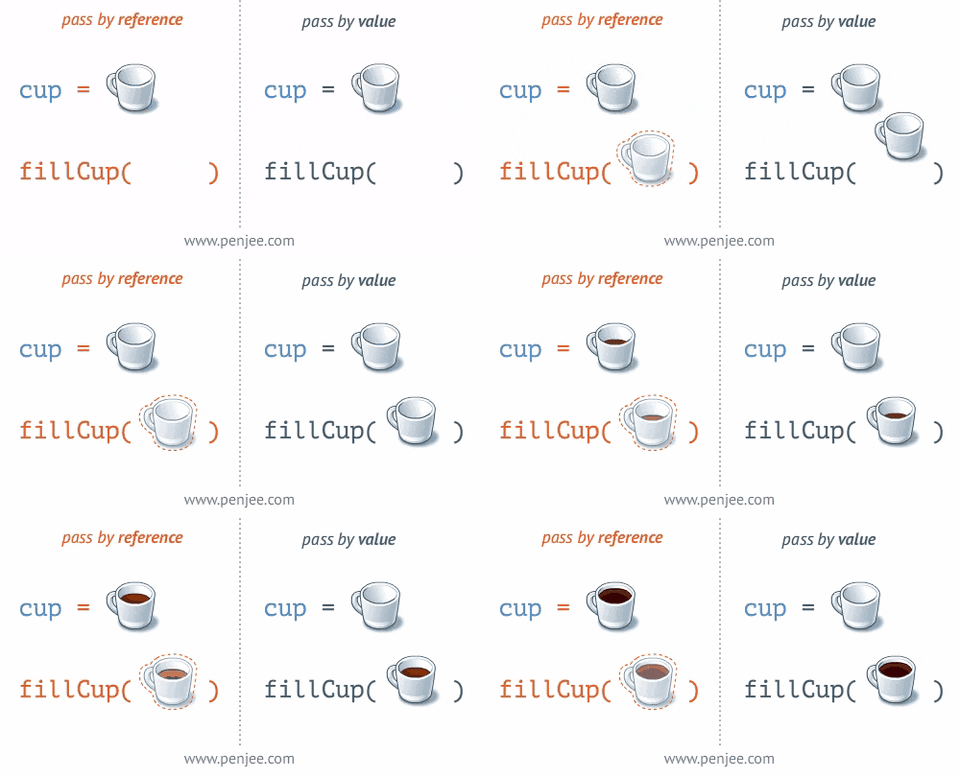 fleet venture
i just implement those and it works?
rich adder
just keep in mind with this, UI elements can block your Raycasts
fleet venture
oh
rocky canyon
fleet venture
i just implement those and it works?
as long as u have the raycaster component and an event system
fleet venture
rich adder
just keep in mind with this, UI elements **can** block your Raycasts
so how do i fix that then
i mean
i want this object spawned above it anyways
wait thats not possible
💀
is that possible?
rocky canyon
isnt learning fun 🙂
rich adder
You can put camera mode to Screenspace camera and set certain plane so sprites can be above
fleet venture
rocky canyon
as long as u have the raycaster component and an event system
do you just mean this event system?
 grand snow
Its good when you want say a UI button to be usable and not trigger drags for things "behind it"
rocky canyon
fleet venture
do you just mean this event system?
yes that event system
swift crag
By default, it only provides UI events
But it can also provide the same set of events for objects with colliders
grand snow
Yea, adding the physics raycaster or physics 2d raycaster makes these events work with 3d and 2d colliders