#💻┃code-beginner
1 messages · Page 520 of 1
 quaint thicket
 night raptor
quaint thicket
I'm wondering if any movement systems already exist for a character controller t...
night raptor
quaint thicket
I'm wondering if any movement systems already exist for a character controller t...
Look it up on asset store, obviously tons of assets exists for character controllers
quaint thicket
night raptor
Look it up on asset store, obviously tons of assets exists for character control...
That makes sense
 ivory prism
Im trying to ground my player again when they jump using character controller, the issue is I can't seem to modify their velocity which is from my understanding the typical way, and I also want to apply gravity as well so its not like an abrupt landing. It's more "smooth"
https://hatebin.com/uueedmmlit here is my current code
night raptor
ivory prism
Im trying to ground my player again when they jump using character controller, t...
Typical way of doing what?
ivory prism
I want to make my player smoothly jump and then go back to the ground, currently it looks more like they are teleporting
night raptor
If the harsh landing is the only problem you are trying to solve, I would just make the camera follow the target position more smoothly with lerp smoothing or something like that
night raptor
ivory prism
I want to make my player smoothly jump and then go back to the ground, currently...
Teleporting sounds weird. Can you show us what is actually looks like with a video recording or something?
ivory prism
Yea one second
On the left, you can see when I press space, and even on the right it doesn't really look like they are jumping, its more like they are just "teleporting" to that position or "cutting" (using video terms)
night raptor
ivory prism
On the left, you can see when I press space, and even on the right it doesn't re...
clearly there's no gravity in play
ivory prism
Im not really sure how gravity works without using a rigid body
Im sure I have to do it myself though physics is not something im good at either 
night raptor
watch a tutorial. You keep z velocity which you decrement each frame to make downwards acceleration and increase the up velocity when you jump
ivory prism
night raptor
watch a tutorial. You keep z velocity which you decrement each frame to make dow...
I don't particularly like tutorials tbh, but I will try and find one
night raptor
ivory prism
I don't particularly like tutorials tbh, but I will try and find one
Or any other resource on gravity. It's quite simple formula in the end
ivory prism
How do you even access the velocity of a character controller
I know you can get it, but you can't modify it
 languid spire
unity bug
night raptor
ivory prism
How do you even access the velocity of a character controller
.velocity?
languid spire
it doesn't take much to look at 'UnityEditor.Graphs.Edge' and see it's a editor bug to do with a window using a graph
so yes
night raptor
ivory prism
You can't modify it
Why would you? You call .Move when you have a new velocity to apply
ivory prism

So if I wanted to gradually ground the player, i'd just call .Move on the y every frame?
night raptor
ivory prism
So if I wanted to gradually ground the player, i'd just call .Move on the `y` ev...
Guess so
ivory prism
ok
 autumn thorn
can someone show me how to make a move script
night raptor
autumn thorn
can someone show me how to make a move script
no
autumn thorn
can u give me one atleast
night raptor
autumn thorn
can u give me one atleast
no
languid spire
no, !learn
 eternal falconBOT
:teacher: Unity Learn ↗
Over 750 hours of free live and on-demand learning content for all levels of experience!
night raptor
autumn thorn
i just need a script is there a channel for it?
no, we can help with yours but we won't make you one
autumn thorn
alright do i send it??
languid spire
autumn thorn
i just need a script is there a channel for it?
you seem to think that there is just 'A move script', that is not the case, every 'move' script is different
autumn thorn
using UnityEngine;
public class MoveObjects : MonoBehaviour
{
public GameObject object1;
public GameObject object2;
public GameObject object3;


public float moveSpeed = 5f;


void Update()
{

    MoveObject(object1);
    MoveObject(object2);
    MoveObject(object3);
}


void MoveObject(GameObject obj)
{
    if (obj != null)
    {

        float horizontal = Input.GetAxis("Horizontal"); // A/D or Left/Right Arrow
        float vertical = Input.GetAxis("Vertical"); // W/S or Up/Down Arrow


        Vector3 movement = new Vector3(horizontal, 0f, vertical) * moveSpeed * Time.deltaTime;

        obj.transform.Translate(movement);
    }
}
}
whats wrong here
night raptor
autumn thorn
whats wrong here
you tell me? does it not do anything? do you get errors? something else?
autumn thorn
tells me this Can't add script behaviour 'PlayerController'. The script needs to derive from MonoBehaviour!
can u like help me make it work
languid spire
and is that script PlayerController
languid spire
can I assume you can read?
night raptor
autumn thorn
tells me this Can't add script behaviour 'PlayerController'. The script needs to...
Nothing wrong with the code from what I see but you showing us MoveObjects and error screaming about PlayerController sounds like something doesn't add up
languid spire
night raptor
Nothing wrong with the code from what I see but you showing us `MoveObjects` and...
except he's using deltaTime, but we'll overlook that atm
 burnt vapor
autumn thorn
whats wrong here
burnt vapor
autumn thorn
whats wrong here
How are we supposed to know?
Apparently there is something wrong, and you would know
Time to share the error or issue
autumn thorn
no like i mean why does it say that my script needs mono behaviour
am rlly new to unity and coding to be exact
languid spire
He did, apparently for a completely different script than the one he posted
burnt vapor
autumn thorn
no like i mean why does it say that my script needs mono behaviour
Can you screenshot your editor?
Like, full editor
autumn thorn
wdym
burnt vapor
Screenshot your Visual Studio screen
autumn thorn
 burnt vapor
There you go. Configure your editor !ide
eternal falconBOT

💡 IDE Configuration
If your IDE is not autocompleting code
or underlining errors, please configure it.
Select one:
•  Visual Studio (Installed via Unity Hub)
• Visual Studio (Installed manually)
•  VS Code
•  JetBrains Rider
• :question: Other/None
burnt vapor
Come back when you have done that
Also, I suggest you use Visual Studio or Rider for Unity development
 balmy orbit
Its better to just use visual studio community
autumn thorn
wut am i using??
burnt vapor
Visual Studio Code
balmy orbit
your using vs code
autumn thorn
so its not good?
burnt vapor
It's harder to work with and VS has better support
So please try using that instead or Rider
autumn thorn
k lemme download rider
burnt vapor
Check the bot's message for setting up Unity for the IDE you use
autumn thorn
 autumn thorn
am mentally unstable
balmy orbit
we see
burnt vapor
balmy orbit
we see
Can you not?
balmy orbit
bro idc ab you puttinf parrot emoji's on my messages u just typed it faster
burnt vapor
 serene sage
Hi, I am facing compiler errors in codes. Please help me
serene sage
Hi, I am facing compiler errors in codes. Please help me
Hi, please share a screenshot of the exception
serene sage
using UnityEngine;
public class InfoBehaviour : MonoBehaviour {
const float SPEED = 6f;

[SerializeField]
Transform SectionInfo;

Vector3 desiredScale = Vector3.zero;

// Update is called once per frame
void Update() {
    SectionInfo.localScale = Vector3.Lerp(SectionInfo.localScale, desiredScale, Time.deltaTime * SPEED);
}

public void OpenInfo() {
    desiredScale = Vector3.one;
}

public void CloseInfo()
{
    desiredScale = Vector3.zero;
}
}
languid spire
serene sage
Hi, I am facing compiler errors in codes. Please help me
not unless you tell what they are
serene sage

 ivory bobcat
serene sage
ivory bobcat
serene sage
Show the console errors.
burnt vapor
serene sage
Can you screenshot your Visual Studio/Visual Studio Code/Rider editor please?
ivory bobcat
autumn thorn
wut do i choose
 serene sage
I was watching this video and trying this project in 3D Core project : https://www.youtube.com/watch?v=OE66gtiF8QQ&list=PLA-J1cIDvBRzSUTQikQOOxq5YJf_9AhRR&index=1&t=1s

In this Augmented Reality Tutorial Matthew Hallberg is going to show us how to do gaze interactions in Unity with ARFoundation with ARkit and ARcore.
Stay in Touch with Third Aurora
Website: https://thirdaurora.com/
Facebook: https://www.facebook.com/Third-Aurora/
Instagram: https://www.i...
burnt vapor
autumn thorn
wut do i choose
It's a theme, choose yourself
autumn thorn
oh kk
burnt vapor
serene sage
I was watching this video and trying this project in 3D Core project : https://w...
Please screenshot your editor
It's probably not configured
ivory bobcat
serene sage
I was watching this video and trying this project in 3D Core project : https://w...
You haven't provided the necessary information #💻┃code-beginner message
serene sage
burnt vapor
Can you screenshot your Visual Studio/Visual Studio Code/Rider editor please?
 burnt vapor
serene sage
burnt vapor
serene sage
I was correct, please configure your !ide first
eternal falconBOT
💡 IDE Configuration
If your IDE is not autocompleting code
or underlining errors, please configure it.
Select one:
• Visual Studio (Installed via Unity Hub)
• Visual Studio (Installed manually)
• VS Code
• JetBrains Rider
• :question: Other/None
serene sage
what is IDE?
burnt vapor
After that, your editor will correctly point out the error
IDE = your editor
In this case Visual Studio
serene sage
Can we connect on call and I will share the screen. I got some errors
burnt vapor
The issue is your misconfigured editor. Do that first
The errors become clear after that, because the editor will help you with it
serene sage
how to do that
burnt vapor
Read the bot message
Follow the steps for configuring for Visual Studio
Depending on if you downloaded VS through Unity on manually you pick the correct link
burnt vapor
eternal falcon
This one
ivory bobcat
Run the Visual Studio installer again and you'll be able to modify your current installation. You'll need to follow the steps again and make sure everything is accounted for. Common mistakes would be not adding the Unity Workload to Visual Studio - this had to be done manually. Other than that, the section about external tools might be the issue.
autumn thorn
when i open the script it opens visual studio instead of jetbrains rider how do i fix this????
ivory bobcat
autumn thorn
when i open the script it opens visual studio instead of jetbrains rider how do ...
Check your external tools section
autumn thorn
ivory bobcat
Check your external tools section
am dum idk wut dat is
 autumn thorn
in unity hub??
burnt vapor
autumn thorn
when i open the script it opens visual studio instead of jetbrains rider how do ...
I assume you mean Visual Studio Code since the whole thing was to change from that one?
ivory bobcat
autumn thorn
in unity hub??
In the Unity Editor.
autumn thorn
burnt vapor
I assume you mean Visual Studio Code since the whole thing was to change from _t...
mhm
am so lost rn
i want to use rider instead of visual studio code
ivory bobcat
autumn thorn
i want to use rider instead of visual studio code
Did you try changing your external script editor?
autumn thorn
EXPLAIN TO ME WUT DAT IS'
burnt vapor
autumn thorn
EXPLAIN TO ME WUT DAT IS'

Connect Unity and Visual Studio and use Visual Studio Tools for Unity to support writing and debugging for cross-platform development.
autumn thorn
where do i choose my preffered scripting editor
burnt vapor
Pick Rider instead of Visual Studio (Code)
burnt vapor
autumn thorn
where do i choose my preffered scripting editor
Click the link
ivory bobcat
I'm going to assume you simply do not know how to ask where to find the preference window:
In the Unity Editor, select the Edit > Preferences menu.
autumn thorn
 autumn thorn
ok
burnt vapor
serene sage
Should I uninstall and reinstall VS Code again?
You are using Visual Studio. You just need to configure it
If you follow the bot steps, then you just have to change a few settings
Did you install VS manually or using the Unity Hub?
ivory bobcat
serene sage
Will that work quickly?
Did you verify all of the steps again?
serene sage
I checked the steps, its confusing to me
burnt vapor
burnt vapor
Did you install VS manually or using the Unity Hub?
Start with this, which one?
serene sage
Its mentioning to select unity development after fresh installation of visual studio
burnt vapor
Yes, as a workload
ivory bobcat
serene sage
Its mentioning to select unity development after fresh installation of visual st...
serene sage
I installed VR Manually and Unity Hub separataley
burnt vapor
So what's the issue? Seems clear to me
Open visual studio installer, modify your VS that is listed, make sure Unity workload is installed
Note VS is not the same as VS installer.
ivory bobcat
ivory bobcat
<https://learn.microsoft.com/en-us/visualstudio/gamedev/unity/get-started/gettin...
Run the installer and select modify. Make sure the workload is installed @serene sage
 burnt vapor
What's with the parroting today
Surely something only has to be explained by a single person?
burnt vapor
serene sage
I installed VR Manually and Unity Hub separataley
VR = VS = Visual Studio? I'm confused
 fading barn
Has anyone here tried the behaviour package of unity?
serene sage
Should I need to try this way?

My Visual studio is in purple and on youtube it shows blue?
Which color VS is best for Unity codes?
burnt vapor
serene sage
Should I need to try this way?
No? You don't need extensions at all
You need the workload, and then you need to set up Unity to open VS as the external script editor
What's wrong with the steps in the bot message? You have been pointed to it multiple times now, and it's very clear on what to do
serene sage
I didn't find workload in unity or VS
ivory bobcat
serene sage
My Visual studio is in purple and on youtube it shows blue?
You're using Visual Studio. They're using Visual Studio Code. Two completely different software. Visual Studio is the preferred software. Follow the installation guides to have VS properly configured. I've got to go, good luck.
burnt vapor
serene sage
I didn't find workload in unity or VS
Connect Unity and Visual Studio and use Visual Studio Tools for Unity to support writing and debugging for cross-platform development.
Follow the steps
serene sage
ok, I will try again
serene sage
Finally got the option for workloads from installer
ivory bobcat
serene sage
I didn't find workload in unity or VS
You will not find the Workload tab in the Unity Hub or Unity Editor. Run the installer for Visual Studio (or download it again then run it), select modify and verify that the Unity Workload is selected. If that isn't the issue, try checking the external tools (which would be mentioned at a later step in the installation guide linked). Other than that, try rebooting the Unity Editor, Hub or your computer.
serene sage
what to do in this case?
 burnt vapor
ivory bobcat
You will not find the Workload tab in the Unity Hub or Unity Editor. **Run** the...
burnt vapor
ivory bobcat
You will not find the Workload tab in the Unity Hub or Unity Editor. **Run** the...
They already have the workload working as specified in the previous message
burnt vapor
serene sage
what to do in this case?
This closes Visual Studio. Save your work, then close and continue
It requires VS to be closed to finish
serene sage
okie
 gray jungle
First time in unity, I can't seem to fix the problem when it is about to collide with the floor and at the same time I press space it gets stuck to a certain animation.
serene sage
which options should be tick marked for XR Development projects?

 fossil drum
gray jungle
First time in unity, I can't seem to fix the problem when it is about to collide...
fossil drum
gray jungle
First time in unity, I can't seem to fix the problem when it is about to collide...
Can you post the !code?
Sounds to me that you don't reset the falling bool correctly.
eternal falconBOT
Posting code
📃 Large Code Blocks
Use links to services like:
https://gdl.space/, https://paste.ofcode.org/, https://hatebin.com/, https://paste.myst.rs/, https://hastebin.com/
📃 Inline Code
Surround code with three backquotes. Not quotation marks.
To format as C#, add cs to the first line:
```cs
// Your code here
```
Add a comment with a line number if there is an error message.
serene sage
Is this working now? Or should I need to install something else? I still didn't get it, what's wrong with my code. I tried to check but couldn't find the compilation errors
 burnt vapor
serene sage
Is this working now? Or should I need to install something else? I still didn't ...
burnt vapor
serene sage
Is this working now? Or should I need to install something else? I still didn't ...
Looks good to me
Look at the help you're getting
Time to solve them
languid spire
serene sage
Is this working now? Or should I need to install something else? I still didn't ...
actually your very first screenshot shows the error. you have 2 scripts called InfoBehaviour
serene sage
now it looks like this
 languid spire
 languid spire
you also have a duplicate script FaceCamera
serene sage
I removed faceCamera, but then I don't know how to fix compile errors
languid spire
 sour nimbus
I was programming a 2-player game in Unity 2D and what happens is that the two players cannot move in opposite directions at the same time. sorry if the code is in spanish
languid spire
sour nimbus
I was programming a 2-player game in Unity 2D and what happens is that the two p...
!code, use a paste site
eternal falconBOT
Posting code
📃 Large Code Blocks
Use links to services like:
https://gdl.space/, https://paste.ofcode.org/, https://hatebin.com/, https://paste.myst.rs/, https://hastebin.com/
📃 Inline Code
Surround code with three backquotes. Not quotation marks.
To format as C#, add cs to the first line:
```cs
// Your code here
```
Add a comment with a line number if there is an error message.
sour nimbus
Hastebin is a free web-based pastebin service for storing and sharing text and code snippets with anyone. Get started now.
 dim yew
is there an easier way to serialize dictionaries than using structs? i have a working method its just so encumbering
 wintry quarry
dim yew
is there an easier way to serialize dictionaries than using structs? i have a wo...
wintry quarry
dim yew
is there an easier way to serialize dictionaries than using structs? i have a wo...
Use someone else's prebuilt version? https://github.com/azixMcAze/Unity-SerializableDictionary
Note that it's the same thing, just a serialized list of structs.
But uh... basically like anything in software - solve the problem once and reuse it
serene sage
How to fix the compilation error for previous unity version codes to new unity version codes?
 polar acorn
serene sage
How to fix the compilation error for previous unity version codes to new unity v...
polar acorn
serene sage
How to fix the compilation error for previous unity version codes to new unity v...
Update anything that uses old functions and parameters to the new versions
!code
eternal falconBOT
Posting code
📃 Large Code Blocks
Use links to services like:
https://gdl.space/, https://paste.ofcode.org/, https://hatebin.com/, https://paste.myst.rs/, https://hastebin.com/
📃 Inline Code
Surround code with three backquotes. Not quotation marks.
To format as C#, add cs to the first line:
```cs
// Your code here
```
Add a comment with a line number if there is an error message.
serene sage
what is this?
gray jungle
polar acorn
!code
sorry
gray jungle
fossil drum
Can you post the !code?
Sounds to me that you don't reset the falling bool corre...
Here it is 😄
 rich adder
serene sage
https://paste.ofcode.org/8FUMitudLraWAyLgCkmbss
rich adder
serene sage
https://paste.ofcode.org/8FUMitudLraWAyLgCkmbss
which one is giving error
serene sage
the last line is the error when using that script in unity project
rich adder
serene sage
the last line is the error when using that script in unity project
which line is the error pointing to
serene sage
line no. 30
serene sage
eternal falcon
I added according to this format says
rich adder
you're showing the symptoms not the problem
and why is using UnityEngine; commented out
serene sage
I marked in red. When I am trying to add that script, it says compile error
 serene sage
yeah

 fossil drum
gray jungle
Here it is 😄
https://hatebin.com/hqyjmleaaa
fossil drum
gray jungle
Here it is 😄
https://hatebin.com/hqyjmleaaa
This isn't the full code.
I don't know how you do onGround, I don't know when you call PlayerJump.
So still can't say anything about it.
rich adder
serene sage
I don't know, I saw that code from a youtube video, and did the same
your errors are collapsed
either the video sucks or you copied wrong
serene sage
In this Augmented Reality Tutorial Matthew Hallberg is going to show us how to do gaze interactions in Unity with ARFoundation with ARkit and ARcore.
Stay in Touch with Third Aurora
Website: https://thirdaurora.com/
Facebook: https://www.facebook.com/Third-Aurora/
Instagram: https://www.i...
this is the video link
rich adder
I'm not watching 17 minutes of this. Show the relevant part
serene sage
 rich adder
serene sage
rich adder
serene sage
Show me where in the video they commented out using UnityEngine
serene sage
for Gaze interaction
rich adder
serene sage
also...Unhide/Uncollapse the errors, never have them collapsed
serene sage
that screen uses only unityengine
rich adder
serene sage
that screen uses only unityengine
since you have no idea what you're doing or know wtf I'm talking about , you need to start with !learn
eternal falconBOT
:teacher: Unity Learn ↗
Over 750 hours of free live and on-demand learning content for all levels of experience!
rich adder
otherwise this is just a waste of time
you're jumping straight into code without knowing the basics of unity, that isn't going to get you far
serene sage
 rich adder
okay so most likely 2 cloned scripts
serene sage
I m begineer in code..
rich adder
no shit
languid spire
you do know what the word duplicate means, nothing to do with code
rich adder
again, time to do the Learn courses
start here then do the Junior path
otherwise you're just wasting your own time not understanding why something is broken
serene sage
languid spire
2 duplicate scripts
I can't see duplicate scripts
languid spire
well they are there so search harder
polar acorn
serene sage
I can't see duplicate scripts
Then look harder
You even have their names
gray jungle
fossil drum
This isn't the full code.
I don't know how you do `onGround`, I don't know when ...
Oh wait, sorry.
https://hatebin.com/upcfyfzosg Here it is tho 😄
serene sage
serene sage
I marked in red. When I am trying to add that script, it says compile error
also, why the scripts are dark grey. I cannot even uncheck or untick?
serene sage
Can we have a call here? so that I can share my screen, I m trying since morning, couldn't find errors
rich adder
it was pointed out the what the issue is, you have to delete duplicates 🤷♂️
languid spire
serene sage
also, why the scripts are dark grey. I cannot even uncheck or untick?
you seem to think you can dive into development work without having one single iota of basic computer knowledge, that is never going to work
 steep rose
you can search for duplicate Variables/classes in the IDE and duplicate scripts in the search bar in the project window search bar in unity
serene sage
languid spire
you seem to think you can dive into development work without having one single i...
I m sorry, I have gone through Unity essentials and VR Development. But things are not quite clear to me through that course. The scripting parts is hard for me and finding errors is more harder,
rich adder
thats why they have essentials that then goes into junior path.. and if you dont understand it , you do it until it makes sense
this is something that sometimes takes years to learn, you can't shortcut your way to learning
serene sage
anyways, thank you for helping me out trying to find errors. I will check some more youtube tutorials.
rich adder
youtube wont teach you anything good, how is a youtube gonna teach you not to have a duplicate file?
serene sage
rich adder
this is something that sometimes takes years to learn, you can't shortcut your w...
Its super need for me. I want to get started with my start-up
rich adder
if you want to do it for real then start by taking your learning seriously
languid spire
serene sage
Its super need for me. I want to get started with my start-up
forget it
steep rose
your picture you sent shows us errors of duplicate variables/classes which means either a duplicate script or some script you have contains the same name variables/classes
rich adder
serene sage
Its super need for me. I want to get started with my start-up
literally if your search your error

they all say the same shit
polar acorn
serene sage
Can we have a call here? so that I can share my screen, I m trying since morning...
You found your errors. You have duplicate scripts
Delete the extras
That's it
languid spire
@serene sage if you will not learn how to solve your errors even when you have been told what they are and how to solve them how do you expect to progress? You cannot seriously expect someone to hold your hand and spoon feed you on every step of your journey
 hollow zenith
public class Game : Singleton<Game>
{
    [field: SerializeField] private Player Player { get; set; }

    private void Start()
    {
        Player = new();
    }
}
    [Serializable]
    internal class Player
    {
        internal Resources Resources { get; private set; }

        public Player()
        {
            Resources = new(); // This is executed immediately on game start.
        }
    }
Is there any reason why Player constructor is executed without Start() method when I start the game?
Is there some hidden new() when using [Serializable] or a property?
fossil drum
gray jungle
Oh wait, sorry.
https://hatebin.com/upcfyfzosg Here it is tho 😄
Hmm, quite difficult.
You can hear that you are jumping.
But you do some strange things with gravity by removing it whilst your grounded.
But the fact that the jump sound triggers, means you set all those booleans again.
But you never actually moved of the ground because of the gravity change. So all those booleans are messed up.
languid spire
hollow zenith
```csharp
public class Game : Singleton<Game>
{
[field: SerializeField] priv...
there is indeed. Serialization does the class construction
serene sage
languid spire
<@910103172205395978> if you will not learn how to solve your errors even when y...
yes you are correct
rich adder
hollow zenith
```csharp
public class Game : Singleton<Game>
{
[field: SerializeField] priv...
because of the inspector
hollow zenith
languid spire
there is indeed. Serialization does the class construction
Thanks, I assume it only does that if a constructor has no parameters?
serene sage
I found and removed it. My unity restarted again and now in console no errors. I am checking for some missing scripts
hollow zenith
I wanted to see Player data for testing, but I might need to do extra checks to make sure it doesnt run code that can't run this early.
languid spire
hollow zenith
Thanks, I assume it only does that if a constructor has no parameters?
yes, in fact it does not use a constructor at all it creates the class without calling a constructor
serene sage
Thank you so much 🙂
hollow zenith
languid spire
yes, in fact it does not use a constructor at all it creates the class without c...
But in debug that constructor is being called
rich adder
hollow zenith
```csharp
public class Game : Singleton<Game>
{
[field: SerializeField] priv...
same reason you dont have to do new() on a list/array when using the inspector with public/serializefield
languid spire
hollow zenith
But in debug that constructor is being called
because you are newing it, which basically means the class is being constructed twice
hollow zenith
rich adder
same reason you dont have to do new() on a list/array when using the inspector w...
Is there a way to delay it but still make it serializable for debugging purposes so I can see Player data at runtime?
hollow zenith
languid spire
because you are newing it, which basically means the class is being constructed ...
It runs before I get a chance to new() it
wintry quarry
hollow zenith
But in debug that constructor is being called
Unity will indeed call the paramterless constructor
when it creates the object
rich adder
hollow zenith
Is there a way to delay it but still make it serializable for debugging purposes...
delay what exactly ?
hollow zenith
https://i.gyazo.com/eba620cc9f14566545b995c28c1acc25.png
This is first line that runs on game start

So Player is already created because of serialize field
But it doesnt say that in the call stack
hollow zenith
rich adder
delay what exactly ?
I wanted to delay Player being created by Unity due to [serializefield]
languid spire
wintry quarry
Unity will indeed call the paramterless constructor
we tested this the other day, it uses Activator.CreateInstance which does not call a constructor
hollow zenith
Ideally pervent it
So I can =new() it myself, but I guess thats either too advanced or not possible?
rich adder
i mean thats just how the inspector works, unless you do [NotSerialized]
hollow zenith
Honestly its just for testing purposes so I don't really need it.
rich adder
unity has to create the object before it can show it
hollow zenith
Idk how I did it for other games, but I guess that it serialized it twice, I wonder how many bugs were caused because of that lol
wintry quarry
languid spire
we tested this the other day, it uses Activator.CreateInstance which does not ca...
The docs for CreateInstance:
Creates an instance of the type designated by the specified generic type parameter, using the parameterless constructor.
https://learn.microsoft.com/en-us/dotnet/api/system.activator.createinstance?view=net-8.0#system-activator-createinstance-1
I guess if there isn't one actually defined, it will call a do-nothing imaginary constructor
hollow zenith
Alright, I will have to live without it then, thanks!
languid spire
wintry quarry
The docs for CreateInstance:
> Creates an instance of the type designated by the...
my bad it's FormatterServices.GetUninitializedObject
wintry quarry
languid spire
my bad it's FormatterServices.GetUninitializedObject
now that's a new (and interesting) one
languid spire
wintry quarry
now that's a new (and interesting) one
and it does what is says on the box which is great for deserialization as the deserializer will fill in the blanks
hollow zenith
Is there a requirement to show a variable in the inspector?
 [Serializable]
 internal class Player
 {
     internal Resources Resources { get; private set; }
     internal int Test = 5;

     public Player()
     {
         Resources = new();
     }
 }
Test doesnt show
I am always stuck on serializing things lol and I cant ever remember what the issue is, but I feel like I tried it all.
I can't [SerializeField] since its a regular class.
rich adder
internal wont work
languid spire
Unity serializer will only serialize public fields in poco's
hollow zenith
hmm should I give up internal variable for serialized property? I think not!
Tbh its fine at this stage, but I like having things private/internal 😄
rich adder
internal just means visible within the same assembly
languid spire
also interal class wont work, serialization is done by the UnityEditor.dll and it cannot see internal classes from Assembly-CSharp
hollow zenith
Makes sense, I actually need to learn about assemblies so I can make my own for my scripts, apparently that speeds up compilation time by a lot when developing a game.
languid spire
there is an InternalsVisible attribute to override this
rich adder
hollow zenith
Makes sense, I actually need to learn about assemblies so I can make my own for ...
it also introducing a lot more work and compartmentalizing everything
hollow zenith
What does that mean?
rich adder
something you typically do in the beginning of the project rather than later on
hollow zenith
Yeah this is the very beginning of the project, do you recommend it? I kinda want to learn it.
Is it worth it?
rich adder
hollow zenith
What does that mean?
well once you start to separate things by assembly you need to be very careful on your referencing
languid spire
you can start by using asmdefs but I usually put all my stuff into dll's anyway
hollow zenith
languid spire
you can start by using asmdefs but I usually put all my stuff into dll's anyway
I am not sure what that means yet, where/how do you put stuff into dlls?
rich adder
something like a class Library etc
hollow zenith
rich adder
well once you start to separate things by assembly you need to be very careful o...
So assemblies are supposed to reference only within themselves and rarely outside?
 charred spoke
hollow zenith
So assemblies are supposed to reference only within themselves and rarely outsid...
charred spoke
hollow zenith
So assemblies are supposed to reference only within themselves and rarely outsid...
Thats what speeds up compilation times
rich adder
no I just mean if you start making too much like spaghetti it will defeat the point of asmdebf
languid spire
hollow zenith
I am not sure what that means yet, where/how do you put stuff into dlls?
create a CS dll project external to unity, put your code in that project and when you build it the output goes into the project/Assets/Plugins folder
hollow zenith
Spaghetti in a sense that multiple assemblies reference each other a lot?
rich adder
yes because if you want to access something within one assembly in another assembly you need a reference and so on
hollow zenith
What if I just put my whole game into 1 big assembly, wont that speed up the compilation regardless of how spaghetti my code is?
languid spire
rich adder
no I just mean if you start making too much like spaghetti it will defeat the po...
if you're making that much spaghetti you are definitely doing something wrong
rich adder
hollow zenith
What if I just put my whole game into 1 big assembly, wont that speed up the com...
i mean thats whats happening now its all in 1 big assembly
Aside from the Unity ones like TMP etc
hollow zenith
because afaik Csharp assembly is my project files + unity + other stuff which is why it takes forever to compile after 1 small change(hot reload saves a lot of time tho, but still)
charred spoke
hollow zenith
What if I just put my whole game into 1 big assembly, wont that speed up the com...
No, then a change in one class would trigger a recompile on the whole assembly. Like I said keeping assemblies separate is what speeds up compilation
rich adder
languid spire
if you're making that much spaghetti you are definitely doing something wrong
very true, thats why you have to be careful or you're just back to where you started
languid spire
hollow zenith
because afaik Csharp assembly is my project files + unity + other stuff which is...
no, just your script files
hollow zenith
languid spire
create a CS dll project external to unity, put your code in that project and whe...
Is there a guide on that? This makes almost no sense to me tbh 😄 Is it part of creating assemblies that I will learn if I look up the topic?
rich adder
look up Visual Studio class library for example
thats how you normally make a simple DLL
hollow zenith
rich adder
i mean thats whats happening now its all in 1 big assembly
Aside from the Unity ...
AssemblyCsharp has like 100 references, could it be why complilation is so slow?
I know that people who use assemblies compile their small projects in like 0.01 seconds 😄
 hollow zenith
rich adder
<https://learn.microsoft.com/en-us/dotnet/core/tutorials/library-with-visual-stu...
hollow zenith
rich adder
<https://learn.microsoft.com/en-us/dotnet/core/tutorials/library-with-visual-stu...
Looking into it
rich adder
hollow zenith
AssemblyCsharp has like 100 references, could it be why complilation is so slow?...
well think about it, everytime you make a change in 1 script now it has to refresh all of those
languid spire
hollow zenith
AssemblyCsharp has like 100 references, could it be why complilation is so slow?...
that is, indeed, one of the reasons
hollow zenith
Yeah so if I make my own assembly for my scripts, it should make it faster by itself right? Even if its not ideal and those should be separated into multiple assemblies.
This is mostly for the sake of fast development/prototyping, it may not be perfect long term etc, but if it makes it so 1 change compiles in 1 second instead of 5-20 then thats a huge difference
Since I can make 10 changes per minute as I test things
I will have to give it a go I guess, wont know until I try.
Hot Reload is also something I should be using.
languid spire
hollow zenith
Yeah so if I make my own assembly for my scripts, it should make it faster by it...
Example dll solution. Contains 3 dll projects and the results in unity

 hollow zenith
Yep that looks good, only 5 references(idk what analyzers are) compared to 100+
I would guess it compiles almost immediately?
languid spire
hollow zenith
Yep that looks good, only 5 references(idk what analyzers are) compared to 100+
...
indeed, I can compile this plus the rest of the code that makes up the asset and create versions for 5 different versions in Unity in < 1 minute
hollow zenith
Nice, I will focus on assemblies tomorrow then or later today.
Since I am early in development it wont hurt, I want to at least see the difference 😄
 toxic oasis
can i get hep, i have instaed unity fr first time and i cant pen any prjects, everytime i try t pen prject i see this


 upbeat timber
Hey there :) Not sure if this is the right channel for this, because technically its not about coding, but its related. So I'm using git to collaborate with some peers, and when merging branches, we often get merge conflicts with .meta files and guid. And i've done a bit of research and it seems to me the guid is the reference which tells the attached GameObject which other Asset/GameObject/Script is attached to it. So now i am confused as to why the guid changes so often and in merging conflicts, which guid should i use? Because I'm worried that all the links may break.
languid spire
hollow zenith
Nice, I will focus on assemblies tomorrow then or later today.
Since I am early ...
one other benefit is you can use nuget packages which you cannot do in Unity even using asmdefs
rich adder
toxic oasis
can i get hep, i have instaed unity fr first time and i cant pen any prjects, ev...
#💻┃unity-talk
this is a code channel
languid spire
upbeat timber
Hey there :) Not sure if this is the right channel for this, because technically...
if guids are changing it means someone is deleting and recreating assets. tell them to stop doing it
charred spoke
That or you are not committing your meta files
upbeat timber
I do commit them, else i wouldnt get merge conflits, right?
charred spoke
Right but that also means someone is also commiting them on the other end and that should not happen
hollow zenith
languid spire
one other benefit is you can use nuget packages which you cannot do in Unity eve...
I never used nuget packages I think, is it another way to get packages instead of package manager?
Maybe I did use it once for WebGL save that required some weird thing
languid spire
hollow zenith
I never used nuget packages I think, is it another way to get packages instead o...
yes, like Newtonsoft for example
hollow zenith
#if UNITY_WEBGL && !UNITY_EDITOR
    [DllImport("__Internal")]
    private static extern void SyncDB();
#endif
I had to dig for this line of code on some old forum post + I needed some file I think, cant remember how it was done, but it was required to make save/load work on webgl
Oh newtonsoft yeah I used that, but I was able to get it without any assemblies
languid spire
That is probably an Enscripten import from a .jslib file in your project
hollow zenith
Unless I remember it wrong
hollow zenith
languid spire
That is probably an Enscripten import from a .jslib file in your project
I dont even know where to find it haha, but it worked somehow
I think that I had to download something using url from package manager, but I might be confusing it with newtonsoft
Regardless its crazy how save/load for webgl requires those hacks that don't seem to be in any documentation?
languid spire
that is basically a way for Unity to talk to the JS script in the browser at runtime
languid spire
hollow zenith
Regardless its crazy how save/load for webgl requires those hacks that don't see...
because a webgl program, like a web form has no direct access to the OS file system, it requires a hack
hollow zenith
On that note...Is Unity documentation always so painful to use? I just avoid it at this time as searching for anything is difficult and when u google and open old version documentation there is no way to open same page inn new version etc.
hollow zenith
languid spire
because a webgl program, like a web form has no direct access to the OS file sys...
Right, but how do you figure out the hack if its not documented? I found it on some forum post and up till now I have no clue how it works
languid spire
hollow zenith
On that note...Is Unity documentation always so painful to use? I just avoid it ...
yes there is, top left of the page you can select the version
hollow zenith
oh you have to manually switch version
Actually here is the thing:

This was my issue and its still there
Is there a way around it?
There is no dropdown, maybe old version of documentation doesnt have it
languid spire
indeed but if you switch to the 2019 version it does have the dropdown
hollow zenith
yes so 2019+ has a dropdown, I might have missed that or a lot of my google searches would open older docs like 2018
But thats good to know!
 past spindle
Is there a way to display the line numbers or do I just have to count them every time I chase a bug? lol
languid spire
mine all seem to open Unity 6 and I have to change to get the older versions
hollow zenith
Yeah this dropdown is kindna broken lol
languid spire
past spindle
Is there a way to display the line numbers or do I just have to count them every...
wdym
hollow zenith
 hollow zenith
past spindle
Is there a way to display the line numbers or do I just have to count them every...
hollow zenith
past spindle
Is there a way to display the line numbers or do I just have to count them every...
There should be an option in your IDE
past spindle
languid spire
wdym
Like the other day when the error to my code was on line 32, I had to count 32 lines down.
hollow zenith
Which IDE do you use?
languid spire
past spindle
Like the other day when the error to my code was on line 32, I had to count 32 l...
is your IDE not showing line numbers?
past spindle
languid spire
is your IDE not showing line numbers?
no
languid spire
past spindle
no
then you turned the option off because it's on by default
hollow zenith
languid spire
mine all seem to open Unity 6 and I have to change to get the older versions
Just to finish this with: It seems like each version of unity documentation has its own separate dropdown for some reasons, which is why I always get those issues.
It probably is fine if u search for things directly with their search bar tho
languid spire
hollow zenith
Just to finish this with: It seems like each version of unity documentation has ...
unity search bar is crap, I always use google
hollow zenith
Same, but that opens old version of documentation and I am stuck in a loop 😄
past spindle
I use Microsoft Visual Studio and it hasn't showed the line numbers since Ive had it
hollow zenith
microsoft visual studio 2022 show line numbers
Google it

I assume you are using 2022 version tho, idk which version is up to date nowadays but it works fine for me.
languid spire
past spindle
I use Microsoft Visual Studio and it hasn't showed the line numbers since Ive ha...
Tools->Options
 serene sage
Hi Can you tell me what are these errors now?
 hollow zenith
Those are warnings just to be clear
past spindle
Thanks guys. That worked just fine
languid spire
They are not errors, they are warnings, read them to see if they are important to you
hollow zenith
save/recompile and even restart Unity might get rid of some of them, usually ignored unless they appear again from my experience(never had your specific warnings tho)
 upper forge
So i making a puzzle where you have a set of words that you have to place in a certain spot to complete the puzzle. So for the first few levels there was only 2 word puzzles then i moved up to 3 word puzzles, but how i have it set up is not good it worked for the first 2 but then you add another word and not the puzzles with only 2 words are looking for 3 if that makes sense...
I have it set up by collecting words and then you have to drag and drop the words on the correct "DropPosition" if not the word returns to OG spot and if it does it stays. i know theres a WAY BETTER way to do this but i cant wrap my head around on how to go about it. Heres a screen shot of the code for checking if the puzzle is complete by checking the "DropPosition"
But for the first few levels i only need to check if dropPosition02 and DropPosition02 is correct and not DropPosition3
 serene sage
yeah, Can I just separate AR Camera and then replace the old ARSession origin with XROrigin? or will their be more problems after that?
hollow zenith
https://i.gyazo.com/b29774919985b60ca575abc4efa63531.png
Is there a better way of doing this?
I want my UI elements to subscribe to this event and update/subscribe to other events deeper into the class(like Player class) when the game is loaded to avoid null reference exceptions.

I tend to do something like:
void Start()
{
  if(Game.Instance.InitComplete) SetupUI();
  else Game.Instance.OnGameInitComplete.AddListener(SetupUI);
}

private void SetupUI()
{
  Player player = Game.Instance.Player;
  player.OnLevelUp.AddListener(UpdateExperienceBar);
}
Then combine it with OnEnable/Disable if needed depending on my UI
languid spire
upper forge
So i making a puzzle where you have a set of words that you have to place in a c...
then your dropPositions should probably be in an array or List rather than being discrete variables
hollow zenith
This is just a random example, but thats how I do it usually, but I would like to see if there are better ways
upper forge
languid spire
then your dropPositions should probably be in an array or List rather than being...
Im not really to familiar with lists... So if i made it a list then say for level 1 i only drag in DropPosition01 and DropPosisition02 and then for level 5 i would drag in DropPosition01 and DropPosisition02 and DropPosition03 ?
languid spire
upper forge
Im not really to familiar with lists... So if i made it a list then say for leve...
exactly
hollow zenith
It can get a bit more complicated if I do Player.Inventory.Item[0].OnCountChange for UI.Player.Inventory.ItemCell(UI object/script to update specific Cell in inventory)
I wonder if its too much work/bad practice?
past spindle
Isn't there an identifier that is something along the lines of gameObject.other or something like that?
languid spire
past spindle
Isn't there an identifier that is something along the lines of gameObject.other ...
in what context
polar acorn
past spindle
Isn't there an identifier that is something along the lines of gameObject.other ...
What is other?
Other what
past spindle
I've identified an object as part of a collision and I want to add force. I was just going to use it to identify which object I'm adding force to
polar acorn
past spindle
I've identified an object as part of a collision and I want to add force. I was...
The collision function gives you the other object as a parameter
languid spire
the Collider parameter is often named other so other.gameObject
past spindle
ok, thanks
upper forge
languid spire
exactly
how would i write the code to go through the list and check if the word is in the correct position?
 queen adder
Can Someone explain to me what i get worng with it?
    private void processWallslide()
    {
        if (isGrounded == false && wallCheck() && horizontalMovement != 0)
        {
            isWallsliding = true;
            rb.linearVelocity = new Vector2(rb.linearVelocity.x, Mathf.Max(rb.linearVelocity.y -wallslideSpeed)); //Caps Full rate
            Debug.Log("WALL");
        }
I should decrease the WallslideSpeed, but instead i'm falling faster
wallslideSpeed = 2
I think is something in the Mathf, but didn't it work?
 cosmic quail
queen adder
I think is something in the Mathf, but didn't it work?
cosmic quail
queen adder
I think is something in the Mathf, but didn't it work?
theres no comma in there
queen adder
cosmic quail
theres no comma in there
That was it, Thanks!
languid spire
upper forge
how would i write the code to go through the list and check if the word is in th...
post your !code correctly and I will show you
eternal falconBOT
Posting code
📃 Large Code Blocks
Use links to services like:
https://gdl.space/, https://paste.ofcode.org/, https://hatebin.com/, https://paste.myst.rs/, https://hastebin.com/
📃 Inline Code
Surround code with three backquotes. Not quotation marks.
To format as C#, add cs to the first line:
```cs
// Your code here
```
Add a comment with a line number if there is an error message.
 sharp abyss
So I cant understand why joints break.
upper forge
if (_dropPosition01.inCorrectPosition == true && _dropPosition02.inCorrectPosition == true && _dropPosition03.inCorrectPosition == true)
            {
                puzzleKey.gameObject.SetActive(true);
                TVButton.gameObject.SetActive(false);
                puzzleCompleteText.SetActive(true);
                //UICanvas.gameObject.SetActive(true);
                //Player.gameObject.SetActive(true);
                hasSpawned = true;
            }
            else
            {
                puzzleKey.gameObject.SetActive(false);
            }
and what is the Type of _dropPosition01 02 and 03 ?
upper forge
languid spire
post your !code correctly and I will show you
Im trying to turn the DropPosiitons into a list and check if they are in correct position
upper forge
languid spire
and what is the Type of _dropPosition01 02 and 03 ?
[SerializeField]
private DropPosition _dropPosition01;
ok, wait one
instead of
if (_dropPosition01.inCorrectPosition == true && _dropPosition02.inCorrectPosition == true && _dropPosition03.inCorrectPosition == true)
you have a List
public List<DropPosition> dropPositions;
which you fill in the inspector
then
int found = 0;
for (int i=0;i<dropPositions.Count;i++) if (dropPositions[i].inCorrectPosition) found++;
if (found == dropPositions.Count)
int found = 0;

for (int i = 0; i < dropPositions.Count; i++)
{
    if (dropPositions[i].inCorrectPosition)
    {
        found++;
    }
}

if (found == dropPositions.Count)
{
    puzzleKey.gameObject.SetActive(true);
    TVButton.gameObject.SetActive(false);
    puzzleCompleteText.SetActive(true);
    //UICanvas.gameObject.SetActive(true);
    //Player.gameObject.SetActive(true);
    hasSpawned = true;
}
else
{
    puzzleKey.gameObject.SetActive(false);
}
so like this?
languid spire
exactly, it's not the best way to do it but the most easy to understand
upper forge
Okay ima test it out! Thankyou!
upper forge
languid spire
exactly, it's not the best way to do it but the most easy to understand
If i may ask what would be the best efficient way to do it?
languid spire
you really need to take the time to learn about array, lists and for loops, your life will be so much easier in the future
languid spire
upper forge
If i may ask what would be the best efficient way to do it?
sure
bool found = true;
for (int i=0;i<dropPositions.Count;i++) if (!dropPositions[i].inCorrectPosition) { found=false; break }
if (found)
so the loop breaks as soon as it finds one not in the correct position. not really important when you only have 2 or 3 entries
 plucky tinsel
I updated visual studio and now its broken, how do i fix it
 languid spire
plucky tinsel
I updated visual studio and now its broken, how do i fix it
languid spire
plucky tinsel
I updated visual studio and now its broken, how do i fix it
reinstall the unity workload via the VS Installer
sharp abyss
can someone take a look please?
upper forge
languid spire
you really need to take the time to learn about array, lists and for loops, your...
Yes im am realizing that now lol Im watching videos about them ATM
It worked!
Thanks so much Really appreciate it!
plucky tinsel
languid spire
reinstall the unity workload via the VS Installer
thank you
 azure dust
!learn
eternal falconBOT
:teacher: Unity Learn ↗
Over 750 hours of free live and on-demand learning content for all levels of experience!
azure dust
!cs
eternal falconBOT
Join the C# Discord server, a programming server aimed at coders discussing everything related to C# (CSharp) and .NET. https://discord.com/invite/csharp
 fair thorn

what could be the reason that the other animation doesnt start playing for me
as the loop is off,the has exit time is unchecked
sharp abyss
fair thorn
can you send an ss of connection between them?
languid spire
fair thorn
this is a code channel. #🏃┃animation
azure dust
!vscode
eternal falconBOT
Visual Studio Code guide
If your IDE is not underlining errors in red or autocompleting code,
please configure it using the link below:
languid spire
azure dust
!vscode
will you please stop spamming the channel with bot commands
azure dust
I want to use bot commands, what's wrong?
I just joined and i need to get needed stuffs
 languid spire
azure dust
I want to use bot commands, what's wrong?
languid spire
azure dust
I want to use bot commands, what's wrong?
if you are looking for basic information please use the pinned messages here and in #💻┃unity-talk
azure dust
Okay, thanks
Sorry, i though i need to use those bots commands here because i found #854851968446365696 under scripting categories
sharp abyss
fair thorn
there is no conditions right?
fair thorn
sharp abyss
there is no conditions right?
no its just I have a object which needs to come from bottom to up and then just flip once that what i have done so far
but in different animations
i also need to flip once again after the the reveal animation
should i do all at one animations
 dry jungle
Hi
fair thorn
dry jungle
Hi
hey
 visual cedar
dry jungle
Hi
visual cedar
dry jungle
Hi
hemlo
dry jungle
I've got a problem that my player teleports to the right and don't move. Can you help me?
 steep rose
you would want to place a - sign at the first XRange (I believe)
dry jungle
ok
steep rose
and also a minus sign in the XRange in the vector3 below it
 dusty crypt
it isnt working
 hollow slate
dusty crypt
it isnt working
hollow slate
dusty crypt
it isnt working
never seen çã used in names for classes. Neat. You need to be more specific about what exactly isn't working, and what behaviour you're getting instead of what behaviour you want.
dusty crypt
when i try to run the game it says i need to fix the errors first
but it doesnt show any sintax errors
hollow slate
does your IDE not tell you what errors you're getting?
dusty crypt
nope
hollow slate
what does your console say then?
dusty crypt
the console says nothing
hollow slate
the console should print whatever errors you're getting. How do you even know if you have an error?
 slender nymph
are you certain you don't just have errors hidden in the console
hollow slate
nullref incoming.
languid spire
null ref is runtime not compile time
dusty crypt
wait i wrote something wrong. i fixed it but its showing a lot of errors in the console ill try to fix them (i swear it wasnt showing in the console before i restarted unity)
rich adder
dusty crypt
wait i wrote something wrong. i fixed it but its showing a lot of errors in the ...
you should configure your IDE first
all errors are underlined there
dusty crypt
how can i configure it propely?
steep rose
!ide
eternal falconBOT
💡 IDE Configuration
If your IDE is not autocompleting code
or underlining errors, please configure it.
Select one:
• Visual Studio (Installed via Unity Hub)
• Visual Studio (Installed manually)
• VS Code
• JetBrains Rider
• :question: Other/None
dusty crypt
i alredy did everything
languid spire
dusty crypt
i alredy did everything
so screenshot your IDE window
dusty crypt
 languid spire
that dont look configured to me
languid spire
this would disagree with you
 dusty crypt
 steep rose
you also need C# and .Net install tools
then go into external tools in unity and assign VScode as your external IDE
then regenerate project files
 swift sedge
the MonoBehaviour isn't highlighted
dusty crypt
steep rose
then go into external tools in unity and assign VScode as your external IDE
it is
 steep rose
what is your unity version
dusty crypt
6000.0.23f1
 broken gazelle
!learn
eternal falconBOT
:teacher: Unity Learn ↗
Over 750 hours of free live and on-demand learning content for all levels of experience!
rich adder
steep rose
do you have the visual studio editor package installed
it is
 steep rose
I did not see that
 dusty crypt
 rich adder
there ya go
steep rose
so you did not have .net
rich adder
download/install .NET SDK , then restart pc
broken gazelle
hey yall i wonna use visual studio n not the community one how tdo so
rich adder
broken gazelle
hey yall i wonna use visual studio n not the community one how tdo so
!vscode
eternal falconBOT
Visual Studio Code guide
If your IDE is not underlining errors in red or autocompleting code,
please configure it using the link below:
slender nymph
broken gazelle
hey yall i wonna use visual studio n not the community one how tdo so
wdym "visual studio n not the community one"? do you mean you want to purchase a pro or enterprise license? or do you perhaps think that vs code is the same as visual studio?
broken gazelle
slender nymph
wdym "visual studio n not the community one"? do you mean you want to purchase a...
no its the other version that comes with large size .. i kinda wonna jus use the other one since it uses less space
slender nymph
what do you mean "the other version that comes with large size"?
there is only visual studio with different licensing (community, pro, enterprise)
or there's vs code which is a completely different coding environment
broken gazelle
slender nymph
there is only visual studio with different licensing (community, pro, enterprise...
vs code the normal one..
slender nymph
vs code is a different program from visual studio. they are two separate things. vs code is not "the normal one" when referring to visual studio
broken gazelle
slender nymph
vs code is a *different program* from visual studio. they are two *separate* thi...
im not sure... but the one that doesnt require u to download anything jus an ide like the text editor
rich adder
extensions
slender nymph
broken gazelle
im not sure... but the one that doesnt require u to download anything jus an ide...
vs code is the one that is just a fancy text editor. you are still required to download and install specific extensions for it to have it work with unity correctly.
visual studio is the fully featured IDE
broken gazelle
rich adder
extensions
im following that u sent me
?do i have to install the debugger
slender nymph
rich adder
broken gazelle
?do i have to install the debugger
unity plugin / c# devkit already comes with everything
broken gazelle
hey can i jus yk.. go to the file n then do the cmd n type code . n still be able to code fine?
slender nymph
configure vs code using the guide that was linked to you.
broken gazelle
ok
 glad nebula
would anyone know why i cant move my character in my procedurally generated world? currently following a tutorial but i implemented my own player movement and it doesnt let me move around at all. Thanks https://imgur.com/a/Zh6yfPO
 keen dew
You'll have to show the code
 arctic ridge
Could someone help with why this pause menu script wont work? The unpause function works, so i dont think it's the input, but i cant figure what else it could be. Let me know if you need a video of the game. https://paste.ofcode.org/f5L8pmuUB3chzDw2X4U93d
dusty crypt
can someone help me? the assets of the unity tutorial are purple
 rich adder
dusty crypt
can someone help me? the assets of the unity tutorial are purple
rich adder
dusty crypt
can someone help me? the assets of the unity tutorial are purple
#💻┃unity-talk
also use 

hollow zenith
Does UnityEvent auto unsubscribe if the object/class subscribed to it is destroyed?
polar acorn
dusty crypt
can someone help me? the assets of the unity tutorial are purple
Incompatible render pipeline. Either the assets are URP while you're using Built-in or vice-versa
languid spire
looks like the assets are BIRP as they are using standard Shader
 snow warren
Hello
I need some help
I wanna create sections of a terrain
Not like split the terrain
But create like 7 random sections on the terrain
Each one overlayed over the original terrain which just represents the hue of that particular area separating it from others
How can I achieve that
Or how to slice a mesh
rich adder
break the problem into smaller easier to solve / research steps
languid spire
@snow warren Please learn to type in full sentences. Shift+Enter is a thing
snow warren
languid spire
<@607914947581837321> Please learn to type in full sentences. Shift+Enter is a t...
Sorry my bad
 slender sinew
sounds more like you just want different vertex colors on different parts of a mesh
vertex colors are usually built-in data and you can assign them via Unity's mesh class
 cedar prairie
Hey any reason why my movement feels really jittery?
 teal viper
cedar prairie
Hey any reason why my movement feels really jittery?
teal viper
cedar prairie
Hey any reason why my movement feels really jittery?
Many possible reasons
slender nymph
9 times out of 10 it's usually the camera. but you need to provide actual information. #854851968446365696
cedar prairie
Before it felt really inconsistent so i changed the simulation mode back to fixed update and the physics are now consistent but more gitter
cedar prairie
slender nymph
9 times out of 10 it's usually the camera. but you need to provide actual inform...
That's what online said too but im using a cinemachine not a script
slender nymph
and if your camera updates before the object does then you'll experience jitter
teal viper
cedar prairie
Before it felt really inconsistent so i changed the simulation mode back to fixe...
Jittering is basically when your object movement relative to the camera is not updated at the same rate as rendering.
cedar prairie
teal viper
Jittering is basically when your object movement relative to the camera is not u...
Hm any way i can fix this with a cinemachine camera?
teal viper
The best way is to align everything to the regular update.
cedar prairie
Do i change the "update method"
Rn its on smart update i feel it should be on fixed
teal viper
On the cinemachine? Yes, better make it update, rather than fixed update.
And you can align the rb by making sure it uses interpolation.
cedar prairie
teal viper
On the cinemachine? Yes, better make it update, rather than fixed update.
Theres 4 options though, fixed,late, smart and manual
teal viper
Late is basically at the same rate as regular update, so you want that.
cedar prairie
I think it might be jittering more now
cedar prairie
So do i need to move my movement into late update or just regular update
Thanks btw
teal viper
It depends on how you're moving it.
cedar prairie
Addforce if thats whatcha mean
teal viper
Moving addforce to a different update wouldn't change when the object movement is updated. It is moved by physics, so that always happens in fixed update. You can enable interpolation on the rb, so that the position is interpolated during the regular updates.
steep rose
any physics related items should remain in fixed update to be on the physics step
cedar prairie
Its already set to interpolate
steep rose
if you put camera movements in lateupdate that usually fixes camera jitter as it is further down the update queue (I forget the name for it)
cedar prairie
steep rose
if you put camera movements in `lateupdate` that usually fixes camera jitter as ...
Done that too
steep rose
is your camera directly parented to the rigidbody?
cedar prairie
Yeah
slender nymph
don't do that
steep rose
cedar prairie
Yeah
try moving it directly to an empty on the player
unparented
transform.position = Empty.position;
cedar prairie
So make n empty object thats on the player or?
teal viper
cedar prairie
Its already set to interpolate
Then the interpolation is being broken.
steep rose
cedar prairie
So make n empty object thats on the player or?
make an empty and put it on the player near the head of it and move your camera to it via script
that works for me
cedar prairie
I mean its a cinemachine so thinking about it does it need to be paired at all
teal viper
No, it's best not to parent it to anything.
steep rose
yes
slender nymph
cedar prairie
I mean its a cinemachine so thinking about it does it need to be paired at all
your camera should not be a child of the player, no. your vcam also doesn't need to be, but can be
steep rose
do not parent it to anything
cedar prairie
Uhhh okay sorry simple question how do i unparent something on a prefab
cedar prairie
Ive done everything n its still gittery
slender nymph
because you are likely breaking the interpolation like dlich pointed out
show all of the relevant code you have regarding the player's movement/rotation so we can see where you might be doing that
cedar prairie
Alright
Ill have to take a pic with my phone though so sorry for the jank of that lol
slender nymph
do not photograph your screen. share the !code correctly 👇
eternal falconBOT
Posting code
📃 Large Code Blocks
Use links to services like:
https://gdl.space/, https://paste.ofcode.org/, https://hatebin.com/, https://paste.myst.rs/, https://hastebin.com/
📃 Inline Code
Surround code with three backquotes. Not quotation marks.
To format as C#, add cs to the first line:
```cs
// Your code here
```
Add a comment with a line number if there is an error message.
cedar prairie
I dont have discord on my laptop
slender nymph
cedar prairie
I dont have discord on my laptop
well conveniently it's a website you can visit. or you can easily just post the code to a bin site (which you probably should be doing anyway) and just type that out manually if you really need to
cedar prairie
steep rose
I use it in a browser
Ig ill do that
its not that much code should i just copy n paste it
slender nymph
just copy and paste it into a bin site and share the link to that
steep rose
remember to save it
cedar prairie
steep rose
when does the jitter happen, when you move or when you turn?
cedar prairie
move but then the little raycast ball thing also jitters
steep rose
also you seem to by multiplying the addforce by time.deltatime
which is a no go, since it already does it
cedar prairie
cause its in the fixed thing?
steep rose
well the method does it normally I believe but also yes
steep rose
what is your movespeed at?
slender nymph
cedar prairie
cause now its going super fuckin fast
that's 100% because you had your movespeed about 100x too high to compensate for the erroneous deltaTime multiplication
cedar prairie
all cool n all now its not quick, still stuttering
slender nymph
rather than assigning the transform.rotation, assign to the rigidbody's rotation instead
cedar prairie
still jittering idk why that would have fixed anything
slender nymph
because it wouldn't have broken the interpolation. are you absolutely certain nothing else anywhere is affecting the transform of this object?
cedar prairie
yeah litreally nothing is
that code is all there is in terms of script for the player n nothing else fucks with it
teal viper
cedar prairie
still jittering idk why that would have fixed anything
Share the updated code.
cedar prairie
teal viper
Also, don't know if that was pointed out already, but you should move your input querying out of fixed updated.
cedar prairie
its like the same thing
teal viper
cedar prairie
https://paste.ofcode.org/34MPZ2sJhgC49uPBv6PmWyX
Try commenting out the rotation bit. Does it still jitter?
 silver forge
hey i'm making this laser for a platformer game im making which uses a line renderer to render the laser and apply a collider which matches the exact size of the rendered laser to reset the scene once the player touches it. for some reason, the collider isn't right and i've tried everything. i visualize the collider with a gizmo to show where it is. https://paste.ofcode.org/3DamS2ugpsbyb748eWUnFn

 cedar prairie
teal viper
Try commenting out the rotation bit. Does it still jitter?
cedar prairie
teal viper
Try commenting out the rotation bit. Does it still jitter?
yes
slender nymph
teal viper
Also, don't know if that was pointed out already, but you should move your input...
they are just querying the current state of the keys so it wouldn't actually be a problem. it's really only the GetKeyDown/Up that would be a problem in FixedUpdate
teal viper
slender nymph
they are just querying the *current* state of the keys so it wouldn't actually b...
I'd still move it out, but fair point.
cedar prairie
why would the raycast do anything lol
teal viper
cedar prairie
why would the raycast do anything lol
It might be confusing you. Whatever you're using for debugging might be jittering and not your character movement.
Since the interpolation doesn't apply to it.
teal viper
Ok, then take a video of what it looks like now(with all the suggestions applied).
cedar prairie
teal viper
cedar prairie
I see stuff rotating, meaning you don't have the rotation commented out as I suggested.
cedar prairie
i re-enabled it
just imagine no rotation at all in that vidoe and its the same thing
teal viper
All of the things that were suggested to this point could be contributing to the issue. Just testing out one at a time would not help.
This is the basics of debugging an issue. Please comply...
cedar prairie
silver forge
silver forge
hey i'm making this laser for a platformer game im making which uses a line rend...
can someone help please?
teal viper
cedar prairie
Hmmm... That looks very weird compared to normal jittering.🤔
Something weird about the movement itself too.
For example, why would it stop immediately when you don't hold any input? Normally it should keep on moving.
cedar prairie
drag
teal viper
cedar prairie
drag
Okay. And if you set the drag to 0, press input a little bit and let it go, does it still jitter when it moves freely?
cedar prairie
still jitters when moving freely
teal viper
cedar prairie
still jitters when moving freely
Can you take a screenshot of that object inspector?
cedar prairie
 teal viper
silver forge
hey i'm making this laser for a platformer game im making which uses a line rend...
teal viper
silver forge
hey i'm making this laser for a platformer game im making which uses a line rend...
That would imply that length is not having the value that you expect. You should add a few more debugs along the way and maybe visualize your raycast as well.
teal viper
cedar prairie
Why is the interpolation set to none?
silver forge
teal viper
That would imply that `length` is not having the value that you expect. You shou...
ok i'll do that
cedar prairie
yeah thats my mistake, was doing it before so i tried it off n yah
ill try the things off n on again
teal viper
You should have it on always. There's no point testing with it off at all.
teal viper
cedar prairie
now its working fine idk
As I said, it was probably a combination of issues, so when you were trying things one by one there was always an issue preventing it from working correctly.
cedar prairie
thanks bot
silver forge
teal viper
That would imply that `length` is not having the value that you expect. You shou...
the blue line is the raycast, and its hitting where it is supposed to.
 teal viper
silver forge
the blue line is the raycast, and its hitting where it is supposed to.
teal viper
silver forge
the blue line is the raycast, and its hitting where it is supposed to.
What about the additional logs?
And share the updated code as well
silver forge
teal viper
What about the additional logs?
Raycast hit: Square (1), Distance: 9.344271
UnityEngine.Debug:Log (object)
ShooterScript:Update () (at Assets/shooterScript.cs:33)
this is all i could really think of
using System.Collections;
using System.Collections.Generic;
using UnityEngine;

public class ShooterScript : MonoBehaviour
{
    public Transform shooter;
    public LineRenderer laser;
    public float maxDistance = 100f;
    public LayerMask ignoreLayer;
    private BoxCollider2D laserCollider;

    void Start()
    {
        laserCollider = laser.gameObject.AddComponent<BoxCollider2D>();
        laserCollider.isTrigger = true;
        Debug.Log("Laser Collider added");
    }

    void Update()
    {
        Vector2 direction = shooter.up;
        RaycastHit2D hit = Physics2D.Raycast(shooter.position, direction, maxDistance, ~ignoreLayer);

        Debug.DrawRay(shooter.position, direction * maxDistance, Color.blue); // Visualize raycast in blue

        laser.SetPosition(0, shooter.position);

        if (hit.collider != null && hit.distance > 0)
        {
            laser.SetPosition(1, shooter.position + (Vector3)direction * hit.distance);
            UpdateCollider(shooter.position, direction, hit.distance);
            Debug.Log($"Raycast hit: {hit.collider.name}, Distance: {hit.distance}");
        }
        else
        {
            laser.SetPosition(1, shooter.position + (Vector3)direction * maxDistance);
            UpdateCollider(shooter.position, direction, maxDistance);
            Debug.Log("Raycast did not hit anything");
        }
    }

    private void UpdateCollider(Vector2 startPosition, Vector2 direction, float length)
    {
        laserCollider.size = new Vector2(laser.startWidth * 10, length);
        laserCollider.offset = direction * (length / 2);
        Debug.Log($"Laser Collider Size: {laserCollider.size}, Laser Collider Offset: {laserCollider.offset}");
    }

    private void OnDrawGizmos()
    {
        if (laserCollider != null)
        {
            Gizmos.color = Color.green;
            Gizmos.DrawWireCube(laserCollider.bounds.center, laserCollider.bounds.size);
        }
    }
}
Your debug ray is not entirely correct. Use the hit distance instead of maxDistance.
silver forge
teal viper
Your debug ray is not entirely correct. Use the hit distance instead of maxDista...
like this?
using System.Collections;
using System.Collections.Generic;
using UnityEngine;

public class ShooterScript : MonoBehaviour
{
    public Transform shooter;
    public LineRenderer laser;
    public float maxDistance = 100f;
    public LayerMask ignoreLayer;
    private BoxCollider2D laserCollider;

    void Start()
    {
        laserCollider = laser.gameObject.AddComponent<BoxCollider2D>();
        laserCollider.isTrigger = true;
        Debug.Log("Laser Collider added");
    }

    void Update()
    {
        Vector2 direction = shooter.up;
        RaycastHit2D hit = Physics2D.Raycast(shooter.position, direction, maxDistance, ~ignoreLayer);

        Debug.DrawRay(shooter.position, direction * hit.distance, Color.blue);

        laser.SetPosition(0, shooter.position);

        if (hit.collider != null && hit.distance > 0)
        {
            laser.SetPosition(1, shooter.position + (Vector3)direction * hit.distance);
            UpdateCollider(shooter.position, direction, hit.distance);
            Debug.Log($"Raycast hit: {hit.collider.name}, Distance: {hit.distance}");
        }
        else
        {
            laser.SetPosition(1, shooter.position + (Vector3)direction * maxDistance);
            UpdateCollider(shooter.position, direction, maxDistance);
            Debug.Log("Raycast did not hit anything");
        }
    }

    private void UpdateCollider(Vector2 startPosition, Vector2 direction, float length)
    {
        laserCollider.size = new Vector2(laser.startWidth * 10, length);
        laserCollider.offset = direction * (length / 2);
        Debug.Log($"Laser Collider Size: {laserCollider.size}, Laser Collider Offset: {laserCollider.offset}");
    }

    private void OnDrawGizmos()
    {
        if (laserCollider != null)
        {
            Gizmos.color = Color.green;
            Gizmos.DrawWireCube(laserCollider.bounds.center, laserCollider.bounds.size);
        }
    }
}

didn't mean to delete the message
teal viper
silver forge
like this?
```c#
using System.Collections;
using System.Collections.Generic;
usi...
Yes.🤔
Can you pause the game at runtime and take a screenshot of the collider object inspector?
teal viper
According to the logs you shared in the first message, the width of that collider is 10.
teal viper
silver forge
you mean the square that the laser hits?
No. The collider that you add via code.
The object that it's added to
 teal viper
The whole object inspector
silver forge
teal viper
The whole object inspector

 teal viper
silver forge
teal viper
silver forge
Is that the same object? Where did the collider go?
silver forge
teal viper
Is that the same object? Where did the collider go?
oh oops i accidentally stopped the game
one second


 teal viper
Ok.
- Why is it scaled like that? Try setting the scale to 1 1 1 and adjusting everything else accordingly.
- Why is there both a sprite renderer and a line renderer? I understand that the line renderer is the laser? Then what is the sprite renderer for?
silver forge
ah
yeah it was because it was scaled like that i think
the sprite renderer made it insanely misleading lmao
silver forge
teal viper
Ok.
1. Why is it scaled like that? Try setting the scale to 1 1 1 and adjusting ...
also, how do i fix this? the pivot is in the wrong place
 teal viper
silver forge
also, how do i fix this? the pivot is in the wrong place
teal viper
silver forge
also, how do i fix this? the pivot is in the wrong place
What is that? A sprite renderer?
 teal viper
I mean,what's supposed to be where?
silver forge
the blue green and red circle
teal viper
That's what I'm asking what is it? What object does it belong to?
 void thicket
Show hierarchy and inspector
silver forge
 teal viper
silver forge
its the pivot point of it
teal viper
silver forge
its the pivot point of it
First of all, the correct way to think about it is that the gizmo represents the object position. If the sprite is not centered on it, then it's an offset of the sprite itself.
teal viper
silver forge
In your scene view top left change center to pivot mode.
silver forge
teal viper
In your scene view top left change center to pivot mode.
oh, didnt know you could do that
ok that helped
silver forge
@teal viper i found another problem, the light green border doesnt match up with the red laser when rotated, and gets more offset the more rotated https://paste.ofcode.org/wzDLwrmqExgzj4NbgbGWiq
teal viper
silver forge
<@209684227720085505> i found another problem, the light green border doesnt mat...
Could be several things. For starters, I'd make sure it's not related to scaling on the current object or it's parent. Set the scaling to 1.
 zealous geode
Hello, I'm having a dataflow issue. On a GameManager class I have this event being triggered:
    private void NewGameStart()
    {
        ChangeGameState(GameState.OnPlayerControl);
        OnGameStart?.Invoke(0);
    }
This leads to this class:
public class DroneManager : MonoBehaviour
{
    [SerializeField] DroneHolder droneHolder;
    [SerializeField] List<Drone> Drones = new List<Drone>();
    [SerializeField] public Transform MainBaseSpawn;

    public static DroneManager Instance;
    private void Awake()
    {
        if(Instance != null)
        {
            Destroy(this);
        }

        Instance = this;
    }
    private void Start()
    {
        GameManager.Instance.OnGameStart += AssignDrone;
    }

    private void AssignDrone(int droneIndex)
    {
        Drone drone = Instantiate(Drones[droneIndex]);
        droneHolder.AssignDrone(drone);
        droneHolder.InitializeDrone();
    }

    public void TowDrone()
    {
        Debug.Log("Tow");
    }
    public void LaunchDrone()
    {
        GameManager.Instance.ChangeGameState(GameManager.GameState.OnDroneControl);
        UIManager.Instance.TogglePanel("Computer");
    }
}
Then leading to where It's supposed to set the data, on a DroneHolder class.
    public void AssignDrone(Drone drone)
    {
        if(drone != CurrentDrone)
        {
            Debug.Log("Assigning new drone instance.");
            CurrentDrone = drone;
        }
    }
    public void InitializeDrone()
    {
        transform.position = DroneManager.Instance.MainBaseSpawn.position;
        WeightSystem.SetDroneData();
        BatterySystem.SetDroneData();
        StartCoroutine(BatterySystem.UpdateBattery());
    }
When entering InitializeDrone method, CurrentDrone is null. Why?
silver forge
teal viper
Could be several things. For starters, I'd make sure it's not related to scaling...
nope, its not scaling
teal viper
silver forge
nope, its not scaling
Then it must be due to offsetting the collider and/or possibly the object itself relative to it's parent. It's really hard to tell without having the project at hand, but should be something really simple to figure out if you have the project.
 eternal needle
zealous geode
Hello, I'm having a dataflow issue. On a GameManager class I have this event bei...
eternal needle
zealous geode
Hello, I'm having a dataflow issue. On a GameManager class I have this event bei...
CurrentDrone isnt used directly in InitializeDrone, where do you see that its null? also you already have debug statements, you should add more to see why its null. like print the name in AssignDrone
zealous geode
@eternal needle On BatterySystem.SetDroneData() I have this code:
    public void SetDroneData()
    {
        CurrentBattery = CurrentDrone.MaxBattery;
        OnBatteryHasCharge?.Invoke();
    }
Here I have a NullException

That code is supposed to run after CurrentDrone has been set to the incoming drone value
BatterySystem.SetDroneData() is called on InitializeDrone
 lunar hollow
How can i load Audio Files at Runtime from a Disk/Location? Doesen't matter what Format, but i want to avoid using the WWW class.
eternal needle
zealous geode
That code is supposed to run after CurrentDrone has been set to the incoming dro...
so go backwards through the logic being done, add debugs and see why its null in AssignDrone or at what point it becomes null
eternal needle
lunar hollow
How can i load Audio Files at Runtime from a Disk/Location? Doesen't matter what...
have you looked online? theres quite a few posts about this exactly https://discussions.unity.com/t/dynamically-loading-mp3-files-during-runtime/934935
lunar hollow
I have, but i cant use the WWW class due to some Limitations.
wintry quarry
lunar hollow
How can i load Audio Files at Runtime from a Disk/Location? Doesen't matter what...
www is super old/ deprecated. You should use UnityWebRequestMultimedia
lunar hollow
I meant WWW Or any other Networking Solution.
rich adder
lunar hollow
I have, but i cant use the WWW class due to some Limitations.
they didn't link the www class. Its a UnityWebRequest
lunar hollow
And UnityWebRequest is part of the UnityEngine class?
lunar hollow
I'm quite sure the last time i tried Networking it wasn't Included for my Build Platform.
rich adder
WebRequest should work for pretty much all platforms
just unity's version of a http client
lunar hollow
alright imma try it
visual cedar
anyone knows how do i create that wobble effect on a card using DOTween like phone ringing
lunar hollow
WAIT WHAT no way it actually works
 finite mango
    void OnTriggerEnter(Collider other) {
        if (other.CompareTag("Player")) {
            isInArea = true;
            Debug.Log("area enntered");
        }
    }

    void OnTriggerExit(Collider other) {
        if(other.CompareTag("Player")) {
            isInArea = false;
            Debug.Log("area exited");
        }
    }
ive got this code attatched to an empty gameobject with a box collider 2d with isTrigger enabled. but when the Player walks into this area (player has capsule collider 2d and a rigidbody component) neither of the debug logs go off so its not being detected
visual cedar
how do i make this more wobbly Sequence wobbleSequence = DOTween.Sequence(); wobbleSequence.Append(card.DORotate(new Vector3(0, 0, wobbleZOffset), tiltDuration / 2).SetEase(Ease.OutQuad)) .Append(card.DORotate(new Vector3(0, 0, -wobbleZOffset), tiltDuration / 2).SetEase(Ease.InQuad)) .SetLoops(3, LoopType.Yoyo); // Adjust loops for extra wobble effect
its a card
like a phone ringing
finite mango
is it fine to store all my cooldowns by storing the last Time.time when that ability was used
and in void Update, checkinng if Time.time - lastUsedTime > cooldownTime
rich adder
finite mango
is it fine to store all my cooldowns by storing the last ``Time.time`` when that...
if its working its fine
 opaque dove
How do you destroy a c# object(not a GameObject)? If I create an object with a class constructor and add it to a list, will it automatically get destroyed when I remove it from that list or do I manually destroy it?
 hallow bough
opaque dove
How do you destroy a c# object(not a GameObject)? If I create an object with a c...
hallow bough
opaque dove
How do you destroy a c# object(not a GameObject)? If I create an object with a c...
im also a beginner in coding, but isnt there a function such as Destroy(thisObject) (I may be wrong)
 timber tide
c# objects usually are cleaned up by just unbinding any reference(s) to them
hallow bough
I am working on a 2d game with kinematic rigidbodies. I have looked online, and I cannot find a reason why my game objects do not collide. Could anyone help me?
opaque dove
timber tide
c# objects usually are cleaned up by just unbinding any reference(s) to them
That’s what I thought but I wasn’t sure if it would be more performant to manually destroy it
wintry quarry
opaque dove
How do you destroy a c# object(not a GameObject)? If I create an object with a c...
you don't. C# is a garbage collected language.
timber tide
Usually it is, but that's a feature of c# ;p
wintry quarry
The only reason Unity objects need Destroy is because they have a native (non-C#) C++ object half
 barren scaffold
Anybody know which file contains AdditionalLightShadow? Or rather, where shadows are generated. I've modified light scripts but I can't find those ones.
fossil drum
barren scaffold
Anybody know which file contains AdditionalLightShadow? Or rather, where shadows...
https://github.com/Unity-Technologies/Graphics/blob/master/Packages/com.unity.render-pipelines.universal/ShaderLibrary/Shadows.hlsl#L472
No idea about the second question.
 faint nacelle
public class DialogueHandler : MonoBehaviour
{
    [SerializeField] Canvas dialogueCanvas;
    [SerializeField] TextMeshProUGUI dialogueText;
    protected static string path = "Assets/Dialogue.CSV";
    ...
    ...
    public static void startDialogue(string key)
    {
        List<List<string>> dialogueList = getDialogue(key);
        if (dialogueList == null)
        {
            Debug.Log("Dialogue not found");
            return;
        }
        for (int i = 0; i < dialogueList.Count; i++)
        {
            List<string> dialogue = dialogueList[i];
            Debug.Log(dialogue[0] + ": " + dialogue[1]);
            dialogueText.text = dialogue[0] + ": " + dialogue[1];
        }
    }
}
I tried to make a Dialogue handler which you can call from other scripts but now i've realised that you can't really make a serialized field static which means i cant really edit the gui text from this class. Is there a way to overcome this like another way to reference gameobjects as static or is the whole structure of this class totally wrong
keen dew
You need a singleton. https://gamedevbeginner.com/singletons-in-unity-the-right-way/
faint nacelle
keen dew
You need a singleton. <https://gamedevbeginner.com/singletons-in-unity-the-right...
Welp I'll try stumbling around with this again
thanks
faint nacelle
keen dew
You need a singleton. <https://gamedevbeginner.com/singletons-in-unity-the-right...
Ah that works
thanks
 opal zealot
Is it a good idea to keep the interaction action in a seperate script from the other action scripts?
Like a seperate script for actions(like attacking/emotes) while one more for interactions(either with Obj or NPC).
Mostly as the Interaction script would be the one thing consistent for each character to boot.
visual cedar
Guys i have a parent object and three child objects and with the child object i have animation made in animator and then their is a script attached to the parent object with some animation that i want to play after the childs animation is finished how can i do that in unity?
 ruby python
opal zealot
Mostly as the Interaction script would be the one thing consistent for each char...
ruby python
opal zealot
Mostly as the Interaction script would be the one thing consistent for each char...
This is what I'm doing with my interactions.
using UnityEngine;
using UnityEngine.Events;
using UnityEngine.UI;

public class Interactable : MonoBehaviour
{
    public UnityEvent OnInteract;
    public string str_interactionMessageText;
    public Sprite spr_interactionMessageSprite;
    bool canInteract;

    public void Interaction()
    {
        OnInteract.Invoke();
    }

    private void Update()
    {
        if (canInteract)
        {
            if (Input.GetKeyDown(GameManager.Instance.controlsManager.interactKey))
            {
                Interaction();
            }
        }
    }
}
This lives on each object that I need to interact with (dealing with the interaction on a mouseRollover raycast thingy), then each object type has it's own 'This is what happens when you press the interaction key' script that gets called from the event firing. (The UI Stuff on there gets passed to my ui dependant on what has been rolled over.)
 final sluice
What resource should I learn to start making a game with parry and invinsibility frames ? Also what are some good tutorial on how to use Unity animation ?
keen dew
Show the movement code
keen dew
final sluice
What resource should I learn to start making a game with parry and invinsibility...
Don't cross-post
keen dew
Is that step code also in update?
That sets the step to whatever the frame rate is at the start. Deltatime changes based on whatever the current framerate is so it has to be recalculated every time in Update
languid spire
then, maybe, you should have done some research
because you didn't bother to research someting you were relying on
Not condesending, trying to get you to think
 hasty tundra
Ive been using Random.insideUnitCircle.normalized * radius to get a random point on the edge of a circle, but im not sure how to pick a specific point on the circle (say i wanted to get the point at the 120° angle for instance)
 foggy tundra
I can't make button to switch between cameras I don't know how to explain it, but it looks like very complicated chore to achieve such simple things
using System.Collections;
using System.Collections.Generic;
using UnityEngine;

public class CameraSwitchButton : MonoBehaviour
{
    public Camera mainCamera;  // Renamed to avoid spaces
    public Camera camera2;

    public void SwitchCamera()
    {
        Debug.Log("SwitchCamera called");
        mainCamera.enabled = !mainCamera.enabled;
        camera2.enabled = !camera2.enabled;
    }
}
is this code correct?
languid spire
foggy tundra
```
using System.Collections;
using System.Collections.Generic;
using UnityEngin...
yes, that looks correct
languid spire
so where is this script attached to a button?
foggy tundra
in here
 languid spire
ok, so show the inspector of the script on the GameObject
foggy tundra
 languid spire
that all loks fine, are you not getting the Debug message at all?
 languid spire
yes you are or yes you are not


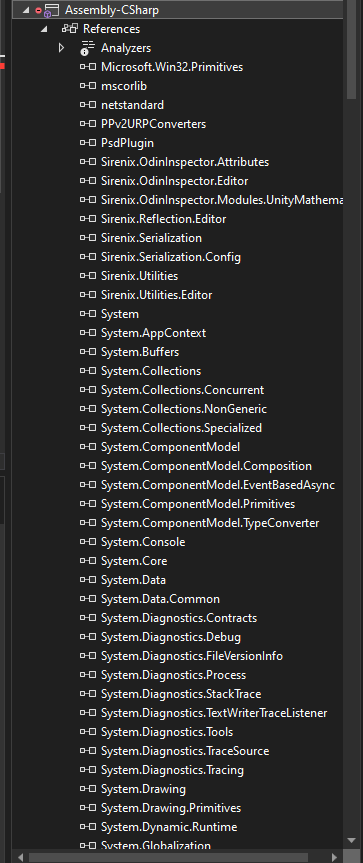
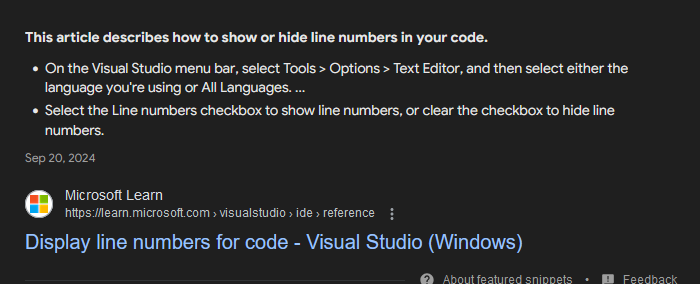
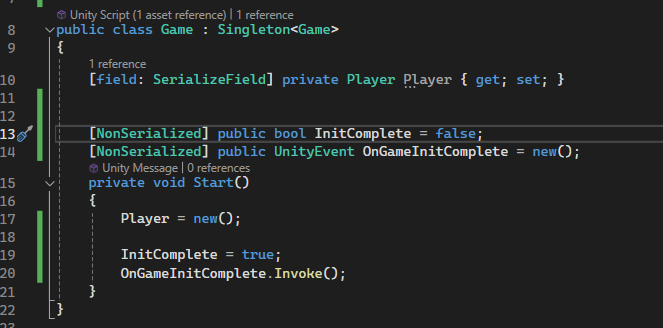 languid spire
then it is working
foggy tundra
but camera won't change
languid spire
but camera is changing is one gets disabled and the other enabled
hasty tundra
Ive been using Random.insideUnitCircle.normalized * radius to get a random point on the edge of a circle, but im not sure how to pick a specific point on the circle (say i wanted to get the point at the 120° angle for instance)
teal viper
hasty tundra
Ive been using Random.insideUnitCircle.normalized * radius to get a random point...
Take a normalized vector and rotate it 120 degrees.
foggy tundra
languid spire
but camera is changing is one gets disabled and the other enabled
maybe this will be easier to understand

why camera won't change?
 green badge
I need some help, I have to make a project which will be a 2D game with levels and cutscenes (probably) and I was going to start the project and I saw this 2D platformer microgame, do you recommend me using it?

 naive pawn
green badge
I need some help, I have to make a project which will be a 2D game with levels a...
naive pawn
green badge
I need some help, I have to make a project which will be a 2D game with levels a...
you can use it to learn, and you can use it as a base for a prototype, but you'd have to replace pretty much everything to make your own game anyways, so once you've learned how to make it, i'd recommend opening a new project for a fresh start where you have control of everything
green badge
naive pawn
you can use it to learn, and you can use it as a base for a prototype, but you'd...
But is it possible to change like, background, add attack animations, add enemies, make levels, change the designs using this as a base?
naive pawn
yeah, that would be removing everything and then adding your own stuff back in
so why not skip the removing step
green badge
naive pawn
yeah, that would be removing everything and then adding your own stuff back in
s...
Yea fair enough, maybe I'll just look into this 2D platformer microgame for a bit and start from 0, thanks
burnt vapor
green badge
I need some help, I have to make a project which will be a 2D game with levels a...
Don't crosspost
green badge
Yea some random other guy already told me that, and I answered, which I'm sure you saw since you're saying this
opal zealot
ruby python
This is what I'm doing with my interactions.
```cs
using UnityEngine;
using Un...
Here's how I'm arranging the Interaction/Action for the Player between Character States.
 foggy tundra
why these don't fall inside?
 naive pawn
foggy tundra
why these don't fall inside?
naive pawn
foggy tundra
why these don't fall inside?
wdym by that? are they falling at all?
night raptor
Let me guess, you use convex mesh collider
foggy tundra
it's an open box
night raptor
or single box collider
foggy tundra
I don't know
yes it's single box colider
in godot it automatically creates collider for your model
naive pawn
do they have rigidbodies
foggy tundra
is there button like this in unity?
foggy tundra
naive pawn
do they have rigidbodies
yes, balls are fine
night raptor
foggy tundra
in godot it automatically creates collider for your model
Don't know about godot but in unity box collider is a box, 8 corners, no holes. you gotta use mesh collider or multiple primitives (like box colliders) if you want to have more complex collision shape
night raptor
foggy tundra
so there is no button to create collider in shape of model?
that's what mesh collider is, it's a collider and you give it a mesh as shape
naive pawn
foggy tundra
yes it's single box colider
that would be just a simple cube
night raptor
foggy tundra
like if you import human model how will you make collider?
For human model that needs to move around and morph their shape, I would use dozen or two capsule colliders like any other game in the world. unity's mesh collider won't update correctly with moving armatures so it wouldn't really work for most characters. Most games (outside unity) don't even try to use dynamic mesh based shaders because it would be very expensive. For stationary and more importantly rigid objects (not ones bending according to a rig) mesh collider is totally fine
foggy tundra
so with every model you need to manualy set up colliders?
in godot you just click create trimesh static body and that's it
I only doing unity because I need it for my college
night raptor
foggy tundra
so with every model you need to manualy set up colliders?
Read more carefully. For stationary rigid objects you may use mesh colliders which accurately uses the mesh for collisions, for moving and especially shape morphing objects compound colliders (using multiple primitive colliders) are the way to go
night raptor
foggy tundra
mesh collider works
For non moving objects mesh collider is often a good option. Someone on the internet may scream to you about their performance cost but it's really not that slow on most cases. Mesh colliders biggest limitations are that dynamic (moving/physically active) bodies can only be convex (no dents or holes) and rigid (cannot be bend by armature/skeleton/skinned mesh/bones/whatever you wanna call that)
Obviously if your mesh is just a box, sphere or capsule, you should definitely use the primitive collider types respectively but for more convex meshes Mesh Collider is often fine
 fresh stirrup
Hi! In the project I'm working on, we're importing some 3d models with animations in the same fbx file. At the moment, we're playing these animations using an Animator component and AnimationController, but we have hundreds of clips in the controller and we only ever want to play one clip at a time (we don't need to switch between clips). The animation clips are taking a ton of memory, so I'd like to find a better way to handle this. Does anyone have any suggestions?
There's an Animation component that could have worked, but this is now marked as Legacy.
wintry quarry
fresh stirrup
There's an Animation component that could have worked, but this is now marked as...
That doesn't mean you can't use it
foggy tundra
night raptor
Obviously if your mesh is just a box, sphere or capsule, you should definitely u...
ok I have problem, box collider doesn't fall trough the ground (good), but when I apply mesh collider it does fall trough the ground
ivory prism
I've not used unity in a while, so im trying to still decide on what the best way of organizing my project is. Normally i'd create empty game objects as containers for my scripts and organize them based off what they do. Such as having a Player game object that holds all player related scripts that then take in a reference to the player prefab, then I'd have one for Environment that handles all environment stuff, like Audio, Lighting, etc etc. I am wondering if this is the best way, or how you guys would recommend, because I feel like when it comes to team projects this won't be the best method.
fresh stirrup
wintry quarry
That doesn't mean you can't use it
I did try adding the Animation component with "Play Automatically" selected, but it doesn't play the animation
wintry quarry
fresh stirrup
I did try adding the Animation component with "Play Automatically" selected, but...
Sure it does 🤔. Which animation did you select?
night raptor
foggy tundra
ok I have problem, box collider doesn't fall trough the ground (good), but when ...
Mesh collider to the bucket shape, not the ball. The ball is… a ball, use sphere collider for that
foggy tundra
night raptor
Mesh collider to the bucket shape, not the ball. The ball is… a ball, use sphere...
yes, my bucket falls trough the ground
if I mark convext then it stays on the ground, but balls can't fall in again, so it's like box collider
 agile oracle
Hi everyone. I have a question about the best way to handle the Animator and controlling a GameObject’s rotation with the transform.LookAt method.
I’m trying to have my enemy GO look at the player and then chase after them, but the enemy has an animation that affects their rotation when they die.
It turns out trying to manipulate the rotation of a GO in that situation doesn’t work. I have a hacky temporary “solution” that just disables the Animator until the enemy dies, but this doesn’t seem sustainable because i plan on creating a chase animation and can’t have the Animator component off for that.
Can anyone recommend what I should do?
 velvet tinsel
Hey, how with InputSystem read delta control type? action.ReadValue<Delta> not exist struct....
 naive pawn
velvet tinsel
Hey, how with InputSystem read delta control type? `action.ReadValue<Delta>` not...
naive pawn
velvet tinsel
Hey, how with InputSystem read delta control type? `action.ReadValue<Delta>` not...
[moved]
naive pawn
velvet tinsel
Hey, how with InputSystem read delta control type? `action.ReadValue<Delta>` not...
please don't crosspost.
wintry quarry
agile oracle
Hi everyone. I have a question about the best way to handle the Animator and con...
Use an aim constraint
fresh stirrup
wintry quarry
Sure it does 🤔. Which animation did you select?
One of the animations I'm importing with the fbx file
This is the model with the Animation component enabled and Animator disabled
 fresh stirrup
wintry quarry
Sure it does 🤔. Which animation did you select?
fresh stirrup
wintry quarry
Sure it does 🤔. Which animation did you select?
And when I enable the Animator the animation plays. It's the same clip as in the Animation component.
 agile oracle
wintry quarry
Use an aim constraint
agile oracle
wintry quarry
Use an aim constraint
I still get the issue where if I have the constraint active, I can't use the death animation, but if I turn on the Animator that controls it, I can't get the enemy to move or rotate towards me/the player
opal zealot
opal zealot
Here's how I'm arranging the Interaction/Action for the Player between Character...
Is this a good start for arranging code?
night raptor
foggy tundra
yes, my bucket falls trough the ground
Right, I thought the bucket was a static object. In that case you cannot use non-convex mesh collider as said earlier so you must use compound collider. In your case you don't need too many box colliders (you can add them as child objects) to create that shape. There are some assets available to generate compound colliders automatically but in your case it seems easy enough to place 5 box colliders manually there to match the shape closely enough
foggy tundra
alright, thanks
 severe onyx
I've been enjoying shorthand if branches a lot, like this one:
movingSpeed = movingDistance > 4 ? 20f : 7.5f;
now Im wondering if there's a way to incorporate another if else condition into this?
languid spire
severe onyx
I've been enjoying shorthand if branches a lot, like this one:
```movingSpeed = ...
sure
movingSpeed = movingDistance > 4 ? 20f : movingDistance <2 ? 7.5f : 8f;
right that makes sense
everything after the : is "do this if false" so then I just repeat the structure there
thanks!
 cosmic dagger
severe onyx
I've been enjoying shorthand if branches a lot, like this one:
```movingSpeed = ...
cosmic dagger
severe onyx
I've been enjoying shorthand if branches a lot, like this one:
```movingSpeed = ...
you mean a ternary operator? and yes, you can nest (stack) them, though readability goes out the window . . .
languid spire
and debugging them is a PITA
cosmic dagger
does it even catch it? the nested ternary if there is an error?
severe onyx
works for this very simple use case at least, ty
cosmic dagger
or do you have to figure out where it—the error—is on within the entire nest (stack) . . .
languid spire
cosmic dagger
does it even catch it? the nested ternary if there is an error?
same as any nested construction. Debug by trial and error, lol
severe onyx
I just put a log behind it that writes the distance and speed
languid spire
severe onyx
I just put a log behind it that writes the distance and speed
Syntactic sugar is all well and good but, tbh, at your level of skill I would stick to plain old if else structures
severe onyx
I appreciate the advice but I really dont see the point of not using this for such a simple case
faint nacelle
public async Task typeText(string text,string name)
{
    setNameText(name);
    for (int i = 0; i < text.Length + 1; i++)
    {
        setDialogueText(text.Substring(0, i));
        await Task.Delay(100);
    }
    setDialogueText(text);
}
So I have this text typer for dialogue and I want to skip to the end if the user presses the space button
public async Task typeText(string text,string name)
{
    setNameText(name);
    async Task typer()
    {
        for (int i = 0; i < text.Length + 1; i++)
        {
            setDialogueText(text.Substring(0, i));
            await Task.Delay(100);
        }
    }
    async Task input()
    {
        while (!Input.GetKeyDown(KeyCode.Space))
        {
            await Task.Yield();
        }
    }
    Task[] pray = {typer(),input()};
    await Task.WhenAny(pray);
    setDialogueText(text);
}
After some searching on google I came up with this mess but apparently you need to use cancellation tokens to cancel the other thread which has not yet ended so I feel like I'm going in the wrong direction with this one, how do i proceed?
keen dew
severe onyx
I appreciate the advice but I really dont see the point of not using this for su...
Switch expressions are a bit cleaner:
movingSpeed = movingDistance switch
{
    > 4 => 20f,
    < 2 => 7.5f,
    _ => 8f
};
that is horrible. whats wrong with a simple Coroutine?
faint nacelle
languid spire
that is horrible. whats wrong with a simple Coroutine?
I can see
Give me a sec
I had a reason to justify it
I just forgot it long ago
severe onyx
keen dew
Switch expressions are a bit cleaner:
```cs
movingSpeed = movingDistance switch
...
that is handy too know, ty
faint nacelle
faint nacelle
I just forgot it long ago
Oh yes I want the function to yield
severe onyx
writing c# used to be my dayjob but it's been a whole lotta time since I last touched it so Im derusting
languid spire
faint nacelle
Oh yes I want the function to yield
thats what coroutines do
cosmic dagger
faint nacelle
```C#
public async Task typeText(string text,string name)
{
setNameText(name...
that's a lot of async going on . . .
faint nacelle
i mean not yield
ill just uh
pull up more code
private static async Task waitConfirm(string key)
{
    DialogueSingleton.instance.setDialogueUI(true);
    List<List<string>> dialogueList = getDialogue(key);
    if (dialogueList == null)
    {
        Debug.Log("Dialogue not found");
        return;
    }
    for (int i = 0; i < dialogueList.Count; i++)
    {
        List<string> dialogue = dialogueList[i];
        Debug.Log(dialogue[0] + ": " + dialogue[1]);
        await DialogueSingleton.instance.typeText(dialogue[1],dialogue[0]);
I meant i wanted it to await
mb
ive probably committed several programming warcrimes havent I
languid spire
faint nacelle
i mean not yield
look
bool cancelled = false;
void Update() { if (Input.GetKeyDown(KeyCode.Space)) cancelled = true; }

IEnumerator typeText(string text,string name) {
setNameText(name);
    for (int i = 0; i < text.Length + 1; i++)
    {
        setDialogueText(text.Substring(0, i));
        yield return null;
        if (cancelled) break;
    }
    setDialogueText(text);
}
sure
wait
Ill just test this
but im not sure if itll work
because the rest of my code is so shit
cosmic dagger
faint nacelle
i mean not yield
it's much easier to use the maxVisibleCharacters property for TMP and check input in Update that sets a bool to skip and display the remaining text . . .
faint nacelle
cosmic dagger
it's much easier to use the `maxVisibleCharacters` property for TMP and check in...
Oh my bad for not knowing this property of TMP
faint nacelle
languid spire
look
```cs
bool cancelled = false;
void Update() { if (Input.GetKeyDown(KeyCode....
oh nevermind
sure it works but
actually nevermind it just works
languid spire
Dont over complicate stuff, the simplest option is usually the best one
faint nacelle
languid spire
look
```cs
bool cancelled = false;
void Update() { if (Input.GetKeyDown(KeyCode....
what i wanted was to cancel even if it was between states of typing but
I guess if its fast enough nobody's going to notice
opal zealot
I'm watching a tutorial on making an interaction system for my project, as a separate script from the regular action inputs(plan to make it camera-dependent down the line) connected to the Input System so that I can have the Player swap between the Characters that they're playing without having to codify an interaction system for each of the Player's Characters.
I noticed the problem, but unsure how to fix it without adding the Interaction System into the regular action inputs script as shared below.
The script: https://hastebin.com/share/oqoqegoyeb.csharp
The video I'm following it from: https://www.youtube.com/watch?v=K06lVKiY-sY


Hastebin is a free web-based pastebin service for storing and sharing text and code snippets with anyone. Get started now.

In this video I go over the creation of a flexible interaction system in Unity3D.
Join my Discord! ► https://discord.gg/jrRJgfBz2y
How to Make Player Movement ► https://youtu.be/TOPj3uHZgQk
Extra Resources ►
https://docs.unity3d.com/ScriptReference/Physics.Raycast.html
https://learn.microsoft.com/en-us/dotnet/csharp/language-reference/keywords/i...
severe onyx
Unity/C# won't allow me to implicitly cast a bool to an int, is that right? are ternaries or Convert.ToInt really my best options for this?
 zenith cypress
That's right, just use a ternary yeah
severe onyx
unfortunate
polar acorn
severe onyx
Unity/C# won't allow me to implicitly cast a bool to an int, is that right? are ...
Unfortunately your best option is int x = someBool ? 1 : 0
cosmic dagger
you could make an extension method . . .
severe onyx
it would've been neat to do stuff like x + y * [bool] in a single line
 hexed terrace
This is a code channel, and that's not a code question. Delete from here and ask in #🥽┃virtual-reality
cosmic quail
severe onyx
it would've been neat to do stuff like x + y * [bool] in a single line
you can. just replace [bool] with a method that takes in a bool
 willow scroll
severe onyx
Unity/C# won't allow me to implicitly cast a bool to an int, is that right? are ...
willow scroll
severe onyx
Unity/C# won't allow me to implicitly cast a bool to an int, is that right? are ...
Create a static class and add an extension method, which converts a boolean to the integer:
public static int Sign(this bool value) =>
    value ? 1 : 0;
Thanks for the tip
 elfin ice
hello everyone,
i'm doing a asteroid like game and i don't know how to make the asteroids spawn in an random direction and then move at a random speed in this direction, i can send you the code or a video of how my game run but i really need help please
hexed terrace
google -> unity how to spawn object in random position
google -> unity how to spawn object in random rotation
google -> unity how to set random rigidbody velocity
elfin ice
oh ok thanks i didn't know those terms because it's my first time using unity and C# but i'l go look at this
hexed terrace
the first 2 require no knowledge of terms, but good luck , have fun 😄
 pallid sand
anyone have idea why unity become like that
 polar acorn
pallid sand
anyone have idea why unity become like that
polar acorn
pallid sand
anyone have idea why unity become like that
become like what
pallid sand
polar acorn
become like what
open pic man
polar acorn
pallid sand
open pic man
I can see it. You didn't actually say what you're asking about though
pallid sand
do you find the unity editor normal
zenith cypress
Just say what the problem is instead of wasting time
pallid sand
can't u use windows name hidden and the ui feels a little weird
pallid sand
zenith cypress
Just say what the problem is instead of wasting time
i can't see windows name
 pallid sand
nope
polar acorn
Close Unity, delete Library folder, and re-open to let it reimport everything
zenith cypress
is this 2019 
pallid sand
polar acorn
Close Unity, delete Library folder, and re-open to let it reimport everything
alright
fixed it by switching to light mode and then dark again
 torn marlin
pallid sand
torn marlin
pallid sand
Bro thats definitely an older version 💀