#💻┃code-beginner
1 messages · Page 516 of 1
 dawn mulch
 rich adder
dawn mulch
Ohhh I see. Gotcha. Okay well I'll cut the chatter then. I hope you have a good ...
rich adder
dawn mulch
Ohhh I see. Gotcha. Okay well I'll cut the chatter then. I hope you have a good ...
thanks! goodluck with your learning 🙂
good'ay
dawn mulch
rich adder
thanks! goodluck with your learning 🙂
Will do. Should I continue to aks questions here or ask them somewhere else?
rich adder
dawn mulch
Will do. Should I continue to aks questions here or ask them somewhere else?
if they are Unity coding questions here, anything else find the appropriate channel or Unity talk if its not found
dawn mulch
rich adder
if they are Unity coding questions here, anything else find the appropriate cha...
Gotcha
rich adder
you should instead just capture the inputs inside a GetAxis
idk if that will fix it but worth a shot
movement = new (Input.GetAxis("Horizontal"), Input.GetAxis("Vertical")).normalized;
thats weird.. maybe its your keyboard? never had issues with this code
Debug.Log the inputs and see whats happening
 polar acorn
Show the updated code
polar acorn
So, this is working in all directions individually, but doesn't work at all with up-right or down-right?
rich adder
that is strange
polar acorn
If it's working with your arrow keys, but doing this for WASD, then the problem is definitely your keyboard
Cheap keyboards can only detect a certain amount of inputs per "circuit" and if they've wired multiple keys to the same circuit it won't detect multiple presses
rich adder
have you actually debugged the values?
 white obsidian
what could be the issue of my header not showing up in unity? the Patrol points and movement parameters headers are showing but Enemy isn't


 short hazel
white obsidian
what could be the issue of my header not showing up in unity? the Patrol points...
short hazel
white obsidian
what could be the issue of my header not showing up in unity? the Patrol points...
The field is private and not serialized
 jaunty coyote
im absolutly confused, using the new navigation system of unity my ai cant follow the player. I put agent.SetDestination into update function and the ai just stops and stays in place because it only get partial state paths. Ive seen 3 tutorials with this new system using exactly my method except its working, even on of the offical unity tutorials is using my method. I already tried unity 2023.3 and now the unity 6
rich adder
jaunty coyote
im absolutly confused, using the new navigation system of unity my ai cant follo...
well, are you sure it has a valid path
i generally dont Set Desitination in update anyway, i call it once and only update if player changes position there is an event and the method is fired again
so only as target moves its necessary
jaunty coyote
rich adder
well, are you sure it has a valid path
well, if i call set destination once, it gets to its destination succesfully
jaunty coyote
rich adder
so only as target moves its necessary
heard that like 5x times till now, the player in my game constantly moves so i need it getting updated
rich adder
I mean mine does too, that doesnt mean it has to be in update
jaunty coyote
doesnt matter tho, every time the set destination is called, the agent freezes for a second
so if a player constantly moves, the character will bassicly constantly try to run setdestination, thus freezed on same pos
been there, tried that
rich adder
works fine for me, must be something on your end
best to debug the path returned and see whats happening, draw the path or check the corners in the gizmos of AI nav
jaunty coyote
you able to share your working code?
rich adder
i can get to it if I open my project , need some time tho
the gist is, if your player is only 1 you can make the public static event Action <float> OnPlayerMove
jaunty coyote
rich adder
i can get to it if I open my project , need some time tho
got all the time, spent last 5 hours trying to figure out the new ai system that isnt working for me
jaunty coyote
rich adder
the gist is, if your player is only 1 you can make the `public static event Acti...
multiple players
rich adder
jaunty coyote
multiple players
hmm you could also use the same static event anyway, just pass the Player as the second T if you want specific player
jaunty coyote
rich adder
hmm you could also use the same static event anyway, just pass the Player as the...
wierd, debuged again, its returning once a completed path, once a partial one
rich adder
jaunty coyote
wierd, debuged again, its returning once a completed path, once a partial one
do you have diff heights on your floors?
rich adder
i always get better results when i run the destination through SamplePosition rather than using the target transform postion directy
Vector3 GetDestination(){
if (NavMesh.SamplePosition(target.position, out var hit, maxHeight, NavMesh.AllAreas))
{
return hit.position;
}
return Vector3.zero;
}``` north oar
``public class SpawnCards : MonoBehaviour
{
[SerializeField] GameObject[] cards;
void Start()
{
    StartCoroutine(CardSpawn());
}

IEnumerator CardSpawn()
{
    foreach (GameObject card in cards)
    {
        Animator animator = card.GetComponent<Animator>();
        animator.Play("FloatIn");
    }

    yield return new WaitForSeconds(0.2f);
}
}``
cant figure out the bug in this i have 4 objects im trying to spawn in one by one but they all spawn in at the same time, i use an animation holder to give them all teh same animation
jaunty coyote
rich adder
i always get better results when i run the destination through SamplePosition ra...
let me try, tnx
polar acorn
north oar
``public class SpawnCards : MonoBehaviour
{
[SerializeField] GameObject[] ca...
- !code
- There's no point to the wait in that coroutine, by the time it hits the wait, there's nothing left to do
 eternal falconBOT

Posting code
📃 Large Code Blocks
Use links to services like:
https://gdl.space/, https://paste.ofcode.org/, https://hatebin.com/, https://paste.myst.rs/, https://hastebin.com/
📃 Inline Code
Surround code with three backquotes. Not quotation marks.
To format as C#, add cs to the first line:
```cs
// Your code here
```
Add a comment with a line number if there is an error message.
 still elm
ugh creating a highscore table in unity was more difficult than I imagined
north oar
polar acorn
1. !code
2. There's no point to the wait in that coroutine, by the time it hits ...
wdym by the time it hist the wait theres nothing left to do
 runic lance
north oar
``public class SpawnCards : MonoBehaviour
{
[SerializeField] GameObject[] ca...
runic lance
north oar
``public class SpawnCards : MonoBehaviour
{
[SerializeField] GameObject[] ca...
you probably want to put the yield return new WaitForSeconds(0.2f) inside the foreach loop
rich adder
still elm
ugh creating a highscore table in unity was more difficult than I imagined
why ?
still elm
rich adder
why ?
I don't even know were to start
polar acorn
north oar
wdym by the time it hist the wait theres nothing left to do
Code runs one line at a time, top to bottom. It finishes the loop, then waits, then does nothing else and ends
rich adder
still elm
I don't even know were to start
what kind of highscore, also internet or no internet
runic lance
oops, I thought you were spawning inside the loop, but it's just getting the component
jaunty coyote
jaunty coyote
let me try, tnx
still does this, made it update every half a second so i can at least see it move
north oar
polar acorn
Code runs one line at a time, top to bottom. It finishes the loop, _then_ waits,...
yes taht was it idk how i didnt notice that it was so obvious lol
rich adder
jaunty coyote
still does this, made it update every half a second so i can at least see it mov...
show your agent inspector
jaunty coyote
 still elm
rich adder
what kind of highscore, also internet or no internet
still elm
rich adder
what kind of highscore, also internet or no internet
no internet, just writing to file
a scoreboard who shows how many gameobjects (enemies) I have desstroyed before I died
with position and score + name
rich adder
still elm
a scoreboard who shows how many gameobjects (enemies) I have desstroyed before I...
make a struct so you can save it as grouped data in a json / bin file
still elm
rich adder
make a struct so you can save it as grouped data in a json / bin file
never done json before
rich adder
still elm
never done json before
its just a way to convert your data into text that is formatted as JSON, this way it can be read back easily
still elm
Oh ok
still elm
rich adder
its just a way to convert your data into text that is formatted as JSON, this wa...
are you sure json is a good solution if I just want to store the highscore locally?
sound like json is used for api
jaunty coyote
u want json if you want data to remain after game restart
short hazel
It's just a way to "encode" data, you can write it to a file
And yeah its original use is from the web, it's in the name: JavaScript Object Notation
rich adder
still elm
are you sure json is a good solution if I just want to store the highscore local...
you dont have to use json format no. I just use that because I typically load these jsons in other APIs
json is irrelevant if its locally or not
as mentioned it just a way to format the data a specific way
you can write to raw streams and binary too , up to you
short hazel
It's just that JSON is the easiest to set up, and doesn't require much code to save and load the data (10 lines at most)
jaunty coyote
@rich adder got it working with: NavMeshPath path = new NavMeshPath();
nm.CalculatePath(temporaryTest.transform.position, path);
nm.path = path;
rich adder
jaunty coyote
<@968604165150507078> got it working with: NavMeshPath path = new NavMeshPath();...
yeah thats strange because I don't have to do that , but then again I haven't fully seen the rest of the code
also that weird snapping could be cause of character controller being moved with mouse + pivot in playmode
jaunty coyote
well it works so i wont touch it, anyways, tnx for your time
jaunty coyote
rich adder
also that weird snapping could be cause of character controller being moved with...
it isnt, now i did the same moving araund and still works, still, thanks ❤️
rich adder
hey if it works it works lol
still elm
short hazel
It's just that JSON is the easiest to set up, and doesn't require much code to s...
oh ok
 tired knoll
is there any reason zero collsion is detected?


nothing appears in logs
i feel like its a really stupid answer
but i actually cannot find it
polar acorn
What is the inspector of the object this is supposed to be colliding with
tired knoll
the player - i found the reasoning; the object cant collide with anything if probuilder shape is attatched to it
which is dumb
 stuck palm
how come this script isnt working in edit mode?
 tired knoll
but oh well
stuck palm
i dont think its working in playmode either
 ivory bobcat
What's not working?
rich adder
tired knoll
the player - i found the reasoning; the object cant collide with anything if pro...
what?
stuck palm
ivory bobcat
What's not working?
its just not updating the float lol
tired knoll
rich adder
what?
i removed the probuilder shape component and it started working
ivory bobcat
stuck palm
its just not updating the float lol
Verify with some logs
rich adder
tired knoll
i removed the probuilder shape component and it started working
I never had to do this in my 5+ years of using Probuilder
rich adder
did you have a mesh collider on the pb mesh?
stuck palm
ivory bobcat
Verify with some logs
okay, the logs are showing up correctly, but im not seeing a change to the materials, in edit mode or play mode


 wintry quarry
stuck palm
okay, the logs are showing up correctly, but im not seeing a change to the mater...
wintry quarry
stuck palm
okay, the logs are showing up correctly, but im not seeing a change to the mater...
Wrong property names probably for the shader
Shader properties almost always start with _
stuck palm
wintry quarry
Shader properties almost always start with _
thats done it! thank you
 bold plover
Why does the color picker in the Karting microgame project freeze my entire computer when I use the color picker lmao.
I can only deduce it's old or it's my computer.
 steep rose
what version of unity are you using
north oar
{
    while (Vector3.Distance(player.transform.position, playerSpawnPoint.position) > 0.1f)
    {
        if (Vector3.Distance(player.transform.position, playerSpawnPoint.position) > 0.1f)
        {
            player.transform.position = Vector3.Lerp(player.transform.position, playerSpawnPoint.position, speed * Time.deltaTime);
        }
        yield return null;
    }
}```
i noticed when my player reaches the spawnpoint it starts twitchign and then found out that the while loop actually never stops but i dont know why, it goes direclty onto the spawnpointalso does it freeze unity or does it actually make your entire computer unresponsive?
steep rose
you physically cannot click anything else?
rich adder
north oar
```IEnumerator GoToDuel()
{
while (Vector3.Distance(player.transform.positio...
🤔 Unity, Huh, How?
Applying lerp so that it produces smooth, imperfect movement towards a target value.
bold plover
Correct. I can't even close the program with Alt+F4.
Strangeness. No tab out. Nothing.
bold plover
Just reset the computer.
Yeah might be a system limitation issue I can't think of anything else.
rip
steep rose
supposedly this has happened and been known to hang unity but not the entire computer even on unity 2019.
if it does happen repeatedly you could probably delete your project library folder to make unity recompile to see if that fixes anything
last resort is to reinstall unity
if those do not work, just submit a !bug report
eternal falconBOT
🪲 To make bug reporting as quickly as possible, we made a bug reporting application for you. When running Unity choose Help->Report a Bug in the menu, or you can access it directly through the executable in the directory where Unity is installed. It will also launch automatically if you experience a crash.
📝 If your bug report is to do with Documentation, either an error, typo, or omission, you can report it by scrolling to the bottom of the page where you found the issue and click ‘Report a problem on this page’!
💡If your report is to do with a new feature idea, you can check the Unity Product Roadmaps page to see if your idea has already been planned.
For more complete instructions on how to report bugs, access: https://unity3d.com/unity/qa/bug-reporting
steep rose
if your system cannot handle the color picker, you should have seen other limitations by now I would think
north oar
rich adder
https://unity.huh.how/lerp/wrong-lerp
tanks
bold plover
Trying it again. Otherwise I'll probably just end up submitting the bug report.
Thank you though.
 dim yew
why does it tell me to use the first one and then give me an error??


 sour fulcrum
Is there a built in function/name/etc. for Like rebasing a collection to start from a specific value?
Like imagine i have a list<int> of 0-24
I want to make a version of that list that starts at 22 but everything before 22 is added after 24
whoever posted that question yes if i understood correctly
 zenith cypress
dim yew
why does it tell me to use the first one and then give me an error??
zenith cypress
dim yew
why does it tell me to use the first one and then give me an error??
var main = ps.main;
main. // set here
0 idea why this works but thanks
 nocturne kayak
This is getting stupid and broad but how would one approach colliding without physics? i can move a cube on xyz in 3D space, i don't want it to be affected by any other physical forces, i just want it to collide with walls
I did setup a box collider in such a way that it detects when it's colliding with stuff
But i can't begin to think how i'd make it so once it's colliding, it can be moved in every direction except for the ones it's colliding with
 north kiln
nocturne kayak
But i can't begin to think how i'd make it so once it's colliding, it can be mo...
north kiln
nocturne kayak
But i can't begin to think how i'd make it so once it's colliding, it can be mo...
Perform casts in the direction of movement and limit the distance to the hit's distance
nocturne kayak
Is there a way to get the direction of movement if i'm not moving it one axis at a time?
 timber tide
transform.forward
Oh youre moving it in any direction then you should already have the direction anyway. Normalizing your velocity will give direction too.
 full coral
does anyone know why my .apk build doesnt respond to Click events onto enemies, but it works perfectly fine on my computer, whether it is formatted to windows or android?
 carmine sierra
How can i capture a mouse's position in unity 3d
wintry quarry
carmine sierra
How can i capture a mouse's position in unity 3d
depends which input system you're using
carmine sierra
input.mouspos
wintry quarry
if the new system, there are several ways depending on what you're trying to do exactly
wintry quarry
carmine sierra
input.mouspos
sounds like you already know the answer
carmine sierra
but i need to capture it in relation to world space
wintry quarry
that's not "capturing the mouse position"
that's "how do I project the mouse position into the 3D world"
carmine sierra
oh okay
wintry quarry
there are several ways, depending on exactly what you want
carmine sierra
i need to learn that ray thing dont i
wintry quarry
This page explains two good ways of doing what you want:
https://unity.huh.how/screentoworldpoint
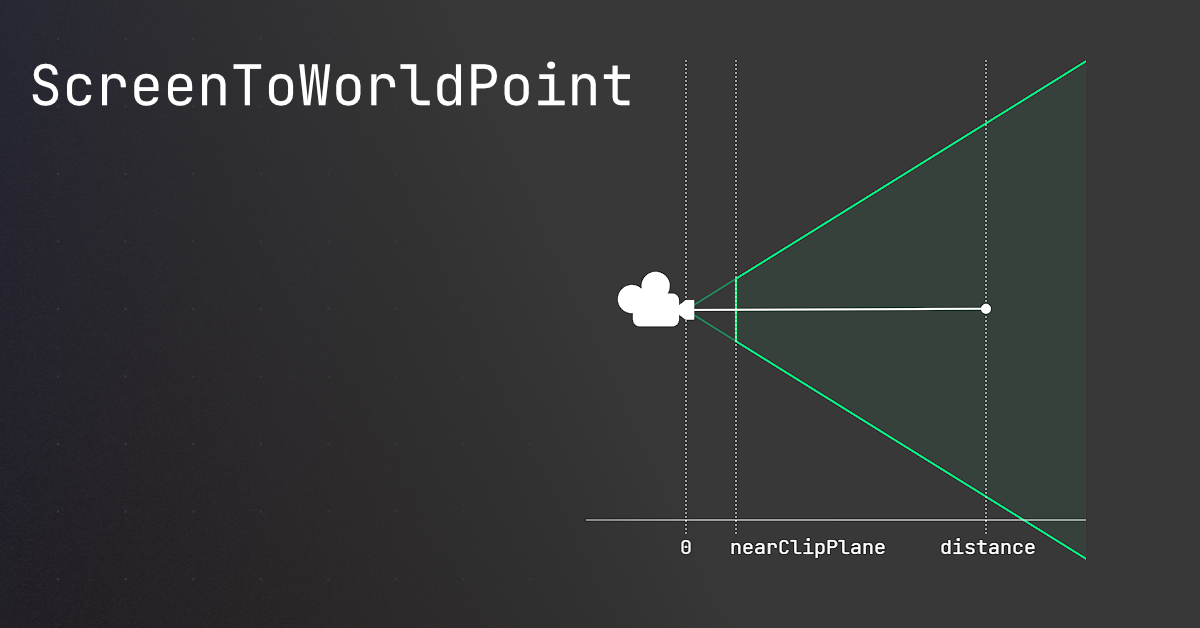
🤔 Unity, Huh, How?
Common ScreenToWorldPoint issues, and similar alternatives that may be better.
a good third option is just to use the event system, depending on the use case
carmine sierra
thanks, i tried cam.ScreenToWorldPoint(input.mousePosition) tho
nocturne kayak
timber tide
Oh youre moving it in any direction then you should already have the direction a...
I don't think i can access velocity If i'm not using rigidbody for movement
timber tide
nocturne kayak
I don't think i can access velocity If i'm not using rigidbody for movement
I'm not understanding. If you're moving it already then you have a direction
If you move on the x+ axis your direction vector is simply (1, 0, 0). If you're moving on both the x+ and z+ then your direction vector is (1, 0, 1)
wintry quarry
carmine sierra
thanks, i tried cam.ScreenToWorldPoint(input.mousePosition) tho
then read the rest of the page, as I said there are multiple options explained there. Also ScreenToWorldPoint works as long as you're doing it properly.
timber tide
which would be 45 degress from the z direction
nocturne kayak
This whole thing feels stupid, i can't use a character controller because i need a cube\custom collisions, and doing rigidbodies makes the whole thing move around, how come it's so complicated to just move something around and keep collisions, what the hell
wintry quarry
It's a very common mistake/misconception for people to think that character controllers are simple
they are quite complex
 teal viper
nocturne kayak
This whole thing feels stupid, i can't use a character controller because i need...
teal viper
nocturne kayak
This whole thing feels stupid, i can't use a character controller because i need...
Well, because you're mixing up different systems here. Collisions are in physics domain. If you want the object to collide with things, it needs to have a collider and a dynamic rb and be moved by the physics. Otherwise there's nothing to calculate the collision for it.
You can obviously reinvent the wheel and write your own collision kind of system with casts and/or overlaps, but that's a different story.
It's really not that complicated if you understand and accept the rules of the game.
nocturne kayak
teal viper
Well, because you're mixing up different systems here. Collisions are in physics...
Kinematic characters can collide with walls, so why is it so difficult to just implement that?
timber tide
if all you want is to stop something when it comes into contact then doing shapecasting is probably fine
well, I'd do a mix of overlap and shapecast
teal viper
nocturne kayak
Kinematic characters can collide with walls, so why is it so difficult to just i...
No they can't.
Oh, you mean kinematic rb character controller assets on the asset store?
timber tide
that asset is also only capsule I think
 crisp token
Hey I'm having difficulty trying to figure out how to make a constructor for a struct in HLSL on a Compute Shader
crisp token
just make a non-official constructor seems to be thje play
 sand girder
bro i cant even code😭 😭
teal viper
crisp token
just make a non-official constructor seems to be thje play
Share the actual code and the error
teal viper
sand girder
HOW THE HELL DO I CODE
!learn
And stop spamming nonsense
eternal falconBOT
:teacher: Unity Learn ↗
Over 750 hours of free live and on-demand learning content for all levels of experience!
sand girder
ok
crisp token
teal viper
Share the actual code and the error
I'm fine, pretty sure there's just no HLSL constructors for structs.
teal viper
crisp token
I'm fine, pretty sure there's just no HLSL constructors for structs.
Are you talking about structs in hlsl or C# side? Hlsl basically follows the rules of C++, so you can reference that.
crisp token
teal viper
Are you talking about structs in hlsl or C# side? Hlsl basically follows the rul...
Only know C so far, about to start learning c++ soon. I looked it up tho and I think I've confirmed my suspicions
 molten pulsar
hi im having a problem
im trying to modify avatar herarchy becuse unity imports make it a mess
when i finish and exit from avatar configuration
avatar herarchy didnt save
how i can save it?
teal viper
molten pulsar
how i can save it?
I don't think you're supposed to modify the hierarchy in avatar config.
 lost anvil
is it bad to have a script dedicated to references for use within a namespace / state machine?
teal viper
lost anvil
is it bad to have a script dedicated to references for use within a namespace / ...
Not quite sure what you mean by that.
molten pulsar
teal viper
I don't think you're supposed to modify the hierarchy in avatar config.
so what i supposed to do?
teal viper
molten pulsar
so what i supposed to do?
You can unpack the asset prefab in a scene, modify it and save as a new prefab.
molten pulsar
teal viper
You can unpack the asset prefab in a scene, modify it and save as a new prefab.
okay thats a good idea
thank you for that
i never think in that before
lost anvil
teal viper
Not quite sure what you mean by that.
nvm i dont have that many variables that i need to do that
molten pulsar
soo i unpack the model modifiy and save it as new prefab but that dosent seems to be usefull,theres a way that i can create a avatar from a unpack model in scene?
teal viper
molten pulsar
soo i unpack the model modifiy and save it as new prefab but that dosent seems t...
No. Maybe explain what is it that you're trying to do? And more importantly, how is it related to code channel?
molten pulsar
teal viper
No. Maybe explain what is it that you're trying to do? And more importantly, how...
welp you make me think in the detail that this channel is only for coding
so was a mistake post this in this chanel
btw
im trying to fix this:

and well the only way that i find to fix it was change the jerarchy but
when i leave avatar configuration dont save it
teal viper
molten pulsar
You should fix that in a 3d modeling software like blender.
teal viper
molten pulsar
i have to change jerarchy in blender?
Yes. Make sure it confirms with the standard humanoid armature. At the moment it does not. You have shoulders and fingers parented to the root of the armature. This is not correct even in blender(though it might just work in blender).
molten pulsar
teal viper
Yes. Make sure it confirms with the standard humanoid armature. At the moment it...
okay thank you 
i will try that
i say you if that works
 static cedar
How to get the width and height of a rect transform? 
It's surprisingly more complex than i thought.
timber tide
rect
static cedar
Apparently not. Because it also depends on anchor position.
 stark sonnet
https://paste.ofcode.org/UfpbVZ7CAf77RKiWW79bUu
would any of you know if theres something wrong in my code that would cause me to not be able to jump
 signal egret
stark sonnet
https://paste.ofcode.org/UfpbVZ7CAf77RKiWW79bUu
would any of you know if theres...
signal egret
stark sonnet
https://paste.ofcode.org/UfpbVZ7CAf77RKiWW79bUu
would any of you know if theres...
I'd recommend only applying gravity when the character is not grounded
teal viper
stark sonnet
https://paste.ofcode.org/UfpbVZ7CAf77RKiWW79bUu
would any of you know if theres...
Did you try debugging it at all?
stark sonnet
i didn't. i'm new to all this and learning through tutorials. unfortunately this one didn't provide much explanation. i will try that. thank you
signal egret
do
velocity.y += gravity;```So you followed a tutorial exactly and it doesn't work the same way as it does in the tutorial?
stark sonnet
signal egret
do
```if (!grounded)
velocity.y += gravity;```
i will try that now!
teal viper
stark sonnet
i will try that now!
Do they have that in the tutorial?
stark sonnet
teal viper
So you followed a tutorial exactly and it doesn't work the same way as it does i...
and yes i did. he just had copied and pasted the script and i followed the ground checks and the masks.
stark sonnet
teal viper
Do they have that in the tutorial?
not at all
signal egret
your grounded is much more reliable if its a raycast
grounded = Physics.Raycast(pos, Vector3.Down, charHeight, ~whatEverThePlayerLayer, out var hit)
teal viper
stark sonnet
not at all
Then it's probably not gonna help.
teal viper
stark sonnet
and yes i did. he just had copied and pasted the script and i followed the groun...
Can you share the tutorial?
signal egret
hit is helpful if you want more information what ever the ground is, steps sounds, slippery surface etc
stark sonnet
teal viper
Can you share the tutorial?
it didn't sadly but yes give me one second and i will post link
stark sonnet
teal viper
Can you share the tutorial?
#survivalgame #tutorial #unity
In this tutorial series, we will create a 3D survival game with Unity & C# as the scripting language.
We are going to start with basic FPS movement, build an inventory, and crafting systems.
Learn how to pick up items and more.
Little by little, we are going to add different features that are common to survival op...
 bitter sage
So I'm using the Facepunch Steamworks Steam Integration plugin in Unity, and got steam integration working and everything in my game.
The problem is, my game crashes if the game is run outside of Steam now and also there are compiling errors on Non-Steam platforms, such as WebGL or Android. I'm not exactly sure how to solve this. I thought removing the Steam Integration script would do it, but it didn't.
Has anybody had any experience with this? I seem to be having trouble exporting to a DRM-Free executable for itch.io and non-Steam platforms such as WebGL and Android.
teal viper
stark sonnet
https://www.youtube.com/watch?v=Nxg0vQk05os&list=PLtLToKUhgzwnk4U2eQYridNnObc2gq...
Where's the part that they explain/implement jump?
stark sonnet
teal viper
Where's the part that they explain/implement jump?
one second and ill find time stamp
 spare mountain
bitter sage
So I'm using the Facepunch Steamworks Steam Integration plugin in Unity, and got...
spare mountain
bitter sage
So I'm using the Facepunch Steamworks Steam Integration plugin in Unity, and got...
has steam integrated itself so deep into your code that even removing it doesn't end its wrath? 😳
bitter sage
spare mountain
has steam integrated itself so deep into your code that even removing it doesn't...
Yeah, I'm not sure what's happening.
I removed the SteamIntegration.cs that I attached to the scene to boot it up. I even removed the SteamAchievement.Cs since that was throwing up a compiling error.
I then reimported the files, and tested. Immediately, Steam login boot up when I pressed preview.
Then when I tried to do anything with the game, it crashed. Not sure what's happening.
Putting the Steamintegration files and everything back made it all work again
no crashes
stark sonnet
teal viper
Where's the part that they explain/implement jump?
he starts to explain the script at about 28:00 and goes through and explains how to set up the ground check/ground mask , stuff like that. the guy was a little all over the place by the end he shows hes walking and jumping. i'm able to move but jumping for some reason is just not working
teal viper
stark sonnet
he starts to explain the script at about 28:00 and goes through and explains how...
Do you have the jump button defined in your input manager?
stark sonnet
teal viper
Do you have the jump button defined in your input manager?
yes i do!
teal viper
stark sonnet
yes i do!
Can you take a screenshot?
stark sonnet
teal viper
Can you take a screenshot?
 teal viper
stark sonnet
teal viper
stark sonnet
Okay.
Let's get started with debugging a little bit then.
First, you want to make sure that there are no errors at runtime. Especially no errors popping up at around the time of the issue.
I see you have an error in the console right now. What is it about?
stark sonnet
teal viper
I see you have an error in the console right now. What is it about?
that was when i was trying to tweak the script to what was previously suggested before. i had changed it back and i do not have any errors as of now
teal viper
stark sonnet
that was when i was trying to tweak the script to what was previously suggested ...
No errors when trying to jump either, right?
stark sonnet
teal viper
No errors when trying to jump either, right?
that is correct
teal viper
stark sonnet
that is correct
Okay. The next thing is where to start debugging and how.
There are many ways to debug code. The simplest one is printing something in the console that would tell you about the state of the objects at that time. You can do that by using Debug.Log("some text");. You can pass in whatever string you want. You can output other variables values and almost anything else.
Now. Debugging is a 2 stage process:
- You make an assumption.
- You confirm the assumption with debugging info, like debug.log.
In your case we can start with a very simple assumption: the code that sets the jump velocity doesn't run.
Now, how can we confirm that with a debug.log?
stark sonnet
would i run the debug.log after
if (Input.GetButtonDown("Jump") && isGrounded)
{
//the equation for jumping
velocity.y = Mathf.Sqrt(jumpHeight * -2f * gravity);
}
teal viper
stark sonnet
would i run the debug.log after
if (Input.GetButtonDown("Jump") && isGrounded)...
After what?
teal viper
stark sonnet
isn't that the lines of code for jumping?
What line exactly is responsible for setting the jumping velocity?
And another question: what do if statements do?
stark sonnet
if (isGrounded && velocity.y < 0)
{
velocity.y = -2f;
}
they determine whether or not something is true, right? like i have an if statement stating that if i press say the spacebar to jump that statement will run because its true?
teal viper
stark sonnet
they determine whether or not something is true, right? like i have an if statem...
Yes. So Would placing a debug log after the if block tell us anything about whether the code inside the if block run or not?
stark sonnet
teal viper
Yes. So Would placing a debug log after the if block tell us anything about whet...
yes so would i place that inside the {} or directly after?
teal viper
You would place it directly after the line that you want to confirm. In this case it happens to be in the if block.
stark sonnet
okay i will try that now
stark sonnet
teal viper
You would place it directly after the line that you want to confirm. In this cas...
if (isGrounded && velocity.y < 0)
{
velocity.y = -2f;
}
Debug.Log("I'm jumping!");
this is the correct way to put it right?
teal viper
No. Go over what we were talking about again.
Would that log prove that the line inside the if block runs?
stark sonnet
no. when i placed it on the inside nothing showed up in the console when i tried to jump
teal viper
So what can we conclude regarding the first assumption?
stark sonnet
that line of script is not running
teal viper
Great. Now let's move to the next assumption. Why is it not running?
stark sonnet
maybe it's not meeting all the parameters of the isGrounded?
isGrounded = Physics.CheckSphere(groundCheck.position, groundDistance, groundMask);
teal viper
stark sonnet
maybe it's not meeting all the parameters of the isGrounded?
You're skipping several steps.
stark sonnet
🤦♀️
something is wrong with that block so that block needs to be tweaked. correct? i do that before the parameters?
teal viper
stark sonnet
something is wrong with that block so that block needs to be tweaked. correct? i...
No. That's too far stretched. If the line in the if block doesn't line, then the conditions are not met, right?
stark sonnet
thats correct
teal viper
So you should start with seeing which condition is being false.
stark sonnet
okay. so i'm getting the feeling then that its not grounded then
teal viper
Okay. And how would you confirm that assumption?
stark sonnet
debug.log after the line that determines if grounded?
teal viper
It would be simpler to print the value of the variable
Debug.Log("some variable value is " + someVariable);
 willow shoal
Hi. how to make the box collider work whenever I am in?
I tried using ontrigger, but it only worked once
 eager spindle
ontriggerenter works when you enter
ontriggerexit works when you leave
ontriggerstay works anytime
 tulip nimbus
Not sure if one can see in this video but whenever i control my camera it kind of stutters, making the camera movement less smooth. Why is this? (Wether putting it in FixedUpdate() or Update() didnt seem to make a diffrence for me)
What can i do?
 north kiln
tulip nimbus
Not sure if one can see in this video but whenever i control my camera it kind o...
tulip nimbus
north kiln
tulip nimbus
Not sure if one can see in this video but whenever i control my camera it kind o...
tulip nimbus
Thank you 👍👍
 waxen adder
How can I set up and trigger event listeners? I'm in the docs at the moment and see this, but it seems kind of basic/not what I was expecting:
https://docs.unity3d.com/ScriptReference/Events.UnityEvent.html

 rancid tinsel
what is going on here? if i copy and paste that line in again it suddenly doesnt throw an error

 north kiln
rancid tinsel
north kiln
rancid tinsel
🤔 Unity, Huh, How?
The type or namespace name 'Foo' could not be found (are you missing a using directive or an assembly reference?)
rancid tinsel
north kiln
https://unity.huh.how/compiler-errors/cs0246
...but it works

same exact line same format
north kiln
In the same file?
rancid tinsel
yes
north kiln
Perhaps it's a busted character
north kiln
Firstly, you definitely have the correct using?
north kiln
That's not the using for List
rancid tinsel
UnityEngine?
north kiln
Nope.
rancid tinsel
System.Collections.Generic?
north kiln
Yes
rancid tinsel
ok then i do have it
north kiln
So then it's probably just a foreign character
As you say just re-writing it fixes it, seems likely to be that
rancid tinsel
copy and pasting fixes it
so that wouldn't make sense
wait
wtf
i just realised what it is
for some reason typing it doesn't add the using
and pasting it does
so it was just missing..
north kiln
Typing it would add it if you used autocomplete instead of character-by-character
rancid tinsel
north kiln
Typing it would add it if you used autocomplete instead of character-by-characte...
i see
thank you for the help
north kiln
otherwise, as the doc I linked said you should use your IDE to add namespaces
rancid tinsel
the one issue with that is it keeps autocompleting and adding random stuff i dont want and makes it messy
 frozen burrow
Hello I have this code that lerps between two colors, however they change gradually like a gradient. How can I change it so it changes instantly? I probably shouldn't use Lerp but I don't have much options in the props/funcs of Color.

 keen dew
You mean it should alter between the two colors?
 vernal bone
Hi, have a small question.
Should i unsub events in OnDisable?
Like it's necessary/best practice or i just randomly picked that up somewhere?

 winter aspen
vernal bone
Hi, have a small question.
Should i unsub events in OnDisable?
Like it's necess...
winter aspen
vernal bone
Hi, have a small question.
Should i unsub events in OnDisable?
Like it's necess...
I'd say yes to avoid any unwanted behavior when events trigger.
I doubt it would have a real performance cost unless you have tons of objects subbing
vernal bone
winter aspen
I'd say yes to avoid any unwanted behavior when events trigger.
I doubt it would...
so as i thought, it's like a "safety" thing
good to know, big thanks
winter aspen
you're welcome 😄
north kiln
vernal bone
Hi, have a small question.
Should i unsub events in OnDisable?
Like it's necess...
It's only necessary when other objects are involved. If you're subscribing to an event on another object then you must unsubscribe or else you'll remain subscribed even when destroyed
If you're referencing other objects from an event on the destroyed object then because the C# side remains in memory when referenced at all then that other object will too and they won't be GC'd until all the refs are assigned to null
carmine sierra
why doesnt this work
 north kiln
carmine sierra
why doesnt this work
north kiln
carmine sierra
why doesnt this work
magnitude is a float
carmine sierra
but rb.velocity.normalized doesnt work
north kiln
how so?
carmine sierra
says vector3 is not assignable to float
north kiln
so you're trying to assign a it incorrectly. Have a look at the broader picture and look at what you're assigning to
vernal bone
north kiln
If you're referencing other objects from an event on the destroyed object then b...
so, it's also a memory leak problem?
carmine sierra
i want a magnitude which is limited to 1
north kiln
carmine sierra
i want a magnitude which is limited to 1
Then use Mathf.Clamp01
carmine sierra
which is what i thought normalization did
that would just give it a limit of 1 right
north kiln
yes, clamp between 0 and 1
Mathf.Min(value, 1) would be the same
as magnitide is always positive, would be less checks
carmine sierra
ohh okay rb.velocity.normalized.magnitude works
carmine sierra
oh?
if I want rotation in one axis around another object (according to mouse velocity and position) what method could I use?
I tried rotatearound but im not sure how to get it relying upon the mouse's movements
 past spindle
If I create an invisible collider around an explosion and only activated it during the explosion, could I use OnTriggerEnter to create an Area of Effect to damage the player if the player is within the trigger area when it is activated?
keen dew
It would be much simpler to use OverlapSphere or OverlapCircle
past spindle
Ok thanks
frozen burrow
keen dew
You mean it should alter between the two colors?
I think so, yeah
keen dew
colors.selectedColor = (int)(Time.unscaledTime * colorSpeed) % 2 == 0 ? startColor : endColor;
or if you divide by colorSpeed instead of multiplying then colorSpeed is the time in seconds how long one color is selected
 frank pelican
does anybody know why i dont have any decent rider code inteligence

everything is white and i dont have any tabcomplete for some reason?
 slender nymph
!ide
eternal falconBOT
💡 IDE Configuration
If your IDE is not autocompleting code
or underlining errors, please configure it.
Select one:
•  Visual Studio (Installed via Unity Hub)
• Visual Studio (Installed manually)
•  VS Code
•  JetBrains Rider
• :question: Other/None
frozen burrow
keen dew
or if you divide by colorSpeed instead of multiplying then colorSpeed is the tim...
thank you, I didn't know I could use int in there! :D
 wind raptor
How quickly does the console update? I feel like I'm seeing delays between calling Debug.Log and seeing it on the console, but I'm not 100% sure it's the console being delayed vs something I've done.
 languid spire
wind raptor
How quickly does the console update? I feel like I'm seeing delays between calli...
languid spire
wind raptor
How quickly does the console update? I feel like I'm seeing delays between calli...
once per frame
 fickle halo
with static classes, why is static required for members? When the static class already prevents all members from being non-statics?
wintry quarry
fickle halo
with static classes, why is `static` required for members? When the `static clas...
Not really a unity question
C# was designed by microsoft. It was a language design decision they made that you still have to type static for all members
presumably for clarity
When you're on line 600 of a 2000 line file it might not always be immediately obvious you're inside a static class.
languid spire
why are you asking nonsensical non Unity questions on this server?
 summer shard
why does my smooth damp stutters when i move?? it's in update
heldPickable.transform.position = Vector3.SmoothDamp(heldPickable.transform.position, objectHolder.position, ref handDampVelocity, handPositionSmoothTime);
 odd widget
If i were to have a list of variable that’s often refetenced by a lot of other script, is the better practice to separate it from the original script so the other script reference that instead?
languid spire
makes absolutely no difference
slender nymph
fickle halo
why can't I put constant variables in a namespace??
there are beginner c# courses pinned in this channel if you don't understand how the language works
fickle halo
my hunch is those courses won't have an answer to that question
wrong channel though, i get it.
languid spire
the answer is the same as to your previous question. Because that is the way the language was designed and implemented. If you don't like that take it up with Microsoft, this server is not the place to ask such questions
wintry quarry
summer shard
why does my smooth damp stutters when i move?? it's in update
```cs
heldPickable...
what are objectHolder and heldPickable? Are those objects moving? If so how are they moving?
Show the rest of the code as well
summer shard
wintry quarry
Show the rest of the code as well
should i just send u the link to the full code?
wintry quarry
yes
summer shard
Pastebin
Pastebin.com is the number one paste tool since 2002. Pastebin is a website where you can store text online for a set period of time.
wintry quarry
Ok and the other question?
summer shard
wintry quarry
Ok and the other question?
object holder is under main camera, this is the inspector, heldPickable is just a Pickable script reference of held pickable in hand, i can send a vid of how it's looking rn
Pickable heldPickable = inventory[heldInventoryIndex];
if (!Input.GetKey(KeyCode.Mouse1)) {
    //lerp here
    heldPickable.transform.position = Vector3.SmoothDamp(heldPickable.transform.position, objectHolder.position, ref handDampVelocity, handPositionSmoothTime);
    heldPickable.transform.rotation = Quaternion.Slerp(heldPickable.transform.rotation, objectHolder.rotation, handRotationSmoothTime);
}
 wintry quarry
summer shard
object holder is under main camera, this is the inspector, heldPickable is just ...
wintry quarry
summer shard
object holder is under main camera, this is the inspector, heldPickable is just ...
how does the player move
summer shard
wintry quarry
how does the player move
#region MOVEMENT
private void HandleCamera() {
    if (!canLook) return;

    float mouseX = Input.GetAxis("Mouse X") * sensitivity;
    float mouseY = Input.GetAxis("Mouse Y") * sensitivity;

    cameraLook.y += mouseX;
    cameraLook.x -= mouseY;

    cameraLook.x = Mathf.Clamp(cameraLook.x, -85f, 85f);

    cameraHolder.localRotation = Quaternion.Euler(cameraLook.x, cameraLook.y, 0);
}

void HandleAir() {
    isInAir = !Physics.CheckSphere(groundCheckTransform.position, 0.1f, groundLayer);
    playerRigidbody.linearDamping = isInAir ? 0f : 10f;
}

void HandleMovement() {
    if (playerRigidbody == null || !canMove) return;
    isRunning = Input.GetKey(KeyCode.LeftShift);

    Vector3 cameraForward = new Vector3(cameraHolder.forward.x, 0, cameraHolder.forward.z);
    Vector3 cameraRight = new Vector3(cameraHolder.right.x, 0, cameraHolder.right.z);

    float horizontal = Input.GetAxisRaw("Horizontal");
    float vertical = Input.GetAxisRaw("Vertical");

    Vector3 move = cameraForward.normalized * vertical + cameraRight.normalized * horizontal;
    move.y = 0;
    moveDirection = move.normalized;
    playerRigidbody.AddForce(move.normalized * (isRunning ? runSpeed : moveSpeed));
}
#endregion
Does the Rigidbody have interpolation enabled?
summer shard
wintry quarry
Does the Rigidbody have interpolation enabled?
yup, this is player
 wintry quarry
not sure
yu might have some other code breaking the player's interpolation potentially
something like that
wait
does the held object have a Rigidbody?
summer shard
this is how it looks in game
summer shard
wintry quarry
does the held object have a Rigidbody?
yea but it's kinematic
wintry quarry
summer shard
yea but it's kinematic
you sure? I see you setting kinematic false when you drop
but not to true when you pickup
summer shard
it does
 summer shard
wintry quarry
but not to true when you pickup
summer shard
wintry quarry
but not to true when you pickup
i do it in Pickable script
 wintry quarry
not exactly sure then
I would try removing the Rigidbody component in the inspector while testing
while holdling it
and seeing if that changes anything
summer shard
hmm it sure is smoother but i can't disable the rigidbody, i can only remove it
fickle halo
i installed plastic scm in vscode, but i dont see any highlighted lines for changes?
summer shard
fickle halo
i installed plastic scm in vscode, but i dont see any highlighted lines for chan...
i don't think it's the right server to ask in
fickle halo
its unity's version control
summer shard
ohh
summer shard
fickle halo
i installed plastic scm in vscode, but i dont see any highlighted lines for chan...
fickle halo
Plastic SCM extension can't start: unable to start "cm shell"
this is the error im getting. on macos
summer shard
wintry quarry
I would try removing the Rigidbody component in the inspector while testing
so the kinematic doesn't "disable" the rigidbody but only disables itself moving??
 quaint storm
Hey, everyone! I'm making a game with a complicated reload mechanic, you gotta use your mouse to eject mag, insert a new one and drag the slide. I'm fairly new to unity, but I have no clue where to start. I have already implemented every other mechanic except this one.
Any hint on where to start or some learning materials to read up on are appreciated.
Also, this is for a project and the dead line for this mechanic was a week ago, but I was able to delay it till the next week.
 icy blade
quick question, i want to put a picture with jpg file into panel, but the source image doesn't recognize my image can you help me
also the core im using is 3d core
wintry quarry
icy blade
quick question, i want to put a picture with jpg file into panel, but the source...
Make sure you have the image set to import as a sprite in the import settings
icy blade
wintry quarry
Make sure you have the image set to import as a sprite in the import settings
where is the import settings?
languid spire
icy blade
where is the import settings?
the inspector of the file you are importing
icy blade
languid spire
the inspector of the file you are importing
its works thank you
full coral
Is there any way to fix NiceIO, I think it's breaking my apk build
languid spire
full coral
Is there any way to fix NiceIO, I think it's breaking my apk build
what is NiceIO
 long jacinth
why doesnt this work
 rich adder
long jacinth
why doesnt this work
rich adder
long jacinth
why doesnt this work
read the error
languid spire
where do you see color here?
https://docs.unity3d.com/2018.2/Documentation/ScriptReference/UI.Image.html
rich adder
also bad idea to GetComponent in update. Cache it in awake/start
rich adder
languid spire
where do you see color here?
https://docs.unity3d.com/2018.2/Documentation/Scrip...
I mean it does have color..
polar acorn
long jacinth
why doesnt this work
Because it has an error, bert
rich adder
is just probably Image from wrong namespace
long jacinth
rich adder
also bad idea to GetComponent in update. Cache it in awake/start
it can change mid game
how do i get the color tho
polar acorn
long jacinth
it can change mid game
The Image component on this object can change mid-game?
long jacinth
polar acorn
The Image component on this object can change mid-game?
no the color
rich adder
long jacinth
no the color
that doesnt mean you have to GetComponent each frame..
polar acorn
long jacinth
no the color
So why would that prevent you from caching the component in start
 lofty sequoia
is there a way to search for child/derived prefab variants?
long jacinth
i changed it but its not telling me any way to change the color of an image
polar acorn
lofty sequoia
is there a way to search for child/derived prefab variants?
In the inspector or at runtime?
rich adder
languid spire
where do you see color here?
https://docs.unity3d.com/2018.2/Documentation/Scrip...
😉
 polar acorn
long jacinth
i changed it but its not telling me any way to change the color of an image
polar acorn
long jacinth
i changed it but its not telling me any way to change the color of an image
What does the error say
lofty sequoia
inspector, runtime I'd probably have to iterate assets for a type-- although that's assuming each one has the same type in it
rich adder
long jacinth
i changed it but its not telling me any way to change the color of an image
like i said you probably are using the wrong Image component
languid spire
lofty sequoia
inspector, runtime I'd probably have to iterate assets for a type-- although tha...
cannot get Prefab inheritance at runtime only in the editor
polar acorn
lofty sequoia
inspector, runtime I'd probably have to iterate assets for a type-- although tha...
Fairly sure you can search t: <SomeComponentType> in the inspector search and it'll bring up any prefabs that have that type on it, but that would only search the top-level object
long jacinth
Image' does not contain a definition for 'Color' and no accessible extension method 'Color' accepting a first argument of type 'Image' could be found (are you missing a using directive or an assembly reference?)CS1061
rich adder
long jacinth
Image' does not contain a definition for 'Color' and no accessible extension met...
are you going to finally listen to what I said or just keep ignoring it lol
slender nymph
long jacinth
Image' does not contain a definition for 'Color' and no accessible extension met...
make sure you are using the correct type of Image. the UIElements one is incorrect
polar acorn
long jacinth
Image' does not contain a definition for 'Color' and no accessible extension met...
Do you have a script named Image
long jacinth
rich adder
like i said you probably are using the wrong `Image` component
wait is there more than one
rich adder
long jacinth
wait is there more than one
yes, if you control click or hover it will tell you where its from
wintry quarry
Yes, but also anyone can make one
wintry quarry
long jacinth
Image' does not contain a definition for 'Color' and no accessible extension met...
Color is capitalized wrong btw
Definitely wrong one
rich adder
long jacinth
wait is there more than one
you have to look at the documentation and it will tell you the correct namespace
polar acorn
long jacinth
Microsoft.Unity.VisualStudio.Editor.Image
Yeah that's not a Unity image
rich adder
whiter?
polar acorn
Make the color closer to #FFFFFF
rich adder
.color just tints the sprite btw. It doesn't change the original sprites color
long jacinth
polar acorn
Make the color closer to `#FFFFFF`
how tho
polar acorn
long jacinth
how tho
By changing the color into one that is closer to #FFFFFF
long jacinth
how is that achievable if its just gonna be numbers and letter in code
polar acorn
By picking numbers closer to #FFFFFF
wintry quarry
long jacinth
is there a way to make the color more whiter
Convert the color to HSV e.g. https://docs.unity3d.com/ScriptReference/Color.RGBToHSV.html
Then to make it whiter you reduce saturation and increase brightness (the "s" and "v")
Then convert it back to RGB https://docs.unity3d.com/ScriptReference/Color.HSVToRGB.html
quick dirty example
Color Whiten(Color input) {
Color.RGBtoHSV(input, out float h, out float s, out float v);
s -= .1f;
v += .1f;
return Color.HSVtoRGB(h, s, v);
}``` wet lark
hello just wanted to get a quick understanding of PPU setting, just started learning and so i sliced a 16x16 tileset for the world and a 32x32 sprite sheet for my player and set PPU for to 16 and 32 respectively, but wondering why when i build the world through my tile pallette my world building tiles are basically like double the size of my Player sprite, did it scale to the max PPU?
 swift sedge
long jacinth
how tho
swift sedge
long jacinth
how tho
FF = 255, so #FFFFFF = (255, 255, 255)
rich adder
wet lark
hello just wanted to get a quick understanding of PPU setting, just started lear...
swift sedge
or just use a hex -> dec converter online
long jacinth
wintry quarry
Convert the color to HSV e.g. https://docs.unity3d.com/ScriptReference/Color.RGB...
so saturation can make things whiter
wintry quarry
long jacinth
so saturation can make things whiter
reducing saturation makes things less colorful
which brings it closer to grayscale
and then brightening it moves it towards the white end of the grayscale
(as opposed to the black end)
it really depends on exactly what effect you want
but some combination of desaturation and brightening is what you want
you can also just brighten and leave the saturation alone, or vice versa
long jacinth
wintry quarry
but some combination of desaturation and brightening is what you want
alright thats good
long jacinth
swift sedge
FF = 255, so #FFFFFF = (255, 255, 255)
i also found another solution for my game but i dont know which one is better
the background is black so just simply lowering the alpha will make things darker
but i dont know what is better making things darker or brighter for my game because it will only affect the capital state so it is brighter and can be differenciated from the others
swift sedge
hsv is what you want
long jacinth
alright thanks
bold plover
Trying to add a player input component to my player object. It doesn't seem to not be wanting to find that though. I guess I reinstall packages?
languid spire
have you created and generated one?
past spindle
Could somebody look at my code. I'm working with OverlapSphere for the first time but not getting the result I'm after. This script is on the objects exploding and I'm trying to create a space for dealing damage & knockback to the player, but the debug.log message isn't even printing in the console window. https://hatebin.com/lopfahkyhd
polar acorn
past spindle
Could somebody look at my code. I'm working with OverlapSphere for the first ti...
Consider putting a log outside of the if, see which objects your overlap detects. Also, before you commented it out, were you getting the "Sphere has exploded" message?
past spindle
@polar acorn Do you mean to put it one level up? And yes, the other debug.logs work fine
polar acorn
Inside the loop, outside the if. See if the overlap picks up anything, and then find out which objects it hits if it does
polar acorn
by logging it
 rocky canyon
    Collider[] colliders = Physics.OverlapSphere(transform.position, 3f);
    foreach (Collider c in colliders)
    {
        Debug.Log($"Detected: {c.gameObject.name}");

        if (c.GetComponent<BoxController>())
        {
            Debug.Log("Player takes damage.");
        }
}```It's detecting all the colliders that make up my player. My player is the only object in the game so far.
polar acorn
past spindle
It's detecting all the colliders that make up my player. My player is the only o...
Okay, do any of the logged objects have a BoxController component on them
past spindle
@rocky canyon thank you
swift sedge
rocky canyon
```cs
Collider[] colliders = Physics.OverlapSphere(transform.position, 3f);
...
could also use the print procedure
rocky canyon
print is gross and inferior
but yes, u could
i'll use print when coding console
in unity always use Debug.. Dbug rather 😈
 rocky canyon
past spindle
<@317141358894645248> thank you
rocky canyon
past spindle
<@317141358894645248> thank you
no problem... i find it always helpful to log in multiple locations in ur code
helps isolate and see where problems may arise
past spindle
@polar acorn Only one object has BoxController, and it is showing that the script is detecting it
rocky canyon
thats good news right?
polar acorn
past spindle
<@153950686088921088> Only one object has BoxController, and it is showing that ...
Okay, so show the inspector of the object with BoxController, and show what your log prints
rocky canyon
        if (c.TryGetComponent<BoxController>(out BoxController boxController))
        {
            Debug.Log("Player takes damage.");
            boxController.DoSomething();
        }
        else
        {
            Debug.Log($"No BoxController found on {c.gameObject.name}");
        }```
may also consider using a TryGet vs GetComponent but thats something u can look into later@polar acorn ok, I think I see the problem now. The collider has been deactivated for the object holding the script to allow objects to enter the object, but I can work around that. Thank you.
 cosmic quail
!learn
eternal falconBOT
:teacher: Unity Learn ↗
Over 750 hours of free live and on-demand learning content for all levels of experience!
 sage mirage
Hey, guys! Is there a way somehow to bypass time.timescale and do something ? For example, I have some animations that I want to run when time.timescale is 0 how I can do that ?
slender nymph
set your animator to use unscaled time
sage mirage
Yeah but what about dotween?
I am animating game objects with DoTween. Is there a way to make it, when working with DoTween?
 thorny basalt
sage mirage
I am animating game objects with DoTween. Is there a way to make it, when workin...
thorny basalt
sage mirage
I am animating game objects with DoTween. Is there a way to make it, when workin...
Set DoTween to fixed update.
sage mirage
thorny basalt
Set DoTween to fixed update.
What do you mean?
rich adder
thorny basalt
Set DoTween to fixed update.
fixedUpdate works on timescale
slender nymph
sage mirage
I am animating game objects with DoTween. Is there a way to make it, when workin...
check the docs
sage mirage
Of dotween?
slender nymph
yes, obviously
sage mirage
Yeah I have checked
thorny basalt
rich adder
fixedUpdate works on timescale
Oh it does?
sage mirage
There are different methods
rich adder
thorny basalt
Oh it does?
yes Physics loop is always timeScale dependent
thorny basalt
Neat. I never manipulate timescale so I don’t know. 😅
rich adder
pew pew slow mooo
slender nymph
sage mirage
There are different methods
correct. including methods that modify the settings for DOTween
sage mirage
You know I have some UI elements that I am scaling, so what I want is to ignore timescale and reset it's size back to it's default size
There is a method for it
slender nymph
so check the docs for the tweening library you are using to perform that action so you can find out how you can use the unscaled time
slender nymph
don't expect people here to look at the docs for an asset you are using for you
thorny basalt
static bool DOTween.defaultTimeScaleIndependent
Default: false
Sets whether Unity's timeScale/maximumDeltaTime should be taken into account
rich adder
yea thats in the docs
slender nymph
it's also not what they probably want, the method they already found is probably the one they want. unless they want to affect all newly created tweens
rich adder
^ those are global settings
sage mirage
thorny basalt
`static bool DOTween.defaultTimeScaleIndependent`
Default: false
Sets whether Un...
Wait there is a property that does that ? Where you found it because I am looking at dotween docs and I found nothing XD
slender nymph
look harder then
thorny basalt
sage mirage
Wait there is a property that does that ? Where you found it because I am lookin...
Its there
sage mirage
Yeah I don't use very often do tween this is like my 2-3 time
sage mirage
I am using everytime Unity Docs ok I have to learn searching on dotween docs
rich adder
DOTween is the evolution of HOTween, a Unity Tween Engine
slender nymph
learn how to use ctrl+f
rich adder
the browser has built in ^
slender nymph
you know  exists too, right?
rich adder
sage mirage
What is that
your browser
 sage mirage
Yeah bro I just want to talk
rich adder
dev tricks you need to learn
sage mirage
I don't want help from google neither chat gpt I prefer getting help from people XD
rich adder
google helps you be self sufficient
slender nymph
the first dev trick you need to learn is actually googling things you don't understand as the first option rather than immediately asking other people
polar acorn
sage mirage
I don't want help from google neither chat gpt I prefer getting help from peopl...
"I don't want to solve my own problems I want other people to solve them for me so I waste twice as much time"
summer shard
what's better dotween or leantween
slender nymph
primetween
sage mirage
polar acorn
"I don't want to solve my own problems I want other people to solve them for me ...
I don't want to solve my own problems from getting copy pasting, I just want to get clear explanation and guidance in order to do it on my own you mean XD
summer shard
slender nymph
primetween
seems alright
polar acorn
sage mirage
I don't want to solve my own problems from getting copy pasting, I just want to ...
Looking up documentation isn't "copy pasting" it's literally how learning happens
"Guidance in order to do it on my own" is what we are telling you to do
slender nymph
sage mirage
I don't want to solve my own problems from getting copy pasting, I just want to ...
most people who help here prefer not to answer inane questins that are easily answered by a 5 second google search that already provides clear explanations and guidance
sage mirage
I said that I am not familiar with do tween docs no?
slender nymph
and that is why you use ctrl+f
rich adder
yeah but you can search any docs if you learn the tools that exist to do so
as such it was pointed out multiple times you can search within browser
polar acorn
sage mirage
I said that I am not familiar with do tween docs no?
So now you can go find out about them
sage mirage
Wait you can do that everywhere ctrl + f?
I know different shortcuts but this one was really strange for me
rich adder
no
i mean most browser use that as shortcut
these are the more important things that you should learn and will boost your productivity 200%
summer shard
also should i use tweens to animate "HeldObject" moving up and down to simulate getting the object from your pocket or should i use just animator
rich adder
summer shard
also should i use tweens to animate "HeldObject" moving up and down to simulate ...
thats nothing we can answer, thats up to you
summer shard
rich adder
thats nothing we can answer, thats up to you
i mean animator would be easier but it's easy to loose track of what's currently the animation doing
sage mirage
There are also different shortcuts in Unity that boosts productivity but I really can't remember all of them only few of them or I just have to use them more often in order to remember them next time.
polar acorn
sage mirage
Wait you can do that everywhere ctrl + f?
Effectively every single program that uses text in any form has a Ctrl+F shortcut
rich adder
summer shard
i mean animator would be easier but it's easy to loose track of what's currently...
animator gives you more control to fine tune but more of a pain to change later on,
lerping / tween give you less control right away but can be easily tuned in inspector vars
summer shard
rich adder
animator gives you more control to fine tune but more of a pain to change later ...
that's what im sayingggg and i don't know what to choosee
rich adder
its just whatever is going to be easier for you to make ,
if you plan on having a lot of items, all you need to do is animate 1 thing anyway the object holder
polar acorn
summer shard
that's what im sayingggg and i don't know what to choosee
In the absence of a "right" answer, simply choose an answer.
swift sedge
slender nymph
primetween
really good, especially with the recent 1.2 release
polar acorn
Roll dice if need be
rich adder
hehe I do that sometimes ^
 wraith phoenix
Hey all,
Super simple question but how do I code an Attack() that simply moves an enemy towards the player?
polar acorn
wraith phoenix
Hey all,
Super simple question but how do I code an Attack() that simply moves a...
Depends on how you intend to move the enemy. Is it moving with transform, a rigidbody, a CharacterController or something else?
wraith phoenix
polar acorn
Depends on how you intend to move the enemy. Is it moving with `transform`, a `r...
Currently moving with a rigidbody
I found this and was about to try it.
Unless you have a more robust way to implement it?
 polar acorn
wraith phoenix
Currently moving with a rigidbody
polar acorn
wraith phoenix
Currently moving with a rigidbody
So you'd want to:
Step 1. Find the direction towards the player object
Step 2. Either call AddForce in that direction, or set the Velocity to that direction times a speed
wintry quarry
wraith phoenix
I found this and was about to try it.
Unless you have a more robust way to imple...
tpyically you don't want to move a Transform on a Rigidbody directly, since it will completely sidestep the physics engine and all physics interactions
wraith phoenix
The game is 2d top down isometric, if that helps to know
This is moving my enemies currently:
rb.MovePosition(rb.position + (moveDirection * (moveSpeed * Time.fixedDeltaTime)));
wintry quarry
wraith phoenix
This is moving my enemies currently:
rb.MovePosition(rb.position + (moveDirectio...
- using velocity would be better about respecting collisions (e.g.
rb.velocity = moveDirection * moveSpeed;) - simpler code too. - You will need/want to disable this code temporarily most likely during the grappling sequence
wraith phoenix
wintry quarry
1. using velocity would be better about respecting collisions (e.g. `rb.velocity...
I think there won't be any grappling luckily (but maybe I'm not using the term proper) because I have a knockback effect put in place upon collission.
This might also respect the collisions unintentionally
But I'll play with changing to rb.velocity
wintry quarry
wraith phoenix
I think there won't be any grappling luckily (but maybe I'm not using the term p...
when I say "grappling" i'm talking about the "pulling" mechanic you described
 sharp pawn
So if I have the code line
Private void OnTriggerEnter (Collider other)
How would I change the that so that the code contained in the void is activated every frame that the player is in that trigger?
slender nymph
use OnTriggerStay instead (that is called each physics update that the trigger collider overlaps another collider)
sharp pawn
Ah thank you
wraith phoenix
wintry quarry
when I say "grappling" i'm talking about the "pulling" mechanic you described
Very cool way to think about grappling. Grappling at a distance. Thanks for that correction.
What's the proper format for posting code again? !code
eternal falconBOT
Posting code
📃 Large Code Blocks
Use links to services like:
https://gdl.space/, https://paste.ofcode.org/, https://hatebin.com/, https://paste.myst.rs/, https://hastebin.com/
📃 Inline Code
Surround code with three backquotes. Not quotation marks.
To format as C#, add cs to the first line:
```cs
// Your code here
```
Add a comment with a line number if there is an error message.
wraith phoenix
{
    [SerializeField] private float chaseSpeed = 3f;

    private GameObject player;
    private Rigidbody2D rb;

    // Start is called before the first frame update
    void Start()
    {
        rb = GetComponent<Rigidbody2D>();
        player = GameObject.FindGameObjectWithTag("Player");
    }

    // Update is called once per frame
    void Update()
    {
        rb.velocity = Vector2.MoveTowards(transform.position, player.transform.position, chaseSpeed * Time.deltaTime);
    }
}```Vector2.MoveTowards(transform.position, player.transform.position
this does not make sense for velocity
wraith phoenix
This is what I came up with. Trying it now.
P.S. Sorry for posting a screenshot of code earlier. Now I no to not do so.
wraith phoenix
slender nymph
`Vector2.MoveTowards(transform.position, player.transform.position`
this does no...
Yea, I was worried about that
So then do I need to return to moving the enemy by their transform?
slender nymph
no. praetor suggested using the movedirection multiplied by your desired speed for the velocity, that is not what you have here
direction is (endPosition - startPosition).normalized
wraith phoenix
slender nymph
no. praetor suggested using the movedirection multiplied by your desired speed f...
So then set the Vector2.MoveTowards into the moveDirection variable?
with the code from praetor, I'm just struggling to understand how I feed the program the direction of towards the player.
slender nymph
no, you don't need the MoveTowards call at all if you are assigning velocity
also i just told you how to get the direction. then you just multiply that by the speed and voila you have the velocity
wraith phoenix
rb.velocity = (player.transform.position - transform.position).normalized * (chaseSpeed * Time.deltaTime);
Like this?
slender nymph
don't use deltaTime when assigning velocity unless your intention is to move very very slow
slender nymph
slender nymph
don't use deltaTime when assigning velocity unless your intention is to move *ve...
as for a proper explanation of why that is: the multiplication of deltaTime is used to change that speed from units per frame to units per second. Velocity is already expressed in units per second so the deltaTime multiplication is redundant for that aspect and just makes the velocity incredibly smaller for no good reason
wraith phoenix
Good to know that velocity is already expressed in units per second. So whenever I'm not working with velocity, go back to deltaTime.
wintry quarry
wraith phoenix
Good to know that velocity is already expressed in units per second. So whenever...
You can't really just go with some hard rule. You have to understand the situation and what the numbers mean in the current context to decide whether you need it
wraith phoenix
wintry quarry
You can't really just go with some hard rule. You have to understand the situati...
Guess it's one step at a time here then
rocky canyon
 like for example.. in Update (can vary how often its run)
if ur doing something like :
myValue = otherValue * 10; it could vary
so, in that case you'd do something like :
myValue = otherValue * 10 * Time.deltaTime;
wraith phoenix
wintry quarry
You can't really just go with some hard rule. You have to understand the situati...
Well, now my AI script is throwing up some flags lol.
I'll keep working on it so I can see if the Chase player script works.
I did a dirty work around and it works!
THank youi so much
Feeling accomplished and logging off
 red wind
Why cant I see my Particals in my Game?
 slender nymph
- not a code question
- that big white rectangle you are looking at is your canvas, not your camera. your camera is the itty bitty rectangle where your move handles are centered on so you need to make sure your particles are visible in that
red wind
slender nymph
1. not a code question
2. that big white rectangle you are looking at is your ca...
Thanks. I fixed it😗
slender nymph
please tell me your solution wasn't to make your camera 100x bigger to fit around the canvas
swift sedge
make the canvas relative to the camera via the "Render Mode" property. At least for 2D
 young lava
Alright so pretty much I've been implementing a map system. When you press M, the full map is pulled up and you can click and drag to pan the map around to see parts that might not fit on the entire UI. I am in the middle of implementing a fast travel system, but I am having trouble implementing it. The minimap UI itself is literally just a mask and a texture to display what the MapCamera is seeing (the map camera is seeing all the different gameObjects in the scene with map icons attached to those gameObjects). Pretty much what I want is if the mouse is pretty close to the TP icon on the map, and the player clicks, the player will fast travel to that TP. The only issue is that since the map is not made up of all the icons itself I can't really use a button or anything to implement this. I would probably need to somehow calculate the click on the map and convert that to world position. Is this a viable method or should I swap to a different one?
 ivory saffron
I need an event similar to OnPointerClick, but it needs to fire on button down, instead of waiting till button up
ivory saffron
thanks
lofty sequoia
Is it possible to change center of a sprite to the pivot point?
I thought maybe
image.rectTransform.pivot = image.sprite.pivot;
would maybe do something useful, but when the prefabs are instantiated, the pivot of the sprite changes and sends it way off screen
 knotty arch
Hello. I'm not sure if I'm using Time.deltaTime correctly.
void Update()
    {
       Vector2 movement = getMovement().normalized;
        if (movement.x != 0 || movement.y != 0)
        {
            rb2D.velocity = Speed * Time.deltaTime * movement;
            animator.SetFloat("DirY", movement.y);
            animator.SetFloat("DirX", movement.x);
            animator.SetBool("Idle", false);
        }
I'm changing the FPS manually to see how the game reacts to different perfomances. The enemies seems good, but the player moves extremely fast (while "teleporting" because of the low framerate). So, I guess that the Time.deltaTime doesn't has to be here but I can't understand why.
If I don't use Time.deltaTime, then my movement won't be framerate-dependant, does it?
teal viper
knotty arch
Hello. I'm not sure if I'm using Time.deltaTime correctly.
```
void Update()
...
Well, what is velocity?
knotty arch
teal viper
Well, what is velocity?
How many distance the player moves in a certain period of time, or that's what I think
teal viper
knotty arch
How many distance the player moves in a certain period of time, or that's what I...
Okay. And what do you get if you multiply speed by some amount of time?
 eternal needle
knotty arch
Hello. I'm not sure if I'm using Time.deltaTime correctly.
```
void Update()
...
eternal needle
knotty arch
Hello. I'm not sure if I'm using Time.deltaTime correctly.
```
void Update()
...
It would make sense to have your speed * DT but this should be in fixed update because you're using rigidbody movement
knotty arch
eternal needle
It would make sense to have your speed * DT but this should be in fixed update b...
But isn't it better to use Update because it has a good Input detection
eternal needle
Input can be in update, movement can still be in fixed update
knotty arch
teal viper
Okay. And what do you get if you multiply speed by some amount of time?
How many distance it moves in secs?
knotty arch
eternal needle
Input can be in update, movement can still be in fixed update
Okay, so I would have a boolean that I can check in fixedUpdate I guess
teal viper
knotty arch
How many distance it moves in secs?
How much distance it moves in that period of time. And you assign that to velocity. Which by itself is, like speed, measuring the distance the object would move in a unit of time.
See the issue?
knotty arch
teal viper
See the issue?
I don't think so
teal viper
knotty arch
I don't think so
Basically, velocity performance the same function as speed, yet you're modifying it by multiplying it by time.
So it's not velocity anymore
You're basically assigning the distance to be moved that frame to velocity.
knotty arch
teal viper
Basically, velocity performance the same function as speed, yet you're modifying...
So, if I had a movement that doesn't use a rigidbody, then it would be fine to use Time.delta time
Am I right?
teal viper
knotty arch
So, if I had a movement that doesn't use a rigidbody, then it would be fine to u...
It depends on how you would've used that resulting value. If you were to add it to the object position as it is, that would've been fine.
Please don't post irrelevant off topic stuff.
#📖┃code-of-conduct
 visual junco
knotty arch
teal viper
It depends on how you would've used that resulting value. If you were to add it ...
visual junco
knotty arch
teal viper
It depends on how you would've used that resulting value. If you were to add it ...
I see. I think that I understand it a little more but I will investigate more so I have it clear
Thanks for you help 🫡
teal viper
knotty arch
I see. I think that I understand it a little more but I will investigate more so...
Do the math on paper. Or even just log the value of velocity that you get. Would it be consistent across frames?
knotty arch
I will try it
eternal needle
knotty arch
I see. I think that I understand it a little more but I will investigate more so...
One simple sanity check you could always do, even easily in code, is just record the position of an object then record it again 1/5/10 seconds later. You should see the distance be equal to your speed after 1 second.
Unless the movement has some easing I guess
ivory saffron
what's the issue here ?
 wintry quarry
ivory saffron
what's the issue here ?
wintry quarry
ivory saffron
what's the issue here ?
Have you modified the code since that error message?
ivory saffron
no
wintry quarry
you sure? Because that error doesn't really seem likely on that line
can you run it again and see if it still says line 37?
(and make sure all code is saved)
ivory saffron
yes i'm pretty sure it's on that line
wintry quarry
did you run it again?
ivory saffron
it was on line 35 once though
wintry quarry
Does it still say line 37?
Run it again now
I think you added the log line or something
ivory saffron
yes i did run it again. going to restart unity now
wintry quarry
most likely the error is on line 36 in that screenshot
and likely owner.itemHolder is null, based on that log.
wintry quarry
ivory saffron
yes i did run it again. going to restart unity now
and what did it print
restarting Unity isn't going to do anything for this
ivory saffron
it did
 north kiln
prefab might be, as it's coming from Instantiate
ivory saffron
it's not null
wintry quarry
north kiln
prefab might be, as it's coming from Instantiate
wouldn't that be a totally different error though
wintry quarry
ivory saffron
it's not null
Debug.Log or attaching a Debugger will tell you for sure
north kiln
It could even be a field on prefab that's borked
wintry quarry
but it seems to me almost certainly owner.itemHolder
north kiln
a serialized backing field of a property called empty
on a component called PrefabsReference
north kiln
wintry quarry
but it seems to me almost certainly `owner.itemHolder`
the exception would be thrown in Create, so it cannot be that
ivory saffron
right, empty was null
wintry quarry
north kiln
the exception would be thrown in Create, so it cannot be that
oh you're right - the earlier screenshot had it thrown in Create
wintry quarry
ivory saffron
what's the issue here ?
this one
I was working off that old information
ivory saffron
we're back to screenshot 1 now
wintry quarry
ivory saffron
we're back to screenshot 1 now
then now owner.itemHolder is null
 ionic raven
public void amountChanged(ChangeEvent<string> evt)
{
    decimalPlaces = maxDecimalPlaces;

    bool usedPeriod = false;
    char[] allowedChars = "0123456789.".ToCharArray();
    string result = "";
    var amount = Tamount.value;

    foreach(var c in amount)
    {
        if (c.ToString() == "." && !usedPeriod) // if it is "." and not been used
        {
            usedPeriod = true;
            result += c;
        }
        else if(c.ToString() != ".") // it's not "."
        {
            if (decimalPlaces > 0)
            {
                if (allowedChars.Contains(c))
                {
                    result += c;
                }
            }
            if (usedPeriod)
            {
                decimalPlaces--;
            }
        }
    }
    string zeros = "";
    for(int i = 0; i < decimalPlaces; i++)
    {
        zeros += "0";
    }
    Debug.Log(zeros);
    result += zeros;

    Tamount.value = result;
}
The very end where i create the zeros string is causing my unity to crash, what can i fix here?
wintry quarry
ionic raven
```
public void amountChanged(ChangeEvent<string> evt)
{
decimalPlaces = max...
What's the value of decimalPlaces?
ionic raven
Starts off as 4
wintry quarry
how do you know though
ionic raven
    [Range(0,4)]
    public int maxDecimalPlaces = 4;
that doesn't tell us anything
it can be serialized as any value
use the debugger or Debug.Log to print it
(btw using StringBuilder would be massively more efficient than this code)
ivory bobcat
Check the value in the inspector and probably log the value before the if statement.
Might want to comment out the for-loop if crashing will occur or run with the debugger etc

 ivory bobcat
And before it crashes, what is the value?
ionic raven
wintry quarry
(btw using StringBuilder would be massively more efficient than this code)
i'll check that out in a bit after this works
ivory bobcat
You can use the debugger to set a break point after it crashes to stop the application without having to reboot the editor
ionic raven
ivory bobcat
And before it crashes, what is the value?
i commented the if statement out, and put the debug before the commented statement
north kiln
Tamount's changed callback is amountChanged, isn't it.
wintry quarry
Ah yeah - is that a text input field or something
north kiln
Use SetValueWithoutNotify, or whatever the appropriate function is
ionic raven
instead of Tamount.value?
ionic raven
wintry quarry
Ah yeah - is that a text input field or something
yes, text field using unity ui toolkit
ivory bobcat
When you update the value it'll call the function again - endlessly.
ionic raven
OHHHHHHHHHH yes, that makes sense hahahaha
so withoutnotify is changing it but not calling the amountChanged yeah?
Lovely! It works! Thank you all!
In the input field, i want to put a "$" at the start, but i can select before the "$" sign, how do i select after it?
ivory bobcat
ionic raven
In the input field, i want to put a "$" at the start, but i can select before th...
Maybe an image would help illustrate what you're needing help with? (assuming this is a code question)
ionic raven
The line on the left is my cursor, is there a way to make it so the cursor is always in front of the $
 rich adder
ionic raven
The line on the left is my cursor, is there a way to make it so the cursor is al...
rich adder
ionic raven
The line on the left is my cursor, is there a way to make it so the cursor is al...
just dont make it part of the inputfield
ivory bobcat
Maybe you ought to put a label object next to the text field
ionic raven
alright aha, i'll give that a go 🙂
rich adder
make sure to anchor them together
ionic raven
Is anchor in the toolkit?
rich adder
ionic raven
Is anchor in the toolkit?
its part of unity UI
https://docs.unity3d.com/Packages/com.unity.ugui@3.0/manual/UIBasicLayout.html
ionic raven
I haven't seen it in the unity toolkit
rich adder
oh you're using UIToolkit?
ionic raven
yeahh
rich adder
ahh okay 😅 no idea ig its fine if they're using flex layout or something, I never used it for ingame just editor
ionic raven
I have only just started using the toolkit since using the other UI, it is so different 😂
This is as close as I know how to get
 rich adder
you should be able to modify the padding
ionic raven
And it is indented from the others
 rich adder
very different lol they have 3 different ways to layout too, including a layout editor
ivory bobcat
Online suggestions for anchoring with ui toolkit:
https://discussions.unity.com/t/do-the-ui-toolkit-has-an-anchor-option/943211/5
Create an empty container with the current container inside of it. Set Position to absolute, click on the small box in the larger box to attach it to all the edges of the screen, and then in Flex set the direction to be from that edge.
or
use flex-direction to position a container visual element for the player status elements at the bottom, using column-reverse on its parent element.
rich adder
something also might help for padding n stuff
https://docs.unity3d.com/Manual/UIE-USS-SupportedProperties.html
ionic raven
I don't think it is padding because that's all set to 0 and negatives don't do anything
rich adder
its probably margin n stuff
north kiln
you will need to make a selector that targets the relevant element
by padding the container that wraps the inner text
ionic raven
rich adder
its probably margin n stuff
I can put the margin in the negative.. probably not what i should do though
ionic raven
north kiln
you will need to make a selector that targets the relevant element
What do you mean?
ionic raven
using margins i can get this:
 ionic raven
north kiln
https://docs.unity3d.com/Manual/UIE-USS-Selectors.html
ionic raven
north kiln
https://docs.unity3d.com/Manual/UIE-USS-Selectors.html
oh yes okay
 primal rivet
Guys to learn code i just need to look at pins in script channels right?
 queen adder
ok
so basically
im 2d rigidbody, with box collider 2d and a player script that my teacher provided
rich adder
queen adder
im 2d rigidbody, with box collider 2d and a player script that my teacher provid...
show the code ⬇️
eternal falconBOT
Posting code
📃 Large Code Blocks
Use links to services like:
https://gdl.space/, https://paste.ofcode.org/, https://hatebin.com/, https://paste.myst.rs/, https://hastebin.com/
📃 Inline Code
Surround code with three backquotes. Not quotation marks.
To format as C#, add cs to the first line:
```cs
// Your code here
```
Add a comment with a line number if there is an error message.
queen adder
of the script?
rich adder
the script is the code yes
rich adder
queen adder
wait
use the links
queen adder
ok
https://paste.ofcode.org/sy8TZ3qqKqgkkGrYziESmk and here is the player script
wait
https://hatebin.com/ktgrnokwuz Here is the playermovement
rich adder
queen adder
https://hatebin.com/ktgrnokwuz Here is the playermovement
alr can you show inspector where you put this script on


 queen adder
rich adder
what did you set max vel values too
queen adder
rich adder
what did you set max vel values too
wdym
queen adder
rich adder
that gravity scale is pretty high
if it's lower, then it will like float down
it's just the horizontal movement, jumping is fine in the build
rich adder
queen adder
it's just the horizontal movement, jumping is fine in the build
btw you should always move rigidbodies in fixedupdate
queen adder
rich adder
what did you set max vel values too
80 for x and y
rich adder
change Update to FixedUpdate
queen adder
where
rich adder
in the Player
queen adder
ok
rich adder
I think your speed is probably just too low for the amount of drag you put
either crank up speed or lower drag
rich adder
queen adder
ty
is working now?
queen adder
im trying
queen adder
rich adder
is working now?
it works, tysm, i just increased the speed, but it's too fast in the editor, which i don't mind thanks! :)
rich adder
queen adder
it works, tysm, i just increased the speed, but it's too fast in the editor, whi...
np . btw you changed it to fixedupdate right?
if you want to keep same speed just lower the linear drag
queen adder
rich adder
np . btw you changed it to fixedupdate right?
yes, will do
rich adder
queen adder
yes, will do
that should help with speed a bit, n maybe you want interpolate so it looks smoother
queen adder
ok
 frank zodiac
I dont get the point of a "private backing field". I did a bit of research and found that it controls access to a value, but cant we just use a simple get and set on a field without a private backing field, and wouldnt that technically be considered "controlling access to a value"?
north kiln
frank zodiac
I dont get the point of a "private backing field". I did a bit of research and f...
sure, but then you can't do any logic in the getter/setter
frank zodiac
north kiln
sure, but then you can't do any logic in the getter/setter
Why cant you?
north kiln
(unless you're on a very new version of C# that we're not on)
north kiln
frank zodiac
Why cant you?
Because that's not how it works
frank zodiac
Arent get and set basically mini functions that execute whenever the property is gotten or setten, respectively?
So we could put any logic we want in there
north kiln
But what's the value if you've declared the body of the function
if you don't declare the body then an implicit backing field is created and used
if you do, then no field is created and you are required to do that yourself
north kiln
public Example Blah { get; set; }
This field is backed by an implicitly created field called <Blah>__backingField (off the top of my head)
and it creates two functions,
Blah__get() and Blah__set() which retrieve and set that backing field
if you do:
public Example Blah
{
  get {
    // insert code here ...
  }
  set {
    // insert code here ...
  }
}
there is no implicit backing field
and so there is no value, hence why if you want to do something similar to the other one but with some checks on top you need your own field
private Example _blah;
public Example Blah
{
  get => _blah;
  set {
    if(_blah == null)
      throw new Exception("Bad!");
    _blah = value;
  }
}
public Example Blah { get; set; }
is just shorthand for
private Example <Blah>__backingField;
public Example Blah
{
  get => <Blah>__backingField;
  set => <Blah>__backingField = value;
}
except the compiler is doing the work for you
ionic raven
How do I sort the list entries by date:
using System.Linq;
using UnityEngine;

public class EntryManager : MonoBehaviour
{
    [SerializeField]
    public List<Entry> entries;

    [System.Serializable]
    public struct Entry
    {
        public string amount;
        public string payer;
        public string date; // Format "dd/MM/yyyy"
    }
}
With pure c# you could probably use sort with a interface comparer or one of the other overloads
https://learn.microsoft.com/en-us/dotnet/api/system.collections.generic.list-1.sort?view=net-8.0
ivory bobcat
ionic raven
How do I sort the list `entries` by date:
```
using System.Linq;
using UnityEngi...
Here's an example: https://onlinegdb.com/TftI9KgGI
eternal needle
ionic raven
How do I sort the list `entries` by date:
```
using System.Linq;
using UnityEngi...
just use DateTime which already implements IComparable https://learn.microsoft.com/en-us/dotnet/api/system.datetime?view=net-8.0
then its as simple as
entries.Sort((a, b) => DateTime.Compare(a.date, b.date));
 fossil valley
Hey guys quick question. Can someone explain Why do we have to put () at the end of this code---- animator.SetBool(IS_WALKING, player.IsWalking());
eternal needle
fossil valley
Hey guys quick question. Can someone explain Why do we have to put () at the end...
this would mean IsWalking is a method/function on whatever type player is. You are invoking the method to get the result of it
fossil valley
The player is referencing another scripts function. I'm just trying to understand why we have to put that at the end? is that because it's a function and to make a function intialize we have to always put a ()
@eternal needle Ah that pretty much explains it. Thanks
eternal needle
ionic raven
How do I sort the list `entries` by date:
```
using System.Linq;
using UnityEngi...
also here is why you dont want to use strings https://dotnetfiddle.net/Q8VdK4
it wont sort properly based on date. you'd either have to convert to DateTime to sort it or manually parse it yourself
 sturdy wharf
hey guys i have a weird glitch...
I have a simple unity project, and everything works good (as intended) in the editor. But when i build and run my project, the build version doesn't work, and when i go back to the editor after, it also breaks the editor in the same way. Ive searched online and found similar issues but all of their fixes havent worked. I've restarted unity, changed the execution order and a few other things i think. If you need more details please ask.
Thank you !
 buoyant finch
hello I am making a 2d rpg and in it I have an npc who I want to follow a fixed path for 1 event another fixed path for another and so on pls guide me on that
summer shard
should i always split my scripts into sub folders like CoreMechanics, Managers etc?
sturdy wharf
summer shard
should i always split my scripts into sub folders like CoreMechanics, Managers e...
if you want to stay organised
wintry quarry
sturdy wharf
hey guys i have a weird glitch...
I have a simple unity project, and everything...
Yes you would need to share details. "Doesn't work" and "broken" are too vague.
sturdy wharf
wintry quarry
Yes you would need to share details. "Doesn't work" and "broken" are too vague.
yeah ill attach a video outlining my issue
when i was recording the video suddenly it fixed 🙏 ive been trying to fix this for hours idk why it suddenly works. thanks hah
queen adder
guys why doesnt my pythong work
print('world hi')
if print = sigma
sigma
just kidding, haha!
 worn flint
Question, what's better? VS code or just VS? I've heard some people say that they like one over another and I just don't know which one to use.
teal viper
worn flint
Question, what's better? VS code or just VS? I've heard some people say that the...
VS.
timber tide
VS code is very light weight but you do miss out on some features that VS has
teal viper
I wouldn't recommend vs code simply because a beginner is very likely gonna mess up it's setup and just gonna use it I configured without even knowing it.
timber tide
Right, I think last time I added code for a Unity project I needed to link the .net SDK and some directories, but other than that the Unity extension does probably do some of that heavy lifting
buoyant finch
hello I am making a 2d rpg and in it I have an npc who I want to follow a fixed path for 1 event another fixed path for another and so on pls guide me on that
timber tide
buoyant finch
hello I am making a 2d rpg and in it I have an npc who I want to follow a fixed ...
Can't suggest a guide, but the easiest way around this is to just create a bunch of points in space (multiple gameobjects), and have your character MoveTowards them. Compare each frame if you're near the current node you're moving towards then switch to the next Node when close enough.
Otherwise you have Unity's Pathfinding module but that requires a lot of reading into the API
Oh, actually not sure if the module works for 2D, unless that was updated
languid spire
timber tide
Oh, actually not sure if the module works for 2D, unless that was updated
it doesn't, they will need to use something like A* Pathfinding for 2D
 devout flume
You cannot modify an inbuilt component, you would need to have another strategy to indicate that state (either a custom script you put on each component, and you get it using GetComponent<>(), or a data structure like a dictionary)
Maybe there's another solution that I'm not aware of though
Oh this, maybe but I can't tell you unfortunately
languid spire
of course you can. something like this
Animator anim = someGameObject.GetComponent<Animator>();
anim.SetBool("Walking",true);
When I try to assign an object to a public variable in my prefab's script, I get "type mismatch" in the inspector dropdown. I can drag & drop it, but the change won't apply to all when I try to override. Anybody have any ideas?
languid spire
you cannot assign objects from the hierarchy to prefabs
past spindle
I'll see if I can go about this a different way then. Thanks
 mystic robin
past spindle
I'll see if I can go about this a different way then. Thanks
mystic robin
past spindle
I'll see if I can go about this a different way then. Thanks
Assign a tag to the object in your scene that you want to add to the variable add some code based around find object by tag or first object with tag to that variable on start or awake etc
past spindle
mystic robin
Assign a tag to the object in your scene that you want to add to the variable ad...
I'll keep that in mind, but I'm already having to identify the target object two different ways in this one sequence of events. I'd like to avoid using tags here if I can for simplicity sake.
languid spire
mystic robin
Assign a tag to the object in your scene that you want to add to the variable ad...
that is atrocious advice.
Dependenciy injection is the solution here
ionic raven
eternal needle
also here is why you dont want to use strings <https://dotnetfiddle.net/Q8VdK4> ...
The link doesn't show me why you don't use strings, but if the day is the same but the month is different, they would be grouped together instead of month
ionic raven
eternal needle
just use DateTime which already implements IComparable <https://learn.microsoft....
I think this would be the best approach for this.. i could go:
DateTime dt = new DateTime();
dt.day = 12;
dt.month = 6;
dt.year = 2024;
Or something like that
I'll give DateTime a go in the morning
 proven matrix
Hey guys. I have a game and I am tryna implement a Firing function. When the player press E they fire a gun. However, I have put the fire() method in the update function, is there to delay the fire method being called every frame because when i press E, loads of bullets come out
languid spire
proven matrix
Hey guys. I have a game and I am tryna implement a Firing function. When the pla...
how do you check for the key press?
summer shard
why can't i reference my method in unity event???
public void ShowDialogue(Dialogue dialogue) {} //this method


[Serializable]
public struct DialogueLine {
    public string person;
    public string text;

    public DialogueLine(string person, string text) {
        this.person = person;
        this.text = text;
    }
}

[Serializable]
public struct Dialogue {
    public int id;
    public List<DialogueLine> lines;

    public Dialogue(int id, List<DialogueLine> lines) {
        this.id = id;
        this.lines = lines;
    }

    public static bool operator ==(Dialogue c1, Dialogue c2) {
        return c1.Equals(c2);
    }

    public static bool operator !=(Dialogue c1, Dialogue c2) {
        return !c1.Equals(c2);
    }

    public override bool Equals(object obj) {...}

    public override int GetHashCode() {...}
}
 proven matrix
languid spire
how do you check for the key press?
proven matrix
languid spire
how do you check for the key press?
i shall show u the code
private void PlayerInput(){ //Check if player is touching on the ground and if spacebar is pressed if(Input.GetKey(KeyCode.Space) && isGround){ Jump(); isGround = false; animator.SetBool("Jump", true); } }
languid spire
Ok, so go and read the docs and look at the difference between GetKey and GetKeyDown
proven matrix
languid spire
Ok, so go and read the docs and look at the difference between GetKey and GetKey...
It still fires multiple bullets tho
languid spire
what does the code you posted have to do with firing bullets?
proven matrix
Waitr
i sent the wrong one
lemme
void onFire(){
//If player press "E" attack animation will happen
if (Input.GetKey(KeyCode.E) && isGround){
animator.SetTrigger("Attack");
Instantiate(bullet, gun.position, transform.rotation);
}
}
This is the fire() method
I am sorry
languid spire
same problem
 burnt vapor
proven matrix
void onFire(){
//If player press "E" attack animation will happen
...
burnt vapor
proven matrix
void onFire(){
//If player press "E" attack animation will happen
...
If you want a delay between shots, then you should add a boolean like canFire and set this through a coroutine with each shot
proven matrix
Oh wait, that worked
burnt vapor
Alternatively, use a timestamp using Time.time. The documentation has a great example: https://docs.unity3d.com/ScriptReference/Time-time.html
proven matrix
burnt vapor
If you want a delay between shots, then you should add a boolean like `canFire` ...
Ill try using ur idea too
burnt vapor
proven matrix
Ill try using ur idea too
If you do, use Time.time instead
It's a lot more readable and scalable
queen adder
is it possible to disable the rigidbody2d component or i have to delete it
wait no i just want to disabe hte gravity
timber tide
Pretty sure you can set enabled to false, otherwise setting it to kinematic should work
timber tide
That would just affect the gravity acting on the rigidbody, but if that's all you need
still prone to be affected by other forces and bodies
 prime lodge
i have simple scene and i wanted to test something in play mode so i pressed the play button and its loading 7 minutes now

is it stuck or should i wait
or can i somehow exit the play mode
 tidal quartz
hi, tbh im not really even a dev. i just make games with my friends from time to time using tutorial. I made a clicker using playerprefs to save data, and the value goes to negative when its over 2.1B , anyone know fix?
slender nymph
tidal quartz
hi, tbh im not really even a dev. i just make games with my friends from time to...
see #854851968446365696 for what to include when asking for help
languid spire
tidal quartz
hi, tbh im not really even a dev. i just make games with my friends from time to...
dont use an int value
devout flume
Sounds like signed int capacity overflow
summer shard
is there a way to get text mesh pro text without the rich text, just pure text?
slender nymph
did you look at the TMP_Text docs?
burnt vapor
tidal quartz
hi, tbh im not really even a dev. i just make games with my friends from time to...
Your integer overflows. I suggest you create an object of saveable data and inside place a long value that is serialized into a string. PlayerPrefs does not have a variant for long data types.
Generally you should also not use PlayerPrefs in general. Make your own system. The way PlayerPrefs work is generally frowned upon since it uses registery keys.
languid spire
tidal quartz
hi, tbh im not really even a dev. i just make games with my friends from time to...
you might like to look at my PlayerPrefsLite asset (free on the asset store) which will allow you to use uint, long and ulong values
full coral
languid spire
what is NiceIO
It's a file that support the code conversion of an apk. But now my more specific issue is my input system is holding onto my press input and never triggering a release. So if I click its counts as a hold per tick and I don't know if there's a way to redo the function or force unity to release it after a timer
I can show more specific documentation if I need
summer shard
slender nymph
did you look at the TMP_Text docs?
didn't find anything useful there
slender nymph
then surely you didn't look hard enough
summer shard
slender nymph
then surely you didn't look hard enough
i mean theres get parsed text but it just returns nothing for me
slender nymph
sounds like the TMP_Text object you are calling that on has no text then
summer shard
hmm i'll try again thanks
summer shard
slender nymph
sounds like the TMP_Text object you are calling that on *has no text* then
im setting the text with dialogue.text = something and it seems to have a delay?
private IEnumerator displayDialogue(DialogueLine line) {
    string prefix = $"<b><color=#fff454>{line.person}:</color></b><br>";
    //Set the max visible characters to 0, set the text to the line and conjust the text

    dialogueText.text = $"{prefix}{line.text}";

    Debug.Log("passed line: " + line);
    Debug.Log("Normal text: " + dialogueText.text);
    Debug.Log("Parsed text: " + dialogueText.GetParsedText());

    yield break;
}

the parsed text is the text that's by default in game, like it's set in the scene
slender nymph
before i provide any other information, what is the actual purpose of parsing the text you are assigning?
https://xyproblem.info
summer shard
slender nymph
before i provide any other information, what is the *actual purpose* of parsing ...
wdym? i want the parsed text to get the typewriter effect because getting the normal text adds the rich text to the string and adds unnescessary length to the string
slender nymph
cool so you don't need that at all. just modify the maxVisibleCharacters property on the TMP_Text instead
and you've already got the text you need because you're literally creating the string from that text
summer shard
slender nymph
cool so you don't need that *at all*. just modify the maxVisibleCharacters prope...
yea, thats what im doing but the length of text is e.g 60 and the real character count is 30, it adds 30 additional characters to that variable and i don't want that
slender nymph
you have the unformatted text already
summer shard
where
slender nymph
in your line object obviously
you know, where you get the text that you wrap in your rich text tags
summer shard
it's split by text and person and it adds additional ":" character
and once i change the prefix i have to change everything
slender nymph
oh no, you have to get the length of two strings and add them together. that's so difficult
summer shard
did u not read what i've said
summer shard
slender nymph
oh no, you have to get the length of *two* strings and add them together. that's...
that's what i've been doing before
slender nymph
what part of what you said means what i said cannot be done? you do realize that just adding those lengths together is going to be much better than always grabbing the parsed text, right?
summer shard
but i've wanted more reliable method of getting the unformatted string
summer shard
slender nymph
what part of what you said means what i said cannot be done? you do realize that...
and once i change the prefix i have to change everything
slender nymph
now explain how that changes anything about what i said
summer shard
slender nymph
now explain how that changes anything about what i said
bro what
slender nymph
you have the string already. so just use its length. that's it. you don't need to get the parsed string because you already have it before you add the rich tags at all
summer shard
slender nymph
you have the string already. so just use its length. that's it. you *don't need*...
if i add something else to the prefix like additional character, i have to also change the unformatted text, i do not want that
why can't i just get parsed string?
slender nymph
oh you can. and you can look up why it isn't working. i'm not going to help you further if you're going to be this fucking dense about what you are doing though.
because you're worrying about what happens when you decide to change the hard coded part of your string as if you wouldn't already know what number of characters you are adding to that hardcoded part of the string
it will always be more performant to just add the lengths of these strings together rather than calling GetParsedString which is going to allocate a new string each time
summer shard
slender nymph
oh you can. and you can look up why it isn't working. i'm not going to help you ...
nah bro stop being so arrogant
devout flume
I'm a bit confused, you want the length of the final text without all the rich format, you make out a string which, without format, is {line.person}: {line.text}, the length is just 2 + length(line.person) + length(line.text) (length may not be a valid function, the idea is here)
slender nymph
but you see, they don't want to do that. they'd rather allocate a bunch of data instead of doing that
they also don't even need to use GetParsedText if all they are trying to do is get the character count
summer shard
slender nymph
but you see, they don't want to do that. they'd rather allocate a bunch of data ...
why would i fucking care about allocating data, you don't have to recode the fucking engine just to save 0.0001ms of performance
slender nymph
it allocates an array and a string every time you call GetParsedText
and naturally, the longer your text is, the more data will be allocated. but you've already got the relevant data
summer shard
slender nymph
it allocates an array *and* a string *every time* you call GetParsedText
and? it's not like it's gonna drop 20fps
devout flume
summer shard
why would i fucking care about allocating data, you don't have to recode the fuc...
May I know what is variable in your text? You seem worried to rewrite the code because of modifications you may want to bring. What kind of modification are you talking about?
summer shard
devout flume
May I know what is variable in your text? You seem worried to rewrite the code b...
adding or removing characters
summer shard
yea
devout flume
Then create a 3rd var
slender nymph
summer shard
and? it's not like it's gonna drop 20fps
this is clearly for dialogue. and if it is a dialogue heavy game you're going to be allocating a lot of memory doing this shit this way.
imagine causing so much garbage that your game starts stuttering just because you are too fucking arrogant to add some numbers together
summer shard
is it my problem that it won't delete the allocation right after?
slender nymph
you've also completely ignored the other relevant properties on the TMP_Text object which would have been better to use because you do not need to get the parsed string at all
slender nymph
summer shard
is it my problem that it won't delete the allocation right after?
the "delete the allocation" part is the part that makes it stuttery
devout flume
To me a dialog is realistically this: {username}{dialog separator}{dialog}, you could add the length of each and add all the rich text you want after
slender nymph
the more work that the GC does, the more stuttering you will experience
 tall nest
can I use unity to make games on my PC?
timber tide
maybe
devout flume
Yes a garbage collector is a pain, it makes the work easier as you do not need to manage memory yourself (sort of) but you clearly lose in performance, as it will have to count every reference for every heap allocated variable in the code, which will take some CPU