#💻┃code-beginner
1 messages · Page 515 of 1
 rich adder
 frozen burrow
oh yeah I did that
I renamed the InputActions to something else and deleted the previous code that was generated as PlayerInput, however I still can't acess the props/funcs from PlayerInput
rich adder
frozen burrow
I renamed the InputActions to something else and deleted the previous code that ...
show your current code you have
frozen burrow
oh nevermind, the script I deleted had a clone, I deleted it and it worked. Thank you for your help! ✨
 severe onyx
when using this sort of code to rotate my camera around (0,0,0) based on mouse movement how do I keep the rotation up and down absolute to the world space instead of having my rotation angle change after the camera has rotated to the left or right?
transform.RotateAround (Vector3.zero,Vector3.up,mouseX * rotateSpeed * Time.deltaTime);
else
transform.RotateAround(Vector3.zero, Vector3.right, mouseY * rotateSpeed * Time.deltaTime);``` rocky canyon
i tend to use a container within a container. and rotate each seperately.
 fierce shuttle
I would suggest W3schools c# course: https://www.w3schools.com/cs/index.php - they have interactive lessons that let you experiment with the code you learn in a sandbox-like environment, and I think once you have a good understanding of C# in general (outside the context of engine terminology like "Game Objects"), then trying the Unity Learn tutorials the bot linked will be easier to follow, but everyone learns differently so pick what is most effective for how you personally learn best, there are also blogs, books and YouTube tutorials covering the basics of C# as well, if you prefer other forms of learning

W3Schools offers free online tutorials, references and exercises in all the major languages of the web. Covering popular subjects like HTML, CSS, JavaScript, Python, SQL, Java, and many, many more.
The course I linked specifically focus on learning C# as a language on its own, once you have that understanding, Unity Learn will teach you the basics of how to use the engine in general, from there, sure you can make anything youd like, 2D, 3D, 2.5D or anything you want, but I think youll first want a good understanding of C# and the engine separately before diving into any specific project
rich adder
3d/2d will be irrelevant the code more or less is the same in unity
if you learn c# you can read any API. Including unity
rocky canyon
typically taht takes some experience of knowing what not to do
severe onyx
rocky canyon
i tend to use a container within a container. and rotate each seperately.
I wonder how I would implement that without messing up existing code for flying around since that would take an object's rotation into consideration, aye? or am I misunderstanding what you're suggesting here?
rocky canyon
wouldnt be that hard.. keep ur flying stuff on the gameobject ur rotating now..
rotate that only 1 direction (up and down for example).. then create a new container within that one that would only control left and rightfor example
itd just require splitting up the rotation stuff.. but theres other ways to do it as well..
its normally just a difference of using local and global directions
severe onyx
yeah I saw the transform.Rotate function has a way of specifying rotation relative the self or relative to world space
but that does not seem to be an option for transform.RotateAround for some reason
rocky canyon
might try fiddling that that first before refactoring anything
rocky canyon
severe onyx
but that does not seem to be an option for transform.RotateAround for some reaso...
ahh
severe onyx
unsure how to use the Rotate to achieve what RotateAround does tbqh
rocky canyon
severe onyx
unsure how to use the Rotate to achieve what RotateAround does tbqh
with rotate u gotta keep up with the differences
severe onyx
I looked at it and I understand how it should work in theory and that the math itself isn't exactly complicated but my brain is kinda jamming up trying to write the actual code here
 tiny grove
i am making a menu for which i have added a button component to my start game image on the canvas, in the button, in the on click section i am giving the object i attached the start game image to but the function is not showing up
rocky canyon
            // rotate the camera on its X axis (up and down)
            transform.localRotation = Quaternion.AngleAxis(-currentLookingPos.y,Vector3.right);

            // rotate the player on its Y axis (left and right)
controller.transform.localRotation = Quaternion.AngleAxis(currentLookingPos.x,controller.transform.up);```what am i doing wrong?
rocky canyon
angle axis is a good one to use
u can kinda see here (im using two objects to rotate) to keep them seperate.
on the camera UP and DOWN im using Vector3.right (a global rotation)
for the player LEFT and RIGHT im using transform.up (a local direction)
rich adder
tiny grove
what am i doing wrong?
not debugging
also sounds like you dragged the script from the folder of assets rather than the instance
rocky canyon
severe onyx
I looked at it and I understand how it should work in theory and that the math i...
let me ask whats the function of this? what is it ur rotating? and im assuming u want (1) object to rotate in all dimensions
well atleast 2..
severe onyx
the camera
using it's own transform.right to rotate around instead of the global vector3.right for up and down actually solved it I think?
let me test a bit more but looks promising right now
 proven matrix
Guys why can't i add conditions in my transitions?

 wintry quarry
proven matrix
Guys why can't i add conditions in my transitions?
wintry quarry
proven matrix
Guys why can't i add conditions in my transitions?
because you have your inspector in debug mode
proven matrix
Ah 🤦
 summer shard
is there a way to get dictionary capacity?
rich adder
summer shard
is there a way to get dictionary capacity?
potentially millions if not more, wat are you trying to do?
summer shard
rich adder
potentially millions if not more, wat are you trying to do?
private static int inventoryCapacity = 4;
private Dictionary<int, Pickable> inventory = new Dictionary<int, Pickable>(inventoryCapacity);

private int getInventoryAvailableIndex() {
    for (int i = 0; i < inventory.Capacity ???; i++) {

    }
}
Dictionary doesnt store anything but just the references
rich adder
summer shard
```cs
private static int inventoryCapacity = 4;
private Dictionary<int, Pickable...
you want the Count
summer shard
wdym?
rich adder
also for Dictionary easier to use a foreach loop
summer shard
rich adder
you want the Count
no, what if there's 3 items in inventory?
rich adder
summer shard
no, what if there's 3 items in inventory?
.Count
summer shard
rich adder
`.Count`
it would return 3 no?
rich adder
yes
summer shard
and the inventory max capacity is 4
 zenith cypress
You can't get the capacity without reflection, as you aren't meant to really need it. Sounds like you want Count instead. It doesn't even look like you need a dictionary either. Just use an array if you just have 4?
rich adder
yeah just go with array
what is the point of using dictionary if you have indexes anyway
generally the List/array is faster
summer shard
can't arrays be infinite?
zenith cypress
Arrays are always a constant size, so no
summer shard
okay, so how can i get the array's capacity?
 stone pilot
When the player dies why isnt the falling plaform getting resseted at its start position?
public float destroyDelay = 2f;

Vector2 startPos;

[SerializeField] private Rigidbody2D rb;

private void Start()
{
    startPos = transform.position;
}

private void OnCollisionEnter2D(Collision2D collision)
{
    if(collision.gameObject.CompareTag("Player"))
    {
        StartCoroutine(Fall());
    }
}

IEnumerator Fall()
{
    yield return new WaitForSeconds(fallDelay);
    rb.bodyType = RigidbodyType2D.Dynamic;
}

public void Reset()
{
    transform.position = startPos;
    rb.bodyType = RigidbodyType2D.Kinematic;

    // Reset velocity and rotation
    rb.velocity = Vector2.zero;
    rb.angularVelocity = 0;
    transform.rotation = Quaternion.identity;

    Debug.Log("FallingPlatform has been reset.");
}```

**even the debugging is working**arrays are always fixed length. So just .Length
.Count is for anything that can Add/Remove entries (expandable collections)
eg a List, Dictionary etc
 languid spire
stone pilot
```public float fallDelay = 1f;
public float destroyDelay = 2f;
Vector2 startPo...
languid spire
stone pilot
```public float fallDelay = 1f;
public float destroyDelay = 2f;
Vector2 startPo...
you are mixing transform and rigidbody movement, disable the rigidbody before setting the transform positon
summer shard
so something like this?
    private int getInventoryAvailableIndex() {
        for (int i = 0; i < inventory.Length; i++) {
            if (inventory[i] == null) return i;
        }
        return -1;
    }
``` and does it error if im trying to index a null value?or make it kinematic before teleport pos / Use rb.MovePosition insead @stone pilot
 verbal kiln
Hi guys, I would like to ask you to help me, if you help me, I will be glad. In general, there is such a problem, I want to create a code in which the doors will open like phasmaphobia, please help. Here is the code using UnityEngine;
public class Door : MonoBehaviour, IInteractable
{
public float openAngle = 90f; // Угол открытия двери
public float openSpeed = 2f; // Скорость открытия двери
private bool isOpen = false; // Состояние двери (открыта/закрыта)
private Quaternion closedRotation; // Начальная позиция двери
private Quaternion openRotation; // Позиция двери в открытом состоянии
void Start()
{
    closedRotation = transform.rotation;
    openRotation = closedRotation * Quaternion.Euler(0, openAngle, 0);
}

void Update()
{
    if (Input.GetKeyDown(KeyCode.Mouse0))
    {
        Interact();
    }

    // Плавное открытие и закрытие двери
    if (isOpen)
    {
        transform.rotation = Quaternion.RotateTowards(transform.rotation, openRotation, openSpeed * Time.deltaTime);
    }
    else
    {
        transform.rotation = Quaternion.RotateTowards(transform.rotation, closedRotation, openSpeed * Time.deltaTime);
    }
}

public void Interact()
{
    isOpen = !isOpen; // Переключение состояния двери
}
}
summer shard
!format
rich adder
verbal kiln
Hi guys, I would like to ask you to help me, if you help me, I will be glad. In ...
post code properly via link check ⤵️ bot msg
 eternal falconBOT

Posting code
📃 Large Code Blocks
Use links to services like:
https://gdl.space/, https://paste.ofcode.org/, https://hatebin.com/, https://paste.myst.rs/, https://hastebin.com/
📃 Inline Code
Surround code with three backquotes. Not quotation marks.
To format as C#, add cs to the first line:
```cs
// Your code here
```
Add a comment with a line number if there is an error message.
Posting code
📃 Large Code Blocks
Use links to services like:
https://gdl.space/, https://paste.ofcode.org/, https://hatebin.com/, https://paste.myst.rs/, https://hastebin.com/
📃 Inline Code
Surround code with three backquotes. Not quotation marks.
To format as C#, add cs to the first line:
```cs
// Your code here
```
Add a comment with a line number if there is an error message.
summer shard
wow
rich adder
summer shard
so something like this?
```cs
private int getInventoryAvailableIndex() {
...
index a null value ? wdym
stone pilot
{
    rb.bodyType = RigidbodyType2D.Kinematic;
    transform.position = startPos;

    rb.velocity = Vector2.zero;
    rb.angularVelocity = 0;
    transform.rotation = Quaternion.identity;

    Debug.Log("FallingPlatform has been reset.");
}```this works?
verbal kiln
Hi guys, I would like to ask you to help me, if you help me, I will be glad. In general, there is such a problem, I want to create a code in which the doors will open like phasmaphobia, please help. Here is the code
summer shard
rich adder
index a null value ? wdym
idk im not good at this shi
rich adder
stone pilot
this works?
did you try it ?
 molten pulsar
hi i have a problem
stone pilot
rich adder
did you try it ?
I'll try now
rich adder
summer shard
idk im not good at this shi
do you only want the index of available empty entry then its correct how you have it
summer shard
rich adder
do you only want the index of available empty entry then its correct how you hav...
k thanks
stone pilot
rich adder
did you try it ?
Nope it's not working
rich adder
verbal kiln
Hi guys, I would like to ask you to help me, if you help me, I will be glad. In ...
what does" doors like phantasmapobia " means
rich adder
stone pilot
Nope it's not working
try rb.MovePosition(startPos) instead
stone pilot
Wait, the body type isn't even being set to Kinematic?
There's a problem I will check the death script
verbal kiln
rich adder
what does" doors like phantasmapobia " means
Phasmophobia is such a game, there the doors open like this: You press the button and pull in the direction you need
rich adder
stone pilot
Wait, the body type isn't even being set to Kinematic?
well then thats issue, dynamic rb will override transform pos
stone pilot
rich adder
well then thats issue, dynamic rb will override transform pos
{
    rb.simulated = false;
    rb.velocity = new Vector2(0,0);
    transform.localScale = new Vector3(0,0,0);
    tr.emitting = false;
    yield return new WaitForSeconds(duration);
    transform.position = startPos;
    transform.localScale = new Vector3(1,1,1);
    rb.simulated = true;

    StartCoroutine(trail());
    cam.ChangeColour();
    if (fp != null)
    {
        fp.Reset();
    }
}```What's wrong here?
(fp is the fallingPlatform script)
rich adder
stone pilot
What's wrong here?
maybe explain what issue your having first because at a glance nothing
stone pilot
rich adder
maybe explain what issue your having first because at a glance nothing
When the player dies the falling platform position should be resseted
but it's not
working
rich adder
ddid you put log inside fp.Reset() method to see if its running
stone pilot
rich adder
ddid you put log inside fp.Reset() method to see if its running
{
    rb.bodyType = RigidbodyType2D.Kinematic;
    transform.position = startPos;

    rb.velocity = Vector2.zero;
    rb.angularVelocity = 0;
    transform.rotation = Quaternion.identity;

    Debug.Log("FallingPlatform has been reset.");
}```I did ig
verbal kiln
rich adder
what does" doors like phantasmapobia " means
Phasmophobia is such a game, there the doors open like this: You press the button and pull in the direction you need. Help please
stone pilot
and the debug is popping up in the editor
rich adder
verbal kiln
Phasmophobia is such a game, there the doors open like this: You press the butto...
this would not work for pulling doors then, you would need to use Physics and a Hinged door
stone pilot
so I still don't know whats the issue
rich adder
verbal kiln
Phasmophobia is such a game, there the doors open like this: You press the butto...
so like Amnesia ?
verbal kiln
yeah
rich adder
stone pilot
so I still don't know whats the issue
did you try rb.MovePosition instead?
languid spire
stone pilot
so I still don't know whats the issue
debug startpos so it is what you think it is
stone pilot
rich adder
did you try rb.MovePosition instead?
Not really
verbal kiln
rich adder
so like Amnesia ?
the joke is that I don't really know the codes, I'm trying to write what I know, tell me more please!
stone pilot
But why the setting rigid body type to Kinematic not working?
rich adder
verbal kiln
yeah
you can use without physics but easier to use physics as beginner, put the door as rigidbody then use a hinge at corner so it rotates around it, when you want to Pull door use raycasthit rigidbody of door to AddForce(playerPos - doorPos )
or do opposite dir to push
stone pilot
rb.bodyType = RigidbodyType2D.Kinematic;
That's not working
When the Reset func gets called
verbal kiln
rich adder
you can use without physics but easier to use physics as beginner, put the door ...
can you help me with this?
please
rich adder
stone pilot
When the Reset func gets called
find out why
you can just turn Simulated off and reset pos, you prob dont even need that
stone pilot
rich adder
find out why
I tried setting the rb body type to kinematic in the editor but even setting the rb to kinematic keeps the platform falling
stone pilot
rich adder
you can just turn Simulated off and reset pos, you prob dont even need that
I tried that
didn't work
rich adder
verbal kiln
can you help me with this?
how do do you want me to help you ? I told you more or less the steps, you need to research each one. Break down bigger problem into smaller easier to solve ones.
verbal kiln
rich adder
how do do you want me to help you ? I told you more or less the steps, you need ...
Thank you so much
rich adder
stone pilot
I tried setting the rb body type to kinematic in the editor but even setting the...
show the platform code
verbal kiln
I will try to do something, thanks in advance!
stone pilot
rich adder
show the platform code
Here
{
    public float fallDelay = 1f;
    public float destroyDelay = 2f;

    Vector2 startPos;

    [SerializeField] private Rigidbody2D rb;

    private void Start()
    {
        startPos = transform.position;
    }

    private void OnCollisionEnter2D(Collision2D collision)
    {
        if(collision.gameObject.CompareTag("Player"))
        {
            StartCoroutine(Fall());
        }
    }

    IEnumerator Fall()
    {
        yield return new WaitForSeconds(fallDelay);
        rb.bodyType = RigidbodyType2D.Dynamic;
    }

    public void Reset()
    {
        rb.bodyType = RigidbodyType2D.Kinematic;
        transform.position = startPos;

        rb.velocity = Vector2.zero;
        rb.angularVelocity = 0;
        transform.rotation = Quaternion.identity;

        Debug.Log("FallingPlatform has been reset.");
    }
}```Np. I had a video I on this subject but things got in the way and wasnt able to edit/publish yet.. Its fairly easy to do once you know the basics you need
A raycast, a rigidbody and a Hinge
verbal kiln
rich adder
Np. I had a video I on this subject but things got in the way and wasnt able to ...
Thanks)
rich adder
stone pilot
Here
```public class FallingPlatform : MonoBehaviour
{
public float fallDel...
Debug.Log("FallingPlatform has been reset."); is printing ?
stone pilot
 rich adder
its calling 3 times?
verbal kiln
rich adder
Np. I had a video I on this subject but things got in the way and wasnt able to ...
do you need animation on the door?
stone pilot
But that's not the case
rich adder
verbal kiln
do you need animation on the door?
not with physics
rich adder
stone pilot
But that's not the case
ahh shit
nvm
dont name the method Reset()
thats already unity method
rich adder
  public void ResetPlatform()
  {
      rb.simulated = false;
      rb.position = startPos;
      rb.velocity = Vector2.zero;
      rb.angularVelocity = 0;
      transform.rotation = Quaternion.identity;
      rb.simulated = true;
      Debug.Log("FallingPlatform has been reset.");
}```try this one
stone pilot
Alright
rich adder
idk if .position has to wait till simulated is on to work, if it doesn't try transform.position again
stone pilot
Still didn't work, but I Tried freezing the y pos then setting the Kinematic and I think that worked
I will try this
summer shard
is doing a for loop for 4 game objects bad in update?
molten pulsar
hi
im having this problem
i need that a object that is a child of other dont follow the rotation of the parent object
theres a way to do that?
rich adder
summer shard
is doing a for loop for 4 game objects bad in update?
not necessarily. what you do in those, is more important than looping every frame
have plenty of scripts that iterate hundreds of objects in an update / costum tick loop
just be smart about it
summer shard
nvm i wanted to hide all inventory objects every frame except the one that is equipped but i changed it to be only if player changed the item
rich adder
thats usually the smarter way to go when events aren't possible
but usually events are the best, Observer pattern. Only do something when something happened
languid spire
molten pulsar
i need that a object that is a child of other dont follow the rotation of the pa...
yes, don't parent it, use a parent constraint
rich adder
molten pulsar
i need that a object that is a child of other dont follow the rotation of the pa...
dont parent them
or just position constraint works if you dont need anything else
molten pulsar
okay
i making a musket game
and i need that musket follow the player rotation when he is pointing to something
but dont when the musket is idle
i will try that
rich adder
in this case use the parent constraint and you can probably just toggle the rotation follow option there via code,
stone pilot
Damn I finnaly got it working
verbal kiln
rich adder
in this case use the parent constraint and you can probably just toggle the rota...
https://imgur.com/a/9kQnEJw either the door falls, or it just stands there and flies away somewhere in the house, I wrote a script + added a Rigidbody in it I unchecked the Use Gravity, it seems like I set up the loops, tied it
 summer shard
is this a bad practice?
struct InventoryKey {
    public KeyCode key;
    public int index;

    public InventoryKey(KeyCode key, int index) {
        this.key = key;
        this.index = index;
    }
}

private static InventoryKey[] inventoryKeys = {
    new InventoryKey(KeyCode.Alpha1, 0),
    new InventoryKey(KeyCode.Alpha2, 1),
    new InventoryKey(KeyCode.Alpha3, 2),
    new InventoryKey(KeyCode.Alpha4, 3),
};
what is the purpose of this?
 ivory bobcat
summer shard
is this a bad practice?
```cs
struct InventoryKey {
public KeyCode key;
...
ivory bobcat
summer shard
is this a bad practice?
```cs
struct InventoryKey {
public KeyCode key;
...
Which part? static?
summer shard
rich adder
what is the purpose of this?
so like whenever i press 1, it changes the held object to index 0, 2 to 1 and etc
summer shard
ivory bobcat
Which part? `static`?
like the whole fragment
rich adder
summer shard
so like whenever i press 1, it changes the held object to index 0, 2 to 1 and et...
meh just put the keycodes inside an array then use their index
summer shard
i mean now when i look at the code i have to do foreach array in the update look to get if player pressed the keycodes...
rich adder
   [SerializeField] private KeyCode[] weaponKeys = new KeyCode[] { KeyCode.Alpha1, KeyCode.Alpha2, KeyCode.Alpha3, KeyCode.Alpha4 };
   private void Update()
   {
       for (int i = 0; i < weaponKeys.Length; i++)
       {
           if (Input.GetKeyDown(weaponKeys[i]))
           {
               currentWeaponIndex = i;
               Debug.Log("Detected " + weaponKeys[i]);
           }
       }
}```https://imgur.com/a/9kQnEJw either the door falls, or it just stands there and flies away somewhere in the house, I wrote a script + added a Rigidbody in it I unchecked the Use Gravity, it seems like I set up the loops, tied it
summer shard
rich adder
```cs
[SerializeField] private KeyCode[] weaponKeys = new KeyCode[] { KeyCode...
wouldn't this be bad cuz it's a loop inside update?
rich adder
summer shard
wouldn't this be bad cuz it's a loop inside update?
who said loops are bad inside update?
ivory bobcat
There's only four elements
rich adder
what you do inside a loop is far more important than having a loop
if you're instantiating objects with a loop without conditions in update yes, you will melt your pc soon
summer shard
i mean this looks bad but im guessing it's more optimized than the loop??
        if (Input.GetKeyDown(KeyCode.Alpha1)) {
            ChangeInventoryIndex(0);
        } else if (Input.GetKeyDown(KeyCode.Alpha2)) {
            ChangeInventoryIndex(1);
        } else if (Input.GetKeyDown(KeyCode.Alpha3)) {
            ChangeInventoryIndex(2);
        } else if (Input.GetKeyDown(KeyCode.Alpha4)) {
            ChangeInventoryIndex(3);
        }
this is literally worse but ok
this goes against one of the main principles of DRY (Don't repeat yourself)
ivory bobcat
summer shard
i mean this looks bad but im guessing it's more optimized than the loop??
```cs
...
You'd use a loop if you'd need to iterate an array/collection
Where you'd be able to repeat some patterns.
languid spire
summer shard
i mean this looks bad but im guessing it's more optimized than the loop??
```cs
...
what on earth makes you think that?
verbal kiln
verbal kiln
https://imgur.com/a/9kQnEJw either the door falls, or it just stands there and f...
summer shard
languid spire
what on earth makes you think that?
idk it just looks like its better
verbal kiln
verbal kiln
check, maybe I did something wrong, please
rich adder
ah yes lets base performance on how things "look"
summer shard
rich adder
ah yes lets base performance on how things "look"
i mean at first it looks like it's better because i don't need to use a loop in the update
ivory bobcat
The first assumption that loops are bad is incorrect
rich adder
summer shard
i mean at first it looks like it's better because i don't need to use a loop in ...
whoever told you loop in update is bad is wrong , get that out of your head
languid spire
summer shard
i mean at first it looks like it's better because i don't need to use a loop in ...
so you just replace it with a bunch of if statements as if they have no cost
summer shard
languid spire
so you just replace it with a bunch of if statements as if they have no cost
i mean it feels better 😭
rich adder
if its somehow is more legible to you, thats more valid than assuming for loops are issues in update performance wise or anything ..
languid spire
summer shard
i mean it feels better 😭
you really need to know what you are talking about in order to make judgement calls like that
ivory bobcat
If there were a hundred elements, you'd be stuck either hard coding a hundred if-else statements or using a loop with one if statement.
summer shard
rich adder
if its somehow is more legible to you, thats more valid than assuming for loops ...
yea i mean it looks like it's bad when it's looping every frame
rich adder
thats only because you have wrong assumptions
summer shard
yea 😦
rich adder
writing Input.GetKeyDown 4+ times instead is considered "wrong" just by the fact you wriote the same thing that many times instead of 1 time
languid spire
summer shard
yea i mean it looks like it's bad when it's looping every frame
you keep saying looks and feels. Look at the generated IL code and then make a rational decision
verbal kiln
verbal kiln
as you can, please help, look through the messages and video that I sent you, help, I beg you.
rich adder
verbal kiln
as you can, please help, look through the messages and video that I sent you, he...
did you use a hinge?
verbal kiln
rich adder
did you use a hinge?
yes
rich adder
and did you loock the rigidbody on it?
I will show you my setup, but I need to open it . be patient though
verbal kiln
rich adder
I will show you my setup, but I need to open it . be patient though
Okay), thank you, I'll wait!
rich adder
verbal kiln
Okay), thank you, I'll wait!
 ivory bobcat
If you're looping for some sort of validation every frame (null check etc), it can be bad as you could find other preventative means. If you're looping to iterate some collection to repeat a necessary task (polling for input is necessary unless you're using events - likely polls under the hood anyways but without you needing to do so multiple times), it's technically more sane than brute forcing a bunch of repetitive lines. Here you'd benefit from refactoring. @summer shard
verbal kiln
rich adder
stop, show me what you have in the inspector for the two objects, and how you did it hange
if you can send a video please
rich adder
verbal kiln
Oh my god, how do I do this?

ill show you setup vid one sec
 lunar hollow
This is not code related, but i cant get the Package Manager to work, when i go to The My Assets Tab i get an error related to the Unity ID, i am Logged in, have no Firewall and no proxy settings, does anyone know what could cause this, or how i could download packages without the manager?
verbal kiln
rich adder
https://streamable.com/4tijch
wow i want a door like that
verbal kiln
rich adder
ill show you setup vid one sec
i wait, Thanks)
rich adder
verbal kiln
i wait, Thanks)
verbal kiln
rich adder
Do you need any scripts?
summer shard
how do i get the amount of items (not null) in a fixed array
rich adder
verbal kiln
Do you need any scripts?
yes you need raycast / Addforce on the door rb
verbal kiln
rich adder
yes you need raycast / Addforce on the door rb
will the code I wrote above work?
verbal kiln
verbal kiln
its code
rich adder
verbal kiln
will the code I wrote above work?
you need this code
https://hatebin.com/gzfezacgaw
I did not write it so its not optimized at all.. I have another one in a diff project that is better and specific but thats closed source

 verbal kiln
rich adder
you need this code
https://hatebin.com/gzfezacgaw
I did not write it so its not ...
verbal kiln
rich adder
you need this code
https://hatebin.com/gzfezacgaw
I did not write it so its not ...
Thank you so much for helping me out in this situation, sorry for wasting so much time!
rich adder
strongly suggest you do start learning some of this stuff with the Unity learn courses
it will be easier to modify / use scripts
verbal kiln
Thanks for your help!
 cursive rover
Can someone help me? My camera is jittery (when rotating) but only in the unity editor. When i build the game everything is fine. I cant really test my game with the jittery camera. Here is my Look function (executed in fixed update of my player movement script)
//Looking around by using your mouse
    private void Look()
    {
        float num = Input.GetAxis("Mouse X") * sensitivity * Time.deltaTime * sensMultiplier;
        float num2 = Input.GetAxis("Mouse Y") * sensitivity * Time.deltaTime * sensMultiplier;
        desiredX = playerCam.transform.localRotation.eulerAngles.y + num;
        xRotation -= num2;
        xRotation = Mathf.Clamp(xRotation, -90f, 90f);
        FindWallRunRotation();
        actualWallRotation = Mathf.SmoothDamp(actualWallRotation, wallRunRotation, ref wallRotationVel, 0.2f);
        playerCam.transform.localRotation = Quaternion.Euler(xRotation, desiredX, actualWallRotation);
        orientation.transform.localRotation = Quaternion.Euler(0f, desiredX, 0f);
    }
And here is my camera move script (in a camera empty containing the main camera as a child)
using UnityEngine;

public class MoveCamera : MonoBehaviour {

    public Transform player;

    void Update() {
        transform.position = player.transform.position;
    }
}
 slender nymph
cursive rover
Can someone help me? My camera is jittery (when rotating) but only in the unity ...
slender nymph
cursive rover
Can someone help me? My camera is jittery (when rotating) but only in the unity ...
don't multiply mouse input by deltaTime. it is already framerate independent (which is the point of doing that multiplication).
remove that multiplication and reduce your sensitivity by a factor of about 100. you probably also don't need the sensMultiplier variable either
cursive rover
Thanks! I will try that out.
verbal kiln
rich adder
you need this code
https://hatebin.com/gzfezacgaw
I did not write it so its not ...
https://imgur.com/a/q0qBfeH did everything as you did
 rich adder
verbal kiln
https://imgur.com/a/q0qBfeH did everything as you did
rich adder
verbal kiln
https://imgur.com/a/q0qBfeH did everything as you did
probably not.. seems you messed up
cursive rover
slender nymph
don't multiply mouse input by deltaTime. it is already framerate independent (wh...
My camera is even more jittery now... 😭
verbal kiln
rich adder
probably not.. seems you messed up
I just can't add the script from the word at all
summer shard
whenever i drop the item, it either doesn't drop in the right position but straight out of the hand, or teleports to the raycast position for a split second then teleports back to the hand or it works normal BUT ONLY whenever the interpolation is set to interpolate or extarpolate, on none it works fine
public bool DropHeldObject(bool throwObject) {
    if (heldInventoryIndex < 0 || inventory[heldInventoryIndex] == null) return false;
    Pickable heldPickable = inventory[heldInventoryIndex];
    Rigidbody heldRigidbody; Vector3 dropPosition; RaycastHit hit;

    if (!heldPickable.TryGetComponent<Rigidbody>(out heldRigidbody)) return false;
    dropPosition = Physics.Raycast(cameraHolder.position, cameraHolder.forward * dropDistance, out hit, dropDistance) ? hit.point :
                                                                                cameraHolder.position + cameraHolder.forward * dropDistance; //If the raycast is correct then teleport to raycast hit else teleport using the front of the camera

    heldRigidbody.isKinematic = false;
    heldRigidbody.transform.position = dropPosition; //MovePosition doesn't change anything=
    heldRigidbody.AddForce(throwObject ? cameraHolder.forward * dropStrength : Vector3.zero);

    inventory[heldInventoryIndex] = null;
    ChangeInventoryIndex(-1);

    return true;
}
show what the code currently looks like. preferably using a bin site so you can share the whole class
rich adder
summer shard
whenever i drop the item, it either doesn't drop in the right position but strai...
start debugging
cursive rover
slender nymph
show what the code currently looks like. preferably using a bin site so you can ...
Everything? the whole player movement script? or the look script after the changes?
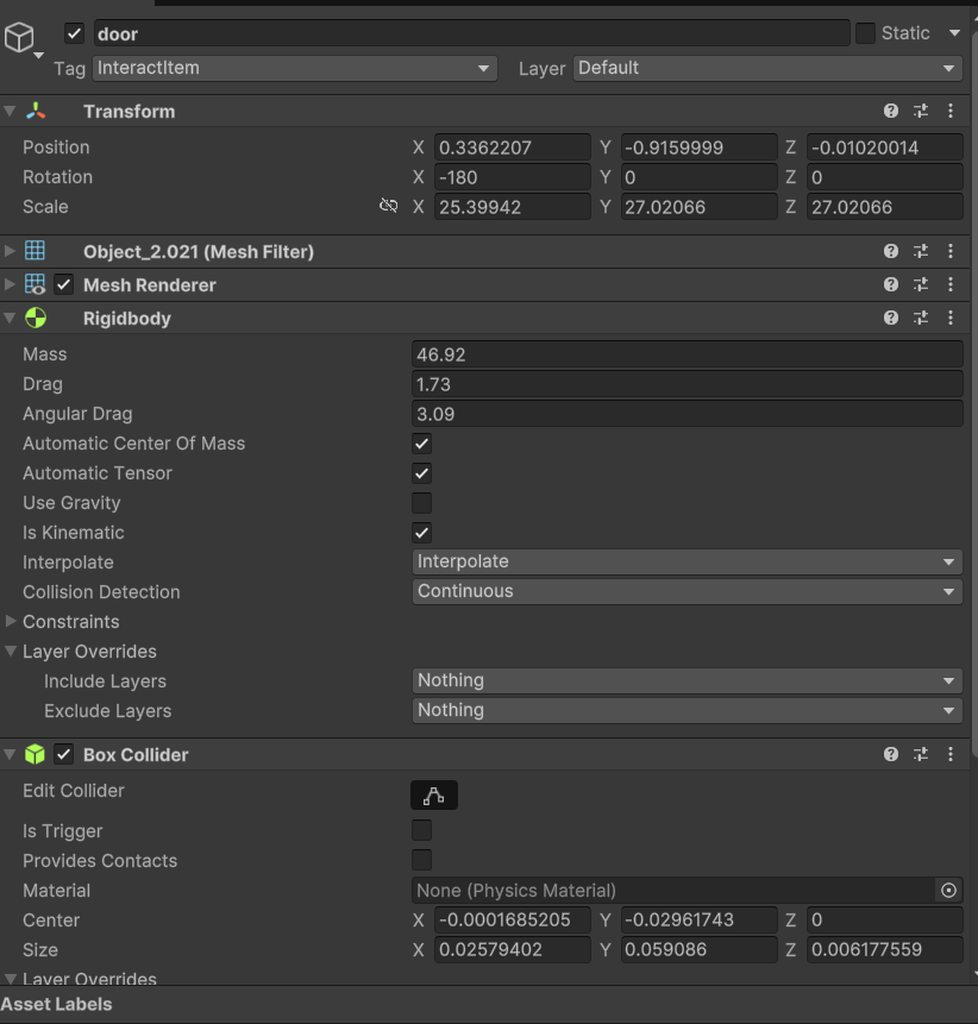 verbal kiln
rich adder
start debugging
verbal kiln
rich adder
start debugging
look, I sent three photos there
summer shard
rich adder
start debugging
i mean what is there to debug, the position only changes correctly whenever interpolation is set to none. im just trying to see if maybe i change the position in non-correct way
slender nymph
cursive rover
Everything? the whole player movement script? or the look script after the chang...
whatever script controls the camera's rotation which you've described as "jittery"
cursive rover
here is the whole player movement script (includes the camera look)
https://pastebin.com/vtuhVhKE
Pastebin
Pastebin.com is the number one paste tool since 2002. Pastebin is a website where you can store text online for a set period of time.
slender nymph
can you at least select the correct language to include syntax highlighting if you're going to use pastebin
cursive rover
Sorry i forgot. Here it is with syntax highlighting: https://pastebin.com/zg8MXK1c
Pastebin
Pastebin.com is the number one paste tool since 2002. Pastebin is a website where you can store text online for a set period of time.
verbal kiln
rich adder
start debugging
oh that's it, I fixed the error in the code, your names are slightly different, they are together in the code, but the folder name is different
verbal kiln
rich adder
I just don’t understand what to insert here, I’m Russian, I don’t really know English + the translator doesn’t translate. https://imgur.com/a/pUZDRCN

 naive shoal
Am I allowed to share my Git here or anywhere to allow someone to review my game? I'm doing a course as an absolute beginner and I'm struggling with some parts
 short hazel
naive shoal
Am I allowed to share my Git here or anywhere to allow someone to review my game...
short hazel
naive shoal
Am I allowed to share my Git here or anywhere to allow someone to review my game...
If you have an issue with a specific part of the code sure, you can post it here, but we usually don't do full code reviews here
!code posting guidelines below
eternal falconBOT
Posting code
📃 Large Code Blocks
Use links to services like:
https://gdl.space/, https://paste.ofcode.org/, https://hatebin.com/, https://paste.myst.rs/, https://hastebin.com/
📃 Inline Code
Surround code with three backquotes. Not quotation marks.
To format as C#, add cs to the first line:
```cs
// Your code here
```
Add a comment with a line number if there is an error message.
 dire flare
Pls where can I get free asset not copyright I want to use it for my game
short hazel
dire flare
Pls where can I get free asset not copyright I want to use it for my game
Unity Asset Store
This is a code channel btw, this question is better asked in #🔀┃art-asset-workflow
rich adder
verbal kiln
I just don’t understand what to insert here, I’m Russian, I don’t really know En...
line renderer is probably not important , the firepoint is the origin of the raycast ideally it has to be the camera or child of camera.
dire flare
Am scare to use some one work and later hold my game for copyright
verbal kiln
rich adder
line renderer is probably not important , the firepoint is the origin of the ray...
у меI get an error because of this Lr, I don't know what to do
rich adder
dire flare
Am scare to use some one work and later hold my game for copyright
anything in the asset store should be no problem and anything else you can lookup the license on it.. it's not that difficult don't blantly sell someone's work unauthorized
 cosmic quail
dire flare
Pls where can I get free asset not copyright I want to use it for my game
cosmic quail
dire flare
Pls where can I get free asset not copyright I want to use it for my game
https://www.fab.com/megascans-free claim before end of the year
Fab.com
All Megascans are free for everyone under Fab’s Standard License until the end of 2024, for all engines and tools.
verbal kiln
rich adder
line renderer is probably not important , the firepoint is the origin of the ray...
and the door simply doesn't open
short hazel
And if you still have doubts on whether you can use an asset or not, talk to someone competent in that matter, like a lawyer
rich adder
verbal kiln
у меI get an error because of this Lr, I don't know what to do
ok so just add a LineRenderer component
verbal kiln
rich adder
ok so just add a LineRenderer component
and where can I get it at the door?
rich adder
verbal kiln
and where can I get it at the door?
get it at door ? wdym it goes on the same object as the raycasy
verbal kiln
rich adder
get it at door ? wdym it goes on the same object as the raycasy
I added it, but what should I do with it?
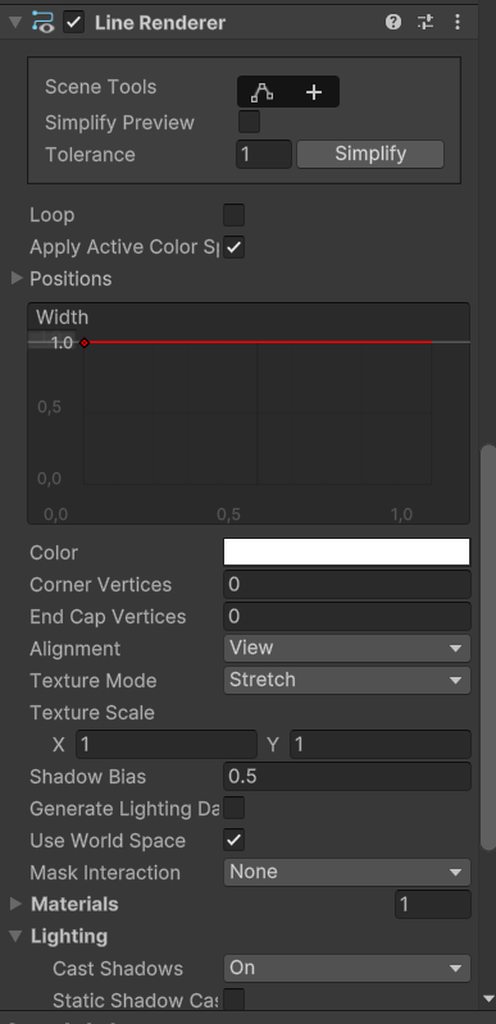 rich adder
you just...plug it in..
rich adder
the type it wants
rich adder
np
rich adder
the script has that I think
verbal kiln
oh god, damn mistakes https://imgur.com/a/og6yoYo
 rich adder
verbal kiln
oh god, damn mistakes https://imgur.com/a/og6yoYo
rich adder
verbal kiln
oh god, damn mistakes https://imgur.com/a/og6yoYo
well it's because you're trying to drive a sports car without knowing how to ride a bike
verbal kiln
rich adder
well it's because you're trying to drive a sports car without knowing how to rid...
ahwahw, good joke
verbal kiln
rich adder
well it's because you're trying to drive a sports car without knowing how to rid...
I will try to learn Unity
rich adder
read the error message it tells usually exactly where to look for
 jaunty coyote
quick question, why does nameshagent.SetDestination(player.position); stop the AI? it gets called every frame in the update, asking because its the first time this would cause an issue and fully stop the agent
rich adder
possibly because its being called every frame, iirc they changed that
 night mural
jaunty coyote
quick question, why does nameshagent.SetDestination(player.position); stop the A...
night mural
jaunty coyote
quick question, why does nameshagent.SetDestination(player.position); stop the A...
you're probably recalculating the path constantly and never actually getting a full path
from the docs
Note that the path may not become available until after a few frames later. While the path is being computed, pathPending will be true. If a valid path becomes available then the agent will resume movement.
so you're asking for a path, then it starts calculating one, then you ask for it again, then it starts calculating one, repeat forever
 ember tangle
I've written a caching system for projectiles, to be used in other systems in my game as well. This is my first time using generics. I'd love some feedback if you want to look https://hatebin.com/rufpfodmdd
jaunty coyote
night mural
so you're asking for a path, then it starts calculating one, then you ask for it...
i understand that
but i need my path being updated, the player is moving afterall
ember tangle
Each object adds itself to the queue through an awake function in a manager object.
night mural
jaunty coyote
but i need my path being updated, the player is moving afterall
sure, but maybe you don't need individual-frame accuracy for every agent seeking your player. the simplest solutoin would be to only recalculate a new path if the previous one finished
jaunty coyote
night mural
sure, but maybe you don't need individual-frame accuracy for every agent seeking...
i did already reduce the updates to twice per second but the navmesh still stops for a second
everytime the setdestination is called the velocity gets set to 0
is it possible to disable that?
night mural
ember tangle
I've written a caching system for projectiles, to be used in other systems in my...
unity has built-in pooling support if that might make your life easier
night mural
jaunty coyote
i did already reduce the updates to twice per second but the navmesh still stops...
I would consider actually checking if the path is done instead of guessing a time at which you think it might be
night mural
jaunty coyote
is it possible to disable that?
donno, you could always record the velocity and set it again yourself? I'm not sure you should need to
jaunty coyote
night mural
I would consider actually checking if the path is done instead of guessing a tim...
so something in the lines of: NavMesh.CalculatePath(transform.position, temporaryTest.position,NavMesh.AllAreas, path);
nm.SetPath(path); ? except this gives out an error
jaunty coyote
night mural
donno, you could always record the velocity and set it again yourself? I'm not s...
ill try this i guess, best bet considering my skills, but holy they made it way more time consuming to make a simple ai
ember tangle
night mural
unity has built-in pooling support if that might make your life easier
Thanks, but this seems to be just a description of the design pattern rather than anything built in. I did mine with generics so that I don't have to call GetComponent<>(). Either way its good food for thought
 bitter sage
What's a good resource to look into in properly revoking the script from certain exports?
 crisp hamlet
void RotateWheels(){
        float carSpeed = Vector3.Scale(carRb.velocity, transform.forward).magnitude;
        float horizontalInput = Input.GetAxis("Horizontal");
        foreach(GameObject wheel in wheels){
            float rotationAngle = CarPhysics.CalculateWheelTurnSpeed(carSpeed, wheelRadius);
            wheel.transform.Rotate(rotationAngle, 0f, 0f, Space.Self);
        }

    }
    void turnFrontWheels(){
        float horizontalInput = Input.GetAxis("Horizontal");
        frontLeftWheel.transform.localEulerAngles = new Vector3(
            frontLeftWheel.transform.localEulerAngles.x,
            horizontalInput * maxTurnAngle,
            frontLeftWheel.transform.localEulerAngles.z
        );
        frontRightWheel.transform.localEulerAngles = new Vector3(
            frontRightWheel.transform.localEulerAngles.x,
            horizontalInput * maxTurnAngle,
            frontRightWheel.transform.localEulerAngles.z
        );
        frontLeftWheel.transform.localRotation = Quaternion.Euler(frontLeftWheel.transform.localEulerAngles.x, horizontalInput * maxTurnAngle, frontLeftWheel.transform.localEulerAngles.z);
    }```

Does anyone know why my wheels turn 180 degrees on z axis? i dont change it anywhere so im quite confusedOh sorry, I assumed the lesson would be actually good which was my mistake. Here's the docs for the built-in pools:
https://docs.unity3d.com/6000.0/Documentation/ScriptReference/Pool.ObjectPool_1.html
 nocturne kayak
Hey, does anyone know how to implement kinematic collisions if i'm moving an object through code?
night mural
crisp hamlet
```cs
void RotateWheels(){
float carSpeed = Vector3.Scale(carRb.velocity...
it seems wrong to me that your rotation angle is based on your wheel turn speed, but maybe it makesa sense?
generally though, you won't get consistent rotations if you are using quaternion.euler, since a given euler representation can have multiple quaternion representations, and unity might convert inconsistently when it's setting that rotation. The solution is to maintain your own Quaternion which you modify, then set the actual rotation from
jaunty coyote
jaunty coyote
ill try this i guess, best bet considering my skills, but holy they made it way ...
velocity doesnt work, the calculate path function is returning nullreference, even if everything is present
crisp hamlet
night mural
it seems wrong to me that your rotation angle is based on your wheel turn speed,...
havent read the rest but to the first point the formula for wheel rotation speed is carSpeed / wheel radius
jaunty coyote
nocturne kayak
Hey, does anyone know how to implement kinematic collisions if i'm moving an obj...
kinematic means it has no collision? if im not mistaken
nocturne kayak
In that case, do you have any pointer on how i could begin to try and implement collisions in that usecase? (video0
crisp hamlet
night mural
it seems wrong to me that your rotation angle is based on your wheel turn speed,...
alright so i make a single quaternion that i change rotations of and set that to transform.rotation during each update?
jaunty coyote
nocturne kayak
In that case, do you have any pointer on how i could begin to try and implement ...
no idea, i dont want to give you false tips i never tried before
night mural
nocturne kayak
Hey, does anyone know how to implement kinematic collisions if i'm moving an obj...
- might be able to do it with joints?
- you could do something cute like have a copy of the cube with physics enabled that tries to follow it (with a joint or constraint) and copy that position over if they start to differ too much
- do your own checks each frame (maybe https://docs.unity3d.com/2021.3/Documentation/ScriptReference/Physics.ComputePenetration.html) and adjust manually
nocturne kayak
otherwise there would be no kinematic character controllers
night mural
nocturne kayak
otherwise there would be no kinematic character controllers
yep, generally you can no longer rely on the simulation to manage the object fully and must do it yourself
a character controller is usually already having been doing that
nocturne kayak
I don't think i'm gonna need to go as far as implementing a character controller for this
I'm just mulling over what would be the best say to simply
Stop the cube if it hits a wall
 timber tide
Everything can be done with raycasts
with that being said, you can just use character controller as it's a raycast based solution
 halcyon dagger
ayo, does anyone know how to increase the fps limit on the game window inside the editor? its capped at 30
 steep rose
https://docs.unity3d.com/ScriptReference/Application-targetFrameRate.html
read this, it should help
 halcyon dagger
steep rose
https://docs.unity3d.com/ScriptReference/Application-targetFrameRate.html
read t...
halcyon dagger
steep rose
https://docs.unity3d.com/ScriptReference/Application-targetFrameRate.html
read t...
i didnt know i had to change it from code as well as in the build, thanks mate
 past spindle
I’m coding for a 3D game where objects Instantiate in the sky, fall, and then explode when they hit the ground. My explosion code is right above the destroy object code in the collision method but for some reason my explosions are happening when the objects instantiate.
rich adder
this is a coding channel
rich adder
past spindle
I’m coding for a 3D game where objects Instantiate in the sky, fall, and then ex...
show code.
you would need to debug the collision and see whats actually being registered
lunar hollow
yeah, but ive looked absolutely everwhere to no help, so this was my last resort.
rich adder
lunar hollow
yeah, but ive looked absolutely everwhere to no help, so this was my last resort...
#💻┃unity-talk at most. maybe try the unity discussions
lunar hollow
thanks
past spindle
I don’t have it in front of me unfortunately. The destroy object code is working as it should though, if that helps.
rich adder
idk what that means because I don't have the context and it would be hard to make assumptions
past spindle
I can try again after dinner if not
rich adder
come back when you got the code then lol
past spindle
Ok
halcyon dagger
using System.Collections;
using System.Collections.Generic;
using UnityEngine;

public class LilTest : MonoBehaviour
{
    private CharacterController characterController;

    void Start()
    {
        characterController = GetComponent<CharacterController>();
    }

    void Update()
    {
        Debug.Log(characterController.isGrounded);
    }
}
Shouldnt this be printing true? what am I missing? Why is the cube not being detected as grounded?


Please help
rich adder
halcyon dagger
```cs
using System.Collections;
using System.Collections.Generic;
using UnityEng...
first you should not mix box collider with character controller as its already a capsule collider. And afaik isGrounded only gets proper value when Move() is used
as it checks the last move made
also might be starting to low within the ground
halcyon dagger
rich adder
first you should not mix box collider with character controller as its already a...
mb
so, sticking a characterController.Move(Vector3.zero); inside the update should do?
rich adder
halcyon dagger
so, sticking a characterController.Move(Vector3.zero); inside the update should...
try and see what happens
 rich adder
halcyon dagger
rich adder
halcyon dagger
did you remove the other collider and also get it out of the ground ?
halcyon dagger
yeah
halcyon dagger
rich adder
not sure, i just use physics queries
like a raycast or overlasphere?
halcyon dagger
The thing is that im making a 3d player controller and ill need to use physics later so i really need to use a rigidbody, however, character controller has a few thigs regarding slopes and allat that id like to have instead of having to build from 0
but rb.addForce used for movement doesnt quite like me, for exaple when stopping going up on a ramp or a slope, it does a lil jump
rich adder
either controller / way you choose still need physics queries to detect ground imo
halcyon dagger
been watching a few tutorials and there is people toggling the rigidbody and character controller in and out of the gameObject when they need to apply a force but it seems unsafe and overcomplicated for me
rocky canyon
i would agree w/ u
halcyon dagger
rich adder
either controller / way you choose still need physics queries to detect ground i...
cant get over the issue with the forces tho, but rn idk which direction to go
rich adder
you can replicate forces through lerps / curves so its no big deal
dynamic rb is fun but there are annoying things to work around
timber tide
The majority of Unity tutorials uses character controller (somewhat surprising) so if you wanna download one of those templates and open it up to play around with it
rich adder
there is also KCC is free now which is a rb but set as kinematic
timber tide
I would implement gravity and test collision with that instead of dragging it around on the scene
halcyon dagger
rich adder
there is also KCC is free now which is a rb but set as kinematic
is that an asset from the store or?
🤔
halcyon dagger
timber tide
I would implement gravity and test collision with that instead of dragging it ar...
with the character controller instead of forces u mean?
timber tide
rigidbody comes with gravity
nocturne kayak
rich adder
mhm <https://assetstore.unity.com/packages/tools/physics/kinematic-character-con...
I've tried that
but i can't for the love of me figure out what's going on there
halcyon dagger
how was it
nocturne kayak
i can't even copy the collision system
It's very feature complete, of course
but for beginners (me) the code it a tad too complex
i'm facing a similar problem
i just want the cube to collide with walls
what the hell
 full coral
I'm making a computer/android game for school and for some reason the enemies aren't receiving hits on mobile. Only computer. I'm raycasting a canvas into a 3d space and a trail rendered follows said raycasting. But for some reason clicking on the enemy doesn't work at all only in mobile. It works fine to interact with UI widgets but the enemy ignores it
 verbal dome
nocturne kayak
i just want the cube to collide with walls
verbal dome
nocturne kayak
i just want the cube to collide with walls
How are you moving it tho
nocturne kayak
manually setting the transform.position through code
Hastebin is a free web-based pastebin service for storing and sharing text and code snippets with anyone. Get started now.
halcyon dagger
rich adder
mhm <https://assetstore.unity.com/packages/tools/physics/kinematic-character-con...
damn thats awfully big lmao
look at this
timber tide
Im pretty sure that has its own methods of movement to call
halcyon dagger
 verbal dome
nocturne kayak
manually setting the transform.position through code
verbal dome
nocturne kayak
manually setting the transform.position through code
If you want collisions then you either need to:
A. Add a rigidbody and move it via the rigidbody instead of the transform
B. Do manual collision checks before moving it (for example, Physics.CheckBox/BoxCast)
rich adder
halcyon dagger
its very powerful system it used to cost money
halcyon dagger
halcyon dagger
look at this
then it even uses another class 3000 lines long my god
nocturne kayak
verbal dome
If you want collisions then you either need to:
A. Add a rigidbody and move it v...
I'm gonna be checking the physics.checkbox
But how'd i go about implementing that? how do i check if it's going to collide before it collides?
halcyon dagger
rich adder
its very powerful system it used to cost money
im not doubting it, i just want to make a simple system myself, and this is way too big for me
verbal dome
nocturne kayak
But how'd i go about implementing that? how do i check if it's going to collide ...
You just perform a CheckBox on the position that you are about to move it to.
If it returns true, then dont move it
Because that means it is blocked
rich adder
halcyon dagger
im not doubting it, i just want to make a simple system myself, and this is way ...
yeah go for it , everyone has diff needs
 sick glade
Sup. I'm working on my first game currently, which is a port of a board game me and my friend made. I want to make an efficient Object Spawning system that I won't have to remake later, is a Singleton ObjectManager class like I'm using the best way to go about this?
rich adder
sick glade
Sup. I'm working on my first game currently, which is a port of a board game me ...
whats an "efficient Object Spawning system "
efficient in what way
sick glade
When I say efficient I'm thinking reusable in whatever context I need something spawned
I'm not sure if theres a standard for game design or not
rich adder
then you want to look into object pooling
sick glade
I'll look into it
 vale karma
how could I get the mesh of a SkinnedMeshRenderer to see the highest vertex of the mesh every frame? i keep going down rabbit holes that are talking about general stuff. I cant find the solution
timber tide
If it's instanced data then you're probably going to have to do some readback on the vertex buffers
vale karma
idk anything about what buffers are, ill start there
timber tide
https://docs.unity3d.com/ScriptReference/SkinnedMeshRenderer-sharedMesh.html
There's shared mesh, but I'm not sure if it gives the updated per frame basis of verts from animating
Usually the skinned stuff is all instanced on the GPU
probably easier to just open it in blender
past spindle
private void OnCollisionEnter(Collision collision)
{
if (collision.gameObject.CompareTag("Ground"))
{
explosionFX.Play();
Destroy(gameObject);
}
}
Anybody know why this would be animating explosions during instantiation of the game object?
 teal viper
past spindle
Anybody know why this would be animating explosions during instantiation of the ...
teal viper
past spindle
Anybody know why this would be animating explosions during instantiation of the ...
Are you sure that's what's happening? Try adding some debug logs to see if that code is even called at that timing.
vale karma
timber tide
probably easier to just open it in blender
It was made and animated in blender, my issue is finding the highest vertex, for another gameobject to follow that vertex or parent to it
past spindle
ok, thanks
teal viper
vale karma
It was made and animated in blender, my issue is finding the highest vertex, for...
Might be easier to just parent to the topmost bones with some offset.
timber tide
Oh, thought you meant highest vertex count
vale karma
it has a blendshape that has some code, but some things look funny or act weird bc theyre fixed to a certain point when spawning in. If it was able to parent to the top vertex thatd be the vest
timber tide
Right, sort by bone is probably the idea first off
vale karma
I havent delt with bones, how would those be different from just grabbing the vertex?
ill show a lil bit of my issue one sec
teal viper
vale karma
it has a blendshape that has some code, but some things look funny or act weird ...
Thing is, the updated vertex data doesn't exist on the CPU. It's likely calculated in a compute shader and possibly stored in a separate buffer that is passed to the actual rendering shader.
teal viper
vale karma
I havent delt with bones, how would those be different from just grabbing the ve...
For starters it would be 100 times easier.
And probably more performant.
vale karma
sweet, i learned a little bit about some shaders, but not enough to do what i need yet. I was able to make a wave cube lol
timber tide
You can also create a non-moving empty bone for your character which you can assign as a pivot too if you want to do it that way
verbal dome
Skinnedmeshrenderer.BakeMesh would work but its pretty slow since it has to skin the mesh again on the CPU
Definitely use the bone approach if that is accurate enough for you
vale karma
This is kind of hard to see. But the discord cap is at like 500mb. If you see when i transplant the cutting into the pot, the next stalk growing is from its base. As of now the entire system calculates the instantiate point from when the one before it is created. your saying compute shaders can fix this issue?
past spindle
@teal viper How does a debug log help when the two lines of code are next to each other? Don't they execute near-simultaneously?
teal viper
past spindle
<@209684227720085505> How does a debug log help when the two lines of code are n...
Yes. That's the point. If you don't see the log, then that code is not executing.
past spindle
I'm seeing the execution of both lines but at different times, and it looks like the first instantiation of clones are not being destroyed for some reason.
teal viper
vale karma
This is kind of hard to see. But the discord cap is at like 500mb. If you see wh...
No. Compute shaders won't fix anything. It was an explanation of how skinned meshes work in unity.
That being said, I don't see anything that would require a skinned mesh in the video.🤔
vale karma
fudge its hard to show with the cap
teal viper
past spindle
I'm seeing the execution of both lines but at different times, and it looks like...
You keep on talking about instantiation, but the code that you shared doesn't have anything to do with it.
vale karma
the skinnedmesh is i guess created or used because the model imported has a blendkey in Blender. So it has the key in the SkinnedMeshRenderer instead of the FilteredMEsh or whatever
it grows from like a smallish dot to a long stem over the value of the key
past spindle
@teal viper void Start()
{
InvokeRepeating("SpawnSpheres", startDelay, spawnInterval);
}
// Update is called once per frame
void Update()
{
}
void SpawnSpheres()
{
int dropQuantity = Random.Range(1, 3);
if (dropQuantity == 1)
{
UnityEngine.Vector3 spawnPos1 = new UnityEngine.Vector3(Random.Range(-spawnRangeX, spawnRangeX), spawnPosY, Random.Range(-spawnRangeZ, spawnRangeZ));
Instantiate(sphere, spawnPos1, sphere.transform.rotation);
}
else if (dropQuantity == 2)
{
UnityEngine.Vector3 spawnPos1 = new UnityEngine.Vector3(Random.Range(-spawnRangeX, spawnRangeX), spawnPosY, Random.Range(-spawnRangeZ, spawnRangeZ));
Instantiate(sphere, spawnPos1, sphere.transform.rotation);
UnityEngine.Vector3 spawnPos2 = new UnityEngine.Vector3(Random.Range(-spawnRangeX, spawnRangeX), spawnPosY, Random.Range(-spawnRangeZ, spawnRangeZ));
Instantiate(sphere, spawnPos2, sphere.transform.rotation);
}
else if (dropQuantity == 3)
{
UnityEngine.Vector3 spawnPos1 = new UnityEngine.Vector3(Random.Range(-spawnRangeX, spawnRangeX), spawnPosY, Random.Range(-spawnRangeZ, spawnRangeZ));
Instantiate(sphere, spawnPos1, sphere.transform.rotation);
UnityEngine.Vector3 spawnPos2 = new UnityEngine.Vector3(Random.Range(-spawnRangeX, spawnRangeX), spawnPosY, Random.Range(-spawnRangeZ, spawnRangeZ));
Instantiate(sphere, spawnPos2, sphere.transform.rotation);
UnityEngine.Vector3 spawnPos3 = new UnityEngine.Vector3(Random.Range(-spawnRangeX, spawnRangeX), spawnPosY, Random.Range(-spawnRangeZ, spawnRangeZ));
Instantiate(sphere, spawnPos3, sphere.transform.rotation);
}
}
teal viper
past spindle
<@209684227720085505> void Start()
{
InvokeRepeating("SpawnSpheres", startDe...
!code
eternal falconBOT
Posting code
📃 Large Code Blocks
Use links to services like:
https://gdl.space/, https://paste.ofcode.org/, https://hatebin.com/, https://paste.myst.rs/, https://hastebin.com/
📃 Inline Code
Surround code with three backquotes. Not quotation marks.
To format as C#, add cs to the first line:
```cs
// Your code here
```
Add a comment with a line number if there is an error message.
teal viper
vale karma
it grows from like a smallish dot to a long stem over the value of the key
Okay, I see. So you cut that stem and want to get the topmost vertex position or something?
Or just the topmost vertex position at the time of growing?
vale karma
Weell yes and no, So as the plant grows, it already knows the next spot it will instantiate the branch or leaf. It creates a timing issue whwere the leaf already grows, or taking the branch off before the leaf grows it still grows on the old spot in the air. Its technically working based on a timing mechanic with blenshape values. Id rather the next child object on top of it follow the highest vertex, rather than betting on whatever spot it calculated at the start is right
at the time of growing to answer your question
teal viper
Kinda sounds like you have some overcomplicated logic there.
If it's not something you do every frame, maybe try what Osmal suggested. But honestly, I think there's a need to rethink the implementation choices.
past spindle
@teal viper So do I need to click these links? I don't understand the !code response. My apologies. I'm not a discorde native lol
eternal falconBOT
Posting code
📃 Large Code Blocks
Use links to services like:
https://gdl.space/, https://paste.ofcode.org/, https://hatebin.com/, https://paste.myst.rs/, https://hastebin.com/
📃 Inline Code
Surround code with three backquotes. Not quotation marks.
To format as C#, add cs to the first line:
```cs
// Your code here
```
Add a comment with a line number if there is an error message.
past spindle
-e
teal viper
past spindle
<@209684227720085505> So do I need to click these links? I don't understand the ...
It tells you how to share code. If it's a large code block, yes, open a link, paste your code, save and share the new link.
 prime goblet
how could i convert this class into a singleton?
public class SoundPlayer : MonoBehaviour {
    public AudioSource collide;
    public AudioSource merge;

    public void collideSound() {
        collide.Play();
    }

    public void mergeSound() {
        merge.Play();
    }
}
@teal viper https://hatebin.com/gjqvdndaij
 mighty compass
Anyone here good with python?
teal viper
prime goblet
how could i convert this class into a singleton?
```c#
public class SoundPlayer ...
Google the singleton pattern in unity.
mighty compass
Having a lot of trouble with a Python school project, trying to make a game server that can have multiple client threads at a time.
teal viper
past spindle
<@209684227720085505> https://hatebin.com/gjqvdndaij
Ok, so when you instantiate these objects, they play the particles right away and you don't want that? Is that the issue?
past spindle
@teal viper yes
teal viper
mighty compass
Having a lot of trouble with a Python school project, trying to make a game serv...
This isn't really related to Unity. Maybe look up a python server.
steep rose
past spindle
<@209684227720085505> yes
does this happen on every single object or only on a couple
teal viper
past spindle
<@209684227720085505> yes
Do the particle systems have play on awake(or something like that) checked?
past spindle
@teal viper it seems to happen on all of them.
steep rose
do you have anywhere else in your code that calls the particles?
past spindle
@teal viper it did have play on awake checked. It seems to have changed something but not fixed the problem. Give me a sec to analyze.
@teal viper lol I actually have no explosions at all, but I think I can fix it. Odd that I'd be happy to break the game more, but at least it's a problem I understand. Thanks for the help.
 north kiln
past spindle
<@209684227720085505> void Start()
{
InvokeRepeating("SpawnSpheres", startDe...
north kiln
past spindle
<@209684227720085505> void Start()
{
InvokeRepeating("SpawnSpheres", startDe...
Note that int dropQuantity = Random.Range(1, 3); will never return 3
fierce shuttle
prime goblet
how could i convert this class into a singleton?
```c#
public class SoundPlayer ...
Why might you want to turn this into a singleton? What benifit would that give for your use case? Also is there a specific reason your using 2 different functions to play your sources?
 sleek siren
I'm using characterController.Move(direction * moveSpeed * Time.deltaTime) to move my player but it moves only when my fps is higher, when my fps is low player doesn't move at all but just sits there. No change in position
 cinder schooner
possibly your direction has an issue
wintry quarry
sleek siren
I'm using ```characterController.Move(direction * moveSpeed * Time.deltaTime)```...
Show the full script
sleek siren
The script is too long to send here
sleek siren
wintry quarry
Show the full script
I'll send in two parts
[RequireComponent (typeof(CharacterController))]
public class PlayerController : MonoBehaviour
{
    //Exposed variables
    [Header("Attributes")]
    [SerializeField] private float moveSpeed;

    [Header("Settings")]
    [SerializeField] private float mouseSpeed;
    [SerializeField] private float nViewAngleLimit, pViewAngleLimit, playerReach;

    [Header("References")]
    [SerializeField] private MyInput input;
    [SerializeField] private Transform playerCameraTransform;

    //Private variables
    private CharacterController controller;

    private void Awake()
    {
        input.onInteract += CheckInteraction;
    }

    // Start is called before the first frame update
    void Start()
    {
        controller = GetComponent<CharacterController>();
        Cursor.lockState = CursorLockMode.Locked;
}``` void Update()
{
if(GameManager.gameState == GameState.GameRunning && !DialogueHandler.Instance.IsSpeaking)
{
Vector2 moveInput = input.GetMovementVectorNormalized();
Vector3 moveDirection = transform.forward * moveInput.y + transform.right * moveInput.x;
Vector2 mouseVelocity = input.GetMouseVelocityNormalized();
HandlePlayerMovementAndRotation(moveDirection, mouseVelocity);
KeepPlayerGrounded();
}
}
private void KeepPlayerGrounded()
{
if (transform.position.y != 0f)
{
Vector3 position = transform.position;
position.y = 0f;
transform.position = position;
}
}
private void HandlePlayerMovementAndRotation(Vector3 moveDirection, Vector2 mouseVelocity)
{
//Move and Rotate
controller.Move(moveDirection * moveSpeed * Time.deltaTime);
transform.Rotate(0f, mouseVelocity.x * Time.deltaTime * mouseSpeed, 0f);
playerCameraTransform.Rotate(-mouseVelocity.y * Time.deltaTime * mouseSpeed, 0f, 0f, Space.Self);
//Limit player top and bottom view
float cameraUpAngleX = playerCameraTransform.rotation.eulerAngles.x;
if (cameraUpAngleX > 180f)
{
cameraUpAngleX -= 360f;
}
cameraUpAngleX = Mathf.Clamp(cameraUpAngleX, nViewAngleLimit, pViewAngleLimit);
playerCameraTransform.localEulerAngles = new Vector3(cameraUpAngleX, 0f, 0f);
}
private void CheckInteraction()
{
Ray ray = new Ray(playerCameraTransform.position, playerCameraTransform.forward);
if(Physics.Raycast(ray, out RaycastHit hit, playerReach))
{
if(hit.collider.TryGetComponent<IInteractable>(out IInteractable interactable))
{
interactable.Interact();
}
}
}
}``` waxen adder
You're gonna want to use a web service for posting big blocks like that
I personally use https://pastebin.com/ but I imagine there's ones in this discord that are preferred too
Pastebin
Pastebin.com is the number one paste tool since 2002. Pastebin is a website where you can store text online for a set period of time.
wintry quarry
sleek siren
```using UnityEngine;
[RequireComponent (typeof(CharacterController))]
public c...
(please use paste sites in the future)
Can you share the MyInput script?
 cosmic oxide
can anyone help here?

 thorny sluice
cosmic oxide
can anyone help here?
thorny sluice
cosmic oxide
can anyone help here?
you need to screenshot the full errors
wintry quarry
cosmic oxide
can anyone help here?
restart the editor
cosmic oxide
thanks
 nimble apex
if i want to clean up the value of a playerpref key, deletekey or setstring = ""
teal viper
nimble apex
if i want to clean up the value of a playerpref key, deletekey or setstring = "...
Deletekey. The right one would just keep the value empty for that key, not remove it.
nimble apex
if a key is "deleted", getint/getstring will not be nullref right?
its okay if returned value is 0, or ""
teal viper
nimble apex
if a key is "deleted", getint/getstring will not be nullref right?
No. It would generate the key value pair with the default value again.
 keen parcel
how can I change these componenet settings in a script?
 summer shard
does anyone know why that's happening?
    public bool DropHeldObject(bool throwObject) {
        if (heldInventoryIndex < 0 || inventory[heldInventoryIndex] == null) return false;
        Pickable heldPickable = inventory[heldInventoryIndex];
        Rigidbody heldRigidbody; Vector3 dropPosition; RaycastHit hit;

        if (!heldPickable.TryGetComponent<Rigidbody>(out heldRigidbody)) return false;
        dropPosition = Physics.Raycast(cameraHolder.position, cameraHolder.forward * dropDistance, out hit, dropDistance) ? hit.point :
                                                                                    cameraHolder.position + cameraHolder.forward * dropDistance;

        inventory[heldInventoryIndex] = null;
        heldInventoryIndex = -1;

        heldRigidbody.isKinematic = false;

        heldRigidbody.position = dropPosition; //am i doing this wrong??
        heldRigidbody.AddForce(throwObject ? cameraHolder.forward * dropStrength : Vector3.zero);

        ChangeInventoryIndex(-1);

        return true;
    }
 sand glen
summer shard
does anyone know why that's happening?
```cs
public bool DropHeldObject(bool...
sand glen
summer shard
does anyone know why that's happening?
```cs
public bool DropHeldObject(bool...
Give more context, i dont want to learn your code to figure out problem
summer shard
sand glen
Give more context, i dont want to learn your code to figure out problem
i mean look at the video, it sometimes don't teleport the object and just drop it in the hand position instead
 fickle plume
summer shard
i mean look at the video, it sometimes don't teleport the object and just drop i...
fickle plume
summer shard
i mean look at the video, it sometimes don't teleport the object and just drop i...
Don't give people riddles to solve on top of the problem. Explain in detail expected behavior.
summer shard
fickle plume
Don't give people riddles to solve on top of the problem. Explain in detail expe...
i want the held object to ALWAYS teleport in front of player and then drop on the ground
summer shard
fickle plume
Did you debug the problem to understand what's happening?
yup but i don't understand why is that happening, the drop position is correct, there's nothing else that's overriding the position of the object except this piece of code but i set the heldInventoryIndex and the reference in an array to null
//this is this piece of code
private void HandleHand() {
    for (int i = 0; i < inventory.Length; i++) {
        if (Input.GetKeyDown(inventoryKeys[i])) {
            ChangeInventoryIndex(heldInventoryIndex != i ? i : -1); //Inventory
        }
    }

    if (heldInventoryIndex < 0 || inventory[heldInventoryIndex] == null) return;
    Pickable heldPickable = inventory[heldInventoryIndex];
    heldPickable.transform.position = objectHolder.position;
    heldPickable.transform.rotation = objectHolder.rotation;

    //Dropping object
    if (Input.GetKeyDown(KeyCode.G) || Input.GetKeyDown(KeyCode.Mouse1)) {
        DropHeldObject(Input.GetKey(KeyCode.Mouse1));
    }
}
#endregion
I'm not seing any debug messages
summer shard
wdym?
fickle plume
To solve the problem you need to actually understand it, use debugging tools I've linked.
summer shard
fickle plume
To solve the problem you need to actually understand it, use debugging tools I'v...
i did that tho
fickle plume
Good, then you know where the problem is.
summer shard
i dont like bro
fickle plume
summer shard
i did that tho
You need to put debug messages at every step to understand what the program is doing. If you do that then you'll know what's happening.
summer shard
fickle plume
You need to put debug messages at every step to understand what the program is d...
i do understand what's happening, i don't understand why the position is not changing
fickle plume
You don't have a single debug message.
You don't just throw code here for others to fix it.
summer shard
i removed the debug messages before i sent the code...
fickle plume
@summer shard You really don't get it. If you've debugged the problem this would've been solved already.
summer shard
fickle plume
<@502213450009804810> You really don't get it. If you've debugged the problem th...
no because there's no reason why the object would not drop in the correct position, the drop happens after changing the position and the change position doesn't affect the drop, the drop position is correct, the position is set correctly, there's literally no explanation to what's going on
 fickle plume
summer shard
no because there's no reason why the object would not drop in the correct positi...
fickle plume
summer shard
no because there's no reason why the object would not drop in the correct positi...
So you use debug messages to pinpoint the exact moment coordinates change
summer shard
fickle plume
So you use debug messages to pinpoint the exact moment coordinates change
yea ```cs
public bool DropHeldObject(bool throwObject) {
if (heldInventoryIndex < 0 || inventory[heldInventoryIndex] == null) return false;
Pickable heldPickable = inventory[heldInventoryIndex];
Rigidbody heldRigidbody; Vector3 dropPosition; RaycastHit hit;
if (!heldPickable.TryGetComponent<Rigidbody>(out heldRigidbody)) return false;
dropPosition = Physics.Raycast(cameraHolder.position, cameraHolder.forward * dropDistance, out hit, dropDistance) ? hit.point :
                                                                            cameraHolder.position + cameraHolder.forward * dropDistance;

Debug.Log(dropPosition);

inventory[heldInventoryIndex] = null;
heldInventoryIndex = -1;

heldRigidbody.isKinematic = false;

heldRigidbody.position = dropPosition; //am i doing this wrong??
Debug.Log("Dropped the object lamo");
heldRigidbody.AddForce(throwObject ? cameraHolder.forward * dropStrength : Vector3.zero);

ChangeInventoryIndex(-1);

return true;
}
private void HandleHand() {
for (int i = 0; i < inventory.Length; i++) {
if (Input.GetKeyDown(inventoryKeys[i])) {
ChangeInventoryIndex(heldInventoryIndex != i ? i : -1); //Inventory
}
}
if (heldInventoryIndex < 0 || inventory[heldInventoryIndex] == null) return;

Pickable heldPickable = inventory[heldInventoryIndex];
heldPickable.transform.position = objectHolder.position;
Debug.Log("Changed the position of the object lol"); // here
heldPickable.transform.rotation = objectHolder.rotation;

//Dropping object
if (Input.GetKeyDown(KeyCode.G) || Input.GetKeyDown(KeyCode.Mouse1)) {
    DropHeldObject(Input.GetKey(KeyCode.Mouse1));
}
}
It's not just printing out things blindly, you probe state of the variables at different stages and find out where (or when) is the problem
summer shard
fickle plume
It's not just printing out things blindly, you probe state of the variables at d...
what's the reason of this then
Debug.Log("position before " + heldRigidbody.position);

heldRigidbody.position = dropPosition; //am i doing this wrong??

Debug.Log("position after " + heldRigidbody.position);
Debug.Log("Dropped the object lamo");

the position changed correctly but it didn't change
fickle plume
Examine what coordinate you are actually assigning.
You need to inspect everything.
summer shard
fickle plume
Examine what coordinate you are actually assigning.
wdym
fickle plume
If after assigning coordinates are wrong see what you are actually assigning
at that moment
Need to investigate and look up the chain of events.
summer shard
fickle plume
If after assigning coordinates are wrong see what you are actually assigning
it's working okay but only a couple of times, every few drops, it doesn't teleport and idk why that's happening
fickle plume
so print out what happening inside dropPosition each time
summer shard
fickle plume
so print out what happening inside `dropPosition` each time
i did and drop position is correct each time
fickle plume
and when it gets you incorrect data examine what you are feeding it to get that result
Make sure you are not mixing up local and global space as well
ivory bobcat
Basically, if it's being assigned the correct value either the code here isn't the issue (being overridden elsewhere) or the coordinate system isn't what you're expecting it to be.
summer shard
ivory bobcat
Basically, if it's being assigned the correct value either the code here isn't t...
it's not the coordinate system because it's working, but sometimes it's not that's the problem
fickle plume
summer shard
it's not the coordinate system because it's working, but sometimes it's not that...
so you need to print out when it happens and examine that
ivory bobcat
We're assuming the first is incorrect - possibly the second after proving the first.
fickle plume
This also describes how to use visual tools to debug too https://unity.huh.how/debugging You can draw gizmos, lines on position, etc.
summer shard
i turned off setting the position of the held object and as far as i've seen it works but i don't know why, since debugging told me that the drop happened after setting the position of held object ?
 covert hemlock
when i create monobehavior script, I don't see the 'using System.Collections;' namespace. Is that normal?
 covert hemlock
ok ty
 red cedar
does anyone know why my restart button is not working ?


 summer shard
red cedar
does anyone know why my restart button is not working ?
summer shard
red cedar
does anyone know why my restart button is not working ?
do you have your scene added in build setting at index 1?
fickle plume
red cedar
does anyone know why my restart button is not working ?
Is the scene you are loading has index 1 in build settings?
red cedar
sure I have it
 fickle plume
do you get any errors
red cedar
no I didn't got any
fickle plume
red cedar
no I didn't got any
did you connect the method to the button and is it actually being executed?
debug that
Also your !ide is not configured, you won't get any error tracking there
eternal falconBOT
💡 IDE Configuration
If your IDE is not autocompleting code
or underlining errors, please configure it.
Select one:
•  Visual Studio (Installed via Unity Hub)
• Visual Studio (Installed manually)
•  VS Code
•  JetBrains Rider
• :question: Other/None
red cedar
eternal falcon
how to do it?
red cedar
fickle plume
did you connect the method to the button and is it actually being executed?
I think is not being executed. I try to debug and it doesn't appear on console
 fickle plume
red cedar
fickle plume
red cedar
So when you load game over scene, do you keep the main one with don't destroy on load, does it exist at all, or you didn't assign button in the first place
red cedar
fickle plume
So when you load game over scene, do you keep the main one with don't destroy on...
I didn't do that one, but I do assign the button
 fickle plume
See if it is still assigned at runtime
red cedar
 red cedar
fickle plume
See if it is still assigned at runtime
red cedar
fickle plume
See if it is still assigned at runtime
yeah it still assigned
languid spire
red cedar
yeah it still assigned
screenshot the inspector of GameManager please
fickle plume
If it was assigned it would be executing. You might have another method with the same name doing nothing somewhere.
 fickle plume
@red cedar Still, your first step should be fixing your IDE, that should help finding errors #💻┃code-beginner message
red cedar
fickle plume
If it was assigned it would be executing. You might have another method with the...
Only this one method
red cedar
fickle plume
<@717010021048778872> Still, your first step should be fixing your IDE, that sho...
already did it though
Is it because of my event system?
red cedar
 fickle plume
red cedar
Is it because of my event system?
fickle plume
red cedar
Is it because of my event system?
Do you destroy it as some point?
red cedar
no
fickle plume
is it present when you press the button
red cedar
when I add canvas it already automatically add event system
languid spire
your button in not in your canvas
red cedar
fickle plume
is it present when you press the button
yes it's present
languid spire
red cedar
yes it's present
Button game object needs to be a child of Canvas game object
red cedar
languid spire
Button game object needs to be a child of Canvas game object
Ohhh It's working now, thank you guys
😁
 rancid tinsel
how do I check if a specific index in a char array or list is "empty"?
checking if == "" doesn't work since "" is a string i guess?
slender nymph
check if it equals default
 lapis yew
rancid tinsel
how do I check if a specific index in a char array or list is "empty"?
lapis yew
rancid tinsel
how do I check if a specific index in a char array or list is "empty"?
With empty you mean NULL right?
rancid tinsel
lapis yew
With empty you mean NULL right?
its never null
wintry quarry
rancid tinsel
how do I check if a specific index in a char array or list is "empty"?
Depends on your definition of empty
It can't be actually "empty", it will exist. But you can compare it to some known value like null
rancid tinsel
wintry quarry
It can't be actually "empty", it will _exist_. But you can compare it to some kn...
i may have screwed something up
 wintry quarry
Compare it to "" then
rancid tinsel
idk why it thinks its an int
slender nymph
rancid tinsel
i may have screwed something up
again, compare to default which is the same as (char)0 because it is a value type
wintry quarry
rancid tinsel
idk why it thinks its an int
Oh you said char not string
slender nymph
it cannot be null but it can be the null character (char)0
rancid tinsel
slender nymph
again, compare to `default` which is the same as `(char)0` because it is a value...
is there a docs page for that? i tried looking it up and couldnt find it
wintry quarry
Again yeah compare to some known value
slender nymph
rancid tinsel
is there a docs page for that? i tried looking it up and couldnt find it
it's literally just the word default
wintry quarry
rancid tinsel
is there a docs page for that? i tried looking it up and couldnt find it
"csharp default keyword"
rancid tinsel
i was looking up unity instead of c# because im not very bright
slender nymph
that's still the first result
rancid tinsel
i searched this up since i didnt really understand what it was
 wintry quarry
rancid tinsel
i searched this up since i didnt really understand what it was
wintry quarry
rancid tinsel
i searched this up since i didnt really understand what it was
Frankly the array is a red herring and isn't actually relevant to the question at all
An array is merely a collection of multiple variables
rancid tinsel
wintry quarry
Frankly the array is a red herring and isn't actually relevant to the question a...
yeah i get that now, i thought "default" was part of arrays rather than its own keyword
 frank flare
how can I check if something touches collider inside FixedUpdate() ? I don't want OnColliderTrigger or something because I want to put a few colliders
teal viper
frank flare
how can I check if something touches collider inside FixedUpdate() ? I don't wan...
You can replace some colliders with casts and overlaps, but they are limited in various ways. OnCollider/TriggerEnter is the best option and extra colliders don't really cost much if you manage them properly.
frank flare
teal viper
You can replace some colliders with casts and overlaps, but they are limited in ...
I want to put 2 and more colliders like that but behave like 1 thing
this model is a fan and is supposed to elevate the player, which it would do by adding force on the player per fixed frame
And by OnCollider / TriggerEnter it would add 2 forces (I think??) since there are 2 colliders
 teal viper
frank flare
I want to put 2 and more colliders like that but behave like 1 thing
this model ...
teal viper
frank flare
I want to put 2 and more colliders like that but behave like 1 thing
this model ...
Ahh, I see. It wouldn't get called twice if it's a compound collider.
And even if it does for some reason, you can make simple checks in code to prevent applying the effect twice.
https://docs.unity3d.com/Manual/compound-colliders.html
 desert plinth
frank flare
I want to put 2 and more colliders like that but behave like 1 thing
this model ...
desert plinth
frank flare
I want to put 2 and more colliders like that but behave like 1 thing
this model ...
Hi there, I made a game once with a fan exactly like yours. Why do you need 2 colliders?
frank flare
desert plinth
Hi there, I made a game once with a fan exactly like yours. Why do you need 2 co...
because the model isn't a suare and I also want the pushing effect to be on a high position as well
 desert plinth
frank flare
because the model isn't a suare and I also want the pushing effect to be on a hi...
desert plinth
frank flare
because the model isn't a suare and I also want the pushing effect to be on a hi...
Use a SphereCast then. It's like a rayCast, but well, a sphere. SphereCasts have a length, so a SphereCast kinda works like a CapsuleCollider, but like - in code, idk how to explain it properly. I just checked. In my game, I also used SphereCasts.
teal viper
frank flare
because the model isn't a suare and I also want the pushing effect to be on a hi...
Another option is to create the collider mesh in blender and use just 1 mesh collider.
desert plinth
And using SphereCasts also allows you to use FixedUpdate()
frank flare
teal viper
Another option is to create the collider mesh in blender and use just 1 mesh col...
yes this seems to be the best solution
desert plinth
teal viper
Another option is to create the collider mesh in blender and use just 1 mesh col...
Why not just use a capsule collider tho? It's circular and can be scaled.
teal viper
desert plinth
Why not just use a capsule collider tho? It's circular and can be scaled.
Because their shape is not exactly a capsule. It's not gonna cover it accurately.
 white obsidian
in my code i have these, but when i open my unity it doesnt show it even tho i did [SerializeField] to it, why?

 wintry quarry
white obsidian
in my code i have these, but when i open my unity it doesnt show it even tho i ...
wintry quarry
white obsidian
in my code i have these, but when i open my unity it doesnt show it even tho i ...
Check your console window for compile errors
 polar acorn
Do you have any compile errors
white obsidian
oh yeah i do have 1
wintry quarry
You must fix that first
then it will work
(even if it's from another file or something)
polar acorn
white obsidian
oh yeah i do have 1
Then fix it
white obsidian
thanks guys
 burnt skiff
hi im doing a 2d project and i want to change the camera background from the default blue background to a png but when i use the canvas it gets in front of my prefobs how do i fix this
 wintry quarry
burnt skiff
hi im doing a 2d project and i want to change the camera background from the def...
wintry quarry
burnt skiff
hi im doing a 2d project and i want to change the camera background from the def...
If you're using an overlay canvas, it will render on top of everything
that's why it's called overlay
anyway this is not a CODE question
so you're asking in the wrong channel
burnt skiff
wintry quarry
If you're using an overlay canvas, it will render on top of everything
does that mean i have to change the camera background itself
cosmic quail
burnt skiff
which channel should i go to
#💻┃unity-talk is fine for any question. but if this is ui related then #📲┃ui-ux
wintry quarry
burnt skiff
which channel should i go to
 flat tree
hello, I want to ask about unity projects;
I am a beginner so is there any project tutorials from unity from scratch till end where we learn basics and all working of unity editor and making whole games etc
wintry quarry
I'm sure many such things exist on youtube, sure
burnt skiff
wintry quarry
<#502171135350407168> or <#497872424281440267>
alright thanks
wintry quarry
flat tree
hello, I want to ask about unity projects;
I am a beginner so is there any proje...
!learn
eternal falconBOT
:teacher: Unity Learn ↗
Over 750 hours of free live and on-demand learning content for all levels of experience!
flat tree
wintry quarry
!learn
thanks
 dim yew
i can't find out why i'm getting a nullref here, i would guess its something to do with the gamemanager


 hexed terrace
whatever is on line 27 ..
cosmic quail
dim yew
i can't find out why i'm getting a nullref here, i would guess its something to ...
GameManager's "instance" is null. are you setting it in awake? because this is also awake. and the awakes order is random
dim yew
cosmic quail
GameManager's "instance" is null. are you setting it in awake? because this is a...
this is definitely the problem
so is this just a universal singleton issue?
or should i start using start for these things
hexed terrace
Initialise in Awake() get stuff in Start()
 hasty tundra
i want to get a random point on the outline of a circle, essentially i want to be able to input a float value, then i want to be able to calculate a random point on a circle from 0,0 on that line. How would i calculate the correct x-y coordinates to make it accurate?
 hexed terrace
FYi - next time you share code, include the line numbers. Don't make us guess/ assume which line has the error
dim yew
good idea, my bad
 night raptor
hasty tundra
i want to get a random point on the outline of a circle, essentially i want to b...
night raptor
hasty tundra
i want to get a random point on the outline of a circle, essentially i want to b...
So how is that different from Random.insideUnitCircle.normalized, how would the float be relevant in this case?
 odd widget
Hello
hasty tundra
night raptor
So how is that different from `Random.insideUnitCircle.normalized`, how would th...
i dont want it inside the circle, i want it on the edge of the radius
night raptor
hasty tundra
i dont want it inside the circle, i want it on the edge of the radius
normalized
odd widget
Does checking system date/hour by using DateTime.Now resource intensive? Is it okay to do it in void Update()?
hasty tundra
ok thatd prob work then 😭
 rotund garnet
If i have a procedural world generation system that places chunks as the player moves around, would it then be bad practice to have a script on each chunk, that would just place smaller world props, like trash cans, and fire hydrants based on spawn points? Or should i have a script that searches for spawn points?
night raptor
hasty tundra
ok thatd prob work then 😭
One thing to note is that if the random point happens to be at the center which is very unlikely but possible, .normalized will return a zero vector so depending on how big of a problem that would be in your case, you might wanna do something like this:```cs
Vector2 randomOnCircle;
do
{
randomOnCircle = Random.insideUnitCircle.noramlized;
} while (randomOnCircle != Vector2.zero)
thats a shout acc, thanks
rotund garnet
rotund garnet
If i have a procedural world generation system that places chunks as the player ...
Rephrased: should i have one script which is always searching for new points to instantiate stuff on, or should i do it immediately in each individual chunks, using direct references to the points?
night raptor
rotund garnet
Rephrased: should i have one script which is always searching for new points to ...
Is there a reason not to spawn those objects at the same method that creates the chunk?
rotund garnet
I mean i guess not.. but the chunks consist of 8x8 tiles, which have a large logic to be placed correctly, so i was wondering if i should divide it up more. Each tile will (based on random.range) spawn between 0 - 3 props
 azure cairn
anyone know where to go for help with UI stuff?
azure cairn
languid spire
<#502171135350407168>
many thankies
nocturne kayak
Hey, is there a way to make a raycast ignore an gameobject of specific tag?
languid spire
azure cairn
many thankies
you are allowed to look in #🔎┃find-a-channel yourself you know
wintry quarry
nocturne kayak
Hey, is there a way to make a raycast ignore an gameobject of specific tag?
tags, no. Layers yes.
azure cairn
languid spire
you are allowed to look in <#531961806646935564> yourself you know
sorry, this server has a lot of channels and i didn't see that one ._."
nocturne kayak
wintry quarry
tags, no. Layers yes.
Oh, cool, i was misunderstanding the docs, sorry
night raptor
rotund garnet
I mean i guess not.. but the chunks consist of 8x8 tiles, which have a large log...
Splitting up the code is not bad but attaching extra script to each tile might even hurt the performance if there's a lot of the chunks. I would probably create a static helper class (or regular class created in the chunk generator) named PropPlacer or something similar that you can refer to place the props when the chunk is spawned. Since the prop placement should be done at the same time with the chunk generation, I'd couple them in code too.
 strong wren
nocturne kayak
Hey, is there a way to make a raycast ignore an gameobject of specific tag?
strong wren
nocturne kayak
Hey, is there a way to make a raycast ignore an gameobject of specific tag?
You can RaycastAll and do whatever filtering you want after the fact
nocturne kayak
i assumed the layermask param was going to make the raycast ONLY detect that layer, but apparently it only ignores that one
wintry quarry
nocturne kayak
i assumed the layermask param was going to make the raycast ONLY detect that lay...
no it only detects the layers in the mask
the mask can contain any number of layers
the easiest way to define a mask is in the inspector. e.g.
public LayerMask myLayerMask;```But if there are 200+ spawn points in just 1 chunk, would i then have to drag them all into a list? Or will i have to do some searching for them, like searching for a tag they all share?
night raptor
rotund garnet
But if there are 200+ spawn points in just 1 chunk, would i then have to drag th...
Don't the chunk generator know those spawn points automatically? If not, how are the spawn points defined?
rotund garnet
The spawnpoints are empty game objects, that are at the places in the tile where it is possible for something to have a chance to spawn…
night raptor
rotund garnet
The spawnpoints are empty game objects, that are at the places in the tile where...
But how have they gotten there? Do the procedural world generator spawn those points?
rotund garnet
No i was thinking they were gonna be placed manually…
But im guessing that would be a heck of a task
night raptor
placed manually on procedurally generated world?
rotund garnet
Yeah the world consists of tiles, and each tile has pre-defined points where stuff could spawn
Or at least that was my idea
odd widget
Does changing the value of Text in TMP takes a lot of resources? Should i use “if one second passed” on the Void Update() to make it a bit more lighter
night raptor
rotund garnet
Yeah the world consists of tiles, and each tile has pre-defined points where stu...
If you really want to place the points manually, you may want to have a script for each chunk where you set the points but I'm not quite confident in my understanding of your vision
odd widget
Or does it not matter and i can make it tmptext.text = “changed value”
nocturne kayak

Is this just expected boxcast behavior? for some reason my boxcast isn't taking into account the rotation of the cube
wintry quarry
nocturne kayak
Is this just expected boxcast behavior? for some reason my boxcast isn't taking ...
Your boxcast will do whatever your code tells it to do
the cube object is irrelevant to the boxcast itself
nocturne kayak
When i call it, i'm fairly sure i try to specicy that i want it's rotation to be equal o transform.rotation
i expected that would make it have, well, the same rotation as the cube
wintry quarry
Assuming transform is the cube and your code actually has that, then yes
nocturne kayak
Physics.BoxCast(transform.position, transform.lossyScale/2, transform.forward, out hit, transform.rotation, maxDistance, 5);
night raptor
odd widget
Or does it not matter and i can make it tmptext.text = “changed value”
Never heard of that causing any performance problems
wintry quarry
nocturne kayak
` Physics.BoxCast(transform.position, transform.lossyScale/2, transform.forward...
5 is not a valid layer mask
but yes as far as orientation that looks ok assuming transform is the cube itself
night raptor
odd widget
Thankyou!
Use profiler to find out but usually people just set the text every frame if needed
nocturne kayak
wintry quarry
`5` is not a valid layer mask
How can it not be? because right now it's working, it's ignoring everytrhing in the UI layer
wintry quarry
nocturne kayak
How can it not be? because right now it's working, it's ignoring everytrhing in ...
because you're lucky
read what I said here #💻┃code-beginner message
nocturne kayak
wintry quarry
because you're lucky
Not really feeling that way lately
wintry quarry
5 is actually this layer mask:
..000000101
so it will hit only layers 0 and 2
frank flare
is unity default gravity bad for a player? I've seen some strange effects sometimes but maybe it's just me. Should I replace it with my own gravity?
wintry quarry
Make a layermask properly as I explained above
nocturne kayak
Shit, so that was luck, still, should the layermask really be affecting the rotation in this instance?
night raptor
frank flare
is unity default gravity bad for a player? I've seen some strange effects someti...
I don't understand what you are asking. What kind of strange effects those are and how your "own gravity" would do any better?
nocturne kayak
wintry quarry
how are you drawing the red box
Hastebin is a free web-based pastebin service for storing and sharing text and code snippets with anyone. Get started now.
wintry quarry
nocturne kayak
https://hastebin.com/share/hewotipeso.csharp
Gizmos.DrawWireCube(transform.position + transform.forward * hit.distance, transform.lossyScale);
you are drawing an unrotated cube
that is why the cube that is drawn is not rotated
night raptor
You can always rotate the Gizmos.matrix to get rotated gizmos
rotund garnet
night raptor
If you really want to place the points manually, you may want to have a script f...
So this is 3x3 chunks, which each has 8x8 tiles of procedurally generated roads. i want to now place down fire-hydrants, benches, garbage cans, and streetlights, but the game is a post-apocalyptic zombie-surviver, so the things need to be scattered, and broken, which means that i wanted to originally pre-place the points on the tile-prefabs, and then based on rng place something on that point. So my question was, if this would be a reliable method of doing it, or if i should make a script that places things more randomly than the pre-defined points?
 wintry quarry
Vector3 cubePosition = transform.position + transform.forward * hit.distance;
var oldMatrix = Gizmos.matrix;
Gizmos.matrix = Matrix4x4.TRS(cubePosition, transform.rotation, transform.lossyScale);
Gizmos.DrawWireCube(Vector3.zero, Vector3.one);
Gizmos.matrix = oldMatrix;``` @nocturne kayakIs there somewhere i can read about this the Uity docs on DrawWireCube don`t really go into rotation, only centar and size (which i can guess now is that was causing this weirdness), i wanna understand a tad better what's going on there
wintry quarry
nocturne kayak
Is there somewhere i can read about this the Uity docs on DrawWireCube don`t rea...
night raptor
rotund garnet
So this is 3x3 chunks, which each has 8x8 tiles of procedurally generated roads....
I would consider placing them all procedurally but if you really want to do all that work manually, you can have script on each chunk and set the spawn points there
rotund garnet
night raptor
I would consider placing them all procedurally but if you really want to do all ...
I will do it procedurally😎 - this is the way
frank flare
night raptor
I don't understand what you are asking. What kind of strange effects those are a...
not sure how to explain but the main one is this:
for an example I make a script that adds forces to the player each frame space is pressed, the player goes on 800 y but then even tho the force is going up the player goes down to -2000 y because of unity gravity
also I realized having custom gravity might be not bad because I can change gravity value
polar acorn
frank flare
not sure how to explain but the main one is this:
for an example I make a script...
That doesn't sound like gravity, that sounds like your code
And you can change the value of unity gravity as well
night raptor
frank flare
not sure how to explain but the main one is this:
for an example I make a script...
Yeah, sounds like your movement script is the issue more than unity gravity
burnt skiff
why do i get a nullreference exception when i use my find survivor button


 polar acorn
burnt skiff
why do i get a nullreference exception when i use my find survivor button
polar acorn
burnt skiff
why do i get a nullreference exception when i use my find survivor button
what line is the error on
burnt skiff
18 i think
polar acorn
Instead of "thinking", just check
burnt skiff
how, sorry im a bit new to this
polar acorn
Ah, hang on, mobile only showed the two thumbnails, there's a third pic with the code on it
agents is null
slender nymph
notice how your Initialize method has 0 references
verbal dome
nocturne kayak
Is there somewhere i can read about this the Uity docs on DrawWireCube don`t rea...
To draw a rotated cube you have to modify Gizmos.matrix before drawing it
polar acorn
this means that either Initialize was called with a null value, or it wasn't called at all at the time that code runs
burnt skiff
oh alright i think its wasnt initialized because i dont see the debug message
gimme a sec
verbal dome
verbal dome
To draw a rotated cube you have to modify Gizmos.matrix before drawing it
@nocturne kayak So something like thiscs Gizmos.matrix = Matrix4x4.TRS(center, rot, Vector3.one); // Draw at zero pos because the matrix already has the position Gizmos.DrawWireCube(Vector3.zero, size);
burnt skiff
when the drones are initialized i can see the log message on which drone has the survivor but for some reason maybe the button script cannot access it?
 polar acorn
burnt skiff
when the drones are initialized i can see the log message on which drone has the...
polar acorn
burnt skiff
when the drones are initialized i can see the log message on which drone has the...
This is a different function
verbal dome
@nocturne kayak Might need to cache Gizmos.matrix before and reset it afterwards. Not sure if it auto resets after drawing gizmos
Also, you can do Gizmos.matrix = transform.localToWorldMatrix to draw in local space of the transform
burnt skiff
polar acorn
This is a different function
cant i access the drones across different classes?
polar acorn
burnt skiff
cant i access the drones across different classes?
Where are you trying to?
burnt skiff
alright so this is the class everything is in after the drones are initialized they get put into the list and then they get partitioned and then the partitions establish a communication i want to make it so that when i press the button it will use the communication and find the drone with the survivor

but the findsurvivor is in the other class and im not sure how to make it accessible to that class
polar acorn
burnt skiff
but the findsurvivor is in the other class and im not sure how to make it access...
Nothing is shared unless you specifically go get it. You would need either the FindSurvivor to reference this object to get its list, or have this object reference the FindSurvivor to send its data there
🤔 Unity, Huh, How?
Choose the best way to reference other variables.
burnt skiff
is it possible if instead of using a different class for the controller i just use that flock class make the findsurvivor method in there and specify that that method will run on click using this
 polar acorn
burnt skiff
is it possible if instead of using a different class for the controller i just u...
polar acorn
burnt skiff
is it possible if instead of using a different class for the controller i just u...
It's "possible" to do whatever you want. Whether you want to or not is up to you
burnt skiff
oh alright ill try it out thanks
burnt skiff
polar acorn
It's "possible" to do whatever you want. Whether you _want_ to or not is up to y...
it works thank you so much
red cedar
does anyone know why my restart button is not working when I'm on scene 2 then move to scene game over? but if I open scene game over manually the code can be executed.
red cedar
red cedar
does anyone know why my restart button is not working when I'm on scene 2 then m...


 slender nymph
!code
eternal falconBOT
Posting code
📃 Large Code Blocks
Use links to services like:
https://gdl.space/, https://paste.ofcode.org/, https://hatebin.com/, https://paste.myst.rs/, https://hastebin.com/
📃 Inline Code
Surround code with three backquotes. Not quotation marks.
To format as C#, add cs to the first line:
```cs
// Your code here
```
Add a comment with a line number if there is an error message.
slender nymph
also you need to get your !IDE configured 👇
eternal falconBOT
💡 IDE Configuration
If your IDE is not autocompleting code
or underlining errors, please configure it.
Select one:
• Visual Studio (Installed via Unity Hub)
• Visual Studio (Installed manually)
• VS Code
• JetBrains Rider
• :question: Other/None
nocturne kayak
verbal dome
<@154371844961599488> Might need to cache Gizmos.matrix before and reset it afte...
I implemented the code PraetorBlue sent me
And it works
i have a rough understanding on how it all works, which is frustrating
i hate implementing code i don't understand
But looking into matrixes rn
red cedar
slender nymph
also you need to get your !IDE configured 👇
already did it
 slender nymph
red cedar
already did it
slender nymph
red cedar
already did it
as in after i instructed you to? because your screenshots showed that it was not configured
fickle plume
red cedar
already did it
That's what you said last time
nocturne kayak
Not move the cube past the hit result, but i don't know if simply if transform = wirebox.transform then don't move in that direction
frank flare
is there a way to get main object's rigidbody (to add force to it from a fan) ? (not with getparent)
I will get Capsule by OnTriggerStay and will have to get main rigidbody, which is player to add force on it
I also plan on adding grabbable items which will be elevated by fan

 wild widget
Anyone can tell me what is this means "Even Instantiate will still instance the whole object, while returning the component. This avoids calls to GetComponent". From #💻┃code-beginner message, how to referencing rigidbody from Instantiate without GetComponent?
rich adder
frank flare
is there a way to get main object's rigidbody (to add force to it from a fan) ? ...
whats wrong with get component in parent?
slender nymph
wild widget
Anyone can tell me what is this means "Even Instantiate will still instance the ...
if your prefab (or the object you pass to Instantiate) is a Rigidbody type then Instantiate will return the Rigidbody on the instantiated object
polar acorn
wild widget
Anyone can tell me what is this means "Even Instantiate will still instance the ...
If you call Instantiate on a reference to a Rigidbody, it will still create the entire object, but it will return the rigidbody
frank flare
rich adder
whats wrong with get component in parent?
cus items will have rigidbody in the collider part
but I guess if I can't I'm gonna do it
rich adder
frank flare
cus items will have rigidbody in the collider part
so instead make an actual script you look for that has specific functions / components linked to what you want, interact with that instead
this way you can make Rigidbody a property you just grab
var rb = mycol.GetComponentInParent<MyScript>().Rb
wild widget
slender nymph
if your prefab (or the object you pass to Instantiate) is a Rigidbody type then ...
thankss
wild widget
polar acorn
If you call `Instantiate` on a reference to a Rigidbody, it will still _create_ ...
thankss
red cedar
slender nymph
as in *after* i instructed you to? because your screenshots showed that it was n...
is this correct? my auto complete on?
 slender nymph
yes
rich adder
now it says Assembly instead of Misc
red cedar
slender nymph
yes
thanks
red cedar
red cedar
using System.Collections;
using System.Collections.Generic;
using UnityEngine;
using UnityEngine.SceneManagement;

public class GameManager3 : MonoBehaviour
{
    public void RestartGame()
    {
        Debug.Log("Restarting game...");
        SceneManager.LoadScene(1);
    }
}
so is the log running at all ?
do you have Event system in the new scene?
languid spire
red cedar
is this correct? my auto complete on?
why is this GameManager2 when your code says GameManager3 ?
red cedar
rich adder
so is the log running at all ?
Yes if I open GameOver Scene manually. but If I go from Scene 2 then go to scene GameOver the log is not running at all.
rich adder
red cedar
Yes if I open GameOver Scene manually. but If I go from Scene 2 then go to scene...
what about Event System gameobject?
red cedar
languid spire
why is this GameManager2 when your code says GameManager3 ?
Game manager2 is for scene 2 and game manager 3 is for game over scene
red cedar
rich adder
what about Event System gameobject?
i have it on hierarchy
 rich adder
red cedar
i have it on hierarchy
rich adder
red cedar
i have it on hierarchy
so is that the scene that doesn't print log?
red cedar
rich adder
so is that the scene that doesn't print log?
yes, but If I open the scene manually not from scene 2 is working properly
languid spire
red cedar
Game manager2 is for scene 2 and game manager 3 is for game over scene
that's crazy, why not one game manager for all scenes?
red cedar
languid spire
that's crazy, why not one game manager for all scenes?
I'm sorry 😭
polar acorn
red cedar
yes, but If I open the scene manually not from scene 2 is working properly
What is the difference between them
rich adder
red cedar
i have it on hierarchy
is this a screenshot of the screen coming from scene 2? or you just pressed play ?
red cedar
rich adder
is this a screenshot of the screen coming from scene 2? or you just pressed pla...
from scene 2
if i press play the game over scene it's working properly
that's the different @polar acorn
polar acorn
red cedar
that's the different <@153950686088921088>
I mean code-wise, what is the difference
red cedar
wdym, I don't understand
polar acorn
What, in code, is different between the different managers
red cedar
polar acorn
What, _in code_, is different between the different managers
Game Manager 2 is for scene 2
Game Manager 3 is for scene Game over
I can't send the code it's too long
polar acorn
red cedar
Game Manager 2 is for scene 2
Game Manager 3 is for scene Game over
I can't send...
!code
eternal falconBOT
Posting code
📃 Large Code Blocks
Use links to services like:
https://gdl.space/, https://paste.ofcode.org/, https://hatebin.com/, https://paste.myst.rs/, https://hastebin.com/
📃 Inline Code
Surround code with three backquotes. Not quotation marks.
To format as C#, add cs to the first line:
```cs
// Your code here
```
Add a comment with a line number if there is an error message.
red cedar
red cedar
polar acorn
Okay, these are utterly different things. This class should absolutely not be called GameManager3
This is at best like, RestartButton
red cedar
rich adder
wow..
polar acorn
red cedar
https://hatebin.com/loovreqcva
This one looks like basically the exact same class as GameManager2 but with everything done differently for no reason
red cedar
I think my code is worse than my handwriting😭
nocturne kayak
Thanks to the help of this channel, i now have the stupidest collision system ever devised by man.
It stops moving if the distance between the cube and the wall is lesser than 0.1, and it doesn't work if it moves too fast
Truly, a programming masterpiece.
 sage mirage
red cedar
https://hatebin.com/loovreqcva
sage mirage
red cedar
https://hatebin.com/loovreqcva
Hello! I have seen your code in Game Manager. So, I have to make a few notes for you. So, first of all prefer when working with a lot of game objects which in your case isn't an important issue to just use a list or an array to hold every item and just make a loop for it to deactivate or activate your game objects in start or wherever you want that free up space in memory and it's more efficient rather than creating so many game objects and call SetActive() all the time. Second note, do not prefer calling your script Game Manager instead call it RoundManager or with a different name because I had some issues in my code if I remember correctly when one time I call it that way. For example, I am making right now a horror game already 2-3 months development and I have so many scripts and game objects to handle, what I did was to just make an array to hold the items that I needed for example to deactivate or activate. Third note, you should get used to work with singleton pattern, so instead of creating references everytime just create a static class and call it whereever you want in other scripts that way you can prevent null references in your code and it's more efficient.
frank flare
am I doing something wrong?
Vector3 distance = (collider_rb.position - local_Transform.position).magnitude;
 slender nymph
magnitude is a float
frank flare
ah... yes
rich adder
sage mirage
Hello! I have seen your code in Game Manager. So, I have to make a few notes for...
keep in mind when you deactivate an object its still in memory
it was already created so space is already occupying/allocated the memory
only when you Destroy it is marked for removal on the next GC tick
sage mirage
rich adder
keep in mind when you deactivate an object its still in memory
I mean isn't it more efficient ?
Rather than creating in the whole script SetActive methods ?
You are making a method and you use for example a static class, you call the method that has that line of code where it deactivates or activates the game objects on an array. That way you just call the method which is one line and done
rich adder
sage mirage
Rather than creating in the whole script SetActive methods ?
the script was already created when the object is in the scene
making it disabled doesnt do anything but stop callbacks like Update etc
thats why when you Pool you recycle objects but you still need them created
once created the memory is already allocated for it
Creating And Destroying is what creates MORE unecessary allocation on and on
sage mirage
So, what do you suggest in order to free up space in memory and to remove garbages?
rich adder
don't run expensive operation when you don't need to , clear any objects you no longer use, recycle anything you keep reusing , like pooling bullets, or anything you keep needing to despawn and respawn etc
 still elm
what does this peice of code do?
void Update()
{
time -= Time.deltaTime;
}
if time is a float being 60
rich adder
still elm
what does this peice of code do?
void Update()
{
time -= Time.deltaTime;...
subtracts time over time, unaffected by FPS
Time.deltaTime is always the time between each frame
still elm
rich adder
subtracts time over time, unaffected by FPS
so time is being subtracted from time every? second?
rich adder
still elm
so time is being subtracted from time every? second?
without any multipliers it goes down about -1 a second yes
still elm
rich adder
without any multipliers it goes down about -1 a second yes
is there any other way to make this? or is this the preffered way to keep track of time. I want to have variable that once 30 seconds has passed a method should run
rich adder
still elm
is there any other way to make this? or is this the preffered way to keep track ...
its very common thing to do this yes, if you don't need like 100% accuracy its fine most of the time
still elm
rich adder
its very common thing to do this yes, if you don't need like 100% accuracy its f...
Okay, Appreciate the help. 😄
wintry quarry
still elm
so time is being subtracted from time every? second?
every frame, the duration of the previous frame is subtracted
this creates a timer.
Update runs once every frame
Time.deltaTime is the duration of the previous frame
rich adder
there is also tracking Time.time for timers, but more common with looping timer
still elm
this would work?
void Update()
{
time -= Time.deltaTime;
    if (time == 0)
    {
        WaveSpawner();
        time += 30;


    }
no
it wouldn't
rich adder
still elm
this would work?
void Update()
{
time -= Time.deltaTime;
...
generally bad idea to check floats with ==
wintry quarry
it will never == 0
still elm
I'll do an int instead then
wintry quarry
it will be like 0.032 one frame and -0.015 the next frame
rich adder
floats always use some form of < or >
or Mathf.Approximately
still elm
oh
wintry quarry
Just do if (time <= 0)
still elm
wintry quarry
it will be like 0.032 one frame and -0.015 the next frame
I don't understand this
wintry quarry
still elm
I don't understand this
what don't you understand
still elm
what time.DeltaTime does
wintry quarry
It's just a number
it's the number of seconds since the previous frame
it changes every frame
rich adder
still elm
what time.DeltaTime does
wintry quarry
if your frame takes 1/60th of a second, then the value of Time.deltaTime is 1/60 (aka 0.016777)
but it will not be some known number
it will just be however long the computer took to process the previous frame
languid spire
be a good trick if deltaTime was negative @wintry quarry
still elm
wintry quarry
it will just be however long the computer took to process the previous frame
ah ok
wintry quarry
So if your first frame takes 0.011 seconds to process, then after one frame time will go from 60 to 59.899 @still elm
still elm
thanks for the example it helped
wintry quarry
every frame it will reduce by a little bit
 dawn mulch
Hey everyone I'm new here. And I don't really understand what im doing and need some kind of guidance.
I dont understand code. Okay not true. I understand variables, loops, bool, integers, if/else, maybe others I haven't mentioned. But I don't understand the rest. I see videos out there that talk about it, but I don't understand how people know the rest of it, like vector3 and where it goes and how it's used, or how they know when to use spriterenderer, or any of that. And nowhere do they explain it. I've spent the last 3 days racking my brain trying to understand where they are finding this info, and I found that they said something about an API, but I can't find where it is in unity, and the examples they show in the API looks confusing, on top of also not super clear on what they do or how they need to be used. Can anyone explain it in to me, im really struggling to understand how they know to use moveDir, and how to structure code.
I hope this makes sense.
wintry quarry
based on how much time elapsed
rich adder
dawn mulch
Hey everyone I'm new here. And I don't really understand what im doing and need ...
the manual or documentations are top
its looks daunting because 3 days isn't enough time to be comfortable
languid spire
dawn mulch
Hey everyone I'm new here. And I don't really understand what im doing and need ...
!learn
eternal falconBOT
:teacher: Unity Learn ↗
Over 750 hours of free live and on-demand learning content for all levels of experience!
 thorny basalt
dawn mulch
Hey everyone I'm new here. And I don't really understand what im doing and need ...
thorny basalt
dawn mulch
Hey everyone I'm new here. And I don't really understand what im doing and need ...
Vector3s are a struct built into Unity. They are 3 floats.
wintry quarry
dawn mulch
Hey everyone I'm new here. And I don't really understand what im doing and need ...
It is going to take you months or years to "fully" understand things. It's a slow learning process
Vector3 is nothing more than a collection of 3 numbers though. Often used as, for example, cartesian positional coordinates (i.e. representing position as 3 numbers x, y, z)
rich adder
https://docs.unity3d.com/Manual/scripting-vectors.html
(don't sleep on the manual, it actually explains a lot)
dawn mulch
rich adder
its looks daunting because 3 days isn't enough time to be comfortable
I'm not expecting it to take a couple days. I understand this process will literally take years to learn. But it's about how people just know which ones to use or which ones even exist. Are you saying the ONLY way I'm going to learn how to structure code is by just learning one piece one YouTube video at a time?
wintry quarry
but it can also represent other things in other contexts, such as colors, euler rotation angles (rotation round the x, y, z axes) etc
it can be used for anything you want
and is used for many things
You can even dream up new uses for it, and people do so every day
rich adder
dawn mulch
I'm not expecting it to take a couple days. I understand this process will liter...
na not youtubes, with time you wont even need to use videos.
dawn mulch
wintry quarry
It is going to take you months or years to "fully" understand things. It's a slo...
I get that. I am very well aware this will be a long and arduous journey. But I wish I had the full list in my mind so I could experiment a little with what I already know.
languid spire
dawn mulch
I'm not expecting it to take a couple days. I understand this process will liter...
no, once you understand the concepts behind programming then the rest is pretty easy
rich adder
you learn by trial and error, and some basic understanding on how to plug which type into what
if you keep making shitty lego houses at first, eventually you figure out how to use each piece and make entire city scapes
wintry quarry
dawn mulch
I get that. I am very well aware this will be a long and arduous journey. But I ...
there's no such thing as a "full list"
dawn mulch
languid spire
no, once you understand the concepts behind programming then the rest is pretty ...
But I can't just put the word time, it has to be specifically Time.deltaTime. I cant use velocity, I need rigidBody.velocity.x
wintry quarry
dawn mulch
But I can't just put the word time, it has to be specifically Time.deltaTime. I ...
this is just a matter of being familiar with the API and knowning how to look it up when you forget or aren't familiar
it will come in time
dawn mulch
I just wish I could see the list of the library, if that makes sense. To see how each one works
wintry quarry
Get good at google too
rich adder
more important than replicating someones code / video you actually learn how each piece works and how you can put them together
languid spire
dawn mulch
But I can't just put the word time, it has to be specifically Time.deltaTime. I ...
in those particular contexts, yes, in other contexts, no
wintry quarry
dawn mulch
I just wish I could see the list of the library, if that makes sense. To see how...
you can
it's right here https://docs.unity3d.com/ScriptReference/
but it's not that useful on its own
dawn mulch
wintry quarry
there's no such thing as a "full list"
Then what's the API, and how do people know what's in the library?
wintry quarry
it's like learning how to speak english by reading the dictionary
This is reference material
reference material is not useful when read cover to cover
it is useful to look things up as you need
languid spire
dawn mulch
Then what's the API, and how do people know what's in the library?
we read it, many times
dawn mulch
wintry quarry
Get good at google too
I've been using it extensively for the past 6 weeks. I'm only now figuring out there's an actual list for the library.
rich adder
if you want more reading material the manual really well put together compared to any other engine tbh
wintry quarry
dawn mulch
I've been using it extensively for the past 6 weeks. I'm only now figuring out t...
of course there is
still elm
when both using System class and UnityEngine class. Random.Engine is unsure which class to use for Random.Range Function. How would this be resolved?
wintry quarry
any significant piece of software worth using has documentation
wintry quarry
still elm
when both using System class and UnityEngine class. Random.Engine is unsure whic...
using Random = UnityEngine.Random;
for example, if you want the Unity version
rich adder
still elm
when both using System class and UnityEngine class. Random.Engine is unsure whic...
using Random = UnityEngine.Random
languid spire
dawn mulch
I've been using it extensively for the past 6 weeks. I'm only now figuring out t...
6 weeks is nothing, I've been using Unity for nearly 20 years and still refer to the docs at times
dawn mulch
languid spire
we read it, many times
Cool. That's what I'm after. I wasn't aware of it until last night. Like 12 hours ago. I've been coding completely blind this whole time. 🤣
wintry quarry
still elm
ah ok
You can also just type out the full UnityEngine.Random.Range(..) at the moment you use it instead
rich adder
dawn mulch
Cool. That's what I'm after. I wasn't aware of it until last night. Like 12 hour...
as long as you don't fall in the "AI" trap. You're good . Take as much time as you need
still elm
rich adder
`using Random = UnityEngine.Random`
should this be written in the top amoung namespacses thing?
dawn mulch
languid spire
6 weeks is nothing, I've been using Unity for nearly 20 years and still refer to...
Oh I understand. Again I'm intimately familiar with how long it will take me to learn this. I've already had it explained to me that it will take a good chunk of my life to learn. I've accepted that part of my life already
still elm
still elm
should this be written in the top amoung namespacses thing?
it worked
thanks
rich adder
dawn mulch
Oh I understand. Again I'm intimately familiar with how long it will take me to ...
sometime even just 1 hour a day will make huge difference tbh
still elm
can I post code somewhere here just for quick overview?
rich adder
still elm
can I post code somewhere here just for quick overview?
ideally use links for large code
still elm
pastebin?
eternal falconBOT
Posting code
📃 Large Code Blocks
Use links to services like:
https://gdl.space/, https://paste.ofcode.org/, https://hatebin.com/, https://paste.myst.rs/, https://hastebin.com/
📃 Inline Code
Surround code with three backquotes. Not quotation marks.
To format as C#, add cs to the first line:
```cs
// Your code here
```
Add a comment with a line number if there is an error message.
dawn mulch
rich adder
if you want more reading material the manual really well put together compared t...
Yeah see it went here, but it only shows the new features and I couldn't find documentation of the library list anywhere.
dawn mulch
wintry quarry
it's right here https://docs.unity3d.com/ScriptReference/
Oh see this works here
I type in what I need and it pulls relevant info. This is amazing
rich adder
dawn mulch
Yeah see it went here, but it only shows the new features and I couldn't find do...
nah nested deep there it tells you both how to do specific things and code, for example how to make a cutscene or animation events
or even just linking a script as serialize reference in the inspector
wintry quarry
dawn mulch
Oh see this works here
note this is only a small part of it. This is the "core" api. it doesn't include the hundreds of packages in Unity.
It's way too much information to just... read through. But absolutely feel free to look at things you're interested in here.
still elm
How can I improve in my wave spawner code. I tried to make it the best I could. I am relativley new to programming. https://hastebin.com/share/ucibicujin.csharp
Hastebin is a free web-based pastebin service for storing and sharing text and code snippets with anyone. Get started now.
dawn mulch
wintry quarry
note this is only a small part of it. This is the "core" api. it doesn't include...
Right, but now I can ask questions and reference this to help me cement my understanding a lot better than not having this at all.
rich adder
dawn mulch
Yeah see it went here, but it only shows the new features and I couldn't find do...
for example if you want to learn about Coroutines
https://docs.unity3d.com/Manual/coroutines.html
the manual explains it and shows code
dawn mulch
rich adder
nah nested deep there it tells you both how to do specific things and code, for ...
Yeah and it was making my head spin something fierce, i guess I was just expecting it to be its own tab so you could look through the library that comes with unity.
rich adder
or https://docs.unity3d.com/Manual/class-random.html a topic about Random
rich adder
dawn mulch
Yeah and it was making my head spin something fierce, i guess I was just expecti...
ScriptingAPI is anything code related and Manual for the unity concepts and examples
there isnt a Library unity uses per se.. Unity is the library
dawn mulch
rich adder
sometime even just 1 hour a day will make huge difference tbh
I've been busting my behind then. I've spend the last 6 weeks with about 5-8 hours of learning with a few break days sprinkled in, so more like 5 weeks.
rich adder
yeah those hours are good too, but you can easily burn out quick. Just balance it out
when i first learned unity I would do 10 hours sessions at night, and then have work 2 hours later in AM lol
it was not good to learn /code tired though. One thing i regret, lots of wasted hours solving issues i solved next day with fresh mind in 2 mins lol
dawn mulch
But I'm also starting with no experience. That including using terminal for work related things, and making a game in scratch when I was in middle school, and my fascination with wanting to understand every games calculations and love to understanding how the games I've played work, all the way down to movement and everything. I took CS50 made a better game than I did in middle school (still very unoptimised and sloppy code that could be cleaned up a lot more, but it was enough to be proof of concept that I understood what was in front of me) and I'm now in unity going through the growing pains of YouTube hell learning what I can from there until I know enough to experiment.
rich adder
dawn mulch
But I'm also starting with no experience. That including using terminal for work...
even just taking the CS course puts you ahead than most who come here tbh. Very good to understand those concepts for later use esp the formulas and their efficency like Big O notation, very important in game developement
dawn mulch
rich adder
it was not good to learn /code tired though. One thing i regret, lots of wasted ...
Exactly. I know my body well enough to know when I'm burned out and need food or a nap, so I take them because the last thing I want is to burn out. I don't want my love of coding being soiled by my own poor choices. Which is also why I'm trying to not rely on anything as a crutch or just blindly copying code typing it out letter for letter, but since eim in the beginning I understand that for some sections I kinda have to just to get the repetition in.
dawn mulch
rich adder
even just taking the CS course puts you ahead than most who come here tbh. Very ...
For me it was 50x because godot linked that before learning game engines. People also recommended Microsoft code camp before doing anything either. So I'm trying to go about it the right way
And what I understand is the right way is to do as much of it yourself before asking anyone. Exhaust every conceivable option before asking anyone. Hence why I'm here 🤣
rich adder
researching skills are invaluable.
you will be doing it 80% of your time
 "how do i...."
dawn mulch
Yeah. Which is why I'm doing it that way as much as possible. It helps that I try to do everything myself first anyways. I'm notbthe type who likes to ask for help.
dawn mulch
rich adder
<:google:1068113782599065660> "how do i...."
The ampunt of times I've done that, Jesus christ man 🤣🤣🤣 most ads I have are code related now and my feed has changed dramatically on YouTube as well.
rich adder
nothing wrong with asking for help though esp if you're confused, having this much communication has its benefits too 😛
rich adder
dawn mulch
The ampunt of times I've done that, Jesus christ man 🤣🤣🤣 most ads I have are ...
yeah just stay clear of any "AI"
hate that google shoved that in the search page now..
dawn mulch
rich adder
yeah just stay clear of any "AI"
See it hear mixed reviews on that, and they swing both ways. People seem to detest it, and others think it's okay as long as you're using it to explain things to you and little else.
rich adder
all it does it hinders your ability to think for yourself imo
and most of the regurgitated info is mostly wrong or not the most efficent way
anyway dont want to carry away with offtopic 😛 that AI topic has been beaten to death
we should prob make a thread or move to unity code questions 😛
dawn mulch
rich adder
we should prob make a thread or move to unity code questions 😛
There's a channel for that? I thought I didn't see it. Hang on
rich adder
dawn mulch
There's a channel for that? I thought I didn't see it. Hang on
well technically this is the code channel, but if its code related as we're talking about it could be a thread so we don't flood. Although I'm heading out soon lol
dawn mulch
Yeah I don't see any channels listed anything close to unity questions
rich adder
#💻┃unity-talk for general unity stuff everything else is in id:browse