#💻┃code-beginner
1 messages · Page 512 of 1
 languid spire
 slender nymph
did you follow the instructions i just gave you? if no, then fucking do that.
 rancid tinsel
languid spire
PC/Mac/Linux. NOT Mobile, WebGL
rancid tinsel
languid spire
PC/Mac/Linux. NOT Mobile, WebGL
is there a mobile alternative of some sort?
slender nymph
if yes, then screenshot the entire visual studio window with the solution explorer visible
 velvet mulch
slender nymph
did you follow the instructions i *just* gave you? if no, then fucking *do that*...
velvet mulch
slender nymph
did you follow the instructions i *just* gave you? if no, then fucking *do that*...
I already did that ?
languid spire
rancid tinsel
is there a mobile alternative of some sort?
not for StreamingAssets, no
slender nymph
velvet mulch
I already did that ?
 stone pilot
slender nymph
https://discord.com/channels/489222168727519232/497874004401586176/1297983533549...
stone pilot
slender nymph
https://discord.com/channels/489222168727519232/497874004401586176/1297983533549...
The problem isn't solved yet...
slender nymph
show what you've done
stone pilot
    {
        leftLegRB.AddForce(Vector2.right * (speed));
        yield return new WaitForSeconds(seconds);
        rightLegRB.AddForce(Vector2.right * (speed));
    }

    IEnumerator MoveLeft(float seconds)
    {
        rightLegRB.AddForce(Vector2.left * (speed));
        yield return new WaitForSeconds(seconds);
        leftLegRB.AddForce(Vector2.left * (speed));
}```removed the 1000 and the deltaTime
slender nymph
was the the only instruction you bothered following?
rancid tinsel
languid spire
not for StreamingAssets, no
oh i think i know what you mean, its the different directories from here right? https://docs.unity3d.com/Manual/StreamingAssets.html

 echo sand
    void ChangeWayPoint()
    {
        Bounds Bounds = WanderingArea.GetComponent<MeshRenderer>().localBounds;

        float DY = WanderingArea.transform.position.y;

        float DX = Random.Range(-Bounds.extents.x, Bounds.extents.x);
        float DZ = Random.Range(-Bounds.extents.z, Bounds.extents.z);

        Vector3 Destination = new Vector3(DX,DY,DZ);

        Agent.SetDestination(Destination);
   }
``` im trying to get a random position in a plane but its not working for some reason?leftLegRB.AddForce(Vector2.right * speed, ForceMode2D.Impulse);
should it be like this?
velvet mulch
slender nymph
if yes, then screenshot the entire visual studio window with the solution explor...
Do I screenshot my code or another place idk where the solution explorer is
languid spire
rancid tinsel
oh i think i know what you mean, its the different directories from here right? ...
yes, note how it says read-only
 rocky canyon
echo sand
```cs
void ChangeWayPoint()
{
Bounds Bounds = WanderingArea.GetC...
rocky canyon
echo sand
```cs
void ChangeWayPoint()
{
Bounds Bounds = WanderingArea.GetC...
ur probably confusing world and local spaces
slender nymph
velvet mulch
Do I screenshot my code or another place idk where the solution explorer is
 exists. simply google "visual studio solution explorer" and you'll get plenty of info about how to open it if it is closed
velvet mulch
slender nymph
<:google:1068113782599065660> exists. simply google "visual studio solution expl...
relax dude Im new to unity
 fast tendon
i have just created a completely new project, i have the latest version installed yet it still shows this
 rancid tinsel
languid spire
yes, note how it says read-only
rancid tinsel
languid spire
yes, note how it says read-only
ah i see, ill have to revise how im using persistentDataPath as well then
thank you
echo sand
rocky canyon
ur probably confusing world and local spaces
ye im trying to use local space so it works with rotated planes aswell
but im using local bounds tho
 severe acorn
velvet mulch
relax dude Im new to unity
severe acorn
velvet mulch
relax dude Im new to unity
That’s not unity related, is visual studio related, if you never used visual studio in the first place I recommend ya yo learn the basics first instead of going directly to unity learning
rocky canyon
echo sand
ye im trying to use local space so it works with rotated planes aswell
void ChangeWayPoint()
{
    Bounds bounds = WanderingArea.GetComponent<MeshRenderer>().bounds;

    // get the world position
    Vector3 center = WanderingArea.transform.position;

    // random local offsets
    float DX = Random.Range(-bounds.extents.x, bounds.extents.x);
    float DZ = Random.Range(-bounds.extents.z, bounds.extents.z);

    // Create the new random destination, applying the offsets to the center
    Vector3 destination = new Vector3(center.x + DX, center.y, center.z + DZ);
    Agent.SetDestination(destination);
}```then submit a bug report or something. this is package code so it's not like you're gonna be modifying it to fix any errors.
fast tendon
but until then how can i do almost anythign iwthout a code editor?
slender nymph
velvet mulch
relax dude Im new to unity
are you new to computers too? you should be able to figure out that if you don't know where a specific window in visual studio is, you can easily google it.
echo sand
ah i see, mb ty
fast tendon
slender nymph
then submit a bug report or something. this is package code so it's not like you...
in the past it was working, yesterday it suddenly started giving me error
languid spire
rancid tinsel
ah i see, ill have to revise how im using persistentDataPath as well then
best bet, copy streaming assets to persistent data at start up and then just use persistent data thereafter
rocky canyon
echo sand
ah i see, mb ty
give it a try, im not at my editor to test for sure
velvet mulch
slender nymph
are you new to computers too? you should be able to figure out that if you don't...
I know that but if I dont know what to do with that info I also cant google it yk
slender nymph
fast tendon
in the past it was working, yesterday it suddenly started giving me error
i've told you what you can try, those steps are really the only steps to take for package issues
fast tendon
where can i submit a bug report?
slender nymph
velvet mulch
I know that but if I dont know what to do with that info I also cant google it y...
alright well we're getting nowhere with you arguing about how you are too incompetent to google something you don't know and you've still not bothered providing the screenshot i asked for so good luck solving your issue
rocky canyon
i've also wondered if there was computer skill issues... best i can say
is : if u continue to have troubles my solution would be to Install the Unity version you want w/ Visual Studio selected in the modules.. (it should (this way) configure it as it installs)
slender nymph
let me guess, you had regenerated the project files before but you only just now restarted visual studio?
rocky canyon
🧐 sus
velvet mulch
shut up yall not even helping
slender nymph
that's 100% a "yes"
rocky canyon
now ur dilusional
ive seen many people trying to help u..
dont be ridiculous and say u haven't
echo sand
rocky canyon
give it a try, im not at my editor to test for sure
its kind of working, its also going out of bounds tho
severe acorn
velvet mulch
shut up yall not even helping
They at least tried to help you, is not their fault of your incompetence sorry to tell you
rocky canyon
echo sand
its kind of working, its also going out of bounds tho
ohh it may need halved?
ohh nvm extents. is half
echo sand
rocky canyon
ohh it may need halved?
thought about this aswell
velvet mulch
severe acorn
They at least tried to help you, is not their fault of your incompetence sorry t...
yea explaining smth like I already know what the problem is
rocky canyon
echo sand
its kind of working, its also going out of bounds tho
    // Calculate the min and max world positions based on the bounds
    float minX = center.x - bounds.extents.x;
    float maxX = center.x + bounds.extents.x;
    float minZ = center.z - bounds.extents.z;
    float maxZ = center.z + bounds.extents.z;

    // Log the bounds and world limits for debugging
    Debug.Log($"Bounds: MinX={minX}, MaxX={maxX}, MinZ={minZ}, MaxZ={maxZ}");
that shuld be ur limits
echo sand
ur right it was halved for some reason. i put (* 2) not it works 
rocky canyon
echo sand
ur right it was halved for some reason. i put (* 2) not it works <:UnityChanTh...
whoop whoop 👍
stone pilot
    {
        leftLegRB.AddForce(Vector2.right * speed, ForceMode2D.Impulse);
        yield return new WaitForSeconds(seconds);

        rightLegRB.AddForce(Vector2.right * speed, ForceMode2D.Impulse);

        ClampVelocity(leftLegRB);
        ClampVelocity(rightLegRB);
    }

    IEnumerator MoveLeft(float seconds)
    {
        rightLegRB.AddForce(Vector2.left * speed, ForceMode2D.Impulse);
        yield return new WaitForSeconds(seconds);

        leftLegRB.AddForce(Vector2.left * speed, ForceMode2D.Impulse);

        ClampVelocity(leftLegRB);
        ClampVelocity(rightLegRB);
    }

    void ClampVelocity(Rigidbody2D rb)
    {
        float maxVelocity = 5f;
        rb.velocity = Vector2.ClampMagnitude(rb.velocity, maxVelocity);
    }```
Hmm this works but makes the gravity a bit shitty..thats b/c when u modify velocity directly.. its overwritting it
soo w/e gravity you've included. whatever way.. like AddForce for example.. that'd get clamped as well
u could instead check if ur over ur threshold and still use AddForce for it if ur under
that'd be pretty close to a limiter
  Vector2 clampedVelocity = new Vector2(
        Mathf.Clamp(rb.velocity.x, -maxHorizontalVelocity, maxHorizontalVelocity),
        rb.velocity.y
    );
``` you could also try clamping horizontal forces and ignoring vertical ones..Alright thanks for the help but my lap went off.. when it goes back on I'll be trying that (I'm on my phone)
rocky canyon
stone pilot
Alright thanks for the help but my lap went off.. when it goes back on I'll be t...
good luck 🍀
 timber comet
This is for a multiplayer game (with client ownership)
 burnt vapor
velvet mulch
yea explaining smth like I already know what the problem is
burnt vapor
velvet mulch
yea explaining smth like I already know what the problem is
Hi, you were actually helped very well. You can consider it offensive that people tell you to Google an issue, but there will be plenty of terms that you don't know and you should learn to look these up so that we can properly help you.
rocky canyon
timber comet
This is for a multiplayer game (with client ownership)
most multiplayer assets ive used have a viewer or something
w/ a isMine property
timber comet
rocky canyon
most multiplayer assets ive used have a viewer or something
w/ a `isMine` proper...
thx
rocky canyon
might be something to look for
        if (networkIdentity.isMine) // Only control if this object belongs to the local player
        {
            HandleMovement();
}```what are you using to build your multiplayer?
timber comet
rocky canyon
what are you using to build your multiplayer?
normal netcode, i mean im not using Mirror
timber comet
timber comet
normal netcode, i mean im not using Mirror
im still new to networking i made some singleplayer projects
netcode is a lot more difficult
rocky canyon
im going on 4 years and i still havent done a mutliplayer project (past joining a lobby and starting)
got a jumpstart on me lol
rocky canyon
timber comet
netcode is a lot more difficult
very much so..
the only advice i can give is start implementing multiplayer early on in development
soo many people i see.. like "oh i made this big singleplayer game, how hard would it be to convert to multiplayer Now"
timber comet
rocky canyon
```cs
if (networkIdentity.isMine) // Only control if this object belongs...
so i should use this inside my function? 'Cause im using the new input system
rocky canyon
you'd use it anytime u want to only run code on a local version of something
just an example, not a real component or anything btw
the isMine thing was just the main point i was making
without it.. everyones inputs would be trying to move everyones players 😅
timber comet
rocky canyon
soo many people i see.. like "oh i made this big singleplayer game, how hard wou...
I would just give up at that point, its like re-making the game
rocky canyon
basically... imo it'd be harder
gotta start that stuff as soon as possible.. so ur rewriting as little as possible
timber comet
Thx a lot btw
 polar acorn
burnt vapor
Hi, you were actually helped very well. You can consider it offensive that peopl...
polar acorn
burnt vapor
Hi, you were actually helped very well. You can consider it offensive that peopl...
The job description of a software developer might as well be "Is somewhat better at googling than the average person"
burnt vapor
This is painfully true
timber comet
rocky canyon
```cs
if (networkIdentity.isMine) // Only control if this object belongs...
btw, now that i think about it, i could add local components when the player is spawned by the network manager and send a reference to it or something like that
 clever raven
polar acorn
The job description of a software developer might as well be "Is somewhat better...
clever raven
polar acorn
The job description of a software developer might as well be "Is somewhat better...
"Better at prompting LLM's than the average person" 😀
polar acorn
clever raven
"Better at prompting LLM's than the average person" 😀
I said "Software developer" not "finance bro who thinks he understands computers"
 long jacinth
Hello im making a game where each cities u can build buildings and stuff so my idea is that every city has a list called buildings and the list will have different types ** but i want those types of buildings to have their variables that contain levels and costs and stuff and i want it to also be accessable from the city script that the list is in**, how can i approach this idea

 rich adder
long jacinth
Hello im making a game where each cities u can build buildings and stuff so my i...
rich adder
long jacinth
Hello im making a game where each cities u can build buildings and stuff so my i...
hold them in a list that you access via singleton for example or a scriptable object that contains all the buildings
long jacinth
rich adder
hold them in a list that you access via singleton for example or a scriptable ob...
dayum last time i did a singleton that didnt end up well
scriptable object it is i guess but the problem is
i want each city to have its own factories that have their own levels and costs
rich adder
scriptable object thats what they're for
or just use a regular POCO thats serialized, you just have to create all your buildings in an array / inspector which may not be ideal compared to actual assets
long jacinth
whats a poco
rich adder
long jacinth
whats a poco
just a regular object like a class/struct
public class Building {
public int Cost;
public int Level;
}```sooo a scriptable object could work better
rich adder
but with scriptable object is better because its saved on disk and easier to access modify later on or create more of them with 1 button click
long jacinth
ok ig i can do that
rich adder
[CreateAssetMenu(fileName ="BuildingData")]
public class BuildingData : ScriptableObject {
public int Cost;
public int Level;
public Sprite Icon;
public Tranform prefab;
}```[CreateAssetMenu(fileName ="BuildingData")] im assuming thats what saves it on disk
rich adder
long jacinth
[CreateAssetMenu(fileName ="BuildingData")] im assuming thats what saves it on d...
this just gives you the menu so you can create it with a button click instead of using the Create method and doing it manually
you can also use the menu name to assign custom categories and paths
rancid tinsel
is there a way of eliminating non-english alphabet characters when reading a text file into a list?
or even just spaces
rich adder
string.replace probably or regex
rancid tinsel
can you replace " " with ""?
languid spire
rancid tinsel
can you replace " " with ""?
yes, it would have taken you less time to try it for yourself than ask the question
but anyway regex is the way to go. good luck figuring out how to use it correctly though
 white obsidian
how do i reduce a certain objects box collider if it's already deleted, for example : i deleted a wall but forgot to reduce its collider, now i can't shoot through that place
 wintry quarry
white obsidian
how do i reduce a certain objects box collider if it's already deleted, for exam...
wintry quarry
white obsidian
how do i reduce a certain objects box collider if it's already deleted, for exam...
The collider is a component on some GameObject in the scene
Find that object and modify it
rich adder
white obsidian
how do i reduce a certain objects box collider if it's already deleted, for exam...
why collider would be there if object was deleted or are they separate objects ?
long jacinth
rich adder
this just gives you the menu so you can create it with a button click instead of...
but now theres another problem each city will have the same building options but i want each building to be a different level depending on if the player upgraded for the city
white obsidian
rich adder
why collider would be there if object was deleted or are they separate objects ?
i deleted from the hierarchy with DEL button the object, but the collider is obviously ( i think ) still there, because i can't shoot through it
wintry quarry
white obsidian
i deleted from the hierarchy with DEL button the object, but the collider is obv...
The collider doesn't necessarily have anything to do with the visible renderer.
rich adder
white obsidian
i deleted from the hierarchy with DEL button the object, but the collider is obv...
ok well they must've been two seperate objects because when you delete an object all components are deleted, including colliders
clever raven
long jacinth
but now theres another problem each city will have the same building options but...
I am a bit new to Unity, but wouldn't you just use objects and arrays to do this? Each city is an object, each building is an object, each city has an array of objects of buildings, etc
rich adder
long jacinth
but now theres another problem each city will have the same building options but...
what is a different level ? isn't that the point of the int ?
clever raven
For example I am making a tile based game right now, each tile has an associated object that holds all the info on the tile such as it's sprite, type, name, etc
white obsidian
I'm sorry for the nonsense i might speak :D, I'm pretty new, so i made a wall for a level let's say then i duplicated my level and deleted the levels left wall, i can move through the space, but i can't shoot fireballs through it, is it colliders issue or for what should i look?
rich adder
white obsidian
I'm sorry for the nonsense i might speak :D, I'm pretty new, so i made a wall f...
could you screenshot the object you duplicated
wintry quarry
white obsidian
I'm sorry for the nonsense i might speak :D, I'm pretty new, so i made a wall f...
Look for a collider
polar acorn
white obsidian
I'm sorry for the nonsense i might speak :D, I'm pretty new, so i made a wall f...
You probably deleted the mesh, but not the collider
wintry quarry
You can also have your fireball code print the name of the object it collides with
(and ping it in the hierarchy)
white obsidian
I did this, and deleted the left wall from the Red square i pointed out
 white obsidian
wintry quarry
You can also have your fireball code print the name of the object it collides wi...
white obsidian
wintry quarry
You can also have your fireball code print the name of the object it collides wi...
oh yea, ty
rancid tinsel
languid spire
but anyway regex is the way to go. good luck figuring out how to use it correctl...
im guessing regex is more efficient then?
languid spire
rancid tinsel
im guessing regex is more efficient then?
yes, but very difficult to get a handle on
rancid tinsel
i guess ill test the performance on this and look into regex if needed then
languid spire
rancid tinsel
i guess ill test the performance on this and look into regex if needed then
simple option is turn your text into a char[] and then itterate over it looking for non ascii characters
rancid tinsel
languid spire
simple option is turn your text into a char[] and then itterate over it looking ...
i thought of that too but it might be potentially 100s of strings
i feel like doing it char by char would be awful performance-wise
idk if string.replace works any different though
languid spire
at the end of the day, whatever method you use, will have to do that
rich adder
stack overflow to the rescue when in doubt
https://stackoverflow.com/questions/123336/how-can-you-strip-non-ascii-characters-from-a-string-in-c

Stack Overflow
How can you strip non-ASCII characters from a string? (in C#)
 naive pawn
rancid tinsel
is there a way of eliminating non-english alphabet characters when reading a tex...
naive pawn
rancid tinsel
is there a way of eliminating non-english alphabet characters when reading a tex...
is this "non-(english alphabet chars)" or "(non-english) alphabet chars"
long jacinth
clever raven
I am a bit new to Unity, but wouldn't you just use objects and arrays to do this...
the problem is i dont want all factories to be upgraded at the same time
naive pawn
rancid tinsel
im guessing regex is more efficient then?
no, but it makes it more concise
 slate marten
hi little sigmes
 eternal needle
rancid tinsel
i guess ill test the performance on this and look into regex if needed then
eternal needle
rancid tinsel
i guess ill test the performance on this and look into regex if needed then
Regex really isnt that bad, use sites like regex101 to just test it in real time. You can basically brute force the solution here and regex101 has a guide on the same page for the symbols to use
long jacinth
rich adder
what is a different level ? isn't that the point of the int ?
for example if i upgrade my factory in new york its gonna be at level 2 but if i dont upgrade anywhere else they will all be level 1
slate marten
eternal needle
Regex really isnt that bad, use sites like regex101 to just test it in real time...
brute force?
teach me
rich adder
long jacinth
for example if i upgrade my factory in new york its gonna be at level 2 but if i...
in that case you would just need to copy any mutable data onto a POCO and have each Building class hold that poco , use scriptable object only as base-stats , always use a poco to mutate
eternal needle
slate marten
brute force?
Stop the spam please #854851968446365696 and #📖┃code-of-conduct if you have something you actually need to ask
slate marten
eternal needle
Stop the spam please <#854851968446365696> and <#497867528488484864> if you ha...
SirYesSir
sorry im a skibinngerrsigaretforcebrute
im a friendly guy
languid spire
and still spamming after being told to stop
slate marten
here we can learn more about scripting or we only ask questions or help? im new to this server
slate marten
languid spire
and still spamming after being told to stop
im asking questions sorry
smith
naive pawn
slate marten
here we can learn more about scripting or we only ask questions or help? im new ...
you could ask to learn but there's much better resources out there for that
this is mainly for asking for help with specific issues
rich adder
slate marten
here we can learn more about scripting or we only ask questions or help? im new ...
if you want to learn more you check out the links in the pinned message. otherwise this is more of a "Im stuck with this code help me see what could possibly be wrong" etc.
slate marten
what
long jacinth
rich adder
in that case you would just need to copy any mutable data onto a POCO and have e...
but wouldnt it be the same how could i avoid the problem with POCO
 steep rose
slate marten
here we can learn more about scripting or we only ask questions or help? im new ...
steep rose
slate marten
here we can learn more about scripting or we only ask questions or help? im new ...
if you want to !learn unity you can use this link, I would suggest using documentation to learn things about unity you do not understand and to keep tutorials as a reference. you can follow tutorials just don't use them solely to code.
 eternal falconBOT
:teacher: Unity Learn ↗
Over 750 hours of free live and on-demand learning content for all levels of experience!
slate marten
thanks senior skibidi
rich adder
long jacinth
but wouldnt it be the same how could i avoid the problem with POCO
because each POCO is its own instance so modifying one building to say Level 2 would not affect any other building with the same POCO.
Where as scriptable objects if you changed level/price on it, it affects all buildings using that SO as data
steep rose
the same goes for learning C# in general
https://dotnet.microsoft.com/en-us/learn/csharp

Microsoft
Free courses, tutorials, videos, and more to learn to program in C#. Resources from the .NET team, .NET community, and training companies.
slate marten
i think its better unity thing because is more specific etc
rich adder
Unity is nothing more than an API / and Bunch of components. You still need core C# under your belt
steep rose
slate marten
i think its better unity thing because is more specific etc
you will need to learn C# to code with unity, as unity uses it as a base
long jacinth
rich adder
because each POCO is its own instance so modifying one building to say Level 2 w...
but poco is a script if i do BuildingScript.cost = 1500; it will change everything else
rich adder
long jacinth
but poco is a script if i do BuildingScript.cost = 1500; it will change everythi...
no because each script is its own instance
(they all have their own copy of the data)
unless it was a reference type of the same object..
Value types such as int you are always working with copy
slate marten
steep rose
you will need to learn C# to code with unity, as unity uses it as a base
if i learn for the unity isnt better?
steep rose
slate marten
if i learn for the unity isnt better?
the unity learn link I sent will go over the absolute basic functions of unity, it will not teach you about in depth C#
slate marten
steep rose
the unity learn link I sent will go over the absolute basic functions of unity, ...
what u mean by depth
rich adder
slate marten
what u mean by depth
more deep into the subject of c#
steep rose
slate marten
what u mean by depth
I mean its not a C# tutorial, it teaches you basic functions of unity like how to use transforms, basic rotations, positions etc
slate marten
yes but i need C# only for unity not for other things
slate marten
steep rose
I mean its not a C# tutorial, it teaches you basic functions of unity like how t...
i alr know that things
rich adder
slate marten
yes but i need C# only for unity not for other things
the code is the same
slate marten
rich adder
the code is the same
its not
rich adder
what changes is how you use that code
slate marten
it has different things
rich adder
thats nothing to do with C#
slate marten
the most of the codes are for component on unity
rich adder
thats the Unity API
slate marten
how i know i can have addforce on rigidbody2d
rich adder
you need C# understanding to know how to use it
slate marten
if i dont learn
steep rose
as I said, it teaches you the basic functions of unity, not in depth C#
long jacinth
rich adder
no because each script is its own instance
(they all have their own copy of the ...
oh i get it so the script isnt attatched to an empty or non empty gameObject and is in the assets and i drag it in the city slot so that way the script itself wont be changed
rich adder
yes but if you dont know what a function is or where to place youd have no idea
steep rose
you would want to learn C# to use unity correctly
slate marten
rich adder
yes but if you dont know what a function is or where to place youd have no idea
function?
u mean voids?
 short hazel
Unity uses intermediate to advanced concepts of C# that are better off learned outside of Unity first. Like everything related to object-oriented programming
rich adder
slate marten
u mean voids?
they're not called "voids"
slate marten
rich adder
they're not called "voids"
public voids?
rich adder
this is why you don't learn in unity first
short hazel
void is the return type
slender nymph
slate marten
public voids?
they are called methods or functions. void is a return type
 mossy bay
I am using this script for dialogues in my unity project. How do I restrict my Player's movement when the dialogue pops up until it finishes?
https://paste.ofcode.org/b5cXC9VRM5T2HWsxqfPi7S
rich adder
slate marten
as what i know
well its wrong..
slate marten
slender nymph
they are called methods or functions. void is a return type
i use void for things like a function for a button like load a scene
rich adder
void are literally return types for functions..
hence they're called functions not voids
steep rose
slate marten
in unity u dont use functions
just learn how to use unity, and C#
slender nymph
slate marten
i use void for things like a function for a button like load a scene
you use that return type for the method you declare for it, yes. it is not called "a void"
 runic lance
slate marten
i use void for things like a function for a button like load a scene
runic lance
slate marten
i use void for things like a function for a button like load a scene
my man do everyone a favour and go learn some basic C#, it'll help a great deal in the long run
slate marten
runic lance
my man do everyone a favour and go learn some basic C#, it'll help a great deal ...
🤝
in unity when u use functiosn?
never seen it
slender nymph
yes you have
steep rose
mossy bay
I am using this script for dialogues in my unity project. How do I restrict my P...
reference your movement script, and turn it off when dialoging and turn it back on when not dialoging
slate marten
slender nymph
yes you have
example?
rich adder
slate marten
example?
you just said one before..
white obsidian
what do i do to fix my autocompletion in visual studio in unity, i did go to edit >> preferences >> and it is on visual studio, however, when i restart my unity hub it goes to visual studio code for some reason and i need to manually do it again all the time, but even tho it is on visual studio there's still no autocompletion
rich adder
AddForce is a function
slate marten
rich adder
you just said one before..
it was a void not a function like u call
slender nymph
slate marten
example?
literally every one you've already written. those things you (incorrectly) call "voids"
slate marten
slender nymph
literally every one you've already written. those things you (incorrectly) call ...
well its voids
its comes from vodis
rich adder
white obsidian
what do i do to fix my autocompletion in visual studio in unity, i did go to edi...
fix it in the preferences
might need to assign it a couple of times and restart unity to fully affect
slate marten
why void is blocked for a word?
rich adder
can you not spam nonsense
slender nymph
slate marten
well its voids
we have already explained to you why that is wrong. void is the return type. the block of code you write that has a return type of void is still called a method or function
calling them "voids" is incorrect
short hazel
This is a "function":
void Start() { }
as well as this:
int Sample() { return 42; }
In C# they're called methods, not "voids". What would you call my int Sample() example? An "int"??
slate marten
its hard to learn too because im not totaly ennglish
what the hell is that
int Sample() { return 42; }
short hazel
A method
slate marten
yea i learned eng but im not totaly
slate marten
short hazel
A method
never seen it
rich adder
slate marten
its hard to learn too because im not totaly ennglish
I'm not english too anything is possible
short hazel
Well now you've seen one lol
slate marten
rich adder
I'm not english too anything is possible
i cant understand full of what they're saying like: return type
steep rose
rich adder
I'm not english too anything is possible
you tricked me then 😂
slate marten
what you mean
short hazel
They're not that different from the ones returning void
languid spire
slate marten
its comes from vodis
Acutually it comes from the Middle English or Old French meaning vacant
rich adder
slate marten
i cant understand full of what they're saying like: return type
try googling anything you dont know, and translate it if anything
slate marten
languid spire
Acutually it comes from the Middle English or Old French meaning vacant
what
slate marten
rich adder
try googling anything you dont know, and translate it if anything
it takes too long
steep rose
I have zero clue if you are trolling
slate marten
how much did take you to learn it
rich adder
slate marten
it takes too long
well if you have no patience and time to learn, coding is perhaps not for you
slate marten
steep rose
I have zero clue if you are trolling
how am i
slate marten
rich adder
well if you have no patience and time to learn, coding is perhaps not for you
i mean for search it on google translator
rich adder
slate marten
i mean for search it on google translator
searching anything on google is part of the job
slate marten
im born in europe
slate marten
rich adder
searching anything on google is part of the job
wydm
steep rose
slate marten
how am i
it takes too long
this is either a troll or pure laziness
rich adder
slate marten
wydm
coding isn't the only part of developing, thats just a tool to a much bigger picture
slate marten
steep rose
> it takes too long
this is either a troll or pure laziness
i mean for search to goole translator what means return type
slate marten
rich adder
coding isn't the only part of developing, thats just a tool to a much bigger pic...
wydm
liike
white obsidian
rich adder
fix it in the preferences
yeah, ty, it helped with the problem with opening in vsc, but autocompletion is still not working for some reason, i saw a tutorial where it said to regenerate project files, i did that, still autocompletion doesnt work, maybe you have an idea how to fix that?
slate marten
wich one
short hazel
I thought "wdym" and the like answers were blocked by the antispam bot
slate marten
which one
steep rose
I never said his native language isnt english.
slate marten
short hazel
I thought "wdym" and the like answers were blocked by the antispam bot
every answers is blocked
why
idk where to start
steep rose
we gave him some, he does not want to use them
slate marten
steep rose
we gave him some, he does not want to use them
never said that
rich adder
white obsidian
yeah, ty, it helped with the problem with opening in vsc, but autocompletion is ...
are you using VS  or VSC
  ? show the solution explorer
steep rose
slate marten
never said that
you said you already knew what a function but you dont know what it is but do not want to learn what it is
rich adder
slate marten
what the hell is vsc
very serious crap
short hazel
lol
slate marten
steep rose
you said you already knew what a function but you dont know what it is but do no...
never said i dont want bro
steep rose
I gave you choices #💻┃code-beginner message and #💻┃code-beginner message
slate marten
rich adder
very serious crap
i cant tell by shorcut
slate marten
steep rose
I gave you choices https://discord.com/channels/489222168727519232/4978740044015...
never rifiuted
steep rose
okay then, you must learn if you would like to use unity
slate marten
steep rose
okay then, you must learn if you would like to use unity
when i finisch that where i continue
u mean when i finish the other or now
btw thans for searchnig it up for me
steep rose
you would either look for more tutorials for C# and Unity or start making a project using the things you learned
then come back here and ask questions
white obsidian
rich adder
are you using VS <:visualstudio:1068143147751850004> or VSC <:vscode:1167020560...
im using
 rich adder
white obsidian
im using <:visualstudio:1068143147751850004>
rich adder
white obsidian
im using <:visualstudio:1068143147751850004>
okay yeah thats a problem. Right click on it and and you shoould see a Reload with dependencies somehwere
slate marten
better
short hazel
Wouldn't recommend buying stuff when free things can be better
steep rose
but don't cling onto tutorials or else you will solely rely on them which you do not want when building game
white obsidian
rich adder
okay yeah thats a problem. Right click on it and and you shoould see a Reload wi...
You're awesome! thanks a lot ! ❤️
slate marten
btw what is vsc
steep rose
slate marten
btw what is vsc
Visual Studio Code, an IDE
slate marten
steep rose
Visual Studio Code, an IDE
what is that for
steep rose
slate marten
what is that for
its what you code in
steep rose
slate marten
what changes from vs
VSC is a basic IDE, practically a text editor on steroids
slate marten
ide?
slate marten
steep rose
VSC is a basic IDE, practically a text editor on steroids
steroids?
im not english
slate marten
short hazel
You sound like a little kid
bro i only know that definition
i dint say i was english
steep rose
slate marten
ide?
Integrated development environment = IDE, is what you code in
its the basic tool for programmers
slate marten
why people when u are not english think ur stupid like what
its nosense
if know how to speak english doesnt mean im fully eng
steep rose
ofc
slate marten
im not christian im not religionic
steep rose
he was speaking to me, also I would recommend bringing your life to Christ
 hardy jewel
slate marten
im not christian im not religionic
hardy jewel
slate marten
im not christian im not religionic
religionic lol
short hazel
This is a code channel people, let's keep stuff on topic
Make a thread or take it to DMs if you want to continue this conversation
slate marten
hardy jewel
religionic lol
Religionic, lol.
steep rose
steep rose
Integrated development environment = IDE, is what you code in
okay well I would suggest using what we gave you to learn unity and C#
steep rose
once you are done with the courses and understand them, make a project and start making a simple game
if you have questions along the way, please !ask
eternal falconBOT
:thinking: Asking Questions
:mag: Search the internet for your question!
:book: Use the API Scripting Reference and User Manual and this troubleshooting site for commonly posted issues.
:wrench: Attempt to debug your issue.
:thought_balloon: Find an appropriate channel by reading the name and description in #🔎┃find-a-channel
:grey_question: And don't ask to ask, ask a full question illustrating with screenshots if needed.
-# For more posting guidelines, go to #854851968446365696
slate marten
🫡
 oak kelp
how can i get Generate constructor when i press Ctrl + it doesnt give me a option to do that
polar acorn
Are you trying to generate a constructor for a MonoBehaviour
oak kelp
yes trying too
slender nymph
is there a specific reason you need a ctor on a MonoBehaviour? because you shouldn't be instantiating those manually anyway
oak kelp
well its not with MonoBehaviour its with PlayerState
slender nymph
does player state inherit from MonoBehaviour
oak kelp
yes
slender nymph
then it is a monobehaviour and my previous statement stands
oak kelp
i have it like this
public class PlayerIdleState : PlayerState
slender nymph
and if it inherits from monobehaviour then you should not be calling its constructor
 stiff abyss
Hello
slender nymph
is there a reason it inherits from MonoBehaviour?
oak kelp
slender nymph
is there a reason it inherits from MonoBehaviour?
it does not sorry i was wrong
i still learning
 astral falcon
So PlayerState is just a class
slender nymph
oak kelp
it does not sorry i was wrong
Then just type ctor and press tab twice to add the snippet
 slender nymph
Configure your !IDE
eternal falconBOT

💡 IDE Configuration
If your IDE is not autocompleting code
or underlining errors, please configure it.
Select one:
• Visual Studio (Installed via Unity Hub)
• Visual Studio (Installed manually)
• VS Code
•  JetBrains Rider
• :question: Other/None
 oak spear
Hey guys im new in c# and i dont know why the variables isnt shown in the game. Any ideas?

 polar acorn
Show inspector of this component


 ivory bobcat
oak spear
ivory bobcat
oak spear
They're all blank fields
The values from the declaration of the field are only the defaults
ivory bobcat
Once the object has been created, whatever value you've set them will become the new value - set through the inspector.
oak spear
So the values I set in the code wouldn't work, only in the inspector right?
ivory bobcat
Reset the component and you'll see that they are the default initialized values but you can change them - which you have.
 oak spear
ivory bobcat
Reset the component and you'll see that they are the default initialized values ...
oak spear
ivory bobcat
Reset the component and you'll see that they are the default initialized values ...
omg yes reseting it worked
ivory bobcat
oak spear
So the values I set in the code wouldn't work, only in the inspector right?
Changing the value anywhere would change the value
oak spear
 ivory bobcat
The values assigned during the declaration of the variables are only the default initialized values.
oak spear
tysm it worked when I reseted it ❤️
 long kayak
I have no coding experience but wanted to ask about the possibility of something. Can I write a script for this?
My problem:
I work with 100s of materials per .blend file and want unity to automatically assign the textures to the proper materials, my diffuse and normal map import just fine but the roughness never goes to the gloss map, I have to import them manually and it takes forever. I've already inverted the rough to make a gloss through photoshop. Honestly I've been having ChatGPT write the script and it never works. Yes I know that's probably bad... Please help <3
Blender : shader (example)
ximage_658d180e02a375a3.tga - color
ximage_2c89f70020bd2728_Gloss.png - roughness
ximage_2c89f70020bd2728_normal.png - normal
unity shader : Bumped Specular SMap (what I want)(example)
ximage_658d180e02a375a3.tga - diffuse/specular
ximage_2c89f70020bd2728_Gloss.png - glossmap
ximage_2c89f70020bd2728_normal.png - normalmap

 astral falcon
long kayak
I have no coding experience but wanted to ask about the possibility of something...
astral falcon
long kayak
I have no coding experience but wanted to ask about the possibility of something...
How did you assign the textures? Maybe you ar ejust targeting the wrong property
long kayak
wdym how did I assign the textures? you mean in Blender?
astral falcon
Oh you mean the standard import of your file is setting the wrong textures, my bad
 ember tangle
Why do I have to multiply by -1 in Physics2d raycasting for the mouse position to work?
Vector3 relativeMousePosition = new Vector3(Input.mousePosition.x, Input.mousePosition.y, camera.transform.position.z * -1);
astral falcon
Because 0 is your camera pos. so you are shooting nowhere in 3d space
long kayak
astral falcon
Oh you mean the standard import of your file is setting the wrong textures, my b...
no no the normal and diffuse import fine but the shader I use in unity doesnt support roughness but instead gloss. I want the roughness to be imported into the gloss map on import.
ember tangle
astral falcon
Because 0 is your camera pos. so you are shooting nowhere in 3d space
But Physics2d shouldnt have that dimension at all?
astral falcon
ember tangle
But Physics2d shouldnt have that dimension at all?
why are you taking a vector3 at all then?
ember tangle
It has to
Dev post: Raycast/Linecast for 2D take Vector2 not Vector3 because they operate along the X/Y plane only as it’s 2D physics not 3D.
yet, if I don't multiply by -1 it doesn't work.
astral falcon
And if you just set it to vector2?
astral falcon
ember tangle
Why do I have to multiply by -1 in Physics2d raycasting for the mouse position t...
If its working with -1, i assume your camera is somewhere in the negatives in 3d space. Unity 2D is still 3D just with z axis at 0 and maybe some other optimisations, at least the last time I worked with the 2d space
ember tangle
I understand all of that, but this in the context of the Physics2d function and the requirements to get it working. camera.ScreenToWorldPoint(relativeMousePosition)```` is being taken as a Vector2 argument anyway RaycastHit2D hit = Physics2D.CircleCast(camera.ScreenToWorldPoint(relativeMousePosition), 0.25f, Vector3.zero, 0);```
yet it literally wont work without that third dimension
 north kiln
Why are you doing a cast with zero distance
ember tangle
cast at mouse point
north kiln
Nope. Use overlap circle
ember tangle
it all works perfectly and performs well, I just want to know why the -1 is needed
overalp circle is probably more elegant. Still not sure on that -1
north kiln
I can only presume that somehow depth matters in this situation, and presumably being at the camera position doesn't work, only in front of it does
but OverlapCircle might just fix the issue
astral falcon
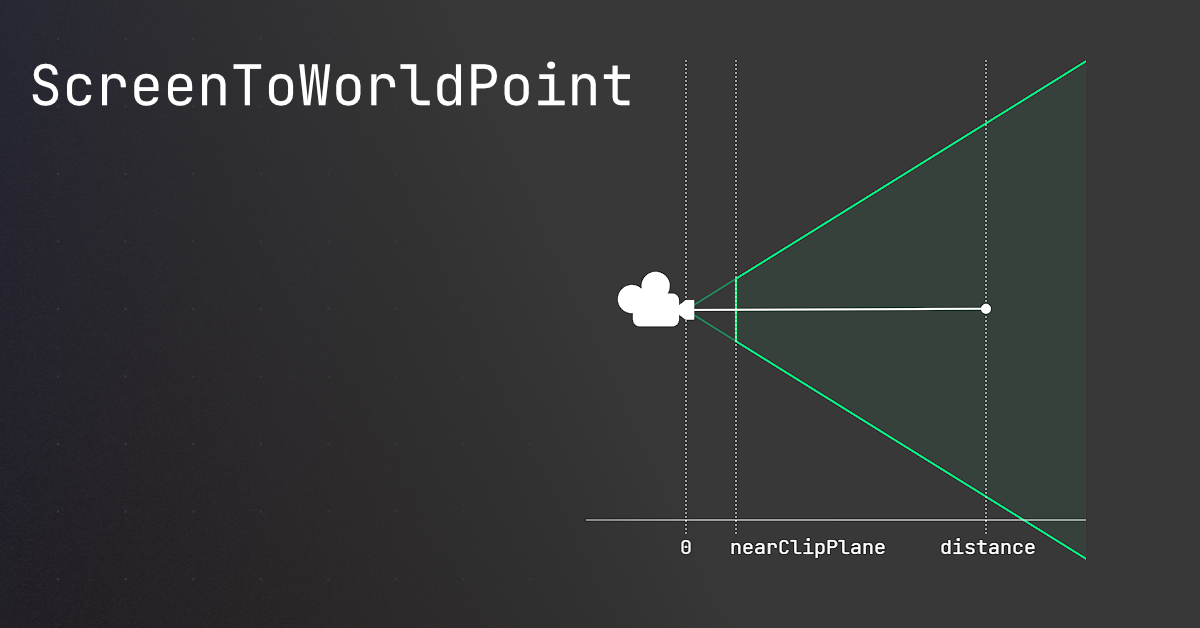
I guess, thats why the docs use the nearclipplane in 2D, just to have the correct position for the interaction in 2D space with the flattened clip plane distance.
 normal turret
How does slope-handling in Unity work...?
Looks like everything is working but I came to a problem...
The movement and animations work fine but when I jump and land on a slope, it doesn't immediately change to idle, it still falls when I land on the slope
Is the slope detected in the ground check...?
astral falcon
normal turret
The movement and animations work fine but when I jump and land on a slope, it do...
there is no unity way of handling it. You are using a script, that handles it. Share it and check it out for yourself to see, where its happening.
normal turret
I might watch some YouTube tutorials on slopes for Unity 2D...
Everything works fine (except for the jumping animation, I have to also figure out why that's not playing fully)
I just have to watch some slope tutorials to add to my ground check maybe
astral falcon
normal turret
I might watch some YouTube tutorials on slopes for Unity 2D...
If the tutorial addresses this issue, you might have to rewatch it and read the code provided. But apart from that, I am guessing, that you have some kind of animator with a transition from falling to next state which is taking too long. But thats something you can easily debug log, log when it hits the slope and log, when the animation turns from falling into slope
normal turret
So for slopes I don't have to do anything special apart from just setting the velocity of the player to 0 (to prevent it sliding)...?
I saw they were doing that in one of the tutorials, I might add that soon
astral falcon
yeh, but not the issue right now, stick to the problem you introduced and show the code addressing the behaviour
clever raven
Anyone have any tips on how to generate a random number of rooms between my minRooms and maxRooms? The code I am trying right now is only do the min rooms and I know I can do better. I am not sure how random works in Unity. Anyone know how I can improve this loop:
int maxAttempts = maxRooms * 5;

while (rooms.Count < minRooms && attempts < maxAttempts)
int numberOfRooms = Random.Range(minRooms, maxRooms + 1);
while (rooms.Count < numberOfRooms && attempts < maxAttempts)
Now I guess I just need to google what type of distribution Random.Range uses haha, Thank you
wintry quarry
a uniform distribution
 viscid cliff
so i've just started working on an fps project and am very inexperienced; for some reason, my jump function sometimes sends my player incredibly high and i don't know why.
if(Input.GetKeyDown(KeyCode.Space) && isGrounded)
{
Player.AddForce(jump * jumpSpeed, ForceMode.Impulse);
isGrounded = false;
} ``` teal viper
viscid cliff
so i've just started working on an fps project and am very inexperienced; for so...
teal viper
viscid cliff
so i've just started working on an fps project and am very inexperienced; for so...
What values do jump and jumpSpeed have? Are you modifying them somewhere?
Btw, the correct way to share C# code is ```cs
viscid cliff
public Vector3 jump;
public float jumpSpeed = 2.0f;```Why do you need both jump and jumpSpeed? What does the jump variable represent?
viscid cliff
honestly i'm not quite sure
teal viper
Did you not write that code?
viscid cliff
i'm still trying to figure literally everything out
teal viper
In this case, I'd suggest going over the beginner pathways on unity !learn
viscid cliff
!learn
eternal falconBOT
:teacher: Unity Learn ↗
Over 750 hours of free live and on-demand learning content for all levels of experience!
ember tangle
north kiln
but OverlapCircle might just fix the issue
You still need to invert the z coord even though it allegedly is not taking a Vector3.
normal turret
astral falcon
yeh, but not the issue right now, stick to the problem you introduced and show t...
Ok so after playing around, I found I think one of the issues causing it...? When I land on a slope without moving, it works but when I land on a slope while moving left or right (walking and running), it stays stuck in the fall animation until it reaches a level platform
That and some other main problems: the jumping, falling and double jumping animation logic works but the whole animatino doesn't play
north kiln
ember tangle
You still need to invert the z coord even though it allegedly is not taking a Ve...
That makes absolutely no sense. You must be doing something wrong or you're using a perspective camera with 2D rendering for some weird reason
normal turret
And also some parts of the tiles have like invisible collisions which stop me for some reason
north kiln
north kiln
That makes absolutely no sense. You must be doing something wrong or you're usin...
If you're using a perspective camera, then you must understand that ScreenToWorldPoint depth matters greatly and will completely effect the resulting position relative to a 2D plane https://unity.huh.how/screentoworldpoint
🤔 Unity, Huh, How?
Common ScreenToWorldPoint issues, and similar alternatives that may be better.
normal turret
This is my ground check code so far:
        RaycastHit2D collisionDetection = Physics2D.BoxCast(boxCastCollision.bounds.center, boxCastCollision.bounds.size, 0.0f, Vector2.down, rayCastDistance, tileSetLayer);
        return collisionDetection.collider != null;
    }```
 restive linden
I've got people that tested my game and have saved files already. Now that the game is releasing I want a way to delete old save data. What would be the best way to go about that? I was using a playerprefs for currentgamevers and if it's older than a certain number I delete. Does that work find? Or should I do something else?
rich adder
restive linden
I've got people that tested my game and have saved files already. Now that the g...
if you want to delete all data you just PlayerPrefs delete all
restive linden
rich adder
if you want to delete all data you just [PlayerPrefs delete all](https://docs.un...
I know how to do it, I'm asking the best way to delete all old data. The new data and old data are saved the same way. I should have renamed the new data but it's too late for that
so I check if the playerprefs is updated to the new version. If it isnt I update it and delete all data
rich adder
restive linden
so I check if the playerprefs is updated to the new version. If it isnt I update...
if they have different keys then you can distinguish otherwise you gotta do some hackey stuff and go into the folder manually to check the date saved
another reason not to use PlayerPrefs
restive linden
checking date could work
ember tangle
north kiln
That makes absolutely no sense. You must be doing something wrong or you're usin...
...that explains everything.
 topaz fractal


the code is the EXACT same for me and the tutorial, yet for some reason when i play, this happens
using System.Collections;
using System.Collections.Generic;
using UnityEngine;

public class Floater : MonoBehaviour
{
    public Rigidbody rigidBody;
    public float depthBeforeSubmerged = 1f;
    public float displacementAmount = 3f;

    private void FixedUpdate()
    {
        if(transform.position.y < 0f){
            float displacementMultiplier = Mathf.Clamp01(-transform.position.y / depthBeforeSubmerged) * displacementAmount;
            rigidBody.AddForce(new Vector3(0f, Mathf.Abs(Physics.gravity.y) * displacementMultiplier, 0f), ForceMode.Acceleration);
        }
    }
}
Here is the code
The block is supposed to act as if its floating on the plane
like its in water
the video is from 4 years ago, so possibly one of the methods i referenced isnt around anymore?
wintry quarry
topaz fractal
the video is from 4 years ago, so possibly one of the methods i referenced isnt ...
This is definitely not the problem
First step first: open your console window in the unity editor and keep it open always
That way you can see any errors that are happening
topaz fractal
got it
wintry quarry
Second step would be to add debug.log statements into your code at strategic points so you can see if and when specific code you expect to run is actually running
topaz fractal
an example would be where, in the code is sent
wintry quarry
Where the force is added
topaz fractal
so from that i figured out why it wasnt being called
he set ocean level to 0 on unity map, changed it to 1000
its being called now, but its not floating, any tips?
just moved it all to 0 and fixed
 cosmic gorge
!code
eternal falconBOT
Posting code
📃 Large Code Blocks
Use links to services like:
https://gdl.space/, https://paste.ofcode.org/, https://hatebin.com/, https://paste.myst.rs/, https://hastebin.com/
📃 Inline Code
Surround code with three backquotes. Not quotation marks.
To format as C#, add cs to the first line:
```cs
// Your code here
```
Add a comment with a line number if there is an error message.
cosmic gorge
{
    // References //

    private CharacterController Controller;

    // Movement Settings //

    [SerializeField] private float moveSpeed = 5f;

    // Input //

    public float moveInput;
    public float turnInput;

    private void Start()
    {
        Controller = GetComponent<CharacterController>();

    }

    private void Update()
    {
        InputManagement();
        Movement();
    }

    private void Movement()
    {
        GroundMovement();
    }

    private void GroundMovement()
    {
        Vector3 move = new Vector3(turnInput, 0, moveInput);
        move.y = 0;

        move *= moveSpeed;

        Controller.Move(move * Time.deltaTime);
    }

    private void InputManagement()
    {
        moveInput = Input.GetAxis("Vertical");
        turnInput = Input.GetAxis("Horizontal");
    }
}
i followed a tutorial and made this code, and in the tutorial the player was able to move after the script was attached to the player body, but mine cant, even after i compiled the code multiple times and there are no errors in the code
cosmic gorge
cosmic gorge
i followed a tutorial and made this code, and in the tutorial the player was abl...
 cosmic gorge
i followed a tutorial and made this code, and in the tutorial the player was abl...
cosmic gorge
cosmic gorge
i followed a tutorial and made this code, and in the tutorial the player was abl...
also, all required components are in the player body and so is the script
teal viper
cosmic gorge
You should be looking at the unity console for errors, not wherever that screenshot is from.
You should be looking at it at runtime too. There might be runtime(not compile) errors.
cosmic gorge
teal viper
You should be looking at the unity console for errors, not wherever that screens...
 cosmic gorge
teal viper
You should be looking at it at runtime too. There might be runtime(not compile) ...
cosmic gorge
teal viper
You should be looking at it at runtime too. There might be runtime(not compile) ...
alright i'll check
thank you
teal viper
Lastly, when confirmed that there are no errors, start debugging your code. Use debug logs to debug relevant values. Start from the bottom-up - from the closest code to actual movement.
cosmic gorge
teal viper
You should be looking at the unity console for errors, not wherever that screens...
sorry im super new to this how do i do that lol??
so sorry lmao
oops
wrong reply
cosmic gorge
teal viper
You should be looking at it at runtime too. There might be runtime(not compile) ...
this
teal viper
cosmic gorge
this
What this?
cosmic gorge
i was wondering how to look at runtime errors, but i figured it out
sorry to bother
mbmb
got my script working, thanks for your help :D
 fickle wagon
Hi, friends, I am having trouble finding the build report from the console -> Editor.Log I am using a Mac, and attached is the build report I got, When I was using Windows I got a full report for each texture and their sizes on mac there are no sizes appear. (BTW I'm building for web).
 astral falcon
fickle wagon
Hi, friends, I am having trouble finding the build report from the console -> Ed...
astral falcon
fickle wagon
Hi, friends, I am having trouble finding the build report from the console -> Ed...
Did you follow this? https://docs.unity3d.com/Manual/ReducingFilesize.html
fickle wagon
Yes, I did exactly but I see details only if i build for android not for web. @astral falcon
languid spire
fickle wagon
Yes, I did exactly but I see details only if i build for android not for web. <@...
pretty sure the second line of the report explains why not
fickle wagon
Oh, certainly I'll clean build my project @languid spire
Data appear when clean build Thanks @languid spire
 sturdy wharf
hey,
I have a simple 2D game in unity, where there is a little stickman with differnt parts of his body (left leg, right leg, left arm, right arm, head, torso) all with rigid bodies and stuff and i have a script where i can click and drag around the stickman and he moves and interacts with phyics and stuff. For ages i was trying to make a code where the stickman gets up and then walks using animations and stuff, but becuase the game is very physics based i thought it would be cool to make the walking phyics based too, kinda like games like TABS and Stick It To The Stickman. the only issue is, im very bad at coding haha. so i kinda just putting this here as almost a thought thing, where u guys can give me a general idea of how to make like phyics based walking (or if u know a tutorial) or if u wnated to actually help write the code. thanks !
 rare basin
private void UnloadLoadingSceneAndFadeOut()
{
  var activeScene = SceneManager.GetActiveScene();
  Debug.Log("Current active scene: " + activeScene.name);
  Debug.Log("Unloading loading scene");

  AsyncOperation unloadOperation = SceneManager.UnloadSceneAsync(activeScene.name);
  unloadOperation.completed += (AsyncOperation operation) =>
  {
      Debug.Log("Loading scene unloaded successfully");
      isSceneLoaded = true;
      OnSceneLoad?.Invoke(currentScene);
      fadeScreenCGT.TurnCanvasGroupOn(false);
  };
}
why am i getting null reference exception in this line unloadOperation.completed += (AsyncOperation operation) =>, the prints are correct

the unload scene async doesnt even work, the scene is not getting unloaded
burnt vapor
rare basin
the unload scene async doesnt even work, the scene is not getting unloaded
There must be at least 2 scenes active in order to use this method
If you don't have this, then unloadOperation will be null
At least, that's what Google tells me in this case
rare basin
there are 2 active scenes
burnt vapor
Even the docs do not specify that the return type can be null
 keen dew
Do you have warnings enabled? It should show a warning if it returns null
rare basin
because i use unload on LoadingScreen scene, when the level scene is loaded
burnt vapor
Very odd
 stuck palm
how does this work? like having multiple options in a single enum.

is it bitwise operations or something
 burnt vapor
stuck palm
how does this work? like having multiple options in a single enum.
burnt vapor
stuck palm
how does this work? like having multiple options in a single enum.
These are called flags, and you can have flags on enums with the FlagsAttribute attribute
keen dew
so it's the only active scene
burnt vapor
rare basin
i only get this warning
Well yes, so there's only one scene apparently
rare basin
hmm not sure why, im calling the unload in .completed operation in another scene load
but thanks atleast i know where to look
maybe it needs 1frame delay or something
well it indeed fixed it
just wait for end of frame
sturdy wharf
sturdy wharf
hey,
I have a simple 2D game in unity, where there is a little stickman with di...
Anyone 🙏
burnt vapor
This is a coding channel #🔎┃find-a-channel

 languid spire
start != Start
wintry quarry
 reef oracle
this is my code...but
reef oracle
this is my code...but
start?
Debugging tip: If you have code that you think should do something, but isn't doing anything, use Debug.Log to make sure it's actually running first.
because this is not
slate marten
do it un update not start
slate marten
what
reef oracle
wintry quarry
`start`?
i have some more code on other stuff i was following codeMonkeys tutorial
wintry quarry
reef oracle
i have some more code on other stuff i was following codeMonkeys tutorial
you didn't capitalize it correctly.
Start is correct
start is not
start will not do anything
slender nymph
reef oracle
this is my code...but
it looks like you need to configure your !IDE because there is a lack of syntax highlighting for unity types and the inherited methods
eternal falconBOT
💡 IDE Configuration
If your IDE is not autocompleting code
or underlining errors, please configure it.
Select one:
• Visual Studio (Installed via Unity Hub)
• Visual Studio (Installed manually)
• VS Code
• JetBrains Rider
• :question: Other/None
reef oracle
wintry quarry
Debugging tip: If you have code that you think should do something, but isn't do...
...i started coding 2days ago how would i debug this...
wintry quarry
reef oracle
...i started coding 2days ago how would i debug this...
I just told you exactly how
slate marten
reef oracle
...i started coding 2days ago how would i debug this...
maybe else or if !
reef oracle
Debug.Log.
wintry quarry
Yes, put a Debug.Log statement in the code to see if it's running
reef oracle
i mean what would i need to write down
languid spire
reef oracle
...i started coding 2days ago how would i debug this...
4 times now you have been told exactly what the problem is and how to fix it
wintry quarry
then check your console window
wintry quarry
reef oracle
i mean what would i need to write down
private void start() {
  Debug.Log("This code is running!");
}```
reef oracle
wintry quarry
```cs
private void start() {
Debug.Log("This code is running!");
}```
 hmmok
hmmok
wintry quarry
reef oracle
<:BoThonk:606252632021139457> hmmok
if you don't see the log in the console, that means it is NOT running
which explains your problem
(and the reason it's not running, we have spelled out to you several times now)
slate marten
black
languid spire
slate marten
black
if you have nothing useful to say please, say nothing
slate marten
languid spire
if you have nothing useful to say please, say nothing
ok smith
slate marten
languid spire
if you have nothing useful to say please, say nothing
radgoll is it hard?
languid spire
no, at least not for me. For you, only you can say
slate marten
languid spire
no, at least not for me. For you, only you can say
lol
its hard or not like beginned or advanced****
languid spire
advanced
slender nymph
slate marten
its hard or not like beginned or advanced****
rather than asking inane questions like this, you should focus on learning the basics like you were told to do yesterday
slate marten
ok
slender nymph
and then, if you learn the basics you might realize that telling someone to use "else or if" when they are instructed to log info is idiotic and makes no sense
slate marten
ok idiotic

 wintry quarry
reef oracle
wintry quarry
reef oracle
you still haven't fixed the capitilzatikon problem
sturdy wharf
sturdy wharf
hey,
I have a simple 2D game in unity, where there is a little stickman with di...
Anyone 🫠
reef oracle
it changes my velocity to linearVelocity
wintry quarry
or configuired your IDE
wintry quarry
reef oracle
it changes my velocity to linearVelocity
yes this is correct
slate marten
is better is better addorce or linear
reef oracle
wintry quarry
you still haven't fixed the capitilzatikon problem
i did and it just said error and i couldnt start my game
 fickle plume
!ban save 1178166654774022156 spam
eternal falconBOT
 lossantosred was banned.
languid spire
which wont make a blind bit of difference as the code does not run in the first place
wintry quarry
reef oracle
i did and it just said error and i couldnt start my game
"it just said error"
- no it did not
show the actual error you saw
reef oracle
ok..
reef oracle
wintry quarry
"it just said error"
- no it did not
after I shoot everything stops
 wintry quarry
reef oracle
after I shoot everything stops
wintry quarry
reef oracle
after I shoot everything stops
that has nothing to do with this code
that's a problem with some other code
reef oracle

wintry quarry
click on it and read the full error which will show you which file and line number the error happens in
reef oracle

 wintry quarry
reef oracle
wintry quarry
reef oracle
looks like it's the THirdPersonShooterController.
Basically on line 58 it's trying to do something with a Transform, but you destroyed that Transform
so it becomes sad
wintry quarry
reef oracle
this is my code...but
probably because of the OnTriggerEnter code here that destroys objects
 wintry quarry
I don't know what you mean by that
reef oracle
wintry quarry
I don't know what you mean by that
can i fix this without changing alot of stuff
wintry quarry
You seem to immediately throw your hands up in despair when you run into issues
you will need to change that if you want to be successful in game dev
reef oracle
wintry quarry
You seem to immediately throw your hands up in despair when you run into issues
no just looks like that to u
wintry quarry
reef oracle
can i fix this without changing alot of stuff
I have no idea because I have no idea what you're trying to do or how any of your game currently works.
reef oracle
wintry quarry
I have no idea because I have no idea what you're trying to do or how any of you...
im just trying to make my guy shoot a bullet
and have the bullet move
wintry quarry
this seems like a pretty basic projectile system. It's not compicated in general, so probably not a lot to change, no.
wintry quarry
reef oracle
and have the bullet move
you will need to make sure:
- The correct scripts are on the correct objects
- The code is written properly with appropriate capitalization etc
if your player Transform is being destroyed I would guess you put the script on at least one object it doesn't belong on.
or it could be some other code entirely
impossible to say without seeing the project/scene.
reef oracle

💬 How to make a Third Person Shooter Controller in Unity!
✅ Get the Project Files https://unitycodemonkey.com/video.php?v=FbM4CkqtOuA
🌍 Get my Complete Courses! ✅ https://unitycodemonkey.com/courses
👍 Learn to make awesome games step-by-step from start to finish.
🎮 Get my Steam Games https://unitycodemonkey.com/gamebundle
00:00 Third Person Sho...
I’m watching this dude
But I’ll watch again to see if I made any of the errors you said

burnt vapor
reef oracle
Configure your !ide
eternal falconBOT
💡 IDE Configuration
If your IDE is not autocompleting code
or underlining errors, please configure it.
Select one:
• Visual Studio (Installed via Unity Hub)
• Visual Studio (Installed manually)
• VS Code
• JetBrains Rider
• :question: Other/None
burnt vapor
It was already mentioned but this screenshot makes it clear you haven't
There's no point in helping until you did this
 queen adder
Is byte immutable or mutable ?
reef oracle
i have Visual Studio
burnt vapor
queen adder
Is byte immutable or mutable ?
immutable
You mutate the field that it exists on
Same with all value types
wintry quarry
queen adder
Is byte immutable or mutable ?
I mean... that's kind of a philosophical question
but yeah Fused has a good answer
burnt vapor
reef oracle
i have Visual Studio
Then follow the tutorial for those
I guess immutability depends a lot on other factors, but without those these are the basics
queen adder
burnt vapor
You mutate the field that it exists on
Wdym field ? byte struct only have two field and they're constant
wintry quarry
queen adder
Wdym field ? byte struct only have two field and they're constant
meaning if you do:
byte b = 4;
b = 6;```you're not mutating the original 4 value
you're overwriting the value stored in b with a totally new value
queen adder
Okay thanks
burnt vapor
queen adder
Wdym field ? byte struct only have two field and they're constant
I mean you don't mutate the actual byte, you mutate the containing variable with a new byte value
queen adder
Ah i see, okay thanks
wintry quarry
It's almost a moot point because there's not really a way to "refer" to a struct - you can have variable references with ref but that's the variable
burnt vapor
burnt vapor
I mean you don't mutate the actual byte, you mutate the containing variable with...
This applies for all numeric types
Even a string, which is not a value type
But a string is hardcoded to be immutable
But strings are weird in general
 ruby python
Hi all, If you would indulge me, I've had an idea of how to spawn enemies in my asteroid belt game. But I'm not entirely sure how to actually do it. 😕
Here is the 'world' layout.
Grey - Asteroid Belt
Green - Planet
Blue - Space Stations.
The idea is that the further the player is away from a space stations 'sphere of influence' the more likely it is for a group of enemies to spawn and attack the player. So at a point exactly equal distance between two space stations, the chance of enemies is the highest. I know how to do it if only one space station is involved, but with two I'm not sure. Especially as the initial start point for the player is at a random Space station.
Would anyone have any pointers please?

((I have the spawned stations GameObjects stored in a list btw)
 winter aspen
Question: I've got an abstract class like this
public abstract class Foo<T>
{
    T data;

    public Event(T data)
    {
        this.data = data;
    }
}
and an implementation:
public class Bar: Foo<MyClass>
{
    public Bar(MyClass data) : base(data)
    {
    }
    //This constructor is triggering an error
    public Bar(Vector3 from, Vector3 to)
    {

    }
}
is it impossible for children to have extra constructors even when the base one is satisfied?
ruby python
Not sure if I'm correct, but you're naming the two 'Bar' s the same, so would that not be the issue?
rich adder
you can have multiple methods same name if they have different signatures
ruby python
Ah okay. Took a shot. lol.
winter aspen
they're constructors, it's natural they have the same name
rich adder
winter aspen
Question: I've got an abstract class like this
```
public abstract class Foo<T>
...
iirc you would need to do
public Bar(Vector3 from, Vector3 to) : base
winter aspen
can I still call the base constructor from within?
the idea being: I use the vectors to initialize the data class, then pass that to the base constructor
kinda similar to this
public Bar(Vector3 from, Vector3 to): base(null)
{
  MyClass instanceData = //some calculation using the vectors and other properties
  base(instanceData);
}
i think you can only do cs public Bar(Vector3 from, Vector3 to) : base(new MyClass(from, to)) { // other stuff }
winter aspen
okay thanks
 lost anvil
ive got an issue dragging rigidbodies as seen in the video and its got something to do with how im calculating the mouse position im pretty sure but i dont really know another way to do it
Hastebin is a free web-based pastebin service for storing and sharing text and code snippets with anyone. Get started now.
rich adder
I would not use mouseWorldPosition
use ray.origin or a holdPointTransform.position
also would recommend using .velocity instead of addforce
lost anvil
right ill try that
burnt vapor
winter aspen
Question: I've got an abstract class like this
```
public abstract class Foo<T>
...
No, the child can have constructors. You just have to base to one of the parent constructors
If there was an issue then maybe share that
winter aspen
burnt vapor
If there was an issue then maybe share that
not an issue, was confused about the CS error, but seems like making an empty constructor in the parent dolves it all
rich adder
lost anvil
right ill try that
private void FixedUpdate()
{
    HandleMouseInput();
    if(rb != null)
    {
        rb.velocity =  objectHoldPos.position - rb.position;
    }
}
private Rigidbody rb;
private void HandleMouseInput()
{
    RaycastHit hit;

    if (Physics.Raycast(mainCamera.transform.position, mainCamera.transform.forward, out hit, maxInteractDist, layerMask))
    {
        if (Input.GetMouseButton(0))
        {
            hit.collider.TryGetComponent(out rb);
        }

    }
}```id rather do it myself but thank you 👍
burnt vapor
winter aspen
not an issue, was confused about the CS error, but seems like making an empty co...
Yeah, because then the parent indicates that you don't need to pass required data into it. This was the case with the two initial constructors, but an empty one will be called regardless and doesn't need anything passed into it
rich adder
lost anvil
id rather do it myself but thank you 👍
just giving out an idea. dont have to copy it 1-1 just an example anyway
burnt vapor
This is most syntactic sugar. In the end base() is still called but it's optional now
lost anvil
thanks 🙂
winter aspen
burnt vapor
Yeah, because then the parent indicates that you don't need to pass required dat...
Thanks
lost anvil
rich adder
also would recommend using .velocity instead of addforce
whys this btw?
rich adder
lost anvil
whys this btw?
its more precise control over the velocity
AddForce adds onto the current force which can cause weird issues if you dont Clamp at some point
rich adder
ohh thats for a door, though it was a pickup script
you can use addoforce, but put the door on a hinge and only push in your forward direction
lost anvil
right okay i would like to be able to pull it too but im assuming thats a different story
rich adder
to pull just -(inverse) the AddForce direction
long jacinth
how doesnt this work lol literally the guy in the tutorial did the same thign 1:1
 wintry quarry
long jacinth
how doesnt this work lol literally the guy in the tutorial did the same thign 1:...
wintry quarry
long jacinth
how doesnt this work lol literally the guy in the tutorial did the same thign 1:...
because it's not the same
you did it wrong
, is not the same as ;
polar acorn
"I did it exactly like the tutorial so why does theirs work and mine doesn't" counter:
Number of times it wasn't exactly like the tutorial: 180
Number of times it was exactly like the tutorial: 5
Number of times the code literally did not exist: 1
2022-07-19 to 2024-10-22
 formal hill
using System.Collections;
using System.Collections.Generic;
using UnityEngine;

public class Logopopupthing : MonoBehaviour
{
    public Animator animator;
    public Collider2D zaCollider;
    public Collider2D mouseCollider;

    public void OnTriggerEnter2D(Collider2D collision)
    {
        if (collision.CompareTag("Mouse"))
        {
            animator.enabled = true;
            animator.Play("FileExplorer");
        }
    }

    private void Start()
    {
        animator = GetComponent<Animator>();
        animator.enabled = false;
    }
}
Anybody know why my animation isn't playing?
rich adder
formal hill
```c#
using System.Collections;
using System.Collections.Generic;
using UnityEng...
does this object or "Mouse" object have a rigidbody ? and 1 of colliders set trigger?
languid spire
I can think of at least 4 reasons
formal hill
rich adder
does this object or "Mouse" object have a rigidbody ? and 1 of colliders set tri...
It doesn't have a rigidbody, but it does have the collider as "is trigger"
rich adder
formal hill
It doesn't have a rigidbody, but it does have the collider as "is trigger"
well then there is a big problem there, Trigger/Collision methods only works with a Rigidbody
formal hill
Oh thank you! I've been taking a small break off of unity so I totally forgot.
languid spire
formal hill
Oh thank you! I've been taking a small break off of unity so I totally forgot.
next time Debug your code
rich adder
formal hill
Oh thank you! I've been taking a small break off of unity so I totally forgot.
are you using world objects or UI btw ?
Instead of physics for this you should probably be using the Event Trigger / IPointer interface from Event System
using physics for this is probably overkill if its just an interface interaction type deal
 solar orchid
Can anybody help me? I’m trying to make a survival game Kinda like ark survival but I don’t know where to start. I watched a few videos like around 10 videos about coding and how to make players. I just don’t know what I should do first I wanna make a player first I just don’t really know how to and it’s really complex can anybody give me some tips or tricks???
rich adder
solar orchid
Can anybody help me? I’m trying to make a survival game Kinda like ark survival ...
start with structured courses !learn you have to built your way up. When you build a house you don't start from the roof
eternal falconBOT
:teacher: Unity Learn ↗
Over 750 hours of free live and on-demand learning content for all levels of experience!
solar orchid
rich adder
start with structured courses !learn you have to built your way up. When you bui...
Ty what should I call my game?
 cosmic dagger
solar orchid
Can anybody help me? I’m trying to make a survival game Kinda like ark survival ...
cosmic dagger
solar orchid
Can anybody help me? I’m trying to make a survival game Kinda like ark survival ...
learn c#, do the unity beginner and intermediate scripting tutorials. research what type of systems you want: health, hunger, thirst, inventory, resource management, crafting. at the beginning stage, all your players are cubes; don't worry about models . . .
rich adder
solar orchid
Ty what should I call my game?
start building it , the name will come to you later as you build , trust
cosmic dagger
solar orchid
Ty what should I call my game?
that's on you. it's your game, and not smth you should worry about right now . . .
solar orchid
cosmic dagger
learn c#, do the unity beginner and intermediate scripting tutorials. research w...
I want all those things in my game
solar orchid
cosmic dagger
that's on you. it's your game, and not smth you should worry about right now . ....
Ok Ty
Can you change the name of your game later on or is it just stuck with one name?
cosmic dagger
solar orchid
I want all those things in my game
cool. write it down. make a checklist. work on one at a time, but do all of the basic level stuff we mentioned above . . .
solar orchid
Ok
cosmic dagger
you'll have the name of your before you release it. you won't finish any time soon. so, again, it's nothing to worry about . . .
solar orchid
Ok
Right now, I wanna work on the inventory the day and night cycle and the player movement and player stuff that the player would do
cosmic dagger
do you know what a collection is? array, list, queue, stack, etc.?
solar orchid
No : I
 fleet granite
solar orchid
No : I
fleet granite
solar orchid
No : I
i'd learn the basics of programming first and then move on to unity
it's no big deal, won't take too long
i admire the aspiration but you have to start from the ground
throwing yourself at unity until something barely works is more likely to demoralise you
solar orchid
Ok
fleet granite
good luck!
cosmic dagger
solar orchid
No : I
exactly. crawl, then walk before you can run. you're thinking too far ahead. learn the basics of C#, learn beginner and intermediate programming with unity, then start working on your features . . .
 wild widget
I tried to make a simple dash in 2D
    void OnDash(InputValue value)
    {
        if (value.isPressed)
        {
            PlayerRigidBody.AddForce(Transform.right * 10, ForceMode2D.Impulse); // i tried Vector2.right too
            Debug.Log(Vector2.right * 10);
        }
    }
Unfortunately only Debug.Log was triggered, anyone can help?
solar orchid
I made a playlist of all the things I need to do for my game like there’s this video that tells you how to code a day and night cycle and that’s what I kinda wanna do but I also wanna get better at coding while I’m making my do you think that’s good
cosmic dagger
wild widget
I tried to make a simple dash in 2D
```csharp
void OnDash(InputValue value)
...
how does your player move, using physics or manipulating the transform?
wild widget
physics
cosmic dagger
which method of physics?
fleet granite
solar orchid
I made a playlist of all the things I need to do for my game like there’s this v...
i'd start by ignoring unity for now
try to understand basic programming concepts (preferably in C#, as you want to use unity)
you can find looooooaaaads of resources online to start your learning, so you're spoilt for choice
how much programming experience do you have?
wild widget
cosmic dagger
which method of physics?
rigibody velocity
cosmic dagger
wild widget
rigibody velocity
thought so, setting the velocity will cancel (override) the force you're adding . . .
wild widget
ahh
wild widget
cosmic dagger
thought so, setting the velocity will cancel (override) the force you're adding ...
thankssss
solar orchid
fleet granite
how much programming experience do you have?
Over the years, I’ve watched like tons of videos of people making video games in like 1 week I don’t wanna do that. I wanna make a game in like seven weeks but keep on working on it and never stop. But I’ve watched lots of videos. About coding. I’ve just never really listened. I just liked watching how interesting it. Is to make a game and I wanna make one.
But I’ve started watching videos about how to code and I’m listening as much as I can
cosmic dagger
watching and actually doing it are two different things. just start learning C#. check the pinned messages or view this: <#💻┃code-beginner message>
solar orchid
Ok
ruby python
ruby python
Hi all, If you would indulge me, I've had an idea of how to spawn enemies in my...
Soooo. Any chance anyone has any ideas? Bit stumped. lol.
cosmic dagger
ruby python
Soooo. Any chance anyone has any ideas? Bit stumped. lol.
the tiny blue dots are the space stations. when the player is a set distance from the space station, it spawns enemies to attack the player or the planet? also, where is the player? does it protect the planet from the enemies that spawn from the space stations?
ruby python
solar orchid
Over the years, I’ve watched like tons of videos of people making video games in...
Best advice from experience that I can give (and still a relative beginner myself). Don't try to make your 'final' game straight away. Try a bunch of different things, maybe that focus on different aspects of a game and make simple things to begin with)
solar orchid
OK, I kinda wanna make my game today. I’m gonna start out a little. I’m gonna make sure I don’t do too much. That way I can learn while I’m making my game. But it won’t be the final product of my game. Since I’m still learning.
ruby python
cosmic dagger
the tiny blue dots are the space stations. when the player is a set distance fro...
Okay, so the player flies around the asteroid belt, collecting resources, visiting stations etc. the enemies will be pirates that attack the player, but I'd like the likelihood of an attack to increase the further away from any of the stations the player is.
ie. The pirates avoid getting too close to a station because of the defenses (there will be 'events' where the pirates directly attack the station(s), but that bit is easy.
ruby python
solar orchid
OK, I kinda wanna make my game today. I’m gonna start out a little. I’m gonna ma...
Okay, make a little plan of what you want the game to be (camera angle etc.) and go from there. You may need to go through a lot of different iterations trying out different things as there are many ways to do certain things (character controllers for example, there a literally hundreds of video tutorials out there, and tbh a loooot of them are absolute garbage)
solar orchid
Ok
I found one that I think is pretty good
And most of the people liked it and commented that it was good so I think it’s a good one
ruby python
Okay, try it out and see how it goes. I'm the same, I learn best by doing. Currently got about 30 different 'protoypes' of game ideas (different genres etc) and each one I've done I've learned a bunch of invaluable stuff.
solar orchid
Ok
cosmic dagger
ruby python
Okay, so the player flies around the asteroid belt, collecting resources, visiti...
not a problem. you can use distance checks to determine which space stations (SS) are furthest away to spawn enemies from/towards . . .
 cosmic charm
Quick question, when I try to handle movement when working on Machine State, should I write the script of moving in the Player script? or should I write it in the PlayerState script?
public void HandleMovement()
    {
        xInput = GetInput().x;
        MoveCharacter();
        ApplyLinearDrag();
    }

    // Input handling logic is within the Player class now
    protected Vector2 GetInput()
    {
        return new Vector2(Input.GetAxisRaw("Horizontal"), Input.GetAxisRaw("Vertical"));
    }

    // Movement logic, directly controlling the Rigidbody2D
    protected void MoveCharacter()
    {
        rb.AddForce(new Vector2(xInput, 0f) * movementAcceleration);

        if (Mathf.Abs(rb.velocity.x) > maxMoveSpeed)
        {
            rb.velocity = new Vector2(Mathf.Sign(rb.velocity.x) * maxMoveSpeed, rb.velocity.y);
        }
    }

    // Handles linear drag and deceleration
    protected void ApplyLinearDrag()
    {
        if (Mathf.Abs(xInput) < 0.4f || changingDirection)
        {
            rb.drag = linearDrag;
        }
        else
        {
            rb.drag = 0;
        }
    }
like where should I write these functions?
cosmic dagger
ruby python
ie. The pirates avoid getting too close to a station because of the defenses (t...
Basically, you loop through each SS and check the distance from the player. the furthest station is assigned each iteration until you have the furthest SS at the end of the loop. spawn enemies from that one . . .
 torpid hamlet
Why wouldn't this work? Just trying to walk over something and teleport the player GameObject back to 0, 0, 0

 deft grail
torpid hamlet
Why wouldn't this work? Just trying to walk over something and teleport the play...
deft grail
torpid hamlet
Why wouldn't this work? Just trying to walk over something and teleport the play...
because it doesnt get executed
or your updating the position elsewhere also
cosmic dagger
torpid hamlet
Why wouldn't this work? Just trying to walk over something and teleport the play...
place a log in the method to see if it runs (is triggered) . . .
rich adder
torpid hamlet
Why wouldn't this work? Just trying to walk over something and teleport the play...
debug the trigger with a log, if its a Character Controller then you have to disable it before teleport and enable it again
torpid hamlet
rich adder
debug the trigger with a log, if its a Character Controller then you have to dis...
This is probably why!
I have a character controller script
cosmic dagger
torpid hamlet
Why wouldn't this work? Just trying to walk over something and teleport the play...
we don't know how you're moving the player, if you're using the correct collision method, etc . . .
cosmic dagger
torpid hamlet
I have a character controller script
they meant the unity CharacterController component . . .
torpid hamlet
But before enabling and disabling the player let me just put a debug log to see if it actually triggers
torpid hamlet
cosmic dagger
they meant the unity `CharacterController` component . . .
And the component also
ruby python
cosmic dagger
Basically, you loop through each SS and check the distance from the player. the ...
Right okay, I think I get it. 🙂 Thank you.
rich adder
torpid hamlet
This is probably why!
https://unity.huh.how/character-controller/teleportation
check this if you suspect it is.
rich adder
torpid hamlet
But before enabling and disabling the player let me just put a debug log to see ...
but yea this should always be your first step to anything not working as it should. Always logs never make assumptions
torpid hamlet
rich adder
but yea this should always be your first step to anything not working as it shou...
Tbh I thought I did a log and I didn't understand why it didn't appear :))
Just forgot it
rich adder
dont post videos of code, use the proper methods of sharing code
torpid hamlet
rich adder
but yea this should always be your first step to anything not working as it shou...
Good news, it is logging, I'll do the enable and disable the controller component
formal hill
No one answered my message in #🏃┃animation so I decided to send it in here
rich adder
formal hill
No one answered my message in <#502171313201479681> so I decided to send it in h...
well that is crossposting and not allowed #📖┃code-of-conduct
formal hill
rich adder
well that is crossposting and not allowed <#497867528488484864>
Oh sorry then
formal hill
rich adder
well that is crossposting and not allowed <#497867528488484864>
It does involve coding though
rich adder
formal hill
It does involve coding though
then properly post the code using codepaste webslite links and describing clear what the issue is, looking through a video just to possibly know the issue is extra work for the potential helper
 uneven mantle
hi y'all, I'm getting back to unity dev after a LONG hiatus, is there a guide on how to attach a debugger (ideally vscode) to a built unity game on pc? Note: not the editor, not "build and run", but a build someone else already did, because I need to debug that one.
rich adder
uneven mantle
hi y'all, I'm getting back to unity dev after a LONG hiatus, is there a guide on...
wintry quarry
uneven mantle
hi y'all, I'm getting back to unity dev after a LONG hiatus, is there a guide on...
The unity manual page that talks about debugging also talks about debugging builds
See "Debug in the Unity Player"
rich adder
oof they still have mac VS instructions
wintry quarry
Also - the build you are trying to debug needs to have been built in development mode with script debugging turned on
uneven mantle
wintry quarry
See "Debug in the Unity Player"
that says "build and run", am I missing something here?
formal hill
rich adder
then properly post the code using codepaste webslite links and describing clear ...
Yeah, but the animator part might also cause the problem. I don't know
wintry quarry
uneven mantle
that says "build and run", am I missing something here?
That is not any different from running the .exe
Attach your code editor to the Unity Player
torpid hamlet
rich adder
https://unity.huh.how/character-controller/teleportation
check this if you suspe...
That was it, I literally just disabled the character whole and enabled it back
wintry quarry
Again - I'll point out that the build has to have been built with these options though:
Enable the Development Build
and Script Debugging options before you build the Player
uneven mantle
wintry quarry
Again - I'll point out that the build has to have been built with these options ...
yes, that I checked
rich adder
formal hill
Yeah, but the animator part might also cause the problem. I don't know
idk what to tell you , do it or don't lol
uneven mantle
btw, @wintry quarry and @rich adder thank you for the help, regardless of how it goes ❤️
 mystic dawn
Hey there people! i'm having some trouble with handling the rotation of sprites in my project and looking for any help with this issue!
basically my player character has a weaponParent child which acts as the rotation point and parent of all the weapons, the weapon parent rotates to face the mouse position and the weapon sprites that are it's children rotate alongside it correctly.
I implemented a nuclear throne style melee weapon and im now facing an issue where rotating the weapon parent between -180 to 0 makes the sprites stutter and flip to the opposite direction, i cannot find the reason why it does this so any pointers would be very helpful :((((
here is the script for the weaponParent, it handles everything related to rotating and flipping sprites but i can't seem to find where the problem is: https://www.codebin.cc/code/cm2kodisk0001k102id59oqe9:7Z53AbNGqA6AxvvnrLBSFpjo3vTTuXEYwGTEDbmm2nu9


Codebin Paste:
Description: code for the weapon parent
Language: csharp
Last Edited: 10/22/2024, 4:43:59 PM
Expires: never
Well heres the code:
using System.Collections;
using System.Collections.Generic;
using UnityEngine;

public class Logopopupthing : MonoBehaviour
{
    public Animator animator;
    public Collider2D zaCollider;
    public Collider2D mouseCollider;

    public void OnTriggerEnter2D(Collider2D collision)
    {
        if (collision.CompareTag("Mouse"))
        {
            animator.enabled = true;
            animator.SetBool("Entered", true);
            animator.SetBool("Left", false);
        }
    }

    public void OnTriggerExit2D(Collider2D collision)
    {
        if (collision.CompareTag("Mouse"))
        {
            animator.SetBool("Left", true);
            animator.SetBool("Entered", false);
        }
    }

    private void Start()
    {
        animator = GetComponent<Animator>();
        animator.enabled = false;
    }
}
``` I don't know if something is wrong with it, but if it has could someone help me? ThanksWhat's the point of this line:
transform.rotation = Quaternion.Euler(0f, 0f, transform.eulerAngles.z);```so anything I wrote before you just ignored?
wintry quarry
isn't that redundant?
Doesn't transform.right = direction; handle the rotation already?
rich adder
formal hill
Well heres the code:
```c#
using System.Collections;
using System.Collections.G...
 uneven mantle
wintry quarry
That is not any different from running the .exe
> Attach your code editor to the...
uneven mantle
wintry quarry
That is not any different from running the .exe
> Attach your code editor to the...
ok, I'm running the.exe and trying to use the "attach to unity" config here

but it doesn't find it
wintry quarry
uneven mantle
ok, I'm running the.exe and trying to use the "attach to unity" config here
you don't want to attach to unity
you want to attach to the running game process
mystic dawn
wintry quarry
What's the point of this line:
```cs
transform.rotation = Quaternion.Euler(0f, 0...
at first i thought the problem was that the x rotation of the weaponparent was causing the issue since when the weapon started flipping like crazy the rotation on the x was -180 so i was trying to force the weapon parent to keep the rotation of the x and y axis to 0 but it did not fix anything
uneven mantle
If instead I try this config here it finds the .exe but doesn't load the symbols
 mystic dawn
wintry quarry
What's the point of this line:
```cs
transform.rotation = Quaternion.Euler(0f, 0...
mystic dawn
wintry quarry
What's the point of this line:
```cs
transform.rotation = Quaternion.Euler(0f, 0...
also i would love to know how you can past lines of code in the channel like this? do yo have to use a command?
wintry quarry
mystic dawn
at first i thought the problem was that the x rotation of the weaponparent was c...
One thing to note is the numbers you see in the inspector are basically meaningless. Because euler angles are not unique, they houldn't be depended on for game logic
wintry quarry
mystic dawn
also i would love to know how you can past lines of code in the channel like thi...
!code
eternal falconBOT
Posting code
📃 Large Code Blocks
Use links to services like:
https://gdl.space/, https://paste.ofcode.org/, https://hatebin.com/, https://paste.myst.rs/, https://hastebin.com/
📃 Inline Code
Surround code with three backquotes. Not quotation marks.
To format as C#, add cs to the first line:
```cs
// Your code here
```
Add a comment with a line number if there is an error message.
mystic dawn
wintry quarry
!code
thank you!
uneven mantle
wintry quarry
you want to attach to the running game process
yes that's the idea, for some reason the screenshot didn't load in the previous message
 rich adder
uneven mantle
If instead I try this config here it finds the .exe but doesn't load the symbols
rich adder
uneven mantle
If instead I try this config here it finds the .exe but doesn't load the symbols
hope this helps you visualize the process
 mystic dawn
wintry quarry
One thing to note is the numbers you see in the inspector are basically meaningl...
mystic dawn
wintry quarry
One thing to note is the numbers you see in the inspector are basically meaningl...
yeah well it's true since locking them to 0 did not fix anything so they were not the problem
formal hill
rich adder
I'm pretty sure sprites are classified as world objects? But i'm using it as UI. I want an animation to play when the mouse goes over the sprite and it does... Sometimes, but then it also just stops working sometimes.
uneven mantle
rich adder
hope this helps you visualize the process
sorry this is a bit confusing still... so I need to connect to the editor anyway?
mystic dawn
my problem is that it basically flips the sprite to the opposite direction whenever the rotation of the weapon parent z axis reaches -180 to 0
uneven mantle
not to the process of the build?
rich adder
uneven mantle
sorry this is a bit confusing still... so I need to connect to the editor anyway...
dont you want the debugger?
uneven mantle
rich adder
dont you want the debugger?
I need to see breakpoints and exceptions in the build though, not the editor. I have a packaged .exe that I need to run and debug
rich adder
formal hill
I'm pretty sure sprites are classified as world objects? But i'm using it as UI....
sprites can be used in UI or SpriteRenderer but how they are handled are different, eg you probably should not be using physics if all you need is to know if mouse is over an interaction sprite, maybe raycast but idk if you want to be using Trigger
wintry quarry
mystic dawn
my problem is that it basically flips the sprite to the opposite direction whene...
Isn't your code pretty explicitly doing that?
        if (direction.x < 0)
        {
            handParent.transform.localScale = new Vector3(1f, -1f, 1f);
            axeSpr.flipX = true;

        }
        else if (direction.x > 0)
        {

            handParent.transform.localScale = Vector3.one;
            axeSpr.flipX = false;

}```Oh sorry in the build. I misread it then. I need to lookup again the process its been a while thought you just needed devbuild mode
formal hill
rich adder
sprites can be used in UI or SpriteRenderer but how they are handled are differe...
I've never used anything else than trigger so I honestly have no idea how I'd use raycast, but It'd be nice to learn.
rich adder
formal hill
I've never used anything else than trigger so I honestly have no idea how I'd us...
you can also just use an event trigger but if they are collider you need to add a Physics 2D Raycaster on the camera
probably way easier than using rigidbodies and triggers
uneven mantle
rich adder
Oh sorry in the build. I misread it then. I need to lookup again the process its...
no worries, I know my case is a bit off the usual path
formal hill
rich adder
you can also just use an event trigger but if they are collider you need to add ...
And then how do I use it to activate the animation?
uneven mantle
also, thanks for trying ❤️
mystic dawn
wintry quarry
```cs
if (direction.x < 0)
{
handParent.transform.lo...
this is for flipping each weapon accordingly, what im trying to do is have the axe have a rotation similar to nuclear throne's melee weapons so im not messing with it's localscale for flipping it and only flipping the sprite, the hand weapon i flip it in the Y only and they work fine, the problem is they bug out when the rotation of the weapon parent ( the object holding both the handParent and axeParent) reaches -180 to 0, i don't know why it is doing it, my guess is that using direction.x to evaluate where the player is facing is what is messing it up
rich adder
formal hill
And then how do I use it to activate the animation?
just call a function. make it public so it can be exposed and used in the Event trigger component
wintry quarry
mystic dawn
this is for flipping each weapon accordingly, what im trying to do is have the a...
similar to nuclear throne's melee weapons
First off, never heard of it.
so im not messing with it's localscale for flipping it and only flipping the sprite
That's not what your code says
mystic dawn
but im not really sure as it works completly fine in any direction i point my mouse towards except for when it is at a -180 to 0 range in which the axe starts flipping in the Y axis, and the Hand flips on the X axis
rich adder
uneven mantle
no worries, I know my case is a bit off the usual path
ohh right says here the same thing in the manual, just enable the Devmode and it should still read the VScode debugger. Im gonna try it rn to see if it captures the exe , I'm on mac but Im sure it will work the same
mystic dawn
wintry quarry
> similar to nuclear throne's melee weapons
First off, never heard of it.
> so i...
well the code above is flipping the sprite for the axe and the transform for the hand
!code axeSpr.flipX = false;
eternal falconBOT
Posting code
📃 Large Code Blocks
Use links to services like:
https://gdl.space/, https://paste.ofcode.org/, https://hatebin.com/, https://paste.myst.rs/, https://hastebin.com/
📃 Inline Code
Surround code with three backquotes. Not quotation marks.
To format as C#, add cs to the first line:
```cs
// Your code here
```
Add a comment with a line number if there is an error message.
wintry quarry
mystic dawn
but im not really sure as it works completly fine in any direction i point my mo...
isn't that just "when facing left"?
you're worried a bit too much about the euler angles
wintry quarry
mystic dawn
well the code above is flipping the sprite for the axe and the transform for the...
right and if the axe is a child of the hand, the axe will get double flipped
mystic dawn
wintry quarry
you're worried a bit too much about the euler angles
i mean it's working but when the player is rotating the weapon will start going crazy and flipping back and forth when reaching -180 to 0 for some reason
mystic dawn
wintry quarry
right and if the axe is a child of the hand, the axe will get double flipped
no the axe is not a child of the hand i set them up to be both children of the weapon parent only, basically the weapon parent rotates and follows the mouse position, the hand and axe parent are children of the weapon parent and their flipping behaviour is handled in the code i pasted from the weapon parent script
wintry quarry
there's nothing in this code that could make it "go crazy" afaict
you 100% sure there's no other code involved?
what about the code that aims the arm/weapon at the mouse?
mystic dawn
yeah that's why im having so much trouble with it :(((
nope apart from this no code messes with any of these objects, everything is handled in the weaponparent that relates to rotating the weapon parent there's aline of code that handles rotating it here:
direction = ((Vector2)GetMousePosition() - (Vector2)transform.position).normalized;
transform.right = direction;
 spare mountain
try printing these every frame and see which part is flipping
mystic dawn
also when i examined each of the transforms on play mode, no variable seem to be changed when the flip occurs at -180 to 0, basically when i check if maybe something changed in the transform of each the hand and axe parents nothing seem to be changed and yet they are still flipped
 coarse knoll
im trying to learn C# but cant find any videos, any of yall know any helpful videos?
spare mountain
coarse knoll
im trying to learn C# but cant find any videos, any of yall know any helpful vid...
!learn
eternal falconBOT
:teacher: Unity Learn ↗
Over 750 hours of free live and on-demand learning content for all levels of experience!
coarse knoll
thanks
cosmic dagger
coarse knoll
im trying to learn C# but cant find any videos, any of yall know any helpful vid...
i call cap. there's a bagillion. check the pinned messages, use the unity !learn website, or other links: <#💻┃code-beginner message>
eternal falconBOT
:teacher: Unity Learn ↗
Over 750 hours of free live and on-demand learning content for all levels of experience!
formal hill
rich adder
just call a function. make it public so it can be exposed and used in the Event ...
Hey. I almost figured it out, but for some reason the "OnPointEnter" nor the "OnPointerExit" function will not show when I try to use them from the object with the script. Any idea why?
rich adder
formal hill
Hey. I almost figured it out, but for some reason the "OnPointEnter" nor the "On...
show where ? try to use it where ?
I don't have eyes on your pc
formal hill
rich adder
I don't have eyes on your pc
Yeah sorry. My explanation was not clear. So inside of the even trigger component on the Pointer Enter (BaseEventData) when I add the gameObject to it the function I need will not show inside of the script.
using UnityEngine;
using UnityEngine.EventSystems;

public class Logopopupthing : MonoBehaviour, IPointerEnterHandler, IPointerExitHandler
{
    public Animator animator;

    public void OnPointerEnter(PointerEventData eventData)
    {
        animator.enabled = true;
        animator.SetTrigger("FileExplorerUp");
    }

    public void OnPointerExit(PointerEventData eventData)
    {
        animator.SetTrigger("FileExplorerDown");
    }

    private void Start()
    {
        animator = GetComponent<Animator>();
        animator.enabled = false;
    }
}
 rich adder
formal hill
Yeah sorry. My explanation was not clear. So inside of the even trigger componen...
rich adder
formal hill
Yeah sorry. My explanation was not clear. So inside of the even trigger componen...
dont use OnPointer enter in the inspector
formal hill
rich adder
dont use OnPointer enter in the inspector
What do you mean?
rich adder
you're mixing two of the same component together
pick one or the other
PointerEnter on event Trigger does the same exact thing that OnPointerEnter method from IPointerEnter interface does
pick one or the other, then you need colliders and a Physics2D physics raycaster on the camera
formal hill
rich adder
pick one or the other, then you need colliders and a Physics2D physics raycaster...
I already have the Physics2D raycasyter on the camera, but how do I use the colliders with it?
rich adder
formal hill
I already have the Physics2D raycasyter on the camera, but how do I use the coll...
the event trigger / script with OnPointer enter goes on the object you want to call it from
the one with the collider
remove the component EventTrigger component if you're gonna use the script
formal hill
rich adder
remove the component EventTrigger component if you're gonna use the script
I decided to use the component
rich adder
the EventTrigger was just meant as a standalone component to communicate to another script (call function in another script elsewhere too)
formal hill
rich adder
the one with the collider
The object doesn't have a collider. I will add one
Okay it now works, but for some very weird reason it only works if the mouse goes to the object from a certain place. It needs to go from the down left corner for it to work.
rich adder
formal hill
Okay it now works, but for some very weird reason it only works if the mouse goe...
show the setup because I have no clue what that means
keep in mind this function works off the Event System so if you have UI elements it wil block the raycast
formal hill
using UnityEngine;
using UnityEngine.EventSystems;

public class Logopopupthing : MonoBehaviour, IPointerEnterHandler, IPointerExitHandler
{
    public Animator animator;

    public void OnPointerEnter(PointerEventData eventData)
    {
        animator.enabled = true;
        animator.SetTrigger("FileExplorer");
        animator.SetBool("Entered", true);
        animator.SetBool("Left", false);
    }

    public void OnPointerExit(PointerEventData eventData)
    {
        animator.SetTrigger("FileExplorerDown");
        animator.SetBool("Left", true);
        animator.SetBool("Entered", false);
    }

    private void Start()
    {
        animator = GetComponent<Animator>();
        animator.enabled = false;
    }
}
Here
rich adder
formal hill
Here
show the colliders, no need or video just select them and screenshot the colliders
formal hill
rich adder
show the colliders, no need or video just select them and screenshot the collide...
The components?
rich adder
formal hill
The components?
the one for folder looks okay if its the green one, what about the blue one
formal hill
rich adder
the one for folder looks okay if its the green one, what about the blue one
The blue one doesn't have a collider at the moment. I still haven't begun to work in it since I want to do this first to then move on to the next knowing that it works and how to do it
But the folder one only gets activated when the mouse enters it from the left down corner
rich adder
formal hill
But the folder one only gets activated when the mouse enters it from the left do...
Your collider changes the size when you stop playing which i find suspicious now..
 formal hill
What? Why does that happen?
rich adder
put logs in those methods and see how quickly they print, it could just be your animation being wacky
formal hill
I just checked it again and it doesn't anymore
It's the same size now and when I stop playing
rich adder
alr just do the log thing anyway and see whats going on
formal hill
rich adder
put logs in those methods and see how quickly they print, it could just be your ...
Okay
rich adder
btw I hope you're not animating each button with its own animation and animator if they all animate the same hover effect . that would be painful lol I will show you a better method
formal hill
rich adder
btw I hope you're not animating each button with its own animation and animator ...
I was going to do that... Thanks!
The logs come in pretty much instantly. It gives 2 of them tho and it gives a warning "UpAnimPlayed
UnityEngine.Debug:Log (object)
Logopopupthing:OnPointerEnter (UnityEngine.EventSystems.PointerEventData) (at Assets/Scripts/Logo pop up thing.cs:12)
UnityEngine.EventSystems.EventSystem:Update () (at ./Library/PackageCache/com.unity.ugui@1.0.0/Runtime/EventSystem/EventSystem.cs:530)"
rich adder
formal hill
The logs come in pretty much instantly. It gives 2 of them tho and it gives a wa...
dont worry about the warnings for now. So they do show up instant even if you hover from the other directions?
formal hill
rich adder
dont worry about the warnings for now. So they do show up instant even if you ho...
No they only show if I go from the left down corner
rich adder
formal hill
No they only show if I go from the left down corner
even the logs?
and are you resizing the entire object the script is on?
formal hill
rich adder
even the logs?
and are you resizing the entire object the script is on?
Yes. The animation scales the entire object up.
rich adder
hmmm that could possibly be a problem..
the new event system has a hard time logging what your mouse is hovering..
you would need to write a piece of code
formal hill
What piece of code?
rich adder
formal hill
What piece of code?
try cs PointerEventData pointerData = new PointerEventData(EventSystem.current); void Update() { { pointerData.position = Input.mousePosition; List<RaycastResult> raycastResults = new List<RaycastResult>(); EventSystem.current.RaycastAll(pointerData, raycastResults); foreach (RaycastResult result in raycastResults) { Debug.Log("Hovering over: " + result.gameObject.name); } } }
formal hill
rich adder
try ```cs
PointerEventData pointerData = new PointerEventData(EventSystem.curre...
New script or add it to an old one?
rich adder
formal hill
New script or add it to an old one?
you can put it in the same script
formal hill
Ok
rich adder
let me double check if it works, just got it off forum post
okay yeah it should work if hover over a collider
formal hill
rich adder
let me double check if it works, just got it off forum post
Even that script only debugs when the left down corner is the point that the mouse enters from
Even though the collider is ontop of the entire image
rich adder
formal hill
Even that script only debugs when the left down corner is the point that the mou...
move the icons in a different location and try again, try middle of screen
rich adder
no
formal hill
Could it be the CRT camera effect that I have on?
rich adder
its possible is messing with where the icon is vs cursor shows
turn it off and try the corner again
formal hill
The problem was the CRT
rich adder
ah well that will do it lol.
I wonder if it would do the same thing with a regular physics raycast, probably..
formal hill
I wonder if I can fix it. I really like the effect
formal hill
What do you mean "regular raycast"
cosmic charm
Quick question, when I try to handle movement when working on Machine State, should I write the script of moving in the Player script? or should I write it in the PlayerState script?
public void HandleMovement()
    {
        xInput = GetInput().x;
        MoveCharacter();
        ApplyLinearDrag();
    }

    // Input handling logic is within the Player class now
    protected Vector2 GetInput()
    {
        return new Vector2(Input.GetAxisRaw("Horizontal"), Input.GetAxisRaw("Vertical"));
    }

    // Movement logic, directly controlling the Rigidbody2D
    protected void MoveCharacter()
    {
        rb.AddForce(new Vector2(xInput, 0f) * movementAcceleration);

        if (Mathf.Abs(rb.velocity.x) > maxMoveSpeed)
        {
            rb.velocity = new Vector2(Mathf.Sign(rb.velocity.x) * maxMoveSpeed, rb.velocity.y);
        }
    }

    // Handles linear drag and deceleration
    protected void ApplyLinearDrag()
    {
        if (Mathf.Abs(xInput) < 0.4f || changingDirection)
        {
            rb.drag = linearDrag;
        }
        else
        {
            rb.drag = 0;
        }
    }
Like not 2d?
rich adder
formal hill
Like not 2d?
using the Physics2D method
formal hill
rich adder
using the Physics2D method
I already had the Physics2D raycast
rich adder
formal hill
I already had the Physics2D raycast
where?
 faint osprey
im trying to test my multiplayer game out by running a build and the editor at the same time however when i tab out and switch to the other screen to play on the other player it makes the other one lag like crazy I have application.runinbackground to true so i dont get why cause my cpu and gpu and struggling
rich adder
formal hill
I already had the Physics2D raycast
I meant try like this
 void Update()
 {
     Ray ray = Camera.main.ScreenPointToRay(Input.mousePosition);
     RaycastHit2D hit = Physics2D.GetRayIntersection(ray, Mathf.Infinity);
     if (hit)
     {
         Debug.Log("Hit " + hit.collider.name);
     }
}```I already did that. It has the left down corner problem again.
 crisp token
@remote kiln over here
rich adder
formal hill
I already did that. It has the left down corner problem again.
alr then im not sure, if the shader is like that you have to find out if its possible for it not to do that
 remote kiln
player movement
I have no previous experience with c# so excuse the trash code/indentation
rich adder
remote kiln
I have no previous experience with c# so excuse the trash code/indentation
you should probably describe what the issue is..
crisp token
youre good, one think I want to ask is do you have any errors in your log because that will cause very poor performance. Like do you see any red
remote kiln
rich adder
you should probably describe what the issue is..
Oh mb, we were talking in chat about it forgot i need to explain again
basically when my game runs the player doesnt move at all and it runs on extremely low fps
sample scenbe keeps flickering with "unloaded"
 remote kiln
crisp token
youre good, one think I want to ask is do you have any errors in your log becaus...
remote kiln
crisp token
youre good, one think I want to ask is do you have any errors in your log becaus...
nope
rich adder
first of all you never want to multiply Time.deltaTime inside AddForce
remote kiln
console is clear
rich adder
rigidbodies methods like addforce should only be called inside FixedUpdate unless its an Impulse
everything else is fine
crisp token
I think you might be getting stuck in an infinite loop of unloading and loading scenes
remote kiln
rich adder
rigidbodies methods like addforce should only be called inside FixedUpdate unles...
where should i be using time.deltatime?
remote kiln
crisp token
I think you might be getting stuck in an infinite loop of unloading and loading ...
how so?
rich adder
remote kiln
where should i be using time.deltatime?
you don't , Physics objects already moved at a fixed rate in Physics loop
remote kiln
rich adder
you don't , Physics objects already moved at a fixed rate in Physics loop
oh
in the tutorial, the guy mentioned it wont be the same for different frame rates
that why we use time.deltatime
crisp token
can you add this line before you load a new scene: Debug.Log("New Scene Loaded");
remote kiln
crisp token
can you add this line before you load a new scene: Debug.Log("New Scene Loaded")...
alright
rich adder
remote kiln
in the tutorial, the guy mentioned it wont be the same for different frame rates
the video is wrong
remote kiln
oh dang
remote kiln
crisp token
I think you might be getting stuck in an infinite loop of unloading and loading ...
ur right
it keeps printing
could i try figuring it out
as some type
of practice
rich adder
remote kiln
could i try figuring it out
its a logic issue
remote kiln
rich adder
its a logic issue
aha
rich adder
remote kiln
it keeps printing
where did you put that line of code?
 remote kiln
rich adder
where did you put that line of code?
remote kiln
rich adder
where did you put that line of code?
right above updating scenes
hm i got an idea
rich adder
remote kiln
right above updating scenes
where is that ? what is the exact method?
if EndGame is constantly being called then your rigidbody is always at < y -5 starting
short hazel
solar orchid
Does anybody know if any PC can run unity?
It's originally not compatible, but with the sticker on the front, it installs the required updates to make it work
remote kiln
rich adder
if EndGame is constantly being called then your rigidbody is always at < y -5 st...
nope
checked that
solar orchid
short hazel
It's originally not compatible, but with the sticker on the front, it installs t...
So does that mean I could make a game and play on unity on that PC???
languid spire
solar orchid
So does that mean I could make a game and play on unity on that PC???
how could anybody know just by looking at the case?
short hazel
Yep, consider removing the safe on the left because that could cause interference
solar orchid
I don’t know, man i’m new to all this crap
languid spire
then learn something about computers
remote kiln
rich adder
if EndGame is constantly being called then your rigidbody is always at < y -5 st...
i mean since it keeps looping it has to be in the fixedupdate function
solar orchid
short hazel
Yep, consider removing the safe on the left because that could cause interferenc...
How would it cause interference?
remote kiln
well the calling method
short hazel
solar orchid
How would it cause interference?
I'm joking. We cannot tell whether your thing can run Unity based on that picture alone
What matters are your specs, ie. what CPU, GPU, and RAM you have on that computer
solar orchid
Ok
languid spire
Not to mention SSD HDD PSU etc, etc, etc
remote kiln
crisp token
I think you might be getting stuck in an infinite loop of unloading and loading ...
I don't think I can figure this out
what could possibly be wrong
rich adder
remote kiln
i mean since it keeps looping it has to be in the fixedupdate function
well yeah did you check the y pos

 devout flume
short hazel
It's originally not compatible, but with the sticker on the front, it installs t...
devout flume
short hazel
It's originally not compatible, but with the sticker on the front, it installs t...
LMAO
rich adder
remote kiln
yeah
during playmode ?
also Debug.Log your OnCollision method
polar acorn
solar orchid
Does anybody know if any PC can run unity?
What are you expecting this picture to provide for anyone to answer
remote kiln
rich adder
during playmode ?
also Debug.Log your OnCollision method
it prints both y pos call and collision function
wth
solar orchid
polar acorn
What are you expecting this picture to provide for anyone to answer
Idk in now got that thing a few days ago
rich adder
remote kiln
i forgot to check for the colliders tag
so oncollision kept running?
remote kiln
rich adder
so oncollision kept running?
yes