#💻┃code-beginner
1 messages · Page 493 of 1
 languid spire
 formal hill
Wizardthings.linePlaying = false;
formal hill
languid spire
show your new code
It's not a new code I used the same one, but here
using System.Collections;
using System.Collections.Generic;
using TMPro;
using UnityEngine;

public class SubtitleController : MonoBehaviour
{
    [SerializeField]
    public List<string> Subtitles;
    public List<float> timeToWait;
    public GameObject subtitleText;

    public Wizardthings Wizardthings;
    public WizardHitLine WizardHitLine;

    public void SubtitleStart()
    {
        if (Wizardthings == null)
        {
            if (WizardHitLine.linePlaying2)
            {
                StartCoroutine(TheSequence());
            }
        }
        else if (Wizardthings.linePlaying)
        {
            StartCoroutine(TheSequence());
        }
    }

    public void Update()
    {
        SubtitleStart();
    }

    IEnumerator TheSequence()
    {
        Wizardthings.linePlaying = false;

        if (Subtitles.Count != timeToWait.Count)
        {
            yield break;
        }

        for (int i = 0; i < Subtitles.Count; i++)
        {
           subtitleText.GetComponent<TextMeshProUGUI>().text = Subtitles[i];

           yield return new WaitForSeconds(timeToWait[i]);
        }
        subtitleText.GetComponent<TextMeshProUGUI>().text = "";

    }
}
I reiterate what I said
 polar acorn
formal hill
It's not a new code I used the same one, but here
```c#
using System.Collection...
polar acorn
formal hill
It's not a new code I used the same one, but here
```c#
using System.Collection...
So, Wizardthings is null
formal hill
polar acorn
So, `Wizardthings` is null
Yes
languid spire
if (Wizardthings == null)
        {
            if (WizardHitLine.linePlaying2);
seriously
polar acorn
formal hill
Yes
And the very first line of TheSequence is trying to do something with Wizardthings
formal hill
languid spire
```cs
if (Wizardthings == null)
{
if (WizardHitLine.linePlay...
What? I don't want it to play just if wizardthings is null. I want it to play when the Line2 is playing
formal hill
polar acorn
And the very first line of `TheSequence` is trying to do something with `Wizardt...
Oh I'm so dumb
languid spire
formal hill
What? I don't want it to play just if wizardthings is null. I want it to play wh...
if it is null, how can you possibly check linePlaying2 ?
formal hill
languid spire
if it is null, how can you possibly check linePlaying2 ?
It's inside of another script
WizardHitLine.cs
Why did you think I added c# public WizardHitLine WizardHitLine;
languid spire
this has a very, very bad smell about it
formal hill
languid spire
this has a very, very bad smell about it
What?
languid spire
formal hill
What?
it means that your design is very suspect
polar acorn
formal hill
What?
The code seems very poorly constructed. What's the point of having multiple different components and checking linePlaying or linePlaying2? Why are these different variables? Why are these different scripts?
 umbral hull
wait , would something like this work?
timer script :
global timertime
void Update()
{
    remainingTime -= Time.deltaTime;
    int minutes = Mathf.FloorToInt(remainingTime / 60);
    int seconds = Mathf.FloorToInt(remainingTime % 60);
    timerText.text = string.Format("{0:00}:{1:00}", minutes, seconds);
    timertime = timerText.text;
}
movement script:
using System.Collections;
using System.Collections.Generic;
using UnityEngine;
using timer.cs as timer

void update
{
  if timer.timertime == string.Format("{0:00"}, minutes,seconds)
  {
    endgame()
  }
}
There's no such thing as global and if you would please actually respond to my requests for information I could tell you how to actually do it
formal hill
polar acorn
The code seems very poorly constructed. What's the point of having multiple diff...
I had to make them be in different scripts because of the way they both need to start
polar acorn
formal hill
I had to make them be in different scripts because of the way they both need to ...
What does that mean, and what is the purpose of these scripts in this one?
What values are they meant to represent?
formal hill
Look:
The script with line 1:

using System.Collections;
using Unity.VisualScripting;
using UnityEngine;

public class Wizardthings : MonoBehaviour
{
    public GameObject CollisionChecker;
    public GameObject InteractPanel;

    public AudioSource Line1;
    public AudioSource HitLine;
    public AudioSource Music;

    private bool playerInRange = false;
    public bool linePlaying = false;

    public SubtitleController SubtitleController;

    private void Start()
    {
        InteractPanel.SetActive(false);
    }

    private void Update()
    {
        if (playerInRange && Input.GetKeyDown(KeyCode.E))
        {
            InteractPanel.SetActive(false);
            Line1.Play();
            StartCoroutine(LinePlayingCoroutine());
            Music.volume = 0.050f;
        }
    }

    private IEnumerator LinePlayingCoroutine()
    {
        linePlaying = true;
        yield return new WaitForSeconds(56f);
        linePlaying = false;

        if (!linePlaying)
        {
            Music.volume = 0.171f;
        }
    }

    private void OnTriggerEnter2D(Collider2D trigger)
    {
        if (trigger.gameObject.CompareTag("Player"))
        {
            InteractPanel.SetActive(true);
            playerInRange = true;
        }
        else if (linePlaying == true)
        {
            InteractPanel.SetActive(false);
        }
    }

    private void OnTriggerExit2D(Collider2D trigger)
    {
        if (trigger.gameObject.CompareTag("Player"))
        {
            InteractPanel.SetActive(false);
            playerInRange = false;
        }
    }
}
The script with the hitline:

using System.Collections;
using System.Collections.Generic;
using UnityEngine;

public class WizardHitLine : MonoBehaviour
{
    public AudioSource HitLine;
    public AudioSource Music;

    public Wizardthings wizardThings;

    public bool linePlaying2 = false;

    private void OnCollisionEnter2D(Collision2D collision)
    {
        if (collision.gameObject.CompareTag("Bullet") && wizardThings.linePlaying == false)
        {
            HitLine.Play();
            StartCoroutine(LinePlaying2Coroutine());
            Music.volume = 0.050f;
        }
        else
        {
            HitLine.Stop();
        }
    }

    private IEnumerator LinePlaying2Coroutine()
    {
        linePlaying2 = true;
        yield return new WaitForSeconds(56f);
        linePlaying2 = false;
        Music.volume = 0.271f;
    }

}
So what, specifically, is linePlaying and linePlaying2 supposed to represent
formal hill
polar acorn
So what, specifically, is `linePlaying` and `linePlaying2` supposed to represent
lineplaying is the bool that determines if the line is playing or not same with lineplaying 2
umbral hull
!paste
polar acorn
formal hill
lineplaying is the bool that determines if the line is playing or not same with ...
Okay, so if this is purely for use in the SubtitleController, why is this variable not in the SubtitleController
polar acorn
umbral hull
!paste
It's !code, but I'm not asking for code I'm asking for a screenshot of your player's inspector
 eternal falconBOT

Posting code
📃 Large Code Blocks
Use links to services like:
https://gdl.space/, https://paste.ofcode.org/, https://hatebin.com/, https://paste.myst.rs/, https://hastebin.com/
📃 Inline Code
Surround code with three backquotes. Not quotation marks.
To format as C#, add cs to the first line:
```cs
// Your code here
```
Add a comment with a line number if there is an error message.
umbral hull

 formal hill
polar acorn
Okay, so if this is _purely_ for use in the `SubtitleController`, why is this va...
formal hill
polar acorn
Okay, so if this is _purely_ for use in the `SubtitleController`, why is this va...
I made it before the subtitle controller so I could determine if the first line is playing to stop the second one from being activated while the first one is playing
polar acorn
umbral hull
Okay, so, your Player script does not have a variable of type timer
Make one
then you can drag in timer
polar acorn
formal hill
I made it before the subtitle controller so I could determine if the first line ...
That seems like the responsibility of the thing that controls the subtitles, rather than the guys with colliders
umbral hull
polar acorn
then you can drag in `timer`
now wha
 polar acorn
umbral hull
now wha
polar acorn
umbral hull
now wha
you're good
you said this didn't work but it does
you've dragged in the timer object and now you can reference it's fields
umbral hull
polar acorn
you said this didn't work but it does
i wasnt trying to do it this way, but yes it works.
this gives me access to the values?
polar acorn
It gives you a reference to that instance of timer
umbral hull
oh ok thanks
umbral hull
why can i not drag my image into a image field?
languid spire
umbral hull
why can i not drag my image into a image field?
you know an Image field means an Image component, not an image file
umbral hull
languid spire
you know an Image field means an Image component, not an image file
yeah, i fixed it. sorry im a little new
 stuck palm
if I have a class, can I add another partial class to it, or do both have to be labeled partial?
languid spire
both must be partial
stuck palm
okay, thank you
 tulip nimbus
I might just have misclicked somewhere, but for some reason i cannot wrap my head around my scene view doesnt show anything anymore. Its all finde in the Game tab tho

how can i fix this?
 silk night
tulip nimbus
I might just have misclicked somewhere, but for some reason i cannot wrap my hea...
silk night
tulip nimbus
I might just have misclicked somewhere, but for some reason i cannot wrap my hea...
Mark what you want to find, click on the "scene" tab at the top and press F
Will take you right to where its positioned
tulip nimbus
Thank you so much i totally forgot about focussing on objects
i thought i clicked a "hide" button or something, turns out it was just zoomed out for some reason
 cunning raven
Hi! Is there a way for me to know if an animation clip has finished playing from Animator? like animator.GetCurrentStateInfo().IsFinished or something similar
I can create an event at end but it means i have to create event for every clip, if i have 100 clips i have to do it 100 times...
 wintry quarry
cunning raven
Hi! Is there a way for me to know if an animation clip has finished playing from...
wintry quarry
cunning raven
Hi! Is there a way for me to know if an animation clip has finished playing from...
Use a StateMachineBehaviour
 nocturne kayak
How do i go about changing the LOCAL x and z of an object?

Even with the rotation, when i change the X, Y and Z values, they change in world space instead of local
wintry quarry
nocturne kayak
Even with the rotation, when i change the X, Y and Z values, they change in worl...
transform.localPosition and transform.localRotation/transform.localEulerAngles and transform.localScale
cunning raven
wintry quarry
Use a StateMachineBehaviour
im currently using behavior tree and i tried google they said to use normalizeTime but it doesnt work correctly
 wintry quarry
cunning raven
im currently using behavior tree and i tried google they said to use normalizeTi...
wintry quarry
cunning raven
im currently using behavior tree and i tried google they said to use normalizeTi...
You should try a StateMachineBehaviour
 craggy herald
How can i make a field of view directional blur in unity 2D? Like blur all direction execpt where the mouse is pointing?
 rich adder
craggy herald
How can i make a field of view directional blur in unity 2D? Like blur all direc...
rich adder
craggy herald
How can i make a field of view directional blur in unity 2D? Like blur all direc...
You will probably need some type of shader
wintry quarry
craggy herald
How can i make a field of view directional blur in unity 2D? Like blur all direc...
write a fullscreen shader that takes a screen position property for the focus area
nocturne kayak
wintry quarry
`transform.localPosition` and `transform.localRotation`/`transform.localEulerAng...
That's not exactly working
Just tried to implement this:
void Update()
{
    this.gameObject.transform.localPosition = this.gameObject.transform.localPosition + new Vector3(0.01f, 0, 0);
}
and it's still moving along the world X
 ashen frigate
im still having a problem with the ground check ive tried rayhit but it still doesnt work
https://prnt.sc/lEDZ102lXuFm
code :: https://paste.ofcode.org/fbkXiYxuj6eQ2ZnHym8XgP
 wintry quarry
nocturne kayak
That's not exactly working
wintry quarry
nocturne kayak
That's not exactly working
it works fine
rich adder
ashen frigate
im still having a problem with the ground check ive tried rayhit but it still do...
doesn't work in what way ? what did you try and whats happening instead
rich adder
nvm just saw screenshot
rich adder
ashen frigate
im still having a problem with the ground check ive tried rayhit but it still do...
you have layerMask set to none
 brittle kelp
can someone help me with scripting? (i dont know c# good)
 rich adder
brittle kelp
can someone help me with scripting? (i dont know c# good)
rich adder
brittle kelp
can someone help me with scripting? (i dont know c# good)
!learn
eternal falconBOT
:teacher: Unity Learn ↗
Over 750 hours of free live and on-demand learning content for all levels of experience!
wintry quarry
nocturne kayak
the object you have selected has no parents
therefore localPosition and world position are the same thing
brittle kelp
rich adder
!learn
thanks
wintry quarry
nocturne kayak
I assumed local position took into account rotation
it takes into account the rotation of its parent object
not of itself
if you want it to take its own rotation into account perhaps you're looking for transform.Translate(0.01f, 0, 0);
Or you can do transform.position += transform.right * 0.01f;
those would be more or less equivalent
(p.s. the this.gameObject. is unnecessary and makes your code harder to read)
ashen frigate
rich adder
you have layerMask set to none
https://prnt.sc/V_m7wCeAPktd
even when i set it to ground it wont change the check box to true
https://prnt.sc/w0r2aF4WqHoG

 craggy herald
wintry quarry
write a fullscreen shader that takes a screen position property for the focus ar...
craggy herald
wintry quarry
write a fullscreen shader that takes a screen position property for the focus ar...
How do i get mouse position to be inputted in shader graph?
polar acorn
brittle kelp
can someone help me with scripting? (i dont know c# good)
First error: Does this script have a function named Scene?
Second error: Why check if this.mode is equal to story after the if statement? Are you trying to make a second if statement?
wintry quarry
craggy herald
How do i get mouse position to be inputted in shader graph?
make a property and set it from a C# script on the material
rich adder
ashen frigate
https://prnt.sc/V_m7wCeAPktd
even when i set it to ground it wont change the che...
why is your checkGroundedStatus method commented out
oh you switched from ray to box
ashen frigate
rich adder
why is your `checkGroundedStatus` method commented out
cuz ive remade the ground check
there was //handleGravity(); at some point but they didnt work so ive made new functions
rich adder
ashen frigate
cuz ive remade the ground check
there was //handleGravity(); at some point but ...
well ground checking is only happening if _isJumpPressed apparently
_isJumpPressed && (GroundCheck()
GroundCheck will not run if jump isn't pressed
keep GroundCheck() in update
or reverse them
(GroundCheck() && _isJumpPressed
nocturne kayak
wintry quarry
Or you can do `transform.position += transform.right * 0.01f;`
alright, this works, is there a way to convert transform vector to a position coord? this is the issue i'm facing right now:
one of the axis handles is tied to the main cube's transform
the other one isn't
ashen frigate
"if (_isJumpPressed && _grounded || _jumpCount < _maxJumpCount)" it was like this before but didnt work with the ray
wintry quarry
nocturne kayak
alright, this works, is there a way to convert transform vector to a position c...
convert transform vector to a position coord
Not sure what you mean by this exactly
nocturne kayak
wintry quarry
> convert transform vector to a position coord
Not sure what you mean by this e...
maybe the vid will give you a better idea
blue one behaves as expected, with the caveat that it's not muving purple
rich adder
ashen frigate
"if (_isJumpPressed && _grounded || _jumpCount < _maxJumpCount)" it was like thi...
yeah because its still wrong, Did you not read anything I wrote why it didn't check grounded ?
do you know how && evaluates conditions?
the first condition always gets evaluated first, only if first is true second gets run
wintry quarry
nocturne kayak
blue one behaves as expected, with the caveat that it's not muving purple
what are you trying to accomplish
nocturne kayak
red one moves purple, but only on it's local z pos, and not a forward transform
nocturne kayak
wintry quarry
what are you trying to accomplish
long story short
ashen frigate
ive placed groundcheck in update
nocturne kayak
use red and blue as transform handles to move the cube on the X and Z axis
ashen frigate
rich adder
yeah because its still wrong, Did you not read anything I wrote why it didn't ch...
or reverse them
(GroundCheck() && _isJumpPressed ?
does it do somthing ?
is it not the same ?
rich adder
ashen frigate
is it not the same ?

GroundCheck() && _isJumpPressed  // keep checking grounded, if grounded and Jump pressed do something

_isJumpPressed && GroundCheck() // only checking for JUMP press first, only if that's true then check Grounded n if thats true do something```I mean instead of moving the red or blue cube, just move the main cube
by the amount and direction you would have moved red or blue
presumably they are children of it, so they will move automatically with it
ashen frigate
now it just jump at the start then stuck on grounded = false
https://paste.ofcode.org/dRwkz9R99FpBBAJ6tGZGv5
nocturne kayak
wintry quarry
presumably they are children of it, so they will move automatically with it
They are, yeah
rich adder
ashen frigate
now it just jump at the start then stuck on grounded = false
https://paste.ofco...
if you put GroundCheck(); in update you dont need it in the if statement or vice versa
also its probably this making it jump
|| _jumpCount < _maxJumpCount
nocturne kayak
The thing is, i'm using meta's sdk, and wanted to work around that, i don't know how i'd transfer the transform from the red\blue to purple at the same time i cancel red\blue movement
ashen frigate
rich adder
also its probably this making it jump
`|| _jumpCount < _maxJumpCount`
ty
if (_grounded && _isJumpPressed || _isJumpPressed && (_jumpCount < _maxJumpCount))
it seems like its working but for how long i wonder XD
rich adder
ashen frigate
ty
if (_grounded && _isJumpPressed || _isJumpPressed && (_jumpCount < _maxJumpC...
until the next thing breaks 😂
nocturne kayak
Well shit
    void Start()
    {
        startTargetTransform = transformProxy.transform;
        startTransform = transform;
    }

    // Update is called once per frame
    void Update()
    {
        Transform updatedTargetTransform = startTargetTransform - transformProxy.transform;
        Transform updatedTransform = startTransform - transform;

    }
}
This returns an error because
apparently i can't subtract a transform from a transform?
 deft grail
nocturne kayak
```cs
void Start()
{
startTargetTransform = transformProxy.trans...
deft grail
nocturne kayak
```cs
void Start()
{
startTargetTransform = transformProxy.trans...
maybe you want to access the .position from them which is a Vector3
a Transform itself isnt the position
nocturne kayak
I don't want the position itself, i want the position relative to rotation, and as estabilished a tad earlier i can't do that with position alone
deft grail
nocturne kayak
I don't want the position itself, i want the position relative to rotation, and ...
well a Transform just holds values
so you cant subtract a transform from another transform
wintry quarry
nocturne kayak
apparently i can't subtract a transform from a transform?
A Transform is a component that contains a lot of information. Subtracting it makes little sense
Perhaps you're actually interested in the position of the objects?
nocturne kayak
I'm not, because that runs into the same problem from earlier where i'm moving along the world's position instead of taking into account rotation as well
deft grail
nocturne kayak
I'm not, because that runs into the same problem from earlier where i'm moving a...
.localPosition?
wintry quarry
You should probably learn about things like:
https://docs.unity3d.com/ScriptReference/Transform.InverseTransformPoint.html
https://docs.unity3d.com/ScriptReference/Transform.InverseTransformVector.html
https://docs.unity3d.com/ScriptReference/Transform.TransformPoint.html
https://docs.unity3d.com/ScriptReference/Transform.TransformVector.html
to convert to and from local position
nocturne kayak
deft grail
`.localPosition`?
Nope, cube's not parented to anything so it'd be the same as world position
polar acorn
nocturne kayak
apparently i can't subtract a transform from a transform?
Yeah, that doesn't make sense. Transform is an object. You can't subtract an object from another to get a new object
nocturne kayak
fair enough, then, how can i subtract transform values in such a way that localX doesn't become WorldX if an object isn't parented?
nocturne kayak
nocturne kayak
alright, this works, is there a way to convert transform vector to a position c...
like so
 verbal dome
Local values are always the same as world values if it doesn't have a parent
polar acorn
What are you hoping to accomplish via subtraction? Do you just want to keep the object at the same relative position to another as if it were a child object?
nocturne kayak
i'm trying to get the delta transform and add it to an object
nocturne kayak
nocturne kayak
use red and blue as transform handles to move the cube on the X and Z axis
Long story short, this:
verbal dome
If you need a rotation difference you can do something like Quaternion diff = newRotation * Quaternion.Inverse(oldRotation)
nocturne kayak
nocturne kayak
alright, this works, is there a way to convert transform vector to a position c...
This vid explains my problem a bit better
verbal dome
I still don't understand what you need, and what am I supposed to be looking at in that video
nocturne kayak
I'm trying to use blue and red as transform handles for purple
Red moves it on it's x axis and blue on it's Z
Blue behaves as expected, moving on it's Z axis relative to the cube, with the caveat that, well, it doesn't move the cube
verbal dome
Link your current code
nocturne kayak
That's gonna be a handful.
I'm using Meta's SDK
Hold on
Each axis handle has one of these components

Which refers to a Grabbable component

Target transform for blue is itself, hence, it moves itself on an axis determined by the OGTT component
 verbal dome
I believe that Vector3.Project would be handy when converting the handle's motion to a single axis
nocturne kayak
Let me read on that for a sec
Yeah, that does look quite handy
I'm gonna take a break, brain's scrambled right now
 rocky gale
Hi I have just a simple script
void OnMouseDrag()
{
transform.position = Camera.main.ScreenToWorldPoint(Input.mousePosition);
}
The sciript is supposed to let me drag a image And it works I can drag it however whenever I drag it the image disappears but it’s still there
wintry quarry
rocky gale
Hi I have just a simple script
void OnMouseDrag()
{
transform.positio...
Your script is mobing the image out of view of the camera
pay attention to the Z axis you are setting to it
polar acorn
rocky gale
Hi I have just a simple script
void OnMouseDrag()
{
transform.positio...
It's putting the image at the camera position. The camera cannot see into itself
wintry quarry
also if this is a UI element - you shouldn't be using a world space position to move it, assuming it's in overlay mode.
polar acorn
Add an offset to the result
 timid ember
!code
eternal falconBOT
Posting code
📃 Large Code Blocks
Use links to services like:
https://gdl.space/, https://paste.ofcode.org/, https://hatebin.com/, https://paste.myst.rs/, https://hastebin.com/
📃 Inline Code
Surround code with three backquotes. Not quotation marks.
To format as C#, add cs to the first line:
```cs
// Your code here
```
Add a comment with a line number if there is an error message.
timid ember
//
namespace yo
{
    public class the : MonoBehaviour
    {
        [SerializeField] Transform Capsule;
        public void main()
        {
            if (Input.GetKey(KeyCode.W))
            {
                Capsule.position += new Vector3(0, 3, 0) * Time.deltaTime;
            }
        }
    }
}
so, this code is supposed to make this object move
 ivory bobcat
Do you ever call main?
timid ember
and i am not understanding in where to place the script(which component)
timid ember
ivory bobcat
Do you ever call main?
yes after seriliazefield
ivory bobcat
Maybe consider changing "main" to Update
ivory bobcat
timid ember
yes after seriliazefield
That would be the declaration/definition of the function.
verbal dome
timid ember
yes after seriliazefield
That's you declaring main, not calling it
timid ember
oops
rocky gale
wintry quarry
also if this is a UI element - you shouldn't be using a world space position to ...
It’s world space
timid ember
is it crucial to have them named as Start and Update?
 thorny basalt
timid ember
is it crucial to have them named as Start and Update?
thorny basalt
timid ember
is it crucial to have them named as Start and Update?
Yes.
Unless you call them in another method
ivory bobcat
timid ember
is it crucial to have them named as Start and Update?
Those would be the Unity callback functions. If you're intending on using the callback functions then yes. Else no.
rocky gale
Fixed it thx guys
timid ember
also, in the code I have Keycode.W
am i supposed to use caps wwhen pressing during trying?
verbal dome
Nope
rich adder
timid ember
also, in the code I have Keycode.W
am i supposed to use caps wwhen pressing duri...
that'd be silly lol
 jade tartan
Hello, if anyone can help me, I tried to prevent my character to bury itself when it respawn after a fall, and for that I learned I had to make a routine to deactivate it before reactivate it, but I get an error message saying Object reference not set to an instance of an object. Can anyone know how to reactivate?
 timid ember
rich adder
that'd be silly lol
timid ember
rich adder
that'd be silly lol
some languages ar case sensitive so i assumed so
ivory bobcat
jade tartan
Hello, if anyone can help me, I tried to prevent my character to bury itself whe...
Consider properly referencing rather than using Find if possible.
timid ember
Does unity have different edtitng modes like blender?
thorny basalt
timid ember
Does unity have different edtitng modes like blender?
Ish. You have the prefab editing mode and the other windows but not really anything else
timid ember
thorny basalt
Ish. You have the prefab editing mode and the other windows but not really anyth...
kinda stuck here

i am trying to put mt target in there
thorny basalt
timid ember
kinda stuck here
What it means here is that it will not be applied in the actual build.
 short hazel
You need to attach the script to an object, and do the drag-drop there.
 whole osprey
jade tartan
Hello, if anyone can help me, I tried to prevent my character to bury itself whe...
whole osprey
jade tartan
Hello, if anyone can help me, I tried to prevent my character to bury itself whe...
Dalphat is correct that Find by name is generally frowned upon for a lot of reasons.
The specific issue with your code is that the Find methods normally don't look at anything that is deactivated, so you deactivate it, then try to find it again and it can't find it.
The easiest way to get this to work with the code you have is to set the first Find result to a variable and then just refer to that variable when you want to reactivate it after the wait time.
timid ember
short hazel
You need to attach the script to an object, and do the drag-drop there.
I have an empty object named print, an event system and a cube. I want to make the cube move, whilst using print as the one with script
short hazel
Then select the "print" object in the Hierarchy
You'll see the script in the Inspector window, drag-drop the required Transform there
timid ember
i dragged the script onto print and made the capsule reference as cube
timid ember
short hazel
You'll see the script in the Inspector window, drag-drop the required Transform ...
 short hazel
What you showed is the settings of the script itself
timid ember
yes
oh
i get it noe
now
who do i select on event syste,?
system
print or the cube?
 rocky canyon
you select w/e gameobjec the script is attached to 🤔
short hazel
timid ember
I have an empty object named print, an event system and a cube. I want to make t...
Given that I understand this properly, the event system has nothing to do with this
timid ember
i put it on cube, will it not affect whatsoever?
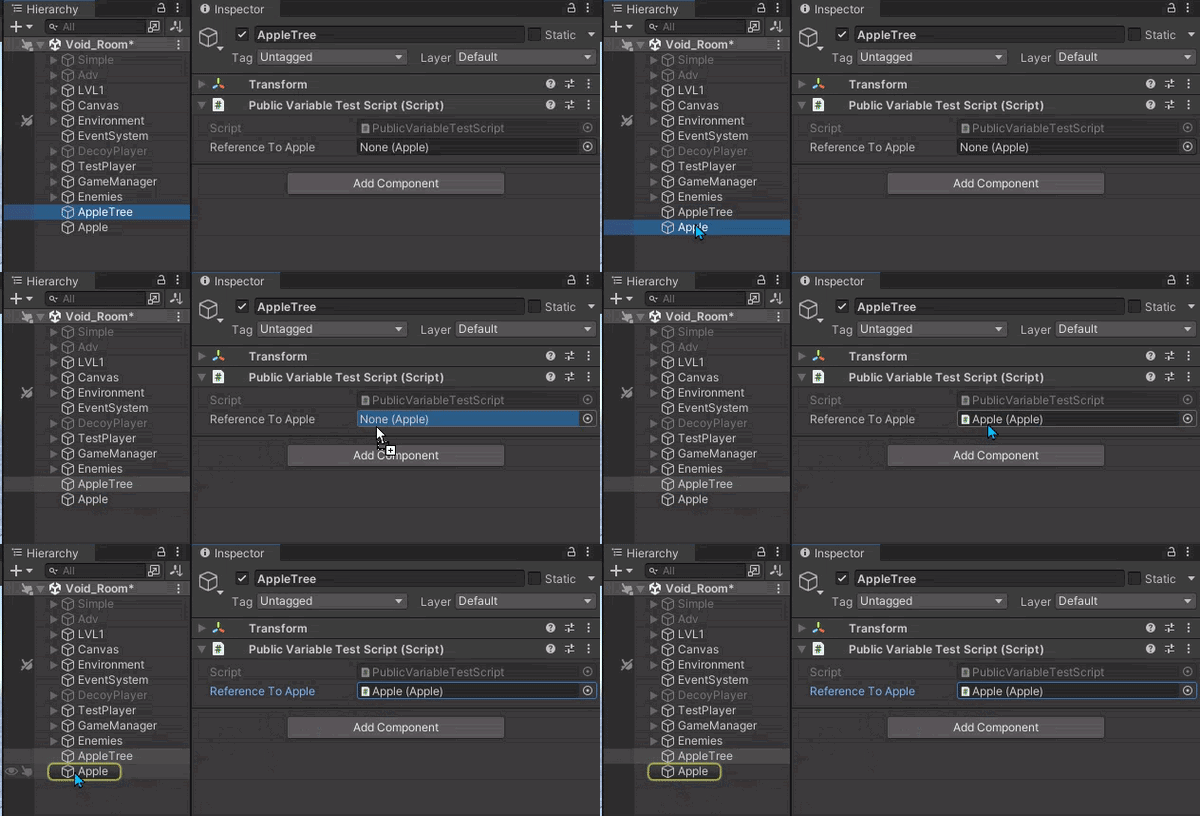 short hazel
You need Object A to have a reference to Object B.
Select Object A to see its properties and the scripts attached to it, drag-drop Object B onto Object A's script
timid ember
rocky canyon
https://user-images.githubusercontent.com/60554748/227689794-0f5b9380-7db1-4a99-...
yea i did that for print-->cube, and then eventsystem-->cube
its working
its working without it too
short hazel
Next time post a screenshot because it's very hard to understand what you mean and what your setup is
 rocky canyon
timid ember
```cs
//
namespace yo
{
public class the : MonoBehaviour
{
[Seri...
rocky canyon
timid ember
```cs
//
namespace yo
{
public class the : MonoBehaviour
{
[Seri...
{
    public class the : MonoBehaviour
    {
        [SerializeField] Transform Capsule;
        public void main()
        {
            if (Input.GetKey(KeyCode.W))
            {
                Capsule.position += new Vector3(0, 3, 0) * Time.deltaTime;
            }
        }
    }
}```

unity c# is a bit different.. nothings going to happen here..
you need to use a function Unity understands.. like `Update()` for example{
//if press key do this
}```So only start and update?
rocky canyon
well it depends.. there used for different things
Start runs once.. Update runs every frame
short hazel
They're all methods (functions) in the end, it's just that Unity recognizes and will run some of them for you.
rocky canyon

heres a list of them.. and when they're called
ofc u can create ur own functions..
say if u had
void Update() // <-- built in method Unity will run every frame
{
    Main(); // <-- since we call Main inside the Update it Will actually run every frame
}

void Main() // <-- custom method Unity wont run on its own
{

}```then Main would run every frame..
you can scatter Debug.Log("just some words" + orMaybeAVariable); methods thru-out ur code to help visualize whats happening.. it'll print out in the Console window
ivory bobcat
timid ember
So only start and update?
The functions under the Messages section would be called at their specified time by Unity. Any other function would require you or something other to call.
https://docs.unity3d.com/ScriptReference/MonoBehaviour.html
 rancid tinsel
hey im trying to change colours while the player is powered up, but i might be going about this the wrong way since my current method im 99% sure will cause a crash (while loop in update)

any ideas for how else to go about this? like what could i use instead of a while loop for instance
ivory bobcat
Why not just remove the while loop?
short hazel
It's not in Update, unless you changed its return type to IEnumerator
short hazel
In a coroutine, this will not freeze Unity since at least one yield is reached for all code paths in the loop
timid ember
are there any pins that specify super common problems
rancid tinsel
short hazel
In a coroutine, this will not freeze Unity since at least one `yield` is reached...
oh yeah thats also true
wait i can still use the wait for seconds outside of coroutines right?
rocky canyon
no
timid ember
timid ember
are there any pins that specify super common problems
for total beginners like me or will i have to study unity on their website
verbal dome
timid ember
are there any pins that specify super common problems
Well the closest that comes to mind is this page https://unity.huh.how/ maintained by vertx
But it's usually easier to troubleshoot when you already have a problem at hand
short hazel
rancid tinsel
wait i can still use the wait for seconds outside of coroutines right?
No, yield return does not compile until you change the return type of the enclosing method to one of the iterator types: IEnumerator, IEnumerable and their generic variants
rocky canyon
 theres also some youtube content like : "things i wish i would have known when i first started game-dev" but its not exactly a Common Questions things
 vagrant fjord
hello, i have an issue where my sword shrinks as well as my player when i slide, can someone help?
short hazel
If you alter the object's scale to reduce the collider's size, then all its children will be affected too
You may just alter the collider's size instead
timid ember
verbal dome
But it's usually easier to troubleshoot when you already have a problem at hand
i am currently learnig this for 2 weeks so i describe my problems super vaguely as i dont know what different things are
so i dont get my answer
vagrant fjord
short hazel
You may just alter the collider's size instead
how to do that?
short hazel
Depends on which collider you're using
vagrant fjord
capsule collider and rigidbody if that helps
verbal dome
timid ember
i am currently learnig this for 2 weeks so i describe my problems super vaguely ...
2 weeks is nothing, you are going to be pretty clueless for a while
We all were
short hazel
vagrant fjord
capsule collider and rigidbody if that helps
Capsules will have a .height property you can alter from the code
short hazel
What does "doesn't work" mean?
vagrant fjord
i did it, and its still shrinking
short hazel
Show the code
vagrant fjord
kk
verbal dome
vagrant fjord
doesnt work is there another way?
People generally don't give tips that "don't work", it usually means you did it wrong
timid ember

so my code is working
as in, the output has been generated.
on the gme screen
namespace yo
{
    public class the : MonoBehaviour
    {
        [SerializeField] Transform Capsule;
        public void Update()
        {
            if (Input.GetKey(KeyCode.W))
            {
                Capsule.position += new Vector3(0, 3, 0) * Time.deltaTime;
            }
            if (Input.GetKey(KeyCode.S))
            {
                Capsule.position += new Vector3(0, -3, 0) * Time.deltaTime;
            }
            if (Input.GetKey(KeyCode.A))
            {
                Capsule.position += new Vector3(-3, 0, 0) * Time.deltaTime;
            }
            if (Input.GetKey(KeyCode.D))
            {
                Capsule.position += new Vector3(3, 0, 0) * Time.deltaTime;
            }
        }
    }
}```If you read the error message, it'll give you a clue on what's the cause
timid ember
short hazel
If you read the error message, it'll give you a clue on what's the cause
is this causing the error?
 short hazel
You're looking at the script file's properties again
Instead of an instance of the script attached to an object in your scene
timid ember
f12 in vsc?
timid ember
yes
short hazel
One of these has the the script, and its Capsule variable is not filled in, so you get the error
Find it
 short hazel
Another instance of the script that doesn't have the cube dragged in it is somewhere else
Check other objects, you might have attached the script by accident
timid ember
ah
in the very beginning I put the code on main camera
testing out basic debug functions
thanks mate
 twin bolt
How do i get the animation out of a animator? I'm trying to adjust animation speed during runtime.
verbal dome
twin bolt
How do i get the animation out of a animator? I'm trying to adjust animation spe...
You can make the speed use a parameter
twin bolt
verbal dome
You can make the speed use a parameter
Oh ok.
 steep rose
twin bolt
Oh ok.
steep rose
twin bolt
Oh ok.
also take this to #🏃┃animation next time
verbal dome
twin bolt
Oh ok.

 kind rover
using System.Collections;
using System.Collections.Generic;
using Unity.VisualScripting;
using UnityEngine;
using UnityEngine.UIElements;

public class Tile : MonoBehaviour
{
    List<Collider> hitCollider= new List<Collider>();
    // Start is called before the first frame update
    void Start()
    {

    }

    // Update is called once per frame
    void Update()
    {

    }
    private void OnTriggerEnter(Collider other)
    {
        if (!hitCollider.Contains(other))
        {
            if(this.name=="Tile")
            {
                Debug.Log(" "+other.name);
                hitCollider.Add(other);
            }
        }
    }
    public Collider[] Collisioni()
    {
        foreach(Collider c in hitCollider)
        {
            Debug.Log(""+c.name);
        }
        return hitCollider.ToArray();
    }
}
guys i have an issue with my code, basically my collider list doesnt get filled with all the collision of "Tile", but if i check the singles collision names everyone of them shows up on the console, but only 2 get added to the list

the other tiles are Instantiated from the first one iam highlighting
twin bolt
verbal dome
How would i access this in script though, through animator?
steep rose
twin bolt
How would i access this in script though, through animator?
you access animator via script
public Animator _Animator
verbal dome
twin bolt
How would i access this in script though, through animator?
Just change the animator parameter like normally
So SetFloat
 queen adder
What apps can I use to learn code that is engaging but under £50/month
steep rose
queen adder
What apps can I use to learn code that is engaging but under £50/month
i would use unitys documentation and C# documentation to learn
those are free
queen adder
Huh I'll try it
rocky canyon
checked the pinned comments ☝️ top right
queen adder
YouTube keeps on feeding me an app set out like an RPG but I forgot the name
verbal dome
I havent used Unity Learn but it has a sort of progression/xp system, right?
nocturne kayak
Is there a way to avoid a feedback loop when moving a child that moves it's parent?
 dire flare
queen adder
What apps can I use to learn code that is engaging but under £50/month
dire flare
queen adder
What apps can I use to learn code that is engaging but under £50/month
Wait and listen
polar acorn
queen adder
What apps can I use to learn code that is engaging but under £50/month
!learn
eternal falconBOT
:teacher: Unity Learn ↗
Over 750 hours of free live and on-demand learning content for all levels of experience!
dire flare
If you are there say hi and if you are not here say nothing at all
Digiholic need help
thorny basalt
nocturne kayak
Is there a way to avoid a feedback loop when moving a child that moves it's pare...
Why do they need to be parented?
 scenic saffron
how do i change the skybox without changing the color of everything else (1 screenshot is without the skybox, 2. is with skybox, 3. is what i want it to look like)


 nocturne kayak
thorny basalt
Why do they need to be parented?
nocturne kayak
thorny basalt
Why do they need to be parented?
Because the parent will be movable in other ways, and i'd like for the transform controllers to move along with it
scenic saffron
dire flare
How do I change the sky colour
 dire flare
Thanks bro
steep rose
scenic saffron
how do i change the skybox without changing the color of everything else (1 scre...
this is more suited for #archived-urp or #archived-lighting
but remember you have 
cunning raven

anyone know why stateInfo.normalizeTime is never bigger equal than 1.0?
animation clip looping option is false
 polar acorn
Looks like the Any State condition keeps being fulfilled and it keeps going back into it
It never gets further than half way
cunning raven
ahh, does it mean that if my SetBool is true, Any State will keep spamming the animation?
 polar acorn
cunning raven
ahh, does it mean that if my SetBool is true, Any State will keep spamming the a...
polar acorn
cunning raven
ahh, does it mean that if my SetBool is true, Any State will keep spamming the a...
If that's the condition it's reading, yes
 polar acorn
If it's a one-and-done effect, you should use a trigger instead of a bool
it's basically a self-resetting boolean that goes back to off once it's used for a transition
cunning raven
oh thanks!!
how do i set condition to make it transit back?

i dont get any value for conditions
 polar acorn
You probably don't want any conditions but exit time
to have it go there when the animation ends
cunning raven
it works a lot better now thanks! but sometime it play twice. if SetTrigger is already called, then call again will it restart?
jade tartan
whole osprey
Dalphat is correct that Find by name is generally frowned upon for a lot of reas...
I'm starting to see, but I'm getting difficulty to properly create the variable. the one tutorial I've found give me very little instructions about what to put, and the result I get say that the name "Player" does not exist in the current context.

 polar acorn
jade tartan
I'm starting to see, but I'm getting difficulty to properly create the variable....
polar acorn
jade tartan
I'm starting to see, but I'm getting difficulty to properly create the variable....
What is Player
deft grail
cunning raven
you probably need a check to see if its already playing before you play it, if you havent done that yet
cunning raven
deft grail
you probably need a check to see if its already playing before you play it, if y...

I tried to check if name is same but not sure if correct way to do it
deft grail
cunning raven
idk if its different with whats this an animator script?
but if you reference normally an Animator it has a bool for if its playing
polar acorn
I think using a trigger and letting the animation exit time take care of exiting it is the way to go, unless you want the attack to chain into itself
cunning raven
I set exit time then call SetTrigger once but it sometimes still play twice
 polar acorn
What calls Enter? You might be calling it twice
nocturne kayak
ok i KNOW this one is simple, or so help me god:
How do i calculate the distance between two vectors with negative results?
like a Vector3.Distance, but not absolute
polar acorn
Subtraction
jade tartan
I was told to create the variable by putting in a void awake Player = GameObject.FindGameObjectWithTag("Player"); but apparently this isn't enough...
nocturne kayak
Fair enough, but what if i want a float value from that?
polar acorn
jade tartan
I was told to create the variable by putting in a void awake Player = GameObject...
Show full !code
eternal falconBOT
Posting code
📃 Large Code Blocks
Use links to services like:
https://gdl.space/, https://paste.ofcode.org/, https://hatebin.com/, https://paste.myst.rs/, https://hastebin.com/
📃 Inline Code
Surround code with three backquotes. Not quotation marks.
To format as C#, add cs to the first line:
```cs
// Your code here
```
Add a comment with a line number if there is an error message.
polar acorn
nocturne kayak
Fair enough, but what if i want a float value from that?
Then there's no such thing as a negative magnitude
cunning raven
thank you, i'll have to figure a way why my code call Enter multiple time
jade tartan
polar acorn
Show full !code

 polar acorn
jade tartan
polar acorn
jade tartan
!screenshots
eternal falconBOT
 No
No
Be mindful, if someone requests your code as text, don't send a screenshot!
nocturne kayak
polar acorn
Then there's no such thing as a negative magnitude
god damn it
i'm so, SO close
ivory bobcat
How to post !code
eternal falconBOT
Posting code
📃 Large Code Blocks
Use links to services like:
https://gdl.space/, https://paste.ofcode.org/, https://hatebin.com/, https://paste.myst.rs/, https://hastebin.com/
📃 Inline Code
Surround code with three backquotes. Not quotation marks.
To format as C#, add cs to the first line:
```cs
// Your code here
```
Add a comment with a line number if there is an error message.
nocturne kayak
jade tartan
"using UnityEngine;
using System.Collections;
public class DeathZone : MonoBehaviour
{
private Transform playerSpawn;
private Animator fadeSystem;
private void Awake()
{
    playerSpawn = GameObject.FindGameObjectWithTag("PlayerSpawn").transform;
    fadeSystem = GameObject.FindGameObjectWithTag("FadeSystem").GetComponent<Animator>();
    Player = GameObject.FindGameObjectWithTag("Player");
}

private void OnTriggerEnter2D(Collider2D collision)
{
    if(collision.CompareTag("Player"))
    {
        StartCoroutine(ReplacePlayer(collision));
        StartCoroutine(Inactivate(collision));
    }
}

private IEnumerator ReplacePlayer(Collider2D collision)
{
    fadeSystem.SetTrigger("FadeIn");
    yield return new WaitForSeconds(2f);
    collision.transform.position = playerSpawn.position;
}

private IEnumerator Inactivate(Collider2D collision)
{
    Player.SetActive(false);
    yield return new WaitForSeconds(1f);
    Player.SetActive(true);
}
}
"
polar acorn
jade tartan
"using UnityEngine;
using System.Collections;
public class DeathZone : MonoBeha...
!code
eternal falconBOT
Posting code
📃 Large Code Blocks
Use links to services like:
https://gdl.space/, https://paste.ofcode.org/, https://hatebin.com/, https://paste.myst.rs/, https://hastebin.com/
📃 Inline Code
Surround code with three backquotes. Not quotation marks.
To format as C#, add cs to the first line:
```cs
// Your code here
```
Add a comment with a line number if there is an error message.
deft grail
jade tartan
"using UnityEngine;
using System.Collections;
public class DeathZone : MonoBeha...
did you miss the part that says "large code blocks"
 full kernel
jade tartan
"using UnityEngine;
using System.Collections;
public class DeathZone : MonoBeha...
full kernel
jade tartan
"using UnityEngine;
using System.Collections;
public class DeathZone : MonoBeha...
Close, but it's not quotes or apostrophes, it's the backtick (just below the escape key) three times
jade tartan
Hastebin is a free web-based pastebin service for storing and sharing text and code snippets with anyone. Get started now.
polar acorn
jade tartan
Got it: https://hastebin.com/share/zilocabugo.csharp
So, you're setting a variable named Player in Awake. Where do you create that variable?
jade tartan
polar acorn
So, you're setting a variable named `Player` in `Awake`. Where do you create tha...
I thought I just did by setting the variable, but now, I have doubts...
deft grail
jade tartan
I thought I just did by setting the variable, but now, I have doubts...
thats not how it works no
and even if you did that by putting a type before the name, it would be local to the method you put it in
polar acorn
jade tartan
I thought I just did by setting the variable, but now, I have doubts...
You've set the variable, but in order to create it you'd need to specify a type
cunning raven
how to know if SetTrigger has finish playing? The animator has exit time and switch itself properly but this if statement is never true

i tried checking if the animation name is no longer the same which mean it has changed but is there a better way?


 hybrid gust
How would I go about changing the value of a property of an attached component of a gameObject from a CustomEditor script?
 earnest wind
so that i dont have error of max = 10, yes i know its 10
hybrid gust
For example, i have a CustomEditor for a script, and that script is attached to a gameObject with a CinemachineVirualCamera and I want to change the lookAt field from the custom editor
verbal dome
earnest wind
so that i dont have error of max = 10, yes i know its 10
You mean the serialization depth error?
earnest wind
verbal dome
You mean the serialization depth error?
okay im done, im not making it like that, i will make so that the entity asks questions, and you respond, because if i make it in depth, it would quatrate each option
verbal dome
hybrid gust
For example, i have a CustomEditor for a script, and that script is attached to ...
You could just GetComponent from the target
earnest wind
earnest wind
okay im done, im not making it like that, i will make so that the entity asks qu...
its a lot easier and it wont require that much work
verbal dome
hybrid gust
For example, i have a CustomEditor for a script, and that script is attached to ...
You probably want to call Undo.RecordObject and/or SetDirty so the change persists.
Btw theres a channel for this stuff #↕️┃editor-extensions
hybrid gust
verbal dome
You probably want to call Undo.RecordObject and/or SetDirty so the change persis...
has that channel always been there? my b I never even noticed it, thx
verbal dome
Yep
tulip nimbus
For no apparent Reason at all my Compiler takes ages to compile even if i just change one line of code or one variable or anything at all.
What can i do?
verbal dome
How long?
tulip nimbus
~20 Seconds sometime
verbal dome
You might want to look into assembly definitions
So it only has to recompile the code in the assembly you modified
verbal dome
Oh and also, could try using the profiler in edit mode to see what takes so long
Unity has to reserialize/reload a bunch of stuff on recompile
It could be some heavy code in a ScriptableObject's Awake method or something similiar
nocturne kayak
Alright
i have SOME ammount of progress
now, the whole thing is double transforming due to the axis handler being a child of the object being translated
is there any script-side way to avoid that without changing the hierarchy?
this is the current code, it's running on the parent
twin bolt
How do i round a decimal to hundredths place, like for example: 0.3456 to 0.34
steep rose
mathf.round
twin bolt
I tried this.
steep rose
sorry, im having a brain fart remembering this function
there is another for really small numbers
i just forget what it is
polar acorn
I'm sure there's a better way but: Multiply by 100, round, divide by 100?
verbal dome
twin bolt
How do i round a decimal to hundredths place, like for example: 0.3456 to 0.34
Is it for displaying a text or something else?
twin bolt
polar acorn
I'm sure there's a better way but: Multiply by 100, round, divide by 100?
Okay i'll try this. Thanks
twin bolt
verbal dome
Is it for displaying a text or something else?
Yes.
steep rose
ah snapping.snap thats what it was
verbal dome
You can just do myFloat.ToString("F2") to format it with two decimals
verbal dome
Or ToString("0.00") if you prefer
tulip nimbus
When this Method is called, the Object which instantiates the BangVX prefab is just still. Is this because of the transform.position?
 polar acorn
tulip nimbus
When this Method is called, the Object which instantiates the BangVX prefab is j...
polar acorn
tulip nimbus
When this Method is called, the Object which instantiates the BangVX prefab is j...
What is supposed to be moving it
tulip nimbus
The Object which is excecuting this code to summon the prefab is using this code and only this code to move
 polar acorn
tulip nimbus
The Object which is excecuting this code to summon the prefab is using this code...
polar acorn
tulip nimbus
The Object which is excecuting this code to summon the prefab is using this code...
So, the object that spawns the prefab also has this code on it?
Or does the prefab have a script with this code on it?
tulip nimbus
just the object not the prefab
polar acorn
So, the object moves fine, and then when it spawns something, it stops moving?
tulip nimbus
jup, until i let go of the button that triggers the Method
and when it stops spawning the prefabs
polar acorn
Do you have any errors in your console?
tulip nimbus
no none ):
polar acorn
Show the full !code of this script
eternal falconBOT
Posting code
📃 Large Code Blocks
Use links to services like:
https://gdl.space/, https://paste.ofcode.org/, https://hatebin.com/, https://paste.myst.rs/, https://hastebin.com/
📃 Inline Code
Surround code with three backquotes. Not quotation marks.
To format as C#, add cs to the first line:
```cs
// Your code here
```
Add a comment with a line number if there is an error message.
 true oriole
how do i slove this issue

 wanton cradle
I'm having an issue with my player movement, I'm checking in the logs that the script does work and no errors pop up, however when I hit play, the character does not move whatsoever, and this issue started happening (I think) when I attached animations to my player, however the animation plays out and Unity even recognizes the inputs and the values but it still doesn't work?
deft grail
wanton cradle
I'm having an issue with my player movement, I'm checking in the logs that the s...
are you setting the position to 0/something in your animation?
verbal dome
true oriole
how do i slove this issue
Start by configuring your !ide so you see the error higlighting in your code editor
eternal falconBOT
💡 IDE Configuration
If your IDE is not autocompleting code
or underlining errors, please configure it.
Select one:
•  Visual Studio (Installed via Unity Hub)
• Visual Studio (Installed manually)
•  VS Code
•  JetBrains Rider
• :question: Other/None
wanton cradle
deft grail
are you setting the position to 0/something in your animation?
I've only ever touched in the transitions and a speed value
 deft grail
wanton cradle
I've only ever touched in the transitions and a speed value
deft grail
wanton cradle
I've only ever touched in the transitions and a speed value
so you havent actually done any animation?
are they all just empty?
wanton cradle
no, they have placeholder sprites
deft grail
wanton cradle
no, they have placeholder sprites
ok so in the animations can you check to see if you change the position perhaps.
and if you dont then show the code !code
eternal falconBOT
Posting code
📃 Large Code Blocks
Use links to services like:
https://gdl.space/, https://paste.ofcode.org/, https://hatebin.com/, https://paste.myst.rs/, https://hastebin.com/
📃 Inline Code
Surround code with three backquotes. Not quotation marks.
To format as C#, add cs to the first line:
```cs
// Your code here
```
Add a comment with a line number if there is an error message.
true oriole
verbal dome
Start by configuring your !ide so you see the error higlighting in your code edi...
how do i do that
verbal dome
Read the bot message below my message
wanton cradle
deft grail
ok so in the animations can you check to see if you change the position perhaps....
I don't see any position changes, but here's the code https://hastebin.com/share/firudikaja.csharp
Hastebin is a free web-based pastebin service for storing and sharing text and code snippets with anyone. Get started now.
deft grail
wanton cradle
I don't see any position changes, but here's the code https://hastebin.com/share...
ok seems fine, you said it worked before animations?
what if you disable the Animator component does it work then?
wanton cradle
weirdly enough, it doesn't
I've tried removing the animator component in the script twice now
nocturne kayak
nocturne kayak
seconding on this
deft grail
wanton cradle
I've tried removing the animator component in the script twice now
wdym? i mean the actual component, this should have nothing to do with the script
in the inspector the component has a Checkbox which you can disable, or just remove the component entirely
wanton cradle
deft grail
wdym? i mean the actual component, this should have nothing to do with the scrip...
here it is in action, even without it, the issue's still present
 drowsy oriole
I want to make it so when I press a button, it adds string ThisCosmetic into another scripts list of strings, Cosmetics It Cart
polar acorn
drowsy oriole
I want to make it so when I press a button, it adds string ThisCosmetic into ano...
So which part of that do you not know how to do
deft grail
wanton cradle
here it is in action, even without it, the issue's still present
i can see the Velocity changing, the X is -120 which is really high i think?
it just looks like something is blocking it, based of looking at the velocity
drowsy oriole
polar acorn
So which part of that do you not know how to do
make a part that adds the string to the list
polar acorn
drowsy oriole
make a part that adds the string to the list
list.Add("SomeString")
deft grail
deft grail
i can see the Velocity changing, the X is -120 which is really high i think?
ah i see the problem of that, your Scale of the player is 64! thats crazy
it should be 1
polar acorn
deft grail
ah i see the problem of that, your Scale of the player is 64! thats crazy
Jesus that is massive!
 deft grail
which would also explain the high values, but that shouldnt have anything to do with the movement itself if it worked before
wanton cradle
deft grail
it should be 1
well, yeah, if it is 1 the sprite gets really tiny
 deft grail
wanton cradle
well, yeah, if it is 1 the sprite gets really tiny
deft grail
wanton cradle
well, yeah, if it is 1 the sprite gets really tiny
in your sprite in the assets window, did you change the pixel per unit size to 16 or whatever your sprite is?
polar acorn
wanton cradle
well, yeah, if it is 1 the sprite gets really tiny
Decrease the pixels per unit
wanton cradle
oh
deft grail
wanton cradle
oh
i think what ill try is disable the character controller 2d, and write custom code in your playermovement script
reference your Rigidbody2D and do rigidbody.velocity = horizontalMove;
and see if that will work
and if even that doesnt work then i have no idea, might just need to start debugging things or make a new GameObject and see if that moves
wanton cradle
well something else popped up here
wanton cradle
deft grail
reference your Rigidbody2D and do `rigidbody.velocity = horizontalMove;`
I'll see if it'll work
wanton cradle
wanton cradle
well something else popped up here
deft grail
wanton cradle
pixels per unit should be the size of your Sprite
so if its 16x16 then use 16
deft grail
wanton cradle
did you adjust the values of the jump height and stuff after scaling the player?
wanton cradle
Yes
drowsy oriole
polar acorn
`list.Add("SomeString")`
it just keeps adding them indefinetly
polar acorn
drowsy oriole
it just keeps adding them indefinetly
Where did you put it
drowsy oriole
In Enabled()
polar acorn
And what calls Enabled()
drowsy oriole
(Enabled is the call of the button being pressed)
deft grail
wanton cradle
Yes
id say just try making your own movement, if that doesnt work then make a new GameObject with just a cube sprite or something see if that works fine
polar acorn
drowsy oriole
(Enabled is the call of the button being pressed)
Then every time that happens, it will add a thing to the list
drowsy oriole
Yeah, but it stays enabled until it is disbled
polar acorn
Most things do
drowsy oriole
No, Enabled() is on until Disabled() is called
polar acorn
drowsy oriole
No, Enabled() is on until Disabled() is called
As in, you're calling Enabled() every frame until it's disabled?
drowsy oriole
Yes
polar acorn
then why did you say this:
#💻┃code-beginner message
When that absolutely, 100%, is not when Enabled is called
drowsy oriole
I press the button, Enabled() is called every frame until Disabled() is called
polar acorn
So how about instead of putting it in the thing that's called every frame, put it in the thing that's called once
The thing the button does
drowsy oriole
How do I stop Enabled() being called every frame?
polar acorn
Where are you calling it
drowsy oriole
`using System.Collections;
using System.Collections.Generic;
using UnityEngine;
using TMPro;
public class PlasticButton : MonoBehaviour
{
public Material Unpressed;
public Material Pressed;
public TextMeshPro CartText;
public bool IsEnabled;
public string HandTag;
public MeshRenderer ButtonRenderer;
public CartMaker CartMaker;
public string ThisCosmetic;
void Start()
{
    IsEnabled = false;
    Disabled();
}

public void OnTriggerEnter(Collider other)
{
    if (other.tag == HandTag)
    {
        IsEnabled = true;
        Enabled();
    }
}
public void Disabled()
{
    CartText.text = "Add to cart";
    ButtonRenderer.material = Unpressed;
}
public void Enabled()
{
    CartText.text = "Remove from cart";
    ButtonRenderer.material = Pressed;
    CartMaker.CosmeticsInCart.Add(ThisCosmetic);
}
void Update()
{
    if(IsEnabled == true)
    {
        Enabled();
    }

    if(IsEnabled == false)
    {
        Disabled();
    }
}
}`
polar acorn
drowsy oriole
`using System.Collections;
using System.Collections.Generic;
using UnityEngine;
...
!code
eternal falconBOT
Posting code
📃 Large Code Blocks
Use links to services like:
https://gdl.space/, https://paste.ofcode.org/, https://hatebin.com/, https://paste.myst.rs/, https://hastebin.com/
📃 Inline Code
Surround code with three backquotes. Not quotation marks.
To format as C#, add cs to the first line:
```cs
// Your code here
```
Add a comment with a line number if there is an error message.
polar acorn
drowsy oriole
!code
eternal falconBOT
Posting code
📃 Large Code Blocks
Use links to services like:
https://gdl.space/, https://paste.ofcode.org/, https://hatebin.com/, https://paste.myst.rs/, https://hastebin.com/
📃 Inline Code
Surround code with three backquotes. Not quotation marks.
To format as C#, add cs to the first line:
```cs
// Your code here
```
Add a comment with a line number if there is an error message.
drowsy oriole
using System.Collections.Generic;
using UnityEngine;
using TMPro;

public class PlasticButton : MonoBehaviour
{
    public Material Unpressed;
    public Material Pressed;
    public TextMeshPro CartText;
    public bool IsEnabled;
    public string HandTag;
    public MeshRenderer ButtonRenderer;
    public CartMaker CartMaker;
    public string ThisCosmetic;

    void Start()
    {
        IsEnabled = false;
        Disabled();
    }

    public void OnTriggerEnter(Collider other)
    {
        if (other.tag == HandTag)
        {
            IsEnabled = true;
            Enabled();
        }
    }
    public void Disabled()
    {
        CartText.text = "Add to cart";
        ButtonRenderer.material = Unpressed;
    }
    public void Enabled()
    {
        CartText.text = "Remove from cart";
        ButtonRenderer.material = Pressed;
        CartMaker.CosmeticsInCart.Add(ThisCosmetic);
    }
    void Update()
    {
        if(IsEnabled == true)
        {
            Enabled();
        }

        if(IsEnabled == false)
        {
            Disabled();
        }
    }
}
!code
eternal falconBOT
Posting code
📃 Large Code Blocks
Use links to services like:
https://gdl.space/, https://paste.ofcode.org/, https://hatebin.com/, https://paste.myst.rs/, https://hastebin.com/
📃 Inline Code
Surround code with three backquotes. Not quotation marks.
To format as C#, add cs to the first line:
```cs
// Your code here
```
Add a comment with a line number if there is an error message.
drowsy oriole
polar acorn
!code
bro what? just help me I sent this 5 times
polar acorn
drowsy oriole
bro what? just help me I sent this 5 times
Perhaps there's a portion of the bot message about how to post large code blocks you could potentially try reading
drowsy oriole
Hastebin is a free web-based pastebin service for storing and sharing text and code snippets with anyone. Get started now.
there can you PLEASE read that
polar acorn
drowsy oriole
https://hastebin.com/share/ogonibejoj.csharp
If you don't want the function to run every frame, instead of setting a boolean you check in update, call Enable or Disable directly
drowsy oriole
How?
polar acorn
Do you know how to call a function
nocturne kayak
Is there a way to get how much a child's being transformed and get that transformation to the parent?
polar acorn
nocturne kayak
Is there a way to get how much a child's being transformed and get that transfor...
localPosition and so on are how much the child object is offset from the parent. If you add up all the localPositions until you run out of parent objects, you'll get the world position
polar acorn
I still don't know what you actually want to be happening
nocturne kayak
Exactly what's happening
just...
slower?
I put on a rough script so when you drag the child the parent moves, but well, since the parent moves, the child moves, and thus you get double transforming, i moved them individually later on to demonstrate at what speed they should be moving
This code's on the parent object
polar acorn
You could use a ParentConstraint instead of having this object actually be a child object. Then when the "Child" object moves, you temporarily disable the parent constraint on the child, and enable one on the "Parent" that makes it a "Child" of this one
earnest wind
polar acorn
Do you know how to call a function
😭 i dont think he does
steep rose
everyone starts somewhere
 muted wadi
i genuinely have no clue what im doing wrong
polar acorn
polar acorn
You could use a ParentConstraint instead of having this object actually _be_ a c...
What I think I would do here is make a script for a MutualParentGroup that contains a list of every other object that'd be moved with it in this manner. Whenever this object moves, you would loop through that list and set each other object's ParentConstraint to be a "Child" of this, and disable this object's ParentConstraint. Then, when you stop moving it, re-enable this one and un-parent everything else
earnest wind
steep rose
everyone starts somewhere
yes thats true but im really sure he is making a multiplayer game as we speak
muted wadi
nevermind, found the issue
steep rose
earnest wind
yes thats true but im really sure he is making a multiplayer game as we speak
he is?
earnest wind
steep rose
he is?
he has a gorilla tag photo, and he is in the "B.Awesome" server, so he is 100% making a gtg fan game
dont ask me why im in that server, i just wanted to know how to know if you are banned on playfab
polar acorn
earnest wind
😭 i dont think he does
then they should say so, so I can explain how intead of just ghosting follow-up questions ¯_(ツ)_/¯
steep rose
earnest wind
he has a gorilla tag photo, and he is in the "B.Awesome" server, so he is 100% m...
well yes thats true, im not sure he making it multiplayer
since he does not know how to call a function
but either way
earnest wind
polar acorn
then they should say so, so I can explain how intead of just ghosting follow-up ...
i just analyzed the script, its a basic Shop system, he probably doesnt know how it works as i think this is from the "free scrips" in the gtg fan games servers
earnest wind
steep rose
well yes thats true, im not sure he making it multiplayer
all gtg fangames are made as multiplayer i can show u from the b.awesome help, everyone has basic problems that you should know
earnest wind
polar acorn
I have _zero_ idea what gtag is
i can tell you, its gorilla tag, a vr game, where the fanbase is mostly 10-15 yr olds
polar acorn
Yes that's mostly why I don't think I care to
steep rose
earnest wind
all gtg fangames are made as multiplayer i can show u from the b.awesome help, e...
well yes but I doubt he is trying to implement in rn, and i humbly decline your offer for that server
earnest wind
steep rose
well yes but I doubt he is trying to implement in rn, and i humbly decline your ...

i used to help them
polar acorn
earnest wind
There's enough people who don't read in this channel, I don't want to go to another server that has even worse reading comprehension
earnest wind
most of them dont know how to read the errors, they dont know the difference between the file and class in the file
earnest wind
polar acorn
There's enough people who don't read in _this_ channel, I don't want to go to an...
i do not advise you to join that server
steep rose
we will not
steep rose
im guessing he learned that multiplayer is extremely hard and toned it down, basic common sense
 rich adder
that happens here too
earnest wind
steep rose
im guessing he learned that multiplayer is extremely hard and toned it down, bas...
most of them quit before even getting multiplayer to work
earnest wind
rich adder
that happens here too
every single one of them somehow doesnt know how to screenshot the screen atleast
steep rose
earnest wind
most of them quit before even getting multiplayer to work
he hasnt, which is good
earnest wind
steep rose
he hasnt, which is good
yes
earnest wind
steep rose
since you have to be stubborn to program
ive been doing it for 5 years
polar acorn
earnest wind
most of them quit before even getting multiplayer to work
Which is why over on this server we say to not attempt multiplayer for like, years
earnest wind
polar acorn
Which is why over on this server we say to _not_ attempt multiplayer for like, y...
i atempted it only in the 5th year lmao
polar acorn
You shouldn't be touching multiplayer until you've got several single-player pojects under your belt
earnest wind
and then i had milions of bugs
earnest wind
polar acorn
You shouldn't be touching multiplayer until you've got _several_ single-player p...
yeahhh
steep rose
but either way, its best for him to learn
lets not try and bash him now
ive certainly started there, we all have
 earnest wind
steep rose
lets not try and bash him now
earnest wind
steep rose
lets not try and bash him now
yeah
i have nothing against the first guy from this server
earnest wind
steep rose
ive certainly started there, we all have
yes of course
thats how everyone learns
the hard way or the easy way
steep rose
there is no easy way, you learn by failures
earnest wind
steep rose
there is no easy way, you learn by failures
easy way is getting so lucky u have no errors
one in a billion
i was kinda lucky on my third multiplayer run
nothing worked 2 times
3rd time it somehow worked
ahh its 0:22, i have a lot of work tommorow, see you guys, good night
polar acorn
We don't need to turn this channel into a "Laughing at Gorilla Tag coders" channel that's what the resident chat is for
 mortal edge
So uh my unity has been stuck on "validating" for 6 hours and I've been doing everything people suggest and it still doesn't work
 fierce geode
What's a good way to give unique IDs to scriptable objects? Just planning ahead for an RPG on how I want to save my items and I feel like it would take up less space to just refer to an item by ID. But I don't know how I'd do that. I could give each of them a unique number but that runs into the manual fact of me accidentally having two items with the same ID.
Best I can think of is maybe a script that holds a dictionary of items; with the key being the ID and the value being the item itself. I could also just use a list where the ID is the index of where the item is.
I also don't know if anything I'm saying is making any sense?
 teal viper
fierce geode
What's a good way to give unique IDs to scriptable objects? Just planning ahead ...
teal viper
fierce geode
What's a good way to give unique IDs to scriptable objects? Just planning ahead ...
Another SO with an array/list of all the items. The index of the item in the array is the id.
So yes, you're on the right track.
fierce geode
Thanks!
drowsy oriole
Can someone help me delay a function?
deft grail
drowsy oriole
Can someone help me delay a function?
use Invoke, a timer, a Coroutine
deft grail
drowsy oriole
How?
a Coroutine is just a IEnumerator instead of void that you need to yield return inside of, which you can return a wait for seconds
invoke is as simple as it gets you can see the docs
a timer is just a float that decreases/increases by deltaTime
deft grail
drowsy oriole
can you write it
i told you what to do , you can write it yourself
teal viper
drowsy oriole
can you write it
Check the documentation/manual or the !learn resources.
eternal falconBOT
:teacher: Unity Learn ↗
Over 750 hours of free live and on-demand learning content for all levels of experience!
teal viper
It's all covered
drowsy oriole
Ok I wrote this.
    {
        yield return
}```ignore the cs
public IEnumerator Delay4()
    {
        yield return
    }
what you need to return is a new WaitForSeconds
deft grail
drowsy oriole
```
public IEnumerator Delay4()
{
yield return new WaitForSeconds = ...
what does the error message say
if there is one
drowsy oriole
"A new expression requires an argument list or (), [], or {} after type"
deft grail
drowsy oriole
"A new expression requires an argument list or (), [], or {} after type"
so do (4) instead of = 4
drowsy oriole
Thanks
polar acorn
drowsy oriole
```
public IEnumerator Delay4()
{
yield return new WaitForSeconds = ...
I guess that answers my question from earlier
 queen adder
I'm trying to make a legal screen for this port I'm making, how would I make it to where these 3 scenes are together and are fading in and out until it gets to the menu?
 wintry quarry
queen adder
I'm trying to make a legal screen for this port I'm making, how would I make it ...
wintry quarry
queen adder
I'm trying to make a legal screen for this port I'm making, how would I make it ...
wdym by "fading in and out"?
You would load the scene, fade the objects in, fade the objects out, then load the next scene.
how to do that depends on exactly what the objects are
queen adder
wintry quarry
You would load the scene, fade the objects in, fade the objects out, then load t...
yeah that, how would I?
wintry quarry
Really having three separate scenes for a splash screen seems like overkill
It would be much easier to put them all in one scene. What are they, just images?
Just show each in sequence. You can use DOTween or write a coroutine for it.
queen adder
wintry quarry
It would be much easier to put them all in one scene. What are they, just images...
the Logo screen is a animation
queen adder
wintry quarry
Use Timeline
how do I get to it? lol
teal viper
queen adder
how do I get to it? lol
There's a manual that covers it in details.
wintry quarry
queen adder
how do I get to it? lol
queen adder
wintry quarry
https://docs.unity3d.com/Packages/com.unity.timeline@1.8/manual/index.html
https...
Yeah im looking at it but I dont have Sequencing

nvm
 bold iron
how do i make my canvas smaller? my character is just a standard 1x1 square but the canvas scroll view ui is way too massive.
ivory bobcat
bold iron
how do i make my canvas smaller? my character is just a standard 1x1 square but ...
This probably isn't a question for the beginner coding channel, try #💻┃unity-talk for non coding questions.
bold iron
ivory bobcat
This probably isn't a question for the beginner coding channel, try <#4978724242...
oh ok
 sullen perch
I have to identical ai and yet 1 is working and the other isnt, you can see the error is only for the wolf, pls help.

 wintry quarry
sullen perch
I have to identical ai and yet 1 is working and the other isnt, you can see the ...
wintry quarry
sullen perch
I have to identical ai and yet 1 is working and the other isnt, you can see the ...
Looks like a fairly basic NullReferenceException
You would start by reading the error message and locating the filename and line number where it is occurring
Looks like "EnemyAITrue" line 65
sullen perch
i looked at that
nothing wrong, it works on the other ai, and there is no differance in script
ivory bobcat
You might want to show the code as it might be the reason why something isn't working as expected.

 ivory bobcat
How to post !code (follow the large code blocks guide for larger bits of code and the inline for fewer bits of code)
eternal falconBOT
Posting code
📃 Large Code Blocks
Use links to services like:
https://gdl.space/, https://paste.ofcode.org/, https://hatebin.com/, https://paste.myst.rs/, https://hastebin.com/
📃 Inline Code
Surround code with three backquotes. Not quotation marks.
To format as C#, add cs to the first line:
```cs
// Your code here
```
Add a comment with a line number if there is an error message.
wintry quarry
sullen perch
clearly currentDest is null. You can't say "nothing is wrong" when an exception is being thrown
wintry quarry
sullen perch
this appears to be the incorrect script. We want "EnemyAITrue", this is "EnemyAi"
sullen perch
u can check code, there is nothing, and i have another ai that has the same ai code but it dosent work
thats just the name
its the same
thing
teal viper
sullen perch
u can check code, there is nothing, and i have another ai that has the same ai c...
I've seen you here for a while and we even debugged several issues iirc, but you still don't know how to debug your code?
wintry quarry
sullen perch
u can check code, there is nothing, and i have another ai that has the same ai c...
Why do you have two scripts that are the same? Seems pointless. Anyway, what do you mean "there is nothing". There is clearly an error, and I pointed out what it is already
you are trying to access a null reference
sullen perch
Its just called something differant, idk why. but there is only 1 script


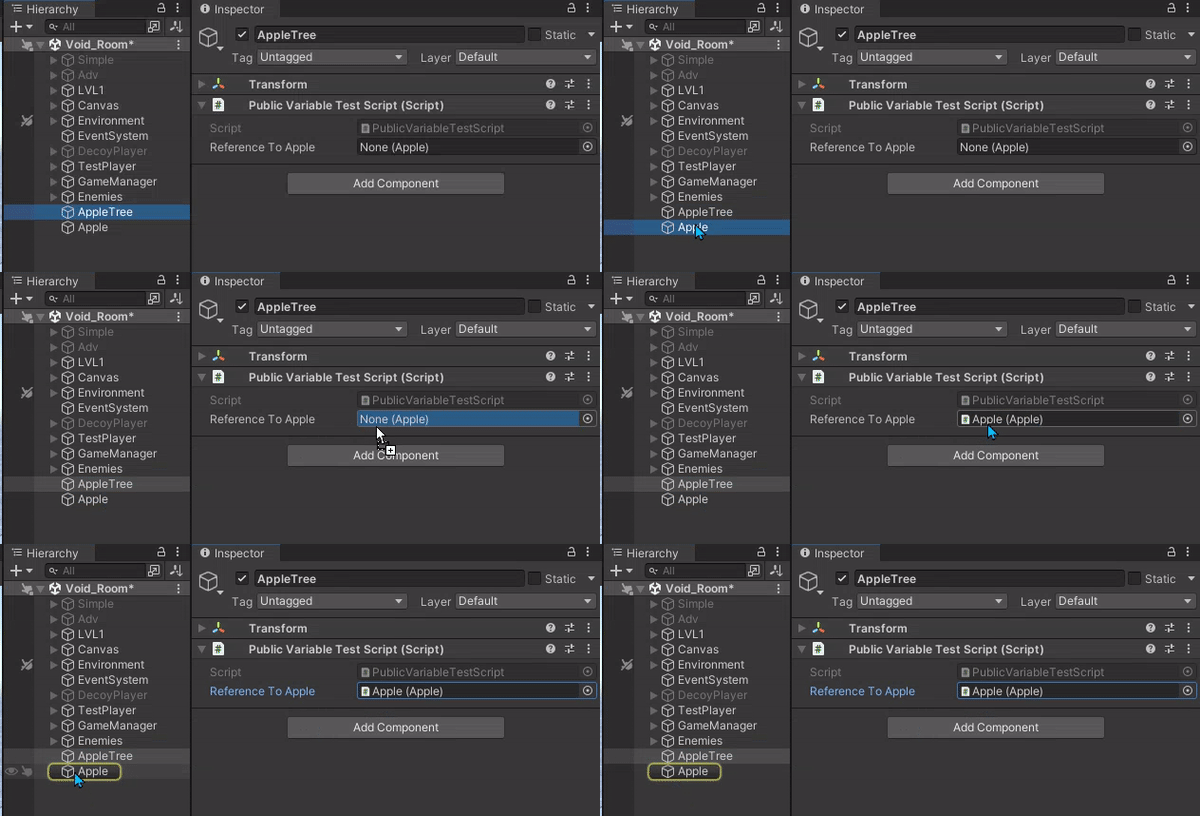 wintry quarry
nocturne kayak
Why are the freeze position constraints not doing jack here?
wintry quarry
nocturne kayak
Why are the freeze position constraints not doing jack here?
define "here"? What do you expect them to be doing?
 cosmic dagger
nocturne kayak
cosmic dagger
nocturne kayak
What do you mean? What do you expect them to do?
nocturne kayak
I... expect them not to be able to make the object move in X and Y, only Z
as a freeze position constraint should do
i assume.
wintry quarry
nocturne kayak
I... expect them not to be able to make the object move in X and Y, only Z
The physics engine will not move your object on the x and y axis. Your code and other components still can.
nocturne kayak
God damn it.
cosmic dagger
You can still manually move the object on those axes via code . . .
nocturne kayak
Thanks, guys
nocturne kayak
cosmic dagger
You can still manually move the object on those axes via code . . .
It's a grabbable object
I'm trying to make sure it can only ever move in one axis
So it's not exactly easily changeable by code
ivory bobcat
The constraint would only apply if you're using rigid body to move the object.
nocturne kayak
Welp.
I'm at a loss
it's a lot of roadblocking after roadblocking
i'm trying to recreate this https://youtu.be/tCqGLg4cFuw?t=435
The Layout app on Meta Quest 3 is a versatile mixed reality tool that lets you measure and visualize objects in your real-world environment. Accurately measure the dimensions of furniture, artwork, or any object, and then use the app to see how it would look in different parts of your space. You can also use Layout to measure room dimensions, en...
which sure, is pretty complex, but for now i'm only tryaing to make the move tool
and just move it on the horizontal plane
teal viper
nocturne kayak
and just move it on the horizontal plane
You had it almost working with code the other day. I'm not sure why you shifted to rigidbody constraints...
nocturne kayak
Well
As always
hit a roadblock.
Last implementation was ALMOST there
sure it was double transforming but it worked
then i went to test it in VR
completly broke apart.
so i'm looking for other methods
teal viper
Not sure what solution you tried that broke, but did you even try to debug it?
Do you understand why it didn't work?
If you don't understand the cause of an issue, you're bound to face it again.
nocturne kayak
teal viper
Do you understand why it didn't work?
Not entirely, there are so many moving pieces that if i attempt to debug it it would probably take months, since i'd have to get a good enough grasp on the basics of how the MetaSDK handles grabbling and transforming
This is the "latest" version so far
Why it does that when i grab it? who knows.
teal viper
nocturne kayak
Not entirely, there are so many moving pieces that if i attempt to debug it it w...
You don't need to get into the innards of the sdk. You just need to know how the API works. That's a few hours of reading the docs at most if you're a slow reader.
The rest would depend on what you do with the values returned by the sdk.
nocturne kayak
teal viper
You don't need to get into the innards of the sdk. You just need to know how the...
I thought i understood it, but Meta's documentation is
well
if it was lacking it'd be a hell of a lot more than what i've got
teal viper
nocturne kayak
I thought i understood it, but Meta's documentation is
Earlier, I suggested you implement your system in the editor first, so that it works with the mouse. Did you do that?
When you have a working system, you wouldn't need to rewrite it all, just provide a wrapper for the sdk API.
drowsy oriole
polar acorn
I guess that answers my question from earlier
Well, I'm learning
nocturne kayak
teal viper
When you have a working system, you wouldn't need to rewrite it all, just provid...
When trying that approach i realized i was spending more time trying to figure out how to cast a ray to screenspace to check what i pressed and creating a plane than i was actually implementing the move function
teal viper
nocturne kayak
When trying that approach i realized i was spending more time trying to figure o...
Well, you'll need to do it regardless of the platform. Using VR doesn't save you from implementing the core functionality. If you can't do that, then maybe step back and do some simpler projects first as well as do proper learning following the beginner pathways on !learn
eternal falconBOT
:teacher: Unity Learn ↗
Over 750 hours of free live and on-demand learning content for all levels of experience!
drowsy oriole
Can someone tell me why this code makes the string be added every frame?
Hastebin is a free web-based pastebin service for storing and sharing text and code snippets with anyone. Get started now.
nocturne kayak
Which String?
teal viper
drowsy oriole
Can someone tell me why this code makes the string be added every frame?
What string?
 frosty hound
For starters, you're not using coroutines correctly.
Just calling it from a function doesn't wait for anything. The waiting only happens within that coroutine function.
wintry quarry
drowsy oriole
https://hastebin.com/share/upopupuniz.csharp
definitely not using those coroutines properly
drowsy oriole
Idk im stupid and i dont know how to fix it
wintry quarry
Also your OnTriggerEnter is inside another function??
    public void DisableTrigger()
    {
void OnTriggerEnter(Collider other)```ok
which string is being printed?
wintry quarry
drowsy oriole
Idk im stupid and i dont know how to fix it
what are you trying to do?
drowsy oriole
nocturne kayak
which string is being printed?
ThisCosmetic
In this case the cosmetic is TrafficCone
nocturne kayak
I mean
wintry quarry
Honestly I would scrap this whole script and start over... it's spaghetti and half the code doesn't do anything at all,
drowsy oriole
wintry quarry
what are you trying to do?
So I'm making a button that adds a cosmetic to your cart when pressed, however, It just 1 Dosen't work or 2. Indefinetly pastes the cosmetic name every frame
wintry quarry
drowsy oriole
So I'm making a button that adds a cosmetic to your cart when pressed, however, ...
wdym "pastes teh name every frame"
pastes it where
drowsy oriole
wintry quarry
Honestly I would scrap this whole script and start over... it's spaghetti and ha...
Jst help me fix It plz
drowsy oriole
wintry quarry
wdym "pastes teh name every frame"
In another script, CartMaker
wintry quarry
drowsy oriole
Jst help me fix It plz
No because you haven't even explained what's going on here. I guess one of these functions is hooked up to a UI button? Which one?
wintry quarry
drowsy oriole
In another script, CartMaker
Don't you think that would be relevant to share as well?
drowsy oriole
Its just a list
wintry quarry
Clearly it's not just a list
drowsy oriole
wait one secvond
wintry quarry
it's a script called CartMaker
drowsy oriole
using System.Collections;
using System.Collections.Generic;
using UnityEngine;

public class CartMaker : MonoBehaviour
{
    public List<string> CosmeticsInCart;

    // Update is called once per frame
    void Update()
    {

    }
}
I would recommend the following:
- First remove all the code that literally does nothing in this script. That includes the entire
DisableTriggerfunction and all of your coroutines
wintry quarry
drowsy oriole
```
using System.Collections;
using System.Collections.Generic;
using UnityEngin...
this is not a list. This is a MonoBehaviour that contains a list of strings
drowsy oriole
wintry quarry
I would recommend the following:
- First remove all the code that literally does...
ok
I did it
wintry quarry
drowsy oriole
I did it
And then there's other code liek this that is nonsensical:
           IsEnabled = true;
            if(IsEnabled == true)
            {```
Obviously IsEnabled will be true given you JUST set it to true on the previous line. This if statement is pointlessOk so, this is a button script. When the button is triggered, it is supposed to turn red to show it is enabled, change the text from "Add to cart" to "Remove from cart" and add the cosmetic item into your cart in which you can purchase the item.
wintry quarry
drowsy oriole
Ok so, this is a button script. When the button is triggered, it is supposed to ...
Can you answer the question about the button though
i.e. which function is hooked up to the button
Aside from that you're calling Enabled() at least twice every time OnTriggerEnter happens and every time EditorTest is running
drowsy oriole
wintry quarry
And then there's other code liek this that is nonsensical:
```cs
IsEn...
ok hold up lemme fix this
Hastebin is a free web-based pastebin service for storing and sharing text and code snippets with anyone. Get started now.
Anything else?
wintry quarry
wintry quarry
Can you answer the question about the button though
this
And - you should just add Debug,Log statements to your OnTriggerEnter and your EditorTest functions to see what's triggering Enabled() to run
drowsy oriole
wintry quarry
Can you answer the question about the button though
What do you mean?
the entire script goes active whenever the button is Enabled/Disabled
frosty hound
Which is when?
wintry quarry
drowsy oriole
the entire script goes active whenever the button is Enabled/Disabled
what do you mean "goes active"?
Your script has nothing in Update and no other Unity callbacks other than OnTriggerEnter
so either OnTriggerEnter is running repeatedly, or you have other code calling this code, including a button listener
You said:
When the button is triggered, it is supposed to turn red to show it is enabled
I'm asking you to show how that is set up
And also to add those logs I mentioned, which may help answer that question
drowsy oriole
So, you press the button
public void OnTriggerEnter(Collider other)
    {
        if (other.tag == HandTag)
        {
            IsEnabled = true;
            check();
        }
    }
And then it turns red, Changes to ATC text (add to cart) and adds the cosmetic to your cart
public void Enabled()
    {
        CartText.text = "Remove from cart";
        ButtonRenderer.material = Pressed;
        CartMaker.CosmeticsInCart.Add(ThisCosmetic);
    }
Add the logs
then we can easily see what's going wrong
wintry quarry
drowsy oriole
So, you press the button
```
public void OnTriggerEnter(Collider other)
{
...
OnTriggerEnter being "pressing a button" is very weird
frosty hound
But also how is Enabled() being called
drowsy oriole
Idk how to add logs btw
wintry quarry
frosty hound
But also how is `Enabled()` being called
It's called in check
ivory bobcat
Debug.Log($"Some important data");```That should have been the very first thing you ever learned when you started writing code in Unity.
Debug.Log("This is OnTriggerEnter");``` for exampleAre we not doing "Hello, World!" anymore people? What happened??
teal viper
I think they were told many times to do proper learning.
frosty hound
Oh boy
wintry quarry
drowsy oriole
Ok I added logs, now what do i do
Now you run the code and look at the console window and see what happens
frosty hound
Time to make a thread, I think.
 formal sable
How do I make the same collision as in Robots archive? Because, as you can see, I have trouble in the CHZO archive - I encounter and the movement continues when the player clicks on the movement button
 astral falcon
formal sable
How do I make the same collision as in Robots archive? Because, as you can see, ...
astral falcon
formal sable
How do I make the same collision as in Robots archive? Because, as you can see, ...
How are you moving it? Looks like you are translating instead of "moving" via physics and then the physics system kicks in and pushes you back
formal sable
astral falcon
How are you moving it? Looks like you are translating instead of "moving" via ph...
I think yes, is it possible to fix this?
astral falcon
formal sable
I think yes, is it possible to fix this?
The answer is within my question. Do not move using transform.position but use physics. Google those terms and get some tutorials going to get the knowledge you need for further development 🙂
formal sable
astral falcon
The answer is within my question. Do not move using transform.position but use p...
If it's a character, should I use physics too?
astral falcon
formal sable
If it's a character, should I use physics too?
Character in what term? Character controller or just the visual thing of a character? You might wanna watch some tutorials on !learn and checkout some examples from unity
eternal falconBOT
:teacher: Unity Learn ↗
Over 750 hours of free live and on-demand learning content for all levels of experience!
 solemn fractal
Hey guys I would like that my game have a feature. Lets imagine I have a farm in the game.. and even tho the player left the game the farm will continue to produce.. is there a way to do that? Like the game saves the time the user closed the game. Time of this computer, and when the player come back it checks for the time and calculate how much he would have trainer or farmed even offline?
formal sable
astral falcon
Character in what term? Character controller or just the visual thing of a chara...
I mean, I control a character who collides with objects... Only I have the movement of the character registered by the code
 eternal needle
solemn fractal
Hey guys I would like that my game have a feature. Lets imagine I have a farm in...
eternal needle
solemn fractal
Hey guys I would like that my game have a feature. Lets imagine I have a farm in...
is there a way to do that
did you not just describe the way to do exactly that in the next sentence? it seems like you have a rough idea of what to do here
solemn fractal
eternal needle
> is there a way to do that
did you not just describe the way to do exactly that...
haha it was just a guess.. as in my mind that would the only way to do it for an offline game.. xD but ok thank you!!
eternal needle
solemn fractal
haha it was just a guess.. as in my mind that would the only way to do it for an...
the only real "issue" with it is if people want to change the time on their device. theres not much you can do about that other than try getting that time from a server instead. But then suddenly your game requires a connection
solemn fractal
eternal needle
the only real "issue" with it is if people want to change the time on their devi...
yes but people that dont know or dont program would never imagine that I guess.. but for a start i think could be a good idea.
for now I think as u said.. the way I explained might work.. will try that later when i get there in the game..
thank you myf riend
eternal needle
solemn fractal
yes but people that dont know or dont program would never imagine that I guess.....
im not saying you should care about the issue, but this is an extremely known method. ive had cousins telling me about it 10 years ago to get lives faster on whatever mobile game they were playing
theres not much you can do about it if you wanna keep the game offline is all
solemn fractal
really? hahaha i just thought that today and that idea came up.. but I am not woried with that.. first I need to finish the game and launch it.. that is still far
but anyways if they cheaat.. its offline game
people do what they want I dont care.
Imagine you download a single player game.. I guess nobody cares if you cheat right? but make sense what you said for sure. thank you!
 karmic talon
solemn fractal
Hey guys I would like that my game have a feature. Lets imagine I have a farm in...
karmic talon
solemn fractal
Hey guys I would like that my game have a feature. Lets imagine I have a farm in...
you can use Unix to avoid the change of the computer date, because it's a world wide unit
eternal needle
karmic talon
you can use Unix to avoid the change of the computer date, because it's a world ...
what value would they be reading to get this unix time, that doesnt involve using the devices time in an offline game?
ivory bobcat
Anything on the client side could probably be modified.
tulip nimbus
Apparently my script isnt saving right and i have to restart Unity in order for the script to take effect
what can i do?
The Script is also named differently for some reason once it is used as a component by an object. However the script is the same
verbal dome
tulip nimbus
The Script is also named differently for some reason once it is used as a compon...
Wdym, differently how? Example?
verbal dome
tulip nimbus
Apparently my script isnt saving right and i have to restart Unity in order for ...
Make sure you have auto refresh on in the settings
tulip nimbus
verbal dome
Wdym, differently how? Example?
Instead of it being named PlaneController it is named PlaneMovement. I tried changing the Public Class name but its still the same, ill try to do the auto refresh
 slender nymph
are you certain you don't perhaps have two copies of the script file in your project where you've modified one of them but not the other?
verbal dome
Perhaps you are mixing up filenames and class names
tulip nimbus
verbal dome
Make sure you have auto refresh on in the settings
Yeah it was that, some package must have disabled it for some reason
 hexed terrace
very unlikely
tulip nimbus
hexed terrace
very unlikely
yeah i just assumed as i was having terrible loading times that downloading a package would fix it, perhaps i did it myself
and dont remember haha
slender nymph
i imagine you did it yourself after you complained about your compiler taking time after changing single lines of code
tulip nimbus
yeah it was so late and i was frustrated that really could be
drowsy oriole
Okay, little update on my problem here is my script https://hastebin.com/share/sewuvaqiwe.csharp, and a video of my problem
Once the button is on, it will not go off
frosty hound
You never set IsEnabled back to false
drowsy oriole
Here is the script https://hastebin.com/share/ticojebugu.csharp
Hastebin is a free web-based pastebin service for storing and sharing text and code snippets with anyone. Get started now.
frosty hound
Anyway, I know how this will end and am not interested in spending time repeating and trying to get through. Good luck.
frosty hound
Not according to your code you didn't.
Your issue about it constantly filling up is because you have code in Update now for some reason. Update isn't needed here at all.
frosty hound
I'm not continuing here, someone else can if they wish to spend the next few hours.
drowsy oriole
You're kinda rude for a Community Moderator who mind, Is supposed to be helping others and moderate the server
I don't have another few HOURS anyway
frosty hound
No, I'm supposed to moderate. Helping is a choice not an obligation.
drowsy oriole
Whatever. This server dosen't actually help people anyways
I have been here for days, and everyone jst ignored me
frosty hound
Well, I know why I have. I can't speak to everyone else though. Hopefully someone can pick up your issue when the server traffic speeds up later today.
 sage mirage
Hello, guys! I have a question. So, I have made a cool rain effect for my game and I want to create a somehow realistic audio for it. For example, when my player is indoors to not hear at all the rain sound and when I am getting outdoors to hear it. I have tried to make it with OnTriggerEnter but I couldn't because I am using character controller which is not physics based like rigidbody. Can anybody help me with that?
I was thinking about game states like when I am indoors and outdoors as well
To make an Enum with these states
frosty hound
Create a child detector object with a rigidbody that does the detection
sage mirage
frosty hound
Create a child detector object with a rigidbody that does the detection
Oh, so to create a child object for my player and detect it thanks
 charred spoke
OnTrigger events should work with the CC no ?
frosty hound
I believe it will still trigger the events on other objects?
sage mirage
It's not physics based so i think no
frosty hound
Which, really, the audio should be handled by the other object anyway, not the player.
charred spoke
Afik OnTrigger events do work the the cc
Then again it’s been years since I used it.
frosty hound
Well, something to test I guess, I don't have my CC project on this PC.
sage mirage
frosty hound
Which, really, the audio should be handled by the other object anyway, not the ...
You mean that I have to create a script for the child object of my player and handle audio from there right?
Not from player controller script
frosty hound
I would put that on the trigger of the building, not the player. The player doesn't care about the rain/sound.
sullen perch
I want to make it so that if i have a certain amount of coins that the scene changes, i dont know much about unity but i have this.
 verbal dome
sage mirage
It's not physics based so i think no
verbal dome
sage mirage
It's not physics based so i think no
CharacterController is a collider, it does use the physics engine for collisions, it's just not "rigidbody-based".
Fun fact, the core of CC isn't even made by Unity, it's actually part of the NVidia PhysX engine:
https://docs.nvidia.com/gameworks/content/gameworkslibrary/physx/guide/Manual/CharacterControllers.html
sage mirage
verbal dome
CharacterController is a collider, it does use the physics engine for collisions...
Oh, I wasn't sure about ti
sullen perch
sullen perch
I want to make it so that if i have a certain amount of coins that the scene cha...
pls, i have it due in a hour
verbal dome
sullen perch
Oof. Your syntax is very wrong
That's not how you write a method
Extra semicolon ; and missing bracket }
sullen perch
oh
sage mirage
sullen perch
pls, i have it due in a hour
You can get help from a lot of resources that I am going to provide right now for example tutorials, documentation if you don't know something about what a component do or whatever and chat gpt that I don't recommend or if you use it just tell it to clarify why it does what it does in order to make it clear for you to understand.
sullen perch
I dont have a lot of time and have looked for tutorials but bcant find any for my problem
sage mirage
Also, when writing your code you have to save some snippets that's what I do for different systems and functionalities
sullen perch
sage mirage
Also, when writing your code you have to save some snippets that's what I do for...
ok, il try to do that in the future
sage mirage
It doesn't really matters to understand what the code does if the code is very complicated just learn the methodology of it
sullen perch
sage mirage
It doesn't really matters to understand what the code does if the code is very c...
oh, ok
do you think il be able to learn this in 30mins?
ivory bobcat
Nope. Get someone to do it for you.
sage mirage
Bro it's all about experimenting
sullen perch
sage mirage
Bro it's all about experimenting
ok
sage mirage
Project based learning how a lot of developers call it
do not enter tutorials hell just to watch tutorials without writing code
sullen perch
ok
ivory bobcat
Make sure you call leave after collecting the coin
sullen perch
ivory bobcat
Make sure you call `leave` after collecting the coin
ok
sage mirage
I am not expert to note I am working with unity almost 2 years. I have been learning and still learning new concepts in the area of game dev. For example, I didn't know how to make that rain logic that's obvious but I wasn't sure because I was using character controller.
sullen perch
ok
sage mirage
Debug statements also I highly recommend to use debug statements bro
sullen perch
yeah, i have learnt that the hard way
frosty hound
I think the biggest takeaway is not to wait until you have an hour left to submit your work to start learning.
sullen perch
yeah
hexed terrace
not a code question, delete from this code channel and ask in #💻┃unity-talk
sullen perch
mb
 turbid rain
hey, idk why but char's hip bone moves to -0.135 etc but in code it's set in 0.7459246f
https://hatebin.com/wecrlwqzlz
deft grail
turbid rain
hey, idk why but char's hip bone moves to -0.135 etc but in code it's set in 0.7...
!code
eternal falconBOT
Posting code
📃 Large Code Blocks
Use links to services like:
https://gdl.space/, https://paste.ofcode.org/, https://hatebin.com/, https://paste.myst.rs/, https://hastebin.com/
📃 Inline Code
Surround code with three backquotes. Not quotation marks.
To format as C#, add cs to the first line:
```cs
// Your code here
```
Add a comment with a line number if there is an error message.
 strong mica
Hey Guys, I need some help with cam motion stuttering, the camera keep stuttering when I moving my mouse
https://gdl.space/ehuguwiwob.cs
 verbal dome
Because you are multiplying mouse input with Time.deltaTime. That's incorrect
Also post !code correctly so you don't flood the channel
eternal falconBOT
Posting code
📃 Large Code Blocks
Use links to services like:
https://gdl.space/, https://paste.ofcode.org/, https://hatebin.com/, https://paste.myst.rs/, https://hastebin.com/
📃 Inline Code
Surround code with three backquotes. Not quotation marks.
To format as C#, add cs to the first line:
```cs
// Your code here
```
Add a comment with a line number if there is an error message.
strong mica
verbal dome
Because you are multiplying mouse input with Time.deltaTime. That's incorrect
How should I change it?
verbal dome
Remove the * Time.deltaTime
After that you need to make your sensitivity about 50 to 100 times smaller
 patent imp
Hello everyone, I’ve tried just about everything to solve this problem but can’t do it. I’m very new to coding and this is my first project. I got this from a tutorial for 3d but my game is 2d. The problem is when i remove the item from my inventory it wont let me pick it up. it first I thought it was because it was a clone but the way he did it it uses a string to identify it. The clones still had the string saved so I don't know whats happening. Here’s a link to the “game” https://github.com/Kalani12345/2D-game

GitHub
Contribute to Kalani12345/2D-game development by creating an account on GitHub.
silk night
patent imp
Hello everyone, I’ve tried just about everything to solve this problem but can’t...
Please show us concrete parts of your code that you think could be the issue, a whole project is too much to go through
You can do so with the instructions in !code
eternal falconBOT
Posting code
📃 Large Code Blocks
Use links to services like:
https://gdl.space/, https://paste.ofcode.org/, https://hatebin.com/, https://paste.myst.rs/, https://hastebin.com/
📃 Inline Code
Surround code with three backquotes. Not quotation marks.
To format as C#, add cs to the first line:
```cs
// Your code here
```
Add a comment with a line number if there is an error message.
tulip nimbus
Vector3 mousePosition = Input.mousePosition;
mousePosition = Camera.main.ScreenToWorldPoint(mousePosition);

Vector2 direction = new Vector2(mousePosition.x - transform.position.x, mousePosition.y - transform.position.y);

transform.up = direction;
I want all objects with this script to face my mouse cursor.
Why do all objects with this script only look at the camera with the "Main Camera" Tag and Cinemachiene Brain Component and not the Mouse?
I use Cinemachiene, which might be the problem.
polar acorn
tulip nimbus
```
Vector3 mousePosition = Input.mousePosition;
mousePosition = Camera.main.Scr...
2D or 3D
tulip nimbus
The project is 2D. It also was in the tutorial i watched
 buoyant knot
why is mouseposition a vector3
polar acorn
The mouse position is going to be at the height of the main camera, since you're not adding any Z offset to it. Everything's looking at the mouse, but the mouse is always near the camera
If your camera is 10 units from the "game plane", then you'll want to add that 10 units back to it after you get the mouse position, that will get you the mouse position in the actual game space
buoyant knot
you might also have problems if you have objects with colliders
polar acorn
Actually, hang on, the math would be unchanged, even though you're storing it as a Vector3, you're not using Z
So adding Z wouldn't matter
buoyant knot
i wonder if using the setter for transform.up is a problem
tulip nimbus
yeh i changed it to Vector2 its unchanged
tulip nimbus
buoyant knot
you might also have problems if you have objects with colliders
I havent added any yet
buoyant knot
tulip nimbus
I havent added any yet
if you plan to add colliders in the future, changing the transform WILL interfere with the physics system
tulip nimbus
The thing is that all tutorials and all ive read trough, they all had normal cameras. This script only works for the Cinemachiene if it is set to "Main Camera" but it ignores the mouse
tulip nimbus
buoyant knot
if you plan to add colliders in the future, changing the transform WILL interfer...
ahh you mean they dont collide well? or at all?
buoyant knot
uhh. it’s kind of involved
polar acorn
buoyant knot
if you plan to add colliders in the future, changing the transform WILL interfer...
Rotating it should be fine unless you're also dealing with angular velocity
tulip nimbus
noted 👍
polar acorn
In most 2D games you're going to disable rotation on the rigidbodies anyway. This would be fine
buoyant knot
the physics system does its own calculations, it simulates, it writes info to the transform. Moving the transform when that is going on can cause problems
polar acorn
buoyant knot
the physics system does its own calculations, it simulates, it writes info to th...
It's not moving the transform
tulip nimbus
I mainly plan to use triggers instead of actual collision with rigid bodies, do they still function when i use rigid bodies? Or do rigid Bodies dont work with triggers?
buoyant knot
he wants to rotate
 rough orbit
Can anyone tell me why my background music doesn't fade out when the player gets down to 0 lives and triggers GameOver? The debug.log says "fading out: current volume 1" where it should be 0. I'm on Unity 6 and starting to think it might be a bug. Sadly my assignment requires that I remain in Unity 6. I've attached the scripts in question. Would be grateful for any help!
https://gdl.space/gufatedale.cs
https://gdl.space/teqemoyomo.cs
https://gdl.space/navepiqiqi.cs
polar acorn
rough orbit
Can anyone tell me why my background music doesn't fade out when the player gets...
Is the object running the coroutine being disabled or destroyed
rough orbit
polar acorn
Is the object running the coroutine being disabled or destroyed
nope. The music starts at scene start, restarts when I restart the game etc, but it just won't fade out when I hit game over. It just keeps playing.
buoyant knot
like here, if I command the transform for the red rectangle to rotate by 45 degrees, there are 2 issues:
- That won’t respect the collisions with the blue blocks. It will do what I tell it to. Next physics step will likely start with red block in the blue blocks
- syncing the red block’s rigid body and transform much be managed properly
 silk night
rough orbit
nope. The music starts at scene start, restarts when I restart the game etc, but...
silk night
rough orbit
nope. The music starts at scene start, restarts when I restart the game etc, but...
does it log once or multiple times?
yield return null should break the coroutine at that point, use yield return WaitForEndOfFrame()
buoyant knot
tulip nimbus
I mainly plan to use triggers instead of actual collision with rigid bodies, do ...
a rigidbody is an object containing coordinates, velocity etc to combine all the crap of one “thing” for the physics system to simulate
trigger colliders rely on rigidbodies to send out callbacks like OnTriggerEnter2D
polar acorn
silk night
does it log once or multiple times?
yield return null should break the coroutin...
No
yield return null is correct here
rough orbit
silk night
does it log once or multiple times?
yield return null should break the coroutin...
It logs every frame
tulip nimbus
buoyant knot
trigger colliders rely on rigidbodies to send out callbacks like OnTriggerEnter2...
lets hope i wont have to recode all then haha
silk night
didnt yield return null return and stop the coroutine? I might remember wrong 😄
polar acorn
that will ensure the coroutine waits for one frame and resumes next frame. WaitForEndOfFrame is an extra allocation for no benefit
polar acorn
silk night
didnt yield return null return and stop the coroutine? I might remember wrong 😄
No
buoyant knot
physics 2D kind of assumes that objects without rigidbodies have a static rigidbody
wintry quarry
tulip nimbus
I mainly plan to use triggers instead of actual collision with rigid bodies, do ...
triggers only work with Rigidbodies
buoyant knot
and i don’t recall if triggers on static rigidbodies send callbacks into other static rbs
silk night
rough orbit
It logs every frame
Can you log time.deltatime, duration and t too?
buoyant knot
i don’t think they do
polar acorn
tulip nimbus
```
Vector3 mousePosition = Input.mousePosition;
mousePosition = Camera.main.Scr...
I just ran this and it seems to be working fine
Even with cinemachine. As long as the main camera is inhabiting a virtual camera, it will point towards the mouse
buoyant knot
btw cinemachine is overrated for 2D
polar acorn
Cinemachine should honestly just be the default camera system. There's really no reason not to use it
buoyant knot
cinemachine is extremely useful and powerful for 3D because 3D is stupidly hard. But 2D is simple enough that cinemachine isn’t that critical
buoyant knot
polar acorn
Cinemachine should honestly just be the default camera system. There's really no...
in 3D, I agree
silk night
buoyant knot
cinemachine is extremely useful and powerful for 3D because 3D is stupidly hard....
Still adds way too much QoL to not use it
buoyant knot
2D cameras can be very simple. Like just following a player with some rubber banding, and a bounding box. Or whatever
silk night
automatic following, tracking of multiple objects if you want very simple use cases and there are plenty more for better 2d stuff
verbal dome
Writing your own camera code is good practice for manipulating transforms/vectors/quaternions though
And solving execution order issues
polar acorn
buoyant knot
2D cameras can be very simple. Like just following a player with some rubber ban...
And Cinemachine just does all that right out of the gate
rough orbit
silk night
Can you log time.deltatime, duration and t too?
Time.deltaTime: 0, Duration: 1, Current t: 0
UnityEngine.Debug:Log (object)
MusicManager/<FadeOutCoroutine>d__4:MoveNext () (at Assets/Scripts/MusicManager.cs:43)
UnityEngine.SetupCoroutine:InvokeMoveNext (System.Collections.IEnumerator,intptr)
silk night
rough orbit
Time.deltaTime: 0, Duration: 1, Current t: 0
UnityEngine.Debug:Log (object)
Musi...
every frame the same log?
polar acorn
rough orbit
Time.deltaTime: 0, Duration: 1, Current t: 0
UnityEngine.Debug:Log (object)
Musi...
And that prints only one time?
buoyant knot
3D cameras are just miserable, and you should use cinemachine to simplify your life