#💻┃code-beginner
1 messages · Page 485 of 1
 cerulean tulip
 deft grail
do the bomb and coin have parents maybe? and the baloon doesnt?
 languid niche

no bomb and coin are just prefabs
if i remove the spin script it works fine though but they are not spinning on their own axis they just move left
deft grail
languid niche
if i remove the spin script it works fine though but they are not spinning on th...
if you remove the move script does it work then?
languid niche
yup if spin script is removed they are left perfectly
deft grail
languid niche
yup if spin script is removed they are left perfectly
no
i mean if you remove the move script
not the spin script
languid niche
nope then they willspawn still
deft grail
huh
languid niche
yup they are rotating
deft grail
languid niche
yup they are rotating
the way you want it?
languid niche
i removed moving script and they are rotating on their own axis<
i want them to rotate on their own axis while moving left
languid niche
deft grail
the way you want it?
yup the way i want it but they r not moving
deft grail
languid niche
i removed moving script and they are rotating on their own axis<
i want them to...
try adding a , Space.Self at the end of the Rotate
as a 2nd parameter
 deft grail
languid niche
deft grail
languid niche
you shouldnt be using Find ever, and also gameOver should probably just be stored in a GameManager or something
languid niche
it is a tutorial prototype so it is a premade, where i have to solve the bugs
space parameter didn't worked but now i think the problem is in moving script i will try to debug it 🙂
deft grail
languid niche
space parameter didn't worked but now i think the problem is in moving script i ...
didnt work as in error? or as in the problem wasnt fixed
deft grail
languid niche
they started orbiting again
what if you try doing transform. instead of Vector3.
languid niche
transform dont have a left
deft grail
languid niche
transform dont have a left
you need to do -transform.right
languid niche
ok let me try
this happened
is there something like pivot type maybe i have changed it
i got to know the issue maybe, the z value is also changing but i didn't told it to do so
deft grail
languid niche
i got to know the issue maybe, the z value is also changing but i didn't told it...
you are telling it
Vector3.up * ...
Vector3.left * ...
you can just do new Vector2(-1, 0) if you want
languid niche
should i use up
deft grail
deft grail
you can just do `new Vector2(-1, 0)` if you want
for left, or 0, 1 for up
languid niche
still same
 frank pelican
does anybody know a good tutorial that i can follow for lighting
The one that i am following all constantly have different button layouts which makes it super hard to follow
 deft grail
frank pelican
does anybody know a good tutorial that i can follow for lighting
The one that ...
deft grail
frank pelican
does anybody know a good tutorial that i can follow for lighting
The one that ...
maybe dont follow one thats 2020 when your on 2023 🤔
and also its different because its setup much easier in the newer ones im pretty sure
 native musk
Hi everyone! I need help: I make a game with ennemies helthbar, all work. But when I add more game featurs, ennemies healthbars strangly stop working! skript seems good and no console errors, can someone help me?
deft grail
native musk
Hi everyone! I need help: I make a game with ennemies helthbar, all work. But wh...
what features?
native musk
It's External things that no have link with the healthbar
deft grail
native musk
It's External things that no have link with the healthbar
idk how you want me to help if you dont wanna tell me what you did
native musk
Ok I will send some screenshots
 slender nymph
again, you should look at #854851968446365696 to see what you should include when asking for help
native musk
https://paste.ofcode.org/Gq7hWGLeVZNsRAjyffeuUL So this is my ennemy script
https://paste.ofcode.org/n3fHFS22ydYCDXRu73QgAg The healthbar code
I am sorry @slender nymph It's a little difficult to resume my problem in a paragraph
slender nymph
if you cannot describe your issue, then how do you expect anyone to be able to help?
native musk
I don't know how to make it my game is already very advanced
 burnt vapor
native musk
https://paste.ofcode.org/Gq7hWGLeVZNsRAjyffeuUL So this is my ennemy script
htt...
burnt vapor
native musk
https://paste.ofcode.org/Gq7hWGLeVZNsRAjyffeuUL So this is my ennemy script
htt...
Your first paste does not work
There's no need for your methods to call instance when they are part of a singleton.
And as was mentioned; this code does not explain anything. Nothing in here could suddenly stop working.
native musk
Yes I don't finish I have other things to send of course
https://paste.ofcode.org/Fh4eSSJdwsC4XmhxzHSYS4 try this for the first
burnt vapor
I have still not gotten your explanation as to what stops working. You're very vague
How does it stop working?
teslaHealth = GameObject.FindGameObjectWithTag("Tesla").GetComponent<TeslaHealth>();
gameManager = GameObject.FindGameObjectWithTag("GameController").GetComponent<TGameManager>();
This is unnecessary by the way. You know how to make singletons, so you should to it here too unless there are multiple instances for some reason. You should never use Find methods.
Other than that the code looks fine, unless you explain what breaks
native musk
so i can remove this part of code?
burnt vapor
You should consider replacing the Find methods I pointed out in favour of singletons if there is a single instance
But, this is not part of your initial problem so feel free to ignore it
native musk
A little short video record of my problem will be helpfull? With other objects content?
So if my attack not able to one shot an ennemy, it will become invincible and health bar stop working
deft grail
native musk
So if my attack not able to one shot an ennemy, it will become invincible and he...
is the problem not you just using a static instance and changing the health of it? meaning its only 1
but you need seperate for each skeleton?
deft grail
native musk
I change the currentHealth variable to static but still not working
huh
thats the complete opposite of what you want
native musk
so ctrl + z ?
deft grail
native musk
so ctrl + z ?
what you need to do is not use a static instance
native musk
yes i not used
The strange thing is why worked before and not now
Somone wants to send him my game to take a look in private?
deft grail
native musk
Somone wants to send him my game to take a look in private?
i already told you what to do, which you say you arent doing that which your code said otherwise
your code links dont work !code
 eternal falconBOT

Posting code
📃 Large Code Blocks
Use links to services like:
https://gdl.space/, https://paste.ofcode.org/, https://hatebin.com/, https://paste.myst.rs/, https://hastebin.com/
📃 Inline Code
Surround code with three backquotes. Not quotation marks.
To format as C#, add cs to the first line:
```cs
// Your code here
```
Add a comment with a line number if there is an error message.
slender nymph
native musk
The strange thing is why worked before and not now
when you only had one object that needed a healthbar, your singleton worked just fine because it is literally designed to only have one single instance at any given time. you need to not be using the singleton pattern for this. and do not abuse static just for easy referencing.
native musk
so how can i replace singletons?
deft grail
native musk
so how can i replace singletons?
you just delete it
you dont replace it with anything
native musk
delete every instance?
deft grail
what?
you delete the singleton
its a variable
its not that difficult if your paying attention
native musk
ok health works but the healthbar is still full
now the last problem is the healthbar
You will never believe me
It's actually worked! I'm so thanksfull, you saved my game!
 static wasp
what is the difference between Input.GetAxis and Input.GetAxisRaw, i don't understand what the unity API said
static wasp
 wintry quarry
GetAxis has some smoothing built into it
wintry quarry
GetAxis has some smoothing built into it
wdym by smoothing
slender nymph
https://docs.unity3d.com/ScriptReference/Input.GetAxisRaw.html
Returns the value of the virtual axis identified by axisName with no smoothing filtering applied.
no smoothing is applied for Input.GetAxisRaw, this means that for digital input the values can only be -1,0,1. there is no "gradually move toward the value"
wintry quarry
static wasp
wdym by smoothing
Use Debug.Log to print the output and you'll see what I mean
static wasp
wintry quarry
Use Debug.Log to print the output and you'll see what I mean
thanks
another problem:
every 5-10 times i playtest, it tells me this error
UnityEngine.Transform:set_position (UnityEngine.Vector3)
Cam:Update () (at Assets/Scripts/Cam.cs:46)```this is the code for the script
    public GameObject cam;
    public GameObject player1;
    private Rigidbody2D rb;
    public static float y_offset = 0;
    public static bool is_retracting = false;

    void Start()
    {
        rb = player1.GetComponent<Rigidbody2D>();
    }

    // Update is called once per frame
    void Update()
    {
        if (is_retracting)
        {
            y_offset -= Mathf.Pow(1- 1/y_offset, 5);

            if (y_offset <= 2.5f)
            {
                if (y_offset <= 0.85f)
                {
                    is_retracting = false;
                    y_offset = 0;
                }

                y_offset /= 1.001f;
            }

        }

        if (rb.velocity.y < -30)
        {
            y_offset += Time.deltaTime / 2;
        }

        cam.transform.position = player1.transform.position + new Vector3(0, Mathf.Pow(y_offset, 4), -1); // this line is making the error
    }
even if is_retracting is false and velocity is higher than -30
it still happens
wintry quarry
static wasp
```cs
public GameObject cam;
public GameObject player1;
private Rigi...
Aren't you dividing by zero
On the third line of Update
If y_offset is zero
static wasp
y_offset -= Mathf.Pow(1- 1/y_offset, 5); ?
static wasp
i just realized that
but it works fine when i do the smoothing
aka the part in the is_retracting
but thanks
i changed it to this
public static float y_offset = -0.01f;
sadly i can't replicate it on command, but i will say it here if it still has a issue
static wasp
it isn't infinity now
but it's 3.386269e+27
which is basically infinity
but no errors
it was because it got teleported 3.38 octillion units upwards
idk why
 rich adder
static wasp
it was because it got teleported 3.38 octillion units upwards
rich adder
static wasp
it was because it got teleported 3.38 octillion units upwards
wouldn't this be septillion not octillion ?
static wasp
rich adder
wouldn't this be septillion not octillion ?
just looked it up, nope octillion
septillion is 1e+24
rich adder
are you in europe?
static wasp
rich adder
are you in europe?
no
rich adder
oh ok . Thought 3.386269×10²⁷ was septillion . alr 😛
static wasp
rich adder
oh ok . Thought 3.386269×10²⁷ was septillion . alr 😛
idk why, but in third grade i wrote down all the numbers multiplying by 10 each time with their scientific notation and name
so i have it all written
i did it until 1 googol (1e+100)
rich adder
ohh googol wait..gooogle 🤯
wintry quarry
static wasp
y_offset -= Mathf.Pow(1- 1/y_offset, 5); ?
When you divide a number by a really small number, you get a really big number.
When you then proceed to raise that really big number to the 5th power, you get an even bigger number
hence your huge value
And since it's actually a huge negative number raised to the 5th power, it remains negative. So when you do -= with it, you end up with a huge positive number.
static wasp
wintry quarry
When you divide a number by a really small number, you get a really big number.
...
but why is it so random
only happens every like 30 mins of playtesting
wintry quarry
static wasp
but why is it so random
Because it probably depends if:
        if (rb.velocity.y < -30)
        {
            y_offset += Time.deltaTime / 2;
}``` happens before `is_retracting` becomes trueit is meant to be like that
wintry quarry
Also some of this code is really nonsensical
static wasp
wintry quarry
Also some of this code is really nonsensical
wdym
wintry quarry
nvm i misread something
static wasp
static wasp
it is meant to be like that
lemme show a vid to show why it's meant to be like that
here, the camera not following up with the player is the if statement that you sent, then, when it touches the ground and it's previous velocity was -30 or less (meaning it landed after the the camera/player misalignment happened) (the detection happens in another script btw), it makes is_retracting true, making the smoothing effect when it lands
 faint osprey
when i instantiate something as a child of an object it spawns at the bottom of all the children how do i make it so it spawns just under the parent
rich adder
faint osprey
when i instantiate something as a child of an object it spawns at the bottom of ...
 faint osprey
cheers
 topaz mortar
I'm creating a whole bunch of gameobjects at runtime, any way to keep them so I can save them in my scene?
just need to do it once
 polar acorn
Drag them all into the assets folder to make prefabs of them, then drag them all back in when you're done, unpack them from the prefabs, then delete the prefabs
faint osprey
how do you check if something is active because .active, .activeInHeirachy and .activeSelf isnt working
slender nymph
in what way are any of those not working
rich adder
faint osprey
how do you check if something is active because .active, .activeInHeirachy and ....
in what way is "not working"
 silk night
Anyone by chance know the update method for odin editor windows is called? Wanna filter a list based on a checkbox (bool) live in the editor
I know technically wrong discord but the question is so simple I was hoping I didnt need to join another discord for it
faint osprey
the bool was the wrong way round nevermind
 wind raptor
I have a singleton class with a public instance, but I want calls to instance.StopAllCoroutines() to be private. How might I accomplish this?
polar acorn
Make a private function that calls StopAllCoroutines
 languid spire
wind raptor
I have a singleton class with a public instance, but I want calls to instance.St...
languid spire
wind raptor
I have a singleton class with a public instance, but I want calls to instance.St...
you cannot change the default access modifier of StopAllCoroutiines neither can you override it as it is neither abstract nor virtual
faint osprey
can you collide Ui into eachother
because im trying to get a button to be stopped by an edge collider and its not working
the button does have a rigid body
deft grail
faint osprey
because im trying to get a button to be stopped by an edge collider and its not ...
why? what are you trying to achieve
faint osprey
a button that slides down and then gets stopped by a collider
slender nymph
why does it need to be stopped by a collider
faint osprey
so it doesnt slide off the screen
deft grail
faint osprey
a button that slides down and then gets stopped by a collider
so just animate/tween it?
why does it need physics
faint osprey
cause its a physicy game
deft grail
its a button
slender nymph
screen space objects should not have physics
deft grail
faint osprey
cause its a physicy game
you can just get the same result by tweening it i dont really understand
wind raptor
languid spire
you cannot change the default access modifier of StopAllCoroutiines neither can ...
Any recommended workarounds? I don't have any calls to it, but I have some logic that will get messed up if I forget and add the call down the road
languid spire
wind raptor
Any recommended workarounds? I don't have any calls to it, but I have some logic...
did you not understand what I wrote? There are none
wind raptor
languid spire
did you not understand what I wrote? There are none
Yes. I was curious if you had a "this is what I would do in your instance" or "best practices are to X"
slender nymph
wind raptor
Any recommended workarounds? I don't have any calls to it, but I have some logic...
if you really must prevent outside calls to StopCoroutine then you can just hide the method with your own method that does something like log an error. something like this:
public void new StopAllCoroutines() => Debug.LogError("StopAllCoroutines may not be called on this object");
of course in order to call StopAllCoroutines from within this class you must then cast it to MonoBehaviour and call it on that
there really should be no reason to need to do this though
faint osprey
deft grail
so just animate/tween it?
cause i need buttons that are stacked up high and then when I click them the ones above it fall down and hit the collider and so on
wind raptor
slender nymph
if you *really must* prevent outside calls to StopCoroutine then you can just hi...
thanks
wind raptor
slender nymph
there really should be no reason to need to do this though
Because I just should be intentional and not call it?
slender nymph
correct. much like you wouldn't just go passing everything to Object.Destroy all willy-nilly, you shouldn't just go and call random methods for no good reason
 lost anvil
not particulary sure why my bullet starts spazzing out when the player moves, im applying force to the bullet when i instantiate it
*shoots fine normally
deft grail
lost anvil
not particulary sure why my bullet starts spazzing out when the player moves, im...
im either stupid or i dont see anything wrong with the bullets?
deft grail
lost anvil
and they arent in that
ahh i see your mouse is right for example but bullet goes somewhere left?
is that what you mean
lost anvil
yeah
deft grail
should say that instead of spazzing out then lol
lost anvil
my bad 😄
slender nymph
you aren't using the direction to the mouse for this, you are just using the mouse's world position as the direction which makes very little sense
lost anvil
okay so i should calculate the direction from the player to mouse cursor im assuming
slender nymph
yes
lost anvil
alright thanks
 stuck palm
public void LateUpdate()
    {
        int newStateHash = Animator.StringToHash(state);
        AnimationClip clip = GetAnimationClipFromHash(newStateHash);
        print("Normalized time: " + time / clip.length);
        print("Current state: " + state);
        anim.Play(newStateHash, 0, time / clip.length);
        print(clip.name);
    }
anyone know why this wouldnt be working? im trying to make an editor s cript.
the prints are going through, but the animator isnt playing.
stuck palm
this has the executeineditmode attribute, so
idk what the problem wis here
fixed it
 errant kayak
Hiya, im trying to increment a value overtime based on time in order to check for cooldowns after things are paused, how should i implement increasing it when its paused?
ive tried many things but nothing seems to work, this was my latest attempt but :p

 cosmic quail
errant kayak
Hiya, im trying to increment a value overtime based on time in order to check fo...
cosmic quail
errant kayak
Hiya, im trying to increment a value overtime based on time in order to check fo...
why arent you doing pausing with Time.timeScale = 0f? or is this just to pause one thing, not the entire game?
polar acorn
errant kayak
ive tried many things but nothing seems to work, this was my latest attempt but ...
This will add 1 to lostTime every frame that Pause is true after the first second of gameplay
That doesn't really make sense
If you want to keep track of how much time has passed this frame, that's what Time.deltaTime is
errant kayak
i see
 willow scroll
errant kayak
Hiya, im trying to increment a value overtime based on time in order to check fo...
willow scroll
errant kayak
Hiya, im trying to increment a value overtime based on time in order to check fo...
Time.time already stores the time elapsed from the start of the game
Not sure whether you'll really need to do that, but storing Time.time before and after the pause gives you its length, when the values are subtracted
wintry quarry
errant kayak
ive tried many things but nothing seems to work, this was my latest attempt but ...
If this is running each frame you would want to use Time.unscaledDeltaTime here
Not Time.time
And no need for any clamping
 ebon ore
Hey, i have a 5x5, 10x10 and/or 15x15 (only one is rendered at a time) grid. i'm making it fit the screen (width-wise). if i fit the 5x5 grid to the screen then 10x10 and 15x15 grids are rendered outside the camera view (which is always static), which out of those options is better for retaining quality?:
change camera orthographic size to make grids fit the screen?
or change the size of tiles in the grids to make it fit the screen?
(a tile is a 1x1 unity's units square sprite)
stuck palm
this is running in an [ExecuteInEditMode] script. why wont it let me update the hitBox and hurtBox fields? the hitbox and hurtbox fields reference a scriptable object list.
 wintry quarry
stuck palm
this is running in an `[ExecuteInEditMode]` script. why wont it let me update th...
wintry quarry
stuck palm
this is running in an `[ExecuteInEditMode]` script. why wont it let me update th...
Because your code is setting those fields
hitBox = moves[newStateHash].hitBox[frame];
stuck palm
wintry quarry
Because your code is setting those fields
oh right. so how am i meant to recieve these values? the idea is that i want to reference the list and update its values from this script.
wintry quarry
Not sure what you mean by "receiving" the values. You're trying to change the list here?
This code wouldn't change the list, this code changes the hitBox variable in this script
willow scroll
ebon ore
Hey, i have a 5x5, 10x10 and/or 15x15 (only one is rendered at a time) grid. i'm...
It's definitely better to change the size of the camera. Think about it this way, if you make the user able to zoom in and out, will you change the size of the tiles and manually align them according to the input or simply increase and decrease the camera's size?
stuck palm
wintry quarry
This code wouldn't change the list, this code changes the hitBox variable in thi...
im trying to access an item in the hitbox list with the frame index to modify the bounds values
wintry quarry
To change that value you would need to do something like
moves[newStateHash].hitBox[frame] = someNewData;```Your = sign is backwards
stuck palm
wintry quarry
To change that value you would need to do something like
```cs
moves[newStateHa...
how would i access the original valuye from the list, though?
willow scroll
stuck palm
how would i access the original valuye from the list, though?
With the index
wintry quarry
wintry quarry
`hitBox = moves[newStateHash].hitBox[frame];`
Like this
ebon ore
willow scroll
It's definitely better to change the size of the camera. Think about it this way...
was thinking the same, just wanted to hear other's opinions, changing tiles' sizes could get out of control or difficult to manage
wintry quarry
stuck palm
how would i access the original valuye from the list, though?
The problem is you're doing it every frame right now
stuck palm
wintry quarry
The problem is you're doing it every frame right now
yeah i just realised that. how am i meant to only do it once?
wintry quarry
And also you're never changing the list data itself
wintry quarry
stuck palm
yeah i just realised that. how am i meant to only do it once?
I would really recommend using a custom editor for this instead of whatever this setup is
stuck palm
i've written a custom editor window
thats what enables the slider and pop up window
i think i know what i ned to do now
sorted it out
stuck palm
why isnt ondrawgizmo running? its not even running print.
 wintry quarry
stuck palm
why isnt ondrawgizmo running? its not even running print.
wintry quarry
stuck palm
why isnt ondrawgizmo running? its not even running print.
Are gizmos enabled in your editor?
 steady crown
!code
eternal falconBOT
Posting code
📃 Large Code Blocks
Use links to services like:
https://gdl.space/, https://paste.ofcode.org/, https://hatebin.com/, https://paste.myst.rs/, https://hastebin.com/
📃 Inline Code
Surround code with three backquotes. Not quotation marks.
To format as C#, add cs to the first line:
```cs
// Your code here
```
Add a comment with a line number if there is an error message.
steady crown
i have this code in update to spawn stuff every 5 seconds if the game is running which it is, in my game manager script i set the bool to true at the start and it shows it in unity, why is this not working
if(Time.time>i && gameManager.gameisrunning==true)
{
i += 5;
Instantiate(enemyPrefabs[Random.Range(0,2)], randomspawnpositionenemy, Quaternion.identity);
}
    if(Time.time>o && gameManager.gameisrunning == true)
    {
        o += 5;
        Instantiate(powerUp, randomspawnpositionpowerup, Quaternion.identity);
    }
its not spawning in
polar acorn
steady crown
i have this code in update to spawn stuff every 5 seconds if the game is running...
- !code
- What function is this in
eternal falconBOT
Posting code
📃 Large Code Blocks
Use links to services like:
https://gdl.space/, https://paste.ofcode.org/, https://hatebin.com/, https://paste.myst.rs/, https://hastebin.com/
📃 Inline Code
Surround code with three backquotes. Not quotation marks.
To format as C#, add cs to the first line:
```cs
// Your code here
```
Add a comment with a line number if there is an error message.
steady crown
polar acorn
1. !code
2. What function is this in
update
it was working before i added the bool but id like to have the bool so it only spawns when im alive and not when ive died
polar acorn
Add this log:
Debug.Log($"Time: {Time.time}, i: {i}, o:{o}, gameManager.gameisrunning: {gameManager.gameisrunning}");
https://gdl.space/quloteniye.bash this is for it to stop spawning after death but it doesnt even spawn in the first place
bruh how do i use this
polar acorn
use what
steady crown
the gdl space
polar acorn
paste the code, copy the link, post it here
polar acorn
steady crown
https://gdl.space/quloteniye.bash this is for it to stop spawning after death bu...
like this, but generally with actual context
steady crown
oh
steady crown
polar acorn
Add this log:
```cs
Debug.Log($"Time: {Time.time}, i: {i}, o:{o}, gameManager.ga...
do i put that in both if statements
polar acorn
put it outside any if statements
 polar acorn
If you put it outside of any if statements and nothing logged, then this script doesn't exist
polar acorn
steady crown
i do have this warning tho
This would have been good to point out from the beginning
you're going to need to fix that
code stops entirely when it encounters an error
 polar acorn
Something on that line is null but you're trying to do something with it anyway
steady crown
double clicked it and its something with this line of code https://gdl.space/deliwufuce.css
did i do it right? dont think it worked again with the link lol
steady crown
in unity i have an empy called gamemanager and attached the gamemanager script, i then just have a bool which is called isgamerunning and i put it to true at the start. then on my spawn manager i get its component and use that code
polar acorn
Where do you assign a value to the variable gameManager
steady crown
sorry im a bit slow today, wdym. a value to the bool or? can you give me an example
polar acorn
Where are you assigning a value to the variable named gameManager
In the script that you're getting the error in
wintry quarry
steady crown
sorry im a bit slow today, wdym. a value to the bool or? can you give me an exa...
somwhere there must be code that says gameManager = something
else it is not assigned
steady crown
ohhh here
 polar acorn
wintry quarry
somwhere there must be code that says `gameManager = something`
polar acorn
wintry quarry
somwhere there must be code that says `gameManager = something`
Or in the editor
steady crown
let me guess
polar acorn
steady crown
ohhh here
That's where you create the variable
steady crown
it has to be public
polar acorn
where do you assign a value to it
wintry quarry
steady crown
it has to be public
more than that you need to assign it
steady crown
 polar acorn
Where do you tell the code which GameManager this variable holds
polar acorn
steady crown
Okay, and does the object with this script on it also have a GameManager?
steady crown
no my gamemanager script is only on the empty
wintry quarry
Then that code won't do anything
steady crown
i thought i only had to call it
polar acorn
steady crown
no my gamemanager script is only on the empty
So, when you assign gameManager to "The GameManager component on this object", it's assigning gameManager to nothing.
since there isn't one on this object
wintry quarry
steady crown
i thought i only had to call it
you need to somehow tell the script which instance of GameManager that variable should refer to. You haven't done that properly, so it doesn't know, and you get an error when you try to use it
steady crown
ohhhh i gotcha. thanks guys
yea it works now, thx
sorry for being a pain in the ass lol
 obsidian current
I have a problem in my pixelart game, I am using a small resolution and I'm not sure on how to stop my charater from moving between pixels, you can clearly see it between 2 pixels and not snapped in the pixel grid
 silver timber
obsidian current
I have a problem in my pixelart game, I am using a small resolution and I'm not ...
silver timber
obsidian current
I have a problem in my pixelart game, I am using a small resolution and I'm not ...
Are you using a pixel perfect camera?
https://docs.unity3d.com/Packages/com.unity.2d.pixel-perfect@1.0/manual/index.html
obsidian current
silver timber
Are you using a pixel perfect camera?
https://docs.unity3d.com/Packages/com.unit...
ok thanks, seems to work
 queen adder
rb2d velocity is logged as being active hundreds of times a second, not exactly sure what to do for fixes though this is probably a super ineffective way to code this anyway
{
touchingGround = false;
Debug.Log("In air");
}
if (touchingGround && Input.GetKeyDown(KeyCode.Space))
{
rb2d.AddForce(new Vector2(0, jumpHeight), ForceMode2D.Impulse);
}``` rocky canyon
? rigidbody velocities are active all the time am i missing something?
elaborate a bit
queen adder
i assumed velocity.y would only be active while im actually moving on the y axis
im only moving back and forth here
im not the most informed
i can just change it into something more effective got any ideas
rocky canyon
what are you going for?
 steep rose
queen adder
rb2d velocity is logged as being active hundreds of times a second, not exactly ...
steep rose
queen adder
rb2d velocity is logged as being active hundreds of times a second, not exactly ...
you wouldnt need to check to see if you are in the air if you have a ground check
queen adder
i modified the code a little to add collision checks
        {
            rb2d.AddForce(new Vector2(0, jumpHeight) * Time.deltaTime, ForceMode2D.Impulse);
        }
    }

    private void OnCollisionEnter2D(Collision2D col)
    {
        // allow jumping again
        touchingGround = true;
        Debug.Log("touching");
    }

    private void OnCollisionExit2D(Collision2D col)
    {
        touchingGround = false;
        Debug.Log("Not touching");
    }
}```debug.log says im touching the ground and should be able to jump but nothing happens
im probably using an outdated jump thing
 frosty hound
There is no outdated jump "thing"
queen adder
is rb2d.AddForce(new Vector2(0, jumpHeight) * Time.deltaTime, ForceMode2D.Impulse); up to date? i saw a few conflicting things about it
i just clarified
frosty hound
And I'm clarifying
queen adder
i saw a few posts talking about some things being out of date regarding that line
is it fine?
frosty hound
Link said posts?
queen adder
lost to the sands of my search history
also i have tried it and its not working which is why im asking
rocky canyon
i'd probably use OverlapCircle for ground checks on a 2d projet
frosty hound
How do you know it's not working? You have no way of verifying it's even running in your code. You're assuming it is.
steep rose
rocky canyon
i'd probably use OverlapCircle for ground checks on a 2d projet
or just a raycast
rocky canyon
public class PlayerMovement : MonoBehaviour
{
    public Rigidbody2D rb2d;
    public LayerMask groundLayer;
    public float jumpHeight = 5f;
    public Transform groundCheck;
    public float groundCheckRadius = 0.2f;
    private bool touchingGround;

    void Update()
    {
        touchingGround = Physics2D.OverlapCircle(groundCheck.position, groundCheckRadius, groundLayer);

        if (touchingGround && Input.GetKeyDown(KeyCode.Space))
            rb2d.AddForce(new Vector2(0, jumpHeight), ForceMode2D.Impulse);

        if (!touchingGround)
            {
            Debug.Log("In air");
            }
    }
}```i use raycast arrays for 3D.. but for 2D i typically use something simpler since its not really something (for me anyway) that needs to be super accurate
usually circle does the trick for 2D
queen adder
hold on gotta look up overlapcircle
steep rose
rocky canyon
i use raycast arrays for 3D.. but for 2D i typically use something simpler since...
raycast arrays is kinda nuts
wintry quarry
queen adder
is ``rb2d.AddForce(new Vector2(0, jumpHeight) * Time.deltaTime, ForceMode2D.Impu...
deltaTime doesn't belong in AddForce
rocky canyon
queen adder
hold on gotta look up overlapcircle
should return a boolean.. (either true or false)
steep rose
at that point just use a boxcast 😅
rocky canyon
then u can do ur thing for whatever u are
rocky canyon

something like this kayla
u just use a position near the feet
and u can use a layermask soo it only detects the floor
(not the player itself)
steep rose
queen adder
oh the time.deltatime removal fixed it
you dont add Time.Deltatime on anything physics related since it already has it incorporated in it
queen adder
would that work if i like ran up against a wall
seeing as it seems to only affect the bottom
rocky canyon
steep rose
raycast arrays is kinda nuts
I like it. its probably my most used ground/check method
i haven't really started using alternatives yet.. but i shall soon enough
been wanting to give the overlapsphere a try
rocky canyon
queen adder
would that work if i like ran up against a wall
the ground check is usually for ur own logic (applying jumping, sliding, etc)
the rigidbody should take care of collisions w/ walls all on its own
queen adder
hgmhhmhmg this isnt working for me i cant wrap my little noodle around it
its fine i dotn want the mods crawling around on me because i havent made a thread yet
rocky canyon
well if ur actively working on a problem and people are responding you'll be fine..
theres no other conversations going on right now that it would flood or anything
queen adder
not what happened last time but probably
i dont get the layer thing i dont really mess around with layers alot
ive put the player on its own sorting layer and set the layer in the inspector to default
frosty hound
You're made to make a thread because of your general belief of "just tell me" attitude which isn't allowed here. And as I told you, if you insist on doing so, use a thread.
You've spent hours on a single question. This channel isn't your 1:1 tutoring classroom.
But go ahead and say what you will.
queen adder
ive spent hours developing on a question into other things but i didnt come here to argue 
frosty hound
But again, if you find yourself on something for a while, use a thread.
frosty hound
queen adder
its fine i dotn want the mods crawling around on me because i havent made a thre...
Just to whine apparently, I'm only responding to this. Carry on with your questions.
rocky canyon
oooh.. ya see i was unaware its been hours lol.. yea best make a thread if ur on the same issue
queen adder
you see. ive made myself out to be the calm and collected sleek model train. while you my friend are the frustrated seething coal based train. heh. guess i win this little internet argument.
it hasnt been hours-
hold on im gonna read up on layer collision
rocky canyon
if u use a layermask.. select the layers u want the groundcheck to detect/interact with..
the reason behind it is to
- check less things
- soo ur not checking the players collider (as ground)
rocky canyon
good to hear
 rare elm
are there any setups for github actions besides game-ci ?
i went to set it up, and found five major bugs in my first two hours. i definitely need a project like that, but, i guess i'm not comfortable with a project with onboarding bugs
 frigid schooner
I am following this youtube series
https://www.youtube.com/watch?v=gPPGnpV1Y1c&list=PLGUw8UNswJEOv8c5ZcoHarbON6mIEUFBC&index=4
and ran into a problem at the second video 15:42

The second video in the Lets Make a First Person Game series!
🖐In this video we are going to setup the foundations for our interaction system.
Come Join us on the Discord!
🎮 https://discord.gg/xgKpxhEyzZ
💚 Thanks for watching!
Helpful Links
https://dotnettutorials.net/lesson/template-method-design-pattern/


 ivory bobcat
frigid schooner
I am following this youtube series
https://www.youtube.com/watch?v=gPPGnpV1Y1c&l...
ivory bobcat
frigid schooner
I am following this youtube series
https://www.youtube.com/watch?v=gPPGnpV1Y1c&l...
You may want to consider telling people what the actual problem is.
frigid schooner

Assets\Scripts\PlayerInterract.cs(41,34): error CS1061: 'InputManager' does not contain a definition for 'OnFoot' and no accessible extension method 'OnFoot' accepting a first argument of type 'InputManager' could be found (are you missing a using directive or an assembly reference?)
ivory bobcat
Reminder that things are case sensitive
Also, don't confuse the Player Manager with Input Manager (a script) - I'm assuming that's why you felt the need to show the new Input Manager images.
 empty yoke
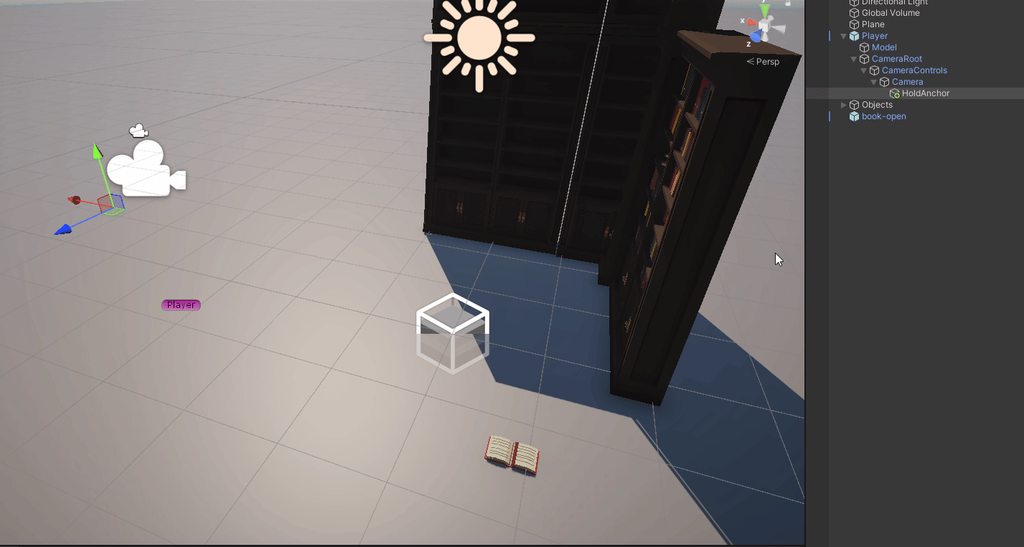
I'm running into issues with picking up items in my first person game, whenever I go to pick up an item the anchor position seems to be the thing moving? but im setting the book as its child, and moving it to the anchor.transform.position, what am I missing here? https://i.imgur.com/ljAmdyt.gif
here's the pickup code:
    private void pickUp(Transform interactorTransform) {
        var pickUpAnchor = interactorTransform.GetComponent<PlayerInteract>().HoldItem(this);
        if (pickUpAnchor != null) {
            grabPointTransform = pickUpAnchor;
            transform.position = grabPointTransform.position;
            transform.parent = grabPointTransform.transform;
            rb.isKinematic = true;
            rb.useGravity = false;

        }
    }
 ivory bobcat
empty yoke
I'm running into issues with picking up items in my first person game, whenever ...
ivory bobcat
empty yoke
I'm running into issues with picking up items in my first person game, whenever ...
What's the actual issue?
The book is properly being parented, it's moved, kinematic, gravity etc..
empty yoke
its not though thats not where the anchor is set
when the player moves away, the book doesn't move with it
ivory bobcat
What's not?
Do you've got any other scripts on the book that moves it?
If camera moves then the object should be moving - assuming the hold point moves and isn't some object in the scene with a position constraint.
empty yoke
this was a fresh scene with just the two things, no other movement is happening on the book
ivory bobcat
Have the hold anchor selected and see where it is in the editor when moving the camera
empty yoke
yeah thats the gif I sent
ivory bobcat
empty yoke
I'm running into issues with picking up items in my first person game, whenever ...
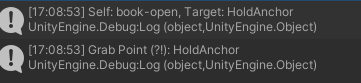
I don't know much about your interaction system - seems obvious but I'd rather not make assumptions. Log this in pickup for verification please: cs Debug.Log($"Self: {name}, Target: {pickUpAnchor.name}", pickUpAnchor); Debug.Log)$"Grab Point (?!): {grabPointTransform.name}", grabPointTransform);I'm assuming the book was this object, pickup anchor was a reference to some unknown that was returned by the hold item method and that grab point is the hold anchor object.
ivory bobcat
empty yoke
I'm running into issues with picking up items in my first person game, whenever ...
The gif would suggest that the script is on the hold anchor though - relative to the gif (seeing the scene tools would be nice as well).
Prior to interacting with the book, the position of selection gizmo had moved below the camera.. why? 🤔 Anything funky in the scene or on the hold anchor object that we should be aware of?
empty yoke
the hold anchor is just a transform, it doesn't have any scripts, the root object of that tree, the Player object DOES have a rigidbody if that does anything, but otherwise the only scripts in the scene is a player controller, camera controller for looking at the mouse, and the interact scripts, the function I sent, is on the item itself apart of an 'Item interactable" component, the player has an interaction controller that looks for interactables and invokes their interact function, the item just calls that pickup script. The holditem is just a check to see if the player is already holding something, it calls back into the interact and if it comes back with a transform that means the player isn't holding anything so go ahead and assign this item. I just started up unity so im adding those debug logs rn
yeah im getting the right values backhttps://i.imgur.com/tQ20faO.png
 ivory bobcat
Comment out the grabPointTransform = pickUpAnchor line and see what happens.
That would be the only line that would likely be evaluated elsewhere and do something abnormal. Other than that, the function is simply moving the position of book and setting it's parent to the anchor point.
I'm assuming the rigid body reference is the book's due to it no longer abiding by gravity and being kinematic.
Only other potential culprits would be whatever the HoldItem method does and anything else before and after the pickup method was called.
empty yoke
so it seems, like...so the movement maps to my mouse movement, but not to the WASD movement, the movement is split on the camera and the player, but its all in the same nested gameobjects, I'd expect the book all the way at the bottom to inherit both sets of movment. When the object isn't picked up the holdanchor transform tracks both
I did change the script as you said, and it didn't do anything, the assignment itself seems to be totally fine, its just the movement
faint osprey
how do you stop colliders giving firction between eachother
slender nymph
physics material
faint osprey
cheers
 sand epoch
I'm looking for a way to assign a few unchanging variables to a game object.
for example, if I have a bunch of card objects, (basically a bunch of clones of the same thing) but I want a way to add a couple descriptors that other scripts can read, i.e., suit and value.
deft grail
sand epoch
I'm looking for a way to assign a few unchanging variables to a game object.
for...
just make it public then they can see it?
the value isnt shared between each clone unless its static
sand epoch
They dont have any scripts on them, all of their functions are controlled by a single script
 cosmic dagger
sand epoch
I'm looking for a way to assign a few unchanging variables to a game object.
for...
cosmic dagger
sand epoch
I'm looking for a way to assign a few unchanging variables to a game object.
for...
if you want other scripts to read data from another component, use a property with get-only access . . .
deft grail
sand epoch
They dont have any scripts on them, all of their functions are controlled by a s...
then make a script that goes on each of them
or you would have to store all variables in a list or something but thats just stupid
sand epoch
wouldnt that be clunky? would that affect performance?
deft grail
thats not clunky, thats the way to do it
sand epoch
Makes sense
Ive heard that there are certain types of scripts that you use just for holding information
deft grail
sand epoch
Makes sense
if its a card, then each card needs to hold what colour, symbol, number it is
you cant just store that all in 1 script
 weak talon
trying to code but there is like no pop ups or auto finish
trying to write OnTriggerEnter and nothing is there
 deft grail
sand epoch
Ive heard that there are certain types of scripts that you use just for holding ...
deft grail
sand epoch
Ive heard that there are certain types of scripts that you use just for holding ...
ScriptableObjects? thats not really what you want for this though
 wise hearth
whats keeping me from adding my blender objects? literally my first time using this sorry
 deft grail
weak talon
trying to code but there is like no pop ups or auto finish
trying to write OnTri...
deft grail
weak talon
trying to code but there is like no pop ups or auto finish
trying to write OnTri...
!ide
eternal falconBOT
💡 IDE Configuration
If your IDE is not autocompleting code
or underlining errors, please configure it.
Select one:
•  Visual Studio (Installed via Unity Hub)
• Visual Studio (Installed manually)
•  VS Code
•  JetBrains Rider
• :question: Other/None
cosmic dagger
weak talon
trying to code but there is like no pop ups or auto finish
trying to write OnTri...
!ide
eternal falconBOT
💡 IDE Configuration
If your IDE is not autocompleting code
or underlining errors, please configure it.
Select one:
• Visual Studio (Installed via Unity Hub)
• Visual Studio (Installed manually)
• VS Code
• JetBrains Rider
• :question: Other/None
wise hearth
i cant drag it in
sand epoch
weak talon
trying to code but there is like no pop ups or auto finish
trying to write OnTri...
type OnTriggerEnter
weak talon
cosmic dagger
!ide
i have already done these things that it says
weak talon
sand epoch
type OnTriggerEnter
the problem isnt writing the words the problem is there is no autofinish like usual
deft grail
wise hearth
i cant drag it in
what are you trying to drag where
wise hearth
the drivers_cab into the scene
cosmic dagger
wise hearth
whats keeping me from adding my blender objects? literally my first time using t...
i would find a tutorial on how to import blender models to Unity . . .
weak talon
deft grail
!ide
i already tried doing what it says and it isnt working
deft grail
wise hearth
the drivers_cab into the scene
looks fine to drag in
wise hearth
it worked before so im confused why it doesnt work now
oh my dumbass was in game view not in scene
deft grail
weak talon
i already tried doing what it says and it isnt working
did you set your IDE in preferences in Unity?
weak talon
deft grail
did you set your IDE in preferences in Unity?
yeah
cosmic dagger
did you follow every single step or just the first one?
deft grail
wise hearth
oh my dumbass was in game view not in scene
why would you be dragging it like that anyway 😂
just drag it into the hierarchy
wise hearth
man its my first time using this
weak talon
cosmic dagger
did you follow every single step or just the first one?
if you are talking to me
yes i followed all of them
there was like 3 things that could fix it and none worked
it happend last night and i fixed it then but i just got on again and it is broken
 bold iron
If I nest my if statment too much in my update/fixedupdate methode will the game lag? If yes is there any way to fix it like running both code independently?
deft grail
bold iron
If I nest my if statment too much in my update/fixedupdate methode will the game...
not really, depends what your doing
steep rose
nesting shouldnt hurt performance, but it will absolutely make your code unreadable
best not do it
bold iron
deft grail
not really, depends what your doing
I’m just setting up a code that will check if my dash/run status is true. I was thinking that this might hurt my performance.
deft grail
bold iron
I’m just setting up a code that will check if my dash/run status is true. I was ...
depends what your doing you can just do if(!something) return; i heard this is better
steep rose
and dont nest
bold iron
steep rose
nesting shouldnt hurt performance, but it will absolutely make your code unreada...
I put the whole dashing script on a separate methode. I’ve seen someone make a separate script just for dashing but not too sure how to summon a methode from another script as I keep getting errors
deft grail
bold iron
I put the whole dashing script on a separate methode. I’ve seen someone make a s...
so you need a reference to it
bold iron
deft grail
depends what your doing you can just do `if(!something) return;` i heard this is...
That’s cool thanks
 teal viper
Do you actually have a performance problem?
bold iron
Nope it’s a completely new game. I’m just worried that in the future if I put too much if if if it will break the game.
steep rose
bold iron
I put the whole dashing script on a separate methode. I’ve seen someone make a s...
also if you are doing this
if(Dashing)
{
   if(running)
   {
       //this is wrong
   }
}
this is wrong and can be shortened to this
if(Dashing && running){

}
think about how you can avoid using ifs completely
steep rose
but as stated before, nesting shouldnt cause performance problems but will make your code unreadable
bold iron
 steep rose
thats not nesting
bold iron
deft grail
think about how you can avoid using ifs completely
Thanks I’ll try my best
teal viper
bold iron
Nope it’s a completely new game. I’m just worried that in the future if I put to...
Well, you have been answered already - it doesn't affect performance. You shouldn't worry about that unless you have an actual problem.
bold iron
steep rose
thats not nesting
I mean in the future
I got it thanks guys
Because my code will involve a lot of combination of keys to summon a attack. But as someone mentioned I could just use &&
 swift elbow
bold iron
swift elbow
bold iron
If you're on windows, you can win + shift + s (I believe) to crop a part of your screen and copy it as an img rather than taking a pic manually and uploading it
bold iron
swift elbow
If you're on windows, you can win + shift + s (I believe) to crop a part of your...
Ok 👍
steep rose
swift elbow
If you're on windows, you can win + shift + s (I believe) to crop a part of your...
thats if you have the snip tool
which should be installed
swift elbow
steep rose
thats if you have the snip tool
I have it but I don't remember downloading it ever, is it not a default program?
bold iron
yep i have it despite never downloading it
 late burrow
once again whats the workaround for running code in onvalidate that unity doesnt like
i remember it was writing another function inside onvalidate something
ok delaycall found it
teal viper
late burrow
once again whats the workaround for running code in onvalidate that unity doesnt...
The workaround is not to run such code in OnValidate.
late burrow
onvalidate is nicest of unity functions as it runs whenever i need it to run
teal viper
If you need to do some editor only logic unrelated to valiation, you should use a custom editor/inspector
 night valve
steep rose
also if you are doing this
```
if(Dashing)
{
if(running)
{
//this ...
night valve
steep rose
also if you are doing this
```
if(Dashing)
{
if(running)
{
//this ...
Not entirely true, depends on case, but a single layer of nesting can be acceptable. Consider this ```
if(dashing && running){...}
else if(dashing && swimming){...}
else if(dashing && flying){...}
...
In this situation I think it's better to nest those ifs in a parent if(dashing)
But of course the "right" way of doing it is to make separate OnDashing() method and do the checks there, or to use enum static cedar
Hi peps, wondering how to use filepaths?
static cedar
Hi peps, wondering how to use filepaths?
The docs should have that covered.
 sullen perch
how can i centre my ai in the middle of the model?
 teal viper
sullen perch
how can i centre my ai in the middle of the model?
teal viper
sullen perch
how can i centre my ai in the middle of the model?
Either take your model back to blender and change it's pivot point, or have the agent on a parent and offset the child model however you like.
sullen perch
ok thx
 rare hawk
Not sure where to ask this, but here goes:
When I start my scene the DDOL Canvas can't find the camera anymore. Which is strange, because prior to playing the reference is set correctly. The camera also doesn't show in the Render Camera dropdown anymore nor can I set it in code using camera = Camera.main;
I looked at the documentation, but didn't see any warnings about DDOL Canvasses. Am I missing something?
Video for reference (EDIT: Apparently you don't see the Unity dropdown in the video, but it doesn't have any options for camera's. Non-DDOL Canvasses work fine btw)
sullen perch
hi, my ai isnt working for some reason and i dont know why?
deft grail
sullen perch
hi, my ai isnt working for some reason and i dont know why?
make it work
 deft grail
sullen perch
i would paste code, but last time i did i got yelled at for doing it
deft grail
sullen perch
i would paste code, but last time i did i got yelled at for doing it
then you need to do it properly !code
eternal falconBOT
Posting code
📃 Large Code Blocks
Use links to services like:
https://gdl.space/, https://paste.ofcode.org/, https://hatebin.com/, https://paste.myst.rs/, https://hastebin.com/
📃 Inline Code
Surround code with three backquotes. Not quotation marks.
To format as C#, add cs to the first line:
```cs
// Your code here
```
Add a comment with a line number if there is an error message.
deft grail
sullen perch
but the problem i see is
your ai has nothing to follow
possibly thats the problem
sullen perch
i dont think so
deft grail
sullen perch
i dont think so
i think so, look at the error
rare hawk
sullen perch
thats a differant ai
If your code shows an error, that's a major red flag. Try and fix that first.
Also, if Unity encounters an error while executing code, it doesn't execute the code after it (without explicitly telling you). So if your second AI should work, maybe it doesn't because your code isn't even being executed due to this error occurring first.
sullen perch
ok
static cedar
UnauthorizedAccessException: Access to the path '...' is denied.
Trying to access a filepath. And also create a random txt file to test with but seems like I can't.
The path i'm pointing it to should be within the Assets folder.
Ok doesn't seem like i can read/write at all even if it's within the project.
teal viper
static cedar
The path i'm pointing it to should be within the Assets folder.
Make sure you're not confusing relative paths with absolute paths.
teal viper
You can
static cedar
Directory.Exists returns true though.
teal viper
Well, the error talks about authorization.
Not about existance/non existance of the path.
If you need actual help, you should provide more info on the context and error details.
static cedar
Here's the error.
UnauthorizedAccessException: Access to the path 'path' is denied.
The path is within the assets folder. And uses absolute path which i copied from the file explorer in windows 11.
teal viper
static cedar
Here's the error.
`UnauthorizedAccessException: Access to the path 'path' is den...
error details. Not just the error message.
static cedar
System.IO.FileStream..ctor (System.String path, System.IO.FileMode mode, System.IO.FileAccess access, System.IO.FileShare share, System.Int32 bufferSize, System.Boolean anonymous, System.IO.FileOptions options) (at <c0b7b90d34a54066a7234dad69255116>:0)
System.IO.FileStream..ctor (System.String path, System.IO.FileMode mode, System.IO.FileAccess access, System.IO.FileShare share, System.Int32 bufferSize, System.IO.FileOptions options) (at <c0b7b90d34a54066a7234dad69255116>:0)
(wrapper remoting-invoke-with-check) System.IO.FileStream..ctor(string,System.IO.FileMode,System.IO.FileAccess,System.IO.FileShare,int,System.IO.FileOptions)
System.IO.StreamWriter..ctor (System.String path, System.Boolean append, System.Text.Encoding encoding, System.Int32 bufferSize) (at <c0b7b90d34a54066a7234dad69255116>:0)
System.IO.StreamWriter..ctor (System.String path, System.Boolean append) (at <c0b7b90d34a54066a7234dad69255116>:0)
(wrapper remoting-invoke-with-check) System.IO.StreamWriter..ctor(string,bool)
System.IO.File.CreateText (System.String path) (at <c0b7b90d34a54066a7234dad69255116>:0)
Assets.Scripts.ExternalDependencies.Editor.ExternProjectList+ExternProjectListEditor.OnInspectorGUI () (at Assets/Scripts/ExternalDependencies/Editor/ExternProjectList.cs:72)
UnityEditor.UIElements.InspectorElement+<>c__DisplayClass76_0.<CreateInspectorElementUsingIMGUI>b__0 () (at <043e10ec4a0f4999a2729072194b9cfe>:0)
What path is it exactly?
languid spire
show the full code
static cedar
D:\TechnicalProjects\Unity Project Stuff\Plazma Haze\Assets\Scripts
                if (GUILayout.Button("Validate Dump Paths"))
                {
                    Debug.Log($"Dump: {Directory.Exists(Target.dump_location)}");

                    File.CreateText(Target.dump_location);
                }
Asking a fuller code than this, it's really just a scriptable object with a custom editor that has this button.
teal viper
static cedar
```cs
if (GUILayout.Button("Validate Dump Paths"))
...
Can you log the Target.dump_location before the File call?
languid spire
static cedar
```cs
if (GUILayout.Button("Validate Dump Paths"))
...
why are you using the same variable for Exists and CreateText, they take different values
static cedar

                if (GUILayout.Button("Validate Dump Paths"))
                {
                    Debug.Log(Target.dump_location);
                    Debug.Log($"Dump: {Directory.Exists(Target.dump_location)}");

                    File.CreateText(Target.dump_location);
                }
School wifi. 🗿
languid spire
you are missing a file name
teal viper
static cedar
```cs
if (GUILayout.Button("Validate Dump Paths"))
...
Did you check the C# docs of File.CreateText and what errors it throws when?

 languid spire
File.CreateText(Path.Combine(Target.dump_location,"MyFile.txt"));
teal viper
static cedar
Steve is correct. And you can see that the docs explicitly say that path needs to be a file to be opened, not a directory.
static cedar
If it just want a file name, i wish it didn't use UnauthorizedAccessException i thought it implied that I don't have permissions the entire time.
languid spire
but that is correct. you are trying to treat a folder as a file, that is unauthorized access
static cedar
Anyways, I think I got it, thanks.
teal viper
I agree, that they could've provided a more specific error for this case. But then again, it could've been an actual file without extension.🤔
languid spire
static cedar
Anyways, I think I got it, thanks.
Also you should use Application.dataPath rather than hardcoding paths to the Assets folder
static cedar
languid spire
Also you should use Application.dataPath rather than hardcoding paths to the Ass...
Yeah, i've just been randomly searching and trying stuff.
languid spire
string dirName = Path.Combine(Application.dataPath, "Scripts");
string fileName = Path.Combine(dirName,"MyFile.txt");
My first assumption was some kind of bug in unity and went off there.
teal viper
But that was not unity api that you were using.
steady crown
!code
eternal falconBOT
Posting code
📃 Large Code Blocks
Use links to services like:
https://gdl.space/, https://paste.ofcode.org/, https://hatebin.com/, https://paste.myst.rs/, https://hastebin.com/
📃 Inline Code
Surround code with three backquotes. Not quotation marks.
To format as C#, add cs to the first line:
```cs
// Your code here
```
Add a comment with a line number if there is an error message.
steady crown
i need help, i am trying to figure out how many enemies are in the scene and limit is so enemies are only spawned 1 at a time. in my game manager script i have this line of code
// public int enemiesAlive=1;
then in my spawnmanager i have this code
//   if (Time.time>i && gameManager.gameisrunning && gameManager.enemiesAlive < 1)
{
    i += 5;
    Instantiate(enemyPrefabs[Random.Range(0,2)], randomspawnpositionenemy, Quaternion.identity);
    gameManager.enemiesAlive++;
}
which checks if there are no enemies on the scene and then it spawns and add ones to enemies alive
then in my detectcolissions script i have this code where when the projectile hits the enemy it should subtract enemies alive and then surely it should spawn again? but thats not working
//   private void OnTriggerEnter(Collider other)
{
    if(other.gameObject.CompareTag("Enemy"))
    {
        Destroy(other.gameObject);
        Destroy(gameObject);
        gameManager.enemiesAlive--;

    }
}
To start with. simply saying something is 'not working' is not helpful.
Add some Debug.Logs to your code to see what is happening then come back with your updated code and a screenshot of the console
night valve
steady crown
i need help, i am trying to figure out how many enemies are in the scene and lim...
If the check is in Update method running every frame, "i" will be always greater than time.
Unless your frame takes longer than 5 seconds
languid spire
nonsense
night valve
Why, let me see one more time...
languid spire
i is only updated when it is < Time.time
teal viper
Also, you're probably confusing .time with .deltaTime
steady crown
languid spire
To start with. simply saying something is 'not working' is not helpful.
Add some...
sorry something came up so ill have to go back to this some other time but i shall take your advice thx
night valve
Ah you right, didn't see the enemiesAlive++ there, sry
 true stratus
can anyone help i delted scene by accident and now i can only see from my player model
night valve
night valve
Ah you right, didn't see the enemiesAlive++ there, sry
Omg need another coffee nvm
languid spire
true stratus
can anyone help i delted scene by accident and now i can only see from my player...
not a code question, do not cross post
true stratus
sorry
 rough orbit
Sorry for the long post but I’ve had this issue for over a week now and I’m at my wits end. I so desperately need this to work (school project), so any help would be incredibly appreciated.
In my game you’re a pawn on a chess board (100 tiles that are 2x2) where tiles will fall at random on player collision and enemy pawns track you and knock you back on collision.
I’ve made the PlayerMovement so that you snap into the center of each tile when you move using a move point. It works when moving around, but when other pawns knock into you more often than not the tile alignment gets screwed up so that the player ends up between 2 tiles instead of in the center of 1 tile without the possibility to align to a center. This breaks the movement scheme and basically the game loop.
My latest attempt was to place invisible spheres in the center of each tile (that I’ve added both a “CenterPoint” tag and layer to) to make the player snap to the closest center point while being pushed via a spherecast, but since it’s all very new to me I’m not surprised I haven’t been able to make it work yet. Is anyone here able to help me? The script in question: https://gdl.space/cijapakade.cs
languid spire
rough orbit
Sorry for the long post but I’ve had this issue for over a week now and I’m at m...
!code. Please use a paste site
eternal falconBOT
Posting code
📃 Large Code Blocks
Use links to services like:
https://gdl.space/, https://paste.ofcode.org/, https://hatebin.com/, https://paste.myst.rs/, https://hastebin.com/
📃 Inline Code
Surround code with three backquotes. Not quotation marks.
To format as C#, add cs to the first line:
```cs
// Your code here
```
Add a comment with a line number if there is an error message.
languid spire
copy/paste to the paste site. Save. Paste the link given here
rough orbit
languid spire
copy/paste to the paste site. Save. Paste the link given here
My bad. Edited.
languid spire
rough orbit
My bad. Edited.
first thing, never mix rigidbody and transform movement. chose one or the other
rough orbit
languid spire
first thing, never mix rigidbody and transform movement. chose one or the other
Gotcha, I'll keep that in mind. Since this issue only occurs when enemy and player collide, think that could be a factor?
languid spire
rough orbit
Gotcha, I'll keep that in mind. Since this issue only occurs when enemy and play...
absolutely
tbh, with what I see of your setup and gameplay I see no need for rigidbody movement at all
rough orbit
languid spire
absolutely
Using transform movement has been the only way for me to get the movepoint-movement to work. DIdnt know it could screw with rigidbody though
rough orbit
languid spire
tbh, with what I see of your setup and gameplay I see no need for rigidbody move...
Interesting. I'll see if I can refactor it without breaking everything.
languid spire
rough orbit
Interesting. I'll see if I can refactor it without breaking everything.
Lerp or MoveTowards are your friends
 subtle beacon
hi i have a question, for some reason there where no errors and out of knowhere there where some errors i dont understand
using System.Collections.Generic;
using UnityEngine;
public class Poppetje : MonoBehaviour
{
public Rigidbody2D myRigidbody;
public float flap;
public LogicScript logic;
public bool playerIsAlive = true;
public AudioSource audioData;
// Start is called before the first frame update
void Start()
{
logic = GameObject.FindGameObjectWithTag("Logic").GetComponent<LogicScript>();
}
// Update is called once per frame
void Update()
{
if (Input.GetKeyDown(KeyCode.Space) == true && playerIsAlive == true)
{
myRigidbody.velocity = Vector2.up * flap;
}
if (transform.position.y < -12 || transform.position.y > 12)
{
logic.GameOver();
playerIsAlive = false;
audioData.Play(0);
}
}
private void OnCollisionEnter2D(Collision2D collision)
{
audioData.Play(0);
logic.GameOver();
playerIsAlive = false;
}
}``` deft grail
subtle beacon
hi i have a question, for some reason there where no errors and out of knowhere ...
deft grail
subtle beacon
hi i have a question, for some reason there where no errors and out of knowhere ...
you have 2 of this script
probably by mistake
deft grail
subtle beacon
hi i have a question, for some reason there where no errors and out of knowhere ...
and some tips for your code.
== true isnt needed, you can avoid the FindGameObjectWithTag by just making a static instance in your LogicScript
public static LogicScript Instance;
void Awake() { Instance = this; }
and make a method called PlayerDead or something instead of repeating the same play audio and changing bool and calling method 3 different times
subtle beacon
deft grail
you have 2 of this script
thnx
subtle beacon
deft grail
and some tips for your code.
`== true` isnt needed, you can avoid the `FindGameO...
jeah i started yesterday with unity and followed a absolute beginner tutorial hahah
deft grail
subtle beacon
jeah i started yesterday with unity and followed a absolute beginner tutorial ha...
yeah can tell, you dont have to do what i said now if you want but just keep it in mind for the future as it would be the better way of doing these things
subtle beacon
deft grail
yeah can tell, you dont have to do what i said now if you want but just keep it ...
thnx
rough orbit
languid spire
Lerp or MoveTowards are your friends
I'll have to look into how to use that here. Tried removing rigidbody and some feeble attempts at scripting custom gravity etc and to little surprise it's wonky and breaking everything 🫠
languid spire
rough orbit
I'll have to look into how to use that here. Tried removing rigidbody and some f...
It's possible that using CharacterController may be more suited to your needs
rough orbit
languid spire
It's possible that using CharacterController may be more suited to your needs
And still keep the snap-to-grid movement? Spent a lot of time implementing it this way but at this point I wouldn't mind throwing everything out just to make this work
languid spire
rough orbit
And still keep the snap-to-grid movement? Spent a lot of time implementing it th...
tbh snap to grid movement is much more suited to transform or CharacterController movement than it is to Rigidbody. So either should work
ebon ore
hey, im trying to make a nonogram game for mobile, everything seems to be working correctly on unity's simulator phones, but once i build and run the game on my personal phone, the main grid object isn't rendering the grid, why that could be? i was getting some errors about Adaptive Performance, but it told me to install Samsung (Android) providers and so i did, but still no grid on my phone
teal viper
ebon ore
hey, im trying to make a nonogram game for mobile, everything seems to be workin...
How are you rendering that grid?
ebon ore
the grid object is creating 5x5 grid out of gameobjects "tile"
tile is just a gameobject with square sprite
teal viper
ebon ore
the grid object is creating 5x5 grid out of gameobjects "tile"
You'll need to provide some more details. Maybe screenshots of the setup and what it looks like in the editor and in the build.
ebon ore

this is how it looks in simulator in unity, but on my phone only the "capsule" on the bottom shows up
teal viper
Take some screenshots of the setup. The hierarchy, camera, tile objects, etc..
ebon ore
hierarchy contains only the camera, grid, tile and clue tile (capsule is just a sprite for now (no code))

tile

cluetile

grid

camera
 queen adder
Do you guys have a script to buy presonage or unlock it?
ebon ore
yes
teal viper
ebon ore
yes
What do the scripts on the following objects do?
- Camera
- grid object
- Tile object
ebon ore
Camera:
checks for device's aspect ratio and check's grid's size to adjust camer orthographic size
Grid:
instantiates gameobjects Tile to make a grid,
instantiates gameobjects ClueTile that show the clues around the grid
moves the grid a bit depending on it's size (to center it on screen)
Tile:
checks if it has been touched and if so then it changes it's color
full code is a bit long so just the descriptions, if u want me to post the code, will do
teal viper
ebon ore
Camera:
checks for device's aspect ratio and check's grid's size to adjust camer...
There could be a bug in:
- adjusting the camera size
- instantiating and repositioning the objects
- adjusting the tile color
You should test a bare minimum setup without doing the above-mentioned things to see if the objects are visible. If they are, start reenabling features one by one until the issue occurs. Then just debug it.
ebon ore
will do, but wouldn't it also break on simulator? i've checked numerous devices and screen resolutions
teal viper
ebon ore
will do, but wouldn't it also break on simulator? i've checked numerous devices ...
Then there is something different between the simulator and your actual device. Otherwise it would work.🤷♂️
There's also a chance that you're using some API that doesn't work on an actual device or works differently.
The simulator is only for simulating aspect ratios. It doesn't emulate the whole device on the PC.
ebon ore
ok, thanks
 cosmic hinge
Hi, I am kind of bit confused here. Why debug.log in IEnumerator is printing first than the one in sequence.Onstart. Is there a way to execute tween in current execution order?
using System.Collections;
using System.Collections.Generic;
using UnityEngine;
using DG.Tweening;
public class Follower : MonoBehaviour
{
private void Update()
{
if (Input.GetKeyDown(KeyCode.Space))
{
PlayAnim();
StartCoroutine(Example());
}
}
IEnumerator Example()
{
Debug.Log("Function started");
yield return new WaitForEndOfFrame();
}
Sequence sequence;
public void PlayAnim()
{
sequence = DOTween.Sequence();
sequence.OnStart(() => { Debug.Log("Sequence started"); });
sequence.Play();
}
}``` little seal
private List<GameObject> supports = new List<GameObject>();
// Start is called before the first frame update
void start()
{
    foreach (Transform child in transform)
    {
        if (child.name == "Support")
        {
            supports.Append(child.gameObject);
        }else{
            print(child.name);
        }
    }
}```
i have this code that i hoped would just get the children named support but the section inside the for loop doesnt run (`supports` is empty and it doesnt print `child.name`)
the script is attatched to a gameobject. which gets activated when i rclick and deactivated when im not rclicking
does anyone know why its not giving me the transform of my support
teal viper
cosmic hinge
Hi, I am kind of bit confused here. Why debug.log in IEnumerator is printing fir...
Probably because dotween updates later in the frame.
languid spire
little seal
```cs
private List<GameObject> supports = new List<GameObject>();
// Start is ca...
start != Start
teal viper
cosmic hinge
Hi, I am kind of bit confused here. Why debug.log in IEnumerator is printing fir...
You'll need to research how the asset works to answer that question.
little seal
languid spire
start != Start
oh.. thanks
little seal
languid spire
start != Start
still a nope, capitalized the S
languid spire
little seal
still a nope, capitalized the S
the script would need to be attached to Platform because it only gets direct children
little seal
languid spire
the script would need to be attached to Platform because it only gets direct chi...
it is, my bad for not making it clear
oh wait i attatched it to the wrong one 💀
i ment to attatch it to platform
its working now :) ty
 verbal dome
queen adder
Do you guys have a script to buy presonage or unlock it?
verbal dome
queen adder
Do you guys have a script to buy presonage or unlock it?
What is presonage?
I did google it but it's a mess
little seal
verbal dome
What is presonage?
maybe a character? personage
queen adder
verbal dome
What is presonage?
Let's discuss it better in a private message
verbal dome
No thank you
willow scroll
queen adder
Let's discuss it better in a private message
Let's translate a word if we don't know it in English
little seal
im trying to make a script that extends the support for this platform to the ground, but there is always a gap. does anyone know why?
the support is a gameobject attatched to a platform gameobject
public class SupportExtensionController : MonoBehaviour
{

    // Update is called once per frame
    void Update()
    {
        foreach (Transform child in transform)
        {
            if (child.name != "Support"){ continue; }
            RaycastHit hit;
            if (Physics.Raycast(child.transform.position, Vector3.down, out hit, Mathf.Infinity, LayerMask.GetMask("Ground")))
            {
                print("HIT SOMETHING!");
                print(hit.distance);
                //set the scale of the support
                Vector3 scale = child.transform.localScale;
                scale.y = hit.distance / transform.localScale.y;
                child.transform.localScale = scale;
                print(child.transform.localScale.y);
                //set the postition to the middle because unity scales the cube to both directions
                Vector3 loc = child.transform.localPosition;
                loc.y = -hit.distance * .5f / transform.localScale.y - .45f;
                child.transform.localPosition = loc;
                //just a visualisation to see if its working
                Debug.DrawRay(child.transform.position, transform.TransformDirection(Vector3.down) * hit.distance, Color.yellow);
            }
        }
    }
}```Looks like something to do with your scaling on the y
little seal
ivory bobcat
Looks like something to do with your scaling on the y
yeah since the gap increases with scale, im having trouble figuring out what though
ivory bobcat
Not entirely sure but the scaling should be the distance to the floor divided by the original object's height.
little seal
ivory bobcat
Not entirely sure but the scaling should be the distance to the floor divided by...
that is it right now
ivory bobcat
Pretty sure local scale y is a normalized value?
Or rather it's scale instead of the object's actual height.
little seal
maybe its because im moving the support to account for the scaling going up, so the raycast starts from lower after moving it the first time?
ivory bobcat
So if the object is 10 units tall and the floor is 15 units away, you'd scale the object by 1.5 times in the y.
little seal
thus it thinks the distance to the ground is lower and it lowers it scale?
ivory bobcat
Log the value of the scale and see if it's what you think it is
 lapis frigate
I tried to create an enemy library for all of my enemyUnits and for some reason when I start the game it gives me the Object refrence not set to instance of an object. any help?


 ivory bobcat
little seal
that is it right now
ivory bobcat
little seal
that is it right now
Formula would be (relative to the height of the object) current/original = scale. What I believe you've currently got is current/scale = scale
ivory bobcat
lapis frigate
I tried to create an enemy library for all of my enemyUnits and for some reason...
Show the actual error message
It would tell you where the error was thrown
 ivory bobcat
And what line is 60 of the battle script?
Your image crops do not show line numbers
lapis frigate
its says 60 but when I click it it sends me to line 146
which is the line that summons the SetupBattle method
ivory bobcat
Which variable is throwing the nre?
rich adder
lapis frigate
I tried to create an enemy library for all of my enemyUnits and for some reason...
lovely how you cut off the lines.
post code properly with links at least
ivory bobcat
Either tell us or simply post the entire script
lapis frigate
!code
eternal falconBOT
Posting code
📃 Large Code Blocks
Use links to services like:
https://gdl.space/, https://paste.ofcode.org/, https://hatebin.com/, https://paste.myst.rs/, https://hastebin.com/
📃 Inline Code
Surround code with three backquotes. Not quotation marks.
To format as C#, add cs to the first line:
```cs
// Your code here
```
Add a comment with a line number if there is an error message.
rich adder
where did you assign enemiesLibrary
ivory bobcat
That would be the declaration
languid spire
lapis frigate
its line 33
thats declaring not assigning
ivory bobcat
It's null as it is unless you've assigned it a reference/value
rich adder
You go to the store with "I want apples" and then you leave the store..
you never got the apples
rich adder
the object that contains the array is null
who knows if the array is even not null
if its not public/SerializeField private
and you did not do = new () chances are its null too
ivory bobcat
Maybe. Either that or the member being accessed.
lapis frigate
I think I assigned it in the inspector?
lapis frigate
lapis frigate
I tried to create an enemy library for all of my enemyUnits and for some reason...
here?
rich adder
if it on a gameobject then sure its no null
Unity automatically new() a serialized list/array when on an instance
ivory bobcat
lapis frigate
I think I assigned it in the inspector?
How though, isn't it private non serialized?
Unless it's a value type 
 lapis frigate
ivory bobcat
How though, isn't it private non serialized?
lapis frigate
ivory bobcat
How though, isn't it private non serialized?
I attached to the battlesystem the Enemylibrary Script
 quick pollen
So I'm doing this
            animator.ResetTrigger("Attack");
            animator.SetTrigger("Attack");
for making the player attack, but the problem is, that if I press the attack button twice, it will "queue" the animation again, even if I just press the button twice in a row really quickly by accident
ivory bobcat
Things that can throw null.enemiesLibrary.Length//error cannot access enemies library enemiesLibrary.null.Length//error cannot access length
lapis frigate
rich adder
so you're good there, just assign it in the [inspector ](https://unity.huh.how/r...
didn't I do it already?
rich adder
lapis frigate
didn't I do it already?
you never assigned enemiesLibrary to BattleSystem , so you can't access your specific array
(the code knows what to access cause its all declared, but you're missing the specific one you want to work with hence null ref)
lapis frigate
so I should remove the enemies library compoenet make the EnemiesLibrary public and reattatch it right?
rich adder
you dont need to remove it
just assign it as shown in the link sent to you
doesnt need to make everything in the inspector public , only when you want to access it from other scripts
little seal
ivory bobcat
Log the value of the scale and see if it's what you think it is
yep, it halves every update 😩
rich adder
[SerializeField] EnemiesLibrary enemiesLibrary would suffice
then **assign ** it (drag n drop)
where you put EnemiesLibrary components is your discretion
ivory bobcat
Reminder that what was shown is implicitly privatecs [SerializeField] private EnemiesLibrary enemiesLibrary
lapis frigate
it doesnt let me drop it tho
rich adder
lapis frigate
it doesnt let me drop it tho
which one are you dragg in
ivory bobcat
little seal
yep, it halves every update 😩
The denominator of the formula needs to be an unchanging value and that of the object's original height - relative to #💻┃code-beginner message .
Not the object's scale (a ratio) or whatnot but the actual height.
 tawdry quest
Im new to developing unity for android, how do i save data to android ? (I only used Windows so far)
Like i need to create a hanami.db file and read / write to that, also create a (cache) folder and save images in there, how can i do that ?
Found it Application.persistentDataPath, just like in Windows lol
ivory bobcat
tawdry quest
Im new to developing unity for android, how do i save data to android ? (I only ...
You'd just save like you'd normally would on a PC but probably using the location https://docs.unity3d.com/ScriptReference/Application-persistentDataPath.html (note that the location on Windows would be in the registry - nasty unwanted dumping)
tawdry quest
"the location on Windows would be in the registry", what ? Thats completely wrong, its in AppData ?
Yeah looking at the link it even tells you:
Windows Editor and Windows Player: Application.persistentDataPath usually points to %userprofile%\AppData\LocalLow<companyname><productname>
ivory bobcat
Oops, I was thinking of player prefs, forget the second.
tawdry quest
yeah i wouldnt use that for anything anyways
rather do a settings.dat or save them in the .db
little seal
ivory bobcat
The denominator of the formula needs to be an unchanging value and that of the o...
done, it works now thanks alot :D
steep rose
night valve
Not entirely true, depends on case, but a single layer of nesting can be accepta...
you do realize you just wrote the same exact code i did with some else if statements?
not sure what you are trying to get at
using else if statements is not nesting by the way
night valve
Yes I do. And no, it is not, my point was only that nesting is not always that bad in some simple situations
In that code I posted first snippet is just as readable as the second, without the need of rewriting "dashing" boolean 3 times
night valve
night valve
In that code I posted first snippet is just as readable as the second, without t...
- now I realized that I posted only "else if" version, but I bet you get the point that nested equivalent is acceptable
rocky canyon
i'll typically chose the most important boolean and nest other conditionals within
if(dashing)
{
   if(running){

    }
   if(flying){

    }
}``` anymore than that tho and i start reevaluating my logicbreaking it up into switch statements perhaps
night valve
For me that is perfectly okay UNLESS you add another layer of nesting in these sub-statements
rocky canyon
i dont like using this && that && otherthat
too many &&s to read easily..
imo nesting just a bit is easier to follow
rocky canyon
night valve
For me that is perfectly okay UNLESS you add another layer of nesting in these s...
ya, thats what im saying. i wont go any deeper than 1 or 2
especially not 3
statemachines come to mind if ur nesting that much lol
but i suck at those so far
can only muster up a basic enum one..
night valve
Yeah, enums are the right tool for such things
little seal
if (Physics.Raycast(feet.transform.position, Vector3.down, out hit, Mathf.Infinity, LayerMask.GetMask("Ground"))) {
    canJump = true;
    Debug.DrawRay(feet.transform.position, transform.TransformDirection(Vector3.down) * hit.distance, Color.yellow);
}
im raycasting down, to check if the player can jump. this works on my terrain, however it doesnt work on my other gameobject. does anyone know why the raycast phases trough?

both the ground and the platform are layered on ground
 rocky canyon
probably begins within that object
cosmic quail
little seal
```cs
if (Physics.Raycast(feet.transform.position, Vector3.down, out hit, Mathf....
you forgot to assign it to ground layer?
rocky canyon
or its not set to check for it
little seal
rocky canyon
probably begins *within that object*
so my ray cast origin is just too low?
i put it higher and it worked :D ty
steep rose
night valve
* now I realized that I posted only "else if" version, but I bet you get the poi...
nesting in of itself is a bad habit and can make your code unreadable, and im not even saying doing a ton of else if's is any better to but for his specific use case that was the appropriate way to go about it.
using an enum or a private void Dashing() is definitely way better for readability
i have a really bad habit of using a ton of &&'s 😅
but other than that, nesting for only 1 line is okay for readability
queen adder
first time messing with animations, what do i do to add this bool paramater into the animator? ive set it so the bool is true when im moving, which works fine. but im not sure how to add that to the animator so that it actually affects the animation being played, if im wording it right

i want the animation to play when isRunning is true
steep rose
i would !learn how to use the animator, and anything animator/animation related goes in #🏃┃animation
eternal falconBOT
:teacher: Unity Learn ↗
Over 750 hours of free live and on-demand learning content for all levels of experience!
queen adder
oh right oops too used to talking in here
 real trellis
Could I have a list of UnityEvents?
willow scroll
real trellis
Could I have a list of UnityEvents?
Can you have UnityEvent serialized without a List? In this case you'll be able to serialize it inside of the List
 tender stag
if(currentInteractable.isHoldInteractable)
{
    if(Input.GetKeyDown(KeyCode.F))
    {
        Debug.Log("Started holding interaction");
        currentInteractable.OnStartHoldInteract?.Invoke();
    }

    if(Input.GetKey(KeyCode.F))
    {
        Debug.Log("Holding interaction");
        currentInteractable.OnHoldInteract?.Invoke();
    }
    else if(Input.GetKeyUp(KeyCode.F))
    {
        Debug.Log("Let go of interaction");
        currentInteractable.OnStopHoldInteract?.Invoke();
    }
}```my problem is that suddenly the isHoldInteractable can become false
and it will never reach the last else if statement
which calls the OnStopHoldInteract event
how can i also call the OnStopHoldInteract event if i was holding F and suddenly isHoldInteractable became false

i did this
i think it works let me check
yeah works
queen adder
does anyone know how i can prevent animations from overriding rotation?
i cant find anything about it online
steep rose
if you double click on an animation and right click on the rotation property, you can press remove properties to remove all rotation to said animation
also
next time go in #🏃┃animation
queen adder
oh ok
 ember tangle
entities.Add(Resources.Load<Entity>("Prefabs/Entity"));
entities[i].transform.parent = this.transform;```

When I load prefabs as a script no GameObject is created in the hierarchy and I cant access the transform. Is there a way to make this work?

```GameObject entity = Resources.Load<GameObject>("Prefabs/Entity")
entities.Add(entity);``` this also does workResources.Load just loads a reference to the prefab. you still need to instantiate it if you want to put it in the scene
 rotund garnet
regular c# arrays are more light-weight and faster than List<>, right?
 tough stone
rotund garnet
regular c# arrays are more light-weight and faster than List<>, right?
tough stone
rotund garnet
regular c# arrays are more light-weight and faster than List<>, right?
yes
less stuff
rich adder
rotund garnet
regular c# arrays are more light-weight and faster than List<>, right?
I think its about the same
List iirc is wrapper to array
slender nymph
rotund garnet
regular c# arrays are more light-weight and faster than List<>, right?
define "light weight" and "faster" because they have the same time complexity for performing the same actions because a List<T> is just an array with some extra functionality (like being able to be resized)
tough stone
rich adder
List iirc is wrapper to array
yes but it still uses more ram
slender nymph
it has two extra ints
tough stone
however if you dont know how many elements in a array will be added, its better to use list
otherwise you will be resizing the array copying and so on
tough stone
slender nymph
it has two extra ints
less is always better
depends on the situation tho
slender nymph
if you are allocating so much that 8 extra bytes makes any amount of difference, then something is seriously wrong with what you are doing
tough stone
slender nymph
if you are allocating so much that 8 extra bytes makes any amount of difference,...
it is always better to use list if you dont use the features of List
thats what i want to say
there is nothing wrong with that
why add extra stuff to your code that you wont use
slender nymph
there is no "better" in any case. use the correct tool for the job. a list is not better than an array, nor is an array better than a list.
tough stone
slender nymph
there is no "better" in any case. use the correct tool for the job. a list is no...
this pretty much shows when is the other one better than the other

but yes what you said is sort of right, depends on the situation as i said
 ripe oyster
i'm trying to make snake, and i'm looking for a way that the food doesn't spawn on the snake itself. here is the spawn code:
    public BoxCollider2D playArea;


    private void Start()
    {
        RandomizePosition();
    }

    private void RandomizePosition()
    {
        Bounds bounds = this.playArea.bounds;

        float x = Random.Range(bounds.min.x, bounds.max.x);
        float y = Random.Range(bounds.min.y, bounds.max.y);

        this.transform.position = new Vector3(Mathf.Round(x), Mathf.Round(y), 0.0f);
    }

    private void OnTriggerEnter2D(Collider2D other)
    {
        if (other.CompareTag("Player"))
        {
            RandomizePosition();

        }

    }
does anybody know what i can do that it doesn't spawn on the player
i tried physics.checkbox but wasn't able to get it to work
tough stone
depends on how you coded the player, is the movement a grid like system or free movement like snake.io
slender nymph
tough stone
this pretty much shows when is the other one better than the other
that information isn't even accurate. for example, List.Count is o(1) which is the same as Array.Length because List.Count is literally just reading the value of a field. List.Contains and Array.Contains are also pretty much identical considering List.Contains just calls Array.Contains
ripe oyster
player (leaving out the enable and disable stuff)
private void FixedUpdate()
    {
        for (int i = _segments.Count - 1; i > 0; i--)
        {
            _segments[i].position = _segments[i - 1].position;
        }

        this.transform.position = new Vector3(
            Mathf.Round(this.transform.position.x) + _moveDirection.x,
            Mathf.Round(this.transform.position.y) + _moveDirection.y,
            0.0f
            );
    }

 private void OnTriggerEnter2D(Collider2D other)
 {
    if (other.CompareTag("Red"))
    {
        Grow();
        Debug.Log("NOMNOMNOM");
    }

}

private void Grow()
{
    Transform segment = Instantiate(this.segmentPrefab);
    segment.position = _segments[_segments.Count - 1].position;

    _segments.Add(segment);
}
just so you know i didnt make that list but found it on stackoverflow, and it is mostly meant to just show in what cases to use it
rotund garnet
tough stone
however if you dont know how many elements in a array will be added, its better ...
So an array which always has a length of 64, and consists only of single digit integers, is better than list?
tough stone
rotund garnet
So an array which always has a length of 64, and consists only of single digit i...
yes, definility. However if you insert new elements so like add a new interger and make length 65, 66, 67 and so on List is better
slender nymph
tough stone
just so you know i didnt make that list but found it on stackoverflow, and it is...
and the information that provides is inaccurate. I already know the use cases of Lists vs Arrays, and in most cases it doesn't really matter which is used. but you cannot claim that one is better than the other at something when they do the exact same thing. verify your sources next time.
tough stone
ripe oyster
player (leaving out the enable and disable stuff)
```cs
private void FixedUpda...
alr so, you store the segments in a List with each their position right, on the RandomizePosition function i recommend you do a for loop over each segment then check if the position is equal to segment if so create a new position and try that one.
However you need to a look for float precision errors, so either you use Vector3Int or round them up everytime checking (Vector3Int is better if you are going for a grid like system which seems like it)
slender nymph
rotund garnet
So an array which always has a length of 64, and consists only of single digit i...
there is no "better" here. if you need a collection whose size will never change then it is more correct but not better to use an array. using a list for that is also perfectly fine and literally the only difference you will see is that extra 8 bytes in memory.
tough stone
slender nymph
and the information that provides is inaccurate. I already know the use cases of...
The source is from stackoverflow with a comment of 153 upvotes, and i showed it just to show when to use an array
ripe oyster
tough stone
alr so, you store the segments in a List with each their position right, on the ...
so in the food script i'd do a for loop going over the segments in the player script, with if those don't overlap that it can spawn. did i understand you right?
tough stone
slender nymph
there is no "better" here. if you need a collection whose size will never change...
why are you seperating more correct and better for what reason? just say better, i dont understand why make it too hard to understand for him
slender nymph
tough stone
The source is from stackoverflow with a comment of 153 upvotes, and i showed it ...
anyone can post on stackoverflow. just because you see something on there does not mean it is correct. you can literally read the source code and see that many of those operations are exactly the same on a list when compared to an array.
rotund garnet
also, is there even a noticeable difference at all?
tough stone
ripe oyster
so in the food script i'd do a for loop going over the segments in the player sc...
yes and as i said use a array/list of Vector3Int instead vector3's which is what i am guessing you are using
slender nymph
rotund garnet
also, is there even a noticeable difference at all?
no, that is my entire point. you will not notice any actual difference between the two for what you've described. it's just considered "more correct" to use an array for a collection whose size never changes. but there is literally no harm at all in using a list instead
rotund garnet
yeah okay
ripe oyster
tough stone
yes and as i said use a array/list of Vector3Int instead vector3's which is what...
right. i'm using mathf round instead to round it at the moment. i'm going to look into it. brb
tough stone
slender nymph
no, that is my entire point. you will not notice any actual difference between t...
depends if its performance critical or not, if its not its just better code.
rotund garnet
what about using byte instead of int? would that have a noticeable difference?
faint osprey
Does anyone know why my particle system is visible over my UI elements
tough stone
rotund garnet
what about using byte instead of int? would that have a noticeable difference?
again it depends on your situation, however bytes are less ram.
slender nymph
rotund garnet
what about using byte instead of int? would that have a noticeable difference?
the difference will be in amount of memory used and the available values you can assign.
rotund garnet
yeah, but if i am 100.000.000% sure that my exceed 127 ( or 255), wouldnt it then be the best option to use sbyte or byte?
slender nymph
you are way overthinking this mate.
rotund garnet
hahahahah
tough stone
What are you building anyway actaully, something performace critical?
rotund garnet
Procedurally generated city...
tough stone
rotund garnet
Procedurally generated city...
How are you generating the city?
On a monobehavior class or what
rotund garnet
nope, probably doing it in the worst way possible hahah, but im basicly just making it up as i go, it is gonna be tile-based, with 1 chunk being 8x8 tiles rn
slender nymph
fun fact, but it is more performant to use an int than a byte (with regards to CPU access). but also the performance difference is so fucking small that it realistically does not matter except in the absolutely most performance critical applications
tough stone
rotund garnet
nope, probably doing it in the worst way possible hahah, but im basicly just mak...
Just use int for know get it working, if you want it really performant than just go on the performance side
tough stone
slender nymph
fun fact, but it is more performant to use an int than a byte (with regards to C...
produceral stuff are performance critical
slender nymph
lol not that much
slender nymph
ah yes, render distance definitely has anything at all to do with their procedural generation algorithm
tough stone
slender nymph
ah yes, render distance definitely has anything at all to do with their procedur...
I am guessing he is building the mesh with scripts or not?
Like voxel games
rotund garnet
tough stone
Depends, if he wants a nice 8km render distance
luckily i dont - im super into low-res stuff like the early half-life games
slender nymph
tough stone
I am guessing he is building the mesh with scripts or not?
mate, this is the beginner code channel and this person was asking about using a list vs an array. they aren't doing that
tough stone
rotund garnet
luckily i dont - im super into low-res stuff like the early half-life games
Oh than, dont worry about int and sbytes.
tough stone
slender nymph
mate, this is the beginner code channel and this person was asking about using a...
alr bro my bad, i lost track of time 😂
rotund garnet
this is my life now...
 tough stone
rotund garnet
this is my life now...
tough stone
rotund garnet
this is my life now...
why no for loop
rotund garnet
tough stone
why no for loop
because this looks cool 😎
tough stone
rotund garnet
because this looks cool 😎
i aint even saying anything, that chad code you know
them nerds be using for loop 

 slender nymph
your condition is wrong, unless of course you never need to access the first tile for whatever that is supposed to be doing
rotund garnet
oh thats true hahah i missed that one
the other for loop goes from 0 - 63 so that one does access it, but might as well fix it rq haha
yes i have 2 for loops doing the same thing, just in different directions :0
 covert owl
I just watched CodeMonkeys Video one a Grid building system and i want use it but i have some questions
Is the "Heat Map" scripts required to make it work, i only ask this cause in his powerful "Powerful Generics" video he talks and uses them
The Generics from "Powerful Generics" required/helpful to use
Since to put this into a 2D game, is all i have to do is put 2D instead of 3D and Y instead of Z
i only ask before hand so i dont break anything that ive made so far
https://www.youtube.com/watch?v=dulosHPl82A&t=101s

✅ Get the Project files and Utilities at https://unitycodemonkey.com/video.php?v=dulosHPl82A
🌍 Get my Complete Courses! ✅ https://unitycodemonkey.com/courses
👍 Learn to make awesome games step-by-step from start to finish.
🎮 Get my Steam Games https://unitycodemonkey.com/gamebundle
✅ In this Unity Tutorial, let's make an Awesome Grid Building S...
 cloud galleon
hi, i want to have a small animation when i click the sprite, but when I click 1 time it loop the animation and if i click again it just stop (it's for a clicker game)
 rocky canyon
covert owl
I just watched CodeMonkeys Video one a Grid building system and i want use it bu...
rocky canyon
covert owl
I just watched CodeMonkeys Video one a Grid building system and i want use it bu...
well, i can't answer exactly but i wanted to at least throw out something helpful..
nothing wrong with experimenting and building out systems in order to fit what u need..
but experimenting is just part of that sometimes..
whatever you do.. before implementing a system like that.. I'd make you a backup copy of ur project
theres no need to having the worry if you'll break something or not.. not a fun way to develop imo
rocky canyon
cloud galleon
hi, i want to have a small animation when i click the sprite, but when I click 1...
just set the animation clip to not loop? oh and theres this
i made this yesterday for someone while testing the Animator's Trigger parameter
we figured out that we could use AnyState and transition from that to our animation..
then the trigger will interupt the animation and restart it
cloud galleon
rocky canyon
just set the animation clip to not loop? oh and theres this
I can't find the option for looping
rocky canyon
click the animation clip in the project window
and in the inspector there should be a parameter called isLoopLoop Time
or something like that

and for my transitions i mark hasExitTime => false (b/c i wanted my clip to interupt itself)
if it was set to true.. my clip would have to finish entirely b4 the trigger would play it again
altho.. that may be something you want.. for me it wasn't just wanted to throw that out there too
cloud galleon
oh yeah thanks, now my problems is that it play the animation every 2 click idk why
rocky canyon
ya, that sounds more like a logic/ code issue probably
you can barely see.. but my logic is calling Debug.Log("Messages"); soo i know whats happening

u should probably do the same..
log when u click
log when u change the animation trigger
and so on.. to see if maybe something stands out as being wrong
cloud galleon
ok o:
rocky canyon
if u cant figure it out then come back and re-ask ur question.. and share/link your !code
eternal falconBOT
Posting code
📃 Large Code Blocks
Use links to services like:
https://gdl.space/, https://paste.ofcode.org/, https://hatebin.com/, https://paste.myst.rs/, https://hastebin.com/
📃 Inline Code
Surround code with three backquotes. Not quotation marks.
To format as C#, add cs to the first line:
```cs
// Your code here
```
Add a comment with a line number if there is an error message.
rocky canyon
someone will surely help ya get it sorted out
cloud galleon
now it make the whole animation and reset (as i want) but it's not fast enought even if the animation is fast
using UnityEngine;
using TMPro;

public class ClickHandler : MonoBehaviour
{
    public int score = 0;
    public TextMeshProUGUI scoreText; // La référence au texte UI
    private Animator animator; // Référence à l'Animator

    void Start()
    {
        // Récupérer l'Animator attaché au sprite
        animator = GetComponent<Animator>();
    }

    void OnMouseDown()
    {
        score++;
        scoreText.text = "Score: " + score;

        // Déclenche l'animation
        animator.SetTrigger("PlayAnimation");
    }
}
on ur transition u can change the transition times
i bet its b/c the transition is taking soo long..
so it makes the animation appear to take longer
should set it to something like 0 to make it instant/snappy
rocky canyon
cloud galleon
```cs
using UnityEngine;
using TMPro;
public class ClickHandler : MonoBehaviour...
ya, not really much here.. looks fine to me..
- Start -> Get Animator
- OnMouseDown -> add 1 to the score, display teh score, and Trigger
PlayAnimation
cloud galleon
now my animation is perfect and don't loop but it's played every 2 clicks XD
 ivory jasper
how can i access another gameobject's script's variables through a script?
slender nymph
get a reference to that component
ivory jasper
thanks
 frosty cargo
i was told to go here for my help so

 slender nymph
Having a configured IDE is required to get help with your code here. Follow the instructions that were already provided to you in #💻┃unity-talk
frosty cargo
okay
i think i understand what an IDE is
is an IDE visual studio?
@slender nymph
slender nymph
frosty cargo
<@175082927862841344>
frosty cargo
im going to take that as a yes
 amber spruce
hey so for my game i have a gamemanager that is in the main menu scene and just has it so it doesnt destroy on load but if lets say i want lose and want to try again how can i make it so that game manager is still there since i dont think it will load the main menu again
slender nymph
if it is DDOL then the only way it will be destroyed at runtime is if your code destroys it. so just . . . don't destroy it
amber spruce
oh wait yeah im dumb nvm thanks
ivory jasper
literally what is wrong, my camera should have the MainCamera tag
 amber spruce
slender nymph
if it is DDOL then the only way it will be destroyed at runtime is if *your code...
amber spruce
slender nymph
if it is DDOL then the only way it will be destroyed at runtime is if *your code...
do i have to apply DDOL more then once?
slender nymph
ivory jasper
literally what is wrong, my camera should have the MainCamera tag
You've likely declared your own class called Camera and it is trying to use that instead of UnityEngine.Camera
ivory jasper
oh oops
amber spruce
amber spruce
do i have to apply DDOL more then once?
because for some reason is works and doesnt get destroyed the first time i load a new scene but then it gets destroyed when i load another scene
 north glacier
hi I'm wondering if anyone can help I'm doing this tutorial https://youtu.be/rJqP5EesxLk?si=WduWLD8AcMMIAWwy&t=626 and I'm using the code private "PlayerMotor motor;" and while writing the script it gives me an error. for some extra context I have another script called Player Motor and I'm pretty sure it's supposed to be referencing that but I don't know why I am getting problems I've followed this tutorial really closely.

The first video in a series where we are creating a First Person game!
In this video we look at setting up our characters movement.
I've setup a Discord!!! and I would love to have you help me start up a friendly community where we can all help each other grow as game developers!
Discord invite link:
https://discord.gg/xgKpxhEyzZ
Can't wait t...
I've time stamped it at a specific time where the specific line gives me trouble
steep rose
whats the error
rich adder
north glacier
hi I'm wondering if anyone can help I'm doing this tutorial https://youtu.be/rJq...
show the error from ur editor console window , and send !code
eternal falconBOT
Posting code
📃 Large Code Blocks
Use links to services like:
https://gdl.space/, https://paste.ofcode.org/, https://hatebin.com/, https://paste.myst.rs/, https://hastebin.com/
📃 Inline Code
Surround code with three backquotes. Not quotation marks.
To format as C#, add cs to the first line:
```cs
// Your code here
```
Add a comment with a line number if there is an error message.
static cedar
Does Screen.height and Screen.width return different values depending on where it's called?
Cause that seems to be the case. I had a bug where i'm using those two and had problems with getting the playmode window.
Since one is called inside Awake, and the other through some custom editor.
north glacier
rich adder
show the error from ur editor console window , and send !code
ok thanks
static cedar
I'm certain that the latter is returning the height and width of the inspector.
swift elbow
static cedar
Does `Screen.height` and `Screen.width` return different values depending on whe...
yes
covert owl
Can someone direct me to a good 2D Grid Building Turtorial, the ones I keep finding are always 3D or don't really do good job in explaining what's happening
swift elbow
covert owl
Can someone direct me to a good 2D Grid Building Turtorial, the ones I keep find...
there are tons on yt from what i can see if you look up unity 2d grid system
covert owl
Yhea but they don't seem to do a good job in explaining how they did it, a good amount usually preemptively set something up before and and don't really explian it
Something I can follow so I can understand it, best if it started from scratch
teal viper
covert owl
Can someone direct me to a good 2D Grid Building Turtorial, the ones I keep find...
You'll need to put some effort into researching the things that you don't understand in the tutorial. They expect some basic level of understanding from you.
covert owl
I have some level of understanding, it's just when the pull out a who package out of nowhere and grab functions, it tend to be confusing
I already know how to make the grid, it's just making the ability to place building down and making it snap to said grid is the issue
 quick fractal
!ide
eternal falconBOT
💡 IDE Configuration
If your IDE is not autocompleting code
or underlining errors, please configure it.
Select one:
• Visual Studio (Installed via Unity Hub)
• Visual Studio (Installed manually)
• VS Code
• JetBrains Rider
• :question: Other/None
teal viper
covert owl
I have some level of understanding, it's just when the pull out a who package ou...
What kind of packages are you talking about? If it's unity packages, then they have documentation. If there's something you don't understand about them, you should refer to the docs.
 solemn fractal
Hi guys.. I am doing the same for multiple variables in my game.. no problem at all changing their value using my Getter and setters.. but there is 1 variable specific that I am not being able to change AT ALL, the value never changes no matter what I do. private bool _isPlayerDead;
my get and set: ``` public bool IsPlayerDeadGetSet{get{ return _isPlayerDead; } set { _isPlayerDead = value;}}
I have other getters and setters in this same script and I am able to change their values or get the values from everywhere.. but this one I cant.. any ideas?
Just doesnt work.. the values never change or never get the correct information.
teal viper
solemn fractal
I have other getters and setters in this same script and I am able to change the...
Debug it
solemn fractal
already did all the debugs I could imagine
I am 3h now just to understand that and I just cant
hahaha should be soimething simple and its giving me a headache crazy 😦
I am doing a game for weeks and all going smooth.. first time I am stuck with something that supposely should be simple
and have been working so far for everything. crazy stuff
teal viper
solemn fractal
already did all the debugs I could imagine
Did you try adding logs to the setter?
solemn fractal
Debug.Log("Game Started: " + _gameManager.DidGameStartGetSet + " Player Is dead: " + _playerHealth.IsPlayerDeadGetSet);
That is the logger I have been using
teal viper
This is not in the setter
teal viper
A setter is just a method, you can add as many lines of code as you want.
solemn fractal
oh ok makes sense
teal viper
Debug the old and new values, and see if it's being set to values you don't expect
solemn fractal
The game must be crazy, I have no where in the game to change it to TRUE now. And I created a method where I click a button.. that method is inside the same class. when I click the button the variable doesnt change. that is the button public void PlayerIsDown(){ _isPlayerDead = false; }
I mean, does it make sense? hahaha
inside the button with a debug says it changed, but debug for the variable itself .. doesnt change
what a crazy world.
 short hazel
You should use the property everywhere since you made one
You're still accessing the private field here, essentially bypassing the setter's logic (if you have some)
solemn fractal
I dont, I removed everything everywhere. Well who knows. 3h already trying to figure it out something " Simple" and I got go sleep to work. will try to sleep I hate to sleep when I cant figure it out something hahaha makes me sleep anxious.. hahaha anyways ty guys
solemn fractal
what do you mean?
short hazel
You should be doing IsPlayerDeadGetSet = false instead, so it uses the property and runs your setter
solemn fractal
but inside the same script, what is the dif from using _isPlayerDead = false; or IsPlayerDeadGetSet = false? wouldnt it be the same?
teal viper
solemn fractal
but inside the same script, what is the dif from using _isPlayerDead = false; or...
It would prevent the debug log from printing. Also, we don't know where else you might be setting it.
short hazel
The second one would run all the code in the property's set accessor, which would log, and therefore narrow down where your bug could be
teal viper
Basically, it interferes with debugging the property.
solemn fractal
understood. Thank you guys will try more stuff with the info you gave me and see what I get.
I will check more tomorrow but sounds like a bug in the view.. when I have only 1 bug.log it shows the debug on the botton left.. the value there shows as not changed of this variable but shows other variables changing.. but when I open the debug tab it shows correctly as changed.
I will need to do more tests, tomorrow, thank you!!
teal viper
What debug tab? Look at the console.
 tiny bloom
Why is a diagonal look jagged with the mouse but smooth with a joystick?
TriggerConstantAction is being called in update()


 jade tartan
Hello, I debuted in Unity and I'm following a tuto to make a 2D game, only I have a problem and can't activate Game mode. Apparently, FadeSystem is not defined, despite the fact I reproduced the coding necessary and assigned the fade system. Can someone help me, please?


 keen dew
It says that the tag FadeSystem doesn't exist. Have you made that tag?
deft grail
jade tartan
Hello, I debuted in Unity and I'm following a tuto to make a 2D game, only I hav...
its not about the code, its about the Tag
sullen perch
Is there any way to mass place destinations for ai? Its on terrain and i was wandering if it can automatics adjust to the hight of the landscape
teal viper
sullen perch
Is there any way to mass place destinations for ai? Its on terrain and i was wa...
Not sure what you mean by mass place, but regarding the second question, you'd need to calculate the exact position.
sullen perch
i have big terrain and want to place a lot of destinations but i dont want to spent 10h doing it. Is there any faster way of doing it?
teal viper
sullen perch
i have big terrain and want to place a lot of destinations but i dont want to sp...
What kind of destinations? Sadly, computers can't read your thoughts yet, so you'll need to tell it what kind of destinations you need.
languid spire
sullen perch
i have big terrain and want to place a lot of destinations but i dont want to sp...
write code to do it
sullen perch
Like i have to place a lot o f ai destinations(just a empty game object) for the ai to pattrol to, but my terrain is big and i dont want to place all the destinations.
teal viper
sullen perch
Like i have to place a lot o f ai destinations(just a empty game object) for the...
Place where/how?? Randomly?
languid spire
you really don't need to do that, a list of Vector3's will do the same job
teal viper
Are there any requirements for these destinations?
sullen perch
yeah, or ordered, it dosent matter
teal viper
Then just place them randomly. Or better, fill an array with the vectors representing these destinations.
sullen perch
teal viper
Then just place them randomly. Or better, fill an array with the vectors represe...
the terrain is realy big so i dont wanna place it manualy
languid spire
you keep repeating that, we are not idiots
sullen perch
sorry, i am new to unity, and aint the best at english
languid spire
so why can you not write code to do it?
languid spire
well you have a choice, either learn how to do it or place them manually. there is no shortcut
sullen perch
ok thx
teal viper
sullen perch
the terrain is realy big so i dont wanna place it manualy
Place them randomly via code is what I meant.
sullen perch
teal viper
Place them randomly via code is what I meant.
oh, ok thx
 rich egret
Hi, how is it possible to turn an object as a child into a parent but its original position will not change?
 radiant stag
rich egret
Hi, how is it possible to turn an object as a `child into a parent` but its `ori...
radiant stag
rich egret
Hi, how is it possible to turn an object as a `child into a parent` but its `ori...
copy the value?
rich egret
I mean the original position to the preset position
rich egret
radiant stag
copy the value?
No, when you put a child in a certain object via script, its relative position changes u know
 eternal needle
rich egret
No, when you put a child in a certain object via script, its relative position c...
eternal needle
rich egret
No, when you put a child in a certain object via script, its relative position c...
The world position should still be the same. The local position would change, as it's now local to something else. I'm not sure what result you want but you can use this method and specify the 2nd parameter
https://docs.unity3d.com/ScriptReference/Transform.SetParent.html
rich egret
eternal needle
The world position should still be the same. The local position would change, as...
I'm trying to bring the child to the parent through a script without its X Y Z changing (the child is a prefab)
eternal needle
rich egret
I'm trying to bring the child to the parent through a script without its X Y Z c...
This really doesnt make sense
If you're just setting the parent to null, the actual position of the object doesnt change. Just what you see in inspector is in local space
 celest flax
I have a base class with a virtual method, and that method contains a local variable
{
    GameObject currentTarget = enemiesInRange[0];
}```
I then have a child class that inherits from that one, with an override method that uses that variable
```protected override void Attack()
{
    base.Attack();
    transform.up = (currentTarget.transform.position - transform.position).normalized;
}```
But in this case, the child class can't find the currentTarget variable. What could I change for it to work?virtual protected GameObject Attack()
{
GameObject currentTarget = enemiesInRange[0];
return currentTarget;
}
protected override GameObject Attack()
{
GameObject currentTarget = base.Attack();
transform.up = (currentTarget.transform.position - transform.position).normalized;
return currentTarget;
}
hey, my game works in unity play mode, but on my phone i'm getting an error:
2024/09/15 13:19:51.090 20214 20256 Error Unity DirectoryNotFoundException: Could not find a part of the path "/Assets/Levels/levels5.json".
why is that and how can i fix it?
teal viper
ebon ore
hey, my game works in unity play mode, but on my phone i'm getting an error:
20...
Are you trying to access a file at that path? The build does not have the same folder/file structure as the project.
ebon ore
yes
teal viper
Well, that's not gonna work then
ebon ore
how do get to the file on mobile?
teal viper
Reference it.
Or put it in Resources and load via resources.
Asset bundles and addressables are also an option
 sturdy wyvern
having some issues applying forces to instantiated prefabs. im on unity 2019.4.31f1, following brackeys' "how to make a game in unity" tutorial. i added a simple proc gen system for my obstacles, essentially i just have a separate object which instantiates a prefab at certain positions. the issue im facing is that when i try to add force to the rigidbody of any of those instances, the object simply doesnt move
the whole script is included below.
this is the function for moving objects
void moveSpawnedBlock(GameObject inst)
{
    Debug.Log(inst);
    Rigidbody rb = inst.GetComponent<Rigidbody>();
    Debug.Log(rb);
    rb.AddForce(0, 0, constMoveForce * Time.deltaTime);
}
this is where that function is being called
 void FixedUpdate()
 {
    //Loop through rows
     for (int i = 0; i < obstacleRows.GetLength(0); i++)
     {
         //Reset position of off-screen rows of obstacles
         spawnBlocksOffscreen(obstacleRows, i);
         //Move all obstacles towards player
         for(int j = 0; j < obstacleRows.GetLength(1); j++)
         {
             moveSpawnedBlock(obstacleRows[i, j]);
         }
     }
 }
and lastly, here is the function which spawns in the obstacles
void spawnBlocksStart()
{
    //variable setup

    int randIndex = 0; //index of hole
    int instCount = 0; //number of obstacles made

    //Loop through all spawn-points
    for (int i = 0; i < spawnPoints.Length; i++)
    {
        //Create gap on each row
        if (i % blocksPerRow == 0) randIndex = Random.Range(i, i + blocksPerRow);
        if (randIndex == i) continue; //skip obj creation if reaches pos of gap

        //Instantiate obstacle
        obstacleInstances[instCount] = Instantiate(obstacle, spawnPoints[i].position, Quaternion.identity);

        instCount++;

         //Skip row formation if row is not complete
        if (instCount % (blocksPerRow - 1) != 0) continue;

        //Collect row
        var rowCount = (instCount / (blocksPerRow - 1)) - 1;
        for (int j = 0; j < (blocksPerRow - 1); j++)
        {
            var instID = instCount - ((blocksPerRow - 1) - j);
            obstacleRows[rowCount, j] = obstacleInstances[instID];
            //Debug.Log(obstacleRows[rowCount, j]);
        }
    }
}
any idea why this isnt working? im confused :') sorry if this is badly formatted, or if my issue is obvious. this is my first time working in unity and my first time using C#.
forgot to include the whole script, here it is