#💻┃code-beginner
1 messages · Page 475 of 1
 rich adder
 atomic holly
How can I use an inspector reference assignment in this case ?
atomic holly
How can I use an inspector reference assignment in this case ?
[SerializeField] private PlayerMovementV2 playerMovementV2
atomic holly
rich adder
`[SerializeField] private PlayerMovementV2 playerMovementV2`
Oh it's just that simple 😭
rich adder
haha yeah we overcomplicate stuff right?
atomic holly
Nice, it works 👍
Thanks men
It take a long time for a little thing like that 😭
Thanks for ur time men
rich adder
no worries, with time you shrink the amount of time spent on these little problems
 pastel pawn
Hello! I was working on some submarine movement code but i've been having a bit of trouble adding realistic collisions- when i hit something i just stop dead in my tracks and get stuck for a second, and i've had some trouble writing anything that would help since i want it to just push back a bit, any ideas on how i could fix this?
 rocky canyon
using rigidbody? @pastel pawn
add a physics material w/ just a little bit of bounce
 chrome fern
hey guys if i make a game where i can publish it
 terse spindle
chrome fern
rocky canyon
itch.io, gamejolt, steam
terse spindle
chrome fern
rocky canyon
itch.io, gamejolt, steam
oh thanks
terse spindle
hello I have a walking script
it works fine on normal character but on a ragdoll character legs dont even move right, I locked the hips rot on x and z still dont work
chrome fern
btw i am a 16 yrs beginner any suggestion for me
terse spindle
I was wondering what I could do
 cerulean dove
Okay, does anybody know why this operation isn't just drawing the main screen? I assumed that blitting back and forth would be identical to perform no blit at all, but for some reason it draws an empty scene as opposed to when nothing is performed and it draws the objects in the scene properly.
 rocky canyon
thats a #archived-shaders question
cerulean dove
Alrighty then
rocky canyon
good luck 🍀
chrome fern
help guyss
rocky canyon
!learn
 eternal falconBOT
:teacher: Unity Learn ↗
Over 750 hours of free live and on-demand learning content for all levels of experience!
chrome fern
plzz suggest something
chrome fern
rocky canyon
!learn
ok and ??
rocky canyon
check out this section @chrome fern

 languid spire
chrome fern
plzz suggest something
languid spire
chrome fern
plzz suggest something
for what? Your question has been answered
rocky canyon
what do u mean and?
if ur 16 hopefully.. u can put two and two together.. and realize u just need to start researching and learning
chrome fern
rocky canyon
if ur 16 hopefully.. u can put two and two together.. and realize u just need to...
ookay
that was helpful
rocky canyon
check the pins at teh top of the channel too ^
theres literally more resources than you'd ever have now-a-days
 cosmic dagger
chrome fern
plzz suggest something
cosmic dagger
chrome fern
plzz suggest something
suggest what? what are you asking?
chrome fern
cosmic dagger
suggest what? what are you asking?
some beginner tips
rocky canyon
ill give u the most important tip.. 📖 read..
you're going to get referred to the documentation a lot round these parts
languid spire
best tip of all, don't do gamedev
cosmic dagger
chrome fern
some beginner tips
there are no tips. just start learning from tutorials and videos like you would anything else. they sent a link to unity learn where you can learn how to use the game engine . . .
<#💻┃code-beginner message>
chrome fern
languid spire
best tip of all, don't do gamedev
why
rocky canyon
this place is more for specific problems.. you try something and fail.. cant figure it out urself.. and then u come and ask
b/c it sucksss 😈
languid spire
chrome fern
why
because it is a shed load of learning and hard work for absolutely zero return except the fun of doing it
chrome fern
languid spire
because it is a shed load of learning and hard work for absolutely zero return e...
ok
that helpfull
ok guys thanks for u advice
know i have a brief idea of what i should do
pastel pawn
rocky canyon
using rigidbody? <@818436074208231486>
yes
pastel pawn
rocky canyon
add a physics material w/ just a little bit of bounce
alright thanks
rocky canyon
give it a shot first
 sullen zealot
hello!
does modifying a MonoBehaviour class also modiufies it outside of th function.
example:
Holder script
using UnityEngine;

public class Holder : MonoBehaviour
{
  public string text = "";
}
script that references it
using UnityEngine;

public class Action : MonoBehaviour
{
  [SerializeField] Holder holder;

  private void Start()
  {
    Func(holder);
  }

  private void Func(Holder holder)
  {
    holder.text = "hello";
  }
}
will the holder text modify after the call or will it make a copy and only modify that?
i tried using ```cs
void Func(ref Holder holder)
but i get this error: Cannot use ref, out, or in parameter 'Holder' inside an anonymous method, lambda expression, query expression, or local functiondid you test it and see if it changed?
rocky canyon
pastel pawn
its a 0 - 1 value and it should go on the collider
sullen zealot
cosmic dagger
did you test it and see if it changed?
i didnt
languid spire
sullen zealot
i didnt
do you know the difference between value types and reference types?
cosmic dagger
sullen zealot
i didnt
wouldn't it make sense to try it first and see if it modifies the class? that's the question you're asking, and you already have a way to get the answer . . .
sullen zealot
languid spire
do you know the difference between value types and reference types?
i saw online that classes are passed by value

i also saw this
languid spire
sullen zealot
i saw online that classes are passed by value
wrong, they are passed by reference
sullen zealot
oh ok thanks
languid spire
sullen zealot
oh ok thanks
I suggest you go and read the MS C# Docs, it will save you much confusion on this topic
pastel pawn
rocky canyon
its a 0 - 1 value and it should go on the collider
nah not getting anything-
it might be because my object isn't exactly falling into anything
it's ramming into smtn and it's floating as well
rocky canyon
its probably ur movement code
thers a constant force component that helps when testing physics and stuff
 pastel pawn
rocky canyon
thers a constant force component that helps when testing physics and stuff
pastel pawn
rocky canyon
thers a constant force component that helps when testing physics and stuff
how can i use it?
rocky canyon
i just use it so i dont have to write movement code..
(once i get my collisions and physics lookin correct just by using test forces (slamming it into the ground. or a wall or something) then i remove them and focus on my code (knowing that it isnt my code thats messing it up
the bounce still occurs w/ a force towards the wall
not exactly sure is happenign w/ ur scene/movement that this doesnt happen..
can u share ur !code
eternal falconBOT

Posting code
📃 Large Code Blocks
Use links to services like:
https://gdl.space/, https://paste.ofcode.org/, https://hatebin.com/, https://paste.myst.rs/, https://hastebin.com/
📃 Inline Code
Surround code with three backquotes. Not quotation marks.
To format as C#, add cs to the first line:
```cs
// Your code here
```
Add a comment with a line number if there is an error message.
rocky canyon
my first thought is that when u collide u can stop ur inputs for a brief second
this would give it time to bounce back from the wall b/4 ur inputs override and move back to it
 errant kayak
im trying to get line 14 to show up in the editor for a scriptable object but its just not appearing in the editor, anyone know why?
 languid spire
because Unity will not serialize that kind of array
rocky canyon
can't expose 2D arrays like that i dont think
errant kayak
it does so for another array i have set to this tho
errant kayak
i see
languid spire
easy solution
[Serializable]
public class MyClass
   public Sprite[] sprites
...
public MyClass[] SpriteSheet;
big brain 
pastel pawn
rocky canyon
can u share ur !code
i'm not gonna pretend like i wrote this because the majority i didn't as i've been using chatgpt to help me learn how to use the code and with specfic issues so sorry if this looks janky
using UnityEngine;
public class SubmarineMovement : MonoBehaviour
{
public float moveSpeed = 5f; // Maximum speed of the submarine
public float acceleration = 2f; // How quickly the submarine accelerates
public float deceleration = 2f; // How quickly the submarine decelerates
public float rotationSpeed = 2f; // Speed of rotation response to input
public Rigidbody rb; // The Rigidbody component for physics
private Vector3 movementInput; // How much we want to move the submarine
private Vector3 currentVelocity; // Current velocity of the submarine
private Quaternion originalRotation; // The initial rotation of the submarine
private void Start()
{
// Store the original rotation of the submarine
originalRotation = transform.rotation;
}
private void Update()
{
// Get input for movement
movementInput.x = Input.GetAxisRaw("Horizontal");
movementInput.y = Input.GetAxisRaw("Vertical");
// Ensure the movement is locked on the Z-axis
movementInput.z = 0f;
}
private void FixedUpdate()
{
// Calculate the target velocity based on input
Vector3 targetVelocity = movementInput.normalized * moveSpeed;
// Apply acceleration and deceleration
currentVelocity = Vector3.MoveTowards(currentVelocity, targetVelocity,
(movementInput.magnitude > 0 ? acceleration : deceleration) * Time.fixedDeltaTime);
// Move the submarine based on the calculated velocity
rb.MovePosition(rb.position + currentVelocity * Time.fixedDeltaTime);
// Apply rotation based on movement direction and input
if (movementInput != Vector3.zero)
{
// Determine the amount of rotation based on the direction of movement
float targetRotationZ = -movementInput.x * rotationSpeed;
Quaternion targetRotation = Quaternion.Euler(0, 0, targetRotationZ);
rb.MoveRotation(Quaternion.Slerp(rb.rotation, targetRotation, Time.fixedDeltaTime * rotationSpeed));
}
else
{
// Return to the original rotation when not moving
rb.MoveRotation(Quaternion.Slerp(rb.rotation, originalRotation, Time.fixedDeltaTime * rotationSpeed));
}
}
private void OnCollisionEnter(Collision collision)
{
// Log collision detection
Debug.Log("Collision detected with: " + collision.gameObject.name);
}
}``` willow scroll
I wonder why multidimensional arrays are also not supported
languid spire
God I do so hate it when people flood the chat. With AI generated code no less
willow scroll
pastel pawn
i'm not gonna pretend like i wrote this because the majority i didn't as i've be...
Do you want them to fix the code written by ChatGPT?
pastel pawn
willow scroll
Do you want them to fix the code written by ChatGPT?
they just said to share the code man
languid spire
!code
eternal falconBOT
Posting code
📃 Large Code Blocks
Use links to services like:
https://gdl.space/, https://paste.ofcode.org/, https://hatebin.com/, https://paste.myst.rs/, https://hastebin.com/
📃 Inline Code
Surround code with three backquotes. Not quotation marks.
To format as C#, add cs to the first line:
```cs
// Your code here
```
Add a comment with a line number if there is an error message.
pastel pawn
is there a way to just hide the code?
rocky canyon
pastel pawn
i'm not gonna pretend like i wrote this because the majority i didn't as i've be...
ohhh! its because ur using RB.MovePosition() this tells it exactly where it should be instead of letting physics forces do its own thing...
ur basically overwritting any knockback or anything that would even occur
pastel pawn
ooooooh alright that makes sense
rocky canyon
probably need to ask chatgpt how to use AddForce instead
pastel pawn
any tutorials where i can try learn it myself?
rocky canyon
dozens
rocky canyon
Movement using AddForce
pastel pawn
alright thanks it helps a lot 
rocky canyon
pastel pawn
don't wanna be stuck relying on it since it's really
ya, i wouldnt tell too many people ur codes being generated with chatgpt..
pastel pawn
and thanks for not publically executing me for using ai
rocky canyon
its fine to get help.. but try to do most of it urself..
when u have problems u atleast know why ur code does what it does in the first place
instead of just guessing
pastel pawn
mhm i hope i can gradually start writing the code myself more and more the more i do code
rocky canyon
pastel pawn
mhm i hope i can gradually start writing the code myself more and more the more ...
just dont take it for granted.. when u get a new line of code (even if its provided by chatgpt) set some time back to look it over.. and try to figure it out first
and then move on
cosmic dagger
even if they didn't say it was AI you can tell . . .
rocky canyon
cosmic dagger
even if they didn't say it was AI you can tell . . .
true// what gave it away? the useless comments lmao
pastel pawn
cosmic dagger
even if they didn't say it was AI you can tell . . .
i did say lol
i don't wanna lie that i did
cosmic dagger
just make sure to understand every line of code before you move on. don't use code that you can't understand. how are you able to fix it, or use the help someone provides . . .
pastel pawn
yeah i'd expect it- similar to stuff like generated art then?
rocky canyon
its just b/c chatgpt likes to comment EVERYTHING
pastel pawn
wait just that?
cosmic dagger
pastel pawn
i did say lol
i know, i was just saying, even if you didn't . . .
pastel pawn
i thought it was specific with how the code was laid out
rocky canyon
pastel pawn
i thought it was specific with how the code was laid out
its kinda that too

it tends to look the same..
// logic
movement = stuff;```much better 🤣

its dumb af tho.. it wont last 3 messages before starting to add them back
pastel pawn
rocky canyon
```cs
// this calls a method called Foo
void Foo(){

}```
😭
yeah that checks out lmaoooo
rocky canyon
anyway.. try adapting ur script to AddForce
pastel pawn
rocky canyon
its dumb af tho.. it wont last 3 messages before starting to add them back
i've started to notice-
rocky canyon
(may need to calculate more numbers for that) but its more realistic than just snapping the Rigidbody position
pastel pawn
rocky canyon
(may need to calculate more numbers for that) but its more realistic than just s...
well as long as i'm actually writing it in lol
can't really make a devlog either when all the coding is asking a robot lol
rocky canyon
ya, not really much to learn from u if ur copying from ai 😉
languid spire
pastel pawn
i've started to notice-
Difference between AI Art and AI Code
with AI art, if a bunch of pixels are not 100% correct you probably wont even notice
with AI code if a single character is out of place the code is complete crap
 signal narwhal
rocky canyon
ya, not really much to learn from u if ur copying from ai 😉
signal narwhal
rocky canyon
ya, not really much to learn from u if ur copying from ai 😉
If you actually read the shit beneath the code it can help tons
rocky canyon
pastel pawn
well as long as i'm actually writing it in lol
https://github.com/SpawnCampGames/Resources/blob/main/101/ChatGPT_AI.md skim this if u want to continue using Chatgpt
signal narwhal
Thats how i learned c#
pastel pawn
yeah
rocky canyon
signal narwhal
If you actually read the shit beneath the code it can help tons
well if ur learning like that it doesnt really matter what medium u use..
pastel pawn
i'll still try use it less tho lol
rocky canyon
most ppl dont tho.. they copy and paste and go on their way
signal narwhal
rocky canyon
well if ur learning **like** that it doesnt really matter what medium u use..
Except it can directly talk back for free :DD
rocky canyon
always fact check too..
signal narwhal
rocky canyon
most ppl dont tho.. they copy and paste and go on their way
Currently doing a game dev study, half the programmers do that shit
rocky canyon
dont assume ai knows everything.. b/c it absolutely doesn't.. it actually has no concept of what its saying..
its just gathering all these words and arranging them in a way that statistically is closets to what it expects u to want to see
🫣
signal narwhal
Eh sometimes it works
rocky canyon
yea, not saying it wont... but i tend to think of it as a tool
signal narwhal
Yeah it is
rocky canyon
add it to ur toolkit for <insert reason>
signal narwhal
Wont help you with complex stuff but for the easy stuff it works
 eternal needle
You might as well flip a coin, heads you learn wrong or tails you learn in an inefficient manner with details lacking from a spam generator
rocky canyon
signal narwhal
Wont help you with complex stuff but for the easy stuff it works
ohh 100% if u use its memory.. and fill out the Custom settings.. u can get it to give u good boilerplate code
(template style stuff)
signal narwhal
eternal needle
You might as well flip a coin, heads you learn wrong or tails you learn in an in...
That means you didnt optimize your prompts
rocky canyon
just to keep u from typing repeativiness all the time
signal narwhal
I use it to write basic movement ive done a hudnred times already
rocky canyon
ehh, you can give it as many custom stuff as possible and it still gets all stupid sometimes
 languid spire
Classic Catch 22 situation
You have to know what you are doing in order for it to be useful
If you know what you are doing you don't need to use it
eternal needle
signal narwhal
That means you didnt optimize your prompts
Lol I dont need to learn from a spam generator. I can guarantee you didnt learn either
rocky canyon
languid spire
Classic Catch 22 situation
You have to know what you are doing in order for it t...
💯 thats why i say a TOOL
if u dont know how to use ur tooling than its useless
signal narwhal
eternal needle
Lol I dont need to learn from a spam generator. I can guarantee you didnt learn ...
Whats this supposed to mean exactly?
rocky canyon
screws nail into water w/ a hatchet
ur not gonna win an AI is good argument here.. lol
 willow scroll
signal narwhal
I use it to write basic movement ive done a hudnred times already
willow scroll
signal narwhal
I use it to write basic movement ive done a hudnred times already
If you have done it a hundred times already, you can copy your previously written code
signal narwhal
Haha yeah ive already made a few packages
 signal narwhal
Smart
signal narwhal
I got some templates for procedural gen and just basic backgrouds n shi
But i REFUSE to make an movement template
willow scroll
Also I wonder. If you have already done it a hundred times, and writing it with ChatGPT meets your needs, have you just been writing with ChatGPT from the start?
rocky canyon
ya, i got a few of those.. 3D Controller, 2D Controller, and Vehicle Controller
those are my most used assets
rocky canyon
willow scroll
Also I wonder. If you have already done it a hundred times, and writing it with ...
confuscious says
signal narwhal
willow scroll
Also I wonder. If you have already done it a hundred times, and writing it with ...
Not quite sure what you mean with that, but i write all my shit myself and i used to(when i began) use ai to write code for me
Then i edited it to my liking
rocky canyon
if i make an angry bird clone.. the exact same time someone across the world's angry bird project becomes corrupted...
did i just steal his project? 🤔
eternal needle
signal narwhal
Whats this supposed to mean exactly?
It means you've used a spam generator to learn. You wont know what's right or wrong if you're learning. And youd be missing any critical information that beginner tutorials or the docs would cover.
signal narwhal
eternal needle
It means you've used a spam generator to learn. You wont know what's right or wr...
Haha, its a tool brother. Not the ONLY tool, i use many different platforms
Ive watched hundreds of videos, coded miltiple games
Ai was just one of the tools i used when i couldnt find the information in videos
willow scroll
signal narwhal
Haha, its a tool brother. Not the ONLY tool, i use many different platforms
Treating something that writes your code for you like a tool..
rocky canyon
I love using ChatGPT to start refactoring for me...
signal narwhal
willow scroll
Treating something that writes your code for you like a tool..
No, i mostly asked it to explain stuff
rocky canyon
thast about it tho ¯_(ツ)_/¯
willow scroll
signal narwhal
No, i mostly asked it to explain stuff
So, a teacher would be more appropriate?
signal narwhal
Not exactly
More like a google search
But instead of going thru all the links it gives the info straight
rocky canyon
yoo @willow scroll apparently thers a new variant of it.. i cant remember the name..
but apparently it only crawls educational + scientific papers
that one may be good.. but its also a subscription
signal narwhal
willow scroll
So, a teacher would be more appropriate?
But i guess you could call it a teacher
The same way you can call someone in a youtube video a teacher
eternal needle
signal narwhal
Ai was just one of the tools i used when i couldnt find the information in video...
And if you're gonna need to verify that information, through googling anyways, then its just a waste of time. If you arent verifying the information, then well yes you likely learned something false
rocky canyon
i cant teach.. i only demonstrate..
signal narwhal
Something false if it works?
rocky canyon
monkey-see-monkey-do type-a stuff
signal narwhal
It might not be the most efficient way
But it works,
If i learn the thing that works
I can make it efficient along the way
rocky canyon
told ya u cant win this argument 😅 we can't change ur opinions.. but ur probably not gonna change any of ours either...
eternal needle
It works until it doesnt and suddenly "I changed nothing and my code stopped working!!!"
 ember tangle
How does a NavMesh agent actually move? Through the rigid bodies velocity?
rocky canyon
soo that makes this conversation.. pointless?
eternal needle
ember tangle
How does a NavMesh agent *actually* move? Through the rigid bodies velocity?
Navmesh doesnt require rb. It just moves the transform
signal narwhal
rocky canyon
soo that makes this conversation.. pointless?
Yeah pretty much
rocky canyon
ember tangle
How does a NavMesh agent *actually* move? Through the rigid bodies velocity?
no, it uses translation
 glass dust
I just started using unity and confused what this is?
 rocky canyon
dont use anime letters in ur file projects
signal narwhal
eternal needle
It works until it doesnt and suddenly "I changed nothing and my code stopped wor...
Not how it works, i try to find out why it isnt working
Once again a TOOL, not something that fixes everything for you
Imagine writing code in japanese
rocky canyon
glass dust
I just started using unity and confused what this is?
- avoid spaces
- avoid special characters
- avoid special ascii characters
- start project w/ a normal letter ie..
Aora
 polar acorn
glass dust
I just started using unity and confused what this is?
polar acorn
glass dust
I just started using unity and confused what this is?
You probably have part of the file path to your project in non-ASCII characters, which Windows doesn't like
ember tangle
rocky canyon
no, it uses translation
Hmm, I've implemented a janky flowfield and I don't know if I should go through the NavMesh Agent to actually move the gameObjects or directly use the translation.
signal narwhal
Have a lovely day yalls imma continue living
rocky canyon
ThisIsAGoodProjectName
This-Is_ a bad projectName!
but b/c the spaces and the !.. to the best of my knowledge _ and - are fine
polar acorn
rocky canyon
ThisIsAGoodProjectName
This-Is_ a bad projectName!
Ť̴͝h̸͌͑ï̸̓s̵͒̇ ̸̌͊ǐ̴̃s̵̓ right out̸̾̑
glass dust
rocky canyon
- avoid spaces
- avoid special characters
- avoid special ascii characters
- sta...
does it not like the letter V I chaned Variable to MyVariable and it got removed😭
rocky canyon
polar acorn
Ť̴͝h̸͌͑ï̸̓s̵͒̇ ̸̌͊ǐ̴̃s̵̓ right out̸̾̑
bro.. ur keyboard just may be on fire or something
eternal needle
signal narwhal
Not how it works, i try to find out why it isnt working
I mean I have no care if you truly use it. Just dont tell others to learn using it. Does more damage than anything
rocky canyon
glass dust
does it not like the letter V I chaned Variable to MyVariable and it got removed...
no.. V is fine
glass dust
thank yall btw
rocky canyon
np.. 👍 good luck
polar acorn
glass dust
does it not like the letter V I chaned Variable to MyVariable and it got removed...
As the message says, having special characters in your project's file path can cause issues in Visual Studio. What you're seeing seems like one of the issues that it was talking about, not the cause
 tawdry trench
hey does anyone know how to get a random point a certain distance out of cameraview?
signal narwhal
eternal needle
I mean I have no care if you truly use it. Just dont tell others to learn using ...
Didnt tell anyone to do anything haha + thats your opinion, it helped me alot. To the point where i no longer need it
polar acorn
tawdry trench
hey does anyone know how to get a random point a certain distance out of camerav...
https://docs.unity3d.com/ScriptReference/Random-insideUnitSphere.html times some distance
 tawdry trench
polar acorn
https://docs.unity3d.com/ScriptReference/Random-insideUnitSphere.html times some...
tawdry trench
polar acorn
https://docs.unity3d.com/ScriptReference/Random-insideUnitSphere.html times some...
ty
rocky canyon
glass dust
thank yall btw
use normal letters, no punctuation, and zero spaces and u should be good to go
willow scroll
signal narwhal
Didnt tell anyone to do anything haha + thats your opinion, it helped me alot. T...
The thing is that you may not understand whether you write correct code now
rocky canyon
but if ur on ur own now (without traning wheels) u'll discover how its been lying to u
or if..
willow scroll
signal narwhal
Something false if it works?
private void Update()
{
    foreach (GameObject go in FindObjectsOfType<GameObject>())
    {
        if (go.name == "Player" || go.name == "player" || go.name == "PLAYER")
        {
            Transform transform = go.GetComponent<Transform>();

            FieldInfo positionInfo = transform.GetType().GetField("position", BindingFlags.Instance | BindingFlags.Public | BindingFlags.NonPublic);

            positionInfo.SetValue(transform, (Vector3)positionInfo.GetValue(transform) + moveSpeed * Time.deltaTime * Vector3.forward);
        }
    }
}
Like a point that's not visible from a camera?
https://docs.unity3d.com/ScriptReference/Camera.WorldToViewportPoint.html
You can use this to see if a point is within the camera view by checking the return value after giving it a random point
signal narwhal
willow scroll
The thing is that you may not understand whether you write correct code now
Thats where the hundreds of youtube videos come in to ply
signal narwhal
willow scroll
```cs
private void Update()
{
foreach (GameObject go in FindObjectsOfType<Ga...
And holy shit this code is aids
willow scroll
signal narwhal
And holy shit this code is aids
It works.
signal narwhal
rocky canyon
told ya u cant win this argument 😅 we can't change ur opinions.. but ur probabl...
Cant lose it either
Guess its a winnerless race
 hazy crypt

yeah...
any idea how that happened?
it doesnt actually stop me from opening the project or playing it tho
rocky canyon
signal narwhal
Cant lose it either
damn near political at this point
tawdry trench
eternal needle
Like a point that's not visible from a camera?
<https://docs.unity3d.com/Script...
yeah exactly that ty
 polar marsh
How do I stop the player from holding down a button in the new input system? I have a fire event and i want to make sure the player has to press the key each time they want to
Interactions don't seem to do anything for me
languid spire
polar marsh
How do I stop the player from holding down a button in the new input system? I h...
input system has 3 phases/events, started, performed and cancelled. You need started
polar marsh
Ah okay
Just curious, how come the interactions don't work?
Or am i using them incorrectly
languid spire
no idea, I dont use them
polar marsh
Hmm, ill have a look into it. Thanks
rich adder
polar marsh
How do I stop the player from holding down a button in the new input system? I h...
polar marsh
Oops sorry, will do next time
hazy crypt
hazy crypt
i dont even know what cm configure is 😦
signal narwhal
rocky canyon
damn near political at this point
Hihi
eternal needle
hazy crypt
i dont even know what cm configure is 😦
Are you trying to use unitys version control? Or is this just a random error to you
hazy crypt
eternal needle
Are you trying to use unitys version control? Or is this just a random error to ...
i did switch pcs
twice
but its just an error
its consistently on when i start unity
and appears twice when trying to play unity
my editor still works fine though
eternal needle
Did you read the first part of my question?
I dont know what switching pcs have to do with if you're intending to use unity version control
hazy crypt
i never even used version control
polar marsh
Does it do it on all projects
hazy crypt
but the project is older
polar marsh
Or just the one you tried to open there
hazy crypt
it was like 20 ".xx" versions older
eternal needle
hazy crypt
i never even used version control
Then you should be fine to just remove the package.
hazy crypt
eternal needle
Then you should be fine to just remove the package.
what does it do
eternal needle
But also, use version control. Git/github is the best
Version control does a lot, let's you backup your project, keep track of changes, share with others
polar marsh
hazy crypt
what does it do
Git built in basically
hazy crypt
eternal needle
Version control does a lot, let's you backup your project, keep track of changes...
thats good tho
OH YEAH
THATS HOW I GOT MY PROJECT
this time it did it for me
polar marsh
hazy crypt
oooo
Idk if its better than an actual git client i've never used it but worth a try
hazy crypt
instead of me bringing it in with my SSD
eternal needle
Git is really just the best way. You really dont need VC integrated with your IDE
hazy crypt
eternal needle
Git is really just the best way. You really dont need VC integrated with your ID...
yea im just pretty mid at all this
didnt even know i had it
 jovial turtle
is pressing play supposed to take this long?? Unity 6000.0.17
(this is the first time im running it after importing about 10 scripts)
 rocky canyon
no.. restart ur project / delete ur Library folder
jovial turtle
rocky canyon
no.. restart ur project / delete ur `Library` folder
are you sure? thats like 10gb, wouldnt that have like, important project files in it?
eternal needle
jovial turtle
are you sure? thats like 10gb, wouldnt that have like, important project files i...
The library folder will be remade by unity, it will take time. Sometimes its remade smaller too apparently
10gb sounds like a lot though
rocky canyon
jovial turtle
are you sure? thats like 10gb, wouldnt that have like, important project files i...
it'll rebuild it
and then it should be fast as it was when u started..
jovial turtle
alright
rocky canyon
a good restart is ur second best bet
but deleting the library will speed it up even mor
 queen adder
Hello I am a pretty new dev Im not the best at anything but I have basic knowledge of programming and unity and I was wondering if anybody would give me some good beginer tips. Could be really specific or really gerneric just anything that could be helpful while making a game. Programming tips, orginaization, unity and how it works, art anything at all but programming would be most benifical for a specific question. How should I be refrencing things scripts the most optimal way? Anyways I would appriciate anyhelp its all great thank you!
 wintry quarry
queen adder
Hello I am a pretty new dev Im not the best at anything but I have basic knowled...
wintry quarry
queen adder
Hello I am a pretty new dev Im not the best at anything but I have basic knowled...
My tip is that there is no "best way" in general for anything. It's best to understand all the different things and apply the correct tool for the current job. So something like "How should I be refrencing things scripts the most optimal way" doesn't have an answer in general, only in a specific scenario.
It's kind of like asking "What's the best tool"? The answer changes depending on what you're trying to accomplish. A hammer is great for driving nails, but not very good at driving screws or figuring out if a plane is level.
queen adder
wintry quarry
My tip is that there is no "best way" in general for anything. It's best to unde...
Makes total sense I got it the way I would go about it before was the same thing for everything I would use GetComponent for everything I should be using differnet ways for difffernety secnearios and learn those things and actually understand them
Another question... How would I learn of these methods? Whats a good resource?
wintry quarry
Learning by doing is the best way
Otherwise your breain will just blank out the information
just make some simple games, and when you run into some situation you don't fully understand or need help with, ask around for help or google
queen adder
100% agree I've experienced that first hand. What would be the best way to find this info is what im asking. Is there a spesific website, YouTube tutoritals, just google the problem and use what ever shows up, this discord, all of these things even I need to find the info so that I can learn it
rocky canyon
queen adder
Hello I am a pretty new dev Im not the best at anything but I have basic knowled...
Work on complex things in pieces..
same applies to troubleshooting.. isolate bits and pieces and debug one section at a time..
this simple idea has helped me out tons..
use version control asap..
thats bout all i got
queen adder
Got it and I know im being extreamly vauge let me give an example, In my first project my enemy script looked like this
anyways it was all a mess and I felt as if I was doing things completely wrong it worked but it was awful to work on it super annoying. I have no idea anyother ways to be doing what im doing. I dont know what I dont know if that makes sense. How do I learn these things?
 rocky canyon
and,
Tip #3 - and don't build walls of code in here.. use one of the external paste-bins for !code like that ^
eternal falconBOT
Posting code
📃 Large Code Blocks
Use links to services like:
https://gdl.space/, https://paste.ofcode.org/, https://hatebin.com/, https://paste.myst.rs/, https://hastebin.com/
📃 Inline Code
Surround code with three backquotes. Not quotation marks.
To format as C#, add cs to the first line:
```cs
// Your code here
```
Add a comment with a line number if there is an error message.
queen adder
rocky canyon
use version control asap..
That makes sense. Work on things bit by bit so slowy the problem is solved thats really helpful thank you. Version control... Whats that?
queen adder
rocky canyon
and,
Tip #3 - and don't build walls of code in here.. use one of the external pa...
Thats my bad lol will fix it I got it now
rocky canyon
tip #4..
stop using public just to be able to assign things via the inspector
[SerializeField] private GameObject aSimpleGameObject
queen adder
rocky canyon
tip #4..
stop using `public` just to be able to assign things via the inspector
...
Ive heard that one a lot. Why should I be doing that? Whats the reasoning behind it
rocky canyon
queen adder
That makes sense. Work on things bit by bit so slowy the problem is solved thats...
for example ur project gets corrupted or something for w/e reason.. You just go and pull the most recent version of it..
!vc
eternal falconBOT
Using version control in Unity
Unity Version Control
 Git
Git
Get the latest .gitignore file from here. It should be placed at the root of your Unity project directory.
wintry quarry
queen adder
Ive heard that one a lot. Why should I be doing that? Whats the reasoning behind...
public variables in general are a bit of an antipattern in object oriented programming. Your classes should be carefully controlling access to their data, it makes it easier to reason about things when you can't suddenly have things changed out from under you without notice.
rocky canyon
queen adder
Ive heard that one a lot. Why should I be doing that? Whats the reasoning behind...
public is the protection level.. public variables are meant to be accessed from any script (read/write).. its alot easier to mess up and accidently reassign something u shouldnt... ooor for example 3 months go by.. and you forget where ur assigning a public variable.. / then u gotta go back and look into ur code
if its only being accessed via the script its declared/created in.. use private
only that class should be allowed to read/write to it
queen adder
rocky canyon
for example ur project gets corrupted or something for w/e reason.. You just go ...
Oh sweet thats helpful ill look into it
rocky canyon
but by [SerializeField]ing it.. you gain access to be able to assign it via the inspector
(even tho its still private)
queen adder
wintry quarry
public variables in general are a bit of an antipattern in object oriented progr...
So its just a organization thing and future proof thing
rocky canyon
its a best practice kinda thing
no need for me to know what color boxer's my neighbors wearing
wintry quarry
it's a good coding practice thing, and encourages good architecture.
queen adder
rocky canyon
its a *best* practice kinda thing
Okay... When should public be used
rocky canyon
when that variable needs accessed from somewhere else
wintry quarry
usually on a property or a method
I would recommend never on a field as a rule of thumb
queen adder
wintry quarry
it's a good coding practice thing, and encourages good architecture.
That is what I need I need to learn good architecture where should I do that
rocky canyon
like if my Enemy script is deducting points from my players health..
then I could use a public float Health;
queen adder
So only when other scripts would need to change the value
wintry quarry
queen adder
That is what I need I need to learn good architecture where should I do that
take an object oriented programming class somewhere
rocky canyon
oor more better:
private float Health;
and then a public method to change it
Health -= damage;
}```playerHealth.ChangeHealth(10f);
^ better structure.. and more readible..
queen adder
wintry quarry
take an object oriented programming class somewhere
This wouldnt need to be unity based just a class
rocky canyon
than playerHealth.Health -= damage;
wintry quarry
queen adder
This wouldnt need to be unity based just a class
no
rocky canyon
queen adder
This wouldnt need to be unity based just a class
ya, but might as well try to find one Unity related
but no.. in general it doesn't need to be
wintry quarry
queen adder
This wouldnt need to be unity based just a class
I learned OOP in college, while getting my computer science degree
rocky canyon
the Pins up top are a good starting location to find good resources @queen adder
 queen adder
rocky canyon
oor more better:
`private float Health;`
and then a public *method* to change it...
queen adder
rocky canyon
oor more better:
`private float Health;`
and then a public *method* to change it...
That makes lots sense... I should be making things as small simple as can get. Dumb it down as much as possilbe
queen adder
rocky canyon
the *Pins* up top are a good starting location to find good resources <@45622657...
I will 100% be looking int ot hat
rocky canyon
📌 Where / How to learn?
There's always more than one way to learn, but here are a few of our favorites:
- 📄 Unity Learn - Unity's Official Learning Portal
- 📺 Sebastian Lague - Intro to Game Dev - Introduction to Unity Game Dev Playlist.
- 📺 Sebastian Lague - Create a Game - Playlist to create your first game.
📌 Official Unity Resources:
- Unity Documentation - Comprehensive guides and manuals for Unity.
- Unity Scripting Reference - Detailed API documentation for Unity scripting.
- Unity Manual 2022.3 (LTS) - In-depth manual covering Unity features and workflows.
- Unity YouTube - Official Unity YouTube channel for tutorials, showcases, and updates.
queen adder
wintry quarry
I learned OOP in college, while getting my computer science degree
Im a highschool kid who likes games and wants to make them lol
queen adder
rocky canyon
### 📌 Where / How to learn?
> There's always more than one way to learn, but he...
Very helpful thanks a lot
rocky canyon
queen adder
That makes lots sense... I should be making things as small simple as can get. D...
yup, its part of the S in the SOLID principles
Single Responsibility
the PlayerHealth should be the only thing changing it's Health variable..
that way its more organized and better off in the end..
add methods to that script to modify it within itself.. and call that from external sources
also another good tip is
void Awake <-- use this method to initialize itself
void Start <-- use this method to initialize and grab things from other scripts
that way when u go to do that in Start you know that the other script's Awakes have ran.. and they are all set up
queen adder
rocky canyon
yup, its part of the `S` in the SOLID principles
That is really helpful only one method/"thing" should be changing the health variable
rocky canyon
thats keeps u from getting errors like this this this.. and that.. has not be assigned or is null etc
ya, check out SOLID if u never heard of it..
you wont get the full gist of it right off the bat.. but its something to keep in mind
wintry quarry
queen adder
That is really helpful only one method/"thing" should be changing the health var...
yes and this lets us put logic in for example that checks if the player has died. Or updates the health bar. And since it only ever happens in one place we only need to worry about putting that code in one place
imagine if some other script modified the health directly and forgot to update the healthbar or check if the player died
😵💫
queen adder
rocky canyon
thats keeps u from getting errors like `this this this.. and that.. has not be a...
I had that happen to me I had no clue why so I just invoked what ever it was 1 second after lol very very not right I understand now
wintry quarry
So this is why it's good to use a private variable for Health, as an example
rocky canyon
queen adder
I had that happen to me I had no clue why so I just invoked what ever it was 1 ...
they're typically called Race conditions..
queen adder
rocky canyon
ya, check out `SOLID` if u never heard of it..
I 100% will be doing that first one is great
rocky canyon
you can manually add ur own order here

but thats a last resort for me..
best to just keep things set up correctly
https://docs.unity3d.com/Manual/ExecutionOrder.html this is the default order of how scripts run in case u wanna check that out too
queen adder
wintry quarry
yes and this lets us put logic in for example that checks if the player has died...
Thats what I did with my old project so many things were changing the helath from different spots it was so messy would take so long to find out way that is extreamly helpful thank you
queen adder
rocky canyon
you can manually add ur own order here
Yea I dont wanna mess with those things especially when i dont 100% understand it that would be bad
queen adder
rocky canyon
also another good tip is
`void Awake` <-- use this method to initialize itself
`...
What should go in Awake? Start would be to run a method that sets it health correct?
queen adder
rocky canyon
just letting u know it exists
Yep its always good to know that thanks a lot
rocky canyon
queen adder
What should go in Awake? Start would be to run a method that sets it health corr...
say.. u have a script called LightSettings and this script sets up all the lights in its Awake() now lets say u have another script that needs to know what lights it has.. and u need to grab its lights that it has..
if u tried to grab those in Awake of the script trying to grab them... they wont be initalized yet..
sooo instead.. we do that in Start() -> Accessing LightSettings ...
the LightSettings set itself up in its Awake() soo by doing it in the Start() we already know it's awake has ran.. and the lights are set up and ready to be grabbed
if we did both in Awake() its a dice roll whether they'll be ready or not..
queen adder
Awake to spawn things Start to grab things from said script got it
rocky canyon
like my GameManager ^ all that stuff is set up in Awake()

we need to wait for Start() to try to access any of em
if we don't theres a chance they're not ready
 hollow slate
queen adder
Awake to spawn things Start to grab things from said script got it
hollow slate
queen adder
Awake to spawn things Start to grab things from said script got it
Generally, Awake for self-referencing - Start for cross-referencing
rocky canyon
    private void Awake()
    {
        x = this;

        GameObject STARTGAME = GAME.gameObject;
        GameObject STARTLOAD = LOAD.gameObject;
        GameObject STARTREFS = GAMEREFS.gameObject;

        // GAME WARMUP - TURN ON RELEVANT SYSTEMS
        STARTGAME.SetActive(true);
        STARTLOAD.SetActive(true);
        STARTREFS.SetActive(true);

        SceneManager.sceneLoaded += OnSceneLoad;
}```ya, basically this is the words i was hunting for lol
 haughty flower
Hi all! I am a brand new game dev literally started a day ago. I am making the basic obstacle course game from Brackey's tutorials if anyone is familiar with it.
I finished it and decided to expand upon the game by adding a Checkpoint system. This is where everything fell apart. I made the GameManager a prefab, created an IsTrigger Cube to act as a checkpoint that passes on a Vector3 of its current position to the GameManager and the GameManager updates the player position based on the Vector3 that got passed. The problem is that I needed to make the GameManager not destroy on restarts since the Restart function reloads the entire scene and that would reset all the position data by destroying the GameManager.
Now that I made the GameManager not destroy on load, it breaks the whole game. After I restart twice, the GameManager loses reference to my Score system and calls a NullReferenceException.
It goes from this, on a fresh load: https://i.imgur.com/tTMRLtB.png
To this after one restart: https://i.imgur.com/hOGTfMa.png
To this after two restarts: https://i.imgur.com/MJ7iiQI.png
After which it produces the error. Are there any tutorials on how to navigate this kind of thing?


 rocky canyon
like if my other scripts tried to grab this gameobject b4 its even SetActive then we got problems
 queen adder
rocky canyon
like my GameManager ^ all that stuff is set up in `Awake()`
queen adder
rocky canyon
like my GameManager ^ all that stuff is set up in `Awake()`
Got it I understand it way better now thanks
rocky canyon
yeap.. its easy just to do it that way all the time..
so ur not backtracking trying to figure out why ur references arent read yet
b/c technically a script w/o anything relying on it.. u could do things in Awake() or Start()..
queen adder
Good practie to do it all the time it cant hurt it
rocky canyon
and to the viewer.. there wont be a difference
soo alot of ppl just slap it in awake or start.. or w/e their IDE autocorrects first 🤣
then when they have an issue u gotta go back and refactor all of em
or u take that little hacky shortcut i showed u.. and they add the script in there to make sure it runs all of its functions first
ohh ohh ohh,
and dont divide by zero 🤪
 rocky canyon
haughty flower
Hi all! I am a brand new game dev literally started a day ago. I am making the b...
rocky canyon
haughty flower
Hi all! I am a brand new game dev literally started a day ago. I am making the b...
ya, just because u DDOL the GameManager.. doesn't mean all its references will magically stick around..
cosmic dagger
rocky canyon
ohh ohh ohh,
and **dont** divide by zero 🤪
you tryna destroy the universe?
rocky canyon
u either need to DDOL those references as well.. and keep them with the gamemanager..
or everytime u load a new scene.. have a funciton that looks and finds all the references it needs in that scene
queen adder
Alright thank you very much for the help very helpful will take all this into consideration when coidng. Thank you so much!!!
rocky canyon
heres my GameManager...

everytime i load a new scene i run BootSystem
it goes thru and finds all my new references in that scene
haughty flower
Ahhh gotcha, thank you. I will try to do this 🙂
So basically I have to go and individually set each of these references in the GameManager script
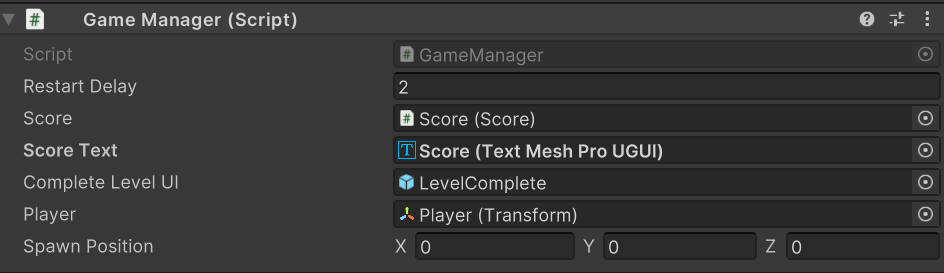 rocky canyon
another way to do it is to load scenes Additively..
as u can see here.. my first scene is MainMenu and then my second scene is Level1 but i never unload my BootLoader scene..
all its references are tucked in the scene w/ it
soo i never get them lost
rocky canyon
haughty flower
https://i.imgur.com/eplNDXj.png
either that or do like this ^ u could add all the references that it needs into the DDOL w/ it
but that might cause different issues.. if those have references to the game-world
if its a small game its probably easy enough to just run a function that reassigns everything fresh
haughty flower
That's really cool, I didn't know you could do that.
rocky canyon
haughty flower
That's really cool, I didn't know you could do that.
Additive Scene Loading
if u wanna research it some more
haughty flower
Thank you 🙂
rocky canyon
queen adder
Alright thank you very much for the help very helpful will take all this into co...
no problem 🍀 best luck
rocky canyon
cosmic dagger
you tryna destroy the universe?
i cant get away from that error
nvm i figured it out im an idiot

can't update my health when my player is disabled 😅
altho tbh i still dont know why it does that

ohh sure i do... b/c if playerhealth = null.. then maxHealth is just zero
nvm
 coarse zodiac
im a pretty new beginner does anyone know how i can make an animation start? i have a character and he has a sword i made a sprite sheet for said sword but i have no idea how to make it trigger any ideas?
rocky canyon
Open Animator window.. for the object..
wintry quarry
coarse zodiac
im a pretty new beginner does anyone know how i can make an animation start? i h...
generally by setting paramters on your animator
rocky canyon
it should include the animation u made..
wintry quarry
such as a trigger
coarse zodiac
i have no clue how to open the animator im brand new to unity its confusing to me i can open it but my gameobject doesnt show up in it
rocky canyon
- add a paramter (float, int, trigger or w/e)
- add a transition from idle -> ur animation (use the parameter as the condition)
and then - using a reference to that animator you just set the parameter
wintry quarry
coarse zodiac
i have no clue how to open the animator im brand new to unity its confusing to m...
the same concepts work for 3d and 2d don't worry
coarse zodiac
wintry quarry
I recommend: https://learn.unity.com/course/introduction-to-3d-animation-systems
can this apply for 2D as well im doing 2D rn
coarse zodiac
wintry quarry
the same concepts work for 3d and 2d don't worry
ah okay ty
will do appreciate you!
wintry quarry
coarse zodiac
can this apply for 2D as well im doing 2D rn
the only difference would be in what properties you animate. i.e. you would animate the sprite property of the SpriteRenderer instead of the position of a bone for example
but the animator works the same either way
rocky canyon
coarse zodiac
can this apply for 2D as well im doing 2D rn
animator.SetBool
animator.SetTrigger
animator.SetFloat
the important part being the Transitions.. altho theres many ways to do this.. including calling the clips manually..

altho i do like the statemachine
also remember the parameters names are important... if ur parameter is isTriggered it'll only work w/ "isTriggered" as thats not the same as "IsTriggered" minor gripe.. but you'd be suprised how many people ignore their spelling right when it matters the most
 livid path
What is workaround to bind data source as struct without copy in UI Toolkit?
rocky canyon
wrappah class
eternal needle
rocky canyon
`animator.SetBool`
`animator.SetTrigger`
`animator.SetFloat`
this video instantly reminded me of youtube tutorials 10 years ago with the notepad instructions. its just missing the metal music
rocky canyon
lmao! i know right!
rocky canyon
eternal needle
this video instantly reminded me of youtube tutorials 10 years ago with the note...
ahh.. classics
rocky canyon
eternal needle
this video instantly reminded me of youtube tutorials 10 years ago with the note...
before it was all mucked up w/ AI voiceover
 steep rose
hey notepad instructions get right to the point
queen adder
quick question how would I get an object in unity to move in way its facing
wintry quarry
the way it's facing is transform.forward
so - use that direction for whatever movement code you want
(unless it's in 2D in which case it's transform.right or up)
queen adder
it is in 2D
its being silly how would i write ie
I would I write the transform right
queen adder
Sorry its late im tired. I dont know how it do it i do cs transform.position = transform.right is that right
wintry quarry
no that doesn't make any sense
position is a position
you wouldn't assign a direction vector to it
use that direction for whatever movement code you want
Remember when I wrote this?
you could for example do this:
transform.position += transform.right * speed * Time.deltaTime;```(in Update)
(note += not = )
hazy crypt
how do i download assets
in my asset folder
there are some assets i no longer have (i made them myself dw), and i wanna redownload em to recolor it (i have a new use for it)
wintry quarry
hazy crypt
how do i download assets
from the package manager
Otherwise - just copy the files into your asset folder, if you have them from some other source.
hazy crypt
wintry quarry
from the package manager
what i mean
is getting a file from my project
into my computer
wintry quarry
copy it from the asset folder to another folder in your computer
wintry quarry
If you don't have the PC, I don't see how you could get it
hazy crypt
wintry quarry
If you don't have the PC, I don't see how you could get it
its still in my game
wintry quarry
you mean from the build?
hazy crypt
from the editor
i think it got saved from the cloud
or smth, i havent used unity in a while
(months)
wintry quarry
If you have the project open, then you have the project on your computer
just copy it from the assets folder
hazy crypt
kk
 hollow zenith
Hey, how can I convert hex value to rgba?
 vestal grove
For a 2d game (non pixel art with target resolution for 1920x1080), is there any pro/con for setting PPU of all sprites to 1?
 teal viper
vestal grove
For a 2d game (non pixel art with target resolution for 1920x1080), is there an...
teal viper
vestal grove
For a 2d game (non pixel art with target resolution for 1920x1080), is there an...
Not really. You just set it such that your sprite is of the right size without you needing to scale it.
Think of it as a better way to scale your sprite.
vestal grove
is using ppu as 1 a common practice?
teal viper
vestal grove
is using ppu as 1 a common practice?
There's no common practice in regards to this. You would adjust it to your project needs.
vestal grove
Ok, thanks for the info
hollow zenith
rich adder
https://docs.unity3d.com/ScriptReference/ColorUtility.TryParseHtmlString.html
Yep I did that, it was weird using "parsehtml", is hex made by/for html/css or is it some old Unity thing since they used to have javascript?
I expected something like ColorUtility.ConvertStringToHex(String string)
eternal needle
hollow zenith
Yep I did that, it was weird using "parsehtml", is hex made by/for html/css or i...
its not limited to hex. if you read the docs for the page navarone linked, it says
Strings that begin with '#' will be parsed as hexadecimal
Strings that do not begin with '#' will be parsed as literal colors
which includes some html color codes. html color code is just the name of it like "red"


 timber tide
problem is you need to configure your IDE if you can't catch the syntax errors yourself
 normal thicket
how?
eternal falconBOT
💡 IDE Configuration
If your IDE is not autocompleting code
or underlining errors, please configure it.
Select one:
•  Visual Studio (Installed via Unity Hub)
• Visual Studio (Installed manually)
•  VS Code
•  JetBrains Rider
• :question: Other/None
eternal needle
i also highly recommend doing some c# basics first outside of unity if you have no clue what these errors are.
normal thicket
i configured IDE but its still not got any changes
normal thicket
eternal needle
i also highly recommend doing some c# basics first outside of unity if you have ...
WIll do it
 ivory bobcat
normal thicket
i configured IDE but its still not got any changes
ivory bobcat
normal thicket
i configured IDE but its still not got any changes
Does intellisense properly highlight and underline the issues within the ide? The conflicting statements should be highlighted and normally prohibited from being typed - you'd get errors as soon as you start attempting to type em instead of randomly writing stuff and later having to fix the whole mess.
normal thicket
yeah I got it
 sharp abyss
I have a game that you can swing. anybody know how can I make passive spider legs that I can show player The law of inertia while swinging?
teal viper
Wat? "Passive spider legs"??
sharp abyss
I meant I dont want to walk it like https://youtu.be/9-7owO16syA?si=ySphmlU9qdjTQFSE this video just legs that stand there but go opposite way while my character is swinging
After messing around with a 3D-ik driven spider, I decided to make a 2D one and invite you to come with me on the process.
How to make an atmospheric 2D game: https://www.youtube.com/watch?v=S10eaYrNnYM
Leg mover script: https://pastebin.com/r0rmu3nr
Spider Brain (Movement): https://pastebin.com/yh59eAXQ
Want to talk to me, or other like min...
teal viper
sharp abyss
I meant I dont want to walk it like https://youtu.be/9-7owO16syA?si=ySphmlU9qdjT...
Well, you'll basically do the same ik setup, just make the target controlled by physics/rb rather than setting it's position manually.
sharp abyss
okay thanks 👍
pastel pawn
been redoing my submarine movement system with addforce but i've been having some trouble making it accelerate slower like a real sub would, anybody know what i can do?
steep rose
pastel pawn
been redoing my submarine movement system with addforce but i've been having som...
show us some code, but alternatively you can just use a smaller multiplier when you are adding a force
and from what im seeing, try changing your acceleration rate to 0.5f or 0.3f to make the acceleration slower
pastel pawn
steep rose
show us some code, but alternatively you can just use a smaller multiplier when ...


 steep rose
and from what im seeing, try changing your `acceleration rate` to `0.5f` or `0.3...
steep rose
steep rose
and from what im seeing, try changing your `acceleration rate` to `0.5f` or `0.3...
try this
pastel pawn
i did, it doesn't change anything
languid spire
pastel pawn
So you didn't bother reading the addforce documentation before writing this?
steep rose
pastel pawn
i did, it doesn't change anything
wait wait wait, why do you have like 5 addforces but only have the acceleration rate on 1 of them
that doesnt make sense
pastel pawn
languid spire
So you didn't bother reading the addforce documentation before writing this?
i just kinda saw a tutorial for it and tried messing with it- https://www.youtube.com/watch?v=B7t6zx5LuwQ&list=PLNpawlnOlv155Nlx_IDyIAhEDWJaGjQBV&index=6

Chapters
00:00 Scene and object setup
01:05 Using Rigidbody.AddForce()
03:52 Demo
steep rose
just use 1
languid spire
pastel pawn
i just kinda saw a tutorial for it and tried messing with it- https://www.youtub...
pastel pawn
steep rose
just use 1
how could i write that?
steep rose
pastel pawn
how could i write that?
something like moveDirection = orientation.up * y + orientation.right * x; x and y being a input
queen adder
sorry I don't know where to ask this appologies if this isnt the correct place if not tell me where I should put it. but I am working on a assignment and am having massive confusions between the example project and my project. why does my canvas not have a drop down menu like this one here?
 steep rose
something like `moveDirection = orientation.up * y + orientation.right * x;` `x`...
steep rose
steep rose
something like `moveDirection = orientation.up * y + orientation.right * x;` `x`...
then use moveDirection in 1 addforce
queen adder
my canvas, no drop down menu
 pastel pawn
steep rose
something like `moveDirection = orientation.up * y + orientation.right * x;` `x`...
pastel pawn
steep rose
something like `moveDirection = orientation.up * y + orientation.right * x;` `x`...
i'm sorry i keep asking questions but where do i put that- do i just replace the existing inputs from the void update?
languid spire
queen adder
my canvas, no drop down menu
#📲┃ui-ux But to answer your question. your canvas does not have any children objects assigned
steep rose
pastel pawn
i'm sorry i keep asking questions but where do i put that- do i just replace the...
you would put it in void update, and you would use GetAxisRaw for x and y inputs
but yes get rid of all those inputs in replace of this one
queen adder
languid spire
<#502171135350407168> But to answer your question. your canvas does not have any...
thank you, and ok i see
not sure how to do that
sorry im total beginner this is just for a class, i am super lost
pastel pawn
steep rose
you would put it in void update, and you would use `GetAxisRaw` for `x` and `y` ...
i don't think i'm doing it right-
 languid spire
queen adder
not sure how to do that
languid spire
queen adder
not sure how to do that
you obviously managed to create gameobjects.
To parent them to the Canvas. Select that first then create the objects you want
steep rose
pastel pawn
i don't think i'm doing it right-
you would need to assign movedirection as a vector3 and use GetAxisRaw for x and y inputs, then use your player transform instead of orientation, I just use an orientation object so nothing can change the forces on my player
i suggest you !learn how to do so
eternal falconBOT
:teacher: Unity Learn ↗
Over 750 hours of free live and on-demand learning content for all levels of experience!
pastel pawn
steep rose
i suggest you !learn how to do so
alright then lol
 mild plank
Hi, anyone knows how do I make fog for my game, but only on the outside of the house? I tried SSMS tool, but that also works all the time, I just want the fog on the outside. And also, so that the fog is everywhere, not only on objects and the sky just shines in blue. Any suggestions?
 ripe shard
mild plank
Hi, anyone knows how do I make fog for my game, but only on the outside of the h...
ripe shard
mild plank
Hi, anyone knows how do I make fog for my game, but only on the outside of the h...
one approach is to make a custom fog shader and render a large sphere around the camera with it, overdrawing everything in the scene and thereby applying a fog effect, sort of like a skybox but instead of behind everything you draw it in front of everything. That shader can then sample the depth texture and world Y and any custom masks you would like to have for masking out building interiors. You may have to be clever about coming up with these interior masks however.
Another (more expensive) approach would be to use path-traced volumetric fog (you'll probably buy an asset for that and use its tooling).
mild plank
Yeah not beginner friendly 😅
ripe shard
if you have advanced feature plans, you will need advanced features 😉
mild plank
ripe shard
if you have advanced feature plans, you will need advanced features 😉
I am making it for my school game, and I need to make it atleast a bit scary yk 😭
ripe shard
actually its only not-a-baseline-feature because its so expensive to implement generically
ripe shard
mild plank
I am making it for my school game, and I need to make it atleast a bit scary yk ...
an easy way is to just disable/enable the regular fog when you go inside/outside
and match the skybox to the fog color
if you just want to bleed the fog into the skybox, you can use the overdraw-shader-thing i mentioned earlier with a simple fog (fog is just and overlay of the DepthTexture with some color grading)
mild plank
is the basic unity lightning setting fog smoothly interactable via scripts? Like the intensity
ripe shard
yes
but its a static/global API, so you need to be careful how you manage changing it
mild plank
Time.deltaTime adding to some Light.fog.value?
Sorry I am trying hard
and not getting too far
ripe shard
have a look here https://docs.unity3d.com/ScriptReference/RenderSettings.html
 cosmic quail
ripe shard
an easy way is to just disable/enable the regular fog when you go inside/outside
cosmic quail
ripe shard
an easy way is to just disable/enable the regular fog when you go inside/outside
easy way? how would you detect when the player is inside or outside? 😅
steep rose
cosmic quail
easy way? how would you detect when the player is inside or outside? 😅
you could use a trigger
cosmic quail
steep rose
you could use a trigger
a huge trigger that covers the entire inside? wouldnt that affect performance significantly?
cosmic quail
steep rose
a cube trigger, not a mesh trigger
only if the building is cube shaped though
steep rose
cosmic quail
only if the building is cube shaped though
then use a meshcollider trigger if it is akwardly shaped
cosmic quail
yea i guess not sure about the performance hit with that though
languid spire
Unless the player is allowed to walk through walls/floors/roofs then you only need a trigger on the doors
steep rose
huh? that doesnt make sense
just use a trigger for the whole room
then when you enter set a boolean to true
else, set it to false
languid spire
How else is the player going to move from inside to outside if not through a door?
steep rose
im not sure but adding a trigger for every door seems a bit rough, not to mention it may not work correctly due to the fact how triggers work.
if you add a trigger for every door you would do Ontriggerenter to set something to true but you could never do Ontriggerexit to set it back to false
since you wouldnt be in the trigger anymore
ripe shard
cosmic quail
yea i guess not sure about the performance hit with that though
you can have 1000s of triggers, if most of them are static they don't affect performance meaningfully. if your rooms have complex shapes you can use multiple primitive triggers
languid spire
steep rose
im not sure but adding a trigger for every door seems a bit rough, not to mentio...
wrong
cosmic quail
ripe shard
you can have 1000s of triggers, if most of them are static they don't affect per...
interesting, i guess they do affect memory though with that many
steep rose
languid spire
wrong
okay, could you explain
languid spire
steep rose
okay, could you explain
you only need OnTriggerEnter + a bool isInside. which you toggle
ripe shard
cosmic quail
interesting, i guess they do affect memory though with that many
each trigger uses probably less than 2KB of memory, 1KB for the gameobejct and the rest for any representation they have in the physics engine, its completely negligible in a "beginner" project
cosmic quail
languid spire
you only need OnTriggerEnter + a bool isInside. which you toggle
wouldnt you need to do programming to somehow detect which side of the trigger the player exits from?
steep rose
languid spire
you only need OnTriggerEnter + a bool isInside. which you toggle
both ways would work, thanks for clearing it up
languid spire
cosmic quail
wouldnt you need to do programming to somehow detect which side of the trigger t...
why? If he starts isInside == false. Then going in it becomes true and exiting again it goes back to false
ripe shard
languid spire
why? If he starts isInside == false. Then going in it becomes true and exiting a...
he's talking about doors
cosmic quail
languid spire
why? If he starts isInside == false. Then going in it becomes true and exiting a...
didnt you say the trigger is inside the doorway only though?
languid spire
cosmic quail
didnt you say the trigger is inside the doorway only though?
yes, correct
ripe shard
anyway, the more robust way to set it up is to define a volume that is considered "inside", an event based system made by evaluating door-triggers is way more fragile
steep rose
ripe shard
anyway, the more robust way to set it up is to define a volume that is considere...
thats what a trigger does
languid spire
think about it
You are outside- isInside is false
You walk through the door - isInsiide is true
you walk through the door again, therefore you must be outside - isInside is false
steep rose
steep rose
thats what a trigger does
i see no issue with a trigger for something simple
cosmic quail
languid spire
think about it
You are outside- isInside is false
You walk through the door - is...
but what if you hit the trigger and go back before you exit it from the other side
ripe shard
languid spire
think about it
You are outside- isInside is false
You walk through the door - is...
you really think this is a robust way of implementing it in a project where we know nothing about the remaning level structure?
languid spire
cosmic quail
but what if you hit the trigger and go back before you exit it from the other si...
if that is possible, then you can use OnTriggerExit to check the position/direction of movement
ripe shard
steep rose
thats what a trigger does
i'm explaing why the door-trigger-approach is bad
steep rose
ripe shard
i'm explaing why the door-trigger-approach is bad
okay
languid spire
ripe shard
you really think this is a robust way of implementing it in a project where we k...
It's a damn sight better than having one trigger covering the whole building
And why would it not be robust?
ripe shard
languid spire
And why would it not be robust?
because we don't know anything about the level structure, if it has multiple doors and a team of undisciplined level designers, this can break very easily when configured incorrectly, breaking all future state aswell. we're probably not talking about a door that guarantees the room can only be exited through that same door or even through any door.
if you just define a volume you do not break future state because you counted the enter/exit events wrong
languid spire
ripe shard
because we don't know anything about the level structure, if it has multiple doo...
Now you are just being pedantic for the sake of it
ripe shard
given your years of exp, i find it surprising that you can't see the issues with that
languid spire
ripe shard
given your years of exp, i find it surprising that you can't see the issues with...
If every solution I gave was based on a team of non professionals 'maybe' doing shit, I would never offer a solution.
This is a base structure which answers the question asked (and based on my understanding of his needs). Of course he implements it as required for his project
steep rose
guys stop fighting, it will get you nowhere. both ways a good for what this guy is probably doing, if he doesnt know how to place triggers properly then thats on him.
 gloomy bison
how would one be able to create a system where you walk through one door and another room appears where the door left off, like a random room generation?
so far chatgpt keeps taking me to the same route of errors
languid spire
I've actually got one of those, believe me it ain't easy to do
gloomy bison
imma just go to reddit and youtube and see where i can find a tutorial
bearing in mind i have 15 minutes left before i have to leave
steep rose
gloomy bison
so far chatgpt keeps taking me to the same route of errors
as i tell everyone, chatgpt is unreliable and will lead you astray most times best not use it
gloomy bison
yeah, i usually dont use it but i find it really funny
i'll try figure this out when i get back
 quick pollen
Quick question, how can I make it so a quaternion's X rotation is 0 without messing things up?
ripe shard
quick pollen
Quick question, how can I make it so a quaternion's X rotation is 0 without mess...
use its eulerAngles API
quick pollen
I have a movement script made here which allows me to move in the forward direction of the camera, but on the forward and backward movement, since the camera is tilted downwards, I get vertical movement too, which I don't want
 brave compass
quick pollen
I have a movement script made here which allows me to move in the forward direct...
brave compass
quick pollen
I have a movement script made here which allows me to move in the forward direct...
It's simpler to just flatten the vector after rotating it. Either by setting .y = 0 directly or using Vector3.ProjectOnPlane.
quick pollen
ripe shard
use its eulerAngles API
I feel as though doing something like this is extremely dangerous
Vector3 cameraEuler = cameraTransform.rotation.eulerAngles;
cameraEuler.x = 0f;``` lethal holly
quick pollen
I feel as though doing something like this is extremely dangerous
```cs
Vector3 ...
lethal holly
quick pollen
I feel as though doing something like this is extremely dangerous
```cs
Vector3 ...
Youre right, it is, you shouldnt do that
quick pollen
oh wait I think I get it
lethal holly
However, if its for camera rotations (mouselook) you could try just storing a vector3 representing the rotation locally (literally store the euler angles as a member var) and make changes to those and set them
quick pollen
i got it, thank you!
I just did
        movementVector3 = cameraTransform.rotation * new Vector3(inputVector.x, 0f, inputVector.y) * moveSpeed;
movementVector3.y = 0;```That's if you want to clamp the camera rotation, yes. But I don't think that's what they want.
lethal holly
That way you avoid drift or other issues with the calculation
quick pollen
then multiplied the vector with deltatime in the end
I'm trying to get a kind of soulslike type of vibe with the movement
lethal holly
brave compass
That's if you want to clamp the camera rotation, yes. But I don't think that's w...
Not just for clamping its for maintaining numerical stability of your rotations, reading euler angles from quats, changing it and then converting back to a quat is a recipe for disaster
But maybe I misunderstood what they meant and answered the wrong thing
quick pollen
heres the result I was looking for
ripe shard
quick pollen
heres the result I was looking for
if you search for FreeCamera.cs in your project you will find a nice camera implementation as part of shadergraph examples (may also be in the SRP package) that illustrates how to make a simple camera via euler angles
brave compass
There was never any issue with the camera, just the movement vector.
lethal holly
Im pretty sure alfy is talking about a problem relating to his mouse look 🤔
brave compass
It's related, yes, because the movement vector is rotated by the camera. When the camera was tilted down, the character could move into and above the ground, which they didn't want. They still want the camera to be able to tilt down, just not the movement vector with it.
ripe shard
regardless, the question was about controlling Quaternions and that free camera is an example that does it through a Vector3 representing euler angles that get modified and converted into a Quaternion each frame
brave compass
It was the wrong approach to try to modify the Quaternion in the first place, since its much easier to project the movement vector afterwards. Classic XY problem.
quick pollen
ripe shard
if you search for FreeCamera.cs in your project you will find a nice camera impl...
I mean, I kinda got this already
I'm using cinemachine for the rest
lethal holly
Ah I see that part now, I missed the movement message
quick pollen
brave compass
There was never any issue with the camera, just the movement vector.
yeah exactly
my main issue was the way I processed the information mainly
rich adder
hollow zenith
Yep I did that, it was weird using "parsehtml", is hex made by/for html/css or i...
did you get it working ? also did you see reply bawsi sent?
 steady crown
im trying to make it so the animation only plays when i walk and stop when i dont. right now the animation continues after i stop walking, what can i do?

 pliant sleet
Can somebody help me with this...? I am trying to make a 2D platformer and my player seems to jump inconsistently, like sometimes it jumps higher and the opposite (here are the script for the movement and the player's RB)

 lethal holly
steady crown
im trying to make it so the animation only plays when i walk and stop when i don...
lethal holly
steady crown
im trying to make it so the animation only plays when i walk and stop when i don...
It seems like you never set it to false
steady crown
i tried with an else if but didnt work
lethal holly
You just need to use an else here
steady crown
or should it be before
rich adder
pliant sleet
Can somebody help me with this...? I am trying to make a 2D platformer and my pl...
are you using addForce for jump?
lethal holly
Let me show you 😄
rich adder
dont send screenshots of code @pliant sleet
pliant sleet
rich adder
are you using addForce for jump?
Indeed.
steady crown
 rich adder
pliant sleet
Indeed.
rich adder
pliant sleet
Indeed.
reset velocity before doing AddForce
steady crown
this doesnt work for some reason
lethal holly
steady crown
Ah yes
wintry quarry
pliant sleet
Can somebody help me with this...? I am trying to make a 2D platformer and my pl...
You are doing physics in Update, which will lead to inconsistent results
also why are you manually adding gravity
rich adder
btw you should not be doing * time.deltaTime on veloicty
wintry quarry
why not just use the built in gravity
lethal holly
steady crown
this doesnt work for some reason
It may be an issue with how you configured the animator then
wintry quarry
well the deltaTime makes sense there, but it's not going to be consistent
lethal holly
Go inside the animator and have it open on a second window and watch that value change while the game runs. Make sure it updates correctly
steady crown
hmm is it because i made the method a void and that doesnt work with booleans?
lethal holly
if it does then its an issue with how you configured the animator
rich adder
ohh thought we need it only with functions like MovePosition
lethal holly
steady crown
hmm is it because i made the method a void and that doesnt work with booleans?
No that has nothing to do with it
pliant sleet
wintry quarry
You are doing physics in Update, which will lead to inconsistent results
so should I use FixedUpdate ?
steady crown
oh okay
wintry quarry
pliant sleet
so should I use FixedUpdate ?
physics should use fixedupdate. Specifically the part that it will matter for here is the part where you're applying gravity
it's also not clear what your Jump() function is doing
since you didn't show it
please share code via !code not screenshots
eternal falconBOT
Posting code
📃 Large Code Blocks
Use links to services like:
https://gdl.space/, https://paste.ofcode.org/, https://hatebin.com/, https://paste.myst.rs/, https://hastebin.com/
📃 Inline Code
Surround code with three backquotes. Not quotation marks.
To format as C#, add cs to the first line:
```cs
// Your code here
```
Add a comment with a line number if there is an error message.
steady crown
wintry quarry
please share code via !code not screenshots
my b
pliant sleet
wintry quarry
it's also not clear what your `Jump()` function is doing
I use the AddForce() function to do so.
wintry quarry
pliant sleet
I use the AddForce() function to do so.
That's very vague
showing the code would be better
pliant sleet
I ll just use screenshots for now, sorry
 wintry quarry
pliant sleet
I ll just use screenshots for now, sorry
wintry quarry
pliant sleet
I ll just use screenshots for now, sorry
ok so:
- Are you intentionally adding a force on the x axis here??
- AddForce for a jump which is a one-off should typically be using ForceMode2D.Impulse
rich adder
pliant sleet
I ll just use screenshots for now, sorry
you should use Impulse for jump, and would reset the velocity before doing AddForce
wintry quarry
otherwise you'll have to set the jumpPower variable absurdly high
rich adder
wait why is the x velocity the force for jump 🤔
pliant sleet
wintry quarry
ok so:
1. Are you intentionally adding a force on the x axis here??
2. AddForce ...
aren't I just setting the velocity to what it is ? Like not modifying it whatsoever
wintry quarry
pliant sleet
aren't I just setting the velocity to what it is ? Like not modifying it whatsoe...
AddForce is already additive to your current velocity. You don't need to add any X axis force unless you mean to change your velocity on the X axis.
To set the velocity you would do rb.velocity = newVelocity;
if you want to NOT modify the x axis, you should be adding 0 force on the x axis
because any number + 0 gives you the original number
Again AddForce is additive
wintry quarry
wdym by "well used"?
wintry quarry
As mentioned, you should be adding an impulse force here
 main karma
what's "others" in the profiler cause it's eating 15ms of my game

idk how to identify bottlenecks using the profiler well and this is driving me nuts
rich adder
main karma
what's "others" in the profiler cause it's eating 15ms of my game
did you filter all of them ? are you sure its not Garbage collector?
rich adder
well then check the hierarchy and sort by most ms
rich adder
main karma
how do you do that
I would recommend this vid first https://www.youtube.com/watch?v=xjsqv8nj0cw

In this video, we look at an overview of the Unity Profiler in Unity 2022 LTS.
You’ll learn more about profiling your game to identify bottlenecks, the Profiler’s interface, and how to identify issues that need fixing.
The Unity Profiler is a tool for creators who want to understand performance issues and how to address them.
Helpful resour...
main karma
okay, also another question is... if I have like let's say over 600 unity objects that are a duplicate of the same object, if I batch them all would it still impact fps?
like greatly?
got a particle on all of them

my fps drops by like 40 in the editor with these many vs without
I want to optimize my game to handle around a thousand and idk where to begin, I got no lights, and no shadows in my game, everything is baked
almost everything is static as well
and batched
scripts only take around 3ms
rich adder
if you plan on using so many partciles you should probably use the VFX graph
they will boost the particles greatly as its not straining the CPU (particle system limitation)
its all based on GPU
main karma
rich adder
if you plan on using so many partciles you should probably use the VFX graph
can you send me a tutorial on it as I'm oblivious of what you're talking about
rich adder
main karma
can you send me a tutorial on it as I'm oblivious of what you're talking about
main karma
rich adder
https://unity.com/visual-effect-graph
also how would one copy the vfx I got going on into this
rich adder
main karma
also how would one copy the vfx I got going on into this
there are tutorials, more or less the components are similiar
rich adder
once you learn the tools it has you can easily port it
well yes its many times faster because its entirely on the gpu and not going back n forth to CPU like particle system
for small amounts is okay but if you have many its will chugg
main karma
ohh, that would certainly help as I'm getting CPU bottlenecked
main karma
I already batched them
I followed the simple optimization tips you can find in every tutorial and did some of my own
like removing shadows as all my levels are dark
and baking every light in the game (no real time lighting)
so my gpu doesn't do much
if I can move the vfx to the gpu that would help greatly I think
as I got thousands of VFX going on
rich adder
yea it should help greatly
 final pelican
I have a player on a board that should move depending on a die roll. Afterwards, the turn count would go up as the player has to reach a goal in a certain amount of rolls.
How would I connect the die to the player so that it can only move the amount the die shows and after doing so, the turn count raises?
 lethal verge
Hey! I have a small problem. I am controlling a circle according to my mouse movement. So if I drag my mouse up, the circle accelerates up until I drag my mouse down. This works for any direction. The problem is when I reach the end of the screen with my mouse I have no space to keep moving my mouse in that direction, for instance, if my circle stands completely still and my cursor is in the right side of the screen, I have no space to drag my mouse to the right side to make my circle go right. I thought of locking my mouse in the middle of the screen and hide it but then comes another problem. When I lock the mouse the movement stops working so I don't really know how I should fix this? Any suggestions?
rocky canyon
use mouse Delta's and lock the cursor like ur original instinct
languid spire
Rotate or Move your camera to track the mouse
willow scroll
lethal verge
Hey! I have a small problem. I am controlling a circle according to my mouse mov...
You could forcefully teleport your mouse to the opposite corner of the screen how it's done in Unity, when dragging the float field
This is a way if you want your mouse to be visible and not limited by the screen bounds
This is achievable with the InputSystem's WarpCursorPosition method
Mouse.current.WarpCursorPosition(calculatedPosition);
Will this be a problem for users with 2 screens?
willow scroll
lethal verge
Will this be a problem for users with 2 screens?
2 screens?
wintry quarry
lethal verge
Hey! I have a small problem. I am controlling a circle according to my mouse mov...
Have you considered locking your cursor?
lethal verge
I mean if you drag your mouse to the right and it goes over to your second screen
wintry quarry
As for "why it doesn't work" when locked, presumably your code is the problem
lethal verge
wintry quarry
As for "why it doesn't work" when locked, presumably your code is the problem
It's probably my code then, im kinda new so I don't have much knowledge about programming. I have successfully locked the cursor but then all the movement disapears
willow scroll
lethal verge
I mean if you drag your mouse to the right and it goes over to your second scree...
I am not aware of how it works with multiple screens. It should be possible if Unity supports that
wintry quarry
lethal verge
It's probably my code then, im kinda new so I don't have much knowledge about pr...
well if you want help with the code, you would have to share the code with us.
rocky canyon
lethal verge
Hey! I have a small problem. I am controlling a circle according to my mouse mov...
locking cursor and using mouse axis / delta's would be the way id do it
willow scroll
lethal verge
It's probably my code then, im kinda new so I don't have much knowledge about pr...
You either lock the cursor via CursorLockMode and hide it, or teleport the cursor if you want it to be visible
lethal verge
I have hidden the cursor and locked it in the middle
When I unlock it I can move the ball
I will show the scripts 2 sec
using UnityEngine;
public class PlayerController : MonoBehaviour
{
public float forceMultiplier = 5.0f;
private Rigidbody2D rb;
private Vector2 lastMousePosition;
private Vector2 movementDirection;
void Start()
{
    rb = GetComponent<Rigidbody2D>();
    rb.gravityScale = 0;


    lastMousePosition = Camera.main.ScreenToWorldPoint(Input.mousePosition);


    Cursor.lockState = CursorLockMode.Locked;
    Cursor.visible = false;
}

void Update()
{

    Vector2 currentMousePosition = Camera.main.ScreenToWorldPoint(Input.mousePosition);


    Vector2 mouseMovement = currentMousePosition - lastMousePosition;


    if (mouseMovement.magnitude > 0.01f)
    {

        movementDirection = mouseMovement.normalized;


        rb.AddForce(mouseMovement * forceMultiplier, ForceMode2D.Force);
    }


    lastMousePosition = currentMousePosition;
}

void OnApplicationFocus(bool hasFocus)
{
    if (hasFocus)
    {
        Cursor.lockState = CursorLockMode.Locked;
        Cursor.visible = false;
    }
    else
    {
        Cursor.lockState = CursorLockMode.None;
        Cursor.visible = true;
    }
}

void OnApplicationPause(bool pauseStatus)
{
    if (pauseStatus)
    {
        Cursor.lockState = CursorLockMode.None;
        Cursor.visible = true;
    }
    else
    {
        Cursor.lockState = CursorLockMode.Locked;
        Cursor.visible = false;
    }
}
}
rich adder
lethal verge
using UnityEngine;
public class PlayerController : MonoBehaviour
{
public f...
use links for !code
eternal falconBOT
Posting code
📃 Large Code Blocks
Use links to services like:
https://gdl.space/, https://paste.ofcode.org/, https://hatebin.com/, https://paste.myst.rs/, https://hastebin.com/
📃 Inline Code
Surround code with three backquotes. Not quotation marks.
To format as C#, add cs to the first line:
```cs
// Your code here
```
Add a comment with a line number if there is an error message.
rocky canyon
dont use mouse position
lethal verge
!code
eternal falconBOT
Posting code
📃 Large Code Blocks
Use links to services like:
https://gdl.space/, https://paste.ofcode.org/, https://hatebin.com/, https://paste.myst.rs/, https://hastebin.com/
📃 Inline Code
Surround code with three backquotes. Not quotation marks.
To format as C#, add cs to the first line:
```cs
// Your code here
```
Add a comment with a line number if there is an error message.
rocky canyon
use mouse axis / deltas
rich adder
lethal verge
!code
your meant to read it
rocky canyon
mouse position will never exceed the bounds of the camera
wintry quarry
lethal verge
I have hidden the cursor and locked it in the middle
        Vector2 currentMousePosition = Camera.main.ScreenToWorldPoint(Input.mousePosition);


        Vector2 mouseMovement = currentMousePosition - lastMousePosition;


        if (mouseMovement.magnitude > 0.01f)
        {

            movementDirection = mouseMovement.normalized;


            rb.AddForce(mouseMovement * forceMultiplier, ForceMode2D.Force);
        }```

This is all so overcomplicated. Why not just use `Input.GetAxis("Mouse X")` and `GetAxis("Mouse Y")`?

Of course it doesn't work as is - since you're basing it on mouse _position_ instead of the mouse delta inputdelta's can (b/c its the change)
lethal verge
I want it to go in all directions but won't it just go left/right, up/down if I use mouseX and mouseY
rocky canyon
do u have to press a diagonal key when ur playing a first person shooter?
or do u just press up and left at the same time 😉
lethal verge
Damn true
rocky canyon
        float moveX = Input.GetAxis("Mouse X");
        float moveY = Input.GetAxis("Mouse Y");

velocity += new Vector2(moveX, moveY) * speed * Time.deltaTime;``` its simpleYes I should simplify everything I see now that it's over complicated
and do you recommend locking the cursor or doing like you said to make the mouse go outside the screen?
rocky canyon
wont matter.. even if its locked.. the object will still go off the screen edges
b/c its tracking the delta (differnece in mouse movement).. locking the cursor doesnt affect it any
the delta's still change even when its locked or hidden
mouseposition is what gets locked to 0,0 when u do that
lethal verge
Okay so it will still be able to move if I use the code you sent even when I lock the mouse
rocky canyon
yes.. b/c ur moving the object
not the cursor
        Cursor.lockState = CursorLockMode.Locked;
        Cursor.visible = false;
}``` in my example i sent.. i locked and hidtest it out and see what happens when u do different things
lethal verge
Okay I will try it out thank you @rocky canyon
eternal needle
final pelican
I have a player on a board that should move depending on a die roll. Afterwards,...
You should probably show what's confusing you on how to connect these. You can design it in many ways like how I described in the other channel.
final pelican
eternal needle
You should probably show what's confusing you on how to connect these. You can d...
What's mostly confusing me is figuring out how the scene will know when a turn is done after the player moves the dice spaces
rocky canyon
Start Move
Roll Dice
Calculate Spot
Move until hit that spot
Subtract or Add count or w/e
might want to look into coroutines and while loops
 midnight meteor
Hello ,why it doesnt appear in the inspector?

@wintry quarry its nothing thats why i hid it
 rocky canyon
probably compile errors.. but why u using [SerializeField] on a public variable?
wintry quarry
midnight meteor
Hello ,why it doesnt appear in the inspector?
presumably you have a compile error somewhere
check your console window
midnight meteor
nothing in my console window too
wintry quarry
show us
eternal needle
final pelican
What's mostly confusing me is figuring out how the scene will know when a turn i...
The player could handle this in its movement and just notify some manager script that its moved all the spaces.
midnight meteor
wintry quarry
show us
 wintry quarry
midnight meteor
wintry quarry
midnight meteor
make sure:
- Your code changes are saved
- That you refresh your unity assets if you have auto-refresh off
rocky canyon
it wont just show up while u have that VS window in the way
wintry quarry
Also what Spawn said
midnight meteor
how to check the refresh thing ?
wintry quarry
Preferences -> Asset Pipeline Settings -> Auto Refresh
rocky canyon
just click the unity window.. lol
midnight meteor
oh that's weird
 final pelican
eternal needle
The player could handle this in its movement and just notify some manager script...
final pelican
eternal needle
The player could handle this in its movement and just notify some manager script...
I'll see what i can write. Thanks
rich adder
oof
wintry quarry
midnight meteor
oh that's weird
yep that's why
rocky canyon
👻
midnight meteor
is this fine ?
 rocky canyon
🔍 ass
wintry quarry
yep
rocky canyon
midnight meteor
appreciate the help

just making a joke. not sayin ur ass or anything 🤣
midnight meteor
is there a "reset settings" button ?
rocky canyon
also.. if u use public theres really no need for [SerializeField]
now if its private u could do that.. to expose it in the editor
rocky canyon
midnight meteor
is there a "reset settings" button ?
for the script?
midnight meteor
rocky canyon
also.. if u use `public` theres really no need for `[SerializeField]`
i was just double checking
midnight meteor
rocky canyon
for the script?
for unity preferences
i mightve downloaded a unity asset that changed a lot of my settings
( the fast script reload )
rocky canyon
theres not a straight forward way no
steep rose
midnight meteor
( the fast script reload )
scripts already compile pretty quick, dunno why you would need a fast script reloader
rocky canyon
his AutoRefresh got toggled off for some reason
midnight meteor
steep rose
scripts already compile pretty quick, dunno why you would need a fast script rel...
i liked that i can change variables mid play mode
rocky canyon
he wanting to know if he can reset all the settings in the editor
midnight meteor
usually it wont let me
rocky canyon
midnight meteor
i liked that i can change variables mid play mode
ya, just remember that they dont stick lol
steep rose
midnight meteor
usually it wont let me
you are not suppose to be able to save settings while in game
for many reasons
midnight meteor
steep rose
you are not suppose to be able to save settings while in game
just for testing tho , instead of play/close/change code/play close/change code
i can just change code while testing
but yeah i'd rather take my time than redownload unity because of some error
rocky canyon
midnight meteor
just for testing tho , instead of play/close/change code/play close/change code
...
oh yea, thats really useful i do it all the time..
say i need a variable but i dont quite know a good value.. i'll keep it 0 or something
then run the game and fine-tune it... copy and then paste it back after i stop
just regular ole game-dev stuff
eternal needle
midnight meteor
but yeah i'd rather take my time than redownload unity because of some error
Pretty sure the fast reload plugin only changes that setting. I use it too and honestly I like keeping it off auto reload. It's sooo much more annoying to me when unity reloads when I dont want. The default button to reload should be ctrl r
midnight meteor
eternal needle
Pretty sure the fast reload plugin only changes that setting. I use it too and h...
thanks for the idea i actually prefer using ctrl + r myself
 rare hawk
I'm working on a 2D RPG (think Final Fantasy 1-6), and I'm contemplating whether it would be better to make some components DDOL or to have them in (almost) every scene. I see pro's and cons for both ways (one gives me easier data management, but makes it harder to find object for cutscenes and stuff. The other takes more resources, but makes scene management easier).
Any advice?
rocky canyon
i can just give u my personal preference... i like to use additive scenes / and keeping my GameManager scene and all its references loaded at all times
no DDOL needed
rich adder
isnt DDOL basically just an additive scene 😛
 short hazel
Yes it is lol
eternal needle
steep rose
scripts already compile pretty quick, dunno why you would need a fast script rel...
If you have a large project, it can take time. 15 seconds compared to 1 adds up very quickly especially if you're just trying to make small changes and see the result. And even with using it, we still need to recompile unity regularly
rare hawk
rocky canyon
i can just give u my personal preference... i like to use additive scenes / and ...
Hmmm, how would I go about using it? Say I add a new party member, which is a DDOL object. Would I add them to the additive scene? 🤔
rocky canyon
idk bout that one.. all my stuff exists from the beginning.. the only thing i have to do is search for couple of new things w/ each scene reload
wintry quarry
rare hawk
I'm working on a 2D RPG (think Final Fantasy 1-6), and I'm contemplating whether...
Probably a boostrapping scene situation with DDOL stuff.
rocky canyon
rare hawk
Hmmm, how would I go about using it? Say I add a new party member, which is a DD...
could use an event that fires off when a new party member enters..
and then find the new one
wintry quarry
especially because the battle system for a JRPG is best done with an additive scene.
hazy crypt
hazy crypt
fixed it
i went to the VCS tab last night
and logged in
boom it was fixed
wintry quarry
rare hawk
Hmmm, how would I go about using it? Say I add a new party member, which is a DD...
I mean the character wouldn't really be a GameObject. It would just be some data in your model. At various times it may have GameObjects to represent it such as in a battle or in a UI. But most times walking around the overworld, it's just data
the data model would be stored on a DDOL object/script
rare hawk
wintry quarry
especially because the battle system for a JRPG is best done with an additive sc...
I'm doing it in the overworld atm. Have used Additive in the past for a separate battle scene
steep rose
eternal needle
If you have a large project, it can take time. 15 seconds compared to 1 adds up ...
how many small changes would you be doing? you would have to do a ton for it to add up
rare hawk
wintry quarry
Probably a boostrapping scene situation with DDOL stuff.
I'll look into bootstrapping! Don't know the technique yet
rocky canyon
rare hawk
I'll look into bootstrapping! Don't know the technique yet
i store my player in the boot scene


u could probably store all ur party members in there as well.. and already have hte reference/data to them like said
wintry quarry
rare hawk
I'll look into bootstrapping! Don't know the technique yet
It basically just means having a scene that loads before any other scene and sets up things the game needs in all the other scenes.
eternal needle
steep rose
how many small changes would you be doing? you would have to do a ton for it to ...
Literally anything. If I enter play mode then realize I want to slightly alter an algorithm, I'm not exiting play mode, recompiling, then entering again.
And yea it's not a complete replacement to recompiling, but in the cases where I can use it might as well.
rare hawk
wintry quarry
It basically just means having a scene that loads before any other scene and set...
Just watched a video on it. Didn't know it was such a big thing in computers/ programming! Very informative.
rare hawk
rocky canyon
i store my player in the boot scene
So your player is always loaded, and you move it to the correct place in a new scene load based on what that scene has pre-defined?
I have to say that for a JRPG that doesn't seem very useful, as most party members would join the game way later on, but I might be mistaken. Will definitely watch a more in-depth video on it during breakfast tomorrow (it's 9 PM here)
steep rose
eternal needle
Literally anything. If I enter play mode then realize I want to slightly alter a...
true
rocky canyon
rare hawk
So your player is always loaded, and you move it to the correct place in a new s...
💯 when a new scene loads.. i initialize the player w/ its inventory and whatnot
when i pick up something it stores it on the inventory in the bootstrap scene
and so on and so on
wintry quarry
rare hawk
So your player is always loaded, and you move it to the correct place in a new s...
No not necessarily. The "walking around" player object doesn't have to be permanent. Just the data model that holds the information about the character.
the individual scenes read that data and decide to do things like spawn a controllable player character based on it, for example
rocky canyon
also true ^
rare hawk
wintry quarry
No not necessarily. The "walking around" player object doesn't have to be perman...
Check, I get it! That seems a lot more intuitive
rocky canyon
my player is the oldest part of my project and holds alot of its own things. unfortunately
so thats why mines loading into the boot
but i have a function called LoadChapter() which basically is a new scene.. that new scene has the starting position in it.. i just move my player too it
midnight meteor
Hello , why cant i drag the gameobject from hierarchy to there ? it keeps saying "typemismatch" although it is a gameobject

 wintry quarry
midnight meteor
Hello , why cant i drag the gameobject from hierarchy to there ? it keeps saying...
wintry quarry
midnight meteor
Hello , why cant i drag the gameobject from hierarchy to there ? it keeps saying...
assets (prefabs, ScriptableObjects) cannot reference objects in scenes
rare hawk
rocky canyon
my player is the oldest part of my project and holds alot of its own things. unf...
Haha I feel you. That's why I'm tackling the issue now!
Although I am a bit sad that it seems like implementing a solution will take longer than I had expected
rocky canyon
using that script
rocky canyon
rare hawk
Haha I feel you. That's why I'm tackling the issue now!
Although I am a bit sad ...
doesnt have to be..
u can make it basic for now and build it up as u go
eventually it'll be a payoff to have everything structured in that way
rare hawk
rocky canyon
doesnt have to be..
True! But even then I had hoped the outcome would be "My current solution is the way to go" 😅
rare hawk
rocky canyon
eventually it'll be a payoff to have everything structured in that way
Agreed!
rocky canyon
ofc u can always use a DDOL object.
and shove everything within it..
but i favor the bootloader/strapper (same thing i know nav)
rocky canyon
rare hawk
True! But even then I had hoped the outcome would be "My current solution is the...
if it works dont fix it
if u can manage everything its fine.. scaleability is when you'll hve regretslol
rare hawk
rocky canyon
but i favor the bootloader/strapper (same thing i know nav)
I feel like this is the more future-proof solution
rare hawk
rocky canyon
if u can manage everything its fine.. scaleability is when you'll hve regretslol
Yeah exactly
rocky canyon
💯
rare hawk
Thanks a lot both of you! I'll put it on my planning
rocky canyon
if u want fast and easy.. just use DontDestroyOnLoad(this.gameObject); on ur important stuff
 humble summit
Has anyone seen accurate documentation for Resources.Load()
The stuff on the official docs is wrong.
https://docs.unity3d.com/6000.0/Documentation/ScriptReference/Resources.Load.html
languid spire
what is wrong about it?
wintry quarry
humble summit
Has anyone seen accurate documentation for Resources.Load()
The stuff on the of...
What's wrong with it?
humble summit
The description and example
wintry quarry
How so? Works for me.
wintry quarry
Maybe share some details about what you're trying to do and what's going wrong.
humble summit
The type or namespace "Load" does not exist in the namespace "Assets.Resources"
wintry quarry
humble summit
```The type or namespace "Load" does not exist in the namespace "Assets.Resource...
Why are you using the namespace Assets.Resources?
languid spire
humble summit
```The type or namespace "Load" does not exist in the namespace "Assets.Resource...
And where do you see this in the docs?
humble summit
I copied the stuff directly from the doc
languid spire
show it
humble summit
var textFile = Resources.Load<TextAsset>("Text/textFile01");
 slender nymph
it sounds like you have your own namespace called Assets.Resources. that is what is causing the issue
wintry quarry
humble summit
I copied the stuff directly from the doc
You have some weird using directive at the top
var textFile = UnityEngine.Resources.Load<TextAsset>("Text/textFile01");``` will workOr actually - you named your own class Resources
so it's conflicting
the docs are 100% fine
humble summit
the string "namespace Resources" does not appear in my solution
wintry quarry
humble summit
the string "namespace Resources" does not appear in my solution
doesn't need to
namespace Assets does
and public class Resources does
that's your problem
you named your class Resources
languid spire
why would it when it's complaining about Assets.Resources
wintry quarry
Solution is to either:
- Not name your class Resources
- Use the fully qualified name as in my earlier example
var textFile = UnityEngine.Resources.Load<TextAsset>("Text/textFile01");
humble summit
the string "class Resources" does not appear in my solution
slender nymph
it's not a class named Resources that is the issue. it is a namespace called Assets.Resources
rocky canyon
using Resources = UnityEngine.Resources;
slender nymph
if it were a conflicting class, the error would be about the type Resources not containing that member, but the error specifically states that the type Load is not in the namespace Assets.Resources
humble summit
I found the offending namespace in some generated code.
slender nymph
and what is generating that code? 🤔
languid spire
humble summit
I found the offending namespace in some generated code.
Ok, I'll submit an update to the Resources.Load documentation
'do not use this API if you have randomly generated shit you know nothing about in your project'
Happy now?