#💻┃code-beginner
1 messages · Page 418 of 1
 slender nymph
 summer pilot
hey im having a problem:
- my game loads
- i press play
- my game starts normal
- i press e to open my menu temporary keybind
- my game pauses and shows me the menu
- i press the menu button to go BACK to my menu
- i once again press the play button
- my game starts, but is paused
- in order to unpause i need to press the e button again
im not sure what i need to provide to get help with this, please let me know
in the meantime I can provide a couple screenshots of the .cs files related to this
StartMenu.cs

PauseMenu.cs
 slender nymph
sounds like you're setting the timescale to 0 when you open your pause menu, but aren't setting it back to 1 to close it
summer pilot
slender nymph
sounds like you're setting the timescale to 0 when you open your pause menu, but...
i might not be, but i really think i am setting it back
 dry spruce
slender nymph
wrong return type, it should return IEnumerator not IEnumerable
<https://docs.un...
dry spruce
slender nymph
wrong return type, it should return IEnumerator not IEnumerable
<https://docs.un...
can u guide me more i am a newbie
slender nymph
dry spruce
can u guide me more i am a newbie
read the page i linked
slender nymph
summer pilot
StartMenu.cs
before you can get any help, you need to configure your !IDE
 eternal falconBOT

💡 IDE Configuration
If your IDE is not autocompleting code
or underlining errors, please configure it.
Select one:
• Visual Studio (Installed via Unity Hub)
• Visual Studio (Installed manually)
• VS Code
• JetBrains Rider
• Other/None
summer pilot
slender nymph
before you can get any help, you need to configure your !IDE
i downloaded the .cs and the unity extensions
downloaded and installed*
 slender nymph
you've missed a step since you do not appear to have syntax highlighting for unity types
summer pilot
idk man it seems fine??

im looking at the thing you send and everything is adding up
slender nymph
regenerate project files and restart vs code.
summer pilot
C# and Unity are installed
 summer pilot
slender nymph
regenerate project files and restart vs code.
summer pilot
slender nymph
regenerate project files and restart vs code.
doing this rn
slender nymph
and if you've never installed the .net sdk (such as through the c# dev kit extension) then you need to do that. and restart your computer
summer pilot
slender nymph
and if you've never installed the .net sdk (such as through the c# dev kit exten...
where do i get that
is this it?
 slender nymph
obviously yes, it's literally telling you what isn't installed and happens to be called exactly the same thing i said you need to have installed
summer pilot
slender nymph
obviously yes, it's literally telling you what isn't installed and happens to be...
don't need to get smart about it man, it wasn't showing this before i reloaded unity and vscode, i was just double checking man
slender nymph
i told you specifically you'd need the .net sdk. you now see vs code complaining that you need the .net sdk and giving you a link to download the .net sdk. please put some thought into this
slender nymph
depends on your definition of "hide" in this context
 winter tinsel
i had the object selected thats why it showed its collider
slender nymph
ah, for the record gizmos are an editor-only thing. you wouldn't have seen that in a build regardless
summer pilot
slender nymph
before you can get any help, you need to configure your !IDE
its installed, no error
doesn't really look any different than before
slender nymph
did you restart your computer
summer pilot
ah, ill do that
dry spruce


 dry spruce
 slender nymph
summer pilot
slender nymph
summer pilot
it obviously does not look the same because now you've got syntax highlighting for unity types
slender nymph
dry spruce
if a parent object has a rigidbody then this collider will be considered part of it, so you need to either mark the collider as Convex, make the rb kinematic, or disconnect this object from the rigidbody
summer pilot
the difference in these images (to me) is some color changes and the dimming of the top 2 lines since I did not use those systems in that script.
if i am missing something obvious please let me know

 slender nymph
yes, the correct syntax highlighting is the difference.
summer pilot
alright then
slender nymph
nobody said that there would be any red underlines appearing in this code. it is just a requirement to have a configured IDE to get help with your code here
#854851968446365696
summer pilot
slender nymph
nobody said that there would be any red underlines appearing in this code. it is...
my bad, i read that in your message and thought that might've been something i was looking for
now that my IDE is setup do you need new screenshots of those two scripts?
slender nymph
no, you should share your !code correctly for help. but you also need to make sure you are actually calling that Resume method and not just disabling your menu or whatever
eternal falconBOT
Posting code
📃 Large Code Blocks
Use links to services like:
https://gdl.space/, https://paste.ofcode.org/, https://hatebin.com/, https://paste.myst.rs/, https://hastebin.com/
📃 Inline Code
Surround code with three backquotes. Not quotation marks.
To format as C#, add cs to the first line:
```cs
// Your code here
```
Add a comment with a line number if there is an error message.
summer pilot
PauseMenu.cs
using System.Collections;
using System.Collections.Generic;
using UnityEngine;
using UnityEngine.SceneManagement;
public class PauseMenu : MonoBehaviour
{
    public static bool GameIsPaused = false;

    public GameObject pauseMenuCanvas;

    void Update()
    {
        //if (Input.GetKeyDown(KeyCode.Escape))
        if (Input.GetKeyDown(KeyCode.E))
        {
            if (GameIsPaused)
            {
                Resume();
            }
            else
            {
                Pause();
            }
        }
    }

    public void Resume()
    {
        pauseMenuCanvas.SetActive(false);
        Time.timeScale = 1f;
        GameIsPaused = false;
        Cursor.visible = false;
    }
    void Pause()
    {
        pauseMenuCanvas.SetActive(true);
        Time.timeScale = 0f;
        GameIsPaused = true;
        Cursor.visible = true;
        Cursor.lockState = CursorLockMode.Confined;
    }
    public void LoadStartScreen()
    {
        Time.timeScale = 1f;
        SceneManager.LoadScene("StartScreen");
        GameIsPaused = true;
    }
    public void QuitGame()
    {
        Debug.Log("Quitting game...");
        Application.Quit();
    }
}
StartMenu.cs
using System.Collections;
using System.Collections.Generic;
using UnityEngine;
using UnityEngine.SceneManagement;
public class StartMenu : MonoBehaviour
{
    public static bool GameIsPaused = false;

    public GameObject startMenuCanvas;

    void Start()
    {
        startMenuCanvas.SetActive(true);
    }

    public void LoadPlay()
    {
        Time.timeScale = 1f;
        SceneManager.LoadScene("Game");
        GameIsPaused = false;
    }

    public void QuitGame()
    {
        Debug.Log("Quitting game...");
        Application.Quit();
    }
}
resume is being called @ line 18
slender nymph
now make sure it is actually being called
 timber comet
summer pilot
resume is being called @ line 18
timber comet
summer pilot
resume is being called @ line 18
Put some debug.log inside your if statement, and see if it is being called
summer pilot
timber comet
Put some debug.log inside your if statement, and see if it is being called
thats what im doing rn
slender nymph
i'll give you a hint as to what is happening: Resume is not being called by the button you close your menu with
summer pilot
slender nymph
i'll give you a hint as to what is happening: Resume is not being called by the ...
its also not doing it when pressing the keybind either :/
but i dont see how that can be
because the timescale and cursor part of resume is working
also the toggling of the canvas works
waiiiit
line 19 does NOT get called, but line 34 DOES

so it is being called
slender nymph
that would mean that something else is calling that method
summer pilot
slender nymph
that would mean that something *else* is calling that method
something else?
slender nymph
yes, like a button. not code, otherwise you'd see more than just 1 reference for the method
but if you confirmed that Resume is being called then you need to be more descriptive about what exactly is happening when you resume from the menu. or show a video
summer pilot
no other button is using PauseMenu.Resume
summer pilot
slender nymph
*but* if you confirmed that Resume is being called then you need to be more desc...
ok i will give you a video
slender nymph
summer pilot
no other button is using PauseMenu.Resume
how have you confirmed this
summer pilot
slender nymph
how have you confirmed this
i looked @ all my buttons?
i dont have that many
slender nymph
well something is calling it if you get that log but not the other one. it may not necessarily be a button, that was just a suggestion
summer pilot
here you go
slender nymph
so the issue has been happening when you go back to the StartScreen scene from the pause menu? please make that clearer next time. you're using two separate GameIsPaused bools that have nothing at all to do with each other
why are you setting the game as paused when you go to the StartScreen scene anyway?
summer pilot
slender nymph
so the issue has been happening when you go back to the StartScreen scene *from*...
i said this in my original message
summer pilot
slender nymph
why are you setting the game as paused when you go to the StartScreen scene anyw...
im setting it as not paused when going to the start screen
the only time its pausing is when the pause menu is opened
wait
slender nymph
you said i press the menu button to go BACK to my menu which did not make it clear you were changing scenes
summer pilot
slender nymph
you said `i press the menu button to go BACK to my menu` which did *not* make it...
my bad then
summer pilot
slender nymph
why are you setting the game as paused when you go to the StartScreen scene anyw...
i see the line, i meant for it to be false
wait no i didnt
i see why i did that
one sec
if i don't pause the game, my cursor is locked to the screen as if i am playing it. i don't have access so i can select an option
slender nymph
you know there's a simple line of code you can run to fix that, right? look very closely at how your Resume method works, then look at what you are doing differently in the LoadStartScreen method. also for the love of god stop showing off your code in video form
summer pilot
slender nymph
you know there's a simple line of code you can run to fix that, right? look very...
sorry abt the code thing, its a bad habit of mine from doing .js stuff
    public void LoadStartScreen()
    {
        Time.timeScale = 1f;
        GameIsPaused = false; //this is now false instead of true
        Cursor.visible = true;
        Cursor.lockState = CursorLockMode.Confined;
        SceneManager.LoadScene("StartScreen");
    }
is this what you're talking about with how it was different? this is what it looks like after i changed it
slender nymph
does it work now? also you could literally just call Resume from LoadStartScreen instead of copy/pasting all of that
slender nymph
you have saved the code, right?
summer pilot
yes i have
slender nymph
show the inspector for that menu button
summer pilot
slender nymph
show the inspector for that menu button
 slender nymph
ah wait, your resume hides the cursor. that's my bad, you'll need to make sure you're still manually releasing the cursor
summer pilot
that's not an issue here, i still didnt swap the resume over to the loadstartscreen
    public void LoadStartScreen()
    {
        Time.timeScale = 1f;
        GameIsPaused = false; //this is now false instead of true
        Cursor.visible = true;
        Cursor.lockState = CursorLockMode.Confined;
        SceneManager.LoadScene("StartScreen");
    }
this is still what is being loaded
slender nymph
then either you've got other code hiding the cursor or this method is not being executed. or it hasn't been saved.
summer pilot
this is the only other script i have
PlayerMovement.cs
using System.Collections;
using System.Collections.Generic;
using UnityEngine;

[RequireComponent(typeof(CharacterController))]
public class PlayerMovement : MonoBehaviour
{
    public Camera playerCamera;
    public float walkSpeed = 7f;
    public float runSpeed = 12f;
    public float jumpPower = 7f;
    public float gravity = 17f;
    public float lookSpeed = 2f;
    public float lookXLimit = 90f;
    public float defaultHeight = 2f;
    public float crouchHeight = 1f;
    public float crouchSpeed = 3f;

    private Vector3 moveDirection = Vector3.zero;
    private float rotationX = 0;
    private CharacterController characterController;

    private bool canMove = true;

    void Start()
    {
        characterController = GetComponent<CharacterController>();
        Cursor.lockState = CursorLockMode.Locked;
    }

    void Update()
    {
        if (!PauseMenu.GameIsPaused)
        {
            Cursor.visible = false;
            Vector3 forward = transform.TransformDirection(Vector3.forward);
            Vector3 right = transform.TransformDirection(Vector3.right);

            bool isRunning = Input.GetKey(KeyCode.LeftShift);
            float curSpeedX = canMove ? (isRunning ? runSpeed : walkSpeed) * Input.GetAxis("Vertical") : 0;
            float curSpeedY = canMove ? (isRunning ? runSpeed : walkSpeed) * Input.GetAxis("Horizontal") : 0;
            float movementDirectionY = moveDirection.y;
            moveDirection = (forward * curSpeedX) + (right * curSpeedY);

            if (Input.GetButton("Jump") && canMove && characterController.isGrounded)
            {
                moveDirection.y = jumpPower;
            }
            else
            {
                moveDirection.y = movementDirectionY;
            }

            if (!characterController.isGrounded)
            {
                moveDirection.y -= gravity * Time.deltaTime;
            }
            // Crouching
            if (Input.GetKey(KeyCode.LeftControl) && canMove)
            {
                characterController.height = crouchHeight;
                walkSpeed = crouchSpeed;
                runSpeed = crouchSpeed;

            }
            else
            {
                characterController.height = defaultHeight;
                walkSpeed = 6f;
                runSpeed = 12f;
            }

            characterController.Move(moveDirection * Time.deltaTime);

            if (canMove)
            {
                rotationX += -Input.GetAxis("Mouse Y") * lookSpeed;
                rotationX = Mathf.Clamp(rotationX, -lookXLimit, lookXLimit);
                playerCamera.transform.localRotation = Quaternion.Euler(rotationX, 0, 0);
                transform.rotation *= Quaternion.Euler(0, Input.GetAxis("Mouse X") * lookSpeed, 0);
            }
        }
    }
}
which hides the cursor when the game is not paused
 languid spire
summer pilot
PlayerMovement.cs
```cs
using System.Collections;
using System.Collections.Gener...
languid spire
summer pilot
PlayerMovement.cs
```cs
using System.Collections;
using System.Collections.Gener...
!code. Please use a paste site
eternal falconBOT
Posting code
📃 Large Code Blocks
Use links to services like:
https://gdl.space/, https://paste.ofcode.org/, https://hatebin.com/, https://paste.myst.rs/, https://hastebin.com/
📃 Inline Code
Surround code with three backquotes. Not quotation marks.
To format as C#, add cs to the first line:
```cs
// Your code here
```
Add a comment with a line number if there is an error message.
summer pilot
languid spire
!code. Please use a paste site
he told me to use the blocks 
slender nymph
no i didn't, i asked you to post your code correctly. which the bot shows you how to do
summer pilot
jesus my brain is fked
im so sorry
im gonna try something else
if i add another public bool named PlayingGame
i can set if the player is playing seperate to if the game is paused
so then in player movement i don't need to check if the game is paused, i just need to check if the player is moving
or is that stupid?
 sharp abyss
How can I make my character walk like the games "daddy long legs" or "steppy pants" by pressing buttons and moving legs separately.I can lift the leg but cant make it go forward when I stop pressing button and should I use limits on hingejoints?
I added force when I getkeyup hope that works
winter tinsel
first if statement works, the debug tells me it reaches 50, but the second if statement never fires, even outside of the spawntime if

why??
its inside update()
slender nymph
you're checking if it is greater than 50. it can never be greater than 50 if you only increment it when it is less than 50
 dapper sparrow
put >= in the second if statement i think
winter tinsel
slender nymph
you're checking if it is *greater than* 50. it can never be greater than 50 if y...
yeah that was it
slender nymph
i do want to note that if this code is inside of Update then this will be faster with higher framerates
 frank zodiac
is there an AND OR operator in c#?
 teal viper
I want to see a programing language that doesn't 🤔
slender nymph
am i crazy or does AND OR just not make any sense? there's definitely the AND operator, and the OR operator, and XOR, but what the hell would an AND OR operator do? because if it requires both to be true, that's just the and operator, and if it only requires one of the two to be true, that's just the or operator
 honest salmon
slender nymph
am i crazy or does `AND OR` just not make any sense? there's definitely the AND ...
honest salmon
slender nymph
am i crazy or does `AND OR` just not make any sense? there's definitely the AND ...
I think he means 1 and 2 are true or 3 is true, but idk 🤷♂️
frank zodiac
slender nymph
am i crazy or does `AND OR` just not make any sense? there's definitely the AND ...
XOR??
is that the and or?
slender nymph
that's exclusive or. again, what the hell do you think AND OR is supposed to do?
slender nymph
honest salmon
I think he means 1 and 2 are true or 3 is true, but idk 🤷♂️
that's just two separate checks though with two different operators
frank zodiac
slender nymph
that's exclusive or. again, what the hell do you think AND OR is supposed to do?
Yeah now that I think about it, its pretty much the same as OR
Also how do I generate a random integer? it only gives me float values as parameters
slender nymph
did you look at the docs
frank zodiac
slender nymph
did you look at the docs
Nope
slender nymph
well it's no wonder you didn't find anything helpful
honest salmon
frank zodiac
Also how do I generate a random integer? it only gives me float values as parame...
int randomInt = Random.Range(0, 100);
frank zodiac
honest salmon
int randomInt = Random.Range(0, 100);
thanks i found out now that it has an int overload
 summer shard
How can i get the next value of a dictionary based on current key
slender nymph
dictionary keys are arbitrary, there is no "next" key. at best you can foreach over the dictionary but that doesn't sound like what you want
summer shard
slender nymph
dictionary keys are arbitrary, there is no "next" key. at best you can foreach o...
hmm, this is what i have rn and i want to get the next "objective"
public void completeObjective(Objective objective)
{
    if (currentObjective != objective) return;

    Objective nextObjective; // ???
    currentObjective = objective;
}

private void Start()
{
    foreach (Objective objective in GameObject.FindObjectsByType<Objective>(FindObjectsSortMode.None))
    {
        objectives.Add(objective.id, objective);
    }

    if (objectives.Count <= 0) return;
    objectives = objectives.OrderBy(obj => obj.Key).ToDictionary(obj => obj.Key, obj => obj.Value);
}
dictionaries are not ordered and the keys are arbitrary. "next" in your mind might not be "next" in the dictionary
use a list or array and just keep the current index then you can just ++ that index to get the "next" one
summer shard
slender nymph
use a list or array and just keep the current index then you can just ++ that in...
but can i sort them by objective.id ?
slender nymph
sure, why not?
summer shard
i thought you can't sort lists??
slender nymph
why would you think that? there's literally a List.Sort method
summer shard
OHHH, i didn't see that, thanks
 broken cargo
summer shard
but can i sort them by objective.id ?
broken cargo
summer shard
but can i sort them by objective.id ?
Are ids consecutive? you might be able to just increment the id and find objective in dictionary
 vast vessel
is this a good way to calculate falloff with a min and max distance? (im going to use this for my AI hearing sensors)
 summer shard
broken cargo
Are ids consecutive? you might be able to just increment the id and find objecti...
summer shard
broken cargo
Are ids consecutive? you might be able to just increment the id and find objecti...
i'm trying to make them but they're not always one after another
broken cargo
summer shard
i'm trying to make them but they're not always one after another
Then you'll need another list of Ids to keep track of the order
summer shard
broken cargo
Then you'll need another list of Ids to keep track of the order
wouldn't this just work??
private void Start()
{
    foreach (Objective objective in GameObject.FindObjectsByType<Objective>(FindObjectsSortMode.None))
    {
        objectives.Add(objective);
    }

    if (objectives.Count <= 0) return;
    objectives.Sort((o1,o2)=>o1.id.CompareTo(o2.id));
}
Yes, this will get you a list of objectives ordered by id
summer shard
okayy, thanks
 silk night
vast vessel
is this a good way to calculate falloff with a min and max distance? (im going t...
silk night
vast vessel
is this a good way to calculate falloff with a min and max distance? (im going t...
I think sound sources have a falloff curve built in, or do you need the raw value for something else?
vast vessel
silk night
I think sound sources have a falloff curve built in, or do you need the raw valu...
i wanted linear fall off and didnt want to have to set up curves for each sound, in the editor, so i ended up using mathf.lerp.

evaluating a curve would probably have a higher impact on the performance so i dont think its worth it
 queen adder
I couldn't find an answer anywhere online but, Is it possible to use LUA in unity? Trying to transfer softwares but I only breifly understand other programming languages.
slender nymph
there are probably assets/packages that allow you to include lua scripting for within your game. but unity's scripting language is c# so you will need to learn c# if you want to make a game in unity
queen adder
slender nymph
there are probably assets/packages that allow you to include lua scripting for w...
Alright, I figured i probably would have to. Thank you.
slender nymph
there are beginner c# courses pinned in this channel to help you get started
 wintry quarry
queen adder
I couldn't find an answer anywhere online but, Is it possible to use LUA in unit...
wintry quarry
queen adder
I couldn't find an answer anywhere online but, Is it possible to use LUA in unit...
With MoonSharp https://www.moonsharp.org/
but no you're not going to be able to just dump Roblox code into Unity.
 naive locust
damn
slender nymph
wintry quarry
With MoonSharp https://www.moonsharp.org/
doesn't this still require using c# to interact with the LUA code?
naive locust
is there any issue with detecting inputs like this?
when i use just "Input" it comes up with an error
 slender nymph
you probably have your own class called Input
wintry quarry
slender nymph
doesn't this still require using c# to interact with the LUA code?
yes
wintry quarry
naive locust
is there any issue with detecting inputs like this?
when i use just "Input" it c...
Comes up with what error?
Just saying "an error" isn't very specific
naive locust
oh mb lemme run it
 fierce geode
Hey, Don't know if this is an important enough question.
But where should the responsibility lie in two objects when they interact to who executes the code. Like on a simple level, when an enemy damages the player; to which should the deal damage code be placed. Should the code for dealing damage be placed in the enemy's script or should the player script have the code for taking damage?
Does it matter? Is there some kind of design methodology to follow or is it just semantics?
naive locust
wintry quarry
Comes up with _what_ error?
 wintry quarry
fierce geode
Hey, Don't know if this is an important enough question.
But where should the r...
wintry quarry
fierce geode
Hey, Don't know if this is an important enough question.
But where should the r...
both usually
wintry quarry
naive locust
get rid of using UnityEngine.Windows; at the top of your script
slender nymph
naive locust
ah, you probably don't need that UnityEngine.Windows namespace imported
https://unity.huh.how/compiler-errors/cs0104
 frosty hound
fierce geode
Hey, Don't know if this is an important enough question.
But where should the r...
frosty hound
fierce geode
Hey, Don't know if this is an important enough question.
But where should the r...
The player ultimately handles its own HP, so it should have its own methods for adding/removing it.
The enemy decides on what it hits, and then notifies that thing that it hit it. It can be the player, or whatever else your game may allow enemies to hit.
slender nymph
fierce geode
Hey, Don't know if this is an important enough question.
But where should the r...
separate dealing damage from taking damage. the responsibility of dealing the damage should be on whatever is actually causing the damage. then whatever is receiving the damage can have some specific component (or an interface) for receiving that damage. that way neither object needs to specifically know about the other, the damage dealer just looks for that damage taker component and applies the damage
queen adder
wintry quarry
but no you're not going to be able to just dump Roblox code into Unity.
Didnt even know roblox used LUA lmao. Learn something new every day.
fierce geode
Thanks 👍
wintry quarry
queen adder
Didnt even know roblox used LUA lmao. Learn something new every day.
Really if you want to learn Unity you should learn C#.
there's no replacement for that
fierce geode
wintry quarry
Really if you want to learn Unity you should learn C#.
UnityScript 😏
 eager spindle
in 2024 😨
 atomic holly
Hello !
I want to use an extern collider of my script and verify if this collider is touching and other collider wiht the tag "Enemy". Can I use a OnCollisionEnter2D or not ?
slender nymph
OnCollisionEnter2D would only be called on the object that has the collider or its rigidbody parent (if it has one). if your component is not attached to that same object then it will not receive the OnCollisionEnter2D message for that collider
if you explain your actual use case, a better solution can be suggested
atomic holly
I don't want to use a collider of the object himself but a collider of his children
wintry quarry
atomic holly
I don't want to use a collider of the object himself but a collider of his child...
that will work fine as long as the parent has a Rigidbody2D
atomic holly
wintry quarry
that will work fine as long as the parent has a Rigidbody2D
Yes the parent have a RigidBody2D but what function I use if I can't use OnColliisionEnter2D because it's not the collider of the gameobject himself ?
slender nymph
if the component is on the same object as the Rigidbody2D then it will receive the OnCollision message
wintry quarry
atomic holly
Yes the parent have a RigidBody2D but what function I use if I can't use OnColli...
You can use OnCollisionEnter2D
atomic holly
slender nymph
if the component is on the same object as the Rigidbody2D then it *will* receive...
Yes but I don't want the verification of the 2 collider but only the child
slender nymph
well you've still not bothered saying what any of this is for so 🤷♂️
wintry quarry
Note that Collision2D tells you which colliders were involved
So you can always check in your code if it's the appropriate collider
atomic holly
slender nymph
well you've still not bothered saying what any of this is *for* so 🤷♂️
I have weapon that's a child of my player. This weapon have a collider and I want to verifiy if the collider of the weapon touch an enemy, it do a function.

But the script PlayerDamage is in the Player gameObject
So, I integrate the collider of the weapon in the script like this
 slender nymph
well like Praetor pointed out, the Collision2D parameter of the OnCollisionEnter2D method will provide information about the colliders involved in the collision.
although i personally would either disconnect the weapon from the player entirely and give it its own component or use physics queries
atomic holly
slender nymph
well like Praetor pointed out, the Collision2D parameter of the OnCollisionEnter...
Why u would disconnect the weapon of the player ?
slender nymph
is there a specific need for it to be a child? if the only need for being a child is following the player, there are plenty of options for doing so without being a child
wintry quarry
For detecting attacks, physics queries are usually the way to go
unless this is some kind of active ragoll QWOP style game
atomic holly
slender nymph
is there a specific *need* for it to be a child? if the only need for being a ch...
Okay. For me, if the weapon is a part of the player, it needs to be a child of the object
atomic holly
wintry quarry
unless this is some kind of active ragoll QWOP style game
What is QWOP ?
wintry quarry
atomic holly
What is QWOP ?
slender nymph
atomic holly
Okay. For me, if the weapon is a part of the player, it needs to be a child of t...
okay, nobody said you had to remove it from the player. it was simply a suggestion of how i would handle it if i weren't using physics queries for its hit detection
atomic holly
slender nymph
okay, nobody said you *had* to remove it from the player. it was simply a sugges...
Oh sorry, i don't want to be agressive at all; I just wanted to know why you think like this
I'm not very fluent in English it's maybe why you think i'm little agressive
But I just want to know your process of why you should take the weapon out of the player
slender nymph
i told you why . . .
if there is no specific need for it to be a child of the player then i wouldn't make it a child of the player. that's literally it
atomic holly
Okay, thanks a lot guys
 balmy grove
hello
winter tinsel
as a prefab it wont let me drag the player into the "target"

what do i do
im guessing tags?
wintry quarry
winter tinsel
what do i do
assign the reference at runtime
FindWithTag is one option, sure
Or just having the spawner give the new instance the reference directly
winter tinsel
how do i use findwithtag
wintry quarry
There is an example in the docs https://docs.unity3d.com/ScriptReference/GameObject.FindWithTag.html
atomic holly
I write this and when I do a left click, the hello is send directly and not 10 seconds after. Did I do something wrong ?
private void Update()
{
    //Vérifie si le clic gauche est pressé
    if (Input.GetMouseButtonDown(0))
    {
        weaponCollider.enabled = true;
        StartCoroutine(WaitSeconds(2));
        weaponCollider.enabled = false;
        Debug.Log("Hello");
    }
}

private IEnumerator WaitSeconds(float seconds)
{
    yield return new WaitForSeconds(seconds);
}
coroutines cannot delay other code
they only delay themselves
your coroutine here effectively does nothing
You would need to put the log INSIDE the coroutine for it to be delayed:
private IEnumerator WaitSeconds(float seconds)
{
    yield return new WaitForSeconds(seconds);
    Debug.Log("Done waiting");
}``` hearty anvil
Hello everyone, I'm trying to make obstacles move faster as the score increases. After scoring 14/24/34/44/54... points, a larger gap appears between only one set of two obstacles. It wasn't doing this before I added the function to speed up the game.
wintry quarry
hearty anvil
Hello everyone, I'm trying to make obstacles move faster as the score increases....
presumably a bug in your code, but hard to say much without seeing details
hearty anvil
wintry quarry
presumably a bug in your code, but hard to say much without seeing details
would you mind looking it over
 cosmic quail
hearty anvil
would you mind looking it over
cosmic quail
hearty anvil
would you mind looking it over
you can just post it and someone might look
 summer stump
hearty anvil
Hello everyone, I'm trying to make obstacles move faster as the score increases....
summer stump
hearty anvil
Hello everyone, I'm trying to make obstacles move faster as the score increases....
Likely you are using time to spawn the obstacles. If they move faster, but only spawn after a set time the gap will increase.
As you increase the speed, decrease the time to spawn.
Just a guess
Ah, missed the part where you said only one set of the two obstacles.
My answer is likely wrong then
 icy grotto
hi, is there something like this that would check for UI layer?
EventSystem.current.IsPointerOverGameObject
wintry quarry
icy grotto
hi, is there something like this that would check for UI layer?
can you explain what you mean by "check for UI layer"? In what context?
 azure hemlock
why is the picture (heightmap) (dark as u can see) imported as white in unity? how do i turn off this shit?

 silk night
can you show the result in unity?
azure hemlock
its on the right
even when i encode it to a file using c# it gets encoded as the white one unity made.
silk night
can you send the heightmap file here? ill try on my own unity
wintry quarry
The better approach is to switch to using the event system for your click interactions @icy grotto
 icy grotto
wintry quarry
The better approach is to switch to using the event system for your click intera...
icy grotto
wintry quarry
The better approach is to switch to using the event system for your click intera...
for some reason this one works, I thought "GameObjects" would include 2D objects, turns out I could still move while pointing over one.

anyway thank you!
silk night
azure hemlock
makes no sense
check "Ignore PNG gamma"
naive locust
what does void mean and what is it used for?
silk night
naive locust
what does void mean and what is it used for?
it means no return (or empty return) from that function
 polar acorn
naive locust
what does void mean and what is it used for?
polar acorn
naive locust
what does void mean and what is it used for?
It means the function does not return a value
naive locust
so what would you do if you want a return?
cosmic quail
naive locust
so what would you do if you want a return?
replace void with a type
polar acorn
naive locust
so what would you do if you want a return?
Use the type you want to return
cosmic quail
and then at the end you gotta type "return <thing>;"
azure hemlock
silk night
check "Ignore PNG gamma"
i just resaved it in another tool and it worked. i guess it had some hidden info within it? gamma ?
naive locust
oh so for example
string WriteASentence(sentence)
{
  ...
  return sentence;
}
?
polar acorn
naive locust
oh so for example
```
string WriteASentence(sentence)
{
...
return sentence;...
Yes, and then you need a return statement with what string you want to return
frosty hound
(Which does not have to be at the end, as incorrectly stated above)
You can return out of the function whenever you want. If it's a void return, then you can just return. Otherwise, you have to return something of that type: return "MySentence";
polar acorn
Right, it can be used to exit the function early, which can be used for example when you're looking for a specific element in a list. You can return the value before the loop finishes to prevent wasting time checking after it's found
cosmic quail
frosty hound
(Which does not have to be at the end, as incorrectly stated above)
wherever you put it it becomes the end 😄
frosty hound
Yes, which is correct when stated correctly like that.
naive locust
polar acorn
Right, it _can_ be used to exit the function early, which can be used for exampl...
is there a way to specifically break a loop such as a break function?
languid spire
naive locust
is there a way to specifically break a loop such as a ``break`` function?
break;
 quick ruin
is there a reference to the top face of the box collider?
wintry quarry
icy grotto
for some reason this one works, I thought "GameObjects" would include 2D objects...
It only includes things the Event System is aware of which by default is only UI
icy grotto
wintry quarry
It only includes things the Event System is aware of which by default is only UI
exactly what I need. thanks!
winter tinsel

nullrefrenceexception
is it because im deleting it then calling more code from it?
summer stump
winter tinsel
Gonna guess it is for shippy
Where do you assign shippy?shipping? And is it a child of the gameObject?
 rocky canyon
u know gameObject is the script the collisionenter is on.. and not the other one right?
ur destroying that script instead of the other object
wintry quarry
winter tinsel
is it because im deleting it then calling more code from it?
no it's because you're accessing a null reference, particularly shippy
winter tinsel
how is shippy a null refrence tho
wintry quarry
winter tinsel
how is shippy a null refrence tho
you never assigned it
winter tinsel
shippy is a script
wintry quarry
or you assigned it to null
rocky canyon
idk.. why u not assigned it?
winter tinsel
im calling a script
wintry quarry
winter tinsel
shippy is a script
it's a variable, which is a reference to an instance of a script
summer stump
winter tinsel
how is shippy a null refrence tho
Where do you assign it?
winter tinsel
public shipscript shippy
wintry quarry
winter tinsel
public shipscript shippy
yes this is a reference variable
which are null by default until you assign them.
summer stump
winter tinsel
public shipscript shippy
That is a declaration, not assignment
wintry quarry
until you assign them.
winter tinsel
wintry quarry
until you assign them.
how do i assign them?
wintry quarry
winter tinsel
how do i assign them?
with the = operator or in the inspector. Unity 101
summer stump
= sign
Or in the inspector
winter tinsel
what
wintry quarry
winter tinsel
what
x = y; assigns the value of y into x
that's the assignment operator
or, you assign in the inspector
summer stump
shippy = [something]
Or drag and drop the object with the script via the inspector
winter tinsel
summer stump
shippy = [something]
Or drag and drop the object with the script via the inspec...
cant cause its a prefab
wintry quarry
winter tinsel
cant cause its a prefab
Then you must assign it at runtime.
summer stump
This is a good resource for references
https://unity.huh.how/references
winter tinsel
wintry quarry
Then you must assign it at runtime.
can i tag a script?
summer stump
winter tinsel
can i tag a script?
No
wintry quarry
winter tinsel
can i tag a script?
I don't know what tagging a script means or how that's relevant
winter tinsel
wintry quarry
Then you must assign it at runtime.
how do i assign at runtime
wintry quarry
summer stump
This is a good resource for references
https://unity.huh.how/references
See here
 rough orbit
I know I've missed something fundamental here, but the error message "'Collision2D' does not contain a definition for 'tag' and no accessible extension method 'tag' accepting a first argument of type 'Collision2D' could be found (are you missing a using directive or an assembly reference?)" tells me nothing.
It works fine for OnTriggerEnter2D. What am I not getting?
 wintry quarry
rough orbit
I know I've missed something fundamental here, but the error message "'Collision...
wintry quarry
rough orbit
I know I've missed something fundamental here, but the error message "'Collision...
Collision2D does NOT contain a definition for tag
 raw token
Collision2D does not have a tag member. But it does have references to the incoming Game Object, and either collider
rocky canyon
collision.gameObject
wintry quarry
rough orbit
I know I've missed something fundamental here, but the error message "'Collision...
Note that the parameter for OnTriggerEnter2D is a Collider2D, which does has a tag property. Collision2D is a different beast
cosmic quail
rough orbit
I know I've missed something fundamental here, but the error message "'Collision...
collision.gameObject.CompareTag("Obstacle")
its not recommended to use == for tags
rocky canyon
why u have Trigger and Collision?
cosmic quail
why does ur code make it look like OnTriggerEnter is inside Start 😄
rough orbit
wintry quarry
Note that the parameter for OnTriggerEnter2D is a `Collider2D`, which does has a...
Oh ok! So changing to Collider2D gets rid of the error message, but my player isn't slowing down when hitting an object tagged Obstacle.
rocky canyon
cosmic quail
why does ur code make it look like OnTriggerEnter is inside Start 😄
weird braces
wintry quarry
rough orbit
Oh ok! So changing to Collider2D gets rid of the error message, but my player is...
You can't just change it to Collider2D
OnCollisionEnter2D only accepts a Collision2D parameter
rough orbit
rocky canyon
why u have Trigger and Collision?
One object is a trigger to speed up the player, other stuff are obstacles I'm not supposed to be able to pass through
wintry quarry
If you don't use Collision2D as the parameter it's not going to get run by Unity at all
rough orbit
cosmic quail
why does ur code make it look like OnTriggerEnter is inside Start 😄
Because Im learning this as Im going and I essentially have no idea what im doing
 burnt vapor
rough orbit
Oh ok! So changing to Collider2D gets rid of the error message, but my player is...
burnt vapor
rough orbit
Oh ok! So changing to Collider2D gets rid of the error message, but my player is...
That's not the issue, and the method doesn't accept this type of class in general. The answer was already given
Consider looking up the documentation of these collission methods
rocky canyon
rough orbit
One object is a trigger to speed up the player, other stuff are obstacles I'm no...
ahh i see so ur detecting when it enters another trigger elsewhere.. but the script itself has a solid collider on it?
rocky canyon
rough orbit
Because Im learning this as Im going and I essentially have no idea what im doin...
it always good to experiment a little before u try to implement it into ur game..
like an empty scene.. just testing the colliders and triggers and how they work etc
 hallow acorn
does somebody know what quaterion.w is?
rocky canyon
its the magic 4th dimension
hallow acorn
ok so what should i do if it says i have to put a 4th float??
rocky canyon
hallow acorn
does somebody know what quaterion.w is?
why u need to know? theres methods to convert Euler angles to Quaternions so u dont have to deal w/ that stuff
polar acorn
hallow acorn
does somebody know what quaterion.w is?
The fourth dimension of the 4D vector that makes up an orientation
polar acorn
hallow acorn
ok so what should i do if it says i have to put a 4th float??
99% certain you are not doing what you think you're doing by making a quaternion
rocky canyon
hallow acorn
ok so what should i do if it says i have to put a 4th float??
use Euler angles instead
hallow acorn
Instantiate(projectilePrefab, transform.position, new Quaternion(transform.rotation.x, Random.Range(FirePoint.transform.rotation.y - 3, FirePoint.transform.rotation.y +3), FirePoint.transform.rotation.z));
what should i do instead?
polar acorn
hallow acorn
` Instantiate(projectilePrefab, transform.position, new Quaternion(transf...
Yeah that's not how quaternions work
rocky canyon
hallow acorn
(and is there a way to make this shorter i just want to set the y rotation)
polar acorn
hallow acorn
(and is there a way to make this shorter i just want to set the y rotation)
Get the object's euler angles, modify the y value of that, then use the method spawn just linked
hallow acorn
yeah im definitly not haha
but siriously wtf does the 4th dimension mean in that context???
rocky canyon
dont worry about it
rough orbit
wintry quarry
Note that the parameter for OnTriggerEnter2D is a `Collider2D`, which does has a...
Seems like I got it working, thanks. Collider2D accepts just the tag while Collision2D requires gameObject.tag
Gonna have to read up on why
rocky canyon
hallow acorn
but siriously wtf does the 4th dimension mean in that context???
https://quaternions.online/ you can play with it here to help visualize what it does.. but it wont help
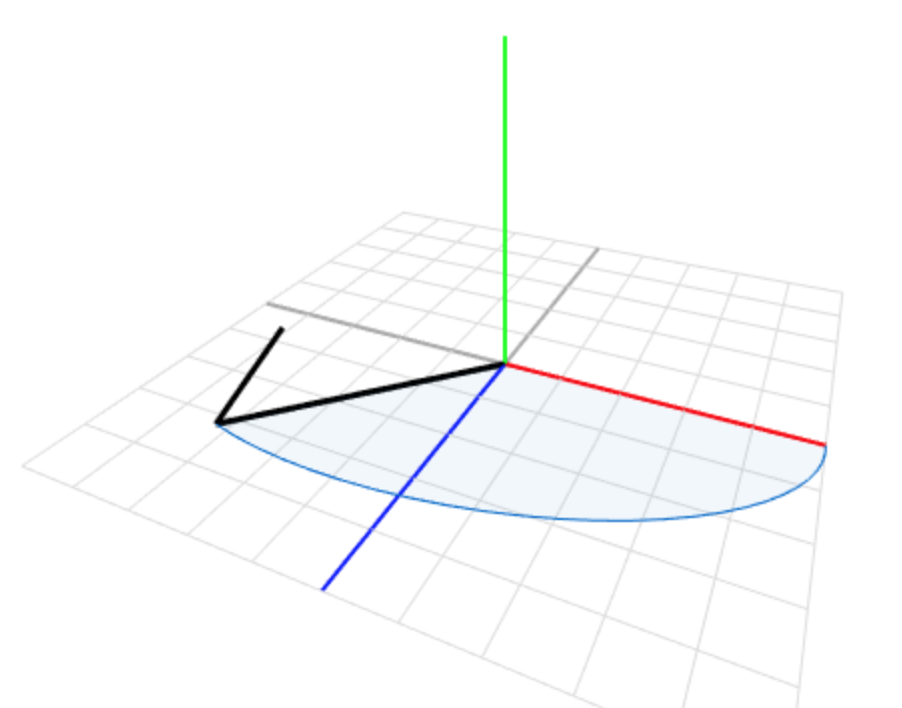
Visualising Quaternions, Converting to and from Euler Angles, Explanation of Quaternions
hallow acorn
rocky canyon
dont worry about it
but i wanna knoww xD
hallow acorn
rocky canyon
https://quaternions.online/ you can play with it here to help visualize what it ...
my brain is exploding what in the world
polar acorn
hallow acorn
but siriously wtf does the 4th dimension mean in that context???
Quaternions are not values in euclidian space. They're a mathematical operation that when applied to a 3D object produce a transformation of that object in 3D space
polar acorn
They're not related to the three spatial dimensions
They're not "X axis, Y axis, Z axis, and some fourth thing" none of the values have anything to do with any of the axes of 3D space
hallow acorn
polar acorn
Quaternions are not values in euclidian space. They're a mathematical operation ...
bro is speaking like he invented math how can one understand this whatt
polar acorn
The 3D space comes from the interaction between those values
polar acorn
hallow acorn
bro is speaking like he invented math how can one understand this whatt
That's the neat part - you don't
Never make quaternions by hand
rocky canyon
hallow acorn
bro is speaking like he invented math how can one understand this whatt

In mathematics, the quaternion number system extends the complex numbers. Quaternions were first described by the Irish mathematician William Rowan Hamilton in 1843 and applied to mechanics in three-dimensional space. The algebra of quaternions is often denoted by H (for Hamilton), or in blackboard bold by
H
...
like i said, its best to ignore them.. and just know they're magic
hallow acorn
bro i dont even understand normal wikipedia articles xD
rocky canyon
use helper functions to convert Eulers.. (what we're familiar with) to quaternions
hallow acorn
polar acorn
Never make quaternions by hand
k ill remember
ok how does the index of the set eulerAngle work im stupid i guess
rocky canyon
index?
hallow acorn
rocky canyon
index?
i meant syntax im stupd af
rocky canyon
        // A rotation 30 degrees around the y-axis
        Vector3 rotationVector = new Vector3(0, 30, 0);
Quaternion rotation = Quaternion.Euler(rotationVector);```Quaternion.Euler (regular vector 3)
hallow acorn
rocky canyon
```cs
// A rotation 30 degrees around the y-axis
Vector3 rotatio...
tysm you carried my project bro xD. without you i would have done just a third of my game jam progress haha
rocky canyon
no worries 👍 just here to help when i can
winter tinsel
ok one last thing before the very prealphademowhateveryouwannacall it of my starter game is finished
how do i make a radius in which enemies spawn randomly?
random.insideunitcircle works but it spawns things inside the playarea
when i need them to spawn outside
can i just make the playarea somehow a place where they cant spawn? like form 9 to -9 and 5 to -5 and everywhere in between you cant spawn it so pick a different place
broken cargo
winter tinsel
can i just make the playarea somehow a place where they cant spawn? like form 9 ...
You can just randomize X, Y and Z components independently. But it will be a rectangle/box not a circle/sphere
winter tinsel
doesnt really matter what shape it is
just that the enemies spawn outside of a determined area
broken cargo
winter tinsel
just that the enemies spawn outside of a determined area
You will still need some min and max bounds
winter tinsel
how do i set those
Vector2 minbound = ??
Vector2 maxbound = ??
and then how do i make it spawn between those bounds
broken cargo
winter tinsel
how do i set those
You can use Random.insideUnitCircle for direction and than randomize a float between min and max to get a point that is atleast min from the center
winter tinsel
direction??
broken cargo
winter tinsel
direction??
vectors can be defined as direction * distance, so Random.insideUnitCircle.normalized can be your direction
winter tinsel
broken cargo
vectors can be defined as direction * distance, so `Random.insideUnitCircle.norm...
what does the normalized do ?
rocky canyon
makes it a 0 or 1 value
broken cargo
winter tinsel
what does the normalized do ?
makes vector's magnitude == 1
polar acorn
rocky canyon
makes it a 0 or 1 value
Well, makes it exactly 0 or 1
rocky canyon
yea ^
polar acorn
not 0-1
rocky canyon
lol.. bad punctuation
u normalize ur direction.. and then multiply it by ur distance..
ensures consistency
winter tinsel
polar acorn
Well, makes it _exactly_ 0 or 1
it can be -1 too right?
broken cargo
winter tinsel
it can be -1 too right?
vector components will be -1 to 1, but the magnitude will be 1

 short hazel
1 [decimal point] 0
broken cargo
rocky canyon
1.0. eh? lol
It is not (1,0) but 1.0f
winter tinsel
ok so can i do something along the lines of
rocky canyon
broken cargo
It is not (1,0) but 1.0f
ahh makes sense
short hazel
It's the length of the vector
rocky canyon
1 and 1.0f are practically the same distance.. they said f to clarify it was 1.0
polar acorn
winter tinsel
it can be -1 too right?
Well, technically -1 is just 1 but in the other direction
summer stump
winter tinsel
on what axis
It is the magnitude (combined x and y)
polar acorn
It makes the magnitude of the vector 1, unless that magnitude is 0
in which case it remains 0
broken cargo
winter tinsel
on what axis
It is length 1 along vectors direction. This is why it defines this direction
short hazel
winter tinsel
or whichever one we want?
All of them. Magnitude is computed using square roots and the squares of each individual XYZ values
When you normalize a vector, it will scale the XYZ so the resulting magnitude is 1
broken cargo
Vector2.one.normilized points north-east but it's magnitude is 1.0f instead of 1.41f
rocky canyon
when u get the random points he's saying make it a direction..

normalizing just keeps em all ranged at 1

u still get a direction.. but it keeps it uniform when u go to multiply it by distance
so (1) direction * 10 is the same distance from u as (2) direction * 10
short hazel
Forgetting to normalize is a very common cause of the "why am I faster when going diagonally?" problem
rocky canyon
first problem i ever solved 🙂
hallow acorn
what exactly is the difference between referencing a component by hand using public and using getcomponent?
polar acorn
hallow acorn
what exactly is the difference between referencing a component by hand using pub...
If you can reference a component in the inspector, you should
GetComponent is used for the times you can't
hallow acorn
polar acorn
If you _can_ reference a component in the inspector, you _should_
like if you want to acces a specific clone or sth?
polar acorn
If you are trying to reference a component from an object you get at runtime through various means
such as if it's spawned in, or you want a component from something like a raycast or OnCollision
hallow acorn
ok ty
 late burrow
so primitives cant be null but entries inside array can
 willow scroll
late burrow
so primitives cant be null but entries inside array can
willow scroll
late burrow
so primitives cant be null but entries inside array can
No, if the entry is primitive
languid spire
late burrow
so primitives cant be null but entries inside array can
if it is an array of primitives, no. But the array itself can be null
late burrow
i legit have string array where some entries are null
willow scroll
late burrow
i legit have string array where some entries are null
Because string is not primitive
It's a class and a reference type
languid spire
string is not a primitive
willow scroll
public sealed class String { }

public readonly struct Int32 { }

public readonly struct Boolean { }
Keep in mind, the true difference is between a value type and reference type. Value types cannot be null. Reference types can. String is a reference.
(Just mentioning this because this holds for things like Vector3 as well, which cannot be null)
late burrow
but if a string is reference would it mean copying its contents to another variable makes them both shared?
slender nymph
yes, but strings are also immutable so every time you modify a string it creates a new string object
considering how you are trying to make c# a stringly typed language, you should really consider learning how strings actually work
 rich adder
summer stump
Keep in mind, the true difference is between a value type and reference type. Va...
rich adder
summer stump
Keep in mind, the true difference is between a value type and reference type. Va...
Vector3? pos = null; 
polar acorn
slender nymph
considering how you are trying to make c# a stringly typed language, you should ...
stringly typed
 slender nymph
rich adder
`Vector3? pos = null;` <:pikachuface:1068136600460066877>
slender nymph
rich adder
`Vector3? pos = null;` <:pikachuface:1068136600460066877>
fun fact but it's not actually null. it's just weird and allows null to be assigned, but assigning null basically just sets its HasValue property to false
rich adder
slender nymph
fun fact but it's not *actually* null. it's just weird and allows `null` to be a...
ahh nicee TIL
makes sense , it already seems like some hacky way to make nullable values. Still amazing, I don't use them often though myself
 public struct Nullable<T> where T : struct
 {
     public Nullable(T value);

     public bool HasValue { get; }
     public T Value { get; }

     public override bool Equals(object other);
     public override int GetHashCode();
     public T GetValueOrDefault();
     public T GetValueOrDefault(T defaultValue);
     public override string ToString();

     public static implicit operator T?(T value);
     public static explicit operator T(T? value);
}``` oh shieeand also value gets null as yea
 eternal needle
rich adder
ahh nicee TIL
makes sense , it already seems like some hacky way to make nullabl...
eternal needle
rich adder
ahh nicee TIL
makes sense , it already seems like some hacky way to make nullabl...
I dont think it's that popular of a design to begin with
rich adder
yeah feels a bit awkward
summer stump
Every time I begin implementing nullables, I end up tearing then out
rich adder
I wonder what the though was there for adding it. I've only had it a few bools before, forgot why I even had it though lol
broken cargo
rich adder
I wonder what the though was there for adding it. I've only had it a few bools b...
Sometimes it's useful to just have an extra possible state for a variable. I use it often with Vectors
languid spire
rich adder
I wonder what the though was there for adding it. I've only had it a few bools b...
say you have an int which may or may not contain a valid value and one of the valid values is zero. An int? solves the problem nicely
eternal needle
It's definitely a niche case to need one though, at least in unity imo
languid spire
not so sure, imagine Vector3? target. Allows you to know if a target exists without the usage of an extra bool
rich adder
languid spire
not so sure, imagine Vector3? target. Allows you to know if a target exists with...
funny enough I had this exact usecase last night
queen adder
I need some help Im trying to give this gameobject a TMP and it just wont format properly
 broken cargo
queen adder
I need some help Im trying to give this gameobject a TMP and it just wont format...
broken cargo
queen adder
I need some help Im trying to give this gameobject a TMP and it just wont format...
Looks like you have a UI component outside of your Canvas
rich adder
queen adder
I need some help Im trying to give this gameobject a TMP and it just wont format...
short hazel
Also UI elements are not anchored, they won't move if you change the resolution
queen adder
I moved the canvas into the base it seems to be working thank you and @rich adder navarone i wont do it again I had no idea lol
rich adder
queen adder
I moved the canvas into the base it seems to be working thank you and <@96860416...
no worries. glad its sorted
queen adder
yep thank you and another question ive got a SO and im wondering how I can turn a float into the SO's value
rich adder
queen adder
yep thank you and another question ive got a SO and im wondering how I can turn ...
wdym a float cannot be an SO. what are you trying to do exactly ?
queen adder
I got a float "currentHealth" I want it to equal the SO value
rich adder
queen adder
I got a float "currentHealth" I want it to equal the SO value
whats inside the SO
SO is a class
classes contain floats or whatever type , how would assigning float to a class make sense
rich adder
queen adder
The SO is being accessed from another script
okay but why do you want to assign currenthealth to SO?
queen adder
Because I got a health bar I want the heathbar to equal the SO value so I want current health(Current heath is what makes the heathbar value) to equal the SO
 tawdry rock
Can someone help me with scriptable objects? I made a base scriptable object class name ItemSO, then i made another one called FoodSO. this inherits from ItemSO then i made a Monobehaviour script called Items that holds a refference for ItemSO public ItemSO item; and i dragged the file to the refference slot thats is made with FoodSO. Now this Items class sit in a gameObject and i have a button has a method that requires a gameObject. UseBTN(GameObject itemToConsume); I get and pass the gameobject refference via mouse hoover and now if i try to set a UI element with descriptionText.SetText($"You restored {itemToConsume.GetComponent<Items>().item.hunger} amount of hunger."); this gets me a error and says ItemSO doesnt contain "hunger" (because FoodSO contains it.) Why can't i access it?
rich adder
queen adder
Because I got a health bar I want the heathbar to equal the SO value so I want c...
you ideally don't want to change data on the SO. You probably want to copy the value from SO put it in a float then just change the float you copied. Healthbar should be linked to that float no SO
two SO questions back to back 
languid spire
tawdry rock
Can someone help me with scriptable objects? I made a base scriptable object cla...
itemToConsume.GetComponent<Items>().((FoodSO)item).hunger
eternal needle
languid spire
not so sure, imagine Vector3? target. Allows you to know if a target exists with...
I mean I can definitely think of use cases myself, but I feel you have to design around using nullables at least if its commonly used. Dont wanna go too far into this hypothetical but at the same point, you're assigning null to this target Vector3 to use it as a nullable based on some condition already
queen adder
rich adder
you ideally don't want to change data on the SO. You probably want to copy the v...
Wait so i shouldnt change the actual value of the SO? So how would I be able to get the value to save across scenes?
rich adder
queen adder
Wait so i shouldnt change the actual value of the SO? So how would I be able to ...
queen adder
rich adder
use DDOL https://docs.unity3d.com/ScriptReference/Object.DontDestroyOnLoad.html
holy moly that should fix everything
rich adder
can also make it a singleton(not the player)
for easy referencing across scenes
https://unity.huh.how/references/singletons
 young fossil
Hello. I have a question: is it a fair assessment to say the games dev community have much less error handling than in other software dev?
queen adder
I dont know what that is will that explain it also why arent yo usuposed to change the values on SOs?
languid spire
young fossil
Hello. I have a question: is it a fair assessment to say the games dev community...
absolutely, try none at all
young fossil
languid spire
absolutely, try none at all
What do you mean? Sorry
You mean most community have no error handling at all
rich adder
queen adder
I dont know what that is will that explain it also why arent yo usuposed to chan...
I mean you can depending on usecase but imo better you learn the traditional way of things first .
if you have multiple objects with the same SO you change one it affects everyone else with that SO
languid spire
young fossil
What do you mean? Sorry
generally Game devs don't do any error handling, they expect everything to 'just work'
queen adder
rich adder
I mean you can depending on usecase but imo better you learn the traditional way...
Im using to store the value of coins and another scene is a shop to spend the coins is that good or bad
young fossil
languid spire
generally Game devs don't do any error handling, they expect everything to 'just...
Aha okay. So I guess to be a good games developer, or any form of C# programmer, I should start introducing software dev level error handling in my code?
rich adder
queen adder
Im using to store the value of coins and another scene is a shop to spend the co...
imo bad
tawdry rock
languid spire
itemToConsume.GetComponent<Items>().((FoodSO)item).hunger
Can you explain this a bit? I tried itemToConsume.GetComponent<Items>().GetComponent<FoodSO>().hunger; bit it was not good. Your code gives me some error too.
rich adder
queen adder
Im using to store the value of coins and another scene is a shop to spend the co...
do you want the values to reset on each run ?
languid spire
young fossil
Aha okay. So I guess to be a good games developer, or any form of C# programmer,...
not quite, you have to be selective. Use it when it is required and only then. App devs tend to expect everything to go wrong and code accordingly
queen adder
rich adder
do you want the values to reset on each run ?
No i dont they need to stay the same
rich adder
if player crashes or leaves game they lose all their coins
young fossil
languid spire
not quite, you have to be selective. Use it when it is required and only then. A...
But shouldn't I incorporate the mentality anything can go wrong?
queen adder
rich adder
if player crashes or leaves game they lose all their coins
That is not good
How should I be storing the values?
languid spire
young fossil
But shouldn't I incorporate the mentality anything can go wrong?
no, because full error handling can and will impact FPS
young fossil
Since you are experienced in the industry, if you were looking through code with no error handling vs code filled with error handling, which coder would you prefer to work with off the bat?
Even simple null checks
and error logs for unexpected behaviour
rich adder
queen adder
How should I be storing the values?
start simple use Playerprefs, later on use files.
languid spire
young fossil
Since you are experienced in the industry, if you were looking through code with...
neither
queen adder
rich adder
start simple use Playerprefs, later on use files.
Okay I should be using playerprefs for these types of things
languid spire
tawdry rock
Can you explain this a bit? I tried `itemToConsume.GetComponent<Items>().GetComp...
perhaps you might like to tell me what error
young fossil
languid spire
no, because full error handling can and will impact FPS
Does the performance loss come from the real-time nature of games dev, where as the event driven behaviour of app dev is more suitable for full error handling
rich adder
queen adder
Okay I should be using playerprefs for these types of things
in the beginning is ok. Ideall you want to store a local file
maybe a slight encryption algo so its not easy to read/modify value by everyone
(this is never as safe as saving on server)
young fossil
Or is it a practise that has been pushed on to people without much use
languid spire
young fossil
Does the performance loss come from the real-time nature of games dev, where as ...
exactly, only in very special circumstances in app dev is millisecond performance important, in game dev it is vital
queen adder
rich adder
in the beginning is ok. Ideall you want to store a local file
maybe a slight enc...
That makes sense this is my first actual project im not worried about it this project is just to get my feet wet in programing and making and finishing a game
 polar acorn
tawdry rock
polar acorn
tawdry rock
What is item
languid spire
tawdry rock
I copied item from your code
young fossil
languid spire
exactly, only in very special circumstances in app dev is millisecond performanc...
Does this apply for all code or just code inside Update.
For example, let's say I am making a survival game. Would it be acceptable to use app dev level error handling for the inventory UI/management, since it most likely is event driven.
Where as the movement, animations, etc of the character would be super light on error handling?
rich adder
queen adder
That makes sense this is my first actual project im not worried about it this pr...
yes not a problem. Its easy if you keep practicing and you have the mind for it/learning
tawdry rock
polar acorn
What is `item`
item is the name given to hold refference for the scriptable object public ItemSO item; and FoodSO inherit from ItemSO
eternal needle
young fossil
Does the performance loss come from the real-time nature of games dev, where as ...
In game dev at least, there also isnt that much to even error check. Your real errors isnt gonna come from cases you can think of in the first case, and at some point you have to trust what you're given. Example, you have to trust the vector passed from the new input system isnt infinity in magnitude
polar acorn
tawdry rock
item is the name given to hold refference for the scriptable object `public Item...
In the same script that's throwing the error?
languid spire
young fossil
Does this apply for all code or just code inside Update.
For example, let's say...
it should really apply to everything, bear in mind Unity is single threaded so any time taken to update the UI will impact your deltaTime
queen adder
rich adder
yes not a problem. Its easy if you keep practicing and you have the mind for it/...
Okay good alright PlayerPrefs to store things like coins and programming that is?
rich adder
queen adder
Okay good alright PlayerPrefs to store things like coins and programming that is...
store some basic data like coins yes
young fossil
Also why do I never see
throw new InvalidOperationException
and error handling syntax like this often in Unity dev?
queen adder
rich adder
store some basic data like coins yes
Coins okay would player stats like health and damage be used PlayerPrefs
rich adder
queen adder
Coins okay would player stats like health and damage be used PlayerPrefs
anything you plan on saving between scenes/runs
languid spire
young fossil
Also why do I never see
```throw new InvalidOperationException```
and error hand...
because Exception handling is extremely expensive
tawdry rock
polar acorn
In the same script that's throwing the error?
No, its a MonoBehaviour class called Items. Like i have scripts ItemSO for the base, FoodSO that inherit from ItemSO and Items that goes on gameobjects. Im trying to get into FoodSO from a 4th scripts via buttons.
rich adder
queen adder
Okay good alright PlayerPrefs to store things like coins and programming that is...
could help you out 😉 https://youtu.be/qKXnkgynYG0
polar acorn
young fossil
Also why do I never see
```throw new InvalidOperationException```
and error hand...
Chances are you'd not ever actually be able to enter a state where this would throw. When you're making an API, errors like that are good for letting the users know they're interacting with it incorrectly. In a game, the players are not developers. Exposing an error like that is not helpful, instead you should just handle it
young fossil
languid spire
because Exception handling is extremely expensive
Do you have any resources/example projects/anything to give me a good idea of error handling for Unity?
queen adder
rich adder
anything you plan on saving between scenes/runs
Yep thats it and okay lol ill take a look
polar acorn
tawdry rock
No, its a MonoBehaviour class called Items. Like i have scripts ItemSO for the b...
So, in the script that is throwing the error that item is undefined, what is item
languid spire
young fossil
Do you have any resources/example projects/anything to give me a good idea of er...
sorry not really. tbf it's not a problem to use app dev level error handling when your are doing the development and just remove it for a production build
tawdry rock
polar acorn
So, in the script that is throwing the error that `item` is undefined, what is `...
item is a refference that sits inside Items class. SteveSmith wrote to try this itemToConsume.GetComponent<Items>().((FoodSO)item).hunger and it doesnt recognized what is "item".
young fossil
languid spire
sorry not really. tbf it's not a problem to use app dev level error handling whe...
Ah this could be implemented with complier code. IF UNITY_DEBUG etc
languid spire
young fossil
Ah this could be implemented with complier code. IF UNITY_DEBUG etc
indeed, in app dev we always say make sure to fail gracefully and under control. In game dev we say, let it crash, game testing will sort it out
polar acorn
tawdry rock
item is a refference that sits inside Items class. SteveSmith wrote to try this ...
Did you ever post !code to actually show what the context is
eternal falconBOT
Posting code
📃 Large Code Blocks
Use links to services like:
https://gdl.space/, https://paste.ofcode.org/, https://hatebin.com/, https://paste.myst.rs/, https://hastebin.com/
📃 Inline Code
Surround code with three backquotes. Not quotation marks.
To format as C#, add cs to the first line:
```cs
// Your code here
```
Add a comment with a line number if there is an error message.
young fossil
languid spire
indeed, in app dev we always say make sure to fail gracefully and under control....
Good overview. When you say Game Testing, that means QA, playtesting, etc?
languid spire
young fossil
Good overview. When you say Game Testing, that means QA, playtesting, etc?
yep, which is why we spend hours and hours play testing, it's not just to get the game balance right but also to iron out the bugs
queen adder
Are the unity docs the place to learn everything (like playerprefs)
young fossil
So for solo devs, who don't have the luxury of full QA teams and dedicated play testing groups, it is viable to go the app level route, but use complier code and a combination of self playtesting?
languid spire
young fossil
So for solo devs, who don't have the luxury of full QA teams and dedicated play ...
yep, although if you live near a Uni that does game dev they love to have projects for play testing by the students
languid spire
tawdry rock
item is a refference that sits inside Items class. SteveSmith wrote to try this ...
you wrote
{itemToConsume.GetComponent<Items>().item.hunger}
if item does not exist in my code it didn't exist in your's either
slender nymph
i'm pretty sure the issue is because your cast and parentheses are fucked up. shouldn't it be (FoodSO)(itemToConsume.GetComponent<Items>().item).hunger
or maybe one extra set of parentheses
languid spire
slender nymph
i'm pretty sure the issue is because your cast and parentheses are fucked up. sh...
distinctly possible, the problem of writing code without an IDE
tawdry rock
ItemSO: https://paste.ofcode.org/3imFdmqmaVzjWDxywiTGsJ
FoodSO: https://paste.ofcode.org/39zLVA4uM6F4SWVPSxK7GAD
Items: https://paste.ofcode.org/8CeSNW9ZCTSxMfchPeLTS4
ContextMenu: https://paste.ofcode.org/336emkfzVWuPs7SX43BQXhs
In the ContextMenu class where i try to access the FoodSO's hunger float value.
languid spire
the point is, casing item to FoodSO so the hunger property can be accessed
slender nymph
lol what ever happened to "I compile every line of code i write into IL in my head"
languid spire
slender nymph
lol what ever happened to "I compile every line of code i write into IL in my he...
but not when I'm typing into discord
polar acorn
tawdry rock
ItemSO: https://paste.ofcode.org/3imFdmqmaVzjWDxywiTGsJ
FoodSO: https://paste.of...
Okay and what lines are showing the errors
tawdry rock
polar acorn
Okay and what lines are showing the errors
Context menu around line 53 where i commented everything out.
polar acorn
tawdry rock
Context menu around line 53 where i commented everything out.
Okay, so, presumably, that isEdible is only true in FoodSO instances, right? That's how you're determining it's food?
tawdry rock
Yes, i know it's dumb because i could determine with the enums category but for the shake of practice i made it.
queen adder
Would playerpreffs go in start or update or their own thing
polar acorn
tawdry rock
Yes, i know it's dumb because i could determine with the enums category but for ...
So, get rid of isEdible and replace this condition:
if (itemToConsume.GetComponent<Items>().item.isEdible)
with this one:
if (itemToConsume.GetComponent<Items>().item is FoodSO foodItem)
(also you should consider making itemToConsume of type Items to avoid the get component)
Then you can use the variable foodItem inside the if condition directly
summer stump
queen adder
Would playerpreffs go in start or update or their own thing
It depends on what you mean. Calls to it go in different places
Loading, then sure awake or start is good
 twin harness
im facing a weird issue with the input system.
using UnityEngine.InputSystem.EnhancedTouch;
using Touch = UnityEngine.InputSystem.EnhancedTouch.Touch;

...

    private void Awake()
    {
        EnhancedTouchSupport.Enable();
    }
    void Update()
    {
        if (Touch.activeFingers.Count == 1)
        {
            Touch touch = Touch.activeFingers[0].currentTouch;
            Debug.Log("Touch phase: " + touch.phase);
        }
     }
But when I press once and hold, it keeps showing the phase Began again and again.

Any idea what might be the issue here?
 viral hatch
Idk where to put this so this is probably wrong but
Im trying to make a VR Hand setup, but "XR Controller (Action-Based)" Is not appearing, How can I fix this or make a working hand?
queen adder
summer stump
It depends on what you mean. Calls to it go in different places
Im brand new to PlayerPrefs im just setting one up but to change it will it need to go into its own method
summer stump
viral hatch
Idk where to put this so this is probably wrong but
Im trying to make a VR Hand...
 olive galleon
should i subscribe to events in awake or start
summer stump
olive galleon
should i subscribe to events in awake or start
Not enough information
Is the event in the same class? Or a different one?
polar acorn
olive galleon
should i subscribe to events in awake or start
General rule of thumb: Do stuff related to yourself in Awake, do stuff related to other objects in Start
tawdry rock
polar acorn
So, get rid of `isEdible` and replace this condition:
```cs
if (itemToConsume.Ge...
Thank you so much for your time (and yours too SteveSmith), it works now. I made isEdible bool as a precondition. For example if you have a "can of something" it considered as food but you need to open it to make it edible. You and a few others been a great help for very long time. 
summer stump
Random.Range gives a float value. Plug those values into a Vector
queen adder
Vector2 name = new Vector2(Random.Range(number, number), Random.Range(number, number));
np
I got a question what the heck is wrong
{
public TMP_Text coinText;
public int Coins = 0;
// Start is called before the first frame update
void Start()
{
}


// Update is called once per frame
void Update()
{
    coinText.text = PlayerPrefs.GetInt("Coins", Coins);
}
public void SaveData()
{
    PlayerPrefs.SetInt("Coins", Coins);
    PlayerPrefs.GetInt("Coins", Coins);


}
}
This is what is not working void Update()
{
coinText.text = PlayerPrefs.GetInt("Coins", Coins);
}
says I cant turn int into string
 rich mountain
turn the int into a string
queen adder
rich mountain
turn the int into a string
Will that change anything or will it still work the same as an int
summer stump
queen adder
Will that change anything or will it still work the same as an int
Coins.ToString()
Also load the data once. Not in update
 wanton pecan
Guys what mobile apps do y'all suggest for Beginners
queen adder
summer stump
Also load the data once. Not in update
Will it make it change at all times
polar acorn
wanton pecan
Guys what mobile apps do y'all suggest for Beginners
...mobile apps?
for what
summer stump
queen adder
Will it make it change at all times
You should not be changing it via playerprefs.
You just change the variable directly
void AddCoins(int amount) {
  Coins += amount;
  coinText.text = Coins;
}
There is no reason at all to do any of that in update
 warm raptor
hello here is the part of the script of my serveur that send the infos of all the player of the game to each player of the game, but when someone disconect this part of the the script tell me that message can't be send to the player that has disconected. How can I make to remove the player from the dictionnary if the serveur can't send message to this player ?
public void SendToGamePlayers(string gameId, string message)
{
    if (GameDict.TryGetValue(gameId, out var game))
    {
        foreach (var playerId in game.Players.Keys)
        {
            Sessions.SendTo(message, playerId);
        }
    }
    else
    {
        Console.WriteLine($"Game with ID {gameId} not found.");
    }
}
 queen adder
summer stump
You should not be changing it via playerprefs.
You just change the variable dire...
queen adder
summer stump
You should not be changing it via playerprefs.
You just change the variable dire...
Okay thank you
 bold plover
Man. Bit the bullet with learning a state machine I felt was jank but decent to start with but now I think I'd have to use a lot of double code to implement it in a manner appropriate for my purposes. Sheesh.
Lessons learned.
Like I'd have to pass the proper stats from one state to the current state script and the current state script back to what I'm using to control movement. damn
lmao
Feels like in the end that defeats the point of the state machine.
wanton pecan
polar acorn
for what
Learning code
raw token
warm raptor
hello here is the part of the script of my serveur that send the infos of all th...
If it's actually throwing an exception, you can use try/catch blocks to capture the exception. Remove the player from the dictionary in the case of that specific exception, and throw it again otherwise so as to not suppress other, unrelated errors
hallow acorn
why does it say that? "UnityException: Invoke repeat rate has to be larger than 0.00001F)"
InvokeRepeating("LaunchPrefab",1 , Random.Range(spawnRate - 2, spawnRate + 2));
 cosmic dagger
hallow acorn
why does it say that? "UnityException: Invoke repeat rate has to be larger than ...
cosmic dagger
hallow acorn
why does it say that? "UnityException: Invoke repeat rate has to be larger than ...
Because the value can be 0 (or close to 0) . . .
hallow acorn
cosmic dagger
Because the value can be 0 (or close to 0) . . .
but my spawnrate is 5
warm raptor
raw token
If it's actually throwing an exception, you can use [try/catch blocks](<https://...
I already tried to do that, but It seam that it didn't work
public void SendToGamePlayers(string gameId, string message)
{
    if (GameDict.TryGetValue(gameId, out var game))
    {
        foreach (var playerId in game.Players.Keys)
        {
            try
            {
                Sessions.SendTo(message, playerId);
            }
            catch (Exception ex)
            {
                game.Players.Remove(playerId);
            }
        }
    }
    else
    {
        Console.WriteLine($"Game with ID {gameId} not found.");
    }
}
Add a debug, because you are assuming what it is while an error is clear in telling you what's happening.
hallow acorn
eternal needle
Add a debug, because you are assuming what it is while an error is clear in tell...
wdym how and where should i add a debug?
polar acorn
wanton pecan
Learning code
Why would a mobile app have anything to do with that?
cosmic dagger
hallow acorn
but my spawnrate is 5
Cache the result in a variable and log the variable before you use it . . .
eternal needle
hallow acorn
wdym how and where should i add a debug?
If you arent aware of what a debug.log is, you should stop and learn it immediately . Look at the docs on how to use it. Print out what the number is
hallow acorn
eternal needle
If you arent aware of what a debug.log is, you should stop and learn it immediat...
ik what a debug log is i just didnt knwe where to put it bc im stupid lol
cosmic dagger
wanton pecan
Learning code
It's easier to read a website, watch video tutorial, or even do a course. Most coding apps teach the bare basics (minimum) of a language and leave the rest behind pay walls. There's no telling how in-depth they go into the language as well . . .
raw token
warm raptor
I already tried to do that, but It seam that it didn't work
```cs
public void S...
It may not be actually throwing an exception then. You may need to consult the #archived-networking channel, or the community for whatever networking library you're using. You might also check the documentation for that SendTo() method (or whatever it depends upon, if you wrote the method) to see if it returns anything useful
eternal needle
hallow acorn
ik what a debug log is i just didnt knwe where to put it bc im stupid lol
Well think logically, a value is causing an error. You would want to see the value before the line of the error, so as another said, cache it then print it out
warm raptor
raw token
It may not be actually throwing an exception then. You may need to consult the <...
ok thx (one of the major problem is that the library I use does'nt have a lot of documentation 😭 )
hallow acorn
eternal needle
Well think logically, a value is causing an error. You would want to see the val...
but it still says five
eternal needle
hallow acorn
but it still says five
Show the debug line and the console
queen adder
Hi everyone. I'm not understanding coroutines. If I put a coroutine in the Update, it just repeats infinitely without waiting. How can I make this code work? This coroutine gets executed only once.

 ivory bobcat
queen adder
Hi everyone. I'm not understanding coroutines. If I put a coroutine in the Updat...
ivory bobcat
queen adder
Hi everyone. I'm not understanding coroutines. If I put a coroutine in the Updat...
Explain what you're trying to do
eternal needle
queen adder
Hi everyone. I'm not understanding coroutines. If I put a coroutine in the Updat...
look at what you're doing logically, at when you are waiting. What code is supposed to happen after waiting
queen adder
ivory bobcat
Explain what you're trying to do
Execute the coroutine infinitely and making the 5 seconds timer work at the same time. In the Update, the timer seems to be ignored.
hallow acorn
eternal needle
Show the debug line and the console
i changed it a bit to do the random range too why is it out of my range? Debug.Log("number " + spawnRate); Debug.Log("number random " + Random.Range(spawnRate - 2, spawnRate + 2));
 polar acorn
queen adder
Hi everyone. I'm not understanding coroutines. If I put a coroutine in the Updat...
polar acorn
queen adder
Hi everyone. I'm not understanding coroutines. If I put a coroutine in the Updat...
You've got nothing after the wait. The coroutine waits 5 seconds, does nothing, then ends
ivory bobcat
queen adder
Execute the coroutine infinitely and making the 5 seconds timer work at the same...
Coroutine
    while true
        add force
        play
yield```You might want to either put it in a loop, or call StartCoroutine after the wait
eternal needle
hallow acorn
i changed it a bit to do the random range too why is it out of my range? ``` ...
Looks like you have 2 instances of this object
queen adder
polar acorn
You've got nothing after the wait. The coroutine waits 5 seconds, does nothing, ...
So, can a for cycle in the Update work?
queen adder
ivory bobcat
```cs
Coroutine
while true
add force
play
yield```
Oh thanks
hallow acorn
eternal needle
Looks like you have 2 instances of this object
wdym?
eternal needle
hallow acorn
wdym?
What part isnt clear? I meant exactly what I said
polar acorn
hallow acorn
i changed it a bit to do the random range too why is it out of my range? ``` ...
Disable collapse
queen adder
So coroutines are just normal functions (?). Why do we call the "coroutines" if I can make my own function and repeat getting the same result? Does a coroutine has something more?
eternal needle
Actually, turn off collapse in your console and itll be more clear
polar acorn
So we can see them all in order
eternal needle
Damn digi too fast
polar acorn
queen adder
So coroutines are just normal functions (?). Why do we call the "coroutines" if ...
A coroutine can wait
queen adder
polar acorn
A coroutine can wait
So the only purpose of using a coroutine is because I want to use the WaitForSeconds?
hallow acorn
eternal needle
Actually, turn off collapse in your console and itll be more clear
damn why is it sometimes zero this makes so not sense
polar acorn
queen adder
So the only purpose of using a coroutine is because I want to use the WaitForSec...
Yes
queen adder
polar acorn
Yes
Ok thanks.
void Start()
{
LoadData();
instance = this;
coinText.text = "Coins: " + Coins.ToString();
Coins = PlayerPrefs.GetInt("amountCoins");
}
// Update is called once per frame
void Update()
{
    if(Input.GetKeyUp(KeyCode.Escape))
    {
        AddCoins(1);
    }

}
public void SaveData()
{
    PlayerPrefs.SetInt("amoutCoins", Coins);

}

public void LoadData()
{
    PlayerPrefs.GetInt("amountCoins");
}

    public void AddCoins(int amount)
{
    Coins += amount;
    coinText.text = "Coins: " + Coins.ToString();
}
}
I am confused this should be setting the playerPref to coins on start but when I play add coins then stop game then reboot it it resets the coins anybody know what ive done wrong?
polar acorn
hallow acorn
damn why is it sometimes zero this makes so not sense
You probably have more than one instance of this object in the scene
polar acorn
queen adder
void Start()
{
LoadData();
instance = this;
coinText...
!code
eternal falconBOT
Posting code
📃 Large Code Blocks
Use links to services like:
https://gdl.space/, https://paste.ofcode.org/, https://hatebin.com/, https://paste.myst.rs/, https://hastebin.com/
📃 Inline Code
Surround code with three backquotes. Not quotation marks.
To format as C#, add cs to the first line:
```cs
// Your code here
```
Add a comment with a line number if there is an error message.
hallow acorn
polar acorn
You probably have more than one instance of this object in the scene
what object??
queen adder
polar acorn
!code
oh
polar acorn
hallow acorn
what object??
the thing printing these logs
queen adder
!code void Start()
{
LoadData();
instance = this;
coinText.text = "Coins: " + Coins.ToString();
Coins = PlayerPrefs.GetInt("amountCoins");
}
// Update is called once per frame
void Update()
{
    if(Input.GetKeyUp(KeyCode.Escape))
    {
        AddCoins(1);
    }

}
public void SaveData()
{
    PlayerPrefs.SetInt("amoutCoins", Coins);

}

public void LoadData()
{
    PlayerPrefs.GetInt("amountCoins");
}

    public void AddCoins(int amount)
{
    Coins += amount;
    coinText.text = "Coins: " + Coins.ToString();
}
}
eternal falconBOT
Posting code
📃 Large Code Blocks
Use links to services like:
https://gdl.space/, https://paste.ofcode.org/, https://hatebin.com/, https://paste.myst.rs/, https://hastebin.com/
📃 Inline Code
Surround code with three backquotes. Not quotation marks.
To format as C#, add cs to the first line:
```cs
// Your code here
```
Add a comment with a line number if there is an error message.
ivory bobcat
queen adder
So coroutines are just normal functions (?). Why do we call the "coroutines" if ...
You can yield and run code in parts at specific times without having to create convoluted conditional branchescs yield return new WaitForSecond(3); //do a yield return new WaitForSecond(8); //do b yield return new WaitForSecond(2); //do c
polar acorn
queen adder
!code void Start()
{
LoadData();
instance = this;
...
you were supposed to read the bot not just call it again and repost the same unformatted code
queen adder
polar acorn
you were supposed to read the bot not just call it again and repost the same unf...
lol yea I figured that one out
hallow acorn
polar acorn
the thing printing these logs
oh yeah bc i have 3 canons but why isnt it 5 on all objects?
summer stump
queen adder
!code void Start()
{
LoadData();
instance = this;
...
Why do you do PlayerPrefs.GetInt twice?
polar acorn
hallow acorn
oh yeah bc i have 3 canons but why isnt it 5 on all objects?
Every instance of this script is going to have its own spawnRate, and thus roll different values based on it
queen adder
summer stump
Why do you do PlayerPrefs.GetInt twice?
To make coins = the playerprefs is that wrong?
hallow acorn
polar acorn
Every instance of this script is going to have its own `spawnRate`, and thus rol...
omfg im so stupid i should propably set it to 5 on every canon
thanks a lot you helped me out once again
summer stump
queen adder
To make coins = the playerprefs is that wrong?
Well yeah, you do that in LoadData
Right now LoadData reads the file and throws away the value
queen adder
summer stump
Well yeah, you do that in LoadData
Right now LoadData reads the file and throws...
That did not make it save
public void LoadData()
{
PlayerPrefs.GetInt("amountCoins");
Coins = PlayerPrefs.GetInt("amountCoins");
}
I think I need to save it somewhere
Im very confused
!code
eternal falconBOT
Posting code
📃 Large Code Blocks
Use links to services like:
https://gdl.space/, https://paste.ofcode.org/, https://hatebin.com/, https://paste.myst.rs/, https://hastebin.com/
📃 Inline Code
Surround code with three backquotes. Not quotation marks.
To format as C#, add cs to the first line:
```cs
// Your code here
```
Add a comment with a line number if there is an error message.
summer stump
queen adder
public void LoadData()
{
PlayerPrefs.GetInt("amountCoins");
Coins = ...
Why would you be calling GetInt twice? Remove the first one
And that is loading, not saving, so I am not sure what you mean.
Ah, you mean to the variable
If there is an amountCoins in playerPrefs, that is how you would do it
queen adder
summer stump
Why would you be calling GetInt twice? Remove the first one
this is what i got now https://gdl.space/eticemuwaq.cpp
sharp abyss
I am trying to walk my character manually but I did it by adding force when getting key up(when I stop holding button , it gets leg to normal rotation).I dont think thats the proper way to do that.If you couldnt understand, games "daddy long legs" and "steppy pants" are some examples.
 queen adder
Im not sure whats wrong I click esc to save it dbug says I am then i do it again but it isnt
summer stump
queen adder
this is what i got now https://gdl.space/eticemuwaq.cpp
That is not the whole class
queen adder
summer stump
That is not the whole class
https://gdl.space/jewerebita.cpp that should be
wintry quarry
sharp abyss
I am trying to walk my character manually but I did it by adding force when gett...
QWOP was the original!!!
https://www.foddy.net/Athletics.html
sharp abyss
wintry quarry
QWOP was the original!!!
https://www.foddy.net/Athletics.html
ohh I forgot about that it has been so long since it came out
wintry quarry
I would say - more like setting joint properties than adding forces manually.
sharp abyss
wintry quarry
QWOP was the original!!!
https://www.foddy.net/Athletics.html
but mine is simpler only the yhighs
summer stump
queen adder
https://gdl.space/jewerebita.cpp that should be
https://gdl.space/kuwogiluyi.cpp
Look how I changed it (LoadData)
queen adder
Ok
queen adder
summer stump
https://gdl.space/kuwogiluyi.cpp
Look how I changed it (LoadData)
Wait but how is it getting it now?
ill run it and see
That did not work
summer stump
queen adder
Wait but how is it getting it now?
Look at the line right after. If you do not have an = sign before GetInt, it does NOTHING
summer stump
queen adder
That did not work
You are saving to amoutCoins, but loading from amountCoins
queen adder
summer stump
You are saving to amoutCoins, but loading from amountCoins
Is that wrong? I figured it would use the same thing
summer stump
queen adder
Is that wrong? I figured it would use the same thing
Those two are NOT the same thing
Look closely at the spelling
You made a spelling error
queen adder
holy moly...
It fixed well thats 30 mineuts wasted
hey at least I understand playerprefs now sweet
 tall nest
Hello everyone, how's all going? I hope you're good
Please help me fixing these errors, I got 26 error
 short hazel
queen adder
hey at least I understand playerprefs now sweet
short hazel
queen adder
hey at least I understand playerprefs now sweet
Consider using a constant to avoid repeating (and misspelling) strings:
// In the class
private const string CoinsAmountKey = "amountCoins";

// In methods
PlayerPrefs.SetInt(CoinsAmountKey, Coins);
Coins = PlayerPrefs.GetInt(CoinsAmountKey);
Llooks like there's issues in your URP package, maybe you need to update it?
tall nest
polar acorn
Llooks like there's issues in your URP package, maybe you need to update it?
is it because my disk is full?
tall nest
because when I launch the project it keep saying not enough space
 fickle plume
@tall nest Remove hate speech from your pronouns or you will be removed from the server.
queen adder
short hazel
Consider using a constant to avoid repeating (and misspelling) strings:
```cs
//...
I will def do that thanks
polar acorn
tall nest
My main disk keep refilling
Have you cleared any space?
tall nest
polar acorn
Have you cleared any space?
I cleaned like 13gb and it got refilled again
I always delete and it fills again
polar acorn
tall nest
I cleaned like 13gb and it got refilled again
If it's the same things coming back, then you should probably find whatevers generating them and fix that
tall nest
polar acorn
If it's _the same_ things coming back, then you should probably find whatevers g...
not the same things
it's some windows stuff
polar acorn
So then there's probably other things that are trying to go into your drive but can't because it's too full which means you're gonna probably need to aggressively clean up some space
tall nest
Can I just move my user into the other disk so the packages get installed in the temp folder or smth?
polar acorn
Moving files to another place on the hard drive does not make the hard drive less full
tall nest
polar acorn
Moving files to another place on the hard drive does not make the hard drive les...
I mean the other hard disk, my user is currently in the C:\ I thought I can move it to E:\
 lusty plover
I am trying to use the Unity AI But i got these errors after installing the library. Any help?
 tall nest
Will it cause confuse to the Apps or no
polar acorn
tall nest
Will it cause confuse to the Apps or no
I can't answer that without knowing everything installed on your machine and how you're configured. If there's literally nothing you can think of that can be deleted or moved your hard drive is probably just not big enough
fickle plume
lusty plover
I am trying to use the Unity AI But i got these errors after installing the libr...
This is a code channel. And check space, antivirus blocking packages etc. and post full information in #💻┃unity-talk
tall nest
polar acorn
I can't answer that without knowing everything installed on your machine and how...
Can I just install packages in another place?
polar acorn
tall nest
Can I just install packages in another place?
they're in your project folder
tall nest
Then why does it say not enough space, I have placed my project in the disk that has around 70GB free
fickle plume
@tall nest Also has no relation to the code channel.
tall nest
fickle plume
<@746753632707412003> Also has no relation to the code channel.
So where I should talk?
"Fogsight"?
:/
fickle plume
fickle plume
This is a code channel. And check space, antivirus blocking packages etc. and po...
@tall nest Try reading the channel
polar acorn
tall nest
So where I should talk?
Probably the exact same answer he gave the other guy like three minutes ago
tall nest
fickle plume
<@746753632707412003> Try reading the channel
yea yea yea whatever
 glad ore
after every X minutes i want to display an ad for android game . what is good value for X ? which balances frustation of user and my revenue .
polar acorn
glad ore
after every X minutes i want to display an ad for android game . what is good va...
525,600 minutes
 calm forge
can someone help i am new to unity and c#, i was following a yt vid and making angry birds when i was faced with this problem pls help 🥲

 polar acorn
calm forge
can someone help i am new to unity and c#, i was following a yt vid and making a...
polar acorn
calm forge
can someone help i am new to unity and c#, i was following a yt vid and making a...
What is wasPressedThenFrame?
fickle plume
@calm forge You need to finish installing !ide
eternal falconBOT
💡 IDE Configuration
If your IDE is not autocompleting code
or underlining errors, please configure it.
Select one:
• Visual Studio (Installed via Unity Hub)
• Visual Studio (Installed manually)
• VS Code
• JetBrains Rider
• Other/None
calm forge

Show your Support & Get Exclusive Benefits on Patreon (Including Access to Source Files + Code) - https://www.patreon.com/sasquatchbgames
Join our Discord Community! - https://discord.com/invite/aHjTSBz3jH
Indie Merch: https://sasquatchbgames.myspreadshop.com/
This is a full in-depth Unity tutorial for complete beginners. If you've never touche...
fickle plume
fickle plume
<@860019233630978049> You need to finish installing !ide
You'll then get proper autocomplete and intellisense for the code.
polar acorn
calm forge
https://www.youtube.com/watch?v=QplEeEAJxck&t=284s
"I did it exactly like the tutorial so why does theirs work and mine doesn't" counter:
Number of times it wasn't exactly like the tutorial: 169
Number of times it was exactly like the tutorial: 5
Number of times the code literally did not exist: 1
2022-07-19 to 2024-07-09

 modest dust
Looks like there's a need for a tutorial on how to follow a tutorial
calm forge
eternal falcon
done this
polar acorn
calm forge
done this
And is your error underlined in red?
calm forge
fickle plume
You'll then get proper autocomplete and intellisense for the code.
ya i was getting it before too
lemme check
calm forge
polar acorn
And is your error underlined in red?
oop ye
i just deleted where thier was red line i dont think i did mistake in spelling but oh well i works now
 polar acorn
calm forge
i just deleted where thier was red line i dont think i did mistake in spelling b...
polar acorn
calm forge
i just deleted where thier was red line i dont think i did mistake in spelling b...
Now you can look at the green underline
ivory bobcat
calm forge
i just deleted where thier was red line i dont think i did mistake in spelling b...
You see that green squiggly like?
polar acorn
and compare that word to the tutorial's
ivory bobcat
Human error is common and should be considered the first to be questioned when debugging code from tutorials - which thankfully an ide that's configured might be able to assist with (green squiggly line)
calm forge
ivory bobcat
Human error is common and should be considered the first to be questioned when d...
Yup it was a capital U lol i corrected it tysm though 😄
queen adder
Is there a way to make a int from another script work for the one im on?
sharp abyss
I dont kow if its the proper way but first you can get the script by public *yourscriptsname *yourscriptname and I think you can access it like that
then you can create an int in the script you write this and equalize it to the other int if you need
queen adder
thank you lots
ivory bobcat
queen adder
Is there a way to make a int from another script work for the one im on?
Assuming you've got an instance of that script (an object in the scene that has that script component attached) you'd reference that object as the component type (drag it into a field with that script component as the type) and be able to access that specific instance's integer membercs public MyScript myScript;//field that should have been assigned from the inspector private Start() { myScript.myInteger = 5; }
 radiant frigate
even if i have the collisions matrix somehow the collision keeps happening

does someone know if this is a recurrent thing or am i just dumb?
silk night
radiant frigate
does someone know if this is a recurrent thing or am i just dumb?
Have you set the layers on both enemy and player?
radiant frigate
oh i discovered why, saw someone having the same problem, we basically used the wrong physics
yes
i was using physics when i should be using physics2D
my bad srry
ty tho!
 open vine
Hey does anyone know how I would make an object change to the next color when I interact? I have an array of materials and a reference to the objects mesh renderer. I want to change it to the next material in the array everytime I interact. I know I have to meshRenderer.material = materials[0] to set it, but how do I make it iterate to the next one each time?
 sand heath
open vine
Hey does anyone know how I would make an object change to the next color when I ...
sand heath
open vine
Hey does anyone know how I would make an object change to the next color when I ...
if all of the materials look the same you could use a shader
if you want to change the material to a different one, just increment the index
materials[0], materials[1], materials[2] etc
open vine
sand heath
if you want to change the material to a different one, just increment the index
Would I do this in a forloop? or should i write it manually
sand heath
open vine
Would I do this in a forloop? or should i write it manually
can you send your !code
eternal falconBOT
Posting code
📃 Large Code Blocks
Use links to services like:
https://gdl.space/, https://paste.ofcode.org/, https://hatebin.com/, https://paste.myst.rs/, https://hastebin.com/
📃 Inline Code
Surround code with three backquotes. Not quotation marks.
To format as C#, add cs to the first line:
```cs
// Your code here
```
Add a comment with a line number if there is an error message.
sand heath
i need to know what you're doing before i can say what you should do
@open vine the way you have it looks perfect to me? does it not work?
ohh i see
open vine
Yeah it actually skips right to the last one
sand heath
well yeah cuz you have the for loop going through every material when interact with it
so instead, make an integer to store the index and then increment that index everytime you interact with it
then set the material to material[index]
private int materialIndex;

public void Interact()
{
  materialIndex++;
  screenRenderer.material = CCTV_Materials[materialIndex];
  if (materialIndex == CCTV_Materials.Length)
  {
    materialIndex = 0;
  }
}
oh oops forgot to increment
u get the point tho
open vine
Oooh thats really smart it works perfectly fine now thanks for explaining why I do this as well!
sand heath
open vine
Oooh thats really smart it works perfectly fine now thanks for explaining why I ...
and like i said if you just want to swap a color you could make a shader graph pretty easily to do that
though this way should work completely fine without touching any of that
open vine
gotcha, tbh I have no clue how shader graph works but if I ever need the color swapping ill look into it 👍
sand heath
open vine
gotcha, tbh I have no clue how shader graph works but if I ever need the color s...
https://www.youtube.com/watch?v=5dzGj9k8Qy8
this is 2D but the same fundamentals apply

Create your own 2D Shaders with Shader Graph!
► Check out Zenva's RPG Academy: https://academy.zenva.com/product/rpg-academy/?zva_src=partner-brackeys-rpg-2020-02
● Project Files: https://github.com/Brackeys/2D-Shader-Graph
Free assets used:
● Pixel Adventure 1:
https://assetstore.unity.com/packages/2d/characters/pixel-adventure-1-155360?aid=...
https://cdn.discordapp.com/attachments/1178165436861390849/1254207984435724358/20240622-2254-21.8550836.mp4?ex=668f1135&is=668dbfb5&hm=6c0952740a30cf5aede946c2520efa090b19c09cd11a4bfa791e98ebf740ee27&
i made all the shaders in this clip after watching this tutorial
open vine
oh wow, is it really useful? I have 0 art skills and I kinda just viewed shader graph as an artist exclusive tool
sand heath
open vine
oh wow, is it really useful? I have 0 art skills and I kinda just viewed shader ...
tbh shader graph is more for the people who dont know what theyre doing than the ones who do
super powerful and kinda fun
theres also #archived-shaders to help 
queen adder
Are Rigidbody player controllers always messy looking? Mine works fine but I wanna organize it, but I cant really do it
sand heath
queen adder
Are Rigidbody player controllers always messy looking? Mine works fine but I wan...
you might want to look at the player controller component
gives you better control (being able to code your own gravity, velocity, etc)
queen adder
sand heath
you might want to look at the player controller component
Yes I know, I am making 3 player controllers
- AddForce-Based Controller (Rigidbody)
- Direct Velocity Manipulation Controller (Rigidbody)
- CC Controller
CC is good for horror games and that sort of stuff
sand heath
queen adder
Are Rigidbody player controllers always messy looking? Mine works fine but I wan...
there are pros and cons of using one, same as the other options
you sacrifice control for a physics-based solution that is easy to implement
queen adder
Yeah, number 2 is quite good for almost all cases though
But some physics games must have 1
sand heath
imo 1, 3, and 2 in order of difficulty - 1, 2, 3 for level of control
and i guess the 4th secret option of creating all your own collision and physics
queen adder
sand heath
imo 1, 3, and 2 in order of difficulty - 1, 2, 3 for level of control
Difficulty of implementing? and what kind of control you mean?
sand heath
difficulty of implementing/writing the code for yeah, control meaning how customizable/flexible it is
(you can override/inherit from the charactercontroller to customize it further)
queen adder
Yeah, I would always use 2 if it wasn't for the fact that external physics forces barely affect it, since the velocity is set directly in the code
sand heath
you can also look at the asset 'kinematic character controller'
queen adder
sand heath
you can also look at the asset 'kinematic character controller'
Looks good
But im not good at player controllers whatsoever so not for me
Since you gotta write your own stuff it says
sand heath
it does have a pretty good walkthrough included in the files, it's pretty advanced though
it allows for a good amount of control for that cost
queen adder
Pretty much just better CC
frosty hound
It's a kinematic character controller, it's nothing like a rigidbody that uses physics.
It's closer to the built in CC, with more utility functionality
 digital cave
How do I access Volume and it's settings, enable/ disable specific post processing effects in code? I can not find anything about it in unity scripting documents.
 summer stump
digital cave
How do I access Volume and it's settings, enable/ disable specific post processi...
summer stump
digital cave
How do I access Volume and it's settings, enable/ disable specific post processi...
Is this the URP?
digital cave
summer stump
Is this the URP?
Yup, just found the solution (I have been trying for the last 20 minutes, and I found the it moment I asked in here)
        Volume volume = FindFirstObjectByType<Volume>();

        DepthOfField depthOfField;
        ColorAdjustments colorAdjustments;

        if (volume.profile.TryGet<DepthOfField>(out depthOfField) && volume.profile.TryGet<ColorAdjustments>(out colorAdjustments))
        {
            depthOfField.active = false;
            colorAdjustments.active = false;
        }
 topaz mortar
[SerializeField] private int test;```
Why is healthBar not showing up in my inspector?
I just added the test and that does show upNvm, was using using UnityEngine.UIElements; instead of UnityEngine.UI;
 glossy turtle
how to check if all gameobjects has the same value.
the gameojects has a script and the script has int value.
how to check if int value is same for all gameobjects.
 silver pier
does anyone know how i can code a login? thnak you.
eternal needle
glossy turtle
how to check if all gameobjects has the same value.
the gameojects has a script ...
what part are you struggling with? have you coded anything to try doing this
glossy turtle
i am trying to check if the int value is same for all gameobjects so that i can show end screen;
eternal needle
glossy turtle
i am trying to check if the int value is same for all gameobjects so that i can ...
🤔 repeating the same thing doesnt answer what i asked above. What part specifically do you not know how to do
hallow acorn
help me why is it doing that?? i use this line to repeat my function:
InvokeRepeating("LaunchPrefab",10 , Random.Range(spawnRate - 2, spawnRate + 2));
i think u can see in the video but spawnRate is set to 15
eternal needle
hallow acorn
help me why is it doing that?? i use this line to repeat my function:
`InvokeRe...
show the full !code
eternal falconBOT
Posting code
📃 Large Code Blocks
Use links to services like:
https://gdl.space/, https://paste.ofcode.org/, https://hatebin.com/, https://paste.myst.rs/, https://hastebin.com/
📃 Inline Code
Surround code with three backquotes. Not quotation marks.
To format as C#, add cs to the first line:
```cs
// Your code here
```
Add a comment with a line number if there is an error message.
glossy turtle
there is an array of gameobjects and i am checking if all int values are same like say 1 for all gameobjects.
hallow acorn
eternal needle
show the full !code
public class CanonMain : MonoBehaviour
{
    public GameObject projectilePrefab;
    public GameObject FirePoint;
    public float spawnRate;

    void Update()
    {
        InvokeRepeating("LaunchPrefab",10 , Random.Range(spawnRate - 2, spawnRate + 2));
    }

    void LaunchPrefab()
    {
        Instantiate(projectilePrefab, transform.position, FirePoint.transform.rotation);
    }
}```add a debug in Update to see how many times you start this InvokeRepeating logic
it will become clear instantly
eternal needle
you probably want to only call this once, like in awake or start
raw token
glossy turtle
there is an array of gameobjects and i am checking if all int values are same li...
You'll need to obtain references to your script components by using GetComponent<MyScript>() on each game object. From the component reference, you will be able to access whatever public members you have declared in your MonoBehaviour class.
Because GetComponent() has some overhead, it is generally a good idea to cache all of the references in another collection if this is something you will be doing often. Or just use a list or array of your MonoBehaviour type to begin with (e.g. public MyScript MyScripts[];), such that your code needn't call GetComponent() at all.
A simple means to test for equality would be to store the first value in a local variable, then loop over the subsequent items checking their value against the first.
glossy turtle
raw token
You'll need to obtain references to your script components by using `GetComponen...
public class changedtop : MonoBehaviour
{
public int top;
}if (top[i].GetComponent<changedtop>().top==1)
{
countcanvas.count = changechars.Length;
}
i know but its not working.
this code is in other class.
if (top[i].GetComponent<changedtop>().top==1)
{
countcanvas.count = changechars.Length;
}
raw token
glossy turtle
public class changedtop : MonoBehaviour
{
public int top;
}if (top[i].Ge...
You should share !code via one of the methods listed below 👇
eternal falconBOT
Posting code
📃 Large Code Blocks
Use links to services like:
https://gdl.space/, https://paste.ofcode.org/, https://hatebin.com/, https://paste.myst.rs/, https://hastebin.com/
📃 Inline Code
Surround code with three backquotes. Not quotation marks.
To format as C#, add cs to the first line:
```cs
// Your code here
```
Add a comment with a line number if there is an error message.
raw token
For short snippets such as this, you can surround them with
```cs
YourCode.Here();
```
to make it a little easier for others to read:
YourCode.Here();
What does the loop containing this if block look like, and what indicates that it isn't working?
glossy turtle
raw token
What does the loop containing this `if` block look like, and what indicates that...
thats a simple programming but i am confused here. let me say i am checking all elements in an array has same value. if they have its end or its not end.
raw token
glossy turtle
thats a simple programming but i am confused here. let me say i am checking all ...
Sure, I believe I understand your intention for the most part - though I'm not sure what you mean by "its end or its not end."
Is
countcanvas.count = changechars.Length;
only supposed to occur if all of them have the same value? If so, does "it's not working" mean that it's happening even when you don't want it to?
I won't code the solution for you, but if you show more of what you have done already we'll get you there. Namely, the loop. Words can be vague, but code is concise (or I guess we aspire to it being such :P).
 quartz nimbus
Hi im just curious but what type of code would you generally use to make a player respawn after dying or getting destroyed. Essentially the player/object get destroyed to show that it has died but at the respawning phase I dont know what code to use and I have looked at forums but none have help thus far so just wondering if anyone new it here.
eternal needle
quartz nimbus
Hi im just curious but what type of code would you generally use to make a playe...
how do you spawn it in the first place? you should be able to just use Instantiate
quartz nimbus
eternal needle
how do you spawn it in the first place? you should be able to just use Instantia...
The player is already pre-spawned in the world
the when i press player it just takes me to the camera view of the player
or am i being stupid
glossy turtle
raw token
Sure, I believe I understand your intention for the most part - though I'm not s...
its plenty of scripts dapper but finally i am checking an array if all the elements have 1 value. if they have then its like end screen. and if any one element has 0 value then its not end screen.
eternal needle
quartz nimbus
The player is already pre-spawned in the world
if you need to actually spawn the whole object again, Instantiate it then from like a prefab of the player. Though I do find it weird if you're destroying the whole object, cameras and whatever else included. Im not really sure what you mean by the lines below tbh
raw token
glossy turtle
its plenty of scripts dapper but finally i am checking an array if all the eleme...
The same value, or specifically the value 1?
quartz nimbus
eternal needle
if you need to actually spawn the whole object again, Instantiate it then from l...
ye the whole player gets destroyed that includes that includes cam etc so i just create a prefab that instantiates it to "spawn back" essentially
glossy turtle
raw token
The same value, or specifically the value `1`?
any same value.
eternal needle
quartz nimbus
ye the whole player gets destroyed that includes that includes cam etc so i just...
Im not sure if destroying the whole camera is a good idea, because for a moment at least there wont be a camera in scene. Why do you need to destroy the object? You could also disable it instead and visually it'd look the same to the user
quartz nimbus
eternal needle
Im not sure if destroying the whole camera is a good idea, because for a moment ...
oh i watched a tutorial to do it and they said i to destroy the obj
so i can just disable the obj which would be much easier
eternal needle
many tutorials are complete shit
quartz nimbus
eternal needle
many tutorials are complete shit
ye thats what i found out i useually rely on codemonkey or brakeys there the best they help me alot when i get stuck but none of them have done vids on charceter respawn so i got stuck
and alot dont help
ok thanks for the help so just disabling the obj is easier than destroying in reference to respawning
eternal needle
quartz nimbus
ok thanks for the help so just disabling the obj is easier than destroying in re...
im not sure how your objects are parented, so just in case make sure you arent disabling the camera at least. you should be able to get away with just disabling the player model
quartz nimbus
eternal needle
im not sure how your objects are parented, so just in case make sure you arent d...
there parented like this so would this be a problem
 eternal needle
quartz nimbus
there parented like this so would this be a problem
eternal needle
quartz nimbus
there parented like this so would this be a problem
Your camera shouldnt really be a child of the player, is MechSuitTHIN the model itself? You might be able to just disable that only
quartz nimbus
eternal needle
Your camera shouldnt really be a child of the player, is MechSuitTHIN the model...
ye the mechsuit is the model the player is just a empty obj so kust disable mechsuit ok. Thanks for the help man
raw token
glossy turtle
any same value.
Gotchya 👌
This is roughly the approach I was alluding to above
bool allMatch() {
  // Cache the first value for comparison to the others.
  int firstValue = gameObjects[0].GetComponent<MyScript>().someValue;

  // We already know the first value - start checking from the second.
  for (int i = 1; i < gameObjects.Length; i++) {
    // If this item's value doesn't match the first, they're not all equal - we can return here.
    if (gameObjects[i].GetComponent<MyScript>().someValue != firstValue)
      return false;
  }

  // If the loop completed successfully, all values match.
  return true;
}
But if you're doing this frequently, you really should store the component references somewhere so you're not constantly calling GetComponent()
glossy turtle
raw token
Gotchya 👌
This is roughly the approach I was alluding to [above](<https://disc...
it worked thanks dapper.
topaz mortar
Why is my game not crashing when this goes over the max allowed int? It just returns 2147483641
int total = Mathf.FloorToInt(value * _multiplier + _offset);
is it because _multiplier is a float?
 north kiln
topaz mortar
Why is my game not crashing when this goes over the max allowed int? It just ret...
north kiln
topaz mortar
Why is my game not crashing when this goes over the max allowed int? It just ret...
integer operations are unchecked, so I don't know why you would expect it to crash
put it in a checked block if you want to get exceptions for it
floats also don't, and just go to infinity
topaz mortar
north kiln
integer operations are unchecked, so I don't know why you would expect it to cra...
what does that mean? if I do int * int it can be higher than 2147483641? or it's just capped at 2147483641?
as long as I don't try to assign it to an int?
topaz mortar
"In an unchecked context, the operation result is truncated by discarding any high-order bits that don't fit in the destination type."
so it would be capped?
north kiln
There is no way to fit anything bigger than MaxInt into an int.
So, it follows the documented behaviour in those links
eternal needle
small nerd point, its not the number you wrote. its 2147483647, ends in 7
topaz mortar
well I just copied the value I was getting 😛 the docs do say it removes the bit, so that might cause the number to a bit different
burnt vapor
Pun intended?
 weak talon
this is the material in inspector
then this is what it looks like in game
why is it so dark in game?

 slender nymph
lighting presumably. but this is a code channel
weak talon
slender nymph
lighting presumably. but this is a code channel
yeah idk where else to put this, but i didnt change anything to do with lighting or anything
slender nymph
yeah if you don't have lighting in the scene that would be why. that appears to be a lit material.
also #🔎┃find-a-channel
weak talon
slender nymph
yeah if you don't *have* lighting in the scene that would be why. that appears t...
oh, how can i make it not a lit material
fierce geode
Why are there two definitions of duration in the SplineContainer class
except ones deprecated and one isnt
eager spindle
unity things
fierce geode
and the only difference is that ones only a getter and the other one is a getter and setter
eager spindle
theres a whole layer of depercated things that can inconvenience you
eager spindle
weak talon
oh, how can i make it not a lit material
the opposite of a Lit material is an Unlit material.
every material has a Shader assigned to it; the Shader decides what the object looks like. e.g. a Lit material makes it look like the objecth as lighting, and Unlit material doesnt take lighting into account.
to change a Lit material to an Unlit material, select the material. go to the Shader field below the name of the material. search for an Unlit material.
 weak talon
eager spindle
the opposite of a Lit material is an Unlit material.
every material has a Shader...
weak talon
eager spindle
the opposite of a Lit material is an Unlit material.
every material has a Shader...
yeah ok thank you
 pastel idol
hey guys, I have a problem where UI closes itself when I click on specific point somewhere in the middle. What could cause it?
I'm out of ideas, im debugging it 2nd day now
burnt vapor
pastel idol
hey guys, I have a problem where UI closes itself when I click on specific point...
Is it because you click the laptop again by accident?
It's not possible to be helped unless you share the relevant code for this
eternal falconBOT
Posting code
📃 Large Code Blocks
Use links to services like:
https://gdl.space/, https://paste.ofcode.org/, https://hatebin.com/, https://paste.myst.rs/, https://hastebin.com/
📃 Inline Code
Surround code with three backquotes. Not quotation marks.
To format as C#, add cs to the first line:
```cs
// Your code here
```
Add a comment with a line number if there is an error message.
languid spire
pastel idol
hey guys, I have a problem where UI closes itself when I click on specific point...
you should have the event system inspector open so you can see what is being clicked on
fierce geode
It feels a bit weird that you can access the NavMeshAgent class and reference in code; but you still have to install the package for Unity to actually use it.
slender nymph
NavMeshAgent is still part of the core engine, it's the NavMeshSurface and some other related components that are part of the AI Navigation package. of course that isn't really a code issue though so idk why you're bringing it up in here
pastel idol
burnt vapor
Is it because you click the laptop again by accident?
about the code - I made it only possible to exit by clicking escape button
        if (isLaptopActive && Input.GetKeyDown(KeyCode.Escape))
        {
            ExitLaptopScreen();
        }

    void ExitLaptopScreen()
    {
        isLaptopActive = false;
        laptopUI.SetActive(false);
        mainCamera.gameObject.SetActive(true);
        laptopCamera.gameObject.SetActive(false);

        Cursor.lockState = CursorLockMode.Locked; // Lock the cursor
        Cursor.visible = false; // Hide the cursor
}```When I clicked Add Component in the editor, NavMeshAgent didnt show up until I installed the AI Navigation package. I just thought it was interesting that the editor couldn't or wouldn't detect it but the script was still available to be referenced in the code. Not really an issue, but just something I thought was interesting.
burnt vapor
pastel idol
about the code - I made it only possible to exit by clicking escape button
```c...
Does it say that ExitLaptopScreen only has a single reference in the code?
Should be displayed on top of the method but this might vary per editor
pastel idol
thats the only reference
languid spire
pastel idol
about the code - I made it only possible to exit by clicking escape button
```c...
if you debug.log in there you can see the stack trace of how it is being called
burnt vapor
I would assume it's somehow still called, yes
pastel idol
so it would be an issue with raycast or I messed up something within UI ?
burnt vapor
Seems unlikely it closes in a way where it also hides the cursos and all that without being a bug
Perhaps the background accidentally has an onclick listened to call the method?
pastel idol
nope
pastel idol
languid spire
if you debug.log in there you can see the stack trace of how it is being called
I added debug log there but it's not called
languid spire
pastel idol
I added debug log there but it's not called
where did you add it?
pastel idol
both in method and in if statement
languid spire
so, there must be other code also doing this
pastel idol
other part of code controlling cursor is this
  void ToggleLaptopScreen()
  {
      isLaptopActive = !isLaptopActive;
      laptopUI.SetActive(isLaptopActive);
      mainCamera.gameObject.SetActive(!isLaptopActive);
      laptopCamera.gameObject.SetActive(isLaptopActive);

      if (isLaptopActive)
      {
          Cursor.lockState = CursorLockMode.None;
          Cursor.visible = true;
      }
      else
      {
          Cursor.lockState = CursorLockMode.Locked;
          Cursor.visible = false;
      }
  }
and it's called after
 if (Input.GetMouseButtonDown(0))
 {
     Ray ray = mainCamera.ScreenPointToRay(Input.mousePosition);
     RaycastHit hit;

     if (Physics.Raycast(ray, out hit))
     {
         if (hit.transform == transform)
         {
             ToggleLaptopScreen();
         }
     }
 }
that looks promising, put a debug in there
languid spire
pastel idol
and it's called after
```cs
if (Input.GetMouseButtonDown(0))
{
Ray ray =...
it looks to me like this
if (Physics.Raycast(ray, out hit))
     {
         if (hit.transform == transform)
is the root of your problem
surely it should only do this if isLaptopActive == true ?
pastel idol
I think it's not it
void ToggleLaptopScreen()
 {
     Debug.Log("call ToggleLaptopScreen method");

     isLaptopActive = !isLaptopActive;
     laptopUI.SetActive(isLaptopActive);
     mainCamera.gameObject.SetActive(!isLaptopActive);
     laptopCamera.gameObject.SetActive(isLaptopActive);

     if (isLaptopActive)
     {
         Debug.Log("isLaptopActive true");
         Cursor.lockState = CursorLockMode.None;
         Cursor.visible = true;
     }
     else
     {
         Debug.Log("isLaptopActive false");
         Cursor.lockState = CursorLockMode.Locked;
         Cursor.visible = false;
     }
 }
after UI closed it called "isLaptopActive false"
 languid spire
yes, but should you be doing the raycast at all if isLaptopActive is true. It makes no sense to do that if the UI is displayed
pastel idol
you mean raycast can hit laptop when UI is open?
languid spire
yes
pastel idol
is that even possible?
slender nymph
why wouldn't it be
languid spire
of course, there are 2 kinds of raycasters, phisics for GO's and Graphics for UI
pastel idol
oh really
pastel idol
slender nymph
why wouldn't it be
UI takes whole screen so I thought raycast can't hit whats behind it
quartz nimbus
Hi so i just made this respawn script but now every time I spawn into the game It causes my cam to move towards the Respawn manager and I dont know why does anyone know how to fiix this issue


 pastel idol
@languid spire I fixed it by adding if (Physics.Raycast(ray, out hit) && isLaptopActive == false) thank you vm you saved my game
languid spire
pastel idol
<@556797857584381953> I fixed it by adding ```if (Physics.Raycast(ray, out hit) ...
if (isLaptopActive == false && Physics.Raycast(ray, out hit))
would be better
pastel idol
alright, will do
hallow acorn
do i cause an infinite loop? my editor always gets stuck on application.enterplaymode and after 15 minutes i used my task manager and lost 2 hours progress. this time i saved before entering playmode and i still get stuck bc of this part: ``` time -= Time.deltaTime;
int totalTime = Mathf.RoundToInt(time);
while(totalTime > 0)
{
text.text = totalTime.ToString();
}
yes, that while loop is an infinite loop
burnt vapor
hallow acorn
do i cause an infinite loop? my editor always gets stuck on application.enterpla...
Your while loop must have a delay if it does not finish in the same frame
slender nymph
i'm assuming that should really just be an if statement rather than a loop
burnt vapor
Considering nothing in this while loop changes totalTime, it probably waits for that
hallow acorn
burnt vapor
Considering nothing in this while loop changes `totalTime`, it probably waits fo...
oh
yeah
makes sense
hallow acorn
why is it so insanely hard to make a simple timer wtf
burnt vapor
hallow acorn
why is it so insanely hard to make a simple timer wtf
Maybe you want to use a build in timer instead?
Depends on what you need of course
hallow acorn
how?
slender nymph
hallow acorn
why is it so insanely hard to make a simple timer wtf
it's not, you just need an if statement rather than a while loop there (assuming this is in Update)
hallow acorn
burnt vapor
Depends on what you need of course
i want a 5 sec countdown at the start of my game thats it lol
burnt vapor
hallow acorn
i want a 5 sec countdown at the start of my game thats it lol
Then just make a Coroutine
hallow acorn
slender nymph
it's not, you just need an if statement rather than a while loop there (assuming...
ok ill try its in update yeah
burnt vapor
Have an integer that defaults to 5, then have a Coroutine decrement it
hallow acorn
burnt vapor
Then just make a Coroutine
i tried but it wont work idk why
slender nymph
hallow acorn
ok ill try its in update yeah
you'll also want to change your condition since the display will never show 0
hallow acorn
the internet is complicated
burnt vapor
If you want it to be even better, save a timestamp that is 5 seconds in the future based on Time.time, and wait until Update passed this value
hallow acorn
slender nymph
you'll also want to change your condition since the display will *never* show 0
oh so less then 1?
slender nymph
or just >=
hallow acorn
oh ok
slender nymph
hallow acorn
oh so less then 1?
this would also never show anything other than 0
fierce geode
Stupid question incoming.
I'm writing a script to hold NPC conversation Data; originally I just did one script that held the entire conversation including every route via recursion. But I'm currently testing out a new segmented approach where the script only contains one conversation and its responses; with it just pointing/referencing to the next route. Was just wondering if one approach is better than the other or its just really semantics at the end of the day.
I imagine that the segmented approach allows for stuff like looping dialogue, say if you wanted to go back to a previous conversation to repeat something much easier. But the recursive approach does make it easier to see where conversations lead; while the segmented option just points to the object where the script is located.

 eternal needle
fierce geode
Stupid question incoming.
I'm writing a script to hold NPC conversation Data; o...
eternal needle
fierce geode
Stupid question incoming.
I'm writing a script to hold NPC conversation Data; o...
I wouldnt call this recursion, more like a directed graph or a tree with 4 child nodes (if you've learned the basics of graph theory). But the segmented approach imo is gonna be way better. You've already brought up the case about a looping cycle, which isnt possible in your first approach. If you need any looping dialogue then immediately you have to choose the 2nd approach.
You can easily make this 2nd approach more readable by using scriptable objects (SO). With SO you can name these assets too so it wouldnt just all be [Talk] (Dialogue Choice)
Depending on your coding abilities, you could also make your own visualization for the dialogue flow. Kinda like an animator looking tab which shows how dialogue (which would be an asset from an SO) flows from one to another
fierce geode
eternal needle
I wouldnt call this recursion, more like a directed graph or a tree with 4 child...
Thanks for the feedback! Yeah I'm probably going to be sticking to the segmented approach. I might look at visualization later in development. But I have used Scriptable Objects in the past, and plan to use them later in the project so I'll look into that!