#💻┃code-beginner
1 messages · Page 386 of 1
 quick pollen
 radiant sail
quick pollen
why not use some kind of stack
radiant sail
quick pollen
why not use some kind of stack
what does that mean?
quick pollen
you do
        if (newTrackIndex == lastTrackIndex)
        {
            PlayRandomTrack();
}```also that code isnt causing the problem at all so i dont rlly wanna mess with it too much
 polar acorn
Okay, so that means the coroutine is not the problem. Let's go one level out, go to the function that calls StartMusic and comment out StartMusic there, see if there's still lag
radiant sail
quick pollen
why not just keep track of the last n songs
because the game has like 5 songs so ye, i dont want it to play the song directly after it finishes but im fine with it if it plays a different song before
quick pollen
and what's the exact issue, sorry
radiant sail
quick pollen
and remove them from a list
dosent this mean that after it plays the 5 songs it wont have anything left to play so it stays silent?
quick pollen
radiant sail
dosent this mean that after it plays the 5 songs it wont have anything left to p...
well you remove n songs
you put those songs in a stack
radiant sail
polar acorn
Okay, so that means the coroutine is _not_ the problem. Let's go one level out, ...
yea doing this removed the lag :\
quick pollen
and once the stack's length exceeds n you put the song back into the list
quick pollen
radiant sail
yea doing this removed the lag :\
lol
radiant sail
polar acorn
Okay, so that means the coroutine is _not_ the problem. Let's go one level out, ...
after commenting out everything in the method only leaving one out, the lag is being caused by the audioSource.Play(); effect
if you know why this could be happening/how to fix this it would be great
theres no errors with the audioSource variable tho, using it still plays the sound and removing it stops it so idk
 slender bridge
Are you using wav file or mp3? Mp3 likes to add a small silence at the beginning of the file
polar acorn
radiant sail
after commenting out everything in the method only leaving one out, the lag is b...
Hm, playing an audio source that already has a clip in it shouldn't be causing lag. Is it a particularly large file?
 mental aspen
Yeah its odd:
 radiant sail
polar acorn
Hm, playing an audio source that already has a clip in it shouldn't be causing l...
radiant sail
polar acorn
Hm, playing an audio source that already has a clip in it shouldn't be causing l...
no all the song files are below 5mb and all less than 4m long
slender bridge
radiant sail
no all the song files are below 5mb and all less than 4m long
How much lag are you talking about? and have you inspected the beginning of the file for silence?
polar acorn
radiant sail
no all the song files are below 5mb and all less than 4m long
Is it lagging like, the whole game, or just the audio playing later than expected?
radiant sail
polar acorn
Is it lagging like, the whole game, or just the audio playing later than expecte...
the whole game
audio dosent start playing untill it unfreezes after that half second
 verbal dome
radiant sail
audio dosent start playing untill it unfreezes after that half second
verbal dome
radiant sail
audio dosent start playing untill it unfreezes after that half second
Show the import settings for the audioclip that it uses?
radiant sail
verbal dome
Show the import settings for the audioclip that it uses?
    {
        if (musicTracks.Count == 0)
        {
            Debug.LogWarning("No music tracks available.");
            return;
        }
        Debug.Log("picking random song");
        int newTrackIndex;
        newTrackIndex = Random.Range(0, musicTracks.Count);
        if (newTrackIndex == lastTrackIndex)
        {
            PlayRandomTrack();
        }
        else
        {
            lastTrackIndex = newTrackIndex;
            audioSource.clip = musicTracks[newTrackIndex];
        }
    }
No I mean click the audio clip in your asset browser and screenshot the inspector
radiant sail
verbal dome
No I mean click the audio clip in your asset browser and screenshot the inspecto...

they all look about the same
radiant sail
verbal dome
Try Preload Audio Data
how
 languid spire
Loads in Bsckground? lots of options to play with
verbal dome
That too
radiant sail
also i have just noticed this being spammed in console. i have no idea if this is being caused by the music thing but the game still works
i dont know how to fix this tho

memory leak apparently
verbal dome
radiant sail
how
It is a setting in the inspector you just screenshotted
radiant sail
oh
polar acorn
radiant sail
I think it's that Decompress on Load setting. Whatever format it's in, that decompress step is taking a while
languid spire
Probably as it's Vorbis which means it can't stream decompress
radiant sail
do i just check the preload box on all the music sounds? or do i gotta do more than that
verbal dome
radiant sail
do i just check the preload box on all the music sounds? or do i gotta do more t...
Yeah, try that first
radiant sail
verbal dome
Yeah, try that first
this fixed the lag :)
thats so weird to me since ive made games that legit just spam audio and ive never had that issue lol
infact i didnt even know audio clips had those settings
radiant sail
radiant sail
also i have just noticed this being spammed in console. i have no idea if this i...
while im here tho what do i do about the "memory leak" thing
its not causing issues apart from spamming my console with like 10 msgs per action i do
languid spire
radiant sail
while im here tho what do i do about the "memory leak" thing
why dont you do what the messages suggest you do?
radiant sail
i dont know how to "run app with -diag-temp-memory-leak-validation cmd line argument"
and i dont understand the rest of what its saying
languid spire
radiant sail
i dont know how to "run app with -diag-temp-memory-leak-validation cmd line argu...
well do some research and find out how to do it
quick pollen
can you compare Vector3s in some way?
quick pollen
like I want to spawn something inside of a box randomly
but I also maybe want a way to make sure that objects aren't too close to each other
 swift crag
well, if you want to find out the distance between two Vector3s, there's Vector3.Distance..
quick pollen
but what if I have like 30 objects
 timber tide
Use overlap box
swift crag
then you would compare multiple times
quick pollen
I don't want to do a distance check for all
timber tide
Right, just do overlap
swift crag
you want to prevent two objects from being too close together, but you also don't want to check if any two objects are too close together?
that sounds challenging
quick pollen
swift crag
you want to prevent two objects from being too close together, but you also don'...
not like that
swift crag
explain your actual problem
quick pollen
well I was just thinking of ways of doing this
like if I wanted to spawn random lightning beams
I don't want them to overlap
timber tide
Distance is useful for comparing two objects, but when you're populating multiples then that grows exponentially so grab yourself a shape and compare with that
quick pollen
timber tide
Distance is useful for comparing two objects, but when you're populating multipl...
yeah
swift crag
it grows linearly in cost to compare your distance to many objects
to compare the distance between all-pairs grows quadratically
physics can be remarkably inefficient here
timber tide
mr math words
quick pollen
swift crag
it grows linearly in cost to compare your distance to many objects
how is it linear
swift crag
especially if you're trying to spawn many objects in sequence, since you have to update the physics world over and over as you add new objects
slender bridge
The scope of my projects seems to grow quadratically...
swift crag
quick pollen
how is it linear
because comparing your distance to 100 objects takes 100 times as long as comparing your distance to 1 object
quick pollen
swift crag
because comparing your distance to 100 objects takes 100 times as long as compar...
you check n objects against n objects......
that's n^2
swift crag
swift crag
to compare the distance between all-pairs grows quadratically
that's the all-pairs scenario, then
timber tide
I did compare distance with overlaps recently. And honestly overlap sphere did pretty well compare to distancee
swift crag
that's why i described both
swift crag
If you want to distribute a large number of points without any two points being too close together, you can use Poisson disk sampling

 swift crag
If you just need to place down 10 objects without overlaps, pick random points and do rejection sampling
quick pollen
swift crag
If you want to distribute a large number of points without any two points being ...
at that point I can just use voronoi noise
honestly id try that
timber tide
really 30 objects isn't going to break anything so go with w/e
quick pollen
timber tide
really 30 objects isn't going to break anything so go with w/e
idk how much id want
im making a bullethell so i want it to be very optimized
plus i wanna learn
how could I even go about adding voronoi?
swift crag
you don't actually need voronoi noise

it's based on points randomly positioned within grid cells
it sounds like you only care about the points
quick pollen
yeah
swift crag
note that this does not prevent two points from being too close together
quick pollen
it doesnt?
timber tide
so is this like baking a signed distance field
 swift crag
quick pollen
it doesnt?
swift crag
quick pollen
it doesnt?
No, because each point is randomly positioned inside of each grid cell
quick pollen
it breaks my intellisense
swift crag
quick pollen
This message appears even if it's working fine.
quick pollen
swift crag
This message appears even if it's working fine.
oh

 swift crag
restart the editor first
quick pollen
and I get no errors even if I should
quick pollen
swift crag
restart the editor first
oh damn that fixed it
I remember last time only a full restart did
weird....
swift crag
VSCode likes trying to download new versions of .NET when I get on a flight
very annoying
quick pollen
lol
swift crag
swift crag
Poisson disk sampling can give a decent looking distributions of points
note that it doesn't randomly fill them in
it grows out from a starting point
You could fill the arena with points and then randomly draw them
Another thing you can do is "relaxation"
 rich adder
iirc vertex has a link to a disc sampling script
swift crag
pick random points, then do a few iterations where you push nearby points apart
 opaque mortar
can you recomend a totorul for a gun
rich adder
opaque mortar
can you recomend a totorul for a gun
thats vague af
opaque mortar
ak-47
rich adder
that still is vague..
swift crag
try spending 15 seconds to punch "unity gun tutorial" into google
rich adder
fr ^
opaque mortar
tryed
rich adder
try harder
swift crag
am i about to be told that there are zero gun tutorials
verbal dome
But they all have ak-74, I want ak-47
swift crag
aka-47
rich adder
swift crag
am i about to be told that there are zero gun tutorials
no no. "None of them work"
polar acorn
opaque mortar
can you recomend a totorul for a gun
Google has about 1.84 million of them
 rich adder
"I tried doesnt work"
 rich adder
quick pollen
aww
rich adder
quick pollen
aww
random.range returns a number
you're passing a number to a transform
quick pollen
rich adder
random.range returns a number
yeah....
rich adder
quick pollen
yeah....
so put the range in the v3 lol
polar acorn
quick pollen
yeah....
The second parameter of instantiate does not take a number
quick pollen
ig I need 3 randoms
swift crag
I've written extension methods for things like random points in bounds
It can be convenient.
rich adder
quick pollen
ig I need 3 randoms
well wrong signature for that
2 parameters is Object,Transform
swift crag
using UnityEngine;

public static class Vector2Util
{
    public static float Draw(this Vector2 self)
    {
        return Random.Range(self.x, self.y);
    }
}
e.g.
quick pollen
rich adder
well wrong signature for that
2 parameters is Object,Transform
for the position I meant
rich adder
quick pollen
for the position I meant
yes I know, if you want to pass position you cannot use 2 parameters, you need 3
or assign position to Instance after instantiate
 rocky canyon
using Foo = UnityEngine.Debug;
Foo.Log("Hello, World! from Foo");
Debug.Log("Hello, World! from UnityEngine.Debug");``` is this how alias's work?just seems too easy
quick pollen
rich adder
yes I know, if you want to pass position you cannot use 2 parameters, you need 3...
ill just use quaternion.identity
rich adder
quick pollen
ill just use quaternion.identity
yeah that will add your 3rd param
 rich adder
quick pollen
rich adder
quick pollen
indeed
rich adder
though if you want a sphere random shape without needing 3 floats you can do Random.insideUnitSphere / onUnitSphere
rich adder
quick pollen
those are bools?
nah you can do for example transform.position + Random.insideUnitSphere * radius
rich adder
yeah no worries just pointing out there are options
rocky canyon
Vector3 RandomInCube(Vector3 bottomLeft, Vector3 topRight) {
    float randomX = Random.Range(bottomLeft.x, topRight.x);
    float randomY = Random.Range(bottomLeft.y, topRight.y);
    float randomZ = Random.Range(bottomLeft.z, topRight.z);

    return new Vector3(randomX, randomY, randomZ);
}```the script will only be like 20 lines
quick pollen
i doubt itll need more clarity
quick pollen
rich adder
nah you can do for example `transform.position + Random.insideUnitSphere * radiu...
tho ngl thinking about this
u saw my game
i have a sphere arena for my first attack
rich adder
quick pollen
tho ngl thinking about this
depends what you need random pos for
quick pollen
so technically I could use it
rocky canyon
im just anti-sphere
rich adder
the only caviet of this is that you cannot pick uneven distances, so all 3 axis are the same limits
quick pollen
tho i want to make sure that the sphere is more of a circle
rocky canyon
RandomInPancake
quick pollen
but I could just multiply the y point with 0
rich adder
Random.insideUnitCircle 😛
rich adder
sphere also returns a V3 so you can do stuff like rotate it etc
quick pollen
no way to visualize it somehow?
rocky canyon
I wish Unity6 would fix their <color = webcolor> bug
rich adder
quick pollen
no way to visualize it somehow?
Gizmos.DrawWiresphere
rocky canyon
Wisphere.. sounds like a invasive hornet
not sure why.. but Unity prioritizes my static Debug class over its own
rich adder
rocky canyon
I wish Unity6 would fix their <color = webcolor> bug
its broken ?
rocky canyon
 rocky canyon
rich adder
its broken ?
rocky canyon
rich adder
its broken ?
yes.. very much so, u have to use HexValue
quick pollen
this is annoying
 rich adder
quick pollen
this is annoying
rich adder
quick pollen
this is annoying
why are you trying to set a single axis on v3
rocky canyon
rich adder
its broken ?
 quick pollen
cuz I don't need the y axis to be random
rocky canyon
 quick pollen
I want it to be 0
cuz im spawning lightning beams
so i dont want them to be in the air
rich adder
quick pollen
I want it to be 0
ok well ur trying to set it on a copy
quick pollen
yeah..
quick pollen
i wish I could do it without constructing a vector3
rich adder
quick pollen
i wish I could do it without constructing a vector3
u dont need to just copy it
var pos = myPosition;
pos.y = 0;
mything.position = pos;```boxfriend helped me find a workaround. but some of my scripts rely heavily on my lazy color = abc

now im having to go and find the hexvalues for all of em
rich adder
rocky canyon
boxfriend helped me find a workaround. but some of my scripts rely heavily on my...
Ohh so you only have to use Hex
I don't mind since I do web too
rich adder
but yeah thats kinda whack
rich adder
all the other tags working ? I'm gonna need those soon, I'm making a very intense text based game
rocky canyon
i haven't tested many other ones but i can real quick
quick pollen
rich adder
```cs
var pos = myPosition;
pos.y = 0;
mything.position = pos;```
true ty
rocky canyon
rich adder
all the other tags working ? I'm gonna need those soon, I'm making a very intens...
yea, most of em seem fine

double debugs 🤢
rich adder
rocky canyon
yea, most of em seem fine
ahh ok good . I mainly need Text Link
nothing fancy 😛
 spare mountain
rocky canyon
double debugs 🤢
spare mountain
rocky canyon
double debugs 🤢
fancy debugs 😳
rocky canyon
    public static void Log(string msg) => Log(msg, "#FFFFFF");
    public static void Error(string msg) => Log(msg, "#FF0000");
    public static void Warning(string msg) => Log(msg, "#FFFF00");
    public static void Red(string msg) => Log(msg, "#FF0000");
    public static void Orange(string msg) => Log(msg, "#FFA500");
    public static void Yellow(string msg) => Log(msg, "#FFFF00");
    public static void Green(string msg) => Log(msg, "#00FF00");
    public static void Blue(string msg) => Log(msg, "#00FFFF");
    public static void Indigo(string msg) => Log(msg, "#4B0082");
    public static void Violet(string msg) => Log(msg, "#800080");
    public static void Bold(string msg) => Log(msg, "#FFFFFF", bold: true);
    public static void Italic(string msg) => Log(msg, "#FFFFFF", italic: true);
public static void Strikethrough(string msg) => Log(msg, "#FFFFFF", strikethrough: true);```huh.. why not make the colors Const
You only need 1 method, the colors can be store in a separate file as constants
rocky canyon
rich adder
ahh ok good . I mainly need Text Link
nothing fancy 😛
its weird b/c the bug happens in the GUI too
rich adder
rocky canyon
its weird b/c the bug happens in the GUI too
oh so they just straight up broke it lol not just the console
 naive pawn
rocky canyon
```cs
public static void Log(string msg) => Log(msg, "#FFFFFF");
public ...
naive pawn
rocky canyon
```cs
public static void Log(string msg) => Log(msg, "#FFFFFF");
public ...
what if i want it bolded and italicized in blue though
rich adder
Imo if you want to big brain it.
Enum for the message type, and Const for the colors
then you only need 1 method
rocky canyon
ohhhh! @rich adder i figured something else out..
        Debug.Log("<color = yellow>Test Debug</color>");
        Debug.Log("<color=yellow>Test Debug</color>");
        Debug.Log("<color='yellow'>Test Debug</color>");```
it actually isn't broken... the spaces i had in the <color> tag is what broke it..
rich adder
rocky canyon
it actually isn't broken... the ` ` spaces i had in the `<color>` tag is what br...
oh nice!
Yeah thats string literals for you..
rocky canyon
older versions w/ the same code would work.. im guessing now it has to be next to each other
YAY i can get rid of all these hex values
rich adder
hell yeah!
 cunning flint
can someone tell how Quaternion works
rocky canyon
rich adder
Imo if you want to big brain it.
Enum for the message type, and Const for the co...
i'll probably use enums..
rich adder
cunning flint
can someone tell how Quaternion works
I think 6% of this discord can
cunning flint
rich adder
I think 6% of this discord can
damn
rocky canyon
    public Color color = Color.cyan;

    void Start()
    {
        string hexColor = ColorUtility.ToHtmlStringRGBA(color);
        Debug.Log($"<color=#{hexColor}>{msg}</color>");
}``` this was my work-aroundunity has abstracted this into a class for use so we dont have to worry
cunning flint
am trying to use it
 rocky canyon
using Color types.. but passing them thru ToHtmlStringRGBA()
phew, thats a long method name
rich adder
cunning flint
am trying to use it
what is error cause my eyes hurt
cunning flint
but i just damb i think
rocky canyon
rich adder
what is error cause my eyes hurt
no argument corresponding to Z
cunning flint
i really dont know just trying to use it
rich adder
ah yes ur only passing 2 arguements
rich adder
cunning flint
i really dont know just trying to use it
you are correct to use there, however what you wrote inside is incorrect signature
the function expects a vector3 or 3 floats
you only passed 2 floats
cunning flint
ok let me see
rich adder
You can see here
https://docs.unity3d.com/ScriptReference/Quaternion.Euler.html
quick pollen
rocky canyon
RotationX * delta * sens is ur 2nd
"there is another"
quick pollen
cunning flint
ok let me see
what are u tryin to achieve tho
rich adder
looks like a fpv camera rotation
cunning flint
quick pollen
what are u tryin to achieve tho
just normal mouse movment
am new to c#
cunning flint
arlight
quick pollen
or just use cinemachine
rich adder
cunning flint
am trying to learn c#
check the pins in this channel
rich adder
quick pollen
or just use cinemachine
in FPV you still need to rotate the virtual camera
They do have A POV option but never used it
cunning flint
rich adder
check the pins in this channel
am watching some guy called code MONKEY
he have good vids
rich adder
cunning flint
he have good vids
no they are not good
they are horrible for new comers
you're gonna be stuck left and right in his channel to do 1 thing
bad
cunning flint
 rich adder
cunning flint
rich adder
cunning flint
yes Im familiar
quick pollen
huh
 rich adder
You dont need to keep spamming the screenshot, i know who he is
cunning flint
rich adder
You dont need to keep spamming the screenshot, i know who he is
sry my bad
rich adder
quick pollen
huh
secret app 🤫
quick pollen
im lagging so bad
rich adder
cunning flint
sry my bad
if you want to learn properly C# check the pins on this channel
also w3schools
 summer stump
cunning flint
am watching some guy called code MONKEY
summer stump
cunning flint
am watching some guy called code MONKEY
Code Monkey and Brackeys are the two I usually steer people away from, at least for beginners. Brackeys has decent intermediate stuff
rich adder
Code Monkey has specific videos that are helpful, the rest is a "Watch this other video to learn about this video "
I hate that style of video
if you cant teach something in one video without referring another video first, you failed as a teacher
rich adder
rich adder
if you cant teach something in one video without referring another video first, ...
I'm a small ant compared to these guys, but if something is not right or isnt clear enough I remove it from existence
quick pollen
cant even like get a proper indicator
rich adder
quick pollen
cant even like get a proper indicator
windows things ™️
rich adder
Unity linux needs more updates 😦
 willow scroll
rich adder
if you cant teach something in one video without referring another video first, ...
willow scroll
rich adder
if you cant teach something in one video without referring another video first, ...
Then if you want make a tutorial for the player movement, do you have to teach the full C# basics at the beginning of the video first?
rich adder
willow scroll
Then if you want make a tutorial for the player movement, do you have to teach t...
No but if you're making a video on how to Jump a character controller, show me quickly how to setup a character controller until jumping point. Dont Send me to your other video from years ago that teaches how to make a character controller without jump
that ping pong shit is annoying
quick pollen
willow scroll
Then if you want make a tutorial for the player movement, do you have to teach t...
you should learn C# before getting into Unity in the first place?
this is like asking "do you have to teach the full motor function basics at the beginning of a tutorial about bicycling?"
rich adder
willow scroll
Then if you want make a tutorial for the player movement, do you have to teach t...
https://youtu.be/cEQdjYk51KQ
not to tooth my own horn.
I made a video on a Resident Evil style movement, I didnt have to include the part of setting up mixamo and avatar animations since its out of scope , but its part of the video. I didnt send you to a seperate video that shows Mixamo setup. I just quickly show it
willow scroll
quick pollen
you should learn C# before getting into Unity in the first place?
Yeah, but you might want to already know something about the character controller before implementing more complicated logic like jumping, gravity etc.
verbal dome
quick pollen
you should learn C# before getting into Unity in the first place?
I would at least recommend having a grasp on programming/OOP beforehand
willow scroll
willow scroll
Yeah, but you might want to already know something about the character controlle...
But some things can indeed be covered in a single video, which is also a thing for the simple chacter controller movement
verbal dome
Not necessarily C#, you can learn it as you go. But that's an opinion and most here probably disagree
rich adder
in hindsight ofc I would learn C# first but your mind doesn't think that way when you get into GameDev
but we all know just doing plain C# lessons is boring without a Game context
seeng a ball move because you put code is more interesting than a Console Log
willow scroll
rich adder
<https://youtu.be/cEQdjYk51KQ>
not to tooth my own horn.
I made a video on a Res...
This is surely how it should be done
quick pollen
verbal dome
I would at least recommend having a grasp on programming/OOP beforehand
I mean yeah I didn't learn all of C# in the beginning, we could say I learned C# through Unity rather, but still, at least know basic stuff like what functions are
willow scroll
rich adder
seeng a ball move because you put code is more interesting than a Console Log
For beginners, seeing a ball move without understanding "how" is usually worse than seeing an understandable console log
rich adder
willow scroll
This is surely how it should be done
yeah Ideally. So it hurts when us who do it correct get like obscure plays but these big timers teaching wrong for clicks and $
verbal dome
My first programming experience was Angelscript which is a C++ scripting language so it is sort of similiar to C#
Which probably gave me a good kickstart
rich adder
willow scroll
For beginners, seeing a ball move without understanding "how" is usually worse t...
well of course we all see this in hindsight as more experienced

 digital kelp
My unity keeps crashing, not sure if this is the reason but it seems weird
Went to debugging mode and looked into a class instance (TileManager.instance) and when looking at what it contains, the static members->instance->static members seem to loop a bunch

Anyone know what could be causing this?
And/or if it would be a likely culprit for crashes?
rocky canyon
alright.. i did even more testing..
- These colors are Rich Text Colors.. and would work inside the console or the GUI like
<color=lime> - These colors are Unity's Color and are now the only ones that will work in Unity6 like
<color=green>
rich adder
digital kelp
Anyone know what could be causing this?
commonly a crash would happen with code is usually an infinite loop
rocky canyon
rocky canyon
alright.. i did even more testing..
- [These colors](https://docs.unity3d.com/Pa...
 digital kelp
rich adder
commonly a crash would happen with code is usually an infinite loop
digital kelp
rich adder
commonly a crash would happen with code is usually an infinite loop
Yea, didnt think I had any loops in my code at all tho, but ill check again for things that might cause a loop ig
verbal dome
rocky canyon
alright.. i did even more testing..
- [These colors](https://docs.unity3d.com/Pa...
Btw I saw you mention that it is no longer working if there are spaces. The docs point that out:

Are you sure it worked before?
rich adder
digital kelp
Yea, didnt think I had any loops in my code at all tho, but ill check again for ...
well I'm confused by this
the static members->instance->static members seem to loop a bunch
rocky canyon
verbal dome
Btw I saw you mention that it is no longer working if there are spaces. The docs...
yea, i seen that too and went back and checked..
its b/c now it only works w/ unity's colors
naive pawn
digital kelp
My unity keeps crashing, not sure if this is the reason but it seems weird
Went ...
it's a singleton
it has 1 instance that's stored statically
and the instance also has access to statics
rocky canyon
verbal dome
Btw I saw you mention that it is no longer working if there are spaces. The docs...
the extravagant Rich Text colors wont work unless its hex
naive pawn
you're just looking at a circular reference
rich adder
ahh
digital kelp
naive pawn
it's a singleton
So its not an issue?
rich adder
I see it now
naive pawn
digital kelp
So its not an issue?
no, it's fine
rich adder
thought you said it was crashing
naive pawn
if there's a crash it's not related to this
digital kelp
welp, you know where to find crash logs then?
naive pawn
well it could be this, but not specifically the circular reference
rich adder
digital kelp
welp, you know where to find crash logs then?
start disabling scripts/gameobject and see which one is culprit of crash
rich adder
digital kelp
welp, you know where to find crash logs then?
!logs
 eternal falconBOT

📝 Logs
Editor logs
Windows: %LOCALAPPDATA%\Unity\Editor\Editor.log
MacOS: ~/Library/Logs/Unity/Editor.log
Linux: ~/.config/unity3d/Editor.log
Unity Hub
Windows: %UserProfile%\AppData\Roaming\UnityHub\logs
Mac: ~/Library/Application support/UnityHub/logs
Linux: ~/.config/UnityHub/logs
rocky canyon
verbal dome
Btw I saw you mention that it is no longer working if there are spaces. The docs...
yea been messing around with it for a while.. originally i thought it was all rich text
then i realized the gap wasn't the issue.. and then when <color=red> worked i was like wtf.. and did more testing..
soo now i can definitivly say thats its b/c only the basic Color colors.. work
 digital kelp
rich adder
start disabling scripts/gameobject and see which one is culprit of crash
digital kelp
rich adder
start disabling scripts/gameobject and see which one is culprit of crash
alright
rocky canyon
this is only half true now
 rich adder
rocky canyon
yea been messing around with it for a while.. originally i thought it was all ri...
rich adder
rocky canyon
yea been messing around with it for a while.. originally i thought it was all ri...
yeah big limitation
rocky canyon
if they overlap w/ Color ones ur fine 😄
digital kelp
rich adder
!logs
tried looking into %TMP% but found nothing, only some old unity logs from several hours before my crashes
rich adder
digital kelp
tried looking into %TMP% but found nothing, only some old unity logs from severa...
if its code crashing it and not editor doubt you have cashlogs
verbal dome
If you don't want to type hex colors by hand you can convert from Color to hex with this:
https://docs.unity3d.com/ScriptReference/ColorUtility.ToHtmlStringRGB.html
I use it for stuff like LogColored(text, Color.red)
And LogColored would do the conversion in the method
rich adder
and if you need custom colors not a bad idea to go with the Const as I suggested to, thats what I do for my custom colors
    public static void Log(string msg) => Log(msg, MyColors.AnInterestingPurple);
public class MyColors
{
    public const string AnInterestingPurple = "#985bc9";
}```ya, thats what im doing for now

until it gets fixed.. and i can use richtext colors again.. altho i may just keep it like this
wait. i can include the # at the front of hexColor
nvm, just gonna make a function that returns the full interpolated string w/ the color code
digital kelp
Could someone explain this statement?
You wouldnt so happen to have your Node class extending monobehaviour would you? I found out the reason why my unity was stalling is because my Node class was extending monobehaviour and that why it seemed that there was an infinite loop.
What does extending monobehaviour mean in the code?
naive pawn
class Node : MonoBehaviour
verbal dome
digital kelp
Could someone explain this statement?
> You wouldnt so happen to have your Node ...
Extending means inheriting from something. These are C# basics which I suggest learning
The stuff you quoted makes no sense to me though
I mean it does in a way, but just inheriting from MonoBehaviour does not introduce infinite loops
naive pawn
MonoBehaviour is for components, so if you have a class that isn't a component but inherits from MonoBehaviour, it could have some weird effects
digital kelp
Alright, so to avoid it I just remove the monobehaviour from "class node"
naive pawn
are you using it as a component?
digital kelp

 short hazel
If it's not meant to be attached to a game object, it's not needed to derive from MonoBehaviour.
digital kelp
Alright
naive pawn
not all classes extend MonoBehaviour. MonoBehaviour is something unity uses, you extend it if you want to directly hand over the class to unity
digital kelp
Following a tutorial, Node is just a, idk what to call it, blueprint for the node type
rich adder
if you need it to be on a gameobject then it needs to be a component, otherwise regular object works fine
naive pawn
"node" is pretty broad
rich adder
if its for path finding it unlikely it needs to be MB
digital kelp
using it in a pathfinder script
short hazel
It's pretty much what all classes are, blueprints
naive pawn
"node" can refer to a single member of most structures, fyi
of data structures like trees or linked lists or graphs, or of more concrete structures like paths
digital kelp
yea, maybe not the best name ig
naive pawn
you could make it an inner class
short hazel
Not if it's used outside that outer class
Node is fine, PathNode if you'd want to be explicit
naive pawn
short hazel
Not if it's used outside that outer class
you could make it public
that aside though, IMO i'd have something enclosing the nodes and only have that manage the nodes directly
short hazel
That's not ideal, having to type the name of the outer class each time you need to access the inner class
naive pawn
yeah but would have you have to use the inner class outside
short hazel
Some classes do that, but they keep the inner class private and methods return that through an interface type
If you mark it public, you intend to
short hazel
In that case take it out and move it to its own file
naive pawn
maybe what im thinking of doesn't make sense in this context, idk
naive pawn
short hazel
In that case take it out and move it to its own file
yeah that's not the architecture im thinking of
what im thinking of is just not exposing the inner class at all
 timid oriole
Hey guys I would like to learn more about unity's particles, trails, lighting and greyboxing, shaders and camera effects is there a full course I can purchase that covers all of these topics I'm familar with lighting a bit but thats all
rocky canyon
aye! 💪 gott'r fixed up
 naive pawn
timid oriole
Hey guys I would like to learn more about unity's particles, trails, lighting an...
naive pawn
timid oriole
Hey guys I would like to learn more about unity's particles, trails, lighting an...
don't try to find paid courses to begin with, you likely won't need them. the internet is full of free info
 robust kelp
!code
eternal falconBOT
Posting code
📃 Large Code Blocks
Use links to services like:
https://gdl.space/, https://paste.ofcode.org/, https://hatebin.com/, https://paste.myst.rs/, https://hastebin.com/
📃 Inline Code
Surround code with three backquotes. Not quotation marks.
To format as C#, add cs to the first line:
```cs
// Your code here
```
Add a comment with a line number if there is an error message.
summer stump
Imo, if you pay for learning unity, you made a big mistake. Paying to go to college for computer science would be the only thing I would pay for in terms of development
swift crag
naive pawn
don't try to find paid courses to begin with, you likely won't need them. the in...
I have never used a paid Unity tutorial before, indeed
rocky canyon
i agree, you can easily find tutorials/ crash courses for each one of those topics.. get enough information under your belt to start experimenting on your own..
and then refine ur search/ investigate farther on specific area's that concern you
swift crag
summer stump
Imo, if you pay for learning unity, you made a big mistake. Paying to go to coll...
unfortunately colleges produce some of the most violently cursed questions
people using Unity 2017
i'd love to teach game development at that level
rich adder
yeah a lot of CS grads cant write a single line to save their life
naive pawn
rich adder
yeah a lot of CS grads cant write a single line to save their life
SE is where it's at
naive pawn
EE is pain 😔
rich adder
true! fun as hell though (masochist? )
rich adder
forreal
swift crag
i did CS and chemistry in college and then pursued a doctoral CS degree, but it didn't realy agree with me
rich adder
it will shock you how painful it is
robust kelp
i added source engine movement and now i get stuck on slopes i would really appreciate if someone could find whats wrong with this code https://gdl.space/xojozahaji.cs
swift crag
i eventualy finished with a masters in CS after re-discovering my general enjoyment of game development
naive pawn
i mean, any subject can be literally painful if you bang your head against the desk enough
 eternal needle
naive pawn
SE is where it's at
eternal needle
naive pawn
SE is where it's at
Depends entirely on the school. Usually SE near me just requires chem and physics for no reason first year. Then where I studied, they didnt even code much. Literally like 8 of the courses were drawing diagrams and "designing"
naive pawn
well, something i want to get better at tbh
swift crag
eternal needle
Depends entirely on the school. Usually SE near me just requires chem and physic...
SE magic (:
draw that UML diagram
swift crag
robust kelp
i added source engine movement and now i get stuck on slopes i would really appr...
Have you done any logging? That might help reveal where the math is going wrong
 tranquil scarab
small question. if you use a spherecast does the raycasthit take the info of the first hit object? or can it be any of the hit objects
swift crag
Particualrly anything involving slopes
swift crag
robust kelp
i added source engine movement and now i get stuck on slopes i would really appr...
you can use Debug.DrawLine and Debug.DrawRay to help visualize the vectors
swift crag
tranquil scarab
small question. if you use a spherecast does the raycasthit take the info of the...
SphereCast can only hit one object
Are you thinking of what happens if the sphere starts out overlapping several objects?
tranquil scarab
yeah
tranquil scarab
oh k tnx
swift crag
SphereCast will not detect colliders for which the sphere overlaps the collider. Passing a zero radius results in undefined output and doesn't always behave the same as Physics.Raycast.
rich adder
You can use overlap if you need to detect when inside already
Make sure you always use a non alloc of these functions, they are pretty allocative (just watch profiler)
swift crag
I've used a mix of the two
timid oriole
summer stump
Imo, if you pay for learning unity, you made a big mistake. Paying to go to coll...
I mean
considering how low quality most unity tutorials a paid option for high quality doesn't sound bad at all
eternal needle
timid oriole
considering how low quality most unity tutorials a paid option for high quality ...
Ha. "High quality"
 slender nymph
problem is, you won't know if it is high quality until after you have paid
summer stump
timid oriole
considering how low quality most unity tutorials a paid option for high quality ...
The problem is that the paid courses are not high quality
naive pawn
are you going to check all of them out though
summer stump
timid oriole
That's why reviews exist
There are none
naive pawn
for free stuff you can just skim em
rich adder
timid oriole
That's why reviews exist
wrong
summer stump
And the free ones ARE generally high quality
eternal needle
You mean those reviews from people who just learned how to write Debug.Log, bought out reviews, reviews from the creators friends?
summer stump
It is ALWAYS a waste of money for this
rich adder
timid oriole
That's why reviews exist
reviews can be easily faked with bots or paid "influencers"/reviewers
naive pawn
summer stump
And the free ones ARE generally high quality
the popular free ones are high quality
summer stump
naive pawn
the *popular* free ones are high quality
Honestly. Disagree
naive pawn
paid ones... i mean, sunk cost fallacy.
timid oriole
summer stump
And the free ones ARE generally high quality
That is funny most of the unity tutorials follow the same formula which is copy down what I'm doing and I'll explain 5% of what I'm doing
swift crag
rich adder
reviews can be easily faked with bots or paid "influencers"/reviewers
or people who think they got a great value
summer stump
Brackeys is very popular
naive pawn
summer stump
Honestly. Disagree
in which direction
naive pawn
summer stump
Brackeys is very popular
ah. yeah.
swift crag
timid oriole
That is funny most of the unity tutorials follow the same formula which is copy ...
yes, because 90% of everything is crap
summer stump
timid oriole
That is funny most of the unity tutorials follow the same formula which is copy ...
!learn
eternal falconBOT
:teacher: Unity Learn ↗
Over 750 hours of free live and on-demand learning content for all levels of experience!
slender nymph
timid oriole
That is funny most of the unity tutorials follow the same formula which is copy ...
and most of those probably have good reviews 😉
timid oriole
Aethenosity unity learn is absloute garbage they have you clicking a new video every 2 minutes
 edgy prism
Hey just a quick question how would I go about lerping a cameras orthographic size?
timid oriole
Why don't they make one listen one lecture its very annoying
summer stump
timid oriole
Aethenosity unity learn is absloute garbage they have you clicking a new video e...
That is a really embarrassing take
swift crag
timid oriole
Aethenosity unity learn is absloute garbage they have you clicking a new video e...
because the videos are small and focused
rich adder
timid oriole
Aethenosity unity learn is absloute garbage they have you clicking a new video e...
wouldn't it be better to listen devs with experience?
instead some prewritten reviews that say its good, a thing they obviously invested in?
slender nymph
edgy prism
Hey just a quick question how would I go about lerping a cameras orthographic si...
the same way you go about lerping anything, really
timid oriole
Embarssing to think a multi million dollar company doesn't know how to format a video
eternal needle
Your complaint about it has nothing to do with the actual lesson. This is just silly
swift crag
instead of making a horribly edited 3-hour long video tutorial
 raw token
I rather liked the Junior Programmer Pathway. Most of the guidance is in the text, and where the videos were necessary you could just watch them at 2x speed
timid oriole
imagine it from my perspective I watch the video
then every 2 fucking minutes
I have to vote yes I watched it
naive pawn
i don't really like the videos tbh
timid oriole
then click a new one
edgy prism
slender nymph
the same way you go about lerping anything, really
Im sort of too dumb for that one because if I wanna lerp a vector2 I can go Vector2.Lerp but this is a float right and theres no float.Lerp
naive pawn
timid oriole
I have to vote yes I watched it
yeah this. this does not go well with ocd "i have to click each one" brain
rich adder
timid oriole
then click a new one
yes because its meant to be a step by step..
swift crag
i can't wait for summer vacation to be over
timid oriole
When I want to get in a long 6 hour or so study session it wastes so much time
slender nymph
edgy prism
Im sort of too dumb for that one because if I wanna lerp a vector2 I can go Vect...
did you google how to lerp a float in unity?
naive pawn
swift crag
i can't wait for summer vacation to be over
yall have vacation? 
eternal needle
timid oriole
imagine it from my perspective I watch the video
Now you see why reviews are trash. You hate the unity learn site because of something unrelated to the content. Also you know you can type your thoughts out THEN hit enter
edgy prism
slender nymph
did you google how to lerp a float in unity?
Yes can I use Mathf in this example?
rich adder
timid oriole
When I want to get in a long 6 hour or so study session it wastes so much time
thats not how the brain works
you dont overload with information for 6 hours
slender nymph
naive pawn
yall have vacation? <:lamy_pain:887935910807748639>
summer vacation is when all the kids who think they know everything come out in force and shitpost all over the server
timid oriole
eternal needle
Now you see why reviews are trash. You hate the unity learn site because of some...
The actual content from 3 courses I have done didn't explain anything worthwhile and assumed I knew nothing about how a computer operated
naive pawn
rich adder
yes because its meant to be a step by step..
ok... but hear me out... what if i already know most of the info there and i want to just skim it
rich adder
slender nymph
summer vacation is when all the kids who think they know everything come out in ...
ah yes summer just started, makes sense
swift crag
naive pawn
ok... but hear me out... what if i already know most of the info there and i wan...
then you read the content on the page
videos are horrific for skimming
summer stump
timid oriole
The actual content from 3 courses I have done didn't explain anything worthwhile...
It's crazy but yeah some people don't
It is still the best course to start with
Then move onto catlike coding
naive pawn
i'm just supposed to trust there's nothing important that's only in the videos?
timid oriole
summer stump
It's crazy but yeah some people don't
It is still the best course to start with...
I don't agree fully he took WAY to long to explain basic things like moving around in unity project and hiarchy
It doesn't take longer than 5 minutes to comprehend all the basics and I sat there for over an hour
rich adder
the microsoft ones are also delivered in short bursts
summer stump
timid oriole
I don't agree fully he took WAY to long to explain basic things like moving arou...
Skip essentials then...
eternal needle
timid oriole
The actual content from 3 courses I have done didn't explain anything worthwhile...
Then you're looking at the wrong courses. Either way no one is physically stopping you from wasting your money on a paid course. We've seen lots of people who have done so. You seem to think that a price associated with it means quality. meanwhile I've seen friends in first year who didnt know what loops were publish python courses.
rich adder
timid oriole
It doesn't take longer than 5 minutes to comprehend all the basics and I sat the...
you realize is also meant to cater experiences of all types and of all Ages
summer stump
timid oriole
I don't agree fully he took WAY to long to explain basic things like moving arou...
You can skip around as needed...
You are whining about nonissues
naive pawn
swift crag
you can also just read the manual
the manual is such a pain sometimes lmao. but yeah true
swift crag
I came into Unity with a very large amount of programming experience, so I didn't need too much help to figure out the editor
but getting a solid handle on the terms and concepts would have been helpful
timid oriole
eternal needle
Then you're looking at the wrong courses. Either way no one is physically stoppi...
I'm not saying I want a paid course I'm saying I want an in depth tutorial on actual non potato monkey brain conceps that are essential to game dev like greyboxing, particles, CoRoutines, Scene switching and like moving your characters rotation alongside a camera rotation and basing your movement off that
naive pawn
summer stump
You can skip around as needed...
You are whining about nonissues
skipping around videos? yeah that doesn't really work
summer stump
naive pawn
skipping around videos? yeah that doesn't really work
False
naive pawn
swift crag
videos are horrific for skimming
^?
summer stump
Skipping a whole video I mean
naive pawn
can't really speed up audio and listen for keywords
swift crag
skipping over content, yes
that's fine, as long as the content is coherently split up
naive pawn
oh, yeah that makes more sense
naive pawn
swift crag
that's fine, as long as the content is coherently split up
..is it though
doesn't really feel like it
timid oriole
summer stump
You can skip around as needed...
You are whining about nonissues
Skip ahead when I cant even use my arrows only my mouse
summer stump
In learn it is
swift crag
naive pawn
..is it though
that's a load bearing "as long as" (:
eternal needle
timid oriole
I'm not saying I want a paid course I'm saying I want an in depth tutorial on ac...
Then really you'll just need to read the manuals, tutorials dont really exist like this. For the movement part, there are lots. Everything else you mentioned is clear on the unity docs and has code examples
naive pawn
swift crag
that's a load bearing "as long as" (:
lmao
summer stump
timid oriole
Skip ahead when I cant even use my arrows only my mouse
Oh my god, are you 10 years old? Lmfao
I'm done with you
rich adder
timid oriole
I'm not saying I want a paid course I'm saying I want an in depth tutorial on ac...
this isn't really stuff you learn through a particular 5 hour video..
timid oriole
eternal needle
Then really you'll just need to read the manuals, tutorials dont really exist li...
How am I supposed to learn then stricly unity docs? Greyboxing is not easy at all.
rich adder
you learn through trial and error..and the docs..
swift crag
timid oriole
How am I supposed to learn then stricly unity docs? Greyboxing is not easy at al...
start putting some objects in your scene
rich adder
like any other human being does
naive pawn
swift crag
that's fine, as long as the content is coherently split up
the problem with this is that even if it's split, it's not clear how it's split, so no clue which i already know vs which i should watch
swift crag
you are now greyboxing
 warm thunder
hey is there a way where u can use 1 animator to triger an animation of an other animator, i kinda need it for an attak animation
swift crag
warm thunder
hey is there a way where u can use 1 animator to triger an animation of an other...
You could use animation events here.
naive pawn
naive pawn
the problem with this is that even if it's split, it's not clear *how* it's spli...
and the format really doesn't give confidence that it is split
timid oriole
swift crag
you are now greyboxing
I'm talking about the proper way of level design i don't want to develop bad habits and learn things the wrong way
I've put objects in my scene lol but I'm talking level design itself
swift crag
timid oriole
I'm talking about the proper way of level design i don't want to develop bad hab...
okay, that's a completely different question
rich adder
timid oriole
I've put objects in my scene lol but I'm talking level design itself
lookup people who talk about this stuff like GameMakersToolkit etc
timid oriole
swift crag
okay, that's a completely different question
Greyboxing a level is what I meant you are right not just in general
naive pawn
rich adder
this isn't really stuff you learn through a particular 5 hour video..
is there a 5hour article i can read
swift crag
i don't feel like you're going to get into "bad habits" with something as arbitrary and subjective as level design
i suppose i'd look at old GDC talks; they're useful for learning about specific niches
naive pawn
swift crag
i don't feel like you're going to get into "bad habits" with something as arbitr...
heh, yeah, anxiety is a strong force though
rich adder
naive pawn
is there a 5hour article i can read
probably if you read it slow enough
timid oriole
rich adder
lookup people who talk about this stuff like GameMakersToolkit etc
I'm looking at it now
naive pawn
rich adder
probably if you read it slow enough
the manual i guess, that's how long it's gonna take to comprehend lmao
timid oriole
rich adder
lookup people who talk about this stuff like GameMakersToolkit etc
don't see the greyboxing video tho but the channel only
naive pawn
man, why do the manual/docs vary in quality so much?
i mean, it isn't much, but it's more than i'd expect
rich adder
timid oriole
don't see the greyboxing video tho but the channel only
you mentioned about Game Design and Level design
also look up GDC talks, etc
timid oriole
rich adder
you mentioned about Game Design and Level design
I'm familar with level design but not the actual building itself lol
rich adder
naive pawn
man, why *do* the manual/docs vary in quality so much?
yes was going to mention this
naive pawn
naive pawn
i mean, it isn't much, but it's more than i'd expect
with values more 1 or less than zero clamped.
timid oriole
rich adder
also look up GDC talks, etc
I'll take a look
polar acorn
naive pawn
man, why *do* the manual/docs vary in quality so much?
Usually when Unity acquires some pre-existing asset and folds it into the unity ecosystem, they don't rewrite the documentation. That's why things like Cinemachine and TextMeshPro are significantly worse quality documentation than built in Unity stuff
naive pawn
naive pawn
> with values more 1 or less than zero clamped.
like how did this get in
it doesn't give me confidence that the rest is well-written
naive pawn
polar acorn
Usually when Unity acquires some pre-existing asset and folds it into the unity ...
and it's left to the specific maintainers to do?
rich adder
polar acorn
Usually when Unity acquires some pre-existing asset and folds it into the unity ...
it would be nice if it wasn't true for the built in packages as well though
timid oriole
Is probuilder the optimal asset to download you guys think or nah
naive pawn
naive pawn
> with values more 1 or less than zero clamped.
this is in Rect
rich adder
Tilemap was poorly documented
Sciptable Tiles etc
swift crag
naive pawn
> with values more 1 or less than zero clamped.
is there a problem here?
naive pawn
rich adder
Tilemap was poorly documented
Sciptable Tiles etc
oh yeah, that was a pain
naive pawn
swift crag
is there a problem here?
the quality is questionable
rich adder
naive pawn
oh yeah, that was a pain
the coordinate system still confuses the shit out of me..all the stuff from RedBlobGames dont translate well to Unity tilemap
naive pawn
it's perfectly comprehensible, but if this simple stuff isn't getting vetted, what else isn't
 dense root
There is no such thing as perfect documentation, you're free to try out other engines if you think Unity isn't adequate
swift crag
naive pawn
the quality is questionable
i guess i might edit it to more consistently use digits and words
but that's not exactly a fatal blow
rich adder
dense root
There is no such thing as perfect documentation, you're free to try out other en...
its just annoying when they lock their system to "Report link" on the page for adjustments..
naive pawn
it isn't, but it makes me question if a fatal blow would get in as easily
rich adder
it should be public documentation system like github
dense root
That would be really nice
rich adder
yes this way we can contribute to documentation, and fix some of the poorly written shit lol
naive pawn
dense root
There is no such thing as perfect documentation, you're free to try out other en...
im not asking for perfect documentation. but having this level of quality? for such a large engine?
verbal dome
Didn't vertx make a browser plugin that allows for community notes on the docs or something 🤔
dense root
naive pawn
im not asking for perfect documentation. but having *this* level of quality? for...
Like I said before you're free to try out other engines and see if you like it more
naive pawn
that's far besides the point here
dense root
Not really.
swift crag
naive pawn
im not asking for perfect documentation. but having *this* level of quality? for...
i have no idea what you're talking about
there's a very minor stylistic issue with how they wrote "1" and "zero"
verbal dome
verbal dome
Didn't vertx make a browser plugin that allows for community notes on the docs o...
swift crag
are you seeing something I am not seeing?
naive pawn
swift crag
there's a very minor stylistic issue with how they wrote "1" and "zero"
that's just the most immediate example i found lol
swift crag
naive pawn
that's just the most immediate example i found lol
find a better example, then
this makes you look like you have no idea what you're talking about
naive pawn
there's a lot more that is written ambiguously, and the manual isn't much better
naive pawn
swift crag
this makes you look like you have no idea what you're talking about
yeah, if only the docs could tell me accurately
naive pawn
that's a sarcastic remark...
swift crag
it didn't work
dense root
No it isn't. It's a fact.
naive pawn
are we referring to the same message
naive pawn
naive pawn
yeah, if only the docs could tell me accurately
i meant this
swift crag
i have plenty of problems with the documentation (e.g. it doesn't clearly describe how collision and trigger messages behave when a rigidbody is present)
naive pawn
yeah, that's about what im referring to
swift crag
collision messages only go to the rigidbody's object; trigger messages go to both the rigidbody's object and the collider's object
swift crag
naive pawn
yeah, that's about what im referring to
it would be helpful to refer to it, then
rich adder
naive pawn
yeah, that's about what im referring to
don't think anyone is denying that
naive pawn
i don't think i can quickly find examples for you if you really want me to, i haven't touched the docs in a month or so?
swift crag
instead of giving us an extremely confusing non-example and then further confusing everyone around you
naive pawn
yeah i probably couldve made it clearer that the "example" isn't directly related to the issues im referring to
that's just the one i found clicking a link someone else sent
timber tide
They cant write docs because the ones who built most of the engine are long gone ;p
rich adder
they aint lying
naive pawn
swift crag
it would be helpful to **refer to it**, then
yeah my memory isn't perfect? i'd rather remember what i know rather than what the docs don't tell me
rich adder
Spline is a great package but also its very limited in documentation, same with Water, they're new so you can cut some slack there but doing all the guesswork "until it works" isn't fun
naive pawn
welp it's about to be 3am and i didn't find the method i was thinking of, so well, maybe idk what i'm talking about 
rocky canyon
i dont understand..

 twin bolt
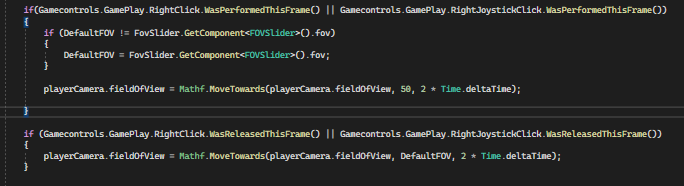
Why is this not working, Its not going down to the 50 fov i gave it, its changing between 88-89 evertime i click. https://i.imgur.com/5yj7iL0.png
 wintry quarry
twin bolt
Why is this not working, Its not going down to the 50 fov i gave it, its changin...
wintry quarry
twin bolt
Why is this not working, Its not going down to the 50 fov i gave it, its changin...
Math.MoveTowards does not start a tweening process that happens over multiple frames
it is instant
and does what you tell it to do
verbal dome
rocky canyon
i dont understand..
It's trying to use your own class, which doesn't contain LogError.
I suggest renaming your own Debug class something else
twin bolt
wintry quarry
Math.MoveTowards does not start a tweening process that happens over multiple fr...
Oh, so using tweening is alot better for this?
wintry quarry
twin bolt
Oh, so using tweening is alot better for this?
if you want something to happen over multiple frames, you need to call it over multiple frames.
Tween frameworks simplify that for you
it's also possible in Update or a coroutine
twin bolt
wintry quarry
if you want something to happen over multiple frames, you need to call it over m...
This is in update
wintry quarry
twin bolt
This is in update
yes but it's inside a WasPerformedThisFrame if statement
so it will only run for one frame
 twin bolt
wintry quarry
yes but it's inside a `WasPerformedThisFrame` if statement
twin bolt
wintry quarry
yes but it's inside a `WasPerformedThisFrame` if statement
Oh, so how can i make it run that if statement every frame?
wintry quarry
twin bolt
This is in update
basically what you typically do is set the target value inside the thing that happens ONCE. Then in Update or a coroutine you do the frame-by-frame interpolation, aka calling MoveTowards etc
rocky canyon
which is odd to me.. b/c ofc i pull the the same calls to the same functions (1 from each) inside a namespace.. and it would pick up my class and not unity's..
slender nymph
rocky canyon
naughty attribs can access unity's but *not* mine
NaughtyAttributes uses asmdefs, it will need a reference to the assembly your code is in
rocky canyon
yet it will in NaughtyAttribs
wintry quarry
e.g.
void Update() {
  if (clickedThisFrame) {
    target = something;
  }

  current = MoveTowards(current, target, Time.deltaTime * speed);
}``` this pattern @twin boltSo dont put the movetowards within that if statement?
rocky canyon
slender nymph
NaughtyAttributes uses asmdefs, it will need a reference to the assembly your co...
true.. but thats just the comparison i made thats vice-versa of the question..
analogy.. b/c in my script im working in now.. i dont declare either class and even if i have using UnityEngine i have to specify it
UnityEngine.Debug
i need to look up extension methods i think
and see what they do
slender nymph
if you are working within a namespace that has a type with the name Debug in it declared, then it will attempt to use that type rather than the one in the other namespace unless you either alias it or specify the fully qualified name of the type
rocky canyon
vs, what trickery this is
rocky canyon
slender nymph
if you are working within a namespace that has a type with the name `Debug` in i...
i'd be fine with referencing it's functions via a namespace
verbal dome
rocky canyon
i need to look up extension methods i think
You can't add extension methods to a static class (Debug) if that's what you're thinking
slender nymph
rocky canyon
i'd be fine with referencing it's functions via a namespace
i don't even know what you mean by that
rocky canyon
nvm, i think i talked my way thru it
it doesnt need to be static if i do what im thinking of doing
namespace.Debug.Function(); <-- i do that and then i can
Debug.LogError(); <-- use unity's w/o worrying.
verbal dome
Wouldn't it be less confusing to use a unique name for your class, instead of Debug?
rocky canyon
i thought i could combine them
rocky canyon
verbal dome
Wouldn't it be less confusing to use a unique name for your class, instead of De...
i can.. that would solve the entire issue lol
but having it Debug was kinda a plot point
but i can rename it..
verbal dome
You can name it Debug but it won't be the same Debug and you can get name clashes
twin bolt
wintry quarry
e.g.
```cs
void Update() {
if (clickedThisFrame) {
target = something;
...
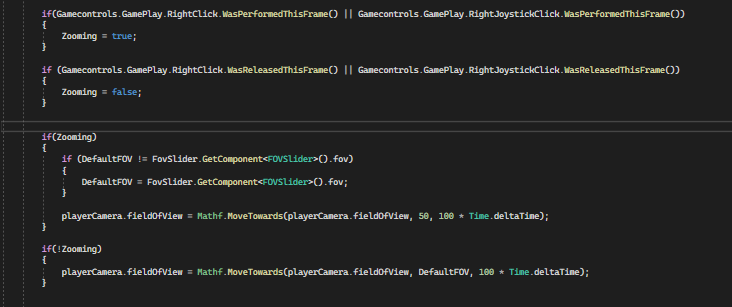
Okay this is what i have, and it works how i want, but now the zoom works on its own, at the very start, then its controlled by the mouse after. How can i fix this? https://i.imgur.com/ML08YSm.png
 rocky canyon
i was thinking i could :
using Debug = UnityEngine.Debug;
and then, use MyStuff.Debug.Log(); (when i needed that), but i had to find out the hard way that i couldn't just mark it static b/c it worked at first.. until i needed Unity's and realized it wasn't consistent anymore
wintry quarry
twin bolt
Okay this is what i have, and it works how i want, but now the zoom works on its...
just make sure to set the target FOV to the appropriate thing at the start. You should really have a targetFOV variable
rocky canyon
twin bolt
Okay this is what i have, and it works how i want, but now the zoom works on its...
does it begin as zoomed?
twin bolt
rocky canyon
does it begin as zoomed?
No, it zooms the way i it would normally zoom if i clicked, but on its own, only at the start.
 hidden heath
I'm going to give a word of advice for any beginners.
Please don't do:
if (exampleBool == false)
Please do:
if (!exampleBool)
It's basically the same but it's a lot easier to do the second one.
polar acorn
It's the first step to realizing that an if statement doesn't take a condition, it takes a boolean
hidden heath
polar acorn
It's the first step to realizing that an if statement doesn't take a _condition_...
Yeah.
languid spire
hidden heath
I'm going to give a word of advice for any beginners.
Please don't do:
if (examp...
why would you offer this completely irrelevant and unnecessary advice?
polar acorn
You don't need a == or a < or whatever for an if statement, you can use any boolean variable
polar acorn
languid spire
why would you offer this completely irrelevant and unnecessary advice?
Eh, I still think it's good to bring up, or people won't know to stop doing it
 austere monolith
whats the component with the text in a tmpro text? like if you wanted to use
public TextMeshProUGUI text;
text.(component for accessing text)
polar acorn
austere monolith
whats the component with the text in a tmpro text? like if you wanted to use
p...
text
languid spire
polar acorn
Eh, I still think it's good to bring up, or people won't know to stop doing it
it is completely and utterly irrelevant
polar acorn
languid spire
it is completely and utterly irrelevant
Yeah but we offer unrelated "Hey don't have an answer for your specific problem but I notice this thing that you could change" advice all the time
including you
languid spire
polar acorn
Yeah but we offer unrelated "Hey don't have an answer for your specific problem ...
not on that scale I do not
ffs if (a == true) or if(a) I mean who gives a shit?
polar acorn
languid spire
ffs if (a == true) or if(a) I mean who gives a shit?
You know I'd think you'd be most on board with this. Didn't every character count back when you had to solder every individual instruction onto a chip and walk it into the computer room
polar acorn
austere monolith
whats like a code holder website
!code
eternal falconBOT
Posting code
📃 Large Code Blocks
Use links to services like:
https://gdl.space/, https://paste.ofcode.org/, https://hatebin.com/, https://paste.myst.rs/, https://hastebin.com/
📃 Inline Code
Surround code with three backquotes. Not quotation marks.
To format as C#, add cs to the first line:
```cs
// Your code here
```
Add a comment with a line number if there is an error message.
languid spire
polar acorn
You know I'd think you'd be _most_ on board with this. Didn't every character co...
Then you misunderstand me, I care about the code that actually gets executed, what it looks like in source code I could not give a shit
austere monolith
https://hastebin.com/share/ogayizodon.csharp its saying gameobject im trying to access is destroyed, but thats the point
Hastebin is a free web-based pastebin service for storing and sharing text and code snippets with anyone. Get started now.
polar acorn
austere monolith
https://hastebin.com/share/ogayizodon.csharp its saying gameobject im trying to ...
Which line? Is it Cube or Text that is getting destroyed?
verbal dome
austere monolith
https://hastebin.com/share/ogayizodon.csharp its saying gameobject im trying to ...
Are you trying to use activeSelf to check if it is destroyed?
austere monolith
its the cube getting destroyed and im trying to use activeself to check if its destroyed yeah
verbal dome
That's not what it's for:
https://docs.unity3d.com/ScriptReference/GameObject-activeSelf.html
polar acorn
austere monolith
its the cube getting destroyed and im trying to use activeself to check if its d...
A destroyed object is not active or inactive, it simply doesn't exist. If you want to check if it's destroyed check if it's null or not
 covert cairn
languid spire
Then you misunderstand me, I care about the code that actually gets executed, wh...
covert cairn
languid spire
Then you misunderstand me, I care about the code that actually gets executed, wh...
You seem fun at parties
languid spire
covert cairn
You seem fun at parties
I don't do parties, I do code, So no, I'm no fun whatsoever
austere monolith
dang
rocky canyon
I figured it out
austere monolith
that looks like it has good potential keep going!
rocky canyon
soo, I wrapped my Custom Debug class inside a namespace..
(and i kept it static, renamed it a bit) and then at teh top of the script
using Debug = renamedCustomDebug;
and then i can use my custom debugs w/ Debug.Log() and Unity's when i need an error or something is just UnityEngine.Debug.Log()
 rocky canyon
austere monolith
that looks like it has good potential keep going!
rocky canyon
austere monolith
that looks like it has good potential keep going!
thnks thats the speed at which my AI make decisions i was jsut triyng to visualize it a little better
actually half that b/c i added in debugs inbetween the other debugs lol
 hasty sleet
polar acorn
You know I'd think you'd be _most_ on board with this. Didn't every character co...
hasty sleet
polar acorn
You know I'd think you'd be _most_ on board with this. Didn't every character co...
Imagine running all of your code through an obfuscator before committing it to prod
Minimizing code since the implication is every character counts
Well minimizer might be a better word than obfuscator. They look similar to me
 dry tendon
How could i adjust the limit of the circle of the slider?


 summer tree
I think it is unreasonable to write your code in the most minimal way to increase performance, unless you are making a God Of War I don't think there will be a noticeable difference between writing "condition" or "condition == true".
summer stump
summer tree
I think it is unreasonable to write your code in the most minimal way to increas...
"unless you are making a God of War"?
Why would that change things?
And no, neither would affect performance. They would compile to the same thing
Didn't look like anyone mentioned performance either. There was mention of character limits long long ago though
summer tree
summer stump
"unless you are making a God of War"?
Why would that change things?
And no, nei...
"unless you are making a God of War"?
If you're making a big game, even the smallest details that affect performance becomes important.
summer tree
summer stump
Didn't look like anyone mentioned performance either. There was mention of chara...
oh okay than, I misunderstood
eternal needle
summer tree
I think it is unreasonable to write your code in the most minimal way to increas...
this isnt how performance works. people think less lines = better and they are silly
summer tree
eternal needle
this isnt how performance works. people think less lines = better and they are s...
I think so
swift crag
dry tendon
How could i adjust the limit of the circle of the slider?
ah, I know this one -- gimme a minute
summer stump
summer tree
> "unless you are making a God of War"?
If you're making a big game, even the sm...
Well, as said, that would not affect performance.
And you would be suprised at how many unperformant things are in big games like God of War haha
dry tendon
swift crag
this is a <#502171135350407168> problem, so i will answer it over there
oops, i didn't realise about that
thanks!
 inland monolith
so I have my canvas set so that it scales with the size of the widow but the issue is that the game objects themselves dont abide by this rule since they're not ui is there a way to make them like the canvas?
swift crag
It sounds like you're trying to do something weird here
non-UI renderers are being viewed through a camera
and the camera will not "zoom out" (orthographic) or widen its field of view (perspective) just because you increased your resolution
inland monolith
youre so right for that
inland monolith
swift crag
It sounds like you're trying to do something weird here
This is what I mean
 swift crag
Are you trying to draw a background?
inland monolith
 swift crag
I can't really make anything out from that
inland monolith
like the before and after of it
like If I change the window of the game it moves the game objects itself
or doesnt ig so it creates weird overlap but yes its supposed to be a background
swift crag
don't parent your non-UI objects to the canvas
inland monolith
they arent
swift crag
Show me the inspector for one of these objects -- and post it in #📲┃ui-ux
this is a UI problem
 worthy merlin
Are you able to change the "Element 0" when a class is being added to a list of classes. I'd like them to say Wave 0 instead
 timber tide
Yes you can. How? I forget the exact details but probably related to #↕️┃editor-extensions
worthy merlin
Was kinda hoping to avoid custom editor based changes but if thats something that can't be changed with ordinary coding logic then so be it.
polar acorn
It'll use the value of the first serialized String field
So you can give it a name field and it'll display that
timber tide
Oh does that work on list indicies? I know it does work on serialized struct/classes
timber tide
if so, I guess you can serialize and hide the string value, then increment it with OnValidate
 livid oxide
Hi so rn im making a clicker type game where when you get to 1000 it makes th number 1.00K. For some reason its rounding the third decimal and I can't find a way to stop it from rounding. Do you know how I could fix it?

 wintry quarry
livid oxide
Hi so rn im making a clicker type game where when you get to 1000 it makes th nu...
wintry quarry
livid oxide
Hi so rn im making a clicker type game where when you get to 1000 it makes th nu...
Wdym by rounding the third decimal
livid oxide
so as you can see in the first image the amount of stars i have is 1045 but its saying i have 1.05K in the text so i presume its rounding to the second decimal place being 1.05K when it should still be 1.04K
wintry quarry
Also critical information here would be: what is the data type for stars
livid oxide
oh sorry it is a float
wintry quarry
There's probably some formatting setting in here somewhere https://learn.microsoft.com/en-us/dotnet/standard/base-types/standard-numeric-format-strings
But you could also ask for one extra digit and just cut off the last one

In this article, learn to use standard numeric format strings to format common numeric types into text representations in .NET.
But float is almost definitely not going to be sufficient for a clicker game
If it's exponential like most
livid oxide
wintry quarry
There's probably some formatting setting in here somewhere https://learn.microso...
ok thank you
wintry quarry
Most people use something like this https://github.com/Razenpok/BreakInfinity.cs for clickers

GitHub
Double replacement for numbers that go over 1e308. Contribute to Razenpok/BreakInfinity.cs development by creating an account on GitHub.
livid oxide
wintry quarry
Most people use something like this https://github.com/Razenpok/BreakInfinity.cs...
thank you that helps alot actually imma read through these properly now
 agile bison
Is Microsofts C# documentation sufficent enough to get proficent in C# or would you need something to suppliment it?
wintry quarry
agile bison
Is Microsofts C# documentation sufficent enough to get proficent in C# or would ...
Documentation is reference material
It's not for studying or reading cover to cover
it's for looking things up as needed
it will not teach you C#
 frosty hound
You don't read documentation to get proficient, it's reference material. It's enough to use yes, alongside normal Google.
wintry quarry
That would be like trying to learn English by reading the Dictionary
agile bison
Gotcha
wintry quarry
Here's a good resource to learn C# https://dotnet.microsoft.com/en-us/learn/csharp
agile bison
Thanks
 digital cave
I have a parent game object, it has only rigidbody and on trigger enter script attached to it and I also have child game object that is attached to parent game object. My child object has collider with isTrigger turned on and its also tagged with MyTag1. I am trying to detect MyTag1 on trigger enter, however no matter what I try I cant make it work. The issue this the obstacles that enters the trigger detects the parents tag instead of the child. The only solution I found is this, which is a really bad solution since it relies on objects positions in the hierarchy. How can I solve this issue and detect my child objects tag from a parent. (I don't want to attach a script into my child objects)
    void OnTriggerEnter(Collider other)
    {
        // Example 1
        Collider[] myCollider = GetComponentsInChildren<Collider>();

        if (myCollider[0].gameObject.CompareTag("MyTag1"))
        {
            //This works but it relies on hierarchy position, which is really bad.
        }

        // Example 2
        if (CompareTag("MyTag1"))
        {
            //This doesn't work.
        }

        // Example 3
        if (other.CompareTag("MyTag1"))
        {
            //This doesn't work.
        }


        // Example 4
        if (gameObject.tag == "MyTag1")
        {
            //This doesn't work.
        }

        // Example 5
        if (other.gameObject.tag == "MyTag1")
        {
            //This doesnt work.
        }

        // Example 6
        foreach(Collider collider in myColliders)
        {
            if(collider.gameObject.CompareTag("MYTag1"))
            {
                //This also works, but I feel like there is a easier and better way to achieve this.
            }
        }
    }
// Example 3
if (other.CompareTag("MyTag1"))
{
    //This doesn't work.
}
Is this what you're trying to do? If so then the targ on the collider object is incorrect then
digital cave
timber tide
```cs
// Example 3
if (other.CompareTag("MyTag1"))
{
//This doesn't work.
}
...
It's not, I've checked it million times
eternal needle
digital cave
I have a `parent` game object, it has only `rigidbody and on trigger enter scrip...
it looks like you're trying to differentiate between which collider is entered, in which case you need a script on the child objects. Your code right now doesnt really make sense because you're just trying to check if any child collider has a certain tag
digital cave
It works when it's not a child object
swift crag
My child object has collider with isTrigger turned on and its also tagged with MyTag1. I am trying to detect MyTag1 on trigger enter
This does not make sense. The collider you get is the other collider in the trigger overlap, not your own
swift crag
eternal needle
it looks like you're trying to differentiate between which collider is entered, ...
and yes, you have to do this
Trigger messages don't tell you which collider caused the overlap on your side
digital cave
I see, the only way to achieve this without actually adding a script into my child object is this then;
        Collider[] myCollider = GetComponentsInChildren<Collider>();

        foreach(Collider collider in myColliders)
        {
            if(collider.gameObject.CompareTag("MYTag1"))
            {
                //This also works, but I feel like there is a easier and better way to achieve this.
            }
        }
no, this makes no sense to do
swift crag
this doesn't actually tell you anything about the trigger overlap
eternal needle
Anytime any child collider is entered, you're gonna be looping through every single collider and checking if one has MYTag1. This is useless, you still dont know which one actually was used in the collision
digital cave
eternal needle
Anytime any child collider is entered, you're gonna be looping through every sin...
Oh, yeah that's correct. Added two tags and just noticed it triggers both
So the only logical way to do this, is to add a script into my childs?
 formal escarp
Hey. I need help understanding a tutorial. https://www.youtube.com/watch?v=vNL4WYgvwd8 in the minute 4:06 bro is calling a var called "healthComponent" but he never made one? i dont really get that part. can some1 explain?

🍍 In this Unity Tutorial we'll be setting up the absolute basic essentials for a generic Health script which will allow of us to set a Max Health and Take Damage as well as Heal.
The Health script can be used on Players, Enemies, GameObjects, whatever you want!
This is a follow up to the Health Bar Tutorial (link below) I've done in the past,...
eternal needle
formal escarp
Hey. I need help understanding a tutorial. https://www.youtube.com/watch?v=vNL4W...
you should do basics of c# first, this is just a variable name
eternal needle
then whats the issue?
timber tide
It's already instantiated, he does GetComponent to grab the reference as it's on the gameobject

When inserted onto the gameobject, it's basically doing new()
formal escarp
ooohhh
digital cave
formal escarp
i know its a variable name
He is creating a var healthComponent and it's equals to collisions Health (it's referenced to Health script), so basically it's getting the Health of a collided object
formal escarp
now i get it.. thanks mao.
digital cave
If I understood it right
wintry quarry
formal escarp
Hey. I need help understanding a tutorial. https://www.youtube.com/watch?v=vNL4W...
He's not "calling" the var he's literally declaring the variable on that line (line 32)
eternal needle
that tutorial calling that parameter name collision is definitely questionable, considering its just a collider
hitCollider.GetComponent would be way more understandable for beginners
formal escarp
eternal needle
hitCollider.GetComponent would be way more understandable for beginners
bro tryna act like he the coder or something 😭
eternal needle
i have no clue what you mean by that, and dont really wanna know either
digital cave
digital cave
I have a `parent` game object, it has only `rigidbody and on trigger enter scrip...
About this, I've made a partial class that contains on trigger events and attached it into my child objects that I want to check on trigger events. For some reason I was so sure that handling it in one script was a thing
eternal needle
digital cave
About this, I've made a partial class that contains on trigger events and attach...
you dont really need partial here unless you just mean a small class for the code
dense root
What's the best way to delay the response for a few seconds so the player can actually read the correct response being told?
    void CheckAnswer(int index)
    {
        if (answerText[index].text == answerKey[hiraganaArray[0]])
        {
            correctResponse.text = "Correct";
            ExitBattle();
        }
        else
        {
            correctResponse.text = "Wrong";
        }
    }
 polar acorn
Coroutine
 fickle wagon
Is it possible to move an object with the speed of light? As time froze and mass became infinite.
 night mural
only if you want it to come out at a different point in time
digital cave
dense root
What's the best way to delay the response for a few seconds so the player can ac...
    public IEnumerator ResponseDelay(float secondsToWait)
    {
        //Do whatever
        yield return new WaitForSecondsRealtime(secondsToWait); //Wait
        // Do whatever
    }
void MyFunction()
{
StartCoroutine(ResponseDelay());
}
 ripe forge
dense root
What's the best way to delay the response for a few seconds so the player can ac...
ripe forge
dense root
What's the best way to delay the response for a few seconds so the player can ac...
unity based: unity coroutines
c# native: async/await and use a delay (or unitask, which makes it more gamedev compliant)
c#, but fancier: UniRx/R3 and make a timer there
main advantage of tasks/async as well as reactive extensions is, they're not tied to monobehaviours, so you can run your delays in plain c# scripts. StartCoroutine is a function tied to monobehaviour, so you either need to derive your class from it, pass one around or run it against a static reference somewhere
but they also have their pitfalls, cancellation needs more boilerplate and if you're not careful it does not propagate exceptions
night mural
or just...keep track of a timer and then you can modify the amount left really easily and it's very simple and clear
 cyan folio
@summer stump ```cs
using System.Collections;
using System.Collections.Generic;
using UnityEngine;
public class FollowPlayer : MonoBehaviour
{
public GameObject player;
private Vector3 offset = new Vector3(0, 120, -120);
// Start is called before the first frame update
void Start()
{

}

// Update is called once per frame
void LateUpdate()
{
    transform.position = player.transform.position + offset;
}
}```
summer stump
cyan folio
<@349017582105526273> ```cs
using System.Collections;
using System.Collections.G...
Ok, so that offset is highly suspect. 120 meters up and 120 meters forward?
cyan folio
summer stump
Ok, so that offset is highly suspect. 120 meters up and 120 meters forward?
Which one's up and which one's forward?
summer stump
Y is up and Z is forward
X, Y, Z
When you put that script on the target before, what happened?
cyan folio
@summer stump Good news, I fixed the coordinates and can now see the sphere. The bad news is that the ground is being clipped for some reason.

 charred spoke
fickle wagon
Is it possible to move an object with the speed of light? As time froze and mass...
charred spoke
fickle wagon
Is it possible to move an object with the speed of light? As time froze and mass...
Last time I checked it is not possible to move a object with mass at the speed of light
summer stump
cyan folio
<@349017582105526273> Good news, I fixed the coordinates and can now see the sph...
Try reducing the near clip plane
cyan folio
@summer stump Good news, I fixed the coordinates and can now see the sphere. The bad news is that the ground is being clipped for some reason.
 summer stump
cyan folio
<@349017582105526273> Good news, I fixed the coordinates and can now see the sph...
summer stump
cyan folio
<@349017582105526273> Good news, I fixed the coordinates and can now see the sph...
Hmm, you seem to have just repeated yourself
Did you see my previous response?
Try reducing the near clip plane
cyan folio
summer stump
Hmm, you seem to have just repeated yourself
Sorry, internet trouble
summer stump
cyan folio
Sorry, internet trouble
Ah, no worries
cyan folio
summer stump
Did you see my previous response?
> Try reducing the near clip plane
Still doesn't work, even if I set it to 0.1
spare mountain
@cyan folio does the ground reappear with a faraway camera?
also is this an orthographic camera?
cyan folio
spare mountain
also is this an orthographic camera?
Yes this is an orthographic camera. Also how do I make it "faraway", Just change the XYZ?
spare mountain
cyan folio
Yes this is an orthographic camera. Also how do I make it "faraway", Just change...
oh yeah if it's orthographic and your plane is going through the camera it's gonna clip
just move your camera or move your plane
 keen parcel
How can I make a loop that has a delay between outputs

 gleaming ember
quick question i work throu a tutorial and he just set linear drag on 0 so gravaty works but my player (sqare) just drop down very slowly can someone explain to me why and how to fix?
 spare mountain
gleaming ember
quick question i work throu a tutorial and he just set linear drag on 0 so grava...
spare mountain
gleaming ember
quick question i work throu a tutorial and he just set linear drag on 0 so grava...
#🔎┃find-a-channel this isn't a coding question
gleaming ember
idk but i thought its definitly a beginner problem 😅 but yes if you want me to ask somewhere else
is its editor extentions or input system ?
summer stump
gleaming ember
quick question i work throu a tutorial and he just set linear drag on 0 so grava...
Drag isn't gonna have anything to do with it
This likely IS a code question
Are you setting velocity in your movment code?
If so, are you passing 0 as the y component?
gleaming ember
yes
 summer stump
gleaming ember
is its editor extentions or input system ?
summer stump
gleaming ember
is its editor extentions or input system ?
Are you making an editor extension script? Then no, of course not. Also you are not using the input system, you are using the input manager.
Just for future reference.
I think they were directing you to #💻┃unity-talk or perhaps #⚛️┃physics
But that would be incorrect for this
summer stump
gleaming ember
yes
If your vertical input is 0, then you are setting y velocity to 0. Thus you fall slowly
gleaming ember
my vertical input is then 0 when i dont press a key isnt it? but in the tutorial they wrote the same Code (more or less he didnt add a vertical factor) so is that my misstake?
summer stump
gleaming ember
my vertical input is then 0 when i dont press a key isnt it? but in the tutorial...
my vertical input is then 0 when i dont press a key isnt it?
Correct
but in the tutorial they wrote the same Code (more or less he didnt add a vertical factor) so is that my misstake?
Not sure how they did it. Adding the factor shouldn't be the issue. When there is no input, you are repeatedly setting the vertical velocity to 0, which logically is an issue. Because moving down at just over 0 m/s (because you WILL still fall a little until you reset it each frame) is a lot less than 9.81 m/s
Sorry to run out btw. But I'm just heading to bed. Hope that makes sense
gleaming ember
ok yes just checkt his code again he add a code i didnt add that could fix this thanks alot
 signal cosmos
,,daca cineva lucreaza la midnightworks dati-mi un raspuns''
rich adder
signal cosmos
,,daca cineva lucreaza la midnightworks dati-mi un raspuns''
english only server
signal cosmos
Please leave the message, it's dedicated :))
eternal needle
not even a code question, what an odd place to post that
rich adder
u think someone from midnightworks will casually see this here wtf
signal cosmos
rich adder
> if anyone works at midnightworks, give me an answer
The probability is higher, you're correct, it won't happen again
rich adder
signal cosmos
The probability is higher, you're correct, it won't happen again
well through some research they come up as a shady publisher
signal cosmos
I want to catch someone who claims they're always on this chat and reads all the messages
rich adder
they come up as a scam publisher so now idea why you'd want to
signal cosmos
rich adder
well through some research they come up as a shady publisher
hmm interesting
rich adder
anyway not code related so time to move on
signal cosmos
Honestly, I didn't have a super-defined goal, I just wanted to test a person who always claims to be on this chat and works there
Anyway, let's forget about this topic; indeed, it was absurd
 acoustic grove
hi, does anyone know why I can access a gameobject inside start and fixedupdate but not in a new method?
 astral falcon
acoustic grove
hi, does anyone know why I can access a gameobject inside start and fixedupdate ...
astral falcon
acoustic grove
hi, does anyone know why I can access a gameobject inside start and fixedupdate ...
? There is literally no difference how you access a gameobject no matter what method its in
acoustic grove
well when i try to access it from a new method, it says null reference
with the exact same code
rich adder
acoustic grove
with the exact same code
show code
 zinc shuttle
gyroscope keeps changing its direction
somtimes it works, somtimes zaxis is 90degree fliped, somtimes its inverted.
how do i solve this
acoustic grove
(i was looping through the components cause I was at my wits end, but the component does exist and is attached)


 green ether
which line is Player:231
acoustic grove
obj.HandlePhaseAdvance();
green ether
Is there a reason you are getting the component like that?
GetComponent<PlayerAgent>().HandlePhaseAdvance();
will do the same as all the code above no?
acoustic grove
I was losing my mind wondering if it was even attached so I was looping
but yes, it will do the same, but currently it also gives a null reference
rich adder
why not just assign in inspector
acoustic grove
like I can access it in start() and fixed update()
because its just a script thats attached to my player
I tried in the GUI and it still threw the same error
rich adder
why are you looping through components like that
acoustic grove
because I was worried it wasnt attached so I wanted to check that it was
but I cant access it directly either
astral falcon
So your obj is null, did I get this right?
acoustic grove
in start, both the loop and direct access work, in my new method, neither works
rich adder
use TryGetComponent at minimum
but fix the object being null in the first place
astral falcon
acoustic grove
yes my obj is null
where do you set it?
rich adder
acoustic grove
its not null in start
you have to figure out why its going nul then
astral falcon
Are you destroying it?
astral falcon
no
no difference at all. if the object is gone, you are destroying it or overriding it with a null value
acoustic grove
 rich adder
acoustic grove
between fixedupdate and methjods outside
rich adder
acoustic grove
between fixedupdate and methjods outside
first can you just look for the component better
astral falcon
What is PlayerAgent? Can you show the script?
acoustic grove
yes sorry
eternal needle
!code
eternal falconBOT
Posting code
📃 Large Code Blocks
Use links to services like:
https://gdl.space/, https://paste.ofcode.org/, https://hatebin.com/, https://paste.myst.rs/, https://hastebin.com/
📃 Inline Code
Surround code with three backquotes. Not quotation marks.
To format as C#, add cs to the first line:
```cs
// Your code here
```
Add a comment with a line number if there is an error message.
rich adder
where is obj assigned though
acoustic grove
sorry was too long for code block
I was assigning obj with getcomponent<PlayerAgent>()
in start()


 burnt vapor
acoustic grove
burnt vapor
acoustic grove
FYI, SerializeField has no effect on fields that are already public. It is for private fields.
acoustic grove
thanks, I didnt write this haha
I didnt write the actual game code, Im trying to put an ml agent in it
rich adder
acoustic grove
https://pastecode.io/s/bipovbv1
this isn't the Player script
eternal needle
acoustic grove
I didnt write the actual game code, Im trying to put an ml agent in it
modding or decompiling is against server rules #📖┃code-of-conduct if thats what you're referring to
astral falcon
acoustic grove
https://pastecode.io/s/2d5yzg19
just wanted to make sure, its not destroying itself
acoustic grove
no, its not a real game,dont woryr
rich adder
acoustic grove
https://pastecode.io/s/2d5yzg19
if its on the same object make a reference in the inspector for obj
green ether
eternal needle
modding or decompiling is against server rules <#497867528488484864> if thats wh...
Modding is against server rules??
rich adder
green ether
Modding is against server rules??
no, talking about modding a game is
not your own project
acoustic grove
rich adder
if its on the same object make a reference in the inspector for `obj`
it's a script
acoustic grove
it's a script thats attached to the playerobject
 rich adder
acoustic grove
it's a script thats attached to the playerobject
rich adder
acoustic grove
it's a script thats attached to the playerobject
i would check the scene for t:Player, make sure you only have 1 and not 2
acoustic grove
rich adder
i would check the scene for `t:Player`, make sure you only have 1 and not 2
how do I do that?
rich adder
type what i wrote on the search bar of hierarchy
eternal needle
green ether
Modding is against server rules??
what navarone said, but also generally people dont help with it here. its a pain because the person usually has no clue what they're doing and cant even show if other things are affecting what their issue is.
acoustic grove
rich adder
type what i wrote on the search bar of hierarchy
yes, Player exists
rich adder
show the entire inspector for object Player script is on
acoustic grove

 rich adder
acoustic grove
rich adder
acoustic grove
this is the player in the scene?
acoustic grove
yes
rich adder
acoustic grove
yes
put this in Start
//Start()
obj = gameObject.GetComponent<PlayerAgent>();
Debug.Log($"Found " + obj, gameObject);

//UpdatePhase
Debug.Log($"using obj " + obj, gameObject);
obj.HandlePhaseAdvance();
Debug.Log($"used obj " + obj, gameObject);
put these two logs
acoustic grove
 rich adder
acoustic grove
rich adder
acoustic grove
when you click using obj log does it take you to the same object
acoustic grove
rich adder
when you click `using obj` log does it take you to the same object
no, it appears to be empty
rich adder
try make the reference of obj private see if anything changes
maybe you have another script setting it
acoustic grove
same thing sadly
I think it's something to do with the ml-agents plugin but I dont know enough about it
astral falcon
acoustic grove
I think it's something to do with the ml-agents plugin but I dont know enough ab...
Put something on your playeragent script in OnDestroy like a debug log and see if and when its gonna happen
acoustic grove
It's definitely not getting destroyed because the other functions inside it are being called
I put it in the ondestroy and it only got called when I stopped the game
astral falcon
Can you show the result for all references of obj?
acoustic grove
is that in the code or gui?
acoustic grove
5 references, 1 asset reference
astral falcon
Check those places. Does any of those set a new obj somewhere?
green ether
Have you tried turning it off and on again?