#💻┃code-beginner
1 messages · Page 294 of 1
 feral stirrup
 willow scroll
Please, show the code
willow scroll
Please, show the code
It's the same, I just put other things from using unity etc.
 willow scroll
feral stirrup
It's the same, I just put other things from using unity etc.
willow scroll
feral stirrup
It's the same, I just put other things from using unity etc.
Well, yeah, it's not even within the class
 slender nymph
feral stirrup
It's the same, I just put other things from using unity etc.
slender nymph
feral stirrup
It's the same, I just put other things from using unity etc.
you need to get your !IDE configured 👇
 eternal falconBOT

💡 IDE Configuration
If your IDE is not autocompleting code
or underlining errors, please configure it.
Select one:
• Visual Studio (Installed via Unity Hub)
• Visual Studio (Installed manually)
• VS Code
• JetBrains Rider
• Other/None
 rare basin
please for the future, dont spoon feed
 languid spire
feral stirrup
It's the same, I just put other things from using unity etc.
languid spire
feral stirrup
It's the same, I just put other things from using unity etc.
why do you have a method outside of a class?
willow scroll
And I'm pretty sure they should first learn the basics.
rare basin
that's not the solution
willow scroll
rare basin
that's not the solution
That's not the solution, that's an example of the coroutine, which, I suppose, doesn't fully solve the issue, instead guides them in the way of solving it. I don't see any problems with it.
rare basin
willow scroll
That's not the solution, that's an example of the coroutine, which, I suppose, d...
no, that's a spoon feeding
he just blindly copy&pasted the code you gave him
without even understanding it
willow scroll
rare basin
he just blindly copy&pasted the code you gave him
Exactly
But that's not my problem
If the person asks how they spawn the objects infinitely, I suppose they already know the basic basics
rare basin
just dont spoon feed the answer, and guide him how to achieve what we wants instead of providing code where he just needs to change variable names
willow scroll
rare basin
just dont spoon feed the answer, and guide him how to achieve what we wants inst...
As I have already mentioned, the code I provided is just a tiny snippet, which you can find literally everywhere. This the most common example of spawning objects in a coroutine.
I have shown them an example of doing it, and they should extend the logic in the way they want their game to work
willow scroll
feral stirrup
It's the same, I just put other things from using unity etc.
After configurating your ide, please, consider having a look on the C# basics
 oak island
Hello all
feral stirrup
willow scroll
After configurating your ide, please, consider having a look on the C# basics
Yes, this week I will take a C# course
willow scroll
feral stirrup
Yes, this week I will take a C# course
Alright, this would be great
oak island
How do I move an object in unity from initial position to another (fixed) using Animations? Here the initial position is unknown
slender nymph
you most certainly do not
rare basin
you do not, your ide is not configured
 frigid sequoia
oak island
How do I move an object in unity from initial position to another (fixed) using ...
frigid sequoia
oak island
How do I move an object in unity from initial position to another (fixed) using ...
Usually you just parent it to an empty and animate the empty using the initial and final positions as keyframes
willow scroll
Was your ide configured, would you see many errors.
 stuck palm
how can i change the angle of movement on collision using the collision point drawn like that as a normal
 oak island
frigid sequoia
Usually you just parent it to an empty and animate the empty using the initial a...
oak island
frigid sequoia
Usually you just parent it to an empty and animate the empty using the initial a...
But wouldnt the initial position be fixed in this case?
willow scroll
oak island
But wouldnt the initial position be fixed in this case?
No
frigid sequoia
oak island
But wouldnt the initial position be fixed in this case?
The position would be fixed relative to the empty, also the final position
willow scroll
You move the player, which has a child with Animator
frigid sequoia
If you want to have a relative position as start and absolute as end point you probably need code
willow scroll
Player, which is being moved
Child, which contains the Animator
frigid sequoia
stuck palm
how can i change the angle of movement on collision using the collision point dr...
None of those lines represents a normal, but you probably want to get the normal of the collision point and change the velocity of the rb to that direction
 south sky
stuck palm
how can i change the angle of movement on collision using the collision point dr...
south sky
stuck palm
how can i change the angle of movement on collision using the collision point dr...
Try calculating the vector and using AddForce in respective vector direction
 trail chasm
Hello ,i see unity keep track of oriantation of an object like in this picture

but why in the parameter i dont take count of the rotation

how can i make it be x
rare basin
this is a code related channel @trail chasm
trail chasm
yea
testedV =new Vector3((int)Math.Round(t.localPosition.x), (int)Math.Round(t.localPosition.y)+2, (int)Math.Round(t.localPosition.z));
if (emplacement.ContainsKey(testedV))
{
adjacence.Add("haut", emplacement[testedV]);
}
why in a transform the parametre Y dont follow the rotation
of the object
even tho i use transform.localPosition
 hexed terrace
trail chasm
hexed terrace
trail chasm
X = red
Y = green
z = blue
In your 2nd image, you have rotated the cube on the X axis
 ruby python
Hey all,
I'm not really sure what's going on here.
Idea is that the object spawn at a point (yes they will be pooled eventually) with a random rotation on the Z Axis, and then a raycast fires (on spawn) in the
-transform.up direction (down) which then 'plants' the object on the surface of my tunnel. But as you can see from the video there is something really wrong with my raycast and I can't figure out what? 😕
This is my raycast.
    void Update()
    {
        if (rotationObject == null)
        {
            rotationObject = GameObject.FindGameObjectWithTag("Tunnel").transform;
        }

        if (hasParent == false)
        {
            RaycastHit hit;
            // Does the ray intersect any objects excluding the player layer
            if (Physics.Raycast(transform.localPosition, transform.TransformDirection(-transform.up), out hit, Mathf.Infinity, layerMask))
            {
                Vector3 hitPoint = hit.point;
                transform.position = hitPoint;
                transform.parent = rotationObject;
            }
            hasParent = true;
        }
    }
 frigid sequoia
ruby python
Hey all,
I'm not really sure what's going on here.
https://streamable.com/top4...
frigid sequoia
ruby python
Hey all,
I'm not really sure what's going on here.
https://streamable.com/top4...
I don't see what is wrong here, what isn't this the intended behaviour you described?
ruby python
frigid sequoia
I don't see what is wrong here, what isn't this the intended behaviour you descr...
The green capsule supposed to 'stick' to the walls using the raycast, but their 'world' Y position is all messed up. With the way it is current, they should be at the same height as when they originally spawn.
frigid sequoia
ruby python
The green capsule supposed to 'stick' to the walls using the raycast, but their ...
So you want it to stick to the wall and not the floor? That's the issue?
ruby python
1 sec.
Sokay, I've figured it out, no clue what the issue was tbh, but I just re-oriented my prefab and it fixed it.
frigid sequoia
ruby python
Sokay, I've figured it out, no clue what the issue was tbh, but I just re-orient...
Sure, your prefabs should all have a (0,0,0) rotation if you want them to be instantiated properly
ruby python
Yeah, was just weird and annoying. lol.
rare basin
ruby python
Hey all,
I'm not really sure what's going on here.
https://streamable.com/top4...
dont use Find() methods in Update
 polar acorn
rare basin
dont use Find() methods in Update
polar acorn
rare basin
dont use Find() methods in Update
dont use Find() methods
in Update
rare basin
well, yea
polar acorn
There's always a better way than keying off of object names
Ah, FindWithTag is less egrigious, but still probably avoidable
ruby python
Such as? Sorry, can't think of any other way to find an object on this objects spawn tbh.
rare basin
yea, what if you will have multiple objects with Tunnel tag
ruby python
Not being a dick btw. Just honestly don't know. lol.
polar acorn
ruby python
Such as? Sorry, can't think of any other way to find an object on this objects ...
If this object is one that's spawned in at runtime, have the object that spawns it pass the reference to it
polar acorn
If both are prefabs, spawned at different times, then I could see the alternative being more trouble than its worth. But if either end of it exists in the scene to set with a direct reference, passing that reference around is preferable
ruby python
Nah, it's just this object that gets spawned the Tunnel is already in the scene.
rare basin
polar acorn
If _both_ are prefabs, spawned at _different times_, then I could see the altern...
i'd usually just use a manager for that
like UnitManager or sth
possibly a singleton
ruby python
Yeah, these objects are spawned in using a spawn manager. So as digi suggest, passing the tunnel through that is probably the best way.
ruby python
Yeah.
Hmm. Okay, so anybody have any idea how to set the rotation of my objects based on the hit.Normal? I've tried a couple of methods I've found (including the one in the Unity scripting reference), but they don't seem to work 😕
polar acorn
ruby python
Hmm. Okay, so anybody have any idea how to set the rotation of my objects based...
Which axis of the object do you want to align with the hit normal? Presumably the object's up axis, right?
ruby python
polar acorn
Which axis of the object do you want to align with the hit normal? Presumably th...
Because of the way I've oriented the child 'mesh' object to get the placement bit working, it's the forward axis.
That's what I'm getting at the minute 😕

!code
eternal falconBOT
Posting code
📃 Large Code Blocks
Use links to services like:
https://gdl.space/, https://paste.ofcode.org/, https://hatebin.com/, https://paste.myst.rs/, https://hastebin.com/
📃 Inline Code
Surround code with three backquotes. Not quotation marks.
To format as C#, add cs to the first line:
```cs
// Your code here
```
Add a comment with a line number if there is an error message.
ruby python
 if (hasParent == false)
        {
            RaycastHit hit;
            if (Physics.Raycast(transform.position, transform.TransformDirection(-transform.forward), out hit, Mathf.Infinity, layerMask))
            {
                Debug.Log("Hit = " + layerMask);
                Vector3 hitPoint = hit.point;
                transform.position = hitPoint;

                Vector3 incomingVec = hit.point - spawnObject.position;

                // Use the point's normal to calculate the reflection vector.
                Vector3 reflectVec = Vector3.Reflect(incomingVec, hit.normal);
                transform.rotation = Quaternion.Euler(reflectVec);
                transform.parent = rotationObject;
            }
            hasParent = true;
        }
Okay, so try transform.forward = hit.normal
ruby python
polar acorn
Okay, so try `transform.forward = hit.normal`
Okay, so that worked. lol. Baffles me why the Unity scripting reference code samples don't include simple solutions like this. lol.
Thank you btw 🙂
polar acorn
ruby python
Okay, so that worked. lol. Baffles me why the Unity scripting reference code s...
Technically this is a bit of a hack, since it has no concept of "roll". It's possible you might want to do a LookRotation instead if you need a specific roll, but if your object is radially symmetrical like a capsule, it doesn't really matter
ruby python
polar acorn
Technically this is a bit of a hack, since it has no concept of "roll". It's pos...
Ah fair enough. Yeah the things I'm using this bit for are basically blobs, so this will do marvellously 🙂
 cursive thicket
Hi guys, I have been stuck debugging my code for hours, can anyone see if there are anything wrong please 😭
polar acorn
ruby python
Ah fair enough. Yeah the things I'm using this bit for are basically blobs, so ...
Yeah, it's a neat shortcut when the conditions are right
cursive thicket
or it is particle system problems
languid spire
cursive thicket
Hi guys, I have been stuck debugging my code for hours, can anyone see if there ...
!code
polar acorn
cursive thicket
Hi guys, I have been stuck debugging my code for hours, can anyone see if there ...
!code and also what is the issue
eternal falconBOT
Posting code
📃 Large Code Blocks
Use links to services like:
https://gdl.space/, https://paste.ofcode.org/, https://hatebin.com/, https://paste.myst.rs/, https://hastebin.com/
📃 Inline Code
Surround code with three backquotes. Not quotation marks.
To format as C#, add cs to the first line:
```cs
// Your code here
```
Add a comment with a line number if there is an error message.
Posting code
📃 Large Code Blocks
Use links to services like:
https://gdl.space/, https://paste.ofcode.org/, https://hatebin.com/, https://paste.myst.rs/, https://hastebin.com/
📃 Inline Code
Surround code with three backquotes. Not quotation marks.
To format as C#, add cs to the first line:
```cs
// Your code here
```
Add a comment with a line number if there is an error message.
polar acorn
Wow, such a precise double kill the bot just put em both in one message
ruby python
🤣
languid spire
first time i've seen that
polar acorn
I think we were frame perfect on that
languid spire
must be running in FixedUpdate, lol
cursive thicket
Are there any errors in the code? Or is it the error in the unity particle system https://paste.myst.rs/srbokf3x
a powerful website for storing and sharing text and code snippets. completely free and open source.
 magic pagoda
okayy so
Im trying to make a character in my 2D top-down game who throws a potion in the air and it shatters when it hits the floor
would the best way of making the potion's movement (it moves in both x and y, not just y) be Vector3.Slerp or something else?
rare basin
cursive thicket
Are there any errors in the code? Or is it the error in the unity particle syste...
error with what?
no one will browse your 442 lines of code
to find "error"
define error
polar acorn
cursive thicket
Are there any errors in the code? Or is it the error in the unity particle syste...
You haven't stated what the problem is
polar acorn
magic pagoda
okayy so
Im trying to make a character in my 2D top-down game who throws a poti...
Not sure what slerp has to do with what you've suggested
But if you want something to go up and then fall, a rigidbody with some initial velocity to it is probably the way to go
magic pagoda
I basicaly have to do this movement
 polar acorn
magic pagoda
I basicaly have to do this movement
polar acorn
magic pagoda
I basicaly have to do this movement
Yeah, sounds like a Rigidbody with some initial velocity
rare basin
or DOTween with their Jump() function
note that this is just modyfing the position
so no physics
magic pagoda
rare basin
or DOTween with their `Jump()` function
it doesnt have a jump function-
 magic pagoda
thats a thing? damn
cursive thicket
between 130 -209 When I click my left mouse button, vfx1 activates; but when I click my right mouse button, vfx2 has no response
rare basin
magic pagoda
thats a thing? damn
why did you say it doesn't without even checking it xd
magic pagoda
rare basin
why did you say it doesn't without even checking it xd
I tried to look it up and got no results
rare basin
dotween jump in google
trail chasm
any idea why
testedV = Quaternion.Zero* Vector.Forward);
Debug.Log(emplacement.ContainsKey(testedV)); ///return false
but
testedV = Vector.Forward);
Debug.Log(emplacement.ContainsKey(testedV)); ///return true
this shouldnt be possible
i did check with console and it show me the same vector but one is ok the second is not
it shouldnt be possible
magic pagoda
got a few results, not in the unity scripting API tho
rare basin
magic pagoda
got a few results, not in the unity scripting API tho
cuz it's not in the unity scripting API
magic pagoda
figured that one out-
polar acorn
cursive thicket
between 130 -209 When I click my left mouse button, vfx1 activates; but when I c...
Put a debug log in Attack1 inside the if statement. If it logs, then the issue is that the animation trigger "magicAttack1H" doesn't actually do anything
rare basin
it's an external asset
polar acorn
trail chasm
any idea why
testedV = Quaternion.Zero* Vector.Forward);
Debug.Log(emplacement.C...
Pretty sure Quaternion.zero is not a valid orientation
 austere hedge
I found out that if you modify values in a scriptable object in code, the change persists afterwards in the editor. I understand this is intended behavior.
I have a scriptable object called EnemyData:
[CreateAssetMenu]
public class EnemyData : ScriptableObject
{
    public string enemyName;
    public Sprite sprite;
    public List<Loot> loot = new List<Loot>();
    public float health;


    public EnemyData(string enemyName, Sprite sprite, List<Loot> loot, float health)
    {
        this.enemyName = enemyName;
        this.sprite = sprite;
        this.loot = loot;
        this.health = health;
    }
I want to be able to subtract the enemy's health when it gets damaged. I could create a EnemyData2 class that's not a scriptable object where I can safely subtract the health from without it being a permanent change in the editor, but that seems redundant. What would be the best practice in this scenario?
magic pagoda
Ima watch some tutorials abt that then.
oh yeah the start and end points will vary a LOT in-game btw, so would I still be able to use that?
trail chasm
polar acorn
Pretty sure Quaternion.zero is not a valid orientation
its Quaternion.Euler(t.rotation.eulerAngles) witch in this case equals (0,0,0,1)
rare basin
magic pagoda
oh yeah the start and end points will vary a LOT in-game btw, so would I still b...
why not?
you pass the endValue as a Vector3
pass whatever you want
polar acorn
austere hedge
I found out that if you modify values in a scriptable object in code, the change...
So, the thing about ScriptableObjects and persistence is that the data persists between sessions in the editor, but it does not persist in a build. This difference in behavior is why it's generally a bad idea to have mutable ScriptableObjects at all
magic pagoda
Idrk how the function works so just asking beforehand
polar acorn
trail chasm
its Quaternion.Euler(t.rotation.eulerAngles) witch in this case equals (0,0,0,1...
No, that's Quaternion.identity. Quaternion.zero is 0,0,0,0 which is not a valid orientation
rare basin
austere hedge
I found out that if you modify values in a scriptable object in code, the change...
you don't want to have a health system as a scriptable object
consider SO as a data storage/container
polar acorn
magic pagoda
oh yeah the start and end points will vary a LOT in-game btw, so would I still b...
It'd still probably be easier and more useful to just use physics. Especially since you're already intending to check for a collision with the floor
trail chasm
polar acorn
No, that's `Quaternion.identity`. `Quaternion.zero` is 0,0,0,0 which is not a va...
its a made up name because the code is too long the value is (0,0,0,1) witch is no rotation
magic pagoda
I probably sholdve worded it better but no Im not checking for a collision
magic pagoda
magic pagoda
okayy so
Im trying to make a character in my 2D top-down game who throws a poti...
^ because the game is topdown
 carmine sierra
!code
eternal falconBOT
Posting code
📃 Large Code Blocks
Use links to services like:
https://gdl.space/, https://paste.ofcode.org/, https://hatebin.com/, https://paste.myst.rs/, https://hastebin.com/
📃 Inline Code
Surround code with three backquotes. Not quotation marks.
To format as C#, add cs to the first line:
```cs
// Your code here
```
Add a comment with a line number if there is an error message.
magic pagoda
the reason I was trying to do it with Vector3.Slerp is bc I can simply destroy it when the movement ends
carmine sierra
            Rigidbody2D[] rb = gameObject.GetComponentsInChildren<Rigidbody2D>();
            for (int i = 0; i < rb.Length; i++) {
                rb[i].gravityScale = 1;
            }
this should turn on gravity on all child objects of the script's object right?
magic pagoda
carmine sierra
```
Rigidbody2D[] rb = gameObject.GetComponentsInChildren<Rigidbody2...
most likely, but I recommend testing things and seeing if they work before coming here to ask "would this work?" ^^
carmine sierra
magic pagoda
most likely, but I recommend testing things and seeing if they work before comin...
i get what your saying but I just want to know cause there's other factors which could be stopping this from workiong
magic pagoda
carmine sierra
i get what your saying but I just want to know cause there's other factors which...
as in?
carmine sierra
magic pagoda
as in?
 void Start() {
        //Turns on gravity on all child objects.
        Debug.Log(TurnManager.isAttackPhase);
        if (TurnManager.isAttackPhase) {
            Rigidbody2D[] rb = gameObject.GetComponentsInChildren<Rigidbody2D>();
            for (int i = 0; i < rb.Length; i++) {
                rb[i].gravityScale = 1;
            }
        }
    }
this is the condition it needs 'isAttackPhase'
I debugged and it was true

p1build has this script
and it's child objects all have rigidbody's with a gravityscale of 0
so what could be the issue?
magic pagoda
are you sure that all of the Rigidbody2Ds are in the list? because youre not really grabbing anything there
carmine sierra
magic pagoda
are you sure that all of the ``Rigidbody2D``s are in the list? because youre not...
what do you mean im not really grabbing anything?
magic pagoda
also youre only checking it in the first frame
carmine sierra
would that not still run the whole for loop though
i though that could be the issue though
magic pagoda
yeah but if isAttackPhase is false on frame 1 it wouldnt work
carmine sierra
i debugged it before the for loop and it was true
would that work?
also isattackphase is set in an awake function
magic pagoda
carmine sierra
what do you mean im not really grabbing anything?
did you put all the Rigidbody2Ds into the list in the editor?
carmine sierra
magic pagoda
did you put all the ``Rigidbody2D``s into the list in the editor?
they are put their automatically
i mean the player builds
and they instantiate into the game's object
but they are carried over into this scene from a previous scene using ddol
magic pagoda
hang on uhh try this, one sec
carmine sierra
🙏
magic pagoda
okay so, firstly, thats now really how you add things to a list
 ancient trench
Hey guys, i made health system that use sprites of hearts but it dont recognise sprites cause they are animated, how can i fix it?
magic pagoda
carmine sierra
its an array though rihgt
tbh I think yourd just be better off assigning the rigidbodies yourself on the editor?
carmine sierra
magic pagoda
tbh I think yourd just be better off assigning the rigidbodies yourself on the e...
wdym
they get added to the list when they are placed by the player
magic pagoda
what-
carmine sierra
and this carries over to another scene using ddol
magic pagoda
of course your code wont work like that, it only calculates things frame one
since theres nothing on the list there (since things havent been added by the player yet frame 1) the for loop wouldnt run
carmine sierra
magic pagoda
of course your code wont work like that, it only calculates things frame one
in the build phase, when they are being added in, the start function isn't run
I only need to get their rigidbody components in the attack phase
when they have already been placed by the playr
I can send a vid demonstrating
magic pagoda
gtg- Idrk how to explain this anyway-
try explaining your problem a bit better please next time tho
carmine sierra
okay
magic pagoda
like tell us exactly whats going on
carmine sierra
you can skip 20 seconds
i build and then that builds objects are meant to have gravity
 queen adder
guys how do i remove this aura from my blocks?

 minor wharf
Hi, i cant find any tutorials on puzzles (like the 2d zelda or metroid games). What should i be searching for? Bc if i google puzzles i only get boardgame puzzle type tutorials
queen adder
@polar acorn you are smart, can u help me?
 shell ice
Hi , i've got this problem here where i have some animations and i want to be able to switch between them but it's not working , i can switch from idle to walk for the first time , but whenever i try to switch back to idle it does not work , any idea why , here is the logic i used


 lost anvil
had this problem for a bit now but if the player picks up an item standing still thats fine, but if the player is moving whilst picking up an item it goes to the last position the hand gameobject was at (i think), and ive tried sticking the whole thing in update but that just gives weird results.
 tender stag
i also need to check the vertical angle, how do i do that
if(Vector3.Angle(transform.forward, directionToTarget) < horizontalAngle / 2)
this is just horizontal ^
i have a verticalAngle variable
carmine sierra
carmine sierra
anyone know the issue?
tender stag
tender stag
i also need to check the vertical angle, how do i do that
```if(Vector3.Angle(tr...
can someone tell me if this is correct?```cs
//Horizontal angle
if(Vector3.Angle(transform.forward, directionToTarget) < horizontalAngle / 2)
{
//Vertical angle
float verticalAngle = Vector3.Dot(Vector3.up, directionToTarget.normalized);
float verticalAngleInDegrees = Mathf.Acos(verticalAngle) * Mathf.Rad2Deg;
if(verticalAngleInDegrees < verticalAngle / 2)
{
    seePlayer = true;
}
}```
frigid sequoia
I have a Game Object with a Particle System as a parent of another similar Particle System to have them do a coordinated particle effect. I want the size of this to be variable via code; so I though changing the scale of the first parent would increase the size of all their children and their particles, but it does only increase the size of the Particle System on the parent object, why is this? Can I fix this or do need to work around it getting referneces to all the children adjusting the size of all of them?

 rigid kite
I have a FPS Player Object that can Bhop. But Object's horizontal velocity is not decreasing when I hit a wall. How i can make the Object stop?
 quartz hull
frigid sequoia
I have a Game Object with a Particle System as a parent of another similar Parti...
quartz hull
frigid sequoia
I have a Game Object with a Particle System as a parent of another similar Parti...
yes. it can' be controlled child particle.
tender stag
rigid kite
I have a FPS Player Object that can Bhop. But Object's horizontal velocity is no...
check if hes hitting a wall, and then half or have a multiplier for the horizontal input
rigid kite
tender stag
check if hes hitting a wall, and then half or have a multiplier for the horizont...
And so how i can check if it's hitting a wall?
Does collider's work?
tender stag
have another collider
check if its hitting anything or an object with layer or tag Wall
rigid kite
ok i'll try it
 green island
how can i make the jump better the player falls to slow but i want to keep the jump height
https://youtu.be/AzJQGadWwsQ
public void CalcJump(Rigidbody rb)
{
    rb.AddForce(Vector3.up * 10 * playerData.ch.jumpStrengh, ForceMode.Impulse);
}
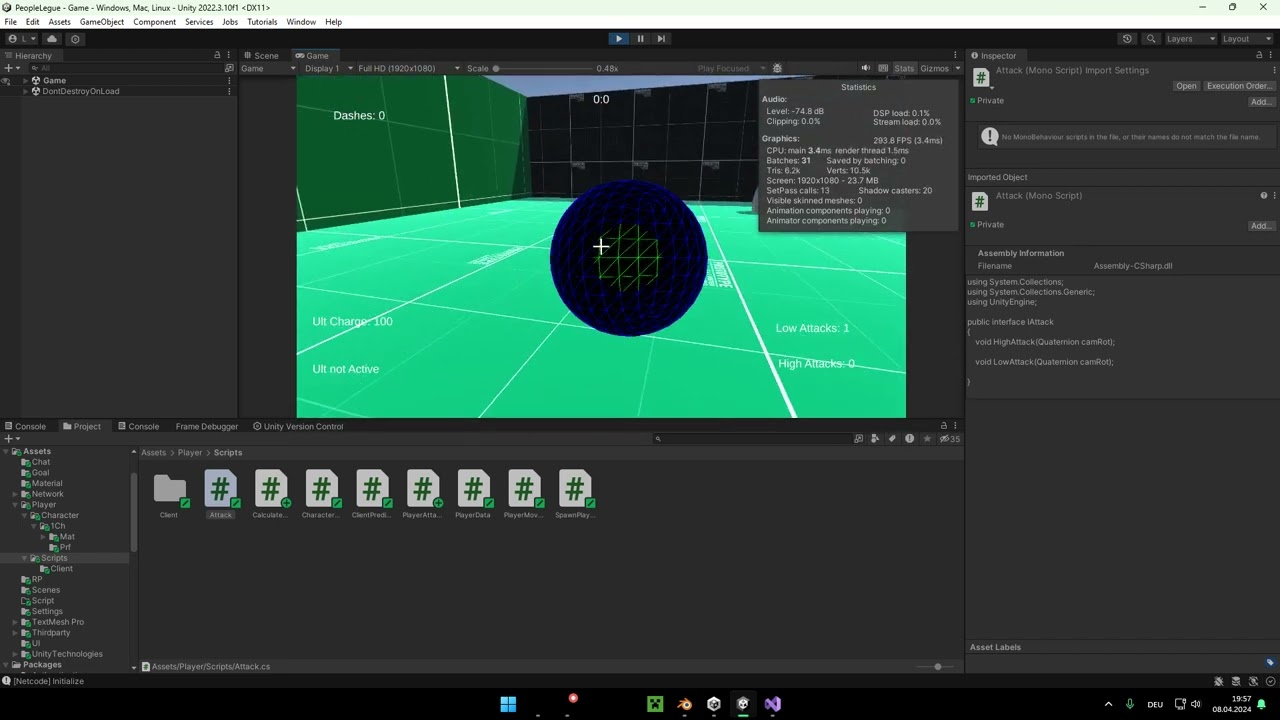
GPU: NVIDIA GeForce RTX 3090
CPU: AMD Ryzen 5 5600G with Radeon Graphics
Memory: 32 GB RAM (31.8 GB RAM usable)
Current resolution: 1920 x 1080, 144Hz
Operating system:
 rancid tinsel
this is resulting in no cameras rendering, any ideas?

 keen needle
green island
how can i make the jump better the player falls to slow but i want to keep the j...
keen needle
green island
how can i make the jump better the player falls to slow but i want to keep the j...
increase the weight of the object and increase the strength of the jump can works
green island
keen needle
increase the weight of the object and increase the strength of the jump can work...
tried it but it didnt change it
keen needle
Have you tried pushing the object down when the velocity at y is negative?
if (rb.velocity.y < 0)
{
rb.velocity += Vector3.up * Physics.gravity.y * (fallMultiplier - 1) * Time.deltaTime;
}
polar acorn
rancid tinsel
this is resulting in no cameras rendering, any ideas?
Are both variables perhaps referring to the same camera
rancid tinsel
polar acorn
Are both variables perhaps referring to the same camera
no, sorry i forgot to update
i forgot .enabled refers to components
not gameobjects
so i had one camera gameobject disabled in scene that it was enabling the component for
 twilit moon
Guys, we are just starting to use the unity hub, there is an error, can you help? ::Download failed: Validation Failed::
hexed terrace
twilit moon
Guys, we are just starting to use the unity hub, there is an error, can you help...
This is a code channel. Move the question to #💻┃unity-talk
willow scroll
Where is the SetLine method called?
Could we see it?
in a text form.
I wasn't asking for a screenshot of your code, for the copy-pasted code instead
eternal falconBOT
Posting code
📃 Large Code Blocks
Use links to services like:
https://gdl.space/, https://paste.ofcode.org/, https://hatebin.com/, https://paste.myst.rs/, https://hastebin.com/
📃 Inline Code
Surround code with three backquotes. Not quotation marks.
To format as C#, add cs to the first line:
```cs
// Your code here
```
Add a comment with a line number if there is an error message.
hexed terrace
You're clearing it in Update()
is it possible to clear before the TMP's get set tho
can you pls type in full sentences
how come you're adding to a list in the first place?
willow scroll
Why not just execute it without creating a list?
 keen dew
Coroutines don't run in a separate thread
hexed terrace
sounds over engineered
willow scroll
What?
hexed terrace
linia.text = string;
willow scroll
Alright, so between
- Update all the texts in a single method
- Call the function with the text update methods, constantly run a for loop in the
Updateto execute every of them, clear the function to then call the method to assign it again
you chose the easiest, the 2nd one?
Great
But is there any way you may consider the 1st variant being slightly more easier and maybe even a bit better for the performance and readability?
hexed terrace
Well, atm, because you've got a super weird, over engineered, poor way of updating the text
it looks like you'll be constantly overwriting the text too
but without seeing what's going on, we can't say for sure
willow scroll
willow scroll
Alright, so between
* Update all the texts in a single method
* Call the functio...
Well, the 2nd method here doesn't sound like it was designed to do something useful, to be honest
willow scroll
Is SetTablicaLine even called?
hexed terrace
in the coroutine
willow scroll
what about SetLine?
hexed terrace
in SetTablicaLine
It's a little difficult to follow the code with non-English names
willow scroll
willow scroll
what about `SetLine`?
Well, yeah, that was a dumb question
Is anything even printed in Update?
What is printed?
Well, so the text should indeed be set.
Oh, so it's set?
Great
perhaps because you're setting the same one.
willow scroll
I said, maybe you're assigning the text to its initial value every time?
Alright, let's stop blaming the text
Print the values you're assigning the text to
As I have mentioned, don't you consider them being able to be the same?
polar acorn
If you set the text to a value, and that function is running, then the text is changing. Whether or not it stays changed is a different matter
Last set wins
willow scroll
Yeah, so you consider it being a unity bug?
Alright, you can report a Unity bug if you wish
And no intention of printing the values being set
willow scroll
Don't worry, there is absolutely no way you could've accidentally made a mistake in your code.
What am I supposed to discover from this picture?
Well, so those are 3 parameters listed as a single-one?
Is "Pieninska" meant to be assigned to "Pieninska"?
That's interesting to see how you expect being helped while swearing around and not knowing what is meant to be set
Alright, I feel like you don't really need help
No, not me
Why should I help you? Please, first consider
-
- Writing in full, readable sentences, as this is not a roblox chat with your girlfriend
-
- Knowing what you need help with and really trying to answer the questions you're being set, as neither me, nor, I suppose, anyone else is a prophet out there
polar acorn
willow scroll
Why should I help you? Please, first consider
* 1. Writing in full, readable sen...
And those of us who are prophets would much rather spend our dodgeball of prophecy on more important things like trying to predict the next Nintendo Direct
willow scroll
polar acorn
And those of us who _are_ prophets would much rather spend our dodgeball of prop...
exactly 🤣
queen adder
Guys how do i set tilermap colider?
willow scroll
Consider using a cs markdown
queen adder
@polar acorn how do iset tilermap collider to collider only on especific blocks?
willow scroll
queen adder
<@153950686088921088> how do iset tilermap collider to collider only on especifi...
Why direct the question especially to them?
queen adder
willow scroll
Why direct the question especially to them?
Cuz he is smart
polar acorn
Add this log to the end of this function:
Debug.Log($"{gameObject.name}'s text is being set to {linia}, {kierunek}, {odjazd}", this);
It'll log what the text is set to here, and let you click on this log to highlight the object that logged it
queen adder
and he helped me before
polar acorn
queen adder
<@153950686088921088> how do iset tilermap collider to collider only on especifi...
Why are you pinging me specifically
queen adder
polar acorn
Why are you pinging me specifically
Cuz you are smart
willow scroll
queen adder
and he helped me before
So do you consider them being your private helper?
queen adder
and you helped me before
polar acorn
queen adder
and you helped me before
that's not how this works
queen adder
Ok sorry
polar acorn
you ask the question and if people know the answer they answer it
So those values are all blank
willow scroll
queen adder
and you helped me before
Helping you once doesn't mean having to help you twice.
queen adder
guys how do i set tilemap collider to especific blocks?
 willow scroll
Could you print this?
Debug.Log($"{this.linia.text}; {this.kierunek.text}; {this.odjazd.text}; -> {linia}; {kierunek};{odjazd}", this);
Okay, what's printing that?
willow scroll
Alright. Now tell me: why isn't the text changing?
polar acorn
Log that before you set the texts. This one would be at the top of the function
If that is where this is, then the issue is that you're setting the text to itself
willow scroll
polar acorn
If that _is_ where this is, then the issue is that you're setting the text to it...
Yeah, that's what I've been trying to explain for a while before
queen adder
queen adder
guys how do i set tilemap collider to especific blocks?
Who can help me please
polar acorn
I don't know what this has to do with what they've said
willow scroll
Yeah, you've printed both this. and a parameter though?
polar acorn
it is entirely possible that the parameters are equal to the current value
willow scroll
Anyway, you issues is that you're setting the text to itself
So yeah, you don't see any changes
polar acorn
Let's combine both of our approaches into one. Get the name of the object changing its text, and the before/after:
public void SetLine(string linia,string kierunek,string odjazd)
{
    Debug.Log($"{gameObject.name}'s text changing from {this.linia.text}, {this.kierunek.text}, {this.odjazd.text} -> {linia}, {kierunek}, {odjazd}", this);
    this.linia.SetText(linia);
    this.kierunek.text = kierunek;
    this.odjazd.text = odjazd;
}
Okay, so this is changing it to blank, blank, blank
willow scroll
And so the next message, shouldn't it be.. blank, blank, blank?
polar acorn
Now, when you click on that log (once), it will highlight an object in the hierarchy. Click on that object and show its inspector
That's what I'm doing
Just follow my instructions
We need information
The ,this at the end was to highlight the exact object that's not doing what's expected, so let's follow the white rabbit and see where it goes
Okay, cool. Click on that object and send a screenshot of its inspector, so we can see which Text objects it's referencing
willow scroll
And it's its text is blank. So it's set.
polar acorn
Make sure it's actually changing its children and not referencing the wrong TMPs
Mkay, and when you click those, they highlight the child objects you showed before?
Okay, and those are all showing blank, correct?
 sharp copper
guys how do you make block of code in discord i forgot
polar acorn
sharp copper
guys how do you make block of code in discord i forgot
!code
eternal falconBOT
Posting code
📃 Large Code Blocks
Use links to services like:
https://gdl.space/, https://paste.ofcode.org/, https://hatebin.com/, https://paste.myst.rs/, https://hastebin.com/
📃 Inline Code
Surround code with three backquotes. Not quotation marks.
To format as C#, add cs to the first line:
```cs
// Your code here
```
Add a comment with a line number if there is an error message.
willow scroll
sharp copper
guys how do you make block of code in discord i forgot
A single ` for an inline and 3 for a multiline
polar acorn
Okay, so it seems like this function is doing what it is asked of it, and setting those text component's to the passed parameters. Is that what you're seeing in-game as well? Blank lines for this object?
queen adder
Guys why my map is falling?


 willow scroll
Alright? So the issue is fixed?
Well, if anything is being set fine?
Than it's fixed! 
Yey!
sharp copper
queen adder
Guys why my map is falling?
gravity is on?
queen adder
sharp copper
gravity is on?
How do i turn it off?
sharp copper
does the map have rigidbody script?
queen adder
sharp copper
does the map have rigidbody script?
yes
willow scroll
Why are there even so many texts?
willow scroll
You're setting the texts to "", "", "", so, obviously, it's not going to display anything
queen adder
I guess i'm doing something wrong
polar acorn
Okay, so it seems like it's working? What is the problem then?
sharp copper
queen adder
I guess i'm doing something wrong
set body type to static
queen adder
ok
queen adder
sharp copper
set body type to static
Ty it's working now
polar acorn
Then don't call SetLine with "", "", "" as the parameters.
Follow the chain up, find what calls SetLine, see where that gets the data from and so on
So, when you call this function, you are passing it values that are not "", "", "". So do the same thing, click on it, find the object calling that, and check the text objects. What do they say?
Don't double click it
double means "open this line"
single click highlights
Then whatever object ran this line no longer exists. The ,this at the end tells it which object to highlight. If nothing does, then whatever object printed this is gone
If that object doesn't highlight when you single-click the log, then that is not the object that called that log
If the log does not highlight this object, then 100% beyond a shadow of a doubt, this object did not call that debug log
That would now highlight the object that linia is assigned to. If clicking this log doesn't highlight that object, then, again, this means that this log was not called by that object
Absolutely nothing
It's doing exactly what you tell it to do
you're just telling it to do the wrong thing
So, why did you change the log in the first place? The one I provided gives more information than this one
sharp copper
anyone knows how to fix my thing in the cinemachine channel?
polar acorn
That one logs the old values and the name of the object
Okay so were you just gonna never tell us that you're constantly getting errors
 carmine sierra
could anyone help with the issue of the objects' gravity not turning on? (you can skip to 21 seconds)
polar acorn
Hiding them doesn't mean they aren't still affecting things
When an exception occurs, all code after that stops
So, pretty easy fix. Either make the mesh convex or kinematic
carmine sierra
 [SerializeField] TurnManager TurnManager;

    void Start() {
        //Turns on gravity on all child objects.
        Debug.Log(TurnManager.isAttackPhase);
        if (TurnManager.isAttackPhase) {
            List<Rigidbody2D> rb = new List<Rigidbody2D>(gameObject.GetComponentsInChildren<Rigidbody2D>());
            for (int i = 0; i < rb.Count; i++) {
                rb[i].gravityScale = 1;
            }
        }
    }
You could very easily have been getting a null reference exception the entire time and have no idea
Then I'll see you when you're done I'll be here all day
Oh hey look errors that are exactly what I said was happening
The object you were trying to change no longer exists
and you couldn't see it because you didn't fix your errors
next time listen to me when I say things
¯_(ツ)_/¯
You reloading the scene somewhere?
Trying to reference objects in scene instead of prefabs?
Either way, clear up those other errors and it'll be easier to debug
Since those will be the only errors left
carmine sierra
carmine sierra
```
[SerializeField] TurnManager TurnManager;
void Start() {
//Tur...
this script is meant to turn on gravity for all child objects
polar acorn
And I don't have time to deal with someone who wastes my time not checking basic things like "does the code throw an error"
carmine sierra
polar acorn
And I don't have time to deal with someone who wastes my time not checking basic...
could you help me then please 😅 🙏
polar acorn
carmine sierra
could you help me then please 😅 🙏
You haven't said what the problem is
sharp copper
maybe look for null reference exceptions using search bar in console
 polar acorn
That means linia is the object that was destroyed
carmine sierra
polar acorn
You haven't said what the problem is
i am trying to set all child objects' rigidbodys' gravityscale to 1
no errors, but it doesnt work, gravityscale remains the same
carmine sierra
carmine sierra
could anyone help with the issue of the objects' gravity not turning on? (you ca...
this video shows an example
sharp copper
carmine sierra
no errors, but it doesnt work, gravityscale remains the same
can you give me ss of one of the objects which doesn't work, screen shot of rigid body component
polar acorn
carmine sierra
i am trying to set all child objects' rigidbodys' gravityscale to 1
Is TurnManager.isAttackPhase ever true when this object is created?
sharp copper
and script
carmine sierra
polar acorn
Is `TurnManager.isAttackPhase` ever true when this object is created?
ill check that thanks
carmine sierra
sharp copper
can you give me ss of one of the objects which doesn't work, screen shot of rigi...
yep
carmine sierra
sharp copper
can you give me ss of one of the objects which doesn't work, screen shot of rigi...
 polar acorn
You've been told my conditions for help.
sharp copper
carmine sierra
did you check if the gravity scale is being set to 1 after start?
carmine sierra
carmine sierra
if you are wondering why there are two of the p1build and p2build objects, it is because I return to this scene from the building phase after a transmission scene
sharp copper
and try to debug log the list of rigid bodies
carmine sierra
sharp copper
did you check if the gravity scale is being set to 1 after start?
okay
polar acorn
carmine sierra
What object has the Start method you're trying to change these objects in?
carmine sierra
polar acorn
What object has the `Start` method you're trying to change these objects in?
p1sBuild and p2sBuild
carmine sierra
sharp copper
and try to debug log the list of rigid bodies
im not sure if this means anything
 polar acorn
carmine sierra
p1sBuild and p2sBuild
polar acorn
carmine sierra
p1sBuild and p2sBuild
Okay, and when are those objects first created?
carmine sierra
polar acorn
Okay, and when are those objects first created?
in the build phase, which is the same scene but the first time it is loaded, it loads back in again (I used a ddol on each players' build)
polar acorn
carmine sierra
in the build phase, which is the same scene but the first time it is loaded, it ...
Okay, so, in the "build phase", is TurnManager.isAttackPhase true?
carmine sierra
carmine sierra
could anyone help with the issue of the objects' gravity not turning on? (you ca...
if you could watch from 20 secs this visualizes it
carmine sierra
polar acorn
Okay, so, in the "build phase", is `TurnManager.isAttackPhase` true?
no
polar acorn
carmine sierra
no
Then your code is doing as expected. When this object is created, you check if TurnManager.isAttackPhase is true, and if it is, set the gravity. It isn't true, so it doesn't.
 south mural
Hello guys. I will try to create a 3D game which is about space. I am going to make some 3d starship models in blender and use them in my game. And also I will make skins for every ship style. Am I going to make skins in blender or in unity? For an example I will make a gold material for golden skin and when I put this material to my ship in unity, I want to change only the wing of the ship to gold. I don't have much info about blender and unity but is it possible to make this or am I going to create lot of ship models for every skins. I hope you can understand me.
polar acorn
south mural
Hello guys. I will try to create a 3D game which is about space. I am going to m...
If you're using materials, it'll be in Unity. Blender materials are a different thing altogether and you're not going to get any more than what textures are attached to it on export
carmine sierra
polar acorn
Then your code is doing as expected. When this object is created, you check if `...
do you know how I could find the issue then?
polar acorn
carmine sierra
do you know how I could find the issue then?
What's the issue? As I said, the code is doing exactly what you told it to do. It checks upon creation if TurnManager.isAttackPhase is true. It isn't.
So it correctly skips the loop
carmine sierra
polar acorn
What's the issue? As I said, the code is doing exactly what you told it to do. I...
okay ill ensure that isattackphase is on
south mural
polar acorn
If you're using materials, it'll be in Unity. Blender materials are a different ...
So I am going to create my model untextured and put it to my unity project? For an example I want to put blue stripes to wing, am I going to do it with material or is there anyting like texture in unity?
 trim dirge
south mural
So I am going to create my model untextured and put it to my unity project? For ...
trim dirge
south mural
So I am going to create my model untextured and put it to my unity project? For ...
Yes you will do it in unity with materials
carmine sierra
polar acorn
What's the issue? As I said, the code is doing exactly what you told it to do. I...
could the issue be that there are two instances of p1sBuild? I doubt that is the issue but if there are some unity rules im unaware of. One instance is from the build phase, one is from the attack phase (in the ddol scene)
 polar acorn
south mural
So I am going to create my model untextured and put it to my unity project? For ...
polar acorn
south mural
So I am going to create my model untextured and put it to my unity project? For ...
You'll have the UVs mapped in blender, and export it to Unity. Then you can assign a material that has that texture
polar acorn
carmine sierra
could the issue be that there are two instances of p1sBuild? I doubt that is the...
You can have as many instances of anything you want
south mural
is UV map means like minecraft skin map?
polar acorn
They're entirely different objects though
polar acorn
south mural
is UV map means like minecraft skin map?
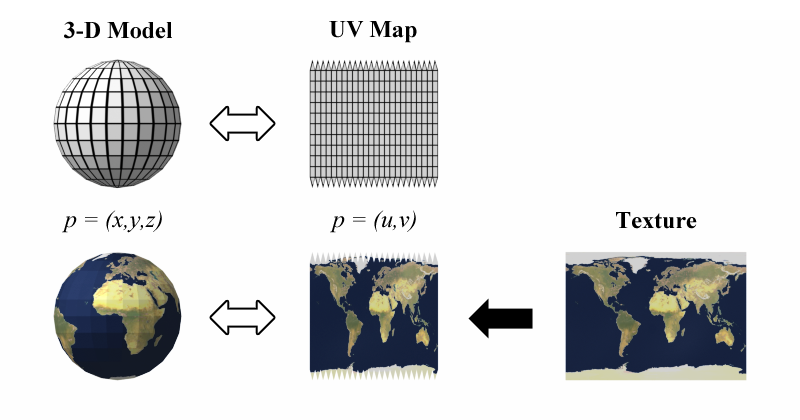
UV mapping is the 3D modeling process of projecting a 3D model's surface to a 2D image for texture mapping. The letters "U" and "V" denote the axes of the 2D texture because "X", "Y", and "Z" are already used to denote the axes of the 3D object in model space, while "W" (in addition to XYZ) is used in calculating quaternion rotations, a common o...
magic pagoda
does anybody know a basic way to do movement in a parabolic trajectory...
polar acorn
magic pagoda
does anybody know a basic way to do movement in a parabolic trajectory...
Rigidbody and an initial velocity
south mural
oh thank you @polar acorn @trim dirge , I will do my best 👍
magic pagoda
polar acorn
Rigidbody and an initial velocity
I dont think I can accurately set up an end point just with velocity each time-
carmine sierra
@polar acorn found the issue, the instance which was moved to the ddol scene no longer has references to turnmanager
 carmine sierra
<@153950686088921088> found the issue, the instance which was moved to the ddol...
carmine sierra
carmine sierra
<@153950686088921088> found the issue, the instance which was moved to the ddol...
rather than using tags or Find("") to re assign this, what better way is there to resolve this?
polar acorn
carmine sierra
rather than using tags or Find("") to re assign this, what better way is there t...
Is TurnManager a possible candidate for a singleton?
carmine sierra
polar acorn
Is TurnManager a possible candidate for a singleton?
there is only one instance if thats what that means
will always be one
polar acorn
carmine sierra
there is only one instance if thats what that means

Learn the pros & cons of using singletons in Unity, and decide for yourself if they can help you to develop your game more easily.
carmine sierra
polar acorn
https://gamedevbeginner.com/singletons-in-unity-the-right-way/
it only needs to be accessible via the game scene (one scene)
can I use find between the ddol scene and the other active scene
 summer stump
carmine sierra
it only needs to be accessible via the game scene (one scene)
summer stump
carmine sierra
it only needs to be accessible via the game scene (one scene)
That works with the singleton pattern whether one scene or more
summer stump
carmine sierra
can I use find between the ddol scene and the other active scene
Yes, but so does a static accessor of a singleton 🤷♂️
carmine sierra
ill just use what im familiar with cause my brains fried rn
 buoyant knot
my man, are you seriously too lazy to learn singletons?
summer stump
carmine sierra
ill just use what im familiar with cause my brains fried rn
Well, just to be clear, when more than one scene is active, you can access anything in any of those scenes the same as if they were all in one scene
So no worries in that regard
buoyant knot
you should try to use the gameobject Find methods as rarely as possible. Or theoretically never. for various reasons
carmine sierra
buoyant knot
my man, are you seriously too lazy to learn singletons?
i need to finish this by today but if it is necessary i will learn it
!code
eternal falconBOT
Posting code
📃 Large Code Blocks
Use links to services like:
https://gdl.space/, https://paste.ofcode.org/, https://hatebin.com/, https://paste.myst.rs/, https://hastebin.com/
📃 Inline Code
Surround code with three backquotes. Not quotation marks.
To format as C#, add cs to the first line:
```cs
// Your code here
```
Add a comment with a line number if there is an error message.
buoyant knot
tight timelines and learning things do not go well together
carmine sierra
https://paste.ofcode.org/v4sRHH6pzRpVuFzgcgcaBj
I want to run the functions LoadPlayer2AttackPhase() and CameraToPlayer2() once, when p1WeaponFire.isTurnFinished = true
and to run the LoadPlayer1AttackPhase and CameraToPlayer2() once, when p2WeaponFire.isTurnFinished = true
carmine sierra
carmine sierra
https://paste.ofcode.org/v4sRHH6pzRpVuFzgcgcaBj
I want to run the functions Loa...
if anyone can help and needs more context ill give it, I just dont know what function I can use to alternate between the two players' turns
 deft glen
how do you guys do jumping with a CharacterController? ive got everything working (ground check etc), but when i add the velocity:
velocity.y = -gravity;
if (inputJump >= 0.5f && characterController.isGrounded) velocity.y = jumpForce;```it teleports my character in the air before putting them down with normal gravity
 rocky vortex
hello, Im currently working on a row boating type of game and currently have the left and right joysticks controlling the left and right oars. Currently I was able to set up the rotation of the left oar but its currently rotating around freely instead of on some sort of axis and I was hoping I could get some guidance on how to best implement this. Currently I just have the oar's transform using Rotate in :
private void FixedUpdate()
{
Debug.Log(move + "___________________________" + move2);
leftOar.Rotate(move * rotateMultiplier);
}
and I was thinking of just limiting the rotation to not go past a certain amount, but I feel like there's a better way to do so
summer stump
carmine sierra
!code
Please save the links instead of calling the bot over and over
tender stag
this is how i check my horizontal angle
//Horizontal angle
if(Vector3.Angle(transform.forward, directionToTarget) < horizontalAngle / 2)
{

}```i tried checking the vertical angle as well
but this is what i ended up with
//Vertical angle
float verticalAngle = Vector3.Dot(Vector3.up, directionToTarget.normalized);
float verticalAngleInDegrees = Mathf.Acos(verticalAngle) * Mathf.Rad2Deg;

if(verticalAngleInDegrees < verticalAngle / 2)
{

}```and it doesnt work
how do i check the vertical angle?
up and down
because u used chat gpt
 gray spire

ive been trying to find tutorials that help with rotational stuff and i honestly cant.. like man 😭
nvm man i just feel stupid.
carmine sierra
summer stump
Please save the links instead of calling the bot over and over
okay 👍
south sky
Yo guys, how can I duplicate a scene and delete the past scene?
frigid sequoia
Any idea the why timeInAggresiveState seems to be growing like twice as fast as intended? https://gdl.space/burepufuso.cs
Pretty sure the Coroutine is just being called once at a time and it is the only way to increase that counter
 scarlet skiff
I took the spire into photoshop and apply a filter, my code has a chance to choose the sprite with the filter, but it gets bigger, why? or there like a way to avoid this
 frigid sequoia
scarlet skiff
I took the spire into photoshop and apply a filter, my code has a chance to choo...
frigid sequoia
scarlet skiff
I took the spire into photoshop and apply a filter, my code has a chance to choo...
The prefab/image is probably just bigger, adjust it
summer stump
south sky
Yo guys, how can I duplicate a scene and delete the past scene?
Copy paste and the delete key
polar acorn
frigid sequoia
Any idea the why timeInAggresiveState seems to be growing like twice as fast as ...
Maybe it's still got some time leftover from the last time? Maybe a timeInAggresiveState = 0 before the while loop in the coroutine will fix it?
carmine sierra
why is this function not valid?
 polar acorn
carmine sierra
why is this function not valid?
polar acorn
carmine sierra
why is this function not valid?
What's the error say
south sky
summer stump
Copy paste and the delete key
Nah just how do you duplicate a key
carmine sierra
polar acorn
What's the error say
doesnt exist in the current context
scarlet skiff
frigid sequoia
The prefab/image is probably just bigger, adjust it
would i have to remake the image in photoshop or is there a way to adjust in unity?
polar acorn
carmine sierra
doesnt exist in the current context
Well, where do you define BuildPhaseToAttackPhase?
frigid sequoia
polar acorn
Maybe it's still got some time leftover from the last time? Maybe a `timeInAggre...
Yeah, I should do that, but still, I am pretty sure that it is still growing faster than intended
carmine sierra
polar acorn
Well, where do you define `BuildPhaseToAttackPhase`?
beneath it
polar acorn
carmine sierra
beneath it
Where? I see a BuildPhasetoAttackPhase, but nothing named BuildPhaseToAttackPhase
frigid sequoia
scarlet skiff
would i have to remake the image in photoshop or is there a way to adjust in uni...
You can scale it manually, but probably both imagenes should have the same resolution
summer stump
south sky
Nah just how do you duplicate a key
Duplicate a KEY? I thought you meant a scene
scarlet skiff
frigid sequoia
You can scale it manually, but probably both imagenes should have the same resol...
how do i scale a sprite?
carmine sierra
polar acorn
Where? I see a `BuildPhasetoAttackPhase`, but nothing named `BuildPhaseToAttackP...
i really dont see where the issues from 🤣
frigid sequoia
scarlet skiff
how do i scale a sprite?
On the sprite renderer
The component that holds it
polar acorn
carmine sierra
i really dont see where the issues from 🤣
Well, where are you defining a function named BuildPhaseToAttackPhase?
carmine sierra
polar acorn
Well, where are you defining a function named `BuildPhaseToAttackPhase`?
i drew another arrow to it
carmine sierra
 short hazel
The names differ, slightly
short hazel
The names differ, slightly
ohh your right
for some reason when I highlighted though it highlighted both
short hazel
Delete the method name where the error is and use the completion list to get the correct one
These kind of mistakes happen if you don't have VS configured and it does not suggest anything, usually.
With it fully working you should never make mistakes like this anymore
polar acorn
carmine sierra
i drew another arrow to it
Again, that's BuildPhasetoAttackPhase which we aren't talking about right now. Your error is that there's nothing named BuildPhaseToAttackPhase
short hazel
Also it tells you at the bottom "0 references", that should be a clear hint it's not being used anywhere due to the misspelling
south sky
summer stump
Duplicate a KEY? I thought you meant a scene
Bro I meant scene💀 sorry
Yo guys, can you affect teh transform of a object from another script
Oh wait you can nvm
summer stump
south sky
Bro I meant scene💀 sorry
Ok, as I said, just copy and paste
Just like any other copy paste operation on the computer
Select scene, Ctrl C, Ctrl V
 devout spire
bear with me because i am very new to gamedev and i made this partially on my own so im sure there's a better way to do it, but for some reason this pitch variance function changes the pitch correctly but when it plays the audio the pitch always sounds the same (as if it were at 1 even when the pitch is something like 0.5 or 1.5). what am I doing wrong?

using System;
using UnityEngine;

public class AudioManager : MonoBehaviour
{
    public Sound[] sounds;

    public static AudioManager instance;

    void Awake()
    {
        if (instance == null)
        {
            instance = this;
        }
        else
        {
            Destroy(gameObject);
            return;
        }

        DontDestroyOnLoad(gameObject);

        foreach(Sound s in sounds)
        {
            s.source = gameObject.AddComponent<AudioSource>();
            s.source.clip = s.clip;

            s.source.volume = s.volume;
            s.source.pitch = s.pitch;
            s.source.loop = s.loop;
        }
    }

    void Start()
    {
        Play("SillyKitties");
    }

    public void Play(string name)
    {
        Sound s = Array.Find(sounds, sound => sound.name == name);
        if (s == null)
        {
            Debug.LogWarning("Sound: " + name + " not found!");
            return;
        }
        s.source.Play();
    }

    public void PlayRandomPitch(string name, float defaultPitch, float pitchVariance)
    {
        Sound s = Array.Find(sounds, sound => sound.name == name);
        s.pitch = defaultPitch;
        s.pitch = UnityEngine.Random.Range(s.pitch - pitchVariance, s.pitch + pitchVariance);
        if (s == null)
        {
            Debug.LogWarning("Sound: " + name + " not found!");
            return;
        }
        s.source.Play();
    }
}```this is the full class, it's from the brackeys audiosystem tutorial
austere hedge
Disclaimer, I'm a rookie game dev too, but both of us found the same AudioManager tutorial on YouTube, so maybe I can help.
austere hedge
devout spire
bear with me because i am very new to gamedev and i made this partially on my ow...
What's the value of pitchVariance?
devout spire
i just changed my code around so it could all be under the play function lol, this is what i have now. i figure i can use the same floats for all sound effects anyway since they all have the same possible pitch range from 0.1f to 3f.

it is still randomizing the pitch correctly but when it plays it sounds identical every time
austere hedge
That should work. I can even use a .1f difference in the pitch and notice a difference.
Does it still fail on a bigger number, like 4?
devout spire
yeah if i make the float 4 it still sounds the same every time
maybe its only playing the pitch that is selected in the inspector when the game is ran but idek how i would fix that
because its always 1 to start
austere hedge
Put a break point in randomizepitch and confirm it's actually going inside.
This is what I have, using the same AudioManager:
            if (s.randomPitch)
            {
                s.source.pitch = Random.Range(0.8f, 1.2f);
            }
            else if (s.randomSlightPitch)
            {
                s.source.pitch = Random.Range(0.9f, 1.1f);
            }
And that works fine.
devout spire
that worked for me, thanks!
south sky
Yo guys how would you make the velocity of an object increase upward, im such a dickhead for forgetting this lol
polar acorn
south sky
Yo guys how would you make the velocity of an object increase upward, im such a ...
AddForce(Vector3.up * something)

 polar acorn
queen adder
but it doesnt here:
polar acorn
queen adder
but it doesnt here:
!ide
eternal falconBOT
💡 IDE Configuration
If your IDE is not autocompleting code
or underlining errors, please configure it.
Select one:
• Visual Studio (Installed via Unity Hub)
• Visual Studio (Installed manually)
• VS Code
• JetBrains Rider
• Other/None
queen adder
 polar acorn
queen adder
i'm using rider
polar acorn
queen adder
i'm using rider

 shy ruin
I'm setting the resolution in my game settings, but I also have display settings like "Fullscreen, Windowed, Borderless Fullscreen". When I use Screen.SetResolution, it requires I say if I want fullscreen or not. If my player has Borderless Fullscreen selected, I have to set fullscreen to true right, won't that override the player's setting?

 rigid kite
I'm coding a FPS Player Movement with Characther Controller. My player does not stop when it hits a wall. How I can make it stop?

 keen needle
rigid kite
I'm coding a FPS Player Movement with Characther Controller. My player does not ...
keen needle
rigid kite
I'm coding a FPS Player Movement with Characther Controller. My player does not ...
put a collider on the wall
rigid kite
it has a collider of course
shy ruin
queen adder
Have you selected rider as you external script editor in preferences?
 queen adder
yes
rigid kite
What I mean with stop is, when it's stops colliding eachother Player continuous with the same speed before.
queen adder
 frigid sequoia
Is there any difference between "StopCoroutine(NameOfTheCoroutine())" and "StopCoroutine(ReferenceToTheCoroutine)"?
queen adder
I made a new c# script but still the same thing
 frigid sequoia
Cause I though it wouldn't but it giving me different results somehow
 keen needle
rigid kite
What I mean with stop is, when it's stops colliding eachother Player continuous ...
keen needle
rigid kite
What I mean with stop is, when it's stops colliding eachother Player continuous ...
What have you done to make it stop?
 rigid kite
keen needle
What have you done to make it stop?
rigid kite
keen needle
What have you done to make it stop?
I'm recording it rn, i wiil send it
shy ruin
queen adder
idk what i did
Most code editors you have to give it 30s to 1 min to load all prefrences and data
When I open a script, I have to wait a minute for intellisense to start up.
minor wharf
Yo i am trying to learn how to make puzzles (like in 2d zelda / metroid games) but i cant find any tutorials on those. A basic example would be a room where the doors only open when you have defeated all enemies. What kinds of tutorials should I be searching for?
rigid kite
keen needle
What have you done to make it stop?
You can see my speed at top left of the screen. My Forward speed is the 2nd of them. I want to make my forward speed or whatever my direction is when i collide with the wall, i want to make it zero so my player can stop perfectly.
shy ruin
rigid kite
You can see my speed at top left of the screen. My Forward speed is the 2nd of t...
Use a raycast
queen adder
ok next problem: Why when i touch the strawberry the script doesn't work


it should debug the object that touched the strawberry
shy ruin
queen adder
ok next problem: Why when i touch the strawberry the script doesn't work
You have a box collider, and its not 2d, use boxcollider2d
rigid kite
shy ruin
Use a raycast
How i mean?
keen needle
rigid kite
You can see my speed at top left of the screen. My Forward speed is the 2nd of t...
try to slow down with an OnCollisionEnter
minor wharf
minor wharf
Yo i am trying to learn how to make puzzles (like in 2d zelda / metroid games) b...
Can anyone help? 😦
Idk what this type of thing is called
shy ruin
Top down 2d
minor wharf
This "puzzle" type can also exist in 3d games tho... are those things events?
queen adder
Why it says "Can't access private method" if it isn't even private?


 slim plinth
It is private, it's private by default unless you make it public
queen adder
slim plinth
It is private, it's private by default unless you make it public
How do i make it public?
nvm found how
slim plinth
Use the public access modifier
queen adder

 teal viper
Doesn't sound like a coding question
 rich adder
Adding someone to a project has nothing to do with version control
Unity confused the whole thing…
Unity cloud != unity version control
It’s part of the whole ecosystem ( unity cloud )
Personally would recommend Git + GitHub
Using a desktop client GUI
This should go in #💻┃unity-talk though
 polar orbit
Yo guys, I'm using Playerprefs to save the highest player score but there's an issue that I don't understand in Unity
using System.Collections;
using System.Collections.Generic;
using UnityEngine;
using UnityEngine.UI;
using UnityEngine.SceneManagement;
using System.IO;
using System.Runtime.CompilerServices;

public class LogicScript : MonoBehaviour
{
    public int Score = 0;
    public int highestScore;
    public Text scoreText;
    public GameObject gameOverScreen;
    public AudioSource scoreAudio;
    public Text highestScoreText;

    void Start()
    {
        if (PlayerPrefs.HasKey("highScore"))
        {
            highestScoreText.text = "Highest Score: " + PlayerPrefs.GetInt("highScore").ToString();
            highestScore = Convert.ToInt32(highestScoreText.text);
        }
        else
            highestScore = 0;

    }
    public void UpdateScore()
    {
        Score += 1;

        scoreAudio.Play();
        scoreText.text = Score.ToString();

    }

    public void restartGame()
    {
        SceneManager.LoadScene(SceneManager.GetActiveScene().name);
    }

    public void BackToMainMenu ()
    {
        SceneManager.LoadScene(0);
    }

    public void GameOver()
    {
        gameOverScreen.SetActive(true);

        if (Score > highestScore)
        {
            highestScore = Score;
            PlayerPrefs.SetInt("highScore", Score);
            highestScoreText.text = "Highest Score: " + highestScore.ToString();

        }

    }


}
That's my script for PlayerPrefs to save the highest score
 scarlet skiff
i have an animation that does change the rotation is layer 0, and i have another in layer 1 that also changed the roation, but even when animation a in layer 0 isnt palying, animation b in layer 1 wont change the rotation, how do i fix this?
slim plinth
polar orbit
```using System;
using System.Collections;
using System.Collections.Generic;
usi...
When you load the high score, you set the textbox text to "Highest Score: 1" then try converting that to a number
You obviously can't convert the "Highest Score: " bit to a number
polar orbit
Which line you're talking about?
slim plinth
highestScoreText.text = "Highest Score: " + PlayerPrefs.GetInt("highScore").ToString();
highestScore = Convert.ToInt32(highestScoreText.text);
You're trying to convert words to an int, that's not going to work
polar orbit
MY LORD
slim plinth
But why bother with the conversion? GetInt gives you an int
polar orbit
I totally understand you, the fact that I kept looking over and over on the screen and didn't notice that a string holding words is assigned to int variables makes me crazy..
but thank you
slim plinth
It happens, you need a rubber duck to talk to
 rocky canyon
programming101 ;D
 ionic loom
Im a beginner at unity and was wondering why my player only registers the collision on the sides of the box colliders (on the platforms) and not on the top
polar orbit
It's my first time trying playerprefs and I thought it will take from me a less than an hour but it took more ;c
ionic loom
im trying to make a speed platform and it works but only when i touch the sides
polar orbit
slim plinth
It happens, you need a rubber duck to talk to
LOL
rocky canyon
polar orbit
LOL
its a common practice, called Rubber Duck Debugging
basically just means when u talk things out it can help
ionic loom
can someone help me pls 😦 ive been stuck on this for hours
polar orbit
both of you
polar orbit
ionic loom
can someone help me pls 😦 ive been stuck on this for hours
Share all the info
ionic loom
okay i have a player with a rigidbody and a boxcollider
polar orbit
You're MAKING FLAPPY BIRD
ionic loom
and im making a speed platform that increases the max speed of my player (max speed bc of acceleration)
no im making a different game
ionic loom
and i made it work with oncollision
rocky canyon
it should detect collisions from all sides of the collider
if it works on the bottom it should work on the top..
rocky canyon
perhaps therse another collider blocking it
rocky canyon
possibly yes.. cant say for sure
ionic loom
i just tested it works on everything but the top
im 100% positive its my ground checker
how do I fix that
rocky canyon
you can use layermasks as 1 solution
so ur collisions will only be detected on layers u tell it to check against
ionic loom
i have it to check a specific tag
whats happening is my player isnt realy touching the object
from the top
i think idk
eternal falconBOT
Posting code
📃 Large Code Blocks
Use links to services like:
https://gdl.space/, https://paste.ofcode.org/, https://hatebin.com/, https://paste.myst.rs/, https://hastebin.com/
📃 Inline Code
Surround code with three backquotes. Not quotation marks.
To format as C#, add cs to the first line:
```cs
// Your code here
```
Add a comment with a line number if there is an error message.
rocky canyon
you could use a collision matrix in the Project settings

you can specify which layers interact with other layers
ionic loom
okay lemme find that
rocky canyon
if you use a trigger collider instead you could also just check for tags and components
in the code.. (and only do things when its a certain object for example)
that way ur trigger collider could overlap a bigger area..
ionic loom
rocky canyon
if you use a trigger collider instead you could also just check for tags and com...
i have it to check for a tag
rocky canyon
u could try raycasts instead? raycasts can also run conditionals to check
ya, but its a Collision.. and not a Trigger
ionic loom
okay i think i might go with trigger collider
rocky canyon
it sounds like it can't make it to the other collider.. (b/c it bumps up against the first one)
ionic loom
yeah
rocky canyon
but a trigger collider could penetrate all the way
ionic loom
how would i do that
rocky canyon
just makr the collider as a trigger instead..
isTrigger on the collider component
and then ur code would be OnTriggerEnter() instead of OnCollisionEnter()
ionic loom
i know that but then my object falls through it
rocky canyon
ya, ud probably end up using multiple colliders with that method
1 for actual collision (standing on the ground)
and another one thats a trigger.. that would detect otehr things
rocky canyon
ya, im just giving you some ideas that u can research on ur on
perhaps find a better method for your specific usecase
summer stump
What do you mean "made a new component"? Scripts are files, components are MonoBehaviour classes, and those classes reside in scripts.
What are you opening? And can you show an uncropped screenshot of what shows in visual studio?
frigid sequoia
How can I detach a GameObject from its prefab of reference?
summer stump
No worries. Good on you for figuring it out!
Good luck
 deft quarry
Can someone please try to help me fix my camera jitter? I've tried several fixes from several people and nothing seems to work. I've even sent someone my exact setup and they dont get the same issue I am. I am new to Unity and so I have no idea of where else to go.
The information is in this thread: https://discord.com/channels/489222168727519232/1226261265110929429
trim dirge
frigid sequoia
How can I detach a GameObject from its prefab of reference?
serializedPrefab = null;
 timber tide
deft quarry
Can someone please try to help me fix my camera jitter? I've tried several fixes...
timber tide
deft quarry
Can someone please try to help me fix my camera jitter? I've tried several fixes...
Unity has a fps controller template you can start out with which you can take part and see how it's done
deft quarry
timber tide
Unity has a fps controller template you can start out with which you can take pa...
Yeah, I know, but I wanna do it (mostly) on my own. I don't learn much of anything from seeing the result and picking it apart.
I've been told that my code seems correct and someone else has tried it with 0 issue so I don't understand what the problem is.
timber tide
Well, it's an alternative than being stuck on an issue waiting for some to fix it as it sounds like you've had to no luck
and honestly it's a very viable solution to learning
 cosmic dagger
frigid sequoia
How can I detach a GameObject from its prefab of reference?
cosmic dagger
frigid sequoia
How can I detach a GameObject from its prefab of reference?
Detach from its prefab?
frigid sequoia
trim dirge
serializedPrefab = null;
I mean from the inspector
frigid sequoia
cosmic dagger
Detach from its prefab?
This has prefab reference, I want to just remove that and keep the object
 rocky canyon
once u instantiate it it's not really a prefab anymore.. (its just a clone) of the prefab.. (no actual link to the prefab stuff)
i dont see a reference to a prefab on that Explosion Particle
cosmic dagger
frigid sequoia
This has prefab reference, I want to just remove that and keep the object
You can instantiate or drag it into the scene . . .
rocky canyon
if u drag it to the scene u can right click it and go to Prefab > Unpack Prefab (Completely) @frigid sequoia
it'll make it a regular object.. not tied to the prefab anymore..
( i think thats what u mean now )
frigid sequoia
rocky canyon
if u drag it to the scene u can right click it and go to Prefab > Unpack Prefab ...
That doesn't show for me

Is this what you mean?
rocky canyon
thats not the scene Hiearchy
thats the prefab's Heirarchy
Drag it into the scene and then unpack it
frigid sequoia
rocky canyon
Drag it into the scene and then unpack it
It is on the scene
How do I unpack it?
rocky canyon

[drag] Prefab into the Scene Heirarchy -> Right click the Prefab (from within the scene) -> Unpack it

then it'll turn Black like all the other objects that are not prefabs
frigid sequoia
rocky canyon
Aaaaaah, I think I had to do that BEFORE modifying anything, that's why it isn't showing
rocky canyon
i think you may be inside the prefabs window and not the actual scene window.
frigid sequoia
rocky canyon
i think you may be *inside* the prefabs window and not the actual scene window.
No, no, it is the Hierarchy
rocky canyon
well, then it should still let u modify it before hand.. 🤔
you can see when i double clicked it... from within the prefab window it can't be unpacked..
but in the regular scene view it can
frigid sequoia
It is in scene; I think I just changed it too much to unpack it. Like I deleted some childs and stuff
 rocky canyon
ohh no
click the Root object and unpack it
ur trying to unpack it from the child..
if u just wnat the child object. just unpack it from teh root. (top most object)... and then take the child and drag it out and delete the rest of it @frigid sequoia
carmine sierra
   public void PurchaseTriShotOnClick() {
        player2Turn = GameObject.FindGameObjectWithTag("player2turn");
        if (!player2Turn) {
            if (p1Purchased == false && MoneyManager.p1Balance >= 750) { //Must not yet be purchased in order to purchase
                MoneyManager.p1Balance -= MoneyManager.TriShot_Price; //Subtracts the tri-shot price
                upgradeMenu.SetActive(false); upgradeInfoText.SetActive(false); //The menu is closed as it is now purchased
                cannonball_IMG.enabled = false; tri_shot_IMG.enabled = true; //Switches the image to the tri-shot
                upgradeArrow.SetActive(false); //Upgrade arrow disappears, no more upgrades can be made
                p1Purchased = true; //Has now been purchased, cannot be purchased again
    }} else {
        if (p2Purchased == false && MoneyManager.p2Balance >= 750) { //Must not yet be purchased in order to purchase
            MoneyManager.p2Balance -= MoneyManager.TriShot_Price; //Subtracts the tri-shot price
            upgradeMenu.SetActive(false); upgradeInfoText.SetActive(false); //The menu is closed as it is now purchased
            cannonball_IMG.enabled = false; tri_shot_IMG.enabled = true; //Switches the image to the tri-shot
            upgradeArrow.SetActive(false); //Upgrade arrow disappears, no more upgrades can be made
            p2Purchased = true; //Has now been purchased, cannot be purchased again
    }}
    DontDestroyOnLoad(gameObject);
    }
any ideas why the object is not remaining in the ddol scene?
carmine sierra
carmine sierra
```
public void PurchaseTriShotOnClick() {
player2Turn = GameObject.F...
its comments are pretty rubbish i coded this a while ago
cosmic dagger
carmine sierra
```
public void PurchaseTriShotOnClick() {
player2Turn = GameObject.F...
Is this script on the root GameObject or s child?
frigid sequoia
rocky canyon
if u just wnat the child object. just unpack it from teh root. (top most object)...
I added the top one as an empty parent right now, it is a different prefab that contains the original one, I don't really know what unpacking like that is gonna do XD
carmine sierra
cosmic dagger
Is this script on the root GameObject or s child?
its not on the root gameobject
rocky canyon
it shouldnt do anything..
cosmic dagger
Kinda hard to read the code from the chat . . .
carmine sierra
cosmic dagger
Kinda hard to read the code from the chat . . .
yeah my bad
rocky canyon
the prefab will stay exactly the same as it was.. (only now its not tied to the original)
cosmic dagger
carmine sierra
its not on the root gameobject
That's why. You can only DDOL the root GameObject . . .
rocky canyon
soo if u change this one.. or the original.. it wont make changes to it anymore
carmine sierra
(HIERARCHY)
 cosmic dagger
carmine sierra
(HIERARCHY)
cosmic dagger
carmine sierra
(HIERARCHY)
You should have a warning in the console about that . . .
rocky canyon
unpacking a prefab doesn't destroy the original. (you'll still have that prefab in the project window)
carmine sierra
cosmic dagger
You *should* have a warning in the console about that . . .
yeah your right
so how else can I do it?
rocky canyon
rocky canyon
unpacking a prefab doesn't destroy the original. (you'll still have that prefab ...
only the copy u made by dragging it directly in the scene will no loonger be a prefab
cosmic dagger
carmine sierra
yeah your right
Always check the condole window or have it open . . .
cosmic dagger
carmine sierra
so how else can I do it?
carmine sierra
cosmic dagger
https://discord.com/channels/489222168727519232/497874004401586176/1227053155435...
but my script isn't in the root object
ohh
wait
 covert flower
got a problem rn where i have a spawner for my game that will spawn prefabs but the call for starting the spawner is in start. this means when i open my skill tree it stops the spawner and when the game is resumed the spawner has stopped. what ive tried doing to fix this is when you press the button it will start the spawner again in that script. however it keeps coming up with no instance found in unity.

 rocky canyon
carmine sierra
but my script isn't in the root object
rocky canyon
carmine sierra
but my script isn't in the root object
well. if u dont destroy the parent.. then why would the children get destroyed?
they'll still tag-a-long
carmine sierra
if a UI is in the ddol scene will it become active in my other game scene
if it is meant to be active
cosmic dagger
carmine sierra
but my script isn't in the root object
I know. You can't DDOL a child object because it's attached to a parent. In order to keep the child, the parent has to stay/exist as well . . .
frigid sequoia
rocky canyon
only the copy u made by dragging it directly in the scene will no loonger be a p...
Ok, thxs, that's exactly what I wanted
carmine sierra
cosmic dagger
I know. You can't DDOL a child object because it's attached to a parent. In orde...
i know that this choice is upto me, but lets say I just extract the bools I want from that script using another "manager" gameobject, and transfer over those bools in that managers script into the next scenes, does that sound like a very unecessary/roundabout way of resolving it?
It would work pretty nicely but in terms of possible solutions' efficiency how does that compare
scarlet skiff
scarlet skiff
i have an animation that does change the rotation is layer 0, and i have another...
anyone?
rocky canyon
carmine sierra
It would work pretty nicely but in terms of possible solutions' efficiency how d...
sound like how I treat my scripts that can be modified via the settings panel
i just read from them at the end of hte scene and load them back in on the next one.. but I use SO's instead

but if its an approach that works for you i'd go with it.. its your project after all
carmine sierra
rocky canyon
i just read from them at the end of hte scene and load them back in on the next ...
oh okay so thats basically what im doing
i still dont get SOs but thats a lesson for another day
rocky canyon
no doubt
well in this example im not really using SO's like the should be using.. in this example i could very well just use a class called PlayerSettings.cs
and just reference it.. playerSettings.walkSpeed =
carmine sierra
rocky canyon
and just reference it.. `playerSettings.walkSpeed =`
how can I prevent duplicates and then use the ddol duplicate as a reference point?
covert flower
covert flower
got a problem rn where i have a spawner for my game that will spawn prefabs but ...
any help with this
rich adder
covert flower
got a problem rn where i have a spawner for my game that will spawn prefabs but ...
show error
timber tide
that coroutine is calling itself
covert flower
rich adder
show error
 polar acorn
covert flower
polar acorn
covert flower
Something on that line is null but you're trying to use it anyway
rich adder
not as good as while loop bt should be fine
carmine sierra
is there a function which freezes a scene in place
rich adder
carmine sierra
is there a function which freezes a scene in place
not really
covert flower
carmine sierra
is there a function which freezes a scene in place
nah
polar acorn
carmine sierra
is there a function which freezes a scene in place
Thread.sleep, technically
rich adder
time.timescale = 0
it very limited , but does Most of the work
carmine sierra
polar acorn
`Thread.sleep`, technically
what does that do?
polar acorn
carmine sierra
what does that do?
Freezes the program
carmine sierra
polar acorn
Freezes the program
oh but like not the game itself
covert flower
im thinking of putting an On button click in the spawner script that may work?
carmine sierra
rich adder
time.timescale = 0
it very limited , but does Most of the work
what does that do
polar acorn
carmine sierra
oh but like not the game itself
No, like, the whole-ass program
carmine sierra
covert flower
im thinking of putting an On button click in the spawner script that may work?
yes
polar acorn
Bricks for however many milliseconds
The scene'll be stopped
but so will everything
rich adder
carmine sierra
what does that do
makes anything that is using timescale not do it
carmine sierra
ohh okay
rich adder
so like Animations, deltatime etc
carmine sierra
is timescale used for rigidbodys moving
rich adder
yeah
carmine sierra
velocity
rich adder
it will effect it
carmine sierra
pause it?
rich adder
covert flower
im thinking of putting an On button click in the spawner script that may work?
the method sure.
covert flower
i was gonna implement a timestop into my game but found out it came with a lot of issues that would take time to fix so decided to go with this way which may be worse but it works i think
HOLY SHIT
im an idiot
wait
carmine sierra
'gameOverText' is that standard variable casing
covert flower
im either really dumb or its nothing
rich adder
carmine sierra
'gameOverText' is that standard variable casing
private
carmine sierra
rich adder
private
wym
carmine sierra
yes
rich adder
yes private variables generally use camel casing
polar acorn
That's probably fine
rich adder
public should idealyl be Pascal
carmine sierra
pascal?
rich adder
no one is gonna beat you over the head dont worry
carmine sierra
GameOverText?
rich adder
yes that Pascal
 kindred nest
that's fine as long as you don't just mirror the name of the Class, as those are pretty much exclusively also in Pascal, and will make you/the compiler wonder if you mean to access static members of a class or an instance
covert flower
rich adder
the method sure.
so i found a fix but it means every spawner that i have has to be individually added to that button with the OnbuttonClick function
but if i code it right it should be fine
rich adder
covert flower
so i found a fix but it means every spawner that i have has to be individually a...
it works but sounds like design issue somewhere
covert flower
rich adder
it works but sounds like design issue somewhere
probably but ive got a time sensitive project where 90 percent of the gamelay should be finished by monday
so not really got time for a redesign
@rich adder ty for you help
carmine sierra
covert flower
probably but ive got a time sensitive project where 90 percent of the gamelay sh...
same bro 💀 20% of a grade needed for uni
summer stump
carmine sierra
how do i convert a string to text
What is a text data type? How does it differ from a string?
carmine sierra
summer stump
What is a text data type? How does it differ from a string?
searched and they cant be converted so its fine
summer stump
carmine sierra
searched and they cant be converted so its fine
What even is it?
polar acorn
carmine sierra
how do i convert a string to text
What do you mean "text data type"? Do you mean a variable of type Text, as in a UI Text component?
summer stump
carmine sierra
searched and they cant be converted so its fine
Yeah, all I can think is a component like digi said, or you meant like a json formatted file or something?
Really there is no text data type, as worded
frigid sequoia
Can I get the enter point of an OnTriggerEnter?
Cause until now just the postion of one of the objects of the trigger was enough, but I kinda want a bit more
timber tide
closest point
frigid sequoia
timber tide
closest point
Like... other.ClosestPoint(transform.position) ?
timber tide
ye
you can always just grab the position of the transform too if that's enough
oh, you want more info, yeah that's kinda the method to use then if not for collision points
 civic lion
carmine sierra
ive been using it for everything
civic lion
carmine sierra
ive been using it for everything
I use it for absolutely everything
 regal bear
Hello! Im beginner, i have a code from a forum for import a map from another game. I have an error: IndexOutOfRangeException: Index was outside the bounds of the array.
MapLoaderView.Start () (at Assets/MapLoaderView.cs:64)
Cant figure out whats wrong...
code:
https://pastebin.com/6k7NmpwR
Pastebin
Pastebin.com is the number one paste tool since 2002. Pastebin is a website where you can store text online for a set period of time.
summer stump
regal bear
Hello! Im beginner, i have a code from a forum for import a map from another gam...
Have you tried breakpoints or debug logs?
What are the values?
regal bear
summer stump
Have you tried breakpoints or debug logs?
Idk how can i do that in Unity yet.
regal bear
summer stump
What are the values?
I just assigned a Default Terrain to it. Now my code go to line 225 after increased heightmap resolution
summer stump
How did you write this code then? Debug.log should be one of the first api calls you learn in unity, and breakpoints aren't even a unity or even c# specific thing
Look up debug logs and check what the values actually are
The error means you are trying to access an index of the array that does not exist. It is greater than the max index. (Not just null, but the array is smaller than it).
You need to find out how big the array is and what index you are trying to access
regal bear
Haha as i said i am beginner, and i got this code from a forum
summer stump
regal bear
Haha as i said i am beginner, and i got this code from a forum
!learn
eternal falconBOT
:teacher: Unity Learn ↗
Over 750 hours of free live and on-demand learning content for all levels of experience!
summer stump
Don't just copy code without knowing what it does
You need to have a foundational understanding before going on to the point of forum copying haha
But, at this point, just look up Debug.Log
regal bear
summer stump
Don't just copy code without knowing what it does
I know, i just want to do this for a base map, then just learn thing step by step. But not in a flat land 😄
 feral bluff
So, im trying to make a fps game, the problem is the movement, im using camera.main.transform To move the player, but everytime the player reaches a corner and it tries to keep moving the player will go through one of the walls. Im not sure how to fix it and i guess the problem is within the script since i already did modify a lot the properties of the walls adding rigidbodies and setting its collision detection to continous. This is the code.
 summer stump
regal bear
I know, i just want to do this for a base map, then just learn thing step by ste...
summer stump
regal bear
I know, i just want to do this for a base map, then just learn thing step by ste...
Fair enough. I explained exactly what you need to do. Without providing the result of those steps, there is just about nothing we can do to help
timber tide
feral bluff
So, im trying to make a fps game, the problem is the movement, im using *camera....
Looks fine to me. Are you adding rigidbodies to the walls ?
 charred lodge
guys are you using Task.Yield or Task.Delay
feral bluff
timber tide
Looks fine to me. Are you adding rigidbodies to the walls ?
I did. I locked their positions and rotations and unchecked Use Gravity
timber tide
feral bluff
So, im trying to make a fps game, the problem is the movement, im using *camera....
oh btw, you want the movement in fixedupdate
keep the input in update but move anything using rb into fixed
fix that first then for testing purposes remove the rbs from the wall and see if the issue persist
teal viper
charred lodge
guys are you using Task.Yield or Task.Delay
Both depending on the context.
feral bluff
timber tide
keep the input in update but move anything using rb into fixed
fix that first th...
You mean like moving all the code to a fixed update?
timber tide
only anything calling the rb's methods
use member variables to capture the input from update and use it inside of fixed
 vale karma
https://paste.ofcode.org/7fQum3aq2DmE3sZuASfAfw
im having trouble trying to shoot through a collider that an object is placed inside of. I have the layers correct and serialized in the editor. Im not catching whats causing it to still hit the collider
dont have to watch more than 20 seconds, but yea
 whole idol
public void Move(InputAction.CallbackContext context)

  {

    _input = context.ReadValue<Vector2>();

    _direction = new Vector3(_input.x, 0.0f, _input.y);
why is the z axis 0.0f? if its set to zero then how are we gonna move it ? I think it needs to be a dynamic variable right?
 swift elbow
delete this and post it in #🏃┃animation
swift elbow
whole idol
```c#
public void Move(InputAction.CallbackContext context)
{
_input = c...
you are setting the y value to 0, not z
_input.y should be replaced with _input.z
whole idol
swift elbow
you are setting the y value to 0, not z
this is not broken btw
this works like how it should be
im just asking how direction is able to take input from the z axis
which is the 3d axis
swift elbow
vector 3 reads inputs as (x,y,z)...
you have this setup incorrectly
both in your scene and code
swift elbow
whole idol
im just asking how direction is able to take input from the z axis
why would this not work?
what is stopping direction to be read from z?
whole idol
I set it to zero
swift elbow
what are you asking?
whole idol
to learn
swift elbow
what, not why
swift elbow
ok so whats the problem?
whole idol
no problem, just asking why z is set to zero
swift elbow
whole idol
no problem, just asking why z is set to `zero`
ITS NOT
swift elbow
timber tide
Ive not really touched analog but y for z does make sense
swift elbow
whole idol
no problem, just asking why z is set to `zero`
also did you not write the code?
how do you not know?
timber tide
for 3D*
whole idol
yes but I dont understand this one, i was following a tutorial
timber tide
in 2D, x left and right while y is up and down
3D, x left and right, z forward and back
swift elbow
whole idol
yes but I dont understand this one, i was following a tutorial
when your player moves in your scene and is jumping, which value moves?
is it x y or z
timber tide
y input translates to z coordinates for controllers
^ in 3D
well, depends on the game but for something like a 3rd person/fps controller
whole idol
swift elbow
when your player moves in your scene and is jumping, which value moves?
all of them except for Y which only fractuates when I jump
swift elbow
so that means...?
swift elbow
whole idol
i mean this
` 0.0f`
also read this https://docs.unity3d.com/ScriptReference/Vector3-ctor.html
myVector = new Vector3(0.0f, 1.0f, 0.0f);```wait do you have a different function for jumping?
 whole idol
Ty
swift elbow
whole idol
ok so now as I understand it input y doesnt change y but actually changes z
also this is really complicated for a begginer movement tutorial, which video did you watch?
there are much easier ways to get movement setup
whole idol

It's finally here, the seventh part of the Simple Character Controller series! In this one we are making the camera follow the character object.
In the next one we are making the camera rotate, or orbit, around the character.
Let me know if you have any questions or requests, and I'll try my best to help you!
This series is mainly aimed towa...
This one
swift elbow
yeah its like 40 mins in total
there are 5 min tutorials out there that are much better
swift elbow
whole idol
its 3-4 minutes each
im sorry for getting frustrated earlier and i would also be confused if i followed these tutorials
i dont blame you
i can link you some good tutorials if youd like
whole idol
swift elbow
i can link you some good tutorials if youd like
sure, ill look for something else soon when I finish the current one tho
 heady horizon
hey team - curious on how you think this effect was achived? The boss shoots laser beams in an arc and then resets. I was thinking that perhaps the lasers are gameobjects that are being turned on and off, and that maybe the lasers are following an animation ?

The bad ending for this boss fight. I don't know what we expected. Everyone died, everyone laughed.
Be sure to check out my streams most Thursday and Friday evenings, and weekends whenever (plus 2HTS music production streams every Sunday around 12pm PDT) http://www.twitch.tv/phrieksho
I'm also on Twitter http://www.twitter.com/phriekshoTV
swift elbow
whole idol
sure, ill look for something else soon when I finish the current one tho
i honestly dont even reccomend finishing this one, it'll confuse you even more
swift elbow
whole idol
sure, ill look for something else soon when I finish the current one tho
i glossed over this but this looks good https://www.youtube.com/watch?v=f473C43s8nE
swift elbow
heady horizon
hey team - curious on how you think this effect was achived? The boss shoots las...
animation or a particle effect?
heady horizon
The animation portion
whole idol
swift elbow
i glossed over this but this looks good https://www.youtube.com/watch?v=f473C43s...
Awesome ❤️ ty
swift elbow
heady horizon
The animation portion
what about it? it doesnt seem like anything complicated is happening?
heady horizon
I was just wondering if it were procedural or animated - probably animated
 toxic frigate
hey, does anyone know how to help me with this? it adds a ship every frame but i just need it to add a ship one time
 swift elbow
heady horizon
I was just wondering if it were procedural or animated - probably animated
swift elbow
heady horizon
I was just wondering if it were procedural or animated - probably animated
it wouldnt be too much work for it to be procedural since its a straight line but animated would be 100% easier
swift elbow
toxic frigate
hey, does anyone know how to help me with this? it adds a ship every frame but i...
!code 👇
eternal falconBOT
Posting code
📃 Large Code Blocks
Use links to services like:
https://gdl.space/, https://paste.ofcode.org/, https://hatebin.com/, https://paste.myst.rs/, https://hastebin.com/
📃 Inline Code
Surround code with three backquotes. Not quotation marks.
To format as C#, add cs to the first line:
```cs
// Your code here
```
Add a comment with a line number if there is an error message.
heady horizon
I'm guessing that means that they have a seperate gameobject for the "lasers" that turn on and off, and follow along the animation
like might be listening to a unity animation event
swift elbow
heady horizon
I'm guessing that means that they have a seperate gameobject for the "lasers" th...
i was thinking that the entire thing was an animation but that could work too
toxic frigate
toxic frigate
hey, does anyone know how to help me with this? it adds a ship every frame but i...
Hastebin is a free web-based pastebin service for storing and sharing text and code snippets with anyone. Get started now.
timber tide
you can make lasers with as small of a mesh as a quad
there's also particle strips, but stretching out the quad and adding some emissions to it = lazer
toxic frigate
heady horizon
hey team - curious on how you think this effect was achived? The boss shoots las...
maybe its a gameobject (probably a cylinder) with some vfx?
timber tide
cylinder is a good idea too if you want depth to it
but that lazer specifically looks like a billboarded quad
swift elbow
toxic frigate
https://hastebin.com/share/ilogawetug.csharp
why do you have an "isAdded" bool? that will be shared across all instances if it is true for any 1 ship
toxic frigate
does it need to be inside the foreach loop? I tried that and at the beginning of the new frame it just resets it to true or false, which breaks the code
if i just leave it as blank i get the "use of unassigned..." error
swift elbow
toxic frigate
does it need to be inside the foreach loop? I tried that and at the beginning of...
i wouldnt even use a bool here at all, idk how you could get that to work
toxic frigate
what would you use instead?
swift elbow
a hashset for added ships maybe? 🤷♂️
there are prob easier ways but i dont know how you have this setup and for what purpose
swift elbow
toxic frigate
what would you use instead?
https://hastebin.com/share/lahobujoku.csharp maybe something like this
Hastebin is a free web-based pastebin service for storing and sharing text and code snippets with anyone. Get started now.
toxic frigate
whoa this worked, thanks a lot!
if you dont mind me asking, what does a hashset do?
swift elbow
this explains it very nicely
 swift elbow
toxic frigate
if you dont mind me asking, what does a hashset do?
swift elbow
toxic frigate
if you dont mind me asking, what does a hashset do?
but in very short terms, its a collection of unique elements, (kinda like an array if youre familiar with that)
but arrays are ordered and hashsets typically arent
 gaunt ice
For constant time look up
regal bear
Hello, trying to call GetAlphamaps on a TerrainData, but i get an error: Assertion failed on expression: 'spResult == PixelAccessReturnCode::kOk'
UnityEngine.TerrainData:SetAlphamaps (int,int,single[,,])
On Debug mode when i hover to the GetAlphamaps: Could not find a member GetAlphamaps for aTerrain
whats going on?
 solar tusk
I am using a "Simple Toon Shader" package from unityassetstore. It works perfectly, but it doesn't show in the mobile build. I'm using toon shader on characters, but when I view the apk in my smartphone, the characters are pink, Which means either their material is missing, or the smartphone can't pick it up. My device currently supports Android 14, and I think it should handle such shaders
timber tide
check the pipeline support
swift elbow
gaunt ice
For constant time look up
Is this a question?
whole idol

it says i got a missing semicolon in this line
I dont have a mission semicolon at all in that line
timber tide
not a semicolon look at it again
gaunt ice
Yes
whole idol
oh i see what the problem is
gaunt ice
Something should be right before time.dt
 ionic galleon
hello everyone
Is there any way to assign a value to it? I assign it then it always fails
foreach (KeyValuePair<string, object> pair in data)
            {
                Debug.Log(String.Format("{0}: {1}", pair.Key, pair.Value));
                if (pair.Key == "Heart")
                {
                    Debug.Log(111);
                    //_data.heart = (int)(pair.Value ?? 0); // Sử dụng toán tử Elvis
                }
            }
this code from :

 bright zodiac
just update it directly with it's key, dict[key] = newValue;
ionic galleon
bright zodiac
just update it directly with it's key, `dict[key] = newValue;`
so : _data.heart = pair[Key];
that's right ?
bright zodiac
updated so should be easy to understand now
bright zodiac
ionic galleon
this code from :
what is this? thats a horrible code 😅
gaunt ice
Modify collection in foreach loop is not allowed iirc