#💻┃code-beginner
1 messages · Page 280 of 1
 queen adder
yeah happens to the other sprites i use
queen adder
 late bobcat
but in your inspector i can't see compression field
late bobcat
but in your inspector i can't see compression field
i changed format to the best one but after changing it to automatic and changing compression nothing changes anyway

 timid hinge
hi i dont know what this errors means

 summer stump
timid hinge
hi i dont know what this errors means
summer stump
timid hinge
hi i dont know what this errors means
Do you have a script called ItemPlacementData?
 polar acorn
timid hinge
hi i dont know what this errors means
polar acorn
timid hinge
hi i dont know what this errors means
What is an ItemPlacementData?
summer stump
If so, is it in a namespace?
timid hinge
summer stump
Do you have a script called ItemPlacementData?
no, that is the proplem
forget it, thanks btw
 grand sigil
what would be the cause where the TMP_Text i assigned at the editor is suddenly missing when i instantiated the gameobject which is a prefab?
polar acorn
grand sigil
what would be the cause where the TMP_Text i assigned at the editor is suddenly ...
Do you reassign it in code
Show !code
 eternal falconBOT

Posting code
📃 Large Code Blocks
Use links to services like:
https://gdl.space/, https://paste.ofcode.org/, https://hatebin.com/, https://paste.myst.rs/, https://hastebin.com/
📃 Inline Code
Surround code with three backquotes. Not quotation marks.
To format as C#, add cs to the first line:
```cs
// Your code here
```
Add a comment with a line number if there is an error message.
grand sigil
polar acorn
Do you reassign it in code
i only assign the text that should be changed
polar acorn
Show the code
 rocky canyon
is the prefab referencing a TMP element thats inside hte prefab? or is it in the scene?
grand sigil
https://hatebin.com/fkoqzwjcqi - This script is directly attached to the gameobject
https://hatebin.com/evsnfittql - This script runs a method to the first one which tries to update the contents of the TMP_Text
grand sigil
rocky canyon
is the prefab referencing a TMP element thats inside hte prefab? or is it in the...
its inside the prefab
I tried reassigning it in the prefab view
polar acorn
grand sigil
https://hatebin.com/fkoqzwjcqi - This script is directly attached to the gameobj...
Okay, what field is missing when you instantiate it?
grand sigil
All TMP_Text
polar acorn
grand sigil
All TMP_Text
On which script?
grand sigil
The first one

The parent GameObject appears but the childs it was supposed to come with are missing
polar acorn
grand sigil
The first one
Your Confirm function overwrites DebName and TeamName, are you sure the values you're passing in are valid?
grand sigil
Debate Manager?
polar acorn
grand sigil
Debate Manager?
 grand sigil
ohh ic
polar acorn
Also, why is debDataHolderPrefab of type GameObject if literally the first thing you do is a GetComponent? Just make the variable of type DebaterHolder
grand sigil
polar acorn
Also, why is `debDataHolderPrefab` of type `GameObject` if literally the first t...
ill change it. I applied it in later script but havnt applied it to other older parts
grand sigil
polar acorn
Your `Confirm` function overwrites DebName and TeamName, are you sure the values...
The values are valid
i can see the instantiated gameobject with both variables appearing with the inputed text
polar acorn
grand sigil
The values are valid
Can you open up the prefab and show a screenshot of the inspector of it
 polar acorn
grand sigil
polar acorn
grand sigil
Okay, so, RoundXArea is set to itself, and the first thing you do in that function is destroy all children of RoundXArea
grand sigil
Ohh
polar acorn
So the reason it says all of those text components are missing is because they're missing
 stable moth
I have this code from a package that i modfied:
using System.Collections;
using System.Collections.Generic;
using UnityEngine;
using UnityEngine.UI;
using Photon.VR;
using TMPro;

public class ColorScript : MonoBehaviour
{
    public TextMeshPro ColorText;
    public float Red;
    public float Blue;
    public float Green;
    float TrueRed;
    float TrueBlue;
    float TrueGreen;
    // Start is called before the first frame update
    void Start()
    {

    }

    // Update is called once per frame
    void Update()
    {
        ColorText.text = string(Vector3(Red,Blue,Green));
        TrueRed = Red / 10;
        TrueBlue = Blue / 10;
        TrueGreen = Green / 10;

        Color myColour = new Color(TrueRed, TrueBlue, TrueGreen);
        PhotonVRManager.SetColour(myColour);
    }

}
But ColorText doesn't show in the inspector(idk how yall call it in unity  )
)
grand sigil
Change TextMeshPro to TMP_Text?
 languid spire
use TMP_Text not TextMestPro
polar acorn
stable moth
I have this code from a package that i modfied:
```csharp
using System.Collectio...
Do you have any compile errors and does this class name match the file name?
languid spire
not at all sure where this syntax comes from
ColorText.text = string(Vector3(Red,Blue,Green));
 wintry quarry
yeah definitely looks like some compile errors
stable moth
languid spire
use TMP_Text not TextMestPro
Uh ? but i saw TextMeshPro in a script
languid spire
stable moth
Uh ? but i saw TextMeshPro in a script
then it was wrong
wintry quarry
stable moth
Uh ? but i saw TextMeshPro in a script
TextMeshPro is the 3D text component. But - you're not seeing it in the inspector because you have compile errors
TMP_Text is definitely better to use btw
stable moth
languid spire
not at all sure where this syntax comes from
```cs
ColorText.text = string(Vecto...
Ye i tried to do it the python way
languid spire
stable moth
Ye i tried to do it the python way
And you figured that would work?
stable moth
languid spire
And you figured that would work?
Sounds logic to me string(Vector3(x,y,z)) returns a string as "x,y,z"
wintry quarry
stable moth
Sounds logic to me string(Vector3(x,y,z)) returns a string as "x,y,z"
except that's not C# syntax
stable moth
I mean how do you convert stuff to strings then ?
wintry quarry
stable moth
I mean how do you convert stuff to strings then ?
.ToString()
languid spire
Instead of 'just trying the python way' try 'just reading the C# documentation'
 coarse viper
Hello, these errors appear after installing game creator asset how to fix them?
 wintry quarry
but also you can't construct things without new in C#
You can't just do Vector3(x, y, z)
you have to do new Vector3(x, y, z) or just new(x, y, z) if the type can be implied @stable moth
 zenith cypress
wintry quarry
but also you can't construct things without `new` in C#
zenith cypress
wintry quarry
but also you can't construct things without `new` in C#
var hehe = (1, 2);

wintry quarry
that's a literal 🙂
for this particular example IDK why they want to use Vector3 though
stable moth
wintry quarry
but also you can't construct things without `new` in C#
Good to know
languid spire
wintry quarry
for this particular example IDK why they want to use Vector3 though
it's 'the python way'. i.e. bloody stupid
stable moth
wintry quarry
you have to do `new Vector3(x, y, z)` or just `new(x, y, z)` if the type can be ...
thx it's working now !
wintry quarry
languid spire
it's 'the python way'. i.e. bloody stupid
Trust me I know, I use Python in my dayjob unfortunately
languid spire
wintry quarry
Trust me I know, I use Python in my dayjob unfortunately
I really hope you practice good library hygiene
late bobcat
Bump. Still having this issue, i'm going crazy. It seems like all the obstacles(cubes) are spawning on the inspector's position. If i debug the obstacles spawn position tho are all differents, but still spawning all on the same spot
zenith cypress
@wintry quarry is the new syntax for arrays a literal too? The var array = [1, 2, 3]; thing, never really thought about it. Is it just if you make an object without the new? I assume not because of constants or anything.
wintry quarry
zenith cypress
<@179367739574583296> is the new syntax for arrays a literal too? The `var array...
Idk who am I Bill Gates? 😉
summer stump
late bobcat
Bump. Still having this issue, i'm going crazy. It seems like all the obstacles(...
late bobcat
? @summer stump
summer stump
late bobcat
? <@349017582105526273>
Answer and do the things suggested in those messages
late bobcat
done that already
summer stump
late bobcat
done that already
Oh, where is the object pooler script? Must have missed it
polar acorn
late bobcat
here
The object you're spawning wouldn't happen to have a CharacterController component on it, would it?
late bobcat
it was a bug
no it doesn't have a character controller, just a simple 3d cube with a rigidbody and box collider
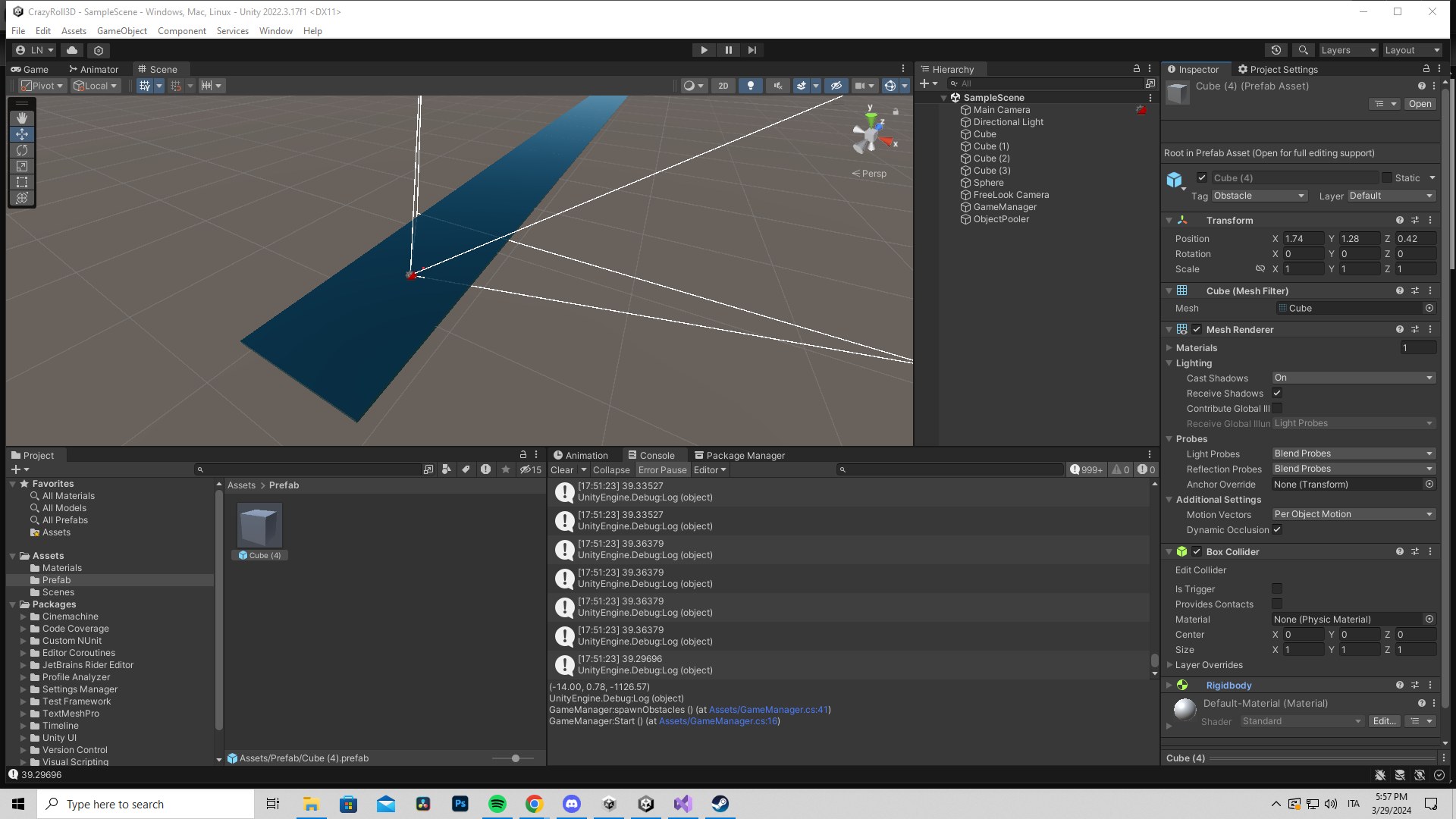
here it is
 echo aurora
so when i made a bullet shooting mechnaic and the spawn point i get weird duplication after shooting another bullet and I would like it to just be 1 click 1 bullet if that makes sense ```using UnityEngine;
public class BulletShooter : MonoBehaviour
{
public GameObject bulletPrefab; // Reference to the bullet prefab
public float bulletSpeed = 10f; // Speed of the bullet
public Vector3 spawnPointOffset = new Vector3(1, 0, 1); // Offset from the player position
private void Update()
{
    // Check if the left mouse button is clicked
    if (Input.GetMouseButtonDown(0))
    {
        ShootBullet();
    }
}

private void ShootBullet()
{
    // Calculate the bullet spawn position based on the player's position and rotation
    // Adjust the spawnPointOffset to move the spawn position to the right of the player and slightly forward (like holding a gun)
    Vector3 spawnPosition = transform.position + transform.right * spawnPointOffset.x + transform.forward * spawnPointOffset.z + transform.up * spawnPointOffset.y;

    // The rotation should match the player's rotation
    Quaternion spawnRotation = transform.rotation;

    // Instantiate a new bullet instance at the calculated spawn position and rotation
    // Instantiate a new bullet instance at the calculated spawn position and rotation

    GameObject bulletInstance = Instantiate(bulletPrefab, spawnPosition, spawnRotation);


    // Add this line at the end of ShootBullet() method
    Destroy(bulletInstance, 5f); // Destroys bullet after 5 seconds


    // Get the bullet's rigidbody component
    Rigidbody bulletRb = bulletInstance.GetComponent<Rigidbody>();

    // Log the instance ID of the bullet
    Debug.Log("Bullet Instance ID: " + bulletInstance.GetInstanceID());

    // Add force to the bullet in the direction of the spawn position's forward vector
    bulletRb.AddForce(transform.forward * bulletSpeed, ForceMode.Impulse);

    // Log the instance ID of the rigidbody to which the force was applied
    Debug.Log("Rigidbody Instance ID: " + bulletRb.GetInstanceID());
}
}
using UnityEngine;
public class Bullet : MonoBehaviour
{
private void OnCollisionEnter(Collision collision)
{
// Destroy only the bullet instance, not the prefab
Destroy(gameObject);
}
}``` I cant figure it out im gonna pull my hair out lol
 stable moth
How can i fix Vector3 showing things with 2 extra zeros ?
 polar acorn
late bobcat
no it doesn't have a character controller, just a simple 3d cube with a rigidbod...
polar acorn
late bobcat
no it doesn't have a character controller, just a simple 3d cube with a rigidbod...
Hm... try setting the position/rotation before activating it? It's possible the rigidbody is conflicting, but it's not as temperamental as CharacterController
summer stump
Hmm, ok, that took me a bit because the comments make it really hard to read. But it does look fine. You may want to set the RIGIDBODYs position instead of transform.position
Also, doubt this is even relevant, but in your random ranges, you don't need a + to make that value positive
late bobcat
summer stump
Also, doubt this is even relevant, but in your random ranges, you don't need a +...
ye ik, it was just to differentiate
late bobcat
polar acorn
Hm... try setting the position/rotation _before_ activating it? It's possible th...
can you explain how should i do it in the code?
polar acorn
echo aurora
so when i made a bullet shooting mechnaic and the spawn point i get weird duplic...
Change bulletPrefab to a [SerializeField] private GameObject isntead of public. This will prevent external code from modifying what object that prefab points to.
polar acorn
late bobcat
can you explain how should i do it in the code?
Instead of putting the position setting after activating it, put it before that instead
echo aurora
polar acorn
Change `bulletPrefab` to a `[SerializeField] private GameObject` isntead of publ...
awesome let me try 🙂
stable moth
stable moth
How can i fix Vector3 showing things with 2 extra zeros ?
Anyone ?
late bobcat
polar acorn
Instead of putting the position setting after activating it, put it before that ...
you mean before the "for loop"? because then i'm only gonna get one position.
summer stump
stable moth
Anyone ?
Unanswerable as asked
Show code
Looks like three vector3s to me
late bobcat
i need different positions for each one of the cubes
polar acorn
late bobcat
you mean before the "for loop"? because then i'm only gonna get one position.
I mean literally right before you set active
Just take the lines that are after the set active
and put them before it instead
stable moth
summer stump
Unanswerable as asked
Reply to me don't put ur message to the void lol
summer stump
stable moth
Reply to me don't put ur message to the void lol
I did reply to you...
What?
late bobcat
ohh i was looking the wrong script @polar acorn sry
stable moth
summer stump
Show code
Looks like three vector3s to me
using System.Collections;
using System.Collections.Generic;
using UnityEngine;
using UnityEngine.UI;
using Photon.VR;
using TMPro;

public class ColorScript : MonoBehaviour
{
    public TextMeshPro ColorText;
    public float Red;
    public float Blue;
    public float Green;
    float TrueRed;
    float TrueBlue;
    float TrueGreen;
    // Start is called before the first frame update
    void Start()
    {

    }

    // Update is called once per frame
    void Update()
    {
        ColorText.text = new Vector3(Red,Blue,Green).ToString();
        TrueRed = Red / 10;
        TrueBlue = Blue / 10;
        TrueGreen = Green / 10;

        Color myColour = new Color(TrueRed, TrueBlue, TrueGreen);
        PhotonVRManager.SetColour(myColour);
    }

}
You would do .ToString("F0");
stable moth
wintry quarry
You would do `.ToString("F0");`
thank you
late bobcat
@polar acorn sheee, it's working bro, tysm, that object pooler always worked with other types of game (2d) and it never game me problems
polar acorn
late bobcat
<@153950686088921088> sheee, it's working bro, tysm, that object pooler always w...
I'm guessing that upon activation, the Rigidbody hasn't "woken up" yet, and therefore isn't responding to any attempts to move it. Setting before activating means the rigidbody sees it's "origin" as the given position instead of what it used to be at
echo aurora
polar acorn
Change `bulletPrefab` to a `[SerializeField] private GameObject` isntead of publ...
seems to stil be duplicating or making a copy after i shot again
polar acorn
echo aurora
seems to stil be duplicating or making a copy after i shot again
That was just a quick sanity check, to make sure there aren't any other scripts modifying this prefab. Can you share the !code on a bin site (can't ctrl+f in discord)
eternal falconBOT
Posting code
📃 Large Code Blocks
Use links to services like:
https://gdl.space/, https://paste.ofcode.org/, https://hatebin.com/, https://paste.myst.rs/, https://hastebin.com/
📃 Inline Code
Surround code with three backquotes. Not quotation marks.
To format as C#, add cs to the first line:
```cs
// Your code here
```
Add a comment with a line number if there is an error message.
late bobcat
polar acorn
I'm guessing that upon activation, the Rigidbody hasn't "woken up" yet, and ther...
ye i get it ty mate
echo aurora
!code
eternal falconBOT
Posting code
📃 Large Code Blocks
Use links to services like:
https://gdl.space/, https://paste.ofcode.org/, https://hatebin.com/, https://paste.myst.rs/, https://hastebin.com/
📃 Inline Code
Surround code with three backquotes. Not quotation marks.
To format as C#, add cs to the first line:
```cs
// Your code here
```
Add a comment with a line number if there is an error message.
Posting code
📃 Large Code Blocks
Use links to services like:
https://gdl.space/, https://paste.ofcode.org/, https://hatebin.com/, https://paste.myst.rs/, https://hastebin.com/
📃 Inline Code
Surround code with three backquotes. Not quotation marks.
To format as C#, add cs to the first line:
```cs
// Your code here
```
Add a comment with a line number if there is an error message.
echo aurora
!code ```using UnityEngine;
public class BulletShooter : MonoBehaviour
{
[SerializeField] private GameObject bulletPrefab; // Reference to the bullet prefab, set in the editor
public float bulletSpeed = 10f; // Speed of the bullet
public Vector3 spawnPointOffset = new Vector3(1, 0, 1); // Offset from the player position
private void Update()
{
    // Check if the left mouse button is clicked
    if (Input.GetMouseButtonDown(0))
    {
        ShootBullet();
    }
}

private void ShootBullet()
{
    // Calculate the bullet spawn position based on the player's position and rotation
    Vector3 spawnPosition = transform.position + transform.right * spawnPointOffset.x + transform.forward * spawnPointOffset.z + transform.up * spawnPointOffset.y;

    // The rotation should match the player's rotation
    Quaternion spawnRotation = transform.rotation;

    // Instantiate a new bullet instance at the calculated spawn position and rotation
    GameObject bulletInstance = Instantiate(bulletPrefab, spawnPosition, spawnRotation);

    // Get the bullet's rigidbody component and add force
    Rigidbody bulletRb = bulletInstance.GetComponent<Rigidbody>();
    bulletRb.AddForce(transform.forward * bulletSpeed, ForceMode.Impulse);
}
}
Posting code
📃 Large Code Blocks
Use links to services like:
https://gdl.space/, https://paste.ofcode.org/, https://hatebin.com/, https://paste.myst.rs/, https://hastebin.com/
📃 Inline Code
Surround code with three backquotes. Not quotation marks.
To format as C#, add cs to the first line:
```cs
// Your code here
```
Add a comment with a line number if there is an error message.
 torn marlin
{
    public void LoadLevel(Loader.Scene scene)
    {
        Loader.Load(scene);
    }

}
``` ```public static class Loader
{
    public enum Scene{
        MainMenuScene,
        Level01,
        Level02,
        Level03,
        Level04,
        Level05,
        Level06,
        Level07,
        LoadingScene
    }
    public static Scene targetScene;

    public static void Load(Scene targetScene)
    {
        Loader.targetScene = targetScene;
        SceneManager.LoadScene(Scene.LoadingScene.ToString());
}```LoadLevel does not appear in On Click, why?
wintry quarry
torn marlin
LoadLevel does not appear in On Click, why?
Because it takes an unsupported parameter type
torn marlin
wintry quarry
Because it takes an unsupported parameter type
so, enums are not supported you mean?
wintry quarry
I recommend this way:
public class LevelSelectionUI : MonoBehaviour
{
    public Loader.Scene sceneToLoad; // assign this in the inspector
    public void LoadLevel()
    {
        Loader.Load(sceneToLoad);
    }

}```Yes enums are not supported in UnityEvent UI
polar acorn
echo aurora
https://gdl.space/banupejoge.cs
Hm, can you show the inspector for BulletShooter
torn marlin
wintry quarry
I recommend this way:
```cs
public class LevelSelectionUI : MonoBehaviour
{
...
wanna make it appear on the button tho
 echo aurora
 polar acorn
echo aurora
polar acorn
echo aurora
No, the inspector for the actual instance
echo aurora
polar acorn
No, the inspector for the actual instance
Sorry what do you mean aha?

this?
 final kestrel
using System.Collections;
using System.Collections.Generic;
using UnityEngine;
using TMPro;
public class PlayerUI : MonoBehaviour
{
    [SerializeField] private TextMeshProUGUI promptText;
    // Start is called before the first frame update
    void Start()
    {

    }


    public void UpdateText(string promptMessage)
    {
        promptText.text = promptMessage;
    }
}

``` I dont know why this throws me a null reference exception. I am calling this update text to update the prompt message on raycast interaction. When I look at my door to see the text on my screen. I get null reference exception.promptText.text = promptMessage; this line is whats causing the problem
polar acorn
echo aurora
Sorry what do you mean aha?
The inspector for the instance of BulletShooter in the scene
polar acorn
final kestrel
promptText.text = promptMessage; this line is whats causing the problem
PromptText is null
final kestrel
I wrote some stuff on the inspector though since its serialized no?
echo aurora
im sorry still kinda new this?
 polar acorn
echo aurora
im sorry still kinda new this?
polar acorn
echo aurora
im sorry still kinda new this?
Okay, yes, that. While playing, does that BulletPrefab field change?
polar acorn
final kestrel
I wrote some stuff on the inspector though since its serialized no?
The error indicates you have at least one instance of PlayerUI which does not have promptText set
final kestrel
polar acorn
The error indicates you have at least one instance of `PlayerUI` which does not ...
oh my god you're right.
Thanks digiholic
echo aurora
doesnt seem like it
 wintry quarry
torn marlin
wanna make it appear on the button tho
wintry quarry
torn marlin
wanna make it appear on the button tho
It will appear if you write it the way I wrote
polar acorn
echo aurora
doesnt seem like it
Okay, and as you keep firing bullets and you start to get (clone)(clone) it doesn't change?
torn marlin
wintry quarry
It will appear if you write it the way I wrote
It appears on the parent object with script attached to it only
 echo aurora
so it seems to be doing better but what i dont like is see how that bullet gets duplicated in transit?
polar acorn
echo aurora
so it seems to be doing better but what i dont like is see how that bullet gets ...
I don't think it's getting duplicated, I think its position is updating the frame before it's destroyed somewhere
echo aurora
so like further down the road I wont see issues with like it hitting a monster and doing double damage?
guess ill find out huh? hahahah
final kestrel
Hmm. https://hatebin.com/ There is something wrong with raycast here. I have another script that handles prompt messages. in OnFocus and OnLoseFocus. When I move my mouse to and away from the interactable object. The raycast seem to be working. But when I move sideways for example while looking at the interactable object. The prompt message does not go away. It is as if im still looking at the interactable object. What may be causing it?
This here is what I am talking about if its any help

 faint sluice
final kestrel
Hmm. https://hatebin.com/ There is something wrong with raycast here. I have ano...
faint sluice
final kestrel
Hmm. https://hatebin.com/ There is something wrong with raycast here. I have ano...
No script attached, no video attached. Looks good to me
final kestrel
I move to left while looking at the door. Text does not go away for some reason.
final kestrel
faint sluice
No script attached, no video attached. Looks good to me
ah my bad my bad
oh it does not work wait
!code
eternal falconBOT
Posting code
📃 Large Code Blocks
Use links to services like:
https://gdl.space/, https://paste.ofcode.org/, https://hatebin.com/, https://paste.myst.rs/, https://hastebin.com/
📃 Inline Code
Surround code with three backquotes. Not quotation marks.
To format as C#, add cs to the first line:
```cs
// Your code here
```
Add a comment with a line number if there is an error message.
final kestrel
I log the OnLoseFocus. It does not work until I shake my camera around a bit.
I can give the Interactable script as well but it just inherits from an abstract Interactable class. and has OnFocus, OnLoseFocus and OnInteract thats all.
Well okay I fixed it. Thanks.
faint sluice
final kestrel
I log the OnLoseFocus. It does not work until I shake my camera around a bit.
I'm assuming line 198 is where it's supposed to lose focus when you move out of the way?
But if some object is blocking the raycast before the door it will not go in else block
faint sluice
final kestrel
Well okay I fixed it. Thanks.
Nvm then, what was the solution btw?
final kestrel
I was not checking the interactable layer
I just added a && hit.collider.gameObject.layer == 7 in the first if statement on HandleInteractionCheck
It works perfecto now
wintry quarry
torn marlin
It appears on the parent object with script attached to it only
Ah yes this would only work if you had one copy of the script per button
that's what I expected you to have
 sage mirage
Hey, guys! I want to make a Game Mechanic for my game which is a flappy bird. So, I want to increase the speed gradually in order to make it difficult for the player. Can someone help me implementing that?
I don't know where to start and how to start basically
Never done that before
summer stump
sage mirage
Hey, guys! I want to make a Game Mechanic for my game which is a flappy bird. So...
speed += Time.deltaTime * speedIncreaseFactor
The factor should probably be something low like .01
Plug that in update
sage mirage
hmm let me try.
summer stump
Unless you want to increase it at checkpoints, which would be a bit different
sage mirage
Alright! I actually made that Game Mechanic but now the problem is that I can't actually synchronize the speed of each game objects I am spawning. I am spawning my game objects so my pipes actually with spawn rate using Enumerator. I got confused on that something happening and I can't sync their speeds. It only happening for my pipes which I have 3 different pipes as prefabs, I am also giving speed to my background and ground layers so they are fine.
I see my objects instances to spawn on different positions
When I am using enumerator and I have a fixed speed rate then it is fine
 scenic sluice
i cant move mi script in this folder why ?
 sage mirage
scenic sluice
i cant move mi script in this folder why ?
sage mirage
scenic sluice
i cant move mi script in this folder why ?
Can you please take a screenshot and give us more information?
Which folder?
 rocky canyon
he has two folders higlighted.. and the circle and slash hovering over the Scripts folder.. im assuming thats the folder he means
 slender nymph
 brazen canyon
is this inside of a MonoBehaviour in a non-static method?
brazen canyon
slender nymph
is this inside of a MonoBehaviour in a non-static method?
Well I this is inside a script which inherited from another class which didn't inherit from Mono
sage mirage
sage mirage
Alright! I actually made that Game Mechanic but now the problem is that I can't ...
Anyone that can help with that?
 swift sedge
brazen canyon
Well I this is inside a script which inherited from another class which didn't i...
swift sedge
brazen canyon
Well I this is inside a script which inherited from another class which didn't i...
that will be why
slender nymph
brazen canyon
Well I this is inside a script which inherited from another class which didn't i...
well that's why. StartCoroutine is an instance method on the MonoBehaviour class. if you do not inherit from MonoBehaviour then you do not inherit that method
slender nymph
so either inherit from MonoBehaviour if this should be a component, or call StartCoroutine on some MonoBehaviour reference
 rich adder
myMonobehaviorReference.StartCoroutine(whatever
swift sedge
brazen canyon
Frick
what does it inherit from?
you need to inherit from MonoBehaviour in any case
slender nymph
if it does not need to be attached to a gameobject as a component then it is not necessary to inherit from monobehaviour
 swift crag
Lots of methods that "feel" like magic globals are actually just UnityEngine.Object or UnityEngine.MonoBehaviour methods
 subtle sage
Okay, What the acual f***
 rich adder
subtle sage
Okay, What the acual f***
rich adder
subtle sage
Okay, What the acual f***
not really code related but check logs
summer stump
subtle sage
Okay, What the acual f***
#💻┃unity-talk and check the logs
scenic sluice
scipt folder where my cursor is on
swift sedge
subtle sage
Okay, What the acual f***
thats a very old version. I would change it before downloading if I were you
swift crag
no, that's the latest 2021 LTS
it's a major version number behind the current LTS, yes, but it's still actively maintained
it's also the only version that has access to those microgame templates
LTS versions are given, well, long-term support
rich adder
scenic sluice
scipt folder where my cursor is on
You cant drag script in the scripts folder? is that what ur saying
swift crag
Putting the year in the version number definitely makes older LTS's seem "outdated"
slender nymph
swift crag
no, that's the latest 2021 LTS
but fen that version was released three weeks ago. that's practically a million years ago in software terms
swift crag
slender nymph
but fen that version was released *three weeks ago*. that's practically a millio...
i need my unity experience to be disrupted and innovated
[project explode]
rich adder
unity 2023 ! thats OLD af we're in 2024 wtf
swift sedge
rookie numbers, unity 6000 is out now
 upbeat yacht
hi, just a quick question about the use of readonly. What's the point of this property, is it used just for variable we don't want to modify in inspector ? thx
rich adder
unity 6k sounds futuristic
rich adder
upbeat yacht
hi, just a quick question about the use of readonly. What's the point of this pr...
no its nothing to do with Unity at all
slender nymph
upbeat yacht
hi, just a quick question about the use of readonly. What's the point of this pr...
the readonly modifier prevents a variable from being assigned to outside of the object's constructor or field initializer
swift sedge
upbeat yacht
hi, just a quick question about the use of readonly. What's the point of this pr...
readonly is runtime version of const which is compile-time
slender nymph
so it's for when you want to keep the same instance of that object and never assign to again it within the containing object's lifetime
upbeat yacht
oooh ok ! very clear thank you very much
swift sedge
readonly int num;

void SomeMethod()
{
    num = 1;
    num = 2; // error and won't assign
}
that is incorrect; the only rule is that you cannot assign to it outside of a constructor or field initializer
you cannot assign to it in any other method
in this case, both lines would be errors
The constructor is unique in that it's guaranteed to run at most once at a very specific point in the object's lifecycle
along with field initializers
Nothing else has those guarantees.
swift sedge
so... would const work?
upbeat yacht
so i use readonly only if i'm sure to use my variable just once ?
slender nymph
no, you use readonly if you want to prevent assigning to the variable outside of the field initializer or constructor
polar acorn
upbeat yacht
so i use readonly only if i'm sure to use my variable just once ?
readonly if it's, well, read-only
If you never intend to change it
just read the value
rich adder
swift sedge
so... would const work?
const is assigned only in the Initializer (its only compile time)
not even constructor
slender nymph
upbeat yacht
so i use readonly only if i'm sure to use my variable just once ?
you can use that variable as much as you want, you just cannot assign to it outside of those two places
 timber tide
readonly doesnt work that well with monos beyond anything you can initialize in the member scope space
there is some interfaces that can help with dynamic instantiations though
slender nymph
i pretty commonly use readonly for lists or other collections that i don't need to assign in the inspector but don't want new instances created for, pretty handy for things like buffers used for non allocating physics queries
swift crag
I use it because the linter tells me to
rich adder
usually VS tells me , only usually happens on newer .NET apps I work on , never gotten it in unity 
 timber tide
until you do and then it yells at you to remove it
swift sedge
we love intellisense
 hidden sleet
Can I put multiple layers on one object? I want something to have a layer that marks at as an obstacle that blocks raycasts, but also something that gets picked up by a sphere overlap, but I’ve only been able to put one layer on an object
languid spire
hidden sleet
Can I put multiple layers on one object? I want something to have a layer that m...
you cannot put multiple layers on one object but you can put different layers on children
timber tide
that's not a bad idea otherwise make an interface of tags
hidden sleet
K, so would you just put empty game objects on the child of some mesh and put layers on those?
languid spire
yes, exactly
hidden sleet
Alrighty, sounds like that would do the trick
Although why can’t you put multiple layers on when tags work just fine?
languid spire
Ask Unity
timber tide
Unity tags stink
hidden sleet
I’ve not used them in a while
timber tide
even if you search by tag you still need to do a component search to grab the exact object (also you can only have 1 tag??)
rich adder
hidden sleet
Can I put multiple layers on one object? I want something to have a layer that m...
use Interfaces
hidden sleet
In what way
languid spire
If Unity used a LayerMask at GameObject level instead of Layer then multiple layers could be a thing and it would make RayCasting a lot simpler
hidden sleet
Cause this is just to physically block a raycast but also allow another raycast through
rich adder
I usually combine Layers and then specific objects further, through components
languid spire
tbh as Layer is just an int there is nothing to stop you making it a LayerMask and using it as such
hidden sleet
I’ll try out the child objects idea and see what happens
scenic sluice
rich adder
You cant drag script in the scripts folder? is that what ur saying
yeah
queen adder
guys how do I fix this, as you can see my character barely falls down when I try to move in air.
brazen canyon
hey guys I have 2 objects, one object shoots an arrow toward the other.
How to I make the arrow faces toward the target ?
Do I take the Vector3 of the target and minus it to the object that's shooting ?
Like Vector3(target.x,target.x,target.x) - Vector3(shooter.x,shooter.x,shooter.x) ?
rocky canyon
thatPosition - thisPosition = direction
brazen canyon
And then Instantiate(Bla Bla Bla, Quaternion.Euler(result));
 hard lodge
If anyone's new you can dm me and we can learn together
 ruby python
Hi all, say I have a bunch of objects that use the same material, is it possible with code to change the colour on an object by object basis as opposed to changing the material across all objects?
nm, was being dense. lol.
swift crag
ruby python
Hi all, say I have a bunch of objects that use the same material, is it possible...
I was just discussing this in #archived-code-general :p
ruby python
oopsy. lol. Sokay, I got it, I was being stoopid. lol.
brazen canyon
rocky canyon
thatPosition - thisPosition = direction
Target position - The one who shoots position ?
 deft quarry
Hey all! I'm still very new to Unity and I have two main questions if someone could please help me out!
1: How can I get my player to move in the direction my camera is facing?
2: How can I stop this horrible camera jitter when moving my camera?
Player Movement Script : https://gdl.space/ihidomiruh.cpp
Camera Control Script : https://gdl.space/vaxisiwixi.cpp
Camera Movement Script: https://gdl.space/usuyelibed.cpp
Clip :
timber tide
There's like a handful of ways to move in unity
summer stump
deft quarry
Hey all! I'm still very new to Unity and I have two main questions if someone co...
Remove deltaTime from the Camera Control script
timber tide
but at minimum you want some forward direction for either your camera or player, and then change units by a speed in that direction
summer stump
Put that code in CameraMovement to LateUpdate
 gray crest
despite the quality of the video everything that moves does so smoothly but the bees look very blurred when they move. even when the camera moves the background stays clear unlike the bee, what can i do?
wintry quarry
gray crest
despite the quality of the video everything that moves does so smoothly but the ...
How is the bee moving?
timber tide
What's different from what you're doing with the trees vs bees
gray crest
wintry quarry
How is the bee moving?
using UnityEngine;

public class EnemyAutoMove : MonoBehaviour
{
    private Rigidbody rb;
    public int enemySpeed = 14;
    private float amplitude;
    private float frequency;

    void Start()
    {
        rb = GetComponent<Rigidbody>();
        frequency = Random.Range(1f, 12f);
        amplitude = Random.Range(1f, 2f);
    }

    void FixedUpdate()
    {
        float x = amplitude * Mathf.Sin(frequency * Time.time);
        float y = amplitude * Mathf.Cos(frequency * Time.time);
        Vector2 waveMotion = new Vector2(x, y);

        // Use SmoothDamp for velocity smoothing
        Vector3 targetVelocity = new Vector3(-enemySpeed, waveMotion.x + waveMotion.y, 0);
        Vector3 smoothDampVelocity = Vector3.zero; // Create a separate variable for SmoothDamp
        rb.velocity = Vector3.SmoothDamp(rb.velocity, targetVelocity, ref smoothDampVelocity, 0.1f);
    }
}
```#Did you turn on interpolation for the bees Rigidbody? @gray crest
gray crest
wintry quarry
Did you turn on interpolation for the bees Rigidbody? <@152400053036777472>
its on none rn
wintry quarry
Well then that's your issue
You're seeing non interpolated physics motion
Which is at 50hz by default, not matching your framerate
gray crest
wintry quarry
Well then that's your issue
okay so I change it and they are still burry and now do this weird thing where they slow down
gray crest
wintry quarry
You changed it to what?
i have changed it to interpolate and it seems to slow down when it goes into the players hitbox collider
wintry quarry
gray crest
i have changed it to interpolate and it seems to slow down when it goes into the...
Interpolation shouldn't actually change anything, it's purely visual
I presume that's a result of your code
gray crest
as you can see they are still blurry, also in the future i plan to speed them up to make the game harder so they will be even harder to se
wintry quarry
I think your Smoothdamp call is a little sus
For the moment I would simplify the movement code to a constant velocity to sort these issues out
Then start introducing the weird smoothdamp and sin wave stuff
gray crest
okay let me try
gray crest
wintry quarry
I think your Smoothdamp call is a little sus
so ive done this, ```using System.Collections;
using UnityEngine;
public class EnemyAutoMove : MonoBehaviour
{
private Rigidbody rb;
public int enemySpeed = 14;
private float amplitude;
private float frequency;
void Start()
{
    rb = GetComponent<Rigidbody>();
    frequency = Random.Range(1f, 12f);
    amplitude = Random.Range(1f, 2f);
}
void FixedUpdate()
{
float x = amplitude * Mathf.Sin(frequency * Time.time);
float y = amplitude * Mathf.Cos(frequency * Time.time);
Vector2 waveMotion = new Vector2(x, y);
// Calculate the target velocity
Vector3 targetVelocity = new Vector3(-enemySpeed, 0, 0);

// Assign the target velocity directly to the rigidbody
rb.velocity = targetVelocity;
}
}
 buoyant schooner
My colliders ain't colliding with each other.
I have a Circle collider on my mouse and a circle collider on my sprite. They are both on the same Z. But My OnTriggerEnter2D isn't triggering but I can see the circle collider on top of the other collider.
 slender nymph
buoyant schooner
My colliders ain't colliding with each other.
I have a Circle collider on my mo...
buoyant schooner
slender nymph
buoyant schooner
My colliders ain't colliding with each other.
I have a Circle collider on my mo...
buoyant schooner
I'm working with Collider2d's
 astral falcon
buoyant schooner
My colliders ain't colliding with each other.
I have a Circle collider on my mo...
astral falcon
buoyant schooner
My colliders ain't colliding with each other.
I have a Circle collider on my mo...
Depends on how you move your objects with the collider attached. if you just move them by transform.position, it will ignore physics. and besides that, are you sure, you did set the correct collider to trigger?
buoyant schooner
" it will ignore physics" ? Wdym by this? I'm moving the game object that has a collider attached to it. Is this wrong?
polar acorn
buoyant schooner
" it will ignore physics" ? Wdym by this? I'm moving the game object that has a ...
How are you moving it
buoyant schooner
Transform.position with the game object that has the collider
astral falcon
buoyant schooner
" it will ignore physics" ? Wdym by this? I'm moving the game object that has a ...
ye, transform.position is like teleporting the position. Not moving with physics check happening.
polar acorn
buoyant schooner
Transform.position with the game object that has the collider
Yeah that's teleportation. It's not going to use physics
You'll need to move it via rigidbody to actually have proper collision checking
polar acorn
At least one of them must have a rigidbody
buoyant schooner
My script is this:
private void OnTriggerEnter2D(Collider2D other)
{
    Debug.Log("collision happened!");

    //if (other.CompareTag("Anvil"))
    //{
    //    Debug.Log("Anvil!");
    //}
}
The Three Commandments of OnTriggerEnter2D:
- Thou Shalt have a 2D Collider on each object
- Thou Shalt tick
isTriggeron at least one of them - Thou Shalt have a 2D Rigidbody on at least one of them
buoyant schooner
hmm okay thank you
wintry quarry
gray crest
so ive done this, ```using System.Collections;
using UnityEngine;
public class ...
the blur is honestly probably from ghosting on your monitor
unless you have postprocessing motion blur enabled
buoyant schooner
polar acorn
The Three Commandments of `OnTriggerEnter2D`:
1. Thou Shalt have a 2D Collider o...
It's a little strange to have a rigid body on something that doesn't need to use physics,But it worked!
polar acorn
buoyant schooner
It's a little strange to have a rigid body on something that doesn't need to use...
But it does need to use physics. Collisions are physics. Triggers are physics. Knowing when two objects are in contact are physics
queen adder
can someone text me in dm to help me with 2d movement
 queen adder
OK how to fix this then? my character falls very slowly if I move left or right while in air, I want it to fall normal.
polar acorn
queen adder
OK how to fix this then? my character falls very slowly if I move left or right ...
I'm guessing you're setting the entire velocity every time you move. You want to keep the Y velocity the same
rocky canyon
^ this, ur setting velocity to Vector2.right * speed;
queen adder
public void kretnja()
{
    if (Input.GetKey(KeyCode.RightArrow) == true)
    {
        igrac.velocity = Vector2.right * speed;
    }


    if (Input.GetKey(KeyCode.LeftArrow) == true)
    {
        igrac.velocity = Vector2.left * speed;

    }


    if (Input.GetKeyDown(KeyCode.UpArrow) == true && Grounded)
    {
        igrac.velocity = Vector2.up * JumpStrength;
that means ur setting ur Y velocity to 0 each frame.. stopping it from falling
queen adder
rocky canyon
that means ur setting ur Y velocity to 0 each frame.. *stopping it from falling*
how can I change it then?
rocky canyon
in ur vector use the rigidbody's y velocity as the Y value
polar acorn
queen adder
how can I change it then?
Instead of setting the whole velocity, set the X velocity to your input and Y velocity to whatever it already was
queen adder
new vector2 is my custom vector2 right?
queen adder
yes yes I get it
 wanton crater
guys i have 2 objects one has a player layer and another one that has the projectile layer as as you can here i disabled their collision with each other but they can still collide with each other
 queen adder
thanks, it works like I want now. can you explain what (speed, igrac.velocity.y) means is igrac.velocity.y the direction of moving, and speed the multiplier, it kinda doesnt make sense, I think it should be (speed * igrac.velocity.y) can you elaborate @rocky canyon @polar acorn
polar acorn
queen adder
thanks, it works like I want now. can you explain what (speed, igrac.velocity.y)...
A vector2 has two things in it
summer stump
wanton crater
guys i have 2 objects one has a player layer and another one that has the projec...
There are two collision matrixes 2d, and 3d
Make sure you used the right one
wanton crater
summer stump
There are two collision matrixes 2d, and 3d
Make sure you used the right one
oh.... thanks that was silly from me
 autumn tusk
how do i specifically set the x value of a transform function
polar acorn
autumn tusk
how do i specifically set the x value of a transform function
Transform isn't a function
polar acorn
Transform doesn't have an X value either
queen adder
so speed(x) is telling y how much to move in y direction?
polar acorn
queen adder
so speed(x) is telling y how much to move in y direction?
why would the X component of the velocity be telling you how much to move in the Y direction
queen adder
polar acorn
why would the X component of the velocity be telling you how much to move in the...
but how does the script then know how much to move in y direction
autumn tusk
hold up lemme make this clearer
summer stump
autumn tusk
but yeah how do i only change the x value of a transform
Transform has a position. Position is a vector3. Vector3 has an x component
queen adder
say I want it to move less, how to do it?
polar acorn
queen adder
but how does the script then know how much to move in y direction
Because your vector also has a Y component
autumn tusk
autumn tusk
how do i specifically set the x value of a transform function
so i want to set the position of a transform, but only change the x value
summer stump
autumn tusk
so i want to set the position of a transform, but only change the x value
polar acorn
autumn tusk
so i want to set the position of a transform, but only change the x value
So set the position to a new vector, putting in whatever X you want, but keeping the Y and Z the same
autumn tusk
ok figured this out

only thing is
is there a version of quaternion.identity for vectors?
polar acorn
autumn tusk
Now pass in the Y and Z
polar acorn
autumn tusk
is there a version of quaternion.identity for vectors?
Vector3.zero
queen adder
hi i have an animation for my 2d object that is supposed to only be played when i tell it too, instead it plays as soon as the game starts and i dont know how to make it not
summer stump
queen adder
hi i have an animation for my 2d object that is supposed to only be played when ...
 spiral rain
Hey I am trying to make a simple 2D game but I have never developed a 2d game only 3d also it has been a while since I have used Unity anyway what would be the best way to have a sprite move up and down with gravity ex press button sprite goes up release it goes down
polar acorn
queen adder
hi i have an animation for my 2d object that is supposed to only be played when ...
Is it the entry state of your animator controller
queen adder
yeah it goes from entry to the animation, i understand that would start on start but idk how to make it so it only starts when i want it to
do i have to make a seperate animation that does nothing
swift crag
Correct. The entry state is entered the moment the animator starts working.
It's the default state.
queen adder
thanks
 wet sparrow
Hi there, I have built a 3D map. I like to make some region and countries on it, which could be selectable and then player could edit it. But I couldn't figure out how it can be possible. I'm new into development.
spiral rain
spiral rain
Hey I am trying to make a simple 2D game but I have never developed a 2d game on...
Anyone?
 frosty hound
The same way you would with 3D, use forces on a rigidbody. Nothing changes in that regard.
 dreamy urchin
To add a scene to the build settings use the menu File->Build Settings...
UnityEngine.SceneManagement.SceneManager:LoadScene (string)
Movement:OnTriggerEnter2D (UnityEngine.Collider2D) (at Assets/Scripts/MC/Movement.cs:103)```

Don't know how to fix it 😦To add a scene to the build settings use the menu File->Build Settings...
rich adder
dreamy urchin
```Scene 'Death' couldn't be loaded because it has not been added to the build s...
Literally
To add a scene to the build settings use the menu File->Build Settings...
dreamy urchin
tysm to both of you @polar acorn @rich adder
 vale geode
hi, how should i recreate a ray for another game object so that it doesnt interfere with other rays? should i use a public layermask?
polar acorn
What do you mean "interfere with other rays"?
vale geode
polar acorn
What do you mean "interfere with other rays"?
i have the player ray, and im trying to add a ray to another object "enemie in my game" but it pulls the camera ray of the player and puts it on the new ray from a diferent script
polar acorn
vale geode
i have the player ray, and im trying to add a ray to another object "enemie in m...
"pulls the camera ray"?
vale geode
the camera goes to the other object
swift crag
This does not make any sense.
What is a "ray" here?
It does not sound like a "ray" I'm familiar with.
rich adder
vale geode
i have the player ray, and im trying to add a ray to another object "enemie in m...
raycasts don't really interact with each other, and "ray" is a math concept
vale geode
red is from the player raycast and withe is from the object ray cast, the player camera gets stuck to the new ray location

 polar acorn
vale geode
red is from the player raycast and withe is from the object ray cast, the player...
polar acorn
vale geode
red is from the player raycast and withe is from the object ray cast, the player...
So don't move the camera when the white ray hits something?
rich adder
vale geode
red is from the player raycast and withe is from the object ray cast, the player...
so you're passing that transform somehow
polar acorn
The rays don't do anything, they just check if they hit something
If this white ray is moving the camera, it's because your code that casts the white ray tells the camera to move
vale geode
 swift crag
this especially doesn't do anything
polar acorn
vale geode
Okay, so this ray seems to just draw a debug line. It doesn't actually do anything ever
rich adder
player.transform.position = transform.psotiion ?
 rich adder
they probably put = instead of -
swift crag
ah, that'll do it
polar acorn
this has nothing to do with the ray, you're just setting three things equal to each other
swift crag
good eye
rich adder
that coloring is awful is this iDE even configured
vale geode
yup my bad, thanks for the help everyone
vale geode
rich adder
that coloring is awful is this iDE even configured
i dont know, and thanks for the help
polar acorn
vale geode
i dont know, and thanks for the help
!ide
eternal falconBOT
💡 IDE Configuration
If your IDE is not autocompleting code
or underlining errors, please configure it.
Select one:
• Visual Studio (Installed via Unity Hub)
• Visual Studio (Installed manually)
• VS Code
• JetBrains Rider
• Other/None
 young fossil
Hi. Are there any good articles for when to use scripts? From an engineering standpoint
polar acorn
young fossil
Hi. Are there any good articles for when to use scripts? From an engineering sta...
What do you mean by "when" to use scripts?
You use scripts when you need to script something
swift crag
that's pretty vague, yes
young fossil
polar acorn
What do you mean by "when" to use scripts?
From an engineering standpoint, how much functionality should an individual script have, any suggestions on relationship between scripts, stuff like that
swift crag
the platonic ideal of a component is to do a specific job very well
polar acorn
young fossil
From an engineering standpoint, how much functionality should an individual scri...
Are you familiar with SOLID programming?
young fossil
polar acorn
Are you familiar with SOLID programming?
Yep. Also OOP. Which seems to be a applied differently here, since scripts act as compsoition most of the time
swift crag
you often create components that form an inheritance tree
and then combine them via composition
that's how my game works
every "thing" in my game that can meaningful act is an Entity. Entities have Modules, which provide specific features:
- being visible
- offering interactions to other entities
- being able to hear things
young fossil
It may be better to discuss examples.
Like Enemy and Player scripts. They are both "characters". But inheritance doesn't seem to be the obvious route there in most Unity projects
swift crag
you can still have classes that inherit from others
so you could have an abstract class that is subclassed by Player and Enemy, if there is common behavior between them
swift crag
swift crag
every "thing" in my game that can meaningful act is an Entity. Entities have Mod...
I have been leaning towards designs that are very heavily composition-based, hence this setup
This was a rewrite from my original design, where I had some ... very large classes for "Player" and "Enemy"
swift crag
swift crag
every "thing" in my game that can meaningful act is an Entity. Entities have Mod...
an Entity has a Brain that controls it and a Locomotion that lets it move around based on the desires of the Brain
I previously had really janky code in the Player class so that it could be an AI or a human-controlled thing
 dense monolith
Need help trying to figure out how to play a higher pitch sound for each collectible in my game. Like as you pick them up they get higher pitch. This is my code currently for the collectible

 burnt vapor
dense monolith
Need help trying to figure out how to play a higher pitch sound for each collect...
burnt vapor
dense monolith
Need help trying to figure out how to play a higher pitch sound for each collect...
Configure your !ide before asking for help
eternal falconBOT
💡 IDE Configuration
If your IDE is not autocompleting code
or underlining errors, please configure it.
Select one:
• Visual Studio (Installed via Unity Hub)
• Visual Studio (Installed manually)
• VS Code
• JetBrains Rider
• Other/None
polar acorn
dense monolith
Need help trying to figure out how to play a higher pitch sound for each collect...
Instead of randomizing the pitch, increase the pitch based on how many coins you've gotten
dense monolith
polar acorn
Instead of randomizing the pitch, increase the pitch based on how many coins you...
yeah thats what id like to do
 crimson ibex
Hello friends. Is there a inbuilt mechanism to handle drag/drop a gameobject in 3d Mobile touch game ?
polar acorn
dense monolith
yeah thats what id like to do
So, do that. You'll need some way to know how many coins you've collected in this script
young fossil
As for seperating logic, is it ideal to do it per script? So "health", for example (really general and quite vague example) is a self contained script?
young fossil
swift crag
an Entity has a Brain that controls it and a Locomotion that lets it move around...
Also thanks this was helpful
My design is almost the same, so at least me and you are on the same page
 uneven locust
crimson ibex
Hello friends. Is there a inbuilt mechanism to handle drag/drop a gameobject in ...
uneven locust
crimson ibex
Hello friends. Is there a inbuilt mechanism to handle drag/drop a gameobject in ...
I don't think so 
swift crag
young fossil
Also thanks this was helpful
I've been slowly drifting towards this design over time
I was working on a "quick" game recently
and boy was I fighting every instinct to generalize everything
it feels so weird to have to manually write code for every item that appears in the settings screen
i'm so used to just giving it a list of settings definitions
young fossil
swift crag
I was working on a "quick" game recently
Like a game jam or something?
swift crag
Not a jam, but just something I promised myself I wouldn't spend forever on (:
I do need to participate in more jams again
They're great.
 frail star
Anyone know of any how-to's on letting players upload an image to set as a background , or even take images to set as backgrounds?
swift crag
hmm, I'm not sure if there's a texture equivalent to https://docs.unity3d.com/ScriptReference/AudioClip.Create.html
you would need a library that can read image files and give you pixel data, which you'd then store into a Texture2D
or even take images to set as backgrounds?
This would be possible through a camera on the player's device
ah!
https://docs.unity3d.com/ScriptReference/ImageConversion.LoadImage.html this might be relevant
It can undersatnd JPEG and PNG data.
You'd just read the file as a byte array, then use ImageConversion.LoadImage
frail star
Ok , I'll dive into these and see what comes up
gray crest
wintry quarry
the blur is honestly probably from ghosting on your monitor
i dont, but when i play it on mobile and have the same blur issue
spiral rain
How do I make a 2D sprite move up and down(preferably with velocity)
polar acorn
spiral rain
How do I make a 2D sprite move up and down(preferably with velocity)
Set the Y velocity to the amount you want it to move up or down by
spiral rain
polar acorn
Set the Y velocity to the amount you want it to move up or down by
Can you show a code snippet. also I need a rigid body 2D right?
 carmine sierra
how can I make a line renderer dotted
rich adder
give it a dotted material
swift crag
The line renderer just creates a mesh that follows a path, yeah
 gloomy bison
hey, i made (followed a youtube tutorial) a car controller script thing. it works until i try making the wheels visuals work.
the part of the script used is
void FixedUpdate{
// the rest of the script that makes stuff work
 UpdateWheel(frontLeft, frontLeftTrans);
        UpdateWheel(frontRight, frontRightTrans);
       UpdateWheel(backLeft, backLeftTrans);
        UpdateWheel(backRight, backRightTrans);

    }

void UpdateWheel(WheelCollider col, Transform trans) {
        Vector3 pos;
        Quaternion rot;
        col.GetWorldPose(out pos, out rot);
        trans.position = pos;
        trans.rotation = rot;
    }
the car flips horribly when the wheel turning part is added. does anyone know why it does this?
thanks!
stable moth
How do you set the color of a line renderer via script ?
stable moth
 shell sorrel
has startColor and endColor properties
shell sorrel
has startColor and endColor properties
do i add Set at the begining ?
shell sorrel
can set them when ever you want to change the color via code
carmine sierra
rich adder
give it a dotted material
where can i find that
searched but couldn't find one
also I placed my UI's into an empty gameobject and now they are not appearing
rich adder
carmine sierra
where can i find that
find a dotted image? set it as material , play around with settings. Also not really code question here
stable moth
line.SetstartColor(PhotonVRManager.Colour);
line.SetendColor(PhotonVRManager.Colour);```
This is the portion of codebecause UI elements need to be in a canvas
carmine sierra
rich adder
because UI elements need to be in a canvas
ohh thanks
shell sorrel
stable moth
```csharp
line.SetstartColor(PhotonVRManager.Colour);
line.SetendColor(PhotonVRM...
there are no such methods on the LineRenderer
carmine sierra
was wondering what that was
shell sorrel
its just properties line.startColor = wantedColor
gloomy bison
gloomy bison
hey, i made (followed a youtube tutorial) a car controller script thing. it work...
but it only hapepns when i add the updatewheel to make the wheels move...
carmine sierra
rich adder
because UI elements need to be in a canvas
if i made some random dotted line image and set it would that work
how does it spread the sprite across the material
the material across the image i mean
stable moth
shell sorrel
its just properties `line.startColor = wantedColor`
sorry i have no idea how c# synthax works im a python synthax guy
rich adder
carmine sierra
if i made some random dotted line image and set it would that work
You set the texture to repeat and if you made it tile properly it should be able to Tile on material as well assuming you enabled it
Line renderer itself has different modes of rendering
make sure it set to Tile or the other ones, not stretch though
stable moth
shell sorrel
and do the same for endColor
line.startColor = PhotonVRManager.Colour; line.endColor = PhotonVRManager.Colour;
Now it says that it doesn't know what PhotonVRManager.Colour is
shell sorrel
stable moth
`line.startColor = PhotonVRManager.Colour;
line.endColor = PhotonVRManag...
well that part is on you, i used it since that is what your example had
stable moth
I say there was PhotonVRManager.SetColour in an another script
stable moth
shell sorrel
well that part is on you, i used it since that is what your example had
Wait actually it ssays this
 shell sorrel
that means you need a object of PhotonVRManager not just its class
stable moth
shell sorrel
that means you need a object of PhotonVRManager not just its class
which means ?
how do i know an object
 north kiln
gloomy bison
north kiln
gloomy bison
i hate the fact ```csharp
void UpdateWheel(WheelCollider col, Transform trans) {
Vector3 pos;
Quaternion rot;
col.GetWorldPose(out pos, out rot);
trans.position = pos;
trans.rotation = rot;
}
 ivory bobcat
gloomy bison
i hate the fact ```csharp
void UpdateWheel(WheelCollider col, Transform trans) {...
ivory bobcat
gloomy bison
i hate the fact ```csharp
void UpdateWheel(WheelCollider col, Transform trans) {...
Break the problem down. It's either the repositioning, new rotation or both.
gloomy bison
ivory bobcat
Break the problem down. It's either the repositioning, new rotation or both.
im not sure though. the car does this
ivory bobcat
Assuming the logic you're trying to apply makes any sense at all.
gloomy bison
i copied the code from a youtube tutorial and it worked fine for that guy
ivory bobcat
Maybe you've missed a step
gloomy bison
i mean i can always try again a third time
i'll try something rq and i'll be back if it dfoesnt work
nah. works well now. thanks
carmine sierra
im unfamiliar with this error, what is it?
 rich adder
you have compile errors in those scripts
carmine sierra
rich adder
You set the texture to repeat and if you made it tile properly it should be able...
is there anywhere I can download a texture
summer stump
carmine sierra
im unfamiliar with this error, what is it?
The errors are cut off 🤷♂️
carmine sierra
sorry didnt ss right
Assets\Scripts\iswoodplacing.cs(5,14): error CS0101: The namespace '<global namespace>' already contains a definition for 'iswoodplacing'
thats the error
and same for the start function
Assets\Scripts\iswoodplacing.cs(12,10): error CS0111: Type 'iswoodplacing' already defines a member called 'Start' with the same parameter types
ivory bobcat
carmine sierra
Assets\Scripts\iswoodplacing.cs(5,14): error CS0101: The namespace '<global name...
Looks like a duplicate script
carmine sierra
same with all functions in the script
north kiln
carmine sierra
im unfamiliar with this error, what is it?
If your IDE is not underlining these errors in red you need to configure it. !ide
eternal falconBOT
💡 IDE Configuration
If your IDE is not autocompleting code
or underlining errors, please configure it.
Select one:
• Visual Studio (Installed via Unity Hub)
• Visual Studio (Installed manually)
• VS Code
• JetBrains Rider
• Other/None
carmine sierra
hes right
carmine sierra
north kiln
If your IDE is not underlining these errors in red you need to configure it. !id...
it was
north kiln
Always gotta be careful when someone posts pictures of compiler errors in the console window
carmine sierra
fair
is this how you'd enter an if statement on the condition it is the specific collider, im just guessing

cause rn it's not doing what I want it to
but if i know this is valid i should be able to bug fix
Better question, can a trigger collider trigger another trigger collider
summer stump
carmine sierra
Better question, can a trigger collider trigger another trigger collider
Yes
ivory bobcat
Does one have a rigid body component?
carmine sierra
no
summer stump
carmine sierra
no
Then no collision will happen
summer stump
Yes
summer stump
Collisions are physics
ivory bobcat
These are physics callback methods
https://docs.unity3d.com/ScriptReference/MonoBehaviour.OnTriggerEnter2D.html
Note: Trigger events are only sent if one of the Colliders also has a Rigidbody2D attached.
 snow girder
how do i split unity render pipline scales into two
north kiln
what does that mean, and what does it have to do with code
snow girder
my bad
 scarlet skiff
I want it to move like the upper wave and not this bouncy type movement, which i dont understand how that even happens?

 eternal needle
scarlet skiff
I want it to move like the upper wave and not this bouncy type movement, which i...
eternal needle
scarlet skiff
I want it to move like the upper wave and not this bouncy type movement, which i...
you can probably draw out what the path will be with a line renderer, did you get this from a guide (or ai?) these comments look mighty suspicious.
eternal needle
scarlet skiff
I want it to move like the upper wave and not this bouncy type movement, which i...
this formula you are using is basically just the formula for a circle, as time goes on (0 to 2pi) it does waveDensity number of spins around the circle of radius waveIntensity.
I think you can easily get your result by just using the sin or cos and adding that as a perpendicular vector to your direction. the vectors magnitude is the value of sin or cos at that point
scarlet skiff
eternal needle
you can probably draw out what the path will be with a line renderer, did you ge...
used it a bit for a fireball, then i had to myself change the script to fit the magicballs, but yes i was assisted with the basics
scarlet skiff
eternal needle
this formula you are using is basically just the formula for a circle, as time g...
so you are suggesting to change the direction vector itself
that does kinda make more sense
 tame mist
i'm working on my first game, it's a 3d world but there's an arcade machine i want the user to be able to play a little 2d mini-game on.
I've basically got it all setup but I don't know if I'm taking the correct approach to it.
In the picture I will provide, the scene to the right there's a cinemachine virtual camera that will be close up to the arcade machine screen.
in the right scene i have another camera that renders a 2dGames layer and the arcade machine has a render texture for the monitor.
this works just fine if i'm just taking in keyboard input to move the spaceship around. but i want aiming to be done with the mouse and i'm struggling to find out how to correctly translate screen points of the mouse position so that the 2d spaceship will rotate and aim at the mouse position.
what should I try to get this to work? is there a way to just get where the mouse position is at on the screen like viewport and just use that as where the mouse would be located for the render camera?

also i'm not sure if it matters but the arcade machine is away far away from the 2d render camera and they are oriented differently. for example, the arcade machine is facing east lets say and the render camera is pointing north
 wicked cairn
tame mist
wicked cairn
tame mist
Idk if you know but you can add a scene inside of another scene. Called additive scenes I think. Look that up on google or YouTube
summer stump
wicked cairn
Idk if you know but you can add a scene inside of another scene. Called additive...
That is indeed what it is called. You just pass LoadSceneMode.Additive as the second parameter of LoadScene
Super easy
 minor patio
so I've got this null reference that I just don't know what to do about: I have a game object that has a 'Representative' class attached (a player character), and I have a 'Specialisation' class (a class that describes a skill) that I have a method in that requires a 'rep' object to calculate the skill's score. Problem is the rep object is null and all the 'getComponent' tricks I know are insufficient to fetch the required data. I'm beginning to think that this is one knot I just can't undo...
 swift elbow
minor patio
so I've got this null reference that I just don't know what to do about: I have ...
swift elbow
minor patio
so I've got this null reference that I just don't know what to do about: I have ...
i love when someone explains their code setup horribly instead of just pasting it
minor patio
swift elbow
i love when someone explains their code setup horribly instead of just pasting i...
I would have, but it's a decent chunk of code; and I wasn't sure if anyone was interested...
swift elbow
idk if i can really help you without understanding this properly though...
minor patio
yeah, it'd take a better understanding of the problem than even I have 😦
swift elbow
also it sounds like you just need to show the func that "calculates the skills score"
minor patio
swift elbow
minor patio
so I've got this null reference that I just don't know what to do about: I have ...
if the rep obj is null how will you get data from it?
swift elbow
minor patio
this is really bad
minor patio
swift elbow
if the rep obj is null how will you get data from it?
I have a rep object that isn't null - I need to find a way to get that particular object
minor patio
swift elbow
this is really bad
I didn't claim it was pretty
swift elbow
minor patio
I have a rep object that isn't null - I need to find a way to get that particula...
GameObject.FindGameObjectWithTag should work for now
its very inefficient tho
minor patio
yeah, okay - thanks
I'll give it a go; but I think that works on things via thier inspector tag
swift elbow
minor patio
yeah, okay - thanks
I'll give it a go; but I think that works on things via thie...
yeah what else would it work off of?
minor patio
swift elbow
yeah what else would it work off of?
it's looking for a string input, not what I had in mind
I'm trying to get an object that exists as an attachment to a game object
swift elbow
i am so confused as to what youre talking abt. you need to find a gameobject so use GameObject.FindGameObjectWithTag. then you can access the data attached to that object. whats the problem with this?
tame mist
wicked cairn
Idk if you know but you can add a scene inside of another scene. Called additive...
additive scenes sounds like a really cool feature but i'm not sure how that's going to help me.
can you switch between the mouse input from each scene or something? like get mousePosition from the camera in the 2d game scene.
because what i'm trying to do is use the virtual cameras mouse position to mirror on the 2d games camera screen
wicked cairn
tame mist
additive scenes sounds like a really cool feature but i'm not sure how that's go...
Additive scenes means whatever is in the other scene gets added to your current scene, but under the parent hierarchy of that scene. When a player reaches the arcade machine it could prompt if they want to enter, if yes, it could add the new scene then disable the current camera, or of course not and just use one camera from the main scene, again the additive scene is just adding more objects to your scene
hmm for the mouse position im not sure. possibly youtube making something follow the cursor, and keep the object(fake mouse) that follows the cursor in bounds of the machine screen
rocky canyon
could stack ur rendertexture camera and (everything it see's on top of ur main camera) and just cull out the machine and everything you're looking at.. taht way ur mouse positions would be the same for both camera's

 eager spindle
it is inheriting monobehaviour
what's the error in the console?
ok so the issue is that your class name is different from the file name
PLayerMovemeny is spelt different from PlayerMovemeny
fix the spelling of both the file and the class name
 somber sun
ah let me try
slender nymph
eager spindle
ok so the issue is that your class name is different from the file name
also note that this is not an issue in unity 2022.2+
 pale wraith
Hello i am a begginer and i have a problem with my PlayerController i did all tutorials but every has a error
slender nymph
pale wraith
Hello i am a begginer and i have a problem with my PlayerController i did all tu...
see #854851968446365696 for what to include when asking for help
somber sun
eager spindle
fix the spelling of both the file and the class name
i got it, im just stupid ,thanks for the response
 blissful spindle
Hi, I have ran into a problem, the problem being that I want to Instantiate a prefab exactly where I hit my raycast but, since I am usin hit.point (its not a Transform) the Instantiate wants a Transform how should I approach this problem?

 slender nymph
blissful spindle
Hi, I have ran into a problem, the problem being that I want to Instantiate a pr...
slender nymph
blissful spindle
Hi, I have ran into a problem, the problem being that I want to Instantiate a pr...
use a different overload of Instantiate https://docs.unity3d.com/ScriptReference/Object.Instantiate.html
blissful spindle
slender nymph
use a different overload of Instantiate <https://docs.unity3d.com/ScriptReferenc...
ok cool, THX 👍
slender nymph
blissful spindle
ok cool, THX 👍
oh and i strongly recommend looking into object pooling for damage numbers rather than instantiating an object every single time something takes damage
 west sonnet
Lovely people on the Unity Discord code-beginner chat. I need help.
As you can see in the video, an enemy throws a bomb towards the player and the bomb explodes after a few seconds. I'm trying to instantiate an object at the location of the bomb explosion when it explodes, but I can't figure out how to do it. What I'm struggling to figure out, is how to get the position of the explosion. If anyone has any ideas, I'd really apprecaite it
 gaunt ice
transform.position?
slender nymph
yeah the position of the explosion would be the position of that thrown object at the time the explosion happens. i'm honestly confused as to how that isn't obvious
west sonnet
gaunt ice
transform.position?
Tried that, but it instantiates it at the source of the particles
The thrown object is a particle
So If I do the transform.position of the particle system, it uses the position of the particle system, not the particle itself
My bad, forgot to mention it's particles
timber tide
looks like it's working in the video no?
 neon fractal
How do I make the pieces fall down if it is paused?
        private void EnginParticle(bool engineStarted)
        {
            for (int i = 0; i < engineParticles.Length; i++)
            {
                if (engineStarted)
                {
                    engineParticles[i].Play();
                }
                else
                {
                    engineParticles[i].Pause();
                }
            }
        }

```\do you notice that once you fly up again the previous particle disappear
timber tide
dont pause them
actually I see the problem. I don't use the shuriken system much, but you probably want to stop emitting, but not pausing the system
otherwise pool independent systems
 silent vault
Does the number of components affects performance? For example, I have 2 methods I want execute in Update but since they deal different matters, I prefer to have 2 different components. Will it run slower than having 1 component Update doing both methods in the same loop? Obviously for a difference of 1, it won't matter but if we stretch that to having 10 small components instead of 1 big component and then having 10 of this gameobject in the scene?
wintry quarry
silent vault
Does the number of components affects performance? For example, I have 2 methods...
Yes everything affects performance. It's always a tradeoff.
timber tide
eh, worrying about micro optimizations, but ideally you want to keep your game objects less populated with components (specifically the ones with colliders) so GetComponent can grab what it's looking for quicker.
More of an issue when these checks are happening per update.
silent vault
Ok Thanks
wintry quarry
When I say "affects performance" that doesn't mean "significantly"
In the same way dropping a bucket of water in the ocean "affects" the sea level.
silent vault
Ahah, got it. Thanks 🙂
 charred spoke
Technically at the scale of lets say 10,000 it is better to do 10,000 methods cals inside a single Update, than having 10,000 individual updates.


 young warren
 vapid mesa
use Debug.DrawRay to draw out your ray so you can see where it's actually firing
north kiln
They are... They just haven't posted any of it
young warren
oops
vapid mesa
young warren
use Debug.DrawRay to draw out your ray so you can see where it's actually firing
for sure but it doesn't appear
 north kiln
Do you have gizmos enabled?
vapid mesa
gizmos?
north kiln
 graceful spruce
Hey, I’m spawning multiple defenders with the same tag “defender”. How can I make it so they ignore collision?
Like I don’t want collision to happen between them
young warren
graceful spruce
Hey, I’m spawning multiple defenders with the same tag “defender”. How can I mak...
you should explain what the collision has to do with their tag
north kiln
 graceful spruce
Yeah but I mean can you send a documentation?
vapid mesa
i've enabled gizmo but it dosen't work
graceful spruce
Because i tried ignorelayercollision it didnt work
north kiln
Use the layer collision matrix
graceful spruce
north kiln
https://docs.unity3d.com/Manual/LayerBasedCollision.html use layers
The defenders have the same layer how can I use the collision matrix
graceful spruce
Shouldn’t they be 2 different layers in order to make it eork?
Ok I’ll try
Thanks ❤️
north kiln
vapid mesa
i've enabled gizmo but it dosen't work
Check whether the code is running at all. If it's not, you probably have a compiler error and your code never compiled
north kiln
Using the debugger or a log
vapid mesa
thks i check and i fix the code now it work thks!
 remote sequoia
How can i solve this problem?

 shell zephyr
https://newclarityex.itch.io/kitty-sledding-xtreme
Hello! I need some help with undestanding how to make a plane sprite to actually "fly" and slowly go down, like in this game example: (after you make some upgrades you are able to slowly fly around the map)
Thank you for helping!


 timber tide
Few ways, one is being give every Health class a reference to your MainGame object which you probably have one of
The more typical ways people use these game manager objects is by making them into singletons which means that they become the only instance of that object type
This way you can just reference the class type (with an extra dot operation) without worrying about passing that reference into all of your objects
young warren
is there a reason you can't create a MainGame type variable in Health.cs and assign it like you did for mainOver in MainGame?
I recommend going through this guide and see which one works for you
I suspect Dependency Injection would be suitable for your case
 verbal meteor
timber tide
This way you can just reference the class type (with an extra dot operation) wit...
verbal meteor
timber tide
This way you can just reference the class type (with an extra dot operation) wit...
Do you mean this?
 timber tide
Ah, so you do pass the reference in, but as a gameobject.
Either be more specific on the type (make it a type of MainMenu and add it on the inspector) or do a GetComponent call assuming you know the GameObject has a MainMenu component
verbal meteor
verbal meteor
Do you mean this?
but this isnt working
timber tide
Consider doing it all on the inspector though
You may be assigning the wrong object then ^

 timber tide
Stick to calling the GameOver method since it's more relevant to the GameManager than the player
verbal meteor
Sorry, I'm a beginner i don't know exactly what you mean.
timber tide
public MainGame mainOver;

public void TakeDamage(float damage)
{
  if(dead)
  {
    mainOver.GameOver();
  }
}```line.startColor = PhotonVRManager.Colour;
line.endColor = PhotonVRManager.Colour;
```I have this error in this part of my script stable moth
timber tide
Eh, may need to assign it outside of the initialization scope
stable moth
timber tide
Eh, may need to assign it outside of the initialization scope
Which means ?(sorry im a beginner in Unity)
stable moth
This is my script
using System.Collections;
using System.Collections.Generic;
using UnityEngine;
using UnityEngine.UI;
using Photon.VR;

public class Line : MonoBehaviour
{
    public LineRenderer line;
    public Transform pos1;
    public Transform pos2;
    // Start is called before the first frame update
    void Start()
    {
        line.positionCount = 2;
    }

    // Update is called once per frame
    void Update()
    {   line.startColor = PhotonVRManager.Colour;
        line.endColor = PhotonVRManager.Colour;
        line.SetPosition(0, pos1.position);
        line.SetPosition(1, pos2.position);
    }
}
i made an if statement for when the parameter of ontrigger is a certain collider, is it valid
 timber tide
stable moth
This is my script
```csharp
using System.Collections;
using System.Collections....
timber tide
stable moth
This is my script
```csharp
using System.Collections;
using System.Collections....
Is PhotonVRManager being referenced anywhere? If it's a singleton then you need to specificy the instance extension
carmine sierra
nvm i know whats wrong
stable moth
timber tide
Is PhotonVRManager being referenced anywhere? If it's a singleton then you need ...
PhotonVRManager works well in this script so idk why it's not working in mine

 normal mango
how do i get this function to appear in the onclick dropdown? trying to make it so when i click a button, a seperate image canvas ui object changes its position


 stable moth
PhotonVRManager works well in this script so idk why it's not working in mine
stable moth
stable moth
PhotonVRManager works well in this script so idk why it's not working in mine
@timber tide
timber tide
Ah, maybe you need to new the color instance because it's just a property field here, but usually that's another error if I'm mistaken.
charred spoke
Kill unity from the task manager
stable moth
charred spoke
Kill unity from the task manager
👍
carmine sierra
so if i didnt save it will have to go?
charred spoke
What will have to go ?
verbal meteor
timber tide
```cs
public MainGame mainOver;
public void TakeDamage(float damage)
{
if(dea...
it has error
 normal mango
how do i get this function to appear in the onclick dropdown? trying to make it ...
normal mango
normal mango
how do i get this function to appear in the onclick dropdown? trying to make it ...
anyone know?
verbal meteor
and i have GameOver event in this code
timber tide
verbal meteor
and i have GameOver event in this code
Show the type of mainover in the class scope
verbal meteor
 timber tide
you still have it as GameObject
charred spoke
Unsaved progress on what? The scene ? The game? The code? This is why I am asking the question.
timber tide
MainMenu is a component of GameObject, but if you assign it as GameObject you need to use GetComponent to grab it from it. Otherwise, change the type to MainMenu specifically and assign it as is in the inspector
charred spoke
Maybe let him respond instead of “thinking” on his behalf?
verbal meteor
timber tide
MainMenu is a component of GameObject, but if you assign it as GameObject you ne...
Like this?


 dusk dust
Hey guys, I downloaded a project from github, when I tried to open it it needed a a specicefic unity version so I downloaded it , but when I open the project it has errors, but they all the same.
and when I open Rider, they don't have any context for any unity calss like System,UnityEngine...etc?

 north kiln
brazen canyon
Hey guys, can I get a little help please ?
north kiln
brazen canyon
Hey guys, can I get a little help please ?
You can't name the types used in an action
brazen canyon
north kiln
You can't name the types used in an action
Sorry I'm lost
Oh
Wait
protected Action<Character, Character> onHit;
Like this ?
 modest dust
Yes
swift crag
Generic type parameters never have names, yes
List<int coolestIntegersEverInvented> myList;``` is forbiddenYou can name them in a delegate tho
public delegate void OnHitDelegate(Character attacker, Character victim);

protected OnHitDelegate onHit;
protected Character attacker;
protected Action<Character, Character> onHit;

//set bullet data for bullet
public virtual void OnInit(Character attacker, Action<Character, Character> onHit/*Truyen vao mot Action*/)
{
    this.attacker = attacker;
    this.onHit = onHit;
}
private void OnTriggerEnter(Collider other)
{
    if (other.CompareTag("Enemy"))
    {
        //Character victim = Cache.GetCharacter(other);
        //onHit?.Invoke(attacker, victim);
    }
}
Hey guys, idk what's that
Cache.GetCharacter(other);
 tall delta
you could also use an anonymous type, if you really want names
Action<(int myNamedVariabel, int someOthername)> callback;
but imo, it makes both the invocation, and the subscriber signature a little messy. but up to you
normal mango
the text component in Unity gets overridden to nothing when the function is called; how can I fix this?


the getText function i mean
 frigid sequoia
normal mango
the text component in Unity gets overridden to nothing when the function is call...
frigid sequoia
normal mango
the text component in Unity gets overridden to nothing when the function is call...
Why are u even trying to get a new reference?
Why not have it assigned from the start?
 vernal bone
is it a good idea to put movement/attack behaviour of an actor into animation state machine behaviour?
 hollow dawn
I'm a beginner at coding c#. I have never coded before where do you think I should start? I know how to use unity/know the basics.
young warren
 tender stag
using UnityEngine;
using UnityEngine.Audio;

public enum AudioOutput
{
    Music,
    SFX,
    Dialogue
}

public class AudioManager : MonoBehaviour
{
    public static AudioManager Instance;


    [Header("Mixer")]
    public AudioMixerGroup musicMixerGroup;
    public AudioMixerGroup sfxMixerGroup;
    public AudioMixerGroup dialogueMixerGroup;


    private void Awake()
    {
        Instance = this;
    }


    public void PlaySound(AudioClip clip, AudioOutput output)
    {
        GameObject newObject = new GameObject("Sound");
        newObject.transform.parent = this.transform;

        AudioSource audioSource = newObject.AddComponent<AudioSource>();

        if(output == AudioOutput.Music)
        {
            audioSource.outputAudioMixerGroup = musicMixerGroup;
        }
        else if(output == AudioOutput.SFX)
        {
            audioSource.outputAudioMixerGroup = sfxMixerGroup;
        }
        else if(output == AudioOutput.Dialogue)
        {
            audioSource.outputAudioMixerGroup = dialogueMixerGroup;
        }

        audioSource.PlayOneShot(clip);
        Destroy(newObject, clip.length + 0.25f);
    }
}```why is it causing a clicking noise?
when i destroy the sound object
its like a really quiet click noise
u probably wont be able to hear it on video
wintry quarry
well you're playing a sound, no?
tender stag
yes but im destroying the sound after its finished playing
Destroy(newObject, clip.length + 0.25f);
i even added 0.25f just to be safe
tender stag
tender stag
yes but im destroying the sound after its finished playing
``Destroy(newObject, ...
i tried destroying it with a coroutine as well
and setting the volume to 0 just before i destroy it
also didnt work
wintry quarry
tender stag
yes but im destroying the sound after its finished playing
``Destroy(newObject, ...
I'm confused, when is the clicking happening?
tender stag
wintry quarry
I'm confused, when is the clicking happening?
when i destory the object
i'll try and record it
wintry quarry
tender stag
when i destory the object
like when you call destroy or when it actually gets destroyed?
queen adder
tender stag
why is it causing a clicking noise?
Well, i created a whole audio system for the "clicking noise" before. If you don't wan't that behaviour, use a third party audio system because you will encounter later on even you fix that one. FMOD Suggested.
tender stag
yeah i dont even know if u can hear it
tender stag
wintry quarry
like when you _call_ destroy or when it actually gets destroyed?
when it actually gets destroyed
tender stag
yeah
queen adder
Basically, the clicking noise happens when the music stops, a small gap happens between frequencies if the frequency is high enough. This gap causes a "clicking noise". How to fix it? Only way is to delete that high frequency when you stop the audio. In other words, mute or fade out. But yeah FMOD is all good they thought about everything.
wintry quarry
maybe just shoot once so it's not masked haha
tender stag
wait it doesnt happen for the ak
maybe its cause the sound doesnt fade out properly?
tender stag
tender stag
yeah the ak works
tender stag
queen adder
Basically, the clicking noise happens when the music stops, a small gap happens ...
i'll just try to make a coroutine which fades the volume to 0 before destroying it
wanton crater
guys i have a bit of a unique problem that idk if it has a fix or not
so basically i have this lighting attack that bounces from enemy to enemy using the script below (on top there is "OnCollissionEnter2D")
the thing is since this is "OnCollissionEnter2D" and not "OnCollissionStay2D" if 2 enemies and really close to each other to the point the collision box of the lighting projectile that this script is attached to dosent leave the collider of the the first enemy hit when it hits the second enemy it targets back to the first enemy since its the closet enemy but since the colliders are still touching from the first time he got hit it dosent register it as a collision enter
a logical fix would be to change OnCollissionEnter2D to OnCollissionStay2D but that would make the first enemy get hit 3 times instead of the projectile bouncing 3 times
is there a way to fix this?
 queen adder
tender stag
i'll just try to make a coroutine which fades the volume to 0 before destroying ...
queen adder
tender stag
i'll just try to make a coroutine which fades the volume to 0 before destroying ...
😄 Goodluck
wanton crater
wanton crater
guys i have a bit of a unique problem that idk if it has a fix or not
so basical...
another solution i came up with is to the make the projectile colider smaller but that makes the problem rarer but not completely gone and makes it harder to hit the projectile
tender stag
queen adder
😄 Goodluck
i just used an online tool to fade out the glock clip
and it works
guess i'll just have to make sure each audio fades out properly
but thats fine
brazen canyon
Hey guys, I have 2 game objects, one of them has "Is Trigger" collider, the other doesn't.
I also have a script that has "OnTriggerEnter(Collider other)" and I attach that to the game object what has "Is Trigger" collider.
What will happen ?
 ornate lynx
hello, so i'm trynna fix my character's diagonal movement and apprently only one condition can be true and so the player can't walk diagonally. if i press the right arrow key, then the up arrow, the right movement is cancelled and the player goes up
 wintry quarry
ornate lynx
hello, so i'm trynna fix my character's diagonal movement and apprently only one...
wintry quarry
ornate lynx
hello, so i'm trynna fix my character's diagonal movement and apprently only one...
both of them can be true but you're overwriting the move vector in the second one
ornate lynx
that makes sense
wanton crater
brazen canyon
Hey guys, I have 2 game objects, one of them has "Is Trigger" collider, the othe...
as far as i know if its a trigger it just goes through things (i might be wrong try)
ornate lynx
shall i make another condition where left or right and up or down are pressed?
wintry quarry
Try something like this @ornate lynx
Vector2 move = Vector2.zero;

if (horizontalStuff) {
  move += new Vector2(...);
}
if (verticalStuff) {
  move += new Vector2(...);
}
transform.Translate(move...);
see how I'm using +=?
So they can both affect it
ornate lynx
yeah yeah
wintry quarry
ornate lynx
hello, so i'm trynna fix my character's diagonal movement and apprently only one...
that being said you overcomplicated this entirely
ornate lynx
so it's like i'm summing the old vector wh=ith the new one is that right?
wintry quarry
you should just do this:
Vector2 move = new Vector2(Input.GetAxis("Horizontal"), Input.GetAxis("Vertical"));
transform.Translate(...);```much simpler
ornate lynx
wintry quarry
that being said you overcomplicated this entirely
yeah, i misunderstood the problem
wintry quarry
no need for if statements, checking individual keys, etc..
wintry quarry
wintry quarry
you should just do this:
```cs
Vector2 move = new Vector2(Input.GetAxis("Horizon...
Are you having trouble understanding this one?
ornate lynx
will make it more compact at a later point
wintry quarry
What part is confusing?
ornate lynx
no, well, idk, seems easier for me in if statement
wintry quarry
what does the if statement add here? Input.GetAxis already tells us the value of the axis (aka the keys being pressed)
if they're not being pressed, it will be 0
which is as expected
ornate lynx
i wrote that line at first, and forgot to transform.translate and i thought using that line was wrong 💀
wintry quarry
It's very common to jump to conclusions as a beginner and change all your code
try to resist that urge lol
 dusk musk
Hi! Can someone help with questions concering data persistence and input fields? It's something I've found a ton about online, but I'm failing to understand how to apply what I'm reading. What I want to achieve is:
- Type the player name in an Input Field on Scene 0
- Load Scene 1
- Display the text from the Input Field in a TextMeshPro in Scene 1, as part of the scoring text (which alreadys works). It would be: "<player name>'s score: xx"
How would I do this? I'm struggling with:
- Writing code that takes the player input
- Storing/saving that player input somewhere
- Sending that input as text to display to my other scene
Here's 2 screenshots of my current game.

 swift crag
For data that there can be only one copy of, a static field is a reasonable choice.
a static field is part of its class, rather than being part of instances of that class
so, you can access it from anywhere
dusk musk
swift crag
For data that there can be only one copy of, a `static` field is a reasonable ch...
Thanks for the advice. This is what I've found online too. The thing is, I just don't understand what to do. Where do I start, what code do I use? Appreciate any advice you can give.
swift crag
figure out how to log the contents of your input box when you click a button
then you just need to store the text into a field instead of logging it
dusk musk
swift crag
figure out how to log the contents of your input box when you click a button
Think I got that part. Can you help me along what's next?
 swift crag
okay, so instead of printing it, you need to store it in a static field
creating a static field is easy: just add the static modifier to a field defintion
public static string playerName;
for example
dusk musk
    public static string playerNameInput;

    public void ReadStringInput(string playerNameString)
    {
        playerNameInput = playerNameString;
        Debug.Log("Player name: " + playerNameString);
    }
Like this? 🙂
 buoyant knot
swift crag
okay, so instead of printing it, you need to store it in a static field
buoyant knot
swift crag
okay, so instead of printing it, you need to store it in a static field
i would avoid declaring static variables, man. that is bad juju
i’ll always take a singleton over a static field, even tho a singleton uses a static field to function
buoyant knot
dusk musk
Like this? 🙂
that would work, but because it is static, it is 1) harder to debug, 2) persists, 3) hard to track down changes
swift crag
buoyant knot
i would avoid declaring static variables, man. that is bad juju
It’s fine.
You write to it on the menu scene and then read from it elsewhere
You don’t need to create an elaborate contraption to hold the string
buoyant knot
i wouldn’t call a singleton an elaborate contraption, if you just inherit from a class someone else wrote
dusk musk
Thanks for your help both. I'm now going to do some experimenting with showing the input field in another TMP on the Menu scene. if that works, I'll try to get it to show on the next Scene.
swift crag
It’s trivial to find who changes the field.
swift crag
dusk musk
Thanks for your help both. I'm now going to do some experimenting with showing t...
Once you’ve written something to the static field, you can access it from anywhere else
Static fields live for the entire duration of the game
buoyant knot
which is why I have a kneejerk reaction to defining static fields
dusk musk
swift crag
Static fields live for the entire duration of the game
Even when moving to another scene? 🙂
swift crag
dusk musk
Even when moving to another scene? 🙂
They live for the entire duration of the game.
Static fields have nothing to do with Unity at all.
buoyant knot
of the whole program
swift crag
buoyant knot
which is why I have a kneejerk reaction to defining static fields
maybe you should work on controlling that reflex
buoyant knot
i’ve been screwed over by static fields a lot, so it is hard to unlearn
swift crag
creating a static field to store a reference to a class that holds a single field is functionally equivalent to creating a static field in this situation. there are certainly scenarios where they aren't equivalent, but this isn't one of them
buoyant knot
my concern is abuse/overuse associated with starting to use them, and never learning the downsides
sage mirage
Hello, guys! I want to implement a Game Mechanic for my game. So, I am making a flappy bird game and I want to increase speed of my tree logs everytime I am making +10 score. Here is how it looks like right now because I am currently increasing the speed gradually. Can someone help me with that please I stuck on that and don't know how to make it?
buoyant knot
just follow the tutorial from game maker’s toolkit
sage mirage
buoyant knot
just follow the tutorial from game maker’s toolkit
That goes for me?
buoyant knot

🔴 Get bonus content by supporting Game Maker’s Toolkit - https://gamemakerstoolkit.com/support/ 🔴
Unity is an amazingly powerful game engine - but it can be hard to learn. Especially if you find tutorials hard to follow and prefer to learn by doing. If that sounds like you then this tutorial will get you acquainted with the basics - and then gi...
he literally makes flappy bird from start to finish
sage mirage
The problem is that I am already at the end of the process
I have only one game mechanic to make and I am fine
dusk musk
swift crag
They live for the entire duration of the game.
Thank you very much, that's helpful to understand. Could you also help me along to display the input into a TextMeshPro object in my game? Here's a screenshot, where you can see where the input should be displayed.
 ivory bobcat
sage mirage
Hello, guys! I want to implement a Game Mechanic for my game. So, I am making a ...
ivory bobcat
sage mirage
Hello, guys! I want to implement a Game Mechanic for my game. So, I am making a ...
Maybe consider showing your implementation
swift crag
It works for both UI and non-UI text.
You will need to add using TMPro; up top, since that's the namespace this class comes form.
TMP_Text.text lets you set the text it displays.
sage mirage
ivory bobcat
Maybe consider showing your implementation
public class MovingUpDownLogs : MonoBehaviour
{
    [SerializeField] private float currentSpeed;
    [SerializeField] private float minY;
    [SerializeField] private float maxY;
    [SerializeField] private float speedIncreaseFactor;
    [SerializeField] private float maxSpeed;

    private bool movingUp = true;


    private void Update()
    {
        if (movingUp)
        {
            transform.Translate(Vector3.up * currentSpeed * Time.deltaTime);
            if (transform.position.y >= maxY)
            {
                movingUp = false;
            }
        }
        else
        {
            transform.Translate(Vector3.down * currentSpeed * Time.deltaTime);
            if (transform.position.y <= minY)
            {
                movingUp = true;
            }
        }
        IncreasingSpeedOfTreeLogs();
    }

    public void IncreasingSpeedOfTreeLogs()
    {
        if (currentSpeed < maxSpeed)
        {
            currentSpeed += speedIncreaseFactor * Time.deltaTime;
            currentSpeed = Mathf.Min(currentSpeed, maxSpeed); // Ensure speed doesn't exceed maxSpeed
        }
    }
}
Here is my class that moves the tree logs!
dusk musk
swift crag
`TMP_Text.text` lets you set the text it displays.
OK I will give this a try. I think I had something like you are explaining, but it did nothing for me. No erros eithers. I'll start over and share my results.
sage mirage
So, I am thinking to use my IncreaseSpeedOfTreeLogs() inside my UpdateScore() method
ivory bobcat
sage mirage
```using UnityEngine;
public class MovingUpDownLogs : MonoBehaviour
{
[Ser...
Maybe only call the increase speed function when score has changed
sage mirage
Yeah maybe let me try give me a minute
ornate lynx
hi, how can i add a one time force to a rigidbody?
buoyant knot
AddForce using ForceMode.Impulse
dusk musk
swift crag
`TMP_Text.text` lets you set the text it displays.
Wow I think I figured it out!
    public static string playerNameInput;

    public TextMeshProUGUI playerName;

    public void ReadStringInput(string playerNameString)
    {
        playerNameInput = playerNameString;
        Debug.Log("Player name: " + playerNameString);
    }

    public void Update()
    {
        playerName.text = playerNameInput;
    }
 ornate lynx
it's gonna happen only once?
ivory bobcat
Also, you probably don't need to be multiplying current speed by delta time in the accumulation of speed - Update would be relative to this frame thus why it's necessary in Update.
swift crag
dusk musk
Wow I think I figured it out!
```cs
public static string playerNameInput;
...
yup, there you go (:
that's the general idea for a lot of tasks
get a reference to the thing you need (usually by dragging it into the inspector) and then do stuff to it
ornate lynx
buoyant knot
AddForce using ForceMode.Impulse
is it gonna happen only once?
dusk musk
swift crag
get a reference to the thing you need (usually by dragging it into the inspector...
Awesome, thanks a lot. I'm now going to try and bring that playerName to my next scene. If I understood you right, the public static should allow me that.
buoyant knot
ornate lynx
is it gonna happen only once?
as long as you call it only once
swift crag
dusk musk
Awesome, thanks a lot. I'm now going to try and bring that playerName to my next...
Right.
Non-static members (fields, methods, etc.) are part of a specific object, like public TextMeshProUGUI playerName
You can assign them in the inspector for each instance of the component
Static members are part of the class, like public static string playerNameInput
ornate lynx
buoyant knot
as long as you call it only once
exactly, i'm calling it every frame
is there a way to call it once in update method?
swift crag
sure, slap a bool field in that you set to true after the first time you run the method
wanton crater
should i make all my player stats as in attakc damage / health / range.... as public static?
swift crag
ornate lynx
exactly, i'm calling it every frame
i'm not sure why you're putting this in Update, though
wanton crater
so any script that wants to change them can instantly do
swift crag
wanton crater
should i make all my player stats as in attakc damage / health / range.... as pu...
no, because a specific player object has stats
ornate lynx
my player is sliding so i'm adding a brief force as counter movement to stop it
wanton crater
swift crag
no, because a **specific player object** has stats
what
swift crag
It would make a lot more sense to just pass the player themselves to the components that need to modify the player
You could make the player a singleton, I suppose.
wanton crater
im still new i don't know what a singeton is
ornate lynx
ornate lynx
my player is sliding so i'm adding a brief force as counter movement to stop it
i'm working on a top down view 2D game
swift crag
wanton crater
what
stats are a property of the player in the scene (a Player component on a game object), not just the abstract concept of a player (the Player class)
swift crag
ornate lynx
my player is sliding so i'm adding a brief force as counter movement to stop it
ah, I see -- then a bool called stoppedSliding would be reasonable
ornate lynx
alr alr
swift crag
Set it to true when you apply the force and set it to false when you move again
ornate lynx
got it
buoyant knot
i try to avoid doing things in Update unless I kind of need to
ornate lynx
i'm programming the player's movement sooo
wanton crater
swift crag
stats are a property of the player in the scene (a Player component on a game ob...
so whenever i wanna change something in the player
Script that changes attack damage:
private PlayerScript player;
Start
player = GetComponent<PlayerScript>();
player.attackDamage += 10;
?
dusk musk
swift crag
Right.
To be honest, I'm lost again. 😅 It's mainly a thing of not understand how to describe what I'm trying to do. I'm still missing some of the vocabulary, is what I'm feeling... Anyway. In my other scene, where I want the player name to show up: how do bring over the static string? I know how to get text to display in my scene. But how do I get the string from Scene 0, to Scene 1?
buoyant knot
then the force should be added in response to an invocation of player jump or something
sage mirage
ivory bobcat
Also, you probably don't need to be multiplying current speed by delta time in t...
Yes I am going to remove that. Also, you know I am thinking maybe the issue persists because I am instantiating these tree logs game objects. Maybe the calculation of the current speed with increase speed factor works only for the original game object?
buoyant knot
update should generally be used to capture input tho
ornate lynx
yes?
buoyant knot
but actually applying force would be done once per fixed update
ornate lynx
when is fixedUpdate called?
ivory bobcat
sage mirage
Yes I am going to remove that. Also, you know I am thinking maybe the issue pers...
Yes, they would be per tree basis where the tree would only increase in speed if it were present when score increased.
wanton crater
wanton crater
so whenever i wanna change something in the player
**Script that changes attack...
@swift crag
buoyant knot
by default, 50/s
swift crag
wanton crater
so whenever i wanna change something in the player
**Script that changes attack...
GetComponent looks for a component on your game object.
ornate lynx
soo fixedUpdate is not a solution is it?
buoyant knot
regular update could be called 50 to 600 times in a second
swift crag
The player's component is probably not attached to the enemy
ivory bobcat
sage mirage
Yes I am going to remove that. Also, you know I am thinking maybe the issue pers...
Maybe set the speed once after instantiating the tree based on score
buoyant knot
partially
swift crag
buoyant knot
but actually applying force would be done once per fixed update
yeah -- with the exception of one-off impulse forces, which make sense in Update
rb.AddForce(whatever, ForceMode.Impulse);
so Input.GetKeyDown is true for exactly one frame, which may or may not be a fixed frame
ornate lynx
yes i have this exact line in update
sage mirage
ivory bobcat
Yes, they would be per tree basis where the tree would only increase in speed if...
Yes, I have done that I put my IncreaseSpeedOfTreeLogs() inside my updatescore() but nothing thats why I am thinking maybe the calculation is not applied to the instances.
ivory bobcat
Where you'd cache the instantiated tree and modify its speed value based on your stored score.
wanton crater
@swift crag look
i have a script and i wnat to it change a value in another script
should do that private variable and get that componenet and change it or make the variable i wnat to change a static or what
buoyant knot
but you should not do physics things in regular update, since the timing can get wacky, since physics sim isn’t even done that frame!
ornate lynx
buoyant knot
so Input.GetKeyDown is true for exactly one frame, which may or may not be a fix...
this is my condition except "up" and it's gonna be true every frame, and if it is, i would add the force every frame
swift crag
wanton crater
<@118467312197042182> look
i have a script and i wnat to it change a value in a...
If you went ahead and followed the steps shown in https://unity.huh.how/references/singletons, you'd just do this:
Player.Instance.attackDamage += 100;
so in general, with the default Input system, you want to query player input and store variables in Update. Then actually action on them in FixedUpdate
swift crag
Alternatively, if you didn't use a singleton, you'd need to provide a reference to whoever needs to modify the player
public void GivePowerup(Player player) {
  player.attackDamage += 100;
}
As you've got it (fired when score increases), they'll be default slow unless present when score is increased. Assuming you want new trees to be faster and not just older trees gradually increasing in speed, set the speed when instantiating relative to your score.
swift crag
This could be called when the player collides with the powerup
In that situation, you would use GetComponent to get the Player component after colliding with the player
ornate lynx
buoyant knot
so in general, with the default Input system, you want to query player input and...
ok but the force would still be applied 50 times a second if a certain condition is true
buoyant knot
ornate lynx
this is my condition except "up" and it's gonna be true every frame, and if it i...
let’s say I were to somehow press jump twice between physics frames, but there are real frames in between. If you invoke jump to add force in update, the physics sim hasn’t resolved anything yet, so you could add double the force by just mashing
swift crag
void OnTriggerEnter2D(Collider other) {
  if (other.TryGetComponent(out Player player) {
    player.attackDamage + 100;
  }
}
That would be reasonable.
TryGetComponent returns true if it manages to find the component you asked for
ornate lynx
buoyant knot
let’s say I were to somehow press jump twice between physics frames, but there a...
that....kinda makes sense?
swift crag
buoyant knot
let’s say I were to somehow press jump twice between physics frames, but there a...
Good point -- you'd want to avoid that
ornate lynx
except the last sentence
buoyant knot
ornate lynx
ok but the force would still be applied 50 times a second if a certain condition...
that’s why the only physics activity you want to do in update is gather info, and NOT act on it until fixed update
wanton crater
thanks @swift crag
buoyant knot
you might have 20 frames between fixed frames
you might have 1
or zero
you don’t know
ornate lynx
i'm sorry mb but i still don't get it
buoyant knot
so the code needs to handle the distinction
swift crag
ornate lynx
i'm sorry mb but i still don't get it
quote exactly the part you dont understand
buoyant knot
unity has frames and fixed frames
ornate lynx
why i should use fixed update
ornate lynx
buoyant knot
unity has frames and fixed frames
yeah alr, what's the difference
buoyant knot
physics simulation only happens on fixed update
ornate lynx
physics like adding force?
swift crag
AddForce just adds your force to a running total.
buoyant knot
the whole putting of bodies in motion, changing velocities, collision callbacks, contacts… NONE of this shit happens on non-fixed frames
swift crag
The force is acted upon in the next physics update.
I wouldn't call them "fixed frames", since they're not frames at all
it's just an update loop that runs at a fixed cadence -- 50 times per second
ornate lynx
so u suggest that i detect the input in Update and actually do that physics stuff in fixedUpdate
swift crag
that means you get 0, 1, or many fixed updates per rendered frame
swift crag
ornate lynx
so u suggest that i detect the input in Update and actually do that physics stuf...
bingo
Reading input in Update is important because things like Input.GetKeyDown care about exact frames
GetKeyDown is true for one frame
hollow dawn
im a beginner at coding c# i know how to use unitiy/know the basics. whats the fastest/best way to learn c#
swift crag
If you check for input in FixedUpdate, you might miss that frame entirely
hollow dawn
c#?
buoyant knot
if you give a grounded player +5 Y velocity in update, then next update check that he is on ground to try a jump, the player will still be on the ground if a physics update/fixed update hasn’t happened yet!
 buoyant knot
you gave the player velocity, but physics system doesn’t DO anything with it until it is time for physics sim.
which happens on fixed frames, and not on non-fixed frames
do you understand?
 warped bough
Hello, I have a problem that I can't find the answer for online, so I was hoping someone could help here is what im trying to do: I want to make a "Bullet" hit a "Enemy" by using tags but when I shoot the "Enemy" nothing happens not even my Debug output, Here is my line of code, if you need more I could screen shot my whole thing: void OnCollisionEnter()
{
if (GameObject.FindWithTag("Test"))
{
TakeDamage(20);
Debug.Log("HIT");
}
}
your method's parameters are wrong.
buoyant knot
this is why you don’t want to do anything physics related in Update. Because that is not the frequency with which physics updates happen
swift crag
warped bough
Hello, I have a problem that I can't find the answer for online, so I was hoping...
Go through these pages.
warped bough
Thanks
ornate lynx
buoyant knot
if you give a grounded player +5 Y velocity in update, then next update check th...
the frame after i got my finger off the space bar, the player starts jumping
dusk musk
swift crag
Right.
I've tried something, but get an error. The error is:
NullReferenceException: Object reference not set to an instance of an object
Menu.Update () (at Assets/Scripts/Menu.cs:23)
My scripts are:
Menu script in Scene 0: https://gdl.space/duhequcipo.cpp
GameManager script in Scene 1: https://gdl.space/bupuwofasi.cpp
swift crag
a NRE means you have a null variable you're trying to do something with
therefore, something on line 23 is null
buoyant knot
anyway, i hope that clears things up
ornate lynx
i'm reading over and over to better understand it
ornate lynx
buoyant knot
you gave the player velocity, but physics system doesn’t DO anything with it unt...
wait
i kinda get it now
so when i press the spacebar, the player doesn't jump at the exact moment i pressed, he actually jumps when a fixed frame happens while i'm pressing the spacebar
buoyant knot
Input goes off EVERY frame, fixed or not. So if you ask Input if this is the frame where spacebar was pressed down, it may or may not be on a fixed frame
buoyant knot
ornate lynx
so when i press the spacebar, the player doesn't jump at the exact moment i pres...
yes
So you need to capture wtf Input is doing in Update, then actually do physics in FixedUpdate
ornate lynx
ok so i need to detect the input from Update(), make some variables to work with to add the force in FixedUpdate()