#💻┃code-beginner
1 messages · Page 209 of 1
 rocky canyon
 rich adder
Gear:
amazn.affiliate/product
rocky canyon
gotta offsetem
 glacial coral
how?
rocky canyon
iono, are you sure its identical to the tutorial?
did you perhaps miss any clicks within the editor it might have made.. etc
glacial coral
the only thing I've changed is the tile images. But they are 36x36, same as video.
I made them in photopea
 carmine sierra
Does anyone have any pointers on how I can try and fix this
rocky canyon
you know what block of code is responsible for all tha?
rich adder
carmine sierra
Does anyone have any pointers on how I can try and fix this
I would make a bool with Update
glacial coral
rocky canyon
you know what block of code is responsible for all tha?
for which part. I generally understand yeah
carmine sierra
rich adder
I would make a bool with Update
if it's in the range?
rocky canyon
i dont get what ur issue is exactly, what is the video showing?
rich adder
rocky canyon
i dont get what ur issue is exactly, what is the video showing?
if the mouse is holding down the rubber band and moves away from black it stop following
carmine sierra
rocky canyon
i dont get what ur issue is exactly, what is the video showing?
its hard to tell but basically the slingshot freezes when it exits the range ive set (using max length)
but I want it to start moving again when I go back into the range
if you get it
rich adder
use a bool then instead of OnMouseDrag which isnt releable
carmine sierra
so I thought it would work as im using an if statement within onmousedrag
rich adder
use Update
carmine sierra
rich adder
use a bool then instead of OnMouseDrag which isnt releable
just for onmousedrag?
cause i also have onmouseup and down
rocky canyon
ya, i would just run two functions in the update, and swap between the two w/ a boolean triggered like nav said
rich adder
carmine sierra
cause i also have onmouseup and down
activate bool onmousedown then make bool false onmouse up
if its in range the follows, otherwise no but its still "following"
until you let go
rocky canyon
that way, when u go back in range it'll still be updating the position as long as u havent released the mouse
carmine sierra
rich adder
activate bool onmousedown then make bool false onmouse up
that would mean id also have to move the onmousedown code into the update function right?
carmine sierra
rocky canyon
that way, when u go back in range it'll still be updating the position as long a...
yeah i get it thanks
rocky canyon
nested ifs 😄
rocky canyon
yup.
carmine sierra
dont exactly get how I could differentiate the isinrange and held down bool though
how would ishelddown set to true?
ohh okay
i get it now mb
carmine sierra
thanks ill try it
rocky canyon
if its pressed then u check again if its in range to track.. else dont track
 rich adder
carmine sierra
rich adder
carmine sierra
well first of all, how are you setting mouse down
carmine sierra
rich adder
well first of all, how are you setting mouse down
using the onmousedown function
and set to false using onmouseup
carmine sierra
what do you mean?
rich adder
wait hold on nvm
Note that OnMouseUp is called even if the mouse is not over the same Collider as the mouse has been pressed down on. For button-like behavior see: OnMouseUpAsButton.
carmine sierra
yeah that'
s the intention
i don't need the mouse to be released on the collider
i think i found the issue
rocky canyon
rich adder
> Note that OnMouseUp is called even if the mouse is not over the same Collider ...
waat? thats a thing?
rich adder
rocky canyon
*waat*? thats a thing?
Yeah who knew right
rocky canyon


i juuust got done like hardcoding this kind of behaviour
using a focused object and all that 🤣🤦♂️
rich adder
lol isnt this basically the Event Trigger?
rocky canyon
yea buts its 3d + UI objects
rich adder
but you can do the same with Event Trigger 😭
rich adder
ohh was just curious what the benefit was there since they both can raycast on3D cols
rocky canyon
like here shortly this walkie talkie should become like a 3d radial menu that also has events they fire off
but i went and tied in the mouse behaviour w/ the selection part of it for now
rich adder
carmine sierra
thanks for your help
wait..what was it ?
rich adder
rocky canyon
Nice!
rocky canyon
i just have no reason to fire it off yet

im designin for mobile friendly.. so its got me all mixed up w/ inputs
carmine sierra
rich adder
wait..what was it ?
I wasn't getting the mouse position when it exited the range, so it wouldn't know when the mouse re enters the range
rocky canyon
i thought coding it out myself would help kinda keep me grounded
rocky canyon
carmine sierra
I wasn't getting the mouse position when it exited the range, so it wouldn't kno...
well, when u turn that bool on when first click, then u start updating the mousePosition..
it should be updating thruought the period it is or isnt in range
rich adder
yeah it was supposed to be all in the same update if statement
carmine sierra
rocky canyon
well, when u turn that bool on when first click, then u start updating the mouse...
yeah but i was only getting the mouse pos if it met the range criteria
rocky canyon
well do it all the time
if you havent released the mouse yet it should be updating
when u get back into range it should already know the position it needs to go to
carmine sierra
yeah i changed it to that and it works now
rocky canyon
u dont have to constantly set the position of the sling shot to the mouse position but, u should be updating it anyway since ur actively shooting the slingshot
 frigid sequoia
Am I dumb? Like where is my knockbackValue becoming 0?


 eternal needle
frigid sequoia
Am I dumb? Like where is my knockbackValue becoming 0?
eternal needle
frigid sequoia
Am I dumb? Like where is my knockbackValue becoming 0?
Add a debug for the value you are actually sending into the method
 polar acorn
frigid sequoia
Am I dumb? Like where is my knockbackValue becoming 0?
polar acorn
frigid sequoia
Am I dumb? Like where is my knockbackValue becoming 0?
That'd mean the value you're passing in is 0 or less
eternal needle
0 * 100 is still 0
 cosmic dagger
are you passing in 0? bc that will result in 0 . . .
 slender bridge
frigid sequoia
Am I dumb? Like where is my knockbackValue becoming 0?
slender bridge
frigid sequoia
Am I dumb? Like where is my knockbackValue becoming 0?
10/100 = 0.1 , you probably need to cast to float
frigid sequoia
Am I forgetting basic math? Isn't 10/100*100= 10?
Is cause it is calculating it as a int?
frigid sequoia
I though it would try to cast the result to a float, since the method requieres a float
slender bridge
totalDamageTaken / 100f * DamageToKnockBackblahblahblah
cosmic dagger
totalDamageTaken or 100 need to be a float. the integer division will result in 0 . . .
eternal needle
When you debug in the future, remember to log the entire calculation instead of just one part. No need to assume what the values are, because of cases like this
frigid sequoia
So... just one of the elements been declared as a float will result on a float as output?
slender bridge
test it yourself
cosmic dagger
frigid sequoia
So... just one of the elements been declared as a float will result on a float a...
just make totalDamageTaken a float and use Round instead of RoundToInt . . .
 umbral marsh
is object pooling straight up better than invoke/destroy? are there scenarios where it's not worth?
rich adder
umbral marsh
is object pooling straight up better than invoke/destroy? are there scenarios wh...
yes
I think you mean Instantiate
umbral marsh
oh yes that
cosmic dagger
umbral marsh
is object pooling straight up better than invoke/destroy? are there scenarios wh...
yes, it recycles objects. instantiate/destroy can cause performance issues and gc allocs . . .
umbral marsh
cool thx
eternal needle
umbral marsh
is object pooling straight up better than invoke/destroy? are there scenarios wh...
Yes there are scenarios, but its ultimately up to you to profile to see when you need it. Unless you are spawning objects often you dont really need it. It also makes you add "cleanup code" which is how you reuse the object. You must reset any value that you dont want to stay persistent
Like a rigidbody projectile for example, if you just add it to a pool then now you have to make sure it doesnt have any velocity/torque from a previous usage.
umbral marsh
that is exactly what im doing 😵💫
rich adder
its worth the extra legwork imo
same as writing the physics functions with nonalloc vs the regular ones
 limpid wren
I'm making some scriptable objects and was wondering if there was a way to add stuff to the inspector like dividers or sections
rich adder
limpid wren
I'm making some scriptable objects and was wondering if there was a way to add s...
attributes sure
[Space(amnt)]
[Header("hi")]
 teal viper
Or a custom editor/inspector.
rich adder
def for dividers n stuff yeah
limpid wren
rich adder
attributes sure
`[Space(amnt)]`
`[Header("hi")]`
This is perfect thanks
Custom inspector may be a bit much, I just want to be able to split the attributes by category
rich adder
limpid wren
This is perfect thanks
You can find more here, (they're on the left under AddComponent)
https://docs.unity3d.com/ScriptReference/AddComponentMenu.html
 dire tartan
if i have a camera and i want it to follow the player but only to rotate on the x axis how would i do that?
 wintry quarry
dire tartan
if i have a camera and i want it to follow the player but only to rotate on the ...
wintry quarry
dire tartan
if i have a camera and i want it to follow the player but only to rotate on the ...
Use a ParentConstraint to follow and exclude the other rotation axes
Or better yet use Cinemachine
dire tartan
my mistake i meant a security camera object
i want the x and y to stay the same but it should only rotate on the z axis
wintry quarry
dire tartan
i want the x and y to stay the same but it should only rotate on the z axis
Z axis would be roll. That's a weird thing for a security camera to do
dire tartan

the way its setup is a bit odd
but the little half sphere rotates and the camera folllows it
 copper perch
So, I have come pretty far in the last few days.
I have found all the scripts responsible for the firing the:
- Weapon.
- UIManager.
- PlayerManager.
- WeaponSwitcher.
I added comments in the UI manager, Weapon switcher, Weapon, and Player Manager scripts to learn it better.
I organized the UIManager script.
 frosty hound
copper perch
So, I have come pretty far in the last few days.
I have found all the scripts re...
frosty hound
copper perch
So, I have come pretty far in the last few days.
I have found all the scripts re...
You should make a #1180170818983051344 instead of using this channel as your daily report.
 brisk escarp
i think this is the right spot to ask this question but anyone know why i have the following error, I have been following a yt tutorial and i cant understand this,,, error CS0246: The type or namespace name 'InventoryItem' could not be found (are you missing a using directive or an assembly reference?)

 frosty hound
You have no type InventoryItem
Likely didn't follow the part in the tutorial where they made it.
frosty hound
That's irrelevant. Types are made with code.
brisk escarp
this is the script the yt vid had
 north kiln
!ide
 eternal falconBOT

💡 IDE Configuration
If your IDE is not autocompleting code
or underlining errors, please configure it.
Select one:
• Visual Studio (Installed via Unity Hub)
• Visual Studio (Installed manually)
• VS Code
• JetBrains Rider
• Other/None
 north kiln
Your ide is not configured
 craggy oxide
public GameObject player;
public TextMeshProUGUI coinsText;
private int coinAmount = 0;
private int maxCoins = 7;

    // Update is called once per frame
    void OnCollisionEnter(Collision collision)
    {
    if (collision.gameObject == player)
    {
    Destroy(gameObject);
    coinAmount += 1;
    coinsText.SetText("Coins:" + coinAmount + "/" + maxCoins);
    }

    }
So my logic for collecting coins has an obvious bug.
The script is applied to multiple separate coins so the coin amount reverts to 0 every time the script is triggered, meaning that instead of saying "1/7 coins, 2/7 coins, etc.." it says "1/7 coins, 1/7 coins, 1/7 coins"
How do I rewrite this to fix this bug?
 solemn summit
The coin amount should be stored elsewhere, not on each coin
brisk escarp
north kiln
Your ide is not configured
isnt this it

 minor patio
yeah coin amount would need to be a player asset
craggy oxide
solemn summit
The coin amount should be stored elsewhere, not on each coin
alright thank you
north kiln
brisk escarp
isnt this it
There's more than one step in the configuration steps
Until your IDE underlines errors in red and gives full autocomplete it remains unconfigured
 harsh sandal
Ngl im in the same boat as him with the IDE, i got the unity package in VS, i set VS in unity, i got VS package installed and updated and still dont got that
the web pages dont say to do anything more so im stumped on it myself, been just using the C# language mode as a substitute
minor patio
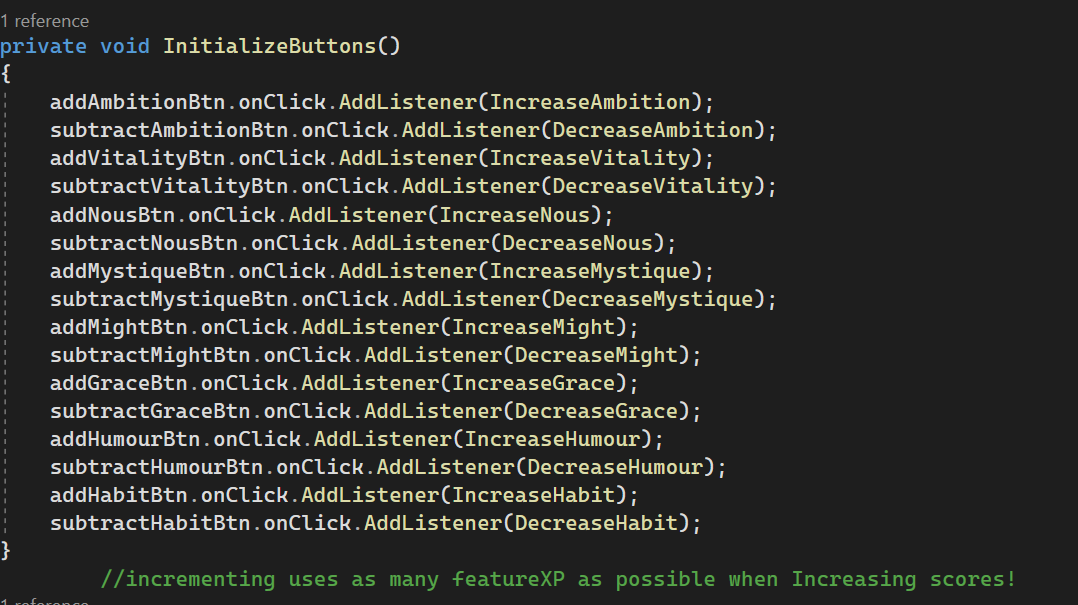
some kind of problem: I've got 8 features each with an increment button to raise its score from a pool of featureXP. Problem being if the total amount of featureXP is enough the increment happens successive times until featureXP is no longer enough to raise a feature's score. Method for comedic effect:
https://i.imgur.com/3rSzXx6.png

Curious if anyone can suggest an edit so that featureXP usage is limited to once per button-mash
solemn summit
!code
eternal falconBOT
Posting code
📃 Large Code Blocks
Use links to services like:
https://gdl.space/, https://paste.ofcode.org/, https://hatebin.com/, https://paste.myst.rs/, https://hastebin.com/
📃 Inline Code
Surround code with three backquotes. Not quotation marks.
To format as C#, add cs to the first line:
```cs
// Your code here
```
Add a comment with a line number if there is an error message.
solemn summit
Where are you calling IncreaseAmbition?
minor patio
On the button its attached to:
https://i.imgur.com/97qgch5.png
 craggy oxide
// In Player Script

public int coinAmount = 0;

// In Coin Script

private PlayerController playerController;
public GameObject player;
public TextMeshProUGUI coinsText;
private int maxCoins = 7;

 void OnCollisionEnter(Collision collision)
    {
    int coinAmount = playerController.coinAmount;

    if (collision.gameObject == player)
    {
    Destroy(gameObject);
    coinAmount += 1;
    coinsText.SetText("Coins:" + coinAmount + "/" + maxCoins);
    }

    }
int coinAmount = playerController.coinAmount - "Object reference not set to instance of an object"
How do I fix this?
minor patio
...but that's not the issue
the issue is my pool of featureXP is being exhausted instead of stepping the score once
 winged raft
craggy oxide
```c#
// In Player Script
public int coinAmount = 0;
// In Coin Script
priva...
winged raft
craggy oxide
```c#
// In Player Script
public int coinAmount = 0;
// In Coin Script
priva...
playerController is never set to anything
solemn summit
craggy oxide
```c#
// In Player Script
public int coinAmount = 0;
// In Coin Script
priva...
You need to tell the code what playerController you want to access. Simplest way to do it is check if collision can GetComponent PlayerController
winged raft
I presume it's attached to your "player" gameobject so just get it off of that in void Start()
playerController = player.GetComponent<PlayerController>();
ooh alr
for some reason VS Code didn't pick up on the error to begin with so I thought it just automatically got it
thanks
minor patio
never assume anything is automatic in coding, Rhys 
solemn summit
minor patio
...but that's not the issue
the issue is my pool of featureXP is being exhausted...
I think the code looks fine? Really seems like it's being called a bunch of times. I'd slap some Debug.Logs around and see where those calls are coming from.
minor patio
the code looks fine, indeed; but when the solution is running I get an artifact where if I raise a score of 4 it jumps to 6 - it depends on the total amound of featureXP available from character selections
I get the impression its because the if statement encompassing the body of code is technically in effect until rep.featureXP is no longer enough to afford another increment of the score
polar acorn
craggy oxide
ooh alr
for some reason VS Code didn't pick up on the error to begin with so I t...
VSCode didn't pick it up because it's not a syntax error. The error doesn't happen until the code runs
 modern rover
Here is log of error coming while building aab
 potent nymph
in hlsl (or for compute shaders in general), I'm having trouble understanding the usage of the X and Y threads
The default code for a compute shader is as follows:
[numthreads(8,8,1)]
void CSMain (uint3 id : SV_DispatchThreadID)
{
    // TODO: insert actual code here!

    Result[id.xy] = float4(id.x & id.y, (id.x & 15)/15.0, (id.y & 15)/15.0, 0.0);
}
I'm assuming Result is the array for the texture, but why is "id.xy" used?
Most articles online use only the X thread for simplicity but I can't wrap my head around using X and Y
rich adder
why are you replying to someone in an unrelated conversation 🤔
 lavish gate
I have 12 prefabs in my scene that all have the same script attached to them (somewhat irrelevant). I have an event in the script that tells the scene managers and what not that the game is over. but you cannot have a prefab reference something in the scene, whats a good way around this?
 summer stump
lavish gate
I have 12 prefabs in my scene that all have the same script attached to them (so...
summer stump
lavish gate
I have 12 prefabs in my scene that all have the same script attached to them (so...
The game over event should be on a single object I would think.
Then you can have that single object have a static accessor and access it that way at runtime
See the singleton page here
 rigid valve
hey can anyone tell me where is the problem ? I want the box to carry me
 lavish gate
rigid valve
hey can anyone tell me where is the problem ? I want the box to carry me
lavish gate
rigid valve
hey can anyone tell me where is the problem ? I want the box to carry me
more context?
rich adder
rigid valve
hey can anyone tell me where is the problem ? I want the box to carry me
lookup rigidbody platform movement
summer stump
rigid valve
hey can anyone tell me where is the problem ? I want the box to carry me
Do you want to be able to move the box at all?
rigid valve
lavish gate
more context?
like its a platformer game and I want to stand on the box while its moving
rigid valve
summer stump
Do you want to be able to move the box at all?
yess box is in the motion but player cant move the box player can only use it as a platform
like a cart
summer stump
rigid valve
yess box is in the motion but player cant move the box player can only use it as...
So no, you don't want the player to move the box
Consider making the box kinematic
rigid valve
no I want the box to move plyer
summer stump
rigid valve
no I want the box to move plyer
I understand, but I asked about the opposite
Which is important. If you don't want the player to move the box, don't make the box dynamic
rigid valve
still its having shackky movements and also its not carrying the player when I am standing
it drops the player
summer stump
Yes, kinematic will help resolve that
Kinematic meaning it does not react to forces (like the players gravity when on top and mass when blocking it)
You can't use velocity though, after changing it
rigid valve
still the sameee
 languid spire
Did you parent the player to the box?
summer stump
rigid valve
still the sameee
It would be great to see the hierarchy there
rigid valve
 rigid valve
languid spire
Did you parent the player to the box?
rigid valve
languid spire
Did you parent the player to the box?
nope
languid spire
might be best to use a parent constraint which you can enable/disable
languid spire
rigid valve
nope
if you want to move the box and have the player move with it they will need some kind of relationship
rigid valve
having friction wont work?
languid spire
no
summer stump
rigid valve
still the sameee
Did you change the movement from velocity for this?
rigid valve
summer stump
Did you change the movement from velocity for this?
yes
I have attached the code
rigid valve
rigid valve
hey can anyone tell me where is the problem ? I want the box to carry me
see
summer stump
rigid valve
see
That is using velocity. I asked if you changed it FROM that
rigid valve
can u pls ellaborate 😶 its my first game
summer stump
rigid valve
can u pls ellaborate 😶 its my first game
Do not use velocity
MovePosition()
rigid valve
what should I replace that with?
rigid valve
cool the movement is fixed now
rigid valve
summer stump
MovePosition()
but the problem of box not carrying the player still remains
rich adder
keep in mind that parenting will work but the player should also kinematic when on the platform
rigid valve
should I parent it from hierchy or the code???
languid spire
in the code, then unparent when the player leaves the box
 languid spire
yes
rigid valve
let me try this rq
languid spire
then you use localposition to move the player
rigid valve
i will write all this in box script right? not the player
languid spire
no, player script
rigid valve
languid spire
no, player script
how exaclty ? 😶
languid spire
well the player knows when he lands on/gets off the box right?
rigid valve
no I have raycast only yo check if the player is grounded
languid spire
so you need to add that first
rigid valve
here i just need to add layermask to check if we are on box right?
 rich adder
no you would need to distinguish you're somehow even on the box
languid spire
if your box has a collider why not use OnCollisionEnter
lavish gate
summer stump
The game over event should be on a single object I would think.
Then you can ha...
so just have singleton that is referenced in the prefab's script and when the 'loseEvent' gets called it does an actual event in the scene?
rich adder
rigid valve
languid spire
if your box has a collider why not use OnCollisionEnter
that will detect the collision from sides too not just the top
languid spire
rigid valve
that will detect the collision from sides too not just the top
yes, and then you can raycast down to check if you are on top
rich adder
ray is best bet ,esp if you want accurate way to detect when off
lavish gate
rigid valve
that will detect the collision from sides too not just the top
then how could you make sure its the top?
languid spire
rich adder
ray is best bet ,esp if you want accurate way to detect when off
but you will have to raycast in update instead of on an event
rigid valve
why this simple mech is so confusing lol 😭
rich adder
i told you earlier too lookup this whole process
you stil need to turn player to kinematic when on platform, otherwise parenting wont keep dynamic from getting twitched off
languid spire
rigid valve
why this simple mech is so confusing lol 😭
because computers do not know anything, it is your responsibility to tell them EXACTLY what you want it to do
rigid valve
rigid valve
here i just need to add layermask to check if we are on box right?
hey but I still kinda confused why cant I use this raycast with laymasking instead of addding a new one
🤔
rich adder
no one said you can't you just dont have a Raycast hit param
How would the raycast know you wanted moving platform instead of ground without raycasthit
languid spire
because you have different outcomes depending on what you have hit, your code will be a mess
rigid valve
rich adder
no one said you can't you just dont have a Raycast hit param
How would the rayca...
sorry if I am asking sm really dumb but I have raycasthit here no? 😶
 rich adder
rigid valve
sorry if I am asking sm really dumb but I have raycasthit here no? 😶
rich adder
rigid valve
sorry if I am asking sm really dumb but I have raycasthit here no? 😶
ur only using to check distance n not what type of collider u hit?
or prob easier to make a another ray that only checks moving plats layer
rigid valve
rich adder
ur only using to check distance n not what type of collider u hit?
like this? :O
 rich adder
rigid valve
like this? :O
rich adder
rigid valve
like this? :O
you can make it the exact same
you still need to check collider with a tag or something
eg
if(raycast.collider.CompareTag("movingplat"))
lavish gate
Apex keep doing what you are doing right now but in future id recommend making a flow chart of how you want your code to run, i made this earlier because i wanted to write a losing method with a countdown for my game.
 rigid valve
lavish gate
Apex keep doing what you are doing right now but in future id recommend making a...
rigid valve
lavish gate
Apex keep doing what you are doing right now but in future id recommend making a...
will keep that in mind thx
rigid valve
rich adder
you still need to check collider with a tag or something
eg
`if(raycast.collider...

correct now? :O
lavish gate
@summer stump Have already used what your solution to my problem was earlier, thanks though i forgot about singletons
 static bay
interesting low number comparison there
lavish gate
Yeah id assume you could always just do hit.distance != 0f
 tight zenith
I have a issue when compiling my game
lavish gate
Do you have everything installed properly?
 fierce sonnet
rich adder
why are you replying to someone in an unrelated conversation 🤔
fierce sonnet
rich adder
why are you replying to someone in an unrelated conversation 🤔
Sry I accidentally clicked on reply.
tight zenith
 rigid valve
😭@rich adder its just making the player big and isnt even carrying the player
 tight zenith
lavish gate
Do you have everything installed properly?
tight zenith
lavish gate
Do you have everything installed properly?
Yeah, the screenshot I sent should show everything I have installed
potent nymph
I have a simple compute shader where all it does is assign the X thread id to an int array (basically just incrementing a number)
#pragma kernel CSMain

struct IncrementTest
{
    int number;
};

RWStructuredBuffer<IncrementTest> increment;

[numthreads(10,1,1)]
void CSMain (uint3 id : SV_DispatchThreadID)
{
    IncrementTest num = increment[id.x];
    num = id.x;
    increment[id.x] = num;
}
 ivory bobcat
rigid valve
😭<@968604165150507078> its just making the player big and isnt even carrying ...
ivory bobcat
rigid valve
😭<@968604165150507078> its just making the player big and isnt even carrying ...
I'm guessing the player isn't scaled at 1 or the box isn't.
potent nymph
however I'm getting an error that Kernel at index (0) is invalid
ivory bobcat
potent nymph
I have a simple compute shader where all it does is assign the X thread id to an...
Should probably ask in #archived-shaders or #💥┃post-processing
potent nymph
here's the c# code
  private void CubeGrid()
    {
        IncrementTest[] data = new IncrementTest[100];

        int size = sizeof(int);
        ComputeBuffer testBuffer = new ComputeBuffer(data.Length, size);
        testBuffer.SetData(data);
        int kernelID = computeShader.FindKernel("CSMain");
        computeShader.SetBuffer(kernelID, "increment", testBuffer);
        computeShader.Dispatch(kernelID, data.Length / 10, 1, 1);

        testBuffer.GetData(data);
        for (int i = 0; i < data.Length; i++)
        {
            Debug.Log(data[i].number);
        }
        testBuffer.Dispose();
    }
but it's not a shader though
and it's more of a beginner question
lavish gate
It literally is a shader though
tight zenith
Does anyone know what's wrong here? I have everything installed as can see.
Error when compiling is attached as a TXT file
 potent nymph
lavish gate
It literally is a shader though
potent nymph
lavish gate
It literally is a shader though
compute shaders are not part of the graphics pipeline
lavish gate
If kernel at index 0 is invalid it means there is an error with your shader code
potent nymph
anyways, I can repost the question in the other channels
lavish gate
HLSL
tight zenith
I dont have a shader?
lavish gate
talking to mookorea mayne
ivory bobcat
tight zenith
I dont have a shader?
You're probably in the wrong channel. This is the coding channel. Try #💻┃unity-talk for the universal help channel.
tight zenith
Alright thanks
potent nymph
lavish gate
If kernel at index 0 is invalid it means there is an error with your shader code
if that's the case, I can't tell what exactly is wrong with the hlsl code
potent nymph
ivory bobcat
Should probably ask in <#497874081329184799> or <#497873924504420362>
I took a look at those channels, and they're not at all related to my question
 potent nymph
ah, I figured out my problem
"num" is a struct, and I was trying to assign id.x (int) to it when I should be assigning it to num.number
 gaunt stone
Hi, i tried importing a project which my friend made to my computer, i installed his asset folder into mine, but on running the project it gives me some error

the referenced script it is talking about does exist in the folder however

 ivory bobcat
And where does the prefab reside?
 fierce sonnet
hi, i am currently programming a evolution simulation and i have problems with the field of view always outputing angle = 0 even though the direction changes. I have print multiple values and aslo tried Vector3.Angle and inputting vector 2 to vector2.angle or vector 3 to vector2.Angle.
        bool IsWithinAngleOfView(Vector2 position)
        {
            Vector2 direction = position - new Vector2(transform.position.x, transform.position.y);
            float angle = Vector2.Angle(direction, transform.forward);
            return Mathf.Abs(angle) <= angleOfSight / 2;
}```This isn't really a coding question but seeing your asset folder structure would be necessary as it's related to your importing of another project.
gaunt stone
ivory bobcat
This isn't really a coding question but seeing your asset folder structure would...
okay ill send a screenshot of my asset directory
gaunt stone
ivory bobcat
This isn't really a coding question but seeing your asset folder structure would...
wait i think i sent it before
in the screenshot
gaunt stone
gaunt stone
this
languid spire
gaunt stone
this
how did your friend package the project?
rigid valve
languid spire
how did your friend package the project?
steve can u please check my code 🥺
 gaunt stone
languid spire
how did your friend package the project?
gaunt stone
languid spire
how did your friend package the project?
sorry i am not sure what do you mean
he sent a zip file of his asset folder
 noble summit
how do you share a unity project
languid spire
gaunt stone
he sent a zip file of his asset folder
get him to do it properly. Unity has Export/Import functions in the Assets menu
gaunt stone
languid spire
get him to do it properly. Unity has Export/Import functions in the Assets menu
oh
let me do that
also, will the changes made by me, inflict his code as well
languid spire
no
languid spire
rigid valve
steve can u please check my code 🥺
what am I checking for?
rigid valve
languid spire
what am I checking for?
why is my player not get back to normal it stays child of box even after I leave the box
._.
 warm depot
is there a way to reference all objects that share the same name? Instantiated objects included?
 glacial forge
are there any good resources or tools for 2D world generation? I have a good perlin noise function to get a height map which I can use to chose terrain type(biome generation), but I dont know how to populate a tile map with a script based on that perlin noise
for context I am making a game similar in style to factorio, so i am using a tilemap system
A future issue is also world wrapping I would like the game to wrap like sid meier's civilization, and im not sure how to go about that, I believe there are 2 schools of though. either duplicate camera but then objects passing over the border create an interesting challenge, or the load the world in chunks and move one chunk from the other end and then they step on that teleport the player. but this is a future problem I can solve but any useful links would be cool
 bright oxide
does anyone know why it results in a null?

 languid spire
bright oxide
does anyone know why it results in a null?
languid spire
bright oxide
does anyone know why it results in a null?
because you did not read the Resources.Load documentation
bright oxide
What part of it
if you mean the format of the path, i tried the one in the documentation and it does not work
minor patio
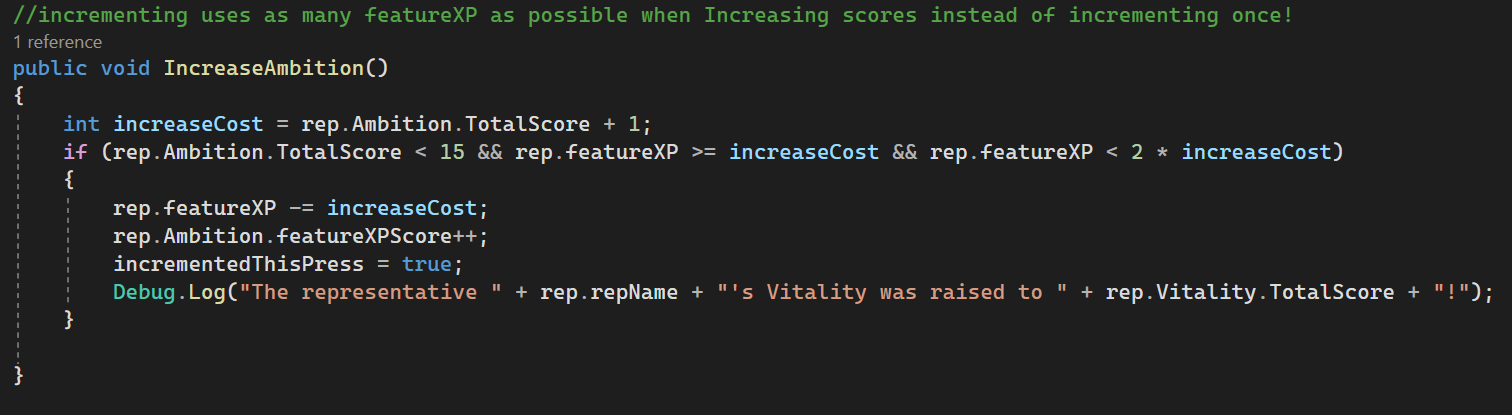
any versed in conditional if statements? I have a method that increments a score by reducing a featureXP pool, but if the pool is large enough to increment more than once it does so:
https://i.imgur.com/McDWGfr.png
I'm trying to get an increment of 1 per button mash - no more, no less
oops
languid spire
bright oxide
What part of it
the whole of the Description
fierce sonnet
fierce sonnet
hi, i am currently programming a evolution simulation and i have problems with t...
I have sent this question over two days could someone pls answer or did i write not enough infomation?
bright oxide
languid spire
the whole of the Description
maybe just tell me what the problem is?
languid spire
bright oxide
maybe just tell me what the problem is?
no, read the docs
 gaunt ice
https://docs.unity3d.com/ScriptReference/Resources.Load.html
hint: read the first paragraph

 earnest atlas
Spent a lot of time trying to understand why my object wasnt rotating properly....
I was using wrong axys rotation
 sleek notch
What does it means? I Have reference to a GameObject that have to on start not active but if I set it into Start() or even into Awake it won't be functional. But if I .SetActive on a button it works normally

 lavish gate
Do you have a scene set
earnest atlas
omg so much find
lavish gate
minor patio
any versed in conditional if statements? I have a method that increments a scor...
Do you mean if player clicks mouse you increment?
languid spire
sleek notch
And Line 30 is????
sleek notch
languid spire
And Line 30 is????
The awake function
lavish gate
sleek notch
Awake is called before start
minor patio
lavish gate
Do you mean if player clicks mouse you increment?
yessir
I'm getting more than singular increments on buttonclick, tho
bright oxide
gaunt ice
https://docs.unity3d.com/ScriptReference/Resources.Load.html
hint: read the firs...
i literally have no clue lol
what is path even
sleek notch
I used all of it in Start() but it have same problem
lavish gate
minor patio
yessir
I'm getting more than singular increments on buttonclick, tho
Are you using a ui button or using a script?
languid spire
sleek notch
The awake function
your Awake function is 3 lines they cannot all be 30
lavish gate
sleek notch
I used all of it in Start() but it have same problem
In what order?
sleek notch
 languid spire
so settingsMenuOne is null
minor patio
lavish gate
Are you using a ui button or using a script?
both

sleek notch
In this
 lavish gate
minor patio
both
<:angerjoy:1068123767219429416>
lavish gate
minor patio
both
<:angerjoy:1068123767219429416>
how many times are you incrementing it?
minor patio
UI button with script attached
lavish gate
Also, no.1 Dont use gameobject.find
sleek notch
lavish gate
Also, no.1 Dont use gameobject.find
I used public but it had some issue
gaunt ice
do you know you can drag and drop the reference?
ofc your field needed to be serialized
lavish gate
sleek notch
I used public but it had some issue
Being?
sleek notch
lavish gate
Being?
not reference
lavish gate
Did you set them in the inspector?
minor patio
it's supposed to be once, but if featureXP is enough it will do it two, even three times
sleek notch
I did
languid spire
sleek notch
In this
Awake is run BEFORE Start, what do you think?
lavish gate
nvm oops
sleek notch
languid spire
Awake is run BEFORE Start, what do you think?
I was doing with start then I just wanted to test it in awake
languid spire
trying to setActive before you actually Find it ain't gonna work is it?
 teal viper
sleek notch
I did public
teal viper
sleek notch
I did public
Take the same screenshot at runtime when the error occurs.
sleek notch
I'll send video
languid spire
and post your full !code to a paste site
eternal falconBOT
Posting code
📃 Large Code Blocks
Use links to services like:
https://gdl.space/, https://paste.ofcode.org/, https://hatebin.com/, https://paste.myst.rs/, https://hastebin.com/
📃 Inline Code
Surround code with three backquotes. Not quotation marks.
To format as C#, add cs to the first line:
```cs
// Your code here
```
Add a comment with a line number if there is an error message.
sleek notch
fierce sonnet
fierce sonnet
I have sent this question over two days could someone pls answer or did i write ...
pls someone 😅😭
gaunt ice
https://docs.unity3d.com/ScriptReference/Debug.DrawRay.html
or drawline, also
https://docs.unity3d.com/ScriptReference/Vector2.Angle.html
ivory bobcat
fierce sonnet
hi, i am currently programming a evolution simulation and i have problems with t...
Position minus position will always be zero
Assuming transform position and position are the same
There's not enough info
 sleek notch
 vernal plume
huh
vernal plume
huh
you have no variable. Do it as float
minor patio
fierce sonnet
pls someone 😅😭
Vector2 direction = position - new Vector2(transform.position.x, transform.position.y);
are you sure this is right? kinda looks like it needs to be a Vector2 position, not direction....
sleek notch
And also horizontal have to have H and vertical V
 hallow adder
fierce sonnet
pls someone 😅😭
hallow adder
fierce sonnet
pls someone 😅😭
your angle calculation is probably wrong. Use transform.up instead. Assuming transform is something 2D like a sprite, you're probably getting (0, 0, 1) in the forward dir which gets implicitly converted to (0, 0) in Vector2.Angle, and if either of the inputs to Vector2.Angle has a very small magnitude it returns 0
- or Vector2.right, it depends on how you've oriented your sprites. Whatever their forward dir would be
 thorn kiln
    public Rigidbody2D myRigidbody;
    public CircleCollider2D myCricleCollider;
    public float flapStrength;
    public LogicScript logic;
    public bool birdIsAlive = true;
public GameObject gameOverScreen;```So, with this stuff, how do you determine what the... I wanted to say "green text", but apparently discords code formatting doesn't colour it like visual studio. Anyway, how do you determine when to use stuff like Rigidbody2D, CircleCollider2D, LogicScript, etc should be. I know they're components on the object, but can you not use the transform properties when you just reference it as a game object?How can I tell if an object is fully inside a trigger?
 stone lance
One way is to do some math and the origin of the object
sleek notch
languid spire
and post your full !code to a paste site
I re-created whole scene, same code and it have no problem now. I don't know, I did same things and no problem now
 graceful spruce
Guys, how can I keep the points saved after I restart a scene
languid spire
graceful spruce
Guys, how can I keep the points saved after I restart a scene
static class or Singleton with DDOL
graceful spruce
languid spire
static class or Singleton with DDOL
I tried the DDOL however it doesn't work, I'll send my code 1 sec
    {
        DontDestroyOnLoad(gameObject);
}```should it be in a Awake class?
languid spire
is that a joke?
graceful spruce
no
languid spire
you need to read about the Singleton pattern
 native seal
can anyone point me in the right direction to achieve something like this? I want loot labels to respect other labels and find a spot on the screen if they are going to overlap
 earnest atlas
what in the unholy UI that?
 tepid summit
no clue'
it looks like they threw 14 games into a blender and poured whatever slurry came out onto their screen
tepid summit
thats what im sayin
 low path
It’s path of exile man…. Items on screen are shown in text when you press a button… and there are a lot of items.
low path
Yeah PoE is known for uh… visual excess…
low path
Tbf you generally filter out items by rarity … this is an extreme example…
tepid summit
"mildly extreme"
low path
Anyway they just wanted to know how to have labels show up in screen in a non overlapping manner in relation to screen position of objects they are labeling. I can’t think of a quick and easy way to do this in Unity so I’m sure it’s a custom algorithm they rolled…. I’m not sure this is a “code beginner” question.
languid spire
native seal
can anyone point me in the right direction to achieve something like this? I wan...
tbh this looks like a job for UIToolkit not legacy IMGUI
north kiln
I feel like you'd do some force directed graph or something
tepid summit
triggers dont work on ui elements do they?
north kiln
north kiln
I feel like you'd do some force directed graph or something
Push the labels away from each other with forces
languid spire
flex box should handle this situation automatically
tepid summit
tepid summit
triggers dont work on ui elements do they?
i know colliders dont
north kiln
languid spire
flex box should handle this situation automatically
I'm not quite sure it does, but I've not done something that would managed to be positioned and also moved by layout?
graceful spruce
hey, so I added a DDOL on a canvas which keps track of the points however they are duplicating and the points are overlapping, is there a way to remove the one before it
 tepid summit
all g @graceful spruce
languid spire
graceful spruce
hey, so I added a DDOL on a canvas which keps track of the points however they a...
DDOL on it's own is not enough, you need Singleton AND DDOL
graceful spruce
ok I got it now
graceful spruce
graceful spruce
hey, so I added a DDOL on a canvas which keps track of the points however they a...
Ok now I fixed it, but when it gets deleted the white and red score gets deleted to the score is missing how can I make it re attach automatically

This becomes missing

{
    private static GameManager instance;
    void Awake()
    {
        if (instance != null)
        {
            Destroy(gameObject);
        }
        else
        {
            instance = this;
            DontDestroyOnLoad(transform.gameObject);
        }

    }
}```This is attactched to the canvas
languid spire
presumably that is a scene reference so you would need to do dependency injection on OnSceneLoaded
graceful spruce
languid spire
presumably that is a scene reference so you would need to do dependency injectio...
How to do that? i mean if you could send docs that would be hepful
 vast vessel
how can i instantiate a game object, inside of another game object so that the game object im instantiating, dosnt penetrate out of the object im instantiating it inside of, using renderer bounds/extents?
im trying to get the effect of ammuntion and supplies dropping out of a box when it breaks.
i know how to get my object's pivot/origin inside of the box, but that will have the object penetrate the box's mesh, which i dont want.
languid spire
graceful spruce
How to do that? i mean if you could send docs that would be hepful
you really need to learn how to do your own research
graceful spruce
languid spire
you really need to learn how to do your own research
and you really need to understand that not everyone has the same knowledge as you in one day
graceful spruce
languid spire
https://docs.unity3d.com/ScriptReference/SceneManagement.SceneManager-sceneLoade...
thank you anyway
languid spire
graceful spruce
and you really need to understand that not everyone has the same knowledge as yo...
would have it been so difficult to type 'Unity OnSceneLoaded' into Google?
 agile hornet
Hello, so I created a player controller. I want it move and jump on input keys, and it works fine. But after jumping and the player lands on ground the player moves on its own without me pressing any button.
public class PlayerController : MonoBehaviour
{
    private float horizontalInput;
    private float forwardInput;
    public float speed = 10f;
    public float jumpForce = 7.5f;
    private Rigidbody PlayerRb;
    public bool onGround = true;

    // Start is called before the first frame update
    void Start()
    {
        PlayerRb = GetComponent<Rigidbody>();
    }

    // Update is called once per frame
    void Update()
    {
        horizontalInput = Input.GetAxis("Horizontal");
        forwardInput = Input.GetAxis("Vertical");


        if(Input.GetKeyDown(KeyCode.Space) && onGround == true)
        {
            Vector3 jumpDirection = (Vector3.right*Time.deltaTime*horizontalInput + Vector3.forward*Time.deltaTime*forwardInput).normalized;
            PlayerRb.AddForce((Vector3.up + jumpDirection)*jumpForce, ForceMode.Impulse);
            onGround = false;
        }

        if(onGround == true)
        {
            transform.Translate(Vector3.right*Time.deltaTime*speed*horizontalInput);
            transform.Translate(Vector3.forward*Time.deltaTime*speed*forwardInput);
            PlayerRb.velocity = Vector3.zero;
        }
    }
    private void OnCollisionEnter(Collision collision)
    {
        if(collision.gameObject.tag == "Ground")
        {
            onGround = true;
        }

    }

}
I searched "dependency injection on onsceneloaded" as per your request and so much detailed and complex stuff came up
agile hornet
agile hornet
```
public class PlayerController : MonoBehaviour
{
private float horizontal...
Help, please..
vast vessel
agile hornet
```
public class PlayerController : MonoBehaviour
{
private float horizontal...
!code
 timber tide
Your problem is you're not logging your code. Get used to using Debug.Log or using breakpoints to figure out your logical problems. If you're still having problems, minimize to where it may be and post again.
eternal falconBOT
Posting code
📃 Large Code Blocks
Use links to services like:
https://gdl.space/, https://paste.ofcode.org/, https://hatebin.com/, https://paste.myst.rs/, https://hastebin.com/
📃 Inline Code
Surround code with three backquotes. Not quotation marks.
To format as C#, add cs to the first line:
```cs
// Your code here
```
Add a comment with a line number if there is an error message.
agile hornet
vast vessel
!code
public class PlayerController : MonoBehaviour
{
    private float horizontalInput;
    private float forwardInput;
    public float speed = 10f;
    public float jumpForce = 7.5f;
    private Rigidbody PlayerRb;
    public bool onGround = true;

    // Start is called before the first frame update
    void Start()
    {
        PlayerRb = GetComponent<Rigidbody>();
    }

    // Update is called once per frame
    void Update()
    {
        horizontalInput = Input.GetAxis("Horizontal");
        forwardInput = Input.GetAxis("Vertical");


        if(Input.GetKeyDown(KeyCode.Space) && onGround == true)
        {
            Vector3 jumpDirection = (Vector3.right*Time.deltaTime*horizontalInput + Vector3.forward*Time.deltaTime*forwardInput).normalized;
            PlayerRb.AddForce((Vector3.up + jumpDirection)*jumpForce, ForceMode.Impulse);
            onGround = false;
        }

        if(onGround == true)
        {
            transform.Translate(Vector3.right*Time.deltaTime*speed*horizontalInput);
            transform.Translate(Vector3.forward*Time.deltaTime*speed*forwardInput);
            PlayerRb.velocity = Vector3.zero;
        }
    }
    private void OnCollisionEnter(Collision collision)
    {
        if(collision.gameObject.tag == "Ground")
        {
            onGround = true;
        }

    }

}
And this code does what?
vast vessel
agile hornet
```
public class PlayerController : MonoBehaviour
{
private float horizontal...
did you even read this? #💻┃code-beginner message
agile hornet
languid spire
And this code does what?
Hello, so I created a player controller. I want it move and jump on input keys, and it works fine. But after jumping and the player lands on ground the player moves on its own without me pressing any button.
wintry quarry
agile hornet
Hello, so I created a player controller. I want it move and jump on input keys, ...
It's because you're using GetAxis instead of GetAxisRaw.
But also you're mixing Rigidbody motion with Transform motion which is a huge problem
languid spire
agile hornet
Hello, so I created a player controller. I want it move and jump on input keys, ...
not the question I asked
 raven hill
using System.Collections;
using System.Collections.Generic;
using UnityEngine;

public class PlayerProjectile : MonoBehaviour
{
    [SerializeField] private Rigidbody2D MyRigid;
    private Vector3 target;

    // Start is called before the first frame update
    void Start()
    {
        target=Input.mousePosition;
        var heading=target - transform.position;
        var distance = heading.magnitude;
        var direction = heading / distance;
        MyRigid.AddForce(direction, ForceMode2D.Impulse);
    }

    void OnTriggerEnter2D(Collider2D col)
    {
        Destroy(gameObject);
    }
}```

```cs
using System.Collections;
using System.Collections.Generic;
using UnityEngine;

public class PlayerThrowing : MonoBehaviour
{
    [SerializeField] private GameObject MP;
    private bool canThrow = true;
    void Update()
    {
        if(Input.GetKeyDown(KeyCode.Mouse1)&&canThrow)
        {
            Instantiate(MP, transform.position, Quaternion.identity);
            canThrow=false;
            StartCoroutine(DelayThrowing());
        }
    }

    IEnumerator DelayThrowing()
    {
        yield return new WaitForSeconds(1.2f);

        canThrow=true;
    }
}```

Does anyone know why the throwing direction is automatically clamped to throw forward?The player moves fine before jumping, but when the player lands after jumping the player start to behave strangely. Like it moving on it's own without any input
vast vessel
why dont you debug it first
like debug your inputs
or take a look at your players rb velocity
it could be anything
agile hornet
wintry quarry
It's because you're using GetAxis instead of GetAxisRaw.
But also you're mixing...
Thank you, so should I resolve to performing movement using rigidbody only?
languid spire
raven hill
```cs
using System.Collections;
using System.Collections.Generic;
using UnityEng...
this
target=Input.mousePosition;
is a ScreenPosition not a World position
agile hornet
vast vessel
or take a look at your players rb velocity
Oh, that very helpful. Thanks!! I'm going to try that.
languid spire
agile hornet
The player moves fine before jumping, but when the player lands after jumping t...
Still not the answer to the question I asked.
What you should have answered is 'I don't know because I have not debugged anything'
vast vessel
also check if onGround is indeed being set to true, when you fall back to the ground. you might have not tagged your ground gameobject, collisions not being registered and ....
 mortal bridge
my question is why collision with ground onground true is at the last lines
vast vessel
vast vessel
how can i instantiate a game object, inside of another game object so that the g...
/\ /\ unanswered question up here for anybody interested
agile hornet
vast vessel
also check if `onGround` is indeed being set to true, when you fall back to the ...
Yes, it is set to true.
vast vessel
agile hornet
```
public class PlayerController : MonoBehaviour
{
private float horizontal...
set your inspector to debug mode to see private properties, and see if horizontalInput and forwardInput are correct.
agile hornet
mortal bridge
my question is why collision with ground onground true is at the last lines
it's just method that check if collision is with ground.
agile hornet
vast vessel
or take a look at your players rb velocity
So it show that when I land on ground after jumping. The velocity keeps increasing, like every frame. It increases in the direction of jumping(in this case the Z direction)
 mortal bridge
@agile hornetPlayerRb.velocity = Vector3.zero;
vast vessel
mortal bridge
<@462580426481860610>PlayerRb.velocity = Vector3.zero;
that dosnt look like it is causing their issue. as a matter of fact, i think it should be fixing it
mortal bridge
players velocity is set to 0 each fps ground on ground is true
vast vessel
agile hornet
```
public class PlayerController : MonoBehaviour
{
private float horizontal...
wait what is this?
Vector3 jumpDirection = (Vector3.right*Time.deltaTime*horizontalInput + Vector3.forward*Time.deltaTime*forwardInput).normalized;
dont you just need Vector3.Up to jump upwards? what do all these calculations resault in? why do you need delta time????????? why are you using your forward input to calculate jump direction what is this?
go watch a charachter controller tutorial or something lmao
mortal bridge
vast vessel
wait what is this?
`Vector3 jumpDirection = (Vector3.right*Time.deltaTime*horizo...
maybe he doesnt like traditional jumping or smthn idk
agile hornet
mortal bridge
<@462580426481860610>PlayerRb.velocity = Vector3.zero;
yes, I tried to set the velocity to zero there. Now it fixes the velocity issue, but then after player lands, the player now moves upwards in air instead on the ground.
mortal bridge
it will jump in the faced direction
mortal bridge
agile hornet
yes, I tried to set the velocity to zero there. Now it fixes the velocity issue,...
wait can I ask you something really stupid
are you sure your scene view is not upside down
agile hornet
vast vessel
go watch a charachter controller tutorial or something lmao
Mate, this is used to get the jump the direction. I don't want the player to simply jump up, I want them to jump with some sense of direction.
tepid summit
vast vessel
/\ /\ unanswered question up here for anybody interested
i nstanitate it just outside the mesh
agile hornet
mortal bridge
wait can I ask you something really stupid
Yes please 🙂
mortal bridge
agile hornet
Yes please 🙂
is scene view upside down or smthng
like the perspective you are watching
or camera idk
tepid summit
if it is..,
vast vessel
tepid summit
i nstanitate it just outside the mesh
i want the object im instantiating to be INSIDE of the box not outside of it
i want it to be completley inside
covered
tepid summit
make the casing not hae a collider
agile hornet
mortal bridge
it will jump in the faced direction
Exactly.
agile hornet
mortal bridge
is scene view upside down or smthng
Nope.
mortal bridge
agile hornet
Exactly.
yeah bro actually kinda stupid people tell you to go take courses or watch tutorials in these kinds of situations
I see what you tryna do
tepid summit
mortal bridge
yeah bro actually kinda stupid people tell you to go take courses or watch tutor...
i kinda like the idea
vast vessel
tepid summit
make the casing not hae a collider
you are not getting what im saying..... okay look, we have the extents property of two mesh renderers. how do i position the game object of one of the mesh renderers, so it is completely inside the extents, of the other objects mesh renderer
tepid summit
i dk
agile hornet
mortal bridge
I see what you tryna do
Well, thanks. I think I should try watching a tutorial.
mortal bridge
agile hornet
Well, thanks. I think I should try watching a tutorial.
yooo what about
adding forces
vast vessel
mortal bridge
yeah bro actually kinda stupid people tell you to go take courses or watch tutor...
how they gonna do something diffrent if they dont even know how to do it normally...
agile hornet
Creating a playercontroller.
tepid summit
they probably do know'
vast vessel
also i recommend NOT watching brackeys
agile hornet
mortal bridge
yooo what about
Creating a PlayerController
tepid summit
agile hornet
Creating a playercontroller.
id recommend rb based movement
tepid summit
vast vessel
also i recommend NOT watching brackeys
why
fierce sonnet
gaunt ice
https://docs.unity3d.com/ScriptReference/Debug.DrawRay.html
or drawline, also
ht...
is there a way to calculate the angle from the object (transform.up) to the other object where 0 degrees is the transform up, in other words i want to change the world origin point from the angle to the objects one? (I hope you understand it)
mortal bridge
pshyics engine be confused with velocity setting to 0 each frame
tepid summit
fierce sonnet
is there a way to calculate the angle from the object (transform.up) to the othe...
i dont understand
mortal bridge
vast vessel
also i recommend NOT watching brackeys
I dont recommend any youtube tutorials just read docs
vast vessel
tepid summit
id recommend rb based movement
it might get a lil hard tho, for a beginner. isnt the built in cc better when you dont need physics interactions with RB's?
earnest atlas
fierce sonnet
is there a way to calculate the angle from the object (transform.up) to the othe...
The angle between vectors is the angle formed at the intersection of their tails. Learn the formulas to find the angle between two vectors using the dot product and cross product along with their proofs and examples.
carmine sierra
how can I prevent this clipping?
tepid summit
vast vessel
it might get a lil hard tho, for a beginner. isnt the built in cc better when yo...
i found rb really easy
no yt tutorial
genuinely
mortal bridge
Yt tutorials suck
tepid summit
carmine sierra
how can I prevent this clipping?
sorting layer
earnest atlas
mortal bridge
Yt tutorials suck
most of them yes
carmine sierra
tepid summit
sorting layer
how and what would it do?
tepid summit
mortal bridge
Yt tutorials suck
A good amount
vast vessel
tepid summit
i found rb really easy
it wont work good when you tryna have snappy movement, and it will stick to walls, requiring lots of hacky solutions to fix
vast vessel
vast vessel
you are not getting what im saying..... okay look, we have the extents property ...
. any body?
mortal bridge
tepid summit
A good amount
yep. and let me tell you that if its a popular one it suckest the most. 5-10 views is good enough for it to be good
carmine sierra
carmine sierra
how can I prevent this clipping?
any ideas?
raven hill
using System.Collections;
using System.Collections.Generic;
using UnityEngine;

public class PlayerProjectile : MonoBehaviour
{
    [SerializeField] private Rigidbody2D MyRigid;
    private Vector3 target;
    private Vector3 ScreenPos;

    // Start is called before the first frame update
    void Start()
    {
        ScreenPos=Input.mousePosition;

        target = Camera.main.ScreenToWorldPoint(ScreenPos);

        /*var heading=target - transform.position;
        var distance = heading.magnitude;
        var direction = heading / distance;*/
        MyRigid.AddForce(target, ForceMode2D.Impulse);
    }

    void OnTriggerEnter2D(Collider2D col)
    {
        Destroy(gameObject);
    }
}```

So this works, but it's just slightly off. Does anyone know ho I could fix it?using System.Collections;
using System.Collections.Generic;
using UnityEngine;
public class PlayerThrowing : MonoBehaviour
{
[SerializeField] private GameObject MP;
private bool canThrow = true;
void Update()
{
if(Input.GetKeyDown(KeyCode.Mouse1)&&canThrow)
{
Instantiate(MP, transform.position, Quaternion.identity);
canThrow=false;
StartCoroutine(DelayThrowing());
}
}
IEnumerator DelayThrowing()
{
yield return new WaitForSeconds(1.2f);
canThrow=true;
}
}```
This is where I instantiate the projectilemess with the instantiate inputs
timber tide
I'm not understanding your direction
languid spire
raven hill
```cs
using System.Collections;
using System.Collections.Generic;
using UnityEng...
Add force takes a direction not a position
timber tide
It's just a point here, no?
carmine sierra
carmine sierra
how can I prevent this clipping?
how can I fix this?
languid spire
carmine sierra
how can I fix this?
you have been told, sorting layer, if you do not know what this is look at the docs
carmine sierra
languid spire
you have been told, sorting layer, if you do not know what this is look at the d...
it will help even considering the object is teleporting to the mouses position?
languid spire
considering you do not specify what 'this' actually is, how could I know?
carmine sierra
this is clipping
timber tide
sorting layer
languid spire
wtf is 'this'?
carmine sierra
the cannonball is teleporting the mouse and clips into the ground
raven hill
languid spire
Add force takes a direction not a position
thx it works
languid spire
carmine sierra
i said lol
where
carmine sierra
carmine sierra
this is clipping
here
carmine sierra
carmine sierra
how can I prevent this clipping?
here
languid spire
that says this not what this is
gaunt ice
fierce sonnet
is there a way to calculate the angle from the object (transform.up) to the othe...
replace your forward with up? they are both direction
carmine sierra
languid spire
that says this not what this is
dk what you mean i sent a vid
languid spire
still did not specify what this is
languid spire
what is clipping
languid spire
which objects are clipping
languid spire
then wtf did you not say that?
carmine sierra
im confused lol
languid spire
you cannot just say 'this' and expect us to know what this is, you have to be specific
carmine sierra
are you confused or is it me
languid spire
I'm not confused, you need to ask questions better
carmine sierra
carmine sierra
how can I prevent this clipping?
how is this not enough information
languid spire
because only you knows what you mean by this
carmine sierra
I gave the cannonball and ground the same sorting layer but they still clip
 modest dust
I guess what you really want is to make the ball not go "into" the ground area, i.e. stop at it's surface?
tepid summit
make the ball 1 more
carmine sierra
modest dust
I guess what you really want is to make the ball not go "into" the ground area, ...
yeah
modest dust
Then say so for the love of god
carmine sierra
tepid summit
make the ball 1 more
okay ill try that
tepid summit
set ball to 1 and ground to 0
carmine sierra
modest dust
Then say so for the love of god
does clipping not mean that?
preventing it
modest dust
Setting the sorting layer will only make it render above the ground
carmine sierra
tepid summit
set ball to 1 and ground to 0
ball just moves over it now
carmine sierra
modest dust
Setting the sorting layer will only make it render above the ground
yeah thats what I thought
ivory bobcat
carmine sierra
does clipping not mean that?
You could be referring to the camera, background, textures etc
modest dust
To prevent the ball to actually go into the ground either use colliders and move the ball to the mouse pos using physics or make your own custom stuff
carmine sierra
ivory bobcat
You could be referring to the camera, background, textures etc
fair
languid spire
Did you set the correct Order in Layer for both objects?
carmine sierra
languid spire
Did you set the correct Order in Layer for both objects?
yyyes
but cause its following the mouse i don't think the layers will change anything?
ivory bobcat
I think he said the drag operation doesn't use physics until the ball is launched - he's teleporting the ball.
carmine sierra
ivory bobcat
I think he said the drag operation doesn't use physics until the ball is launche...
yeah
modest dust
carmine sierra
but cause its following the mouse i don't think the layers will change anything?
If you're teleporting the ball directly then nothing besides custom code will prevent it from going into the ground
So either that or physics
carmine sierra
modest dust
If you're teleporting the ball directly then nothing besides custom code will pr...
but what if I want it so even when the ball is following the mouse, if it touches the ground, it can not go any lower
carmine sierra
I know I could use something to do with the y coordinates, but I will have different weapons
modest dust
Then physics or a bunch of custom code
carmine sierra
modest dust
physics
but what exactly? I don't need the answers given but I don't know where I'd start
languid spire
Colliders, Rigidbodies
modest dust
Set the colliders correctly and apply force / change velocity so that it goes towards the mouse
Physics will prevent the ball from going into the ground
carmine sierra
modest dust
Set the colliders correctly and apply force / change velocity so that it goes to...
ive just been translating it to the mouses position, are you saying it should be translated via physics instead?
languid spire
do not use translate, use rigidbody moveposition
modest dust
Or custom code
carmine sierra
languid spire
do not use translate, use rigidbody moveposition
will the result be visually the same
languid spire
no
ivory bobcat
Either that or raycast towards the mouse and stop the ball/string intermediately
carmine sierra
ivory bobcat
Either that or raycast towards the mouse and stop the ball/string intermediately
when would i do that
whe nthe ball touches?
carmine sierra
is there any built in functions which can tell when two objects are touching
like is touching or something
ivory bobcat
Sure physics
mortal bridge
carmine sierra
like is touching or something
make unvisible colliders?
carmine sierra
mortal bridge
make unvisible colliders?
yeah im gonna try that first
mortal bridge
carmine sierra
yeah im gonna try that first
then dont forget collision detection
 trail heart
I recommend clamping by distance or by position as well (or both)
No need for colliders when you can always predict where the object's motion should stop
Colliders don't work smoothly anyway for any non-physically moved objects
mortal bridge
yeah theres that
ooh so you are the angry bird guy
I remembr
yeah what spazi and mao says makes more sense in this context
ivory bobcat
https://docs.unity3d.com/ScriptReference/Physics.SyncTransforms.html if you need to sync the collider..
trail heart
mortal bridge
yeah what spazi and mao says makes more sense in this context
Just supporting what Mao suggested ^^
mortal bridge
fixed
 wind raptor
Just starting to wrap my head around events. I've only used references up to this point. Is there a way to invoke a unity event with a parameter?
 scenic saffron
i made a player movment script but it has 2 issius
-
if i dont move exactly in one direction (e. g. y=70°) i go faster
-
if i hold down space my second jump is a little bit higher
scenic saffron
raven hill
```cs
using System.Collections;
using System.Collections.Generic;
using UnityEng...
how do i put my code in a box like this
mortal bridge
wind raptor
Just starting to wrap my head around events. I've only used references up to thi...
sure is
mortal bridge
@scenic saffronhey man just share it in one of these sites !code
eternal falconBOT
Posting code
📃 Large Code Blocks
Use links to services like:
https://gdl.space/, https://paste.ofcode.org/, https://hatebin.com/, https://paste.myst.rs/, https://hastebin.com/
📃 Inline Code
Surround code with three backquotes. Not quotation marks.
To format as C#, add cs to the first line:
```cs
// Your code here
```
Add a comment with a line number if there is an error message.
mortal bridge
Surround code with three backquotes. Not quotation marks.
To format as C#, add cs to the first line:
// Your code here
Movment nice
well diagnal movement is usually faster in games because of mathematics
 scenic saffron
i thought its only when i press to movment keys at the same time like a+w
mortal bridge
I worked in 2d games its a common issue in 2ds we used to fix it by claming 1.4 to 1
and normalize in unity I am guessing
mortal bridge
scenic saffron
i made a player movment script but it has 2 issius
1. if i dont move exactly in...
for 2nd issue consider a timer
scenic saffron
i have a timer
mortal bridge
or increaesee cooldown
scenic saffron
mortal bridge
or increaesee cooldown
not working
my first jump is fine then it goes up by a little bit and then it stays at that value
 cosmic dagger
scenic saffron
i made a player movment script but it has 2 issius
1. if i dont move exactly in...
cosmic dagger
scenic saffron
i made a player movment script but it has 2 issius
1. if i dont move exactly in...
normalize your movement vector before multiplying the speed . . .
graceful spruce
I have a canvas where I added a dont destroy on load script, inside the canvas there’s 2 texts and those are assigned to the player 1 and player 2 when object collide with them they lose a point and the other player gets a point. However, when I load another round/scene it says that the text object has been destroyed and im accessing it. How can I fix that?
wintry quarry
graceful spruce
I have a canvas where I added a dont destroy on load script, inside the canvas t...
You'd either need the text object to also be DDOL or for your script to find the new ones when loading a new scene
earnest atlas
is there a way to create DDOL object from prefab?
wintry quarry
The best way though would be for the text objects to listen to events / read data from your Singleton instead of the other way around
graceful spruce
When I add DDOL script to the text it says “cant add them it has to be root game object”
scenic saffron
cosmic dagger
normalize your movement vector before multiplying the speed . . .
isent it allredy normelized?
 wintry quarry
earnest atlas
is there a way to create DDOL object from prefab?
wintry quarry
earnest atlas
is there a way to create DDOL object from prefab?
Instantiate it, and call DDOL on the instance
mortal bridge
scenic saffron
isent it allredy normelized?
I don't see it
 languid spire
scenic saffron
isent it allredy normelized?
languid spire
scenic saffron
isent it allredy normelized?
movementspeed. ?
languid spire
 cosmic dagger
scenic saffron
isent it allredy normelized?
cosmic dagger
scenic saffron
isent it allredy normelized?
yes, it is, but why are you multiplying by movementspeed and 10? also, is this method called in Update, because you're using the default force mode which applies force over time . . .
scenic saffron
 mortal bridge
😮
cosmic dagger
scenic saffron
movementspeed is a float, right? it doesn't have a normalized property . . .
mortal bridge
is it movementspeed. ?
scenic saffron
my movment vector (moveDirektion) is normelized
carmine sierra
when setting a variable does the collider data type accept any kind of collider
languid spire
carmine sierra
when setting a variable does the collider data type accept any kind of collider
yes
scenic saffron
mortal bridge
it doesnt run in update guy sent his code
it runs in fixed update
 nova shore
trying to make a script where pressing a key will make it so that a cube will spawn in front of player
im using transform.forward and after a lot, ive found that transform.forward vector runs from the origin to the point that is 1 unit from the player head.
(tell me if im wrong)
why doesnt it start from the player head instead of the origin?
carmine sierra
If (otherCollider == weaponCollider) --> I am trying to make it so that code only accepts the collider of weaponCollider
 cosmic dagger
nova shore
trying to make a script where pressing a key will make it so that a cube will sp...
cosmic dagger
nova shore
trying to make a script where pressing a key will make it so that a cube will sp...
transform.forward is the z axis of the GameObject's transform. you need to add how many units in front you want the other GameObject to be . . .
carmine sierra
carmine sierra
If (otherCollider == weaponCollider) --> I am trying to make it so that code onl...
However It does not break despite the reference being correct
languid spire
carmine sierra
However It does not break despite the reference being correct
then the reference is not correct. Are you using a prefab reference rather than an instance reference
carmine sierra
languid spire
then the reference is not correct. Are you using a prefab reference rather than ...
using an instance reference
scenic saffron
i guess i will leve the extra speed in the game for speedruners to expliot
but what about the jumping
languid spire
carmine sierra
using an instance reference
then log both using GetInstanceID
cosmic dagger
nova shore
trying to make a script where pressing a key will make it so that a cube will sp...
the transform is located at the pivot of the GameObject. are you using the transform of the player head or the player GameObject?
carmine sierra
languid spire
then log both using GetInstanceID
thanks ill try that
nova shore
cosmic dagger
`transform.forward` is the z axis of the GameObject's transform. you need to add...
mate i know how to control its magnitude
the problem is that it doesnt exactly give me/convert the local forward point to world space
whats happening is
whenever i try spawning the cube and set its position to transform.forward * 10, the cube spawns 10 units away from origin and in the direction that player is looking
i want it to spawn 10 units away from player and in the direction that player is looking
nova shore
cosmic dagger
the transform is located at the pivot of the GameObject. are you using the trans...
doesnt matter what the transform im using, even if im using the wrong player object transform
it should still be in front of the player just offsetted wrongly on the y-axis
its spawning from the origin not player
carmine sierra
languid spire
then log both using GetInstanceID
it logs it correctly
nvm it shouldn't be 0 right
cosmic dagger
nova shore
mate i know how to control its magnitude
the problem is that it doesnt exactly ...
well, where are you spawning the cube? we don't know where that is . . .
nova shore
cosmic dagger
well, where are you spawning the cube? we don't know where that is . . .
ur messing with me...
ive told u im tryna spawn it in front of player
lemme just sketch a diagram, it might help u understand
cosmic dagger
nova shore
ur messing with me...
ive told u im tryna spawn it in front of player
we have no code to look at. i have no idea what variable or value is used to spawn the cube . . .
nova shore
cosmic dagger
we have no code to look at. i have no idea what variable or value is used to spa...
just forget it, someone else help me
"i have no code to look at"
make it up then mate, ive told u the objective.
lemem just sketch a diagram to clarify
cosmic dagger
you said you're trying to spawn the cube in front of the player, but where (what position) do you actually spawn it at? show code . . .
tepid summit
nova shore
just forget it, someone else help me
"i have no code to look at"
make it up the...
can you show me youe script?
cosmic dagger
why the attitude? good luck then . . .
languid spire
carmine sierra
nvm it shouldn't be 0 right
no it should definitely not be 0
nova shore
the cube should spawn at (x,y,z)
but its spawning at (x1,y1,z1)
i labelled the x1,y1,z1 as transform.forward cus when i log it thats what it prints
 nova shore
tepid summit
can you show me youe script?
nova shore
tepid summit
can you show me youe script?
yer 1 sec
vast vessel
vast vessel
how can i instantiate a game object, inside of another game object so that the g...
/\ /\ unanswered question up here for anybody interested, thanks.
nova shore
tepid summit
can you show me youe script?
                Debug.Log(transform.forward * 2.1f);
                Debug.Log(transform.position);
                //hum.SetState(Humanoid.States.ATTACKING);
                //Vector3 forwardDir = transform.forward - transform.position.normalized;
                GameObject clone = Instantiate(cube, transform.forward, Quaternion.Euler(0,0,0));
                clone.transform.localScale = new Vector3(1, 1, 1);
                clone.transform.position = transform.forward * 20; //tried setting the position so that it would appear in front of player
                Destroy(clone, 1);

//irrelevant to the issue but kept it
 Collider[] Targets =  bc.ReturnTargetsInBox((transform.forward * 2.1f),new Vector3(1,1,1));
                Debug.Log(Targets.Length);
@cosmic dagger heres your code to look at'
 short hazel
Yeah transform.forward is a direction, not a position. If you need it to be offset 1 unit forward according to the current position then you need transform.position + transform.forward
nova shore
tepid summit
<@134945562473529344> heres your code to look at'
dont think he gonna come back. he doesnt even understand the scenario to help me man
nova shore
short hazel
Yeah transform.forward is a direction, not a position. If you need it to be offs...
isnt it negative? since the position vector is from the origin?
 icy fossil
Hey guys, i'm pretty new to coding and idk if this question is more fitting in #⚛️┃physics but i've encountered a weird bug
Basically my Character can move trough walls, but only if i do not see the scene view. What i mean is that, when i have both the scene view and game view open everything is fine and the wall blocks the player. But when i only look at the game view he can suddenly move through them as if they were air
Any help is greatly appreciated
nova shore
tepid summit
you just had an attitude to him
sry was kinda gettin pissed
he never read my original question
my bad
short hazel
The position is not at the origin
nova shore
short hazel
Yeah transform.forward is a direction, not a position. If you need it to be offs...
dude i made the same mistake 10 days ago
ty ty


 nova shore
my dumbass
nova shore
nova shore
my dumbass
forwardDirFromPlayer = (trans.forward + trans.pos).norm
short hazel
What?
tepid summit
incorrect
short hazel
The forward direction is transform.forward, nothing else
nova shore
short hazel
The forward direction is transform.forward, nothing else
incorrect labelling mb
short hazel
Here you're computing a direction from a position and a direction, that's not right
A direction can only be determined from two positions when doing a subtraction
cosmic dagger
nova shore
dont think he gonna come back. he doesnt even understand the scenario to help me...
Your scenario is easy. Spawn at position of the object you want to be in front of, then multiply by how many units away
We can't tell where you're originally spawning the cube without code (that's why I asked)
Now with the actual code, your issue is that you're using transform.forward as the position which is incorrect as that is a direction
Very easy to help and debug but you didn't understand the situation . . .
nova shore
short hazel
A direction can only be determined from two positions when doing a subtraction
ye wrongly labelled the variable mb
"Forward Vector from Player"
eh forget it, its working
bad at naming stuff
short hazel
I don't really know how, but as long as it works
nova shore
short hazel
I don't really know how, but as long as it works
gamedev mindset
icy fossil
icy fossil
Hey guys, i'm pretty new to coding and idk if this question is more fitting in <...
they all have colliders, i tried adding rigidbodys to the walls because desperation but that only made it so that i cant control the player outside the bounds for some reason
I also tried implementing code that would snap the player back if he goes out of bounds but that doesn't work either
 hardy heart
Hello! I am a new unity designer and I just watched GMTK's beginner flappy bird tutorial. I am trying to make sure that you can't get more score after dying. Please help...
tepid summit
reload scene on death
hardy heart
? I literally started yesterday so i know nothing lol
I cant find much online to help
tepid summit
followm the tutorial
hardy heart
he said the next best thing to do was to try to do this on your own, i couldn't figure it out
icy fossil
you could google how to reload a scene on death
hardy heart
ok
Well i want to keep my game over screen, but if you happen to land in between a pipe, you gain 1 more point.
That's what I want to stop
 dense cypress
if you're using cc and not rigidbody, what's the best way to move the character keeping in mind it wants to interact with other objects with physics
 delicate zinc
is this the right way to set default settings

idk if im doing smt wrong cos its not working
 rare basin
that doesn't make sense
you are trying to load a key
okay nvm i read it wrong
yea it's good
delicate zinc
oh ok then its probably smt to do with my code to set the volume from playerprefs
languid spire
delicate zinc
is this the right way to set default settings
that will ony set it if it already exists. So how do you get the key in the first time?
 sterile radish
how would i change this function to target the first enemy it sees rather than the closest?
https://hatebin.com/fgjnpyqqba
 spare mountain
languid spire
that will ony set it if it already exists. So how do you get the key in the firs...
spare mountain
languid spire
that will ony set it if it already exists. So how do you get the key in the firs...
pretty sure that's not true
languid spire
spare mountain
pretty sure that's not true
Absolutely sure it is
spare mountain
languid spire
Absolutely sure it is
how do you make a new key in that case?
languid spire
sorry wrorng, missed the !
spare mountain
delicate zinc
is this the right way to set default settings
are you doing a PlayerPrefs.Save()?
languid spire
which is now worse because it will only save once
spare mountain
sterile radish
how would i change this function to target the first enemy it sees rather than t...
"first" in what regard?
delicate zinc
spare mountain
are you doing a PlayerPrefs.Save()?
no i somehow never realised that was a thing 😭
spare mountain
delicate zinc
no i somehow never realised that was a thing 😭
it saves automatically on exit
delicate zinc
spare mountain
it saves automatically on exit
ty adding playerprefs.save fixed it
i have my settings as a different scene as the main menu so it didnt save the playerprefs
languid spire
sterile radish
how would i change this function to target the first enemy it sees rather than t...
you cannot
spare mountain
languid spire
you cannot
slow down, give them a chance to explain
sterile radish
spare mountain
"first" in what regard?
i have this script attatched to a tower in my game and it locks onto the nearest enemy and shoots however i would like to change it in a way so that it shoots at the first enemy it sees not the closest
spare mountain
sterile radish
i have this script attatched to a tower in my game and it locks onto the nearest...
what do you mean by the "first enemy it sees"?
is this like a tower defense game?
languid spire
so, as I said, you cannot, this code is not suitable for that
sterile radish
spare mountain
what do you mean by the "first enemy it sees"?
is this like a tower defense game...
yeah similar to how in bloons td the monkeys shoot the first balloon they see and not the closest
spare mountain
sterile radish
yeah similar to how in bloons td the monkeys shoot the first balloon they see an...
if your enemies are in order of first to last just shoot the first one that's in range
languid spire
no, you need to implement a trigger system, this uses completely different code
spare mountain
steve what are you talking about
languid spire
FindWithTag gives a random sequence of Enemies not 'the first'
spare mountain
languid spire
FindWithTag gives a random sequence of Enemies not 'the first'
ooh I missed that
good catch
you could make a separate enemy list and append them as they spawn so you can shoot the first one in range
languid spire
No, you need a trigger system and to implement OnTriggerEnter
spare mountain
but then varying speeds are an issue
spare mountain
languid spire
No, you need a trigger system and to implement OnTriggerEnter
they want to shoot the furthest along enemy, how is this achieved with ontriggerenter?
languid spire
no they want the first in range
spare mountain
the furthest along enemy in range, sorry
timber tide
usually if you're casting or getting a group of objects in the same frame you'd want to sort it
spare mountain
you could sort by distance along the track if the enemies have a variable for that ^
that would be the best solution I can think of, but I want to know how steve wants to use triggers
languid spire
simple put a trigger collider on the tower, when ontriggerenter fires that is the one you shoot
spare mountain
languid spire
simple put a trigger collider on the tower, when ontriggerenter fires that is th...
that doesn't solve the issue
what if an enemy moves faster inside of the trigger
now it's ahead, but it entered behind another enemy
spare mountain
yes, the first one isn't the first one that enters, it's the closest to the end (at least in bloons?)
roshi, can you clarify
do you want the first enemy that the tower sees (aka the one that enters its range first), or do you want the furthest along enemy the tower sees?
sterile radish
sorry, i should've explained this better, i want to shoot the first enemy but i want the tower behaviour to be similar to how amster is describing it and in bloons
languid spire
'similar to how in bloons td the monkeys shoot the first balloon they see and not the closest'
spare mountain
yes
so like I said
the furthest along enemy in range
that's how it works in bloons
short hazel
On trigger enter, add the enemy to a list. On enemy death / on trigger exit, remove it from the list. In Update get the closest one and shoot at it
spare mountain
short hazel
On trigger enter, add the enemy to a list. On enemy death / on trigger exit, rem...
this also isn't what they want as far as I can tell
oh wait
by "closest" do you mean closest to the goal?
that could work
timber tide
how do you resolve it all in a list using trigger, ah I guess it wouldn't be on the same frame then
Do like a queue, add newest enemies to it and then fire at the first in queue and check if it's still in range.
spare mountain
timber tide
Do like a queue, add newest enemies to it and then fire at the first in queue an...
sort of
you need to update based on completion to the goal
timber tide
Ah, right. The course can be somewhat complex too
Little tricky to keep sorted, so I guess you have to go through the list each update.
short hazel
I guess if the path is not straight you could represent it with a series of nodes, and use something to sort the enemies based on which node they're at, and how much in-between two nodes they are, to get the closest
With a straight path it's simple, but if you make some sort of circuit it gets complex fast
spare mountain
oof can't we just just store a variable for distance to the goal in each enemy
timber tide
it doesn't actually need to be resolved each frame is there is a cooldown on attacking
sterile radish
should i share my code for reference?
spare mountain
sterile radish
should i share my code for reference?
the issue isn't your code
short hazel
Technically you could only recalculate it when one dies
spare mountain
short hazel
Technically you could only recalculate it when one dies
not inherently
because one could presume some will go faster than others
timber tide
but if it does need to be resolved each frame, you need to resolve it after physics update (if you're using OnTrigger)
short hazel
Then do it each frame, and if it gets slow optimize. In order:
- Make it work
- Make it pretty
- Make it fast
timber tide
or just physics query a overlap sphere or something yourself
Yeah, lot of ways you can optimize it, and I played that balloons game once and it was far from optimized
 potent hornet
I'm trying to use my controller, and I can't figure out how to get the axises for my left and right stick. Do I need to change something in my Input Manager's settings
rich adder
rigid valve
😭<@968604165150507078> its just making the player big and isnt even carrying ...
You have scale issue going on
rigid valve
rich adder
You have scale issue going on
I fixed the things now evrything is going smoothly ty for th help
 quartz mural
rich adder
quartz mural
rich adder
these videos are the wors
quartz mural
apologies
rich adder
do a favor and post properly
rich adder
quartz mural
apologies
post !code via website
eternal falconBOT
Posting code
📃 Large Code Blocks
Use links to services like:
https://gdl.space/, https://paste.ofcode.org/, https://hatebin.com/, https://paste.myst.rs/, https://hastebin.com/
📃 Inline Code
Surround code with three backquotes. Not quotation marks.
To format as C#, add cs to the first line:
```cs
// Your code here
```
Add a comment with a line number if there is an error message.
quartz mural
public void SetMoveNames(List<Move> moves)
{
    for (int i = 0; i < moveText.Count; ++i)
    {
        if (i < moves.Count)
            moveText[i].text = moves[i].Base.Name; //Shows pokemon's move instead of the word move
        else
            moveText[i].text = "-"; // if there is no move it will show -
    }
}
no the whole class
also post the error stac trace
spare mountain
quartz mural
```cs
public void SetMoveNames(List<Move> moves)
{
for (int i = 0; i < move...
also put cs on the same line as ``` when posting code
quartz mural
spare mountain
also put cs on the same line as \`\`\` when posting code
i did 🤷♂️
spare mountain
quartz mural
i did 🤷♂️
this should happen then (int)
cs
not this
ok
rich adder
but anyway post it through a link
large code should not be posted in codeblocks
https://hatebin.com for example

spare mountain

 rich adder
you supposed to paste it , hit save and send link
are they still trying to figure how to post...
spare mountain
rich adder
are they still trying to figure how to post... <:UnityChanThink:8851695945605448...
maybe the code fairy deposited them a working system
rich adder
the bird
short hazel
If it fails to save, try another one. A few days ago gdl.space didn't work for another user
quartz mural
rich adder
why do people omit the rest of the code..
how the hell we gonna know which line is the error if you omit the info
rich adder
quartz mural
https://gdl.space/akagovurik.cs
I said post the ENTIRE class
- error from console..
quartz mural
quartz mural
rich adder
I said post the ENTIRE class
do u mean the entire script?
rich adder
jesus..
spare mountain
😭
spare mountain
quartz mural
do u mean the entire script?
yes, the entire script
rich adder
quartz mural
do u mean the entire script?
the code thats in the file
quartz mural
ok
wintry quarry
has the full error message been shared yet?
rich adder
in a very blury video above yes
spare mountain
wintry quarry
has the full error message been shared yet?
it's in the video, but it's just a nullref error
rich adder
wintry quarry
spare mountain
it's in the video, but it's just a nullref error
it's not "just a nullref errror"
spare mountain
it's not?
wintry quarry
the error contains the filename and line number of the error
the most important parts of the error message
share it
quartz mural
spare mountain
oh sorry yeah
rich adder
quartz mural
https://gdl.space/bugosaqaja.cs
ok now post the screenshot of the error, fully selected in console window
spare mountain
send the error
spare mountain
just send it
quartz mural
ok ok
cosmic dagger
rich adder
I said post the ENTIRE class
Code is hard to come by, especially, when they have an error. I had the same issue earlier today . . .
rich adder
quartz mural
its in the vid but 😭
the blury
wintry quarry
quartz mural
its in the vid but 😭
the full message is never shown in the video AFAICT
quartz mural
 wintry quarry
quartz mural
wintry quarry
quartz mural
Ok so it's this line:
moveText[i].text = moves[i].Base.Name; //Shows pokemon's move instead of the word move1
spare mountain
and it's specifically "moves"
wintry quarry
So either moves is null, moveText is null, or moves[i] is null or moves[i].Base is null or moveText[i] is null
short hazel
Yeah all that could be null
wintry quarry
you need to figure out which thing is null first
short hazel
Not just the text
rich adder
Debug time
quartz mural
how do i unnull it
spare mountain
wintry quarry
you need to figure out which thing is null first
is it not telling you in the error?
 rich adder
know which one is null, assign it
wintry quarry
quartz mural
how do i unnull it
You don't do that until you know WHICH is null
don't try to skip the first step
wintry quarry
spare mountain
is it not telling you in the error?
that is only telling us the mfilename/line number/ and method where the error is
rich adder
that only brings you to the line
wintry quarry
there are 5 references on that line that are being dereferenced
quartz mural
wait
can i show u smt
if i comment the line where i call the funciton
look what ahppens
 wintry quarry
quartz mural
wintry quarry
quartz mural
what's your point?
quartz mural
thats when i comment the line when i call the fucniton
quartz mural
to switch the "move" with the pokemons acc move
wintry quarry
You still need top fix the error
wintry quarry
Debug.Log or attach the debugger
quartz mural
okkkk...
wintry quarry
e.g.
if (moves == null) Debug.Log("moves is null");
/// etc```there are 5 things you need to check
quartz mural
ok
rich adder
learn to use debugger and step through code 😈
quartz mural
🫡
 abstract finch
do while loops check the condition after all the code is ran through inside it or does it check after every line?
short hazel
Before all the code
wintry quarry
abstract finch
do while loops check the condition after all the code is ran through inside it o...
it checks before each iteration
abstract finch
thanks!
short hazel
do ... while checks after, ensuring at least one iteration
wintry quarry
while (cond) {
  A();
  B();
}```
Does:
- check cond (bail out if false)
- run A()
- run B()
- check cond again (bail out if false)
... so ondoes for int loop function the same way?
spare mountain
just with incrementation, yes
abstract finch
got it thanks
wintry quarry
abstract finch
does for int loop function the same way?
for loop is:
for (init; cond; increment) {
  A();
  B();
}```
And it goes like this:
- run init
- check cond
- A();
- B();
- increment
- check cond
... repeat
@abstract finchnote that the init part only runs at the start
it's just a while loop with a couple extra bits
abstract finch
i see thanks!
earnest atlas
 private static GameController _instance;

 public static GameController Instance
 {
     get
     {
         if (_instance != null) return _instance;
         var gameControllerObject = new GameObject("GameController");
         _instance = gameControllerObject.AddComponent<GameController>();
         DontDestroyOnLoad(gameControllerObject);
         return _instance;
     }
 }```
I have code on instance object. I already have this object in all scenes. Does it do anything considered GameManager object already exists.this code is going to create duplicate objects
earnest atlas
Yeah as I though gotta remove it
wintry quarry
with this code you should NOT have the thing in the scene at edit time
Either use this code OR place the thing in all the scenes
not both
earnest atlas
So this is entire thing I need?

Are there any pros of generating such object or no?
Considered on top if you want it to be something more complext then just data storage
 bold nova
Hi, I', trying to create a sequence, where camera flyies through the whole (2d) level, after that the player charachter should play animation, but only after the camera span is over. I've tried it with DoTween and Coroutines, but they still work simultaneously. How to I give full controll to camera first?
Game manager code
    private void StartSessoin()
    {
// start camera span
        playerObserver.StartCameraSpanCoroutine();

// start intro animation
        guy.LetGoPresent();
    }

CAMERA CODE
public IEnumerator LevelCameraSpan()
{
    Vector3 destination = new Vector3(0, yPositions[yPositions.Length - 1], 0);
    Vector3 current = new Vector3(0, yPositions[0], 0);
    float time = 0;
    float timeInterpolator = time / transitionDuration;
    while (timeInterpolator < 1)
    {
        Debug.Log(timeInterpolator);
        transform.position = Vector3.Lerp(current, destination, timeInterpolator);
        time += Time.deltaTime;
        timeInterpolator = time / transitionDuration;
        yield return null;
    }

    yield return new WaitForSeconds(0.5f);

    current = new Vector3(0, yPositions[yPositions.Length - 1], 0);
    destination = new Vector3(0, yPositions[0], 0);
    time = 0;
    timeInterpolator = time / transitionDuration;
    while (timeInterpolator < 1)
    {
        transform.position = Vector3.Lerp(current, destination, timeInterpolator);
        time += Time.deltaTime;
        timeInterpolator = time / transitionDuration;
        yield return null;
    }
}
Posting code
📃 Large Code Blocks
Use links to services like:
https://gdl.space/, https://paste.ofcode.org/, https://hatebin.com/, https://paste.myst.rs/, https://hastebin.com/
📃 Inline Code
Surround code with three backquotes. Not quotation marks.
To format as C#, add cs to the first line:
```cs
// Your code here
```
Add a comment with a line number if there is an error message.
bold nova
I want it to move the camera through the whole level , like a preview of the level, during that fly through no animation should be played, but with the code above camera starts to go up (i have 2d level) and player character starts intro animation in the same time
 charred spoke
bold nova
Hi, I', trying to create a sequence, where camera flyies through the whole (2d) ...
charred spoke
bold nova
Hi, I', trying to create a sequence, where camera flyies through the whole (2d) ...
Simply create a sequence corotouine that does yield return StartCoroutine(CameraSpan) and then calls the player animation
bold nova
Start coroutine inside another or this should be one big coroutine?
charred spoke
Both can work but I prefer to start coroutines inside a master sequence routine
bold nova
charred spoke
Both can work but I prefer to start coroutines inside a master sequence routine
it worked, thatnks!
dire tartan
i want the camera to rotate how its shown at the start and to follow the player what do i have to change?
rich adder
dire tartan
i want the camera to rotate how its shown at the start and to follow the player ...
use LookAt
You'd need to fix your pivot though
 bronze bane
!code
eternal falconBOT
Posting code
📃 Large Code Blocks
Use links to services like:
https://gdl.space/, https://paste.ofcode.org/, https://hatebin.com/, https://paste.myst.rs/, https://hastebin.com/
📃 Inline Code
Surround code with three backquotes. Not quotation marks.
To format as C#, add cs to the first line:
```cs
// Your code here
```
Add a comment with a line number if there is an error message.
wind raptor
I have a Singleon class. Is there a good reason not to make all my public methods/members static? So that outside calls can just be "SingletonClass.Function()" as opposed to "SingletonClass.Instance.Function()" ?