#💻┃code-beginner
1 messages · Page 207 of 1
 turbid robin

 swift crag
you gave SceneName a value in the inspector for your Button component
 summer stump
turbid robin
summer stump
turbid robin
Don't you want to pass it via the button?
swift crag
My impression was that you wanted to be able to choose which scene to load over here, yes.
But if you just want to load a specific scene no matter what, this will work.
Your vocabulary is way off. That's going to make it hard for you to actually understand what people are saying.
turbid robin
summer stump
Don't you want to pass it via the button?
well, i just want to use the same code for every button that loadscene
 polar acorn
turbid robin
well, i just want to use the same code for every button that loadscene
polar acorn
turbid robin
well, i just want to use the same code for every button that loadscene
Yes
So make the scene a parameter of your function
Then you don't even need to have multiple instances of this component
summer stump
turbid robin
well, i just want to use the same code for every button that loadscene
Seems like what you did is not what you want then
turbid robin
swift crag
Your vocabulary is way off. That's going to make it hard for you to actually und...
yeah i know, but the course that i follow (called school) is in italian and its just for ar. every code part is just left for us
 warped valve
Hello, Can somebody help me, i need help, when i add a rigidbody and a capsule collider on my Player, if i rotate my player or move it, the "Y" Position will decrease and my player will get eat by the terrain, Do you know why ? or how stop it ?
turbid robin
summer stump
Seems like what you did is not what you want then
why? i just put the scene that i want to load in the unity editor
summer stump
turbid robin
why? i just put the scene that i want to load in the unity editor
Because you could just have the buttons do that if you gave the LoadScene method a parameter
Yours works, but not the way you asked about earlier
turbid robin
oh ok
 calm dust
im back down to 1 error
turbid robin
i think i need to watch a good tutorial of unity basic
summer stump
calm dust
im back down to 1 error
Let's hear it. Whatcha got
summer stump
turbid robin
i think i need to watch a good tutorial of unity basic
Don't do youtube at least
Microsofts course, W3schools, tutorialpoint.
calm dust
 turbid robin
summer stump
Don't do youtube at least
Microsofts course, W3schools, tutorialpoint.
turbid robin
summer stump
Don't do youtube at least
Microsofts course, W3schools, tutorialpoint.
i will try
can i put a button here? is an ar scene

 storm imp


 summer stump
A good reason to use CompareTag
 slender nymph
and this is why we use CompareTag and not string equality
storm imp
polar acorn
same as what?
summer stump
storm imp
same as what?
As the tag of the object hit
polar acorn
storm imp
same as what?
Click the images, discord thumbnails cropped it poorly
summer stump
Look at the tag in the inspector, see if it looks off to you
 urban sluice
Is there a way to make like an overall script that every other script can access?
polar acorn
urban sluice
Is there a way to make like an overall script that every other script can access...

Learn the pros & cons of using singletons in Unity, and decide for yourself if they can help you to develop your game more easily.
storm imp
summer stump
Look at the tag in the inspector, see if it looks off to you
is it that I have a capital i in site?
 summer stump
storm imp
is it that I have a capital i in site?
summer stump
storm imp
is it that I have a capital i in site?
Yes
NextSIte is a completely different thing that NextSite
The compiler will never "guess" or assume
polar acorn
storm imp
is it that I have a capital i in site?
Yes, your tag is NextSIte. Your code does not check if anything has the tag NextSIte
summer stump
storm imp
is it that I have a capital i in site?
Always use CompareTag instead of ==
storm imp
summer stump
Always use CompareTag instead of ==
I'll have to look up what CompareTag is
polar acorn
storm imp
I'll have to look up what CompareTag is
 storm imp
summer stump
Yes
NextSIte is a completely different thing that NextSite
The compiler will nev...
storm imp
summer stump
Yes
NextSIte is a completely different thing that NextSite
The compiler will nev...
can I rename the tag or do I have to make a new one?
it works now thank you sooooooo much for all the help @summer stump @polar acorn
summer stump
storm imp
it works now thank you sooooooo much for all the help <@349017582105526273> <@15...
Glad you got it working.
I believe you have to just create new tags, but I don't remember
storm imp
summer stump
Glad you got it working.
I *believe* you have to just create new tags, but I don...
ok I just removed the wrong tag and made a new one
calm dust
ok, this is quite the stretch, but can anyone help me in a call, i think ill understand better if i can speak to someone
slender nymph
you are incredibly unlikely to get help via voice call here. if you need help with something then ask a specific question using #854851968446365696 as a guideline for what to provide when asking for help
 rare basin
calm dust
ok, this is quite the stretch, but can anyone help me in a call, i think ill und...
rare basin
calm dust
ok, this is quite the stretch, but can anyone help me in a call, i think ill und...
doubt anyone would help you via voice call
calm dust
yea, i thought so too
summer stump
calm dust
yea, i thought so too
Always ok to ask!
calm dust
i think i got somewhere
summer stump
I do recommend taking a break from this current project and going through a c# course, and then !learn before returning to it thougj
 eternal falconBOT
:teacher: Unity Learn ↗
Over 750 hours of free live and on-demand learning content for all levels of experience!

 shell sorrel
think you can figure that one out reading the errror
calm dust
i dontknow what that means ( i know im stupid with this)
slender nymph
calm dust
but now there is a different pproblem which might be easier to fix
this is literally not a different problem. this is the same problem as before. fix your spelling
calm dust
ok\
shell sorrel
calm dust
i dontknow what that means ( i know im stupid with this)
its saying you are trying to use something called onFoot on PlayerInput
but it does not exist
so either function does not exist, or your have it but the signature is wrong
slender nymph
calm dust
ok\
make sure you pay attention to the intellisense suggestions when typing. i know your IDE is configured because you showed it was before. so let it autocomplete the correct type
 vague dirge
Hi, I followed Brackey's tutorial to make my first chracter movement, and it starts like this float targetAngle = Mathf.Atan2(direction.x, direction.z)*Mathf.Rad2Deg + cam.eulerAngles.y; float angle = Mathf.SmoothDampAngle(transform.eulerAngles.y, targetAngle,ref turnsmooth, turntime); transform.rotation = Quaternion.Euler(groundnormal*angle); the thing is it's using transform.eulerAngles.y, and I'm makink a game where you can change gravity and walk on walms, thus the .y wouldn't be relevant, and I'm trying to make a generzalized wethod depending on my gravity axis instead of the y world axis. Any idea on how I could achieve that ?
shell sorrel
also no need to put yourself down, the first few weeks of learning to program does not come easy to most people
slender nymph
vague dirge
Hi, I followed Brackey's tutorial to make my first chracter movement, and it sta...
just use and change the local rotation instead of its world rotation
vague dirge
How can I do that please ?
but the eulerAngles method only accepts world axis as arguments
shell sorrel
dont use eulerAngles directly
will take your euler value and make it into a Quaternion then you can shove that into localRotation
vague dirge
Ok I'll try that thank you 👍
shell sorrel
vague dirge
Ok I'll try that thank you 👍
also the other side of it https://docs.unity3d.com/ScriptReference/Quaternion-eulerAngles.html
slender nymph
calm dust
i know onFoot is in PlayerInput
and what does intellisense show is in that class?
summer stump
calm dust
how do i put it in there
What?
summer stump
calm dust
how do i put onFoot into that class
First, what does intellisense show
Autocomplete
slender nymph
if you start typing onfoot what do you see suggested
calm dust
nothing
slender nymph
note that you should be doing this on PlayerInput. (or whatever your player input class is actually called
calm dust
i am
slender nymph
did you go and do something silly like remove your on foot action from your input action asset?
calm dust
no, i dont think so
slender nymph
at this point you should go and learn how c# works. then go rewatch the tutorial because it seems like you are not understanding anything at all that you should be doing or what is being suggested
shell sorrel
did code gen for the inputs get turned off
 short hazel
Jumping in now so it may have already been suggested, but did you name your asset PlayerInput? It's required for it to detect the correct class. Otherwise it gets Unity's built-in PlayerInput script, which definitely doesn't have an onFoot property
slender nymph
no they had it on. their issue has been just constant spelling mistakes and randomly guessing at how to fix them
and like 99% of it has just been capitalization. they had everything correct except capitaliziation before, but now they've gone and changed so much who even knows what they have right
summer stump
short hazel
Jumping in now so it may have already been suggested, but did you name your asse...
It is named Playerinput, last time they showed the asset
calm dust
hold on, i think i fixed it
well, you guys fixed it
ok, so there are no more errors, but my character wont move
slender nymph
show the code
slender nymph
all of the code relevant to moving it, yes

 slender nymph
and you have attached these objects to your player object in the scene?
 short hazel
Seems like you just renamed class PlayerMotor, seeing the dotted outline around the name. Make sure you also rename the file, both must be identical
Example: class Sample in file Sample.cs
slender nymph
short hazel
Seems like you just renamed `class PlayerMotor`, seeing the dotted outline aroun...
this is only true in 2021 and earlier
short hazel
They lifted the file name must match class name restriction?
slender nymph
sort of, yes. if you have only one MB in a file it will add that, otherwise if you have more than one MB in a file it will add the one that matches the file name or the first one it finds
short hazel
Anyway even if they did, the C# standard is still to have one type per file, with the file name identical to the class name, for organization purposes
rare basin
slender nymph
this is only true in 2021 and earlier
it's also mandatory in some 2022 versions
calm dust
thank you so much
slender nymph
right, i think it was added in one of the 2022.2 versions
rare basin
yea
calm dust
ok, so this one should be an easy fix, instead of my character going forward when i press w, it just gos straight up
slender nymph
you should be putting input.y in the z axis not the y axis of your moveDirection variable
forward is along the Z axis in unity
calm dust
slender nymph
you should be putting input.y in the z axis not the y axis of your moveDirection...
so i put " moveDirection.z = input.z"?
slender nymph
no
because input does not have a Z axis. it only has an X and Y axis on account of it being a Vector2
calm dust
so, what do i do?
slender nymph
calm dust
so, what do i do?
 stable crystal
Spawning objects based off camera direction / mouse location
slender nymph
input.y goes in the Z axis of the moveDirection vector3
slender nymph
calm dust
so i put " moveDirection.z = input.z"?
almost like this
literally just one letter off
calm dust
so "moveDirection.z = input.y;"
slender nymph
yes
calm dust
is that an extra line or just edit the existing one
slender nymph
edit the existing one unless you want to move upwards with forward input
calm dust
fair enough
 fierce sonnet
I have a huge scale evolution simulation and I am currently using Ray cast for their vision. Are there any more efficient options or is Ray casting the best option, which requires the least processing power
calm dust
it worked, thank you so much
summer stump
fierce sonnet
I have a huge scale evolution simulation and I am currently using Ray cast for t...
Raycasting is extremely cheap
 wintry quarry
fierce sonnet
I have a huge scale evolution simulation and I am currently using Ray cast for t...
wintry quarry
fierce sonnet
I have a huge scale evolution simulation and I am currently using Ray cast for t...
You can use RaycastCommand to jobify your Raycasts
 opaque fox
This helped, was able to find the correct distance.
However, now it endlessly loops the "Timer breached" statement after triggering two times, which causes endless chasing no matter the distance.
 frigid sequoia
opaque fox
This helped, was able to find the correct distance.
However, now it endlessly l...
frigid sequoia
opaque fox
This helped, was able to find the correct distance.
However, now it endlessly l...
Can u repost the code?
opaque fox
 {
    // Wander();
     if (Vector3.Distance(transform.position, player.transform.position) < viewDist && !lookingAtPlayer)
     {
         Debug.Log("Player spotted");
         Debug.Log(agent.transform.position);
         Debug.Log(firstPos);
         transform.LookAt(player.transform.position);
         timer += Time.deltaTime;
         firstPos = player.transform.position;
         destSet = false;
        // lookingAtPlayer = true;
     }
     else
     {
         Wander();
        // lookingAtPlayer = false;
     }

     if ((timer >= stopTimer) && !destSet)
     {
         Debug.Log("Timer breached, begin charge.");
         Debug.Log(agent.transform.position);
         Debug.Log(firstPos);
         lookingAtPlayer = true;
         agent.SetDestination(firstPos);
         agent.velocity = (player.transform.position - transform.position).normalized * chargeSpeed;
         // destSet = true;
         // timer = 0;
         // lookingAtPlayer = false;
         // destSet = true;
         Debug.Log("Position: " + transform.position + " // Target Position: " + firstPos + " // Distance:  " + Vector3.Distance(transform.position, firstPos));

     }

     if (Vector3.Distance(agent.transform.position, firstPos) < 0.02f)
     {
         Debug.Log("Reached player position");
         destSet = true;
         timer = 0;
         lookingAtPlayer = false;
       //  agent.ResetPath();
     }

}```i think what's happening is firstPos only gets updated once, so it keeps going no matter what because of the final if block only checking for the distance of the first spot firstPos is assigned to
The distance debug line you gave me correctly measures the distance between the AI and firstPos, but firstPos is only calculated once and never again
frigid sequoia
Half of the code is just commented out or is Debug; the if (timer >= stopTimer) && !desSet) seems to remain true cause the timer is never reset and the destination is probably reset each frame
opaque fox
sorry, my bad about the comments, i've been adding and removing lines
frigid sequoia
opaque fox
The distance debug line you gave me correctly measures the distance between the ...
I though that was meant to happen, like it is getting a position where it spoted the player and moves there but it doesn't update to chase the player itself
opaque fox
Right
I kinda want the behavior to repeat
- See player
- Charge
- Stop once destination is reached
- Repeat
frigid sequoia
If you want the enemy to swap between behavoirus, I will heavily encourage to have each one on a different method, and check which one is meant to be using in the update
opaque fox
Fair
frigid sequoia
It would be much cleaner and you would spot mistakes way easier
opaque fox
Right
frigid sequoia
Also, you can have a debug variable that is just a string that tells you which state is currently being used
 craggy oxide
public float jumpHeight; // This is currently set to 25.

void Update()
{

if (Input.GetKeyDown(KeyCode.Space))
{
transform.Translate(jumpHeight * Time.deltaTime * Vector3.up);
}

}
so like
the jumping is really stuttery and not smooth whatsoever
and very buggy
the player character does have a rigidbody attached if you're wondering
what do I do to make the jumping smooth
frigid sequoia
craggy oxide
```c#
public float jumpHeight; // This is currently set to 25.
void Update()
{
...
You probably want to add force to the rigidBody instead of translating
craggy oxide
see i tried that, i dunno if i was just doing something wrong but it kinda broke the whole script, like the spacebar input wasn't being detected
ill rewrite it to be sure and send you the alternative code if it doesn't work still
private Rigidbody rb;

void Start()
{
rb = GetComponent<Rigidbody>();
}

public float jumpHeight; // This is currently set to 25.

void Update()
{
if (Input.GetKeyDown(KeyCode.Space))
{
rb.AddForce(jumpHeight * Time.deltaTime * Vector3.up);
}
}
alright yeah it's doing the same thing again, the force just isn't being added whatsoever
as if the input isnt even detected
so, theres the alt code above, what do i do
frigid sequoia
I am pretty sure the input is being detected
Just that AddForce needs more force
Multplying forces by deltaTime usually doesn't do anything, cause it turns it into way to little force to change anything
Also, you proballbly want to use FoceMode Impulse
But that depends more of what kind of jump you want
summer stump
craggy oxide
```c#
private Rigidbody rb;
void Start()
{
rb = GetComponent<Rigidbody>();
}
p...
AddForce already has deltaTime as part of its calculation.
Multiplying by deltaTime DOES do something, it just makes the force miniscule so you have to make the force passed in massive to compensate and then it doesn't work consistently over frame rates (as Daleo described)
But yeah, Impulse mode is a good idea
 small mantle
How can I easily make a better movement system. Something that can easily be done with if statements.
summer stump
craggy oxide
alright yeah it's doing the same thing again, the force just isn't being added w...
However, one important thing, the rigidbody needs to be dynamic (not kinematic) for AddForce to work
 nocturne parcel
small mantle
How can I easily make a better movement system. Something that can easily be do...
nocturne parcel
small mantle
How can I easily make a better movement system. Something that can easily be do...
That's a broad question
small mantle
nocturne parcel
That's a broad question
2D platformer*
summer stump
I guess construct a vector with GetAxis and pass it directly into Translate...
Simple, but not great
small mantle
I am currently using rb.velocity. I was wondering how I can use AddForce that is less robotic.
summer stump
small mantle
I am currently using rb.velocity. I was wondering how I can use AddForce that is...
Just make a vector and pass that into AddForce I guess
See what daleo and I were saying above about how to use AddForce
With AddForce you would want to use GetAxisRaw instead of GetAxis, since AddForce is already kinda floaty
small mantle
summer stump
With AddForce you would want to use GetAxisRaw instead of GetAxis, since AddForc...
I know, and am using that*
Is there a way to add a max force easily? I want the player to stop adding force at a certain point and stay at its max.
 frosty hound
Clamp the magnitude of the rigidbody velocity
small mantle
I found an example online and they are doing this: rb.velocity = Vector2.ClampMagnitude(rb.velocity.magnitude, maxForceSpeed); Why is there an error?
summer stump
small mantle
I found an example online and they are doing this: ```rb.velocity = Vector2.Clam...
What is the error? something about ambiguity and ClampMagnitude not existing?
Oh, no it's because you clamp the vector, not the magnitude property
rb.velocity only, not rb.velocity.magnitude
small mantle
summer stump
rb.velocity only, not rb.velocity.magnitude
How can I target the x axis to be clamped? My y axis effects my jump, so it is making my jumps clamped as well.
summer stump
Hmmm, I would guess you have to just use Mathf.Clamp on the individual parts of the vector, and the plug them back in?
so like
Vector3 newVelocity = rb.velocity;
Mathf.Clamp(newVelocity.x, min, max)
rb.velocity = newVelocity;
or something
Phone coding sucks
oh, mathf.clamp returns the value
so that is wrong
nocturne parcel
Why are you clamping velocity anyways? It is already an instantaneous thing
summer stump
nocturne parcel
Why are you clamping velocity anyways? It is already an instantaneous thing
To have a maximum speed, as per Osteels suggestion
small mantle
nocturne parcel
Why are you clamping velocity anyways? It is already an instantaneous thing
I want my movement to stop going faster at some point that I can control*
nocturne parcel
You are already overriding the velocity to the given value, constantly. Clamping makes more sense for AddForce, no?
summer stump
nocturne parcel
You are already overriding the velocity to the given value, constantly. Clamping...
They are using AddForce
summer stump
nocturne parcel
You are already overriding the velocity to the given value, constantly. Clamping...
nocturne parcel
Oh, I see
nocturne parcel
small mantle
I found an example online and they are doing this: ```rb.velocity = Vector2.Clam...
It's cuz I saw this
 frail star
I'm making a calendar in my unity app , Does anyone know how I can correctly line the days of the month up with the days of the week?
 summer stump
Vector3 newVelocity = new Vector3(Mathf.Clamp(rb.velocity.x, min, max), rb.velocity.y, 0)
rb.velocity = newVelocity
I dunno, something like that
small mantle
nocturne parcel
It's cuz I saw this
I was just trying to figure out how to clamp magnitude
summer stump
And probably need to clamp z as well if it's 3d
small mantle
summer stump
And probably need to clamp z as well if it's 3d
2D
summer stump
Then may as well set z velocity to 0 then haha
nocturne parcel
Either way, I still wouldn't change anything on velocity.
You could do something like AddForce(maxVelocity - rb.velocity).
This way, if you get to max velocity, you add 0 force
small mantle
nocturne parcel
Either way, I still wouldn't change anything on velocity.
You could do something...
No, its fine. I'll find another way to deal with the system. Thanks for the help!
summer stump
nocturne parcel
Either way, I still wouldn't change anything on velocity.
You could do something...
While that is way more elegant, they want the y velocity to be unclamped, and only x to be clamped
I'm sure there IS a way better way than what I did though haha
frigid sequoia
frail star
I'm making a calendar in my unity app , Does anyone know how I can correctly li...
I mean, you probably should just set at what day of the day to start counting each month manually
nocturne parcel
summer stump
While that is way more elegant, they want the y velocity to be unclamped, and on...
Maybe MaxVelocity could be new(xAxisMaxVelocity, float.MaxValue).
This way the Y axis doesn't have a max value
 copper perch
I am learning each keyword and function day by day in the Weapon script, and the UI Manager script.
I walk around with a print out of the weapon script, and the UIMnager script, and look at it while I am at work so it goes in my head.
small mantle
What is this ? called in C#?
summer stump
small mantle
What is this ```?``` called in C#?
Depends on where it is placed
small mantle
summer stump
Depends on where it is placed
(Mathf.Abs(targetSpeed) > 0.01f) ? acceleration : decceleration;```Ternary operator
that would be invalid syntax though
because it has to assign to something
variable = condition ? true assignment : false assignment
 cosmic dagger
small mantle
What is this ```?``` called in C#?
cosmic dagger
small mantle
What is this ```?``` called in C#?
It's used in many places: ternary operator, null-conditional operator, null-coalesing operator, etc . . .
frail star
frigid sequoia
I mean, you probably should just set at what day of the day to start counting ea...
Could you give me an idea on how to do this?
here's my script to dynamically fill a calendrer with buttons as days of the month
https://pastebin.com/S6q1iMBY
Pastebin
Pastebin.com is the number one paste tool since 2002. Pastebin is a website where you can store text online for a set period of time.
frigid sequoia
Like, what is generating the squares of the day in the calendar and putting them in place?
frigid sequoia
frail star
Could you give me an idea on how to do this?
here's my script to dynamically fil...
This code mostly just checks the number of days in the month and generates a list out of it and manages some other stuff like the clock or what is highligted
But how are you turning that into an interface?
For what I see here you could take the day of the week the month should start for each one and add a bunch of empty containers before that as needed
frail star
frigid sequoia
Like, what is generating the squares of the day in the calendar and putting them...
Yes , parent object has a grid layout group
cosmic dagger
Unity only uses C#, your best bet is looking for JS tutorials online or a JS discord . . .
frail star
frail star
I'm making a calendar in my unity app , Does anyone know how I can correctly li...
AS show in this question
frigid sequoia
I would add a method that just adds X amount of empty containers to the grid and set manually how many I need for each month; probably not the most efficient
You could calculate how many it needs by knowing the start day and the days of the previous month, but I don't think it is needed unless you want to overcommit to it
cosmic dagger
i do not know what PlayCanvas is or if that is related to Unity. You will have to search online for tutorials or materials. Are you new to Unity components? If so, check out !learn to get started with learning Unity . . .
eternal falconBOT
:teacher: Unity Learn ↗
Over 750 hours of free live and on-demand learning content for all levels of experience!
frail star
frigid sequoia
You could calculate how many it needs by knowing the start day and the days of t...
I'm I've committed to it already.
frigid sequoia
frail star
I'm I've committed to it already.
Well then you could calculate automatically the offset needed for the next month by adding the base offset (which I think you have to take manually? not sure) and the number of days of the month and subtract seven for it until it is lesser than seven, that's the number of days the next month needs as offset
cosmic dagger
This is not a teaching or tutoring discord. The channel is for help with Unity coding errors, bugs, and system architecture. If you want to learn a concept, check out tutorials online or the link I sent previously . . .

 summer stump
 abstract pelican
Hey
abstract pelican
Hey
!vscode
eternal falconBOT

Visual Studio Code guide
If your IDE is not underlining errors in red or autocompleting code,
please configure it using the link below:
summer stump
Try redoing the guide
cosmic dagger
Rider, i presume?
summer stump
abstract pelican
vscode?
!ide
eternal falconBOT
💡 IDE Configuration
If your IDE is not autocompleting code
or underlining errors, please configure it.
Select one:
• Visual Studio (Installed via Unity Hub)
• Visual Studio (Installed manually)
• VS Code
• JetBrains Rider
• Other/None
summer stump
Rider is there
 cosmic dagger
abstract pelican
cosmic dagger
abstract pelican
do you have your own custom Time class?
abstract pelican
I restarted unity and rider, it didn't help.
abstract pelican
cosmic dagger
do you have your own custom `Time` class?
I copied from the files


for some reason it says this
cosmic dagger
well, you never answered my question from earlier . . .
 rich adder
did you save?
 rich adder
abstract pelican
rich adder
abstract pelican
!ide
eternal falconBOT
💡 IDE Configuration
If your IDE is not autocompleting code
or underlining errors, please configure it.
Select one:
• Visual Studio (Installed via Unity Hub)
• Visual Studio (Installed manually)
• VS Code
• JetBrains Rider
• Other/None
summer stump
Alright well, if you're not gonna respond to anyone, I wish you the best of luck! Seeya
abstract pelican
Dude, I use this a lot and it worked, now for some reason it doesn't work after I decided to copy from the docs
abstract pelican
rich adder
!ide
Why do you advise me to use an IDE when I already use ade on 5 projects?
cosmic dagger
that's dandy and all, but did you happen to create your own class named Time?
rich adder
abstract pelican
Why do you advise me to use an IDE when I already use ade on 5 projects?
huh? I was advising you configure it..
abstract pelican
 cosmic dagger
abstract pelican
Why do you advise me to use an IDE when I already use ade on 5 projects?
cosmic dagger
abstract pelican
Why do you advise me to use an IDE when I already use ade on 5 projects?
that link is for configuring your ide with Unity . . .
abstract pelican
It's set up and was working fine, just now there's a problem with Time
rich adder
abstract pelican
It's set up and was working fine, just now there's a problem with Time
abstract pelican
rich adder
huh? I was advising you configure it..
yes yes

 summer stump
The absolute most important question gets ignored the whole time, while other suggestions go completely misunderstood lmfao
abstract pelican
abstract pelican
check please screen
calm dust
ive done tha
summer stump
calm dust
ive done tha
Then click regenerate project files in the external tools menu
abstract pelican
rich adder
https://discord.com/channels/489222168727519232/497874004401586176/1208261446438...

on another project!
abstract pelican
 rich adder
abstract pelican
rich adder
abstract pelican
doesnt answer the question
cosmic dagger
abstract pelican
this one is not using a namespace . . .. . .
abstract pelican
I don't understand why he's suggesting I write like this?
calm dust
i configured my ide, but there is no option to regenrate project files
rich adder
calm dust
i configured my ide, but there is no option to regenrate project files
ofc there is, its external tools
if you had configured it you should know where it is
cosmic dagger
abstract pelican
I don't understand why he's suggesting I write like this?
do you mean that Rider is suggesting to use the fully qualified name: UnityEngine.Time?
abstract pelican
cosmic dagger
do you mean that Rider is suggesting to use the fully qualified name: `UnityEngi...
yes
rich adder
prob because you have another class named Time?
abstract pelican
 summer stump
calm dust
im stupid
summer stump
calm dust
im stupid
Don't say that. Its all good!
abstract pelican
I'm already using it, why would I use it again?
summer stump
abstract pelican
Maybe because of what Random has been asking this whole time which is still unanswered
abstract pelican
rich adder
prob because you have another class named Time?

there's only a folder
rich adder
this is a folder not a class
cosmic dagger
abstract pelican
yes
well, that goes back to the original question i asked multiple times before. it's a simple question and can help us figure out the issue . . .
#💻┃code-beginner message
#💻┃code-beginner message
summer stump
abstract pelican
there's only a folder
So is that a "no, I don't have a time class"?
calm dust
i found the regenerate, should i do all of them?
abstract pelican
cosmic dagger
well, that goes back to the original question i asked multiple times before. it'...
Don't you get it? I'm all set!
summer stump
calm dust
i found the regenerate, should i do all of them?
No
Top one or two is fine
frigid sequoia
It is fine if I have an exploding enemy and when it explodes it activates a collider attached to it (to deal damage), and then it is destroyed after a 0.1 sec delay or relaying on this arbitrary timers for all to work properly is kinda messy?
cosmic dagger
abstract pelican
Don't you get it? I'm all set!
if you are set, then what is the problem?
rich adder
abstract pelican
Don't you get it? I'm all set!
if you're set then there is no problem
calm dust
i clicked it but nothing happened, is that normal?
rich adder
calm dust
i clicked it but nothing happened, is that normal?
did you close VS before doing that?
calm dust
no
summer stump
This is just like when you were calling Pinballkitty names because of your own misunderstanding...
 unreal imp
guys how is possible a camera recoil?
calm dust
rich adder
did you close VS before doing that?
no
rich adder
prob child mind hasnt developed yet
calm dust
me?
 calm dust
@rich adder i didnt close vs before doing it
rich adder
abstract pelican
Oh, my God, the problem was the folder
no..only if you had assemby definitions maybe
abstract pelican
 rich adder
calm dust
<@968604165150507078> i didnt close vs before doing it
rich adder
calm dust
<@968604165150507078> i didnt close vs before doing it
so close it and do it again
calm dust
ok
rich adder
abstract pelican
what is this supposed to show?
abstract pelican
rich adder
what is this supposed to show?
that it's working and you don't know what's going on and you're advising bullshit.
summer stump
Using pictures instead of words makes things super confusing
abstract pelican
I asked you about the folder, you said it had nothing to do with it.
summer stump
Ah, more lashing out
They asked if it was an asmdef, but you sent random pictures and refused to answer anything
rich adder
abstract pelican
I asked you about the folder, you said it had nothing to do with it.
because it wouldn't unelss it had assembly defintion inside, what doesn't ur brain understand
rich adder
is working?
abstract pelican
rich adder
because it wouldn't unelss it had assembly defintion inside, what doesn't ur bra...
Gosh you just don't know unity and advise some setting how to specify rider in settings:D
summer stump
abstract pelican
Gosh you just don't know unity and advise some setting how to specify rider in s...
<@&502884371011731486>
abstract pelican
What did I do? I said he was wrong.
summer stump
rich adder
aw I cant clown emoji they blocked me
This is far from the first time they couldn't explain their issue and started lashing out at people
frosty hound
I'm not going to read through all this, but if you have it working then move on.
rich adder
summer stump
This is far from the first time they couldn't explain their issue and started la...
my nephew acts up like too when they need a lil milk n cookies to fall asleep
 sour ruin
hi. if you have a value, say a boolean that is dependent on the result of a raycast called every frame, is it better to continually update said value regardless of whether it has changed from the previous check or have a conditional along the lines of: if (variable != newValue) variable = newValue;
or is the difference negligable
rich adder
negligable
 simple sun
ok i havent been in unity for quite some time now and chatgpt is very useless sometime
im making 2d game, trying to detect when an apple is being collided with
this is my snake and apple in inspector
https://pst.innomi.net/paste/czyjxxkse63g4d4rm7563xfs
the collision is not being detected

 rich adder
you mean SetBool ?
sour ruin
yeah
rich adder
if you care to optimize it , best to use the string to hash
sour ruin
i gotchu king
 rich adder
simple sun
ok i havent been in unity for quite some time now and chatgpt is very useless so...
rich adder
simple sun
ok i havent been in unity for quite some time now and chatgpt is very useless so...
where is the question?
drop the gpt if you want to learn properly
simple sun
rich adder
where is the question?
sorry lol, edited now
rich adder
simple sun
sorry lol, edited now
so is log printing
simple sun
nop
rich adder
if you have a rigidbody you shoud not directly set the transforms
rich adder
wheres the movement script then
simple sun
the snake moves, not the apple in that sort of way
i dragged the snake around manually when the game was running, no physics detection
rich adder
simple sun
i dragged the snake around manually when the game was running, no physics detect...
youre moving the transforms it probably wont
simple sun
ive dragged gameobjects around in 3d before in the same way, and that detection worked perfectly
rich adder
doubt it and this is a different physics engine
and ur rigidbody is not even dynamic, its kinematic
dragging it arround wont give you any OnCollision
simple sun
i changed it to dynamic while the game was running and continued dragging it over the apple, still no detection
rich adder
ur moving the transforms 🤷♂️
simple sun
fairly certain that is fine, but ill try do it using rigidbody
rich adder
if you let go of it it might work if they are intesrsecting already and tries to push itself out, but if its dynamic
rich adder
simple sun
fairly certain that is fine, but ill try do it using rigidbody
its not "fine" lol the whole purpose of using a rigidbody is to move it according to physics methods included in component
simple sun
rich adder
its not "fine" lol the whole purpose of using a rigidbody is to move it accordin...
IM fairly certain its fine as ive done it in 3D
does not mean im correct, but im fairly certain
working on implementing proper way of moving right now anyway
rich adder
simple sun
IM fairly certain its fine as ive done it in 3D
does not mean im correct, but im...
Like I already said, if the colliders are intersecting and tries to push itself out then you might have a collision message sure, doesn't mean it will be accurate
 sturdy drum
Hello, I'm trying to make a grappling hook Metroid style, but the ray line will only go diagonally up right, even when my character is flipped and looking left. I think it's because my Player's Scale's are static and wont change no matter which direction I look, even though the grappling hook is programmed to make a diagonal up left line when I'm looking left. Is there a way to make your Scale go negative when turning left?
rich adder
sturdy drum
Hello, I'm trying to make a grappling hook Metroid style, but the ray line will ...
if ur only flipping the sprite then your direction is still right
should rotate the player 180 on Y
simple sun
@rich adder well you were correct with the 2D engine, it does collide if i move using the Rigidbody
maybe its just different between Rigidbody and charactercontroller, as its a charactercontroller body ive moved in 3d before with no problem
rich adder
simple sun
<@968604165150507078> well you were correct with the 2D engine, it does collide ...
ah well character controller is different, its also a special collider, probably has more tolerance for transform movement
it doesnt send OnCollisionMessages tho
sturdy drum
That's true, I have it set as sprite.flipx. In game though, when I look left, Unity shows X as checked. Is that only applying for the sprite as well then and not the Player object itself?
rich adder
sturdy drum
That's true, I have it set as sprite.flipx. In game though, when I look left, Un...
exactly its only the visuals
rotate 180 so your transform.right is always facing correct, much easier to work with rays n stuff like that
sturdy drum
so something like this?
if (dirX < 0f)
{
playerTransform.right = Quaternion.Euler(0, 180, 0) * playerTransform.right;
}
rich adder
no?
sturdy drum
hmm, ok. Is there a better method then?
rich adder
sturdy drum
hmm, ok. Is there a better method then?
maybe? cs float hor = Input.GetAxisRaw("Horizontal"); if(hor > 0) { transform.localRotation = Quaternion.Euler(0, 0, 0); }else if (hor < 0) { transform.localRotation = Quaternion.Euler(0, 180, 0); }
sturdy drum
After some testing, the rotation itself works, but seems to override the Sprite flipping left, so it stays looking right
I've tried adding the sprite.flipX to the if statement, as well as before and after, but the results stay the same 😦
rich adder
sturdy drum
I've tried adding the sprite.flipX to the if statement, as well as before and af...
if you used rotation why did you keep sprite flip still 
sturdy drum
Does rotation of the object flip the sprite as well?
 fickle plume
This is Unity server.
sour ruin
Is it possible for an animation event to specify an enum constant as a parameter to a function? It sort of looks like im passing the enum type as is (see reference images)


 teal viper
sour ruin
Is it possible for an animation event to specify an enum constant as a parameter...
teal viper
sour ruin
Is it possible for an animation event to specify an enum constant as a parameter...
No. You're just passing in the script asset. The closes you can get to an enum is passing an int.
sour ruin
ok thanks
 thorn kiln
    public Rigidbody2D myRigidbody;
    public CircleCollider2D myCricleCollider;
    public float flapStrength;
    public LogicScript logic;
    public bool birdIsAlive = true;
public GameObject gameOverScreen;```So, with this stuff, how do you determine what the... I wanted to say "green text", but apparently discords code formatting doesn't colour it like visual studio. Anyway, how do you determine when to use stuff like Rigidbody2D, CircleCollider2D, LogicScript, etc should be. I know they're components on the object, but can you not the transform properties when you just reference it as a game object?in unity i see this, but when i try to put on my phone i dont see the black background all in the square

ehat can i do? the canvas is resized by screen size
This is in phone

 river roost
turbid robin
in unity i see this, but when i try to put on my phone i dont see the black back...
river roost
turbid robin
in unity i see this, but when i try to put on my phone i dont see the black back...
 fringe plover
    public void Start()
    {
        CR(1);
    }
    public void CR(int i)
    {
        CR(i++);
    }
Is my code good?
 modest dust
If you plan to crash your editor then yes
You'll be calling CR with params of 1, then 1, then 2, 3, 4... it's a recursive loop which doesn't end.
fringe plover

 ivory bobcat
fringe plover
```
public void Start()
{
CR(1);
}
public void CR(int i)...
ivory bobcat
fringe plover
```
public void Start()
{
CR(1);
}
public void CR(int i)...
Tail recursion can be avoided with loopscs public void Start() { for(int i = 1; true; ++i) {} }||although you'll still freeze indefinitely..||
modest dust
modest dust
You'll be calling CR with params of 1, then 1, then 2, 3, 4... it's a recursive ...
(nevermind, you'd be calling it with a param of 1 all the time)
 gaunt ice
tail recursion will end because of stack overflow
 keen dew
obvious shitpost is obvious
gaunt ice
sometime it is easier to spot out the problem
public struct TreeNode{
  TreeNode* parent;
  TreeNode* children[number];
}
dfs version of go to child:
int dfs(TreeNode* node){
  dfs(node->children[x]);
}

iterative version:
int traversal(){
  while(1){
    TreeNode*child=node->children[x];
  }
}

if you mis assign some child eg circular reference
recusive version will end but iterative will stuck
```ofc it is just one while loop so you may not see the different, but at least stack overflow can tell yousome pointer address is wrongFinally. We can figure out what the last number is.
For years we've wondered, now we'll have an answer
teal viper
thorn kiln
Finally. We can figure out what the last number is.
Nah, it's gonna overflow after the max number that can be stored in an int.

 timber tide
https://i.imgur.com/uwwDQaQ.png
Rewriting some of my UI for how I've got references linked with slots for when I decide to drag them upon each other with mouse/touch controls. Currently I use #2 here where each SlotUI has a reference to slot, this way when I drag a SlotUI onto another SlotUI I immediately know the reference of the slot they point to and similar to the Slot that I am currently hovering over (thanks to the event system).
Now, for #1, instead of directly referencing the slots, I could instead implement callbacks and resolve it through the managers (Inventory class) instead. This does seem like the more correct way to do it, but I would require mapping each Slot to each Slot UI by indices instead (I guess I can just couple by references similarly in a container)
So I guess the question is, should SlotUI have a reference to the slot it's representing, or should I have these references mapped via container on the managers?
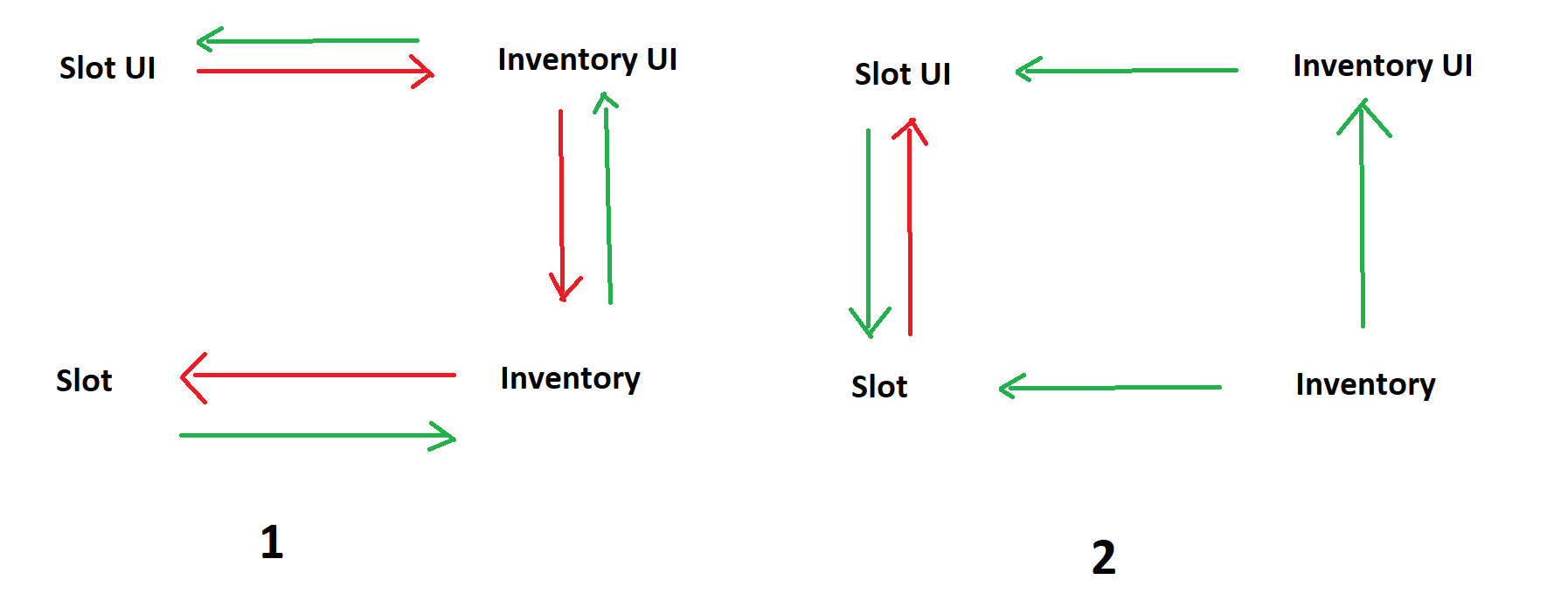
I've rewritten all this stuff like 5 times already
looks like it's going to be a 6th
teal viper
Either is fine imho. Maybe using indices decouples the logic from presentation a bit better though.
 sleek notch
Can someone please explain why it isn't working? Even if I did some boolean variable it wasn't working

and still not working. When I remove the second if, then it works. I don't know
 teal viper
sleek notch
and still not working. When I remove the second if, then it works. I don't know
teal viper
sleek notch
and still not working. When I remove the second if, then it works. I don't know
So does it work, or does it not?
sleek notch
No warning. It works with only one if
gaunt ice
- log if update runs
- update wont run in inactive gameobject
sleek notch
I had it on my player with GameObject ui; and same results
timber tide
your first screenshot logic is off such that if it goes into the first it always goes into the second
probably what the warning is telling you
sleek notch
timber tide
probably what the warning is telling you
No. They are cool because I need to check if it is active and it works. It just tells that I can use .SetActive() but it is function and I'm not able to check if it is active
This is all my code for UI inventory and it is attached to Player

still doesn't work
 mortal bridge
somethimg underlined hmm
 tawdry rock
I need a little help. I want to make a hitbox system but my rays can't detect the trigger colliders. They marked as 'is trigger'. im using hit.collider.isTrigger in a if and in my physics settings i checked 'queries hit triggers' but still nothing happens.
sleek notch
mortal bridge
somethimg underlined hmm
No. They are cool because I need to check if it is active and it works. It just tells that I can use .SetActive() but it is function and I'm not able to check if it is active
tawdry rock
sleek notch
This is all my code for UI inventory and it is attached to Player
check the input in the update, call the function to open hide inventory
mortal bridge
my mannyou say
second ssbfixxed it
and you see undeeline in 2nd
no
just give these IDES some kredit please
theydeserve better
tawdry rock
sleek notch
This is all my code for UI inventory and it is attached to Player
also instead of .active i would use a bool and use the isInvOpen = !isInvOpen bool switch when tab being pressed
sleek notch
tawdry rock
check the input in the update, call the function to open hide inventory
Input works without problem. If I check only input it works normally but I used boolean invCheck but it had same results
tawdry rock
i would also cache it in awake as a singleton refference instead of using .Find so you can turn the gameobject off by default
mortal bridge
computer is confsed
sleek notch
tawdry rock
also instead of `.active` i would use a bool and use the `isInvOpen = !isInvOpen...
Thanks I did isInvOpen = !isInvOpen and now it works. I have no idea why it wasn't working.
tawdry rock
because the function gets called in every frame, and as soon as you open it it hide it. it works.. just only for 1 frame
 modest sage
Hello guys, can anybody help me with my problem? I am trying to make map preview with clickable objects. I have orthographic camera, canvas set to screen space - camera. In another (menu) canvas i render this orthographic camera. On picture with selected mousePosition object in scene, my mouse is on the red clickableObject :/


 fervent abyss
Hi, im trying to AddListener to event in OculusSDKManager in Start() function, but in the Unity editor, I get a null reference exception error
 ivory bobcat
fervent abyss
Hi, im trying to AddListener to event in OculusSDKManager in Start() function, b...
ivory bobcat
fervent abyss
Hi, im trying to AddListener to event in OculusSDKManager in Start() function, b...
Maybe show the actual error from the console window.
Either the instance hasn't been assigned yet and throwing null or the credentials hasn't been initialized yet.
 north kiln
sleek notch
No. They are cool because I need to check if it is active and it works. It just ...
north kiln
sleek notch
No. They are cool because I need to check if it is active and it works. It just ...
It's probably telling you to use activeSelf or activeInHierarchy, the non-obsolete functions.
tawdry rock
is the navmesh agent function as a collider? like the character controller?
teal viper
tawdry rock
is the navmesh agent function as a collider? like the character controller?
No. Navmesh agent doesn't respect physics. And is not considered as a collider by the physics system.
Although, it probably does account for colliders during active avoidance.
tawdry rock
thanks, so i became crazy soon. I can HIT triggers, but if i put them on navmeshagent i can NOT longer hit them even if i put a ignore raycast mask on the navmesh. also doesnt matter if i put the trigger as child or on the bone
like.. how do you make a hitbox system?.. if i change the triggers to colliders the navmesh agent gets crazy for obvious reasons so i can only use triggers but they suddenly wont work on them.
teal viper
tawdry rock
thanks, so i became crazy soon. I can HIT triggers, but if i put them on navmesh...
It should hit them, though you should remember that moving colliders need a rigidbody to be updated by the physics system correctly.
tawdry rock
teal viper
It should hit them, though you should remember that moving colliders need a rigi...
i have rigidbody component on the navmesh agent
do i have to put also on the trigger collider?
teal viper
It depends. Maybe explain your setup a bit better. What are the trigger colliders for?
 tepid summit
tawdry rock
do i have to put also on the trigger collider?
tepid summit
tawdry rock
do i have to put also on the trigger collider?
want to send a ss of your heirarchy/ inspector
tawdry rock
teal viper
It depends. Maybe explain your setup a bit better. What are the trigger collider...
for hitbox names to do apply different amount of damage based on distance and body part
teal viper
tawdry rock
for hitbox names to do apply different amount of damage based on distance and bo...
Does it hit the triggers when they are not moving?
 tawdry rock
teal viper
Does it hit the triggers when they are not moving?
tawdry rock
teal viper
Does it hit the triggers when they are not moving?
i will test that
tawdry rock
teal viper
Does it hit the triggers when they are not moving?
it seems like in stationary mode i can hit them.
i moving them by SetDestination and feeding the player position to them (in update, i know its expensive but i must). edit: even if i give them 1 sec delay to update the destionation in every 1 sec still not detecting the trigger.
teal viper
tawdry rock
i moving them by SetDestination and feeding the player position to them (in upda...
Moving "them"? The triggers?
tawdry rock
teal viper
Moving "them"? The triggers?
no, the agent itself. by them i just reffer for multipe agents
`
timertest -= Time.deltaTime;
if (timertest < 0)
{
ChasePlayer();
timertest = 1.0f;
}
} // endof Update
void ChasePlayer()
{
agent.SetDestination(Refferences.Instance.FPSC.transform.position);
}
`
teal viper
Okay, use debug rays to see if your raycasts are intersecting the triggers.
tawdry rock
i do, they do
teal viper
Pause the game when you're supposed to hit a trigger and check the scene view to see if it intersects any trigger.
Take a screenshot if you already do.
tawdry rock

this is when a trigger set on the world but on the agent it doesnt. ( will make a new ss)
nothing on the console

don't want to celebrate early, but after restarting unity it seems like its working, (maybe some prefab was not updated correctly?) i will need to test with animations and stuff. thanks for your time @teal viper for now.
never mind, i found it. if the navmesh agent's rigidbody gravity is set to true it won't detect the trigger even if the trigger doesnt fall off as it seen on the screenshot. if the gravity is unchecked it detects... anyone can explain this?
 quaint terrace
I have gameObjects that have a script OnMouseDown() but I don't want them to be clickable when they are behind the grey image. How would i prevent the gameObjects from responding to clicks received while behind the grey image?
 timber tide
allow it to block raycasts
quaint terrace
ive selected the grey image and unchecked the Raycast Target and Maskable, ive also check it but the items are still being selected through the image
 timber tide
Actually you may be mixing two different raycasts which is a problem
one being the graphics raycaster and OnMouseDown() is a physics raycast query I think?
 hard sigil
Hi, can someone tell me how do I disable monster to follow player (Script) when monster turn into a ragdoll?
quaint terrace
oh, so my script is stronger than the image raycast, so i would have to change my OnMouseDown?
frosty hound
quaint terrace
oh, so my script is stronger than the image raycast, so i would have to change m...
You need to check the event system if there is something selected first before handling the results of the mouse down. They're two different raycast systems.
frosty hound
hard sigil
Hi, can someone tell me how do I disable monster to follow player (Script) when ...
https://docs.unity3d.com/ScriptReference/Behaviour-enabled.html
Disable the script
timber tide
quaint terrace
oh, so my script is stronger than the image raycast, so i would have to change m...
You could consider using IPointerHandler interfaces which use the event system.
buttons would work too
quaint terrace
so if i turn off the Box Collider the OnMouseDown stops working, theres a Layer Override Priority, but I think thats for if multiple box colliders are on top of one another
ha! i just put a box collider on the grey image and it fixed my issue -.- im stupid.
timber tide
technically the image already has a collider, but it does not block the physics raycast
quaint terrace
Thank you for the help, if i didnt talk it out here id probably would have started rewriting code ._.
hard sigil
frosty hound
https://docs.unity3d.com/ScriptReference/Behaviour-enabled.html
Disable the scr...
Can you explain in details?
quaint terrace
hard sigil
Hi, can someone tell me how do I disable monster to follow player (Script) when ...
im guessing you have a script that has the monster go towards the player. you can just add a condition && !ragdoll and set a bool when the monster goes ragdoll. this will stop the processing of movement when ragdoll .
hard sigil
Oh, whats the script? (I'm new)
quaint terrace
hard sigil
Oh, whats the script? (I'm new)
I dont know what script you have for your monster to follow your player currently.
 candid roost
@timber tide thank you you smart
rare basin
hard sigil
Oh, whats the script? (I'm new)
component
you can enable/disable component
 ruby python
Hi all, I'm playing around with a sort of factory idea (not really a factory but some of the principles of are the same, crafting etc). I'm wondering what you guys think would be the best approach in terms of recipes/material input/compnent output would be? (ie, how to structure the whole thing etc.)
rare basin
i'd make recipes as a scriptable objects
where you have list of items needed for that item you want to craft
success craft chance (if you want that)
ruby python
So, the scriptable object would be the item you want to craft, and contain the recipe data in that?
timber tide
yeah, I'd stick the crafting requirements on the ItemSO itself
rare basin
ruby python
So, the scriptable object would be the item you want to craft, and contain the r...
scriptable object would be the recipe
not an actual item
but a recipe for that item
ruby python
Okay cool, thanks. Maybe this time I'll actually get my head around how to use SO's lol. (I know how to 'make' them etc. for some reason I always struggle/fall over when it comes to actually getting the data/using them. lol.)
rare basin
it's pretty straight forward
some basic tutorials about SO should help
basically it's just a data containers
just be careful and don't modify them (unless you know what you are doing)
timber tide
I was thinking having separate SOs for the recipe and item, but that just kinda makes more assets.
rare basin
i usually make properties for SO
with private set
[field: SerializeField] public int BaseHealth { get; private set; }
timber tide
an itemSO with an inner class for crafting as that crafting recipe should just be unique to it
rare basin
for example
 sacred harness
why does slerp behave this way i have two objects that rotate in one axis x they have the rotation of [0,90] i find the average total/count then i use slerp to rotate to that target but it ends up as [45,67.5] the 67.5 is the average of [45,90] this works with rotatetowards but not slerp (im using atan2 to find the rotation of the objects)
rare basin
sacred harness
why does slerp behave this way i have two objects that rotate in one axis x they...
how do you use the slerp?
what's the last paremeter?
sacred harness
one
rare basin
show the slerp code
sacred harness
full script? or just the line
rare basin
just the slerp line
sacred harness
transform.rotation = Quaternion.Slerp(transform.rotation, Quaternion.Euler(averagerotation / (LIST.Count + 1), 90, 180),1);
ruby python
I'll be honest, one thing that I haven't been able to get my head around in terms of SO's (and please forgive me if this comes across as reeeeeeally ignorant), but what is the 'benefit' of SO's over Enums or just a basic script that holds the data? I've never seen/read/heard it explained so I don't really understand the benefit tbh.
rare basin
sacred harness
```transform.rotation = Quaternion.Slerp(transform.rotation, Quaternion.Euler(av...
yea, that's not how you use lerp/slerp
rare basin
ruby python
I'll be honest, one thing that I haven't been able to get my head around in term...
you're missing basic fundamentals what is a SO
it is not relevant to enums in any way
watch some SO tutorials first
and it will clarify most of your questions
rare basin
sacred harness
```transform.rotation = Quaternion.Slerp(transform.rotation, Quaternion.Euler(av...

Learn to animate buttons, move objects and fade anything - the right way - in my in-depth guide to using LERP in Unity (including copy / paste examples).
last paraemter is the interpolation point
you cannot just pass 1
ruby python
I honestly have, but it's not really been explained in the stuff I've watched/read. It's basically just a 'these are great' kind of thing if that makes sense?
rare basin
it's super designer friendly
timber tide
ruby python
I'll be honest, one thing that I haven't been able to get my head around in term...
it's just a basic script of data like you said, but you can set these data scripts with different defaults that you can serialize onto your other objects
timber tide
1 data script can become multiple different variations. Good workflow utility
serializable in the editor
 queen adder
why there is no texture

 late bobcat
Guys i'm currently working on a grappling hook that let the player spin around the targeted enemy. Right now it's kinda of working if it wasn't for the orbital trajectory that keeps spinning even tho it shouldn't. So everytime the gorilla shoot the grapple it start spinning from where the "current orbital imaginary position is" and not from the gorilla position, like in the video.
Here's the code: https://hatebin.com/ldajccqhhe . Can someone help me understand what's the problem? ty
rare basin
queen adder
why there is no texture
this is a code related channel
queen adder
rare basin
this is a code related channel
where i can post my messgae so ?
rare basin
not in code related channel
rare basin
you can see all the channels on the left?
queen adder
no i can't
queen adder
tell wath is the chanel for hlep
sacred harness
rare basin
https://gamedevbeginner.com/the-right-way-to-lerp-in-unity-with-examples/
oh i fixed it now but i always thought 1 would just give you the end result
rare basin
it would
1 would result the 2nd parameter
you pass
0 would result the 1st
0.5 would resoult between
sacred harness
then why did you say it was wrong
ruby python
Okay, I know about the whole inheritence thing and variations. So for example.....in terms of crafting things, would this 'tree' be okay?
`Item
- Sustanance
---Food
---Water
---Oxygen - Component
---Component #1
---Component #2
---Component #3 (etc. etc.) - Tool
---Tool #1
---Tool #2 (etc. etc.) - Weapon
---Weapon #1
---Weapon #2
---Weapon #3 (etc. etc.`
rare basin
sacred harness
then why did you say it was wrong
because that is not how you use 3rd lerp parameter
transform.rotation = Quaternion.Euler(averagerotation / (LIST.Count + 1), 90, 180)
you could just do it like that
why did you do slerp
when you are not using it
sacred harness
because i was going to do it through a duration i just put 1 as a test
 dim pendant
is this the right channel to ask for a little help
late bobcat
late bobcat
Guys i'm currently working on a grappling hook that let the player spin around t...
little bump in case someone didn't see 
rare basin
dim pendant
is this the right channel to ask for a little help
depends on what topic
this is code related channel
dim pendant
yeah im having trouble with pointing in direction of cursor
late bobcat
dim pendant
yeah im having trouble with pointing in direction of cursor
poste your !code
eternal falconBOT
Posting code
📃 Large Code Blocks
Use links to services like:
https://gdl.space/, https://paste.ofcode.org/, https://hatebin.com/, https://paste.myst.rs/, https://hastebin.com/
📃 Inline Code
Surround code with three backquotes. Not quotation marks.
To format as C#, add cs to the first line:
```cs
// Your code here
```
Add a comment with a line number if there is an error message.
dim pendant
ye gimme a sec
using UnityEngine;

public class shooting : MonoBehaviour
{
    public Transform firePoint;
    public GameObject bulletPrefab;

    Vector2 lookDirection;
    float lookAngle;
    public float bulletSpeed;

    void Update()
    {
        lookDirection = Camera.main.WorldToScreenPoint(Input.mousePosition);
        lookAngle = Mathf.Atan2(lookDirection.y - firePoint.transform.position.y, lookDirection.x - firePoint.transform.position.x) * Mathf.Rad2Deg;

        firePoint.rotation = Quaternion.Euler(0,0,lookAngle);

        if(Input.GetMouseButtonDown(0))
        {
            //Debug.Log(Input.mousePosition);
            //Debug.Log(Quaternion.Euler(0,0,lookAngle));

            GameObject bullet = Instantiate(bulletPrefab);
            bullet.transform.position = firePoint.position;
            bullet.transform.rotation = Quaternion.Euler(0,0,lookAngle);

            bullet.GetComponent<Rigidbody2D>().velocity = transform.up * bulletSpeed;
        }
    }
}
idk if thats too much lol
 languid spire
Camera.main.WorldToScreenPoint(Input.mousePosition);
should be ScreenToWorld
 noble summit
where do i find the input axis's in unity
noble summit
thanks what about the new input system
short hazel
It's an asset in your project files
.inputactions I think that's the extension it's using
You created it yourself, a blank project does not come equipped with one
noble summit
thanks
 scarlet skiff
spear: https://gdl.space/aruqowiteb.cs
warning: https://gdl.space/ufejihibep.cs
their spawner: https://gdl.space/anozisecor.cs
spawner is supposed to spawn a warning and a spear, once the warning animation is played, it sets the spears canMove to true, which then allows it to move towards the player. but it just won't accept my way of giving it a reference.
no matter what i do it wont give it the reference... even tho spear does have a reference when i check with debug.log
short hazel
scarlet skiff
spear: https://gdl.space/aruqowiteb.cs
warning: https://gdl.space/ufejihibep.cs
...
SpearSpawner, line 55, you get the Warning component on the prefab, not the instance you created on line 54
scarlet skiff
short hazel
SpearSpawner, line 55, you get the `Warning` component on the prefab, not the in...
oh my god i havent noticed
thank you very much
noble summit
what is the difference between force and velocity
 burnt vapor
noble summit
what is the difference between force and velocity
burnt vapor
noble summit
what is the difference between force and velocity
Please pay attention the first time you ask this #💻┃code-beginner message
swift crag
didn't you ask this a day or two ago
 rich bluff
noble summit
what is the difference between force and velocity
rich bluff
noble summit
what is the difference between force and velocity
velocity is your final direction + speed, after all the physics calculations, force is a vector that will be processed by physics and transformed into velocity
languid spire
force is what applies when someone pushes you, velocity is how much it hurts when you hit the ground
wintry quarry
The end result of a force is a change in your velocity. That's the only thing force does.
 rich egret
!code
eternal falconBOT
Posting code
📃 Large Code Blocks
Use links to services like:
https://gdl.space/, https://paste.ofcode.org/, https://hatebin.com/, https://paste.myst.rs/, https://hastebin.com/
📃 Inline Code
Surround code with three backquotes. Not quotation marks.
To format as C#, add cs to the first line:
```cs
// Your code here
```
Add a comment with a line number if there is an error message.
rich egret
Does anyone know how to save the user in the system?
https://gdl.space/efuqoyumaj.cpp
 naive lion
Can anyone see why my prefab is being spawned infinetly:
    {
        _forcefield = Instantiate(forceFieldPrefab, self);
        LeanTween.scale(_forcefield, new Vector3(6125, 6125, 6125), 1f).setEase(LeanTweenType.easeOutQuart);
        base.Execute();
    }```

This is where execute is called:
```    private void RunStateMachine()
    {
        TitanState nextState = currentState?.RunCurrentState();

        if (nextState != null)
        {
            //Switch State
            RunNextState(nextState);
        }
    }


    private void RunNextState(TitanState nextState)
    {
        currentState = nextState;
        currentState.Execute();
}```In the system? Are you talking out having a persistent storage?
 honest haven
        {
            if (GameManager.instance.cratingItemsHeld[i] == "Wood" && GameManager.instance.numberOfCratingItems[i] >= 1)
            {

            }
            if (GameManager.instance.cratingItemsHeld[i] == "CementMix" && GameManager.instance.numberOfCratingItems[i] >= 1)
            {

            }
            if (GameManager.instance.cratingItemsHeld[i] == "Caffine" && GameManager.instance.numberOfCratingItems[i] >= 1)
            {

            }
            if (GameManager.instance.cratingItemsHeld[i] == "Batteries" && GameManager.instance.numberOfCratingItems[i] >= 1)
            {

            }
}``` whats a clean way to do this. i need to check them all at once and a nested loop wont work as the index would be different each time. need them all in one if statement but not look so messyi need to do somthing if they are all true
burnt vapor
naive lion
Can anyone see why my prefab is being spawned infinetly:
``` public override...
Nothing in this code suggests spawning in a recursive manner, so I'm afraid you need to share some more code before anything can be fixed
rich egret
burnt vapor
In the system? Are you talking out having a persistent storage?
I have no idea what this concept is called 😂 But I want the user to save the game
burnt vapor
honest haven
```for (int i = 0; i < GameManager.instance.cratingItemsHeld.Length; i++)
...
Consider using an array of string and iterating that, since you are doing the same action with the only difference being the item
honest haven
i need to do it at run time and the list grows
burnt vapor
rich egret
I have no idea what this concept is called 😂 But I want the user to save the g...
If you're going to save passwords then look into hashing the passwords. Saving a password must be secure.
burnt vapor
honest haven
i need to do it at run time and the list grows
As in different items are being checked?
honest haven
as in the value of the items change
burnt vapor
Perhaps make a system where you store a list of required items in a list, and then have a CheckIfPlayerHasItems() method that takes a unique identifier which then iterates the items
A list of strings is not going to care about your item count
You want to have a way of checking if those four items exist in the array, right?
In cratingItemsHeld
Another easy way would be using Linq's Any call. Make a method that takes the string and use Any to check if any item in your array is of that item name
rare basin
is this code running in Update?
put a debug.log in Execute() so you can track the stack trace
rare basin
rare basin
put a debug.log in Execute() so you can track the stack trace
so you can see what is calling it
naive lion
rare basin
so you can see what is calling it
yeah seems to be coming from the statemachine itself running currentState.Execute(); multiple times
not really sure why this is not correctly set up tho
rare basin
can't tell without knowing your code architecture
and your state machine
but follow the stack trace
and debug it piece by piece
 frozen phoenix
Hello, I wrote a movement code, but it gets stuck on the steps and stairs, I need a suggestion on how to solve the problem with a code, I couldn't find much content on youtubeda.
ruby python
Depending on your game, usually you would use a 'sloped' collider instead of a collider that conforms to the stairs.
naive lion
rare basin
can't tell without knowing your code architecture
just did a check to ensure nextstate isnt currentstate but feels like a soft-patch, but it does work:
        {
            //Switch State
            RunNextState(nextState);
}```how can I do so that when I press start I appear on the map and I can move around?
rare basin
naive lion
just did a check to ensure nextstate isnt currentstate but feels like a soft-pat...
well that's a logic check for me
gaunt ice
that means your run next state return itself
burnt vapor
frozen phoenix
Hello, I wrote a movement code, but it gets stuck on the steps and stairs, I nee...
Unity Forum
I followed this tutorial to make so that my character in my FPS game can go up stairs using Rigidbody instead of CharacterController due to it's...

 frozen phoenix
burnt vapor
https://forum.unity.com/threads/unity-3d-rigidbody-going-up-stairs.1117873/
frozen phoenix
burnt vapor
https://forum.unity.com/threads/unity-3d-rigidbody-going-up-stairs.1117873/
thanks
frozen phoenix
ruby python
Depending on your game, usually you would use a 'sloped' collider instead of a c...
thanks
rare basin
queen adder
how can I do so that when I press start I appear on the map and I can move aroun...
make a player and add movement logic to it
weird question
queen adder
rare basin
make a player and add movement logic to it
yes but HOW
rare basin
wdym how
burnt vapor
frozen phoenix
thanks
What I would maybe do is have a sphere cast spawn in front of you that is then moved down, to determine if you should move the player upwards, maybe. Requires some maths
rare basin
make a player prefab, instnatiate it on start (or just place it on the scene view)
and make movement logic
sacred harness
xaxup i did the timed thing which did work but its because its giving me smaller values which is ending up being closer to the end than the start like 0.1 or did i miss something in the video?
rare basin
sacred harness
xaxup i did the timed thing which did work but its because its giving me smaller...
what video?
sacred harness
in the link
sacred harness
YES i know and its slerp
rare basin
0.5f - between 1st and 2nd param
doesnt matter
parameters stays the same
slerp is just mostly for rotations
sacred harness
which i am doing
rare basin
both are just finding a percentage position between two points
slerp just does it on a circle
sacred harness
then tell me why its not working 1 is giving me 60 between 0 and 90 but 0.1 is giving me 45
rare basin
well that's not possible
how did you implement it
if you have (0,90,1)
then it would return 90
swift crag
sacred harness
YES i know and its slerp
There is no "Slerp" method for floats. That only exists for Vector3s and Quaternions.
so I'm very curious about what you're doing..
rare basin
he's changing rotation iirc
sacred harness
i am doing it with quaternions
sacred harness
Pastebin
Pastebin.com is the number one paste tool since 2002. Pastebin is a website where you can store text online for a set period of time.
swift crag
this is slerping your current rotation towards some target rotation by 0.01 every frame
it's going to rapidly approach Quaternion.Euler(averagerotation / (objectlist.Count + 1), 90, 180)
sacred harness
ok thats why i was confused i didnt realise it was every frame
swift crag
well yes, you did it in Update
rare basin
as i said you're using the last slerp parameter wrong
swift crag
If you want to steadily rotate towards a rotation, use Quaternion.RotateTowards
sacred harness
oh shit im stupid its also changing rotation so 0.1 is different everytime lol
swift crag
If you really want to use Slerp, read https://unity.huh.how/lerp/wrong-lerp
it explains the least-wrong way to use lerp methods with a varying start value
sacred harness
i was thinking 0.1 would be the same value every frame but since im also changing my rotation 10% would be a different value every time that went over my head
swift crag
If the start and end values were constant, then there would indeed be no change from frame to frame
rare basin
sacred harness
i was thinking 0.1 would be the same value every frame but since im also changin...
yup
 earnest atlas
Should I serialize Spirte rendered component or I can get it from an object
What is prefered
burnt vapor
earnest atlas
Should I serialize Spirte rendered component or I can get it from an object
It would help if you showed your use case
earnest atlas
Im just getting sprite renderer with get component from an object
Im just asking what is better method
When all components are on same prefab
sacred harness
swift crag
If the start and end values were constant, then there would indeed be no change ...
i got a question then why does 1 give me 60 degrees shouldnt they both be set to 45 first frame if it was 1? is it something to do with slerp or something else
swift crag
Quaternion.Slerp will return the second argument if the third argument is 1.
Check that the big Quaternion.Euler(...) expression is producing the rotation you think it is
so, assign it to a variable and log its euler angles
earnest atlas
If I create variable that stores Health, will it be a local health or a reference to that GameController health?


left I just want to save Instance.Health to variable for cleaner code.
right is GameController health implementation
short hazel
It will be a local copy, as it's a float (a value type). Value types are pass by value, not pass by reference like class
earnest atlas
Yeah as I though
sacred harness
swift crag
Check that the big `Quaternion.Euler(...)` expression is producing the rotation ...
yeah its giving me 45 both objects
swift crag
A quick way to check if something is a value type is to try to assign null to it
The compiler will yell at you if you assign to a value type
(assuming it's not a nullable value type, at least)
i think that makes the type name appear like This?
so you'd be able to tell that it's the case, at least :p
earnest atlas
I just wasnt sure if Health was considered some sort of method or variable
Delegades are an interesting thing. Tho looks like overcomplicated function.
public Func<float> HealthReference { get; } = () => GameController.Instance.Health;
}```But it also returns a current propiety
so useless
short hazel
Health is a property. Think of them as a pair of methods that get and set a value, and the right one is automatically selected depending on what you're doing with the variable
earnest atlas
I somewhat understand, I just want something sort of pointer.
Well it will cut down 1 entire word in my code 😄
short hazel
It's not possible to have those with properties
earnest atlas
Yeah Im looking up and this is the only way.
Im already cutting down a lot by the fact that GameController is static singleton
https://hatebin.com/mpzkthjgyt
What do you thing about this.
burnt vapor
earnest atlas
Delegades are an interesting thing. Tho looks like overcomplicated function.
``...
Why not use a property with just a getter?
public int Health => GameController.Instance.Health;
 buoyant rune
can someone help me , this code is meant to make my enemy object move to the right constantly but it just doesnt move heres the code
 burnt vapor
buoyant rune
can someone help me , this code is meant to make my enemy object move to the rig...
burnt vapor
buoyant rune
can someone help me , this code is meant to make my enemy object move to the rig...
Please configure your !ide first.
eternal falconBOT
💡 IDE Configuration
If your IDE is not autocompleting code
or underlining errors, please configure it.
Select one:
• Visual Studio (Installed via Unity Hub)
• Visual Studio (Installed manually)
• VS Code
• JetBrains Rider
• Other/None
earnest atlas
burnt vapor
Why not use a property with just a getter?
```cs
public int Health => GameContro...
Im updating health at that point too
Also that update calls events
That then deal with UI
burnt vapor
earnest atlas
Im updating health at that point too
A property with a getter does not update health. Or is that not what you mean?
buoyant rune
burnt vapor
Please configure your !ide first.
what does that mean
earnest atlas
Thats not what I mean
burnt vapor
buoyant rune
what does that mean
Your editor is not properly configured to work with Unity, so please configure it first before asking for help
earnest atlas
public float Health
{
    get => _health;
    set
    {
        _health = value;
        HealthChanged?.Invoke(value);
    }
}```

This is my health codeI guess that shortens it. You could also do using static GameManager; so you would only have to do Instance.Health instead of GameManager.Instance.Health everywhere
buoyant rune
oh
earnest atlas
short hazel
I guess that shortens it. You could also do `using static GameManager;` so you w...
Ooooo interesting. Tho probably makes code a bit more confusing
Considered I will be getting some values out of thin air
short hazel
Yes, it's harder to see where something comes from
earnest atlas
Are pointers in C# used like ever?
short hazel
Yes there are supported (eg. int*), but in an unsafe context, you have to tell the compiler you know what you're doing, otherwise it errors
And at a higher level there's ref
buoyant rune
burnt vapor
Your editor is not properly configured to work with Unity, so please configure i...
ive been coding my project without anything being configured , now that i have configured it do i have to go back to the scripts to do anything?
burnt vapor
earnest atlas
Are pointers in C# used like ever?
Eh, not really unless you work with external code.
Most features from pointers can be done differently in c#
Like the ref keyword
earnest atlas
passing a reference to variable huh
burnt vapor
buoyant rune
ive been coding my project without anything being configured , now that i have c...
If it's configured you should have more help from your IDE. Maybe resend the code so I can see if it's configured
burnt vapor
earnest atlas
passing a reference to variable huh
Yes, but this is mostly for value times because reference types already work like that
buoyant rune
burnt vapor
If it's configured you should have more help from your IDE. Maybe resend the cod...
yep just did that
thanks
burnt vapor
And this is the most basic usage of pointers
earnest atlas
Welp I guess never going to deal with them
burnt vapor
Pointers are not so hard but I believe you do need to manage freeing the memory when you're done with them
earnest atlas
ref not working with my health rip
 short hazel
No because pointers are only valid on value types, or inside a reference type with the fixed statement
The GC will still manage object lifetime
burnt vapor
earnest atlas
ref not working with my health rip
I don't understand, do you want to pass a reference to the health?
burnt vapor
That's kind of complex, maybe you should just call the original variable somehow
Maybe use events?
earnest atlas
I do use events
burnt vapor
If I see something like this I am thinking of just making an event to handle health changes
Anyway, I have never seen that error before
earnest atlas
What if I create a propiety with get and set where value I will use is Health from game Controller?
short hazel
earnest atlas
ref not working with my health rip
Yeah you can't do that because a property cannot return by reference. You can't use ref-returns with them like public ref int Health { ... }, the compiler yells at you
buoyant rune
burnt vapor
If it's configured you should have more help from your IDE. Maybe resend the cod...
does this mean its configured nwo?

now
short hazel
You're better off just using the property as it's intended to be used, accessing it isn't expensive at all.
earnest atlas
private float Health
{
    get => GameController.Instance.Health;
    set => GameController.Instance.Health = value;
}```

Will this fly?You can check if it works by opening your code and checking your assembly, for example. Consider sending a full screen screenshot
short hazel
earnest atlas
```CS
private float Health
{
get => GameController.Instance.Health;
set ...
Yeah but that just adds another layer of indirection, it's not useful
buoyant rune
burnt vapor
You can check if it works by opening your code and checking your assembly, for e...

thats how it looks now
burnt vapor
buoyant rune
Looks good!
buoyant rune
burnt vapor
Looks good!
alright thank you !
i actually cant believe my ide wasnt configured i was so confused why some stuff wasnt working properly lol
short hazel
earnest atlas
Reading code later will be confusing
I guess that works since I've just tested:
private float _health;
public ref float Health { get => ref _health; }
But the deal breaker is that you cannot have a set accessor, so it would not be possible for you to invoke the event when the value changes. Also not sure whether this kind of syntax is yet supported in Unity
earnest atlas
How to write 3 less words in entire code by writing 10 extra words

Also lack of setter makes this a dealbraker in my case
cosmic dagger
Why even do it that way?
earnest atlas
just shower thoughts
cosmic dagger
At that point, just use a reference type . . .
noble summit
why isnt it letting me put decimels in vector3
burnt vapor
noble summit
why isnt it letting me put decimels in vector3
Because it accepts a float type
Decimal type != float type
So explicitly cast it to a float
But know decimal types are bigger so you might lose data
short hazel
noble summit
why isnt it letting me put decimels in vector3
Elements of a Vector3 only accepts float. You cannot put a decimal or a double in it, for example
But I guess the issue is you've forgot to put the "f" at the end of the number to make it a float? 3.14f
noble summit
i meant decimal as in "."
cosmic dagger
Like a reactive value as a class: ReactiveValue<int>, Observable<T>, ObservableStruct<T>, etc . . .
short hazel
Yes decimal numbers, with the dot, definitely possible
noble summit
short hazel
But I guess the issue is you've forgot to put the "f" at the end of the number t...
fixed it yes
burnt vapor
noble summit
i meant decimal as in "."
It does accept floating point numbers. You should check the type of your number
short hazel
noble summit
fixed it yes
Next time just post the error message so we don't have to guess
As well as the affected line of code
noble summit
short hazel
Next time just post the error message so we don't have to guess
okay
you cant put random.range in a vector3??
cosmic dagger
noble summit
you cant put random.range in a vector3??
You can: it returns an int or a float. You have to use it for an axis . . .
noble summit
oh nevermind it was a different error
rare basin
the SystemError
buoyant rune
I need some help , i'll show my code. the enemy objet is the blue one and the player object is the red one, the enemy object is meant to walk right and once it detects a player or edge its meant to flip and walk the other direction to the same thing btu for some reason the player jus stays here stuck like this .


im literally following a tutorial so i have no clue where its going wrong
the person in the video has set animations , i havent but i dont think thats the problemn
frosty hound
If an animation is modifying the position, it will lock it in place.
Make sure you're animating a child object, not the root.
buoyant rune
frosty hound
If an animation is modifying the position, it will lock it in place.
so does that mean i have to add animations for this to fix? because I have no current animations
rare basin
buoyant rune
so does that mean i have to add animations for this to fix? because I have no cu...
no
ok but what are you even doing 😄
burnt vapor
I doubt they even know
buoyant rune
rare basin
ok but what are you even doing 😄
me or makrus?
rare basin
buoyant rune
me or makrus?
markus
rare basin
buoyant rune
me or makrus?
debug the WalkDirection, i guess it's constantly changing
burnt vapor
Please stop spamming the chat or just write the code as a whole
short hazel
Makrus is a troll or a kid (or both), as demonstrated in other channels. They do nothing but flooding the channels with irrelevant or not useful information
rare basin
short hazel
Makrus is a troll or a kid (or both), as demonstrated in other channels. They do...
alr good to know
buoyant rune
rare basin
debug the WalkDirection, i guess it's constantly changing
not sure how to do that could u help
someone mute this makrus guy
rare basin
buoyant rune
not sure how to do that could u help
do you know how to use Debug.Logs?
or a debugger?
buoyant rune
rare basin
do you know how to use Debug.Logs?
nope, all ive been doing is following a tutorial
rare basin
buoyant rune
nope, all ive been doing is following a tutorial
then i'd start from learning that
then debug your WalkDirection
you are constantly telling your player/enemy to move left then to move right
earnest atlas
You can also serialize you walk direction variable and see its values in the unity
rare basin
idk if we should ping moderators or not
rare basin
wise words
earnest atlas
I think it was when it doubt vote someone out
copper perch
Chat gpt say:
Regarding your issue with the gun not firing when pressing the fire button:
- If the gun is not firing when you press the fire button on the UI, there could be several potential reasons:
- The UI button might not be correctly configured to call the
FireWeapon()method when pressed. - The UI button might not be linked to the correct function in the Unity Inspector.
- There could be issues with the interaction between the UI button and the weapon firing logic in your game scripts.
- There might be errors or issues in the shooting logic within the
Shoot()method of your weapon script.
- The UI button might not be correctly configured to call the
- To troubleshoot this issue, you can:
- Double-check the setup of your UI button and ensure it is correctly configured to call the
FireWeapon()method. - Check for any error messages in the Unity Console when pressing the fire button to identify potential issues with the firing logic.
- Debug the shooting logic in your
Shoot()method to ensure it is functioning correctly when called from theFireWeapon()method.
- Double-check the setup of your UI button and ensure it is correctly configured to call the
earnest atlas
copper perch
Chat gpt say:
Regarding your issue with the gun not firing when pressing the fir...
Ai code bad.
burnt vapor
copper perch
Chat gpt say:
Regarding your issue with the gun not firing when pressing the fir...
Please don't write answers from AI
languid spire
copper perch
Chat gpt say:
Regarding your issue with the gun not firing when pressing the fir...
short hazel
It's like not even linked to the actual issue!
rare basin
jezus xd
copper perch
languid spire
<#497867528488484864>
sorry
short hazel
What is going on with the chat rn
copper perch
why yall hate chat gpt
?
rare basin
copper perch
why yall hate chat gpt
?
we dont hate chat gpt
we hate begginers who use it
or just people who use it in a wrong way
chat gpt is awesmoe if used correctly
earnest atlas
if only if it didnt hallucinate a lot
rare basin
stop, please
burnt vapor
Please stop spamming the chat, and post the code as a whole
short hazel
Where are the mods when we need them
burnt vapor
copper perch
why yall hate chat gpt
?
Lazy and often incorrect responses
queen adder
Hell
buoyant rune
earnest atlas
You can also serialize you walk direction variable and see its values in the uni...
where would i add that
in the code
earnest atlas
Let me throw u an examle how I did it
buoyant rune
earnest atlas
Let me throw u an examle how I did it
cool
copper perch
my ass get the wupped without chat gpt
rare basin
buoyant rune
where would i add that
you should start watching some unity/c# begginre tutorials
instead of copy/pasting the code from the tutorials
copper perch
chatgpt a good homie
buoyant rune
rare basin
you should start watching some unity/c# begginre tutorials
i should, but i dont have time
burnt vapor
copper perch
chatgpt a good homie
Yeah but not in this server
rare basin
why would we waste time teaching you then
timber tide
whoops should have learnt
buoyant rune
timber tide
whoops should have learnt
basically im based in the UK
fickle plume
!warn 952061884062896178 This is your last warning for off-topic. Don't post chat program generated answers.
buoyant rune
we got these hard ass exams called a levels
noble summit
why are 2 objects clipping through eachother when both have rigidbodies and colliders
rare basin
stop spamming ffs
earnest atlas
As you see I have header with "debug values"
I just create a variable inside the class and serialize it allowing Unity to see it. I dont need to write anything there.
Ingame it will show what are their values
 buoyant rune
i swear makrus is so annoying
frigid sequoia
copper perch
my ass get the wupped without chat gpt
ChatGPT both solved my greatest problems with baffling ease and gave me the most confusing and wrong answers ever
It feels like tossing a coin
copper perch
no hate
eternal falconBOT
 Warning logged for widerecieverzombie. They may not have gotten a DM.
rare basin
earnest atlas
As you see I have header with "debug values"
I just create a variable inside th...
you do not need [field: before the Header
earnest atlas
rare basin
you do not need `[field:` before the `Header`
It makes header separate and doesnt boldens the next variable
fickle plume
@queen adder Stop spamming here
earnest atlas
Or that was me not saving th prefab
rare basin
earnest atlas
It makes header separate and doesnt boldens the next variable
it has no difference
with or without field:
earnest atlas
will test it out
rare basin
you also don't need [field: SerializeField] for float type variables
do you know what [field: does?
rare basin
timber tide
huh
huh what
timber tide
you serialize thebacking field
rare basin
you can do [SerializeField] just fine for float
earnest atlas
yeah for that I can
rare basin
thats what i said?
buoyant rune
so where here could i add serialize here
 short hazel
Yeah if it's a field you don't need to tell it to target the field
earnest atlas
For this I need field
 buoyant rune
I need some help , i'll show my code. the enemy objet is the blue one and the pl...
buoyant rune
buoyant rune
I need some help , i'll show my code. the enemy objet is the blue one and the pl...
for it stop doing this .
rare basin
earnest atlas
For this I need field
i wasn't talking about the property
short hazel
earnest atlas
For this I need field
The field is _robotHealth

 earnest atlas
that serialize field was from propiety
rare basin
you dont need the field:
earnest atlas
I know it just leftover when serialize was on different thing
rare basin
alr
earnest atlas
what does field do btw
wintry quarry
Didn't we discuss this yesterday?
rare basin
so why are you using things without knowing what they do 😄
burnt vapor
earnest atlas
what does field do btw
It sets the attribute on the backing fields of a property. However, you put this on a field so it already applies this on a field. field: is therefore only useful for properties with a backing field.
frigid sequoia
As a general thougth, do you guys write documentation for your methods and variables (to show the tooltip in the inspector) or it generally takes more time than it saves?
earnest atlas
wintry quarry
Didn't we discuss this yesterday?
I was almost dead at that point. I remember it allowed me to serialize variable with private setter
rare basin
frigid sequoia
As a general thougth, do you guys write documentation for your methods and varia...
depends
burnt vapor
frigid sequoia
As a general thougth, do you guys write documentation for your methods and varia...
Only really useful when I write something for a consumer and it's a public variable. Otherwise there's no point unless I need to reason with something.
frosty hound
frigid sequoia
As a general thougth, do you guys write documentation for your methods and varia...
I don't. If you feel the need to document every function, you're over complicating your functions.
earnest atlas
we are just asked to comment code
rare basin
private int health;

//Deals damage
public void DealDamage(int damage)
{
   //substract damage from health
   health -= damage;
}
for instance this is completetly useless comments
gaunt ice
i see someone do that in javascript (because of loosely typing) but i think you dont need to do this in c#
earnest atlas
I mostly comment these things
 rare basin
looks completely useless to me and could even be misleading
burnt vapor
earnest atlas
I mostly comment these things
If you name your variables properly then they should document themselves
rare basin
burnt vapor
If you name your variables properly then they should document themselves
exactly what i wnated to say
burnt vapor
Problem with comments is that they can easily become outdated
burnt vapor
And very often it's useless because people can read the code
rare basin
yes
short hazel
You do it if you make a library that's going to be used by someone else, and at this point you do it in the XML-comments /// <summary> and most editors will pick them up and display them as you type
 warm anvil
Good morning.
I wasn't expecting this behavior/solution but here I am and I'm wondering why. There something obvious so I know?
Why does the text appear in front of the image if the hierarchy has the text lower than the image?

I arrived at this point when I had the ItemImage lower than the text and couldn't see the text - so I decided to flip them and that's when I didn't expect it to work
earnest atlas
We are just asked to comment code cause teacher will have to look at it later
rare basin
did your teacher request that?
wintry quarry
earnest atlas
I was almost dead at that point. I remember it allowed me to serialize variable ...
Do you know the difference between a field and a property?
earnest atlas
yes
burnt vapor
earnest atlas
We are just asked to comment code cause teacher will have to look at it later
I can understand that you should do it as a learning point of view, because it makes you think about the code
wintry quarry
I recommend learning it.
frigid sequoia
frosty hound
I don't. If you feel the need to document every function, you're over complicati...
Yeah, you are probably right, I was just wondering if once I go an revisit something after a while I will be able to figure out what it is doing without documentation
rare basin
because as i said, good, clean and well written code in most cases doesn't require comments
it reads itself
earnest atlas
I mean imagine having to mark like 20 different unity projects done by different people with different skill levels