#💻┃code-beginner
1 messages · Page 168 of 1
 rare basin
 stuck palm
maybe this is why?

the green line is probably the size
yeah that fixed it
@swift crag ur system works well enough but when i decide to switch to using mouse, it highlights two at the same time
how could ufix this?
 swift crag
It's a non-trivial problem. I haven't figured out the best way to handle it.
You could auto-select whatever your mouse cursor is over, but then that causes headaches for people using both the mouse and keyboard to navigate the UI
You can make the "hover" and "select" colors different, at least
I use these tints, for example
 stuck palm
fair enough
unrelated, sometimes when i want to load a scene, it doesnt load the scene i want to go to and just loads the current scene instead. any idea how i could fix this?
swift crag
well, how are you picking which scene to go to?
and are you getting any warnings in the console?
stuck palm
swift crag
and are you getting any warnings in the console?
no, nothing is going wrong in the console its so weird
it works fine the first time i go somewhere but the second time it breaks
i'll record video
swift crag
show me your code.
stuck palm
hold on
i need to test something
figured it out
i had a script that broke it because i didnt want to keep going between scenes
 amber nimbus
can I somehow disable the influence of a parent GameObject? I dont want the child object to move with the parent object
swift crag
then don't parent it
you can unparent the child during Awake if you need this to be in a prefab
swift crag
that's what I do in my game -- I have a ragdoll that can't be parented
I make a new "root" object, parent the entity to the root, and then parent the ragdoll to the root
(the root is there to make it easy to destroy everything later, but I could also just keep a list of game objects that all need destroying)
stuck palm
@swift crag the issue still seems to be happening in my pause menu, its loading the wrong one for some reason. despite being set to "HubWorld", it loads "menuscreen" for somer easoon


the debug even says its going to hubworld

but it goes to the home screen and idk why 😭
swift crag
where is that being logged?
the code you sent doesn't have any log statements in it
so it's possible that something else is also trying to load a scene
stuck palm
swift crag
so it's possible that something else is also trying to load a scene
public class ExitToSceneButton : MonoBehaviour
{
    public string sceneToLoad;
    private FadeInAndOut fade;
    void Start()
    {
        fade = FindObjectOfType<FadeInAndOut>();
    }

    private void OnEnable()
    {
        FadeInAndOut.FadeInCompleted += LoadScene;
    }

    private void OnDisable()
    {
        FadeInAndOut.FadeInCompleted -= LoadScene;
    }

    public void Click()
    {
        print("loading to " + sceneToLoad);
        StartCoroutine(fade.FadeIn());
    }

    private void LoadScene()
    {
        SceneManager.LoadScene(sceneToLoad);
    }
}
my button code
swift crag
log it inside LoadScene instead
I'd also log when you subscribe to/unsubscribe from the FadeInCompleted event
notably, if you have two ExitToSceneButton components in the same scene, or two exist anywhere, both will try to load a scene
stuck palm
swift crag
I'd also log when you subscribe to/unsubscribe from the FadeInCompleted event
Just realised, there are two buttons that try to load it
swift crag
since all they do is respond to FadeInCompleted
swift crag
I have similar behavior in my own game, but all scene loading is done by a singleton GameController
stuck palm
That makes so much sense now
swift crag
You ask the controller to enter a scene, and it starts a fade effect
then when the fade is over, it loads the scenes
i need to make it log a warning if it's in the "loading" state and gets asked to load another scene
i think that happens if I mash the "start" button..
stuck palm
swift crag
i need to make it log a warning if it's in the "loading" state and gets asked to...
i think i can just make it subscribe once its clickjed? that would work better
obviously not as good as a proper controller
swift crag
That's an option, yes. You can unsubscribe in both OnDisable and in LoadScene
stuck palm
but like i think that would avoid the issue
swift crag
unsubscribing excessively is fine
stuck palm
how can i delete a player input from the game? lets say if a player wants to leave or whatever
i have this player input manager thing

and i want the player input to get destroyed if it exits to main menu
 buoyant knot
a script would need to do that
 cinder void
my first week using Unity....I'm very confused as to why my GameObject can be detected using the OnPointerEnter / OnPointerExit....but my UI Buttons aren't....unless I place them at the edge of the screen, then they only show up in the debug info once I move my cursor on/off screen. I'm considering just changing all my Buttons to GameObjects at this point
buoyant knot
cinder void
my first week using Unity....I'm very confused as to why my GameObject can be de...
gameobjects cannot be detected like that
stuck palm
it says there are player join and leave messages though?
buoyant knot
gameobjects can only be detected via components on them
 polar acorn
cinder void
my first week using Unity....I'm very confused as to why my GameObject can be de...
polar acorn
cinder void
my first week using Unity....I'm very confused as to why my GameObject can be de...
UI objects use IPointerEnterHandler and IPointerExitHandler instead
https://docs.unity3d.com/2017.4/Documentation/ScriptReference/EventSystems.IPointerEnterHandler.html
 cinder void
Yeah I tried that method and it just didn't work for me, but then I am very new
buoyant knot
Unity’s UI system is kind of weird
cinder void
polar acorn
UI objects use `IPointerEnterHandler` and `IPointerExitHandler` instead
https://...
oh wait this is for Game Object though?
I wanted to be able to detect when I hover over buttons
swift crag
No. these are for UI objects.
You implement an interface and then add the method that interface calls for.
cinder void
'//Attach this script to the GameObject you would like to have mouse hovering detected on' thats why I was confused I guess
amber nimbus
Alirght I tried unparenting a GameObject using transform.DetachChildren() the script is on the parent and it does not seem to work, the child stays a child anyone know why?
buoyant knot
components have logic/script associated with them
polar acorn
cinder void
oh wait this is for Game Object though?
This is for UI objects
which are game objects
like everything else
buoyant knot
gameobjects cannot do ANYTHING without components
swift crag
ah, yes, I was being unclear there.
cinder void
buoyant knot
gameobjects cannot do ANYTHING without components
yeah, hence why I had to put scripts on them, I got that
swift crag
the two things we care about are...
- UI objects: things like Image
- Physics objects: things with physics colliders attached to them.
That is the distinction.
hence why we have GraphicRaycaster and PhysicsRaycaster
buoyant knot
i’m not sure that the two are mutually exclusive
swift crag
You could mash both together, yeah
buoyant knot
let’s not confuse the man
cinder void
So let's start with the basics....I put a UI Button into the project, then to make that detectable by cursor what script do I use???
buoyant knot
u have a gameobject that is a child of a child of a child… of a canvas. This gameobejct is tied to the UI. This gameobject can have components in it that work with UI
you also have a gameobject automatically put into scene called EventSystem. EventSystem takes in inputs, and manipulates UI elements. Such as causing mouse position to activate buttons
cinder void
got that
buoyant knot
EventSystem is automatically added when you add a canvas
 high hearth
somebody help me?
the object not accompanies the character's hand

 buoyant knot
Ok, now the gameobjects in the canvas use special UI only components, like button, rect transform, and grid layout group to do their thing
Button is the one responsible for making a button.
cinder void
yeah well I know how to make my game object a button, I've done that haha
but I wanted to add a UI Button into the game, which I can hover over and detect in the console
my debug only shows my cursor entering/exiting that button when the button is placed around the edge of my canvas
and I'm like what
so this was frustrating me and I built a new 'button' using a blank GameObject, and for some reason that could be detected anywhere when I gave it the script
buoyant knot
so for this, it sounds like you need to use OnPointerEnter
which needs to be on a class derived from Monobehaviour, implements IPointerEnterHandler, is on the gameobject, and has a function with the exact signature:
public void OnPointerEnter(PointerEventData eventData)
which is in the UI space
ie it has a rect transform
swift crag
(so, attach it to the same object as the Button component)
buoyant knot
buoyant knot
which needs to be on a class derived from Monobehaviour, implements IPointerEnte...
if any of those 4 requirements are not met, your function will not get called
cinder void
can I just send you a video of what I am experiencing because it probably isn't clear
buoyant knot
i can’t rn
cinder void
I have a GameObject button that is detectable in the console
I have a UI Button that is detectable in the console, but only when placed at the edge of the canvas
so I am trying to figure out why it is only detectable when placed there
cinder void

 eternal falconBOT

Posting code
📃 Large Code Blocks
Use links to services like:
https://gdl.space/, https://paste.ofcode.org/, https://hatebin.com/, https://paste.myst.rs/, https://hastebin.com/
📃 Inline Code
Surround code with three backquotes. Not quotation marks.
To format as C#, add cs to the first line:
```cs
// Your code here
```
Add a comment with a line number if there is an error message.
 earnest atlas
What should I use to make animation of 2d objects? Simple ones like rotation.
swift crag
Okay, this looks fine. It implements the right interfaces.
 shrewd swift
what can cause a FindFirstObjectByType not work ?
i am loading a scene and trying to get a object that exists, but unity isnt finding it, i wonder why
swift crag
When you click on the button, does it visibly change color?
you can change the colors in the "Button" component. The defaults are a bit hard to see.
earnest atlas
What type are you searching? Why are u searching for a type?
swift crag
they're trying to find a unity object in the scene
cinder void
swift crag
When you click on the button, does it visibly change color?
It used to. Now it doesn't
swift crag
(generally a MonoBehaviour)
shrewd swift
earnest atlas
What type are you searching? Why are u searching for a type?
a custom script type
swift crag
cinder void
It *used* to. Now it doesn't
Okay, so you aren't getting UI input at all.
Is there an EventSystem in your scene? You can search for it in the hierarchy
t:eventsystem
punch that into the search box in the hierarchy window
cinder void
yeah
earnest atlas
Post the line u are using to search for it
swift crag
cinder void
yeah
Show me the hierarchy with the button object selected. Include all of the other children of the canvas -- let me show you an example...
 shrewd swift
looks like the script is only awake after the find
swift crag
I have "Choice Entry(Clone)" selected
swift crag
shrewd swift
looks like the script is only awake *after* the find
gonna have to see some code here
earnest atlas
Post the entire function (if its not long) where you try to find it?
cinder void
swift crag
you mean like this?
 earnest atlas
I still don't really understand what he is searching to need anybytype.
swift crag
earnest atlas
I still don't really understand what he is searching to need anybytype.
to find an object
shrewd swift
earnest atlas
Post the entire function (if its not long) where you try to find it?
    public void Restart()
    {
        SceneManager.LoadScene("Game");
        Time.timeScale = 1;
        MainMenu mainMenu = (MainMenu)FindFirstObjectByType(typeof(MainMenu));
        mainMenu.StartClick();
    }
Yeah but whats the goal
shrewd swift
earnest atlas
I still don't really understand what he is searching to need anybytype.
i didnt find a better solution for now to get the reference
cinder void
it's been a complete mess, just been experimenting with everything
swift crag
You can check if this is the case by making a new empty canvas
cinder void
but now my mind is at 'why do the butons not light up like they used to'
earnest atlas
Is that a script?
swift crag
copy just the single button onto it and deactivate the original canvas
earnest atlas
You are searching for
cinder void
yeah I should do that Fen
swift crag
this will ensure you don't have any other UI elements in the way
shrewd swift
earnest atlas
Is that a script?
the function is inside a script yes
swift crag
Children draw in front of parents, and later siblings draw in front of earlier siblings.
shrewd swift
wait ik why it doesnt find it
swift crag
A common error is to have a huge Image element that's blocking all of your buttons
shrewd swift
the code is prob executed before the reload
cinder void
swift crag
A common error is to have a huge Image element that's blocking all of your butto...
this is what I was worried about
I'll try a blank one
swift crag
shrewd swift
the code is prob executed before the reload
Correct.
shrewd swift
i need to do stuff to a objetc that is loaded, so I can only execute the code after the scene loaded
swift crag
shrewd swift
```cs
public void Restart()
{
SceneManager.LoadScene("Game");
...
Is this on an object in the DontDestroyOnLoad scene?
earnest atlas
I fixed issues my scene loading issues like this, search happend before object got loaded.
 little oak
the game object wont show up unless im click on it

 shrewd swift
can i just make a load scene with params, then in my Menu read the params from SceneManager.sceneLoaded ?
earnest atlas
You can
shrewd swift
i need to look how the scene params work
earnest atlas
You can also use the same DontDeleteOnLoad object to store data
shrewd swift
swift crag
Is this on an object in the `DontDestroyOnLoad` scene?
nope
swift crag
This object is getting completely destroyed by the scene load
earnest atlas
Yeah
 late bobcat
Guys i've a question, my game starts lagging when multiple collision occurs, how can i optmize collision?
shrewd swift
yes
swift crag
so it seems kind of pointless to do anything in it
 faint osprey
Instantiate(enemyDiff1[0], (activeRooms[0].transform.position + dungeonSpawns[Random.Range(0, 9)].position)); why does this not like the addition of the the two transform.positions arent they both vector3's
swift crag
that's not the problem
polar acorn
faint osprey
```Instantiate(enemyDiff1[0], (activeRooms[0].transform.position + dungeonSpawns...
What does the error say
swift crag
read the error.
faint osprey
it says cannot convert vector 3 to transform but when u hover over both they both say vector3
earnest atlas
Maybe remove transform?
polar acorn
faint osprey
it says cannot convert vector 3 to transform but when u hover over both they bot...
Okay, and do you see a version of Instantiate that takes an object and a Vector3 as its only parameters?
 dusty hull
is there any way to apply a physics material through code?
swift crag
swift crag
```cs
FunctionThatWantsAnInt(1.0f + 3.0f);
```
this will produce an error because the function does not want a float
 charred spoke
late bobcat
Guys i've a question, my game starts lagging when multiple collision occurs, how...
charred spoke
late bobcat
Guys i've a question, my game starts lagging when multiple collision occurs, how...
How many collision are we talking about here ?
dusty hull
 rich adder
ofc
rich adder
ofc
how?
rich adder
dusty hull
how?
Reference the Collider and apply it?
keep a reference to material as well
little oak
bru my messages drowned
earnest atlas
I think he has issues with whatever code he runs in the oncollision (trigger or enter)
cinder void
@swift crag I'm having a moment....I just copied the button onto a new canvas/scene and I can't see the button? I probably need sleep
late bobcat
like a lot. If you know vampire survivor you get the idea @charred spoke
polar acorn
polar acorn
https://docs.unity3d.com/ScriptReference/Object.Instantiate.html
@faint osprey
Look at the documentation. See the only form of Instantiate that has two parameters, and see what types those parameters are. Is that the version of the function you want?
swift crag
"Canvas" and "Scene" are two wildly different things, so we need to know which one it is..
cinder void
yeah I just realised I dont have a canvas LOL
swift crag
Create a new Canvas from the GameObject menu
Then you can attach a Button to it and try interacting with it.
 charred spoke
late bobcat
like a lot. If you know vampire survivor you get the idea <@292371456862584833>
charred spoke
late bobcat
like a lot. If you know vampire survivor you get the idea <@292371456862584833>
Well I suggest you learn to use the profiler and see what exactly from the collision is taking up time. If its just the collisions you can try using a simpler collider, or get into DOTS
late bobcat
@charred spoke so you kinda get the idea, don't mind sprites ahah
 charred spoke
late bobcat
<@292371456862584833> so you kinda get the idea, don't mind sprites ahah
charred spoke
late bobcat
<@292371456862584833> so you kinda get the idea, don't mind sprites ahah
This does not seem like a lot. Check your profiler
late bobcat
kk @charred spoke ty
rich adder
dusty hull
how?
 [SerializedField] PhysicMaterial physMaterial;
  [SerializedField] Collider theCollider;
        public void ChangeMaterial()
        {
            theCollider.sharedMaterial = physMaterial;
}```ok thanks will try
little oak
how can i make a gameobject visible if its overlapped by another gameobject?
rich adder
little oak
how can i make a gameobject visible if its overlapped by another gameobject?
turn the renderer on?
little oak
it is on
rich adder
so start it off
 languid spire
little oak
how can i make a gameobject visible if its overlapped by another gameobject?
languid spire
little oak
how can i make a gameobject visible if its overlapped by another gameobject?
change it's position relative to the camera
polar acorn
little oak
https://discord.com/channels/489222168727519232/497874004401586176/1201593602011...
Is that object even visible. Is something in front of it or is it just invisible?
cinder void
@swift crag now it's just the blue screen. I see the button in the window but not in game mode
little oak
polar acorn
Is that object even visible. Is something in front of it or is it just invisible...
something is infront of it
 prime cobalt
How could I give a cone of light a hitbox that travels as far as the light itself? So like things know if there's a flashlight being shined on them or something.
polar acorn
little oak
something is infront of it
So then put that thing behind it instead
little oak
how lol
rich adder
prime cobalt
How could I give a cone of light a hitbox that travels as far as the light itsel...
use a mesh+collider or physics cast rays in cone shape (takes some math)
polar acorn
little oak
how lol
by changing the position of the object so that it is no longer in the current position but a different one
languid spire
little oak
something is infront of it
irl, how would you make something visible if it was behind something else?
little oak
put it infront
languid spire
so do that
little oak
polar acorn
by changing the position of the object so that it is no longer in the current po...
i tried changing the z value
doesnt work
swift crag
cinder void
<@118467312197042182> now it's just the blue screen. I see the button in the win...
I’d have to see what you’ve done. Perhaps your button is positioned wrongly
prime cobalt
can physics raycasts find everything within an entire cone instead of just a single point?
rich adder
prime cobalt
can physics raycasts find everything within an entire cone instead of just a sin...
yea if you put it in a loop
you can create a cone shape from multiple rays
cinder void
swift crag
I’d have to see what you’ve done. Perhaps your button is positioned wrongly
how comes when I first started all of this I had no problem, and now I can't even do the basics 😂
polar acorn
little oak
doesnt work
Is it visible if you disable the blocking object entirely
swift crag
This is becoming more of a #📲┃ui-ux problem, so you should ask about further issues there. The channel also has some resources pinned
cinder void
swift crag
This is becoming more of a <#502171135350407168> problem, so you should ask abou...
am I dumb
 rich adder
prime cobalt
can physics raycasts find everything within an entire cone instead of just a sin...
rich adder
prime cobalt
can physics raycasts find everything within an entire cone instead of just a sin...
You could also use Dot Product with certain angle, and then Raycast to check obstacles in way / length
polar acorn
little oak
yes
Then it's definitely blocking the object and you'll need to position it further from the camera
little oak
but im changing the z value
 static bay
little oak
yes
static bay
little oak
yes
You're working with sprites right? Change the values here.
 polar acorn
little oak
but im changing the z value
polar acorn
little oak
but im changing the z value
are you actually moving it further from the camera
and not closer to it
static bay
Your background might be sorted higher.
little oak
static bay
You're working with sprites right? Change the values here.
oh that worjed
dub
prime cobalt
rich adder
You could also use Dot Product with certain angle, and then Raycast to check obs...
Ok I'll try that out
languid spire
little oak
but im changing the z value
the z may not be what you want. move it towards the camera
swift crag
ui problem
polar acorn
static bay
Your background might be sorted higher.
That should only be checked if the objects are at the same depth, but it seems like that was the case
little oak
wdym background was sorted higher
static bay
polar acorn
That should only be checked if the objects are at the same depth, but it seems l...
Nah with sprites the sort order takes priority over depth.
polar acorn
static bay
Nah with sprites the sort order takes priority over depth.
I thought the position was respected with an orthographic camera, I'd need to open up Unity to double check
static bay
polar acorn
I thought the position was respected with an orthographic camera, I'd need to op...
Don't think so.
polar acorn
But I haven't done much 2D so it's entirely possible I'm wrong
static bay
Could be wrong.
swift crag
Position is used.
little oak
what are u guys yapping abt
static bay
little oak
wdym background was sorted higher
Sprite sorting is kind of a whole thing. Basically your background sprite was always on top because reasons. Changing the sort order of the cracks is telling Unity to always render the cracks ABOVE the background.
swift crag
The red sprite is physically behind the white sprite, and its "Order in Layer" is 1
 little oak
interesting
polar acorn
swift crag
ah, yeah, but "Order in Layer" *beats* position
Weird. So, position is checked before layer, but not before order in layer? That's kind of... backwards, isn't it?
little oak
counterintuitive init
swift crag
sorting layer also makes the red square appear in front of the white square
static bay
little oak
interesting
Here give this a read.
https://docs.unity3d.com/Manual/2DSorting.html
little oak
is there darkmode on unity docs
swift crag
swift crag
The red sprite is physically behind the white sprite, and its "Order in Layer" i...
Ah, I could be seeing different behavior because this is the scene camera (in orthographic mode). I also don't do a lot of 2D myself!
 slender nymph
little oak
is there darkmode on unity docs
slender nymph
little oak
is there darkmode on unity docs
Not without a third party extension. Also not a code question
little oak
lol that wasnt the first question i asked it was abt the topic
static bay
polar acorn
Weird. So, position is checked before _layer_, but not before _order in layer_? ...
Sorting Layer and Order in Layer I believe is the highest priority of sorting you can do with sprites, then it's Render Queue of the material, and then it goes down to distance to camera.
polar acorn
static bay
Sorting Layer and Order in Layer I *believe* is the highest priority of sorting ...
Huh. That's like, the opposite of what I had thought it was for like, years.
swift crag
That's also the opposite of what I expecting, haha
polar acorn
One of these days I should actually try to do something in 2D so I can understand how it all works
swift crag
I've only ever been interested in dealing with things that overlap
so I guess the misconception was just as good in that case
static bay
polar acorn
Huh. That's like, the opposite of what I had thought it was for like, _years_.
Nah you probably want to do it this way. Imagine something doesn't sort correctly even with proper Sorting Layer and Order because it was 0.001 units closer to the camera.
It would be absolutely mind numbing to sort anything in the transparency queue with a perspective camera.
Also @little oak, consider using this component. It'll make sorting complex sprite objects/characters a lot easier.
https://docs.unity3d.com/Manual/class-SortingGroup.html
late bobcat
guys, do you have any good updated tutorial on how to use unity profiler?
swift crag
yes: the documentation
consult the "Profiling in the Unity Editor" section of "Profiling your application" for info about using it in the editor
 pastel dome
so how would one typically offset a camera in 3rd person so that it appears over the shoulder instead of direct center of the player
 rocky canyon
back and to the left..
stuck palm
my player has been destroyed, but stuff in the playerscript is still running and idk why
pastel dome
@rocky canyon they usually use child object?
rocky canyon
stuck palm
my player has been destroyed, but stuff in the playerscript is still running and...
destroyed or disabled? a destroyed script isnt gonna continue to function
rocky canyon
pastel dome
<@317141358894645248> they usually use child object?
thats a pretty static and mechanical feeling way
id use cinemachine
has a built in camera that has orbits
pastel dome
i like static lol u havent seen what ive been through xD
rocky canyon
if ur loookin down on the player the camera goes closer.. if ur lookin up at the player hte camera goes closer..
stuck palm
rocky canyon
destroyed or disabled? a destroyed script isnt gonna continue to function
destroyed, i have no idea how this keeps happening
 rocky canyon
pastel dome
<@317141358894645248> they usually use child object?
rocky canyon
pastel dome
<@317141358894645248> they usually use child object?

In this video, we’re going to look at how we can set up a third-person camera using the new Aiming Rig of Cinemachine 2.6, and how we can use Impulse Propagation and Blending to create additional gameplay functionality for our camera controller.
Download this project here!
https://on.unity.com/36nVNzt
Learn more about Cinemachine 2.6 here!
htt...
buoyant knot
pastel dome
i like static lol u havent seen what ive been through xD
that also means any small wiggling of player position immediately gets transmitted to camera.
you want some amount of damping
buoyant knot
That is truly not our problem
rocky canyon
check out that video, its really not hard.
but if want a player locked camera u can use a child yea
slender nymph
pastel dome
might be for bad reasons but i think its bad
sounds like you just don't understand it and instead of trying to learn how to properly use it, you're just complaining about it
buoyant knot
we provided you a simple camera technique. If you just don’t like it, then you should figure out your own way.
pastel dome
not really complaining my boy just feel like the only person not using it
 craggy oxide
how would I go about creating an "IsWalking" boolean that can detect all WASD inputs so that I can optimize my code
buoyant knot
I don’t use it because I am in 2D
rocky canyon
the main camera stays around just like it normally does.. (only with cinemachine you use the virtual camera) and the normal camera snaps to the virtual camera's position..
 wintry quarry
stuck palm
destroyed, i have no idea how this keeps happening
wintry quarry
stuck palm
destroyed, i have no idea how this keeps happening
I think you subscribed to the sceneChanged event and forgot to unsubscribe when your object was destroyed.
rich adder
craggy oxide
how would I go about creating an "IsWalking" boolean that can detect all WASD in...
same way you create any other variable
rocky canyon
the virtual camera is what controls all the cam movement
slender nymph
craggy oxide
how would I go about creating an "IsWalking" boolean that can detect all WASD in...
how would that optimize code in any way? 🤔
buoyant knot
but I also needed to make a whole big system for my camera to work. Probably about 1 month of coding on my camera, with all the little knick knacks.
stuck palm
wintry quarry
I think you subscribed to the `sceneChanged` event and forgot to unsubscribe whe...
yeah i just checked that
wintry quarry
craggy oxide
how would I go about creating an "IsWalking" boolean that can detect all WASD in...
Vector2 moveInput = new(Input.GetAxisRaw("Horizontal"), Input.GetAxisRaw("Vertical"));
bool isMoving = moveInput.magnitude > 0;```because then instead of saying
Input.GetKeyDown("w)
Input.GetKeyDown("s")
Input.GetKeyDown("a")
Input.GetKeyDown("d")
i can just say IsWalking and its yeah
rocky canyon
buoyant knot
but I also needed to make a whole big system for my camera to work. Probably abo...
same, i built my entire camera system, its a god cam, looking down and panning etc

and YET i still used a cinemachine as the camera ;D
pastel dome
hehe thats cool
slender nymph
craggy oxide
because then instead of saying
Input.GetKeyDown("w)
Input.GetKeyDown("s")
Input...
yeah no. that's not what you need. you should learn how to use Input.GetAxis instead of querying each key individually
craggy oxide
wintry quarry
```cs
Vector2 moveInput = new(Input.GetAxisRaw("Horizontal"), Input.GetAxisRaw("...
thanks
pastel dome
i was looking at warframes camera and noticed the offset was pretty much a child
but ya warframes definitly pans in an out the further you go up down
slender nymph
craggy oxide
why are you so rude for man
ah yes, suggesting a better alternative when the point of your question was to "optimize" your code is definitely being rude 🙄
rocky canyon
pastel dome
but ya warframes definitly pans in an out the further you go up down
ya, thats the cinemachine follow camera setup

the farther up or down the camera the smaller orbits it uses
buoyant knot
rocky canyon
same, i built my entire camera system, its a god cam, looking down and panning e...
My system is for a maker style game. It mostly has logic on gameobjects that can interact with game world. These objects either 1) set camera to target them, 2) prevent camera bounds from crossing them, or 3) tell camera to smoothely pan to the opposite side of a wall.
 quick ruin
im finding if a child is active to turn on movement, is this performance wise bad

 fluid remnant
quick ruin
im finding if a child is active to turn on movement, is this performance wise ba...
fluid remnant
quick ruin
im finding if a child is active to turn on movement, is this performance wise ba...
if statement no, GetChild maybe
buoyant knot
buoyant knot
My system is for a maker style game. It mostly has logic on gameobjects that can...
I really like this system, because it really integrates camera into gameplay/game world
late bobcat
hey there, any idea on how to improve this? https://gyazo.com/24e509c91af1e2d1cbb75c95ede78821 While entering multiple collision game starts lagging. I'm trying to understand how the profiler works but it's tough
 slender nymph
quick ruin
im finding if a child is active to turn on movement, is this performance wise ba...
slender nymph
quick ruin
im finding if a child is active to turn on movement, is this performance wise ba...
why not just put the movement component on the child that may be deactivated? then you don't need to do any GetChild calls or check if it is active since Update will not run when it isn't active
pastel dome
i just wish cinemachince code wasnt so long or id go into it
buoyant knot
because you can use specific things/interactions to break/move these camera targets/barriers, to let the player effectively move the camera as a part of the game
pastel dome
lol cinamachince lite tm
buoyant knot
pastel dome
i just wish cinemachince code wasnt so long or id go into it
my non-cinemachine camera scripts combined are easily 7000 LOC
rocky canyon
buoyant knot
I really like this system, because it really integrates camera into gameplay/gam...
im trying the same.. when i zoom in i want it to feel like ur using a telescope, (so zoomed in u get that little cam shake) zoomed out it goes away 😄
rocky canyon
pastel dome
i just wish cinemachince code wasnt so long or id go into it
ur thinking of it the wrong way.. the cinemachine components just do what they do. (rarely do u need to get into that code to do anything)
u still declare a camera in ur own scripts (only u can declare it as a virtual cinemachine camera) and u then u can enable it, disable it, move it, parent it, or w/e
pastel dome
lol i like learning camera code though
i might change it and make it like a drone or hawk
anyway thanks for your help
rocky canyon

Let's learn how to make a solid third person controller with a moving camera!
Jason no longer offers the course mentioned in the video.
👕Get the new Brackeys Hoodie: https://lineofcode.io/
● Third person controller asset: https://assetstore.unity.com/packages/templates/systems/third-person-controller-126347?aid=1101lPGj
·····················...
well its hard to find a third person camera tutorial that isnt cinemachine, but brackeys has one i guess!
buoyant knot
third person camera is hard because walls will get in your way
buoyant knot
we went through the entire N64 era without devs figuring out how to stop walls from obscuring your view
rich adder
cinemachine collider does ok job but can be improved
buoyant knot
learn from what came out in the end. don’t repeat their struggle and still shitty cameras
rocky canyon
ya, its hit or miss even with the cinemachine collider
u pretty much need to design ur level in a way that compliments what ur camera can do
rocky canyon
buoyant knot
we went through the entire N64 era without devs figuring out how to stop walls ...
super mario 64 was okay
rocky canyon
lol, back when the camera might as well been its own character
hitting all those yellow buttons just to get a decent angle to walk forward
 cosmic dagger
rocky canyon
hitting all those yellow buttons just to get a decent angle to walk forward
cosmic dagger
rocky canyon
hitting all those yellow buttons just to get a decent angle to walk forward
Pressing the yellow arrows for the prefect view was its own game . . .
rocky canyon
lol, this guy gets it 😄
when those buttons gave out on ur controller, it was a whole different level
charred spoke
late bobcat
hey there, any idea on how to improve this? https://gyazo.com/24e509c91af1e2d1cb...
Im not familiar with the 2d physics engine but reading online it seems that you have too many moving shapes or one large collider overlapping too many shapes. What colliders are you using ?
craggy oxide
I understand the basics of Unity C# but i can't really put any of it to practical use, I don't know how to combine anything yet
What do I do
Any easy exercises that could teach me to connect stuff together?
rocky canyon
yea, ^ what type of game do u wanna make.. start small.
slender nymph
the best advice anyone can give to someone who has already learned the basics is to just start making shit
craggy oxide
rocky canyon
yea, ^ what type of game do u wanna make.. start small.
ima be real ive tried starting small and its too big hahaha
rocky canyon

Unity Learn
Welcome to the John Lemon’s Haunted Jaunt: 3D Beginner Project! In this project, you won’t just discover how to create a stealth game — each of the 10 tutorials also explains the principles behind every step. No previous experience is needed, which makes John Lemon’s Haunted Jaunt the perfect start to your journey with Unity.
craggy oxide
yeahhh judging by that thumbnail that is wayyy too advanced
rocky canyon
unity learn is still a good resource, for putting the stuff together
craggy oxide
i need something that is like, the bare minimum, even if its a tiny snippet of code, a very easy challenge
just something to help me connect the dots
i know what booleans are, i know what strings are, i know it all, but i cant seem to put them together in my head
polar acorn
craggy oxide
i need something that is like, the bare minimum, even if its a tiny snippet of c...
Just like make game
craggy oxide
but what game??
polar acorn
craggy oxide
but what game??
whatever you want
polar acorn
You can try whatever you want. Just don't expect to finish something complicated
slender nymph
craggy oxide
i know what booleans are, i know what strings are, i know it all, but i cant see...
this is not actually "understanding the basics" then. you know a few random things but don't actually understand it yet. if you really need something that basic, then go through a structured course that teaches the concepts you need to understand in a way that actually makes sense. don't just do a bunch of random disjointed tutorials
late bobcat
charred spoke
Im not familiar with the 2d physics engine but reading online it seems that you ...
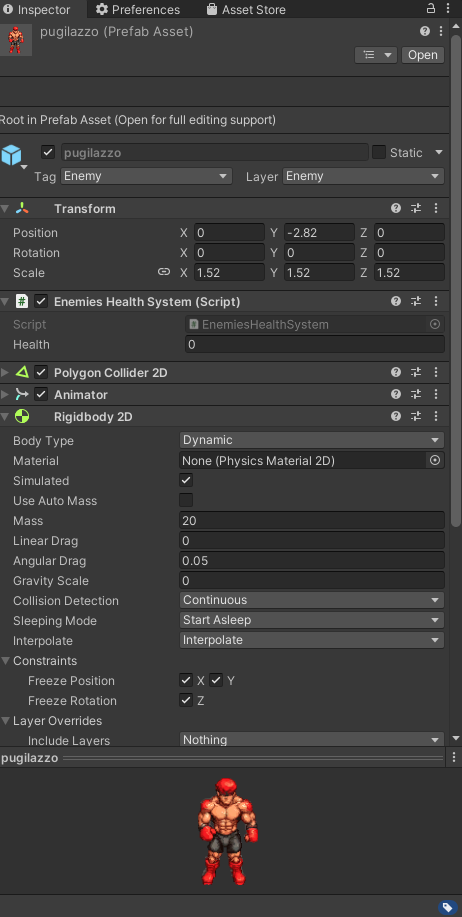
i'm using polygon collider for my player and same goes for enemies. Now i've put that enemies won't collide between them and it improved for sure. But it is still laggy if there are 40-50 enemies
https://gyazo.com/4df9e79f296858b548ac68aa1161b93f here's the enemy inspector
 polar acorn
late bobcat
i'm using polygon collider for my player and same goes for enemies. Now i've put...
polar acorn
late bobcat
i'm using polygon collider for my player and same goes for enemies. Now i've put...
Don't use Polygon colliders, use a basic collider
late bobcat
now i've tried reducing the fixed time update from 0.002 to 0.003
polar acorn
there's no reason these characters can't have box colliders
late bobcat
but then hitboxes aren't gonna be accurate no?
rocky canyon
^ or capsules
late bobcat
just asking
rocky canyon
how accurate do they need to be?
polar acorn
late bobcat
but then hitboxes aren't gonna be accurate no?
Why do you need hitboes to be accurate
rocky canyon
do u have a finger damage modifier?
late bobcat
not yet eheheh
rocky canyon
usually 2 colliders are enough for anything
late bobcat
i'll put box colliders then
rocky canyon
a body and a head
polar acorn
You'd only need that if they actually have different behaviors
polar acorn
late bobcat
different behaviors like?
Do your characters have different body parts that do different things when they collide with things

 late bobcat
polar acorn
Do your characters have different body parts that do different things when they ...
late bobcat
polar acorn
Do your characters have different body parts that do different things when they ...
no not yet tbh, just wanted to add punch animations for enemies
but it shouldn't affect hitboxes
polar acorn
late bobcat
no not yet tbh, just wanted to add punch animations for enemies
irrelevant
 lost kelp
hello, i'm trying to save data in a file for my game using application.persistentdata, but it keeps telling me that there is no authorisation, how do i fix this
rich adder
lost kelp
hello, i'm trying to save data in a file for my game using application.persisten...
fix the path make sure its correct
swift crag
don't crosspost. i just wound up answering this over in #archived-code-general
late bobcat
and another thing. Is there a way to make it so i don't have to use 2 different colliders for one object if i want it both to collide and trigger? Right now my enemy object has two collider. One is set to is trigger and the other is not, so that the hitboxes have some sort of physics collision. Question is, is there a way to use just one to use less resources?
while achieving the same result
slender nymph
it depends. what is the trigger collider used for?
rich adder
late bobcat
and another thing. Is there a way to make it so i don't have to use 2 different ...
nothing wrong with really doing that tbh
late bobcat
enemy colliding with the player and dealing dmg @slender nymph
@rich adder i wanted to optimize the game a bit, and putting 1 less collider for each enemy would've improved a bit maybe
slender nymph
and why does that need a separate collider? why can that not just be the non-trigger collider
late bobcat
because then enemy overlaps with player
they can sit on top of eachothers
not good looking
rich adder
late bobcat
<@968604165150507078> i wanted to optimize the game a bit, and putting 1 less c...
difference is prob negligible , you can look into the physics class queries
polar acorn
Just put them on a layer that is set to not collide with itself
slender nymph
late bobcat
because then enemy overlaps with player
you do realize i am not suggesting to make the player's main collider a trigger, right? so that would be the opposite of what you just said
non-trigger colliders do not overlap unless they are being moved without physics
late bobcat
@polar acorn ye enemy cannot collide between themselves if that's what you're saying
so if i put on capsule collider 2d on the enemy object and set it to trigger it won't overlap with my player object?
@slender nymph
slender nymph
what do you think "non" means in "non-trigger"
late bobcat
but i'm talking about "is trigger" colliders
slender nymph
and i asked you why you need one in the first place
late bobcat
to detect collision between enemy and player object
slender nymph
why can that not be done with the collider that is not a trigger?
(#💻┃code-beginner message)
 timid hinge
hi did anyone know why this is not installing?
 slender nymph
this is a code channel
timid hinge
its downloading for 10 hours
charred spoke
timid hinge
its downloading for 10 hours
This is still a code channel
timid hinge
i restart unity and install the lattest version of unity
late bobcat
so i just use oncollisionenter @slender nymph ?
timid hinge
charred spoke
This is still a code channel
where can i ask
slender nymph
late bobcat
so i just use oncollisionenter <@175082927862841344> ?
yes you can use that when you expect two non-trigger colliders to collide. then you won't need a second collider on the object that is just a trigger collider for doing exactly what the non-trigger can do
charred spoke
Also @late bobcat you can get away with the simplest collider a circle
For this type of game
charred spoke
Try and see
charred spoke
Computation wise it would be capsule -> box -> circle
late bobcat
where circle takes less resources i guess
charred spoke
Yes
late bobcat
aight
charred spoke
Cant get simplier that a circle
eternal falconBOT
Visual Studio Code guide
If your IDE is not underlining errors in red or autocompleting code,
please configure it using the link below:
late bobcat
games looks supersmooth atm and i can still optimize stuff @slender nymph @charred spoke 😄
 cobalt creek
StartCoroutine(sayHi("hi", response=>
{
        Debug.Log(response);
}));

public IEnumerator sayHi(string greeting, System.Action<string> callback)
{
    Debug.Log(greeting);
    callback("hello");
    yield return null;
}
Is there easier method than this to pass and return value for coroutine, or how i can improve it?
 final plinth
i'm using cine machine and moving my mouse down make the camera goes up how do i fix this.
literally no code behind it
slender nymph
literally no code behind it
then why ask in a code channel? #🎥┃cinemachine exists
wintry quarry
cobalt creek
```cs
StartCoroutine(sayHi("hi", response=>
{
Debug.L...
this code isn't returning anything. There's no clear reason this code should be a coroutine at all either since there's no delay going on.
swift crag
it's just a minimal example
This is reasonable, although the syntax is ugly in that StartCoroutine line, yes.
slender nymph
cobalt creek
```cs
StartCoroutine(sayHi("hi", response=>
{
Debug.L...
since coroutines cannot return objects and they also cannot have out or ref parameters then a callback you pass to the method would be the ideal way to get data out of the coroutine. or you can store stuff in fields, but that isn't always ideal
swift crag
You can create the anonymous function ahead of time
 late burrow
random range 0,3 will have equal same chance for 0 1 and 2 right
swift crag
You can also pass in a method instead of an anonymous function
StartCoroutine(sayHi(MyMethod));
 shell sorrel
how it acts depends on if its float or int
polar acorn
late burrow
it had weird way of calculating
What do you mean "a weird way of calculating"
shell sorrel
but its even chance of 0, 1 and 2 for a Range(0, 3)
its exclusive of the upper range, but inclusive of the lower
late burrow
because when im splitting it in half it starts getting confusing
as i still need add 1 for calculation
cobalt creek
thank all who responded, i will debug.
shell sorrel
now Random.value is better for a lot of things though
swift crag
late burrow
because when im splitting it in half it starts getting confusing
Explain what you're trying to do.
shell sorrel
that will not give you a reliable weighted chance
late burrow
i have only 2 values defining weighted chance
 dusk minnow
the cube moves left to right continously and when i jump it sometimes glitches in the wall and gets stuck

anyone knows why? setting vel to move it
swift crag
have you checked if OnCollisionEnter is ever called?
you've got several debug.log statements commented out
dusk minnow
Oh yeah theyre for test, yes the direction gets changen, OnCollisionEnter is called as usual
swift crag
okay, so then this part:
the cube moves left to right continously
is not a problem?
It sounded to me like you were saying the cube never changed direction
 swift crag
if you ever get stuck in the wall or against the wall, OnCollisionEnter won't get called repeatedly
check what your direction is when you're stuck
dusk minnow
one sec
-1 is left +1 is right for understanding

check if player doesnt move then change direction?
swift crag
Yeah, so you're against the wall, but you're also moving towards it
 swift crag
I noticed that you switch directions even if the collision was from below. What if you're hitting the white blocks?
 terse osprey
can somebody help with this error?
 rocky canyon
using Unity.Mathematics;``` both of these using statements have a `Random`ur script doesn't know which one to use.. the error tells u how to fix it..
decide which one u want to use and call it
UnityEngine.Random.Range(1,101);
or you can set the entire script to use a certain one..
using UnityEngine;
using Random = UnityEngine.Random;```oooor, just get rid of the mathmatics namespace.. unless ur using it
swift crag
your IDE might have imported Unity.Mathematics at some point
terse osprey
thankyou for the help this fixed it
rocky canyon
swift crag
your IDE might have imported `Unity.Mathematics` at some point
i hate when it does that
like, whats even good in that namespace?
late bobcat
https://gyazo.com/fa513b63507761a5d3e9aee06f640a35 guys why am i getting "An object reference is required for the non-static field, methor or property 'Animator.SetFloat(string, float)'?

what am i doing wrong 🤔
shell sorrel
late bobcat
https://gyazo.com/fa513b63507761a5d3e9aee06f640a35 guys why am i getting "An obj...
you need a instance of animator
shell sorrel
so use GetComponent to get one
rocky canyon
Animator myAnimator;
myAnimator.SetBool...
shell sorrel
or use lowercase animator looks like you already got a field for one
swift crag
rocky canyon
i hate when it does that
it's got some good noise functions!
rocky canyon
ohh true true
late bobcat
shell sorrel
or use lowercase animator looks like you already got a field for one
i'm dumb
 potent echo
Hey guys, So it seems I've run into a bit of a problem: I'm writing a script to detect figure out whether a gameObject is colliding with something from a certain direction (the ground and walls, namely). However, the ground and walls are on the same layermask due to them being part of a tilemap. This apparently causes a bunch of problems with raycasting, as the cast doesn't know the difference between a wall and the ground.
Is it possible to detect the ground seperately from the wall (maybe using a Physics cast instead of Collider2D cast now that I think about it)?
cosmic dagger
potent echo
Hey guys, So it seems I've run into a bit of a problem: I'm writing a script to ...
Can you place them on separate tilemaps?
potent echo
cosmic dagger
Can you place them on separate tilemaps?
I don't think that's possible, since the ground can be the wall, depending on which angle the gameobject is colliding with the tilemap from.
For example, a corner could be both the ground and the wall, depending on the collision.

 cinder lynx
Hello! I need help. I was following "Learn Unity Beginner/Intermediate 2023 - Code Monkey" and than I encounter an error. Basically I selected the wrong prefab and then when I trade it and put everything the right way it only interacts with the main prefab. Video: 2:48:30. Can anyone help me please? I already checked and I'm applaying the scripts on the prefab page(the right way).
 north kiln
Post the error and the video
cosmic dagger
potent echo
I don't think that's possible, since the ground can be the wall, depending on wh...
Hmm, I see. I wonder how they handle that? Actually, couldn't you check the position of the tilemap to the hit point and determine which side it came from?
potent echo
cosmic dagger
Hmm, I see. I wonder how they handle that? Actually, couldn't you check the posi...
How would you implement that?
rocky canyon
culd use seperate box 2d colliders and put them along the walls
and have an additional check on that when that edge-case happens
potent echo
rocky canyon
culd use seperate box 2d colliders and put them along the walls
Technically that works, but makes working with the tilemap a lot harder (especially for larger maps)
But it works nontheless
rocky canyon
can u get the centerpoint of the tile when u hit? i could think of another way, where u do some math to get the angle between the center point of the tile and the player.. if that angle is > than 45* or w/e (which would be the where the tile's corner meets) u could know whether u hit the top of it or the side of it
cinder lynx
north kiln
Post the error and the video

💬 This was a ton of work to make so I really hope it helps you in your game dev journey! Hit the Like button!
🌍 Course Website with Downloadable Assets, FAQ, Related Videos https://cmonkey.co/freecourse
❤ Follow-up FREE Complete Multiplayer Course https://www.youtube.com/watch?v=7glCsF9fv3s
🎮 Play the game on Steam! https://cmonkey.co/kitchencha...
rocky canyon
 potent echo
rocky canyon
potent echo
rocky canyon
can u get the centerpoint of the tile when u hit?
Unfortunately not, since my tilemap's collider is just one big piece (due to a compositecollider without which there'd be other collision issues)
 potent echo
rocky canyon
potent echo
rocky canyon
I'm guessing that means this wouldn't exactly work due to the tilemap's origin position
rocky canyon
ya, i woudlnt know of a way to do it w/o having the exact center point of the tile, and the tile needing to be perfectly square
theres other methods tho
cinder lynx
north kiln
Post the error and the video
any clues?
north kiln
cinder lynx
any clues?
Is the error you're talking about the "look rotation is zero"?
north kiln
That's not an error, unless you're referring to a logic error. You'll have to post your !code so someone can help you look into it
eternal falconBOT
Posting code
📃 Large Code Blocks
Use links to services like:
https://gdl.space/, https://paste.ofcode.org/, https://hatebin.com/, https://paste.myst.rs/, https://hastebin.com/
📃 Inline Code
Surround code with three backquotes. Not quotation marks.
To format as C#, add cs to the first line:
```cs
// Your code here
```
Add a comment with a line number if there is an error message.
polar acorn
🦆
buoyant knot
potent echo
are you using rule tiles?
i ask because one of those tiles looks not correct
 paper seal
hello guys! I'm doing like a spider man game first person game and i wanted to implement front flips. I used chatgpt but it was really buggy and it woudn't work properly. With this code, when I press "Q", my player does a front flip as expected but when its in about 180 degrees angle, it starts flickering a lot and sometimes when the flip is over im facing the wrong direction... can someone help me please? https://paste.ofcode.org/36BScLxvi5zJfaQgzafGYXU
potent echo
buoyant knot
are you using rule tiles?
No I placed everything manually (Including that odd-looking grass block for testing).
rich adder
paper seal
hello guys! I'm doing like a spider man game first person game and i wanted to i...
you should probably learn properly instead of using gpt
 eternal needle
paper seal
hello guys! I'm doing like a spider man game first person game and i wanted to i...
eternal needle
paper seal
hello guys! I'm doing like a spider man game first person game and i wanted to i...
you have 2 different places where you are assigning the camera rotation, that is probably why it is acting like this. also using eulers might not work as expected here, rotation is stored as a quaternion. When you give it an euler, it converts to quaternion, then you convert back when reading as euler. It can give you different numbers that result in the same rotation
 barren vapor
rich adder
you should probably learn properly instead of using gpt
barren vapor
rich adder
you should probably learn properly instead of using gpt
Chatgpt doesn't always see the correct way of fixing smt. Basing your work on that will turn out on loosing so much time on generating the same script over and over with new bugs piling up.
rocky canyon
chatgpt is good at lookin for syntax mistakes and stuff (but ur IDE can do that)..
the only thing i think chatgpt is decent at is refactoring.. or helping u refactor
shell sorrel
maybe i am just used to the tools i already got, but dont find it great for that either
paper seal
rich adder
you should probably learn properly instead of using gpt
i wish I could but idk how🙁
rich adder
paper seal
i wish I could but idk how🙁
check the pins in this channel
polar acorn
ChatGPT is a text generator. Use it to generate text. It doesn't know code, so it doesn't really help with code. Sometimes people talk about code so it can sometimes accidentally say something useful, but only if that thing was said often enough that the LLM thinks that's what people talk like.
paper seal
rocky canyon
chatgpt is good at lookin for syntax mistakes and stuff (but ur IDE can do that)...
it was happening that with me, everytime i was doing the flip it was looking in the same direction and chatgpt didn't know what was causing it, than I realized it was because the y axis was set to 0 lol
 grizzled pagoda
https://gdl.space/anojikufet.cpp can anyone help me with this? my wave goes straight to 5 after the first wave and all the zombies spawn in the same place
cosmic dagger
potent echo
How would you implement that?
Sorry, AFK. I saw someone use OnCollisionEnter and GetContact to use the Contact.point with WorldToCell to get the cell position
Once you have the cell position, you can get the tile with GetTile or use CellToWorld to get the tile position . . .
eternal needle
grizzled pagoda
https://gdl.space/anojikufet.cpp can anyone help me with this? my wave goes stra...
add a debug to see how many coroutines you are starting
stuck palm
I have an issue where when a DDOL object is initialised in the scene, and then i go back to that scene, a copy of that DDOL is made and i dont want 2 of them
how can i avoid this issue?
polar acorn
grizzled pagoda
https://gdl.space/anojikufet.cpp can anyone help me with this? my wave goes stra...
You're starting a coroutine every frame for 2 seconds before the first one actually spawns a wave. Then 2 seconds of coroutines all finish one after another because their waits are all done waiting.
polar acorn
 dense root
```c#
cImage.changeImage();

Debug.Log(cImage.changeImage());
```
dense root
```c#
cImage.changeImage();
Debug.Log(cImage.changeImage());
```
Like that, assuming it returns a value
grizzled pagoda
polar acorn
You're starting a coroutine every frame for 2 seconds before the first one actua...
so should i reduce the coroutine time?
polar acorn
stuck palm
I have an issue where when a DDOL object is initialised in the scene, and then i...
In start, check if another instance of this object exists already. If it does, self-terminate
polar acorn
grizzled pagoda
so should i reduce the coroutine time?
You should wait to start the next coroutine until the next one is finished
cosmic dagger
rocky canyon
chatgpt is good at lookin for syntax mistakes and stuff (but ur IDE can do that)...
ChatGPT documents my code/packages. It's great for writing summaries. Oh, and unit test. I use it as a first draft for unit testing . . .
stuck palm
polar acorn
In start, check if another instance of this object exists already. If it does, s...
how can i check for "other" instance? if i do findobject wont it just find itself
polar acorn
stuck palm
how can i check for "other" instance? if i do findobject wont it just find itsel...
Usually by having a static reference to an instance of this object. If it's null, set that instance to itself. If it's not null, destroy self.
cosmic dagger
stuck palm
I have an issue where when a DDOL object is initialised in the scene, and then i...
Your DDOL should be a singleton (pattern), which by default, checks if another instance already exists . . .
polar acorn
This is known as the Singleton pattern
grizzled pagoda
polar acorn
You should wait to start the next coroutine until the next one is finished
i reduced it to zero but now it spawns to 3rd wave, should i make a variable for this?
stuck palm
cosmic dagger
Your DDOL should be a singleton (pattern), which by default, checks if another i...
how do i do this singleton thing? i think its finally time i just do it cus i keep hearing about it
polar acorn
stuck palm
how do i do this singleton thing? i think its finally time i just do it cus i ke...
polar acorn
grizzled pagoda
i reduced it to zero but now it spawns to 3rd wave, should i make a variable for...
What did you reduce to 0
cosmic dagger
stuck palm
how do i do this singleton thing? i think its finally time i just do it cus i ke...
It's relatively simple. You can find any tutorial online or on YouTube. Unity may even have one. Digi has a simple example to follow . . .
#💻┃code-beginner message
grizzled pagoda
polar acorn
What did you reduce to 0
the time for the coroutine, the delay
dense root
So I'm trying to play sound however it does not appear to want to play... ideas?
public void changeImage()
{
    Debug.Log("changeImage()" + "readInput.currentWord: " + readInput.currentWord);
    if (readInput.currentWord == "manzana")
    {
        oldImage.sprite = apple;
        audioSource.PlayOneShot(appleSpaClip);
    }
AudioSource is assigned too

Volume appears to be set correctly
 polar acorn
grizzled pagoda
the time for the coroutine, the delay
polar acorn
grizzled pagoda
the time for the coroutine, the delay
You want to prevent starting a coroutine until the previous one finishes. Right now nothing is stopping all of your coroutines from starting one after another.
grizzled pagoda
should i implement the delay somewhere else? before i call the coroutine in the first place?
polar acorn
grizzled pagoda
should i implement the delay somewhere else? before i call the coroutine in the ...
You should put in some method of checking if the coroutine has started before starting the new one, and then un-set that when the coroutine finishes

 swift crag
Show the inspector for this Credits object.
stuck palm
cosmic dagger
It's relatively simple. You can find any tutorial online or on YouTube. Unity ma...
https://gdl.space/ejukurifew.cpp
idk if i've written this right, but i've followed a tutorial and made my gamemanager inherit from singleton and the issue still persisrs
 open apex

 tender breach
The spawn variable updates now, but now a gameObject won't instantiate. https://pastecode.io/s/2hum7dzq
open apex
shell sorrel
you dragged in the wrong object, or it does not have the script on it
The function was not public
I made it public
cosmic dagger
open apex
Does the GameObject you dragged into the slot have the script attached to it?
open apex
cosmic dagger
Does the GameObject you dragged into the slot have the script attached to it?
yes
grizzled pagoda
polar acorn
You should put in some method of checking if the coroutine has started before st...
cosmic dagger
@open apex Also, make sure the method is public or it will not display . . .
tender breach
tender breach
The spawn variable updates now, but now a gameObject won't instantiate. https://...
Bumping this
stuck palm
stuck palm
https://gdl.space/ejukurifew.cpp
idk if i've written this right, but i've follow...
is it because im not using the instance thing?
cosmic dagger
stuck palm
https://gdl.space/ejukurifew.cpp
idk if i've written this right, but i've follow...
Inherit from Singleton? Did you create a Singleton class?
stuck palm
cosmic dagger
Inherit from Singleton? Did you create a `Singleton` class?
thats a singleton class yeah
cosmic dagger
stuck palm
thats a singleton class yeah
Singleton is not a Unity class by default. You'd have to create one that has all the code. Did you copy/place code inside of that class?
stuck palm
cosmic dagger
`Singleton` is not a Unity class by default. You'd have to create one that has a...
i created a class, thats the link i sent
tender breach
The spawn variable updates now, but now a gameObject won't instantiate. https://pastecode.io/s/2hum7dzq
eternal needle
tender breach
The spawn variable updates now, but now a gameObject won't instantiate. https://...
Format your code. No one wants to read this. Mods warned you already a few times to format or stop posting
cosmic dagger
stuck palm
i created a class, thats the link i sent
Ahh, I missed the link. Mobile scrolls fast . . .
tender breach
eternal needle
Format your code. No one wants to read this. Mods warned you already a few times...
How do I format?
stuck palm
cosmic dagger
Ahh, I missed the link. Mobile scrolls fast . . .
what do i do with this singleton code? i created the class but not sure how to do it
cosmic dagger
tender breach
The spawn variable updates now, but now a gameObject won't instantiate. https://...
Yeah . . . I can't read this, especially on mobile. Hit that format button . . .
shell sorrel
stuck palm
what do i do with this singleton code? i created the class but not sure how to ...
when you want something to be a singleton you extned from it instead of MonoBehaviour
eternal needle
tender breach
How do I format?
Depends on which IDE you are using. Google the IDE name and how to auto format the code
Your brackets are all messed up so it's really tough to see where a statement begins and ends
polar acorn
tender breach
How do I format?
stuck palm
shell sorrel
when you want something to be a singleton you extned from it instead of MonoBeha...
Thats waht i've done
cosmic dagger
stuck palm
what do i do with this singleton code? i created the class but not sure how to ...
This is the first part of the process. What did the rest of the tutorial say/do?
tender breach
stuck palm
cosmic dagger
This is the first part of the process. What did the rest of the tutorial say/do?
something about just referencing using an instance or whatever
thats it really
like gamemanager.instance or whatever
shell sorrel
stuck palm
like gamemanager.instance or whatever
thats all there is too it
grizzled pagoda
https://gdl.space/kibimapizi.cpp can anyone help me with this? i need to delay my coroutine so that it doesnt go straight to the 3rd wave/index. How would i do that
cosmic dagger
stuck palm
what do i do with this singleton code? i created the class but not sure how to ...
Any class you want to have DDOL will derive from it. No need to do anything else . . .
cosmic dagger
stuck palm
like gamemanager.instance or whatever
Yep, that's it . . .
stuck palm
cosmic dagger
Yep, that's it . . .
so if i dont use the instance it just doesnt work?
shell sorrel
stuck palm
so if i dont use the instance it just doesnt work?
what are you expectations
polar acorn
tender breach
https://pastecode.io/s/iyuh3gfq
Maybe it's just because searching on mobile is ass but I don't see any instantiate happening in this code at all
 frosty hound
tender breach
How do I format?
frosty hound
tender breach
How do I format?
I'm replying to this so I have an official final caution. If you post unformatted code again in the future, you will be muted. If you continue, you will be kicked.
You have been told over three times by now.
shell sorrel
stuck palm
so if i dont use the instance it just doesnt work?
you simple access it with TypeName.Instance as a shortcut to let you reference that from anywhere now
polar acorn
Oh, hang on I see it, it was mobile searching
swift crag
stuck palm
so if i dont use the instance it just doesnt work?
The instance will only be created when you access the instance property
(unless a component already exists in the scene, of course)
polar acorn
I'll let someone on a computer handle this
stuck palm
right
shell sorrel
or you can just put it in a scene manually and it will find the existing instance
swift crag
stuck palm
right
I explicitly access a few instance properties when my game starts up
    void Initialize()
    {
        LoadData();

        foreach (var mode in DefaultGameModes.Instance.gameModes)
            mode.CreateConfig();

        // make the menu load itself
        var x = MainMenu.Instance;

        gameSessionsStat.Increment();

        State = GameState.MainMenu;

        Application.quitting -= OnQuit;
        Application.quitting += OnQuit;

        DontDestroyOnLoad(gameObject);
    }
so instead of creating like a field in the class, i just reference GameManager is a type?
swift crag
I don't understand your question.
SomeSingleton.instance <-- after you evaluate this, the instance is guaranteed to exist
shell sorrel
it creates a gameobject then adds the class to it
stuck palm
i see
swift crag
(or are you talking about my code?)
shell sorrel
read the code
swift crag
well, what's your use case...?
stuck palm
swift crag
well, what's your use case...?
i have this game manager object with multiple components on it
 shell sorrel
its simply a way to get a reference where ever you need it, and create it if it does not exist
swift crag
If you need to instantiate an entire prefab, then you need a completely different singleton implementation.
stuck palm
😭
swift crag
Read the dang code.
It does exactly what it says it does. No more, no less.
You can't just pray that it magically does what you intended
polar acorn
tender breach
https://pastecode.io/s/iyuh3gfq
So, Instantiate runs in Start, if Spawn is false. If dropSet is 1, Spawn becomes true, otherwise it's untouched. So, either Spawn starts as true or dropSet is 1 when Start runs
stuck palm
okay im gonna look up prefab singleton then
shell sorrel
swift crag
If you need to instantiate an entire prefab, then you need a completely differen...
there is a findobjectoftype it uses before creating it, so he could just manually create the instance in scene and use it for access only
swift crag
now, fortunately, it's also really easy to make a singleton that instantiates a prefab
using UnityEngine;

public abstract class SingletonPrefab<T> : MonoBehaviour where T : SingletonPrefab<T>
{
    private static T _instance;

    public static bool Safe => _instance != null;
    public static T Instance
    {
        get
        {
            if (_instance == null)
            {
                _instance = Instantiate(Resources.Load<T>("SingletonPrefab/" + typeof(T).Name));
            }

            return _instance;
        }
    }
}
you can probably ignore the Safe property
dense root
So I'm trying to map two different words ("りんご” and "manzana") to the same currentJapWord and currentSpaWord... any thoughts on how to do that? Like how do I assign two different words with the same meaning to the same current word?
private void Awake()
{
    foreach (Word word in allWords)
    {
        mappings[word.English] = word;
        mappings[word.Spanish] = word;
        mappings[word.Japanese] = word;
    }

    // Find the InputField dynamically during runtime

    if (japInputField != null && spaInputField != null)
    {
        // Set the focus back to the input fields
        japInputField.Select();
        japInputField.ActivateInputField();

        spaInputField.Select();
        spaInputField.ActivateInputField();

        // Set currentWord for both languages
        //currentJapWord = GetRandomWord().Japanese;
        //currentSpaWord = GetRandomWord().Spanish;

        currentJapWord = "りんご";
        currentSpaWord = "manzana";
 swift crag
I use that to test if an instance currently exists. It's relevant when the game is shutting down
i don't want to instantiate things while the game is shutting down
stuck palm
swift crag
```cs
using UnityEngine;
public abstract class SingletonPrefab<T> : MonoBehavio...
ah but i need to use resources, how do i use resources?
 stuck palm
do i need to explicitly mark a folder as a resources folder or
shell sorrel
also dont over use resources, everything you put in the folder gets included in your game even if never used
shell sorrel
stuck palm
do i need to explicitly mark a folder as a resources folder or
any folder named Resources
stuck palm
shell sorrel
also dont over use resources, everything you put in the folder gets included in ...
im probably only gonna use it for like 3 things so no problem there
swift crag
shell sorrel
also dont over use resources, everything you put in the folder gets included in ...
yeah, you would not want to throw a huge pile of models into Resources
swift crag
stuck palm
do i need to explicitly mark a folder as a resources folder or
Read the link I just sent.
grizzled pagoda
polar acorn
You should put in some method of checking if the coroutine has started before st...
how would i do that? i have boolean that should stop it but it doesnt
stuck palm
swift crag
Read the link I just sent.
does your prefab code account for if two of the same type exist?
swift crag
stuck palm
does your prefab code account for if two of the same type exist?
I only ever create instances of these types by accessing the instance method, so that's impossible
I do not have a MainMenu prefab in any scene in my game
that was the entire motivation for this SingletonPrefab class - I didn't want to have a menu prefab in every scene, and I didn't want to have to worry about making sure I always started the game from a scene with a menu prefab that'd get DDOL'd or something
When the game starts, the prefabs are instantiated
stuck palm
swift crag
I only ever create instances of these types by accessing the `instance` method, ...
oh right
swift crag
it works really nicely
swift crag
swift crag
```cs
void Initialize()
{
LoadData();
foreach (var mode...
the GameController is responsible for making everything else happen
nothing else "starts itself"
stuck palm
i already have a gameManager prefab open in the scene, that could be t he problem ig
i see, the game manager isnt getting reinstantiated when i reference it again from the first time
tender breach
polar acorn
So, `Instantiate` runs in Start, if `Spawn` is false. If `dropSet` is 1, `Spawn`...
I don't understand.
polar acorn
tender breach
I don't understand.
Find out which of those cases is preventing your instantiate from happening
tender breach
Ok
 round umbra
https://gdl.space/wugohoguge.cs
hello im having a small issue
i have a
float currentHighScore
float reactiontime
if (reactionTime < currentHighScore)
o want the highScore to update
when you first play the game currentHighScore = 0f;
but reactionTime can never be < currentHighScore
i would be wierd if i set it currentHighScore to 100f; couse then the highscore wil be 100 at the start
is there an other way than this aprouch?
rocky canyon
ur first reaction wouldn't compare to the highscore,
it would just log the reactionTime as the new highscore, then ud compare
polar acorn
grizzled pagoda
how would i do that? i have boolean that should stop it but it doesnt
Show code
grizzled pagoda
polar acorn
Show code
polar acorn
grizzled pagoda
https://gdl.space/yapihuvuso.cpp
You set is spawning to true after the wait
Meaning it won't block the coroutine from starting until it's already done
grizzled pagoda
oh
polar acorn
You want to set your book before the timer and then un set it after
grizzled pagoda
yeah
i got it it works now
@polar acorn thanks a lot! man idk how i missed that thanks a bunch
round umbra
rocky canyon
it would just log the reactionTime as the new highscore, *then* ud compare
works i add a bool isfirstAttempt and did this
if (isFirstAttempt || reactionTime < currentHighScore)
isFirstAttempt = false;
and i also check if there is a score saved from last sesion then isFirstAttempt also be false
tender breach
polar acorn
Find out which of those cases is preventing your instantiate from happening
I can't find the case that's preventing the instantiate from happening.
polar acorn
tender breach
I can't find the case that's preventing the instantiate from happening.
What have you tried
tender breach
I tried removing dropset++ and Spawn = True, but I kept getting the problem.
polar acorn
How about instead you just log those values in start and see what they are
frosty hound
Logging isn't a fix, it's to help you understand the issue.
polar acorn
tender breach
That didn't work
If it didn't print anything then this code isn't running
tender breach
Oh, I just moved dropset++ to another place in start.
polar acorn
tender breach
Oh, I just moved dropset++ to another place in start.
So if you didn't do what I asked you to do why did you say that you did but it didn't work
tender breach
I didn't know what you meant.
polar acorn
If you don't know what debug log is you need to stop everything and do the beginner tutorials linked in the pins.
rocky canyon
round umbra
works i add a bool isfirstAttempt and did this
if (isFirstAttempt || reaction...
sounds good!
polar acorn
Debug log should literally have been the first line of code you ever wrote
 late yew
I'm trying to make a twin-stick shooter where the player follows the cursor, but when they sprint I don't want them to look at the cursor, and instead at the direction of travel. This is the code I have, but it's not working, even while running the character continues to look at the cursor. Any idea why?
void RotatePlayer()
{
    if (isRunning == false)
    {
        transform.LookAt(new Vector3(cursorToWorldPoint.x, transform.position.y, cursorToWorldPoint.z));
    }
    else if (isRunning == true)
    {
        transform.LookAt(new Vector3(xForce, transform.position.y, zForce));
    }
}```this is being called in update
It's actually only facing the x value of the cursor, as soon as it passes where it sits on the screen, the model does a complete 180
dense root
Any ideas why I cannot tab into my next inputfield? I even have interactable set to true
 shell sorrel
think tab might want nav for moving down so could setup the rest of the references under navigation
 shell sorrel
use * not +
dense root
shell sorrel
think tab might want nav for moving down so could setup the rest of the referenc...
No dice

 amber spruce
how do i draw this area with gizmos like with the offset
Physics2D.BoxCast(m_Coll.bounds.center, m_Coll.bounds.size, 0f, Vector2.down, .01f, jumpableGround);
isn't that times?
shell sorrel
open apex
isn't that times?
Quaternion is not a regular number, that is how you combine 2 rotations by applying one to the other with multply
rich adder
Sorry wrong reply @shell sorrel lol
shell sorrel
open apex
who also got rotate as a field, how are you setting it, quaterions are not what you think they are, the x y z and w components are not angles like you think
dense root
Odd, even the visualizer is showing that it should be able to tab between thw two, am I missing something in code?
 open apex
shell sorrel
who also got rotate as a field, how are you setting it, quaterions are not what ...
open apex
shell sorrel
who also got rotate as a field, how are you setting it, quaterions are not what ...
I thought of Vector3 and I thought there would be something similar for rotations 😔
rocky canyon
this was the best way i seen quaternions explained
 shell sorrel
open apex
I thought of Vector3 and I thought there would be something similar for rotation...
shell sorrel
open apex
I thought of Vector3 and I thought there would be something similar for rotation...
there are methods you can use instead
 silver sun
i am trying to call an OpenAI API like:
  -d '{
    "model": "gpt-4-vision-preview",
    "messages": [
      {
        "role": "user",
        "content": [
          {
            "type": "text",
            "text": "What’s in this image?"
          },
          {
            "type": "image_url",
            "image_url": {
              "url": "https://upload.wikimedia.org/wikipedia/commons/thumb/d/dd/Gfp-wisconsin-madison-the-nature-boardwalk.jpg/2560px-Gfp-wisconsin-madison-the-nature-boardwalk.jpg"
            }
          }
        ]
      }
    ],
  }'
here's my 8 hour progress:
https://pastebin.com/Fs8MpWwu (just the relevant parts)
here's my error:
HTTP/1.1 400 Bad Request
line 58 on PasteBin.
don't bother explaining, i know i'm not sending the parameters correctly, but that's the issue...
i've done this before:
`"model": "gpt-3.5-turbo",
  "messages": [
   {
    "role": "system",
    "content": "You are a helpful assistant."
   }
  ]
 }```
**
but not:**

```py
"model": "gpt-4-vision-preview",
  "messages": [
   {
    "role": "user",
    "content": [
     {
      "type": "text",
      "text": "What’s in this image?"
     },
     {
      "type": "image_url",
      "image_url": {
       "url": "blahblhah"
      }```
i switched the channel because i think a "general" programmer would of known how to fix it by now...V3 is opposite , you add those together or multiply by a float
shell sorrel
open apex
I thought of Vector3 and I thought there would be something similar for rotation...
or AngleAxis or many others you can see for certain purposes
you can find them all as static methods on Quaternion
rocky canyon
open apex
I thought of Vector3 and I thought there would be something similar for rotation...
A * B is (A Rotates B) where B is the original oreientation and A is the rotation thats happening to it
open apex
shell sorrel
https://docs.unity3d.com/ScriptReference/Quaternion.Euler.html like this
I didn't know there was a w
rocky canyon
this was helpful to me when i read it
shell sorrel
open apex
I didn't know there was a w
like i said a quaternion is not what you think it is, so you are best to use the methods on it, and not directly working with its data
rocky canyon
ya, only those still plugged into the matrix can visualize quaternions
https://quaternions.online/ heres a fun interactable
Visualising Quaternions, Converting to and from Euler Angles, Explanation of Quaternions
shell sorrel
rocky canyon
ya, only those still plugged into the matrix can visualize quaternions
yeah many methods to work around it though like AngleAxis, LookRotation etc
shell sorrel
most of what i do is do some vector math to get a direction then LookRotation that
rocky canyon
        if (Input.GetMouseButton(1))
        {
            rotateCurrentPos = Input.mousePosition;
            Vector3 difference = rotateStartPos - rotateCurrentPos;
            rotateStartPos = rotateCurrentPos;
            newRotation *= Quaternion.Euler(Vector3.up * (-difference.x / dragRotationSpeed));
        }```
ya, i pretty much use` Quaternion.Euler `like its going outta styleI am just trying to rotate z to a 180 😔
frosty hound
@silver sun Do not crosspost. #archived-code-general
shell sorrel
transform.rotation = Quaterion.AngleAxis(180, Vector3.forward)
open apex
I did the * you told me,
But it does 180 times 0 which make it still 0
rocky canyon
shell sorrel
`transform.rotation = Quaterion.AngleAxis(180, Vector3.forward)`
ahh, i havent used the .AngleAxis just yet
open apex
The problem is, I don't know why. I don't understand what I am reading sometimes
shell sorrel
open apex
thanks
make it *= if you want to rotate 180 from where it is already
silver sun
frosty hound
<@916759985847939132> Do not crosspost. <#763495187787677697>
i know the rule, i read them, did you want me to delete the old one? because only after i realised that it's not a beginner channel.
rocky canyon
if you've commited a crosspost.. then yes, probably delete 1 of em
frosty hound
It was already removed, and you reposted it in #💻┃code-beginner. So knowing the rules is questionable.
Just pick one channel and stick with it. It's up to you if it's beginner or general.
amber spruce
hey so i could use some help with something so basically my player is colliding with the ground fine as you can see with the image thats my code for the boxcast and for some reason it will randomly say it isnt colliding with it and wont let me jump any idea what im doing wrong here
public bool IsGrounded()
{
    return Physics2D.BoxCast(m_Coll.bounds.center, m_Coll.bounds.size, 0f, Vector2.down, .01f, jumpableGround);
}
 silver sun
rocky canyon
if you've commited a crosspost.. then yes, probably delete 1 of em
silver sun
rocky canyon
if you've commited a crosspost.. then yes, probably delete 1 of em
because it was pretty far up anyway... what a thing to compare about "breaking the rules"..
rocky canyon
i was just answering what i'd do.. u asked
amber spruce
amber spruce
hey so i could use some help with something so basically my player is colliding ...
when i mean randomly i mean i have a hard time reproducing it it takes like 5 minutes to reproduce it
rocky canyon
hmm, is it a certain area of the level?
silver sun
okay, noted. but my bad i intended to reply to Osteel
rocky canyon
or just generally anywhere
amber spruce
rocky canyon
hmm, is it a certain area of the level?
so it seems to trigger around a certain point in the level and then no matter where i go it doesnt fix but it also triggers other spots its just one spot normally is the main spot it occurs
i beilive its something to do with that part but im also not entirly sure
 rocky canyon
the 0.1f in ur boxcast may be too small for all scenarios (on flat ground yea,, but maybe in other situations its not big enough?)
 amber spruce
yes but when im back on flat ground that should be fixed no?
like i cant jump anywhere after this happens
rocky canyon
other than that its ur basic groundcheck 101:
- is the playerobject and ground set up with the correct layers
- is the layermask including these layers
- check the size and position of the boxcast
- check the distance
- etc
rocky canyon
amber spruce
like i cant jump anywhere after this happens
like i cant jump anywhere after this happens
thats an important tidbit of information ☝️
sounds more like maybe an error.. if u get a null error or somthing in the code, that code will just stop working
do u have any errors in teh console when it happens?
amber spruce
nope no errors or even warnings
rocky canyon
do u call the bool in the code? (like in all the right places?)
maybe the code bypasses it for some reason
amber spruce
i tried in update setting a public variable to it so i could see and after the glitch happens its just always false
rocky canyon
but im talkin about teh bool .. unless u use the bool, (the physics boxcast wont run) and then ur groundcheck will never be true anymore.. unless its called. maybe the code for that bit is broken
best to send the code anyway, in a pastebin site or something so we have some context
these types of errors usually aren't just the singular ground check thats wrong, its usually a multi-piece problem
amber spruce
rocky canyon
best to send the code anyway, in a pastebin site or something so we have some co...
here is the whole script
https://pastebin.com/Cg5Unzbg
Pastebin
Pastebin.com is the number one paste tool since 2002. Pastebin is a website where you can store text online for a set period of time.
rocky canyon
im gonna go ahead and guess it has something to do with u having 2 bools for grounded. and trying to manage both of them.. as well as the coroutine that has to wait half a second to set m_Grounded back to false
im still looking thru it.. not seeing it right off the bat.
amber spruce
rocky canyon
im gonna go ahead and guess it has something to do with u having 2 bools for gro...
wdym 2 bools for grounded m_grounded2 was just so i could visualise what it is at all moments
it was happening before i added that
and the half second wait was because before it would instantly set it to false letting you double jump because you technically where still touching the ground
rocky canyon
i think its ur .1f like i said originally..
heres my test using the bool raycast return like you have with a .1f (never gets grounded b/c the player is too thicc)
and heres my test using the bool raycast return like you have with a .75f (works as intended)
amber spruce
yeah so that seems to fix it
rocky canyon
    private void Start()
    {
        rb = GetComponent<Rigidbody2D>();
        coll = GetComponent<BoxCollider2D>();
    }

    private void Update()
    {
        isGrounded = IsGrounded(); // updating every frame (so we dont miss any ground detections)

        float horizontalInput = Input.GetAxis("Horizontal");
        Vector2 move = new Vector2(horizontalInput,0f);
        rb.velocity = new Vector2(move.x * speed,rb.velocity.y);

        if(isGrounded && Input.GetKeyDown(KeyCode.Space))
        {
            Jump();
        }
    }

    private bool IsGrounded()
    {
        float raycastLength = 0.75f;
        RaycastHit2D hit = Physics2D.Raycast(coll.bounds.center,Vector2.down,raycastLength,groundLayer);
        TestGround = hit.collider != null;
        return TestGround; //used a TestGround boolean that I exposed in the editor
    }

    private void Jump()
    {
        rb.velocity = new Vector2(rb.velocity.x,jumpForce);
}``` just used your code and stripped out all the animations and extra noise so i could focus on the groundcheckya, that was my first guess and gut reaction, and thats what it ended up being on my end
amber spruce
i also just realised the gizmos is 0.1 and the actual boxcast is 0.01
so it may not have been colliding lol thanks for the help
rocky canyon
yea .01 is extra tiny
amber spruce
yeah didnt think about that i thought it was .1 lol
rocky canyon
another thing is, learn about Gizmo's

u can draw them using code.. and it'll really help out trying to visualize these things..
    private void OnDrawGizmos()
    {
        // Draw a raycast line to visualize ground detection
        Gizmos.color = Color.green;
        float raycastLength = 0.75f;
        Vector2 raycastOrigin = coll.bounds.center;
        Vector2 raycastDirection = Vector2.down;

        Gizmos.DrawLine(raycastOrigin,raycastOrigin + raycastDirection * raycastLength);
}``` ^ that exampleyeah i was drawing them already lol
rocky canyon
oh okay 👍 just trying to give ya some things to help
sounds like ur pretty good tho
amber spruce
yeah thanks any way
rocky canyon
np, 🍀
 white yew
rocky canyon
```cs
private void OnDrawGizmos()
{
// Draw a raycast line to vi...
white yew
rocky canyon
```cs
private void OnDrawGizmos()
{
// Draw a raycast line to vi...
Would recommend OnDrawGizmosSelected() in case I want to only see the gizmo on the object(s) selected in hierarchy.
rocky canyon
true true
north kiln
Did you read the paragraph that tells you what that error means?
Great, so you have some gradle errors. Ask about them in #📱┃mobile

 rich adder
You're trying to build but have some UnityEditor classes that you cannot export
put scripts in editor folder or wrap in #if editor
rocky canyon
^ MenuScript is gonna have to be modified
 sour fulcrum
        public bool DetectChanges<T>(T firstValue, T secondValue)
        {
            return (firstValue.Equals(secondValue));
        }
can i get a vibe check on this, would this work as intended for objects like monobehaviours, so's etc.?
 teal viper
sour fulcrum
```cs
public bool DetectChanges<T>(T firstValue, T secondValue)
...
teal viper
sour fulcrum
```cs
public bool DetectChanges<T>(T firstValue, T secondValue)
...
How is it different from doing an Equals directly?🤔
sour fulcrum
Oh it's a validation thing i'm gonna have some optional debug logging in here in theory
teal viper
Okay. I don't really get the question then. It would work the same as if you're doing an Equals directly.
rocky canyon
sour fulcrum
```cs
public bool DetectChanges<T>(T firstValue, T secondValue)
...
whats this do? im curious
polar acorn
sour fulcrum
```cs
public bool DetectChanges<T>(T firstValue, T secondValue)
...
This is identical to just doing ==
sour fulcrum
Sorry, new to generics and wasn't sure if me passing in stuff like monobehaviour, scriptableobject etc. generically would make it fail an object comparison like this
rocky canyon
ahh, Type == Type?
sour fulcrum
nah i want object instance
rocky canyon
Object == Object ? im just curious what its for
polar acorn
sour fulcrum
Sorry, new to generics and wasn't sure if me passing in stuff like monobehaviour...
Syntactically, this is all sound, but functionally, it's the same as ==
teal viper
Equals can be overriden though, so the behavior might vary depending on the object.
sour fulcrum
rocky canyon
Object == Object ? im just curious what its for
For full context i'm developing a custom content api mod for Lethal Company and I want to detect and log user changes to values in the custom content via config files
polar acorn
sour fulcrum
For full context i'm developing a custom content api mod for Lethal Company and ...
If you want to detect changes you're going to need some sort of previous value to compare it to
rocky canyon
ooo.. and if u modify something in one object the comparison is supposed to fail??
sour fulcrum
polar acorn
If you want to detect changes you're going to need some sort of previous value t...
thats what i'm doing, no?
polar acorn
sour fulcrum
thats what i'm doing, no?
This is checking if two objects are equal, the hard part is actually getting the previous value
teal viper
Reference types check reference equality. So even if the contents are the same, 2 objects would never be equal
rocky canyon
as far as i know ur just comparing two objects, if its the same object
rocky canyon
teal viper
Reference types check reference equality. So even if the contents are the same, ...
didnt expect this
sour fulcrum
polar acorn
This is checking if two objects are equal, the hard part is actually _getting_ t...
the two object are the previous and new value
sour fulcrum
teal viper
Reference types check reference equality. So even if the contents are the same, ...
oh?
rocky canyon
b/c its different *entities? (identifier, GUID?
polar acorn
sour fulcrum
oh?
For reference types, == and .Equals check if they're literally the same instance
teal viper
sour fulcrum
oh?
Unless you(or unity) override their Equals method
polar acorn
Also, if they are the same instance, if you change a variable on one of them, that variable would be changed on both variables pointing to that same instance
If I have a cat, and I tell you about my cat, and then I put an adorable little bowtie on him, the cat that we're both thinking of now has a bowtie
rocky canyon
ya, okay yea thats what i thought i read. lol
teal viper
To put it simply, your method doesn't really detect any changes.
Unless you're planning to use it for value type mainly.
sour fulcrum
The name of the function might be a little misleading,
I don't want to detect if something has changed. I want to check if setting x to y would be changing it
teal viper
Well, then no. It would always return false if x and y are different instances.
Even if it doesn't change anything.
sour fulcrum
yeee but if x and y are the same instance it'll like detect that correctly right
rocky canyon
i doubt it
i mean if ur asking if its the same instance with different data /values
polar acorn
sour fulcrum
yeee but if x and y are the same instance it'll like detect that correctly right
If X and Y are the same instance then they're the same instance and changing anything wouldn't matter
sour fulcrum
polar acorn
If X and Y are the same instance then they're the same instance and changing any...
what your saying here is exactly what i want to log
which is the purpose of this function
teal viper
sour fulcrum
yeee but if x and y are the same instance it'll like detect that correctly right
If they are the same inatance, then yes, that would work. But what's the point of the check then?
rocky canyon
ya, if its the same instance how is anything supposed to be different?
eternal needle
what is the actual purpose of the function?
polar acorn
sour fulcrum
what your saying here is exactly what i want to log
I'm not sure what you mean. If they're the same instance then they're the same instance, how are you going to detect if one of them has changed
rocky canyon
sour fulcrum
one moment
eg. i want to use it like
        public void DebugDetectChanges<T>(List<T> firstList, List<T> secondList)
        {
            string debugString = "Detecting Changes" + "\n";

            if (firstList.Count != secondList.Count)
                debugString += "List Count's Differ, Changes Confirmed!";

            if (firstList.Count >= secondList.Count)
            {
                foreach (T item in firstList)
                {
                    debugString += "Detection Check #" + firstList.IndexOf(item) + " - (" + DetectChange(item, secondList.IndexOf(item)) + ")" + "\n";
                }
            }
        }

        public bool DetectChange<T>(T firstValue, T secondValue)
        {
            return (!firstValue.Equals(secondValue));
        }
It seems you need to check if the value of a field on an instance is different than the new supplied value . . .
teal viper
If the user have created a new instance of a type and tries to assign it somewhere. Is that what you want to check?
polar acorn
sour fulcrum
eg. i want to use it like
```cs
public void DebugDetectChanges<T>(List<...
Okay, in that case, == works fine
sour fulcrum
polar acorn
Okay, in that case, `==` works fine
its mad at me
 cosmic dagger
sour fulcrum
its mad at me
cosmic dagger
sour fulcrum
its mad at me
You need a constraint for T . . .
sour fulcrum
( might be misusing generics, i'm new to them)
teal viper
sour fulcrum
its mad at me
What does the line of code look like?
sour fulcrum
return (!(firstValue == secondValue));
rocky canyon
generics confuse me. so its an extra layer of complicated when i watch them get debugged by others lol
cosmic dagger
sour fulcrum
its mad at me
You're comparing the types, not a value of the type . . .
sour fulcrum
ah
north kiln
That's not true though
rocky canyon
ya, thats why i originally asked at the begining, do u mean Type==Type
ohh.. nvm lol
teal viper
I think you just need a constraint how random pointer initially.
north kiln
The problem is a lack of constraints
sour fulcrum
I have two lists of values and i want to have a easy way to check if there are differences in the two lists
the two lists will always be the same type but i want to do this check with multiple types if you know what i mean
cosmic dagger
If one is a reference type and the other is a value type, a null assignment will be an issue . . .
They need a type as a common denominator . . .
north kiln
They are the same type, both T
You won't be able to use ==, but you can use Equals, and should add IEquatable<T> as the constraint
cosmic dagger
IEquatable will use its—the type—default Equals method. So it disregards the type mismatch, doesn't it?
north kiln
DetectChange(item, secondList.IndexOf(item)) this is nonsense however
sour fulcrum
Howso?
north kiln
it should also not compile
 violet spear
hey
 near wadi
howdy
 gaunt ice
There may be differences if the two lists count are the same (assume they are not same instance)
violet spear
near wadi
howdy
can you jump in my call with me and my buddy please
near wadi
violet spear
can you jump in my call with me and my buddy please
no, that is not something i do, but we can text here
violet spear
ok thats fine
polar acorn
We'll move into here because it is a bit more of a code thing anyway. Send a screenshot of the object that has your script on it
violet spear
so when i start a new project and then i add canvas then add script through canvas on add component then typ to say hello
polar acorn
violet spear
so when i start a new project and then i add canvas then add script through canv...
So show a screenshot of your canvas with the script on it
violet spear
i got it sorry for the inconvience guys i didnt know you had to drag the script over and attach it to canvas or main camera
 unique furnace
Coding is an ass that is full of farts.
polar acorn
unique furnace
Coding is an ass that is full of farts.
That is usually where the farts come from
near wadi
Coding is a class that's full of art
unique furnace
I started watching an instructional video at 11am today and have been stuck trying to get this message to appear until this very moment
I have read 6 miles of forums and had no one help me change a setting that properly linked unity to VisualStudio
polar acorn
!ide
eternal falconBOT
💡 IDE Configuration
If your IDE is not autocompleting code
or underlining errors, please configure it.
Select one:
• Visual Studio (Installed via Unity Hub)
• Visual Studio (Installed manually)
• VS Code
• JetBrains Rider
• Other/None
polar acorn
We literally have a bot command explaining how to do that
unique furnace
I have learned this now. Thanks
 young smelt
Paste of code isn't working, any alternatives?
near wadi
!code
eternal falconBOT
Posting code
📃 Large Code Blocks
Use links to services like:
https://gdl.space/, https://paste.ofcode.org/, https://hatebin.com/, https://paste.myst.rs/, https://hastebin.com/
📃 Inline Code
Surround code with three backquotes. Not quotation marks.
To format as C#, add cs to the first line:
```cs
// Your code here
```
Add a comment with a line number if there is an error message.
young smelt
To be honest I kinda got lost in the tutorials but here
https://hastebin.com/share/azusepehic.csharp
Basically the terrains are creating fine but I am not seeing shit in the game view I only see them in the inspector. And once I move past the observable distance, it does actually hide the ones outside said distance. After looking at it for a while, I noticed the mesh filter is not getting applied and stays empty which is weird because I do in fact do that in the UpdateTerrainChunk right after checking for if the mesh data has been gotten. Pls tell me if u want to see other parts of my code
Hastebin is a free web-based pastebin service for storing and sharing text and code snippets with anyone. Get started now.
near wadi
violet spear
i got it sorry for the inconvience guys i didnt know you had to drag the script ...
Hey, just wanted to remind you about the learning portal. It is wise to take the Junior Programmers Pathway. at least, the first couple sections
!learn
eternal falconBOT
:teacher: Unity Learn ↗
Over 750 hours of free live and on-demand learning content for all levels of experience!
 stone elk
how can i change my textmeshpro outline colour through script?
young smelt
young smelt
Paste of code isn't working, any alternatives?
wait I sent explanation of what happened and a link to hastebin but I think it got blocked
Yh I can't reply it
near wadi
your message and link came through fine to me
 quaint terrace
I have a scriptableObject. And every Time i call it it has to be initialized. Whats the point of ScriptableObjects if they have to be built everytime i call them?
teal viper
They don't. What exactly are you doing? Share code.
quaint terrace
    {
    //print("Looting something "+index);
    ItemDatabase itemDatabase = ScriptableObject.CreateInstance<ItemDatabase>();
    Item newItem = itemDatabase.GetItem(index);
    print("Index: "+index);
    print("NewItem: "+newItem.Name);
foundItem = items.Find(item => item.Name == newItem.Name);```and unless i put Awake{initinializeItems();} inside itemDatabase, i cant access any of the items.
teal viper
Doesn't seem like a correct way to use SOs.
The whole point of SOs is that you can reference an instance of it as an asset.
Here you're just creating a new instance every time.
quaint terrace
but when i public ItemDatabase itemdatabase; unity yells at me and says instance of object is not found.
 timber tide
damn it unity
teal viper
quaint terrace
but when i public ItemDatabase itemdatabase; unity yells at me and says instance...
Do you actually assign it in the inspector?
quaint terrace
scriptableObjects cant be assigned in the inspector, it has to be a monobehaviour
eternal needle
assigning it in the inspector is like the first thing you see online when learning SO
teal viper
Ofc they can. That's the whole point of them😅
quaint terrace
well then i am missing something, because i cant assign a script unless it is a component
charred spoke
You are mixing things up. You cant put a SO on a gameobject you can put it in the field of a component that is already on a gameObject
quaint terrace
i am not allowed to put any scripts into a field unless it is attached to a gameObject.