#💻┃code-beginner
1 messages · Page 150 of 1
 open python
 timber tide
I prefer the if if if if if approach myself
open python
i mean i could make a function in the Enemy class itself but it defeats the whole purpose of the AnimationTriggerEvent
timber tide
can probably just do that in script if you can't get it to work
that's the only thing that really sticks out in the video, otherwise basic trigger methods
open python
thanks anyways, guess i have to do just that
timber tide
 open sierra
Thank you!
open sierra
Thank you!
some more questions:
what's the difference between an object and a component
how do you get references to other components on the same gameobject
what is a transform
 restive ember
I think instead of memorizing what each word means, try to understand what an entire block of code does. For me when im reading code I like to try to translate it almost into words so i can understand what its doing better. All you need to do is get the basics of c# and the rest comes with study and practice, once youve gotten to a confident level you can now code in almost any programming language just from your knowledge of c# isnt that cool :D
 buoyant knot
timber tide
I prefer the if if if if if approach myself
buoyant knot
timber tide
I prefer the if if if if if approach myself
experts do if if else if if if else if… and turn off auto-indentation for a real challenge
timber tide
hey, if I got the screen space, I'm going to use it all
buoyant knot
    if
         else if
if
               else if
     else
if
if
if
               else if
“Mr Interviewer, if you can’t read this code, your programming skills must just be insufficient.”
 gaunt ice
if can follow nothing, else can follow else if or if, else if must follow if
task: write a backtracking function to generate all possibles control flow
hint: you will need a stack
 royal ledge
I have a sort of architecture question. I have a gun which you can upgrade through UI, upgrades can be homing bullets, bullets that curve, bigger bullets etc. You are supposed to combine different upgrades how you like. At the moment i have boolean flags that are set for each upgrade, so in the gun class for example i just check for flags
If (homingBullets){//do smth}
If(bigBullets) {//do smth}
Now there are going to be quite alot of upgrades, is this the way to approach it?
 honest haven
royal ledge
I have a sort of architecture question. I have a gun which you can upgrade throu...
honest haven
royal ledge
I have a sort of architecture question. I have a gun which you can upgrade throu...
state machine ``` public enum State
{
Idle,
Moving,
Running,
Attacking,
Pause
}
private State currentState = State.Idle;```
 honest haven
So the return is being called when attack and wont leave and the animation is still showing its prevouis animation. i read about somthing called Rebind(); Could that fix the issue?
 light radish
Hey guys, what would be the most straightforward way of checking if two objects are colliding?
 rocky canyon
OnCollisionEnter()
light radish
Which is automaticly run when something with a collider enters its colliding field?
royal ledge
honest haven
state machine ``` public enum State
{
Idle,
Moving,
...
I don't quite understand how that would help me, A state machine swaps between states, in my scenario i would then need multiple states to coexist as you combine upgrades
timber tide
someone asked this question a few days ago
do you mean like in half or by 50% opacity lol
buoyant knot
#3DProblems
honest haven
prob want to create a shader and lerp between the alphas
im not 100% sure but thats what i would google
 polar acorn
Set the alpha to 0.5 and make sure you are using a transparent shader
 amber spruce
anyone know why im getting these errors
https://pastebin.com/hLZsjV54
Pastebin
Pastebin.com is the number one paste tool since 2002. Pastebin is a website where you can store text online for a set period of time.
 frosty hound
Yeah, you're trying to get something from a collection (array or list) with an index that is outside the range of the collection.
Look at PlayerControllerNew.SamuraiAttack () (at Assets/PlayerControllerNew.cs:222)
amber spruce
thats this ```csharp
animator.runtimeAnimatorController = SamuraiCombo[ComboCounter].animatorOV;
im confused because it works fine but after i attack smth enough times it stops resetting it and goes outside the range
public void SamuraiAttack()
{
    if (Time.time - lastComboEnd > 0.5f && ComboCounter <= SamuraiCombo.Count)
    {
        CancelInvoke("EndCombo");

        if (Time.time - lastClickTime >= 0.333f)
        {
            Debug.Log(ComboCounter);
            animator.runtimeAnimatorController = SamuraiCombo[ComboCounter].animatorOV;
            soundEffects.clip = SamuraiAudio[ComboCounter];
            soundEffects.Play();
            animator.Play("Attack", 0, 0);
            Damage = SamuraiCombo[ComboCounter].attackDamage;
            ComboCounter++;
            lastClickTime = Time.time;
            DoAttack();
            Moves moves = gameObject.GetComponent<Moves>();
            moves.PerformPunch();

            if (ComboCounter >= SamuraiCombo.Count)
            {
                ComboCounter = 0;
            }
        }
    }
}
thats the whole thing so im not sure how it is reaching more then is in the array/list
gaunt ice
ComboCounter <= SamuraiCombo.Count
wouldnt that reset it each time you attack
 vital tartan
Index of element is starting from 0 and List Count from 1
gaunt ice
i know
but how about .Count is 0
vital tartan
So it should be just <
buoyant knot
it’s worth mentioning that SamuraiAttack should have very limitted connection to combo count
gaunt ice
or at initial ComboCounter = SamuraiCombo.Count
buoyant knot
there should be a different object entirely that manages combo count, and tries adding to it.
gaunt ice
then your
if (ComboCounter >= SamuraiCombo.Count)
{
    ComboCounter = 0;
}
```is uselessthis function also should not be directly messing with the animation controller. this function is just handling way too many different jobs
amber spruce
gaunt ice
then your
```
if (ComboCounter >= SamuraiCombo.Count)
{
ComboCounter = 0;
}...
it works most of the time it just randomly will break
polar acorn
amber spruce
it works most of the time it just randomly will break
Before you go in deep trying to fix it, try logging ComboCounter and the size of SamuraiCombo right before the line with the error. See what the values are right before the error in the console and find out which one is going to a value you don't expect.
amber spruce
polar acorn
Before you go in deep trying to fix it, try logging ComboCounter and the size of...
what does this mean
MissingComponentException while executing 'performed' callbacks of 'Player/Attack[/Mouse/leftButton,/XInputControllerWindows/buttonWest]'
UnityEngine.InputSystem.LowLevel.NativeInputRuntime/<>c__DisplayClass7_0:<set_onUpdate>b__0 (UnityEngineInternal.Input.NativeInputUpdateType,UnityEngineInternal.Input.NativeInputEventBuffer*)
UnityEngineInternal.Input.NativeInputSystem:NotifyUpdate (UnityEngineInternal.Input.NativeInputUpdateType,intptr)
frosty hound
That's just a biproduct of your actual issue
Fix the real issue, and it will go away
polar acorn
amber spruce
what does this mean
MissingComponentException while executing 'performed' call...
An error occurred in whatever callback your "Button West" is mapped to. Which I'm pretty sure is the one we're already working on
 swift crag
I believe that, when an exception is thrown in an action callback, you get two errors in the console
One is the original exception, and another is just an error logged by the input system
 onyx tulip
why is my default layer above background layer when i put my characters layer above the background?
swift crag
(you can log an error message whenever you want; they're not just caused by exceptions)
amber spruce
polar acorn
Before you go in deep trying to fix it, try logging ComboCounter and the size of...
did that found that what happens is every time normally it gets to 4 then resets so you never get to 5 which is the size of samuraicombo but for some weird reason after i do like 3 full combos on a enemy it just goes to 5 and doesnt reset

normally it would do this
 polar acorn
amber spruce
normally it would do this
polar acorn
amber spruce
normally it would do this
These logs are useless without context. Which one is the combo counter and which one is the length
amber spruce
combo counter is the first one length is the second one
gaunt ice
which is the first one.....
 ivory bobcat
Show the out of range exception error?
amber spruce
so for the second image combocounter is 3 4 0 1 2 and length is 5 5 5 5
swift crag
Logging both at the same time would help.
polar acorn
amber spruce
combo counter is the first one length is the second one
Change the logs to include which it is, or better yet put them into one line with both values, both labeled
swift crag
Debug.Log($"Counter: {counter} / Length: {comboLength}");
At this point I'm assuming it's a missing component exception
swift crag
(i made these variable names up)
polar acorn
ivory bobcat
At this point I'm assuming it's a missing component exception
That's a completely new error that has never been mentioned so far but we'll get to that next
ivory bobcat
Was there a confirmed initial error? 
polar acorn
Yes, an out of range exception
ivory bobcat
amber spruce
this is what normally happens
then this is what happens when it breaks

 gaunt ice
there is no animator
ivory bobcat
amber spruce
this is what normally happens
then this is what happens when it breaks
So the counter should be one less than the count since you're counting from zero.
polar acorn
amber spruce
this is what normally happens
then this is what happens when it breaks
Okay, so your counter is too high. You have 5 things in the list but your combo counter is trying to get the sixth element
ivory bobcat
So either you're incrementing it elsewhere or the reset isn't occurring.
gaunt ice
i think the no animator error causes your if(counter>=count) statement dont execute and then you get many index out bound s
ivory bobcat
Likely so. Fix the errors from the top to the bottom.
gaunt ice
then the index out of bound is ofc interrupt your program everytime hence the if statement are not executed at all
ivory bobcat
Else you may be attempting to fix false positives.
amber spruce
yep it was the animator error thanks
polar acorn
Always solve errors top to bottom
amber spruce
how do i check if the object has a component before i try to get it
polar acorn
When an error occurs, the code stops
 nimble scaffold
Guys I need a help that how to do that wheels will rotate but without wheel colliders pls
 rare basin
public void OnCancelButtonPressed()
{
      if(abandonMissionModalOpened)
      {
          Debug.Log("pre null check");
          if(abandonMissionModal != null)
          {
              Debug.Log("turning off modal window");
              abandonMissionModal.TurnCanvasGroupOn(false);
              if (isInGame)
              {
                  PauseManager.Instance.UnpauseGame();
              }
              return;
          }
      }

      Debug.Log("turning off options");
}
I have an issue, where the last Debug.Log is still being print, despite the return above, and the logs above prints aswell and im not sure what is going on xd the functions is being called only once, after a keyboard button(or gamepad button) press
ivory bobcat
rare basin
```cs
public void OnCancelButtonPressed()
{
if(abandonMissionModalOpened)
...
Can you show an image of the console log?
rare basin
sorry nevermind, fixed it
i subsribed to the event twice by a mistake
(well, didint unsubscribe on scene change)
then subbed aggain
 smoky mauve
is there any way to make an exception on control child size in a vertical layout group, I have a layout with a text and a button under it and when the size of the text adjust the button shrinks, if this makes sense
 rocky canyon
the button shrinks b/c the area it can be shrinks..

it just scales to fit within
no clue how to fix it tho, i suck at layout groups.. they're just trial and error for me..
try #📲┃ui-ux
swift crag
The button needs a layout group.
You currently have this:
- Root <-- VerticalLayoutGroup
- Button
- Text
- Button
rocky canyon
^ that makes sense.. it should be within it yea, like DIV's in css
swift crag
Attach a VerticalLayoutGroup to Button and make it control its child's size
If an object has no layout group on it, then it won't be aware of the size requested by its children
so it won't ask for any space
rocky canyon
swift crag
You currently have this:
- Root <-- VerticalLayoutGroup
- Button
- Text
how do u indent the bullets like that?
swift crag
You should read the Auto Layout section of the UI docs https://docs.unity3d.com/Packages/com.unity.ugui@1.0/manual/UIAutoLayout.html
swift crag
rocky canyon
how do u indent the bullets like that?
just adding spaces before each bullet (or dash, in my case)
- foo
  - bar
    - baz
ya that doesnt work
yeap 🙂
im thankful discord added that feature
helps with visualizing the hiearchy
swift crag
swift crag
You currently have this:
- Root <-- VerticalLayoutGroup
- Button
- Text
You can check how much space a UI object is asking for in the bottom of the inspector. You may need to switch modes.
e.g. I need to switch this to "Layout Properties" to see it
 swift crag
smoky mauve
swift crag
smoky mauve
if you have further questions about this, ask 'em in #📲┃ui-ux
oh, Raspu did post over there! missed that.
smoky mauve
fixed it
i crated a lay out group for the text and added it into the original layout group that doesnt adjust the size but the other one does
 trail fox
!code void EatFood()
{
// Check if there's food nearby
Collider[] colliders = Physics.OverlapSphere(transform.position, 2f);

foreach (Collider col in colliders)
{
    if (col.CompareTag("Food"))
    {
        //  Get the Food script and eat the food
        Food food = col.GetComponent<Food>();
        if (food != null)
        {
            currentHunger += food.nutritionalValue;
            // Remove the food from the scene
            Destroy(col.gameObject);


            appleEatSound.Play();
            Debug.Log("Player Ate Something");

        }
    }
}
} when im trying to eat the object if theres 1 object in the scene that im trying consume it works fine but if theres 2 of the same object it consumes both if im trying to consume only one of them how do i fix this
 eternal falconBOT

Posting code
📃 Large Code Blocks
Use links to services like:
https://gdl.space/, https://paste.ofcode.org/, https://hatebin.com/, https://paste.myst.rs/, https://hastebin.com/
📃 Inline Code
Surround code with three backquotes. Not quotation marks.
To format as C#, add cs to the first line:
```cs
// Your code here
```
Add a comment with a line number if there is an error message.
 wintry quarry
trail fox
!code void EatFood()
{
// Check if there's food nearby
Collider[]...
wintry quarry
trail fox
!code void EatFood()
{
// Check if there's food nearby
Collider[]...
break; after eating one
trail fox
how do i implement that
wintry quarry
That is the implementation
 calm coral
Literally just add break; at the end
trail fox
its that simple?? dang
wintry quarry
break; breaks out of the current loop or switch statement
trail fox
bro it actually worked wtf thank u'
calm coral
There's also yield break;
 prime drum
It so often is wtf. With a couple of omg's thrown in there. "Oh, no my code actually works just fine, but I forgot to add a critical '!' to it", "oh wait, why am I dividing that?", etc.
Or the hilarious "argh! I was editing the wrong file all along!"
 frank flare
polar acorn
Set the alpha to 0.5 and make sure you are using a transparent shader
frank flare
polar acorn
Set the alpha to 0.5 and make sure you are using a transparent shader
What alpha?
polar acorn
frank flare
What alpha?
Of your material
frank flare
polar acorn
Of your material
where?
 polar acorn
frank flare
where?
polar acorn
frank flare
where?
On the color
frank flare
where is transparent shader?
polar acorn
Change it from opaque to transparent
frank flare
Ok, thanks, now it works
frosty hound
@frank flare this isn't a coding question. In the future, stay in one place.
frank flare
frosty hound
<@650424409261080586> this isn't a coding question. In the future, stay in one p...
ok
honest haven
I still cant get my attack to work when my player is being instatiated
my state is attack yet the animator is showing idle and i can no longer move as it thinks its in attack state. This only breaks when ithe player is instatiated.#

attack comes from any state
polar acorn
honest haven
my state is attack yet the animator is showing idle and i can no longer move as ...
You should be able to open the parameters tab and see the values change
Are you sure you're referencing the correct Animator
honest haven
Well there is only one player on the scene and i have clicked that game object and moved around the scene and i can see it swapping. Its only on attack it breaks.

this is after attack is pressed
polar acorn
honest haven
Well there is only one player on the scene and i have clicked that game object a...
So those are all triggers?
honest haven
yes
polar acorn
Show the transition from attack to idle
honest haven
polar acorn
honest haven
https://gdl.space/cetupiziwu.cs
I see nothing in here ever setting the Attack trigger
honest haven
there is no trigger on attack to idle. i have a trigger at the end of the animation

The attack does not even play. just goes straight to idle yet this debug is always displaying
    {
        Debug.Log(playerState.CurrentState);
        if (playerState.CurrentState == PlayerState.State.Attacking)
        {
            // Player is attacking, disable movement
            return;
}``` honest haven
its state is attack
polar acorn
Nowhere in any of the code you sent are you setting the Attack trigger in your animator
honest haven
void OnAttackAnimationEnd()
{
playerState.ChangeState(PlayerState.State.Idle);
Debug.Log("no");
}
oh sorry wrong code
{
    private Animator _animator;
    private PlayerState playerState;

    void Start()
    {
        _animator = GetComponent<Animator>();
        playerState = GetComponent<PlayerState>();
    }

    private void Update()
    {
        if (Input.GetMouseButtonDown(1))
        {
            if (playerState.CurrentState != PlayerState.State.Attacking)
            {
                Attack();
            }
        }
    }

    void Attack()
    {
        playerState.ChangeState(PlayerState.State.Attacking);
        _animator.SetTrigger("Attack");
    }

    // Animation event handler for the end of the attack animation
    void OnAttackAnimationEnd()
    {
        playerState.ChangeState(PlayerState.State.Idle);
        Debug.Log("no");
    }
}```here is attack
polar acorn
honest haven
```public class PlayerCombat : MonoBehaviour
{
private Animator _animator;
...
Okay, so, in the code you showed before, clicking causes the player to enter the Attacking state. In here, whenever you click, you perform the attack only if the player is not in the Attacking state
So depending on which one executes first, you will either attack first then enter the attacking state, or enter the state and that's it
honest haven
but why would this work when my player is in the hierarchy and then break when its being instatiated
polar acorn
If you're gonna use a state pattern, you should have the states handle this stuff
honest haven
i do
polar acorn
honest haven
but why would this work when my player is in the hierarchy and then break when i...
Because the order Update runs is basically random
honest haven
public class PlayerState : MonoBehaviour
{
    public enum State
    {
        Idle,
        Moving,
        Running,
        Attacking,
        Pause
    }

    private State currentState = State.Idle;

    public State CurrentState
    {
        get { return currentState; }
    }

    public void ChangeState(State newState)
    {
        currentState = newState;
    }
}```lol, first time ive encountered this issue.. seems navmesh agents can get stuck
polar acorn
honest haven
```using UnityEngine;
public class PlayerState : MonoBehaviour
{
public enu...
These states don't do anything
rocky canyon
the yellow one is just picking a random location, and the blue one is set when the ground is clicked.
 rich adder
rocky canyon
lol, first time ive encountered this issue.. seems navmesh agents can get stuck
rich adder
rocky canyon
lol, first time ive encountered this issue.. seems navmesh agents can get stuck
have you tried shifting the priority?
rocky canyon
nah, hadn't thought of that.. i was thinking id have to create a timer if it hasnt moved so far in so long then just set where it is as the target
timber tide
need some swarm ai
rocky canyon
but even that method doesn't seem like it would look all that pretty.
would take a bit of time b4 anything happens
honest haven
polar acorn
These states don't do anything
So just so i understand. your saying my states are not working from the state class. and my attack class is unsetting a state that my player controller is setting?
rich adder
rocky canyon
nah, hadn't thought of that.. i was thinking id have to create a timer if it has...
oh I usually randomize or prioritize certain agents with priority, seems to help a little
rocky canyon
ya, ill give that a try firstly
polar acorn
honest haven
So just so i understand. your saying my states are not working from the state cl...
I am saying that you are specifically checking to make sure you are not in the Attacking state before playing the attack animation, and the same button press is also setting your state to Attacking. Meaning depending on which one gets the lower GUID you get different behavior
which is largely random
rich adder
rocky canyon
ya, ill give that a try firstly
gl!
iirc lower is "higher priority" check docs to double check
honest haven
polar acorn
I am saying that you are specifically checking to make sure you are _not_ in the...
thank you really appreciate your help and time.
rocky canyon
rich adder
gl!
iirc lower is "higher priority" check docs to double check
lol ya its worded a bit odd to me..
 rich adder
yeah unity lol
rocky canyon
so a lower value agent would be ignored by this one
but.. higher importance lol.. idk ill just test it
rich adder
rocky canyon
so a lower value agent would be ignored *by* this one
a lower priority agent will just push higher priority out the way lol
rocky canyon
okie
rocky canyon
rich adder
a lower priority agent will just push higher priority out the way lol
yup that helps out alot
still need to tweak the NPC a bit
he gets a bit confused
rich adder
rocky canyon
yup that helps out alot
nice! that can be a mechanic in itself
yeah starts wobbling
what is destination for yellow set to?
rocky canyon
its randomized
   if(masterOverride)
        {
            // Check if the agent has reached the destination
            if(!navMeshAgent.pathPending && navMeshAgent.remainingDistance < 0.1f)
            {
                if(!waiting)
                {
                    ChangeState(NPC_RX_State.IDLE);

                    // Start the wait timer
                    waitTimer = Random.Range(minWaitTime,maxWaitTime);
                    waiting = true;
                }
                else
                {
                    // Continue waiting until the timer reaches zero
                    waitTimer -= Time.deltaTime;

                    if(waitTimer <= 0f)
                    {
                        // Set a new random destination after waiting
                        SetRandomDestination();
                        waiting = false;
                    }
                }
            }
            else
            {
                ChangeState(NPC_RX_State.WANDERING);
                waiting = false; // Reset the waiting flag if the NPC is not at the destination
            }
}```just some basic stuff to get it moving around
rich adder
I think it tries to return to its original stopped position ?
rocky canyon
yea it seems that way
as long as his destination is the same.
he tries to move back
rich adder
the higher "importance" agent is in the way like an obstacle lol
so it tries to obstacle avoid and gets all weird
rocky canyon
yea im wondering if i can maybe use the carve component
yea but that wouldnt work.. cuz he then wouldnt be on the nav
rich adder
you would have to get real granular with it
like detect maybe if indeed was pushed then just set destination to be self instead
or something
rocky canyon
ya, i think ill just hack it for now.. "Stray NPC" is supposed to represent like a wild animal
could just make it run away from the Unit if it gets close enough
rich adder
animal sidekick do be wild
rocky canyon
fight or flight.. (if unit is in personal space just freeze)
rich adder
spazzing is ok lol
rocky canyon
lol
but next up is interactions.. #💻┃code-beginner message
and this is supposed to be mobile.. so i keep struggling to keep my mechanics correct..
i realized if i keep one thing in my head it'll all work out..
(there is no hovering on mobile)
normally i would have it where u can hover the unit first.. and then a menu would pop up allowing u to click a button to navigate or a button to do something else...
but since i can't hover imma have to make a single click select it.. and then a click and hold would open said menu..
rich adder
rocky canyon
and this is supposed to be mobile.. so i keep struggling to keep my mechanics co...
true, gotta work in that "held pressed" button
rocky canyon
they should def add that onto cellphones 😄
like use magnetism or something (like capacitor type stuff) to detect if you are about to click
also direction, b/c now i have a toggle where he just faces the mouse position.. but that wont be possible on mobile..
im thinking of having it face the direction its moving unless u click and drag (then it would face that direction).. and tie that into my waypoint system..
soo... if a waypoint has a direction then the navmesh agent will slowly look towards that direction as its traversing to that position.. (slerping from the last waypoint direction to the new waypoint direction)
and then if theres no direction assigned to it, the unit would slerp towards its normal facing direction
rich adder
rocky canyon
and then if theres no direction assigned to it, the unit would slerp towards its...
Yeah I only use the agent rotation at certain points
otherwise it looks unnaturally stiff
rocky canyon
Guess the first step would be to get a better waypoint system.. as right now its just a list of transforms..
should probably make a class or struct instead w/ multiple properties
rich adder
also would store the results of Navmesh.SamplePosition
I had issues agents get weird when destination point isn't exactly on mesh
rocky canyon
 rocky canyon
rich adder
also would store the results of Navmesh.SamplePosition
rocky canyon
rich adder
also would store the results of Navmesh.SamplePosition
ya, that makes sense..
 keen blade
hello, i have a problem with my inventory system thingy which you can probably tell in the video, where once i drop an object i cant pick any up, if you would like to help im happy to send the script that i believe to be having problems
rocky canyon
  private void Update()
    {
        SeekWaypoints();
    }

    void SeekWaypoints()
    {
        if(waypoints.Count > 0)
        {
            navMeshAgent.SetDestination(waypoints[0].position);

            if(navMeshAgent.remainingDistance <= navMeshAgent.stoppingDistance && !navMeshAgent.pathPending)
            {
                // Destination reached, remove the waypoint
                GameObject curWay = waypoints[0].gameObject;
                waypoints.RemoveAt(0);
                Destroy(curWay);

                // Check if there are more waypoints
                if(waypoints.Count > 0)
                {
                    // Set the next destination
                    navMeshAgent.SetDestination(waypoints[0].position);
                }
                else
                {
                    // No more waypoints, stop the agent or perform other actions
                    navMeshAgent.ResetPath();
                }
            }
        }
}``` heres the Unit script.i just have a AddWaypoint() function where i pass in the Transform of the little blip i instantiate
then the agent handles the rest
 gritty stratus
I take that if we post a bug, we should use pastebin sites in our thread if there are 4 scripts involved?
rocky canyon
rich adder
otherwise it looks unnaturally stiff
i cranked up the rotation pretty high..

gives it a more natural feeling.. as if a waypoint is directly behind him.. he almost turns 180 as he starts moving..
trail fox
idk if the raycast doesnt work or smth but when im clicking the button for it to consume the food its just not working https://gdl.space/elohequdis.cs
rocky canyon
default settings are bad, lol.. unit will moonwalk half the trip b4 he gets fully turned around
rich adder
yeah for sure
rocky canyon
gritty stratus
I take that if we post a bug, we should use pastebin sites in our thread if ther...
| yes |
trail fox
that code is so annoying
timber tide
gritty stratus
I take that if we post a bug, we should use pastebin sites in our thread if ther...
Try to minimize what's needed because 4 scripts is a lot
rocky canyon
use some debugs.. see if ur raycast and stuff is working
 short hazel
rocky canyon
| yes |
short hazel
rocky canyon
| yes |
I see what you did there
trail fox
ive tried its not for somereason
rich adder
trail fox
ive tried its not for somereason
find out why
timber tide
keen blade
hello, i have a problem with my inventory system thingy which you can probably t...
Video is nice but could be anything without the code
keen blade
timber tide
Video is nice but could be anything without the code
should i send the code?
i dont really know what to do
timber tide
!code
eternal falconBOT
Posting code
📃 Large Code Blocks
Use links to services like:
https://gdl.space/, https://paste.ofcode.org/, https://hatebin.com/, https://paste.myst.rs/, https://hastebin.com/
📃 Inline Code
Surround code with three backquotes. Not quotation marks.
To format as C#, add cs to the first line:
```cs
// Your code here
```
Add a comment with a line number if there is an error message.
rocky canyon
if u cant eleminate any of the code on your own just send links to all of it.. but it will less likely to be read and/or solved..
gritty stratus
timber tide
Try to minimize what's needed because 4 scripts is a lot
True! It is a GameManager, LivesManager, PlayerMovement, and PlayerLife script. It initially was two until I made a hearts manager system that required a LivesManager and GameManger, so there could be a potential way to merge the LivesManager and PlayerLife
rocky canyon
but no one can help period, w/o it
swift crag
rocky canyon
if u cant eleminate any of the code on your own just send links to all of it.. b...
I'd go a step further and say to never try and "simplify" code when asking for help
If you understood the code well enough to simplify it, you'd have solved the problem already
gritty stratus
rocky canyon
if u cant eleminate any of the code on your own just send links to all of it.. b...
90% of my original bug was fixed with help from the Unity Forms, so the issue SHOULD be relatively small. Most of the mechanic works, just a small portion of it has issues
It is a heart management system, which I'll post a thread to
timber tide
swift crag
I'd go a step further and say to **never** try and "simplify" code when asking f...
ahaha, well if they can solve it by simplifying than that's 4 less scripts you'd need to read into
rocky canyon
most likely if ur code is half decent if ur leaving out any important scripts, they'll get asked for
BUT.. some of thse paste bin sites allow u to enter multiple scripts
hastebin i think
timber tide
keen blade
https://paste.ofcode.org/SKY9XU2mk2g7gkCcF5eTqA
Nice code if you wrote it, but at this point it's a lot of places that could be the problem. This is where the visual studios debugger comes in handy where you can execute line by line or stick a bazillion breakpoints in the script
timber tide
timber tide
Nice code if you wrote it, but at this point it's a lot of places that could be ...
or do it ye ol' fashion way and stick a ton of debug logs and follow them
gritty stratus
timber tide
ahaha, well if they can solve it by simplifying than that's 4 less scripts you'd...
Well, good thing, only 3 of the scripts are needed. It does help fix at least one of my bugs with the player unable to move completely, now its just a smolllllllll bug
Hearts Management System Bug
keen blade
timber tide
Nice code if you wrote it, but at this point it's a lot of places that could be ...
thank you so much, this helped
timber tide
Did you manage to look up how to attach the debugger?
It's really useful, especially when you've a bunch of logic you need to specifically dig through to point out the problem
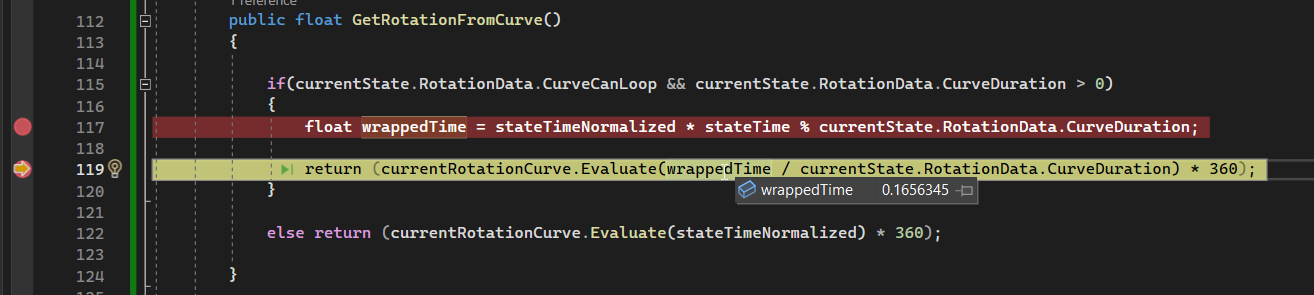
Pretty useful such that here I'm just hovering over the values and getting it just then, and you can even do it during the editor runtime (such as attaching the debugger and creating new breakpoints)
 shrewd swift
the answer is prob 99% no, but i'll ask anyway
can I combine cases in a switch ?
like an or/and
case myEnum.xx || myEnum.yy
//stuff
On late enough versions of C# yes, try a case Thing.A or Thing.B
shrewd swift
thats great
short hazel
Or, the old way is to have two cases
case A:
case B:
  // code
A will fall through B
 loud cipher
renogareFont = Content.Load<SpriteFont>("\Font\Renogare-Regular.otf"); how do i make it so i dont have to copy the whole path?
shrewd swift
short hazel
Or, the old way is to have two cases
```cs
case A:
case B:
// code
```
A will ...
a yes because there is no break and code underneath A ?
short hazel
Correct!
shrewd swift
well ty for answering
 queen adder
does anybody know why the Invoke method does not call the function?
 shrewd swift
for a moment I thought i would be impossielbe since i never seen a switch with combination in years
short hazel
queen adder
does anybody know why the Invoke method does not call the function?
You destroy the object, everything running on it stops
queen adder
short hazel
You destroy the object, everything running on it stops
only if the AI ship is destroyed, in this case the player ship gets destroyed
wait
short hazel
What?
Like two lines in OnCollisionEnter you do Destroy(gameObject)
 summer stump
The issue is the Destroy call in Start
queen adder
is there a way to create a new thread which exists once the original script is destroyed?
polar acorn
queen adder
is there a way to create a new thread which exists once the original script is d...
I hope you aren't trying multithreading in Unity
It doesn't go well
queen adder
brother I just want the delayed function call to exist after I destroy the script
 modest dust
Simply call it on something you won't destroy
 cosmic dagger
queen adder
brother I just want the delayed function call to exist after I destroy the scrip...
cosmic dagger
queen adder
brother I just want the delayed function call to exist after I destroy the scrip...
Call it on a GameObject that does not get destroyed . . .
 supple wasp
Hey I don't know why but I get this error again
 rich adder
supple wasp
Hey I don't know why but I get this error again
rich adder
supple wasp
Hey I don't know why but I get this error again
try reinstall .NET sdk
short hazel
 : ".NET sdk download"
loud cipher
in the "Controls" part of the code should i ask the position of the player as well as the game time so i dont have to do the "ballPosition += movementInput;" outside the function?
 snow girder
hey guys, how do i make a rigidbody character?
loud cipher
snow girder
hey guys, how do i make a rigidbody character?
im pretty sure you just add rigidbody as an element of the character
snow girder
loud cipher
im pretty sure you just add rigidbody as an element of the character
well i've got a character controller player, but i want to use the properties of addforce and other stuff
and i can't really understand how to make the guy move with a rigid body
short hazel
Character Controller and Rigidbody are incompatible
snow girder
yep so im trying to switch to rigid body
short hazel
If you switch to a Rigidbody make sure to remove the CC, you'll have to redo most of your movement code
snow girder
yeah i know, but i don't know how to make him move with rigid body
that's the issue
cause i tried using the code from like a year or two ago
and apparently it's incompatible
short hazel
snow girder
and apparently it's incompatible
There's AddForce, which produces smooth and more realistic movement, and MovePosition which is more crispy and reactive.
The Rigidbody API hasn't changed in a while, so I doubt the code is incompatible
wintry quarry
snow girder
cause i tried using the code from like a year or two ago
Nothing with basic Rigidbody motion has changed in about 15 years
snow girder
short hazel
There's AddForce, which produces smooth and more realistic movement, and MovePos...
well i want it to be fun not realistic
which one should i use?
short hazel
The answer can be deducted by reading my message one more time
But you can try both and see what feels the best
snow girder
well alright...
 coral basin
I heard that using transform.Rotate is bad when dealing with rigidbodies in fixedupdate, what should I use instead?
smoky mauve
where's the error?
objects = JsonUtility.FromJson<JsonObjects>(json: jsonFile.text);
This are the two scripts
using System.Collections;
using System.Collections.Generic;
using UnityEngine;
using UnityEngine.UI;

public class Deserialisation : MonoBehaviour
{
    [SerializeField] public TextAsset jsonFile;
    [SerializeField] public JsonObjects objects;
    // Start is called before the first frame update
    void Start()
    {
        objects = JsonUtility.FromJson<JsonObjects>(json: jsonFile.text);
        Text sampleString = objects.Quote;
        Debug.Log(sampleString);
    }

    // Update is called once per frame
    void Update()
    {

    }
}
public struct JsonObjects
{
    public Text Quote;
}
ArgumentException: JSON must represent an object type.
short hazel
Your file doesn't contain valid JSON, it seems
snow girder
short hazel
There's AddForce, which produces smooth and more realistic movement, and MovePos...
how does move position work exactly
rich adder
smoky mauve
where's the error?
``` objects = JsonUtility.FromJson<JsonObjects>(json: jsonF...
how did you save the data
smoky mauve
  {
    "Quote": "echnique 29:\nThe exclusive smile\nIf you flash everybody the same smile, like a Confederate dollar, it loses value. When meeting groups of people, grace each with a distinct smile. Let your smiles grow out of the beauty Big Players find in each new face.\nIf one person in a group is more important to you than the others, reserve an especially big, flooding smile just for him or her.",
    "Author": "alsdñgf",
    "Source": "ewag"
}]```into a JSON file
polar acorn
smoky mauve
```[
{
"Quote": "echnique 29:\nThe exclusive smile\nIf you flash everybody...
Well, your JSON has "Author" and "Source" that don't exist on your object
short hazel
snow girder
how does move position work exactly
Moves towards the desired position, while respecting the physics interpolation settings and various other things
Docs : https://docs.unity3d.com/ScriptReference/Rigidbody.MovePosition.html
polar acorn
And "Quote" is of type UnityEngine.UI.Text which is probably not right
snow girder
short hazel
Moves towards the desired position, while respecting the physics interpolation s...
i see, well thank you for your help i suppose
short hazel
smoky mauve
```[
{
"Quote": "echnique 29:\nThe exclusive smile\nIf you flash everybody...
JsonUtility does not support arrays [...] as the root element. Use a more potent serializer like Newtonsoft.Json, then deserialize to a List<JsonObjects>
That class name is not really good, I'd call it Quote, simply
Because that's what it stores
smoky mauve
i was following a YT tutorial
polar acorn
smoky mauve
i was following a YT tutorial
What tutorial
smoky mauve
polar acorn
What tutorial

Converting JSON is very important when you want to use static data and use in your game.
I hope this video has helped you!
Don't forget to like the video and subscribe my channel :)
You can also follow me on twitter: @faithmorante
rich adder
mines better, it uses generics 😏
polar acorn
smoky mauve
https://www.youtube.com/watch?v=AE44VXD9LF4
Not sure if I can count this towards The Counter™️ since it looks like you're actually not copying the tutorial directly, which is somewhat of a rarity around these parts.
Still, Text is a UI GameObject and not what you want
You should make an instance of the object in code first and output it as JSON, then use that as a sample of what you should be doing
 tender wren
Quick question about OnDrawGizmoSelected().
I am generating handles in the above function, but its a bit complex and I do not want to run it every time. Is there a way to generate the handels, then only move them if the transform is updated? Like onvalidate with values of properies, but a onvalidate via transform.
The logic behind transform.has moved works while moving, but if I check against that, when it is not moving it doesn't draw them. Is it expected that these draw every time it loops or is there a better way to do this performance wise?
rich adder
@smoky mauve https://youtu.be/Q0_xreJMldM?si=I79Ge2Zbcr7PztmH
 charred spoke
tender wren
Quick question about OnDrawGizmoSelected().
I am generating handles in the abov...
charred spoke
tender wren
Quick question about OnDrawGizmoSelected().
I am generating handles in the abov...
Its expected for them to draw every frame it is a immediate mode style of gui
tender wren
When doing the loop I am getting the hash value of objects and redrawing them, won't this cause issues if I try and do too many at once?
short hazel
rich adder
<@604362889679077388> https://youtu.be/Q0_xreJMldM?si=I79Ge2Zbcr7PztmH
Not sure that helps, it's their JSON structure that's incompatible.
Also Directory.CreateDirectory() does nothing if the directories already exist, so you technically don't need to guard it with an if statement :)
rich adder
short hazel
Not sure that helps, it's their JSON structure that's incompatible.
Also `Direct...
Oh yeah ur right, appreciate it 🙂 I need to update lol
charred spoke
tender wren
When doing the loop I am getting the hash value of objects and redrawing them, w...
Possibly
 open kernel
How difficult is it to write a proximity voice chat? And would it be possible to have like a digital microphone which "records" your voice differently depending on where you are standing
rocky canyon
basically would be passing it thru some sort of filter
 willow radish
why cant i add my own font to TextMeshPro?
rich adder
willow radish
why cant i add my own font to TextMeshPro?
You need converter
 willow radish
i think im blind one sec, but thank you :)
i think i got it
idk if im doing something wrong, but i got this now but i cant drag it in

 night mural
willow radish
i think im blind one sec, but thank you :)
night mural
willow radish
i think im blind one sec, but thank you :)
it's pretty confusing, maybe this will help http://www.digitalnativestudios.com/textmeshpro/docs/font/
willow radish
thanks ill read it!
night mural
iirc once the asset exists, you should see the font in the fonts dropdown (you don't drag it in)
willow radish
alrighty, well i dont see it in the dropdown so i have done something wrong hahah, but ill read the doc
night mural
(it's possible that you do have to drag it in and i forgot)
willow radish
dw im sure ill figure it out :)
 dusk minnow
When i disable a gameobj can i still trigger funktions inside a script of it?
polar acorn
dusk minnow
When i disable a gameobj can i still trigger funktions inside a script of it?
Yes but unity won't run any message functions on it like Update
so you'd need to call a function manually
dusk minnow
ik
swift crag
Yeah, being a disabled MonoBehaviour means very little
willow radish
when i drag the font asset in it doesnt appear as that font and i get this error

wait i think i got it to work
So im following a tutorial about a pause menu, what actually is the difference with normal text and TMP?
night mural
normal text is old and crappy and everyone ended up using TMP so unity bought TMP and made it the default
willow radish
ahh okay okay, so technically it doesnt really matter if you use TMP or not
snow girder
how do i check what direction my player is facing
swift crag
transform.forward is a vector pointing in the forward direction of the transfomr
snow girder
swift crag
`transform.forward` is a vector pointing in the forward direction of the transfo...
well, i'm trying to use rigid body add force in a way where it pushes me backwards from where i'm facing
swift crag
in that case, -transform.forward will be a vector pointing backwards
there's no transform.back, annoyingly
snow girder
ah
i see
correct me if im wrong but rb.addforce(-transform.forward) will not work right?
swift crag
That will apply one newton of force. The force will point backwards.
One newton is enough to accelerate one kilogram at one meter per second per second. It's not very strong.
snow girder
oh that's very nice
snow girder
swift crag
One newton is enough to accelerate one kilogram at one meter per second per seco...
how would i add more force?
summer stump
snow girder
how would i add more force?
-transform.forward * forceAmount
night mural
swift crag
because the amount of force applied is the length of the vector
snow girder
oh right
night mural
night mural
https://docs.unity3d.com/Manual/VectorCookbook.html
this will explain all
swift crag
transform.forward is a unit vector; it has a length of 1
snow girder
since it's apply 1
swift crag
night mural
https://docs.unity3d.com/Manual/VectorCookbook.html
oh neat, that's a useful resource
snow girder
it's applying 1 and 1 * whatever number is yeah
okay thank you guys
so it's pushing me upwards
which is quite interesting
polar acorn
snow girder
so it's pushing me upwards
Then that's the direction the object is facing
Or rather the opposite of the direction it's facing
 open apex

when the player press the key d
the player moves
but it mantains a certain speed when the player releases it's key
I don't c#
What is the "else" statement that can be added to maybe rb.AddForce(0,0,0)
rocky canyon
can set the rigidbodies velocity to zero in the else statement
polar acorn
open apex
What is the "else" statement that can be added to maybe rb.AddForce(0,0,0)
Adding zero force wouldn't do anything, kind of by definition
snow girder
also what do the other forcemodes do? they were kinda the same when i tested
 polar acorn
snow girder
also what do the other forcemodes do? they were kinda the same when i tested
polar acorn
snow girder
also what do the other forcemodes do? they were kinda the same when i tested
 open apex
polar acorn
Adding zero force wouldn't do anything, kind of by definition
open apex
polar acorn
Adding zero force wouldn't do anything, kind of by definition
😔
so there is a speed variable
swift crag
what?
snow girder
I KNOW RIGHT
polar acorn
<@&502884371011731486>
swift crag
incomprehensible
polar acorn
Also in what way is "Adding zero force results in zero force being added" in any way a strange thought
open apex
polar acorn
<@&502884371011731486>
you my friend are so toxic
frosty hound
@open apex @snow girder homophobic comments are not tolerated here
open apex
you most likely don't have friends
open apex
frosty hound
<@563057796631756811> <@829751234557902908> homophobic comments are not tolerate...
the software is not a person
snow girder
my bad
frosty hound
And if you continue, you're getting kicked. So move on.
open apex
it's an it
snow girder
insanity
 spiral narwhal
Why can we serialise fields using the [SerializeField] attribute to enforce encapsulation but not for methods?
I often find myself in the need where I "just" want to have a public method because I may have to select it from the Unity inspector window in events, animations, etc.
open sierra
what does translate mean?

and what are some other examples you can use "Translate" in?
ivory bobcat
open sierra
what does translate mean?
open sierra
gotchu!
polar acorn
open sierra
what does translate mean?
The mathematical process of moving something on a graph to a different place:

 rich egret
Does anyone know how to make that text delete after half a second?

This is what I use but it doesn't work
 polar acorn
rich egret
This is what I use but it doesn't work
polar acorn
rich egret
This is what I use but it doesn't work
Well, that'd destroy it after three seconds
frosty hound
That is how, assuming you pass in the actual GameObject
If you pass in a component, it will destroy that instead
rich egret
polar acorn
Well, that'd destroy it after _three_ seconds
Ik but even after 3 seconds it was not destroyed
ivory bobcat
rich egret
Does anyone know how to make that text delete after half a second?
Half a second would be 0.5f
polar acorn
rich egret
Ik but even after 3 seconds it was not destroyed
When do you run that code
and what is currentText
maybe just post !code
eternal falconBOT
Posting code
📃 Large Code Blocks
Use links to services like:
https://gdl.space/, https://paste.ofcode.org/, https://hatebin.com/, https://paste.myst.rs/, https://hastebin.com/
📃 Inline Code
Surround code with three backquotes. Not quotation marks.
To format as C#, add cs to the first line:
```cs
// Your code here
```
Add a comment with a line number if there is an error message.
ivory bobcat
Are you calling destroy on the correct object?
rich egret
polar acorn
maybe just post !code
ok
willow radish
might be a dumb question, but im watching a vid about a pause menu, im sure im doing something wrong but i dont know what, first pic is his code

 polar acorn
willow radish
might be a dumb question, but im watching a vid about a pause menu, im sure im d...
polar acorn
willow radish
might be a dumb question, but im watching a vid about a pause menu, im sure im d...
You have to finish writing it
willow radish
my bad i just noticed xd sorry
open sierra
I'm gonna be asking a bit of dumb questions for yall since I'm new to coding
what's a method?
polar acorn
open sierra
what's a method?
https://learn.microsoft.com/en-us/dotnet/csharp/programming-guide/classes-and-structs/methods
You might also know it as a "Function"

A method in C# is a code block that contains a series of statements. A program runs the statements by calling the method and specifying arguments.
polar acorn
rich egret
https://gdl.space/gegowubusa.cs
So, that's definitely destroying the text object you just spawned
Are you getting any errors in the console
rich egret
rich egret
https://gdl.space/gegowubusa.cs
Well, someone have ideia how to solve it?
 polar acorn
rich egret
polar acorn
rich egret
Yeah so that stops any code after it from running
You should also read the message above the error as to why you're getting it
You can't add a TextMesh to this object, it already has a mesh renderer
ivory bobcat
rich egret
Consider moving line 22 and 23 before line 18
 open sierra
in the highlighted area, how does the math work here?
 polar acorn
ivory bobcat
Consider moving line 22 and 23 before line 18
polar acorn
ivory bobcat
Consider moving line 22 and 23 before line 18
Better consideration: Make the prefab of the type you actually want so you don't need to fiddle with getcomponents
swift crag
it scales the vector by Time.deltaTime, then by 20
open sierra
swift crag
it scales the vector by `Time.deltaTime`, then by `20`
correct, but how does the math work with it?
like how does time.deltatime multiply by 20
polar acorn
open sierra
in the highlighted area, how does the math work here?
deltaTime is the value in seconds the last frame took to render. When you multiply a value in Update by that, it turns that value from "Units per frame" to "Units per second". In this case, it's moving the object by 20 units forward every second
swift crag
by order of operations, though, it doesn't actually multiply deltaTime by 20
((Vector3.forward * Time.deltaTime) * 20)
same difference, though.
rich egret
ivory bobcat
Consider moving line 22 and 23 before line 18
It didn't change anything but thanks anyway!
open sierra
so it's 1 x 20?
swift crag
where did the 1 come from?
polar acorn
open sierra
so it's 1 x 20?
1 x 20 x [The time it took to render this frame]
polar acorn
swift crag
where did the 1 come from?
The length of forward
swift crag
ah, you're talking about the length of the vector, yeah
I thought you had turned deltaTime into 1
open sierra
polar acorn
1 x 20 x [The time it took to render this frame]
what's the time?
is it random?
polar acorn
open sierra
what's the time?
Depends
That's why it's a variable you use instead of hard-coding in a framerate
ivory bobcat
polar acorn
Better consideration: Make the prefab of the type you actually _want_ so you don...
That as well. Wasn't a part of the person's error but evaluating destroy before calculating damage was probably unwanted.
open sierra
I see
polar acorn
Because you don't know how long that frame will take to render
rich egret
polar acorn
You can't add a TextMesh to this object, it already has a mesh renderer
so what to do?
and im sorry im just a begginer
polar acorn
rich egret
so what to do?
Don't try to add a TextMesh to a prefab that already has a MeshRenderer. Why are you trying to add one at runtime instead of just putting it on the prefab to begin with?
ivory bobcat
Reference it as the correct type.
public Whatever ... instead of GameObject.
This would ensure whatever you've dragged into that field (available in the inspector) would have an appropriate component.
rich egret
ivory bobcat
Reference it as the correct type.
`public Whatever ...` instead of `GameObject`.
Thank you very much, but what should I write instead?
polar acorn
rich egret
Thank you very much, but what should I write instead?
The type you actually want to use
 sweet flume
I just started on unity hub I created a project I wanna make it 2d but I'm stuck and don't know what to do
polar acorn
sweet flume
I just started on unity hub I created a project I wanna make it 2d but I'm stuck...
What are you stuck on
ivory bobcat
rich egret
Thank you very much, but what should I write instead?
I'm on mobile and using swype but it would be as suggested, the specific component type that you're wanting to access.
rich egret
@polar acorn @ivory bobcat 💀
polar acorn
rich egret
<@153950686088921088> <@335967437315112961> 💀
what
rich egret
That's because it's a TextMeshPro and not a TextMesh
polar acorn
Yes and if your variable were using an actual component type instead of GameObject you would have noticed sooner
rich egret
polar acorn
Yes and if your variable were using an actual component type instead of GameObje...
ik
but thank you for the time
I appreciate it
 native seal
should I be using arrays of lists for an inventory system?
polar acorn
native seal
should I be using arrays of lists for an inventory system?
There's not really a "should be", you use whatever data structure your particular implementation of an inventory would need
 faint osprey
    {
        if(collision.transform.gameObject.name == "Player")
        {
            CM.Play("FadeToBlack");
            StartCoroutine(WaitForFade());
        }
    }

    IEnumerator WaitForfade()
    {
        yield return new WaitForSeconds(1f);
        SceneManager.LoadScene("basement");
}```i dont understand why its saying my coroutine doesnt exist
polar acorn
faint osprey
``` private void OnTriggerEnter2D(Collider2D collision)
{
if(coll...
Where do you define WaitForFade
 languid spire
faint osprey
i dont understand why its saying my coroutine doesnt exist
languid spire
faint osprey
i dont understand why its saying my coroutine doesnt exist
because it doesn't
languid spire
read the code
faint osprey
polar acorn
Where do you define `WaitForFade`
i didnt but how comes if i put this line in void start() it does workStartCoroutine(WaitForFade());
languid spire
bet
polar acorn
faint osprey
i didnt but how comes if i put this line in void start() it does work```StartCor...
Where do you define a coroutine named WaitForFade
 slender nymph
faint osprey
i didnt but how comes if i put this line in void start() it does work```StartCor...
slender nymph
faint osprey
i didnt but how comes if i put this line in void start() it does work```StartCor...
do you have a method called WaitForFade somewhere?
faint osprey
no
slender nymph
then that line cannot work
faint osprey
why does it work in void start tho
slender nymph
it doesn't
polar acorn
faint osprey
why does it work in void start tho
It doesn't
languid spire
look carefully
StartCoroutine(WaitForFade());
IEnumerator WaitForfade()
i wanna die
slender nymph
make sure that your !IDE is configured so that you don't make silly spelling mistakes like this moving forward
eternal falconBOT
💡 IDE Configuration
If your IDE is not autocompleting code
or underlining errors, please configure it.
Select one:
• Visual Studio (Installed via Unity Hub)
• Visual Studio (Installed manually)
• VS Code
• JetBrains Rider
• Other/None
 limber narwhal
is it best practice to make Action events static?
public static event Action<float> OnBetAmountUpdated; this is what i have in my "SlotMachineController" script
i've been wondering if i should make it a singleton as well, because it's the only one on the scene 🤔
polar acorn
limber narwhal
is it best practice to make Action events static?
Depends on whether you might need per-instance events. For example, are there multiple slot machines who'd need to fire their own OnBetAmountUpdated to their own listeners?
limber narwhal
polar acorn
Depends on whether you might need per-instance events. For example, are there _m...
oh , so okay so i only have one. so if i have multiple gameobjects that i want events on (eg. if i had a game with enemies) then don't use static. if i only have one , use static. is that good way to decide?
polar acorn
Basically
If you want everything subscribed to this event to get notified, you can use static
open sierra
just to make sure I understand this code
this code makes a gameobject, and the gameobject that goes inside of it will be the thing that the line of code will control, basically, the gameobject player will be the same as the attached script object?

also why did we use position, why not translate?
limber narwhal
ok, because i was watching a tutorial on it last night. what the guy did was make a whole new script just for actions and made it static altogether (even though his game had multiple enemies and would send events on enemy death).
polar acorn
open sierra
just to make sure I understand this code
this code makes a gameobject, and the ...
This code doesn't make a game object
this code sets this object's position to the position of whatever you've dragged in once per frame
open sierra
polar acorn
This code doesn't make a game object
yee sorry this is what I meant
open sierra
polar acorn
this code sets _this object's_ position to the position of whatever you've dragg...
so basically, whatever position the "player" is, the camera will follow it?
ivory bobcat
open sierra
just to make sure I understand this code
this code makes a gameobject, and the ...
It sets the position of the object this script is attached to, to that of what's referenced per frame.
ivory bobcat
open sierra
so basically, whatever position the "player" is, the camera will follow it?
The camera would be at the same location per frame via teleport.
open sierra
ivory bobcat
The camera would be at the same location per frame via teleport.
shouldnt we also add time.deltatime to the code?
ivory bobcat
open sierra
shouldnt we also add time.deltatime to the code?
For what?
 clever basalt
Hello, i have questions about Text Mesh Pro:
For some Reason i unity and visual studio (unity hub install) dont accept
using TMPro;
Ive tried to ReImport all
Reinstalling TextMeshPro
Switching between "Open by File Extension" and Visual Studio
Downgrading and Upgrading(updating) Visual Studio
I found someone saying that i need to add TMPro to my package,json but i havnt found that json anywhere
slender nymph
clever basalt
Hello, i have questions about Text Mesh Pro:
For some Reason i unity and visual ...
go into the package manager and see if you have TextMeshPro installed. if you do, then you may be using assembly definitions and would need to reference the TMP assembly in your asmdef
native seal
can I have null gaps in a list or does it automatically resize to fit
ivory bobcat
open sierra
the line of code
We'd write code to accomplish an objective. Why/where do you want to use delta time?
limber narwhal
clever basalt
Hello, i have questions about Text Mesh Pro:
For some Reason i unity and visual ...
do you have it here?
 slender nymph
native seal
can I have null gaps in a list or does it automatically resize to fit
slender nymph
native seal
can I have null gaps in a list or does it automatically resize to fit
List and array can both contain null elements, yes
open sierra
ivory bobcat
We'd write code to accomplish an objective. Why/where do you want to use delta t...
so the camera moves in seconds and not frames?
native seal
slender nymph
List and array can both contain null elements, yes
why am i getting out of range exceptions then
slender nymph
how should i know? you haven't bothered sharing the error or the code
clever basalt
go into the package manager and see if
native seal
sorry, no need to be rude bro
    {
        for (int i = 0; i < Inventory.Capacity; i++)
        {
            if (Inventory[i].item == _item && RemainingSpaceInSlot(i) > _amount)
            {
                Inventory[i].AddAmount(_amount);
                OnItemsUpdated?.Invoke();
                return true;
            }
        }

        for (int i = 0; i < Inventory.Capacity; i++)
        {
            if (Inventory[i].item == null)
            {
                Inventory[i] = new ItemStack(_item, _amount);
                OnItemsUpdated?.Invoke();
                return true;
            }
        }
        return false;
}```The camera isn't moving by any amount, it's just setting its position to a precise value
native seal
private List<ItemStack> Inventory = new List<ItemStack>(54);
that is how i made the list
open sierra
polar acorn
The camera isn't moving _by_ any amount, it's just setting its position to a pre...
gotchu! I undetsand. ||(I do not understand 💀 🙏 )||
slender nymph
native seal
```public bool AddItem(Item _item, int _amount)
{
for (int i = 0; ...
you're looping until you hit the list's Capacity which could be much larger than the number of elements contained in it. use its Count property instead
polar acorn
open sierra
gotchu! I undetsand. ||(I do not understand 💀 🙏 )||
DeltaTime is for converting a value in "units per frame" to "units per second".
Nothing in this code is changing anything by "units per second"
It's just teleporting to that exact spot
open sierra
polar acorn
DeltaTime is for converting a value in "units per frame" to "units per second".
...
OHHH
got it now
ty!
 north kiln
polar acorn
DeltaTime is for converting a value in "units per frame" to "units per second".
...
north kiln
polar acorn
DeltaTime is for converting a value in "units per frame" to "units per second".
...
It's the opposite conversion
polar acorn
north kiln
It's the opposite conversion
The way I think of it is, the value without Time.deltaTime means "Move this number in one frame", and with it it means "Move this number in one second"
north kiln
Ah it's all just semantics again
ivory bobcat
open sierra
so the camera moves in seconds and not frames?
If you're considering moving the camera towards the player, maybe use https://docs.unity3d.com/ScriptReference/Vector3.MoveTowards.html or some other means (Rigidbody physics, CC, Cinemachine, etc )
open sierra
gotchu gotchu
just another quick question
I don't understand how we're using 2 vector threes, and why is there a "new"
 polar acorn
open sierra
I don't understand how we're using 2 vector threes, and why is there a "new"
polar acorn
open sierra
I don't understand how we're using 2 vector threes, and why is there a "new"
You are adding a new vector to the player's position
That new vector having a value of 0, 5, -7
native seal
slender nymph
you're looping until you hit the list's Capacity which could be much larger than...
It's still not working, if I use count the loop is never reached
north kiln
polar acorn
The way I think of it is, the value without `Time.deltaTime` means "Move this nu...
And the way I think about it is a value without delta time when applied already describes units/second, or is instantaneous. When applying dt you convert U/s to U/f
slender nymph
native seal
It's still not working, if I use count the loop is never reached
are you certain there is even anything in the list?
native seal
slender nymph
are you certain there is even anything *in* the list?
there isnt, im trying to add the first item
slender nymph
well then its count will be 0 because there are no elements in the list. you need to actually Add things to the list
ivory bobcat
open sierra
I don't understand how we're using 2 vector threes, and why is there a "new"
new is necessary as part of C# syntax for new instances. Other than that, you've got an assignment of position with an offset: position = point + offset
open sierra
polar acorn
That new vector having a value of `0, 5, -7`
but it doesnt make sense
if hte player transform position is changing with the player
polar acorn
open sierra
but it doesnt make sense
What doesn't make sense about it
open sierra
if the player transform position is changing with the player, how is there a 2nd one changing too?
polar acorn
You're setting the position of this object to the position of player plus some value
calm coral
faint osprey
i wanna die
 lmao
lmao
polar acorn
open sierra
if the player transform position is changing with the player, how is there a 2nd...
A second what
open sierra
so it moves the "0" but keeps the "5" and "-7"
polar acorn
open sierra
so it moves the "0" but keeps the "5" and "-7"
What
It adds the Vector 0, 5, -7 to the position of player, and sets this object's position to that result
ivory bobcat
Maybe look into c# tutorials and check out Unity tutorials for how to do simple stuff !learn
eternal falconBOT
:teacher: Unity Learn ↗
Over 750 hours of free live and on-demand learning content for all levels of experience!
open sierra
ohhhhhhhhhhhhhhhhhhhhhhh
so it sets it 5, -7 above the player?
like the location of the camera but it still follows where it goes
polar acorn
open sierra
so it sets it 5, -7 above the player?
It sets it to the players location plus (0, 5, -7)
ivory bobcat
These are referring to coordinates (x, y, z) - Vector.
 desert elm
how do I actually-
make a unity project into a game/how I turn the unity project into an app?
slender nymph
desert elm
how do I actually-
make a unity project into a game/how I turn the unity project...
not really a code question.
https://docs.unity3d.com/Manual/PublishingBuilds.html
desert elm
sorry- wasn't sure where else to ask
but thanks
native seal
slender nymph
well then its count will be 0 because there are no elements in the list. you nee...
so the add is working but i'm having issues with swap, do lists not allow you to insert into a null index?
    {
        ItemStack itemOne = Inventory[indexOne];
        if (Inventory.Count < indexTwo)
        {
            Inventory.Insert(indexTwo, itemOne);
            return;
        }

}```basically when you try to swap with nothing it moves the item
slender nymph
have you even bothered looking at the docs to see what these methods do?
slender nymph
okay and tell me why you are using the Insert method then
native seal
im just asking in a beginner discord
Inserts an element into the List<T> at the specified index.
sounds like what i want
slender nymph
right it adds a new element to the list at the specified index
that is not what you want. you want to just assign to a specific element so it is no longer null
native seal
so what should I write?
if i just Inventory[indexTwo] = Inventory[indexOne]; it gives index error
slender nymph
that means that one or both of the indices is out of range
native seal
i know
why tho? i thought you could have null gaps in lists
my list capacity is 54
slender nymph
again, capacity is not representative of how many elements are actually in the list
polar acorn
native seal
why tho? i thought you could have null gaps in lists
Try printing indexTwo, indexOne, and the length of Inventory
slender nymph
a list can contain null elements. but you have to actually add them in
polar acorn
See which one is the problem
native seal
polar acorn
Try printing `indexTwo`, `indexOne`, and the length of `Inventory`
I know what is going on, i just dont understand the functionalities of lists it seems
okay so initilize the whole list with null
slender nymph
there are beginner c# courses that teach you how to use collections like lists and arrays pinned in this channel. you should start there
slender nymph
native seal
okay so initilize the whole list with null
why is it even a List and not an array if you want a predefined number of elements that default to null
native seal
should I just use arrays?
slender nymph
probably
native seal
okay
buoyant knot
insert normally means to slide in an entry into the middle of a list
native seal
oh and shift everything up
buoyant knot
and it costs time because you’re actually shifting the memory for everything after
desert elm
oh yeah- and is there a method to fetch a gameobject that was just instantiated by the script?
polar acorn
desert elm
oh yeah- and is there a method to fetch a gameobject that was just instantiated ...
Yes, Instantiate
buoyant knot
desert elm
oh yeah- and is there a method to fetch a gameobject that was just instantiated ...
Instantiate gives you a reference to the thing it just made
desert elm
oh
supple wasp
what's that?

 lavish stone
Hi, i am looking for a project template to realize a webview app. Is there a template which is recommended for such a project? I want to display my own website. No matter of costs. If it is a one-time fee.
slender nymph
this is a unity server mate
buoyant knot
But can anyone here help me with my Spanish homework?
slender nymph
or do you mean you want to display your website inside your unity game? 🤔
polar acorn
Or display a unity game inside a website maybe?
lavish stone
Yes i know. 😄
With unity its easy to build apps for different platforms. And there are many Webview Templates in the assetstore. I just ask if somebody can recommend a template.
slender nymph
okay so to confirm, you are referring to displaying your own website within your unity game?
and if the question is literally just about which asset you should pick, that isn't a code question
lavish stone
https://assetstore.unity.com/packages/tools/gui/in-app-web-browser-57532
This for example is a web browser. I could make a app which is showing my website.

Use the In-App Web Browser from Piotr Zmudzinski on your next project. Find this GUI tool & more on the Unity Asset Store.
slender nymph
again, not a code question
open sierra
how does multiplying the inputs work?

I undetsnad how this works but after adding the verticalInput and horizontalInput, I don't understand how the math work with these two in them
buoyant knot
what type is verticalInput
open sierra
buoyant knot
what type is verticalInput
 north kiln
you should multiply the floats together first by surrounding the lot with brackets to avoid some extra multiplications
polar acorn
open sierra
I undetsnad how this works but after adding the verticalInput and horizontalInpu...
They're values that are between -1 and 1 depending on direction
open sierra
👍
buoyant knot
you should just make a single Vector3, and translate by it
remember the input is dimensionless, btw
which is part of how everything works out in the end
polar acorn
Is Angle an actual angle or is it a direction vector
desert elm
the "explosionHits.remove(collider)" line should remove all colliders from the list, right?

 fresh lintel
at moment i'm using that angle for raycast, i suppose it's Direction vector
polar acorn
It seems like it's a Quaternion
desert elm
desert elm
the "explosionHits.remove(collider)" line should remove all colliders from the l...
because it does not seem to be working
 fresh lintel
polar acorn
It seems like it's a Quaternion
fresh lintel
polar acorn
It seems like it's a Quaternion
to be fair idk
 fresh lintel
polar acorn
It seems like it's a Quaternion
fresh lintel
polar acorn
It seems like it's a Quaternion
for example i can get position if i want forward cordinates like this
Vector3 EndPoint = transform.position+(transform.forward * _Distance);
But i need transform.forward +Angle
 eternal needle
desert elm
because it does not seem to be working
eternal needle
desert elm
because it does not seem to be working
Do you have any errors? Shouldnt be able to remove items from a collection while iterating through it
desert elm
eternal needle
Do you have any errors? Shouldnt be able to remove items from a collection while...
its a ToList- to prevent that error
amber spruce
whats the best way to have a boss with multiple stages should i spawn a different object or just change the script or smth
desert elm
okay is there a way to remove all colliders from a list then?
eternal needle
desert elm
okay is there a way to remove all colliders from a list then?
There should be a list.Clear()
desert elm
oh okay thanks
languid spire
Rule of thumb, if you are removing from a List, iterate backwards
 serene barn
im trying to do 2d movement and i can't figure it out
im just not to sure what to do with vector2
 simple citrus
Hello, is there an option in unity 2D that prevents the player from being blocked by the tileset because of the Rigidbody?
simple citrus
serene barn
im just not to sure what to do with vector2
Did you try the rigidbody ?
serene barn
i dont know how to do rigidbody movement
simple citrus
did you already add a component ?
slender nymph
simple citrus
Hello, is there an option in unity 2D that prevents the player from being blocke...
wdym by blocked by the tileset? are you referring to the issue where your rigidbody is getting stuck on the edges of tiles sometimes? or do you mean something else?
simple citrus
slender nymph
wdym by blocked by the tileset? are you referring to the issue where your rigidb...
that's exactly what it is !
serene barn
simple citrus
did you already add a component ?
yes
slender nymph
that's a known issue with the Box2D physics engine which is what unity uses for 2d. you can use a collider that has a round bottom like a circle or capsule instead of a box collider. and turning the collision detection mode to continuous on the rb should help too
simple citrus
serene barn
yes
with unity you can use the velocity of a rigidbody, That's look like that "rb.velocity = new Vector2(deplacement, rb.velocity.y);",
there is a widespread technique that consists of adding horizontal keys to move your player in a desired direction "Input.GetAxis("Horizontal")". Basically, this function registers the left directional key as =-1 and right = 1, and when you press it, the value takes the key you pressed (otherwise it returns zero).
finnaly you can make the command like that:
horizental = Input.GetAxis("Horizontal");
"rb.velocity = new Vector2(horizental* deplacement, rb.velocity.y);"
rb.velocity.y returns the current value of your y velocity rigibody
simple citrus
slender nymph
that's a known issue with the Box2D physics engine which is what unity uses for...
yes i know that but my camera glitch a little with that ;-;
slender nymph
then you also need to address how you control your camera
and obligatory: use cinemachine
simple citrus
i think i will use 2 box  but thanks for your tips
serene barn
simple citrus
with unity you can use the velocity of a rigidbody, That's look like that "rb.ve...
im still confused
simple citrus
serene barn
im still confused
did you already give a variable for a gameobject ?
serene barn
simple citrus
did you already give a variable for a gameobject ?
for the rigided body?
simple citrus
yes
serene barn
yes
 serene barn
simple citrus
serene barn
simple citrus
a public rb
simple citrus
yes
 faint agate
I have this weapon switch problem. Lets say Gun1 has 10 bullets and Gun2 has none. When I switch to Gun2, I can shoot only one bullet as if it registers the weapon switched when I click.
If you want me to send the scripts I can
swift crag
yes, we'll need to see your code
ivory bobcat
How to post !code
eternal falconBOT
Posting code
📃 Large Code Blocks
Use links to services like:
https://gdl.space/, https://paste.ofcode.org/, https://hatebin.com/, https://paste.myst.rs/, https://hastebin.com/
📃 Inline Code
Surround code with three backquotes. Not quotation marks.
To format as C#, add cs to the first line:
```cs
// Your code here
```
Add a comment with a line number if there is an error message.
faint agate
using UnityEngine;

public class WeaponSwitching : MonoBehaviour
{

    public int selectedWeapon = 0;

    private void Start()
    {

        SelectWeapon();

    }


    private void Update()
    {

        int previousSelectedWeapon = selectedWeapon;

        if (Input.GetAxis("Mouse ScrollWheel") > 0f) {
            if (selectedWeapon >= transform.childCount - 1)
                selectedWeapon = 0;
            else
            selectedWeapon++;
        }
        if (Input.GetAxis("Mouse ScrollWheel") < 0f) {
            if (selectedWeapon <= 0)
                selectedWeapon = transform.childCount - 1;
            else
            selectedWeapon--;
        }

        if (Input.GetKeyDown(KeyCode.Alpha1)) {
        selectedWeapon = 0;
        }

        if (Input.GetKeyDown(KeyCode.Alpha2) && transform.childCount >= 2) {
        selectedWeapon = 1;
        }

        if(previousSelectedWeapon != selectedWeapon) {
            SelectWeapon();
        }

    }

    private void SelectWeapon()
    {
        int i = 0;
        foreach (Transform weapon in transform) {
            if ( i == selectedWeapon )
                weapon.gameObject.SetActive( true );
            else
                weapon.gameObject.SetActive( false );
            i++;
        }
    }

}
This weaponSwitch script works fine, I even tried another method so I think its something else causing this problem
ivory bobcat
What's the original problem?
faint agate
Lets say Gun1 has 10 bullets and Gun2 has none. When I switch to Gun2, I can shoot only one bullet as if it registers the weapon switched when I click.
eternal needle
where do you actually shoot?
faint agate
where? like the script
ivory bobcat
So.. you shouldn't be able to shoot any at all but are somehow allowed to shoot one shot?
eternal needle
faint agate
where? like the script
yes the code
ivory bobcat
Where's your shooting code?
ivory bobcat
eternal falcon
Please post the code using an external service link if greater than 15 lines or so.
ivory bobcat
faint agate
like a link redirecting you to the code
Like this for example using your previous code: https://gdl.space/pobozuleje.cs
ivory bobcat
So, the gun isn't reloading and the elapsed time since last fire is valid.
I'm assuming these are the limiting factors in allowing you to shoot
ivory bobcat
ivory bobcat
*I'm assuming these are the limiting factors in allowing you to shoot*
Other than gunData.currentAmmo > 0. @faint agate
Log the gunData
Is this related to Unity and coding?
 pearl lodge
ivory bobcat
Is this related to Unity and coding?
pearl lodge
ivory bobcat
Is this related to Unity and coding?
yes its from their website.
ivory bobcat
pearl lodge
yes its from their website.
I'm assuming this isn't related to coding, try #💻┃unity-talk
faint agate
ivory bobcat
Log the `gunData`
to see if its Gun1's bullet?
ivory bobcat
faint agate
to see if its Gun1's bullet?
To see if it's the correct gun
faint agate
Gun2 doesnt even have the gun script on it. If switching the gun disables Gun1 and all its childs, than idk how Gun2 is even shooting one bullet.
ivory bobcat
faint agate
Gun2 doesnt even have the gun script on it. If switching the gun disables Gun1 a...
Did you try logging?
native seal
Why is this giving out of bounds access?
{

    public event Action OnItemsUpdated;

    private ItemStack[] Inventory = new ItemStack[54];

    [SerializeField] private ItemStack itemTest;

    void OnEnable()
    {
        for (int i = 0; i < 54; i++)
        {
            Inventory[i] = new ItemStack();
        }
}```Your array size isn't 54
 true pasture
before I go and make it from scratch is there a easily implemented system that lets the player control the camera in runtime? Basically just like in editor mode.
faint agate
I logged it, it is Gun1's bullet
ivory bobcat
ivory bobcat
Your array size isn't 54
Try:cs void OnEnable() { Debug.Log($"Inventory Size: {Inventory.Length}"); for (int i = 0; i < Inventory.Length; i++) { Inventory[i] = new ItemStack(); } } @native seal
native seal
Inventory Size: 54
UnityEngine.Debug:Log (object)
InventoryObject:OnEnable () (at Assets/_Scripts/Scriptable Objects/SO Scripts/Inventory/InventoryObject.cs:43)
faint agate
On the player, theres a player shoot script that might give you a bit more info.. one sec
ivory bobcat
faint agate
I logged it, it is Gun1's bullet
When I switch to Gun2, I can shoot only one bullet as if it registers the weapon switched when I click.
So Gun1 fired that last shot and not Gun2.
native seal
ivory bobcat
Try:```cs
void OnEnable()
{
Debug.Log($"Inventory Size: {Invento...
it is 54
ivory bobcat
Figure out why Gun1 is firing when you'd expect the shot to be from Gun2
ivory bobcat
native seal
it is 54
The above should not ever throw.
faint agate
native seal
ivory bobcat
The above should not ever throw.
so what is going on
ivory bobcat
Previously, we were assuming that Inventory that should have 54 elements but it likely did not if there was an out of bounds error.
native seal
so what do I need to change
ivory bobcat
native seal
so what is going on
Show the actual errors and we'd be able to validate if the error was real or not.
The console window
native seal
wait i think its an issue with onenable with scriptable objects
faint agate
ivory bobcat
Figure out why Gun1 is firing when you'd expect the shot to be from Gun2
thats what im confused about. I removed the gun script from Gun2 so its just a cube. When I switch to it, Gun1 and all its child gets disabled, so it should be imposible for me to shoot. I sent the playershoot script attached to the player that might be the problem
ivory bobcat
faint agate
thats what im confused about. I removed the gun script from Gun2 so its just a c...
Log why it can shoot.
ivory bobcat
faint agate
thats what im confused about. I removed the gun script from Gun2 so its just a c...
So ignoring Gun2, Gun1 is still allowed to fire when disabled.. why?
Log the state of Gun1 on shoot.
Log ammo count, can shoot and whatnot.
They are the limiting factors.
faint agate
ivory bobcat
Log the state of Gun1 on shoot.
where n how would I log this, I logged the ammo count and it does go down by that one shot.
I logged to see when it was holding gun 2
it said I was holding Gun2 so idk
ivory bobcat
faint agate
where n how would I log this, I logged the ammo count and it does go down by tha...
Debug.Log($"{name} has {gunData.currentAmmo} ammo left");
Debug.Log($"It isn't reloading: {!gunData.reloading}");
Debug.Log($"Time since it last shot: {timeSinceLastShot}");
Debug.Log($"Time till it can shoot again: {1f / (gunData.fireRate / 60f)}");
Debug.Log($"It can shoot: {CanShoot()}");```would I put all that on update
if so, I did and when I switched to Gun2, it all stopped
ivory bobcat
faint agate
would I put all that on update
You'd put all of this in the shoot function...
Before the if-statement.
faint agate
what diffrence am I looking for, it says all the same stuff when I switch and shoot the one bullet. When I try to shoot a second time nothing prints
ivory bobcat
faint agate
what diffrence am I looking for, it says all the same stuff when I switch and sh...
Can you show the logs?
faint agate
I really think it has something to do with the playershoot script. It's connected to the gun script but its attached to the player and since Gun1 disables. this is the only thing allowing it to shoot a second time mabye
thats the playershoot script
ivory bobcat
faint agate
I really think it has something to do with the playershoot script. It's connecte...
Not relevant. As far as I'm concerned, the object hasn't called it's OnDisable method.
Question would be why? Did the final shooting and weapon swap occurred immediately at the same time or do you've got some delay to not disable to object till after the final shot?
 wraith mango
how do i use variables inside of a string, the variable name would be inbetween the {}

i didn't know how to explain this to google so here i am lol
north kiln
wraith mango
how do i use variables inside of a string, the variable name would be inbetween ...
String interpolation using the $ token provides a more readable and convenient syntax to format string output than traditional string composite formatting.
eternal needle
string interpolation is the name
wraith mango
where did i read tokens from lol
eternal needle
token refers to the $ you must put at the front
wraith mango
alr
faint osprey
using System.Collections.Generic;
using UnityEngine;
using UnityEngine.Rendering.Universal;

public class LightSwitch : MonoBehaviour
{
    public Light2D L;

    // Start is called before the first frame update
    void Start()
    {

    }

    // Update is called once per frame
    void Update()
    {

    }

    private void OnTriggerEnter2D(Collider2D collision)
    {
        StartCoroutine(SwitchTime());
    }

    IEnumerator SwitchTime()
    {
        yield return new WaitForSeconds(0.5f);

        L.enabled = true;

        for(float i = 0; i < 1.8; i =+ 0.05f)
        {
            L.intensity = i;
        }
    }
}
``` why is this crashing my unity every time the coroutine is calledThat for loop.
Incrementation should be +=
faint osprey
right
ivory bobcat
= +0.1 would just be assigning it the value of 0.1
Also, just to let you know that what happens after in the for loop would happen immediately the current frame with no delay.
ivory bobcat
faint osprey
```using System.Collections;
using System.Collections.Generic;
using UnityEngine...
Maybe consider: cs IEnumerator SwitchTime() { yield return new WaitForSeconds(0.5f); L.enabled = true; for(float i = 0f; i < 1f; i += Time.deltaTime / 1.8f) { L.intensity = i; yield return null; } }if you're wanting a delay + transitioning of intensity over time.
There isn't much to work with. Likely you've got a rounding error or the math is wrong.
Maybe log some position to see why it doesn't go where you're expecting it to go.
north kiln
use Mathf.RoundToInt, Mathf.CeilToInt, or Mathf.FloorToInt depending on what operation you actually want, instead of directly casting to int and hoping that it it works out
 acoustic violet
im trying to make my first basic project with a light switch and ive been trying to make it so that when i click the switch, the value of TimesClicked goes up by 1 and is then read as text in the game. i keep getting issues converting int to text. i know its easy but i need some help.
Image
 polar acorn
It's okay the bot will show up in a bit
eternal falconBOT
Visual Studio guide
If your IDE is not underlining errors in red or autocompleting code,
please configure it using the link below:
• Visual Studio (Installed via Unity Hub)
• Visual Studio (Installed manually)
ivory bobcat
Bot seems to be down
polar acorn
there it is
acoustic violet
VS seems to be up to date but i still cant see the errors underlined
polar acorn
acoustic violet
VS seems to be up to date but i still cant see the errors underlined
If it's not underlined then it's not configured. Maybe the bot is back alive again? !ide
eternal falconBOT
💡 IDE Configuration
If your IDE is not autocompleting code
or underlining errors, please configure it.
Select one:
• Visual Studio (Installed via Unity Hub)
• Visual Studio (Installed manually)
• VS Code
• JetBrains Rider
• Other/None
polar acorn
there it is
acoustic violet
well i went to the website and i checked the instructions it had
and it didnt change anything
north kiln
Reopen VS via Unity's Assets/Open C# Project
if it's configured fully it should start working
acoustic violet
how do i open it via unitys assets, do i just open a new script?
north kiln
The menu Assets/Open C# Project
north kiln
No, just configure it properly using all the instructions on the page
north kiln
Making sure it has the Unity workload installed, making sure Unity's External Tools preferences are set, making sure the VS Editor package is up to date in Unity
acoustic violet
how do i access the dropdown list
north kiln
please be more specific
acoustic violet
"It's possible to select other versions of Visual Studio that are unlisted and installed in a custom directory.
Select Browse... from the dropdown list."
im not where the dropdown list is
 acoustic violet
yes i see that but where do i find the devenv.exe directory
north kiln
Wherever VS is installed
acoustic violet
like on the VS installer?
north kiln
It says it's within the Common7/IDE directory, where VS is installed
rocky canyon
 north kiln
Presumably VS is installed in program files
ivory bobcat
acoustic violet
yes i see that but where do i find the devenv.exe directory
Does your drop down box not have Visual Studio available?
rocky canyon
usually, unless u went out of ur way to install it elsewhere
amber spruce
amber spruce
whats the best way to have a boss with multiple stages should i spawn a differen...
anyone know for this
rocky canyon
dis new?
 ivory bobcat
amber spruce
anyone know for this
ivory bobcat
amber spruce
anyone know for this
Not really a coding question. You could probably ask #💻┃unity-talk
amber spruce
ok
north kiln
rocky canyon
dis new?
 rocky canyon
dis new?
rocky canyon
rocky canyon
dis new?
don't recall ever seeing it, might try out playerprefs for my new prototype
oh nice, for some reason i was thinking playerprefs was PC only..
im sure theres a few lurking around
 teal viper
How exactly are you moving it? If the concept of being in a tile entirely is important for your game, it should be incorporated in movement logic.
acoustic violet
I found that and i selected devenv.exe and i think its showing red squigle lines
rocky canyon
amber spruce
anyone know for this
i'd use a basic state machine using enums
amber spruce
basic state machine?
amber spruce
rocky canyon
i'd use a basic state machine using enums
isnt that for animations
rocky canyon
well, the animation system is a statemachine..
but they have many uses..
https://gamedevbeginner.com/state-machines-in-unity-how-and-when-to-use-them/
acoustic violet
Okay vertx i wanna thank u so much
i know that was really stupid
but thanks it works and i found the issue
teal viper
That doesn't explain much.
But if you want it to be an actual snake game, where the game space is divided into discreet tiles, you'll need to move the object such that they are always within a tile or in a temporary moving state between tiles.
rocky canyon
amber spruce
isnt that for animations
can define ur own enums, have like Boss_Idle, Boss_Stage_1, Boss_Stage_2, Boss_Defeated and could have different actions or code run during each state

its one of those things you'll repeatedly end up using, good to go ahead and learn about em, atleast to expose urself to em
rocky canyon
teal viper
That doesn't explain much.
But if you want it to be an actual snake game, where ...
lol, i agree, imo a snake game really isnt a snake game unless its based on tiles, and it moves by enabling the first most and disabling the last most tile 😄
 edgy fox
one says Vector3.start one says Vector3.origin, is there adiffereence between the two?

 north kiln
edgy fox
one says Vector3.start one says Vector3.origin, is there adiffereence between th...
north kiln
edgy fox
one says Vector3.start one says Vector3.origin, is there adiffereence between th...
no
rocky canyon
i feel its cheating to have a snake game that uses normal transform translation lol
edgy fox
north kiln
no
alright thanks
north kiln
edgy fox
one says Vector3.start one says Vector3.origin, is there adiffereence between th...
Also they don't say Vector3.start or Vector3.origin, they're just parameter names, there is no .
edgy fox
oh yeah
rocky canyon
you're a beginner?
if you go with an RPG, go basic as possible
i mean extremely basic
edgy fox
why does this register as a hit?


the hitbox it hit is highlighted here

and there are some barely visible green raycasts
north kiln
why are your gizmos so invisible
rocky canyon
the perspective of that is really confusing lol
edgy fox
north kiln
why are your gizmos so invisible
high resolution screen
and idk how to increase raycast thickness
well drawRay thickness
or visibilty
north kiln
they should still be 1px wide and full color
edgy fox
they are 1px wide but I have a 2560x1600 screen
north kiln
 edgy fox
nvm turned 3d gizmos off

 odd mason
 north kiln
and my stuff looks totally fine
odd mason
what im i doing wrong here, it says there are two errors, this is getting annoying
edgy fox
3d gizmos apparently murders drawRay
north kiln
odd mason
what im i doing wrong here, it says there are two errors, this is getting annoyi...
where are the errors?
teal viper
I'd do it with lerping instead of velocity, but it's not impossible with velocity or even both
Here's some pseudocode to give a thought:
if !moving and input != 0
  moving = true
  nextDestination = currentTilePos + input //here both tile position and input should be a discreet number, so that you get the next discreet tile position
  t = 0
if moving
  t += deltaTime;
  position = lerp(currentTilePos, nextTilePos, t)
  if t >= 1
    moving = false
    currentTilePos = nextTilePos
alright the same bug recreated - what causes this to read as a hit?


 north kiln
edgy fox
nvm turned 3d gizmos off
north kiln
edgy fox
nvm turned 3d gizmos off
it would be easier if you also did:
Debug.DrawLine(ray.origin, hit.point);
Debug.DrawRay(hit.point, hit.normal, Color.red);
!docs
eternal falconBOT
 teal viper
edgy fox
drawline vs drawray?
teal viper
edgy fox
drawline vs drawray?
One is a line. The other is a ray.
edgy fox
one goes forever?
north kiln
I mean to draw the ray and the hit, instead of just drawing the complete cast without knowing where it terminated
No
edgy fox
whats line vs ray difference
north kiln
edgy fox
whats line vs ray difference
read the documentation.
teal viper
One is between 2 points. The other has an origin and direction.
edgy fox
ah yeah ok
teal viper
But do read the docs
edgy fox
alright
rocky canyon
 edgy fox
yeah realized now
rocky canyon
i was already painting.. had to finish
edgy fox
mathematically though unity rays function kinda like line segments since they still have a finite length
and mathematically lines are also line segments
(the mathematician in me speaking)
rocky canyon
edgy fox
mathematically though unity rays function kinda like line segments since they st...
Vector3.forward * Mathf.Infinity;
edgy fox
so true
rocky canyon
but yea, u got the idea
edgy fox
but for the debug code you gave me, what would the point ray.origin be?
north kiln
the origin of the ray
edgy fox
so just transform.position?
north kiln
yes
rocky canyon
https://gamedevbeginner.com/the-right-way-to-lerp-in-unity-with-examples/
really simple brief
 frail star
If I have this
[System.Serializable]
public class Wave
{
    public string name;
    public GameObject enemyPrefab;
    public int count;
    public float rate;
}
How Can I get access to the enemyPrefab for each wave?
rocky canyon
referenceToWave.enemyPrefab;


 rocky canyon
also what does the console say?
edgy fox
 edgy fox
north kiln
and enable Collision Geometry
edgy fox
north kiln
and enable Collision Geometry
where is that on there?

 north kiln
Any
edgy fox
hmm I don't see collision geometyr

 north kiln
Can you move the window so you can actually see the bottom right of the scene view?
north kiln
Can you see what it's hitting now?
edgy fox
its hitting something with a different layermask
it's hitting something with mask fakeWall but the mask says to only hit realWall
north kiln
show how you declare the mask


 north kiln
and show the object it's hitting?
edgy fox
wait nvm it still says its hitting WallEZ

wallEZ is the only rendered wall here
and thats what the debug log says its hitting
with its hitboxes highlighted
 north kiln
Can you add the object to your log so you can ping it when the log is selected https://unity.huh.how/debugging/logging/how-to#the-context-parameter
edgy fox
already did
 north kiln
No, you didn't
summer stump
edgy fox
what do you mean then?
Did you read the link they sent?
It's about the second (context) parameter of Debug.Log
edgy fox
so would this ping it?
 north kiln
Yes
edgy fox
what does the ping look like because there are no visible changes
summer stump
edgy fox
so would this ping it?
You can just copy code in instead of a screenshot btw. Much easier to read
my code
edgy fox
ah true
Debug.Log($"Hit object {hit.transform.name}@{hit.transform.position} from {transform.position} with run index {i}", hit.transform.gameObject);
Debug.Log($"Hit object {hit.transform.name}@{hit.transform.position} from {transform.position} with run index {i}", hit.transform.gameObject);
summer stump
edgy fox
what does the ping look like because there are no visible changes
You can click the log in the console and it will show you which object is logged in the hierarchy
edgy fox
oh ok