
#💻┃code-beginner
1 messages · Page 147 of 1
 wintry quarry
You want:
float xInput = Input.GetAxis("Mouse X") * mouseSensitivity;
rb.rotation *= Quaternion.Euler(0, xInput, 0);``` @twin bolt lunar grove
wot
 twin bolt
wintry quarry
You want:
```cs
float xInput = Input.GetAxis("Mouse X") * mouseSensitivity;
rb.r...
twin bolt
wintry quarry
You want:
```cs
float xInput = Input.GetAxis("Mouse X") * mouseSensitivity;
rb.r...
Ok
lunar grove
the value is stuck at -0.0200000 whenever the game starts, idk what's causing it tho
wintry quarry
what value
lunar grove
the Y value
wintry quarry
Of what
lunar grove
Y value of my player when the game starts, tho its presetted to 0 by default
lunar grove
Oh yeah sorry
The Y value of my player's position is going to 0.02000 when the game starts
wintry quarry
well.. you have gravity: characterDirection += Vector3.down * characterGravity * Time.deltaTime ;
it's falling
lunar grove
i removed it and tried, however it seems that being on the box collider ground makes it like that
 fringe kindle
I use different types of main controllers with different scripts in my games so I'm worried that it'll bring in my main controller from the base scene into the game, instead of simply leaving it there in it's original position
Because the tutorial said that it brings the main controller into the next scene, and I don't want that to happen
 normal mango
Just added lines 25, 26, and the start function, but I'm getting this error, anyone know how to resolve it?

 wintry quarry
normal mango
Just added lines 25, 26, and the start function, but I'm getting this error, any...
wintry quarry
normal mango
Just added lines 25, 26, and the start function, but I'm getting this error, any...
you can't have yield return in a method that isn't a coroutine (technically called an "iterator" in C#)
 polar acorn
normal mango
Just added lines 25, 26, and the start function, but I'm getting this error, any...
polar acorn
normal mango
Just added lines 25, 26, and the start function, but I'm getting this error, any...
- https://screenshot.help/
- You can't put a yield instruction in a non-coroutine method

Learn how to take screenshots on many major platforms.
wintry quarry
also where on earth did you come up with yield return new((float)0.2);
 thick sentinel
I'm sure it's a code issue, but can i ask why i dont see object sprite? I have object called Cursor (transform.position = Camera.main.ScreenToWorldPoint(Input.mousePosition). Also sorry for my English
It's position is working fine but sprite is gone

 wintry quarry
thick sentinel
I'm sure it's a code issue, but can i ask why i dont see object sprite? I have o...
wintry quarry
thick sentinel
I'm sure it's a code issue, but can i ask why i dont see object sprite? I have o...
Camera.main.ScreenToWorldPoint(Input.mousePosition) is going to give you a position at the same z location as the camera
which will not be visible to the camera
 sleek notch
where problem? It's not in a Code
 thick sentinel
wintry quarry
`Camera.main.ScreenToWorldPoint(Input.mousePosition)` is going to give you a pos...
thick sentinel
wintry quarry
`Camera.main.ScreenToWorldPoint(Input.mousePosition)` is going to give you a pos...
so i need to keep z == 0?
I guess only objects with Z == 0 will be visible
wintry quarry
thick sentinel
so i need to keep z == 0?
recommended:
Vector2 worldMousePos = Camera.main.ScreenToWorldPoint(Input.mousePosition);
transform.position = worldMousePos;```only objects in front of the camera
 potent coral
I have an enemy with a 2d rigidbody and boxcollider which I am moving in the Update function using rigidBody.velocity = movement; Movement is decided in a coroutine with this function
private IEnumerator ChooseDirection()
{
        chooseDirection = true;
        yield return new WaitForSeconds(4f);
        movement = new Vector2(Random.Range(-1f, 1f), Random.Range(-1f, 1f));
        chooseDirection = false;
}
My wall collision does this to invert its movement and go away from the wall(I tried multiple things but couldn't find the right idea)
rigidBody.velocity = new Vector2(rigidBody.velocity.x * -1, rigidBody.velocity.y * -1);
The problem I have is that when it collides with a wall (also a boxcollider) it doesn't invert the velocity it had. I'm also facing the issue that the front of the enemy is not always facing the directions it's going which I assume can be fixed by changing its rotation instead of the velocity I do right now. But how would I invert its rotation when it hits a wall then?
thick sentinel
wintry quarry
recommended:
```cs
Vector2 worldMousePos = Camera.main.ScreenToWorldPoint(Input....
thank you
thick sentinel
wintry quarry
only objects _in front_ of the camera
❤️
wintry quarry
potent coral
I have an enemy with a 2d rigidbody and boxcollider which I am moving in the `Up...
What are you trying to do exactly?
do you want to invert or reflect?
inverting would just be -
but in OnCollisionEnter, the velocity has already changed from the collision
potent coral
inverting, if its moving NW it should go SE
wintry quarry
then rb.velocity = -movement; no?
thick sentinel
wintry quarry
recommended:
```cs
Vector2 worldMousePos = Camera.main.ScreenToWorldPoint(Input....
can i ask what's difference between this and direct assignment?
sleek notch
sleek notch
where problem? It's not in a Code
Please can anyone help me? Theres only input for wasd but this appears out of nowhere
wintry quarry
thick sentinel
can i ask what's difference between this and direct assignment?
Using a Vector2 drops the z
thick sentinel
ty
wintry quarry
so when we convert back to a Vector3 z is zero
thick sentinel
now it works
potent coral
wintry quarry
then `rb.velocity = -movement;` no?
thats what i tried as well but it sticks to the wall and im indeed using OnCollisionEnter2D what should I use instead? OnTriggerEnter?
 pliant raptor
sleek notch
Please can anyone help me? Theres only input for wasd but this appears out of no...
pliant raptor
sleek notch
Please can anyone help me? Theres only input for wasd but this appears out of no...
check if you have digital normalized active maybe?

 wintry quarry
potent coral
thats what i tried as well but it sticks to the wall and im indeed using `OnColl...
wintry quarry
potent coral
thats what i tried as well but it sticks to the wall and im indeed using `OnColl...
i don't see why that would make it stick to the wall unless you're also changing mvoement at that time. You should show all your code.
sleek notch
@pliant raptor
potent coral
wintry quarry
i don't see why that would make it stick to the wall unless you're also changing...
private void OnCollisionEnter2D(Collision2D collision)
{
    if (collision.gameObject.CompareTag("Wall")) {
        //rigidBody.velocity = new Vector2(rigidBody.velocity.x * -1, rigidBody.velocity.y * -1);
        rigidBody.velocity -= movement;
    }
}
This is the entire collision function in my enemy script
wintry quarry
potent coral
```C#
private void OnCollisionEnter2D(Collision2D collision)
{
if (collision...
why are you doing -= movement
Shouldn't it be this? #💻┃code-beginner message
potent coral
yep, misread that but it still sticks to the wall
pliant raptor
sleek notch
<@332655584220545024>
sorry i have no idea
 torn eagle
hallo
 lucid path
Ok, new problem. I'm trying to make code that updates the sprite of a gameObject every time my timer reaches a certain value. The problem is, the sprite updates every frame rather than once.
swingTimer += Time.deltaTime;
if (swingTimer >= .50)
{
    swingTimer = 0;
}
else if (swingTimer >= .30)
{
    currentFrame++;
}
else if (swingTimer >= .20)
{
    currentFrame++;
}
else if (swingTimer > .10)
{
    currentFrame++;
}
spriterenderer.sprite = spriteArray[currentFrame]
I've tried using Mathf.approximately(), but the problem with that is, given a lower framerate, it is possible that the timer never reaches said approximate value. How do I code this so that the sprite only updates once per comparison, but still insures that the sprite won't be skipped?
polar acorn
lucid path
Ok, new problem. I'm trying to make code that updates the sprite of a gameObject...
This seems like a very very complicated way of remaking the animation system
potent coral
wintry quarry
Shouldn't it be this? https://discord.com/channels/489222168727519232/4978740044...
cause if I keep the velocity to the right this is what happens movement = new Vector2(1, 0);
https://gyazo.com/09d72313cbda480102ee77e39b9923b8
 wintry quarry
lucid path
Ok, new problem. I'm trying to make code that updates the sprite of a gameObject...
wintry quarry
lucid path
Ok, new problem. I'm trying to make code that updates the sprite of a gameObject...
float[] times = new float[] {0.1f, 0.2f, 0.3f, 0.5f};
int spriteIndex = 0;
for (int i = 0; i < times; i++) {
  if (swingTimer > times[i]) {
    spriteIndex = i;
  }
  else {
    break;
  }
}

spriterenderer.sprite = spriteArray[spriteIndex];
There's an animation system? 💀 I was not aware.
wintry quarry
potent coral
cause if I keep the velocity to the right this is what happens `movement = new V...
show the rest of your code please
wintry quarry
potent coral
```C#
private void OnCollisionEnter2D(Collision2D collision)
{
if (collision...
you have shown very little code
polar acorn
lucid path
There's an animation system? 💀 I was not aware.
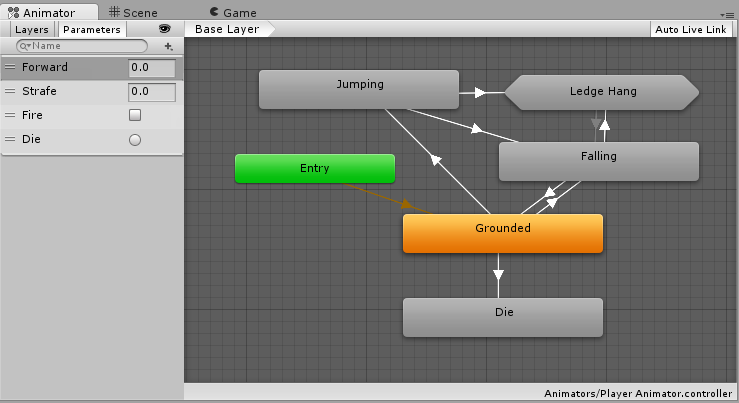
Unity Learn
An Animator Controller is a Unity asset that controls the logic of an animated GameObject. Within the Animator Controller there are States and Sub-State Machines that are linked together via Transitions. States are the representation of animation clips in the Animator. Transitions direct the flow of an animation from one State to another. In thi...
lucid path
polar acorn
https://learn.unity.com/tutorial/animator-controllers
this would've been nice to know about sooner lmao. thank you.
lucid path
wintry quarry
```cs
float[] times = new float[] {0.1f, 0.2f, 0.3f, 0.5f};
int spriteIndex = 0;...
also when trying to implement this code, it gives the error Cannot implicitly convert type 'float[]' to 'float'
wintry quarry
lucid path
also when trying to implement this code, it gives the error `Cannot implicitly c...
I made a typo
fixed it
lucid path
oh ok thx
potent coral
wintry quarry
show the rest of your code please

Pastebin
Pastebin.com is the number one paste tool since 2002. Pastebin is a website where you can store text online for a set period of time.
wintry quarry
potent coral
https://pastebin.com/Dia4ZzAV
you're doing rigidBody.velocity = movement; in Update
so really you'd need to also do movement *= -1;
i.e.
private void OnCollisionEnter2D(Collision2D collision)
{
if (collision.gameObject.CompareTag("Wall")) {
//rigidBody.velocity = new Vector2(rigidBody.velocity.x * -1, rigidBody.velocity.y * -1);
movement *= -1;
rigidBody.velocity = movement;
}
}``` junior parrot
Is there any better way to do this?
RaycastHit2D hitLeft = Physics2D.BoxCast(PlayerDB.coll.bounds.center, PlayerDB.coll.bounds.size, 0f, Vector2.left, .1f, PlayerDB.spikesLayer);

RaycastHit2D hitRight = Physics2D.BoxCast(PlayerDB.coll.bounds.center, PlayerDB.coll.bounds.size, 0f, Vector2.right, .1f, PlayerDB.spikesLayer);

RaycastHit2D hitUp = Physics2D.BoxCast(PlayerDB.coll.bounds.center, PlayerDB.coll.bounds.size, 0f, Vector2.up, .1f, PlayerDB.spikesLayer);

RaycastHit2D hitDown = Physics2D.BoxCast(PlayerDB.coll.bounds.center, PlayerDB.coll.bounds.size, 0f, Vector2.down, .1f, PlayerDB.spikesLayer);

if (hitLeft.collider != null || hitRight.collider != null || hitUp.collider != null || hitDown.collider != null)
{
    OnSpikesInteraction?.Invoke();
}
I'm trying to move objects using cursor, but something is wrong and joint is weak and working wrong (i'm working wrong i know)
here is the code:
public class Cursor : MonoBehaviour
{
    void Update()
    {
        Vector2 mousePosition = Camera.main.ScreenToWorldPoint(Input.mousePosition);
        transform.position = mousePosition;

        if (Input.GetMouseButtonDown(0))
        {
            this.Activate();
        }
        else if (Input.GetMouseButtonUp(0))
        {
            this.Disactivate();
        }
    }

    public void Activate()
    {
        RaycastHit2D hit = Physics2D.Raycast(Camera.main.ScreenToWorldPoint(Input.mousePosition), transform.forward);

        if (hit.collider && hit.collider.gameObject.GetComponent<Rigidbody2D>())
        {
            this.GetComponent<HingeJoint2D>().enabled = true;
            this.GetComponent<HingeJoint2D>().connectedBody = hit.collider.gameObject.GetComponent<RigidBody2D>();
        }
    }

    public void Disactivate()
    {
        this.GetComponent<HingeJoint2D>().connectedBody = null;
        this.GetComponent<HingeJoint2D>().enabled = false;
    }
}
ah ofcourse, that did it. Thanks a lot
 thorn holly
junior parrot
Is there any better way to do this?
```csharp
RaycastHit2D hitLeft = Physics2D....
thorn holly
junior parrot
Is there any better way to do this?
```csharp
RaycastHit2D hitLeft = Physics2D....
What exactly does this code do? What are you trying to achieve with this?
I understand the code, but I’m not sure why there’s 4 box colliders instead of one big one
junior parrot
thorn holly
I understand the code, but I’m not sure why there’s 4 box colliders instead of o...
That's the point, I don't know how to make a big boxcast.
 ancient scarab
Hello! I am following a tutorial online to make a RPG. When i make my player attack it does not go back to his idle form again. In the tutorial he does. Anyone that could help me real quick?
 ivory bobcat
ancient scarab
Hello! I am following a tutorial online to make a RPG. When i make my player att...
ivory bobcat
ancient scarab
Hello! I am following a tutorial online to make a RPG. When i make my player att...
Show what you've tried
ancient scarab
    // Update is called once per frame
    private void FixedUpdate() {
        if (canMove) {
            // If movement input is not 0, Try to move
            if(movementInput != Vector2.zero){
                bool success = TryMove(movementInput);

                if(!success) {
                    success = TryMove(new Vector2(movementInput.x, 0));
                }

                if(!success) {
                    success = TryMove(new Vector2(0, movementInput.y));
                }

                animator.SetBool("isMoving", success);
            } else {
                animator.SetBool("isMoving", false);
            }

            // Set direction of sprite to mov dir
            if (movementInput.x < 0) {
                spriteRenderer.flipX = true;
            } else if (movementInput.x > 0) {
                spriteRenderer.flipX = false;
            }
        }
    }
The halfExtents parameter sets the size
ancient scarab
        canMove = false;
    }

    public void UnlockMovement () {
        canMove = true;
    }
And then on the animation i added a event that triggers both
at the start it triggers Lockmovement at then end it triggers UnlockMovement
ivory bobcat
Also link the tutorial you're following
ancient scarab

Guide on many of the first steps building up a top down 2d pixel art RPG from scratch in Unity 2022 version. The goal of this crash course is to cover as many relevant beginners topics as we can but linked together in actually building out some prototype mechanics for a potential game.
For the video, I'm using this mystic woods pack for this tu...
1:03:23
well maybe 3 mins earlyer but around there
ivory bobcat
ancient scarab
at the start it triggers Lockmovement at then end it triggers UnlockMovement
Place a log in unlock and lock movement to see if they're occurring - order might be important as well.
ancient scarab
a log?
ivory bobcat
Print/Debug.Log
 ivory bobcat
Show the console logs from the Unity Editor console window
ancient scarab
 ivory bobcat
So lock is spamming
ivory bobcat
So unlock is not occurring. Figure out why.
ancient scarab
Thats the whole problem it should be doing that
ivory bobcat
Well, it isn't. Figure out why. You ought to have a grasp of what makes it occur
Check the conditions and see why it doesn't occur
lunar grove
So my game for some reason
After pressing on my retry button
On the next retry
the retry button gets triggered by Spacebar key
lol
I don't know if its because i was enabling and disabling scripts or not
Could it be that after clicking my UI button once, it becomes highlighted by the game and that's why I can press Spacebar to trigger it? Because after focusing on another window and then going back to the game, the problem disappears
 short hazel
lunar grove
Could it be that after clicking my UI button once, it becomes highlighted by the...
short hazel
lunar grove
Could it be that after clicking my UI button once, it becomes highlighted by the...
Yes, the button is in a focused state. Most apps do that, even Windows. Clicking on the task bar, hitting Tab to move the focus to one of the pinned apps, then pressing Space or Enter opens it
lunar grove
Is there a way to not give a button focus upon first clicking it?
becuz it also triggers another action in my script unintendedly lol
lunar grove
short hazel
Yes, the button is in a focused state. Most apps do that, even Windows. Clicking...
Is there a way to prevent focus upon clicking a button?
short hazel
Yes from the event system, using EventSystem.current.SetSelectedGameObject(null)
You'd call that inside the method that executes when the button is clicked
lunar grove
Ah thank you very much!
 edgy fox
just to make sure I'm not crazy these draw the same ray right???

because the drawn rays arent intersecting with something visually but theyre still reading as a hit and I need to know if my hitboxes, post hit code, or rays are wrong
 dim stream
what is this? 💀

 rich adder
dim stream
what is this? 💀
rich adder
dim stream
what is this? 💀
exactly what it says
dim stream
idk what i have to do
rich adder
google it , should be pretty common result
dim stream
okey
rich adder
edgy fox
because the drawn rays arent intersecting with something visually but theyre sti...
you won't see debug rays hit anything, you'd have to code that inside the If statement with DrawLine (origin, rayhit.point)
 weak rose
Hi, I have a projectile prefab with stats like bulletSpeed. During runtime, player can pick up powerups that can increase bulletSpeed but I don't want the change on the prefab to be kept after runtime. What can I do about it?
rich adder
weak rose
Hi, I have a projectile prefab with stats like bulletSpeed. During runtime, play...
use another script that handles the boosted stats
weak rose
Okay thanks
 buoyant knot
idk exactly how to fix your problem, but this script is too tightly coupled to your other code.
a script that controls movement should not have any references to player health, at all
also, you have a ton of magic numbers
like flatVel.magnitude > 400f
imo, for any movement script, you want to keep the update and fixed update loops as clean as possible
they will become absolutely massive
and make it a lot harder to fix anything
the majority of your fixed update loop contains information about collision for damage. none of that belongs here
you’ll find it’s a lot easier to find and fix problems once you separate all of this out
 eternal needle
400 is also insanely fast, is your enemy a bullet?
buoyant knot
then your units are wrong
m/s = m/s * const. implies const is dimensionless. so if const depends on mass, you fucked up
 swift crag
you're using AddForce wrongly
oh wait, no, I misread. That is fine.
I thought you were using it to apply force once
(like when you shoot a bullet)
This is applying a constant force to the projectile
If the projectile is heavy, then you'll need more newtons of force to accelerate it
buoyant knot
either way, he is taking a vector, making it magnitude 400, and assigning the x/z components to velocity
edgy fox
rich adder
you won't see debug rays hit anything, you'd have to code that inside the If sta...
I don't see ray pass through hitbox?
rich adder
edgy fox
I don't see ray pass through hitbox?
yea they pass through
they don't collide I mean (talking about Debug ones)
edgy fox
rich adder
they don't collide I mean (talking about Debug ones)
ik I'm saying they dont pass through
buoyant knot
void FixedUpdate()
{
timer += Time.deltaTime;
Move();
    ~~float interactRange = 0.5f;
    Collider[] colliderArray = Physics.OverlapSphere(transform.position, interactRange);
    foreach (Collider collider in colliderArray) {
        if (collider.gameObject.CompareTag("Player")){
            Jump();
        }
    }~~
    ~~if(health == 0){
        Destroy(gameObject);
    }~~
}
void Move() {
Vector3 direction = (player.position - transform.position).normalized;
m_Rigidbody.AddForce(Vector3.forward * -2f, ForceMode.Impulse);
Vector3 flatVel = new Vector3(m_Rigidbody.velocity.x, 0f, m_Rigidbody.velocity.z);
    // limit velocity if needed
    if(flatVel.magnitude > 2f)
    {
        Vector3 limitedVel = flatVel.normalized * 2f;
        m_Rigidbody.velocity = new Vector3(limitedVel.x, m_Rigidbody.velocity.y, limitedVel.z);
    }

}
~~void Jump() {
    if(timer > 0.5f){
            playermovement.health = playermovement.health - 10;
            timer = 0f;
    }~~
quick easy fix
your code is now better. Not totally fixed, but better because i got rid of a bunch of crap that does not belong in this script
edgy fox
I'm just getting a second source to make sure these rays are the same
rich adder
edgy fox
I'm just getting a second source to make sure these rays are the same
idk what you mean by that
buoyant knot
buoyant knot
void FixedUpdate()
{
timer += Time.deltaTime;
Move();
...
@queen adder
edgy fox
rich adder
idk what you mean by that
are the rays in the debug drawray and the raycast the same origin and length?

\and direction
etc
 zinc warren
   public static World ReadWorldJSON(string name)
   {
       var jsonString = Resources.Load<TextAsset>("Worlds/" + name);
       return JsonUtility.FromJson<World>(jsonString.text);
   }

   public static void WriteWorldJSON(World world)
   {
       string jsonString = JsonUtility.ToJson(world);
       string filePath = WorldDirectory + world.WorldName + ".json";
       File.WriteAllText(filePath, jsonString);
   }
how do i write to the file using Resources api?
buoyant knot
when I say “it has no business being there”, I don’t mean dance around it. I mean delete it, and put it in a totallt different class
buoyant knot
zinc warren
```cs
public static World ReadWorldJSON(string name)
{
var jsonStri...
i use a JsonFile utility from the youtuber velvary to handle that stuff
FileHandler, i think it was called
rich adder
edgy fox
are the rays in the debug drawray and the raycast the same origin and length?
Try it and see
swift crag
zinc warren
```cs
public static World ReadWorldJSON(string name)
{
var jsonStri...
Resources is not used to write data.
It is strictly used to load Unity objects
buoyant knot
zinc warren
https://www.youtube.com/watch?v=KZft1p8t2lQ&t=7s&ab_channel=Velvary this one?
i think so
swift crag
Resources only loads files from a Resources folder. It doesn't load arbitrary files from disk at runtime
buoyant knot
i don’t remember if she has a follow up that was fixed or something
swift crag
imagine the difference between loading a Mesh asset and reading an FBX
rich adder
zinc warren
```cs
public static World ReadWorldJSON(string name)
{
var jsonStri...
You should save to Application.persistentDataPath instead
swift crag
indeed: that's where you read and write files
I store my settings.json file there, for example
edgy fox
rich adder
Try it and see
how would I try it? is it possible to just draw a raycast or?
rich adder
edgy fox
how would I try it? is it possible to just draw a raycast or?
I'm confused on what you're asking, aren't you already using Debug.DrawRay ? whats wrong with it
 desert elm
this should just turn any children of the gameobject towards idealTargetLocation right?
 zinc warren
rich adder
You should save to Application.persistentDataPath instead
zinc warren
rich adder
You should save to Application.persistentDataPath instead
public static string WorldDirectory = Application.persistentDataPath

    public static World ReadWorldJSON(string name)
    {
        string jsonString = File.ReadAllText(WorldDirectory + name + ".json");
        return JsonUtility.FromJson<World>(jsonString);
    }

    public static void WriteWorldJSON(World world)
    {
        string jsonString = JsonUtility.ToJson(world);
        string filePath = WorldDirectory + world.WorldName + ".json";
        File.WriteAllText(filePath, jsonString);
    }
something like this?
rich adder
zinc warren
```cs
public static string WorldDirectory = Application.persistentDataPath
...
iirc you cannot assign it like that, has to be inside method
and you should be using Path.Combine
desert elm
desert elm
this should just turn any children of the gameobject towards idealTargetLocation...
or well, it should m.transform.position, not transform.position
however, it appears that it
doesn't work
rich adder
desert elm
however, it appears that it
doesn't work
whats not working also you can just loop through transform
since thats a collection
(Transform t in transform)
desert elm
rich adder
whats not working also you can just loop through `transform`
its turning the parent gameobject instead of the child
zinc warren
rich adder
iirc you cannot assign it like that, has to be inside method
and you should be u...
it seems to work 🤷♂️ye ima use path.combine
desert elm

 rich adder
zinc warren
it seems to work 🤷♂️ye ima use path.combine
rich adder
zinc warren
it seems to work 🤷♂️ye ima use path.combine
oh weird.. maybe cause i was doing string interpolation
oh well
might want a subfolder though
rich adder
desert elm
I can't really tell whats happening, which ones am i looking at at? small ones?
are the pivots correct?
desert elm
rich adder
I can't really tell whats happening, which ones am i looking at at? small ones? ...
ok yeah sorry- didn't explain
the entire gameobject, even the parent, are turning towards the ideal target location
and i have no idea why-
and I assume that its nothing to do with the code I posted
rich adder
probably because one of the items in the array is the parent
 near wadi
Neat. Switch does not have to be Int. it works with Strings too
rich adder
switch is just a fancy if else if
near wadi
indeed. i think the ability to use String is somewhat new though, in Unity
desert elm
rich adder
probably because one of the items in the array is the parent
oh that explains it- how can I only make it have children?
rich adder
desert elm
oh that explains it- how can I only make it have children?
Just make an array of transform in the inspector and drag them inside
rich adder
[SerializeField] private Transform[] childTurrets
 spiral narwhal
        private void SufferDamage()
        {
            StartCoroutine(FlashSprite());
        }

        private IEnumerator FlashSprite()
        {
            _damageSpriteRenderer.color = Color.white;
            yield return new WaitForSeconds(.1f);
            _damageSpriteRenderer.color = new Color(0f, 0f, 0, 0f);
        }
Someone told me that using WaitForSeconds is bad. Would this be okay for a quick damage indicator?
fringe kindle
I've been having issues with using 'LoadSceneAsync' and 'UnloadSceneAsync' for switching scenes
Either the code doesn't let me unload the scene or it completely resetsthe base scene, which I don't want
I'm not using Timescale for the end of the games either
So I'm not sure what's wrong
swift crag
Show your code.
fringe kindle
Which one? Because I have that function in a few other scripts relating to each game's respective controllers
All of them?
 eternal falconBOT

Posting code
📃 Large Code Blocks
Use links to services like:
https://gdl.space/, https://paste.ofcode.org/, https://hatebin.com/, https://paste.myst.rs/, https://hastebin.com/
📃 Inline Code
Surround code with three backquotes. Not quotation marks.
To format as C#, add cs to the first line:
```cs
// Your code here
```
Add a comment with a line number if there is an error message.
spiral narwhal
        private void SufferDamage()
        {
            StartCoroutine(FlashSprite());
            StartCoroutine(FreezeGame());
        }

        private IEnumerator FreezeGame()
        {
            var priorTimeScale = Time.timeScale;
            Time.timeScale = 0f;
            yield return new WaitForSeconds(0.05f);
            Time.timeScale = priorTimeScale;
        }
Damnit, another issue. It seems WaitForSeconds is affected by time scale. How would I freeze the game and unfreeze it after a bit?
swift crag
use WaitForSecondsRealtime
short hazel
Use WaitForSecondsRealtime
swift crag
zoop
spiral narwhal
Ok
short hazel
Double kill
fringe kindle
This one is for the base scene, where I'm going to the playground items that I use to warp into the games themselves


(Had to use screenshots because I reached the character limit)
And this one is for one of the games (all three work very similarly)

I had to take the inputs for getkeycode out of OnTriggerEnter otherwise it wouldn't work
 real vapor
transform.left does not exist?

 swift crag
fringe kindle
This one is for the base scene, where I'm going to the playground items that I u...
swift crag
fringe kindle
This one is for the base scene, where I'm going to the playground items that I u...
please share large amounts of code via one of the paste sites from that bot message #💻┃code-beginner message
real vapor
swift crag
You can use `-transform.right` instead
Ah, thank you.
fringe kindle
IDK how they're supposed to work
I put in the code and copy it but Discord still says I reached a character limit
sorry, I'm new to this stuff
swift crag
You're trying to call SetActiveScene too early, methinks
Even LoadScene doesn't actually load a scene until the end of the frame
 soft canyon
I want to make a 3d dungeon generator, what's the best way to do it?
swift crag
so calling SetActiveScene immediately after LoadSceneAsync sounds way too early
fringe kindle
swift crag
You're trying to call SetActiveScene too early, methinks
When abouts should it be called?
fringe kindle
Should it be done in a code linked to the new scene? When it's loaded in?
swift crag
You could listen to the completed event on the AsyncOperation that LoadSceneAsync returns
I guess you could also just do that in Awake in something in the new scene
Although I'm not confident about the exact order of things there
fringe kindle
Another thing is I tried to use the UnloadSceneAsync for when I wanted to exit the Jungle Game but it didn't work
It said something along the lines of "unloading the last loaded scene is not supported"
swift crag
that means you only have one scene loaded
 delicate slate
i have ran into a prbolem can anybody tell me how to fix this?
 swift crag
oh yeah, there's the thing I completely glossed over
just because you load a scene asynchronously doesn't mean you're loading it additively
That just means that you're allowing the game to keep running as Unity fetches stuff from disk
wintry quarry
delicate slate
i have ran into a prbolem can anybody tell me how to fix this?
the error message tells you how to fix it
swift crag
delicate slate
i have ran into a prbolem can anybody tell me how to fix this?
did you follow the instructions in the popup?
delicate slate
yes i don't understand the instructuions
wintry quarry
You clearly have compile errors @delicate slate

listen to the error message - you have to fix them first
delicate slate
ok
wintry quarry
And don't let me ever see you using Unity with your Console window hidden again!
delicate slate
wintry quarry
And don't let me ever see you using Unity with your Console window hidden again!
whats that?
oh
wintry quarry
delicate slate
boi
fringe kindle
swift crag
just because you load a scene asynchronously doesn't mean you're loading it addi...
Is there a way I can load it additively?
wintry quarry
Impossible to use Unity without the Console window
delicate slate
ya i js looked at it and um
swift crag
fringe kindle
Is there a way I can load it additively?
sure, just pass LoadSceneMode.Additive as the second argument
the default is LoadSceneMode.Single
fringe kindle
After LoadSceneAsync?
delicate slate
is it hard to fix this many bugs?
 polar acorn
delicate slate
ya i js looked at it and um
polar acorn
delicate slate
ya i js looked at it and um
Those errors should tell you what file to look in, find the stuff underlined in red and fix them
rich adder
delicate slate
is it hard to fix this many bugs?
they're simple
its mostly syntax/formatting issue
swift crag
fringe kindle
After LoadSceneAsync?
No. Pass it as the second argument to LoadSceneAsync.
delicate slate
rich adder
its mostly syntax/formatting issue
whats that
rich adder
delicate slate
whats that
when you don't know something, google is your best friend
swift crag
a syntax error is when your code has an invalid structure
int x x x xjkdf = 3;
this is invalid syntax.
rich adder
^ also you're missing ; and that makes more errors else where
delicate slate
rich adder
when you don't know something, google is your best friend
i dont have friends
delicate slate
rich adder
^ also you're missing `;` and that makes more errors else where
me?
rich adder
cool. then google should be your first
 shell herald
since online search with the keywords i used was unsuccessful, how do i do
if (value = float range )?
i want the if to trigger if the value is inside a range of 2 float values
rich adder
shell herald
i want the if to trigger if the value is inside a range of 2 float values
if(value > min && value < maxValue) ?
shell herald
that makes perfect sense
 native seal
So i'm trying to make a draggable inventory system and am implementing the IPointer interfaces right now. Would it make more sense to put a script on each of the "slots" in my inventory to control the drag? or to put the script on the container of all the slots in the inventory
rich adder
native seal
So i'm trying to make a draggable inventory system and am implementing the IPoin...
what do the slots do besides get dragged?
whatever is easier for you to get reference to the slot to move it or if you need to do additional logic
native seal
swap items around, combine stacks, etc
imagine the inventory in minecraft for example
rich adder
Whatever makes more sense to you imo
native seal
so it doesn't particularly matter?
rich adder
I have worked on projects that had both it makes no functional difference
native seal
okay thanks
 merry gorge
 slender nymph
 fringe kindle
Made the scene I wanted to load additive and then this happened. Is there something else I'm missing?
 slender nymph
this is a code channel
fringe kindle
In the code I meant
slender nymph
your issues are clearly related to lighting
fringe kindle
No, I meant that the scene just merged with the previous scene instead of switching
rich adder
752 errors 😮
slender nymph
fringe kindle
No, I meant that the scene just merged with the previous scene instead of switch...
that's literally what additively loading a scene is for
fringe kindle
I was told earlier that it would fix my issue of loading from one scene to another
slender nymph
i don't know what issue you were having before. but if you don't want both scenes active then you need to unload the other scene
rich adder
fringe kindle
I was told earlier that it would fix my issue of loading from one scene to anoth...
and what is that?
shell herald
im currently beyond confused. my enemy starts by facing right and having a Y rotation of 0. and every time he turns it adds 180f to his rotY. meaning, in theory it should alternate between 0 and 180.
then i have the section where its
if(enemy.rotation.y > min value && enemy.rotation < max value)
but the things inside this if stay triggered even when the conditions arent met anymore and it should switch to else.
Am i doing something wrong?
Hastebin is a free web-based pastebin service for storing and sharing text and code snippets with anyone. Get started now.
fringe kindle
slender nymph
i don't know what issue you were having before. but if you don't want both scene...
I wanted the previous scene to keep my position from when I reload into it, after I finished my minigame I load into
rich adder
shell herald
im currently beyond confused. my enemy starts by facing right and having a Y rot...
i can just see you're using quaternions
which is wrong for regular angles
slender nymph
shell herald
im currently beyond confused. my enemy starts by facing right and having a Y rot...
transform.rotation is not expressed in degrees because it is a quaternion
slender nymph
fringe kindle
I wanted the previous scene to keep my position from when I reload into it, afte...
then instead of loading additively you should store that information somewhere that is accessible even when switching scenes and when you load back into the other scene get that info and apply it to the player
rich adder
@shell herald what you want is .eulerAngles or localEulerAngles if you need local
delicate slate
i js changed my script and it still isnt working the file name and monobehavior name match

 slender nymph
configure your !IDE so it underlines your compile errors in red
delicate slate
wrong picture mb
eternal falconBOT
💡 IDE Configuration
If your IDE is not autocompleting code
or underlining errors, please configure it.
Select one:
• Visual Studio (Installed via Unity Hub)
• Visual Studio (Installed manually)
• VS Code
• JetBrains Rider
• Other/None
rich adder
delicate slate
i js changed my script and it still isnt working the file name and monobehavior ...
you have errors
polar acorn
delicate slate
i js changed my script and it still isnt working the file name and monobehavior ...
Make sure that there are no compile errors and that the file name and class name match.
shell herald
rich adder
<@388040832802095106> what you want is `.eulerAngles` or `localEulerAngles` if y...
so i just have to change the enemy.rotation.y to enemy.eulerAngles.y in both the Rotate and the if right?
delicate slate
the class name does match
 polar acorn
delicate slate
the class name does match
polar acorn
delicate slate
the class name does match
Make sure that there are no compile errors and that the file name and class name match.
rich adder
shell herald
so i just have to change the enemy.rotation.y to enemy.eulerAngles.y in both the...
yeah that should give you the ones you see in the inspector (those are euler angles)
always use Debug.Log and double check
delicate slate
polar acorn
Make sure that there are no compile errors and that the file name and class name...
how i would i fix those i dont understand the instructions for the errors
polar acorn
delicate slate
how i would i fix those i dont understand the instructions for the errors
Look at the lines underlined in red in your IDE and then fix them
For example
this fuckin thing

what is that
delicate slate
i dunno
polar acorn
delicate slate
i dunno
then why did you put it there
rich adder
wtff goin on there
slender nymph
delicate slate
i dunno
it's not underlined in red is what it is. get your !IDE configured if you want to get help here 👇
eternal falconBOT
💡 IDE Configuration
If your IDE is not autocompleting code
or underlining errors, please configure it.
Select one:
• Visual Studio (Installed via Unity Hub)
• Visual Studio (Installed manually)
• VS Code
• JetBrains Rider
• Other/None
delicate slate
polar acorn
then why did you put it there
i js copied it from a tut
polar acorn
delicate slate
i js copied it from a tut
Please show me the tutorial that said to put that there
slender nymph
100% it was just code in the description or comment on a youtube video lmao
delicate slate
polar acorn
Please show me the tutorial that said to put that there

In this Unity tutorial, I teach you guys how to make a basic third person character controller in Unity using the C# programming language. This character controller allows you to jog (forward and back), sprint, and rotate around for basic player movement. I also show a few easy camera methods as well.
#Unity #Unity3D
For more Unity tutorials o...
 noble folio
can anyone please help me? in my script there is if (Input.GetKeyDown(KeyCode.E)) but it doesnt work nothing works after the if
 delicate slate
slender nymph
100% it was just code in the description or comment on a youtube video lmao
delicate slate
slender nymph
100% it was just code in the description or comment on a youtube video lmao
ya im probably going to check
oh
u were right
it was js extra stuff i copid
polar acorn
delicate slate
https://youtu.be/cEqjkubspGo?si=4ZZDBKeO2lYfknjg
"I did it exactly like the tutorial so why does theirs work and mine doesn't" counter:
Number of times it wasn't exactly like the tutorial: 141
Number of times it was exactly like the tutorial: 5
Number of times the code literally did not exist: 1
2022-07-19 to 2024-1-16
now do this: #💻┃code-beginner message
polar acorn
noble folio
can anyone please help me? in my script there is if (Input.GetKeyDown(KeyCode.E)...
What calls PianoStartedPlaying
delicate slate
eternal falcon
which one do i click?
noble folio
polar acorn
What calls `PianoStartedPlaying`
PianoTrigger script
 polar acorn
slender nymph
now do this: https://discord.com/channels/489222168727519232/497874004401586176/...
polar acorn
slender nymph
now do this: https://discord.com/channels/489222168727519232/497874004401586176/...
I am pretty sure it is configured, it's just using the theme that tints errors red instead of underlining them
polar acorn
noble folio
PianoTrigger script
Okay, and did you start pressing E the exact frame you entered the collider?
slender nymph
polar acorn
I am pretty sure it is configured, it's just using the theme that tints errors r...
but everything has a red tint to it in their screenshots. why the fuck would anyone want that
noble folio
polar acorn
Okay, and did you start pressing E the _exact frame_ you entered the collider?
no i waited a second
polar acorn
slender nymph
but everything has a red tint to it in their screenshots. why the fuck would any...
Everything has a red tint because the whole fucking thing is an error because the literal first line is nonsense
rich adder
polar acorn
I am pretty sure it is configured, it's just using the theme that tints errors r...
it def doesn't look configured
polar acorn
noble folio
no i waited a second
You are checking if you pressed E this frame during the first frame of contact. Unless both things happen literally simultaneously, nothing will happen
noble folio
ohhh and how should i do it so it checks all the time im in the trigger?
polar acorn
rich adder
it def doesn't look configured
I have no idea what a configured VSCode is supposed to look like, especially if it has themes
polar acorn
noble folio
ohhh and how should i do it so it checks all the time im in the trigger?
Check for it in OnTriggerStay
rich adder
polar acorn
I have no idea what a configured VSCode is supposed to look like, especially if ...

maybe the still have old C# plugin with the mono but highly doubt xD
 dense root
You can press alt + print screen to just get the window you want to screen cap
@delicate slate
polar acorn
rich adder
Stuff like the references missing I could chalk up to the whole file being one giant syntax error, but it does seem to be missing that C# icon so it's probably not configured
rich adder
yeah the C# devkit is the diamond shaped one usually sign of no Unity plugin installed
polar acorn
So @delicate slate configure your !ide first and foremost so you can see what the errors are
eternal falconBOT
💡 IDE Configuration
If your IDE is not autocompleting code
or underlining errors, please configure it.
Select one:
• Visual Studio (Installed via Unity Hub)
• Visual Studio (Installed manually)
• VS Code
• JetBrains Rider
• Other/None
delicate slate
polar acorn
So <@1120432609672052746> configure your !ide first and foremost so you can see ...
ok what one do you reccomend i click on?
polar acorn
delicate slate
ok what one do you reccomend i click on?
The one you are using
delicate slate
oh
shell herald
this still doesnt work as intended.
the Rotate part only works once and then never again. idk why bc i get te logs as intended
the enemy starts with a y rotation of 0, and once the rotate is triggered, it becomes -180, but by 0 + 180 i expect it to be positive.
 wintry quarry
shell herald
this still doesnt work as intended.
the Rotate part only works once and then ne...
wintry quarry
shell herald
this still doesnt work as intended.
the Rotate part only works once and then ne...
enemy.localEulerAngles += new(0, 180, 0);
 slender nymph
shell herald
this still doesnt work as intended.
the Rotate part only works once and then ne...
slender nymph
shell herald
this still doesnt work as intended.
the Rotate part only works once and then ne...
transform.Rotate will rotate by the amount specified. so if you want to rotate 180 degrees around the Y axis then you do transform.Rotate(0, 180, 0), don't add the localEulerAngles to 180
wintry quarry
 queen adder
why is my canvas corrupted?
queen adder
why is my canvas corrupted?
well you've got Nans in your rect transform...
queen adder
queen adder
i checked the positions and it wont move
🔼
this hasnt happened until after i opened unity after saving it whilst logging off one day
wintry quarry
queen adder
i checked the positions and it wont move
What does "I checked the poisitions and it won't move" mean
rich adder
queen adder
why is my canvas corrupted?
how's that a canvas tho? they can't be resized
ivory bobcat
Maybe try resetting the component
queen adder
how do i reset the component?
wintry quarry
Press this
 queen adder
rich adder
how's that a canvas tho? they can't be resized
queen adder
rich adder
how's that a canvas tho? they can't be resized
well im just saying my entire canvas is corrupt. its children's positions are broken and i cannot change them
rich adder
queen adder
well im just saying my entire canvas is corrupt. its children's positions are br...
oh just saying , showing us the canvas then would've helped as well
queen adder
queen adder
but now my ui elements are transparent
DISREGARD THIS
everything is fine now!
thank you
queen adder
rich adder
oh just saying , showing us the canvas then would've helped as well
ah, i shouldve done that
sorry
rich adder
no worries, at least its solved 🙂
 ivory bobcat
queen adder
ivory bobcat
queen adder
Component not inspector menu
fringe kindle
Are there any good tutorials on how to store the position in a save?
 brazen cedar
Helloo
I have an issue
It's a problem that started happening more or less at the beginning of the last year
I didn't worry about it because wan't that of a deal, but now it's just a pain to configure sprites
Whenever I create a new Unity project and import every size of sprite, they will look tiny, having the need to escale them with pixels per unit, what end up with pretty bad results controlling those sprites with code
rich adder
brazen cedar
Whenever I create a new Unity project and import every size of sprite, they will...
this is a code channel
rich adder
sure
 queen adder
how do i make it so that when i hover over a button, a method is carried out which sets a game object in the scene as active
and then when i take my mouse off the button it sets the game object as not active
so its disappears
slender nymph
use a component with the IPointerEnter/ExitHandler interfaces or an EventTrigger component
 lusty junco
can somebody please help me code a snowboard game im pretty new
rich adder
lusty junco
can somebody please help me code a snowboard game im pretty new
help you how?
rich adder
better get learning then
lusty junco
theres no tutorials for it
rich adder
did you even look ?
lusty junco
yes for a snowboard tut
rich adder
you're not gonna find the exact specific thing..thats just a combination of different things you learn individually
lusty junco
wait wait so your saying to learn other tuts to learn to make it
rich adder
lusty junco
wait wait so your saying to learn other tuts to learn to make it
yes thats how everyone does it
lusty junco
ooooooh
polar acorn
lusty junco
wait wait so your saying to learn other tuts to learn to make it
If there were a tutorial on how to make exactly the game you want to make, you wouldn't need to make it
queen adder
other than learning blender, is there any way to find a 3d model for a curved arrow i can use for my project
 solemn summit
Don't just watch em, follow them!
lusty junco
ok
polar acorn
queen adder
other than learning blender, is there any way to find a 3d model for a curved ar...
solemn summit
queen adder
other than learning blender, is there any way to find a 3d model for a curved ar...
There's lots of websites with free models, but for really basic things like that, it never hurts to learn how
queen adder
yeah ik but im low on time
 north kiln
This is a programming channel
queen adder
polar acorn
Google
keeps on giving me bows and arrows
lusty junco
ok tysm!
polar acorn
queen adder
keeps on giving me bows and arrows
Then google better
queen adder
north kiln
This is a programming channel
forgot my bad
lusty junco
ima make a board and use a 3d movment script to make it move 🙂
 stuck palm
item.mr.materials[1] = item.craftableMat;
why isnt this line of code working?
it doesnt seem to change it when i run the code
north kiln
Because materials is a copy
soft canyon
GameObject[] floors = GameObject.FindGameObjectsWithTag("floor"); // array that gets all floors
anyone know how to change "floor" to something that would destroy all instances of this prefab? [SerializeField] GameObject floor; I want to make it so I don't have to set the tag for the floor prefab
stuck palm
north kiln
Because `materials` is a copy
how would i fix that?
rich adder
soft canyon
```GameObject[] floors = GameObject.FindGameObjectsWithTag("floor"); // array th...
spawn them inside a list
soft canyon
rich adder
spawn them inside a list
oh good idea thank you
north kiln
stuck palm
how would i fix that?
Modify the copy and then assign it back to the source
stuck palm
north kiln
Modify the copy and then assign it back to the source
how would u do that, sorry?
north kiln
var materials = item.mr.materials;
materials[1] = item.craftableMat;
item.mr.materials = materials;
thank you! and why do i have to do this isntead of just assigning it directly? i know its a copy but why is it a copy?
just for like knowdlege
north kiln
stuck palm
thank you! and why do i have to do this isntead of just assigning it directly? i...
Because the memory that holds the original materials array not managed. Generally many things returned by Unity's properties are copies because of that. Almost every array will be at least
 deft siren
how do i make a varient/bool/etc that retains value between codes?
like i can change it on one code and react to the change on another
 summer stump
deft siren
like i can change it on one code and react to the change on another
summer stump
deft siren
like i can change it on one code and react to the change on another
What do you mean "change it on one code"?
Do you mean instance of a class or component?
deft siren
in my case is identifying if the player is alive or dead with "playerDead"
i have a code for a monster that can kill the player but am writing a separete code for the checkpoint to take action
slender nymph
use an event instead of relying on constantly checking a bool
deft siren
slender nymph
use an event instead of relying on constantly checking a bool
ill look it up, thanks!
native seal
so im making an inventory system and have to redraw the whole inventory UI every time it updates, how much does it matter?
deft siren
slender nymph
use an event instead of relying on constantly checking a bool
is changin the event as simple as =true =false? or does it have its own commands
slender nymph
you wouldn't change the event. you invoke it
slender nymph
native seal
so im making an inventory system and have to redraw the whole inventory UI every...
use the profiler if you have performance concerns. this also doesn't really sound like a code issue
 amber dome
hello guys
 void Start()
    {
     Instantiate(cubePrefab, new Vector3(Random.Range(-10,10), Random.Range(-3,3), Random.Range(-10,10)), Quaternion.identity);

    }
what is problem?
It's spawning too many cubes
eternal needle
amber dome
It's spawning too many cubes
you're probably spawning an object with this script on it. So it spawns itself, then spawns itself, then spawns itself
ivory bobcat
amber dome
what could I do to fix this?
Don't reference itself, put the script on a different object or have some way to evaluate if an object was instantiated once already.
summer stump
amber dome
what could I do to fix this?
Does the cubePrefab have that script on it?
To fix it, don't
soft canyon
I want to make a procedurally generating 3d dungeon, what is the best way to do this? I want to do it where I just have a floor, wall, and ceiling prefab that are instantiated to make rooms and corridors but im not sure which methods/algorithms I should use to do it. btw I have googled and watched videos and stuff and I am still having trouble so please help. I just spent like 2 hours learning and coding perlin noise stuff and it doesn't work very well and I don't know how I would make it work
 glad cliff
why can't I see button on canvas

 teal viper
glad cliff
why can't I see button on canvas
teal viper
glad cliff
why can't I see button on canvas
In the scene view you mean? It's so small I can't tell anything.
wintry quarry
glad cliff
why can't I see button on canvas
Show a screenshot that actually shows what you're expecting to see?
summer stump
soft canyon
I want to make a procedurally generating 3d dungeon, what is the best way to do ...
Show what you've tried and what results you got
soft canyon
summer stump
Show what you've tried and what results you got
I already deleted all of the stuff I had on perlin noise because it wasn't working and im trying to find another way, but ill try and replicate what I had before, one sec
delicate slate
does anyone have a third person controller script every tutorial didnt work
teal viper
If every tutorial did work, then what's the problem?
delicate slate
mb
eternal needle
you should specify what you actually tried, and what did not work
youtube tutorials are generally shit, but they at least get the player moving.
delicate slate
none of them were specific enough
and i did one that did work but it wouldnt work with my player model
it just made the model roll around
 tender wren
@soft canyon Did you look at marching cube algo, or wave function collapse?
teal viper
delicate slate
it just made the model roll around
Maybe you should've asked about that then
eternal needle
delicate slate
none of them were specific enough
Your question isnt specific enough then for what you actually need. There 100% are tutorials out there which will work for you. Your model should have literally 0 affect in this. Follow the tutorials more closely
You likely forgot to lock an axis, or your model is simply facing the wrong direction
delicate slate
do you have any reccomended tutorials?
deft siren
what changes between scenes exept from the skybox?
delicate slate
is this a riddle
deft siren
nah its a question lol
wintry quarry
The name of the scene!
soft canyon
tender wren
<@508354320274685953> Did you look at marching cube algo, or wave function colla...
No i didn't i'll look into those now
deft siren
wintry quarry
The name of the scene!
can u give and example of how this changes stuff pls
wintry quarry
- Static Batched Meshes
- Baked Static Occlusion Culling
- Baked Lightmaps
- Environment lighting
teal viper
deft siren
what changes between scenes exept from the skybox?
The scene itself.🤔
What kind of question is that?
wintry quarry
deft siren
can u give and example of how this changes stuff pls
I don't really understand the question tbh
deft siren
teal viper
The scene itself.🤔
What kind of question is that?
ok but what is "the scene"
wintry quarry
A collection of GameObjects
wintry quarry
wintry quarry
- Static Batched Meshes
- Baked Static Occlusion Culling
- Baked Lightmaps
- Env...
plus all this
 timber tide
additional loaded stuff
soft canyon
summer stump
Show what you've tried and what results you got
I just did control z a bunch to get my code back and now something is breaking and I don't want to spend half an hour fixing it just to show bad results, but this is pretty much what I had before and it was placing a grid of tiles, some floors and some walls, but I don't know how I would turn that into what I need it to be which is rooms and hallways
 deft siren
its that i want to make a jumpscare and tought scenes would be better than just changing cameras
teal viper
deft siren
ok but what is "the scene"
Might want to go over the basics of working with unity.
deft siren
teal viper
Might want to go over the basics of working with unity.
ik...
 floral wren
@rain tartan
If you register in Awake, every object would have at least been register when start is called.
timber tide
you can make your whole game in a single scene assuming you want to deal with deloading stuff manually
deft siren
ah
 rain tartan
floral wren
<@210985817017942017>
If you register in Awake, every object would have at lea...
rain tartan
floral wren
<@210985817017942017>
If you register in Awake, every object would have at lea...
I know, that’s how I have it setup now, but then how can I guarantee that it loads before the values are used in start?
wintry quarry
deft siren
its that i want to make a jumpscare and tought scenes would be better than just ...
wdym by changing cameras?
Are you talking about a FNAF game?
deft siren
wintry quarry
wdym by changing cameras?
Are you talking about a FNAF game?
no, the jumpscare would benefit from a player camera
wintry quarry
deft siren
no, the jumpscare would benefit from a player camera
What?
tender wren
@rain tartan https://docs.unity3d.com/Manual/ExecutionOrder.html shows the order of functions
deft siren
bad english
wintry quarry
"benefit from a player camera"?
deft siren
jumpscare would be from diferent camera angle
wintry quarry
deft siren
jumpscare would be from diferent camera angle
A different camera angle is not a different scene
it's just a different camera or Cinemachine virtual camera
A different scene doesn't make any sense for that
rain tartan
tender wren
<@210985817017942017> https://docs.unity3d.com/Manual/ExecutionOrder.html shows ...
Thanks? I’m aware… this doesn’t really help?
tender wren
@deft siren I feel like you just want a different view for jump scares. You can enable and disable cameras in order to switch from them via scripts. This will change the view when you need to switch for the jump scare.
deft siren
tender wren
<@667899606683746314> I feel like you just want a different view for jump scares...
yeah thats it, ive already done it b4 but was wondering if there was a more "clean" aproach to it, thanks anyways!!
 covert wyvern
How do you place an image or sprite on top of a 3D object and hide the 3D object or how to replace the 3D object with your sprite?
 frosty hound
Not a coding question. Sprites are just planes, so you can place it wherever you want to block a 3D object.
covert wyvern
Thanks, I'll try that
summer stump
soft canyon
I just did control z a bunch to get my code back and now something is breaking a...
You should definitely be using version control so you can separate out experiments and know what you did before.
But I'm thinking you may want to separate the floor and wall code. You could do perlin or something else for the floor code, but you'll want to build the walls around that result, not with the same algorithm I THINK.
Others will surely know more though, I have never done anything like that before
soft canyon
summer stump
You should definitely be using version control so you can separate out experimen...
yeah that's what I was thinking of doing next, im planning on just generating a floor plan and then generating walls wherever there is a floor and nothing on the other side of it to make an outline around everything
summer stump
soft canyon
yeah that's what I was thinking of doing next, im planning on just generating a ...
Yeah, exactly what I was thinking. Best of luck!
 lapis crow
Do I need to learn C# in advance or can I work with both and learn along the way?
frosty hound
You can learn both
shell herald
idk if i understand it correctly, but OnTriggerStay does code for aslong as a specified collider is in it and stops as soon as it exits? also, in the docs it is said that its called once per physics update. what is the difference between physics update and normal update?
solemn summit
OnTriggerStay will keep running as long as it detects a collision. As for physics update, it's FixedUpdate: https://docs.unity3d.com/ScriptReference/MonoBehaviour.FixedUpdate.html
shell herald
ok, im a bit confused about what to put in the brackets. by default its "OnTriggerStay2D(Collider2D collision)"
however this doesnt work with my player character. what would go in there?
teal viper
shell herald
ok, im a bit confused about what to put in the brackets. by default its "OnTrig...
Follow the documentation and it's examples
And if it still don't work,follow the guide on debugging physics messages:
https://unity.huh.how/physics-messages
If still troubled after that, share more details and context.
summer stump
shell herald
ok, im a bit confused about what to put in the brackets. by default its "OnTrig...
Are you using a CharacterController?
 flint citrus
how do i add a component to my game objects. im procedurally generating object but they need to have the texture added to them. im not sure how to do this?
 deft siren
whats the diferrence between OnTriggerStay/Enter?
slender nymph
have you read what each of them are for?
deft siren
wdym
ok mb ik what u mean
not really
but it seem like both are extremely similar
oh
deft siren
its like a trigger that updates
flint citrus
 teal viper
flint citrus
how do i add a component to my game objects. im procedurally generating object b...
teal viper
flint citrus
how do i add a component to my game objects. im procedurally generating object b...
!code
eternal falconBOT
Posting code
📃 Large Code Blocks
Use links to services like:
https://gdl.space/, https://paste.ofcode.org/, https://hatebin.com/, https://paste.myst.rs/, https://hastebin.com/
📃 Inline Code
Surround code with three backquotes. Not quotation marks.
To format as C#, add cs to the first line:
```cs
// Your code here
```
Add a comment with a line number if there is an error message.
deft siren
summer stump
Have you read the documentation?
what documentation
eternal falconBOT
 summer stump
It should be your first stop with any API questions like that
flint citrus
teal viper
!code
what do you mean not code?
summer stump
flint citrus
what do you mean not code?
It is a command for the bot that showed right after their comment
teal viper
flint citrus
what do you mean not code?
It's a bot command. Read the bot message
shell herald
summer stump
Are you using a CharacterController?
yeah
summer stump
shell herald
yeah
Then you want to use the CharacterController method
I think it's OnControllerHit?
Or OnCharacterControllerHit?
flint citrus
teal viper
It's a bot command. Read the bot message
are you wanting me to add the code?
summer stump
flint citrus
are you wanting me to add the code?
Did you read the bot message?
It shows you how to share code
Screenshots are not one of those methods
teal viper
flint citrus
are you wanting me to add the code?
I'm telling you to share the code correctly. Not as a screenshot.
flint citrus
Hastebin is a free web-based pastebin service for storing and sharing text and code snippets with anyone. Get started now.
lucid path
Can someone explain why OnStateExit is never fired?
        if (Input.GetKeyDown(KeyCode.Space))
        {
            animator.SetBool("isSwinging", true);
        }
    }
    public void OnStateExit(Animator animator, AnimatorStateInfo stateInfo, int layerIndex)
    {
        Debug.Log("On state exit called");
        animator.SetBool("isSwinging", false);
    }
So you want to add a component after instantiating?
There is the AddComponent<T>() method
But since you select the prefab, why not add the component to that beforehand?
flint citrus
summer stump
So you want to add a component after instantiating?
There is the AddComponent<T>...
so i want to add a material component to each generated object. because they are procedually generated they are all coming out gray
summer stump
lucid path
Can someone explain why OnStateExit is never fired?
```csharp
if (Input....
What kind of script is it in?
One that inherits from StateMachineBehaviour?
lucid path
I don't exactly know what you mean by inherit, but animator is referenced.
summer stump
lucid path
I don't exactly know what you mean by inherit, but animator is referenced.
public class Foo : ThingToInheritFrom
Generally you inherit from MonoBehaviour by default (unity adds that itself)
teal viper
flint citrus
so i want to add a material component to each generated object. because they are...
Material is not a component. It's a property of the renderer.
lucid path
Oh ok, I don't think I fully understand the class system in C#. Should I inherit StateMachineBehaviour inside the existing Monobehavior class or outside the class?
summer stump
flint citrus
so i want to add a material component to each generated object. because they are...
Looking through your code, you are procedurally drawing from prefabs right? Or is the generation in another script?
flint citrus
teal viper
Material is not a component. It's a property of the renderer.
ok so how do i add it through the code so all i have to do is drop the material into a call in unity
its the same material for all of the game objects
flint citrus
summer stump
Looking through your code, you are procedurally drawing from prefabs right? Or i...
the code i sent is the generation
summer stump
flint citrus
the code i sent is the generation
If was not procedural generation, it was procedural placement.
You randomly get a gameobject from one of three arrays of gameobjects
You don't actually generate those objects in that script though
So where do the objects come from?
summer stump
lucid path
Oh ok, I don't think I fully understand the class system in C#. Should I inherit...
So I didn't know the method you used, I just looked up the docs and saw the example code here
https://docs.unity3d.com/ScriptReference/StateMachineBehaviour.OnStateExit.html
flint citrus
im a dummy i was adding in the material not the prefab
i think its time for bed thanks for the help
i spent almost 2 hours on this
lucid path
summer stump
So I didn't know the method you used, I just looked up the docs and saw the exam...
the link doesn't seem to be working for me for whatever reason
summer stump
lucid path
the link doesn't seem to be working for me for whatever reason
Huh, I did the wrong link for the example code, but it should still take you somewhere
Here is the more helpful link
https://docs.unity3d.com/ScriptReference/StateMachineBehaviour.html
lucid path
I'm on a plane right now, could be United wifi tripping lmao.
I do think I was on that documentation earlier though; it was painfully vague.
Are you saying I have to move this code to a seperate, non-monobehavior script?
summer stump
lucid path
Are you saying I have to move this code to a seperate, non-monobehavior script?
Looks like it, yeah
lucid path
That sucks, was trying to cram all animation/movement stuff into one script.
I'll tell you if that works
summer stump
lucid path
Are you saying I have to move this code to a seperate, non-monobehavior script?
However, I feel like you could just have it transition back to whatever state you were in before, or do a Trigger instead of bool
Might wanna ask in #🏃┃animation for better help
I'll also say though, you want to split scripts up more, not cram as much in as possible
lucid path
summer stump
I'll also say though, you want to split scripts up more, not cram as much in as ...
Yeah definitely, but in this particular instance I felt it was more organized to consolidate it.
lucid path
summer stump
However, I feel like you could just have it transition back to whatever state yo...
Can you elaborate on what you mean here?
summer stump
lucid path
Can you elaborate on what you mean here?
I mean, A) letting the animator do the work with transitions, which I guess still means you need to deal with the bool?
B) use SetTrigger, not SetBool
I'm bad with animation though. Seriously just ask in #🏃┃animation haha
lucid path
Wait that was it lmao
Made it a trigger and it magically works perfectly
Thanks for all your help
summer stump
From what I understand, the trigger is "consumed" when used, so it toggles back? Haha
Glad it worked
lucid path
lucid path
There's an animation system? 💀 I was not aware.
Interesting. As you can see, I only found out about the animation system today so still figuring it out lol
glad cliff
teal viper
In the scene view you mean? It's so small I can't tell anything.
the button is the big invisible rectangle, and it does not show
it does the job, but I want it to be as big as the canvas, the background on editor is so small, but it's so big in simulator
 glad cliff
it does the job, but I want it to be as big as the canvas, the background on edi...
glad cliff
glad cliff
it does the job, but I want it to be as big as the canvas, the background on edi...
how to fix this please
 kindred stratus
does anyone have a link to a guide for a 4 way movement system i can only find ones that are 8 way.
teal viper
glad cliff
it does the job, but I want it to be as big as the canvas, the background on edi...
The canvas would be the size of your screen in units, so it's natural for it to be bigger than the rest of the game. The button needs to have size relative to the canvas for it to be visible, not the other gameObjects.
 steep lantern
Where can I execute this in a Unity project with 2D Tilemap/Tile Palette so that I may count how many tiles a level is long and high?
https://docs.unity3d.com/ScriptReference/Tilemaps.Tilemap-cellBounds.html
glad cliff
teal viper
The canvas would be the size of your screen in units, so it's natural for it to ...
Thank you!
This time, I would like the backround image to be the size of the canvas, but when I do, it goes so big in the simulator, I want them to be relative , is there a fix? I think it's about scaling but im not sure
timber tide
figured it out :)
teal viper
glad cliff
Thank you!
This time, I would like the backround image to be the size of the c...
There is no fix. Aside from maybe using a world space canvas. This is just how screen space ui works in unity. Don't consider the UI to be in the same space as your other gameObjects.
 lament parcel
Hey, I'm using a FreeCam script I found on the asset store, my problem with it is that I would like to have multiple cameras that use this script and currently the script affects all cameras that use it.
So if I move with one camera, all other cameras with the script move with it, I'm not sure exactly why it happens. I would assume variables are shared between the instances, I'm quite new to Unity and C# (although I come from a Java background) so any explanation would be appriciated 😄
slender nymph
first !code
second, if it the components are enabled and they are just using the regular input manager static methods to get input then of course they will move with the input
eternal falconBOT
Posting code
📃 Large Code Blocks
Use links to services like:
https://gdl.space/, https://paste.ofcode.org/, https://hatebin.com/, https://paste.myst.rs/, https://hastebin.com/
📃 Inline Code
Surround code with three backquotes. Not quotation marks.
To format as C#, add cs to the first line:
```cs
// Your code here
```
Add a comment with a line number if there is an error message.
lament parcel
slender nymph
first !code
second, if it the components are enabled and they are just using the...
Oh, thats neat, sorry I didnt know about this
I mean the code thingy
 nimble scaffold
why does this thing happen ??? can anyone tell me??
lament parcel
slender nymph
first !code
second, if it the components are enabled and they are just using the...
Could you explain in a bit more detail? Like I said I'm a complete newbie, I have like 2 hours in Unity at max
slender nymph
okay well i still haven't even seen the code so my second point was just a general "this is a possibility"
slender nymph
yeah so you just need to disable instances of that component that are not currently in use. that's literally all you need to do to fix your issue
lament parcel
Sounds great 😅 how do I do that?
slender nymph
there are beginner c# and unity courses pinned in this channel, you should perhaps start there
nimble scaffold
nimble scaffold
why does this thing happen ??? can anyone tell me??
can anyoe help me with it
lament parcel
I'll check them out

 ancient scarab
I dont get it 😛
slender nymph
what do you not get?
slender nymph
you have a variable that is not assigned on line 101 of PlayerController.cs
ancient scarab
But dont i assign it in UnlockMovement?
slender nymph
what do you think is on line 101 of PlayerController.cs
 slender nymph
a declaration is not an assignment. where do you assign to your swordAttack variable
slender nymph
ancient scarab
none of this code here is relevant. and please for the love of god stop with the cropped !screenshots
eternal falconBOT
 No
No
Be mindful, if someone requests your code as text, don't send a screenshot!
ancient scarab
Also very new to the discord
slender nymph
how to post !code 👇
eternal falconBOT
Posting code
📃 Large Code Blocks
Use links to services like:
https://gdl.space/, https://paste.ofcode.org/, https://hatebin.com/, https://paste.myst.rs/, https://hastebin.com/
📃 Inline Code
Surround code with three backquotes. Not quotation marks.
To format as C#, add cs to the first line:
```cs
// Your code here
```
Add a comment with a line number if there is an error message.
nimble scaffold
nimble scaffold
why does this thing happen ??? can anyone tell me??
Anyone here??
lament parcel
slender nymph
yeah so you just need to disable instances of that component that are not curren...
Just to clarify, all I need to do is to disable the script component dynamically whenever I switch cameras?
slender nymph
nimble scaffold
Anyone here??
see #854851968446365696 for what to include when asking a question
 languid spire
lament parcel
Just to clarify, all I need to do is to disable the script component dynamically...
languid spire
lament parcel
Just to clarify, all I need to do is to disable the script component dynamically...
yes
lament parcel
Oh sweet, I'm just curious though, why was my issue even there in the first place?
All the variables are defiened inside functions and are private
Or does that not matter
languid spire
because all cameras are reacting to the same Input
nimble scaffold
slender nymph
see <#854851968446365696> for what to include when asking a question
My problem is that why the car is just flying??
slender nymph
lament parcel
Oh sweet, I'm just curious though, why was my issue even there in the first plac...
because the component is enabled so it's Update method is running. and it's getting input using the InputManager which is just a collection of static methods and properties that report the current state of the input
slender nymph
nimble scaffold
My problem is that why the car is just flying??
congrats. now see #854851968446365696 for what to include when asking for help
eternal needle
nimble scaffold
Anyone here??
no one can help you if you dont paste your code and specify more about what you actually want to happen. randomly your car has like 1 million mass
also your video is like 1fps
nimble scaffold
eternal needle
no one can help you if you dont paste your code and specify more about what you ...
So sir what code you want?? The Lambo (car script) or speedometer script????
eternal needle
nimble scaffold
So sir what code you want?? The Lambo (car script) or speedometer script????
shouldnt you know that? what kind of question is this lol i dont know what either of these scripts do
lament parcel
slender nymph
because the component is enabled so it's Update method is running. and it's gett...
Oh I get it, thank you so much, I'm not sure why I even asked this question lmao, the asnwer is really intuitive, I thought it was something relating to variables

ancient scarab
slender nymph
none of this code here is relevant. and please for the love of god stop with the...
What code would be relevant?
im unsure what my next step shouldbe
slender nymph
the code where you assign to your swordAttack variable in your PlayerController class
ancient scarab
This?
    public void SwordAttack() {
        LockMovement();

        if(spriteRenderer.flipX == true){
            swordAttack.AttackLeft();
        } else {
            swordAttack.AttackRight();
        }
    }
do you know what it means to assign something?
ancient scarab
I dont think so
nimble scaffold
eternal needle
shouldnt you know that? what kind of question is this lol i dont know what eithe...
using UnityEngine;

public class MobileCarController : MonoBehaviour
{
    public float initialAcceleration = 10f;
    public float accelerationIncreaseRate = 5f;
    public float steeringSpeed = 5f;
    public float brakePower = 20f;
    public float inertiaFactor = 0.95f;

    private float currentAcceleration = 0f;
    private float currentSteering = 0f;
    private Rigidbody carRigidbody;

    void Start()
    {
        carRigidbody = GetComponent<Rigidbody>();
    }

    void Update()
    {
        // Acceleration
        currentAcceleration = Input.GetAxis("Vertical") * accelerationIncreaseRate;


        currentSteering = Input.GetAxis("Horizontal") * steeringSpeed;


        if (Input.GetKey(KeyCode.S))
        {
            currentAcceleration -= Time.deltaTime * brakePower;
        }


        carRigidbody.AddRelativeForce(Vector3.forward * currentAcceleration, ForceMode.Acceleration);
        carRigidbody.AddTorque(Vector3.up * currentSteering, ForceMode.Acceleration);
    }
}
there are beginner c# courses pinned in this channel. start there.
nimble scaffold
Now I have told my problem gave the script now atleast help me please 🥺🥺🥺
I'm begging you guys
ancient scarab
nimble scaffold
Now I have told my problem gave the script now atleast help me please 🥺🥺🥺
They shouldnt just give you the answer
nimble scaffold
ancient scarab
They shouldnt just give you the answer
Wdym?
ancient scarab
nimble scaffold
Wdym?
 nimble scaffold
All I wanna know that where's the problem
ancient scarab
Shouldnt something like an errorlog give you a problem
nimble scaffold
ancient scarab
Shouldnt something like an errorlog give you a problem
Nope
There's no at all that problem
Tell me wheres the problem (Except in my brain) I'm going....
ivory bobcat
It's a feature?
eternal needle
nimble scaffold
```cs
using UnityEngine;
public class MobileCarController : MonoBehaviour
{
...
you are adding relative force, so when the car rotates upwards slightly it will add force upwards or in whatever direction its pointing
ivory bobcat
Doesn't look like an error.
zinc warren
how would i make it so that i can display multiple 3d items in a render texture? i know how to do one item but how would i set it up for multiple?
 north gust
Anyone knows how to make a script that uses the mouse to move the camera left and right of this image
 wintry quarry
You cannot turn a Rigidbody via the Transform like that. It will break interpolation exactly as you're seeing
The rotation needs to happen via the Rigidbody
 verbal dome
zinc warren
how would i make it so that i can display multiple 3d items in a render texture?...
verbal dome
zinc warren
how would i make it so that i can display multiple 3d items in a render texture?...
The same way you render one object. I don't see the issue
Just move multiple objects into the camera's view
wintry quarry
That's exactly what I said yes
 honest haven
Im creating an essentials loader so if i enter a scene and i dont have a player object or a cinemachine camera it will load. I have removed them on a scene to test but they dont re appear. https://gdl.space/fecubiyifi.cs
they are all prefabs
slender nymph
have you put any logs anywhere or used breakpoints to actually inspect what is happening?
and are you also certain that there are no other colliders in your scene?
 fervent abyss
wintry quarry
That's exactly what I said yes
fervent abyss
wintry quarry
That's exactly what I said yes
Thanks, it works now
languid spire
honest haven
they are all prefabs
you are checking if ANY gameobject exists with a Collider
honest haven
slender nymph
have you put any logs anywhere or used breakpoints to actually inspect what is h...
yes i did notice one mistake it was looking for virtual cam not free look fixed that but still does not load
 slender nymph
honest haven
yes i did notice one mistake it was looking for virtual cam not free look fixed ...
slender nymph
honest haven
yes i did notice one mistake it was looking for virtual cam not free look fixed ...
and have you confirmed that there are no colliders in the scene?
 slender nymph
i mean any colliders in the scene on any object
honest haven
player has a box collider
slender nymph
so then there is a collider in the scene, yes?
honest haven
yes
slender nymph
so then what do you think the result of GameObject.FindObjectOfType(<ColliderTypeHere>) is?
is it null?
honest haven
the debug out put was null
slender nymph
that is not what i asked about
slender nymph
you said there is a collider in the scene. So will GameObject.FindObjectOfType(Collider) return null or not
yes
you are checking whether the object exists twice. first with the tag check. then you check if any collider exists in the scene for whatever reason
honest haven
thanks for help
 spring skiff
I try to make a ray to sellect gameobjects that hit the ray, the only issue is that this doesent work waht maybe can caused by the new input manager (I think?)
var ray = Camera.main.ScreenPointToRay(Input.mousePosition);
What would I need if I want to put my mouse delta from the new input system in there?
Error:
SoulShardsCollecting.Update () (at Assets/Game/Scripts/SoulShards/SoulShardsCollecting.cs:39)
 languid spire
That has nothing to do with the Input system. The error suggests you do not have a Main camera in your scene
spring skiff
languid spire
That has nothing to do with the Input system. The error suggests you do not have...
I have a Camera but not a Main camera.
languid spire
then you cannot use Camera.main can you
 gaunt ice
spring skiff
languid spire
That has nothing to do with the Input system. The error suggests you do not have...
gaunt ice
spring skiff
languid spire
That has nothing to do with the Input system. The error suggests you do not have...
But now I get one because if the wrong Input System, but I fixed it by replacing it with:
    [SerializeField] private Camera _camera;
    private MeineInputActionBelegung _controls;

        var ray = _camera.ScreenPointToRay(_controls.Player.Movement.ReadValue<Vector2>
());
Have another question i have deleted the player from the scene to test that it gets cloned that works. but it breaks my cinemachine free view. So i have attached a new script that adds the folloe and look at like so..```public class CheckCameraTargets : MonoBehaviour
{
public Transform playerTransform;
private void Awake()
{
    Cinemachine.CinemachineFreeLook freeLookCamera = GetComponent<Cinemachine.CinemachineFreeLook>();

    // Check if the Follow target is null
    if (freeLookCamera.Follow == null && playerTransform != null)
    {
        freeLookCamera.Follow = playerTransform;
    }

    // Check if the LookAt target is null
    if (freeLookCamera.LookAt == null && playerTransform != null)
    {
        freeLookCamera.LookAt = playerTransform;
    }
}
}``` the camera works but does not follow the player when he walks. i feel like its coming from my player controller and its using the camera https://gdl.space/isagesized.cs
but i can confirm that the cam object is attached to the field
Could it be an order of execution?
 sullen rock
hello! Im looking for a way to reference a class that has no namespace from a class inside of a namespace, how would I do that?
Ive tried this
GetComponentglobal::GrabbableItem()
but Im getting an error
spring skiff
Ok, making "Selecting Objects with Raycast" is way to complicated, I think I just put a 2 meter long small invisible cube in front of the camera and make a OnTrigger Event if it touches a interactable gameobject.
 shadow bronze
any one here knows visual scripting?
sullen rock
spring skiff
Ok, making "Selecting Objects with Raycast" is way to complicated, I think I jus...
this will however trigger through non-interactable too
so you´d be able to interact with stuff behind walls etc
spring skiff
- I wish I would know how to make the code foldable in discord...
Its always taking so much visible space
languid spire
spring skiff
+ I wish I would know how to make the code foldable in discord...
Its always ta...
then post it properly, you've been on this server long enough to know how to do that
spring skiff
languid spire
then post it properly, you've been on this server long enough to know how to do ...
No, otherwise I would not asking.
I just know this "``````cs "
But it never was the main issue. its mostly the Unity relealted toubles and bugs but it would be nice to have to know how you make foldable codeblocks.
languid spire
what? you've never seen !code? It's only put up here 100's of times per day
eternal falconBOT
Posting code
📃 Large Code Blocks
Use links to services like:
https://gdl.space/, https://paste.ofcode.org/, https://hatebin.com/, https://paste.myst.rs/, https://hastebin.com/
📃 Inline Code
Surround code with three backquotes. Not quotation marks.
To format as C#, add cs to the first line:
```cs
// Your code here
```
Add a comment with a line number if there is an error message.
spring skiff
languid spire
what? you've never seen !code? It's only put up here 100's of times per day
Ok its not telling me anything I didn't know already.
I meaned to make a foldable: ```cs
// Your code here
In Discord without external website.so you have to click on it to open its full size
languid spire
doesn't exist, so use the tools that do
spring skiff
Any idea why this Selecting Objects with Raycast doesn't work or at least work only if you are close to it and look 90° to the right of the sphere?
It turns also blue if the player is not close enough what should not be cuased by the code because there is no lenght-raycast yet...
(Blue is standard color, yellow is highlighted color)
https://paste.ofcode.org/nacQrjFKCuFp9h874zj8MU

 thick sentinel
I'm trying to move objects using cursor, but something is wrong and joint is wea...
thick sentinel
thick sentinel
I'm trying to move objects using cursor, but something is wrong and joint is wea...
I wanna get this result, what i did wrong?
 north gust
using System.Collections;
using System.Collections.Generic;
using UnityEngine;
public class CameraMove : MonoBehaviour
{
public float sensitivity = 2f; // Adjust this value to control the mouse sensitivity.
void Update()
{
    float mouseX = Input.GetAxis("Mouse X") * sensitivity;

    // Rotate the camera horizontally based on mouse movement.
    transform.Rotate(Vector3.up * mouseX);
}
}
thick sentinel
 north gust
using System.Collections;
using System.Collections.Generic;
using UnityEngine;
...
north gust
north gust
using System.Collections;
using System.Collections.Generic;
using UnityEngine;
...
hi im trying to use mouse to navigate left and right of a png image but how do i stop the camera from going out of the image
 ionic lava
using UnityEngine;
using UnityEngine.UI;
using System.Collections;

public class PlayerMovement : MonoBehaviour
{

  public bool hasJumped;
  public float coyoteTime = 0.2f; // Time Window for Coyote Time jump
  private float coyoteTimer;

  public float jumpForce;
  private Rigidbody2D body;

  // reference to layers
  [SerializeField] private LayerMask groundLayer;

  private void Awake()
    {
        //grab references for components of the game object
        body = GetComponent<Rigidbody2D>();
        boxCollider = GetComponent<BoxCollider2D>();
    }

  private bool isGrounded()
    {
        return Physics2D.BoxCast(boxCollider.bounds.center, boxCollider.bounds.size, 0f, Vector2.down, 0.1f, groundLayer);
    }

  void Jump()
    {
        hasJumped = true;
        body.velocity = Vector2.up * jumpForce;
    }

  private void Update()
    {
        // //reset or start coyotetimer
        if (isGrounded())
        {
            coyoteTimer = coyoteTime;
            hasJumped = false;
        }
          else
        {
              coyoteTimer -= Time.deltaTime;
        }

        // (wall)-jump and doublejump/coyotetimer check
        if (Input.GetButtonDown("Jump") && (isGrounded() || coyoteTimer > 0))
        {
            Jump();
        }
     }
}
can anyone explain to me, why my char is sometimes able to doublejump? I thought that with the "hasJumped" i could fix that. But apperantly. If I spam space often, sometimes the char doublejumps
 fossil drum
ionic lava
can anyone explain to me, why my char is sometimes able to doublejump? I though...
fossil drum
ionic lava
can anyone explain to me, why my char is sometimes able to doublejump? I though...
Well clearly its because either one is true isGrounded() || coyoteTimer > 0, so start by logging which one is true inside your if statement when you expect it to be false. Then you can start figuring out why they are not the value you think they should be.
 keen dew
also you don't use the hasJumped variable anywhere
ionic lava
it is the coyoteTimer that is true, because of my if (isGrounded()){coyoteTimer = coyoteTime;hasJumped = false;}else{coyoteTimer -= Time.deltaTime;}
ionic lava
keen dew
also you don't use the hasJumped variable anywhere
Yep, I noted that. I just added it : if (Input.GetButtonDown("Jump") && (isGrounded() || coyoteTimer > 0) && !hasJumped)
still not working
ionic lava
ionic lava
it is the coyoteTimer that is true, because of my ```if (isGrounded()){coyoteTi...
I got a debug text that returns "isGrounded/isNotGrounded" So I can tell that when I get the double jump in air its definitely not because of the "isGrounded" statement
the issue does not occur with if (Input.GetButtonDown("Jump") && (isGrounded() /*|| coyoteTimer > 0) && !hasJumped*/))
 rocky canyon
this system works differently.. ur not actually rotating the sphere RB... ur setting the position of the graphics to the rigidbodies position.. and then you rotate the car.. the rigidbody just gets its direction from the car's facing direction.. the rigidbody just rolls (always facing the same direction) but rolling in the direction the car is facing its a roller ball with a car skin lol.. if u want to rotate the actual rigidbody you need a different setup. if u keep it how it is you can just turn on interpolation on the rigidbody.. it will smooth out the graphics a bit.
wintry quarry
thick sentinel
I'm trying to move objects using cursor, but something is wrong and joint is wea...
You need to move the mouse following object via Rigidbody2D.MovePosition in FixedUpdate
 vast vessel
hi guys. i followed this unity documentation tutorial on how to make nav mesh agents work with root motion(by that i mean copy pasted) : https://docs.unity3d.com/550/Documentation/Manual/nav-CouplingAnimationAndNavigation.html
and my nav mesh agents movement has become extremely jittery.
at first i thought my animations were the cause of this but then i checked the values and, deltaPosition is the cause. this vector 2 is jittery also causes smoothDeltaPosition and velocity to become jittery. any idea why that is and how i can fix it?
https://hastebin.skyra.pw/ohohilexas.csharp -> SynchronizeAnimatorAndAgentRootM() function line 71
thanks!
The Unity Manual helps you learn and use the Unity engine. With the Unity engine you can create 2D and 3D games, apps and experiences.
thick sentinel
wintry quarry
You need to move the mouse following object via Rigidbody2D.MovePosition in Fixe...
can i add FixedUpdate method into my script manually?
wintry quarry
thick sentinel
can i add FixedUpdate method into my script manually?
How else would you add code to your script?
 cosmic dagger
thick sentinel
can i add FixedUpdate method into my script manually?
cosmic dagger
thick sentinel
can i add FixedUpdate method into my script manually?
You kinda have to, to use it . . .
thick sentinel
wintry quarry
How else would you add code to your script?
using keyboard. I'm BIG begginer in unity and guess it doing somehow in rigidbody component. Thanks for help, i'll be back with new problems
 marsh marsh
apologies if this is the wrong channel. this is my first time trying to create anything in unity. i started with a 2D project.
i did the configuration of Visual Studio Code to Unity, did coding, attached the script to GameObjects, but whenever i run my build, it will start up on a blueish screen. it's supposed to show a black screen with white text.
i've tried making the main camera the same position as the canvas UI, i've tried changing the solidcolor to Black in the main camera, tried changing my render settings to several different things, tried setting the hierarchy in several different ways...
it's been two days of no progress due to me being unable to figure this out on my own...
please help?
swift crag
marsh marsh
apologies if this is the wrong channel. this is my first time trying to create a...
Show us the inspector for the canvas.
The default mode, "Screen Space - Overlay" doesn't care where the camera is. The canvas is just rendered directly onto your screen.
cosmic dagger
marsh marsh
apologies if this is the wrong channel. this is my first time trying to create a...
Did you add your scene to the build settings?
marsh marsh
i'll show both of you screenshots of the settings, it's just taking a second to start up
marsh marsh
cosmic dagger
Did you add your scene to the build settings?
I think this should be correct?


 thick sentinel
Now I can move objects how I need, but them can be thrown out the screen. How to prevent that?
 rare basin
thick sentinel
Now I can move objects how I need, but them can be thrown out the screen. How to...
rare basin
thick sentinel
Now I can move objects how I need, but them can be thrown out the screen. How to...
You should go and watch some basic unity tutorials first
Would save you a lot of time understanding things
That is a code related channel, if you have any issue with code you can ask here
Anyway, change your collision detection mode
rocky canyon
^ make ur detection continous
thick sentinel
ty
rocky canyon
could also probably beef up the colliders on the sides of hte screen (if that is indeed whats stopping them)
thick sentinel
i'm not a designer, all i know is coding
rocky canyon
ur using a graphical interface.. therfor whether u like it or not ur designing
 vale cradle
Could it be like his area is bigger?
 icy junco
using System.Collections;
using System.Collections.Generic;
using UnityEngine;
using UnityEngine.UI;
public class UILobby : MonoBehaviour
{
[SerializeField]
InputField joinMatchInput;

public void Host()
{

}

public void Join()
{

}
}
this is my code and i am traing to put an input field in there but it wont let me drag and drop it
vale cradle
so he could reduce it a bit
rare basin
icy junco
using System.Collections;
using System.Collections.Generic;
using UnityEngine;
u...
you probably created input field from text mesh pro
vale cradle
i am new i don't know much
rare basin
and you make variable of the legacy input field type
vale cradle
sorry
rocky canyon
vale cradle
so he could reduce it a bit
i dont think his area has anything to do with it.. he doesnt have a designated area where the items can be clicked or moved.. he could program it that way.. so if the mouse position is off the side of a threshold stop it or drop the item..
but right now i think its b/c hes moving the rigidbody so fast it clips thru the colliders on the edge of the screen
raising the detection to continous will probably allow it to not pass thru
vale cradle
yes
rocky canyon
Today i got to code different mouse clicks.. like if this is selected and u click it it will do somehing.. if u click and hold it will do something different.. if u click and drag it'll do yet something different 😄
i can see a future of ugly ass nested if statements
icy junco
rare basin
you probably created input field from text mesh pro
can i change this in a way
rare basin
icy junco
can i change this in a way
change the variable type
to match the input field from text mesh pro
icy junco
rare basin
change the variable type
thanks
rocky canyon
TMP_InputField i believe it is
rare basin
atlesat give people opportuninty to google things themselfs and learn something 😄
otherwise he'll just copy&paste
rocky canyon
lol, i said "i believe" if he's attempting to learn he'll still need to confirm
rare basin
most people would just copy paste it and if it will work then they dont need to confirm anything
rocky canyon
i just got here.. it can be my test..
if he returns ill know not to next time
lol
i may.. end up making my click script a statemachine..
so depending on wether its a click and release.. or a click and hold.. or w/e it'll transition into a state that returns different things..
fossil drum
vast vessel
hi guys. i followed this unity documentation tutorial on how to make nav mesh ag...
Not a solution, but a bunch of other people here had problems with that example too. That Lerp it does is super strange and jumps up and down like mad. No idea how to fix it.
vast vessel
does anyone know
rocky canyon
i refuse to work with root motion
fossil drum
vast vessel
does anyone know <:notlikethis:1068134558123442236>
What happens if you just force deltatime into it? Or a constant value?
vast vessel
fossil drum
What happens if you just force deltatime into it? Or a constant value?
how?
vast vessel
rocky canyon
i refuse to work with root motion
i sadly need it for knockback animations, like the zombies in left for dead when you shoot them
rare basin
vast vessel
i sadly need it for knockback animations, like the zombies in left for dead when...
you can just make the animation walk in place
and push it by code
thats what i was always doing
cba working with root motion
it has so many issues
vast vessel
i know but this eliminates foot sliding without the need of ik
rare basin
what's the issue of implementing ik?
you'd have done it much faster and easier
than "having fun" with trying to make it work with root motion
my animations are all walking in place, and im knockbacknig the enemies via dotween
- ik
vast vessel
rare basin
my animations are all walking in place, and im knockbacknig the enemies via dotw...
i dont want my npcs to just slide back, i want them to rotate and move with the animation, and their movements arent linear
rare basin
vast vessel
i dont want my npcs to just slide back, i want them to rotate and move with the ...
unless its super crazy rotating animation with different randomized movement
you can achieve all that with dotween
or just your own code
vast vessel
well i wont cuz im stubborn and i want to do it this way 🙏
an answer to my original question would be appreciated however
 livid tundra
here's a stupid problem: I just want to rotate a sprite 90 degrees every using animation event triggers. I figured this would be a no-brainer since I already have triggers in other animations and I have a function to flip the another sprite.
Here is an image of my sword sprite, the animator with trigger events visible:

And here's the code I thought would work (this script is attached to the Sword game object with the animator component)

How did I mess this simple task up?
livid tundra
wintry quarry
They are adding 90 on the Z
ah...makes sense
rare basin
ok mb
wintry quarry
First step is add Debug.Log here and see if the code is running
also check the console window for any errors
A screenshot of the Animation Event configuration would be helpful too
rare basin
alternatively you could just do it without animation events
just rotate yourself and record the animation
wintry quarry
Well yeah the animation itself could rotate the sword rather than using events
rare basin
in events you could play a audio clip or something
but rotation through code in animation is kinda off for me
hit the record red button and just rotate it 90 degrees every X frames
livid tundra
wintry quarry
Well yeah the animation itself could rotate the sword rather than using events
actually, my original code was working, but it only works when playing the game (I can't preview the events when I just play the animation in the Animation window. No 💩 , huh?
I also correctly guessed that transform.rotation*=Quaternion.Euler(0,0,90) would work, but it's the same outcome
wintry quarry
livid tundra
actually, my original code was working, but it only works when playing the game ...
well yeah of course it only works when the game is running...
livid tundra
wintry quarry
well yeah of course it only works when the game is running...
hence "No 💩 , huh?"
wintry quarry
livid tundra
hence "No 💩 , huh?"
oh yeah, sorry my brain is bad at reading emojis
 trail flare
I need help with unity can someone help me?
solemn summit
trail flare
I need help with unity can someone help me?
Just ask, you don't need permission to ask a question
trail flare
oh okay
livid tundra
Unity's animator is breaking every time I change a script (doesn't matter which one) or really make any changes at all to the project. I am aware that I can close the Animator window and reopen it to temporarily solve the problem, but this is getting annoying. It happens eventually whenever I start a new Unity session too, so restarting Unity isn't a permanent fix.
NullReferenceException: Object reference not set to an instance of an object
UnityEditor.Graphs.Edge.WakeUp () (at <5675beb25788478c930377bea67fb893>:0)
UnityEditor.Graphs.Graph.DoWakeUpEdges (System.Collections.Generic.List`1[T] inEdges, System.Collections.Generic.List`1[T] ok, System.Collections.Generic.List`1[T] error, System.Boolean inEdgesUsedToBeValid) (at <5675beb25788478c930377bea67fb893>:0)
UnityEditor.Graphs.Graph.WakeUpEdges (System.Boolean clearSlotEdges) (at <5675beb25788478c930377bea67fb893>:0)
This only started about a week ago
solemn summit
livid tundra
Unity's animator is breaking every time I change a script (doesn't matter which ...
I get this so frequently, it's wild.
wintry quarry
Yeah... just a Uniy editor bug. Best you can do is report it, keep up to date, and hope they fix it
livid tundra
closing the Animator isn't preventing the problem anymore, it just shuts it up until I change something
ok
trail flare
every time I start the game I've made in there and I put my VR on, it just goes into computer mode instead of you being able to play the game you've made in VR
livid tundra
Know what, might be because one of my animations in the Animator doesn't have a transition for it to start yet
I'll get to that in a few min and see if that shuts it up
trail flare
thank you just text be then
shell herald
i have a script on a parent and want to reference the animation event of a child, how do i do that? i cant seem to find an answer
 wintry quarry
shell herald
i have a script on a parent and want to reference the animation event of a child...
wintry quarry
shell herald
i have a script on a parent and want to reference the animation event of a child...
what do you mean by "reference" the animation event?
shell herald
like when i make an animation event, i want it to pick up the script
wintry quarry
Put a script on the Dust object with a function which calls a function in the script on ArrowBreak
call that first function from the Animation Event
shell herald
aight
livid tundra
didn't work, fyi
trail flare
Will anyone help me in a private call
polar acorn
trail flare
Will anyone help me in a private call
no
trail flare
wwhy
trail flare
where then
every time I start the game I've made in there and I put my VR on, it just goes into computer mode instead of you being able to play the game you've made in VR
polar acorn
trail flare
where then
Probably nowhere that's a pretty unreasonable thing to ask
polar acorn
trail flare
every time I start the game I've made in there and I put my VR on, it just goes ...
Ask that in #🥽┃virtual-reality and provide information about your current setup
 sleek thorn
How do I get Classes etc to be recognized by visual studio? so they get a different color and such
like Vector3 etc
polar acorn
sleek thorn
How do I get Classes etc to be recognized by visual studio? so they get a differ...
!ide
eternal falconBOT
💡 IDE Configuration
If your IDE is not autocompleting code
or underlining errors, please configure it.
Select one:
• Visual Studio (Installed via Unity Hub)
• Visual Studio (Installed manually)
• VS Code
• JetBrains Rider
• Other/None
sleek thorn
polar acorn
!ide
legend
 frail star
Good morning everyone , I have a general question to start with. My projectile should control the amount of damage it does correct?
frail star
rocky canyon
or are u asking if thats the correct procedure?
Of course
polar acorn
That seems sensible, if that's what you need to happen
frail star
Ok so I want a power up to increase damage by a percentage , how would I go about changing that with every bullet fired?
Getting the bullet controller of currently fired bullet and adding to the damage each time I spawn the projectile
 rich bluff
you should probably write system that allows projectiles and attacks to carry payloads of various effects
with damage calculated on hit
or not, i imagined you have various status effects based on what you said, but maybe the powerup is something simpler
rocky canyon
frail star
Good morning everyone , I have a general question to start with. My projectile s...
sounds good to me.. ur projectile (just like anything) should control the things relevant to it.. so the speed its moving, the damage it inflicts, etc..
interactions are when u can pass data. soo when the projectile hits something you can pass the damage thru that function to a health script for example.. and it can read the damage from the bullet.. and subtract it from itself, and so on
icy junco
Can't add script component 'MatchMaker' because the script class cannot be found. Make sure that there are no compile errors and that the file name and class name match.
i get this error when trying to drag a script onto an empty object
buoyant knot
what is the name of the file
wintry quarry
icy junco
Can't add script component 'MatchMaker' because the script class cannot be found...
Follow the instructions in that error
 indigo meadow
Hello
rich bluff
icy junco
Can't add script component 'MatchMaker' because the script class cannot be found...
its in the error
rocky canyon
that means that there are either
- compile errors
- the name of the script doesn't match the name of the class
rich bluff
that the file name and class name match
 prisma phoenix
So i have a beam overlapping onto 2 cubes at either end and i have to add a fixed joint where it meets. however the joint is only being attached to one of the cube, am i missing something?```void OnTriggerEnter(Collider other)
{
if (other.gameObject.CompareTag("Support"))
{
        Debug.Log("Hinge Attached");

        FixedJoint fixedJoint = rb.gameObject.AddComponent<FixedJoint>();
        fixedJoint.connectedBody = other.GetComponent<Rigidbody>();

        fixedJoint.anchor = transform.position + new Vector3(0, 5f, 0);
        fixedJoint.connectedAnchor = other.transform.position;

    }
}```

 sleek thorn
Again thanks Digiholic, it works now
rocky canyon
prisma phoenix
So i have a beam overlapping onto 2 cubes at either end and i have to add a fixe...
looks mostly correct on first glance.. make sure they both have colliders and rigidbodies.. it may be an issue w/ the colliders with each other..
not sure tbh
icy junco
rocky canyon
that means that there are either
- compile errors
- the name of the script does...
``
this is my code
buoyant knot
i summon thee. Come! !code
eternal falconBOT
Posting code
📃 Large Code Blocks
Use links to services like:
https://gdl.space/, https://paste.ofcode.org/, https://hatebin.com/, https://paste.myst.rs/, https://hastebin.com/
📃 Inline Code
Surround code with three backquotes. Not quotation marks.
To format as C#, add cs to the first line:
```cs
// Your code here
```
Add a comment with a line number if there is an error message.
solemn summit
You need three backquotes at the top and bottom to format into a codeblock
icy junco
okay
using System.Collections.Generic;
using UnityEngine;
using Mirror;

namespace MirrorBasics
{
    [System.Serializable]
    public class Match
    {
        public string matchId;
        public List<GameObject> players = new List<GameObject>();
        public Match(string matchId, GameObject player)
        {
            this.matchId = matchId;
            players.Add(player);
        }

        public Match() { }
    }

    public class MatchMaker : NetworkBehaviour
    {
        public static MatchMaker instance;

        public SyncList<Match> matches = new SyncList<Match>();
        public SyncList<string> matchIds = new SyncList<string>();
        private void Start()
        {
            instance = this;
        }

        public bool HostGame(string _matchId, GameObject _player)
        {
            if (!matchIds.Contains(_matchId))
            {
                matchIds.Add(_matchId);
                matches.Add(new Match(_matchId, _player));
                return true;
            }
            else
            {
                Debug.Log("MatchID already exists!");
                return false;
            }

        }

        public static string GetRandomMatchID()
        {
            string _id = string.Empty;
            for (int i = 0; i < 10; i++)
            {
                int random = Random.Range(0, 36);
                if (random < 26)
                {
                    _id += (char)(random + 65);
                }
                else
                {
                    _id += (random - 26).ToString();
                }
            }
            Debug.Log(_id);
            return _id;
        }

    }
}```please use a paste site.. when the code is large https://pastebin.com/rH4Xv83t
buoyant knot
i play DynoBot in attack mode
rocky canyon
i did it for you this time
rocky canyon
no worries..
icy junco
so when i try to drag it on an empty object it wont work and i dont really understand why because all classes seem to be correct
 icy junco
no from netwrokbehaviour
rocky canyon
MatchMaker and as long as the script is MatchMaker.cs the name part is good
polar acorn
icy junco
so when i try to drag it on an empty object it wont work and i dont really under...
Make sure that there are no compile errors and that the file name and class name match.
rocky canyon
^ thats the only two reasons it would not work
prisma phoenix
rocky canyon
looks mostly correct on first glance.. make sure they both have colliders and ri...
Hmmm they both have colliders and rigidbody
icy junco
polar acorn
Make sure that there are no compile errors and that the file name and class name...
the file name is MatchMaker.cs
polar acorn
icy junco
```using System.Collections;
using System.Collections.Generic;
using UnityEngine...
What is the file name of this script
ah beat me to it
polar acorn
icy junco
the file name is MatchMaker.cs
Show a screenshot of your console
icy junco
 icy junco
thx i think I know the problem let me check
spring skiff
(Blue is standard color, yellow is highlighted color)
Why is this offset so weird on my camera?
Why is it only selecting the object if the camera looks 90° to the right side of it?

 polar acorn
spring skiff
(Blue is standard color, yellow is highlighted color)
Why is this offset so weir...
polar acorn
spring skiff
(Blue is standard color, yellow is highlighted color)
Why is this offset so weir...
Using the joystick position as a screen point is pretty strange
spring skiff
polar acorn
Using the joystick position as a screen point is pretty strange
IDK what it is for, normally "Input.mousePosition" would be used for this but I use the new input system.
polar acorn
spring skiff
IDK what it is for, normally "Input.mousePosition" would be used for this but I ...
spring skiff
polar acorn
https://docs.unity3d.com/ScriptReference/Camera.ScreenPointToRay.html
IDK what for and this docu is not helping me.
I tried to follow this tutorial and this dude also used the mouse.
Is it wrong to use "Input.mousePosition"?

Sign up for the Level 2 Game Dev Newsletter: http://eepurl.com/gGb8eP
This Unity tutorial will teach you how to select objects using raycasts.
#UnityTutorial #Raycast #GameDevelopment
📦 Download the project at https://www.patreon.com/posts/25656838
This tutorial was created in part with Jason Storey (apieceoffruit). Learn more about Jason b...
polar acorn
spring skiff
IDK what for and this docu is not helping me.
I tried to follow this tutorial an...
It tells you what screen point to ray does since you said you didn't know what it was for
Did you try looking up how to get mouse position in the new input system