#💻┃code-beginner
1 messages · Page 114 of 1
 ivory bobcat
 unborn gale
srry no
ivory bobcat
So it isn't..
unborn gale
correct
 uncut holly
following 1 by 1 ... i already checked my code from the beginning ... its only this LogicScript variable names logic that did not show up on unity
ivory bobcat
Show us the inspector for your rigid body component
 subtle canyon
@unborn gale and are you sure that you have assigned tar tag to whatever gameobject you are colliding with.
ivory bobcat
Nothing prints so likely no collision is occurring at all
They're either not touching or cannot touch
unborn gale
dis
subtle canyon
ivory bobcat
Nothing prints so likely no collision is occurring at all
yeah I didnt read that he changed his answer from yes to no
 cosmic dagger
uncut holly
following 1 by 1 ... i already checked my code from the beginning ... its only ...
cosmic dagger
uncut holly
following 1 by 1 ... i already checked my code from the beginning ... its only ...
Because you haven't created it yet. Is this the first tutorial in a series or the second, third, or fourth, etc., video?
uncut holly
cosmic dagger
Because you haven't created it yet. Is this the first tutorial in a series or th...
first
unborn gale
ivory bobcat
They're either not touching or cannot touch
well I can see the bullet going over the target
ivory bobcat
unborn gale
dis
That's the collider. Show us the rigid body component
cosmic dagger
uncut holly
first
Send video link plz . . .
uncut holly
cosmic dagger
Because you haven't created it yet. Is this the first tutorial in a series or th...

GMTK is powered by Patreon - https://www.patreon.com/GameMakersToolkit
Unity is an amazingly powerful game engine - but it can be hard to learn. Especially if you find tutorials hard to follow and prefer to learn by doing. If that sounds like you then this tutorial will get you acquainted with the basics - and then give you some goals to learn ...
subtle canyon
unborn gale
dis
No I am not talking about that you need to set the tag of a gameobject as well.
like this
 subtle canyon
ivory bobcat
They're either not touching or cannot touch
subtle canyon
ivory bobcat
They're either not touching or cannot touch
yeah if the debug msg is not printing then this could be the only thing happening
unborn gale

 uncut holly
cosmic dagger
Because you haven't created it yet. Is this the first tutorial in a series or th...
uncut holly
cosmic dagger
Because you haven't created it yet. Is this the first tutorial in a series or th...
im slightly confused, by using the code public LogicScript logic dont i defined the variable type LogicScript and name logic already?
ivory bobcat
unborn gale
So who are you supposed to be colliding with?
unborn gale
ivory bobcat
So who are you supposed to be colliding with?
green ball
ivory bobcat
Show us the inspector for the green ball
subtle canyon
uncut holly
im slightly confused, by using the code ```public LogicScript logic``` dont i de...
nah LogicScript is probably a custom class defined by the user previously.
In this line you just create a variable of that type.
For eg int is a class previously defined by unity and you create a variable of type int by writing public int score
unborn gale
 cosmic dagger
uncut holly
im slightly confused, by using the code ```public LogicScript logic``` dont i de...
cosmic dagger
uncut holly
im slightly confused, by using the code ```public LogicScript logic``` dont i de...
Did you create a script called LogicScript? You only defined a variable that holds a LogicScript type . . .
ivory bobcat
unborn gale
Does it have a collider?
subtle canyon
cosmic dagger
Did you create a script called `LogicScript`? You only defined a variable that h...
yeah that's what I am saying
cosmic dagger
uncut holly
https://www.youtube.com/watch?v=XtQMytORBmM&t=562s
You missed where they created the LogicScript class; go back and watch. I found it by skimming . . .
unborn gale
unborn gale
it has colision and rigid bdy
ivory bobcat
unborn gale
it has colision and rigid bdy
Show us the collider from the inspector
uncut holly
cosmic dagger
You missed where they created the `LogicScript` class; go back and watch. I foun...
ah i see wheres the problem now i thought LogicScript is a variable type ... my naming for variables and classes are different thus resulting in runtime error
unborn gale
 cosmic dagger
uncut holly
ah i see wheres the problem now i thought LogicScript is a variable type ... my ...
cosmic dagger
uncut holly
ah i see wheres the problem now i thought LogicScript is a variable type ... my ...
It is a type. When you create a new script, you create a class (of the same name). Therefore, it becomes a type . . .
ivory bobcat
unborn gale
Uncheck is trigger
uncut holly
cosmic dagger
It *is* a type. When you create a new script, you create a class (of the same na...
yeah the 'type' i named was logic_manager ... i typed LogicScript
unborn gale
does nothing
ivory bobcat
unborn gale
does nothing
It'll make it so collision can occur
cosmic dagger
uncut holly
yeah the 'type' i named was logic_manager ... i typed LogicScript
The class name and the file name must match . . .
unborn gale
ivory bobcat
It'll make it so collision can occur
they said one of the objects should have is triger on
uncut holly
ah finally match and syntax error go bye bye
unborn gale
nothing changes nitherway
ivory bobcat
Trigger colliders cause the on trigger enter message to occur. For on collision enter, you need a non trigger collider.
uncut holly
yeah originally i though LogicScript is a variable type like int and float. now i learnt that when i create script the public class that comes along with the code means a new variable type is created
ivory bobcat
unborn gale
nothing changes nitherway
isTrigger will not cause the on collision enter message to occur.
unborn gale
nothing happens when I turn it off
subtle canyon
unborn gale
nothing happens when I turn it off
is it turned off on both
ivory bobcat
Well, it can't be on. You've eliminated one issue.
For collision to occur, both objects must have colliders and at least one must have a rigidbody.
cosmic dagger
uncut holly
ah finally match and syntax error go bye bye
Your IDE would've highlighted that, pointing out the issue. This could have been avoided entirely. You need to set that up . . .
ivory bobcat
It's actually required to get help here - seriously.
 uncut holly
cosmic dagger
Your IDE would've highlighted that, pointing out the issue. This could have been...
uncut holly
cosmic dagger
Your IDE would've highlighted that, pointing out the issue. This could have been...
does this count
 cosmic dagger
That's part of it. Unity needs to be connected with your IDE. Intellisense and autocomplete should work . . .
 pastel sinew
Can someone give me an explanation as to why one would handle the rotation of a rigidbody in Update() and the elevation in FixedUpdate() when using the rb for a player character?
Saw it in an article on Medium.
 rich adder
pastel sinew
Can someone give me an explanation as to why one would handle the rotation of a ...
rich adder
pastel sinew
Can someone give me an explanation as to why one would handle the rotation of a ...
its wrong, both should be handled in fixedupdate
 eternal needle
pastel sinew
Can someone give me an explanation as to why one would handle the rotation of a ...
eternal needle
pastel sinew
Can someone give me an explanation as to why one would handle the rotation of a ...
Typically you want your player to rotate instantly based off the camera direction. If using torque which respects physics, it might feel laggy if it doesnt rotate instantly.
If they use update, then they arent using torque and just rotating it directly
 cosmic quail
rich adder
its wrong, both should be handled in fixedupdate
cosmic quail
rich adder
its wrong, both should be handled in fixedupdate
wait @eternal needle has a good point, if you move your mouse (first person game) then doesnt it interpolate it instead of being instant?
 pallid verge
I have a cannon that shoots a projectile towards the player but when it reaches the players position on the frame that it the projectile was shot, it stops. How can i make it travel in that direction without stopping. This is the current code:
 eternal needle
cosmic quail
wait <@119616167894712320> has a good point, if you move your mouse (first perso...
eternal needle
cosmic quail
wait <@119616167894712320> has a good point, if you move your mouse (first perso...
If the game is supposed to fully respect physics then you would want to use torque still.
You can probably imagine how bad it would feel in competitive shooting games if the aim interpolated to where you moved
 tough lagoon
pastel sinew
Can someone give me an explanation as to why one would handle the rotation of a ...
tough lagoon
pastel sinew
Can someone give me an explanation as to why one would handle the rotation of a ...
Also, you need to process input in Update. And rotation is perfectly fine to do there as long as you take Time.deltaTime into account
cosmic quail
tough lagoon
Also, you need to process input in Update. And rotation is perfectly fine to do...
rotating a rigidbody in update, you mean?
definitely do not want interpolating aim in ANY game, not just competitive
tough lagoon
Mouse input returns an absolute X/Y position, but there are other things in can return or you can access such as velocity
 unreal imp
guys how i can make the bullet get the rotation of the gun forward and go to the forward direction? var bullet1 = Instantiate(bullet, bulletSpawn.transform.position, Quaternion.identity); bullet1.transform.localRotation = Quaternion.LookRotation(-bulletSpawn.forward); bullet1.GetComponent<Rigidbody>().velocity = (bullet1.transform.forward - bulletSpawn.transform.position).normalized * shootForce;
i wanted to generate the bullet from the gun and after center it into the crosshair
i have the idea to manage that by set the bullet to the rotation of the gun
but i had this
 tough lagoon
unreal imp
i wanted to generate the bullet from the gun and after center it into the crossh...
tough lagoon
unreal imp
i wanted to generate the bullet from the gun and after center it into the crossh...
Usually you want to just match the rotations, or you can use transform.forward or transform.lookAt.
But typically you just copy the gun rotation to the bullet and apply force to its transform.forward
cosmic quail
tough lagoon
Mouse input returns an absolute X/Y position, but there are other things in can ...
dont understand what this means, accessing rigidbody's velocity in update?
 spiral glen
Is there a way to see if an object is visible or not?
tough lagoon
spiral glen
Is there a way to see if an object is visible or not?
You can check gameObject.isActiveInHeiarchy. or with the renderer you can check .isVisible. keeping in mind that usually says yes to objects just out of sight too and counts for the editor camera
spiral glen
tough lagoon
You can check gameObject.isActiveInHeiarchy. or with the renderer you can check...
It won't be moving so that's fine
tough lagoon

Unity Forum
Hey. I want to delete a gameobject after it is not visible by the camera anymore.
I know this kind of question got asked a lot, but it no method seems...
unborn gale
why is my sprite pixalated?

 summer stump
unborn gale
why is my sprite pixalated?
pallid verge
pallid verge
I have a cannon that shoots a projectile towards the player but when it reaches ...
summer stump
unborn gale
why is my sprite pixalated?
pallid verge
pallid verge
I have a cannon that shoots a projectile towards the player but when it reaches ...
could anyone help me please?
unborn gale
pallid verge
I have a cannon that shoots a projectile towards the player but when it reaches ...
is this on start?
pallid verge
unborn gale
is this on start?
update
unborn gale
update the position of the player every frame, it is only updating once (when the bullet was shot)
pallid verge
unborn gale
update the position of the player every frame, it is only updating once (when th...
thats what its doing currently
i told you it was on update
summer stump
pallid verge
update
MoveTowards only moves towards the second parameter. So just either make a different point further than the target or use a different method
summer stump
pallid verge
thats what its doing currently
No they mean the position of the player
transform.position is the cannon round, right?
unborn gale
srry am just as a noob as you
pallid verge
summer stump
transform.position is the cannon round, right?
yep
pallid verge
unborn gale
srry am just as a noob as you
its alright dw, its good trying to help
pallid verge
its a vector2
summer stump
So the value won't update as the player moves
It is just the point when the value was captured
pallid verge
yep
i thought of capturing the direction as a vector2 and then making the projectile move in that direction but idk how to do it
summer stump
I think that is what Ashimry was talking about
summer stump
pallid verge
i thought of capturing the direction as a vector2 and then making the projectile...
Vector2 dir = playerTransform.position - transform.position
That will give you a direction vector
pallid verge
summer stump
Vector2 dir = playerTransform.position - transform.position
That will give you ...
ik that, but idk how to move it in a certain direction
chat gpt told me to add a rb to the projectile and add speed to it, you think that would work?
summer stump
pallid verge
ik that, but idk how to move it in a certain direction
transform.position += dir.normalized * speed * Time.deltaTime
summer stump
pallid verge
chat gpt told me to add a rb to the projectile and add speed to it, you think th...
Yes, that would work better imo.
Just use AddForce using the direction and a speed value

 uncut dune
how do I convert a number without rounding to an int like 1.89 = 1, 10.1 = 10, ...
pallid verge
summer stump
transform.position += dir.normalized * speed * Time.deltaTime
it says you cant use += with anything other than v2 and v3
 gaunt ice
you need to cast vec2 to vec3
summer stump
uncut dune
how do I convert a number without rounding to an int like 1.89 = 1, 10.1 = 10, ....
(int) will do a floor round
pallid verge
pallid verge
it says you cant use += with anything other than v2 and v3
it says ambigious, i guess thats what it means
uncut dune
summer stump
(int) will do a floor round
ok ty I will try
pallid verge
gaunt ice
you need to cast vec2 to vec3
how?
summer stump
uncut dune
ok ty I will try
It just chops off everything after the decimal. Which is what you wanted?
summer stump
pallid verge
how?
(Vector2)
pallid verge
cant i just make the variable a v2
summer stump
pallid verge
cant i just make the variable a v2
I don't know what you mean?
Which variable
What I posted only used V3s already
 summer stump
pallid verge
this is what gpt told me to do
summer stump
pallid verge
this is what gpt told me to do
Don't use gpt. It is awful.
But sure try making it a Vector3
 fluid kiln
public class PlayerAnimationManager : MonoBehaviour
{
    public Animator animator;
    public PlayerStateData state;

    void Update()
    {
        BaseMovement();
        TransformedMovement();
    }

    public void BaseMovement()
    {
        if (state.isAttacking)
        {
            if (state.isFacingUp)
            {
                animator.Play("CastingRight");
            }
            else if (state.isFacingDown)
            {
                animator.Play("CastingLeft");
            }
            else if (state.isFacingLeft)
            {
                animator.Play("CastingLeft");
            }
            else if (state.isFacingRight)
            {
                animator.Play("CastingRight");
            }
        }
        else if (state.isMoving)
        {
            if (state.isFacingUp)
            {
                animator.Play("WalkingNorth");
            }
            else if (state.isFacingDown)
            {
                animator.Play("WalkingSouth");
            }
            else if (state.isFacingLeft)
            {
                animator.Play("WalkingLeft");
            }
            else if (state.isFacingRight)
            {
                animator.Play("WalkingRight");
            }
        }
        else // When not attacking or moving
        {
            // Set the animator to idle states based on facing direction
            if (state.isFacingUp)
            {
                animator.Play("IdleNorth");
            }
            else if (state.isFacingDown)
            {
                animator.Play("IdleSouth");
            }
            else if (state.isFacingLeft)
            {
                animator.Play("IdleLeft");
            }
            else if (state.isFacingRight)
            {
                animator.Play("IdleRight");
            }
        }
    }
What am i doing wrong? when the charactetr is not moving it doesn't play the idle animation and the issue seems to be here
pallid verge
fluid kiln
```C#
public class PlayerAnimationManager : MonoBehaviour
{
public Animator ...
you might be the new yanderedev
fluid kiln
pallid verge
you might be the new yanderedev
i might become a yandere yes.
pallid verge
summer stump
Don't use gpt. It is awful.
But sure try making it a Vector3
when i make it a v3 the code rb.MovePostion doesnt work
gaunt ice
is it rigidbody2d?
summer stump
fluid kiln
if ur talking to me x.x
Nah, to vl4d9
pallid verge
gaunt ice
is it rigidbody2d?
yes it is
 languid spire
fluid kiln
```C#
public class PlayerAnimationManager : MonoBehaviour
{
public Animator ...
languid spire
fluid kiln
```C#
public class PlayerAnimationManager : MonoBehaviour
{
public Animator ...
how can you expect any of that to work, it does not make sense
pallid verge
which seems to have made it worse because now the projectiles are affected by gravity
summer stump
pallid verge
when i make it a v3 the code rb.MovePostion doesnt work
Rb2D takes a vector2
Wouldn't addforce work better?
gaunt ice
no
btw you should check the value of player state, and where you update the state
summer stump
pallid verge
which seems to have made it worse because now the projectiles are affected by gr...
Yeah, a dynamic rigidbody is gonna be affected by forces
If you don't want that, just do this
#💻┃code-beginner message
pallid verge
but can i move a static one?
fluid kiln
languid spire
how can you expect any of that to work, it does not make sense
how would you do it in a better way? the unity animator doesn;t fit my needs, it would bug out sadly
languid spire
fluid kiln
how would you do it in a better way? the unity animator doesn;t fit my needs, it...
your code is nonsense so fix that
summer stump
pallid verge
but can i move a static one?
Sounds like you just don't want a rigidbody
#💻┃code-beginner message
Or you can make it kinematic
pallid verge

i made direction a v3 and it doesnt complain now
is this what u were telling me earlier?
summer stump
pallid verge
is this what u were telling me earlier?
Yeah
fluid kiln
languid spire
your code is nonsense so fix that
jeez sorry for asking for help in a code beginner channel i guess
pallid verge
fluid kiln
jeez sorry for asking for help in a code beginner channel i guess
are you making a topdown game? if so there are plenty of tutorials online on how to make the animations
languid spire
fluid kiln
jeez sorry for asking for help in a code beginner channel i guess
Just to start
 if (state.isAttacking)
        {
            if (state.isFacingUp)
            {
                animator.Play("CastingRight");
            }
how do you expect the second if to ever be true?
fluid kiln
pallid verge
are you making a topdown game? if so there are plenty of tutorials online on how...
yep its topdown!
Problem they all use animator and let it manage transitions and everything, i tried that but it doesn;t work so i have in mind so the only way is "bruteforcing" it :/
fluid kiln
languid spire
Just to start
```cs
if (state.isAttacking)
{
if (state.isFa...
its always facing a direction and the movement script registers the last direction it was facing before stopping
pallid verge
fluid kiln
yep its topdown!
Problem they all use animator and let it manage transitions and...
perhaps thats the right way to do the things, maybe you should rewrite your animations scripts if that means avoiding bad habits later on
summer stump
fluid kiln
its always facing a direction and the movement script registers the last directi...
If it is in Attacking state, it will of not be in isFacingUp state
languid spire
fluid kiln
its always facing a direction and the movement script registers the last directi...
you miss the point
state cannot be isAttacking and isFacingUp at the same time which is what would be required to Play the Anim
pallid verge
@summer stump it works but now i gotta make them destroy on impact with anything
gaunt ice
i think isFacingUp and isAttacking are independent boolean
languid spire
same state variable
fluid kiln
its the same but it has multiple bools

i know it sounds horrible but trust me the animator won;t do what i need it to do
so i need to build a base myself
gaunt ice
so where are you update the value, the booleans are not toggling is not the problem of where you check them
summer stump
fluid kiln
its the same but it has multiple bools
So state is a struct or something?
That name made me think enum
fluid kiln
summer stump
So state is a struct or something?
That name made me think enum
its an SO
summer stump
fluid kiln
its an SO
Oof
languid spire
fluid kiln
its the same but it has multiple bools
Ok, the second problem is you are doing this in update, so once a set of states is run you are Playing the anim again every frame
 tawdry mirage
what will happen if script name in unity is different from class name it contains?
summer stump
pallid verge
<@349017582105526273> it works but now i gotta make them destroy on impact with ...
Well, you can do spatial queries or (and sorry to jerk you around here) you'll need a rigidbody on the round
OnTrigger and OnCollision require a rigidbody on one of the two object
languid spire
tawdry mirage
what will happen if script name in unity is different from class name it contain...
you'll get an error when you try to use it
tawdry mirage
languid spire
you'll get an error when you try to use it
if i try to use it as component?
languid spire
yes
tawdry mirage
is it ok to name it like that to make it look more clear in unity's explorer, like if i open some folder and i see Actor(that i use as component) and to the right there are scripts with classes Actor inherit from, all of them in sequense that matches iheritance chain?
pallid verge
summer stump
Well, you can do spatial queries or (and sorry to jerk you around here) you'll n...
it wont work if the rigid body is static right?
summer stump
pallid verge
it wont work if the rigid body is static right?
Not unless the OTHER object has a dynamic rigidbody
languid spire
@fluid kiln btw a much better way of doing this would be to use a Flag Enum so it can contain multiple states, an array of your Animation names then use the Enum as an index into the array. No more huge if statements required
fluid kiln
languid spire
<@718136559336947793> btw a much better way of doing this would be to use a Flag...
Thanks I’ll try!
pallid verge
summer stump
Not unless the OTHER object has a dynamic rigidbody
i kinda fixed it, i made the rigid's body mass 1 and everything else 0, then gave the gun a tag "Gun", then did this code:

but now the projectile shoots a little from above the gun
 warm anvil
Good afternoon. New member, eager to learn more because I know enough that I don't know enough and lastly I love creating something even if it's just for me and hopefully close friends to enjoy.
I’m using unity’s new input system and using just a gamepad. I’m using the left stick as movement. I needed to hold the left trigger to activate a cursor and move the cursor with the left stick. Do you recommend creating a new Action Map for the cursor and treat it like a UI or just put a condition in the movement script that says roughly “if the left trigger move the cursor and don’t feed rb.velocity”. With the second choice since this is my first game I’m starting to predict this might get very messy/conditional (lot of if/else). Thanks for the experience!
Ps. Feel free to let me know if this or there is a more appropriate area to ask questions such as this. Thanks!
pallid verge
pallid verge
i kinda fixed it, i made the rigid's body mass 1 and everything else 0, then gav...
 copper locust
pallid verge
but now the projectile shoots a little from above the gun
copper locust
pallid verge
but now the projectile shoots a little from above the gun
try making a gameobject and set it into the position of where you want to shoot, then take its position and instantiate the bullet in the gameobjects position
unreal imp
tough lagoon
Usually you want to just match the rotations, or you can use `transform.forward`...
nope it still the same var bullet1 = Instantiate(bullet, bulletSpawn.transform.position, Quaternion.identity); bullet1.transform.forward = gun.forward; bullet1.GetComponent<Rigidbody>().velocity = (gun.transform.forward - gun.transform.localPosition).normalized * shootForce;
languid spire
right click Text, your IDE should tell you how to fix it
pallid verge
copper locust
try making a gameobject and set it into the position of where you want to shoot,...
by "where you want to shoot" you mean where i want the shot to be shot from?
copper locust
do you use TMP text? or just regular text?
copper locust
pallid verge
by "where you want to shoot" you mean where i want the shot to be shot from?
yeah
unreal imp
unreal imp
nope it still the same ``` var bullet1 = Instantiate(bullet, bulletSpawn....
not precise enough
pallid verge
copper locust
yeah
im currently using the transform.position of the gun so idk how much more accurate i could make it
copper locust
using UnityEngine.UI; ?
unreal imp
unreal imp
nope it still the same ``` var bullet1 = Instantiate(bullet, bulletSpawn....
anyone knows how to make my bullets more precise to the crosshair?
copper locust
pallid verge
im currently using the transform.position of the gun so idk how much more accura...
try making an empty game Object as a child, and use its position, i guess this can help
oh it says that you need to fix the mistakes in the scripts before starting tha game
what about this one?
 eternal falconBOT

💡 IDE Configuration
If your IDE is not autocompleting code
or underlining errors, please configure it.
Select one:
• Visual Studio (Installed via Unity Hub)
• Visual Studio (Installed manually)
• VS Code
• JetBrains Rider
• Other/None
cosmic quail
cuz its SetActive not setActive
copper locust
SetActive with big S
cosmic quail
!ide
eternal falconBOT
💡 IDE Configuration
If your IDE is not autocompleting code
or underlining errors, please configure it.
Select one:
• Visual Studio (Installed via Unity Hub)
• Visual Studio (Installed manually)
• VS Code
• JetBrains Rider
• Other/None
cosmic quail
read what the bot says
if setActive doesnt have a red underline then your ide is not configured
copper locust
send a screenshot of the code
pallid verge
copper locust
try making an empty game Object as a child, and use its position, i guess this c...
still doesnt work
copper locust
pallid verge
still doesnt work
well... try looking it up on youtube, youtube will surely help
pallid verge
copper locust
well... try looking it up on youtube, youtube will surely help
i dont think it will when the problem is this specific
copper locust
pallid verge
i dont think it will when the problem is this specific
wait
 verbal dome
pallid verge
im currently using the transform.position of the gun so idk how much more accura...
verbal dome
pallid verge
im currently using the transform.position of the gun so idk how much more accura...
Make sure that your gun shoot logic is running after all the animations/transformations to the gun have been applied that frame
LateUpdate + late execution order if needed
Or a coroutine + WaitForEndOfFrame
You said you are using the gun's position for the bullet spawn pos... I doubt your gun's pivot is at the gun's muzzle
pallid verge
verbal dome
You said you are using the gun's position for the bullet spawn pos... I doubt yo...
how do i do that?
verbal dome
Do what
pallid verge
verbal dome
Do what
set the pivot
verbal dome
You don't want your gun's pivot to be at the end of the muzzle, somewhere around the rear grip is ideal
Put an empty there
Looks like you tried that already so what went wrong?
pallid verge
verbal dome
Put an empty there
where?
pallid verge
verbal dome
Looks like you tried that already so what went wrong?
i have no idea honestly
i just found another huge problem
pallid verge
how can i set the pivot there?
verbal dome
Idk what you mean. You don't want the gun's pivot to be at the end of the barrel.
You just want an empty gameobject there and use that object's position to spawn the bullet
pallid verge
alright i get it now
pallid verge
verbal dome
You just want an empty gameobject there and use that object's position to spawn ...
nope, still doesnt work
i think its something with the rigidbody on the projectile
because it kinda does a curve before going to the player
ill show u wait
and i can confirm its because of the rb, when i removed it, the bullet goes straight
cosmic quail
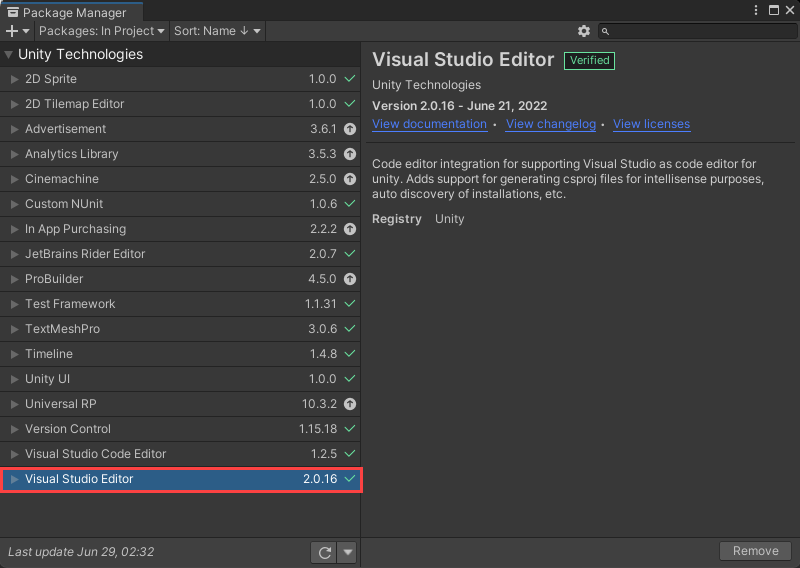
u cant get red underlines and stuff to appear?
u using visual studio?
did u get it through the unity package manager or what?
do u have this here?
 summer stump
!ide
This guide will walk you through it
eternal falconBOT
💡 IDE Configuration
If your IDE is not autocompleting code
or underlining errors, please configure it.
Select one:
• Visual Studio (Installed via Unity Hub)
• Visual Studio (Installed manually)
• VS Code
• JetBrains Rider
• Other/None
cosmic quail
summer stump
!ide
This guide will walk you through it
i gave it to him earlier but he says he followed it and it didnt work
didnt u say u reinstalled it like 5 min ago?
summer stump
cosmic quail
i gave it to him earlier but he says he followed it and it didnt work
Ah alright. Btw, you have an out of date Visual Studio package, and unnecessary Visual Code Editor and Rider packages here
#💻┃code-beginner message
If you can't remove them, it's because you have the engineering feature installed
cosmic quail
summer stump
Ah alright. Btw, you have an out of date Visual Studio package, and unnecessary ...
oh no thats not a screenshot from me, i got it from the ide bot's link
do u have it in your package manager
window > package manager
is it installed too? has "Remove" in the bottom right corner?
pallid verge
pallid verge
@summer stump sorry to bother you but do you have any idea of whats happening?
cosmic quail
do u have this too https://learn.microsoft.com/en-us/visualstudio/gamedev/unity/media/vs/preferences-external-tools.png
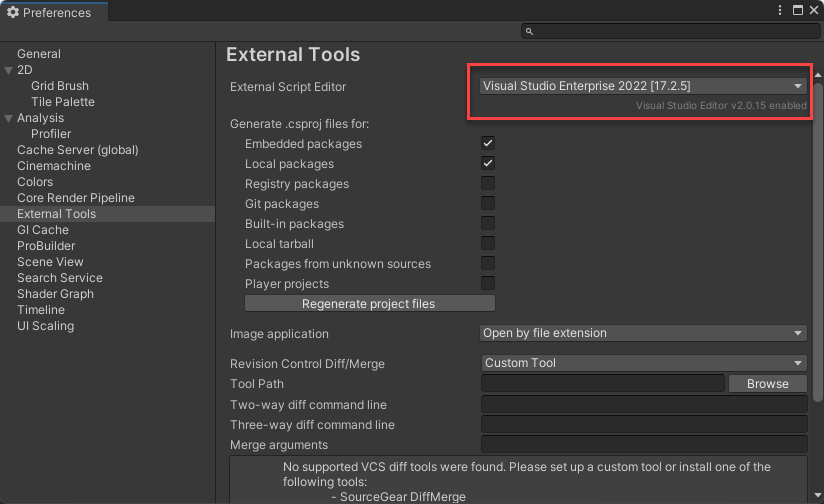
edit > preferences
show a screenshot of ur code
maybe it is working?
pallid verge
did you try restarting?
cosmic quail
well i have no idea what to do. usually the ! ide bot just solves the problem
cosmic quail
both of them?
pallid verge
maybe some molecule from space hit your hardware and now it doesnt work properly
it happens
 rocky canyon
bit flip
pallid verge
rarely, but it happens
summer stump
pallid verge
<@349017582105526273> sorry to bother you but do you have any idea of whats happ...
I'm not sure. Show your current cannon code
Show your external tools window
pallid verge
summer stump
I'm not sure. Show your current cannon code
its because of the rigidbody in the projectile, when i remove it, the bullet travels normally
summer stump
I thought you were using VS, not VS Code
Show your extensions in VS Code
And do you have any error regarding an SDK in the editor?
pallid verge
summer stump
It will just say that word in a popup. If you don't see it, ignore that
verbal dome
pallid verge
and i can confirm its because of the rb, when i removed it, the bullet goes stra...
Maybe the bullet is just hitting the cannon's collider or some other collider?
pallid verge

 verbal dome
@pallid verge If that's the case, then check the Physics 2D tab in the settings and change the layer matrix so that bullet layer doesn't collide with your gun
pallid verge
projectile and gun scripts
verbal dome
Or manually ignore collisions between them with Physics.IgnoreCollision
pallid verge
verbal dome
Or manually ignore collisions between them with Physics.IgnoreCollision
is that a method?
verbal dome
pallid verge
is that a method?

Lol, the example script does exactly that
Ignores collisions between the gun's collider and the bullet's collider
summer stump
Don't just switch randomly. Stick with VS and stop flip flopping.
Ok, so close VS, click regenerate project file in the external tools window and reopen vs
Having a working ide is a requirement to get help here btw
cosmic quail
if nothing ends up working u can just completely delete unity and vs and everything, and download them again (back up ur project tho)
pallid verge
look at this tho, my gun doesnt shoot even when im in range of it (the circle)
pallid verge
pallid verge
look at this tho, my gun doesnt shoot even when im in range of it (the circle)
it also doesnt detect me only when im right of it
eternal falconBOT
💡 IDE Configuration
If your IDE is not autocompleting code
or underlining errors, please configure it.
Select one:
• Visual Studio (Installed via Unity Hub)
• Visual Studio (Installed manually)
• VS Code
• JetBrains Rider
• Other/None
rich adder
what doesn't work?
did you regen Project files in External Tools?
open script, screenshot Visual Studio open with Solution Explorer
 tacit estuary
Go through this video guide. It goes over a bunch of potential issues that could make it not work https://youtu.be/kI6H3_Ry49k?si=VRR-Ciob2IEVNR_c
rich adder
Right click on Assembly and do Reload with Dependencies
screenshot vs again

well not you don't have to do it again 🙂
unless you reinstall OS or sum
xp++
bugs are part of the job
I would recommend follow a structured path , the c# or unity learn ones are good
check the pins in this channel
 queen adder
using System.Collections;
using System.Collections.Generic;
using UnityEngine;
using UnityEngine.UI;
using UnityEngine.UIElements;
using Image = UnityEngine.UI.Image;

[CreateAssetMenu(fileName = "Humanoid", menuName = "Humanoid")]
public class Humanoid : ScriptableObject
{
    public static float Health = 100;
    public static float maxHealth = 100;
    public static float walkSpeed = 5;
    public static float sprintSpeed = 10;
    public static float jumpPower = 7;
    public static string deathReason;
    public static string deathMsg;

    public static Image dmgOverlay;
    public static Image skull;

    // Start is called before the first frame update
    void Start()
    {
        deathReason = "Suicide";
    }

    // Update is called once per frame
    void Update()
    {
        Health += 0.0001f;
        Health = Mathf.Min(Health, maxHealth);
        dmgOverlay.color = new Color(dmgOverlay.color.r, dmgOverlay.color.g, dmgOverlay.color.b, Mathf.Max(dmgOverlay.color.a - 25 * Time.deltaTime, 0));
    }

    public static void SetHealth(float hp, string DR, string DMSG)
    {
        Health = hp;
        deathReason = DR;
        deathMsg = DMSG;
        dmgOverlay.color = new Color(dmgOverlay.color.r, dmgOverlay.color.g, dmgOverlay.color.b, 255);


    }
}
here is my code for a fading damage overlay screen effect
when i run the game, nothing happens except i get this error

NullReferenceException: Object reference not set to an instance of an object
Humanoid.SetHealth (System.Single hp, System.String DR, System.String DMSG) (at Assets/Scripts/Humanoid.cs:41)
DeathCube.Interact () (at Assets/Scripts/Misc/DeathCube.cs:11)
Interactable.BaseInteract () (at Assets/Scripts/Misc/Interactable.cs:16)
InteractionHandler.Update () (at Assets/Scripts/Player/InteractionHandler.cs:47)
um we can't read lines on discord
queen adder
sorry
rich adder
!code
eternal falconBOT
Posting code
📃 Large Code Blocks
Use links to services like:
https://gdl.space/, https://paste.ofcode.org/, https://hatebin.com/, https://paste.myst.rs/, https://hastebin.com/
📃 Inline Code
Surround code with three backquotes. Not quotation marks.
To format as C#, add cs to the first line:
```cs
// Your code here
```
Add a comment with a line number if there is an error message.
 rich adder
where do you assign dmgOverlay
queen adder
 rich adder
also static variables cant be seen in inspector therfore cannot be assigned that way
having static vars on SO is odd anyway
queen adder
well
rich adder
wait nvm
queen adder
im using a so to make a universal humanoid health for the player
queen adder
wellll
if i were to make it non static
i'd have to declare this SO in every script i have making it reference a different health value wouldnt it do that?
rich adder
queen adder
i'd have to declare this SO in every script i have making it reference a differe...
anything that references this can copy the values over sure, but they cannot modify them because if they do it changes it for all the instances
but still no reason for it to be static at all
just make them regular public
or property with a backing field
rich adder
yes they are meant for non-mutable
rich adder
copy the values over to another class like a poco then mutate them
rich adder
queen adder
then there is no reason to have these be static
well static would have the same side effect
if you change 1 static, you're changing the same one as only 1 exist of that field
queen adder
yup
rich adder
statics vars and SO act very similar in that matter
queen adder
so no need to make it static
rich adder
nope
queen adder
thank you
cosmic dagger
I should have said parameters . . .
rich adder
Yeah dont think those events support more than 2
in the inspector anyway, ofc with delegates you can do whatever.
cosmic dagger
But arguments are variables passed in (used) for the parameters of a method . . .
Then you should learn some basic c#. That's beginner stuff . . .
rich adder
I just showed you an example
public void Method(string thisIsParameter)```what is the parameter type?
these are basic c# questions my guy
a type defines the object and its Type
eg. string, bool, int etc..
those are value types
etc
well then you should prob follow better teachings and learn this stuff
check the pins in this channel
no one is saying instantly , if you plan on doing any dev you have to know the basics
you're trying to enter a spelling contest without knowing words
 earnest atlas
Hi, I have an issue with basic assignment I was given. I went step by step on the guide and had objects with Rigid Body and Box collider 2D, but for some reason it doesnt interacts with any other objects with Box Collider 2D. So far what I found online are not related to my issue. It just looks like they arent working? But they are enabled.
This is box collider settings. I think all is correct here?

 sudden grove
hi
languid spire
earnest atlas
This is box collider settings. I think all is correct here?
show your rigidbody
sudden grove
does anyone know of any prebuilt inventory systems?
earnest atlas
 rich adder
earnest atlas
Hi, I have an issue with basic assignment I was given. I went step by step on th...
rich adder
earnest atlas
Hi, I have an issue with basic assignment I was given. I went step by step on th...
follow this
https://unity.huh.how/physics-messages
it will guide you through a fix
earnest atlas
I tried changing discrete and active
rich adder
sudden grove
does anyone know of any prebuilt inventory systems?
search this exact stuff on this discord
the amount of times its been asked its almost like..
rich adder
earnest atlas
I tried changing discrete and active
You will see on the website why its not working
sudden grove
dayummm
earnest atlas
Yeah Im looking into it.
sudden grove
cause i think the last thing i want/need functionality-wise is an inventory system and thats it
rich adder
sudden grove
cause i think the last thing i want/need functionality-wise is an inventory syst...
"an inventory and thats it"
like its a trivial thing lol
earnest atlas
On triggerEnter and OnCollision are different methods. I should have set the Trigger enabled?
rich adder
earnest atlas
On triggerEnter and OnCollision are different methods. I should have set the Tri...
is your box a trigger?
sudden grove
rich adder
"an inventory and thats it"
an inventory that acts as a "zelda" inventory, you collect/unlock items that you can equip and use
earnest atlas
No its not
rich adder
so then no
eternal needle
sudden grove
cause i think the last thing i want/need functionality-wise is an inventory syst...
an inventory is just a collection of items. Now you need to just define what an item is and you're done
sudden grove
eternal needle
an inventory is just a collection of items. Now you need to just define what an ...
im still a major beginner so i dont know really how to code this sort of stuff yet
sudden grove
what wowuld you suggest for what i want
rich adder
Dictionary is something you should learn in general for other stuf so I'd suggest that one. List is easier though
eternal needle
sudden grove
im still a major beginner so i dont know really how to code this sort of stuff y...
there are many guides out there so you just need to experiment. Im not a fan of premade systems like this (since thats what you initially asked) because you'll very rarely find one that does exactly what you need. A lot of the premade systems on the asset store are garbage too
sudden grove
eternal needle
there are many guides out there so you just need to experiment. Im not a fan of ...
yeah theres no tutorials for prebuilt ones
pastel sinew
@rich adder @eternal needle @tough lagoon Thanks for your guys' answers. @eternal needle is correct that in the article the rb is rotated by changing the localRotation (image is from the article). Since the article is about using the input system for a player controlled drone, using torque might even be the better way, since quadcopter drones dont turn instantly. Lets say I use torque for the rotation and addForce for the elevation I would put both in FixedUpdate() because thats where rigidbodys go? Edit: Added link to the article: https://gamedevdustin.medium.com/drone-controls-with-the-new-input-system-in-unity-2021-f990bc0f1d47


Medium
In this article we’ll look over the Action Map and input code that controls this flying drone.
eternal needle
sudden grove
yeah theres no tutorials for prebuilt ones
did you try googling for any? there are definitely tutorials out there lol
rich adder
pastel sinew
<@968604165150507078> <@119616167894712320> <@229302061840203786> Thanks for you...
like I said earlier, I would recommend using Torque / MoveRotaion or even rb.rotation
inside of FixedUpdate
eternal needle
pastel sinew
<@968604165150507078> <@119616167894712320> <@229302061840203786> Thanks for you...
yea it would go in fixed update in this case, anything directly relying on physics goes there
rich adder
Ah yes. Medium , the most trusted source
sudden grove
eternal needle
did you try googling for any? there are definitely tutorials out there lol
im trying to look everywhere but i cant seem to find the one i need
rich adder
earnest atlas
It wasnt mentioned in the guide
pretty sure its in the last step
 rich adder
 rich adder
earnest atlas
No I ment in the guide I READ
rich adder
earnest atlas
No I ment in the guide I READ
well your guide sucked ass then
earnest atlas
Yeah this why I normally dont bother reading them and always google
earnest atlas
But then my professor goes WhY It FeElS ThAt YoU DiDnT rEaD My GuIde
sudden grove
if i explain the type of inventory im looking for do you guys think you could tell me what the style is that im looking for?
eternal needle
sudden grove
im trying to look everywhere but i cant seem to find the one i need
there isnt really much to tell you tbh. if you dont know how to code one, and cant find a tutorial for your exact need, then you simply need to experiment with more coding.
rich adder
earnest atlas
But then my professor goes WhY It FeElS ThAt YoU DiDnT rEaD My GuIde
then you should say "wHo gIvE yOu a LiCeNse tO TeAcH"
shit must've come out a cereal box
sudden grove
cause im looking for an inventory that as i collect items it "unlocks" it in the inventory, so that whenever you need it you open your inventory, and equip in, in turn equiping the item in game
earnest atlas
I havent worked with C# in like a year and fogror so much its sadge.
Last I remember trying to implement DI interface.
rich adder
earnest atlas
I havent worked with C# in like a year and fogror so much its sadge.
Last I reme...
this isn't a c# thing btw. its Unity API
earnest atlas
scripts are in C#
rich adder
thats just the langauge used to interfacte with API
Rigidbody / Colliders are specific to unity in this case
eternal needle
sudden grove
cause im looking for an inventory that as i collect items it "unlocks" it in the...
we've already told you, regardless of what kind of inventory you are making, an inventory is gonna be a collection of items. The inventory is not the hard part, you must define what an item is. This part is going to depend massively on your game. And realistically no ones gonna want to hand hold you through the entire process for free, you simply need to just start coding.
earnest atlas
unity is mainly C++? Or C# is enough?
rich adder
Unity Editor runs on C++ hence why we need an API to communicate with engine in c#
 rich adder
 delicate zinc
is this a unity bug or smt
delicate zinc
is this a unity bug or smt
what are we looking at and where is the code relation
eternal needle
this is a screenshot of like 4 colors lol
delicate zinc
2 box colliders are overlapping and idk why
rich adder
not a code question #💻┃unity-talk
 teal vale
Hey! I'm trying to achieve the sort of puppet combo style to my game, and for my enemy, I'm trying to make it so that when the player gets closer to the AudioSource, the pitch either increases or decreases. I found a video on youtube, but it's too low quality and I think he was speaking german, so I had no Idea how to follow along. Can anyone help me make this?
rich adder
teal vale
Hey! I'm trying to achieve the sort of puppet combo style to my game, and for my...
reference the audio source, do a distance check. Grab the audioclip from audiio source, change pitch as desired
teal vale
in like 440p
teal vale
rich adder
reference the audio source, do a distance check. Grab the audioclip from audiio ...
thanks for the info, unfortunately, I don't know how to do that in code. Which is why I'm here
yeah. he put 3 seconds worth of a brackeys tutorial and then his loudass mic starts blaring
no hate against the germans tho
we chillin
true, but that was back in the 40s. welcome to the modern day society
sudden grove
eternal needle
we've already told you, regardless of what kind of inventory you are making, an ...
awh okay, i was looking at some last night and it was referring to items as ID's? so i refer to it as a sprite, name, and ID?
teal vale
alrighty then! good luck, my friend. I will also attempt to struggle with this predicament I am currently in
eternal needle
sudden grove
awh okay, i was looking at some last night and it was referring to items as ID's...
you would want an item to be its own class, inside that class you can hold all those things yes
teal vale
Oh. You're that beginnner. All good. I hope I can explain. We'll move to private dms if that's ok. I would be happy to help you with that
I don't have too long. Gotta go to a christmas party
sudden grove
eternal needle
you would want an item to be its own class, inside that class you can hold all t...
or I could already have all these items "accessible" and then set the pickups as "events" so that once that event is triggered, the script/button is enabled in the menu?
teal vale
"yep. That's me. you're probably wondering how I got into this situation"
so, you want me to help you in dms?
eternal needle
sudden grove
or I could already have all these items "accessible" and then set the pickups as...
i have no clue what you mean by this, or what that has to do with what i said above
teal vale
I posess the knowledge to make a sprite appear on button press, but I do not know how to change audio pitch relative to a gameobject's position
i will attempt to explain as best I can in simplistic ways
rich adder
teal vale
thanks for the info, unfortunately, I don't know how to do that in code. Which i...
well what do you have so far
should be fairly simple
teal vale
I honestly got nothing. I don't yet know how to do stuff like that
clamping and things like that
lol at least you want to help
i gotta go. I'll be back maybe tomorrow. then we can figure this out
see ya!
sudden grove
eternal needle
i have no clue what you mean by this, or what that has to do with what i said ab...
im just trying to figure out how i want this to work, cause im not making an open world type game where you can have a sort of random inventory depending on howw you play the game, no matter howw someone plays it the inventory will always be the same, like old zelda games, you go through the dungeon, go through a trigger, wwhich would be the chest, and then that unlocked it in the inventory, in which the player would be able to equip and unequip whenever they wanted
rich adder
right click on the component you want and click Properties
sudden grove
rich adder
right click on the component you want and click Properties
i got a tutorial from chat gpt, if i send a paste bin of what it said can you lemme know if its viable?
Pastebin
Pastebin.com is the number one paste tool since 2002. Pastebin is a website where you can store text online for a set period of time.
 visual hedge
heroToControl.transform.Find("HeroInventory").gameObject;
won't find that gameObject if it's not active, right?
sudden grove
in fact im pretty sure i have valid code from last night
summer stump
sudden grove
https://pastebin.com/15nDZaSh
No, that is against #📖┃code-of-conduct sorry
summer stump
visual hedge
```heroToControl.transform.Find("HeroInventory").gameObject;```
won't find that ...
Pretty sure it will. Not positive though
sudden grove
summer stump
No, that is against <#497867528488484864> sorry
crap i do apologise
summer stump
sudden grove
crap i do apologise
All good!
visual hedge
summer stump
Pretty sure it will. Not positive though
one way to find that out 😄
queen adder
 sudden grove
summer stump
All good!
sudden grove
summer stump
All good!
can i use a button as an inventory slot?
summer stump
queen adder
Can't do that there, have to do the = part in a method
queen adder
ok
summer stump
sudden grove
can i use a button as an inventory slot?
Sure. The botton can have components added, so adding a inventory slot class to it is perfectly valid
rich adder
sudden grove
can i use a button as an inventory slot?
ofc
but silly
just make it a regular UI element and attach button component to it
its the same thing ig but you can better customize it this way
sudden grove
im really trying to understand how to put together this inventory from watching this video but hes being so vague about it
rich adder
sudden grove
im really trying to understand how to put together this inventory from watching ...
inventories are not trivial, i told you
start with a baisic one..a collection
work your way up to UI n stuff
summer stump
Inventories are a broad topic for sure. Lots and LOTS of different ways to go about it. From a simple list, to slots, to diablo-like grids, and many variations on all three of those
Then there is the conversion between inventory item to gameObject or effect which is tough too
sudden grove
yeah its definitely frustrating to deal with haha
queen adder
https://gdl.space/ovemopafud.cs
how do i assign these variables in my SO?
i defined them in the declaration, and it was null
rich adder
the inspector
rich adder
queen adder
i defined them in the declaration, and it was null
the only ones that can be null is Image component
you should probably not have reference types outside an SO there
what is skull a texture ?
rawimage/ Image component displays the sprite/texture
visual hedge
When I am instantiating my hero, I want to reference those 2 gameobjects... and I am doing it like this:
          uiinput.inventoryPanelGameObject = heroToControl.transform.Find("InventoryEquipmentCanvas").gameObject.transform.Find("HeroEquipment").gameObject;```
which is giving me null reference exception. Why?
 queen adder
skull is a image
rich adder
queen adder
skull is a image
then you should store that not an Image component
queen adder
skull shows up when you are below or equal to 50 health and you are being hurt
akin to postal 2's UI
store?
rich adder
yeah store the image you want to swap although dont see a reason why those two can't just be inside a UI manager
rich adder
queen adder
store?
yeah when you create a variable you store info inside of it
queen adder
UI manager?
rich adder
visual hedge
When I am instantiating my hero, I want to reference those 2 gameobjects... and ...
how do we know
you havent even gievn the lines
visual hedge
rich adder
you havent even gievn the lines
I guess I did?
rich adder
visual hedge
I guess I did?
thos two?
uiinput.equipmentPanelGameObject = heroToControl.transform.Find("InventoryEquipmentCanvas").gameObject.transform.Find("HeroInventory").gameObject;
visual hedge
yeap
rich adder
thats a lot of stuff to check
and you should never use transform.Find, if the item is on the child just make a direct reference to it
queen adder
ill look at my code real quick and get back to you
visual hedge
I guess I will just refference those 2 game objects in character script anjd pass it to uicontrol. Will be easier 🙂
rich adder
visual hedge
I guess I will just refference those 2 game objects in character script anjd pas...
yea you can also make them props
visual hedge
rich adder
and you should never use transform.Find, if the item is on the child just make a...
yeah, that's what I thought about. THank you
queen adder
im sorry navarone im actually confused as to what you are doing
visual hedge
ohh I got where I made mistake anyways 😄
queen adder
actually it makes sense my code is actually kinda broken when it gets to the images
on the UI
i dont know what a UI manager is, is it a class?
anyways, when i declare the damage overlay and the skull, it shows a error saying that there are two types of images

the one declared in unityengine.ui and the one declared in unityengine.uielements
so i chose unityengine.ui because it let me edit the alpha of the two images
however this doesnt work
among many other errors
sudden grove
rich adder
yea you can also make them props
i have an idea for an inventory thats "not" an inventory, if that makes sense?
queen adder
it seems that all of the variables listed in humanoid is null given that all that happens when i access these variable is that i get an error like this
 unborn gale
hi, I am trying to make an animation, when making a perimeter and referancing it in code it says there isnt a perimeter named (name of perimeter)
rich adder
visual hedge
ohh I got where I made mistake anyways 😄
where
rich adder
sudden grove
i have an idea for an inventory thats "not" an inventory, if that makes sense?
huh
rich adder
queen adder
it seems that all of the variables listed in humanoid is null given that all tha...
whats on DebugHandler line 21?
sudden grove
rich adder
huh
i have an idea for an inventory in which when you start the game its empty, but then as you progress through the game, you trigger an "event" in which unlocks a button in the inventory, therefore revealing the image, name, and ability to click, therefore allowing access to the item, then rinse and repeat, so the inventory would have all of the buttons premade but just disabled, and the events enable the buttons
its like unlocking keys for mobile doors as you progress through the game
rich adder
queen adder
anyways, when i declare the damage overlay and the skull, it shows a error sayin...
also told you this is the wrong type to store texture/sprite
unborn gale
unborn gale
hi, I am trying to make an animation, when making a perimeter and referancing it...
iv spent way more time on this than I should
sudden grove
sudden grove
i have an idea for an inventory in which when you start the game its empty, but ...
let me know if this makes sense @rich adder !
 boreal tangle
does soemone know why the character cant walk with this code. I know using the input manger would be easier but I wanted to try it just keys.
 rich adder
well then do it correct
rich adder
sudden grove
i have an idea for an inventory in which when you start the game its empty, but ...
yes I understand
where is there a Building parameter
visual hedge
rich adder
where
I haven't assigned uiinput in inspector
rich adder
so whats the actual problem ? 🤔
make what work
so reference that
then do .enabled = false on the renderer or GameObject.SetActive(false)
idk what to tell ya then
follow the tutorial better 🤷♂️
unreal imp
guys: 1.happy christmas, 2.how do i get the position of a collision between 2 objects? its for my bullet holes: ContactPoint contact = col.contacts[0]; Vector3 positionCollision = contact.point; var bulletHole1 = Instantiate(bulletHole, positionCollision.normalized, Quaternion.identity, col.collider.transform); bulletHole1.transform.LookAt(-gameObject.transform.forward);
rich adder
unreal imp
guys: 1.happy christmas, 2.how do i get the position of a collision between 2 ob...
btw never use use contacts array
use the method
GetContact / GetContacts
unreal imp
rich adder
btw never use use contacts array
GetContacts(1)?
rich adder
unreal imp
GetContacts(1)?
GetContact(0).point
my first raycast took a whole day to figure out (and thats AFTER blindly copying)
with time it will take you less and less
🏅
this will get you disqualified from medal
rocky canyon
I also got stoked when I made a sprite follow my cursor 😄
i get sidetracked when UI is involved.
Making the buttons juicy leads to dopamine hits just when clicking 😄
clean Console 🤤

 orchid raven
using System.Collections;
using System.Collections.Generic;
using UnityEngine;

public class PlayerScript : MonoBehaviour
{
    Rigidbody rb;
    public float speed;
    public float jump;
    bool jumpable = true;
    private FootstepController footstepController;
    // Start is called before the first frame update
    void Start()
    {
        rb = GetComponent<Rigidbody>();
        footstepController = GetComponentInChildren<FootstepController>();
    }

    // Update is called once per frame
    void Update()
    {

        if (Mathf.Abs(Input.GetAxis("Horizontal"))>0 || Mathf.Abs(Input.GetAxis("Vertical")) > 0)
        {
            if(rb.velocity.y == 0)
            {
                if (!footstepController.isWalking)
                {
                    footstepController.isWalking = true;
                }

            }

        }
        else
        {
            footstepController.isWalking = false;

        }
        rb.velocity = transform.right * Input.GetAxis("Horizontal")*speed + transform.forward * Input.GetAxis("Vertical") * speed+transform.up*rb.velocity.y;
        if (Input.GetKey(KeyCode.Space) && jumpable)
        {
            rb.AddForce(Vector3.up*jump*Time.fixedDeltaTime,ForceMode.Impulse);
            jumpable = false;
            footstepController.isWalking = false;
        }
        if (rb.velocity.y == 0 &&!jumpable)
        {
            jumpable = true;
        }
    }
}
it works well but the jump is not always working with the same force
rocky canyon
zero out ur Y velocity prior to the jump
if ur travelling downwards (negative in the y) ur jump will have to fight against it.. draining off some of the Y velocity
if ur travelling upwards it compounds and makes the jump higher
rich adder
and take out FixedDelta time
rocky canyon
zero'ing it out just before the jump will fix those issues
orchid raven
oh wait
i will try to make it else if
it's better now
wait
nvm
jump force is not the same
sudden grove
guys would it be possible to when i pick up my flashlight, it equips it, and it unlocks the button in my inventory, in which i can then click the button in my inventory to destroy object?
and again to equip it?
orchid raven
rocky canyon
zero out ur Y velocity prior to the jump
u mean like
rb.velocity= new vector3(rb.velocity.x,0,rb.velocity.z)
```??? modest dust
sudden grove
guys would it be possible to when i pick up my flashlight, it equips it, and it ...
modest dust
sudden grove
guys would it be possible to when i pick up my flashlight, it equips it, and it ...
Anything is possible if you believe hard enough
But you basically described what you need to do, so there's no need to believe, just do it
sudden grove
modest dust
Anything is possible if you believe hard enough
i just drew this, do you think this is viable?
 modest dust
First I'd have to decode half of what's written there
 fleet patio
sudden grove
fleet patio
sudden grove
im not the best at drawing but does it make sense?
 main sage
not if we can't read it 🤣
sudden grove
okay lemme remake it and ill come back
modest dust
Easiest logic I can think of is:
- Have flashlight prefab
- On Flashlight pickup, auto-equip it and unlock button
- Once the button is unlocked do what you want
There's nothing much to really think about here
eternal needle
sudden grove
i just drew this, do you think this is viable?
Is there even really a code question to this? makes sense in what context? like yea you can code it to work like this
sudden grove
modest dust
Easiest logic I can think of is:
- Have flashlight prefab
- On Flashlight pickup...
well the thing is itd have to be the same object, cause if it just spawns a new one everytime you reclick it, itd just create infinite flashlights
sudden grove
eternal needle
Is there even really a code question to this? makes sense in what context? like ...
its abit of both, like would this be codeable?
eternal needle
no this exact sequence is impossible to code, its never been attempted
Yes of course its possible to code, you just have to do it
eternal needle
like 99% of the time when someone asks "is this mechanic possible to code" the answer is yes. you just need to code it
modest dust
sudden grove
well the thing is itd have to be the same object, cause if it just spawns a new ...
I don't quite follow
sudden grove
modest dust
I don't quite follow
itd probs be important to mention that i can drop objects too
so if i drop the object then just spawn a new one, rinse then repeat, then yano
infinite flashlights
unlesssss
i destroy the previous flashlight when its clicked again
modest dust
I still don't quite follow
If you drop the flashlight then it no longer exists in your inventory
Only on the ground
There's always just one if implemented correctly
sudden grove
modest dust
If you drop the flashlight then it no longer exists in your inventory
well nah the thing is im trying to do a legend of zelda style inventory
once its unlocked its unlocked
if that makes sense
its like "abilities"
main sage
so then maybe dont drop stuff on floor?
modest dust
sudden grove
once its unlocked its unlocked
So basically either disallow dropping a flashlight or disable it once again if dropped.
main sage
or is this unlimited behaviour expected?
sudden grove
main sage
so then maybe dont drop stuff on floor?
nah cause i wanna be able to use that later on for potential puzzles or another feature i need to tackle
sudden grove
modest dust
So basically either disallow dropping a flashlight or disable it once again if d...
nah so you could drop it
but then when you click it again in the inventory
it teleports it back to your hand
and if you click the button again whilst your holding it, then just destroy it aka "unequip"
eternal needle
sudden grove
it teleports it back to your hand
you still dont need to spawn a bunch of items. just spawn one, everytime they want the item again just teleport it back to the player
modest dust
sudden grove
it teleports it back to your hand
Then just reference the dropped flashlight and use that to handle the problem.
sudden grove
eternal needle
you still dont need to spawn a bunch of items. just spawn one, everytime they wa...
yeah thats what im saying
but in the case that they switch to another item, or despawn the item by unequiping it, i need to be able to spawn a new one when i click it
modest dust
Can't say much without seeing the actual code.
eternal needle
sudden grove
but in the case that they switch to another item, or despawn the item by unequip...
no you dont, just disable/enable the game object
modest dust
modest dust
Can't say much without seeing the actual code.
It's either private or you're trying to access it as a static field
sudden grove
eternal needle
no you dont, just disable/enable the game object
if i disable the game object, am i not still technically "holding" it? its just not there?
or is that just an easy way of destroying it
eternal needle
sudden grove
if i disable the game object, am i not still technically "holding" it? its just ...
yea basically, but the user wont see it and it wont cause any problems realistically. Its better actually because destroying and spawning a new one is worse in terms of performance (although performance doesnt matter at all in this case). By not spawning a new one, you also get to save certain information like flashlight battery percentage for example
sudden grove
eternal needle
yea basically, but the user wont see it and it wont cause any problems realistic...
okay i know what you mean
that makes sense
 wintry quarry
Then what isn't working?
modest dust
You have to have a reference to that class instance and access it via that instance.
sudden grove
eternal needle
yea basically, but the user wont see it and it wont cause any problems realistic...
imma work on it real quick
cause i already technically have the code
i just need to slap it on the button
boreal tangle
    void Update()
    {
        walking(Input.GetAxis("Horizontal"));
        if (currentState == CharacterStates.walking) Debug.Log("walking");
    }
    public void walking(float direction)
    {
        if (direction != 0)  currentState = CharacterStates.walking;
        rd.velocity = new Vector2(direction * walkSpeed * Time.deltaTime, rd.velocity.y);
    }
Does someone know why the character with this script wont move?
modest dust
What's the context of what you're trying to do
wintry quarry
You said something about clicking on things. Presumably you'd get the reference through whatever that clicking mechanism is. But you haven't shared anything about that
sudden grove
@eternal needle do you by chance know which object id put into my button clicked function?

cause i need to reference a piece of code
not an object
modest dust
boreal tangle
```cs
void Update()
{
walking(Input.GetAxis("Horizontal"));
...
Don't multiply by deltaTime and check your walkSpeed
boreal tangle
modest dust
Don't multiply by deltaTime and check your walkSpeed
whats wrong with multiplying by deltatime?
modest dust
modest dust
Don't multiply by deltaTime and check your walkSpeed
Also FixedUpdate (probably)
eternal needle
sudden grove
cause i need to reference a piece of code
whichever method handles showing/teleporting the object to the player
modest dust
boreal tangle
whats wrong with multiplying by deltatime?
It's velocity, not distance
sudden grove
eternal needle
whichever method handles showing/teleporting the object to the player
but it only lets me drag in objects?
wait ignore me
wintry quarry
A button? One button? This is confusing
boreal tangle
I thought you multiplied velocity by deltatime so it would work the same at every frame rate
modest dust
boreal tangle
whats wrong with multiplying by deltatime?
Basically 4m/s is 4m/s. You don't multiply it by time.
modest dust
boreal tangle
I thought you multiplied velocity by deltatime so it would work the same at ever...
If you set the position directly via transform.position
boreal tangle
ok ty
sudden grove
wait dont ignore me
i need to fill in the thingies

like the rigid bodies, box colliders etc
 true pasture
how could i run code only when a switch statements has nothing true in it
rich adder
sudden grove
i need to fill in the thingies
to do what with
rich adder
true pasture
how could i run code only when a switch statements has nothing true in it
default:
sudden grove
rich adder
to do what with
to be able to find and teleport the torch to my ObjectLocation on my player
 rich adder
sudden grove
to be able to find and teleport the torch to my ObjectLocation on my player
rich adder
sudden grove
to be able to find and teleport the torch to my ObjectLocation on my player
whats the button got to do with that
sudden grove
sudden grove
the button needs to activate this ^^
true pasture
rich adder
`default:`
doesnt seem to work, says
 rich adder
true pasture
doesnt seem to work, says
rich adder
true pasture
doesnt seem to work, says
show me the code you're adding it to
true pasture
 true pasture
ah thanks
sudden grove
rich adder
whats the button got to do with that
can i make a script with the same code but instead of allowing myself to drag and drop, i directly reference it all in the script?
this would then do the job, without the major effort
rich adder
sudden grove
can i make a script with the same code but instead of allowing myself to drag an...
are you talking about the button?
sudden grove
yeah
sudden grove
clicking the button would allow me to equip the torch from anywhere, as if i unlocked it
so what imma do is set it to when i pick up the torch for the first time, it unlocks the button, and that then gives me access to the torch
like an ability in the game
rich adder
sudden grove
so what imma do is set it to when i pick up the torch for the first time, it unl...
alright so whats the problem make an EQUP method
sudden grove
rich adder
alright so whats the problem make an EQUP method
actually your right
its just kinda similar to what my regular pickup script does
rich adder
sudden grove
its just kinda similar to what my regular pickup script does
you already have the Item in the inventory/player
just equip it
SetActive(true)
or some
sudden grove
if i click the button, change the parent of the torch to Item location
thats how my currect code works
i mean my pickup code
boreal tangle
Gizmos.DrawSphere(transform.position, col.bounds.extents.y);
does someone know why I keep getting an error when I try to put this code segment in update. it keeps saying "Gizmo drawing functions can only be used in OnDrawGizmos and OnDrawGizmosSelected" but I don't know what that means
sudden grove
sudden grove
i mean my pickup code
cause as you said i already have the code to drop and pick it up
i just need to be able to teleport it to my hand
rich adder
sudden grove
i just need to be able to teleport it to my hand
so make a seperate method just for button that only equips it if its already picked up
 steady bear
!code
eternal falconBOT
Posting code
📃 Large Code Blocks
Use links to services like:
https://gdl.space/, https://paste.ofcode.org/, https://hatebin.com/, https://paste.myst.rs/, https://hastebin.com/
📃 Inline Code
Surround code with three backquotes. Not quotation marks.
To format as C#, add cs to the first line:
```cs
// Your code here
```
Add a comment with a line number if there is an error message.
rich adder
if you already picked up something its technically should be on the player already as child and SetActive to flase
sudden grove
rich adder
so make a seperate method just for button that only equips it if its already pic...
imma make it so that when i pick it up it unlocks the button, if its already in my hand when you click the button then it will hide the gameobject, if im not holding it, it will equip it for me
rich adder
sudden grove
imma make it so that when i pick it up it unlocks the button, if its already in ...
right thats basically what I said
steady bear
Hi
I have Remote config (field "BuildingsResources"):
{
  "MetalMine": {
    "baseProductionPerHour": 30,
    "baseMetalCost": 60,
    "baseCrystalCost": 15,
    "baseEnergyCost": 10
  },
  "MetalStorage": {
    "baseCapacity": 1000,
    "baseMetalCost": 500,
    "baseCrystalCost": 300
  }
}
Plus I have those structs (also tried with classes):
[Serializable]
public struct BuildingsResources
{
    public BuildingMine MetalMine;
    public BuildingStorage MetalStorage;
}

[Serializable]
public struct BuildingMine
{
    public int baseProductionPerHour;
    public int baseMetalCost;
    public int baseCrystalCost;
    public int baseEnergyCost;
}

[Serializable]
public struct BuildingStorage
{
    public int baseCapacity;
    public int baseMetalCost;
    public int baseCrystalCost;
}
Then I'm getting this json by:
var jsonString = RemoteConfigService.Instance.appConfig.GetJson("BuildingsResources");
BuildingsResources = JsonUtility.FromJson<BuildingsResources>(jsonString);
OnLoadConfig?.Invoke();
But in action I have empty parameters inside MetalMine and MetalStorage.
What i'm doing wrong?
sudden grove
rich adder
right thats basically what I said
but wouldnt your method then say that when you drop it it also disables it from the inventory?
rich adder
sudden grove
but wouldnt your method then say that when you drop it it also disables it from ...
if you want it to be dropped then you only keep the bool that it was unlocked
sudden grove
rich adder
if you want it to be dropped then you only keep the bool that it was unlocked
i think i know what you mean
rich adder
if you dropped it you gotta pick it up again anyway no?
sudden grove
rich adder
if you dropped it you gotta pick it up again anyway no?
nah, thats what im saying
rich adder
button doesnt come into play unless you are holding it already
sudden grove
if its dropped then itd just teleport the object back to my hand
like the skateboard from skate 3
rich adder
well we call that Design Feature that you should clarify before 😛
sudden grove
you drop it and then whenever you want you can just thors hammer it back
sudden grove
rich adder
well we call that Design Feature that you should clarify before 😛
i probably should
rich adder
so keep the reference to the object
so you can easily teleport it back
and what is even the point of dropping it if you can just teleport it back in your hand xD
sudden grove
really quick before i do any of this i probably should mention i dont know how to open my inventory yet, as well as freezing my camera and unlocking my mouse 😭
sudden grove
rich adder
and what is even the point of dropping it if you can just teleport it back in yo...
cause later on i wanna add a sound detection feature
cause its a horror
i wanna do a thing where you can throw stuff and a monster will hear it and run to it
@rich adder this is the furthest ive ever got in a project so im really scatter brained lmaooo
rich adder
sudden grove
<@968604165150507078> this is the furthest ive ever got in a project so im reall...
well try to do one thing at a time
sudden grove
rich adder
well try to do one thing at a time
first thing is to be able to enable the inventory using Tab
sudden grove
@rich adder how would i code that if i press tab AND the gameobject is active, then disable the gameobject?
rocky canyon
sudden grove
<@968604165150507078> how would i code that if i press tab AND the gameobject is...
u say, ```cs
void ToggleThingAndObject()
{
thingToToggle = !thingToToggle;
    if (objectToToggle != null)
    {
        objectToToggle.SetActive(thingToToggle);
    }

    Debug.Log($"ThingToToggle is now: {thingToToggle}");
}```
wouldnt that be void update?
rocky canyon
u call it whenever u want
   void Update()
    {
        if (Input.GetKeyDown(KeyCode.Tab))
        {
            ToggleThingAndObject();
        }
}```void Update()
{
if (Input.GetKeyDown(KeyCode.Tab))
{
Inventory.SetActive(!Inventory.activeSelf();
}
}
sudden grove
sudden grove
void Update()
{
if (Input.GetKeyDown(KeyCode.Tab))
{
...
would this work?
rich adder
u have extra (
rocky canyon
u could also just check the thing..
//do stuff that u want to do when the thingToToggle is true;}
else
{
//do stuff u wanna do when thingToToggle is false
}
Inventory.SetActive(!Inventory.activeSelf); should work fine
sudden grove
i know this works, but it doesnt work the other way around

would i just disable it in else?
rocky canyon
think about why the else statement would run.. in that situation where the conditional is Inventory != null
oh and 
sudden grove
im dying here 😭
so i can get it to disable
but then i click it again, and it doesnt enable
queen adder
rich adder
whats on DebugHandler line 21?
 queen adder
rich adder
also told you this is the wrong type to store texture/sprite
queen adder
rich adder
also told you this is the wrong type to store texture/sprite
whats the right type?
rich adder
queen adder
did you assign debugUI and humanoid ?
rich adder
queen adder
whats the right type?
i told you
Sprite or Texture
depending on the image
queen adder
ah ok
how do i edit the color?
in this tutorial, the damage overlay is image type and the color is editable
 sudden grove
bro i must be doing something wrong
 polar acorn
queen adder
i cant if its a sprite no?
polar acorn
queen adder
i cant if its a sprite no?
You would change the color of the sprite renderer
queen adder
how?
polar acorn
queen adder
how?
Like that, but with a SpriteRenderer instead of an Image
sudden grove
this code is only turning OFF my canvas and once its off it wont come back on
 polar acorn
sudden grove
this code is only turning OFF my canvas and once its off it wont come back on
polar acorn
sudden grove
this code is only turning OFF my canvas and once its off it wont come back on
Is this script on the inventory object
polar acorn
sudden grove
i think
So if the object is disabled, how do you expect the code to run
queen adder
 teal viper
Next time google the API docs yourself.
teal viper
Next time google the API docs yourself.
im sorry i only wanted nuance
sudden grove
polar acorn
So if the object is disabled, how do you expect the code to run
HALF AN HOUR THIS TOOK ME
WHYYYYYY
now i add to the inventory some code that essentially says, when this is active, freeze my camera and unlock my mouse
teal viper
queen adder
im sorry i only wanted nuance
There's no nuance. SpriteRenderer has a color property that changes the tint color of the rendered sprite.
It's all explained in the docs.
 sly peak
what chat do i go to for help regarding github with unity
teal viper
#💻┃unity-talk I'd say.
sudden grove
polar acorn
So if the object is disabled, how do you expect the code to run
do you by chance know why i cant drag and drop my playercam script into mt little drop down on my script?

i click on it and its only looking in my heirarchy
polar acorn
sudden grove
What type is PlayerCamScript

 polar acorn
Two images and neither contains what I asked
polar acorn
What type is the variable PlayerCamScript
sudden grove
uhm, where would i look?
polar acorn
Where you typed the variable
sudden grove
Pastebin
Pastebin.com is the number one paste tool since 2002. Pastebin is a website where you can store text online for a set period of time.
polar acorn
Why is this variable of type MonoBehaviour
sudden grove
polar acorn
Why is this variable of type MonoBehaviour
i set it to that
i dont know how to set it to a script
polar acorn
sudden grove
i set it to that
I can see that. My question is why
polar acorn
sudden grove
i dont know how to set it to a script
Make the variable of that type
Whatever type you actually want
sudden grove
i dont know why im so confused
polar acorn
What script do you want to reference
sudden grove
i wanna reference a script called PlayerCam which is attached to my camera
polar acorn
sudden grove
i wanna reference a script called PlayerCam which is attached to my camera
Then use that
sudden grove
i did
polar acorn
Okay, show the updated code
sudden grove
 sudden grove
polar acorn
Okay, show the updated code
sudden grove
polar acorn
Okay, show the updated code
Pastebin
Pastebin.com is the number one paste tool since 2002. Pastebin is a website where you can store text online for a set period of time.
polar acorn
Okay, good. Now drag in whatever object has the PlayerCam you want to reference
 polar acorn
how is it weird
polar acorn
No you haven't
sudden grove
not reference the script THROUGH an object like that
 polar acorn
sudden grove
polar acorn
sudden grove
Neither of those are scripts.
sudden grove
im an idiot lolll
polar acorn
Those are both objects
 polar acorn
sudden grove
polar acorn
sudden grove
Seems pretty straightforward
 polar acorn
Well, considering that's a custom error message you wrote, where did you put it and what causes it to print?
sudden grove
 polar acorn
sudden grove
polar acorn
sudden grove
Well, it's in two places so it could be either of those conditions.
Is there a reason you're doing this manual null checking? Are these fields not being set a common occurrence you expect to happen in normal play?
sudden grove
polar acorn
Well, it's in two places so it could be either of those conditions.
well i havent been able to disable the script, otherwise id be successful so id assume its the top one
sudden grove
polar acorn
Is there a reason you're doing this manual null checking? Are these fields not b...
im kinda using chatgpt, and reading through it
polar acorn
sudden grove
well i havent been able to disable the script, otherwise id be successful so id ...
How about instead of assuming you check
polar acorn
sudden grove
im kinda using chatgpt, and reading through it
stop doing that
sudden grove
polar acorn
How about instead of assuming you check
im assuming id just change the debug message
polar acorn
sudden grove
im assuming id just change the debug message
Again, why do you have those debug messages
sudden grove
polar acorn
Again, why do you _have_ those debug messages
im not sure
sorry if i seem slow
polar acorn
So why not just remove them
They only make errors harder to find
If those are null, they should throw an error. You aren't doing anything useful by hiding the error and replacing it with a text message that doesn't give you any context
 sudden grove
i never wrote it, like i said chatgpt
this entire block was given to me
i just customise it to what i need
imma try to stop using it
polar acorn
sudden grove
i never wrote it, like i said chatgpt
Correction then:
That's your spam bot generated text spam that serves absolutely no purpose but to confuse that you nonetheless put in your code base
sudden grove
polar acorn
Correction then:
That's _your_ spam bot generated text spam that serves absolute...
i understand
polar acorn
It's in your project, it's your code
sudden grove
well its giving me the error cause the camera script is null?

or is that because its NOT null?
polar acorn
Doesn't matter get rid of it and read the much more useful error message unity provides
sudden grove
i got rid of them and im getting no errors?
polar acorn
Then you're good
 safe carbon
So the ball bounces down perfectly on to last plane i was thinking of making it reset to its original position it dropped and basically make it infinite loop ive figured out i can just loadthe scene backup to make it infinite but what would be a good way to get rid of the bounciness it carries from the last plane
 sudden grove
polar acorn
Then you're good
sudden grove
polar acorn
Then you're good
but its not doing what its intended for 😭
safe carbon
The issue was it was giving it unpredictable bounce because of the last plane is bounced off
I cant figure it out lol

polar acorn
safe carbon
So the ball bounces down perfectly on to last plane i was thinking of making it ...
If you reload the scene it won't have any carryover momentum, it's a whole new ball
safe carbon
Yeah that works perfect but i want a do it without
polar acorn
sudden grove
but its not doing what its intended for 😭
What should it be doing and what is it doing instead
safe carbon
Reload
sudden grove
polar acorn
What should it be doing and what is it doing instead
it should be disabling the script when the Inventory is open
polar acorn
safe carbon
Yeah that works perfect but i want a do it without
Set the balls velocity and angular velocity to 0
safe carbon
Ohhh
polar acorn
Along with resetting the position that should zero out any momentum it has
polar acorn
sudden grove
it should be disabling the script when the Inventory is open
Show the updated code
safe carbon
THANK YOU i was trying to turn off the bounce after it collides with last one no wonder that wasn’t working
It still had motion carried over
I am dum
sudden grove
polar acorn
Show the updated code
Pastebin
Pastebin.com is the number one paste tool since 2002. Pastebin is a website where you can store text online for a set period of time.
polar acorn
sudden grove
https://pastebin.com/3YjgvfBB
Get rid of the null checks
If there's an error just let there be an error
Don't null check somethig unless there's a legitimate use case where those should be null
sudden grove
polar acorn
Get rid of the null checks
wdym?
polar acorn
sudden grove
wdym?
I mean get rid of the null checks
sudden grove
okay i get you
sudden grove
polar acorn
I mean get rid of the null checks

Pastebin
Pastebin.com is the number one paste tool since 2002. Pastebin is a website where you can store text online for a set period of time.
and heres my new code
polar acorn
Then this object does not have a PlayerCam script on it
 drifting burrow
need some help with a problem. im trying to make my player teleport when entering a trigger. Im using this code and the debug.log gets executed but the player doesnt teleport to the destination. the teleport target is assigned and getting no errors prob a stupid solution im overlooking. any help is appreciated
{
    public Transform teleportTarget;

    private void OnTriggerEnter(Collider col)
    {
        col.transform.position = teleportTarget.position;
        Debug.Log("Hit");
    }
}```log the name of the collided object to see what GameObject it is . . .
drifting burrow
i changed the code to other.CompareTag("Player") and the script is attached to the "teleporter" object
drifting burrow
cosmic dagger
log the name of the collided object to see what GameObject it is . . .
when i imported a fps controller from asset store the script works but with my own character controller it doesnt? I've tried adding colliders and still nothing
cosmic dagger
drifting burrow
when i imported a fps controller from asset store the script works but with my o...
your own character controller? are you using the CharacterController component from Unity?
or did you create a custom script that you use for your character controller?
drifting burrow
a custom script
cosmic dagger
your previous code will set any collided object to the teleport position because you don't check what the collided object is . . .
summer stump
drifting burrow
when i imported a fps controller from asset store the script works but with my o...
Did you try logging the name of the collided object?
drifting burrow
Collided with Player
cosmic dagger
log the position of the player and the position of the teleport GameObject (after you assign it) . . .


 open veldt
Hiii Is there a way to set default values for inspector objects? I have a serializable class and I want the default values to be different, but setting default values in the class just doesn't work in the inspector for some reason
cosmic dagger
drifting burrow
visually the player isnt teleporting at all?
are you sure you're looking at the correct GameObject?
sudden grove
polar acorn
Then this object does not have a PlayerCam script on it
but it does though?
polar acorn
sudden grove
but it does though?
Show the inspector of it
sudden grove
 polar acorn
I don't see the InventoryState script on this object
sudden grove
lemme check where i put it
because the whole point is that its on the inventory i think, and its "looking" at player cam
summer stump
sudden grove
Also looks like you gave a render pipeline/shader issue.
(Pink textures)
sudden grove
summer stump
Also looks like you gave a render pipeline/shader issue.
(Pink textures)
oh nah, im making invisible walls but i kept them pink so i could see theyre location
cause i keep biting off more than i could cheww
so i go through level design to more functionality on the player
to some more level design
so im focusing on my character fully before i do level design
sudden grove
polar acorn
I don't see the `InventoryState` script on this object
i just tried adding it and it didnt fix it
it just disabled it off the bat
polar acorn
sudden grove
i just tried adding it and it didnt fix it
Show the inspector
of the object
sudden grove
Inventory?
polar acorn
The one with the script that threw the error
sudden grove
 polar acorn
sudden grove
polar acorn
sudden grove
This object has no PlayerCam script on it, as I said before
sudden grove
yeah but what im saying is, is its looking at the Player Cam object, to then turn off the script, sort of reaching over to it and remotely turning it off, i just tried adding it to the actual camera and it just reversed all my controls and turned off the script without letting me turn it back on
polar acorn
sudden grove
yeah but what im saying is, is its looking at the Player Cam object, to then tur...
You're getting the PlayerCam script from this object
this object has none
sudden grove
polar acorn
You're getting the `PlayerCam` script from _this object_
ohhhhh
polar acorn
so in Start you set the variable to null
sudden grove
so how would i remotely turn off the script i need to turn off
polar acorn
sudden grove
so how would i remotely turn off the script i need to turn off
Don't try to set the variable to a component on this object
polar acorn
sudden grove
so i have to do it on the camera?
Drag in the object you want, then don't overwrite it in code with one that doesn't exist
sudden grove
i dragged in the correct object originally?
polar acorn
sudden grove
i dragged in the correct object originally?
It doesn't matter what object you dragged in because you change it in the code
sudden grove
polar acorn
It doesn't matter what object you dragged in because you change it in the code
im not sure i understand?
i mean on my next step
polar acorn
sudden grove
im not sure i understand?
Look at your code
You are specifically setting that variable to the PlayerCam component on this object
Why are you doing that if you don't want to do that
polar acorn
sudden grove
im setting playcamScript variable to the GetComponent<PlayerCam>
Yes and what do you think that line does
sudden grove
im assuming its just a loop thats doing nothing?
literally just setting itself to itself
polar acorn
sudden grove
im assuming its just a loop thats doing nothing?
What could possibly be a "loop" there
polar acorn
sudden grove
literally just setting itself to itself
No, it isn't
sudden grove
oh okay
polar acorn
it's setting the variable to the PlayerCam component on this object
which does not exist
so it's null
sudden grove
okay i think i kinda understand
so what would i be looking to do exactly
PlayerCamScript is referring to the script
polar acorn
sudden grove
so what would i be looking to do exactly
Instead of setting the variable to an object that doesn't exist, don't
drifting burrow
cosmic dagger
are you sure you're looking at the correct GameObject?
thanks for the help. i found it is teleporting technically but you have to disable the character controller then reenable after teleportation. really weird but im guessing its because my controller doesnt use rigidbody or collider.
sudden grove
polar acorn
Instead of setting the variable to an object that doesn't exist, don't
and i set whether its active or inactive?
polar acorn
sudden grove
and i set whether its active or inactive?
That's got nothing to do with the error right now
sudden grove
polar acorn
That's got nothing to do with the error right now
okay well doing as you said did what i needed it to
but it wont turn back on now
polar acorn
sudden grove
but it wont turn back on now
Show the updated code
sudden grove
 polar acorn
sudden grove
polar acorn
sudden grove
So, every frame, if this object is active, disable playerCamScript. If this object is not active, enable playerCamScript
Is that what you want to happen?
sudden grove
wait so isnt that infinitely turning it off and on
so if its on turn it off and if its off turn it on?
polar acorn
sudden grove
wait so isnt that infinitely turning it off and on
Is it? Do you have anything disabling this object?
 quartz anvil
!code
eternal falconBOT
Posting code
📃 Large Code Blocks
Use links to services like:
https://gdl.space/, https://paste.ofcode.org/, https://hatebin.com/, https://paste.myst.rs/, https://hastebin.com/
📃 Inline Code
Surround code with three backquotes. Not quotation marks.
To format as C#, add cs to the first line:
```cs
// Your code here
```
Add a comment with a line number if there is an error message.
sudden grove
polar acorn
Is it? Do you have anything disabling this object?
nothing but what im trying to do
polar acorn
sudden grove
nothing but what im trying to do
Why are you trying to toggle this object, when it's disabled Update isn't going to run
sudden grove
cause im trying to set it so that if my inventory is open, it takes that and turns off my camera
sudden grove
polar acorn
Why are you trying to toggle this object, when it's disabled Update isn't going ...
i tried the same fix as the other script but i think its doing what i said originally
i moved it onto my player because its not gonna be turned off
polar acorn
sudden grove
i moved it onto my player because its not gonna be turned off
So why are you still checking if this object is disabled or not
to toggle a different object
polar acorn
sudden grove
this code does nothing but turns my script on and off
Right now what this script does:
Every frame, check if this object is enabled. If it is, disable the playerCam script. Otherwise, enable it.