#💻┃code-beginner
1 messages · Page 110 of 1
 rich adder
 golden otter
doesn't he want to set velocity to zero?
 slender nymph
yes but that code you shared won't work for two reasons, the first being a compile error since rigidbody2d does not have an isKinematic property
golden otter
slender nymph
yes but that code you shared won't work for two reasons, the first being a compi...
what? the property appears in the docs: https://docs.unity3d.com/ScriptReference/Rigidbody2D.html
 slender nymph
where
golden otter
 sage mirage
Hey, guys! Is there a way to save my graphics quality settings on my game?
slender nymph
golden otter
https://docs.unity3d.com/2023.3/Documentation/ScriptReference/Rigidbody2D-isKine...
ah my bad. but i don't know why that even exists when there's a bodyType property that accepts an enum which is ideally what should be used
still though your code won't work for them
sage mirage
I know player prefs but only to use them for volume
golden otter
sage mirage
Hey, guys! Is there a way to save my graphics quality settings on my game?
you can use PlayerPrefs https://docs.unity3d.com/ScriptReference/PlayerPrefs.html
rich adder
sage mirage
Hey, guys! Is there a way to save my graphics quality settings on my game?
json
 native seal
So say im making an item system in my game, would it be better to use "composition over inheritance?" Thats what i'm seeing when I google it but I'm not entirely sure how that works. My idea is I have a base "Item" class (would I inherit this from MonoBehavior?) and then for example a Weapon : Item, and further Sword : Weapon, or Potion : Item. Is that the wrong way to go about it?
sage mirage
How?
golden otter
slender nymph
ah my bad. but i don't know why that even exists when there's a bodyType propert...
oh didn't know about that
golden otter
rich adder
( make a struct/class for settings )
is using PlayerPrefs for just storing a few values a bad practice?
rich adder
golden otter
is using PlayerPrefs for just storing a few values a bad practice?
I wouldn't say bad practice, but has very strict limits
also it puts file wherever it feels like it and no consistent
so also hard to find if someone wants to maybe change setting pre-gaming
 timber tide
native seal
So say im making an item system in my game, would it be better to use "compositi...
timber tide
native seal
So say im making an item system in my game, would it be better to use "compositi...
Depends on your design, but I wouldn't personally use Potion : Item, but rather my Item's Use() method would instead have a component of healing that was read from my SO
rich adder
golden otter
is using PlayerPrefs for just storing a few values a bad practice?
its better for storing things like sessions tokens and such imo
temp storage n such
native seal
timber tide
Depends on your design, but I wouldn't personally use Potion : Item, but rather ...
idk what my design should be. I'm making an ARPG so I will have a lot of different weapon types and item types. How do you think I should design it?
timber tide
I'd start by deciding what the behaviors of each class should have. An example with Item is that I only need a target to Use() it so that itself applies to many different scenarios. Use(Entity target) would be a better idea of implementation if you want to say use the potion on something else, or perhaps that item was instead some type of misc item then in this case the Use(Entity target) would do nothing which isn't incorrect.
native seal
timber tide
I'd start by deciding what the behaviors of each class should have. An example w...
i guess im more so asking how should I organize the inheritance, I understand this part
sage mirage
rich adder
JsonUtility
Hey! Can I use PlayerPrefs instead of JSonUtility you say because I don't know yet how to use that JsonUtility?
golden otter
sage mirage
Hey! Can I use PlayerPrefs instead of JSonUtility you say because I don't know y...
json utility is for serializing objects then you need to store them somewhere
rich adder
sage mirage
Hey! Can I use PlayerPrefs instead of JSonUtility you say because I don't know y...
sure playerprefs works too but I suggest you learn how to make a regular class / struct
and just serialize that
timber tide
native seal
i guess im more so asking how should I organize the inheritance, I understand th...
BaseObject |-> Item -> Equipment |-> Armor
           |                     |-> Weapon
           |-> Ability
structuring stuff in discord stinks
Having a single type for many assets to derive is nice for stuff like Names, IDs, serialization
There's ways about just using interfaces too, but keeping it more centralize like this is a fine idea too.
rich adder
sage mirage
Hey! Can I use PlayerPrefs instead of JSonUtility you say because I don't know y...
 eternal needle
sage mirage
Hey! Can I use PlayerPrefs instead of JSonUtility you say because I don't know y...
eternal needle
sage mirage
Hey! Can I use PlayerPrefs instead of JSonUtility you say because I don't know y...
You might want to use Newtonsoft for json instead, but yea json instead of playerprefs for sure
sage mirage
rich adder
https://hatebin.com/hlyaoozlay
So, this is how we use it right? This is the syntax of it actually right?
rich adder
sage mirage
So, this is how we use it right? This is the syntax of it actually right?
its an example but yes.
the File.WriteAlltext is what creates a file (better than playerprefs)
 shrewd swift
hello
i cant find why i got 5 materials (first is "playerhit" and the 4 others are none) in my "Materials" list in the MeshRenderer when the followed code is executed
List<Material> materials = new List<Material>
        {
            hitMaterial
        };

        Debug.Log(materials.Count);
        _meshRenderer.SetMaterials(materials);
as you can see, the debug.Log is called only once and the list has only 1 item
any ideas ?
 eternal needle
golden otter
is using PlayerPrefs for just storing a few values a bad practice?
eternal needle
golden otter
is using PlayerPrefs for just storing a few values a bad practice?
Honestly I'd say it's bad practice, because it's not gonna be nice for the future version of you. Let's say you use playerprefs then suddenly want to store a whole class/struct and need to do json. Using both systems is just gonna be annoying. What if someone has an issue with their save file as well, how would they send you their playerprefs compared to a file in a predetermined location. If you want to sync settings across computers too (like if your game is on steam) then it's also a hassle
sage mirage
@rich adder You use inside this method with json utility and player prefs why?
rich adder
sage mirage
<@968604165150507078> You use inside this method with json utility and player pr...
just showing an example how to use both
JsonUtility or if you get JSON.NET is what makes your data into a string (json formatted)
sage mirage
You say even better with File.WriteAllText(Application.persistentDataPath, stringData); so this is actually the same thing with the other you wrote but it is shorter or something?
rich adder
one creates the file with that data, and the other saves it to PlayerPrefs
rich adder
sage mirage
You say even better with ``File.WriteAllText(Application.persistentDataPath, str...
no this is better because it creates a file
sage mirage
So, for the second one we make a file right? For the first one what we make?
rich adder
sage mirage
So, for the second one we make a file right? For the first one what we make?
the first one which do you mean?
PlayerPrefs.SetString("settingsData", stringData); ?
this saves it to whatever it is on OS. In windows it saved in Registry (which is not ideal)
sage mirage
public class SomeSettings
{
    public string xyz;
    public int someInt;
    public float someFloat;
}
public class Test : MonoBehaviour
{
    private void Method()
    {
        var someSettings = new SomeSettings()
        {
            xyz = "something",
            someInt = 69,
            someFloat = 666
        };
        var stringData = JsonUtility.ToJson(someSettings);
        PlayerPrefs.SetString("settingsData", stringData);
        //or even better
        File.WriteAllText(Application.persistentDataPath , stringData);
    }
}```I think setting the json string in player prefs is especially bad. The docs say you arent supposed to use it for large strings
sage mirage
We have here the code you sent. I mean before the comment
eternal needle
And json can get quite large
rich adder
yea exactly why i avoid it lol for small jsons is ok
sage mirage
everything before the comment
rich adder
sage mirage
We have here the code you sent. I mean before the comment
yes but which part are you confused, I can explain
sage mirage
No, I just want to know you said the second one with the path makes a file but before that do we make something like a file?
rich adder
sage mirage
No, I just want to know you said the second one with the path makes a file but b...
not necessarily. PlayerPrefs saves in registry for windows but it does make a file on Macos for example
but its veryyy limited so should not used, hence why i said save to file exclusively
I'm just showing you it can be done w/ PlayerPrefs too
the benefit is creating a settings object instead of doing each setting SetString or SetInt or SetFloat
sage mirage
I am using right now player prefs, what do you think do i have to change everything in player prefs that I have made already and store everything to that new file with json you said?
rich adder
sage mirage
I am using right now player prefs, what do you think do i have to change everyth...
put those fields into a class
save the object
You can store them in the same object too
sage mirage
rich adder
put those fields into a class
Which fields are you refer to?
rich adder
sage mirage
Which fields are you refer to?
whatever values you're saving , they would be fields
sage mirage
Oh, ok!
rich adder
like volume float etc
 safe carbon
!code
 eternal falconBOT

Posting code
📃 Large Code Blocks
Use links to services like:
https://gdl.space/, https://paste.ofcode.org/, https://hatebin.com/, https://paste.myst.rs/, https://hastebin.com/
📃 Inline Code
Surround code with three backquotes. Not quotation marks.
To format as C#, add cs to the first line:
```cs
// Your code here
```
Add a comment with a line number if there is an error message.
safe carbon
void Update()

{
    if (Input.GetMouseButtonUp(0))
    {
        Vector3 mouseP = Input.mousePosition;
        //Debug.Log(mouseP.x + " " + mouseP.y);

        Ray ray = Camera.main.ScreenPointToRay(mouseP);
        RaycastHit2D hit = Physics2D.Raycast(ray.origin, ray.direction);


        if (hit.collider != null)
        {

            Vector2 direction = (hit.collider.transform.position - transform.position);
                //Camera.main.ScreenToWorldPoint(mouseP) - transform.position;


            transform.up = direction;

            rb.velocity = direction;


            void OnCollisionEnter2D(Collision2D coll)
            {
                Debug.Log(coll.collider.name);

            }

            Debug.Log("CLICKED " + hit.collider.name);


        }


    }


}
it says Oncollisionenter2d is declared but never used
 polar acorn
safe carbon
```cs
void Update()
{
if (Input.GetMouseButtonUp(0))
{
Vector3...
polar acorn
safe carbon
```cs
void Update()
{
if (Input.GetMouseButtonUp(0))
{
Vector3...
You have a function in your function
safe carbon
the oncollision being inside the update?
slender nymph
yes, don't do that
safe carbon
oh ok ig i could probably do all i need outside of the update with collision
 thorn holly
Say I have this prefab, and that prefab has a script, and in another script I instantiate the prefab want to modify something in the prefabs script. How would I do that?
eternal needle
thorn holly
Say I have this prefab, and that prefab has a script, and in another script I in...
You can instantiate it using the script on the prefab. Instantiate will spawn the whole object and will return the script itself, then you change what you want. Otherwise you will need to get component
 wintry quarry
thorn holly
Say I have this prefab, and that prefab has a script, and in another script I in...
wintry quarry
thorn holly
Say I have this prefab, and that prefab has a script, and in another script I in...
MyScript instance = Instantiate(prefab);
instance.Whatever();```Makes sense, thx
 summer stump
safe carbon
oh ok ig i could probably do all i need outside of the update with collision
summer stump
safe carbon
oh ok ig i could probably do all i need outside of the update with collision
Just don't put methods inside other methods until you understand c# reaaaally well. And NEVER with a Unity method
OnCollisionEnter is something unity itself calls when there is a collision, but since you made it a local function, Unity cannot access it. So it just... never runs
safe carbon
summer stump
Just don't put methods inside other methods until you understand c# reaaaally we...
I see so unity can't really call methods in a local scope you made
good to know
summer stump
safe carbon
I see so unity can't really call methods in a local scope you made
Exactly
It also wouldn't run automatically. You'd still have to call the local method in update
What you did before would simply never run
safe carbon
ic
timber tide
wait what the compiler doesn't tell you off for that
summer stump
timber tide
wait what the compiler doesn't tell you off for that
It is valid code
timber tide
interesting
summer stump
Local functions are able to be made
rich adder
timber tide
wait what the compiler doesn't tell you off for that
not unless unity made a warning for those (monobehavior specifically)
 swift crag
safe carbon
I see so unity can't really call methods in a local scope you made
swift crag
safe carbon
I see so unity can't really call methods in a local scope you made
Local functions don't exist at all outside of their containing function
They are not members, and can't be accessed given an instance of the class/struct/whatever their enclosing method is contained in
safe carbon
so if u try calling the local function in a different class while using the class it is in
it just wont work?
safe carbon
lol
swift crag
swift crag
They are not members, and can't be accessed given an instance of the class/struc...
this is why putting an access modifier on a local function is a compile error
access modifiers are for members
safe carbon
i dont really know what access modifiers are but i get the point ur making
swift crag
public, private, protected, etc.
eternal needle
safe carbon
so if u try calling the local function in a different class while using the clas...
You dont need to worry about local functions tbh. Its only really used if you dont want a method being used by anything else
 tiny hawk
How do you guys get notifications about pushing to Unity Versioning Control system?
Is there a way I can send the nofification to a Discord channel and email?
safe carbon
eternal needle
You dont need to worry about local functions tbh. Its only really used if you do...
ic
also not a coding question but the way i am tryna learn unity rn is trying to make my own game and learn things i need to complete it instead of just watching bunch of tutorials u think its good way of learning.
summer stump
safe carbon
also not a coding question but the way i am tryna learn unity rn is trying to ma...
No, I do not at least.
Do this:
https://www.w3schools.com/cs/index.php
Then this 👇
!learn
eternal falconBOT
:teacher: Unity Learn ↗
Over 750 hours of free live and on-demand learning content for all levels of experience!
summer stump
Others may have other opinions on the best resource, but I doubt anyone is gonna say winging it is best
rich adder
safe carbon
also not a coding question but the way i am tryna learn unity rn is trying to ma...
also good resources pinned on this channel
safe carbon
i mean i already know basics of coding i learned python and ik syntax of c# mostly just unity functions and game engine tools
are things i need to learn
summer stump
safe carbon
i mean i already know basics of coding i learned python and ik syntax of c# most...
Then skip that first link I sent, do the Unity Essentials pathway in the bot link
rich adder
learning how to read an API is also part of learning c#
safe carbon
ic so then should i occasional make simple games with knowledge i gained then. I know that there is like a lot of things to learn in unity and it could feel endless
rich adder
simple games is good
doesn't need to be complete game either, just learn something then practice it
timber tide
it can be pretty endless but the reason we're using the engine is so we don't need to develop every single thing, otherwise you'd be spending 99% of your time building your own renderer support ;)
safe carbon
valid
timber tide
if you got the money you can pretty much build your game from the ground up using the unity asset store
but there's no fun in that
polar acorn
And if you don't have the money you can probably still do it anyway
rich adder
timber tide
if you got the money you can pretty much build your game from the ground up usin...
ugh half the unity games on steam are blatant asset flips
 meager gust
rich adder
ugh half the unity games on steam are blatant asset flips
meager gust
rich adder
ugh half the unity games on steam are blatant asset flips
yes lmao
summer stump
polar acorn
And if you _don't_ have the money you can probably still do it anyway
And people do.
Lotta flipware out there lol
safe carbon
polar acorn
And if you _don't_ have the money you can probably still do it anyway
just like a alot of time necessary
timber tide
just knowing the concepts cuts down a lot of time learning the APIs
but of course you run into dreaded reflection that unity like to use then it's back to the docs
safe carbon
timber tide
just knowing the concepts cuts down a lot of time learning the APIs
yeah, it kinda feels like ur powerless tryna create a really interactive game alone
meager gust
safe carbon
yeah, it kinda feels like ur powerless tryna create a really interactive game al...
Video games are expensive to make. It's been a fact for a long time.
safe carbon
time and money
 delicate venture
Hey guys, so i´ve been having this problem and cant figure it out, i was wondering if someone could help me, so i have this code the DialogueTrigger, that is suppose to well, trigger the dialogue
everything is set up properly but when i enter the play mode even when im triggering the collider of the npc, the json file and the text bubble dont show up
the ui is created but not setup yet because im just testing
appreciate any help


 queen adder
Is it a 2D game?
slender nymph
delicate venture
Hey guys, so i´ve been having this problem and cant figure it out, i was wonderi...
start by configuring your !IDE
then go through this to make sure that OnTriggerEnter/Exit are being called: https://unity.huh.how/physics-messages
eternal falconBOT
💡 IDE Configuration
If your IDE is not autocompleting code
or underlining errors, please configure it.
Select one:
• Visual Studio (Installed via Unity Hub)
• Visual Studio (Installed manually)
• VS Code
• JetBrains Rider
• Other/None
delicate venture
queen adder
Is it a 2D game?
its a 2.5
delicate venture
slender nymph
start by configuring your !IDE
then go through this to make sure that OnTriggerE...
ill take a look thanks
 stuck palm
why is the cube detecting the player so far away from the collider?
 rich adder
stuck palm
why is the cube detecting the player so far away from the collider?
rich adder
stuck palm
why is the cube detecting the player so far away from the collider?
🤷♂️ need to see code
stuck palm
rich adder
🤷♂️ need to see code
 private void Update()
    {
        maxPlayer = pim.playerCount;
        Collider[] colliders = Physics.OverlapBox(transform.position, transform.localScale, Quaternion.identity, _layerMask);
        playersInZone = colliders.Length;

    }
whats inside layerMask
stuck palm
rich adder
whats inside layerMask
the player layer
 stuck palm
rich adder
btw it should be /2
stuck palm
rich adder
btw it should be /2
it works now, but the gizmo looks like this
 rich adder
stuck palm
it works now, but the gizmo looks like this
rich adder
stuck palm
it works now, but the gizmo looks like this
show code
stuck palm
rich adder
show code
fixed it now
 rich adder
stuck palm
fixed it now
rich adder
stuck palm
fixed it now
ok. prob should use nonalloc
the ide is also suggesting it, its an optimization benefit
stuck palm
rich adder
ok. prob should use nonalloc
whats nonalloc?
rich adder
stuck palm
whats nonalloc?
non allocation
 hoary karma
is there a way to trigger something only for one frame?
rich adder
hoary karma
is there a way to trigger something only for one frame?
sure , it depends what though and how (eg, keypress? collision? etc.)
stuck palm
rich adder
non allocation
yeah but like what does that differ from alloc
hoary karma
like triggering something only for one frame in the update method
polar acorn
stuck palm
yeah but like what does that differ from alloc
Nonalloc takes a pre-made array and populates it with data. This means it's faster since it doesn't have to allocate the memory on the fly, it can re-use pre-allocated memory
rich adder
stuck palm
yeah but like what does that differ from alloc
you don't allocate a new array each time
summer stump
hoary karma
like triggering something only for one frame in the update method
if (bool)
  trigger thing
  bool = false
Although I recommend just using events
hoary karma
summer stump
```cs
if (bool)
trigger thing
bool = false
```
Although I recommend just us...
is it more efficient if i use events?
polar acorn
hoary karma
is it more efficient if i use events?
It's just much easier to organize
summer stump
hoary karma
is it more efficient if i use events?
Yeah, a little, but efficiency is not the biggest reason
As digi said, it's just way cleaner
rich adder
stuck palm
yeah but like what does that differ from alloc
private Collider[] playerCols = new  Collider[5] ; //maxPlayers to start with- it autofills if there are more.
private void Method()
{
    var hits = Physics.OverlapBoxNonAlloc(transform.position, transform.localScale / 2, playerCols);
    for (int i = 0; i < hits; i++)
    {
        var playerCol = playerCols[i];
        Debug.Log(playerCol.name);
    }
}```It's a whole lot easier to think "Thing happened, call function" than "Thing happened, set boolean, run update, check boolean, run function, unset boolean"
hoary karma
got it, thanks!
stuck palm
rich adder
```cs
private Collider[] playerCols = new Collider[5] ; //maxPlayers to start w...
i just wanted the amount of people in the list
array i mean
rich adder
stuck palm
i just wanted the amount of people in the list
hits
stuck palm
rich adder
`hits`
do i have to initialise the array still?
rich adder
yea that is the min amount of the array
rich adder
 private Collider[] playerCols = new Collider[5];
 private int GetPlayersCount()
 {
     return Physics.OverlapBoxNonAlloc(transform.position, transform.localScale / 2, playerCols);
}``` 😮yeah its just aesthetic
hoary karma
should i ignore this or no?
 polar acorn
hoary karma
should i ignore this or no?
polar acorn
hoary karma
should i ignore this or no?
Do you have any errors in Unity
hoary karma
nope
polar acorn
hoary karma
nope
Then you probably just need to regenerate project files so your IDE can pick up on those namespaces.
https://forum.unity.com/threads/solved-is-there-a-way-to-force-unity-to-regenerate-csproj-files.868147/

Unity Forum
Is there a api or some thing that I can force unity to regenerate .csproj and .sln? including package .csproj for Entitiies or Collections
The default...
The IDE seems to have just lost a reference to some DLLs in the project
hoary karma
thanks
 stiff stump
quick question about interfaces
var savables = FindObjectsOfType<MonoBehaviour>().OfType<ISavable>();
im trying to get every gameobject with the ISavable interface but
my interface simplely looks like this
public interface ISavable<T>
{
    public void Save();
    public void Load(T data);
}
but i need in that OfType method the ISavable requires 1 argument and im not sure what to put to get all ISavables regardless of T
rich adder
object?
stiff stump
rich adder
object?
yeah i tried this and didnt the list was empty
stuck palm
is scene not a serialisable field?
eternal needle
stiff stump
quick question about interfaces
`var savables = FindObjectsOfType<MonoBehaviour...
instead of using the Find functions, maybe just have your ISaveable's register themself to some save manager (whatever is calling the Find function in the first place). I dont think theres a way to do what you want, though im not sure why you need generics here
rich adder
stuck palm
is scene not a serialisable field?
no
eternal needle
SceneAsset is, in the editor
eternal needle
stiff stump
quick question about interfaces
`var savables = FindObjectsOfType<MonoBehaviour...
also for the future, if you need to get a component that implements an interface you can just do GetComponent<IInterface>()
stuck palm
for a DDOL object, how can i run something that happens every scene change? is there a way to do that? like a start but
not start
rich adder
stuck palm
for a DDOL object, how can i run something that happens every scene change? is t...
did you try looking for any events with that exact name ?
you'd probably answer your question :p
stuck palm
rich adder
did you try looking for any events with that exact name ?
i see
rich adder
😮
 stuck palm
would that be a good alternative to the start?
 woven crater
should i use scriptable object to store different kind of enemies?
rich adder
if you mean their different stats yeah sure
 frosty hound
Sure
woven crater
rich adder
😮
It's any better than create a bunch of prefab?(sr wrong reply)
stuck palm
is the return going to exit the entire method?
 rich adder
stuck palm
is the return going to exit the entire method?
rich adder
stuck palm
is the return going to exit the entire method?
indeed
rich adder
woven crater
It's any better than create a bunch of prefab?(sr wrong reply)
doesnt have to be one or the other
SO and prefabs can go hand in hand
woven crater
Neat. Thank
stuck palm
im getting an NRE once in update and then never again. why is this?
 rich adder
stuck palm
im getting an NRE once in update and then never again. why is this?
rich adder
stuck palm
im getting an NRE once in update and then never again. why is this?
show script..
swift crag
we can rarely tell you what's wrong without seeing the code, yes.
probably a timing issue where another component assigns a value in its own Update method
(or in its Start method after getting instantiated on the first frame)
stuck palm
highlighted line is the error
 swift crag
pim is null.
stuck palm
yeah i now pim is null but like
it happens once
and then never again
so pim is set after that frame
swift crag
well, then it's clearly being assigned later
or the object/component is being destroyed or deactivated or disabled
hoary karma
is there any way i can check if a gameobject has been destroyed ?
swift crag
sure. if you have a reference to the object, obj == null will be true
also, if (obj) will fail; obj will implicitly convert to false
(This is true for any unity object)
swift crag
stuck palm
yeah i now pim is null but like
share the rest of the script
i might be able to answer your question with that
stuck palm
swift crag
share the rest of the script
using System;
using System.Collections;
using System.Collections.Generic;
using TMPro;
using Unity.VisualScripting;
using UnityEngine;
using UnityEngine.InputSystem;
using UnityEngine.SceneManagement;

public class LoadZone : MonoBehaviour
{
    public string scenetoLoad;
    public BoxCollider bc;
    private TextMeshPro text;
    private PlayerInputManager pim;
    private int progress;

    public int Progress
    {
        get => progress;
        set => progress = Mathf.Clamp(value, 0, 120);
    }
    private MeshRenderer mr;
    public Material unready;
    public Material ready;
    public int maxPlayer;
    public int playersInZone;
    public LayerMask _layerMask;
    private Collider[] results = new Collider[4];

    private void Start()
    {
        Progress = 0;
        mr = GetComponent<MeshRenderer>();
        text = GetComponent<TextMeshPro>();
        pim = FindObjectOfType<PlayerInputManager>();
        bc = GetComponent<BoxCollider>();
    }

    private void FixedUpdate()
    {
        if (maxPlayer == 0) {return;}
        if (playersInZone == maxPlayer)
        {
            Progress++;
        }
        else
        {
            Progress--;
        }

        if (Progress == 120)
        {
            SceneManager.LoadScene(scenetoLoad);
        }
    }

    private void Update()
    {
        maxPlayer = pim.playerCount;
        var size = Physics.OverlapBoxNonAlloc(transform.position, transform.localScale/2, results, Quaternion.identity, _layerMask);
        playersInZone = size;
        mr.material = playersInZone == maxPlayer ? ready : unready;
    }

    private void OnDrawGizmos()
    {
        Gizmos.DrawWireCube(transform.position, transform.localScale);
    }

}
remember that large scripts should go in a !code paste site
eternal falconBOT
Posting code
📃 Large Code Blocks
Use links to services like:
https://gdl.space/, https://paste.ofcode.org/, https://hatebin.com/, https://paste.myst.rs/, https://hastebin.com/
📃 Inline Code
Surround code with three backquotes. Not quotation marks.
To format as C#, add cs to the first line:
```cs
// Your code here
```
Add a comment with a line number if there is an error message.
 verbal dome
Side note, use proper names instead of obscure abbreviations everywhere
swift crag
stuck palm
```cs
using System;
using System.Collections;
using System.Collections.Generic;
...
pim is private and it's assigned in Start, so I don't think it's suddenly becoming null
one thing...do you have Collapse enabled in the console?
oh, no, it is just a single error
I'd make sure the LoadZone component isn't being disabled by something else.
 novel sorrel
in my game every time i click i generate a new ball and i want to be able to reference each ball individually in the script
what's the best way to do this?
slender nymph
add them to a list when you instantiate them
novel sorrel
i'll try that tyty!
queen adder
transform.rotation = Quaternion.Lerp(initial_rotation, target_rotation, progress);can i nudge a quaternion a little at random z-euler so the spinning effect of this go randomly cw or ccw?
oh
 ivory bobcat
queen adder
```transform.rotation = Quaternion.Lerp(initial_rotation, target_rotation, progr...
ivory bobcat
queen adder
```transform.rotation = Quaternion.Lerp(initial_rotation, target_rotation, progr...
Sure. Multiplying two quaternions will add both
ivory bobcat
I'm not sure what you're saying but it's simply the rotation
Quaternion is just the data type
ivory bobcat
I'm still not sure what you're asking. You'd need to rotate 180 in one or more Euler axis to invert an axis.
 teal viper
I don't think that works like that. Quaternions are not Euler angles. Negating them would probably lead to unexpected results.
queen adder
isnt identity special?
verbal dome
There's Quaternion.Inverse(..) but I have no clue how that would work with Quaternion.identity
teal viper
queen adder
isnt identity special?
It's not. It's just representing no rotation.
verbal dome
You could just multiply it with a Quaternion.AngleAxis or Quaternion.Euler with a very small value
Or just use your own floats as axis angles from the beginning
And work with those floats
teal viper
If I understand quaternions correctly, negating it, would actually result in the same rotation.
ivory bobcat
If your goal is to invert the direction, just do a * b where b is Euler(180, 180, 180) or lookup a built in function, if any.
 unreal imp
Guys, how can I detect when an object has a certain material?
 nimble apex
i have issues on referencing universial cam data, its URP stuff right?
i converted the project to URP , but still cant refer to that
 tough lagoon
unreal imp
Guys, how can I detect when an object has a certain material?
tough lagoon
unreal imp
Guys, how can I detect when an object has a certain material?
You can get a reference to the MeshRenderer and loop through the shared materials
tough lagoon
Or go the other way (more performant) and whenever you change the material, send an event or tell the script that cares about it
queen adder
actually, realized my q.lerp wont work as i want lol
 lavish terrace
if (lootSystemScript.ItemID[Reward.ItemId] == false && lootSystemScript.ItemID[0])
how do i do the != 0 on the right side
like i need everything but 0
summer stump
lavish terrace
how do i do the != 0 on the right side
!= 0
Literally just put that before the last parenthesis
lavish terrace


 summer stump
Maybe use variable and just set it to not zero
And no, you still need an indexer
timber tide
you probably want to get an idea why you've a 0 in those brackets in the first place
summer stump
Are you trying to loop an array?
lavish terrace
a dictionary
its new to me so
void Rewarding()
    {
        RewardUI.SetActive(true);

        int RewardNum = 0;
        foreach (RewardScriptableObjects Reward in Rewards)
        {
            int GoldAmount = Random.Range(MinGold, MaxGold);

            if (lootSystemScript.ItemID[Reward.ItemId] == false && lootSystemScript.ItemID[0])
            {
                int RewardRNG = Random.Range(1, 101);

                Debug.Log(RewardRNG);

                if (Rewards[RewardNum].RNG >= RewardRNG)
                {
                    lootSystemScript.ItemID[Reward.ItemId] = true;
                    AfterRewardsUI[RewardNum].ItemImage.sprite = Rewards[RewardNum].RewardIcon;

                    if (Rewards[RewardNum].Countable == false)
                    {
                        AfterRewardsUI[RewardNum].ItemQuantity.text = "";
                    }

                    RewardNum += 1;
                }
                else
                {
                    AfterRewardsUI[RewardNum].ItemImage.sprite = GoldSprite;
                    AfterRewardsUI[RewardNum].ItemQuantity.text = "+ " + GoldAmount;
                    RewardNum += 1;
                }

                Debug.Log(Reward.DisplayName + "/" + lootSystemScript.ItemID[Reward.ItemId]);
            }
            else if (lootSystemScript.ItemID[Reward.ItemId] == true)
            {

                AfterRewardsUI[RewardNum].ItemImage.sprite = GoldSprite;
                AfterRewardsUI[RewardNum].ItemQuantity.text = "+ " + GoldAmount;
            }
            else if(lootSystemScript.ItemID[0])
            {
                AfterRewardsUI[RewardNum].ItemImage.sprite = GoldSprite;
                AfterRewardsUI[RewardNum].ItemQuantity.text = "+ " + GoldAmount;
            }
        }

        Rewarded = true;
    }
its still under construction so
there is probably a better way than this if nesting
i think imma rewrite the whole thing
timber tide
what is your key, value, and the idea for this dictionary
lavish terrace
int itemid, bool obtained
where itemid is the itemid and obtained is it obtained so it get switched to gold
while having gold with itemid 0
timber tide
so a quest progression/reward dictionary?
summer stump
Instead of a foreach loop, I would do a for loop and start the index at 1
So you just skip over the 0 itemId. No need to check
lavish terrace
the thing is i have my rewards as a list
and im going for a public script so it is used for all types of bosses thats why
summer stump
@lavish terrace Yeah sorry, misread. I see that the foreach is for something else.
I'm not quite sure what you want.
You want to iterate the dictionary and skip itemId 0?
if (Reward.ItemId != 0 && lootSystemScript.ItemID[Reward.ItemId] == false)
 uneven path
Hi hii does anyone know any tutorials on like how to make a button do different things for every click?
Since I'm trying to do a thing where click once, image appears in one location on the screen, click again a different image appears on a different part on the screen, though the previous image is still there.
summer stump
uneven path
Hi hii does anyone know any tutorials on like how to make a button do different ...
You can assign onClick in code.
So just make a method that you assign to OnClick, that CHANGES what it does each time.
So you could do it as simply as using an index switch statement or reassign OnClick to a different method which in turn reassigns it to another method
Oh, for that, you could just iterate a list of positions
That would probably be easier
lavish terrace
summer stump
<@339727840444416002> Yeah sorry, misread. I see that the foreach is for somethi...
yes this made it work, thanks !
uneven path
summer stump
Oh, for that, you could just iterate a list of positions
Hmm not sure what you mean by that.
But I'll try something
summer stump
uneven path
Hmm not sure what you mean by that.
But I'll try something
Ah, kinda misread your most recent message. I thought you meant one image in multiple places. But each one is unique
You could do a list of structs or Scriptable Objects, and then have an int called currentClickIndex and when you click it gets the struct or SO at that index and increases the index by one
The struct or SO would hold an image and a position, and probably that would be it
uneven path
summer stump
Ah, kinda misread your most recent message. I thought you meant one image in mul...
Ah yeah unique images in multiple places appearing
I was thinking maybe they could all be hidden for their initial animation then after clicking they like fade in
Sort of thing
summer stump
uneven path
I was thinking maybe they could all be hidden for their initial animation then a...
Ok, that works too. Then just same thing, but list of the instances existing in the scene. Click button fade in object at currentIndex.
currentIndex++
unreal imp
tough lagoon
You can get a reference to the MeshRenderer and loop through the shared material...
like: gameobject.GetComponent<MeshRenderer>().material == myMaterial?
wintry quarry
unreal imp
like: `gameobject.GetComponent<MeshRenderer>().material == myMaterial`?
sharedMaterial
tough lagoon
unreal imp
like: `gameobject.GetComponent<MeshRenderer>().material == myMaterial`?
Very close 🙂
novel sorrel
can 3d colliders interact with 2d colliders?
wintry quarry
novel sorrel
can 3d colliders interact with 2d colliders?
no
novel sorrel
is there a way to rotate a 2d box collider on the z axis?
i tried making it a child of another game object and rotating that but it still bugs the box collider
and makes it fail to generate
unreal imp
one last thing for today: how i can modify the speed of play of an audio clip through script? using AudioSource.PlayClipAtPoint()?
wintry quarry
novel sorrel
is there a way to rotate a 2d box collider on the z axis?
the z axis is the only axis you can rotate a 2d collider on
novel sorrel
sorry i meant x axis
 subtle canyon
unreal imp
one last thing for today: how i can modify the speed of play of an audio clip th...
subtle canyon
unreal imp
one last thing for today: how i can modify the speed of play of an audio clip th...
You can change the pitch
novel sorrel
wintry quarry
2d colliders only exist on the x/y plane
ah k tysm for the help
uneven path
summer stump
Ok, that works too. Then just same thing, but list of the instances existing in ...
Hii sorry for the delay was trying to figure out how to write it but is it something like this?
using System.Collections;
using System.Collections.Generic;
using UnityEngine;

public class AdvanceButton : MonoBehavior
{

    int i;

    public Animation FadeIn;
    public GameObject Image1;
    public GameObject Image2;
    public GameObject Image3;

    i = 1;

    public void OnClick()
    {
        Image[i],GetComponent<Animator>().Play(FadeIn);
        i = i + 1
    }

}
You need to use an array
not 3 separate variables
summer stump
GameObject[]
rich adder
uneven path
Unsure how to use that
summer stump
Or List<GameObject> if you want to add and remove things dynamically
uneven path
summer stump
GameObject[]
But how do I know which game object it's selecting if I don't put in the script thing?
wintry quarry
uneven path
But how do I know which game object it's selecting if I don't put in the script ...
that's what your i variable is for
summer stump
public class AdvanceButton : MonoBehavior
{
    int currentIndex = 0;
    public Animation FadeIn;
    public Animator[] images;

    public void OnClick()
    {
        images[currentIndex++].Play(FadeIn);
    }
}
I would consider something like this, trying to stick with what you have.
You would have to keep the order specific to know which you are getting
uneven path
 wintry quarry
not sure what you mean by "put in the script thing"
uneven path
wintry quarry
that's what your `i` variable is for
Do I need to like name the game objects a certain way?
wintry quarry
uneven path
Do I need to like name the game objects a certain way?
no
summer stump
uneven path
Do I need to like name the game objects a certain way?
Nope
uneven path
wintry quarry
you need to use an array, as mentioned
So I need to place the game objects in an array?
summer stump
uneven path
So I need to place the game objects in an array?
Yeah. Make an array in a script and save it. Then look in the inspector
It will make sense once you see that
uneven path
Hmmm an array in a script
uneven path
Alright I'll try it out
I'll probably come back tomorrow tho I realize now it is 4am
Ahhhhhh
🥲
summer stump
I recommend the course navarone posted btw.
It's gonna kill ya if you just try to force your way through without learning c# basics (which an array is)
uneven path
Thanks again btw
uneven path
summer stump
I recommend the course navarone posted btw.
It's gonna kill ya if you just try t...
Aha yeah
It's been like a couple of years since I last used c#
Oh this one feels like it would be useful I should sleep tho ahhh
https://youtu.be/UQ7FjIwbJsA?si=PWhv9uHBAEuptfyy

In this video, I will show you a simple way to Switch UI Image Array with button in unity
In this video, we create an easy Script that will Switch your UI image every time by clicking on Next or Previous button. Step by step, you are going to learn How to change image from array with button in your unity game. Also, you will learn the feature o...
 patent compass
Hello, why am i getting this conversion error.
 timber tide
Probably want to fix the Vector2 error up there first
queen adder
how to make a library that is accessible to all my projects? so that when i edit the codes inside, all projects are affected?
 static cedar
patent compass
Hello, why am i getting this conversion error.
static cedar
patent compass
Hello, why am i getting this conversion error.
That means that Unity didn't add a way to cast Vector2Int to Vector3.
U can do Vector2Int > Vector2 > Vector3 but i'd just do new Vector3(powerUpPosition.x, powerUpPosition.y, 0).
Also u have an error above. You're trying to make a Vector2, not a Vector2Int and you didn't do any explicit casting so the variable that's meant to recieve it isn't compatible.
static cedar
queen adder
how to make a library that is accessible to all my projects? so that when i edit...
I'd like to say project reference, but i have a feeling that won't work. 
subtle canyon
queen adder
how to make a library that is accessible to all my projects? so that when i edit...

Chris McCole
This guide explains how to create your own Unity Packages to distribute across all your projects and with your team members, via hosting it over git!
static cedar
How did u react with two emotes so quickly.
subtle canyon
Well but you would still need to import that library into every single project
but if you have git then then you import the library as a submodule so whenever you make any changes to the library you can save them in the git repo and that way the library would be in sync with all your other projects.
subtle canyon
subtle canyon
Well but you would still need to import that library into every single project
Although you can automate this step by creating custom project templates.
queen adder
that's great, lemme try
 sly wasp
 split dragon
Hi. How do I activate an action via if through movement? If the player moves, an action is triggered. I tried to do it through transform.position and nothing worked. How to do it right?

 weak talon
        if (checkGroundTile == waterGround && checkCropTile != carrotCrop1)
        {
            StartCoroutine(WaterFade());
        }
    }
    IEnumerator WaterFade()
    {
        yield return new WaitForSeconds(5);
        if (checkGroundTile == waterGround && checkCropTile != carrotCrop1)
        {
            groundTileMap.SetTile(position, tilledGround);
            Debug.Log("Water Deleted");
            yield break;
        }
    }
why isnt this working, i am trying to make it if the tile is water and there is no crop on top then change the water tile to ground tile, but when it happens it doesnt let me water the tile again and keeps debugging "water deleted"
teal viper
split dragon
Hi. How do I activate an action via if through movement? If the player moves, an...
What is movement? What defines it? Try to put it into words first.
teal viper
weak talon
```cs
if (checkGroundTile == waterGround && checkCropTile != carrotCrop1...
Well, where are you calling it from?
static cedar
split dragon
Hi. How do I activate an action via if through movement? If the player moves, an...
Well first off, convert that statement into word.
"If the position of x". Then what? There is no is. There's no comparison statement.
I guess what you should do is get the last position from the last frame and compare it to the current position.
split dragon
static cedar
Well first off, convert that statement into word.
"If the position of x". Then ...
Ok. Thanks
weak talon
teal viper
Well, where are you calling it from?
the WaterFade() function? the if (groundchecktile == waterground && checkCropTile != carrotcrop1) function is being called in void update basically
actually i might have a fix
fixed it, the function got called lots of times because it was in void update so i just made a bool that made it only happen once
 minor vault
can someone help me fix this error? i can't enter playmode because of it
 teal viper
minor vault
can someone help me fix this error? i can't enter playmode because of it
teal viper
minor vault
can someone help me fix this error? i can't enter playmode because of it
Error reading 101: how do you find the file name and line of code that throws the error?
timber tide
surprised you've got 1000+ lines of code in that script before encountering that error
I'd say post the script if you need help, but try to chop it down a bit. You sure you've got the references on the editor correctly as well?
static cedar
If that script ever contains tons of classes, better split them apart to multiple files.
If it is just one class and ur method is just a massive if statements that stretch far and wide that pretty much does everything, i'd like you to reconsider it and use more classes.
hoary karma
is there a way to store information about a scene? like for example i'm trying to create a checkpoint here. but i don't only want to respawn the player, i also want to respawn the enemies that i've killed. so how can i store some information about enemies that i've killed previously etc
timber tide
make a script to store it to
Consider a gamemanager script if there's only one of these scripts you need to update
 late kite
anybody able to help me out
i have a code that picks up an onject based on user interaaction
and i want to make it so the player can use the scrollwheel to vary the distance that the object is away from them
im thinking using a raycast and setting that as the axis the object slides along that way the user can rotate the camera and still have the object move according to their pov
 abstract finch
Is there a way to make RandomUnitInsideSphere have a minimum value or is it better to just do random range for each parameter in a Vectro3?
timber tide
I remember reading that the random point isn't quite random anyway
 silver heron
guys do you now how to fix that problem? I already installed .NET SDK and reinstalled vsc
 abstract finch
timber tide
I remember reading that the random point isn't quite random anyway
abstract finch
timber tide
I remember reading that the random point isn't quite random anyway
its pretty bad so far ill go with my method
eternal needle
abstract finch
Is there a way to make RandomUnitInsideSphere have a minimum value or is it bett...
Minimum value in what sense?
abstract finch
eternal needle
Minimum value in what sense?
Minimum distance from the starting point
eternal needle
timber tide
I remember reading that the random point isn't quite random anyway
That can be said about anything random related, system or unity random. Unity random uses a more efficient method but still not true random
eternal needle
abstract finch
Minimum distance from the starting point
You can just multiply by the distance you want, the unit circle means it has a distance of 1 unit
Oh I might be wrong on what this method does
eternal needle
timber tide
it's specific to that method
Hmm do u have a link to this, I'm curious
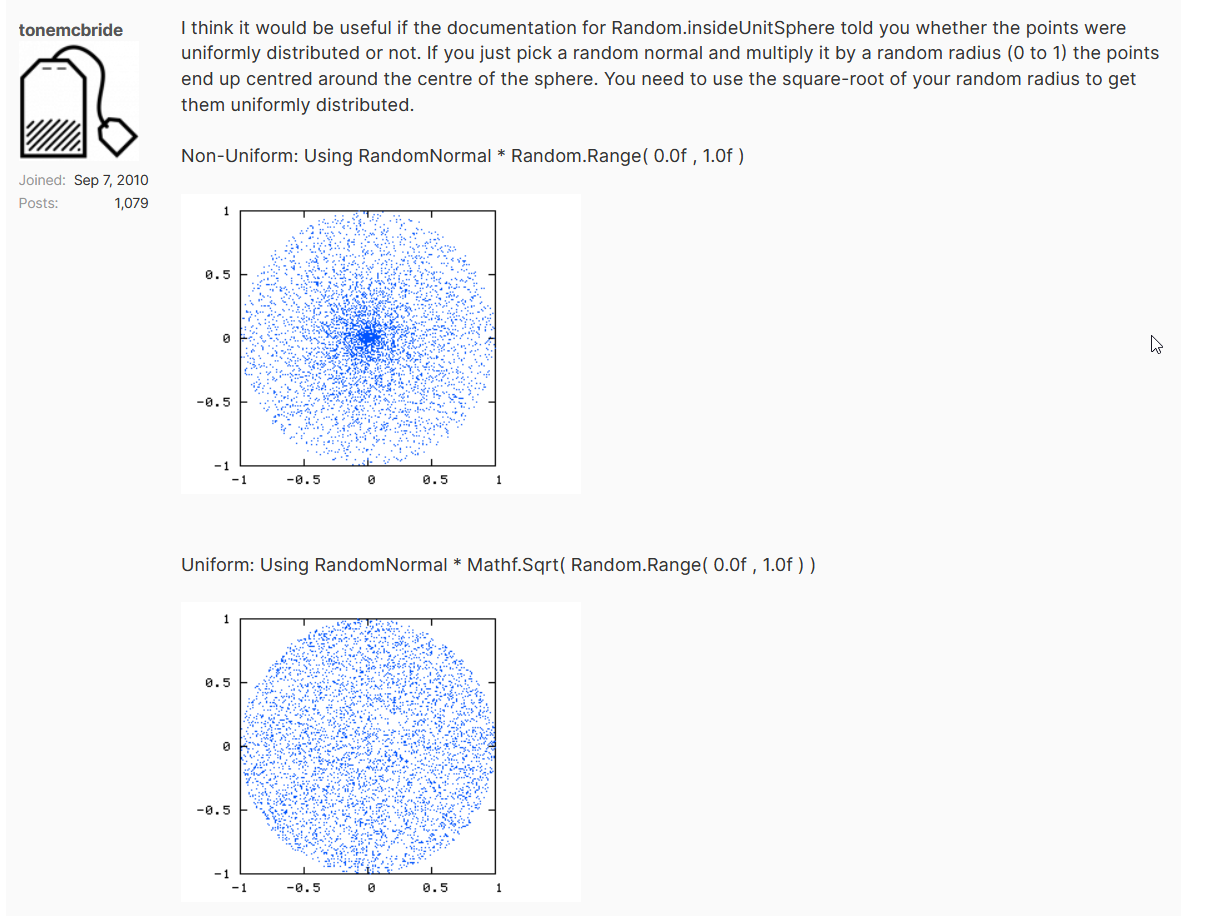
 north kiln
This is how to do uniform picking for an annulus https://gist.github.com/vertxxyz/e3fa0b033a266027992a715468e7dd1f
I've not tried translating it to a sphere
Instead of x and y being generated using the angle, you can use UnityEngine.Random.onUnitSphere and scale it by r
@abstract finch
abstract finch
north kiln
This is how to do uniform picking for an annulus <https://gist.github.com/vertxx...
Ill check it out thanks
 robust condor
I have an NPC spawner, when it spawns NPC I add a child prefab to it with a component on it, but that component itself needs a prefab reference, which will be empty on creation. How can I tell this component what the reference is? I can have a reference to the prefab on the spawner itself, but then need a way to pass this info down to my component. So: NPC Spawner > Instantiate Prefab 1 > Instantiate Prefab 2 as child for Prefab 1 with component that needs the reference to Prefab 3
timber tide
how about clarifying what you're trying to do instead of the implementation
are you just trying to set data such that these are different types of enemies
 near cargo
I am trying to clone a template for an UI. the template looks like this, it has the scale set to 1,1,1

but all of my clones have some weird number as their scale

            var newGameObject = Instantiate(carouselTemplateCard);
            newGameObject.SetActive(true);

            newGameObject.transform.SetParent(GamemodeCarousel.transform);
            listsGameObjectCards.Add(newGameObject);
this is how i create these objects
queen adder
I tried to build and run ( android ) but it shows me that error

 languid spire
near cargo
```c#
var newGameObject = Instantiate(carouselTemplateCard);
...
languid spire
near cargo
```c#
var newGameObject = Instantiate(carouselTemplateCard);
...
show inspector of GamemodeCarousel
languid spire
queen adder
I tried to build and run ( android ) but it shows me that error
show build settings
near cargo
 queen adder
languid spire
show build settings
queen adder
languid spire
show build settings
send the player settings too?
 languid spire
queen adder
send the player settings too?
languid spire
queen adder
send the player settings too?
no, I think the problem is related to your deleted scenes.
you will need to edit the EditorBuildSettings.asset file in your project Project Settings folder to remove them
near cargo
near cargo
@languid spire could the horizontal layout group cause the issue?
languid spire
near cargo
<@556797857584381953> could the horizontal layout group cause the issue?
I think yes, I was just looking at that, maybe also your vertical layout group
near cargo
the horizontal layout group is in a vertical layout group
but that shouldnt affect i guess?
i put the horizontal group in a separate game object and it still behaves the same
this is my template (set to active) compared to the clones

i also tried setting the localscale of my recttransform using code and that didnt work
for some reason it doesnt update the scale unless i set it manually during play in the editor
newGameObject.transform.localScale = new Vector3(1.0f, 1.0f, 1.0f);
Do you have it anchored correctly because it may be resizing
languid spire
If you look at the width and height of the cloned object you will see that they have changed from the prefab and the scale has been altered to compensate
so it is the Horizontal Layout Group that is doing this
near cargo
actually its not anchored
because otherwise the horizontal layout group wont do its just properly
@languid spire actually i dont know why but now they are the same width and height

 languid spire
you've changed the template?
near cargo
i messed around with the anchor when you mentioned but it changed back because of the layout group
and then restarted
but other than that no
languid spire
so how come Template is now controlled by a Horiz LayoutGroup?
near cargo
ah seems like when its disabled it doesnt show that message
but the moment you enable it the message appears
but it doesnt matter if its enabled or not, the clones are still scaled up
languid spire
yes, so the HLG is reducing the size and increasing the scale
languid spire
don't know
near cargo
okay so i made another for loop and set their scale AFTER i have created all of the cards
and it seems to work fine now
queen adder
im trying to write a dps calculation method and heres what i came up with cs newDmg += damageDealt / fps; count += dt; //deltatime if (count >= 1.0) { double dps = (newDmg - oldDmg); Debug.Log(dps.ToString() + $", {newDmg} - {oldDmg}"); oldDmg = newDmg; newDmg = count = 0; } it works when the fps stays constant but otherwise is wildly inaccurate is there a goto method for calulation
new damage is the damage this frame and oldDmg is from last frame
 gaunt ice
why the damageDealt is divided by fps? if your fps is wrong then whole thing go wrong
shouldnt it be sum of all damage dealt in previous one second?
queen adder
oops
static cedar

near cargo
        var i = 0;
        foreach (Gamemode gm in gms)
        {
            var newGameObject = Instantiate(carouselTemplateCard);
            newGameObject.SetActive(true);

            newGameObject.transform.Find("GameModeTitle").GetComponent<FlexibleUIText>().SetText(gm.name);
            newGameObject.transform.Find("ClickButton").GetComponent<FlexibleUIButton>().onClick.AddListener(delegate {
                Debug.Log(i);
            });

            newGameObject.transform.SetParent(GamemodeCarousel.transform);
            listsGameObjectCards.Add(newGameObject);
            i++;
        }
in this case, how would i make it every time i click a card a different i would get printed?
gaunt ice
copy the i to local variable
or change the FlexibleUIButton script you already have
in your FlexibleUIButton script:
public int i; <--set this i when iteration
public void OnPress(){<-- add listener
  Debug.log(i);
}
i tried copying the i to a local variable
            newGameObject.transform.Find("ClickButton").GetComponent<FlexibleUIButton>().onClick.AddListener(delegate {
                var ci = i;
                Debug.Log(ci);
            });
this didnt work
its still the same i
eternal needle
near cargo
```c#
var i = 0;
foreach (Gamemode gm in gms)
{
...
How come u are using anonymous methods? You can just use lambda operators here
north kiln
Declare a new variable in the loop
And assign and use that, instead of the one outside the loop
near cargo
north kiln
Declare a new variable in the loop
ah yes that worked, thanks!
 bitter oar
Hey! I could use some help! I'm trying to do a long jump (like super mario 64 or odyssey). Physics-wise, i'm using a rigidbody on my player with interpolate and continuous collision detection, i have also unchecked 'use gravity'. This is my 'Locomotion script'
https://hastebin.com/share/ayewebuhob.java
what happens so far when i longjump is in this video i sent, i kind of understand the first outcome, but all the ones after it i really don't.
Thanks!
Hastebin is a free web-based pastebin service for storing and sharing text and code snippets with anyone. Get started now.
golden otter
bitter oar
Hey! I could use some help! I'm trying to do a long jump (like super mario 64 or...
post your code on pastebin or something
and then send the link
bitter oar
whats pastebin?
golden otter
its a website where you can post large blocks of code
you can also use this one:
Hastebin
Hastebin is a free web-based pastebin service for storing and sharing text and code snippets with anyone. Get started now.
bitter oar
Hastebin is a free web-based pastebin service for storing and sharing text and code snippets with anyone. Get started now.
 spiral oak
Is Invoke less efficient than a coroutine with a WaitForSeconds?
 old gorge
Hi
I want a script to expose a UnityEvent that gets invoked with a parameter from the script exposing it.
I then want to subscribe other objects methods to it using the inspector.
public class Subject : Monobehaviour {
  [SerializeField] private UnityEvent<int> _onTriggered;

  private void Update() {
    // ...
    if (someCondition) _onTriggered?.Invoke(12);
  }
}

public class Subscriber : Monobehaviour {
  public void HandleTrigger(int value) {
    // do stuff
  }
}
However, when I plug Subscriber.HandleTrigger(int) to the event in the inspector, it forces me to set a value to be used as a parameter (defaults to 0). This means that the value 12 that I invoke the event with from code is overriden by the value 0 from the inspector.
Is there a way to setup an event that enables me to plug in a bunch of subscribers (all accepting the same type of parameter) while letting the Invoke() call passing the actual value instead of using the one from the inspector ?
 north kiln
old gorge
Hi
I want a script to expose a UnityEvent that gets invoked with a parameter fro...
old gorge
north kiln
old gorge
Hi
I want a script to expose a UnityEvent that gets invoked with a parameter fro...
old gorge
i will look into that thanks
bitter oar
bitter oar
Hey! I could use some help! I'm trying to do a long jump (like super mario 64 or...
can i get help?
old gorge
north kiln
https://unity.huh.how/unity-events/dynamic-values
exactly what i needed, thank you
 lethal kestrel
simplest way of getting a certain text layer inside of a canvas to instantiate?
e.g getting itemName

 raven kindle
Having a problem with lots of coins spawning in my game, when i have this update:

My max coins is set to 1, and activecoins.count is 1000s+
and it keeps spawning new ones
 tulip stag
Can anyone explain this line to me? I'm newish to C# i never seen these symbols
emptyLineCount = string.IsNullOrWhiteSpace(line) ? emptyLineCount + 1 : 0;
? and :
gaunt ice
X=A?B:C is equivalent to
if(A)
X=B
else
X=C
called ternary operator, shorthand for typing if else
tulip stag
Oh.
Hmmmm a bit confusing but I guess it makes sense!
Would you recommend I switch that to a simple if/else to make my code more readable to me?
static cedar
If the operator's a bit too confusing, better just use if else.
static cedar
tulip stag
Oh.
Hmmmm a bit confusing but I guess it makes sense!
Would you recommend I sw...
Depends.
And it might be preferable not to chain them.
You also have switch returns.
tulip stag
            StringBuilder lyricsBuilder = new StringBuilder();
            string line;
            int emptyLineCount = 0;
            while (emptyLineCount < 2 && !string.IsNullOrWhiteSpace(line = Console.ReadLine()))
            {
                lyricsBuilder.AppendLine(line);
                emptyLineCount = string.IsNullOrWhiteSpace(line) ? emptyLineCount + 1 : 0;
            }
            newSong.lyrics = lyricsBuilder.ToString();```

This is what the codeblock looks like//Assuming test_this is an int.
my_var = test_this switch {
1 => a,
2 => b,
3 => c,
4 => d,
_ => something //The _ basically means default.
};
(it says console because I'm still gonna bring the code to a unity project I have, I'm just testing out to see if it works as a console app first)
 neon fractal
https://www.youtube.com/watch?v=SJ4a9qwM9K4&ab_channel=MaXanter2017
Why do my numbers appear randomly only on X and static on Y, even though everything is correct in the code
    private float RandomCoordinate()
    {
        float r = Random.Range(randomX, randomY);
        return r;
    }
 gaunt ice
have you logged the value?
is the rectDmgScreen rect transform?
neon fractal
gaunt ice
have you logged the value?
is the rectDmgScreen rect transform?
yes, the logic generates 2 random digits, everything is correct
first X - second Y, but Y always ~50
 bitter oar
Hey! I could use some help! I'm trying to do a long jump (like super mario 64 or...
bitter oar
bitter oar
Hey! I could use some help! I'm trying to do a long jump (like super mario 64 or...
help please?
gaunt ice
the floating texts will rise up, are there anything control their y position?
neon fractal
gaunt ice
the floating texts will rise up, are there anything control their y position?
Haha, I completely forgot about that. Thanks for bringing that up.
 neon ivy
I have this system I made after hearing about it on a GDC talk about an alternative way of doing quests which they called the encounter system.
basically an encounter has an ID string like "IntroductionNPC1" and a list of ID strings for what state that encounter is in like "HeardOfNPC1" , "SeenNPC1" , "MetNPC1". the player would store the most up-to-date state ID string and that ID would indicate that the previous states have occurred as well.
though in the GDC talk this was a completely linear system (encounter just has state 1 - 2 - 3 - 4 - etc.) but I'm trying to think of a way to expand on this.
a branching structure should still work but I'm getting lost when I try to merge them back, at that point the ID won't indicate what branch was taken to get there. does anyone have any idea on how to best handle this using the least amount of data?
I was also wondering if there's a way to have these strings behave like enums (without actually being enums since they wouldn't really work) so I can for instance in my code do SetState(IntroductionNPC1.MetNPC1); instead of having to look up the strings in the Encounter Dictionary.
 stark sonnet
can someone explain to me what would cause Physics to not exist in the current context in line 67? i've never had this issue with using physics before
 keen dew

 night raptor
stark sonnet
https://codeshare.io/6p638g
can someone explain to me what would cause Physics ...
night raptor
stark sonnet
https://codeshare.io/6p638g
can someone explain to me what would cause Physics ...
Make sure you have your IDE configured properly to avoid similiar typos in future
gaunt ice
your ide should remind you
 visual hedge
lethal kestrel
simplest way of getting a certain text layer inside of a canvas to instantiate?
visual hedge
lethal kestrel
simplest way of getting a certain text layer inside of a canvas to instantiate?
Something like ToolTipPanel.transform.Find("itemName")... ? .GetComponent<TextMeshPRO>().text?
raven kindle
gaunt ice
do you see the second line?
I am such an idiot!! :D thanks
Im using this parallax backround, however i cant find the exact size of the prefabs, is there a way to do this or use a getsize function ?

i have gotten the size roughly however it still has a little skip when it changes
swift crag
lethal kestrel
simplest way of getting a certain text layer inside of a canvas to instantiate?
Assign it in the inspector.
You should make a Tooltip component that has serialized references to the components you need.
public class Tooltip : MonoBehaviour {
  [SerializedField] TMP_Text nameText;
  [SerializedField] TMP_Text amountText;
  [SerializedField] TMP_Text descriptionText;

  public void Show(Item item) {
    nameText.text = item.name;
    amountText.text = item.amount.ToString();
    descriptionText.text = item.description;
  }
}
Nobody who uses the tooltip should have to know about those three text components. They should just tell the tooltip "here, display this"
tulip stag
How to do that thing in Visual Studio where you select a snippet of code, do some magic (I think its a command?) and it isolates the code you selected into its own method?
swift crag
It's going to be called something like "extract"

This might be it.
So those are two different options.
tulip stag
Thanks!
swift crag
it's more clear if i don't just screenshot the google result lol
generally, you'll want to look for "extract X" if you want to grab some existing code and make it into a new thing
np!
raven kindle
Whenever i collect my coins, this error happens.


Pastebin
Pastebin.com is the number one paste tool since 2002. Pastebin is a website where you can store text online for a set period of time.
swift crag
Which line is the exception coming from?
swift crag
raven kindle
Nothing in that code touches a transform
raven kindle
From 37 and 89
swift crag
    void DeleteCoins()
    {
        float deleteXPos = player.position.x - coinWidth * coinFallback;
        for (int i = 0; i < activeCoins.Count; i++)
        {
            if (activeCoins[i].position.x + coinWidth < deleteXPos) // line 89
            {
                Destroy(activeCoins[i].gameObject);
                activeCoins.RemoveAt(i);
                i--;
            }
        }
    }
Pastebin
Pastebin.com is the number one paste tool since 2002. Pastebin is a website where you can store text online for a set period of time.
This is my second script for player ^
swift crag
sounds like activeCoins[i] references a destroyed game object to me
raven kindle
How would i fix it?
Would i need the trigger inside the coins script instead of player?
swift crag
You could do something like this before checking the position
if (activeCoins[i] == null) {
  activeCoins.RemoveAt(i);
  --i;
  continue;
}
continue skips to the next iteration of the loop
raven kindle
ah
swift crag
Alternatively, you can use RemoveAll
actionCoins.RemoveAll(coin => coin == null);
RemoveAll takes a method.
The method takes an element from the list and returns true or false
So this method returns true for every coin that equals null
This will remove every destroyed coin from the list. It also avoids the off-by-one error I almost made up there (I forgot --i) 😛
raven kindle
would i put it in the update method ?
swift crag
I'd do it in DeleteCoins, but as long as you do it before trying to check the position of each coin, it'll be fine
raven kindle
oke ty
swift crag
Actually, yeah, put it in Update.
you might write other methods that also work with coins
so do it like this
void Update() {
  // clean up your data

  // use your data
}
get rid of destroyed coins, then do whatever you need to with the remaining valid coins
 tulip stag
raven kindle
what is `i`?
tulip stag
raven kindle
what is `i`?
you usually use i as a variable in a for loop
let me see your loop. i think you might not have set it up right
raven kindle
 rich adder
you should probably save
raven kindle
it seems to work now
however my coins are in 3s, the first one gets deleted fine, and then when the player collides with the second coin, both the second and third coin gets deleted
however if i only collide with the 3rd one, just the third one gets deleted
something with the second one
deleting them all
maybe because they are children from the middle one?
 polar acorn
Million dollar question: Why are you manually comparing the position of the player against every coin in a list to determine if they should be deleted instead of just using a collision event of some sort
 polar acorn
To delete the coins that fall off the screen just have another collider behind the screen that wipes them too
 polar acorn
raven kindle
i have that
polar acorn
raven kindle
i have that
So why are you doing a bunch of math on positions to determine if they should be deleted instead of just letting the colliders do it
polar acorn
raven kindle
Probably because your code that checks positions is still looking for coins deleted by your collision event
raven kindle
yes, but idk how to take them out of the list after collision
polar acorn
raven kindle
yes, but idk how to take them out of the list after collision
First off: why do you need the list
It looks like it exists just to loop through to check positions of, which you shouldn't be doing anyway
raven kindle
this script is basically a copy from my generateplatforms one
which i used a list for each platform

Would i not need it for this?
 willow scroll
raven kindle
Would i not need it for this?
willow scroll
raven kindle
Would i not need it for this?
No, it doesn't look to be needed in any case.
raven kindle
how would i do it instead?
willow scroll
are you trying to detect a collision between the player and a coin?
raven kindle
yes
raven kindle
raven kindle
this is for spawning the coins
willow scroll
Do you have a 2D game?
raven kindle
yep
willow scroll
Then all you need is OnCollisionEnter2D / OnTriggerEnter2D
 willow scroll
raven kindle
willow scroll
raven kindle
You have this too, don't you?
raven kindle
Yes, that is for spawning the coins
willow scroll
when does it spawn the coins?
raven kindle
it only spawns when it passes other coins
soo there is not too many coins at once, lagging the game
willow scroll
Define "passes"?
raven kindle
player x coord > last coin x coord
willow scroll
I see, so it's 1 axis movement?
raven kindle
yes, the player is always moving horizontally
polar acorn
raven kindle
Two ways to do this:
- Have the coin itself check its own position and if it's past a boundary, spawn another coin
- Have a collider that detects coins that pass through it and spawns another coin
willow scroll
raven kindle
and the background too
do coins?
raven kindle
no coins dont move
willow scroll
I see. So the coin has to be destroyed when the player's x position is greater?
raven kindle
no, the coin gets destroyed when the player collides with it
however, if the coin goes too far behind the player it also gets deleted, as it goes off the screen
willow scroll
I am sorry, I meant "spawned"
raven kindle
a new coin gets spawned after the player has passed a previous one
willow scroll
raven kindle
however, if the coin goes too far behind the player it also gets deleted, as it ...
"Off the screen". So it shouldn't be destroyed when its within the screen.
Suppose, you know that screen widths may vary?
this may, setting a fixed offset won't work properly
raven kindle
im just doing it for default screen size, i have variables i can change

overhead and fallback
willow scroll
So can the player go backwards?
willow scroll
I see, then yes. You can check the distance between the player and the coin.
I don't think making it in the Coin.cs script will be bad for performance.
You can also implement this logic in another scripts
raven kindle
The game is working fine, the only problem is that when the middle coin is collected, all coins get deleted
willow scroll
if (Vector2.Distance(transform.position, player.transform.position) > maxDistance)
    DoStuff();
please, have a look on that
raven kindle
but i guess thats because the left and right coins are children of the middle one
willow scroll
raven kindle
but i guess thats because the left and right coins are children of the middle on...
Well, I don't think it should happen
willow scroll
raven kindle
The game is working fine, the only problem is that when the middle coin is colle...
If the game is working fine, what's your issue then?
Maybe I don't get something?
raven kindle
the only problem is that when the middle coin is collected, all coins get deleted
willow scroll
raven kindle
the only problem is that when the middle coin is collected, all coins get delete...
Haven't you ansered your question in your previous message already?
raven kindle
yea but how would i fix it
willow scroll
raven kindle
yea but how would i fix it
Don't make them its children?
raven kindle
but i want them to spawn in threes
willow scroll
raven kindle
but i want them to spawn in threes
Why? 🤣
willow scroll
Well, then you're gonna have this issues. Just because.
raven kindle
ok...
willow scroll
Anyway, spawning them in the middle coin doesn't make them spawn in "threes"
Don't know what you're thinking bout
raven kindle
 willow scroll
raven kindle
willow scroll
raven kindle
Do you always spawn them in threes
raven kindle
yes
willow scroll
raven kindle
yes
Why don't make an empty GameObject with those three coins inside?
raven kindle
 raven kindle
but then they wont spawn in threes
willow scroll
raven kindle
but then they wont spawn in threes
They will.
You spawn the parent GameObject
Coin
- Left
- Middle
- Right
and you spawn coins
wintry quarry
raven kindle
but then they wont spawn in threes
You can either just have the spawner spawn the three things separately or just have them unparent themselves after spawning
raven kindle
How do you unparent themselves after spawning?
wintry quarry
transform.parent = null;
raven kindle
inside the spawn method?
raven kindle
wintry quarry
transform.parent = null;
or should i make a new script with this as the start method, and attach it to the coins itself?
willow scroll
raven kindle
How do you unparent themselves after spawning?
Why would you..
Let me break it all down for you.
You told us that you want to spawn them in "threes"
But the way you spawn them, surely, has some issues. Because you make left and right coins the children of the middle coin.
This way, deleting the middle coin also means deleting other two
So now I have suggested you to spawn them in "threes", as you wanted, without having the previously described issue.
This method does work.
If you don't want to have them in "threes" anymore, you can spawn 3 GameObjects at once too.
 tender stag
if i wanna do a sphere cast or check sphere, how can i find the lowest point of any collider it hit
because at the moment im just sending a raycast above the players head
to check how much he can uncrouch
so he doesnt hit the ceiling
but i wanna do it with a sphere instead of ray
but im now even sure if you can do like .hit with a sphere cast
 hallow acorn
hey there i wanted to use mathf.movetowards and there are 3 floats needed: current, target and maxDelta. what does the maxdelta mean?
queen adder
how far the float will move
from start to target
(1, 2, 0.3) will give 1.3
(1, 5, 0.3) will also give 1.3
(1, 1.1, 0.3) will give 1.1
swift crag
Control the speed of movement with the maxDistanceDelta parameter. If the current position is already closer to the target than maxDistanceDelta, the value returned is equal to target; the new position does not overshoot target.
queen adder
Hi all.
Im trying to spawn enemies at random positions. But they are all just spawning from 1 point.
I made a list of spawn points and im using random range to choose a random spawn point but its not working.
Any advice will be appreciated
eternal falconBOT
Posting code
📃 Large Code Blocks
Use links to services like:
https://gdl.space/, https://paste.ofcode.org/, https://hatebin.com/, https://paste.myst.rs/, https://hastebin.com/
📃 Inline Code
Surround code with three backquotes. Not quotation marks.
To format as C#, add cs to the first line:
```cs
// Your code here
```
Add a comment with a line number if there is an error message.
hallow acorn
queen adder
`(1, 2, 0.3)` will give 1.3
`(1, 5, 0.3)` will also give 1.3
`(1, 1.1, 0.3)` wil...
ok ty
abstract finch
How come this isnt working?
CS1955: Non-invocable member 'Monster.GetSize' cannot be used like a method.
GetSize() returns a float
gaunt ice
what is the declaration of GetSize
getter/setter?
abstract finch
gaunt ice
what is the declaration of GetSize
getter/setter?
public float GetSize => _size;```oh my
wait onesec
ok fixed the typo but another issue like before
Cannot implicitly convert type 'System.Linq.IOrderedEnumerable<Monster>' to 'System.Collections.Generic.List<Monster>'. An explicit conversion exists (are you missing a cast
wintry quarry
abstract finch
ok fixed the typo but another issue like before
You need a .ToList() at the end of you wish to assign it to a list variable
Note that this creates a new list
abstract finch
wintry quarry
You need a .ToList() at the end of you wish to assign it to a list variable
ah i see it works now i didnt know I had to because I decalred the list in the function
gaunt ice
i prefer list.sort anyway
abstract finch
{
List<Monster> monstersToSpawn = new List<Monster>();
foreach (Monster i in _monsterPool)
{
monstersToSpawn.Add(i);
}
monstersToSpawn = monstersToSpawn.OrderBy(x => x.GetSize()).ToList();
}``` crisp meteor
I write this simple third person camera script, Working fine but the offset distance keep increaing decreasing while the player moving. (visually)
 wintry quarry
List.Sort will sort the existing list in place yeah
abstract finch
gaunt ice
i prefer list.sort anyway
What is the code using list.sort?
Is it the same thing but remove order by?
wintry quarry
abstract finch
``` private void CreateSpawnGroup(Monster monster)
{
List<Monster...
There's no point in the new list you create at the start there
crisp meteor
crisp meteor
I write this simple third person camera script, Working fine but the offset dist...
distanceOffset is minus
wintry quarry
abstract finch
``` private void CreateSpawnGroup(Monster monster)
{
List<Monster...
Just do var monstersToSpawn = _monsterPool.OrderBy....ToList() etc
abstract finch
wintry quarry
Just do `var monstersToSpawn = _monsterPool.OrderBy....ToList() etc`
ah thats just for now later on ill have it pick some of the list but im testing so its just choosing all of them
abstract finch
What if I add something like a max value where I can only pick up to a certain number of monster size
i.e. 5
i will implement this later like a token system
gaunt ice
linear scan/binary search to find the lower bound
 hardy mist
for C# newbie, are async/await Task methods thread-safe?
 amber spruce
so im using a character controller does that give a rigid body
gaunt ice
no
and async/await in unity runs on main thread
amber spruce
amber spruce
so im using a character controller does that give a rigid body
does it have a collider
gaunt ice
the way that how you create a thread implies nothing for thread safe
amber spruce
why when i add a rigidbody and collider to my player with the character controller does it break
hardy mist
gaunt ice
the way that how you create a thread implies nothing for thread safe
Wait, you said they run on the same thread, why aren't they thread-safe then?
Can CPU switch between tasks even when a running task doesn't reach await?
amber spruce
amber spruce
why when i add a rigidbody and collider to my player with the character controll...
it starts getting flung all over the place
eternal needle
amber spruce
why when i add a rigidbody and collider to my player with the character controll...
Because you arent supposed to use both as a form of movement. Either your rigidbody should be kinematic or you remove CC
gaunt ice
why cant?
context switching is controlled by your os
amber spruce
eternal needle
Because you arent supposed to use both as a form of movement. Either your rigidb...
but i want the gravity from the rigidbody
hardy mist
gaunt ice
why cant?
context switching is controlled by your os
but wait, you said there is no context switching (everything is on the main thread)
or are there multiple threads actually?
gaunt ice
yes there is no context switching, btw talking thread safe on single thread program sounds meaningless
eternal needle
amber spruce
but i want the gravity from the rigidbody
What you want doesnt magically change how unity works
hardy mist
I just wanted to clarify if this is actually single threaded, thanks
amber spruce
eternal needle
What you want doesnt magically change how unity works
ik but is there a way to get the gravity from it
hardy mist
because I was not sure
gaunt ice
always thread safe since there is only one thread.....
eternal needle
amber spruce
ik but is there a way to get the gravity from it
No, you use either rigidbody or CC. You can either make a rigidbody controller or simulate gravity with the cc
amber spruce
ok
whats a good way of doing jumps with a character controller
controller.Move(Vector3.up * m_JumpForce * Time.deltaTime);
this is how i tried to do it
thorn holly
amber spruce
```csharp
controller.Move(Vector3.up * m_JumpForce * Time.deltaTime);
```
this i...
Show the full code
polar acorn
You will need to track your velocity over multiple frames and modify it based on gravity. You can't just call a function one time and expect it to work with a CharacterController
.Move is a one-and-done thing, it has no momentum or acceleration
eternal needle
amber spruce
whats a good way of doing jumps with a character controller
You might want to look up a basic tutorial for movement, you would want to combine the horizontal and vertical into one move.
thorn holly
amber spruce
```csharp
controller.Move(Vector3.up * m_JumpForce * Time.deltaTime);
```
this i...
All that’s doing is teleporting up a very small amount
amber spruce
eternal needle
You might want to look up a basic tutorial for movement, you would want to combi...
i have none that i watch show jump
wintry quarry
amber spruce
whats a good way of doing jumps with a character controller
Jumping is an interaction that takes place over the course of many frames.. this isn't something a single line of code is going to accomplish
eternal needle
amber spruce
i have none that i watch show jump
Im sure lots do, but i think you will have a better time making a rigidbody controller instead. CC is kinda bad anyways
swift crag
thorn holly
All that’s doing is teleporting up a very small amount
Yes, because Move moves you by the specified amount
It does nothing else.
polar acorn
eternal needle
Im sure lots do, but i think you will have a better time making a rigidbody cont...
It's perfectly acceptable so long as "jumping" is the most physics-based thing you have to do
polar acorn
 rocky birch
hey am i able to ask for help with "why tf does this code not work"
rocky birch
hey am i able to ask for help with "why tf does this code not work"
You're going to need to explain what "does not work" means
Because no one here knows what you want the code to do or what it's actually doing but you
 cosmic quail
which do u guys prefer for rigidbody character controller, rigibody.addforce or rigidbody.moveposition?
thorn holly
I just do velocity+=
polar acorn
cosmic quail
which do u guys prefer for rigidbody character controller, rigibody.addforce or ...
Depends entirely on what your goal is
rocky birch
Im following a tutorial and trying to mirror exactly what they're doing.
https://www.youtube.com/watch?v=XtQMytORBmM
Im at 35:04


GMTK is powered by Patreon - https://www.patreon.com/GameMakersToolkit
Unity is an amazingly powerful game engine - but it can be hard to learn. Especially if you find tutorials hard to follow and prefer to learn by doing. If that sounds like you then this tutorial will get you acquainted with the basics - and then give you some goals to learn ...
swift crag
Did you move a file recently?
rocky birch
I have no idea why im getting these errors
polar acorn
rocky birch
Im following a tutorial and trying to mirror exactly what they're doing.
https...
Duplicate script
 rocky canyon
thorn holly
All that’s doing is teleporting up a very small amount
rocky canyon
thorn holly
All that’s doing is teleporting up a very small amount
i just tack a variable onto the Move() vector.. i manipulate that else where in an update loop or coroutine for the jumping value
swift crag
you probably hit Save in your code editor, re-creating the old file
cosmic quail
rocky birch
I have no idea why im getting these errors
ur script name is different from ur class name
the script is called LogicScript.cs but the class inside it is LogicManager
rocky birch
polar acorn
Duplicate script
yeah i noticed one of the files was named LogicManager and that I couldnt find a logic script so i assumed i mislabled and renamed LogicManager to LogicScript
thorn holly
Something I’ve never really understood the inside out of is how components relate to game objects. In the gameobject class, are components fields within it or something else?
rocky birch
but ig there was one i couldnt see and made two, how do i fix that?
amber spruce
eternal needle
Im sure lots do, but i think you will have a better time making a rigidbody cont...
found a thing that said to do this but it aint working
void Move()
{
    float horizontal = Input.GetAxis("Horizontal");
    float vertical = Input.GetAxis("Vertical");
    Vector3 moveDirection = new Vector3(horizontal, 0f, vertical).normalized;
    Vector3 movement = moveDirection * m_Speed * Time.deltaTime;
    m_Rigidbody.MovePosition(transform.position + movement);
}
is there a reason why it doesnt work
cosmic quail
thorn holly
Something I’ve never really understood the inside out of is how components relat...
the class is the component, isnt it?
thorn holly
amber spruce
found a thing that said to do this but it aint working
```csharp
void Move()
{
...
Do you know what any of that code means?
amber spruce
i know what some of it means
polar acorn
rocky birch
but ig there was one i couldnt see and made two, how do i fix that?
Find the other copy of that script and delete it
amber spruce
thorn holly
Do you know what any of that code means?
m_Rigidbody.MovePosition(transform.position + movement);
thats the only line i havent used/seen before
thorn holly
amber spruce
i know what some of it means
This is why I don’t use online tutorials, you need to know exactly what all the code you’re writing does
amber spruce
well problem is i have only made 2d games before
polar acorn
amber spruce
```csharp
m_Rigidbody.MovePosition(transform.position + movement);
```
t...
Essentially, it moves your rigidbody to the specified position, respecting collisions along the way
As long as it doesn't end up passing through the colliders, since MovePosition cannot be made continuous like velocity can
rocky birch
cosmic quail
the script is called LogicScript.cs but the class inside it is LogicManager
Fixed that and it lets me run it, but then i get this
 polar acorn
rocky birch
Fixed that and it lets me run it, but then i get this
polar acorn
rocky birch
Fixed that and it lets me run it, but then i get this
Look at the line the error is on. Something on that line is null but you're trying to use it anyway
cosmic quail
rocky birch
Fixed that and it lets me run it, but then i get this
where did u get these scripts from? did chatgpt give them to u and now youre trying to fix all the errors? lol
rocky birch
rocky birch
Im following a tutorial and trying to mirror exactly what they're doing.
https...
this tutorial
thorn holly
rocky birch
this tutorial
Do you know what each line of code you’re writing does?
rocky birch
Im trying to, this is the literal first time ive used unity
thorn holly
rocky birch
Im trying to, this is the literal first time ive used unity
Fair enough, I totally understand that
cosmic quail
rocky birch
Fixed that and it lets me run it, but then i get this
show pipemiddlescript line 23 and we can tell u whats wrong there
polar acorn
rocky birch
Im trying to, this is the literal first time ive used unity
Most important thing: Do you know how to read an error
rocky canyon
rocky birch
Im trying to, this is the literal first time ive used unity
well good luck sir
polar acorn
Like, do you know how to tell what line its on?
rocky canyon
u cant expect to learn it all in one day..
 rocky birch
polar acorn
Like, do you know how to tell what line its on?
rocky birch
polar acorn
Like, do you know how to tell what line its on?
It seems simple enough
rocky canyon
logic must not be assigned
rocky birch
rocky canyon
well good luck sir
ma'am, but thank you
thorn holly
I wouldn’t reccomend YouTube tutorials, because it’s kind of hard to learn anything, bc you’re just copying what the YouTuber does. Unity learn had a great beginner tutorial that doesn’t take too long but is super helpful for beginners, I’d reccomend that.
slender nymph
rocky birch
you need to get your !IDE configured
eternal falconBOT
💡 IDE Configuration
If your IDE is not autocompleting code
or underlining errors, please configure it.
Select one:
• Visual Studio (Installed via Unity Hub)
• Visual Studio (Installed manually)
• VS Code
• JetBrains Rider
• Other/None
rocky birch
rocky canyon
logic must not be assigned
it displays that it is
 polar acorn
rocky birch
polar acorn
rocky birch
So, logic is null. Have you dragged in the reference to your LogicScript in the inspector
rocky canyon
^ yea but have u assigned it into the slot of that script u just took a screenshot of?
rocky birch
slender nymph
you need to get your !IDE configured
my what?
rocky canyon
PipeMiddleScript
polar acorn
rocky birch
my what?
the thing you type code in
slender nymph
rocky birch
my what?
visual studio
polar acorn
so you can get error highlighting and autocomplete
swift crag
IDE is an acronym for "Integrated Development Environment"
it's a text editor, plus tools to help you write code
rocky birch
How do i configure it?
swift crag
eternal falcon
Follow the instructions.
 cerulean kestrel
my door wont open whenever i pres play but i dont see a problem, does this look ok?

 polar acorn
cerulean kestrel
my door wont open whenever i pres play but i dont see a problem, does this look ...
polar acorn
cerulean kestrel
my door wont open whenever i pres play but i dont see a problem, does this look ...
What IDE is that code written in
 rocky birch
Do the settings auto save?
polar acorn
cerulean kestrel
OH visual studio
Then it is very unconfigured. You have no syntax highlighting at all. Configure it. !ide
eternal falconBOT
💡 IDE Configuration
If your IDE is not autocompleting code
or underlining errors, please configure it.
Select one:
• Visual Studio (Installed via Unity Hub)
• Visual Studio (Installed manually)
• VS Code
• JetBrains Rider
• Other/None
cerulean kestrel
it DID have syntax highlighting
polar acorn
cerulean kestrel
it DID have syntax highlighting
So go through the configuration and make it have it again
 polar acorn
cerulean kestrel
i fixed it
polar acorn
cerulean kestrel
i fixed it
You've got some back. You still don't have it configured for Unity. Follow the guide above
polar acorn
cerulean kestrel
yeah everything works with vs
Have you got highlighting on Unity class types now
 polar acorn
cerulean kestrel
i think...?
polar acorn
cerulean kestrel
i think...?
No you do not. Go back through the configuration guide and make sure to follow all of it
cerulean kestrel
i did
polar acorn
cerulean kestrel
i did
Have you got highlighting on Unity class types now
summer stump
cerulean kestrel
i think...?
You'll know it worked when MonoBehaviour and Animator are no longer white
polar acorn
cerulean kestrel
no
Then you have not. Go back through the configuration guide and make sure to follow all of it
rocky birch
How do i find what directory its in ive been searching visual studio in OS and i cant find it
 summer stump
cerulean kestrel
but everythings good with vs
summer stump
cerulean kestrel
but everythings good with vs
There are 3 main steps. One, the workload in vs. 2 setting vs as the external tool. 3 making sure you have the right package in Unity.
Secret 4th step is you might need to click "regenerate project files" in external tools.
cerulean kestrel
ok
summer stump
rocky birch
How do i find what directory its in ive been searching visual studio in OS and i...
In Windows it is in Program Files > Microsoft Visual Studio > Common7 > IDE
Maybe program files x86?
polar acorn
rocky birch
How do i find what directory its in ive been searching visual studio in OS and i...
Depends on where you installed it. Probably Program Files or Program Files (x86)
cerulean kestrel
i think i found the problem...
 rocky birch
summer stump
In Windows it is in Program Files > Microsoft Visual Studio > Common7 > IDE
May...
rocky birch
summer stump
In Windows it is in Program Files > Microsoft Visual Studio > Common7 > IDE
May...
i dont see common7
 summer stump
rocky birch
i dont see common7
summer stump
rocky birch
i dont see common7
Try program files instead?
cerulean kestrel
ill redo the door
summer stump
cerulean kestrel
i think i found the problem...
Weird. Try restarting unity?
cerulean kestrel
i just did
amber spruce
how do i stop my character from falling over when moving
summer stump
rocky birch
i dont see common7
Oh, it may be in 2019 there. Sorry
rocky birch
summer stump
Oh, it may be in 2019 there. Sorry
microsft visual studio isnt on program files, and only thing inside 2019 is this, which then leads to this

 summer stump
rocky birch
microsft visual studio isnt on program files, and only thing inside 2019 is this...
summer stump
rocky birch
microsft visual studio isnt on program files, and only thing inside 2019 is this...
Community is the vs version.
Click that
amber spruce
i have my character controller kinda working it moves the player now i gotta figure out the rotating part
 void Move()
 {
     float horizontalMove = Input.GetAxisRaw("Horizontal") * m_Speed;
     float verticalMove = Input.GetAxisRaw("Vertical") * m_Speed;
     Vector3 targetVelocity = new Vector3(horizontalMove, m_Rigidbody.velocity.y, verticalMove);
     m_Rigidbody.velocity = Vector3.SmoothDamp(m_Rigidbody.velocity, targetVelocity, ref m_Velocity, m_MovementSmoothing);

 }
I was just going by memory 🤷♂️
Gonna have to dig around a bit
 summer stump
rocky birch
so i pressed open and im greeted with this
summer stump
rocky birch
so i pressed open and im greeted with this
The reason for locating it was so you could set that as the location in the External tools menu of unity.
Then unity will create the project for you
rocky birch
it doesnt show up after i double clicked it
 cerulean kestrel
it shows that its moving but its not wtf
 swift crag
rocky birch
it doesnt show up after i double clicked it
swift crag
rocky birch
it doesnt show up after i double clicked it
what doesn't show up?
 merry spade
I want to get the Text of the InputField but I get an error
 rocky birch
How do i find what directory its in ive been searching visual studio in OS and i...
rocky birch
rocky birch
How do i find what directory its in ive been searching visual studio in OS and i...
the devenev
swift crag
merry spade
I want to get the Text of the InputField but I get an error
your function must accept one argument
your wrote a function that accepts zero arguments
summer stump
rocky birch
the devenev
It shows the correct thing there
Just make a script now and open it
merry spade
    public void EnteringJoinCode(string code)
    {
        string JoinCode = code;
    }
notice that the entire anonymous function is underlined
 short hazel
merry spade
I want to get the Text of the InputField but I get an error
short hazel
merry spade
I want to get the Text of the InputField but I get an error
OnValueChanged gives you the new text as an argument to the delegate.
txt => ...
swift crag
the entire function is wrong
wintry quarry
merry spade
```cs
public void EnteringJoinCode(string code)
{
string JoinCod...
Not this function. The lambda
merry spade
short hazel
OnValueChanged gives you the new text as an argument to the delegate.
`txt => .....
how can i get this argument into my function
rocky birch
do i like ... remake all the ones i already have here or?
swift crag
merry spade
how can i get this argument into my function
() => ... takes zero arguments
(foo) => ... takes one argument
summer stump
rocky birch
do i like ... remake all the ones i already have here or?
No?
Just open one
short hazel
merry spade
how can i get this argument into my function
It's a variable name, just use it. txt
Check the docs for lambda functions
polar acorn
merry spade
```cs
public void EnteringJoinCode(string code)
{
string JoinCod...
Just pass that function to OnValueChanged, you don't need a lambda
OnValueChanged(EnteringJoinCode)
swift crag
indeed
merry spade
Ah ok i see thank you
polar acorn
The text of an input field can't be null, the input field itself will return "" if it's empty
rocky birch
still getting the "logic can't be found" error
 polar acorn
rocky birch
still getting the "logic can't be found" error
polar acorn
rocky birch
still getting the "logic can't be found" error
Do you have a script named Logic
summer stump
rocky birch
still getting the "logic can't be found" error
Ok, that is unrelated to what you were doing earlier
polar acorn
Also your other errors show that you seem to have installed the Collab package which is depracated, you can remove it
rocky birch
polar acorn
Also your other errors show that you seem to have installed the `Collab` package...
no idea how to do that
polar acorn
rocky birch
no idea how to do that
Go into the Package Manager and look for the Collab package and remove it
rocky birch
polar acorn
Do you have a script named `Logic`
i dont i just have the ones i was told to make in the tutorial
polar acorn
rocky birch
i dont i just have the ones i was told to make in the tutorial
Your code is trying to use a script named Logic
If you don't have a script named Logic, that's an error
summer stump
I see you have a LogicManager
Maybe you need to rename Logic to LogicManager in your PipeMiddleScript script
 rocky birch
polar acorn
If you don't have a script named `Logic`, that's an error
rocky birch
polar acorn
If you don't have a script named `Logic`, that's an error
this is tutorial persons code and it works, I dont notice any differences
 summer stump
queen adder
summer stump
queen adder
Probably ask in #⛰️┃terrain-3d
And show a more useful screenshot (one that is not cropped)
summer stump
rocky birch
this is tutorial persons code and it works, I dont notice any differences
They have LogicScript
Do you have a file called that?
queen adder
ok tysm
rocky birch
summer stump
They have LogicScript
Do you have a file called that?
Yes
summer stump
This tutorial looks really bad too. I would look for a different one
polar acorn
rocky birch
this is tutorial persons code and it works, I dont notice any differences
Show yours
rocky birch
polar acorn
Show yours
 summer stump
rocky birch
summer stump
rocky birch
Show it. Not just the tab
polar acorn
rocky birch
"I did it exactly like the tutorial so why does theirs work and mine doesn't" counter:
Number of times it wasn't exactly like the tutorial: 140
Number of times it was exactly like the tutorial: 5
Number of times the code literally did not exist: 1
2022-07-19 to 2023-12-22
 summer stump
The part that is underlined red in your code is not what they wrote in the tutorial
rocky birch
Got that fixed
rocky birch
summer stump
The part that is underlined red in your code is not what they wrote in the tutor...
i rewrote that line a couple times lol
another error what is a null and where is it in that line?

 polar acorn
rocky birch
another error what is a null and where is it in that line?
polar acorn
rocky birch
another error what is a null and where is it in that line?
logic is null
Meaning that there is likely an object tagged Logic that doesn't have a LogicScript on it
 eager elm
rocky birch
another error what is a null and where is it in that line?
eager elm
rocky birch
another error what is a null and where is it in that line?
use
FindObjectOfType<LogicScript>();
No need for a tag if you know what script you are looking for.
rocky birch
this is the only one tagged logic
 polar acorn
rocky birch
this is the only one tagged logic
polar acorn
rocky birch
this is the only one tagged logic
And it doesn't have a LogicScript on it
So that'd be your error
summer stump
rocky birch
how do i put the logic script on it then
Drag the script onto it
polar acorn
rocky birch
how do i put the logic script on it then
The same way you put any other script on any other object
summer stump
You can also click that "add component" button and type in "logicscript"
polar acorn
I do wonder why you have a LogicScript and a LogicManager. I don't think the tutorial had both
rocky birch
what is even happeninggg
 polar acorn
rocky birch
what is even happeninggg
polar acorn
rocky birch
what is even happeninggg
New line new error
See what that line has that could be null
summer stump
rocky birch
what is even happeninggg
ScoreText says none
Probably something to do with that?
robust condor
Something has happened to my scene I can no longer do Camera.main:
 summer stump
robust condor
Something has happened to my scene I can no longer do Camera.main:
summer stump
robust condor
Something has happened to my scene I can no longer do Camera.main:
Does the camera have the MainCamera tag?
Do you have more than one camera with that tag?

 polar acorn
robust condor
Neither
polar acorn
robust condor
Neither
If you have no camera with the MainCamera tag, then there is no Camera.main
polar acorn
rocky birch
Not a code error
rocky birch
 polar acorn
 rocky birch
polar acorn
rocky birch
polar acorn
 summer stump
rocky birch
summer stump
rocky birch
Those are called "Declarations"
You need an "Assignment"
You can assign via the inspector where digi showed. Or using the = sign
polar acorn
rocky birch
Yes that's your screen
that shows that you have not assigned a value to that variable in LogicScript
rocky birch
oh then its the display thats not working
polar acorn
That I pulled the image above from
polar acorn
rocky birch
oh then its the display thats not working
On line 14, the only thing that can be null is ScoreText (ints can't be null)
 summer stump
What score text is the compiler supposed to be modifying?
It has no idea. You haven't told it
polar acorn
And looking at your inspector, you can see that there is no value for scoreText:

 severe drum
does anyone know to to solve this?

i was working on camera and i think i broke soemthing
wintry quarry
severe drum
does anyone know to to solve this?
Solve what?
severe drum
the visuals are repeting
rocky birch
polar acorn
And looking at your inspector, you can see that there is no value for `scoreText...
its not letting me click score text, how do i tell it to display the score?
wintry quarry
Well what are "the visuals" made of
polar acorn
rocky birch
its not letting me click score text, how do i tell it to display the score?
Drag it in
severe drum
texture
wintry quarry
rocky birch
its not letting me click score text, how do i tell it to display the score?
Wdym by "click it"?