#💻┃code-beginner
1 messages · Page 72 of 1
 frosty hound
 cunning heath
Hey can you link me to a resource for editor scripting
 dry smelt
Is https://dotnet.microsoft.com/en-us/learn/csharp a good place to learn c# for unity and for other stuff

Microsoft
Free courses, tutorials, videos, and more to learn to program in C#. Resources from the .NET team, .NET community, and training companies.
 slender nymph
yes
 rich adder
cunning heath
Hey can you link me to a resource for editor scripting
rich adder
cunning heath
Hey can you link me to a resource for editor scripting
not as much as editor scripting, more like how to access that list through a reference and iterating over the elements to assign values
so yes, learn actual basic C# operations
cunning heath
rich adder
not as much as editor scripting, more like how to access that list through a ref...
I figured that out. I needed to GetComponent<tile>.variable to get the variable
rich adder
indeed. Do note GetComponent is strictly a unity function
you would not access regular classes like that
cunning heath
yeah. I forgot what I learned earlier.
I got scared when I was ordered to go read the basics
rich adder
yeah it can feel like a brush off answer but sometimes knowing the basics really do be solvin 80% of issues
cunning heath
Also if I just do instantiate it doesn't create a prefab? and only prefabutility.instantiate creates a prefab?
rich adder
cunning heath
Also if I just do instantiate it doesn't create a prefab? and only prefabutility...
yeah for editor you would use the Helper class
idk what your exact use case is but ScriptableObjects are good for templating some data
 sterile radish
!code
 eternal falconBOT

Posting code
📃 Large Code Blocks
Use links to services like:
https://gdl.space/, https://paste.ofcode.org/, https://hatebin.com/, https://paste.myst.rs/, https://hastebin.com/
📃 Inline Code
Surround code with three backquotes. Not quotation marks.
To format as C#, add cs to the first line:
```cs
// Your code here
```
Add a comment with a line number if there is an error message.
rich adder
sometimes its easier have 1 prefab and many Scriptable Objects for data templates
you can do some powerful shenanigans @cunning heath
cunning heath
rich adder
sometimes its easier have 1 prefab and many Scriptable Objects for data templat...
Thanks
sterile radish
I'm currently trying to make it so whenever I press my fire button, I shoot 3 bullets at once. However currently, I seem to have broken something in my code as now I can't seem to shoot at all.
https://hatebin.com/awlguqyewk
 halcyon osprey
Hey again, followed through a bit more and got pretty good progress going, I understand how most of the code works, other than the addition of lines 22-25. It's supposed to trigger idle animations, but the if statement depends on the condition that movement x and y are not equal to 0. Ive been assuming that the axis of numbers represent the directions, and hence anything between -1 and 1 would be a walking animation, not an idle animation. I think I have the visualization of the axis confused, or I'm just missing a vital part of information.
 rich adder
sterile radish
I'm currently trying to make it so whenever I press my fire button, I shoot 3 bu...
rich adder
sterile radish
I'm currently trying to make it so whenever I press my fire button, I shoot 3 bu...
whats broken ?
check console for errors?
rich adder
sterile radish
I'm currently trying to make it so whenever I press my fire button, I shoot 3 bu...
and are you sure this timer += Time.deltaTime; is not supposed to go outside that if statement ?
rich adder
halcyon osprey
Hey again, followed through a bit more and got pretty good progress going, I und...
f specifies that is float btw
halcyon osprey
halcyon osprey
Hey again, followed through a bit more and got pretty good progress going, I und...
Sorry, forgot to add the numbers, 22 starts at if (movement.x != 0 || movement.y != 0)
sterile radish
rich adder
whats broken ?
i want to achieve something like this however with my current code, I can't seem to get any bullets instantiating at all
 cunning heath
sterile radish
i want to achieve something like this however with my current code, I can't seem...
cunning heath
sterile radish
i want to achieve something like this however with my current code, I can't seem...
what did you set for bulletcooldown
rich adder
sterile radish
i want to achieve something like this however with my current code, I can't seem...
did you try the rest of my replies ?
only counting cooldown going up when use keeps clicking ? idk seems off to me
sterile radish
rich adder
did you try the rest of my replies ?
yeah i put timer += Time.deltaTime;outside of the if statement and whenever I click my fire button the timer does set back to zero however my fire method doesnt seem to work after that
rich adder
sterile radish
yeah i put `timer += Time.deltaTime;`outside of the if statement and whenever I ...
did you check console for errors. ?
if there is none, make sure to Debug.Log the function to see if its called
 main anchor
i made this code where it would allow my camera to move in a normal way in a first person camera, but it won't let my camera move left or right, where did i go wrong?
 rich adder
main anchor
i made this code where it would allow my camera to move in a *normal way* in a f...
rich adder
main anchor
i made this code where it would allow my camera to move in a *normal way* in a f...
!code
eternal falconBOT
Posting code
📃 Large Code Blocks
Use links to services like:
https://gdl.space/, https://paste.ofcode.org/, https://hatebin.com/, https://paste.myst.rs/, https://hastebin.com/
📃 Inline Code
Surround code with three backquotes. Not quotation marks.
To format as C#, add cs to the first line:
```cs
// Your code here
```
Add a comment with a line number if there is an error message.
 buoyant knot
main anchor
i made this code where it would allow my camera to move in a *normal way* in a f...
buoyant knot
main anchor
i made this code where it would allow my camera to move in a *normal way* in a f...
you just assigned your rotation twice
main anchor
buoyant knot
you just assigned your rotation twice
oops
 full imp
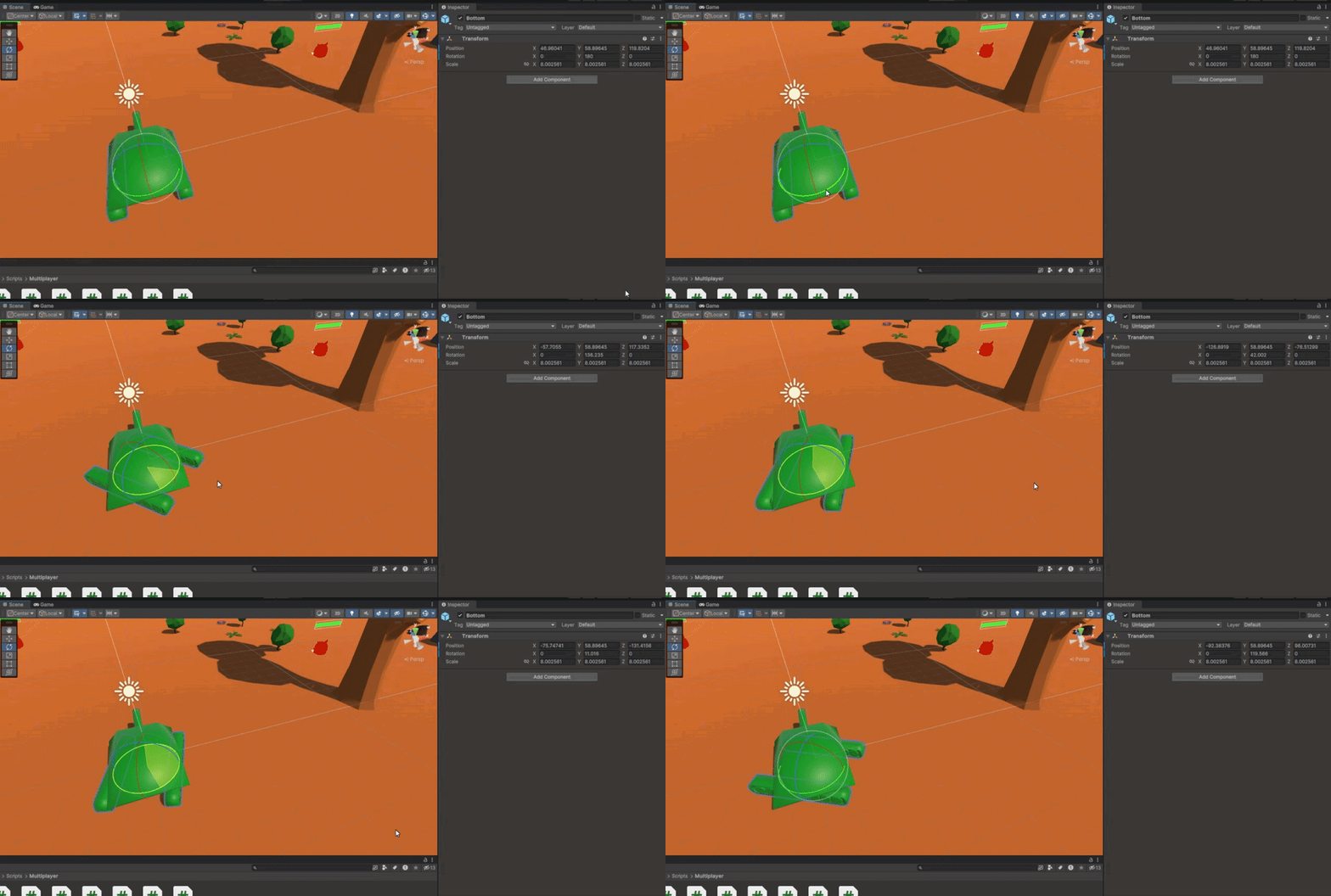
I realised that when I rotate the child object, the position changes
https://gyazo.com/113f12bc7b117d4cd2bd63c21778f214.gif
Is there some sort of formula that I have to apply to change the position when I'm rotating the child object?
^ still haven't found anything for this unfort
 buoyant knot
line 32 overwrites lines 26 and 30
rich adder
full imp
I realised that when I rotate the child object, the position changes
https://gya...
the child is moving maybe because pivot is not fully centered
not sure
main anchor
buoyant knot
line 32 overwrites lines 26 and 30
i deleted line 30, would that fix it? or should i delete line 32
rich adder
full imp
I realised that when I rotate the child object, the position changes
https://gya...
ur pivot is in center mode right now so its hard to tell where it is
buoyant knot
main anchor
i deleted line 30, would that fix it? or should i delete line 32
i’m saying all your rotation lines are overwriting and deleting whatever you had before
main anchor
buoyant knot
i’m saying all your rotation lines are overwriting and deleting whatever you had...
oh ight icic
sterile radish
rich adder
did you check console for errors. ?
if there is none, make sure to Debug.Log the...
I debug.logged some stuff and it turns out the function is actually being called but the code inside it (after the debug.log line) is not being properly ran
buoyant knot
but i think you need to multiply the quaternions
or make one quaternion with both X and Y euler angles
but idk how the math works out
rich adder
sterile radish
I debug.logged some stuff and it turns out the function is actually being called...
did you check the hirerchy to see if they're spawning ? pause simulation and check their position
rich adder
fr
sterile radish
rich adder
did you check the hirerchy to see if they're spawning ? pause simulation and che...
yes, there is no bullet clone in the hierarchy
buoyant knot
all you need to know is linear operators will not betray you
and linear operators don’t normally commute
rich adder
sterile radish
yes, there is no bullet clone in the hierarchy
which line you put debug.log
buoyant knot
rotate by X then rotate by Y is NOT the same as rotate by Y then X
very important to remember this
never forget that
sterile radish
rich adder
which line you put debug.log
https://hatebin.com/qpowyvqwoh
at line 36
buoyant knot
anyway, off on plane. later
rich adder
sterile radish
https://hatebin.com/qpowyvqwoh
at line 36
if nothing is spawning after it you have def have a NRE then
slender nymph
sterile radish
https://hatebin.com/qpowyvqwoh
at line 36
the only reason the code following the Debug.Log would not run is if you get an exception on line 37
sterile radish
rich adder
if nothing is spawning after it you have def have a NRE then
what is a NRE?
sterile radish
slender nymph
the only reason the code following the Debug.Log would not run is if you get an ...
oh okay
slender nymph
NRE == NullReferenceException
rich adder
sterile radish
what is a NRE?
You said function is running because of log , did you originally have the log in the same spot ?
sterile radish
idk all my values in the inspector are filled out
sterile radish
rich adder
You said function is running because of log , did you originally have the log in...
no i only put it after you suggested
rich adder

so where did you put it before
when you said this
you have to be specific, I dont know what you did
sterile radish
rich adder
at line 36 (the first line inside of the for loop)
halcyon osprey
halcyon osprey
Hey again, followed through a bit more and got pretty good progress going, I und...
Didn't know about the code blocks, sorry. Here you go, I also added comments on what I knew and noted what I didn't understand : https://hastebin.com/share/givipeheya.csharp
Hastebin is a free web-based pastebin service for storing and sharing text and code snippets with anyone. Get started now.
rich adder
sterile radish
at line 36 (the first line inside of the for loop)
ok so it was at the same spot.. could've just said that
sterile radish
oh sorry
rich adder
anyway so yes then check console for errors
Firing!!!" should be printing 3 times, if it only printed once on click you def have NRE lol
sterile radish
rich adder
`Firing!!!"` should be printing 3 times, if it only printed once on click you de...
yes it printed 3 times after i only clicked once
 slender nymph
show the entire console window
sterile radish
 slender nymph
no exceptions which means the code is running just fine
are you just not seeing the spawned bullets? because that could be a positioning or sorting layer issue
sterile radish
omg i think i know why
rich adder
🥁
slender nymph
ooh maybe it's an issue with collision detection and the bullet is being immediately destroyed because it collides with whatever is shooting it
sterile radish
yes i fixed it!!! it turns out on my bullet script i added a thing where whenever it collided with something it would destroy itself (thing is that whenever I would shoot, all of the bullets would collide with each other so they were actually spawning but only for like 0.1 seconds)
slender nymph
put your bullet on a layer that doesn't collide with whatever is shooting it so that won't happen
rich adder
sterile radish
yes i fixed it!!! it turns out on my bullet script i added a thing where wheneve...
no wonder they didnt even show in the hierarchy
sterile radish
rich adder
no wonder they didnt even show in the hierarchy
yeah lol
rich adder
sterile radish
yeah lol
nice lol
btw there is a feature to do game frame by frame, sometimes it can help find these quick things
 tulip venture
"Parameter 'Speed' does not exist." although it does, any work around?
{
if (moveDirection == Vector3.zero)
{
anim.SetFloat("Speed", 0, 0.2f, Time.deltaTime);
}
else if (moveDirection != Vector3.zero && !Input.GetKey(KeyCode.LeftShift))
{
anim.SetFloat("Speed", 0.5f, 0.2f, Time.deltaTime);
}
else if(moveDirection != Vector3.zero && Input.GetKey(KeyCode.LeftShift))
{
anim.SetFloat("Speed", 1, 0.2f, Time.deltaTime);
}
}``` swift crag
It does not exist.
slender nymph
are you sure you are referencing the correct animator?
swift crag
Perhaps you have a parameter named " Speed", with a leading space
(i forget if you're allowed to do that)
or perhaps you have the wrong animator, yes
tulip venture
 tulip venture
slender nymph
are you sure you are referencing the correct animator?
tulip venture
slender nymph
are you sure you are referencing the correct animator?
im pretty sure yes
slender nymph
well it's either that or your parameter has whitespace in it
swift crag
double click on the parameter in the parameter list and make sure the name doesn't have any spaces at the end
tulip venture
swift crag
double click on the parameter in the parameter list and make sure the name doesn...
nope
tulip venture
slender nymph
well it's either that or your parameter has whitespace in it
ive also got this thing
anim = GetComponentInChildren<Animator>();```which is called On Start
slender nymph
and you're certain it gets the correct animator?
rich adder
tulip venture
nope
what about the one in the Parameters section of animator, sometimes the one in blend tree isn't the same
 warped sable
Anyone have any ideas why I can build locally but when I try to build using unity automation cloud build im getting a gradle error.
ERROR: Starting a Gradle Daemon, 1 incompatible Daemon could not be reused, use --status for details
slender nymph
not a code issue
tulip venture
 tulip venture
rich adder
what about the one in the Parameters section of animator, sometimes the one in b...
tulip venture
rich adder
what about the one in the Parameters section of animator, sometimes the one in b...
ive only got the one parameter
swift crag
assign the animator directly to rule out having the wrong animator
tulip venture
and this means its connected right?
 rich adder
tulip venture
and this means its connected right?
rich adder
tulip venture
and this means its connected right?
no necessarily
You can type anything there and Blend Tree doesn't complain
tulip venture
swift crag
assign the animator directly to rule out having the wrong animator
in the script?
swift crag
well, in the inspector
serialize the anim field and drag the correct animator into it
tulip venture
rich adder
You can type anything there and Blend Tree doesn't complain
so how do i properly connect them?
tulip venture
swift crag
serialize the `anim` field and drag the correct animator into it
alright
rich adder
tulip venture
so how do i properly connect them?
make sure you do have speed here btw
 tulip venture
i do
slender nymph
and that is where you checked for whitespace in the parameter name?
tulip venture
yes
rich adder
i sometimes paste it directly from params list to code
and turn it into a string to hash
cause strings 💩
tulip venture
whats hash? hashtag? lol
swift crag
you turn the string into an integer
rich adder
dont worry about that rn lol but yea
swift crag
this integer is what's actually used to identify the parameter
rich adder
tulip venture
whats hash? hashtag? lol
i was gonna say hashbrowns but Fen beat me with the real answer xD
swift crag
shaders use the same idea
tulip venture
okay okay
swift crag
each name is mapped to an integer
rich adder
🚅 numbers 🚄:💨
swift crag
also, show us the parameter list if the error is persisting
 copper perch
also what does this mean?
Like do I need to tell google play about my sketchfab assets, and pixabay and zapsplat sounds?
I copy pasted it below from play store console
Provide advance notice to the Google Play App Review team
The Google Play App Review team accepts advance notice about your upcoming app or store listing publishing event.
We only accept advance notice in the following scenario(s):
You have written documentation proving that you have permission to use a 3rd party's intellectual property in your app or store listing (e.g. Brand names and logos, graphic assets, audio, etc.).
You have written documentation proving that you have permission from a government or government agency to make apps on their behalf (e.g. apps that facilitate a government process such as voting or ID validation). Learn More
You have written documentation proving that you have permission from a recognized healthcare organization to develop and distribute an app in affiliation with them. Learn More
You have gambling or casino-style elements in your game, and need to provide your Korean Game Rating and Administrative Committee (GRAC) rating certificate to Google so your game can be distributed in Korea. Learn More
Please Note: If you submit a request that's not covered by the above scenario(s), you may not receive a response. For other questions, contact our support team.
slender nymph
this is a code channel
tulip venture
well i ran into a problem
my animator controllers are completely broken
i dont even know how or why it happened
but theyre like, completely blank
and i get a ton of errors when creating new ones

 teal viper
tulip venture
and i get a ton of errors when creating new ones
teal viper
tulip venture
and i get a ton of errors when creating new ones
Try resetting windows layout or removing the animator tab and adding it again.
tulip venture
worked 👍
 grizzled stirrup
is there a way i can check the rotation of something
like which direction it's facing
teal viper
grizzled stirrup
is there a way i can check the rotation of something
transform.rotation or transform.forward depending
grizzled stirrup
ok ty
 rotund hull
i am trying to make a camera follow adn whenever a "Block" tagged object comes into the trigger the object is activated and the opposite when exited, but its not working
!code
eternal falconBOT
Posting code
📃 Large Code Blocks
Use links to services like:
https://gdl.space/, https://paste.ofcode.org/, https://hatebin.com/, https://paste.myst.rs/, https://hastebin.com/
📃 Inline Code
Surround code with three backquotes. Not quotation marks.
To format as C#, add cs to the first line:
```cs
// Your code here
```
Add a comment with a line number if there is an error message.
rotund hull
slender nymph
rotund hull
i am trying to make a camera follow adn whenever a "Block" tagged object comes into the trigger the object is activated and the opposite when exited, but its not working
 acoustic arch
https://hatebin.com/gfrtgytlzy
im getting a null error after i changed from not static -> static -> not static to test something
im not sure how come
rotund hull
slender nymph
https://unity.huh.how/physics-messages
thank you
 polar acorn
acoustic arch
https://hatebin.com/gfrtgytlzy
im getting a null error after i changed from not ...
polar acorn
acoustic arch
https://hatebin.com/gfrtgytlzy
im getting a null error after i changed from not ...
What error
What line
acoustic arch
polar acorn
What error
it says in a comment but i think its 16
polar acorn
acoustic arch
it says in a comment but i think its 16
Then either inventorySlots or inventorySlots[i] is null
Try using logs to find out which
acoustic arch
polar acorn
Then either `inventorySlots` or `inventorySlots[i]` is null
oh ok so when i outputted inventorySlots[any] it was null
would the objects reset in the inspector after changing from static to not static?
polar acorn
acoustic arch
oh ok so when i outputted inventorySlots[any] it was null
Then that would be the problem. You're trying to get the itemInSlot of nothing
acoustic arch
ill look into it
acoustic arch
polar acorn
Then that would be the problem. You're trying to get the `itemInSlot` of nothing
🙄

yeah thats why, is there a way i can make all the slots not just vanish after any small change?
polar acorn
acoustic arch
yeah thats why, is there a way i can make all the slots not just vanish after an...
they don't
acoustic arch
polar acorn
they don't
idk why this is happening then
polar acorn
acoustic arch
idk why this is happening then
What is happening?
teal viper
acoustic arch
idk why this is happening then
Didn't you change something to static? Probably because of that.
acoustic arch
teal viper
Didn't you change something to static? Probably because of that.
it is but it happens when i change anything
polar acorn
acoustic arch
it is but it happens when i change anything
Define "Anything"
acoustic arch
polar acorn
What is happening?
whatever is set to anything in the inspector for what i change sets it to null in the inspector
polar acorn
acoustic arch
whatever is set to anything in the inspector for what i change sets it to null i...
What are you changing
polar acorn
acoustic arch
i just made it static
That's changing a lot
acoustic arch
i bet
polar acorn
The reason the list was deleted was because you deleted it
static variables don't belong to any instances of the class, which means this instance no longer had a list
So, the values disappeared because you literally removed the variable from this object
acoustic arch
polar acorn
static variables don't belong to any instances of the class, which means this in...
how exactly do static variables work?
theres only 1 instance of them correct?
polar acorn
acoustic arch
how exactly do static variables work?
They belong to the class itself
Not any specific instance of it
acoustic arch
and cant be changed outside the class?
polar acorn
acoustic arch
and cant be changed outside the class?
That would be determined by the access modifier, if it's private or public
acoustic arch
yeah
polar acorn
and has nothing to do with the static-ness
 summer stump
acoustic arch
what use does it do being static
summer stump
acoustic arch
what use does it do being static
You can access the variables and methods from the Type, not an instance
Which makes sense sometimes, but if you want more than one, it does not
Generally you need to be very cautious when making something static
polar acorn
acoustic arch
what use does it do being static
a static variable belongs to the class. Anything with a reference to the class can access that value
acoustic arch
summer stump
You can access the variables and methods from the Type, not an instance
Which ma...
oh so its like if you wanted to make a variable with that type
the static variable would be the same inside it
summer stump
acoustic arch
oh so its like if you wanted to make a variable with that type
Not quiite
teal viper
It's simply a matter of where the variable is stored. Instead of being stored in an instance, it's stored on the type itself.
If you don't understand that, you probably need to learn a bit about object oriented design in general.
polar acorn
acoustic arch
oh so its like if you wanted to make a variable with that type
Imagine a class is like a blueprint of a house. It is not actually a house, it just says how to make one. You cannot live inside a blueprint, and if you looked at a house you couldn't tell whether the builprint that it was based off of had white or black ink
A static variable is something about the blueprint
rich adder
acoustic arch
i do get it
public class Foo
{
    public static string Name;
    public string LastName;
}

public class Main
{
    private void Method()
    {
        Foo.Name = "Awesome";

        Foo foo = new Foo();
        foo.LastName = "Sauce";
    }
}```
You would not be able to doo foo.Name since it Belongs to the class itselfA normal instance variable is a variable of the house
acoustic arch
oh so you can just let the classes type be the reference for it
which is basically what you guys have been telling me
acoustic arch
rich adder
```cs
public class Foo
{
public static string Name;
public string LastNa...
would Name be changed in the Foo class?
or only within the Method
rich adder
acoustic arch
would Name be changed in the Foo class?
it only belongs to Foo so instances dont have it
acoustic arch
so if i said
private string MyName = Foo.Name;
//MyName = "Awesome"
if i said that somewhere else
rich adder
that would do nothing but overwrite what you took
you can only have 1 Name so it would not be useful for example in that case
acoustic arch
im just wondering like if you had a 3rd class and did Debug.Log(Foo.Name);
what would it output
acoustic arch
so null
polar acorn
acoustic arch
what would it output
Whatever value Foo.Name was set to
polar acorn
acoustic arch
so null
Strings can't be null
acoustic arch
""
rich adder
well
rich adder
polar acorn
Strings can't be null
arent they reference type?
acoustic arch
polar acorn
Whatever value `Foo.Name` was set to
inside the Foo class, like a default value
polar acorn
rich adder
arent they reference type?
In C# they're kind of a weird hybrid, they're immutable reference types so for all intents and purposes they behave like structs and also like arrays
slender nymph
strings can be null. there is even a IsNullOrWhiteSpace method that checks for null
rich adder
I was wondering cause sometimes I do get null but never tried in unity. yeah and I had to use this method ^
copper perch
I made a feature graphic on Canva.
Just like the google playstore told me to do, because they need a feature graphic image for the gameplay video.
I made my image on Canva by 1024 x 500 pixals and google will not accept it for some reason.
I downloaded it to the file explorer and uploaded it but it will not take it.


 slender nymph
this is still a code channel. and has nothing to do with unity
rich adder
copper perch
this isn't code related is it?
polar acorn
My bad then, I'm juggling a bunch of programming languages and String is different in every language
polar acorn
copper perch
I made a feature graphic on Canva.
Just like the google playstore told me to do,...
Show code
copper perch
rich adder
this isn't code related is it?
oh sorry
acoustic arch
polar acorn
My bad then, I'm juggling a bunch of programming languages and String is differe...
i can barely even learn a single one
acoustic arch
idk what static is, but i do know Func<> and delegates
rich adder
acoustic arch
idk what static is, but i do know Func<> and delegates
you shouldn't really worry about static unless you have specific reasons to use it you shouldn't
if you're making some type of extension method or something they're pretty much needed, but thats another topic
acoustic arch
rich adder
if you're making some type of extension method or something they're pretty much ...
im still trying to learn return values very well 💀
but i still use them and they work
rich adder
acoustic arch
but i still use them and they work
😏 hope you're at least following a structured course.
acoustic arch
rich adder
😏 hope you're at least following a structured course.
uhhhhhh totally, i just use c# docs like w3 and microsoft
plus some Sololearn c# on my phone but like i gotta go through like a bunch of basic stuff for me till i get to stuff i need to learn
rich adder
later try https://edabit.com/ too
 static cedar
YouTube 
acoustic arch
static cedar
**YouTube** <:UnityChanPanicWork:885169594766077984>
thats where i started i managed to find a pretty good playlist of videos that did great for me
 dense root
what's a good way to get the image to switch based on the word in my placeholder text? i.e. apple to hand
rich adder
dense root
do a switch or something
dense root
can you explain a bit more?
rich adder
dense root
can you explain a bit more?

W3Schools offers free online tutorials, references and exercises in all the major languages of the web. Covering popular subjects like HTML, CSS, JavaScript, Python, SQL, Java, and many, many more.
dense root
well how do I change the image programmatically?
rich adder
image.sprite = mynewsprite;
dense root
something like this
inputField = GameObject.Find("InputField (Legacy)").GetComponent<InputField>();
rich adder
dense root
something like this
` inputField = GameObject.Find("InputField (Legacy)")...
oh my
why are you doing this
dense root
It's for my inputfield
rich adder
dense root
It's for my inputfield
[SerializeField] private InputField inputField; <--- Assign from inspector
you probably should be using TextMeshPro version of UI inputfield / text
dense root
It works so I'd rather not touch that right now
Just loooking to change the image based on the word
rich adder
dense root
It works so I'd rather not touch that right now
if somehow name ever changes your whole code breaks, why do you want brittle code
such a small change takes a second to do..
dense root
How do I get the currentWord from my ReadInput.cs script into my ChangeImage.cs script?
rich adder
dense root
How do I get the `currentWord` from my ReadInput.cs script into my ChangeImage.c...
make a reference, use the . operator
dense root
I'm not sure how to use SerializedReferences, is there an easier way?
rich adder
dense root
I'm not sure how to use SerializedReferences, is there an easier way?
that is the easiest way
whats so diffcult to drag something in a field in the insepctor 🤔
that should been one of the first things of unity to learn
dense root
because i don't want to break anything
rich adder
what you're doing now is more prone to breaking then actually listentning to someone who maybe has a little bit more experience ?
dense root
i'm listening
dense root
okay let me read this real quick
so I want to serialize component references?
enabling me to access said component in other scripts?
rich adder
dense root
so I want to serialize component references?
yes usually
rich adder
dense root
enabling me to access said component in other scripts?
thats what a reference is for
you clicked the first link yes?
rich adder
dense root
do I serializefield in the changeimage script?
yes
dense root
public class ChangeImage : MonoBehaviour
{
    [SerializeField] public ReadInput readInput = null;

    public Image oldImage;
    public Sprite newImage;


    // Start is called before the first frame update
    void Start()
    {
        Debug.Log(ReadInput.currentWord);
    }
no dice
rich adder
dense root
```
public class ChangeImage : MonoBehaviour
{
[SerializeField] public ReadI...
dense root
i'm reading it right now
yes i'm reading that :)
oh i need to drag to my changeimage component
rich adder
also you're not using the variable in your script you sent ReadInput is not the instance, you're just telling the script you're going to put that type in there
do note [SerializeField] is only used on private fields to show inside inspector, they're not necessary on public because they are serialized in inspector already
dense root
How do I drag my reference to the target component?
 rich adder
dense root
How do I drag my reference to the target component?
rich adder
dense root
How do I drag my reference to the target component?
select the script /object with the field you want to fil, and lock the inspector at top right or right click script pop out with properties
I dont understand you already have public fields already so you should know how to use serializefield 🤔
nothing changes..
dense root
I'm super new I was following a t utorial
rich adder
mhm well now you know what serialized reference is
dense root
thank you
 solemn fractal
Hey guys, i want to make a way that when I fire with my player, and it hits an enemy the bullet will bounce to the closes enemy 1 time. Cant figure it out a way to do it, any ideas?
 silent valley
Hey, How can I reference the sliders background image? I managed to find a way to reference the fill as seen in the code. But cant find a way to reference the background other than having to drag it in the inspector
 rich adder
solemn fractal
Hey guys, i want to make a way that when I fire with my player, and it hits an e...
rich adder
solemn fractal
Hey guys, i want to make a way that when I fire with my player, and it hits an e...
find the closest enemy and redirect the bullet
you can use for example Distance or Physics
or both
solemn fractal
yeah, i thought about that. but I am trying to fit that into my logic.. so i guess I will need to do that way ok
thank you
rich adder
solemn fractal
yeah, i thought about that. but I am trying to fit that into my logic.. so i gue...
it depends how your enemies also setup in terms of colliders and whatnot
for example my enemies have limbs usually
so I look for specific limb closest
solemn fractal
in my case all the collisions for the player bullet are being held into the bullet script it self
using OnTrigger2d
rich adder
how do you move the bullet in the first place
solemn fractal
it goes where m y mouse is
    private void Shoot(){

        Bullet bullet = Instantiate(_bullet, new Vector3(transform.position.x, transform.position.y, 0 ), Quaternion.identity);
        Vector3 mousePosition = Camera.main.ScreenToWorldPoint(Input.mousePosition);
        mousePosition.z = transform.position.z;
        Vector3 moveDirection = (mousePosition - transform.position).normalized;
        bullet.GetComponent<Rigidbody2D>().velocity = moveDirection * bulletSpeed;
        Destroy(bullet.gameObject, 2.0f);

}```background image would be in the child no ?
look at hierarchy
solemn fractal
but the shoot method is in the player not in the bullet
bullet class is just managing the collisiongs with it self
rich adder
solemn fractal
bullet class is just managing the collisiongs with it self
so when it collides you can check closest enemy and ray cast and give direction / velocity to it the same way
solemn fractal
hmm.. i never used raycast. tried once but seems kind of complicated.. will need to check better how it works
rich adder
well raycat is useful if you want to hit closest enemy but not go through walll, so maybe get one that isnt behind a wall
silent valley
rich adder
background image would be in the child no ?
You are correct. But I get errors in my game

 solemn fractal
rich adder
well raycat is useful if you want to hit closest enemy but not go through walll,...
solemn fractal
rich adder
well raycat is useful if you want to hit closest enemy but not go through walll,...
ok thank you
rich adder
silent valley
You are correct. But I get errors in my game
what is fill rect because it doesnt have any children
also what is the problem of not using the inspector, why not just serialize the references ?
solemn fractal
are those 2 lines the same? I can omit the private and it will be private? cs private float _number; float number;
silent valley
rich adder
what is fill rect because it doesnt have any children
it's to reference the fill so IG it doesnt have a child.
rich adder
solemn fractal
are those 2 lines the same? I can omit the private and it will be private? ```c...
yup
its ugly but yes
solemn fractal
yeah ok hahaha thank you!!
silent valley
rich adder
also what is the problem of not using the inspector, why not just serialize the ...
I just want to learn how to do stuff inside scripts without cluttering the inspector.
swift crag
silent valley
I just want to learn how to do stuff inside scripts without cluttering the inspe...
Your new code is way worse than the tiny amount of space a serialized reference would take up
swift crag
silent valley
You are correct. But I get errors in my game
This code is incredibly fragile. it depends on the exact arrangement of your objects, and will break as soon as you rearrange the hierarchy at all
Just serialize the field.
Now, if you have many components that are all logically grouped together, it might make sense to create a new component to tie them together
public class Statbar : MonoBehaviour {
  public Image fill;
  public TMP_Text counter;
}
now you can just reference a single Statbar, then grab the component you need from it
statbar.fill.fillAmount = 0.5f;
You could also abstract it, of course
statbar.SetAmount(30f);
buoyant knot
i only search for component in child if I’m super sure it’s going to be there. like in a script where I am setting the transform’s parent
swift crag
public class Statbar : MonoBehaviour {
  [SerializeField] maximumValue;
  [SerializeField] Image fill;
  [SerializeField] TMP_Text counter;

  public void SetAmount(float amount) {
    fill.fillAmount = amount / maximumValue;
    counter.text = $"{amount} / {maximumValue}";
  }
}
now you don't even care how the statbar works
your code just tells it to show an amount
buoyant knot
this is correct
listen to him, and don’t ignore just because you got your code working for 5 seconds
silent valley
buoyant knot
listen to him, and don’t ignore just because you got your code working for 5 sec...
Fen... has taught me alot. He is one person I will ALWAYS listen to :p
swift crag
silent valley
You are correct. But I get errors in my game
I used to write code that looks like this, but I avoid it like the plague now
Even when just hacking something together really quickly, it's just easier to assign a few references and be done with it
I have a lot of very small components in my games
using TMPro;
using UnityEngine;
using UnityEngine.UI;

public class InputActionIconPart : MonoBehaviour
{
    public TMP_Text label;
    public Image image;
}
heck, this one is just two components glued together
I use this to put together tutorial popups
 buoyant knot
i usually serialize a ref to the gameobject (or just one component), then GetComponent
swift crag
I have zero serialized GameObject fields in this game
okay, well, there are two public ones, but that's because I wanted to debug something in the inspector :p
those fields are for remembering the last-selected game object for a UI
silent valley
swift crag
```cs
using TMPro;
using UnityEngine;
using UnityEngine.UI;
public class InputA...
Would you do this even if you're ever going to use it once? Your popup is used many times I assume
swift crag
well, I only use it in one place in my code
 hybrid gust
been trying to reproduce the procedural skybox shader's behaviour of drawing a sun based on the main directional light. How can I do something similar in a shader graph shader?
swift crag
Even if I'm only using something once, I'll consider making a component for it. If I don't, then I'm still going to reference everything
silent valley
Giving it a go now. Be right back. thanks Fen. You're always very clear
swift crag
no prob (:
 hidden path
i wanna add a controlable bird to my game i am having trouble with the controller do you guys know any tutorial for the movement controller
solemn fractal
rich adder
yup
I did something like that, but here inside here the bullet wont move right? it would need to stay in update method i imagine ```cs
private void OnTriggerEnter2D(Collider2D other){
    if(other.CompareTag("Enemy")){

        Enemy enemy = other.GetComponent<Enemy>();

        Collider2D[] nearbyEnemies = Physics2D.OverlapCircleAll(transform.position, _detectionRadius);

        foreach (Collider2D enemyCollider in nearbyEnemies){

            if (enemyCollider.CompareTag("Enemy") && enemyCollider != enemy.gameObject){

                // Calculate the direction to the nearby enemy
                Vector3 moveDirection = (enemyCollider.transform.position - enemy.transform.position).normalized;
                Bullet bullet = Instantiate(_bullet, new Vector3(transform.position.x, transform.position.y, 0 ), Quaternion.identity);
                bullet.GetComponent<Rigidbody2D>().velocity = moveDirection * _bulletSpeed;
                Destroy(bullet.gameObject, 1.0f);
            }
        } ```
solemn fractal
Just need to make it on update to test. but cant find a way..
 timber tide
why are you instantiating then destroying in the same frame or am I reading this wrong
solemn fractal
destroying after 1 sec
rich adder
oh right
solemn fractal
but i need that movement to happen on update.
rich adder
you only need to set vel once
rich adder
also how many bullets because this is only going to the last one in the loop
solemn fractal
i cant think a way to make the bullet hit 1 enemy and go to the other so what I did . or trying to do is basically when i hit the enemy it will spawn another bullet and go to the closest enemy
but i need that movement code to be in start.. but how if it is inside the on trigger 2d?
and needs to be inside the on trigger 2d as I have all the info there
timber tide
You can make a init method for your bullets and just assign to that when you instantiate them
solemn fractal
hmm ok, will try. Thank you
timber tide
Yeah, what you really want is a constructor, but you can't use those when you derive from a mono. So, your own initializing method is the next best thing.
solemn fractal
well it seems too advanced for me. I will try something else for now, but took note here, thank you !!
rich adder
solemn fractal
i cant think a way to make the bullet hit 1 enemy and go to the other so what I ...
what is currently happening
with the code
buoyant knot
what is going on here
solemn fractal
rich adder
as you did in the fire method
I basically just copied and pasted
what I done before
rich adder
Im guessing youre spawning it at the wrong spot
and bullet is probably colliding with enemy already
solemn fractal
but there is where I have the actuall position of the one that was hit by the bullet
rich adder
solemn fractal
but there is where I have the actuall position of the one that was hit by the bu...
where ?
solemn fractal
how can I know outside the on triggerEnter2d that who is who
buoyant knot
so what are you trying to do
rich adder
solemn fractal
how can I know outside the on triggerEnter2d that who is who
slow down a sec mate
solemn fractal
buoyant knot
so what are you trying to do
shoot, hit one enemy and spawn or make the same bulelt go to the closes enemy
rich adder
you should fix your spawn point first on the second bullet
buoyant knot
so like a targetted ricochet?
solemn fractal
buoyant knot
so like a targetted ricochet?
basically yeah. after kil the first boss I would get a new skill and that skill would be the bounce bullet, that can bounce 1 time
buoyant knot
ok, so bullet should have an OnTriggerEnter to know when you hit an enemy, right?
rich adder
I would say use the same bullet but Ig instantiating another is ok
solemn fractal
hit 1 enemy and go to the nearest enemy
solemn fractal
buoyant knot
ok, so bullet should have an OnTriggerEnter to know when you hit an enemy, right...
that is what I have
buoyant knot
ok, are you in 2D or 3D?
solemn fractal
2d
buoyant knot
ok that makes this way easier
solemn fractal
buoyant knot
ok that makes this way easier
I wish.. haha!
silent valley
@swift crag works like a charm and actually makes things hella easier

 buoyant knot
solemn fractal
I wish.. haha!
buoyant knot
solemn fractal
I wish.. haha!
 rich adder
they have that already afaik
timber tide
I actually just change direction for my ricochet projectiles, but spawning another can work. Problem is if you want to save a history of targets already hit it's probably better to use the same bullet.
silent valley
is there a way to Serialize or something or do i ALWAYS have to make something public to access from another script?
buoyant knot
ok so you have a list of all colliders/objects in a radius of the first bullet collision?
solemn fractal
buoyant knot
https://docs.unity3d.com/ScriptReference/Physics2D.OverlapCircle.html
people here already sent me that today.. but well, for a noob looks harder than it seems.
solemn fractal
I will try to understand that overlap circle better tomorrow and see what I can get.
thank you
buoyant knot
let me just jot down the strat
solemn fractal
buoyant knot
https://docs.unity3d.com/ScriptReference/Physics2D.OverlapCircle.html
I am using it already
solemn fractal
buoyant knot
https://docs.unity3d.com/ScriptReference/Physics2D.OverlapCircle.html
if (!_hasBouceShot){

 Collider2D[] nearbyEnemies = Physics2D.OverlapCircleAll(transform.position, _detectionRadius);

  foreach (Collider2D enemyCollider in nearbyEnemies){

  if (enemyCollider.CompareTag("Enemy") && enemyCollider != enemy.gameObject){

      // Calculate the direction to the nearby enemy
      Vector3 moveDirection = (enemyCollider.transform.position - enemy.transform.position).normalized;
      Bullet bullet = Instantiate(_bullet, new Vector3(transform.position.x, transform.position.y, 0 ),Quaternion.identity);
      bullet.GetComponent<Rigidbody2D>().velocity = moveDirection * _bulletSpeed;
      Destroy(bullet.gameObject, 1.0f);
   }
   }
}```- OnTriggerEnter2D: check if you hit a valid enemy.
- If so, use OverlapCircle to make a list OR array of all colliders in a radius of the enemy you hit.
- Filter through that array/list. Use Collider2D.Distance to know how far the bullet collider is from from that collider. We enumerate through that list to find colliders that 1) are NOT the enemy we just hit, 2) a collider for a valid target, and 3) has the smallest distance (using Collider2D.distance
solemn fractal
my prob is that my code for the movement is inside the OnTrigger2d so it wont move.. as it is not inside the update method
solemn fractal
buoyant knot
1) OnTriggerEnter2D: check if you hit a valid enemy.
2) If so, use OverlapCircle...
 rich adder
solemn fractal
my prob is that my code for the movement is inside the OnTrigger2d so it wont mo...
rich adder
solemn fractal
my prob is that my code for the movement is inside the OnTrigger2d so it wont mo...
how do you move it whe nyou first shoot ?
buoyant knot
I would define a method in the scope here. bool IsValidTarget(Collider2D target). write this function to return true when the collider belongs to a valid target
solemn fractal
void Update()
    {
        PlayerMovement();

        if (Input.GetKeyDown(KeyCode.R) && canShoot && Time.time >= _shootTimeZero || Input.GetKeyDown(KeyCode.R) && canShoot && Time.time >= _shootTimeZero){

            Shoot();
            _audioSource.Play();
            _shootTimeZero = Time.time + fireRate;

        }

        if (Input.GetKeyDown(KeyCode.R)) {

            ToggleShooting();

        }

        if (_isShooting && Time.time - _lastShotTime > fireRate){

            Shoot();
            _audioSource.Play();
            _lastShotTime = Time.time;
        }
}```are you sure _hasBounceShot should have a ! in front?
solemn fractal
buoyant knot
are you sure _hasBounceShot should have a ! in front?
i tested without it, but the prob is that it is not inside update
first time it is inside update method and it its being shoot by the player Class
buoyant knot
that is not the question
rich adder
solemn fractal
```cs
if (!_hasBouceShot){
Collider2D[] nearbyEnemies = Physic...
  Collider2D[] colliders = Physics2D.OverlapCircleAll(bullet.transform.position, detectionRadius);
//
Collider2D closestCollider = colliders.OrderBy(c => Vector2.Distance(bullet.transform.position, c.transform.position)).FirstOrDefault();```if !hasBounceShot means to do that if it should NOT bounce
solemn fractal
buoyant knot
if !hasBounceShot means to do that if it should NOT bounce
at the time it is going inside the if as my variable is set as default to false
jsut for testing
i am forcing it to go inside the if
but later I will remove the !
buoyant knot
i see where the confusion is
solemn fractal
as it should only shoot when i get the power killing the boss
buoyant knot
ok and you want 1 bullet to make many bullets when it bounces
because that is what the code does
solemn fractal
1 bullet, make 1 bullet, and hit nearest target. well yeah if it was inside the update.. true
buoyant knot
and also it tries to destroy this bullet 10 times if it finds 10 enemy colliders
solemn fractal
didnt thinkg about that
buoyant knot
and it also makes 5 bullets if you find 1 enemy with 5 colliders
you see what the issue is now, right?
solemn fractal
a lot of issues
rich adder
solemn fractal
the most important one is that I am stuck still.. but I will try more tomorrow and see if I can get it done. Thank you all for the help.
solemn fractal
sometimes I jsut cant sleep when I cant do something on the code but its 3:22am and I need to work at 8h30
sadly
buoyant knot
rich adder
^^ https://discord.com/channels/489222168727519232/497874004401586176/1176361036...
you’re doing this the Linq way, which is smart, but I don’t think he’ll learn the lessons he needs to learn using this
you’re teaching chess, while the man is learning checkers
rich adder
buoyant knot
you’re doing this the Linq way, which is smart, but I don’t think he’ll learn th...
I figured they can just plop that in and move into the actual fun part which is making bullet go from one enemy to the closest in 1 go but yeah ig lol
buoyant knot
solemn fractal
sometimes I jsut cant sleep when I cant do something on the code but its 3:22am ...
point being, make one GameObject target = null. Use a for loop to go through all colliders you found. If 1) the collider doesn’t belong to the current target object, 2) belongs to a valid target, and 3) has a closer distance than the current target, then replace target with the one you find
 frail adder
Why is there a little hiccup in the middle of the run? When I look at the y values of the virtual camera and the player, the virtual camera's y value seems to fluctuate slightly at random moments when the player is moving.
buoyant knot
then after for loop, if target != null, that means you found a valid closest target. so then shoot it
rich adder
frail adder
Why is there a little hiccup in the middle of the run? When I look at the y valu...
hmm not sure its code related tho
frail adder
rich adder
hmm not sure its code related tho
yeah im not sure either, im using cinemachine to follow the player
rich adder
frail adder
yeah im not sure either, im using cinemachine to follow the player
I had the same thing happen to me in 2D although not sure its similiar problem
frail adder
rich adder
I had the same thing happen to me in 2D although not sure its similiar problem
what was the issue for you?
rich adder
frail adder
what was the issue for you?
I'm stil trying to find out xD I work mostly 3D for this exact reason, weird quirks
thought it was Pixel Perfect making it look extra wobbly
then tried a whole bunch of diff Transposer setting
summer stump
silent valley
is there a way to Serialize or something or do i ALWAYS have to make something p...
Not sure if you were answered, but there is [SerializeField]
silent valley
summer stump
Not sure if you were answered, but there is [SerializeField]
I did that and it still said I cant access it due to protection
rich adder
silent valley
I did that and it still said I cant access it due to protection
yes because its private
summer stump
silent valley
I did that and it still said I cant access it due to protection
Oh. Serialize only makes it visible in the inspector.
You need public to make it accessible in another script
silent valley
summer stump
Oh. Serialize only makes it visible in the inspector.
You need public to make it...
yeahh
Thought so. Just ought to ask if there was a secret code to keep it nice and privated but maybe be able to refrence something from it?
summer stump
silent valley
Thought so. Just ought to ask if there was a secret code to keep it nice and pri...
You can make it a property using get and set
So for example, making it publicly accessible but only privately settable:
public Transform target { get; private set; }
silent valley
summer stump
You can make it a property using get and set
So for example, making it publicly...
I will look into this. Thank you
frail adder
frail adder
Why is there a little hiccup in the middle of the run? When I look at the y valu...
I fixed the issue by switching out the capsule collider for a box collider, but with the box collider, it just got caught on the ground randomnly. Is this the best way to fix the issue?
rich adder
frail adder
I fixed the issue by switching out the capsule collider for a box collider, but ...
if you're using tiles use composite collider + static rigidbody
I think composite component already adds it
you'd have to also enable "used by composite"
the original problem might of been the same thing then
whats called Ghost colliders
lol
frail adder
rich adder
whats called Ghost colliders
wait what are ghost colliders and why are they only present when using a capsule collider?
dense root
So I've exposed my serialized reference to the target component:
[SerializeField] private ReadInput readInput;
Referenced the target component in the inspector (see pic)
But I still can't access the member I want
void Start()
{
    Debug.Log(ReadInput.cirrentWord);
}
 rich adder
frail adder
wait what are ghost colliders and why are they only present when using a capsule...
rich adder
frail adder
wait what are ghost colliders and why are they only present when using a capsule...
they're both the same problem
the capsule just "bounces"
because it probably has momentum
if you're using rb movement
frail adder
rich adder
if you're using rb movement
oh ok is there any workaround for that while still using a capsule collider?
rich adder
frail adder
oh ok is there any workaround for that while still using a capsule collider?
if they're tiles I told you can use the composite collider2d
rich adder
frail adder
oh ok is there any workaround for that while still using a capsule collider?
dense root
rich adder
dense root
So I've exposed my serialized reference to the target component:
`[SerializeFiel...
wdym you can't access it how ?
you're still not using the variable
you'tr tying to directly use the class which is non-static
frail adder
rich adder
https://docs.unity3d.com/Manual/class-CompositeCollider2D.html
im really sorry if this is an obvious question, but compositecollider2d only offers itself for box colliders and polygon colliders, is there any way to use it for a capsule collider?
dense root
oh... what's the best way to approach this?
rich adder
dense root
oh... what's the best way to approach this?
mate you literally named your reference to the component readInput
access the values through that
you can't use the class directly, its just a blueprint for an object
rich adder
yes
dense root
great thank you so much
rich adder
dense root
great thank you so much
you see how also with oldImage youre doing oldImage. instead of Image.
dense root
right
rich adder
it would make no sense to use class directly because they wouldn't be different ones you could use xD
dense root
right right haha
wait so i'm not getting an error anymore but it's not printing currentWord
hidden path
!learn
eternal falconBOT
:teacher: Unity Learn ↗
Over 750 hours of free live and on-demand learning content for all levels of experience!
dense root
is there something wrong with the way i'm calling this?
    void Start()
    {
        Debug.Log(readInput.currentWord);
    }
screenshot entire console in playmode
 rich adder
dense root
currentWord is a string so I should be good to go right?
rich adder
dense root
currentWord is a string so I should be good to go right?
its working mate
is just blank
rich adder
dense root
but currentWord is the word displayed
let me see where you assign it
the other script you grab its value from
dense root
This is where I set it
        if (inputField != null)
        {
            inputField.onEndEdit.AddListener(OnEndEdit);

            // Set the focus back to the input field
            inputField.Select();
            inputField.ActivateInputField();

            // Sets currentWord a random word
            currentWord = GetRandomWord();

            // This sets the placeholder text
            SwapPlaceholderText(currentWord);
        }
How it's set:
    string GetRandomWord()
    {
        if (placeholderWords.Count == 0)
        {
            Debug.LogWarning("No more words in the list.");
            return null;
        }

        // Use Random.Range to get a random index within the list
        int randomIndex = Random.Range(0, placeholderWords.Count);

        // Get the word at the randomly chosen index
        string randomWord = placeholderWords[randomIndex];

        //  Remove the selected word from the list
        placeholderWords.RemoveAt(randomIndex);

        // Return the selected word
        return randomWord;
    }
Aren't your tiles boxes? I saw it earlier, and i don't remember any capsules?
But if you do, I guess you'd need to approximate it with the polygon collider.
I don't really do 2d much though, so I'm not sure
frail adder
summer stump
Aren't your tiles boxes? I saw it earlier, and i don't remember any capsules?
Bu...
yeah, my character had a capsule collider, which was causing the original issue of some jittering
ive decided to just go with a box collider now so its all g
summer stump
frail adder
yeah, my character had a capsule collider, which was causing the original issue ...
CompositeCollider would be for the tiles, not the character. The characters collider shape is completely irrelevant here
rich adder
dense root
This is where I set it
```c#
if (inputField != null)
{
...
no i need to see the whole script
!code
eternal falconBOT
Posting code
📃 Large Code Blocks
Use links to services like:
https://gdl.space/, https://paste.ofcode.org/, https://hatebin.com/, https://paste.myst.rs/, https://hastebin.com/
📃 Inline Code
Surround code with three backquotes. Not quotation marks.
To format as C#, add cs to the first line:
```cs
// Your code here
```
Add a comment with a line number if there is an error message.
dense root
okay will do
you should be a mod with how active and helpful you are
would the mods be mad if i pinged them and suggested it? 😂
rich adder
dense root
would the mods be mad if i pinged them and suggested it? 😂
yeah its silly dont lol
but ty for kind thought
rich adder
dense root
okay will do
you're setting /printing it both in start
there is no guarantee the second script doesnt run first before text is set
well you can manually force order of scripts, that but thats out of the scope and usually last resort
frail adder
summer stump
CompositeCollider would be for the tiles, not the character. The characters coll...
oh shoot i completely misinterpreted where to put the collider okay tysm
rich adder
what I would do is just initialize the chosen word in Awake @dense root
dense root
how do you recommend I fix the order of precedence?
oh
so i declare awake and then initialize there?
rich adder
yes Awake runs before start in terms of event order
so its always best method for initialization
dense root
i see
rich adder
let me know if it prints know
dense root
but i don't get why it doesn't print anything to begin with
rich adder
its printing
dense root
like on the subsequent enters shouldn't it print currentWord?
rich adder
no
dense root
oh
rich adder
you only put it in Start
so it runs when unity tells it to
which is once in Start of script
You could use event but thats more advanced
OnCurrentWordChanged?.Invoke(currentWord);
dense root
it works! but only on the first press
 rich adder
its not first press, its first run
dense root
Maybe it has something to do with the fact I migrated all of my start code to Awake
rich adder
dense root
Maybe it has something to do with the fact I migrated **all** of my start code t...
well yeah now it sets the word first by the time Start is called by game loop, u already set the word when its read
dense root
but currentWord changes with each time the user presses enter (assuming input is correct)
rich adder
dense root
but `currentWord` changes with each time the user presses enter (assuming inpu...
I know
you need a way to tell the other script that
it wont magically do stuff
dense root
oh haha
hidden path
How do I make a controller for a bird I am stuck on this for days
dense root
how do i tell it to put the word on its script or it gets the hose again?
rich adder
lol Ideally you make an event Like I mentioned
dense root
how so?
rich adder
dense root
how so?
start with a UnityEvent which is easier
you see How you AddListener to EndEdit of Input ?
thats a unity event
everytime you EndEdit it gets invoked
you can do the same for the currentWord
dense root
so i want to addlistener?
rich adder
you could if its a UnityEvent yes, but you can also connect it via inspector
make a thread I'll explain it
summer stump
hidden path
How do I make a controller for a bird I am stuck on this for days
Gotta be more specific. A bird could have a lot of different kinds of controllers...
What do you WANT the bird to do?
summer stump
Since you were asking earlier, I assume you haven't taken a c# course? There are pinned resources in this channel, or I like
https://www.w3schools.com/cs/index.php
After that, move on to unity's learn pathways
!learn
eternal falconBOT
:teacher: Unity Learn ↗
Over 750 hours of free live and on-demand learning content for all levels of experience!
summer stump
There are a TON of ways to do it. Depends on desired movement feeling, genre, how complex you want it, whether you want realistic physics, 2D/3D, etc.
No problem!
 nimble apex
player control is a system, it is very broad, movement is just a small part of it
 patent compass
How can i make the selected tiger on 1 to jump to 3rd node.
using gameobjects as nodes.(red dots)
tiger can only jump if there is a sheep in between.
 timber tide
Make each node contain a reference for each direction (N, E, S, W) then populate them accordingly.
patent compass
timber tide
Make each node contain a reference for each direction (N, E, S, W) then populate...
the 3rdnode on right only has neighbouring nodes on left and bottom. So should i keep Top and right as null?
timber tide
Yeah, make each node always contain the exact amount of directions, and before trying to access the next node direction you'd check if it is null or not
if it's null then it's an invalid move
patent compass
timber tide
Yeah, make each node always contain the exact amount of directions, and before t...
How can i access the next node?
timber tide
Ah, actually the pinnacle makes cardinal directions a little tricky, so probably some extra logic there hmm
 languid spire
patent compass
How can i access the next node?
languid spire
patent compass
How can i access the next node?
what does your Node data structure look like?
patent compass
languid spire
what does your Node data structure look like?
I made a list called neighbouringNodes, and added the neighbouring nodes from the inspector to the list.
timber tide
patent compass
How can i access the next node?
You can just recursively call the next node, but always check if it's null beforehand
languid spire
I would suggest
List<Node> nodes
List<List<Nodes>> lines
where lines contains all of the nodes in any given line
patent compass
languid spire
I would suggest
```cs
List<Node> nodes
List<List<Nodes>> lines
```
where lines c...
so store all the nodes in one row to this lines list?
patent compass
timber tide
You can just recursively call the next node, but always check if it's null befor...
can you explain what you mean by recursively? sorry english isnt my primary language
languid spire
yes, store all of the rows with their corresponding nodes
patent compass
languid spire
yes, store all of the rows with their corresponding nodes
and then?
languid spire
then it is very easy to loop through and see what is connected to what
timber tide
How would a user select this move from the pinnacle to down here if that's valid at all
https://i.imgur.com/cSXgree.png
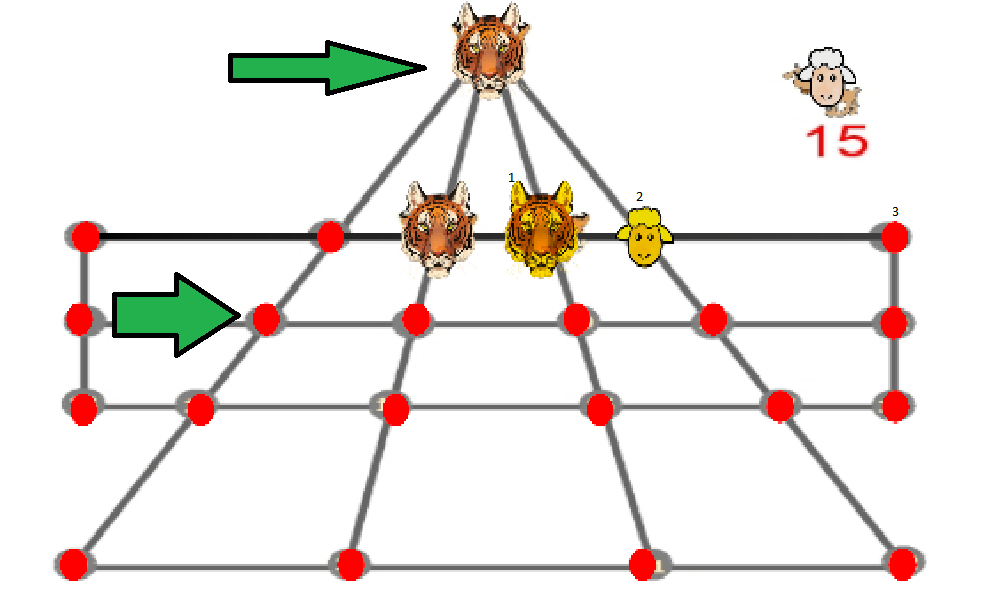
oh, it's this type of game I think I've played it
patent compass
timber tide
How would a user select this move from the pinnacle to down here if that's valid...
It can be done if a sheep is in between the arrows you posted.
timber tide
so node 0 to 8 can be a valid jump
patent compass
timber tide
so node 0 to 8 can be a valid jump
yup, as i said, if there is a sheep in between.
timber tide
Right, then I guess all you really need to do is check if the selected node is a neighbor, and if a sheep is available.
Node 0 could technically just have 4 South neighboring nodes in a list which you can check all from
languid spire
using my system
- Loop through lines and select each line which contains tiger1
- Loop through lines from 1 and select each line containing the destination node
- 2 should produce 1 line.
- loop through the nodes in line 2. If the distance between source and destnation is 1 it is possible
- If it is possible, does the node between source and dest contain a sheep
- It is a valid move
 umbral bough
Hi, I have a closed sprite shape that gets frustum culled when my players goes too high(it goes out of the view range) and for some reason it won't appear when the player gets back in view.
I can't consistently replicate this but am 100% sure it's frustum culling cuz I debug logged on in/visible and it doesn't log visible when it gets in player's view.
Can somebody please help me, I've been dying mentally for quite a while now.
Best case scenario would be disabling frustum culling for this object but I couldn't find anything on it.
Thanks in advance!
 wintry quarry
umbral bough
Hi, I have a closed sprite shape that gets frustum culled when my players goes t...
wintry quarry
umbral bough
Hi, I have a closed sprite shape that gets frustum culled when my players goes t...
You can always set the bounds for any renderer manually
teal viper
The issue is that they're using a sprite renderer with a custom shape that they generate procedurally and move through space iirc.
And I'm not sure how sprite renderer bounds are calculated.
wintry quarry
Right so they should also be procedurally setting the bounds too
umbral bough
let me look into that, thanks!
wintry quarry
Bounds is writable https://docs.unity3d.com/ScriptReference/Renderer-bounds.html
 harsh panther
Typed up a simple "Hello" message in Virtual Studio and when I test it in Unity I get this message
 umbral bough
I've done this in the start function of the object that's disappearing and still, as soon as it goes out of the camera view, it just disappears:
var b = _rend.bounds;
b.size = new(1, 1000, 1);
(yes, I properly got the ref to the renderer)
umbral bough
harsh panther
Typed up a simple "Hello" message in Virtual Studio and when I test it in Unity ...
it says what the issue is, you are using the old collab system instead of plastic
harsh panther
umbral bough
it says what the issue is, you are using the old collab system instead of plasti...
how do I use plastic
wintry quarry
Uninstall collab
 eternal needle
harsh panther
Typed up a simple "Hello" message in Virtual Studio and when I test it in Unity ...
eternal needle
harsh panther
Typed up a simple "Hello" message in Virtual Studio and when I test it in Unity ...
Deprecated basically means you shouldnt use it anymore. It is outdated
wintry quarry
Actually upgrade the version control package or just uninstall it
wintry quarry
harsh panther
Typed up a simple "Hello" message in Virtual Studio and when I test it in Unity ...
Completely irrelevant to your hello message
eternal needle
You probably dont also need plastic.. git is far superior.
 reef pasture
hi i wrote a Singleton cs
public abstract class Singleton<T> : MonoBehaviour where T : Singleton<T>

{

    private static T _to;

    private static object m_lock = new object();

    public static T To
    {
        get
        {
            lock (m_lock)

            {
                if (_to == null)
                {
                    _to = FindAnyObjectByType<T>();
                }
            }
            return _to;

        }
    }
}
and a unit cs
    public class UnitHandler : Singleton<UnitHandler>
    {

        [SerializeField]
        private Unit worker, healer, warrior;
    }
but when i start game. i found the worker, healer && warrior is null.
harsh panther
wintry quarry
Actually upgrade the version control package or just uninstall it
Would I do that through package manager?
or
 harsh panther
I'm very new to Unity sorry if it's an obvious question
umbral bough
if it's a package then it's most likely done via package manager
 wintry quarry
harsh panther
Would I do that through package manager?
wintry quarry
harsh panther
Would I do that through package manager?
The package manager is how you manage packages, yes
wintry quarry
reef pasture
hi i wrote a Singleton cs
```
public abstract class Singleton<T> : MonoBehaviou...
You used a general C# guide for your Singleton instead of a unity guide
Go find a unity example
For example this locking nonsense is not needed in Unity
harsh panther
worked, thank you
 ivory bobcat
reef pasture
hi i wrote a Singleton cs
```
public abstract class Singleton<T> : MonoBehaviou...
ivory bobcat
reef pasture
hi i wrote a Singleton cs
```
public abstract class Singleton<T> : MonoBehaviou...
Why wouldn't they be null? The Singleton isn't related to these members not having proper references.
eternal needle
reef pasture
i already set the worker,healer && warrior on UnitHandler
You might have a 2nd unit handler somewhere then if its null and you assigned the values. That or you make them null somehow in script
wintry quarry
FindAnyObjectByType?? That's not a thing
umbral bough
umbral bough
I've done this in the start function of the object that's disappearing and still...
I also assigned b back to _rend.bounds in case that was the issue, still the same thing.
wintry quarry
umbral bough
I've done this in the start function of the object that's disappearing and still...
Bounds is a struct. Unless you do _rend.bounds = something, you are not modifying the renderer bounds at all
And why (1, 1000, 1)?
umbral bough
just to make sure that y bounds are in range of the player's view
when player goes too high I get the invis message, I am assuming that it happens because it gets out of the y view range
teal viper
Instead of trying random solutions, debug the bounds during the issue to see if they are in the camera frustum and if not, why
timber tide
patent compass
It can be done if a sheep is in between the arrows you posted.
public enum Unit
{
    None,
    Sheep,
    Tiger,
}

public enum Direction
{
    N, S, E, W
}

public struct NodeNeighbor
{
    Node neighbor;
    Direction direction;
}

public class Node
{
    public List<NodeNeightbor> nodeNeightbors;
    public Unit currentUnit;
}

public static class Utility
{
    public static Node NeighborChecker(Node node1, Node node2)
    {
        foreach(NodeNeightbor neightbor in node1.nodeNeightbors)
        {
            if(neightbor == node2)
            {
                return DirectionChecker(node2, node1.Direction);
            }
        }

        return null;
    }

    public static Node DirectionChecker(Node node, Direction dir)
    {
        foreach(NodeNeightbor neightbor in node.nodeNeightbors)
        {
            if(neighborNode.direction == dir)
            {
                return neighborNode.Node;
            }
        }

        return null;
    }

}```
Something like that would be my implementation. The pinnacle doesn't really cause any issues, assuming you know the second node you're jumping over.also assuming I know what game this is
lel
reef pasture
wintry quarry
You used a general C# guide for your Singleton instead of a unity guide
Unity does not need locking, right?
umbral bough
ok, no matter what y size I assign to bounds it's always the same, guess I'll have to do something else then.
languid spire
@patent compass And here is my solution
https://pastebin.com/ZqK45wva
Pastebin
Pastebin.com is the number one paste tool since 2002. Pastebin is a website where you can store text online for a set period of time.
eternal needle
reef pasture
Unity does not need locking, right?
lock is more for multithread. everything u do in unity will be single threaded unless you for some reason want to introduce multithreading
 velvet pagoda
Does anyone know of a way to get this game object to move to where the arrow is pointing with script? The "Quest Box"s are Scroll rects that are either set active or not based on 3 buttons, like different tabs of a quest menu. I've tried for 3 hours to figure out a way to do this to no avail and I can't find anything online. I want these game objects (the "Quest1, 2, 3, etc.") to move freely between these three quest boxes during gameplay dynamically with the quest progression.
 eternal needle
velvet pagoda
Does anyone know of a way to get this game object to move to where the arrow is ...
eternal needle
velvet pagoda
Does anyone know of a way to get this game object to move to where the arrow is ...
what have u tried
you should be able to just set parent on them
velvet pagoda
eternal needle
what have u tried
I've tried making the worst spagetti code on the planet?

this didn't work
eternal needle
🤔 why are you comparing to strings of "true" and "false" instead of bools
velvet pagoda
this is in a function that gets called every time the Ui is shown for the first time
its the Naninovel plugin that I'm using, their weird system where all their varibles are stored as strings.
eternal needle
velvet pagoda
its the Naninovel plugin that I'm using, their weird system where all their vari...
i have not seen this plugin, you are either using it wrong or you should stop using this plugin. this is garbage
velvet pagoda
no this is working as intended i'm 90% sure. its a visual novel scripting plugin that makes it easier to write dialogue.
eternal needle
but to solve your issue, you should first have all these quest objects in some array then loop through them. Based on some bools or enum you set (or however you choose to represent quest data), you can put them into Active, Unactive, or Complete
eternal needle
velvet pagoda
no this is working as intended i'm 90% sure. its a visual novel scripting plugin...
easier to write
all their varibles are stored as strings
This is like the worst thing i have seen if it is true
even the easier to write part is wrong, you dont get autocomplete/intellisense on strings like this
velvet pagoda
you hardly need variables that aren't strings when you're writing dialogue anyway. and vscode has a plugin that autocompletes this stuff, its fine. It's really handy for me, who hardly knows how to code and has no idea what an array, or a loop is
eternal needle
If you're fully committed to using this current method, throw all those quest objects in an array still and loop through them to check if the value is true or false. Then you can set their parents.
You should add debugs to see why this is not working as expected, like maybe some of these if statements are not true when you think they are
velvet pagoda
ok i'll try
timber tide
Guess they're just parsing everything for some reason
who needs type checking anyway. Just don't make mistakes
velvet pagoda
okay so I put all of the quest game objects in an array called "Quests" but how am I meant to distinguish between "quest_1_got" and "quest_2_got" each time it loops?

for reference, here's how those variables are being defined in the first place. something like "quest_2_GET" will get set from false to true during gameplay, and when this ui is opened it will turn that "NaniNovel" variable into a Unity variable with a similar name. the GET variable relates to you recieving a quest and the just "quest_2" variable relates to the quest being complete. Would it be better to scrap this system and change it to an Int that just goes from 0, 1, 2 depending on whether the quest is undiscovered, active, or completed?
 eternal needle
velvet pagoda
for reference, here's how those variables are being defined in the first place. ...
eternal needle
velvet pagoda
for reference, here's how those variables are being defined in the first place. ...
i highly suggest learning how to code properly so you can write this in a managable way, starting with basic c# so you can at least learn loops, arrays, classes. Get away from the mentality of "its mostly dialogue" or that you dont know what an array/loop is so therefore use this plugin. These kind of practices you're learning wont be adaptable to any other project.
eternal needle
velvet pagoda
okay so I put all of the quest game objects in an array called "Quests" but how ...
im pretty sure this would also be an error, since you defined Quests locally but your collection is named Quests.
nvm its an error if both are defined locally
velvet pagoda
eternal needle
~~im pretty sure this would also be an error, since you defined `Quests` locally...
is this not right?
 eternal needle
velvet pagoda
is this not right?
eternal needle
velvet pagoda
is this not right?
yes this is a array of game objects, in your foreach i recommend naming the local variable differently like
foreach(GameObject Quest in Quests)
you have to use Quest then, not Quest_1
actually now that I look at this monstrosity more, these variables are not associated with some script on your game object...
velvet pagoda
what just call all of them "Quest" in the hierarchy?
patent compass
languid spire
<@289019556389978113> And here is my solution
https://pastebin.com/ZqK45wva
Your code looks complicated. Can you explain how i can impllement it?
languid spire
patent compass
Your code looks complicated. Can you explain how i can impllement it?
Complicated? It's extremely simple
What don't you understand about it?
eternal needle
velvet pagoda
what just call all of them "Quest" in the hierarchy?
no, but i just saw what your variables are. This isnt adaptable to any valid solution i was suggesting unless you store the strings on some script. I truly hope this plugin you are using is free, because this is horrible. I would really suggest more, but I feel like you just need to go do c# basics first then come back to this project. All of my suggestions may just end in me having to write the code for it to be understood
patent compass
languid spire
Complicated? It's extremely simple
What don't you understand about it?
How to implement it?
velvet pagoda
Oh thats okay, I'll try and think of something else. I did pay $100 for this plugin. And this game is already released and a year into development so I can't really scrap it like this. I was just looking into better ways to display quest progress to the player, it's fine I can leave it as it used to be.
eternal needle
velvet pagoda
I've tried making the worst spagetti code on the planet?
if you really need to continue with it in its current shape, add debug.logs outside the if statements here to print out what the values are. If these arent what you expect, then you now must find out why they arent assigned properly
velvet pagoda
Well I think I've found the problem, none of the debug logs I wrote show up, not even the else one. as far as I can tell the function just doesnt run at all, even if I assign it to a random button and click it.
 eternal needle
velvet pagoda
Well I think I've found the problem, none of the debug logs I wrote show up, no...
eternal needle
velvet pagoda
Well I think I've found the problem, none of the debug logs I wrote show up, no...
put the debugs outside of the if statement, you only need the debug.log for Quest_1_got once
that way you can see if it is like "TRUE" instead of "true". right now your code only prints if it is true or false
it could even be "true " or " true". something thats very hard to see unless you look closely
velvet pagoda
the function definitely not playing at all so it doesn't matter. i wrote a debug log outside that just said "hello" and that doesnt even show up in the console.
oh wait
maybe forget everything i just said, I think im blind.
I didn't know I had to click that button...

I'm going to go stand in the corner of my room for a few minutes
velvet pagoda
eternal needle
that way you can see if it is like "TRUE" instead of "true". right now your code...
This is exactly what was happening. debug says its returning as "False" with a capital F
That's really annoying because THIS is how the plugin tells me they are defined...
 eternal needle
velvet pagoda
This is exactly what was happening. debug says its returning as "False" with a c...
eternal needle
velvet pagoda
This is exactly what was happening. debug says its returning as "False" with a c...
🤷♂️ cant help you there, this is something to do with your plugin now that is using string based variables. This issue wouldnt exist if these were bools.
My best guess (since I am unfamiliar with the plugin) is that either the plugin is changing the strings internally, or you are changing the strings through script somewhere and forgot. I would say your best option is to add a completely new test string so you know it is not used anywhere else, assign it a value and see if that value is capitalized by the end. If not, something you are doing is changing it
velvet pagoda
nah its fine now, i can work with this, i just didn't know it was happening. it all works now, somehow... Only problem is that the Quest_1, etc. gameobjects disappear when they are moved to anything but the active quests tab. could it be this causing that? I'll try doing what this says to do.

 modest dust
SetParent is one thing
position is another
How exactly are these gameobjects "disappearing"?
velvet pagoda
they just aren't showing up in their tab anymore. I'll see if i can get a screenshot
They're meant to show up here. and those buttons on the right change which objects show up here. sometimes the starter quests show up if i skip my intro. but the ones i havent unlocked yet never show up in the unactive quests tab


and by tab I mean i'm setting these scroll rects as inactive based on which tab is open
 modest dust
Well, the easiest way to check what's going wrong here is to just move them and check the scene view, hierarchy and inspector for answers.
velvet pagoda
modest dust
Well, the easiest way to check what's going wrong here is to just move them and ...
hierarchy isn't updating during gameplay so i dont know how to check. and there isnt anything in the scene view. they move automatically based on the quest progress too
velvet pagoda
nvm, i figured out how to view it. it seems they're being sent to the right place, but the scale for the moved objects get set to 0, 0 for some reason?

i have a vertical layer group and a content size fitter on all of the scroll rects
fixed it all, finally it all works. Just needed to set the transform.localScale to 1,1,1 Don't know why they were getting set to 0,0,1 when they were moved but oh well.
 crude prawn
im trying to make so the new input system is integrated with my project and i managed to do it with the movement but im having troubles with looking around. https://pastebin.com/vfhxh3vr
for context this is how its setup

 fossil drum
crude prawn
im trying to make so the new input system is integrated with my project and i ma...
fossil drum
crude prawn
im trying to make so the new input system is integrated with my project and i ma...
        Vector2 direction = new Vector2(mousePos.x - transform.position.x, mousePos.y - transform.position.y);
        transform.up = direction;
What are you trying to do here? 
Why are you using a position of the transform.
crude prawn
fossil drum
```cs
Vector2 direction = new Vector2(mousePos.x - transform.position.x,...
no idea its from the old input system
found it on google
crude prawn
fossil drum
```cs
Vector2 direction = new Vector2(mousePos.x - transform.position.x,...
o this is setting so wherever the mouse cursor is where the player looks at
fossil drum
Well your transform position will probably be 100 on the x at some time, and you minus the mousePos.x from it to get a direction. It makes no sense at all imho.
crude prawn
fossil drum
Well your transform position will probably be 100 on the x at some time, and you...
yheah ik bro
how i fix?
lmao bro is not know how to fix
solemn fractal
!code
eternal falconBOT
Posting code
📃 Large Code Blocks
Use links to services like:
https://gdl.space/, https://paste.ofcode.org/, https://hatebin.com/, https://paste.myst.rs/, https://hastebin.com/
📃 Inline Code
Surround code with three backquotes. Not quotation marks.
To format as C#, add cs to the first line:
```cs
// Your code here
```
Add a comment with a line number if there is an error message.
solemn fractal
Hey guys, I am trying to hit an enemy with my player bullet, and when it hits it, it will scan for nearby enemies and if it finds it, it will spawn a new bullet that will go towards that new nearest enemy. But the bullet wont move. Any ideas? https://paste.ofcode.org/kYyHpHWwdssb2x3CBnkgEe
grizzled stirrup
solemn fractal
Hey guys, I am trying to hit an enemy with my player bullet, and when it hits it...
correct me if i’m wrong but i don’t think you have any lines of code that actually moves the bullet?
solemn fractal
I do, its the cs Rigidbody2D bulletRb = bullet.GetComponent<Rigidbody2D>(); bulletRb.AddForce(moveDirection * _bulletSpeed, ForceMode2D.Impulse);
already tried using .velocity from the rigidbody but also doesnt work
the bullet spawns and stay there
fossil drum
solemn fractal
Hey guys, I am trying to hit an enemy with my player bullet, and when it hits it...
enemyCollider != enemy.gameObject
The collider will never be a gameObject.
So ```cs
moveDirection = (nearestEnemy.transform.position - enemy.transform.position).normalized;
`nearestEnemy` is probably `enemy`. Debug.log your movedirection, it's probably 0.foreach (Collider2D enemyCollider in nearbyEnemies) {
solemn fractal
oh
makes a lot of sense.. hahaha
well, let me try .. actually I thought it had to be != than the enemy.gameobject as i dont want the enemy hit to be counted there.. isnt that correcT?
 short hazel
The issue is that you're comparing a collider against a GameObject. The two types are different and the condition will always succeed in your case
solemn fractal
hmm.. so I also need to fetch the enemy collider to compare with it right?
fossil drum
Or you get the gameObject from the collider and compare 2 gameobjects. I think that works.
short hazel
The better solution ^
Avoids an unnecessary GetComponent
solemn fractal
Ok I am trying to wrap my mind around what you guys said. 😅
But I need the collider because I need to use the OverlapCircleAll
teal viper
solemn fractal
But I need the collider because I need to use the OverlapCircleAll
components have reference to their GO.
short hazel
Just enemyCollider.gameObject != enemy.gameObject
Gotta think backwards for that one, but it works
solemn fractal
hmm yeah I was going to paste that here now to ask cs if (enemyCollider.CompareTag("Enemy") && enemyCollider.gameObject != enemy.gameObject)
will try like that, thank you
it works hahaha
I am so dumb. I was really trying to compare 2 dif types omg and I read so many times the code trying to figure it out
thank you a lot
teal viper
solemn fractal
I am so dumb. I was really trying to compare 2 dif types omg and I read so many ...
Actually your ide should show you a warning saying that it's always gonna be true or something like that.
short hazel
Unfortunately it won't, because of Unity's override of ==...
solemn fractal
teal viper
Actually your ide should show you a warning saying that it's always gonna be tru...
yeh it was not
teal viper
Hmm... Pretty sure I've seen a warning like that.
maybe not the ide but the unity console?🤔
short hazel
Haven't touched the recent versions in a while, but maybe they added a C# analyzer that checks these comparisons and emit a warning if they're "illegal"
solemn fractal
short hazel
Just `enemyCollider.gameObject != enemy.gameObject`
Gotta think backwards for th...
It works perfectly. But now I have another issue to fix.. as I want the the bullet just to spawn 1 time, so its like that. Player shoots, bullet hits 1 enemy, bounce 1 time and that is it. It will only bouce again when the player shoot and hit another enemy. Will try to think about something now but if u already have any insights about it, otherwise I will be back later here if I didnt manage to do it, thank you for the help agaion
 tawdry nymph
I am working on a game where the player is a square with different ability's on each side and can switch between them by rotating but I don't really know how to make that, it keeps getting stuck on the first ability it gets. this is my code so far.
buoyant knot
why are you destroying the bullet and making a new one
buoyant knot
solemn fractal
It works perfectly. But now I have another issue to fix.. as I want the the bull...
like, why don’t you just teleport the old bullet, and give it a new velocity?
umbral bough
teal viper
Instead of trying random solutions, debug the bounds during the issue to see if ...
Ok, I had some time to debug it now and what I've found is that as soon as the shape goes invisible, bounds are not updated either even tho new terrain is being generated.
This is then causing it to never appear again even tho the newly generated terrain enters the player's view.
I honestly have no idea how I'd prevent this behaviour/make it update it's bounds even tho it's invisible and I'd really appreciate your or anybody else's help.
buoyant knot
tawdry nymph
I am working on a game where the player is a square with different ability's on ...
what part is the issue
umbral bough
umbral bough
Ok, I had some time to debug it now and what I've found is that as soon as the s...
This seems like a really odd behaviour or maybe even an unintentional one with sprite shapes but I can't really tell cuz I've never done low level stuff with engines so idk.
tawdry nymph
it should switch when rotating the player but it doesn't
buoyant knot
you should use a pastebin instead of a sketchy .txt file !code
eternal falconBOT
Posting code
📃 Large Code Blocks
Use links to services like:
https://gdl.space/, https://paste.ofcode.org/, https://hatebin.com/, https://paste.myst.rs/, https://hastebin.com/
📃 Inline Code
Surround code with three backquotes. Not quotation marks.
To format as C#, add cs to the first line:
```cs
// Your code here
```
Add a comment with a line number if there is an error message.
tawdry nymph
oh sorry
buoyant knot
umbral bough
Ok, I had some time to debug it now and what I've found is that as soon as the s...
are you using collider.bounds?
umbral bough
buoyant knot
are you using collider.bounds?
renderer.bounds
let me send you what I am debugging rq
private void Update()
{
    GenerateTerrain();
    var b = _rend.bounds;
    b.size = new(1, 100000, 1);
    _rend.bounds = b;
    Debug.Log($"min: {_rend.bounds.min}, max: {_rend.bounds.max}");
}
ignore the size part, was just testing sm
buoyant knot
just as a sanity check, make sure it doesn’t get disabled
umbral bough
buoyant knot
just as a sanity check, make sure it doesn’t get disabled
like the object in the inspector or?
buoyant knot
i know for collider2D.Bounds, it will give you totally wrong numbers if the collider component is disabled. idk if Renderer does that as well
tawdry nymph
buoyant knot
you should use a pastebin instead of a sketchy .txt file !code
https://gdl.space/kavobicugi.cpp here it is
umbral bough
buoyant knot
i know for collider2D.Bounds, it will give you totally wrong numbers if the coll...
nah, not weird numbers, the numbers it had when it was last visible
buoyant knot
tawdry nymph
https://gdl.space/kavobicugi.cpp here it is
holy balls, you need to structure your code better lmao
umbral bough
and since the bounds never update, player entering the terrain range doesn't render it again and you just fall through it :/
tawdry nymph
buoyant knot
holy balls, you need to structure your code better lmao
yeah sorry about that i have no idea what i'm doing to be honest
buoyant knot
i can see that
i think you need to restruture to organize it. You should not have separate if statements and lines of code for each individual direction
this is when you should be using enums, switch-case blocks, and basic array+loop
tawdry nymph
i dont know what sthose are
buoyant knot
learn
they are all extremely important and basic tools of the trade
and your life will be immensely more difficult if you don’t know how they work
tawdry nymph
is an enum an IEnumerator?
buoyant knot
i would start by learning how arrays and for loops work
buoyant knot
tawdry nymph
is an enum an IEnumerator?
no
tawdry nymph
oh
buoyant knot
an enum is like an integer in a trenchcoat
enum Cardinal { Up, Right, Down, Left }
this defines a new type (Cardinal), with very specific values
tied to ints
Cardinal.Up is 0, so if you write Cardinal.Up, it will automatically tie that to the number zero
writing: if (dir == 1) makes absolutely no sense, because what the fuck does it mean for dir to be 1.
but if you write if (dir == Cardinal.Right), now we know exactly what that means
tawdry nymph
okay that makes sense
tawdry nymph
its like a list right?
buoyant knot
an array is like a list that cannot change size
continuous block of memory
i could have an array of objects, like GameObject[] objectArray = new GameObject[4];
this is an array of 4 gameobejcts
and if I tie that meaning to a Cardinal, then I can encode and decode the information of what is where
first, just to go back to enums
Cardinal.Up is actually of type Cardinal (which is an enum type)
(int) Cardinal.Up converts it to an actual integer, which in this case would be zero
and I can do the reverse: (Cardinal) 3, this gives me an object of type Cardinal which is the same as Cardinal.Left
do you follow so far?
tawdry nymph
yes
buoyant knot
so what I can do is; objectArray[(int) Cardinal.Up] this corresponds to the entry in the array for Cardinal.Up, which is the same as objectArray[0]
i can assign by:
objectArray[(int)Cardinal.Up] = myUpObject
or if I have Cardinal dir, I can go back and retrieve by objectArray[(int)dir]
which gives me the entry that corresponds to that specific direction
can you make array indexers take enums tho?
i don’t think so
ah, I did it explicitly
anyway, do you understand, filemissing?
and do you know how for loops work?
 gaunt ice
i remember enum cant be casted to int implicitly
or try it now?
buoyant knot
i always did it explicitly
gaunt ice
(that why i use static class sometimes)
buoyant knot
tawdry nymph
https://gdl.space/kavobicugi.cpp here it is
btw tina, this is the code in question
tawdry nymph
buoyant knot
and do you know how for loops work?
yes i understand how for loops work but i'm getting confused by how you combine the enum and the array
buoyant knot
if I have the array, I can assign to specific directions of the array based on the enum
objArray[(int)dir] = objectInThatDirection
point being, if you represent what you want to access based on an enum, then you can write your code to go retrieve/write based on that enum
so instead of writing something 4 times for up down left and right, you write it once
gaunt ice
i think struct can achieve this in some ways
struct Enum{
  const int enum0,enum1,enum2...
  int value;
  static implicit operator int(Enum e){
    return value;
  }
  static implicit operator Enum(int a){
    return new Enum(){value=a};
  }
}
```that you can have an implicit int-enum conversion, sounds more works to doyou can either calculate the enum for the specific direction you want to work with, OR loop over all the values to just query every direction
does this make sense?
in my case, I have one function that converts a Vector2 to a Cardinal (enum for up/down/left/right)
umbral bough
umbral bough
and since the bounds never update, player entering the terrain range doesn't ren...
should I ask this in #archived-code-general/#archived-code-advanced?
buoyant knot
I make that function once to convert. Then let’s say A collides with B with some vector from A to B
now I can use my function to convert the vector to a Cardinal enum
and then access whatever spot in my array corresponds to that direction
if this still doesn’t make sense, watch some youtube tutorials on enums
solemn fractal
buoyant knot
like, why don’t you just teleport the old bullet, and give it a new velocity?
hmm never thought about it.. its a good idea.. 😛
 spark ravine
Why are my Aniamtions not working?
using System.Collections;
using System.Collections.Generic;
using UnityEngine;

[RequireComponent(typeof(Rigidbody), typeof(BoxCollider), typeof(Animator))]
public class PlayerController : MonoBehaviour
{
    private Rigidbody rb;
    public Animator animator;

    [SerializeField] private float speed;

    Vector3 currentMovement;

    [SerializeField] private float animBlendSpeed;

    private void Awake()
    {
        animator = GetComponent<Animator>();
        rb = GetComponent<Rigidbody>();
    }

    private void FixedUpdate()
    {

        Vector2 move = InputManagerScript.instance.Move;

        Vector3 movement = new Vector3(move.x, 0, move.y) * speed;

        currentMovement.x = Mathf.Lerp(currentMovement.x, move.x * speed, Time.fixedDeltaTime * animBlendSpeed);
        currentMovement.y = Mathf.Lerp(currentMovement.y, move.y * speed, Time.fixedDeltaTime * animBlendSpeed);

        rb.AddForce(movement, ForceMode.VelocityChange);
        animator.SetFloat("test", currentMovement.x);
        animator.SetFloat("test", currentMovement.y);
    }
}
 spark ravine
it just stays in idle position, because the value of it(earlier I tried to use a hash) stays at the max negative int
This was my code before:
using System.Collections;
using System.Collections.Generic;
using UnityEngine;

[RequireComponent(typeof(Rigidbody), typeof(BoxCollider), typeof(Animator))]
public class PlayerController : MonoBehaviour
{
    private Rigidbody rb;
    public Animator animator;

    [SerializeField] private float speed;

    private int xVelocityHash;
    private int yVelocityHash;

    Vector3 currentMovement;

    [SerializeField] private float animBlendSpeed;

    private void Awake()
    {
        animator = GetComponent<Animator>();
        rb = GetComponent<Rigidbody>();
        xVelocityHash = Animator.StringToHash("xVelocity");
        yVelocityHash = Animator.StringToHash("yVelocity");
    }

    private void FixedUpdate()
    {

        Vector2 move = InputManagerScript.instance.Move;

        Vector3 movement = new Vector3(move.x, 0, move.y) * speed;

        currentMovement.x = Mathf.Lerp(currentMovement.x, move.x * speed, Time.fixedDeltaTime * animBlendSpeed);
        currentMovement.y = Mathf.Lerp(currentMovement.y, move.y * speed, Time.fixedDeltaTime * animBlendSpeed);

        rb.AddForce(movement, ForceMode.VelocityChange);
        animator.SetFloat(xVelocityHash, currentMovement.x);
        animator.SetFloat(yVelocityHash, currentMovement.y);
        Debug.Log(xVelocityHash);
    }
}
"the value of it" being the parameter value?
or do you mean that xVelocityHash was a bogus number?
spark ravine
-1879171339 thi si the debug.Log
swift crag
that's just some random negative integer
the maximum negative int would be under two billion
swift crag
Click on the object with the animator on it in play mode
this will let you see the state of the animator controller
If you can't change the value of test, then your script is indeed setting the float parameter correctly
If you can, your script isn't doing anything
spark ravine
swift crag
this will let you see the state of the animator controller
you mean this?
 swift crag
Yes, select the object with the Animator component on it while the game is running
spark ravine
swift crag
If you can't change the value of `test`, then your script is indeed setting the ...
I cant changeit
swift crag
Okay, so currentMovement.x is zero
You should just log those values so you can see them in the console -- or serialize currentMovement and look at it in the inspector
Something is wrong with your input
spark ravine
swift crag
You should just log those values so you can see them in the console -- or serial...
already did, they are working fine, so is the movement
swift crag
spark ravine
Why are my Aniamtions not working?
```csharp
using System.Collections;
using Sys...
currentMovement is not used to move the helicopter at all
so the helicopter moving correctly wouldn't prove that currentMovement has non-zero values in it
spark ravine
swift crag
`currentMovement` is not used to move the helicopter at all
no, but I logged it and it was correct and I said the moving is working fine, so the input also works
 spark ravine
 swift crag
if currentMovement.y is zero, then the float parameter will always be zero
Show me the code you're currently running. Don't remove any log statements.
spark ravine
using System.Collections;
using System.Collections.Generic;
using UnityEngine;

[RequireComponent(typeof(Rigidbody), typeof(BoxCollider), typeof(Animator))]
public class PlayerController : MonoBehaviour
{
    private Rigidbody rb;
    public Animator animator;

    [SerializeField] private float speed;

    private int xVelocityHash;
    private int yVelocityHash;

    Vector3 currentMovement;

    [SerializeField] private float animBlendSpeed;

    private void Awake()
    {
        animator = GetComponent<Animator>();
        rb = GetComponent<Rigidbody>();
        xVelocityHash = Animator.StringToHash("xVelocity");
        yVelocityHash = Animator.StringToHash("yVelocity");
    }

    private void FixedUpdate()
    {

        Vector2 move = InputManagerScript.instance.Move;

        Vector3 movement = new Vector3(move.x, 0, move.y) * speed;

        currentMovement.x = Mathf.Lerp(currentMovement.x, move.x * speed, Time.fixedDeltaTime * animBlendSpeed);
        currentMovement.y = Mathf.Lerp(currentMovement.y, move.y * speed, Time.fixedDeltaTime * animBlendSpeed);

        rb.AddForce(movement, ForceMode.VelocityChange);
        animator.SetFloat(xVelocityHash, currentMovement.x);
        animator.SetFloat(yVelocityHash, currentMovement.y);
        Debug.Log(currentMovement.y);
    }
}
well, did you go back to using two float parameters named xVelocity and yVelocity?
the screenshot of the animator showed you only had a test parameter


 solemn fractal
!code
eternal falconBOT
Posting code
📃 Large Code Blocks
Use links to services like:
https://gdl.space/, https://paste.ofcode.org/, https://hatebin.com/, https://paste.myst.rs/, https://hastebin.com/
📃 Inline Code
Surround code with three backquotes. Not quotation marks.
To format as C#, add cs to the first line:
```cs
// Your code here
```
Add a comment with a line number if there is an error message.
spark ravine
solemn fractal
!code
that large enough for a website??
swift crag
it's borderline, but i think it's fine here
solemn fractal
spark ravine
that large enough for a website??
40 lines
swift crag
quick sanity check
disable your component and then try modifying the parameters manually during play mode
you should be able to change them, and you should be able to make the helicopter animations play
spark ravine
solemn fractal
40 lines
3 lines too much rly? xD
solemn fractal
Ok guys, I have a prob here that maybe the way I did it, and what I want to do it will not be possible as it is now. Player shoot the bullet, the bullet hit one enemy and it spawns another bullet that goes to the nearest enemy. It works great. BUT when it hits the next enemy it bounces again to another one, and so on and so on and so on. Tried to use booleans or counters but cant figure it out a way to do this using the way I create the script. Any insights? https://paste.ofcode.org/36HrLT3nn2bjD9VEDkxVQ35 and I want it to bounce jsut 1 time. or when hit the first enemy it will spawn 1 bulelt and that is it. Not forever as it is now.
spark ravine
swift crag
you should be able to change them, and you should be able to make the helicopter...
the aniamtions dont work in the animator or in game, jstu in the aniamtions tab, lol
 rich adder
solemn fractal
Ok guys, I have a prob here that maybe the way I did it, and what I want to do i...
rich adder
solemn fractal
Ok guys, I have a prob here that maybe the way I did it, and what I want to do i...
what I suggested last time is not to create a new bullet and use the same bullet
put a counter for how many enemies is hit
swift crag
spark ravine
the aniamtions dont work in the animator or in game, jstu in the aniamtions tab,...
so you are able to change the animator parameters in the Animator window in play mode
but nothing happens
spark ravine
yep
swift crag
and if your component is enabled, you can't change the parameters, and they're always zero?
solemn fractal
rich adder
put a counter for how many enemies is hit
the prob with that, is when my player lvl up and get a lot of attack speed.. it will be a proib
swift crag
Or are the parameters changing as you move around?
solemn fractal
rich adder
what I suggested last time is not to create a new bullet and use the same bullet
because when the bulet is hitting enemies I am already shotting again
rich adder
solemn fractal
the prob with that, is when my player lvl up and get a lot of attack speed.. it ...
what ? how so?
rich adder
solemn fractal
because when the bulet is hitting enemies I am already shotting again
so ? thats a totally new bllet
 green bridge
hi, I have an ongoing issue I have bee trying to solve for the past two days. when building for android the error I am getting is Failed to update Android SDK package list. Can anyone help me please ? Thanks
rich adder
solemn fractal
because when the bulet is hitting enemies I am already shotting again
you only need to create 1 bullet per shot, not 1 bullet per ricochet
spark ravine
swift crag
Or are the parameters changing as you move around?
the apramters are changing
 verbal dome
solemn fractal
Ok guys, I have a prob here that maybe the way I did it, and what I want to do i...
verbal dome
solemn fractal
Ok guys, I have a prob here that maybe the way I did it, and what I want to do i...
Have an int on the bullet, something like splitsRemaining. Only spawn new bullets when this int is > 0 on the parent bullet.
When spawning new bullets, set the new bullet's splitsRemaining to the parent's splitsRemaining - 1
swift crag
spark ravine
the apramters are changing
Oh. That would've been good to know earlier :p
spark ravine
but is seems like it doesent matter if I change them manually or the code does the animations dont work#
swift crag
this is a problem with your animator
spark ravine
swift crag
Oh. That would've been good to know earlier :p
yep
rich adder
verbal dome
Have an int on the bullet, something like ``splitsRemaining``. Only spawn new bu...
this is good too yea
swift crag
Perhaps your animations are generic and they're being applied to a different armature
so the animation was made for a different skeleton
spark ravine
how can I look what they are if I didnt import them?
rich adder
same bullet also work tbh but yeah up to you. @solemn fractal
swift crag
spark ravine
how can I look what they are if I didnt import them?
when you click on an animation clip in the inspector, the Project window will show you where it comes from
rich adder
instantiating a whole bullet just for ricochet, put some Pooling then 😛 instantiating and destroying causes some overhead later
solemn fractal
verbal dome
Have an int on the bullet, something like ``splitsRemaining``. Only spawn new bu...
I tried that, but was not being able to make it work. Also tried creating another bullet but had other problems. But now I know I have 2 solutions that I just need to figure it out how to implement it. Thank you all
spark ravine
swift crag
when you click on an animation clip in the inspector, the Project window will sh...
 green bridge
hi, I have an ongoing issue I have bee trying to solve for the past two days. wh...
green bridge
green bridge
hi, I have an ongoing issue I have bee trying to solve for the past two days. wh...
I have set custom paths to both sdk and jdk
spark ravine
yeah but there arent any options, like if I would have imported them
swift crag
This means you duplicated the animation clip out of the asset it originally came from
(or you just dragged animation clips directly into your project)
spark ravine
I created them in this project
swift crag
Oh, I see. You made them by hand.
spark ravine
I justclicked on my player in the hirachy and made them
spark ravine
swift crag
Oh, I see. You made them by hand.
something wrong with that?😅
swift crag
no, that's fine
you should ask about this in #🏃┃animation, though -- this isn't a code problem
spark ravine
swift crag
you should ask about this in <#502171313201479681>, though -- this isn't a code ...
will do
 amber spruce
anyone know how i can play a animation only once so not looping it but play it once
rich adder
amber spruce
anyone know how i can play a animation only once so not looping it but play it o...
untick loop
 orchid trout
how do I get a position along a spline asset?
I cant even figure out "what" this asset is or how to access it - it doesnt appear to be a 'Spline' and its also not a 'SplineContainer' either
When I say Its not one of those things what I mean is I cannot access any of the things documentation says exists when I try to reference those in that
 rich adder
orchid trout
how do I get a position along a spline asset?
I cant even figure out "what" thi...
rich adder
orchid trout
how do I get a position along a spline asset?
I cant even figure out "what" thi...
its a bit complex but its easy
I have it on my other project, give me a minute Ill open it up
amber spruce
rich adder
untick loop
where?
 rich adder
amber spruce
where?
rich adder
amber spruce
where?
on the animation clip
swift crag
orchid trout
how do I get a position along a spline asset?
I cant even figure out "what" thi...
the component labeled Spline is actually a SplineContainer
amber spruce
rich adder
on the animation clip
still dont see it
 rich adder
swift crag
the component labeled `Spline` is actually a `SplineContainer`
rich adder
swift crag
the component labeled `Spline` is actually a `SplineContainer`
also this
swift crag
entity.transform.position = splineContainer.Spline.EvaluatePosition(t);
an example of usage
rich adder
you need a conversion iirc
swift crag
Spline will be the first spline in the list
to go backwards -- from a world position to a t value -- use
SplineUtility.GetNearestPoint(splineConatiner.Spline, position, out float3 result, out float t);
you can pass an extra argument to tell it how many times to iterate
it's some kind of approximation
rich adder
yup
thats what I have but then you have to change it
i did
 var distance = SplineUtility.GetNearestPoint(spline.Spline, adjustedPoint, out float3 xyz, out float t, 3,2);
        nearestPoint = new Vector3(xyz.x, xyz.y, xyz.z);
nearestPointResult = spline.transform.TransformPoint(nearestPoint);```Why does it return a float3 and not a vector3? I cant seem to even use that in my script
swift crag
It's using the new Unity.Mathematics types
rich adder
because it uses mathematics clas
orchid trout
Oh its new
rich adder
orchid trout
Why does it return a float3 and not a vector3? I cant seem to even use that in m...
look at my example
swift crag
It implicitly converts, though
at least, when you assign it
float3 x = Vector3.one;
Vector3 y = x;
so i did that but how i have it play my animations right now is i set a bool to true and when i hit the ground i set them to false (talking about my jump and double jump animations) is there a way to just play them one time
orchid trout
VS is doing something weird
It says mathematics doesnt exist, but when I right click on the float3 and say 'add using directive' mathmatics just begins existing, even though nothing in that line changes 
