#💻┃code-beginner
1 messages · Page 61 of 1
 slender nymph
 eternal falconBOT

💡 IDE Configuration
If your IDE is not autocompleting code
or underlining errors, please configure it.
Select one:
• Visual Studio (Installed via Unity Hub)
• Visual Studio (Installed manually)
• VS Code
• JetBrains Rider
• Other/None
 rich adder
ok you probably dont want those in the same statement tho. its not moving because the distance is never above 5
can you show me what kind of zoom you are doing with it, maybe there is a better way
 twin bolt
I added a debug at where i increase the int, and it logs 5 times.
 oak cove
"User
Error while saving prefab assets/VRTemplateassets/prefabs/setup/complete XR origin set up variant.prefab You are trying to save a prefab with a missing script this is not allowed"
Could someone assist me with this problem, I'm using the VR XR Template for Unity and this keeps popping up, I tried to delete it but thats not a good idea since it removes the entire VR camera, I haven't touched the variant and when I press save project the error pops up, I'm afraid that it will not save my entire project, is this the case or will it only not save that prefab?
twin bolt
While all of the texts are null
slender nymph
twin bolt
I added a debug at where i increase the int, and it logs 5 times.
let me guess, you're just printing some arbitrary string instead of some actually useful info?
slender nymph
twin bolt
While all of the texts are null
prove it
twin bolt
slender nymph
let me guess, you're just printing some arbitrary string instead of some actuall...
All of them look like this: https://i.imgur.com/FBmByk5.png
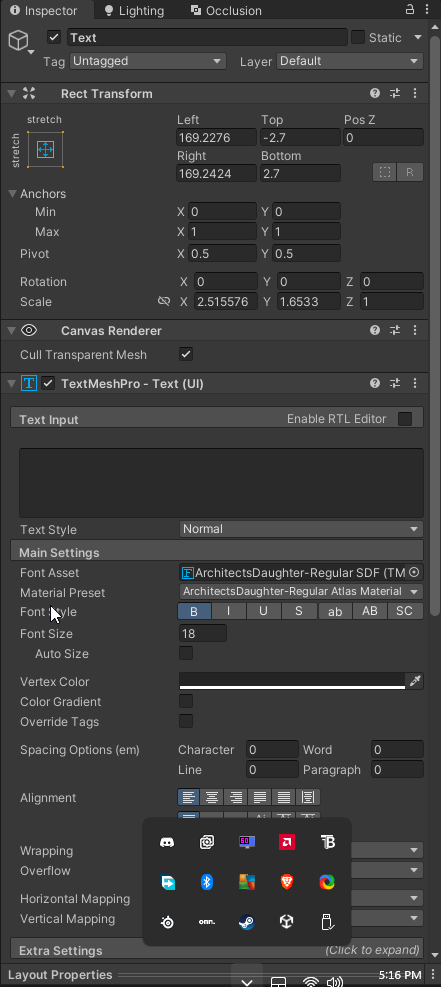
And yes i printed a string, when it increases it.
slender nymph
twin bolt
And yes i printed a string, when it increases it.
print some actually useful information
twin bolt
slender nymph
print some actually *useful* information
Like what?
slender nymph
like the string and its length?
twin bolt
slender nymph
like the string and its length?
it says that the length is 1, but it shows no text.
slender nymph
and you're not using IsNullOrWhitespace then
 slender nymph
well then whatever character is in there doesn't return true for char.IsWhiteSpace 🤷♂️
 crude prawn
is this how you mean?
 slender nymph
sure
 polar acorn
twin bolt
it says that the length is 1, but it shows no text.
polar acorn
twin bolt
it says that the length is 1, but it shows no text.
Try this log, I have a hunch:
if (e.Length > 0){
  Debug.Log((int)e[0]);
}
was your whitespace character issue caused by a character added by a tmp input field?
polar acorn
Sorry, java brain, you can just list index to get a char from a string
crude prawn
slender nymph
sure
instead of this how should i subscribe to the event?
 polar acorn
slender nymph
was your whitespace character issue caused by a character added by a tmp input f...
polar acorn
slender nymph
was your whitespace character issue caused by a character added by a tmp input f...
yes
it was exactly that
Char 8203
U+200B
slender nymph
damn tmp adding non-standard whitespace characters
slender nymph
crude prawn
instead of this how should i subscribe to the event?
like that but with both started and canceled
twin bolt
polar acorn
Try this log, I have a hunch:
```cs
if (e.Length > 0){
Debug.Log((int)e[0]);
}...
That outputs 8203
polar acorn
twin bolt
That outputs 8203
Yep that fucker again
It's a non-zero, non-whitespace, non-control invisible character a.k.a. an absolute bastard to find
slender nymph
honestly this should be reported as a bug. they shouldn't be using a whitespace character that isn't actually considered whitespace as a placeholder
crude prawn
slender nymph
honestly this should be reported as a bug. they shouldn't be using a whitespace ...
u should report this to unity staff
polar acorn
But thankfully very easy to remove, let me go find my solution from the other day
twin bolt
polar acorn
Yep that fucker again
So should i just check to see if texts length is higher than 1?
slender nymph
twin bolt
So should i just check to see if texts length is higher than 1?
no, trim that character out of it
polar acorn
I'm opening up my project to find the right way to replace it out, hang on
slender nymph
should just be Trim('\u8203') right?
polar acorn
.Replace("\u200B", "")
slender nymph
ah right, 200B is the unicode for it. 8203 is the actual char value
polar acorn
Call that on your string that you get from the input and that'll replace that character with nothing. Then you can IsNullOrWhitespace it
 summer stump
polar acorn
But thankfully very easy to remove, let me go find my solution from the other da...
summer stump
polar acorn
But thankfully very easy to remove, let me go find my solution from the other da...
Is this what that duplicate (but not recognized as equal) path issue ended up being?
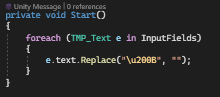 polar acorn
summer stump
Is this what that duplicate (but not recognized as equal) path issue ended up be...
polar acorn
summer stump
Is this what that duplicate (but not recognized as equal) path issue ended up be...
Yes
summer stump
Crazy, I'm glad I saw this conversation!
polar acorn
twin bolt
https://i.imgur.com/Xi3jxVt.png
You'll need to do it where you're reading it from. Any time that input field changes it'll put the character back
twin bolt
Okay
slender nymph
twin bolt
https://i.imgur.com/Xi3jxVt.png
replace returns the new string. so you need to store the result in a local variable and use that for your checks within your other loop
strings are immutable so they cannot be altered in place
twin bolt
slender nymph
replace *returns* the new string. so you need to store the result in a local var...
Thank you that worked
slender nymph
polar acorn
You'll need to do it where you're reading it from. Any time that input field cha...
interestingly this doesn't appear to happen when referring to the TMP_InputField directly. only when referring to the child Text object (at least in 2023.1.19 which i tested in)
rich adder
twin bolt
https://i.imgur.com/Xi3jxVt.png
thats kinda wild..
slender nymph
polar acorn
It's a non-zero, non-whitespace, non-control invisible character a.k.a. an absol...
i didn't find anything in the issue tracker about this, so i submitted a bug report. hopefully they'll use a different whitespace character that actually does return true when checking for whitespace

 chilly estuary
rich adder
jesus that GPT code..
chilly estuary
rich adder
jesus that GPT code..
yeah lol
rich adder
Input mouseposition is a vector2
well technicaly v3 but its pixel coords
Vector3 for "compatibility"
chilly estuary
so what should i do
rich adder
Vector3 mouseWorldPos = Camera.main.WorldToScreenPoint(Input.mousePosition);
mouseWorldPos.z = distanceFromCam;```direction prob needs .normalized too
chilly estuary
rich adder
```
Vector3 mouseWorldPos = Camera.main.WorldToScreenPoint(Input.mousePosition);...
where do i put it
rich adder
chilly estuary
where do i put it
this is why you should not use AI to write code for you
You're not familiar with your own code, and you won't know what to do with it when it breaks
chilly estuary
rich adder
this is why you should not use AI to write code for you
i normally dont use it, but i have no idea on how i can make it work
rich adder
are you working in 2D?
chilly estuary
yeah
rich adder
so why don't you look at old forums of unity that has been asked how to do this a billion times
read what actual people are saying
rich adder
chilly estuary
yeah
which way is your sprite pointing, right or up
 viral hemlock
quick question what is the difference between LoadScene and LoadSceneAsync
rich adder
viral hemlock
quick question what is the difference between LoadScene and LoadSceneAsync
one is async and one is not
viral hemlock
what does async change
viral hemlock
oh ok
rich adder
so you can implement loading screens or something because you have "progress" till its done doing task
some stuff that takes time is better to use async
like doing large operations that can hang UI
 pliant oyster
How do I switch my entire game to Mono audio via code?
rich adder
pliant oyster
How do I switch my entire game to Mono audio via code?
cant u just set the spatial blend from 3d to 2D ?
pliant oyster
I don't know what that means. I want the user to be able to press a button and have the audio switch to mono, and they can press the button again to put it back to stereo
rich adder
I don't think you can natively change stereo to mono in unity without Fmod
pliant oyster
Okay, I'll try
 raw hamlet
How do I reference a prefab with a gameobject?
summer stump
raw hamlet
How do I reference a prefab with a gameobject?
public GameObject myPrefab;
 summer stump
Or better yet, use the thing you want to reference
raw hamlet
in the inspector
summer stump
raw hamlet
in the inspector
Well what type is ObstacleSpawner?
And what are you trying to drag in?
Hopefully not a scene object into a prefab
raw hamlet
summer stump
Hopefully not a scene object into a prefab
it is
rich adder
that wont work
raw hamlet
I know you can't do it but what is the workaround it?
summer stump
raw hamlet
it is
Can't do that
summer stump
raw hamlet
I know you can't do it but what is the workaround it?
What is the goal?
rich adder
raw hamlet
I know you can't do it but what is the workaround it?
pass it from something that spawns it already in the scene
rich adder
raw hamlet
I already read the link but i didn't understand it
which part you not understand?
summer stump
raw hamlet
I already read the link but i didn't understand it
We need more info before we can give the best help
Show the prefab and the scene object
rich adder
true, provide context to what your code does/needs to do
raw hamlet
Im trying to get a variable from the obstaclespawner script
this is the scene object

this is the prefab
 summer stump
raw hamlet
Im trying to get a variable from the obstaclespawner script
summer stump
raw hamlet
Im trying to get a variable from the obstaclespawner script
Is the prefab spawned by the obstacle spawner?
raw hamlet
summer stump
Is the prefab spawned by the obstacle spawner?
yes
rich adder
raw hamlet
Im trying to get a variable from the obstaclespawner script
Obstacle spawner can pass itself to the prefab
summer stump
raw hamlet
yes
Then give the variable when you spawn it
raw hamlet
summer stump
Then give the variable when you spawn it
how do i do that?
Instantiate(obstacle, new Vector3(9, pos * 4.5f, -1), Quaternion.identity);
this is how i spawned it
rich adder
using the keyword this
summer stump
ScriptIWant newThing = Instantiate(thing);
newThing.variableICareAbout = value;
if only someone gave you a link that tells you how to reference other objects and pass references to objects 😉
raw hamlet
slender nymph
if only someone gave you a link that tells you how to reference other objects an...
ik
but as i said i didn't understand it
rich adder
yeah think they're confused by Transform, you can also pass other types like a script
raw hamlet
thank you for your help tho
raw hamlet
summer stump
```cs
ScriptIWant newThing = Instantiate(thing);
newThing.variableICareAbout = v...
ScriptI want is the prefab right?
summer stump
raw hamlet
ScriptI want is the prefab right?
Yes. Just make the prefab type the actual script, not GameObject
You can drag in a prefab with that script, instantiate it, and it'll copy everything on the attached gameobject
raw hamlet
DestroyOutOfBounds destroyOutOfBounds = Instantiate(obstacle, new Vector3(9, pos * 4.5f, -1), Quaternion.identity);
``` like this?Sure, if obstacle is of the type DestroyOutOfBounds
raw hamlet
 rich adder
 public class ObjSpawner :MonoBehaviour
    {
        public void Spawn()
        {
            var myObj = Instantiate(etc.)
                myObj.Init(this);
        }
    }
    public class DestroyOutOfBounds : MonoBehaviour
    {
        ObjSpawner _objSpawner;
        public void Init(ObjSpawner spawner)
        {
            _objSpawner = spawned;
        }
    }```
another examplewhy the _ before variables?
summer stump
raw hamlet
Then no, change it from GameObject to DestroyOutOfBounds like I said
summer stump
raw hamlet
why the _ before variables?
Just a style
rich adder
raw hamlet
why the _ before variables?
dont worry about this, just means it private variable (just a label)
summer stump
raw hamlet
why the _ before variables?
public DestroyOutOfBounds prefab;

void SpawnMethod()
{
DestroyOutOfBounds newThing = Instantiate(prefab);
newThing.variableICareAbout = value;
}
Maybe that's clearer?
raw hamlet
summer stump
```cs
public DestroyOutOfBounds prefab;
void SpawnMethod()
{
DestroyOutOfBounds...
I tried doing this but I am assigning an object to a script
so it is giving me an error
summer stump
raw hamlet
I tried doing this but I am assigning an object to a script
Show the code
raw hamlet
I don't know how to make it the same like you said
rich adder
you change the original declared type
raw hamlet
public class ObstacleSpawner : MonoBehaviour
{
    // Start is called before the first frame update
    public float spawnInterval = 2;
    public float timeSinceSpawned = 0;
    public GameObject obstacle;
    public int counter = 0;
    int pos;
    public int scoreCounter = 0;
    public DestroyOutOfBounds prefab;
    void Start()
    {

    }

    // Update is called once per frame
    void Update()
    {
        timeSinceSpawned -= Time.deltaTime;
        if (timeSinceSpawned < 0)
        {
            if (counter == 10)
            {
                counter = 0;
                spawnInterval -= 0.1f;
            }
            timeSinceSpawned = spawnInterval;
            int choice = Random.Range(1, 3);
            if (choice == 1)
            {
                pos = 1;
            }
            else if (choice == 2)
            {
                pos = -1;
            }
            DestroyOutOfBounds prefab = Instantiate(obstacle, new Vector3(9, pos * 4.5f, -1), Quaternion.identity);
            counter += 1;
        }

    }
}
u switched them
summer stump
Change obstacle to DestroyOutOfBounds
You can drag a gameObject into that as long as it has that script
rich adder
I think obstacle and prefab might be diff things
summer stump
public class ObstacleSpawner : MonoBehaviour
{
    // Start is called before the first frame update
    public float spawnInterval = 2;
    public float timeSinceSpawned = 0;
    public DestroyOutOfBounds obstacle;
    public int counter = 0;
    int pos;
    public int scoreCounter = 0;
    public DestroyOutOfBounds prefab;
    void Start()
    {

    }

    // Update is called once per frame
    void Update()
    {
        timeSinceSpawned -= Time.deltaTime;
        if (timeSinceSpawned < 0)
        {
            if (counter == 10)
            {
                counter = 0;
                spawnInterval -= 0.1f;
            }
            timeSinceSpawned = spawnInterval;
            int choice = Random.Range(1, 3);
            if (choice == 1)
            {
                pos = 1;
            }
            else if (choice == 2)
            {
                pos = -1;
            }
            DestroyOutOfBounds prefab = Instantiate(obstacle, new Vector3(9, pos * 4.5f, -1), Quaternion.identity);
            counter += 1;
        }

    }
}
Prefab is the refernce to the new object
summer stump
rich adder
prefab needs to be named something like `currentObject` or `instance`
Yeah. Should be
rich adder
DestroyOutOfBounds destroyOutOfBoundsInstance = Instantiate(prefab, new Vector3(9, pos * 4.5f, -1), Quaternion.identity);
summer stump
Makes waaay more sense 👆
raw hamlet
rich adder
` DestroyOutOfBounds destroyOutOfBoundsInstance = Instantiate(prefab, new Vector...
how do I pass the variable scoreCounter into the DestroyOutOfBoundsInstance?
summer stump
raw hamlet
how do I pass the variable scoreCounter into the DestroyOutOfBoundsInstance?
Wait, doesn't that script have the variable?
If not then why use that as the type?
rich adder
why does destroyOutOfBoundsInstance care about scoreCounter anyway ?
raw hamlet
summer stump
Wait, doesn't that script have the variable?
Original goal: From the DestroyOutOfBounds script, I am accessing the scoreCounter variable from the ObstacleSpawner script. Then I update the variable to whatever score I want
raw hamlet
rich adder
why does destroyOutOfBoundsInstance care about scoreCounter anyway ?
it adds a score of 1 whenver an object is destroyed
summer stump
Sounds like you want an event
rich adder
gotcha. so just make a method to call
summer stump
And subscribe to it when you instantiate the obstacle
rich adder
this^ although events for them rn might be 🤯
summer stump
Or that
#💻┃code-beginner message
And just have the reference to the script and call it later
rich adder
please dont keep score in ObstacleSpawner next time
just made everything so much more confusing
raw hamlet
Ok sorry
rich adder
its ok. just remember every script should serve one purpose (for the most part when possible)
ObstacleSpawner spawns obs, it should not care abbout score , thats for ScoreManager
which could be in this case even a singleton
otherwise atm you pass ObstacleSpawner reference on spawn and call method or just do obstacleSpawner.score++
Shown here
#💻┃code-beginner message
raw hamlet
rich adder
its ok. just remember every script should serve one purpose (for the most part w...
That is a good idea. I have a bad habit of just one giant chunk of code
ok
rich adder
raw hamlet
That is a good idea. I have a bad habit of just one giant chunk of code
yup its easy in the beginning in one file /script , but once you start adding more and more functionality it gets over-convoluted spaghetti
 static cedar
raw hamlet
why the _ before variables?
static cedar
raw hamlet
why the _ before variables?
Something Microsoft recommends for private variables in classes but i personally couldn't care less.
rich adder
eh sometimes , I do it some times I don't. its no big deal.
Makes finding a variable in IDE that much faster
static cedar
Personally, if i want to find smth, i usually just hover over a variable. 
rich adder
no I mean as you're typing
sometimes intellicode suggests a class or something unrelated as you type a variable name
as soon as you do _
intellisense brings up all your private vars
raw hamlet
rich adder
no I mean as you're typing
another newbie question
I have a text for gameover

I want to hide it at the start but not disable it
I already tried setactive but it disables the whole thing
static cedar
rich adder
sometimes intellicode suggests a class or something unrelated as you type a vari...
I think it would be smarter than that tbh.
But i'm guessing you do this to navitate by using arrow and tab keys from available selection?
raw hamlet
how do i make it so only the Text part is disabled?
static cedar
In script?
 teal viper
raw hamlet
how do i make it so only the ``Text`` part is disabled?
teal viper
raw hamlet
how do i make it so only the ``Text`` part is disabled?
Disable the text component.
slender nymph
raw hamlet
how do i make it so only the ``Text`` part is disabled?
- don't use legacy text, use TextMeshPro
- just disable the component. but also why not disable the entire gameobject?
raw hamlet
slender nymph
1. don't use legacy text, use TextMeshPro
2. just disable the component. but als...
why is legacy text bad?
teal viper
raw hamlet
I want to hide it at the start but not disable it
But also, if you have other stuff on it(like an image), better split it into several objects
slender nymph
raw hamlet
why is legacy text bad?
because it is worse in nearly every way compared to TMP. but if you want blurry text then feel free to keep using it 🤷♂️
rich adder
static cedar
I think it would be smarter than that tbh.
But i'm guessing you do this to navi...
If you type a looking for awesome variable , VS brings up unrelated suggestion like async keyword..
having _ it immediately brings up all my private vars
 raw hamlet
i guess it is blurry
rich adder
rich adder
If you type `a` looking for `awesome` variable , VS brings up unrelated suggesti...
even if I named it awesome

without _
it still brings async as keyword
too slow
static cedar
rich adder
If you type `a` looking for `awesome` variable , VS brings up unrelated suggesti...
Huh, i thought the suggestions would be smarter than that. 🤷♂️
I just know what var names to type so i never have a personal issue with this stuff.
rich adder
we each have our preferences and workflows 🙂
i just found it personally speed up mine
static cedar

 static cedar
 amber dome
rich adder
https://code.visualstudio.com/docs/other/unity#_debugging
amber dome
rich adder
https://code.visualstudio.com/docs/other/unity#_debugging
I've seen it a thousand times.
rich adder
amber dome
I've seen it a thousand times.
did you do the original configuration first ? like setup external tools and update PM VS package ?
amber dome
rich adder
idk I never used debugger on VSCode so I couldn't tell ya
any possible alternative to External IDES, or not using debugger?
 lucid jetty
hello i have a problem with my ai he is walking towards waypoints but when i want him to go to the chase state and i stand next to him he is getting stuck even when i made the code that you needs to follow me but still he is stuck how can i fix that?
amber dome
rich adder
did you do the original configuration first ? like setup external tools and upda...
yes
rich adder
amber dome
any possible alternative to External IDES, or not using debugger?
Visual Studio has a superior debugger
amber dome
was working properly, it stopped suddenly.
amber dome
rich adder
Visual Studio has a superior debugger
That's what I'm using.
rich adder
you shown vscode
amber dome
Are you talking about Visual Studio Community?
rich adder
lucid jetty
hello i have a problem with my ai he is walking towards waypoints but when i wan...
share code
rich adder
amber dome
Are you talking about Visual Studio Community?
yes Visual Studio
rich adder
amber dome
I've tried using that one too, but it still has the same error.
I find that hard to believe if you setup properly
use link website for code
!code
eternal falconBOT
Posting code
📃 Large Code Blocks
Use links to services like:
https://gdl.space/, https://paste.ofcode.org/, https://hatebin.com/, https://paste.myst.rs/, https://hastebin.com/
📃 Inline Code
Surround code with three backquotes. Not quotation marks.
To format as C#, add cs to the first line:
```cs
// Your code here
```
Add a comment with a line number if there is an error message.
amber dome
rich adder
I find that hard to believe if you setup properly
I even formatted my computer, to try again. I did it just like in tutorials and articles.
lucid jetty
rich adder
use link website for code
!code
Hastebin is a free web-based pastebin service for storing and sharing text and code snippets with anyone. Get started now.
static cedar
Oh, it's C++?
rich adder
nah it just chose that for some reason
static cedar
Actually, it's probably just set to that.
slender nymph
no, that's just hastebin guessing the language incorrectly
summer stump
It's like 99% of the time what hastebin guesses in my experience
static cedar
The colour highlighting close enough. 
lucid jetty
https://gyazo.com/27cebfa05f85a1c3373b9f1d35154f01 here is he walking normal but when i want him to chase me its getting stuck 😦
 rich adder
amber dome
I even formatted my computer, to try again. I did it just like in tutorials and ...
rich adder
amber dome
I even formatted my computer, to try again. I did it just like in tutorials and ...
eh you should try again, do all the steps . Once you get to the part in unity screenshot it
rich adder
lucid jetty
https://gyazo.com/27cebfa05f85a1c3373b9f1d35154f01 here is he walking normal but...
do you have any errors in console window
lucid jetty
nope
summer stump
lucid jetty
https://hastebin.com/share/xufokifila.cpp
Why is everything accessed through the animator?
rich adder
FSM built in animator
I never used it myself though
amber dome
rich adder
eh you should try again, do all the steps . Once you get to the part in unity sc...
I'll do it again, I'll try to be as attentive to small details as possible.
rich adder
amber dome
I'll do it again, I'll try to be as attentive to small details as possible.
make sure its this guide !ide
eternal falconBOT
💡 IDE Configuration
If your IDE is not autocompleting code
or underlining errors, please configure it.
Select one:
• Visual Studio (Installed via Unity Hub)
• Visual Studio (Installed manually)
• VS Code
• JetBrains Rider
• Other/None
summer stump
Huh, ok
lucid jetty
summer stump
Why is everything accessed through the animator?
it was a tutorial video i watched but everthing is right what i did but idk why its stuck
rich adder
can you share the tut
lucid jetty

Let's make the enemy more aggressive!
● 3D ENEMY AI (Part 01): https://youtu.be/whkC8f3oNOk
● Third Person Controller: https://youtu.be/BCJ-WkdWBwo
● Dragon for Boss Monster: https://bit.ly/3s2ErSy
● Starter Assets Link: https://bit.ly/3r4t0ZW
♥ Don't Click This! : https://bit.ly/2Zi3vu9
♥ My Second Channel: https://bit.ly/3jvI8g6
----------...
rich adder
lucid jetty
https://www.youtube.com/watch?v=b-WZEBLNCik
is the navmesh baked and everything
lucid jetty
yes
rich adder
also screenshot your ChaseState inspector
put a Debug.Log inside Update of chasestate script
amber dome
Is that right?

 rich adder
amber dome
Is that right?
rich adder
amber dome
Is that right?
did you select Visual Studio Community and installed Unity Workload ?
summer stump
amber dome
Is that right?
That part isn't what you need to do in that menu. But yeah, those two ticks are fine
amber dome
rich adder
did you select Visual Studio Community and installed Unity Workload ?
I've selected Visual Studio Code.
rich adder
lucid jetty
https://gyazo.com/2c3417d06260de70ad9c87b7e711e26c
alr lmk if the Debug runs
rich adder
amber dome
I've selected Visual Studio Code.
thought we was talking about VS
summer stump
amber dome
I've selected Visual Studio Code.
Did you make sure you have the right unity package and unity extension?

 summer stump
amber dome
summer stump
amber dome
Remove the one on top (both use the one on bottom), but yeah 2.0.22 is good
slender nymph
are there any errors in the vs code console?
amber dome
summer stump
Remove the one on top (both use the one on bottom), but yeah 2.0.22 is good
done
lucid jetty
i messed someting up i dont see my normal unity anymore https://gyazo.com/3876ecae0808ecb5ac9d44554e8c43fe
 summer stump
amber dome
done
summer stump
amber dome
done
If not then click regenerate project files here
#💻┃code-beginner message
slender nymph
lucid jetty
i messed someting up i dont see my normal unity anymore https://gyazo.com/3876ec...
Layout > Reset All Layouts (or select your preferred one)
also not a code question

 summer stump
amber dome
summer stump
amber dome
Restart your computer
If that doesn't work, you're gonna have to find and download the sdk manually
rich adder
lucid jetty
https://gyazo.com/097b231fc3c0237cadf708742b9143e4
can you screenshot the navmesh agent + gizmos in scene / navmesh
amber dome
in CMD I can use the dotnet commands, but in vscode it keeps showing up.
amber dome
summer stump
Restart your computer
If that doesn't work, you're gonna have to find and downlo...
ok
lucid jetty
rich adder
can you screenshot the navmesh agent + gizmos in scene / navmesh


what is a gizmos?
summer stump
lucid jetty
https://gyazo.com/ac07bad75c82a059a5df6f24dec73c85
You can actually just drag in images directly without using a site
summer stump
lucid jetty
what is a gizmos?
Icons/lines and stuff in the scene view
Like the outline of a collider
 amber dome
summer stump
Restart your computer
If that doesn't work, you're gonna have to find and downlo...
amber dome
summer stump
Restart your computer
If that doesn't work, you're gonna have to find and downlo...
and returned the same error.....
F..
But now dotnet is working properly.
rich adder
lucid jetty
https://gyazo.com/2b34482a03a5f224021db972fa575847
wait the creature inspector
its cutoff
amber dome
Is the latest version of dotnet not supported by Unity?
 summer stump
amber dome
Is the latest version of dotnet not supported by Unity?
summer stump
amber dome
Is the latest version of dotnet not supported by Unity?
It is not
amber dome
I downloaded version 7.0
summer stump
lucid jetty
https://gyazo.com/2f1fdd1f3eecfbfc4548a1295e78bf36
You don't need gyazo, just drag the image directly into discord
amber dome
Are errors linked to this?
rich adder
lucid jetty
https://gyazo.com/2f1fdd1f3eecfbfc4548a1295e78bf36
yes it looks fine here
summer stump
amber dome
I downloaded version 7.0
You need standard 2.1 or framework 4.8
Or both?
lucid jetty
summer stump
You don't need gyazo, just drag the image directly into discord
gyazo is easier to make screenshots and i dont need to remove the screenshots afterwards 😉
rich adder
summer stump
You need standard 2.1 or framework 4.8
Or both?
doesnt the sdk include all of them
include past ones
amber dome
summer stump
You need standard 2.1 or framework 4.8
Or both?
4.8
summer stump
rich adder
doesnt the sdk include all of them
I am not sure honestly, that's just what the api compatibility page lists haha
rich adder
oh ok lol
someone said they installed the SDK from site and then it started working
amber dome
I don't understand why this happened suddenly.
For now, I'm going to give up.
Thank you all for your support!
lucid jetty
rich adder
yes it looks fine here
do you know the problem maby?
rich adder
amber dome
I don't understand why this happened suddenly.
because they've been updating it and breaks stuff
amber dome
To use Unity, do I have to define a version that is supported?
On Godot, the same error is also occurring, so initially I thought it was on dotnet itself.
rich adder
this has nothing to do with unity itself
its the extensions in VSCode that are shite
they haven't reached 1.0v afaik
and will be buggy for a long time
Visual Studio is better because its a mature code editor
amber dome
No way to code within Unity? no support from External IDES.
summer stump
amber dome
No way to code within Unity? no support from External IDES.
What?
You can use rider or visual studio quite well
VS Code has issues, that's all
rich adder
 >
> 
amber dome
I'll try again, though, in Visual Studio.
 rich adder
amber dome
"Assembly-CSharp (Incompatible)"
rich adder
amber dome
"Assembly-CSharp (Incompatible)"
right click on it and do Rebuild
slender nymph
Reload With Dependencies
slender nymph
right click it and select Reload With Dependencies
this is assuming you've actually done the rest of the configuration steps, of course
amber dome
slender nymph
right click it and select Reload With Dependencies
Where is that option?

 slender nymph
amber dome
Where is that option?
slender nymph
amber dome
Where is that option?
you see the option when you right click an unloaded assembly
amber dome
And how do I find this unloaded assembly?
static cedar
I think it's more that he doesn't really know what the assembly is.
amber dome
I did here already, has an option to download
slender nymph
the option, when viewed in English is Reload With Dependencies. i do not read the language your IDE is currently set to so i cannot provide more information beyond that
slender nymph
does it work?
amber dome
slender nymph
does it work?
it runs, normally (according to the IDE) but in unity, I don't get any results in the console.
slender nymph
what are you referring to?
rich adder
amber dome
it runs, normally (according to the IDE) but in unity, I don't get any results i...
do you see your scripts / folders in Solution Explorer?
amber dome
rich adder
do you see your scripts / folders in Solution Explorer?
I only see the Assets folder and the script.
rich adder
is it still saying Incompatible ?
slender nymph
then congrats, it works
 amber dome
rich adder
ok so now it says ?
amber dome
rich adder
ok so now it says ?
 rich adder
now you have a real code editor
amber dome
rich adder
now you have a real code editor
Now to run the written code, I have to click attach to Unity, right?
slender nymph
that's just to use the debugger
you enter play mode from within unity
and to see your log you need to actually have your component attached to an active object in your scene
 amber dome
rich adder
lol have you been trying to run playmode from editor this whole time ?
amber dome
rich adder
lol have you been trying to run playmode from editor this whole time ?
yes
I'm a beginner
 slender nymph
now you should start with some beginner unity courses like the pathways on the unity !learn site to learn how to correctly use the editor 😉
eternal falconBOT
:teacher: Unity Learn ↗
Over 750 hours of free live and on-demand learning content for all levels of experience!
amber dome
slender nymph
now you should start with some beginner unity courses like the pathways on the u...
right
amber dome
!learn
eternal falconBOT
:teacher: Unity Learn ↗
Over 750 hours of free live and on-demand learning content for all levels of experience!
 marble horizon
how do i disable a collider on an object in code?
 silver dock
how do i add visual tap/click feedbacks? there is like no video for it on youtube at all
rich adder
silver dock
how do i add visual tap/click feedbacks? there is like no video for it on youtub...
just put a certain texture/sprite at the touched positions
silver dock
rich adder
just put a certain texture/sprite at the touched positions
i tried that, its not visible for some reason
is it cause the whole game is played on UI canvas?
rich adder
silver dock
is it cause the whole game is played on UI canvas?
then you probably spawning the wrong positions
UI canvas positions are diff than world pos
silver dock
rich adder
UI canvas positions are diff than world pos
Yeah, whats the line of code for referencing where u touch on the ui?
rich adder
it should still work tho
rich adder
silver dock
Yeah, whats the line of code for referencing where u touch on the ui?
how are you grabbing touch pos
silver dock
rich adder
how are you grabbing touch pos
if (Input.GetTouch(0).position)
rich adder
silver dock
if (Input.GetTouch(0).position)
show full script
 frozen dagger
how to set rotation?
 rich adder
frozen dagger
how to set rotation?
rich adder
frozen dagger
how to set rotation?
Euler angles
frozen dagger
what?
rich adder
frozen dagger
what?
transform.Rotate
rich adder
frozen dagger
bruh, i wanted to set value, not add it every time
transform.localEulerAngles
 ivory bobcat
Be aware that these are c# property and that you would not be able to modify the vector or quaternion directly
https://unity.huh.how/compiler-errors/cs1612
Otherwise, there are differences between Quaternions and Vectors https://unity.huh.how/programming/quaternions/members
 reef patio
!code
eternal falconBOT
Posting code
📃 Large Code Blocks
Use links to services like:
https://gdl.space/, https://paste.ofcode.org/, https://hatebin.com/, https://paste.myst.rs/, https://hastebin.com/
📃 Inline Code
Surround code with three backquotes. Not quotation marks.
To format as C#, add cs to the first line:
```cs
// Your code here
```
Add a comment with a line number if there is an error message.
reef patio
i'm still stuck on this player movement for 2d, here is the script https://paste.ofcode.org/Qx4CWBArLabBzp7mbhwGCM
and here are the errors

basically im trying to create a script with some custom sprites
ivory bobcat
Duplicate script or rename bug
reef patio
what?
polar acorn
Do you have these errors in unity or just the ide
 ruby gull
I am watching a youtube tutorial and this is how the tutorial makes sure the player moves with the moving platform. But something smells here, setting the platform to be the parent of the player feels like a really bad practice. Is my hunch right?
 summer stump
reef patio
the script I shown was some dud
summer stump
reef patio
the script I shown was some dud
Honestly, that doesn't look too bad. I like that you tried those variants of movement. One thing with the velocity (variant 2) is that you may want to have the y velocity be set to its own y velocity or a negative number to avoid floating in the air.
When you use Get for the input and use that directly, it will be setting your y velocity to 0 every frame. 0 velocity meaning trying to not move up or down.
Now, some 2d is just walking on the ground all over (like pokemon style maps/movement), but a platformer would have obvious issues with that
reef patio
The whole plot of script lead to a 2d sprite moving on its own.
summer stump
Hmmm... i am not quite sure what that means..
reef patio
The character I set does not connect right to the player animations, he just moves on its own without me typing a key.
I can show a video.
summer stump
Ah, you should have the SetFloat methods outside the if check
You only set the float when it is NOT 0
But you want it to STOP sometimes, so you need it to be set when it IS 0 too
Something like this (untested, and doesn't address the issue with Y velocity I mentioned above):
https://paste.ofcode.org/ts3KyPKq8XaWWh5TLJAs3U
 eternal needle
ruby gull
I am watching a youtube tutorial and this is how the tutorial makes sure the pla...
eternal needle
ruby gull
I am watching a youtube tutorial and this is how the tutorial makes sure the pla...
its something that works purely for the purpose of the tutorial, which is what most tutorials are for. This would also break rigidbody movement (since directly updating transform does not respect physics).
The whole collision.gameObject.name part is pretty bad too, you dont want to rely on the name of the object. You could do layer based stuff, or whatever else to extend this to work on other objects as well.
Parenting an object will also affect rotation and scale so thats also a negative
ruby gull
eternal needle
its something that works purely for the purpose of the tutorial, which is what m...
yeah felt like this was the case, what would the idiomatic way be to achieve this?
silver dock
Can someone tell me why is HideFeeback() being called even without releasing the mouse button
 charred spoke
ruby gull
yeah felt like this was the case, what would the idiomatic way be to achieve thi...
charred spoke
ruby gull
yeah felt like this was the case, what would the idiomatic way be to achieve thi...
Moving the player with a platform? On collision get a ref to the platform, add it’s velocity to the char controller velocity.
reef patio
he is moving without key pressing
eternal needle
ruby gull
yeah felt like this was the case, what would the idiomatic way be to achieve thi...
I think a slightly better way would be applying a move (respective to how your player moves whether rigidbody or adjusting position) to objects on the platform instead of parenting it. This would still allow you to make sure its not teleporting the player into walls when the platform goes under one for example
ruby gull
alright thanks for the help, guess I'll also need to change how the moving platforms work, cause right now I am updating their positions directly in the script, instead of using physics
charred spoke
You can just calculate a velocity from that and pass it to the player
You dont need a rb per platform doing unnecessary calculations
ruby gull
charred spoke
You can just calculate a velocity from that and pass it to the player
oh yeah, true, I can use the move speed value from the platform script to calculate the velocity
thx
eternal needle
you dont have to use physics, but just some movement that respects collisions in your world. Like casting along an area to see if you can move there is valid
summer stump
reef patio
he is moving without key pressing
Looks like you don't want gravity there. Not 100% used to 2d (usually do 3d) but I think you can just set gravity scale to 0.
summer stump
reef patio
he is moving without key pressing
Also see this for a separate issue I noticed
#💻┃code-beginner message
silver dock
silver dock
Can someone tell me why is HideFeeback() being called even without releasing the...
anyone?
summer stump
reef patio
But he is not able to move.
Show the PlayerInput component
reef patio
 summer stump
reef patio
summer stump
reef patio
You have no Input Action Asset, and thus no OnMovement message is being sent
Do you have an Input action asset created? You just have to drag it into that top box
reef patio
No.
 tepid cobalt
reef patio
tepid cobalt
reef patio
 reef patio
I have that.
tepid cobalt
 summer stump
tepid cobalt
summer stump
tepid cobalt
What they had already wouldn't show without that, just fyi
reef patio
Ok I created one.
tepid cobalt
no one is really helping him so i stepped in
Its only when the wrong stuff is given people speak up lmao
I should do it more often
lets help him
summer stump
tepid cobalt
Its only when the wrong stuff is given people speak up lmao
I went to the bathroom...
I was in the middle of helping
rich adder
tepid cobalt
Its only when the wrong stuff is given people speak up lmao
you realize people are doing other stuff too
tepid cobalt
rich adder
you realize people are doing other stuff too
Time management issue
triggered lmao
summer stump
Stop or leave.
summer stump
reef patio
Ok I created one.
Ok, you need an action called Movement (exactly that). Then the message will be sent to OnMovement
summer stump
reef patio
Action Maps _ Movement > "New action" +
Did you do it the way Navarone said? Click Create Actions on the Player Movement component?
rich adder
 reef patio
I can't find that.
summer stump
reef patio
I can't find that.
It was from your screenshot

 rich adder
looks like you already created on before clicking it?
reef patio
is that ready?
summer stump
reef patio
is that ready?
Yeah, change your code to say "OnMove" though
Instead of OnMovement
The default action is called Move I guess, thus the need for the change
reef patio
Which code?
summer stump
reef patio
Ok, done.
Give it a try. Can you move?
 silver dock
Can someone tell me why is HideFeeback() being called even without releasing the...
silver dock
silver dock
Can someone tell me why is HideFeeback() being called even without releasing the...
please anyone 😭
summer stump
reef patio
Theirs a console problem.
Is there an Animator on the player?
reef patio
Ok, found it.

I was able to change the direction.
Then a error appeared.

I deleted "IsWalking".
summer stump
reef patio
Looks like the animator is just not set up. You have an event with no listener
And I guess that would explain the warning haha
reef patio

That's the animator.
It should have some done for directional looking.
The 4 directions.
 pine bay
Hey, I want ask. So i have an inventory system in my game. At first I have two object that can pickup to my inventory. a cutter and a soda can. I pick the two object to my inventory, as you can see in the image. Then, when i exit the game and play it again. All my item change into soda can.
here is my code


 summer stump
pine bay
Hey, I want ask. So i have an inventory system in my game. At first I have two o...
summer stump
pine bay
Hey, I want ask. So i have an inventory system in my game. At first I have two o...
You call FindItemOfType<Pickup> and instantiate that for every filled slot in the LoadInventory method
Seems like that may be an issue.
Is the SodaCan of type pickup?
pine bay
summer stump
Is the SodaCan of type pickup?
yes the sodaCan type pickUp
summer stump
reef patio
It's complaining about an AnimationEvent.
Might wanna take this to the #🏃┃animation channel. I'm not great with animations
summer stump
pine bay
yes the sodaCan type pickUp
So then I'm not sure what is expected in the LoadInventory method.
It finds a single random PickupInstance (a sodacan in this case) and loads that into every slot
pine bay
summer stump
So then I'm not sure what is expected in the LoadInventory method.
It finds a si...
what i must do sir, deleting the pickupinstance line of code?
summer stump
pine bay
what i must do sir, deleting the pickupinstance line of code?
Well you probably want to SAVE what was in the slot, right?
As of now, you only save if it is filled or not
And yeah, calling Find to get a random instance is not a good way to go about this
You could save a string, or an enum, or even an int. Just something to represent what was in the slot
Then you load that value and populate it properly
pine bay
summer stump
You could save a string, or an enum, or even an int. Just something to represent...
thanks for the answer sir, i'm still figuring out
summer stump
pine bay
thanks for the answer sir, i'm still figuring out
No problem! I'm off to bed but if you still need help when I see it tomorrow, I'll try to help. Good luck!
 trail glacier
does anyone know why the sprite editor doesnt work it doesnt give an error message
frozen dagger
!code
eternal falconBOT
Posting code
📃 Large Code Blocks
Use links to services like:
https://gdl.space/, https://paste.ofcode.org/, https://hatebin.com/, https://paste.myst.rs/, https://hastebin.com/
📃 Inline Code
Surround code with three backquotes. Not quotation marks.
To format as C#, add cs to the first line:
```cs
// Your code here
```
Add a comment with a line number if there is an error message.
frozen dagger
https://hatebin.com/jfijhbmtey
I tried everything, but it uses 2 jumps what making it jump higher, when i dont move its ok, but after moving it always jumping 2 times and making it jump really high
before moving it -1 remaining jumps, but after moving it -2 remaining jumps
alr, i found what this bug is only on keyboard, when i press button on UI its ok
 weak talon
I am trying to make my character sword hitbox chane rotation when attacking is false
    if (attacking == false)
    {
        if (Input.GetKey(KeyCode.D))
        {
            gameObject.transform.rotation = Quaternion.Euler(0f, 0f, 0f);
            facingRight = true;
            facingLeft = false;
        }
        if (Input.GetKey(KeyCode.A))
        {
            gameObject.transform.rotation = Quaternion.Euler(0f, 0f, 180f);
            facingLeft = true;
            facingRight = false;
        }
        if (Input.GetKey(KeyCode.W))
        {
            gameObject.transform.rotation = Quaternion.Euler(0f, 0f, 90f);
            facingUp = true;
            facingDown = false;
        }
        if (Input.GetKey(KeyCode.S) && pScript.canJump == false)
        {
            gameObject.transform.rotation = Quaternion.Euler(0f, 0f, 270f);
            facingDown = true;
            facingUp = false;
        }
    }
this script some how does not work though can anyone help
 gaunt ice
the sword can only facing one direction, so you should reset all the directions no just the opposite direction
consider translation from left to up, you set down=false but not left
btw you can use a enum not four bools
 stoic lichen
Hey guys!
I am working on an AR app for Google Play store and Apple app store and it is huge as it includes a lot of 3d models and meshes.
I tried using the Play Asset Delivery Package to create my App Bundle but the Upfront Asset Pack created is larger than 1GB which is the limit.
Can someone help me with this? I have already completed development and just need to publish now.
weak talon
gaunt ice
the sword can only facing one direction, so you should reset all the directions ...
i know why it isnt working
the sword is set to inactive
if i press mouse button 0 it sets active
do you know how i can change rotation of the sword even when it is inactive
gaunt ice
you can still change transform or other components of inactive gameobject from other scripts
but the update on inactive gameobject will not be called
weak talon
ok thank you
 compact ibex
Hi, i would like to extract the coordinates of a vector from another one in an efficient way, for example if the player transform.forward = (1,0.5,1) and the transform.up = (0,1,0) then by extracting the up from the forward, we would have something like extractedDirection = (1,0,1) - so basically setting 1 coordinate to 0 depending on the up vector.
gaunt ice
it seems that you set the only one component to be 0 based on the non zero component of up vector
how about if you have a up vector eg (0.316, 0, 0.948), so which component of (1,0.5,1) will you set to 0?
are you trying to project a vector to a plane formed by transform.up? i dont understand what you mean actually
compact ibex
gaunt ice
it seems that you set the only one component to be 0 based on the non zero compo...
problem with this is i can only have the up vector facing in cardinal directions, it won't work if the transform.up is (0.6,0.5,0.88) for example, but that's kind of the spirit yes
compact ibex
gaunt ice
are you trying to project a vector to a plane formed by transform.up? i dont und...
Also yes, you can imagine this like i would try to project the red cubes position onto the greens plane formed by its up vector (this plane is represented with a blue arrow because then i get the direction from the green cube towards the red dot which is the projection)

but you can also think about it like trying to point a vector towards the red cube and then negating the up component
which ever of these to is more efficient and easier to do
gaunt ice
just A-B and set y=0 if the transform.up always (0,1,0)
a faster way is to calculate x and z components only
compact ibex
gaunt ice
just A-B and set y=0 if the transform.up always (0,1,0)
a faster way is to calcu...
it's not always (0,1,0) haha that's why i'm trying to do all this
gaunt ice
so only one component will be 1 if my understanding is correct?
check which component is non-zero and calculate the remaining two components
compact ibex
gaunt ice
so only one component will be 1 if my understanding is correct?
check which comp...
well for now i only need cardinals yes but this might bite back later if i need all directions, i'm just gonna try like this for now
actually i found a good way to do it :
Vector3 directionVect = (targetPoint - transform.position);
Vector3 factor = Vector3.one - transform.up;
direction = Vector3.Scale(directionVect, factor);
 solar heron
can anyone help me? im trying to make a Tower Defence game on 2D and is trying to make a remove tool and for some reason it not colliding? I am very confused, the part has a collider and everything here has a collider. I can send you the code here:
using JetBrains.Annotations;
using System.Collections;
using System.Collections.Generic;
using UnityEngine;

public class Remove : MonoBehaviour
{
    [SerializeField] bool isTouching = false;
    // this is just a test to see if collisions work
    public void OnTriggerEnter2D(Collider2D obj)
    {
        if (obj.gameObject.CompareTag("RemoveTool"))
        {
            isTouching = true;
        }


    }
    public void OnTriggerExit2D(Collider2D collision)
    {
        if (collision.gameObject.CompareTag("RemoveTool"))
        {
            isTouching = false;
        }
    }
}
how about the Rigidbody2D
 vital sail
Anyone who can help me..? 😭 About Coroutine Error...
Pastebin
Pastebin.com is the number one paste tool since 2002. Pastebin is a website where you can store text online for a set period of time.

Another error was Coroutine couldn't be started because the the game object is inactive!...
but not now. I don't know why
 short hazel
The error you screenshot is internal to Unity, it does not come from your own code, you can ignore it
And the error about the coroutine is pretty self-explanatory, you cannot start a coroutine on an object that's inactive
vital sail
short hazel
And the error about the coroutine is pretty self-explanatory, you cannot start a...
Coroutine Script was applied to monsters(prefab) placed on the screen. If I have to activate it separately, how can I activate it?.... I can't understand it even if I look it up...
 timber tide
solar heron
can anyone help me? im trying to make a Tower Defence game on 2D and is trying t...
timber tide
solar heron
can anyone help me? im trying to make a Tower Defence game on 2D and is trying t...
You only need one object with a rb, and you can set it to kinematic, otherwise you could just use overlapcircle to grab collider info through update
solar heron
timber tide
You only need one object with a rb, and you can set it to kinematic, otherwise y...
Also how do I make 2 hitboxes, one for placing, one for removing
short hazel
vital sail
Coroutine Script was applied to monsters(prefab) placed on the screen. If I have...
And the code that stores the coroutine is also incorrect. It should be something like ThinkEn = StartCoroutine(Think());. Currently you're starting two coroutines, you have another Think() above or below.
The error you're getting can happen if one script on an object tries to start a coroutine on another script in another object
timber tide
solar heron
Also how do I make 2 hitboxes, one for placing, one for removing
Well, depends how you want to do it, but since you're using 2D you can target indepedent objects, or a point on a plane
solar heron
timber tide
Well, depends how you want to do it, but since you're using 2D you can target in...
I want a smaller hitbox for removing and a bigger hitbox for placing so the circles dont collide
timber tide
Overlap circle may be ideal then and you can cast it at your pointer with different radius
solar heron
Please explain this to me like i know nothing because i have no idea what you just said lol
timber tide
Have you used any sort of raycasting before?
solar heron
timber tide
Have you used any sort of raycasting before?
Nope, only in roblox studio (my former game engine)
timber tide
Right, so overlapcircle basically just detects all colliders at a given point in a specific radius
solar heron
wdym like a trigger?
timber tide

You give it a point in world space, and the radius of the circle. When it detects colliders you'll get an array of gameobjects that were within the radius. In this case you can check if there's currently objects occupying a space.
solar heron
i am gonna save this for later thank you, ill try to fix this and if it doesnt work ill use this
timber tide
Probably look around for better examples since the documentation stinks ;)
https://medium.com/geekculture/how-to-detect-colliders-surrounding-the-player-ebdcadf3ba61
Good snippets of code there
Medium
As a gamer, I have always been a fan of Area of Effect(AoE) Attacks — they are amazing for crowd control and they can easily be one of the…
solar heron
I dont want an aoe thing, i wanna delete an object 1 by 1 but thanks for the info
timber tide
If you're trying to detect an area to put a unit down you'll need a way to check it first and this is what you'd probably want to use.
vital sail
short hazel
And the code that stores the coroutine is also incorrect. It should be something...
Thank you! I'll try it!
 ruby python
!code
eternal falconBOT
Posting code
📃 Large Code Blocks
Use links to services like:
https://gdl.space/, https://paste.ofcode.org/, https://hatebin.com/, https://paste.myst.rs/, https://hastebin.com/
📃 Inline Code
Surround code with three backquotes. Not quotation marks.
To format as C#, add cs to the first line:
```cs
// Your code here
```
Add a comment with a line number if there is an error message.
ruby python
Happy Saturday all, I'm having a little trouble figuring out where to disable an object in my scene, would someone mind taking a look and pointing me in the right direction please? 🙂
RaycastHit weaponHit;
                if (Physics.Raycast(firingPoint.transform.position, firingPoint.transform.TransformDirection(Vector3.forward), out weaponHit, weaponRange, weaponImpactMask))
                {
                    Debug.Log("Hit - " + weaponHit.transform.gameObject.name);
                    Vector3 hitPoint = weaponHit.point;

                    if (weaponHit.transform.gameObject.CompareTag("EnemyCollider"))
                    {

                        MimicSpace.Mimic currentMimic = weaponHit.transform.parent.GetComponent<MimicSpace.Mimic>();
                        GameObject healthBar = currentMimic.transform.FindChild("MimicHealth").gameObject;
                        healthBar.SetActive(true);
                        if (currentMimic != null)
                        {
                            currentMimic.TakeDamage(damageDealt);
                        }
                    }
                    AdjustWaterStreamLength();
                }
                else
                {
                    AdjustWaterStreamLength();
                }
Basically I need the health bar to disappear when the ray is no longer hitting it.
timber tide
Why not just deactive it in the else statement there?
ruby python
It doesn't exist in the else.
 keen dew
Make healthBar a field instead of a local variable, then it does
timber tide
You could poll each enemy independently to just set their hp bar off too, but this requires some ordering on the execution of the updates to work.
ruby python
Hmmm, I guess it would probably be easier to put the enable/disable code on the enemy itself, maybe compare currentHealth to previousHealth? Unless there's a way that I can have the enemy detect when it's hit by the raycast?
timber tide
Some ideas I'm thinking too is that you could create a buffer such that it stores the most current enemy you've have highlighted, and when you target a new enemy then you'd set the previous enemy healthbar to off and enable the new enemy's bar.
Would eliminate any polling
Well, I guess you'd have to check if you're currently highlighting anything.
ruby python
Hmm.....okay, this is what I'm trying on my enemy script. It enables fine but doesn't disable, so I'm not sure on the logic....
public void TakeDamage(float damageAmount)
        {
            float previousHealth = health;
            health -= damageAmount;

            if (previousHealth > health)
            {
                mimicHealthDisplay.SetActive(true);
            }

            if (previousHealth == health)
            {
                mimicHealthDisplay.SetActive(false);
            }

            mimicHealthBar.rectTransform.localScale = new Vector3(health / 100, 1, 1);

            if (health <= 0f)
            {
                DestroyMimic("Shot");
            }
        }
previous health never == health unless damage is 0
ruby python
Yeah I realised the 'SetActive(false)' will never be called in this method. lol. I hate game logic sometimes.
timber tide
Mimic currentTarget;

private void RaycastMethod()
{
  ...

    if (weaponHit.transform.gameObject.CompareTag("EnemyCollider"))
    {

        MimicSpace.Mimic currentMimic = weaponHit.transform.parent.GetComponent<MimicSpace.Mimic>();

        if (currentMimic != null)
        {
          ChangeTargetHealthbar(currentMimic);
          currentMimic.TakeDamage(damageDealt);
        }
    }
}

private void ChangeTargetHealthbar(Mimic newTarget)
{
    currentTarget.healthbar.gameobject.SetActive(false);
    currentTarget = newTarget;
    currentTarget.healthbar.gameobject.SetActive(true);
}```If you can target multiple mimics at once and you want to see all their healthbars my other idea is to do a coroutine instead and make their health appear for a set amount of time as you damage them, refreshing the coroutine on each hit.
ruby python
It's just one at a time (essentially point and click/hold)
gimme a couple of minutes.
Okay, well it appears OBS or streamable blew out the colouring seriously badly, but should give you an idea of what I'm doing 🙂

 silent idol
Is there a way to only make the wall move forwards on the X axis? It is moving on the Y axis now and it looks weird.
Pastebin
Pastebin.com is the number one paste tool since 2002. Pastebin is a website where you can store text online for a set period of time.
I know the script is handling stuff it shouldn't, but this is a testing script. Everything else will be subsumed into the Scene Change Event System later
 thorn holly
silent idol
https://pastebin.com/fYgxmGqS
Is there a way to only make the wall move forward...
thorn holly
silent idol
https://pastebin.com/fYgxmGqS
Is there a way to only make the wall move forward...
It’s because the player’s position is lower than the wall’s.
So it moves down towards it
silent idol
thorn holly
It’s because the player’s position is lower than the wall’s.
I see, is there a way to lock movement on the Y axis?
 hexed terrace
just don't change the value of Y
thorn holly
silent idol
I see, is there a way to lock movement on the Y axis?
Maybe, but what you could do instead is say transform.position = new Vector2(Vector2.MoveTowards(this.transform.position, player.transform.position, monsterSpeed * Time.deltaTime).X, transform.position.y);
silent idol
thorn holly
Maybe, but what you could do instead is say ```transform.position = new Vector2(...
So the transform position of y is stable?
thorn holly
Yes, that will basically set the x to your old code and lock the y to whatever is was at the moment
hexed terrace
a more readable way
var newPosition = new Vector2(player.transform.position.x, transform.position.y);
transform.position = new Vector2(Vector2.MoveTowards(this.transform.position, newPosition, monsterSpeed * Time.deltaTime);```Yeah ^
silent idol
Thanks
 cinder plover
Why does the mesh not go invisible?


 fossil drum
cinder plover
Why does the mesh not go invisible?
fossil drum
cinder plover
Why does the mesh not go invisible?
Why would it? You never call the method.
cinder plover
I do here, and the debug log is in the command prompt

like i get the message it activated
fossil drum
Then add Debug.Log("Activated", gameObject); then you can click the log and see what gameobjects renderer get enabled and disabled.
cinder plover
fossil drum
Then add `Debug.Log("Activated", gameObject);` then you can click the log and se...
 fossil drum
Strange that it prints twice, but you can click it and see what object got disabled.
cinder plover
Nah i just didnt remove the first log
it activated once
and when i click on it nothing happens

nvm
but how does this help me
fossil drum
Yeah, that one should get disabled then.
cinder plover
fossil drum
Yeah, that one should get disabled then.
well its still visible
fossil drum
cinder plover
well its still visible
Did the components get disabled?
 ivory bobcat
Well that's the point. Verify it.
cinder plover
cuz it doesnt
ivory bobcat
cinder plover
That's not the component, that's the object.
fossil drum
These are components you want to disable.

 ivory bobcat
You wouldn't disable an object. You'd deactivate an object.
The components should have been disabled.
cinder plover
what do i do if they werent disabled
ivory bobcat
Figure out why. The code says they were during runtime/execution
fossil drum
cinder plover
what do i do if they werent disabled
Make sure you don't call it twice for one. That way you would get back were you started.
cinder plover
i only call it once
fossil drum
What my guess is, is that SkinnedMeshRenderer derives from Renderer, and you get the same component, and disable and enable that one.
But you could check that with the logs.
 fast oracle
For some reason this code is making my gameobject move directly up even when I rotate it
 fossil drum
fast oracle
For some reason this code is making my gameobject move directly up even when I r...
fossil drum
fast oracle
For some reason this code is making my gameobject move directly up even when I r...
Yeah, you simply add more y to your localPosition. So always up.
ivory bobcat
fast oracle
For some reason this code is making my gameobject move directly up even when I r...
You're only moving directly up locally
gaunt ice
you should use transform.up
cinder plover
fossil drum
What my guess is, is that SkinnedMeshRenderer derives from Renderer, and you get...
Ty you so much, this wasnt exactly it, but i fixed it, this was the problem:

Im dumb af
ivory bobcat
Thought that was intentional
cinder plover
Lmao i just missed one number
 thorny garnet
i am a noob and i have a couple questions [:
gaunt ice
just ask
fast oracle
gaunt ice
you should use transform.up
do I keep the vector3 the same?
thorny garnet
the event functions of Update and FixedUpdate confuse me, i know that framerate can vary wildly on machines so why would anyone use Update instead of FixedUpdate
 dry smelt
About to get a laptop with rtx 4050, is this good enough for Unity. I’m buying a new laptop and wanted to know
ivory bobcat
thorny garnet
the event functions of Update and FixedUpdate confuse me, i know that framerate ...
Input only occurs during Update (old input system)
Fixed update occurs at different intervals from update and can miss events/state-changes that only occur in update
rich adder
dry smelt
About to get a laptop with rtx 4050, is this good enough for Unity. I’m buying a...
not a code question
yes its good enough
gaunt ice
you are using vector3.up which is in the world space, so you need to use transform.up in local space and it will be affected by rotation (after translated to world space) instead of vector3.up
fast oracle
gaunt ice
you are using vector3.up which is in the world space, so you need to use transfo...
This just made it rotate

It kept rotating back to 0
gaunt ice
position+=transform.up.....
ivory bobcat
fast oracle
This just made it rotate
That would be changing your facing direction relative to up
thorny garnet
ivory bobcat
Input only occurs during Update (old input system)
Fixed update occurs at differ...
okay, so there are restrictions on what can occur in FixedUpdate. thanks.
fast oracle
ivory bobcat
That would be changing your facing direction relative to up
I see
Thanks this got it working
 fossil drum
cinder plover
Ty you so much, this wasnt exactly it, but i fixed it, this was the problem:
fossil drum
cinder plover
Ty you so much, this wasnt exactly it, but i fixed it, this was the problem:
Interesting, then I'm wondering what the use of disabling the Renderer and the SkinnedMeshRenderer is if they are not the same. I would think disabling 1 would be enough. I'll try it out.
cinder plover
fossil drum
Interesting, then I'm wondering what the use of disabling the Renderer and the S...
I didnt even have render i only had skinned mesh but all tutorials mentioned skinnedmesh, so i just put both just in case
 swift crag
cinder plover
I didnt even have render i only had skinned mesh but all tutorials mentioned ski...
swift crag
cinder plover
I didnt even have render i only had skinned mesh but all tutorials mentioned ski...
Go back and look closely at the inspector.
It looks to me like you have a SkinnedMeshRenderer
Renderer is a parent class for many different kinds of renderers.
MeshRenderer, SkinnedMeshRenderer, TrailRenderer, LineRenderer, SpriteRenderer, and ParticleSystemRenderer, off the top of my head
If you ask for a Renderer, Unity will find the first component that you could store into a Renderer variable
since SkinnedMeshRenderer is a child of Renderer, you'll get that
If there's another Renderer component on the object, then you might get that instead
I don't see one, though.
So I would expect for this code:
myRenderer.enabled = !myRenderer.enabled;
myRenderer2.enabled = !myRenderer2.enabled;
...to turn the skinned mesh renderer off, then back on
 abstract finch
    {
        float duration = 1.5f;
        var startRot = target.rotation; // current rotation
        for (float timer = 0; timer < duration; timer += Time.deltaTime)
        {
            target.rotation = Quaternion.Slerp(startRot, endRot, timer / duration);
            yield return 0;
        }
    }```
what does the yield return 0 in the last line actually mean?It's going to be equivalent to yield return null;.
you know how some types have a <T> in them, like List<T> ?
so List<int> is a list of integers
IEnumerator doesn't have that. It doesn't tell you what type the enumerator gives you
You can yield pretty much whatever you want
yield return "BOO!"; is completely valid
 wintry quarry
abstract finch
``` IEnumerator RotateLerp(Transform target, Quaternion endRot)
{
...
wintry quarry
abstract finch
``` IEnumerator RotateLerp(Transform target, Quaternion endRot)
{
...
It's the same as yield return null it just means to wait one frame
swift crag
Unity will look at the value and, if it's one of a small set of special types, do something with it
a WaitForSeconds will make it wait for the given duration before checking the coroutine again
I don't believe Unity has any special behavior for integers.
So it'll be just like returning a null.
swift crag
swift crag
`IEnumerator` doesn't have that. It doesn't tell you what type the enumerator gi...
You might have noticed that you have these at the top of every file
abstract finch
wintry quarry
It's the same as `yield return null` it just means to wait one frame
so the 0 represents what exactly?
swift crag
using System.Collections;
using System.Collections.Generic;
IEnumerator isn't generic. It's from System.Collections
swift crag
abstract finch
so the 0 represents what exactly?
Nothing. Unity ignores the value.
abstract finch
swift crag
Nothing. Unity ignores the value.
i see thanks
swift crag
swift crag
`IEnumerator` isn't generic. It's from `System.Collections`
IEnumerator<T> is generic, and it's useful for saying "this method is an enumerator for a specific kind of thing"
abstract finch
even though this looks cleaner is this actually better than a while loop with an if else statement?
swift crag
abstract finch
even though this looks cleaner is this actually better than a while loop with a...
A for loop is basically just a while loop with an incrementer and a condition at the top.
for (int i = 0; i < 10; ++i)
{
  ...
}

{
  int i = 0;
  while (i < 10)
  {
    ++i;
    ...
  }
}
These two chunks are equivalent.
ivory bobcat
Note that timer will exit before it's equal to or greater than duration
swift crag
If you're in a situation where a for loop makes sense, go with the for loop
swift crag
ivory bobcat
Note that timer will exit before it's equal to or greater than duration
Indeed. The rotation won't quite finish.
Might I suggest this instead?
float timer = 0;
while (timer < duration) {
  timer = Mathf.MoveTowards(timer, duration, Time.deltaTime);
  target.rotation = Quaternion.Slerp(startRot, endRot, timer / duration);
}
beep beep
swift crag
Although, I think Slerp is clamped anyway
so you could just do
float timer = 0;
while (timer < duration) {
  timer += Time.deltaTime;
  target.rotation = Quaternion.Slerp(startRot, endRot, timer / duration);
}
This is useful because it prevents timer from ever exceeding duration
abstract finch
swift crag
```cs
float timer = 0;
while (timer < duration) {
timer += Time.deltaTime;
t...
yea this is what i usually do i googled coroutine lerp unity and got that code i posted ealrier
swift crag
I like to use MoveTowards instead of adding + clamping
swift crag
swift crag
```cs
float timer = 0;
while (timer < duration) {
timer += Time.deltaTime;
t...
and, of course, this almost neatly turns back into a for loop
but there's the tiny catch
the for loop will add to timer, then check if it's still less than duration
swift crag
ivory bobcat
Note that timer will exit before it's equal to or greater than duration
That's why it won't quite finish the rotation.
abstract finch
swift crag
```cs
float timer = 0;
while (timer < duration) {
timer += Time.deltaTime;
t...
can I ask how i could add a speed modifier to this method? I have a value called recoilSpeed
swift crag
abstract finch
can I ask how i could add a speed modifier to this method? I have a value called...
You would adjust the value of duration
ivory bobcat
If you do the for loop approach, you'd simply need one last assignment to the expected value after the loop.
swift crag
I usually do it like this
float t = 0;

while (t < 1) {
  t += Time.deltaTime / duration;
  ...
}
t ranges from 0 to 1
abstract finch
swift crag
You would adjust the value of `duration`
got it im going to give it a shot because i did something like timer * recoilSpeed / duration and it bugged out
abstract finch
    {
        float time = 0;
        Quaternion startRot = _transform.localRotation;
        while (time < duration)
        {
            _targetRotation = Quaternion.Lerp(startRot, targetRot, time * speed/duration);
            time += Time.deltaTime / time;
            yield return null;
        }
        _targetRotation = targetRot;
}```I also would like to ask if I could implement an animation curve here to ease out the speed
swift crag
having both speed and duration is weird
swift crag
abstract finch
I also would like to ask if I could implement an animation curve here to ease ou...
and yes -- I'd suggest calculating a t value that ranges from 0 to 1, then using that to sample the animation curve
it'll remap the linear value of t into a different shape
swift crag
swift crag
having both `speed` and `duration` is weird
I guess duration could be an unchanging base duration, and then speed would be something that changes
Also, you're factoring speed in wrongly.
_targetRotation = Quaternion.Lerp(startRot, targetRot, time * speed/duration);
Suppose speed is 0.5
time / duration is going to range from 0 to 1
since you're running the loop until time >= duration
So on the very last iteration of the loop, let's say time equals duration
time / duration is 1.
speed * 1 is now 0.5
that's the value that goes into the lerp. the rotation will be halfway between startRot and targetRot
then the loop terminates and you snap to targetRot
abstract finch
thats whats happening actually
swift crag
speed should be used on the next line: time += Time.deltaTime * speed / duration;
oh, and that line is also wrong
time += Time.deltaTime / time;
that's going to divide by zero, since time starts out at 0
I presume you wanted to divide by duration
abstract finch
im testing now with the fixes you suggestedd
and its working as intended now thanks
 desert elm
Unity keeps throwing up an error that it expects get or a set accessor in the Target = mousePos
Is this a problem that needs to be fixed or just a recommendation from unity?
 swift crag
desert elm
Unity keeps throwing up an error that it expects get or a set accessor in the Ta...
swift crag
desert elm
Unity keeps throwing up an error that it expects get or a set accessor in the Ta...
check your spelling.
capitalization counts!
eternal falconBOT
Visual Studio guide
If your IDE is not underlining errors in red or autocompleting code,
please configure it using the link below:
• Visual Studio (Installed via Unity Hub)
• Visual Studio (Installed manually)
hexed terrace
and the method declaration
swift crag
I...completely glossed over that
That's why it's talking about a "get or set accessor"
public void Florp
{
  get => blorps - 3;
  set => blorps = value * 2;
}
a property might look like this
the compiler was expecting you to define get and set accessors
Whenever you see an error that talks about something being "expected", you have a syntax problem.
static cedar
Missing bracket errors tend to point at random stuff or drag more errors.
swift crag
the parser sees what looks like a property declaration, but then crashes into a value that makes no sense in a property declaration
desert elm
swift crag
configure your code editor.
thanks for the recommendation
but I do not seem to be able to find out where the syntax problem is
swift crag
have you configured your code editor?
 vagrant lynx
How should I use the parameter named x and y inside a blend tree in code ??
swift crag
you must have a working code editor to receive help.
desert elm
nvm I
didnt notice that I didnt add brackets sorry
desert elm
swift crag
have you configured your code editor?
I have now yes
swift crag
So it's now highlighting the error?
swift crag
notice how the blend tree uses two animator parameters
vagrant lynx
I was watching tutorials on this but I found myself just copying what the tutorial showed and now I can't understand how they did it...... 🙂
timber tide
Watch it agian
 queen adder
Most of the tutorials wont tell anything about the code they wrote. Maybe the coding part is the thing that makes you struggle?
queen adder
vagrant lynx
I mean how to set values of the blend tree parameters from the code ??
The solution to your "how to set values of the blend tree parameters from the code":
https://discussions.unity.com/t/blend-tree-parameter/220647/2
swift crag
 thin sedge
Hi! I'm currently trying to make a sort of "collectible item" in the same sort of way that coins work in the Super Mario Bros. games. for my platformer game. And of course, it doesn't work. I would really appreciate any help I can get and am willing to give any info needed
thorn holly
thin sedge
Hi! I'm currently trying to make a sort of "collectible item" in the same sort o...
Sure, what specifically is the problem?
thin sedge
I did manage to make a sort of object that got destroyed when the player touched the collider, but then when I tried to get the score function to work it was like walking into a wall. Then I tried to use a sort of score version I used for another game which was a space shooter-ish thing and it didn't work either
So I'm trying to get the score to work essentially
rich adder
didn't work isnt very helpful, show the scripts
thorn holly
thin sedge
I did manage to make a sort of object that got destroyed when the player touched...
Can you post the code that handles the score?
swift crag
rich adder
didn't work isnt very helpful, show the scripts
notably, I would like to see the code that destroys the pickup. that'll be a reasonable place to give the player some points.
thin sedge
thorn holly
Can you post the code that handles the score?
Ok I'll see if i can get the code shown
swift crag
!code
eternal falconBOT
Posting code
📃 Large Code Blocks
Use links to services like:
https://gdl.space/, https://paste.ofcode.org/, https://hatebin.com/, https://paste.myst.rs/, https://hastebin.com/
📃 Inline Code
Surround code with three backquotes. Not quotation marks.
To format as C#, add cs to the first line:
```cs
// Your code here
```
Add a comment with a line number if there is an error message.
thin sedge
(I kind of have it in my trash bin right now)
swift crag
If you're struggling with implementing stuff in general, then you should use something like !learn to get some basic experience
eternal falconBOT
:teacher: Unity Learn ↗
Over 750 hours of free live and on-demand learning content for all levels of experience!
swift crag
i.e. if you have no clue how you'd increase a score counter in the first place
thin sedge
I'll just start over and reach the same issue and come back then. luckily, I didn't save after the issue
tepid cobalt
Just play garrysmod for a while then come back
thin sedge
tepid cobalt
Just play garrysmod for a while then come back
I don't know how that's going to help
tepid cobalt
can you use wiremod?
thin sedge
tepid cobalt
can you use wiremod?
I don't know what that is
tepid cobalt
just some tools to get you on the path to self elevation if you're not into hard core studying
vagrant lynx
queen adder
The solution to your "how to set values of the blend tree parameters from the co...
Okay. I see
This is just increasing the value of the parameter "y" instantly to the value.
How to increase it constantly for that smooth motion ??
thin sedge
tepid cobalt
just some tools to get you on the path to self elevation if you're not into hard...
This is my 3:rd school project in the educational line I'm on, (game development of course) and it's only my first year out of three so far, so that's why I'm sort of new to this
But I'm learning
tepid cobalt
all good man i just found playing around with the source engine and lua for 10yrs helped me get into game dev
i had to focus on an it career to make money quickly and get a house, now i can relax and study dev and not have to like... worry about a job its pretty good
so all i could do was play gmod
vagrant lynx
vagrant lynx
This is just increasing the value of the parameter "y" instantly to the value.
H...
And I am using 2D freeform directional btw
 grim stream
Whats the class name for Text mech pro text?
wintry quarry
TMP_Text
 languid spire
TMP_Text
 placid wraith
Hey, im new to coding and im following a beginner tutorial using Csharp. I keep getting "cannot implicitly convert type 'string' to 'UnityEngine.Ui.Text" error on line 15 and im not sure why. Can someone help me
using System.Collections;
using System.Collections.Generic;
using UnityEngine;
using UnityEngine.UI;
public class LogicScript : MonoBehaviour
{
public int playerScore;
public Text scoreText;
[ContextMenu("Increase Score")]
public void addScore()
{
playerScore = playerScore + 1;
scoreText = playerScore.ToString(); - error here
}
}
amber dome
placid wraith
using System.Collections;
using System.Collections.Generic;
using UnityEngine;
u...
the property
text
the correct is:
scoreText.text = playerScore.ToString();
vagrant lynx
Okay so, my problem is fixed now. The problem was I wasn't able to reference parameters in vs code. I did it now 😌
Thanks for your support
@swift crag @queen adder
swift crag
Yeah -- parameters don't apper as members of the animator
after all, all that C# knows is that you have an Animator
unity doesn't generate special versions of the Animator or anything
 sage mirage
Hello, guys! I have a question. I want to save my options settings on my game, so when I am getting back to my main menu scene to have for example Main menu music volume to be saved. I know there is player prefs to do that but could you please give me some help for that? Check here my code
{
    public Slider mainMenuVolumeSlider;


    // Start is called before the first frame update
    void Start()
    {

    }

    // Update is called once per frame
    void Update()
    {

    }

    public void SaveOptions()
    {
        PlayerPrefs.SetFloat("Volume", mainMenuVolumeSlider.value);
        PlayerPrefs.Save();
    }

    public void LoadOptions()
    {
        if (PlayerPrefs.HasKey("Volume"))
        {
            float Volume = PlayerPrefs.GetFloat("Volume");
            mainMenuVolumeSlider.value = Volume;
        }
    }
}```What isn't working with this code?
Unsure what the question actually is. Seems like you know how to use player prefs to save and load stuff, so what's the problem.
sage mirage
fossil drum
What isn't working with this code? <:UnityChanThink:885169594560544800>
Unsure ...
Alright! I have options scene when I am entering on it and want to do some changes to my settings, I want these settings to be saved on my other scene called Main Menu Scene. Is that better?
 tulip stag
When writing code that interacts with the gameobject that very code is attached to, what's the difference between using this.[bla bla bla] and gameObject.[bla bla bla]
gaunt ice
this. is not gameobject. and not interchangable most of the time
tulip stag
Yes, this is why I'm asking you what is the difference
gaunt ice
gameobject is a property while "this" is referring the instance itself
summer stump
tulip stag
Yes, this is why I'm asking you what is the difference
This is the instance of the class (the script)
tulip stag
summer stump
This is the instance of the class (the script)
ohhhh
So for me to use this. as gameobject. I'd need to use this.gameObject.[bla bla bla]? Which would defeat the whole purpose?
summer stump
tulip stag
So for me to use `this.` as `gameobject.` I'd need to use `this.gameObject.[bla ...
Just skip the this
gameObject is the gameobject attached to that script only
fossil drum
sage mirage
Alright! I have ``options scene`` when I am entering on it and want to do some c...
Hmm, as far as I know, most people have a GameManager script and object that holds the data that all scenes use.
That GameManager is DontDestroyOnLoad and only 1 of them exists in your game, so in your Options scene you write stuff to it, and in your Main Menu Scene it still exists with the changed values where you can still call it.
You could of course do it your way of saving to preferences first, then loading the Main Scene again, and let that read the preferences again when you load the scene.
 quasi rose
I have several tpLocation empty objects, they're all 0,0,0 for rotation. I need to sometimes subtract 5 from the x, and other times subtract 5 from the z in order to position some objects. Is there a way to make this uniform so that it's always the x or always the z (without changing gameworld)?

 gaunt ice
cant understand, why you need to randomly subtract 5 from either x or z to position (place?) some objects? or you want to place them according to some objects?
 zenith cypress
quasi rose
I have several `tpLocation` empty objects, they're all 0,0,0 for rotation. I nee...
zenith cypress
quasi rose
I have several `tpLocation` empty objects, they're all 0,0,0 for rotation. I nee...
The two pictures and your problem aren't entirely clear of what is supposed to happen tbh. What are you trying to actually do with the positioning that makes you subtract on X or Z?
 steady isle
how can i set an enemy's rotation to rotate towards the player
quasi rose
zenith cypress
The two pictures and your problem aren't entirely clear of what is supposed to h...
Trying to make it so that when player approaches island and dismounts vehicle, the vehicle will be repositioned directly behind where they pulled up in the water.
quasi rose
zenith cypress
The two pictures and your problem aren't entirely clear of what is supposed to h...
Trying to figure it out with Vector3.Cross. Think I can use the vehicle's transform forward and the tpLocation's, then determine if it should be -5 on x or -5 on z. Not quite sure though at the moment.
zenith cypress
Could you not just get the normalized direction to the boat from the point, offset by some dock amount, and position it? If not, can you show an example of the boat pulling up -> where it should end up?
quasi rose
zenith cypress
Could you not just get the normalized direction to the boat from the point, offs...
Boat could pull up on island a bit (would vary somewhat), and then on dismount, player gets teleported to this location:

So I have the tpLocations all about same distance from water, hence the -5 to put boat back just a bit.
Example of another spot:

But see depending on where you arrive, the tpLocation x/z differ.
zenith cypress
The direction approach seems like it would work fine here. Or just rotate the tp location to face toward the water and use that to offset.
 verbal dome
steady isle
how can i set an enemy's rotation to rotate towards the player
verbal dome
steady isle
how can i set an enemy's rotation to rotate towards the player
What kinda game? 2D 3D?
steady isle
3d
verbal dome
It's a pretty common thing so did you google first?
steady isle
sry that was unspecific
steady isle
verbal dome
It's a pretty common thing so did you google first?
no i havent
prolly should have lol
verbal dome
Try something then ask here if you have problems
quasi rose
zenith cypress
The direction approach seems like it would work fine here. Or just rotate the tp...
yeah sort of got it with direction approach
thanks gotta mess with it a bit
@zenith cypress
    private void RepositionJetski(Transform tpLocation)
    {
        Vector3 offsetDirection = (tpLocation.position - transform.position).normalized;
        Vector3 newPosition = tpLocation.position + offsetDirection * -5f;
        Quaternion newRotation = Quaternion.Euler(0f, 180f, 0f);
        transform.SetPositionAndRotation(newPosition, newRotation);
    }
Is there a reason you can't rotate the tp location btw?
quasi rose
zenith cypress
Is there a reason you can't rotate the tp location btw?
When i rotate an empty nothing happens. Direction stays.
They are a child of a container that is 000
zenith cypress
Then you are in global space, switch to local space
 quasi rose
zenith cypress
Then you are in global space, switch to local space
quasi rose
zenith cypress
Then you are in global space, switch to local space
How does that impact other stuff?
zenith cypress
Hm? It just shows local info in gizmos/tools
quasi rose
Is other code going to be borked if i was (unknowingly) relying on it to be global?
Oh ok
steady isle
why is the movetowards showing as an error

 solemn fractal
hey guys, I am spawning enemies of the same type using the same prefab, but if I want to spawn a dif enemy I basically just use a scriptable object to control their dif, Hp, exp, etc.. But my prob is if I spawn enemies of the same time, lets say 4 goblins. If I hit 1 goblin and deal 2 damage it is dealing damage to all the others goblins. and not just for that object that was spawned. how can i fix that?
zenith cypress
So yeah you can rotate that and use the direction of that tp point to put it wherever you want it now. And can even use that direction to orient the jetski if you want.
summer stump
steady isle
why is the movetowards showing as an error
What does the error say?
Hovering over it will tell you why it's underlined
quasi rose
zenith cypress
So yeah you can rotate that and use the direction of that tp point to put it whe...
yeah this is exactly what i wanted. thanks.
zenith cypress
steady isle
why is the movetowards showing as an error
MoveTowards takes two vectors and a float. Not four floats.
https://docs.unity3d.com/ScriptReference/Vector3.MoveTowards.html
solemn fractal
How to fix that?
steady isle
summer stump
What does the error say?
no overload method for 'movetowards' takes 4 arguments
quasi rose
zenith cypress
So yeah you can rotate that and use the direction of that tp point to put it whe...
Oh i see what you mean, rather than doing:
Quaternion newRotation = Quaternion.Euler(0f, 180f, 0f); Since I guess a player may not always pull up directly straight.
summer stump
steady isle
no overload method for 'movetowards' takes 4 arguments
Yep. So when you get an error like that, first step is to look at the docs and see what overloads there are and what arguments it DOES take
Nomnom helpfully linked to them and gave you an answer here
#💻┃code-beginner message
steady isle
summer stump
Yep. So when you get an error like that, first step is to look at the docs and s...
ok
zenith cypress
quasi rose
Oh i see what you mean, rather than doing:
`Quaternion newRotation = Quaternion....
Yeah. You can now either do like jeyski.transform.forward = tpLocation.forward; or Quaternion.LookRotation(tpLocation.forward); or anything else
quasi rose
zenith cypress
Yeah. You can now either do like `jeyski.transform.forward = tpLocation.forward;...
Gotcha, thanks ❤️
summer stump
steady isle
ok
To be clear. MoveTowards is a method that moves from a position to another position, and that's what the first two arguments are. So you don't separate out the x, y, and z components. You use the WHOLE vector
solemn fractal
!code
eternal falconBOT
Posting code
📃 Large Code Blocks
Use links to services like:
https://gdl.space/, https://paste.ofcode.org/, https://hatebin.com/, https://paste.myst.rs/, https://hastebin.com/
📃 Inline Code
Surround code with three backquotes. Not quotation marks.
To format as C#, add cs to the first line:
```cs
// Your code here
```
Add a comment with a line number if there is an error message.
steady isle
zenith cypress
MoveTowards takes two vectors and a float. Not four floats.
<https://docs.unity3...
thank you!
 sick star
How would I make the colors on the left have a random pattern that doesn't repeat?
For example: Red, Green, Blue OR Blue Red Green, Etc
But never Red Red Green or any other repeating colors

 eager elm
sick star
How would I make the colors on the left have a random pattern that doesn't repea...
eager elm
sick star
How would I make the colors on the left have a random pattern that doesn't repea...
put all colors in a list, take a random one. Remove that one from the List, take another one. Reset the list and remove the last color, repeat
 solid verge
for some reason AddForce does not work on my prefab
nvm my sprite had a problem
Why does it not Instansiate my prefab at the location it's supposed to be instansiated
fossil drum
solid verge
Why does it not Instansiate my prefab at the location it's supposed to be instan...
Your probably doing something wrong then. Can you show your code?
solid verge
ye hold on
public Rigidbody2D bullet;
public Transform BarrelEnd;

void Update()
{
    if (Input.GetButtonDown("Fire1"))
    {

        Instantiate(bullet, BarrelEnd.position, BarrelEnd.rotation).AddForce(BarrelEnd.right * 350f);
    }
}
maybe it's because the bullet in my prefab is place somewhere else
but that isn't the case
cause it should be moved
oh wait
nvm i don't know what to do
it only works if it's not a prefab but a gameobject
but i do not know where to hide the unused gamobject
fossil drum
solid verge
nvm i don't know what to do
Show the Inspector of your prefab
 fossil drum
Make sure both Bullets have the position on 0, 0, 0.
solid verge
kinda fixed
idk i just deleted and removed some components
same as cooking just i don't burn the house on this one
anyways thanks for making me go to inspector
fossil drum
steady isle
For when i press "w", it moves me in only one direction, not forward in the way i'm facing. This is happening with "'d" for moving right, "a" for moving left, and "s" for moving back

Should i be using a different command
eager elm
change Vector3.forward to transform.forward
steady isle
eager elm
change Vector3.forward to transform.forward
for everything besides forward transform.(direction) doesnt work
fossil drum
steady isle
for everything besides forward transform.(direction) doesnt work
Why not?
fossil drum
transform.right should be fine
slender nymph
well transform.left and tranform.back do not exist
steady isle
slender nymph
well transform.left and tranform.back do not exist
yea
eager elm
steady isle
for everything besides forward transform.(direction) doesnt work
use -transform.forward for back, and -transform.right for left
fossil drum
-transform.right is left
steady isle
eager elm
use -transform.forward for back, and -transform.right for left
ohhh god it
got
ty
solid verge
eager elm
use -transform.forward for back, and -transform.right for left
not necessary i think
cinder plover
What does this error mean
 steady isle
the thing is im tryna get it to go in the direction im facing, not just based on the x, y, and z axis
amber dome
steady isle
For when i press "w", it moves me in only one direction, not forward in the way ...
- Time.deltaTime;
add this
slender nymph
cinder plover
What does this error mean
you named the method IEnumerator instead of making that the return type
fossil drum
cinder plover
What does this error mean
IEnumerator is a return type, replace the void with it, and give the method a name.
eager elm
steady isle
the thing is im tryna get it to go in the direction im facing, not just based on...
So it's still not working correctly? Are you rotating that gameObject or how do you 'face' things?
steady isle
eager elm
So it's still not working correctly? Are you rotating that gameObject or how do ...
i think i might have fixed it ill respond with results and stuff in a sce
sec


 slender nymph
cinder plover
Fixed that and got a new error
slender nymph
cinder plover
Fixed that and got a new error
you cannot add a coroutine as a listener for a unity event. create a method that actually starts the coroutine and subscribe that to the event
also your current yield is absolutely pointless since yielding only delays execution of the current coroutine
nothing prevents that coroutine from being started multiple times
cinder plover
slender nymph
you cannot add a coroutine as a listener for a unity event. create a method that...
Ah
fossil drum
Oh, mine has nothing to do with the Fire error 🤦♂️
eager elm
that entire thing is super messed up as well. The waiting doesn't do anything since nothing comes after
steady isle
eager elm
So it's still not working correctly? Are you rotating that gameObject or how do ...
yea so its still not working i already made it so that the camera rotates with the mouse so you can look around using your mouse, but i want it so that when i am moving it moves in the direction im facing
solid verge
steady isle
yea so its still not working i already made it so that the camera rotates with t...
using lookAt();?
i wanna know cause idk how to do that
or on pointerenter event?
eager elm
steady isle
yea so its still not working i already made it so that the camera rotates with t...
if it's the camera thats rotating than you need to get a reference to the camera and use that transform and not the transform of the gameObject, assuming they are 2 different objects
steady isle
solid verge
using lookAt();?
 steady isle
eager elm
if it's the camera thats rotating than you need to get a reference to the camera...
steady isle
eager elm
if it's the camera thats rotating than you need to get a reference to the camera...
yea they ar
steady isle
eager elm
if it's the camera thats rotating than you need to get a reference to the camera...
so what should i do
eager elm
add a reference to the camera's transform in your movement script and change transform.forward with myCamerasTransform.forward
steady isle
so my reference wuold be public gameObject myCamera;
steady isle
eager elm
add a reference to the camera's transform in your movement script and change tra...
then i just use this
eager elm
no, public Transform myCamerasTransform;
steady isle
eager elm
no, public Transform myCamerasTransform;
oh ok
cinder plover
slender nymph
you cannot add a coroutine as a listener for a unity event. create a method that...
Will this work?
 slender nymph
the yield is entirely pointless. you're also not even starting the coroutine correctly anyway
cinder plover
ah
steady isle
So the movement works but now when i look down and click "s" it makes my character jump because its -forward, and in that case forward is down. The opposite of down is up so it makes me jump high. How do i fix this issue now lol
eager elm
cinder plover
Will this work?
tip: don't use Coroutines for now. Instead have a cooldown timer that counts down in Update(). Google: Unity Timer
cinder plover
eager elm
tip: don't use Coroutines for now. Instead have a cooldown timer that counts dow...
kk will try
eager elm
steady isle
So the movement works but now when i look down and click "s" it makes my charac...
I am not 100% sure, but you might be able to take transform.forward, cache it into a Vector3 variable, set the y value to 0, normalize it again and use that for your velocity.
steady isle
eager elm
I am not 100% sure, but you might be able to take transform.forward, cache it in...
w h a t
solemn fractal
Hey guys I want to create a way that when I hit the enemy the amount of damage that I dealt will pop up above his hear and desappear 1sec later or so. What is the best way to do this? create a child Cavas UItext? Is there a way to make it spawn a UI text everytime using instanteate or anything like that?
 minor hemlock
I need help making a sound play when an object hits the ground
what is the code fr that?
slender nymph
minor hemlock
what is the code fr that?
what have you tried?
minor hemlock
I already have a sound that plays when the object hits the player
Im trying to make a different one
slender nymph
okay, so use the same logic there to play a sound when it hits the ground
slender nymph
then show what you've tried if you need help with it
eager elm
steady isle
w h a t
Vector3 fixedVelocity = myCamerasTransform.forward;
fixedVelocity.y = 0;
fixedVelocity = fixedVelocity.normalized;

rb.velocity = fixedVelocity;
//for forward
ill try again
verbal dome
solemn fractal
Hey guys I want to create a way that when I hit the enemy the amount of damage t...
Yes you can do it the way you described. Optimally you would pool the UI objects, especially if you want one popup per every hit
verbal dome
@solemn fractal Could use a coroutine to spawn, animate and then disable the spawned UI text
solemn fractal
verbal dome
Yes you can do it the way you described. Optimally you would pool the UI objects...
hmm.. so I can create something like that, and use the instanteate method to instantead that to spawn it? i didnt know we could spawn also canvas things. thank you
 minor hemlock
its just
public AudioSource audioPlayer;
solemn fractal
verbal dome
<@230799638494445568> Could use a coroutine to spawn, animate and then disable t...
ok thank you
minor hemlock
if (collision.gameObject.CompareTag("Object"))
audioplayer.Play();
thats the one I used before
@slender nymph
slender nymph
show what you have tried for the current thing you are doing
i don't care what your other working code looks like. show the code that does not work
steady isle
eager elm
```cs
Vector3 fixedVelocity = myCamerasTransform.forward;
fixedVelocity.y = 0;
f...
do i do this for all direction
eager elm
solemn fractal
hmm.. so I can create something like that, and use the instanteate method to ins...
that will cause some problems, you sometimes need more than 1 text per enemy if he gets hit twice in rapid succession. I recommend having a CombatTextController class in your scene that handles the text
eager elm
steady isle
do i do this for all direction
left and right shouldn't matter (I think)
solemn fractal
eager elm
that will cause some problems, you sometimes need more than 1 text per enemy if ...
hmm.. and those texts I would create as a separated object cavas - Uitext instead of having it as a child of the enemy correct? Also would facilitate to use the instanteate to spawn the text above the enemy head when that happen
steady isle
eager elm
left and right shouldn't matter (I think)
oh ok
raw hamlet
for the Update function, there is a FixedUpdate that runs after Update, what is the equivalent for Start?