#💻┃code-beginner
1 messages · Page 54 of 1
 summer stump
 brazen canyon
summer stump
Not much anyone could ever say without code or seeing anything useful (like the ...
brazen canyon
summer stump
Not much anyone could ever say without code or seeing anything useful (like the ...
I mean I have never seen such problem even though I had worked with Animations before
Thanks for your suggestions
 barren meteor
I want to get rid of 'MENU' when I click the play button, can someone tell me how this is wrong? the script is in playbutton


 teal viper
barren meteor
I want to get rid of 'MENU' when I click the play button, can someone tell me ho...
teal viper
barren meteor
I want to get rid of 'MENU' when I click the play button, can someone tell me ho...
You don't actually disable it anywhere
barren meteor
what do you mean?
teal viper
Exactly what it sounds like. You don't disable the menu anywhere in your code
 teal viper
Oh, there was another screenshot
didn't notice it. That's why you should share code properly
!code
 eternal falconBOT

Posting code
📃 Large Code Blocks
Use links to services like:
https://gdl.space/, https://paste.ofcode.org/, https://hatebin.com/, https://paste.myst.rs/, https://hastebin.com/
📃 Inline Code
Surround code with three backquotes. Not quotation marks.
To format as C#, add cs to the first line:
```cs
// Your code here
```
Add a comment with a line number if there is an error message.
teal viper
So, seeing how the second log is not printed, MENU seems to be null.
Did you actually assign it?
teal viper
The reference to MENU. Otherwise how does it gonna know what to disable?
barren meteor
ok thanks
 chilly moss
does any1 know why my text is just gone?
 teal viper
chilly moss
does any1 know why my text is just gone?
teal viper
chilly moss
does any1 know why my text is just gone?
Perhaps the error in the console is relevant?
chilly moss
no
teal viper
Are you sure?
 teal viper
Okay.
I thought it would warn you about it, but you miss a font asset in that text component.
Did you actually import tmp essentials?

Or read that window message at all? 😄
teal viper
Yeah. Don't ignore messages popping up on your screen. They're ususally important.
chilly moss
noted
 solemn fractal
Hey guys. What would be a way to say for example, if my character gets 100 exp he will level up? Because if I write something like cs if (experience > 100) { give 1 level } it will give me 1 level non stop. and if I use experience == 100 but I have 98 exp and now I have 102 it was never 100, so what would be a logic to make it work?
 eternal needle
solemn fractal
Hey guys. What would be a way to say for example, if my character gets 100 exp h...
eternal needle
solemn fractal
Hey guys. What would be a way to say for example, if my character gets 100 exp h...
it will give me 1 level non stop. and if I use
Sounds like you are checking this in update constantly, which you really shouldnt need to do. Give them xp, level them up, remove 100 exp on level up
 copper pumice
solemn fractal
Hey guys. What would be a way to say for example, if my character gets 100 exp h...
copper pumice
solemn fractal
Hey guys. What would be a way to say for example, if my character gets 100 exp h...
if (experienceToNextLevel >= experienceNeeded) {
  giveLevel();
  experienceToNextLevel -= experienceNeeded;
}
Something like this should work^^
eternal needle
probably not = 0, subtract 100 so you dont lose out on overflowing xp
solemn fractal
oh ok, and I can maybe store the all time experience in another variabvle
and reset the one to check if level up to zero always
good ok thank you
copper pumice
eternal needle
probably not = 0, subtract 100 so you dont lose out on overflowing xp
true, just whipped it up real fast
solemn fractal
great thank you !
 neon ivy
what is the data type for a variable to store the time and date a new profile was created?
I tried DateTime but it just wants to auto complete to DataSetDateTime which isn't it
 languid spire
neon ivy
what is the data type for a variable to store the time and date a new profile wa...
languid spire
neon ivy
what is the data type for a variable to store the time and date a new profile wa...
System.DateTime
languid spire
fyi if you google C# DateTime and look at the MS Docs page it tells you which namespace you need
languid spire
neon ivy
oh darn it's not serialized
no but you can use the .Ticks property if you want to serialize the data
 sullen rock
https://gdl.space/ifuyevojun.cs
not sure if this question belongs here, but does anybody have an idea why this wouldnt work in build but would in unity?
languid spire
sullen rock
https://gdl.space/ifuyevojun.cs
not sure if this question belongs here, but doe...
you're gonna need to be a lot more specific in your question
 wintry quarry
sullen rock
https://gdl.space/ifuyevojun.cs
not sure if this question belongs here, but doe...
wintry quarry
sullen rock
https://gdl.space/ifuyevojun.cs
not sure if this question belongs here, but doe...
Wdym by "work" and "not work" exactly?
!code
eternal falconBOT
Posting code
📃 Large Code Blocks
Use links to services like:
https://gdl.space/, https://paste.ofcode.org/, https://hatebin.com/, https://paste.myst.rs/, https://hastebin.com/
📃 Inline Code
Surround code with three backquotes. Not quotation marks.
To format as C#, add cs to the first line:
```cs
// Your code here
```
Add a comment with a line number if there is an error message.
sullen rock
wintry quarry
Wdym by "work" and "not work" exactly?
well, its a script I shamelessly stole on the internet that bakes lightning into prefabs
the newly baked maps do appear in unity play mode, but after build, they arent there
 wintry quarry
chilly moss
wintry quarry
chilly moss
Why not just use GetAxis/GetAxisRaw instead of duplicating all this code?
chilly moss
it doesnt really matter tho
wintry quarry
Start debugging
chilly moss
the computer hasnt registered it as a bug
wintry quarry
What?
chilly moss
on my console, there isnt any red text
wintry quarry
So you know what a bug is? The computer cannot recognize bugs
Those aren't bugs
Those are errors
Bugs are when your code doesn't behave as expected
wintry quarry
Log statements
 quaint thicket
I have the follow code and for some reason the Debug is return null. Any ideas? ```cs
Test Something = Test.Testing();
public class Test : MonoBehaviour
{

    public static Test Testing()
    {
        Test obj = new Test();
        Debug.Log("Testing: " + obj);
        return obj;
    }

}
Is one easy way
wintry quarry
quaint thicket
I have the follow code and for some reason the Debug is return null. Any ideas? ...
You cannot create a MonoBehaviour with new()
chilly moss
alr thx
quaint thicket
I see
wintry quarry
Only with AddComponent or Instantiate
quaint thicket
I thought it was working totally fine before.... oh well
wintry quarry
Maybe before it wasn't a MonoBehaviour
sullen rock
wintry quarry
You cannot create a MonoBehaviour with `new()`
dare me
(this is not an educational piece of code nobody please do this)
 wintry quarry
You shouldn't* and it won't do what you want*
quaint thicket
wintry quarry
Maybe before it wasn't a MonoBehaviour
Maybe I was using a class within a MonoBehaviour class
Anyways, the test is working now. This stumped me for a day. Thank you very much.
neon ivy
I'm following a tutorial and am slightly confused by the reason for having this instance variable and just noticed they used it to reference this script by doing DataPersistenceManager.instance. without actually making a reference and dragging it into a field in the inspector. how does this work?
like, this data persistence manager class isn't static so I don't get how it just knows which script to get the .instance from

 hallow badger
As a first person movement playercam move by mouse and keyboard. do you that in the script start or update string? I think update because of the input that i do..
wintry quarry
neon ivy
I'm following a tutorial and am slightly confused by the reason for having this ...
It's a static instance property referring to the single instance
This is quite standard for a singleton
As you can see the property is assigned in Awake
neon ivy
how do I know this is a singleton, I know I implemented destroying duplicates but I don't know what makes it a singleton
languid spire
The very fact that you destroy potential duplicate classes ensures that there can only be one SINGLE instance
neon ivy
is that all that's needed for a singleton?
languid spire
yes
neon ivy

languid spire
A singleton is just a workaround of having a static reference (instance) to a non static class
languid spire
don't overuse it or you will end up in Singleton hell which is not a nice place to be
neon ivy
xD thanks for the warning
 mental wren
Is anyone familiar with unity navmeshing? How bad is it and what is the best documentation resource available
languid spire
mental wren
Is anyone familiar with unity navmeshing? How bad is it and what is the best doc...
It's actually very good when used correctly, the best docs are always the Unity ones and can be found here https://github.com/Unity-Technologies/NavMeshComponents/tree/master/Documentation

GitHub
High Level API Components for Runtime NavMesh Building - Unity-Technologies/NavMeshComponents
This is for the 'old' version btw but the docs are still relevant
 finite star
languid spire
This is for the 'old' version btw but the docs are still relevant
finite star
languid spire
This is for the 'old' version btw but the docs are still relevant
Old version is better honestly
hallow badger
!ide
eternal falconBOT
💡 IDE Configuration
If your IDE is not autocompleting code
or underlining errors, please configure it.
Select one:
• Visual Studio (Installed via Unity Hub)
• Visual Studio (Installed manually)
• VS Code
• JetBrains Rider
• Other/None
languid spire
firstly Start not start. Secondly you are almost there, save the return from the Getcomponent
 split sage
not sure what save the return from the Getcomponent means, can you explain what that means?
languid spire
SomeScript someScript = GetComponent<SomeScript>();
someScript is the returned value
 lone cove
hi I have a project for a game like papers please or potion craft but I it's really time restrained and i don't know what shoul i learn in order to make it, does someone know if unity has visual scripting and i I could make something with it? if not could someone help me with what I should learn in order to make it or if there was a website where I could find templte to follow?
languid spire
@split sage btw your !ide is not configured correctly. You need to do that before you can get any more help here
eternal falconBOT
💡 IDE Configuration
If your IDE is not autocompleting code
or underlining errors, please configure it.
Select one:
• Visual Studio (Installed via Unity Hub)
• Visual Studio (Installed manually)
• VS Code
• JetBrains Rider
• Other/None
 queen adder
Does anyone know how to make low poly water in unity? I feel like making it in Blender 3d and animating it, but the issue is the water needs to be endless.
languid spire
this shows it is not
 teal viper
queen adder
Does anyone know how to make low poly water in unity? I feel like making it in B...
teal viper
queen adder
Does anyone know how to make low poly water in unity? I feel like making it in B...
If you create a chunk of water that connects seamlessly to itself, you could just keep on spawning them in a certain radius around the player.
Otherwise, you'd need to think of some procedural generation method in unity.
What about external tools?
languid spire
Edit->Preferences->External Tools
teal viper
It shouldn't be vague to you, as it's one of the steps in the config guide.
queen adder
teal viper
If you create a chunk of water that connects seamlessly to itself, you could jus...
Do i make it with a plane in unity or can i design/animate the water in Blender?
teal viper
queen adder
Do i make it with a plane in unity or can i design/animate the water in Blender?
Which one? I gave 2 options.
queen adder
The first one
teal viper
The first one you can make however you like.
queen adder
It's a runner game, so the water is meant to keep generating ahead
finite star
queen adder
Does anyone know how to make low poly water in unity? I feel like making it in B...
Create a procedural shader
teal viper
If you manage to make it connect seamlessly, that is.
Yeah, shader is another option.
A more complicated approach though.
queen adder
finite star
Create a procedural shader
what about the dents in the water? this is how i made it in blender
 finite star
queen adder
what about the dents in the water? this is how i made it in blender
finite star
queen adder
what about the dents in the water? this is how i made it in blender
You can add mesh variation using shader
One sec
queen adder
finite star
You can add mesh variation using shader
Can i use the one I made in blender and export it?
teal viper
Vertex displacement.
Yes, you can do whatever you want with a shader.
Given you know how to write/create it.
languid spire
in my example I declare a variable named someScript of type SomeScript so the it can be filled by the return value of GetComponent which will be of type SomeScript. If this is not obvious to you I would suggest you follow some basic C# tutorials
teal viper
Feels like you need to learn about types and objects.
finite star
queen adder
Can i use the one I made in blender and export it?
I don’t think so, but there are Unity packages that you can use a template or just use them in your game. here’s a good low poly one https://assetstore.unity.com/packages/tools/particles-effects/lowpoly-water-107563 Here’s the one I use: https://assetstore.unity.com/packages/2d/textures-materials/water/simple-water-shader-urp-191449

Use the LowPoly Water tool for your next project. Find this and more particle & effect tools on the Unity Asset Store.

Elevate your workflow with the Simple Water Shader URP asset from IgniteCoders. Browse more 2D Textures & Materials on the Unity Asset Store.
queen adder
ohh i see!
teal viper
Microsoft C# beginners course.
And many other learning materials online.
That's a very subjective question.
languid spire
btw there is no such thing as Unity C#. There is C# and there is the Unity API
queen adder
finite star
I don’t think so, but there are Unity packages that you can use a template or ju...
The first one worked perfectly for me, however how do I make object float on the animation of the water?
finite star
queen adder
The first one worked perfectly for me, however how do I make object float on the...
Add a mesh collider i think
queen adder
finite star
Add a mesh collider i think
Did that, but it doesn't make the object animated with the waves.
teal viper
queen adder
Did that, but it doesn't make the object animated with the waves.
That's a pretty complex thing to do. You can look up some tutorials on wave physics simulation.
or "water physics"
queen adder
teal viper
That's a pretty complex thing to do. You can look up some tutorials on wave phys...
It seems rigidbody is the right way to do it
I think it's best if ijust animate the block instead
finite star
Absolutely. Simply reference the script, for example
public MyScript myScript;
And then in whatever function you want to change the value, type something like
myScript.valueToChange = 10
queen adder
I animated a block, is it possible to make a character remain on the block as it's animated?
My character is stuck mid air when the block moves around
Could someone help me please? My character is supposed to remain on a block whom i have animated to rotate and move up and down a bit, my character remains on the block, but it doesn't follow the animation pattern of the block beneath it
I added box collision and rigidbody for both of them
I believe I found the issue, it's the collider that doesn't move with the block's animation :/
 uneven parcel
Hey everyone.
I am trying to make a camera thats inside a car.
You can move around the cursor and the camera will rotate to it but I also want the camera to rotate with the car if the car rotates so the camera follows that rotation and the movement of your cursor.
The camera is a child of the car.
camera script:
 public float sensitivity = 2.0f;

 private Vector2 rotation = Vector2.zero;
 private Vector2 currentRotation;

 private void Start()
 {
     Cursor.lockState = CursorLockMode.Locked;
     Cursor.visible = false;
 }

 void Update()
 {
     float mouseX = Input.GetAxis("Mouse X");
     float mouseY = Input.GetAxis("Mouse Y");

     currentRotation.x -= mouseY * sensitivity;
     currentRotation.y += mouseX * sensitivity;

     // Clamp the vertical rotation to limit it within a specific range (e.g., -90 to 90 degrees).
     currentRotation.x = Mathf.Clamp(currentRotation.x, -90f, 90f);

     // Apply the rotation to the camera.
     transform.rotation = Quaternion.Euler(currentRotation.x, currentRotation.y, 0);
 }
car script:
public Rigidbody rb;
public float baseSpeed = 17;
public float acceleration = 2.0f;
public float brakeDeceleration = 10.0f;

Vector3 rotationRight = new Vector3(0, 0, 30);
Vector3 rotationLeft = new Vector3(0, 0, -30);

Vector3 forward = new Vector3(0, 0, 1);
Vector3 backward = new Vector3(0, 0, -1);

private float currentSpeed = 0.0f;

void FixedUpdate()
{
    if (Input.GetKey("w"))
    {
        currentSpeed += acceleration * Time.deltaTime;
    }
    else
    {
        currentSpeed -= acceleration * Time.deltaTime;
    }

    currentSpeed = Mathf.Clamp(currentSpeed, 0, baseSpeed);

    transform.Translate(Vector3.down * currentSpeed * Time.deltaTime);

    if (Input.GetKey("s"))
    {
        currentSpeed -= brakeDeceleration * Time.deltaTime;
    }

    if (Input.GetKey("d"))
    {
        Quaternion deltaRotationRight = Quaternion.Euler(rotationRight * Time.deltaTime);
        rb.MoveRotation(rb.rotation * deltaRotationRight);
    }

    if (Input.GetKey("a"))
    {
        Quaternion deltaRotationLeft = Quaternion.Euler(rotationLeft * Time.deltaTime);
        rb.MoveRotation(rb.rotation * deltaRotationLeft);
    }
}
Because you need to replace “MyScript” with the name of the script you are referencing
 ornate sparrow
Hello
I have a repository on Git, there is a template for working with plugins
and I used this template in the project
now I have slightly updated the template in the template repository
how to organize an update in the project turnip already
those. Is it possible to somehow make a quick update from one repository to another?
maybe I can somehow make a private package in my asset store, where you make updates, and via PM you update the version in projects
finite star
uneven parcel
Hey everyone.
I am trying to make a camera thats inside a car.
You can move arou...
I would just give the camera a parent object and then make the parent objects rotation follow that of the car. Then, make your camera controller script change the local rotation of the child object
wintry quarry
uneven parcel
Hey everyone.
I am trying to make a camera thats inside a car.
You can move arou...
Use localRotation for the camera script not rotation
finite star
wintry quarry
Use localRotation for the camera script not rotation
Oh true
 dawn sparrow
praetor i see you everywhere
i was just looking at an online forum for help and you're just there
thank you 🙏
 merry spade
Why doesn't it trigger?
using System.Collections;
using System.Collections.Generic;
using UnityEngine;

public class GateScript : MonoBehaviour
{
    private WorldGenerationScript generationScript;
    public void Inititialize(WorldGenerationScript generatorScript)
    {
        generationScript = generatorScript;
    }

    private void OnTriggerEnter(Collider other)
    {
        //    generationScript.GenerateNewArea(transform.position);
        print("hello");
    }
}
it doesnt print "hello"
queen adder
Could someone help me? My mesh from blender FBX exports the model horizontal, rather than vertical
wintry quarry
merry spade
```cs
using System.Collections;
using System.Collections.Generic;
using UnityEng...
A Rigidbody is required for OnTriggerEnter
 rich adder
queen adder
Could someone help me? My mesh from blender FBX exports the model horizontal, ra...
rich adder
queen adder
Could someone help me? My mesh from blender FBX exports the model horizontal, ra...
not a code question
wintry quarry
queen adder
Could someone help me? My mesh from blender FBX exports the model horizontal, ra...
merry spade
wintry quarry
A Rigidbody is required for OnTriggerEnter
yes it works now thank you
queen adder
ty, sorry bout that!
uneven parcel
wintry quarry
Use localRotation for the camera script not rotation
this is what happens if I change it to local rotation
 wintry quarry
uneven parcel
this is what happens if I change it to local rotation
wintry quarry
uneven parcel
this is what happens if I change it to local rotation
just looks like you're rotating on a wrong axis
otherwise looks perfect
looks like you're rotating on the z axis
!code
eternal falconBOT
Posting code
📃 Large Code Blocks
Use links to services like:
https://gdl.space/, https://paste.ofcode.org/, https://hatebin.com/, https://paste.myst.rs/, https://hastebin.com/
📃 Inline Code
Surround code with three backquotes. Not quotation marks.
To format as C#, add cs to the first line:
```cs
// Your code here
```
Add a comment with a line number if there is an error message.
 frosty hound
Because you never use it
You have to call the function, specifically: https://docs.unity3d.com/ScriptReference/MonoBehaviour.StartCoroutine.html
 summer stump
That method is inside OnTriggerEnter
Move it out
frosty hound
But you also have it embedded inside the OnTriggerFunction, but that's another issue.
summer stump
If you call it. It wasn't activated by OnTriggerEnter the way you had it (as your warning told you)
uneven parcel
wintry quarry
looks like you're rotating on the z axis
its weird Cuz the Z axes is not assigned in my script.
and I changing my camera rotation in the inspector does not change anything
wintry quarry
uneven parcel
its weird Cuz the Z axes is not assigned in my script.
and I changing my camera ...
you'd have to show your code
uneven parcel
uneven parcel
camera script:
```
public float sensitivity = 2.0f;
private Vector2 rotation ...
here
wintry quarry
you've put a function inside another function. As a beginner who isn't sure what's going on, you should avoid doing this at all costs. it will only bring you confusion
uneven parcel
wintry quarry
show an updated one
    public float sensitivity = 2.0f;
    private Vector2 currentRotation;

    private void Start()
    {
        Cursor.lockState = CursorLockMode.Locked;
        Cursor.visible = false;
    }

    void Update()
    {
        // Get the mouse input for rotation.
        float mouseX = Input.GetAxis("Mouse X");
        float mouseY = Input.GetAxis("Mouse Y");

        // Update the current rotation based on mouse input.
        currentRotation.x -= mouseY * sensitivity;
        currentRotation.y += mouseX * sensitivity;

        // Apply the rotation to the camera.
        transform.localRotation = Quaternion.Euler(currentRotation.x, currentRotation.y, 0);
    }
can you show your car and camera objects in scene view, with Tool Handle Rotation set to "Local"?
 vast vessel
is there a way to check if a coroutine is running in a if statement?
wintry quarry
vast vessel
is there a way to check if a `coroutine` is running in a `if` statement?
you shouldn't need to really
have you added additional logging?
Is Cancel running properly?
vast vessel
i was debugging my coroutine and i dont want PrimaryAttackInputCanceled to send a debug statement to my console when the coroutine isnt even running. it just makes it harder to debug
vast vessel
wintry quarry
Is Cancel running properly?
from what ive seen it seems like it
oh wait
 timber tide
StartCoroutine returns a Coroutine reference
vast vessel
actualy. when i was pressing and releasing the trigger rapidly it didn't execute once
wintry quarry
vast vessel
actualy. when i was pressing and releasing the trigger rapidly it didn't execute...
yeah that's the issue then
vast vessel
 wintry quarry
vast vessel
wintry quarry
vast vessel
you should turn Collapse OFF
so you can see the order in which these things happen
vast vessel
 uneven parcel
wintry quarry
can you show your car and camera objects in scene view, with Tool Handle Rotatio...
uneven parcel
wintry quarry
can you show your car and camera objects in scene view, with Tool Handle Rotatio...

 wintry quarry
uneven parcel
wintry quarry
uneven parcel
yeah that's your problem
your car is oriented completely wrong
blue is supposed to be forward
green is supposed to be up
You will need to go back to blender or whatever 3d modeling program and re-export it properly for Unity
timber tide
timber tide
StartCoroutine returns a Coroutine reference
Actually you can't use that reference to check if it's running on the mono strangely enough, but you can use it to stop it?
wintry quarry
there's no built in way to check if a coroutine is still running
workarounds are to use your own bool or explicitly set the coroutine reference to null in all places where it might stop.
timber tide
Yeah, it's odd you can remove it without having a method of checking beforehand.
vast vessel
its not just PrimaryAttackInputCanceled that isnt running. inputActionMap.Weapons.PrimaryAttack is not being canceled?


is it a problem with the input system?
uneven parcel
wintry quarry
You will need to go back to blender or whatever 3d modeling program and re-expor...
its a scatchfab model I used 
Thanks for helping me!
vast vessel
vast vessel
its not just `PrimaryAttackInputCanceled` that isnt running. `inputActionMap.Wea...
@wintry quarry
wintry quarry
vast vessel
its not just `PrimaryAttackInputCanceled` that isnt running. `inputActionMap.Wea...
Canceled probably won't run for the shoulder button until it's 100% released
solemn fractal
Hey guys, if I am using a filler image for my exp bar. But every time I pass a level the amout i need to the next one is dif.. how does the threshold that is 0 - 1 knows exactly the % to show?
 wintry quarry
solemn fractal
Hey guys, if I am using a filler image for my exp bar. But every time I pass a l...
wintry quarry
solemn fractal
Hey guys, if I am using a filler image for my exp bar. But every time I pass a l...
it doesn't know anything. You tell it what % to show as a portion from 0 to 1
your code will have to do the mapping from whatever your range is to the 0-1 range
solemn fractal
wintry quarry
it doesn't know anything. You tell it what % to show as a portion from 0 to 1
yeah.. but how do I do that if all the level have dif amout of exp needed?
 polar acorn
If you see that log message then everything else also happens. Unless you have an error.
wintry quarry
solemn fractal
yeah.. but how do I do that if all the level have dif amout of exp needed?
With code?
polar acorn
What are you expecting to see that isn't happening?
wintry quarry
solemn fractal
yeah.. but how do I do that if all the level have dif amout of exp needed?
float fillAmount = currentExp / neededExp;```I am I am using like that.. but when I pass a level neve level it starts already in 50%
wintry quarry
solemn fractal
I am I am using like that.. but when I pass a level neve level it starts already...
I mean it's all up to your code logic
do the math
polar acorn
solemn fractal
I am I am using like that.. but when I pass a level neve level it starts already...
Then currentExp is half of neededExp
So you need to fix that
Look at the line it tells you something is null on. Make that value not be null
solemn fractal
polar acorn
Then `currentExp` is half of `neededExp`
exactly, but the prob is that the bar stays in 50% at start next level, and I want it to go to 0% .. and not being able to think about something how to fix it using the way I am like that: cs fillEXP.fillAmount = _player._playerAllTimeExp / _player._playerExpNextLevel;
wintry quarry
solemn fractal
exactly, but the prob is that the bar stays in 50% at start next level, and I wa...
Simple math, no?
polar acorn
Because it's not a compile error. It's a runtime error
solemn fractal
wintry quarry
Simple math, no?
prob but for a dumb guy in math like me .. its hard math
polar acorn
solemn fractal
exactly, but the prob is that the bar stays in 50% at start next level, and I wa...
Then you will need to set _player._playerAllTimeExp back to 0
solemn fractal
at least i know I was going to the correct way and will try to figure it out here, Thank you guys !!
wintry quarry
solemn fractal
prob but for a dumb guy in math like me .. its hard math
float allTimeExp;
float nextLevelExp;
float prevLevelExp;

float fillAmount = (allTimeExp - prevLevelExp) / (nextLevelExp - prevLevelExp);```hmm ok will check the logic and try it, thank you !!!!!
finite star
DM me if you want
polar acorn
Did you fix your error
Because right now it looks like you're trying to change variables of nothing
Then do that

Of what
What thing are you trying to change the variables of
Okay where do you reference that script
And where do you assign a value to that variable
I'm not sure why you're showing me this
Where do you assign a value to the myScript variable
So myScript is null
Which is why you get a null reference exception
Because you're referencing null
null does not have .gravity or .jumpPower
chilly moss
When i started my game, this error repeated on 100 times /per second

 quasi rose
chilly moss
When i started my game, this error repeated on 100 times /per second
quasi rose
chilly moss
When i started my game, this error repeated on 100 times /per second
did ya read it?
chilly moss
yeah im confused tho, i watched some tutorials on how to remove it but everyone just waffles on something that isn't even relevant to the problem I have
I'm wondering if anyone here knows about it
quasi rose
chilly moss
yeah im confused tho, i watched some tutorials on how to remove it but everyone ...
All good. Do you understand what it means when something is "null"?
chilly moss
no
quasi rose
Ok. So the error you're getting is a NullReferenceException as you can see in the text above.
First read what that means: https://docs.unity3d.com/Manual/NullReferenceException.html
quasi rose
Yeah. So if you look at your error message, try to understand what it says. It's actually telling you where the error is happening. Let me know if you need help understanding it. But try to tell me where the error is.
chilly moss
the error is located on my LevelControl object
quasi rose
What script is on that object?
chilly moss
 polar acorn
chilly moss
When i started my game, this error repeated on 100 times /per second
polar acorn
chilly moss
When i started my game, this error repeated on 100 times /per second
Something on line 13 of CollectableControl is null but you're trying to use it anyway
So look at that line and see what's null
chilly moss
polar acorn
Something on line 13 of CollectableControl is null but you're trying to use it a...
oh cheers lol
polar acorn
I'm literally just repeating what the error says
polar acorn
chilly moss
oh cheers lol
I gave you no information the error didn't
quasi rose
But all good. Just was surprised that someone actually wanted to try to understand for once.
chilly moss
thanks tho, much appreciated
quasi rose
chilly moss
thanks tho, much appreciated
Specifically, make sure you understand this part:

It's telling you exactly where the error is. You will get this error A LOT. So it's good to understand.
languid spire
I thought you were doing an excellent job of it as well, more people should try it
chilly moss
agreed
polar acorn
If you reference all of them individually
summer stump
When you clone them, keep a reference in a list. Iterate that list and change them all individually
That should definitely be something you know how to do before touching unity. Take a beginner C# course to refresh yourself if needed
polar acorn

Represents a strongly typed list of objects that can be accessed by index. Provides methods to search, sort, and manipulate lists.
queen adder
Is it possible to keep camera preview in the bottom right corner to constantly show when i'm moving around in the scene?
 twin bolt
Why does the debug.log work but not the rest of my code? ```
public void Drop()
{
    Debug.Log("Item Dropped");
    int Default = LayerMask.NameToLayer("Default");
    Item.layer = Default;
    Item.transform.parent = null;
    Item.transform.localScale = Itemscale;
    RaycastHit hitDown;
    Physics.Raycast(transform.position, -Vector3.up, out hitDown);

    if(Item.transform.childCount > 0)
    {
        foreach (Transform e in Item.transform)
        {
            e.gameObject.layer = Default;
        }
    }

    foreach (var c in Item.GetComponentsInChildren<Collider>()) if (c != null) c.enabled = true;
    foreach (var r in Item.GetComponentsInChildren<Rigidbody>()) if (r != null) r.isKinematic = false;
}```
I'm also not getting any errors.
timber tide
Well, you log the very start of the code. May want to add a few more further in the code.
Just because it doesn't throw errors doesn't mean your logic is correct.
twin bolt
ok
twin bolt
timber tide
Well, you log the very start of the code. May want to add a few more further in ...
I put it at the very end and i'm still getting the log.
twin bolt
timber tide
Well, you log the very start of the code. May want to add a few more further in ...
Nevermind apparently, its one of the objects in my scene, that wont let me drop it.
timber tide
You've got like a lingering raycast in your code there which I'm not too sure of its purpose.
twin bolt
Oh yea, let me delete that.
twin bolt
timber tide
You've got like a lingering raycast in your code there which I'm not too sure of...
Actually the real error, was i was changing the current held object in update constantly, which was causing me to not be able to drop my current object.
polar acorn
What made you think coroutines could only be started at the start of the game
So don't start a new one if it's already running
Have a boolean that you set when you start a coroutine, and don't start a new one if that bool is set
quasi rose
If I'm generating the C# class from input system, and instaniating it in Awake, I would assume best thing is to just make this a singleton? Because for example my PlayerController script will need input, but then my BoatController script will need input, etc.
solemn fractal
Hey guys, If I make a math 12 - 10 and in debug view it shows me 1.8 what is wrong here?
 keen dew
One of the values is not what you think it is or you're looking at the wrong output
solemn fractal
hmm well impossible. all the math is being done with whole numbers.. but well who knows thank you
keen dew
That's what they always say
solemn fractal
i amdoing actuall exp - expto next level.. and both are whole number haha
finite star
solemn fractal
i amdoing actuall exp - expto next level.. and both are whole number haha
Are they both int variables?
solemn fractal
no float for now
keen dew
Debug.Log($"{exp} - {expToNextLevel} = {exp - expToNextLevel}"); and show what it prints. Use the actual variable names
finite star
For the value you want to be a while number do Mathf.RoundToInt(value)
timber tide
quasi rose
If I'm generating the C# class from input system, and instaniating it in Awake, ...
Not a bad idea, but using a service locator pattern for it would be better probably
quasi rose
timber tide
Not a bad idea, but using a service locator pattern for it would be better proba...
oo interesting

i feel like i've done something similar before when working with csv and excel files, but that was factory pattern.
timber tide
It's just a minor thing if you decide to have like a local multiplayer or something you'd use that instead
 sharp abyss
I have an fps game so I move camera with mouse.How can I use cursor on UI with an input?
 silk night
sharp abyss
I have an fps game so I move camera with mouse.How can I use cursor on UI with a...
silk night
sharp abyss
I have an fps game so I move camera with mouse.How can I use cursor on UI with a...
What is the specific problem you have? What is preventing you from doing that?
sharp abyss
My cursor is locked and invisible
silk night
Unlock + make it visible when you open UI
sharp abyss
okay thanks
queen adder
Hey guys, how can I sort some gameobjetcs from closest to furthest from a point by using a script?
silk night
or use a modifier like some old games like tera, where you pressed alt to make the mouse visible again
sharp abyss
silk night
or use a modifier like some old games like tera, where you pressed alt to make t...
I did something like that
silk night
queen adder
Hey guys, how can I sort some gameobjetcs from closest to furthest from a point ...
[Array of Gameobjects].Sort(Vector3.Distance);
sharp abyss
How can I stop the camera when cursor is visible?
queen adder
silk night
[Array of Gameobjects].Sort(Vector3.Distance);
Thanks
queen adder
sharp abyss
How can I stop the camera when cursor is visible?
You could run the camera movement code in an if statement.
if (cursorIsVisible == false)
{
Move the camera;
}
silk night
queen adder
Hey guys, how can I sort some gameobjetcs from closest to furthest from a point ...
Hey, sorry had that in mind wrong, here is better code:
            GameObject[] arrayOfGameObjects;
            arrayOfGameObjects.OrderBy(r => Vector3.Distance(point, r.transform.position));
point is your reference point
queen adder
silk night
Hey, sorry had that in mind wrong, here is better code:
```cs
GameO...
Oh okay thank you
Now I understand
eternal needle
You could also compare the sqrMagnitude to avoid a bunch of sqrt calls
 solid verge
how do i remove Z rotation from my gameobject
solid verge
solid verge
how do i remove Z rotation from my gameobject
nvm found it
silk night
In code? Reference the Text as TMP_Text, then you can modify the text property on it
a public property on your class, so you can assign it in the inspector
like public TMP_Text YourText;
then you can do YourText.text = "hello world" later in your code
polar acorn
.text =
 autumn bane
hey i am making my first unity project and currently having issues with my imported house that i made with blender. Is there anything i can do to stop the walls from being transparent after entering the house
autumn bane
sorry
wintry quarry
autumn bane
hey i am making my first unity project and currently having issues with my impor...
Finish modelling the house
you did not model the interior
 glossy eagle
Hi. Is there a way to hide those events under a dropdown or a checkbox or whatever (it just ocuppies a lot of visual space for the script in the inspector)

 slender nymph
either put them inside a class or struct that you serialize or you'll need to use some editor code like a custom property drawer or whatever
alternatively you could get an asset like NaughtyAttributes or OdinInspector which include some Foldout attributes
.ToString
glossy eagle
slender nymph
alternatively you could get an asset like NaughtyAttributes or OdinInspector whi...
I was already using the tetracreations attributes, would NaughtyAttributes work with the tetracreations one or they would try to overlap and break something?
slender nymph
i don't know. i've never even heard of that asset you are using
slender nymph
knowing how naughty attributes forces a custom inspector on all MonoBehaviours though, i imagine it won't work together with that other asset very well. however naughty attributes does have at least most of the attributes that other asset has
silk night
Tried looking up naughty attributes, is github having problems? I only get 404 for that repo
slender nymph
works for me 🤷♂️
https://github.com/dbrizov/NaughtyAttributes
silk night
oh well now it works again
tried the last 3 minutes, logging out and in and it only showed 404 😄
slender nymph
ToString returns the string. it doesn't magically convert that variable to a string in place
 short hazel
The first two lines are unnecessary
silk night
        scoreText.text = score.ToString();
        score += 1
yeah so is the scoreText.Text + on the third line
also if you want to display it with a specific precision you can use a format string inside of the ToString call
https://learn.microsoft.com/en-us/dotnet/standard/base-types/standard-numeric-format-strings
 rough aurora
I often read about using interfaces as a good practise; still even though I already program for quite some time in unity, I very rarily find good use cases for interfaces, since my code worked just as well by just using concrete types or base classes. I know that I could add interfaces there as well, but to me this would just add an an unnecessary layer of abstraction. Is this normal in unity, or am I doing something wrong regarding my architecture?
slender nymph
honestly just use what makes sense to you. it can make sense to use interfaces, but that doesn't always mean they are necessary to use. a lot of the use cases for interfaces in unity can also just be a concrete class as a component. so just do whatever makes the most sense to you
for example, I personally like to use an IDamageable interface for objects that can take damage so that my types that deal damage can just use TryGetComponent(out IDamageable ...)
however this could easily just be achieved using a specific component that handles taking damage and applying it to a health component or whatever it needs to do
rough aurora
slender nymph
honestly just use what makes sense to you. it *can* make sense to use interfaces...
I see, I think I can grasp the use cases a lot better now, thank you!
wintry quarry
rough aurora
I often read about using interfaces as a good practise; still even though I alre...
Composition (adding components to do things) is a more Unity way to do things IMO
I.e. instead of making a Player script that is IDamageable, you just additionally attach a Damageable component to the player object
rough aurora
wintry quarry
Composition (adding components to do things) is a more Unity way to do things IM...
That also seams reasonable, thanks, I will keep that in mind as well.
 verbal dome
You probably also want to add to the score before converting it to a string, not after
 knotty gust
is there a way to have code that runs when an if statements check fails?
or something like that when a while loop breaks
silk night
look for "else"
knotty gust
im using an interface in the check so i needed the specific reference but i think i found a way round it
summer stump
knotty gust
is there a way to have code that runs when an if statements check fails?
if (!condition)
Or else
Or just return in the if statement, so any code after only runs if the if statement failed
 civic aurora
!code
eternal falconBOT
Posting code
📃 Large Code Blocks
Use links to services like:
https://gdl.space/, https://paste.ofcode.org/, https://hatebin.com/, https://paste.myst.rs/, https://hastebin.com/
📃 Inline Code
Surround code with three backquotes. Not quotation marks.
To format as C#, add cs to the first line:
```cs
// Your code here
```
Add a comment with a line number if there is an error message.
knotty gust
summer stump
Or just return in the if statement, so any code after only runs if the if statem...
i explained the problem really bad my fault
i want the code to turn on a variable when the object is aimed at
but also turn off that variable when its not being aimed at
but i use an interface to reference the specific object that is being aimed at
so if the check to see if the interface is present on the component fails i cant edit the variable after the object stops being looked at
i had an idea that i could use a global variable to store the data of the last object with the interface and just update it through there if the check fails but i wanna see if theres any different ways
wintry quarry
knotty gust
so if the check to see if the interface is present on the component fails i cant...
Save a reference to the object in a variable
summer stump
- you don't want that while loop.
- use else
- check input in update
dawn sparrow
what's going on here?

i can fix the error by casting the entire thing to byte but i'm wondering why this is happening and if theres a cleaner solution
 real vapor
What line of code can you use to edit the rotation transform of an object?
silk night
real vapor
What line of code can you use to edit the rotation transform of an object?
transform.rotation = [value]
real vapor
silk night
transform.rotation = [value]
I've tried that, its telling me its incorrect.
 silk night
What does the error say?
real vapor
silk night
What does the error say?
Hm, must be the operation I'm doing that's incorrect?
 dawn sparrow
unity uses quaternions to represent rotations, which a quaternion / certain rotation can be represented using Euler angles which you are likely more familiar with (traditional 0-360 degree rotations). Use the Quaternion.Euler(x rotation, y rotation, z rotation) function to generate a quaternion/rotation with x y and z axis rotations
real vapor
What about this?
 dawn sparrow
ive personally never used the transform.Rotate() function
i think that has a similar effect to adding rotations like you were trying to do before
you usually store whatever rotation you're tracking as an external variable in degrees, then every frame in Update() setting transform.rotation to a new quaternion using that variable
dawn sparrow
dawn sparrow
what's going on here?
bump
eternal needle
dawn sparrow
what's going on here?
Why not just declare a byte and do some byte | anotherByte
short hazel
Bit-shift operators return int, as numbers get large very fast with those
dawn sparrow
eternal needle
Why not just declare a byte and do some byte | anotherByte
I thought thats what i was doing
dawn sparrow
short hazel
Bit-shift operators return `int`, as numbers get large very fast with those
so what does casting to byte do? just chop off all but 8 bits?
timber tide
truncation
dawn sparrow
can you elaborate please
timber tide
basically chop it off
short hazel
Yep, but it also checks that the number is in range first, at compile-time
timber tide
lol
dawn sparrow
im really interesting in preserving the first 6 bits so
dawn sparrow
short hazel
Yep, but it also checks that the number is in range first, at compile-time
sounds a little expensive
short hazel
No? At compile-time
short hazel
short hazel
`yourNum & 0b111111`
This will still return an int, but here you can safely cast to a byte since you'll always end up with a number that has less than 8 bits
dawn sparrow
yeah
short hazel
Yeah about runtime with your first version, this will throw an exception if the value is out of range for a byte
dawn sparrow
currently just trying to figure out how to efficiently edit bits in a byte
short hazel
Yup with |, &, and ~ (invert all bits)
short hazel
Oh there's also ^ (exclusive-or), very useful if you need to toggle a specific bit on and off
dawn sparrow
so does this get automatically truncated at compile-time?
 wintry quarry
Well that's just 0
there's nothing to truncate
always stored as 00000000 in memory
short hazel
At compile-time you'll get an error if the number is too large
Compiler is smart, and does static analysis of the number to see if it fits. Only works when the number is constant or known at compile-time like here
If you try to cast a number in a variable that's out-of-range, the compiler won't be able to check that, and you'll get an InvalidCastException at run-time
Compile-time error example (1 << 12 produces a 12-bit number, way above the 8 a byte can handle)
 dawn sparrow
oooooooooooooooh


i was under the misconception that when i declated the byte with all those bits, it reserved that many bits in memory for the byte
was confused af
short hazel
Nope, it's just how the number is written, determining the size is done afterwards
You can even format the numbers with a separator, if they get too hard to read!
const int OneBillion = 1_000_000_000;
Discord's syntax highlighter surely doesn't like that
 blissful trail
anyone have any idea why physics are getting messed up when i build my game? they are moving way slower than normal
here is an example of the code
Pastebin
Pastebin.com is the number one paste tool since 2002. Pastebin is a website where you can store text online for a set period of time.
keen dew
because the movement code doesn't account for the frame rate
polar acorn
blissful trail
https://pastebin.com/4cjb1kbv
all of your movement is framerate dependent
blissful trail
oh i see how would i change that
polar acorn
You'll want to multiply any "speed" values by Time.deltaTime to get them in terms of units per second instead of units per frame
blissful trail
I see I will give that a try
so in that example i would change "boulderspeed" to "boulderspeed * time.deltatime"
 frank light
does anyone know why the jumping part of this script doesnt work:
using UnityEngine;

public class Testing : MonoBehaviour
{
    public CharacterController controller;
    public Transform cam;
    public float speed = 6f;
    private float _turnSmoothVelocity;
    private bool _groundedPlayer;

    public float turnSmoothTime = 0.1f;

    public float playerSpeed = 6.0f;
    public float jumpHeight = 1.0f;
    public float gravityValue = -9.81f;
    private Transform _playerTransform;
    private Vector3 _playerVelocity;

    private void FixedUpdate()
    {
        _groundedPlayer = controller.isGrounded;

        var horizontal = Input.GetAxisRaw("Horizontal");
        var vertical = Input.GetAxisRaw("Vertical");
        var direction = new Vector3(horizontal, 0f, vertical).normalized;

        if (direction.magnitude >= 0.1f)
        {
            var targetAngle = Mathf.Atan2(direction.x, direction.z) * Mathf.Rad2Deg + cam.eulerAngles.y;
            var angle = Mathf.SmoothDampAngle(transform.eulerAngles.y, targetAngle, ref _turnSmoothVelocity, turnSmoothTime);

            transform.rotation = Quaternion.Euler(0f, angle, 0f);

            var moveDir = Quaternion.Euler(0f, targetAngle, 0f) * Vector3.forward;
            controller.Move(moveDir.normalized * (speed * Time.fixedDeltaTime));
        }

        if (Input.GetButtonDown("Jump") && _groundedPlayer)
        {
            _playerVelocity.y += Mathf.Sqrt(jumpHeight * -3.0f * gravityValue);
        }

        _playerVelocity.y += gravityValue * Time.fixedDeltaTime;
        controller.Move(_playerVelocity * Time.fixedDeltaTime);
    }
}
I made a new movement script that is better and then tried to transfer the jumping part of my old script to the new one and it didnt work.
slender nymph
you're using GetButtonDown inside of FixedUpdate. GetButtonDown will only return true the first frame the button is pressed which may not be a FixedUpdate frame
typically you would get input inside of Update to avoid issues like that, then apply physics inside of FixedUpdate
frank light
slender nymph
typically you would get input inside of Update to avoid issues like that, then a...
ok, ill try that.
frank light
slender nymph
you're using GetButtonDown inside of FixedUpdate. GetButtonDown will only return...
it still doesn't work after changing to Update(), sometimes it barely jumps a little bit and other times it doesn't jump at all, and it only jumps a little bit if my character is moving. https://pastebin.com/jmVauW0E here is my old movement script where the jump works perfectly. Thanks for the help.
Pastebin
Pastebin.com is the number one paste tool since 2002. Pastebin is a website where you can store text online for a set period of time.
slender nymph
if the jump is not strong enough then you need to increase your jumpHeight
 meager gust
@frank lightI've found CharacterController's isgrounded to be very wonky in the past. You might be better off doing your own overlap check
frank light
slender nymph
if the jump is not strong enough then you need to increase your jumpHeight
ive already tried this before.
slender nymph
well then what debugging steps have you taken? because there's nothing in the code you've shown that would inherently make the jumping not work
frank light
slender nymph
well then what debugging steps have you taken? because there's nothing in the co...
Ive tried it with the other script, changing values, writing to the console if grounded. I think Burt is correct because it only does a jump when i am moving which makes sense that it would be isgrounded being weird.
meager gust
you're also multiplying by Time.fixedDeltaTime in a frame update loop
you should have debugs in your code to test if your jump code is firing
you also don't really need to do the square root thing for jumping.
find a comfortable value.
 fast knot
Hi, I am using the OnTriggerEnter2D to create usable powerups. The destroy ist always working but not the boolean assignment (at least not always).
    void OnTriggerEnter2D(Collider2D collision)
    {
        if (collision.gameObject.tag == "powerup-small-car")
        {
            smallCar = true;
            Destroy(collision.gameObject);
        }
        if (collision.gameObject.tag == "powerup-big-car")
        {
            bigCar = true;
            Destroy(collision.gameObject);
        }
    }```
I would appreciate every idea on this 🙂
It seems to work every time if i wait long enougth between the TriggerEnter events..?if the destroy fires, the bool assignment HAS to fire too, no way around it
meager gust
fast knot
Hi, I am using the OnTriggerEnter2D to create usable powerups. The destroy ist a...
use debug.logs to figure out if your if statements are actually firing
 shell sorrel
 austere monolith
Could someone really quickly explain why when I set the animation it doesnt work and puts the zombie in a weird position?
 fast knot
Okay i will debug some more. Thank you guys
silk night
austere monolith
Could someone really quickly explain why when I set the animation it doesnt work...
what does the animation step contain?
 silk night
And what do you mean with weird position?
austere monolith
ill send a video
verbal dome
blissful trail
so in that example i would change "boulderspeed" to "boulderspeed * time.deltati...
Yep. But you need to adjust the boulderspeed to account for that (make it 30-100x larger)
Because you are now multiplying it with a small value
silk night
To add to that, if you multiply a value by Time.deltaTime you reach the full value of your original value after one second (when summing all the values you get together)
austere monolith
fast knot
silk night
if the destroy fires, the bool assignment HAS to fire too, no way around it
Okay nvm. you are right. Looks like FixedUpdate() ist not liking my variable change
silk night
fast knot
Okay nvm. you are right. Looks like FixedUpdate() ist not liking my variable cha...
Be careful with fixedUpdate and update, update dependent actions could run multiple times between fixedupdates, so if you are resetting variables somewhere keep that into account
FixedUpdates will be most likely 60 times per second for you, if you get 600 fps you will have ~10 update cycles before another fixedupate
fast knot
silk night
Be careful with fixedUpdate and update, update dependent actions could run multi...
I am doing something like:
    private void FixedUpdate()
    {
        if (smallCar)
        {
            Debug.Log("small");
            scaleCar("small");
            Invoke("setDefaults", powerUpTimer);
        }

        if (bigCar)
        {
            Debug.Log("big");
            scaleCar("big");
            Invoke("setDefaults", powerUpTimer);
        }
    }```
Inside the setDefaults i reset the booleans to false. Should work normally or? Right now i got no Update()But doesn't it work? I put the variable of the Motion in there
Or am I meant to do the entire thing
silk night
fast knot
I am doing something like:
```cs
private void FixedUpdate()
{
if...
In that case your fixedUpdate would run repeatedly until your setdefaults is executed
do you get multiple "small" logs before the values reset?
fast knot
There is no logging at this point. Seems like the if does not hit
austere monolith
meager gust
I mean, your animation says empty
Yeah it doesn't work either way, I'm really trying to find this bug somewhere.
silk night
meager gust
I mean, your animation says empty
only the name is empty, look at his second screenshot, it shows a mixamo animation
meager gust
afaik each animation state should be connected with an arrow somehow
maybe I'm wrong
silk night
meager gust
afaik each animation state should be connected with an arrow somehow
yeah his entry state feeds into the empty state
silk night
fast knot
There is no logging at this point. Seems like the if does not hit
Can you change FixedUpdate to update and see if anything happens?
fast knot
silk night
Can you change FixedUpdate to update and see if anything happens?
That seems to work. 1 "small" log. But i don't understand why this work 😄 And i am scaling the GameObject (with physics). I think that's not good in the Update() method, right?
 hardy lintel
hi there! so ive hit a bit of a coding brick wall. how can i make it so that when i select a node which a tower is on, that it shows the range of said tower using a prefab object that is scaled to the turrets range?
https://hastebin.com/share/ebecurogit.csharp
Hastebin is a free web-based pastebin service for storing and sharing text and code snippets with anyone. Get started now.
silk night
fast knot
That seems to work. 1 "small" log. But i don't understand why this work 😄 And i...
Can you show your full class?
fast knot
silk night
Can you show your full class?
Hmpf, debug is working but somethimes the scaling ist not working
verbal dome
Do you have an animator on the car object perhaps?
fast knot
verbal dome
Do you have an animator on the car object perhaps?
No, only Rigidbody 2d, Wheel Joints 2D, Box Collider and scripts
verbal dome
What's the issue again, is it that the scale just does not change sometimes?
verbal dome
hardy lintel
hi there! so ive hit a bit of a coding brick wall. how can i make it so that whe...
In editor or in game?
fast knot
verbal dome
What's the issue again, is it that the scale just does not change sometimes?
At first the if inside the update method did not always hit. Changed FixedUpdate to Update and now this seems to work.
But the scaling is not working
hardy lintel
verbal dome
In editor or in game?
in game.
verbal dome
hardy lintel
in game.
Make a prefab that has a disc-shaped mesh and show that prefab on the selected tower
I hear your question but I don't know what issues you are facing
It could also be a plane/quad with a circular texture
hardy lintel
verbal dome
I hear your question but I don't know what issues you are facing
i need it to also scale for the range of the currently selected tower. i got it to run without errors once but it didnt move or scale the range prefab
 faint nymph
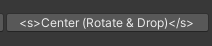
Can I add a strikethrough in a GUI button text?
Only alternative i could think of is to just change the color to orange-red for now.
https://i.imgur.com/oZcOuXS.png
 hardy lintel
although saying that....the towers are placed via the node...
verbal dome
faint nymph
Can I add a strikethrough in a GUI button text?
Only alternative i could think...
You need to use a GUIStyle that has richText enabled
verbal dome
hardy lintel
i need it to also scale for the range of the currently selected tower. i got it ...
Moving/scaling a gameobject is really simple, maybe show the code you tried?
Perhaps you were scaling the prefab and not the instantiated object
hardy lintel
https://youtu.be/S4W-QBpQgiU i was trying to follow it from this tutorial as there isnt a lot of 3d tower range tutorials
fast knot
fast knot
At first the if inside the update method did not always hit. Changed FixedUpdate...
I just created anouther debug.log inside the scaleCar(). This is hitting exactly 1 time but no scale transformation is happening (on the secound trigger)
verbal dome
Alright but you need to be specific about the issues you are having
I still dont know exactly what went wrong when you tried it
hardy lintel
verbal dome
Alright but you need to be specific about the issues you are having
I still dont...
nothing happened. thats the issue. i had some run ins with null but i fixed that easy
verbal dome
Lol, 'nothing happened' is even more vague than anything you said before
Nothing happened when doing what?
faint nymph
verbal dome
You need to use a GUIStyle that has ``richText`` enabled
May be a bit confused but doesn't unity usually not support that for its regular GUI?
Or is there an easy way to add it if my specific line was something like:
DropObjects("Center", false);```this
verbal dome
faint nymph
May be a bit confused but doesn't unity usually not support that for its regular...
I think certain GUIStyles (like the one for button) does not have it enabled by default.
You can create a new GUIStyle with var guiStyle = new GUIStyle("Button") or something like that. I think "Button" converts to the basic button style
fast knot
fast knot
I just created anouther debug.log inside the scaleCar(). This is hitting exactly...
When resetting the bool inside the scale method it seems to work. I am quite not sure why i should use Update() and not FixedUpdate() there :3
verbal dome
hardy lintel
this
So are you saying that transform.localScale is not working
hardy lintel
and transform position.
verbal dome
hardy lintel
and transform position.
Ok. You need to show what you tried
Like show the actual code that didn't work
hardy lintel
verbal dome
Ok. You need to show what you tried
the code mentioned in the youtube link i sent
meager gust
hardy lintel
the code mentioned in the youtube link i sent
that doesn't help anyone
verbal dome
hardy lintel
the code mentioned in the youtube link i sent
No, the code you wrote
You are telling me to watch a 7 minute video just to see the code that you are supposed to use
You probably copied it wrong
faint nymph
verbal dome
I think certain GUIStyles (like the one for button) does not have it enabled by ...
I appreciate the help, sadly a bit out of my realm for right now until I have more time to look into it.
Just going to quickly comment out these 2 buttons until I have the time to get back to fixing them.
hardy lintel
well its actually more two minutes for the actual code lol.
but this is what i tried
using UnityEngine;
using UnityEngine.UI;

public class NodeUI : MonoBehaviour
{
    public GameObject UI;
    public GameObject Range_indicator;
    public Text towerStats;


    public Text upgradeCost;
    public Button upgradeButton;

    public Text SellAmount;

    public AudioClip upgradesfx;
    public AudioClip sellsfx;

    public AudioSource sfx;

    public Node target;

     void Start()
    {
        sfx = GetComponent<AudioSource>();
    }

    public void setTarget (Node _target)
    {
        target = _target;

        //Range_indicator.SetActive(true);
        //Range_indicator.transform.position = target.turret.transform.position;
        //Range_indicator.transform.localScale = new Vector3(target.GetComponent<Turret>().Range, 1 , target.GetComponent<Turret>().Range) ;


        transform.position = target.getBuildPos();


        if (target.is_lvl_1)
        {
            upgradeCost.text = "MANA: " + target.turretBlueprint.upgradeCost;
            upgradeButton.interactable = true;
        }
       else if (target.is_upgraded_lvl_2)
        {
            upgradeCost.text = "MANA: " + target.turretBlueprint.upgradeCost_lvl3;
            upgradeButton.interactable = true;
        }
        else
        {
            upgradeCost.text = "MAX";
            upgradeButton.interactable = false;
        }

        //sets the stats for each individual tower
        towerStats.text = target.turretBlueprint.towerStat;
        //updates the sell price for the selected turret
        SellAmount.text = "Mana: " + target.turretBlueprint.GetSellAmount();


        UI.SetActive(true);
    }

    public void Hide ()
    {

        UI.SetActive(false);

    }

    public void Upgrade ()
    {
        if (target.is_lvl_1 == true)
        {
            target.UpgradeTurret();
            buildManager.instance.DeselectNode();
            sfx.PlayOneShot(upgradesfx, 0.7F);
        }
        else if (target.is_upgraded_lvl_2 == true)
        {
            target.UpgradeTurret_lvl3();
            buildManager.instance.DeselectNode();
            sfx.PlayOneShot(upgradesfx, 0.7F);
        }

    }

    public void Sell()
    {
        target.SellTurret();
        buildManager.instance.DeselectNode();
        target.is_Max_Upgraded = false;
        sfx.PlayOneShot(sellsfx, 0.7F);
    }

}
i would use hastebin but it says it would remove the current code saved which i sent earlier
verbal dome
hardy lintel
well its actually more two minutes for the actual code lol.
but this is what i ...
well its actually more two minutes for the actual code lol.
Why didnt you just give a timestamp then? You gotta realize that people volunteer to help here and you should make helping you as easy as possible
hardy lintel
i thought i did. sorry
verbal dome
hardy lintel
well its actually more two minutes for the actual code lol.
but this is what i ...
Is Range_Indicator a prefab?
 edgy prism
!code
eternal falconBOT
Posting code
📃 Large Code Blocks
Use links to services like:
https://gdl.space/, https://paste.ofcode.org/, https://hatebin.com/, https://paste.myst.rs/, https://hastebin.com/
📃 Inline Code
Surround code with three backquotes. Not quotation marks.
To format as C#, add cs to the first line:
```cs
// Your code here
```
Add a comment with a line number if there is an error message.
verbal dome
And yeah that ^ put your code in a paste site
hardy lintel
verbal dome
Is Range_Indicator a prefab?
yes
verbal dome
hardy lintel
yes
So it's not Instantiated anywhere?
hardy lintel
i add it into the game out of view as well
verbal dome
A prefab does not exist in the scene
verbal dome
hardy lintel
i add it into the game out of view as well
Can you show that code
Or do you mean you added it into the scene yourself, instead of instantiating it via code?
hardy lintel
verbal dome
Or do you mean you added it into the scene yourself, instead of instantiating it...
yes. added into the scene
verbal dome
Did you get errors while playing, with that code enabled?
hardy lintel
yes the null errors but i fixed those. i cant find the code i used to fix the null errors however
verbal dome
Uncomment those lines, run the game, and check the console
The code related to Range_Indicator looks ok, so maybe you had some errors.
hardy lintel
huh....odd
the range shows up now but the ui doesnt. so yeah. it seems the error is elsewhere
although it says the error lies at line 34
NullReferenceException: Object reference not set to an instance of an object
NodeUI.setTarget (Node _target) (at Assets/code/NodeUI.cs:34)
buildManager.SelectNode (Node node) (at Assets/code/buildManager.cs:46)
Node.OnMouseDown () (at Assets/code/Node.cs:52)
UnityEngine.SendMouseEvents:DoSendMouseEvents(Int32)
 verbal dome
hardy lintel
the range shows up now but the ui doesnt. so yeah. it seems the error is elsewhe...
verbal dome
hardy lintel
the range shows up now but the ui doesnt. so yeah. it seems the error is elsewhe...
Why do you think it is elsewhere, it says the error is right there 😄
hardy lintel
cause it also brings up the build manager.selectnode
verbal dome
Something on that line is null. It can't be Range_indicator because the lines above it used it and didn't throw an error.
It could be target or the Turret component on target that is null.
hardy lintel
i was thinking target because its used to move the range as well as select the tower
verbal dome
Though if this line is not erroring Range_indicator.transform.position = target.turret.transform.position; then target can't be null
What is target.turret? Is it the Turret script or something else?
Everything hints at target.GetComponent<Turret> being null
hardy lintel
i used target because in the video he seemed to use something similar. but it turns out i dont need that. it moves the range between turrets, but doesn't scale it. and the ui doesnt open still

it points to the node as well with the error
 verbal dome
You know if a line of code gives you a NullRefException, any code below that line will not run
So you gotta fix those
 ivory bobcat
hardy lintel
it points to the node as well with the error
ivory bobcat
hardy lintel
it points to the node as well with the error
You've got some nre
 edgy fox
!ide
eternal falconBOT
💡 IDE Configuration
If your IDE is not autocompleting code
or underlining errors, please configure it.
Select one:
• Visual Studio (Installed via Unity Hub)
• Visual Studio (Installed manually)
• VS Code
• JetBrains Rider
• Other/None
quasi rose
If I am going to have several different objects that can be interacted with, but specifically for the UI element it will just be "Press E" when you get near any interactable item, should that be an interface, or a base class?
I feel like it's often we would jump towards interface, but since the definition would be the same each time (display "Press E"), does a class make more sense?
rich adder
quasi rose
If I am going to have several different objects that can be interacted with, but...
Interface for interactions, invoke event for UI
quasi rose
rich adder
Interface for interactions, invoke event for UI
Ah. makes sense.
silk night
If I want to make World Space text, just scale the canvas by e.g. 0.01 to make it reasonable size? Otherwise my text is huge
Or is there a better method/component to get it to proper scale
quasi rose
rich adder
Interface for interactions, invoke event for UI
Yeah, so generic event pop up for the UI element, and then define specifically what the interact() is from the interface.
rich adder
quasi rose
Yeah, so generic event pop up for the UI element, and then define specifically w...
if its a generic "E button" without need to specify what it is just yeah invoke the event from your interaction script
your UI can just listen to that 1 script's event
quasi rose
Yeah that makes sense, thanks.
 feral palm
i have 2 game objects
directly above eachother
but there have 2 different posisitions

 slender nymph
keep in mind that the position you see in the inspector is the local position so it is relative to the object's parent
 acoustic arch
is there a way i can have a bool become automatically disabled if another of the same name becomes true or something?
i have quick bar slots that can become active to the players hand and each slot has a bool for being active
im wondering about a way to make a button click switch which slot is then active and disabling the last active slot
polar acorn
silk night
If I want to make World Space text, just scale the canvas by e.g. 0.01 to make i...
Use a world space text object instead of a canvas
silk night
polar acorn
Use a world space text object instead of a canvas
Is that only for text or are there solutions for other ui elements too?
polar acorn
If you need other UI elements you'll need to use a world space canvas, but for text, a normal TextMeshPro object will do
silk night
thanks
also one more question, I put the rendering layer on my canvas on the highest sorting layer and it still shows the numbers behind the enemies running around, overlay camera or how do i solve that? 😄
eternal needle
acoustic arch
im wondering about a way to make a button click switch which slot is then active...
just either store which was active and disable that, or disable them all and only enable the 1 newly active one.
acoustic arch
eternal needle
just either store which was active and disable that, or disable them all and onl...
alright thanks
is there a way i can check everything inside of an array and see which is a bool as true without using for?
eternal needle
acoustic arch
is there a way i can check everything inside of an array and see which is a bool...
foreach? why not using for?
acoustic arch
eternal needle
foreach? why not using `for`?
i decided to use for
idk why i wasnt it just was feeling repetetive
 charred spoke
for being repetitive is the reason it exists
 chrome crypt
I'm following this guide here to do a dependency injection, but I keep getting an error:
'GameObject' does not contain a definition for 'Initialize' and no accessible extension method 'Initialize' accepting a first argument of type 'GameObject' could be found (are you missing a using directive or an assembly reference?)
It seems like I should be able to reference a game object though
 gaunt ice
the method Initialise is belong to your script not the gameobject, you have to reference the script (ie the component on the gameobject)
polar acorn
chrome crypt
https://unity.huh.how/references/prefabs-referencing-components
You notice how the prefab in that example is not of type GameObject
 teal elk
in a 3d top down game what do i do if the enemy is smaller then the player , cause my projectile is flying over the head of the enemy.
 feral ice
when I use transform.LookAt(Vector3.zero) , the player looks at the local 0,0,0 instead of the global origin. How can I fix this?
eternal needle
feral ice
when I use transform.LookAt(Vector3.zero) , the player looks at the local 0,0,0 ...
what is local 0, 0, 0? can you show a screenshot
feral ice
eternal needle
what is local 0, 0, 0? can you show a screenshot
I have the player starting at 0,-103, 0
and I want to use transform.LookAt to make the player always point at 0,0,0

 eternal needle
feral ice
eternal needle
feral ice
im confused what part of this is your actual player, how can u tell that this circle is not rotating towards the correct position
eternal needle
feral ice
the only thing I can think that RotateAround is affecting the rotation
https://docs.unity3d.com/ScriptReference/Transform.RotateAround.html
This modifies both the position and the rotation of the transform
You could use only 1 rotate around call if you combine those vector3s and add the input. I would do it like
Vector3 rotateAxis = new Vector3(1, 1, 0).normalized;
void Update()
{

    float rotateSpeed = //Do whatever you want here with forward and horizontal input;
    transform.RotateAround(Vector3.zero, rotateAxis, rotateSpeed * Time.deltaTime);
}
and then afterwards call transform.LookAt if the rotate around part isnt sufficient
 wide roost


hey guys ive given my player the health script on the right and the slime enemies the hurt enemy script on the left
and for some reason when my character walks over and touches the slimes he takes 0 damage.
actually i just realised my player litterally walks over the slimes (both have 2D rigid bodies and 2D colliders)
eternal needle
wide roost
did you debug if its ever calling HurtPlayer?
Couple things:
I wouldnt rely on the name of the player because this is fragile. you may want to do layer based collisions. If it somehow collides with another object named player, you now have a null reference exception error.
You dont need to check if the players health is 0 or below in update, since its only changing in the method HurtPlayer(), you can just check inside that method
Add debugs to see which part is wrong, if you arent getting the collision message, if its not entering the if statement, if damageToGive isnt 0
and follow the !code command for how to post it
eternal falconBOT
Posting code
📃 Large Code Blocks
Use links to services like:
https://gdl.space/, https://paste.ofcode.org/, https://hatebin.com/, https://paste.myst.rs/, https://hastebin.com/
📃 Inline Code
Surround code with three backquotes. Not quotation marks.
To format as C#, add cs to the first line:
```cs
// Your code here
```
Add a comment with a line number if there is an error message.
 frozen dagger
whats wrong? it doesnt even change test value

 wide roost
eternal needle
did you debug if its ever calling HurtPlayer?
Couple things:
I wouldnt rely on...
wide roost
eternal needle
did you debug if its ever calling HurtPlayer?
Couple things:
I wouldnt rely on...
thanks so much for this message
i actually am following a step by step guide on how to make a 2D rpg game but its 7 years old so theres a lot of outdated things ive had to fix and im guessing checking if the object is named player is one of them 🤣
how do i actually debug tho? like how can i check if its calling hurt player?
eternal needle
wide roost
thanks so much for this message
i actually am following a step by step guide on ...
There is the debugger which you can attach and add breakpoints if you need detailed information and the game to pause. For something like this though I'd really just use Debug.Log and remove it when done
That guide probably isnt the best. A lot of guides only work the purpose of the video sadly and cannot be extended further
wide roost
bawsi you seem like you know what ur doing in regards to making games what do you suggest I do to learn
ive been programming for a year now and I just thought following a guide was best to understand unity. is there a tutorial online u can suggest me?
eternal needle
wide roost
bawsi you seem like you know what ur doing in regards to making games what do yo...
The only real suggestion I have is just keep experimenting to learn. You can copy code all you want but it doesnt really teach you anything. In some cases like complex equations it's fine. If you truly want to understand what the code is doing, it's good to try writing it yourself and changing around values to see what effect this gives.
Hell, I was just doing this 5 minutes before I replied to you with a particle system and have a better understanding of them now
wide roost
i see, that makes sense.
okay im gonna stop following this guide then honestly and just try to learn some basic unity syntax and make the game i want to
eternal needle
As for tutorials, I dont really watch many. Only for systems very specific to unity like the ai package or particle system.
Some tutorials for you though might give you more information and tell you about methods that you didnt know existed
You should really learn how to debug before you continue, itll improve your experience by a lot.
eternal needle
wide roost
okay im gonna stop following this guide then honestly and just try to learn some...
Forgot to @ respond on the message above
wide roost
I see,
i guess i more want to know the functions and stuff that unity provides that I can use
like the debug stuff in unity.
chilly moss
somewhere on line 9 is referenced as null and i need to use parenthesis somehow but I'm confused where
 gaunt ice
!ide
eternal falconBOT
💡 IDE Configuration
If your IDE is not autocompleting code
or underlining errors, please configure it.
Select one:
• Visual Studio (Installed via Unity Hub)
• Visual Studio (Installed manually)
• VS Code
• JetBrains Rider
• Other/None
chilly moss
i already did like twice mate it ain't working
eternal needle
chilly moss
i already did like twice mate it ain't working
Then you've likely missed a step. It works, a ton of people here have followed the same guide. It's also a rule to have your ide configured to get help
chilly moss
what version are you using?
gaunt ice
2022
 floral trout
hey i have 2 scripts("Ability" and "AbilityEvolveChecker"). How come im getting an error saying "AbilityEvolveChecker" namespace doesnt exist when i use it as a variable in the "Ability" script? I remade "AbilityEvolveChecker" with another name and that fixed it, but i kinda prefer "AbilityEvolveChecker".
ivory bobcat
floral trout
hey i have 2 scripts("Ability" and "AbilityEvolveChecker"). How come im getting ...
Show the exact error message with an image
 topaz mortar
var floatyText = Instantiate(regenTextPrefab, floatyTextPosition, Quaternion.identity);
Why is this instantiating my prefab with a different scaling and position?
the prefab scale is 0.5 but the instantiated object scale is 0.2 (I'm not adjusting this anywhere in my code)
the position is the same as my floatyTextPosition but it adds some value to it that I don't add anywhere and are not in the prefab either
ivory bobcat
Log the scale for the prefab and instance and see if they're the same
topaz mortar
ew it's my animation 😛
 dapper lava
GetComponent<Rigidbody2D>().velocity = new Vector2(1.0f, 0.0f);
what valuse do new Vector2(1.0f, 0.0f) pass to the GetComponent<Rigidbody2D>().velocity
and if possible can i dont use new Vector2(1f, 0f); and just ype list (1f, 0f) with 2 variables kinda looks like no diffrence to me
short hazel
dapper lava
and if possible can i dont use ``new Vector2(1f, 0f);`` and just ype list (1f, 0...
It creates a new vector with the specified X/Y values.
You can absolutely pass variables for the X/Y values, instead of two number constants. But you need to keep the new Vector2 to instruct it to create a Vector2.
dapper lava
ok so if vector is just x and y values why do i have to create it instead of just passing them
short hazel
.velocity = (1f, 0f); will NOT work because (a, b) is a Tuple, an entirely different type.
dapper lava
what is type of Vector
dapper lava
ok and ridgid body take the data of type of Vector 2 ok
short hazel
The Rigidbody's velocity does
dapper lava
yes
short hazel
Rigidbody is also a type itself
dapper lava
so i want to set velocity when i press space
void Update()
    {
        if(Input.GetKeyDown("space"))
        {
            GetComponent<Rigidbody2D>().velocity = new Vector2(0.0f, 1.0f);
        }
    }
to the object this script is attached to
ivory bobcat
What's the problem?
dapper lava
it does
short hazel
Good! I'd use KeyCode.Space instead of a string for your GetKeyDown
dapper lava
i forgot about it
so this apply to the object the script is attached to if i wanted t move diffrent object how do i do it
do i set ridgid body to public and make it like variable
and then change it
ivory bobcat
Reference the other object
dapper lava
dapper lava
do i set ridgid body to public and make it like variable
like i said here
ok
 hearty trout
Hey trying to make a building system in unity but I am not sure on how to make ghost building follow mouse pos and have it so the actual building is placed there
 proud aurora
hearty trout
Hey trying to make a building system in unity but I am not sure on how to make g...
proud aurora
hearty trout
Hey trying to make a building system in unity but I am not sure on how to make g...
I think there is a way to transform mouse pos into 3D coords, but you could always use a raycast, as for the ghost building you could just use the mesh with a semi-transparent material applied.
Lastly for the placement make it so that when mouse1 or whatever button you want is pressed spawn the selected model at the raycast’s position
hearty trout
Aye thanks
proud aurora
No problem
hearty trout
So it would be like on mouse click 1 instantaite object on hit point
For placing it
After getting the ray cast script above ect:
 undone wave
hello
if i wanted to ask a question should i just ask it here or should i make a new thread
ivory bobcat
This is the coding channel.
#854851968446365696 for suggestions on how to ask questions.
dapper lava
ivory bobcat
Reference the other object
how i tried it with tags
dapper lava
ivory bobcat
https://discord.com/channels/489222168727519232/497874004401586176/1138032179801...
here TankLight is name of script we try to change
why in code of the script Tank which is the main one

do we make another varaible
called the same as the name of the script
glossy eagle
Hi. Is there a way to like make an attribute affect a bunch of variables at the same time? Like not having to manually write that attribute before every single variable
ivory bobcat
dapper lava
here TankLight is name of script we try to change
why in code of the script Tank...
I'm not sure what you're saying but you'd create a variable to reference the component type you're wanting to reference.
dapper lava
ivory bobcat
I'm not sure what you're saying but you'd create a variable to reference the com...
is it obligatory
or can i just use TankLight the name of the script
ivory bobcat
I'm not sure what you're saying but this is C# basics for class variables (instances)
short hazel
Make sure the button is under a Canvas. Make sure you haven't got rid of the "Event System" object in the scene (it's the one which relays UI events to your UI elements). Make sure nothing is in front of the button, that could block events from reaching it.
dapper lava
ivory bobcat
I'm not sure what you're saying but this is C# basics for class variables (insta...
this dude said quote "we're ganna take the name of the script TankLight and name it tanklight" why do you name something that already has a name if this naming is obligatory then i go learn c#. it sound like it makes things more complicated with no reason
short hazel
glossy eagle
Hi. Is there a way to like make an attribute affect a bunch of variables at the ...
Nope! You'll have to put one for each targeted element
glossy eagle
well okay thanks
ivory bobcat
dapper lava
this dude said quote "we're ganna take the name of the script TankLight and name...
The first refers to the type, the second with camelcase would be how you're wanting to refer to it in this script.
Make sure to check out the Unity !Learn tutorials or other tutorials pinned on this channel.
eternal falconBOT
:teacher: Unity Learn ↗
Over 750 hours of free live and on-demand learning content for all levels of experience!
short hazel
int i = 42;
Type name (the shape of the box), variable name (the box itself), = value (what you put in the box)
dapper lava
i go outside
short hazel
Internal Unity error, you can ignore this one
When none of the stack trace elements point to your own code, ignore
solemn fractal
Hey guys.. To access and make active the LevelUpScrenn I am using cs levelUpScreen.SetActive(true); And it is working fine. But if instead I want to access a child and make active just 1 of its child. How can I access it? I tried cs levelUpScreen.GainAttackSpeed.SetActive(true); But that doesnt work
for instand the gainAttackSpeed

 fringe pollen
solemn fractal
Hey guys.. To access and make active the LevelUpScrenn I am using ```cs
levelUpS...
fringe pollen
solemn fractal
Hey guys.. To access and make active the LevelUpScrenn I am using ```cs
levelUpS...
If it's parents are inactive then the child will also be inactive. You'll need to either change it's parent or make the levelUpScreen active and the other things in it inactive or some other way like that probably
solemn fractal
Ok thank you
 delicate portal
Hey how do I rotate the camera around the player with the mouse/gamepad using unity's input system?
 grim stream
How do i fix this? None of the solutions ive found on the internet has worked
 delicate portal
Hey how do I rotate the camera around the player with the mouse/gamepad using un...
delicate portal
delicate portal
Hey how do I rotate the camera around the player with the mouse/gamepad using un...
I tried to google it
fringe pollen
grim stream
How do i fix this? None of the solutions ive found on the internet has worked

Unity Discussions
For some reason every time I make a script it shows up at “Miscellaneous Files” (see picture below) and it makes the script unable to work, and every single script does this and there is no way to fix it, any suggestions?
 cunning mesa
How can I disable "Reloading script assemblies" after every script change?
 fair marlin
I don’t think you can, it reloads it when you make a change to your code
 eager elm
cunning mesa
How can I disable "Reloading script assemblies" after every script change?
eager elm
cunning mesa
How can I disable "Reloading script assemblies" after every script change?
Edit -> Preferences -> Asset Pipeline -> Auto Refresh -> Disabled
You have to manually refresh when you want changes to take effect, ctrl+R.
cunning mesa
Ahh excellent, cheers!
eager elm
you can also split your scripts into multiple assemblies, then only the scripts inside the assembly that got changed need to be recompiled
grim stream
when i have instanciated a prefab. How do i access a variable within its attached script?
 queen adder
how do I create a physical button that can be pressed? I've searched everywhere and I can't find one
cunning mesa
grim stream
when i have instanciated a prefab. How do i access a variable within its attache...
What's the name of the script?
grim stream
NPCBall
cunning mesa
 cunning mesa
queen adder
how do I create a physical button that can be pressed? I've searched everywhere ...
cunning mesa
queen adder
how do I create a physical button that can be pressed? I've searched everywhere ...
A UI button?
queen adder
cunning mesa
A UI button?
No a button you press with a keybind
cunning mesa
I'm not quite following. Please provide more information if you want my assistance(:
short hazel
A physical button, in the world
queen adder
yes
short hazel
You need a script on the player that will detect whether it's looking at a button, and a script on the button itself to trigger things when it's pressed
queen adder
mkay
eager elm
grim stream
when i have instanciated a prefab. How do i access a variable within its attache...
You can also skip a step and make RealBall of type NPCBall and then use:
NPCBall ball = Instantiate(realBall);
ball.someVariable = 10;
dapper lava
ivory bobcat
The first refers to the type, the second with camelcase would be how you're want...
when i say
int a; int is type and it is needed as it passes some information for example type of variable a
the capitalized TankLight is name of script
in code TankLight tanklight
tanklight has a type of file TankLight
what does it mean something has a type of the file "TankLight.cs"
what information does it says about the variable tanklight
also later in code
tanklight = getcomponent<TankLight>(); guy explains this code finds the script in object components and i understand this so what was TankLight needed for at the beggining
short hazel
dapper lava
when i say
int a; int is type and it is needed as it passes some information for...
It's not about files, it's about classes. When you refer to TankLight, in this case it will try to find where a class TankLight is located
polar acorn
dapper lava
when i say
int a; int is type and it is needed as it passes some information for...
A variable needs a type. You have to declare what kind of data a variable can hold
dapper lava
short hazel
It's not about files, it's about classes. When you refer to `TankLight`, in this...
guy said filename but i was also thinking class has the same name as file
polar acorn
A variable of type TankLight can hold an instance of TankLight
dapper lava
polar acorn
A variable of type TankLight can hold an instance of TankLight
and the name TankLight is name of the script or class in it
 strong wren
The file thing is purely a Unity thing for its internal purposes
short hazel
dapper lava
guy said filename but i was also thinking class has the same name as file
In Unity it has to in most cases, but it definitely searches for a class name
As you can put multiple type declarations in a single file
polar acorn
dapper lava
and the name TankLight is name of the script or class in it
Unity requires that component classes have the same name as the file they're in, but that's not a C# thing
The class name is what determines the type
dapper lava
ok
also when i work with velocity and use new vector should i like care that i make new vector every frame or it doesnt matter
short hazel
Doesn't matter
It actually makes two vectors in your case. One when you use new Vector2() on it, and a second when it gets put into .velocity (the value gets copied)
dapper lava
GameObject redbird = GameObject.FindWithTag("second");
redbird.GetComponent<Rigidbody2D>().velocity = new Vector2(0f, 3f);
ok so i made 2 birds one was jumping ok and i tried to make second one jump using the script in the firs one so i tried something like this and now nither of them jump
i did put tag in redbird called second
short hazel
You'd usually attach the script to the two birds separately
dapper lava
yes but for example when i kick the ball i think i could apply some velocity to the ball and not make a second script checking every frame has the abll been touched
so i just wanted to move other object without the script
polar acorn
dapper lava
```cs
GameObject redbird = GameObject.FindWithTag("second");
redbird.GetComponen...
Don't use find. Make public or serialized variable and drag in the object you want to reference
short hazel
Code is probably not doing what you intended to, here in your deleted screenshot lol
Without braces, if statements only apply to the next line, so the second velocity you apply on the other object will always run
dapper lava
void Update()
    {
        if(Input.GetKeyDown(KeyCode.Space))
        GetComponent<Rigidbody2D>().velocity = new Vector2(0f, 5f);//here the bird with code jumps
        redbird.GetComponent<Rigidbody2D>().velocity = new Vector2(0f, 3f);//here i tried to make the second one jump too
    }
if (something)
Debug.Log("Inside if statement");
Debug.Log("Outside if statement");
- Without curly braces your if statement applies only to the next line
- If the intention is to have both birds jump when you hit space then why are you making one script reference both instead of just putting this script on both birds
dapper lava
GameObject redbird = GameObject.FindWithTag("second"); how do you get the object
dapper lava
for example i have button to push somethign in game
and when i aim at something and push i want to change it's velocity
so i want to take the other object and change its velocity even if it doesnt have a script
i am just testing it on this
short hazel
That's entirely different to what you've shown here, it doesn't talk about birds anymore
You're diverging
polar acorn
dapper lava
for example i have button to push somethign in game
If you have a button that makes both birds jump then this script should be on the button and reference both birds
dapper lava
i wanted to move object with script in diffrent object
that's waht i wanted
my question was unclear
for example bird2 doesnt have a script and bird 1 have
so i want to move bird2 with script from diffrent object(bird1)
but it can as well be player and ball
polar acorn
dapper lava
for example bird2 doesnt have a script and bird 1 have
so i want to move bird2 ...
Why doesn't it have the same script bird 1 does
If they're doing the same thing they should have the same script
dapper lava
lets talk diffrent game
i am first person player
and there is ball
and i can press lmb to push it
so i apply velocity to the ball
and ball doesnt have script
i want to move object with script in diffrent object
i simply already had 2 birds
so i was just testing
polar acorn
dapper lava
and ball doesnt have script
Then yes, you can get the rigidbody component from it and add force or set the velocity of it. I'm assuming you'd be getting the reference to the object from a raycast to determine if you've clicked on it
dapper lava
dapper lava
```cs
GameObject redbird = GameObject.FindWithTag("second");
redbird.GetComponen...
i am currently at trying to change diffrent object velocity
redbird have tag "second"
so i tired to find object with tag second
and then use it as if it was class with data
polar acorn
dapper lava
and then use it as if it was class with data
It is a class with data. It's a reference to a game object
dapper lava
FindGameObjectWithTag is not allowed to be called from a MonoBehaviour
queen adder
what's the chance of 2 of this Random.Range(-2147483646, 2147483646) be equal?
frosty hound
So low that you can consider it impossible
polar acorn
queen adder
what's the chance of 2 of this ``` Random.Range(-2147483646, 2147483646)``` be e...
Very low
queen adder
i plan an intentional bug that can happen very low chance
frosty hound
It's lower than very low.
polar acorn
queen adder
i plan an intentional bug that can happen very low chance
So decide on a chance first then make a random that rolls it
queen adder
i dont want to actually trigger the bug, but i am expecting the bug to happen when two of this random is equal
short hazel
With ideal probabilities, around 0.0000000233% for your current parameters
Wait no, even lower than that
It's (1 / uint.MaxValue) * (1 / uint.MaxValue) to get it twice in a row
Calculator probably won't be precise enough to compute it properly
5.42e-20 (542 with 20 zeroes before the decimal separator)
queen adder
ig that's pretty good enough for me
polar acorn
queen adder
ig that's pretty good enough for me
If this is what you want it's probably easier to just not code in the thing at all and just tell people you did. It'd be basically the same functionality
queen adder
it's just for an id system anyways, and the worst case that can happen is player can duplicate one item hehe
short hazel
There's Guid which probably has even lower chances of rolling the same ID twice
Since it's on uh 32 bytes?
16* bytes
(for reference, int is on 4 bytes)
dapper lava
how
short hazel
Make a prefab... here goes the message deletions again lol
dapper lava
ye i thought i should know this
and later if i dont get something ask
how to make a prefab
 surreal wagon
can someone help me? I have a boolean to check if the player is on the ground and it is working fine but the jump isn't working
 short hazel
Is the code in the second if statement running? Place a Debug.Log in it to make sure
topaz mortar
surreal wagon
can someone help me? I have a boolean to check if the player is on the ground an...
"isn't working" doesn't help us help you
surreal wagon
well when i put in a debug.log into the jump thingy it showeed when i pressed space but my character didnt actually jump
topaz mortar
what does your character do when you press space?
short hazel
First things first, you don't multiply by Delta Time here
surreal wagon
oh well its working
short hazel
It divides the force being applied by a factor of 100 (as it's around 0.016 at 60 FPS)
languid spire
Also, presuming this is in Update, using GetKey is gonna spam the Jump
dapper lava
float x = 11;
    void Update()
    {
        x = x-0.1f;
        transform.position = new Vector2(x, -5)*Time.deltaTime;
    }
block moves to the middle and shakes
i wanted it to smothly move from right to left
i deleted Time.deltatime and it started working normaly why
x = x-1f * Time.deltaTime;
transform.position = new Vector2(x, -5);
ok it works now
 timber urchin
Might be an obvious answer, and im aware the fix is assigning the object that has the textmesh component to the feild. But it keeps reseting no matter what i do, like before I press play it is assigned but as soon as the game starts the feild becomes empty


Also forgive my code haha I am just starting to try and get to grips with this stuff
I have to keep dragging the object there everytime I start the game then it works fine
solemn fractal
Hi friends, in code I am using this posX and posY to position my image, changing its position as I want. BUT it seems that this is not the real position.. how can I know the real one, because it is not appearing where it should.when i start the game and it appear apear almost outside the window
 wintry quarry
timber urchin
Might be an obvious answer, and im aware the fix is assigning the object that h...
wintry quarry
timber urchin
Might be an obvious answer, and im aware the fix is assigning the object that h...
Because of your code in Start
timber urchin
Even if the counter jumps by 2 haha
timber urchin
wintry quarry
Because of your code in Start
Oh should it be in update?
wintry quarry
No...
It should be deleted
If you want to assign the reference in the inspector stop assigning it in code
eager elm
solemn fractal
Hi friends, in code I am using this posX and posY to position my image, changing...
I think either transform.localPosition or GetComponent<RectTransform>().anchoredPosition
solemn fractal
eager elm
I think either transform.localPosition or GetComponent<RectTransform>().anchored...
I am getting it like that cs Image GainMovementSpeed = Buttons.transform.Find("GainMovementSpeed").GetComponent<Image>(); and I am change its position like that: ```cs
Transform gainAttackSpeedT = gainAttackSpeed.transform;
gainAttackSpeedT.position = firstRow;
firstRow is using those values

but it is appearing outside the window almost
and not in the center as I see in the UI view on the scene


almost outaide the window when it appears
keen dew
RectTransform uses anchoredPosition
solemn fractal
keen dew
RectTransform uses anchoredPosition
and how do I get the values for anchoredposition?
or how do I fix that?
keen dew
The same way as everything else
get the RectTransform component and access .anchoredPosition
eager elm
and ui elements depend on your screen size. I recommend you solve this in a different way, for example with Layout Group Components. Moving UI elements via code is almost always gonna cause problems
wintry quarry
solemn fractal
firstRow is using those values
Those are canvas space values. . position is completely the wrong thing
 tiny hawk
Hi, I'm using the free first person character controller, and I'm not sure how to reference this script from another script. I don't know how to use it's assembly in my own namespaced code.
 wintry quarry
tiny hawk
Hi, I'm using the free first person character controller, and I'm not sure how t...
wintry quarry
tiny hawk
Hi, I'm using the free first person character controller, and I'm not sure how t...
Namespaces have nothing to do with assemblies
tiny hawk
wintry quarry
Namespaces have nothing to do with assemblies
Ohh ok
wintry quarry
If you're not using an assembly definition in your code you can just directly use this
tiny hawk
I'm using an assembly definition in my custom code
wintry quarry
Then you need to add their assembly as a dependency in your assembly
Assuming they have an assembly
wintry quarry
If not you need to create one for them
tiny hawk
Ah ok
wintry quarry
Why would you be searching for days lol
tiny hawk
I spend about a couple days a week doing game dev
wintry quarry
Just look for the asmdef in their code
tiny hawk
My time spent doing this was looking for this asssembly defintiion and trying other techniques
@wintry quarry Would this be the assembly?
 timber urchin
Anyone know why mu jump count is registering 2 jumps when a single jump happens?
One second
silk night
how are you registering jumps?
timber urchin
Whats the best way to send code here?
silk night
!code
eternal falconBOT
Posting code
📃 Large Code Blocks
Use links to services like:
https://gdl.space/, https://paste.ofcode.org/, https://hatebin.com/, https://paste.myst.rs/, https://hastebin.com/
📃 Inline Code
Surround code with three backquotes. Not quotation marks.
To format as C#, add cs to the first line:
```cs
// Your code here
```
Add a comment with a line number if there is an error message.
timber urchin
Hastebin is a free web-based pastebin service for storing and sharing text and code snippets with anyone. Get started now.
timber urchin
Ah thanks dude
silk night
GetKeyDown only triggers the first frame after a key was pressed
silk night
All clones of what?
silk night
timber urchin
https://hastebin.com/share/ejedejuziz.csharp
Also one thing i noticed, why are you setting the velocity twice in FixedUpdate?
timber urchin
Thats a good point I have no clue why thats there twice haha didn't even notice
silk night
How are you creating these clones?
Best would be to keep a HashSet of all you create and iterate over that to delete them
timber urchin
silk night
GetKeyDown only triggers the first frame after a key was pressed
This fixes that issue but now it seems to not register the space presses properly. It does it once or twice if im lucky
Ill figure it out eventually haha
silk night
timber urchin
This fixes that issue but now it seems to not register the space presses properl...
You press it, release it and press it again and second time it does not register?
timber urchin
Yea
 neat crag
how do i install the new unity input system?
silk night
Then keep a HashSet (basically an unordered List) of them, you can do a foreach on it and destroy them
timber urchin
Like it only registers some of the presses
silk night
neat crag
how do i install the new unity input system?
Via their package manager
silk night
timber urchin
Like it only registers some of the presses
how are you checking if it registered the press?
timber urchin
I think I figure out the issue its the else statement conflicting possibly
neat crag
silk night
Via their package manager
where?
 silk night
neat crag
where?
silk night
neat crag
where?
https://img.sidia.net/ZEyI5/tEDezOte75.png/raw at the top choose Unity Registries (I have 1.8.0 installed which is a preview, you will have 1.7.x)

 neat crag
silk night
https://img.sidia.net/ZEyI5/tEDezOte75.png/raw at the top choose Unity Registrie...
neat crag
silk night
https://img.sidia.net/ZEyI5/tEDezOte75.png/raw at the top choose Unity Registrie...
oh ok ty very much
timber urchin
silk night
how are you checking if it registered the press?
Im using a bool that keeps track if the button is pressed or not which im guessing wont work well with GetKeyDown?
silk night
timber urchin
Im using a bool that keeps track if the button is pressed or not which im guessi...
Should work with bool, check directly in the update function by logging
short hazel
If you want it to be true while the button is held down then a simple yourBoolean = Input.GetKey(whatever); will do the trick
silk night
OnCollisionstay is not a good function to check if you want to jump though
silk night
you should save in a property if you are grounded and execute the jump in update if pressed + grounded
timber urchin
silk night
you should save in a property if you are grounded and execute the jump in update...
Got it!
silk night
what you typed is what a for loop does
short hazel
Now do a for loop that has its value incremented by 3 each iteration
short hazel
Yeah, type "for" then Tab twice
But yeah it's "complex syntax" that allows you to do way more stuff, like creating multiple variables before the first ;, put multiple conditions in the middle, etc.
solemn fractal
keen dew
get the RectTransform component and access `.anchoredPosition`
used like that and worked now. thank you cs RectTransform gainMovementSpeedT = GainMovementSpeed.rectTransform; gainMovementSpeedT.position = firstRow;
 neon fractal
Is there any way to make it shorter?
 rich adder
neon fractal
Is there any way to make it shorter?
rich adder
neon fractal
Is there any way to make it shorter?
maybe put keycodes inside an array?
neon fractal
rich adder
maybe put keycodes inside an array?
Alpha[1, 2, 3]?
gaunt ice
idk if alphaX is continue, if yes:
for(int i=0;i<3;i++){
  if(keydown(alpha1+i))number=i;
}
check it before use it
neon fractal
It works, but I don't really understand how, I would be happy if someone could explain it to me.
 languid spire
it shouild be number = i+1 to produce the same result you had above
rich adder
neon fractal
Alpha[1, 2, 3]?
public KeyCode[] keys = new KeyCode[3]
    {
        KeyCode.Alpha1,KeyCode.Alpha2,KeyCode.Alpha3
    };``````cs
if (Input.anyKeyDown)
        {
            for (int i = 0; i < keys.Length; i++)
            {
                if (Input.GetKeyDown(keys[i]))
                {
                    number = i + 1;
                    break;
                }
            }
}```my bad
rich adder
neon fractal
It works, but I don't really understand how, I would be happy if someone could e...
oh ya this works too. 😛 mine is just incase u want more than 3 I suppose
neon fractal
Thanks, I don't understand how "for" understands which key I pressed. But it works.
rich adder
neon fractal
Thanks, I don't understand how "for" understands which key I pressed. But it wor...
for isn't the one that checks the key
neon fractal
I understand that
rich adder
neon fractal
I understand, thank you
the first solution is a bit frail(depends on magic numbers kinda)
but it works fine
Keycode.Alpha1 = 49
KeyCode.Alpha1 + i (1) = 50 aka Alpha2
so on
solemn fractal
Hey guys, I just asked that question some minutes ago and I thought I fixed it but it seems not to be working still.
I am trying to change the posX and posY but it is not working. I am doing like that:
Vector3 firstRow = new Vector3(-10, 10, 0);
Image gainAttackSpeed = Buttons.transform.Find("GainAttackSpeed").GetComponent<Image>();
RectTransform gainAttackSpeedT = gainAttackSpeed.rectTransform;
gainAttackSpeedT.anchoredPosition = firstRow; ```
What I am doing wrong? Or what is a better way to change its position? When The player gain 1 level appear that button and it should appear in the middle of the screen. verbal dome
neon fractal
Thanks, I don't understand how "for" understands which key I pressed. But it wor...
verbal dome
neon fractal
Thanks, I don't understand how "for" understands which key I pressed. But it wor...
KeyCode is just an enum, which is basically an integer number, you can see the list here https://docs.unity3d.com/ScriptReference/KeyCode.html
As you see the keycodes are listed in order, so doing Alpha1 + 1 will give you the number that corresponds to Alpha2
Oh looks like navarone explained it
silk night
Ok steps for that should be:
- create a parent "holder" in your level up screen
- create the movespeed button and set its parent to your "holder"
If you want multiple make your holder a vertical group
@solemn fractal
neon fractal
verbal dome
KeyCode is just an enum, which is basically an integer number, you can see the l...
I already understood, thank
solemn fractal
silk night
If you want multiple make your holder a vertical group
<@230799638494445568>
So what you mean is craete an empty object and make the button a child of this object, and I would control the position of the emptyobject and not the button it self?
silk night
yeah make an empty object where your button should be
that already exists in the level up screen
solemn fractal
hmmm ok, make sense. Will try that. Thank you !!
silk night
and like i said, if you want multiple buttons add a Vertical Layout Group component to your "holder" and the buttons will list themselves up automatically
solemn fractal
silk night
and like i said, if you want multiple buttons add a Vertical Layout Group compon...
hmm vertical layout.. never did that will do a research about it, because I will have like at least 20 buttons. but they will appear basically in 3 position always.. randomly.. so I need to have those 3 position set
silk night
yeah then its perfect for you
 still bobcat
why is it black?
Screenshots:
- unity
- blender
- blender
- texture
- alpha texture


 eager elm
not related to each other
rich adder
still bobcat
why is it black?
Screenshots:
1. unity
2. blender
3. blender
4. texture
5. alph...
not a code question here.
 bronze yacht
eager elm
not related to each other
bronze yacht
eager elm
not related to each other
I imported it from the asset store. Do you know what i need to do?
rich adder
not a code question
also not related warning to ur issue
bronze yacht
rich adder
not a code question
also not related warning to ur issue
Which channel do i need to put it?
still bobcat
rich adder
not a code question here.
oh sorry
rich adder
bronze yacht
Which channel do i need to put it?
#🏃┃animation or #💻┃unity-talk
describe clearly whats happening instead
silk night
still bobcat
oh sorry
are you using URP? if so i can help you in #archived-urp
timber urchin
Anyone know why the bools in my project aren't working at all trying to get a jump system working
Sending a video for reference
Ill send the code now too
Hastebin is a free web-based pastebin service for storing and sharing text and code snippets with anyone. Get started now.
verbal dome
timber urchin
Because your code is changing them jump = Input.GetKeyDown(KeyCode.Space);
Jump turns to false the next frame because space is not being pressed
silk night
isnt that what he wants?
verbal dome
🤷♂️
silk night
just execute the jump method once on press
verbal dome
Probably just wanted to test it by clicking on the inspector but it doesn't really work here
silk night
oh wait, didnt see that in the video
verbal dome
verbal dome
Because your code is changing them ``jump = Input.GetKeyDown(KeyCode.Space);``
Same with isGrounded
timber urchin
The jump also disregards the fact that im not on the ground and still works haha
Ohhh
Right
austere monolith
something wrong with these animations? because even when i try previewing it it doesnt work
 silk night
austere monolith
something wrong with these animations? because even when i try previewing it it ...
silk night
austere monolith
something wrong with these animations? because even when i try previewing it it ...
how are you trying to preview them?
austere monolith
clicking then in the bottom right it should show but its not, i dont even care about that sometimes it shows but makes the zombie do nothing
 tawdry rock
austere monolith
something wrong with these animations? because even when i try previewing it it ...
tawdry rock
austere monolith
something wrong with these animations? because even when i try previewing it it ...
double click on the node and at the inspector bottom right you should see the preview, if not then you might need to open it
verbal dome
I think you also need to have an object selected, which uses an animator with that controller
austere monolith
i tried but when i opened it it always says 3d model cannot be viewed or something
verbal dome
austere monolith
 timber urchin
verbal dome
Same with isGrounded
timber urchin
verbal dome
Same with isGrounded
So what should I do about this?