#💻┃code-beginner
1 messages · Page 37 of 1
 chrome wasp
chrome wasp
chrome wasp
ohh the public Rigidbody rb;
 rich adder
Rigidbody is the component, rbis the name you given it
chrome wasp
So I want to drag gregg into that?
rich adder
yes if it has a rigidbody
 pastel talon
also, I tried this but it doesn't work
 rich adder
pastel talon
also, I tried this but it doesn't work
rich adder
pastel talon
also, I tried this but it doesn't work
first check your Trigger is working. Put Debug.Log in there
chrome wasp
rich adder
yes if it has a rigidbody
I moved dragged Gregg from object into vs code and saved and it didnt do anything
pastel talon
The trigger is working because it's doing what it supposed to, except for the particle part
 polar acorn
pastel talon
also, I tried this but it doesn't work
polar acorn
pastel talon
also, I tried this but it doesn't work
The Three Commandments of OnTriggerEnter:
- Thou Shalt have a 3D Collider on each object
- Thou Shalt tick
isTriggeron at least one of them - Thou Shalt have a 3D Rigidbody on at least one of them
polar acorn
chrome wasp
I moved dragged Gregg from object into vs code and saved and it didnt do anythin...
...what?
rich adder
pastel talon
The trigger is working because it's doing what it supposed to, except for the pa...
any errors in the console ?
rich adder
chrome wasp
well you said to drag gregg to my variable
in the INSPECTOR
field in the inspector
chrome wasp
YEAHHHH
rich adder
we've said it like 5 times
rich adder
probably because you have compiler errors
 warm sleet
Hello, im programing in unity and I dont know if its possible to make by code that when a missile hits an object, the object break into pieces, I mean, the block is still there but it has less space
pastel talon
rich adder
any errors in the console ?
yeah but it is assigned??

 warm sleet
An easy example are the bunkers from space invaders
 queen adder
chrome wasp
queen adder
chrome wasp
it still says rb is not assigned but now my gregg is just randomly moving diagonal
when I start the code
polar acorn
pastel talon
yeah but it is assigned??
Whatever Blixtrar was, it no longer exists
pastel talon
Swedish lol
polar acorn
chrome wasp
it still says rb is not assigned but now my gregg is just randomly moving diagon...
If it still says it is not assigned, then there exists at least one script where it is not assigned
rich adder
warm sleet
Hello, im programing in unity and I dont know if its possible to make by code th...
ofc its possible. make different sprite states per damage amount
pastel talon
polar acorn
Whatever `Blixtrar` _was_, it no longer exists
yeah for some reason it just unassigns itself when I hit play
chrome wasp
Because that script is for moving the character the collision needs its own script?
polar acorn
pastel talon
yeah for some reason it just unassigns itself when I hit play
What did you drag into the slot? Is that object ever destroyed?
rich adder
chrome wasp
Because that script is for moving the character the collision needs its own scri...
no?
what
rich adder
why don't you start showing the current code
don't use screenshots and paste the link
pastel talon
polar acorn
What did you drag into the slot? Is that object ever destroyed?
It was group and not a single particle system. That's probably the issue right? Because now when I dragged in one of the particle systems it works
polar acorn
pastel talon
It was group and not a single particle system. That's probably the issue right? ...
No idea what you were actually doing with Blixtrar so I can't answer that for sure
but if whatever you did fixed it that was probably the case
rich adder
chrome wasp
https://hatebin.com/gyfdksojrf
you copied the code from example 10, 0, 10);
this moves it diagonal
pastel talon
polar acorn
but if whatever you did fixed it that was probably the case
yeah
thanls
thanks
chrome wasp
rich adder
you copied the code from example `10, 0, 10);`
ohhhhhh
rich adder
you have to put back your old direction you had @chrome wasp
chrome wasp
with the variables?
polar acorn
chrome wasp
https://hatebin.com/gyfdksojrf
Well, every frame you're setting the velocity to up-right, that would be why your character is moving up-right
rich adder
just replace transform.translate to rb.velocity
all you had to do
direction stayed the same
chrome wasp
ohhhhhhh
"The variable rb of Mover has not been assigned.
You probably need to assign the rb variable of the Mover script in the inspector"
So I assumer
I probably need to assign the rb variable of mover script
rich adder
bruh
polar acorn
chrome wasp
"The variable rb of Mover has not been assigned.
You probably need to assign the...
You have a Mover that has no rb assigned
chrome wasp
in the inspector?
rich adder
search inside the hierarchy t:Mover
warm sleet
rich adder
ofc its possible. make different sprite states per damage amount
And i only need to program that by Code i Guess, but
chrome wasp
rich adder
search inside the hierarchy `t:Mover`
gregg came up
rich adder
chrome wasp
gregg came up
if thats the only one, then greg has Mover with no rb assigned
warm sleet
If i need that the barrier breaks in a specific point, because the bullets wont hit always at the same place
 gilded sinew
guys i could really use help, struggling with dictionary since morning and it doesnt work somehow


 rich adder
warm sleet
If i need that the barrier breaks in a specific point, because the bullets wont ...
rich adder
warm sleet
If i need that the barrier breaks in a specific point, because the bullets wont ...
you probably use masks ontop of the hitpoint of bullet and lay that over the sprite
chrome wasp
My boy Gregg has the component
gilded sinew
i created dictionary in scriptable object.
in game manager script i want to generate new dictionary with data in it
and when i want to print in textmeshpro data from that dictionary it doesnt work
could somebody help me out?
rich adder
chrome wasp
My boy Gregg has the component
is this the same object as Greg?
clear the console and hit play
are you sure that error is still there
chrome wasp
yeah Gregg is the object I am trying to rb
chrome wasp
rich adder
are you sure that error is still there
if you're talking to me everytime I start the game I am flooded with more of that error
rich adder
gilded sinew
and when i want to print in textmeshpro data from that dictionary it doesnt work
"doesn't work"
this doesn't help.
Start Debugging and giving more info wht that even means
polar acorn
chrome wasp
if you're talking to me everytime I start the game I am flooded with more of tha...
Then you have a Mover script that does not have an rb assigned
chrome wasp
so do I need to assign the script rb?
cause Gregg has it
and I'm trying to rb Gregg
polar acorn
chrome wasp
and I'm trying to rb Gregg
For this Mover script, rb is Gregg's rigidbody
warm sleet
pastel talon
yeah but it is assigned??
Its bad written , is it hammerSlag not hammreSlag?
polar acorn
You have another Mover script that has no rb assigned
 polar acorn
That's the scene
 twin bolt
How would i play a sound everytime the time changes, kind of like a clock tick?https://i.imgur.com/RnlYtTV.png
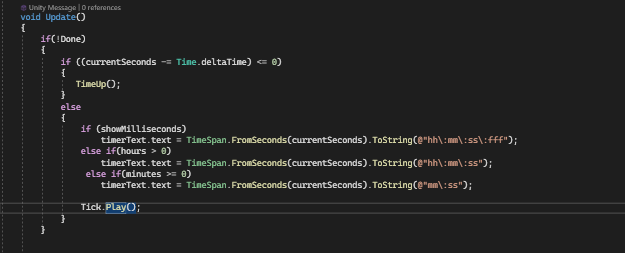 chrome wasp
cause it doesnt have an inspector or anything
polar acorn
Can you screenshot Gregg's entire inspector
rich adder
yeah just realized
polar acorn
(we don't need them expanded for what I'm pretty sure we're both expecting but there could be a different problem)
chrome wasp
This will be several ss
rich adder
chrome wasp
like every drop down arrow expanded?
make sure we see all the components there
rich adder
chrome wasp
This will be several ss
thats fine
chrome wasp


 rich adder
twin bolt
How would i play a sound everytime the time changes, kind of like a clock tick?h...
rich adder
twin bolt
How would i play a sound everytime the time changes, kind of like a clock tick?h...
what exactly you need because right now you're not extracting info , you're just printing the text
chrome wasp
its in backwards order but yeah
polar acorn

You have two Movers
and one of them has no rigidbody
You probably don't want two
rich adder
computer never lies 😦
rich adder
right click delete ?
chrome wasp
iyeyee
polar acorn
chrome wasp
how do i get rid of of second one
delete it
chrome wasp
got ti
ok the errors are gone
and the posistions are changing on the inspector
but i am not moving
rich adder
and did you change the variables to direction
chrome wasp
rich adder
and did you change the variables to direction
direection?
rich adder
chrome wasp
direection?
yeas
chrome wasp
like do I get rid of movespeed and replace w3ith direction??
 summer stump
Show your current code
Direction was passed into velocity if I read that rollercoaster correctly
chrome wasp
summer stump
Direction would be the vector giving you the direction of movement. MoveSpeed should be a float you multiply the vector by to modify speed
rich adder
chrome wasp
https://hatebin.com/ikmcsiurni
ur move speed is 1
in the inspector
might wanna crank that up

 rich adder
chrome wasp
but then I put gregg into the other one
rich adder
chrome wasp
but then I put gregg into the other one
show the gameobject selected, inside the scene
chrome wasp
I screenshot gregg in scene?
rich adder
ya
summer stump
Might wanna remove the deltaTime from your velocity movement
Do
float xValue = Input.GetAxis("Horizontal") * moveSpeed;
Same with zValue
chrome wasp
 chrome wasp
summer stump
Might wanna remove the deltaTime from your velocity movement
Do
`float xValue = ...
chrome wasp
summer stump
Might wanna remove the deltaTime from your velocity movement
Do
`float xValue = ...
k
rich adder
I think Time.deltaTime is fine for consistent move speed
chrome wasp
o
rich adder
no?
summer stump
Velocity is meters per second, so it's already scaled by time. I thought you shouldn't do deltaTime with it
I dunno though
rich adder
could be
chrome wasp
should I try changing it?
ok i tried changing it
got this "Literal of type double cannot be implicitly converted to type 'float'; use an 'F' suffix to create a literal of this type"
changed it back
annd that is still there
polar acorn
chrome wasp
got this "Literal of type double cannot be implicitly converted to type 'float';...
decimal numbers need an f at the end to be floats
rich adder
you can't write 0.3 you need 0.3f for example in a float field
chrome wasp
fixed it
ye
OK SO GOOD NEWS
he moves
only diagonally
i am stupid
i fixed it
IT WORKS
OMG THANK YOU SO MUCH GUYS
EEEEEEE
rich adder

chrome wasp
I am very sorry I put you through that lol
polar acorn
🥳
chrome wasp
BUT YES IT WORKS SO WELL!!!!
rich adder
hmmweird iirc time.delta time is fine on inputs but it was just to low of a value, I have to use * 10 when I do it on inputs to get consistent speed.
But I don't do it on the rigidbody itself
23 * 0.05 (how much is time.delta time again?) s about 1.15
@summer stump
summer stump
chrome wasp
BUT YES IT WORKS SO WELL!!!!
One thing to keep in mind that people sometimes dislike:
GetAxis has smoothing.
It will go from 1 to 0 to -1 smoothly, with the decimals between. This can make the player feel "floaty"
If you don't want that "on ice" feeling, use GetAxisRaw, which ONLY return -1, 0, 1 for the values. It snaps to them immediately
But that is for you to test and feel
chrome wasp
summer stump
One thing to keep in mind that people sometimes dislike:
GetAxis has smoothing.
...
ah yes I was just testing it and noticed that
hmmmm I think I like the smoothing a bit more
but one more thing
Whenever I manage to flip myself I like float back down
its like there is gravity but it is SO SLOW
rich adder
you're overriding gravity
because of .velocity
you need to add .y to the direction
this is a code question how?
chrome wasp
what where do i put .y
rich adder
chrome wasp
what where do i put .y
inside the velocity
summer stump
chrome wasp
what where do i put .y
Where you currently have a 0
chrome wasp
ohhhh
summer stump
Change that to rb.velocity.y
 ruby python
!code
 eternal falconBOT

Posting code
📃 Large Code Blocks
Use links to services like:
https://gdl.space/, https://paste.ofcode.org/, https://hatebin.com/, https://paste.myst.rs/, https://hastebin.com/
📃 Inline Code
Surround code with three backquotes. Not quotation marks.
To format as C#, add cs to the first line:
```cs
// Your code here
```
Add a comment with a line number if there is an error message.
chrome wasp
summer stump
Change that to rb.velocity.y
working much better is there any way to increase gravity
rich adder
its in Edit somewhere
ruby python
Okay, please don't shout at me but I'm very confused as to what's happening with this little script.
    [SerializeField] Transform referenceObject;
    [SerializeField] Transform solarPanels;

    // Update is called once per frame
    void Update()
    {
        transform.rotation = Quaternion.Euler(0, referenceObject.rotation.y, 0);
        solarPanels.rotation = Quaternion.Euler(referenceObject.rotation.x, 0, 0);
    }
I have an empty which is always pointing at the sun. I'm using that to grab the rotation values and applying them to my solar panel 'post' and the actual panels. I'm very confused, because the rotation on the post works great, but on the panels they don't move.
Does anyone know why when it's pretty much the exact same code please?
chrome wasp
ty
 amber spruce
how do i increase the radius of the character controller
 modest dust
ruby python
Okay, please don't shout at me but I'm very confused as to what's happening with...
modest dust
ruby python
Okay, please don't shout at me but I'm very confused as to what's happening with...
transform.rotation is a Quaternion, these x and y values aren't euler angles
 short hazel
ruby python
Okay, please don't shout at me but I'm very confused as to what's happening with...
short hazel
ruby python
Okay, please don't shout at me but I'm very confused as to what's happening with...
.rotation does not contain angles in degrees. Use .eulerAngles
modest dust
^
short hazel
Quaternions store a rotation on 4 axes (x, y, z, w) with each value ranging from -1 to 1
rich adder
amber spruce
how do i increase the radius of the character controller
the prop that says radius
amber spruce
i tried this
characterController.radius += radiusIncreaseAmount;
uhuh
ruby python
Yeah tbh I knew that about Quaternians. Was just very very confused as to why it worked for one, but not the other. lol.
amber spruce
public float radiusIncreaseAmount = 0.1f;
private CharacterController characterController;
and this for the variables
rich adder
amber spruce
```csharp
public float radiusIncreaseAmount = 0.1f;
private CharacterController ...
so whats the problem?
amber spruce
it doesnt work
rich adder
where do you assign character controller @amber spruce
and how you know it doesn't work
short hazel
ruby python
Yeah tbh I knew that about Quaternians. Was just very very confused as to why i...
You're lucky it even works for one of the two here
amber spruce
rich adder
and how you know it doesn't work
would it show the value changing in the inspector
ruby python
short hazel
You're lucky it even works for one of the two here
Well just trying changing to EulerAngles, but VS started shouting at me to use Euler. lol.
rich adder
amber spruce
would it show the value changing in the inspector
it would if you referenced the correct cc
short hazel
ruby python
Well just trying changing to EulerAngles, but VS started shouting at me to use E...
I mean referenceObject.eulerAngles.y
amber spruce
rich adder
it would if you referenced the correct cc
i dont think i was assinging the right one lol since i made it private i never dragged in my character controller
 open edge
Whats best way to learn basic scripts? Is it official Documentation? For example PauseGame standart scripts like stop time exit game or load level?
rich adder
open edge
Whats best way to learn basic scripts? Is it official Documentation? For example...
amber spruce
rich adder
always use the inspector when possible
how do i get this to work
radiusIncreaseAmount = Vector3.one * 0.1f;
Error CS0029 Cannot implicitly convert type 'UnityEngine.Vector3' to 'float' Assembly-CSharp C:\Users\vinny\My first game\Assets\movement\CrushObjects.cs 84 Active```thats what i get
 eternal needle
A radius is a single number
amber spruce
amber spruce
how do i get this to work
```csharp
radiusIncreaseAmount = Vector3.one *...
radiusIncreaseAmount is a float btw
eternal needle
Multiplying a vector by a number gives you a vector, scaled by that number.
rich adder
amber spruce
radiusIncreaseAmount is a float btw
yes thats why its giving u error
amber spruce
how do i set my players radius to Vector3.one * 0.1
cause thats what i set the players scale to
and right now the scale and radius arent the same
rich adder
why Vector3.one ?
amber spruce
because thats how i get my scale to work how i want it
i dont really remember why i did Vector3.one lol
rich adder
you're trying to squeeze 3 numbers in 1
amber spruce
did that over a week ago and i ahve a terrible memory
it works for the scale
transform.localScale += Vector3.one * 0.1f;
so how would i increase my radius by the same amount
because just increasing it by .1 doesnt work
rich adder
thats the same as doing 1 * 0.1 3 times (0.1, 0.1, 0.1)
polar acorn
amber spruce
because just increasing it by .1 doesnt work
why not
amber spruce
polar acorn
why not
idk the collider is way to big
rich adder
amber spruce
idk the collider is way to big
so make the value smaller?
amber spruce
rich adder
thats the same as doing 1 * 0.1 3 times (0.1, 0.1, 0.1)
so can i just set it to .001
amber spruce
rich adder
so make the value smaller?
ik but to get it to the exact right number is gonna be hard
i want the collider to be the same size as the model thing
rich adder
so use the scale magnitude of the object or something
hard to say idk what ur situation looks like
amber spruce
well if i set it to the exact scale then its wrong
rich adder
scale.magnitude * sumnumber
hard to do it by scale alone but you're not giving much to on 🤷♂️ lol
 rich adder
oh you wanted it bigger
amber spruce
yeah my game is about eating all the objects to get bigger
you eat them by colliding with them
amber spruce
although it seems to already increase it with the size so not sure why its not working right
i wonder if its because its a circle
should i be using like a box collider or smth
because when you get big enough it gets really hard to eat small objects
 gray bough
Does anyone mind helping me getting a button on my scene to work? I have read a lot of tutorial articles and watched a lot of videos and I'm not sure why it's not working. I'm working in a 2D setting
 wintry quarry
gray bough
Does anyone mind helping me getting a button on my scene to work? I have read a ...
wintry quarry
gray bough
Does anyone mind helping me getting a button on my scene to work? I have read a ...
#📲┃ui-ux if you mean a UI button
 silk night
Do you have
- EventSystem in your scene?
- Graphic Raycaster on your canvas?
gray bough
silk night
Do you have
- EventSystem in your scene?
- Graphic Raycaster on your canvas?
eventSystem yes graphic raycaster no. What does the graphic raycaster do?
silk night
makes elements on the canvas clickable
amber spruce
amber spruce
should i be using like a box collider or smth
how do i have the character controller use a box collider
ruby python
!code
eternal falconBOT
Posting code
📃 Large Code Blocks
Use links to services like:
https://gdl.space/, https://paste.ofcode.org/, https://hatebin.com/, https://paste.myst.rs/, https://hastebin.com/
📃 Inline Code
Surround code with three backquotes. Not quotation marks.
To format as C#, add cs to the first line:
```cs
// Your code here
```
Add a comment with a line number if there is an error message.
polar acorn
amber spruce
how do i have the character controller use a box collider
You don't, character controllers are capsule-shaped
amber spruce
polar acorn
You don't, character controllers are capsule-shaped
dang
ruby python
Okay, well I'm losing the will to live. lol.
Sorry, I know this should be really simple stuff but I just seriously don't understand what's going on.
    [SerializeField] Transform referenceObject;
    [SerializeField] Transform solarPanels;

    // Update is called once per frame
    void Update()
    {
        transform.localRotation = Quaternion.Euler(0, referenceObject.eulerAngles.y, 0);
        solarPanels.rotation = Quaternion.Euler(referenceObject.eulerAngles.x + 90f, 0, 0);
    }
Everything is pretty much working as it should be except for the Z axis on the Solar Panel Rotation, it should stay at its local 0, but it just doesn't. I've tried setting the solarPanels to localrotation, but if I do that, then nothing works. The 'pole' object works perfectly though.
Actually, scratch that, sorry, the pole item isn't working, it doesn't rotate on the y as it should when set to local
silk night
ruby python
Okay, well I'm losing the will to live. lol.
Sorry, I know this should be reall...
try the LookAt function
you want the items to look at a reference object or have the same rotation as the reference?
wintry quarry
ruby python
Okay, well I'm losing the will to live. lol.
Sorry, I know this should be reall...
what is this code supposed to be doing?
ruby python
Same rotation as the reference. The reference is using LookAt to look at the sun, the solar panels are split into two object, one that 'spins' around it's Y axis, and the actual panels that spin around their X axis.
wintry quarry
Also using isolated euler angles from a transform like that is usually not going to work well
ruby python
Trying to get these panels to always point at the sun object I have in the scene.


OH!!! I just figured it out. lol.
[SerializeField] Transform referenceObject;
    [SerializeField] Transform solarPanels;

    // Update is called once per frame
    void Update()
    {
        transform.localRotation = Quaternion.Euler(0f, referenceObject.localEulerAngles.y, 0f);
        solarPanels.localRotation = Quaternion.Euler(referenceObject.localEulerAngles.x + 90f, 0f, 0f);
    }
Needed to grab the localEulerAngles from the reference object.
amber spruce
polar acorn
You don't, character controllers are capsule-shaped
so how would i fix collisions being messed up
when you get big enough the only way to colide with stuff is by the very bottom touching it which isnt very big of a area
rich adder
amber spruce
when you get big enough the only way to colide with stuff is by the very bottom ...
while you increase radius you have to increase height
amber spruce
that doesnt work because now i just fall through the map
rich adder
amber spruce
that doesnt work because now i just fall through the map
nvm then...probably because center needs to be moved when you mess with height..
amber spruce
and its still only that little bit that hits the ground
 rich adder
oh so you don't want the capsule shape ?
amber spruce
no because it messes with collisions
rich adder
then don't use CC
amber spruce
dont i have to make a custom one for movement then
or no
does that deal with movement?
amber spruce
ok thanks
rich adder
amber spruce
no because it messes with collisions
what does "mess with collision" mean just curious
amber spruce
like its hard to actually collide with smaller objects
if your big enough it becomes impossible
rich adder
amber spruce
like its hard to actually collide with smaller objects
you could potentially have two colliders
a box at the bottom or something
it wont sync up with cc tho
silk night
if you have the possiblity, make all objects you want to eat collider very high so it is easyily touched by the cylinder part
for your game you could even use 2d collision and just make the visuals 3d
 fluid crane
Hello guys, anyone can help me with a question, i have a UI Image in my game and i want to make a glow effect behind it from a color that variate depending on the rarity.
What is the best practice to replicate that in unity?
Image as example attached.
 amber spruce
silk night
if you have the possiblity, make all objects you want to eat collider very high ...
amber spruce
silk night
if you have the possiblity, make all objects you want to eat collider very high ...
yeah but then wont it mess with the position wont the player be on top of them
silk night
not if you destroy them on touch
silk night
fluid crane
Hello guys, anyone can help me with a question, i have a UI Image in my game and...
Look for (2d) outline shaders
 azure zenith
Is there a way to explode a throwable when it lands on the floor?
I am supposed to do it in a method with no parameters allowed
silk night
azure zenith
Is there a way to explode a throwable when it lands on the floor?
Destroy it on collision enter and play a particle effect
amber spruce
silk night
not if you destroy them on touch
rn im using a mesh collider should i use smth else
silk night
amber spruce
rn im using a mesh collider should i use smth else
Depending on the shape of the object box collider is the easiest
amber spruce
silk night
Depending on the shape of the object box collider is the easiest
is there a way to have the box collider auto size to it
because i have tons of objects
silk night
depending on how detailed it needs to be just roughly estimate the shapes with cylinders, box colliders and so on
fluid crane
silk night
Look for (2d) outline shaders
Like this u mean?
 silk night
i think box colliders auto size to a mesh if you put it on them
silk night
fluid crane
Like this u mean?
I think theres some with better functionality online
azure zenith
silk night
Destroy it on collision enter and play a particle effect
That is what I wanted to do but I am supposed to do it in a method they have given me with no parameters so... Idk
amber spruce
silk night
i think box colliders auto size to a mesh if you put it on them
yeah but now i cant change the size for them all at once sad
silk night
azure zenith
That is what I wanted to do but I am supposed to do it in a method they have giv...
I dont get what you mean
silk night
amber spruce
yeah but now i cant change the size for them all at once sad
If you change the object directly the colliders will scale with it
 dreamy ingot
Is it possible to pass in a script to another script without using the scripts name as its variable type?
Instead of doing "public jumpController playerJumpController" is it possible to have a generic script type or something like that?
I'm trying to build a framework for the generation of magic spells modeled after D&D 5e's spells via scriptable objects where you can simply drag in a
procreated spell functionality in a provided script or create your own script to use for its mechanics.
silk night
dreamy ingot
Is it possible to pass in a script to another script without using the scripts n...
Create a parent interface for all scripts you want to assign
polar acorn
dreamy ingot
Is it possible to pass in a script to another script without using the scripts n...
You should have a shared type that all the spells have in common and make the variable of that type
 uncut veldt
Hi im having a problem with null reference exceptions for some gameobjects that are reference in a list that are assigned in the inspector and it is only these object sand even if they arent in a list the same issue is happening the relevent code is ```cs private void RPMLightsMovement() //controlls which light should be on
{
rpm = controller.RPM;
float closest = GetRPMClosest(rpm);
RPMLightsDict[closest].On();
List<float> ramaingVals = new List<float>();
foreach (float val in RPMLightsVals)
{
if (val > closest)
{
ramaingVals.Add(val);
}
}
foreach (float val in ramaingVals)
{
RPMLightsDict[val].Off();
}
}
private void PopSliderVals(float mRPM) //uses maths to work out a value at which each light should be used and then adds that as a key and the game object as a value in a dictionary
{
float interval = (0 - mRPM) / (RPMLights.Count - 1);
for (int i = 0; i < RPMLights.Count; i++)
{
RPMLightsVals.Add(mRPM + (i * interval));
}
RPMLightsVals.Reverse();
for (int i = 0; i < RPMLights.Count; i++)
{
RPMLightsDict.Add(RPMLightsVals[i], RPMLights[i]);
}
}
Any help is apreciatedWhat line is the error
uncut veldt
polar acorn
What line is the error
line 5 RPMLightsDict[closest].On() and line 29 RPMLightsDict.Add(RPMLightsVals[i], RPMLights[i]) its whenever i access the gameobject or the script i have attatch to said gameobject to try and fix this error
 languid spire
RPMLightsDict not initialised?
polar acorn
uncut veldt
line 5 RPMLightsDict[closest].On() and line 29 RPMLightsDict.Add(RPMLightsVals[i...
For the first: Either RPMLightsDict is null, or RPMLightsDict[closest] is null
Second: Either RPMLightsDict, RPMLightsVals, RPMLights, RPMLightsVals[i], or RPMLights[i] is null
Try logging some values to see which one it is
uncut veldt
polar acorn
Try logging some values to see which one it is
so the error is first triggered with line 29 and then the line 5 error is triggered every frame after start as it is called every frame so it is not reading the objects even though they are assigned
polar acorn
uncut veldt
so the error is first triggered with line 29 and then the line 5 error is trigge...
So, if the line 29 one is first, let me ammend:
For the first: Either RPMLightsDict, RPMLightsVals, RPMLights, RPMLightsVals[i], or RPMLights[i] is null
Second: Either RPMLightsDict is null, or RPMLightsDict[closest] is null
 ivory bobcat
uncut veldt
so the error is first triggered with line 29 and then the line 5 error is trigge...
ivory bobcat
uncut veldt
so the error is first triggered with line 29 and then the line 5 error is trigge...
Did you verify if they are null?
uncut veldt
polar acorn
So, if the line 29 one is first, let me ammend:
For the first: Either `RPMLight...
so i know that the RPMLightsVals is not null as that work when i was using a slider and the RPMLights reading null causes the dict to be null
polar acorn
uncut veldt
so i know that the RPMLightsVals is not null as that work when i was using a sli...
Instead of guessing, check
Log some values, find out which is null
 edgy prism
Hello I am having a bit of trouble with my coroutine so, when I have choices canContinue is false I want to be able to select my choices then continue with the first bit of code
while(story.canContinue)
        {
            var currentLine = story.Continue();
            AudioManager.i.PlaySfx(AudioId.UISelect);
            yield return TypeDialog(currentLine);
            yield return new WaitUntil(() => Input.GetKeyDown(KeyCode.Z) || Input.touchCount > 0);
        }

        if (story.currentChoices.Count != 0)
        {
            yield return choiceBox.ShowDialogChoices(story, onChoiceSelected);
        }
no i havent got verification currently as even if they are i have tried assigning them through code and it still doesnt work so i have no way to rectifiy it even if it does chatch it
polar acorn
edgy prism
Hello I am having a bit of trouble with my coroutine so, when I have choices can...
Then you would probably need to start a new coroutine. Once canContinue is false, the while loop ends
ivory bobcat
uncut veldt
no i havent got verification currently as even if they are i have tried assignin...
You'd verify it at runtime. And if they are null, determine why or how to make them not null.
polar acorn
uncut veldt
no i havent got verification currently as even if they are i have tried assignin...
Before you attempt any sort of debugging or problem solving, find out what the problem is
ivory bobcat
I can't really debug for you because the project is in front of you and not me.
polar acorn
Either log the values or step through with the debugger to find out what is null
edgy prism
polar acorn
Then you would probably need to start a new coroutine. Once `canContinue` is fal...
Ah thats frustrating I know the purpose of the coroutine is that it executes in order but is there no way for me to say oop go back?
polar acorn
edgy prism
Ah thats frustrating I know the purpose of the coroutine is that it executes in ...
Start another one
edgy prism
polar acorn
Start another one
Ok thanks for your help ill do it like this then
 subtle veldt
Hey I've made a grappling hook in my game. So I can shoot it and it enables a SpringJoint2D between my player and the grapple head.
As you can see in the video it does really unnatural movements. It looks like the Spring tries to pull the player towards the right or the left of itself and not in the direction of the player.
uncut veldt
polar acorn
Before you attempt _any_ sort of debugging or problem solving, _find out what th...
so i have added this statement to debug Debug.Log(string.Concat("Light ", i, " reading ", RPMLights[i].gameObject.name)); which when i run it it shows that the light is there and the name is correct however after the first ittereation in the for loop the null reference error is thrown maybe the update function is called while the dict is getting populated so it cant find the light but if that is the case i didnt think update got called before start had finished
ivory bobcat
Doesn't look related to code. Try #💻┃unity-talk
gilded sinew
@rich adder u have nice tutorials
polar acorn
uncut veldt
so i have added this statement to debug Debug.Log(string.Concat("Light ", i, " r...
These are the things that can be null on your lines.
#💻┃code-beginner message
Log them, in that order, in separate logs, before the lines that throw the errors.
Find the one that is blank, or the last one before an error occurs
and see which variable is null
ivory bobcat
uncut veldt
so i have added this statement to debug Debug.Log(string.Concat("Light ", i, " r...
Just log before the error line to see what's null - simple as that. If there's some confusion about how to properly log, you may want to ask.
uncut veldt
polar acorn
These are the things that can be null on your lines.
https://discord.com/channel...
okay will do
gilded sinew
guys for some reason i cant fill my dictionary from loop. i tried lots of stuff. only if i add pair manually it worked. can somebody help me out why code above doesnt work? the line that i highlited code somehow doesnt reach it otherwise i would get pairs created in dictionary
 ivory bobcat
Log to see if it has reached it.
gilded sinew
how to do that 🙂
rich adder
use Debug.Log
polar acorn
gilded sinew
how to do that 🙂
Debug log should literally have been the first line of code you ever wrote
gilded sinew
oh right i forgot about that
ty guys
ill test it now
since morning trying to figure out why it doesnt work 
ivory bobcat
The assumption was that it doesn't reach that line of code. Verify it.
ivory bobcat
So maybe tile game object is always null
ivory bobcat
Or none of these statements are ever processed.
uncut veldt
ivory bobcat
Just log before the error line to see what's null - simple as that. If there's s...
So i figured out what it was so the lights werent null nore were the vals it was the dict as i had no instantiation only just decleration of the veriable so it was adding to a dict that didnt exist thanks for your help
gilded sinew
no some are bcs i used log thingy above to check if loops is running and it did
ivory bobcat
gilded sinew
no some are bcs i used log thingy above to check if loops is running and it did
Well then https://docs.unity3d.com/ScriptReference/Tilemaps.Tilemap.GetInstantiatedObject.html we're to assume that there aren't any objects at said position.
gilded sinew
ivory bobcat
Well then <https://docs.unity3d.com/ScriptReference/Tilemaps.Tilemap.GetInstanti...
yeah but tilemap is filled with tiles 
ivory bobcat
That wasn't what the line of code saw/thought/said.
gilded sinew
yep
gilded sinew
hmmm good point
but i tried for 0 0 0 and tile on that spot still didnt get result i wanted (when i open it some stuff should happen confirming that tile has data assigned to it via dictionary)
rich adder
gilded sinew
but i tried for 0 0 0 and tile on that spot still didnt get result i wanted (whe...
wdym?
gilded sinew
i have a tile on map with coordinates 0 0 0 and even on that one dictionary hasnt created pair (data for it for that position)
i think that no mater what cell position i am passing at least that one should work since world position and cell position match there or i am thinking wrong

rich adder
what you see in the inspector is not neceserraily the 00 for tilemap
tilemap i think starts from bottom left of the screen
grid has its own system
gilded sinew
hmm idk i used TMP in canvas to display coordinates on clicked tile and 0 0 0 is in center of my tilemap
rich adder
how do you know u hit the tilemap ?
 cobalt granite
If I have multiple weapons how do I keep track of which kind I have equipped so I know which animations to play?
wintry quarry
cobalt granite
If I have multiple weapons how do I keep track of which kind I have equipped so ...
with a variable
currentlyEquippedWeapon
cobalt granite
right but should I just be like constantly checking for what object I have equipped or is there a more efficient way to do that?
rich adder
gilded sinew
using ray that detects tile i am touching
are you using world to cell ?
Yellow is mouse click, Pink is WorldToCell yellow pos
Gizmos.color = Color.yellow;
Gizmos.DrawSphere(mouseClick, 0.23f);
Gizmos.color = Color.magenta;
Gizmos.DrawSphere(grid.WorldToCell(mouseClick), 0.13f);``` gilded sinew
rich adder
are you using world to cell ?
Yellow is mouse click, Pink is WorldToCell yellow...
gilded sinew
rich adder
are you using world to cell ?
Yellow is mouse click, Pink is WorldToCell yellow...
i see what you mean and its possible solution but i dont know how to rewrite that line so i get gameobjects back instead of null

this is returning null somehow
tested with debug.log and that is the problem that line. just dont know how to fix it
rich adder
gilded sinew
I think this only gets the GameObject that a tile might have spawned
gilded sinew
 ok go on
rich adder
not 100% never used that function
gilded sinew
ok how to get game object from that position?
rich adder
I think its because tiles , technically arent gameobject
just a data representation of something there with a sprite
gilded sinew
hmm but when u make them on map they show as separate game objects
rich adder
i thought it was for this
 gilded sinew
i see
rich adder
doc mentions only Scriptable Tiles 🤷♂️ i guess it has to do with that
 gilded sinew
aight ty bud. trying different aproach now if that doesnt work then i have to think of something else.
good thing is we know what line is issue
rich adder
maybe try getting the tile and do .gameObject ?
or I think this is the same thing
https://docs.unity3d.com/ScriptReference/Tilemaps.Tile-gameObject.html
the doc doesn't clarify
rich adder
gilded sinew
good thing is we know what line is issue
what do you need to do specifically with the tiles/gameobject
gilded sinew
i want to extract tile tag
thats the main and only purpose
tile tag/ game object tag

 rich adder
so this isn't a tilemap object
chrome wasp
dammit im back again
rich adder
I get it
chrome wasp
rich adder
so this isn't a tilemap object
Jesus how long have you been helping
gilded sinew
tag Water
gilded sinew
then why does code above not work 
rich adder
gilded sinew
then why does code above not work <:yikes:890035605730365520>
because its not part of the tilemap?
rich adder
bruh its literally null
hence ur if statement not hitting
there is no error if u dont try to use something null
rich adder
just get it how you would get any other gameobject
gilded sinew
how do i fix that to get god damn tag bro 
i cant think anymore been struggling with this since morning
rich adder
how do you want to get object? with a raycast ?
gilded sinew
yeah
rich adder
collider.gameObject.tag
gilded sinew
jesus i think i know what u mean
chrome wasp
my gravity is weird and idk how to fix it
gilded sinew
navarone u are boss
chrome wasp
its like no matter what I put it at I still fall slow
chrome wasp
gilded sinew
navarone u are boss
fr navarone helped me so much earlier
rich adder
chrome wasp
my gravity is weird and idk how to fix it
show current script
rich adder
gilded sinew
navarone u are boss
did you fix ?
gilded sinew
chrome wasp
fr navarone helped me so much earlier
i am speechless.
gilded sinew
rich adder
did you fix ?
working on it now but 99% sure i know what u mean
chrome wasp
I was editing it in project settings but I googled it and put in some code, I'll send the code
rich adder
what happen to the :OhNo emoji..
chrome wasp
Last two lines
rich adder
this is hella wrong
yValue
this is supposed to be your rigidbody.velocity.y
or a multiplied version f it
rich adder
also gravity x ?
chrome wasp
now i cannot jump
rich adder
forgot how to do jump with .velocity but you have to add onto the current value
then pass that inside Y
chrome wasp
what where when am i adding onto w
"So firstly he’s already got a Y velocity that you are just overwriting 🙂 Hence the weirdness… You could add something to his velocity: rigidbody.velocity = rigidbody.velocity + Vector3.up * 2; Or you are probably better adding a force: rigidbody.AddForce(0,10,0); Bear in mind that rigidbodies…" found that in google
rigidbody.velocity = rigidbody.velocity + Vector3.up * 2;
Can I use that
rich adder
are you reading this https://gamedevbeginner.com/how-to-jump-in-unity-with-or-without-physics/
or is that unity answer
chrome wasp
its a unity answer
Unity Discussions
Hello, I’m trying to get my character to jump by changing the velocity along the y axis. I’m making a simple snowboard/skiing game so the character slides down a hill and the velocity keeps going down as well. I’m able to get him to jump a little when he’s going slow down the hill, then as he speeds up he jumps higher and higher. And then when h...
 chrome wasp
error
"'Component' does not contain a definition for 'velocity' and no accessible extension method 'velocity' accepting a first argument of type 'Component' could be found (are you missing a using directive or an assembly reference?)"
so my code
doesnt know what velocity is?
 heady nimbus
your reference is rb based on your original post
rich adder
chrome wasp
"'Component' does not contain a definition for 'velocity' and no accessible exte...
told you this error alone doesnt say anything
show the line u changed
chrome wasp
I added the if statement
heady nimbus
you want rb.velocity += Vector3.up * 2
chrome wasp
wowahahhh
chrome wasp
heady nimbus
you want `rb.velocity += Vector3.up * 2`
ok that did SOMETHING
my guy just kinda
flew
rich adder
because ur constantly adding
to itself
think you need to do in some sort of button press
chrome wasp
heady nimbus
you want `rb.velocity += Vector3.up * 2`
btw how do i do that
with the grey
heady nimbus
surround it with the backtick `
chrome wasp
heady nimbus
you want `rb.velocity += Vector3.up * 2`
along with this
heady nimbus
Yes, and you'll also need a ground check so that you can't keep pressing jump while in the air. That part is a little bit more complicated
chrome wasp
that was going to be my next quetion but ima take this one step at a time
 upper spire
how can i determine the material of the face a physics.checksphere hit?
chrome wasp
if (Input.GetButtonDown ("Jump")) { rb.velocity += Vector3.up * 2; }
I have added that code
and there are no errors but I cannot jump
upper spire
chrome wasp
` if (Input.GetButtonDown ("Jump"))
{
rb.velocity += Vecto...
you could always try addforce
chrome wasp
would the code I wrote out work in theory? Like did I use an if statement right?
chrome wasp
upper spire
you could always try addforce
where do i plonk it in
heady nimbus
I don't think it's the velocity assignment. Your button press looks wrong, but I'm not sure if you're doing a controller input or something that I"m not used to?
Mine usually looks like Input.GetKeyDown(KeyCode.Space)
upper spire
chrome wasp
where do i plonk it in
something like
rb.AddForce(Vector3.up * 2, ForceMode.Impulse);
you can also try swap out your getbuttondown for a getkey then use keycode.space or something just to test the input detection
rich adder
chrome wasp
where do i plonk it in
addforce doesnt work when u use.velocity
chrome wasp
hm ok
rich adder
chrome wasp
would the code I wrote out work in theory? Like did I use an if statement right?
show current script recent
heady nimbus
Yea, AddForce and velocity are different ways to move
chrome wasp
chrome wasp
upper spire
something like
```cs
rb.AddForce(Vector3.up * 2, ForceMode.Impulse);
```
you can...
So for the alternate option I could just sawp getbuttondown for getkey? And then google how to use keycode space?
upper spire
chrome wasp
So for the alternate option I could just sawp getbuttondown for getkey? And then...
it would just be
Input.GetKey(Keycode.Space)
oh okay
 silver zenith
you could consider adding in a debug.log to see if the button is even registering
upper spire
or input.getkeydown if you only want it to enable for 1 frame after clicking
heady nimbus
Well as far as I know, GetButton is usually for controllers
upper spire
silver zenith
you could consider adding in a debug.log to see if the button is even registerin...

silver zenith
Debug.log ("some message")
add it in the if statement
and then test jump to see if message prints
in console
rich adder
chrome wasp
https://hatebin.com/sqhzgujiqv
  if (Input.GetKeyDown(KeyCode.Space))
        {
            var vel = rb.velocity;
            vel.y += 10;
            rb.velocity = vel;
}```try this
chrome wasp
I THINK IT WORKS
chrome wasp
why is it that sometimes if i go high enough up I just fall through my plane?
 rich adder
nice
gilded sinew
ty bro, legit 8 hours sturggling with this stuff
rich adder
chrome wasp
why is it that sometimes if i go high enough up I just fall through my plane?
try turning the collision to continious mode
gilded sinew


 acoustic arch
https://hatebin.com/dqolilyvmg and https://hatebin.com/eehnwiuzwv
acoustic arch
acoustic arch
https://hatebin.com/dqolilyvmg and https://hatebin.com/eehnwiuzwv
saying instance on set to object on line 22
for the 1st code
chrome wasp
rich adder
try turning the collision to continious mode
Fixed!!
Okay final issue
I can just double jump infinite times
chrome wasp
lol
rich adder
chrome wasp
I can just double jump infinite times
you need a grounded check
heady nimbus
Suggestions on the best way to have an enemy ai detect the edge of a platform, reverse direction, collide with an opposite wall and reverse again? (Basically just like 3-4 different collision checks?)
rich adder
eg Physics.Raycast or Physics.Spherecasst etc.
rich adder
heady nimbus
Suggestions on the best way to have an enemy ai detect the edge of a platform, r...
oh speaking of which
maybe raycasts
heady nimbus
rich adder
eg Physics.Raycast or Physics.Spherecasst etc.
BoxCast has been my go to way for ground checks recently
rich adder
chrome wasp
box/ray/sphere cast
any tutorial that shows grounded check will show
chrome wasp
k
heady nimbus
rich adder
eg Physics.Raycast or Physics.Spherecasst etc.
So I've got a raycast that I've set to originate from the front edge and point down, which seems to be handling the "edge of platform" scenario, but I'm having trouble getting the raycast to flip sides when the sprite flips. I don't know if I need to set up like 4 different ray casts to detect in every direction basically?
heady nimbus
chrome wasp
box/ray/sphere cast
Yea, this is definitely something you should do some google research on. Raycasts are super easy once you understand them and hugely useful. Worth learning for any project
rich adder
heady nimbus
So I've got a raycast that I've set to originate from the front edge and point d...
ohh you only flipsprites and not rotate player itself ? i suppose in that case u would need then ray for all directions
heady nimbus
Well I mean right now the sprite is just the default square that I reverse the localScale.x for
rich adder
topdown or side view?
heady nimbus
Side
rich adder
I tend to rotate object on the Y axis
chrome wasp
I'm gonna go learn c# then come back to this
or at least the basics
get an understanding of it
heady nimbus
chrome wasp
or at least the basics
That's a good start
 mild mortar
I'm trying to learn how to use the new input system and so I was changing a bit of my code.
What's the ideal method for moving the player character?
I was using transform.Translate originally but the movement is odd since it just stops completely when I let go of a button, instead of slowing down in a more realistic way, but then somewhere I think someone mentioned to try using AddForce. But now my character just falls over on the spot when I press a key instead.
heady nimbus
rich adder
I tend to rotate object on the Y axis
yea, I think that was my next attempt
acoustic arch
hey how can i make 2 gameobjects the exact same, like to have the hotbar slots in my inventory change with the ones on the screen?
and what would it be called btw
heady nimbus
mild mortar
I'm trying to learn how to use the new input system and so I was changing a bit ...
You need to check the constrains on your rigid body if it's falling over with force
This is for 2D obviously, but just check the appropriate freeze rotations and it shouldn't fall over
 mild mortar
heady nimbus
You need to check the constrains on your rigid body if it's falling over with fo...
mild mortar
heady nimbus
You need to check the constrains on your rigid body if it's falling over with fo...
Yeah it's 3d that I'm working with. Now that I've frozen rotation, I can see that he doesn't actually move at all when I push a key, so just trying to figure out what's going on
!code
eternal falconBOT
Posting code
📃 Large Code Blocks
Use links to services like:
https://gdl.space/, https://paste.ofcode.org/, https://hatebin.com/, https://paste.myst.rs/, https://hastebin.com/
📃 Inline Code
Surround code with three backquotes. Not quotation marks.
To format as C#, add cs to the first line:
```cs
// Your code here
```
Add a comment with a line number if there is an error message.
mild mortar
using UnityEngine;
using UnityEngine.InputSystem;

public class PlayerController : MonoBehaviour
{

    private PlayerInput playerInput;
    private InputAction jumpAction;
    private Rigidbody rb;

    // Speed of the player
    public float speed = 5.0f;
    // Jump force of the player
    public float jumpPower = 5.0f;
    [SerializeField] Transform groundCheck;
    [SerializeField] LayerMask ground;

    // Start is called before the first frame update
    void Awake()
    {
        playerInput = GetComponent<PlayerInput>();
        jumpAction = playerInput.actions["Jump"];
        jumpAction.ReadValue<float>();
        rb = GetComponent<Rigidbody>();

    }

    // Update is called once per frame
    void Update()
    {
        // Get the horizontal and vertical axis values.
        float horizontal = playerInput.actions["Movement"].ReadValue<Vector2>().x;
        float vertical = playerInput.actions["Movement"].ReadValue<Vector2>().y;

        // Move the character based on the axis values.
        rb.AddForce(Vector3.forward * vertical * speed * Time.deltaTime);
        rb.AddForce(Vector3.right * horizontal * speed * Time.deltaTime);

        // Jump if the player is grounded and the jump button is pressed.
        if (jumpAction.triggered && Grounded())
        {
            rb.AddForce(Vector3.up * jumpPower, ForceMode.Impulse);
        }
    }

    bool Grounded()
    {
        return Physics.CheckSphere(groundCheck.position, .1f, ground);
    }
}
Modify your force values, 5 might not be enough if that's what you were using with translate? They're 2 very different systems
rich adder
Dont mulitply rigidbody with Time.delta time
mild mortar
heady nimbus
Modify your force values, 5 might not be enough if that's what you were using wi...
Sure I'll give that a try
Just to check then, is AddForce actually the generally recommended way for having movement on a character?
And the other thing I was meaning to ask is, is locking the rotation not a proper fix for this? As I figured it is gonna cause a problem for me when I want the character to turn while running if holding W & D for instance
I'm brand new to Unity so sorry if it's a stupid questions
heady nimbus
Oh yup, I missed that. You don't want delta time when adding force or velocity
silk night
mild mortar
Sure I'll give that a try
Just to check then, is AddForce actually the generall...
If you want very physics based movement - yes, otherwise you can use MovePosition
It generally behaves a bit different and you will have different problems with each of them that you need to solve, but its not a question about what should you do, but more about what you want to do
eternal needle
mild mortar
Sure I'll give that a try
Just to check then, is AddForce actually the generall...
Theres 2 types of movement, rigidbody and just moving the transform. Rigidbody is useful if you want it to respect physics and react appropriately to getting hit for example. It is also extremely tedious to get one to move exactly how you want in comparison to moving the transform.
Moving the transform is much more tedious in getting it to not go through walls
MovePosition on a kinematic rb is also the same as just moving the transform position. It just does extra stuff like give it a velocity during the move
heady nimbus
mild mortar
Sure I'll give that a try
Just to check then, is AddForce actually the generall...
You don't want to lock ALL the rotations. Just the axis that makes them fall over. Y axis should still be unlocked so you can rotate in place
mild mortar
Yeah it's definitely more useful physics wise as I just want to make a sort of platformer at the moment with large objects etc that swing and knock you off etc
eternal needle
You can still rotate it by locking all axis. That locking only stops it from rotating due to physics
But it can also cause somewhat weird interactions. You can see this by locking position and throwing an object at it
Instead of locking all rotations, you could constantly apply torque to get it towards the rotation you want
 wintry harbor
Someone please help me. In my scene, I have an array of players gathered by using FindObjectsWithTag("Player"). I want each player in my scene to have a unique number (1-8). I've tried accomplishing this via lists and dictionaries, but whenever I do, I get the error "index is out of bounds". Is there a better way to go about doing this?
tl;dr I want to create a list of player objects each with a unique number attached to them (1-8).
 formal escarp
I have a question about coding. I was told that the code is different for 2D projects and 3D. But how much different? Even the movement? Is there any place where i can read about code for 2D? (2D Similar to Enter the Gungeon, Dont starve or games like this?)
eternal needle
wintry harbor
Someone please help me. In my scene, I have an array of players gathered by usin...
Add debugs like how large the array is. You are trying to access an element that doesnt exist.
mild mortar
Hmm I see
It's a lot to wrap my head around. I tried using the "Starter Assets - Third Person Character Controller" asset recently, that's actually exactly what I want as the character moves, rotates and such in a proper way.
My goal is to get to that point atm, but I want to try to do it myself and learn rather then import theirs
heady nimbus
formal escarp
I have a question about coding. I was told that the code is different for 2D pro...
I mean it's different in the sense that you're working mostly in Vector2 vs Vector3, and for physics and colliders most of the 2D stuff is appended as 2D, like BoxCollider2D
polar acorn
formal escarp
I have a question about coding. I was told that the code is different for 2D pro...
Physics is different in 2D and 3D, and that's basically it
summer stump
wintry harbor
Someone please help me. In my scene, I have an array of players gathered by usin...
As bawsi said, and you were told yesterday, debug it.
The data structure you use is irrelevant to this issue.
Doesn't matter if it's an array, list, or whatever.
wintry harbor
summer stump
As bawsi said, and you were told yesterday, debug it.
The data structure you use...
Debug.Log?
heady nimbus
Oops... Lol
formal escarp
Is just that? A physics thing? do you guys think 2D is easier than 3D? (Again .I mean games like Cult of the lamb, dont starve, etc) the only thing i can think of is when i used to use GameMaker or similar for 2D games and i would just put invisible blocks for not getting out of bounds.
rich adder
I find 2D harder because the assets are harder to work without an artist
wintry harbor
summer stump
Yep
I have something like that. I have the number of players in the scene in an integer variable, and it displays in the log the number of players in the scene. But it doesn't keep track of each individual player, just the number of players.
rich adder
the code is exactly the same mostly @formal escarp
formal escarp
Do you guys have any link i can read talking about how to start stuff like a bullet hell? i hope i am not being annoying.
rich adder
the logic all that is the same
polar acorn
formal escarp
Is just that? A physics thing? do you guys think 2D is easier than 3D? (Again .I...
It really doesn't matter much
heady nimbus
I mean both are suitable for different things. It depends on what you want to do. Some ideas will be easier in 2D some harder
formal escarp
rich adder
I find 2D harder because the assets are harder to work without an artist
Well. I care about making it work. For example, for college we had to give today a 3D thingy where character should be able to jump, use raycast to kill enemies, make stuff move etc. but the visuals did not matter so eveything was a cube or spheres. Can you do the same tho right? For 2D.
formal escarp
heady nimbus
I mean both are suitable for different things. It depends on what you want to do...
Bullet hell game.
btw i failed my exam today. I spent all week coding but before we gave that to teacher we had to take a exam and i got 8/15. and you needed 9/15. so teacher wont even look at my prototype of game. 💀
silk night
If you really do not care if its 2 or 3d, a 2d game saves you a lot of trouble in different scenarios
rich adder
heady nimbus
I mean both are suitable for different things. It depends on what you want to do...
I suppose you can use placehooler srpites sure
3D is just easier to work with esp if you're not particularly good at drawing
heady nimbus
formal escarp
Bullet hell game.
I don't reeally think it's the genre that matters, but what specifically you're trying to accomplish.
formal escarp
silk night
If you really do not care if its 2 or 3d, a 2d game saves you a lot of trouble i...
I mainly care about mechanics working.
 timber tide
sculpt tool actually pretty easy to use in blender, but for the life of me I can't draw 2D
summer stump
wintry harbor
I have something like that. I have the number of players in the scene in an inte...
Do you debug the data structure itself? Like the number of items in it, the length or count (are you using a list or array right now)?
heady nimbus
rich adder
3D is just easier to work with esp if you're not particularly good at drawing
There's assets for everything. I'm a horrible artist, I use place holders for basically everything. I just like making mechanical projects. Lol
formal escarp
heady nimbus
I don't reeally think it's the genre that matters, but what specifically you're ...
Just a prototype. like, being able to move enemies shooting stuff at you, etc. something simple so i can start from scratch.
rich adder
heady nimbus
There's assets for everything. I'm a horrible artist, I use place holders for ba...
in 2D sucks, when you want to add sprites from asset pack they look completely different from another asset pack
3D more or less has 2 style
sylized/Lowpoly and Realisitic
silk night
rich adder
in 2D sucks, when you want to add sprites from asset pack they look completely ...
No thats absolutely not true, different 3d packs can look horrible together even if in the same style
heady nimbus
rich adder
in 2D sucks, when you want to add sprites from asset pack they look completely ...
That's going to happen if you're using assets from differnet packs in 3d too though.
formal escarp
btw im a bit sad i failed the exam man. i was 1 question away from going thru.
timber tide
wake up call to study more
silk night
rich adder
thats because the textures
Perspective, attention to detail, scale of details to each other, topography, all of them can ruin the look
rich adder
yeah I mean art direction is everything, but just saying 3D is easier to blend together than 2D
 eternal sage
can anyone help me with an issue im having in unity?
formal escarp
timber tide
wake up call to study more
im going to take my face off.
heady nimbus
Yea, like I said i"m not an artist, but I'd much rather work on 2D assets then 3d. Lol
 heady nimbus
rich adder
https://dontasktoask.com
heady nimbus
rich adder
https://dontasktoask.com
beat me to it
formal escarp
but at least now i know some of the basics. how to move, raycast and how it works, how to make jump and platafforms move, etc.
rich adder
formal escarp
but at least now i know some of the basics. how to move, raycast and how it work...
take one thing at a time
formal escarp
formal escarp
but at least now i know some of the basics. how to move, raycast and how it work...
i think its a great start. a month ago i did not know how to anything of this.
eternal sage
rich adder
https://dontasktoask.com
well i cant really explain the problem thats the issue
formal escarp
rich adder
take one thing at a time
I know how to do that on 3D tho.
heady nimbus
eternal sage
well i cant really explain the problem thats the issue
We can't help if you can't tell us what's wrong. Lol
formal escarp
anyways. thanks guys. ill go and try to find anything that i can read that it tells me how to start bullet hell 2D.
rich adder
eternal sage
well i cant really explain the problem thats the issue
if you can't explain it you won't ever solve it 🙂
gilded sinew
i have small issue cant figure out why. Using function to convert cell to world position and one coordinate is converting properly but other isnt. z is converting good but x isnt.

 rich adder
how can we help to something you cannot explain @eternal sage
heady nimbus
formal escarp
anyways. thanks guys. ill go and try to find anything that i can read that it te...
Too high level. Think of it in smaller pieces. Don't think "how to make a bullet hell" think about what are the core mechanics that make up a bullet hell and start learning each of them individually
gilded sinew
method that is converting cell to world position. not sure how one is converting properly but other isnt
 rich adder
gilded sinew
method that is converting cell to world position. not sure how one is converting...
rich adder
gilded sinew
method that is converting cell to world position. not sure how one is converting...
why are u still using tilemap function lol you dont have a tilemap
formal escarp
heady nimbus
Too high level. Think of it in smaller pieces. Don't think "how to make a bullet...
Like, how characters shoot at the CURRENT position of the player for example but to make the bullet not follow them? but rather detect "oh. player on X25 Y30 Z8 i shoot that position"? i think you are right. i learn mechanics.
polar acorn
eternal sage
well i cant really explain the problem thats the issue
You forgot a semicolon on line 17
gilded sinew
rich adder
why are u still using tilemap function lol you dont have a tilemap
just to convert its position to world, because i need to pair cell position with object data and for object data and its access via ray i need world position 
formal escarp
and how to move i guess. i am not even sure if the code of moving on 3D and 2D is the same but im guessing no because of the Vectors as previously said.
heady nimbus
formal escarp
Like, how characters shoot at the CURRENT position of the player for example but...
Exactly, that's 1 small piece you can work on, but it is a big mechanic of a bullet hell. Figuring that out will help you with a lot of the other pieces as well
polar acorn
gilded sinew
just to convert its position to world, because i need to pair cell position with...
Tilemap.GetCellCenterWorld will get you the tile at that position of a tilemap. Do you have a tilemap you are trying to get the grid position of
eternal sage
rich adder
how can we help to something you cannot explain <@1016173117929947176>
well im new to programming and unity altogether, and im trying to make something duplicate. Im only trying to make it clone once but it does it untill my unity crashes.
formal escarp
heady nimbus
Exactly, that's 1 small piece you can work on, but it is a big mechanic of a bul...
okie dokie. i think i should start with the easier mechanics first so i can learn, test, learn, test, learn test. thanks
gilded sinew
yes bud @polar acorn and its x minimum is -14 cell position and world position of that tile is -14.something and when converting i am getting -11.something or -12.something
heady nimbus
eternal sage
well im new to programming and unity altogether, and im trying to make something...
Sounds like you've just got it in a loop with no way out (exit condition). I'm assuming you have it in the Update method then
polar acorn
eternal sage
well im new to programming and unity altogether, and im trying to make something...
Does the object you are cloning contain the code that clones the object
 swift crag
I have a plain-old C# class that I want to be able to log an error from. I want to log something that helps me find the offending class (it's always going to be serialized on a component somewhere).
Any idea how I can do that? Obviously I can't just log this, 'cos this thing isn't a unity object.
Perhaps I should just hand it a reference to the component it's a part of.
heady nimbus
polar acorn
Does the object you are cloning contain the code that clones the object
Ohhh, or that... I alwys forget that one. Haha
polar acorn
gilded sinew
yes bud <@153950686088921088> and its x minimum is -14 cell position and world p...
can you show the inspector of your tilemap
gilded sinew
polar acorn
can you show the inspector of your tilemap
 polar acorn
gilded sinew
polar acorn
gilded sinew
And it's populated, right? You've got tiles in all the positions you're expecting to get?
gilded sinew
yeah its populated but u did point me out one thing that could be issue for something else, tho it still doesnt explain why vallue is not matching for one axis but is for other
 tame mist
hello, I'm struggling to figure out why my code is having an issue passing a gameObject reference from one script to the other.
The currentCar gameObject is initially set as the cars driver door but I assign it as the actual parent car gameObject with the transform.parent.parent... code.
the log statement shows it's the instantiated prefab gameObject, but for some reason my code is having an issue passing it to another script that needs the reference.
// CarRadialMenuManager Script
private void SendCarToMechanic()
{
    currentCar.GetComponent<DriveCar>().ExitVehicle();

    currentCar = currentCar.gameObject.transform.parent.parent.parent.parent.gameObject;

    Debug.Log("currentCar = " + currentCar);

    // this line below is giving the NullReferenceException
    mechanicController.AddCarToList(currentCar);
}

//MechanicController script
public void AddCarToList(GameObject car)
{
    carList.Add(car);
}
 gilded sinew
polar acorn
And it's populated, right? You've got tiles in all the positions you're expectin...
gilded sinew
polar acorn
And it's populated, right? You've got tiles in all the positions you're expectin...
i figured the issue. ty for pointing some stuff out it indirectly helped
tame mist
polar acorn
What is line 132 of `CarRadialMenuManager.cs`
mechanicController.AddCarToList(currentCar);
polar acorn
tame mist
mechanicController.AddCarToList(currentCar);
mechanicController is null
tame mist
polar acorn
`mechanicController` is null
oh wow, you're right I forgot to assign the reference in the inspector 🙃
gilded sinew
after 10 hours i completely fixed my problems
ty all that helped
gn
apsolute gigachad
@ navarone
rich adder
gilded sinew
after 10 hours i completely fixed my problems
huh what was it ?
cobalt granite
https://gdl.space/hequxatoqa.cs
So I have this script that uses animation key events to run most of the methods and I'm planning on adding a bunch of other spells other than fireball, but I want to know if I'm doing something like super wrong and it'll bite me in the ass later on
rich adder
cobalt granite
https://gdl.space/hequxatoqa.cs
So I have this script that uses animation key e...
keep track of the weapon/spell type in script , then you could only ever need 1 method to call to fire
they can even be scriptable objects that have their own methods
just swap out the asset and run its Fire method
cobalt granite
Yeah I was going to make a simple GUI that with button presses 1 2 and 3 will select which spell it is using, but I just wanted to make sure it seemed like scalable I guess. Like I've never really gone too big with games so idk if adding like even 30 different kinds of spells would be a ton
cobalt granite
SO?
rich adder
ScriptableObject
its a class as an asset
more or less
they just goated to create variations of something
cobalt granite
so having a list of a ton of spell strings wouldn't be good?
I'll look into all of that
rich adder
I mean you could do some type of dictionary look up or something
wouldn't be so horrible
kinda flimsy , not a big fan of strings unless I make const but then you're making a big ass const class
cobalt granite
 private void spellSelect()
    {
        if (Input.GetButtonDown("Fire1") && firing == false && selectedWeapon.Equals("Staff"))
        {
            Debug.Log("firing-true");
            firing = true;
            anim.SetBool("Firing", true);
            //Everyspell will have their own if statement
            if (selectedSpell.Equals("Fireball"))
            {
                Debug.Log("FireBall");
                anim.SetTrigger("Fireball");
            }
        }
    }
Like in this the last if statement, each one will have it's own spell its checking and the selectedSpell will be chosen from like clicking a button on a GUI
and then I have a big state animator tree and each transition to each spell has a unique trigger
rich adder
imagine how big you have to make the if statement to check all possibilities?
even with a switch
cobalt granite
Yeah thats true, it would be like 30 different if statements
 sour fulcrum
Whats the cleanest way to cast a Vector3 to Vector3Int? dealing with it often enough to where I’d rather not constantly do (int)x, (int)y,(int)z
cobalt granite
well I plan on having them in like classes, like fire ice electric, so I guess it could check what class its in then what spell exactly to shorten the amount of checks
rich adder
cobalt granite
well I plan on having them in like classes, like fire ice electric, so I guess i...
i usuaully store my specifc logic in the specific ability
my caster doesnt care what its casting, the cast takescare of it
it justcares about cooling times and speed
sour fulcrum
cobalt granite
well I plan on having them in like classes, like fire ice electric, so I guess i...
Na ScriptableObject’s are what you want here. They are the equivalent of prefabs but just for holding data.
ivory bobcat
sour fulcrum
Whats the cleanest way to cast a Vector3 to Vector3Int? dealing with it often en...
sour fulcrum
ivory bobcat
<https://docs.unity3d.com/ScriptReference/Vector3Int.FloorToInt.html>
Tyty, dunno how i didnt find that
cobalt granite
so your saying have it be like a method called, castSpell(currentSpell) and then that currentSpell class would have all the script to it
cobalt granite
sour fulcrum
Na ScriptableObject’s are what you want here. They are the equivalent of prefabs...
I'll definetly look into those too
rich adder
cobalt granite
so your saying have it be like a method called, castSpell(currentSpell) and then...
it depends on the game
your spell would probably have a child class to its specific type of spell
sour fulcrum
If you did it via ScriptableObjects you could just store a
string animationString
Then do animator.SetTrigger(currentSpell.animationString)
rich adder
whatever is mechanically the same would have the same SO/Class for behavior
only data type changes
cobalt granite
Okay, well thank you for all the info, hopefully it all turns out okay
rich adder
eg all weapons/rifles have the same thing going on mechanically. Fire projectile, only thing that changes is the rate of shooting etc.
cobalt granite
Ohh so have all the common data to each spell on the castSpell method and everything else in its seperate thing?
rich adder
the commonality would be the method that fires this and behaves according to the data
instead of CastingFire, you just Cast(fire)
then cast method knows what values to use from fire and how to handle the rest
rich adder
cobalt granite
Okay, yeah that makes sense
def give scriptable objects a look, they're pretty powerful for this stuff
tame mist
hello, I have cars that will become children of lifts in a mechanics garage. When the lift goes up by animation, the car is supposed to move up with it. but it doesn't seem to work when the cars rigidbody is attached to it.
I tried different combinations of setting the rigidbody of the car to isKinematic = true, detectCollisions = false, and useGravity = false
but with those options it seems like the car will raise up just a little bit, but not all the way up with the lift.
the only thing that has worked so far is completely removing the rigidbody on the car at runtime before it goes on the lift and then when it comes back down off the lift I put a rigidbody back on the car and give reference to the few places in scripts that need it.
the problem i'm having with that approach is that it seems to mess up the way the vehicle drives. like for example when turning it tilts way too much, yet all the same settings seem to be applied to what controls the car mechanics.
I really don't want to completely remove the rigidbody from the car as it seems to give me problems, but I don't know why the other approaches I took didn't work.
any ideas?
acoustic arch
https://hatebin.com/uaqcdyhvlb - Inventory Manager, grabs icon from the item data to be put in inventory slots
https://hatebin.com/eamjjznyko - Item Data Scriptable object
https://hatebin.com/ctccksuysr - Used to define the item data for each items prefab
https://hatebin.com/frwqjjvqri - Menu Manager, when opens inventory lists items inside of it
currently the items can go in the inventories list in the script
but it cant ever show up in the games inventory
acoustic arch
acoustic arch
https://hatebin.com/uaqcdyhvlb - Inventory Manager, grabs icon from the item dat...
i get an error from the 1st script from line 48, object not set to instance of object
if i add an item, itll create another slot at the bottom
 teal viper
tame mist
hello, I have cars that will become children of lifts in a mechanics garage. Whe...
teal viper
tame mist
hello, I have cars that will become children of lifts in a mechanics garage. Whe...
Setting the rb to kinematic should work. If it doesn't, it must be some of your code interfering.
Make sure you don't run any of the car driving logic, when it's in the lift.
If it's using wheel colliders, might want to disable them too(I don't remember if they can be disabled though)
teal viper
acoustic arch
i get an error from the 1st script from line 48, object not set to instance of o...
var itemIcon = obj.transform.Find("icon").GetComponent<Image>()
There are 3 things that can be null here:
-obj
-the "icon" object
-the image component.
Check which is it to know how to deal with it.
In fact, the past thing is irrelevant, so only 2.
acoustic arch
teal viper
```cs
var itemIcon = obj.transform.Find("icon").GetComponent<Image>()
```
There ...
so i changed obj to be set to itemContainer
now i get the error from line 47
which i think is an improvement
GameObject obj = itemContainer;
var itemIcon = obj.transform.Find("icon").GetComponent<Image>();
teal viper
What error, and what's on line 47 now?
swift crag
we have no idea what line 47 is
you posted several files and you've made changes since posting them
swift crag
you are not getting an error from line 47
that's impossible
GameObject obj = itemContainer;
itemContainer is a field, and reading a field cannot cause a NRE
teal viper
Probably the old code
acoustic arch
NullReferenceException: Object reference not set to an instance of an object
InventoryManager.ListItems () (at Assets/Scripts/Item Scripts/InventoryManager.cs:47)
MenuOpener.Update () (at Assets/Scripts/UI/MenuOpener.cs:21)
https://hatebin.com/qzgffalrhj - menu opener
swift crag
ensure that you've saved the file
tame mist
teal viper
Setting the rb to kinematic should work. If it doesn't, it must be some of your ...
yeah idk, I pretty much disabled any scripts running on it beforehand so i don't think that's the issue, but maybe I should go through and look again.
also, the wheel colliders didn't seem to effect the car not lifting. I leave them on when I remove the rigidbody of the car it seems to work fine lifting.
swift crag
this would be consistent with deleting line 47 and then saving before adding GameObject obj = itemContainer; back in
acoustic arch
swift crag
ensure that you've saved the file
100% sure
swift crag
The line of code literally can't cause an exception. It's an instance method accessing a field on its own object.
acoustic arch
yeah weird
acoustic arch
swift crag
The line of code literally can't cause an exception. It's an instance method acc...
still
oh
mb
swift crag
I presume itemContainer is a prefab. Grabbing the Image from the prefab would not make much sense.
acoustic arch
im slow
var itemIcon = obj.transform.Find("icon").GetComponent<Image>();
is the issue
the line is different on mine than hatebin and i said hatebins not mine
teal viper
tame mist
yeah idk, I pretty much disabled any scripts running on it beforehand so i don't...
Making an rb kinematic is the same as just removing it, unless there's something else that's moving it(like your code or wheel colliders).
teal viper
acoustic arch
the line is different on mine than hatebin and i said hatebins not mine
Well, then it's still the same issue that I mentioned originally.
And still the same way of dealing with it.
acoustic arch
teal viper
```cs
var itemIcon = obj.transform.Find("icon").GetComponent<Image>()
```
There ...
.
swift crag
I would strongly suggest making a component for the "item container"
so that you can instead have
ItemContainer itemContainerPrefab;
Also, yeah, what Fen mentioned about it being a prefab
swift crag
that component can have a field that references the container's Image.
public class ItemContainer : MonoBehaviour {
  public Image icon;
}
e.g.
I almost never store things as a GameObject
acoustic arch
like what i did here
public class Item : MonoBehaviour
{
public ItemData ItemData;
}
swift crag
the important idea is that it'll let you access its components without having to go digging around for them
using Find and GetComponent is very brittle
acoustic arch
yeah
swift crag
if you rearrange the prefab a little, it can suddenly stop working
acoustic arch
swift crag
```cs
public class ItemContainer : MonoBehaviour {
public Image icon;
}
```
so make a new script like this
swift crag
I've been doing some messy UI work today, but I never had problems with components randomly not being found
swift crag
acoustic arch
so make a new script like this
yes
acoustic arch
alrightr
acoustic arch
swift crag
yes
i still dont super understand what im doing with this
swift crag
the point is that you'll be able to do this
var holder = Instantiate(itemContainerPrefab);
holder.icon.sprite = whatever;
instead of
var holder = Instantiate(itemContainerPrefab);
holder.transform.Find("icon").GetComponent<Image>().sprite = whatever;
do i put this script on my items prefabs?
acoustic arch
swift crag
```cs
var holder = Instantiate(itemContainerPrefab);
holder.icon.sprite = whatev...
but it does look better
swift crag
acoustic arch
do i put this script on my items prefabs?
You would attach it to whatever your item container prefab is, yes.
acoustic arch
swift crag
You would attach it to whatever your item container prefab is, yes.
ohhh so my slots
swift crag
swift crag
```cs
ItemContainer itemContainerPrefab;
```
You would then reference the prefab like this.
not as a GameObject
acoustic arch
yeah
acoustic arch
swift crag
not as a GameObject
it cant be like a GameObject
swift crag
i don't understand what you mean
acoustic arch
just ignore that
i was just restating what you said
i got another error tho
ArgumentException: The Object you want to instantiate is null. UnityEngine.Object.Instantiate[T] (T original) (at <c2d036c16ca64e0eb93703a3b13e733a>:0) InventoryManager.ListItems () (at Assets/Scripts/Item Scripts/InventoryManager.cs:48) MenuOpener.Update () (at Assets/Scripts/UI/MenuOpener.cs:21)
swift crag
swift crag
```cs
var holder = Instantiate(itemContainerPrefab);
holder.icon.sprite = whatev...
I use GetComponent about a dozen times in total in the game I'm working on right now.
Eight are GetComponentsInChildren calls used so that I don't have to manually drag objects into a list (which are always parented below the caller).
The other few are all TryGetComponent calls in physics messages, like OnTriggerEnter
upper spire
upper spire
how can i determine the material of the face a physics.checksphere hit?
bump 🙂
acoustic arch
swift crag
you didn't assign anything to the field
to the image?
swift crag
acoustic arch
to the image?
No. You tried to pass a null reference to Instantiate.
I presume you passed itemContainer to it
That means itemContainer is null.
Assign the prefab to it.
swift crag
I said nothing about an Image.
swift crag
swift crag
That means `itemContainer` is null.
Show me your code again if this is not the case.
swift crag
acoustic arch
public class ItemContainer : MonoBehaviour {
public Image icon;
}
It doesn't matter whether icon is assigned or not on your prefab if you don't have a reference to the prefab at all
tame mist
teal viper
Making an rb kinematic is the same as just removing it, unless there's something...
alright I'll look into it a little more
teal viper
upper spire
how can i determine the material of the face a physics.checksphere hit?
I don't think there's a straight forward way, as the checksphere doesn't even return the hit info.
acoustic arch
swift crag
Assign the prefab to it.
i dont understand what im assigning this too
im being very dumb
swift crag
to reiterate:
- your "item container" prefab should now have an
ItemContainercomponent on it - your
InventoryManagercomponent should have a reference to this prefab. The reference should be in a field of typeItemContainer
upper spire
teal viper
I don't think there's a straight forward way, as the checksphere doesn't even re...
hmmm, i it possible i can use a checksphere to get if its hidding something then a ray to grab the info?
swift crag
This field should replace the GameObject field you originally had.
the itemContainer field should now be an ItemContainer.
acoustic arch
swift crag
to reiterate:
- your "item container" prefab should now have an `ItemContainer`...
oh the script as the component
swift crag
I don't know what that means
acoustic arch
the component ItemContainer is the script
swift crag
I only use "script" to refer to the actual source code.
The thing you see in the inspector is a component.
teal viper
upper spire
hmmm, i it possible i can use a checksphere to get if its hidding something then...
You don't know what it's overlapping with though. The only thing it tells you is that "something" is overlapping. Might want to use OverlapSphere instead. At least that way you know what object is overlapping.
acoustic arch
swift crag
The thing you see in the inspector is a component.
alright
swift crag
You can reference a prefab by any component on the prefab's root object
upper spire
teal viper
You don't know what it's overlapping with though. The only thing it tells you is...
alright
swift crag
When you instantiate it, you'll get a whole new object
(it doesn't just duplicate the component or something)
public ItemContainer itemContainerPrefab;

void Start() {
  ItemContainer myContainer = Instantiate(itemContainerPrefab);
  myContainer.icon.sprite = ...
}
yes
ItemContainer myContainer = Instantiate(itemPrefab);
myContainer.icon.sprite = item.icon;
okay, good. and did you drag the prefab into the itemPrefab field in the inspector of the inventory manager?
swift crag
that will prevent it from showing up, yeah
acoustic arch
sorry you have to deal with me im trying to progress learning 💀
well
now the error is in line 50
NullReferenceException: Object reference not set to an instance of an object
InventoryManager.ListItems () (at Assets/Scripts/Item Scripts/InventoryManager.cs:50)
MenuOpener.Update () (at Assets/Scripts/UI/MenuOpener.cs:21)
swift crag
okay, so what's on line 50?
acoustic arch
myContainer.icon.sprite = item.icon;
is it from the myContainer or item.icon?
like what isnt being set
swift crag
use the thread, please
acoustic arch
thread?
swift crag
acoustic arch
NullReferenceException: Object reference not set to an instance of an object
Inv...
i started a thread here.
acoustic arch
mb
 mossy arrow
How do i fix this, So when I hit the pipe it should be a scene and i can play more but it is not poping up, So hlow do i fix this?

 swift crag
use Debug.Log statements to check if your code is running at all
summer stump
mossy arrow
in what code?
In OnCollisionEnter for one
Also in GameOver
Does the LogicManager have the Logic tag?
 frozen mantle
i know there's a way to simplify this but this is just to catch all edge cases for my enemy AI, lol
if((playerInSightRange && !playerInAttackRange && playerInLineOfSight) || aggroTime <= chaseTime && (!playerInAttackRange || playerInSightRange && playerInAttackRange && !playerInLineOfSight))
frozen mantle
frozen mantle
i know there's a way to simplify this but this is just to catch *all* edge cases...
wait actually thinking on this, this doesn't work because now my line of sight mechanic is moot
ugh
upper spire
how can i get the movement speed of a non rigidbody object?
sour fulcrum
frozen mantle
i know there's a way to simplify this but this is just to catch *all* edge cases...
My brain can't think of any ways to clean that up specifically but could maybe be worth having a property or two that contains that big check instead for better readability?
frozen mantle
sour fulcrum
My brain can't think of any ways to clean that up specifically but could maybe b...
true
 elfin eagle
I have a question so I have a game object in scene one, and in scene two there is a prefab of that game object. My character has a script attached to it that the game object in scene 2 needs to access but it cant since it is from originally from scene 1 (Im using do not destroy on load). I need help to find a way that the gameobject in scene 2 can access it when the player enters the scene
sour fulcrum
I might understand it wrong since I don't have the full context but maybe worth seperating your bools into
hasValidTarget => playerInSightRange && playerInAttackRange && playerInLineOfSight
readyToAttack => aggroTime && chaseTime
hasValidAttack => readyToAttack && hasValidTarget
mossy arrow
summer stump
Does the LogicManager have the Logic tag?
I’m not sure
summer stump
mossy arrow
I’m not sure
Look at the inspector for it then. Tags are at the top
You are searching for it by that tag
sour fulcrum
also just a random guys opinion but playerInSightRange might be better named playerInRangeOfSight so it's consistent with playerInLineOfSight
mossy arrow
summer stump
Look at the inspector for it then. Tags are at the top
You are searching for it ...
Wait I’m taking a really big shit rn
mossy arrow
summer stump
Look at the inspector for it then. Tags are at the top
You are searching for it ...
The game over needs a tag?
summer stump
mossy arrow
The game over needs a tag?
GameOver is a method.
The object with LogicScript attached needs the tag
Looks like you called that object Logic Manager
Tags go on objects

 summer stump
That's it, and you got it
summer stump
mossy arrow
does it work?
Does what work? FindGameObjectWithTag("Logic") works
mossy arrow
nope it does not work
summer stump
Did you do the debugs to check the rest?
mossy arrow
summer stump
Did you do the debugs to check the rest?
act like ur talking to a 13 years old ok?
it makes things not hard for me
summer stump
mossy arrow
act like ur talking to a 13 years old ok?
I was doing stuff like this at 13, so 🤷♂️ (not unity, but light coding)
https://docs.unity3d.com/ScriptReference/Debug.Log.html
Read the docs, it has examples
mossy arrow
summer stump
I was doing stuff like this at 13, so 🤷♂️ (not unity, but light coding)
<https...
I am 13
 ashen ferry
how could I place points on a sphere but each must be atleast x distance away from any other
summer stump
mossy arrow
I am 13
Ok 👍
mossy arrow
summer stump
Ok 👍
I dont get what u mean by use debug
summer stump
mossy arrow
I dont get what u mean by use debug
Did you look at the link?
It literally has example code
mossy arrow
summer stump
Did you look at the link?
yes but it says use debuh
summer stump
mossy arrow
yes but it says use debuh
I mean... not really?
Just add code like the example to the places I said above. Anything. Then the stuff you write in Debug.Log() will show in your console
Debug.Log("words");
 summer stump
mossy arrow
so i write Debug.Log() or Debug.Log("words");
summer stump
mossy arrow
so i write Debug.Log() or Debug.Log("words");
Bro, look at the link. Take a minute to think about it. Take a minute to think about how you can use it. If you need to, look up a tutorial on it.
You are trying to determine which functions are running, and using Debug logs will help with that, because you will only see the words in the console when the code runs
13 is MORE than old enough to figure this out
mossy arrow
summer stump
13 is MORE than old enough to figure this out
well im dumb............. lol
mossy arrow
summer stump
Bro, look at the link. Take a minute to think about it. Take a minute to think a...
also i dont get what u want me to do ur saying to read all that but i dont know why im reading all of that
summer stump
mossy arrow
well im dumb............. lol
Age old excuse a lot of people tell themselves
summer stump
mossy arrow
also i dont get what u want me to do ur saying to read all that but i dont know ...
You add the code to a function. If the function runs, you see the words in your console... so simple
mossy arrow
summer stump
You add the code to a function. If the function runs, you see the words in your ...
ok there
so know i will ask 1 more time at the end of what script do i put Debug.Log() or Debug.Log("words");?
summer stump
mossy arrow
so know i will ask 1 more time at the end of what script do i put Debug.Log() or...
Neither... dang bro
mossy arrow
THEN WHAT!...
summer stump
You add text in the method call. Text that makes sense and is descriptive
mossy arrow
summer stump
You add text in the method call. Text that makes sense and is descriptive
bro im so lost
"You add text in the method call."????????
summer stump
mossy arrow
bro im so lost
You may want to stop doing unity and do a beginner c# course then...
Do you know what a method is?
The things with these: ()
You call a method when you write that somewhere.
Except when you are declaring the method (when you see something like public void in front)
Debug.Log("any kind of thing I want to write here") calls a method that writes that text into your console
If you write Debug.Log("my oncollisionenter method successfully ran") inside your Oncollisionenter method, wouldn't that help determine things?
 mossy arrow
rich adder
you're missing something
mossy arrow
rich adder
you're missing something
OH
rich adder
Log is a function

 rich adder
it takes parameters
wintry quarry
Mouse over it
rich adder
read the errors