#💻┃code-beginner
1 messages · Page 20 of 1
 slender nymph
might wanna check #854851968446365696 for what to include when asking for help
 random sand
{
    public PlayerController playerController;

    private void Start()
    {
        playerController = GameObject.FindObjectOfType<PlayerController>().GetComponent<PlayerController>();
    }
    private void OnCollisionEnter(Collision collision)
    {
        playerController.isGrounded = true;
    }


}
Trying to detect if 2 objects are colliding with each other but doesn't work. Both objects have colliders. Please help 
slender nymph
random sand
```public class touchGrass : MonoBehaviour
{
public PlayerController playerC...
 teal viper
 devout hull
We’re also experimenting with triggers and trying to get them to work
devout hull
We’re also experimenting with triggers and trying to get them to work
As boxfriend pointed out, you'd need to provide some details on your current progress(setup, code and what's not working) for us to help you.
Triggers is the right way of thinking btw.
random sand
slender nymph
https://unity.huh.how/physics-messages
thanks
devout hull
teal viper
As boxfriend pointed out, you'd need to provide some details on your current pro...
What we want is basically if bird touches kill zone end screen shows up, what we have rn is literally nothing because we keep restarting
We have tags and what not on the objects
Sorry this is literally our first day coding lol we don’t know what to look for rly
slender nymph
so you've tried nothing and are all out of ideas?
devout hull
slender nymph
so you've tried nothing and are all out of ideas?
We don’t know where to start tbh we keep scrapping everything
It’s not that we’re out of ideas we don’t know how to use the ones we have
We tried google
It didn’t help very much
slender nymph
start by learning the basics. if you already know c# then do the unity !learn pathways. that will teach you the basics of using unity including things like collision detection
 eternal falconBOT
🧑🏫 Unity Learn can offer you over 750 hours of free live and on-demand learning content for all levels of experience! Make sure to check it out at https://learn.unity.com/
slender nymph
and if you are not very familiar with c# then start with the beginner c# courses in the pins
devout hull
Oh cool thanks
random sand
slender nymph
start by learning the basics. if you already know c# then do the unity !learn pa...
does collision detection work with planes? idk why it's not working
slender nymph
does the plane have a collider?
slender nymph
provided at least one of the objects has a rigidbody then physics messages will be sent to both
however it seems like you are doing ground detection and this is honestly a pretty poor way of doing so. i'd recommend looking into using a raycast or some other physics query (like an OverlapBox or OverlapSphere) instead of relying on physics messages
random sand
slender nymph
however it seems like you are doing ground detection and this is honestly a pret...
alright i'll try that
thanks
teal viper
slender nymph
however it seems like you are doing ground detection and this is honestly a pret...
What's so bad about physics messages for ground detection?🤔
slender nymph
what happens if you use OnCollisionEnter/Exit for ground detection but you are moving along the ground, suddenly touch another ground object (without fully exiting the current ground object you are already touching) then move away from that other ground object? you're suddenly no longer considered grounded, unless you go and track all ground objects you are currently touching.
you would also have to design your objects so that they are only considered ground on the very top of the objects since side collisions would still send physics messages. unless you're also checking where on the collider you hit
but then you're just doing more work than it would take for a simple physics query in a small area directly below the player
teal viper
Hmm... I guess these are valid points. Never thought about it, since I rarely deal with physics based movement.
random sand
slender nymph
however it seems like you are doing ground detection and this is honestly a pret...
overlapbox is great thanks
 obsidian parcel
hi, do any one know how to share the unity project without sharing code
like hide the code or something
random sand
obsidian parcel
hi, do any one know how to share the unity project without sharing code
Compile your build and export it
https://www.youtube.com/watch?v=7nxKAtxGSn8&ab_channel=Brackeys

This video explains the entire export process to three different platforms.
♥ Support my videos on Patreon: http://patreon.com/brackeys/
····················································································
● Download Inno Setup: http://www.jrsoftware.org/isdl.php
● Mac App Store: http://bit.ly/2oMHziY
● Mac DMG: http://bit.ly...
obsidian parcel
not build but i want to give the full unity project but not code
 polar acorn
obsidian parcel
not build but i want to give the full unity project but not code
polar acorn
obsidian parcel
not build but i want to give the full unity project but not code
Like, the project, where people can edit things, but not code?
obsidian parcel
ya
polar acorn
You can't
obsidian parcel
like their are dlls but the process is kinda lengthy
polar acorn
That's the closes you're going to get
but that's just code
It's not a project
It's a library
obsidian parcel
is thier any other way to hide code instead of dlls?
random sand
{
    public PlayerController playerController;

    private void Start()
    {
        playerController = GameObject.FindObjectOfType<PlayerController>().GetComponent<PlayerController>();
    }
    private void OnCollisionEnter(Collision collision)
    {
        playerController.isGrounded = true;
    }


}```
Trying to detect if 2 objects are colliding with each other but doesn't work. Both objects have colliders. Please help rich adder
random sand
```public class touchGrass : MonoBehaviour
{
public PlayerController playerC...
rich adder
random sand
```public class touchGrass : MonoBehaviour
{
public PlayerController playerC...
what is even going on here..
random sand
Using this for ground detection
polar acorn
random sand
```public class touchGrass : MonoBehaviour
{
public PlayerController playerC...
The Three Commandments of OnCollisionEnter:
- Thou Shalt have a 3D Collider on each object
- Thou Shalt Not tick
isTriggeron either - Thou Shalt have a 3D Rigidbody on at least one of them
rich adder
this is redundant .GetComponent<PlayerController>();
random sand
rich adder
this is redundant `.GetComponent<PlayerController>();`
the object this is on is different to the one with the PlayerController script
polar acorn
random sand
the object this is on is different to the one with the PlayerController script
Right but you're getting the PlayerController component from the PlayerController component
 eternal needle
random sand
```public class touchGrass : MonoBehaviour
{
public PlayerController playerC...
eternal needle
random sand
```public class touchGrass : MonoBehaviour
{
public PlayerController playerC...
a grounded check is going to have to be way more complicated than this to get it good. you should just raycast downwards
polar acorn
That's redundant
You're getting the component from itself
Just use the component returned by the find
random sand
polar acorn
Just _use_ the component returned by the find
alright thanks
random sand
eternal needle
a grounded check is going to have to be way more complicated than this to get it...
my player is a little hard to implement this for
eternal needle
random sand
my player is a little hard to implement this for
what do you mean
random sand
eternal needle
what do you mean
it's not a traditional character where it's like one capsule
rich adder
random sand
my player is a little hard to implement this for
using OnCollision for grounding is wonky
polar acorn
random sand
my player is a little hard to implement this for
Things that work are often harder to make than things that don't
random sand
polar acorn
Things that work are often harder to make than things that don't
alright i'll try another solution
could i implement like a raycasting thing on an active ragdoll
random sand
eternal needle
yes
alright i'll try that thanks 👍👍
random sand
eternal needle
infact itll be harder to rely on your current method using an active ragdoll
wait sorry for disturbing you but why would it be harder?
polar acorn
random sand
wait sorry for disturbing you but why would it be harder?
Well, right now, whenever the object this script is on touches any collider anywhere for any reason, the first PlayerController in the hierarchy is going to have its grounded set
Lots of vectors for stuff to go wrong
random sand
polar acorn
Well, right now, whenever the object this script is on touches any collider anyw...
was gonna add a ground layer but yeah you are right a raycast would be much easier i just realised 🤣🤣
eternal needle
random sand
wait sorry for disturbing you but why would it be harder?
for one, you would have to care about niche cases like what boxfriend described #💻┃code-beginner message
but with an active ragdoll things get very weird, like for one would you consider your ragdoll grounded if the chest was lying on a surface but all limbs were dangling off the edge of that surface?
If yes: then all your limbs now have to use collisions and check if any of them are grounded and what they are touching.
If no: your character will be stuck on that surface and you have to add an additional way to free it somehow
it really is a lot easier when you just raycast down from the hips, if theres nothing directly below the hips then its very likely you shouldnt be standing upright
random sand
eternal needle
it really is a lot easier when you just raycast down from the hips, if theres no...
ahh
wait nvm
sorry for asking dumb questions i'm a beginner
eternal needle
that also does lead to another niche case, something i faced as well. If you only raycast down from the hips, well you'll run into cases where you are grounded and may have logic running if(grounded) then allow movement. But if the ragdolls feet arent in the proper walking position then it wont exactly make sense what to do. Tldr: Active ragdolls are extremely hard tbh, its clear why they arent common in games. you may even see active ragdoll talks online, then it turns out the person is just using animations to drive the main body anyways 🤷♂️
not trying to deter you from it, but consider if you really need an active one because its really a major pain
random sand
eternal needle
not trying to deter you from it, but consider if you really need an active one b...
yeah it's really hard
i've looked into different types of active ragdolls, would an animation driven one be better?
eternal needle
random sand
i've looked into different types of active ragdolls, would an animation driven o...
the basic idea for what i consider a real active ragdoll is one that just moves without animations on the main body. It may try to copy another bodies current rotations (who is driven by animation). This would allow it to react to getting hit by something like the arm or head may swing back from the force
When you use animations directly on the main body, this wont happen because animations will override the rotations
random sand
eternal needle
the basic idea for what i consider a real active ragdoll is one that just moves ...
yeah i have an animated and physics based body which will try to follow the animations. idk if it's not working out then i'll switch to the other type. thanks for the help
 eternal knoll
hi, if i want to add a list/array to the firebase, what kind of tutorials should i be looking at?
eternal needle
random sand
yeah i have an animated and physics based body which will try to follow the anim...
there isnt really other types, you either have something thats a ragdoll all the time or something thats not. One using animations directly is just a character that can ragdoll occasionally once you stop the animator
eternal needle
eternal knoll
hi, if i want to add a list/array to the firebase, what kind of tutorials should...
the firebase docs are decent from what i remember. it gives examples even for unity
eternal knoll
eternal needle
the firebase docs are decent from what i remember. it gives examples even for un...
i heard there are realtime db and firestore and stuff like that so idk what to look at, my program is simply having the user inputing a task, then the database should store the task name, task description, due date of tast, etc
eternal needle
eternal knoll
i heard there are realtime db and firestore and stuff like that so idk what to l...
im pretty sure i always used the firestore database and not realtime but this was just for school projects some time ago
eternal knoll
eternal needle
im pretty sure i always used the firestore database and not realtime but this wa...
i think same go for my thing, but where should i start with these database stuff
i am new to this
the vids i have watched are just ppl inputing random values/one variable to the database, not a list or array
eternal needle
eternal knoll
i think same go for my thing, but where should i start with these database stuff
id start with just console apps and c# instead of in unity, itll be way quicker to run at least and to experiment.
There should definitely be tutorials on how to put an array in
 shell ice
Don’t know if this would be with code or not but I’m trying to setup my hands for vr and they are lying horizontal on top of where my controller sits and not in a normal resting hand position
rich adder
wdym no work
this is just a ray, not a raycast
and debug would only show if u have gizmos enabled
random sand
rich adder
wdym no work
wait nvm 🤦♂️🤦♂️ thanks
        {
            Ray ray = new Ray(transform.position, Vector3.down);

            RaycastHit hit;
            if (Physics.Raycast(ray, out hit, raycastLength, groundLayerMask))
            {
                print("Distance to ground: " + hit.distance);

                if (hit.distance < 4.9f)
                {
                    Bone.AddForce(new Vector3(0, jumpForce, 0));
                }
            }
            else
            {
                print("Ray did not hit the ground.");
            }
        }```
how can i make better ground detection? this is what i have so fatwhy is it inside an if statement for one frame
random sand
rich adder
why is it inside an if statement for one frame
if the raycast hits the ground
rich adder
random sand
if the raycast hits the ground
I'm talking about this if (Input.GetKeyDown(KeyCode.Space
you only raycast when you tap spacebar
random sand
rich adder
you only raycast when you tap spacebar
yeah should i be doing something else?
rich adder
random sand
yeah should i be doing something else?
yea in Update
random sand
rich adder
yea in Update
would that make it less efficent because i only need the ray to check if my character is touching the ground
rich adder
not sure what you mean "less efficient" ?
maybe look at some example online, you'll see
 summer stump
random sand
would that make it less efficent because i only need the ray to check if my char...
summer stump
random sand
would that make it less efficent because i only need the ray to check if my char...
Doing something is always less efficient than not doing something, of course. But in this case, it is worthwhile to raycast every frame, and it is cheap enough to not care about the performance of it. You should be wary of premature optimization at the cost of your games functionality.
Always profile before worrying
You can do a ton of raycasts every frame no problem
 timber tide
random sand
would that make it less efficent because i only need the ray to check if my char...
timber tide
random sand
would that make it less efficent because i only need the ray to check if my char...
How do you know if you're touching ground if you don't ray cast ^^
random sand
summer stump
Doing something is always less efficient than not doing something, of course. Bu...
didn't know raycasts were so cheap
but how does it reduce functionality?
random sand
timber tide
How do you know if you're touching ground if you don't ray cast ^^
I raycast when i need to know if i'm touching the ground
summer stump
random sand
but how does it reduce functionality?
I meant it generally, but in your case it's because your ground check functionality will only work when jumping, which is suboptimal
You probably need to know in more cases than just when you press space
random sand
summer stump
I meant it generally, but in your case it's because your ground check functional...
yeah you're right
thanks
 lunar root
Hi, I'm making a 2d topdown game and I am currently trying to use a blend tree to have 4 directional idle and movement animations, though I don't know how to do this. Help would be much appreciated.
 topaz mortar
How do I find an unrelated empty object and call a function from a script on that object?
In my Item script I want to access the Combat script (which is sitting on an empty object) and call a function DrinkPotion there
 burnt vapor
topaz mortar
How do I find an unrelated empty object and call a function from a script on tha...
burnt vapor
topaz mortar
How do I find an unrelated empty object and call a function from a script on tha...
There are many ways of doing this. This page explains it pretty well https://unity.huh.how/references
So the thing you need to figure out is what Combat script should fall under. Perhaps it's a singleton, or are there multiple instances?
Perhaps you need a general manager for these things, which contain a reference
topaz mortar
I'm just testing my inventory and want to get this to work quickly
need to rework the whole combat system anyway
but all this reference stuff is too complicated atm
burnt vapor
Part of the learning process I'm afraid. Doing stuff quickly is almost never the right way when you're still learning
topaz mortar
I got this, but it doesn't work:
Combat combat = GameObject.Find("CombatScript");
ah nvm found it 🙂
if (combat != null)
combat.DrinkPotion();```That is the exact way to not find an object
random sand
anyone know how to rig an already imported model?
burnt vapor
If you read the page, you would have noticed this should only be used for debugging, and not for actual use in your game
It's slow, unreliable and just all around bad. You should find another way @topaz mortar
Don't cut corners just because you want to implement it quickly
topaz mortar
burnt vapor
If you read the page, you would have noticed this should only be used for debugg...
I am debugging ...
I'm just testing my inventory system
it doesn't work though, throws an error: NullReferenceException: Object reference not set to an instance of an object
 unique falcon
    {
        Debug.Log("LookAround");
        Collider2D[] colliders = Physics2D.OverlapCircleAll(this.transform.position, sight);
        foreach(Collider2D coll in colliders)
        {
            Debug.Log(coll);
            if(coll.tag == "Flower" && coll.transform.parent.gameObject.GetComponent<FlowerController>().color == colorPreference)
            {
                target = coll.transform.position;
                return;
            }
        }
    }```

I must be missing something obvious here. Unity is throwing a null reference exception at the "if" line.That's because it tries to find gameobject with that name, and it unable to find it
And this can have multiple reasons, and it's unreliable
See why I suggest you don't use it? 🤔
With debugging, this mostly relates to finding gameobjects ina more dynamic fashion. Right now it's part of your actual game behaviour and you should in fact not use it there.
So please read through the page instead of trying to fix something you should not use to begin with
What you want most likely is a singleton
topaz mortar
probably, but that would be in my combat system, which is not implemented at all right now
and I want to finish my inventory system first
burnt vapor

topaz mortar
Meh, I just put in a Debug.Log so I know it works for now 🙂
lunar root
I'm trying to do 4 directional movement, but the animations are still janky. Here is my code: https://pastebin.com/Lw8Maeu3. Help would be much appreciated.
 neon ivy
I have a width and height, and I need it to be filled with square pixels of which the size depends on a float, but I have no idea how to not leave gaps at the sides....
the aspect ratio is currently 11:8 but if that makes it hard I can turn it into 12:8 for a 3:2 aspect ratio.
does anyone know how to do this math? 
 queen adder
Its hard to make run movment of center tiles? Where start?

 silent valley
hi. This is for my pistol and the bullet comes out from the transform. do i need to make a new script for my shotgun which has bullets coming out of 5 transforms or is there a way to use this for it. Ie making the shotguns transforms a child or something. idk

 fringe pollen
silent valley
hi. This is for my pistol and the bullet comes out from the transform. do i nee...
fringe pollen
silent valley
hi. This is for my pistol and the bullet comes out from the transform. do i nee...
You could probably loop your shoot function for the amount of bullets it needs to shoot and add some spread
silent valley
I've done it like this which works but I'm 100% sure theres a way more efficient way
 fringe pollen
queen adder
Its hard to make run movment of center tiles? Where start?
fringe pollen
queen adder
Its hard to make run movment of center tiles? Where start?
Can you ask your question again with more detail? I don't really understand what you are trying to achieve
fringe pollen
silent valley
I've done it like this which works but I'm 100% sure theres a way more efficient...
Make a loop which loops for n times where n is the amount of bullets per shot
silent valley
fringe pollen
Make a loop which loops for n times where n is the amount of bullets per shot
Thanks. I'll look that up to get a better understanding
fringe pollen
silent valley
Thanks. I'll look that up to get a better understanding
And add spread instead of multiple shoot points if possible
queen adder
fringe pollen
Can you ask your question again with more detail? I don't really understand what...
Want to create movment on tiles, no matter when you change direction, you always move in the center of tile
 queen adder
Want to create movment on tiles, no matter when you change direction, you always...
queen adder
queen adder
Want to create movment on tiles, no matter when you change direction, you always...
or rather: tile based movement there's a lot of implementations to it
ok, will check this video, thx
actually the video is wrong 
queen adder
queen adder
ok, will check this video, thx
just  : Tile based movement and find the right tutorial
 polar comet
can someone tell me how i can fix my script so that my cube actually moves ? : https://gdl.space/ubimobohap.cpp
 ashen ferry
multiply Vector3.forward it might be just too low of a force
polar comet
ashen ferry
multiply Vector3.forward it might be just too low of a force
Well i pressed the key while checking the coordinates and it's not moving an inch 😦
ashen ferry
is rigidbody dynamic?
polar comet
?
ashen ferry
click on rigidbody component and look for
I forgot the name bruh  theres a dropdown to set mode to rigidbody
 azure zenith
I am unable to instantiate cubes
I will explain in more details if someone can help
 gaunt ice
show your code please and just throw your question here
polar comet
ashen ferry
I forgot the name bruh <:kekW:888545109262622760> theres a dropdown to set mode...
Ok
azure zenith
Instantiate(spawnCollectibleCube, newPos, transform.rotation);
This will not work
I don't know why
gaunt ice
is there any new GameObject appear on the hierarchy? something like: box (Clone)
polar comet
ashen ferry
I forgot the name bruh <:kekW:888545109262622760> theres a dropdown to set mode...
can you identify it
 azure zenith
gaunt ice
is there any new GameObject appear on the hierarchy? something like: box (Clone)
azure zenith
gaunt ice
is there any new GameObject appear on the hierarchy? something like: box (Clone)
It does but then it doesn't
polar comet
polar comet
can you identify it
it looks like it is "is kinematic" but idk
azure zenith
 gaunt ice
show your !code
eternal falconBOT

Posting code
📃 Large Code Blocks
Large code blocks should be posted as links to services like:
https://gdl.space/, https://paste.ofcode.org/, https://hatebin.com/
https://paste.myst.rs/, https://hastebin.com/
📃 Inline Code
Surround code with three backquotes. Not quotation marks.
To get C# formatting the first line should only contain cs or csharp.
Add a comment with a line number if there is an error message.
```cs
// Your code here
```
Do not share screenshots of code unless requested.
ashen ferry
polar comet
can you identify it
no clue tbh just increase force ur rigidbody isnt kinematic so I dont know whats left
topaz mortar
Why am I getting this warning* and how do I fix it?
Copied the code from a tutorial but it seems to work fine, the error shows in the tutorial video too
 burnt vapor
topaz mortar
Why am I getting this warning* and how do I fix it?
Copied the code from a tutor...
burnt vapor
topaz mortar
Why am I getting this warning* and how do I fix it?
Copied the code from a tutor...
Because the loop is never running twice due to the return statement
Or in other words, do not copy code and learn to write it yourself
polar comet
ashen ferry
no clue tbh just increase force ur rigidbody isnt kinematic so I dont know whats...
i changed update to fixedUpdate because that's what ChatGpt asked me to do and now it works fine but are you capable of telling me why it works now
ashen ferry
no
if code is identical I cant answer why it will work in fixed update but not in update but you had to move it over anyways so thats a win ig
queen adder
!cs
eternal falconBOT
You can format your multiline code block with C# highlighting! Just add cs to the start of it. Highlighting example below!
class Fluffs : FluffyCat
{
    public void PetCat ()
    {
        Debug.Log ("Petting Cat.")
    }
}
chat gpt is horrible at writing / debugging code
it will consitently give different answers and write just terrible code
gaunt ice
start with ```cs and end with```
queen adder
!code
eternal falconBOT
Posting code
📃 Large Code Blocks
Large code blocks should be posted as links to services like:
https://gdl.space/, https://paste.ofcode.org/, https://hatebin.com/
https://paste.myst.rs/, https://hastebin.com/
📃 Inline Code
Surround code with three backquotes. Not quotation marks.
To get C# formatting the first line should only contain cs or csharp.
Add a comment with a line number if there is an error message.
```cs
// Your code here
```
Do not share screenshots of code unless requested.
queen adder
private bool isMoving;
private Vector3 orgiPos, targetPos;
private float timeToMove = 0.2f;


// Start is called before the first frame update
void Start()
{

}

// Update is called once per frame
void Update()
{
    if(Input.GetKey(KeyCode.W) && !isMoving)
    {
        StartCoroutine(MovePlayer(Vector2.up));
    }
    if (Input.GetKey(KeyCode.S) && !isMoving)
    {
        StartCoroutine(MovePlayer(Vector2.down));
    }
    if (Input.GetKey(KeyCode.A) && !isMoving)
    {
        StartCoroutine(MovePlayer(Vector2.left));
    }
    if (Input.GetKey(KeyCode.D) && !isMoving)
    {
        StartCoroutine(MovePlayer(Vector2.right));
    }

}

private IEnumerator MovePlayer(Vector3 direction)
{
    isMoving = true;

    float elapsedTime = 0;

    orgiPos = transform.position;
    targetPos = orgiPos + direction;

    while(elapsedTime < timeToMove)
    {
        transform.position = Vector3.Lerp(orgiPos, targetPos, (elapsedTime / timeToMove));
        elapsedTime += Time.deltaTime;
        yield return null;
    }

    transform.position = targetPos;

    isMoving = false;
}
how to increase move speed in this code?
azure zenith
Should objects have rigidbody for it to be instantiated?
gaunt ice
no
azure zenith
Why not?
gaunt ice
you can instantiate a empty GO (ie only the transform)
azure zenith
I added rigibody to the cube I want to instantiate everytime a new floor is instantiated but my unity editor freezes everytime I run the game
gaunt ice
dead loop, please show your code
azure zenith
Those two collectible cubes will instantiate
Then no more
I don't know what the issue could be
Adding rigidbody seems to work I think
But then my unity editor freezes
gaunt ice
then where is the triggered collider? you need to enter the triggered collider to spawn new GameObjects
polar comet
is AddForce only made for moving upwards and downwards
burnt vapor
It moves the rigidbody in the direction you specify
gaunt ice
rb is required for detecting onXXXEnter/Stay/Exit event (XXX=trigger or collision)
polar comet
burnt vapor
It moves the rigidbody in the direction you specify
because it works perfectly if i try to move up but i can't make it move forwards and there are no errors
azure zenith
gaunt ice
then where is the triggered collider? you need to enter the triggered collider ...
The trigger collider is enabled
My cube is child element of block
topaz mortar
queen adder
```cs
private bool isMoving;
private Vector3 orgiPos, targetPos;
private float t...
just look at the code
at the top there's a line timeToMove
 storm pendant
hello! Quick one regarding strings...
if I have a string called "<incr>"+Text+"</incr>", how do I extract the 'Text' portion and disregard the <incr> </incr> modifiers either side?
burnt vapor
storm pendant
hello! Quick one regarding strings...
if I have a string called "<incr>"+Text+"...
You can go for a regex
Or you look for the index of certain characters and work with that
gaunt ice
Ontriggerenter only runs once when you enter a triggered collider , so you need to move your ball leave the collider and re enter it
storm pendant
burnt vapor
You can go for a regex
hmm okay I'll give it a google 🙂
queen adder
topaz mortar
just look at the code
at the top there's a line timeToMove
yes, i changed it and works
storm pendant
also, should I be worried about adding too many 'Systems' at the top of my scripts? Notice this 'RegularExpressions' one needs me to add another one
 distant current
can someone help me with what's causing this error?
 burnt vapor
storm pendant
hmm okay I'll give it a google 🙂
burnt vapor
storm pendant
hmm okay I'll give it a google 🙂
No need, here's the regex if you want
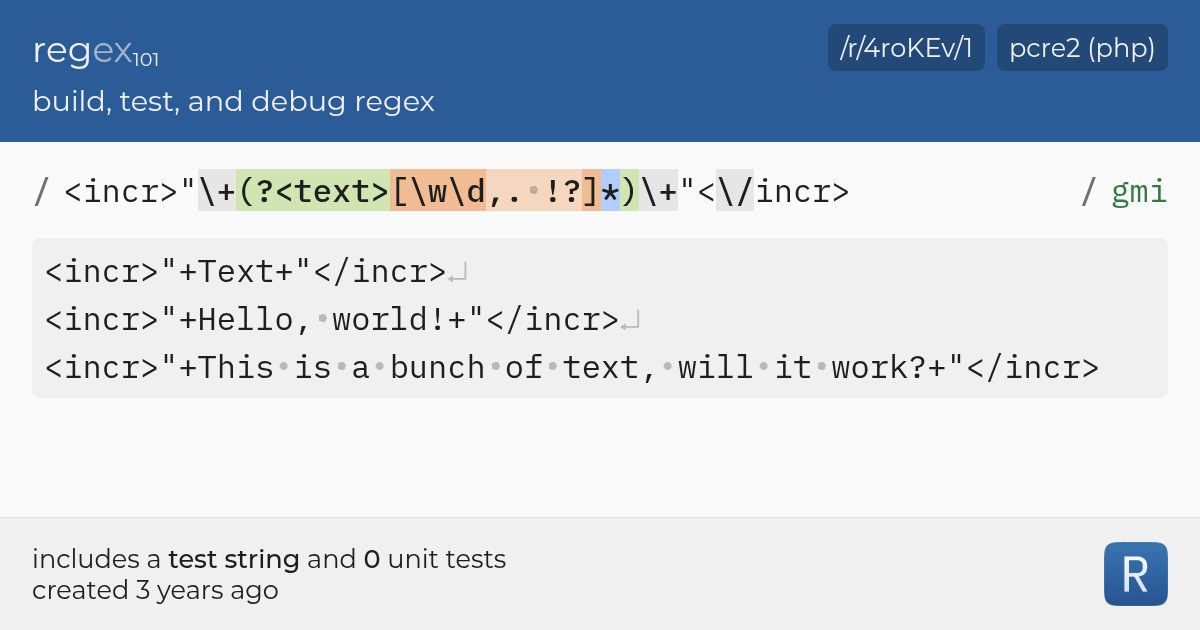
<incr>"\+(?<text>[\w\d,. !?]*)\+"<\/incr>
Make sure you uncheck case sensitivity.
Here's the text I performed: https://regex101.com/r/4roKEv/1
regex101
Regular expression tester with syntax highlighting, explanation, cheat sheet for PHP/PCRE, Python, GO, JavaScript, Java, C#/.NET, Rust.
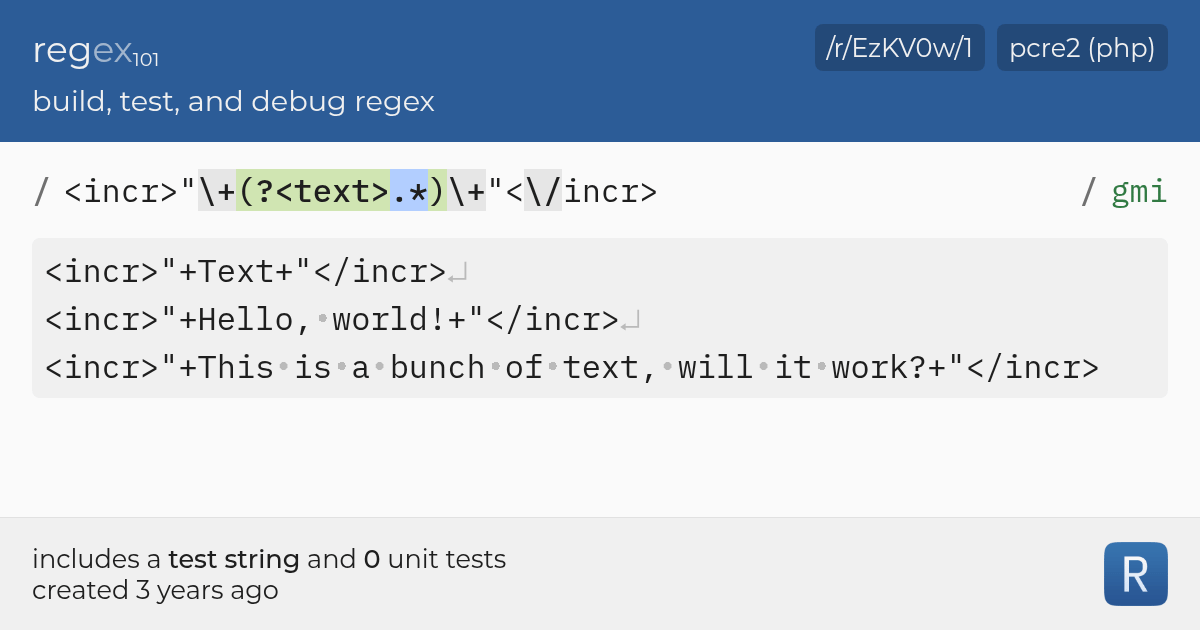
I should note that this does not cover all characters
You should probably use this instead:
<incr>"\+(?<text>.*)\+"<\/incr>
This works better.
https://regex101.com/r/EzKV0w/1
regex101
Regular expression tester with syntax highlighting, explanation, cheat sheet for PHP/PCRE, Python, GO, JavaScript, Java, C#/.NET, Rust.
storm pendant
burnt vapor
No need, here's the regex if you want
```
<incr>"\+(?<text>[\w\d,. !?]*)\+"<\/in...
oh wow! Thanks! 🥰 that's a lot of strange looking characters!
burnt vapor
Yeah, Regex is weird. I just happen to need them quite a bit
In this regex you can find your text in a group by the name of text
I would generally advice against using Regex but if you're sure that the input is always this simple you can use it
storm pendant
burnt vapor
I would generally advice against using Regex but if you're sure that the input i...
yeah, it will always be letters, so I reckon I'll be safe!
azure zenith
I need help
burnt vapor
azure zenith
I need help
You've already been told to explain your issue and to not ask for help. Nobody is going to answer you if you don't share your problem. #854851968446365696 -> 🤔 Asking Questions
And don't cross post. You already asked for help in #💻┃unity-talk
azure zenith
All I want to do is to instantiate cubes but it won't work. They say using the instantiate function is easy, well guess what, it isn't
There are a lot of things I want to clarify
Do I need another script for instantiating an object?
Or can I do it in the same one
gaunt ice
No
 frosty hound
Scripts are irrelevant. You just need code. Where it goes is up to you.
gaunt ice
You can just put the instantiate code in ontriggerenter
azure zenith
Should an object that you want to instantiate on another object being instantiated be a child of that object?
frosty hound
No
It can be, it doesn't have to be
Instantiation just spawns something. Where and what is up to you. And how you organize it in the hierarchy is up to you.
queen adder
private bool isMoving;
private Vector3 orgiPos, targetPos;
private float timeToMove = 0.05f;


// Start is called before the first frame update
void Start()
{

}

// Update is called once per frame
void Update()
{
    if(Input.GetKey(KeyCode.W) && !isMoving)
    {
        StartCoroutine(MovePlayer(Vector2.up));
    }
    if (Input.GetKey(KeyCode.S) && !isMoving)
    {
        StartCoroutine(MovePlayer(Vector2.down));
    }
    if (Input.GetKey(KeyCode.A) && !isMoving)
    {
        StartCoroutine(MovePlayer(Vector2.left));
    }
    if (Input.GetKey(KeyCode.D) && !isMoving)
    {
        StartCoroutine(MovePlayer(Vector2.right));
    }

}

private IEnumerator MovePlayer(Vector3 direction)
{
    isMoving = true;

    float elapsedTime = 0;

    orgiPos = transform.position;
    targetPos = orgiPos + direction;

    while(elapsedTime < timeToMove)
    {
        transform.position = Vector3.Lerp(orgiPos, targetPos, (elapsedTime / timeToMove));
        elapsedTime += Time.deltaTime;
        yield return null;
    }

    transform.position = targetPos;

    isMoving = false;
}
how to fix it, i dont want hold key to move. Want just one click and player self move
 tawdry mirage
constantly move the player in fixed update or in update, only set movement vector when you get inputs
gaunt ice
You dont need to hold key to move, once you press the key the coroutine will start but you dont know when it ends
queen adder
void Update()
{
    if(Input.GetKey(KeyCode.W) && !isMoving)
    {
        playerDirection = Vector2.up;
    }
    if (Input.GetKey(KeyCode.S) && !isMoving)
    {
        playerDirection = Vector2.down;
    }
    if (Input.GetKey(KeyCode.A) && !isMoving)
    {
        playerDirection = Vector2.left;
    }
    if (Input.GetKey(KeyCode.D) && !isMoving)
    {
        playerDirection = Vector2.right;
    }

    StartCoroutine(MovePlayer(playerDirection));

}
this doesnt work ;/
 modest dust
Well, you're calling the coroutine each frame
You'll be having tens and hundreds of the same coroutine trying to move the player at the same time
gaunt ice
Your coroutine doesn’t allow you change the player direction while it is moving, you have to hold the key until the player finishes its movement
modest dust
Also wouldn't playerDirection = new Vector2(Input.GetAxisRaw("Horizontal"), Input.GetAxisRaw("Vertical")).normalized be easier and shorter
modest dust
gaunt ice
Your coroutine doesn’t allow you change the player direction while it is moving,...
Not true, I don't see the playerDirection being set to Vector.zero anywhere in the code
also the targetPos stays the same during the coroutine
gaunt ice
His previous code
modest dust
Well, still, it's not being set to 0 anywhere
queen adder
yes, but this code work perfect for me becaue i need grid tille movement, but dont want hold key
modest dust
it's just constantly changing to a bigger value
storm pendant
burnt vapor
Yeah, Regex is weird. I just happen to need them quite a bit
Hmmm...I'm having trouble trying to implement this Regex thing...
I have a button with a Text field on it. How would I use the above Regex expression to extract the text from the button and assign it to its own variable? Do I replace <text> with myButton.GetComponentInChildren<TextMeshProUGUI>().text, or does it operate a little differently if I'm adjusting a string value on a GameObject rather than a variable?
modest dust
queen adder
yes, but this code work perfect for me becaue i need grid tille movement, but do...
Still, you're calling the coroutine constantly
once you press for example W, your playerDirection will be set to up
and then it will try to constantly go up
gaunt ice
You need a queue to store the key you press since the update will not response to any key you press while the player is moving
I am talking about your previous code not the new one you sent
modest dust
at least put a if (isMoving) return; at the beginning of update
gaunt ice
if(Input.GetKey(KeyCode.W) && !isMoving)
    {
        StartCoroutine(MovePlayer(Vector2.up));
    }
    if (Input.GetKey(KeyCode.S) && !isMoving)
    {
        StartCoroutine(MovePlayer(Vector2.down));
    }
    if (Input.GetKey(KeyCode.A) && !isMoving)
    {
        StartCoroutine(MovePlayer(Vector2.left));
    }
    if (Input.GetKey(KeyCode.D) && !isMoving)
    {
        StartCoroutine(MovePlayer(Vector2.right));
    }
```this oneCreate a variable with the regex
private readonly Regex _textRegex = new(@"<Regex goes here>", RegexOptions.IgnoreCase);
Get all matches
var textMatchCollection = this._textRegex.Matches(myContent);
For each match, get the text group I mentioned before.
var text = match.Groups.GetValueOrDefault("text")?.Value ?? throw new InvalidOperationException($"Expected text content.");
You now have the text.
burnt vapor
gaunt ice
```cs
if(Input.GetKey(KeyCode.W) && !isMoving)
{
StartCoroutine(Move...
What is this even? Please don't do this
burnt vapor
queen adder
```cs
void Update()
{
if(Input.GetKey(KeyCode.W) && !isMoving)
{
...
Why do you want to call a Coroutine? What does it do?
It sounds pointless
gaunt ice
it is not my code....
queen adder
Man i find this code and works great, i want just make grid movement.
storm pendant
burnt vapor
Create a variable with the regex
`private readonly Regex _textRegex = new(@"<Reg...
thanks! I'll try it out 🙂
gaunt ice
i have said the main reason why you need to hold down the key to make player turn is that the update will simply "return" because it will not start any coroutine while the player is moving,
you can have a queue to store the input while the player is moving and dequeue to process it
(though i think you need some guard on it)
private Queue<Direction> q;
void Update(){
  if(input.getkeydown(XXXXX)||other direction key){
    q.enqueue(the direction)
  }
  if(q.Trydequeue(out direction)){
    switch(direction){
    case here
    }
  }
}
Guard of course, im not developer, just hobbist
distant current
Can anyone help me why Im getting null on this?
 random sand
why can't this use mixamio animations
 distant current
Im calling the name of the scriptable object, the Base is a scriptable object
gaunt ice
just nextstep since the line var x=X() is not executed since the process is stopped in this line
distant current
sorry I am too dumb, which next step
gaunt ice
step over button?
 keen dew
I think they mean that Base is null, not saveData. Stepping over doesn't change the value of Base
gaunt ice
try press it the vs should stops in next line
 keen dew
Did you write this code or is it a library/plugin?
gaunt ice
i think one of them is step over, hover on it and have a look

 languid spire
Step In, Step Over, Step Out. In that order
distant current
when I click the Step Over, it just stays on the break
distant current
keen dew
Did you write this code or is it a library/plugin?
I wrote it
Im trying to use the same approach to my inventory and it works
But my quest is getting null
keen dew
well Base is null either because you've passed null to the constructor, or GetObjectByName didn't find anything, depending on which constructor was used when the object was created
that's the part that you should be debugging
gaunt ice
i misunderstand your problem, probably the name passed into getobjbyname is "wrong"
distant current
Is it the (saveData.name)?
keen dew
distant current
Is it the ```(saveData.name)```?
That seems to be an important part of setting the value of Base, yes
when you say that you wrote this, do you mean that you copied it from a tutorial? It seems strange that you wrote it but have no idea how it works
distant current
Yes, I did copy it from a tutorial but I was able to follow all of it but somehow the quest state is not working
keen dew
Put this at the end of the second constructor:
Debug.Log($"The value of Base is {Base} and saveData.name is '{saveData.name}'");
(or use the debugger)
Then when it says Base is null, check that the database contains an item with that name
distant current
Got it, thanks I will try that
azure zenith
How can I instantiate 3D cubes on top of blocks that instantiate themselves?
 keen dew
Then the object was created using the first constructor. Log _base there.
distant current
I tried to debug the first constructor, it doesn't print the log
distant current
as soon as the game runs, it NRE occurs as well as when I try to save the game
azure zenith
azure zenith
How can I instantiate 3D cubes on top of blocks that instantiate themselves?
Help
Please and thanks
ashen ferry
so if you instantiate the block instantiate 3d cube above it whats the issue
 faint elk
I am not sure if this is considered a beginners question but from the channel directory this one seemed to be the place since I am fairly new to C# and unity. So I was looking around the unity documentation and notice that there was a section for JAR plugins and I had the idea of having my game open a jar file of runescape just to see if it was possible. I went through the process of adding the jar to the file hierarchy and got all the import setting figured out and noticed the open button in the inspector which just ran the jar file when clicked. I looked through the docs to see if there was any way to open the jar through a script but i didnt see anything and figured i would ask here. Is this possible to do?
 iron galleon
can someone help me? I wrote this rigidbody script and it doesnt work. only the camera script works which is in another file. it says nothing.

there isn't any error that shows up
it just doesnt work
languid spire
iron galleon
Firstly can you post your code correctly please
!code
eternal falconBOT
Posting code
📃 Large Code Blocks
Large code blocks should be posted as links to services like:
https://gdl.space/, https://paste.ofcode.org/, https://hatebin.com/
https://paste.myst.rs/, https://hastebin.com/
📃 Inline Code
Surround code with three backquotes. Not quotation marks.
To get C# formatting the first line should only contain cs or csharp.
Add a comment with a line number if there is an error message.
```cs
// Your code here
```
Do not share screenshots of code unless requested.
iron galleon
languid spire
Firstly can you post your code correctly please
!code
alr
wait so like I paste the link of of the code?
languid spire
yes
languid spire
Now why does that look like AI generated code?
languid spire
this server has a rule against helping solve problems in AI code, sorry you're on your own
iron galleon
oh
 tough lagoon
iron galleon
https://paste.ofcode.org/gkFMGQJYtLsBkCyF9ZKyjp
tough lagoon
iron galleon
https://paste.ofcode.org/gkFMGQJYtLsBkCyF9ZKyjp
The code, in of itself, is usable. It's wrong on the ring damage portion. But as long as you tagged objects right, added it to a main (3D, not 2D) object. And have a rigidbody and collider it'll be usable. I'm also not so sure on the sliding mechanic and if that is actually functionally correct.
At any rate, it should be doing something. So debug and look at it closer.
frosty hound
You're too lazy not to use AI generated code, yet you come here asking people to use their time to resolve it for you? Have some respect.
 slender cargo
So my player now rotates with the mouse, but I can't get it to walk in the correct local axis?

I remember there was something like Vector.3.axis
or something
ashen ferry
chat gpt comments be like ``` // declaring a:
int a = 2;
// declaring b:
int b = 2;
// adding a and b together:
int c = a + b;``` 
Does anyone know a solution?
ashen ferry
slender cargo
So my player now rotates with the mouse, but I can't get it to walk in the corre...
use transform.right transform.forward
slender cargo
ashen ferry
use transform.right transform.forward
How would I implement that? transform.right += horizontal?
 manic shore
I am trying to make an enemy AI that's trying to follow the player when they hit their line of sight. But I keep getting this error
 rich adder
manic shore
I am trying to make an enemy AI that's trying to follow the player when they hit...
rich adder
manic shore
I am trying to make an enemy AI that's trying to follow the player when they hit...
your navmesh agent isn't on navmesh
slender cargo
ashen ferry
use transform.right transform.forward
 manic shore
rich adder
your navmesh agent isn't on navmesh
manic shore
rich adder
your navmesh agent isn't on navmesh
What would I need to put?
rich adder
manic shore
What would I need to put?
wdym what you need to put? You need to bake a navmesh
slender cargo
slender cargo
I'm not sure what im doing 😂
rich adder
slender cargo
I'm not sure what im doing 😂
var dir = (transform.right * horizontal * speed *Time.deltaTime) + (transform.forward * vertical * speed * Time.deltaTime)
ashen ferry
slender cargo
        float ver = Input.GetAxis("Vertical");
        Vector3 moveThisUpdate = transform.right * hor + transform.forward * ver;
transform.localPosition += moveThisUpdate * speed;``` try this idkactually its a bit shit but idk how u wanna move the thing exactly
slender cargo
slender cargo
this seemed to try to work, but my player was glitching back
slender cargo
rich adder
`var dir = (transform.right * horizontal * speed *Time.deltaTime) + (transform.f...
This works! Thanks!
 manic shore
rich adder
wdym what you need to put? You need to bake a navmesh
manic shore
rich adder
wdym what you need to put? You need to bake a navmesh
I have the NavmeshAgent component on the enemy and going by the video tutorial, I put the reference to the component on the script. So I didn't get the error
rich adder
manic shore
I have the `NavmeshAgent` component on the enemy and going by the video tutorial...
none of this tells me you baked a navmesh 🤷
rich adder
slender cargo
This works! Thanks!
if you plan on using collisions you might not want to move the direct transform position
manic shore
rich adder
none of this tells me you baked a navmesh 🤷
Is there a guide on NavMesh's
rich adder
manic shore
Is there a guide on NavMesh's
hmmI thought you said you're following a video on this tutorial?
they dont' bake navmesh in this video?
send link
rich adder
manic shore
Is there a guide on NavMesh's
manic shore
rich adder
send link
The closest I've seen is him adjusting the settings. Unless there's a big detail I'm missing
https://www.youtube.com/watch?v=xppompv1DBg
Let’s make some enemies!
♥ Support Brackeys on Patreon: http://patreon.com/brackeys/
●The Playlist: http://bit.ly/2xiecdD
● Sebastian's Channel: https://www.youtube.com/user/Cercopithecan
● Download the assets: http://bit.ly/2u4rcEX
● Download the source code: http://bit.ly/2uecCew
● Singleton Patterns: http://wiki.unity3d.com/index.php/Sing...
rich adder
another brackys tut..
manic shore
?
rich adder
manic shore
?
brackys videos are half assed
manic shore
oh damn
rich adder
manic shore
oh damn
all good. which version of unity are u on
manic shore
2022.3.8
rich adder
manic shore
2022.3.8
ok so you downloaded the AI.Navigation package?
manic shore
Yes
rich adder
ok good. now you have a floor yes?
manic shore
Yes
rich adder
put the component I sent u link of. NavMeshSurface
hit bake , show screenshot of scene with surface selected
manic shore
This how you do it?
 rich adder

 vast ivy
does this code look correct for changing animations?
if(enableSprint)
        {
            if(isSprinting)
            {
                playerAnim.SetBool("run", true);
                isZoomed = false;
                playerCamera.fieldOfView = Mathf.Lerp(playerCamera.fieldOfView, sprintFOV, sprintFOVStepTime * Time.deltaTime);

                // Drain sprint remaining while sprinting
                if(!unlimitedSprint)
                {
                    sprintRemaining -= 1 * Time.deltaTime;
                    if (sprintRemaining <= 0)
                    {
                        isSprinting = false;
                        isSprintCooldown = true;
                    }
                }
            }
            else
            {
                // Regain sprint while not sprinting
                sprintRemaining = Mathf.Clamp(sprintRemaining += 1 * Time.deltaTime, 0, sprintDuration);
                playerAnim.SetBool("run", false);
            }
I usualy use character speed + blend tree, is it not working or something?
vast ivy
The animation is set to loop, so when I start sprinting it should start to run, but no animation happens for a few seconds, then it runs the animation for 1 second then stops again, does this every few seconds

 mental zenith
https://gdl.space/ekayovizes.cs
Why can my character jump twice and why is the speed only set to 5 after the second jump?
rich adder
mental zenith
https://gdl.space/ekayovizes.cs
Why can my character jump twice and why is the s...
use bin site for large code
!code
eternal falconBOT
Posting code
📃 Large Code Blocks
Large code blocks should be posted as links to services like:
https://gdl.space/, https://paste.ofcode.org/, https://hatebin.com/
https://paste.myst.rs/, https://hastebin.com/
📃 Inline Code
Surround code with three backquotes. Not quotation marks.
To get C# formatting the first line should only contain cs or csharp.
Add a comment with a line number if there is an error message.
```cs
// Your code here
```
Do not share screenshots of code unless requested.
vast ivy
the only things I've messed with in the animations themselves are the humanoid shape, and loop
rich adder
vast ivy
the only things I've messed with in the animations themselves are the humanoid s...
hmm try disabling the Exit time, that should help delayed animation
vast ivy
ohhh found it
it recommends having at least 1 condition between the animations, is this a problem I need to fix
rich adder
vast ivy
it recommends having at least 1 condition between the animations, is this a prob...
what does?
show transition
vast ivy

 rich adder
mental zenith
https://gdl.space/ekayovizes.cs
Why can my character jump twice and why is the s...
rich adder
mental zenith
https://gdl.space/ekayovizes.cs
Why can my character jump twice and why is the s...
have you checked all the logs?
mental zenith
rich adder
have you checked all the logs?
it logs correctly
vast ivy
Had to give it the bool values in the arrows
mental zenith

 vast ivy
wait so do I need any code?
rich adder
vast ivy
wait so do I need any code?
well you need the code to set the bool
rich adder
mental zenith
<:notlikethis:1068134558123442236>
debug.log jump count?
vast ivy
the bool is set in the manager isnt it?

no check means false correct? which it is referencing in the arrows
rich adder
vast ivy
the bool is set in the manager isnt it?
your code is doing it, sure u can manually set it but shouldn't
yes, unchecked = flase
mental zenith
i dont get it hahahaha
 rich adder
mental zenith
i dont get it hahahaha
rich adder
mental zenith
i dont get it hahahaha
where did u put that log
mental zenith
in the input.getdown("jump") if statement
polar acorn
mental zenith
<:notlikethis:1068134558123442236>
🤔

Curious how you expected anything else
mental zenith
polar acorn
🤔
speed stays 10 tho
thats the entire issue xD
the logs are (semi) correct
is it possible its because of the fixedUpdate?
polar acorn
mental zenith
speed stays 10 tho
yes because you set it back to 10 later
 mental zenith
polar acorn
yes because you set it back to 10 later
mental zenith
polar acorn
yes because you set it back to 10 later
when they land
polar acorn
mental zenith
when they land
No, if they are grounded
that is different than "when they land"
If you're on the ground already
then you set it to 5 then to 10
mental zenith
but thats normal when the player is on the ground it should have a speed of 10 but if it jumps it should become 5 until they are on the ground again
polar acorn
mental zenith
but thats normal when the player is on the ground it should have a speed of 10 b...
Here's what happens.
- Let's assume your player is on the ground.
- Check for the jump button. Let's assume it's pressed. Speed becomes 5 and a bunch of velocity stuff is set
- Log the value of speed. It logs 5.
- Check to see if the player is on the ground. Due to axiom (1), we know they are. Speed becomes 10.
- Look at the inspector and see the value of speed. Speed is 10.
mental zenith
what is axiom 1?
 rich adder
mental zenith
sorry didnt know what axiom mean
rich adder
mental zenith
sorry didnt know what axiom mean

a statement accepted as true as the basis for argument or inference : postulate; an established rule or principle or a self-evident truth; a maxim widely accepted on its intrinsic merit… See the full definition
mental zenith
thnx
polar acorn
It doesn't matter here, but it's a thing used in mathematical proofs which is essentially defining a true initial state
Such that if the axiom is true then the proof is true
 twilit trail
like in Start()?
so just an else Destroy(gameObject); ?
since the block is already if (IsServer)
rich adder
oop this should prob be in #archived-networking
eternal needle
Destroying it probably shouldnt matter, especially since all the logic only runs if they are the server
rich adder
true!
twilit trail
okay I'll copy it there
manic shore
Is there a package that comes with this code?
 polar acorn
manic shore
Is there a package that comes with this code?
polar acorn
manic shore
Is there a package that comes with this code?
What is the context
What code
rich adder
manic shore
Is there a package that comes with this code?
are you still on that Brackys tutorial?
manic shore
Yes
 swift sedge
what series is it??
manic shore
polar acorn
What is the context
I have my code to be at MonoBehavior but this one is different in that it's Interactable
manic shore
swift sedge
what series is it??
Making an RPG in Unity
manic shore
rich adder
so its a series , follow from 1 to whatever
At this point I probably should.
polar acorn
manic shore
I have my code to be at `MonoBehavior` but this one is different in that it's `I...
What is the context in which you saw Interactable
manic shore
polar acorn
What is the context in which you saw `Interactable`
Brackey's Enemy AI tutorial
polar acorn
This means "Episode 10" which means there's 9 episodes of code that already exist

 buoyant knot

 amber nimbus
Hey, I have this code that rotates a turret on my tank this rotates it on the y axis. That is great but I need the turret to also follow the movement of the hull (which is the parent) so how can I get only 2 of the axis to follow?

the commented out code didnt work
polar acorn
amber nimbus
Hey, I have this code that rotates a turret on my tank this rotates it on the y ...
localRotation is a quaternion. localRotation.y has absolutely nothing to do with the Y axis in 3D space
If you want to get the euler angles in XYZ space, use localEulerAngles
buoyant knot
isn’t rotating on 2 axes the same as free rotation?
amber nimbus
what i basically need is to keep the localRotaion of X and Z at 0 but I need to change the Y axis in world space to follow the rotation
buoyant knot
because 2 angles defines the whole sphere
rich adder
amber nimbus
Hey, I have this code that rotates a turret on my tank this rotates it on the y ...
the numbers you see in the inspector are eulerangles
buoyant knot
so, what if the parent has a non-Y axis rotation
amber nimbus
buoyant knot
so, what if the parent has a non-Y axis rotation
that is the problem
Basically what I need: transform.localRotation.x = 0 then transform.rotation.y = rotation and transform.localRotation.z = 0 And I need the Y rotation to happen slowly at a constant speed towards the target
polar acorn
amber nimbus
Basically what I need: ```transform.localRotation.x = 0``` then ```transform.rot...
buoyant knot
rotation gives euler angles in world space. local rotation is a quaternion in local space
buoyant knot
i wonder if this is what you need: https://docs.unity3d.com/ScriptReference/Quaternion.LookRotation.html

you know vector of turret to target, and you should know the local up of the transform
amber nimbus
here is my problem, the turret follows the "crosshair" but it doesnt follow the parents rotation
 buoyant knot
unity’s documentation explicitly says to never assign transform.rotation
probably because you get that sort of thing. you are assigning the world space rotation
you probably want something like this: https://docs.unity3d.com/ScriptReference/Transform.SetLocalPositionAndRotation.html
so you want to get the current localrotation quaternion, calcluate the desired future quaternion using Quaternion.LookRotation, interpolate between the two using turret speed, then transform.SetLocalPositionAndRotation to assign it
make sense?
amber nimbus
Yes, it does I will try it and thanks
buoyant knot
you should browse the scripting API methods for quaternion
lots of useful shit in there
lots of good methods that don’t require you to actually understand exactly how quaternions function
swift sedge
buoyant knot
lots of useful shit in there
any reason for s word?
buoyant knot
because saying there is a lot of useful crap makes it seem like the content in there is not good, when it is in fact quite good
swift sedge
:/
faint elk
Stupid question if I have an object with script foo attached to it and do .GetComponent<Bar> which foo is an derived from will i get anything back or will I get an error
 verbal dome
If Foo inherits from Bar then yeah it will find it
faint elk
Ok I figured it would but i thought id check before making the assumption
faint elk
So I have this extremely ugly and horrible if statement and was wondering what i can do to make it less horrific https://paste.ofcode.org/ZVTnuMXRgaL94r25Rk722c
fringe pollen
faint elk
So I have this extremely ugly and horrible if statement and was wondering what i...
Perhaps you could loop through each of the hit parts instead of assigning a variable for each of them and checking each variable separately?
languid spire
faint elk
So I have this extremely ugly and horrible if statement and was wondering what i...
A) Cache the Getcomponents
B) Put the data into 2 arrays and use a for loop
timber tide
beautiful
faint elk
languid spire
A) Cache the Getcomponents
B) Put the data into 2 arrays and use a for loop
How would I chace it?
 harsh vault
idk why but my when I press the WASD keys. the character tries to make itself go back to idle then has a hard time going back to the walk animation. Is there a way I can make this better?
 languid spire
by doing them first and saving the reference, just like you cache anything
polar acorn
harsh vault
idk why but my when I press the WASD keys. the character tries to make itself go...
faint elk
fringe pollen
Perhaps you could loop through each of the hit parts instead of assigning a vari...
You mean like putting them into an array and itterating through it?
faint elk
languid spire
by doing them first and saving the reference, just like you cache anything
I have not chached anything before
or maybe im thinking of the wrong thing
timber tide
if it's only component data for that frame it may just be fine since it doesn't need all the component data if it shortcircuits, no?
languid spire
have you never done
MyScript myscript = GetComponent<MyScript>();
that is caching
languid spire
yes, means you only call GetComponent once instead of everytime you need something from MyScript
faint elk
this leads me to ask how I would implement it in this case?
timber tide
Ah, yeah you're getting the same component each statement, so yeah good idea to cache
faint elk
the thing is that its all raycasts so its not always going to be able to get the component from the the collider
timber tide
because each time you getcomponent, you're searching through the list of components on the GO
faint elk
you know it might be better if I pasted the whole code bit instead of just the if statement
that will probably give better context at whats going on
languid spire
faint elk
this leads me to ask how I would implement it in this case?
old

hitDown.collider.GetComponent<Pieces>().pieceType == "king" && hitDown.collider.GetComponent<Pieces>().pieceColor != this.pieceColor
hitLeft.collider.GetComponent<Pieces>().pieceType == "king" && hitLeft.collider.GetComponent<Pieces>().pieceColor != this.pieceColor
new

[] types;
[] colors

FillArray(hitDown.collider.GetComponent<Pieces>(),0);
FillArray(hitLeft.collider.GetComponent<Pieces>(),1);


etc, etc


void fillArray(Pieces pieces, int ix) {
types[ix] = pieces.pieceType;
colors[ix] = pieces.pieceColor;
}
then you have arrays you can loop over
timber tide
That's a lot of raycasts per update. I'd feel like you could probably accomplish something with just some overlapsphere/circle and figuring out the distances between you and the hit component.
but honestly, if what you're making isn't that complex it should be fine
faint elk
so if im understanding that right the code just gets the component no matter what and adds the color and pieceType to an array, then once all of it is populated i just check to see if the array has the king of the opposite color/
languid spire
faint elk
so if im understanding that right the code just gets the component no matter wha...
exactly
you could also make FillArray return a bool and not need the arrays at all
faint elk
timber tide
That's a lot of raycasts per update. I'd feel like you could probably accomplish...
Thats what I as thinking but since I am making chess its important to know that the piece doesnt have a beeming sightline to the king so knowing whats in its path seems important. Unless I can somehow do that with overlap spheres and stuff
timber tide
Oh is this chess?
faint elk
yes
timber tide
You can probably just ignore the raycasts then and do it by indexing, no?
faint elk
languid spire
exactly
Wouldnt I need to add in if statement to check if the collider ever sees a piece?
languid spire
faint elk
Wouldnt I need to add in if statement to check if the collider ever sees a piece...
yes, but it would be a lot less ugly than what you have
faint elk
I am currently doing indexing for everything else in it but I felt like using raycasts to check for the king being in check would be easier and cheaper to use raycasts instead of going through indexing
languid spire
is hitdown etc a raycast hit?
faint elk
yea
just in case you missed it this is the link to the whole code and not just the if statement https://paste.ofcode.org/w2NdGeqGC8DrTtYqSgi6Ry
languid spire
ok, wait one
if (checkCollider(hitDown) || checkCollider(hitLeft) etc, etc

bool checkCollider(RaycastHit hit) {
if (hit.collider != null)
Pieces pieces = hit.collider.GetComponent<Pieces>();
if (pieces.pieceType == "king" && pieces.pieceColor != this.pieceColor) return true;
}
return false;
}
@faint elk
faint elk
languid spire
```cs
if (checkCollider(hitDown) || checkCollider(hitLeft) etc, etc
bool checkC...
oh shit thats a really smart way of doing it. I feel so stupid that I didnt think of that now lol
languid spire
Always look for patterns in code, when you find one there is always a better way
faint elk
it didnt even process that I could pass the variable to a function and do it like that
languid spire
btw pieceType and pieceColor should probably be enums
faint elk
pieceColor is an enum as for pieceType I should probably turn that into an enum
faint elk
languid spire
```cs
if (checkCollider(hitDown) || checkCollider(hitLeft) etc, etc
bool checkC...
Would that take into account the collider potentally being null?
languid spire
now it does
faint elk
Lol thank you so much for your help
languid spire
np
 last grove
why are none of my gameObjects rendering except for the player capsule?
 rich adder
last grove
why are none of my gameObjects rendering except for the player capsule?
rich adder
last grove
why are none of my gameObjects rendering except for the player capsule?
something seems bugged with your probuilder
maybe try reset shape
last grove
how do I do that?
rich adder
 languid spire
Also @last grove Not a code question and don't cross post
last grove
rich adder
nothing changed. The transform just moved
 last grove
languid spire
Also <@697184925480386740> Not a code question and don't cross post
last grove
languid spire
Also <@697184925480386740> Not a code question and don't cross post
my b, couldn't find any building help channels
rich adder
last grove
my b, couldn't find any building help channels
read #💻┃unity-talk 's description
languid spire
last grove
Thanks
timber tide
faint elk
I am currently doing indexing for everything else in it but I felt like using ra...
const int SIZE = 8; //8x8 grid
const int ChessPiece[,] chessBoard = new ChessPiece[Size, Size]

//knight moves
int const numMoves = 8;
int x[8] = { 2, 1, -1, -2, -2, -1, 1, 2 };
int y[8] = { 1, 2, 2, 1, -1, -2, -2, -1 };

public bool KnightValidPositions(int x, int y)
{
   if(x >= 0 && x < SIZE && y >= 0 && y < SIZE )
   {
      if(chessBoard[x, y] == null) return true;

      else if(chessBoard[x, y].ChessPiece.owner == OwnerType.Enemy)
      {
        return true;
      }
    }
    return false;
}

public List<(int, int)> KnightMoves(ChessPiece Knight)
{
    List<(int, int)> knightMoves = new();

    for (int i = 0; i < numMoves; i++)
    {
        int newX = Knight.x + x[i];
        int newY = Knight.y + y[i];

        if (KnightValidPositions(newX, newY))
        {
            knightMoves.Add((newX, newY));
        }
    }

    return knightMoves;
}```If you wanna ditch the raycasts it's just possible to check the indicies like this
GeeksforGeeks
A Computer Science portal for geeks. It contains well written, well thought and well explained computer science and programming articles, quizzes and practice/competitive programming/company interview Questions.
I actually hate this site, but the information seems to be there
they got some anti-addblocker now too haha
languid spire
yes, Geeks for Geeks should be renamed 'Showoffs reposting other peoples code for people who dont know better', not as snappy perhaps but truer
timber tide
just not in the mood to read through Stackoverflow's chain of comments of how you should do it like this instead at the moment
eternal needle
There was a point where they made it so you had to have an account too, think they reverted it
languid spire
I love Stackoverflow responses they always seem to start with ' You should not be doing this' or 'I wouldn't start from here'
 empty sentinel
“The result of this expression is always ‘true’ since a value of type ‘OVRInput.Button’ is never equal to ‘null’ of type ‘OVRInput.Button?’” Anybody know how to fix this?
languid spire
showing code might help
empty sentinel
languid spire
showing code might help
I can’t at the moment but I will in a bit
It’s code from a an Itch asset
I’m not super great with Unity, that’s why I’m using an asset, and it’s also a project for my little brother, my goal is to be able to add whatever he wants relatively fast

itch.io
An interaction system to create not only firearms but any type of VR interactable object.
Here’s the asset if you want to take a look
faint elk
So I am getting an error saying " FindObjectsOfType is not allowed to be called from a MonoBehaviour constructor (or instance field initializer), call it in Awake or Start instead. Called from MonoBehaviour 'Queen'." and it appers to be because the variable is serialized for some unknown reason, how do i prevent it from be serialized
 short hazel
No it's because you're calling FindObjectsOfType in a field initializer
class Sample : MB {
  public T Something = FindObjectOfType<T>(); // not allowed
}
Thats the thing im not doing that. I have that in the start method
short hazel
Post the Queen class, that is where the error is originating
faint elk
thats the thing its not even in the queen class its in the piece class
short hazel
The error says otherwise
faint elk
make fun of me for the trash code later https://paste.ofcode.org/38PiEhfHhkfQHr7X7quNdUB
short hazel
Where do you call Queen.setup()?
faint elk
in the chessboardmanager class
short hazel
Same for movement(). Where exactly
faint elk
movement is called in the queen class
im telling you the issue is in the pieces class

unity even opens the piece class when i go to the error
short hazel
Then search for any FindObjectsOfType there
faint elk
that code doesnt even exist in the class
i dont think i have ever used that findobjectsoftype
I have FindObjectOfType but not objects
short hazel
A quick "Find In Files" will sort that out
faint elk
nothing
short hazel
Well I see the stack trace of the first error and it mentions the constructor of Pieces
Chess.Pieces.ctor(), line 29
faint elk
i can post the pieces class for you if that will help
languid spire
yes
short hazel
There is nothing on line 29. Save and run the game again to get an updated stack trace
Also Pieces inherits from Chessboard? What?
faint elk
lets not talk about that one
still figuring out why i did that myself
but the issue seems fixed now
 delicate portal
Hey! How do I import assets to unity from unreal engine?
summer stump
delicate portal
Hey! How do I import assets to unity from unreal engine?
What kind of assets?
 polar acorn
delicate portal
Hey! How do I import assets to unity from unreal engine?
polar acorn
delicate portal
Hey! How do I import assets to unity from unreal engine?
You don't. Unreal converts most things into uassets which are proprietary. You'd need to import the source file that actually made the uasset instead
rich adder
better not be the ones from Epic Store, its against TOS
short hazel
faint elk
but the issue seems fixed now
Considering that your error is from half an hour ago (if you don't live in one of those countries that have half an hour of time offset), then yes you likely fixed it half an hour ago
delicate portal
rich adder
better not be the ones from Epic Store, its against TOS
its not
delicate portal
polar acorn
You don't. Unreal converts most things into `uasset`s which are proprietary. You...
What do you mean by 'source file'? The whole sceen?
polar acorn
delicate portal
What do you mean by 'source file'? The whole sceen?
No I mean the source file.
The image, or fbx or whatever file was imported
 paper sable
hey guys, im trying to make a car with wheel colliders but when i start the game, my wheel colliders move a bit forwards (which they shouldn't), and when i press W to move forward, the wheels move, but the car doesn't move. also the wheels go a bit under the ground
 delicate portal
polar acorn
No I mean the source file.
delicate portal
polar acorn
No I mean the source file.
How can I get that or?
I imported theese assets but I cant import the materials
polar acorn
delicate portal
How can I get that or?
Wherever you imported the asset from
Whatever file you dragged in
delicate portal
That contains the uassets?
polar acorn
No, the file that you imported
short hazel
This is a code channel folks, move to whatever channel is on topic for asset importing
delicate portal
polar acorn
No, the file that you imported
Sure, can we have a short disussion in #💻┃unity-talk ?
polar acorn
I'm not sure there's much more to say anyway. Just drag in the file you imported into unreal into unity instead
 tender stag
any way to make the enum ogranized better?
[System.Serializable]
public enum CellTypes
{
    Hotbar,
    Inventory,
    Head,
    Body,
    Legs,
    Feet,
    Fuel,
    Furnace,
    Campfire,
    Scrapper,
}```something like this
 timber tide
You can always make sub-type enums
tender stag
what is that?
timber tide
What does Celltype represent? Like a base type?
tender stag
on the slot script you have an array for CellTypes
and on the item SO you also have an array
it cheks the compatibility
if you can place into that cell
timber tide
Ah, ok so it's stuff that can be stored on slots which include an SO
Right, so stuff like Head, Body, Legs, Feet. Perhaps another enum like EquipCellTypes
unique falcon
I keep getting this neverending NullRef after I stop the scene, any ideas why? Or is it something I can ignore for now? https://pastebin.com/qYPpc3ie

Pastebin
Pastebin.com is the number one paste tool since 2002. Pastebin is a website where you can store text online for a set period of time.
timber tide
tender stag
any way to make the enum ogranized better?
```cs
[System.Serializable]
public en...
[System.Serializable]
public enum CellTypes
{
    Utility,
    Equipment,
    PlayerCells,
}

public enum EquipmentCellTypes
{
    Head,
    Body,
    Legs,
    Feet,
}

public enum UtilityCellTypes
{
    Furnace,
    Campfire,
    Scrapper,
}
ohhhh
like that
yeah thats good
dont i need to [System.Serializable] all of them?
timber tide
ye
tender stag
alr
timber tide
Actually you don't need to serialize them. Unity does this automatically for you, but if encapsulated in a class then that needs to be serialized
tender stag
then how do i modify my CompatibleWithCell method?
public bool CompatibleWithCell(Item item, InventoryCell cell)
{
    if(cell.canPlace)
    {
        if(cell.cellTypes.Count == 0)
            return true;

        if(cell.cellTypes.Contains(CellTypes.Hotbar))
            return true;

        if(cell.cellTypes.Contains(CellTypes.Inventory))
            return true;

        foreach(var compatibleType in item.itemData.allowedCells)
        {
            if(cell.cellTypes.Contains(compatibleType))
            {
                return true;
            }
        }

        return false;
    }

    return false;
}```that wont work tho
cause on my furnace
im not using all the UtilityCellTypes
im only using Furnace
and on a campfire im only using Campfire
timber tide
This is just to reduce type checking. If you know that the furnace is at least a Utility type, then you can eliminate checking every single enum
Ah, maybe im thinking of this wrong. I think what you have is probably fine, but when it comes to the hotbar, that requires a bit more checking.
tender stag
what do you mean
timber tide
What can you store on the hotbar
tender stag
i already got that done
look

on my inventory manager
i got hotbar manager
the items list holds the item data and the game object in the players hands
and if the current selected hotbar slots item item data matches the one in the items list
then equip, or unequip or switch
you get the point
anyways i'll keep what i had at the moment with the enums
can i at least add spaces?

like this
i know it wont show in the editor
polar acorn
tender stag
can i at least add spaces?
Not without a custom inspector
tender stag
why not?
i just want the code to be more visible
i know in the inspector wont be seperated
polar acorn
tender stag
why not?
Oh wait, I misread what you said. I thought you said "It won't show in the inspector" like that was the question
You can put lines in code anywhere you want
even in the middle of lines in certain cases
tender stag
alright thanks
timber tide
tender stag
then how do i modify my CompatibleWithCell method?
```cs
public bool CompatibleW...
Honestly what you got is fine, it's just think of a situation that you may have 1000 types of very specific enum entries. At that point you have to loop over all 1000 of them, but if you divide it down like above, you can minimize the checking.
tender stag
alright i'll worry about it later on then
timber tide
Yeah absolutely
it's not like it's every update at runtime type of thing, and you're only checking once
so it's all good if it works for you
 swift sedge
tender stag
i wish you could just do something like
swift sedge
tender stag
i wish you could just do something like
just wondering, what game are you making
empty sentinel
short hazel
Doing `!= null` probably, where the value can never be null
That was the problem, I did something like “if something something != null” what should I do instead?
tender stag
swift sedge
just wondering, what game are you making
monument
paper sable
paper sable
hey guys, im trying to make a car with wheel colliders but when i start the gam...
can anyone help me pls?
short hazel
empty sentinel
That was the problem, I did something like “if something something != null” what...
It depends on the context. But the thing you're comparing with null cannot be null, ever. Maybe it has a property/method to tell you whether it is "valid" whatever you need it to do?
It's as if you did the following
int x = 42;
if (x != null)
  // ...
As int is a value type (a struct), it cannot be null. You'd get the warning here too
swift sedge
like bool can be either false or true
empty sentinel
short hazel
It depends on the context. But the thing you're comparing with `null` cannot be ...
I was kind of in a hurry while looking for the error, so I can’t give you the context at the moment. If it helps at all it’s an asset for a vr weapons system and this specific error (although there’s multiple) was in a “weapons.cs” or something along those lines
short hazel
Without at least the code, and the position of the warning/error, nothing can really be done
empty sentinel
Yeah
 jade elk
how do I add a background to a scene?
swift sedge
jade elk
how do I add a background to a scene?
skybox
empty sentinel
short hazel
Without at least the code, and the position of the warning/error, nothing can re...
Could it be possible that it has something to do with the version of Unity I’m using? Or the oculus integration sdk? Like if the project was made with 2019.1.2f1 and I’m using a newer Unity build could that effect it? Or if the oculus integration sdk has a deprecated feature or something?
swift sedge
swift sedge
skybox
inside the main camera
jade elk
swift sedge
skybox
do you have a tutorial
short hazel
empty sentinel
Could it be possible that it has something to do with the version of Unity I’m u...
It is a possibility, if the type of the variable you're trying to compare has changed from a class to a struct from one version to another.
empty sentinel
short hazel
It is a possibility, if the type of the variable you're trying to compare has ch...
So if I downgraded sdk versions it may help?
swift sedge
jade elk
do you have a tutorial
make a material, give it a colour that you want (or image) and attach it inside the skybox
tender stag
is there anyway to make it so that when i add a new enum i dont have to manually set every single one again?
cause the enum moves up or down
short hazel
empty sentinel
So if I downgraded sdk versions it may help?
They probably have versioned docs. Look for the type name in the API reference, and see if it's a class or a struct for your current version. Repeat for an older version.
No need to up/downgrade until you're sure the type has changed. It's unlikely though, I've never seen a type change like this in a codebase
empty sentinel
short hazel
They probably have versioned docs. Look for the type name in the API reference, ...
Alright will do
ashen ferry
Ive got poco class serialized and noticed its never null it makes sense but I need to know if its not just a shell of default values how do I check for that
jade elk
i have a 2d game, i made the background a sprite, but now i can't see the other sprites
why is that
polar acorn
It's probably in front of them
jade elk
how do I make it behind them
polar acorn
Move it behind them
jade elk
polar acorn
Move it behind them
changing the z doesn't change anything
polar acorn
jade elk
changing the z doesn't change anything
both directions?
jade elk
ah
swift sedge
jade elk
changing the z doesn't change anything
try going into 3D mode
timber tide
ashen ferry
Ive got poco class serialized and noticed its never null it makes sense but I ne...
It usually creates an object with the default constructor. An example would be having a SO that includes a poco inside with some data. One thing you'll notice is you don't have to invoke new to create this instance.
empty sentinel
short hazel
They probably have versioned docs. Look for the type name in the API reference, ...
Also I don’t get these warnings until I switch my build to android
jade elk
how do I make it so if my sprite is hit, it is deleted?
polar acorn
jade elk
how do I make it so if my sprite is hit, it is deleted?
Which part do you not know how to do
The hitting or the deleting
jade elk
to delete it
polar acorn
Destroy(someGameObject)
jade elk
will it delete it in real time?
short hazel
empty sentinel
Also I don’t get these warnings until I switch my build to android
Okay so the code is probably guarded by #if compiler directives, that includes the "faulty" code only when an Android platform is selected. This is called conditional compilation, and is very common in apps that must be cross-platform
swift sedge
jade elk
will it delete it in real time?
yes
empty sentinel
short hazel
Okay so the code is probably guarded by `#if` compiler directives, that includes...
Well then how do I fix this?
swift sedge
if you want it to delete faster, you can use DestroyImmediate() but it's not recommended for performance reasons
ashen ferry
timber tide
It usually creates an object with the default constructor. An example would be h...
I meant this ```
[System.Serializable]
public class Example
{
public int var1;
public int var2;
public int var3;
}
[SerializeField] Example example;``` now if I check somewhere if(example == null) its never true but I dont want to use it if all it has are default values due to serialization
Same as the previous answer. Verify that it is the case first. Explore the code base, search for any #if directives in the code.
jade elk
polar acorn
`Destroy(someGameObject)`
what is the game object
empty sentinel
short hazel
Same as the previous answer. Verify that it is the case first. Explore the code ...
Alright and if there are? Do I delete them or change them?
eternal needle
swift sedge
if you want it to delete faster, you can use `DestroyImmediate()` but it's not r...
Yea I definitely wouldnt even suggest this in the first place. You can accidentally delete stuff from your project, this should be used for editor scripts.
short hazel
empty sentinel
Alright and if there are? Do I delete them or change them?
It's probably not in your own code, so better not touch it. If it does not break anything, then ignore it.
eternal needle
jade elk
will it delete it in real time?
What do you mean in real time? Itll destroy end of frame or next frame
timber tide
ashen ferry
I meant this ```
[System.Serializable]
public class Example
{
...
Right, if you're serializing it so you can set it up in the editor then it'll call the default constructor
ashen ferry
sorry one of us dont get something how does that help me to know whether that instance of class is empty or not
polar acorn
jade elk
what is the game object
What object do you want to destroy
short hazel
ashen ferry
sorry one of us dont get something <:kekW:888545109262622760> how does that hel...
Without exposing a bool you check manually in the inspector to say "I have verified this instance is initialized and legitimate", you can't
jade elk
polar acorn
What object do you want to destroy
i was able to figure it out
is the game manager where everything is called and used?
summer stump
jade elk
is the game manager where everything is called and used?
If you want it to be, but probably shouldn't.
A game manager is something you make and decide the scope of
jade elk
how do you guys get more than one sprite up and running?
summer stump
jade elk
how do you guys get more than one sprite up and running?
Black hole?
jade elk
summer stump
Black hole?
sorry, sprites are black holes
do I have to create multiple instances?
or is there a better way
summer stump
jade elk
sorry, sprites are black holes
Make it a prefab, instantiate it
jade elk
can you explain?
this is my current black hole script to control the sprite:
https://hastebin.com/share/gefudimepo.java
Hastebin is a free web-based pastebin service for storing and sharing text and code snippets with anyone. Get started now.
do I make instances within?
summer stump
jade elk
can you explain?
Which part?
Do you know how to make a prefab?
If so, just use the instantiate method call, and pass in the prefab
https://docs.unity3d.com/ScriptReference/Object.Instantiate.html
jade elk
summer stump
Which part?
Do you know how to make a prefab?
If so, just use the instantiate me...
// Instantiates 10 copies of Prefab each 2 units apart from each other

using UnityEngine;

public class Example : MonoBehaviour
{
    public GameObject prefab;
    void Start()
    {
        for (var i = 0; i < 10; i++)
        {
            Instantiate(prefab, new Vector3(i * 2.0f, 0, 0), Quaternion.identity);
        }
    }
}```would I do this in that file?
timber tide
ashen ferry
sorry one of us dont get something <:kekW:888545109262622760> how does that hel...
If you want to set the values in the inspector then you need some checking otherwise to say it's null because the class will be instantiated. Perhaps doing something like onvalidate and removing the serialization? Otherwise null the reference on awake or w/e.
summer stump
jade elk
```csharp
// Instantiates 10 copies of Prefab each 2 units apart from each other...
You want like a BlackholeSpawner script to handle that, and the prefab would have the Blackhole script on it
jade elk
summer stump
You want like a BlackholeSpawner script to handle that, and the prefab would hav...
yeah, im gonna make like a manager script
alright bet
jade elk
summer stump
You want like a BlackholeSpawner script to handle that, and the prefab would hav...
using UnityEngine;

public class BlackHoleManager : MonoBehaviour
{
    public GameObject blackHolePrefab; // Reference to your BlackHoles prefab
    public int numberOfBlackHoles = 5;

    void Start()
    {
        for (int i = 0; i < numberOfBlackHoles; i++)
        {
            GameObject newBlackHole = Instantiate(blackHolePrefab, GetRandomPosition(), Quaternion.identity);

        }
    }

    Vector3 GetRandomPosition()
    {
        float x = Random.Range(-10f, 10f);
        float y = Random.Range(-10f, 10f);

        return new Vector3(x, y, 0f);
    }
}```like this right
but how do I set the prefab
polar acorn
Drag it
jade elk
to where
polar acorn
Into the variable
jade elk
 summer stump
Yeah. I would make minX, minY, maxX, maxY variables to pass into the random range
Avoid "magic numbers" wherever possible
jade elk
don't see anything about prefab
jade elk
summer stump
Yeah. I would make minX, minY, maxX, maxY variables to pass into the random rang...
oh ok
polar acorn
Did you try looking at the script that has the variable
instead of a different unrelated script
jade elk
i don't have that script added though
summer stump
jade elk
i don't have that script added though
Then you can't do it...
jade elk
what do I add it to though
polar acorn
jade elk
i don't have that script added though
Then it's going to be hard for the script to do anything at all
summer stump
A gameobject...
polar acorn
Considering it does not exist
jade elk
sorry, new to unity but not programming. don't we add scripts to a sprite?
do I have to create a sprite for the manager then?
summer stump
jade elk
sorry, new to unity but not programming. don't we add scripts to a sprite?
A sprite is a gameobject with components
So no
Add it to an empty gameobject unless you want to see it for some reason
But it's a manager, so you probably dont
jade elk
gameoject in the scene?
summer stump
jade elk
gameoject in the scene?
Of course
jade elk

 gaunt thistle
i havent had this issue for a very long time but im an idiot so eh. i have a child object of pistol. under that child i have a another child which then has a mesh child. its been put under the camera object and it skews weirdly whenever the camera moves
summer stump
You can make it a prefab too, but it will only work in the scene
jade elk
so I hit "new" and create game object
summer stump
jade elk
so I hit "new" and create game object
Yes.
I strongly recommend going through the !learn courses at this point. It's gonna be REAL tough going without this basic foundation to build on
eternal falconBOT
🧑🏫 Unity Learn can offer you over 750 hours of free live and on-demand learning content for all levels of experience! Make sure to check it out at https://learn.unity.com/
summer stump
gaunt thistle
i havent had this issue for a very long time but im an idiot so eh. i have a chi...
Are they different scales? Irregular scaling causes weird rotation issues for children
jade elk
summer stump
Yes.
I strongly recommend going through the !learn courses at this point. It's ...
gotcha, now it works, thank you
gaunt thistle
summer stump
Are they different scales? Irregular scaling causes weird rotation issues for ch...
ive scaled down the mesh
so its not 1:1
summer stump
gaunt thistle
ive scaled down the mesh
What about the parent of the mesh?
It's fine to scale children. Parents are the issue
gaunt thistle
its normal
tender stag
how could i handle displaying item info in my inventory?
like each item has of course non mutable data
like name
max stack
weight etc
gaunt thistle
summer stump
I'd need to see a screenshot I guess. I'm not sure what the issue is otherwise
 gaunt thistle
gaunt thistle
gaunt thistle
 short hazel
Scriptable object for immutable data, regular serializable class for mutable data
gaunt thistle
tender stag
like recoil
learn about scriptable objects
tender stag
im using them
gaunt thistle
summer stump
I'd need to see a screenshot I guess. I'm not sure what the issue is otherwise


 gaunt thistle
summer stump
I'd need to see a screenshot I guess. I'm not sure what the issue is otherwise
gaunt thistle
summer stump
I'd need to see a screenshot I guess. I'm not sure what the issue is otherwise
it should be working right?
hang on i know why
fuck im stupid
player is 1, 1.5, 1
summer stump
Sorry, had to step put. I was gonna say, it can be any scaling up the whole chain
ashen ferry
can DDOL game object get destroyed in some other ways than by ur own code its just disappearing like 10 frames into the next scene im so confused lmao
polar acorn
ashen ferry
can DDOL game object get destroyed in some other ways than by ur own code its ju...
All DDOL does is prevent it from being removed with the rest of its origin scene
It does not convey it any sort of invulnerability
ashen ferry
yea tho loading next scene or destroying it myself are like only ways I know how it can be gone
polar acorn
Yeah that's basically it
So, if it's not being destroyed by changing scenes, there's only one other option
ashen ferry

I had line I completely forgot about adding singleton on that game object when loading scene but I was changing that scene and ended up adding that script there as well, which was destroying intruder from last scene with no logs that was nasty ngl
faint elk
Is there any ways to make a script wait for a new frame to be rended before it continues?
polar acorn
faint elk
Is there any ways to make a script wait for a new frame to be rended before it c...
Start a coroutine, then put whatever you need to happen next frame after a yield return null
faint elk
a coroutine?
 gaunt swan
faint elk
a coroutine?
gaunt swan
faint elk
a coroutine?
If you are on 2023.1 you can also use the new Awaitable.NextFrameAsync method from an async function
faint elk
so its literally just C# IEnumerator Waitforframe() { yield return null; }
i can never get code blocks to work
gaunt swan
You would put whatever you want to happen before the next frame above yield return null, and everything after below it.
Then call the method with StartCoroutine(WaitForFrame())
faint elk
So next question in VS its showwing IEnumerator as not a thing
Am I suppose to import something?
gaunt swan
It's in System.Collections
gaunt swan
Post your coroutine function
faint elk
IEnumerator Waitforframe()
       {
           yield return null;
}```That's not going to do anything
gaunt swan
gaunt swan
You would put whatever you want to happen before the next frame above ``yield re...
^
gaunt swan
yield return null acts like a barrier that 'pauses' your code and then resumes it in the next frame.
faint elk
I can pass variables and stuff to coroutines, right
gaunt swan
Yes, they act like normal functions. They just can't have a return value since they return an IEnumerator implicitly
vast ivy
Is there a way either in the animator manager to automatically reset this bool back to false after the animation is played or a way to do it in code?:
private void Jump()
    {
        // Adds force to the player rigidbody to jump
        if (isGrounded)
        {
            playerAnim.SetBool("stand jump", true);
            rb.AddForce(0f, jumpPower, 0f, ForceMode.Impulse);
            isGrounded = false;

        }

        // When crouched and using toggle system, will uncrouch for a jump
        if(isCrouched && !holdToCrouch)
        {
            Crouch();
        }
    }
 faint elk
ignoring how bad my code is I am having trouble figuring out what the best way to implament the coroutine would be. I need a whole object generated and configured before the if statement runs on line 98 https://gdl.space/eqetalazel.cs
gaunt swan
The link you posted has no line numbers
gaunt swan
faint elk
ignoring how bad my code is I am having trouble figuring out what the best way t...
Why is the function being called if the program is in a state where that is not allowed?
faint elk
i dont quite understand what you are refering to
my brains a bit out of it since i have been doing this for 6 hours
gaunt swan
I need a whole object generated and configured before the if statement runs
Why are you running the statement at all if your program is not ready to do that? You could for example generate the object in a different script and then enable this one once the required objects exist
 ivory bobcat
faint elk
ignoring how bad my code is I am having trouble figuring out what the best way t...
ivory bobcat
faint elk
ignoring how bad my code is I am having trouble figuring out what the best way t...
Place the code to be yield inside the coroutine after the yield instruction. Starting the coroutine does not stop/delay the execution of code outside of the coroutine - they happen immediately.
coroutine:
    yield
do something after yielding```To elaborate on this a bit more, it will immediately run the code block before the first yield statement, then return execution to the calling method. So the bit until the first yield instruction also happens immediately.
tender stag
can the random number be 100?
float randomValue = Random.Range(0, 100);
or do i have to like add 1
ivory bobcat
tender stag
can the random number be 100?
``float randomValue = Random.Range(0, 100);``
Exclusive for integer
tender stag
what do you mean?
ivory bobcat
Inclusive for float
ivory bobcat
tender stag
what do you mean?
What are you not understanding?
faint elk
Ok I think i understand it thanks for the help
ivory bobcat
Exclusive means not including
gaunt swan
tender stag
can the random number be 100?
``float randomValue = Random.Range(0, 100);``
Also be careful since you are implicitly casting an integer to a float here, which makes the intention not entirely clear
tender stag
gaunt swan
Also be careful since you are implicitly casting an integer to a float here, whi...

like i need to calculate a percentage
but im not sure if it can pick 100
gaunt swan
Then why not use values in the range of [0, 1] as floats?
tender stag
or the max will be like 99.9999999
ivory bobcat
tender stag
or the max will be like 99.9999999
Integers will only be whole numbers
gaunt swan
You probably want something like float randomValue = Random.Range(0f, 1f)
ivory bobcat
Integer: 100
Float: 100f
gaunt swan
Yes, but why would you ever want to do that
ivory bobcat
Random.value will produce a random value between 0 and 1 inclusive if that's what you're wanting.
 wary delta
tender stag
can the random number be 100?
``float randomValue = Random.Range(0, 100);``
wary delta
tender stag
can the random number be 100?
``float randomValue = Random.Range(0, 100);``
Random.Range(0f,100f);
tender stag
wary delta
Random.Range(0f,100f);
with this the number will be able to be 100?
wary delta
Yes
wary delta
Of type float, not int
tender stag
alright
wary delta
@tender stag the docs are your friend...
tender stag
yeah i know i just didnt understand what inclusive means
and exclusive
i read them but still didnt understand
wary delta
inclusive means including, exclusive means excluding
tender stag
ohhh
wary delta
so if it was exclusive, it would return a value between 0.000001 and 9.999999 where the value would be random but could never be 0f or 100f.
but its not, it's inclusive.. which means it will return a value between 0.000000 and 100.000000 and both 0 and 100 are possible outcomes.
eternal needle
The exclusive one (ints) only applies to the max
 unique violet
How can I make something for an iOS app that brings up the file picker and sends the chosen file to an api? I’ve seen some file picker assets but idk if it’ll work to send to an api
 swift patio
No idea how to fix this error
Enemy.OnParticleCollision (UnityEngine.GameObject other) (at Assets/Scripts/Enemy.cs:17)```
the image below is line 17

nvm guys i fixed it
teal viper
unique violet
How can I make something for an iOS app that brings up the file picker and sends...
Wdym by "send to an API"? Send in a web request?
 swift crag
unique violet
How can I make something for an iOS app that brings up the file picker and sends...
swift crag
unique violet
How can I make something for an iOS app that brings up the file picker and sends...
picking a file and sending the contents of the file to a third party are two unrelated problems
unique violet
swift crag
picking a file and sending the contents of the file to a third party are two unr...
Alright but I want to send the whole file not its contents
swift crag
that...is the whole file
barring extra data stapled on by your filesystem
you will need to elaborate.
teal viper
unique violet
Alright but I want to send the whole file not its contents
File = file contents.🤷♂️
- maybe some metadata, like info on its path, extension creation date, etc...
 elder osprey
How can I use info from the 2DRaycast so i can draw a cube gizmo at the position the raycast hits?
 summer stump
elder osprey
How can I use info from the 2DRaycast so i can draw a cube gizmo at the position...
summer stump
elder osprey
How can I use info from the 2DRaycast so i can draw a cube gizmo at the position...
See the docs
https://docs.unity3d.com/ScriptReference/Gizmos.DrawCube.html
It takes a position, so just the raycastHit position, as Fen said
 cosmic dagger
elder osprey
How can I use info from the 2DRaycast so i can draw a cube gizmo at the position...
cosmic dagger
elder osprey
How can I use info from the 2DRaycast so i can draw a cube gizmo at the position...
the method has overloads to return a RaycastHit2D . . .
 unreal imp
guys,im making a pickup objects player system to imitate it like half life 2 and the code is this but doesnt works: ``` private FixedJoint joint;
private Rigidbody grabbedObject;
void Update()
{

    if (Input.GetKeyDown(KeyCode.E))
    {
        if (grabbedObject == null)
        {
            TryGrabObject();
        }
        else
        {
            DropObject();
        }
    }

    if (Input.GetMouseButtonDown(1) && grabbedObject != null)
    {

        ThrowObject();
    }
    if (Input.GetMouseButtonDown(0) && grabbedObject != null)
    {

        DropObject();
    }
}

void TryGrabObject()
{
    RaycastHit hit;
    if (Physics.Raycast(transform.position, transform.forward, out hit, 5f, LayerMask.GetMask("Pickable")))
    {
        grabbedObject = hit.collider.GetComponent<Rigidbody>();
        if (grabbedObject != null)
        {

            joint = gameObject.AddComponent<FixedJoint>();
            joint.connectedBody = grabbedObject;
            joint.breakForce = 1000f;
            joint.breakTorque = 1000f;
        }
    }
}

void DropObject()
{
    if (joint != null)
    {

        Destroy(joint);
        grabbedObject = null;
    }
}

void ThrowObject()
{
    if (grabbedObject != null)
    {

        grabbedObject.AddForce(transform.forward * 10f, ForceMode.Impulse);

        DropObject();
    }
}```
anyone has an idea?
timber tide
that's a lot of code, have you debugged it via logging or breakpoints
 wintry quarry
unreal imp
guys,im making a pickup objects player system to imitate it like half life 2 and...
wintry quarry
unreal imp
guys,im making a pickup objects player system to imitate it like half life 2 and...
"doesn't works" isn't much to go on
unreal imp
i had the steps like they said with doing FixedJoint
ahhh i think i might already know what the problem is.
By chance, would anyone know what it would be like to make the steps of grabbing objects like Half Life 2 more detailed?
 acoustic arch
for my fps small game would the gun shoot to like the crosshair or how does it usually work
unreal imp
wintry quarry
"doesn't works" isn't much to go on
🤦
 fossil harness
acoustic arch
for my fps small game would the gun shoot to like the crosshair or how does it u...
fossil harness
acoustic arch
for my fps small game would the gun shoot to like the crosshair or how does it u...
It depends. Realistic shooters ala Arma shoot from the gun and use a fancy retical that represents where the gun is pointing. Most other FPS shoot bullets from the camera itself
 late burrow
does findobjectsoftype work if parent gameobject is disabled?
 empty juniper
how do i get the current rotation of an object
late burrow
transform.rotation
empty juniper
i need to use it in an if
late burrow
rotation.eulerangles
summer stump
late burrow
does findobjectsoftype work if parent gameobject is disabled?
If the parent is disabled I believe the child is too, so no
late burrow
parent disabled but child enabled
summer stump
empty juniper
i need to use it in an if
In what way
late burrow
summer stump
In what way
probably he wants if x y z
empty juniper
summer stump
In what way
so i have a plane and i want the fins to rotate 45 degrees when i press w but only if the current rotation is less than 46
summer stump
late burrow
parent disabled but child enabled
Can you show that in the inspector?
late burrow
i mean child is enabled in a way that its ticked
but parent is not
so in theory its disabled
fossil harness
A bit more context on this answer:
Rotations are stored as BUFFs (quaternions) that aren't really human friendly, so we can cast them to EulerAngles which are the degrees around the XYZ axes that we're used to (e.g. 90 degrees around y axis is "left" if you're facing 0 degrees around the y axis)
summer stump
empty juniper
so i have a plane and i want the fins to rotate 45 degrees when i press w but on...
That's tough. Your rotation, nor euler angles, usually won't match the inspector. You probably want to calculate the angle between the plane and fin via the cross product
fossil harness
You could read local rotation no?
Or does Unity still have rotation shenanigans with the inspector and code
summer stump
fossil harness
Or does Unity still have rotation shenanigans with the inspector and code
I am TERRIBLE with rotations, but I believe they get funky, and don't usually match
empty juniper
i put (transform.rotation.z < 46 || transform.rotation.z > -46) as the condition and i didnt get syntax errors but it just dont work
fossil harness
Ah yeah, because you're accessing the z of the quaternion
summer stump
empty juniper
i put (transform.rotation.z < 46 || transform.rotation.z > -46) as the condition...
Yeah, that isn't ever gonna work. A rotation is a quaternion, which black magic
Lol
fossil harness
I.e. a 4D circle from hell
You need to access "transform.rotation.eulerAngles.z", though I'd recommend "transform.localRotation.eulerAngles.z"
Quaternion = incomprehensible extremely high-level math
EulerAngles = normal, readable numbers
cosmic dagger
fossil harness
Or does Unity still have rotation shenanigans with the inspector and code
the local rotation will not always match because the inspector because the same quaternion can be represented as different euler angles . . .
cosmic dagger
empty juniper
i put (transform.rotation.z < 46 || transform.rotation.z > -46) as the condition...
no, you don't use or check the quaternion value, that is not the actual angle . . .
empty juniper
fossil harness
I.e. a 4D circle from hell
You need to access "transform.rotation.eulerAngles.z...
this didnt work
 violet topaz
public class LookAtMouse : MonoBehaviour
{

    // Update is called once per frame
    void Update()
    {
        var dir = Input.mousePosition - Camera.main.WorldToScreenPoint(transform.position);
        var angle = Mathf.Atan2(dir.x, dir.y) * Mathf.Rad2Deg;
        transform.rotation = Quaternion.AngleAxis(angle, Vector3.forward);
    }
} ``` how do I make the player look at the mouse. right now its looking the opposite wayidk what to do bruh
fossil harness
cosmic dagger
no, you don't use or check the quaternion value, that is not the actual angle . ...
What's the recommended approach for this? Store a float for the desired angle and set it?
I.e. some field "rudderAngle" and assign the local rotation to a quaternion constructed from the eulerangle of the aforementioned "rudderAngle" whenever it changes?
cosmic dagger
empty juniper
idk what to do bruh
@fossil harness
you can store the original direction of the flaps in a field and check the angle against the current forward direction of the flaps
you can store the current z axis in a field and subtract it from the input, clamp field using your ranges, then assign the rotation using the stored field . . .
violet topaz
public class LookAtMouse : MonoBehaviour
{

    // Update is called once per frame
    void Update()
    {
        var dir = Input.mousePosition - Camera.main.WorldToScreenPoint(transform.position);
        var angle = Mathf.Atan2(dir.x, dir.y) * Mathf.Rad2Deg;
        transform.rotation = Quaternion.AngleAxis(angle, Vector3.forward);
    }
} ```
how do I make the player look at the mouse. right now its looking the opposite way \Whoops yeah sorry. Basically I just want it get a file picker working I know how to send the data to a web request fine.
teal viper
unique violet
Whoops yeah sorry. Basically I just want it get a file picker working I know how...
Well, check the asset description and reviews. If it's in the store it's probably working as intended.
violet topaz
violet topaz
```cs
public class LookAtMouse : MonoBehaviour
{
// Update is called on...
teal viper
violet topaz
```cs
public class LookAtMouse : MonoBehaviour
{
// Update is called on...
Try reverting the axis that you rotate around.
 smoky ledge
Hello, I'm trying to get into Unity but I can't cuz I think I goofed up. I set my programming holder as notepad and whenever I try to write code it won't open up the notepad, is there a way to change this?