
#🔀┃art-asset-workflow
1 messages · Page 71 of 1
 high scarab
 brisk tartan

How do I "build assetbundles"
trying to convert this stl to an asset bundle
managed to convert to obj
on bottom right its "lsisted" as an asset bundle but im seeing no option to "build"
want to export it so the final file is a .unity3d
 brisk tartan
I think I can just use the obj with an image map
but no idea how to do that either ]
 gritty narwhal
Hey so i got an art relatet question but theres no channel for such things so imma just ask here...basically my problem is i got high resolution Art with pretty small details but importet in unity wenn the Objects are to small the details get super pixel-like is this just how it is or is there any solution to get better resolution with the art?
 outer halo
I mean, the channel name is literally art asset workflow, so this would be the right channel.
Show a screenshot of what you mean?
You can start by turning off compression on the textures import settings.
gritty narwhal
so one is a closeup and the other one is in game


Also the lines of the fruits in my lifebar just look very low
gritty narwhal
gritty narwhal
Also the lines of the fruits in my lifebar just look very low
even if zoomed in their high resolution
gritty narwhal
outer halo
I mean, the channel name is literally art asset workflow, so this would be the r...
sorry my english is a little off...i missunderstood the channel name XD
 dull glade
What’s the scale set at? What’s the original size (dimensions) of the asset
gritty narwhal
so scale is at 0.6 x 0.6y and 0.6 z and resolution of my original is about 1500x1500 px ig
zoomed in ingame is even worse
 dull glade
Damn, idk. Try making a test scene with default camera and placing it in there real quick to see if it’s the same. Then check the texture settings for anything weird. Are all textures you’re using like this? If it is, which it looks like, then your camera settings could be wacky
gritty narwhal
dull glade
Damn, idk. Try making a test scene with default camera and placing it in there r...
ok thanks ill try and yeah all textures are like this
but should i scale it bigger in the new scene?
or that doesnt matter?
it aint getting better :(
dull glade
Do you have another unity project? (Or new) Place it in there see if it’s the same?
Are you having to scale it larger? It should be huge already… 1500x1500 is huge
gritty narwhal
dull glade
Are you having to scale it larger? It should be huge already… 1500x1500 is huge
yeah ik
its pretty big
outer halo
You're zooming the game window, which isn't how the game actually "zooms".
You need to set your aspect ratio, then when you want to zoom in, actually move the camera (perspective), or change the scale (orthographic).
gritty narwhal
outer halo
You're zooming the game window, which isn't how the game actually "zooms".
i see thats making sense
but how do i make clean small objects
like the key over there on the wodden plattform is really undefined even though he has a clean original graphik

 brisk tartan
brisk tartan
brisk tartan
Does anyone know how to get this to work?
 green panther
I have a question on blender to unity workflow, when it comes to parenting I can get import a child to parent and that works but if that child has a child it will mess up in unity, is there a fix for this?
 glacial vector
green panther
I have a question on blender to unity workflow, when it comes to parenting I can...
glacial vector
green panther
I have a question on blender to unity workflow, when it comes to parenting I can...
Does the mesh warp? If so that happens because you have non-uniform scaling on the parent object, and that messes up if the child is rotated
green panther
It just rotates or scales nothing is warping
I also applied the rotation and scale and transform before parenting too
glacial vector
Can you show the difference?
 eager mist
Why does my wood texture look like this in Unity? I am using the normal map, diffuse texture and roughness map for the wood material

This is how it should look like
 glacial vector
This Souter triangulating the gun before you export @eager mist
eager mist
glacial vector
This Souter triangulating the gun before you export <@456226577798135808>
What is a souter?
Sorry I am not english speaking xD
glacial vector
I'm sorry @eager mist it autocorrected
TRY triangulating the gun before you export
eager mist
glacial vector
TRY triangulating the gun before you export
Oh okay
eager mist
glacial vector
TRY triangulating the gun before you export
So I just have to use the triangulate modifier? (in Blender)
glacial vector
Yes
eager mist
And what settings would you recommend?
 glacial vector
That I don't know. Just try!
eager mist
Okay
eager mist
glacial vector
TRY triangulating the gun before you export
Do I have to bake the textures then again?
glacial vector
No, the UVs should be the same
Unless you don't have UVs? What does your material look like?
 glacial vector
Yeah that won't work in Unity
You will have to recreate the shader setup in Unity, OR unwrap the gun properly and then bake the textures
 glacial vector
That's not a very good UV map
You should have as little stretching as possible and avoid overlapping islands
eager mist
Okay than I will have to watch a tutorial on uv unwrapping again :D
But thanks for your help!
I thought you can just bake textures :(
glacial vector
You can, but that requires proper UVs
eager mist
Yeah and thats what I dont have lmfao
eager mist
glacial vector
You can, but that requires proper UVs
Can I bake the textures of my model like this? https://www.youtube.com/watch?v=LLQFopN--LY&ab_channel=Olav3DTutorials

Learn how to bake textures in Blender in this quick and easy tutorial.
Cool Add-ons for Blender:
Human Generator:
https://bit.ly/3rBjJXy
Massive Cars And Vehicles Add-On:
https://bit.ly/3cuWF8N
1100 Textures in Blender:
https://bit.ly/2QEJ7yN
Flip Fluids Simulation Addon:
https://bit.ly/2Pbu5QR
HDRI Maker Addon:
https://bit.ly/3stHdPR
Usi...
glacial vector
eager mist
Can I bake the textures of my model like this? https://www.youtube.com/watch?v=L...
Looks good to me
 dire gust
is this the right place to ask for help with particle system related things
wait nvm theres a channel for particles how did i not see it
 mental frost


Its kind of hard to see in the pictures but its very visible in game
On objects vertices I get this weird step effect where a straight line gets steps if that makes sense
I can't remember if I had this problem before switching to the URP but I am on the URP if thats helps with diagnosing the problem
How do you get rid of this stupid effect

 obtuse oyster
You need to use a form of antialiasing
mental frost
obtuse oyster
You need to use a form of antialiasing
Do you know what my problem is called so I can research it or resources to implement antialiasing
obtuse oyster
aliasing
 tulip talon
ok wasn't sure to ask this, but how do i fix the problem of textures bunching up on the side of an object and instead make it normal like the other object face?
here's what it looks like:

 hallow valve
anyone
tulip talon
i haven't tried using blender with unity before, sorry
glacial vector
If this is made in blender you'll have to apply scale and unwrap again @tulip talon
tulip talon
no, it's a textured cube made in unity
i'll probably use blender for characters or smth like that
@glacial vector
glacial vector
You can't unwrap the cubes in unity any different
tulip talon
rip
glacial vector
So your options are to model the walls in blender/probuilder/something else, or use a world aligned shader that has other tradeoff
tulip talon
ty tho
eager mist
hey guys I've been incorporating uma into my project but I get all these werid errors
AddBonesRecursive: Gun_Tigger already exists in the dictionary! Consider renaming those bones. For example, Items under each hand bone can become LeftItems and RightItems.
AddBonesRecursive: Text already exists in the dictionary! Consider renaming those bones. For example, Items under each hand bone can become LeftItems and RightItems.
 narrow jay
I'm having an issue where smaller objects aren't being rendered when far from the camera. My clipping plane is set very high so that's not it and the LOD on the prefabs I'm trying to render have the Culling turned off. Not sure why they aren't being rendered. If I increase their size they render but that doesn't help me.
narrow jay
Nevermind, I figured it out. Problem was at the shader level 
 fathom atlas
is there a tool for turning a bunch of pngs into a spritesheet?
 manic coyote
fathom atlas
is there a tool for turning a bunch of pngs into a spritesheet?
manic coyote
fathom atlas
is there a tool for turning a bunch of pngs into a spritesheet?
Yeah. Found some on Google
eager mist
Can anybody help me
I exported a model from blender, then i imported it into unity then i added the base color material, normal map but the last material is missing

This is from blender
These bubbles are missing

This is how it looks in unity

And this is the bubbles texture but i dont know where i need to put it
outer halo
Well, how did you apply that in Blender?
dire gust
I downloaded an fbx model but when I put it into my scene, it has no textures or colours its just plain white. did i do something wrong
 agile vine
the one with the red background is after i import to unity. Why is messing up the sprites like that?

 manic coyote
agile vine
the one with the red background is after i import to unity. Why is messing up th...
manic coyote
agile vine
the one with the red background is after i import to unity. Why is messing up th...
Show the inspector of the texture
agile vine
I think it was the compression?

i changed it to none and it appears to be better
so, you don't compress sprites?
 fluid oak
tulip talon
no, it's a textured cube made in unity
fluid oak
tulip talon
no, it's a textured cube made in unity
If it is a unity cube you could convert to a probuilder object and apply textures that way
fluid oak
agile vine
so, you don't compress sprites?
Compression is good for large, high color textures but if you are using small images where the color of every specific pixel matters(i.e. pixel art sprites) then compression often isn't worth it.
agile vine
okay, thanks for responding.
that was my first ever pixel art, so I have NO idea what the heck is happening
tulip talon
thanks, works great!
eager mist
outer halo
Well, how did you apply that in Blender?
What?
The bubbles texture?
this is how the model came with
Lemme show you

that is the bubbles texture
ik its kinda confusing
outer halo
So you'll need to recreate that in Unity.
 eager mist
outer halo
So you'll need to recreate that in Unity.
eager mist
outer halo
So you'll need to recreate that in Unity.
umm okay but how? 🙂

and newbump2 is the normal
outer halo
Shader graph would be the easiest if you don't know how to hand write them.
eager mist
ummmm okay
i didnt know that its actually possible
and do i need to create a new material for that?
ok maybe you can help me
outer halo
You need to make a new shader, then set your material to use it.
eager mist
i never used a shader graph
outer halo
Something to start finding tutorials for, then.
eager mist
ok

do i need to create a unlit shader?
ok
why does it open visual studio
when i click on it, it opens visual studio
also im using the standard pipeline
@outer halo
outer halo
Standard doesn't have shader graph, that's why.
 sullen plank
Not yet, anyway. So meanwhile you can use URP instead.
eager mist
nah
i dont want URP
there should be another way of getting that bubbles material thing
outer halo
Sure, combine the textures yourself in Photoshop or something, so you only have the one base map.
outer halo
Something to look up on Google.
eager mist
because its black
outer halo
Specifically with regards to whatever software you're going to use to blend them.
eager mist
ah
 dire flicker
eager mist
hey guys I've been incorporating uma into my project but I get all these werid e...
dire flicker
eager mist
hey guys I've been incorporating uma into my project but I get all these werid e...
This happens when you have duplicate "bones" in the hierarchy. Note that any gameobject under the rig is considered a "bone". To get around this, you have to name any helper objects with a unique name. If you are using this for mounting objects, look at the example scene.
 outer halo
Is there no option to export to FBX?
That said, I doubt it'll be as simple as dropping it into Unity.
 misty lantern
eager mist
hey dose anyone how to export this tree to unity
misty lantern
eager mist
hey dose anyone how to export this tree to unity
See what export options it has
.fbx is accepted basically everywhere, .obj too with less features
 bleak cargo
Hey guys I have a problem with my model. I made a floor plan in blender and extruded it up to make walls, then when I bring it into unity it seems that it’s not properly proportional. It’s all made to scale in Blender so why does it seems like on the side-side and front-back directions it’s smaller than it is in blender?
bleak cargo
tulip talon
here's what it looks like:
Yo backrooms?
 clear ember
Currently im making my map out of a sort of tilemap of models for houses. Is there any better way of doing this?

It feels kind of slow
And I can imagine gets laggy after you have thousands of meshes
fluid oak
bleak cargo
Hey guys I have a problem with my model. I made a floor plan in blender and extr...
Is your camera FOV the same in blender and unity? Do you have the camera set to orthographic?
 silent river
how do i put a material from the asset store into my game? i added it to my assets
bleak cargo
fluid oak
Is your camera FOV the same in blender and unity? Do you have the camera set to ...
I’m in orthographic I even have measurements turned on
tulip talon
bleak cargo
Yo backrooms?
ye, been tryna make it word for word to the wiki so you can look at the wiki as a sort of guide for the game
fluid oak
bleak cargo
I’m in orthographic I even have measurements turned on
But are the settings the same in both programs?
that will affect how things look a lot..
Also, do you have it as the child of a scaled object?
silent river
silent river
how do i put a material from the asset store into my game? i added it to my asse...
well i just got ignored
outer halo
Like any material, drag it onto a mesh.
silent river
outer halo
Like any material, drag it onto a mesh.
but where do i get the material so i can?
because its not there
outer halo
You said you added it your assets, so that's where you would get it.
silent river
no i mean from the asset store
outer halo
You download the asset from the My Assets section of the Package Manager.
outer halo
Quite literally what I just said:
#🔀┃art-asset-workflow message
 bleak cargo
fluid oak
But are the settings the same in both programs?
bleak cargo
fluid oak
But are the settings the same in both programs?
i cant even find those settings in unity
 viscid nacelle
hello
anyone
tell how to animate
this

hello
i got this to coin to somehow aniamte
anyone know how to loop the aniamtions
fluid oak
bleak cargo
i cant even find those settings in unity
For the game camera, the settings will be on the camera game object in the inspector. For the scene camera, the settings are(in most versions of unity) in the upper right corner of the scene view.
outer halo
@viscid nacelle Don't crosspost. #🏃┃animation
 solar arch
Aseprite is cool yeah...
another fancy way to do it is via shader
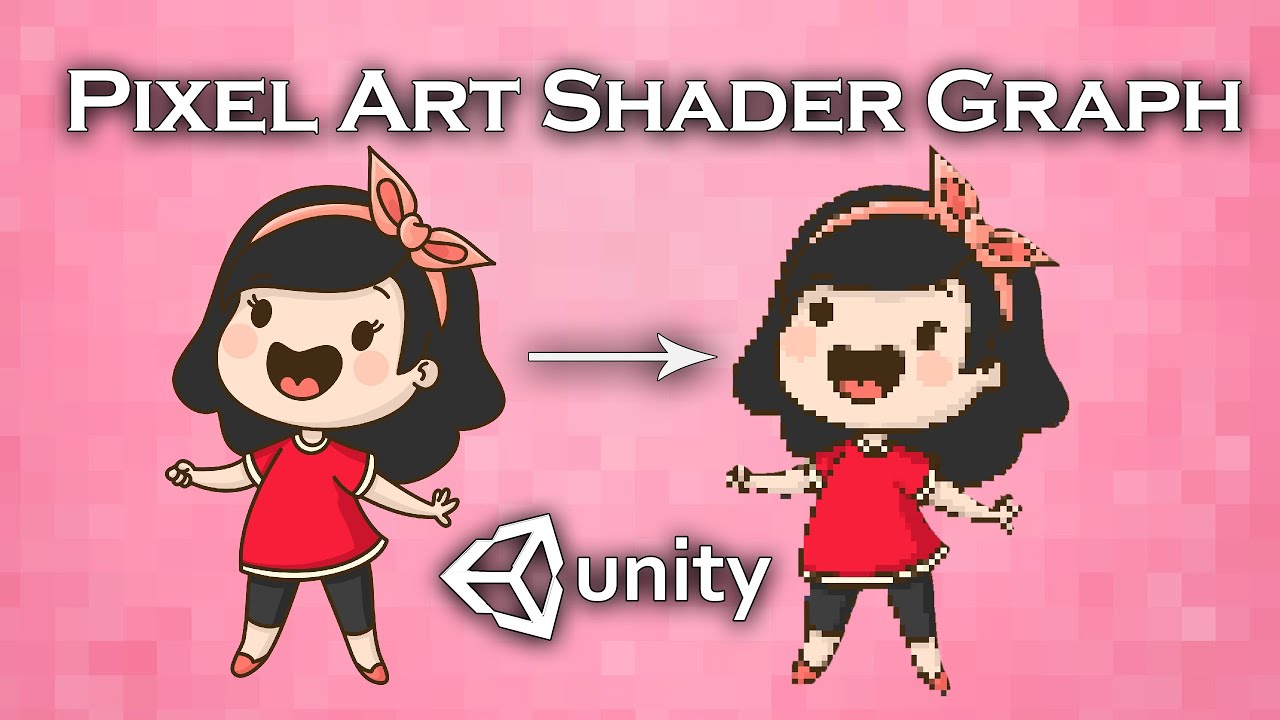
In this video we will show you how to create shader graph that converts any spite to pixel art in Unity engine.
Join our Discord server to discuss and suggest ideas for new video:
https://discord.gg/b6bXKSV
Download project files (Patrons only): https://www.patreon.com/BinaryLunar
Check our game AvoCuddle: https://store.steampowered.com/app/1...
fluid oak
That is horrible. I mean, the technique is certainly useful for all sorts of things but that is nothing like 'pixel art.'
That's like posterizing a photo and calling it a cartoon.
 gray briar
hey, can anyone tell me what is wrong with this stance please ?

i think that it doesn't look kite good, but can't figure out what's wrong with it
(i'm new into pixel art tho)
fluid oak
Proportions are a bit odd. Short front arm, long back arm, very low crotch
Assuming that's, like, a sword or something in their front arm and not just a really, really long arm

 light cloud
i think you should make the front leg bend a bit more and bring the character lower
 iron abyss
Hi! I'm a programmer, and I have an artist who's working on this with me. We're both new to tilemaps. We're doing an isometric view and the tiles just look...strange. It's hard for me to explain because I don't have the vocabulary. https://dl.dropboxusercontent.com/s/vy5mp7ui0qe8ii4/Unity_2022-01-25_09-09-10.png It's almost like everything is rising to the left
 gritty narwhal
can someone teach me how to make art that fits exactly one tile like i got a normal image with 1500x1500 px and it takes about 5 tiles space how can i make it to fit exactly one?

in the tile inspector its looking like its fitting one tile
misty lantern
gritty narwhal
can someone teach me how to make art that fits exactly one tile like i got a nor...
Check out the image's Pixels Per Unit in import settings
 marble walrus
gray briar
i was trying to get something like this
marble walrus
gray briar
i was trying to get something like this
Hello @gray briar. The image you are referencing has a dynamic and exciting pose. What's an easy way to compare this? We can look for the lines of action/movement. The easiest way to do this is to draw lines over top of a character/reference, at the hips, shoulders, arms and legs. Putting in the neck is useful too.
Check out attached picture. Just drawing the lines gives you a great reference if are trying to capture the same dynamics of the pose. Overlaying an image and dropping opacity in your image editor of choice is a nice way to compare, but try not to get in to the practice tracing (unless you want to). Learning to draw dynamic poses is challenging in itself - translating that to pixel art is a whole other story.
I would start with rough pose lines and build up your character from there. Have fun! 😁

 deep mantle
How does it work to make a 2D level in Unity without a Tilemap/Tileset
I am trying to remake a Flash game and its levels are not tile based
gray briar
marble walrus
Hello <@!109576168918757376>. The image you are referencing has a dynamic and ex...
Thank you very much for that advice!
 frigid hull
Best settings for exporting .fbx's from blender to unity without having to rotate or scale?
bleak cargo
anyone know why my UVs get messed up when importing to unity?
 wide wolf
anyone knows if it's possible to change the uv map of an object without causing unity to change the engine-generated lightmap uv channel?
note that i'm not adding/removing/moving any vertex nor seam mark, i just wanted to rotate an uv island
or also: is there any way to extract the generated lightmap uv and import it in blender?
fluid oak
deep mantle
How does it work to make a 2D level in Unity without a Tilemap/Tileset
I am tryi...
You can either create art assets outside of unity and import them, or you could build them in unity with stuff like Spriteshape.
deep mantle
So I can just put the asset into unity and try to figure out how to add collisions to it?
Thanks
fluid oak
Well, there isn't one single way. It depends on the sort of assets you're working with.
If you are importing sprites, you can generate physics shapes in the sprite editor or can manually add polygon or shape colliders to the game objects.
Or you can have the art completely separate from the level's colliders.
 vital thicket
gray briar
i was trying to get something like this
vital thicket
gray briar
i was trying to get something like this
Amogus
 static goblet
How do I create a 2D card-like object in a 3D space? (should only be visible from one side)
What I have at hand is a .png image right now
outer halo
You can use sprites in 3D, so just a sprite renderer.
 manic coyote
 peak thorn
There is a blender discord that might be better suited for your question
peak thorn
no problem! thanks for telling me this!
 full badger
heyo, new guy here and wondering how I can import a layered sprite from paint.net
like I've seen people import a layered sprite from photoshop in tutorials, and was wondering if I could do the same with a paint.net file, since photoshop is expensive lol
outer halo
This isn't a job/collaboration discord. You can use the forums to find someone.
 rigid sparrow
this is probably a common question but ... does the "bake axis" setting just effectively not work right when importing models directly from .blend files? it just flips the model 180 degrees around X instead of doing the real conversion from Z-up to Y-up
eager mist
outer halo
This isn't a job/collaboration discord. You can use the forums to find someone.
me when the unity discord, the discord for the app to make projects, doesnt allow you to find help using unity to make a project
 jolly timber
is backface culling checked off in ur 3d modeling prog
glacial vector
If you use blender, go to Mesh>Normals>Recalculate outside and try again
fluid oak
It looks, specifically, like you mirrored the top bit of the mesh(which flips the normals)
 supple orbit
I have this issue where there is a blue line going through the tiles

I tried turning anti-aliasing off but it didnt work
Anyone know how to fix this?
 woven cradle
Tiles have the right size?
supple orbit
woven cradle
Tiles have the right size?
Yeah they are all 16x16, its just these blocks in perticular that have a hole

 signal ferry
hi my artists amazing ui is looking really pixelated, what is the best method to make it look as its intended?


this is what its supposed to look like
fluid oak
signal ferry
hi my artists amazing ui is looking really pixelated, what is the best method to...
What are your import settings?
 dense linden
Hi folks, apologies in advance if this is not the right place to ask this question, but I had a look through the various channels and this one looks to be the most suitable. I am a Unity / Blender beginner currently trying to make an escape-the-room type game in the style of those old flash games like Crimson Room, Viridian Room. I have the programming framework set up so am now getting busy making all the assets in Blender.
I was wondering if there is any specific material I can make in Unity and attach to my models in order to replicate the style of those old games? I will post a link below to some screenshots of what I am trying to achieve, but effectively, everything in the game is a solid colour with an almost cel-shaded style look, and the models all have a black outline. I know that there are toon shaders and so on available out there but that seems a little overkill for what I am trying to do.
One thing I have tried before is making a material have emission colour lighting and attach that to the object, but the result looks a little odd, so I'm not sure if that will work.
That's the link to some screenshots of what I am trying to replicate: https://www.wikihow.com/Escape-the-Crimson-Room
 fluid oak
@signal ferry how large are your images? (Not the individual sprites, but the actual image file)
signal ferry
its around 900x700 pixels
 sudden coyote
Anyone can help with finding a way to creating a side view ventilation shaft?
16 bit style*
eager mist
is there a way to take multiple images and pack them into one "spritesheet" from within unity or any software you know of that will let me?
sudden coyote
eager mist
is there a way to take multiple images and pack them into one "spritesheet" from...
Sprite Atlas
eager mist
sudden coyote
Sprite Atlas
yes that. how can i make that?
sudden coyote
check the docs, its pretty easy and straightforward
create it, add the textures, done
 peak forge
dense linden
Hi folks, apologies in advance if this is not the right place to ask this questi...
peak forge
dense linden
Hi folks, apologies in advance if this is not the right place to ask this questi...
poiyomi shader can probably make that, its pretty easy to set up, just a couple toggle buttons in its settings
i have a UV problem, exporting blender fbx to unity works fine for everything, except for a few assets where the textures reset or something. i checked forum posts with similar problems, tried swapping UVs (theres only one on the door) reimporting as obj, nothing seems to work and i dont know why its just happening for a few models :c
figured it out, apparently the image texture size was a problem? actually i'm not sure, i rebaked it to a new uv and remapped, and that worked
 eager mist
Is there a way i can use a spriteatlas for material albedo, or texture sheet so that i can do particle animations with that
 brave gyro
what causes these lines (circles)
 woven cradle
brave gyro
what causes these lines (circles)
woven cradle
brave gyro
what causes these lines (circles)
probably https://en.wikipedia.org/wiki/Moiré_pattern or one of its cousins
 fluid oak
@signal ferry change the compression to high quality, and try power of two textures maybe.
 rich narwhal
Hi, my blender model's normals aren't importing correctly, the thread is at #936796214026993684
dense linden
peak forge
poiyomi shader can probably make that, its pretty easy to set up, just a couple ...
wonderful, thank you - i'll check it out!
 velvet kite
My models' colors aren't being selected correctly from the color pallete material. The correct material is applied to the mesh and it has the right texture attached to it. What could be the issue here?

 misty lantern
velvet kite
My models' colors aren't being selected correctly from the color pallete materia...
misty lantern
velvet kite
My models' colors aren't being selected correctly from the color pallete materia...
Since the palette texture is really small, you should set its filter mode to Point and disable compression in texture import settings
Oh and maybe best to disable mip maps also
 thorn bramble
Hello , how do i export the obj with texture from blender
velvet kite
misty lantern
Since the palette texture is really small, you should set its filter mode to Poi...
I'll pin this for when I'm at my PC
 candid mason

I have this character, what would be the best way to have cloth physics on the lower half of his coat
and have it work with any animation
 shut halo
hi, I just wanted to ask if maybe someone has any tips on how to export objects with textures into unity without having to reconnect all textures manually?
also uh maybe any ideas about how to get the cool look I got in blender (light wise) into unity?


 wanton hound
Is there any way to edit an FBX file that lives in my assets folder?
instead of just replacing it when i export it from blender
outer halo
Don't crosspost this all across the discord.
 tropic dagger
outer halo
Don't crosspost this all across the discord.
tropic dagger
outer halo
Don't crosspost this all across the discord.
Can I post it again here
outer halo
Read the response in #931354451242000384
 sonic slate
Hi i have a question, do you know if i can change the material color of blender object in Unity ?
sullen plank
sonic slate
Hi i have a question, do you know if i can change the material color of blender ...
Make prefab or a scene instance first and change there.
sonic slate
Ok thanks you Fogsight 🙂
sullen plank
@fallen canopy Ripping assets is not something to be discussed here.
If you want this font, find the original and consult the license
 fallen canopy
 gloomy furnace
Not sure if this is the correct place to ask, but i want to know what is the best why to import huge scenes from blender to unity. I am busy working on a project where i am creating an open world, and the towns and areas is going to be in the file, is there a way to bring in the assets with unity reconising the difrent blender instanses as prefabs, or blender exporting everything in correct prefabs, or other automated solutions
rich narwhal
Hey, visit #936796214026993684 for more info on my issue. Thanks folks!
 crimson dust
Hey, i have a pmx model and a vmd animation, i was wondering how i can use this in unity? Thanks
eager mist
Hi guys iam creating an asset does anyone have any ideas of what to add?
Ultimate Game Jam kit:
-
Platformer controller with many customizable features.
-
Ability to drag and drop mutliple gun types
-
Top down controller with ability to enable shooting bullets or arrows
-
Enemy ai
-
Obstacles
-
Traps
-
Gravity Swapping
-
Grapple hook
-
Wall jump ability
-
Moving Platforms(2D and 3D)
-
Wave System(2D and 3D)
-
2.5D character controller
-
1st person kinemtaic controller
-
1st person rigidbody controller
-
1st person shoot ability
-
1st person grapple hook(Rigidbody only)
-
3D wall run ability
-
2d Level Generator
-
Bullet hell option
-
Beautiful particle effects
-
3D enemy ai
-
Main Menu
-
Credits screen
-
Menu system in unity edtior to create these options with one click
-
Sound effects
 tribal ravine
Hey guys Ive ran into this issue where i just cant decide what textures i should be using for my maps, i usually get my texture from sites such as ambientCG but no matter what textures i decide something about the map never looks right or "good"
Heres an example:
This is a textured version of this part of this map

This is an untextured version of the same shot

Why does the untextured version look more interesting than the textured one lol
Am i not choosing the right textures? Am i not choosing the right Colors?
if so how could i improve on that
 low flax
I've somehow set scale factor for all my assets to 2. Anyone know how that can be done so I can avoid doing it in the future?
outer halo
@atomic path Don't crosspost. Just ask your question in #archived-shaders.
fluid oak
tribal ravine
Am i not choosing the right textures? Am i not choosing the right Colors?
The textures you are choosing don't really give a good sense of what material those structures are meant to be.
I'm not really sure what the red is supposed to mean, either.
tribal ravine
fluid oak
The textures you are choosing don't really give a good sense of what material th...
Well i tried to think of what material those structures could be like the wall is a Concrete texture and the Steel parts are Steel obviously
tribal ravine
fluid oak
I'm not really sure what the red is supposed to *mean,* either.
Well i tried making it all Black/Grey but it didnt look that great but the Red looks even worse now lol
fluid oak
I will say that that one unaligned piece is driving me nuts

That doesn't really look like concrete to me. More like stone.
Poured concrete walls usually are pretty smooth, with occasional small sharp features.
For the steel, maybe add rivets and panel separations to show that it is a constructed fame rather than just a chunk of marble
tribal ravine
Makes sense thanks for the feedback
fluid oak
I think yellow instead of red would make more sense for the railings; that is the usual color scheme for that sorta thing


 tribal ravine
@fluid oak What program should i use for Texturing, Currently i use Substance Painter for Texturing Objects such as guns or decorations and such
But i dont know what to use when texturing a map
im currently just slapping these materials in Unity and then putting up the tiling thing
tribal ravine
fluid oak
I think yellow instead of red would make more sense for the railings; that is th...
Yeah that totally makes sense, i didnt use reference for this one just made the whole thing from my imagination but yellow makes more sense
 stark oracle
i have two things i wanted to ask
first of all i wanted help making a decent looking murky ground tile for tileable background, its a top down game im making and im sorta bad with drawing
and second, i have a placeholder currently and i wanted to ask if it is possible to add a slight rotation to a tiled background to make it look non repeating
as a placeholder i have this pile of garbage
 misty lantern
tribal ravine
Why does the untextured version look more interesting than the textured one lol
misty lantern
tribal ravine
Why does the untextured version look more interesting than the textured one lol
This is a tough artistic question
Unrealistic or stylized rendering here has the distinct advantage that parts that aren't realistic don't stick out to our eyes
The solid view here is also incredibly effective at conveying shape, whereas in the lit and textured version the shape of the object becomes kind of muddled
Parts of the environment very rarely look good if they don't "react" to their surroundings
So repeating material patters don't look great on objects that have variety in their shape
tribal ravine
misty lantern
So repeating material patters don't look great on objects that have variety in t...
Thats a really good point
could you elaborate further on this?
Im starting to notice how bad the colors are looking and really realizing why thanks to your guy's advice
Like why did i make the railings, wall and the Steel anchors all black?
misty lantern
tribal ravine
Im starting to notice how bad the colors are looking and really realizing why th...
Darker colors highlight the silhouette while lighter colors allow light to propagate and show the shape, generally
Baked lighting usually makes prettier and more real looking enviroments as the light can bounce around and lit objects in more interesting ways
tribal ravine
misty lantern
Baked lighting usually makes prettier and more real looking enviroments as the l...
Oh no ive never had a good experience with baked lighting
ive gotten better at it but wow it just looks so bad for me
ive heard usually its the other way around, Baked > Realtime but for me thats not really working
tribal ravine
misty lantern
Darker colors highlight the silhouette while lighter colors allow light to propa...
I wish i could find a youtube video or something on this
misty lantern
tribal ravine
I wish i could find a youtube video or something on this
If you google for "environment texturing" the thingyou'll immediately notice is that there actually are very few solid textures in sight
Rather an environment consists of objects and shapes, and what the textures do is represent those objects and shapes
The shapes are in contact, and there is almost always some kind of detail where the shapes connect, or are in prolonged proximity
tribal ravine
misty lantern
Rather an environment consists of objects and shapes, and what the textures do i...
you mean like adding fake detail with textures?
What i dont understand is what the workflow of texturing should be, Like obviously for objects you have to texture the objects individually but what about an entire Map?
misty lantern
tribal ravine
What i dont understand is what the workflow of texturing should be, Like obvious...
"Trim sheets" are used to quickly add repeating variety to level geometry

Here you can probably spot how the wall textures repeat obviously, yet they work well to make it look coherent and give the impression of different materials and building techniques used
here's an example from the natural world how everything has a kind of 1. variance 2. relationship or reaction to nearby shapes and materials 3. marks of manufacture or passage of time
 tribal ravine
misty lantern
Here you can probably spot how the wall textures repeat obviously, yet they work...
tribal ravine
misty lantern
Here you can probably spot how the wall textures repeat obviously, yet they work...
Is this being done with UV Mapping?
tribal ravine
misty lantern
http://www.evillair.net/v4/wp-content/uploads/2018/10/map-q3-el3t3lg-632x474.jpg
i dont understand where the artist behind this level found all these textures tho
and then combined them so nicely
misty lantern
tribal ravine
and then combined them so nicely
Most textures from that era are a combination of digital drawing and photo manipulation
The stone wall textures for example are likely a photograph of concrete grain with drawn tiles or ridges blended as an overlay
With modern resolutions that can easily look fake, but texture artists have more tools to work with
Like scanning real surfaces or creating procedural PBR materials
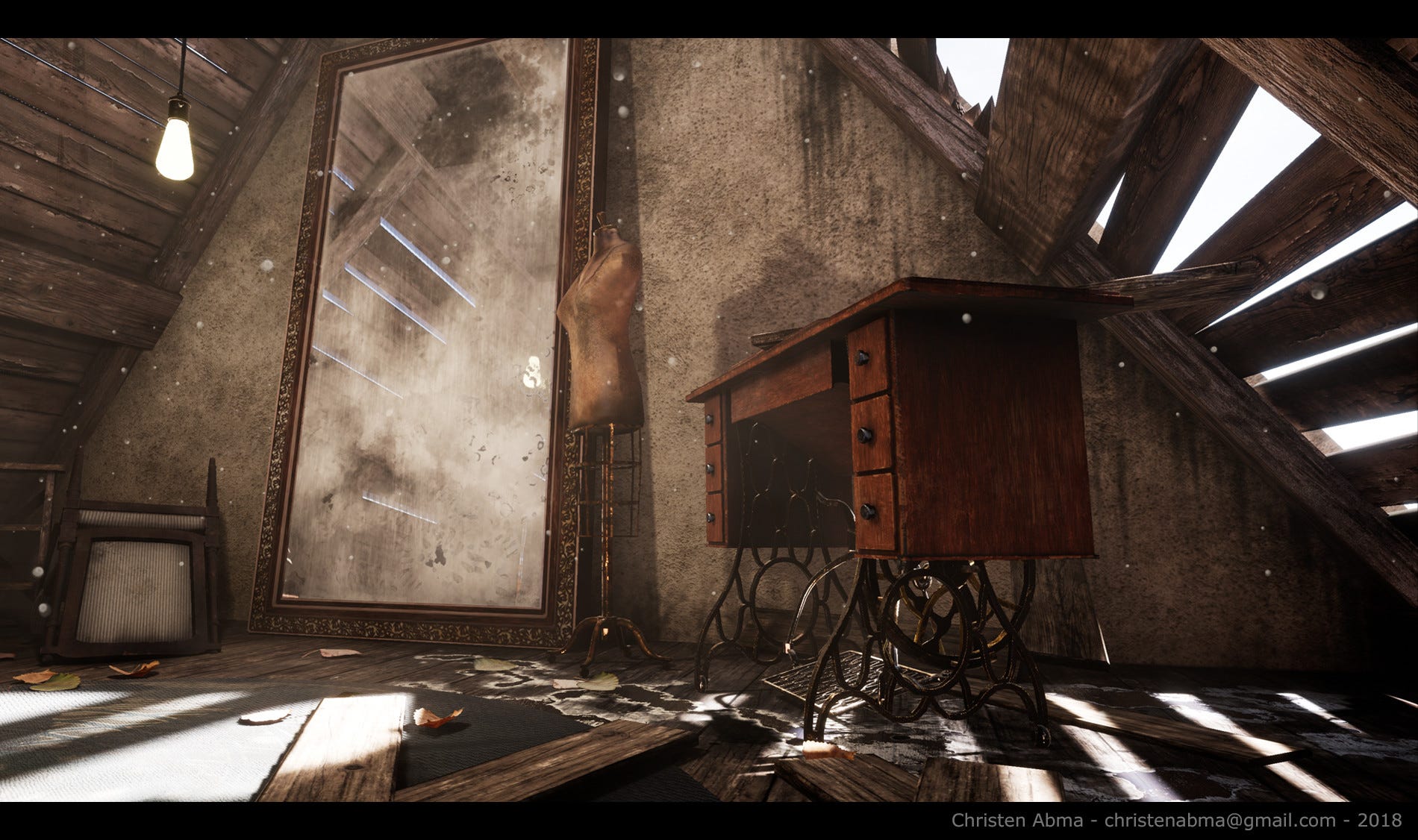
In this example the textures aren't super photorealistic by any means, or even terribly high quality, but what sells the effect is the amount of detail
There's staining on the wall that follows the edge of the ceiling and the floor, making it feel that it "reacts" to its surrounding shapes and materials
The planks have grain and ridges, giving them a visual direction
The floor boards would be quite repetitive if they were not covered up with stains and debris
All the sharp edges of the sewing machine table have scratches and wear
The important thing isn't that there's a lot of noise and wear, but that all of it serves a purpose of creating or breaking patterns
Even the shadows on the wall play a part in breaking up its visual monotony, even if they're not a part of the texturing
tribal ravine
misty lantern
There's staining on the wall that follows the edge of the ceiling and the floor,...
Ah yeah i get what you mean, like an Enviromental Story in a texture
What i dont get is how i could apply these stains and such, is it like a brush?
misty lantern
tribal ravine
What i dont get is how i could apply these stains and such, is it like a brush?
Are you asking more so how to implement a stain in engine, or how to create the texture for it?
tribal ravine
misty lantern
Are you asking more so how to implement a stain in engine, or how to create the ...
Well im sure i can find a stain texture online but what do i use to apply these stain textures to everything
do i do that in Substance Painter? Blender?
fluid oak
Or with decals
tribal ravine
fluid oak
Or with decals
Decals as in a transparent plane with a texture?
misty lantern
tribal ravine
Decals as in a transparent plane with a texture?
That's one way
Sometimes engines have their dedicated systems for decals also
The stain could be a part of the texture or it could be applied on shader level also
There are a crazy number of tools and possibilities
tribal ravine
Damn
it feels like i learned alot of things and nothing at the same time lol
so i basically need to
Have more variety and less repetitiveness in the colors of my scene
Add more Environmental Story telling with Decals
misty lantern
tribal ravine
it feels like i learned alot of things and nothing at the same time lol
Texturing is an art and most of arting is just practice
If you know the things to look at when referencing, practice should be more effective
tribal ravine
misty lantern
Texturing is an art and most of arting is just practice
If you know the things t...
ill try practicing i just keep running onto this issue where i imagine the scene as textured and then after i texture it, it looks alot darker and dirtier than imagined
When your texturing something do you literally look at the object and say "This is wood" and then proceed to find a random wood texture that looks good and slap it in there?
misty lantern
tribal ravine
When your texturing something do you literally look at the object and say "This ...
Basically so
tribal ravine
misty lantern
Basically so
How does the object then look like how you imagined it in the end lol
or a better question would be, Does it look like what you envisioned?
misty lantern
Rarely right away
If I use photo textures I often end up tweaking the brightness, contrast, hue and saturation
tribal ravine
misty lantern
Rarely right away
If I use photo textures I often end up tweaking the brightness...
im sorry if this question sounds a tad dumb but if texturing is a long tedious process how come people dont seem to really talk about it that much? Theres SOOO much information and content about 3D Modelling but at this point in time 3D modelling feels easier than texturing to me lol
Like ive seen many large scale maps be "Art Passed" and then be fully textured like the next day or so
doesnt really make sense to me
misty lantern
I guess the reason is because texture banks are so popular
tribal ravine
like ambient cg and such?
misty lantern
Yes
Professional studios can afford to paid texture banks that have basically everything they need in full PBR format
tribal ravine
Alright so the next step for me is to boot up that map again and retexture it i suppose?
misty lantern
I think it'll be worth the effort
tribal ravine
Also i think you can make a duplicate of your object and put a bunch of unnecessary detail on it and then bake it as a normal map?
and then use that to add fake details?
misty lantern
That's very common
Normal maps can be used as trim maps as well
tribal ravine
misty lantern
I think it'll be worth the effort
Yeah for sure, Thanks man i think i asked about 3D Modelling about 7 months ago here in this discord server and i had no idea how to do any 3D work but i remember you encouraging me to try and it turned out well
i was really confused about Texturing but this conversation has cleared up things alot, Thanks again i really appreciate it
misty lantern
Here's one scene I used normal trims gratituously on
I don't think it's a super great piece because it's all a solid hunk of steel with no wear or anything, but the trims go a long way

and here's the normal map used for almost everything and mesh used to generate it
 tribal ravine
misty lantern
Here's one scene I used normal trims gratituously on
I don't think it's a super ...
tribal ravine
misty lantern
Here's one scene I used normal trims gratituously on
I don't think it's a super ...
Damn thats alot of detail
Do you have any advice on how i could be more efficient at picking the right textures?
or will i just get better at that with time
misty lantern
I feel that picking the right textures is one of my weaknesses, as evidenced by the use of steel on steel with steel in the above scene!
But what I would do to try to improve is to reference more photos and works of others
Over time I guess you'll build a "palette" of details that work well in many places, and a kind of internal logic how materials and shapes behave together
 oblique stump
is anyone aware of a
(1) scanner
(2) that can save directly to google drive or dropbox
(3) that supports a lossless format like PNG?
tribal ravine
misty lantern
Over time I guess you'll build a "palette" of details that work well in many pla...
Alright ill put my trust on that
 rapid echo
Using a procedural edge damage setup based on geometry nodes.
.
https://twitter.com/FarrukhAbdur/status/1489110526395404290?s=20&t=VhkEzfaKjdW9FYmdqv9QLg


Using procedural edge damage based on geometry nodes. Useful, good setup and free download from @csims314
#b3d #blender3d #gamedev #indiedev https://t.co/lMXv5FOfLr
 Twitter
·
glacial vector
Twitter
·
glacial vector
Really solid trim work @misty lantern 👌
 keen pasture
n00b question (apologies if this is the wrong channel, seemed most appropriate): what have I done wrong with importing to Unity that Unity is now insisting my FBX is all one model (with 10 submeshes) when Blender is explicit that it's 10 separate models, each with one mesh? Is it still impossible (in Unity 2020) to have a single model file that contains multiple objects?
misty lantern
keen pasture
n00b question (apologies if this is the wrong channel, seemed most appropriate):...
Sure you can
The FBX should contain multiple mesh objects
 tight patio
Hey! I have a quick question and was wondering if someone can help me out. I cant seem to work out why some areas of my model are black when the material is a plain white material. its exported from 3ds max, and I dont think its a flipped normals issue. Thanks!
 keen pasture
misty lantern
Sure you can
The FBX should contain multiple mesh objects
keen pasture
misty lantern
Sure you can
The FBX should contain multiple mesh objects
Unity declares they are a prefab ... that cannot be broken.
misty lantern
keen pasture
Unity declares they are a prefab ... that cannot be broken.
It's true that you can't unpack the mesh asset itself, or duplicate the 'objects' that are generated within it
What you can do is drag the mesh into a scene, right click on it and choose prefab>Unpack
Then you can move the individual meshes as you wish and make prefabs out of them
You can also make entirely new gameobjects with Mesh Filter component that refers to the 'mesh' assets inside of the FBX
Or if you want to detach the mesh assets from the FBX, you can duplicate them inside of the asset and they'll pop right out
For whatever reason you may need
misty lantern
tight patio
Hey! I have a quick question and was wondering if someone can help me out. I ca...
Are you sure it's using a plain white material?
What do the mesh renderer's material slots look like
tribal ravine
Hey @misty lantern ive got a question, usually when i make a level i like to make all the objects in Blender and put them all together in Blender
but ive noticed that most people seem to make all the objects and then import them to unity and then put them all together in unity
When the texturing part comes should i be exporting all the objects that make up my level individually, texture them and then manually put them back in the scene or is there a better approach?
misty lantern
tribal ravine
Hey <@!166982635950702592> ive got a question, usually when i make a level i lik...
It's not totally wrong to build them in blender, but it's better to put them together in the engine, especially when the project grows, for multiple reasons
tribal ravine
Yeahh but i just find it so much more convenient to make an object and then actually see if it fits in the enviroment first before exporing to Unity
usually when i export to Unity by that time i have the whole map without textures but ive heard thats not a good approach
i dont know how other people do it tho
misty lantern
Building it first in blender is not effort spent well if it will be rebuilt in engine
But it can be helpful to have a kind of a test room where you build all the level pieces which has lighting similar to the game's world
But it's an easy trap to get caught in trying to make it look good in blender, only for it to look entirely different in engine
Most people make the levels entirely in engine, usually first with greyboxing, then make assets separately to those levels
If the meshes are separate, Unity can cull them when they're not being looked at, 50 barrels in a room only needs to be 1 barrel in the files
and most importantly modifying the level doesn't require you to export the whole thing again
tribal ravine
misty lantern
If the meshes are separate, Unity can cull them when they're not being looked at...
i mean the assets are all seperate when importing the whole map
tribal ravine
misty lantern
But it's an easy trap to get caught in trying to make it look good in blender, o...
Seems like thats exactly what happend to me
tribal ravine
tribal ravine
This is an untextured version of the same shot
with this
misty lantern
tribal ravine
i mean the assets are all seperate when importing the whole map
That means it'll work with frustum and occlusion culling methods, but the files will still store duplicate meshes pointlessly
tribal ravine
Oh yeah it defo works with frustum and occlusion
im not worried about the optimization part but i understand how the level could look cool in blender but awful in Unity
but what if you wanted to add a table to your level, You Model the Table in Blender and when you put it in unity you realize it doesnt match the rest of the enviroment at all because you didnt have 3D reference of the level in there as you were making the table
But making the table in Blender while also being in the level in Blender your modelling it to the rest of the enviroment in real time if that makes sense
Thats why i like doing it this way but Unity Lighting is just not good to work with so the Enviroment literally looks better in Blender at all white than actually textured and lit up in Unity
misty lantern
tribal ravine
But making the table in Blender while also being in the level in Blender your mo...
You can model the assets in the same blend scene and export them separately
Being able to make the best of unity's rendering comes with study and experience
Blender's "studio" rendering does decisively more than simply put a white material on the meshes
tribal ravine
misty lantern
You can model the assets in the same blend scene and export them separately
You mean like exporting them seperately so when i update the map i dont have to update the entire thing?
misty lantern
Yes
tribal ravine
misty lantern
Yes
Oh i thought you meant i should make each asset individually and then make up the level with them in unity
misty lantern
Well I did mean that, but there are many ways to the same result
If you need a forest, you could have one blend scene with one of each tree and bush next to each other, so you can make sure they fit together when modeling
Then assemble the forest itself in Unity
tribal ravine
misty lantern
Then assemble the forest itself in Unity
What if i do that and then decide that all trees should have some random bumps on them
misty lantern
tribal ravine
What if i do that and then decide that all trees should have some random bumps o...
Add those bumps in Blender, then you can overwrite the mesh asset in Unity and the trees get updated
Or if you've made the forest out of tree prefabs you can update the prefab to use the new mesh without having to overwrite the asset
tribal ravine
the problem for me is that i find the Unity object moving/scaling/rotation system as intuitive as the blender one
fluid oak
You can design your scene in blender, convert all the objects to empties/nulls, and export that to unity. Then replace all the nulls with the appropriate prefabs
 barren moss
Hey guys, I don't understand why but for some reason my project suddenly is missing the "build assetbundles" option, does anyone know what the issue is?

 fallow thorn
Hey, I want to make a change/addition to a tile map I've previously made... if I reimport the png, I have to set up the physics shapes again, which is a time consuming process... is there a way to just replace the image, but keep the current cell and physics shapes
low flax
Hey! When I import from blender my animations become really janky if I change the scale factor from anything but 1. Anyone know about this?
fluid oak
barren moss
Hey guys, I don't understand why but for some reason my project suddenly is miss...
Did you add the script to your project that creates that menu option?
 verbal reef
Hello is it ok to ask questions here?
I am taking a course in VR development and am currently learning unity + blender for the practical parts.
I am having trouble importing my FBX file from blender to unity. When I Extract materials the material names all get extracted and created as new materials. However they are all just grey/white not the actual textures I used in blender
 fluid oak
verbal reef
fluid oak
verbal reef
Did you include the textures in the file?
If not, you'll need to import them.
verbal reef
I tried to follow the course instructions when exporting the FBX file from blender, my understanding was that created/assigned materials in blender would be included in the .fbx file?
fluid oak
They are- I can see them right there in your screenshot
verbal reef
I used textures like these when creating the materials, do I need to include them in some way?
 fluid oak
It creates unity materials that match the names of your blender ones, but it won't actually replicate the blender materials
There should be some option to include the textures, but that depends on your software. You can also import them to unity separately.
And then add them to your materials in unity
verbal reef
hmm, so if I have the materials now imported in unity, and I have the "texture jpgs" can I assign them manually to circumvent whatever happened here
I have all of these materials in blender

 radiant pendant
left is unity, right is blender. Why does unity cut out certain faces?
 woven cradle
my guess is inverted normals
radiant pendant
woven cradle
my guess is inverted normals
do you know a waz to fix it?
outer halo
@molten pawn Job/collaboration posts go on the forums, #📖┃code-of-conduct.
 cursive socket
hey guys, not really sure where to ask this but heres the issue: Im using rigify in blender to export a rigged model, but the model has facial bones rigged and weighted, but humanoid rigs dont have a place to put this stuff, so as a result the entire face region doesnt animate or move. does anyone know the solution?

 late badge
hey so i'm trying to import my city model inside my game, but whenever i try to do so, unity crashes. 2020.3.12f1

the model
idk if it's a problem with the model itself or unity, how can i fix this
eager mist
late badge
idk if it's a problem with the model itself or unity, how can i fix this
how many vertices does your model have?
eager mist
oh that's nice to hear!
late badge
smh that worked
 obtuse summit
ello guize!
so basically i have a robot model, whose eyes are a bit behind on the model, but visible in unity idk how
But in exporting to blender
Its behind
But not visible
Images:


how can i fix
 long dragon
I guess those eyes aren't meshes, it seems they are showing up on Unity due to an Emission texture attached on the material
On blender, in the texture files attached to the material I can see a small rounded yellow here. Maybe looking at the material in Unity you can confirm that.

 ember walrus
I'm not sure that's the right channel to ask about help on how to edit images more generally but since there are experimented people, here I go

For those who don't recognize, it is one of Geometry Dash's backgrounds
What I want to do is that the lighter it is on the image, the more transparent it becomes
E.g: perfectly white = invisible, perfectly black = completely opaque, #808080 = 50% transparent
I couldn't find what I needed despite my researches
Ideas?
long dragon
ember walrus
Ideas?
Hi, there are someways to do is to:
1 - Edit it on Photoshop, by exporting as a .TIF you can use this pattern in the alpha channel.
2 - When importing to unity, in the Texture Import Setting, set the Alpha Source to "From Grayscale".
3 - Create a simple transparent shader that reads this texture and applies its color as the color.a in the fragment output.
The second option seems the easier approach to use that as an alpha mask on a sprite renderer or a standard transparent material (to be used on a quad mesh)
ember walrus
I already have Unity (logic) so 2nd option seems about optimal, thanks
Update: it rather removed the black, but I think I can arrange it my way if I invert the shades first, then do the method, then reinvert the colors
How do I save the modified version then?
I seem to have some version which is transparent but I can't export it
 ember walrus
Update: I found an alternate method by downloading a plugin for paint.net, though any help would still be welcome so I don't have to search again in the future ^^
 livid wagon
Does anyone here use the FBXExporter Package and Maya Integration workflow? I'm trying to understand what problem it solves as opposed to just...resaving an FBX file ontop of my old one.
It feels to me like all it does is create a prefab for me, so that I'm not "Accidentally working with the asset prefab" instead

but if I just create my own normal prefab, doing normal Maya->Export FBX workflow feels identical to the Maya integrations FBXExporter can install to Maya
incase people don't know what I am talking about, it is this https://docs.unity3d.com/Packages/com.unity.formats.fbx@4.1/manual/integration.html
the integration scripts give you a little extra Menu in Maya that looks like this

According to discord searching, I think I am the only person who has ever mentioned FBXExporter in this channel since the dawn of time
And it's only been mentioned 8 times in the entire server (3 by me)
outer halo
Most people here are beginners, and less using Maya.
obtuse oyster
There's lots of results for "FBX Exporter".
outer halo
From what I remember when we tested it, the benefit was being able to do the setup of the hierarchy in Unity, export that and then have the artist make changes which will auto update in Unity.
obtuse oyster
I think the overview goes over what it contains pretty well, it's not as advanced as the MeshSync plugin if that's what you're expecting https://docs.unity3d.com/Packages/com.unity.formats.fbx@4.1/manual/index.html
obtuse summit
long dragon
I guess those eyes aren't meshes, it seems they are showing up on Unity due to a...
it is a mesh
it comes with it separated
livid wagon
obtuse oyster
I think the overview goes over what it contains pretty well, it's not as advance...
i forgot about meshsync, thanks for reminding me
Another question. If I work at a studio that always has Maya licenses and always will, is there really any good reason to export to FBX? Wouldn't it just be easier to work purely in Maya files? (since Unity imports those just fine as long as you have a license).
In my case, the programmers don't actually have or need the art (and therefore don't need a Maya license). They load them via asset bundles later.
livid wagon
obtuse oyster
I think the overview goes over what it contains pretty well, it's not as advance...
Thanks for reminding me to just read the front page of the manual. It really does seem to be a tool to export stuff from Unity to 3D software rather than offering much different in the way of exporting from 3D software to Unity
eager mist
Hi guys someone can send me rocket 2d with fly animation
sullen plank
@eager mist Not a place for requests, don't spam multiple channels.
eager mist
ok
 lime pollen
livid wagon
Another question. If I work at a studio that always has Maya licenses and always...
lime pollen
livid wagon
Another question. If I work at a studio that always has Maya licenses and always...
that would bloat your game size real quick. also anyone that needs to work on the project would need a maya license
livid wagon
Right, the fbx is commonly binary and the raw Maya is commonly ASCII
That's a good point
fluid oak
I thought that the built game would use the same unity generated meshes whether you imported ascii or binary?
sullen plank
The mesh is stored in the assets, and when they are used in the project they only point to that original mesh.
fluid oak
Even after building? Huh.
I know that textures are all internally converted no matter what format they come in as
I don't see direct confirmation but the documentation does imply that the mesh that is saved to a build isn't just the fbx file
sullen plank
Yea, when project is built it could be stored more optimally (also likely stored more optimally in the Library cache). But in the editor if you want to have something persistent it has to be an asset.
A good example is ProBuilder. It stores its meshed as dynamic data in the scene itself in its objects, and if you lose the scene you lose everything. So it's a good practice after you create something in ProBuilder is to use its .obj exported to make it a persistent mesh in the asset so it can be used across scenes etc.
fluid oak
That's what I mean, though; ASCII or binary will be the same in the build, right?
fluid oak
sullen plank
Yea, when project is built it could be stored more optimally (also likely stored...
If there is a mesh filter, you can save the mesh inside it directly as an asset. I used that to save procedural meshes from a script.
sullen plank
Inside the prefab? And it persisted on restart?
fluid oak
I've not used probuilder
But you just put this script into an /editor directory ```using UnityEditor;
using UnityEngine;
using System.Collections;
using System.Collections.Generic;
public static class MeshSaverEditor {
[MenuItem("CONTEXT/MeshFilter/Save Mesh...")]
public static void SaveMeshInPlace (MenuCommand menuCommand) {
    MeshFilter mf = menuCommand.context as MeshFilter;
    Mesh m = mf.sharedMesh;
    SaveMesh(m, m.name, false, true);
}

[MenuItem("CONTEXT/MeshFilter/Save Mesh As New Instance...")]
public static void SaveMeshNewInstanceItem (MenuCommand menuCommand) {
    MeshFilter mf = menuCommand.context as MeshFilter;
    Mesh m = mf.sharedMesh;
    SaveMesh(m, m.name, true, true);
}

public static void SaveMesh (Mesh mesh, string name, bool makeNewInstance, bool optimizeMesh) {
    string path = EditorUtility.SaveFilePanel("Save Separate Mesh Asset", "Assets/", name, "asset");
    if (string.IsNullOrEmpty(path)) return;

    path = FileUtil.GetProjectRelativePath(path);

    Mesh meshToSave = (makeNewInstance) ? Object.Instantiate(mesh) as Mesh : mesh;

    if (optimizeMesh)
         MeshUtility.Optimize(meshToSave);

    AssetDatabase.CreateAsset(meshToSave, path);
    AssetDatabase.SaveAssets();
}
}
And it pops out a mesh you can pop into any mesh filter.
Saved as an asset
 fallow cedar
Does anyone know how to create this kind of effect in unity?
 sullen plank
fluid oak
Saved as an asset
sullen plank
fluid oak
Saved as an asset
Oh, that's pretty cool. I never tried to save meshes as separate assets through utility tools.
Otherwise without creating assets through asset tools it will hold the mesh created only during session, even if you reference it to the prefab.
But this works.
solar arch
fallow cedar
Does anyone know how to create this kind of effect in unity?
You mean decal?
fallow cedar
I will give that a look!
solar arch
fluid oak
@sullen plank yeah, I needed to make meshes with a script, but I needed multiple ones and the script could only have one instance without breaking all the others, so I just copied out the generated meshes into assets.
And it had the added benefit of not needing any live scripts in the scene which helped performance.
Back before the burst compiler made 2d animation faster
misty lantern
fallow cedar
Does anyone know how to create this kind of effect in unity?
Do you mean at runtime, or baked into meshes?
fallow cedar
misty lantern
Do you mean at runtime, or baked into meshes?
Runtime i think?
misty lantern
fallow cedar
Runtime i think?
Then you'll want to look into decals or shaders I think
 vocal solar
anyone know if it's possible with ProBuilder to keep the changes you make when the game is running?
fluid oak
In editor or in a build?
In editor you can directly save the mesh like we've been discussing. In build... I have no idea whether the probuilder exporter function can save an external file.
eager mist
So I have a custom texture that I want to put in my model, I can figure out how to put it on the model though
The package of my model has this material

and I have my custom material for the model already made

*I exported this from blender as a FBX file btw
Im guessing I have to unpack the prefab
obtuse oyster
Replace the material via the model's material tab https://docs.unity3d.com/Manual/FBXImporter-Materials.html
Scroll down to the image and it's (C) you're looking for
Prefabs will not update to those changes, just the model. So you will have to apply the material to the prefab too if you have made one already
obtuse oyster
Scroll down to the image

 obtuse oyster
In the link I linked in the very same post that sentence was in
obtuse oyster
eager mist
or this
This is set up correctly
obtuse oyster
if you have made a prefab out of this asset before you replaced the material then you will need to open it and update the material there too
eager mist
cause the model didnt change textures
 obtuse oyster
Is that material in the slot even this one?

It should be the one with the texture on it
eager mist
well, it has a gray background so im guessing its part of the prefab
but it isnt connected

like the others
obtuse oyster
Replace the material via the model's material tab
It should be the one with the texture on it

if that material is some random grey material then you have not done that
eager mist
that material is my custom texture
obtuse oyster
select that material and show it
eager mist
this?
 obtuse oyster
cool, so if you drag the model into your scene is not not textured?
obtuse oyster
It's untextured? That doesn't make sense, what material does it have on the renderers?
eager mist
on the renders?
obtuse oyster
yes
eager mist
wdym with that
obtuse oyster
The materials on the objects in the scene
eager mist
it just has one material
obtuse oyster
And it's the material you expect?
eager mist
and its that custom one I made
no it isnt textured
ok so I have this material

thats connected to the model

is that it?
obtuse oyster
can you screenshot the model in the scene with the inspector open showing its material
eager mist
 obtuse oyster
the inspector of the renderer used by the object in the scene
eager mist
what renderer
obtuse oyster
select the object in the scene
 obtuse oyster
click it again until you select the renderer, or look deeper in the hierarchy

 obtuse oyster
That's what I wanted to see. The UVs must be wrong somehow, and it's just being textured with the corner of the material, that's all I can think of
Perhaps you've missed a setting in the blender export that exports UVs properly
though I'm not sure how you manage that 😄
eager mist
so its a blender problem?
obtuse oyster
It may also be that the texture used is not set to repeat, and the UVs are not in 0->1 UV space
It's easiest to check the texture's repeat mode first
eager mist
I dont see a repeat mode
eager mist
I also dont see a wrap mode?
obtuse oyster
On the texture? It's directly below the Advanced dropdown
 obtuse oyster
that is the material, not the texture
 obtuse oyster
Cool, then the issue is probably that the model hasn't had UVs exported from blender
eager mist
wow this is confusing
obtuse oyster
I am not sure how it manages to happen though so... that's a new one for me
obtuse oyster
eager mist
wow this is confusing
maybe the UV map used in blender is not UV0, which is the UV channel used for texture in Unity
I have no idea though, I've never seen this issue before
eager mist
maybe
ok so
I have it textures in blender in texture paint
but not in uv editing
do I need it in uv editing for it to work?
obtuse oyster
I'm not familiar enough with blender to know where the issue could be at this point or how to fix it, sorry
shut halo
hi, I need some help in fixing an asset that is not importing properly
like the materials just broken honestly
long dragon
shut halo
hi, I need some help in fixing an asset that is not importing properly
Could you send a screenshot or share more details?
Also, if it has something as a pink colored object, could you also share what Render Pipeline are you using? (Built-in, URP or HDRP)

 shut halo
long dragon
Could you send a screenshot or share more details?
Also, if it has something as ...
shut halo
long dragon
Could you send a screenshot or share more details?
Also, if it has something as ...
just did. thank you for even looking at it
long dragon
Hmm, it seems ok. So it is weird it now showing the via lactea there. Could you inspect the model on a new empty scene in Unity?
Some things that might be affecting:
- It might displaying the emissive on the upper side on Unity (could you check the top side of the ceiling?)
- The emissive might be with a low intensity (could you increase its intensity on the HDR Color Input there to check?)
Those are my initial guesses. The UV seems ok on blender.
 flint hollow
Hi, I'm having issues with an animation I made in blender involving transformations (rotation and translation) - I transformed an object in the collection, but once I export as an FBX to Unity, it applies the translation to the whole model/collection?
Animations I do to the armature export correctly, but transformations on the object - or part of it - appear on their own timeline when I switch between Pose Mode and Object Mode. My workflow is to to do the animations on the main timeline and cut them in Unity.
I did try messing with the Z-forward transforms and the global/local checkbox on export, but not sure if I'm missing something or doing somethin wrong to begin with.
tribal ravine
@misty lantern is it a good idea to use Those unity Material assets that come with like 300+ materials that are easier to drag and drop
or is it better to find textures yourself
for learning experience i suppose
 glacial hound
how do u make a object become a solid and not make the player go throught it
and also add texture and colours to it
sullen plank
glacial hound
how do u make a object become a solid and not make the player go throught it

Unity Learn
In this official course from Unity, you will learn to Create with Code as you program your own exciting projects from scratch in C#. As you iterate with prototypes, tackle programming challenges, complete quizzes, and develop your own personal project, you will transform from an absolute beginner to a capable Unity developer. By the end of the c...
glacial hound
sullen plank
https://learn.unity.com/course/create-with-code
:/
sullen plank
glacial hound
:/
You are asking a very basic thing, this course will teach you how to use the engine.
 turbid haven
you could just point him in the right direction and mention a collider.
also, how Do I change a light's fall off point


like how do I extend the range of the effect seen above
Im very new to lighting in hdrp
When I increase the "Volumetric fog distance" of the global volume, it makes the quality of the light go to shit. How do I keep the quality of the fog good and increase the range?
🥲
@glacial hound add a collider to the object, then readjust. IF your importing something from blender, look under "generate colliders" in import settings
although the resource provided by the other dude is a good one, you could also try reading the docs on colliders!
gl!
figured it out for anyone with the same issue. You need to click the settings in the top of global fog volume, increase distance of volumetric fog, and manually adjust the quality to a higher settings. Or use balanced. with higher settings Either way, it works.
glacial hound
sullen plank
https://learn.unity.com/course/create-with-code
tysm this is helping me alot
 deep imp
human vision is so weird. i am looking at colors i could use for a tech tree with a lot of stages and it always surprises me how colors between red and green are very distinct from each other but colors between green and blue just seems to flow into each other, and that's probably different from person to person as well.


 deep imp
yeah
i will have roman numerals as well though and the color is mostly just for background of the tech images, might also just be a border.
fluid oak
Look at your icons in black and white
deep imp
i will keep that in mind thanks
misty lantern
@deep imp https://colorbrewer2.org/ this tool is made for maps but if you click "qualitative" it can generate distinct color selections for any purpose
Even has a colorblind safe option
"Number of data classes" would be the number of colors in the palette
 reef grotto
wow that's really useful! thanks for sharing!
 soft ruin
have a someone a model for a gun ?
outer halo
soft ruin
have a someone a model for a gun ?
There's no doubt plenty online and on the asset store.
fluid oak
All I have are hilarious gifs of people failing to properly shoot guns.
deep imp
that's really cool
 past kestrel
Any tutorials on how to balance pixel art sprites PPU with image reference PPU, canvas reference PPU and lastly image size?
solar arch
past kestrel
Any tutorials on how to balance pixel art sprites PPU with image reference PPU, ...

Medium
Objective: To show you how to calculate the correct Pixels Per Unit (PPU) for your 2D games background in Unity.
tons of this topic on internet...
 pine laurel
Can someone help me with these , the black Spots kind of thing on the walls they appeared on wall after I compressed the textures but the wall didn't had textures
 misty lantern
@pine laurel Looks like a baked lightmap which is a texture and can suffer from compression artifacts like any other
fluid oak
I mean, you could probably do it with probuilder. It would just be harder.
solar arch
You can do this in blender with custom brush in like 1 minute 😃
eager mist
Why are my prefabs colourless in the assets folder?
 timber hinge
solar arch
You can do this in blender with custom brush in like 1 minute 😃
timber hinge
solar arch
You can do this in blender with custom brush in like 1 minute 😃
Got any link to a tut?! 😮
HELP REQUEST: I've imported an asset in Unity. Everything looks fine, except for these two parts.
The normals are on the right side of the meshes, I've checked in Blender, but, no matter what, they always look reversed, in the engine.
Any idea why?
This piece has about 30k triangles, one single object, and only these two parts look wrong. =p
And only inside Unity HDRP!!
In Blender it's perfect.
Help! -.-


 royal cobalt
What pizel/inch do u guys use when creating assets/sprites?
timber hinge
FIXED IT!!
Even though I had fixed the normals in Blender, and clicked on "Reimport", Unity didn't reimport s**t.
I had to delete the mesh in the assets library and manually import it again.
Same for all the textures as I tweaked them.... =p
misty lantern
timber hinge
https://discord.com/channels/489222168727519232/497873833043296277/9424323945170...
"Reimport" imports the model from 'project asset folder' into editor's own database
If you updated the mesh elsewhere in your file system reimporting does not fetch it from there, even though that would seem intuitive at first
timber hinge
misty lantern
"Reimport" imports the model from 'project asset folder' into editor's own datab...
So what's the correct workflow for updating a mesh/texture?
misty lantern
timber hinge
So what's the correct workflow for updating a mesh/texture?
You can delete the asset and import the updated one in its place
This should update all the references as well
Not sure if there's a more "correct" way
timber hinge
misty lantern
You can delete the asset and import the updated one in its place
This should upd...
Not really about the correct workflow, it'd just be much more convenient if, say, tweaking a texture would not require such a roundabout way to update it in the engine. -.-'
misty lantern
timber hinge
Not really about the correct workflow, it'd just be much more convenient if, say...
Or you can edit and overwrite the asset directly, but that way it's harder to keep old variations of the assets around
 balmy quail
I'm new to Unity and I've been trying to add a texture to a .fbx file I imported from Blender, I know the textures are there (at least in Blender) but even with all my googling the option to add texture is not in Inspector, unless I'm doing something wrong.
 lime pollen
balmy quail
I'm new to Unity and I've been trying to add a texture to a .fbx file I imported...
lime pollen
balmy quail
I'm new to Unity and I've been trying to add a texture to a .fbx file I imported...

Unity Forum
Since I have updated from Unity 5.6.3p2 (there it worked) to Unity 2017.3.1f1 I'm having problems with importing from Maya to Unity with textures... I...
 rough geyser
So I'm having some issues with textures and stretching. The image shows 3 different 3d objects and I Want the texture to be the same size for all three. Is there a way to fix this in the inspector or do I have to make a script for this?

Tiling is set 1 to 1. I'd like it to not change scaling depending on the size or dimensions of the object though.
 This has been haunting me for days.
 ruby turret
Been having the same issue 😿
rough geyser
fr. almost like we're doing the same project or something
rough geyser
also does anyone know any free assets that include office ceiling LED lights?
misty lantern
rough geyser
So I'm having some issues with textures and stretching. The image shows 3 differ...
Texture size on a wall is in most cases based on UV maps of the surface, so if you scale the mesh, its UVs get scaled also
"Tiling" is a per-material multiplier of this scale
Normally you'd make the wall using a mesh editor like ProBuilder or Blender and ensure there that the UV maps are of correct size, and not scale the mesh in engine
Another option is to use a shader that controls the texture tiling using some method such as triplanar mapping
rough geyser
Tried blender and it was absolute hell. I'll try probuilder out- thank you.
 glad aspen
Any of you kind folks setup custom import processes/scripts for bringing models? I'm attempting to customize the material that gets applied to fbxs and have had some luck doing it but have a few more questions about the process that the docs aren't clear about
fluid oak
Can't hurt to ask those questions and see if they trigger any neurons..
sonic slate
Anyone know why the property of scale and rotation in Unity is different to the blender property ?

 solar arch
sonic slate
Anyone know why the property of scale and rotation in Unity is different to the ...
solar arch
sonic slate
Anyone know why the property of scale and rotation in Unity is different to the ...
For obvious reasons?.. two different products, and two different software
you must apply transform when exporting
sonic slate
solar arch
you must `apply transform` when exporting
Thanks 😁
solar arch
Don't forget to apply it first in blender by hitting ctrl+a then select scale @sonic slate
 boreal vault
Can anyone help me come up with the layout for my social deception game's map plz?
outer halo
boreal vault
Can anyone help me come up with the layout for my social deception game's map pl...
This channel is for art integration help and discussions. If you want to find team members to help with your game, post on the collaboration forums ( #📖┃code-of-conduct)
boreal vault
outer halo
This channel is for art integration help and discussions. If you want to find te...
its not a collab, its helping cuz i am trying to come up with a map.
outer halo
Yes, that would be a collaboration. As in someone would help you, for free ( I assume you're not paying ).
boreal vault
i cant access the forums cuz of personal reasons.
i am literally just trying to get some ideas.
not collabing with someone?
outer halo
If you have an art integration question, feel free to ask in this channel.
If you want ideas, make a thread in #archived-game-design.
eager mist
Help, whenever I try importing anything into my assets in Unity, it makes an error saying it cannot find the file specified and crashes.
eager mist
is creating your own 2d assets difficult if you have no experience in art?
outer halo
Isn't any skill difficult if you have no experience in it?
 split terrace
lol
eager mist
outer halo
Isn't any skill difficult if you have no experience in it?
no, driving was pretty easy
video games
coloring books
lifting
 unkempt bluff
Do all assets work in linux? I didn't see it listed anywhere as to what platforms they work on.
 rose wagon
Can someone hop in a call with me and help me with adding a this sprite to my game.
 steep tulip
rose wagon
Can someone hop in a call with me and help me with adding a this sprite to my ga...
steep tulip
rose wagon
Can someone hop in a call with me and help me with adding a this sprite to my ga...
you want help with adding a sprite in your game?
rose wagon
Well not so much adding, more setting it up.
I'm learning as I go, but having some guidance would help tremendously.
steep tulip
oop are you starting out on unity?
rose wagon
Yes I am, haha.
Currently majoring in Computer Science, trying to make a small game for a project due soon and starting on unity.
rose wagon
I have watched so many YouTube videos haha and still doing so.
But theres nothing like having someone there to help guide you through whatever problems you may encounter.
eager mist
anyone know if its possible to export a maya scene using arnold shaders and proxy geo into unity?
glad aspen
Fbxs have some sort of Arnold shader functionality. Not sure about ma/mbs though
eager mist
what about proxy's back to mesh?
glad aspen
Not sure what you mean by proxy in this case
eager mist
ive converted the geo in maya to arnold proxy geo so that it only is visible and gets used once you start a render
glad aspen
Ah k. So some Arnold specific functionality? That I have no knowledge of, sorry!
eager mist
yes. okay no problem. thought ill try my luck since people here are more responsive than in the arnold discord 😉
 high vault
Can anyone point me to a good stylized character modeling course? Preferably under 20eu
 red yacht
anyone know how to cut an object in blender?
I want to separate a magazine from a weapon that is modeled as 1 complete object
outer halo
Select the faces, press P and seperate by selection.
 copper solstice
I got some sbsar files and when I import it to substance it comes out blank. I'm not sure how to fix jt


 viscid stream
 neat trout
definitely #1
neat trout
viscid stream
definitely #1
Thanks 🙂
eager mist
How can i get tiling adequate to size of 3D object?
dull glade
im a regular user of git and I have a partner who wants to use Collaborate. Can we both do our own thing without stepping on each others toes or is there a workflow we need to adhere to?
lime pollen
dull glade
im a regular user of git and I have a partner who wants to use Collaborate. Can ...
You should probably tell them that Collaborate is being deprecated
dull glade
Oh. 😦
 magic grotto
why is the model facing forwards when imported but the rig makes it face backwards?

 solar arch
Blender? Apply transform when exporting.. you may as well hit ctrl+a and select position or just all
glad aspen
Is there anyway to export models with materials & textures in Maya that they get imported into Unity with correct hooks to said textures? Like perhaps a particular shader material to use in maya for it to be setup correctly to come into unity with the least amount of manual work
(into URP btw)
 river apex
magic grotto
why is the model facing forwards when imported but the rig makes it face backwar...
river apex
magic grotto
why is the model facing forwards when imported but the rig makes it face backwar...
is that veigar?
 grizzled garnet
Putting together a 16 colour palette for a pixel game, using the 6-bit method (each channel can only have 0, 85, 170, or 255 for values)
I ditched purple in order to get more earthy tones, as I don't expect to need purple for anything.
Thoughts?
 outer halo
Looks a bit vibrant, but if it works for the game, then run with it.
Have you checked out this website before? It's a great resource for pixel palettes:
https://lospec.com/palette-list
Download over 100 pixel art palettes for free in 6 different formats which you can then import into any pixel art program and use for you art.
grizzled garnet
The vibrancy mostly comes from the 6bit restriction, it's difficult to make truly unsaturated colours
misty lantern
grizzled garnet
The vibrancy mostly comes from the 6bit restriction, it's difficult to make trul...
The colors on old hardware with limited palettes were still chosen based on what the software was expected to need
So, you still have freedom within those 6 bits
grizzled garnet
misty lantern
The colors on old hardware with limited palettes were still chosen based on what...
6bit means 2bits for red, 2bits for green, 2bits for blue.
So I can't make 72, 106, 157 as a colour, only 85, 85, 170 as the closest match, for example
red yacht
sometimes I have to close unity to get my animation controller to play the updates, despite saving 😦 anyone else run into this
misty lantern
grizzled garnet
6bit means 2bits for red, 2bits for green, 2bits for blue.
So I can't make 72, ...
The data is limited but you can choose how it's interpreted
If I'm not totally misunderstanding how it works
grizzled garnet
Well, I wanted to use the 6bit method, were each channel can only have 4 levels, and those levels are evenly distributed (i.e. EGA colours, SEGA master system, etc.)
Mostly for fun, to see what I could come up with within those restrictions.
Rather than using a hardware-defined palette like some other machines had
misty lantern
Ah, even distribution does restrict you pretty much
grizzled garnet
There are some unsaturated colours I could swap in. Possibly swapping out the dark yellow/brown, or one of the bottom blue shades

Now I got a more tan shade, probably more useful than the dark yellow/brown
misty lantern
Personally I'm all for bending the rules if it means better results
fluid oak
copper solstice
I got some sbsar files and when I import it to substance it comes out blank. I'm...
Unity removed native substance support because they couldn't keep up with updating it. Now you have to get the(free) substance asset in the store that adobe keeps updated.
 candid badger
I modified the mesh of a downloaded asset in Blender and brought it back to Unity, but I'm getting this weird triangle whenever I reapply the normal map

I suspect I screwed up something related to the UV mapping but where is that stored within unity?
Never mind, that's a thing you fix in Blender not Unity
 neon dock
Why is my exprorted fbx completely different from the one in blender? Obj works fine but I need bones to aniamte it


 flat mortar
neon dock
Why is my exprorted fbx completely different from the one in blender? Obj works ...
flat mortar
neon dock
Why is my exprorted fbx completely different from the one in blender? Obj works ...
maybe this will help
lime pollen
flat mortar
https://docs.unity3d.com/Packages/com.unity.formats.fbx@4.1/manual/index.html
he's not trying to export it from unity, so that package would be useless to him
flat mortar
oh damn i misread
flat mortar
neon dock
Why is my exprorted fbx completely different from the one in blender? Obj works ...
i don't know a lot about the workflow from blender to unity but i would say check your blender export settings, maybe see if "apply transform" is checked
im not sure what you mean by completely different
neon dock
flat mortar
im not sure what you mean by completely different
arm position, pose is completely different
flat mortar
neon dock
arm position, pose is completely different
i dont think poses get exported
i think you'd have to export animations to do that
why not just pose it in unity?
neon dock
oh i just happened to pose it in blender, maybe yeah ill pose it in unity
neon dock
i just undid all the poses and it still has problems, but every other 3d viewer sees it fine


 loud cradle
Is there a way to set the layer of an object in unity, e.g. I only want to set the layer for the top platform to "ground" of the stool since I want the player to only jump on that area.

 honest coral
grizzled garnet
There are some unsaturated colours I could swap in. Possibly swapping out the da...
honest coral
grizzled garnet
There are some unsaturated colours I could swap in. Possibly swapping out the da...
can i see what ur drawing with the colour palette
plz
fluid oak
loud cradle
Is there a way to set the layer of an object in unity, e.g. I only want to set t...
You can add a child object that is set to a different layer if you need to
grizzled garnet
honest coral
can i see what ur drawing with the colour palette
I haven't drawn anything yet
honest coral
grizzled garnet
I haven't drawn anything yet
rip
 lone leaf
What is the best way to represent a card in a 3D game? The card will have a front and a back. I thought of just using a quad for the actual card, but not sure how id handle the card flipping as I dont think its possible to add a texture to the back of the quad as well
Whats the best way of going about this?
 wraith willow
I am trying to edit the textures of the track in the karting Mini project. I am using an image material and it totally works on the straight track. But the curved track just displays a solid color. If i change the offset, the color changes to another color within the image. Believe me. I have tried everything I can think of. Other people's solutions don't help. I've even made a new identical material and set it to that instead. Thanks for any help, it is all appreciated. I don't know what kind of things I should include so let me know if you need a screenshot of something.
 silent quartz
Hi!
If I have a blender model in my game, and I then open the model in blender - from Unity -, and I edit it, will it then edit the model in the game, or do I have to export it again?
Thanks
misty lantern
silent quartz
Hi!
If I have a blender model in my game, and I then open the model in blender ...
Whatever changes you make to the file that exists inside of your project's asset folder will show up in the editor
silent quartz
Awesome, thanks!
misty lantern
If you import the mesh from elsewhere in your file system, Unity will make a copy in the assets folder and use that
 astral sleet
Does anyone know how I can parent objects like in Unity for blender? Ok that was really vague but you know when you make an empty GameObject and put stuff under it to make it sorta like cleaner and easier to work with? How can I do that in blender and have it transfer the "empty GameObjects" into Unity? Is there something specific I need to use?
This is my first time trying to be actually clean in Blender because I never made big stuff so this is kinda new to me lol
glad aspen
You can parent stuff in blender. The (new as of >2.8) does show this by default in the outline view. Ctl P I think parents and the view setting I can't remember atm. I can get back to you later when I'm at the cpu though
Sorry, doesn't show parental relationship by default
(not "does show this..." )
astral sleet
Alr thank you
glad aspen
Here's the run down. You can just drag and drop to rearrange the hierachy or do the whole ctrl+P route, picking the object that will be the parent last (it'll have the lighter orange border) @astral sleet
 astral sleet
glad aspen
Here's the run down. You can just drag and drop to rearrange the hierachy or do ...
astral sleet
glad aspen
Here's the run down. You can just drag and drop to rearrange the hierachy or do ...
Thank you!
 fathom kraken
Hi, I've imported Unity's Particle Pack which has annihilated my entire project, what can I do to revert or fix this?
 fathom kraken
usual update of materials to URP doesn't work

 brittle falcon
Why does my imported fbx model show this info instead of just the normal things?

Every object has it now
glad aspen
What did you import from (what dcc made the fbx?)
brittle falcon
exported it from blender
glad aspen
Oh weird, everything?
 glad aspen
You in local mode? (just a stab in the dark)
 digital kestrel
@brittle falcon Apply scale and rotation with ctrl + a
glad aspen
The button beside the snap magnet in unity
brittle falcon
digital kestrel
<@!396390273359282189> Apply scale and rotation with ctrl + a
Did that(in blender)
glad aspen
Yeah, thought so. I debug mode?
brittle falcon
but also newly created cube's in unity have it
digital kestrel
Thats.. pretty weird. And in a clean scene?
glad aspen
Indeed weird
 digital kestrel
Hahahhahaha n.n
glad aspen
Noice
brittle falcon
I was already wondering since when did the animator controller change
because last time I used unity it was easy and now I couldn't add normal conditions or change the name of the states
Thank you guys!
digital kestrel
No problem
 ornate mesa
I need help with this mmd model. This looks like this in blender but then I put it in unity it looks like this . I tried added the material but I never seen material like this .This is how the model looks like when I tried to add the material (I am trying to make it into a vrchat avatar. )


 misty lantern
ornate mesa
I need help with this mmd model. This looks like this in blender but then I put...
misty lantern
ornate mesa
I need help with this mmd model. This looks like this in blender but then I put...
Seems like you managed to add most of the materials already
What's the problem exactly
ornate mesa
misty lantern
Seems like you managed to add most of the materials already
What's the problem e...
That It looks like this and I'm not sure how to fix it
 misty lantern
Hair has the wrong material and the bones are a offset a bit, but that shouldn't be unfixable
The eyes probably use some kind of UV animation for changing expressions which doesn't work in Unity one-to-one, but you should still get some kind of eyes when you assign the eye material to the eye material slot
ornate mesa
misty lantern
The eyes probably use some kind of UV animation for changing expressions which d...
If you want I can send you the model to check it
ornate mesa
glad aspen
How many material slots does the model have?
Sadly I can't check on unity because this pc.
misty lantern
I'm not sure what would I check
Seems like you're on the right track, just having some challenges getting the textures, materials and material slots to match
ornate mesa
misty lantern
I'm not sure what would I check
Seems like you're on the right track, just havin...
Oh okay
ornate mesa
What I meant by cheacking it is to see if it has any other problems that I don't know about
The first time I made a mmd to avatar one someone told me it had a problem and they fixed it for me
 royal blaze
Is there a specific pixel art style this is called, as I am relatively new to pixel art and would like to replicate something like this
 eager mist
Question what is a good resolution for a UI button and resolution for a small icon ?
 smoky spindle
royal blaze
Is there a specific pixel art style this is called, as I am relatively new to pi...
smoky spindle
royal blaze
Is there a specific pixel art style this is called, as I am relatively new to pi...
its called low res pixel art i think. this picture has no anti aliasing
and is small
rose wagon
Can somebody help me fix my health bar scaling?
 untold cloak
Hiya all, Im pretty new to unity and have never imported anything there before, I tried importing this house I made in blender to test it out but the colors are all wrong

This is how it is meant to look btw
 royal blaze
smoky spindle
its called low res pixel art i think. this picture has no anti aliasing
royal blaze
smoky spindle
its called low res pixel art i think. this picture has no anti aliasing
yeah that seems right, thanks
misty lantern
untold cloak
Hiya all, Im pretty new to unity and have never imported anything there before, ...
If your color palette texture is very small, you'll want to turn off mip mapping and set compression to none
Otherwise the color regions will become distorted and so do the colors
 hoary pawn
untold cloak
Hiya all, Im pretty new to unity and have never imported anything there before, ...
hoary pawn
untold cloak
Hiya all, Im pretty new to unity and have never imported anything there before, ...
the renderer in blender and unity are different, so you'll have to tweak the materials and textures after exporting
untold cloak
misty lantern
If your color palette texture is very small, you'll want to turn off mip mapping...
Thanks a lot! looks a lot better now!
 misty lantern
untold cloak
Thanks a lot! looks a lot better now!
misty lantern
untold cloak
Thanks a lot! looks a lot better now!
Forgot to mention that point filter but you got that too!
 tender frigate
Why does this happens to my sprite?
 misty lantern
tender frigate
Why does this happens to my sprite?
misty lantern
tender frigate
Why does this happens to my sprite?
Does it do that by itself or in the process of slicing it?
tender frigate
misty lantern
Does it do that by itself or in the process of slicing it?
I think both
misty lantern
tender frigate
I think both
So, when you import any sprite and set mode to multiple it already looks like that?
tender frigate
misty lantern
So, when you import any sprite and set mode to multiple it already looks like th...
Yes
And everytime when I open up the sprite editor the previous slicing is lost
 trail stag
how come unity isn't able to correctly figure out my little bat model? exported in fbx and tried adjusting normals and other things but it never quite gets it right

 proper carbon
How can i export a Scene so i can import it into Blender?
glad aspen
Fbx exporter asset in the u ity registry prolly
eager mist
I have a weird problem with my model

When I orbit this part sticking out of the helmet, the front goes transparent
its fine in blender

and thats the only thing part of the model that does that
outer halo
Flip the normals of those faces.
solar arch
trail stag
how come unity isn't able to correctly figure out my little bat model? exported ...
play along with the import settings, more importantly, the normals section, try set to calculate.
Sometimes when you have a very tight distance between faces, it would cause artifacts such as that shown in the picture
I think you have an overlapping faces, judging by the screenshot
 jade solar

👆 these are animations, any idea if i have a switch i can turn on, that these animations automatically play in the assets window?
(currently, i have to drag each prefab/animation into the game world to see how they look, which is no ideal solution).
jade solar
EDIT: solved (me idiot..), i can just double click them, this open prefabs view and i an then switch through each.
 north wolf
https://i.imgur.com/TIxjyOI.png uhm how do i avoid this transparency effect when i draw in gimp?
or see through effect
whatever this is
solar arch
north wolf
https://i.imgur.com/TIxjyOI.png uhm how do i avoid this transparency effect when...
make another layer, fill it with whatever color and set the order of the layer lower than that blue square
north wolf
https://i.imgur.com/xcpwoMN.png its still doing this

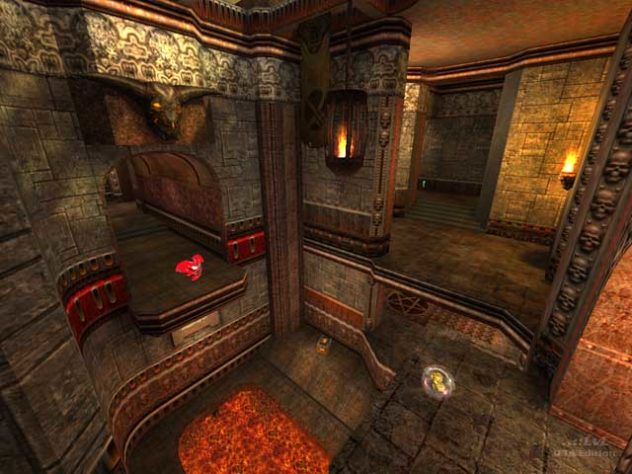
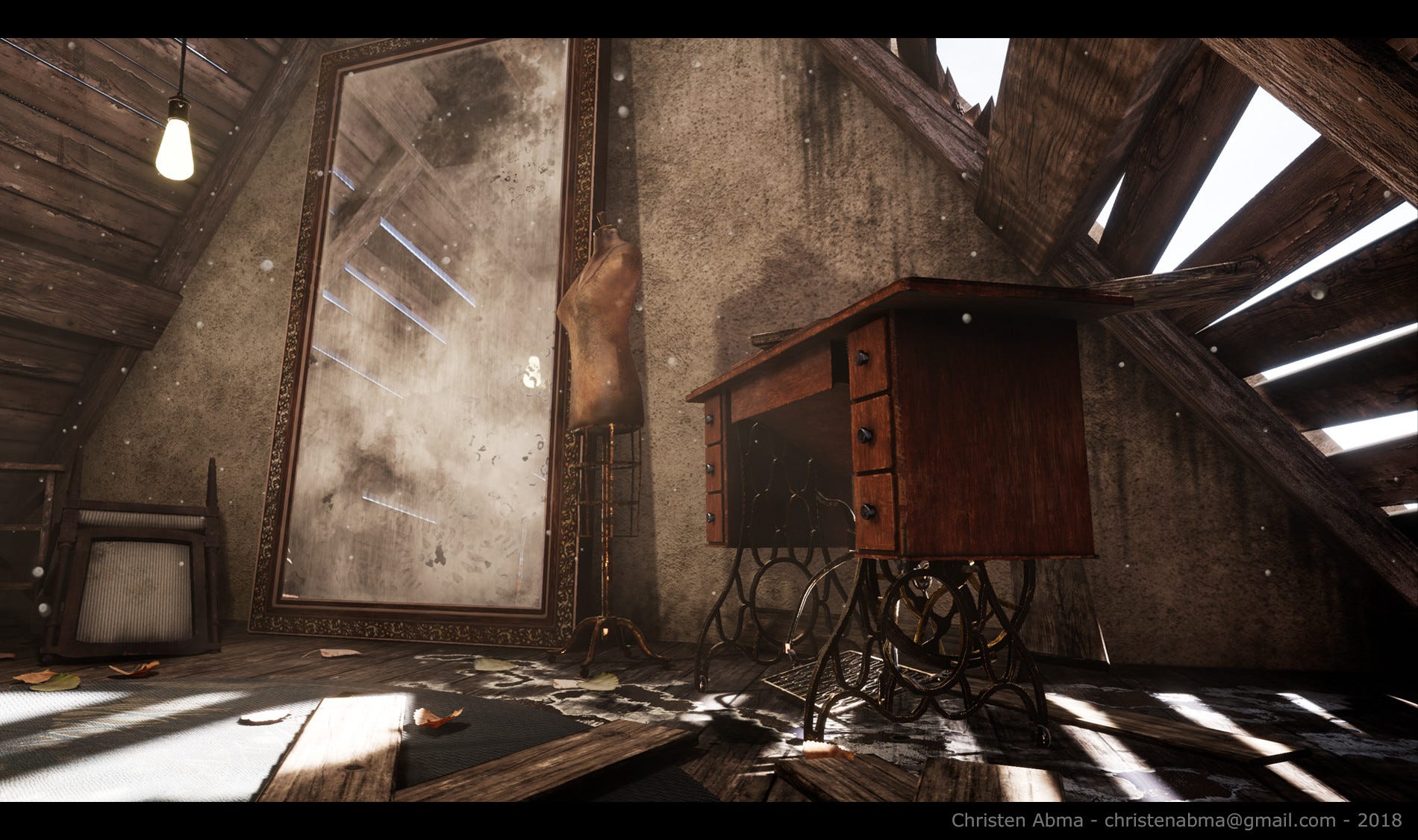


i need to click multiple times on the same pixel to make it more opaque ig
fallow cedar
When using global illumination, is having both realtime GI and baked GI enabled redundant? Should i just use one or the other?
 split garnet
I'm very new to Unity so I hope this makes sense.
Let's say I wanted to create some basic geometric flat coloured shapes in my game like this:
https://theme.zdassets.com/theme_assets/9969920/333349b307ed7d53924cb798f551f4cbd310c097.png
Maybe I'm making a game like Thomas Was Alone, or Thoth, and I just want a bunch of flat colourful objects that I can reshape by dragging vertices.
Would it be better optimised if I used Sprite Textures designed in Photoshop, and used the Sprite Renderer to tweak the exact cropping of them, or used Mesh objects where the actual colour itself is coming from within Unity (let's assume for argument's sake that I'll never want to change the colours or shapes dynamically after initially importing them into the scene).
Sorry if this is badly worded, or if I just plain don't understand the dichotomy between the two options. Just experimenting with Unity and don't want to make the game way harder to run than it needs to be,

 regal nexus
when i import my 2d block into unity which is 8x8 pixels how can i make it look better and not that blurry?
eager mist
regal nexus
when i import my 2d block into unity which is 8x8 pixels how can i make it look ...
Texture filter mode
misty lantern
best to disable mip mapping and compression as well
 faint bone
when attempting to configure my model's rig, it does this to the hands. apparently this is how they look in their t-pose

this is how they should look

(if this is in the wrong channel i havent been here in a while srry)
regal nexus
how do i make my 2d block the same size as the tilemap grid because its 8x8 pixels so its really small
misty lantern
regal nexus
how do i make my 2d block the same size as the tilemap grid because its 8x8 pixe...
Look up pixels per unit in import settings
 buoyant swallow
So in my game, im planing to make it so that you can purchase decals for your spaceship. eg racing stripes while still being able to change the color of your ship? what would be the best way of doing this? A game i took inspiration from basically has a plain texture of the vehicle and then layers e.g racing stripes on top of it. from the looks of it, the plain texture is just an AO (that is also colorable). How could i replicate this in unity?
 distant coral
Hello I'm Having an issue with material skin colors. Frankly I don't even know what's happening anymore.
She has two skin colors: One of which I'm changing it to have a corset piercing instead.
- original skin color (I plan to use with/without harness)
- skin color with corset piercing (I plan to use without harness)
For some reason on the original avatar (which I purchased with a scene including the avatar ready for vrchat upload) both materials appear causing the black to look faded (brown color) When I drag the fbx into the scene it fixes this problem but I'm stuck trying to figure out exactly how and what to add for toggles/dynamic bones/colliders to work again
Is there any way to fix this and avoid all the trouble?
 candid badger
Hi, what is the best workflow/format to use to send somebody a completed scene file?
They want to take all the assets within the scene and port them to a different scene as-is
So what I am thinking of doing is putting everything in the scene into an empty gameobject with 0 transforms, making that a prefab, and sending them that prefab
Will this break anything?
lime pollen
candid badger
Hi, what is the best workflow/format to use to send somebody a completed scene f...
export it to a package
 celest mist
Why exactly cant I drag more sprites into the tilemap?
 sullen plank
celest mist
Why exactly cant I drag more sprites into the tilemap?
sullen plank
celest mist
Why exactly cant I drag more sprites into the tilemap?
Need to convert images to sprite type and add their sprites.
sullen plank
distant coral
Hello I'm Having an issue with material skin colors. Frankly I don't even know w...
On lit materials lighting influences end color.
 flint verge
i have a mesh with 3 submeshes and 3 materials
problem is that reordering materials (which are all the same standard shader), for some reason forces a material use on several submeshes
meaning, sub 1 and 2 will use single material
how is that even possible
obtuse oyster
Shouldn't happen afaik. Are you doing this in the inspector?
flint verge
code and inspector, same result
flint verge
it only works in one configuration
i have no clue, i cant find any info online, nothing in docs
flint verge
fixed, was problem with my code
obtuse oyster
Why did it not work in the inspector then 🤔
 tribal pivot
@sweet mauve click on the sprite asset in your project (on the bottom of the screen), then on the right inspector set filter mode > point (no filter)
 dry geyser
if I make a model in Blender, animate it with a rig, and then after I try to make a LOD1 LOD2, how do i get the animations to work on all 3 LOD's Do i just export for first LOD and unity will make the others work? or is that 3 armatures? or is that what the avatar is for? my animations are done with bones and vertex groups on a single mesh. can 1 set of bones work on all 3 meshes LOD1 /2/3 ? or is there something I can go research for LOD models + animations export from blender to unity?
im exporting animations in the Non linear action editor
 karmic beacon
How do you deal with merge conflicts in unity, specifically for the scene? I'm using Github Desktop and every time we have a merge conflict, it seems like we're forced to lose tons of progress from one user
lime pollen
karmic beacon
How do you deal with merge conflicts in unity, specifically for the scene? I'm u...
obtuse oyster
karmic beacon
How do you deal with merge conflicts in unity, specifically for the scene? I'm u...
Set up UnityYAMLMerge https://docs.unity3d.com/Manual/SmartMerge.html
It does an alright job of handling basic merging of scenes and prefabs. Though you should still avoid modifying the same files through proper project management.
karmic beacon
thanks for the tips
distant coral
sullen plank
On lit materials lighting influences end color.
Tysm! Yes I had someone mention this to me just yesterday ^_^ ty for replying
 fair pollen
Model in Blender


Same model in Unity. Is this... Okay?
Same model without light.
 obtuse oyster
Blender's view on vertices is different to Unity.
Different applications store vertex attributes in different ways, Unity needs separate verts for different attributes. Which can be colours, normal information for smoothness/hard edges, UVs, etc
fair pollen
obtuse oyster
Blender's view on vertices is different to Unity.
Different applications store v...
So the answer is. Yes it is okay?
obtuse oyster
🤷 sure
fair pollen
Thank you very much, so i just tested it, and in editor around 4mil tris i feel to 40fps, so i guess i should aim for around 2-3mil verts budget?
Any links you can give me to read on optimization for models specifically for unity/blender?
Sorry if questions are stupid, not a 3d modeler myself 🙂
 dire sparrow
This armature won't import to unity, only Armature.001 imports successfully. What is this armature and how do I import this one?
 flint verge
obtuse oyster
Why did it not work in the inspector then 🤔
flint verge
obtuse oyster
Why did it not work in the inspector then 🤔
because i generated submesh copy on top of another submesh
basically didnt clear the buffer as a result first the whole mesh was put in 0, then part 2/3 were put in 2, and then 3 in 3