#🔀┃art-asset-workflow
1 messages · Page 59 of 1
 near phoenix
boy I sure would pay a skilled 3d modeller in here to create characters for me hehe 😉
 plucky meteor
Work In Progress Model 😳 😎
 swift estuary
plucky meteor
Work In Progress Model 😳 😎
swift estuary
plucky meteor
Work In Progress Model 😳 😎
Nice! Does it animate?
plucky meteor
Yup. I made an animation with it a while back. That was before I textured it though:
 weary girder
Sorry Guyz but does royality free licence means i can use the product for Commercial uses
 dusty jewel
Ye I understand the process you say. But my problem is that I know blender. I’ve only made the donut from blender guru and that’s it . Like 7 months ago :p ill try it tho
 patent summit
 pastel steppe
Make sure your normals are correct
pastel steppe
Make sure your normals are correct
how
 rigid valley
Which software i should choose for making 3d models for my unity games maya , blender or some other software
patent summit
rigid valley
Which software i should choose for making 3d models for my unity games maya , bl...
blender ig
 outer halo
 safe musk
I need a 3D artist
safe musk
I need a 3D artist
Team seeking posts belong on the forums. Links are pinned in #💻┃unity-talk.
 ornate cloud
patent summit
how
ornate cloud
patent summit
how
Material preview
patent summit
ornate cloud
Material preview
i got it alr fixed
outer halo
@weary cedar Please don't ask for free work, and this channel is for 3D art. If you have programming questions, use #💻┃code-beginner.
 weary cedar
k
outer halo
But ask questions, don't ask for charity.
weary cedar
yeah
 brave ravine
rigid valley
Which software i should choose for making 3d models for my unity games maya , bl...
brave ravine
rigid valley
Which software i should choose for making 3d models for my unity games maya , bl...
What are your criteria? Do you already know any of those packages? Is money an issue? Blender and Maya and several others can all be used successfully
 proud halo
I’m using a bootleg Blender in my browser
 woven tide
@mild yarrow you 3d designer
 acoustic river
Is it normal that the ground texture has this square look in the distance?

 valid cave
how can i understand what market needs for 3d models
ornate cloud
acoustic river
Is it normal that the ground texture has this square look in the distance?
well its the same image per square so id say yes
 floral pendant
hey guys, I have been working on this project .It would be really great,if you guys could give some feedback.

 ornate cloud
I like it, the lights, shadows and reflections could not be better
brave ravine
Really nice atmosphere
 ornate ocean
Hey guys, trying to decide on which toon shader to use. The first one(non-shadowed) and the second(with shadows). Which looks better?
 errant plover
@acoustic river Yes, it's fine. You'll eventually cover it with grass, trees, rocks, pathways, whatever. And it'll look fine.
brave ravine
@ornate ocean I feel like the shadows are way too heavy on the 2nd one
ornate ocean
brave ravine
<@134762293375401984> I feel like the shadows are way too heavy on the 2nd one
I'll have to play with ShaderGraph to fix it
brave ravine
@ornate ocean The shadow's falling on teh wrong side too isn't it? If the one on the ground is in front of her, then the light's hitting her back and that part should be most lit
ornate ocean
brave ravine
<@134762293375401984> The shadow's falling on teh wrong side too isn't it? If th...
There are two lights, both directional. One far and one up close. That probably messes with the shadow. I'll have to play around with it. Both shaders were created by following Snutti's and Ned's Toon Shader tutorials respectively
rigid valley
@brave ravine I have no idea about 3d modelling and animating. And money is not an issue.
brave ravine
@rigid valley Are you planning to learn and do it all yourself, or are you planning to hire freelancers to make models at least some of the time?
I ask because while most of the time I think Blender is good enough especially for its price, there are some circumstances where I think Maya might make more sense.
rigid valley
@brave ravine do it all myself
brave ravine
Ok. Then I guess I'd probably say go with Blender. You'll also find a lot more help with it on this Discord at least, it can work well with Unity and it can do most or all of the major feature areas you might need.
Maya's big advantage is interoperability with other commercial applications (ZBrush, Painter etc), and with other professionals in the industry - I've found that Maya tends to be the default go-between for everything.
Not that Blender CAN'T do those things too, there's just more friction especially with freelancers
Maya's pretty pricey too. There's the "LT" version that's just under $300/year, it's pared down, can't run any Maya plugins, and you can't have more than $100K budget (or revenue). And kind of appallingly, while it can read regular Maya files, regular Maya can't read ITS files. Then there's Maya Indie which is the same price, and it's the full version of Maya. But you can only have one person in your organization using it (not really an issue for solo). Aside from those two options it's like $1800/year which is darn hard to justify if you're not making a lot of income on it.
 coral island
Hey guys, I have been creating 360 images and videos using unity Recorder. It works great with URP but I wanted more realistic Enviourment, so I used HDRP for this one. But for some reason when ever unity takes these images it comes our really blurred and distorted.
I usually take images around later stages, i.e. at frame number 120 or something to give time to unity to focus itself and work on the image, but no matter how long I give unity or how many frames or videos I take, it's all the same.
also I have tried lowering the recording resolution, but same results.
I would really appreciate some help and guidance.

 dim merlin
who is can help me in voice chat
who can help with my problem pls write me in the privaty message
 slate mulch
is there a place to get recommendations for free assets collections?
i'm just trying to make a game as a hobbie (at least for now) on my free time, so I dont wanna buy assets for now
but also it's hard to get too much different assets from different authors as it looks kinda junky together (there's a lot of free assets, but almost if not all of them have few things)
does anyone have a recommendation for 3d free assets collections for environments, people/creatures with animations, etc?
plucky meteor
@slate mulch mixamo, free3d, cgtrader, turbosquid, unity asset store, and many others than I can't think of off the top of my head.
ornate cloud
I fixed the problem I had, no idea why, but I had 3 UV maps, deleting the 2 which do not have the texture fixed it, in case you get that issue (only one colour shown when you add an image instead of the image and the details)

 glad yoke
coral island
Hey guys, I have been creating 360 images and videos using unity Recorder. It wo...
glad yoke
coral island
Hey guys, I have been creating 360 images and videos using unity Recorder. It wo...
try to turn off smooth on camera
 icy mauve
What is the best format for a 3d model to import into unity?
 meager pike
i believe it's .fbx
coral island
glad yoke
try to turn off smooth on camera
hey @glad yoke could you elaborate on that? I dont have any smoothness applied on camera, nor do I have any blurred effect applied.
glad yoke
coral island
hey <@!541618152430108672> could you elaborate on that? I dont have any smoothne...
May be some post process or post process volume?
ornate cloud
icy mauve
What is the best format for a 3d model to import into unity?
I do it using fbx
 sullen plank
Suggest you lookup Blender tutorials. There's a lot of them.
errant plover
@orchid light you talking about the tabs at the top?
 eager mist
General then tab to edit
acoustic river
So i switched to HDRP and the textures on the model looks like this in the scene and game, any idea?

 glacial elm
@acoustic river could be your UV unwraping or which UV you've chosen for the material to use
acoustic river
UV looks fine, but it looks distorted. Is it because i do not have a mask map?
swift estuary
acoustic river
So i switched to HDRP and the textures on the model looks like this in the scene...
What is it supposed to look like?
 glacial elm
@acoustic river was just about to say. displacement hahaha
 unreal kestrel
question, how do i import a character meah with the armatur. Whit out getting any erros?
 lunar breach
I have all my images in the assets, but when I try to use it ||as a logo for example|| it doesnt show

 glacial vector
If you want to use it in UI you'll have to set the type of the assets to Sprite @lunar breach
lunar breach
ok
 drifting needle
how can u make a low poly person, probably just a single color? (im new to unity and have no experience)
swift estuary
<@&502884371011731486> seems like a scam probably? ^
 fluid oak
In blender, is there a way to hide part of your geometry while weight painting? A friend on another server was asking but I figured someone here might know.
 trail cypress
Haven't weight painted in a while but i think if you hide faces in edit mode then tab into weight paint and use face select then the parts you hid in edit mode will still be hidden in weight paint @fluid oak
trail cypress
No worries ☺️
woven tide
Don't you just use b to select a number of vertices and then use h to hide them?
I could be wrong
trail cypress
In edit mode, yes 🙂
 wind token
Does anyone know how to rotate an object in-code similar to how the 'Rotate Tool' does it in the editor? Like this:

When I change the rotation values in-code it rotates it around the pivot point that I can't change in unity. I've tried googling for a while and the closest thing I got is creating an empty parent object and manually aligning - which just can't be the best way to do this in my mind. Unity already knows where the actual center point is, as shown by the rotate tool - how can I get the actual rotation in-code to rotate around that instead of the pivot point?
glacial vector
It's a bit of work so it's way easier to work with a parent object. But you can get the center of the bounds of a MeshRenderer and use that as the rotation center
wind token
Isn't that a bit crazy to manually align a gameobject for each mesh that you have when Unity already knows where the center is?
Going off of what you said, I should grab the center of the MeshRenderer and then - use the Transform.RotateAround function?
really all I'm trying to do is reset the rotation for an object using transform.localRotation = Quaternion.identity;
and I'm curious if it's possible to do that while having it stay in the same 'position' and just rotate around the center of the mesh
I might be missing something because it seems like something a lot of people would want to do but I see hardly anything for it on google besides the manual parent object method, which seems not ideal
Is there no function that simply replicates the functionality of the Rotate Tool?
glacial vector
No, if you rotate it around the bounds center, you will be giving it an offset
It's also easy enough to do this in code instead of creating parents manually
wind token
Hm - that's crazy
glacial vector
That's how 3D works at the most fundamental level haha
wind token
So with objects that don't need a parent, would I have to create a parent anyways?
or would the code have to detect which ones required a parent for centering and which ones didn't
I'd have to throw an empty parent on every object I'd want to rotate with this script
Idk to me that just seems wild considering Unity already has the info it needs to rotate it around the center via the rotate tool
glacial vector
It's not something that's easy to include, since there are so many edge cases
For example, unity will consider the bounds of all child objects as well
It will also include the positions of objects that are empty and don't have a mesh
wind token
It works perfectly with the rotate tool
like if there was a way to do that functionality in-code that'd be ideal
glacial vector
That's what I'm saying. There are a lot of possible variations, meaning it's not something that's easy to expose in a useful way
But there are plenty of examples on this online with what we've discussed earlier
wind token
I've been looking for like two hours and haven't found anything besides the parent object method
and fixing the pivot point before you export the object, but that doesn't work for the editor I use
glacial vector
Any reason you can't use the parenting method in code?
wind token
I can - but it seems like a bad workflow, unless I'm misunderstanding.
Using that method I'd imagine I have to create an empty parent for every single object that I want to be effected by this script, or I'd have to have it detect somehow if the object has a parent for the purposes of rotating or not
Which - idk - seems ludicrous
glacial vector
There's no need to do it manually, you can create the parent in code
wind token
create the parent for the purposes of rotating and then detach/destroy?
 agile hemlock
anyone ever used remote rendering services?
i need some recommendations for good ones
glacial vector
If you need to yeah
wind token
Calculate the center of the mesh and then place the empty parent there?
at that point I feel like I'd just use the RotateAround function
glacial vector
Yea two different approaches
wind token
I'm just surprised there's not a function for that already
like unity seems to handle a lot of stuff - something like that would seem like a no-brainer
wind token
I guess it's also not just a problem for rotation, but also positioining
just blows my mind that Unity doesn't let you set the pivot / center point
outer halo
It's defined by the imported mesh, Unity doesn't need to give you a way to alter it.
That would just add a layer of unnecessary complexity.
wind token
Isn't it adding complexity, just offloading that to the user
outer halo
Yes, it's on the user. Unity is just a tool, it can't assume what you want in terms of pivot. Therefore, it uses the defined pivot in the FBX.
wind token
It doesn't need to assume, just let it be defined
It also already has that information in the editor when it lets you rotate around the center
outer halo
If Unity starts letting you define the pivot for each mesh, then it needs to let you also select verticies and positions to position that pivot accurately. At what point is it then just a 3D modelling program.
wind token
it already does that apparently
just limited to the rotate tool for whatever reason
It looks like it's pretty standard to have a parent object and not just slap the mesh onto the parent object anyways
outer halo
The center of an object is not based on the mesh, it's based on the bounding box of all the children.
wind token
alright well the bounding box then
regardless of what it is, it's different than the actual pivot point
but for whatever reason they don't let you rotate around that using functions
Is it standard to always have the gameobject that holds the mesh be a child of another gameobject?
outer halo
If you rotate an object, it rotates around it's position in space. An FBX you drag into your scene as a root object will use it's pivot point (defined by that fbx) as that point of rotation.
wind token
the rotate tool accounts for the pivot point and adds the values to the position afaik
outer halo
How the rotate tool works in editor is the same point which will be used when rotating in code.
wind token
So using the rotate function, I'd have to calculate the offset of each axis and use that vector3 in order to reset it to it's default rotation?
like this code: transform.localRotation = Quaternion.identity;
outer halo
Why not just use that?
wind token
because that rotates around the pivot, not the center
so it does not act like the rotation tool
rotation tool effects position as well
to offset the pivot point
Before Rotation:

After Rotation:

If the rotation function only changes the actual rotation values, then it doesn't function the same as the rotation tool afaik
outer halo
Then yes, either you parent it manually, or in code (create an empty at a point, child the mesh to it and rotate that parent), or you move the pivot point in the FBX. However, if it's an object with multiple children, the first option is the easiest.
wind token
I think the parent object method is much easier with the understanding that all objects will have that structure regardless of whether or not the pivot is centered
I've seen some tutorials where they add a GFX object and stick that under a parent regardless
I guess that makes sense
outer halo
Alternatively, if it's just the mesh you want to rotate, you can use the Renderer.Bounds
https://docs.unity3d.com/ScriptReference/Renderer-bounds.html
 wind token
Do you know the best way to center the model on the parent object? Like maybe a script called GFX that does it on startup?
Thanks for the link
outer halo
https://answers.unity.com/questions/638034/rotating-a-complex-gameobject-around-its-center.html
This looks promising.
Unity is the ultimate game development platform. Use Unity to build high-quality 3D and 2D games, deploy them across mobile, desktop, VR/AR, consoles or the Web, and connect with loyal and enthusiastic players and customers.
wind token

if I take the vector3 "center" from mesh.bounds and subtract, it lines it up to the center
so I might have a GFX script that does that on startup
it's not perfectly lined up though so I wonder if it's just a coincidence
the code worked, that's a good sign

rotating the parent while it's paused rotates the sword as intended now

so I think I'll just have it standard that each GFX object has that script that centers it to the parent on startup
only problem is the mesh collider is off center for whatever reason - anyone know how to have a rigidbody of a parent use the child's collider? lol

 green basin
Making a STEAMPUNK Turret Asset using BLENDER and UNITY. Project started end of march 2021 🤪
https://www.youtube.com/watch?v=zIu97rFy0_0&ab_channel=GeogalionGames
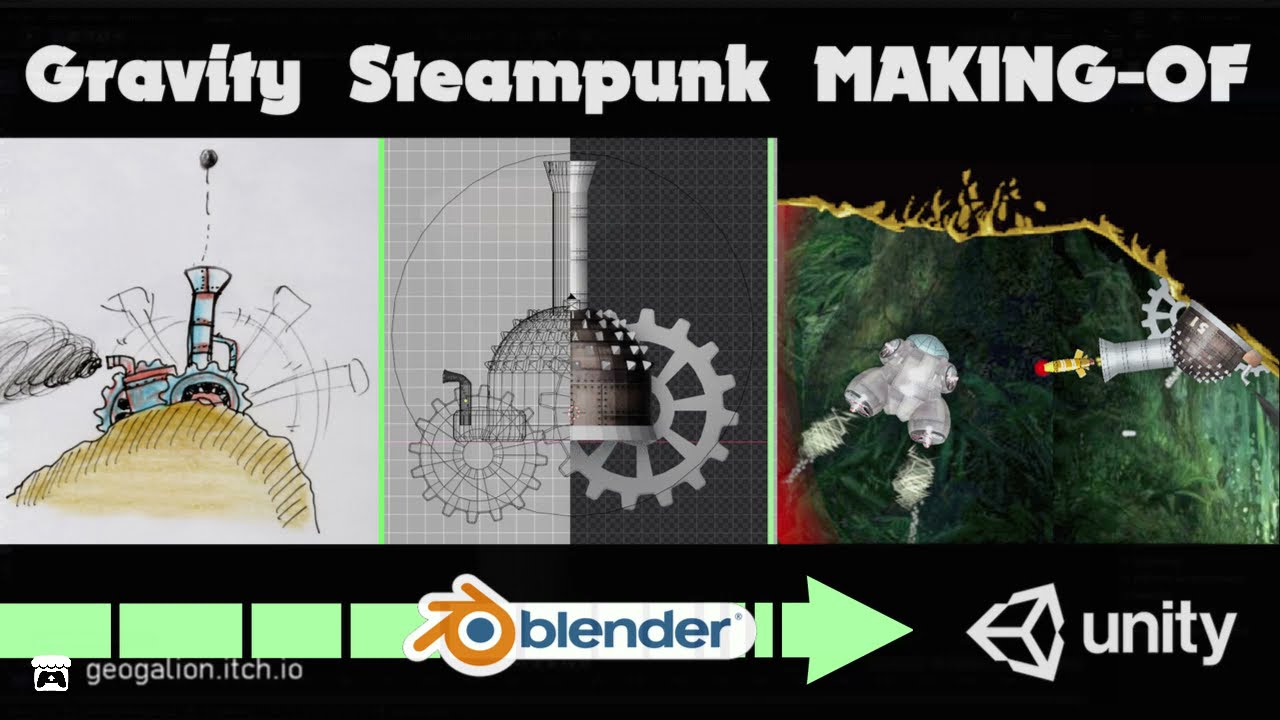
From hand-drawn concept art, creation of a Steampunk Turret Asset using Blender and integration into Unity.
Follow me at https://twitter.com/DecayeuxAlain
Itch: https://geogalion.itch.io/
A partir d'un dessin, le making of d'une tourelle steampunk avec Blender et son intégration dans Unity.
Suivez-moi sur https://twitter.com/DecayeuxAlain...
wind token
green basin
Making a STEAMPUNK Turret Asset using BLENDER and UNITY. Project started end of...
Looks dope!
 sweet vine
I believe this is the closest I've ever gotten to a good looking hand-crafted human

 ionic zenith
can any make a low poly human
acoustic river
trying to line this up but looks wrong is it me or the concept art?

nvm i just have to move the bottom side down a bit
 native jacinth

 foggy abyss
Anyone available to help me with rotating an object in one axis towards a player? Tried a few things i found online but cant get it working
wind token
Anyone have any links to updated outline methods? When I google it I can only find outdated methods / shaders
swift estuary
wind token
Anyone have any links to updated outline methods? When I google it I can only fi...
there's a few free ones on the asset store floating around
but also you'll want to specify which render pipeline you're interested in
wind token
swift estuary
there's a few free ones on the asset store floating around
I found one - I think it was called "simple outline" - it worked great
 twilit cairn
Excuse but can i ask how one should go about making a 3d texture from camera sampling?
somehow it always gets only the first step and i end up in a 2d texture on a 3d texture (1 face captured only)
 magic root
Hello everyone! I'm sort of a level designer who can't code 😄 I'm trying to create a scrolling background made of 2-3 layers. For that, I need to extract 2-3 corresponding images from a scene. I've spent several hours reading/watching tutorials and tinkering on my own, to no avail.
Basically I want to create a scrolling background that looks like a part of the scene (as in made of the same assets, terrain, etc) , just more distant. It's for a side scroller with relatively few assets, and even that little was not made for game development.
I was trying to use reflection probes (and sometimes the camera) to take snapshots of certain sections of the scene, but I cannot transform them to .jpg files.
I'm trying to go along this to come up with the images:
https://www.youtube.com/watch?v=-ZEtUZBcC7A&ab_channel=DumbGameDev
The tutorials start off with having images already available to make the scrolling background:
https://www.youtube.com/watch?v=P3LXGbSA4c0&ab_channel=JasonWeimann
https://www.youtube.com/watch?v=RXNXEIwOLMA&ab_channel=AwesomeTuts
https://www.youtube.com/watch?v=32EIYs6Z18Q&ab_channel=MadFireOn
https://www.youtube.com/watch?v=zit45k6CUMk&ab_channel=Dani
https://www.youtube.com/watch?v=HrDxnMI7pCc&ab_channel=ChargerGames
https://www.youtube.com/watch?v=nGw_UBJQPDY&ab_channel=quill18creates
 obsidian haven
Ok, i'm hating Snatchers anatomy
 glacial vector
Understandable, that is looking solid though
 timid rain
can someone give me a hand? I'm trying to import my model from blender, but it's not importing the texture correctly
I'm following a tutorial, and my tree is using a .png for the branch texture. That .png is getting imported into unity, but it's not applying to the mesh of the branches for some reason
I've exported it as a .fbx
and the .png is in a subfolder called textures
when I import into unity using import asset, the texture doesn't follow, so I presume I need to bake it into the model somehow?
 pale spindle
I think unity has own file formats for textures
When importing images to unity, you can reimport them as textures
sullen plank
timid rain
when I import into unity using import asset, the texture doesn't follow, so I pr...
Some materials are incompatible and new material must be created in Unity and assigned to use imported texture.
pale spindle
Are IK bones not needed in unity?
If i understand right, the IK bones are only useful when making animations, but not needed when the animation is complete making it safe to delete the IK bones
 amber walrus
They are not needed if you aren't doing runtime IK stuff
pale spindle
Runtime IK stuff like?
amber walrus
Grabbing a door handle, adjusting holding positions on an item, adjusting hand positions when climbing.
woven tide
I've just recently started using blender and used sculpting to create a character but the face count is incredibly high over 200,000+ faces which just isn't ideal for a game, especially a mobile game, is there anyway to reduce the vertices without losing so much detail? I've saw various models with a very low face count but still maintaining detail. Did I take the wrong approach by going directly into sculpting rather than creating a low poly base mesh first?
I used the decimator modifier but it didn't seem to work on unsubdivide
 wind token
Dude the 3D pivot situation is so frustrating lol - I don't understand how people work with 3D objects in this engine when you can't define the pivot point
outer halo
We've already had this conversation.
What are you trying to do that hasn't been done by countless others? Surely your situation isn't that unique?
wind token
No it's not, it's very simple
I had it working by using the parent object method, but that doesn't work because the rigidbody had to be placed on the parent object or else the child would move independent of the parent
I just started using Unity like 2 days ago so I'm sure it's something I'm missing but nothing I look up works - I would have imagined it was a very common hurdle for people
outer halo
Seems like it's just a matter of reorganizing a bit. Your root object should contain your Rigidbody and high level components.
wind token
Root object as in the child?
outer halo
If you need to rotate a mesh, then you child another object to the root which you rotate. The model themselves are a child of that.
wind token
if it has the rigid body, doesn't it move independent of the parent?
outer halo
.
Root
--> Models
------> Mesh
------> Mesh
------> Etc.
wind token
I had it working but it wasn't ideal
outer halo
If the rigidbody is on the root object, all the children will follow. If you have children rigidbodies to a root rigidbody, they'll have their own behaviour on top of that yes.
I can't really think of a situation where you'd child rb's to another though.
wind token
This is how it looked when I had the rigidbody on the parent object

but it didn't work out because the actual collision was on the child object which contained the model
When you say root object, you're not talking about the empty parent object right
you're talking about the child object that you attach to the empty parent object used for positioning
will a rigidbody use all child colliders?
outer halo
It will, yes.
That's why you put your rb on your root object, and then the colliders are put on the mesh, as children.
wind token
That's great - how would you go about detecting collisions in-script?
for my pickup action, I have an OverlapSphere that detects collision
outer halo
Just the standard
https://docs.unity3d.com/ScriptReference/Collider.OnCollisionEnter.html
Typically on some Controller script that drives the character on the root.
wind token
so - if the collider is on the child object, it will pull that instead of the root, right?
would I just account for that and grab the parent every time to get the root object?
because it won't pull the root object if there are no colliders
I think that could make sense, just wondering if that's standard practice
I'm pretty sure I screwed up - essentially no movement should be done to the child object (model) except for the initial pivotpoint offset relative to the parent
outer halo
If you detect collisions via OnCollisionEnter, any collider on that object and it's children will fire that function. However, you won't "know" which collider it was, necessarily.
If that's important to know, then have a different detection script on each individual collider which then talks back up to the root controller script (on the root object) that they've been hit.
wind token
I'm just using the OverlapSphere that Brackeys used in their combat example
which grabs objects that it detects, but it has to have a collider I think
outer halo
For example, if you had a sword mesh with a collider, it could have it's own script:
void OnCollisionEnter(Collision collision)
{
  GetComponentInParent <MyCharacterController>().SwordHitSomething (collision);
}```I think I'll just always have it reference the root / parent instead and move that after it grabs the object
outer halo
Yes, it does, overlapsphere is just casting a sphere collider into the scene that frame.
wind token
Gotcha
I think I understand now
Just gotta get into the Unity mindset and what not, I've really only ever used GMS and basic non-engine games with python/java/c, I think Unity has a unique way of doing things
Thanks for your input / help @outer halo
That was totally it - thanks again lol
 outer halo
Nice, good job. 🎉
wind token
Has anyone ever had to deal with equipping weapons / equipment in hands of different model sizes in-script? Would you have a child object in the prefab that's positioned at the "grab point" or something? And then define the offset per-item manually?
A couple examples I looked up seemed to do it that way - attach the weapon as a child object of the hand and then use a custom offset
swift estuary
would definitely have a "grab point" empty object in the prefab
which has the correct position/rotation for the object to be grabbed with
for convenience the root object of the prefab may itself be that grab point
with the actual mesh and colliders etc being children
wind token
For now the root object just serves as the 'center point' for rotation and positioning
i'm not sure if I'd be able to rotate around center of the mesh if I had the root be the grab point
swift estuary
isn't it more common to rotate around the grab point?
but in any case yes you can do it either way
wind token
for items on the back I like it centered
 swift estuary
ok
wind token
I'll try doing a grab point child object and see what I can do with that
swift estuary
wind token
I'll try doing a grab point child object and see what I can do with that
Baically when you grab the sword, you would set it as a child of the grab point transform on your player.
wind token
or maybe the root can be the grab point and I can find a way to rotate around the center of the mesh somehow else
swift estuary
I mean its the same either way
when you're holding it thenn it would be easy
and then when it's on your back you could have the "back grab point"
which could be in the center
and then the logic is the same
wind token
Right, might be a game of just deciding what the transform parent should be at the time
is there any 'right answer'
swift estuary
nope
wind token
it seems like an organizational conundrum, I wonder what the most common method is
swift estuary
whatever makes more sense to you
swift estuary
You could theoretically have any number of these "grab points".
- one for holding the waepon
- one for storing it on your back
- one for storing it on your hip
- one for displaying it on a mount on the wall
etc...
wind token
Yeah that's a good idea
swift estuary
In that sense - you might just treat them all equally
wind token
I might have to have the grab points nested under the root itself
swift estuary
and position them around the object as necessary
wind token
I'd like to have one root with all of the important stuff on it rather than having to replicate it on all the grabpoints/parents
so maybe root -> grab point - > model or something
seems like it'd be hard / tedious to do the grabpoint if the pivot is already different from the center
That red box is the center, so I'd have to manually align each model with the center and then manually position the grab point

and then that green grabpoint is only accurate if I managed to manually align the model with the center correctly
 ornate cloud
any website where I could download dance animations for my avatar?
oh wait I should ask this in animation channel ignore it
meager pike
swift estuary
You could theoretically have any number of these "grab points".
- one for holdin...
I ended up doing mine like:
            rifleWasPickedUp = true;
            gun.transform.SetParent(spine.transform);
            gun.transform.localPosition = new Vector3(0f, 0.0059f, -0.0070f);
            gun.transform.localRotation = Quaternion.Euler(-33f, -86f, -99f);
Just hard coded it in 😦
swift estuary
not very maintainable if you ever change your gun model
meager pike
Yeah, only have two gun models for this game. So it wasn't too bad, but definitely not optimal.
 dusk rampart
i need help my components are not working
 outer halo
dusk rampart
i need help my components are not working
outer halo
dusk rampart
i need help my components are not working
This is for 3D art, please use correct channels.
Also, you have to select something that can have components on it in your scene or project to apply a component to it.
Nevermind, in the future, don't crosspost @dusk rampart.
dusk rampart
ok
dusk rampart
outer halo
This is for 3D art, please use correct channels.
Also, you have to _select_ som...
that is 3d art
where is player movement option
 outer halo
dusk rampart
that is 3d art
outer halo
dusk rampart
that is 3d art
No, this has nothing to do with 3D art. Use the correct channel, this belongs in #💻┃unity-talk or if you have a coding question, in #💻┃code-beginner .
There is no built in "player movement" option. You need to create one.
dusk rampart
okay
eager mist
how do i make it so that an object breaks down as bunch of particles instead of using Destroy function and just playing the particle system?
 fallow bough
Hello, Anyone know why my terrain tools brush is read only???? 2 days 😦
sullen plank
@fallow bough #⛰️┃terrain-3d There are related resources pinned as well explaining how to use it.
eager mist
dusk rampart
where is player movement option
create script
apply it to the player as a component
go to the script
make a serealizable rigidbody variable
yeet the rigidbody in the component
and do some coding
sullen plank
eager mist
how do i make it so that an object breaks down as bunch of particles instead of ...
You should clarify your questions. What exactly do you mean.
eager mist
sullen plank
You should clarify your questions. What exactly do you mean.
so let's just say i made an exploding barrel, and if you shoot it it explodes and i want to make a particle system out of remaining pieces of the barrel after an explosion
basically turn the game object to bunch of particles
usually i use Destroy function and play a particle system which looks really ugly
or is there any other way i can make it look a bit better?
sullen plank
If you want to break the object, you need to swap it with broken pieces with individual physics components, etc.
eager mist
okay thanks i will do research
 violet sapphire
i made a texture (right) but it was blurry, apparently because it was on the "filter mode" "billinear" so i changed it to "point" which google said fixes blurriness but now it looks distorted, does anybody think they know why? if it helps, i'm putting it on a really big plane

and here are the settings

 hexed sundial
I made this "model" solely off of adding different 3d objects in unity since idk how to model in blender

 clear eagle
um
is there a way to fix this

becoming this

when I press play on the simulaiton
for whatever reason when the cubes rotate they're skewing instead

wow that's... really odd, any cuboids outside that group work fine
glacial vector
You can't rotate children of an object that has non-uniform scale @clear eagle
meaning the parent of these cubes has a scale that is not the same on all axes
 tender zinc
meager pike
I ended up doing mine like:
```cs
rifleWasPickedUp = true;
...
tender zinc
meager pike
I ended up doing mine like:
```cs
rifleWasPickedUp = true;
...
holy i did the same code except same values
dusk rampart
hey does anyone know how to make a parkour game in unity
 short yacht
Hi everyone! any ideas of why my grass looks like that?

here's the material

tell me if i need to show off the sprite too :)
Update: due to popular demand, i will indeed show off the sprite too:
 amber walrus
@short yacht The material is set to be opaque instead of transparent
short yacht
oh! sorry, problem was the shader, needed to select a transparency compatible one
glacial vector
The standard shader is transparency compatible @short yacht. You just have it set to the wrong mode
 white crater
Curious if anyone knows how I would go about to make an app in unity where i can pose a humanoid model (vrm), save/load the poses? Or if there is already something like this that exists. Preferable if it's built for both PC/macOS.
If you're familiar with VRoidStudio, the feature that it has that lets you pose your model for screenshots is what I am looking to achieve but allow you to save poses or load them (since the actual app doesn't do this and I thought it would be nice to make one if it isn't available)
outer halo
No crossposting please, @torpid barn.
 torpid barn
outer halo
torpid barn
outer halo
Gotcha, well, seems like there's a conversation about it already ongoing.
dusty jewel
Can anyone by any chance follow the following tutorial for me because I suck at Blender? I have the sketches for my character already 🙂

Learn to create a 3D character from sketch to game.
I go over all the steps and give some tips and trick along the way.
in This tutorial, I use the following programs:
Procreate (Ipad)
Blender
Affinity Photo
Unity3D
If you liked this video, be sure to subscribe so you won't miss the next video!
You can use this for all kinds of applications:
-Y...
ornate ocean
dusty jewel
Can anyone by any chance follow the following tutorial for me because I suck at ...
You're asking for someone to model for you? Lmfao
dusty jewel
As a programmer Im asking if it is easy to help me with a 10 min tutorial. I suppose that it would be really fast for a blender artist. Ive asked again last week and the guy did it for me but in anotehr program that is not compatible with unity so..
dusty jewel
 cunning oar
you wont learn if you dont do tutorials yourself
cunning oar
you wont learn if you dont do tutorials yourself
I just want a model for my thesis Im making an ml agents simulation , anyways.
 wide kindle
Hey guys i have exported a Mesh .obj file using Assets Bundle Extractor
Can i know how to import them back please ?
dusty jewel
Anyways If anyone Is interested in helping me with the above issue cause Im struggling feel free to sent me a message here , Ill definitely mention you in my master thesis 🙂
pastel steppe
dusty jewel
Anyways If anyone Is interested in helping me with the above issue cause Im stru...
What do you want the character to look like?
 copper solstice
brave ravine
copper solstice
brave ravine
If you just need a character model for free, why are none of these good enough? https://assetstore.unity.com/?free=true&q=character&orderBy=1

Discover the best assets for game making. Choose from our massive catalog of 2D, 3D models, SDKs, templates, and tools to speed up your game development process.
 small robin
How hard will it be to make a 3d character model?
outer halo
Obviously that's not something anyone can answer.
What is your artistic background? Do you have any experience? Are you going for high poly sculpting or basic shape like Minecraft? It's all in the details.
brave ravine
Hard enough in general that it's a full time occupation.
small robin
I got a friend who's going to draw up a sketch for me. But I never used blender much less created a model. And I want it to with actual shapes not blocky 😂
brave ravine
It's not trivial. If you've never done it before it's not going to come out great; plus you're probably not just talking about a model but also UVing and texturing
Not to discourage learning and trying, but just to set expectations. They're all skills like any other and it takes time and experience to get good
small robin
I want it to look decent. I mean I can always go for the invisible character way and just have arms
And hands


 keen moss
It's beautiful work. 
floral pendant
hey guys,when I choose the option greater under depth test, i can see the object through other objects.Does anybody know how to fix it

 dusty jewel
pastel steppe
What do you want the character to look like?
dusty jewel
pastel steppe
What do you want the character to look like?
Ive got a front a back and a side sketch of the character with colors as the video requires 🙂
@pastel steppe May I sent em to you so you can check em out?
eager mist
dusk rampart
where is player movement option
u need to write code...
since i already wrote the entire movement code i can send it to u
pastel steppe
dusty jewel
<@!623310609416454174> May I sent em to you so you can check em out?
Sure I'll give it a try
ornate ocean
small robin
I want it to look decent. I mean I can always go for the invisible character way...
Good practice makes perfect. Here is the first version of Shiro that I worked on for my game

Here is the second version that I worked on. Much more faithful to the character


 small robin
ornate ocean
Good practice makes perfect. Here is the first version of Shiro that I worked o...
small robin
ornate ocean
Good practice makes perfect. Here is the first version of Shiro that I worked o...
Dang. Looks good
 smoky sundial
 shadow nebula
I'd say the second, Emerald woods theme works really well.
 north rose
I just started the blender program. I will be able to learn whether there is a channel you can recommend from youtube.
 vocal grail
Hello, is there a way to put minecarft characters to the unity with all details?
im trying for a week now, but there is a problem about outer layer
and i couldnt do slim arms

 shell sage
Hi ! I'm struggling with the polybrush/ vertex painting to blend texture together. When I try to paint vertex on my prefab asset, it looks like it break his link with the original mesh. I can't update it anymore, I have to destroy all the polypaint if I want to make any changes onto the original mesh (for example custom Uv LightMap). What can I do ?
pastel steppe
vocal grail
and i couldnt do slim arms
The characters are pretty simple so you could try to 3d model them
 tawdry jasper
Guys any idea why is this happening when I use temporal anti alaising?

 fading bluff

 vestal dew
Math question: kind of a passing thought, but given a regular polygon, can someone visit each vertex by passing through each edge once?
smoky sundial
vestal dew
Math question: kind of a passing thought, but given a regular polygon, can someo...
Why not?
vestal dew
smoky sundial
Why not?
my mistake, I meant polyhedron
smoky sundial
I mean, you could trace it, obvious answer seems no.
swift estuary
vestal dew
Math question: kind of a passing thought, but given a regular polygon, can someo...

But given a regular polygon the only edges are around the perimeter right?
Or are you talking about a triangulated polygon, or what?
vestal dew
swift estuary
https://en.m.wikipedia.org/wiki/Seven_Bridges_of_K%C3%B6nigsberg
I was wondering whether I could draw a regular polyhedron only with a list of ordered points
had a flashing thought, then I realized that I can still do it if I drop the "only pass once" rule
 calm frost
Hey! I'm trying to import FBXes from Synty's Dungeon Pack (to add my own stuff to it) to blender, but it produces this abomination:

Any ideas how could i fix this?
It looks like bones went nuts
obsidian haven
calm frost
Hey! I'm trying to import FBXes from Synty's Dungeon Pack (to add my own stuff t...
i can see a rig in the middle...
swift estuary
vestal dew
I was wondering whether I could draw a regular polyhedron only with a list of or...
You mean as a 3d mesh? Yeah it's pretty straightforward
calm frost
obsidian haven
i can see a rig in the middle...
yeah, bones are there, but they're messed up
 lapis ridge
hey everyone i'm a beginer in 3D / terrain creation, i started yesterday 🙂 and i'm facing my first issue my terrain collider don't seem to work my player keep falling and falling
swift estuary
lapis ridge
hey everyone i'm a beginer in 3D / terrain creation, i started yesterday 🙂 and ...
most likely related to how your player is set up. What components the player has on it and how you are moving the player
But this is really a question for #⚛️┃physics or #💻┃code-beginner
lapis ridge
Ok i figured out and i checked trigger on my player wich cancel collision
thx for your answer ^^
 vernal meteor
Hi guys, I'm trying to add a .blender model to unity on my second PC. For some reason the unity on my second PC won't recognize it. Anyone else have the same problem?
This is the unity on my first PC

This is on my second PC
 vernal meteor
I can drag it into the scene, but its just like an empty game object
I tried using the .fbx but still the same
outer halo
How are you getting it on your second PC, are you using version control?
vernal meteor
I tried regular copy paste and opening it on blender, and save as a new .blender file, but still the same
no I'm not using version control
outer halo
What if you just copy the .blend file over instead of rexporting it in blender.
Also, are you sure you're exporting it correctly? That you don't have it to "export selected" and not actually having anything selected for example?
vernal meteor
I tried copying the .blend file, the result is still the same. One time I tried copying the .blend file to unity on my bro's pc and it worked fine. We all use the same version of unity
outer halo
No idea, that doesn't make any sense really.
Out of curiosity, what happens if you copy it locally and import it?
vernal meteor
Tried it just now, still the same.
I wonder if there is something wrong with my second pc
brave ravine
Well, importing a .blend file requires Unity to invoke blender to do the FBX export. So if it were only the .blend file we could wonder about whether you have Blender installed or the right version or whatever. But I've no idea what could possibly make an actual fbx not import either.
vernal meteor
My gut tells me I'm using the wrong version of Blender, but is that really the case tho? Gonna try the other version of Blender now let see if it works
vernal meteor
Yup, the reason why I can't open it on the second pc is I'm using the wrong version of Blender
Thanks for the answer guys
vestal dew
swift estuary
You mean as a 3d mesh? Yeah it's pretty straightforward
Nevermind, I had this weird idea of drawing a regular polyhedron with a visual effect graph line ribbon to get that wireframe look on platforms that don't support wireframe shaders; turns out that for all that hassle I can simply do the classic wireframe trick on the UVs and call it a day
 crude girder
Guys, how do i generate lightmap uvs on a primitive mesh like cube ?
north rose
Hello everyone, I want to make 3D design from the blender program. Can you suggest a youtube channel that I can start well from the basics
outer halo
north rose
Hello everyone, I want to make 3D design from the blender program. Can you sugge...
Grant Abbitt is great, easy to follow and is very beginner friendly.
 iron garnet

ArtStation
An exterior modelling of Tesla Roadster.
https://www.tesla.com/roadster
This one is a personal challenge on what could be done within one week periods of time. The model was build based on the blueprint of the Tesla Roadster. The modelling until texturing took me about 8 days; some part does not exactly match with the original version, because ...
 raw atlas
Hi, I'm searching for some Fnaf models, If anyone have a pack or something like that, pls send me on Me, or ping me
Thx 😄
 zinc pilot
calm frost
yeah, bones are there, but they're messed up
zinc pilot
calm frost
yeah, bones are there, but they're messed up
Idk everything but. Can't u remover the rig and add ur own rig?
Also if u can't find a fix. There r discord servers for blender. Like cg geek and others try those if u can't find help here
calm frost
@zinc pilot i actually solved my problem! 😁
Default pose was screwed up, so i needed to press A and then Alt+D i think, or something, to restore original rotations
and that actually solved it :D
zinc pilot
calm frost
and that actually solved it :D
Oh nice good
 quiet tulip
Anyone know of a free 3d modeling software like blender? I've tried blender many times, and I just don't like it's workflow.
swift estuary
quiet tulip
Anyone know of a free 3d modeling software like blender? I've tried blender many...
uhhh Google Sketchup? Blender is by far the best free one in my opinion
quiet tulip
I've used sketchup before. It's not really meant for game assets
amber walrus
Probably have easier time trying to tweak the workflow rather than finding something as powerful 😛
 wide yew
How can I rotate around in blender
 uneven epoch
Is there something similar to Valve Hammer Editor's texture alt-rightclicking in ProBuilder's UV Editor? (for lining up textures around corners)
ornate ocean
Anyone know why my animations are missing when importing into Unity? I've created new actions and clicked fake user and then X'd out to create more new actions. Now when I export my character, all old animations don't carry over and only the new actions with the fake user are carried over. How do I fix this?
Yes, the animations are all added into the NLASTRIP as their own action
I'm using Unity to FBX exporter
ornate ocean
Thanks @ornate ocean for fixing the issue. So, every time I add a new action, I now need to remove all previous NLA STRIPS and recreate new NLA STRIPS for old, current, new animations....
outer halo
Your normals are probably flipped.
I thought you worked in blender? Turn on the face orientation in the top right menu to see which way they're facing.

 rustic folio
I need to make a material only emit on the pixels that are a certain color (emission)
Is that possible?
 glad geyser
i cant figure out why my blender human doesnt have shape keys in unity. I checked the 'Import BlendShapes' in the import settings
swift estuary
rustic folio
I need to make a material only emit on the pixels that are a certain color (emis...
With a custom shader yes
 rapid echo
Made a small dinner meal scene in Blender. Thanks for viewing! 🙂
.
https://twitter.com/FarrukhAbdur/status/1385481001837678593?s=20
eager mist
In need of help removing a facemask attached to the body of an avatar - will send unity file and will need it sent back as unity file with the updated texture, please help 😦 can pay for aid
errant plover
@Lucylevi#7194 Is the face mask part of a texture or model?
eager mist
working on this isometric room in adobe illustrator... Any thoughts?
 errant plover
Good use of colour. Silhouettes are good, you can instantly tell whats going on here.
 eager mist
errant plover
Good use of colour. Silhouettes are good, you can instantly tell whats going on ...
eager mist
errant plover
Good use of colour. Silhouettes are good, you can instantly tell whats going on ...
thanks man
I really needed some feedback
Much appreciate
iron garnet

ArtStation
Dust Motorcycles inspired by mad max the movie. 98k Tris for this model.
The design was inspired by Dust Motorcycles in general, Harley Davidson bikes and bat bike.
The model firstly was built in Zbrush block out using primitives, zremesh, z-modeller and poly-based acts, the move and move topo help a lot in getting the shape in faster periods....
swift estuary
So I made this "pipe junction" in Blender by joining two low-poly cylinders together rotated at 90 degrees. Is there an easy way to fix the resulting overlapping geometry, such as this highlighted face here?

I'd like to add vertices at all the intersection points of the two cylinders and fix all the edges/faces to connect to those instead
Would this have worked better if I joined the two cylinders with a boolean Union modifier instead?
Wow ok yes - I've answered my own question - the answer is yes. Boolean modifier in Union mode was the way to go
crude girder
Guys, how do people light a moving object (player) when we use area baked light ?
swift estuary
crude girder
Guys, how do people light a moving object (player) when we use area baked light ...
light probes
crude girder
Isn't light probes for mixed directional light ?
swift estuary
Read the doc page
The primary use of light probes is to provide high quality lighting (including indirect bounced light) on moving objects in your scene.
Light Probes are positions in the scene where the light is measured (probed) during the bake. At runtime, the indirect light that hits dynamic GameObjects
is approximated using the values from the nearest Light Probes to that object.
 gleaming trail
how do I take a 2d image and wrap it around a 3d object?
oh wait I was making things complicated
nvm
acoustic river
HDRP looks good

 vale plume
can anyone please tell me why this happens?its like trees are being pulled to one side 😐


 vestal shore
any substance painter user here???
i wanted to know about an issue i m facing if anyone could help me that would be good
glacial vector
What's the problem @vestal shore
looks like you are offsetting the vertices in the shader @vale plume


 glacial vector
What do your UVs look like?
 glacial vector
Are the edges there UV seams? Cause they need to be for baking
vestal shore
can you explain it in more words coz i am learning these stuffs
yes they are UV seams
glacial vector
when baking from a highpoly, hard edges need to be UV seams with enough padding between islands
vestal shore
by padding u mean space right??
i think theres less space in them thats why that thing's causing
glacial vector
Space between the islands yes
vestal shore
okay then i will have to fix them i guess
swift estuary
Yeah remember that the texture itself has an actual pixel resolution. If the UV boundary falls in the middle of a texture pixel, that pixel's color will bleed onto both sides
vestal shore
ohh i see okay i will look at it
vestal shore
vestal shore
check this out
one more thing here you can see my uv islands now i want to know can i decrease their size and get fine textures???
eager mist
Hello, I want to create walkable houses with interior using Blender. Should I build the whole house with interior using Blender of should I make many single parts and put them together in Unity?
iron garnet

ArtStation
Another personal project, scifi patrol officer character, sculpted in Zbrush, retopo in Maya, textured with substance painter, rendered using Marmoset Toolbag.
I set myself a timeline for one week from concept to final pieces, it looks good enough but still not perfect.
Hope you like it
 frail skiff
I have this asset right here and i think the normal is kinda broken. Lowpoly in blender, highpoly in zbrush, textures with painter. Now, in painter it looks fine and when I export with unreal presets it looks fine in unreal but the unity HDRP preset export doesnt make it look fine in unity so if anyone has an idea please do let me know

i have googled a lot and I seriously dont know what it is anymore - its the first testing asset i have made for unity hdrp
eager mist
@frail skiff hm it is strange that it looks fine in unreal and not in unity. to me it looks like you baked the normals in substance and didnt have a large enough number in the distance thing (forgot what its called but like that cage that determines whats included inside the baking process). also i had trouble multiple times when trying to bake with highpoly models that had way to much polygons, so maybe try lowering the polycount of the highres model incase u didnt do that yet (u can pretty much keep all the detail when using decimate). besides that i wouldnt really know what else it could be
frail skiff
@eager mist it looks fine in substance lemme show you

didnt exactly spend alot of time on the asset but i want to first get the techincal aspect out of the way before actually working on making things look good
eager mist
@frail skiff wait thats how it looks in substance?
 gusty surge
@jovial chasm so basically you first gotta make sure that ur model is UV unwrapped
and the texture fits
 jovial chasm
this is the texture but im struggling to wrap it onto the model
 gusty surge
if you only have 1 texture map, you can add a Image Texture node in the shader editor, click Add and select the image, then conncet that node to Base Color
Was it made specifiacally for that model
jovial chasm
ive got loads lol
 jovial chasm
gusty surge
Was it made specifiacally for that model
jovial chasm
gusty surge
Was it made specifiacally for that model
yeah
gusty surge
oh ok then
to import that, it;s a bit different
you can do it manually like I said for each map
or you can go the easy way
gusty surge
go to Edit > Preferences > Add-ons and enable Node Wrangler
it comes with blender by default
then when you open the model's material in the shader editor
 gusty surge
do that to import the model yes
after that, add a blank material and go to Shading tab
then click on the default node that you see on the screen
press CTRL + SHIFT + T
jovial chasm
i should mention now its made up of LOADS of sub models i think
 gusty surge
select all the texture maps and click enter
 gusty surge
do you have seperate texture sets for all of em or
if not, join all the models together
jovial chasm
gusty surge
if not, join all the models together
how?
gusty surge
with all of em selected, ctrl click on one of them and press CTRL + J
do you need all the parts to be separate?
jovial chasm
no
gusty surge
ok then do that
jovial chasm
nice they are one model now
gusty surge
gusty surge
after that, add a blank material and go to Shading tab
now do these steps
 jovial chasm
yeah its just grey
gusty surge
press Z and go to material preview
 devout aurora
You won't really lose much since those are empty materials
jovial chasm
 gusty surge
yea that too
devout aurora
If anything you could always reimport the fbx
jovial chasm
 gusty surge
delete them
jovial chasm
k
gusty surge
and add one
gusty surge
now u wanna do the ctrl shift T thingy
jovial chasm
which is default node?
 gusty surge
principled
gusty surge
yea find ur textures and select all of them at once
then u should see when u click enter
a mess should appaer
jovial chasm
the normal, glossiness, diffuse... all of them
gusty surge
bunch of image textures connected to diff parts of the prinicpled
yea
the addon sorts them all by default
and connects them to all of their ports
jovial chasm
yeah that did something
 devout aurora
This is a blender addon?
 gusty surge
@devout aurora yes, node wrangler
jovial chasm
its definatly one model but i got the textures for the gun and a seperate set of textures for the sights
gusty surge
yea
u shouldnt have joined the sights then
you can enter edit mode by pressing TAB
devout aurora
I'm gonna have tontry this. I'm tired of FBX files not being setup on import
jovial chasm
devout aurora
I'm gonna have tontry this. I'm tired of FBX files not being setup on import
its annoying isnt it
gusty surge
do it for all parts of the sight
and press P - separate by selection
and then create a new material for the sight
and put the one u created on the gun model
jovial chasm
thats quite a lot, ill just start again and link only the gun and sights (not together) and then the materials thing
 gusty surge
damn taht topology
devout aurora
I'm wondering if he just needs to apply the material to the entire mesh.
gusty surge
makes me use it on someone
jovial chasm
the sights are looking good now tho
 gusty surge
ye
devout aurora
Oh nvm
jovial chasm
its easier is it not?
gusty surge
i mean yea you can do it
make sure ur in x ray mode when selecting parts of the gun
and in ortographic view
makes it easier
for orto press 1 on numpad
jovial chasm
gusty surge
make sure ur in x ray mode when selecting parts of the gun
yeah theres so many vertices its gonna be really hard to select them all accuratly, gonna reimport
gusty surge
you can use L on your keyboard to select all linked verts
dont need to select them separately
devout aurora
Time to try and remake that gun with only half the verts and not lose any detail :D
jovial chasm
devout aurora
Time to try and remake that gun with only half the verts and not lose any detail...
i didnt make the gun lol, free asset from website

got rid of the sights tho
looks better like this
devout aurora
Yeah I gathered
frail skiff
@eager mist yes
jovial chasm
so your gonna try an model a gun?
people who 3D model amaze me
it looks really hard
i made a donut once, took two days and i was following a tutorial:

1 day and 23 hours too long really
devout aurora
It's actually not that bad. A lot of times it's more about being good at math to figure out where your topology should be
jovial chasm
YESSS

thank you @gusty surge
bit annoying i had to join all the seperate models for it but its okay
devout aurora
That looks sick!!
frail skiff
@eager mist because of the way you asked, does this ring any bells on whats wrong?
devout aurora
Actually you shouldn't have to join them I think?
jovial chasm
oh? tell me more
gusty surge
you can
devout aurora
Idk if you had to for the addon, but you can have seperate nodels with the same Material so the texture gets applied to all of them.
gusty surge
wait
you can do everything the same without joining them
and then apply that material
to every part of the gun
still works but
its cleaner when you join them
devout aurora
Ahh I see.
gusty surge
if u gonna keep it in seperate parts then I would recommend joining them into 3 parts
slide, body, mag
@jovial chasm
also
keep going
donut is nice
jovial chasm
gusty surge
if u gonna keep it in seperate parts then I would recommend joining them into 3 ...
can i simply do the ctrl, shift T with the same images for each part?
thanks man 😄
devout aurora
If you want, you can seperate them by going back tonedit mode, pressing L on the part you wanna seperate
gusty surge
dont do that
just do it on one part
and then
click a part and in the materials tab
click this
devout aurora
Then... i forgot the hotkey to seperate lol
 jovial chasm
blender is unusable without knowing the hotkeys, i dislike it very much
jovial chasm
gusty surge
select the material here
ahhhh very nice, so i only need one material and just assign it to each piece
gusty surge
yea
devout aurora
I think you can use it without. There should be a place to click but hotkeys are more convenientm
gusty surge
it would be really hard
devout aurora
I only forgot it cause I'm not in front of my PC lol
devout aurora
Aah yes!
devout aurora
Blender takes some time to get use to but it's really neat when you learn.
jovial chasm
gusty surge
its P to separate
thanks again
jovial chasm
devout aurora
Blender takes some time to get use to but it's really neat when you learn.
yeah i can already tell the use cases are amazing for modelling and stuff
what i have been using blender for is motion tracking
which is why i wanted the gun since i think itll look cool on my table
(when i render it in there)

there we go
a render (cycles)
devout aurora
Oooh I see. I haven't tried motion tracking in Blender yet.
You mean like with a jump suit?
gusty surge
motion tracking nice
jovial chasm
😂 could be yeah, i meant for me ive just been manually putting points and manually moving them each frame
gusty surge
ive been trying to get into it
devout aurora
Oh! So key frame animation.
jovial chasm
no not animation, tracking points
devout aurora
Oh
gusty surge
dude I just got scared by the alien isolation menu
jovial chasm
i have an 8 second .avi (raw) video and its taking over a GB of space, is avi raw really that massive?
ive been using it as the file option to export my videos from blender
devout aurora
I haven't used it so I'm not sure :(
jovial chasm
thinking of moving to AVI Jpeg with that file size
lol
no worries then
what do you usually use (file format wise) to export video?
 devout aurora
@gusty surge have you played Saiko No Sutoka?
gusty surge
FFmpeg video @jovial chasm
devout aurora
Tbh I haven't used Blender at all for video.
gusty surge
thats what i use
jovial chasm
thanks
gusty surge
and no i havent played it
devout aurora
I just make models and stuff.
gusty surge
yea I mostly do that too
but I wanna do
vfx aswell
and my main goal is making game ready models
jovial chasm
that tank looked amazing tho
jovial chasm
it looked game ready
jovial chasm
lmao
devout aurora
Saiko No Sutoka is a horror game l found out about a few weeks ago. It's a low budget indie game but it has given me a few good scares. Lmao
gusty surge
120k tris
and the level of detail is basically
similar
they just have really good textures
something im missing
gusty surge
devout aurora
Saiko No Sutoka is a horror game l found out about a few weeks ago. It's a low b...
thanks ill check it out
also guys
jovial chasm
gusty surge
they just have really good textures
they have UV maps and all that jazz to make it look better right, without increasing tri count
gusty surge
you know any good texturing software?
thats not substance painter
like
free alternatives
devout aurora
It doesn't lokks scary at all when you watch someone play it but there's been times I thjnk Ik know the AI but still get surprised by something new
devout aurora
You could try Quixel Mixer but right now I prefer Substance because you can paint pver seams seamlessly
No pun intended
gusty surge
substance is expensive tho
do u use like
student licenses
or
ahem ahem less than legal methods
devout aurora
Substance isnexpensive :/ and no. I'm probably making a bad decision have Sbstance but it just makes texturing a little less of a headache
devout aurora
I have the cheaper lisense... still pricey
gusty surge
was it epic games pls tell me its not epic games
jovial chasm
lol
devout aurora
Well you cannuse Mixer free with an Epic account but I think youncan stull use it without it
I forget what the deal was with Epic.
gusty surge
ok imma download
devout aurora
Probs wouldn't be a good idea to use mats you get from epic and use on Unity though lmao
For commercial use atleast
devout aurora
Hahah. I think Mixer has a way you can use it for free or something.
devout aurora
I'll post some at some point. I'm no expert at all. I'm just learning for the stuff I'm working on.
jovial chasm
when did you guys start learning blender and suchlike?
devout aurora
I'm not home atm though
gusty surge
ah alr
I started like
mid 2019
its a funny story cause
I used to play roblox a lot
and started making games and stuff
devout aurora
It's only been lkke a year for me... so yeah, I'm no good lmao
gusty surge
and then i saw these posters that people made and thought it was really cool
so I started researching and learned that
it was rly easy so i got bored and somehow got into modeling
@devout aurora keep going you become great eventually
the tank in #archived-works-in-progress is my first successful attempt at any vehicle
devout aurora
I.... wanted to make a game... so I started modeling cause I didn't want to make an asset flip lmao
jovial chasm
gusty surge
the tank in <#502171560359100437> is my first successful attempt at any vehicle
how long did that take lmao?
gusty surge
wdym like
horus
hours or
also save urself some braincells, when you cant make something, its usually lack of reference rather than your skill @devout aurora
jovial chasm
devout aurora
I.... wanted to make a game... so I started modeling cause I didn't want to make...
i started learning Unity not for games but simulations and personal projects with GUI's, never once made a game in Unity lol, is that werid?
devout aurora
That tank does look amazing.
@gusty surge aah thanks! I am starting to learn that. Thankfully what I'm going for doesn't require all that much detail and it was super satisfying getting it moving in engine and everything :D
Though I got my stuff working in Unreal using blueprints.
I'm here because I'm thinking about starting over and jumping ship to Unity.
Which means I habe to learn coding
Lmao
jovial chasm
devout aurora
I'm here because I'm thinking about starting over and jumping ship to Unity.
was Unreal lacking for you or...?
devout aurora
Bring it on
Unreal is amazing but I'm gonna be honest. Idk wtf I'm doing. I plug stuff in using Unreal's blueprints and see if it works and trouble should and spend hours lookkng stuff up online and tbh. I don't think I'm learning anything.
jovial chasm
fair enough, with code you can think about it logically and its easier to troubleshoot id say
devout aurora
I'm thinking anout switching to unity because I hear C# is easier on beginners and I don't wanna over burden myself.
jovial chasm
as someone who's programmed with C# and C++, go with C# if your a beginner
devout aurora
So I put my model in Unity last night and I was able to replicate the look I got from Unreal pretty easily. :)
Hahah. I'm gonna take a course and try it
jovial chasm
@gusty surge if your not using C# then what are you using now?
jovial chasm
oh you dont use Unity?
gusty surge
yea
I mean
im trying to
again
I tried ocne a few months ago
followed some brackeys tutoral
also rip the king
devout aurora
UE4's blueprint is nice but I want to actually learn stuff, not just follow things that nl ik ne and see what works. UE4 seems to be more geared towards shooters anyway.
There's tons of great info on how to make a shooter in UE4.
gusty surge
damn the substance student license
requires
you to be a student
damn
who would have thought
gusty surge
yea I think its free if you have a epic account
devout aurora
I think the only part tied to Epic is the free materials
devout aurora
I'm not too sure though
jovial chasm
so both of you are trying to get into C# and gamedev?
devout aurora
Yeah. For now I just wanna start understanding things from a coding perspective.
If I can replicate what I got done in UE4 with C#, then I know I'm atleast capable of learning to make a game lol.
jovial chasm
i mean... if you get stuck on something i can try an help
devout aurora
Oh! You know C#?
jovial chasm
yeah for the most part
devout aurora
Niice. I would appreciate that. I'm gonna get started with a coding course that someone recommended and try to get some basic stuff working sometime soon
gusty surge
jovial chasm
so both of you are trying to get into C# and gamedev?
yea
jovial chasm
sounds good, which course are you using out of interest?
gusty surge
oh
I need that could you link it please
by the time im done with chatting the xenomorph is gonna die of old age
jovial chasm
just interested in whats out there these days
devout aurora
A course on Udemy. (Yeab I know. I'm using Udemy, but it was cbeap) let me see if I can get the link.
jovial chasm
gusty surge
by the time im done with chatting the xenomorph is gonna die of old age
lmao
devout aurora

Udemy
Design & Develop Video Games. Learn C# in Unity Engine. Code Your first 3D Unity games for web, Mac & PC.
Yeah I'm paying because I neednsomethingnto get me started with basics. I've wasted too much time trying to search around YouTube and find bits and pieces of random info and trying to piece them together. I don't know anough about thos stuff to do that yet. I decided I was willing to pay for a cheap guided coarse.
I know the info is out there for free but that's just not kelping me much right now.
Atleast that was my experience with UE4.
gusty surge
@jovial chasm how did you learn c#
jovial chasm
gusty surge
<@!218455068242870274> how did you learn c#
i originally learnt console programs (just printing and user input and stuff like that) then i went onto WPF and WinForms to design GUI apps (made a few projects in that). That taught me the syntax and logic of C#
but these were limited so i started using Unity for my projects since you could do loads with it and here i am
never made a game in unity to date, only projects
jovial chasm
gusty surge
<@!218455068242870274> how did you learn c#
to descibe in more detail: the console projects should be where you start, you can learn the syntax, logic and OOP here
once youve done that you can go straight to unity where you'll learn as you go for a while
youll get to a point where you think, huh this is pretty straightforward and easy
then youll realise how much you dont know
then youll learn it
and then you ascend to the next level
@gusty surge
gusty surge
ah ok
do you have any tutorials etc that you would recommend
im new to coding but not like
completely new
i know lua for example
and some basic functions etc
if, for, that type of stuff
variables
jovial chasm
i came from python which made it easier, as for tutorials, hang on, theres a good one i used that i can find
this is a good one altho i dont reccomend watching it all at once, since the video is already split up i would what sections at a time and record the timestamp so you can go back and continue https://www.youtube.com/watch?v=GhQdlIFylQ8

This course will give you a full introduction into all of the core concepts in C# (aka C Sharp). Follow along with the course and you'll be a C# programmer in no time!
⭐️ Contents ⭐️
⌨️ (0:00:00) Introduction
⌨️ (0:01:18) Installation & Setup
⌨️ (0:05:03) Drawing a Shape
⌨️ (0:17:23) Variables
⌨️ (0:30:06) Data Types
⌨️ (0:37:17) Working With S...
gusty surge
ah thanks
devout aurora
oooh I'm gonna take a look at this
jovial chasm
as i said before, dont watch it all at once
you wont learn anything quickly
break it up over multiple days
let it sink in
maybe even try it yourself as you go along
 strong flax
jovial chasm
this is a good one altho i dont reccomend watching it all at once, since the vid...
strong flax
jovial chasm
this is a good one altho i dont reccomend watching it all at once, since the vid...
That's the best tutorial ever
jovial chasm
strong flax
That's the best tutorial ever
😂 it helped me, its pretty good yeah, i even learn stuff watching it again now lol
strong flax
jovial chasm
😂 it helped me, its pretty good yeah, i even learn stuff watching it again now ...
Yeah i have nearly watched every single of his beginner courses and they are so easy to understand and they are just legendary tbh
lunar breach
How do i use an mtl on an obj?
devout aurora
jovial chasm
as i said before, dont watch it all at once
nah, I'm gonna watch it at 2x speed and finish it in 2 hours :D
jk
jovial chasm
lmao
devout aurora
I did go through to about half an hour of it. It's all actually really familiar to me.
 ionic harbor
Anyone using Armor paint 3D here? please ping me
 old wolf
ionic harbor
Anyone using Armor paint 3D here? please ping me
old wolf
ionic harbor
Anyone using Armor paint 3D here? please ping me
i dont use armor paint but i use mixer
gusty surge
@old wolf is mixer free btw
glacial vector
Yes @gusty surge
 trim sentinel
can someone help me scripting movement?
 median siren

Timelapse of 3D modeling a LowPoly island in Blender!
● Instagram: https://www.instagram.com/polygamedev/
● Twitter: https://twitter.com/games_polygon
● Google Play (my games): https://play.google.com/store/apps/dev?id=7252949958674834205
#island #blender #timelapse
 night socket
I still have no clue to fix this EXTREMELY annoying bug in unity

Despite having the exact same materials as the walls around it, this one is for no reason brighter than the rest
I've tried messing with lighting settings, etc but this single wall is always brighter than the rest
swift estuary
night socket
I still have no clue to fix this EXTREMELY annoying bug in unity
Are you baking lights?
 swift estuary
any of these objects static?
night socket
no baked data at all
 swift estuary
& if you move the wall does it change
night socket
all objects in the scene apart from the player are stratic
strange. it seems to have been caused by overlapping geometry
roads however still are the same

More inexplicably dark objects that don't change when moved.

 low rune
public class PlayerCollisions : MonoBehaviour
{
    void OnCollisionEnter(.Collision collisionInfo)
    {
       If(collisionInfo.collider.tag == "Obstacle")
       {
            Debug.Log("We hit an Obstacle");
       }
    }
}
Assets/PlayerCollisions.cs(5,27): error CS1001: Identifier expected
dont know whats wrong
im a begginer to unity
and c#
night socket
ah yes.


anyway;
void OnCollisionEnter(.Collision collisionInfo)
Remove the . before Collision
low rune
night socket
ah yes.

low rune
night socket
anyway;
```cs
void OnCollisionEnter(.Collision collisionInfo)
```
Remove t...
same error
night socket
night socket
More inexplicably dark objects that don't change when moved.
so anyone know why this is happening?
gusty surge
night socket
so anyone know why this is happening?
you sure the face orientation is right
go to edit mode in blender, select all and press ctrl + n
and it should fix any faces facing the wrong way
gusty surge
anyone knows is quixel mixer free for commercial use???
pastel steppe
gusty surge
anyone knows is quixel mixer free for commercial use???
I think so
I checked as long as you are not using anything from megascans and it's your own model it should be fine
night socket
gusty surge
you sure the face orientation is right
that wouldn't cause the problem. Unity culls any polygons with back-facing normals.
This object is just dark.
 hearty spade

ArtStation
Fan art based on Emilyena's awesome artwork!
Huge thanks to Zach Sharts and Oleg Knyazev for their feedback.
https://www.artstation.com/emilyena
tawdry jasper
HDRP Unity 2019.4 and this is what happens after building my model - Any idea why and how to fix it?

 tired notch
Hi 🙂 I built this wheel with Probuilder, saved as a prefab. But as u can see on the bottom, I cant see the "preview" of the prefab, it is just blue icon. Why does this happen?
 glacial vector
That's how prefabs are displayed @tired notch. If you click it you get a preview in the inspector
tired notch
But for example, this Cube (from Unity), when saved as a prefab, I can see the preview instead of the icon :/
 glacial vector
Does it to the same if you parent the cube under an empty?
tired notch
Nevermind
Im dumb ahahh

I exported the GameObject as a FBX
And now I can see the thumbnail
Ahahah
Thx anyway @glacial vector 😆
sullen plank
@crude topaz Don't cross-post
 crude topaz
Ok
acoustic river
How does it look?
 lapis ridge
hey i'm quite new in this server and in unity in general and i was wondering how character controller collision work, cause my character keep falling through the ground even with a character controller. 
I've used one to apply gravity
i use controller.move is that not correct ?
Arf
I've followed this tutorial to get in touch with third person movement, is that out of date ?
Ok i will try your solution, thanks for your time and investment
 tight maple
how do i change the pivot of an object
outer halo
tight maple
how do i change the pivot of an object
You can't change the pivot in Unity, you have to do it in a modelling program and reimport.
The work around option in Unity is to child the model to an empty object and offset it manually.
acoustic river
you can center the pivot
 mint knot
are there any websites/apps that aid with 3d asset modelling?
for example making trees or buildings?
 lunar orchid
Hey guys, I am using URP... and the textures and colors are all mixed up... How can I find out what is the cause and how can I fix it? https://i.gyazo.com/e82376d33d0ab041654e10c0c4a8f95a.png
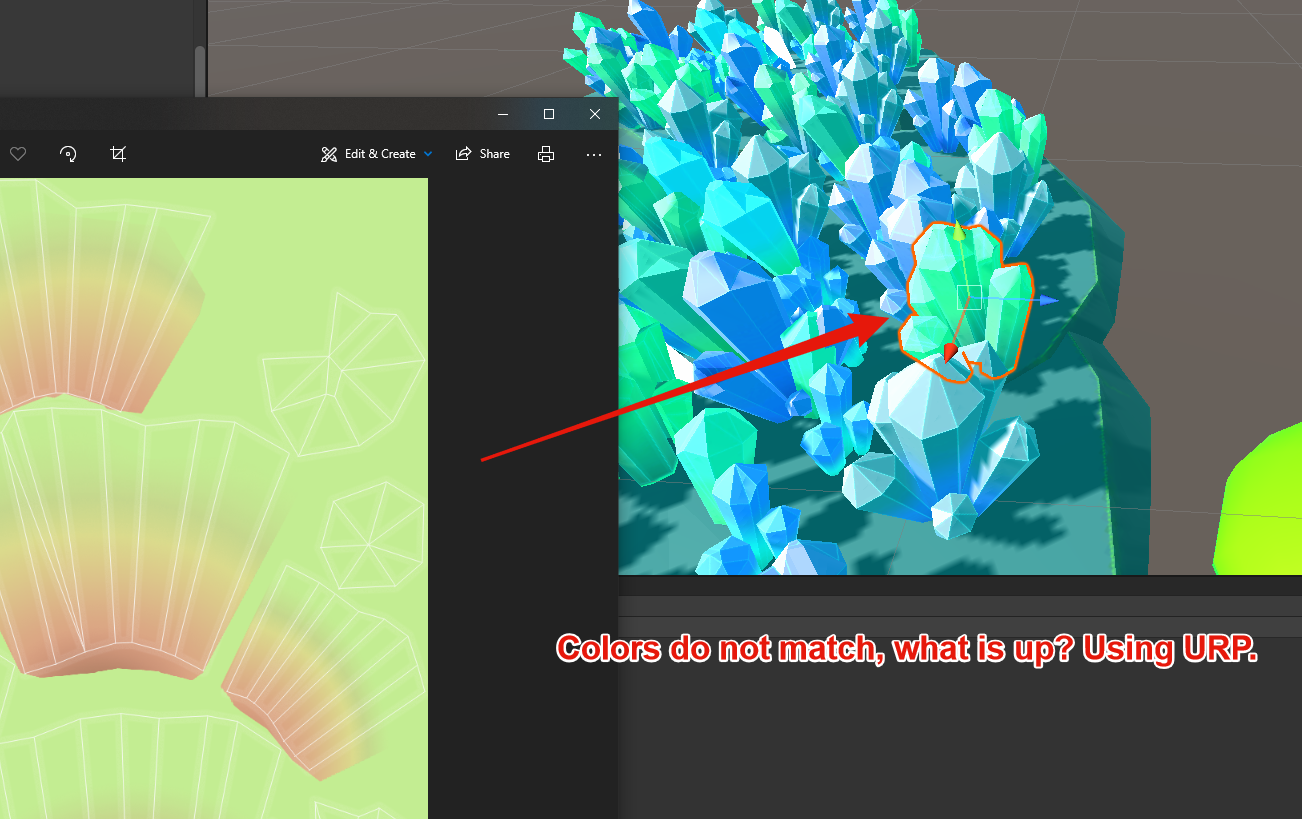
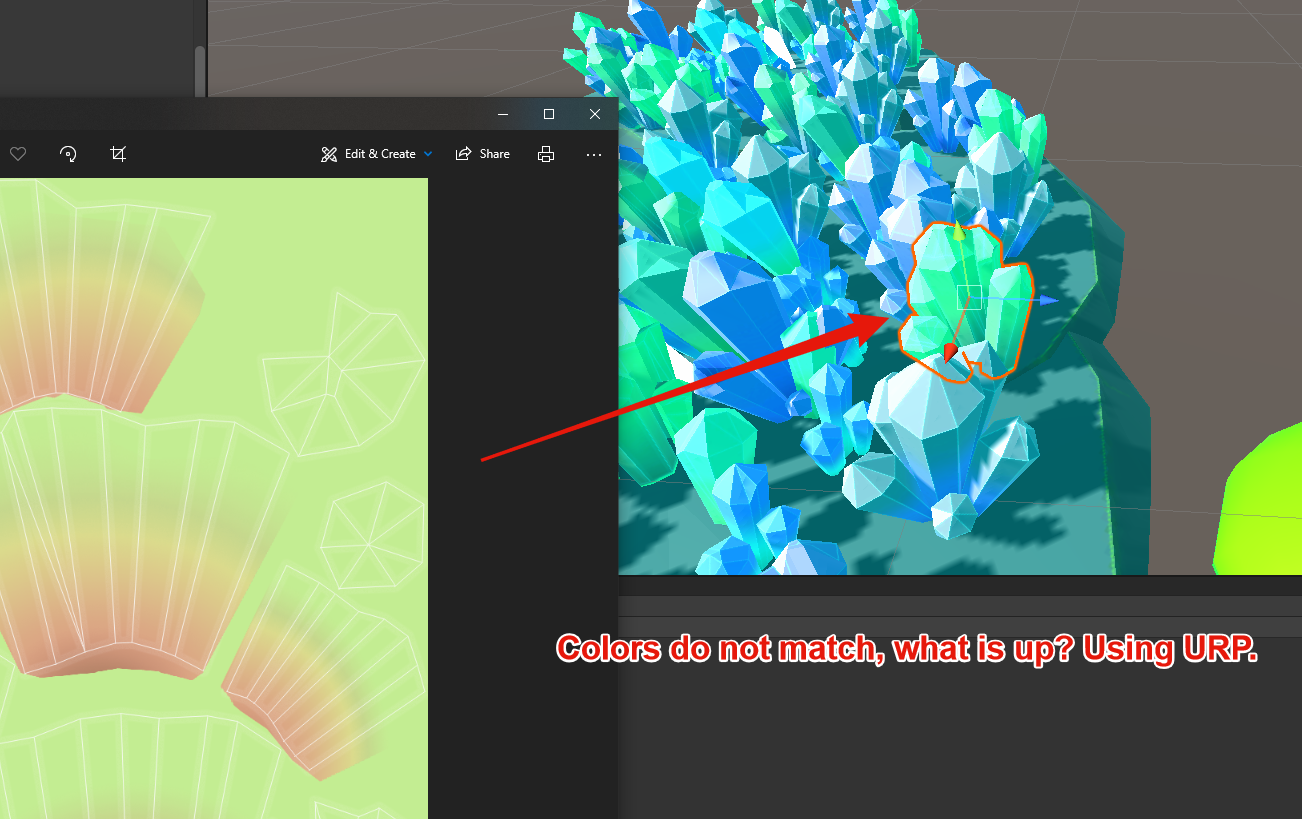
fixed it - gamma colorspace instead of linear
 lucid garnet
hey guys, I'm implementing a grappling hook mechanic on my kinematic char controller
is there any way I can get the springjoint's "current force" so that I can set my controller's velocity? I can't use the springjoint directly :(
I tried joint.currentForce but it seems a bit too high lol
 next sphinx
Hi, does anyone work with blender here?
ionic harbor
Hey for all that use Armor Paint 3d texture painter, pm me and i send you an invite to an unofficial server i made so we can have a chat for us users, i noticed there is no official. PM me 👋
 maiden tangle
next sphinx
Hi, does anyone work with blender here?
maiden tangle
next sphinx
Hi, does anyone work with blender here?
most do, if you have a question feel free to post