#🔀┃art-asset-workflow
1 messages · Page 56 of 1
 queen mural
queen mural
queen mural
it'll remain the same in size
queen mural
do i also have to change the scale of my plane?
 neat field
when imported its 1,1,1 in scale in unity
scale up in 3dsmax / Maya / Modo / Whatever
notice the size didn't change
only the scale parameter
queen mural
what param
neat field
if I export the scaled up teapot
neat field
then if you "reset" the scale you have a scaled up model at 1,1,1 in unity
the big teapot on the left is at 4,4,4 but have the same size, only the scale changed, so definitely not right
more clear with pictures..
and for your plane, you can left it at whatever scaling you need
the 1,1,1 scale for imported models is important for all the calculations unity does
for gravity per example
the object mass is defined by the object size and not scale
size / scale are different things
hope it's clearer for you
neat field
@queen mural after all this, also check your model isn't rotated at -90 on the X axis (in unity)
unity uses a different coordinates system than maya if I recall (same as 3dsmax)
 vestal hazel
queen mural
vestal hazel
queen mural
@queen mural after all this, also check your model isn't rotated at -90 on the X axis (in unity)
@neat field oh but the plane tho
Do I have to change those scales too?
Cuz I made that scale in unity
It wasn't imported
neat field
well it depends, if it's a ground plane no don't mind
queen mural
Ok
neat field
@vestal hazel Are you making those for a pack ?
queen mural
The whole size thing is kinda weird
neat field
Yeah the whole discussion about it is pretty confusing I know
queen mural
Like it’s representative but at the same time not
neat field
but it all can be resumed by Size and Scale are different things
queen mural
Cuz at first, it’s like it’s size in meters or whatever but then when it’s frozen it’s representative cuz although it’s 1,1,1 it’s size isn’t registered t 1 meter ,1meter, 1 meter
neat field
also i'm not english so kinda difficult to find the right words
queen mural
Oh
queen mural
Wait are you actually in France or are you just saying English isn’t your first language
neat field
i'm in france
queen mural
Oh
vestal hazel
https://us.v-cdn.net/5021068/uploads/editor/kn/rwtyru3ftie6.jpg
https://us.v-cdn.net/5021068/uploads/editor/fo/0qyo0idjlkd0.png
https://us.v-cdn.net/5021068/uploads/editor/7n/yrziw8qc3ag7.jpg
https://us.v-cdn.net/5021068/uploads/editor/qz/cogw5qdylt2j.png


 fleet forge
im trying to add new points to my poly following this video: https://youtu.be/CBa_opm3_GM?t=522
but it just does this and it doesnt even let me revert it with ctrl+z. Anyone?

The full editions of ProBuilder and Polybrush are becoming part of Unity feature roadmap. Learn more: https://blogs.unity3d.com/2018/02/15/probuilder-joins-unity-offering-integrated-in-editor-advanced-level-design/
this is what he is doing
lol figured it out im dense
still weird you cant ctrl+z the action though
queen mural
why is this happening to my model when i import it into maya
 storm spindle
@strange apex I just tested the model in Unity 2019.4 and it imports correctly. I'm suspecting this to be an issue with newer versions of Unity
neat field
@eager mist
storm spindle
@queen mural Probably super big or super small
 eager mist
neat field
<@456226577798135808>
eager mist
neat field
<@456226577798135808>
the problem is that 3 dont work\
neat field
Change it in the hotkey settings then
 strange apex
storm spindle
<@!206641667871211520> I just tested the model in Unity 2019.4 and it imports co...
strange apex
storm spindle
<@!206641667871211520> I just tested the model in Unity 2019.4 and it imports co...
interesting, thanks for testing it. Did you try to import it into 2020.2 ?
storm spindle
strange apex
interesting, thanks for testing it. Did you try to import it into 2020.2 ?
No. I'm installing it now
Generally i stick to the LTS versions so i havent tested on 2020 yet
strange apex
I would too but then I saw 2020.2 provides faster play mode and script compilation etc, I couldnt pass it up 🙂
queen mural
storm spindle
<@!382367523603087361> Probably super big or super small
doesn't seem so
so apparently that hasn't been the case...?
neat field
Didn't knew about this one
queen mural
yeah apparently it's just been on the whole time
neat field
You still need to know the unit system you're using across 3d apps for sanity
In 3d, something wrong at the beginning will give you hard times two days later
strange apex
storm spindle
No. I'm installing it now
Wait I could have imported the model in 2019.4, then export it via fbx and import the fbx back to 2020.2, right?
queen mural
neat field
You still need to know the unit system you're using across 3d apps for sanity
maya(cm), fusion360(mm), unity(unity units, a.k.a, meters)
strange apex
Unity uses meters as units
storm spindle
@strange apex in that case you could just download the model as fbx directly from sketchfab
but otherwise you're gonna need an fbx exporter
strange apex
storm spindle
<@!206641667871211520> in that case you could just download the model as fbx dir...
they dont offer the fbx there, only glTF, obj etc
yea I have a fbx exported tool for Unity
storm spindle
ah they got obj gltf and usdz
strange apex
yea
storm spindle
yeah you can export fbx from 2019 probably
neat field
Yep same problem as @queen mural you need to either rotate the pivot
or Bake Axis Conversion
in model import settings
queen mural
so i can change the pivot but i have to manually select where it is
where would i have to change it to
neat field
Depending of what you're doing the pivot is either at the model center or at it's base (floor)
at 0, 0, 0
queen mural
is this an issue
neat field
No
queen mural
ok
fleet forge
Any good ProBuilder videos taking you through the making of a building or something? the ones unity has provide are sort of unbearable as you constantly have to guess what hes holding or hasn't told you for your stuff to work the same as his.
queen mural
ok so i've determined that regardless of how the model was before it was imported, unity renders wherever it wants
queen mural
neat field
Depending of what you're doing the pivot is either at the model center or at it'...
it's definitely at the model center
unity still acting wonky with it tho
 slim wyvern
For a mobile game using URP what is a rough limit for verts my 3D artist should work within for a hero asset?
I know this is depends on the project and a lot of other factors but if anyone has a rough estimate or reference that would be useful.
Context: my 3d artist is overly cautious to the point of outputting overly low poly assets for a non-low poly game, this is resulting in lighting issues as the geometry doesn't have enough faces.
neat field
@queen mural There's also this to switch gizmo position between pivot and object center
queen mural
it's on center rn
well it looks like yours rn
ight confirmation that it's unity: when i use the rotation tool in unity it works fine and i see the change in inspector but when i type it it changes the position
neat field
If you reclick that button (the button says Pivot) where's the pivot
@slim wyvern There's no particular polygon number since performance really depends on a lot of things
No other rules than, few polys as possible while keeping the model good in your scene
queen mural
neat field
If you reclick that button (the button says Pivot) where's the pivot
idk i can't see it
slim wyvern
neat field
<@347435811223896064> There's no particular polygon number since performance rea...
I have a rough idea of our target fidelity but I've been struggling to come up with a way to convey it to our artist without modeling it myself. I was thinking maybe some range for verts could help but I'm not sure
neat field
It must be far away from your model, you need your model to be exported at scene origin (0,0,0)
But as I can see Fusion360 differ on the pivot subject, dunno what you can do
 lusty stratus
hi
neat field
@slim wyvern Can you share a screenshot of the issue/ugly parts ?
queen mural
neat field
It must be far away from your model, you need your model to be exported at scene...
oh i exported it from maya
neat field
Then center your pivot
neat field
and the object is at 0,0,0 in the scene in Maya ?
queen mural
yeah
neat field
And if you import it in Unity, place it in your scene, it places at 0,0,0 ?
queen mural
queen mural
neat field
And if you import it in Unity, place it in your scene, it places at 0,0,0 ?
nope
neat field
Where ?
queen mural
i have to go far back to find where it was hold on
ahh wait
the other objects aren't at the center
then why does this thing get move when i manually type in the rotation angle
amd why does it say zero for z postion when it's under the grid
neat field
So the problem is from Maya
neat field
queen mural
i've seen that video
he has a different version of maya
mine doesn't have the stuff he uses
4 year old video
queen mural
but the title isn't specific to the tips
oh wait
it's 2021 btw
i'm not sure what kind of tip i'm even looking for tho
neat field
Well
queen mural
queen mural
that's where the pivot is
what am i supposed to be changing it to
neat field
Maya 2021 center object at origin
queen mural
it looks right to me
neat field
Yeah but there's definitely something wrong when imported, so the problem comes from Maya
I see your object is in a group (in Maya)
queen mural
so the centering it origin won't change that since it already is?
queen mural
neat field
Wait is that it ?
queen mural
idk yet but it has a differnt pivot point
idk how to select the location i change the pivot point to tho
like i can move it but not a precise location
queen mural
ight i figured out the location of the thingd he used in this newer version of maya
not entirely on purpose but hey
so i tried to make a plane but it's 1,1,1 is so huge in comparison to the actual maze
and scaling it down to like .0something would cause issues right?
neat field
Its a default plane from Unity ?
queen mural
WOAH there buddy now the maze is like a fracrion of the size of the player
queen mural
neat field
Its a default plane from Unity ?
yeah
neat field
The default plane is 10x10x10 meters
1,1,1 is its scale
now resize things according to this plane
neat field
not on non-moving objects
queen mural
neat field
now resize things according to this plane
so i could just scale the plane down instead?
neat field
No size up your maze
queen mural
won't that cause issues
neat field
No the issue is your maze is 1 cm
queen mural
oh
neat field
What's the size of your robot next to it
and the plane with the two together
show me
queen mural
that's the maze in the robot's head
neat field
Allright robot seems fine, just scale up the maze
It would be better to have the correct size from Maya, but scaling up a static object isn't really a problem
queen mural
well actually it's supposed to be smaller cmpared to the plan
queen mural
neat field
Allright robot seems fine, just scale up the maze
it's not a problem, i can do it in
just need to figure out the scaling in unity first
ight so the scaling for the maze needs to be 90, 100 , 90
and the robot needs to be .02 x .02x.02
queen mural
neat field
You came from a 10km robot to 20cm
it's the maze to player ratio
the maze is suppsosed to be like a huge building
neat field
I'd make them 10x bigger, robot 2x2x2 meters and maze 900x1000x900 meters
Again the size, not the scale
scale in unity should remain 1,1,1
especially for the robot since it's moving and using gravity
and you'll be all good
neat field
200 x 200 x 200 cm
neat field
just scale it accordingly
queen mural
ik but i thought it set the size in maya then like scaled it to unity
now i'm confused cuz idk how to change the size
queen mural
there's a reset and there's a freeze
neat field
As long as your model in unity looks okay and has its scale a 1,1,1 you're good
queen mural
now i no longer understand
neat field
Simple, do whatever it needs to have your model at a correct size in Unity, with its scale at 1,1,1
queen mural
how do i know the size if i can only see the scale
neat field
I don't know Maya so can't help you there.. Place some cubes or use tools like tape or somehing
queen mural
what do i do with the cube
neat field
compare the sizes
queen mural
but i can't see the sizes only the scale
neat field
Well go learn about sizes and scales in Maya
queen mural
they seem to be the same
neat field
I don't know what to say
 glacial vector
I applaud you brett
queen mural
indeed
ight so i think i figured it out
basically scaling in maya is size and you can only scale by freezing transformations
queen mural
hmm i changed the units in maya to m, so the conversion is this
but it actually makes it smaller
cuz when i export a 2x2x2 meter robot it does this
slim wyvern
@neat field I decided to use the open-projects hero asset as reference for my 3d artist. Thanks for your help!
neat field
Good thinking
queen mural
it also takes a 900x1000x900m maze and makes it 9x10x9
neat field
you changed the unit system without rescaling everything accordingly
queen mural
wdym
neat field
in Maya I mean
neat field
changing the system in Maya does not change the size or scale
so when changing from cm to m - 1 cm become 1 m
queen mural
yeah
neat field
or I'm confused and tired and I talk shit maybe
neat field
🤷♂️
 lavish solstice
How to keep the aspect ratio from models in te UV (Maya 2020)? The bottom cube is suppose to be half size of the top cube
 hard quail
hey, so i made a basic tile based texture and i wanted to apply it to multiple models. The texture is simple, just a square with white and black squares and some details but the main texture only has 4x4 squares.
Is there a way to add automatic tiling to the material? Let's say i want to make a square that is 12x12 and i want each square to occupy 1 meter (or unit) in game so i'd have to do 3x3 tiling, however if i wanted to do another square with 12x8 i'd have to have a different tiling for this one where it would have 3x2. Is there a way to make it automatic?
I tried using shader graph and create a shader that is kind of working but even though the surface seems to work fine, whenever i increase the tiling the sides of the cube get the tiling with them even though i haven't really increased the height, and even if i were to increase the width in the sides it increases the ammount of tiles on the height e.e If anyone knows any solution or something that might help me plz @me
neat field
hard quail
hey, so i made a basic tile based texture and i wanted to apply it to multiple m...
If you want each tile to be a fixed size for all your models, World-Space UVs are what you are looking for.
Go ask on #archived-shaders since it's more shader related.
hard quail
thanks
queen mural
i made sure the scale aligned with the size and made it two meters but it still decreases the size
i turned off the unit conversion and it still does it
queen mural
i froze the transformation but it still did it
queen mural
after a day....https://youtu.be/8-Cra0_P0iI

Scale issues from Maya to Unity can be solved in the export settings of Maya.
Make sure your scene units are in Meters BUT your export settings are in CENTIMETERS. Imports into Unity3D will be the right size and scale factor will be 1 instead of 0.01
this is kinda weird tho. why is it so thin
 steady crystal
How does one go about making a stylized water stream
 oak pulsar
So i have a ik and im trying to make it to where it doesn't affect the root with the chain thing but my mesh just derps out NOT at the previous position and when i try and reset its just stays at that position is there anyway o stop this? thanks also this is for FPS arms
 wary kite
why does my blender model import all weird like this?
glacial vector
wary kite
why does my blender model import all weird like this?
Because you have inverted normals. Recalculate them in blender
wary kite
i did and now the interior walls are invisible, but the outside is fine 🤔
glacial vector
You'll need to do them separately in that case
wary kite
mmm what do you mean by that?
glacial vector
You can select your exterior and recalculate outside, and for the interior recalculate inside
wary kite
ooh alright alright
thanks i'll try that
i cant get these two faces to show from the inside
or outside
glacial vector
Use this in blender to debug
wary kite
where can i find that
glacial vector
glacial vector
wary kite
while every other face is blue
Then select the red faces and use Normals>Flip
wary kite
well im trying
neat field
Exact same problem as Vengie, your faces normals are inverted
 static pawn
k
 vague lynx
Hi, What is a easy and very fast way to create many Mask maps for the HDRP lit shader?
I have a bunch of Roughness/Metalness/AO textures I created In Blender and need them to be used in Unity ..
 golden laurel
Does anyone know a relatively easy way for me to display animated 3D models in a top-down view so I can rotoscope them into 2D animations? I ask because Blender is a very complex tool and I don't want to learn 3D modeling or animation, but all Blender tutorials are oriented towards that. Thanks in advance.
 vestal loom


 stray topaz
Hey guys 🙂 Does anybody have a clue why the rock in the middle, which I created with blender's rock generator behaves so weird? All 3 objects have the same material, but for some reason it's not working for the rock I generated 😫
glacial vector
Looks like it doesn't have UVs @stray topaz
stray topaz
that's true, thank you! that fixed it
 raven dune
guys, do you know of any discord/community where 3d artists hang out and take commissions? I'm spoiled by things like Rimworld Mod Market, and searching for something similar for general 3d commissions
eager mist
god im so confused i just wanna make this 3d button play an animation and audio on mouse click how can i do that??? event trigger wont work for some reason
someone please help me
eager mist
i have a collider on the button
but what do i do with that code @brisk cipher
someone sent me this but it didnt work
  RaycastHit hit;

    Update()
    {
        if (GetMouseButtonDown(0))
        {
            if (Physics.Raycast(Camera.main.transform.position, Camera.main.ScreenPointToRay, out hit))
            {
                if (hit.transform.tag == "Button")
                    PlayAnimationAndSound;
 brisk cipher
you don't need any of that code, OnMouseDown does it for you
brisk cipher
well what do you want to happen
eager mist
i cant code well
i want an animation i have that moves the button to play and an audio source to play
both on bool enabled
brisk cipher
do you have an animator to access?
eager mist
brisk cipher
ok, and do you have the animations set up with triggers or bools?
eager mist
yeah... i never even messed with that idk how i would even do that
this is the animation basically
brisk cipher
does it just go down?
brisk cipher
you might just want to do that in code, it will be faster than setting up a state machine like that one
like two lines of code
eager mist
how would i go about that
 cloud patrol
Hello, do you know a simple unity project?
eager mist
?
cloud patrol
do you have a simple project
eager mist
i cant seem to get this cube to be clickable to activate a sound
glacial vector
Since this is about code you should ask in #💻┃code-beginner @eager mist
glacial vector
If it's a while ago you can try again
 compact mantle
Hi guys, I have a little issue here. I'm creating a URP material with a opacity texture, but, It's making transparent all the object, any idea?
 errant plover
Make sure URP is up to date.
 serene hedge
are 3d scans legit way to create models for a game ?
 sullen plank
serene hedge
are 3d scans legit way to create models for a game ?
sullen plank
serene hedge
are 3d scans legit way to create models for a game ?

Unity
Produce excellent, reusable, game-ready digital assets from photos and video with this comprehensive guide.
golden laurel
Does anyone here know how to use UMA?
wary kite
its fucking scary
eager mist
what
no
its cute
just things i drew are little bit scary
i also draw
and its my very first model u cant judge on it
need some ideas for i horror game, i have a standard idea where your on holiday in a cabin but ur not alone...
mother fricker
its not scary
it wont be good if its your pet
this is scary
 vapid fulcrum
oh lord
glacial vector
Please stay on topic
 amber walrus
@wary kite @lone violet Don't post random gifs.
 lone violet
amber walrus
<@!470376013231161344> <@!557566362940080138> Don't post random gifs.
lone violet
amber walrus
<@!470376013231161344> <@!557566362940080138> Don't post random gifs.
ok sry
 cedar socket
How friendly is 3D modeling to the non-artsy inclined?
 ionic harbor
I cannot paint details, im choosing add detail mesh but nothing happens when trying to paint
anyone?
errant plover
@cedar socket depends on your experience. You could do vertex by vertex, you could sculpt, you could use modifiers. Also depends on the art style you want.
golden laurel
Does anyone know how I can record this animation in a way that lets me reproduce it with a decent loop?
Would playing the animation only once get me what I want?
(I'm recording it in unity 3D and tracing over it in gimp)
 fiery gazelle
@serene hedge pretty sure thats how they made donkey kong country in Snes
vestal hazel
 strange marlin
hello, im new to Unity, and i got some questions about how to start a 3d project, can i ask them here?
or technically a pre-project question
 viral cypress
Go for it
strange marlin
false alarm, i have figured out what i needed to
turns out i didn't install the actual editor
 languid siren
can i say that looks like painted Steelframes ?
eager mist
i imported a model i made on blender to unity, as .blend, but the eye texture isn't transparent in unity. In blender, the transparent parts are black, but i expected when i added the model to unity, it would be transparent, but it's not
it's still black
was i supposed to first export the model from blender(, .obj, .dae, etc, instead of having it as .blend) then import that to unity?
errant plover
@eager mist you would have to make a transparent material in Unity and then assign it to the eyes.
eager mist
ah i actually saw a video that said you need to edit the Opaque to get it transparent i think, but unity doesn't allow me to edit anything here
eager mist
I cant edit the ''Rendering Mode'' for some reason
look at screenshot
at the top, Rendering Mode is Opaque
i need to change Opaque
wary kite
make a new material and then you'll be able to edit it @eager mist
eager mist
ah ok thanks i'll try @wary kite
eager mist
wary kite
make a new material and then you'll be able to edit it <@456226577798135808>
i think it may have worked :D
wary kite
very cool
eager mist
kinda weird unity doesn't allow to edit imported materials immediately tho
wary kite
ikr, maybe there is a way but im just not aware of it
 worn yarrow
Does anyone know if it's possible to change a game object's vertex colors in editor without changing it's material/model? I'm trying to use a large number of identical meshes to compose scenes in my game but have varied colors and maintain batching.
When I change the vertex colors of a model with either ProBuilder or PolyBrush it creates a new instance of the model instead of its original model and drops my "save by batching" count significantly. Even once I've changed it's color and duplicate the object, each new object with that color starts to reference a new model from the last in ProBuilder/PolyBrush.
I'm trying to avoid creating a ton of identical model files in my project that only differ in their vertex colors
glacial vector
That sounds like a probuilder thing, you should be able to paint vertex colours and preserve batching... Maybe try converting the probuilder assets to fbx and see if behaves the same way
worn yarrow
Right, I can get around it by creating a new export for each color I want, but then each differently colored instance of the model requires an identical model file stored in my project that only differs in it's vertex colors
Which is why I was wondering if there was a way to alter the vertex colors at the inspector/component level rather than storing a ton of identical models in my projects folders
glacial vector
No I don't mean like that, I mean export a single FBX, duplicate that, paint vertex colours, and then check your batching
You shouldn't need duplicate mesh assets
worn yarrow
How would you suggest painting the vertex colors?
Currently I'm doing it using Polybrush
and it creates a new model instance each time
glacial vector
I'd check the asset store and github and check if you can find one which doesn't do that
worn yarrow
Hmm I'd love to find one! I've been searching to no avail. But thank you for the tips. Surely there is a way to make this work...
glacial vector
My assumption after having done this in Unreal is that it should be possible, at least
worn yarrow
Right I would think so. I'll keep looking!
 heady wharf
Is it possible for unity to check for the name of a mesh? Like if i make it that every mesh that has a name that starts with ”det_” then every mesh should be detachable?
 velvet mulch
Does anyone know why transparency doesn't work
If i tick the Alpha Is Transparency this happens
 void thicket
languid siren
void thicket
languid siren
if i have in an FBX multiply Objects can i use a Own LOD for each Object ?
cedar socket
anyone have any good resources for learning 3D combat?
errant plover
@languid siren what?
languid siren
errant plover
<@!291256606707023882> what?
what i mean is. for example i make in blender 5 meshes and export that project as .FBX so can i use LOD seperate LOD for each mesh ?
wary kite
if you havent joined the meshes then you should be able to
languid siren
wary kite
if you havent joined the meshes then you should be able to
thx^^
eager mist
Trying to make tri-a radial symmetric creature in blender
I'm using linked duplicates but Idk what to do about the overlapping parts
anyone have any ideas?
 quiet flint
Looking to hire a 3D Artist, message me (PAID) - I'm not sure if I'm allowed to post this here.
 crisp knoll
is modelling a tree hard?
errant plover
@crisp knoll it can be if you don't know what you are doing. I suggest using an addon for your first trees. "Sapling Tree Gen" in Blender addons.
 viscid garden
 lime wing
WHY ARE THERE NO SHADOWS
WHY THE HELL
ARE THERE NO SHADOWS
GOD DAMNIT
I HAVE BEEN TRYING TO FIX THIS
FOR 2 HOURS
WHY ARE THERE NO SHADOWS
 mystic olive
lime wing
WHY ARE THERE NO SHADOWS
WHY THE HELL
ARE THERE NO SHADOWS
GOD DAMNIT
I HAVE BEE...
mystic olive
lime wing
WHY ARE THERE NO SHADOWS
WHY THE HELL
ARE THERE NO SHADOWS
GOD DAMNIT
I HAVE BEE...
what are your light settings?
on your direcitonal lights
lime wing
oh sorry we just fixed it
mystic olive
oh ok
mystic olive
lol
 pseudo panther
anyone know how to fix an exported model missing vertices?
 next gust
hi everyone, i have big problem with HDRP 10, i have made my project with 2020.1.6 version and just updated it to 2020.2.2, fixed some bug like coding and shaders, but there is only one problem that still exists, when i'm switching to DX12 in PlayerSettings, after working for minuets and moving around the scene, unity getting real lagging i dont know why but if i just use DX11, there is no issue like this. is it because of nvidia settings or hardware or something ?
i have 16 GB RAM
6GB VGA - RTX2060 OC
i5-9400f
can someone help me please , thanks ...
 hidden crane
are you spawning too much objects?
 errant rune
Hey how can i import Blender models with their colours?
 fringe hazel
🤣
 leaden jolt
hello
i imported a "force field" from blender into unity and the blend has emmision shaders on it but they dont show up
anyone know how to fix this
leaden jolt
hello
errant plover
You need to make the shaders/materials in unity.
Use blender for modeling and baking textures @leaden jolt
sullen plank
leaden jolt
how do i make a glow texture
Glow effect is usually achieved by combining the use of high intensity HDR colors and #💥┃post-processing Bloom (resources are pinned there).
 dire ermine
Working on models for my next unity scene 🙂
leaden jolt
sullen plank
Glow effect is usually achieved by combining the use of high intensity HDR color...
Ok thanks
vestal loom
Progress: I learned how to do sculpting. 😁
Any feedback is appreciated. ♥️
#Blender3D #blender #b3d #3Dart

 Twitter
·
Twitter
·
 cobalt marlin
what is wrong with that normal map u think ? thats all normal inside substance painter and i exported it as openglnormal for unity.
glacial vector
What format did you export as @cobalt marlin?
cobalt marlin
i tried - targa tiff png jpeg
8bit - 16bit - 8bit with dither all the same result
in additional when i click to fix it or change it to normal map , it turns my normal map to little bit whiteish color
glacial vector
Hm I see, I'm not sure
 umbral moth
im a nobb in Unity
 left kite
umbral moth
im a nobb in Unity
left kite
umbral moth
im a nobb in Unity
a nobb?
umbral moth
noob
leaden jolt
does anyone know how to make a translucent texture
 loud pawn
how to create player avatar
 swift estuary
your normals are messed up
show the normals in blender
dunno off the top of my head
but there's a setting for it
like
the normals are pointing inside the model
normals should be facing outside of the model, perpendicular to the surface of the face
viral cypress
When exporting say as fbx choose just the animation or save the animation separately or better yet you can make the animation in unity
@leaden jolt in unity when the mat is made go to where it says opaque and switch it to transparent you an now go into the color and change the alpha
 eager mist
Hey, I've been kinda stumped but how do I import MB files into Unity Assets?
eager mist
eager mist
Hey, I've been kinda stumped but how do I import MB files into Unity Assets?
Simply you can't
Fuck alright.
Thank You
No Problem!
OBJ's work with Unity RIght?
Yes
Alright
I'll convert my files
I got em' off Oculus
I'm very tired
I think Maya could fix this
I have no idea
vestal hazel
 lapis glen
I have a weird noob question, the answer is probably super-simple but i can't figure it out
how would I optimize the implementation of a mesh with five texture variants? essentially, I have five instances of the mesh, but they each have a unique texture. Would I build a texture atlas, and if so how would I operate it? If it helps, the textures are all essentially color variants.
vestal hazel
 craggy timber
anyone know how to set armature visible through mesh in blender? i forgot
 upbeat sable
Guys i have a question here. When importing a lot of 3d models into unity as 1 object(house with furniture) is it possible to import it with materials? And how to do that? Should I bake them before I import them to unity?
Some basics materials on my models that had no uvs lost their metallics and roughness but kept color :/
viral cypress
@upbeat sable so because how unity is blebder materials dont work with it. And I beleive there is no way to get them in... other than plain materials just a color switch or texture painted ones then your out of luck
@lapis glen instead of different meshes get just the materials and then in code access the mesh renderee and change the material in code during any thing you want it to activate during
lapis glen
I'm not sure that would work for me. I'm essentially using the one mesh (a watering can) to create a row of five watering cans, each of which has a different color. Five objects all referencing the same mesh, more or less.
viral cypress
Ok so if in code I guess you cab make a function finding all and learning all the mesh renders then changing all at once
I dint know of a way to have one mesh be 5 at once unless you make the all 5 together in blender
As one mesh
swift estuary
lapis glen
I'm not sure that would work for me. I'm essentially using the one mesh (a water...
I don't see how @viral cypress's answer was not useful for you. Same mesh, different materials
leaden jolt
does anyone know any good youtube videos to make arms for an FPS game
 mossy cedar
on the right is my model in blender, but on the left you see it in Unity and it's got some textures that are completely transparent and you can see the other side of these little batteries
I'm also getting an error complaining about self-intersecting polygons being discarded
not entirely sure what's going on, I've googled the error and merged all vertices by distance
mossy cedar
sorry what does messed up normals mean
 viral tide
vestal hazel
viral tide
vestal hazel
I love all this stylized work. I wish I could sculpt stylized like that 😦
vestal hazel

ArtStation
Zbrush props_01
Some props made for Zbrush subject. Still learning the program and trying to improve to make all those cool things people are making here.
 mystic juniper
Any idea why my normalmap makes the material shiny? Without normalmap: https://i.imgur.com/OPqcTLd.png and with: https://i.imgur.com/rHgeOXg.png
 glacial vector
Looks to me like your normal map is wrong
Does it have the right import settings?
mystic juniper
blender settings: https://i.imgur.com/GA59Kwr.png
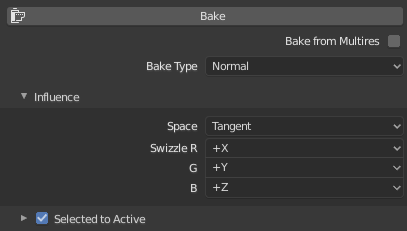
same thing happens if i try to make a normalmap with gimp, i've tried multiple different settings
 timid karma
Hiya, i can't figure out the cause of this issue, i've got a character and a set of clothes i skinned on them, and when i bring it into unity, the clothes stay on them fine, but i've been following a tutorial where you create prefabs of the clothes and am trying to make it so i can pick them up off the floor, but this happens to them when unity instantiates it to the root bone. Any Ideas? The pics in order are, Unclothed, 1 piece of clothing, all 3 pieces.
should look like this
errant plover
Recalculate the normals. @timid karma
timid karma
how would i do that?
errant plover
Edit mode, select all faces, Shift N
timid karma
hmm, i can't find out how to open an edit mode
errant plover
At the top right of the viewport, you can select the drop down for viewport shading. Check Backface culling.
timid karma
ohh, you mean in 3ds
errant plover
Select the object, press tab to go into edit mode.
Sorry, thought you were in Blender.
timid karma
the normals are all facing outwards
the issue is in unity, sorry
like i can see the clothes, they're just squished up between his legs
timid karma
the human i grabbed, but the clothes i did
errant plover
You probably need to apply the scale in Blender, before export.
timid karma
oh right, so they all need to be 1,1,1 scale?
i might have accidentally scaled the primitave i started with for the clothes rather than scaling the vertices
i'll check
errant plover
Ctrl A in object mode to apply the scale.
timid karma
hmm, only the shirt is scaled slightly, the boots and the main body are fine
oh wait
do you mean the issue is that i scaled up the model when i brought it into unity?
cause if that's the case, the model is like 100x the size it actually is
if that's the case that's my fault for being lazy and just trying to put something together quick so i could follow the rest of a tutorial
errant plover
I can already see there are several issues with your model.
Which 3d program is that?
timid karma
3ds max
errant plover
Ah, I only know blender. You gotta fix those legs tho.
eager mist
hey guys i am looking for 3d human figures of specific footballers..i tried various websites but didnt get it...can anyone tell me how to get it or make it??
eager mist
eager mist
hey guys i am looking for 3d human figures of specific footballers..i tried vari...
@everyone
 viral patio
nice try ☝️
never ping everyone if you're a regular member
@eager mist have you tried sketchfab or turbosquid?
there's plenty of free models which you can choose
once you find a fitting model and needs adjustments, you can simply use a 3d software to edit it (reshape, adding new polygons, etc)
eager mist
viral patio
there's plenty of free models which you can choose
i didnt get any free model there??
viral patio
even searching by price?
you could just simply set the price to Free to find em easier
eager mist
hey i wanted anatomical structure of human being
viral patio
ah you want to pay for it?
eager mist
no not at all
viral patio
Find the best selection of Football Player 3D models and Football Player textures for instant download and use from the best online 3D model catalog.
eager mist
all i want is empty 3d human model and impart footballer on it (from images from various angles)...however i cant get 360 degree images of it!!
viral patio
ahhh you need reference images
eager mist
viral patio
ahhh you need reference images
yes yes
viral patio
 digital whale
Wow Amazing,
digital whale
I come from a Platform called 'Roblox' Worked there for years, But I shifted to unity recently, And unitys hella better and is like xmas to my Developer eyes lol, Hopefully I can learn lots from people on the Official server here.
I love the rounded edge on that Part, Really goes well with the angled Parts on the lower struct of the chair.
 dim karma
Too bad I dont know nothing about programing, im hoping that i could get a job somewhere after my course
dim karma
digital whale
I love the rounded edge on that Part, Really goes well with the angled Parts on ...
Thanks :>
digital whale
Im trying to learn the more complex mechanics of Unity's 3d modeling now.
dim karma
You can model in unity? :0
digital whale
In what way? Do you mean rendered from A modeling software?
dim karma
Couse i want to make contend for my youtube channel.
dim karma
digital whale
In what way? Do you mean rendered from A modeling software?
In blender
digital whale
AH yes Thought so,
dim karma
It would be cool if i could do the process. As for now i only know how to make models
digital whale
Well take my advice having shifted from a platform recently,
digital whale
Make a file, And just hit and press and mucka round with settings and buttons and learn what they do,
dim karma
Hah
digital whale
If it goes wrong, Learn why delete file and re try.
dim karma
Ive tried to learn the program by myself before. And.. Well dint work
digital whale
Ive wanted to myself but with script [Coders please correct me] Its best to take 1 step at a time.
However 3d modeling,
Go have fun son
dim karma
Heh
digital whale
Ive used blender in the past but I just find area's over complexified in ways where its not needed.
dim karma
Maybe it is. There are many ways to do things
You have shortcuts and you can click on the function manualy
digital whale
Interesting.
dim karma
While i was on lession yesterday i quickly noted the shortcuts he said
And then from my table and chairs, i added new chairs, fork, lemon and plates xD
digital whale
I want to get on A development coarse, Ive always self taught myself with development.
Dont know if thats good or not /;
dim karma
Of you understand it
Then i guess its what maters
But if you go on that course, you might understand it beter. Or you can try to learn it by yourself
dim karma
Heh
Oh i cant wait till i can do the whole process of creating a movie scene in blender
digital whale
What's interesting for me is, Somebody who has seen my dedication and loyalty wanted me to work for there project and said, We dont care the time it takes, Get familiar with unity We know your going to love it [I did a lot] And they know I have a skill of adapting to new things, And then they asked me, 'So why would you want to join? For the money? Fame?' , I said 'The passion to learn create and explore A game and growing community and new Stretches to what's possible in games for new and amazing growing player experience. And that is why I love to develop.
dim karma
Thats amazing
digital whale
Its so much fun ;D
dim karma
I get you xD
digital whale
I went nuts soon as I got into unity, First day I was fluent in cam controls [As you know different software's love to have different movement feels] ,Learnt part placement and terrain creation and modification, Day 2, Learnt how to make more complex structures Import textures and video's plus render them onto parts and use more complex camara angles and tuned lighting settings, [Following day PC broke (Still is )] So Im itching to get back onto unity, Like 2 days.. Imagine what I can do within a week like hell yes.
And my skillset I have is 3d modelling, Layout mapping And design [I think it falls under game objective and storyline designer] Team management and leadership AND HELLA HIGH MORAL AND ENTHUSIASM.
So I think Know ive got a good shot at things.
Soon as my PC is back I want to make A full scale city. lol
'Hell yas' ---> First few minutes foreshadowed XD
^^ First few minutes in the new software
dim karma
Woah, thats cool
digital whale
I must say been lovly chatting with you bout developing.
 night socket
Anyone know why Unity isn't importing any of my animations/actions from my .Blend file? It only exports the active one (naming it "Scene").
I'm using .blend instead of any other format because it's easier to see changes I make (only have to save the blend file instead of having to export, making sure export settings are correct, etc)
its also easier to get the textures, since I just have to save the blend file to my models folder and unpack
 acoustic horizon
Took a character creation for games course. Alot of fun!
vestal loom
Progress: Learning how to sculpt a hand. 😁
Any feedback is appreciated. ♥️
#blender #Blender3d #3dmodeling #3dart #3Dartist
 Twitter
·
night socket
Twitter
·
night socket
How do I fix problems like the wrist shrinking when trying to rotate the hand. I can't use preserve volume because Unity and doesn't support dual quaternion skinning
eager mist
I need to create 100 rocks, and I only have 2 rock textures that arent seamless
Does anybody know the best way I can go about putting these 2 textures on 100 drastically different shapes without any seams? I did Box Mapping on blender, and it did what I needed it to do perfectly, but whenever I tried to bake the texture in, I would get a weird black texture that doesn't even remotely look like my original texture.
errant plover
You could make a paint brush out of the texture you have.
@eager mist https://www.youtube.com/watch?v=YNxmh5UVi08
 wild pelican
I believe i want to lower the mesh quality / vertex data of my mixamo characters for mobile so i can use more characters on screen. What is best for this? Manually in blender or something or use one of those unity mesh altering LOD assets
errant plover
@wild pelican blender. You can make your own new model over top or play with the decimate modifier or use a limited dissolve or do it by hand.
If you are asking that question, it'll probably be easier for you to start with a limited dissolve and then decimate.
wild pelican
@errant plover ok thanks ill give it a shot!
eager mist
Hello
viral cypress
Ok so what is the best aproach to getting realistic material, i know its mainly about having the right maps but in urp how exactly do i use say a height map, occlusion map, mask map, or any other maps besides albedo and normal
 quiet hedge
Im getting an error when Importing a FBX file from blender into unity, where some parts of the mesh are completely white, regardless if if has a texture or not. It has a custom material and 70,000 or so tris. Can anyone help me?
Ping me if you can help, thanks
quiet hedge
Sorry never mind it was a lighting error! (whew!)
 plain idol
I am having a weird issue on unity not sure where to really check into it. I have a character that looks fine in blender, looks fine in unity, but once it is in game with any material at all it shows up as broken pink shader error. Other models in the project don't have the issue and I have checked everything on the blender side. There is also no console errors.
swift estuary
plain idol
I am having a weird issue on unity not sure where to really check into it. I ha...
Which render pipeline are you using and which shader is the material using?
I know you said any material at all...
but usually it means the material is using a shader that doesn't work with your render pipeline
plain idol
swift estuary
Which render pipeline are you using and which shader is the material using?
I figured it out. The character had a material switch in unity that was switching to a material that did not exist. How could I overlook something so simple. I have been trying to fix this for like 3 weeks.
On its idle animation.
swift estuary
Sometimes you need to just rubber ducky something
and heave someone ask you a question that should be obvious but makes you double check
 sour oxide
Maybe this isn't quite 3d art but it involves Blender exports to Unity. I have models with empties that I use for markers. These markers are almost always axis-aligned so one of the coordinates will be zero. Using the pinned recommended export settings, I end up with some of these markers having coordinates very close but not at zero in Unity. I can't apply the transformations pre-export since that messes with the empties and if I don't apply the transformations on export, there is some sort of adverse rotation no matter which up and forward axes I use.
Is this just something that I'll have to correct with an importer script or is there some other action I can take to get a proper export?
plain idol
Very true
 molten pike
hello, this is my first time in this server. I am completely TRASH at this, i am utterly and purely a programmer. but still i wanna make my own games and dont want them to look complete shit. So i am learning this for the first time now lol
eager mist
Same lol
 minor sparrow
Hello! Here is a "Sci fi toaster" that I have been working on for the past couple of days on and off, and it's finally done! please ping if you have any feedback or anything else to say about this. ♥️ (Made this in Houdini)
eager mist
Some playlists for beginners
https://www.youtube.com/playlist?list=PLn3ukorJv4vs_eSJUQPxBRaDS8PrVmIri
https://www.youtube.com/playlist?list=PLjEaoINr3zgEq0u2MzVgAaHEBt--xLB6U
https://www.youtube.com/playlist?list=PL8eKBkZzqDiW_w4GtQTIGGiNM-l6XQxUT
https://www.youtube.com/playlist?list=PLa1F2ddGya_-UvuAqHAksYnB0qL9yWDO6
https://www.youtube.com/playlist?list=PL3UWN2F2M2C8-zUjbFlbgtWPQa0NXBsp0
https://www.youtube.com/playlist?list=PL8eKBkZzqDiU-qcoaghCz04sMitC1yx6k
https://www.youtube.com/playlist?list=PLgO2ChD7acqH5S3fCO1GbAJC55NeVaCCp
https://youtu.be/At9qW8ivJ4Q


YouTube
The new Blender Donut tutorial, completely remade for Blender 2.8


YouTube
Get up to speed with Blender 2.8 in this updated official video series!

YouTube
Learn the fundamentals of Blender 2.8 while creating a beautiful 3d scene from scratch.
 digital basin
Hello
viral cypress
does anyone know how to use height maps in urp
 maiden tangle
viral cypress
does anyone know how to use height maps in urp
maiden tangle
viral cypress
does anyone know how to use height maps in urp
Is there not an autodesk option?
For the material shader
Have not used urp in a minute can't remember if that was available
viral cypress
I doubt beleive like in standard shaders for the regular there is a height map option but in urp it's gone, I read that it was replaced with something else but I dont ybderstand
 west wave
acoustic horizon
Took a character creation for games course. Alot of fun!
west wave
acoustic horizon
Took a character creation for games course. Alot of fun!
That's neat. Out of curiosity which course did you take?
And to play the animations, did you have to code it or what.
Wait nevermind about playing the animation
acoustic horizon
west wave
That's neat. Out of curiosity which course did you take?
This was a course called "Blender Character Creator v2.0 for Video Games Design" that I took on Udemy. The instructor Grant Abbitt has a very nice youtube channel too.
leaden jolt
hello just a question, does a UV texture from blender appear in unity
errant plover
It might if you import a .blend.
west wave
Thanks
eager mist
Blender burger
 craggy flume
Sorry to bug, can someone help me with understanding why my scene view is so low res? I'm seeing steps on all the lines, and the shadows around the ladder are all wrong. This is the Auryn Forest Pack that everyone uses for testing stuff
Shadows literally have steps 😛
Doesn't happen when I hit play, though, I think
languid siren
if i use LODs on my own character do see me others from for example 200m away as low poly but i see my self as highpoly ???
glacial vector
It happens per camera yes
languid siren
glacial vector
It happens per camera yes
thx ^^
errant plover
What kind of texture do you want? @leaden jolt
 nocturne marlin
Hey guys. Could someone explain me how to get the texture from blend file? I got a blend file with some object IN blender in preview render mode I can see its nicely colored. Shaders tab shows that there are some materials made with shaders. How do I export this model so I could have a texture and apply it in unity so its textures in unity as its in blender? Im total noob with blender grrr
glacial vector
You'll have to save the texture as an image from blender @nocturne marlin. You can't bring the shader across
nocturne marlin
@glacial vector How I can do that? can I save the shader to the texture? bake it somehow?
 hollow rampart
^ why do my texture 2d arrays look this way? Source textures are rgba8 pngs with alpha. It doesn't seem to matter what pixel format I use, when alpha is preset texture 2d array slices turn out this way.
if alpha is disabled on texture 2d import, it looks normal except alpha is just black
glacial vector
nocturne marlin
<@!235467086984380418> How I can do that? can I save the shader to the texture? ...
Yeah baking would be the right word, I'm not sure how to do that in blender unfortunately
errant plover
Blend files don't save textures in them. @nocturne marlin
You'll have to import the texture into Unity and remake the shader.
 agile flint
Hey, total novice here
I've put together some textures for a friend to use in Unity
But once they're in the engine they're compressed/blurred a ton
Changing compression settings doesn't seem to work?
Comparison between Blender vs Unity:
glacial vector
Change the filtering mode on the texture to point @agile flint
agile flint
It's already set to point, doesn't seem to make a diff
 vital fable
do someone have a script that when i press w it starts a walking animation ?
errant plover
Turn off compression?
vestal hazel
errant plover
Texture supposed to be so small?
agile flint
It looks like that in game mode as well
I'll ask about the quality settings?
errant plover
It should be fine with that filter mode
agile flint
This is insanity! Lol
He did press apply and nothing changed!
Can you send a screenshot of the properties?
agile flint
That is incredibly strange
errant plover
Are you entering play mode on the highest settings?
errant plover
Edit > Project Settings > Quality
Set Default level to High
Texture Quality Full Res
I am on URP.
I assume you don't need HDRP for that art style.
agile flint
he hadn't been on urp but even a new project on urp yielded the same results, unless there's smth in the properties we missed
he's trying the project settings now
oh wait hang on might have smth
Wut. Alright so I think we worked it out!
Somehow, the actual source PNG files were compressed
which is just immensely strange, we don't know how or when that happened
He redownloaded the textures and lo and behold.. We had our detail coming through again
thanks for the help lol
 coarse wolf
anybody can help me with quixel mixer?
i made a color id map in blender and imported the mesh and the colorid map into quixel mixer
those art smart textures
and it looks so weird
no details or anything
basically just color and glossiness
 thorny wasp
Is it simple to combine these 2 objects into 1 in blender? If so. how?
errant plover
Ctrl J to join objects
thorny wasp
Lemme open blender
@errant plover In blender it looks like 1 obj?
In unity there are 4 peices
errant plover
Weird, no idea.
thorny wasp
I just re-exported and and its now 1 model... Strange
 agile jungle
Hey guys. Looking for people who who like to help us build community created maps for the VR FPS Alvo. Ping me if you are interested. Thanks!
quiet hedge
im getting the "spine not parented" issue in the vrchat sdk 3
how would i fix this?
without unpacking the prefab
 molten venture
With these sprites on a plane would you make them face the camera or just face forward?
 scarlet quail
Can anyone assist me with piecing my player together? I currently have body / head & head in seperate FBX's with their own rigs (which use the same animation).
what is the best way to utilize them, the game requires the head and hair to be swapped out during creation between 12 variants of each.
Currently the head and hair have the exact same rig as the body, so how do i go about stitching it all together?
 agile aspen
molten venture
With these sprites on a plane would you make them face the camera or just face f...
agile aspen
molten venture
With these sprites on a plane would you make them face the camera or just face f...
that looks really nice, is that ur game ?
 minor stone
Anyone know a 3d fps/fpp game requires to hold the right mouse button in order to rotate the camera of the player?
molten venture
agile aspen
that looks really nice, is that ur game ?
na, not mine: https://kebabskal.itch.io/pink-river
 molten venture
minor stone
Anyone know a 3d fps/fpp game requires to hold the right mouse button in order t...
molten venture
minor stone
Anyone know a 3d fps/fpp game requires to hold the right mouse button in order t...
na, why would a game do that lol
 vague rune
I am brand new to Unity and am working on a project that I just imported from MAYA, I have frozen transformations which means that the rotation and position values all equal 0. I don't know how to get the object back to a no rotated state. Can anyone help?
glacial vector
We do this in our application haha @minor stone
Your issue is unclear @vague rune. Is it rotated in unity and you don't want it to be? Or did you freeze transforms when you didn't mean to?
vague rune
rotated in unity and I don't want it to be.... in Maya the transformations have been frozen in MAYA and cannot be reverted back, its for a school assignment, where we also had to delete the history (which got rid of ctrl+z'ing it)
@glacial vector
glacial vector
Is the rotation in unity 0,0,0?
vague rune
correct
glacial vector
then you'll have to rotate it in Maya and freeze transforms again
vague rune
is there a way in MAYA to get it to snap to the grid? Since doing it manually seems to be highly inefficient and wrong
glacial vector
hold J while rotating
 silver wren
I'm trying to make a vr chat avatar for a friend and I'm trying to setup an animation for him to make it change materials but one of the vertex groups is messed up so when I add a keyframe to it it overrides a different material
Any idea why that might be happening?
swift estuary
Anyone know how to lock some vertices in my model so they are not affected by the sculpting tools in Blender 2.9?
errant plover
Create a vertex group and set their weight to zero.
scarlet quail
I know I've asked already but anyone with any knowledge on customizable player models (Body/head/hair).
My model comes in those 3 models, with rigs and animated, whats best way of stitching them together without merging in blender and exporting.
errant plover
You can't do any model editing in Unity.
 hasty bay
How do i carve out a cube?
swift estuary
Carve it out of what?
swift estuary
also please don't cross-post, it's against the discord rules
hasty bay
And i saw on dani's channel
im not tho
a cube is 3d
this is the 3d channel isnt it
swift estuary
I know but you posted this question on multiple channels
that's cross-posting
anyway
let's move on
hasty bay
Is there like a button i can click so i dont have to add 36 sides to a room
and only have 6 sides
swift estuary
You mean you want a room to be made of like an "inverted" single cube collider?
hasty bay
i guess so
swift estuary
There's no button that does that
hasty bay
how
swift estuary
should I?
errant plover
Just make a wall, duplicate as needed.
scarlet quail
errant plover
You can't do any model editing in Unity.
I don't want to model it lol... I want to get each model (body/head/hair) to use the same rig / animator ... not have them all independent
ionic harbor
Im looking for trees with max about 1k tris count
Anyone know some nice asset?
Want them to have the realistic attempt look
 brave parcel
Hello. Can anyone help explain (or give me some good keywords to search) how the .fbx models I'm using know what colors to color themselves?
IE, I found 5 different wall models that all look the same
And they all have the same material
But they are different colors, because the object (or material?) knows what parts of the texture to apply to which parts of the object
But I can't figure out what this process is or what it's called so I'm having trouble figuring out how to edit them
errant plover
The UV is most likely mapped to a different part of the texture.
If I understand you correctly, you are looking for a texture atlas. Probably a low poly or simple scene?
brave parcel
Yes that seems to be it
'Texture atlas' is what you call the image that all the colors come from?
In this case being just a palette, and the different polygons UVs are tight lil groups within a square of color
Hmm so are the UV maps baked into the .fbx?
/is there any way to swap in different UV maps (either before runtime or at runtime)? Seems excessive to have a bunch of duplicates of the same model just to have different UV maps
 steep quiver
3d models can have more than 1 uv map
usually the first uv channel is used for textures and the second one for lightmaps
but if you write custom shaders, you can do anything you want
 rapid echo
Making a plant store in Blender. Thanks for viewing! 🙂
.
https://twitter.com/FarrukhAbdur/status/1358067924645400576?s=20


Making a plant store. Work in progress. For design and theme, I have used @Owakita_ great storefront reference pack. 🌿
#blender3d #b3d #gamedev #indiedev #blender https://t.co/qKZHygVQev
Likes
374
Twitter
·
 tawny sand
Hello! I was just wondering if one of you guys could help me out with this. In blender the inside of the hood in solid, but when I export it to unity its see through for some reason on the inside. Any idea what could cause this?
swift estuary
messed up normals
the normals on the faces (surfaces) inside the hood are pointing the wrong direction
so Unity thinks that's a backface, and doesn't draw it
tawny sand
Gotcha, so I gotta go back to blender and fix it
tawny sand
thanks for the help and the compliment, its just a halo model I was messing around with texture and stuff wise, but I'll get there eventually c:
thorny wasp
When i combine a model in blender, I can no longer put a material on it in unity 😦
 marble dome
its not doing anything different
I have a model problem
I tried making a model following player script
and it isnt working for some reason
and the model problem I cant fix it for some reason
marble dome
so
I added these custom gun arms in this fps that I am working on and for some reason when I get a pick up, the models overlap
can someone help me with this\
without pickup
with pickup
@thorny wasp
could you help
scarlet quail
Are you loading a prefab on pick up
 reef schooner
I tried google and YouTube but couldn't find an answer as to how to keep a character's legs from clipping through their skirt. The entirety of the model was made in VRoid and imported over if that matters. Can someone help me? I am new to using the program so maybe I am overlooking something.
 latent frigate
on first person shooter minigame template are there already multiple weapons or do you have to create them
latent frigate
and...
i zoomed out so much accidently and my project is that black dot on the moon. what do i do?
 grim sequoia
latent frigate
i zoomed out so much accidently and my project is that black dot on the moon. wh...
grim sequoia
latent frigate
i zoomed out so much accidently and my project is that black dot on the moon. wh...
Select one of your scene's objects from the scene hierarchy and press F to focus on it
latent frigate
thanks
grim sequoia
It's annoying af so you learn to quickly memorize that lol
grim sequoia
o/ you asked about weapon switching, did you mean like you want to program that and you don't know what to do?
latent frigate
no i got that under control now
grim sequoia
ah coo, congrats :p
agile aspen
latent frigate
i zoomed out so much accidently and my project is that black dot on the moon. wh...
whered u get that background from? - is really nice
reef schooner
Do the collides have to be on a specific thing for them to interact with the bones? I added them into the list on the bone collides but they don't seem to be effected at all
ionic harbor
Im looking for nice looking low tris trees! Anyone know a good paid aaset? Already checked the free ones
errant plover
What style of tree? Got a sample of what you want?
latent frigate
agile aspen
whered u get that background from? - is really nice
its the default fps microgame template background
latent frigate
agile aspen
whered u get that background from? - is really nice
this is it
agile aspen
owh
ionic harbor
errant plover
What style of tree? Got a sample of what you want?
Well, realistic looking style, rn i have nature manufacturer but i need to go down in tris, mby 1k tris
 crimson vector
.
I don't even know what i'm doing
Does anyone have any resources for understanding how to create a 3d scene?
digital basin
Hello
I use Maya for modelling.
I want to export one of the mesh without material, so unity will not assign meshrenderer
is it possible to do?
glacial vector
In the import settings of a mesh you can set the material import to None @digital basin
digital basin
but some of them should be imported
only one mesh I have to prevent it to be imported
I have mesh on top of it I have one mesh too. 2 is over and over. One of them is just for meshcollider
so I do not want it to has meshrenderer.
glacial vector
I see. No way to do that as far as I'm aware
It's one of the things I miss most from Unreal
reef schooner
is there any way to add more bones to a section of hair so it doesn't clip through a models head before the ends hit the collider?
 hallow ocean
no
reef schooner
ok so how would I stop the clipping? as is it seems as though the colliders arent being read or something
digital basin
glacial vector
It's one of the things I miss most from Unreal
thanks!
 red needle
 woeful wadi
 real inlet
rt ?

Raytracing is now available in HDRP and today I like to show you some of the incredible results by just enabling raytracing features.
HDRP Raytracing features covered are:
- Global Illumination
- Contact Shadows
- Ambient Occlusion
- Recursive Rendering
- Raytracing rendering pass materials
- Skinned Mesh raytracing settings with Dynamic Geom...
 verbal kindle
This might sound like a dumb question, but I'm making a world for vrchat and my camera position when you're in the world is slightly offset forward too much, now apparently the solution is to 0,0,0 the whole world but I was uh pretty lazy and doing that just makes stuff either stack in the exact same position or just fly in different positions
is there a way to 0,0,0 a scene without anything moving?...
I put it all in an empty gameobject and 0,0,0'd that but it didn't fix my issue
errant plover
I dont understand what the issue is.
 mint timber
Hello, I am having a small issue that I've been unable to figure out. I am currently building a physics-based game and having issues with some of my colliders. I am creating a pillar/column that is 2 separate pieces that fit together. Currently setting the mesh colliders to convex changes their shape slightly and makes them push away from each other.
Any help would be great!
swift estuary
mint timber
Hello, I am having a small issue that I've been unable to figure out. I am curre...
For that shape you could easily just use two box colliders rather than a mesh collider
mint timber
swift estuary
For that shape you could easily just use two box colliders rather than a mesh co...
That's a great idea. Do you know if there would be any substantial performance hit if there is multiple colliders per object?
swift estuary
mint timber
That's a great idea. Do you know if there would be any substantial performance h...
Two box colliders probably performs better than a single concave mesh collider
Or any mesh collider for that matter
errant plover
I don't remember if its in Unity or not but you should be able to set that mesh to be the collider.
errant plover
Wow, it wont let me use a concave mesh.
Guess you gotta use two box colliders
This what you want? Two box colliders is the only way it seems. @mint timber
mint timber
errant plover
This what you want? Two box colliders is the only way it seems. <@!1518706986405...
Yeah seems odd that there isn't another way but I really do appreciate the help!
 potent raft
 pulsar hinge
Hi, could anyone help me. I've just imported a gun I made in Blender to Unity. I also imported diffuse, roughness and emission maps as well and created a material for it and applied it to the message. I know it's a different rendering engine obviously and shaders will be different, but the version in Unity looks like complete crap compared to the gun in Blender as shown in pictures. Any help or even just directions on what the problem could be? The gun in blender looks like it could be in a high quality ish game, whereas in Unity looks like it's out of a PS2 remaster or something 😂 Thank you anyway!
swift estuary
one of the main differences I see is the bloom effect on the lights
honestly that's the main difference I see
and the angle it's at...
 toxic saffron
Hey guys, currently working on a turn based strategy game pictured below. I'm looking for any advice I can get but one thing in particular that I'm wondering about is how I can communicate cave walls. This game takes place in a min and some of the cells shown below (the other cells for example) are supposed to be holding up the mine ceiling. I'd like to communicate that to the player by blacking them out or smt. Does anyone know of any specific games that do something similar that I could reference?
This is more of a general art question than a 3d question though so maybe i'm in the wrong place
pulsar hinge
@swift estuary Thank you
 cobalt slate
Nothing wrong with the strongly casted style
Its just a style
I personally like working with strongly casted coworkers more, as working on their code is easier to read and learn
But even if its not strongly casted, I can understand shurgs
 native furnace
I guess. People say it helps with readability but I can never tell. Always seems the same. Maybe I'm just to used to C# and not something like Java's default.
For the simmer down part im referring to that copy pasted line though :P
 sinful ether
hello guys! I hope this is correct thread to ask this question. Is there any guides on how to use market assets properly to keep the art consistent or mix art styles correctly? It seems barely impossible for a solo developer to get away with only market assets.
how do games like supraland and super mario odyssey mix realistic environment with completely cartoonic characters and everything looks great?
 shut juniper


Mushroom Beret 🍄 UGC Concept
I couldn't fit any more vegetables in my basket.
I guess you could say there wasn't mushroom.
#roblox #robloxdev #robloxugc #roblox #UGCConcept
Timelapse coming soon. https://t.co/bXC44q8YZS
Twitter
·
digital basin
Hello
which one is a good practice?
Modelling all the objects in a same fbx or
keeping them seperately
swift estuary
All the objects? Like all the objects in your whole game?
definitely bad to put them in one FBX
if there are a few related objects, that can make sense
reef schooner
can someone help me with converting an imported model to humanoid? I Cant find the tab that allows it and am not sure where to select it from
 edgy kiln
I need 3d modeler, easy work dm me idk if i wrote this in right room
cobalt slate
Jobs / Collaboration
Commercial Job Seeking
https://forum.unity.com/forums/commercial-job-seeking.48/
Commercial Job Offering
https://forum.unity.com/forums/commercial-job-offering.49/
Non Commercial Collaboration
https://forum.unity.com/forums/non-commercial-collaboration.17/
Unity Forum
Users seeking paid jobs. Post your position, CV and portfolio.
Guidelines

Unity Forum
Recruit a team, form a group in your area, or offer help. Non Commercial.
Guidelines
Its pinned in general...
 sterile basin
Whats a good technique for a 3d characrer that swaps equiptment... I tried hiding and unhiding and keying the visibility but the visibilities dont seam animated with fbx in unity?
cobalt slate
Instantiate and destoy the weapon as a child of Rhand and Lhand end bone transforms
Afix the correct rotation upon instantiation
Only one weapon can be childed to the end bone transform at a time
ionic harbor
What alternative to unity asset store do u guys use. I love asset store but i want to find more deals and expand the places i can find assets thaat i cannot find in asset store
I want a good animal pack, already got the 2 cheapest best price ones
Animal pack v1 v2
 ionic tinsel
humble bundle has some asset packs
and itch
otherwise i just make my own assets in blender
 celest tapir
I don't need this yet, so no need to scour the internet.
I was looking at the Unity docks and found some tilt-shifting on 5.5 but can't find equlivant for 2020.2, has this been removed or am I just blind?
sterile basin
3d character equipment swap ideas, sword$ staffs boots???
Techniques???
Give it to me rugged. And dumbed down ill figure out the code
 true geode
Hey, Does scaling a gameobject in a scene cause any lighting/performance/physics issue?
 rustic abyss


