#🔀┃art-asset-workflow
1 messages · Page 53 of 1
 cobalt marlin
@glacial vector yes, there is no lightmap of car and @river onyx im reading rn thank you both for helps
 glacial vector
That's not a lot 🤔
glacial vector
Ok sure
 river onyx
you have the same material applied twice?
cobalt marlin
lights changing but broken parts still same , i change exposure a bit @river onyx
river onyx
just for a test: set your material size to 1
 subtle robin
Hlo everybody so I wanted to make some clods in univer sel render pipeline but I can't find any way to make them I am totally new to shaders and stuf any suggestions
cobalt marlin
ah you did mean number of material , second one is for glass parts for transperency
subtle robin
These are the clouds I want to make
cobalt marlin
still same tho when i set to 1
river onyx
can you expand the shader and post a screenshot?
cobalt marlin
this one ?
and exported textures like that
there is not many broken part on top of car
river onyx
tried exporting the maps in higher bits?
cobalt marlin
trying now
cobalt marlin
update : it is about normal map, not light , i will write when i fix it
 umbral estuary
 lilac plover
 maiden tangle
@subtle robin check out "shader graph", youtube some tutorials there are plenty
subtle robin
@maiden tangle yes bro I made the problem in the tutorials is no one is teaching for universal render pipeline but I changed one I found for HDRP according to my needs and it works fabulas
 dim sable
And in unity there are modeling tools?
maiden tangle
@dim sable there are some asset store addons but, no not really beyond basic blocking out like "Probuilder" which unity acquired recently and is available free in the package manager.
I suggest you check out blender for actual modeling of characters or props, it's also free and will import into unity perfectly fine
 spark vigil
hey was wondering the assets from asset store
can be exported to blender to modify
including texture and etc?
 hollow rampart
I'm using Rounded Rectangle in shader graph with radius set.
Height and width are equal as it's being used as a texture mask.
The final surface rendering is actually a rectangle, 1x1.4, so the corner radius of the Rounded Rect ends up getting stretched vertically.
Is there a way to address this so the final corner radius is uniform?
I'm shrinking one texture inside another and preserving dimensions. It seems I have to use a shader graph shape. I can't seem to use a texture as a mask since there's no way to disable tiling (Tiling and Offset gets the size correct without distorting border radius, but repeat tiling defeats the purpose of using it as a mask)
 ionic pewter
Does anybody here know how SDK3 works for VRC avatars ? I’m in need of help to learn SDK3 to its fullest.
 quaint sinew
for some reason my vfx graph particle system keeps disappearing based on seemingly random camera angles
quaint sinew
fixed it by making the bounds bigger but that doesn't really explain the problem
apart from it being related to bounding boxes I imagine
 shrewd mortar
Hi guys, i have a small question. I have a 3d that has a beard, i want that beard to move when i play an animation. Does putting cloth physics on it will do the trick?
 mossy apex
@shrewd mortar I think it can work, but it all depends on your model
 eager mist
help
mossy apex
I just know in Blender it's selecting them and pressing ctrl x, but idk if it works there
 obsidian citrus
 sonic latch
is this where i can get help
 static frost
i asked you something over there just now
my first fully completed model made in blender
sonic latch
wow
eager mist
Great 🙂
static frost
thanks
 eternal matrix
nice it looks amazing
 pale kiln
so i apply automatic weights to my character in blender , after it loads for some seconds my character becomes like 100x bigger but the armature stays the same
does anyone know a possible fix to this?
eager mist
Hmm. Long shot here, any keyframes on by mistake?
pale kiln
its okay i got it fixed by rotating and scaling the base mesh and the bones too
eager mist
how do i apply a texture on an object without stretching it
eager mist
instead of stretching how do i repeat it
 cloud latch
Uv unwrapping?
maiden tangle
@eager mist like you have a checkered floor and want the pattern to repeat because it's too large?
if not just look up a youtube tutorial on uv unwrapping
if you want the texture to tile more though adjust that in the material
eager mist
lemme just get an image and itll say more
how do i get the texture size(compression?) to be the same without individually change each object's tiling
@maiden tangle
maiden tangle
@eager mist looks like you want a world space shader, so the tiling will be the same regardless of object
(uv free, using world space position)
I know there are some examples of this on google.
eager mist
so from the name im guessing it applies the texture using the world instead of only the object
maiden tangle
exactly
it won't care about uv's, the issue though while the object moves the texture will try to remain the same to it's position in the world
so you can have like a scrolling effect (of the same size) texture moving
so more for static objects, like environment pieces so on
 sullen plank
And rotations as well will be problematic.
If you want simple geometry with consistent UVs you can use ProBuilder to resize them, instead of scaling
eager mist
thanks guys
 crystal willow
What is the best way to learn unity? Vid tutorial if so pls send link in dm
 ember python
How to I import texture into Unity? pls dm me.
nvm I am making the texture inside of unity.
eager mist
What is the best way to learn unity? Vid tutorial if so pls send link in dm
@crystal willow https://m.youtube.com/channel/UCzfWju7SFoWLCyV_gDVCrGA

YouTube
I make music, sound effects, game development assets, games, and all sorts of different stuff. Thanks for visiting me on YouTube where I share videos of the ...
Stefan Persson is the one!! Great tuts!
 karmic beacon
How would I set this texture to be nothing for a material? I accidentally added this when there wasn't meant to be a texture for this property
karmic beacon
also, is applying textures to models in the editor normally really tedious? there must be a better option than going to Remapped Materials, selecting, and applying each time
glacial vector
Click the circle and choose none @karmic beacon
shrewd mortar
Hi guys, I am building a battle scene for mobile with 10 characters fighting each other in it. I imported a character to unity from fbx file, i attached animations etc everything works but now i'm experiencing performance problem (around 364 batches for the whole scene including the characters) as it is heating up my phone when i test it. I checked the stats in Unity and it shows that i have around 111 skinned meshes activated in the scene. What is the best way to optimize it?
 unreal crest
Can anyone explain why some of my objects have LOD 0...
But some do not?
Shouldn't they always start with LOD 0 and go up to 7?
 storm spindle
@shrewd mortar https://medium.com/tech-at-wildlife-studios/texture-animation-techniques-1daecb316657
Medium
The Vertex Animation Texture (VAT) technique consists of baking animations into a texture map for use later in the vertex shader.
shrewd mortar
Thank you @storm spindle
eager mist
 gray snow
has anyone had an issue with probuilder constantly resetting your material's double-sided GI option?
 kindred needle
Has anyone ever run into issues in Unity when procedurally creating meshes, and the mesh just DOESN'T draw occasionally? The triangles and vertices are correct. This only happens on my system, and not on another system. Both systems are using the same version. If I just enable/reenable the script in edit mode and then try again in play mode, it works.... Exhibit A
 grave kraken
Hi all! I'm developing an Android app, and using a Canvas + 3d models. Inside Unity everything looks great, but on my actual phone (Pixel 3) I see the void background. No items or my canvas are showing. Possibly that the camera is facing the wrong way. I tried this approach but it did not help at all ( https://answers.unity.com/questions/674726/different-camera-views-in-different-devices.html )

Unity is the ultimate game development platform. Use Unity to build high-quality 3D and 2D games, deploy them across mobile, desktop, VR/AR, consoles or the Web, and connect with loyal and enthusiastic players and customers.
 boreal thicket
hey guys, im very new to unity, and I was wondering, if I am using a procedural skybox and want to change the ground to a texture instead of a color from the selector is that possible?
sullen plank
@hexed palm No advertisement on the server.
 hexed palm
Sorry
 languid compass
Worth download scripts, or is better make own?
maiden tangle
@languid compass make your own or you wont know what to do with the ones you find haha
@boreal thicket custom skybox material, yes its possible
languid compass
Ok
eager mist
Noob question here but. Do you guys make your levels inside Unity with assets you have created? Or is it possible to make the whole level in for example, Blender? And then export it? My guess is that it is not so size effective etc?
 muted relic
You can do, But I personally think its much better to make levels with peices inside of Unity, that way they are easier to adjust and refine. @eager mist
@eager mist transferring the textures over would be messier as well probably.
eager mist
ahh, so like exporting a whole thing like this from Blender (And then add trees and stuff in Unity), you would not recommend? Appreciate all input!!
Like building it up where every stair section for example is an instance. But for example the floor is not.
glacial vector
Honestly, both approaches work and you can do what you like best. It's common in game dev to do blockouts in engine, and then gradually replace it with 3D assets later on
But some studios, like naughty dog, create their entire levels within maya and have scripts to import that into engine
hollow rampart
TextMesh Pro... If I want to have a Text Mesh with a translucent rounded rect body.. what's the best way to approach that?
 simple cedar
i was trying to make a rock and i got this
 rapid echo
Made a house with a spooky theme in blender. Thank you for viewing!
.
https://twitter.com/FarrukhAbdur/status/1321319082818478083?s=20


Made a house with a spooky theme. 🎃👻
Artstation: https://t.co/IaCuIv0v24
#b3d #blender3d #gamedev #indiedev #lowpoly #blender https://t.co/JR624yE3FA
 Twitter
simple cedar
Twitter
simple cedar
anyone knows how to color in blender?
if i apply a material its getting applied to the whole object


 vestal hazel
I made it just to study
maiden tangle
love the stylized look! @vestal hazel very well done, are you thinking about texturing this set at some point or just sculpting
vestal hazel
vestal hazel
Sculpt
vestal hazel
 simple cedar
i tried to make a 3D model of fall guys character
maiden tangle
without base meshes? hope to get there one day lol. I started out poly modeling so getting these clean surfaces with just sculpting, especially metal is so strange to me
 fleet flame
Hey Guys
I'm having problems with baked lightmaps
Some of my more complex blender models don't have a lightmap and i dont know how to fix that
The lighting is all messed up around those objects
normal view
river onyx
are the objects marked as static?
river onyx
if you need moving objects to cast a shadow you have to set your lightsource from baked to mixed
 astral stag
Hey hey - super quick question, im using sprites in 3d but i need them to have a collider, what type should i use?
river onyx
are those bigger cheeseholes normal mapped?
 dire ermine
@river onyx Yes
river onyx
cool, looks great
river onyx
maybe add some normal map depth to the Table as well between the individual boards.
 faint epoch
I'm playing around with Unity 2020.2b, is there a way to achieve a decal that modify a mesh (I think I should be looking at shaders but I'm unsure if unity has this functionality already implemented in an efficient manner). What I'm trying to achieve is erosion of surfaces reusing the same base asset.
Lets say I have this asset (not mine, random image from google)
and want to achieve this
I'm unsure if this is the right channel to ask, if not please tell me so I remove the messages
 spring swift
A shader doesn't sound right. I think you could try making a mesh with some visible noise and just add a boolean off of that. This is just my lazy "shut up and work" method.
faint epoch
Hey, thank you for your reply, what do you mean exactly with noise?
 sudden urchin
I think he meant those dizzly effects those come when the image is rendered@faint epoch
 stable linden
hey can somebody quick help me in unity. I have a 3d model but every time i drag it into the hierachy, my camera goes gray
simple cedar
apply a material to the object
simple cedar
hey can somebody quick help me in unity. I have a 3d model but every time i drag it into the hierachy, my camera goes gray
@stable linden does your camera go gray or the object?
glacial vector
Not possible at that scale @faint epoch
Decal damage would be limited to effects that don't change the silhouette, like this https://www.artstation.com/artwork/e05daZ

ArtStation
A concrete damage material that I produced in Substance Designer and partly Zbrush for my Underground Maintenance Tunnels scene.
It is used as masked mesh decals sitting on top of the existing geometry.
The material uses the Free Parallax Occlusion Materials for Unreal 4 by L...
maiden tangle
Houdini is is literal wizard when it comes to that stuff, great procedural workflow @faint epoch
faint epoch
I'll take a look into Houdini, I just noticed it has a free version for non-commercial usage.
The current approach I'm using is https://docs.unity3d.com/2020.2/Documentation/Manual/SL-SurfaceShaderTessellation.html (Shader model 4.6+), procedurally generate a displacement map and apply another material in that region using the displacement map as a mask
river onyx
When doing a Handrail , how many faces should it have at a minimum to appear round? (for a first person shooter, so pretty close to camera)
 cunning thistle
the cylindrical part? anything above 8 with soft edges
But only you can tweak it
you have to compare and see how many looks good enough while being the minimum necessary
What I'm trying to say is that there is not a magical number, if it looks good with n sides then go for it.
faint epoch
A good idea is to lookup for vertex normals, you can achieve some smoothing effect by properly instructing the lightning model
river onyx
Thanks for the answers!
 half aurora
anyone knows where to find high quality, realistic abandoned city assets
or just something with the theme abandoned
(or like apocalyptic)
 hoary pawn
@faint epoch the free houdini version can't export though


 cold peak
@vestal hazel what did you use to make those models?
vestal hazel
maya -zbrush
vestal hazel
 maiden tangle
and you go high poly through both huh? or is this a different workflow
great stuff as always, have me wishing I was an artist lol
 plucky meteor
Happy Halloween!
eager mist
Uhh
I wanted to make a hologram screen
Like the floating screens
Intractable holograms?
I dunno where to start
 fluid oak
@eager mist look up 'screenspace ui'
eager mist
@fluid oak Hey thanks, that worked out for me :D
 winged creek
i'm starting to learn blender and i accidentally make my model turns to gray how can i turn it back :(
 pine trellis
can somebody tell me if it is possible to bake a normal map and turn it into mesh?
fluid oak
@pine trellis depends on exactly what you're trying to do, but probably.
pine trellis
@pine trellis depends on exactly what you're trying to do, but probably.
@fluid oak I need to add mesh/geometry detail on a model than I want then to print, wihout normals (and maybe bumps) the model has some ugly parts
river onyx
i'm starting to learn blender and i accidentally make my model turns to gray how can i turn it back :(
@winged creek You switched to render mode without having any light or material applied. You can switch the Viewport modes at the top right, those 4 spheres.
 alpine matrix
Hiring dedicated 3d artists/animations required, 18+, horror themed low poly Realism. Pm me if interested.
(Psx esque project)
winged creek
@winged creek You switched to render mode without having any light or material applied. You can switch the Viewport modes at the top right, those 4 spheres.
@river onyx Thanksss a lott
fluid oak
@pine trellis you'll need to vonvert the normal map to height/displacement, subdivide the model enough to hold gbe detail, and project thr heightmap onto it. You will probably need some manual editing as well, since normal maps don't really translate directly to height well.
pine trellis
@pine trellis you'll need to vonvert the normal map to height/displacement, subdivide the model enough to hold gbe detail, and project thr heightmap onto it. You will probably need some manual editing as well, since normal maps don't really translate directly to height well.
@fluid oak thanks for the info, do you know any video that explain how to do that?
eager mist
What is a good 3D program other than blender?
I like tinkercad but I want something better
fluid oak
@pine trellis https://stannum.io/blog/0IwyJ-
That page includes some code you could make use of
fluid oak
Either in a c compiler, or adapt the math to whatever other language.
pine trellis
I just use 3D modeling software, I have really few experience with progamming languages 😐
 smoky peak
not sure if im using the right channel, but can anyone help me out with fbx exporter? the exported .fbx doesnt contain any mesh at all
pine trellis
@fluid oak in the end I fixed by just using Substance Designer and using literally 1 node to convert
fluid oak
Ah, nice
maiden tangle
hey guys tell me if this exists, I want to reverse inset- multiple faces
if that makes sense
like picture double tapping inset, where it goes individual
that but I need to scale
that a thing?
 heavy shuttle
Can someone send me a nice blender tutorial about how to make models
and import then to unity
sullen plank
@muted anchor No ads on the server. Read #📖┃code-of-conduct
 rustic dune
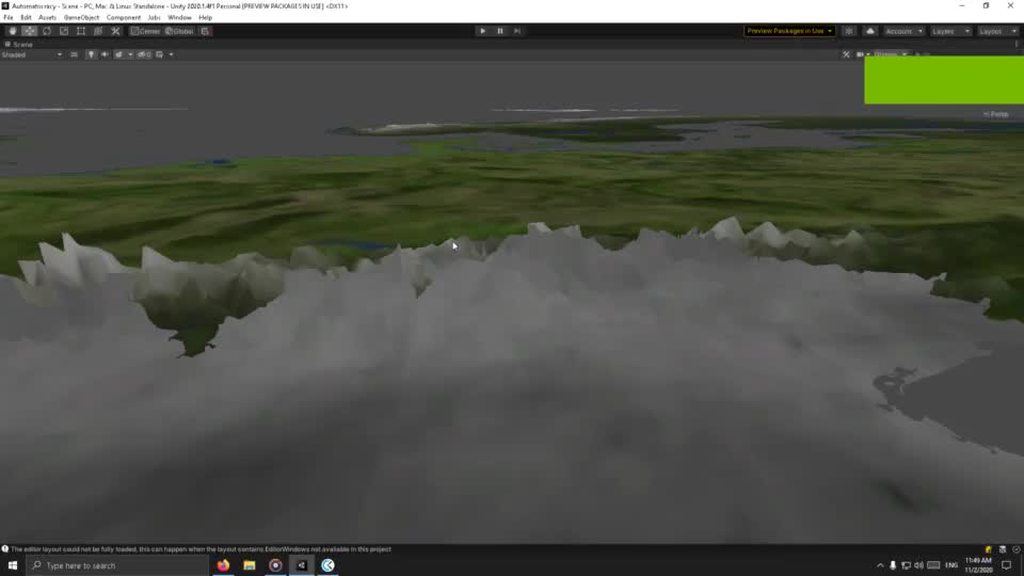
Hi, I'm not sure if this is the correct section to post in, but I'd like a bit of guidance about what should I look into. I'm trying to "define" more the mountains and hills so that their outline is noticeable even without rotating the camera around.
 oak cargo
What about Ambient occlusion
glacial vector
It looks to me like you have a height map applied but not a normal map, meaning the mountains don't respond to light
 nocturne crest
when I export an fbx into unity, it’s just grey, and It’s still grey after making the Location legacy > models materials > local materials folder, and importing WITH the texture folders don’t work either.
But in 3D viewer, it looks normal
fluid oak
@nocturne crest are the textures being loaded into the project and not applied correctly, or are they not imported at all?
Can yiu apply them manually?
nocturne crest
@fluid oak
They are imported, but unity doesn’t apply them on the model. It’s still grey.
Also, idk how to apply them manually.
(I’m using Unity Hub if that helps)
fluid oak
Unity us finicky anout automatically applying models, depends on what you are importing from and how it was set up.
There are three main options.
nocturne crest
I put the textures in a folder, the textures are png’s
fluid oak
- in your 3d editor, look up what it takes to export a unity material
- in unity write an asset processor script to handle it
- just drag the textures into the materials on the mesh renderer inside unity.
nocturne crest
I don’t know how to do any of that
fluid oak
What 3d software are you using?
And I suggest reading about materials in the unity manual.
fluid oak
Ok. You did what I suggested and checked the manual?
nocturne crest
There’s a manual?
nocturne crest
So I read it and it didn’t help 👍
It just told me how it works, didn’t tell me how to fix my problem @fluid oak
 wet comet
can i get a bit of help
my camera doesnt move
using System.Collections;
using System.Collections.Generic;
using UnityEngine;

public class mouselook : MonoBehaviour
{

    public float mouseSensitivity = 100f;
    public Transform playerBody;
    float xRotation = 0f;


    // Start is called before the first frame update
    void Start()
    {
        Cursor.lockState = CursorLockMode.Locked;
    }

    // Update is called once per frame
    void Update()
    {
        float mouseX = Input.GetAxis("Mouse X") * Time.deltaTime;
        float mouseY = Input.GetAxis("Mouse Y") * Time.deltaTime;
        playerBody.Rotate(Vector3.up * mouseX);
        transform.localRotation = Quaternion.Euler(xRotation, 0f, 0f);
        xRotation = Mathf.Clamp(xRotation, -90f, 90f);
        xRotation -= mouseY;
    }
}
@nocturne crest make a material asset, drag it onto the mesh. Drag the textures onto the material.
nocturne crest
There is also a problem where parts of the texture is supposed to be transparent is instead covered in black.
But in the photo viewer, it looks normal.
Also looks normal in blender
glacial vector
Are you using a shader with transparency enabled?
nocturne crest
@glacial vector how do I check
nocturne crest
So I have 39 errors after switching versions
And I don’t know how to fix them
They all say “are you missing an assembly/directive reference?”
And some of them say “code editor”
pine trellis
Blender guys pls help me
how do I bake a pose into the rest pose?
I'm tring with "set pose as rest pose" but it change back to v-pose + some few part changed
nocturne crest
For some reason the avatar description component is missing?
None of the components that come with SDK 2 are appearing
 simple gust
used linerenderer to draw a series of 2D rectangles in 3D. but the corners don't line up ofcourse, is there a better way to do this?
https://hyperparticle.com/2d-physics-shapes/ i think my answer will be in here somewhere
Elements of Programming and Mathematics. Dan Kondratyuk's personal website and blog.
maiden tangle
@eager mist have you tried dancing your fingers across the keyboard and entering that exact topic into youtube?
 onyx tartan
hey all, any suggestions on blender to unity workflow? Particularly for many models in the same file? Do you use collections then bulk export? Or just select each model and export to fbx one-by-one?
one model per blender file feels like a super hard workflow for keeping model styles consistent, but manually exporting fbx one-by-one feels super tedious to update.
I kinda feel a bit like I'm taking crazy pills... I've watched and read dozens of tutes and articles about how to export fbx, but no-one actually talks about how to set up a good workflow for lots of models across a project, and it feels like it should be the main workflow.
maiden tangle
@onyx tartan I'm not really sure the best way, but I do know I'm working with lots of moving parts in my scene, an interior to be specific with all its individual items.
When I want to make a change, I edit the object then save all objects (not a collection mind you, maybe that's better), and it overwrites in my scene even with changes to their positions etc
hasn't really been an issue for me
edit > save > see results in your already assigned positions/rotations feels pretty standard
 stark blaze
i have a quesion
i need to apply a texture to a 3rd model on unity how do i do that
pls dm me or ping me
maiden tangle
@stark blaze unity is not something you texture your objects in, try blender
if your model is already textured, drag and drop the imported texture on to the 3d model's material
 sick junco
Hmm , any Idea how to decorate this empty space
The theme is a futuristic rave club
nocturne crest
It says that the code editor does not exist in the name unity
There 52 of them
nocturne crest
I have 39 red errors, and most of them say “Codeeditor does not exist”, “ResponseFile Data”, “LogOption”, and “Selctable.Selection State”, “Animation Offset Playable”, ”AssetNameExtension Attribute”. there are a lot more too. These occurred after switching from version 2019 to 2018.4.20.
glacial vector
#💻┃unity-talk @nocturne crest
maiden tangle
@sick junco lots and lots of lights 😎
variation in height elevation
throw some cubes of varying sizes into the mix and see what you like for your style, maybe its a couch maybe its a stage, etc
sick junco
@sick junco lots and lots of lights 😎
@maiden tangle that sounds like a good place to start
hollow rampart
I have a textured quad that i want to overlay multiple graphics/text. I want the overlay to always be on top of the textured quad. Is the best approach to set the overlays with a local position offset of Z -.0001 (direction "above" the quad), or should I use a different approach?
 tidal whale
not sure if this is the right channel... but I have this weird issue where one of my tiles are brighter than the rest
 spice venture
can i get help with fbx models not showing textures properly
maiden tangle
@tidal whale is there a duplicate?
it actually looks like there is varying lighting throughout all of them if you look close
check your scene light / rebake
make sure all your albedo's are the same
@spice venture elaborate what u mean
spice venture
importing an fbx model into unity 2018.4.24f1 and its not textured
i dont have access to the original project that model came from
maiden tangle
@spice venture .fbx is not going to import your texture, only the material associated with it in unity's case
so you would need to find your texture file first, import it to unity and drag on to a material
maiden tangle
yeet
spice venture
now i gotta figure out how to texture an fbx file
also blender is refusing to import the model because its like.. too old????
maiden tangle
I've used a converter before
how to texture a model? or how to apply a texture to a model
two different tings
either way youtube has guides
spice venture
alright so ive got an obj model and a texture made with the texture paint tool in blender and then modified in photoshop
trying to figure out how to make it export to fbx and keep the texture definitions so i can import it into unity and have unity apply the texture
spice venture
i have another fbx
a chair
that for whatever reason has a light baked into it
so I unpacked the prefab and nuked the light, then dragged it down to assets
now the whole thing just refuses to show up
maiden tangle
@spice venture u figure out how to export > import?
save the image texture > import in case not
(under image > save as in blender)
when you export the fbx it'll save uv's
(texture coords)
@spice venture nuked the light sorry what?
you have a chair fbx with a light inside it when you import it to unity, when you delete the light the chair disappears ?
first of all make sure you are selecting "selection only" on export, so you're not saving your entire blender scene
I know of no circumstance where deleting a light would destroy the mesh.. so you must have deleted the prefab as well, or it's something with your hierarchy
fluid oak
The mesh could have been a child of the light?
(When you delete an item everything parented to it is deleted as well.)
 winged kayak
my model is not coming with textures lmao
eager mist
Is it recommended to create all models in a single blender scene or use separate blender projects?
cunning thistle
Doesn't matter, creating each on their own scene would be better for organization purposes, though.
But that's for characters or things with animation.
For simple static models, you could use just a single scene.
 gritty flint
yo
so i dont have blender yet because im still learning csharp and unity
but I made a grill/propane tank for my restaurant game

yay/nay?
 shadow cradle
yay
 polar onyx
https://gyazo.com/9a455e1faa175256762e8fc07235e955 menacing fps guy now the questions is trash or cash?

 broken flame
So I'm completely stumped on an issue happening with a simple model. I'm using Maya, Substance Painter, and Unity, while also testing in Blender and Second Life of all things, and I'm not even sure where or who to ask, but here goes... I modeled a jug. Here it is in Maya with an albedo https://gyazo.com/d7f63d683689d1c64127be5921d468f5 This albedo texture was made in Substance Painter and exported using unity standard metallic settings, so it looks the same in Maya and Substance. I also imported it into Second Life and it looks exactly the same, but in both Unity and in Blender, the textures come out stretched like this https://gyazo.com/f0afeaceefd93396d092fdbe6f25d9d4 <Unity< Does anyone know what is going on? I'm mostly worried that if I do a more complex model and it's for a client, this kind of issue will hurt me in the future. Also, I've never seen such a huge inconsistency between an albedo applied in various programs before. It looks fine in 3 programs I've tried, but equally awful in 2. Any ideas?


 solemn spear
Can someone help me with the unwrapping on this model? It works for the hair but not the body and I can't figure out why. I checked normals and uvs in blender and they're all correct
Please ping so I see your response
 potent lichen
@solemn spear i dont do a lot of stuff with organic textures, but did you try to "smart uv project" ?
Or mark seems by hand?
gritty flint

making my own fridge, any idea how to blend the image in better?
like the image of the ice/water machine
potent lichen
sry, i dont get what you mean...do you mean zoom in to make a better picture of the ice machine?
and @gritty flint i guess you want it like that, but in my opinion the doors should be scaled a bit more on the z axis. they kinda look a bit to wide (just my opinion)
 acoustic dawn
i'm pround of my second work with voxel ^^
goblin !
my first was :
if you can give your opinion ^^ I accept critic x)
 novel dragon
how do I download voxel
acoustic dawn
you want my mesh ?
gritty flint
@potent lichen thx for the feedback, I meant to say, the picture is fine, i just want to blend the colors around it so it doesnt look like there is just a jpeg on my fridge
acoustic dawn
or a software to make it x)
gritty flint
yo where do people find free models to download
gritty flint
i just want like a piece of ham,
potent lichen
@gritty flint then try to uv unwrap or smart uv project unwrap and play with the size of texture and model
acoustic dawn
@gritty flint if you want mu epic model super hd voxel designed by pro
I can give you xD
002 brother
 red pecan
helb idk how to use a box collider
potent lichen
@gritty flint good 3d models often cost.
 mint fern
Hi! I have a problem with the jump animation in my fbx. I am trying to use root motion, but the player always goes back to its original position at the end of the animation.
eager mist
Hello my questions gents
im total nub at materials and textures
i have 4k textures (i think)
but i think i dont need that resolution, its a low poly game. currently i use their tiling option as 0.1 (is this too much or not enough?)
my question is whether is it bad idea performance wise?
heres how it looks
im not sure if its how it should be. its 4k metal and wood textures with tiling set to 0.1
https://images-ext-2.discordapp.net/external/lXGEhpA5E1xjUt-JqmGt6GRfWDhV4SNA0JlpOs0zoKg/https/i.imgur.com/r1JxhaU.png
(armor in the middle)

oh ok, seems its better to leave tiling setting at its default. now the question is if 4k texturs it not too much for performance? does unity optimize this depending on game quality setting?
fooling with few 4k textures uses max of my gpu
solemn spear
@solemn spear i dont do a lot of stuff with organic textures, but did you try to "smart uv project" ?
@potent lichen I marked them by hand
 dreamy timber
Is there a way to merge objects together in the editor? I have created a mountain background from various boulder assets. I would like to be able to move them as one and also clean up my hierarchy window. Thank y'all for your time!
maiden tangle
click and drag an object, and place it as a child of another object
there is no "merge" in terms of the geometry actually merging permanently, you would need to program it / get an asset for it / use an external tool like blender
@dreamy timber
dreamy timber
Awesome!
 coarse tiger
Is there a way to make unity see the mesh already placed in the world as collectible I've made a cave and need the walls and such to be solid objects... Am I using the mesh colder or just mark it as static and that does it?
Ping me in responses plz
maiden tangle
@coarse tiger I'm not sure exactly what you're asking
''Is there a way to make unity see the mesh already as collectible''
That is you programming it.
''Ive made a cave and need the walls to be solid"
Use a mesh collider
coarse tiger
Nevermind I figured it out
maiden tangle

 timid totem
can annyone help me with my game cuz i dont know how to code but i know how to make games
 buoyant bolt
can annyone help me with my game cuz i dont know how to code but i know how to make games
@timid totem How do you know how to make games without knowing how to code?
Hey guys, I'd like to make my own 3d models (because (a) I don't like having to rely on already created work and (b) I don't want to pay to get the quality I want).
My problem is, that I don't have the freetime to get good at blender, but I want results quickly. (Honestly, I'd rather write the model data by hand than to use an editor. I know it's dumb, but that I can at least do right now. 😁 )
I'd like to animate the model myself using code or have the animations premade and adjusted during runtime, if possible.
Can you recommend a simple program to create a model and rig it?
 tawdry valley
timid totem
tawdry valley
timid totem

i dont know how to code but i know how to do programing i think that this what this is called
is so hard but i know how to do programing i use the mouse more than the keyboard
this is whta i use to make my games
my game my made by using the mouse more than the keyboard i m proud of it
 tropic idol
Does anyone know a video that could help explain to me how to use a 2d /pixel like player in a 3d environment, like the Octopath Travelers characters, or Paper Mario?
tropic idol
Ok, Thanks!
 oak dock
easiest solution imo
 carmine delta
Anyone familiar with UMA?
sick junco
First render of in progress night club
glacial vector
@buoyant bolt if you want high quality results you need to invest either time or money. There are no shortcuts to get what you want. As for parametric model creation the best program for this would be Houdini, but it has a pretty high barrier to entry. For characters you could consider a service like MakeHuman
sick junco
second render
sullen plank
@waxen cloak Not a place for recruitment
 waxen cloak
Sorry
vestal hazel

ArtStation
Zbrush props
Some props made for Zbrush subject. Still learning the program and trying to improve to make all those cool things people are making here.
 mystic scaffold
Evening! I'll be honest, I am NOT an art guy. I have a little bit of experience in Blender.. I'm wondering if anyone has the time/patience to guide me through getting started on a project I have in mind.
I've acquired a 3D model of a book, my dream is to have this book open, then be able to cycle through.. maybe 10 pages, that I hope to animate with 2D sprites like a pop up book.
My limitations right now are related to the manipulation of the single book object that I have. At very least I need to cut it in such a way as to make the buckle on the book free moving, and to allow the cover to open (pages can be 2D assets added as I make them, I assume)..
Any input is appreciated. All my time has been spent building in 2D Unity, but I figured I would challenge myself by making these as Christmas presents.
facepalm see? lol
 harsh fjord
i take emphasis on low poly, the key to making it look good is Texturework and nothing else
maiden tangle
@mystic scaffold the model itself aside, if you are wanting to separate the mesh pieces, select the vertices you want to be separate and press 'p'
then in object mode you will see it's a different object, which can then be animated
mystic scaffold
@maiden tangle Thanks for the reply! I managed to cut 'er up. I think in terms of animation, I'm going to load these pieces as separate objects in Unity and use DOTWEEN to transform them based on 'page turns'
maiden tangle
I would also suggest not to think of it as having to animate 10 or so pages, but have a single or a couple good animations of the paper flip, that can be used for infinite page flips
mystic scaffold
given my pop up book design, I don't need the pages to be bendy - so just using transforms on stiff planes should be good for purpose.
 rose ember
I'm making a third person character and I don't know how to make it so the feet can be at different levels and like bend the knees and stuff
anyone know how to do that well?
 frigid hull
Idk how to implement it into unity, but what you are looking for are called "inverse kinematics"
rose ember
yes
I have the IK working for my feet rotations and positions
but for some reason I can't figure out how to offset the position if one is higher than the other
like if he's on a slope, both feet are at the same height
when realistically one should be lower and his knee on that leg will bend
frigid hull
As I said, I have no idea how unity handles that, best thing you can do is look for a tutorial
rose ember
I have but none of them work on my character
and a lot of them mention something called Mecanim
but I'm trying to use as few packages/assets as possible
maiden tangle
@rose ember mecanim is unity's built in animation system
 zenith hill

 eager mist
@vestal hazel... Those models are AMAZING!!!
vestal hazel
vestal hazel

ArtStation
Zbrush props_01
Some props made for Zbrush subject. Still learning the program and trying to improve to make all those cool things people are making here.
eager mist
@vestal hazel Oh dang ! You must cost a fortune
I suggest you to checkout follygon on YouTube, they did sculptober and also have some brushes that might be helpful
They also have a course
eager mist
These all are Halloween themed i see
vestal hazel
I'm looking for a job right now
vestal hazel
👍
eager mist
I will dm you their username
vestal hazel

ArtStation
Zbrush props 02
Some props made for Zbrush subject. Still learning the program and trying to improve to make all those cool things people are making here.
 limber plume
I want to make a 3D game with graphics that look like these any suggestions where I can find good 3D Art for that style
gritty flint
yo
can someone help me with a blender issue
my cylinders for some reason are transparent
but only in Unity


 raven tide
I dont use blender, but that looks like inverted normals to me
although its semi transparent so maybe not
eager mist
@gritty flint go to edit more press a and then shift-n to recalculate the normals and re import it
maiden tangle
You wont be on free time for long I'm sure with the quality you're producing Frozen Blood!
Inspiring as always
eager mist
What would be the most simple way to learn to make a low poly character? I dont really have much experience and I would like to make a model for main character of my 3d game, well, learn how to when I need to? What would be the most simple way to go about it. I dont have much knoweldge on 3d modeling.
tropic idol
@eager mist Most likely Blender and youtube, as ive been learning unity through youtube, ive seen hundreds of simple low poly blender videos.
eager mist
well, alrght. But i see most vids have sketches of their character before they make them. it seems like its reccomeneded to make learn how to make sketches which I am not the best artist.And blender seems quite complicated, but guess I have no other choice.
thanks
tropic idol
you dont NEED to have the sketch, its just a guide tool, and blender isnt all that hard to grasp, back in highschool, my sophomore year I knew a guy who used it for roughly a week and was making like 10 different models for his Computer class back to back, I guarantee you'll pick it up fast.
eager mist
well, alright. Well, I will start dropping in on the tons of useful blender tutorials when I get a chance. thanks.
 elfin token
can you see vertex attributes in unity?
I want to make sure my meshes are going to get dynamically batched by being under 300 verts and 900 vertex attributes
but I cant see where to check vertex attributes
pine trellis
May ask a simple question regarding Blener here?
pine trellis
I had a mesh that was somewhat keyframed to an animation (i porbably did it on mistake) now the mesh is dissappeared in Edit and Object mode but is still visible in other views (like UV Edit and Sculpting)
I have no idea to how show that again (no, its not hided)
 wispy sedge
send file please
pine trellis
I already tried to delete all the key frames but nothing changed
sick junco
how does this space for a lounge look?
eager mist
Nice, some colours maybe?
sick junco
yeah , colors gonna be added
wispy sedge
to be honest it looks fine like this
@sick junco could use some Screen Space Reflections!!!
sick junco
well this is only one small part , theres more outtta frame
 viscid garden
Upcoming polygonal character series. 😊
https://twitter.com/rutzgroup/status/1326304345068015616?s=19


Upcoming polygonal series. #Elijah3D
#Unity #3dmodeling #assetstore https://t.co/FMb0NcIn69
Twitter
·
 next kernel
How do you make a lod system in cinema 4d that can then be imported to unity
sullen plank
You need to use seamless texture, or make this into one. There are tutorials for that
eager mist
oh ok thank
you
i downloaded a seamless texture
and now the colour is pink
when its white
this is original colour
wait i think i found the problem
 fresh fox
I have this texture applied to a 3D model, how do I make it scroll?
fresh fox
There aren't any scrolling options?
sick junco
dafaq?
 high monolith
anyone knows how to do low poly smoke?
sick junco
emit orange and grey spheres
glacial vector
You have two options @fresh fox, wither make your own shader that includes panning, or use the default shader and use a script to pan the offset of the material
fresh fox
The problem is that I can only seem to get one texture scrolling at a time
The model has multiple
glacial vector
Multiple materials?
glacial vector
How are you scrolling the one you got working?
fresh fox
Using a texture offset script
But I'm just going to animate the entire thing in Blender
glacial vector
You can do the same thing by looping through meshRenderer.materials and applying offset to all of the materials
vestal hazel
 clear briar
Sorry for bad Quality😅
wispy sedge
@sick junco do u model inside of unity
clear briar
@sick junco do u model inside of unity
@wispy sedge Maybe because of Progrids
 sullen radish
hey hey,i got a question involving props. So i got some props from the asset store and when i go to test them they are hollow,cant stand on them (basicly can noclip throu them without having noclip turned on) is there a way to make it solid ?
 clear holly
Colliders
sullen radish
Aight,thanks
potent lichen
@vestal hazel do you create a game or a witchers tower or sth like that? I saw that you do many things in the same style and they all have this kinda low poly witchers/magic style
eager mist
taking commisions for 3d art
 wispy harbor
Anyone have any mushroom house models?
eager mist
Anyone have any mushroom house models?
@wispy harbor dm me an idea and I'll make it by Friday
Like of the mushroom house
wispy harbor
Ok will do
 warm nexus
How would I make a "next" button or "next level" button?
 languid shell
With unity UI
warm nexus
But, how
 gleaming patrol
 green nimbus
Howdy!
so uhhhh this might be a very dumb question but
How would I go about editing a humanoid 3D model's face without messing up the animations
would I move the armature around?
or would I just edit the face mesh
here's the unaltered mesh
and here's how i'd like to alter his eyelids/eye shape (same on both sides i was just too lazy to draw the shape on both eyes)
here's the version with the armature
if you need anymore information, just ask, and i can provide!
if messing up the animations on the face is unavoidable, then i'd just like to know how i could fix/minimize the damage altering the face mesh would result in.
raven tide
you can't really, without rebinding the rig
green nimbus
shoot
raven tide
you could, POTENTIALLY, move those verts down
but it won't animate properly after that
is it an fbx?
green nimbus
yeah
and i plan on doing more changes than just the eyes later on, so i'd probably have an easier time just rebinding the rig
which i have no idea how to do
so that uhhh says something about the difficulty level there, lol
i'm assuming i'd make my mesh changes first and then rebind the rig
raven tide
yes
green nimbus
so i'll get started on that
and i guess come back later for help when i need to fix the rig
thank you for informing me though!
raven tide
I'm not entirely familiar with blenders workflow for rigging, but its a pretty complex thing
but not impossible. Just time consuming with painting weights etc.
green nimbus
yeah
at least my drawing tablet can pick up the slack for certain aspects of sculpting overall
raven tide
painting weights blender
oops
didnt paste the video lol
Hey everyone new Blender 2.8 tutorial! In the 5 minutes you'll never have to wonder how to weight paint ever again! Hope it helps you guys and don't be afraid to leave comments and questions below if you have them!
Song: [Chill]aKu - Love Shine
http...
green nimbus
yeah
raven tide
yeah that complicates things then.
raven tide
yes
green nimbus
alright just checking because i've confused the names of programs and features with other things before
you know how it is sometimes
raven tide
like if only his head was supposed to move and nothing else, you could probably move the eyelids and the rig would be able to drive it in unity ok
green nimbus
if i rerigged his face, i'm assuming the animation would make his eyes clip or stretch a little?
depending on the shape difference compared to the original, that is
raven tide
yes most likely
because the animations are baked expecting each vertex to be in certain spots at certain times
green nimbus
alright, that's not as bad as my worst case scenario
which was that it wouldn't play the animation, period
raven tide
do you have the entire rig and character? or just fbx's of it?
raven tide
like you could create new animations if you wanted with the controls and stuff provided
green nimbus
i got the model off the unity assets store as a placeholder and i was hoping to make it a slightly less terrible looking placeholder
raven tide
is it free?
green nimbus
yep
raven tide
which one? I can take a closer look maybe
green nimbus
taichi character pack i believe
lemme grab the link for ya

Elevate your workflow with the Taichi Character Pack asset from Game Asset Studio. Find this & other Characters options on the Unity Asset Store.
another concern i have is that the mesh change might mess up the textures, but that'd be an easier fix, so i don't really mind as much for that one
raven tide
yeah thats easy, you just have to realign the uvs
raven tide
all hinges on what you can do with the .fbx's though. Since fbxs are baked you may need to noodle some stuff
raven tide
which file did you open?
green nimbus
fbx
specifically uh
one sec i'll screenshot it
this guy in the legacy models folder
raven tide
ok
so it looks like they didn't include the actual rig they use to animate the character with
green nimbus
haha.... oh no
raven tide
so you'd have to just move stuff, safe the new .fbx, and try and assign some anims and see what happens.
green nimbus
oh dear
raven tide
yeah
green nimbus
i knew what i was getting into with a free model but good lord
raven tide
well them including the base model and rig would be bad for business. They'd be giving away all their work isntead of products they make with it
green nimbus
fair enough
well shoot
is there just no way i can rerig this model then? or could i do some sort of magic houdini shit to pull the rig out of one of these files?
raven tide
you'd have to rig it yourself, unless I just cant see where they left the file but I only see .fbxs
but if you rigged it yourself, you would have to do all your own anims
raven tide
they should, his eyelids will probably just get some crashing
green nimbus
the animations that come with this are also meant to just be placeholders, so it isn't a huge loss if they work weirdly, but if they don't work at all, then i'm a bit screwed
raven tide
of the geo, not the app
green nimbus
alright that's good, i can cope with that
as long as he isn't t-posing across the map, then it should be fine
raven tide
if its just placeholders i wouldn't bother, it'll be more of a headache than its worth. Or at least just do the eyelids and leave it at that, any major changes to .fbx's isn't really a useful workflow
green nimbus
since the company won't sue me for using their model as a base to alter, i'll probably end up using it for the demo, so i'm probably gonna use it for a decent amount of the game's development
the animations will probably last until i can get replacements, which will also be awhile, but should be replaced before the demo
raven tide
yeah that should be fine
Before you go to far I'd stop at the eyelids and test some of the anims before going any further
green nimbus
aite
i've already messed with his chin a bit, but that shouldn't really mess up anything
and it was relatively low effort, so if everything crashes somehow, then no biggie.
here's hoping it works, with maybe just some minor clipping at worst.
raven tide
godspeed!
green nimbus
thanks!
oh wait, quick side note, i'm definitely gonna have to mess with the armature at some point, aren't i
raven tide
I dont think you can even if you wanted to
all the fbx's are just baked bones, so you dont have access to it
all you can do, I think, is save out a new base pose fbx and assign the anims to that and see what happens
green nimbus
i mean, blender's showing me the armature to mess with, it just happens to move around the mesh with it
raven tide
can you edit it though?
green nimbus
yeah i've moved it around a bit before undoing any edits
raven tide
interesting
green nimbus
so there's the hope that i can possibly do something with that
raven tide
potentially. I wouldn't count on it, but I guess its possible
usually you need the base rig and to bake out anims to .fbx
green nimbus
ya know,,,, the worst part about this is that i can't tell if the animations aren't working because of my shitty programming or because i changed his mesh
i'm gonna double check that real quick because last time i had this open, he looped the same idle animation no matter what he did
like he slid around the environment doing this idle animation and nothing else
but now he's just t-posing
hm
yeah no it's the mesh
the other, unaltered models work just fine in the viewer, but he just doesn't move
shhhhhhhhhit
i'm totally boned
is there no way i can rig him to get the OG animations to work with his new mesh?
@raven tide
eager mist
that 3d model looks good tho
green nimbus
thanks
eager mist
i wish i could help but im mainly 2d
raven tide
they may be auto attaching based on the naming conventions
raven tide
what did you name it?
green nimbus
I gave the new model the same name as the old one.
raven tide
if you save the fbx that you edited, you can select one of the animations in unity and in the preview window under the little green dude, change the select an "other" avatar and pick the model you just did
green nimbus
made sure to place it in the same folder too
i'm not sure i understand?
oh wait i see it now
he's still t-posing
shootttt
meanwhile the unaltered models using the same animation are like this
raven tide
when you edited it did you only move vertices or did you delete and add faces as well?
green nimbus
i just moved the vertices and used the draw tool to sculpt his chin a bit
nothing else, as far as i know
raven tide
interesting
green nimbus
maybe i deleted something on accident? although i doubt it
raven tide
on the model, if you go to "rig", are the settings on that the same as the one you saved?
green nimbus
uhhh lemme check
raven tide
i.e. set to humanoid and all that
green nimbus
i totally forgot where the rig area is
raven tide
should be in the inspector area when you select the fbx
raven tide
k im gonna try something quick
huh. I'm getting the same thing. I guess you need the original rig
sorry man.
I do this stuff in other programs so unity probably just does it differently
green nimbus
crap
guess i'll have to make placeholder animations
and rig the entire thing from scratch
oof
raven tide
but then youd have to do all new anims anyway
green nimbus
yeah, i was gonna hafta make new anims eventually, might as well do it now
or at least after i finish altering the model
btw i was using a really outdated version of blender before this, and they definitely changed the vertice tools
how do i add a new vertice on a line with two other vertices
i wanna add vertices on the lines, where the red dots are, and then connect all the red dots across
but i have no idea how to do so in the latest version of blender
does anyone know how?
i probably should've clarified that i was asking for help earlier
oof
eager mist
How do i move the circle to the middle of the object?
Added box collider around it, but the origin of that pyramid is on the corner for some reason fixed it
green nimbus
Before:
green nimbus
After:
 frail flame
Eh I need help
This is my weapon rendered in blender
But this is it imported in unity
Its like inverted
How would I fix that
sullen plank
Select all faces and use Ctrl + Shift + 'N' to call recalculate normals. If the mesh is not malformed it will figure out which ones should look outside
(in Blender)
maiden tangle
Hm but thats the solution so that's odd
Your normals are inverted 🥴
Try manually adjusting the faces individually with backface
frail flame
How would I do that?
maiden tangle
I'm on mobile currently, if you youtube "blender fix inverted normals" and nothing helps I'll make you a sandwich @frail flame
river onyx
you can view Face orientation by enabling the "Face Orientation" in the Viewport Overlay (the 2 circles at the top right).
Blue means it faces outward, Red is inward.
If you have faces that are red(on the outside of your Model), switch to edit mode, select them and do "alt"+"n". and select flip.
That should work
 manic plover
anyone knows why my sprite disappearing when i add material to it? It placed in front of transparent object and i read that i have to turn up Custom Render Queue(>3100), but that didn't help in this case
eager mist
Does anyone have a good free asset for water/ocean?
vestal hazel
 eager mist
@frail flame apply transforms of the mesh and then recalculate your normals
@maiden tangle had half of it
If recalculating doesn’t work then you have to ctrl a and apply transforms
And then ctrl shift n to recalculate normals
If you wanna see if backface is happening, then go to the drop right and enable it
 pine current
Does anyone know any good tutorials for importing guns and making them fire in unity? I got down movement, jumping, parkour (such as vaulting), and sprinting, and I would like to add shooting next. Is there something I should be doing first, and if not, are there any good tutorials for importing guns and making them shoot?
raven tide
A lot of raycasting tutorials deal with gun fire
harsh fjord
But this is it imported in unity
@frail flame
I know this is late but activate backface fulling and flip the switched faces
 tidal creek
i wanted to know if yall think that this is a good robotic leg
 sonic isle
hey guys I'm working on procedural materials in Blender and threw together a Jade and Black Onyx material 🥺 👉👈 opinions?
frail flame
@frail flame
I know this is late but activate backface fulling and flip the switched faces
@harsh fjord i already fixed it
 odd escarp
 lost gale
hi guys, i'm not sure if this is a Blender or Unity problem but why is it that when i import this .fbx asset that i made on Blender to Unity, the three "splotches" don't show up? I've been trying to figure this out for the past hour and I'm going nuts!
Screenshot from Blender
Screenshot from Unity
It doesn't look anything like what I see on Blender. I'm new to this and this is my first model. I'd appreciate any help or tips on troubleshooting/proper material making on Blender to Unity
river onyx
It doesn't look anything like what I see on Blender. I'm new to this and this is my first model. I'd appreciate any help or tips on troubleshooting/proper material making on Blender to Unity
@lost gale Check the Normals of the bottom 3 splotches
lost gale
oh my goodness, you are an ANGEL @river onyx
river onyx
The right dude seems to be missing smooth shading
river onyx
assuming you made them in Blender, select the faces you want to shade smooth in Edit Mode , do "crtl+f" and select "shade smooth"
sick junco
too much neon ?
 muted fjord
maybe a bit lol
sick junco
yeah lol
sonic isle
@potent lichen it was just some model off of sketchfab- super high vertex count
 golden berry
Hi guys. Would anyone know if there are any specific tutorials out there for building a third person game in unity at all? Preferably one for dodgeball or football. Using mobile joysticks to create the movement ctrls and a button to fire the ball or kick.
raven tide
theres lots on youtube
and a few good ones on udemy you can get for really cheap if you wait for a sale
golden berry
would you happen to know if there would be any specifically for building a dodgeball game? i found a good one on youtube but my experience lies more within maya than unity and feel i would need something that goes from a to z in building the game. in the past id created something similar before but had been piecing bits of coding from separate tutorials to make the game work and wasnt sure if this was the best approach.
thanks for the reply @raven tide
 winged flicker
Hi guys, do you know why these artifacts are happening with my blender models when I bake them in unity? I have generate uv lightmaps enabled for all models in their import settings.
These are my bake settings.
raven tide
@golden berry not sure about dodgeball specifically, I think the best way is to learn the specific things you need to know to build the game, instead of just a walkthrough in building exactly what you need. Like start with a tutorial on getting characters to throw things. Then move onto one that teaches you how to do health and OnCollision functions and stuff.
golden berry
Thanks Dan I'll give it a go. This was the series I was going to start on now. https://www.youtube.com/watch?v=8ycgJbQegAo
This time I will show how to implement a thirdperson controller with touch gestures. If you want to make a third person shooter for mobile devices, then this video could be helpful to find a start how to implement your game logic. I will show you three methods: AutoLook &Joyst...
raven tide
great place to start
golden berry
Was hoping it would be a good starting point and build on things from there.
raven tide
unfortunately unity is a lot like maya, in the sense that if someone said "i want to model a dragon breathing fire on a helicopter but I've never modeled before"
you'd be like "...start smaller, or find tutorials to build the fundamentals kind of thing"
unity is the same. No magic buttons, but you'll be much happier in the long run if you learn how things work and how they affect each other instead of just following one tutorial
its way more fun too!
golden berry
yeh that makes sense. thanks for the advice Dan I'll give it a go.
winged flicker
I'd be grateful if anyone has even the littlest idea.
 gritty relic
this is for blender help?
im stuck at the donut
sculpting mode
object mode
why does sculpting mode looks like that
help 😩
river onyx
Hi guys, do you know why these artifacts are happening with my blender models when I bake them in unity? I have generate uv lightmaps enabled for all models in their import settings.
@winged flicker pls post lightmaps of the objects with the artefacts
help 😩
@gritty relic what's the Problem? looks fine to me
gritty relic
i fixed it already
winged flicker
@river onyx I cleared my bake but I will post the new ones as soon as possible!
Thank you
 acoustic marsh
help. please.
winged flicker
@river onyx are you still there?
river onyx
yes
 echo remnant
here is a question, how do you guys handle armor/clothes swap on character without breaking the avatar?
 unreal sandal
Hello, any suggestion about this problem?
I think it can be the mesh...
https://forum.unity.com/threads/how-to-smooth-rolling-ball-collisions-on-a-not-flat-mesh.1005623/
Unity Forum
Hello!
I'm trying to make a simple car game and I'm using as a reference for physics and collisions a sphere.
I modeled a simple test track in Blender...
 slim cairn
Guys, is it possible to create so that this command is executed 1 second after entering the trigger?
slim cairn
Thank you
river onyx
Maybe It's better to get the time of entering and then trigger your if statement when time +1 is reached? dunno, depends on how much logic is in you ontriggerenter function
winged creek
Hi guysss im sorry this is a noobie question how can i show this window again ? it's like a more settings when ur using a tool
it's not appearing in my blender anymore
river onyx
it doesn't show when you do a new loopcut?
acoustic marsh
when i create a new scene in unity hdrp, the exposure makes all my materials black and even when i adjust it, my materials are still pitch black, how do i fix this?
vestal hazel
winged creek
it doesn't show when you do a new loopcut?
@river onyx yes
frigid hull
Frozen Planet:
Me: I made a night stand
And I don't even know how to bake the ao into the texture on blender, any help with that?
river onyx
if you use Cycles, simply go to the render properties tab, and select bake type "AO" in the Bake tab
shrewd mortar
Hey guys, someone told me that the cloth simulator is buggy for characters that have a thik coat . They said that the cloth has to be a simple plain. Is that correct?
clear holly
Anyone know of any good tutorials/Resources to buy or learn how to make a shop? I’d like the shop to be 2D for my 3D game and be able to buy/equip 3D skins from my shop. Thanks!
 prisma lintel
I'm pretty new at Blender and am having a weird issue when importing a model, wherein the normals look correct in Blender but in Unity some faces don't seem to properly occluded. It looks fine in Blender, backface culling is enabled for the mesh viewport and the gizmo is showing normals. Any thoughts?
same thing but in blender
river onyx
Can you give a second screenshot of the unity one? hard to figure out what i'm seeing there
prisma lintel
a (hopefully) cleaner shot from Unity
only the outside faces of the inside corner seem to pop through, no other faces do
sorry for lousy descriptions 😅 , if the Blender model would help let me know, it's quite simple
with a object behind it, too. It seems like the normals are correct?
river onyx
how the hell did that happen, wow
prisma lintel
at least I'm not missing something obvious!
I'll try recreating the model, maybe I've got something janky going on in there
 feral radish
One noobie question how can i lock the camera if its inside a head bone?
like the camera is rotating and everything whit the bone i want to lock it so its stays steady
prisma lintel
I am truly mystified, I recreated the model in blender, it's just a cube with 2 faces extruded, solidified, and recalculated normals for good measure. Then imported into unity with default settings. Looking at the imported mesh it looks fine too.
just kind of figured it out. Had something to do with how I merged the geometry I think. Not merging it at all leads to proper outcomes within unity. Still mystified by why but I'm happy that there's a solution.
or maybe having materials that use the "fade" rendering mode
It's definitely using fade that is the problem. Is there a way of making a material translucent other than using the fade rendering mode?
river onyx
I'm not far enough with my efforts for having had to deal with transfering material from blender to unity yet. Pretty sure you can bake all sorts of Maps (in Cycles) but I was planning to do the final shader-stuff exclusively in unity.
prisma lintel
it's actually a unity made material, just applied to the imported blender asset
sullen radish
Anyone here has any experience with building custom shpaes etc ?
 granite fossil
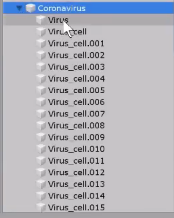
Cell fractured object, exported as obj -> import to unity and it shows the object is fractured but the parent/children aren't showing the pieces. ("untitled" in hierarchy is the cube). Am I missing a step to show each of the fractured pieces as children of this object? https://i.imgur.com/FbnHDab.png
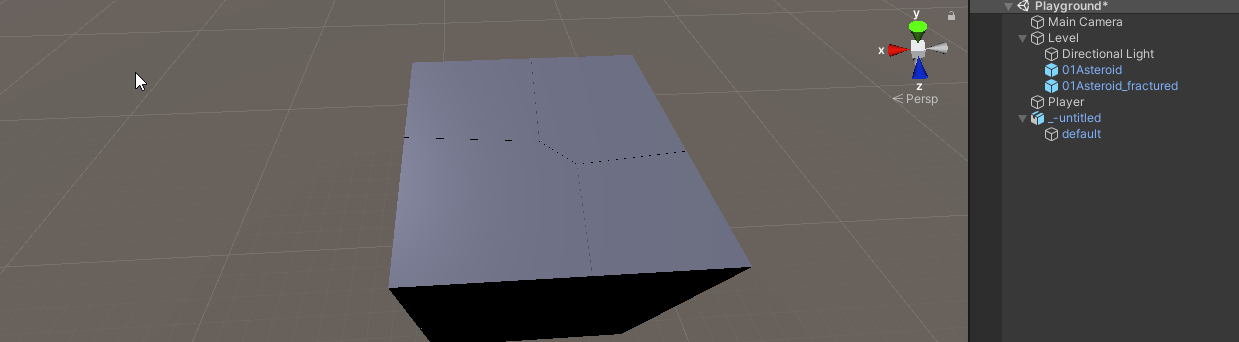 river onyx
did you separate the Pieces into separate Objects in Blender?
granite fossil
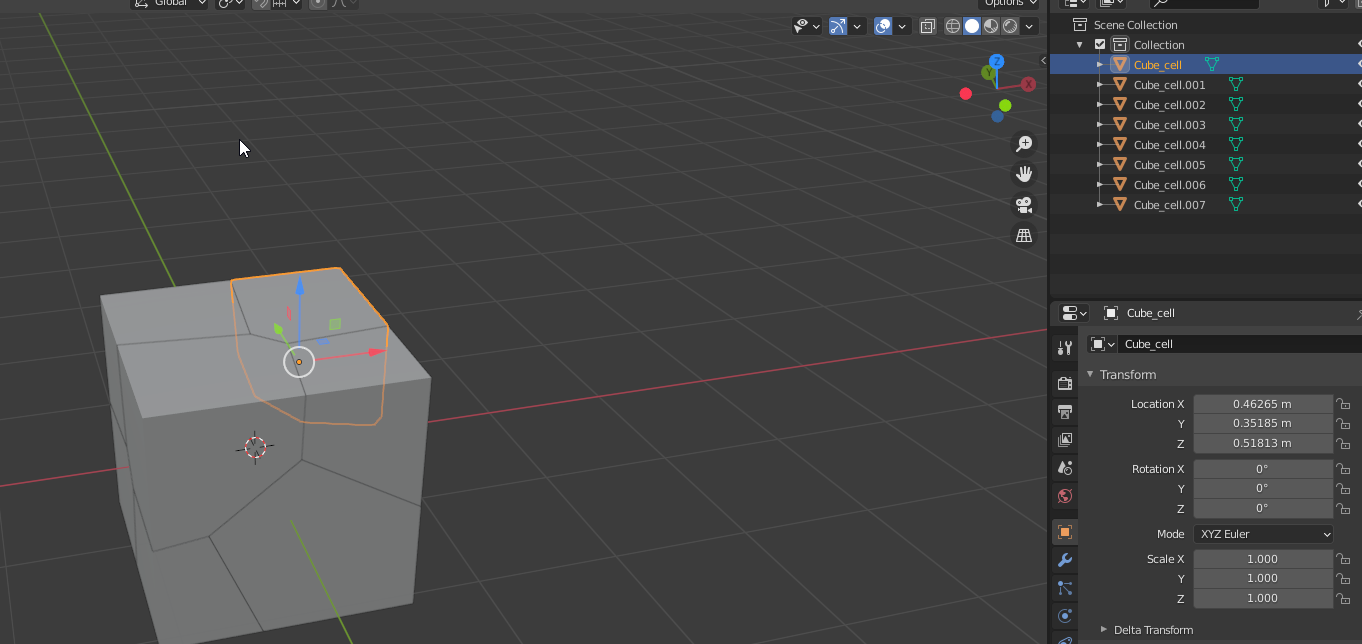
It even looks correct in unity (the model), just for some reason the hierarchy isn't set up correctly to show all of the pieces. For example, this is how the pieces should look in unity https://i.imgur.com/2cojth3.png




 sterile hollow
Anyone here has any experience with building custom shpaes etc ?
@sullen radish Unless you're keen to use Blender, or are experienced in some other 3D CC tool like Maya or 3DSMax, you need to use ProBuilder in Unity maybe:
sullen radish
is ProBuilder tough to use?
 olive prism
I tried 3d modeling for the first time on ZBrush. It's not nice, but still the first.
 crimson flint
ok so i downloaded a weapon off of https://devassets.com/assets/modern-weapons/ and i have it in my folders but it wont let me import it in unity anybody know why?
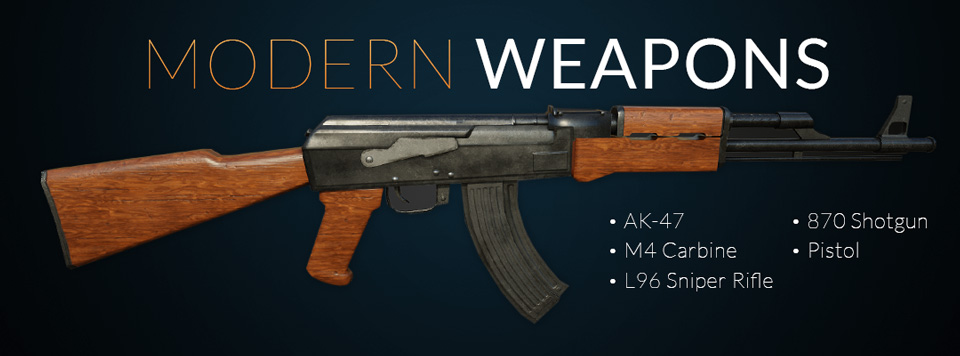
Five highly detailed AAA weapons that will blow your socks off. All the models are PBR and ready to use in the next big standalone shooter!
sullen plank
You need to show at least what you are trying to import
crimson flint
like post the Model?
sullen plank
Type of file, some description. People can't read minds.
crimson flint
hmm good point
sullen plank
Looking up a tutorial how to import assets in Unity wouldn't go amiss as well.
glacial vector
That’s looking great @maiden tangle
maiden tangle
Thanks! loved the colors in the original had to try
olive prism
I'm still trying to understand the application.My characters are bad again 
note : this is my third character
eager mist
 obtuse oyster
@golden berry please do not cross-post. Use one relevant channel at a time. #archived-unitytips is not for questions
vestal hazel
green nimbus
send help
i fucked up
i've got two separate blender files
one with the model with all the edits i want except i accidentally poked a hole in the hair mesh and undo won't let me fix it
and then i have another save of that model with none of my changes except an undamaged version of the hair i damaged in the file above
how do i replace the hair in the original???
i've tried copy pasting, merging meshes, everything seems to not be working
whenever i move the hair into the new model, the hair moves to the t-pose position while the rest of the model is animated
or it'll just sprawl out in this giant mess
like this
 tame pond
taht is repulsive
green nimbus
yeah that's why i'm trying to fix it
 hearty sluice
Hey, me and my friend NightFormula858 are creating a 3D terraria styled videogame on UNITY and having trouble with making 3D models. Could anyone help create 3D models for us for free? Reply on this message so I can send you a friend request! Thanks, CodeUniverse012.
no?
hearty sluice
olive prism
I'm still trying to understand the application.My characters are bad again <a:sa...
Hey, I would recommend using Blender not Zbrush!
hearty sluice
maiden tangle
[Original concept art @BrianMatyas]
((weird artifacts in the recorder sorry
Hey, I really like your style!
maiden tangle
thank you!
hearty sluice
maiden tangle
thank you!
All good
hearty sluice
maiden tangle
thank you!
Actually, thats the kind of style we want in our game, tht model would be a good elf/dwarf hey?
maiden tangle
hearty sluice
Actually, thats the kind of style we want in our game, tht model would be a good...
I'm not sure the original concept artist's idea but I can totally see it being an elf traveler of sorts, with the slight point to the shoes / scale 🙂
maiden tangle
Honored to be considered! I'm actually involved in multiple longer term projects as of late, if you want to dm a message regarding the project would love to have the chance in the future if it's still needing one, cheers 🙂
hearty sluice
maiden tangle
Honored to be considered! I'm actually involved in multiple longer term project...
Ours is considered a extra long project, hoping it to be released on STEAM
maiden tangle
my priority is hoping to launch steam as well, seems the place to be!
hearty sluice
Yeah, STEAM is awesome
Its called TREE-BOUND, its kinda gonna be like a 3D terraria! XD
maiden tangle
That sounds interesting (love terraria!), best of luck to you and your team. 🙂
 haughty oracle
Is someone able to help me to Fix my VRM model (Textures)
?
Because thats a bit wierd.
 limber meteor
As imported into Unity.
You can see, despite this being 5thGen inspired, I've implemented HDR to a visible extent
And as you could tell, I'm going to ENJOY posing these models for promo art.
 sterile lagoon
hey guys, do you know if a character with 4 fingers will still work as a humanoid rig?
limber meteor
🤷 3 fingers and a thumb? Well... Go for it. Just get rid of the excess.
sterile lagoon
yeah, thanks
acoustic marsh
how do move this origin to the center of my gameobject?
 tardy dune
Sorry if this is the wrong place to ask this question. Was looking at the Puppet Master asset on the BOSS sale...does that provide mecanim animations? I bought some 3D humanoid assets from Polygon that didn't have animations included, and I'm wondering if the Puppet Master asset would help with that
eager mist
Hello if any one here advance at unity dm me
 stoic crescent
hey guys do you think 340 triangles is to much for a fish in a stylized rpg that is supposed to swim in swarms of 10-20?
@acoustic marsh i am not sure if you can really change that origin in unity. the 3 ways i know of would be:
- use probuilder to create a probuildermesh and recenter it but maybe destroy it since probuilder is... weird (at least to me)
- create an empty gameobject and make this one a child of it
- load this gameoobject into a real modelling software like blender and center it there (would recommend this)
oh wait. i think my polycount for my fish question is wrong
 cloud saffron
tardy dune
Sorry if this is the wrong place to ask this question. Was looking at the Puppet...
cloud saffron
tardy dune
Sorry if this is the wrong place to ask this question. Was looking at the Puppet...
I think that only gives you ragdoll stuff, you have to make animations yourself similar to Final IK
but I could be wrong, I'd check out the asset page
tardy dune
I saw it said ragdoll...and wasn't sure if that was different than the animations. Thank you!
stoic crescent
ah yes i did a dumb so i have to rephrase my question:
do you think 660 tris is to much for a fish in an 3rd person rpg that is supposed to swim in swarms of 10-20 sfishes making it a total of around 6-12k triangles
 raw pecan
how can i combine the meshes to all the cubes of my terrain? (i got told to move here)
heres my code:
using System.Collections;
using System.Collections.Generic;
using UnityEngine;

public class TerrainGenerator : MonoBehaviour
{
    public GameObject block;
    public GameObject[] blocks;
    public float freq;
    public float amp;
    public int cols;
    public int rows;

    void Start()
    {
        generateTerrain();
    }

    void Update()
    {

    }

    void generateTerrain()
    {

        for (int x = 0; x < cols; x++)
        {
            for (int z = 0; z < rows; z++)
            {
                GameObject newblock = Instantiate(block);

                float y = Mathf.PerlinNoise(x / freq, z / freq) * amp;

                newblock.transform.position =
                    new Vector3(x, y, z);

            }
        }

    }

}
- type this in pasta bin and send the link please
- isn't terrain merge a question for well Terrain channel?
raw pecan
im not using unity terrain
cloud saffron
people are trying to throw this poor lad from channel to channel