
#archived-lighting
1 messages · Page 63 of 1
 wary viper
Anyone know why its giving me the error at the bottom
cant seem to figure out how to fix it
 modest flower
well according to the error you need a mesh renderer component on the gameobject it seems
i don't use bakery however, so i can't say with certainty, should probably look at the bakery docs
 primal cypress
is there any way to force lights to bake on a separate atlas?
- i have 6 shadowmask directional lights
- each of them lights only on a specific layer, meaning that none of them lights the same object
- nevertheless, they still end up counted as overlapping resulting in the last 2 not counting for the shadowmask
 stuck atlas

 dapper stump
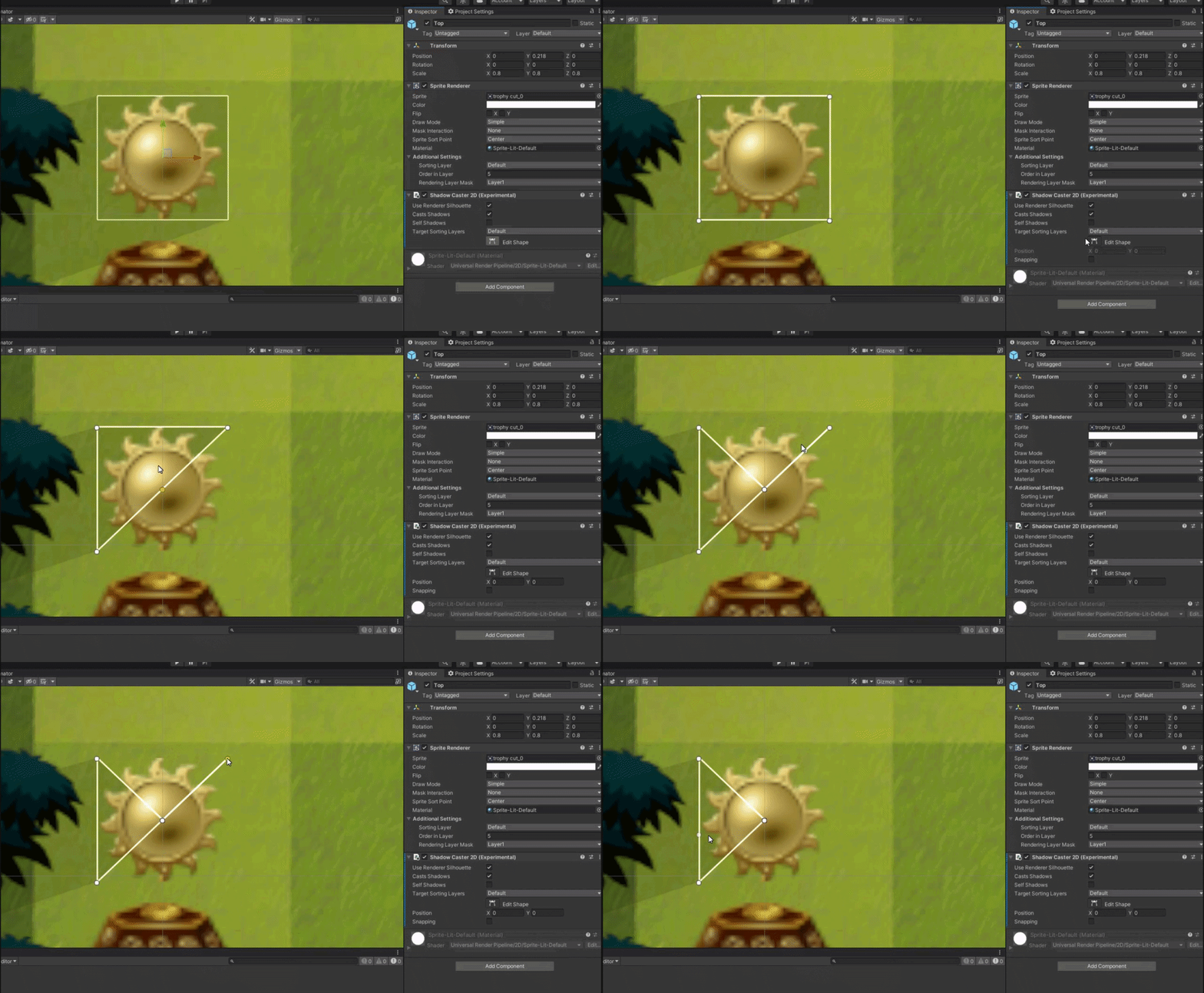
Hello, Im trying to use a shadow caster 2d in my game, and trying to change the shape since the default is just a box. Problem is that everytime I try clicking on a point to move it or add another point, it deletes the point or line instead of moving / creating one. I have tried deleting some assets ive downloaded, restarted unity and my pc multiple times and its been like this since yesterday. anyone able to help? https://i.gyazo.com/0779514cdf190d8907eb6bb825b14c87.gif
 final needle
hey guys, I was told to ask here. My Unity terrain is baking lightmaps that I do not want to use in my game at all. How do i stop my terrain from using a baked lightmap?
 glass sinew
this question is probably more related to #archived-shaders and you'll get a bit more traction there. The gist is you'll need to use a custom lighting model (see eg the repo by cyan, https://github.com/Cyanilux/URP_ShaderGraphCustomLighting ), and then step the lighting values. (I'm assuming the above sprite is lit - if its not lit you just want to use a LUT to reduce the colors available)
 daring dawn
I posted there first, but very few responses. Thanks for the suggestion, i'll check it out!
 main wolf
Yes it should be possible, here's my quick try based on the built in sprite shader
the shader is too long to be pasted here
Here's the shader
daring dawn
Seems really promising, thanks!
 hazy nebula
For some reason my shadow caster 2d starts off behind my sprite, but ends up in front whenever I set the gameobject to not active. After that point I have no clue how to get the shadow caster 2d back behind the sprite. This also happens whenever I disable then enable the shadow caster
does anyone know how to fix this?
daring dawn
@main wolf any idea why it might be doing this?
 main wolf
daring dawn
<@!338892857995952159> any idea why it might be doing this?
main wolf
daring dawn
<@!338892857995952159> any idea why it might be doing this?
seems like shader compile error, try highlighting the shader and see if there's any error in the inspector
daring dawn
looks like there's one thing:

actually something else appeared but it doesn't seem like it should break it?

Shader warning in 'Custom/Sprite Normals': Use of UNITY_MATRIX_MV is detected. To transform a vertex into view space, consider using UnityObjectToViewPos for better performance.
main wolf
No, I dont think it should.
Are you using built in render pipeline?
daring dawn
Oh duh, I'm using urp
I wanted to experiment with the relatively new urp pixel stuff
main wolf
Ic... unfortunately, the shader is not urp compatible...
in fact it was made using unity 5 😅
but I just test it on unity 2019 and it works just fine
daring dawn
ah well, I do appreciate the help
maybe I'll try and fiddle with it to see if I can get it working with urp
I have it working mostly how i like in godot, but it's tedious, so i was hoping i could do it more easily in unity and get a few extra features with the shiny new urp pixel stuff
main wolf
the idea should be the same, you need to 'step' the lighting, like if the lighting value is below 0.5, set it to dark(I use 0.25), else set it to light(1)
daring dawn
yeah, I've done a shader like this a couple times so i get the overall logic, it's just a matter of figuring it out for unity. I was trying to use the shader graph editor for instance but it seems it's literally not possible to get light directions
least not in 2d urp shader graphs
so I gotta use an actual programmed shader is what I figure, but that'll require some time to learn
 dusk stag
point light doesnt prioritize terrain in certain angles, anyone know why? i've set the light render to important
using URP, unity 2020.1.14
in render pipeline ive also set POL to 8, which seems to help, but not enough
 dusk stag
made a plane using probuilder, seems to have fixed it
might be something up with terrain itself, cus the light doesnt turn off on custom geometry
 limber delta
Hello!
I was wondering if there is any way to make area lights produce a softer falloff in the URP? And why do rectangle-shaped area lights behave like spotlights? This is from the Unity Manual: "Light is emitted across the surface of an Area Light producing a diffuse light with soft shadowing." I don't see that happening though.
Looks like this

(three area lights in the scene)
 deft fiber
dusk stag
point light doesnt prioritize terrain in certain angles, anyone know why? i've s...
deft fiber
dusk stag
point light doesnt prioritize terrain in certain angles, anyone know why? i've s...
Too many pixel lights per object
Decrease light ranges, split objects into smaller parts, use baked lighting for terrain or switch to deferred rendering if available
 marble coral
how to solve this?
 marble coral
 cold shell
not sure whether unity is just bad at this or im doing something catastrpohically wrong but having more than 50 lights in a 2d scene screws up my framerates so bad
main wolf
cold shell
not sure whether unity is just bad at this or im doing something catastrpohicall...
unless you are using deferred renderer, then yes, adding more than 50 lights to the scene is something catastrophically wrong...
 silk kindle
how do i make it so a certain object isn't effected by 2d light sources
 timber lichen
Idk where to ask so I am trying it here. I am currently making something in blender. I had to reimport one part of the gun again and now it looks all messed up like this

Can someone help me?
timber lichen
i've got a problem, does someone knows how to fix this light leak??(found a fix)

 grand berry
I need help with day and night cycle I did a directional light but my sky is grey and there is no sun moon and clouds how do i add this (still new to unity)
 frigid zodiac
timber lichen
i've got a problem, does someone knows how to fix this light leak??(found a fix)
frigid zodiac
timber lichen
i've got a problem, does someone knows how to fix this light leak??(found a fix)
You can add a mesh in the other side with only shadow mode. Or if lights are baked, you'll need to fix the light map settings. Start with texel spacing
 minor gyro
hello, does anybody know why unity renders only 4 spotlights at once ?
i need multiple spot lights for my project and 4 is not nearly enough that is why
deft fiber
timber lichen
Idk where to ask so I am trying it here. I am currently making something in blen...
This is more of an #🔀┃art-asset-workflow question than anything related to unity's lighting
I can see a mess of problems there, looks like overlapping geometry and improper normals at very least
minor gyro
timber lichen
Idk where to ask so I am trying it here. I am currently making something in blen...
idk what this is
but it looks like it is textured from the inside
idk
main wolf
minor gyro
hello, does anybody know why unity renders only 4 spotlights at once ?
You can increase pixel light count in quality setting, or change to deferred rendering if you need so many lights
minor gyro
main wolf
You can increase pixel light count in quality setting, or change to deferred ren...
thanks, but how do i do that xD first time making something in 3d and lightning is a real pain in the a
main wolf
btw, are those lights need to move or are they static? if they are not moving(static) you can just bake the lightings
minor gyro
yeaaaaah
i still don't get it
i thought about making an Emissive material
that would work too
but sadly i use URP
and i can't really find any tutorial that helps
minor gyro
i am gonna try to ask the same thing on URP because i don't know if it should be put here or there
okay i found a great Tutorial, but i just need to do one more thing
how the heck do i open the Lighting tab besides the inspector?
nvm remembered it again
 scenic summit
Is emit really cheap? I had 8 real time emit sources, lit the whole scene. Real time. On the quest 2, and I had no need to use any "real" lights.
Am I missing something?
 unique mango
yo can anyone help me fix those weird shadows?

those are light settings

What's wrong?
 unkempt spoke
dayum, you captured that from 4 inch screen!? too small, my guy
unique mango
unkempt spoke
dayum, you captured that from 4 inch screen!? too small, my guy
what is too small
unique mango
unkempt spoke
dayum, you captured that from 4 inch screen!? too small, my guy
better?

Im not sure
 winged cedar
Hi im using hdrp and struggling to understand how indoor lighting works for dark rooms
I have a roof however it doesnt make the room any darker i assume because the hdri is projecting through it
 lime lagoon
Hey people, so I've got a camera, and when I get close to stuff, it can see the shadows, but the shadows disappear when they are far away. Anyone have any idea how to fix this?
See how it's disappearing here?
 unique mango
better?
unique mango
unique mango
better?
I'll be really glad if someone will help me seriously. It's very important
main wolf
lime lagoon
Hey people, so I've got a camera, and when I get close to stuff, it can see the ...
increase shadow distance or bake the shadow
main wolf
unique mango
better?
do you mean the corners are not sharp? check the model importer, see if the smoothing angle is set to above 90
unique mango
main wolf
do you mean the corners are not sharp? check the model importer, see if the smoo...
Noooo are you blind. This shadow is not snappping into object sending it
like near plane but problem is that near plane is set to minumum
main wolf
unique mango
Noooo are you blind. This shadow is not snappping into object sending it
That's not a good way to ask for help
The image is so dark, and small
 primal cypress
anyone knows of a way to get LineRenderer work with reflection probes in URP?
the option is greyed out in the inspector :/
 crude lintel
unique mango
crude lintel
unique mango
Shadow settings on the light source control that. Try tweaking them. Although that might cause other artefacts to appear.
modest flower
I think I already know the answer, but these blotchy artifacts are texel validity related most likely right? I had used mixed lights previously, and only noticed these after i turned them into baked only
 modest flower
lime lagoon
See how it's disappearing here?
modest flower
lime lagoon
See how it's disappearing here?
this might be fixable by editing your scriptable render quality settings (If youre using URP or HDRP(?), theyre in the Settings folder)
modest flower
lime lagoon
See how it's disappearing here?
these settings in the high quality scriptable object specifically
 deft fiber
modest flower
I think I already know the answer, but these blotchy artifacts _are_ texel valid...
deft fiber
modest flower
I think I already know the answer, but these blotchy artifacts _are_ texel valid...
Blotches look like texel validity issue, the bright seam is probably UV overlap
I guess it could be light leak from outside if the vertices aren't welded, but that's much less common with baked light
modest flower
deft fiber
I guess it could be light leak from outside if the vertices aren't welded, but t...
these are disparate modular pieces(sheets really) made in probuilder for prototyping, so youre not wrong about it not being welded...
should i have solid pieces instead of one sided?
deft fiber
modest flower
should i have solid pieces instead of one sided?
That does usually improve shadow accuracy a lot, yes
Especially with realtime shadows
I'd first check those regions for lightmap UV overlap though
modest flower
deft fiber
I'd first check those regions for lightmap UV overlap though
iirc, no overlap errors, but a bunch of texel validity issues
it got a bit better after making the textures double sided, but that last pic was double sided already
deft fiber
modest flower
it got a bit better after making the textures double sided, but that last pic wa...
Giving them thickness would work even better as it covers up the seam
modest flower
good thing its (mostly) prefabs
 sullen niche
guys in my project when i go far shadows dissapears how can i fix this bug
modest flower
can do that and have it all be reflected in a jiffy
modest flower
sullen niche
guys in my project when i go far shadows dissapears how can i fix this bug
if youre using URP, i actually suggested something that might help a few hours ago
i don't know if it will for sure solve it though
sullen niche
yes im using urp
modest flower
modest flower
this might be fixable by editing your scriptable render quality settings (If you...
this msg
sullen niche
thanks
sullen niche
modest flower
these settings in the high quality scriptable object specifically
i looked at this settings but my in my urp i have less options
modest flower
im using 2021, but the shadow settings SHOULD still be there
mind tossing a screenshot of the settings?
sullen niche

i read something but he is changing shadow distance in quality setting but i dont have a option like that
modest flower
what version are you on? the distance is at least still accessible
modest flower

distance is there, enable cascades and you'll have the slider thingamajig
though how to USE the cascade is beyond me at the moment 😅
sullen niche
i changed the distance but same problem
modest flower
my rudimentary understanding is that it modulates shadow quality within the distance declared
sullen niche
modest flower
distance is there, enable cascades and you'll have the slider thingamajig
but i dont have the metric option in the cascades
modest flower
sullen niche
i changed the distance but same problem
hmm, you'll have to play around with the cascades..or is it maybe something to do with the camera? i don't know what else could be suggested
modest flower
sullen niche
but i dont have the metric option in the cascades
what does it look like though?
sullen niche
wait
modest flower
no worries, im sure youre close
sullen niche
 modest flower
oh
sullen niche
only 3 option
modest flower
you have to select 2 or 4 first
my screenshot as 2 for cascade count
this might be a version difference
modest flower
2021.2.0f1
mind you, i havent noticed anything weird with the shadows as i havent actually flown around in a birds eye view in any of my scenes, so i may be having the same issues you do but did not notice
sullen niche
ohh
but in game this shadow problem very obivious when i move 2-1 meter far all the trees and cliffs shadows dissapear
modest flower
well thats weird
i do notice that you have 2 directional lights however
try disabling one?
assuming both are directional instead of an artifact of duplicating
modest flower
unfortunately, im stumped
yeah sure, it might also help any passers-by with better experience to diagnose the issue
sullen niche
ok thanks for helping 🙂
modest flower
i saw the vid, it seems the distance was still set at 50
you DID try to push it higher right?
like say 100
if you already have then yeah thats a headscratch from me :S
modest flower
ah, sorry :S by all accounts changing that distance should have done something
sullen niche
ahhhhh i made it
yes its about distance
i accidently made a 2 pipre renderer thats why
modest flower
oh 😅 good to hear its working now!
don't have to wonder about it all night anymore lol
sullen niche
thanks for your helps m8 you are the best
sullen niche
modest flower
don't have to wonder about it all night anymore lol
yess 😆
 craggy plover

 unique terrace
I am using Bakery for Unity, and I cannot get spotlights to bake to save my life. Everything I've tried, they just don't do anything. Point lights are working great. Can anyone tell me if this is a common issue and if there is a known solution? I'm starting to really lose my mind here.
 blissful salmon
Has anyone had/solved this issue with realtime lights?
I upgraded my project to 2021.2 using URP and I am building to android. Idk if this is a bug with the editor or some new setting that causes this but I didn't have this issue in all the previous versions of Unity.
 tranquil basin
hey fellas, is there a better way to find which objects are shadow casters without having to go through every object in the scene, i disabled shadows on everything but stats says there are still like 80 shadow casters
ps: found them, but still would like to know for future cases
 blissful cobalt
blissful salmon
Has anyone had/solved this issue with realtime lights?
I upgraded my project to ...
blissful cobalt
blissful salmon
Has anyone had/solved this issue with realtime lights?
I upgraded my project to ...
Have you tried the important rendering setting on your light?
 severe yarrow
hey everyone. a question:
Is there someway to blend two spotlights colors together?
It looks like this now(im using HDRP):
 blissful salmon
blissful cobalt
Have you tried the important rendering setting on your light?
blissful salmon
blissful cobalt
Have you tried the important rendering setting on your light?
Yeah i tried that but it still didn’t work
blissful cobalt
blissful salmon
Yeah i tried that but it still didn’t work
Hmmm I would watch when I get home from work, it's pretty strange
 alpine briar
Could anyone link me to a good URP lighting video/Playlist?
i cant find any Beginner full explanation kind of Lighting tutorial
im desperately trying to learn lighting as the Default Lighting is very VERY awful
 dense wing
severe yarrow
hey everyone. a question:
Is there someway to blend two spotlights colors togeth...
dense wing
severe yarrow
hey everyone. a question:
Is there someway to blend two spotlights colors togeth...
instead of blending why dont try to use the spotlight with that color only
 kindred igloo
Hey everyone! I'm trying to add a black rectangle that interacts with the lighting in my level, but it doesn't seem to be. The difference is very slight but i need to get rid of it. I;d appreciate any help on how to fix this thanks!

 prime lotus
does the rectangle have a lit material
prime lotus
is your rectangle on a layer that the lights affect
prime lotus
kindred igloo
Yes
can you show the inspector of the rectangle and one of the lights
kindred igloo
Ngl Im in bed rn :/
Sort out tmrw?
Sorry
However
Upon closer inspection of the image
It looks to me
Like It's being a tiny bit effected by the light
kindred igloo
The back box it covering another room
prime lotus
ah ok
prime lotus
if you want that box to be invisible then you can use a sprite mask to hide the room
then when the door is open you can expand or remove the mask
kindred igloo
prime lotus
then when the door is open you can expand or remove the mask
I have no idea what masks are
But I'll look into it!
Thanks!
deft fiber
No matter how much light you point towards a black material it's still going to be black
 hidden night
kindred igloo
hidden night
kindred igloo
Is there a way I can 2D get lighting like in this scene using the default render pipeline?
The reason I don't want to switch to URP is that I've already written a shader for my sprites that does palette swapping, and last time I tried that all my shaders became incompatible
The kind of lighting I want is super simple. It doesn't need to have any cast shadows, just glowing areas in a scene.
Bonus if I can define the glowing areas using custom shapes or sprite masks, but just spheres is ok
Sorry if this is a lot to ask, even pointing to some article or tutorial that could explain this would help a lot
 tame garnet
Hey guys!
do you know any cool and simple solution for this kind of a problem? I'm using an HDRP-Setup. There is a "LED-Strip" as emission material combined with six area light rectangle sources. It works, but only in a linear way for each of them and not on the round corners. I actually have no idea how to solve this. If I add these light sources on the edges, the result gets very ugly..
My hope was that the emission should be more as enough. But you see the emission glow only if you are looking directly on it, not if the material is hidden.
A new feature idea for Unity-Team: "Custom-Spline Shapes" for light sources! : )
 kindred igloo
Hey everyone! I'm trying to create a black box to cover the next room in a dungeon crawler I'm creating. However, I'm getting some sort of weird bug where a spotlight (for the fire) doesn't spill over the black cover as it does with the tilemap. I'd appreciate any help on how to fix this thanks! (I increased the intensity of the fire spotlight on the left so you can see the issue) I'm using a sprite-lit materail for the cover. Please @ me when you respond. Thanks!
 deft fiber
tame garnet
Hey guys!
do you know any cool and simple solution for this kind of a problem? I...
deft fiber
tame garnet
Hey guys!
do you know any cool and simple solution for this kind of a problem? I...
You can get light from emissive textures with baked lighting and light probes, provided your object can be static
 violet hawk
I can have per-camera skyboxes with the Skybox component, but if I do that it will still read the intensity etc. from the main lighting skybox.
Is there a way to have per camera environment light settings?
tame garnet
deft fiber
You can get light from emissive textures with baked lighting and light probes, p...
Thx mate, I will try it out once again.
 strange vortex
Hello, this is my first time doing something that isn't coding on Unity, I was trying to make a modular kit for my levels but baking light doesn't seem to produce accurate results (URP). The pieces are on a grid and there shouldn't be holes between them but light still produces weird artefacts, can someone help me please?

Here's another picture, im baking with shadowmask

But I tried different methods and the results are similar
 kind thistle
I keep getting these errors in Unity 2018.4.10f, any clue how to fix them?

 fervent dock
how can i make both planets light up more equally and make them cast shadows? im using urp


 white gate
Hello im having some trouble with my directional lighting for some reason it does not work anny more
if i change rotation or other values nothing happends
 shy locust
Hi, I'm having trouble with Spotlight or Point Light, When I added a spotlight into my scene, the directional lights looks like have been disabled at some point, this happens after migrating to URP and whenever my camera look at the spotlight. How to fix this?
Nevermind, just added the Limit light in the Pipeline Render Asset and fixed
 graceful oxide
Hi! Still looking for help with this issue (from September). Any help will be greatly appreciated! https://answers.unity.com/questions/1862474/multiple-spotlights-causing-light-flares.html
Unity is the ultimate game development platform. Use Unity to build high-quality 3D and 2D games, deploy them across mobile, desktop, VR/AR, consoles or the Web, and connect with loyal and enthusiastic players and customers.
main wolf
graceful oxide
Hi! Still looking for help with this issue (from September). Any help will be gr...
try baking the shadow/light
deft fiber
strange vortex
Here's another picture, im baking with shadowmask
Your walls seem to be have entirely smooth normals
Try with default cubes instead to confirm it's a mesh issue and not a lighting issue
strange vortex
deft fiber
Your walls seem to be have entirely smooth normals
Try with default cubes instea...
I ended up remaking the meshes and it worked, thanks tho
 tropic tartan
is there a way to tell Unity to use a specific UV set if I need a lightmap for a model with say 2 or more UV sets
deft fiber
tropic tartan
is there a way to tell Unity to use a specific UV set if I need a lightmap for a...
I believe lightmapper uses UVs at index 1, or the second slot in other words
Not sure how to manually override it, or if it is necessary
scenic summit
cant get rid of these "blocks" to save my live

 dense acorn
Is there a way to add a floor to light level in a scene on unity? So like, regardless if an area has light on it, if the player looks at it, it won't appear pitch black? For example, if you're in a cave in minecraft with no light, you can still see. Can this be replicated?
 languid wing
dense acorn
Is there a way to add a floor to light level in a scene on unity? So like, regar...
languid wing
dense acorn
Is there a way to add a floor to light level in a scene on unity? So like, regar...
Ambient lighting
how to find it exactly depends on which render pipeline you're using
tropic tartan
Any good sources for free cc0 light cookies?
 void tusk
Could anyone take a look at these settings and tell my why my rtx 3080 Ti takes half an hour to bake light for a small scene with almost no objects?

Scratch that, 1 1/2 hour lol
timber lichen
hey i'm kinda new to unity, i followed a few tutorials, but found this

the background turns gray
does anyone know what i have to change?
nvm it's the fog
 quasi ore
The last 3 times i baked my light map Unity has crashed... Always at the end when everything is complete it finnishes with a crash. What could possibly be the issue?

my settings

 stark star

 robust pollen
stark star
robust pollen
stark star
Anyone know why the lighting would look so washed out with HDRP lighting?
https://i.imgur.com/bE8Hrn5.jpeg
 stark star
robust pollen
Anyone know why the lighting would look so washed out with HDRP lighting?
https:...
stark star
robust pollen
Anyone know why the lighting would look so washed out with HDRP lighting?
https:...
Bake reflection probes
Disable enviro reflections
robust pollen
stark star
Bake reflection probes
Cheers but now its being really weird lol
https://i.imgur.com/uefIAWf.jpeg
 stark star
robust pollen
Cheers but now its being really weird lol
https://i.imgur.com/uefIAWf.jpeg
stark star
robust pollen
Cheers but now its being really weird lol
https://i.imgur.com/uefIAWf.jpeg
because building light in unity isnt something easy
try a tutorial for begginers and follow it
robust pollen
Nah, its something to do with overlapping lightmaps
Seems like its only this model
 near bison
Is there a format other than RGB HDR BC6H which I can use for my lightmaps which would be smaller but still look good? My 4096x4096 .hdr maps are 16MB apiece and I'd like to reduce that by at least 4x if I can. I'm aware I could drop the res to 2048x2048 but the shadows are already pretty blurry, and I'd prefer to avoid making that problem even worse.
graceful oxide
@main wolf Thanks for the suggestion! I already tried that. Do you have any other suggestions? I can provide more information if that could give some context.
near bison
Why can't I select the light probe mode in the second screenshot? The option is grayed out, but these two objects appear identical:


It's also weird that when I select these two objects, and try to compare the static settings, none of them show up, like when they are different, yet you can see they are clearly the same in the shots above:

Apparently clearing baked data allows me to access those options again.
 hidden harbor
https://media.discordapp.net/attachments/497874004401586176/910990028635787334/unknown.png
any idea how to fix this black spot issue?
 hidden harbor
fixed
for anyone with the same problem, the problem happened after the new unity update. fixed by copying and pasting assets
 cerulean bough
Hi guys I need help in lightning baking
My unity is crashing
on bake
Sometimes it stucks and never complete the baking
anybody?
cerulean bough
help me please
 summer aspen
Error logs locations are pinned in #💻┃unity-talk . Research your errors.
 plush mortar
Hi guys, why my dynamic object has this lighting when the lightprobes are like that and is placed in the shade?
 plush mortar
I fixed it, the shadowcaster was set to contribute to GI
robust pollen
stark star
because building light in unity isnt something easy
try a tutorial for begginers...
It was an issue with the directional light, replaced it and it fixed that weird shadowing.
Surprised I couldn't find anyone else posting about it because it seems like a common issue
stark star
robust pollen
It was an issue with the directional light, replaced it and it fixed that weird ...
well i dont think its common
 dawn temple
I have been tearing my hair out, and I think it's possible but can't find a direct answer. I have an object that has emissions and when things are static, it lights how I want it to, whihc i expect, but I also want it to be dynamic and move around. And I have had 0 luck finding a solid answer
I have found a lot of info on using light probes to cast light on moving objects dynamically, but I can't get an object to be the thing casting the light
plush mortar
@dawn temple You can´t have an emissive mesh to cast light on to other geo in realtime, if you bake the lighting it can work for GI static objects, but if you want it to light dynamc objects you will have to fake it with a point light an area light etc depending on the shape and desired performance
 sterile horizon
Why my gun get a light hit through the wall? (Sorry for bad english)
 stark star
sterile horizon
Why my gun get a light hit through the wall? (Sorry for bad english)
stark star
sterile horizon
Why my gun get a light hit through the wall? (Sorry for bad english)
becase it has no shadow mask
 leaden finch
I am working on a solar system, and am running into some strange lighting problems. All of my planets seem to have shadows with only a small ring of light

The sun has no shadows, and each planet contains a smaller version, however getting rid of it has not solved this problem
It is also only seen on the more distant planets
Each planet has a specialized point light that only accepts shadows from each planet's smaller copy, and only illuminated the specific planet it is meant for
Here is another example of the problem

 heady seal
Anyone know a reason why lighting would be different in Game View and the actual Build. As it stands right now, I have all shadows working in game view, but when I build they all just disappear. I cannot even create two basic cube objects with a light shining on them and have them cast a shadow.
heady seal
Looks like Unity would default the "quality settings" to it's lowest one, so deleting everything besides "ultra" made it work!
 autumn galleon
I'm having trouble lightmapping an object I've merged with Mesh.CombineMeshes().
The lighmap UV:s looks like this for the combined mesh, totally overlapping eachother. Anyone have some suggestions to get it working?

PS, setting hasLightmapData=true, does nothing except add a third UV channel. Still looks the same.
 golden mantle
Trying to render those chairs, but always get messed up seams no matter what I try doing. Unity 2019. Using bakery. Anyone know what to do? I'm using Generate Lightmaps on the object.

 orchid pawn
someone help. p l e a s e
I’m fairly new to unity and I am very confused with it’s lighting, and i got to this image right here.

but that was only after a while of messing around
Otherwise, it would have been an ugly, yellow-ish looking shade.
Yet i’ve seen many devloggers and tutorial youtubers load a project and have perfect lighting.
unkempt spoke
Perhaps make a prototype of your game 1st... hard to answer when it's just a single cube 😃
summer aspen
@long gale Don't cross-post. Pick one channel.
 long gale
mb
strange vortex
Would anyone be willing to help me understand why my light probe groups aren't behaving as I would expect?
The base of this lamp is made of metal and has a point light above it, due to it's size its set to using light groups for GI, but it's extremely dark compared to other objects nearby, I even tried placing a light probe right on top of it and it's still not lighting up correctly

Using URP btw
cerulean bough
strange vortex
The base of this lamp is made of metal and has a point light above it, due to it...
in hdrp or urp?
i got an issue like this in hdrp and fixed it by adding base texture in emission and use it for brightening the texture according to the scene
strange vortex
urp
strange vortex
i guess that fix works for now, thanks, im still hoping for something that seems less than a hack 😟
 covert stirrup
Metallic objects are coloured by reflection captures, you can see if it changes by adding a probe above it with a minimal size and see if it looks better
 royal blaze
Is there a simple way using URP to add a shadow to a 2D Sprite ? Can't find anything...
timber lichen
royal blaze
Is there a simple way using URP to add a shadow to a 2D Sprite ? Can't find anyt...
In a 3d world?
royal blaze
yeah 🙂
strange vortex
covert stirrup
Metallic objects are coloured by reflection captures, you can see if it changes ...
This worked, even for metallic materials with no metallic spots, but it does seem a bit of a bad practice? I gotta add a lot more reflection probes if i want accurate results, god I miss call of duty's baked lights, they've got a really nice voxel system that is a lot faster than lightmaps and works for dynamic objects too 😭
This is the result with a closer probe
 covert stirrup
Bakery has a volumetric lightmap option actually
But yes you’re right it would be bad practice. If you have dramatic changes in lighting in your scene you have to work around it one way or another
strange vortex
I swear to god, as soon as I get my degree at the end of next year im probably going to spend so much money on cool shit like bakery
 brittle willow
hello guys
i have never used 2 lighting before and i have some total nub questions . i installed urp and the scene should all go pitch dark(but it doesnt)
If i add the same background sprites in the scene they are black but the ones that were in the scene already are lit without light
brittle willow
please ?
strange vortex
covert stirrup
Bakery has a volumetric lightmap option actually
Sorry for the ping but it seems like i was able to fix the issue without adding extra probes, i had a probe at the center of the room and apparently ticking "box projection" is enough to get accurate light?

Same picture as before without extra nearby probe
Woods is not pitch black like before
 covert stirrup
Nice so box projections are more expensive but it's not a big issue usually

 cloud nexus
 compact rock
did you check "generate Lightmap UVs"?
 plush mortar
compact rock
Anyone know the cause of these?
plush mortar
compact rock
Anyone know the cause of these?
I also get those artifacts but I haven't figured out a fix
compact rock
Yes I have checked it
 earnest mica
Anyone know why the GPU lightmapper is producing results light this? Using the CPU Lightmapper with exactly the same settings bakes fine. I've tried baking with both Game and Studio graphics drivers, with the same results

 shrewd hawk
Clear bake, cache, reboot and rebake
dusk stag
hey,
is there a way to turn per object limit up? on the ground mesh, several lights are hitting it, which results in lights turning itself off sometimes based on view angle

left got light on ground, right got no light on ground

i guess a workaround could be to split the ground mesh in multiple pieces, but would be nice to keep it to one for convinience
 keen rain
Hi i have a weird Problem when I build my game on android it looks like the lights dont bake or something
heres how it looks on android

heres how it suppose to look

 still gust
Hey guys, how can I achieve to have two light sets on one scene. I.e. I have two scene at this moment, one for day and one for night and I would like to have one scene where I can choose what light "preset" to choose on scene load. Unity 2019.3
 near plaza
Anyone know why when I rebake my reflection probe, the text above doors is not reflected?
 broken rover
Hi guys, I am having 2 wierd problems using my spotlight in my scene.
the first one is this difference of lighting between chairs, i suspect the light baking to be the cause? cause chairs are dynamic and people can use them randomly so i certainly should not bake them at all.

and the second one is on the characters this time, who are not lighted correclty, because the head is using a blendshape so is separated from body.

so it's cliping between lighting and culling, so we can sometimes see inside the head, because it has been culled off...
autumn galleon
shrewd hawk
Clear bake, cache, reboot and rebake
Curious. Why do you recommend reboot?
broken rover
@broken rover like i suspected, for the chairs, the baking was the main problem, but for characters, i noticed that i can have, for the same character, 2 kind of lightings results and it seems not to be relative to the blendshapes, See the character behind is pointed by the light and is correctly lighted, but the character in front is fully lighted on body and is not correct. This character should not be lighted like that. What can cause this problem ?

Note: the same problem may occur on the chair
Ok i Fund !
@broken rover
If this problem happens to you, you must set the ligth as important Render Mode . As simple as that...
 bitter tangle
I thought that when using a Forward Renderer, the number of triangles needed to be drawn for each object affected by a light would double for each light. Is this only for shadows? Here I have the light off and it is 12 triangles drawn for the cube

Here i turn it on and it is the same amount.

Then enabling shadows doubles triangles drawn. How does this really work?
 deft fiber
compact rock
deft fiber
compact rock
Probably a texel validity issue
deft fiber
dusk stag
i guess a workaround could be to split the ground mesh in multiple pieces, but w...
Splitting meshes is a perfectly valid workaround
Having a huge singular mesh covering a lot of the level also causes issues for frustum culling and occlusion culling
If you want to get rid of light limits regardless, switch to deferred rendering
 misty abyss
why does my white look beige? i have searched about it but i have not found any solutions but what i did find out was that its because of the lighting?
deft fiber
misty abyss
why does my white look beige? i have searched about it but i have not found any ...
There could be many reasons for that
The most likely one is that you're using the default sun which is yellow tinted
misty abyss
deft fiber
There could be many reasons for that
The most likely one is that you're using th...
ah ok thanks
its white now thanks!
 raw flare
having a really weird issue with lighting in my build, im using a directional light, it works fine in editor, but not in build, first pic is build, second is editor

 deft fiber
raw flare
having a really weird issue with lighting in my build, im using a directional li...
deft fiber
raw flare
having a really weird issue with lighting in my build, im using a directional li...
This kind of thing usually happens if your scene's light is set to baked only, but you haven't baked it
In that case the editor treats it as dynamic so you can preview it, but it doesn't actually exist in the lighting data that the scene attempts to use at runtime
raw flare
im completely new to lighting stuff, how do i bake it in that case?
deft fiber
And when you do bake it, the lighting type needs to be mixed to have any effect on non-static objects
There are many guides for baking out there
Pinned messages can surely get you started
Or just make the light dynamic if you don't need to bake it
 jaunty verge
ive implemented lighting in the project but for some reason this prefab will not light up properly, the grey background which isnt a prefab works and has the same material as the prefab. does anyone know why?

 brisk nexus
uh idk if this has t do with lighting but i have a question. How do i made a non forwarded pipeline asset
bitter tangle
jaunty verge
ive implemented lighting in the project but for some reason this prefab will not...
Try not to use a negative scale. https://issuetracker.unity3d.com/issues/normal-map-of-prefab-with-negative-scale-is-inverted-when-rendered-in-the-game-view
How to reproduce: 1. Open the attached project (ScaleTest.zip) 2. Open scene OpenThisScene 3. Go to the Game view 4. Observe the thr...
frigid zodiac
pick screen color (x, y) - this has color variations due to GI/shadows etc
do a raycast and get the mesh renderer, then material, then it's color in 3d space before light.
You have two colors now. You can use that then
 mystic dew
Oh, just saw your scene in vermillion, you create that scene?
 humble heron
mystic dew
Oh, just saw your scene in vermillion, you create that scene?
humble heron
mystic dew
Oh, just saw your scene in vermillion, you create that scene?
Yeah in like 2 hours, as a placeholder... Became kind of a permanent placeholder
 flat glacier
Hi, does anyone know if it's possible to only bake AO in the scene using the lightmapper?
 last canyon
hi everyone. im working on a mobile game and realised too late that using PP ambient oclusion is killing the perfs. I see i can bake AO in the lightning but when i enable it, i simply dont see anything. i tried with default values, higher values, lower values, its like AO is not enabled. is there something special that i should do to be able to bake AO? is there a tutorial/guide maybe i could follow?
 mellow sierra
@winged cedar No crossposting. #archived-hdrp
 wise hawk
Hi!
Is it possible to get some control over the intensity of emissive materials without HDR?
I have this problem where, in order for a material to significantly contribute to the lightmap, I have to make the emissive value so high that it's completely overexposed, just looks like a white square
Otherwise the lightmap contribution is very tiny.
I understand this is a problem with the fact that I'm not using linear space and HDR, since in HDR you would have much higher emissive values that can be displayed without overexposing, but the rgb space is essential to my art style. Is there anything that can be done?
I'm placing lights manually for light sources like ceiling lightbulbs or w.e, but it would be nice to be able to make floor neon trim emit properly, for instance
 inland imp
idk where to ask, so i'll ask here.
i'm trying to bake lights for my indoor scene, and the bake stops at 99%, tried cpu and gpu lightmapper and does the same thing. unity version is 2020.3.19f
 inland imp
idk where to ask, so i'll ask here.
i'm trying to bake lights for my indoor scen...
inland imp
inland imp
idk where to ask, so i'll ask here.
i'm trying to bake lights for my indoor scen...
and these are my lightmapping settings

 fading folio
Hi! I have a cinema screen (AVProVideo) in a VR env and I'd like to project/illuminate the environment based on what's being shown. I've tried a Projector attached to the RenderTexture, but it seems to just blit the contents onto the entire scene with no fall-off or alpha. Is this the right approach? I'm wondering if I should just have an array of dynamic lights surrounding the screen and sampling...
what I have vs. what I want 😭

 deft fiber
@inland imp before baking in your indoor scene, make sure your baking works in a blank scene with only some cubes and sample counts and resolutions turned very low
This way you can rule out if baking is totally nonfunctional in your system, or if it's something in the scene that's causing the hang up
inland imp
deft fiber
<@!597496308760182785> before baking in your indoor scene, make sure your baking...
i tried in a scene with a plane and 2 cubes, and it worked fine, so idk what could be the problem. there are a few custom shaders, but they haven't caused the problem before.
*i now tried setting one of the cubes to the custom shaders and it baked fine.
deft fiber
inland imp
i tried in a scene with a plane and 2 cubes, and it worked fine, so idk what cou...
Are there meshes with dense geometry marked as static in your scene?
I'm short on guesses but at least we've narrowed it down a bit
inland imp
deft fiber
Are there meshes with dense geometry marked as static in your scene?
no, but there are lots of single gameobjects, like bottles and stuff, all somewhat lowpoly
no wait ok, somehow i fixed it, probably the problem was the emission on some objects, i disabled baked gi for emission materials and now it baked fine
 stable patio
fading folio
Hi! I have a cinema screen (AVProVideo) in a VR env and I'd like to project/illu...
stable patio
fading folio
Hi! I have a cinema screen (AVProVideo) in a VR env and I'd like to project/illu...
I would say, bake white mask externally which will be projection mask, then you'd want a custom UVs on another channel which will be projected from the point of the screen, after that using lower quality video put into the texture channel that will be using those UVs and that mask to give it actuall like shadow etc.
deft fiber
inland imp
no, but there are lots of single gameobjects, like bottles and stuff, all somewh...
You generally don't want clutter like that to be baked into lightmaps
Usually it just ends up wasting bake time as small objects are expensive to bake, yet lightmap resolutions are rarely detailed enough to give them accurate shadows
inland imp
deft fiber
Usually it just ends up wasting bake time as small objects are expensive to bake...
Ok thanks for the tip! I'll do it later.
 slim flame
Sorry the pic is so small, but how would I go about creating lighting like this?

It looks like a lot of ambient light, but the shadows are throwing me off
scenic summit
anyone know wht causes this?
 scenic summit
@frigid zodiac how are you confirming its the normals, with these weird black lines on the mesh?
i even exported into PS and made sure it was a solid color and everything on those flat areas
frigid zodiac
because from what you sent of the normal, the black lines seem to be present there aswell
if it's a solid color, you actually don't need the normal

I mean this
scenic summit
i zoomed in 300% on the normals... this pattern is not in there, and does not disapear when i take the normal map off
frigid zodiac
Did you rebake after removing normal?
scenic summit
yes, and cleared the gi cashe
frigid zodiac
how does your lighting tab look like
scenic summit
its basically default atm
frigid zodiac
turn off compression. Increase lightmap size and scale a bit. Don't change anything relates to denoise
scenic summit
the normals are clean... i dont understand how the normals would project a black pattern like that

and yea, compression blows, and so does hardware limitations from the quest 2 lol
vr just blows with normals, i shouldnt bother with them anyways
can u show me where u see these black line pattern n the normals?
covert stirrup
fading folio
Hi! I have a cinema screen (AVProVideo) in a VR env and I'd like to project/illu...
I have this asset https://assetstore.unity.com/packages/tools/video/youtube-video-player-youtube-api-29704 and it has a demo scene that does exactly what you describe
From a quick look it just seems to be using a light on each edge of the screen and passes colour and intensity from the video
wise hawk
HI again
I posted about tweaking the intensity of emissive materials in the lightmap bake
I tried placing area lights over the relevant texture bits manually
This is the result

What's up with the falloff curves? This looks completely unusuable xD
Is it because I'm in RGB space that the falloffs are calculated wrong somehow?
wise hawk
slim flame
Sorry the pic is so small, but how would I go about creating lighting like this?
To me this looks like three things, spherical harmonics based ambient light, ambient occlusion in the creases and then a single directional light probably dynamic given the crispness of the shadow silhouettes
I think in unity you could achieve this either by baking global illumination with a decent resolution and then using a skybox ambient light then adding one realtime directional light
Or you could also do the AO in real time with post processing
I use a mix of baked lights and realtime AO typically to get the best possible result and so I dont have to have the lightmaps be too high resolution
also baked AO for some reason doesn't work with some of my shaders, I haven't really investigated
 steady tide
hey  I want to ask how I can remove that line what is on image ? there are 2 objects and that line is connecting to each other(i've made modular walls) maybe when the will have textures it will be gone, but I am curious how to get rid of it
 wise hawk
That kind of just happens when you have multiple objects
and yeah, it's not really possible to realistically make a videogame level where all the geometry is in one mesh, namely because it prevents any kind of culling from happening at all
I try to put the seams in places where it's not too visible
Corners of walls for instance are a good candidate. Since the normals are going in two completely different directions there is no seam visible
Also, you're going to notice other issues by using split meshes like t-junctions creating shimmering pixel outlines. Also not really fixable and has been a problem in videogames since the 90s
maybe split it up like this instead:

 unique prism
when I add a second camera my camera goes from this, to the second picture(im trying to add portals)


 boreal stream
unique prism
when I add a second camera my camera goes from this, to the second picture(im tr...
boreal stream
unique prism
when I add a second camera my camera goes from this, to the second picture(im tr...
do you have post processing disabled on the second camera or something?
unique prism
boreal stream
do you have post processing disabled on the second camera or something?
no, it has post proccessing enabled

 rare torrent
how do i change the skybox
ive searched but no methods work(lightning menu and dragging material to sky)
 rare torrent
boreal stream
rare torrent
boreal stream
 boreal stream
ah you are in HDRP
I highly doubt you couldn't find anything online about this... but I will search google for you I guess https://youtu.be/qTOxeUXTt-c

You have clouds in your HDRI? check out how to make them move here : https://youtu.be/4TOQFZR9X7M
Adding a Skybox or HDRI to HDRP is a bit different, So in this video i'll show you have to add one and show you how to use the Sky and Fog Volume. If you want to
Add a Skybox to URP watch this video : https://youtu.be/VHLbJEsik-k
And download th...
and just send you the top result
rare torrent
boreal stream
I highly doubt you couldn't find anything online about this... but I will search...
probably i didnt find it cause i didnt search specifically bout hdrp
lol
anyway, thx
 hexed briar
Hello !
I have some issues with lighting and shadow in my project
My project is using URP with a custom shadergraph
I've added a directionnal light to my scene, when i'm on my scene i can see shadows
but when i'm in my game, there's no shadow
I've tried to go to my Project Settings to adjust Shadows but Unity tell me that i'm using a Scriptable Render Pipeline
I've also tried to turn on "cast shadow" "render shadow" "receive shadow" but nothing changed
Does anyone have some answers to this problem ?
Thanks you and have a great day !
 languid wing
hexed briar
Hello !
I have some issues with lighting and shadow in my project
My project is ...
languid wing
hexed briar
Hello !
I have some issues with lighting and shadow in my project
My project is ...
Shadow settings will be in your UniversalRenderPipelineAsset, which is in your Assets folder somewhere
hexed briar
languid wing
Shadow settings will be in your UniversalRenderPipelineAsset, which is in your A...
Thanks you very much !! ❤️
 mossy rivet
Hey guys, I'm having some issues with popping shadows https://gyazo.com/1e371d3099e13e1bc1acd3c645814875

Anyone know why this might be happening?
I think it might be the GPU running out of VRAM
 swift junco
Hey all, getting some weird issue with lighting.
in the first photo, you can see a red tint and a "flashlight" which works pretty well. In the second however, if I move my camera just a bit, the whole floor suddenly becomes unlit. Anyone know a fix?


 fallen nebula

Hi
Anyone knows why this happens?
Im using a fog btw
Maybe its the one messing with the rendering
 pine eagle
So, real-time shadows are drawn up to a certain range (shadow distance) based on the distance between the shadow caster and the camera, anyway to use something other than the camera to calculate the range?
 pearl orbit
hey uh anyone know how to add bounced lighting???
im confused cus the shadows are messing up
also im making a realism mod for gta 5
 visual belfry
wise hawk
pine eagle
So, real-time shadows are drawn up to a certain range (shadow distance) based on...
visual belfry
wise hawk
pine eagle
So, real-time shadows are drawn up to a certain range (shadow distance) based on...
You mean like cast shadows around an object?
You can try looking in the cgincs if you want but i feel like that might be based on depth, not distance
so it might not be possible
pine eagle
wise hawk
You can try looking in the cgincs if you want but i feel like that might be base...
You're probably right
 marsh dust
Hello! I have a reflection probe placement issue;
I have several buildings in a village/town that are rotated off grid (I.E. not sitting at a right angle), and from what I've read so far it seems that I can't rotate the reflection probe volumes to encompass these buildings.
...What the heck do I do?? 😄
timber lichen
how do you get rid of bloom from some stuff. i have some lights i want to apply bloom to but my text ui elements are also getting effected
 vapid quail
timber lichen
how do you get rid of bloom from some stuff. i have some lights i want to apply ...
vapid quail
timber lichen
how do you get rid of bloom from some stuff. i have some lights i want to apply ...
this might be helpful
im gonna try to follow this too later
timber lichen
vapid quail
im gonna try to follow this too later
ok so i found something that works decnetly well, if you have an emmisive texture your using for a light or something just make the emmision intensity brighter than you can still use bloom but just have it way lower and it should still give off the same looking effect
without making everything else look funky
vapid quail
cool thanks 😄
 cosmic dragon
I have another issue, I made a scene with the actual game and everything looks fine (see first image) but then when I play that scene through the menu it looks wierd (see second image) any reason y?
everything else works fine


ping me
 quick saddle
deft fiber
cosmic dragon
I have another issue, I made a scene with the actual game and everything looks f...
quick saddle
deft fiber
cosmic dragon
I have another issue, I made a scene with the actual game and everything looks f...
This can happen for a couple of reasons, mainly that the scene cannot find usable lighting data when changing from one scene to another
The fix is usually to create new lighting settings for the scene and generate lighting, and make sure your light's type (realtime/baked/mixed) matches the type of lighting your scene is meant to be using
Sometimes the only fix seems to be to change environment lighting source to use something other than the default procedural skybox
But also in some cases it's an editor-only bug that might not occur when you've made a build
cosmic dragon
ok
 fresh venture
Hello! Does anyone know how to apply global light in Unity 2D so the sprites look like in art?
 hollow tundra
someone said this might technically be a lighting question.
So I have a weird issue. I am trying to change a reflection probe via code. Specifically, I am trying to invert the probe (rotating the Y and -Y, and flipping the Z, -Z, X, and -X). Is there a way to do this easily?
timber lichen
why is the lighting so bright

(its not the directional light)
its really weird
i fixed it
vapid quail

Any advice on how to make this scene look more realistic? This is baked lighting in HDRP with an area light inside the screen and the material on the screen is an unlit mat
the light illuminates the table well but the monitor seems unrealistically lit

 vapid quail

increased texels to 20, and helped it a little
still doesnt feel nearly as sharp, i guess ill try a really high value
vapid quail
cranked it to 70 and i suppose this is pretty good

guess i just needed more texels and nothing special
pearl orbit
vapid quail
you can make the colors more iridescent and also you can add drop shadow to the screen, also make it reflect a bit so it would look alot more realistic
 twin breach
does anyone know why my lighting is giving these weird shadows on our couches/ table???
 vapid quail
pearl orbit
you can make the colors more iridescent and also you can add drop shadow to the ...
vapid quail
pearl orbit
you can make the colors more iridescent and also you can add drop shadow to the ...
Googled drop shadows and it seems like something for a 2D asset, not sure what you mean by this
I'll look into the reflection thanks 🤠
pearl orbit
np
vapid quail
twin breach
does anyone know why my lighting is giving these weird shadows on our couches/ t...
I see this kind of artifacting when I didn't bake the scene fully but idk 🤔
pearl orbit
vapid quail
also my drop shadows i mean make the shadows more intense, not by much tho
and make a fade effect with the lighting
vapid quail
pearl orbit
also my drop shadows i mean make the shadows more intense, not by much tho
Is that set in the light itself or something else?
pearl orbit
vapid quail
Is that set in the light itself or something else?
just
make a fade effect with the lighting
because its much more realistic
ur straight up just cancelling it out which doesnt happen in real life
vapid quail
pearl orbit
make a fade effect with the lighting
Sorry stupid question but is this something in hdrp project settings or somewhere on the light components
pearl orbit
vapid quail
Sorry stupid question but is this something in hdrp project settings or somewher...
not stupid at all feel free to ask questions, and its in the light components
look thoroughly enough
vapid quail
Awesome I will thanks
pearl orbit
:D
twin breach
vapid quail
I see this kind of artifacting when I didn't bake the scene fully but idk 🤔
hmmm
timber lichen
i was baking some lighting and everything looks good except for a few things, as you can see there are a few like cuts in the lighting and on the handles theres like these wierd black bars


 soft apex
Fairly new to Unity - running into an issue with Bakery lightmaps: I've got meshes that are refusing to receive or contribute to GI
Normals are all facing the correct direction, also set a lightmap parameter object with backface tolerance to 0
timber lichen
I have a problem where I am trying to disable the fog other people have went to lighting settings to disable it but I do not have a option in lighting settings to disable fog.
Never mind im dumb I just had to click on environment settings.
soft apex
I think I was getting mixed up with emissive textures vs light meshes. Large overhead light should have been a standard emissive texture vs a light mesh (which the manual says is for smaller lights).
marsh dust
Howdy! Any idea how to set up a reflection probe(s) for a building that is rotated off grid, I.E. not at a 90 degree/right angle, since reflection probes can't be rotated?
 mental pasture
Does anyone know why my light probe group, doesn't actually have any light probes? The "Add Probe" button doesn't do anything as well.

Also, I have global illumination and all baked lighting off currently. I have a single Reflection Probe in my scene and choose to "Build Reflection Probes" and it simply gets stuck on Importing "GI.Tick" until I end the Unity task.
marsh dust
@mental pasture If you check under the lighting window, you might have light probe visualization off. Check the Gizmos too, as the probes but be turned off there

@mental pastureer
 mental pasture
marsh dust
<@244359160005656576> If you check under the lighting window, you might have lig...
mental pasture
marsh dust
<@244359160005656576> If you check under the lighting window, you might have lig...
Thank you for the help, I should have mentioned that I do have light probe visualization on, as well the gizmos on, but it doesn't fix the problem.
I'd show you but I need to reopen my project because I tried to build a single reflection probe lol. Really not sure why it would get stuck on GI.Tick when I have global illumination off.
 marsh dust
Hm...the GI.Tick thing is a bit outside my experience at the moment so I can't really offer much in the way of help there. Google/Unity documentation doesn't have more to say on that?
mental pasture
Unfortunately, not that I have found so far. I have been googling about GI.Tick getting stuck, Unity getting stuck on importing the reflection probe .exr files when it does manage to make them sometimes, and checking the docs but haven't found anything. Thanks though.
marsh dust
Is it just that one scene where you're getting the issue? Have you tried adding a light probe group and reflection probe to a fresh scene?
mental pasture
marsh dust
Is it just that one scene where you're getting the issue? Have you tried adding ...
Same problem of no light probes in a fresh scene, thanks for the idea though.
 marsh dust
Ah, okay! That's good! Narrows things down a bunch
Which pipeline are you using? Built-in or SRP?
mental pasture
SRP, specifically URP
marsh dust
I'm using URP as well, but I'm on still on Unity 2019
mental pasture
I am on 2021.2.1f1, I'm starting to wonder if I should have gone with the LTS though. I think there is an update to 2021 I could get but I would be surprised if that fixed my issues.
marsh dust
It seem to be have been an issue found previously, although it has supposedly been fixed in specific versions of Unity
https://issuetracker.unity3d.com/issues/light-probe-gizmos-are-not-visible

How to reproduce: 1. Create a new project or open an existing one 2. Create a Light Probe Group Expected result: Light Probe Group's...
Maybe testing out the LTS version would be worthwhile
mental pasture
marsh dust
It seem to be have been an issue found previously, although it has supposedly be...
Oh, interesting, thanks for looking into that, changing Unity versions will probably cause some headaches but I am early enough into this project that it is still viable. Thanks so much.
marsh dust
Here's hoping someone else chimes in with a proper answer for you!
mental pasture
mental pasture
I am on 2021.2.1f1, I'm starting to wonder if I should have gone with the LTS th...
Well what do you know, updated to 2021.2.5f1 and it did indeed fix the light probes not showing up!
It also fixed my Reflection Probe baking, hallelujah.
 minor ingot
have unity implement any some sort of real time / run time GI?
doesnt have to be fast of accurate, just look better than without GI
scene is dynamic, created at beginning of runtime
so no lightbaking possible.
last time there was SEGI, but havent update for years
archviz app, SRP atm, probably going to URP later (or HDRP in the future)
void tusk
Hey, sorry for asking, but I couldn't find anything online about shadow atlas resolution -- is it possible to increase it beyond 4k? Currently just adding two point lights breaches the limit on the shadow atlas. Normally it wouldn't matter, I'm sure, but you get 450ms spikes in the build every single time you turn towards the area where these lights are
mental pasture
minor ingot
have unity implement any some sort of real time / run time GI?
doesnt have to be...
There is this which is inspired by SEGI. I haven't tried it though.

GitHub
Voxel-based Global Illumination using Unity Scriptable Render Pipeline - GitHub - Looooong/Unity-SRP-VXGI: Voxel-based Global Illumination using Unity Scriptable Render Pipeline
 fickle needle
minor ingot
have unity implement any some sort of real time / run time GI?
doesnt have to be...
fickle needle
minor ingot
have unity implement any some sort of real time / run time GI?
doesnt have to be...
There's Screen space GI in unity, as of 2021.2 it's pretty good but still has the big limitations of any screen-space effect.
But that's about it, there's also enlighten but you have to bake, although i'm happy they brought it back, a shame they didn't come up with their promised realtime GI solution. Hopefully in the future.
minor ingot
SSGI is HDRP only right?
at least i read the roadmap long time ago
fickle needle
Yeah
limber delta
Hey! I was wondering if area lights in Unity (URP) are supposed to ignore the shape? (rectangle) I get circular light shapes when using them. Thanks
mental pasture
Does anyone know why my reflection probes, in both real time and in baked are completely black? The meshes in my scene are set to static and realtime reflections are enabled in the quality section of the project settings. It's very strange behavior, sometimes I can get them to bake a reflection if I copy all my assets into a new scene, but if I try to bake again, they go black and stay that way. I figured if bake wasn't working I could use real time on awake but then in game the reflection probes are just black.
I'm not using baked lighting but I assume reflection probes don't require that. With HDR off, they do work in realtime and bake but the color is completely wrong.

HDR on and they are just black.
 mental pasture
limber delta
Hey! I was wondering if area lights in Unity (URP) are supposed to ignore the sh...
mental pasture
limber delta
Hey! I was wondering if area lights in Unity (URP) are supposed to ignore the sh...
I'm using URP in 2021.2.5f1 and just whipped up a quick test for you, the rectangle area light seems to bake just fine. (Also my real time reflection probe in this scene is indeed black lol)
 limber delta
mental pasture
I'm using URP in 2021.2.5f1 and just whipped up a quick test for you, the rectan...
limber delta
mental pasture
I'm using URP in 2021.2.5f1 and just whipped up a quick test for you, the rectan...
Really appreciate this. If you make it smaller and more rectangle shaped. How does that look? (if you have time to test this)
mental pasture
limber delta
Really appreciate this. If you make it smaller and more rectangle shaped. How do...
Oh, yeah this does kinda give circular vibes but could be because how light is bouncing? I'm no expert as you can tell lol.
 limber delta
mental pasture
Oh, yeah this does kinda give circular vibes but could be because how light is b...
limber delta
mental pasture
Oh, yeah this does kinda give circular vibes but could be because how light is b...
Hehe, yeah. I'm starting to see the same thing that is happening to me. I don't get it 😅
There's a thread about it here: https://forum.unity.com/threads/hdrp-area-lights-does-not-work-ignoring-shape.859807/
But it doesn't really help me (no solution)

Unity Forum
Hi everyone, I got this setup where in the scene I have mixed area light. Problem is that it completely ignores shape (rectangle in this example) and...
Here's a test I did. Area light.


 mental pasture
Soo, maybe that's just how they work? This is an image (but of HDRP real time area light) and it doesn't seem to light specifically in a rectangular area.
 limber delta
Yes, this is what I have assumed. Thats just how it is. I guess the advantage of using them is the soft light fall-off you get
mental pasture
Yeah guess so, found this old screenshot of built in baked rectangular area light and it seems to just be how they work.
 limber delta
mental pasture
Yeah guess so, found this old screenshot of built in baked rectangular area ligh...
limber delta
mental pasture
Yeah guess so, found this old screenshot of built in baked rectangular area ligh...
Yes. Thanks for testing with me, really appreciate it.
mental pasture
limber delta
Yes. Thanks for testing with me, really appreciate it.
No problem, I know how annoying it can be when Unity doesn't behave like you expect it to. I think tinkering around in that scene just helped me figure out my black reflection probes as well. When I disable my screen space outline on my URP Renderer, the reflection probes bake fine in this scene. 😁
 wicked scroll
Does anyone know why the top right might be pixelated in this?

 slate zephyr
Does anyone know what causes the lighting to look the way it is on the left

Im using Mesh.RecalculateNormals
For my generated cube
 golden dock
why none of the objects in my scene have settings for Reflection Probes in their mesh renderers?
 steady tide
hey, I have modular walls and floor and when I bake lights I am getting this weird line between 2 connected objects... maybe it's not visible too much on walls on image but it can be seen on the floor, any tip or help how can I fix this ? 

 buoyant ferry
Hello. I need to make an object, load a texture (jpg) on it and make it emit light to other objects around it. Im trying to do something with emission but no luck
any tips on what i should be looking for?

 pseudo ember
What is the default light falloff in Unity? Edit: found the answer, it's linear falloff ^^
marsh dust
Does anyone have a solution for rotating a reflection probe's bounding box to fit something that isn't rotated at 90 degrees?
limber delta
marsh dust
Does anyone have a solution for rotating a reflection probe's bounding box to fi...
I don't think this can be done. Otherwise I'd like to know as well 🙂
Just make several probes. They can intersect.
limber delta
slate zephyr
Not sure what's happening here but the cube to the right looks like a smoothed cube without "auto smooth" activated (Blender).
limber delta
golden dock
why none of the objects in my scene have settings for Reflection Probes in their...
What settings are you looking for? You'll find the settings on the actual refl. probe.
golden dock
limber delta
What settings are you looking for? You'll find the settings on the actual refl. ...
im looking for this
 limber delta
Weird, I have it . V2021.2.4f1

 quaint lark
hi so I've been messing around with 2d lighting and shadows, just experimenting, and my 2d shadows are very pixelated for some reason (I'm using the shadow caster 2d component)
 soft apex
any idea why an emissive material would just refuse to contribute to baked GI?
 tawdry cobalt
Extremely new to Unity so I apologise if this is a very dumb scenario. I have a maze that swaps out with other wall layouts, each layout is parented to an empty and has it's own light sources. The swapping is done by setting the parent empty to active/inactive. Is there a way to bake the lighting per layout, or do I have to make each maze layout it's own room and move them in, instead of just activating/deactivating the empty? This image shows one layout I have for the maze
 marsh dust
limber delta
Just make several probes. They can intersect.
marsh dust
limber delta
Just make several probes. They can intersect.
The issue I've been getting with intersecting reflection probes is that there is inevitably an area where the player is outside of a building, but they are inside of the bounding box of a probe inside the building, and the reflection/lighting is incorrect :\
Thanks for responding though! I'd posted the question multiple times over a few days without so much as a peep from anyone 😄
limber delta
marsh dust
The issue I've been getting with intersecting reflection probes is that there is...
I see. Sorry I couldn't really help out. I'm relatively new to Unity as well.
Yeah, it's tough getting help sometimes. I think it has to to with the complexity of what we are dealing with 🙂 It can be so many things and it's hard to help someone based on just a couple of sentences and perhaps a screenshot.
mental pasture
tawdry cobalt
Extremely new to Unity so I apologise if this is a very dumb scenario. I have a ...
You can't bake lighting and then change the scene at runtime without the lighting looking wrong. You could manually bake for each different layout and save them as prefabs with this though. https://github.com/nukadelic/Unity-Lightmap-Prefab-Baker

GitHub
Unity Light Map Prefab Baker. Contribute to nukadelic/Unity-Lightmap-Prefab-Baker development by creating an account on GitHub.
tawdry cobalt
Would the moving of entire rooms not work fine, or would that run into issues as well?
mental pasture
tawdry cobalt
Would the moving of entire rooms not work fine, or would that run into issues as...
Just swapping the entire maze room out from under the player should be fine if that's what you mean.
 mental pasture
As someone working on a game with procedural level generation, I know stuff like this does get tricky but if your not pressed for performance or amount of combinations your solution is fine.
tawdry cobalt
Should be fine if this works, for curiosty's sake, what would be the better solution?
mental pasture
There really aren't any. I'm forced into doing all my lighting real time. I believe HDRP allows for some real time Global Illumination but I haven't looked into it and am on URP. I looked into baking the lighting into prefabs but it didn't work for me for a similar reason, props, walls, and doors are all generated randomly at runtime.
The one benefit of baking lighting into prefabs would not having to have extra unused mazes in the scene.
tawdry cobalt
I feel like my baking is taking way too long, especially since I've given it low settings to test. Only reached one percent so far
 mental pasture
I believe you could change the lightmapper to the GPU one to speed it up
tawdry cobalt
Thanks, I'll try that
main wolf
tawdry cobalt
Extremely new to Unity so I apologise if this is a very dumb scenario. I have a ...
You can bake and save lightmap informations into prefabs, as long as the prefabs is shown on the same scene.
https://unity.com/how-to/advanced/optimize-lighting-mobile-games?_ga=2.127052426.60874515.1639129723-2023707150.1591573095

Unity
Build mobile games for a range of devices and you’ll vastly increase your reach to potential players and revenue.
GitHub
Script for saving lightmapping data to prefabs. Used through the Assets tab in Unity. Place your prefbas in the scene with this script at the root. Set up your lighting and in the editor go to Asse...
 lost scroll
Are shadow casters completely broken for anyone in 2D URP 2021.2?
 little dust
any way to bake lightmaps for skinned meshes? apppreciate the help, thanks
 lapis nacelle
Don't know if this should go here, but I got a problem

The lighting seems to not be here whenever i build the game
But in game it's completly fine

 manic chasm
I have an issue where when I bake lighting global illumination preprocessing gets stuck on 54% but global illumination finishes
 formal escarp
hey guys, whenever i set the project quality to medium or high, everything works well:

but when set it to low, all of the lights stop working:

what do i do?
 dapper glen
formal escarp
what do i do?
dapper glen
formal escarp
what do i do?
What render path are you using ? It may be forward rendering cutting off lights.
 sick wyvern
Hello! Does somebody knows how to enable the light back ?

 chilly crane
hello, anyone knows how to fix these lightmapper issues? (on the ceiling, next to the door) i am using unity 2021.2.4f1
 limber delta
sick wyvern
Hello! Does somebody knows how to enable the light back ?
limber delta
sick wyvern
Hello! Does somebody knows how to enable the light back ?
In the Scene window.
 timber lichen
i have an emmisive material on an object and im tryna bake a light map but this is the only result i get

just pitch black everything
i have baked global illumination on in lighting as well as the global illumination on the emmision material set to baked
wait nvm im dumb i forgot to mark the cubes as static xD
sick wyvern
limber delta
In the Scene window.
thank u so much!
 glass mulch
https://cdn.discordapp.com/attachments/497872469911404564/918194470825119774/2021-12-08_12-03-47.mp4 I am using spot lights to illuminate the crystals and a shader with noise map altered over time to control the emission intensity on the crystals, is there any way to sync the brightness of the lights to the intensity of the emission on the crystals?
 sick wyvern
@violet sinew
 main wolf
 violet sinew
How turn off
violet sinew
How turn off
more like ambient than shadow to me...
try brighten the ambient color
limber delta
violet sinew
How turn off
Check out this tutorial if you want to improve your lighting https://www.youtube.com/watch?v=f6zUot73-gg&list=PL_fUBw8N69mBtgz2Lw9l0qcg3bGOi5Oah&index=4&t=2s

This tutorial is an explanation about dynamic lighting in Unity, and should help you make better looking scenes ! It will go over Skybox, Ambient, Reflection probes and post process.
NOTE : This tutorial is made with Unity 2019.x in mind, and the Built in render pipeline
this is NOT a tutorial for unity 2020.x or HDRP or URP. The theory is e...
 zealous anchor
Hello all
have a question about lighting
when i enter my scene from another scene it is dark
 lunar mauve
zealous anchor
when i enter my scene from another scene it is dark
lunar mauve
zealous anchor
when i enter my scene from another scene it is dark
you probably need to bake the lighting. https://docs.unity3d.com/Manual/Lightmapping.html
 hardy vault
Hey, Why only 4 first lights are lit up?
 steady relic
Anyone knows a way how to make Normalmaps for SVGs?
zealous anchor
lunar mauve
you probably need to bake the lighting. https://docs.unity3d.com/Manual/Lightmap...
yeah just fyi even if you turn everything to real time you have to click the bake button
scenic summit
how does it bake to this? UV light map is good


 heady jay
limber delta
Check out this tutorial if you want to improve your lighting https://www.youtube...
heady jay
limber delta
Check out this tutorial if you want to improve your lighting https://www.youtube...
Very helpful
timber lichen
@scenic summit the slim objects have got overlapping uvs (see the console log)? are they related the thin object?
timber lichen
okidoki, no problemo.
 cloud dove
why when i try to bake the light everything turns black ?

knowing that i already enabled Generate lightmap UVs on the mech
wise hawk
Hey guys! I got a weird problem
I have this section of level where something happens and then the room blows up and the level mesh is replaced with a different, partially destroyed version.
Both of these meshes occupy the same space obviously.
How do I bake lightmaps for both the undestroyed and destroyed mesh?
If I bake lights with the destroyed mesh disabled and the undestroyed mesh enabled, the destroyed mesh gets no lights and the other one is lit
and vice versa
if I enable both and bake lights I get mega artifacting since a bunch of the polys are overlapping.
I know it's not possible to have both contribute to the GI correctly since the light bounces on one wouldn't be the same as the other, but I don't really care about that bit- I just want the destroyed mesh to not be using light probes, basically
 untold vine
Google keeps turning up very old posts, so I'll ask here:
Is there a solution for baking lightmaps at runtime for procedurally generated levels?
main wolf
I don't think there is any, even using progressive, baking lightmaps could take hours.
But I think it should be possible to 'capture' the shadow map of every light so they dont have to be processed every frame
https://forum.unity.com/threads/procedural-static-point-lights-with-source.349155/?_ga=2.3815856.1477421411.1639811961-2023707150.1591573095
Unity Forum
As a lot of Unity features, point light shadows are either fully dynamic or they require static geometry and baking in the editor. If you're...
 maiden hemlock
My google fu is turning up lacking for this..
What I'm seeing feels like the DynamicGi.UpdateEnvironment call fails in some way - the ambient lighting is full black ( except for unlits + skybox, as excepted). It only happens on Quest the first time it's being called, any following will correctly calculate the ambient light. That call seems to be a blackbox .. 😦 Hopefully someone can point me somewhere!
 calm stump
Hello, I'm wondering why the box that comes with the downloaded scene works with baked lighting but the block box that i added from my modelling doesn't work
 stable patio
calm stump
Hello, I'm wondering why the box that comes with the downloaded scene works with...
stable patio
calm stump
Hello, I'm wondering why the box that comes with the downloaded scene works with...
make sure you have made Second UV channel for Lightmaps or check this box under your mesh import settings
 untold vine
I'm trying out Unity 2021 for the first time, and realtime lights barely do anything.
I have to turn up a spotlight to max intensity for it to even have an effect, and its barely lighting anything. What am I doing wrong?
And where do I turn off ambient lighting? The environment tab in Rendering->Lighting looks like this for me:

 fiery cave
hi
im very new to unity, so this question probably has a very obvious answer that i dont know about lol
im trying to get my objects to cast shadows
my player has a point light on it, and the 'shadow intensity' knob is cranked up to max

the block on the left is a tilemap, and the block on the right is just a sprite rectangle
i want it to cast shadows onto the background
but it wont :(
untold vine
Are you using URP?
fiery cave
yes
untold vine
This might be what you need: https://docs.unity3d.com/Packages/com.unity.render-pipelines.universal@7.1/manual/2DShadows.html
fiery cave
thanks, ill take a look
the thing is
would it work with tilemaps
the player has Light 2D on it btw
thats how i got the light
if that changes anything
would i need to add it here instead
 untold vine
If the component is on the tilemap itself, it might work. It might need the composite shadow caster
fiery cave
hm
ok
would i right click and add shadow caster 2d under here

or in the inspector channel

or are they just the same thing with different ui
untold vine
I believe so. I don't have URP in any of my projects, so can't confirm. It looks like you place it on anything that's 2D to get it to cast shadows
fiery cave
ok
i added shadow caster 2d to the tilemap and now it has a faint black outline

but i want it to cast shadows around it
untold vine
is the light exactly on the same plane?
untold vine
make sure the light isn't floating above or below your tilemap
untold vine
yeah, make sure the z position is the same as your grid/tilemap
fiery cave
its the same
all 0
btw this is 2d
just in case you didnt know
probably should have mentioned that first lol
idk about composite shadow caster 2d tho
untold vine
2D lighting for sprites is fairly new in URP, maybe someone else can help out, as I haven't tried it yet myself
fiery cave
ok
calm stump
Why is there lines in the lights when baking
 wise hawk
untold vine
Google keeps turning up very old posts, so I'll ask here:
Is there a solution fo...
wise hawk
untold vine
Google keeps turning up very old posts, so I'll ask here:
Is there a solution fo...
Late but
I don't believe that's possible using progressive lightmapper
however!
You can specify lightmaps at runtime.
So I think you'd have to come up with your own baking solution and then load the maps at runtime.
You could also design around it by having your level be made out of pre-baked chunks where the lights are fixed
There's also this, btw

GitHub
A fully-dynamic voxel-based global illumination system for Unity - GitHub - sonicether/SEGI: A fully-dynamic voxel-based global illumination system for Unity
I've never tried it but the demos look really good.
 zinc rapids
Hello. Can somebody tell me why these black spots appear?
 humble heron
zinc rapids
Hello. Can somebody tell me why these black spots appear?
humble heron
zinc rapids
Hello. Can somebody tell me why these black spots appear?
It looks like z fighting. Is there duplicate geometry there?
calm stump
@timber lichen <@&502884371011731486> scammer
timber lichen
guys how do i make my lighting match my skybox?
summer aspen
Environmental lighting can be set to use SkyBox as a source.
cloud dove
i have a question, i have an in room sense whish is closed room and i am using directional light, when its real time, the light is working and everything but when i bake it, everything goes dark, and when i removed the ceiling then bake, it works so does that mean i cant bake directional lights for closed room ?
 prisma burrow
My lens flare is being blocked by colliders on other layers. Is there any fix to this? I need it to shine through.
I've tried ignore layers, culling masks, using the lens flare component over just the flare field in a light, etc. Nothing seems to work.
Strangely I have found a way where you can have a flare work through a collider that's on any level - you start the scene with the object not in the way, then onenable, move it between the camera and the light and the lens shows through. As I'm not able to do this with all my game objects, this strange workaround doesn't work for me
prisma burrow
Workaround for the above for anyone:
Lens flares are not affected by distance from camera in any way. So, if you have a distant object with some invisible colliders in and the camera, it will be blocked, but if you just detach the flare from the light and place it right next to the camera in the right spot, it gives the impression of being a lens flare of the distant object
timber lichen
Jeez, lighting's more complicated than I thought.
cloud dove
is it possible to bake the light without shadow ?
i disabled the rendering shadow but when i bake the light, there is self shadow appear
plush mortar
Hi guys any suggestion to improve mixed lights performance, I have a scene with 36 mixed pointlights and a directional light, this scene is a night scene I need those lights to cast a shadow for the player but keep a reasonable performance in a 2060 equivalent graphic´s card. any ideas?

 sweet willow
Does this sound familiar to anyone?
Im trying to draw my objects using command buffers, in a deferred renderer. All gbuffers are just fine except the reflections are black.

Using a regular surface shader, and this to add the draw call:
cb.DrawMeshInstanced(mesh, 0, material, material.FindPass("DEFERRED"), localToWorld);
 feral patrol
https://gyazo.com/6e871924569e7075c9a221af292f45f3
can anyone explain how to fix this weird lighting issue?
 feral patrol
anyone any expierence with these issues?
 exotic pivot
Im having a problem with creating a uv lightmap for my object from blender. I unwrapped in the 1:1 bounds on a second uv map but the object still has overlapping uvs in unity. would appreciate any help


 tough hatch
how can i get more accurate lighting? i have a sun in my game and it looks really weird in the ship because it lights the ship interior through the roof somehow, how can i get rid of that?

 sand forge
Does anyone Knows what is causing this issue using Unity? 😅🤔🥲

 swift shadow

in this dark scene how come some trees in the background are illuminated a little when the flashlight isnt pointed at it?
 tame tide
Reflection maybe
swift shadow
how do i solve that?
tame tide
Remove metalness/gloss/specular/whatever its called in the unity material editor
swift shadow
okay I'll try it! thanks
swift shadow
tame tide
Remove metalness/gloss/specular/whatever its called in the unity material editor
would it be for the tree texture? also where would i find this, ive been looking about but cant find anything
when i get closer to the trees they turn black like they should...
tame tide
Hm
Well thats an odd one to me, could be ambient occlusion/some other global illumination system
 warped vessel
Hello! Anyone knows why this happens? I have some sort of a lightbeam with emissive values and all that stuff and when I cross two of them, it seems that this emissive value kind of multiplies in a way that it turns completely black.

 proud nacelle

hello, why does my 64x64 texture look blurry
how do I turn the texture filtering (?) off
 stark temple
proud nacelle
hello, why does my 64x64 texture look blurry
how do I turn the texture filtering...
proud nacelle
stark temple
https://help.vertx.xyz/graphics/textures/filter-mode
stark temple
proud nacelle
hello, why does my 64x64 texture look blurry
how do I turn the texture filtering...
proud nacelle
stark temple
https://help.vertx.xyz/graphics/textures/filter-mode
ok one more question though
when i view it in windows photo viewer

it also seems kinda blurry
but it is a 64 px texture
so will this affect the unity import
proud nacelle
oh so windows photo does its own texture filtering too
ok thanks
swift shadow
why are trees glowing in the background when no light is shining at it
 bitter tangle
swift shadow
why are trees glowing in the background when no light is shining at it
bitter tangle
swift shadow
why are trees glowing in the background when no light is shining at it
Do they stop shining when you turn off that ground light? (And start again when you turn it on?)
 lean badger
Hi, how can I modify my light to have blurry shadows ?
swift shadow
bitter tangle
Do they stop shining when you turn off that ground light? (And start again when ...
that was the issue!!! yeah i found it myself lol, sometimes its the most obvious things you overlook! (wait actually that was for another issue LOL)
 vagrant oasis
Banding on my spotlight cookies. any idea how to fix that?

 zenith star
Im trying to set up a cookie for my spot light but i can't find the option for it on the spot light
golden dock
how can i disable reflection probes for specific objects?
chilly crane
heyo anyone knows what could cause some lights in this hdrp scene passing through walls?


 pastel sky
possibly the object not reaching the other object?
chilly crane
ok nvm fixed it just by setting the lightmap parameters to high resolution
 subtle tartan
So im trying to bake lights, but im getting absurd times like 2 days, can someone help? here are my lightmapper settings, im using a standerd 3d project

 wispy goblet
subtle tartan
So im trying to bake lights, but im getting absurd times like 2 days, can someon...
wispy goblet
subtle tartan
So im trying to bake lights, but im getting absurd times like 2 days, can someon...
For a " rough/fast" bake you can drop the texel density very low just to check it 2-3 maybe just to see.
Depending on your scene complexity your direct, in and environment samples also play a key part of your set up.
These factors all depend on scene features like, internal external, are probes preset, lightmaps per mesh scaled properly for your project, and of course the resolution of the rest.
Also if you've used the progressive mapper and cancelled lots, you can still build up GI cache in the preferences, this includes data that may have errored or corrupted, that can often lead to bake loops or gui paint loops.
I'd caution deleting cache data unless you're sure you can though, only cause this data space is shared across engine projects.
 rough lynx
can anyone link me a good interior lighting video for urp
 rare oracle
need to figure out how to determine if a light is being cast on an object in order tp destroy the lit object..
 trail bear
I have no Idea what I messed up, but shadows only render around the ball, which the camera is centered around

 lunar mauve
rare oracle
need to figure out how to determine if a light is being cast on an object in ord...
lunar mauve
rare oracle
need to figure out how to determine if a light is being cast on an object in ord...
like directly? will a raycast from the light to the object work?
 plucky sun
how much resolution of shadowmap should be used, for a 100mx100m scene?
without cascade shadowmap
a single one
rare oracle
lunar mauve
like directly? will a raycast from the light to the object work?
+It could work, but eventually there would be over 40+ objects to raycast everyframe
swift shadow

how can i make it so the directional light on the lamppost has a cylindrical glow around it?
mellow sierra
In the future, ping the mods instead for moderation issues.
swift shadow
mellow sierra
In the future, ping the mods instead for moderation issues.
okay my bad
lunar mauve
rare oracle
+It could work, but eventually there would be over 40+ objects to raycast everyf...
(I'm far from an expert on this subject, so take this with a grain of salt)
raycasts are not that expensive and most lighting happens on the GPU. I suspect any other method of determining whether an object is illuminated on the CPU will be more expensive than raycasting. This is all assuming the lighting will be changing dynamically. If the lighting is fixed, there's probably some way you could precompute the areas that are illuminated/not, but that would be a pretty involved project.
main wolf
swift shadow
main wolf
rare oracle
+It could work, but eventually there would be over 40+ objects to raycast everyf...
You can minimize it using trigger sphere colliders, if it enters the collider, then raycast from the light
main wolf
swift shadow
Or do you mean something like this?
You can use volumetric hdrp I think, but I'm faking it using linerenderer 

 granite hemlock
hi
i don't know why, but when i bake lightmaps all of materials that containts black elements just become pure black and doesn't reflect anything. I have no idea why and I am out of ideas. On dynamic lighting it seems normal but when i bake lightmaps it's getting out of hands 😐
here is example on dynamic light

and on baked lightmaps
 swift shadow
main wolf
Or do you mean something like this?
You can use volumetric hdrp I think, but I'm...
swift shadow
main wolf
Or do you mean something like this?
You can use volumetric hdrp I think, but I'm...
yes thanks!
@main wolf this is without using scene lighting using hdrp

and then when i toggle scene lighting it looks like this!

my road goes transparent!? why is this
main wolf
swift shadow
and then when i toggle scene lighting it looks like this!
I'm not sure, but I dont think it's transparent, instead it's reflective, maybe it has something to do with metallic or smoothness properties
swift shadow
main wolf
I'm not sure, but I dont think it's transparent, instead it's reflective, maybe ...
i got it thanks
@main wolf halos arent working when i upgraded to hdrp
any ideas?
 proven hollow
okay so, i would like all things outside of shadow render distance to be textured as if they are in a shadow
how would i do this?
 strong loom
Hi guys, i have a quick question. Did somebody resolved the Shadow Map error for 2021.2.7? Every time you enable Shadow Map on any given light source, an error will appear eventually. In a Github PR a Unity developer already fixed the problem or gave a solution in the script file but how do you edit a read-only package script? Does somebody maybe know more?
main wolf
swift shadow
<@!338892857995952159> halos arent working when i upgraded to hdrp
Seems like both halo and lens flare are not supported on hdrp
https://docs.unity3d.com/Packages/com.unity.render-pipelines.high-definition@13.1/manual/Feature-Comparison.html
 oblique crown
lens flares are for sure supported on hdrp 12+
main wolf
Not according to the manual above
 oblique crown
but according to the manual here: https://docs.unity3d.com/Packages/com.unity.render-pipelines.high-definition@12.0/manual/lens-flare-data-driven-component.html
fickle needle
main wolf
Seems like both halo and lens flare are not supported on hdrp
https://docs.unity...
that comparison can be quite out of date sometimes.
Although halo isn't, you have real volumetric fog which would do about the same thing
main wolf
yeah, could be outdated
also could be that the one in comparison is for the built in lens flare
 brave nest
anyone know how to fix this blue-ish light im using urp. this rectangle should be black

 glad fox
I have a problem that I want to solve ASAP:
When I change scene the light goes crazy, I baked the light on the main outdoor scene and it looks fine, but then I go into a dungeon (a different scene) but then when I get out, the main scene light gets messed up, for example the grass is horrible and the shadows are 100% black 😵💫
glad fox
This is when I start the game...

and this is once I get out from the Dungeon (a different scene) and get back into the outdoor scene
 tame tide
are you creating lights on your Start() or something? looks like the light doubled.
 proper holly
@brave nest that kinda looks like ambient light coming from the skybox, or enviroment reflections - check Lighting/Environment tab
 thick light
How do i make my shadows smoother
 proper holly
enable smooth shadows and increase shadow resolution, both pretty costly
 rich meadow
Hey guys does any1 know how to apply uv lightmaps on UMA character assets, it doesnt have the option like it should when you import fbx files.. So my objects that emit emissive light doesnt work on my UMA character. ):
 tropic tartan
I am at a loss, ive asked 2 people and have tried nearly everything to get these seams from the lightmaps to go away. Is Unity just bad at lightmaps? Did I do something wrong when i made the lightmap UVs? Is there something Im missing? I spent all day yesterday trying to fix this

these are modular pieces, just a plane
proper holly
@winter token are you positive the meshes you're lightmapping have a set of proper UV2s?
if not, unity can generate them in the model's import options, at the very bottom
@tropic tartan have you tried increasing the margins?
tropic tartan
on my unwrap?
ive tried making it 1:1 since the plane is a square, and ive tried giving it a bit of space between the island and the border of the 1:1 texture space
 gilded cloak
I have a light attached to a projectile and sometimes it shows and other times it doesn't. Here's a quick clip, the unit at the bottom firing the red projectile, the first half of the clip it's there consistently, but starting at about 13 seconds it's not always showing or starts to show later in it's travel rather than right away. How come that is?

If I up the number of lights in the quality settings it shows, but it was only set to 4 even on Very High. What's the proper way to be lighting projectiles then if the limit is so small? Or is it okay to up that considerably?
tropic tartan
i honestly think Unity's lightmapper is terrible and there is no way around this, I thought maybe I was doing something wrong but I feel like i have tried everything.
Modularity is ridiculously common in game level art, and for Unity to so royally screw up its lightmapper to not handle this type of level creation is stupid. I feel so much like it must be something I am doing wrong, but I literally cannot find a solution anywhere
like its literally a square, a volume, and an emission shader
tropic tartan
Like i guess for this hallway i can make the ceiling one mesh, but its really annoying, and makes me wonder if this problem will come up when i use modularity anywhere else, which for simplicity and performance I will have to
tropic tartan
played with it for a few more hours, still cant get any better of a result, just different looking seams

 crystal zephyr
So I'm trying to bake my level in unity by literal kilobytes of baking being done with GPU, cause with CPU it goes pretty slow... every time I do this, it auto switches back to CPU for no reason
it didn't do this before when I baked it earlier today for hours on end, and now it's being annoying as hell and i don't know what is wrong with it
the best i have is this:
OpenCL Error. Falling back to CPU lightmapper.
it wont even let me select a GPU baking device, suddenly it is grayed out
main wolf
tropic tartan
played with it for a few more hours, still cant get any better of a result, just...
seems like need some padding
https://docs.unity3d.com/uploads/Main/LightingGiUvs-GeneratingLightmappingUVs-0.jpg
Also maybe disabling compression on lightmap texture
 crystal zephyr
So I'm trying to bake my level in unity by literal kilobytes of baking being don...
crystal zephyr
crystal zephyr
So I'm trying to bake my level in unity by literal kilobytes of baking being don...
i really hope someone can help me with this considering i've been at this for the whole week with no progress made
proper holly
@tropic tartan i meant the padding in the lightmapper

do those seams happen at geometry intersections, or are they completely random?
 keen pike
Hi, i have switched my project to the URP and now i got some issues with the lightning, i have a exterior and a Cave, exterioir lightning is good but in the cave its get totally dark (seems logic) but also the cave and terrain floor does not response to the lights inside the cave if i not turn up the intensity up to 500+ per light... Cave Meshes are static, lights in mixed mode, directional light is realtime

the pointlight settings from the screenshot above

thank you for your help, already wasted 2 days and cannot figure it out
 acoustic pilot
I disabled auto-generate lighting and global illumination, but they're still active and I don't know what to do
keen pike
what you mean with still active? if you have baked lightmaps you have to delete them also
summer aspen
!ban 919126781812944906 Scam
 tawdry schoonerBOT
 Nassty#1824 was banned
acoustic pilot
keen pike
what you mean with still active? if you have baked lightmaps you have to delete ...
No I don't have them. I tried to reboot the PC, cleaning cache etc... but global illumination won't turn off
keen pike
may it comes from your enviroment Lightning
acoustic pilot
keen pike
may it comes from your enviroment Lightning
How can I disable it?
Sorry for bad eng btw
keen pike

in your light settings, turn down the intensity multiplier to 0
otherwise send a screenshot from your issue
acoustic pilot
keen pike
in your light settings, turn down the intensity multiplier to 0
Thank you!
It worked
+rep @keen pike
keen pike
Perfect, I'm glad i could help!
keen pike
keen pike
i added some more light probes and some area lights in the cave, looks a lil bit better now, is this the way to go?
proper holly
@keen pike do you have reflection probes in there? they tend to brighten up indoor areas a lot
keen pike
thanks i will give it a try, i will place some and bake it again. Right now there is no reflection probe in the scene
tropic tartan
proper holly
<@!282622172902457344> have you tried increasing the margins?
They are happening at geometry
proper holly
tropic tartan
They are happening at geometry
Have you tried letting unity make the UV2 unwrap in mesh import settings or fiddled with the settings of that?
tropic tartan
I have, I have fiddled with the padding as well
The seams are still there but I got them to be as subtle as possible, with the idea that most people won’t look up at the ceiling and immediately notice the seams
But it’s still really infuriating
proper holly
which mapper are you using, progressive gpu?
tropic tartan
Yes
proper holly
try a bake with cpu
or even enlighten
see how that goes
i've had issues with the gpu one, where it just wouldn't "like" a particular scene and never bake right
tropic tartan
Yeah I can try, CPU takes long and I assumed GPU would be better because I am using a RTX 3080
 eager coyote
Alright, this is gonna be a rough question, but what would be a good workaround for 3d lights in a 2d environment?
for context I'm doing a 2.5d sort of game
think Ori and the Blind Forest
for specifics, I'm talking something like moonlight through a window, where the moon itself is in the background but the window is in the midground
rough lynx
Can someone please dm me a good interior lighting video, using probuilder I created a cube with flipped normals. Added emissive lights, an area light with reflection probes and baked with gpu progressive but I can't seem to get a good result
I've managed to get really good visuals with ue4 but can't seem to get anything similar with unity
I know it's possible but I'm not sure what I'm doing wrong
keen pike
Do you set the Static Flag to the objects?
So still try to understand whats happening here with my cave, this light looks light low intensity but to get this look i had to turn up Intensity to 300, in Build-In i got the same visual effect with a intensity of 2-4

Here are my light settings

The Spot light:

Added Light Probes and Reflection Probes to the cave
is it normal cause a dark cave would not have much light in reality too? Should a Spotlight from the cave celling with this intensity fill more area of the cave with light? Also there are lights coming from the entrance of the cave
Here another example of the cave:

the terrain has the same terrain layer(texture) in and outsite of the cave
i think i just missing something basic here, cause i was a while away from game developing and unity... Ah and BTW this is 2020.3.25f1 URP 10.7.0
tropic tartan
im still new to unitys lighting but maybe some of your settings might be changing the way light bounces around which makes it looks a bit less bright, adding a volume or post process might work, or maybe your scene is just very large so you need more intensity to begin with
keen pike
idk if its very large, it has 7x 1000x1000 terrains at the moment
tropic tartan
what units is that
tropic tartan
Is this whole scene just the cave or is there an outside as well, maybe using a directional light would work better
keen pike
just updated a build-in RP project to URP
It has a directional light for the outside scene, the cave iss just a small part of the scene
(dont laught at my current level design skills)

the scene has one directional light

the intensity here works normal
maybe its coming from the shadowmask, thats too idk "Hard" and need a very bright light? if so how could i deal with it?
tropic tartan
was gonna say
not entirely sure how shadowmask works, but i usually use baked indirect
keen pike
i tried now to lower the shadow strength of the directional light, seems to be much better, i will bake it quickly an check it again
if it just was this small setting i hate myself for wasting 4-5 days to this xD
tropic tartan
i spent 2 days trying to fix a lightmap seam, and pretty much just continued with everything else, with the "Its good enough and i cant seem to get it any better"
mentality
 crude fox
Would shadows go here?
I'm working at a miniature scale, my main character being 18mmx18mm, so my shadows are really low quality
 rain swan
Hey there, i'm using models with UV overlap (i used it to save space on UV space) but Unity isn't happy when i'm baking my lights and having objects with overlapping UV's.
how to deal with that ?
"There are 619 objects in the Scene with overlapping UV's. Please see the details list below or use the 'UV Overlap' visualisation mode in the Scene View or Lightmaps in Lighting Settings for more information."
I tried checking "generating lightmaps" on the import settings of my models, but it create strange errors when baking
[PathTracer] Failed to add geometry for mesh 'pCube799'; mesh contains non-finite values.
Any advices ? Thanks a lot !
tropic tartan
Light map UVs can’t be overlapping
Use a UV channel separate to your UV channel used for your textures for your light map UVs
I believe Unity automatically assumes the 2nd UV channel is your light map but I may be wrong, if you don’t have a light map UV and don’t have generate Lightmap UVs ticked I’m not sure what it does
keen pike
ok thanks to Kasper and the others! I managed to get a better lightning with your help, adjusted the shaders for the cave walls and lower the shadows strenght for the real time does the job, still i have to put some long spot lights to very high amounts of intensity but its still looks good, maybe this is just a normal change in the URP to build-in
btw does the the progessiv GPU also crash every 2-3 time you bake? I know its a preview feature, just wondering if my gpu is just too lowbob
 hallow stag
Guys, i just learned that object with white color has emissive value of 0 and will reflect the radiation. Object with black color has emissive value of 1 and will absorb light. But it seems flipped with any 3d engine which more than 1 means emiting light. Can anyone give me some physic explaination for this ? Did i confused something with another thing ?
Here's the formula
P = σεAT⁴
ε is emmisivity
Which 0 < ε < 1
proper holly
@keen pike unity can't get the GPU lightmapper right for... 4 years(?) now
i personally use Bakery (a paid asset) for lightmaps, which has its own problems, but actually looks good and works most of the time
rain swan
My material occlusion map is acting very weird, there isn't a 3D gap between the kind of square and the wall but depending on how i'm rotating my camera, the black shadow shows a gap in Unity. I imported walls & walls details (empty squares) from substance painter so as the AO map of this model.
i think i've made something wrong, how to deal with imported AO map to don't have this kind of artifacts ? thanks a lot
 keen pike
proper holly
<@!479713113256755210> unity can't get the GPU lightmapper right for... 4 years(...
keen pike
proper holly
<@!479713113256755210> unity can't get the GPU lightmapper right for... 4 years(...
ok thought its time for a upgrade from my 2080ti 😄
scenic summit
how do u fix this horrible uv on a round surface?

 remote stream
Hi all, I am a lighting novice but trying my hand on a group hobby project. The assets in the scene are all low-poly (meant to evoke a PS1 aesthetic). Trying to bake lighting but getting this bizarre artifacting on many of the assets. Anyone have any ideas on how I might address this issue:


 rapid lynx
how do i add the fog thing on a light
like a spotlight but instead of the light only being visible on what it hits it's visible all the way there
idk how to explain that much
rapid lynx
like this
 keen pike
i think you mean volumetric lights
rapid lynx
yeah
 minor meadow
Yo
crude fox
Does anyone know how Lumen scales?
I'm making a "miniature" scale scene, so my main marble character is 18mm in real life, so it's 1.8m in the game world. I've scaled the volume by 10,000 to make up for that, but I'm not sure how lights are scaled to make them realistic?
(I'm using HDRP by the way.)
 faint ridge
Hi is there someone who can help me pls.
my ground is light only when i'm looking it

 keen pike
crude fox
Does anyone know how Lumen scales?
I'm making a "miniature" scale scene, so my...
keen pike
crude fox
Does anyone know how Lumen scales?
I'm making a "miniature" scale scene, so my...
1000 lumens are ~150-200 meters
keen pike
faint ridge
Hi is there someone who can help me pls.
my ground is light only when i'm looki...
more info needed for help
crude fox
keen pike
1000 lumens are ~150-200 meters
So, if my scene is 100x larger than real life scale, it would be 100,000 lumens?
keen pike
I'm really not a pro in lightning so forgive me if i say nonsense but i woud say yes
as i learned URP does most lightning range over the intensity parameter in the build in it comes mostly from range parameter that caused a weired lightning after i switched the pipelines
faint ridge
keen pike
more info needed for help
i think my fog is too strong
but i want to light the ground and keep the dark effect in front of my character
 fresh oracle
Howdy. I have some issues with Realtime GI


In some corners / edges I have these "lights"
I will post some pictures with my settings


 stable patio
fresh oracle
Howdy. I have some issues with Realtime GI
stable patio
fresh oracle
Howdy. I have some issues with Realtime GI
Did you make your own Lightmap UVs? if not check your import setting for padding, Unity's automatic settings sets padding too low so most times you will see this kind of bleeding, otherwise you can make second channel in Modelling program and disable Import generation and it should work even better
fresh oracle
stable patio
Did you make your own Lightmap UVs? if not check your import setting for padding...
Where can I find these settings?

 hexed birch
Hi. How to make the world space canvas be affected by light probes?

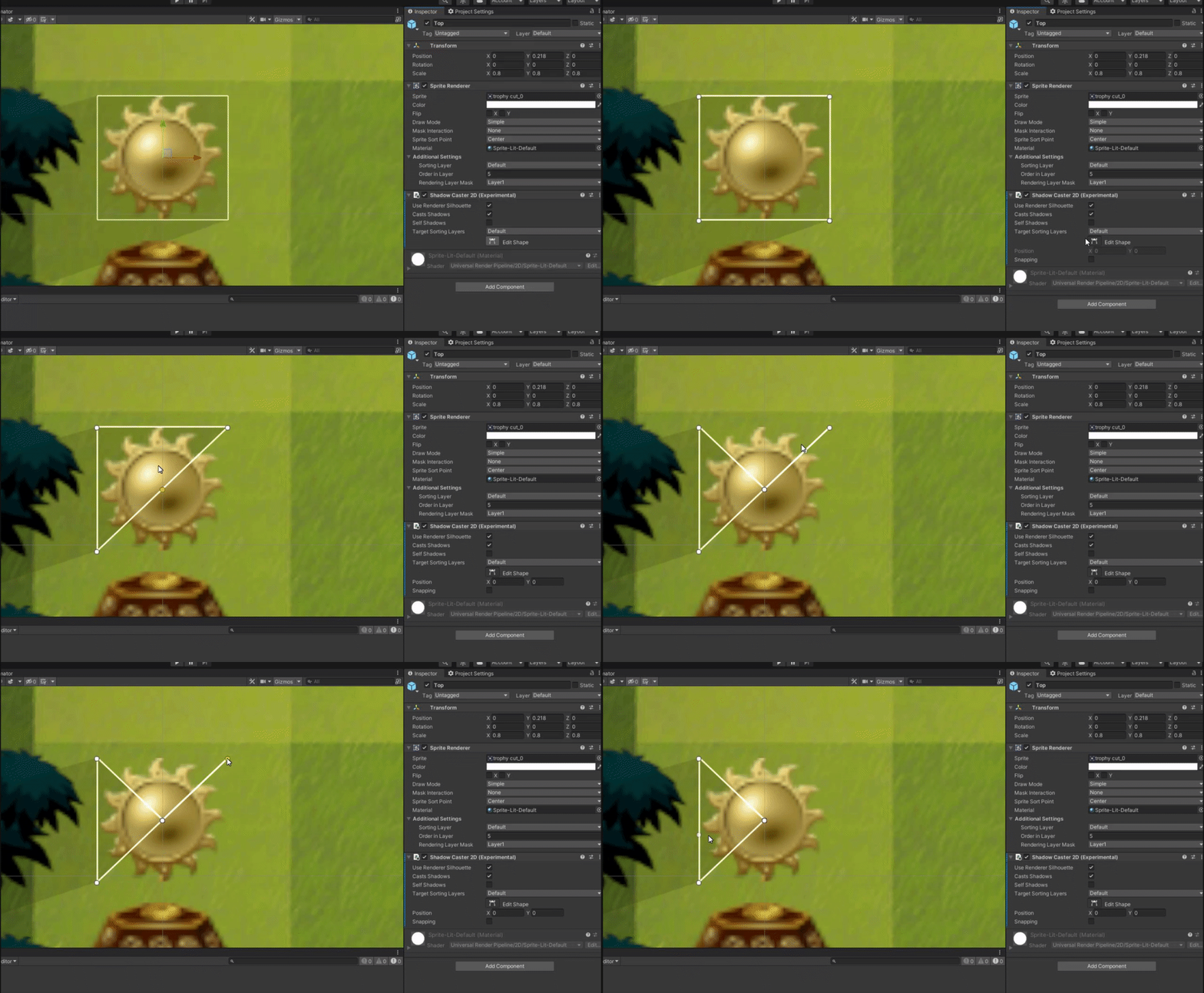


 crude fox
For some reason lights wont affect my lamp

 vocal granite
im getting some wierd effects here, the floor isnt pitch black when it should be, and i get this wierd black strip at the end away from the light sources
help would be appreciated
rich meadow
Hey guys, does anyone know if its okay to have lots of light probes in my scene regarding performance issues or is this okay for it to be like this?
