
#archived-lighting
1 messages · Page 39 of 1
 sullen niche
 mellow radish
bump
 elder junco
i have a quick question, i'm using unity 60000.29f1 with HDRP, i want to add a light to my scene but i need to make the lumen of this light 4.000.000 so i can see something. is it normal ?
I never changed something with the lights before
 languid blaze
sounds like the camera's exposure is set very high
Exposure is controlled by volumes. You can add a Volume, make it global, and give it a profile that has the Exposure volume component
It should default to automatic exposure, though
which will adjust to match the brightness of the scene
(like your eyes do)
elder junco
thx was set to physical camera
elder junco
have an other quick question, do you know why i have this with the light when i'm on play ? even when i'm not on play

i think it's because i make a room with cubes
 deft fiber
Quality tab in Project Settings references an URP asset for each quality level
Each URP asset references a Renderer asset
You can make a new URP Asset "with universal renderer" from the create asset menu and assign it
Or just as well make the universal Renderer asset separately and assign it to your current URP asset
 crimson wigeon
Im reposting this from the urp channel because I'm not sure which is most relevant: I'm trying to make a generated mesh take 2d lighting. In the Unity forums there is a dev post that says that switching to to Sprite-Lit-Default URP 2d for the material will allow it to interact with the 2d lighting system. Although this does work for the lighting, it introduces numerous other issues as shown in this image. I am wondering if I am doing something wrong or if there is something I can do to address this:
 mellow radish
bump
mellow radish
crimson wigeon
Im reposting this from the urp channel because I'm not sure which is most releva...
Hey, not sure if that's what the issue is, but it looks to me like light passes through the sprite.
Did you add the light blocker component thing to it?
mellow radish
mellow radish
Hey, not sure if that's what the issue is, but it looks to me like light passes ...
Ah, it's called Shadow Caster 2D in case you can't find it
deft fiber
That discussion is already going in #archived-urp, dangers of crossposting
You have a warning about light overlap
That prevents mixed lights from working in shadowmask mode so it's a likely issue to your disappearing light/shadow
You probably also have a warning about overlapping lightmap UVs, which appear as lighting artifacts that repeat on multiple meshes
https://docs.unity3d.com/Manual/GIVis.html
The scene window has debug overlays for both lightmap UV overlap and light overlap
mellow radish
deft fiber
<https://docs.unity3d.com/Manual/GIVis.html>
The scene window has debug overlays...
Thanks for the pointer, I'll try to go from there.
mellow radish
deft fiber
<https://docs.unity3d.com/Manual/GIVis.html>
The scene window has debug overlays...
Yeah, you nailed it :/
I'll try to follow some things I found online, such as increasing the lightmap resolution, increasing the texel padding(if I got that right) and lastly telling a friend that modelled the thing to check it for overlapping vertices and weird uv unwrapping.
Thanks a ton for your help, who knows how long it would've taken me to figure this out otherwise.

 deft fiber
mellow radish
Yeah, you nailed it :/
I'll try to follow some things I found online, such as in...
deft fiber
mellow radish
Yeah, you nailed it :/
I'll try to follow some things I found online, such as in...
First try enabling lightmap UV generation for the meshes in import settings
In case of light overlap you can't have more than 4 lights whose bounds overlap
But specifically mixed lights in shadowmask mode
Realtime, or baked or mixed with baked indirect for example don't have that limitation
mellow radish
deft fiber
First try enabling lightmap UV generation for the meshes in import settings
In ...
Yeap, I told my friend to generate lightmap uv in blender and that worked.
Unity results were questionable.
There are still some lighting issues but I am suspecting those to be caused by self intersecting things his models cause.


Thanks a lot!
languid blaze
mellow radish
Yeap, I told my friend to generate lightmap uv in blender and that worked.
Unity...
the nice thing about the unity lightmap generator is that it guarantees a valid lightmap
for a given lightmap resolution and minimum object scale
mellow radish
languid blaze
for a given lightmap resolution and minimum object scale
Ok, so you would suggest using the unity's lightmap generator instead of blender?
I tried googling around and asking ai about it and mostly came up with blender as a better choice.
languid blaze
mellow radish
Ok, so you would suggest using the unity's lightmap generator instead of blender...
I use it by default. I create something in Blender when I want more control over which surfaces are adjacent
I'm not sure how to get the correct margins in Blender
Note that you must set it up properly -- if the minimum lightmap resolution is too high, or the minimum object scale is too high, you'll wind up with lightmap overlaps
Overlaps happen when two different UV islands touch the same pixel
Reducing the lightmap resolution (the texels-per-unit setting, not the maximum size of the lightmap texture) means that there are fewer pixels to work with
and scaling an object down has a similar effect: it takes up less space in the lightmap
mellow radish
Ah, so you basically want to avoid edges crossing each other on the map if I am not mistaken.
He sent me this pic from blender(not the one he used for the model he sent me) and I was wondering if that's too much or too little space.
As for the unity settings, thanks for explaining them a bit more, names are slightly confusing, will try to play around w that when I am back home.
 deft fiber
mellow radish
Ok, so you would suggest using the unity's lightmap generator instead of blender...
deft fiber
mellow radish
Ok, so you would suggest using the unity's lightmap generator instead of blender...
Doing it in Blender gives you absolute control but absolute responsibility so practically it just makes it much more likely for the user to mess up the process
So unless you know for a fact why your own lightmap UV layout would be better, it'll be worse
mellow radish
deft fiber
Doing it in Blender gives you absolute control but absolute responsibility so pr...
Makes sense, guess will do it in unity then.
deft fiber
Blender's "lightmap pack" uv unwrap method is almost worse than none at all
languid blaze
mellow radish
Ah, so you basically want to avoid edges crossing each other on the map if I am ...
That's a different concern.
Overlapping islands would be objectively wrong in all circumstances
languid blaze
deft fiber
Blender's "lightmap pack" uv unwrap method is almost worse than none at all
It's very weird, yeah
it looks like it doesn't ever join faces
mellow radish
And as for self intersecting stuff, can that be ignored or is it serious?
I never experienced it with my own models but got it for almost every single model my friend made.
 languid blaze
it means you need to clean up your geometry!
deft fiber
There are a lot of rules of what makes a valid lightmap UV map, and again more what makes a good lightmap UV
You'd have to grasp them before trying your hand at it over Unity's generation
mellow radish
languid blaze
it looks like it doesn't **ever** join faces
I am p sure it doesn't, I told him to increase margins to 0.5 and all the faces were fully separated.
languid blaze
You actually want to have nearby faces to be joined on the lightmap
(when there isn't a sharp angle between them)
The color should smoothly blend across them
mellow radish
yeah that makes sense
deft fiber
languid blaze
it looks like it doesn't **ever** join faces
It takes every face and just stacks them in arbitrary order for maximum space
So it's a nightmare for margins
languid blaze
here's how Unity wound up unwrapping a very basic crate model


i'm actually not a huge fan of that one. i might mess with it
mellow radish
I mean it looks fine to me, cubes are made of 90deg angles so shouldn't that be fine?
languid blaze
I'd just like to have fewer tiny islands
They eat a lot of space because each one needs a margin around it
deft fiber
The inner recess walls could be stretched instead of separated, so it's one island per cube face despite the bevel
Since the bevels are areas of pretty low visual importance
languid blaze
deft fiber
The inner recess walls could be stretched instead of separated, so it's one isla...
I think Unity is splitting them to avoid causing too much angle error
hm, nope, even with everything cranked to the max, I get the same layout
It could also be always splitting on hard edges
That's probably it.
languid blaze
deft fiber
The inner recess walls could be stretched instead of separated, so it's one isla...
I'm not sure what "stretched" would mean here
deft fiber
languid blaze
I'm not sure what "stretched" would mean here
I mean this kind of UV would probably be fine for the occasion despite the distortion
 languid blaze
Oh yeah, it would
I just can't make Unity generate that. I guess I could do it by hand in Blender
(That's the shape of the UV0 map, haha)
My only problem is that I don't know how to set up the correct amount of padding in Blender
I guess I can just guess and see if Unity yells at me
deft fiber
languid blaze
I just can't make Unity generate that. I guess I could do it by hand in Blender
Yeah, I don't think there's even a possible set of rules that would recognize spots where it makes sense to break them
 dense spruce
hey how can i make my scene be completly dark for exemple when light cannot reach a place?
like for exemple a cave
because my directional light brightens up everything
it brightens less the places where it cant reach but still
 clear cipher
How do i get my shadows to match my player body in my FPS game?
I'm using the render object feature in URP and have adjusted these values but now the shadows arent matching the model

 languid blaze
Make sure that the player isn't floating, of course
after that, the shadow bias causes shadows to be pushed a bit away from the light
languid blaze
languid blaze
Make sure that the player isn't floating, of course
or does the player body render in front of everything else? might be hard to tell what's going on then
clear cipher
languid blaze
after that, the shadow bias causes shadows to be pushed a bit away from the ligh...
It's not a shadow bias thing, it's because im offsetting the player body layer using the render objects feature in the URP asset
im just looking for a way to offset the shadows to match
languid blaze
Ah, I see
It's casting shadows normally, then rendering with that renderer feature
 keen kayak
why everytime I try to bake lights it doesn't work?
I'm using this shader https://assetstore.unity.com/packages/vfx/shaders/psx-shader-kit-183591

Add depth to your next project with PSX Shader Kit from Valerie Moza. Find this & more VFX Shaders on the Unity Asset Store.
I'm trying to bake lights using vertex lix shader, I put objects as static but when I bake everything just go dark

 languid blaze
are the objects actually marked to contribute GI, which is required to be lightmapped?
the Static box should be checked
I'm not sure if the resulting lightmap will actually look like the realtime vertex-lit shader, though
deft fiber
keen kayak
I'm using this shader https://assetstore.unity.com/packages/vfx/shaders/psx-shad...
None of the shaders in this pack claim to support lightmapping so it's likely they don't
If you want to know if your scene and settings are right for lightmapping, try baking with standard shaders instead
crimson wigeon
Is there a best practices for migrated URP 2d into URP 3d in terms of the lighting system? The lighting system has completely stopped working for despite all materials being URP and having a point light. There is no darkness nor light.
crimson wigeon
I think I made progress by changing the rendering pipeline, using the 'Default to URP' conversion tool even though I was already in URP 2d
deft fiber
crimson wigeon
Is there a best practices for migrated URP 2d into URP 3d in terms of the lighti...
You swap the active URP asset's 2D renderer for Universal renderer
Then use light components rather than 2D light components in scene, with Lit materials on meshes rather than Sprite Lit
crimson wigeon
There is a camera renderer setting that I've been trying change off 2d renderer for three hours until I started taking stabs in the dark. The only possible way I could do it was with that conversion tool.
it works now though
deft fiber
crimson wigeon
There is a camera renderer setting that I've been trying change off 2d renderer ...
It's not a camera setting specifically
The camera lets you choose from multiple renderers if your URP asset defines multiple renderers
You have to know what URP assets and renderers are, and where they are
Instructions pinned in #archived-urp tell you all about it
 quiet hornet
Hello I am trying to use 2D sprites on 3D space to cast shadows into other sprites and I got it working fine.
Now I am trying to figure out if there is way to first iluminate objects, and after that apply shadows from objets in front.

So I can light up better the characters but maintain the nice shadow from the front bar
quiet hornet
Or any other solutions/workarounds to try
The best I can do is this only tweaking lights and layers, but I lose the hardness of the shadow
 crimson wigeon
Is there a way to fix URP 3d point lighting? It looks horrible. Cant find any resources online except for switching between gamma and linear. it either very dim or blown out completely.

 deft fiber
crimson wigeon
Is there a way to fix URP 3d point lighting? It looks horrible. Cant find any re...
deft fiber
crimson wigeon
Is there a way to fix URP 3d point lighting? It looks horrible. Cant find any re...
The simplest remedy is to not keep it so close to the floor
But you could also replace URP's lighting calculation with your own, one that's linear or otherwise smoother rather than the 'physically accurate' inverse squared
Or make or find a custom lit shader for the same effect, rather than modifying URP
deft fiber
quiet hornet
Hello I am trying to use 2D sprites on 3D space to cast shadows into other sprit...
What shader are you using for them? If it's a custom shader you could add the color texture into emission, partly or in full
deft fiber
It has lighting calculations though?
quiet hornet
I did not use emission because it was breaking shadow
not on the shader, using the lights from urp
If there was only something to not send the light and only pass the shadow from the light source that would be fire
deft fiber
quiet hornet
I did not use emission because it was breaking shadow
I see, you want the character to be brighter, but preserve the shadows on it
That's a bit tricky, since shadows are an absence of a particular light
You'll probably want to use light layers, and to make a brighter duplicate of the light that's casting the shadows that only affects the character, so it can't illuminate any areas that it can't reach to begin with
Or maybe multiply the base color by some value in the shader
It's a hack but allows a material to receive more light than it normally should
Shadows would naturally be multiplied less
quiet hornet
deft fiber
You'll probably want to use light layers, and to make a brighter duplicate of th...
Yeah I tried that, was good enough but still did not make the shadow hard enough.
since it still recieves some light and some shadows overlap and where darker and did not look good
deft fiber
If you're not interested in getting something close enough with hacks and playing with lights, your only real solution may be a custom lit shader which gives you the control to amplify the effect of light only above a certain brightness threshold
It'd be as simple as adding one gamma operation before the lighting is applied
If there was a shader graph template of the lit shader, it would be as simple as that
But since there isn't you'll have to create that by yourself using the URP source code and/or whatever resources you can find
One such resource is this https://github.com/Cyanilux/URP_ShaderGraphCustomLighting
quiet hornet
I think this is going beyond my reach
I think I will just use the character shadows, and use a sprite mask to darken and call it a day.
Why did I not think of that earlier...
 kindred trail
How can i get realtime indirect bounce lighting withought having to bake anything?

Cant find a single tutorial or anything on this
languid blaze
you can't find a tutorial because you can't do that (:
You can use Enlighten's realtime GI to get illumination from realtime lights
but you still have to bake that information into static objects
deft fiber
kindred trail
How can i get realtime indirect bounce lighting withought having to bake anythin...
Your only options would be HDRP's SSGI, RTGI or path tracing
Or a third party realtime GI asset
crimson wigeon
deft fiber
Or make or find a custom lit shader for the same effect, rather than modifying U...
I got good results with this method

 sick peak
Somehow this is still happening on some lights in Unity 6000.0.37f1. More than a little surprised
Why has Unity not fixed URP baked lights on certain layers?
 reef fern
can anyone help me with shadows
 timber lichen
Is it possible to reduce the shadow strength that a object receives?
Running into issues where the shadow strength on some characters are strong, reducing the global shadow strength in lightning influences the whole scene and therefore the graphics of the game which isn't ideal.
 faint crystal
Why is there no shadows in the background in the game, but everything is fine in unity

 upper fable
faint crystal
Why is there no shadows in the background in the game, but everything is fine in...
upper fable
faint crystal
Why is there no shadows in the background in the game, but everything is fine in...
If you mean the lack of shadows from the trees, I assume the trees are out of the Shadow Distance
 rough spire
Does baking realtime global usually take this long? Using an M2 pro
 faint crystal
upper fable
If you mean the lack of shadows from the trees, I assume the trees are out of th...
faint crystal
upper fable
If you mean the lack of shadows from the trees, I assume the trees are out of th...
Yes, it is. But why?

The same scene in unity

 upper fable
faint crystal
upper fable
faint crystal
Is it the same profile in build?
faint crystal
faint crystal
I've just increased split 1
languid blaze
timber lichen
Is it possible to reduce the shadow strength that a object receives?
Running i...
You'd have to rewrite the shadow attenuation calculation. I've done this in the BiRP, but not in the HDRP
I'm unsure how I'd do that.
timber lichen
languid blaze
You'd have to rewrite the shadow attenuation calculation. I've done this in the ...
I also use BiRP, currently trying if ai can write it
languid blaze
see AutoLight.cginc for how that works in BiRP -- each light type has its own attenuation calculation
which is basically just
distance_attenuation * shadow_attenuation * cookie_attenuation
you'd just lerp the shadow attenuation factor towards 1
e.g.

shadow is 1 if there's no shadowing
There are a whole lot of macros in here.
I was mucking around in AutoLight recently because I wanted to see realtime inverse-square falloff
(to match the inverse-square falloff I'm using for baked lights)
timber lichen
unfortunately I have no clue how to write code or read this, is this screenshot from a shader script?
languid blaze
It's not easy to read lmao
yeah, this is from AutoLight.cginc
it gives you a bunch of useful functions for writing a lit shader
like asking how attenuated a given light should be
I'm not sure how you'd get a built-in shader to use your own shader include either
languid blaze
timber lichen
Is it possible to reduce the shadow strength that a object receives?
Running i...
so it's possible, but it also sounds like a technical headache
I wonder if you need some more ambient light?
That would cause excessively strong shadows
timber lichen
languid blaze
so it's possible, but it also sounds like a technical headache
Thanks for the info but I have not the skill to write these changes, will ask AI.
timber lichen
languid blaze
I wonder if you need some more ambient light?
I use basic directional light
languid blaze
Show me an example of the problem
timber lichen
sure just a sec
timber lichen
languid blaze
Show me an example of the problem
depending what character it is, sometimes the strength of the recieved shadows are strong
 languid blaze
hang on, didn't we already talk about this
you have ambient occlusion baked into your base maps
producing excessively dark areas
timber lichen
this ones don't have ambient occlusion, this shadow issue also happens to other objects such as buildings
this character also receives strong shadows, no occlusion added at all
 languid blaze
That looks pretty normal to me
Depending on your lighting settings, ambient light can come from the skybox or just be a solid color
Have a look at your lighting settings. You can try adjusting the intensity multiplier on environment lighting, or modify your skybox material (e.g. if it's a Cubemap shader, it'll have an exposure slider)

This is from a BiRP project
 candid jungle
how can i make so 1 camera doesnt render a specific light source, and another camera does?
mellow radish
Hey, I am not sure where to ask this question, lmk and I'll move it there.
I am working with reflections in unity 6 w urp and would like to optimize them.
Currently, I am just using dynamic reflections to include all the non static objects in them.
This works and the performance is surprisingly good tbh.
However, I'd like to utilize baked reflections too.
Is it a good idea/possible to somehow have baked reflections for the environment and then separate ones for dynamic objects?
If yes, how would I go about that?
Thanks in advance and please @ me!
languid blaze
mellow radish
Hey, I am not sure where to ask this question, lmk and I'll move it there.
I am ...
are you talking about realtime and baked refelction probes?
 mellow radish
languid blaze
are you talking about realtime and baked refelction probes?
mellow radish
languid blaze
are you talking about realtime and baked refelction probes?
I am currently using it like this, just one probe for the entire level(100x100x100 units big).
I would basically like to baked the environment since it's static and then have the player and other things as dyanmic reflections on top of that.
I don't even know if this is a good/bad idea, I just wanna optimize it if possible.
 languid blaze
 upper cloud
why does this look bad
upper cloud
why does this look bad
There's no bounced lighting from the flashlight, so only surfaces that face it are getting any light at all
You could try using realtime GI (which, ironically, you have to bake in advance)
upper cloud
languid blaze
You could try using realtime GI (which, ironically, you have to bake in advance)
I have baked GI but not realtime GI
languid blaze
Try turning that on as well.
Realtime GI precomputes how light should scatter off of surfaces
languid blaze
languid blaze
There's no bounced lighting from the flashlight, so only surfaces that face it a...
I've used it for this reason before. It worked pretty well
It lets the flashlight "fill the room"
upper cloud
it looks good now by just setting the materials normal intensity to 0.2

ill try realtime gi
languid blaze
oh yeah, the reason you're seeing the huge black blobs is because the normal map is making some pixels face away from you
they receive no light
 languid blaze
Yeah.
upper cloud
alr im baking
upper cloud
languid blaze
Realtime GI precomputes how light should scatter off of surfaces
Realtime GI increases my baking by an hour and I think it would look better if I just had the normals set to 0.2
languid blaze
yeah, it's a noticeable cost
upper cloud
in my older projects it wasn’t that bad
I might just add screen space global illumination to HDRP and see how it looks
mellow radish
mellow radish
Hey, I am not sure where to ask this question, lmk and I'll move it there.
I am ...
bump
 polar wadi
Hello, I'm using HDRP 17.0.3 and Unity 6000.0.28f1c1. I'm having some light bleeding issue on my models imported externally with Trilib and using only realtime lights. I'm not sure how to fix the issue, could anybody help ?

Unity documentation suggest adding margin in the lightmaps UV but from what i'm understanding, such maps are only created when using baked or mixed lighting which I don't. WHen I try to switch the view to UV overlap, nothing appears in the scene view either so I'm not even sure where the problem comes from :x
I also have nothing shown in the realtime lightmaps panel with the room selecting. This is a quite confusing

 languid cove
polar wadi
I also have nothing shown in the realtime lightmaps panel with the room selectin...
languid cove
polar wadi
I also have nothing shown in the realtime lightmaps panel with the room selectin...
Do the walls have thickness ?
The shadowmap projection needs some offset between the surface percieved byt the light and the one where the shadows is projected, due to floating point approximations. The can be tweaked using the "bias" settings in the light inspector.
If the walls are just double sided planes, there is not enough difference for the shadow to be properly calculated and light leaks appear.
If you look at the HDRP sample scene, you'll see an object in the hierarchy that is a mesh surrounding the whole level to project proper shadows.
polar wadi
languid cove
Do the walls have thickness ?
The shadowmap projection needs some offset between...
Yes, I've put 40cm of walls all around following the documentation which is why I was surprised to still see bleeding.
I checked my light, the normal bias was already at the minimum, increasing it only makes the bleed bigger.
However I just noticed new options in unity 6 (I was using 2023 before and updated recently) and changing the min filter and blocker value does remove the bleeding. However, it says "High quality settings", does it mean when the player use low quality settings, those options will be off and light will bleed again?

Also, which options would be best to tweak to have reduce performances cost ? I can see 2 options fixing the bleeding: max penumbra size or max sampling distance when they go negative. Trying other option does reduce bleeding on the vertical wall but not the bleeding on the floor strangely.
upper cloud
how can I get lighting that looks near exact 1 to 1 lighting to the source engine lighting

HDRP
 scarlet geyser
upper cloud
how can I get lighting that looks near exact 1 to 1 lighting to the source engin...
scarlet geyser
upper cloud
how can I get lighting that looks near exact 1 to 1 lighting to the source engin...
try very low samples and lightmap resolution
and maybe 1.5 indirect intensity
deft fiber
Source uses lightmaps and light probes just the same, so there's no difference there
But everything else about HDRP's lighting down to color space are different
You'll also need a custom lit shader since Source uses its particular half lambert shading, and it does not (or did not) use PBR lighting model which modern engines do
These are all different in URP and BiRP too, but HDRP adds almost no features that you won't be getting rid of anyway
 snow mason
anyone know why the lights keep flashing?

changing the rendering path to deferred instead of forward+ fixed it
would still be interested in knowing why it didn't work with forward+ though
 dawn pawn
snow mason
would still be interested in knowing why it didn't work with forward+ though
dawn pawn
snow mason
would still be interested in knowing why it didn't work with forward+ though
If you use deferred, check out Unity 6.1 as it has Deferred+
For Forward, there likely were too many lights active or you changed the wrong urp asset
 vast osprey
hello guys, I need some help with a problem in Unity. I try to place a spotlight or any other light and nothing works. the only working light I have is the directional light...is there anyone available to help me out?
scarlet geyser
vast osprey
hello guys, I need some help with a problem in Unity. I try to place a spotlight...
BiRP, URP, HDRP?
vast osprey
scarlet geyser
BiRP, URP, HDRP?
URP
 viscid mango
Hi everyone, im trying to make these shadows from the leaves, but its not working, does anyone have an idea how to make this work
and i kinda need help with a few things
-im confused on what settings to leave to make shadows in environemnt and keep beauty in environment for low end devices

 upper fable
snow mason
anyone know why the lights keep flashing?
upper fable
snow mason
anyone know why the lights keep flashing?
It is the per object light limit. You can increase it from the URP asset. Forward+ and deferred have much greater light limits and smaller cost per light but they have their linitations too (higher base cost, no orthographic for deferred etc.), therefore sticking to forward when possible is often preferred
 distant yew
anyone really famililar with the new probes yet?
been trying to sort out some... issues... with the light probes making hot spots and things.. also trying to figure out how in the press confrences they were trying to say you could rely only on probes somehow
basically I'm used to not working with probes at all... so now im trying to learn probes :O. I am going for a cool effect where there are these rays of light coming out between giant moving pannels.

These are baked, using a giant array of high intensity point lights.
but when I include light probes................. I get what I call "sparkle cancer"

I have dilation turned on
deft fiber
distant yew
APVs require a lot more samples than lightmaps on average, that's why there's a probe sample multiplier setting
In this case looks like your probe minimum distance may also be too high
distant yew
and I have increased the values, the minimum probe range, and the probe variety to higher values to minimize the problem
deft fiber
It would be more helpful to see the probes visualized in the areas with the most errors
distant yew
its worse when probes are tighter. I'm also only interested in probes for bounce light
well... i am also interested separately on how to use only probes intead of lightmaps
but if I pack the probes in tight enough the bake dataset grows exponentially up to 1gb
I really maxed out the spacing and validity to minimize the sparkle

ill reabake at defaults and show you what I mean XD
but while we wait... you think increasing probe samples would help? i left it at default 4
ohhhhhh im starting to understand... because I reduced all other samples greatly since they increase... map times... a lot... lol... so i probably need to crank it up very high to compensate
deft fiber
You have few samples, sparse probes and a large search radius
To minimize the errors you see you should do the opposite of that
And to better understand how APVs actually work
distant yew
as I increased each of the search radius options it made the problem go away...
as I made the probes denser, the problem intensified
 tranquil helm
Hi everyone, running into a weird lighting issue. Here's what my game looks like without any lighting baked:

and here's with baked lighting:

Why does it look so odd? most of those objects are static
Here are my lighting settings:

 deft fiber
tranquil helm
and here's **with baked lighting**:
deft fiber
tranquil helm
and here's **with baked lighting**:
Looks like no lightmap UV's generated
tranquil helm
deft fiber
Looks like no lightmap UV's generated
Hmm so following https://docs.unity3d.com/Manual/LightingGiUvs-GeneratingLightmappingUVs.html I see that the only checkbox I have on the models generates Lightmap UVs into UV2s. I went ahead and gave that a shot, but I see the same issue unfortunately. Do I need to re-import my models or something?
 deft fiber
tranquil helm
Hmm so following https://docs.unity3d.com/Manual/LightingGiUvs-GeneratingLightma...
deft fiber
tranquil helm
Hmm so following https://docs.unity3d.com/Manual/LightingGiUvs-GeneratingLightma...
No, unless your lightmap resolution is smaller than the defined minimum lightmap resolution in the UV generation
In any case you can use https://docs.unity3d.com/Manual/GIVis.html debug overlays to troubleshoot lightmap UV overlap
And hunt for other problems
tranquil helm
Thank you!!
deft fiber
tranquil helm
Thank you!!
If you find some there's the lighting troubleshooting guide for solving them https://discussions.unity.com/t/lightmapping-troubleshooting-guide/895352
 unique gull
I need to bake in some spotlights into several different studio styled spotlights, Im not sure how to plant the lighting onto the the pieces themselves though

ive just kind of shoved it in there for the time being
I also need to I think bake it in?
How do I get these spotlights to perfectly align with the physical counterparts?
 chilly dragon
Hello, I keep getting this log about shadows, using unity's urp with real-time lighting.
Reduced additional punctual light shadows resolution by 2 to make 90 shadow maps fit in the 8192x8192 shadow atlas. To avoid this, increase shadow atlas size, decrease big shadow resolutions, or reduce the number of shadow maps active in the same frame
UnityEngine.GUIUtility:ProcessEvent (int,intptr,bool&)
Would like to get some directions on what to change to fix this issue? If I turn of shadows completely it goes a way but I would like shadows to make the lights look more realistic.
deft fiber
If your spot light fixture is rotated on object level, you could parent the light component to the fixture and reset its rotation so it aligns perfectly (or at least aligns on one of the axes predictably)
If not, it's up to you to align it by hand
If you're planning to bake the lighting then you do need to do that, yes, either using mixed or baked type lights
For aligning light fixtures with light components baking is not relevant though
 hallow rampart
Would I need to worry about my lights acting like this in game? How would I be able to show all 4 of my lights around my car properly? https://gyazo.com/be117491a601a71acc31034941172461

 visual stream
Hello coule someone please help me. I recognized that my game started lagging very hard. Then I saw at the frame debugger that every light creates there own render layer. How can I put them all in one layer so that there aren’t 200 layers just for light?
 winged forge
visual stream
Hello coule someone please help me. I recognized that my game started lagging ve...
winged forge
visual stream
Hello coule someone please help me. I recognized that my game started lagging ve...
In Forward mode every light is handled separately afaik, I'm not a lighting guru by any means.
I think you can either set it to Deferred rendering mode so every pixel is lit from all lights simultaneously, or just bake the lights instead.
200 lights is a lot.
deft fiber
visual stream
Hello coule someone please help me. I recognized that my game started lagging ve...
Which render pipeline and 2d or 3d lighting would be important to know
deft fiber
hallow rampart
Would I need to worry about my lights acting like this in game? How would I be a...
Look in pixel light limits
visual stream
deft fiber
Which render pipeline and 2d or 3d lighting would be important to know
I’m using urp 2D and the lights are point lights
Also 2D
winged forge
Well, ignore anything I said then. Didn't even know you can have issues with 2D lights so just assumed 3D.
deft fiber
visual stream
I’m using urp 2D and the lights are point lights
I'm fuzzy on 2D technicalities but from what I understand the lights will be forced to render to a different render target if they don't share the same 2D sorting layer and depth, or if there's other differences like different blend modes between them
But I'm not sure if that's the same thing as a "light layer" and if that's just the way it's expected to work
 lilac nebula
how can i fix theese issues? urp baked lightning


 opal trout
hey does anyone know how to fix "failed clustering job" when baking lights in unity? im using HDRP
deft fiber
opal trout
hey does anyone know how to fix "failed clustering job" when baking lights in un...
Baking realtime or baked GI?
opal trout
deft fiber
Baking realtime or baked GI?
baked GI
tried stopping every program i have running and only baking the lights
got 16GB of RAM and a RTX 3050
still crashing when trying to bake one light xd
think i fucked up somewhere
deft fiber
opal trout
still crashing when trying to bake one light xd
In what kind of scene?
opal trout
deft fiber
In what kind of scene?
got this point light, i set it to baked and activate bake shadows
go to lighting window and generate lighting
unity crashes giving that "failed clustering job" error
also tried to lower the lightmap resolution
nothing seems to work
and now when i enter this scene the game runs at 30 FPS
maybe i should just create a new scene and see if the cache gets cleaned or something?
deft fiber
opal trout
got this point light, i set it to baked and activate bake shadows
I assume you have something other than just a light in your scene?
opal trout
oh yea i got some prefabs
but nothing too crazy

just a small bar
those are the lights
deft fiber
Can't say at a glance if it's "crazy" or not
But in either case test baking first in a new scene with just by lightmapping some default cubes and a light or two
opal trout
deft fiber
Can't say at a glance if it's "crazy" or not
But in either case test baking firs...
yea i'll try this
best option to debug right now
thanks!
deft fiber
Lighting, especially baking is complex, so isolating issues is always good
opal trout
@deft fiberthink i found the problem
my assets alone have 20M verts
my FPS drop to 30
when i disable those assets drops to 2/3M verts with 120 FPS
thing is my meshes arent even high poly
just basic stuff

i'd say the highest poly mesh i have is this table cloth but i baked it back in blender
so shouldnt be a problem right
deft fiber
opal trout
my assets alone have 20M verts
That's why I do not trust a glance to determine the "craziness" of a scene
deft fiber
opal trout
i'd say the highest poly mesh i have is this table cloth but i baked it back in ...
The lamps, the chairs and the table itself are pitch black in wireframe view which indicates they have a way too big polygon density for baking
The lightmapper does not know what you have baked in blender, it will try to include anything you have set to contribute to GI, and to lightmap it too if it's set to receive GI from lightmaps
Those dense meshes don't look like they're intended for realtime use at all really
opal trout
deft fiber
The lamps, the chairs and the table itself are pitch black in wireframe view whi...
yea just double checked in blender my table cloth had 100k verts alone
opal trout
deft fiber
Those dense meshes don't look like they're intended for realtime use at all real...
one good lesson learned
 toxic walrus
I have what feels like a dumb question..
When I'm using dynamic lighting, I can see the light in reflections, as well as the diffuse light it's casting.
In a fully baked lighting bake, I can't see these reflections at all, it's just super flat. The reflection probes only seem to pick up the baked scene, but not the lights themselves. Any idea how to achieve this?
 north lotus
question about light maps:
i'm trying to get them work in unity 2022.3
is it better to have, as an example: 247 lightmaps at a resolution of 256x256.
or is it better to have 7 1024x1024 lightmaps for the scene.
the 1024 is astronomically larger (5.7 mb vs 36.7mb)
languid blaze
Nominally, small lightmaps could give you slightly better VRAM usage if only some need to be loaded
where are you seeing that size?
I'd expect a 1K lightmap to be a few megs large at most
and I wouldn't expect the total size to vary that much if you're looking here
 north lotus
languid blaze
I'd expect a 1K lightmap to be a few megs large at most
north lotus
languid blaze
I'd expect a 1K lightmap to be a few megs large at most
1k maps at 27 light maps is 30mb
north lotus
languid blaze
and I wouldn't expect the total size to vary that much if you're looking here
it just feels too much for what it is, i'm trying my best to keep the build size low
it's either this or i painstakingly open every lightmap in photoshop, downsize them and put em back as i don't think i can limit the amount of lightmaps made?
if i can i don't see the option
languid blaze
If you want to reduce the total amount of space taken up by lightmaps, you'd need to reduce the texels-per-unit setting
the Lightmap Resolution

Note that this may cause UV overlap problems
depending on how much padding was added to the lightmap UVs
north lotus
languid blaze
depending on how much padding was added to the lightmap UVs
i put 2
languid blaze
This would be configured on the model importer, if you have "Generate Lightmap UVs" checked
north lotus
languid blaze
This would be configured on the model importer, if you have "Generate Lightmap U...
oh right you mean that one
my bad
 vital rain
Does anyone know why the probe cube-texture unity_SpecCube0 in my custom shader could be all black? I have the default skybox in my scene, and the material icon using the shader appears correctly, but not in the little preview window nor in the actual scene. I have the environment reflection setting set to skybox in the lighting settings, but it doesn't seem to matter? I've tested using a manually-added cubemap texture and that works fine, but unity_SpecCube0 won't, so the shader can't be at fault.
are there perhaps additional env-reflection settings to fiddle with elsewhere?
languid blaze
if you use a standard shader, do you see environmental reflections?
also, you have to specifically use UNITY_SAMPLE_TEXCUBE to access unity_SpecCube0
texCUBE won't work on it
https://docs.unity3d.com/2023.1/Documentation/Manual/SL-VertexFragmentShaderExamples.html
Most regular cubemaps are declared and used using standard HLSL syntax (samplerCUBE and texCUBE), however the reflection probe cubemaps in Unity are declared in a special way to save on sampler slots. If you don’t know what that is, don’t worry, just know that in order to use unity_SpecCube0 cubemap you have to use UNITY_SAMPLE_TEXCUBE macro.
vital rain
languid blaze
if you use a standard shader, do you see environmental reflections?
I'll check when I can
vital rain
languid blaze
also, you have to specifically use `UNITY_SAMPLE_TEXCUBE` to access `unity_SpecC...
I already am. Technically I'm using UNITY_SAMPLE_TEXCUBE_LOD but it should be the same.
either way the result was the same
 unborn oriole
is there any way to get the horrible point light shadows looking better? This is at max quality settings

 blissful pike
Hey guys i am using HDRP Unity and whenver i try baking my lights it always produces weird results, I quite dont understand why is that happening? the photo u see right now is with realtime point light

and this is the same light that is when baked

does anyone know why is that happening
unborn oriole
Hey guys am i having a dumb moment or something? How do I adjust the intensity of the cubemap? I couldve sworn there was a slider for it but i cannot find it anywhere

thats really weird its available in a different project...

wait nevermind i figured it out
i had it set to gradient 
blissful pike
well i guess I found the solution and it is with UV.... hate UV so much but yeah... complex gemoetry needs to be UV'd first before shadow
 hoary shore
So I've made a 2d unity project but my game is 2.5d (similar to doom etc) how would I go about lighting that because 2d lighting doesn't work cuz my player exists in 3d and 3d lighting doesn't work because my game is 2d is there any workaround other than remaking everything in a 3d project
languid blaze
blissful pike
it does not look like anything is actually getting lightmapped
The mesh renderers need to be set to contribute global illumination. Checking the Static box on their objects will do that
languid blaze
ah, that'll also hose it
blissful pike
yeah it was a very sneaky issue
 subtle hawk
why is the light low res?
 upper fable
subtle hawk
why is the light low res?
upper fable
subtle hawk
why is the light low res?
Could it be per vertex lighting?
subtle hawk
upper fable
Could it be per vertex lighting?
how do i change it
upper fable
Depends on the render pipelin used I assume
Likely on the Lights inspector. Could be Render Mode set to something else than Important
I think that's on the built-in render pipeline, the shader used for the walls may also enforce the vertex lighting for some reason
upper fable
subtle hawk
why is the light low res?
I went with the assumption that you are using realtime lighting, are you?
 chrome garnet
hello do you know how to make a beautiful (lowpoly) game well colored with basic shadows?

 rancid island
chrome garnet
hello do you know how to make a beautiful (lowpoly) game well colored with basic...
rancid island
chrome garnet
hello do you know how to make a beautiful (lowpoly) game well colored with basic...
Directional lighting + changing environmental settings to fit your desired scene
 solemn flicker
I have a really strange issue in a project that is using a bunch of 3rd party assets. The URP Lit shader simply does not work with any form of light baking when using Forward+ Renderering. In the Debug Draw Mode if you enable Contributors/Receivers, all of the objects that use URP/Lit disappear. Does anyone know where I can start looking to find out what's going on? I am on Unity 6000.0.24f1, but tried in a fresh project of that version and everything works fine there, which is why I think it could be a 3rd party asset. I also tried adjusting all settings on the URP Pipeline Asset and Universal Renderer Data Asset, to no avail. Switching to Forward Rendering fixes the issue, but has other issues in this project that make it not an option.
These are the objects

Debug Draw Mode enabled

The only objects still visible are ones that do not use URP/Lit
Also, I did still try light baking even with this issue, and can confirm that it does not in fact work correctly. So it's not just a Debug Draw Mode issue.
 autumn shale
I am trying to setup a sideview 2d platformer, where I want lighting to come from a paralax layer behind the main tilemap. Any tips on how I could achieve this? Right now if a light source is behind a tile, it will light that tile, which I do not want. I want the tiles to affect how light interacts with world. So if the light is fully covered by tiles it shouldnt light anything, if its half-covered then only tiles not covering it should be lit etc.
languid blaze
solemn flicker
I have a really strange issue in a project that is using a bunch of 3rd party as...
how are the acual mesh renderers configured?
They're probably fine if it works in Forward
that is very odd..
solemn flicker
languid blaze
how are the acual mesh renderers configured?
Static contribute GI enabled, receive GI from light probes, although I've tried setting it to light maps and it doesn't help
Yeah I think they're fine as well since they work with Forward
solemn flicker
The problem was having GPU Resident Drawing enabled (set to Instanced Drawing in the URP asset), however I don't know why this would cause this issue. According to the docs it should be working.
SRP Batcher is on
Forward+ is configured as the Rendering Path
BatchRendererGroup Variants are set to Keep All
I assume the URP/Lit shader supports DOTS instancing as required, otherwise in the clean project I'd be facing the same issue. I checked here (https://docs.unity3d.com/6000.0/Documentation/Manual/urp/make-object-compatible-gpu-rendering.html) and it seems like the game objects are following all guidelines:
 unborn oriole
out of curiosity is there a way to increase the map lightmap size from 4096 to 8192?
unborn oriole
also is there any way to fix this?

 storm raft
What's the best way to make shadows look a bit less bad without making them soft? I already have them at max resolution.

Or even if they're still jaggy at least cleaner cause this really messes with the look of the game
 languid blaze
unborn oriole
also is there any way to fix this?
languid blaze
unborn oriole
also is there any way to fix this?
if that's a realtime shadow, you can fuss with the shadow bias
unborn oriole
languid blaze
if that's a realtime shadow, you can fuss with the shadow bias
Unfortunately even setting it as low as possible did not fix it entirely 
 tardy pagoda
unborn oriole
Unfortunately even setting it as low as possible did not fix it entirely <:Feels...
tardy pagoda
unborn oriole
Unfortunately even setting it as low as possible did not fix it entirely <:Feels...
Did you adjust the resolution of the shadows in all of the possible places? As far as I'm aware, I think there's three places you can edit the shadow quality and behavior and stuff like that. There's the quality settings (Project Settings>Quality>URP/HDRP/SRP or built-in RP), the global asset settings for HDRP/URP and SRP (built-in RP uses the Quality Settings, Graphics Settings, and then the individual component settings on cameras and lights instead of a pipeline asset file), and then there's the per-light overrides (I mainly use HDRP, so I might be wrong on some of these, but hopefully this helps!)
unborn oriole
tardy pagoda
Did you adjust the resolution of the shadows in all of the possible places? As f...
I’m currently using the built in render pipeline as this is a map being made for VRChat, when I get a chance I’ll double check all of that
 strong plank

 tranquil cosmos
strong plank
https://streamable.com/krezce
tranquil cosmos
strong plank
https://streamable.com/krezce
holy shiii that looks so good bro
good work man
deft fiber
This is not a showcase channel though
 jaunty skiff
in URP is there any built in option to adjust the ambient lighting of the room based on the intensity of directional light hitting?
 dawn pawn
Don't think so, you can do it manually my changing the ambient/environment light in the lighting settings based on the angle
@jaunty skiff
 fallen moat
I set up a area light in a scene and also generated lighting but still cant see the effect in game view
 quartz lily
fallen moat
I set up a area light in a scene and also generated lighting but still cant see ...
quartz lily
fallen moat
I set up a area light in a scene and also generated lighting but still cant see ...
!ask
 tawdry schoonerBOT
:thinking: Asking Questions
:mag: Search the internet for your question!
:book: Use the API Scripting Reference and User Manual and this troubleshooting site for commonly posted issues.
:wrench: Attempt to debug your issue.
:thought_balloon: Find an appropriate channel by reading the name and description in #🔎┃find-a-channel
:grey_question: And don't ask to ask, ask a full question illustrating with screenshots if needed.
-# For more posting guidelines, go to #854851968446365696
autumn shale
In the 2d light system is there any way to achieve fex specular highlights using a spec map and normal map? From what I can gather normal maps fex is handled by another system outside of the custom lit shader graph? I see no way of getting the light direction of closest light fex
deft fiber
jaunty skiff
in URP is there any built in option to adjust the ambient lighting of the room b...
If you mean by "hitting the wall of the room" then you need either Realtime GI or Baked GI
Non-baked/precomputed ambient light is the same everywhere, and it can technically be affected by directional light's intensity via the sky shader, but there'd be no way to know what intensity it hits a particular wall with
 south dragon
how come i cant generate lightmap uvs or bake lighting on a minecraft model i got from using mineways? it just infinitely loads

i opened it in blender to mess with it a bit to see if thatd fix it but nope
deft fiber
Lightmap UV generator probably can't handle all that geometry
"Minecraft models" use geometry in a very inefficient way
If the lightmap UV generation ever finished, it's unlikely to be usable
APVs instead of lightmaps may work in this case
 azure lagoon
Some ways to soften these cloud shadows? Doesn't seem like opacity affects the edges so the next best idea is use decals, but I was wondering if I can use two different direct lightings and filtering with lightmaps I guess? I don't really use them much but I assume that's one use of them, right

Because then I could probably use lower quality shadows on the clouds and make it a bit fuzzier, but maybe I'm thinking of this wrong and instead be messing with how the terrain receives shadows
deft fiber
azure lagoon
Some ways to soften these cloud shadows? Doesn't seem like opacity affects the e...
Outside of HDRP soft shadows aren't really a thing
azure lagoon
yeah expected that much
I'll try out the decal idea probably but usually you want some good textures for those lol
deft fiber
For ideal results you'd implement your cloud projection into the lighting calculations so it applies to everything and blends perfectly with other shadows
But the process to do that is far from ideal, whether you choose to modify your render pipeline's light calculations directly, try to modify all the lit shaders individually, or to make your own lit shaders from scratch
Decals might work, but they're not really "shadow"
azure lagoon
I'm actually surprised how well this works considering

just needs to be a bit fuzzier ;p
Could probably find a better texture too i guess. Not exactly the best for this
azure lagoon
deft fiber
Decals might work, but they're not really "shadow"
Oh, yeah actually I wouldn't get that shadowing onto my characters so yeah probably not the best idea.
actually I can project it on them too, right
deft fiber
Potential issue is that they wouldn't be really shadow, more like an overlay
And they'd compound with real shadows
azure lagoon
May require a bit more tinkering considering how I'm kinda mapping a lot of that shadow data to these billboard sprites tho ;/
ah yea combining together with the shadowing sounds like a pain too. So what about the lightmap/layer stuff? Think I can probably do two directional lights with those? If I can just lower the quality on the clouds it would probably be what I'm looking for
It's interesting that lowering the quality seems to give a much softer shadow
unfortunately affects everything in the scene
unborn oriole
https://github.com/toadstorm/RainyGlassShader so I have this animated glass shader for windows in a map of mine, and I was wondering, is there any way to make animated shadows on the wall to sort of mimic the rain going down the window from my directional light?
GitHub
A Unity built-in shader for a plausible rain-on-glass effect. Has high-end and mobile variants. - GitHub - toadstorm/RainyGlassShader: A Unity built-in shader for a plausible rain-on-glass effect....
unborn oriole
OKay ive found a quick and dirty way to do this, which is to create a cookie for my directional light... and then give my directional light gravity so it just infintiely falls lmfao
However id love a better solution, is it possible to use a gif as a cookie somehow?
azure lagoon
azure lagoon
ah yea combining together with the shadowing sounds like a pain too. So what abo...
So this idea kinda works, but not with two directional lights unfortunately. Only one will cast shadows, but other sources of lights you can project two different shadow profiles with lightmap layers (was renamed as rendering layers in 6 for some reason)
so I guess that leaves editing the shadow caster directly but I can't be bothered right, also wrote a nice shader in shader graph for it :(
deft fiber
azure lagoon
So this idea kinda works, but not with two directional lights unfortunately. Onl...
I'm confused what you mean by lightmaps in this context, or how multiple lights would help if you want more shadows rather than less
I totally forgot about light cookies so it's good that @unborn oriole brought them up
You should be able to move the light too to get a moving cloud pattern
azure lagoon
So the problem here is I like the high quality shadows on my units, but the cloud shadows are way too detailed and softer shadows can't be obtained unless I change the shadow profile for alll things in the scene. My idea was use those rendering layers and have the clouds project a lesser quality shadow (fuzzier) to offset the high quality shadows it was projecting
Meaning, the terrain would have two different rendering layers / light layers which actually seems to work... just not with directional lights
Don't really know what light cookies are, so maybe that's worth looking into
deft fiber
My hunch is it shouldn't work if you want objects on light layer 1 to cast shadows on objects on light layer 2 or vice versa, which I assume is wanted, but maybe it is possible
But look into light cookies first, it could be the perfect solution
azure lagoon

The left shadow there is rendering layer 2, while the higher detailed shadows from the units are layer 1
but you can only get shadows once from direction light
people saying it's a limitation to 1 per viewport so if you do want to render the scene twice haha
deft fiber
azure lagoon
but you can only get shadows once from direction light
This was a limitation of some render pipelines iirc
azure lagoon
Yeah, apparently works fine in birp, but was removed with SRPs
azure lagoon
Light Cookies seem to be the idea. They also blend with the shadows nicely :O
Doesn't seem to work with my sprite shader though so I guess I need to add that in somewhere hmm
Would be nice if the inspector had an option to tile them too so guess I'll be looking into that
deft fiber
azure lagoon
Would be nice if the inspector had an option to tile them too so guess I'll be l...
Tile the cookie?
It should already be tiling as long as the texture's wrap mode is repeat
You should also see an offset property next to the cookie field
azure lagoon
Ah, right. It actually breaks if I clamp it actually. I think the problem I'm running into is that I do want to stretch the texture, but it's not blotchy and creating large shadows. I was solving that by feathering the previous clouds (with world uvs) with my shader.
Probably just need a larger texture if I can't modify it further
Maybe some type of softer voronoi
deft fiber
azure lagoon
Ah, right. It actually breaks if I clamp it actually. I think the problem I'm ru...
You can use a texture that has the cloud shadows as soft as you need
azure lagoon
my noise-fu is off and honestly not sure what I'm looking for. It's like I want some nice fuzzy clouds, but not hyperealistic, so something I'll probably need to play around with more. But, besides the clouds I notice the cookies do a good job at just toning the environment so that solved that issue.

https://i.imgur.com/Ssh6E8M.jpeg
Gives a nice pattern of darkness on the grass texturing and fog
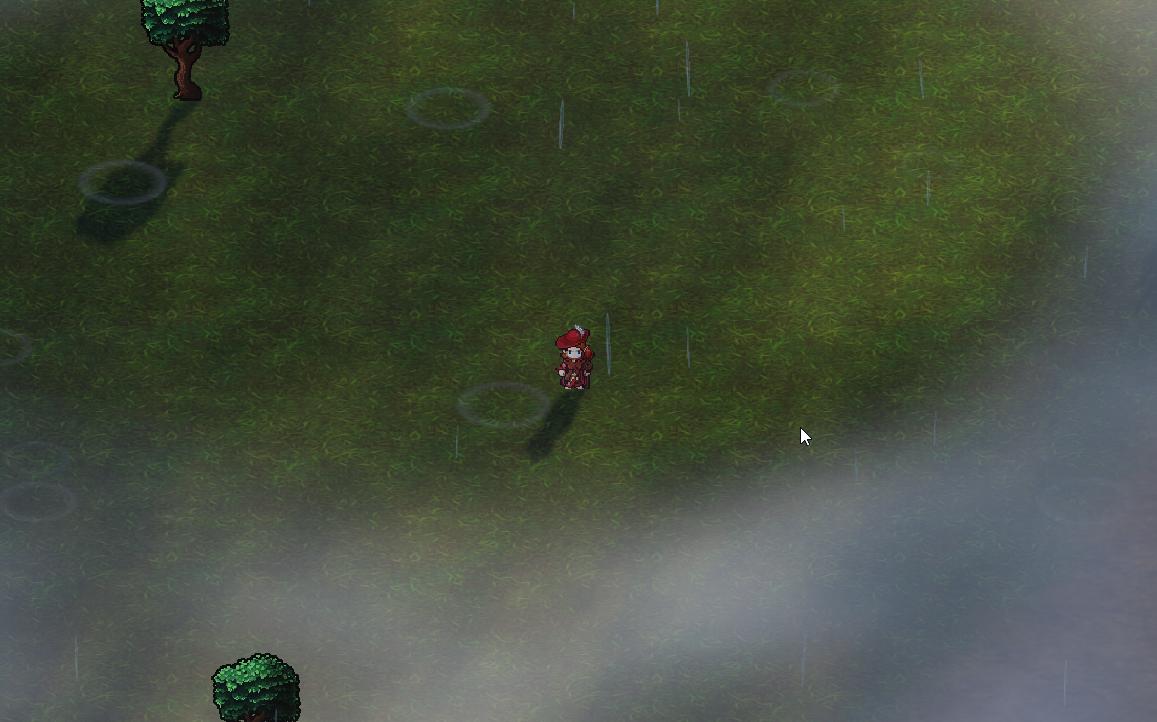
Gives off that WoW grass vibes
I'd probably just want to decal that though because if I do add light cookies to the sprites it'll project onto them. Seems like you can use multiple directional lights for different cookies, but honestly seems to work best off the primary light
deft fiber
azure lagoon
I'd probably just want to decal that though because if I do add light cookies to...
What sprite shaders are you using?
azure lagoon
It's some custom depth based shader
prevents clipping into 3D geometry
no clue how it works, but I followd bgolus' posts about it and been building off it lol
deft fiber
Since it interacts with lighting it must have at least some of the URP lighting calculations so I'd guess it's just missing a keyword that enables light cookies
The issue with multiple directional lights is that they illuminate each others' shadows so it's unlikely to look right
Or to help with shadowing much at all
azure lagoon
Yeah no clue. Thing is I had to chop up the shadow/light library because in HLSL they pass around the _baseMap over _mainTex keywrod which basically invalidates most sprite shaders with hlsl
and boy do they like using global structs
Actually, I can probably just bake the lightcookie too, right? That'll probably work fine
deft fiber
I expect so but I don't see how it helps
azure lagoon
It's mostly for toning. I can't actually do much with the terrain shader stuff it seems otherwise I'd run another texture over the grass
deft fiber
So not for lighting specifically?
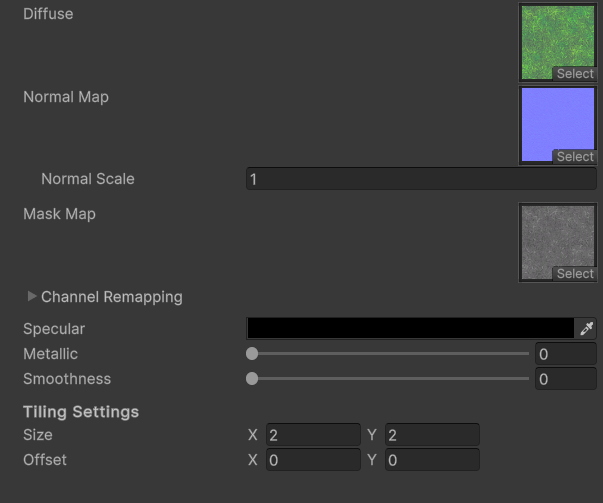
Terrain supports detail maps which I think could be bigger rather than smaller as detail maps normally would be
azure lagoon
Everything seems to be on a per-layer/texture basis or maybe I'm blind here
https://i.imgur.com/wpLyZ25.png
Not mmuch to work with either ;/
 deft fiber
Nevermind, it doesn't support detail mapping at all
azure lagoon
Nor tessellation/parallax... kinda outdated honestly
I'm being promised an update with 7, otherwise I might just make my own lmao
deft fiber
You could indeed bake a lightmap for the terrain and even just paint large details directly on it with an image editor 
azure lagoon
Probably the idea also considering I'm limited to those 4 layers anyway
Might start using decals as secondary layers if it comes to that
Assuming it works
deft fiber
Anyway it sounds like your sprite shaders have at least most of what they need to support directional light cookies
azure lagoon
Yeah, I'll probably look into all that later. I'm probably just missing some variable I'm not blending with the fragment
 brave gull
What would cause this light to illuminate these pots so badly ? It looks like a glowing pumpkin ! How would I fix this ?

 magic rampart
I’m completely new to lighting in Unity, how can I make a good looking stylized outdoor scene in URP?
deft fiber
brave gull
What would cause this light to illuminate these pots so badly ? It looks like a ...
It depends on what type of lighting are they getting precisely, to know what the fix would be
It mostly looks like they're being lit by a light probe that does not match their physical location
But it also could be lightmap UV issues if they're lit by lightmaps rather than probes
Or something completely different
Your scene has little to no ambient light defined in lighting window's environment section, so anything not lit by a direct light is fully in shadow
 rose oyster
deft fiber
Your scene has little to no ambient light defined in lighting window's environme...
rose oyster
deft fiber
Your scene has little to no ambient light defined in lighting window's environme...
Oh, makes sense. Thank you!
deft fiber
magic rampart
I’m completely new to lighting in Unity, how can I make a good looking stylized ...
That's a bit like asking how to build a car that handles well as someone entirely new to mechanics, isn't it
brave gull
Thanks for the tips @deft fiber
solemn flicker
I am getting what I believe to be incorrect lighting results, and I think the reason is that the my directional light is not bouncing properly around the scene when performing light baking. But I cannot fathom why.
For instance this is a building which has a small open doorway and very small windows. I don't expect a lot of indirect light to infiltrate this building but there should be SOME, right? Excuse the bright red color, I am using it for debugging to compare against the environment lighting, which is currently set to a bright blue color.

Looking at the probes I have in the scene, at the doorway there is some indirect light, but as you go further in all the probes are black

The green floor/walls are because I wanted to see if switching to lightmaps made a difference, which it didn't. Other things I have tried, confirmed, or that are strange:
- All objects are marked static contrubute GI.
- Directional Light is set to Mixed and assigned to Sun in Environment.
- I am using Baked Indirect Lighting Mode but have tried the other two with no change.
- I have tried Progressive GPU and CPU.
- [Strange] - Changing the number of indirect or enviroment samples, Light Probe Sample Modifier, or Max Bounces seems to have no effect on the light baking time, which shouldn't be the case.
- I have tried changing the material of the ground/wall to a brighter texture in case the darker brown texture was eaiting up the light. I also tried making the Specular Color of the material white and increasing smoothness to 1.
- Materials are all using the URP/Lit Shader.
Here is another viewpoint with Lightmaps enabled in Debug Draw Mode. The outer part of the building is being lit with ambient/indirect light, but the inner part of the room is not. Some of the probes inside the building do receive indirect lighting, but not all, even when I up the sample count to > 2000 and bounces > 40.
I think this latter point is the strangest, and makes me believe something is broken in the project.

I also can't help but feel like the probes in the outside areas are getting too much environment lighting vs indirect lighting from the red directional light, but maybe this is expected when using a brighter ambient/environmnet color?
solemn flicker
This is the material of the wall/ground of the inner building:

Is there anything here that could be causing this issue?
Scene settings for baking (again, note that changing gthe samples or Max Bounces has no effect). I've also enabled Ambient Occlusion:

Maybe I am wrong. Maybe this building is so enclosed that no indirect light would reach these probes?
 fading bough
heeelp Why do I have to set extremely high intensity values (like 500,000) for a Point Light to be visible in HDRP?
deft fiber
fading bough
heeelp Why do I have to set extremely high intensity values (like 500,000) for a...
HDRP uses physical light units which can be large numbers
But additionally all lighting is relative to your camera's exposure meaning its light sensitivity
Usually you'd base your light intensities on real world reference values, and then adjust exposure settings so it looks right
By default exposure is automatic so it should work acceptably with no action on your part, but only if you're using the default HDRP volume overrides
deft fiber
solemn flicker
Here is another viewpoint with Lightmaps enabled in Debug Draw Mode. The outer p...
Well, the simplest and best troubleshooting method is to try to rule out if the issue is your project, or scene, or models
This can be done by baking lighting in a new blank scene with default settings and some default cubes with a light pointing to them in a way that should resolutely produce bounce lighting
After you confirm that works, you can include your meshes
The only odd thing about your setupt that I see is that your lightmap resolution and max size are extremely low, and your probes are very randomly and often sparsely placed
One probe for the whole interior is unlikely to be enough and doesn't give us a picture of how the light is being captured within it
But in this case I'd expect at least some bounce lighting to show up both on the interior surfaces and the lone probe there
 pallid bear
I'm gonna try asking again. I added a custom render pass to prevents my hand and fingers from clipping through terrain.
Only issue is I get shadows and weird visual behaviour on the hands and I can't seem to figure out how to prevent that.
Also, I'll need my hands to do other things so I Might need to keep disabling and enabling the custom render pass depending on what I'm doing with them. Would it be wiser to forego the technique and do something else?
deft fiber
pallid bear
I'm gonna try asking again. I added a custom render pass to prevents my hand and...
As far as I know forcibly rendering one object in front of another to prevent clipping will unavoidably mess up shadows
It may trick our eyes to think the object is not passing through another, but shadow casting passes cannot be fooled in that way
deft fiber
One alternative is a vertex shader that moves vertices directly towards the camera's origin, so it'll look no different and shadows are consistent
But it only prevents clipping into things that are further away, and may make it worse in the other direction potentially
Another alternative would be some very granular collision detection for the hands and fingers to physically prevent intersection
pallid bear
that will be extremely hard
maybe nigh impossible
if you recall, I'm doing that cave diving horror game (took a break and made another small game meanwhile, now back to it). I am working with some really tight spaces, plus I use tessellation displacement which exacerbates the clipping problem
I simply don't see how I could prevent clipping
deft fiber
Quite a challenge for sure
deft fiber
pallid bear
do you see it as possible?
If it needs to work with shadows, with tessellation and from all perspectives then there's no workarounds that would work that I know of
dense spruce
Hey is there a way to make it so that one light can have a high intensity to brighten up a big room but not over expose close objects? Like a way to limit the max brightness amount / exposure a game object can receive
Because in the default render pipeline there was a set limit that prevented an object being brightened so much it was completely white but in urp and hdrp there isnt a limit
Id like to have flexibility over how light behave
solemn flicker
deft fiber
Well, the simplest and best troubleshooting method is to try to rule out if the ...
Thanks, I'll give that a try
solemn flicker
deft fiber
The only odd thing about your setupt that I see is that your lightmap resolution...
The only thing being lightmapped in the scene is the terrain, and the resolution is set to 1 in order to map the terrain to a single lightmap. The max size/resolution could be higher but I'm just testing for now and didn't want to make the bake time longer when baking the terrain lightmap since it's not my primary focus at the moment. But this should not impact how light probes are baked, right?
I tried using Lightmaps for everything at first, however I am using LODGroups on pretty much everything and in my initial test they were not working correctly. Although in hindsight that may be been to a different bug that I fixed, so it may be worth testing them again.
Also the interior does have more than 1 probe. I added like 10 just to make sure it wasn't just the corner probes not receiving indirect lighting. It's kind of difficult to tell but only the probes close to the door get a decent amount of indirect lighting as far as I can tell. As for the sparsely located probes, I used a tool called Magic Light Probe to place them, and admittedly I may not be using it right, because yeah, the probes don't seem optimally placed.
Thanks for the help!
deft fiber
solemn flicker
The only thing being lightmapped in the scene is the terrain, and the resolution...
Resolution would not affect probes, but it would affect non-terrain meshes
Why does the terrain have to be on a single lightmap? Other objects will be affected by the those limits as well
Light probes are per-object so with Light Probe Groups you are dependent on lightmaps for the non-terrain meshes to ensure anywhere near accurate lighting
solemn flicker
@deft fiber I was trying to evaluate the lighting results on non terrain meshes using light probe groups only, because my initial attempts at using lightmaps showed that they weren't working properly with LOD Groups, which pretty much every non terrain mesh is a part of in this project. And after researching I found Unity documentation stating that LOD Groups need to use Light Probes, not lightmaps. However maybe that limitation has been removed with Unity 6?
pallid bear
deft fiber
If it needs to work with shadows, with tessellation and from all perspectives th...
I also tried changing render priority, but that doesn't seem to do a thing...
solemn flicker
@deft fiber I can give lightmaps a try again. As you say, light probe groups only is not suitable for my use case, since they are per object it makes getting the lighting right for bigger objects nearly impossible. And I do understand that if I want to lightmap more than just the terrain, I need to adjust the resolution and max size for the lightmaps; again, the values being used were being used for testing, and only because ONLY the terrain was actually being lightmapped in my tests.
So at this point I will probably try lightmaps again, or the new APV system (which I am currently testing but finding its own issues with, which I will probably ask about soon haha)
pallid bear
deft fiber
If it needs to work with shadows, with tessellation and from all perspectives th...
And what about a shader that dissolves around the player? Probably also wouldn't work cause it would be vertex based and my vertices would be dense enough to not leeave holes around the hands
solemn flicker
So with APVs, I have this issue that seems to be related to the streaming cells switching. I think some of the objects must be caught between two cells, and switching between using the probes of the different cells as the camera rotates?
Is this a common problem, and if so, how do I go about solving it?
deft fiber
@Spazi I can give lightmaps a try again
pallid bear
pallid bear
And what about a shader that dissolves around the player? Probably also wouldn't...
nvm I think I actually thought of the only possible way to solve the problem, but it's gonna be hard to implement
deft fiber
pallid bear
And what about a shader that dissolves around the player? Probably also wouldn't...
I don't see how a dissolve can be a vertex effect, or how it'd help with your specific problems
But I may not understand what you mean by it exactly
pallid bear
deft fiber
I don't see how a dissolve can be a vertex effect, or how it'd help with your sp...
I meant terrain dissolving around the player's hands, without using the render pass queue
but I figured out that such methods have given me a problem that I knew I had with the game and only now realized what it was
it messes up the sense of scale. Even if you have a 5 cm hole, it would not seem claustrophobic enough because of the render pass shenanigans
implication being that the hands can fit there comfortably
so no matter how small I made the hole, it never looked small
so I'm moving away from render-based solutions
deft fiber
Indeed
Creating a sense of scale without depth perception is extremely difficult, and seeing exactly and consistently how your character's body is in contact with the environment is one of the few ways to do that
Even if it'd mean some clipping
pallid bear
deft fiber
Indeed
Creating a sense of scale without depth perception is extremely difficult...
so the only real solution I can think of
is to manually raycast all relevant joints and position them such that they don't clip
something like an ik chain constraint system but where you can actually control bones other than the tip
deft fiber
Could be preferable
Though if tessellation displacement is drastic that poses a challenge
pallid bear
you mean could be possible?
displacements isn't drastic on purpose in those areas
only drastic where irrelevant
deft fiber
pallid bear
you mean could be possible?
It's definitely doable, though I expect it to be a lot of work to get each finger and the palms to bend in a precise and non-awkward way
pallid bear
deft fiber
It's definitely doable, though I expect it to be a lot of work to get each finge...
It's probably least necessary for the hand as it will be clutched to latch onto the ground and it's a first person camera, so the fingers won't need to be that precise actually
I might only care that the hand is accurate and maybe fingers will thus sort themselves out
languid blaze
dense spruce
Because in the default render pipeline there was a set limit that prevented an o...
The built-in render pipleine's shaders use a very different falloff curve than the others
Real lights have inverse-square falloff: doubling the distance cuts brightness by a factor of four
This makes them extremely bright at very short ranges and very dim at long ranges
If you're doing baked lighting, use large area lights to fill very large areas
dense spruce
What about real time lighting?
 umbral juniper
pallid bear
It's probably least necessary for the hand as it will be clutched to latch onto ...
umbral juniper
pallid bear
It's probably least necessary for the hand as it will be clutched to latch onto ...
Why aren't you just using a dual camera setup like any other first-person game to stop clipping?
deft fiber
dense spruce
What about real time lighting?
You don't have other practical options than the one you were instructed to in #archived-hdrp
Otherwise you'd have to make a custom lighting shader which would be a monumental task in HDRP
Usually there you mainly use HDR tonemapping and other post processing to ensure light and dark are balanced
deft fiber
umbral juniper
Why aren't you just using a dual camera setup like any other first-person game t...
How do you solve the problem of incorrect shadows with a stacked camera setup?
pallid bear
umbral juniper
Why aren't you just using a dual camera setup like any other first-person game t...
You can't do that in HDRP
dense spruce
deft fiber
You don't have other practical options than the one you were instructed to in <#...
Shucks
They should really make lights more flexible i hope that it will be a feature in unity 6
To be able to have more control over them
deft fiber
dense spruce
They should really make lights more flexible i hope that it will be a feature in...
I surmise they are considering it but conflicted, even if it'd be leagues easier for them to do it than it is for us
If you want to do you and me a favor you could request it as a feature here
What we want are node templates of the included shaders or a graph type that allow the user to modify them piece by piece including the lighting calculations
dense spruce
Okay
umbral juniper
deft fiber
How do you solve the problem of incorrect shadows with a stacked camera setup?
Had to have a dig to remind myself of the exact way I did it. Back in the day (2016) in BIRP for my game, I maintained a dictionary of any renderer that needed to be "First Person" (ie. not clip), then the long and short of it is you render those a couple of times (separately for fp/3p shadows etc) with a custom shader keyword for if they're doing a first-person pass, custom shaders and custom projection matrixes, then composite.
But that allowed me to get 100% of world-space shadows correctly projected onto my FP character, and the FP character to correctly project its own shadows onto the world.
umbral juniper
pallid bear
You can't do that in HDRP
I've never tried FP in HDRP before but remind me what the actual limitation is? I'd be very surprised if it's totally not possible with a bit of render texture juggling
pallid bear
umbral juniper
I've never tried FP in HDRP before but remind me what the actual limitation is? ...
all the results say that the second camera stunts your FPS by more than 50%, regardless of what is actually being rendered


but it's irrelevant, I moved away from that solution now
umbral juniper
pallid bear
https://www.google.com/search?q=unity+two+cameras+hdrp&oq=unity+two+cameras+hdrp...
I'd almost be certain that's because peoples second cameras are doing a full pipeline pass and destroying GPU bandwidth that way, in that case a custom render feature should be able to achieve what you want but is a lot more finicky
But I'd definitely wager there's a way to do it just using cameras, with enough tweaking
deft fiber
umbral juniper
But that allowed me to get 100% of world-space shadows correctly projected onto ...
I think you can get "correct" world space shadows pretty easily when using renderer features / custom passes
But the issue at that point becomes that FP models clip through WS objects, the shadows you get on them from inside objects don't look right even if it's technically correct
pallid bear
umbral juniper
I'd almost be certain that's because peoples second cameras are doing a full pip...
Someone explained it from a rendering perspective in one of the threads, but I didn't fully understand it
seems like HDRP doesn't support it
and is limited to doing a full pass regardless or something
umbral juniper
pallid bear
Someone explained it from a rendering perspective in one of the threads, but I d...
Yeah the TL;DR is going to be, you need to roll your own solution either way and have a good understanding of shaders etc. HDRP definitely won't support it "out-of-the-box" with one click
pallid bear
I don't know, but everyone is saying it's unsupported
doesn't matter now anyway, I moved away from that solution as it presents a design problem
umbral juniper
It is a lot of work either way so yeah I would encourage alternate solutions
pallid bear
even if it worked for me, it's not the right solution I realized
umbral juniper
deft fiber
I think you can get "correct" world space shadows pretty easily when using rende...
You can still make them look correct with some math
deft fiber
umbral juniper
You can still make them look correct with some math
If you stick your face up to the sunny side of the rock, would the weapon not reach the shadowy inside of the rock?
umbral juniper
deft fiber
If you stick your face up to the sunny side of the rock, would the weapon not re...
Nope. That's where the custom projection matrices/shaders etc come in.
deft fiber
umbral juniper
Nope. That's where the custom projection matrices/shaders etc come in.
Roughly speaking how do they solve the issue?
It kinda looks like the FP meshes sample their light and shadow based on a single point?
umbral juniper
deft fiber
Roughly speaking how do they solve the issue?
It kinda looks like the FP meshes ...
I'm gonna be totally honest and say I can't remember, it was about 10 years ago when I was writing all this code and I haven't touched it since. But it was a problem I had to solve
 kind eagle


 kind eagle
can anyone explain to me what happen and how i can fix it (this happen to me after i baked the light
deft fiber
kind eagle
Lightmap UV overlap and texel invalidity also from the look of it
 proud olive
is there a way for me to make a fake shadow below the player so its easier to orientate themselves? i made this with a gameobject and a ray cast but it feels very jittery because its either the whole shadow moves or nothing so it kinda teleports around
 fair sleet
hey, I dont know where to ask for this, and i've checked everywhere and i cant find a solution for this, so im pretty new to unity and in all of my projects i always encounter this black noise thing, does anybody know how to get rid of it?

 wheat thicket
fair sleet
hey, I dont know where to ask for this, and i've checked everywhere and i cant f...
wheat thicket
fair sleet
hey, I dont know where to ask for this, and i've checked everywhere and i cant f...
 cedar rock
How would I go about changing up the light in this room to match more of these vibes?


Besides less lights.
dawn pawn
cedar rock
How would I go about changing up the light in this room to match more of these v...
Lower ambient light, more textures/decals, maybe some post processing?
It's extremely hard to say with limited information
dawn pawn
fair sleet
hey, I dont know where to ask for this, and i've checked everywhere and i cant f...
What Spawn said, or it can be bad SSAO
dawn pawn
proud olive
is there a way for me to make a fake shadow below the player so its easier to or...
If you do it with a decal it only shows on the geometry underneath. You could make the decal projector only show on the raycast hit as well.
proud olive
dawn pawn
If you do it with a decal it only shows on the geometry underneath. You could ma...
im on built in render pipeline so apparently i dont have those
proud olive
dawn pawn
https://docs.unity3d.com/6000.0/Documentation/Manual/decals-birp.html
i did check that out, but the shader i need for that is something i cant find
 dawn pawn
Can't help much there. I assumed you could drop a texture into it as well like in URP
Time to migrate to urp?😅
proud olive
dawn pawn
Time to migrate to urp?😅
i mean i dont rlly have any reason for picking BIRP instead of URP, does it matter alot?
dawn pawn
BiRP won't get any more updates or support. For me that's a big reason.
And all the performance issues with URP I faced have been fixed and URP has some more features now I like
So if you're not near finished I'd give URP a try
proud olive
dawn pawn
So if you're not near finished I'd give URP a try
which should i be checking? just the top one?
 proud olive
dawn pawn
And material likely <@643486406756532244>
proud olive
dawn pawn
And material likely <@643486406756532244>
both?
dawn pawn
I've always started in URP and just converted materials from assets. So I'm not sure what redering settings do exactly
Oh only regular materials, not read only
proud olive
dawn pawn
If you do it with a decal it only shows on the geometry underneath. You could ma...
just looked around on the subject a bit, got it to work... kinda? im not sure how to do transparency in there
 dawn pawn
proud olive
just looked around on the subject a bit, got it to work... kinda? im not sure ho...
dawn pawn
proud olive
just looked around on the subject a bit, got it to work... kinda? im not sure ho...
Make sure the texture is transparent in the import settings first. If it is, maybe there is a material or checkbox for alpha?
Don't have my work laptop now so cannot check
proud olive
just got it to work :)
why is it making multiple shadows though?

 harsh maple
why does the shadow just pop into existence over 0.5 intensity?
 vital wren
cedar rock
How would I go about changing up the light in this room to match more of these v...
vital wren
cedar rock
How would I go about changing up the light in this room to match more of these v...
Make the range of your lights shorter.
dawn pawn
proud olive
just got it to work :)
why is it making multiple shadows though?
That's how a projector works. Scale it to only the raycast position (and maybe use multiple raycasts?)
 astral tapir
Why is my grass & tree leaves not adjusting to the lighting? They appear lighter.
 solemn flicker
My project's ProbeReferenceVolume.instance (used by Adaptive Probe Volume system) keeps becoming unitialized in the editor (added some debug code to confirm this).
In addition to the warning showin in the image (in the LIghting window), I believe this is causing my APV bakes to fail. The bakes I have completed before this error also are not working. I can see the memory estimate in the Lighting Window for the bake, but no light probes are loaded in the scene using the Rendering Debugger when in our out of Play Mode.
Has anyone seen a similar issue? It WAS working fine in this project then after some errors this started happening. I have tried restarting the computer/Unity, clearing the GI cache, and even a length Library deletion.
Note that the URP asset is configured correctly for APVs, so this warning is completely bogus.

At least I think the bakes are failing. Progress rises steadily during the Virtual Offset phase (in Background Task), then seemingly stalls out at 50% as soon as the Integration phase starts. My scene is very complex so maybe this phase just takes a while? Or should the integration phase be short?
Hmm well progress just ticked to 51% so maybe this phase just takes a while . . . I guess I'll let it sit for a few hours and see
 ancient summit
Hi guys. I have a strange problem I can't seem to solve involving light probes. They just... aren't working. And yes, I've baked them.
My player is completely unaffected by light probes.


I have them set up, baked, and everything...

The mesh for the player is not static, and light probes are enabled for it.

My player is in a different scene than the light probes, but moving the player into the scene with the light probes does nothing.

Does anyone have any ideas what could be causing the problem here? A while back they were working, but they've stopped working and I don't know why.
fading bough
someone knows whats happening here when i bake my directional light?
 solemn flicker
ancient summit
My player *is* in a different scene than the light probes, but moving the player...
solemn flicker
ancient summit
My player *is* in a different scene than the light probes, but moving the player...
Are you loading the scene with the light probes additively? If so, you will need to retetrahedralize the light probe data (https://docs.unity3d.com/6000.0/Documentation/ScriptReference/LightProbes-needsRetetrahedralization.html)
ancient summit
Huh… lemme look into this.
Because yes, I am loading the scene additively.
Though, I am setting the new scene to the active one. Not sure if that has any effect on this, but it is worth noting.
That did it! Ty!
polar wadi
Hello, using unity 6 and hdrp 17, I have some emissive light in the left. I baked the lightning but the emission only applies on the skin and clothes, not on the hair. The hair are using the sample hair shader from HDRP samples. Is there any way to fix this issue?

 karmic marlin
guys why 2 lights doesnt work at the same time
if i put 1 that my camera sees it does work, but if i put two that my camera sees only 1 work
dawn pawn
karmic marlin
if i put 1 that my camera sees it does work, but if i put two that my camera see...
Increase the light count
karmic marlin
dawn pawn
Increase the light count
where
wheat thicket
for a small sized indoor room/area what types of resolutions of lightmaps do u guys use?
and i actually think i got much bigger problems..

the uv's are shot
solemn flicker
For light probes (either from Light Probe Groups or Adaptive Probe Volumes), I assume rays are shot from the light probe location, so assuming a light probe is not inside geometry or otherwise exposed to back faces, the data for it should not be negatively impacted by invalid texels on mesh geometry, right?
dawn pawn
karmic marlin
where
Urp asset or quality settingss for birp
polar wadi
polar wadi
Hello, using unity 6 and hdrp 17, I have some emissive light in the left. I bake...
IN the end, I had to change the hair shader. The default hdrp hair shader seems to work fine. It's the one from the samples which doesn't seem to work with indirect lighting. Maybe a bug?
dawn pawn
polar wadi
IN the end, I had to change the hair shader. The default hdrp hair shader seems ...
You could file a bug report for it I guess
 somber bobcat
hi, I'm using Unity 6 with forward+ rendering in URP
when I bake area light - it's all good until I play the scene, because light by area light source is flickering all over the place in the interior scene and caused only by area lights, not point or directional
I've tried to disable some area lights, change settings - nothing helps
I just don't know where I messed up, lol
 south raptor
I had a question about APV’s and realtime GI, probably shouldve posted it here instead but oh well, its HDRP.
wheat thicket
decided to go with realtime lighting

i think ive done a decent job of only have 2 or 3 in view of the camera at any 1 time
 rotund sparrow
Could anyone mayhaps tell me why the sides of my cubes are black

Even with an ambient color set
 deft fiber
rotund sparrow
Could anyone mayhaps tell me why the sides of my cubes are black
deft fiber
rotund sparrow
Could anyone mayhaps tell me why the sides of my cubes are black
Ambient lighting is not saved in Unity 6 before lighting is generated from the lighting window
rotund sparrow
This is unity 2021
deft fiber
rotund sparrow
This is unity 2021
In 2021 it also needs to be generated ot be saved permanently, but it should at least update in the editor when changed
 kindred perch
Hi. I have a pretty simple question for the directional light. I want my light to cast from down to top. So like an inverted sun.^^ But when I set the rotation to 0 or -values it doesn't cast any light at all. Why is that and how can I fix it?

 scarlet geyser
kindred perch
Hi. I have a pretty simple question for the directional light. I want my light t...
scarlet geyser
kindred perch
Hi. I have a pretty simple question for the directional light. I want my light t...
try disabling shadows
kindred perch
scarlet geyser
try disabling shadows
unfortunatly turning off shadows doesn't help.
Edit: BUT turning of fog in my volume helps!?
Could it be bc the fog is getting thicker the lower it goes so the light is not able to passing through?
timber lichen
I was testing another engine (Roblox Engine) and their lights seem like they arent per-pixel, its per multiple pixels or chunks or something.
I assume this makes the lights very cheap to render, and full per-pixel isnt always needed.
Im wondering if its possible to do this inside of Unity, I couldnt find much by searching
I also dont think its vertex lighting because its not really based on the verticies
scarlet geyser
timber lichen
I was testing another engine (Roblox Engine) and their lights seem like they are...
iirc it's Voxel Lighting mode that does this
timber lichen
scarlet geyser
iirc it's Voxel Lighting mode that does this
Searched that up, I only get results about lighting with voxels, as in like Minecraft or something.
With this, it just does it normally, with normal meshes etc.
There was also things about baked lighting, but thats not the goal.
And lastly, could find anything about that in any of the HDRP assets.
I assume I'd have to actually create my own light shader or edit the default one to get this functionality
deft fiber
timber lichen
I also dont think its vertex lighting because its not really based on the vertic...
It could be vertex lighting if the ground plane is a grid of vertices
That kind of geometry is not uncommon, Unity's plane primitive is also a grid
Old games (such as Silent Hill 2) often used grid planes so they could use texture tiles and to get somewhat accurate vertex lighting as well
timber lichen
deft fiber
It could be vertex lighting if the ground plane is a grid of vertices
That kind ...
I checked wireframe view, its not a grid
deft fiber
If it's not vertex lighting I guess it could be that the light is calculated at a sparse interval and interpolated in between
Or maybe the lighting is draw to a 3D texture that's sampled, but that seems expensive so it might only be advantageous to do if it's also used for some GI calculation
timber lichen
deft fiber
If it's not vertex lighting I guess it could be that the light is calculated at ...
Im unsure what you mean with the sparse interval explanation?
deft fiber
timber lichen
Im unsure what you mean with the sparse interval explanation?
The lighting would be calculated at each point of a 3D grid within the light's range, rather than for every vertex or for every fragment
Though the only way to use the result in a shader would be a 3D texture
polar wadi
Hello, I'm trying to understand how HDRP light work in Unity and I've created a simple indoor scene consisting of a single room of 5x5x3 meters with a single ceiling light. I'm trying to figure out how I can make this light illuminate the whole room without making its intensity too high to avoid having a huge white effect on the ceiling at the light position
Something like this.

I'd like the white effect on the ceiling to be lower but the room to still be bright as of it was fully lit
Is there anyway to achieve that?
I've tried to play with the global volume exposure too but I can't get a real life like result, something feels quite off.
I'd prefer not to add more light cause from what I tested, I lose about 15 fps for each lights I add. I'm about 130fps with a single light and with 4, it gets down to 90.
polar wadi
What I don't understand is that when I bake this light, the ceiling gets no indirect lighting at all. Should it brigthen up a little at least ?
deft fiber
polar wadi
What I don't understand is that when I bake this light, the ceiling gets no indi...
Assuming you have no issues with baking, like missing lightmap UVs or invalid texels
If your ceiling material is metallic, it will not receive any diffuse bounce lighting, only specular reflections directly from lights and indirectly from a reflection probe
It also looks like a much darker material in general
polar wadi
Ok, I'll try to tweak the values a bit to see how it goes but from your answer, the ceiling is supposed to get lit even a little by indirect light right?
I'm also having trouble baking some neon lights
Here with lights on

And here without lights. THe ceiling and the left walls are lit but not the ground nor the back wall which is weird

Lightmaps are generated by Unity
I've tried to move the neon a bit further from the wall as well as rotating it but the bounce on the back wall and the side wall never match which gives a weird result
Are there any options I should look into when baking neon lights ?
timber lichen
deft fiber
The lighting would be calculated at each point of a 3D grid within the light's r...
Is it not possible to make a normal light shader, but instead of per pixel its per multiple pixels? Or am I misunderstanding what possible with lights
deft fiber
timber lichen
Is it not possible to make a normal light shader, but instead of per pixel its p...
Not really a way to do that based on what I know about how shaders work
Usually lights are calculated either per vertex or per fragment, but neither have a concept of what's "around" them to know whether to calculate the lighting or not
So it's more likely there are vertices there, or the lighting is computed separately from the objects' shaders
timber lichen
Wireframe view didn't show extra vertices , I guess it is possible that there are hidden vertices for the lights.
But yeah, strange thing, unfortunate that its hard to figure out, because from what I understand that stuff is way cheaper to render than normal lights
deft fiber
timber lichen
Wireframe view didn't show extra vertices , I guess it is possible that there ar...
Vertex lights are cheap, and extra vertices are generally cheap as well
If there's some additional bounce lighting calculations that would be a clue why the lighting is on a grid, since that kind of system would have a reason to store the light in a low resolution lightmap or a volumetric texture
timber lichen
deft fiber
Vertex lights are cheap, and extra vertices are generally cheap as well
If there...
The lighting system is pretty bare minimum, no bounce calculation, but I mean they can still have it on a grid even without that
deft fiber
Perhaps the documentation has some information about how it works
deft fiber
polar wadi
And here without lights. THe ceiling and the left walls are lit but not the grou...
The threshold between light and dark is where it's supposed to be but looks darker than I'd expect, so it may be worth it to look for more causes for it and do tests with lights and different materials
Besides that if you think about neon signs, they're not flat planes emissive on one side
The neon tubes would illuminate in all directions and usually have various types of fixtures behind them holding them in place but also scattering the light
polar wadi
deft fiber
The threshold between light and dark is where it's supposed to be but looks dark...
True but here, the side wall is much more illuminated than the back wall which makes no sense. Even when I change the position of the neon or rotate it just to see, the side wall is much more illuminated than the back wall. SHouldn't it be the opposite logically ? Is there any reason for that?
deft fiber
polar wadi
True but here, the side wall is much more illuminated than the back wall which m...
Can you show what you mean by the second example
polar wadi
deft fiber
Can you show what you mean by the second example
Well, here is the neons next to the wall

And here is one meter to the right

It looks like the baked lights works better when the neons is far away and the 90 deg angle lights feel more real
polar wadi
Good lord and now, my character won't even be lit by the emission. I added a cube to compare. I just can't understand how this happens :/
 polar wadi
Seems like realtime is a bit quirky, I've been trying with adaptive probes and it seems a bit better. Still working on it.
deft fiber
polar wadi
Seems like realtime is a bit quirky, I've been trying with adaptive probes and i...
Realtime GI or realtime lighting? Did you have light probes before APVs? Is the character dynamic or staticly lit by lightmaps?
The wall lighting issue could be related to materials, or mesh normals, or both
All I can really say is that there's probably more than one thing amiss
 visual belfry
Is there a way to have 2 lighting settings active at once? Or have one affect only one camera?
It seems as though whatever the active scene is, that's the lighting settings that are used. So if you have 2 scenes that you want to do a crossfade between their cameras, whatever the active scene is--that's the one that sets the lighting--so one scene will always look wrong with lighting
deft fiber
visual belfry
Is there a way to have 2 lighting settings active at once? Or have one affect on...
In my mind it's not possible, but I recall the new URP samples have a setup like that
https://youtu.be/lg1W3Deoprg?t=435
At least I assume they use different lighting settings in some way for the scenes that are faded into
visual belfry
deft fiber
In my mind it's not possible, but I recall the new URP samples have a setup like...
visual belfry
deft fiber
visual belfry
would this work? https://discussions.unity.com/t/how-to-have-different-environme...
Either could
Let me know how they seem
visual belfry
I'll let ya know, I have some prep work to do for it
polar wadi
deft fiber
Realtime GI or realtime lighting? Did you have light probes before APVs? Is the ...
Well in the end, I couldn't figure out what I was missing so I restarted a whole scene with the default indoor HDRP scene and tried from here. The 3 additional side lights do seem to do the trick and I don't get the same FPS drop as before. Plus to my surprise, this indoor scene has no baked light by default despite having good visual quality, I'll leave it like this at the moment since the result is satisfying. Thanks again for your help.
 paper thorn
Is there a particular reason why APV's store data in a hidden perscene gameboject rather than on the apv go itself? Anyone here using them with SubScenes by chance?
 dusty nymph
its like a kaleidoscope when i look around if i bake with sky occlusion enabled
 polar thicket
Hello Unity friends, I need help today.
Please see the photo.
I have Scene 1 where I have made an aisle composed of square chunks connected in a straight line. The chunks consist of the floor and shelves.
In Scene 2 I have made a prefab of one of these chunks so I can dynamically spawn them endlessly.
The problem is, these chunks do not seem to have the lighting data that they had in scene 1 (presumably because they are prefabs being instantiated dynamically).
What can I do to precisely match the instantiated chunk prefab's lighting in Scene 2 to Scene 1's chunk lighting?

Also note the lighting in Scene 1 is already baked
visual belfry
I'm doing the same thing Kryddvr
similar at least. So Unity seems to only be able to support lighting settings from the active scene. So whichever scene is active--that's what your lighting settings are. If you have 2 separate scenes loaded in at once with different lighting settings, one or the other is going to look wrong
I'm trying a workaround using RenderPipelineManager.beginCameraRendering
But for some reason the callback isn't being invoked...in URP...which is supposed to be invoked by default for urp
 grim abyss
Does anyone here have experience with Spine in Unity?
I have serious problem with Material on Spine Objects.
rose oyster
Why does my grass have this occlusion/shadow effect on the bottom, even though i disabled casting shadows in the settings ? I can provide any ss required


 icy tundra
rose oyster
Why does my grass have this occlusion/shadow effect on the bottom, even though i...
icy tundra
rose oyster
Why does my grass have this occlusion/shadow effect on the bottom, even though i...
Looks like ssao
rose oyster
icy tundra
Looks like ssao
For some reason my lighting file wasnt applied into project settings. After applying it went away. Sorry and thanks 🙂
BTW where can i find SSAO and general occlusion settings ?
All in the lighting tab ?
 echo flume
Guys why in urp light cookies texture dot work in my project
is a problem of urp unity 6
or foward redendered path
visual belfry
grim abyss
I have serious problem with Material on Spine Objects.
sounds like a real...pain in the back...
Can you swap lighting settings at runtime?
 polar thicket
visual belfry
I'm doing the same thing Kryddvr
polar thicket
visual belfry
I'm doing the same thing Kryddvr
Oh lord.. can I DM you?
visual belfry
I think we'd all benefit from seeing the options we have explored in this channel
polar thicket
good, I was worried about clogging it up
"If you have 2 separate scenes loaded in at once with different lighting settings, one or the other is going to look wrong"
Can you expound upon this? In my case I duplicated scene 1 to create scene 2, the only difference is im instantiating the chunks dynamically. Pardon my ignorance, first big Unity project.
visual belfry
What I'm referring to is the lighting settings asset--along with the environment lighting settings, will change to whatever the active scene's lighting asset is
polar thicket
Hmm but in my case this occurs when I use the same lighting asset, which was my intention
The same asset between the two scenes, or a duplicate
visual belfry
From what I've seen in some tests, it looks like that's a similar ish issue, I can load/unload a scene with no camera and it affects the rendering of my current camera and scene
I think I have to attempt the complicated possible solution: https://discussions.unity.com/t/how-do-i-implement-per-camera-environment-lighting/931859
 zealous swan
I'm very new to Unity, so maybe I've missed something basic, but I can't seem to save my project's quality settings. I'm trying to up the shadow distance on each quality level, but every time I enter play mode or build it resets them all to default.
 chilly kettle
zealous swan
I'm very new to Unity, so maybe I've missed something basic, but I can't seem to...
chilly kettle
zealous swan
I'm very new to Unity, so maybe I've missed something basic, but I can't seem to...
did you set the quality level you want as default?
 zealous swan
chilly kettle
did you set the quality level you want as default?
zealous swan
chilly kettle
did you set the quality level you want as default?
The problem isn't that I can't choose a quality level. The issue is any customizations I make to each level are reset on build/play.
It insists on reducing shadow distance to 150, which is causing problems.
 light prawn
Hello there, my map is composed of blocks i've arranged to build a room, but the lightning is kind of penetrating between those blocks, I think this is a common issue but I can't found on internet the solution about this. Thanks 🙏 (all of my lights are baked, i'm using URP)
 chilly kettle
light prawn
Hello there, my map is composed of blocks i've arranged to build a room, but the...
chilly kettle
light prawn
Hello there, my map is composed of blocks i've arranged to build a room, but the...
https://discussions.unity.com/t/lightmapping-troubleshooting-guide/895352/11
In Chapter 10 you find all you need
light prawn
chilly kettle
https://discussions.unity.com/t/lightmapping-troubleshooting-guide/895352/11
In...
i'll read, thanks a lot
 distant gull
Hello I have a question about shadows in URP
I know it doesn't support contact shadows yet
But why does close by or small objects cast a wrong/misaligned shadow? And can that effect be mitigated?
Example of the hair showing misaligned shadows, the shader are the UTS toon by unity, fully supported and working as intended, this shadow artifacting happens on on small scale, if I scale up the character model the problem is gone, bu obviously I have to keep my character to scale appropriate for the world
rose oyster
Where the hell is shadow distance now ? why did they decide to move half of the settings that have been standards for years
deft fiber
rose oyster
Where the hell is shadow distance now ? why did they decide to move half of the ...
With built-in render pipeline it's in quality tab of project settings, with URP and HDRP it's in their render pipeline assets
pallid bear
When I soften up my shadows, I get this vertical line on my screen. You can see it to in the left-middle part of the screen

effect greatly exaggerated so it's more easily visible, but the more I soften up shadows, the more it shows
deft fiber
pallid bear
When I soften up my shadows, I get this vertical line on my screen. You can see ...
Mostly looks like this one but it's a bit hard to tell
Could also be something that occurs entirely in screen space there
https://discussions.unity.com/t/high-shadow-filtering-produces-extreme-artifacts-on-point-lights/930066
 jaunty kettle
Hi, i have room on unity scene , but the room had not a window, it is all closed, i added directional light to the scene but it looks the inside of that room is lighter.. It should be dark because in real life we see darker if there is not window on the room and all covered by walls. So it should be darker, why?
what should i do? appreciate for any help in advance
deft fiber
jaunty kettle
Hi, i have room on unity scene , but the room had not a window, it is all closed...
If the directional light is illuminating the interior, you need to make sure it has shadows enabled and that there's walls capable of casting shadows
If you want there to be ambient light from the sky outside of the room, but darkness inside it, you need some variety of global illumination, either Realtime GI or Baked GI
If you don't need ambient light outside of the room, you can get by just setting the ambient light and ambient reflections to zero so the sky doesn't illuminate anything
jaunty kettle
deft fiber
If the directional light is illuminating the interior, you need to make sure it ...
I need light on outside too, there is a forest and the house on the scene, so i want the inside of the house be darker because there is not windows, there is only door. I am trying to get realistic lighting effect. So, for this case i need to check out Realtime GIbor Baked GI?
 twilit holly
i am aware this isnt directly correlating with this topic, but in this video: https://youtu.be/vRKrg9Ku8Aw?si=1ZDqIj104H9NrExX at about 7:38, all the code is there and for some reason even though i have followed the tutorial I am not able to turn the flashlight back on after turning it off, if anyone wants to help just dm me and itll be appreciated

Yo! In this tutorial, I show you how to create a flashlight for your player that can be toggled on/off with the 'F' Key.
Flashlight Cookie:
https://www.mediafire.com/view/gchmkenjry6gsyh/FlashlightCookie.tif/file
My Specs:
GPU: GeForce RTX 2080 Ti
CPU: AMD Ryzen 5 3600X 6-Core Processor
Memory: 32GB Ram
Current resolution: 2560 x 1440, 144Hz
...
pallid bear
deft fiber
Mostly looks like this one but it's a bit hard to tell
Could also be something t...
so fiddling with filtering only affect in the sense the filtering at 0 gives me a terrible artifact
and all other filtering values are just bad
also fiddled with all possible settings, and none got rid of it, other than turning off shadows
deft fiber
pallid bear
and all other filtering values are just bad
Bad in what way?
pallid bear
every other filtering option gives me the artifact as shown in the screenshot
it doesn't affect it
only filtering at 1 affects it and makes it look worse
deft fiber
pallid bear
only filtering at 1 affects it and makes it look worse
By filtering do you mean the shadow filtering quality levels, or something else?
pallid bear
filter sample count...is that what I was supposed to look at?
deft fiber
pallid bear
filter sample count...is that what I was supposed to look at?
I guess yes if that affects the artifact
But what filtering is it? There's filtering in many contexts
pallid bear
deft fiber
I guess yes if that affects the artifact
But what filtering is it? There's filte...
not sure what exactly you're asking
deft fiber
pallid bear
not sure what exactly you're asking
Ah nevermind, I started thinking I must've misunderstood which filtering we we're talking about but that was not the case
I find a smaller 'blocker sample count' could be effective at reducing it
But that's assuming the issue is caused by large light radius
If it's that one, it's somewhat unavoidable whenever an object gets close to a shadowcasting large radius light
pallid bear
deft fiber
If it's that one, it's somewhat unavoidable whenever an object gets close to a s...
reducing radius scale for softness to 1 gets rid of it but it looks much worse
and reducing the light radius does also get rid of it, but I need to figure out how to re-configure the settings to make the light look as well with it
nvm managed to make it look better now and get rid of the artifact lol
deft fiber
pallid bear
nvm managed to make it look better now and get rid of the artifact lol
What helped?
pallid bear
I reduced the light radius which got rid of the issue, but I managed to get the right luminosity and now volumetrics show better and I get a better sense of depth
visual belfry
I was able to get multi scene lighting working through hooking into the OnPreCull method.
As a non optimized test, calling SetActiveScene seems to enable all that a scene requires for environmental lighting and reflections.
{
    SceneManager.SetActiveScene(SceneManager.GetSceneByBuildIndex(1));
}
else
{
    SceneManager.SetActiveScene(SceneManager.GetSceneByBuildIndex(2));
}```It's a simple switch that when unity starts rendering a camera, before it renders, it will swap the active scene. This works for env/reflection lighting. Scene specific directional lighting requires this same trick. So enable your camera specific directional lighting at the start of camera render, and disable when done.
At the moment this works, though it does drop fps quite a bit--not sure if that's specific to this or something else though
deft fiber
visual belfry
At the moment this works, though it does drop fps quite a bit--not sure if that'...
I would expect it to be expensive since it probably is loading and unloading it, from disk to GPU each time
Did the URP sample with the scene swapping effect provide any clues
visual belfry
It did--my demo swapping scenes had different lighting (I set one to red and one to green) and if rendered incorrectly would look off. After adding the precull hooks both cameras were rendering their correct colors without blending/hiccups/or snapping at the end
It was harder to diagnose differences between environmental lighting/reflections with one set to skybox and the other a cubemap. I had to add both scenes in and right click to set one scene active, then the other, to take note of specific visual differences (or screenshot)
solemn flicker
Hopefully this is the correct channel for this question. Using the Frame Debugger I have noticed that realtime shadows are rendered into only a little over half of what I believe is the Shadow Map Render Texture. I don't know if this is just a result of some weird resolution issue in the frame debugger, or a symptom of something not working right. I am using 4096 x 4096 shadow resolution with 4 shadow cascades, with Low Quality shadows. Testing is on an iOS device in development mode. Unity 6000.0.24f1.

What's up with this grey area not being used?
If it matters, only the direction light shadows are enabled. Other lights are set to Per Vertex and the shadow option is disabled.
 soft talon
Hello, does unity work in the intersection of Graphics and techniques involving gaussian splatting ?
 stark temple
soft talon
Hello, does unity work in the intersection of Graphics and techniques involving ...
stark temple
soft talon
Hello, does unity work in the intersection of Graphics and techniques involving ...
Don't ping moderators for non-moderation reasons. #📖┃code-of-conduct
timber lichen
I keep toggling this boolean and playing with these values and it doesnt change the light at all in the scene. I use point light realtime. But its the same for directional light. What do these options do?

 exotic inlet
my game is too dark, how to increase lighting?
 scarlet geyser
timber lichen
I keep toggling this boolean and playing with these values and it doesnt change ...
scarlet geyser
timber lichen
I keep toggling this boolean and playing with these values and it doesnt change ...
you still need to bake it
timber lichen
scarlet geyser
you still need to bake it
Oh thought realtime means i dont need to
So confusing
pallid bear
exotic inlet
my game is too dark, how to increase lighting?
It looks like the skybox might not be giving enough light, you can change that in the environment settings, and change the exposure of the skybox ambient lighting
deft fiber
timber lichen
Oh thought realtime means i dont need to
The only thing that needs to be baked for realtime lighting is the skybox shader into an ambient probe and a reflection probe so it's basically in a form that's readable for material shaders
You do that by generating lighting from the lighting window with Realtime GI and Baked GI disabled
If either of those are enabled, it still does the skybox bake on Generate but then also the complicated GI baking calculations
 viral bloom
How is adaptive probe volumes with moving buildings around a scene? ideally i would have two bakes, one for the outdoor scene and then another for the interior of each building. Not sure if that's possible. Basically the player is able to instantiate and move buildings around a landscape, but the landscape and the building interiors are both static.
 flint root
Hey guys! How could I raycast from an object that I imported into unity to a directional light? Like, I'm trying to do it in such a way that it's point by point on the top surface of my object
visual belfry
I was able to get multi scene + multi cam lighting to work by using
RenderPipelineManager.endCameraRendering += _cameraPostRender;```
I have a simple dictionary that sets the active scene before the camera renders, then
```if (_sceneCameras.ContainsKey(cam))
{
    SceneManager.SetActiveScene(SceneManager.GetSceneByBuildIndex(_sceneCameras[cam]));
}```Hey unity thanks for reusing the term SRP for "Standard Render Pipeline", for which "Scriptable Render Pipeline" is NOT
 short harbor
Anyone know what might cause these artifacts (the evenly spaced dark lines) on a flat-shaded mesh?

 orchid wedge
#💻┃unity-talk message
I asked this in the main room but was redirected here.
Any ideas?
I’m getting the same result even when creating a giant box. It still culls the shadow just because I am far away from the center of the box.
deft fiber
orchid wedge
I’m getting the same result even when creating a giant box. It still culls the ...
Directional light near plane setting
 compact knoll
Does anybody know how to fix this baked lightning issue?

I used pro builder for the map
 formal kelp
Hi, I have an issue with lighting develpoing a 2d game (I'm using 2d lights in Universal RP). I have two cameras on different layers and one of them outputs to a render texture. Can I have a Global 2d light for each layer (with different settings) without the "only one global light per scene" limit? If not, how can I have the same effect? Thank you in advance for your time and help.
deft fiber
compact knoll
Does anybody know how to fix this baked lightning issue?
First you need to have proper lightmap UVs, if the problem persists you'd look for causes of texel invalidity
https://forum.unity.com/threads/lightmapping-troubleshooting-guide.1340936/
c. 9 and 15
 gloomy flume
Hey, I'm new to lighting and have a big problem with the lighting in my scene. I'm using a directional light as the moon light source but obviously, that also lights up the inside of my house, which I obviously don't want. How can I have a global moon light source that gets blocked by obstacles? Here are images of the inside and outside of the house with and without the directional light.
Thank you in advance


 deft fiber
gloomy flume
Hey, I'm new to lighting and have a big problem with the lighting in my scene. I...
deft fiber
gloomy flume
Hey, I'm new to lighting and have a big problem with the lighting in my scene. I...
Shadow casting does block it, in theory
gloomy flume
Why doesn't it get blocked by the house then?
Are there some shadow settings I have to change? I am using URP
deft fiber
gloomy flume
Are there some shadow settings I have to change? I am using URP
Meshes need shadows enabled
Camera needs Render Shadows
The currently active URP asset must have main light Cast Shadows enabled
Your directional light is a Mixed light so the shadow behaviour may change after baking, depending on what shadowmask mode you bake with and which ones your quality settings support
If your shadow distance in urp asset is low, the shadow may be cut off before it can be seen
distant gull
I know URP doesn't support contact shadows
But why are shadows on small objects very fuzzy and a bit distorted, even tho I am setting it to max quality possible?
I want shaper shadows even close by?
 compact harbor
Looks fine to me. What exactly are you attempting to fix?
compact harbor
distant gull
I want shaper shadows even close by?
Oh
distant gull
The Shadows of the hair, distorted shape, and very blurry, I want shaper
compact harbor
Hmmm I'm not exactly sure how to do that
distant gull
I set quality and cascade count to maximum
compact harbor
If I was trying to fix that I would probably start tinkering with how the lights in the scene work, don't take my advice too much though I'm not a professional on this
distant gull
When I scale up the character I get shadow that's sharp like want, but when I scale charter to small like up to scale with environment the shadows blur and distort
compact harbor
I see
distant gull
It's as if it can't handle too small of object, and obviously I can't just scale up everything
compact harbor
Well if there's some sort of way to render a character larger and then scale it down after rendering the shadows to be put on the screen then that would be a solution
compact harbor
distant gull
It's as if it can't handle too small of object, and obviously I can't just scale...
I did a little bit of digging and ended up using chatgpt to mass search the web for a few solutions. Not currently near my computer so I don't know if this information is up to date but you could try this?

Im not bothered to use my browser on my phone haha. Way too buggy for some reason
distant gull
Yeah I'm using close fit, still not sharp enough
I'm reading the documentation for the lighting 😆
I noticed reducing shadow distance increases the quality of closer by shadows?
compact harbor
distant gull
I'm reading the documentation for the lighting 😆
I always forget about documentation. Almost as if my brain hates reading it so much it wants to never think about it again
distant gull
Yeah I too hate reading it, but you know where else to look for info about such settings
compact harbor
distant gull
Yeah I too hate reading it, but you know where else to look for info about such ...
Everyone's favorite: ChatGPT 👋
distant gull
Yeah chat will probably also keep quoting the documentation so might as well have a quick read 😆
compact harbor
compact harbor
Everyone's favorite: ChatGPT 👋
I try it every once in a while in the hopes that it doesn't pull info from a 19 year old document from the ancient archives of the web
distant gull

Apparently reducing the split value makes the shadows sharper the closer you are
The smaller the split window, the sharper it's quality, no idea why this happens tho
Looks sharpe close shadows now, so all is good I guess
compact harbor
do i need to explain this and why it's wrong or can you just help me out here :/
 compact harbor
distant gull
Explain?
compact harbor
distant gull
Explain?
the lighting on the terrain is incredibly blocky and not how it should be
theres dark and light patches everywhere
distant gull
Aaa artifacting of light
compact harbor
What?
compact harbor
distant gull
Light acne?
whatever it is how do i fix it
distant gull
I'm looking for it's name to find solution 😭
compact harbor
wait im gonna do some magic
compact harbor
distant gull
I'm looking for it's name to find solution 😭
🪄 ✨
 distant gull
Hmmmm shouldn't normals and all that be calculated by unity terrain
Have you checked the shadow bias?
compact harbor
distant gull
Have you checked the shadow bias?
no clue what that is, so absolutely not!
distant gull
Maybe increasing it change something
In lighting settings you can increase resolution of shaeddow
And shadow bias
It reduced artifacts like that
Maybe it works who knows
compact harbor
distant gull
In lighting settings you can increase resolution of shaeddow
lighting window or somewhere in project settings
distant gull
URP?
compact harbor
yep
compact harbor
my baking just finished and decided to go back to the start
compact harbor
distant gull
Maybe it'll fix the shadows
nope!
compact harbor
distant gull
Under shadow resolution and cascade count
couldn't find it
unity is seeming to be a little aggressive now though

this relates to the terrain so might be it
distant gull
This is not normale 😆
Copy your terrain to a new scene with a directional light and default lighting settings, see if it fixed it?
Enable realtime lighting?
Do you have normal maps on your terrain textures?
compact harbor
distant gull
This is not normale 😆
I think the 1000 warnings helped me figure that out
compact harbor
distant gull
Yeah something sus
Hey, the new scene passed with flying colors!

Only 432 warnings this time
distant gull
Well I personally ignore warnings warning ⚠️
Think of them as just a suggestion 😅
At ethe shadows still jagged?
compact harbor
distant gull
Maybe ignore it and keep designing the stage? 😆
the stage is kinda the terrain
soooo not too much of an option
compact harbor
compact harbor
Only 432 warnings this time
bumped to 434 
compact harbor
distant gull
At ethe shadows still jagged?
Shadows in the test scene work fine though
distant gull
Honestly no idea why
compact harbor
You know what? Maybe I just don't bake the terrain
Not like it does anything much now that I look at it
 compact harbor
distant gull
Keep on at it I say
compact harbor
distant gull
Keep on at it I say
Why solve the issue if you can always just avoid it
 distant gull
Just turn on real time light and just go with it
I'm sure it'll look good in the end
It's the composition and models that matter after all
I presume you're not making a realistic game?
compact harbor
distant gull
I'm sure it'll look good in the end
Grass'll cover it up
compact harbor
distant gull
I presume you're not making a realistic game?
More of a fantasy style game yeah
Well maybe the trees stay unbaked.. not looking good for me
 distant gull
Hmmm if fantasy look I think stylized shaders are what sells the look
And as you said the grass will cover most surfaces
compact harbor
distant gull
Hmmm if fantasy look I think stylized shaders are what sells the look
More specific?
distant gull
So invest in good trees and grass thets what will sell the nature look
compact harbor
the 50 dollar package comes with some shaders thankfully

Now that i think about it, i have no clue how to set this up
distant gull
compact harbor
the 50 dollar package comes with some shaders thankfully
Which one? Some are excellent on the asset store and come with lots of trees and foliage
distant gull
compact harbor
Now that i think about it, i have no clue how to set this up
Isn't there prefabs of trees and such?
compact harbor
Oh hey look at that I'm a genius
 distant gull
If yes just use them to design the space for now
compact harbor

Elevate your workflow with the Toon Fantasy Nature asset from SICS Games. Find this & other Landscapes options on the Unity Asset Store.
distant gull
compact harbor
Oh hey look at that I'm a genius
Hey scenery wise it's smart, I like the composition, I am an island lover myself
compact harbor
distant gull
Hey scenery wise it's smart, I like the composition, I am an island lover myself
thanks :)
made an island partially to make terrain creation easier
distant gull
compact harbor
https://assetstore.unity.com/packages/3d/environments/landscapes/toon-fantasy-na...
The trees look lovely so is the grass
I believe you can craft a great environment using them
compact harbor
Also, where did they move the probuilder thing where you can move around the edges
unity 6
distant gull
I do not use pro builder alot
Actually I'm on Unity 2018 😅
But again it's pretty much the same, unity left the rendering unchanged over the years
But added a lot of tools I guess
Most third party packages work on many render pipelines and support most versions
unborn oriole
Is there some kind of up to date tool that lets me adjust the intensity of light probes?
https://github.com/kemalakay/lightprobes i found this but i get a ton of compiler errors trying to run it in unity 2022

GitHub
Light Probe Intensity Adjustment Tool for Unity3D. Contribute to kemalakay/lightprobes development by creating an account on GitHub.
chilly kettle
unborn oriole
Is there some kind of up to date tool that lets me adjust the intensity of light...
Well. Normally the light adjusts the intensity of light probes ^^
Not sure why you want to adjust them by hand?
That wont give you a realistic result.
deft fiber
compact harbor
🪄 ✨
That answer is just complete nonsense
Terrains are completely height based, so any vertical incline is stretched in UV space
Lightmapping attempts to bake shadows onto the vertical areas, but that's basically not possible because there's no resolution to work with in those areas
 spice willow
How do you only test a portion of a screen when doing light bake tests? I used to know, but I forgot.
unborn oriole
chilly kettle
Well. Normally the light adjusts the intensity of light probes ^^
Not sure why y...
I’m not aiming for realism, I’m going for stylized looks
chilly kettle
unborn oriole
I’m not aiming for realism, I’m going for stylized looks
has nothing to do with realism.
All your assets will look out of place when you change lightprobes intensity.
unborn oriole
 the issue is that they CURRENTLY look out of place. When in the sun they are so bright that they look emissive
But if I lower the suns intensity before baking, the environment does not look how I want it to

I can sort of achieve the look i want by just lowering the brightness of the albedo on the materials by about 40% but i want to see if adjusting the intensity of the light probes results in a look i prefer over this method, i understand its not physically accurate, but i want to be able to test it and see if i do like the look it results in

Another solution i can think of is to have another directional light that ONLY lights up her and casts shadows on her, but im not 100% sure how to achieve that
unborn oriole
So I am working on setting up a large outdoors map for VRChat, and I was wondering if there is any way to have my non static NPCs who wander around cast shadows despite the directional lighting being baked. I’ve had a few ideas on how to do this, but I don’t really have the knowledge to know if any of these are even possible. Lighting of the characters themselves is handled by light probes.
Idea one: a light that ONLY results in a shadow being cast without actually lighting up the environment. I know that physically speaking this is impossible, but I wasn’t sure if there was some kind of magic trickery that could be done to achieve this
Idea two: using a shadow projector sort of like the blob one but instead of a blob it projects a shadow in the shape of whatever it’s attached to. I can already imagine the biggest downside to this would likely be that the shadow isn’t animated…
Idea three: maybe having a second model of the character that has been flattened and has a shadow on it to make it black and partially transparent. Though the issue with this is that id need a way to make the second model conform to the terrain it’s near…
I’m not really sure what else could be done for this but I feel like there’s gotta be a solution somewhere. This is restricted to the built in render pipeline so I cannot use any solutions that require anything other than that.
 safe robin
does anybody know what could be causing these spotty lit objects

 arctic isle
safe robin
does anybody know what could be causing these spotty lit objects
arctic isle
safe robin
does anybody know what could be causing these spotty lit objects
probably the backfaces of those white quads. perhaps set them to not contribute to GI
 strong python
Hi guys. Recently I started to have a problem with lightmapping. All the light, direct and shadow maps are marked as default after it has been generated. Then I manually reassign these textures to be light, direct, shadow maps again. I tried to reinstall and move to another version of the engine but no use. Maybe there is something in the project settings?
deft fiber
unborn oriole
So I am working on setting up a large outdoors map for VRChat, and I was wonderi...
You should use mixed lights for this purpose, if you can afford the performance hit
deft fiber
strong python
Hi guys. Recently I started to have a problem with lightmapping. All the light, ...
Tbqh none of this terminology makes sense to me
"Light, direct and shadow maps"? "Marked as default"?
These words sound like non sequiturs if they're meant to be in the context of lightmapping
unborn oriole
deft fiber
You should use mixed lights for this purpose, if you can afford the performance ...
Sadly the issue I run into with mixed lights is that VRChat’s maximum shadow distance is hard locked to 150 which results in shadow fade in being distractingly noticeable on the big map I’m making 
Even just across this pond it’s noticeable

I would love to be able to used mixed lighting so the shadows from the foliage also move like the foliage itself does on the wind but sadly it’s just not feasible in VRChat at least on a map this big
deft fiber
unborn oriole
Even just across this pond it’s noticeable
With shadowmask and distance shadowmask modes baked shadows are used beyond realtime shadow distance
unborn oriole
Unless there’s a way to limit the influence of the directional light’s illumination to b- that’s actually exactly what I was just describing…
I will have to look into that, how do I set that up
That actually sounds like a perfect solution, almost like LoD for shadows
deft fiber
Subtractive mode is cheaper, and also can mix realtime shadows and baked shadows in its own way, at the cost of fidelity
unborn oriole
You have a link to any good guides or a video I could watch to learn this? I appreciate you very much
This should also eliminate my need for light probes too if I’m understand right
deft fiber
I don't know of one
https://docs.unity3d.com/Manual/lighting-mode.html
Documentation has all the info, though not really in an intuitive format
If vrchat has some unique limitations, that's not something we can help with
unborn oriole
All good, I’ll do some asking around in the VRChat server as well thanks so much!
Out of all my googling and asking on Reddit and other places you are the first person to suggest this 😂
I’m using Bakery for my baking but I imagine the basic gist is probably the same as with the base light baking in unity
 proper horizon
Hello everyone, I have a problem with lights. When I place a Spot Light or Point Light, the light does not appear in the editor or in the game. Do you know what could be causing this issue, please?
 deft fiber
unborn oriole
This should also eliminate my need for light probes too if I’m understand right
deft fiber
unborn oriole
This should also eliminate my need for light probes too if I’m understand right
Unlikely, light probes are an important part of light baking since they're the only way to bake light in a way that it can affect dynamic objects
It's always used for indirect lighting of dynamic objects, and with baked lights and some mixed light modes for direct lighting as well
unborn oriole
deft fiber
Unlikely, light probes are an important part of light baking since they're the o...
Ahh okay
Gotcha
deft fiber
proper horizon
Hello everyone, I have a problem with lights. When I place a Spot Light or Point...
It says on your screenshot that "lighting has been disabled in at least one scene view"
You'll want to make sure lighting is not enabled in your current scene view
 opaque dune
why does my game look considerably darker in the actual build?

 opaque dune
why does my game look considerably darker in the actual build?
opaque dune
opaque dune
why does my game look considerably darker in the actual build?
the pixel effect is intentional, i just disabled it in the editor screenshot
 languid wing
opaque dune
why does my game look considerably darker in the actual build?
languid wing
opaque dune
why does my game look considerably darker in the actual build?
You probably didn't bake your lights
opaque dune
languid wing
You probably didn't bake your lights
I was under the assumption i was using realtime so i didnt have too
deft fiber
opaque dune
I was under the assumption i was using realtime so i didnt have too
Lighting must be generated from the lighting window, so that ambient light from the sky is saved permanently
You can have baked lighting ("realtime GI" and "baked GI") disabled for it, and should have unless you intend to use those workflows
There really should be more clearly labeled buttons about what you are and are not baking when "generating" lighting
opaque dune
deft fiber
Lighting must be generated from the lighting window, so that ambient light from ...
I'm a bit confused as I already have it set to "auto generate" which greys out the generate button
deft fiber
opaque dune
I'm a bit confused as I already have it set to "auto generate" which greys out t...
Take it off "auto generate"
opaque dune
 deft fiber
And disable "baked global illumination" if you want to use realtime lighting only
It says you have baked lightmaps there, so whether intentionally or not you are using baked lighting
opaque dune
deft fiber
It says you have baked lightmaps there, so whether intentionally or not you are ...
thats good to know. is there a way i can disable them or remove them? unless theres a really big benefit to baked I'd rather use realtime.
deft fiber
opaque dune
thats good to know. is there a way i can disable them or remove them? unless the...
the Generate button should have a dropdown next to it that lets you "clear baked cache"
Baked GI lets you simulate indirect lighting which realtime lights aren't capable of, and can let you use baked lights so no realtime light calculations are necessary
When your game looks different between editor and build, also make sure to check if the build target is looking different because it may be using a graphics quality level specific to it
opaque dune
deft fiber
the Generate button should have a dropdown next to it that lets you "clear baked...
that seems to have helped. the only issue im struggling with now is ive come across these little parts on my terrain that i can really only describe as dark patches. what might these be caused by?? I had a similar issue as to where these would show up in the editor before getting close to them, and then they'd load in and look just fine although it doesnt seem to be doing that anymore.

 deft fiber
opaque dune
that seems to have helped. the only issue im struggling with now is ive come acr...
deft fiber
opaque dune
that seems to have helped. the only issue im struggling with now is ive come acr...
This is after generating lighting?
Are you sure your lighting window is no longer reporting baked lightmaps

 dreamy talon
unborn oriole
Sadly the issue I run into with mixed lights is that VRChat’s maximum shadow dis...
dreamy talon
unborn oriole
Sadly the issue I run into with mixed lights is that VRChat’s maximum shadow dis...
If you're ripping maps from Wow, why not rip the baked shadow map in the map file too?
unborn oriole
dreamy talon
If you're ripping maps from Wow, why not rip the baked shadow map in the map fil...
The tool I’m using does not seem to have those, and I’m also using a different direction of light than what WoW uses by default. I’m also not sure if WoW’s environmental shadows are baked or not, 99% sure they aren’t though