#archived-lighting
1 messages · Page 18 of 1
 deft fiber
 wispy dome
deft fiber
After
Otherwise there isn't much to look at
wispy dome
deft fiber
After
Otherwise there isn't much to look at
So, Im in uv overlap mode but it only shows white
deft fiber
wispy dome
So, Im in uv overlap mode but it only shows white
Then you might not have any significant UV overlap issues
Does the baked lightmap look weird in some place?
deft fiber
You tell me I suppose
deft fiber
Looking at the baked lightmaps themselves through the lighting window can give you more information about potential issues, if you know what to look for, but if there visually isn't any issue then it's unlikely that effort needs to be put into solving issues that may or may not exist
 tender breach
Why do I get these lines on the screen on every object
 deft fiber
tender breach
Why do I get these lines on the screen on every object
deft fiber
tender breach
Why do I get these lines on the screen on every object
If you have SSAO I'd try turning it off to see if the problem persists still
 cursive rapids
Hey, i actually learn unity, and i created "backrooms" level but my light have problem, is very high in roof, what is the problem ?

 chilly kettle
cursive rapids
Hey, i actually learn unity, and i created "backrooms" level but my light have ...
chilly kettle
cursive rapids
Hey, i actually learn unity, and i created "backrooms" level but my light have ...
How did you create the lights?
cursive rapids
In game object then light then I applied it to an object to make a light like neon
cursive rapids
point
 neon pebble
i think you need spot light instead
try it out and see if it fits, it will only spot to a certai direction
chilly kettle
cursive rapids
point
Do you want baked or realtime light?
Its nearly not possible to get a good result with realtime lights there. You will always have a light blob on the ceiling.
I would recomment using a big area light for the whole room and bake the light.
Then add emission to your "lights" so it looks like they are bright.
Or like Murado said, use spot lights with a very far angle
 zenith flax
Is there any way to have shadows/ights follow the QualitySettings.shadow variable in URP? Or is the only two options for shadow manipulation in URP shadow resolution and shadow cascades?
cursive rapids
okay thank
deft fiber
Probably pixel light limit
 quick jackal
How do I fix this ( what are the deafult coords and rotation for the light )
 deft fiber
quick jackal
How do I fix this ( what are the deafult coords and rotation for the light )
deft fiber
quick jackal
How do I fix this ( what are the deafult coords and rotation for the light )
What's the "this"
 ancient laurel
Hello! Can someone help me and explain why when I load the scene directly the shaders and shadows look good, but when the load goes through a transition from another scene the shadows break?
Some people have told me that this is an editor error and that was when I was building the game for the first time. But when I made a new one after a while, my build now looks like on the third screen.


 gusty jetty
what's this weird screen space reflection caused by? i'm using raymarching
it's all black for some reason
deft fiber
gusty jetty
what's this weird screen space reflection caused by? i'm using raymarching
SSR cannot reflect anything that's not in screen space, hence the name
gusty jetty
Added reflection probes and it works now
deft fiber
SSR and cubemap reflections work in tandem, with SSR taking over for the pixels it's able to
 jaunty sun
Hi the Unity Team , do you have any idea why on my main camera I can see the sun reflection but on the scene screen i have nothing 🧐

 chilly kettle
jaunty sun
Hi the **Unity Team** , do you have any idea why on my main camera I can see the...
chilly kettle
jaunty sun
Hi the **Unity Team** , do you have any idea why on my main camera I can see the...
Do you have the Scene Lighting activated? 😄
jaunty sun
Yes but the problem it's not that, I want no light 😅
 jaunty sun
chilly kettle
Do you have the Scene Lighting activated? 😄
jaunty sun
chilly kettle
Do you have the Scene Lighting activated? 😄
I thinks i can disable the sun when he is at 180 in x rotation 🤔
chilly kettle
You want no light?
jaunty sun
yes
Because to create a day/night cycle I rotate the sun in X with an animation but when he is between 180 and 0 (night rotation) I have a this little reflection on all object in scene 🥹
chilly kettle
There are plenty day/night circle tutorials out there
In this Unity game development tutorial we're going to look at how we can create a simple day/night cycle.
We'll start looking at how to control and display the time of day.
Then we'll look at how to simulate the position and direction of the sunlight changing as the day progresses.
Finally we'll look at how to transition between daytime and ...
 dry kindle
hey, couldn't find the words to search for this online - i'm playing with my scene lighting right now and was trying to figure out what light modes i can make use of for lights that i want to be toggleable (e.g. hitting a light switch) in-game? do i simply need real-time lighting for that or can i somehow configure the lighting engine to be able to switch in and out of using baked lightmaps on a per-light basis?
chilly kettle
For this you have to use realtime lights.
You can switch lightmaps with 3rd party assets also, but thats not a smart way für a lightswitch.
dry kindle
chilly kettle
For this you have to use realtime lights.
You can switch lightmaps with 3rd part...
thank you for the guidance, is it possible to precompute the GI with realtime lights then? since they will be in static positions
i switched to realtime but there's an odd effect where as i move around, lights near me get toggled on and off - it seems related to which light probe i'm near...?
chilly kettle
dry kindle
thank you for the guidance, is it possible to precompute the GI with realtime li...
mhh. dont know. maybe with hdrp
chilly kettle
dry kindle
i switched to realtime but there's an odd effect where as i move around, lights ...
Do you use urp?
chilly kettle
URP only shows a maximum of 8 lights per mesh
dry kindle
ah, so it's because all of the lights are affecting the ceiling?
i would expect it to then cull lights based on distance, not just random ones
chilly kettle
it does, but if there are more then 8, getting confused😄
chilly kettle
i think there is a possibility when changing rendering path from forward to deferred
but not sure it urp supports it too
dry kindle
haha, i just read that as well in a forum thread
chilly kettle
But, normally you dont want this many realtime lights in urp
because you use urp if you want to do a game for low end hardware?
dry kindle
yes, I didn't want to do anything expensive, just have light switches for the house
but maybe that's just expensive
I'm sure I can just do some tricks and reduce light count per room and sneakily disable lights in rooms you're not in... that kind of thing
chilly kettle
Well, working with urp is working with "faking" stuff 😄
Like putting a black plane infront of the camera and changing its alpha, or working with postprocessing.
Or just splitting the ceiling into a few more meshes.
dry kindle
I was getting the problem also on walls and stuff, which was a bit surprising, but i guess even with very distant lights it counts towards the 8 limit
chilly kettle
depends on the lights range
dry kindle
anyway, I'll just try deferred, maybe it fixes the issue without more hassle
actually! the forward+ path seems to just fix it completely
chilly kettle
ah nice. im on a older version of unity. dont have this right now
BUT.. realtime lights are expensive 😄 keep this in mind
especcially point lights
dry kindle
yep, it'll be one of the first things I look at optimizing
but nice to have the option for design time at least
dry kindle
chilly kettle
BUT.. realtime lights are expensive 😄 keep this in mind
you may be interested to know that based on my research forward+ has some rather exciting optimizations built in for this - real-time lights are clustered together in an improved culling step to optimize their rendering, unlike Forward or Deferred rendering
(also, thanks for your help!)
chilly kettle
👍🏻
 stone sigil
Does object scale affect lightbakes? I scaled a scene up 10x and got very different lightbake results with the same settings
chilly kettle
stone sigil
Does object scale affect lightbakes? I scaled a scene up 10x and got very differ...
yes it does. the resolution is texels per unit. If you scale it up like 10 you get 1/10 of your quality
stone sigil
Ah, so for nice lighting should I just scale my stuff pretty small or is there a drawback to that?
stone sigil
Practically that doesn't really mean much though...
chilly kettle
Well it does.
Its important to keep everything in a realistic size.
stone sigil
Why? You could just scale everything down and the player wouldn't see the difference. (Assuming you wanted to get good lightbakes quickly)
chilly kettle
Because you will get problems with shadows in small scales for example
stone sigil
Okay, that I can accept
chilly kettle
well, do what you mean. I can just tell you how you should do it ^^
stone sigil
I appreciate the advice. I just was curious since I had two scenes at different scales and even though I upped the resolution in the larger scene my results were still pretty bad. It was only when I scaled the larger scene down that I got something decent.
chilly kettle
stone sigil
I appreciate the advice. I just was curious since I had two scenes at different ...
Its like when you have a 1x1 meter poster, and you put a 1000x1000 pixel image on it. It looks fine.
But if you have a 10x10 meter poster and use the same 1000x1000 pixel image, it looks worse.
But on the other hand, you should always try to stay in a realistic range of scales, because unity dont really like very small scales.
 thin kernel
Does anyone here know how can I add shadowCaster on tilemap? Shadowcaster2d and comositeshadow caster dont do anything(changed material in tilemap rendered to sprite-lit-default)
 timber lichen
URP
I'm 3 years deep into Unity but haven't touched graphics. Made a simple scene in blender for what will be the map.
I don't know how to make water
I don't know how to do lighting/shadows
I don't know what the topology for terrain to look like in order for it to be "natural"
Links to resources would be great, or more direct suggestions
 tawdry schooner
timber lichen
I'm 3 years deep into Unity but haven't touched graphics. Made a simple scene in...
tawdry schooner
timber lichen
I'm 3 years deep into Unity but haven't touched graphics. Made a simple scene in...
There are tons of tutorials for all of your artistic questions on youtube. To improve your scene though, I would start with adding a custom skybox, then filling out the environment more with some terrain/rocks. Find a free asset pack that can you practice environment staging with so you aren't bogged down with modeling new things from scratch. Here's an example tutorial for doing terrain that's decent. Terrain requires some assets/textures before you can do it though. https://www.youtube.com/watch?v=2XdQkwSw-bA

In this How to Make Beautiful Terrain with Unity tutorial, I'll be showing how to setup and use the 3D Terrain with Unity 2021 URP. I'll go through the process of using the terrain brushes, terrain layers, and also setting up fog and post processing.
► Lowpoly Environment Nature Pack FREE https://bit.ly/3Jmpmlc
► Fantasy Skybox FREE https://bi...
timber lichen
tawdry schooner
There are tons of tutorials for all of your artistic questions on youtube. To im...
The player will not be on the beach
Only on ship
If that changes anything
basically terrain will not be closely inspected, I guess I just need to make the "environment" look good
timber lichen
tawdry schooner
There are tons of tutorials for all of your artistic questions on youtube. To im...
Lol
yeah I'm diggin it!
4.5 fps
Cool tutorial but nothing I don't know already (that I intend to use)
terrain maker is not applicable here, I think
fog is a good option, should try
and other global lighting settings
I'm looking for something different though
 blissful ether
timber lichen
I'm looking for something different though
blissful ether
timber lichen
I'm looking for something different though
What type of game are you looking to make?
But regardless, I'd start with learning some of the light settings more in depth, tune it to something you really like the look of in one of the sample scenes and start a fresh project with that. It'll help you make better decisions for your level design.
If you're not a 3d designer, use models that have already been made to practice level composition, and figure out what looks good to you. Analyse shots from games you like for inspiration. You can then tackle custom models etc if that's something you're interested in.
It's important to break the problem down into different areas you can focus on.
timber lichen
blissful ether
What type of game are you looking to make?
Multiplayer FPS
Cargo ship map, all gamplay will be from that ship
blissful ether
timber lichen
Multiplayer FPS
Yeah in that case honestly I'd just get some nice light, and block out the level and playtest from there. Mechanics are going to be more important than visuals to a game like that.
After all the game can exists with coloured blocks
The game can't exist with just pretty visuals
blissful ether
Great well I'd follow what I said above.
timber lichen
I've been mechanicing for 4 months 😢
blissful ether
Allow to me to repost this, have any advancements been made recently?
Does anyone know if there's a way to get the high quality bounce lighting offered by bake lighting with realtime shadows cast onto / from moving objects?
https://support.unity.com/hc/en-us/articles/207820473-Mixed-mode-lighting-my-baked-objects-are-not-casting-shadows-on-RealTime-objects
All I've found is this so far.
Unity
Symptoms
My baked/ static objects do not cast shadows on my RealTime lit meshes (characters/ marked non-static).
In this shot, The red block would be expected to cast a shadow on the white and...
 opaque prawn
oy lads. i've got a point light asset and it illuminates objects that are covered behind another, and i'm not sure what to do to fix it.
this here is an aerial view of what i'm seeing.

i've done some research on my own, but the answers i've seen some people with similar issues get are a little too advanced for me to understand, and i feel like this is something with a simple solution that i just haven't seen.
tawdry schooner
opaque prawn
oy lads. i've got a point light asset and it illuminates objects that are covere...
does the light have cast shadows turned on?
opaque prawn
tawdry schooner
does the light have cast shadows turned on?
it does
tawdry schooner


you may have shadows disabled in your renderer settings if turning on shadows doesn't fix it
not the most optimal solution though
opaque prawn
i've confirmed i have shadows turned on for both the lightsource and the renderer settings
blissful ether
opaque prawn
i've confirmed i have shadows turned on for both the lightsource and the rendere...
Create a test scene with plane walls, see if it behaves how you expect
tawdry schooner
opaque prawn
i've confirmed i have shadows turned on for both the lightsource and the rendere...
I would check your mesh renderers to see if they have "cast shadows" on as well because that will also let light pass through them. If that doesn't work, I'd do L's suggestion and test on a fresh project with default settings.
 lean vault
I'm having an issue with light currently with the 2D Universal Render Pipeline. My issue is moreso with the normal-map I'm assuming, but not sure what's wrong.
Currently, I have a 2D Spot Light, and when Normal Map is disabled, it shows a full ring around the light.

The moment I turn on the normal map, direction 0, the light ends up only shining in a certain area, even though the top face should still be lit, right?

It works well when lighting the edges properly, just doesn't feel like it's working on top properly.
 chilly kettle
lean vault
chilly kettle
lean vault
Is this a 3D Model you got there?
lean vault
chilly kettle
Is this a 3D Model you got there?
Nope, everythings 2D

It's got a Normal Map though, so lighting treats it and acts like 3D
 chilly kettle
lean vault
It's got a Normal Map though, so lighting treats it and acts like 3D
chilly kettle
lean vault
It's got a Normal Map though, so lighting treats it and acts like 3D
Is the normal maps type set to normal map?
 chilly kettle
lean vault
chilly kettle
lean vault
in the import setting
lean vault
chilly kettle
in the import setting
Where do you mean?
chilly kettle
lean vault
Where do you mean?
In the import settings of your normalmap texture
lean vault
All I had to do was make it a secondary texture, under NormalMap, and then throw the normal map in the texture place.
chilly kettle
 lean vault
Ahh
I have it set to that now.
It's reacting better now.

Still not quite perfect, but better.
chilly kettle
lean vault
Good - maybe increase the lights range if you want it to brighten more space
lean vault
chilly kettle
Good - maybe increase the lights range if you want it to brighten more space
I'm just not sure why it's having such a harsh line of light now I guess. I figured it would light in 360 degrees, but seems to only be lighting in 180
 chilly kettle
lean vault
chilly kettle
lean vault
sadly i have no clue about 2D 😄
lean vault
chilly kettle
sadly i have no clue about 2D 😄
That's fair, it's for sure an interesting thing making 3d lighting in a 2d space.
chilly kettle
lean vault
That's fair, it's for sure an interesting thing making 3d lighting in a 2d space...
Is your game really 2D?
Looks more like 2.5 D
or is it really just a flat 2D Image on the Y Axis?
lean vault
chilly kettle
Is your game really 2D?
Looks more like 2.5 D
Tis Isometric view, but all art is pixel art 2D
 chilly kettle
Maybe this helps https://www.youtube.com/watch?v=-gzw_DHfoKU

Hey! In this video, we will look at how to get realistic 2D lighting in the Unity engine. I will show you how to set up shadow masks to get results worthy of HDRP graphics!
This is kind of a unity tutorial, but also kind of me just playing around with stuff. If you'd like a video that would go into more details, make sure to let me know in the ...
lean vault
As ya see, it's all flat, on the Y axis
chilly kettle
If it does, tell me whats the problem
lean vault
I'll give it a watch
Unfortunately that video doesn't talk much about Normal Map's, which is where I think the root of my issue somehow is lying, due to the light works normally if I disable the normal map.
Without Normal Map:

With Normal Map:
 blissful ether
lean vault
With Normal Map:
blissful ether
lean vault
With Normal Map:
I'd be curious as to what your normal map actually looks like
lean vault
blissful ether
I'd be curious as to what your normal map actually looks like
It's in the thread
Although I've changed it a bit due to suggestions
thin kernel
I have issue with spot light 2d. For some reason it isnt smooth and draws circles as you can see on them image. Whats the problem?
 timber lichen
hi guys, how to get rid of theese badly baked edges?
 opaque prawn
blissful ether
Create a test scene with plane walls, see if it behaves how you expect
opaque prawn
blissful ether
Create a test scene with plane walls, see if it behaves how you expect
that helped me figure out what was wrong, thank you
blissful ether
opaque prawn
that helped me figure out what was wrong, thank you
No problem, what was it in the end?
opaque prawn
truth be told i'm not sure. i think i mustve goofed something up when making a prefab and editing the settings. but following your suggestion prompted me to troubleshoot each property to find out what was causing the light to come through, and the shadow strength of the prefab kept acting like it was at 0.1 instead of just 1
or i just never properly adjusted that property?
 drowsy talon
timber lichen
hi guys, how to get rid of theese badly baked edges?
drowsy talon
timber lichen
hi guys, how to get rid of theese badly baked edges?
Does this surface consist of several different meshes? Are the seams on the borders between meshes?
drowsy talon
thin kernel
I have issue with spot light 2d. For some reason it isnt smooth and draws circle...
Does your main camera have HDR enabled? If not, try enabling it. Also, are you using Gamma or Linear color space?
This kind of banding can sometimes happen when your render target doesn't have sufficient precision, and will be made worse by the use of Linear space. Switching to HDR should force the render target to FP16 format by default, rather than 8 bit per channel
deft fiber
Camera dithering should work with 2D lights as well afaik
 errant marlin
howdy all, New to unity and just starting to mess with lighting as of now.
So, the main issue is that the light (spotlight) is projecting itself through walls on the floor and on other walls and generally im just at a stump at what to do.
I made the light red to try and showcase it easier, alongside the inspector.
And to show the walls with their box colliders:

 thin kernel
drowsy talon
Does your main camera have HDR enabled? If not, try enabling it. Also, are you u...
thin kernel
drowsy talon
Does your main camera have HDR enabled? If not, try enabling it. Also, are you u...
Where is that? I dont see it
timber lichen
drowsy talon
Does this surface consist of several different meshes? Are the seams on the bord...
surface consists of several meshes yes, and they slightly overlap but no z fight whatsoever
 charred moth

 regal turtle
Guys when you only look at these two cubes with Spotlight, you get a bug like this
How can i fix it
 oak dawn
this looks a bit like z-fighting, which is caused by two objects being placed in the exact same place
regal turtle
oak dawn
this looks a bit like z-fighting, which is caused by two objects being placed in...
no, it only happens when you see it with spotlight and the two objects are not in the same place
 burnt brook
regal turtle
no, it only happens when you see it with spotlight and the two objects are not i...
burnt brook
regal turtle
no, it only happens when you see it with spotlight and the two objects are not i...
I already found a solution: https://github.com/zulubo/SpecularProbes

GitHub
Bake specular highlights into Unity Reflection Probes, allowing baked lights to cast sharp specular highlights for free - GitHub - zulubo/SpecularProbes: Bake specular highlights into Unity Reflect...
oak dawn
regal turtle
no, it only happens when you see it with spotlight and the two objects are not i...
then it's probably a shadow artifact if you have them enabled, spotlights do seem to have a lot of shadow acne and stuff especially on soft shadows, but if it's not z-fighting or shadow artifacts then i actually don't know what could be causing this
 wild scroll
I have some serious issue with lighting, it makes it impossible to work on my project. Whenever I do a slight change the global illumination preprocessing starts calculating but I've turned it off.
Does anyone know what's causing this?

 little condor
wild scroll
I have some serious issue with lighting, it makes it impossible to work on my pr...
little condor
wild scroll
I have some serious issue with lighting, it makes it impossible to work on my pr...
That's just a feature of baked lighting. If you have Auto Generate enabled, Unity will rebake the lighting everytime it recognises something in the scene has changed. So just keep it turned off and bake it manually when you need to.
wild scroll
little condor
That's just a feature of baked lighting. If you have Auto Generate enabled, Unit...
The problem is, it is turned off
little condor
wild scroll
The problem is, it is turned off
Ah, sorry, I didn't read what you wrote properly. Must admit, never had that issue.
 solemn yarrow
chilly kettle
Maybe this helps https://www.youtube.com/watch?v=-gzw_DHfoKU
solemn yarrow
chilly kettle
Maybe this helps https://www.youtube.com/watch?v=-gzw_DHfoKU
this is also exactly what I needed thank you
 long island
Anyone know how to bake lighting (only have certain lihgts enabled) for different lighting scenarios?
oak dawn
long island
Anyone know how to bake lighting (only have certain lihgts enabled) for differen...
if i understand your question correctly, you need to bake a few different lightmaps and then switch them through script, you can check out tutorials on youtube or just google it if you need to
 crisp marsh
guys, my area light does not work, what should i do?
deft fiber
crisp marsh
guys, my area light does not work, what should i do?
It does "work", so you would have to be more precise in describing the issue
 lone pier
Is there anyway to increse a point lights quality further? The lighting is passable when it's range is < 100, but past that I get shadows that looks extraordinarily pixelated


It also culls out way too close
oak dawn
if you're using birp sadly no, other than lowering shadow distance or increasing shadow resolution, also the second image looks like you're using too high of a shadow bias
lone pier
Sorry, I am a huge novince to Unity's lighting terms. What is birp and where do I adjust the shadow bias?
oak dawn
though you can look in there was an asset for BiRP that adds dithering edges to shadows which helps sell the illusion of higher resolution, but it does add noisy visuals so you have to choose a trade-off between dithering or pixelation (i prefer dithering)
lone pier
I could live with dithering
oak dawn
lone pier
Sorry, I am a huge novince to Unity's lighting terms. What is birp and where do ...
BiRP is built in render pipeline, it is the one you get when you create a project you select 3D or 2D, if you select URP you get urp, if you select HDRP you get hdrp (which has nicer shadows as well)
lone pier
Gotcha
oak dawn
you adjust bias by selecting the point light and next to the shadow options (soft, hard or off) there are 2 values, normal bias (which pretty sure doesn't affect a lot) and bias, but if you lower it too much you get shadow acne which looks bad so play with it
lone pier
I try to avoid HDRP as much as possible because it's my understanding that won't work well on older or mobile devices
oak dawn
oh and about the dithering shadows asset first of all it's on github and you need to be using BiRP and deffered lighting (which is less performant for mobile games but better for huge games with tons of lights)
lone pier
Awesome, I try to always use the deffered renderer
Do you know what the git repo is called?
ah, found it. It's called UnityDitheredShadows
Yeah, adding the filter, adjusting the bias, moving the point light closer to the map, and decreasing it's range a little bit makes it look a ton better. Thank you!
 lone pier
oak dawn
oh and about the dithering shadows asset first of all it's on github and you nee...
lone pier
oak dawn
oh and about the dithering shadows asset first of all it's on github and you nee...
One last question, do you know why the shadow distance decreases itself when running the game, even though I have it set higher in the settings out of play mode?

I have it set to 150, but during play mode it drops to 20 or 50
 remote dirge
Does anyone know how to resolve directional light going through meshes entirely. SS is a completely closed mesh that is still receiving light from a directional light (hdrp)
 little condor
remote dirge
Does anyone know how to resolve directional light going through meshes entirely....
little condor
remote dirge
Does anyone know how to resolve directional light going through meshes entirely....
It looks like there are no shadows being cast. Check that shadows are enabled on the light (which it probably is) but also check that your objects are are set to cast shadows too.
remote dirge
little condor
It looks like there are no shadows being cast. Check that shadows are enabled on...
Looks like I've got all of that configured properly. Good suggestion tho. Hmm
Just made a super quick little box in pro builder - I guess I would expect the right and bottom walls to be shadowed

Rather than completely illuminated on the entire plane
oak dawn
lone pier
One last question, do you know why the shadow distance decreases itself when run...
sorry for the late reply, but it must be something to do if you have multiple quality presets or you set the distance at runtime, and i checked out the scripts from the dithered shadows and they don't seem to affect it in any way.
deft fiber
lone pier
It also culls out *way* too close
Decrease shadow near plane to reduce the cutoff, and decrease max distance to increase overall quality
I see you're using shadow cascades so make sure those are set up right
dry kindle
my directional light is showing up as a specular highlight on shiny surfaces indoors - is there a way to stop this from happening?
deft fiber
dry kindle
my directional light is showing up as a specular highlight on shiny surfaces ind...
Shadow casting geometry
dry kindle
this is indoors - the directional light does not light up the surface at all, so i'm certain the roof is shadow casting
it's only the specular
scratch that...if i disable the light it does affect the lighting, somehow
ah. for some reason shadow strength was set to 0.9
little condor
remote dirge
Just made a super quick little box in pro builder - I guess I would expect the r...
Does that box have polygons on the outside. They should be casting shadows that the interior of the corridor receives.
Alternatively at a stretched out cube to the top and left gand side to force the correct shadows.
remote dirge
little condor
Does that box have polygons on the outside. They should be casting shadows that ...
I created a new project using hdrp and imported the same model and shadows functioned how I'd expect. I don't know what's wrong with my current project but I'm trying to compare the two
deft fiber
remote dirge
I created a new project using hdrp and imported the same model and shadows funct...
Light and shadow settings in your HDRP assets most likely
When working with HDRP it's often good to use the Sample Scene template so you get all kinds of settings ready to go, and plenty of references for lighting setups
remote dirge
deft fiber
Light and shadow settings in your HDRP assets most likely
When working with HDRP...
I think you're likely right. I think I'll go ahead and do that. Really appreciate all the help, guys/gals. Have a great day!
 deft ingot
is there a way for lighting to work properly given that all floor tiles are separate meshes? I'm a complete novice with basically all things lighting so eli5
 native viper
there is a way... uma merges seams in different body parts when that happens... maybe look there
the problem is with your normals
 whole wadi
Basically, you have to copy the normals from one mesh to another where the vertexes match.
 keen crow
I can't figure out why there doesn't appear to be any ambient light in my scene.
Anyone have any ideas?

This is URP. Ambient environment light works fine in other scenes 🤔
I've tried Color and Gradient mode with no success. Same for auto-generate vs manual
Hmm. Seems to be the shader I'm using. It's a pretty simple triplanar lit shadergraph tho so idk why it would handle environment lighting differently
Ah ok Ambient Occlusion was set to zero in the graph, but it's supposed to be 1. Sounds backwards to me but whatever 🤷♂️
 errant plank
Guys, when I bake my lighting it all looks dark, how do I fix this
little condor
errant plank
Guys, when I bake my lighting it all looks dark, how do I fix this
Need more details. There are certain steps you need to bake lights, what have you done so far? Are your lights set to mixed or baked? Are your gameobjects set to static, and have you generated uv light maps for them? Etc.
errant plank
little condor
Need more details. There are certain steps you need to bake lights, what have yo...
I made everything baked, I turned every object I want to be baked static as well as the light source I have I also decided to have my shadows as soft shadows, and my range was 10 and my intensity was 1
little condor
errant plank
I made everything baked, I turned every object I want to be baked static as well...
If you view the Baked lightmap debug, can you change the lightmap exposure to see if there is some sort of lightmap there?
deft fiber
deft ingot
is there a way for lighting to work properly given that all floor tiles are sepa...
The lighting appears seamless up until you go above 4 lights, and 4 lights is the default per object pixel light limit
burnt brook
What is this Lightning?? (I'm using 4 spot and 1 area light)
 deft fiber
burnt brook
What is this Lightning?? (I'm using 4 spot and 1 area light)
deft fiber
burnt brook
What is this Lightning?? (I'm using 4 spot and 1 area light)
Looks like it could be texel invalidity
https://forum.unity.com/threads/faq-blocky-artifacts-appear-when-i-bake-a-scene-how-can-i-fix-them.951444/
burnt brook
deft fiber
Looks like it could be texel invalidity
<https://forum.unity.com/threads/faq-blo...
I don't have Double Sided GI because i use urp
I enabled both render faces and now it looks fine

 burnt pendant
Good Day everyone,
I have been stuck for a few days on lighting.
I am trying to replicate these type of lighting from Neon Bars that what i assume to be made by PostProcessing Bloom effect which i have made fine in my world. But what i cant replicate, is how these neon bars emit actual light. I know the unity PP Bloom doesnt actually emit light so they must have maybe put an Area light intop of the Bar? I have tried all sorts of combinations and its actually messed up my project (i can show later but my lighting is totally messed up). May i ask anyone here for help?
Yes i do Bake the light aswell, maybe im doing it wrong with the wrong settings

 oak dawn
i don't know which one's the one you are trying to replicate, but the way to emit actual light from the neon bars is to either bake or use realtime global illumination, not so sure about how to use realtime GI in unity but baking should be fine if your scene is static
burnt pendant
oak dawn
i don't know which one's the one you are trying to replicate, but the way to emi...
okay, im planning to replicate jsut the idea of placing neon bars that light up the room to create atmosphere
Do you think that these creators added a point light just to add to it?
chilly kettle
burnt pendant
Good Day everyone,
I have been stuck for a few days on lighting.
I am trying t...
Hi. You create a mesh that looks like the neon bar. Then you create a material in Unity with a Emission (Blue or Orange in your case).
If you set it to static and bake the light, it will effect the surrounding static models.
It will have decent effect for close objects.
deft fiber
For (mostly) accurate reflections you'll also need box projected reflection probes
And for it to affect dynamic objects there must be light probes
burnt pendant
Okay thank you everyone, I will redo all my neon bars, and add the probes.
oak dawn
Hello everyone, is there a good way to optimize reflection probes? GTA 5 has a ton of reflected cars but the performance is very good on that game, and from a post i read, it says it renders a cubemap consisting of 128x128 HDR images and also it uses LOD meshes and textures instead of the full quality ones, and it doesn't render dynamic objects such as cars and players, is there any way to recreate that on unity's reflection probes? i can only think of creating a low quality scene and put it onto another layer that doesn't get rendered by the camera but only by reflection probes, but that seems like a very hacky solution, is there a better one?
deft fiber
oak dawn
Hello everyone, is there a good way to optimize reflection probes? GTA 5 has a t...
That doesn't sound too hacky to me
It'd be cool if we had LOD bias setting just for the reflection probe but since we don't the only options left are kind of hacky
oak dawn
well, alright then
deft fiber
oak dawn
well, alright then
You can also toggle rendering layer visibility for the scene view so that may help working with it
burnt pendant
Hello guys, i have made progess with Neon bars. Just curious though, what would cause this grainy reflection in the corner?
 chilly kettle
burnt pendant
Hello guys, i have made progess with Neon bars. Just curious though, what would ...
chilly kettle
burnt pendant
Hello guys, i have made progess with Neon bars. Just curious though, what would ...
Maybe Texel invalidity, but not sure.
You can check this by checking the editor debug view and set it to texel invalidtiy
deft ingot
deft fiber
The lighting appears seamless up until you go above 4 lights, and 4 lights is th...
Is there a way to raise the limit
burnt pendant
chilly kettle
Maybe Texel invalidity, but not sure.
You can check this by checking the editor ...
Sorry, i found the debug, but i cant seem to find the Texel Invaliditym
chilly kettle
 burnt pendant
chilly kettle
burnt pendant
chilly kettle
sorry if im spamming too much, but here it is, the place i marked blue is the screenshot i took, It seems to look okay?
 deft fiber
deft ingot
Is there a way to raise the limit
deft fiber
deft ingot
Is there a way to raise the limit
Yes, in your quality settings (quality settings asset if URP)
You'll also want to decrease light ranges enough so they don't reach more floor tiles than your light limit permits
Other options are to look into deferred and forward+ rendering paths
deft ingot
deft fiber
Yes, in your quality settings (quality settings asset if URP)
You'll also want t...
Yeah I had lower light ranges but that made the atmosphere way darker than I wanted it to be, can you screenshot hnity UI and like circle where to click
chilly kettle
burnt pendant
sorry if im spamming too much, but here it is, the place i marked blue is the sc...
looks ok.
Maybe you find your issue here:
https://forum.unity.com/threads/lightmapping-troubleshooting-guide.1340936/

Unity Forum
Introduction
I developed this guide in order to help developers get the most out of Baked Global Illumination (GI) in the Unity Editor. Here, I unpack...
chilly kettle
burnt pendant
sorry if im spamming too much, but here it is, the place i marked blue is the sc...
Looks like Chapter 19: Compression artifacts
deft fiber
My money's on Chapter 16
burnt pendant
thank you both ill have alook
deft fiber
The seam in the wall that separates surfaces with two different lightmap resolutions doesn't help either
burnt pendant
oh you know what, before i read, Compression sounds right because that piece of the wall is a piece i copied from a piece that was a larger section and shortened it...
deft fiber
deft ingot
Yeah I had lower light ranges but that made the atmosphere way darker than I wan...
Depends what render pipeline you're on
burnt pendant
deft fiber
The seam in the wall that separates surfaces with two different lightmap resolut...
no it doesnt ill for sure fix that
deft fiber
Since you're using emissives, they need a lot of samples or you'll get denoising artifacts
deft ingot
deft fiber
Depends what render pipeline you're on
Im on whatever the default lighting pupeline is
deft fiber
deft ingot
Im on whatever the default lighting pupeline is
Then you can find pixel light count here
https://docs.unity3d.com/Manual/class-QualitySettings.html
deft ingot
deft fiber
Then you can find pixel light count here
<https://docs.unity3d.com/Manual/class-...
Thanks im away from home rn but saving that for layer
Later
 leaden pilot
im trying to make a pixel art based game but my lightning is too high graphics lagging my system i dont need these is there a way i can lower the quality of this?
 oak dawn
leaden pilot
im trying to make a pixel art based game but my lightning is too high graphics l...
oak dawn
leaden pilot
im trying to make a pixel art based game but my lightning is too high graphics l...
i'm guessing you can just remove lighting all together and use a single ambient color, but everything will look terrible and also games from the late 90's used some sort of realtime Gouraud lighting and baked lighting, so you can lower the shadow resolution or disable shadows.
leaden pilot
but those damn lines my computer dont like is there a way to get rid of them?
deft fiber
leaden pilot
im trying to make a pixel art based game but my lightning is too high graphics l...
You should start by pinpointing both the performance problems and the visual issues
If you change shadow settings or disable them entirely as suggested it should become apparent if either or both of the problems seem to respond to it
 gloomy marten
hi, how do I make a light setup like the one on the left using URP?

 stark temple
gloomy marten
hi, how do I make a light setup like the one on the left using URP?
stark temple
gloomy marten
hi, how do I make a light setup like the one on the left using URP?
You mean on the right? I have no idea why you don't have the option to switch away from Color and use Filter and Temperature. Presumably you're on an older URP version
 regal mulch
how do i get rid of this?
 stark temple
Kinda looks like your vertex normals are wrong
Though I could be looking at something different because "this" is vague af
stark temple
That's just zfighting. You have two intersecting pieces of geometry
regal mulch
stark temple
That's just zfighting. You have two intersecting pieces of geometry
does the zfighting influence the lighting?
stark temple
I still think you also have issues with vertex normals. It's unclear what your setup is, but you should also note that if you're not using deferred lighting you can only have a limited number of lights affecting a single mesh
regal mulch
stark temple
I still think you also have issues with vertex normals. It's unclear what your s...
reduced the lights and it looks better now thanks
 gloomy marten
stark temple
You mean on the right? I have no idea why you don't have the option to switch aw...
gloomy marten
stark temple
You mean on the right? I have no idea why you don't have the option to switch aw...
i using unity 2022 and urp 14.0.8
stark temple
gloomy marten
i using unity 2022 and urp 14.0.8
Try switching this to All Visible
 gloomy marten
stark temple
Try switching this to All Visible
gloomy marten
stark temple
Try switching this to All Visible
nothing change
 chilly kettle
stark temple
Try switching this to All Visible
chilly kettle
stark temple
Try switching this to All Visible
i have never seen this filter and temeprature on URP.
im quite sure thats a HDRP or Built-In thing?
stark temple
Yes, it exists in URP.
You may be able to get it via switching the inspector to debug mode and checking Use Color Temperature
stark temple
gloomy marten
nothing change
Is the color space Linear in Project Setting > Player > Other Settings > Rendering?
gloomy marten
stark temple
Is the color space Linear in `Project Setting > Player > Other Settings > Render...
oh, it worked
thanks
deft fiber
chilly kettle
i have never seen this filter and temeprature on URP.
im quite sure thats a HDRP...
It's been an option for some time, this is from 2021.3.
 deft fiber
regal mulch
reduced the lights and it looks better now thanks
deft fiber
regal mulch
reduced the lights and it looks better now thanks
Exceeding the pixel light limit on your mesh is one of the problems you have, but there's clearly more
timber lichen
I have the option to enable baked cookie's which I enabled them but they aren't showing up on my light source's, I also have the cookie texture
unity version is 2020.3.25f1
burnt pendant
Hi, im not sure if this is the right channel, but i have 143 overlapping UVs in the console, how do i fix this? i saw on youtube you Click Generate UVs on the imported objects but i havent imported objects
timber lichen
timber lichen
I have the option to enable baked cookie's which I enabled them but they aren't ...
I am using built in URP so when i remove URP from my graphic pipeline it shows up
dry kindle
is there any way for me to simply put the scene in "fullbright" mode while in the editor? the button to disable scene lighting kinda sucks because it just switches to some kind of surface lit mode where if you look at a surface at a shallow angle it turns completely black
deft fiber
burnt pendant
Hi, im not sure if this is the right channel, but i have 143 overlapping UVs in ...
Where are your meshes from in that case?
https://docs.unity3d.com/Manual/ProgressiveLightmapper-UVOverlap.html Check this
burnt pendant
deft fiber
Where are your meshes from in that case?
<https://docs.unity3d.com/Manual/Progre...
i am using ProBuilder and its Boxes
i have seen this and went to the UV Overlap and there was no Red a peering
deft fiber
burnt pendant
i have seen this and went to the UV Overlap and there was no Red a peering
If there is no visible problems, you might have no problems
ProBuilder has options for lightmap generation, I think, but I don't recommend using meshes controlled by ProBuilder for baking
They can be exported out to non-ProBuilder meshes
Otherwise you may run into weird issues or ugly results
burnt pendant
deft fiber
If there is no visible problems, you might have no problems
ProBuilder has optio...
How do i use probuilder blocks without the meshes?
By exporting out do you mean export the model as an FBX file an reintroduce it?
deft fiber
burnt pendant
How do i use probuilder blocks without the meshes?
By exporting out do you mean...
Meshes built by ProBuilder are procedural and in a way unpermanent
They can be saved out to simple permanent non-procedural meshes, but I don't know the exact buttons to press for that
deft fiber
If ProBuilder has an export option it's probably that
But I don't expect you need to use the separate FBX exporter package for it
I would make a permanent version of it for baking if I used ProBuilder, but I don't think it's guaranteed to solve any issues here
Just avoid unexpected future issues
There probably are some lightmap UV options within ProBuilder also
But I've been avoiding the tool so I can't give specific instructions
If you only see white in the UV overlap debug view then it's no harm anyway
If you look at the baked lightmaps through the Lighting window you have another set of debug views for the texture itself which may reveal issues you might've missed in scene view
burnt pendant
0kay i understand i am actually remaking the whole building because settings were getting too messy. Ill see what probuilder has with the UV light
ill check that out
burnt pendant
deft fiber
If you look at the baked lightmaps through the Lighting window you have another ...
Thank you very much for your advice and help!
deft ingot
is there a way to prevent these little corner shadows? I am using soft shadows already
 deft fiber
deft ingot
is there a way to prevent these little corner shadows? I am using soft shadows a...
deft fiber
deft ingot
is there a way to prevent these little corner shadows? I am using soft shadows a...
Can you point out exactly what you mean by corner shadows?
 deft fiber
deft ingot
deft fiber
deft ingot
Thanks! To be able to soften those shadows you'd need HDRP for its advanced shadow filtering, or if you're not using HDRP then a custom asset that implements complex shadow filtering to your choice of render pipeline
deft ingot
deft fiber
Thanks! To be able to soften those shadows you'd need HDRP for its advanced shad...
how would I add HDRP?
deft fiber
deft ingot
how would I add HDRP?
There's instructions for it pinned in #archived-hdrp but let me warn you
HDRP is much different from URP and BiRP and fully expects you to know how to work with industry standard lighting systems
Furthermore upgrading to HDRP is not a reverseable process
deft ingot
deft fiber
There's instructions for it pinned in <#517108768933281843> but let me warn you
...
oh alr then I'm prolly just gonna accept corner shadows then
deft fiber
That's probably for the best
If you want to try HDRP I recommend you create a new project with the HDRP template, import your room into it and then polish it up using HDRP's features
See how the process feels and how it works out
 tired inlet
Oh
My
God
Hello everyone, I am pulling my hair out over here
In HDRP I have a bunch of baked lighting, however now matter what color I set on the light some of them bake as dark orange
But it only applies to a few of them and any new ones I create
Every other baked light bakes correctly

Here's a cold blue light baked

Once again that's a blue light, it does not matter what color I set it to it will bake dark reddish orange
Those other two lights on the wall are mixed and bake with their correct color
Anyone have an idea? ❤️
 glossy pike
when i bake lights the GI time keeps going up and it doesnt bake at all. help?
glossy pike
im gonna clear the gl cache and see if this works
it doesnt
im getting this error: Progressive Lightmapper: Material render job skipped - out of system memory.
o shit i know why 💀
tired inlet
tired inlet
Okay I'm not sure why, but it seems to be because I'm decoupling the environment baking skybox to bake a brighter indirect for my night scene
So that functionality might be broken then
 distant flower
tired inlet
distant flower
tired inlet
Dam your good 😮💨
deft fiber
Realtime generally cannot simulate bounce lighting or global illumination
tired inlet
Using mixed lights will give you the best of both worlds
There is a limit of 4 mixed lights that can overlap at the same time though
So sometimes you can still fake it by having one baked light at low intensity and a higher indirect multiplier and one realtime light in the same place and balancing them out to try and get a good looking result
 fierce oxide
Anyone else have this issue where if "cast shadows" is turned on you get some ugly shadows on the model?

 shell juniper
fierce oxide
Anyone else have this issue where if "cast shadows" is turned on you get some ug...
shell juniper
fierce oxide
Anyone else have this issue where if "cast shadows" is turned on you get some ug...
Mess around with your shadow bias settings
fierce oxide
yeah thats what i found out
timber lichen
hello, I am having a really big issue that i've had for a long time but now it's just really bad
I bake my lighting with my GPU and it'll switch from GPU to CPU
it'll either switch from GPU to CPU after the bake is done or in the middle of it
it is really slowing down my game's release
deft fiber
How much VRAM does your GPU have? Baking requires quite a bunch

 deft fiber
That should be enough, but if you're using unity editors older than 2021 then the progressive lightmapper may be somewhat unstable
timber lichen
i am using 2020
deft fiber
There generally is a message in console why the CPU fallback happens but older editors might not have them
timber lichen
it's very annoying because it doesn't happen in any other scenes
I usually leave my computer alone while it bakes I could leave it for a hour and forget its baking and it'd all the sudden be baking on CPU
before I can bake it once with my GPU but if i want to rebake I need to restart my unity
now it just doesn't let me do it
deft fiber
You could try disabling potentially problematic gameobjects (especially static meshes with custom shaders or with a lot of polygon density) and do smaller test bakes to try to hunt down the issue by process of elimination
Also make sure your GPU drivers are updated
timber lichen
that's what I was doing
deft fiber
Other than that I might try upgrading to 2021 or 2022 editor to see if that improves it at all
But always do version upgrades with back ups of your project
timber lichen
ima try to disable everything, make a empty cube and bake
it could be a lot of stuff as I use shaders a lot
deft fiber
Animated shaders will cause issues if you try to bake meshes that have them
timber lichen
as long as they aren't static right?
deft fiber
Only lightmap static meshes are included in the bake
timber lichen
I baked 1 cube that is static and my lighting folder and it's baking twice in a row
so it's most likely a bad mesh then?
or shader
deft fiber
Most likely not
To rule out potential weirdness make sure to clear baked light cache before baking again
timber lichen
so far it's baking fine the only thing I have disabled is my map
ima try to enable my map see if that does anything


 timber lichen
 heavy mulch
how to fix some black thing in my object when i bake lighting?
heavy mulch
how to fix some black thing in my object when i bake lighting?
what i do to fix those is just moving 1 vertice
heavy mulch
timber lichen
what i do to fix those is just moving 1 vertice
what do you mean?
timber lichen
bro
my unity
just
crashed
these were the errors

I have 1TB of ram but not on my CDrive
timber lichen
heavy mulch
what do you mean?
did you make that model in blender?
heavy mulch
timber lichen
did you make that model in blender?
yes
timber lichen
I usually move 1 vertice the smallest change
I am not good at lighting, are you using light probe's?
heavy mulch
timber lichen
I am not good at lighting, are you using light probe's?
no
i using point light
timber lichen
what is a GI Cache
burnt pendant
Good Day all
I have a massive Texel Validity problem and I saw online a possible fix is to enable Double Sided Global Illumination. Which i have and only very slightly improved the problem. May i ask for further advice?
I used pro builder and its cube to make all this
 chilly kettle
burnt pendant
Good Day all
I have a massive Texel Validity problem and I saw online a possibl...
chilly kettle
burnt pendant
Good Day all
I have a massive Texel Validity problem and I saw online a possibl...
Unity Forum
Introduction
I developed this guide in order to help developers get the most out of Baked Global Illumination (GI) in the Unity Editor. Here, I unpack...
burnt pendant
chilly kettle
https://forum.unity.com/threads/lightmapping-troubleshooting-guide.1340936/#post...
i have looked through that, Chapter 15
chilly kettle
If you follow it, it should help ^^
burnt pendant
chilly kettle
If you follow it, it should help ^^
okay okay it did help but i did it before and didnt work, i dont know what i did differently
I just added a new material to everything and it was all turning green -_-
Sorry for the stupid post then
chilly kettle
burnt pendant
okay okay it did help but i did it before and didnt work, i dont know what i did...
😄 good that it works now
burnt pendant
chilly kettle
😄 good that it works now
And ofcourse, thank you
 verbal mica
I was seeing artifacts when I baked lighting on a test scene using URP, only to realize that under the Lighting tab > Realtime Global Illumination is checked. Once I disable that, assets appear under baked lightmaps instead of realtime lightmaps and it's all working fine. But I'm trying to understand when that option is even there, since from the doc it says realtime GI is deprecated in URP?
Using Unity 2022.3.5f1
 rocky fox
What could possibly be the issue with (some) of my walls appears completely unilluminated when baking a lightmap. Some info is all the walls are one object, it's set to static, and my point light is set to "mixed"
 timber lichen
hey
I found an error that might be causing it

I bake my lighting wait like 5 minutes right as it hits 1 second everything just refresh's and it goes to CPU and rebakes
timber lichen

this is really bad, my game is planned to released on the 14th and it's the 12th
I need to bake my lighting but if it's gonna keep switching to CPU then I can't
chilly kettle
timber lichen
Show your bake settings
deft fiber
timber lichen
The last time I recall you said the bake works when you disable your map mesh, correct?
That implies it may be too big to fit into your vram, either due to complexity (or some problem that causes the baker to get stuck, such as animated shaders)
It may help to show what that mesh looks like, including wireframe and mesh statistics, and what kind of shader it has
Like I suggested previously you could try upgrading a backup of your project to a newer unity editor
New editors, particularly 2022 and 2023 have improved how GPU VRAM is utilized so much bigger scenes can fit into it
timber lichen
so what I have is I have 1 mesh that is the entire map, if i were to load another map i would just disable the stuff inside that map
I figured out what map is causing it
right now I am disabling stuff inside of it
it'd be way easier to VC
timber lichen
I am about to buy a computer with a 4090
timber lichen
chilly kettle
Show your bake settings
 chilly kettle
timber lichen
chilly kettle
timber lichen
Unity didn’t found a GPU as it’s written there. I think you have to fix this 😅
chilly kettle
timber lichen
so what I have is I have 1 mesh that is the entire map, if i were to load anothe...
It could also be possible, that this map is just to big for a 1024px lightmap
I would try to fix the Not found GPU and then increase the max lightmap size to 2048 or 4096
timber lichen
chilly kettle
Unity didn’t found a GPU as it’s written there. I think you have to fix this 😅
it says that but when i start the bake it shows that I am using my GPU
deft fiber
Show us the mesh and experiment with the newer editors
If you're for example baking a 1:1 scale model of the earth at 40 texels per unit then no GPU in the world will have enough vram
timber lichen
deft fiber
If you're for example baking a 1:1 scale model of the earth at 40 texels per uni...
so should I make it higher or lower
it's a virtual reality game where you free roam
deft fiber
timber lichen
so should I make it higher or lower
That's not what I suggested
deft fiber
chilly kettle
It could also be possible, that this map is just to big for a 1024px lightmap
Max lightmap size is just for one lightmap, but the lightmapper can make multiple per scene as needed
I don't know what it'll do if one mesh is too big for any lightmap size however, I haven't seen it be able to use multiple lightmaps per mesh
chilly kettle
That’s why I said, I would try a bigger lightmap size. I think it will break if the mesh is to big for the 1024.
But not sure
timber lichen
I've never had issues with my baking, until I switched to 2020
deft fiber
timber lichen
I've never had issues with my baking, until I switched to 2020
From what?
timber lichen
2021
deft fiber
why?
timber lichen
2021 URP Mess's up the locomotion I am using
I am most likely going to switch
I remade my entire game with a new project I didn't downgrade
deft fiber
Well as you recall I've been saying, newer editor versions are much better at handling VRAM with the progressive lightmapper
timber lichen
what if I did this
 deft fiber
What if you tried even one of my suggestions
We can't help you if you don't give relevant info about your scene
timber lichen
chilly kettle
I would try to fix the Not found GPU and then increase the max lightmap size to ...
I changed it to 2048
i have no clue why Not Found GPU is there

its affecting my GPU in task manager so my GPU is there
timber lichen
 burnt pendant
Good Day everyone,
if you look here, the floor is reflecting the living room ( the blue lights) and not reflecting the yellow lights. The floor is all one big piece through out the house using probuilder to extrude. I put a carpet mesh down to see and it is reflecting the yellow like it should. There is one Reflection probe in each room
Do i have to make the floor one mesh per room to fix this?
 deft fiber
burnt pendant
Good Day everyone,
if you look here, the floor is reflecting the living room (...
deft fiber
burnt pendant
Good Day everyone,
if you look here, the floor is reflecting the living room (...
You might have to
I think HDRP and newer URP had probe blending per-pixel, but BiRP had probe blending per-mesh
timber lichen
could someone try to call me?
I can show my screen
I can pay on cashapp
5$ for someone to get this fixed
timber lichen
 burnt pendant
deft fiber
You might have to
I think HDRP and newer URP had probe blending per-pixel, but B...
burnt pendant
deft fiber
You might have to
I think HDRP and newer URP had probe blending per-pixel, but B...
Hello again, thanks for all the help you have given me
This is related to the Reflection Probe issue,
Do you know anything about Anchor Override in the Porbes section in the Inspector? An idea was given to set the anchor to a new transform, but i have not seen any tutorials on how to do that
deft fiber
burnt pendant
Hello again, thanks for all the help you have given me
This is related to the R...
If you've got per-object probes then the Anchor Override will use the referenced object's transform as the origin for finding nearest probes
Probably not much to tutorialize about it
burnt pendant
oh okay,
so not usefuly in this case is it?
deft fiber
burnt pendant
oh okay,
so not usefuly in this case is it?
It might be useful for fine tweaking of the probe influence but you still need to split your rooms into multiple meshes to have more than one probe affect the rooms
Assuming that's really the limitation we're dealing with anyhow
burnt pendant
deft fiber
It might be useful for fine tweaking of the probe influence but you still need t...
okay cool thank you
 split jetty
I'm having problems with baking my lighting. I'm new to unity so I'm not quite sure how it works. As you can see in the photo here one of the doors looks as it should (the left one) but the other one is completely dark. It's the same asset so I don't know what could've caused this. Any ideas?


here are my settings
timber lichen
deft fiber
It might be useful for fine tweaking of the probe influence but you still need t...
I upgraded my unity version to the last version of 2020
so the one before 2021
as of now the baking seems fine
only issue is something is causing the baking process to just go up and never down
so I'm disabling stuff to figure out what
welp
it did switch to CPU
it happened what I enabled my light probes
tired inlet
split jetty
I'm having problems with baking my lighting. I'm new to unity so I'm not quite s...
Are both set as static?
split jetty
yes! And sorry, I solved the issue. It was caused by overlapping UV's
tired inlet
If your other door can't be static because it slides or something you'll have to add light probes
Ah cool 🙂
 thorny goblet
Why do some objects just completely ignore baking? after baking: https://i.imgur.com/Pn3hs9f.png Before Baking: https://i.imgur.com/V6uVhZb.png
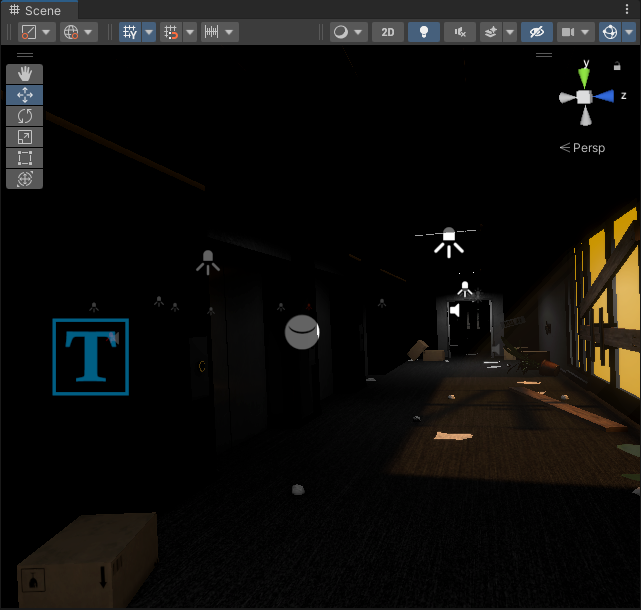
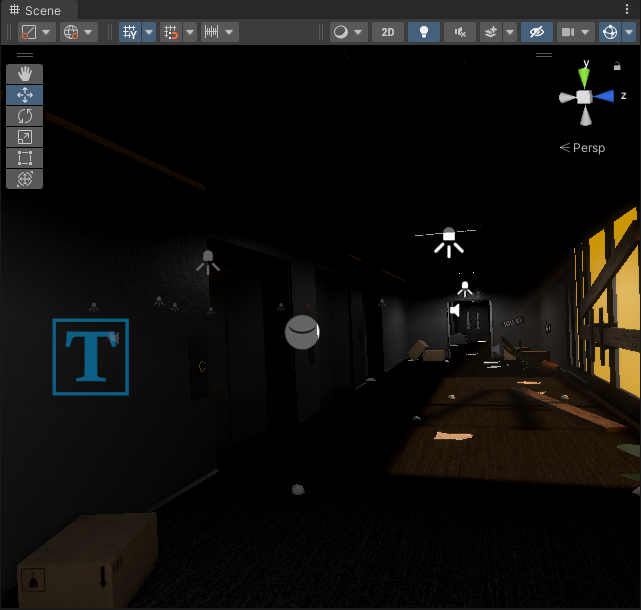
It's getting to the point where i may just resort to avoiding baking shadows and losing a little bit of performance, baking is so annoying.
deft fiber
thorny goblet
Why do some objects just completely ignore baking? after baking: https://i.imgur...
Probably 80% of those cases is because of missing or invalid lightmap UVs
thorny goblet
deft fiber
Probably 80% of those cases is because of missing or invalid lightmap UVs
How do i fix this, i have custom walls that i made for my game through blender?
deft fiber
thorny goblet
How do i fix this, i have custom walls that i made for my game through blender?
You start by diagnosing the problem by checking GI debug views and console for lightmap errors
If that reveals lightmap errors (or other errors like texel invalidity while you're at it) then you can focus on fixing them
 dark grove
Does anyone know why my shadows are so jank?

This is the light source

and the URP settings

 stable patio
dark grove
Does anyone know why my shadows are so jank?
stable patio
dark grove
Does anyone know why my shadows are so jank?
looks like depth bias problem, lower it until it fits, in too low of a setting can show some shadow clipping
deft fiber
@dark grove This problem is consistent with a too high shadow normal bias
However the 0 we're seeing in your quality settings isn't consistent with what we're seeing in the scene
I've noticed some similar weird inconsistencies between per-light bias settings and URP asset bias settings
I'd verify that the URP asset you're editing is also the one that's active from quality settings
But most importantly try giving custom bias settings for your light, such as 1 depth and 0 normal and see if it changes
 dark grove
deft fiber
I've noticed some similar weird inconsistencies between per-light bias settings ...
dark grove
deft fiber
I've noticed some similar weird inconsistencies between per-light bias settings ...
I managed to massively improve it, the range on my spotlight was 100 which seems too high
lowering it to 20 or so and adjusting the near plane to 0.1 made a big difference
I wanted the higher range since it's a flashlight and it wasn't really lighting up the night scene outside at lower values
 spark python
point light affects particles only on 1 side(rotation doesn't matter), what may be causing the issue?(using URP)
 tired inlet
Do the particles have shadow casting enabled in the renderer?
blissful ether
Does anyone have much experience with Bakery?
Is it a lot better than the default lightmapper in terms of speed / quality?
deft fiber
spark python
point light affects particles only on 1 side(rotation doesn't matter), what may ...
It's a bit hard to see what exactly is going on
Are your particles using normal maps? Sometimes normal map issues cause misplaced shadowing
Regardless of that if you're using billboard particles they are technically quads that face the camera, so any light behind them cannot illuminate themat least not with the default lit shader
blissful ether
Going to pitch this in here as it seems to be a lighting issue. I have a lit shader that appears fine in the scene view, but when the game runs receives no light from the (sole) directional light or the environment at all, and appears black as a result
I'm using a Mixed directional light, and I would've thought it would light my water, which isn't marked as static.

Scene editing ^
Same scene view when game is running ^, also how it looks ingame

The game camera view also renders it properly when the game isn't running.
I will mention it works with Realtime directional lights, but I don't want to use that for quality reasons. The realtime lighting also doesn't appear to shadow the water.
 plush valley
Global Illumination. Preparing Bake is stuck at 6% and the remaining time just keeps on increasing
blissful ether
plush valley
Global Illumination. Preparing Bake is stuck at 6% and the remaining time just k...
Cancel the bake and retry
 brittle briar
I've been a big fan of the command prompt aesthetic and how bright and contrast-y it is so I took a screenshot of a bunch of hastags and tried to apply them to objects in my game as materials
but no matter what I try i'm not able to to get it to look bright enough
this is what it currently looks like

but I really want it to look super punchy bright and super high contrast, how could I do that?
oak dawn
yeah that's probably because there's lighting going on here, you need to make sure the material is unlit and with a white color
also the command prompt for me isn't even white, it's just a bit brighter than your image
also one last thing i forgot to mention, is you might want to switch color spaces (gamma or linear)
brittle briar
yea you were spot on here!! upping the contrast elsewhere and changing the material shader did the job
thanks!
oak dawn
no problem, glad you figured that out
 near gorge
my middle barriers and road have light lines on contact points, the road is procedurally generated and cut into few meshes. it only happens with baked lights, what should i change in settings?


 chilly kettle
near gorge
my middle barriers and road have light lines on contact points, the road is proc...
chilly kettle
near gorge
my middle barriers and road have light lines on contact points, the road is proc...
The easiest way to mitigate seams is to combine meshes in a 3D modeling package. But you said, its generated. Mesh.CombineMeshes method combines meshes into one, achieving the same result as merging them in a DCC package.
You could also change them, to not be baked. It would be enough if they are lit by lightprobes i think.
you have something weird here too

OR if thats not what you want: Try using meshes to hide seams between objects. This is a commonly used technique in game development.
like a metal part there, that hides the seams between the barriers
near gorge
chilly kettle
You could also change them, to not be baked. It would be enough if they are lit ...
realtime lights are great and it is not happening but i've heard that baked ones are better for weaker pc. i can connect everyting into one mesh but is it going to be performance friendly? the road has a few kilometers. i will try to play with lightning settings and bake something better. thank you tho. sing meshes to hide seams between objects sounds interesting and i will do it but not on the highway
near gorge
chilly kettle
The easiest way to mitigate seams is to combine meshes in a 3D modeling package....
is it possible to connect it, bake one huge object and then cut again to avoid rendering the whole highway at once?
chilly kettle
near gorge
realtime lights are great and it is not happening but i've heard that baked ones...
Lightprobes are not realtime.
You bake the probes and your Barriers will take their lighting informations from them.
Its overkill to bake your barriers, because they are so simple and you have no real benefit of baking them.
I guess you are driving quite fast and will not see any baked details in 90% of the time?
AND, you are using a low poly style that will fit a simple lighting approach.
blissful ether
I think Bakery (asset) has some sort of mitigation for this issue
deft fiber
Having to blend lightmaps of adjacent pieces of modular geometry is tricky
Here's how they did it TES: Scrolls https://www.youtube.com/watch?v=KbxiGH6igBk
blissful ether
Is there a way to have a light only effect realtime shadows (and no lighting)? I need a way to shadow my dynamic objects from static geometry, a lot of my game is indoors with sharp shadows
And having objects move around but receive no shadows isn't very immersive in VR
I know source(2) can use baked shadows for static geometry and realtime shadows for moving objects
The problem with just having 2 directional lights one baked one realtime is that areas are twice as bright as they should ber
deft fiber
blissful ether
I know source(2) can use baked shadows for static geometry and realtime shadows ...
Unity has this also in the form of mixed mode lighting
You can use these workarounds here:
https://support.unity.com/hc/en-us/articles/207820473-Mixed-mode-lighting-my-baked-objects-are-not-casting-shadows-on-RealTime-objects
Or shadowmask lighting if you want it perfect
https://docs.unity3d.com/Manual/LightMode-Mixed-Shadowmask.html
blissful ether
deft fiber
Unity has this also in the form of mixed mode lighting
You can use these workar...
Seems like shadowmask is the right answe
Duplicating every mesh shadows only seems like it would tank performance pretty quick
deft fiber
Realtime shadows are technically cast by "duplicated" meshes
blissful ether
Why doesn't the article include shadowmask stuff?
blissful ether
deft fiber
Realtime shadows are technically cast by "duplicated" meshes
In the shadowmask thing also?
Sounds a little icky, but I'm assuming there's some optimisations under the hood
deft fiber
blissful ether
In the shadowmask thing also?
Shadow casting lights in general are practically cameras that render each shadow mesh anew for the shadowmap
Baked lights don't do any of that since the shadows are just painted onto the lightmap
Mixed lights do both, in different ways depending on the mode
blissful ether
Sounds promising, and is easy to cut down for weaker hardware
I do wish the API was a little more extensive
deft fiber
blissful ether
Why doesn't the article include shadowmask stuff?
Article is probably older than shadowmasking
blissful ether
(nvm, found it)
deft fiber
blissful ether
I do wish the API was a little more extensive
We always do
But the light modes and shadowmasks still have a lot of power out of the box, as long as you can wrap your head around them
With distance shadowmask you basically get the best possible shadows and lights from baked and realtime both, but it's got the biggest cost
blissful ether
deft fiber
With distance shadowmask you basically get the best possible shadows and lights ...
Yeah honestly it looks great.
I do wonder if it could be optimised to just cover the edge cases of static geometry, but it works what I want completely now.

Idk if this belongs more in #archived-shaders , but is there a reason my plane isn't receiving any realtime shadows?
I know vertex displacement can make that tricky, but it'd be nice to know if I'm missing something
I'm using the lit shader graph
deft fiber
blissful ether
I know vertex displacement can make that tricky, but it'd be nice to know if I'm...
Can't say I recall any particular problem with it
If you've enabled receive shadows then it should just work, I think, regardless of vertex displacement
 dusty agate
Hello, I have a big light problem. No matter what settings I make, Point and Spot Lights don't show up for me. I also tried different render pipelines and new projects. Is this or similar problems known?
blissful ether
dusty agate
Hello, I have a big light problem. No matter what settings I make, Point and Spo...
Could be a lot of things, could you show us a scene you've set up?
What lighting settings are you using?
blissful ether
deft fiber
If you've enabled receive shadows then it should just work, I think, regardless ...
Yeah I thought this too, but no luck so far.
blissful ether
deft fiber
If you've enabled receive shadows then it should just work, I think, regardless ...

My shader settings

Plane settings
blissful ether
Assuming that seam in the floor is a seperate mesh?
Can you show t he settings for the car mesh? Or that floor
I'm assuming contribute GI could be unchecked
or receive shadows is off in material
Okay 🙂
Seems fine, do they receive realtime light properly?
deft fiber
looks like lightmap UV scale / padding / seam issues
deft fiber
dusty agate
Hello, I have a big light problem. No matter what settings I make, Point and Spo...
could show what it looks like when you place a light next to a default cube in a new project
drowsy talon
I'd check how the car looks on the lightmap. If it is indeed lightmapped, you should be able to open the lightmap preview window from the its inspector.
Those settings are a bit on the low end 😛
Scale in lightmap of the renderer, lightmap resolution, lightmap size and lightmap padding can all have an effect on something like this
But inspecting the object on the lightmap layout should give you a better idea of what is going wrong
blissful ether
It may be worth trying those assets in another project, and seeing if the lights have similar issues
deft fiber
with low resolution padding pixels will consume relatively much more space, and with complex meshes they may consume all of it
if lightmap resolution is lower than minimum resolution defined in lightmap uv settings there will be problems
max lightmap size should be bigger like 1024 or 2048
It only forces splitting into multiple textures, which becomes a problem if they are too small
spark python
deft fiber
It's a bit hard to see what exactly is going on
Are your particles using normal ...
no normal maps and the lighting is constant no matter the camera rotations, although I fixed it by disabling custom vertex streams, not sure why it was happenning
 cold ginkgo
Hello! First time asking a question. I'm working on an unity project that is serving as visual data gathering experiment for university. My issue is that my professor has provided me with models that he generated with specific camouflage textures. Due to the nature of how these were made it is important that they do not have any lighting applied to them from the scene and appear with their intended colours. I have created a new layer called unlit and set my light culling mask to exclude the unlit layer. However this make them too dark. I have attempted to search for a solution online but I couldn't find any. My best attempt was to apply an emission however this also affect the colour making them appear too light. Any advice would be most welcome! First picture is in blender, colour as intended, Second is unlit, Third is unlit + Emission with the setting in the forth picture


 deft fiber
cold ginkgo
Hello! First time asking a question. I'm working on an unity project that is ser...
deft fiber
cold ginkgo
Hello! First time asking a question. I'm working on an unity project that is ser...
try Unlit shader
the shader in your screenshot is Lit
cold ginkgo
Unlit seems to just make this unfortunately

 dusty agate
It was my notebook. The energy saving setting did not show the light sources. Thank you for your assistance @blissful ether @deft fiber
drowsy talon
cold ginkgo
Unlit seems to just make this unfortunately
Can you show the importer preview for the albedo texture? Does the texture look correct after import?
cold ginkgo
drowsy talon
Can you show the importer preview for the albedo texture? Does the texture look ...
Sorry I am very inexperienced with models how would I see this?
drowsy talon
cold ginkgo
Sorry I am very inexperienced with models how would I see this?
Find the texture in the project browser / file view, click on it, at the bottom of the inspector there should be a preview of it
You should just be able to click on the little thumbnail next to "Base Map" on the material inspector
On your last screenshot
To navigate to it
cold ginkgo
drowsy talon
Find the texture in the project browser / file view, click on it, at the bottom ...
The one at the bottom here? Thanks for the help

It dose look like its not acting right there too
drowsy talon
that's the model importer you are looking at

See what I do on this gif? First use the material inspector to find the albedo (color) texture, then press on it to view the texture inspector
cold ginkgo
Ow here? I dont think I have exactly the same options as you for some reason
 drowsy talon
Oh wow, that's tiny 😛
Can you send me the texture?
DM is fine if you don't want to do it in here
cold ginkgo
Sure thing
that should be everything for that ghost
I sadly have like over a 100 I need to fix
drowsy talon
On the texture inspector I showed you how to find, try choosing these settings:

woops wrong

like that
and then hit apply
cold ginkgo
drowsy talon
On the texture inspector I showed you how to find, try choosing these settings:
Thats looking a little better but still not quite right

 deft fiber
@cold ginkgo Set Compression to "none" also
It may help to disable "generate mip maps" with a texture that small
cold ginkgo

 cold ginkgo
I think that may have done it
 drowsy talon
Nice. It's on by default because usually you want your textures to have sizes that are powers of 2
But for a texture so small, which is essentially being used as a palette, it just blurs out the palette and smushes the colors together
The UVs are all on the centroid of 1 of 4 differently colored pixels, so I was confused changing the filter mode had an effect at all. Makes sense though, since the actual texture wasn't being sampled, but a blurred version of it
cold ginkgo
drowsy talon
Nice. It's on by default because usually you want your textures to have sizes th...
Thats great thank you so so much for your help @drowsy talon & @deft fiber !
cold ginkgo
drowsy talon
the texture is 10x10, I didn't realize
I dont know why he had mad it so tiny
drowsy talon
For a texture that is being used as a palette, it makes sense to have a tiny texture. The stranger part is that it isn't a power of 2 size
That is very much the norm for these kinds of textures
cold ginkgo
I think he generated them in matlab so that might be why
cold ginkgo
I just applied everything to the other types of camouflage too and it all works. You have saved my master project thanks again!
 craggy ember
Hey, map map in Unity is modular and i have problem with lightning on wall joints.
Do you know how to fix it?

Is there a way to fix this?
 chilly kettle
craggy ember
Hey, map map in Unity is modular and i have problem with lightning on wall joint...
chilly kettle
craggy ember
Hey, map map in Unity is modular and i have problem with lightning on wall joint...
You can try Stitch Seams

If this doesnt help, you can try disable filtering in the bake settings.
If disabling filtering does not solve the issue, try increasing Lightmap Padding value. When working with modular meshes, each mesh has its own UV atlas. Lightmap Padding property allows you to change the distance between UV atlases – but not between UV shells within the atlas - to prevent leaking.
craggy ember
Thanks for the answer, but none of this worked for me.
chilly kettle
Show me the bake settings pls ^^
craggy ember
chilly kettle
Show me the bake settings pls ^^
 chilly kettle
how many of these modular pieces do you have?
chilly kettle
im wondering why your lightmap is only 512x512 px
craggy ember
I wanted to do a faster generation to see the preview result
chilly kettle
i guess your problem maybe is, that its quite dark there.
one more think you can try, is adjusting the "Scale in Lightmap" in the MeshRenderer of your walls
so they get more space
craggy ember
to be precise, my settings looked like this

I've seen games where whole maps were built from modules, so there's clearly something wrong with me
craggy ember
chilly kettle
i guess your problem maybe is, that its quite dark there.
one more think you can...
yes, it's horror map
chilly kettle
Your problem is sadly a normal thing when dealing with modular pieces
often seams will be hidden by placing other geometry over them, but thats not a thing in your case
craggy ember
chilly kettle
Your problem is sadly a normal thing when dealing with modular pieces
But still, are there any ways to fix this problem?
chilly kettle
watch chapter 10 here:
https://forum.unity.com/threads/lightmapping-troubleshooting-guide.1340936/#post-8467097
Unity Forum
Introduction
I developed this guide in order to help developers get the most out of Baked Global Illumination (GI) in the Unity Editor. Here, I unpack...
craggy ember
chilly kettle
watch chapter 10 here:
https://forum.unity.com/threads/lightmapping-troubleshoot...
ok, thanks for help
 left cedar
Is there a way to update the env reflection to always be in sync with the sky box gradient? (I'm changing the gradient colors during gameplay and would like the reflections to keep up with this)

 gritty fox
Tried a few methods now but not getting anywhere than what I currently have. Can I get some advice on a better way to make the lighting better and actually look like its coming from the ceiling lights?
Of course with the point lights being so close to the ceiling the lights look odd. Ive tried spotlights but the ceiling doesnt become lit. Preferably need a way for mixed lighting+shadows.


 timber lichen
hello, how to make the box going dark when going under the table
 deft fiber
left cedar
Is there a way to update the env reflection to always be in sync with the sky bo...
deft fiber
left cedar
Is there a way to update the env reflection to always be in sync with the sky bo...
Unity already has an integrated method for this, which is the Source: Skybox together with
https://docs.unity3d.com/ScriptReference/DynamicGI.UpdateEnvironment.html
This should update both the spherical harmonics representation of ambient lighting as well as the reflection cubemap texture
Otherwise you'll need to be using your own math or pre-existing colors and cubemaps using the methods in
https://docs.unity3d.com/ScriptReference/RenderSettings.html
deft fiber
timber lichen
hello, how to make the box going dark when going under the table
You need light probes in each point in space where the lighting has changed, such as below the table in shade and right around the shadow
Your probes should not be overlapping with the ground or other geometry like they are now
 slim rose
Hey guys, I am new to unity lighting, I have tried to bake a scean all the objects are set to the static and generative lightmap check box is true. But still certain area are totally black and others are partially black why is that and how can I fix it.
 deft fiber
slim rose
Hey guys, I am new to unity lighting, I have tried to bake a scean all the objec...
deft fiber
slim rose
Hey guys, I am new to unity lighting, I have tried to bake a scean all the objec...
Check lightmap overlap and texel validity views for potential issues
 light furnace
right so i'm making a scp-087(infinite staircase) game and i'm facing a issue; i'm using HDRP lighting and my staircase is automatically generated when the game starts but i'm facing a issue of the game looking like this and i have no idea why. i'm new to HDRP in general so any help would be appriciated

 limpid notch
Hi we have a problem with the leaves when i go forward the shadows behave strangely when we turn off the shadows everything is ok it only happens in the build in the editor its ok
drowsy talon
limpid notch
Hi we have a problem with the leaves when i go forward the shadows behave strang...
Are the trees using LODs? Also, how are the being lit? Baked shadows, or realtime lighting?
limpid notch
realtime lighting, yes they have lods
drowsy talon
If you disable the lodding, do you still see the issue?
You can crank the lod bias in project settings as a quick check
limpid notch
I see this only in build in editor problem doesn't exist
when I press play this works normally, I don't know why in build it act like this :/
 novel meadow
craggy ember
Hey, map map in Unity is modular and i have problem with lightning on wall joint...
novel meadow
craggy ember
Hey, map map in Unity is modular and i have problem with lightning on wall joint...
Try disabling the denoiser
 meager basalt
does anyone know why the shadows are returning as a random straight line in a build but correctly in the game view


 gritty fox
Hi would like some advice on improving my lighting. I've tried point lights only vs spot light + baked emissive materials
this is with point lights only


and this is with spotlights+baked emissive materials

I feel like I should just stick with the point lights, but the lights on the ceiling look very odd because theyre positioned right on the ceiling lights for a more realistic shadows look.
any tips for this scene?
 zealous trout
Can anyone help me fix why my lightmaps are bugging out like this?
 little condor
zealous trout
Can anyone help me fix why my lightmaps are bugging out like this?
little condor
zealous trout
Can anyone help me fix why my lightmaps are bugging out like this?
Have you generated the lightmap for that model?
zealous trout
little condor
Have you generated the lightmap for that model?
ohhh that makes sense, so no i have not yet
 iron dome
craggy ember
But still, are there any ways to fix this problem?
iron dome
craggy ember
But still, are there any ways to fix this problem?
Create your own uv maps for lightmap is an option
rather than letting unity auto generate it
deft fiber
I recommend letting unity generate it first
The problem usually is that there's no lightmap UV map at all
 mild quiver
hey there, I'm trying to understand APV, and I was under the impression that the probes should adapt to the geometry, but instead they're evenly spaced throughout the scene. I checked every setting. everything is set to static, and when I switch to "Validity" in probe visualization it correctly identifies the probes that go inside of the geometry. dilation and virtual offset are both enabled with default settings. what am I missing?
 tired inlet
Is there any reason mixed lighting in Baked Indirect mode does not bake indirect lighting to the lightmap, or that same indirect lighting in to the light probes? It will do if the lights are set to baked instead...
tired inlet

Baked indirect is purple/pink?
Lights are slightly orange on white walls
It makes no sense for the indirect to be this color I am losing my mind
deft fiber
tired inlet
It makes no sense for the indirect to be this color I am losing my mind
That assessment seems right
Are your walls using a custom shader by chance?
tired inlet
No, just HDRP lit
I am using the baked indirect mode as it is required for my project
Maybe that gives a clue*
deft fiber
tired inlet
I am using the baked indirect mode as it is required for my project
Required in what way?
tired inlet
We have a dense night time interior scene where we want to take advantage of mixed lighting and realtime shadows
Baked indirect seems to reduce our performance draw over shadowmask and removes the 4 mixed light overlap limit as it does not create the shadow masks for the baked shadows
But even a light in just baked mode bakes pink now
 deft fiber
Ah, so not a technical limitation from using a weird version or something
I haven't seen this kind of issue before
In this situation I'd do some test bakes in a blank new scene with default cubes to confirm that baking does work as expected in a barebones situation
If it doesn't work as expected in a blank scene with some cubes, that means something is fundamentally wrong in a way that doesn't implicate your main scene, its meshes, lights or lighting settings
tired inlet
deft fiber
If it doesn't work as expected in a blank scene with some cubes, that means some...
Yeah I'll give that a shot, currently trying a bake with CPU baker instead of GPU to rule out some of that "preview" buggyness
tired inlet
deft fiber
If it doesn't work as expected in a blank scene with some cubes, that means some...
Okay yeah it works in an empty scene


Hmmmmmmmmmmmmmmmmmmmmmmmmmmmmmmmmmmmmmm
deft fiber
tired inlet
Okay yeah it works in an empty scene
So that means it's likely the mesh, lighting settings, lights or something else in the main scene
deft fiber
The process of elimination 
tired inlet
I love these unity curve balls
I have been working with it for over 10 years and it's never a dull moment
tired inlet
deft fiber
The process of elimination <:meowder:854648525152452608>
So it worked when I created a new lighting settings asset in my main scene
But then on my second bake everything was pink again
This is some spooky shiz
If I then create another new lighting settings asset it works again
deft fiber
tired inlet
If I then create another new lighting settings asset it works again
Any effect if you clear baked lighting cache between bakes?
tired inlet
I'll check that too
deft fiber
Which editor and HDRP versions are you using out of curiosity
tired inlet
deft fiber
Which editor and HDRP versions are you using out of curiosity
2022.3.5f1 and 14.0.8
deft fiber
tired inlet
2022.3.5f1 and 14.0.8
I might try patching to 2022.3.7f1
.4f1 and .5f1 in particular were plagued by many issues, though the whole 2022.3. is the least functional LTS I've ever seen
tired inlet
deft fiber
I might try patching to 2022.3.7f1
.4f1 and .5f1 in particular were plagued by m...
Unfortunately 2022.3.7f1 currently breaks a cloth plug in we use for character clothing
Unity is on a roll for sure 😛
If all else fails I could try updating to .7f1 to see if the issue is localized to this version
deft fiber
tired inlet
If all else fails I could try updating to .7f1 to see if the issue is localized ...
Patching should be pretty riskless
Could also try downgrading a backup to 2021.3. or upgrading one to 2023.1.
tired inlet
Yeah but we can't use it for production currently as it seems to break our cloth physics
But I'll still try and see
Thanks for all the brainstorming 
burnt brook
Should i use box projection on reflection probes, or should i just place multiple reflection probes where i need them
deft fiber
burnt brook
Should i use box projection on reflection probes, or should i just place multipl...
Whichever looks better
Box projection lets you have parallax on the reflections but if the area isn't box shaped the parallax may look worse than better
burnt brook
deft fiber
Whichever looks better
Box projection lets you have parallax on the reflections ...
Ok, all i want to know is: can i place as many baked reflection probes as i want and not have it impact performance
Because i get wierd issues when using big reflection probes in big rooms
deft fiber
burnt brook
Ok, all i want to know is: can i place as many baked reflection probes as i want...
They're not expensive but not free either, especially if you're blending between multiple
Maybe the "weird issues" are the root of the problem
burnt brook
deft fiber
Maybe the "weird issues" are the root of the problem
I don't think so, they appear on multiple versions and even after i reset my entire pc
deft fiber
burnt brook
I don't think so, they appear on multiple versions and even after i reset my ent...
Any hints what they look like?
Anye details you can provide can help
burnt brook
deft fiber
Any hints what they look like?
 burnt brook
deft fiber
Anye details you can provide can help
burnt brook
deft fiber
Anye details you can provide can help
Gets worse with lower resolution + only happens with box projection
deft fiber
You mentioned big rooms and big reflection probes
Can you show the probe settings?
burnt brook
deft fiber
You mentioned big rooms and big reflection probes
Can you show the probe setting...
 burnt brook
deft fiber
You mentioned big rooms and big reflection probes
Can you show the probe setting...
burnt brook
deft fiber
You mentioned big rooms and big reflection probes
Can you show the probe setting...
Also it gets worse with higher intensity
deft fiber
Nothing looks unusual here
My guess is it might be some weird hardware incompatibility
burnt brook
deft fiber
Nothing looks unusual here
My guess is it might be some weird hardware incompati...
They appear on my pc and my quest 2
They are worse on quest, probably bacause of the lower resolution
Here's a Video of them on my pc
It's hard to spot them, but on quest 2 (mobile vr headset) they are very apparent
deft fiber
burnt brook
What shaders are on the geometry?
burnt brook
deft fiber
What shaders are on the geometry?
Universal Render Pipeline/Lit
deft fiber
burnt brook
Universal Render Pipeline/Lit
Nothing suspicious there either
I'm out of ideas
burnt brook
deft fiber
Nothing suspicious there either
I'm out of ideas
I am too, my current strategy is to disable box projection and just add a custom reflection probe for these speheres
But i don't know how performance heavy that is
deft fiber
What do you mean by "custom reflection probe"
burnt brook
deft fiber
What do you mean by "custom reflection probe"
A reflection probe just for these spheres, so i have a global reflection probe for interactables and stuff like that and then a custom reflection probe for every area that has static highly reflective geometry like these spheres.
So that they look accurate rotation wise
That the specular highlights face the right direction thats what i mean
deft fiber
burnt brook
That the specular highlights face the right direction thats what i mean
I don't exactly
Reflection probes are independent of any rotation
You're supposed to have one probe per room or area
All objects within it will get their reflections from it
The lit shader will do all the rotation and position calculations for reflection relative to the probe
burnt brook
deft fiber
The lit shader will do all the rotation and position calculations for reflection...
No thats now what i mean. Not relative to the probe but relative to the lights
deft fiber
Are you talking about realtime probes or baked probes?
deft fiber
burnt brook
No thats now what i mean. Not relative to the probe but relative to the lights
Either I'm misunderstanding how your reflections are set up or you're misunderstanding what reflection probes do
burnt brook
deft fiber
Either I'm misunderstanding how your reflections are set up or you're misunderst...
I tried my best

Box Projection makes it so that the reflection is from a point in 3d space in that box
deft fiber
I know what box projection does but assuming you can't use them I'm not sure how a "custom" reflection probe will solve the problem or what it is
With probes custom usually refers to a custom provided cubemap texture instead of a baked one
But it doesn't have the parallax effect you seek
burnt brook
deft fiber
With probes custom usually refers to a custom provided cubemap texture instead o...
Its just a reflection probe that near the spheres so that their highlights face the actual lights in the room
burnt brook
deft fiber
I know what box projection does but assuming you can't use them I'm not sure how...
I meant to reply to this
deft fiber
I see! Having multiple local probes to blend between has a cost but probably not prohibitive
burnt brook
deft fiber
I see! Having multiple local probes to blend between has a cost but probably not...
Yeah its better then having these wierd issues or terrible looking reflections
@deft fiber here i enable the "custom reflection probe" to make the reflection look more realistic
deft fiber
burnt brook
<@166982635950702592> here i enable the "custom reflection probe" to make the re...
Still by "custom" you mean "local", I assume?
A downside might be a jarring transition at the bounds between probes
burnt brook
deft fiber
Still by "custom" you mean "local", I assume?
I guess that what i mean, its just a reflection probe, i think you can't change between global and local. But this one is in another bigger reflection Probe
deft fiber
burnt brook
I guess that what i mean, its just a reflection probe, i think you can't change ...
Basically so
 fathom mountain
Hello, have had an issue understanding lighting for some time and I've got an issue getting it to work properly for me and I'm out of ideas. Any help would be greatly appreciated. All of these rooms are set to Two sided shadow casts and recieve shadows on. Yet I get these strange lights, stripes, shapes etc that don't follow the rest of the "darkness" so to say.
 chilly kettle
fathom mountain
Hello, have had an issue understanding lighting for some time and I've got an is...
chilly kettle
fathom mountain
Hello, have had an issue understanding lighting for some time and I've got an is...
What strange Stripes?
fathom mountain
Let me highlight them.
fathom mountain
chilly kettle
What strange Stripes?

Some areas get just pitch black, and it doesn't really follow a pattern to why it does so. Been scratching my head for the past month trying to figure this out
Here's a different angle, again with random squares of just darkness for some reason
 chilly kettle
Okay. a few questions.
- Did you bake your light?
- What Pipeline are you on?
- Did you do the models & materials by yourself?
fathom mountain
It is baked.
Built-in
I did not do the models or materials.
 fathom mountain
 tired inlet
deft fiber
So that means it's likely the mesh, lighting settings, lights or something else ...
tired inlet
deft fiber
So that means it's likely the mesh, lighting settings, lights or something else ...
I thought you might like an update, it seems to be localized to the GPU baker only
CPU is baking with no issues
deft fiber
tired inlet
I thought you might like an update, it seems to be localized to the GPU baker on...
The GPU lightmapper is known to be more prone to glitches but I find they're pretty rare still
I'd make sure GPU drivers are updated
tired inlet
deft fiber
The GPU lightmapper is known to be more prone to glitches but I find they're pre...
RTX 4090 and fully updated yeah
I don't know I've been using GPU baking for a long time too, it's only after switching to HDRP our project seemed to be getting issues with light baking
deft fiber
Weird one 
dark grove
Does anyone know what might be causing these shadows to change when you're far enough away from the light? Using URP
deft fiber
dark grove
Does anyone know what might be causing these shadows to change when you're far e...
Looks like pixel light limit per object
dark grove
deft fiber
Looks like pixel light limit per object
That's what it was, I was changing it on the wrong URP asset lol
thanks
gritty fox
gritty fox
Hi would like some advice on improving my lighting. I've tried point lights only...
anyone able to advise on this?
tired inlet
gritty fox
and this is with spotlights+baked emissive materials
Depending on the pipeline area lights are also an option
gritty fox
HDRP
tired inlet
Then yeah you could try that as well, with an area light you more or less get the rectangular shape light
gritty fox
was gonna try them before but they were a bit odd ish to work with
tired inlet
If you don't have more than 4 overlapping you can set them to mixed for some nice indirect bounce lighting and shadows
gritty fox
ah okay
ill mess about with them
shadows arent very good and the area lights dont do anything for the ceiling
i think my best bet will probably be to make the lights/ceiling larger and stay on the point lights
 polar wadi
Hello, is it possible to generate lightmaps at runtime? My scene actually loads custom asset from the StreamingAssets folder using Trilib so I don't have any lightmaps prepared for the asset. Moreover, the time of the day is dynamic so the lightmap would need to change all the time.
What's the best solution for this? Using URP
 blazing hinge
Can I get one single light source to affect multiple layers of a 2D project? I have a light source that must only affect the background layer and one that must affect every layer of the foreground (like solid, transparent, decorations and so on...) is there a way for the second one to affect all those layers together?
 night shell
polar wadi
Hello, is it possible to generate lightmaps at runtime? My scene actually loads ...
night shell
polar wadi
Hello, is it possible to generate lightmaps at runtime? My scene actually loads ...
not really such a thing as generating lightmaps at runtime, that is what realtime lighting is for
the closest solution you'd find within unity would be using enlighten realtime GI but that requires precomputation of the scene
not sure exactly if that would suit your case although I would assume not
deft fiber
Light probes and APVs can light up any mesh in their range, even new ones unlike lightmapping, though they can't be re-baked at runtime either
Blending between lighting scenarios is probably technically possible for light probes but not natively supported, for APVs it's supported now in HDRP and later in URP
 proper hemlock
Hey guys
I have a normal sized map. Not that big with not too many details. But I have large rocks made into cliffs. And to reduce batch counts I merged those rocks. But when I bake lights, all the merged objects have patches of white spots on them
chilly kettle
proper hemlock
Hey guys
I have a normal sized map. Not that big with not too many details. But ...
You should provide us with some screenshots, because "white spots" can be everything ^^
proper hemlock
 chilly kettle
proper hemlock
chilly kettle
proper hemlock
Did you bake the light after merging the mesh again?
proper hemlock
After merge
Yes baked the lights just now
And baking lights on this setting took me 5 hours 👀

Sorry I can't take a SS. I'm on companies PC and I don't want to use social media on public device
polar wadi
night shell
not sure exactly if that would suit your case although I would assume not
Got it. That would be a solution but quite complicated to implement indeed. I found an asset online, Lumina, which seems to do what I need. I'll give it a shot. Thanks for your help!
 rich knot


 marsh matrix
Hi! Lighting noob here. I'm making a game where most of my objects are static. So I was thinking of baking all my lights. But since the player can place some objects in runtime, I realize these wont be getting any light/shading. So I was thinking that maybe there is a way of using baked lights, and only using realtime lights for the objects that the player can place? if so, how can I make sure that the realtime lighting only applies to the dynamicly placed objects? And is this even more performant than ONLY using realtime lighting for everything?
chilly kettle
marsh matrix
Hi! Lighting noob here. I'm making a game where most of my objects are static. S...
Hi.
You can use "Light Probes" to apply the baked light onto dynamic objects. (Performant)
YOu can also use Realtime lights and add a "culling mask". Then you only have to apply a Layer to your Dynamic Objects and uncheck this layer in the culling mask. So they wont get lit by the light.
marsh matrix
chilly kettle
Hi.
You can use "Light Probes" to apply the baked light onto dynamic objects. (P...
Thanks!
errant plank
when I baked my lighting, my lightmap was dark, is there any way to brighten it up? pls help
 exotic knoll
Hello! I'm blind and need a second pair of eyes. I'm working on a game that's in Unity but uses a custom voxel lighting system. That system was really cool when we first implemented it, but the person who wrote it isn't on our team anymore and nobody (including myself) knows how to work with it and improve it. It's hard on the GPU, it doesn't look particularly great compared to Unity's own lighting system, and we've decided as a team to replace it. But it has an effect that I don't know how to describe but that we want to keep. Wondering if someone could tell me what the effect's called and if it's possible to create it in-engine, or otherwise if someone can point me in the right direction.
Posting a screenshot of some lights in the game

I set this scene up myself in the game, there's two lights, one of them is white and the other has an RGB rainbow breathing effect on it
I wanna recreate that sorta fog circle around both the lights
I....don't know enough about lighting to know what that's called
night shell
exotic knoll
almost looks like an effect called "bloom" but since one of the lights are offscreen but still has a circle around it it looks like an effect called "volumetric lighting"
night shell
doesn't look too good though it almost looks faked
exotic knoll
Not sure how I'd recreate that with Unity's built-in lighting though
exotic knoll
night shell
doesn't look too good though it almost looks faked
It's actually based on the lighting system from LittleBigPlanet 2
but yeah
it's really bad quality, we massively decreased the quality for performance reasons and uhhhh...it's still really hard on the GPU which is why we're replacing it
plus the game's moving from an LBP-style layer system to fully 3D physics/movement, so it makes sense to have 3D lighting as well
night shell
exotic knoll
It's actually based on the lighting system from LittleBigPlanet 2
do you have any references videos?
exotic knoll
what if I just .... go into LBP and take a screenshot of a light in that
night shell
go for it
looking for what you describe on google but not really seeing results for it
exotic knoll
Sorry about the cut-off other light btw
That image was from a test level on Steam Workshop and the camera wasn't at a great spot when I published
night shell
found some articles, so it looks like its an actual volumetric lighting implementation they had in LBP2
which yep, I was right with identifying it, although in your screenshot it doesn't look quite
but to answer your question
yes its possible to create within unity
as a matter of fact there are various solutions that exist that you can browse
some paid, some free, not sure what criteria you are using for your project
i.e. if your using the built in pipeline, URP, or HDRP
exotic knoll
We're using the built-in pipeline because of the custom lighting system
and a decal system
anyway
just so we're on the same page

I wanna recreate that fog effect
the light on the left has 40% fog in the tweaks menu
the one on the right is maxed out
night shell

GitHub
Volumetric Lights for Unity. Contribute to SlightlyMad/VolumetricLights development by creating an account on GitHub.
exotic knoll
Think this is the exact same repo I got linked to by another team member
Says it has issues with translucent geometry though
Since we do have translucent glass materials in the game though, that's probably not ideal
night shell

Add depth to your next project with Volumetric Lights 2 from Kronnect. Find this & more VFX Shaders on the Unity Asset Store.
exotic knoll
Though idk how LBP handles that with its system
night shell

Use the Aura 2 - Volumetric Lighting & Fog tool for your next project. Find this and more particle & effect tools on the Unity Asset Store.
exotic knoll
hmmm it's even on sale
and doesn't look to be per-seat licensed
which is beneficial
night shell
not sure how critical it is for you to have a system that handles transparent surfaces as well but I would give the free version a shot first from github if possible
I haven't seen a system though with that specific edge case regarding transparencies for unity though. It's certainly possible but I just haven't seen it implemented
but even if those don't work, if you can find someone or are willing to do the work the unity 5 implementation should be a pretty good starting point for making such a system
exotic knoll
Yeah I....I don't know how to use shaders and have no interest in learning 'em
so
I'd rather
use something existing
Anyway, this is helpful
night shell
well in that case yeah I saw a couple of asset solutions you could check out on the asset store you could probably try
exotic knoll
night shell
well in that case yeah I saw a couple of asset solutions you could check out on ...
The more the marrier tbh
As long as they're not per-seat, I can probably convince the project lead to buy 'em
deft fiber
exotic knoll
I wanna recreate that sorta fog circle around both the lights
Since the glow cuts off at the ground I don't think it's volumetrics
It resembles the "halo" feature of lights the built-in render pipeline has
A halo is basically a billboard sprite that appears on the light when scene fog is enabled
polar wadi
Hello, could anybody tell me why my HDRP directional light have no volumetric while my spotlight top has it ? I've enabled the volumetric on both lights and in the settings so I'm not sure what I'm missing.

Increasing the multiplier of the directional light does appear to increase the volume outside of the window but it doesn't pass through it appears ?
 polar wadi
OK, I found out it was the asset Enviro I use in the scene which was overriding some stuff... Nevermind my question :x
exotic knoll
deft fiber
Since the glow cuts off at the ground I don't think it's volumetrics
It resemble...
The fact it cut off at the ground was a limitation of the system and we don't actually want that anymore
deft fiber
exotic knoll
The fact it cut off at the ground was a limitation of the system and we don't ac...
The cutoff can be fixed even when using billboard sprites
exotic knoll
Still though we actually do want volumetrics.
deft fiber
Understandable!
If you need to fix billboard cutoff in some other situation, "soft particles" will help
They blend the color based on scene depth and additionally move the billboard vertices towards camera
exotic knoll
night shell
https://github.com/SlightlyMad/VolumetricLights
Since the latest commit is several years old, I decided to fork this and turn it into a Unity package

GitHub
Volumetric Lights for Unity. Contribute to acidiclight/VolumetricLights development by creating an account on GitHub.
I'm sure there's more work to be done
but it works fine in Legacy RP
and it's literally dead simple to add to a game
polar wadi
Hello, I'm having trouble getting SSGI to work in my HDRP project

I've added the SSGI volume, enabled SSGI in the RP settings but the room is still dark. Enabling SSGI ON/OFF makes absolutely no difference.
Shouldn't it at least make the room slightly brighter?? Am I missing an option somewhere?
Changing light levels do nothing either
I made sure it's enabled in the quality settings too

In the global settings too
 polar wadi
Ok after playing around with the volumes, it appears the indirect intensity volume set to 0 was the problem. Disabling it fixed my issue.
 cursive lodge
Hey I have a map with 12.000 Models and just one directional light
my max bounces are 2 and lightmap resolution 20 max lightmap size 515, lightmap compression normal quality. Shadow Render Distance 1000.
rest is default on Progressive GPU with a RTX 3090.
How long should it roughly take? I says 18 hours for me and google said that many bakes only take like 30minutes.
deft fiber
cursive lodge
Hey I have a map with 12.000 Models and just one directional light
my max bounce...
12 thousand models? I don't really doubt that time estimate
cursive lodge
deft fiber
12 thousand models? I don't really doubt that time estimate
halfing lightmap resolution made it 50 minutes
deft fiber
cursive lodge
halfing lightmap resolution made it 50 minutes
What are the models like exactly, out of curiosity
Small or high detail meshes not benefit from lightmaps or lightmap poorly, for those cases they can be set to receive lighting from light probes
cursive lodge
deft fiber
What are the models like exactly, out of curiosity
mostly lots of low poly tree instances
deft fiber
cursive lodge
mostly lots of low poly tree instances
It might work fine in your case but forests often rely on LOD culling to be performant, which isn't easily compatible with baked lightmapping
Huge wilderness areas in general often are optimized by dividing them into chunks of data that are streamed in as the player moves forward
But worry about that only if performance or load times become a problem in your case
cursive lodge
In my case i will see the entire map at once. Im not really a game dev so i just hope it works. for this project 😄
Currently the project runs at 115 fps.
 trim citrus
Hi ppl.
I'm trying to set up an emission material and it's not working how is an emission material set up? I'm literally asigning the color I want (no albedo), checking the emission emission, setting it to Realtime, and setting the HDR to the emission color I want with an intensity higher than 0. Nothing emits or at least nothing receives the liget from any object I've tried asigning the various test materials to.
oak dawn
trim citrus
Hi ppl.
I'm trying to set up an emission material and it's not working how is a...
i think you either need to setup some realtime Global Illumination, or set the emission to Baked and bake the lighting.
trim citrus
can't bake, objects b moving
oak dawn
then either add a point-light inside your emissive object or get some realtime global illumination
deft fiber
trim citrus
Hi ppl.
I'm trying to set up an emission material and it's not working how is a...
Depends what you mean by "light"
You need post processing bloom if you want it to appear glowy
trim citrus
that would solve my test object's problem, but my goal is to add this to a line renderer
oak dawn
then you either should add bloom to make it seem like it's glowing (it won't physically though) or get yourself some realtime GI solution
trim citrus
oak dawn
then you either should add bloom to make it seem like it's glowing (it won't phy...
but that's thoretically built in with emission material no?
oak dawn
and with realtime GI it really depends on what render pipeline you're using and etc. since afaik built in has a sort of semi baked (it works in realtime though) and realtime GI system, and hdrp has a fully realtime one
deft fiber
As Rainys said if you want true light emission you need to bake the lighting, or use ray tracing or path tracing
oak dawn
trim citrus
but that's thoretically built in with emission material no?
if you're using built in RP you could also check out assets like SEGI but in my testing they looked and performed awful, but i think you need to try it yourself.
deft fiber
oak dawn
and with realtime GI it really depends on what render pipeline you're using and ...
The "realtime GI" of Enlighten only supports moving punctual light sources, emissive materials can change color but they can't move
HDRP has no true realtime GI system aside from that either unless you count ray traced SSGI and path tracing
Approximating the glow with realtime lights is not a bad option
You can have a huge number of shadowless short range point lights if using deferred or forward+ rendering paths, and HDRP supports realtime area lights which can be stretched to long thin lines
trim citrus
ah alright, I'll look into it, thanks!
 sterile cedar
Was redirected here
I don't get how the lights are so janky.

This light is at 1.07 intensity
This is 1.08

If I scale the model up, shadows also stop being cast.
deft fiber
sterile cedar
I don't get how the lights are so janky.
Is that the only light you have in your scene? Which render pipeline and Unity version are you using for your project?
And how much are you scaling it up
 sly talon
hi, i'm trying to use point light but its not working in 2d urp, 3d urp or just normal 2d/3d
deft fiber
sly talon
hi, i'm trying to use point light but its not working in 2d urp, 3d urp or just ...
2D URP must use 2D lights and Lit Sprite shaders, none of which are cross-compatible with 3D URP's lights or Lit shaders
sly talon
deft fiber
2D URP must use 2D lights and Lit Sprite shaders, none of which are cross-compat...
nono, its just that my point lights are not working in any projects
deft fiber
sly talon
nono, its just that my point lights are not working in any projects
So, to confirm you are trying to use 3D point lights on 3D meshes that have the Lit shader?
Did it use to work before? Any difference between scene and game window? Which Unity version?
Any screenshots or clues that we don't have to guess could help
sterile cedar
deft fiber
Is that the only light you have in your scene? Which render pipeline and Unity v...
Unity ver is 2022.3.2f1, and it's not the only light but it's the only light in this area
Oh, it turns out it was actually too close to another light that had obscenely high range
Moving it out of the way fixes that
deft fiber
sterile cedar
Oh, it turns out it was actually too close to another light that had obscenely h...
Sounds like light limit per object issue
URP has strict pretty strict limitations on how many lights can affect an object so it's best you keep ranges as low as possible
sterile cedar
Thank you!
 cyan mural
I'm wondering... say you're making a 3D game that heavily makes usage out of a pixellated artstyle. What are some good approaches to rendering shadows within that sort of environment?
In a way that feels complimentary, anyway
I'm mostly just brainstorming, of course. I'm working on a 2.5D shooter, along the lines of stuff like Doom or recent stuff like Cultic, Project Warlock, Boltgun, etc.
And I'm just trying to pin down the artistic direction I'm going for, including the lighting
deft fiber
cyan mural
I'm wondering... say you're making a 3D game that heavily makes usage out of a p...
Depends what "pixelation" means exactly
If you specifially mean that characters are billboard sprites then there really isn't a "good" way to get 'accurate' shadows from characters, in my opinion
Project Warlock uses blob shadows
That's the best compromise you probably should aim for
oak dawn
cyan mural
I'm wondering... say you're making a 3D game that heavily makes usage out of a p...
well, if you're going for a Doom look you would need some sector lighting, if you're going for Quake you would need very low resolution soft shadows, but of course Dusk uses unity's baked lighting which also has GI which i believe the old Quake's didn't have, oh and about the characters, Quake 3 uses blob shadows and Quake 2 uses planar projection shadows (there are a lot of assets implementing that)
polar wadi
Could anybody tell me why my volumetric directional light does not show rays through the window? I can clearly see the volume outside but it doesn't seem to passe through the window...
